THIS INSTRUCTION BOOKLET CONTAINS IMPORTANT SAFETY INFORMATION. PLEASE READ AND KEEP FOR FUTURE REFERENCE.
EN
DE
FR
ES
IT
PL
With your inspiring rating, COSTWAY will be more consistent to offer you EASY
SHOPPING EXPERIENCE, GOOD PRODUCTS and EFFICIENT SERVICE!
Mit Ihrer inspirierenden Bewertung wird COSTWAY konsistenter sein, um Ihnen EIN
SCHÖNES EINKAUFSERLEBNIS, GUTE PRODUKTE und EFFIZIENTEN SERVICE zu
bieten!
Avec votre évaluation inspirante, COSTWAY continuera à fournir une EXPÉRIENCE
D’ACHAT PRATIQUE, des PRODUITS DE QUALITÉ et un SERVICE EFFICACE !
Con su calificación inspiradora, COSTWAY será más consistente para ofrecerle
EXPERIENCIA DE COMPRA FÁCIL, BUENOS PRODUCTOS y SERVICIO EFICIENTE.
Con la tua valutazione incoraggiante, COSTWAY sarà più coerente per offrirti
ESPERIENZA DI ACQUISTO FACILE, BUONI PRODOTTI e SERVIZIO EFFICIENTE!
Dzięki twojej opinii COSTWAY będzie mógł oferować jeszcze WYGODNIEJSZE
ZAKUPY, LEPSZE PRODUKTY i SPRAWNIEJSZĄ OBSŁUGĘ KLIENTA.
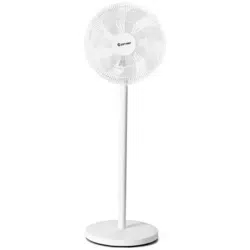
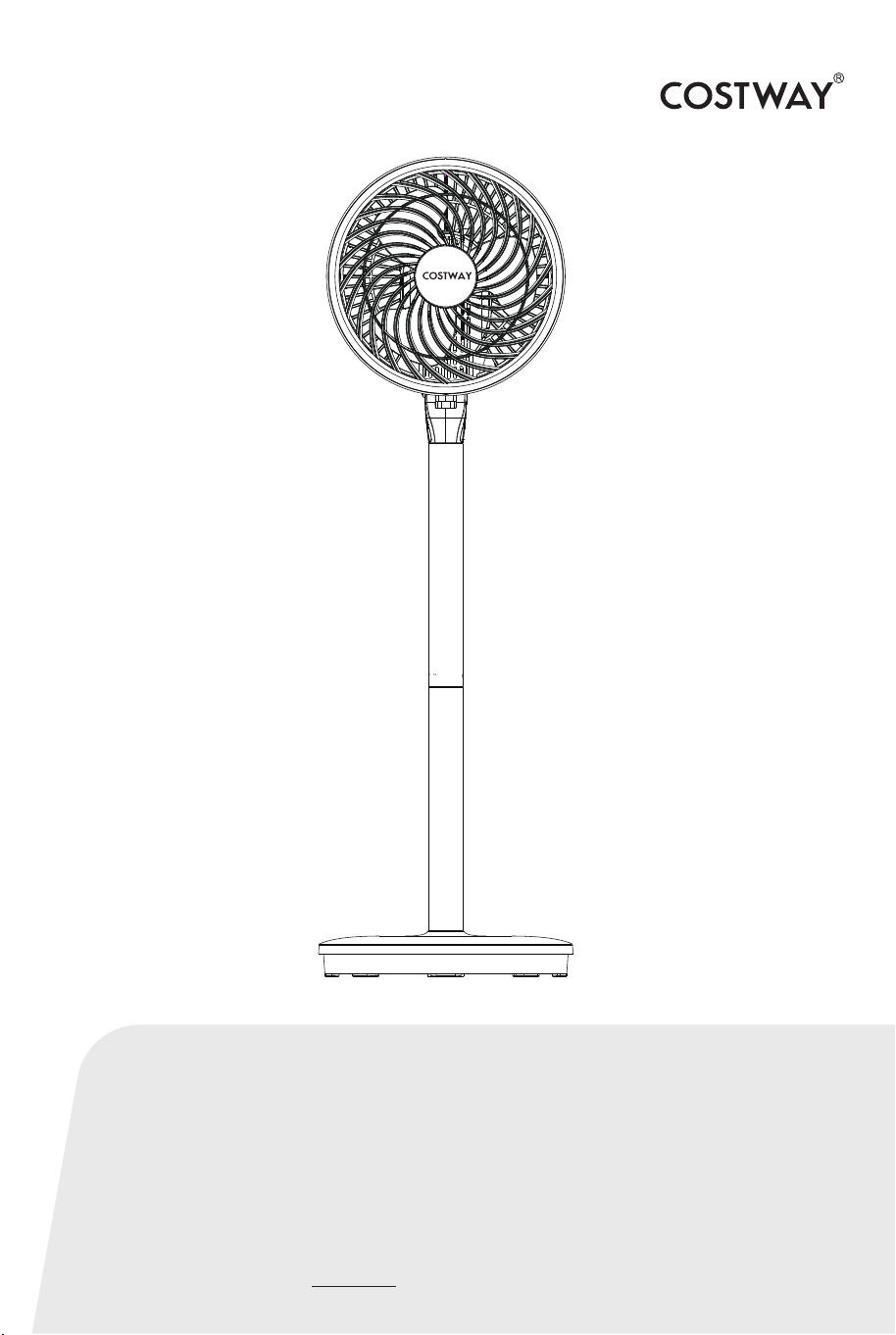
Circulating Fan
ES10088US
USER’S MANUAL
US office: Fontana UK office: Ipswich AU office: Truganina
DE office: Hamburg
FR office: Saint Vigor d'Ymonville
PL office: Gdańsk

02 03
When using an electrical appliance, basic safety precautions
should always be observed, including the following:
PLEASE READ THIS MANUAL CAREFULLY BEFORE OPERATING THIS APPLIANCE
AND RETAIN IT FOR FUTURE REFERENCE.
To reduce the risk of fire, electric shock, or injury to person:
IMPORTANT
SAFEGUARD
READ ALL INSTRUCTIONS BEFORE USING
WARNING
1. Read all instructions before using. The product is for household use only.
2. Before first use, please check that the voltage you use is in accordance with the
product nameplate requirements.
3. Always turn the product to the OFF position and unplug it from the electrical
outlet when not in use.
4. Extreme caution is necessary when the appliance is used by or near children,
invalids or elderly person.
5. Do not run cord under carpeting and do not cover cord with throw rugs, runners
or the like. Arrange cord away from traffic area and where it will not be tripped
over.
6. Please check the power cord and plug for breakage before using it.
7. Do not operate the appliance with a damaged cord or plug, or after the unit
malfunctions, has been dropped, or damaged in any manner.
8. If the supply cord is damaged, it must be replaced by the manufacturer or its
service agent or a similarly qualified person to avoid a hazard.
9. Use the appliance in a well-ventilated area. While using, distance of no less than
8” (20cm) should be kept away from wall or corner to ensure the air intakes or
exhaust openings should not be blocked unexpectedly. The unit must not be
located directly below or besides a curtain or similar items.
10. Use the appliance on flat, dry floor only.
11. Do not use in high temperature, humidity, dusty or volatile places such as
acid-base oil.
12. Do not twist or pull the power cord to avoid bad contact.
13. Do not place heavy objects on the machine to prevent pressure breakdown
from causing trouble.
14. Make sure the appliance is disconnected from the power supply when the
power is cut off or moved.
15. Do not place machine directly under the power outlet.
16.When the whole machine is running, it is not allowed to block the air duct and
the air inlet of the rear shell. Don't use wire to plug into the passageway to
prevent electric shock.
17. During the automatic oscillation process, do not change the orientation by
hand to avoid damage to the oscillating structure.
18. Turn off the power supply before pulling out the plug. Do not pull the power
cord. Pull out the power plug, otherwise it will lead to short circuit, fire and electric
shock.
19. Do not use wet hand to pull out the power plug, there is a danger of electric
shock and induction.
20. When leaving the room for a long time, please turn off the machine and
unplug the plug.
21. Do not use in places where curtains are easy to suck in. Avoid obstacles and
unstable places around you.
22. This appliance is not intended for use by persons (including children) with
reduced physical, sensory or mental capabilities, or lack of experience and
knowledge, unless they have been given supervision or instruction concerning use
of the appliance by a person responsible for their safety.

02 03
When using an electrical appliance, basic safety precautions
should always be observed, including the following:
PLEASE READ THIS MANUAL CAREFULLY BEFORE OPERATING THIS APPLIANCE
AND RETAIN IT FOR FUTURE REFERENCE.
To reduce the risk of fire, electric shock, or injury to person:
IMPORTANT
SAFEGUARD
READ ALL INSTRUCTIONS BEFORE USING
WARNING
1. Read all instructions before using. The product is for household use only.
2. Before first use, please check that the voltage you use is in accordance with the
product nameplate requirements.
3. Always turn the product to the OFF position and unplug it from the electrical
outlet when not in use.
4. Extreme caution is necessary when the appliance is used by or near children,
invalids or elderly person.
5. Do not run cord under carpeting and do not cover cord with throw rugs, runners
or the like. Arrange cord away from traffic area and where it will not be tripped
over.
6. Please check the power cord and plug for breakage before using it.
7. Do not operate the appliance with a damaged cord or plug, or after the unit
malfunctions, has been dropped, or damaged in any manner.
8. If the supply cord is damaged, it must be replaced by the manufacturer or its
service agent or a similarly qualified person to avoid a hazard.
9. Use the appliance in a well-ventilated area. While using, distance of no less than
8” (20cm) should be kept away from wall or corner to ensure the air intakes or
exhaust openings should not be blocked unexpectedly. The unit must not be
located directly below or besides a curtain or similar items.
10. Use the appliance on flat, dry floor only.
11. Do not use in high temperature, humidity, dusty or volatile places such as
acid-base oil.
12. Do not twist or pull the power cord to avoid bad contact.
13. Do not place heavy objects on the machine to prevent pressure breakdown
from causing trouble.
14. Make sure the appliance is disconnected from the power supply when the
power is cut off or moved.
15. Do not place machine directly under the power outlet.
16.When the whole machine is running, it is not allowed to block the air duct and
the air inlet of the rear shell. Don't use wire to plug into the passageway to
prevent electric shock.
17. During the automatic oscillation process, do not change the orientation by
hand to avoid damage to the oscillating structure.
18. Turn off the power supply before pulling out the plug. Do not pull the power
cord. Pull out the power plug, otherwise it will lead to short circuit, fire and electric
shock.
19. Do not use wet hand to pull out the power plug, there is a danger of electric
shock and induction.
20. When leaving the room for a long time, please turn off the machine and
unplug the plug.
21. Do not use in places where curtains are easy to suck in. Avoid obstacles and
unstable places around you.
22. This appliance is not intended for use by persons (including children) with
reduced physical, sensory or mental capabilities, or lack of experience and
knowledge, unless they have been given supervision or instruction concerning use
of the appliance by a person responsible for their safety.
04 05
Technical Specifications Product Assembly
Product Overview
Model No
Voltage
Frequency
Rated Power
ES10088US-WH
120V AC
60Hz
40W
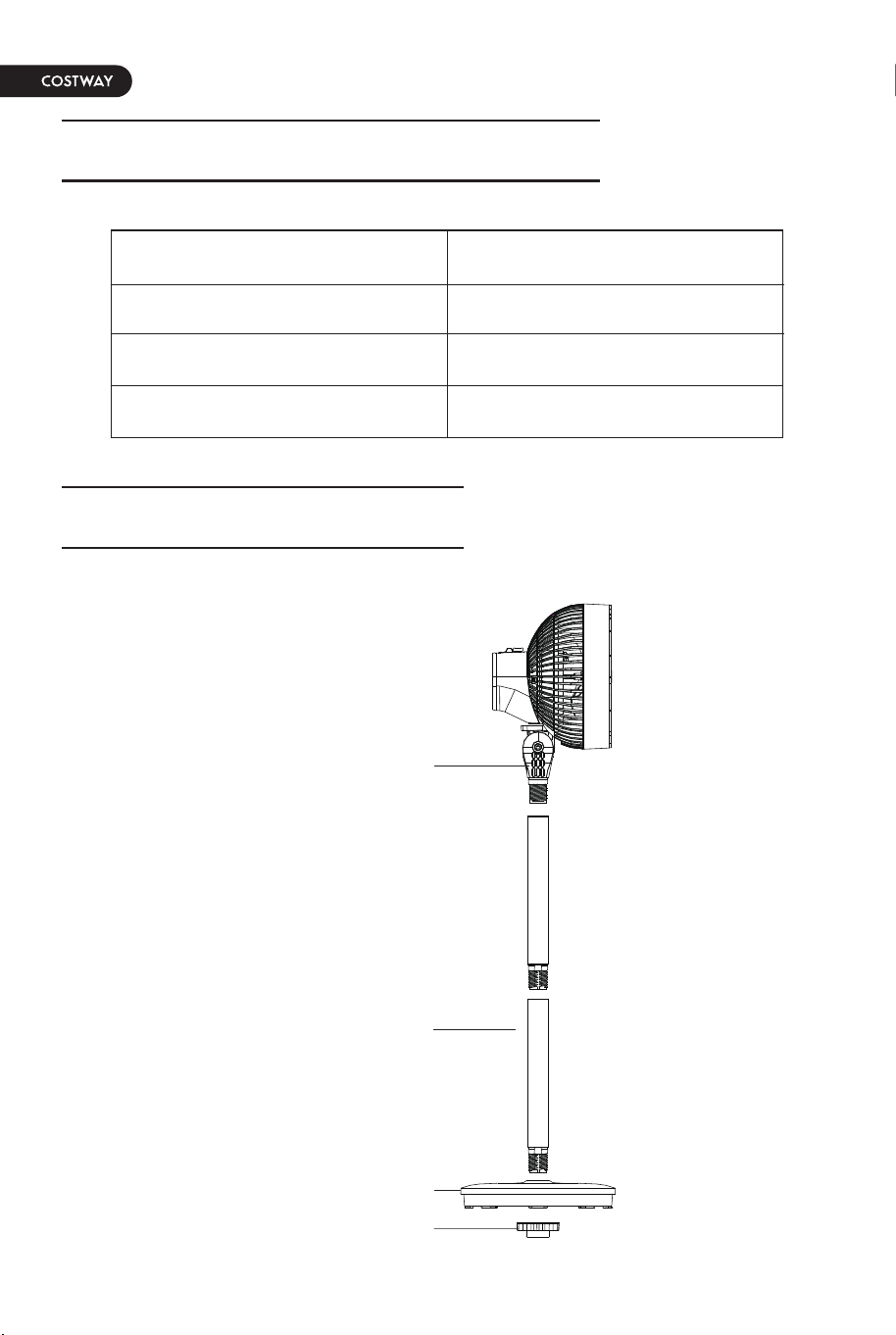
Fuselage assembly
Column
Base
Screw nut
Fig 1
Fig 2
Fig 3
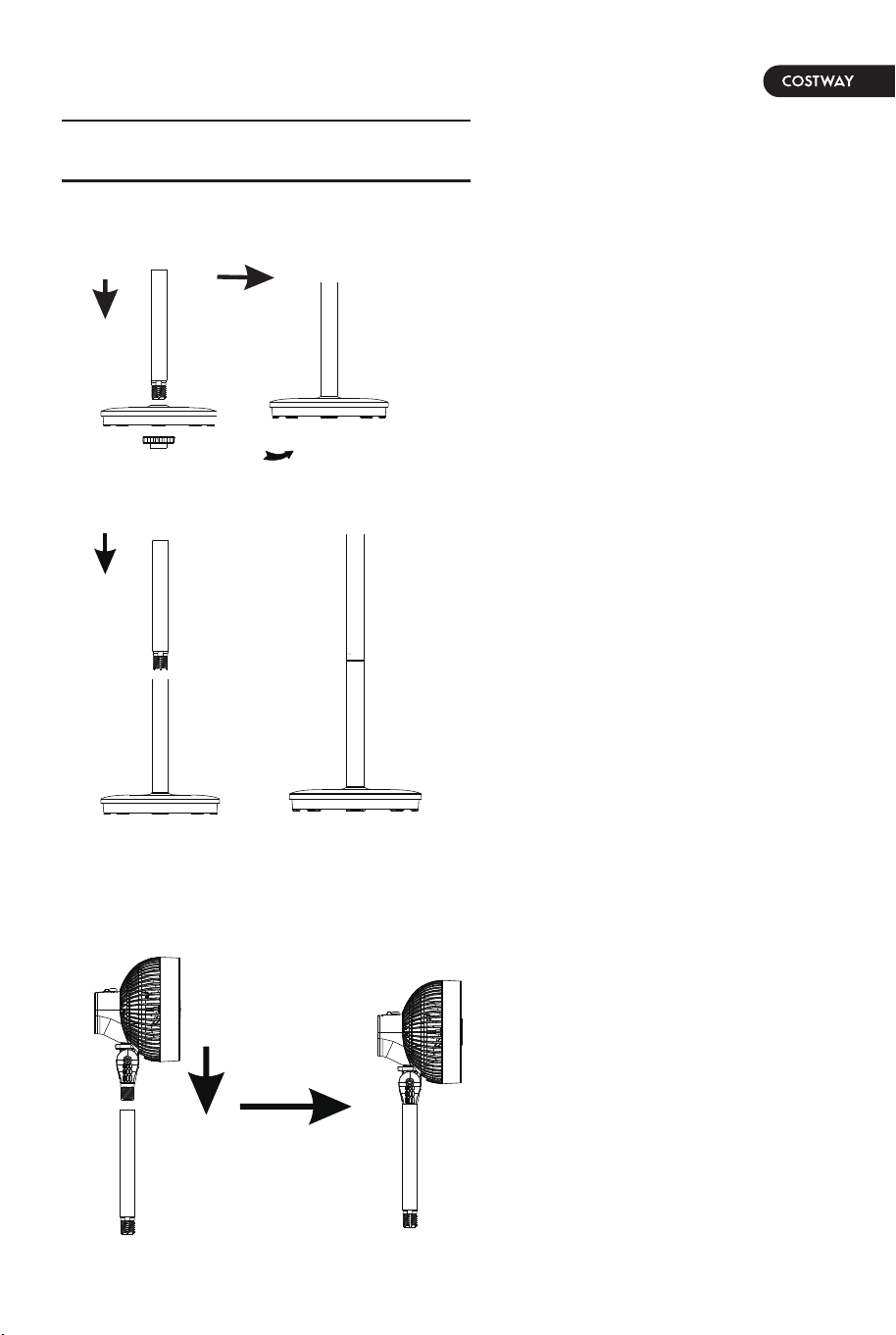
1. Align the column with the
center hole of the chassis
assembly and insert it.
2. Tighten the screw nut with
the lower column. See Fig 1.
3. Screw the column down into
the lower column and tighten.
4. Screw the fuselage assembly
down into the upright screw and
tighten it.
5. Screw the fuselage components
down into the column and just
tighten it.
04 05
Technical Specifications Product Assembly
Product Overview
Model No
Voltage
Frequency
Rated Power
ES10088US-WH
120V AC
60Hz
40W
Fuselage assembly
Column
Base
Screw nut
Fig 1
Fig 2
Fig 3
1. Align the column with the
center hole of the chassis
assembly and insert it.
2. Tighten the screw nut with
the lower column. See Fig 1.
3. Screw the column down into
the lower column and tighten.
4. Screw the fuselage assembly
down into the upright screw and
tighten it.
5. Screw the fuselage components
down into the column and just
tighten it.
06 07
Instruction of Control Panel Battery installation:
TroubleshootingRemote control:
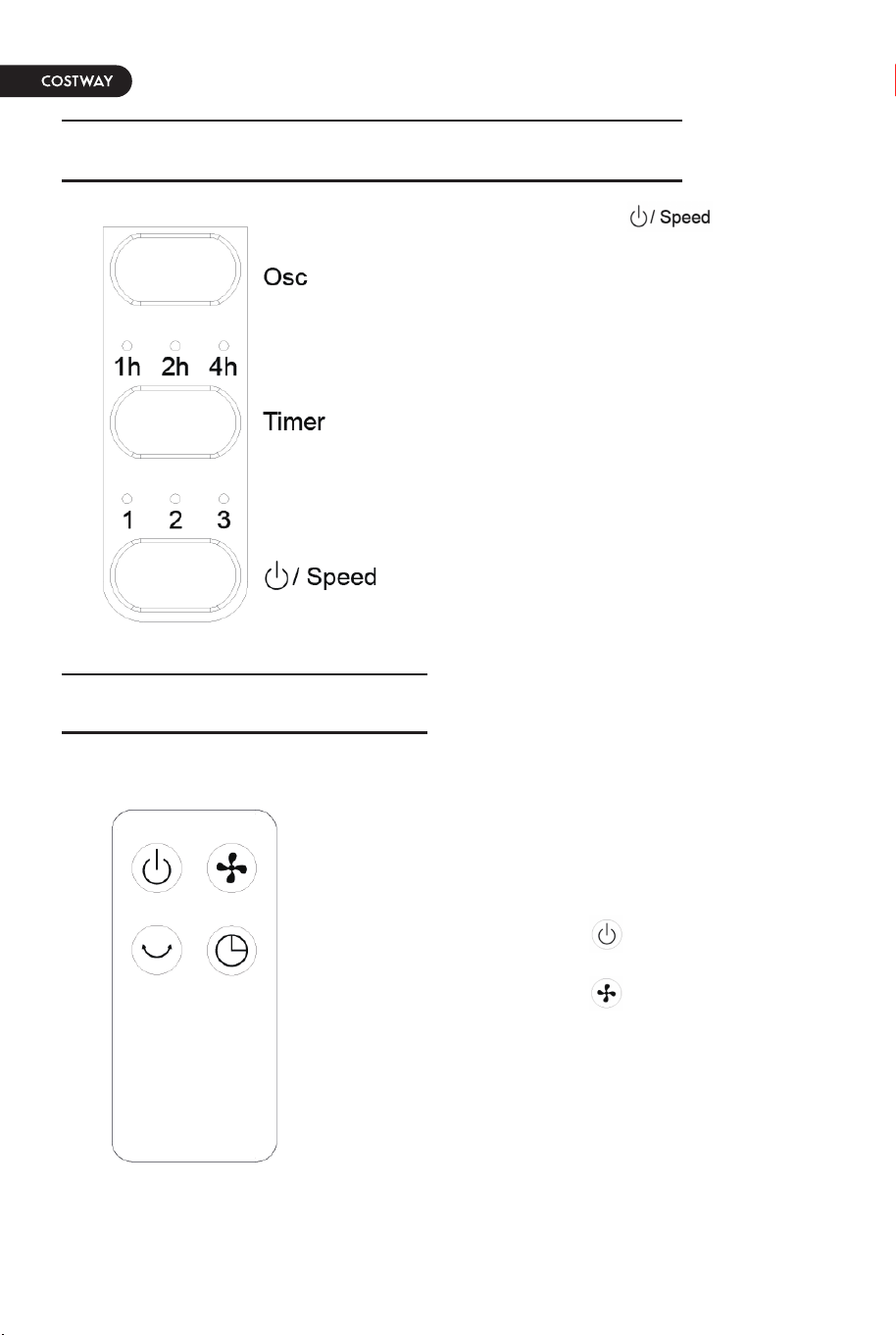
1. “ON/Speed” button
There are three types of power-on, speed
switch and standby State cycle switching.
2. “TIMER” button
Set the desired shutdown time by
pressing the “TIMER” button. It allows
you to set an automatic switch on time.
The options are 1-7 hours.
3. “Osc” button
Press the “Osc” button to wave the fan
head from side to side. Press the “Osc”
button again to stop the process.
The above functions can be controlled
using the remote control by pressing the
corresponding function buttons.
1.Press the button to power on and
power off the fan.
2.Press the button to select the speed
you like, select from "1, 2, 3, off" to
adjust the fan speed in cycles.
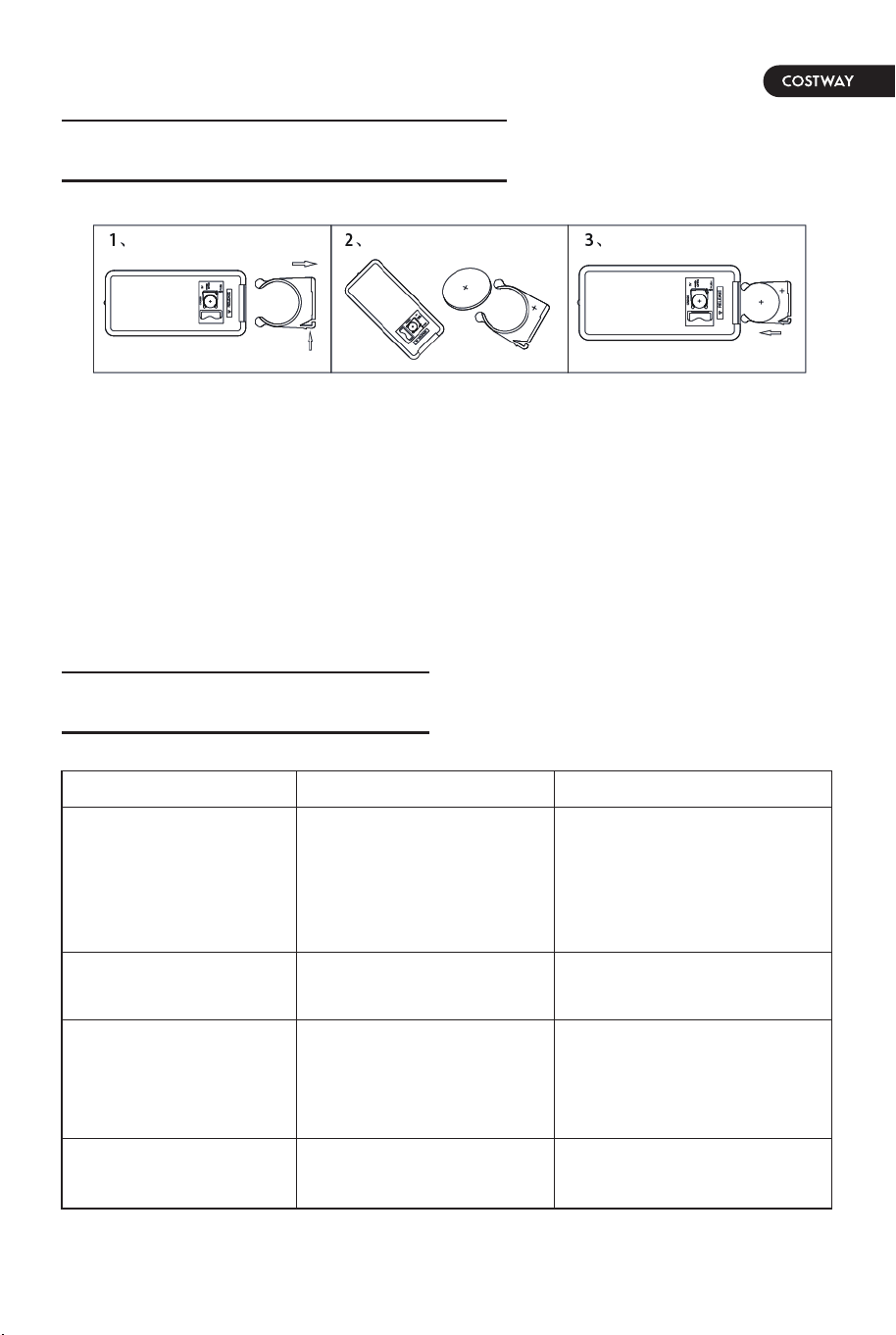
1. Pull out the remote control battery holder according to the assembly drawing
on the back of the remote control.
2. Put the battery into the battery holder, pay attention to the positive and
negative poles of the battery.
3. Reinstall the battery holder with the battery in the remote control.
PROBLEM
Fan fails to operate
Unable to shutdown
Abnormal sound
Machine damaged
POSSIBLE CAUSE SOLUTION
1. Unplugged or poorly
contacted power cord.
2. Failure to press the
switch.
3. Machine damaged.
1. Plug in the power cord
2. Press the switch
3. Delivery to maintenance
point for maintenance
Delivery to maintenance
point for maintenance
1. Wind wheel loosening.
2. Motor breakdown.
1. Delivery to maintenance
point for maintenance
2. Delivery to maintenance
point for maintenance
Can not change the
direction of the wind
Breakdown of wind guide
synchronous motor
Delivery to maintenance
point for maintenance
06 07
Instruction of Control Panel Battery installation:
TroubleshootingRemote control:
1. “ON/Speed” button
There are three types of power-on, speed
switch and standby State cycle switching.
2. “TIMER” button
Set the desired shutdown time by
pressing the “TIMER” button. It allows
you to set an automatic switch on time.
The options are 1-7 hours.
3. “Osc” button
Press the “Osc” button to wave the fan
head from side to side. Press the “Osc”
button again to stop the process.
The above functions can be controlled
using the remote control by pressing the
corresponding function buttons.
1.Press the button to power on and
power off the fan.
2.Press the button to select the speed
you like, select from "1, 2, 3, off" to
adjust the fan speed in cycles.
1. Pull out the remote control battery holder according to the assembly drawing
on the back of the remote control.
2. Put the battery into the battery holder, pay attention to the positive and
negative poles of the battery.
3. Reinstall the battery holder with the battery in the remote control.
PROBLEM
Fan fails to operate
Unable to shutdown
Abnormal sound
Machine damaged
POSSIBLE CAUSE SOLUTION
1. Unplugged or poorly
contacted power cord.
2. Failure to press the
switch.
3. Machine damaged.
1. Plug in the power cord
2. Press the switch
3. Delivery to maintenance
point for maintenance
Delivery to maintenance
point for maintenance
1. Wind wheel loosening.
2. Motor breakdown.
1. Delivery to maintenance
point for maintenance
2. Delivery to maintenance
point for maintenance
Can not change the
direction of the wind
Breakdown of wind guide
synchronous motor
Delivery to maintenance
point for maintenance

08
Maintenance And Storage
Cut off the power supply before maintenance
1. When the body has oil pollution, it must be cleaned up to avoid discoloration
and damage.
2. After maintenance and cleaning, the parts should be packed into packing
boxes according to the original packing and placed in a dry place for proper
storage.
3.This product only needs general external cleaning and maintenance.
4.Use neutral detergent to wipe, and then clean with a clean and soft cloth.
5.Do not rinse directly with water.
6.Do not wipe with diluent, toluene, acid lotion, oil, etc. to avoid discoloration or
deterioration.

08
Maintenance And Storage
Cut off the power supply before maintenance
1. When the body has oil pollution, it must be cleaned up to avoid discoloration
and damage.
2. After maintenance and cleaning, the parts should be packed into packing
boxes according to the original packing and placed in a dry place for proper
storage.
3.This product only needs general external cleaning and maintenance.
4.Use neutral detergent to wipe, and then clean with a clean and soft cloth.
5.Do not rinse directly with water.
6.Do not wipe with diluent, toluene, acid lotion, oil, etc. to avoid discoloration or
deterioration.

THIS INSTRUCTION BOOKLET CONTAINS IMPORTANT SAFETY INFORMATION. PLEASE READ AND KEEP FOR FUTURE REFERENCE.
EN
DE
FR
ES
IT
PL
With your inspiring rating, COSTWAY will be more consistent to offer you EASY
SHOPPING EXPERIENCE, GOOD PRODUCTS and EFFICIENT SERVICE!
Mit Ihrer inspirierenden Bewertung wird COSTWAY konsistenter sein, um Ihnen EIN
SCHÖNES EINKAUFSERLEBNIS, GUTE PRODUKTE und EFFIZIENTEN SERVICE zu
bieten!
Avec votre évaluation inspirante, COSTWAY continuera à fournir une EXPÉRIENCE
D’ACHAT PRATIQUE, des PRODUITS DE QUALITÉ et un SERVICE EFFICACE !
Con su calificación inspiradora, COSTWAY será más consistente para ofrecerle
EXPERIENCIA DE COMPRA FÁCIL, BUENOS PRODUCTOS y SERVICIO EFICIENTE.
Con la tua valutazione incoraggiante, COSTWAY sarà più coerente per offrirti
ESPERIENZA DI ACQUISTO FACILE, BUONI PRODOTTI e SERVIZIO EFFICIENTE!
Dzięki twojej opinii COSTWAY będzie mógł oferować jeszcze WYGODNIEJSZE
ZAKUPY, LEPSZE PRODUKTY i SPRAWNIEJSZĄ OBSŁUGĘ KLIENTA.
Circulating Fan
ES10088US
USER’S MANUAL
US office: Fontana UK office: Ipswich AU office: Truganina
DE office: Hamburg
FR office: Saint Vigor d'Ymonville
PL office: Gdańsk