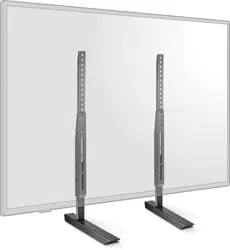
Before using your new product, please read these instructions to prevent any damage.
ASSEMBLY GUIDE
Universal TV Stand
Replacement Kit
NS-HTRTVF22

www.insigniaproducts.com
2
Contents
IMPORTANT SAFETY INFORMATION . . . . . . . . . . . . . . . . . . . . . . . . . . . . . . . . . . . . . . . . . . . . . . . . . . . . . . . . . . . . . . . . . . . 3
Features . . . . . . . . . . . . . . . . . . . . . . . . . . . . . . . . . . . . . . . . . . . . . . . . . . . . . . . . . . . . . . . . . . . . . . . . . . . . . . . . . . . . . . . . . . . . . . 3
Dimensions. . . . . . . . . . . . . . . . . . . . . . . . . . . . . . . . . . . . . . . . . . . . . . . . . . . . . . . . . . . . . . . . . . . . . . . . . . . . . . . . . . . . . . . . . . . . . . . . . . . . . . . 4
Package contents . . . . . . . . . . . . . . . . . . . . . . . . . . . . . . . . . . . . . . . . . . . . . . . . . . . . . . . . . . . . . . . . . . . . . . . . . . . . . . . . . . . . . 4
Parts . . . . . . . . . . . . . . . . . . . . . . . . . . . . . . . . . . . . . . . . . . . . . . . . . . . . . . . . . . . . . . . . . . . . . . . . . . . . . . . . . . . . . . . . . . . . . . . . . . . . . . . . . . . . . 4
Hardware. . . . . . . . . . . . . . . . . . . . . . . . . . . . . . . . . . . . . . . . . . . . . . . . . . . . . . . . . . . . . . . . . . . . . . . . . . . . . . . . . . . . . . . . . . . . . . . . . . . . . . . . . 5
Tools needed . . . . . . . . . . . . . . . . . . . . . . . . . . . . . . . . . . . . . . . . . . . . . . . . . . . . . . . . . . . . . . . . . . . . . . . . . . . . . . . . . . . . . . . . . 5
Assembling your replacement stand . . . . . . . . . . . . . . . . . . . . . . . . . . . . . . . . . . . . . . . . . . . . . . . . . . . . . . . . . . . . . . . . . . 6
STEP 1: Assemble the TV brackets . . . . . . . . . . . . . . . . . . . . . . . . . . . . . . . . . . . . . . . . . . . . . . . . . . . . . . . . . . . . . . . . . . . . . . . . . . . . . . . . . 6
STEP 2: Select the correct screws and spacers for your TV. . . . . . . . . . . . . . . . . . . . . . . . . . . . . . . . . . . . . . . . . . . . . . . . . . . . . . . . . . . 8
STEP 3: Determine whether your TV has a flat back or an irregular or obstructed back . . . . . . . . . . . . . . . . . . . . . . . . . . . . . . . 8
STEP 4: Option 1: Mount brackets on a TV with a flat back . . . . . . . . . . . . . . . . . . . . . . . . . . . . . . . . . . . . . . . . . . . . . . . . . . . . . . . . . . 9
STEP 4: Option 2: Mount bracket on a TV with an irregularly shaped or obstructed back . . . . . . . . . . . . . . . . . . . . . . . . . . . . 11
STEP 5: Assemble the feet . . . . . . . . . . . . . . . . . . . . . . . . . . . . . . . . . . . . . . . . . . . . . . . . . . . . . . . . . . . . . . . . . . . . . . . . . . . . . . . . . . . . . . . . 13
STEP 6: Determine the height and secure the feet . . . . . . . . . . . . . . . . . . . . . . . . . . . . . . . . . . . . . . . . . . . . . . . . . . . . . . . . . . . . . . . . .14
STEP 7: (Optional) Install a soundbar. . . . . . . . . . . . . . . . . . . . . . . . . . . . . . . . . . . . . . . . . . . . . . . . . . . . . . . . . . . . . . . . . . . . . . . . . . . . . . 16
Specifications. . . . . . . . . . . . . . . . . . . . . . . . . . . . . . . . . . . . . . . . . . . . . . . . . . . . . . . . . . . . . . . . . . . . . . . . . . . . . . . . . . . . . . . .17
ONE-YEAR LIMITED WARRANTY . . . . . . . . . . . . . . . . . . . . . . . . . . . . . . . . . . . . . . . . . . . . . . . . . . . . . . . . . . . . . . . . . . . . . .18

www.insigniaproducts.com
3
Universal TV Stand Replacement Kit
IMPORTANT SAFETY INFORMATION
WARNING
CAUTION Avoid potential personal injuries and property damage!
• Read through these instructions completely to be sure you’re comfortable with this easy install process.
• Do not use this product for any purpose not explicitly specified by manufacturer.
• Manufacturer is not responsible for damage or injury caused by incorrect assembly or use.
• If you do not understand these instructions or have doubts about the safety of the installation, assembly, or use of this
product, contact Customer Service.
Features
• Supports combined weight of your TV and devices of 100 lbs. (45.3 kg)
• Supports TVs with screen diagonals between 49 and 77 inches (124.5 and 195.6 cm)
• Narrowly spaced feet replace your lost or broken TV stand
• Attaches to your TV’s mount holes for near-universal fit
• Scratch-resistant pads provide a cushion for your soundbar
• Durable metal construction provides dependable stability
• Anti-slip rubber feet prevent sliding and furniture damage
• Included hardware makes for quick and easy installation
• Compatible with VESA patterns from 100 mm × 150 mm (minimum) to 600 mm × 400 mm (maximum)
Some steps are more easily
handled with two adults.
www.insigniaproducts.com
4
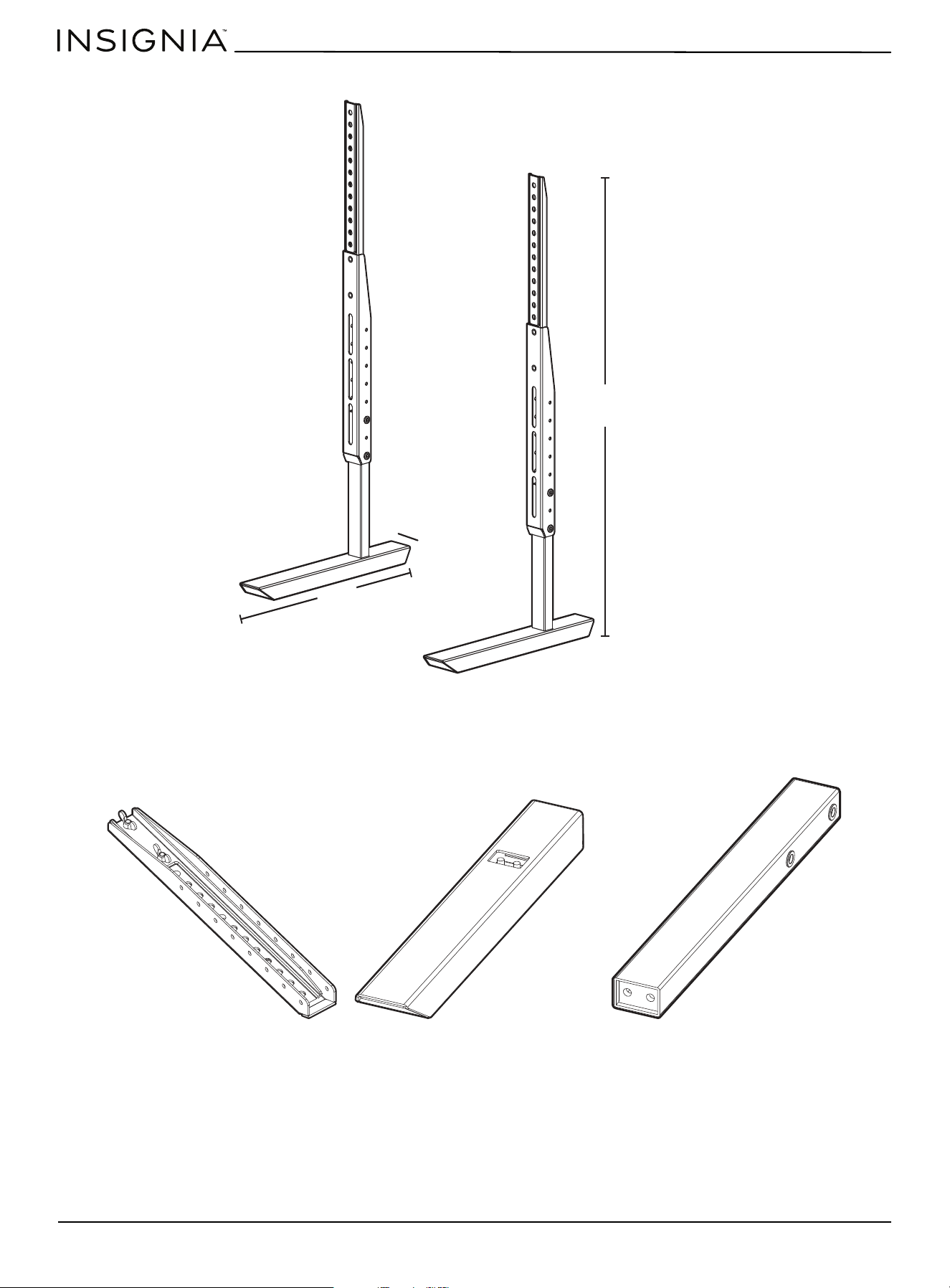
Dimensions
Package contents
Parts
Min: 24.8 in. (63 cm)
Max: 30.7 in. (78 cm)
14 in. (35.6 cm)
2.7 in. (6.9 cm)
4 TV bracket (2)
5 TV foot (2) 6 TV leg (2)
www.insigniaproducts.com
5
Universal TV Stand Replacement Kit
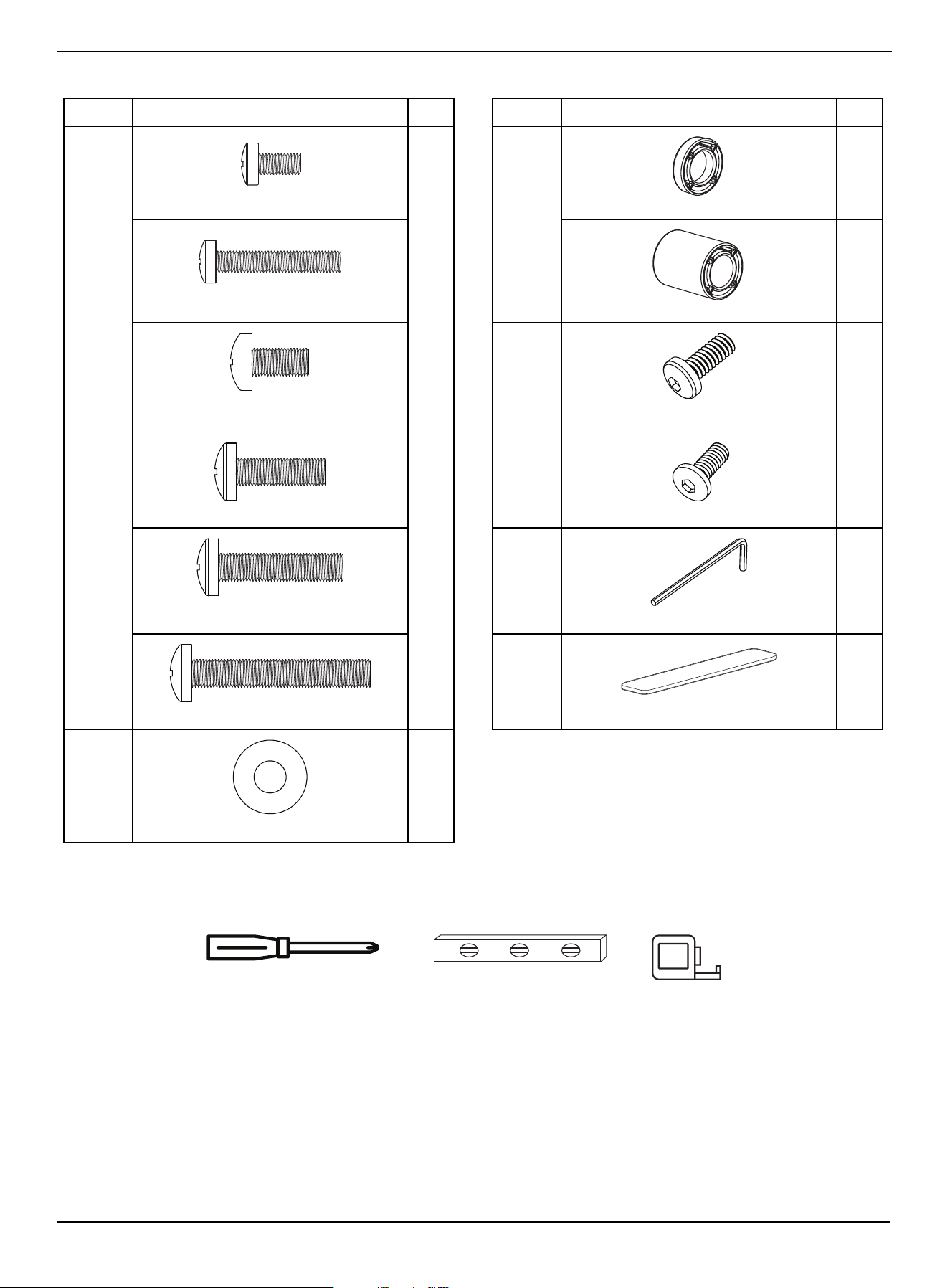
Hardware
Tools needed
LABEL STAND PART QTY. LABEL STAND PART QTY.
1 4
3
8
4
7 4
8 8
9 1
10 2
2 4
M6 × 12 mm screw
2.5 mm spacer
M6 × 35 mm screw
22 mm spacer
M8 × 16 mm screw
M6 × 15 mm screw
M8 × 25 mm screw
M5 × 15 mm screw
M8 × 35 mm screw
Hex key
M8 × 50 mm screw
Soundbar pad
Washer
Phillips screwdriver
Level
Tape measure
www.insigniaproducts.com
6
Assembling your replacement stand
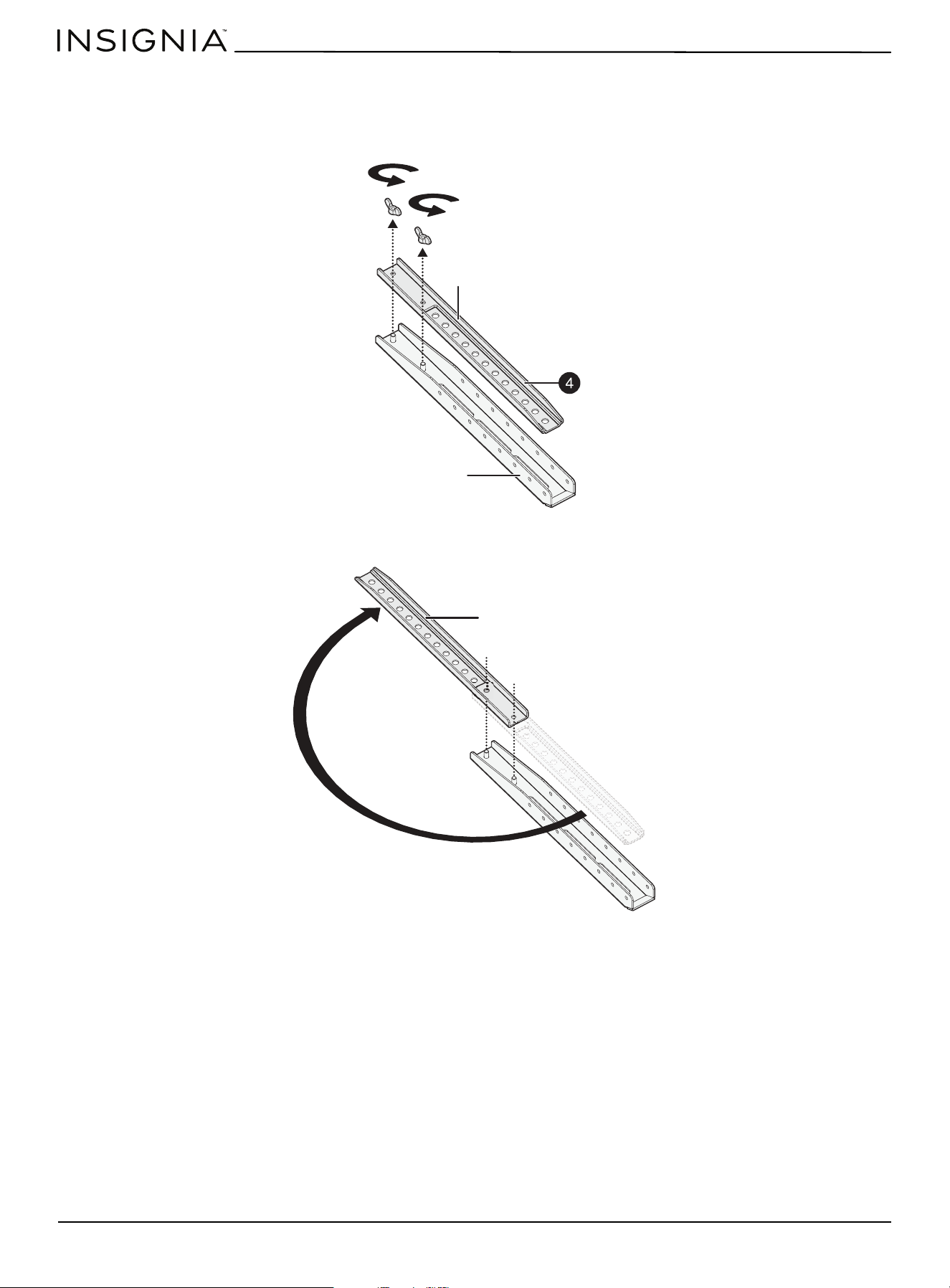
STEP 1: Assemble the TV brackets
1 Remove the two wing nuts on one of the top brackets (4).
2 Rotate the top bracket 180°, then slide the holes in the top bracket onto the posts on the bottom bracket.
Top bracket
Bottom bracket
Top bracket
www.insigniaproducts.com
7
Universal TV Stand Replacement Kit
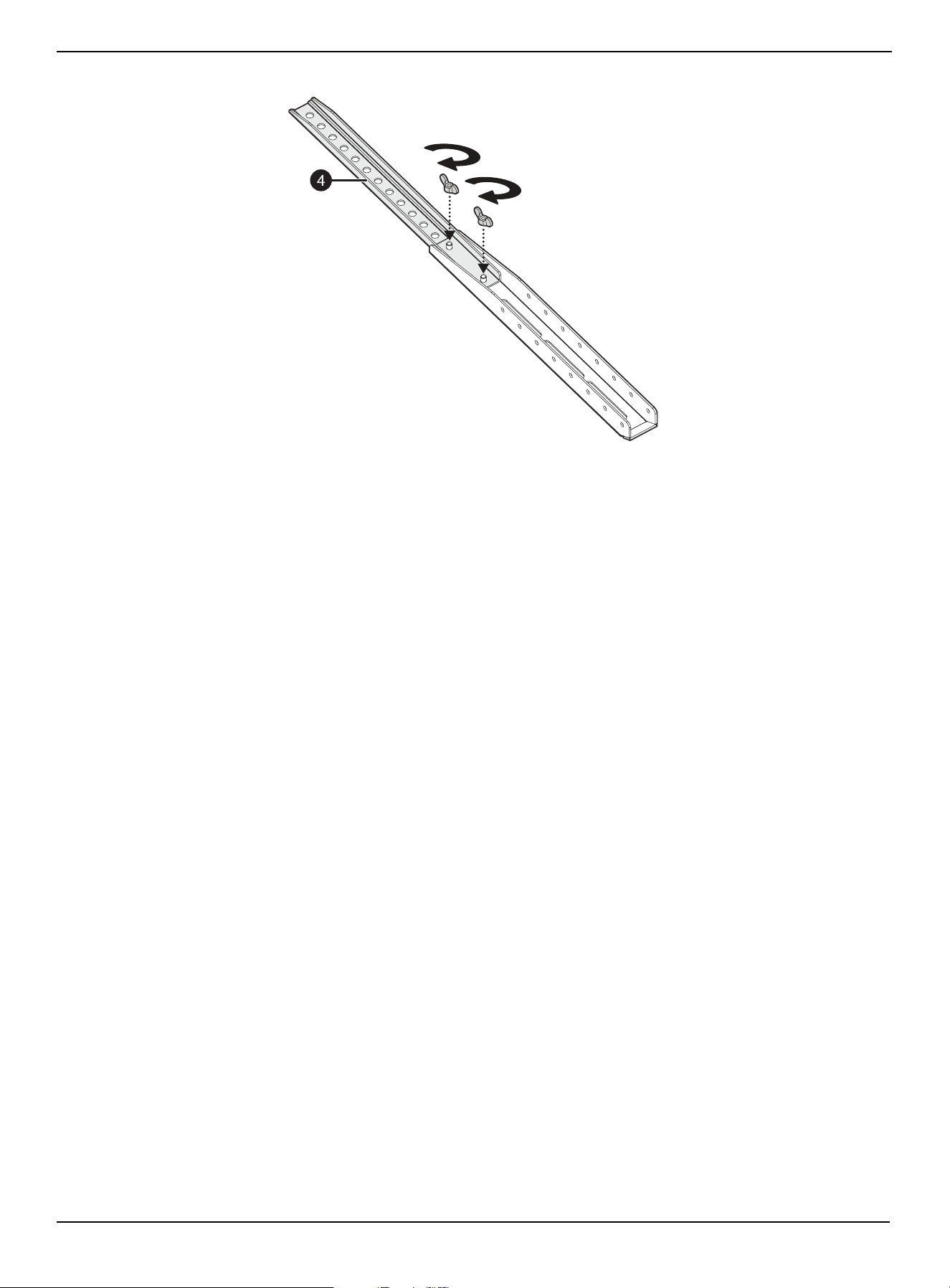
3 Secure the top bracket to the bottom bracket with the two wing nuts you removed earlier.
4 Repeat these steps to assemble the other TV bracket.
www.insigniaproducts.com
8
STEP 2: Select the correct screws and spacers for your TV
If you are in doubt about which size screw to use, try one of the screws in one of the four VESA mounting holes on the back
of your TV. A screw that is too large will not fit in the hole at all, but make sure that the screw size you choose is not too
loose. It should grip the hole threads evenly and not wobble. After you determine which size screws to use, go to the next
step.
M6 hardware assembly:
•M6 × 12 mm screws
•M6 × 35 mm screws
M8 hardware assembly:
•M8 × 16 mm screws
•M8 × 25 mm screws
•M8 × 35 mm screws
•M8 × 50 mm screws
Spacers
• 2.5 mm spacers (You can stack these spacers if you need more space.)
•22 mm spacers
STEP 3: Determine whether your TV has a flat back or an irregular or obstructed back
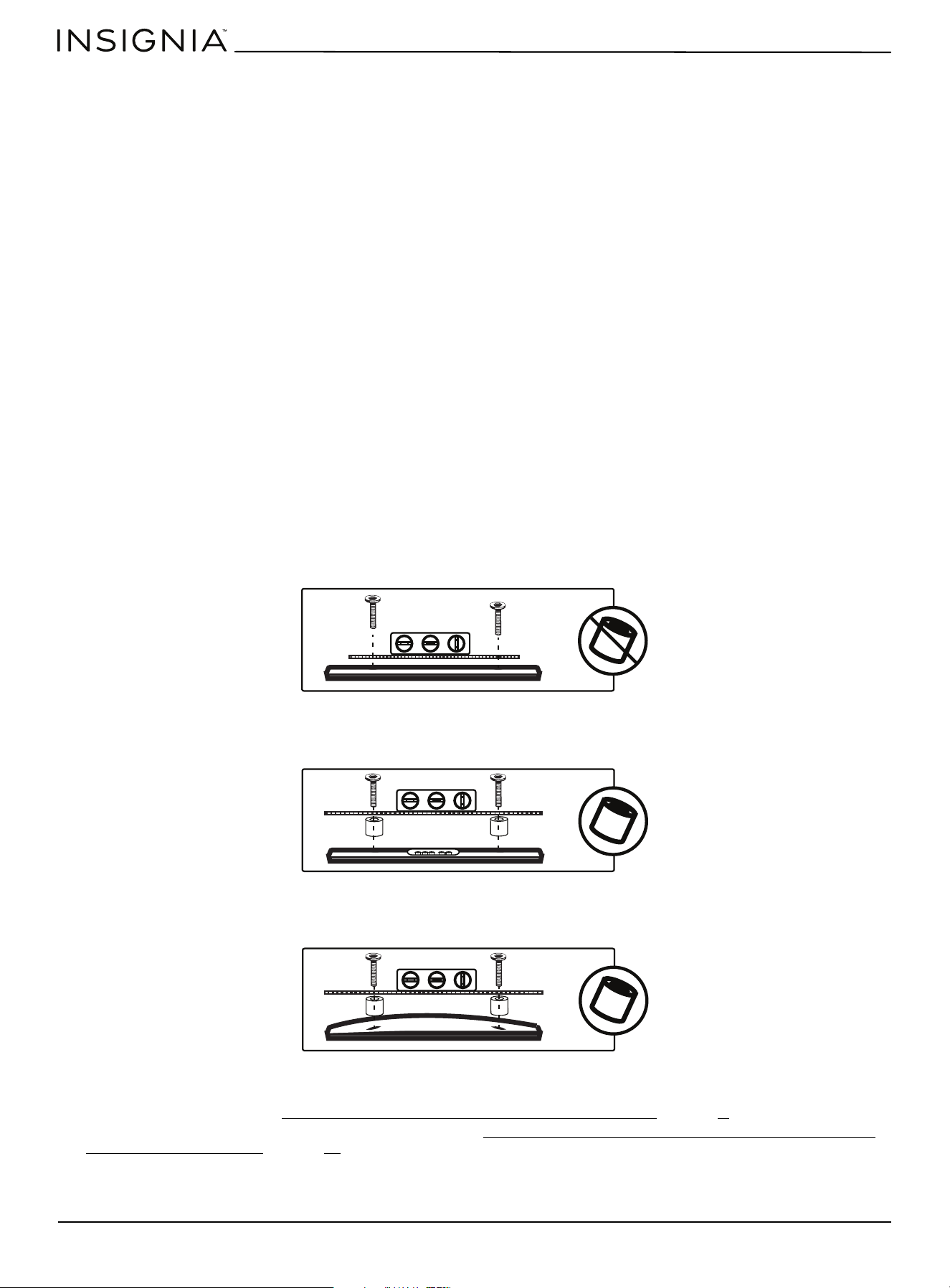
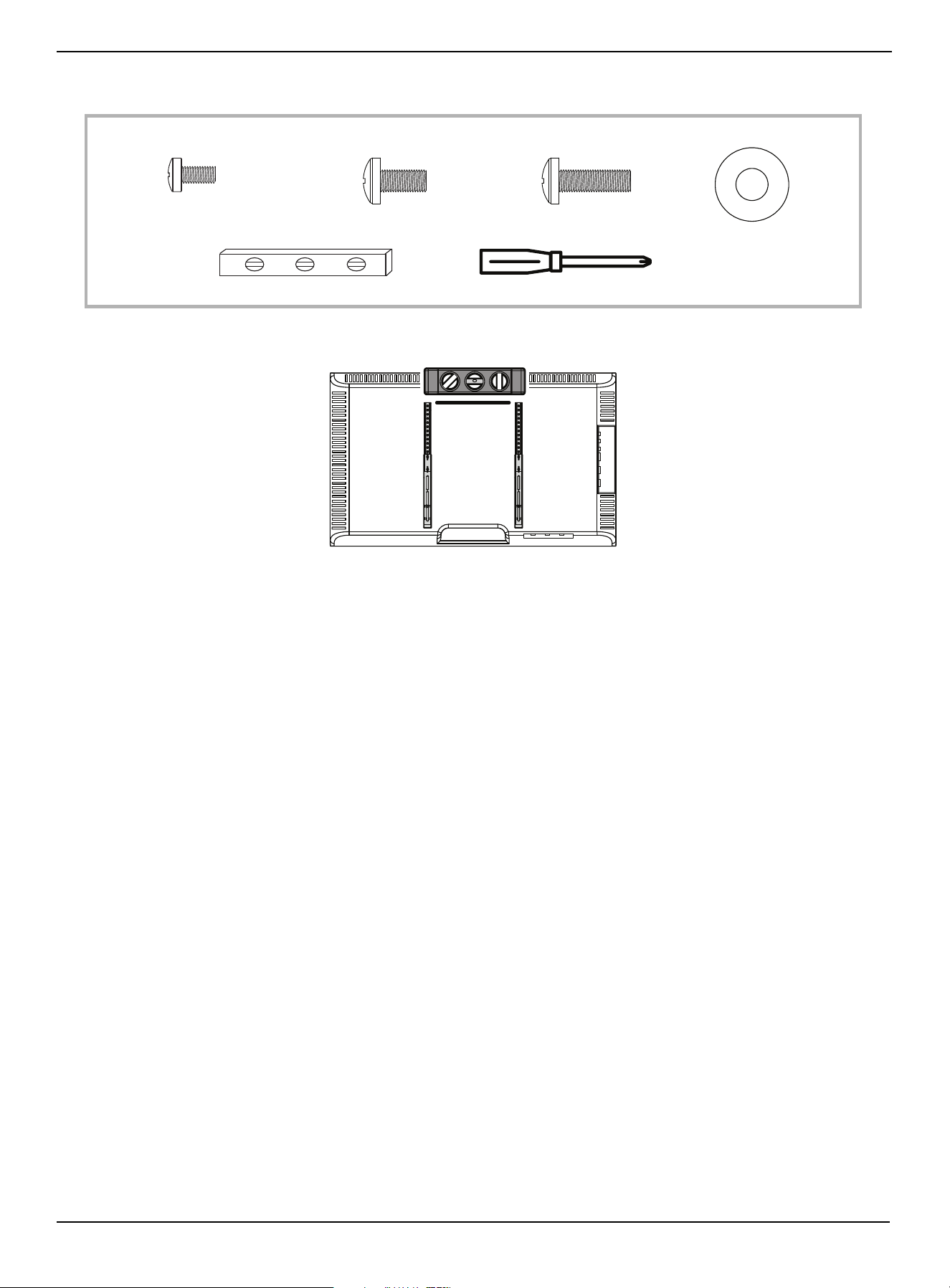
1 Carefully place your TV screen face-down on a cushioned, clean surface to protect the screen from damages and
scratches.
2 Lay the TV brackets, oriented vertically, on the back of your TV.
3 Align the screw holes in the TV brackets with the mounting screw holes on your TV.
4 Identify which type of back your TV has:
• Flat back: The brackets lay flush against the back of your TV and do not block any jacks. You do not need spacers when
assembling the wall mount.
• Obstructed back: The brackets block one or more of the jacks on the back of your TV. You need spacers when
assembling the wall mount.
• Irregularly-shaped back: There is a gap between a bracket and some part of the back of your TV. You need spacers
when assembling the wall mount.
5 Remove the TV brackets.
If the TV has a flat back, go to STEP 4: Option 1: Mount brackets on a TV with a flat back
on page 9.
If the TV has an irregularly shaped or obstructed back, go to STEP 4: Option 2: Mount bracket on a TV with an irregularly
shaped or obstructed back on page 11.
www.insigniaproducts.com
9
Universal TV Stand Replacement Kit
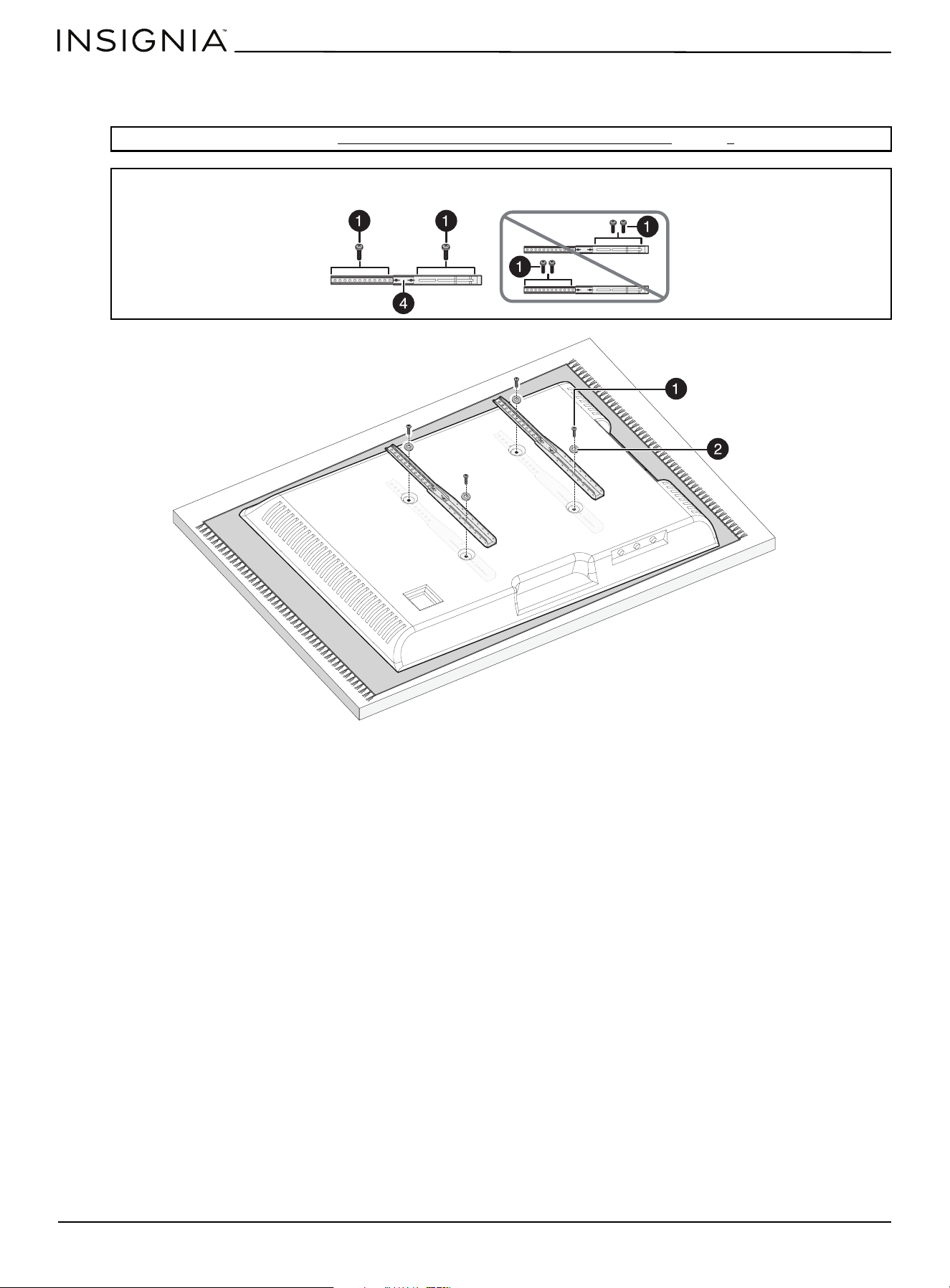
STEP 4: Option 1: Mount brackets on a TV with a flat back
You n ee d :
1 Make sure that the tops of the TV brackets are level with each other.
Screws
or
2 Washer (4)
Phillips screwdriver
Level
1 M6 × 12 mm
(4)
1 M8 × 16 mm (4)
or
1 M8 × 25 mm (4)
www.insigniaproducts.com
10
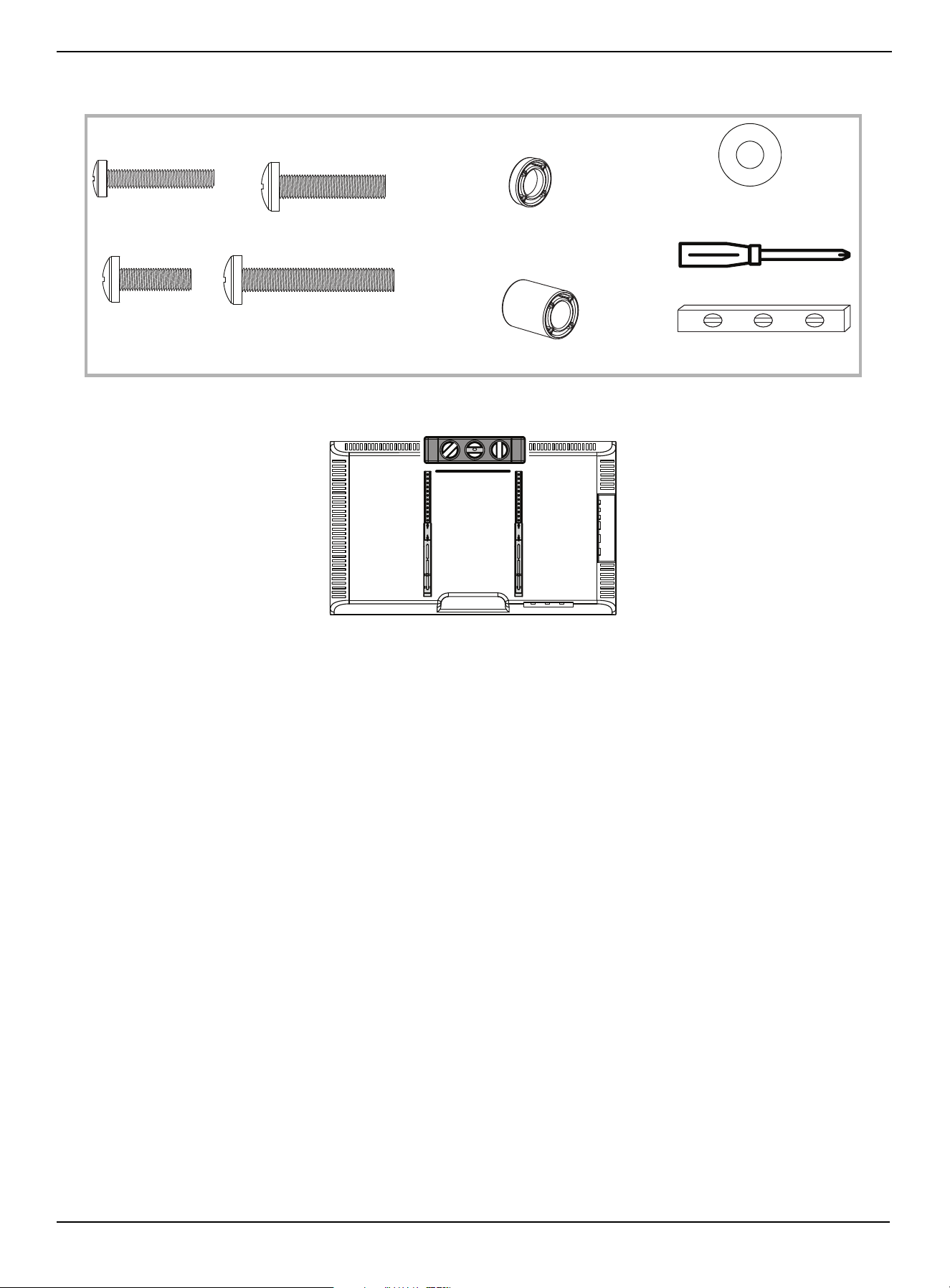
2 Align the holes on the brackets with the VESA mounting holes on the TV, place washers (2) over the holes in the
brackets, then insert screws (1) through the brackets and washers into the mounting holes. Tighten the screws with a
Phillips screwdriver.
Note: Use the screws you selected in STEP 2: Select the correct screws and spacers for your TV on page 8.
CAUTION: Make sure that you install only one screw in the top of the each TV bracket and one screw in the bottom of the each TV
bracket.
www.insigniaproducts.com
11
Universal TV Stand Replacement Kit
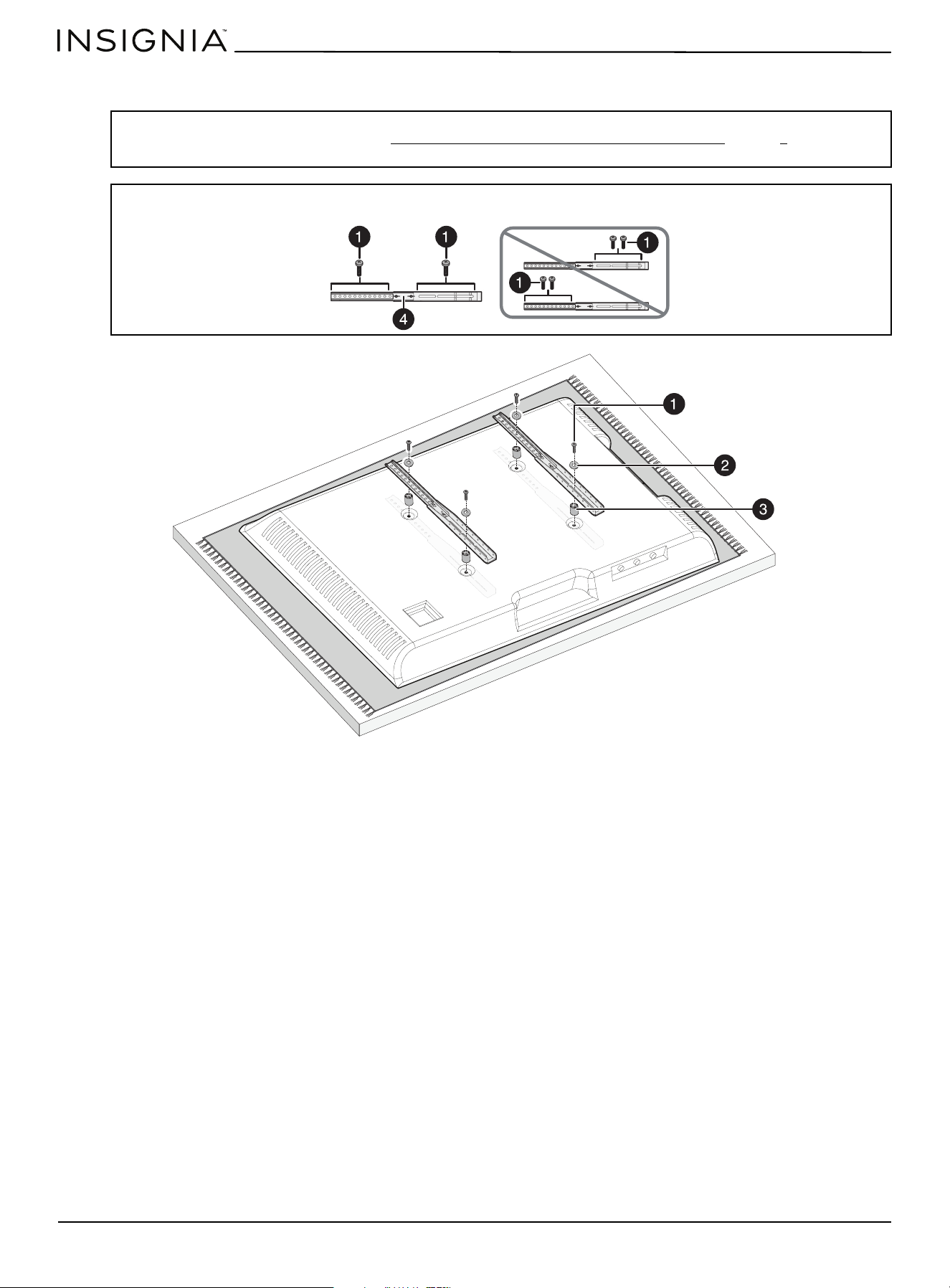
STEP 4: Option 2: Mount bracket on a TV with an irregularly shaped or obstructed back
You n ee d :
1 Make sure that the tops of the TV brackets are level with each other.
2 Align the spacers (3) over the VESA mounting holes on the TV, then place the TV brackets on the spacers so that the
holes on the brackets align with the holes in the spacers.
Screws
or
2 Washer (4)
Phillips screwdriver
Level
1 M6 × 35 mm (4)
1 M8 × 50 mm (4)
Spacers
3 2.5 mm (8)
3 22 mm (4)
or
1 M8 × 35 mm (4)
1 M8 × 25 mm (4)
or
or
or
www.insigniaproducts.com
12
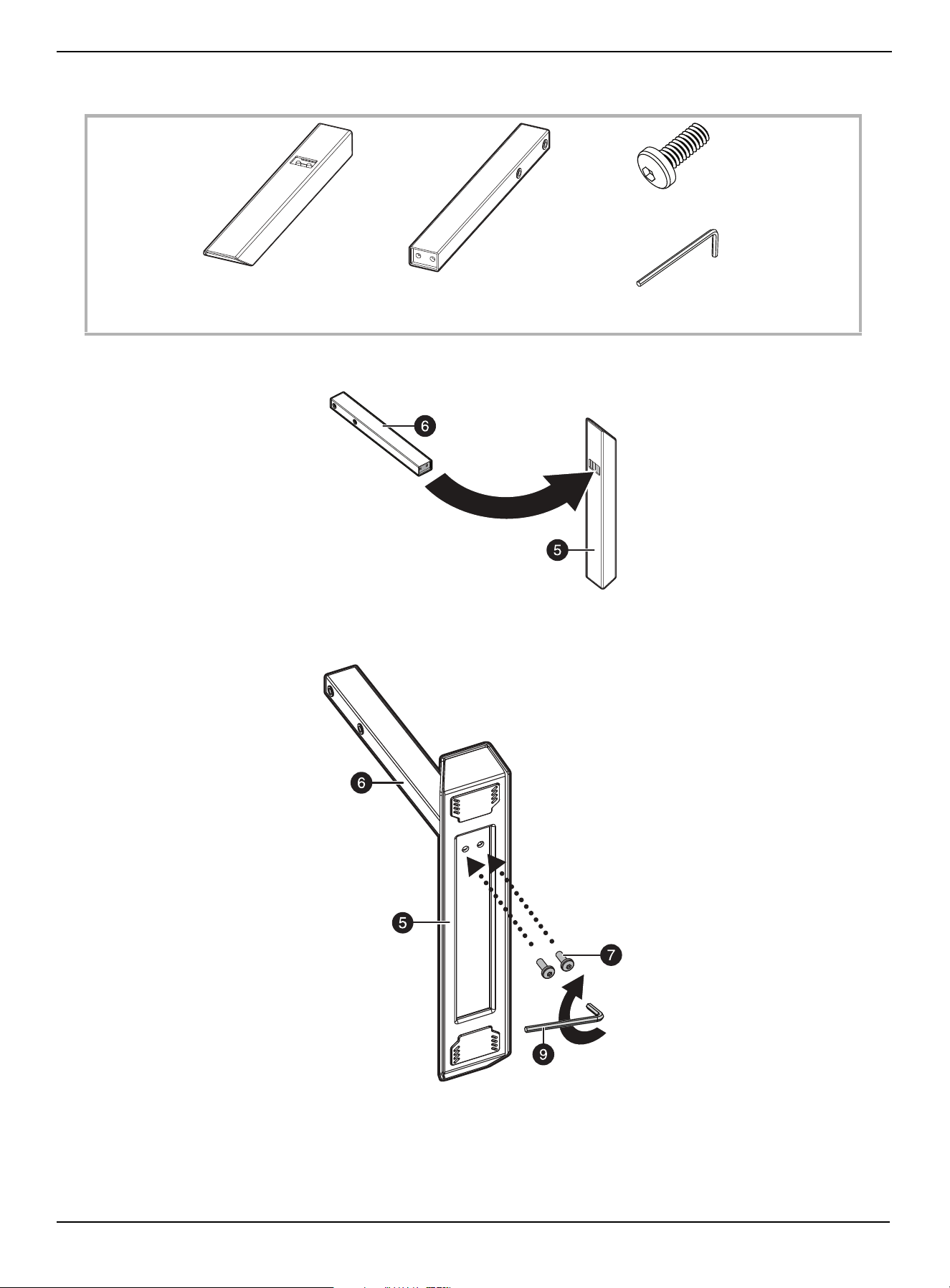
3 Place washers (2) over the holes in the brackets, then insert screws (1) through the brackets, washers, and spacer into
the mounting holes. Tighten the screws with a Phillips screwdriver.
Note:
• Use the screws and spacers you selected in STEP 2: Select the correct screws and spacers for your TV
on page 8.
• You can stack spacers to create the height you need.
CAUTION: Make sure that you install only one screw in the top of the each TV bracket and one screw in the bottom of the each TV
bracket.
www.insigniaproducts.com
13
Universal TV Stand Replacement Kit
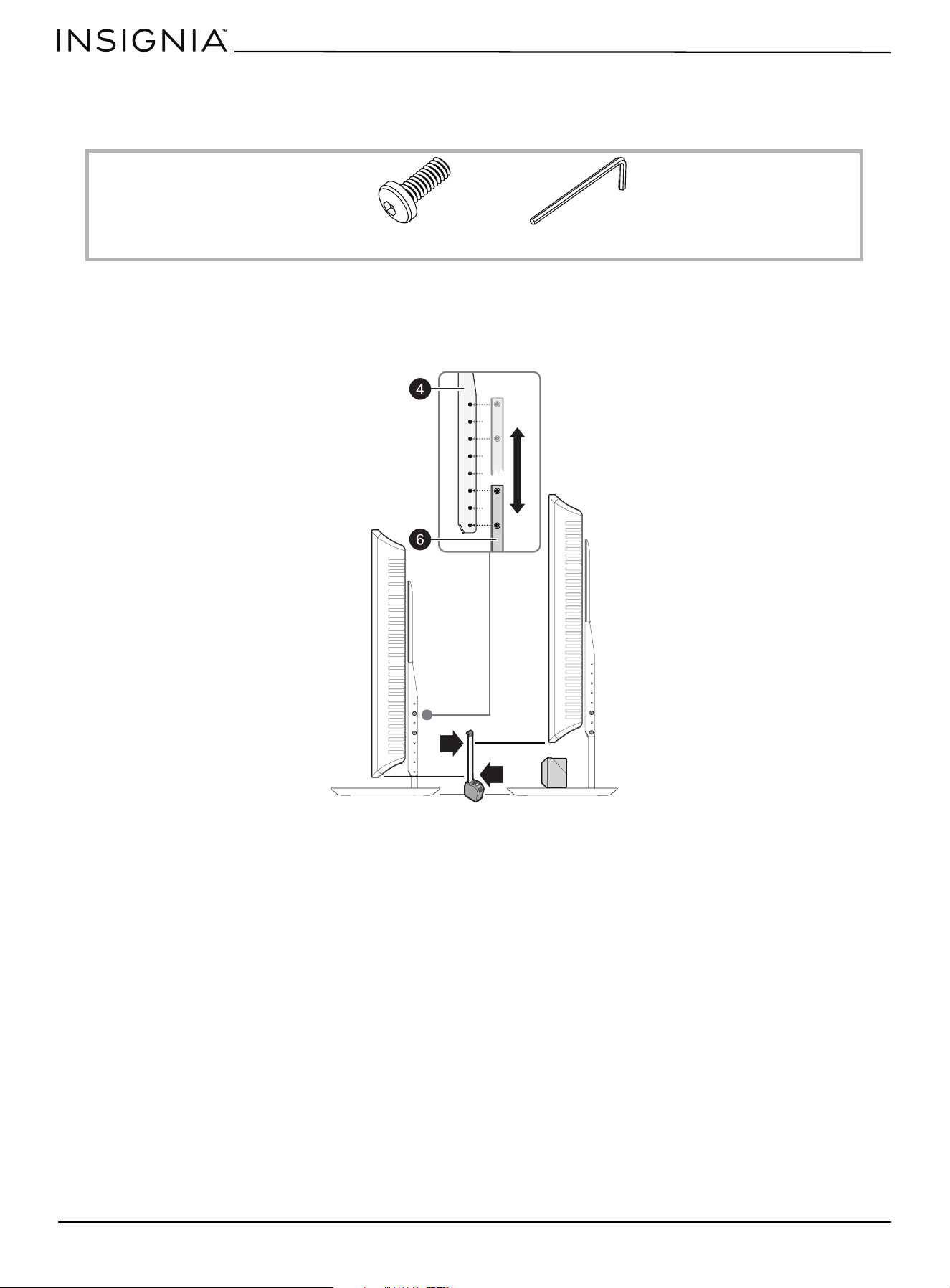
STEP 5: Assemble the feet
You n ee d :
1 Insert the post holes on the ends of the legs (6) with the posts in the tops of the feet (5).
2 Insert the M6 × 15 mm screws (7) through the feet screw holes and into the leg post holes, then tighten the screws
with the hex key (9).
9 Hex key
6 Leg (2)
5 Foot (2)
7 M6 × 15 mm screw (4)
www.insigniaproducts.com
14
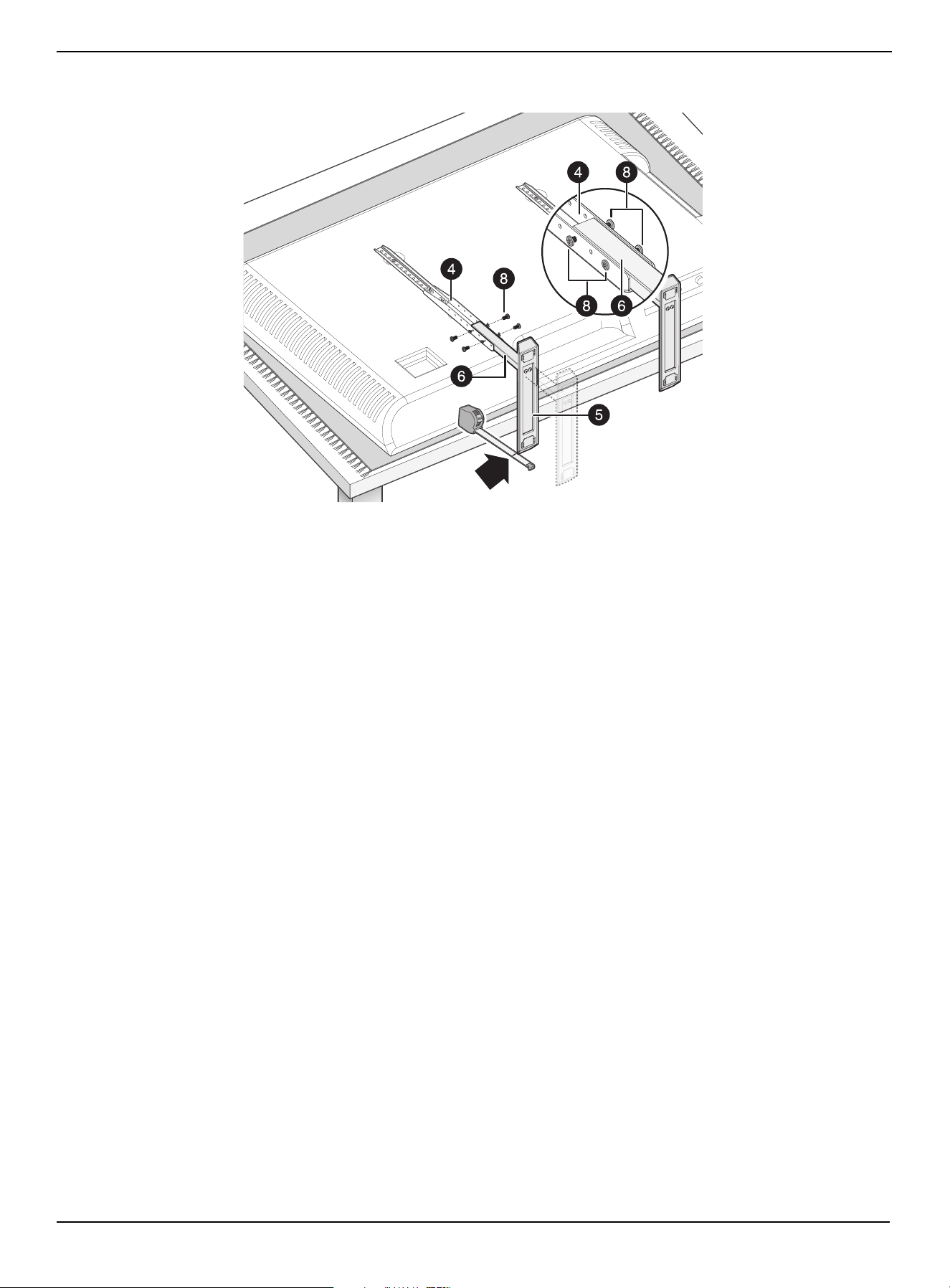
STEP 6: Determine the height and secure the feet
You can adjust the height between the bottom of the TV and the tops of the feet to make room for another device (like a
soundbar).
You n ee d :
1 To determine the height of the TV, measure the distance you want from the top of feet to the bottom of the TV, and
note the location of the screw holes on the TV brackets.
2 Slide the legs (6) into the grooves on the TV brackets, then align the holes on sides of the brackets with holes on the TV
brackets that you noted in step 1.
9 Hex key
8 M5 × 15 mm screw (8)
www.insigniaproducts.com
15
Universal TV Stand Replacement Kit
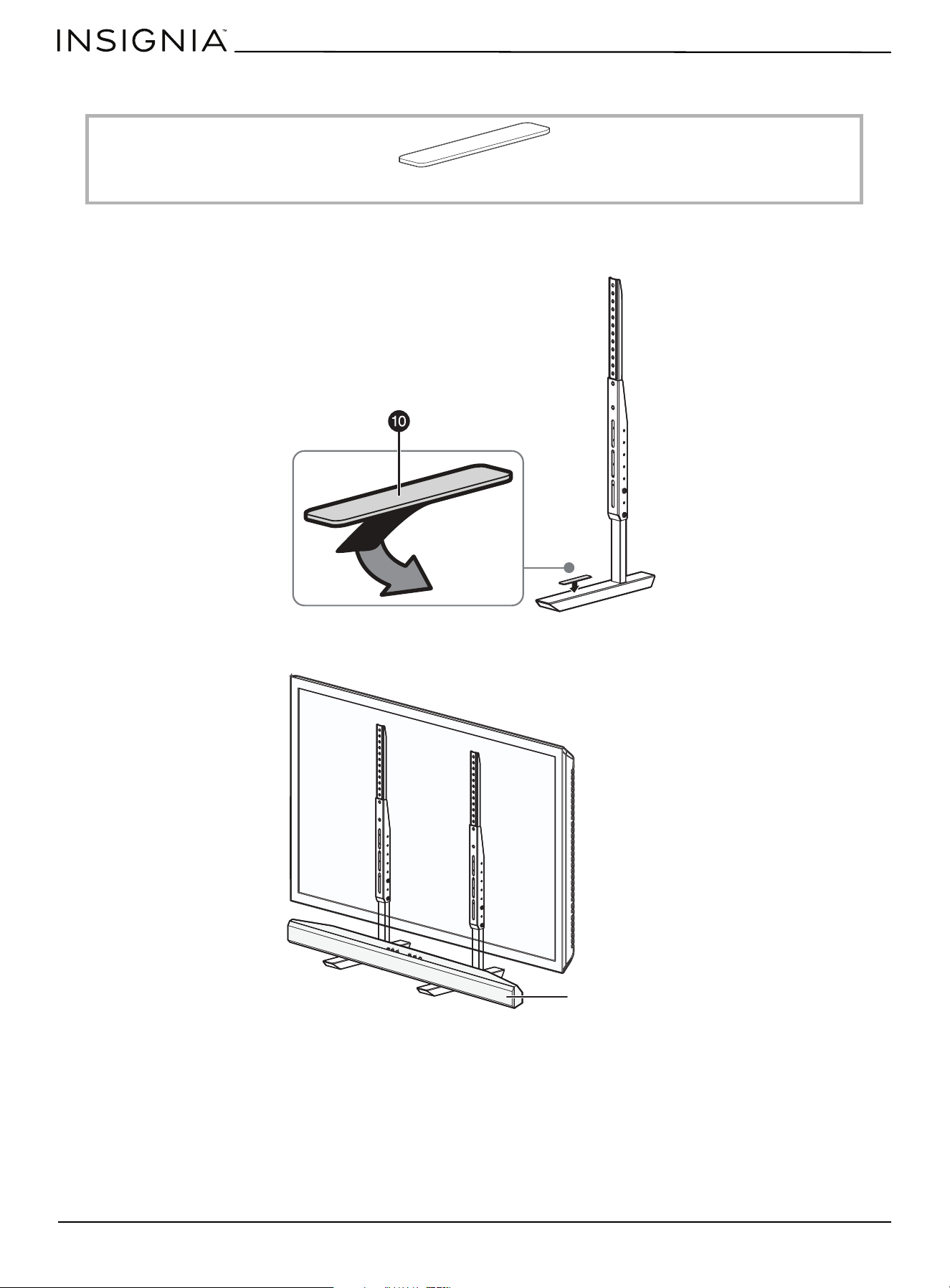
3 Insert the M5 × 15 mm screws (8) through the bracket holes and into the holes on the sides of the legs, then tighten
the screws with the hex key.
www.insigniaproducts.com
16
STEP 7: (Optional) Install a soundbar
You n ee d :
1 Remove the adhesive backing on the soundbar pads (10), then place the adhesive side of the pads on the tops of the
feet.
2 Insert the soundbar onto the feet so the soundbar is resting on the pads.
10 Soundbar pads (2)
Soundbar

www.insigniaproducts.com
17
Universal TV Stand Replacement Kit
Specifications
Dimensions (H × W × D) 24.8 × 2.7 × 14 in. (63 × 6.9 × 36 cm)
Weight 9.5 lbs. (4.3 kg)
Maximum combined weight of TV and
devices
100 lbs. (45.3 kg)
TV screen diagonal size Minimum: 49 in. (124.5 cm)
Maximum: 77 in. (195.6 cm)

www.insigniaproducts.com
18
ONE-YEAR LIMITED WARRANTY
Definitions:
The Distributor* of Insignia branded products warrants to you, the original purchaser of this new Insignia-branded product (“Product”), that the
Product shall be free of defects in the original manufacturer of the material or workmanship for a period of one (1) year from the date of your purchase
of the Product (“Warranty Period”).
For this warranty to apply, your Product must be purchased in the United States or Canada from a Best Buy branded retail store or online at
www.bestbuy.com
or www.bestbuy.ca and is packaged with this warranty statement.
How long does the coverage last?
The Warranty Period lasts for 1 year (365 days) from the date you purchased the Product. Your purchase date is printed on the receipt you received
with the Product.
What does this warranty cover?
During the Warranty Period, if the original manufacture of the material or workmanship of the Product is determined to be defective by an authorized
Insignia repair center or store personnel, Insignia will (at its sole option): (1) repair the Product with new or rebuilt parts; or (2) replace the Product at
no charge with new or rebuilt comparable products or parts. Products and parts replaced under this warranty become the property of Insignia and are
not returned to you. If service of Products or parts are required after the Warranty Period expires, you must pay all labor and parts charges. This
warranty lasts as long as you own your Insignia Product during the Warranty Period. Warranty coverage terminates if you sell or otherwise transfer the
Product.
How to obtain warranty service?
If you purchased the Product at a Best Buy retail store location or from a Best Buy online website (www.bestbuy.com or www.bestbuy.ca), please take
your original receipt and the Product to any Best Buy store. Make sure that you place the Product in its original packaging or packaging that provides
the same amount of protection as the original packaging.
To obtain warranty service, in the United States call 1-888-BESTBUY or in Canada call 1-866-BESTBUY. Call agents may diagnose and correct the issue
over the phone.
Where is the warranty valid?
This warranty is valid only in the United States and Canada at Best Buy branded retail stores or websites to the original purchaser of the product in the
country where the original purchase was made.
What does the warranty not cover?
This warranty does not cover:
• Food, beverage, and or medicine loss/spoilage
• Customer instruction/education
•Installation
•Set up adjustments
• Cosmetic damage
• Damage due to weather, lightning, and other acts of God, such as power surges
• Accidental damage
•Misuse
•Abuse
•Negligence
• Commercial purposes/use, including but not limited to use in a place of business or in communal areas of a multiple dwelling condominium or
apartment complex, or otherwise used in a place of other than a private home.
• Modification of any part of the Product, including the antenna
• Display panel damaged by static (non-moving) images applied for lengthy periods (burn-in).
• Damage due to incorrect operation or maintenance
• Connection to an incorrect voltage or power supply
• Attempted repair by any person not authorized by Insignia to service the Product
• Products sold “as is” or “with all faults”
• Consumables, including but not limited to batteries (i.e. AA, AAA, C, etc.)
• Products where the factory applied serial number has been altered or removed
• Loss or Theft of this product or any part of the product
• Display panels containing up to three (3) pixel failures (dots that are dark or incorrectly illuminated) grouped in an area smaller than one tenth
(1/10) of the display size or up to five (5) pixel failures throughout the display. (Pixel based displays may contain a limited number of pixels that
may not function normally.)
• Failures or Damage caused by any contact including but not limited to liquids, gels or pastes.
REPAIR REPLACEMENT AS PROVIDED UNDER THIS WARRANTY IS YOUR EXCLUSIVE REMEDY FOR BREACH OF WARRANTY. INSIGNIA SHALL NOT BE
LIABLE FOR ANY INCIDENTAL OR CONSEQUENTIAL DAMAGES FOR THE BREACH OF ANY EXPRESS OR IMPLIED WARRANTY ON THIS PRODUCT,
INCLUDING, BUT NOT LIMITED TO, LOST DATA, LOSS OF USE OF YOUR PRODUCT, LOST BUSINESS OR LOST PROFITS. INSIGNIA PRODUCTS MAKES NO
OTHER EXPRESS WARRANTIES WITH RESPECT TO THE PRODUCT, ALL EXPRESS AND IMPLIED WARRANTIES FOR THE PRODUCT, INCLUDING BUT NOT
LIMITED TO ANY IMPLIED WARRANTIES OF AND CONDITIONS OF MERCHANTABILITY AND FITNESS FOR A PARTICULAR PURPOSE, ARE LIMITED IN
DURATION TO THE WARRANTY PERIOD SET FORTH ABOVE AND NO WARRANTIES, WHETHER EXPRESS OR IMPLIED, WILL APPLY AFTER THE WARRANTY
PERIOD. SOME STATES, PROVINCES AND JURISDICTIONS DO NOT ALLOW LIMITATIONS ON HOW LONG AN IMPLIED WARRANTY LASTS, SO THE ABOVE
LIMITATION MAY NOT APPLY TO YOU. THIS WARRANTY GIVES YOU SPECIFIC LEGAL RIGHTS, AND YOU MAY ALSO HAVE OTHER RIGHTS, WHICH VARY
FROM STATE TO STATE OR PROVINCE TO PROVINCE.
Contact Insignia:
1-877-467-4289
www.insigniaproducts.com
INSIGNIA is a trademark of Best Buy and its affiliated companies.
*Distributed by Best Buy Purchasing, LLC
7601 Penn Ave South, Richfield, MN 55423 U.S.A.
©2022 Best Buy. All rights reserved.

www.insigniaproducts.com
1-877-467-4289 (U.S. and Canada)
INSIGNIA is a trademark of Best Buy and its affiliated companies.
Distributed by Best Buy Purchasing, LLC
7601 Penn Ave South, Richfield, MN 55423 U.S.A.
©2022 Best Buy. All rights reserved.
V1 ENGLISH
21-1116
6907-302055
