Opera�on instruc�on of Control Bu�on
Product Parameter
Product name: Mini Handheld Fan(CO-F0321W)
Ba�ery: lithium ba�ery
Fan power: Max. 3 Wa�s
Weight: 146g
Working �me: 2-8h
Input: DC.5.0V 1.0A
Product size: 91*62*138mm(35.8*24.4*54.3 inches)
User Manual
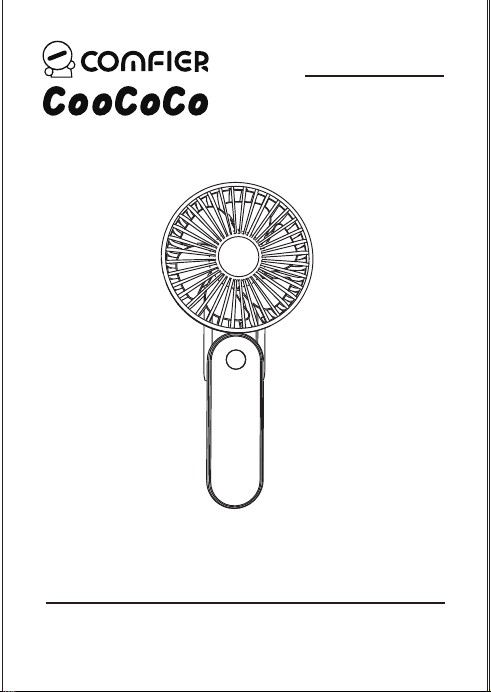
CO-F0321W
Mini Handheld Fan
第1页 第2页
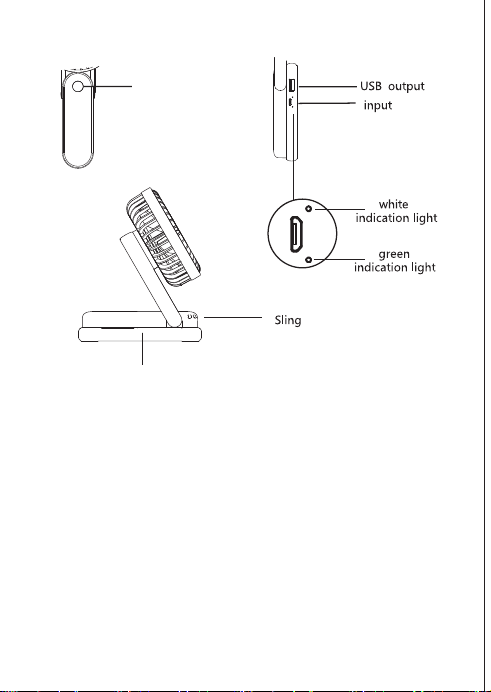
Short Press 1st to turn on the fan, the fan works at “low” speed;
Short Press 2nd to switch to “Medium” fan speed;
Short Press 3rd to switch to “High” fan speed;
Short Press 4th to turn off the fan.
During working, long press for 2-3 seconds will turn off the fan.
Handle/Folding base
Control Bu�on
(ON/OFF, Fan Speed)
Opera�on instruc�on of Control Bu�on
Product Parameter
Product name: Mini Handheld Fan(CO-F0321W)
Ba�ery: lithium ba�ery
Fan power: Max. 3 Wa�s
Weight: 146g
Working �me: 2-8h
Input: DC.5.0V 1.0A
Product size: 91*62*138mm(35.8*24.4*54.3 inches)
User Manual
CO-F0321W
Mini Handheld Fan
第1页 第2页
Short Press 1st to turn on the fan, the fan works at “low” speed;
Short Press 2nd to switch to “Medium” fan speed;
Short Press 3rd to switch to “High” fan speed;
Short Press 4th to turn off the fan.
During working, long press for 2-3 seconds will turn off the fan.
Handle/Folding base
Control Bu�on
(ON/OFF, Fan Speed)
Warranty
Instruc�on of indicator Light
Precau�ons for Use
1. Do not put any objects or hands into the fan during use to avoid product
damage or personal injury.
2 The product has a built-in ba�ery, please do not use it at a high temperature
above 60 degrees Celsius, and do not throw the product into fire.
3. Always turn off the fan before cleaning
4. Do not clean it directly with water.
5. Wipe it with a bit dampen cloth
6. Wait for the device to become fully dry before use.
7. Do not leave the ba�ery in an unpowered state for a long �me, please
charge the ba�ery once every three months.
第3页 第4页
Charging
1. When charging the fan, you can connect the USB cable with any USB
charger, it can be pluged in potable power bank, mobile phone ba�ery
chargers, laptop and any USB port.
2. It usually takes 3 hours to full chage.
3. The fan comes with a mini power bank, can be used to charge a mobile
phone.
Maintenance
1. Please keep it into a box and keep in a safe, dry and cool place.
2. Do not keep it in any place with high temperature, near fire or
direct sunlight,or it may faded or damaged.
3. Do not place or store appliance where it can fall or be pulled into a
bath or sink. Do not place in or drop into water or other liquid.
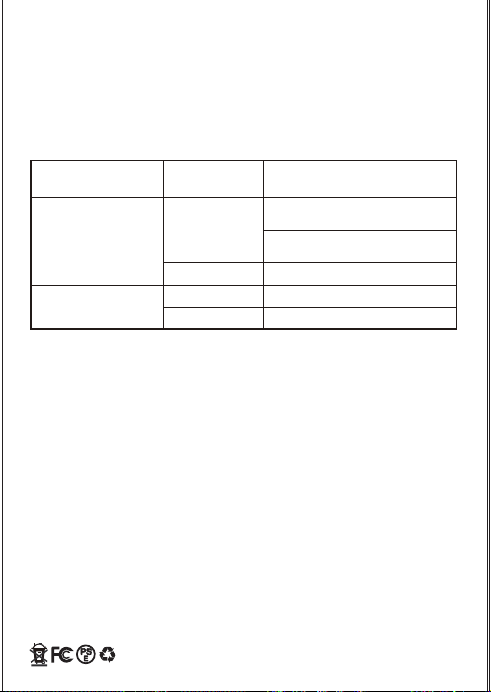
Green indicator light
Light
Indicatior light color Indicator
light status
Instruction
Flash
White indicator light
Light
Off
when used as power bank output,
to charge a mobile phone
While charging the fan
fan is working
fan is closed
When charging the fan, it lights
up to indicate sufficient power
30 days uncondi�onally Return
Comfier product can be returned to receive a full refund for any reason within 30 days.
Please contact our customers service (supportus@comfier.com), our staff will contact
you within 24 hours.
90 days refund/replace
Comfier product can be returned / replaced within 90 days if the product break down
in the period of proper use.
12 months Warranty
If the product break down within 12 months in the period of proper use, customers can
enjoy the relevant warranty to get them replaced.
A�en�on!
No warranty will be given to any force majeure and man-made causes to a defec�ve
product, such as improper care, personal tear down and willful damage,etc.
If you have any issue about the product, please feel free to contact us by sending
email to supportus@comfier.com We will strive to provide the best service
possible within 24 hours.
Extend Warranty for Free
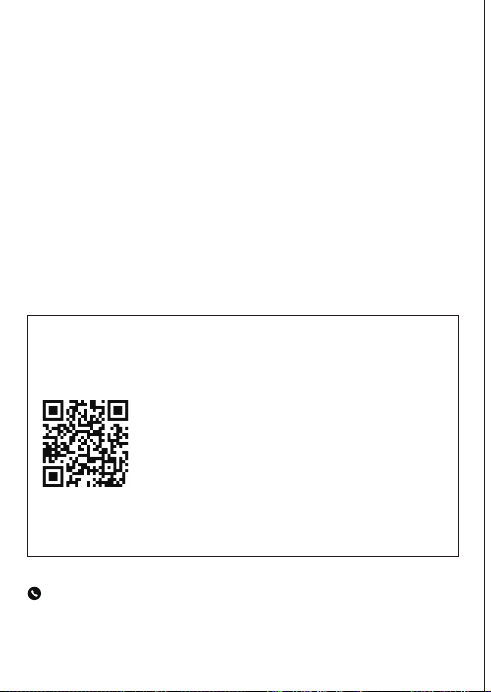
1) Enter the following URL or scan the QR code below to find COMFIER facebook
page and like it, enter“Warranty” to messenger to extend your warranty from
1 year to 3 years.
h�ps://www.facebook.com/comfiermassager
OR 2) Send message“Warranty” and email us supportus@comfier.com to extend your
warranty from 1 year to 3 years.
Tel: (248) 819-2623
Monday-Friday 9:00AM-4:30PM
Warranty
Instruc�on of indicator Light
Precau�ons for Use
1. Do not put any objects or hands into the fan during use to avoid product
damage or personal injury.
2 The product has a built-in ba�ery, please do not use it at a high temperature
above 60 degrees Celsius, and do not throw the product into fire.
3. Always turn off the fan before cleaning
4. Do not clean it directly with water.
5. Wipe it with a bit dampen cloth
6. Wait for the device to become fully dry before use.
7. Do not leave the ba�ery in an unpowered state for a long �me, please
charge the ba�ery once every three months.
第3页 第4页
Charging
1. When charging the fan, you can connect the USB cable with any USB
charger, it can be pluged in potable power bank, mobile phone ba�ery
chargers, laptop and any USB port.
2. It usually takes 3 hours to full chage.
3. The fan comes with a mini power bank, can be used to charge a mobile
phone.
Maintenance
1. Please keep it into a box and keep in a safe, dry and cool place.
2. Do not keep it in any place with high temperature, near fire or
direct sunlight,or it may faded or damaged.
3. Do not place or store appliance where it can fall or be pulled into a
bath or sink. Do not place in or drop into water or other liquid.
Green indicator light
Light
Indicatior light color Indicator
light status
Instruction
Flash
White indicator light
Light
Off
when used as power bank output,
to charge a mobile phone
While charging the fan
fan is working
fan is closed
When charging the fan, it lights
up to indicate sufficient power
30 days uncondi�onally Return
Comfier product can be returned to receive a full refund for any reason within 30 days.
Please contact our customers service (supportus@comfier.com), our staff will contact
you within 24 hours.
90 days refund/replace
Comfier product can be returned / replaced within 90 days if the product break down
in the period of proper use.
12 months Warranty
If the product break down within 12 months in the period of proper use, customers can
enjoy the relevant warranty to get them replaced.
A�en�on!
No warranty will be given to any force majeure and man-made causes to a defec�ve
product, such as improper care, personal tear down and willful damage,etc.
If you have any issue about the product, please feel free to contact us by sending
email to supportus@comfier.com We will strive to provide the best service
possible within 24 hours.
Extend Warranty for Free
1) Enter the following URL or scan the QR code below to find COMFIER facebook
page and like it, enter“Warranty” to messenger to extend your warranty from
1 year to 3 years.
h�ps://www.facebook.com/comfiermassager
OR 2) Send message“Warranty” and email us supportus@comfier.com to extend your
warranty from 1 year to 3 years.
Tel: (248) 819-2623
Monday-Friday 9:00AM-4:30PM

第5页 第6页
NOTE: This equipment has been tested and found to comply with the limits for a
Class B digital device, pursuant to Part 15 of the FCC Rules. These limits are designed
to provide reasonable protec�on against harmful interference in a residen�al
installa�on. This equipment generates, uses and can radiate radio frequency energy
and, if not installed and used in accordance with the instruc�ons, may cause harmful
interference to radio communica�ons.However, there is no guarantee that
interference will not occur in a par�cular installa�on. If this equipment does cause
harmful interference to radio or television recep�on, which can be determined by
turning the equipment off and on, the user is encouraged to try to correct the
interference by one or more of the following measures:
• Reorient or relocate the receiving antenna.
• Increase the separa�on between the equipment and receiver.
• Connect the equipment into an outlet on a circuit different from that to which the
receiver is connected.
• Consult the dealer or an experienced radio / TV technician for help.
This device complies with Part 15 of the FCC Rules. Opera�on is subject to the following
two condi�ons: (1) this device may not cause harmful interference, and (2) this device
must accept any interference received, including interference that may cause undesired
opera�on.
WARNING: Changes or modifica�ons to this unit is not expressly approved by the party
responsible for compliance could void the user's authority to operate the equipment.
FCC STATEMENT
COMFIER US CORPORATION
Address:573 BELLEVUE RD
NEWARK, DE 19713 USA
www.facebook.com/comfiermassager
supportus@comfier.com
www.comfier.com
第5页 第6页
NOTE: This equipment has been tested and found to comply with the limits for a
Class B digital device, pursuant to Part 15 of the FCC Rules. These limits are designed
to provide reasonable protec�on against harmful interference in a residen�al
installa�on. This equipment generates, uses and can radiate radio frequency energy
and, if not installed and used in accordance with the instruc�ons, may cause harmful
interference to radio communica�ons.However, there is no guarantee that
interference will not occur in a par�cular installa�on. If this equipment does cause
harmful interference to radio or television recep�on, which can be determined by
turning the equipment off and on, the user is encouraged to try to correct the
interference by one or more of the following measures:
• Reorient or relocate the receiving antenna.
• Increase the separa�on between the equipment and receiver.
• Connect the equipment into an outlet on a circuit different from that to which the
receiver is connected.
• Consult the dealer or an experienced radio / TV technician for help.
This device complies with Part 15 of the FCC Rules. Opera�on is subject to the following
two condi�ons: (1) this device may not cause harmful interference, and (2) this device
must accept any interference received, including interference that may cause undesired
opera�on.
WARNING: Changes or modifica�ons to this unit is not expressly approved by the party
responsible for compliance could void the user's authority to operate the equipment.
FCC STATEMENT
COMFIER US CORPORATION
Address:573 BELLEVUE RD
NEWARK, DE 19713 USA
www.facebook.com/comfiermassager
supportus@comfier.com
www.comfier.com

