HP02
OPERATING MANUAL
INSTRUCCIONES DE
SEGURIDAD
See “Setting up the Dyson Link app”
Consulte la sección “Cómo instalar
la aplicación Dyson Link”
REGISTER TODAY
Register your machine to
be the first to receive Dyson
updates and news.
REGÍSTRATE
HOY
Registra tu máquina para
ser el primero en recibir
actualizaciones y noticias
de Dyson.

2
IMPORTANT SAFETY
INSTRUCTIONS
BEFORE USING THIS MACHINE READ
ALL INSTRUCTIONS AND CAUTIONARY
MARKINGS IN THIS USER MANUAL AND
ON THE MACHINE
When using an electrical machine, basic
precautions should always be followed,
including the following:
WARNING
THE MACHINE AND THE REMOTE
CONTROL BOTH CONTAIN MAGNETS.
1. Implanted medical devices such as pacemakers
and defibrillators may be affected by strong
magnetic fields. If you or someone in your
household has an implanted medical device or
defibrillator, avoid placing the remote control in
a pocket or near to the device.
2. Credit cards and electronic storage media may
also be affected by magnets and should be
kept away from the remote control and the top
of the machine.
WARNING
These warnings apply to the machine,
and also where applicable, to all tools,
accessories, chargers or mains adaptors.
TO REDUCE THE RISK OF FIRE, ELECTRIC
SHOCK, OR INJURY:
1. When used in heating mode, the machine is hot
when in use and for a short period after use.
To avoid burns, do not let bare skin touch hot
surfaces. When moving the machine hold it by
the base, not the air loop amplifier.
2. Keep combustible materials, such as furniture,
pillows, bedding, papers, clothes and curtains,
at least 0.9 meter (3 feet) from the front of the
machine and keep them away from the sides
and rear when the machine is plugged in.
3. Use only as described in the Dyson User
manual. Do not carry out any maintenance
other than that shown in the manual, or advised
by the Dyson Helpline. Any other use not
recommended by the manufacturer may cause
fire, electric shock, or injury to persons.
4. Ensure that the machine is fully assembled in
line with the instructions before use. Do not
dismantle the machine or use without the loop
amplifier fitted.
5. Do not allow to be used as a toy. Close
attention is necessary when used by or near
children. Children of less than 3 years should be
kept away unless continuously supervised.
Children should be supervised to ensure
that they do not play with the machine and
remote control.
6. Children aged from 3 years and less than 8
years shall only switch on/off the machine
provided that it has been placed or installed
in its intended normal operating position and
they have been given supervision or instruction
concerning use of the machine in a safe way
and understand the hazards involved. Children
aged from 3 years and less than 8 years shall
not plug in, regulate and clean the machine or
perform user maintenance. CAUTION – Some
parts of this machine can become very hot
and cause burns. Particular attention has to be
given where children and vulnerable people
are present.
7. This Dyson machine is not intended for use
by persons (including children) with reduced
physical, sensory or reasoning capabilities,
or lack of experience and knowledge, unless
they have been given supervision or instruction
concerning use of the machine by a person
responsible for their safety.
8. Extreme caution is necessary when any
machine is used by or near children or infirm
persons and whenever it is left operating
and unattended.
9. Suitable for dry locations ONLY. Do not use
outdoors or on wet surfaces. Do not use in
bathrooms, laundry areas or similar indoor
locations. Never locate the machine where it
may fall into a bath or other water container.
Do not use or store where it may get wet or
in the immediate surroundings of a bath, a
shower, or a swimming pool.
10. This machine has hot parts inside. Do not use
it in areas where petrol, paint, or flammable
liquids are used or stored or where their
vapors are present. Do not use in conjunction
with or directly next to an air freshener or
similar products.
11. Do not locate directly below a mains electricity
supply socket.
12. Always plug directly into a wall outlet. Never
use with an extension cord as overloading may
result in the cord overheating and catching fire.
13. Do not handle any part of the plug or machine
with wet hands.
14. Do not use with a damaged cord or plug. If the
supply cord is damaged it must be replaced by
Dyson, its service agent or similarly qualified
persons in order to avoid a hazard.
15. Do not unplug by pulling on the cord. To
unplug, grasp the plug, not the cord.
16. Do not stretch the cord or place the cord
under strain. Keep the cord away from
heated surfaces.
3
17. Do not run the cord under carpeting. Do not
cover the cord with throw rugs, runners or
similar coverings. Do not route the cord under
furniture or machines. Arrange the cord away
from traffic areas and where it will not be
tripped over.
18. To prevent a possible fire, do not use with
any openings or exhaust blocked, and keep
free of dust, lint, hair, and anything that may
reduce airflow. Do not put any objects into the
inlet grille or the exhaust opening as this may
cause an electric shock or fire, or damage
the machine.
19. Do not use on soft surfaces, such as a bed,
where openings may become blocked.
20. In order to avoid overheating, do not
cover the machine.
21. For the best performance, place on the floor,
in the corner of the room, at least 1 meter (3
feet) from any wall and facing into the center of
the room.
22. Turn off all controls before unplugging. Always
unplug the machine when not in use.
23. If there is a loose fit between the plug and
the outlet or the plug becomes very hot, the
outlet may need to be replaced. Check with a
qualified electrician to replace the outlet.
24. If the machine is not working as it should, if
it has received a sharp blow, if it has been
dropped, damaged, left outdoors, or dropped
into water, do not use and contact the
Dyson Helpline.
25. Contact the Dyson Helpline when a service
or repair is required. Do not disassemble the
machine as incorrect reassembly may result in
an electric shock or fire.
26. Do not use any cleaning agents or lubricants
on this machine. Unplug before cleaning or
carrying out any maintenance.
27. Always carry the machine by the base, do not
carry it by the loop amplifier.
28. To avoid a tripping hazard, wind the cord when
not in use.
29. Do not use near furnaces, fireplaces, stoves or
other high temperature heat sources.
30. Do not use in conjunction with or directly next
to an air freshener or similar products. Do not
spray or apply perfumes directly on or near the
filter. Keep essential oils and chemicals away
from the machine.
31. The machine should not be forcefully turned or
oscillated, under any circumstances. This will
cause damage to the oscillation mechanism.
32. When removing or replacing the filter, take care
to keep your fingers clear between the filter and
the purifier base.
33. Chemical Burn and Choking Hazard. Keep
batteries away from children. This product
contains a lithium button/coin cell battery. If
a new or used lithium button/coin cell battery
is swallowed or enters the body, it can cause
severe internal burns and can lead to death
in as little as 2 hours. Always completely
secure the battery compartment. If the battery
compartment does not close securely, stop
using the product, remove the batteries, and
keep it away from children. If you think batteries
might have been swallowed or placed inside
any part of the body, seek immediate medical
attention. Even used batteries may cause
injury. Dispose of used batteries safely and
immediately. Ensure others are aware of the
risks associated with these batteries.
IMPORTANT SAFETY
FEATURES
For your safety this machine is fitted with
automatic cut-out switches that operate
if it tips over or overheats. If the switches
operate, unplug the machine and allow it to
cool. Before restarting, check and clear any
blockages and ensure the machine is on a
solid level surface.
READ AND SAVE THESE
INSTRUCTIONS
THIS DYSON MACHINE IS INTENDED FOR
HOUSEHOLD USE ONLY.
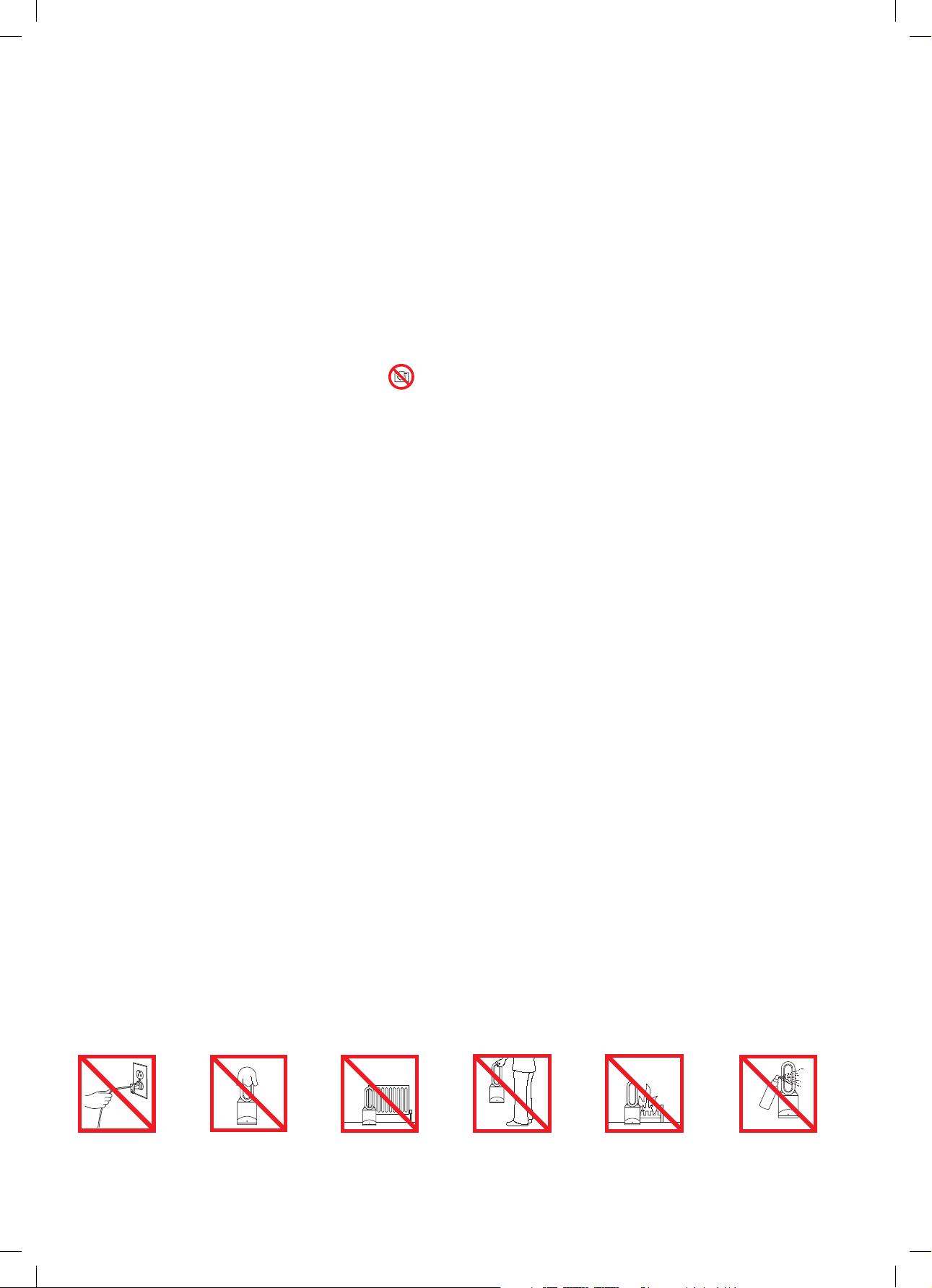
Do not pull on
the cord.
In order to avoid
overheating and fire
hazard, do not cover
the machine.
Do not store near
heat sources.
Do not carry by the
air loop amplifier.
The air loop amplifier
is not a handle.
Do not use near
open flames.
Do not spray scented
products such as air
freshener or perfume
near the filter or the
machine.
4
INSTRUCCIONES
DE SEGURIDAD
IMPORTANTES
ANTES DE USAR ESTE APARATO LEA
LAS INSTRUCCIONES Y LAS MARCAS
DE PRECAUCIÓN EN EL MANUAL DEL
USUARIO Y EN EL APARATO.
Cuando se usa una máquina eléctrica, deben
seguirse las precauciones básicas para reducir
riesgos de incendio, descarga eléctrica y
lesiones personales, que incluyen lo siguiente:
PELIGRO
EL VENTILADOR Y EL CONTROL REMOTO
CONTIENEN IMANES.
1. Los dispositivos médicos implantados como
marcapasos y desfibriladores pueden resultar
afectados por campos magnéticos potentes. Si
usted o alguien en su hogar tiene un dispositivo
médico implantado o un desfibrilador, evite
colocarse el control remoto en el bolsillo o cerca
del dispositivo.
2. Es posible que los imanes también dañen
las tarjetas de crédito y los medios de
almacenamiento electrónico, por lo que deben
mantenerse alejados del control remoto y de la
parte superior de la máquina.
PELIGRO
Estas advertencias se aplican a la máquina,
y cuando corresponde, a todas las
herramientas, accesorios, cargadores y
adaptadores de corriente.
PARA DISMINUIR EL RIESGO DE PROVOCAR
UN INCENDIO, RECIBIR UNA DESCARGA
ELÉCTRICA O LESIONES:
1. En el modo de calefacción, el equipo se
calienta durante el uso y durante un período
breve de tiempo después del uso. Para evitar
quemaduras, no permita que la piel toque
las superficies calientes. Cuando mueva el
equipo, sujételo por la base, no por el bucle
amplificador de aire.
2. Cuando el equipo esté enchufado, mantenga
materiales combustibles, como muebles,
almohadas, ropa blanca, papeles, prendas de
vestir y cortinas, a por lo menos 0,9 m (3 pies)
de distancia del frente del equipo, lejos de los
costados y la parte trasera.
3. Utilice únicamente de la manera descrita en
este manual del usuario de Dyson. No efectúe
ninguna tarea de mantenimiento que no
esté incluida en este manual, o señalada por
personal de la línea directa de Asistencia al
Cliente de Dyson. Todo uso no recomendado
por el fabricante puede causar incendios,
descargas eléctricas o lesiones a personas.
4. Antes de utilizar la máquina, asegúrese de
que esté completamente armada según las
instrucciones. No desarme la máquina ni la
utilice sin colocar el bucle amplificador.
5. No permita que se utilice como juguete. Se
debe prestar especial atención cuando el
equipo se utilice cerca de niños. Los niños
menores de tres años deberían mantenerse
alejados de la máquina a menos que estén
contínuamente vigilados. Debe vigilar a los
niños, a fin de garantizar que no jueguen con el
equipo y el control remoto.
6. Solamente permita que los niños de entre
tres y ocho años enciendan o apaguen el
equipo si este ha sido colocado o instalado
en la posición de funcionamiento normal
recomendada. Además, los niños de esta
edad deben ser supervisados y recibir las
instrucciones correspondiente sobre el uso
adecuado el equipo y los peligros que conlleva.
No permita que los niños de entre tres y ocho
años enchufen, regulen o limpien el equipo
ni realicen actividades de mantenimiento.
CUIDADO: Algunas piezas de este producto
pueden alcanzar temperaturas muy altas y
provocar quemaduras. Preste especial atención
a los niños y a otras personas que pudieran
sufrir daños.
7. Esta máquina Dyson no está destinada
para el uso por parte de personas (incluso
niños) con capacidades físicas, cognitivas o
mentales reducidas, o con falta de experiencia
y conocimiento, salvo que hubieran recibido
supervisión o instrucciones acerca del uso
de la máquina por parte de una persona
responsable por su seguridad.
8. Tenga extrema precaución si utiliza el calefactor
cerca de niños o personas enfermas y
siempre que el calefactor esté funcionando o
sin vigilancia.
9. Adecuado SOLAMENTE para lugares secos.
No lo utilice en exteriores ni sobre superficies
húmedas. No lo utilice en baños, áreas para
lavar ropa o lugares interiores similares. Nunca
coloque el equipo en lugares desde los que
pueda caer en una bañera o un contenedor
de agua. No lo utilice ni almacene donde
pueda mojarse o cerca de una bañera, ducha
o piscina.
10. El equipo contiene piezas calientes en su
interior. No lo utilice en áreas en las que se
almacena o utiliza petróleo, pintura o líquidos
inflamables, o donde se encuentren presentes
sus vapores. No lo utilice en combinación con o
directamente cerca de un aromatizador de aire
o productos similares.
11. No lo coloque directamente debajo de una
toma del suministro de corriente eléctrica.

5
12. Conéctelo siempre directamente a la toma
de corriente principal. Nunca lo use con una
extensión de cable, ya que se puede producir
una sobrecarga que sobrecaliente el cable y
provocar un incendio.
13. No manipule ninguna parte del enchufe o de la
máquina con las manos mojadas.
14. No la use con un cable o enchufe dañado.
Si el cable de alimentación está dañado, debe
ser reemplazado por Dyson, su agente de
servicio o personas con calificaciones similares
para evitar una situación de peligro.
15. No desconecte el aparato tirando del cable.
Para desconectar, tome el enchufe y no
el cable.
16. No estire el cable ni lo someta a
tensión. Mantenga el cable apartado de
superficies calientes.
17. No pase el cable por debajo de alfombras.
No cubra el cable con tapetes, alfombrillas
u otras cubiertas similares. No pase el cable
por debajo de muebles o aparatos. Mantenga
el cable alejado de las áreas transitadas y de
lugares donde pueda causar tropiezos.
18. Para evitar la posibilidad de un incendio, no
utilice el equipo si alguna abertura o extractor
están obstruidos; manténgalo sin polvo, pelusa,
cabello, y todo lo que pueda reducir el flujo del
aire. No coloque ningún objeto en la rejilla de
entrada o en la abertura de descarga, porque
esto puede producir una descarga eléctrica o
un incendio, o bien dañar el equipo.
19. No lo utilice sobre superficies blandas, como
una cama, en donde se puedan obstruir
las aberturas.
20. A fin de evitar riesgos de
sobrecalentamiento, no cubra el equipo.
21. Para obtener el mejor rendimiento, coloque
el equipo en el piso, en un rincón de la
habitación, al menos a 1 m (3 pies) de
cualquier pared y con la parte frontal hacia el
centro de la habitación.
22. Apague todos los controles antes de
desconectar. Siempre desconecte el calefactor
si no lo está usando.
23. No utilice productos de limpieza o lubricantes
en la máquina. Desconéctela antes de limpiarla
o realizar tareas de mantenimiento.
24. Si el enchufe no encaja correctamente en la
toma de corriente o se sobrecalienta, es posible
que deba reemplazarse la toma de corriente.
Consulte a un electricista capacitado para
reemplazar la toma de corriente.
25. Peligro de quemadura química y
atragantamiento. Mantenga las baterías lejos
de los niños. Este producto contiene una batería
de litio tipo botón/moneda. Si una batería de
litio tipo botón/moneda se traga o ingresa en
el cuerpo, puede causar quemaduras internas
graves y conducir a la muerte en menos de
2 horas. Siempre cierre de manera segura y
por completo el compartimento de baterías.
Si el compartimento de baterías no cierra de
manera segura, deje de utilizar el producto,
quite las baterías y manténgalas lejos de los
niños. Si cree que una batería ha sido tragada
o introducida en cualquier parte del cuerpo,
busque atención médica de inmediato.
Incluso las baterías usadas pueden causar
lesiones. Deseche inmediatamente y de forma
segura las baterías usadas. Asegúrese de
que otros conozcan los riesgos asociados con
estas baterías.
26. Si el aparato no funciona como es debido,
ha recibido un golpe brusco, se ha caído,
ha sufrido daños, fue dejado en el exterior o
sumergido en agua, no lo use y comuníquese
con la línea directa de Asistencia al Cliente
de Dyson.
27. No coloque ningún objeto en aberturas o en
la rejilla de entrada. No use la máquina si una
abertura está obstruida; manténgala libre de
polvo, pelusa, cabellos y cualquier objeto que
pueda debilitar el flujo de aire.
28. Para el traslado, sujete el equipo por la base;
nunca por el bucle amplificador.
29. Para evitar un peligro de tropiezo, enrolle el
cable cuando no este en uso.
30. No use la máquina cerca de hornos,
chimeneas, estufas u otras fuentes térmicas de
alta temperatura.
31. No la utilice en combinación o directamente
cerca de un aromatizador de aire o de
productos similares. No rocíe ni aplique
perfumes directamente sobre el filtro o cerca
de él. Mantenga los aceites esenciales y los
productos químicos lejos de la máquina.
32. No debe forzar la máquina para que gire ni
para que oscile, bajo ninguna circunstancia.
Hacerlo dañará el mecanismo de oscilación.
33. Cuando quite o reemplace el filtro, tenga
cuidado de mantener los dedos alejados del
espacio entre el filtro y la base del purificador.
ASPECTOS IMPORTANTES
DE SEGURIDAD
Por su seguridad, este equipo cuenta con
interruptores de apagado automático que
funcionan si el equipo se cae o sobrecalienta.
Si los interruptores comienzan a funcionar,
desconecte el equipo y deje que se
enfríe. Antes de poner nuevamente en
funcionamiento el equipo, inspeccione y
elimine cualquier obstrucción y compruebe
que esté colocado sobre una superficie firme
y nivelada.
6
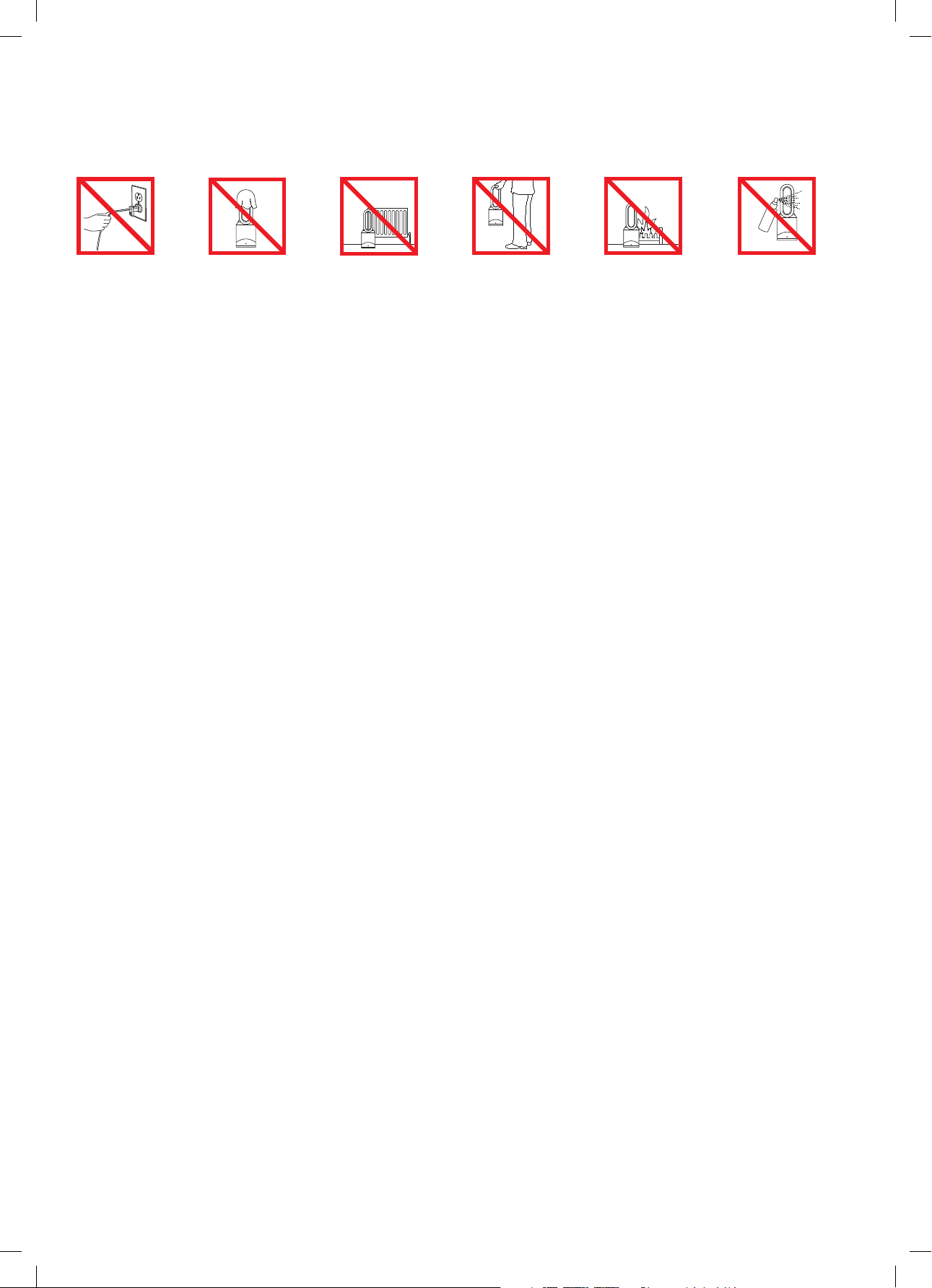
No jale el cable. A fin de evitar
riesgos de
sobrecalentamiento,
no cubra el equipo.
No guarde la
máquina cerca de
fuentes de calor.
No sujete el
aparato del bucle
amplificador de aire
para transportarlo.
El bucle amplificador
de aire no es una
manija.
No utilice la máquina
cerca de una llama.
No rocíe productos
con aromas, como
aromatizadores de
aire o perfumes,
cerca del filtro o del
máquina.
LEA Y GUARDE ESTAS INSTRUCCIONES
ESTA MÁQUINA DYSON ES PARA USO DOMÉSTICO SOLAMENTE.
7
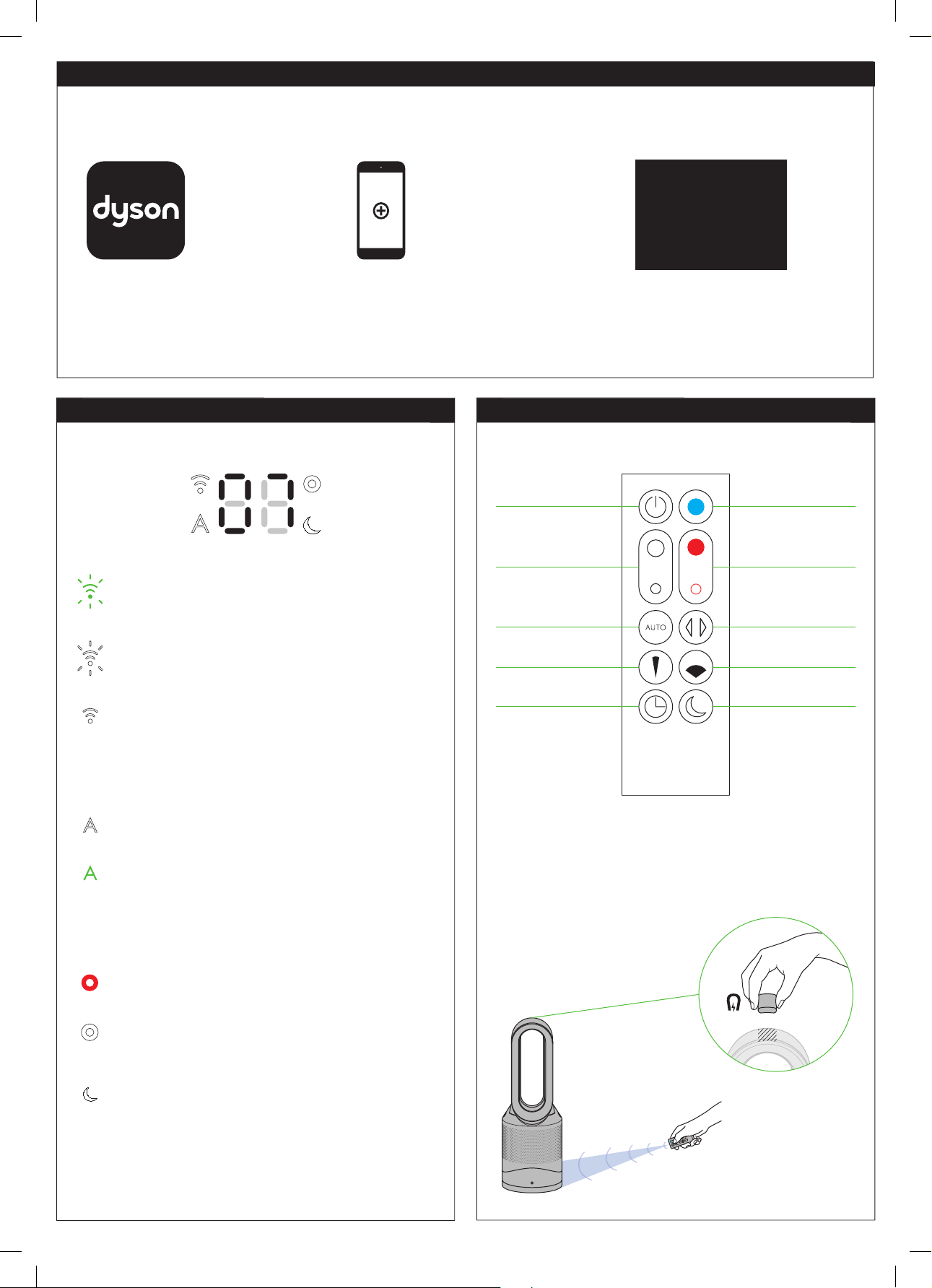
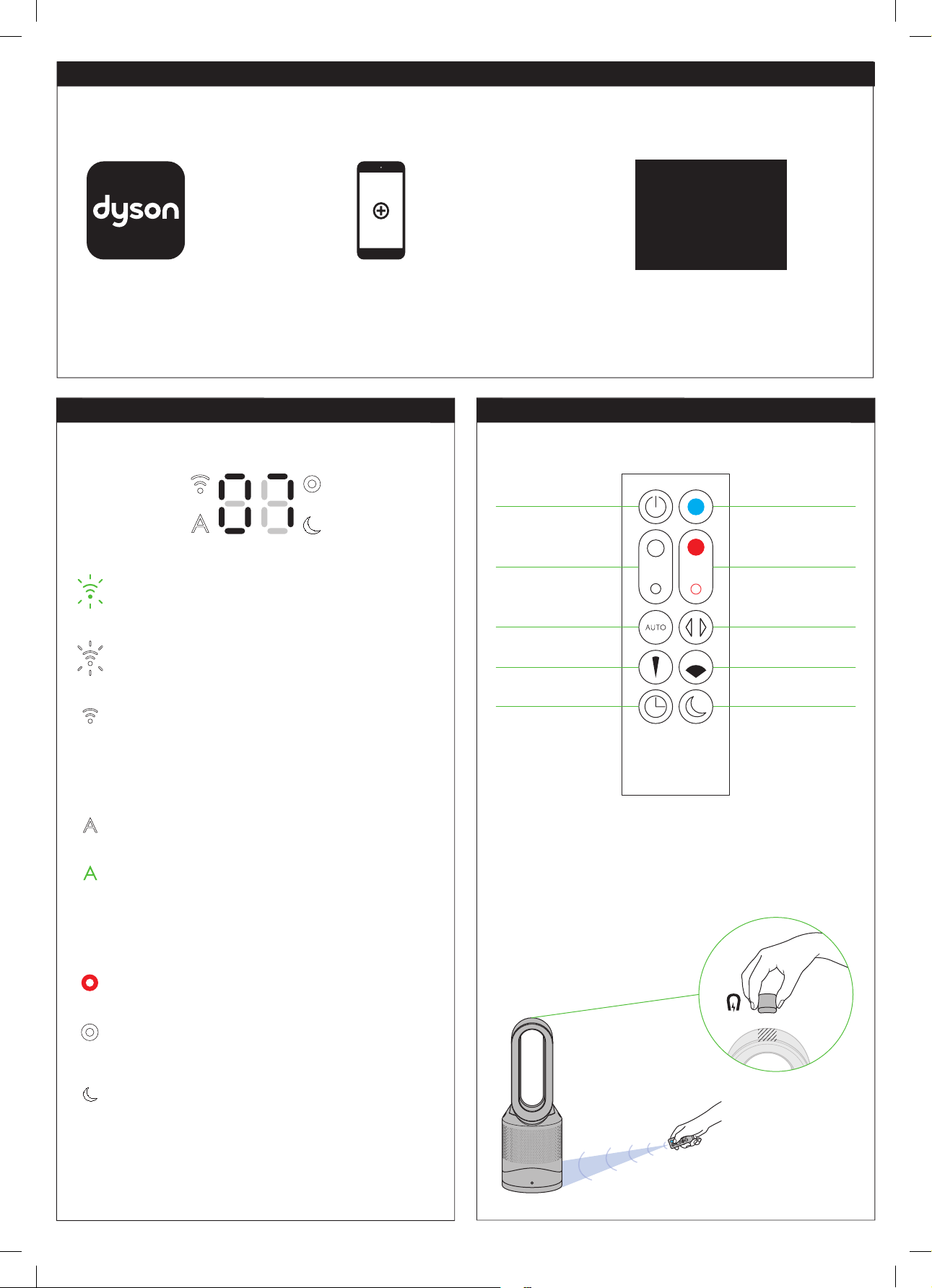
Remote control
To operate, point the
remote control toward the
front of the base.
Standby ON/OFF
Airflow speed control
Auto mode
Sleep timer
Focused mode
Oscillation ON/OFF
Diffused mode
Night mode
Thermostat control
Cooling mode
Flashing green = Wi-Fi is ready to connect to your Dyson
Link app
Flashing white = Wi-Fi connecting
Solid white = Wi-Fi connected
Off = Wi-Fi disabled
Solid white = clean/air quality target has not been met
Solid green = clean/air quality target has been met
Off = machine is not in auto mode
Off = machine is not in night mode
Solid red = machine is heating
Solid white = machine is in night mode
Solid white = machine has reached target temperature
Display icons
Setting up the Dyson Link app
The machine can be enhanced when connected to the Dyson Link app on your smart device.
Product SSID
XXXXX-XXX-XX-XXXXXXXX-XXXX
Product Wi-Fi Password
XXXXXXXX
Ma c address
X X:X X:X X:X X:X X:X X
Select ‘Add a Product’ from within
the app and follow the on screen
instructions.
Download the Dyson Link app, available
on iOS and Android.
In order to connect the machine, you
will need the information on the front
of this manual.
Remote control docks magnetically.
Attach the remote control to the top of the machine
with the buttons facing down.
8
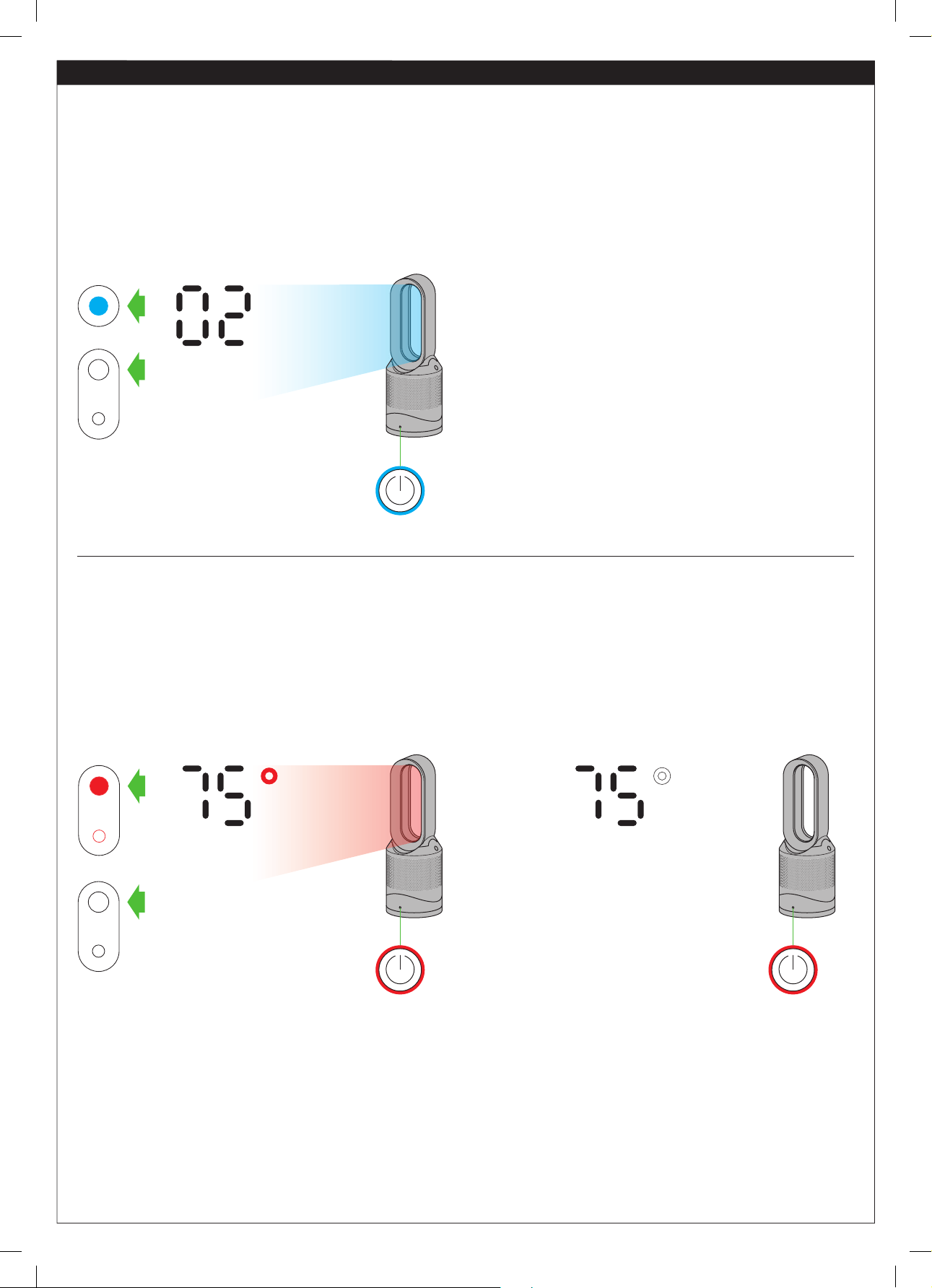
Each time the heating mode is selected, it conducts a short calibration cycle. Airflow will be automatically controlled during this cycle. Once the
calibration cycle is complete, it will revert to the selected airflow speed.
Press the blue cooling mode button to enter cooling mode.
The power button light will change from red to blue to
indicate that you have entered cooling mode. To adjust the
airflow speed, use the airflow control button or use auto mode
for automatic control.
Press the red thermostat control button until the digital display shows the target room temperature. The power button light will change
from blue to red to indicate that you have entered heating mode. The heating symbol will be red while heating and will change to
white when the target room temperature has been reached. Once the target room temperature has been reached, the machine will
stop heating the air. If the room temperature falls below the target temperature, the machine will start to heat again. The red circle
surrounding the power button remains on when the product is in heating mode. To adjust the airflow speed, use the airflow control
button or use auto mode for automatic control.
Room heating to 66°F Room heated to
66°F or above
Machine is in cooling mode
Machine is in heating mode
Airflow speed control
9
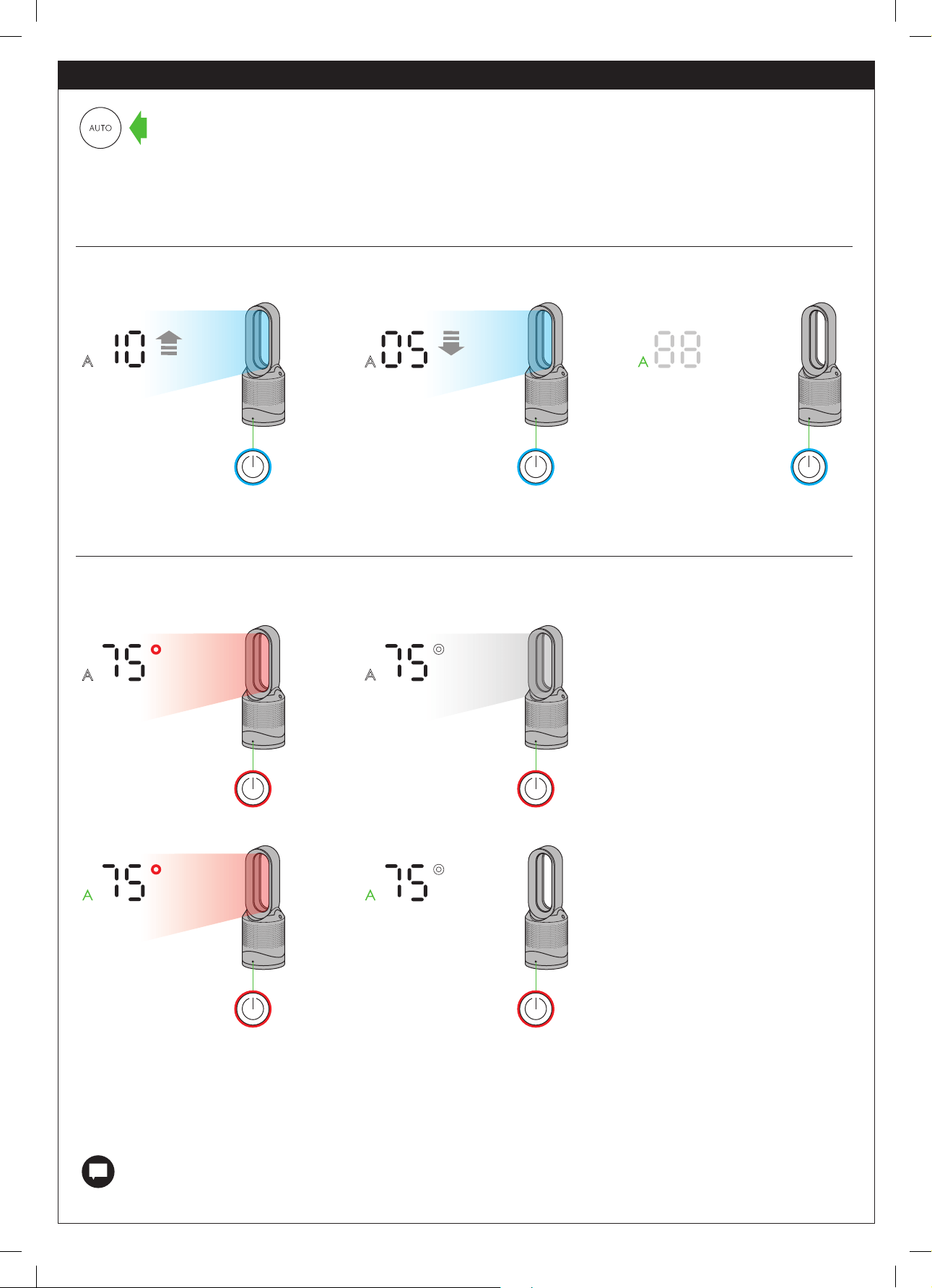
Air quality below target
• Air quality below target
• Below target room
temperature
• Air quality below target
• Target room temperature
met
Air quality target met
• Air quality target met
• Target room temperature
met
Air quality improving
• Air quality target met
• Below target room
temperature
When auto mode is enabled (indicated by an A symbol in the bottom left corner of the display), the on-board sensors will intelligently
adjust the speed of the machine according to the air quality.
Auto mode
Auto purification in cooling mode
If the air is clean the A symbol will turn green and the numerical display will switch off. If the air quality worsens the A symbol will turn white and the
machine will automatically restart cleaning the room. While cleaning, the numerical display will show the airflow speed.
Selecting auto mode adjusts the airflow according to the air quality in the room.
For additional control, the Dyson Link app can be used to further adjust the sensitivity of the machine.
A period of 6 days is required after the machine is first used for the sensor to calibrate. During this period, the machine may be
more sensitive to VOCs (such as odors) than normal.
When auto mode is used while in heating mode, the machine is both purifying and heating the air. The machine will display the target
room temperature, not the fan airflow. Once the target room temperature has been reached, the machine will stop heating the air. If the
air quality target has not been met, the fan will continue to run in order to keep purifying the air. If the room temperature falls below the
target temperature, the machine will start to heat again.
Auto purification in heating mode
5 secs
10
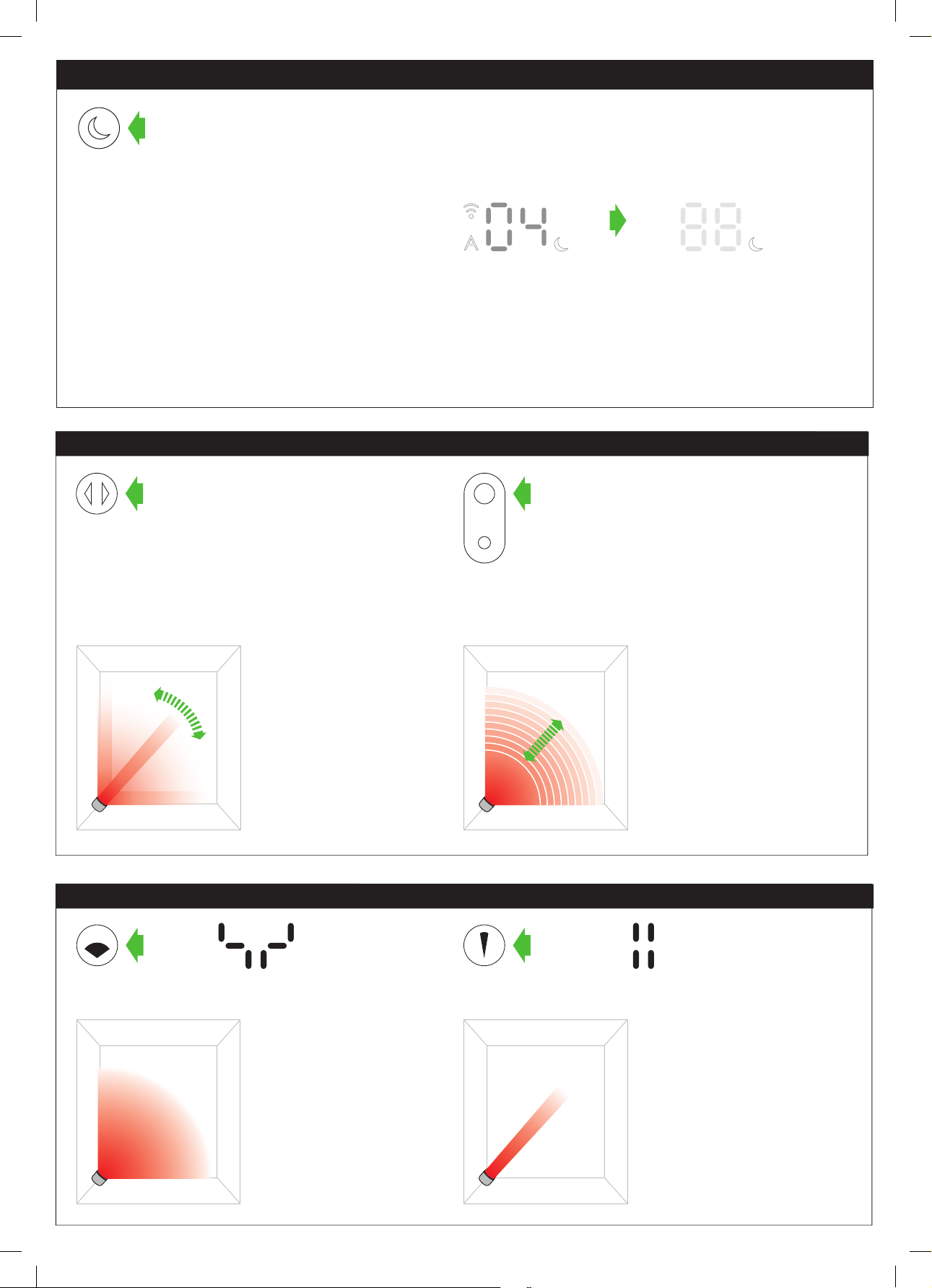
Night mode
If the machine is not in auto mode, the airflow speed will reduce to level 4. When night mode is activated, if it is already below level 4, it
will remain the same. This can be manually changed if desired. The display will illuminate briefly, then fade as before. If in auto mode the
airflow speed will be reduced automatically.
When night mode is enabled (indicated by an illuminated crescent
moon symbol in the bottom right corner of the display), the display
will dim and after 5 seconds will fade to off. The crescent moon
symbol remains illuminated.
The night mode will dim the display and run quietly, making it ideal for use while sleeping.
Diffused and Focused modes
Diffused mode
Press the wide angle button
to change from a personal
directed airflow to a whole
room airflow.
Heating and cooling modes
work in this mode.
Focused mode
Press the narrow angle button
to change from a whole room
airflow to a personal directed
airflow.
Heating and cooling modes
work in this mode.
Oscillation and Airflow speed control
Airflow speed control
To change the airflow speed,
press the airflow control
button. The digital display
will show the new fan speed.
If in heating mode, after 3
seconds it will change back
to displaying the target
temperature.
Oscillation control
To start the machine
oscillating, press the
oscillation control button. To
stop the machine oscillating,
press it again. The machine
will not oscillate when the
control buttons are pressed.
11
This machine is hot when in use and for a
short period after use. Do not let bare skin
touch hot surfaces. If children are present,
consider positioning the machine out of
their reach.
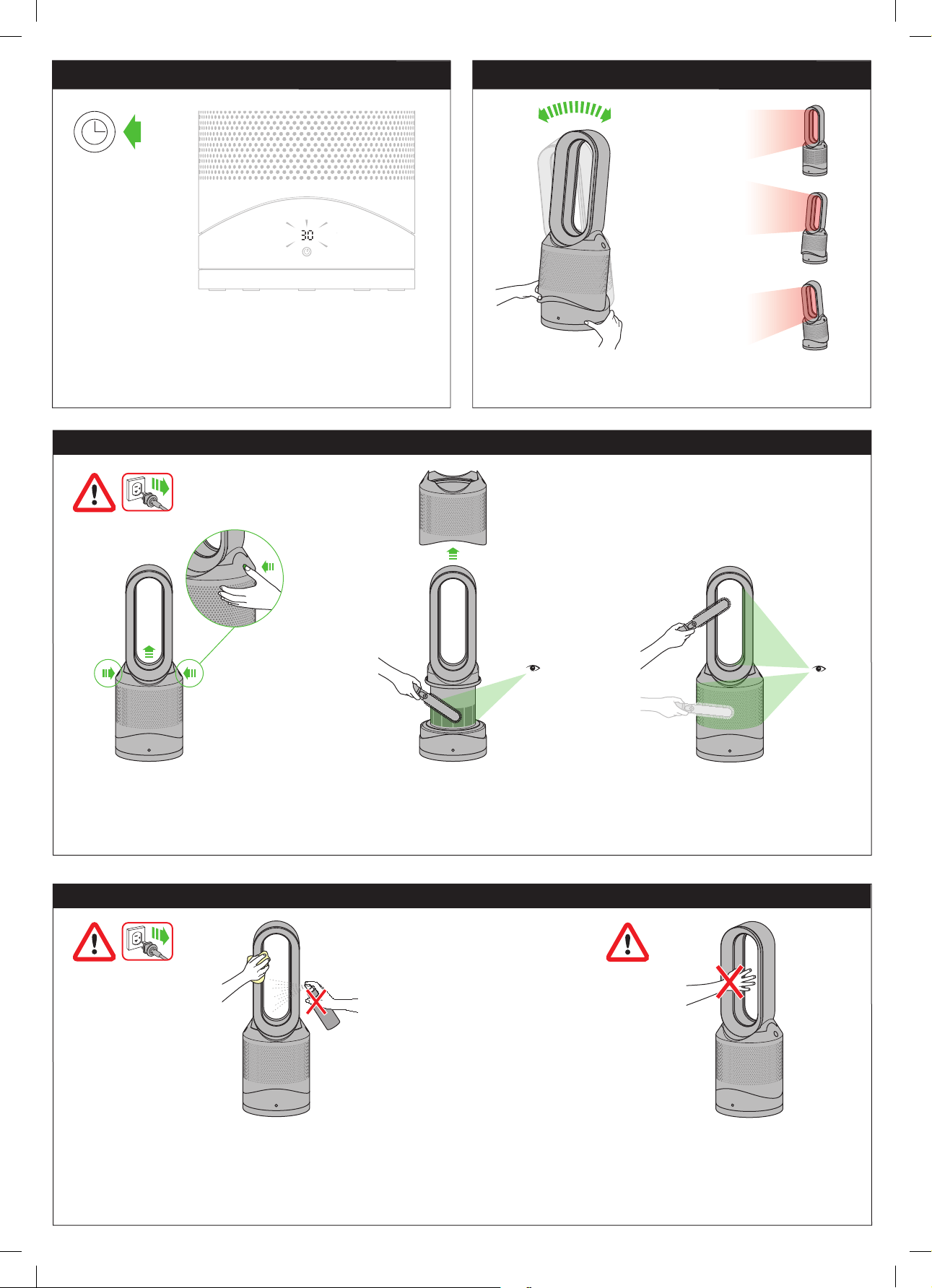
Unplug from the main power source. If the machine has been in use, leave for 1 to 2
hours before cleaning to allow the machine to cool completely. Dust may accumulate
on the surface of the machine. Wipe dust from the loop, filter unit and other parts with
a dry or damp cloth when dust accumulates. Do not use detergents or polishes.
Clearing blockages
Caution: hot when in use
Cleaning
Unplug from the main power source. If the machine has been in use, leave for 1 to 2 hours in order to allow the machine to cool down completely.
Look for blockages in the air inlet holes and in the small aperture inside the air loop amplifier. Use a soft brush to remove debris.
To set the sleep timer, select the desired time. When time reaches
zero, the machine will go into standby mode. To cancel, increase
the time until two dashes appear.
Sleep timer Tilt function
Carefully hold the base and the main body. Tilt the amplifier
forward or backward for the required airflow angle.
12
1 2 3
4 5 6
7 8 9
click click
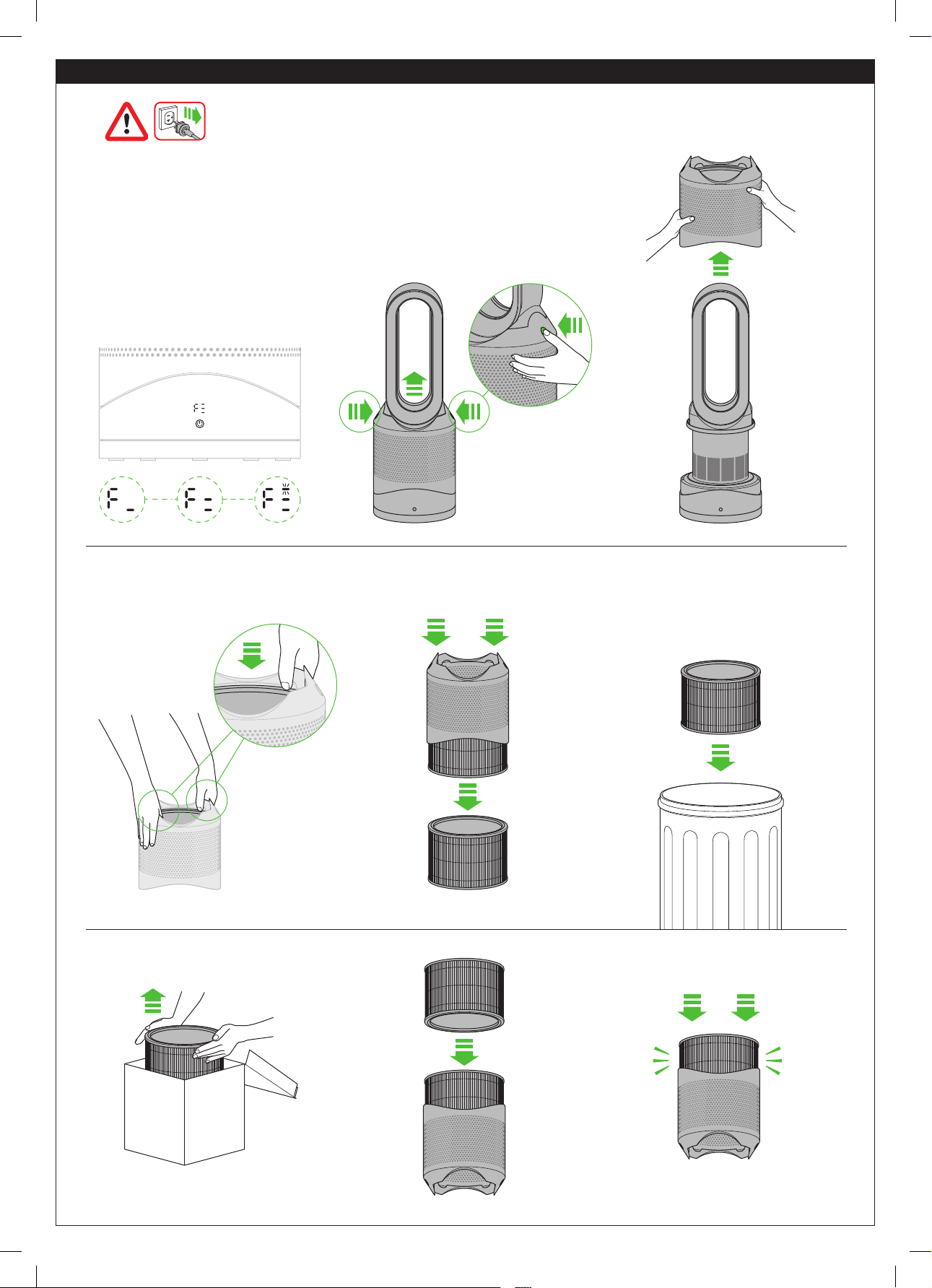
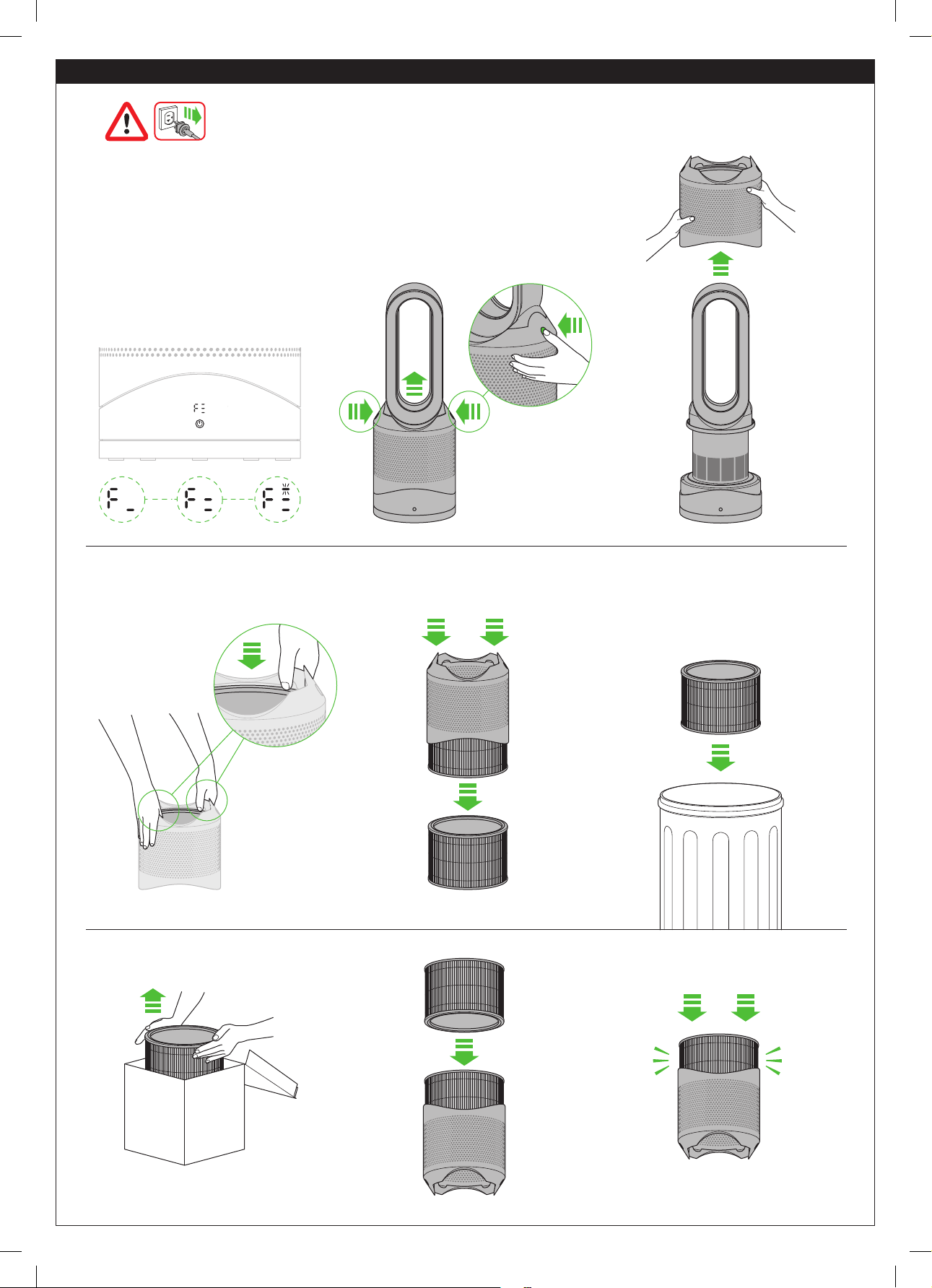
When your non-washable filter unit needs replacing
the machine will display the pattern shown. To replace
the non-washable filter unit, follow these steps. If
the machine has been in use, leave for 1 to 2 hours
before replacing the filter unit to allow the machine
to cool down completely. Your Dyson machine is
programmed to remind you to replace the filter unit
after 12 months based on 12 hours usage a day.
Please note your indicator will activate sooner with
more use. The indicator is only a guide. Use in heavily
polluted environments may require the filter unit to be
replaced more regularly. Outside air quality can be
checked through the Dyson Link app.
Replacing the filter unit
When disposing of
the exhausted filter
unit please do so in
accordance with local
regulations.
13
6 sec
10 11 12
13
click click
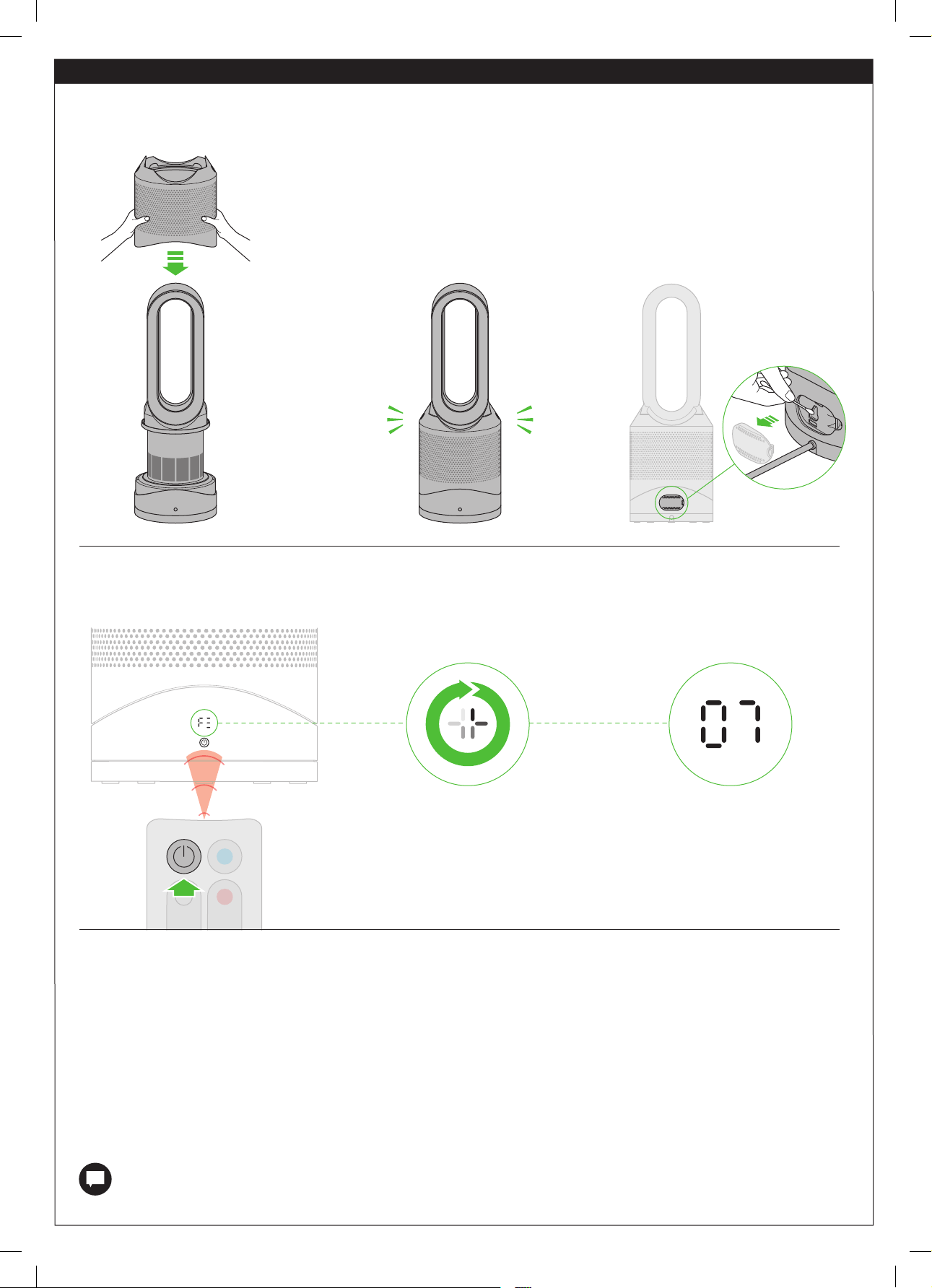
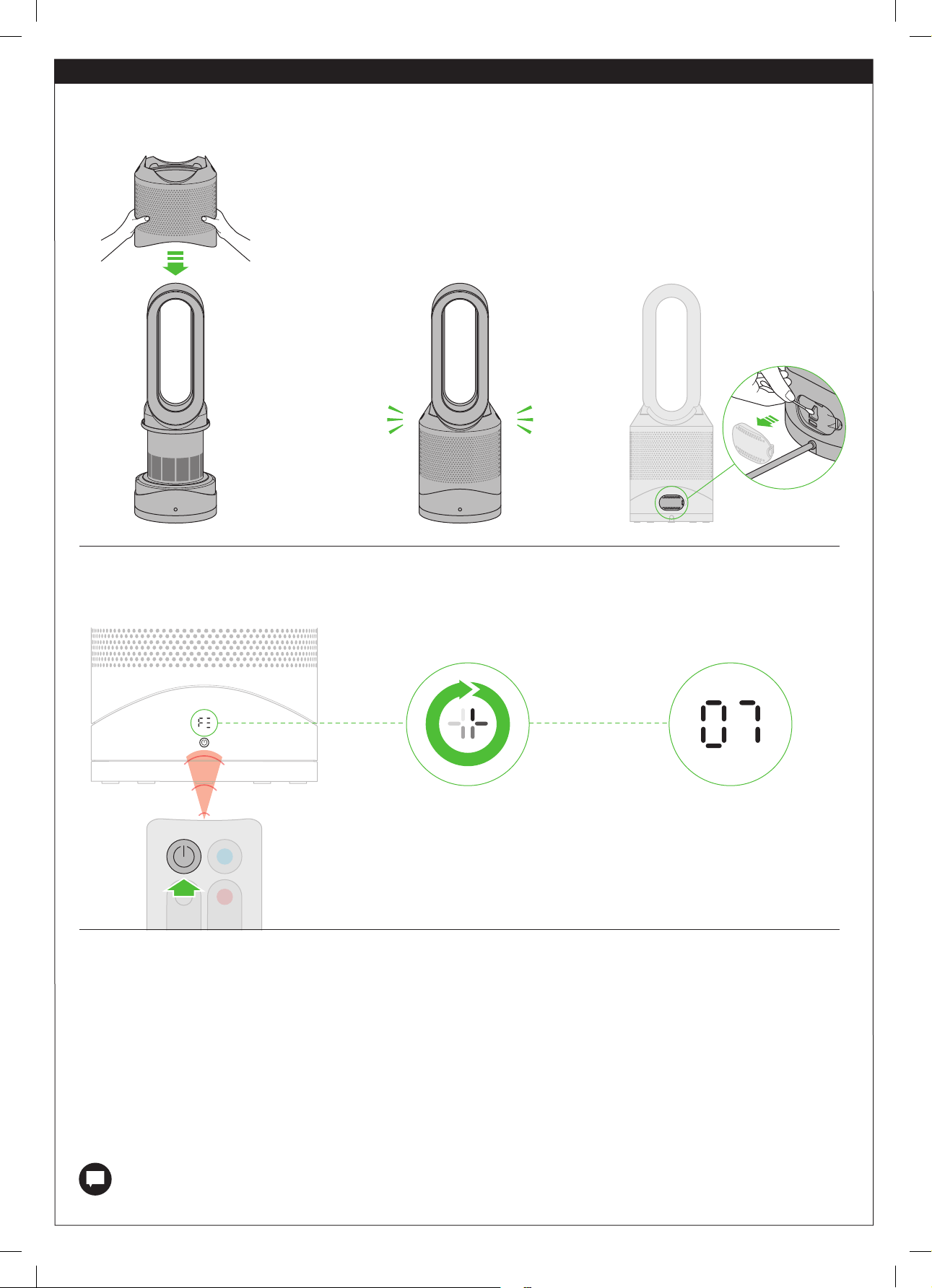
A clockwise-rotating loading pattern will be
shown on the LED display.
Once the loading pattern is complete, the
machine will return to its normal usage.
When you have reassembled your machine, press and hold the Standby ON/OFF
button for 6 seconds on the remote control to reset the filter indicator.
The Dyson Link app will notify you when your non-washable filter needs to be replaced.
The filter indicator can also be reset from within the Dyson Link app.
Replacing the filter unit
Clean the hatch every time the filter is
replaced. Open the small hatch on the side
of the machine. Use a cotton swab to clean
inside and remove any debris. This maintains
sensor accuracy and ensures the continuing
high performance of the machine.
14
10-20 secs
21 secs
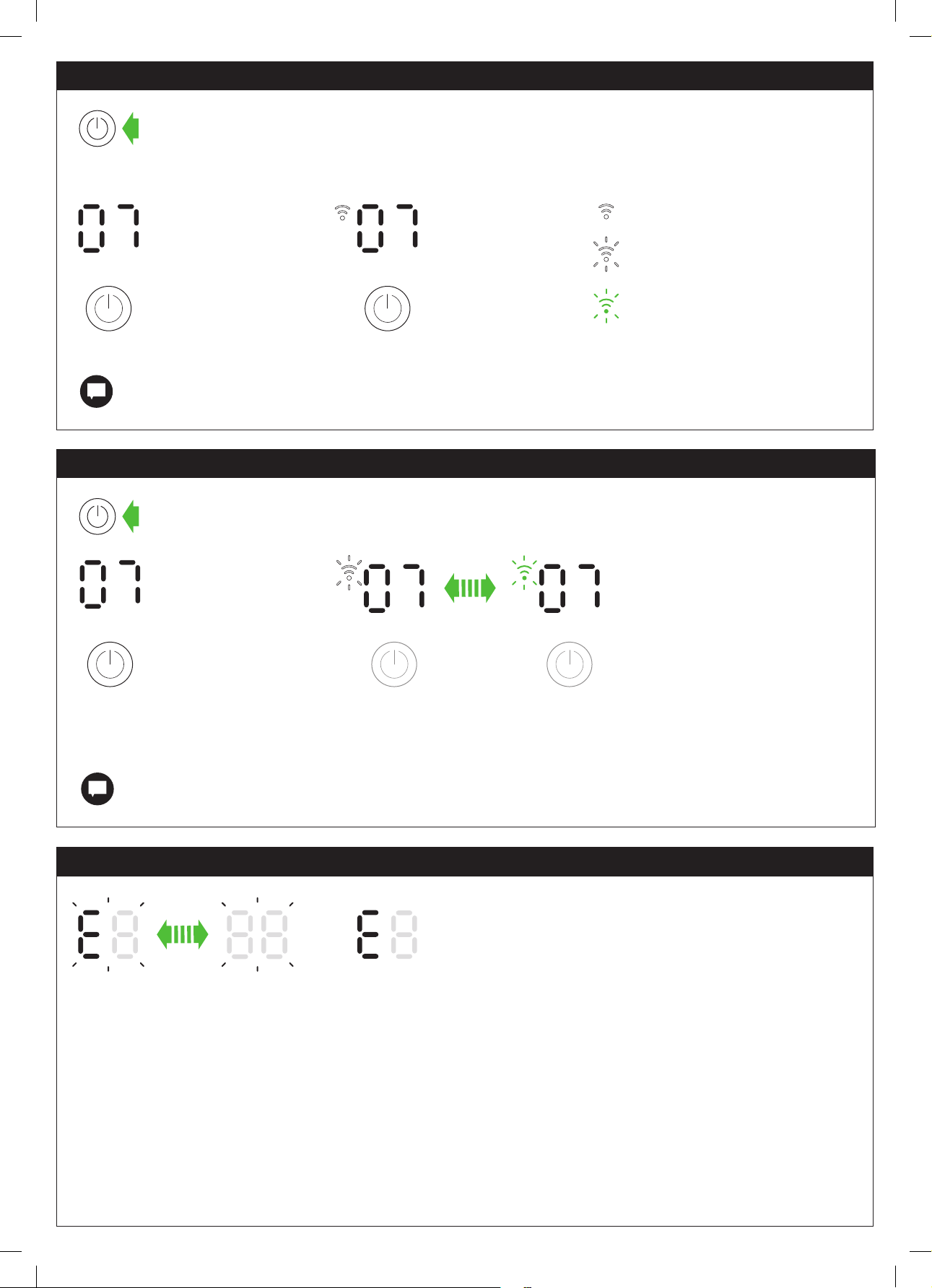
If you see a solid ‘E’ when trying to use
the machine, it shows the machine has
stopped functioning correctly.
Make sure that you have checked the following:
The room temperature is above 5°C/41°F
There are no blockages in the inlet grille or loop amplifier outlet.
The filter has been correctly assembled and doesn’t need to be replaced.
The machine is correctly plugged in directly to the wall outlet.
If the message still displays, unplug and leave for 10 seconds before turning
on again. If the problem persists, please call the Dyson Helpline at 1-866-693-9766.
If you see a flashing ‘E’ when trying to use
the machine, it is unable to do what has
been requested.
Press and hold the Standby ON/OFF button
on the machine for longer than 20 seconds.
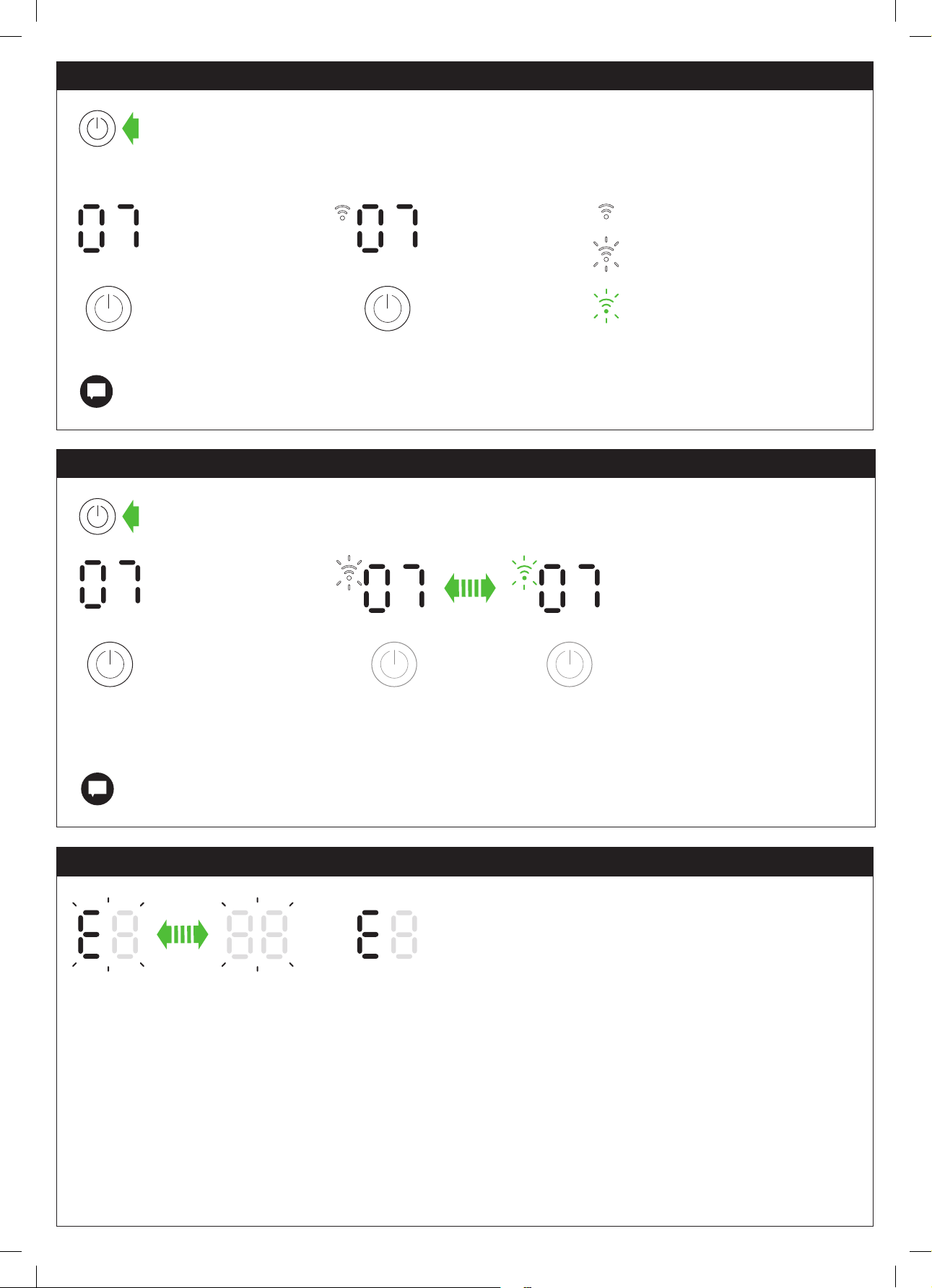
It is possible to remove your network details from the machine.
The Wi-Fi symbol will flash alternately between white
and green to indicate that your network details have
been removed.
Wi-Fi can be enabled or disabled by pressing and holding the Standby ON/OFF button on the machine for between
10 and 20 seconds.
Wi-Fi disabled Wi-Fi enabled
If Wi-Fi is disabled, the machine will not connect to the Dyson Link app.
If you clear your network settings, the machine will not connect to the Dyson Link app.
Flashing green = Wi-Fi is ready to
connect to your Dyson Link app
Off = Wi-Fi disabled
Flashing white = Wi-Fi connecting
Solid white = Wi-Fi connected
Enabling or Disabling Wi-Fi
Clearing your Wi-Fi settings
Troubleshooting
15
Control remoto
El control remoto se acopla en
forma magnética.
Coloque el control remoto en la parte
superior de la máquina con los botones
hacia abajo.
Para utilizar la máquina,
apunte el control remoto
al frente de la base.
Modo en espera
activado/desactivado
Control de velocidad
del flujo de aire
Modo automático
Temporizador
Modo enfocado
Modo de oscilación
activado/desactivado
Modo de difusor
Modo nocturno
Control del
termostato
Modo de
enfriamiento
Luz verde intermitente = el Wi-Fi ya está conectado con la
aplicación Dyson Link
Luz blanca intermitente = el Wi-Fi está conectándose
Luz blanca sólida = el Wi-Fi está conectado
Apagado = el Wi-Fi está desactivado
Blanco sólido = el objetivo de limpieza/calidad del aire no
se ha cumplido
Luz verde sólida = limpio/se cumplió el objetivo de calidad
del aire
Apagado = la máquina no está en modo de limpieza
automática
Apagado = la máquina no está en
modo nocturno
Roja constante = la máquina está calentando
Luz blanca sólida = la máquina está en modo nocturno
Blanca constante = la máquina alcanzó la temperatura
objetivo
Mostrar iconos
Cómo configurar la aplicación Dyson Link
La máquina puede ser mejorada al conectarla con la aplicación Dyson Link en su equipo inteligente.
Product SSID
XXXXX-XXX-XX-XXXXXXXX-XXXX
Product Wi-Fi Password
XXXXXXXX
Ma c address
X X:X X:X X:X X:X X:X X
Seleccione "Add a Product" (Agregar un
producto) dentro de la aplicación y siga
las instrucciones en pantalla.
Descargue la aplicación Dyson Link,
disponible en iOS y Android.
Para conectar el máquina, necesitará
la información que aparece al frente
de este manual.
16
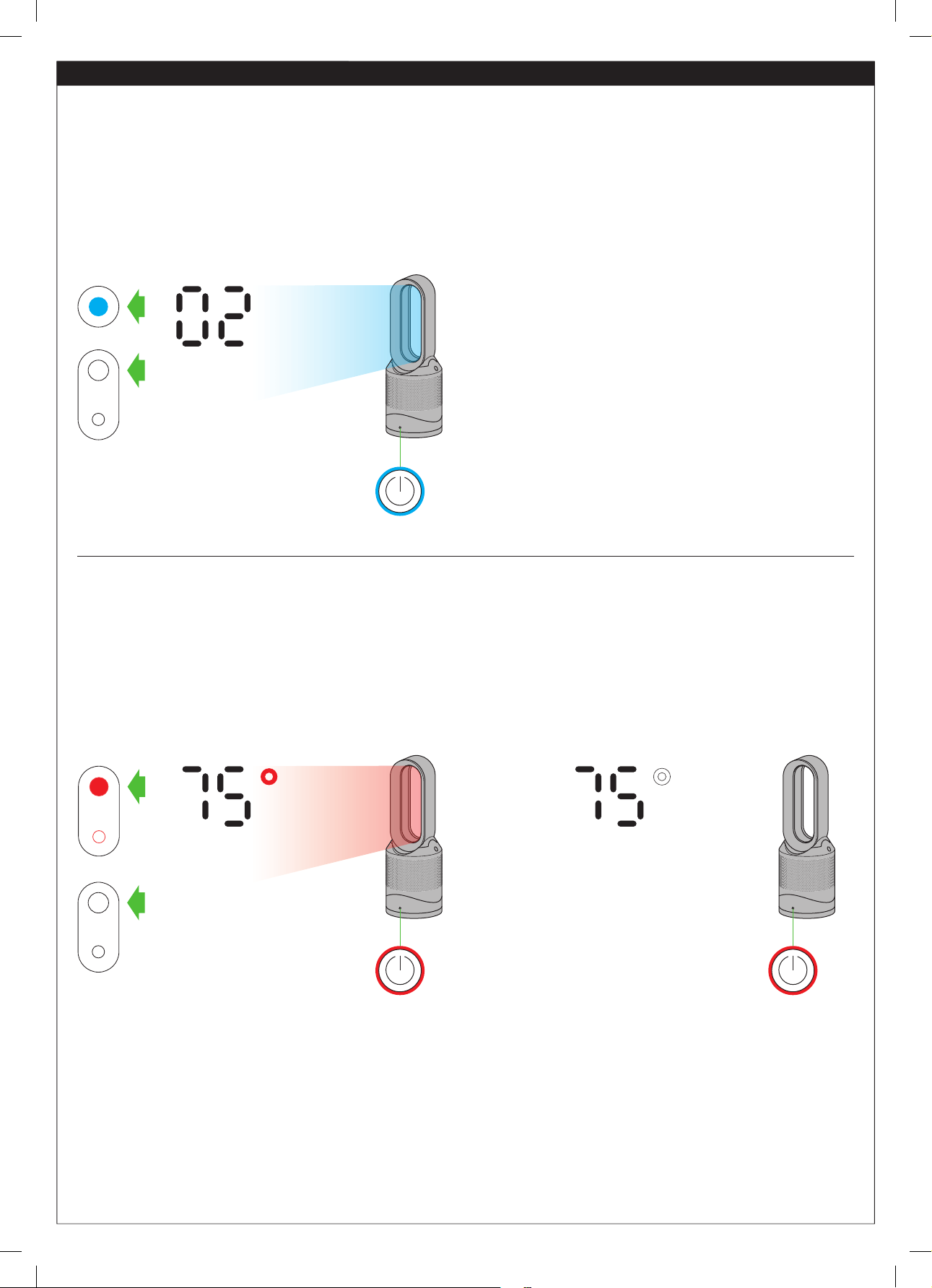
Cada vez que se selecciona el modo de calefacción, se realiza un breve ciclo de calibración. El flujo de aire se controlará en forma automática durante
este ciclo. Una vez que finalice el ciclo de calibración, volverá a la velocidad del flujo de aire seleccionada.
Presione el botón azul de modo de enfriamiento para pasar
al modo de enfriamiento. El color de la luz del botón de
encendido cambiará de rojo a azul para indicar que ha
pasado al modo de enfriamiento. Para ajustar la velocidad
del flujo de aire, utilice el botón de control de flujo de aire, o
bien utilice el modo automático para control automático.
Presione el botón rojo de control del termostato hasta que el visor digital muestre la temperatura ambiente objetivo. El color de la luz
del botón de encendido cambiará de azul a rojo para indicar que ha pasado al modo de calentamiento. El símbolo de calentamiento
permanecerá rojo mientras esté en calentamiento y cambiará a blanco cuando se haya alcanzado la temperatura ambiente objetivo.
Una vez que se ha alcanzado la temperatura ambiente objetivo, el máquina dejará de calentar el aire. Si la temperatura ambiente cae
por debajo de la temperatura objetivo, el máquina comenzará a calentar de nuevo. El círculo rojo alrededor del botón de encendido
permanece encendido cuando el producto está en modo calentador. Para ajustar la velocidad del flujo de aire, utilice el botón de
control de flujo de aire, o bien utilice el modo automático para control automático.
Ambiente en calentamiento
hasta 66°F
Ambiente calentado
a 66°F o más
La máquina está en modo de enfriamiento
El máquina está en modo de calentamiento.
Modos de calefacción y enfriamiento
17
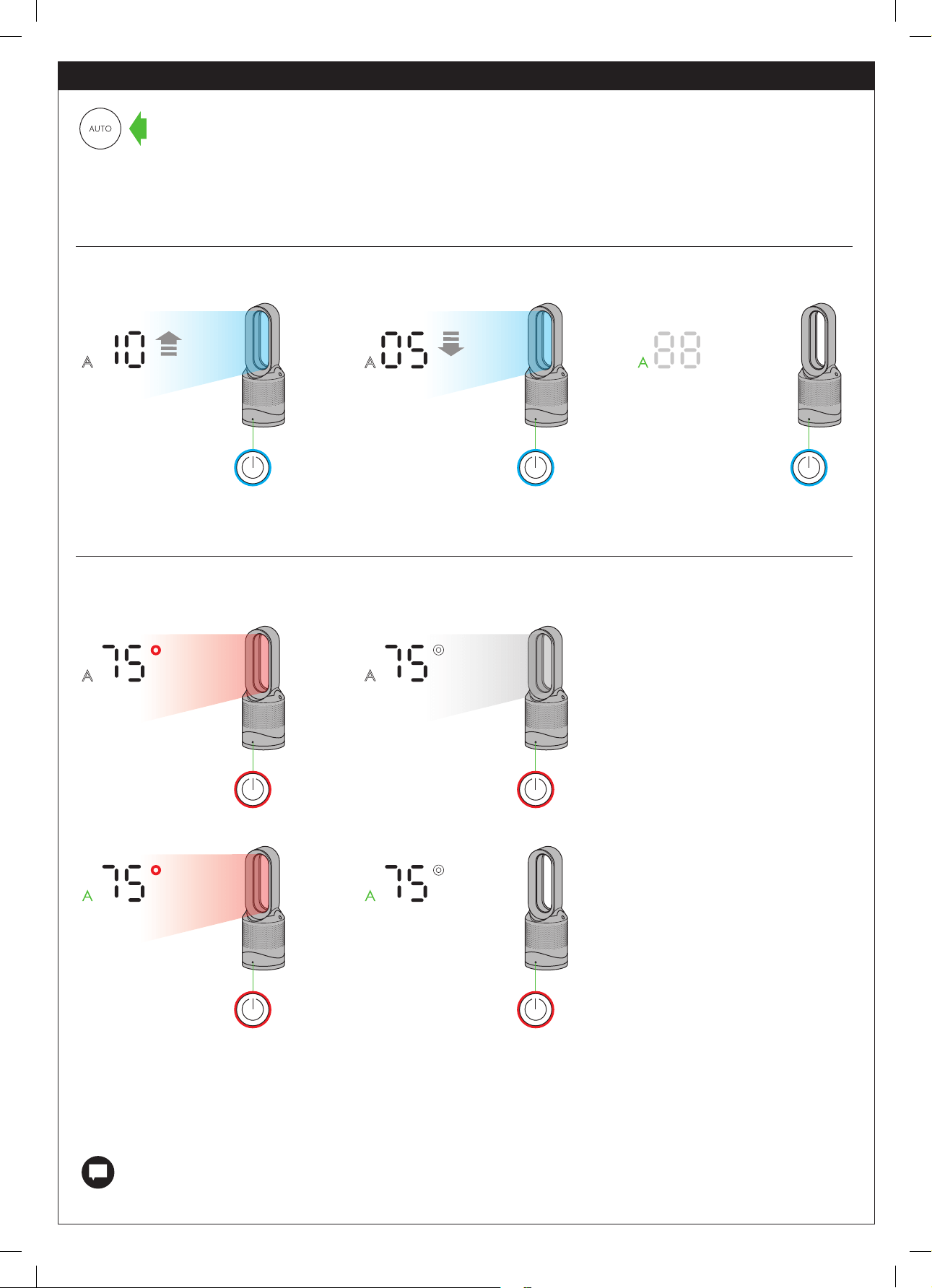
Modo automático
Calidad del aire inferior
al objetivo
• Calidad del aire
inferior al objetivo
• Temperatura
ambiente debajo de la
temperatura objetivo
• Calidad del aire
inferior al objetivo
• Se alcanzó la
temperatura
ambiente objetivo
Se cumplió con el objetivo
de calidad del aire
• Se cumplió con el
objetivo de calidad del
aire
• Se alcanzó la
temperatura ambiente
objetivo
La calidad del aire
necesita mejorar
• Se cumplió con el objetivo
de calidad del aire
• Temperatura ambiente
debajo de la temperatura
objetivo
Cuando se activa el modo automático (indicado por un símbolo A en la esquina inferior izquierda de la pantalla), los sensores de a
bordo ajustarán de manera inteligente la velocidad de la máquina según la calidad del aire.
El aparato está en modo de enfriamiento automático
La máquina está en modo de calentamiento automático
Si el aire está limpio, el símbolo A se volverá verde y la pantalla numérica se apagará. Si la calidad del aire empeora, el símbolo A se volverá blanco y la
máquina volverá a empezar a limpiar la habitación automáticamente. Durante la limpieza, los números en la pantalla indicarán la velocidad del flujo de
aire.
La selección del modo automático ajusta el flujo de aire de acuerdo con la calidad de aire de la habitación.
Para un control adicional, la aplicación Dyson Link se puede utilizar para realizar más ajustes a la sensibilidad de
la máquina.
Se requiere un período de 6 días después del primer uso de la máquina para que el sensor se calibre. Durante ese período, la
máquina puede ser más sensible que lo normal a los compuestos orgánicos volátiles (VOC) (como los olores).
Cuando se usa el modo automático mientras la máquina está en modo de calentamiento, la máquina estará purificando y calentando
el aire a la vez. La máquina mostrará la temperatura ambiente objetivo, no el flujo de aire del ventilador. Una vez que se haya
alcanzado la temperatura ambiente objetivo, la máquina dejará de calentar el aire. Si no se ha alcanzado la calidad de aire objetivo,
el ventilador seguirá funcionando para continuar con la purificación del aire. Si la temperatura ambiente cae por debajo de la
temperatura objetivo, la máquina comenzará a calentar de nuevo.
18
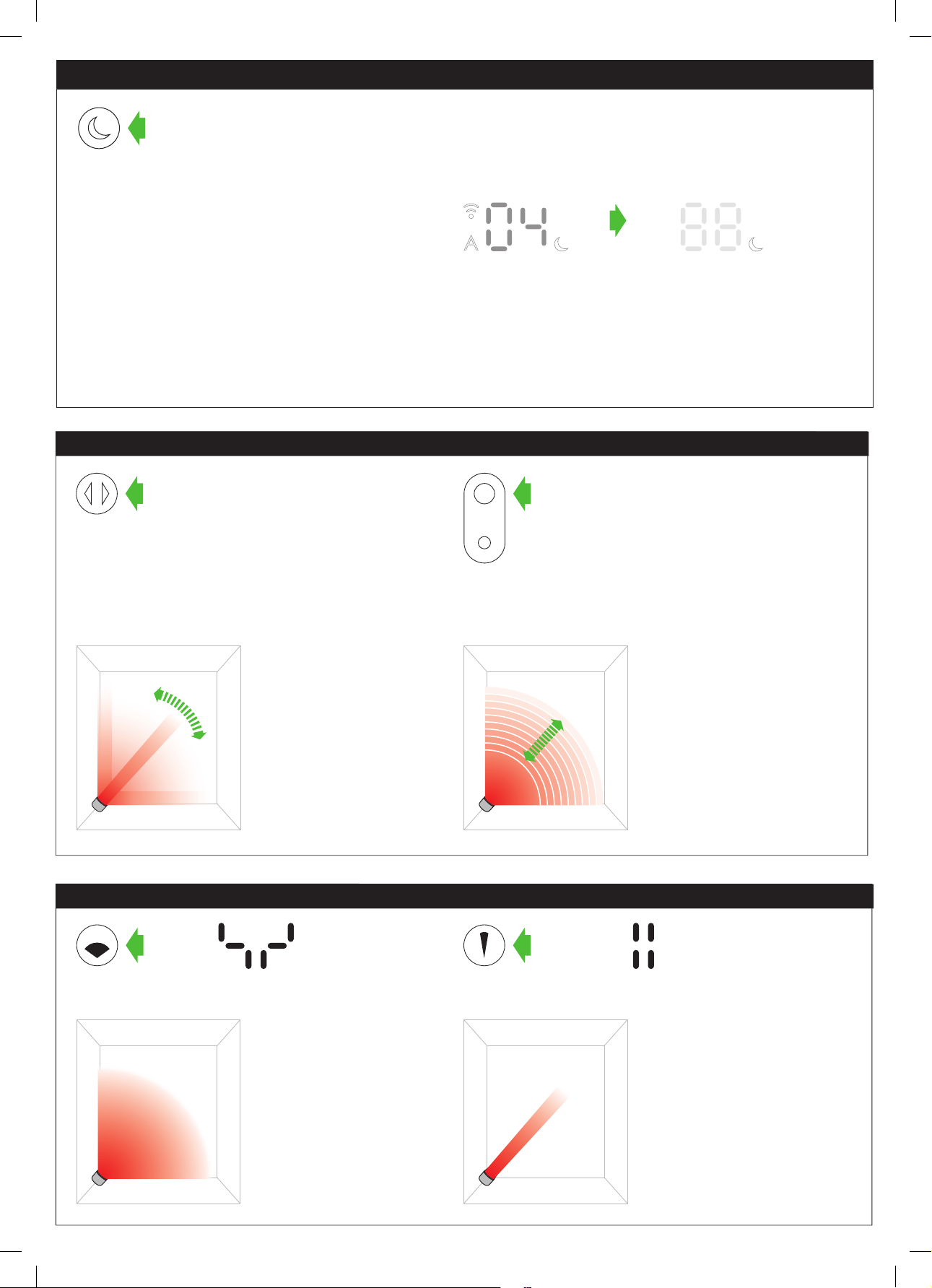
5 secs
Modo nocturno
Si la máquina no está en modo automático, la velocidad del flujo de aire se reducirá al nivel 4. Cuando se activa el modo nocturno, si ya
está por debajo del nivel 4, permanecerá así. Esto se puede cambiar manualmente si lo desea. La pantalla se iluminará por un instante y
luego se apagará como antes. Si está en modo automático, la velocidad del flujo de aire se reducirá automáticamente.
Cuando se activa el modo nocturno (indicado por un símbolo de
media luna iluminado en la esquina inferior derecha de la pantalla),
la pantalla se atenuará y a los 5 segundos se apagará. El símbolo de
la media luna permanece iluminado.
El modo nocturno atenuará la pantalla y hará que funcione silenciosamente, lo cual es ideal para usar la máquina mientras se duerme.
Modos enfocado y difuso
Modo de difusor
Presione el botón del
ángulo amplio para
cambiar de un flujo de
aire dirigido personal a un
flujo de aire para toda la
habitación.
Los modos de calefacción y
enfriamiento funcionan de
esa manera.
Modo enfocado
Presione el botón del ángulo
angosto para cambiar de
un flujo de aire para toda la
habitación a un flujo de aire
personal.
Los modos de calefacción y
enfriamiento funcionan de
esa manera.
Control de velocidad del flujo
de aire
Para cambiar la velocidad del
flujo de aire presione el botón
del control del flujo de aire. La
pantalla digital mostrará la nueva
velocidad del ventilador. Si está
en modo calentador, después de
trascurrir 2.5 segundos cambiará
nuevamente para mostrar la
temperatura objetivo.
Control de oscilación
Para que el equipo comience
a oscilar, presione el botón
de control de oscilación. Para
detener la oscilación, presione
el botón nuevamente. El
equipo no oscilará cuando
se presionan los botones de
control.
Control de la oscilación y control del flujo de aire
19
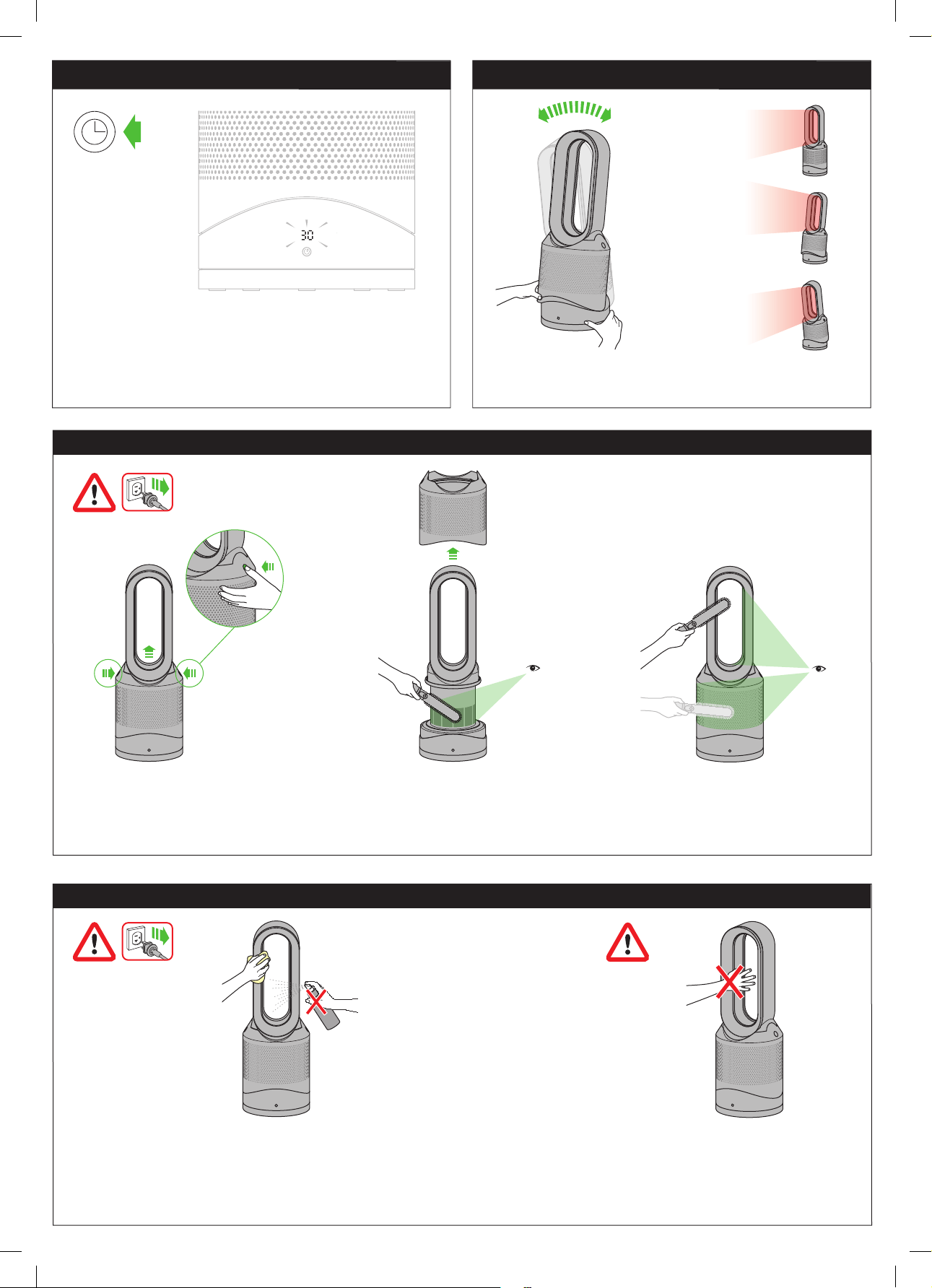
Esta máquina se calienta durante el uso y
sigue caliente durante un período breve
después del uso. No permita que la piel
toque las superficies calientes. Si hay niños
alrededor, tenga la precaución de colocar la
máquina lejos de su alcance.
Desconéctela del suministro de corriente eléctrica. Si la máquina ha estado en uso,
déjela por 1 o 2 horas antes de limpiarlo para permitirle que se enfríe completamente.
Se puede acumular polvo en la superficie de la máquina. Cuando se acumule polvo,
quítelo del bucle, del filtro de la unidad y de otras partes con un paño seco o húmedo.
No use detergentes o pulidores.
Para eliminar obstrucciones
Precaución: se calienta durante el uso
Limpieza
Desconéctela de la fuente principal de energía. Si la máquina ha estado en uso, déjela por 1 o 2 horas para permitirle que se enfríe
completamente. Busque obstrucciones en los agujeros de la entrada de aire y en la pequeña abertura ubicada en el bucle amplificador de aire.
Utilice un cepillo suave para eliminar cualquier desecho.
Para configurar el temporizador, seleccione el tiempo deseado.
Cuando el tiempo llegue a cero, la máquina pasará al modo en
espera. Para cancelar, reduzca el tiempo hasta que aparezcan
dos rayas.
Temporizador Función de inclinación
Sujete con cuidado la base y el cuerpo principal. Incline hacia
adelante o hacia atrás para obtener el ángulo de flujo del aire
que desea.
20
1 2 3
4 5 6
7 8 9
click click
Cuando la unidad de filtro no lavable debe reemplazarse,
la máquina exhibirá el patrón que se muestra. Para
reemplazar la unidad de filtro no lavable, siga estos pasos.
Si la máquina ha estado en uso, déjela por 1 o 2 horas
antes de reemplazar la unidad de filtro para permitirle
que se enfríe completamente. Su máquina Dyson está
programado para recordarle que reemplace la unidad de
filtro después de 12 meses sobre la base de un uso de 12
horas por día. Observe que el indicador se activará antes
si hay un mayor uso. El indicador es sólo una guía. El uso
en ambientes altamente contaminados puede requerir
que la unidad de filtro se reemplace más regularmente.
Reemplazo de la unidad de filtro
Cuando deseche la unidad
de filtro gastada, hágalo
según las regulaciones
locales.
21
6 sec
10 11 12
13
click click
Se mostrará en la pantalla LED un patrón de
carga que gira en el sentido de las agujas
del reloj.
Una vez que se haya completado el
patrón de carga, la máquina volverá a su
uso normal.
Cuando haya vuelto a montar la máquina, mantenga presionado el botón de
encendido durante 6 segundos en el control remoto para restablecer el indicador del filtro.
La aplicación Dyson Link le notificará cuando el filtro no lavable deba reemplazarse.
El indicador del filtro también se puede restablecer desde la aplicación Dyson Link.
Reemplazo de la unidad de filtro
Limpie la trampilla cada vez que cambie el
filtro. Abra la trampilla pequeña al costado
de la máquina. Use una bola de algodón para
limpiar el interior y quitar los desechos. Esto
mantiene la exactitud del sensor y asegura
un alto desempeño continuo de la máquina.
22
10-20 secs
21 secs
Si ve una "E" de color sólido mientras
trata de usar la máquina, es para
indicar que la máquina dejó de
funcionar correctamente.
Asegúrese de haber revisado lo siguiente:
La temperatura de la habitación supera los 5 °C/ 41°F
No hay obstrucciones en la rejilla de entrada o en la salida del bucle amplificador.
El filtro se instaló correctamente y no debe ser reemplazado.
La máquina está enchufada en forma apropiada y directamente en el tomacorrientes
de pared.
Si aún aparece el mensaje, desenchufe la máquina y espere 10 segundos antes de
volver a encenderla. Si el problema persiste, llame a la línea directa de Asistencia al
cliente de Dyson.
Si ve una "E" intermitente mientras
trata de usar la máquina, es porque no
puede hacer lo que se le ha solicitado.
Mantenga presionado el botón ON/OFF
(Encendido/Apagado) de la máquina
durante más de 20 segundos.
Es posible eliminar sus detalles de red de la máquina.
El símbolo de Wi-Fi parpadeará en forma intermitente
entre blanco y verde para indicar que los detalles de la
red han sido eliminados.
El Wi-Fi se puede activar o desactivar manteniendo presionado el botón ON/OFF (Encendido/Apagado) de la máquina
entre 10 y 20 segundos.
El Wi-Fi está desactivado Compatible con Wi-Fi
Si el Wi-Fi está desactivado, la máquina no podrá conectarse a la aplicación Dyson Link.
Si borra sus configuraciones de red, la máquina no se conectará a la aplicación Dyson Link.
Luz verde intermitente = el Wi-Fi ya
está conectado con la aplicación
Dyson Link
Apagado = el Wi-Fi está
desactivado
Luz blanca intermitente = el
Wi-Fi está conectándose
Luz blanca sólida = el
Wi-Fi está conectado
Cómo activar o desactivar el Wi-Fi
Cómo restablecer la configuración del Wi-Fi
Resolución de problemas

23

24
USING YOUR DYSON MACHINE
PLEASE READ THE ‘IMPORTANT SAFETY INSTRUCTIONS’ IN YOUR
DYSON USER MANUAL BEFORE PROCEEDING.
LOOKING AFTER YOUR DYSON MACHINE
• Do not carry out any maintenance or repair work other than that shown and
described in your Dyson User manual, or advised by the Dyson Helpline.
• Always disconnect the plug from the mains outlet before inspecting for problems.
If the machine will not operate, first check that the mains outlet has an electricity
supply and that the plug is properly inserted into the outlet.
OPERATION
• Ensure that the machine is fully assembled in line with the instructions before use.
Do not dismantle the machine or use without the loop amplifier fitted.
• The machine will not operate in heating mode unless the target temperature is
above the room temperature.
• Each time heating mode is selected, it conducts a short calibration cycle. Airflow
will be automatically controlled during this cycle. Once the calibration cycle is
complete, it will revert to the selected airflow speed.
• The machine will not oscillate when the control buttons are pressed.
• Do not lubricate any part of this machine.
AUTO MODE
• A period of six days is required after your machine is first used for the sensor to
calibrate. During this period, your machine may be more sensitive to VOCs (such as
odors) than normal.
CONTROL WITHOUT REMOTE
• Your machine can be controlled through the Dyson Link app.
DYSON LINK APP CONNECTIVITY
• You must have a live internet connection in order for the Dyson Link app to work.
• The machine only connects to 2.4GHz networks, which includes mostmodern
routers. Check your router documentation for compatibility.
Supported Wi-Fi protocols:
• IEEE802.11b (Not recommended)
• IEEE802.11g
• IEEE802.11n (Support only for 2.4GHz)
TILT FUNCTION
• Carefully hold the base and the main body. Tilt the loop amplifier forward or
backward for the required airflow angle.
AUTOMATIC CUT-OUT
• For your safety, your machine is fitted with automatic cut-out switches that operate
if the machine tips over or overheats. If the switches operate, unplug your machine
and allow it to cool. Before restarting your machine, check and clear any blockages
and ensure that your machine is on a solid level surface.
• In heating mode the machine will automatically switch off after 9 hours of
continuous use and will return to standby mode. To restart the machine, press the
power button on either the remote control or the base, or restart via the Dyson
Link app.
REPLACEABLE PARTS
BATTERY REPLACEMENT
CAUTION
• Unscrew the battery compartment on the remote control. Loosen the base and pull
to remove the battery.
• Do not install backwards or short circuit the batteries.
• Do not attempt to dismantle or charge the batteries. Keep away from fire.
• Always replace the screw in the remote control and refer to the battery hazard in the
warning section.
• Follow battery manufacturers' instructions when installing new batteries (battery
type CR 2032).
NON-WASHABLE FILTER UNIT
• Your filter unit is non-washable and non-recyclable.
• To replace your filter unit follow the steps as shown.
• Failure to replace the filter when prompted may result in changes to product
performance and appearance.
• A new filter unit can be purchased at www.dyson.com/filter.
DISPOSAL INFORMATION
• Dispose of or recycle the battery in accordance with local ordinances
or regulations.
• Keep the used batteries away from children as these can still harm children
if swallowed.
• Dyson products are made from high grade recyclable materials.
Recycle where possible.
• Your filter unit is non-washable and non-recyclable.
• The battery should be removed from the machine before disposal.
• Dispose of the exhausted filter in accordance with local ordinances or regulations.
• California: This product includes a separate remote control device with a coin cell
battery. The coin cell battery contains Perchlorates. Special handling may apply.
See www.dtsc.ca.gov/hazardouswaste/perchlorate
DYSON CUSTOMER CARE
Thank you for choosing to buy a Dyson machine.
We don’t stop caring about our machines once they’re yours. With your free 2-year
warranty, your Dyson purifying fan heater will be covered for parts and labor
(excluding filters) for two years from the date of purchase, subject to the terms of the
warranty. Even after your warranty has ended, we’ll still be on hand to help. If you
have any questions regarding your Dyson machine, visit www.dyson.com for online
help, general tips and useful information about Dyson.
Alternatively, you can call the Dyson Helpline with your serial number and details of
where and when you bought the machine.
If your Dyson machine needs a repair, call the Dyson Helpline so we can discuss
the available options. If your Dyson machine is under warranty, and it is a covered
repair, it will be repaired at no cost.
Your serial number can be found on your rating plate which is on the base of
your machine.
REGISTER YOUR MACHINE TO BE THE FIRST TO
RECEIVE DYSON UPDATES AND NEWS.
To help us ensure that you receive a prompt and efficient service, please register as
a Dyson machine owner. There are three ways to do this:
• Online at www.dyson.com
• Telephone the Dyson Helpline on 1-866-693-9766.
• Complete the enclosed form and mail it to us.
This will confirm ownership of your Dyson machine in the event of an insurance
loss, and enable us to contact you if necessary.
• Failure to register will not diminish your warranty rights.
LIMITED 2-YEAR WARRANTY
TERMS AND CONDITIONS OF THE DYSON 2-YEAR
LIMITED WARRANTY
WHAT IS COVERED
This limited warranty is subject to the following terms:
• Your Dyson machine is warranted against original defects in materials and
workmanship for a period of 2 years from the date of purchase, when used for
normal domestic purposes in accordance with the Dyson Operating Manual.
Please retain your proof of purchase. If you do not have your proof of purchase,
your warranty will start 90 days after the date of manufacture, according to
Dyson’s records. This warranty provides, at no extra cost to you, all labor and parts
necessary to ensure that your machine is in proper operating condition during the
warranty period. The replacement of any part of your machine under warranty will
not extend the period of warranty; however, your warranty will be extended for any
time your machine is being repaired or retained for work being performed under
the warranty. Any parts which are returned and replaced by Dyson will become the
property of Dyson. Please call the Dyson Helpline on 1-866-693-9766 for more
information.
• For refurbished machines, length of warranty may differ, please see warranty letter
included with machine for warranty terms.
• This warranty is only valid if the machine is used in the country in which it was sold.
WHAT IS NOT COVERED
Dyson shall not be liable for costs, damages or repairs incurred as a result of, due
to, or from:
• Damage caused by not carrying out the recommended machine maintenance.
• Purchases of machines from unauthorized dealers.
• Careless operation or handling, misuse, abuse and/or lack of maintenance or use
not in accordance with the Dyson User manual.
• Use of the machine other than for normal domestic purposes within the United
States, e.g. for commercial or rental purposes.
• Use of parts not in accordance with the Dyson User manual.
• Use of parts and accessories other than those produced or recommended
by Dyson.
• External sources such as weather, electrical outages or power surges.
• Repairs or alterations carried out by unauthorized parties or agents.
• Clearing blockages from your machine.
• Normal wear and tear (e.g. fuse etc.).
• Damage as a result of use not in accordance with the rating plate.
• Additionally, this limited warranty does not apply to any machine that has had the
serial number altered or removed.
• If there is any doubt as to what is covered by the warranty, please contact Dyson.

25
WARRANTY LIMITATIONS AND EXCLUSIONS
• To the fullest extent permitted by applicable law, any implied warranties relating to
your machine including but not limited to warranty of merchantability or warranty
of fitness for a particular purpose, are limited to the duration of this warranty.
• To the fullest extent permitted by applicable law, your remedy for breach of this
warranty is limited to the warranty service described below. Dyson will not be liable
for any consequential damages or incidental damages you may incur in connection
with your purchase and use of your machine.
• This limited warranty gives you specific legal rights. You may also have other rights
which vary by State.
• This limited warranty is not transferable.
• The limitations or exclusions of liability stated herein apply in the state of New
Jersey, to the fullest extent permitted by applicable law.
WARRANTY SERVICE
• Before a service can take place, the terms of the warranty require that you contact
the Dyson Helpline with your model name/number, serial number, date and place
of purchase.
• Please keep your purchase receipt in a safe place to ensure that you have
this information.
• All work will be coordinated by Dyson or its authorized agents.
• Any replaced defective parts will become the property of Dyson.
• Service under this warranty will not extend the period of this warranty; however,
your warranty will be extended for any time your machine is being repaired or
retained for work being performed under the warranty.
• If your machine is not functioning properly, please call the Dyson Helpline on
1-866-693-9766. Most issues can be rectified over the telephone by our trained
Helpline staff.
IMPORTANT DATA PROTECTION INFORMATION
When registering your Dyson machine:
• You will need to provide us with basic contact information to register your machine
and enable us to support your warranty. Failure to register will not diminish your
warranty rights.
• When you register, you will have the opportunity to choose whether you would like
to receive communications from us. If you opt-in to communications from Dyson,
we will send you details of special offers and news of our latest innovations.
• We never sell your information to third parties and only use information that you
share with us as defined by our privacy policies which are available on our website
at privacy.dyson.com.

26
USO DE SU MÁQUINA DYSON
ANTES DE CONTINUAR, SÍRVASE LEER LAS “INSTRUCCIONES
DE SEGURIDAD IMPORTANTES” DE ESTE MANUAL DE
FUNCIONAMIENTO DYSON.
CÓMO CUIDAR SU MÁQUINA DYSON
• No realice ningún tipo de mantenimiento o reparaciones que no sean las indicadas
en la Guía del usuario de Dyson o en la Ayuda en línea de Dyson.
• Antes de revisar la máquina para detectar cualquier problema, desconecte el
enchufe de la red eléctrica. Si la máquina no funciona, verifique primero que
la toma de corriente de la red eléctrica tenga suministro y que el enchufe esté
colocado correctamente en la toma de corriente.
FUNCIONAMIENTO
• Antes de utilizar la máquina, asegúrese de que esté completamente armada
según las instrucciones. No desarme la máquina ni la utilice sin colocar el
bucle amplificador.
• El equipo no funcionará a menos que la temperatura objetivo sea superior a la
temperatura ambiente.
• Cada vez que se selecciona el modo de calefacción, se realiza un breve ciclo de
calibración. El flujo de aire se controlará en forma automática durante este ciclo.
Una vez que finalice el ciclo de calibración, volverá a la velocidad del flujo de
aire seleccionada.
• El equipo no oscilará si se presionan los botones de control.
• No lubrique ninguna parte de este equipo.
MODO AUTOMÁTICO
• Se requiere un período de 6 días después del primer uso de la máquina para que
el sensor se calibre. Durante ese período, la máquina puede ser más sensible que
lo normal a los compuestos orgánicos volátiles (VOC) (como los olores).
SIN CONTROL REMOTO
• La máquina puede ser controlada mediante la aplicación Dyson Link.
CONECTIVIDAD DE LA APLICACIÓN DYSON LINK
• Debe tener una conexión funcional a Internet para que funcione la aplicación
Dyson Link.
• La máquina se conecta únicamente a redes de 2.4GHz, que incluyen la mayoría
de los routers modernos. Revise la documentación de su router para determinar si
es compatible.
Protocolos Wi-Fi compatibles:
• IEEE802.11b (No se recomienda)
• IEEE802.11g
• IEEE802.11n (Compatible únicamente para 2.4GHz)
• Para soporte sobre conectividad, comuníquese con la Línea de Ayuda de Dyson
llamando al 866-861-2521.
FUNCIÓN DE INCLINACIÓN
• Sujete con cuidado la base y el cuerpo principal. Incline hacia adelante o hacia
atrás para obtener el ángulo de flujo del aire que desea.
DESCONEXIÓN AUTOMÁTICA
• Por su seguridad, esta máquina cuenta con interruptores de apagado automático
que funcionan si el equipo se cae o sobrecalienta. Si los interruptores comienzan a
funcionar, desconecte la máquina y deje que se enfríe. Antes de poner nuevamente
en funcionamiento la máquina, inspeccione y elimine cualquier obstrucción y
compruebe que esté colocada sobre una superficie firme y nivelada.
• Cuando el equipo está en modo de calefacción, se apagará automáticamente
después de funcionar durante 9 horas seguidas y se colocará en modo de espera.
Para reiniciar el equipo, presione el botón de encendido en el control remoto o en
la base, o reinicie el equipo usando la aplicación Dyson Link.
PIEZAS REEMPLAZABLES
REEMPLAZO DE BATERÍA
PRECAUCIÓN:
• Desatornille el compartimento de la batería del control remoto. Desajuste la base y
tire para quitar la batería.
• No instale al revés ni ponga en cortocircuito las baterías.
• No intente desmontar o cargar las baterías. Mantenga alejado del fuego.
• Vuelva a colocar siempre el tornillo en el control remoto y consulte los peligros
relacionados con la batería en la sección de advertencias.
• Siga las instrucciones del fabricante de las baterías al instalar nuevas baterías
(batería tipo CR 2032).
UNIDAD DE FILTRO NO LAVABLE
• La unidad de filtro no es lavable ni reciclable.
• Para reemplazar la unidad de filtro, siga los pasos según se muestra.
• No sustituir el filtro cuando se indica puede dar lugar a cambios en el rendimiento
y el aspecto del producto.
• Puede comprar una unidad de filtro nueva en www.dyson.com/filter.
INFORMACIÓN DE ELIMINACIÓN DE RESIDUOS
• Los productos Dyson están hechos a partir de materiales reciclables de alta
calidad. Recíclelos siempre que sea posible.
• Deseche o recicle la batería de acuerdo a ordenanzas o regulaciones locales.
• Mantenga las baterías usadas lejos de los niños porque aún pueden causar daño
si se tragan.
• Las unidades de filtro no son lavables ni reciclables.
• Deseche las unidades de filtro agotadas conforme lo indiquen las ordenanzas y
reglamentaciones locales.
• Debe retirarse la batería antes de desechar el producto.
• California: Este producto contiene un control remoto separado con una batería
tipo moneda. La batería tipo moneda contiene percloratos. Es posible que se
aplique manejo especial. Vea www.dtsc.ca.gov/hazardouswaste/perchlorate.
SERVICIO DE ATENCIÓN AL CLIENTE DE DYSON
Gracias por elegir comprar una máquina Dyson.
No dejamos de preocuparnos por nuestras máquinas, ni siquiera cuando ya son
tuyas. Con tu garantía gratuita, las piezas y la mano de obra (salvo los filtros) de
tu calentador- purificador y ventilador Dyson estarán cubiertas durante dos años
desde la fecha de compra, sujeto a los términos de la garantía. Incluso después de
que tu garantía haya terminado, estaremos a tu disposición para ayudarte. Si tiene
preguntas sobre su máquina Dyson, visite www.dyson.com para obtener ayuda,
consejos generales e información útil en línea sobre Dyson.
Alternativamente, puede llamar a la Línea directa de asistencia al cliente de Dyson
con el número de serie e información de cuándo y dónde compró la máquina.
Si su máquina Dyson necesita reparación llame a la Línea de ayuda de Dyson
para poder analizar las opciones disponibles. Si su máquina tiene garantía y
la reparación necesaria está incluida dentro de esa garantía, se reparará sin
costo alguno.
Su número de serie se encuentra en la placa de especificaciones situada en la base
de la máquina.
REGISTRA TU MÁQUINA PARA SER EL PRIMERO EN
RECIBIR ACTUALIZACIONES Y NOTICIAS DE DYSON.
Para ayudarnos a asegurarle que reciba un servicio rápido y eficaz, por favor
regístrese como propietario de una máquina Dyson. Hay tres maneras de hacerlo:
• En línea en www.dyson.com
• Llamando por teléfono a la Línea de ayuda de Dyson, 1-866-693-9766.
• Enviando por correo el formulario que se anexa, dirigido a nuestra dirección.
Esto confirmará que la máquina Dyson es de su propiedad en caso de que ocurra
una pérdida cubierta por el seguro, y nos permitirá contactarnos con usted si
fuese necesario.
• La falta de registro no disminuirá sus derechos de garantía.
2 AÑOS DE GARANTÍA LIMITADA
Términos y condiciones de la garantía limitada de 2años de Dyson
QUÉ ESTÁ CUBIERTO
• Su máquina Dyson está garantizada contra defectos originales de materiales
o mano de obra por un período de 2 años a partir de la fecha de compra,
cuando se utilice para fines domésticos normales y de acuerdo con el Manual de
Instrucciones de Dyson. Conserve su factura de compra. Si no tiene la factura
de compra, la validez de la garantía empezará a contar desde los 90 días
posteriores a la fecha de fabricación, según los registros de Dyson. Esta garantía
proporciona, sin costo para usted, toda la mano de obra y piezas para poner
su máquina en perfectas condiciones de funcionamiento durante el plazo de
garantía. El reemplazo de cualquier pieza de la máquina con garantía no extiende
el período de la garantía. Cualquier parte que sea devuelta y reemplazada por
Dyson pasará a ser propiedad de Dyson; sin embargo, su garantía se extenderá
durante todo el tiempo en que su máquina esté siendo reparada o retenida por el
trabajo realizado en virtud de la garantía.Todas las piezas que se reemplacen o se
devuelvan a Dyson se convertirán en propiedad de Dyson. Comuníquese con la
Línea Directa de Asistencia al Cliente de Dyson al 1-866-693-9766 para obtener
más información.
• Esta garantía solo tendrá validez si la máquina se utiliza en el país en el que se
realizó la venta.
• Esta garantía está sujeta a los siguientes términos:
QUÉ NO ESTÁ CUBIERTO
Dyson no será responsable de los costos, los daños o las reparaciones originados
como resultado de/debido a lo siguiente:
• Daño causado por no llevar a cabo el mantenimiento recomendado de
la máquina.
• Compras de máquinas de un proveedor no autorizado.
• Daño accidental, fallas ocasionadas por mal uso o desatención, uso incorrecto,
negligencia, descuido en la operación o el manejo de la máquina sin respetar las
recomendaciones de la Guía del usuario de Dyson.
• El uso de la máquina contrario a los usos domésticos normales dentro de los
Estados Unidos de América, por ejemplo, para el uso comercial o alquiler.
• Uso de piezas que no concuerden con lo establecido en el Manual de
funcionamiento de Dyson.
• El uso de partes y accesorios que no sean los producidos o recomendados
por Dyson.
• Fuentes externas como el clima, las interrupciones eléctricas o las sobrecargas
de energía.
• Reparaciones o alteraciones realizadas por terceros o agentes no autorizados.
• Eliminación de obstrucciones en el aparato.
• Desgaste y deterioro normal (p. ej. el fusible, etc.).
• Daño como resultado de un uso que contravenga las indicaciones de la placa
de especificaciones.
• Además, esta garantía limitada no se aplica a ninguna máquina cuyo número de
serie se haya alterado o quitado.
• Si hay alguna duda sobre la cobertura de la garantía, comuníquese con Dyson.

27
LIMITACIONES Y EXCLUSIONES DE LA GARANTÍA
• En la máxima medida permitida por la ley vigente, cualquier garantía
implícita relacionada con su máquina, que incluye, entre otras, la garantía de
comercialización o la garantía de adecuación para un propósito particular, se
limita a la duración de esta garantía.
• En la máxima medida permitida por la ley vigente, su recurso por el
incumplimiento de esta garantía se limita al servicio de garantía que se describe
a continuación. Dyson no es responsable por ningún daño indirecto o daño
inherente en el que pueda incurrir en conexión con la adquisición y uso de su
máquina.
• Esta garantía le otorga derechos legales específicos. Usted podría también tener
otros derechos los cuales varían de acuerdo al estado.
• Esta garantía limitada no es transferible.
• Las limitaciones o exclusiones de responsabilidad establecidas en este documento
rigen en el estado de Nueva Jersey, en la máxima medida permitida por la
ley vigente.
SERVICIO DE GARANTÍA
• Antes de llevar a cabo el servicio, los términos de la garantía limitada requieren
que usted se ponga en contacto con el servicio de Atención al Cliente de Dyson con
el nombre o número de su modelo, el número de serie, así como el lugar y la fecha
de compra.
• Por favor mantenga la factura de compra en un sitio seguro para asegurarse de
tener esta información.
• Todo trabajo será coordinado por Dyson o sus agentes autorizados.
• Cualquier pieza defectuosa que se reponga es propiedad de Dyson.
• El servicio en virtud de esta garantía no extenderá el período de esta garantía; sin
embargo, su garantía se extenderá durante todo el tiempo en que su máquina esté
siendo reparada o retenida por el trabajo realizado en virtud de la garantía.
• Si su máquina no funciona correctamente, comuníquese a la línea de ayuda
de Dyson al 1-866-693-9766. Nuestro personal de Atención al cliente podrá
rectificar telefónicamente la mayoría de los problemas; sin embargo, su garantía
se extenderá durante todo el tiempo en que su máquina esté siendo reparada o
retenida por el trabajo realizado en virtud de la garantía.
INFORMACIÓN IMPORTANTE SOBRE LA
PROTECCIÓN DE DATOS PERSONALES
Cuando registre su aparato Dyson:
• Deberá proporcionarnos información de contacto básica para registrar su
máquina y permitirnos respaldar su garantía.
• Cuando se registre, tendrá la posibilidad de elegir si quiere recibir comunicaciones
de nosotros. Si acepta recibir comunicaciones de Dyson, le enviaremos detalles de
ofertas especiales y noticias de nuestras últimas innovaciones.
• Nunca venderemos su información a terceros. Usaremos la información que
comparta con nosotros únicamente de la manera que se define en nuestras
políticas de privacidad, que están disponibles en nuestro sitio web privacy.dyson.
com

28

29
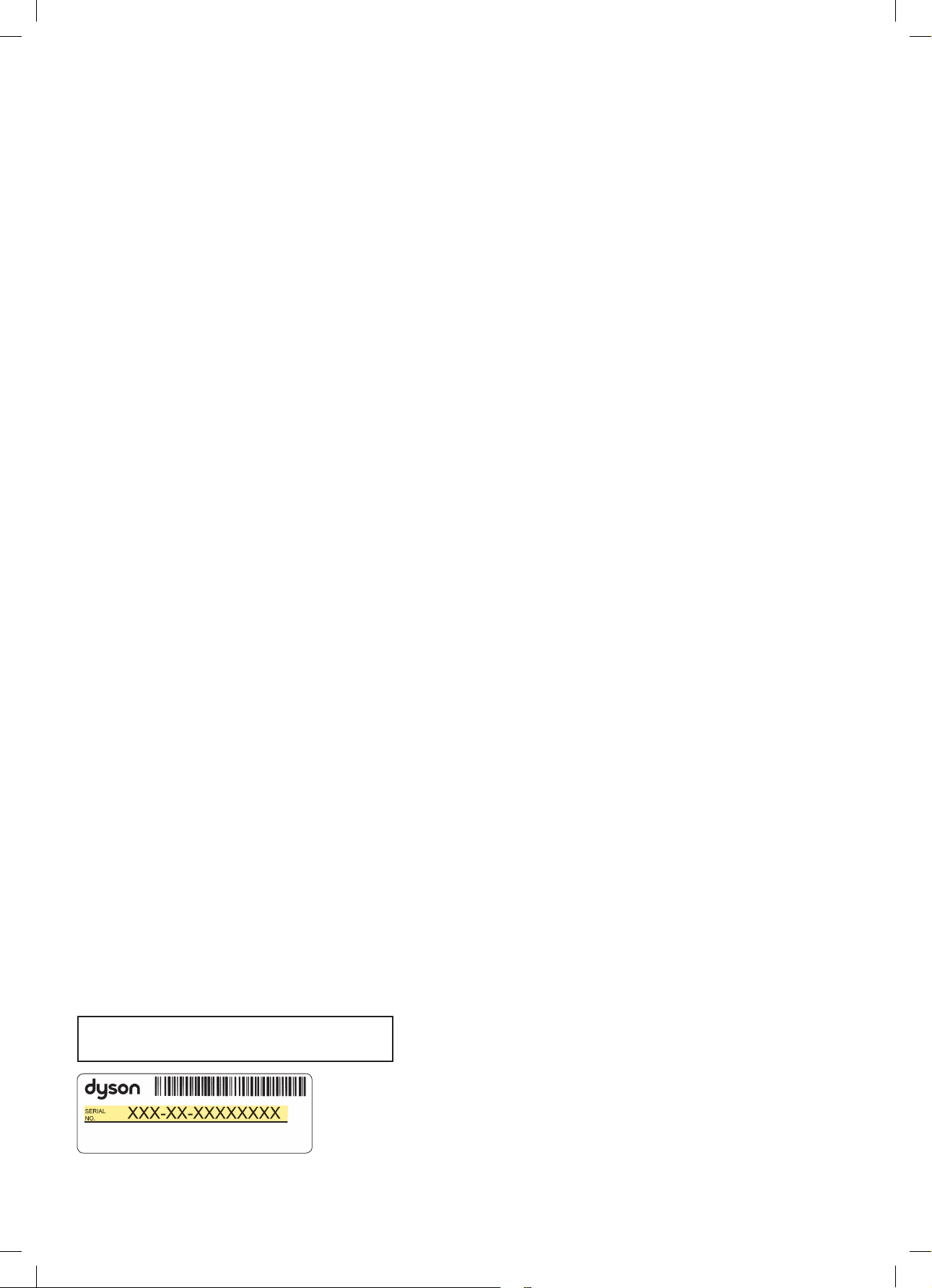
Note your serial number for future reference.
Anote su número de serie para futuras consultas.
This illustration is for example purposes only.
Esta figura es únicamente para mostrar un ejemplo.
Thank you for choosing to buy a Dyson machine
We don’t stop caring about our machines once they’re
yours. With your free 2-year warranty, your Dyson purifying
fan heater will be covered for parts and labor (excluding
filters) for two years from the date of purchase, subject
to the terms of the warranty. Even after your warranty
has ended, we’ll still be on hand to help. If you have any
questions regarding your Dyson machine, visit www.dyson.
com for online help, general tips and useful information
about Dyson.
Call 1-866-693-9766 for general machine questions or
866-861-2521 for questions on using the Dyson Link app.
Your serial number can be found on your rating plate which
is on the base of your machine.
Visit www.dyson.com/support for online help, support
videos, general tips and useful information about Dyson.
Gracias por elegir comprar una
máquina Dyson.
No dejamos de preocuparnos por nuestras máquinas,
ni siquiera cuando ya son tuyas. Con tu garantía gratuita,
las piezas y la mano de obra (salvo los filtros) de tu
calentador- purificador y ventilador Dyson estarán
cubiertas durante dos años desde la fecha de compra,
sujeto a los términos de la garantía. Incluso después de
que tu garantía haya terminado, estaremos a tu disposición
para ayudarte. Si tiene preguntas sobre su máquina Dyson,
visite www.dyson.com para obtener ayuda, consejos
generales e información útil en línea sobre Dyson.
Llame al 1-866-693-9766 para preguntas generales sobre
la máquina o al 866-861-2521 para preguntas sobre cómo
utilizar la aplicación Dyson Link.
Su número de serie se encuentra en la placa de
especificaciones situada en la base de la máquina.
Como alternativa, visite www.dyson.com/support para
obtener ayuda, consejos generales e información útil en
línea sobre Dyson.
JN.114123 PN.307417-02-06 10.08.21
REGISTRATION FORM CONTINUED
CONTINUACIÓN DEL FORMULARIO DE REGISTRO
THANK YOU FOR YOUR TIME • GRACIAS POR DEDICARNOS SU TIEMPO
1. Do you own any other heating products?
Check all that apply.
■ Fan heater
■ Ceramic heater
■ Oil heater
■ Gas heater
■ Wood fire heater
■ Electric heater
■ Radiator
■ Reverse cycle air conditioner
■ Fan convector
■ None of the above
■ Other, please specify
■
2. Why did you choose to buy a Dyson heater?
Please select up to 5 of the following choices below.
■ Frustration with existing heater
■ Latest heater technology
■ Dyson brand reputation
■ Smooth, powerful airflow
■ Previous experience of Dyson
■ Safe, no fast-spinning blades
■ Features – oscillation, touch-tilt
■ Easy to clean
■ Price/special offer
■ Store staff recommendation
■ Aesthetics
■ Friend/family recommendation
■ Warranty coverage
■ Other, please specify
■
3. Where did you first hear about Dyson heaters?
■ From friends and family
■ Saw it on the internet
■ From a TV/magazine advertisement
■ Email from Dyson
■ Saw it in a store/catalog
■ News item or article
■ Recommended by salesperson
■ Saw it at an event
■ Social media
■ Other, please specify
■
4. Do you own any other Dyson products?
■ Upright vacuum
■ Canister vacuum
■ Handheld vacuum
■ Dyson Airblade™ hand dryer
■ Dyson Air Multiplier™ fan
■ My first Dyson purchase
5. What type of home do you live in?
■ Single family home
■ Town home
■ Condominium
■ Apartment
■ Other, please specify
■
1. ¿Posee algún otro producto de movimiento de aire?
Seleccione todos los que apliquen.
■ Calefactor de aspas
■ Calefactor cerámico
■ Calefactor de aceite
■ Calefactor de gas
■ Calefactor de leña
■ Calefactor eléctrico
■ Radiador
■ Acondicionador de aire de ciclo inverso
■ Convector del ventilador
■ Ninguno de los anteriores
■ Otro, favor de especificar
■
2. ¿Por qué eligió comprar un calefactor Dyson?
Seleccione por favor hasta 5 de lo siguiente opciones de abajo.
■ Frustración por el calefactor que ya tenía
■ Tecnología calefactor más nueva
■ Prestigio de la marca Dyson
■ Flujo uniforme y potente
■ Experiencia anterior con Dyson
■ Aspas seguras sin giro rápido
■ Funciones: oscilación, inclinación con un toque
■ Fácil de limpiar
■ Precio, oferta especial
■ Recomendación del personal de la tienda
■ Apariencia estética
■ Recomendación de amigos o familiares
■ Cobertura de la garantia
■ Otro, favor de especificar
■
3. ¿Dónde se enteró por primera vez de los calefactors Dyson?
■ Por amigos y familiares
■ Lo vi en Internet
■ Por un anuncio en televisión/revista
■ Correo electrónico de Dyson
■ Lo vi en el catálogo de una tienda
■ Noticias o articulo de noticias
■ Recomendación de un vendedor
■ Lo vi en un evento
■ Redes sociales
■ Otro, favor de especificar
■
4. ¿Posee otro aparato Dyson?
■ Aspiradora vertical
■ Aspiradora tipo canasta
■ Aspiradora portátil
■ Secador de manos Dyson Airblade™
■ Ventilador Dyson Air Multiplier™
■ Mi primera compra Dyson
5. ¿Qué tipo de casa habita usted?
■ Vivienda unifamiliar
■ Vivienda adosada
■ Condominio
■ Apartamento
■ Otro, favor de especificar
■
Please take a few moments to answer our questions.
They will help us develop new products for the future.
Tómese unos instantes para responder a nuestras preguntas.
Esto nos ayudará a desarrollar nuevos productos en el futuro.
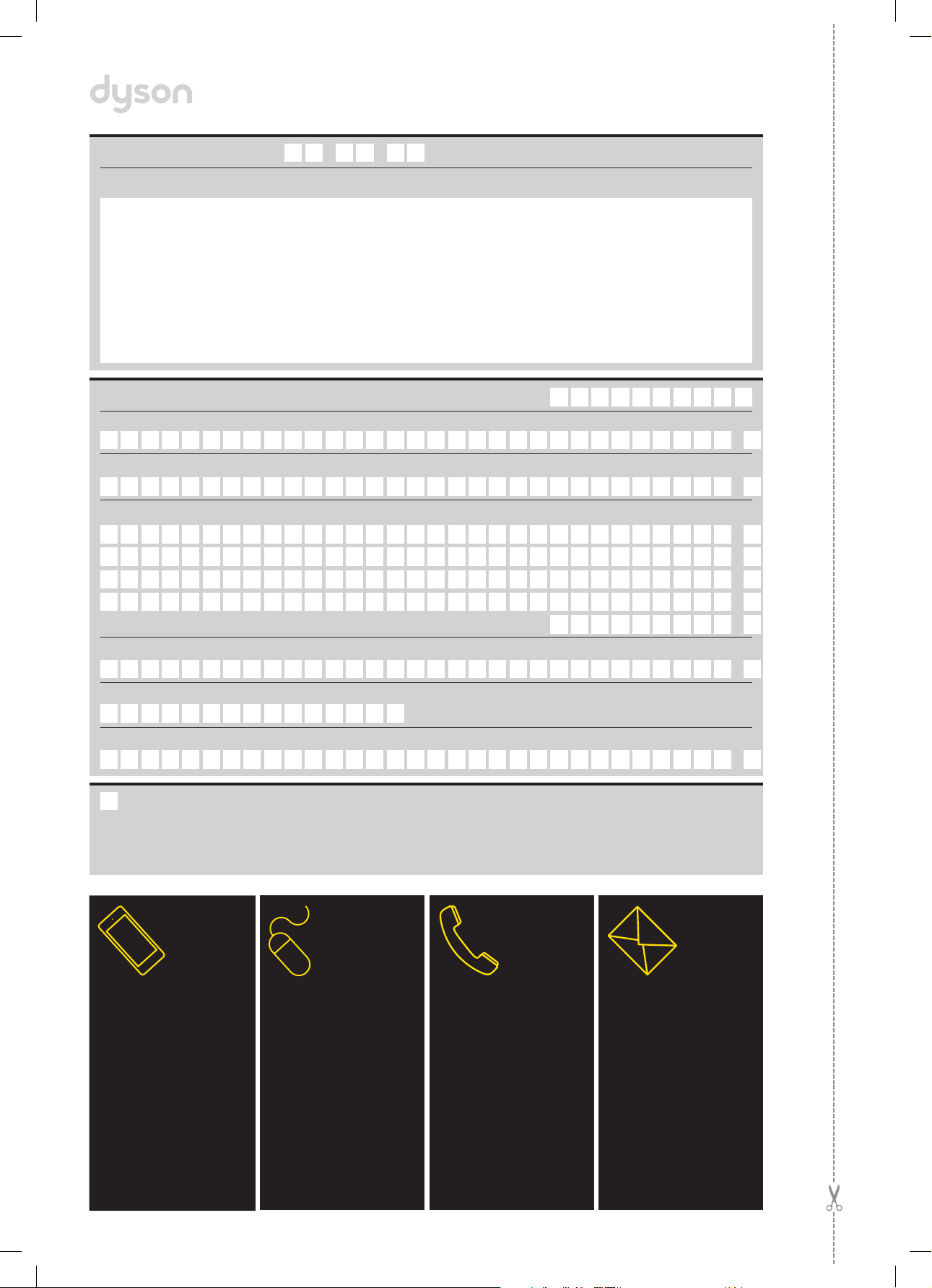
MAIL
Complete and return
the form in the envelope
supplied.
POR CORREO
Complete este formulario y
envíelo.
Title | Tratamiento
Last name | Apellido
First name | Nombre
Telephone | Teléfono
email | email
Store of purchase | Tienda de compra
Zip Code | Código postal
Address | Dirección
Date of purchase | Fecha de compra
/ /
Serial number | Número de série
From time to time, we’d like to send you emails about new Dyson
technology and services or get your opinion about your purchase. If
you’d like us to keep in touch, please check this box.
Ocasionalmente, nos gustaría enviarle correos electrónicos con
información sobre los nuevos servicios y tecnologías de Dyson o para
saber su opinión sobre su compra. Si desea
que nos mantengamos en contacto, seleccione esta casilla.
SMARTPHONE
Download the Dyson Link
app and you will be taken
through registration as part
of the set up.
TELÉFONO
INTELIGENTE
Descargue la aplicación
Dyson Link y se lo guiará
por la registración como
parte de la configuración.
PHONE
Dyson Helpline:
1-866-693-9766
(Mon-Fri 8:00am - 8:00pm CT;
Sat 9:00am - 6:00pm CT).
POR TELĖFONO
Servicio de atención al cliente
Dyson: 1-866-693-9766
(Lunes a viernes de 8 a.m.
a 8 p.m., hora Centro;
Sábados de 9 a.m. a 6 p.m.,
hora Centro).
ONLINE
Convenient and instant.
www.dyson.com/register
EN LÍNEA
Conveniente y al instante.
www.dyson.com/register
4 EASY WAYS TO REGISTER YOUR MACHINE.
4 MANERAS SENCILLAS DE REGISTRAR SU MÁQUINA.