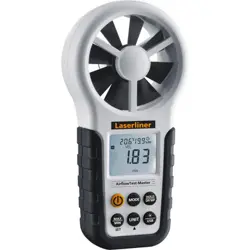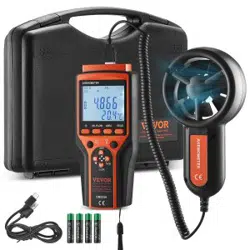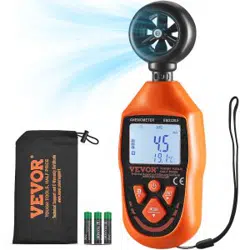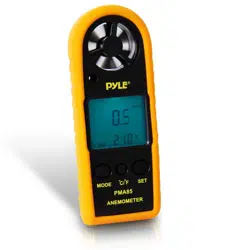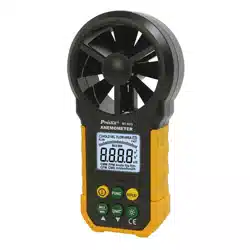

MT- 4615 Anemometer
User’s Manual
1
st
Edition
,
2016
©2016 Prokit’s Industries Co., Ltd.

1
Safety Information
Please read carefully the following safety information before
usage and maintain this anemometer while using it according
to operating guidance, otherwise, the anemometer may be
damaged. The anemometer will provide satisfactory services to
you if you use and protect it appropriately.
Preparation
‧ Please check for damage during transportation after
receiving the anemometer.
‧ If it should be stored and shipped under hard conditions,
please confirm whether the meter is damaged.
Usage
‧The meter should be used in the range of specified ambient
temperature and humidity.
‧If you notice any abnormality or failure, stop using it
immediately.
‧Don’t store or use the meter under the conditions of direct
sunlight, high temperature and high humidity.
‧Don’t touch the fan blades with excessive force.
‧Don’t directly expose the blades in harsh light to avoid
reading error.
Marking
The mark indicates compliance with EMC
requirements.

2
Important Safety Information
Maintenance
‧Repair or maintenance should be implemented by trained
personnel.
‧ If there is dust on the fan blade, please blow it with clean air
or scrub gently with a damp cloth and mild detergent.
‧Clean the meter with a damp cloth and mild detergent.
Don’t use abrasive material or solvent.
‧The meter should be powered off when it is not in use.
‧The meter will consume small current, about ≤ 5μA, after
shutdown. If the meter is not to be used for a long period,
batteries should be removed to prevent damaging the
meter.
Description
‧This meter is a digital anemometer for measuring air
velocity and air volume
‧This meter is a portable, professional measuring instrument
with large-screen LCD and backlight, multi-unit switching
functions.
‧ This meter can be used for hand-held or fixed
measurement.
‧This meter has the functions of reading hold, maximum,
minimum, etc.
‧ It has a low battery indicator
3
Part name
Button description
Button:
Switch for meter powering on/off.
button
Switch for turning on/off the backlight
HOLD button
Switch for reading retention mode.
FUNC button
It is used for switching among the functions of wind speed
measurement, area setting and air volume measurement.
Long press for three seconds to enable or disable "Auto
Power-Off" function.
Default is auto power off model, after 10mins no operation
auto power off.
MAX/MIN button
Switch maximum/minimum/normal mode, long press to
exit.
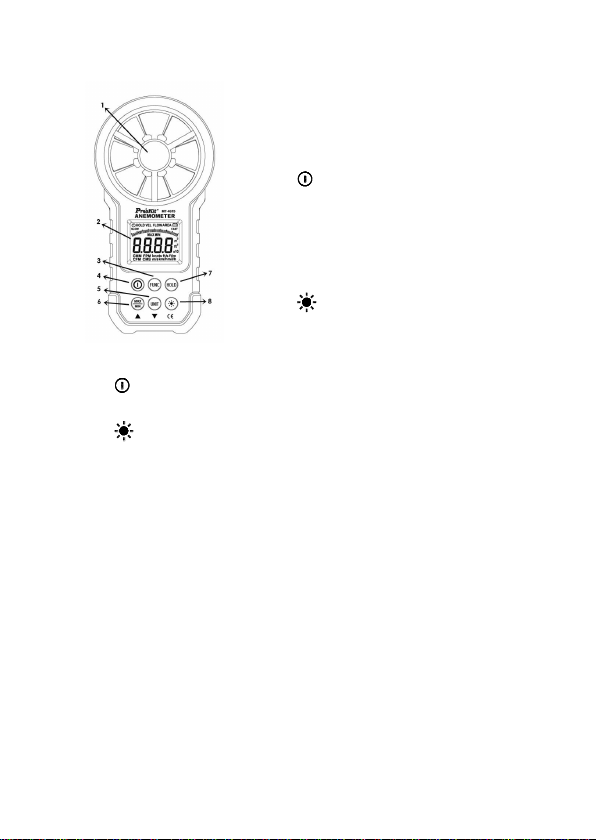
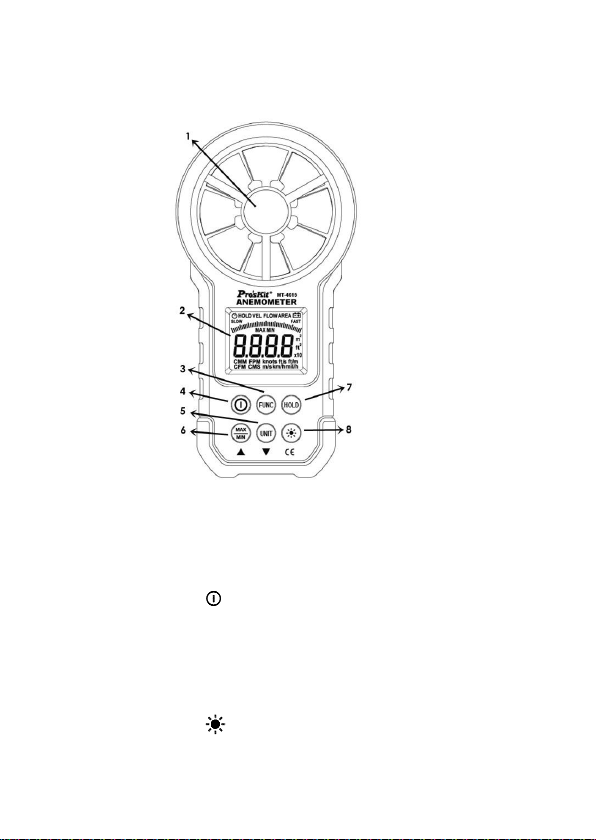
1. Fan
2. LCD
3. “FUNC” → Function switching
4. “ ”→ Power switch
5. “UNIT” → Unit switching
6. Maximum/Minimum
7. “HOLD” hold display, switch
temperature mode
8. “ ”→ Backlight

4
UNIT button
Switch unit, area (m², ft²),
Wind speed (m/s, km/h, mil/h, ft/m, ft/s, knots),
Air volume (CMS, CMM, CFM).
Sign definition
Indicates Auto Power-Off status
HOLD Reading hold state
VEL Wind speed measurement state
FLOW Air volume measurement state
AREA Area setting required by air volume
SLOW The current wind speed less than 5m/s
FAST The current wind speed greater than 5m/s
MAX Displays maximum after entering
maximum/minimum mode
MIN Displays minimum after entering
maximum/minimum mode
m² Indicates that the current area setting unit is
square meter
ft² Indicates that the current area setting unit is
square foot
CMM Cubic meters per minute
CMS Cubic meters per second
CFM Cubic meters per minute
knots Nautical miles per hour, 1850 meters per hour
ft/s Feet per second
ft/m Feet per minute
m/s Meters per second
Km/h Kilometers per hour
mil/h Nautical miles per hour
Low battery indicator
5
Specification
Accuracy: 2% + 50d, the guarantee period of one year.
Ambient temperature 18 °C to 28 °C, relative humidity less
than 70
General
‧ Work height: Maximum 2000m
‧ Work mode: Frequency of wind speed conversion
‧ Display: LCD
‧ Maximum show value: 9999
‧ Sampling time: About 0.4s/time.
‧ Low battery indicator:
sign displays on
LCD.
‧ Work power: 1×9V 6F22 battery.
‧ Operation environment:
Relative humidity→ 0~85%RH, no moisture
condensation
Temperature→ 0°C ~40°C , no moisture condensation
‧ Detector (fan) operation environment:
Relative humidity→ 0~95%RH, no moisture
condensation.
Temperature→ -20°C~80°C, no moisture condensation.
‧ Storage environment:
Relative humidity→ 0~80%RH, no moisture
condensation
Temperature→ -10°C~50°C, no moisture condensation
‧ Dimension: Meter →170LX85 WX40Hmm.
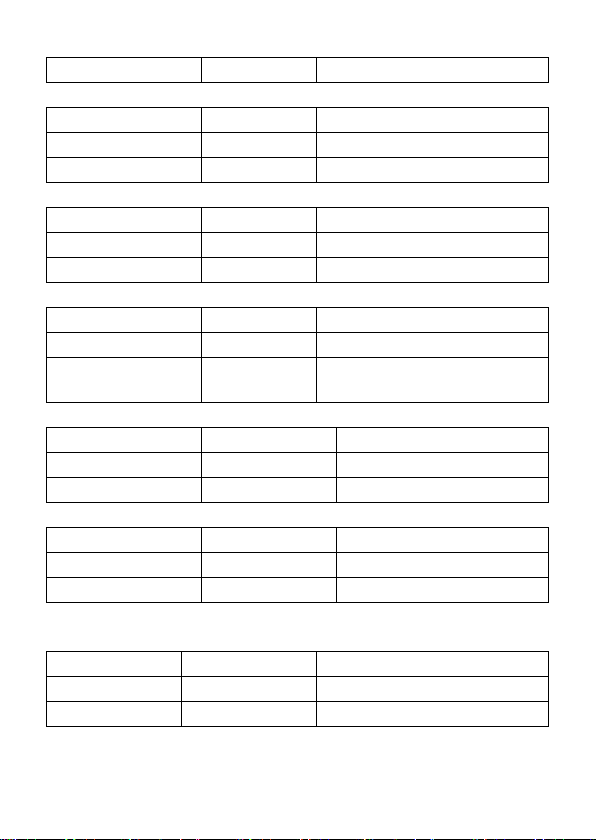
Technique data
Ambient temperature: 235°C, Relative humidity: <75%
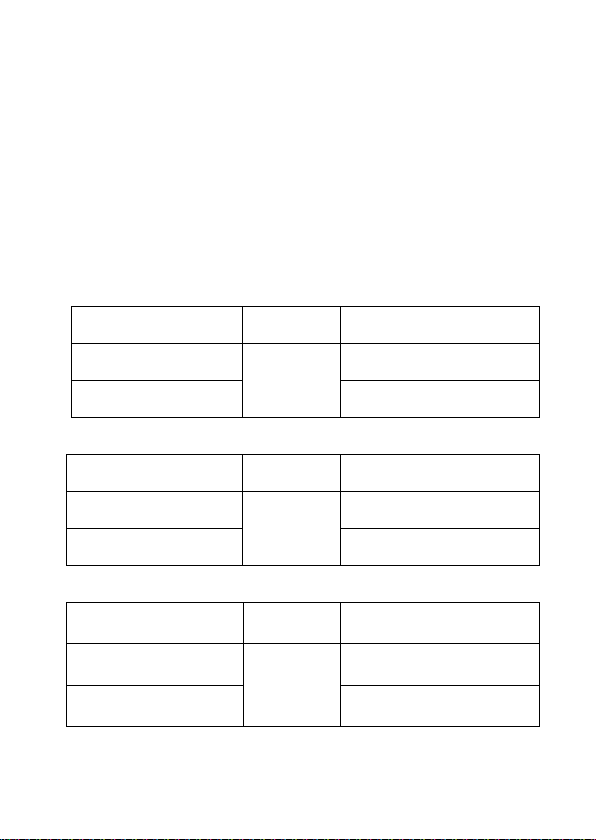
m/s
Measuring range
Resolution
Accuracy
0.80 ~ 30.00 m/s
0.01 m/s
±(2.0% reading + 50 digital)
6
30.00 ~ 40.00 m/s
For reference only
km/h
Measuring range
Resolution
Accuracy
1.40~108.00 km/h
0.01km/h
±(2.0% reading + 50 digital)
108.0~ 144.0 km/h
For reference only
ft/s
Measuring range
Resolution
Accuracy
1.30 ~ 98.50 ft/s
0.01 ft/s
±(2.0% reading + 50 digital)
98.50~ 131.20 ft/s
For reference only
knots
Measuring range
Resolution
Accuracy
0.80~ 58.30 knots
0.01 knots
±(2.0% reading + 50 digital)
58.30~77.70
knots
For reference only
3.2.5 mil/h
Measuring range
Resolution
Accuracy
0.90 ~ 67.20 mil/h
0.01mil/h
±(2.0% reading + 5 digital)
67.20~90.00 mil/h
For reference only
ft/m
Measuring range
Resolution
Accuracy
78 ~ 5900 ft/m
1ft/m
±(2.0% reading + 5 digital)
5900 ~ 7874 ft/m
For reference only
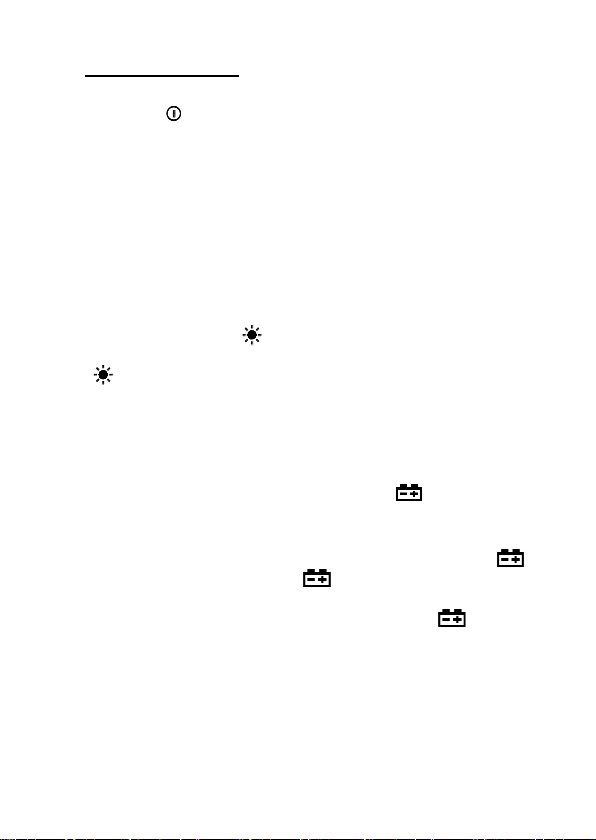
Air volume unit
CFM
0- 99990
(Area) 0 - 9.999 ft²
CMM
0- 99990
(Area) 0 - 9.999 m²
CMS
0 - 9999
(Area) 0 - 9.999 m²
7
Operating guidance
Power On/Off
Press the “ ” key to turn on or off the anemometer power.
Reading hold
In the measurement process, if the reading should be kept,
press "HOLD" key to lock the reading, and display the HOLD
symbol; press it again to unlock.
Note:
In the reading hold state, “FUNC”, “MAX/MIN” and “UNIT” keys
are invalid.
Backlight
In the measurement process, if the ambient light is too dark to
read, you can press " " key to open the backlight. Backlight
timer is set to 15 seconds. During this period, you can press
" " key again to turn off backlight at any time.
Note:
The luminous body of backlight is LED with large
operating current. Frequently using backlight will shorten
battery life. Do not use backlight when unnecessary.
When the battery voltage ≤ 7V, the " " (low battery)
symbol will show on the display. However, in the case
of using the backlight, if the battery voltage ≥ 7V, the battery
voltage drops because of its larger operating current, "
"
symbol may show (when "
" symbol is showing, the
accuracy of the measurement can’t be guaranteed). At this
moment, you needn’t replace battery until the "
" symbol
display again under normal use condition without using
backlight.
Wind speed measurement
Place the detector (fan) into the test environment, "VEL"
symbol will display on the screen, measurement is done with
the fan surface perpendicularly to the wind direction.

8
Note:
‧If the detector (fan) is not aiming at the wind direction, which
will bring the measurement error.
‧For steady wind, the detector (fan) will register maximum
reading when it is aiming at the wind direction.
Wind speed measurement
When using the meter to measure air volume, you can press
“UNIT” key to select the measurement unit you required (m/s,
km/h, mill/h, ft/m, ft/s, knots).
Area setting
To measure air volume, you should first determine the area of
air flow to be, input steps are shown as following:
①.Press “FUNC” key to make “AREA” display on the screen.
②.Use the “MAX/MIN” and “UNIT” keys to adjust value and
unit, after adjusting area unit (m², ft²), then press
“MAX/MIN” key. There should be an audible buzz,
indicating that area input is completed and settings are
saved.
③.To change the area setting, please repeat the step ②.
Air volume measurement
Place the detector (fan) into the test environment. Use the
“FUNC” key to set the meter to the Air volume measurement
mode; the "FLOW" symbol should display on the screen.
Measurement is done with the fan surface perpendicular to the
wind direction.
Note:
‧If the detector (fan) is not aligned in the wind direction, the
measurement can be skewed.
‧For steady wind, the detector (fan) will get maximum reading
when it is aiming at the wind direction.
9
Air volume unit selection
When using the meter to measure air volume, you can press
the “UNIT” key to select the measurement unit
you require (CMS, CMM, CFM).
Replacing battery
‧If the “ ” sign appears, this indicates that the battery
should be replaced.
‧Power off the meter and remove the battery cover.
‧Replace the old battery.
‧Install the battery cover properly.
5. Attachments
1
Storage Bag
1pc
2
Operation
Manual
1pc
10
MT-4615 風速計 使用說明書
安全聲明
小心
“小心”標誌表示會對儀錶或設備造成損壞的狀況和操
作。它要求在執行此操作時必須小心,如果不正確執
行操作或不遵循此操作步驟,則可能導致儀錶或設備
損壞。在不滿足這些條件或沒有完全理解情況下,請
勿繼續執行小心標誌所指示的任何操作。
警告
“警告”標誌表示會對用戶造成危險狀況和操作。它要
求在執行此操作時必須注意,如果不正確執此行操作
或不遵守此操作步驟,則可能導致人身傷害或傷亡。
在不滿足這些條件或沒有完全理解的情況下,請勿繼
續執行警告標誌所指示的任何操作。
使用本儀錶前,請仔細閱讀說明書並請注意有關安全
警告資訊。
安全資訊
在操作或保養本儀錶之前,請認真地閱讀下列的安全
資訊,並按操作指南使用,否則可能損壞儀錶。
11
準備
1 接收儀錶後,檢查是否在運輸中損壞。
2 在粗劣的條件下保存、裝運後,檢查並確認儀錶是
否損壞。
使用
1 儀錶應在規定的環境溫度、濕度的範圍內工作。
2 如果注意到儀錶有任何異常或故障,應停止使用。
3 不要在陽光直射、高溫、高潮濕的情況下儲存或使
用儀錶。
4 請勿過度用力觸動風扇葉片。
5 請勿使強光直接照在風扇上,以免讀數誤差。
標誌
符合歐盟相關法規
重要的安全資訊
保養
1 維修或保養應該由經過培訓的人員實行。
2 風扇葉片上若有灰塵,請用清潔空氣吹淨或用濕布

12
和溫和洗滌劑輕輕擦洗。
3 使用濕布和溫和洗滌劑清潔儀錶,不要使用研磨劑
或溶劑。
4 儀錶不使用時應將電源關掉。
5 儀錶在關機後仍消耗一個微小的電流,約≤5μA。如
果儀錶長時間不使用,應將電池取出以防損壞儀錶。
描述
1 本儀錶是數字式風速表,用於測量風的速度和相
應面積的風量。
2 本儀錶為便攜的、專業的測量儀器,具有大屏液晶
數位顯示,並有背光、多種單位切換等功能。
3 本儀錶可手持測量。
4 本儀錶具有讀數保持、最大最小值等功能。
5 具有低電池指示。
13
部件名稱
1. 風扇
2. 液晶顯示幕
3. “FUNC” →功能切換按鈕
4. “ ”→電源開關
5. “UNIT” →單位切換按鈕
6. 最大/最小值按鈕
7.“HOLD”資料保持按鈕
8. “ ”→背光按鈕

14
按鈕說明
按鈕:
用於儀錶電源的開關。
按鈕
用於背光源的開關。
HOLD 按鈕
用於讀數保持的開關。
FUNC 按鈕
用於風速測量、面積設置、風量測量之間的切換,長
按三秒用於開關“自動關機”功能,開機默認進入“自動
關機”狀態,約 10 分鐘後自動關機。
MAX/MIN 按鈕
用於切換最大值/最小值/正常模式,長按退出。
UNIT 按鈕
用於切換單位,面積(m²,ft²),
風速(m/s、km/h、mil/h、ft/s、ft/m、knots),
風量(CMS、CMM、CFM)。

15
符號定義
開啟自動關機符號
HOLD 讀數保持狀態
VEL 風速測量狀態
FLOW 風量測量狀態
AREA 風量所需的面積設置狀態
SLOW 指示當前風速小於 5m/s
FAST 指示當前風速大於 5m/s
MAX 顯示進入最大最小模式後最大數值
MIN 顯示進入最大最小模式後最小數值
m² 指示當前面積設置單位為平方米
ft² 指示當前面積設置單位為平方英尺
CMM 立方米每分鐘
CMS 立方米每秒
CFM 立方英尺每分鐘
Knots 節、海浬每小時、1850 米每小時
ft/s 英尺每秒
ft/m 英尺每分鐘
m/s 米每秒
Km/h 千米每小時
mil/h 英里每小時
電池欠壓指示

16
技術指標
準確度:(2%+50d),保證期一年。
基準條件:環境溫度 18℃至 28℃、相對濕度不大於
70。
一般指標
工作高度:最大 2000m
工作模式:風速頻率轉換
顯示:LCD 顯示
最大顯示值:9999
採樣時間:約 0.4 秒 / 次。
電池欠壓指示:LCD 顯示 符號。
工作電源:9V×1 6F22 電池。
操作環境:
相對濕度→ 0~85%RH,無結露現象。
溫度→ 0℃~40℃,無結露現象。
探測器(風扇)操作環境:
相對濕度→ 0~95%RH 無結露現象。
溫度→ -20℃~80℃無結露現象。
17
儲藏環境:
相對濕度→ 0~80%RH 無結露現象。
溫度→ -10℃~50℃無結露現象。
外觀尺寸:170 長 X85 寬 X40 高 mm。
技術指標
環境溫度:235℃、相對濕度:<75%
米/秒 m/s
量程
解析度
準確度
0.80 ~ 30.00 m/s
0.01 m/s
±(2.0% 讀數+50 字)
30.00 ~ 40.00 m/s
僅供參考
千米/小時 km/h
量程
解析度
準確度
1.40~108.00 km/h
0.01km/h
±(2.0%讀數+50 字)
108.0 ~144.0 km/h
僅供參考
英尺/秒 ft/s
量程
解析度
準確度
1.30 ~ 98.50 ft/s
0.01 ft/s
±(2.0%讀數+50 字)
98.50~131.20 ft/s
僅供參考
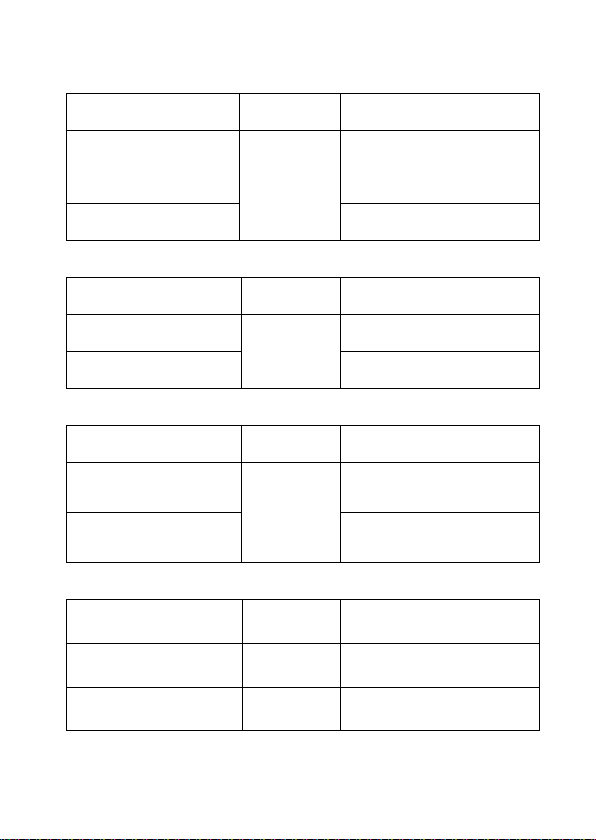
18
海浬/小時 knots
量程
解析度
準確度
0.80~58.30knots
0.01knots
±(2.0% 讀數 + 50
字)
58.30~77.70 knots
僅供參考
英里/小時 mil/h
量程
解析度
準確度
0.90~67.20 mil/h
0.01mil/h
±(2.0% 讀數 + 5 字)
67.20~90.00 mil/h
僅供參考
英尺/分 ft/m
量程
解析度
準確度
78 ~ 5900 ft/m
1ft/m
±(2.0% 讀數+ 5 字)
5900 ~ 7874 ft/m
僅供參考
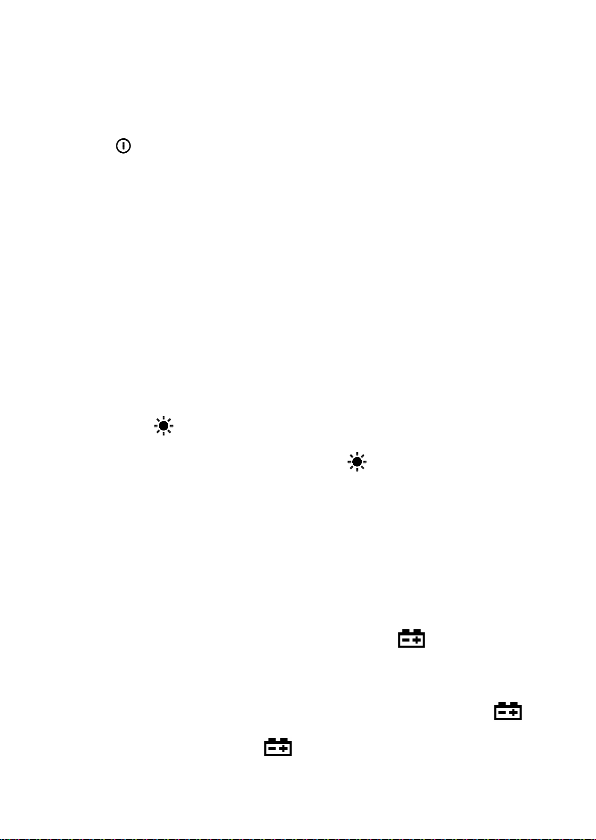
風量單位
CFM
0- 9999
(面積)0 - 9.999 ft²
CMM
0- 9999
(面積)0 - 9.999 m²
CMS
0 - 9999
(面積)0 - 9.999 m²
19
操作指南
開機、關機
按“ ”鍵可將風速表電源開機或關機。
讀數保持
在測量的過程中,如需要讀數保持,按下“HOLD”鍵可
鎖定讀數,並顯示符號 HOLD;再按一次可解除鎖定。
在讀數保持時,“FUNC”及“MAX/MIN”、“UNIT”鍵功能
將失效。
背光源
在測量的過程中,如果環境光線太暗,致使讀數困難,
可按動“ ”鍵,打開背光源。背光源的定時時間為 15
秒,在此期間可隨時再次按動“ ”鍵關閉背光源。
注意:
1. 背光源的發光體為 LED,其工作電流較大,經常使
用背光源將縮短電池的壽命,所以非必要的情況
下,應儘量少用背光源。
2. 當電池電壓≤7V 時,顯示器顯示“ ”(欠壓)符
號。但在使用背光源的情況下,在電池電壓≥7V
時,由於其工作電流較大,使電池電壓下降,“
”
符號可能顯示(“
”符號顯示時,不保證測量的

20
準確度),這時可不更換電池,在不用背光源的情
況下正常使用直到“
”符號顯示再行更換。
風速測量
將探測器(風扇)放到被測環境,螢幕顯示“VEL”符號,
風扇平面垂直對準風向進行測量。
注意:
1. 若探測器(風扇)未對準風向,會帶來測量誤差。
2. 對大小穩定的風,探測器(風扇)對準風向時測得
的讀數最大。
風速單位選擇
儀錶風速測量時,可按“UNIT”鍵,選擇您所需要的測
量單位元(m/s、km/h、mill/h、ft/s、ft/m、knots)。
面積設置
要測量風量,必須先確定被測風道的面積,面積輸入
步驟如下:
①.按“FUNC”鍵,使螢幕出現“AREA”。
②.按“MAX/MIN”和“UNIT”兩鍵調整數值和單位,調
整完面積單位(m²、ft²)後再按“MAX/MIN”鍵將聽到

21
連續兩聲嗡鳴聲,表示面積輸入結束並已保存。
③.更改面積設置,請重複步驟②。
風量測量
將探測器(風扇)放到被測環境,通過“FUNC”鍵使螢
幕顯示“FLOW”符號,風扇平面垂直對準風向進行測
量。
注意:
1. 若探測器(風扇)未對準風向,會帶來測量誤差。
2. 對大小穩定的風,探測器(風扇)對準風向時測得
的讀數最大。
風量單位選擇
儀錶風量測量時,可按“UNIT”鍵,選擇您所需要的測
量單位元(CMS、CMM、CFM)。
更換電池
1 如果“ ”符號出現,它表明應該更換電池。
2 將儀錶關機,把電池蓋移開。
3 將舊電池更換。

22
4 將電池蓋按原樣裝上。
附件
1
包裝袋
一個
2
使用說明書
一本

23
©2016 Prokit’s Industries Co., Ltd.
All rights reserved 2016001