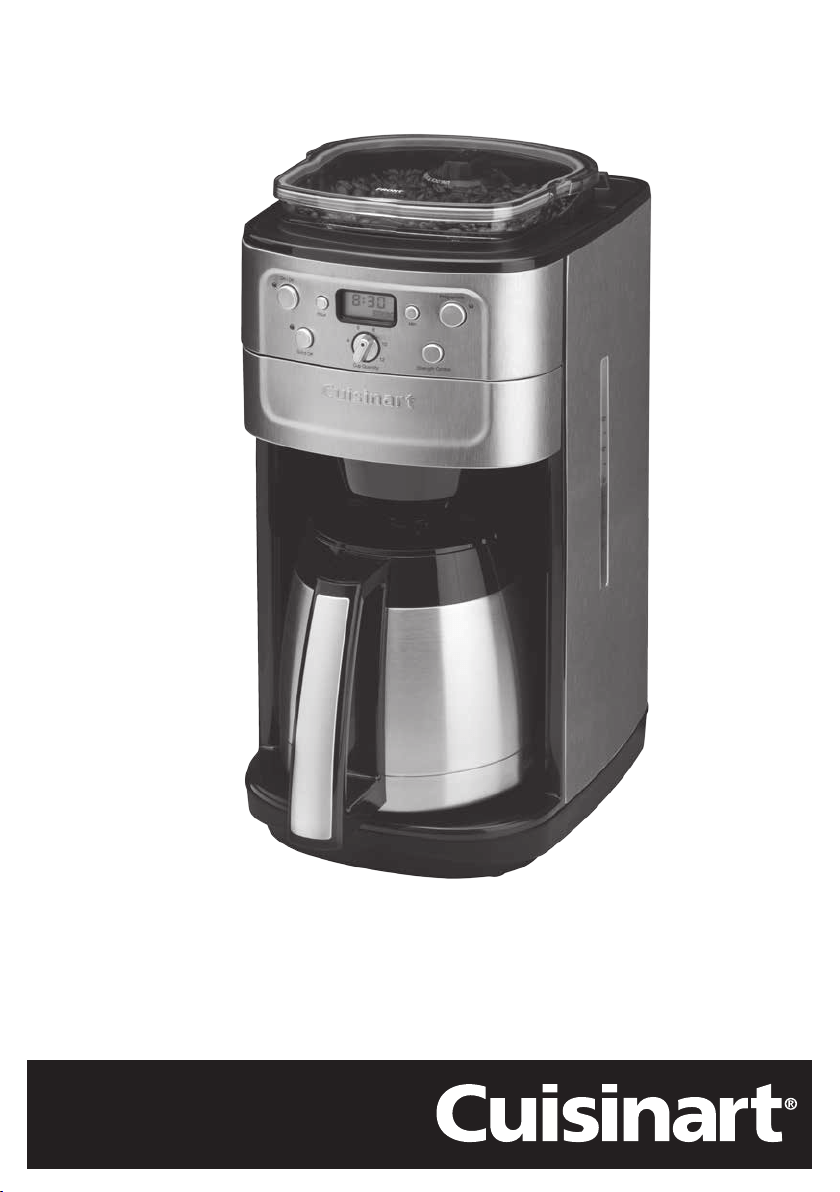
Grind & Brew Plus
DGB900BCU

2
Important Safeguards
When using electrical appliances, basic safety precautions should
always be followed, including the following:
1. The appliance is not intended to be operated by means of external
timer or separate remote-control system.
2. This appliance is not intended for use by persons with reduced physical,
sensory or mental capabilities, or lack of experience and knowledge,
unless they have been given supervision or instruction concerning use
of the appliance by a person responsible for their safety.
3. Children should always be supervised to ensure that they do not play
with this product.
4. Not for use by children. Keep out of reach of children during and
after use.
5. Always inspect the appliance before use for noticeable signs of
damage. Do not use if damaged, or if the appliance has been dropped.
Do not use this appliance if the lead is damaged. In the event of
damage, or if the appliance develops a fault, contact the Cuisinart
Customer Care Line (refer to “UK After Sales Service“ section for
further information).

Congratulations on your purchase of the Cuisinart Grind & Brew
Plus.
For over 30 years Cuisinart’s aim has been to produce the very
finest kitchen equipment. All Cuisinart products are engineered for
exceptionally long life, and designed to be easy to use as well as to
give excellent performance day after day.
To learn more about our products visit our website
www.cuisinart.co.uk

4
CONTENTS
Product Description . . . . . . . . . . . . . . . . . . . . . . . . . 5
Safety Cautions . . . . . . . . . . . . . . . . . . . . . . . . . . . 6
Instructions for Use . . . . . . . . . . . . . . . . . . . . . . . . . 9
A Control Panel . . . . . . . . . . . . . . . . . . . . . . . . . . . . . . . 9
B Setting the Clock . . . . . . . . . . . . . . . . . . . . . . . . . . . . . 10
C Setting the Programme Time . . . . . . . . . . . . . . . . . . . . . . . 10
D Inserting the Charcoal Water Filter . . . . . . . . . . . . . . . . . . . . 11
E Preparing to Brew . . . . . . . . . . . . . . . . . . . . . . . . . . . . . 12
Adding Water & Coffee . . . . . . . . . . . . . . . . . . . . . . . 12
Using Coffee Beans . . . . . . . . . . . . . . . . . . . . . . . . . 12
Removing and Replacing the Bean Hopper . . . . . . . . . . . . . 13
Using Pre-ground beans . . . . . . . . . . . . . . . . . . . . . . . 13
Preparing the Carafe . . . . . . . . . . . . . . . . . . . . . . . . 14
F Brewing Coffee . . . . . . . . . . . . . . . . . . . . . . . . . . . . . . 14
Immediate Brewing . . . . . . . . . . . . . . . . . . . . . . . . . 14
Programmed Brewing . . . . . . . . . . . . . . . . . . . . . . . . 15
Brewed Coffee . . . . . . . . . . . . . . . . . . . . . . . . . . . . 15
Cleaning & Maintenance . . . . . . . . . . . . . . . . . . . . . . . 16
Descaling . . . . . . . . . . . . . . . . . . . . . . . . . . . . . . 18
Troubleshooting . . . . . . . . . . . . . . . . . . . . . . . . . . . 19
UK Guarantee & After Sales Service . . . . . . . . . . . . . . . . . 21
Wiring Instructions . . . . . . . . . . . . . . . . . . . . . . . . . . 22
5
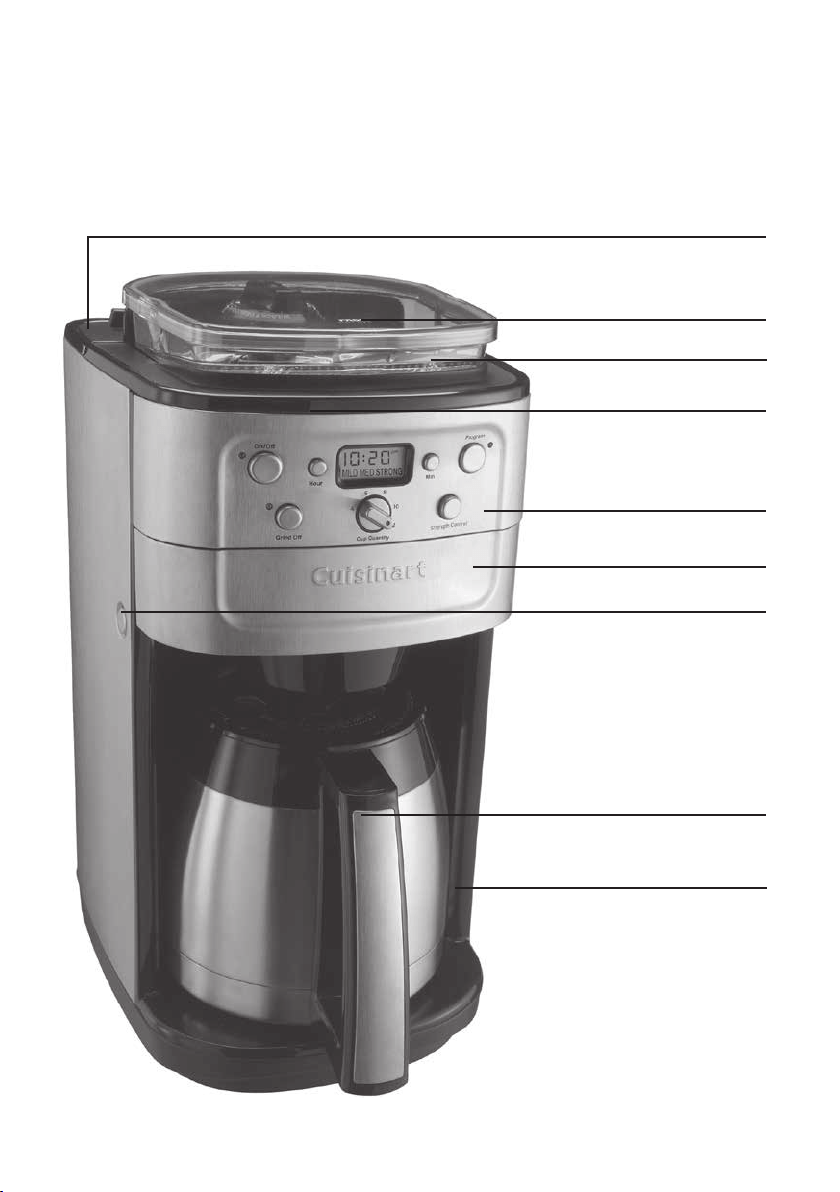
Product Description
Bean Hopper Lid
Bean Hopper
Water Reservoir (not shown)
Control Panel
Coffee Filter Compartment
Coffee Filter Compartment
Release Button
12 Cup Thermal Carafe
Housing Unit
Water Reservoir Lid

6
Safety Cautions
Carefully read all the instructions before using the appliance and
keep in a safe place for future reference.
Always follow these safety cautions when using this appliance to avoid
personal injury or damage to the appliance. This appliance should be
used only as described within this instruction book.
Always inspect the appliance before use for noticeable signs of damage.
Do not use if damaged, or if the appliance has been dropped. In the
event of damage, remove the plug from the mains then contact the
Cuisinart Customer Care Line (see “UK After Sales Service” section).
Do not use this appliance if the lead is damaged. In the event of a
damaged lead discontinue use immediately. Contact the Cuisinart
Customer Care Line (see “UK After Sales Service”).
Unplug from the mains when not in use and before cleaning. Allow
to cool before cleaning the appliance. To disconnect, press the ‘On/
Off’ button, and then remove the plug from the mains. Never pull the
plug out of the mains socket by its lead.
This appliance should not be used by adults or children whose lack
of experience, product knowledge or disability might cause a hazard,
unless they have been correctly instructed and are adequately
supervised.
Children should always be supervised to ensure that they do not play
with this product.
Not for use by children. Keep out of reach of children during
and after use.
Do not use any accessory or attachments with this appliance
other than those recommended by Cuisinart.
No repair should be carried out by the user. In case of fault, contact
the Cuisinart Helpline, (See “UK After Sales Service“ section).
Do not place the appliance on or near a hot gas or electric burner or
in a heated oven.
To protect against fire, electric shock or personal injury, do not
immerse the cord, plug or housing unit in water or other liquids. Do
not put the unit in a dishwasher.

7
Do not leave the lead hanging over the edge of a kitchen table or
worktop. Avoid contact between the lead and hot surfaces.
For indoor use only.
For domestic use only.
Do not exceed the maximum capacity of this appliance. (See page
12)
This appliance should be used only for grinding coffee beans and
brewing coffee as described within the Instructions for Use. Please
retain these instructions for further use.
Always ensure that your hands are dry before removing the plug
from the mains socket.
This product complies fully with all appropriate EU and UK legislation
and the standards relevant to this type and class of appliance. We
are an ISO9001:2015 accredited company that continually evaluates
our Quality Management System performance. If you have any
queries regarding product safety and compliance, please contact
our Customer Services Department (see “U.K. After Sales Service”
section).

8
Safety During Use
Do not touch hot surfaces. Use handles and knobs.
Always fill water reservoir first, then plug into a suitable power outlet.
To disconnect, push the ‘On/Off’ button to switch off the appliance,
then remove the plug from the wall outlet.
Ensure the lid is securely attached to the carafe before serving any
beverages.
Liquids will reach to approximately 90˚C. Be careful when pouring
beverages.
The thermal carafe is designed for use with this appliance only.
Do not use the carafe if cracked or if the handle is loose.
Do not clean the carafe or resting plate with cleansers, steel wool pads,
or other abrasive materials.
Avoid contact with moving parts.
Check grinder basket before use for presence of foreign objects.
Use the coffee grinder to grind roasted coffee beans only. Do not use to
grind other substances, e.g nuts, spices or un-roasted beans as this may
damage the plates or cause injury.
Do not place a cloth or otherwise restrict airflow beneath the coffee
maker.
Use only the Cuisinart Gold Tone® Commercial Style Filter with this unit.
These are available to purchase by contacting the Cuisinart Helpline
(see UK After Sales Service section). Other Gold Tone® permanent filters
or normal paper filters may cause the unit to overflow.
Do not place the hot carafe on a cold or wet surface.
WARNING: Scalding may occur if the lid is removed during the brewing
cycle.
WARNING: Polythene bags over the product or packaging may be
dangerous. To avoid danger of suffocation, keep away from babies and
children. These bags are not toys.
9
Instructions for Use
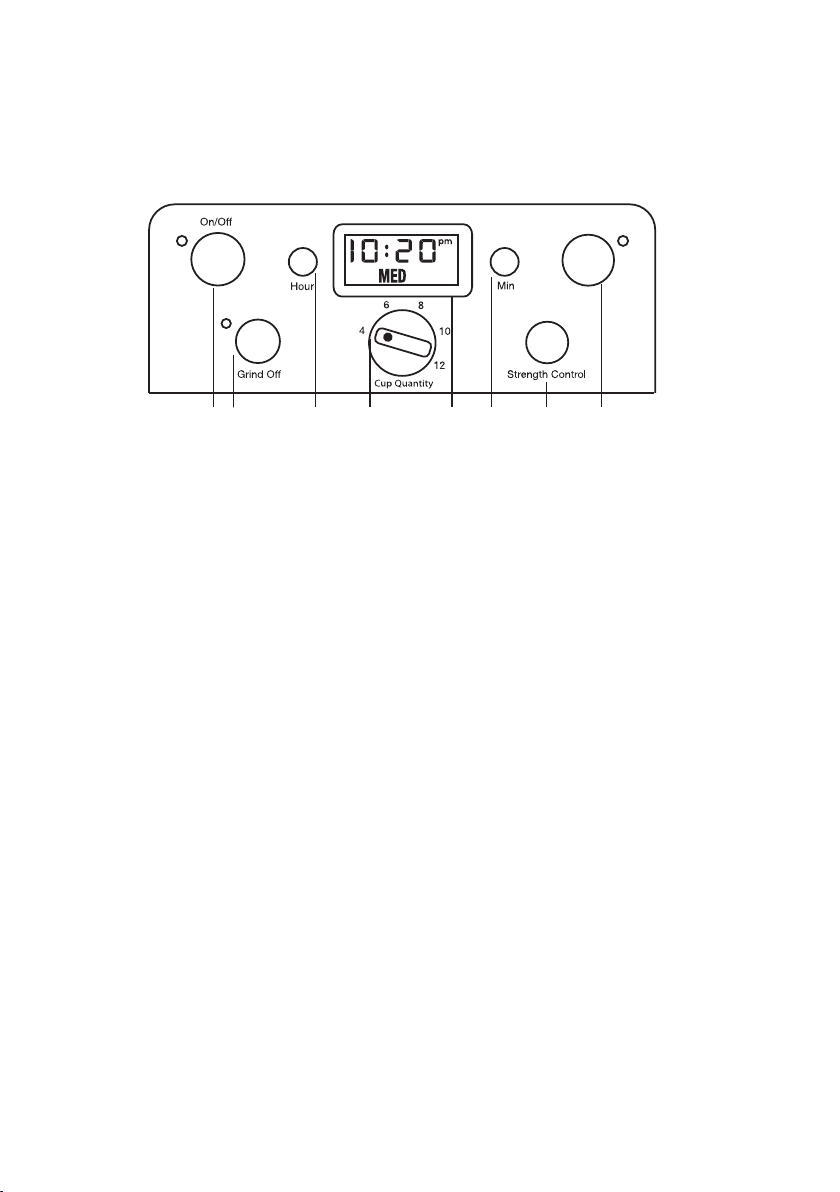
A Control Panel
1. On/Off button with LED Indicator
Featuring an audible tone which beeps 5 times after the coffee has finished brewing.
2. Grind Off Button with LED Indicator
Use to turn off the grinder when using pre-ground coffee.
3 & 6. Hour and Minute Buttons
Press and hold either Hour or Min button for approximately 2 seconds to start Time Set
Mode.
4. Cup Quantity Knob
Turn the Cup Quantity to choose the desired amount of coffee beans to grind (up to 12 cups).
N.B This does not control the amount of water. Please ensure you fill the water reservoir
to the cup quantity required using the water level indicator located on the side of the
appliance.
5. Clock/LCD Display
Displays time of day (and programme setting when Programme button is pressed). Displays
Strength Control setting (MILD, MED or STRONG)
7. Strength Control Button
Press to select the required coffee strength: (MILD, MED or STRONG). Selected coffee
strength will show on the Clock Display.
8. Programme Button with LED Indicator
Press to display or set programme time.
1 2 3 4 5 6 7 8
Programme

10
B Setting the Clock
When the unit is plugged in, the screen will show 12:00AM.
Press and hold either the ‘Hour’ or the ‘Min’ button until the numbers start to flash.
Then press the ‘Hour’ and ‘Min’ buttons to scroll through the numbers. When the
numbers stop flashing, the time has been set.
N.B. When you go past the number 12, the letters ‘PM’ will appear to adjust the time from
12 noon to midnight. When ‘PM’ is not shown, the time indicated corresponds to the AM
hours, from 12 midnight to 12 noon. Always make sure that the time is set according the
correct period so that the programming is correct.
N.B. The “Programme” mode cannot be entered if the machine is in a “brew” cycle.
C Setting the Programme Time
Press and hold the ‘Programme’ button until the green indicator lights and LCD display
begin to flash, this signals that you have entered the “Set Programme Time” mode.
The desired time can be set by pressing the ‘Hour’ and ‘Min’ buttons to scroll forward
through the digits. The buttons can be held down to scroll through the digits or pressed
and released lightly to advance one digit at a time. Once the time has been selected,
press the ‘Programme’ button twice so the green indicator light is illuminated. Brewing
will begin at the programmed time.
N.B. The ‘Programme’ mode cannot be entered if the Grind & Brew Plus is in a ‘brew’ cycle.
N.B. When setting the programme time, ensure coffee and water are placed in the machine
before the automatic start (see “Preparing to Brew”)
11
D Inserting the Charcoal water filter
Your appliance comes with two charcoal water filters that eliminate chlorine, bad tastes
and odours from tap water. It is recommended that you change your water filter every 90
days or after 90 uses and more often if you have hard water. Replacement filters can be
purchased directly from the manufacturer, (see “UK After Sales Service” section).
Remove the filter from its packaging and soak in cold tap water for 15 minutes.
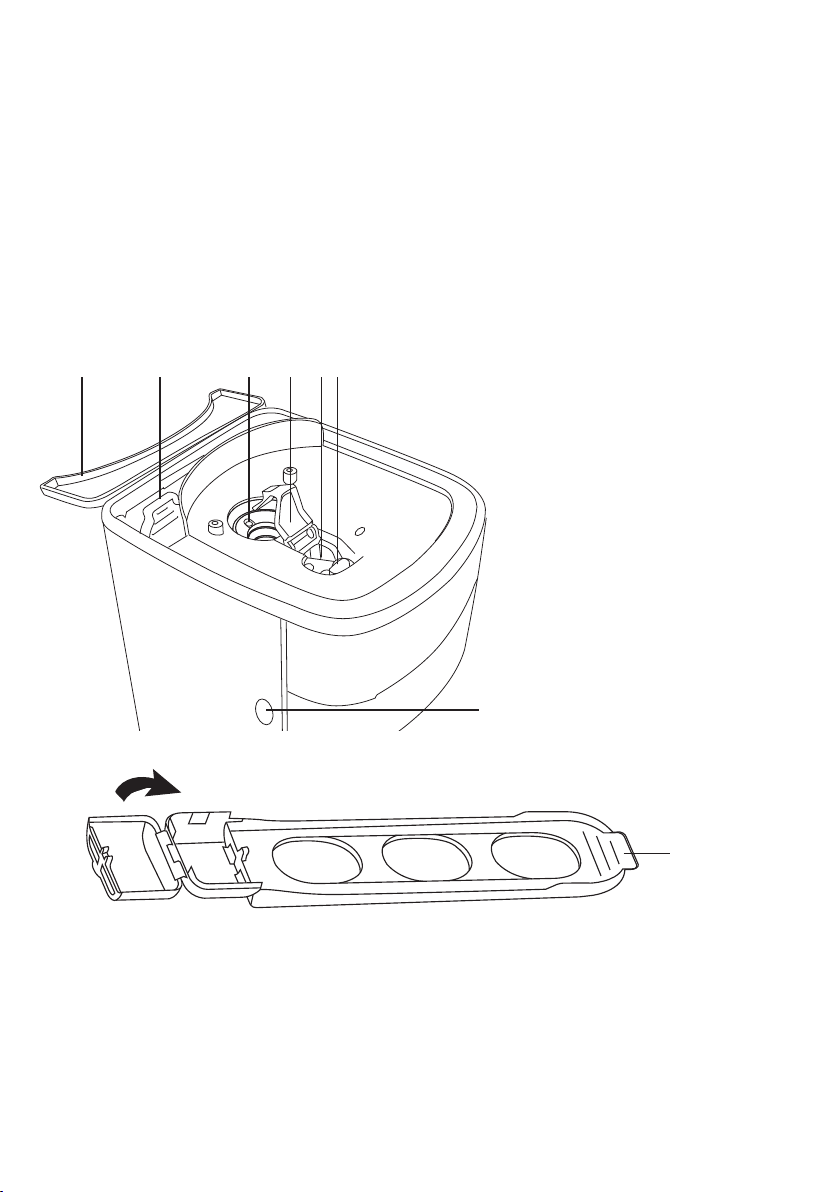
1. Water Reservoir Cover
2. Water Filter Holder
3. Burr Grinder
4. Coffee Channel Assembly
a. Channel Cover (must be in
place before grinding)
b. Coffee Chute
c. Grind Chute Lever
5. Filter basket door release button
1 2 3 4a 4b 4c
5
To remove the water filter holder, simply lift it out from its opening on the inner wall
of the reservoir. This can be accessed by lifting the water reservoir lid.
Hold stem in one hand. With your other hand, gently press the compartment door
down and pull outwards to flip open.
Place the filter in the holder and close the compartment cover; you will hear a snap
indicating filter is in place.
Water Filter
Holder

12
N.B. Caution must be used when inserting the charcoal filter. Improper placement in the
holder can cause tearing of the filter skin.
Hold the filter under cold running tap water for 10 seconds to flush. Hold the water
filter holder vertically, directly under the water stream so that the water flows through
the filter compartment.
Allow the filter to drain completely.
Replace the water filter holder into its opening on the inner wall of the reservoir,
pushing it all the way down to the base of the unit.
E Preparing to Brew
Before making coffee for the first time, we recommend operating the appliance once
using only water to remove any dust or residue that may remain in the system from the
manufacturing process. Ensure the burr grinder is operated without beans for first use.
Adding Water
• Open the water reservoir lid at the back of the appliance. Pour the desired amount of
water into the reservoir using the water level indicator. Close the reservoir lid ensuring
not to exceed the 12 cup line as this may cause the carafe to overflow.
N.B. Do not exceed the 12 cup line. Doing so could cause the carafe to overflow.
N.B. Be careful to add only the amount of water for the number of cups you wish to brew.
The machine will use all of the water added regardless of the amount of coffee used.
Adding Coffee
There are 2 ways to add coffee when using this machine. You can use fresh coffee beans
and allow the machine to grind the beans before brewing the coffee, or you can simply
use pre ground coffee beans.
Using Coffee Beans
• Lift the bean hopper lid and fill with the desired quantity of beans. We recommend
keeping the bean hopper at least half full and ensuring there is a sufficient amount of
beans in the hopper for the amount of coffee that is intended for brewing.
WARNING! The maximum capacity of the hopper is 225g. Do not over
fill or you may damage the burr grinder and/or the unit may overflow.
N.B. Be careful to add only the amount of water for the number of cups you wish to
brew. The machine will use all of the water added regardless of the amount of coffee
used.
13
Removing and Replacing the Bean Hopper
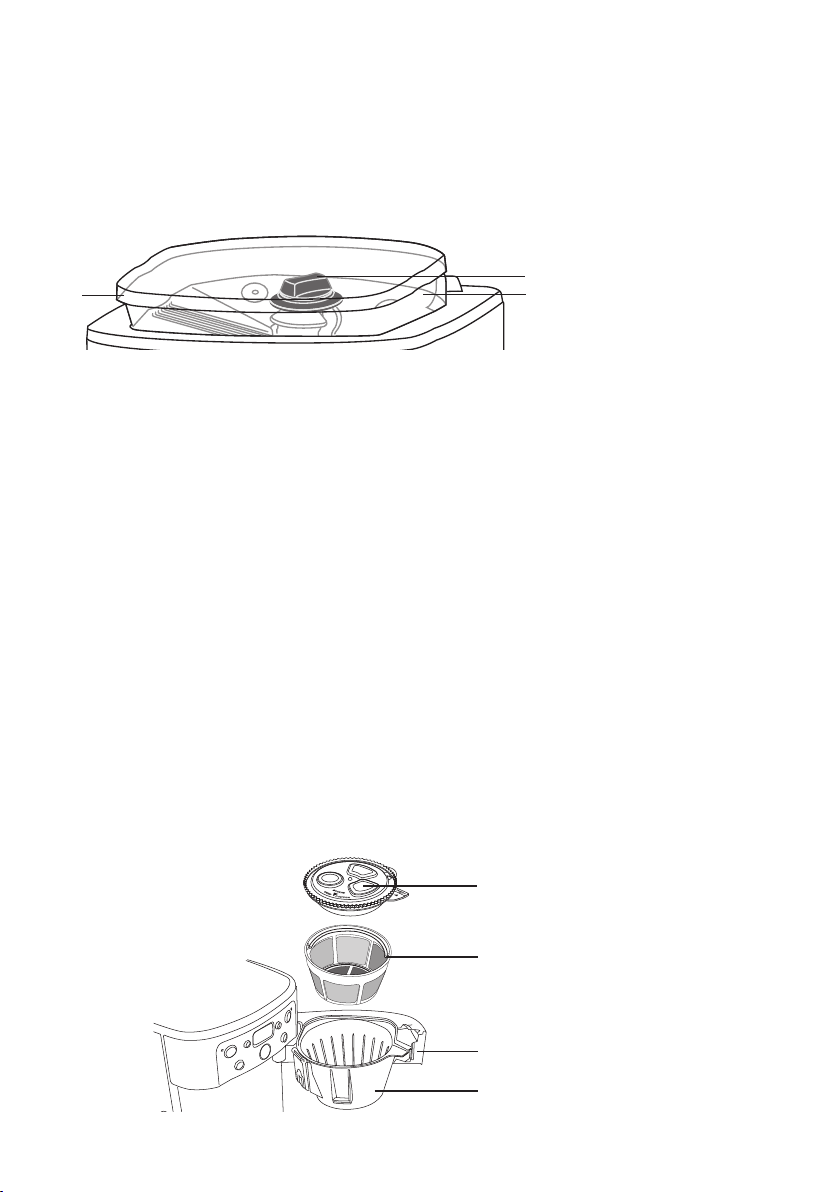
• The hopper can be completely removed by lifting the hopper lid and turning the hopper
release knob to the unlock position (see picture below). This is ideal for filling and
cleaning.
1
2
1. Bean Hopper release knob
2. Bean Hopper
3. Bean Hopper Lid
3
WARNING! Take care not to spill water into the grinding chamber while the hopper and
lid are not in place. In the event that some water spills in to the chamber, dry thoroughly
before use.
• To replace the hopper, place in position and turn the hopper release button to the lock
position. Replace the hopper lid.
• N.B. if the hopper lid is not locked in place, the appliance will not operate. If you try
and turn the unit on whilst the hoper is not locked in place, the appliance will beep
continuously
Using pre-ground beans
• You can use pre-ground beans with this appliance. With the scoop provided we
recommend using 1 level scoop of ground coffee per cup. The maximum capacity for
ground coffee is 16 cups. Exceeding this may cause the appliance to overflow.
N.B. Be careful to add only the amount of coffee for the number of cups you wish to
brew. The machine will use all of the coffee regardless of the amount of water used.
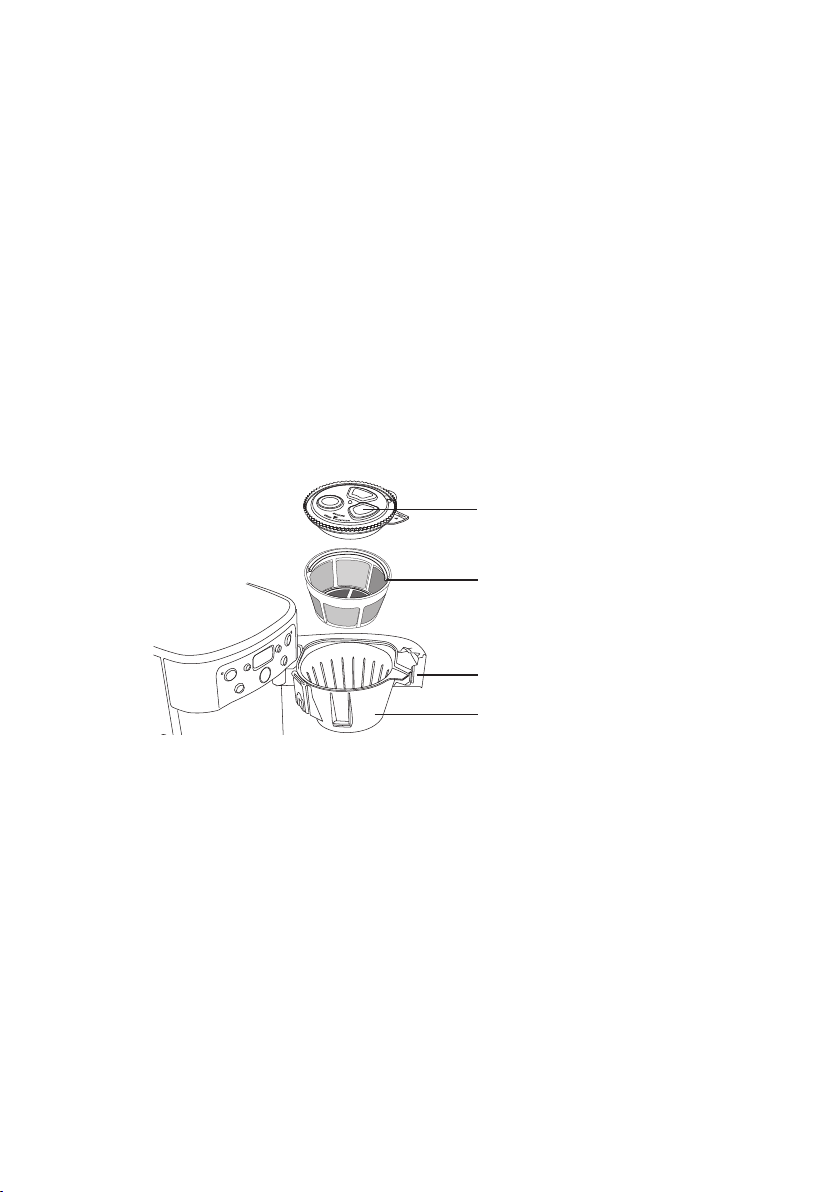
• To add coffee, press the filter compartment release button which can be found on the
left side of the housing.
1. Filter Basket Cover
2. Gold Tone
®
Filter
3. Filter Basket Door
4. Filter Basket

14
• Remove the filter basket cover
• Scoop the desired amount of coffee into the Gold Tone® filter. Ensure the handle of the
gold tone filter is facing away from the main body of the appliance. If the handle is not
facing away, it may interfere with the flow of ground coffee into the filter basket.
• Replace the filter basket cover ensuring that the ‘GRIND’ arrow is matching the ‘LIFT’
arrow and then close the filter compartment door. The door will click when closed
properly.
N.B. If the filter basket cover is not in place or the filter door is not properly closed a
safety interlock system will prevent operation. If you try and turn the unit on when parts
are not in place, the unit will beep continuously until the missing parts are installed and
the filter door is closed.
Preparing the Carafe
• Remove the lid of the thermal carafe by turning in the direction of the ‘unlock’ arrow.
N.B. For best results, pre warm the carafe by rinsing it out with hot water. This will help
to keep the coffee hotter for longer
• Replace the carafe lid. To lock, align the arrows on the lid and the carafe body and turn
in a clockwise direction until the lid fits tightly onto the carafe and the arrow is lined
up in the centre of the spout. This ensure the lid is locked into place and in the correct
position for brewing and pouring.
• Replace the thermal carafe in its position on the resting plate.
F Brewing Coffee
Now the machine is ready to use. Ensure the machine is plugged into the mains.
Immediate Brewing
Turn the ‘Cup Quantity’ knob to set the number of cups you want to brew, this will
grind enough coffee beans to suit your requirement
Press the ‘Strength Control’ button to set the strength (MILD, MED, or STRONG) this
will show on the LCD display.
Press the ‘Grind Off’ button if you are intending to use pre-ground coffee beans.
To start the brewing and/or grinding process, press the ‘On/Off’ button. The indicator
light will illuminate and the process will begin.

15
Programmed Brewing
To set the appliance to start at a programmed time, refer to “Set Programme Time”
section C.
Turn the ‘Cup Quantity’ knob to set the number of cups you want to brew, this will
grind enough coffee beans to suit your requirement.
Press the ‘Strength Control’ button to set the strength (MILD, MED, or STRONG) this
will show on the LCD display.
Press the ‘Grind Off’ button if you are intending to use pre-ground coffee beans.
The Grind & Brew Plus will begin brewing at the programmed time
Brewed Coffee
When the brewing cycle has completed, 5 beeps will sound. Coffee will continue to
stream from the filter for several seconds afterwards.
When the coffee is ready, stir before serving, to blend the flavours. The coffee at the
bottom of the carafe will be stronger than that at the top.
The brew-through, pour-through lid allows coffee to drip from the appliance through
the closed lid. When brewing is complete, the lid seals itself so air stays out and coffee
freshness and temperature are maintained. No need to turn or adjust the lid before
pouring.
After brewing, the appliance will automatically shut off. The thermal carafe will keep
the coffee hot for hours.
The ‘Automatic Brew Pause’ feature allows you to remove the carafe during mid-brew.
The brewing process does not stop during this period, only the flow of coffee from the
basket to the carafe stops.
N.B. Whilst we offer this feature for your convenience, we do not recommend that you
pour coffee before the cycle has reached completion, since the coffee brewed at the
beginning of the cycle has a very different flavour profile to that made at the end of the
cycle. Removing a cup during the cycle will alter the flavour of the finished pot.
CAUTION: The bottom of the thermal carafe is hot to touch for several minutes after
brewing.
WARNING! Do not remove the carafe for longer than 20 seconds or the coffee may
overflow the basket.
16
Cleaning & Maintenance
Completely clean and dry all parts after every use.
Always turn coffee maker off and remove the plug from the electrical outlet before
cleaning.
Do not use scouring agents or harsh cleaning agents on any part of the appliance.
Never immerse the main housing unit in water or other liquid. To clean the base, simply
wipe with a clean damp cloth and dry before storing.
Wipe resting plate with a clean, damp cloth. Never use rough, abrasive materials or
harsh cleaning agents to clean the resting plate.
Do not dry the inside of the water reservoir with a cloth as lint may remain.
Cleaning the Coffee Filter
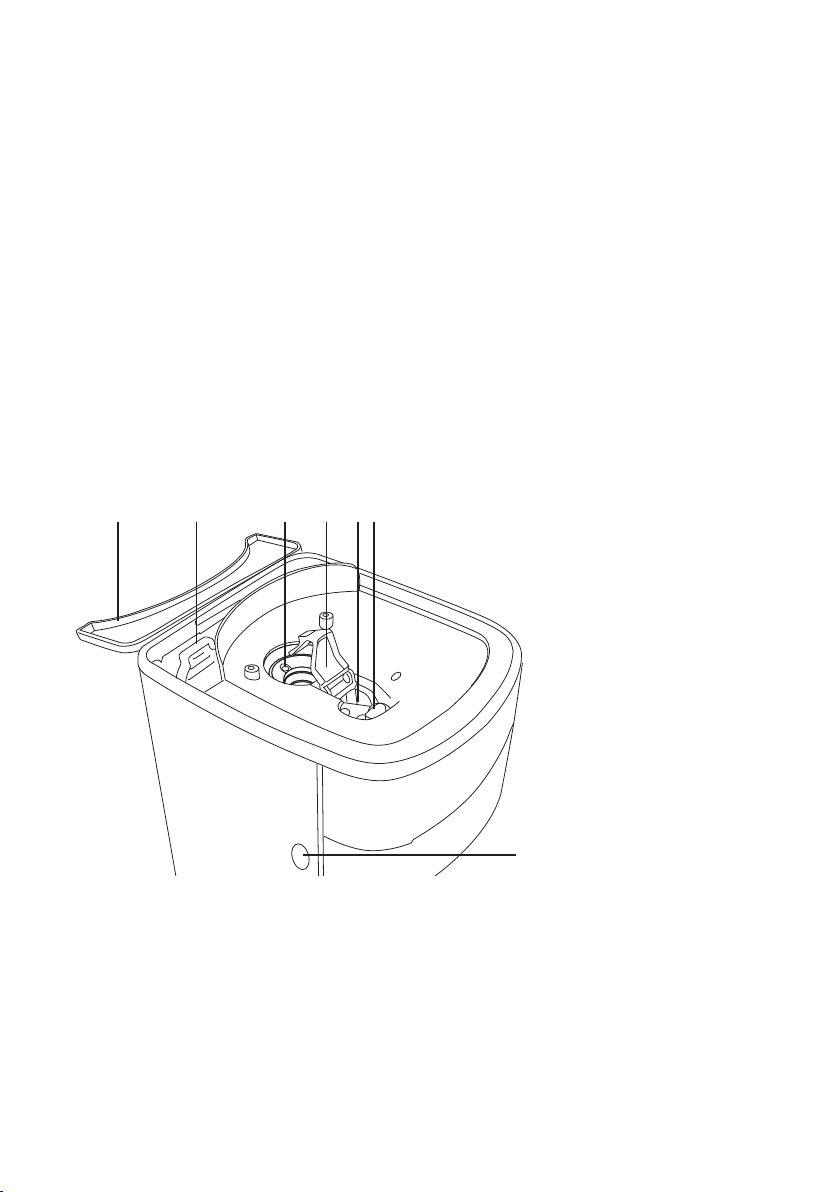
1. Filter Basket Cover
2. Gold Tone
®
Filter
3. Filter Basket Door
4. Filter Basket
After every use, ensure the appliance has cooled down, open filter basket door by
pressing filter basket door release button. Remove filter basket cover, filter basket and
Gold Tone® filter. Discard ground coffee.
The Gold Tone® filter, filter basket and filter basket cover can be washed in warm soapy
water and rinsed thoroughly, or cleaned in the upper rack of the dishwasher. Dry all
parts thoroughly after every use.
Once clean, replace all the parts.
Ensure the Gold Tone® filter is positioned with the handle facing away from main body
of the appliance.
N.B. If the handle is not facing away, it may interfere with the flow of ground coffee into
the filter basket. Place the filter basket cover in place, ensuring that the “GRIND” arrow is
matching the “LIFT” arrow and then close the filter compartment door.
17
N.B. If the filter basket cover is not in place or the filter door is not shut properly, a safety
interlock system will prevent operation. If you try to turn the unit on when parts are not
in place, the appliance will beep continuously until the missing parts are installed and the
filter door is closed. (The door will click when closed properly)
Cleaning the Carafe
Remove the carafe from the resting plate. Discard any remaining coffee. The carafe
and lid can be washed in warm soapy water and rinsed thoroughly, or placed in a
dishwasher, on the upper rack only.
Coffee contains oils that can build up on the carafe. For best performance, wash carafe
and wipe pour spout after each use.
Cleaning the Bean Hopper
1. Water Reservoir Cover
2. Water Filter Holder
3. Burr Grinder
4. Coffee Channel Assembly
a. Channel Cover (must be in
place before grinding)
b. Coffee Chute
c. Grind Chute Lever
5. Filter basket door release button
1 2 3 4a 4b 4c
5
We strongly suggest cleaning the hopper and coffee chute once a week depending on
frequency of use.
To clean the hopper, remove hopper container and lid by turning the hopper container
release knob to the unlocked position. Discard any left over coffee beans.
The hopper container and hopper container lid can be washed in warm soapy water
and rinsed thoroughly, or cleaned in the upper rack of the dishwasher. Dry all parts
after every use.

18
IMPORTANT: Do not put any water in the unit once the hopper container has been
removed as this may cause damage to the appliance.
Wipe the area under the hopper container with a damp cloth.
The coffee channel cover can be flipped back for easy cleaning of the coffee chute.
Push the coffee channel cover tab away from you and lift up. Use a small brush to
remove any ground coffee that remains. Brush grounds toward you (when facing the
unit head-on) and pull the grind chute lever toward you to send grounds through the
chute. Be sure the filter basket is in place to catch the grounds.
NOTE: Failing to properly clean the coffee chute may lead to grind accumulations
which can result in weak-tasting coffee and failure to grind coffee beans.
Ensure the channel cover is in place after cleaning. Failure to do so will prevent the
machine from operating.
Descaling
Always use the charcoal water filters provided and replace on a regular basis (i.e. every
90 days or 90 uses)
It is strongly recommended that you descale the appliance from time to time. The
frequency depends upon the hardness of your tap water and how often you use the
appliance.
Fill the water reservoir completely with a mixture of 1/3 white vinegar and 2/3 water
and switch the appliance on. One cycle should be sufficient to de-scale the appliance.
Press the ‘Grind Off’ button, and turn the coffeemaker on by pressing the ‘On/Off’
button.
Once the cycle has been completed and 5 beeps sound, switch the appliance off.
Repeat the cycle once more using cold tap water.
19
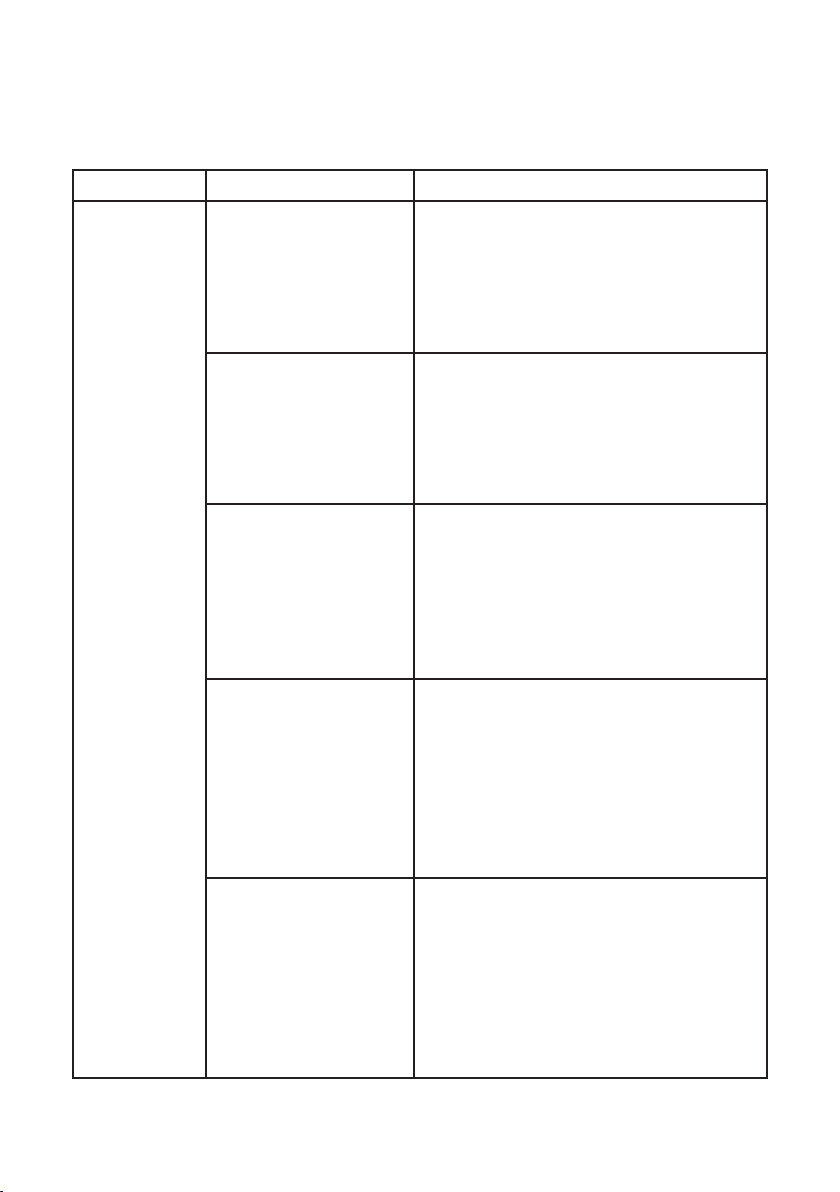
Troubleshooting
PROBLEM CAUSE SOLUTION
Continuous
beeping
Bean Hopper not locked
in place (when brewing
with whole beans)
• Check to see if the Bean Hopper release
knob is in the unlocked position
• Place the Bean Hopper on the unit
• Turn the knob to the locked position
• Press On/Off twice to resume; if
programming, reset
Filter door not closed • Check to be sure that all components of
the filter compartment are in place
• Close filter door (you will hear a click if
the door is properly shut)
• Press On/Off twice to resume; if
programming, reset
Filter basket not in
place
• Open filter door by pressing the filter
door release button
• Hook filter basket with cover onto door
• Close filter door (you will hear a click if
the door is properly shut)
• Press On/Off twice to resume; if
programming, reset
Filter basket cover not
in place
• Open filter door by pressing the filter
door release button
• Put on cover, matching “grind” arrows
• Hook filter basket with cover onto door
• Close filter door (you will hear a click if
the door is properly shut)
• Press On/Off twice to resume; if
programming, reset
Filter Basket not
emptied of used grinds
• Open filter door by pressing the filter
door release button
• Remove filter basket with cover
• Discard used grounds
• Replace filter basket with cover and
close door
• Press On/Off twice to resume; if
programming, reset
20
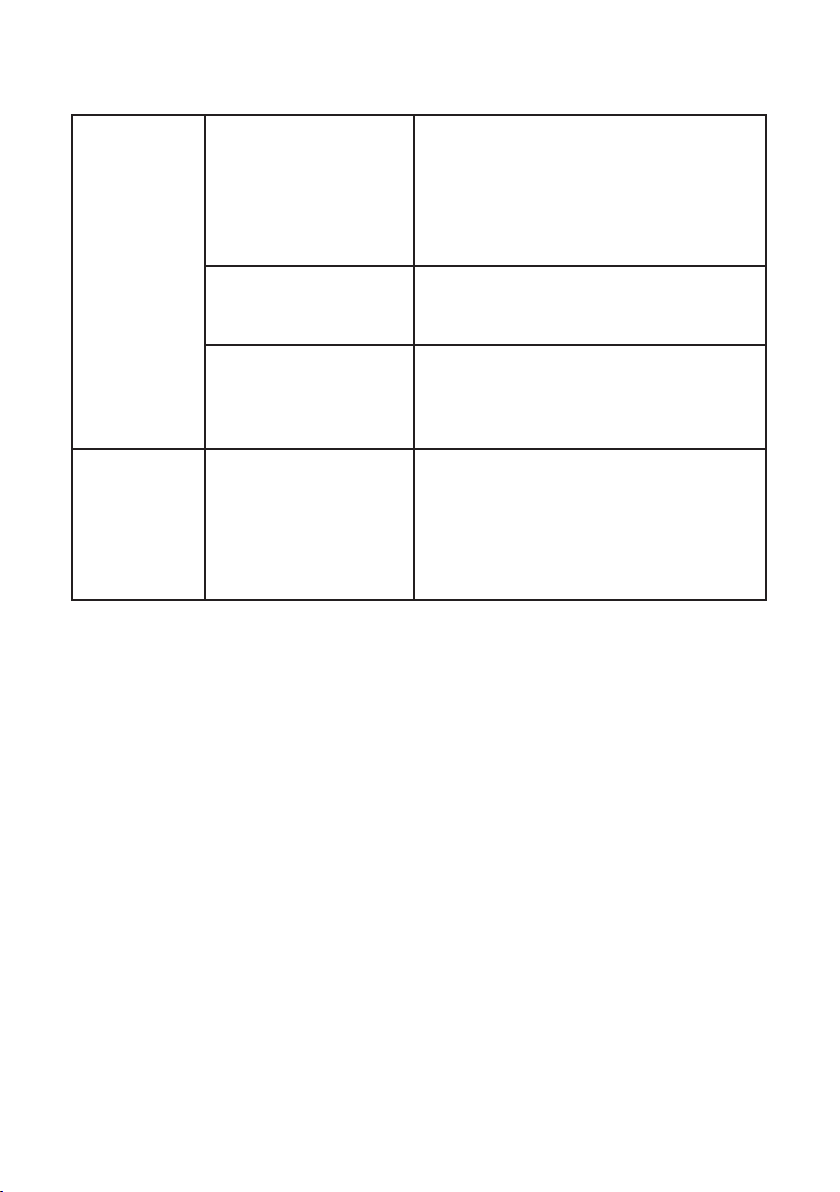
Coffee is
weaker
than usual
Coffee chute is clogged • Remove the Bean Hopper from the unit
• Lift coffee channel cover
• Clean out coffee chute
• Replace channel cover and hopper
• Your Grind & Brew Plus is now ready to
brew again
Not enough beans in
hopper
• Be sure there are enough beans in your
hopper for the amount of coffee you
intend to brew
Strength setting is
incorrect
• Check your strength setting — displayed
on the LCD screen
• To change your strength settings press
the ‘Strength Control’ button
Burr Grinder
is failing to
grind coffee
beans and not
working
Coffee Chute is clogged • Remove the Bean Hopper from the unit
• Lift coffee channel cover
• Clean out coffee chute
• Replace channel cover and hopper
• Your Grind & Brew Plus is now ready to
brew

21
UK Guarantee
This Cuisinart appliance is guaranteed for consumer use for 3 years. This guarantee
covers defects under normal use from date of purchase and ceases to be valid in the
event of alteration or repairs by unauthorised persons. If the appliance does not perform
satisfactorily due to defects in materials or manufacture, it will be repaired or replaced
through Conair UK After Sales Service. No responsibility will be accepted for any damage
caused in transit. The Conair Group Ltd reserves the right to amend terms and specifications
without prior notice.
This guarantee in no way affects your statutory rights.
UK After Sales Service
For further advice on using the appliance or should you need to return your product,
please contact the Conair Customer Care Line on 03702 406902 (09:00 to 17:00 Monday
to Friday) or email your enquiry to [email protected]
The return address is:
Customer Care Centre
Conair Logistics
Unit 4 Revolution Park
Buckshaw Avenue
Buckshaw Village
Chorley
PR7 7DW
Please enclose your returns number, name and address details, together with a copy of
proof of purchase and details of the fault.
22
UK Wiring Instructions
The wires in the mains lead are coloured in accordance with the following code:
BLUE = NEUTRAL
BROWN = LIVE
YELLOW & GREEN = EARTH
As the colours of the wire in the mains lead of this appliance may not correspond with the
colour marking identifying the terminals on your plug, proceed as follows:
The wire which is coloured BLUE must be connected to the terminal which is marked with
the letter N
The wire which is coloured BROWN must be connected to the terminal which is marked
with the letter L
The wire which is coloured YELLOW & GREEN must be connected to the terminal which is
marked with the letter E or the symbol
This appliance is supplied fitted with a BS1363 mains plug and a BS1362 13A fuse. If this
plug is removed from the appliance please ensure it is disposed of safely as a disconnected
plug is dangerous if reconnected to the mains. If any other type of plug is used, a 13A
fuse must be fitted.
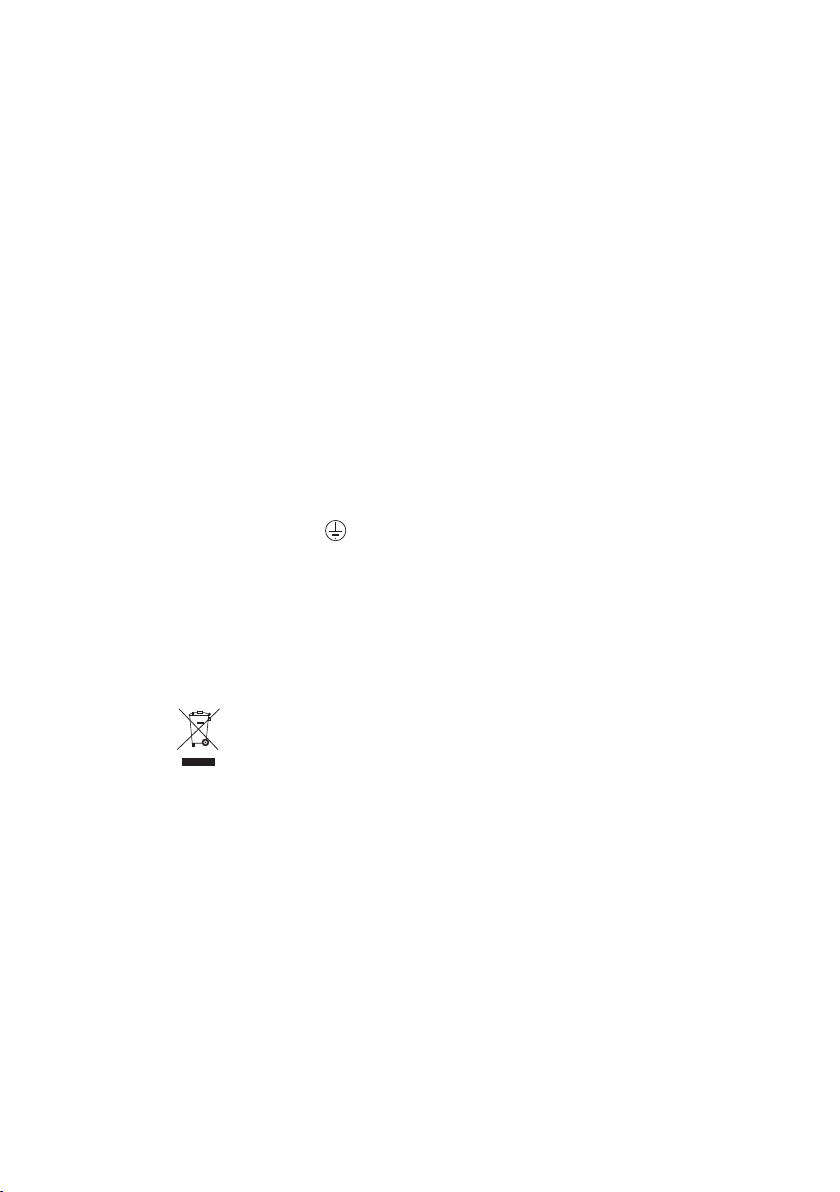
The symbol
on the product or on its packaging indicates that this product may
not be treated as household waste. Instead it should be handed over to an appropriate
collection point for the recycling of electrical and electronic equipment.
By ensuring this product is disposed of correctly, you will help prevent potential negative
consequences for the environment and human health, which could otherwise be caused by
inappropriate waste handling of this product. Make sure that batteries are removed from this
appliance before it is disposed of. When the batteries have run down, they must be disposed
of safely. Please take them to a recycling centre. If the batteries leak, do not touch them and
take them to a recycling centre. For more detailed information about the recycling of this
product, please contact your local council office or your household waste disposal service.

23

www.cuisinart.co.uk
IB-7/369F