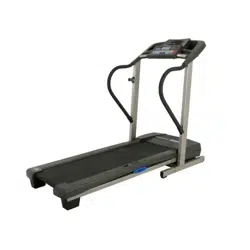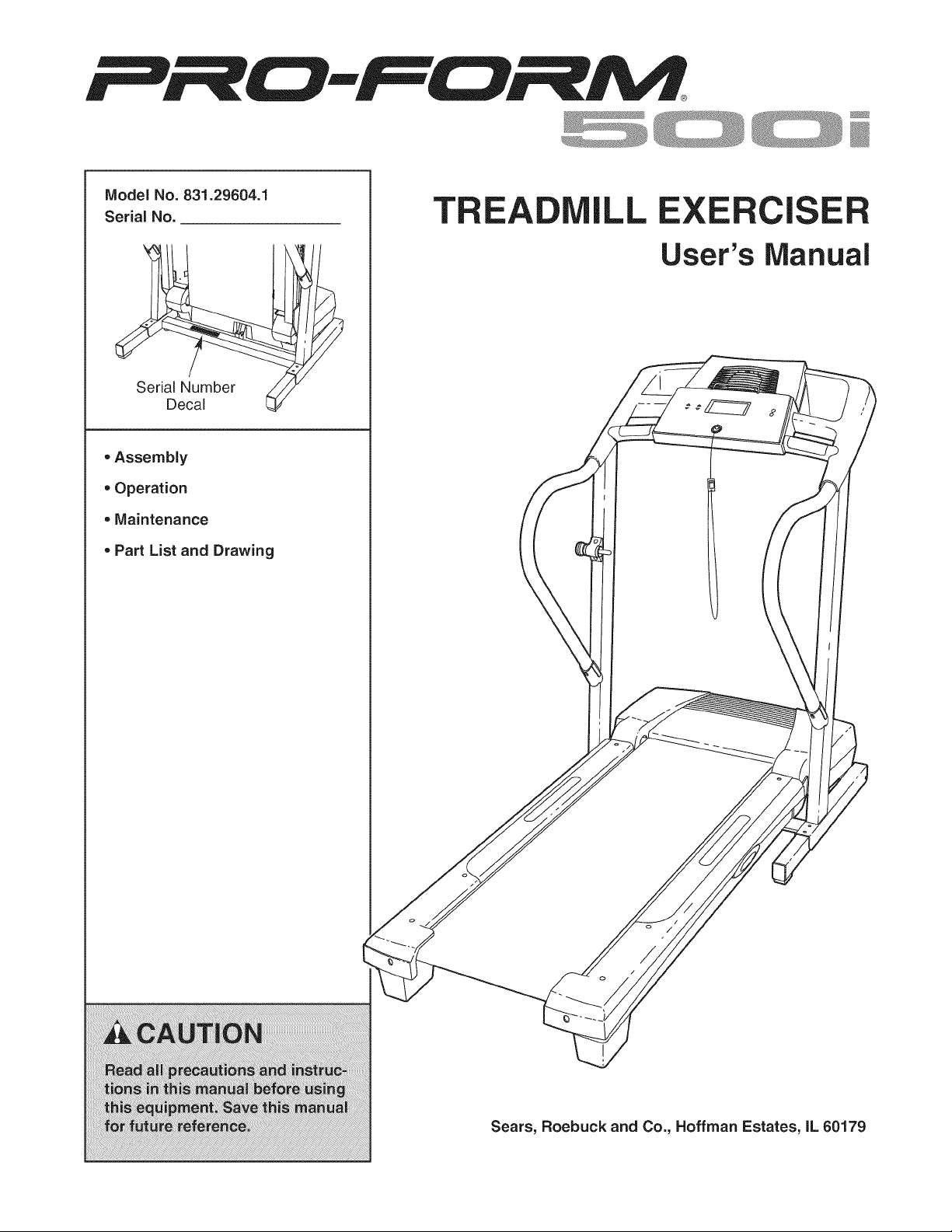
Model No. 831.29604.1
Serial No.
Serial Number
Decal
oAssembly
• Operation
• Maintenance
Part List and Drawing
TREA
)
J
\
LL CISE
User's Manual
Sears, Roebuck and Co., Hoffman Estates, IL 60179
TABLE OF CONTENTS
IMPORTANT PRECAUTIONS ................................................................ 3
BEFORE YOU BEGIN ...................................................................... 5
ASSEMBLY ............................................................................... 6
OPERATION AND ADJUSTMENT ............................................................ 10
HOW TO FOLD AND MOVE THE TREADMILL .................................................. 23
TROUBLESHOOTING ..................................................................... 25
CONDITIONING GUIDELINES ............................................................... 27
ORDERING REPLACEMENT PARTS .................................................. Back Cover
FULL 90 DAY WARRANTY .......................................................... Back Cover
Note: An EXPLODED DRAWING and a PART LIST are attached in the center of this manual.
2
iMPORTANT PRECAUTIONS
3
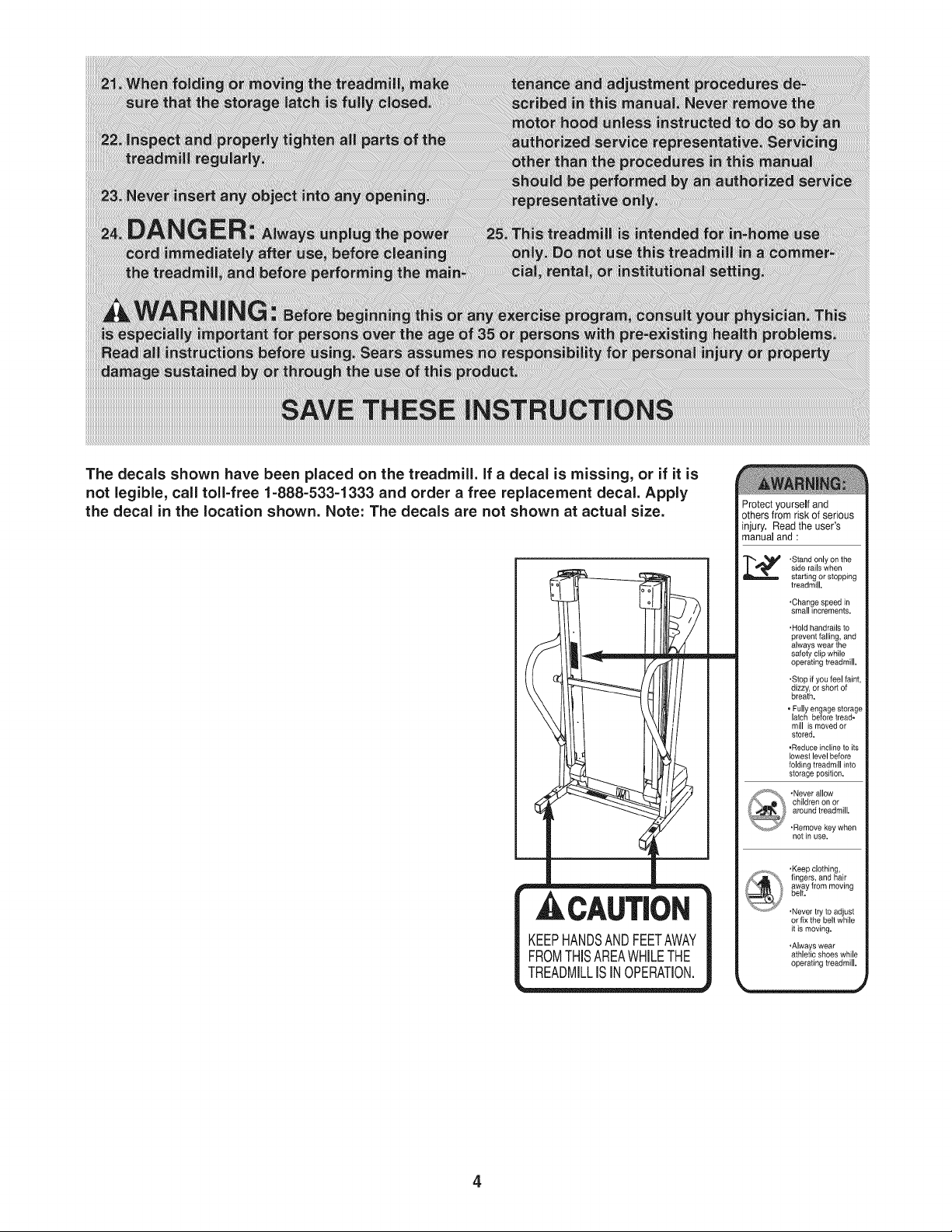
The decals shown have been placed on the treadmill. If a decal is missing, or if it is
not legible, call toll-free 1=888=533=1333 and order a free replacement decal. Apply
the decal in the location shown. Note: The decals are not shown at actual size.
Protect yourself and
others from risk of serious
injury. Read the user's
manual and :
• Stand only on the
side rails when
starting or stopping
treadmill,
,Change speed in
small increments.
• Hold handrails to
prevent falling, and
always wear the
safety clip while
operating treadmill.
.Stop if you feel faint,
dizzy, or short of
breath,
• Fully engage storage
latch before tread-
mill is moved or
stored.
• Reduce incline to its
lowest level before
folding treadmill into
storage position,
notin use.
• Keep clotNng,
fingers, and hair
away from moving
belt,
,Never try to adjust
or fix the belt while
it is moving.
• Always wear
athletic shoes while
operating treadmill,
4
BEFORE YOU BEGIN
Thank you for selecting the PROFORM _ 500i treadmill.
The 500i treadmill combines advanced technology with
innovative design to help you achieve your fitness
goals in the convenience and privacy of your home.
And when you're not exercising, the 500i treadmill can
be folded up, requiring less than half the floor space of
other treadmills.
For your benefit, read this manual carefully before
using the treadmill, If you have questions after reading
this manual, call 1-800-4-MY-HOME ®(1-800-469-4663).
To help us assist you, please note the product model
number and serial number before calling. The model
number of the treadmill is 831.29604.1. The serial num-
ber can be found on a decal attached to the treadmill
(see the front cover of this manual for the location).
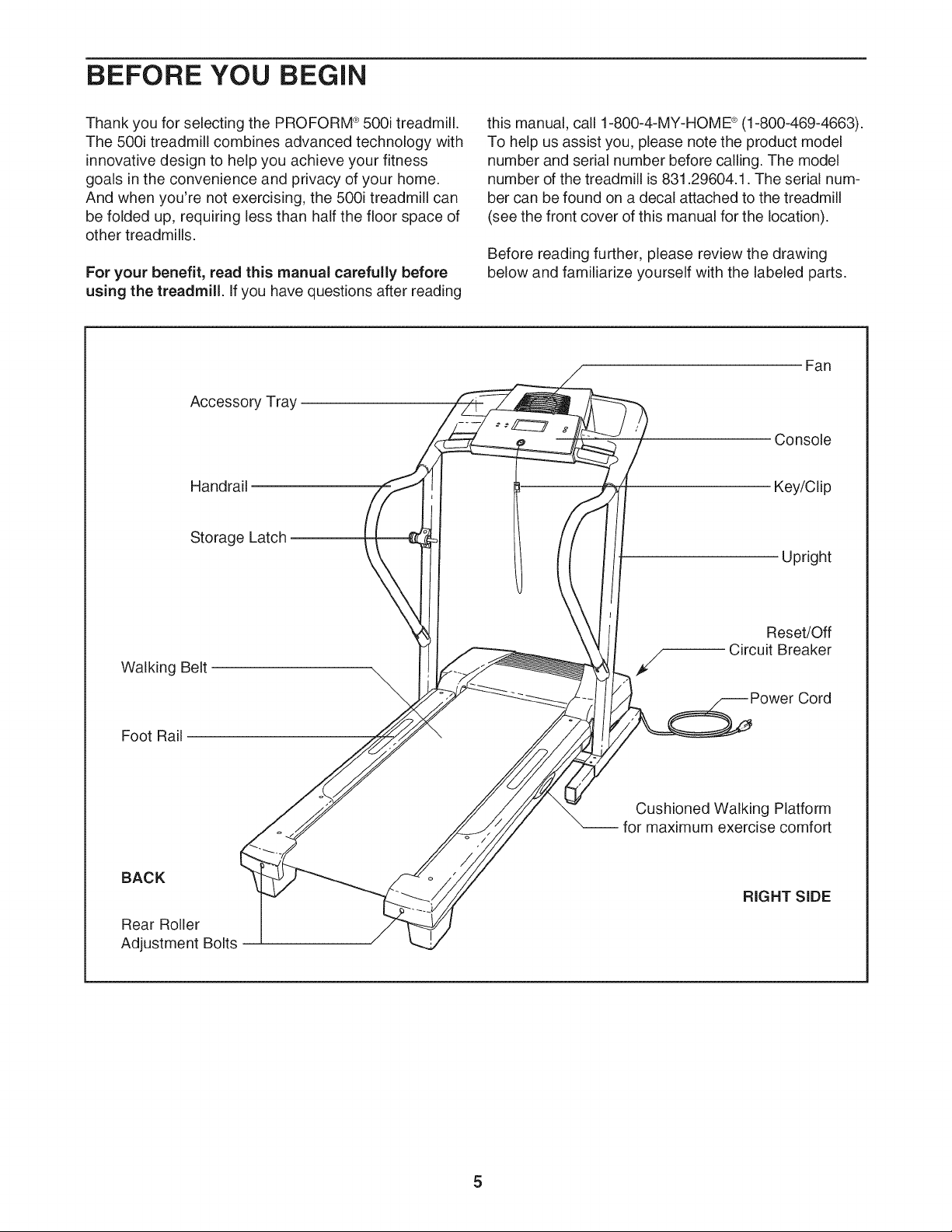
Before reading further, please review the drawing
below and familiarize yourself with the labeled parts.
Accesso_ Tray
Fan
Console
Handrail
Key/Clip
Storage Latch
Upright
Walking Belt
Foot Rail
Reset/Off
Circuit Breaker
Cord
Cushioned Walking Platform
for maximum exercise comfort
BACK
Rear Roller
Adjustment Bolts
RIGHT SIDE
5
ASSEMBLY
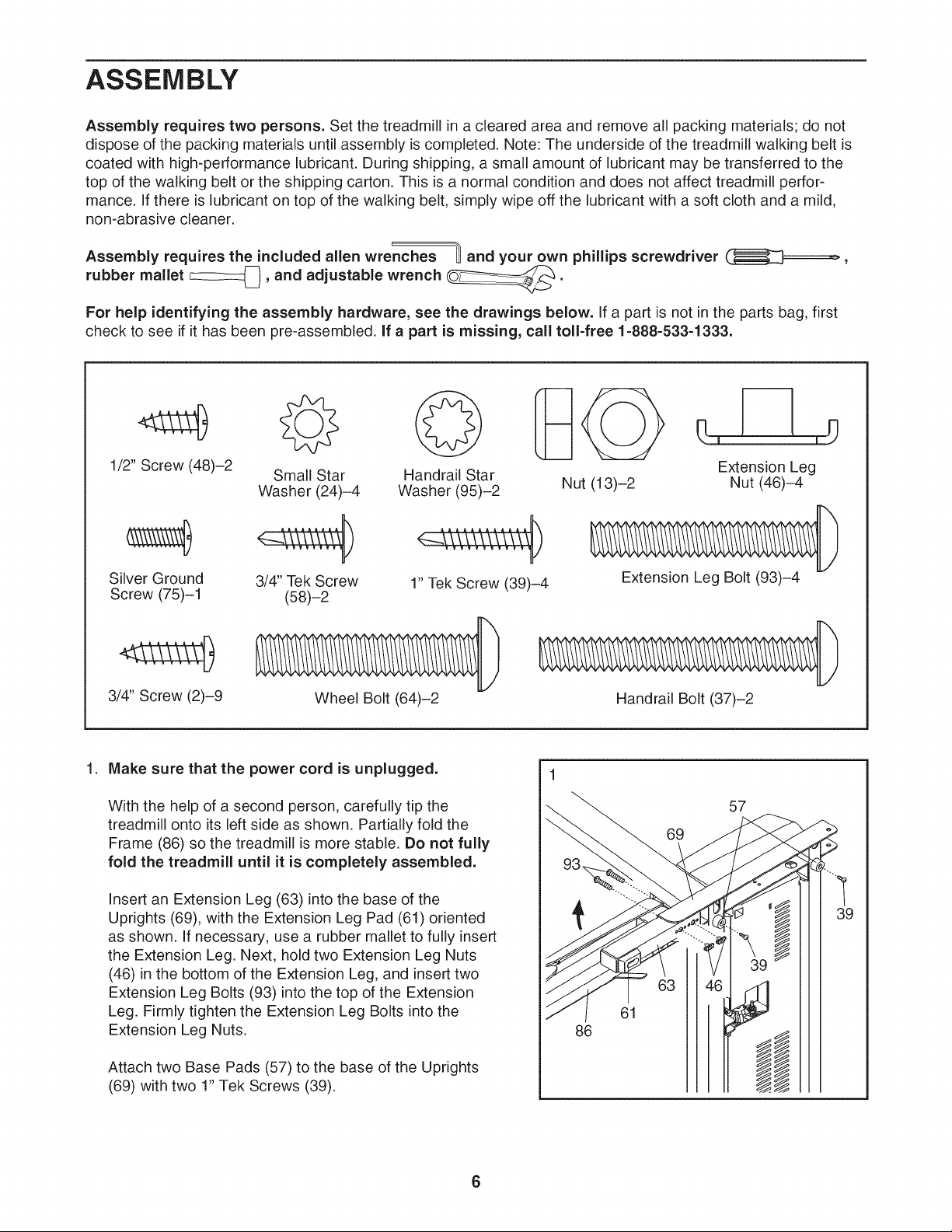
Assembly requires two persons. Set the treadmill in a cleared area and remove all packing materials; do not
dispose of the packing materials until assembly is completed. Note: The underside of the treadmill walking belt is
coated with high-performance lubricant. During shipping, a small amount of lubricant may be transferred to the
top of the walking belt or the shipping carton. This is a normal condition and does not affect treadmill perfor-
mance. If there is lubricant on top of the walking belt, simply wipe off the lubricant with a soft cloth and a mild,
non-abrasive cleaner.
Assembly requires the included allen wrenches _ and your own phillips screwdriver _,
rubber mallet c:::::z:z_, and adjustable wrench _.
For help identifying the assembly hardware, see the drawings below, if a part is not in the parts bag, first
check to see if it has been pre-assembled, if a part is missing, call toll=free 1=888=533=1333.
1/2" Screw (48)-2 Small Star Handrail Star
Washer (24)-4 Washer (95)-2
Silver Ground 3/4" Tek Screw 1" Tek Screw (39)-4
Screw (75)-1 (58)-2
Nut (13)-2
Extension Leg
Nut (46)-4
Extension Leg Bolt (93)-4
3/4" Screw (2)-9
Wheel Bolt (64)-2
Handrail Bolt (37)-2
1. Make sure that the power cord is unplugged.
With the help of a second person, carefully tip the
treadmill onto its left side as shown. Partially fold the
Frame (86) so the treadmill is more stable. Do not fully
fold the treadmill until it is completely assembled.
Insert an Extension Leg (63) into the base of the
Uprights (69), with the Extension Leg Pad (61) oriented
as shown. If necessary, use a rubber mallet to fully insert
the Extension Leg. Next, hold two Extension Leg Nuts
(46) in the bottom of the Extension Leg, and insert two
Extension Leg Bolts (93) into the top of the Extension
Leg. Firmly tighten the Extension Leg Bolts into the
Extension Leg Nuts.
Attach two Base Pads (57) to the base of the Uprights
(69) with two 1" Tek Screws (39).
1
86
69
57
Y
,
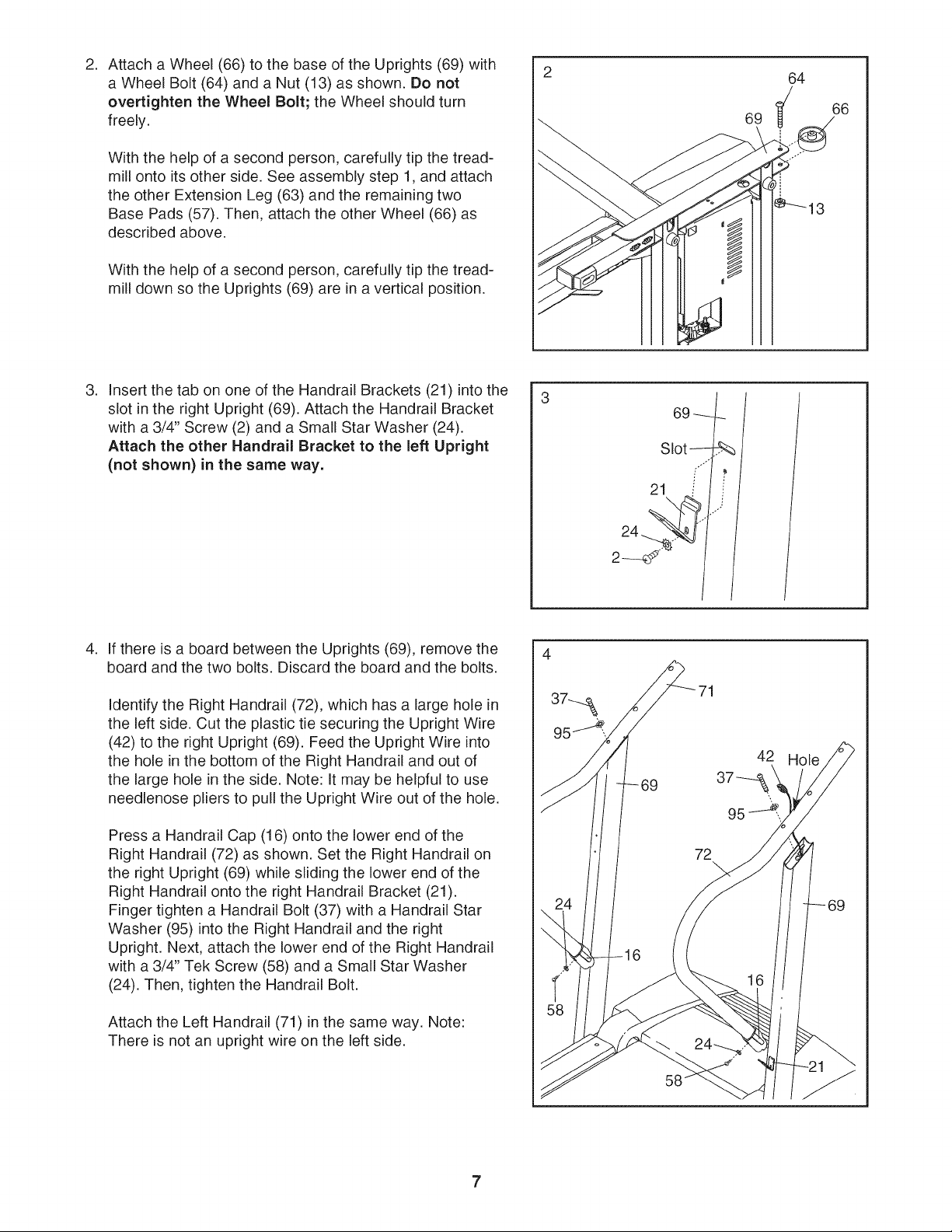
Attach a Wheel (66) to the base of the Uprights (69) with
a Wheel Bolt (64) and a Nut (13) as shown. Do not
overtighten the Wheel Bolt; the Wheel should turn
freely.
With the help of a second person, carefully tip the tread-
mill onto its other side. See assembly step 1, and attach
the other Extension Leg (63) and the remaining two
Base Pads (57). Then, attach the other Wheel (66) as
described above.
With the help of a second person, carefully tip the tread-
mill down so the Uprights (69) are in a vertical position.
69
64
66
,
Insert the tab on one of the Handrail Brackets (21) into the
slot in the right Upright (69). Attach the Handrail Bracket
with a 3/4" Screw (2) and a Small Star Washer (24).
Attach the other Handrail Bracket to the left Upright
(not shown) in the same way.
69 f
Slot ,".... _,
21 / /
2---_ / /
,
If there is a board between the Uprights (69), remove the
board and the two bolts. Discard the board and the bolts.
Identify the Right Handrail (72), which has a large hole in
the left side. Cut the plastic tie securing the Upright Wire
(42) to the right Upright (69). Feed the Upright Wire into
the hole in the bottom of the Right Handrail and out of
the large hole in the side. Note: It may be helpful to use
needlenose pliers to pull the Upright Wire out of the hole.
Press a Handrail Cap (16) onto the lower end of the
Right Handrail (72) as shown. Set the Right Handrail on
the right Upright (69) while sliding the lower end of the
Right Handrail onto the right Handrail Bracket (21).
Finger tighten a Handrail Bolt (37) with a Handrail Star
Washer (95) into the Right Handrail and the right
Upright. Next, attach the lower end of the Right Handrail
with a 3/4" Tek Screw (58) and a Small Star Washer
(24). Then, tighten the Handrail Bolt.
Attach the Left Handrail (71) in the same way. Note:
There is not an upright wire on the left side.
4
71
5. 5
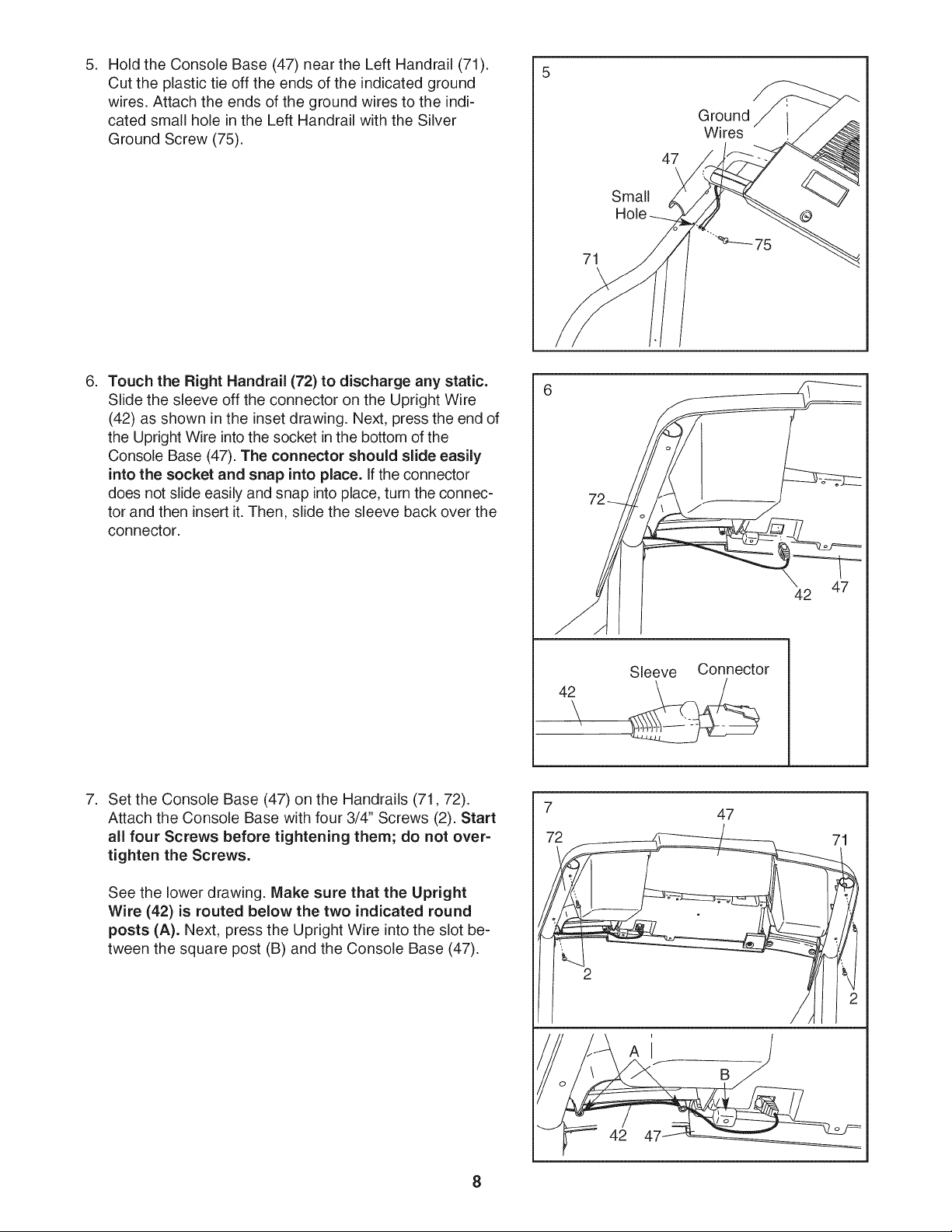
HoldtheConsoleBase(47)neartheLeftHandrail(71).
Cuttheplastictieofftheendsoftheindicatedground
wires.Attachtheendsofthegroundwirestotheindi-
catedsmallholeintheLeftHandrailwiththeSilver
GroundScrew(75).
71
\
47
Small
Hole
Ground
Wires
0
.
Touch the Right Handrail (72) to discharge any static.
Slide the sleeve off the connector on the Upright Wire
(42) as shown in the inset drawing. Next, press the end of
the Upright Wire into the socket in the bottom of the
Console Base (47). The connector should slide easily
into the socket and snap into place. If the connector
does not slide easily and snap into place, turn the connec-
tor and then insert it. Then, slide the sleeve back over the
connector.
42
\
Sleeve Connector
47
42
.
Set the Console Base (47) on the Handrails (71,72).
Attach the Console Base with four 3/4" Screws (2). Start
all four Screws before tightening them; do not over-
tighten the Screws.
See the lower drawing. Make sure that the Upright
Wire (42) is routed below the two indicated round
posts (A). Next, press the Upright Wire into the slot be-
tween the square post (B) and the Console Base (47).
7
72
A
42
47
B
71
,
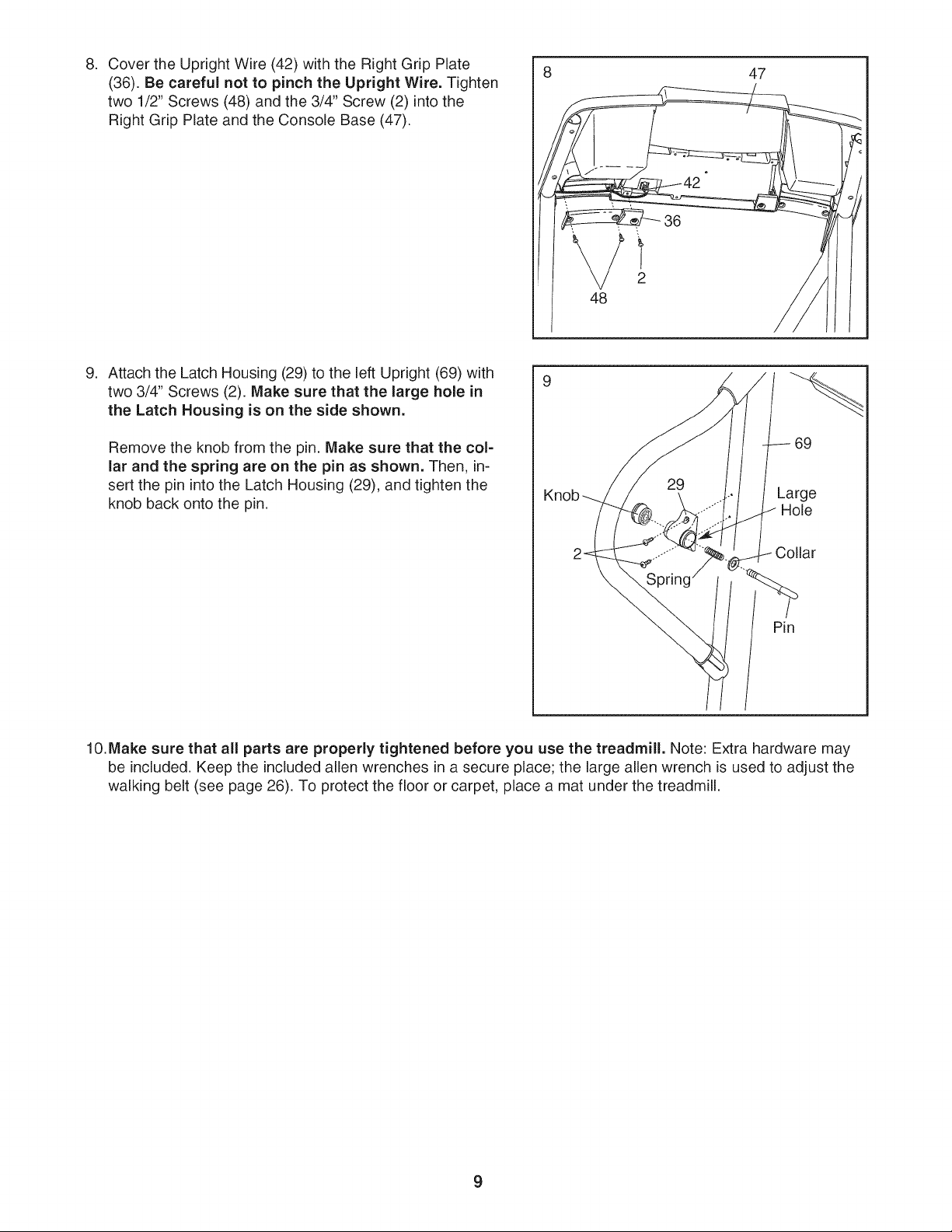
Cover the Upright Wire (42) with the Right Grip Plate
(36). Be careful not to pinch the Upright Wire. Tighten
two 1/2" Screws (48) and the 3/4" Screw (2) into the
Right Grip Plate and the Console Base (47).
_36
2
48
47
,
Attach the Latch Housing (29) to the left Upright (69) with
two 3/4" Screws (2). Make sure that the large hole in
the Latch Housing is on the side shown.
Remove the knob from the pin. Make sure that the col-
lar and the spring are on the pin as shown. Then, in-
sert the pin into the Latch Housing (29), and tighten the
knob back onto the pin.
9
69
Knob Large
Hole
Pin
10.Make sure that all parts are properly tightened before you use the treadmill. Note: Extra hardware may
be included. Keep the included allen wrenches in a secure place; the large allen wrench is used to adjust the
walking belt (see page 26). To protect the floor or carpet, place a mat under the treadmill.
9
OPERATION AND ADJUSTMENT
THE PRE-LUBRICATED WALKING BELT
Your treadmill features a walking belt coated with high-
performance lubricant, iMPORTANT: Never apply sil=
icone spray or other substances to the walking
belt or the walking platform. Such substances will
deteriorate the walking belt and cause excessive
wear.
HOW TO PLUG iN THE POWER CORD
an equipment-grounding conductor and a grounding
plug. Plug the power cord into a surge suppressor,
and plug the surge suppressor into an appropriate
outlet that is properly installed and grounded in
accordance with all local codes and ordinances.
important: The treadmill is not compatible with
GFCl-equipped outlets.
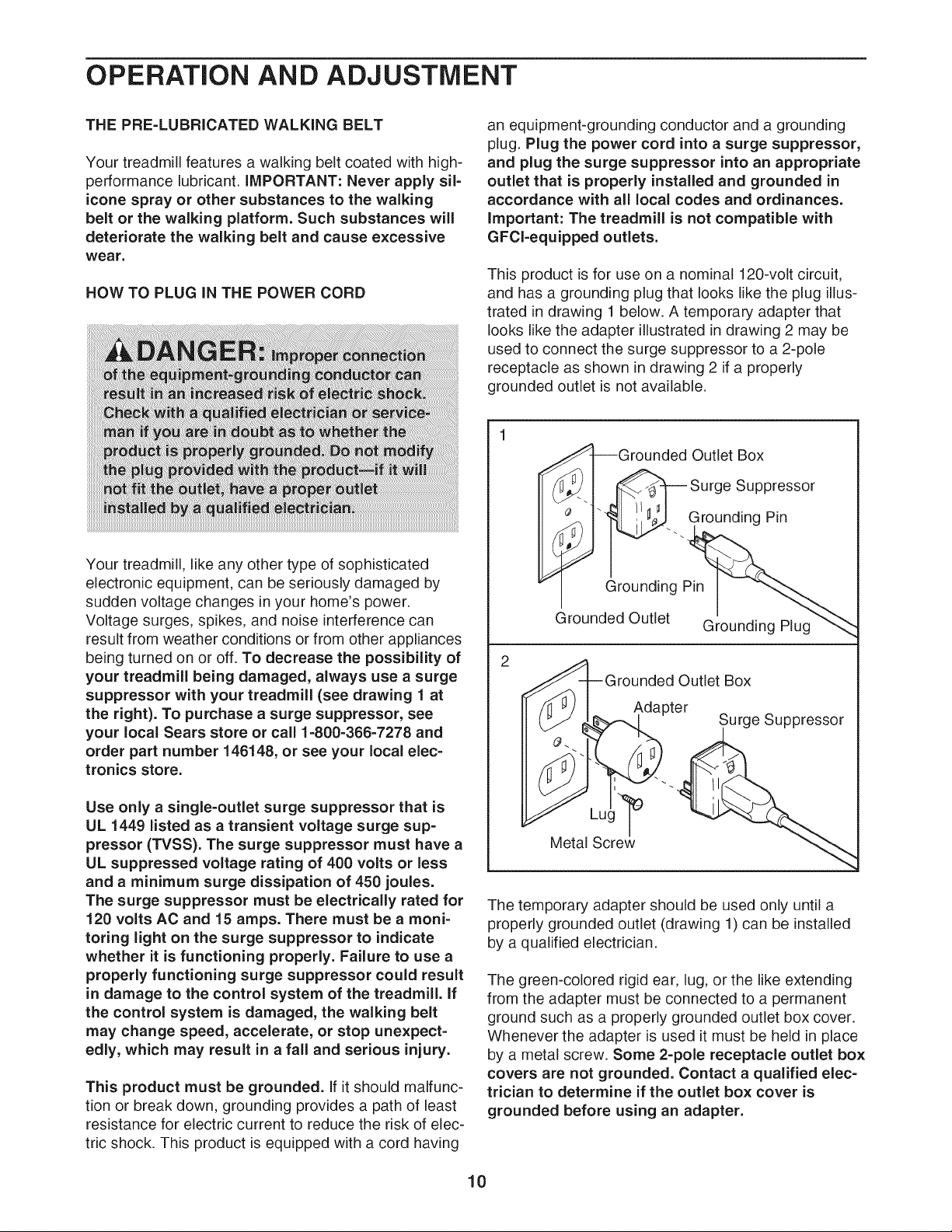
This product is for use on a nominal 120-volt circuit,
and has a grounding plug that looks like the plug illus-
trated in drawing 1 below. A temporary adapter that
looks like the adapter illustrated in drawing 2 may be
used to connect the surge suppressor to a 2-pole
receptacle as shown in drawing 2 if a properly
grounded outlet is not available.
Your treadmill, like any other type of sophisticated
electronic equipment, can be seriously damaged by
sudden voltage changes in your home's power.
Voltage surges, spikes, and noise interference can
result from weather conditions or from other appliances
being turned on or off. To decrease the possibility of
your treadmill being damaged, always use a surge
suppressor with your treadmill (see drawing 1 at
the right). To purchase a surge suppressor, see
your local Sears store or call 1=800-366-7278 and
order part number 146148, or see your local elec-
tronics store.
Use only a single=outlet surge suppressor that is
UL 1449 listed as a transient voltage surge sup=
pressor (TVSS). The surge suppressor must have a
UL suppressed voltage rating of 400 volts or less
and a minimum surge dissipation of 450 joules.
The surge suppressor must be electrically rated for
120 volts AC and 15 amps. There must be a moni-
toring light on the surge suppressor to indicate
whether it is functioning properly. Failure to use a
properly functioning surge suppressor could result
in damage to the control system of the treadmill. If
the control system is damaged, the walking belt
may change speed, accelerate, or stop unexpect-
edly, which may result in a fall and serious injury.
This product must be grounded. If it should malfunc-
tion or break down, grounding provides a path of least
resistance for electric current to reduce the risk of elec-
tric shock. This product is equipped with a cord having
i
Grounded Outlet Box
_'-1 _ Surge Suppressor
__... Grounding Pin
Grounding Pin
Grounded Outlet Grounding Plug
2
_A-l--Grounded Outlet Box
/ /,1_ j
/ll _J I Adapter _
( _J Z6%.---_1 Surge suppressor
Metal Screw _.,
The temporary adapter should be used only until a
properly grounded outlet (drawing 1) can be installed
by a qualified electrician.
The green-colored rigid ear, lug, or the like extending
from the adapter must be connected to a permanent
ground such as a properly grounded outlet box cover.
Whenever the adapter is used it must be held in place
by a metal screw. Some 2-pole receptacle outlet box
covers are not grounded. Contact a qualified elec-
trician to determine if the outlet box cover is
grounded before using an adapter.
10
CONSOLE DIAGRAM
PRESS START
TIME
I I_J,r-m
CALS.
m_
m m
m
15SPEED
1 2 3
MPH MPH MPH
INCLINE
"_F _ FAN
IMPORTANT. Incline must be set at lowest level
before folding treadmill into storage position
Note: If there is a sheet of clear plastic
on the console, peel off the plastic.
4 5 6 7
MPH MPH MPH MPH
8 9 10
MPH MPH MPH
SPEED
PROGRAM ,_
SELECT Y
Key J
_&WARNING: To reduce risk of serious injury, stand on foot rails before
starting treadmill, read and understand the user's manual, all instructions, and the
k warnings before use. Keep children away.
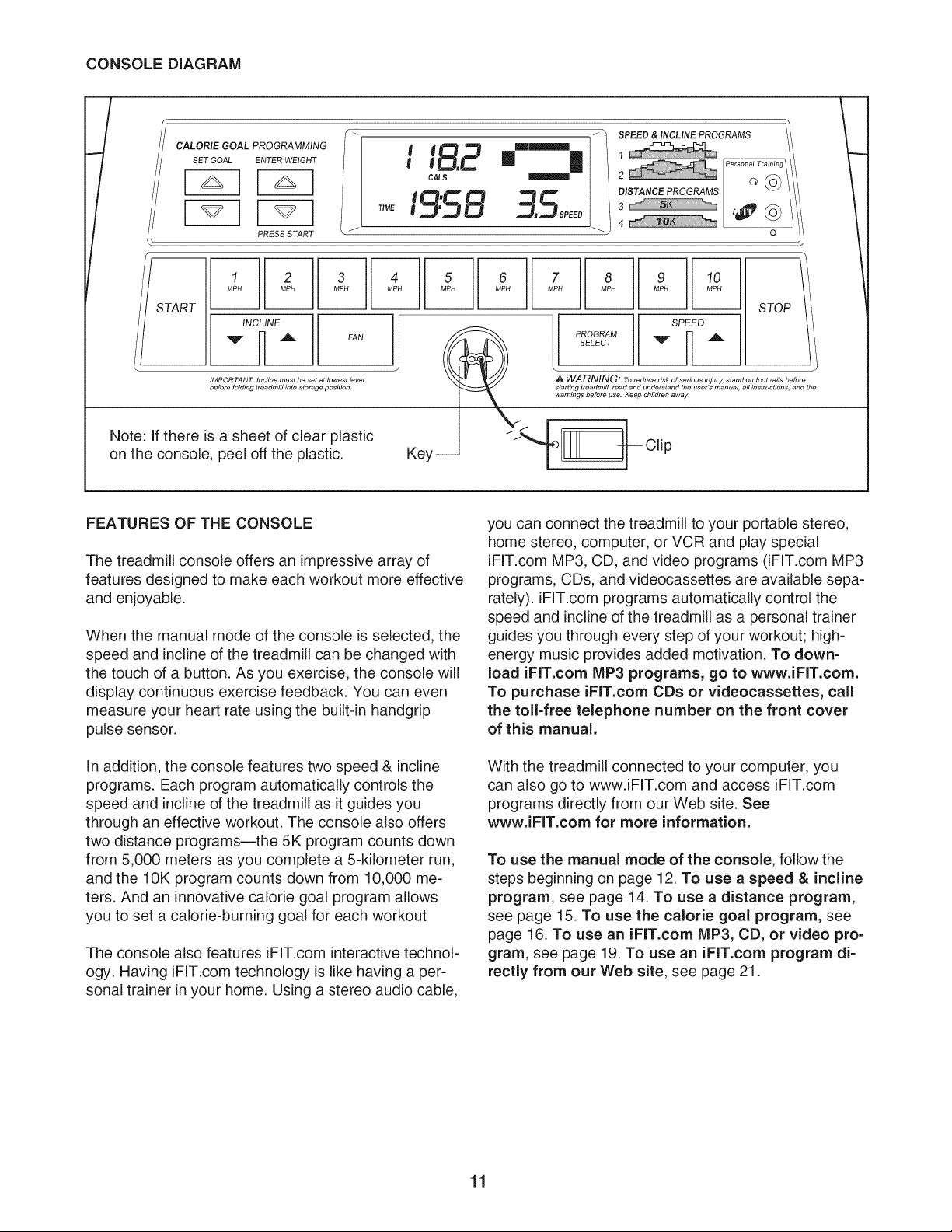
FEATURES OF THE CONSOLE
The treadmill console offers an impressive array of
features designed to make each workout more effective
and enjoyable.
When the manual mode of the console is selected, the
speed and incline of the treadmill can be changed with
the touch of a button. As you exercise, the console will
display continuous exercise feedback. You can even
measure your heart rate using the built-in handgdp
pulse sensor.
In addition, the console features two speed & incline
programs. Each program automatically controls the
speed and incline of the treadmill as it guides you
through an effective workout. The console also offers
two distance programsJthe 5K program counts down
from 5,000 meters as you complete a 5-kilometer run,
and the 10K program counts down from 10,000 me-
ters. And an innovative calorie goal program allows
you to set a calorie-burning goal for each workout
The console also features iFIT.com interactive technol-
ogy. Having iFIT.com technology is like having a per-
sonal trainer in your home. Using a stereo audio cable,
you can connect the treadmill to your portable stereo,
home stereo, computer, or VCR and play special
iFIT.com MP3, CD, and video programs (iFIT.com MP3
programs, CDs, and videocassettes are available sepa-
rately), iFF.com programs automatically control the
speed and incline of the treadmill as a personal trainer
guides you through every step of your workout; high-
energy music provides added motivation. To down-
load iFIT.com IVIP3 programs, go to www.iFIT.com.
To purchase iFIT.com CDs or videocassettes, call
the toll-free telephone number on the front cover
of this manual.
With the treadmill connected to your computer, you
can also go to www.iFF.com and access iFF.com
programs directly from our Web site. See
www.iFIT.com for more information.
To use the manual mode of the console, follow the
steps beginning on page 12. To use a speed & incline
program, see page 14. To use a distance program,
see page 15. To use the calorie goal program, see
page 16. To use an iFIT.com MP3, CD, or video pro-
gram, see page 19. To use an iFIT.com program di-
rectly from our Web site, see page 21.
11
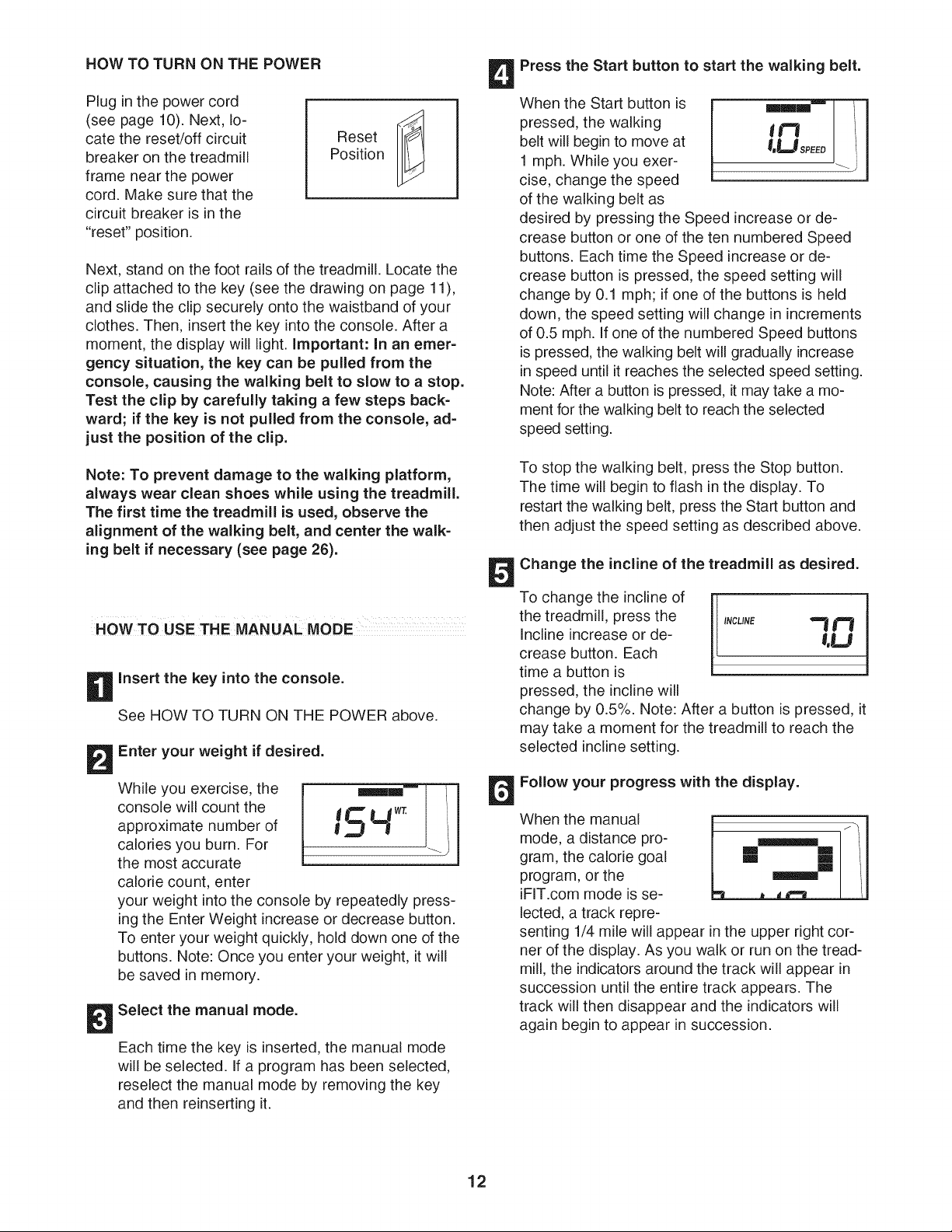
HOW TO TURN ON THE POWER
Plug in the power cord
(see page 10). Next, lo-
cate the reset/off circuit
breaker on the treadmill
frame near the power
cord. Make sure that the
circuit breaker is in the
"reset" position.
Reset
Position
Next, stand on the foot rails of the treadmill. Locate the
clip attached to the key (see the drawing on page 11),
and slide the clip securely onto the waistband of your
clothes. Then, insert the key into the console. After a
moment, the display will light. Important: In an emer-
gency situation, the key can be pulled from the
console, causing the walking belt to slow to a stop.
Test the clip by carefully taking a few steps back-
ward; if the key is not pulled from the console, ad=
just the position of the clip.
Note: To prevent damage to the walking platform,
always wear clean shoes while using the treadmill.
The first time the treadmill is used, observe the
alignment of the walking belt, and center the walk=
ing belt if necessary (see page 26).
HOW TO USE THE MANUAL MODE
Insert the key into the console.
See HOW TO TURN ON THE POWER above.
Enter your weight if desired.
While you exercise, the
console will count the
approximate number of
calories you burn. For
the most accurate
calorie count, enter
'&"t:
your weight into the console by repeatedly press-
ing the Enter Weight increase or decrease button.
To enter your weight quickly, hold down one of the
buttons. Note: Once you enter your weight, it will
be saved in memory.
Select the manual mode.
Each time the key is inserted, the manual mode
will be selected. If a program has been selected,
reselect the manual mode by removing the key
and then reinserting it.
Press the Start button to start the walking belt.
When the Start button is
pressed, the walking
belt will begin to move at
1 mph. While you exer-
cise, change the speed
of the walking belt as
desired by pressing the Speed increase or de-
crease button or one of the ten numbered Speed
buttons. Each time the Speed increase or de-
crease button is pressed, the speed setting will
change by 0.1 mph; if one of the buttons is held
down, the speed setting will change in increments
of 0.5 mph. If one of the numbered Speed buttons
is pressed, the walking belt will gradually increase
in speed until it reaches the selected speed setting.
Note: After a button is pressed, it may take a mo-
ment for the walking belt to reach the selected
speed setting.
To stop the walking belt, press the Stop button.
The time will begin to flash in the display. To
restart the walking belt, press the Start button and
then adjust the speed setting as described above.
Change the incline of the treadmill as desired.
To change the incline of
the treadmill, press the
Incline increase or de-
crease button. Each
time a button is
pressed, the incline will
change by 0.5%. Note: After a button is pressed, it
may take a moment for the treadmill to reach the
selected incline setting.
Follow your progress with the display.
When the manual
mode, a distance pro-
gram, the calorie goal
program, or the
iFIT.com mode is se-
lected, a track repre-
m m
dP'm_
senting 1/4 mile will appear in the upper right cor-
ner of the display. As you walk or run on the tread-
mill, the indicators around the track will appear in
succession until the entire track appears. The
track will then disappear and the indicators will
again begin to appear in succession.
12
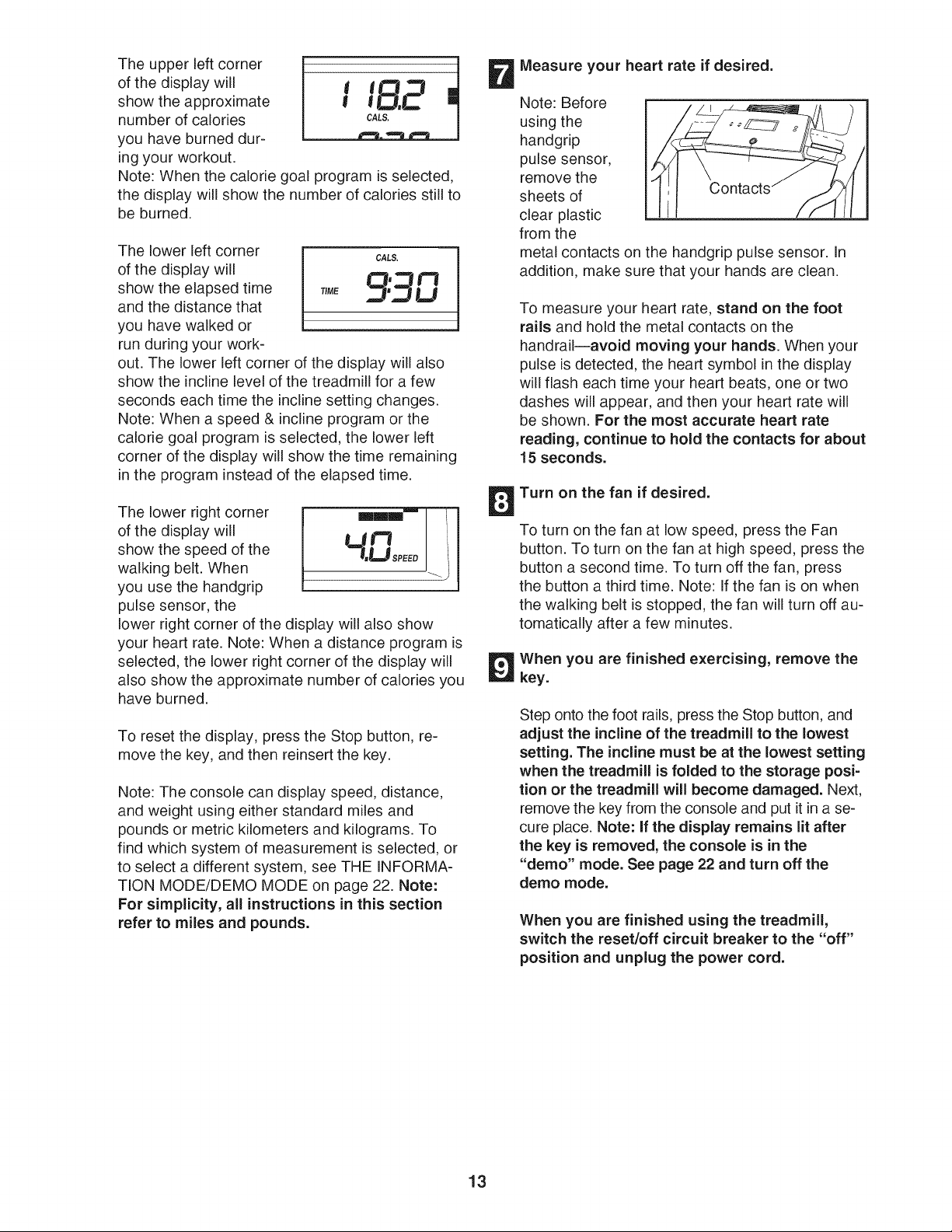
The upper left corner
of the display will
show the approximate
number of calories
you have burned dur-
ing your workout.
t tL "3 J
Note: When the calorie goal program is selected,
the display will show the number of calories still to
be burned.
The lower left corner cA,s.
of the display will LfI,_'_t l"=_
show the elapsed time TiME .,,,_l',_,,ILJ
and the distance that
you have walked or
run during your work-
out. The lower left corner of the display will also
show the incline level of the treadmill for a few
seconds each time the incline setting changes.
Note: When a speed & incline program or the
calorie goal program is selected, the lower left
corner of the display will show the time remaining
in the program instead of the elapsed time.
The lower right corner
of the display will
show the speed of the
walking belt. When
you use the handgrip
pulse sensor, the
Ut'3 I
7'LIsPE J i
lower right corner of the display will also show
your heart rate. Note: When a distance program is
selected, the lower right corner of the display will
also show the approximate number of calories you
have burned.
To reset the display, press the Stop button, re-
move the key, and then reinsert the key.
Note: The console can display speed, distance,
and weight using either standard miles and
pounds or metric kilometers and kilograms. To
find which system of measurement is selected, or
to select a different system, see THE INFORMA-
TION MODE/DEMO MODE on page 22. Note:
For simplicity, all instructions in this section
refer to miles and pounds.
Measure your heart rate if desired.
Note: Before
using the
handgrip
pulse sensor,
remove the
sheets of Contacts
clear plastic
from the
metal contacts on the handgrip pulse sensor. In
addition, make sure that your hands are clean.
To measure your heart rate, stand on the foot
rails and hold the metal contacts on the
handrailiavoid moving your hands. When your
pulse is detected, the heart symbol in the display
will flash each time your heart beats, one or two
dashes will appear, and then your heart rate will
be shown. For the most accurate heart rate
reading, continue to hold the contacts for about
15 seconds.
Turn on the fan if desired.
To turn on the fan at low speed, press the Fan
button. To turn on the fan at high speed, press the
button a second time. To turn off the fan, press
the button a third time. Note: If the fan is on when
the walking belt is stopped, the fan will turn off au-
tomatically after a few minutes.
When you are finished exercising, remove the
key.
Step onto the foot rails, press the Stop button, and
adjust the incline of the treadmill to the lowest
setting. The incline must be at the lowest setting
when the treadmill is folded to the storage posi-
tion or the treadmill will become damaged. Next,
remove the key from the console and put it in a se-
cure place. Note: If the display remains lit after
the key is removed, the console is in the
"demo" mode. See page 22 and turn off the
demo mode.
When you are finished using the treadmill,
switch the reset/off circuit breaker to the "off"
position and unplug the power cord.
13
HOW TO USE A SPEED & iNCLiNE PROGRAM
n
insert the key into the console.
See HOW TO TURN ON THE POWER on page
12.
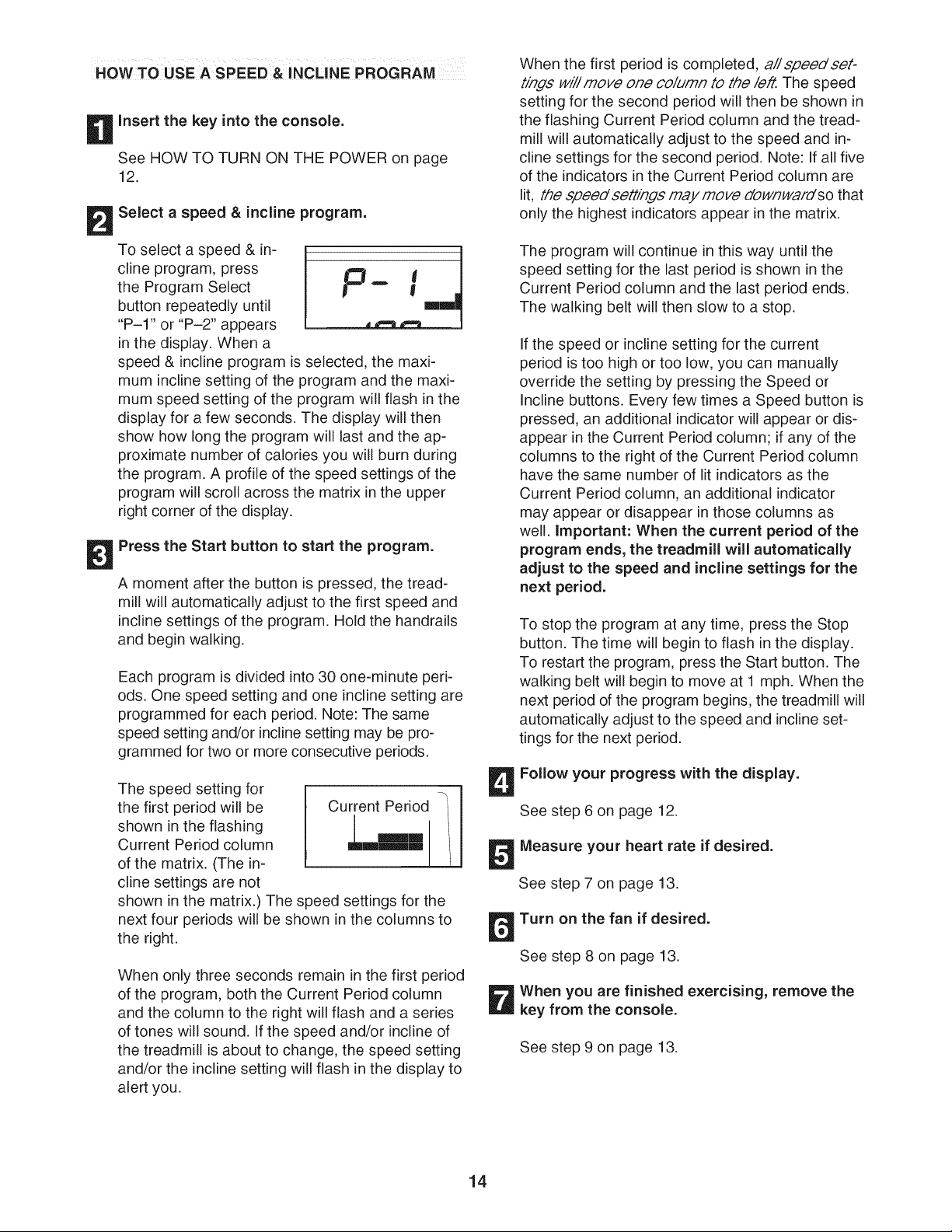
Select a speed & incline program.
To select a speed & in-
cline program, press
the Program Select
button repeatedly until
"P-I" or "P-2" appears
in the display. When a
.,.u_ , /
speed & incline program is selected, the maxi-
mum incline setting of the program and the maxi-
mum speed setting of the program will flash in the
display for a few seconds. The display will then
show how long the program will last and the ap-
proximate number of calories you will burn during
the program. A profile of the speed settings of the
program will scroll across the matrix in the upper
right corner of the display.
Press the Start button to start the program.
A moment after the button is pressed, the tread-
mill will automatically adjust to the first speed and
incline settings of the program. Hold the handrails
and begin walking.
Each program is divided into 30 one-minute peri-
ods. One speed setting and one incline setting are
programmed for each period. Note: The same
speed setting and/or incline setting may be pro-
grammed for two or more consecutive periods.
The speed setting for
the first period will be
shown in the flashing
Current Period column
of the matrix. (The in-
cline settings are not
shown in the matrix.) The speed settings for the
next four periods will be shown in the columns to
the right.
When only three seconds remain in the first period
of the program, both the Current Period column
and the column to the right will flash and a series
of tones will sound. If the speed and/or incline of
the treadmill is about to change, the speed setting
and/or the incline setting will flash in the display to
alert you.
When the first period is completed, a// speed set-
tings will move one column to the left. The speed
setting for the second period will then be shown in
the flashing Current Period column and the tread-
mill will automatically adjust to the speed and in-
cline settings for the second period. Note: If all five
of the indicators in the Current Period column are
lit, the speedsettinds may move downwardso that
only the highest indicators appear in the matrix.
The program will continue in this way until the
speed setting for the last period is shown in the
Current Period column and the last period ends.
The walking belt will then slow to a stop.
If the speed or incline setting for the current
period is too high or too low, you can manually
override the setting by pressing the Speed or
Incline buttons. Every few times a Speed button is
pressed, an additional indicator will appear or dis-
appear in the Current Period column; if any of the
columns to the right of the Current Period column
have the same number of lit indicators as the
Current Period column, an additional indicator
may appear or disappear in those columns as
well. Important: When the current period of the
program ends, the treadmill will automatically
adjust to the speed and incline settings for the
next period.
To stop the program at any time, press the Stop
button. The time will begin to flash in the display.
To restart the program, press the Start button. The
walking belt will begin to move at 1 mph. When the
next period of the program begins, the treadmill will
automatically adjust to the speed and incline set-
tings for the next period.
Follow your progress with the display.
See step 6 on page 12.
Measure your heart rate if desired.
See step 7 on page 13.
Turn on the fan if desired.
See step 8 on page 13.
When you are finished exercising, remove the
key from the console.
See step 9 on page 13.
14
HOWTO USE A DISTANCE PROGRAM
n
Insert the key into the console.
See HOW TO TURN ON THE POWER on page
12.
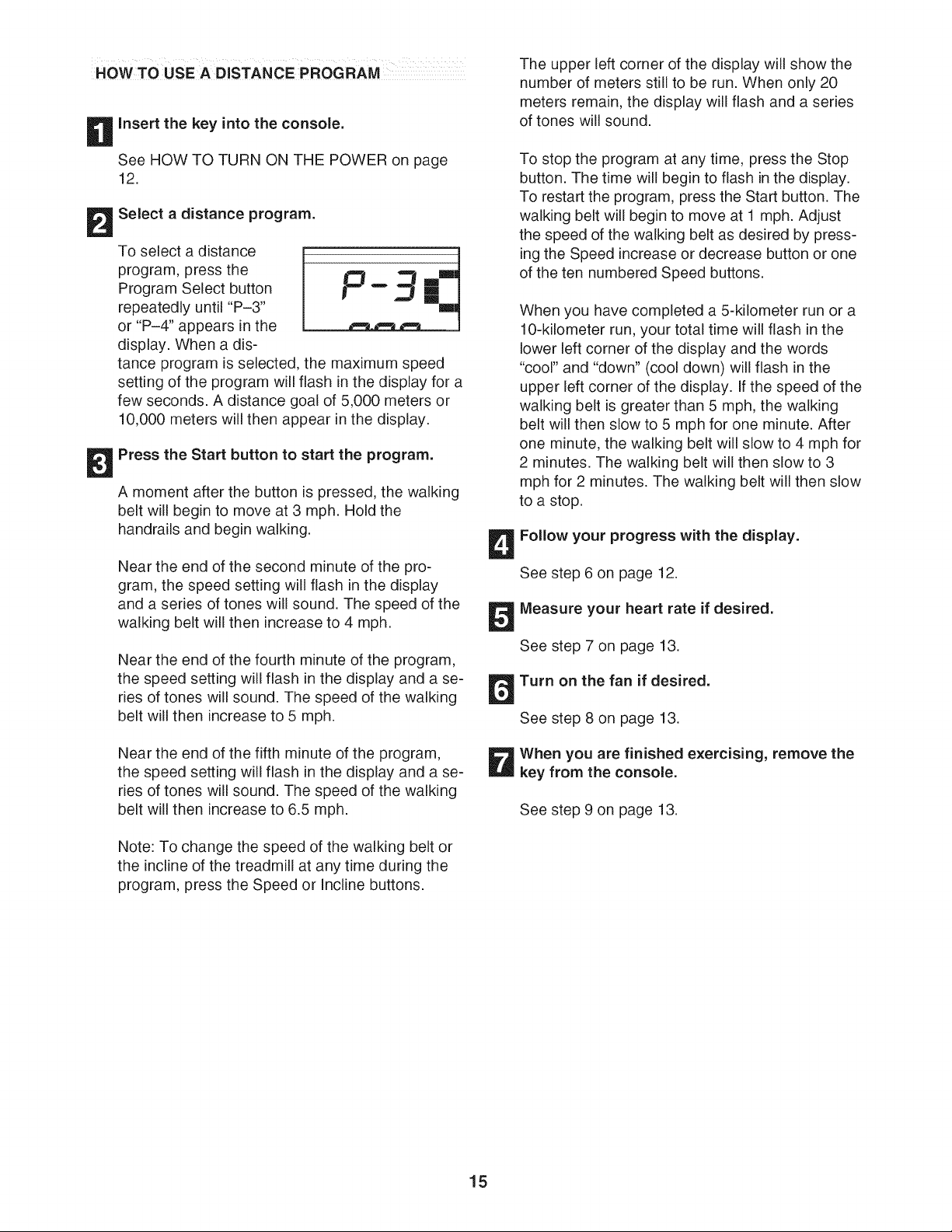
Select a distance program.
To select a distance
program, press the ,0
Program Select button _ "" _
m
repeatedly until "P-3"
or "P-4" appears in the
display. When a dis-
tance program is selected, the maximum speed
setting of the program will flash in the display for a
few seconds. A distance goal of 5,000 meters or
10,000 meters will then appear in the display.
Press the Start button to start the program.
A moment after the button is pressed, the walking
belt will begin to move at 3 mph. Hold the
handrails and begin walking.
Near the end of the second minute of the pro-
gram, the speed setting will flash in the display
and a series of tones will sound. The speed of the
walking belt will then increase to 4 mph.
Near the end of the fourth minute of the program,
the speed setting will flash in the display and a se-
ries of tones will sound. The speed of the walking
belt will then increase to 5 mph.
Near the end of the fifth minute of the program,
the speed setting will flash in the display and a se-
ries of tones will sound. The speed of the walking
belt will then increase to 6.5 mph.
Note: To change the speed of the walking belt or
the incline of the treadmill at any time during the
program, press the Speed or Incline buttons.
The upper left corner of the display will show the
number of meters still to be run. When only 20
meters remain, the display will flash and a series
of tones will sound.
To stop the program at any time, press the Stop
button. The time will begin to flash in the display.
To restart the program, press the Start button. The
walking belt will begin to move at 1 mph. Adjust
the speed of the walking belt as desired by press-
ing the Speed increase or decrease button or one
of the ten numbered Speed buttons.
When you have completed a S-kilometer run or a
10-kilometer run, your total time will flash in the
lower left corner of the display and the words
"cool" and "down" (cool down) will flash in the
upper left corner of the display. If the speed of the
walking belt is greater than 5 mph, the walking
belt will then slow to 5 mph for one minute. After
one minute, the walking belt will slow to 4 mph for
2 minutes. The walking belt will then slow to 3
mph for 2 minutes. The walking belt will then slow
to a stop.
Follow your progress with the display.
See step 6 on page 12.
Measure your heart rate if desired.
See step 7 on page 13.
Turn on the fan if desired.
See step 8 on page 13.
When you are finished exercising, remove the
key from the console.
See step 9 on page 13.
15
HOW TO USE THE CALORIE GOAL PROGRAM
n
Insert the key into the console.
See HOW TO TURN ON THE POWER on page
12.
Enter your weight if desired.
See step 2 on page 12.
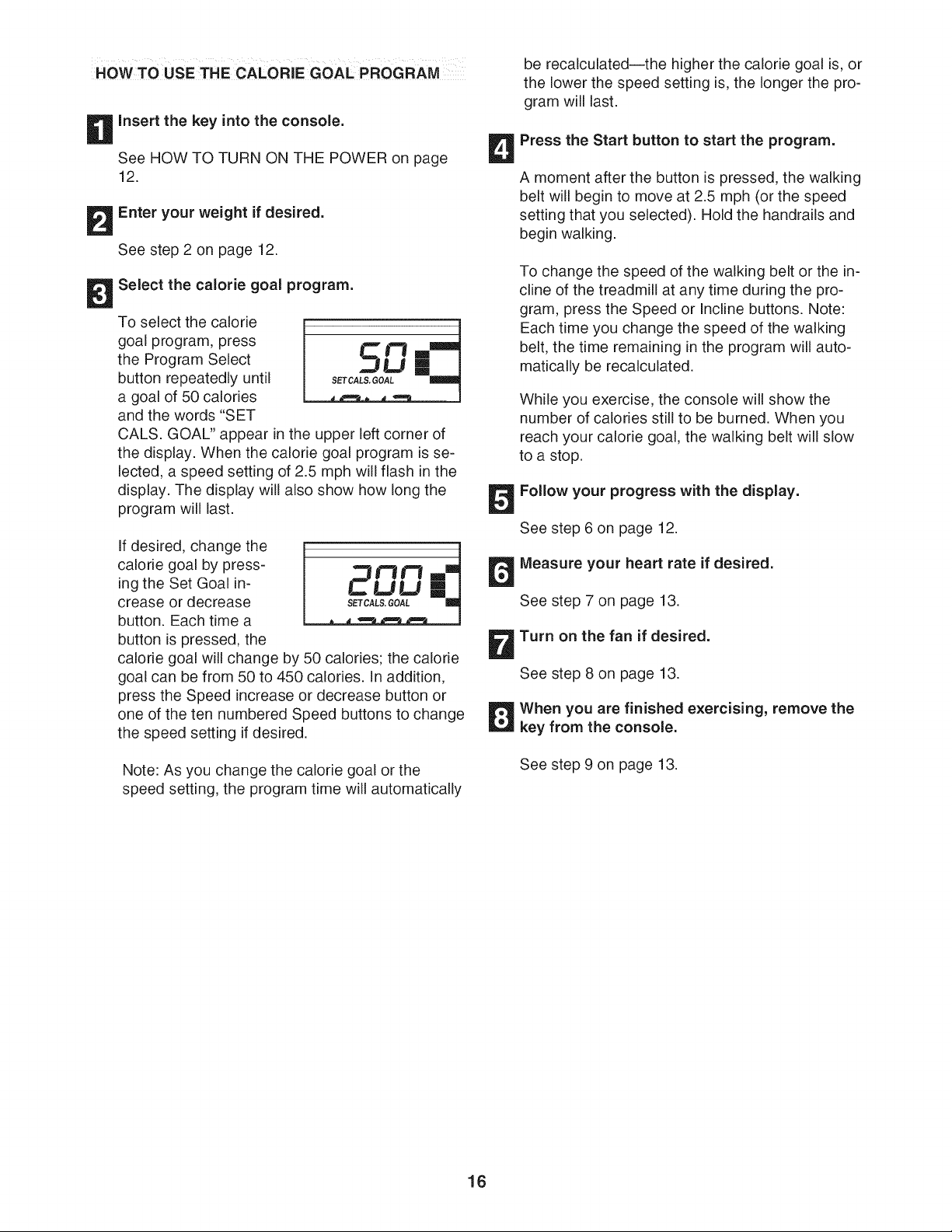
Select the calorie goal program.
To select the calorie
goal program, press
the Program Select
button repeatedly until
a goal of 50 calories
and the words "SET
CALS. GOAL" appear in the upper left corner of
the display. When the calorie goal program is se-
lected, a speed setting of 2.5 mph will flash in the
display. The display will also show how long the
program will last.
If desired, change the
calorie goal by press-
ing the Set Goal in-
crease or decrease
button. Each time a
button is pressed, the
calorie goal will change by 50 calories; the calorie
goal can be from 50 to 450 calories. In addition,
press the Speed increase or decrease button or
one of the ten numbered Speed buttons to change
the speed setting if desired.
Note: As you change the calorie goal or the
speed setting, the program time will automatically
be recalculatedJthe higher the calorie goal is, or
the lower the speed setting is, the longer the pro-
gram will last.
Press the Start button to start the program.
A moment after the button is pressed, the walking
belt will begin to move at 2.5 mph (or the speed
setting that you selected). Hold the handrails and
begin walking.
To change the speed of the walking belt or the in-
cline of the treadmill at any time during the pro-
gram, press the Speed or Incline buttons. Note:
Each time you change the speed of the walking
belt, the time remaining in the program will auto-
matically be recalculated.
While you exercise, the console will show the
number of calories still to be burned. When you
reach your calorie goal, the walking belt will slow
to a stop.
Follow your progress with the display.
See step 6 on page 12.
Measure your heart rate if desired.
See step 7 on page 13.
Turn on the fan if desired.
See step 8 on page 13.
When you are finished exercising, remove the
key from the console.
See step 9 on page 13.
16
To use iFIT.com MP3 or CD programs, the treadmitl
must be connected to your MP3 player, CD player,
portable stereo, home stereo, or computer. See pages
17 and 18 for connecting instructions.To use iFIT.com
programs directly from our Web site, the treadmill
must be connected to your computer. See page 18 for
connecting instructions.To use iFIT.com video pro=
grams, the treadmill must be connected to your VCR.
See page 19 for connecting instructions.
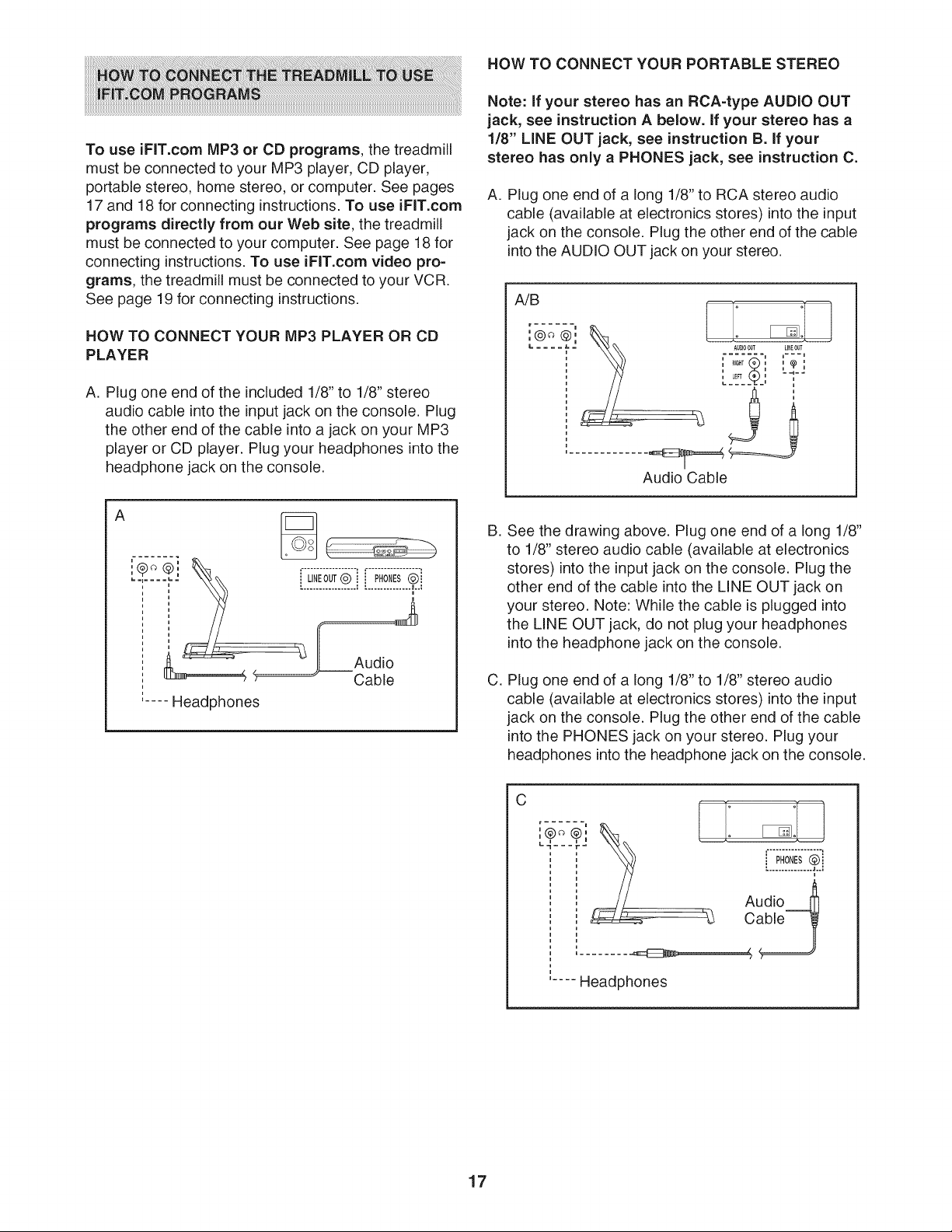
HOW TO CONNECT YOUR MP3 PLAYER OR CD
PLAYER
A. Plug one end of the included 1/8" to 1/8" stereo
audio cable into the input jack on the console. Plug
the other end of the cable into a jack on your MP3
player or CD player. Plug your headphones into the
headphone jack on the console.
A
LINEOUT@ PHONES(2)i
..................................L.:
u
. ,r________
Audio
Cable
..... Headphones
HOW TO CONNECT YOUR PORTABLE STEREO
Note: If your stereo has an RCA-type AUDIO OUT
jack, see instruction A below. If your stereo has a
1/8" LiNE OUT jack, see instruction B. if your
stereo has only a PHONES jack, see instruction C.
A. Plug one end of a long 1/8" to RCA stereo audio
cable (available at electronics stores) into the input
jack on the console. Plug the other end of the cable
into the AUDIO OUT jack on your stereo.
, , _ L_*,_J
: / Y "-LK_-: i
Audio Cable
B,
C,
See the drawing above. Plug one end of a long 1/8"
to 1/8" stereo audio cable (available at electronics
stores) into the input jack on the console. Plug the
other end of the cable into the LINE OUT jack on
your stereo. Note: While the cable is plugged into
the LINE OUT jack, do not plug your headphones
into the headphone jack on the console.
Plug one end of a long 1/8" to 1/8" stereo audio
cable (available at electronics stores) into the input
jack on the console. Plug the other end of the cable
into the PHONES jack on your stereo. Plug your
headphones into the headphone jack on the console.
C
r ...... u
u
Audi° 1
Cable
_,_
..... Headphones
17
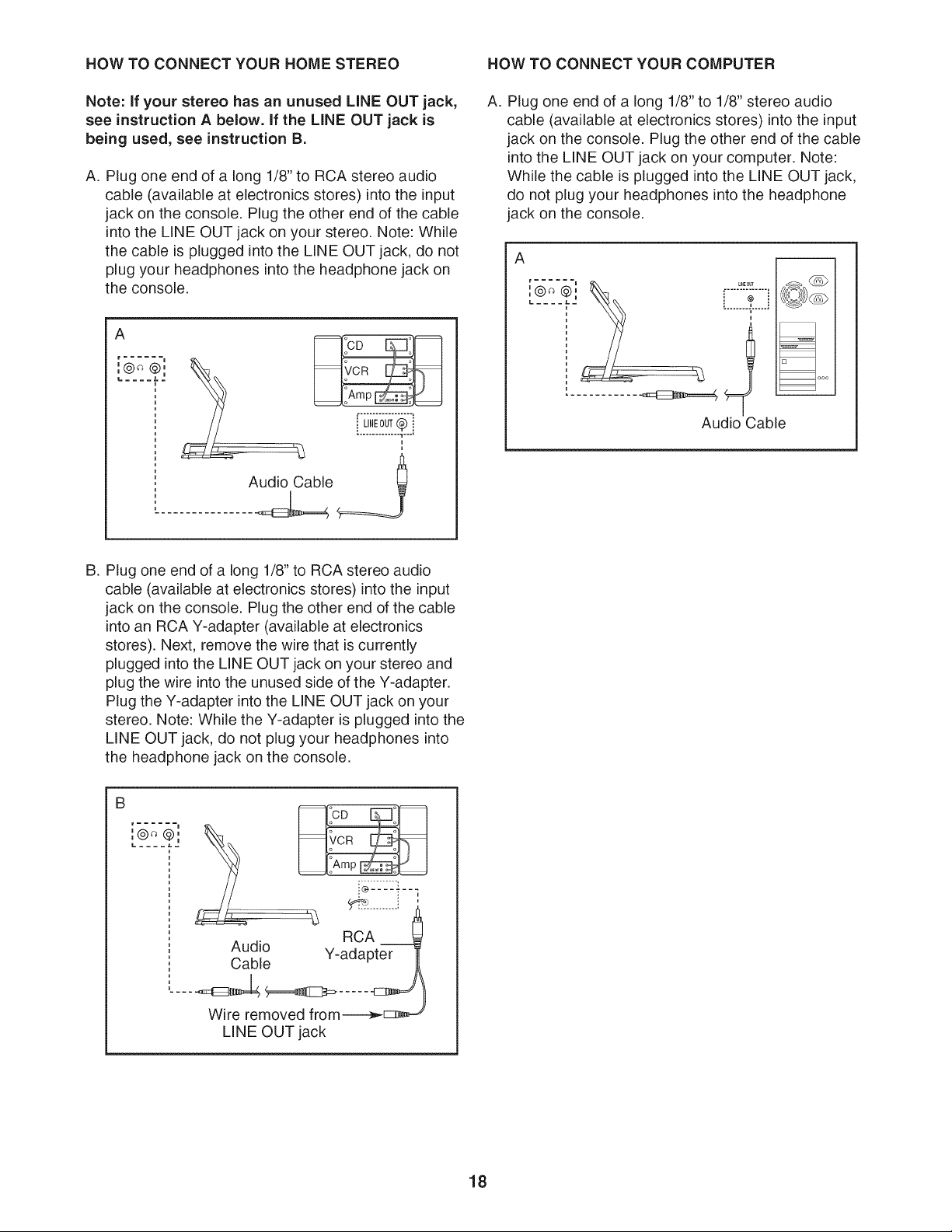
HOW TO CONNECT YOUR HOME STEREO HOW TO CONNECT YOUR COMPUTER
Note: if your stereo has an unused LiNE OUT jack,
see instruction A below, if the LiNE OUT jack is
being used, see instruction B.
A. Plug one end of a long 1/8" to RCA stereo audio
cable (available at electronics stores) into the input
jack on the console. Plug the other end of the cable
into the LINE OUT jack on your stereo. Note: While
the cable is plugged into the LINE OUT jack, do not
plug your headphones into the headphone jack on
the console.
A
r ......
i ©
,@ @,
LINE0UT(_
.............. 1....
i
'_
Audio Cable __
A. Plug one end of a long 1/8" to 1/8" stereo audio
cable (available at electronics stores) into the input
jack on the console. Plug the other end of the cable
into the LINE OUT jack on your computer. Note:
While the cable is plugged into the LINE OUT jack,
do not plug your headphones into the headphone
jack on the console.
A
I ©
,@ @,
L..... LE
Audio
L_NEOUT
@
uau
Cable
B. Plug one end of a long 1/8" to RCA stereo audio
cable (available at electronics stores) into the input
jack on the console. Plug the other end of the cable
into an RCA Y-adapter (available at electronics
stores). Next, remove the wire that is currently
plugged into the LINE OUT jack on your stereo and
plug the wire into the unused side of the Y-adapter.
Plug the Y-adapter into the LINE OUT jack on your
stereo. Note: While the Y-adapter is plugged into the
LINE OUT jack, do not plug your headphones into
the headphone jack on the console.
B
r
i ©
,@ @,
.........:: ,
RCA
Audio Y-adapter
Cable
Wire removed from----------_[:::_=_
LINE OUT jack
18
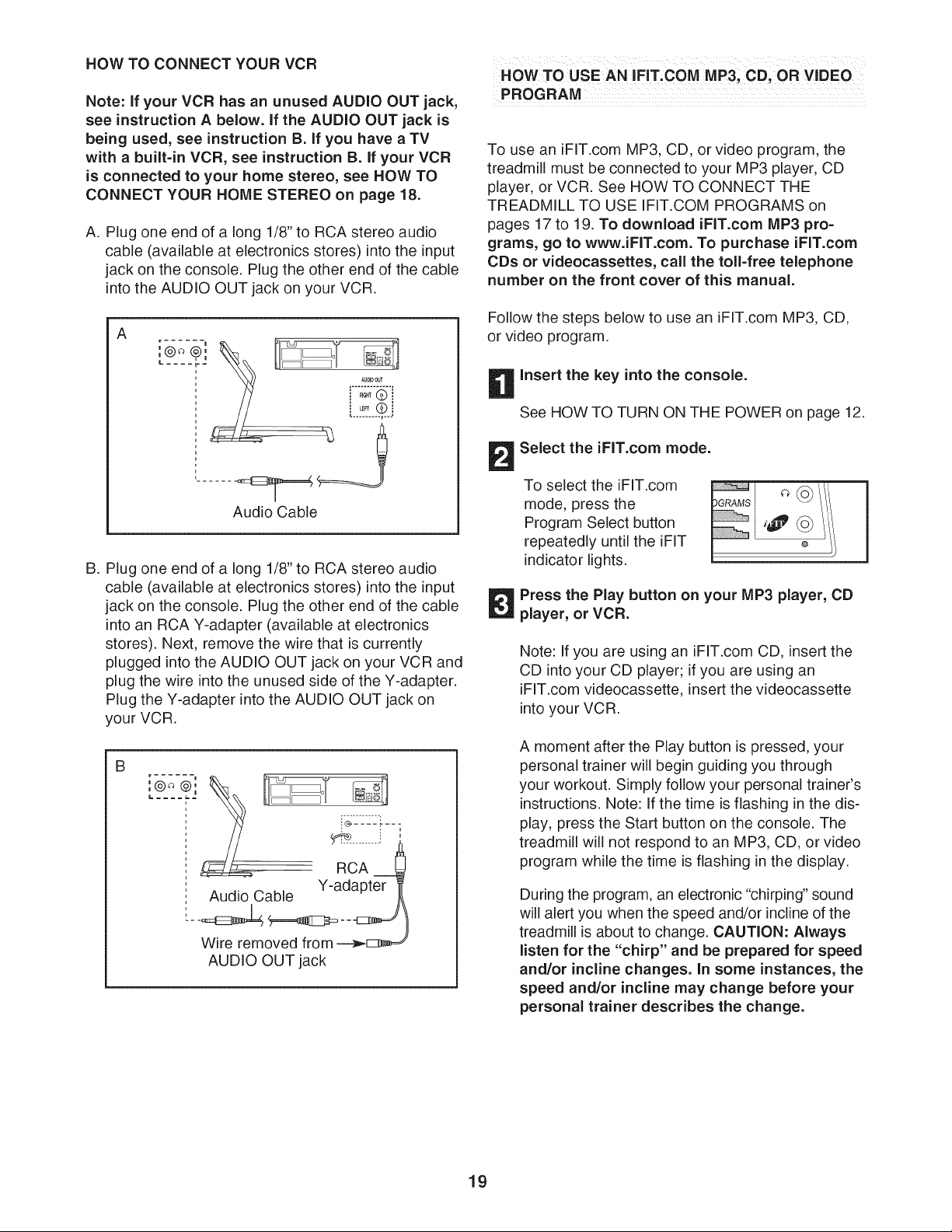
HOW TO CONNECT YOUR VCR
Note: If your VCR has an unused AUDIO OUT jack,
see instruction A below. If the AUDIO OUT jack is
being used, see instruction B. If you have a TV
with a built-in VCR, see instruction B. If your VCR
is connected to your home stereo, see HOW TO
CONNECT YOUR HOME STEREO on page 18.
A. Plug one end of a long 1/8" to RCA stereo audio
cable (available at electronics stores) into the input
jack on the console. Plug the other end of the cable
into the AUDIO OUT jack on your VCR.
A
r
i ©
.® ,0.
L .... r.=
Audio Cable
B. Plug one end of a long 1/8" to RCA stereo audio
cable (available at electronics stores) into the input
jack on the console. Plug the other end of the cable
into an RCA Y-adapter (available at electronics
stores). Next, remove the wire that is currently
plugged into the AUDIO OUT jack on your VCR and
plug the wire into the unused side of the Y-adapter.
Plug the Y-adapter into the AUDIO OUT ack on
your VCR.
B
[_¢_t2]
Audio Cable
RCA
Y-adapter
Wire removed from
AUDIO OUT jack
HOW TO USE AN IFIT, COM MP3, CD, OR VIDEO
PROGRAM
To use an iFIT.com MP3, CD, or video program, the
treadmill must be connected to your MP3 player, CD
player, or VCR. See HOW TO CONNECT THE
TREADMILL TO USE IFIT.COM PROGRAMS on
pages 17 to 19. To download iFIT.com MP3 pro-
grams, go to www.iFIT.com. To purchase iFIT.com
CDs or videocassettes, call the toll-free telephone
number on the front cover of this manual.
Follow the steps below to use an iFIT.com MP3, CD,
or video program.
B Insert the key into the console.
See HOW TO TURN ON THE POWER on page 12.
Select the iFIT.com mode.
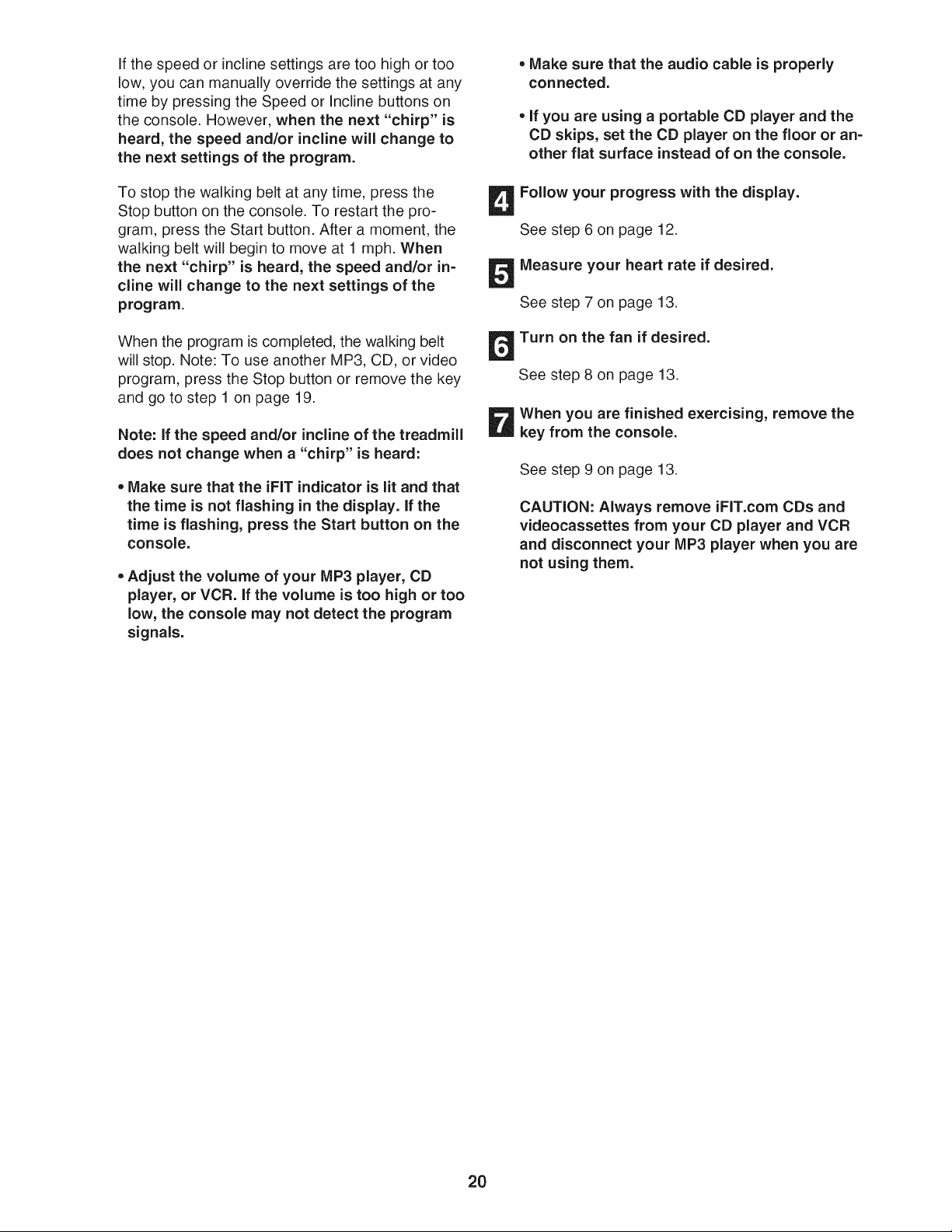
To select the iFIT.com
mode, press the
Program Select button
repeatedly until the iFIT
indicator lights.
m
©
Press the Play button on your MP3 player, CD
player, or VCR.
Note: If you are using an iFIT.com CD, insert the
CD into your CD player; if you are using an
iFIT.com videocassette, insert the videocassette
into your VCR.
A moment after the Play button is pressed, your
personal trainer will begin guiding you through
your workout. Simply follow your personal trainer's
instructions. Note: If the time is flashing in the dis-
play, press the Start button on the console. The
treadmill will not respond to an MP3, CD, or video
program while the time is flashing in the display.
During the program, an electronic "chirping" sound
will alert you when the speed and/or incline of the
treadmill is about to change. CAUTION: Always
listen for the "chirp" and be prepared for speed
and/or incline changes. In some instances, the
speed and/or incline may change before your
personal trainer describes the change.
19
If the speed or incline settings are too high or too
low, you can manually override the settings at any
time by pressing the Speed or Incline buttons on
the console. However, when the next "chirp" is
heard, the speed and/or incline will change to
the next settings of the program.
To stop the walking belt at any time, press the
Stop button on the console. To restart the pro-
gram, press the Start button. After a moment, the
walking belt will begin to move at 1 mph. When
the next "chirp" is heard, the speed and/or in-
cline wiii change to the next settings of the
program.
When the program is completed, the walking belt
will stop. Note: To use another MP3, CD, or video
program, press the Stop button or remove the key
and go to step 1 on page 19.
Note: If the speed and/or incline of the treadmill
does not change when a "chirp" is heard:
,, Make sure that the iFIT indicator is lit and that
the time is not flashing in the display. If the
time is flashing, press the Start button on the
console.
• Adjust the volume of your MP3 player, CD
player, or VCR. If the volume is too high or too
low, the console may not detect the program
signals.
• Make sure that the audio cable is properly
connected.
, If you are using a portable CD player and the
CD skips, set the CD player on the floor or an=
other flat surface instead of on the console.
Follow your progress with the display.
See step 6 on page 12.
Measure your heart rate if desired.
See step 7 on page 13.
Turn on the fan if desired.
See step 8 on page 13.
When you are finished exercising, remove the
key from the console.
See step 9 on page 13.
CAUTION: Always remove iFIT.com CDs and
videocassettes from your CD player and VCR
and disconnect your MP3 player when you are
not using them.
2O
Our Web site at www.iFIT.com allows you to access
basic programs, audio programs, and video programs
directly from the internet. Additional options are soon to
be available. See www.iFIT.com for details.
To use programs from our Web site, the treadmill must
be connected to your home computer. See HOW TO
CONNECT YOUR COMPUTER on page 18. In
addition, you must have an intemet connection and
an internet service provider. A list of specific system re-
quirements is found on our Web site.
Follow the steps below to use a program from our
Web site.
n
Insert the key into the console.
See HOW TO TURN ON THE POWER on page 12.
Select the iFIT.com mode.
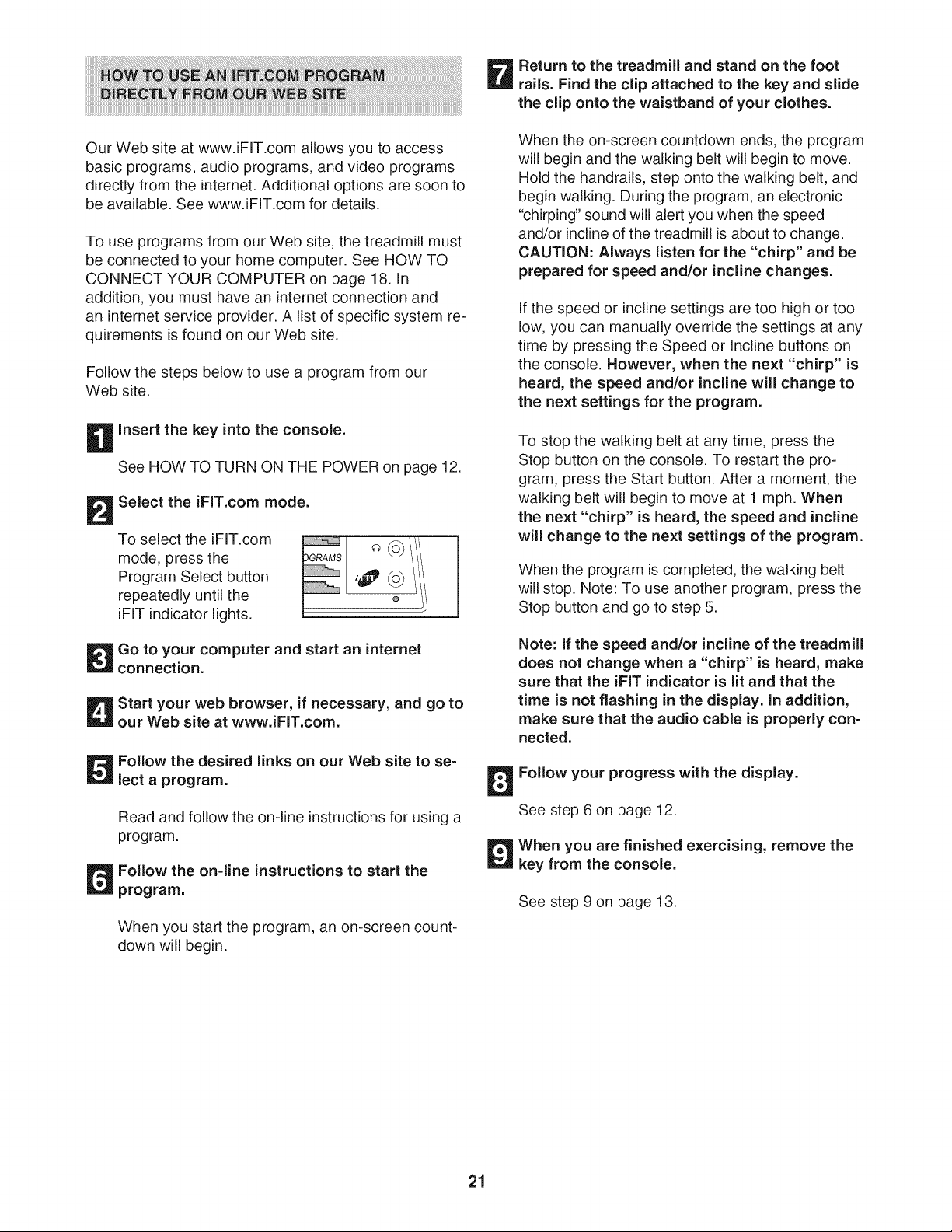
To select the iFIT.com
mode, press the
Program Select button
repeatedly until the
iFIT indicator lights.
@
Go to your computer and start an internet
connection.
Start your web browser, if necessary, and go to
our Web site at www.iFIT.com.
Follow the desired links on our Web site to se =
lect a program.
Read and follow the on-line instructions for using a
program.
Follow the on=line instructions to start the
program.
When you start the program, an on-screen count-
down will begin.
_ eturn to the treadmill and stand on the foot
rails. Find the clip attached to the key and slide
the clip onto the waistband of your clothes.
When the on-screen countdown ends, the program
will begin and the walking belt will begin to move.
Hold the handrails, step onto the walking belt, and
begin walking. During the program, an electronic
"chirping" sound will alert you when the speed
and/or incline of the treadmill is about to change.
CAUTION: Always listen for the "chirp" and be
prepared for speed and/or incline changes.
If the speed or incline settings are too high or too
low, you can manually override the settings at any
time by pressing the Speed or Incline buttons on
the console. However, when the next "chirp" is
heard, the speed and/or incline will change to
the next settings for the program.
To stop the walking belt at any time, press the
Stop button on the console. To restart the pro-
gram, press the Start button. After a moment, the
walking belt will begin to move at 1 mph. When
the next "chirp" is heard, the speed and incline
will change to the next settings of the program.
When the program is completed, the walking belt
will stop. Note: To use another program, press the
Stop button and go to step 5.
Note: if the speed and/or incline of the treadmill
does not change when a "chirp" is heard, make
sure that the iFIT indicator is lit and that the
time is not flashing in the display. In addition,
make sure that the audio cable is properly con=
nected.
Follow your progress with the display.
See step 6 on page 12.
When you are finished exercising, remove the
key from the console.
See step 9 on page 13.
21
THE INFORMATION MODE/DEMO MODE
The console features an information mode that keeps
track of treadmill usage information and allows you to
select a system of measurement.
To select the information mode, insert the key into the
console while holding down the Stop button, and then
release the Stop button. When the information mode is
selected, the following information will be shown:
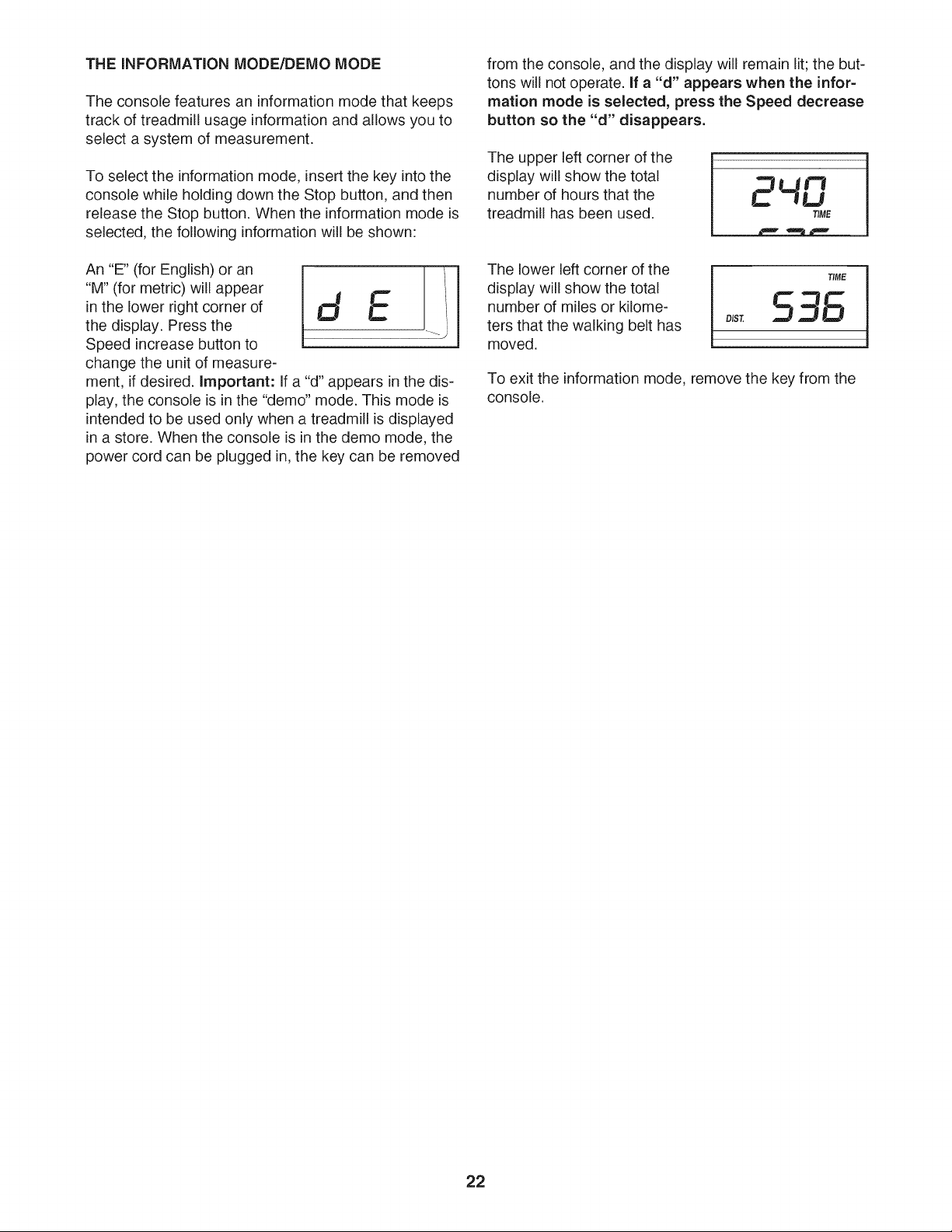
An "E" (for English) or an
"M" (for metric) will appear
in the lower right corner of
the display. Press the
Speed increase button to
change the unit of measure-
....................................................E............................................l.il
ment, if desired. Important: If a "d" appears in the dis-
play, the console is in the "demo" mode. This mode is
intended to be used only when a treadmill is displayed
in a store. When the console is in the demo mode, the
power cord can be plugged in, the key can be removed
from the console, and the display will remain lit; the but-
tons will not operate, if a "d" appears when the infor-
mation mode is selected, press the Speed decrease
button so the "d" disappears.
The upper left corner of the
display will show the total
number of hours that the
treadmill has been used,
2ur
--]U
TIME
The lower left corner of the
display will show the total
number of miles or kilome-
ters that the walking belt has
moved.
To exit the information mode, remove the key from the
console.
22
HOW TO FOLD AND MOVE THE TREADMILL
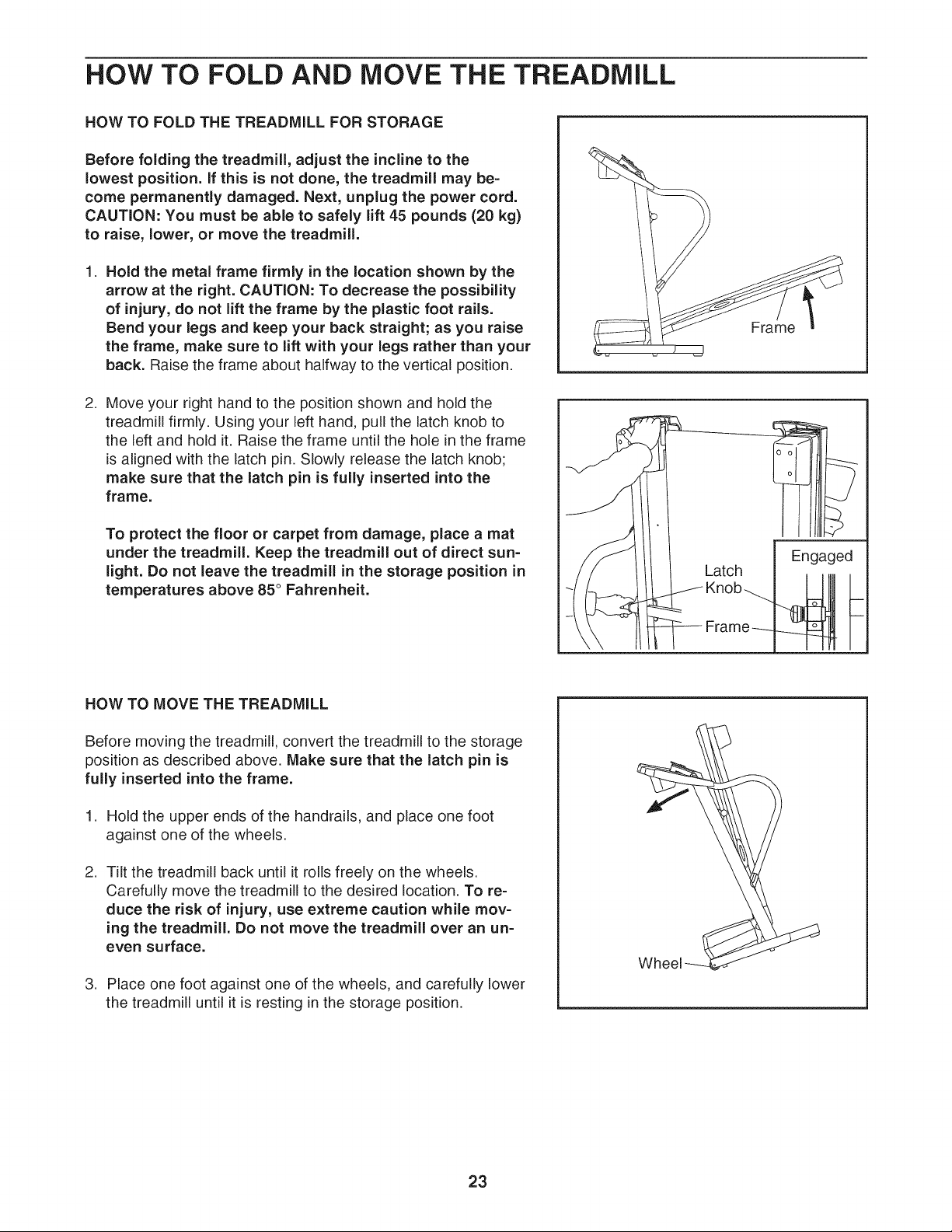
HOW TO FOLD THE TREADMILL FOR STORAGE
Before folding the treadmill, adjust the incline to the
lowest position, if this is not done, the treadmill may be=
come permanently damaged. Next, unplug the power cord.
CAUTION: You must be able to safely lift 45 pounds (20 kg)
to raise, lower, or move the treadmill.
1. Hold the metal frame firmly in the location shown by the
arrow at the right. CAUTION: To decrease the possibility
of injury, do not lift the frame by the plastic foot rails.
Bend your legs and keep your back straight; as you raise
the frame, make sure to lift with your legs rather than your
back. Raise the frame about halfway to the vertical position.
2. Move your right hand to the position shown and hold the
treadmill firmly. Using your left hand, pull the latch knob to
the left and hold it. Raise the frame until the hole in the frame
is aligned with the latch pin. Slowly release the latch knob;
make sure that the latch pin is fully inserted into the
frame.
To protect the floor or carpet from damage, place a mat
under the treadmill. Keep the treadmill out of direct sun=
light. Do not leave the treadmill in the storage position in
temperatures above 85 ° Fahrenheit.
Frame
Engaged
HOW TO MOVE THE TREADMILL
Before moving the treadmill, convert the treadmill to the storage
position as described above. Make sure that the latch pin is
fully inserted into the frame.
1. Hold the upper ends of the handrails, and place one foot
against one of the wheels.
2. Tilt the treadmill back until it rolls freely on the wheels.
Carefully move the treadmill to the desired location. To re-
duce the risk of injury, use extreme caution while mov-
ing the treadmill. Do not move the treadmill over an un=
even surface.
3. Place one foot against one of the wheels, and carefully lower
the treadmill until it is resting in the storage position.
23
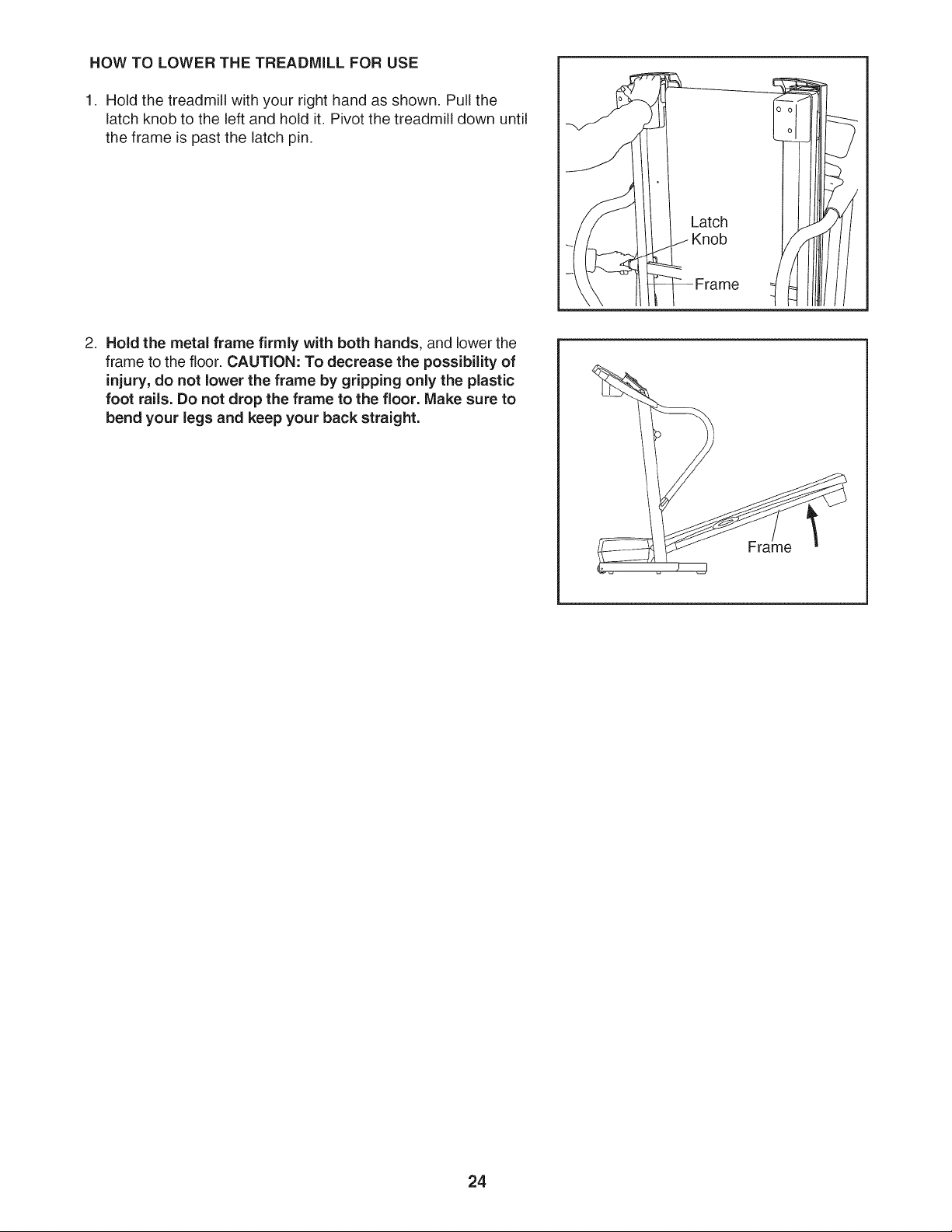
HOW TO LOWER THE TREADMILL FOR USE
1. Hold the treadmill with your right hand as shown. Pull the
latch knob to the left and hold it. Pivot the treadmill down until
the frame is past the latch pin.
Frame
2. Hold the metal frame firmly with both hands, and lower the
frame to the floor. CAUTION: To decrease the possibility of
injury, do not lower the frame by gripping only the plastic
foot rails. Do not drop the frame to the floor. Make sure to
bend your legs and keep your back straight.
24
TROUBLESHOOTING
Most treadmill problems can be solved by following the simple steps below. Find the symptom that
applies, and follow the steps listed. If further assistance is needed, call toll=free 1=800=4=MY=HOME®
(1=800=469=4663).
PROBLEM: The power does not turn on
SOLUTION: a.
Make sure that the power cord is plugged into a surge suppressor, and that the surge suppressor
is plugged into a properly grounded outlet (see page 10). Use only a single-outlet surge suppres-
sor that meets all of the specifications described on page 10. Important: The treadmill is not com-
patible with GFCl-equipped outlets.
b. After the power cord has been plugged in, make sure that the key is inserted into the console.
C.
PROBLEM:
SOLUTION: a.
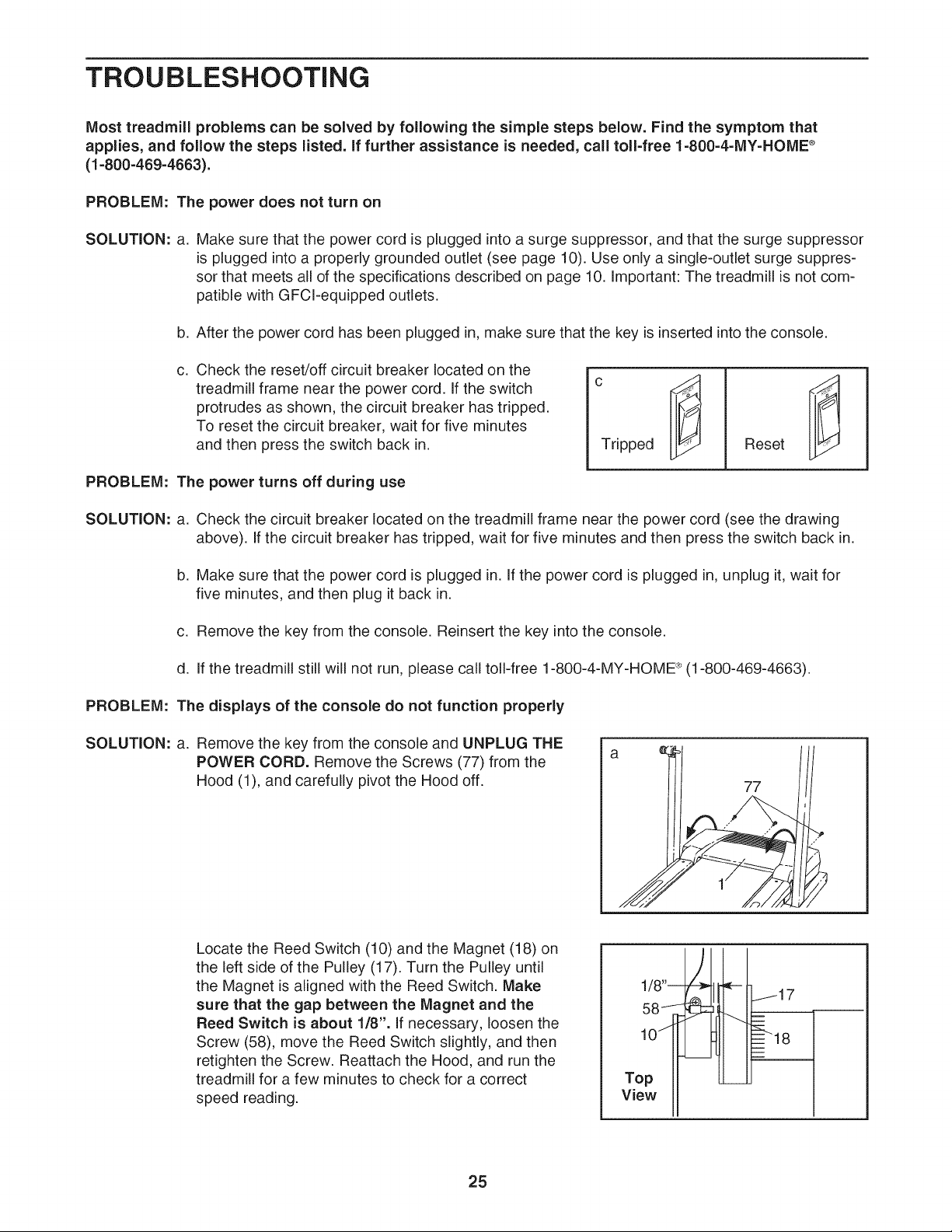
Check the reset/off circuit breaker located on the
treadmill frame near the power cord. If the switch
protrudes as shown, the circuit breaker has tripped.
To reset the circuit breaker, wait for five minutes
and then press the switch back in.
The power turns off during use
Tripped
Reset
Check the circuit breaker located on the treadmill frame near the power cord (see the drawing
above). If the circuit breaker has tripped, wait for five minutes and then press the switch back in.
b. Make sure that the power cord is plugged in. If the power cord is plugged in, unplug it, wait for
five minutes, and then plug it back in.
c. Remove the key from the console. Reinsert the key into the console.
d. If the treadmill still will not run, please call toll-free 1-800-4-MY-HOME ®(1-800-469-4663).
PROBLEM: The displays of the console do not function properly
SOLUTION: a. Remove the key from the console and UNPLUG THE
POWER CORD. Remove the Screws (77) from the
Hood (1), and carefully pivot the Hood off.
77
Locate the Reed Switch (10) and the Magnet (18) on
the left side of the Pulley (17). Turn the Pulley until
the Magnet is aligned with the Reed Switch. Make
sure that the gap between the Magnet and the
Reed Switch is about 1/8". If necessary, loosen the
Screw (58), move the Reed Switch slightly, and then
retighten the Screw. Reattach the Hood, and run the
treadmill for a few minutes to check for a correct
speed reading.
1/8"-_
Top
View
I[--- I
j17
...4 =---_
=_--_18
25
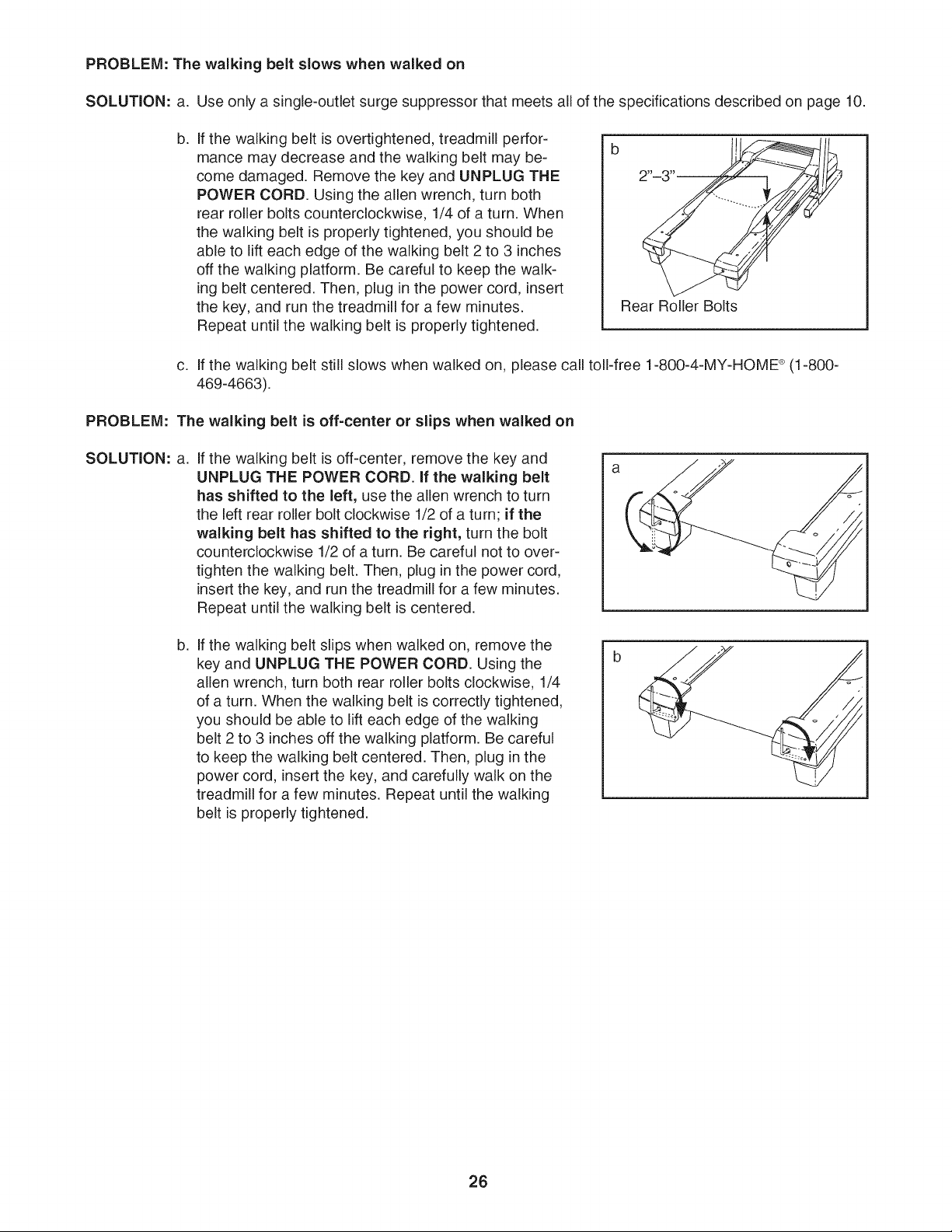
PROBLEM: The walking belt slows when walked on
SOLUTION: a. Use only a single-outlet surge suppressor that meets all of the specifications described on page 10.
b,
If the walking belt is overtightened, treadmill perfor-
mance may decrease and the walking belt may be-
come damaged. Remove the key and UNPLUG THE
POWER CORD. Using the allen wrench, turn both
rear roller bolts counterclockwise, 1/4 of a turn. When
the walking belt is properly tightened, you should be
able to lift each edge of the walking belt 2 to 3 inches
off the walking platform. Be careful to keep the walk-
ing belt centered. Then, plug in the power cord, insert
the key, and run the treadmill for a few minutes.
Repeat until the walking belt is properly tightened.
b
Rear Roller Bolts
c. If the walking belt still slows when walked on, please call toll-free 1-800-4-MY-HOME ®(1-800-
469-4663).
PROBLEM: The walking belt is off=center or slips when walked on
SOLUTION: a.
If the walking belt is off-center, remove the key and
UNPLUG THE POWER CORD. If the walking belt
has shifted to the left, use the allen wrench to turn
the left rear roller bolt clockwise 1/2 of a turn; if the
walking belt has shifted to the right, turn the bolt
counterclockwise 1/2 of a turn. Be careful not to over-
tighten the walking belt. Then, plug inthe power cord,
insert the key, and run the treadmill for a few minutes.
Repeat until the walking belt is centered.
a
b,
If the walking belt slips when walked on, remove the
key and UNPLUG THE POWER CORD. Using the
allen wrench, turn both rear roller bolts clockwise, 1/4
of a turn. When the walking belt is correctly tightened,
you should be able to lift each edge of the walking
belt 2 to 3 inches off the walking platform. Be careful
to keep the walking belt centered. Then, plug in the
power cord, insert the key, and carefully walk on the
treadmill for a few minutes. Repeat until the walking
belt is properly tightened.
26
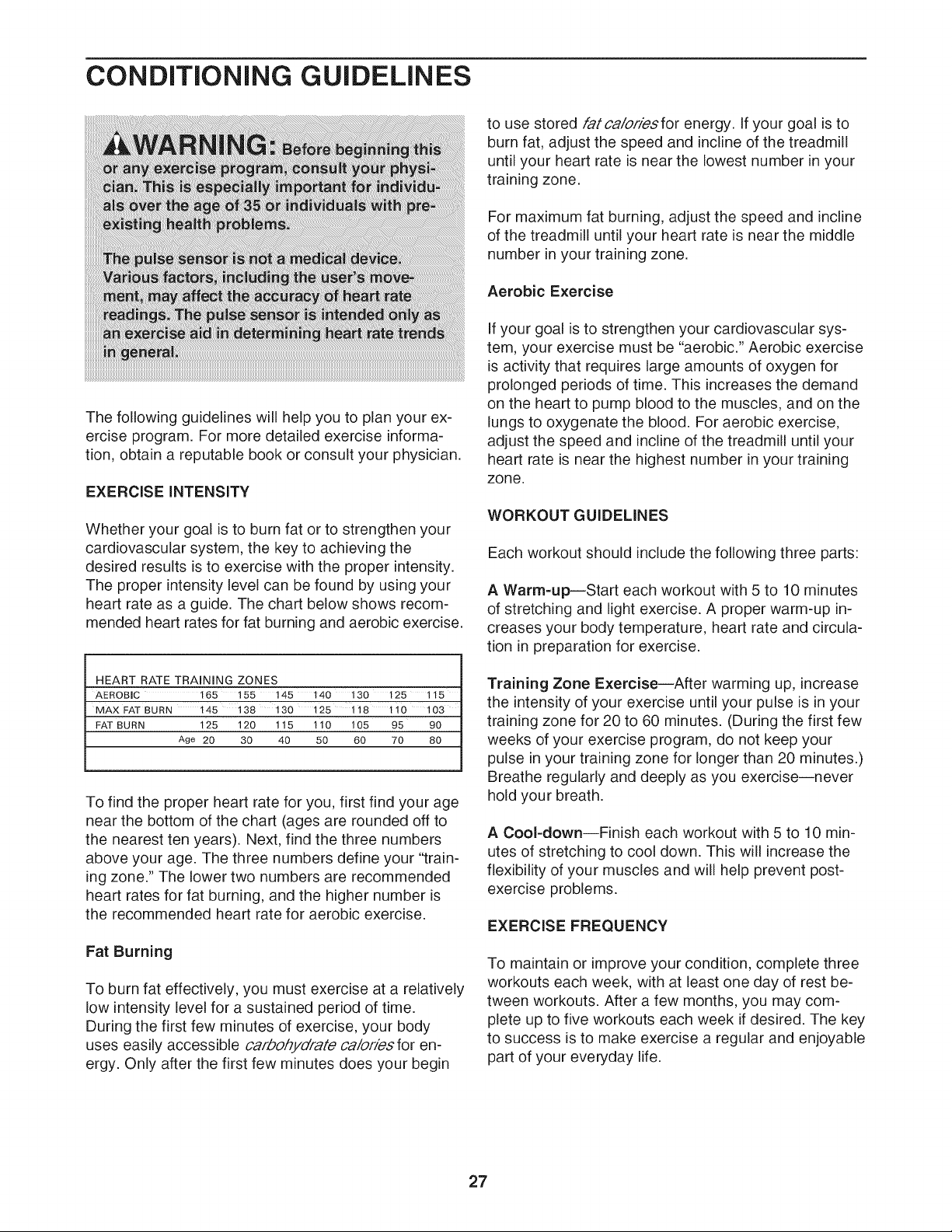
CONDiTiONiNG GUiDELiNES
The following guidelines will help you to plan your ex-
ercise program, For more detailed exercise informa-
tion, obtain a reputable book or consult your physician.
EXERCISE INTENSITY
Whether your goal is to burn fat or to strengthen your
cardiovascular system, the key to achieving the
desired results is to exercise with the proper intensity.
The proper intensity level can be found by using your
heart rate as a guide. The chart below shows recom-
mended heart rates for fat burning and aerobic exercise.
HEART RATE TRAINING ZONES
AEROBIC 165 155 145 140 130 125 115
MAX FAT BURN 145 138 130 125 118 110 103
FAT BURN 125 120 115 110 105 95 90
Age 20 30 40 50 60 70 80
To find the proper heart rate for you, first find your age
near the bottom of the chart (ages are rounded off to
the nearest ten years). Next, find the three numbers
above your age. The three numbers define your "train-
ing zone." The lower two numbers are recommended
heart rates for fat burning, and the higher number is
the recommended heart rate for aerobic exercise.
Fat Burning
To burn fat effectively, you must exercise at a relatively
low intensity level for a sustained period of time.
During the first few minutes of exercise, your body
uses easily accessible carbohydrate calories for en-
ergy. Only after the first few minutes does your begin
to use stored fatca/orhsfor energy. If your goal is to
burn fat, adjust the speed and incline of the treadmill
until your heart rate is near the lowest number in your
training zone.
For maximum fat burning, adjust the speed and incline
of the treadmill until your heart rate is near the middle
number in your training zone.
Aerobic Exercise
If your goal is to strengthen your cardiovascular sys-
tem, your exercise must be "aerobic." Aerobic exercise
is activity that requires large amounts of oxygen for
prolonged periods of time. This increases the demand
on the heart to pump blood to the muscles, and on the
lungs to oxygenate the blood. For aerobic exercise,
adjust the speed and incline of the treadmill until your
heart rate is near the highest number in your training
zone.
WORKOUT GUiDELiNES
Each workout should include the following three parts:
A Warm=up--Start each workout with 5 to 10 minutes
of stretching and light exercise, A proper warm-up in-
creases your body temperature, heart rate and circula-
tion in preparation for exercise,
Training Zone Exercise--After warming up, increase
the intensity of your exercise until your pulse is in your
training zone for 20 to 60 minutes. (During the first few
weeks of your exercise program, do not keep your
pulse in your training zone for longer than 20 minutes.)
Breathe regularly and deeply as you exercise--never
hold your breath.
A Cool-down--Finish each workout with 5 to 10 min-
utes of stretching to cool down, This will increase the
flexibility of your muscles and will help prevent post-
exercise problems,
EXERClSE FREQUENCY
To maintain or improve your condition, complete three
workouts each week, with at least one day of rest be-
tween workouts. After a few months, you may com-
plete up to five workouts each week if desired. The key
to success is to make exercise a regular and enjoyable
part of your everyday life.
27
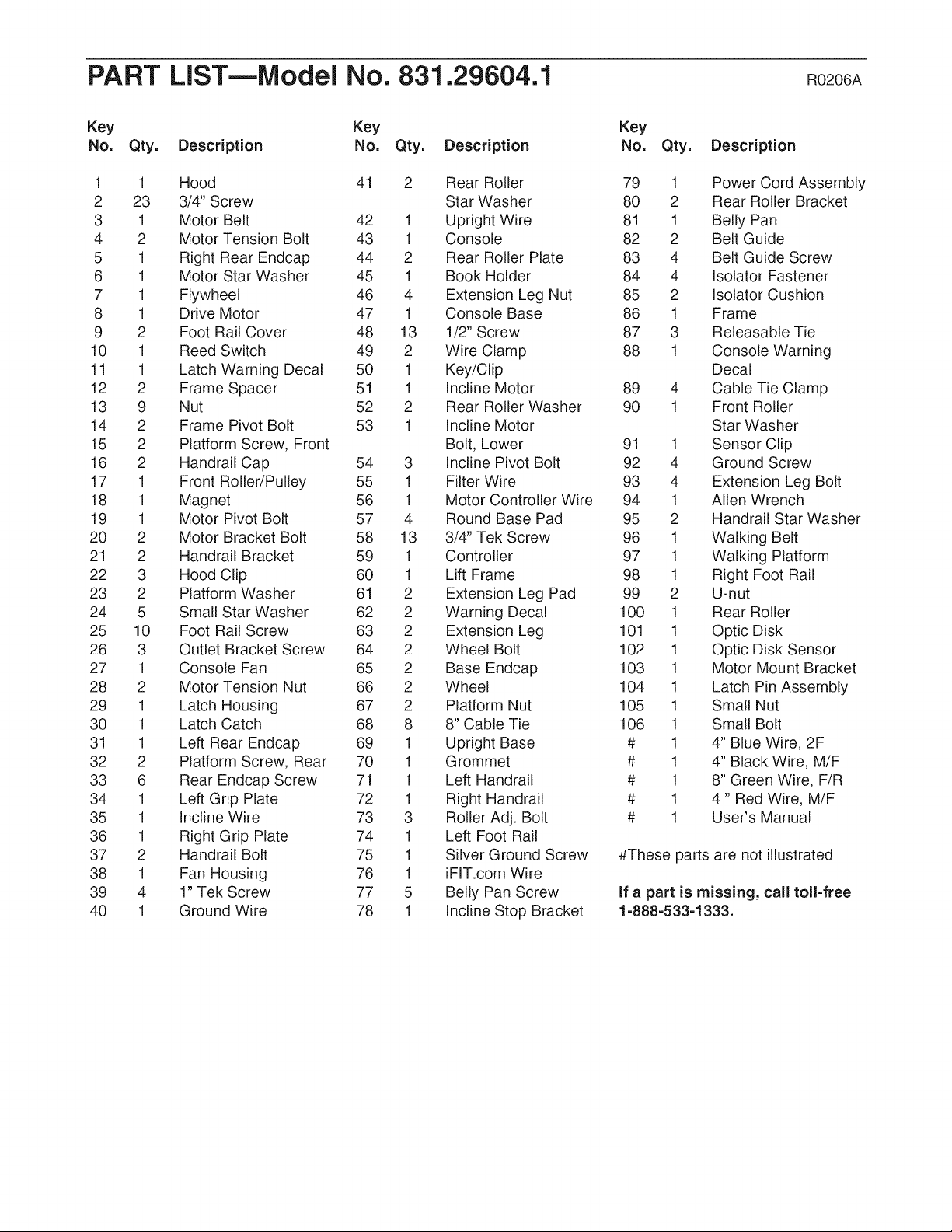
PART LiST--Model No. 831.29604.1 R0206A
Key Key
No. Qty. Description No. Qty. Description
Key
No. Qty. Description
1 1 Hood 41 2 Rear Roller 79 1
2 23 3/4" Screw Star Washer 80 2
3 1 Motor Belt 42 1 Upright Wire 81 1
4 2 Motor Tension Bolt 43 1 Console 82 2
5 1 Right Rear Endcap 44 2 Rear Roller Plate 83 4
6 1 Motor Star Washer 45 1 Book Holder 84 4
7 1 Flywheel 46 4 Extension Leg Nut 85 2
8 1 Drive Motor 47 1 Console Base 86 1
9 2 Foot Rail Cover 48 13 1/2" Screw 87 3
10 1 Reed Switch 49 2 Wire Clamp 88 1
11 1 Latch Warning Decal 50 1 Key/Clip
12 2 Frame Spacer 51 1 Incline Motor 89 4
13 9 Nut 52 2 Rear Roller Washer 90 1
14 2 Frame Pivot Bolt 53 1 Incline Motor
15 2 Platform Screw, Front Bolt, Lower 91 1
16 2 Handrail Cap 54 3 Incline Pivot Bolt 92 4
17 1 Front Roller/Pulley 55 1 Filter Wire 93 4
18 1 Magnet 56 1 Motor Controller Wire 94 1
19 1 Motor Pivot Bolt 57 4 Round Base Pad 95 2
20 2 Motor Bracket Bolt 58 13 3/4" Tek Screw 96 1
21 2 Handrail Bracket 59 1 Controller 97 1
22 3 Hood Clip 60 1 Lift Frame 98 1
23 2 Platform Washer 61 2 Extension Leg Pad 99 2
24 5 Small Star Washer 62 2 Warning Decal 100 1
25 10 Foot Rail Screw 63 2 Extension Leg 101 1
26 3 Outlet Bracket Screw 64 2 Wheel Bolt 102 1
27 1 Console Fan 65 2 Base Endcap 103 1
28 2 Motor Tension Nut 66 2 Wheel 104 1
29 1 Latch Housing 67 2 Platform Nut 105 1
30 1 Latch Catch 68 8 8" Cable Tie 106 1
31 1 Left Rear Endcap 69 1 Upright Base # 1
32 2 Platform Screw, Rear 70 1 Grommet # 1
33 6 Rear Endcap Screw 71 1 Left Handrail # 1
34 1 Left Grip Plate 72 1 Right Handrail # 1
35 1 Incline Wire 73 3 Roller Adj. Bolt # 1
36 1 Right Grip Plate 74 1 Left Foot Rail
37 2 Handrail Bolt 75 1 Silver Ground Screw
38 1 Fan Housing 76 1 iFIT.com Wire
39 4 1" Tek Screw 77 5 Belly Pan Screw
40 1 Ground Wire 78 1 Incline Stop Bracket
Power Cord Assembly
Rear Roller Bracket
Belly Pan
Belt Guide
Belt Guide Screw
Isolator Fastener
Isolator Cushion
Frame
Releasable Tie
Console Warning
Decal
Cable Tie Clamp
Front Roller
Star Washer
Sensor Clip
Ground Screw
Extension Leg Bolt
Allen Wrench
Handrail Star Washer
Walking Belt
Walking Platform
Right Foot Rail
U-nut
Rear Roller
Optic Disk
Optic Disk Sensor
Motor Mount Bracket
Latch Pin Assembly
Small Nut
Small Bolt
4" Blue Wire, 2F
4" Black Wire, M/F
8" Green Wire, F/R
4" Red Wire, M/F
User's Manual
#These parts are not illustrated
If a part is missing, call toll=free
1=888=533=1333.
o
o
0
[]
GO
d
Z
n
0
I
Z
m
ILl
a
0
X
ILl
co /
LO/

Your Home
For repair - in your home - of all major brand appliances, lawn and garden equipment,
or heating and cooling systems, no matter who made it, no matter who sold it!
For the replacement parts, accessories, and user's manuals that you need to do-it-yourself.
For Sears professional installation of home appliances
and items like garage door openers and water heaters.
1-800-4-MY-HOME ® Anytime, day or night
(1-800-469-4663) (U.S.A. and Canada)
www.sears.com www.sears.ca
Our Home
For repair of carry-in products like vacuums, lawn equipment,
and electronics, call or go on-line for the location of your nearest
Sears Parts and Repair Center.
1-800-488-1222 Anytime, day or night (U.S.A. only)
www.sears.com
To purchase a protection agreement (U.S.A.)
or maintenance agreement (Canada) on a product serviced by Sears:
.............................. 1-800-827-6655 (U.S.A.) 1-800-361-6665 (Canada)
__:!ii Para pedir servicio1.888.SU.HOGARsMdereparaci6n a dom(1_888_784_6427)icilio,y para ordenar piezas: _I i_ l
® Registered Trademark / TMTrademark / SMService Mark of Sears, Roebuck and Co.
® Marca Registrada / TMMarca de Fabrica / SMMarca de Servicio de Sears, Roebuck and Co.
FULL 90 DAY WARRANTY
For 90 days from the date of purchase, if failure occurs due to defect in material or workmanship in this
Sears Treadmill Exerciser, contact the nearest Sears Service Center throughout the United States and
Sears will repair or replace the Treadmill Exerciser, free of charge. The drive motor is warranted for five
(5) years from the date of purchase.
This warranty does not apply when the Treadmill Exerciser is used commercially or for rental purposes.
This warranty gives you specific legal rights, and you may also have other rights which vary from state to
state,
Sears, Roebuck and Co., Dept. 817WA, Hoffman Estates, IL 60179
Part No. 235836 R0206A Printed in USA © 2006 Sears, Roebuck and Co.