OWNER MANUAL
MSW9000
SOFTWARE DI GESTIONE
PER IL SISTEMA DXT9000
2
ITALIANO
ITALIANO
ENGLISH
LANGUAGE
3
7
3
ITALIANO
DESCRIZIONE
GENERALE
MSW9000 è un software per sistema DXT9000 che offre le seguenti funzionalità:
1. Interfaccia Web di monitoraggio del sistema.
Collegandosi con un normale browser all’indirizzo IP di una MU stand alone (di default http://192.168.10.86) o di una qualsiasi MU che sia parte
di un sistema multi-master, è possibile accedere ad un’interfaccia di monitoraggio real-time del sistema in termini di:
• eventi di allerta/evacuazione in corso;
• guasti attivi su ciascuna unità, raggruppati per categorie.
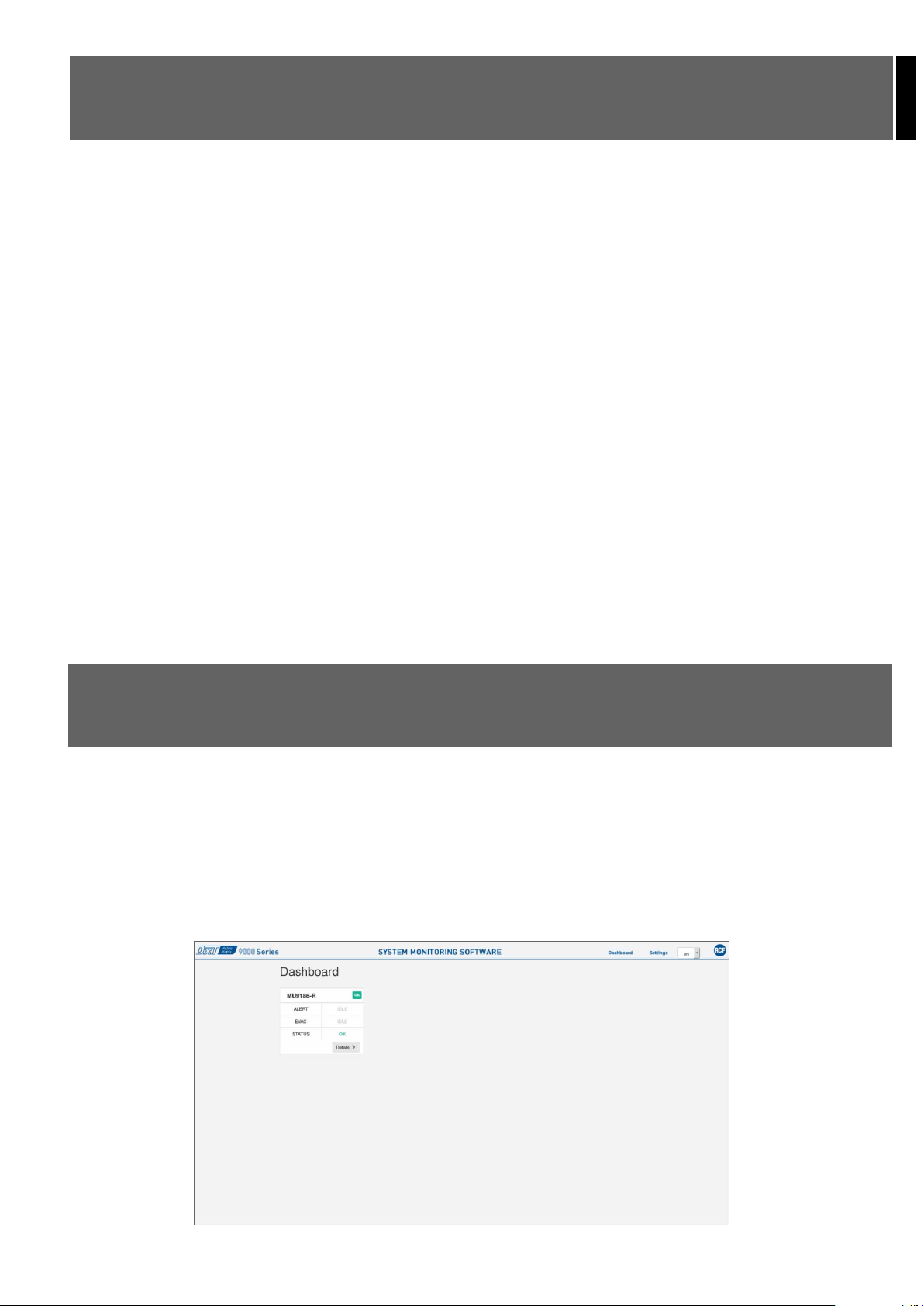
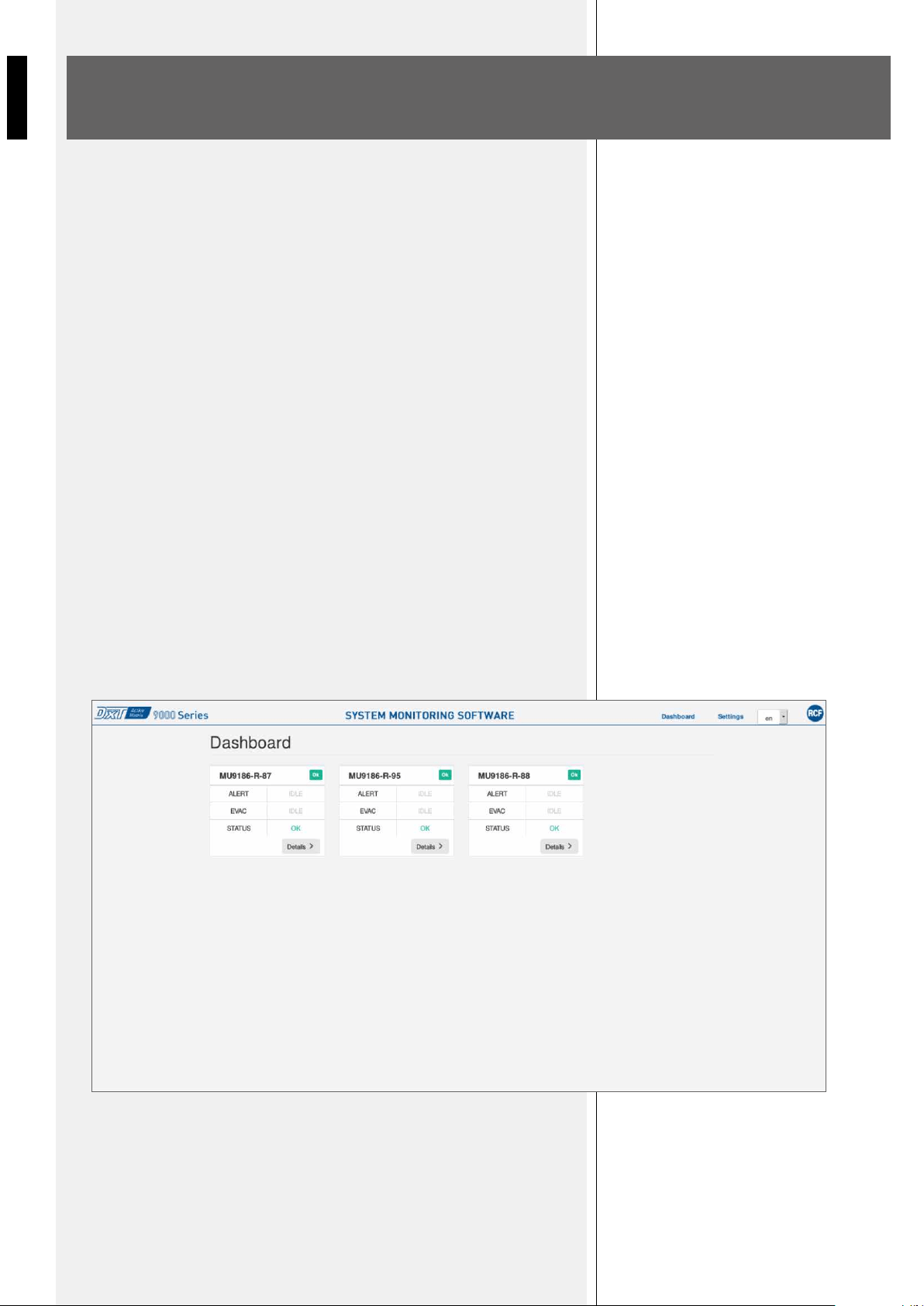
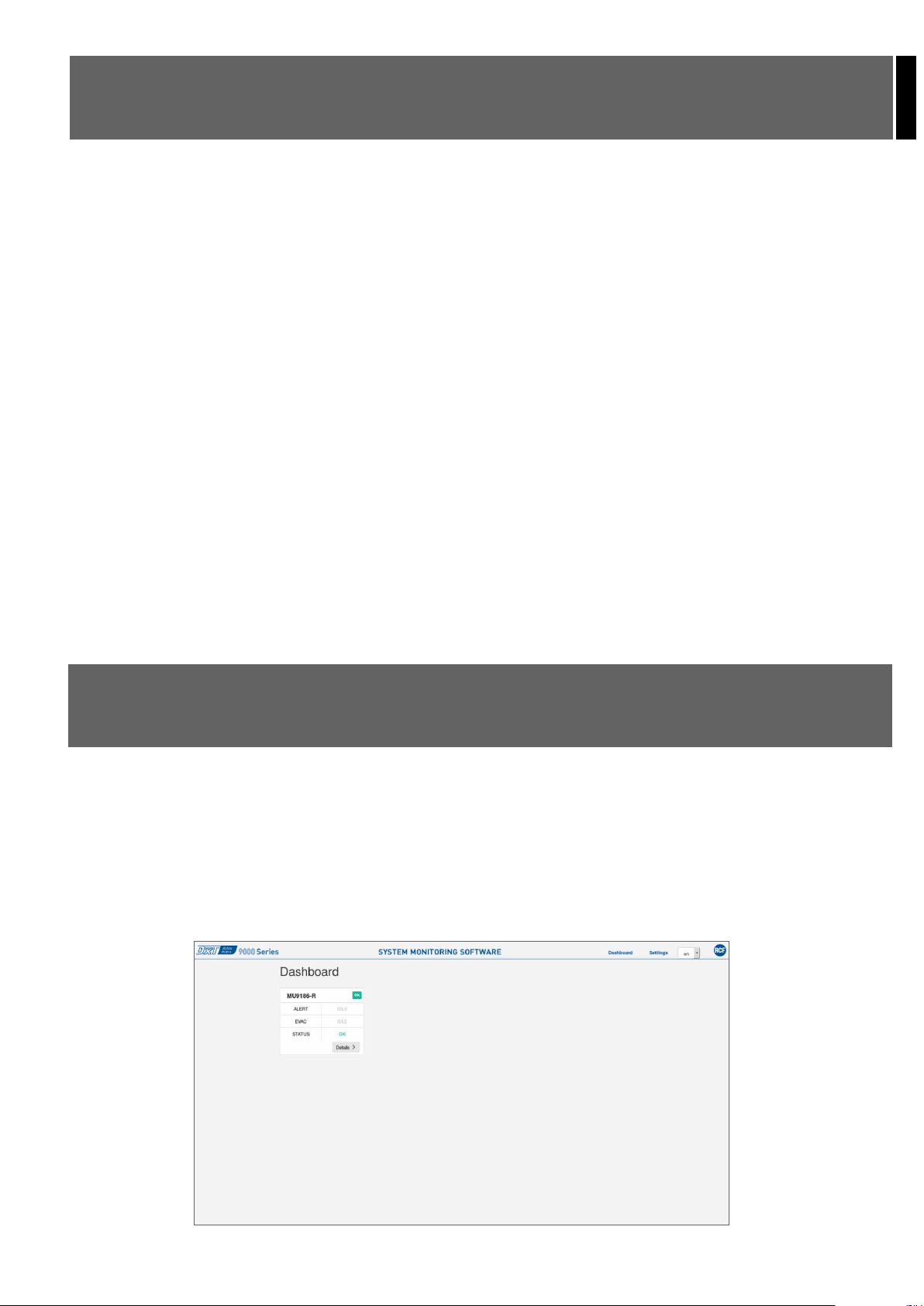
La schermata principale, o Dashboard, presenta in estrema sintesi queste informazioni per ciascuna delle MU presenti nel sistema, ed offre la
possibilità di accedere alla specifica sezione di dettaglio (Details), con tutte le informazioni puntuali di ogni singolo sottosistema. Dalla pagina
Details è anche possibile scaricare il log di eventi e guasti.
2. Gestione delle notifiche via SMS.
Con il pacchetto MSW9000 è possibile fare sì che il sistema invii SMS a uno o più numeri di telefonia mobile appoggiandosi al servizio esterno
Nexmo. Per utilizzare questa funzionalità sono necessari:
• registrazione da parte del cliente di un account Nexmo (https://www.nexmo.com/), e relativa gestione del credito telefonico.
• Ricarica del credito disponibile: nel caso in cui questa operazione non venga effettuata sarà possibile inviare un numero molto ridotto di SMS
alla settimana ad un numero ristretto di contatti.
• Inserimento delle credenziali Nexmo del cliente nella sezione Settings dell’interfaccia Web.
• Inserimento di uno o più numeri telefonici nella sezione Contacts della schermata Settings dell’interfaccia Web.
• Messa a disposizione di un accesso a Internet alla MU, a cura del cliente.
Indirizzo IP della MU e Gateway utilizzato saranno impostabili da configuratore DXT9000CC.
La gestione notifiche è soggetta alla stessa licenza che abilita l’interfaccia Web.
UTILIZZO SU SISTEMI
STAND ALONE
PAGINA DASHBOARD
In un sistema con singola MU (o MX), le funzionalità disponibili sono (previo acquisto della licenza):
• interfaccia Web di monitoraggio real-time del sistema;
• servizio notifiche SMS;
È inoltre disponibile l’interfacciamento con BMS su protocollo HTTP, senza necessità di acquisto della licenza.
Si accede quindi all’interfaccia Web via browser, con indirizzo di default http://192.168.10.86.
Figura 1 - Dashboard
4
ITALIANO
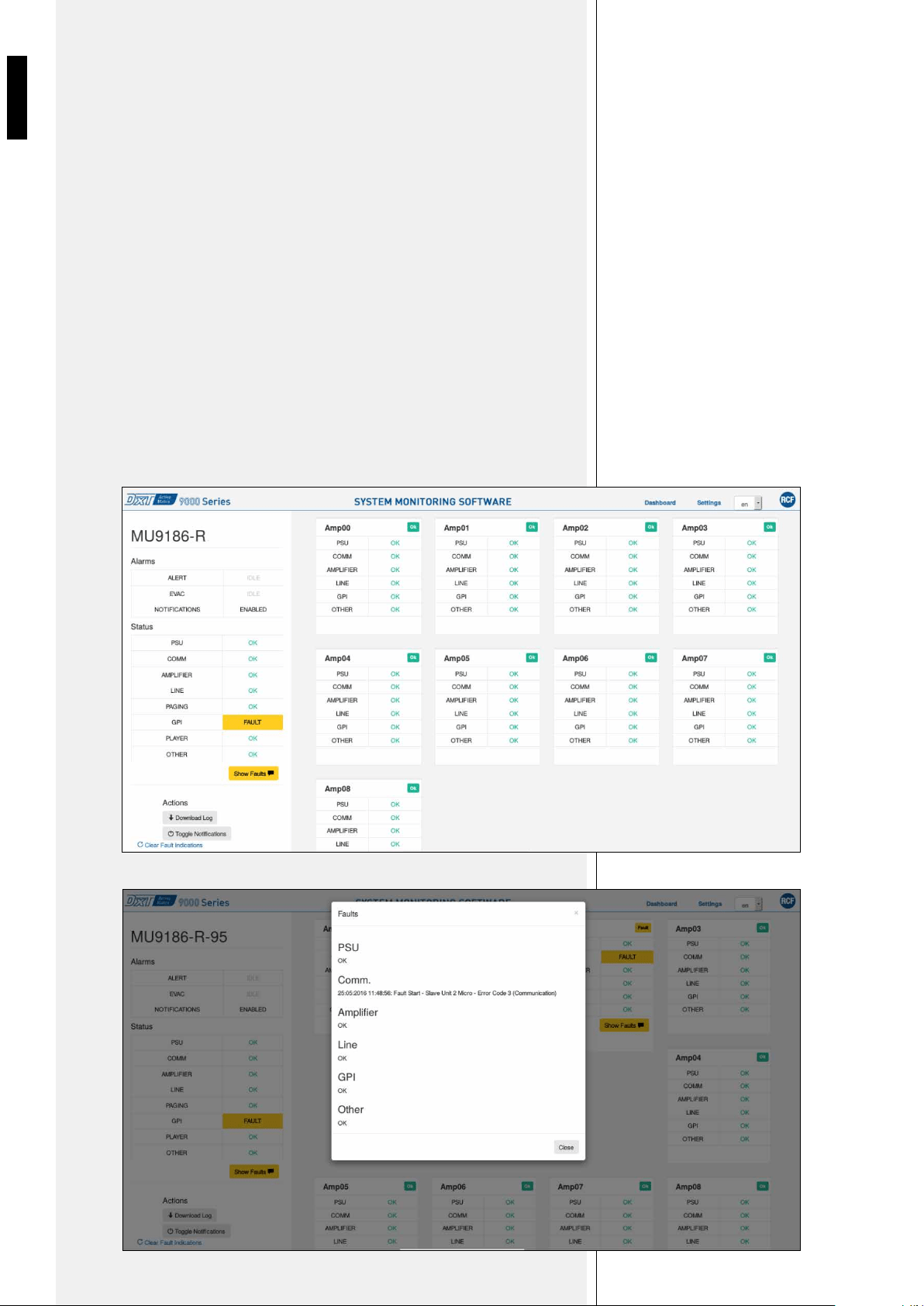
PAGINA DETAILS
Per un sistema con unica unità master le informazioni sono tutte fruibili nella sezione
Details, contenente eventi/guasti raggruppati per unità slave e per categoria.
Sia la Dashboard principale sia la sezione Details si aggiornano in tempo reale a seconda
del verificarsi di guasti o eventi di allerta/evacuazione.
È inoltre possibile cambiare la lingua da inglese a italiano utilizzando il riquadro di selezione
in alto a destra (en/it).
In caso di guasto, è possibile tramite pulsante Show Faults, aprire la relativa popup
descrittiva, che mostra il dettaglio dei guasti in corso.
Il pulsante Download Log permette inoltre di scaricare su PC locale il log del sistema.
La funzione Toggle Notifications abilita/disabilita le notifiche via SMS (se precedentemente
configurate), ed è estremamente utile durante interventi sul campo o calibrazioni in cui
vengono generati appositamente guasti controllati per verifiche specifiche sul sistema.
Clear Fault Indications, infine, permette un reset manuale dei guasti sulla sola
interfaccia Web, funzionalità utile nel caso in cui vi siano problemi sul refresh delle
pagine o di comunicazione. In nessun caso, comunque, Clear Fault Indications agisce
sulle indicazioni di guasto a livello macchina e riportate sul pannello delle unità.
Figura 2 - Details
Figura 3 - Show Faults
5
ITALIANO
PAGINA SETTINGS
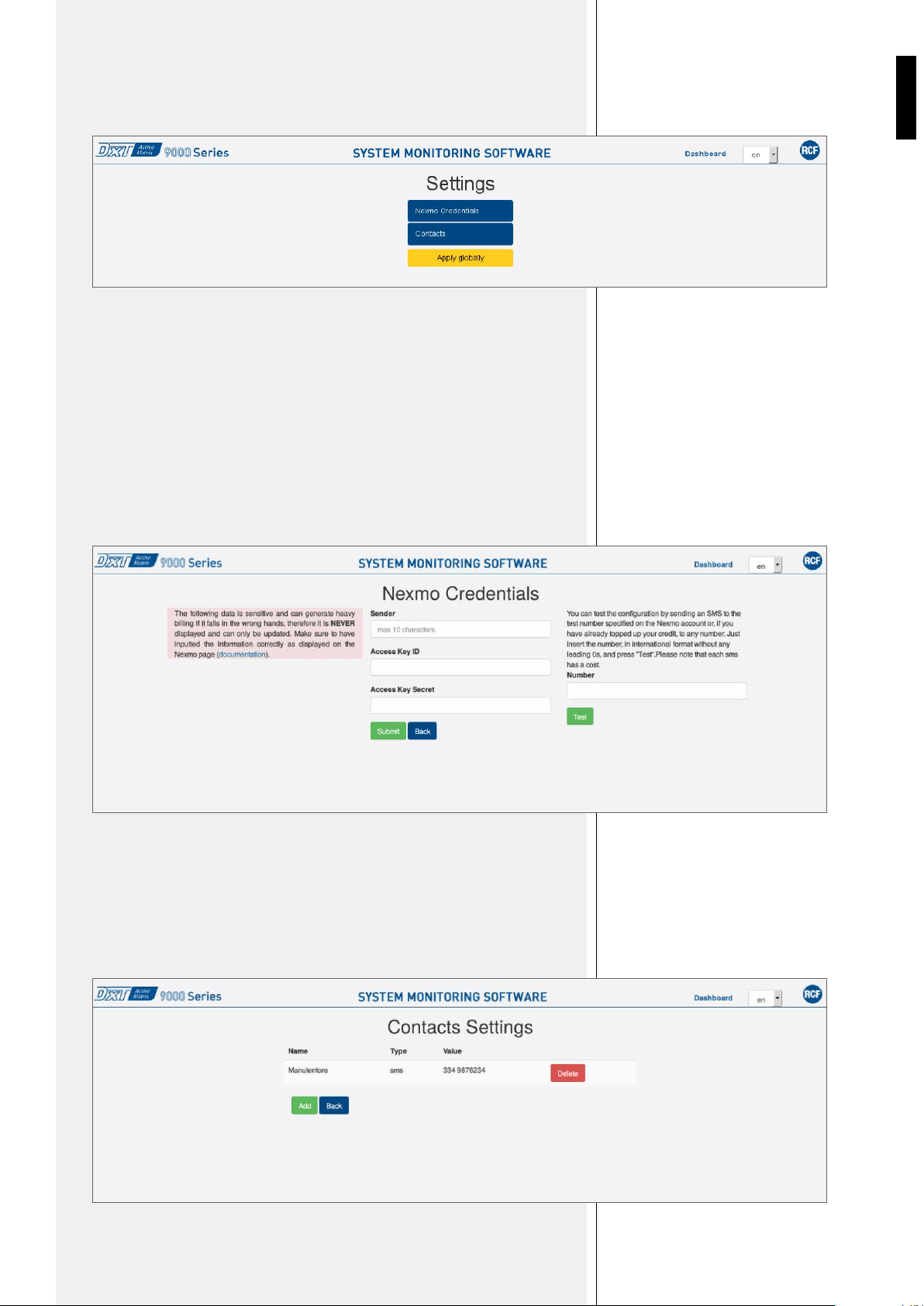
Cliccando su Settings si può accedere alle pagine di impostazione delle credenziali Nexmo
e dei numeri telefonici per la ricezione di SMS.
All’interno delle impostazioni di Nexmo devono essere configurati i campi:
• Sender: nome che comparirà come mittente degli SMS di notifica, univoco per tutti i
sistemi monitorati;
• Access Key ID e Access Key Secret: credenziali fornite in fase di registrazione su
Nexmo.
È inoltre possibile inviare un SMS di test ad un numero a scelta utilizzando la casella
Number e cliccando su Test, operazione disponibile solamente nel caso in cui sia già stato
ricaricato il credito.
Nella schermata Contacts è possibile aggiungere numeri telefonici cliccando su Add e
rimuoverli con Delete.
Il tasto Apply Globally è utilizzato solo in modalità multi-master, vedi capitolo Utilizzo
su sistemi multi-master.
Figura 4 - Settings
Figura 5 – Nexmo Credentials
Figura 6 – Contacts
6
ITALIANO
Ogni MU9186-R è già configurato per l’utilizzo su sistemi multi-master.
La connessione tra i sistemi avviene in modo automatico procedendo nel seguente modo:
• Assegnazione di IP differenti alle MU del sistema, compresi tra 192.168.10.86 e
192.168.10.93 (fino a un massimo di 8 Master Unit);
• Collegamento delle MU sulla stessa LAN.
Non sono richieste ulteriori configurazioni specifiche, al di là della consueta configurazione
dei singoli sottosistemi tramite DXT9000CC. È possibile aggiungere sottosistemi a un
sistema multi-master preesistente semplicemente assegnandogli un IP non utilizzato nello
spazio tra il .86 e il .93 e collegandolo in rete.
Dall’interfaccia Web di uno qualsiasi degli MU facenti parte di un sistema multi-master è
possibile monitorare tutto il sistema.
La configurazione delle notifiche via SMS, se abilitata, viene impostata su tutto il sistema
da interfaccia Web collegandosi a una MU qualsiasi, effettuando la configurazione e
successivamente cliccando su Apply Globally.
L’interfaccia con il BMS è individuale per ogni MU appartenente al sistema multi-master.
UTILIZZO SU SISTEMI
MULTI-MASTER
Figura 7 – Dashboard su sistema multi-master
7
ENGLISH
GENERAL
DESCRIPTION
MSW9000 is a software for DXT9000 system that offers the following features:
1. System monitoring web interface
Connecting thorough a web browser to the IP address of a stand alone Master Unit (default address http://192.168.10.86) or any Master Unit part
of a multi-master system, users can access system’s real-time monitoring interface in terms of:
• Alert/evacuation events in progress;
• Active faults on each unit, grouped by categories.
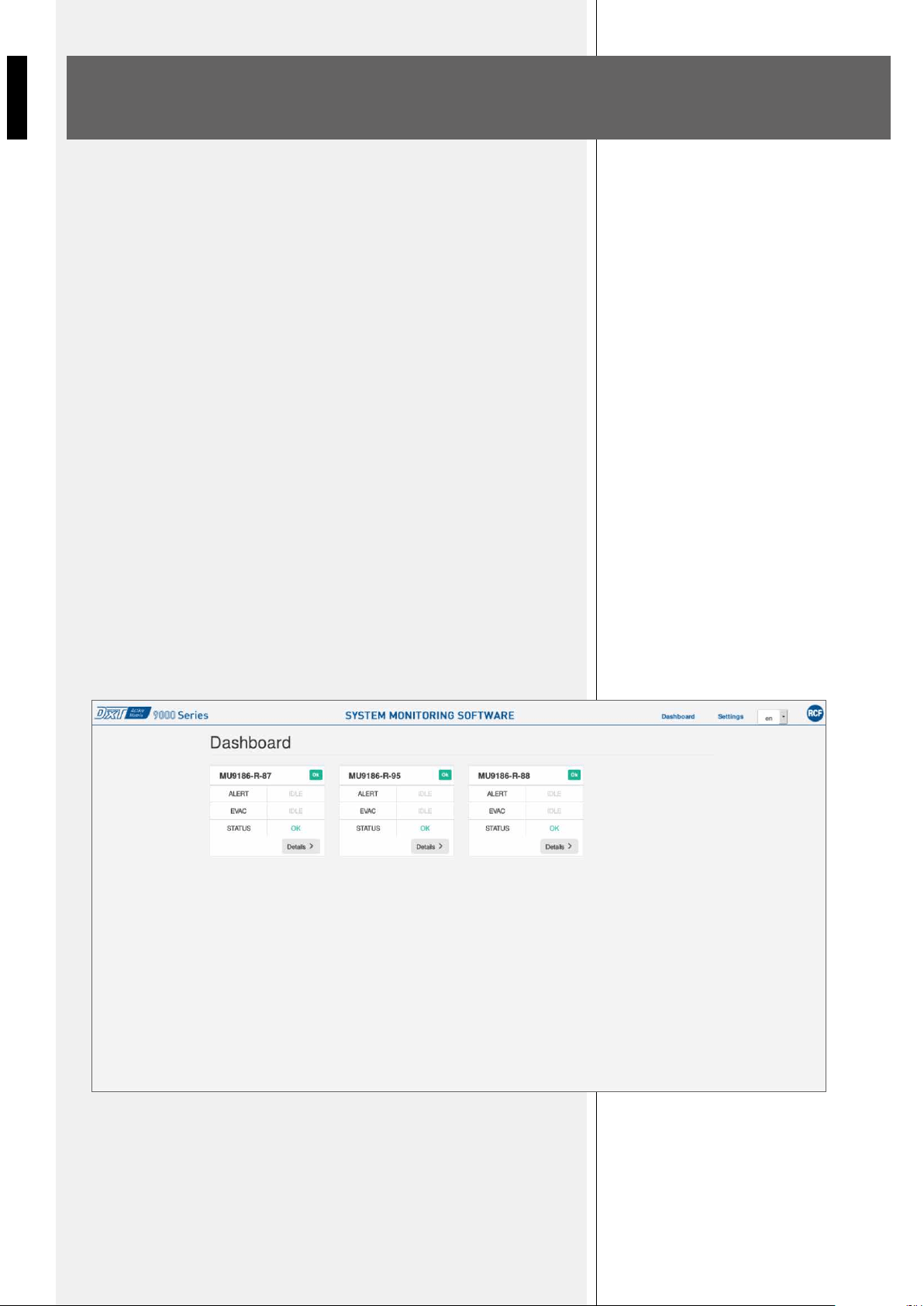
The main screen (Dashboard), presents a synthetic view of each Master Unit in the system, and offers the possibility to access each specific section
(Details), with all sub-system detailed information. From the Details page, users can also download the log of events and faults.
2. SMS notification manager
MSW9000 allows to send SMS with system’s events information to one or more mobile numbers, using the external service Nexmo. To use this
feature users need:
• to create a Nexmo customer account (https://www.nexmo.com/), and manage the related phone credit;
• to charge the phone credit. Without credit, it will be possible to send a limited number of SMS per week to a limited number of contacts;
• to inserting Nexmo credentials in the software Settings section;
• to add one or more phone numbers in the software Contacts section;
• to provide an internet access to the Master Unit.
The Master Unit IP address and Gateway shall be set in the DXT9000CC configurator.
Notification Manager is subject to the same license that enables the web interface.
STAND ALONE
SYSTEMS
DASHBOARD PAGE
In a single Master Unit system, the features available are (upon purchase of the license):
• real-time monitoring system’s web interface;
• SMS notification service.
The interface with BMS over HTTP protocol is also available, without the need to purchase the license.
Users can then access the web interface via browser, using the default address http://192.168.10.86.
Figure 1 - Dashboard
8
ENGLISH
DETAILS PAGE
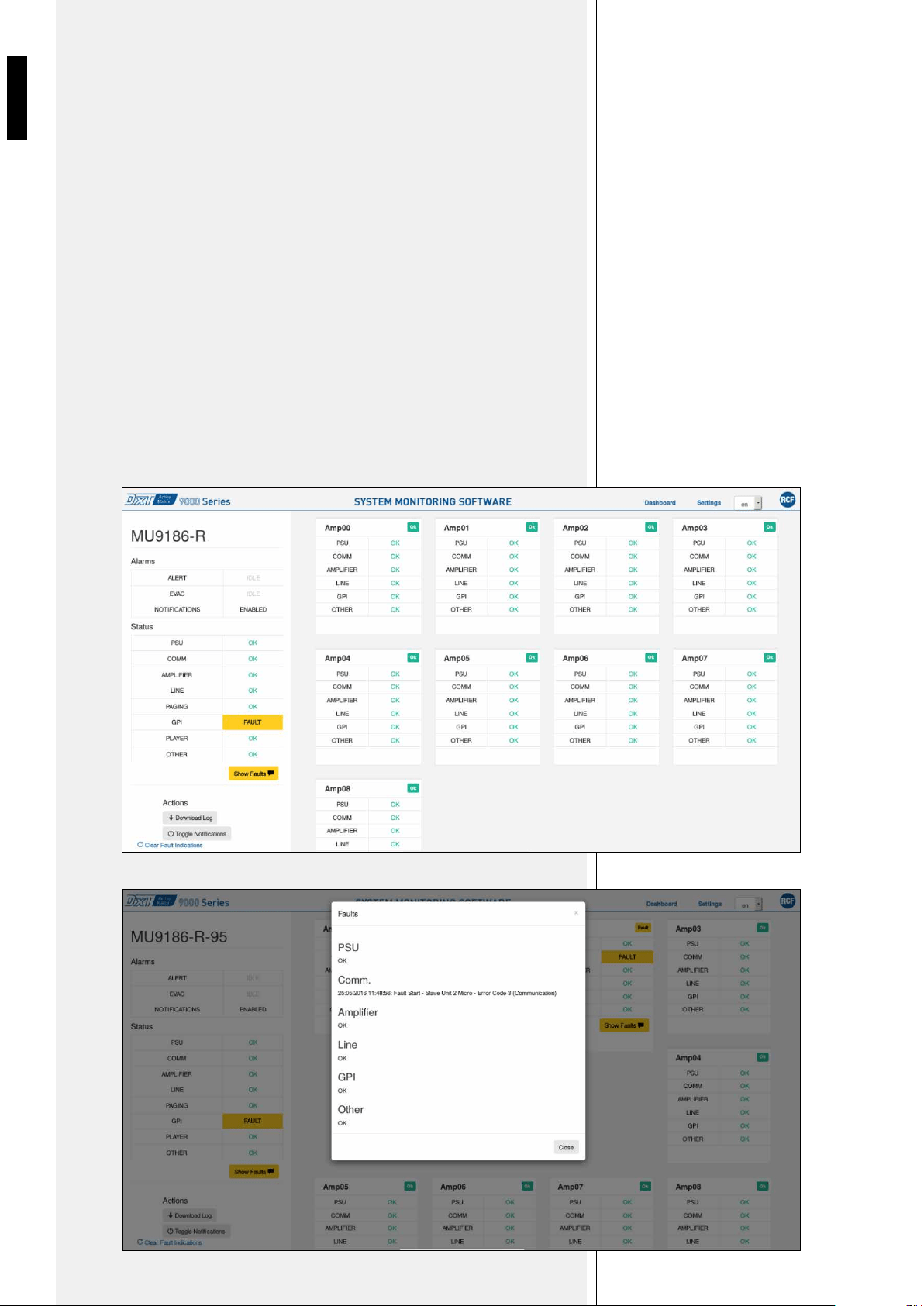
For a single Master Unit system information are accessible in the Details section containing
events/faults grouped by Slave Units and category.
Both the Dashboard and Details pages are updated in real-time depending on the
occurrence of failures or alert/evacuation events.
Users can also change the language from English to Italian using the selection box in the
upper-right page angle (en/it).
In case of failure, it is possible to open a descriptive pop-up via button Show Faults, showing
the detail of the specific fault.
The Download Log button allows to download on a local PC the system log.
The Toggle Notifications function enable/disable SMS notifications (if previously
configured), and is extremely useful during configuration, maintenance or calibration
activities, when failures are intentionally generated to specific check system’s functions.
Clear Fault Indications, finally, allows a manual reset of faults on the web interface,
functionality useful in case of pages refresh or communication problems. However, Clear
Fault Indications do not act on units fault indications reported on local panels.
Figure 2 - Details
Figure 3 - Show Faults
9
ENGLISH
SETTINGS PAGE
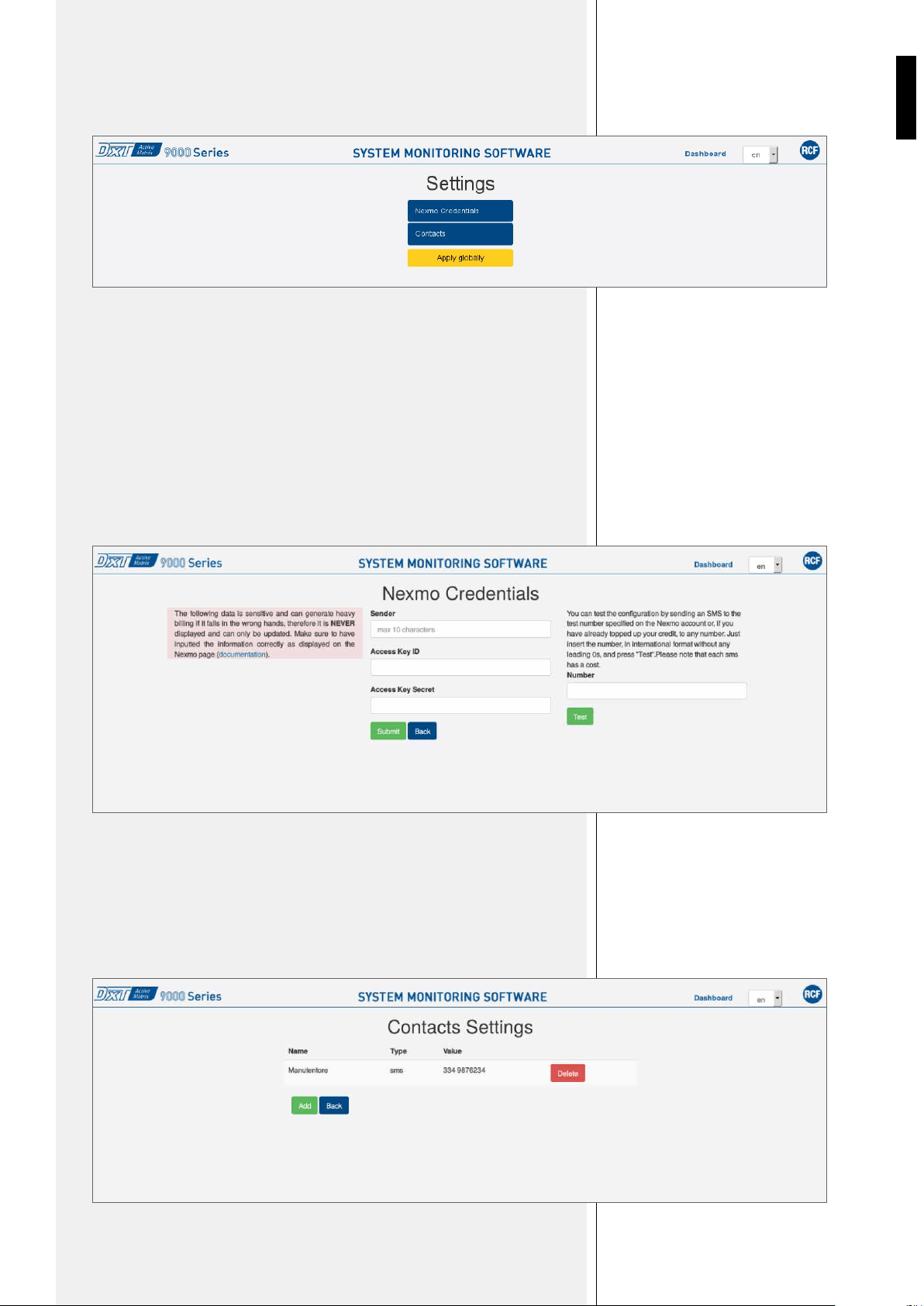
In the Settings page users you can access Nexmo setup pages (credentials and phone
numbers for SMS notification).
Within the Nexmo settings following information shall be configured:
• Sender: name that will appear as SMS notification sender, and it will the same for all
monitored systems;
• Access Key ID and Secret Access Key: credentials provided during customer Nexmo
registration.
It is also possible to send test SMS to a specific number using the Number field and
clicking Test. This operation is available only with credit charged on customer account.
In the Contacts section, users can add and remove phone numbers using Add and Delete
buttons.
The Apply Globally button is used only in multi-master mode (see multi-master systems
paragraph).
Figure 4 - Settings
Figure 5 – Nexmo Credentials
Figure 6 – Contacts
10
ENGLISH
Each MU 9186R is already configured for use on multi-master systems. The connection
between systems is automatically made following the steps below:
• assign different IP to each Master Unit, included in the range 192.168.10.86 and
192.168.10.93 (up to a maximum of 8 Master Unit);
• Connection of all Master Units on the same LAN.
No additional specific configuration is required, besides the usual one of individual
subsystems via DXT9000CC. New subsystems can be added to an existing multi-master
system simply assigning them an IP not used in the range between .86 and .93 and
connecting it in the network.
From the web interface of any of the Master Unit of a multi-master system it is possible to
monitor the whole system.
The configuration of SMS notifications, if enabled, is set for the whole system in the web
interface by connecting to any Master Unit, performing the configuration and then clicking
the Apply Globally button.
The interface with BMS is individual for each Master Unit belonging to the multi-master
system.
MULTI-MASTER
SYSTEMS
Figure 7 – Dashboard on multi-master system

RCF S.p.A.
Via Raffaello Sanzio, 13
42124 Reggio Emilia - Italy
Tel +39 0522 274 411
Fax +39 0522 232 428
e-mail: info@rcf.it
10307562 RevA
