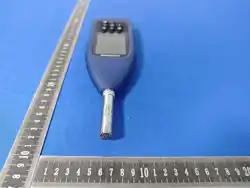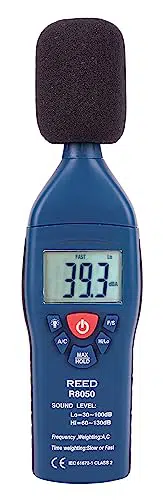
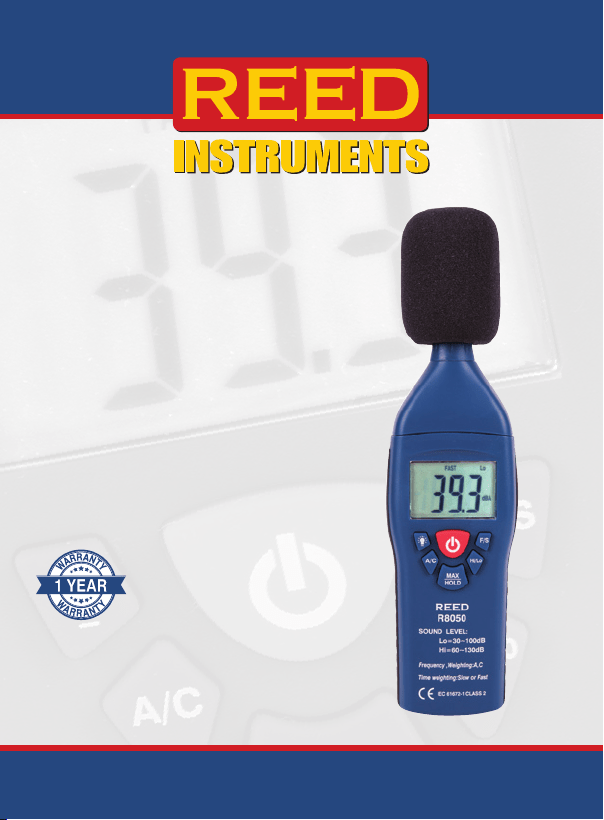
Sound Level
Meter
Instruction
Manual
R8050
REED Instruments
1-877-849-2127 | [email protected] | www.reedinstruments.com

Table of Contents
Introduction ................................................................................................ 2
Product Quality ........................................................................................... 3
Safety ......................................................................................................... 3
Features ...................................................................................................... 3
Included ...................................................................................................... 3
Specications ............................................................................................. 4
Instrument Description ............................................................................... 5
Display Description .................................................................................... 6
Measurement Considerations .................................................................... 6
Operating Instructions ................................................................................ 7
MAX Hold .............................................................................................. 7
Data Hold ............................................................................................... 7
Calibration Procedure ................................................................................. 8
Battery Replacement .................................................................................. 9
Accessories and Replacement Parts ......................................................... 9
Applications ................................................................................................ 9
Product Care ............................................................................................ 10
Product Warranty ..................................................................................... 10
Product Disposal and Recycling .............................................................. 10
Product Support ....................................................................................... 11
Introduction
Thank you for purchasing your REED R8050 Sound Level Meter. Please
read the following instructions carefully before using your instrument. By
following the steps outlined in this manual your meter will provide years of
reliable service.
REED Instruments
1-877-849-2127 | [email protected] | www.reedinstruments.com

3
Product Quality
This product has been manufactured in an ISO 9001 facility and has
been calibrated during the manufacturing process to meet stated product
specications. If a certicate of calibration is required please contact the
nearest authorized REED distributor or authorized Service Center. Please
note an additional fee for this service will apply.
Safety
Never attempt to repair or modify your instrument. Dismantling your
product, other than for the purpose of replacing batteries, may cause
damage that will not be covered under the manufacturer's warranty.
Servicing should only be provided by an authorized service center.
Features
• High accuracy of ±1.4dB meets Type 2 standards
• Dual range measurement (High and Low)
• A & C frequency weighting
• Fast & Slow time weighting
• Easy-to-read backlit LCD display
• Data hold and Max hold functions
• Tripod mount for long-term monitoring
• Low battery indicator and auto shut off
Included
• Microphone Windshield Ball
• Battery
• Carrying Case
REED Instruments
1-877-849-2127 | [email protected] | www.reedinstruments.com

4
Specifications
Measuring Ranges: 30 to 130dB
Low: 30 to 100dB
High: 60 to 130dB
Dynamic Range: 70dB (In Each Range)
Accuracy: ±1.4dB
Resolution: 0.1dB
Response Time: 500mS
Frequency Range: 31.5Hz to 8kHz
Frequency Weighting: A, C
Time Weighting: Fast/Slow (125ms and 1s)
Microphone: 0.5" (12.7mm) Electret Condenser
Display: 4-Digit LCD
Backlit Display: Yes
Data Hold: Yes
Max: Yes
Alarm Indicators: Over (Visual On-Screen)
Auto Shut-off: Yes (After 15 minutes)
Tripod Mountable: Yes
Low Battery Indicator: Yes
Power Supply: 1 x 9V Battery
Battery Life: Approximately 50 hours
Product Certications: CE, IEC 61672-1 Class 2, ANSI S1.4-1983
Operating Temperature: 32 to 104°F (0 to 40°C)
Storage Temperature: 14 to 140°F (-10 to 60°C)
Operating Humidity: 10 to 90%
Dimensions: 8.3 x 2.2 x 1.3" (210 x 55 x 32mm)
Weight: 8.1oz (230g)
REED Instruments
1-877-849-2127 | [email protected] | www.reedinstruments.com
5
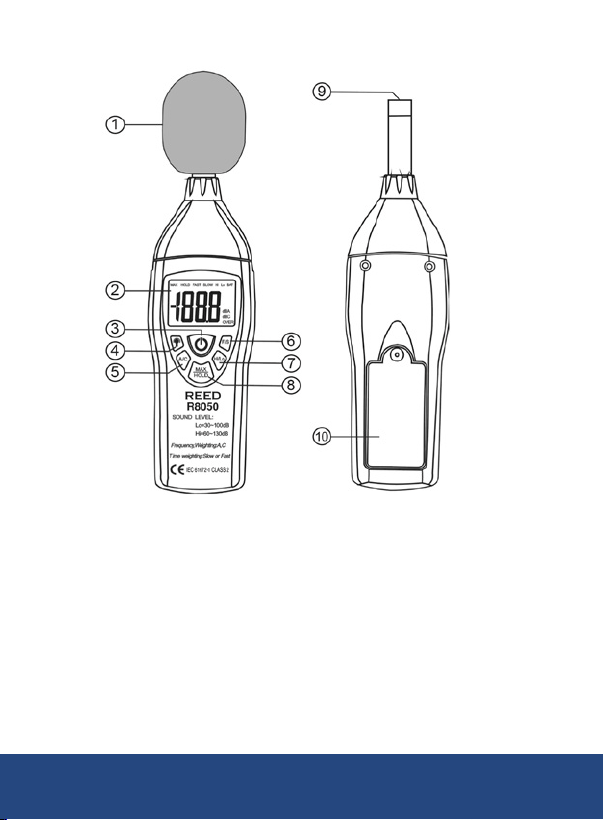
Instrument Description
1. Windscreen
2. Display
3. Power Button
4. Backlight Button
5. Frequency Weighting Button
6. Time Weighting Button
7. Level Range Button
8. MAX/HOLD Button
9. Microphone
10. Battery Cover
REED Instruments
1-877-849-2127 | [email protected] | www.reedinstruments.com
6
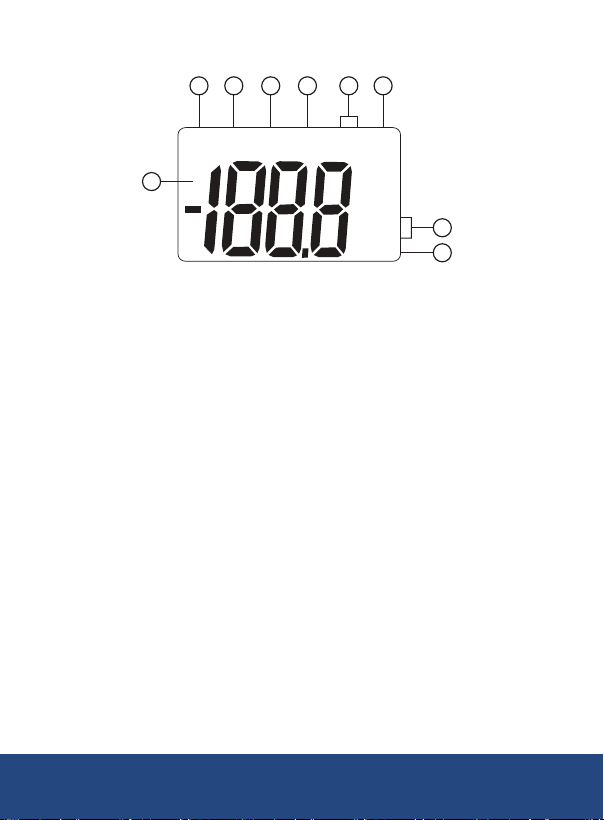
Display Description
1. MAX Value Indicator
2. Data Hold Indicator
3. Fast Weighting Indicator
4. Slow Weighting Indicator
5. Hi/Lo Range Indicator
Measurement Considerations
• Direct contact with strong winds or blowing air on the microphone may
cause measurement errors. These effects can be reduced by using the
included windscreen.
• Calibrate the instrument before operation if the instrument has not been
in use for a long period of time or was last operated under
extreme conditions.
• Do not store or operate the instrument in high temperature and high
humidity environments.
• Keep microphone dry and avoid severe vibrations.
• When not in use, remove the battery and store the instrument in a low
humidity environment.
1
4
2
3 6
5
7
8
dBA
dBC
OVER
MAX HOLD FAST SLOW Hi Lo BAT
9
6. Low Battery Indicator
7. Measured dB Value
8. Frequency Weighting Indicator
9. Over Range Indicator
REED Instruments
1-877-849-2127 | [email protected] | www.reedinstruments.com

7
Operating Instructions
1. Turn the meter on or off by pressing the Power Button.
2. Press the Time Weighting Button to select the desired Response
Time. If the sound source consists of short bursts, set the response
to FAST (125ms). To measure average sound level, select SLOW (1s).
3. Press the Frequency Weighting Button to select the Frequency.
Select "A" Weighting for a general noise sound level, or "C"
Weighting for measuring high level noise. "C" Weighting is a standard
weighting of the audible frequencies commonly used for the
measurement of Peak Sound Pressure Level. If the "C" Weighted
level is much higher than the "A" Weighted level, then there will be a
large amount of low-frequency noise.
4. Press the Hi/Lo button to select the appropriate range. If the noise
environment under test is between 30 to 100dB, use the 'Lo' range. If
the noise environment under test is between 65 and 130dB, use the
'Hi' range. For a noise environment under test that is between 65 and
100dB, either range can be used. If the display ashes the "OVER"
icon, press the range button to adjust the range.
5. Hold the instrument comfortably in one hand (away from your body)
or position it on a tripod for long-term monitoring. Point the
microphone in the direction of the noise to take a measurement.
MAX Hold
Press the MAX/HOLD button to display the Maximum sound level values
recorded during the measurement process. While in this mode, the meter
will only refresh the reading when a higher measurement than the one
currently displayed is detected. Press the MAX/HOLD button again to exit
and resume normal operation.
Data Hold
To freeze a displayed reading during the measurement process, press and
hold the MAX/HOLD button until both the MAX and HOLD icons appear
on the display. To resume normal operation, press and hold the MAX/
HOLD button until the MAX and HOLD icons disappear.
REED Instruments
1-877-849-2127 | [email protected] | www.reedinstruments.com
8
Calibration Procedure
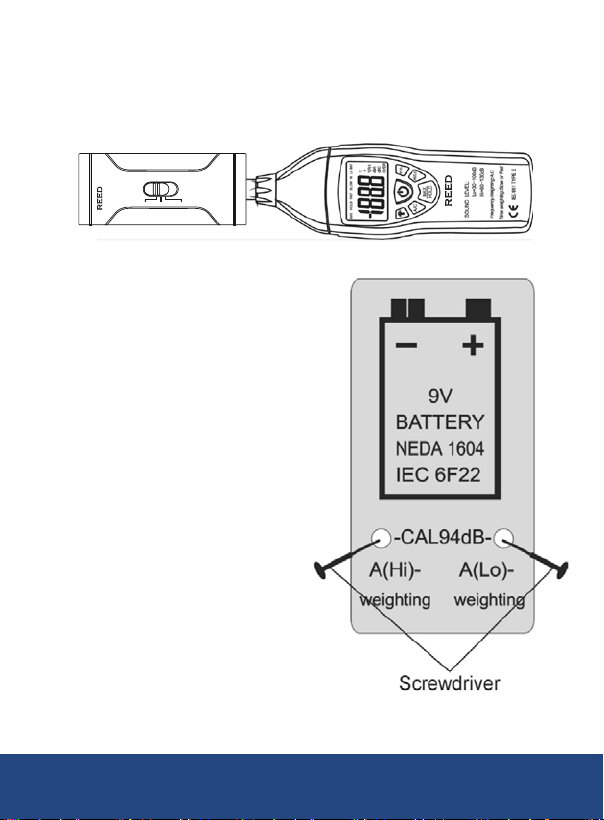
To calibrate the REED R8050, an external calibrator that can provide a
94.0dB signal at 1kHz (REED R8090) and a small screw-driver are
required. Follow the steps below to calibrate the instrument.
1. Open the battery compartment
and locate the two calibration
potentiometers behind the 9V
battery (see diagram).
2. Turn the meter ON
3. Select 'C' weighting mode
4. Select 'FAST' response mode
5. Place the REED R8050 micro-
phone into the calibrator. Set
the calibrator to output 94dB
6. Select the LOW range
7. Adjust the 'C (Lo)'
potentiometer for a display
of 94.0dB
8. Select the HIGH range
9. Adjust the 'C (HI)' potentiometer
for a display of 94.0dB
10. Set the calibrator to output
114dB and verify measurement
OFF
94dB
114dB
(1KHz)
IEC 942 CLASS 2
R8090
Sound Level Calibrator
R8050
REED Instruments
1-877-849-2127 | [email protected] | www.reedinstruments.com

9
Battery Replacement
When the "BAT" icon appears on the LCD, the battery should be replaced.
1. Remove the screw with a phillips screwdriver and open the
battery cover.
2. Replace the 9V battery.
3. Place the battery cover back and tighten the screw.
Accessories and Replacement Parts
• REED-WB Replacement Windshield Ball
• R8090 Sound Level Calibrator
• R1500 Tripod
• CA-05A Soft Carrying Case
• R8888 Deluxe Hard Carrying Case
Don't see your part listed here? For a complete list of all accessories and
replacement parts visit your product page on www.reedinstruments.com.
Applications
• Preventative Maintenance
• Industrial Machinery/Equipment
• Construction Sites
• Ensuring Safe Working Conditions
• Public Venues / Concerts
• Code Enforcement
• Trafc
• Appliance Noise Testing
REED Instruments
1-877-849-2127 | [email protected] | www.reedinstruments.com
10
Product Care
To keep your instrument in good working order we recommend the following:
• Store your product in a clean, dry place.
• Change the battery as needed.
• If your instrument isn't being used for a period of one month or longer
please remove the battery.
• Clean your product and accessories with biodegradable cleaner. Do not
spray the cleaner directly on the instrument. Use on external parts only.
Product Warranty
REED Instruments guarantees this instrument to be free of defects in
material or workmanship for a period of one (1) year from date of shipment.
During the warranty period, REED Instruments will repair or replace, at no
charge, products or parts of a product that proves to be defective because
of improper material or workmanship, under normal use and maintenance.
REED Instruments total liability is limited to repair or replacement of the
product. REED Instruments shall not be liable for damages to goods,
property, or persons due to improper use or through attempts to utilize the
instrument under conditions which exceed the designed capabilities. In
order to begin the warranty service process, please contact us by phone at
1-877-849-2127 or by email at [email protected] to discuss the
claim and determine the appropriate steps to process the warranty.
Product Disposal and Recycling
Please follow local laws and regulations when disposing or recycling your
instrument. Your product contains electronic components and must be
disposed of separately from standard waste products.
REED Instruments
1-877-849-2127 | [email protected] | www.reedinstruments.com

11
Product Support
If you have any questions on your product, please contact your authorized
REED distributor or REED Instruments Customer Service by phone at
1-877-849-2127 or by email at [email protected].
Please visit www.REEDInstruments.com for the most
up-to-date manuals, datasheets, product guides and software.
Product specifications subject to change without notice.
All rights reserved. Any unauthorized copying or reproduction of
this manual is strictly prohibited without prior written permission
from REED Instruments.
REED Instruments
1-877-849-2127 | [email protected] | www.reedinstruments.com
TEST & MEASURE
WITH CONFIDENCE
CHECK OUT OUR LATEST PRODUCTS!
REED Instruments
1-877-849-2127 | [email protected] | www.reedinstruments.com