650 Card oCross-Trawner
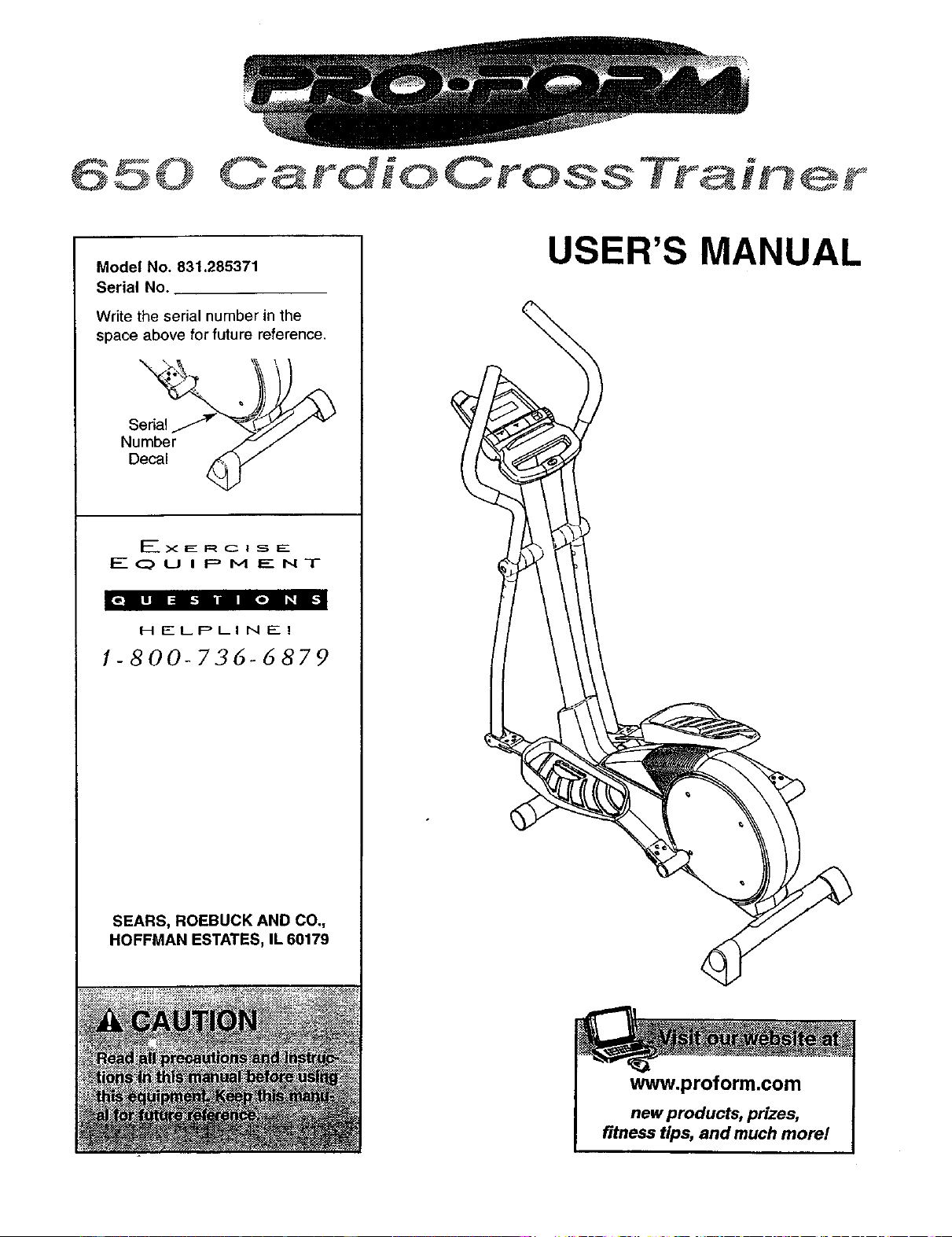
Model No. 831.285371
Serial No.
Write the serial number in the
space above for future reference.
Seri_lJ_'_¢'_/"_
Number _J
Decal _//
_'- X. E. R C:: I S E
EQUIPMENT
HELPLINE!
1-800-736-6879
SEARS, ROEBUCK AND CO,,
HOFFMAN ESTATES, IL 60179
USER'S MANUAL
www.proform.com
new products, prizes,
fitness tips, and much morel
650
OardioOross Trair er
TABLE OF CONTENTS
IMPORTANT PRECAUTIONS ............................................................. 3
BEFORE YOU BEGIN ................................................................... 4
ASSEMBLY ........................................................................... 5
HOW TO USE THE ELLIPTICAL CROSSTRAINER ............................................. 9
MAINTENANCE AND TROUBLESHOOTING ................................................. 12
CONDITIONING GUIDELINES ............................................................ 13
PART LIST ........................................................................... 14
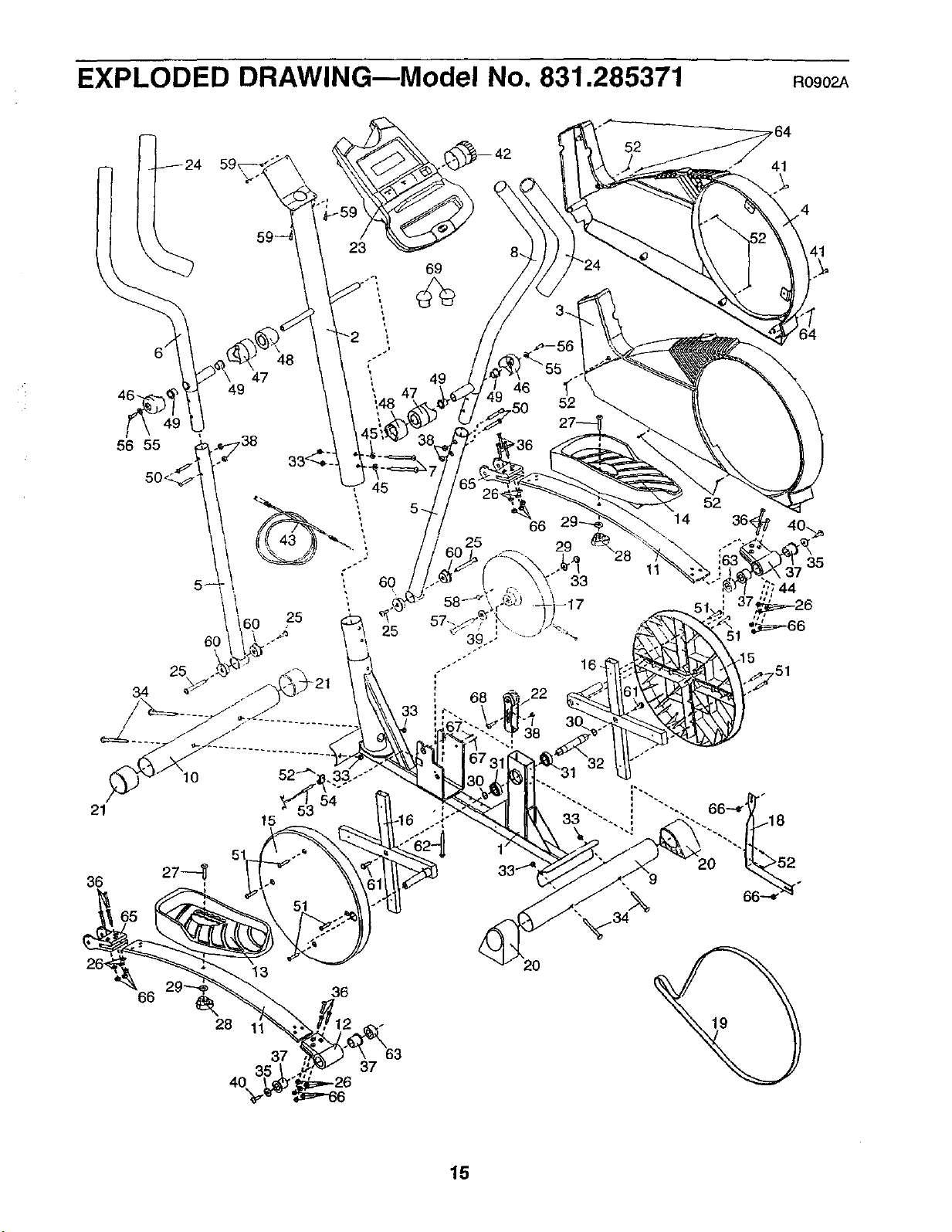
EXPLODED DRAWING ................................................................. 15
HOW TO ORDER REPLACEMENT PARTS ........................................... Back Cover
FULL 90 DAY WARRANTY ....................................................... Back Cover
2
i i i i i r, I , ,I r r II r
IMPORTANT PRECAUTIONS
WARNING:Tor_ueethe risk of serious injury, read the following important'prsoau-
tions before using the elliptical crosstrainer.
1. Read all instructions in this manual before
using the elliptical crosstrainer.
2. It is the responsibility of the owner to ensure
that all users of the elliptical crosstrainer
are adequately informed of all precautions,
3,
Place the elliptical crosstrainer on a level
surface, with a mat beneath it to protect the
floor or carpet. Keep the elliptical crosstrain°
er indoors, away from moisture and dust.
4. Inspect and properly tighten all parts regu-
larly. Replace any worn parts immediately.
5. Keep children under 12 and pets away from
the elliptical crosstrainer at all times.
6. The elliptical crosstrainer should not be used
by persons weighing more than 250 pounds.
7. Wear appropriate exercise clothing when
using the elliptical crosstrainer. Always wear
athletic shoes for foot protection.
8. Always hold the console handgrlp or the han-
dlebars whe.n mqunting, dis.mounting or
us!ng the elliptical crosstrainer.
9, The heart rate sensor is not a medical
device. Various factors may affect the accu-
racy of heart rate readings,. The heart rate
sensor is intended only as ,an exere|se atd in
determining ,l_eartrate trends in general.
10. Keep your back straight when using the ellip-
tical crosstrainer; do not arch your back,
11. If yot_feel pain or dizziness"at any time
while exercisi,ng, stop immediately and
begin cooling down.
12. When you stop exercising, allow the pedals
to slowly come to a stop.
13. The elliptical crosstrainer is intended for
home use only. Do not use the elliptical
crosstrainer in a commercial, rental, or insti-
tutional setting.
WARNING: Before beginning this or any exercise program, consult your physician.
This is especially important for persons over the age of 35 or persons with pre-existing health prob-
lems. Read all instructions before using..SEARB assumes no responsibility for personal injury or
property damage sustained by or through the use of this product.
3
BEFORE YOU BEGIN
Congratulationsfor selecting the new PROFORM ®
650 CARDIO CROSSTRAINER. The PROFORM e 650
is an incredibly smooth exerciser that moves your feet
in a natural elliptical path, minimizing the impact on
your knees and ankles. And the unique PROFORM ®
650 features adjustable resistance and a state-of-the-
art console to help you get the most from your exer-
cise. Welcome to a whole new world of natural, ellipti-
cal-motion exercise from PROFORM.
For your benefit, read this manual carefully before
you use the PROFORM ®650. If you have questions
after reading the manual, please call our toll-free
HELPLINE at 1-800-736-6879, Monday through
Saturday, 7 a.m. until 7 p.m. Central Time (excluding
holidays). To help us assist you, please note the prod-
uct model number and serial number before calling.
The model number is 831.285371. The sedal number
can be found on a decal attached to the elliptical
crosstrainer (see the front cover of this manual for the
location of the decal).
Before reading further, please familiarize yourself with
the parts that are labeled in the drawing below.
Water Bottle Holder*--
Bookrack
Console Handgrip
Handlebar
Resistance Knob
Console
Heart Rate Sensor
FRONT
Pedal
BACK
Pedal Spring
Pedal Disk
LEFT SIDE
*No water bottle
is included
4
ASSEMBLY
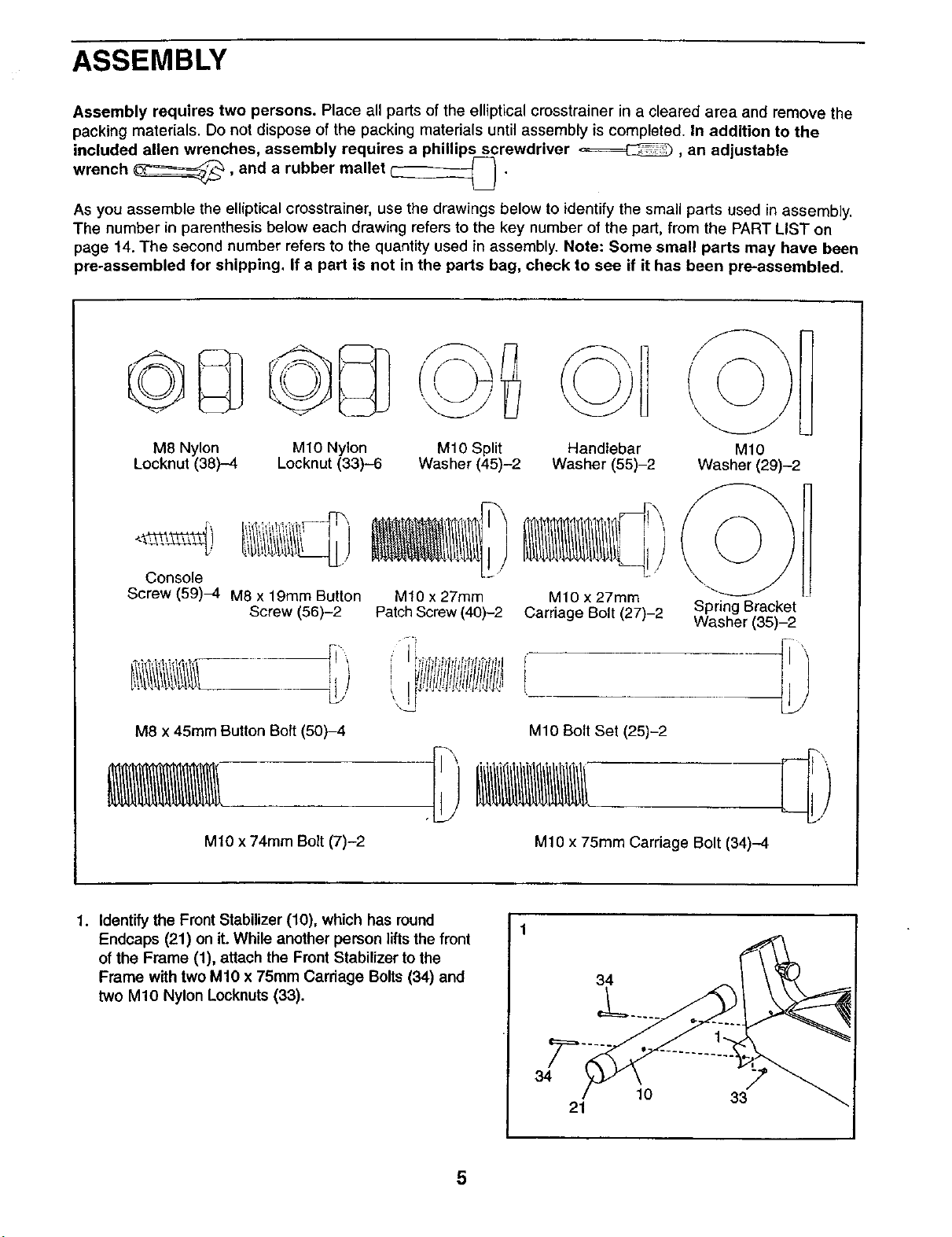
Assembly requires two persons. Place all parts of the elliptical crosstrainer in a cleared area and remove the
packing materials. Do not dispose of the packing materials until assembly is completed. In addition to the
included allen wrenches, assembly requires a phillips screwdriver _, an adjustable
wrench _, and a rubber mallet _ .
As you assemble the elliptical crosstrainer, use the drawings below to identify the small parts used in assembly.
The number in parenthesis below each drawing refers to the key number of the part, from the PART LIST on
page 14. The second number refers to the quantity used in assembly. Note: Some small parts may have been
pre-assembled for shipping. If a part is not in the parts bag, check to see if it has been pre-assembled.
M8 Nylon
Locknut (38)-4
M10 Nylon
Locknut (33)--6
M10 Split
Washer (45)-2
Handlebar
Washer (55)-2
M10
Washer (29)-2
Console
Screw (59)4 M8 x 19mm Button
Screw (56)-2
M10 x 27mm M10 x 27mm \"_
Patch Screw (40)-2 Carriage Bolt (27)-2 Spring Bracket
Washer (35)-2
f _ f I t jl
, J't
M8 x 45ram Button Bolt (50)-4 M10 Bolt Set (25)-2
M10 x 74mm Bolt (7)-2
M10 x 75mm Carriage Bolt (34)-4
1. Identify the Front Stabilizer (10), which has round
Endcaps (21) on it. While another person liftsthe front
of the Frame (1), attach the Front Stabilizer to the
Frame with two M10 x 75mm Carriage Bolts (34) and
two M10 Nylon Locknuts(33).
34
34
21
10 33
5
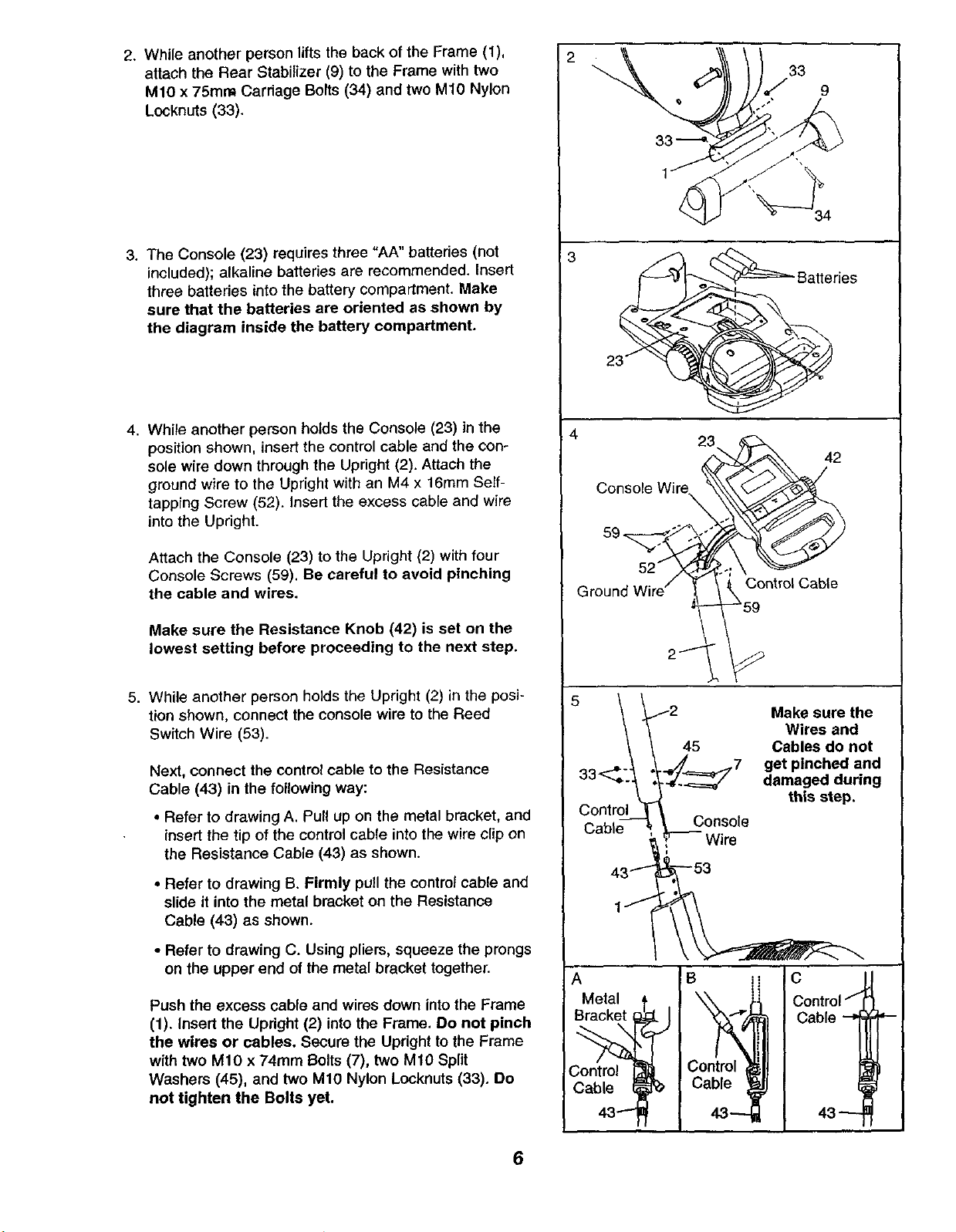
2. While another person lifts the back of the Frame (1),
attach the Rear Stabilizer (9) to the Frame with two
M10 x 75ram Carriage Bolts (34) and two M10 Nylon
Locknuts (33).
3. The Console (23) requires three "AA" batteries (not
included); alkaline batteries are recommended. Insert
three battedes into the battery compartment. Make
sure that the batteries are oriented as shown by
the diagram inside the battery compartment.
4. While another person holds the Console (23) in the
position shown, insert the control cable and the con-
sole wire down through the Upright (2). Attach the
ground wire to the Upright with an M4 x 16mm Self-
tapping Screw (52). Insert the excess cable and wire
into the Upright.
Attach the Console (23) to the Upright (2) with four
Console Screws (59). Be careful to avoid pinching
the cable and wires.
Make sure the Resistance Knob (42) is set on the
lowest setting before proceeding to the next step.
5. While another person holds the Upright (2) in the posi-
tion shown, connect the console wire to the Reed
Switch Wire (53).
Next, connect the control cable to the Resistance
Cable (43) in the following way:
• Refer to drawing A. Pull up on the metal bracket, and
insert the tip of the control cable into the wire clip on
the Resistance Cable (43) as shown.
• Refer to drawing B. Firmly pull the control cable and
slide it into the metal bracket on the Resistance
Cable (43) as shown.
• Refer to drawing C. Using pliers, squeeze the prongs
on the upper end of the metal bracket together.
Push the excess cable and wires down into the Frame
(1). Insert the Updght (2) intothe Frame. Do not pinch
the wires or cables. Secure the Upright to the Frame
with two M10 x 74ram Bolts (7), two M10 Split
Washers (45), and two M10 Nylon Locknuts (33)° Do
not tighten the Bolts yet.
2
;3
_'- Battedes
4
23 42
Console Wire._ _
Ground W,rel __.____°ntr°' Cable
5 Makesurethe
_ Wires and
\ \ 45 Cables do not
._,_..._._ .__,__._x7 get pinched and
"_'_'_-_ ,_/~_=_/ damaged during
,._ this step.
Control _
L;a--b e- -_ ' _C°ns°le-
' Wire
43 ,--t" 3
A B i
Metal t t_,
Bracket _ I
!Co/ro' Control,
Cable _ _b Cable
43---ff
Control/_
Cable --=] ='--
6
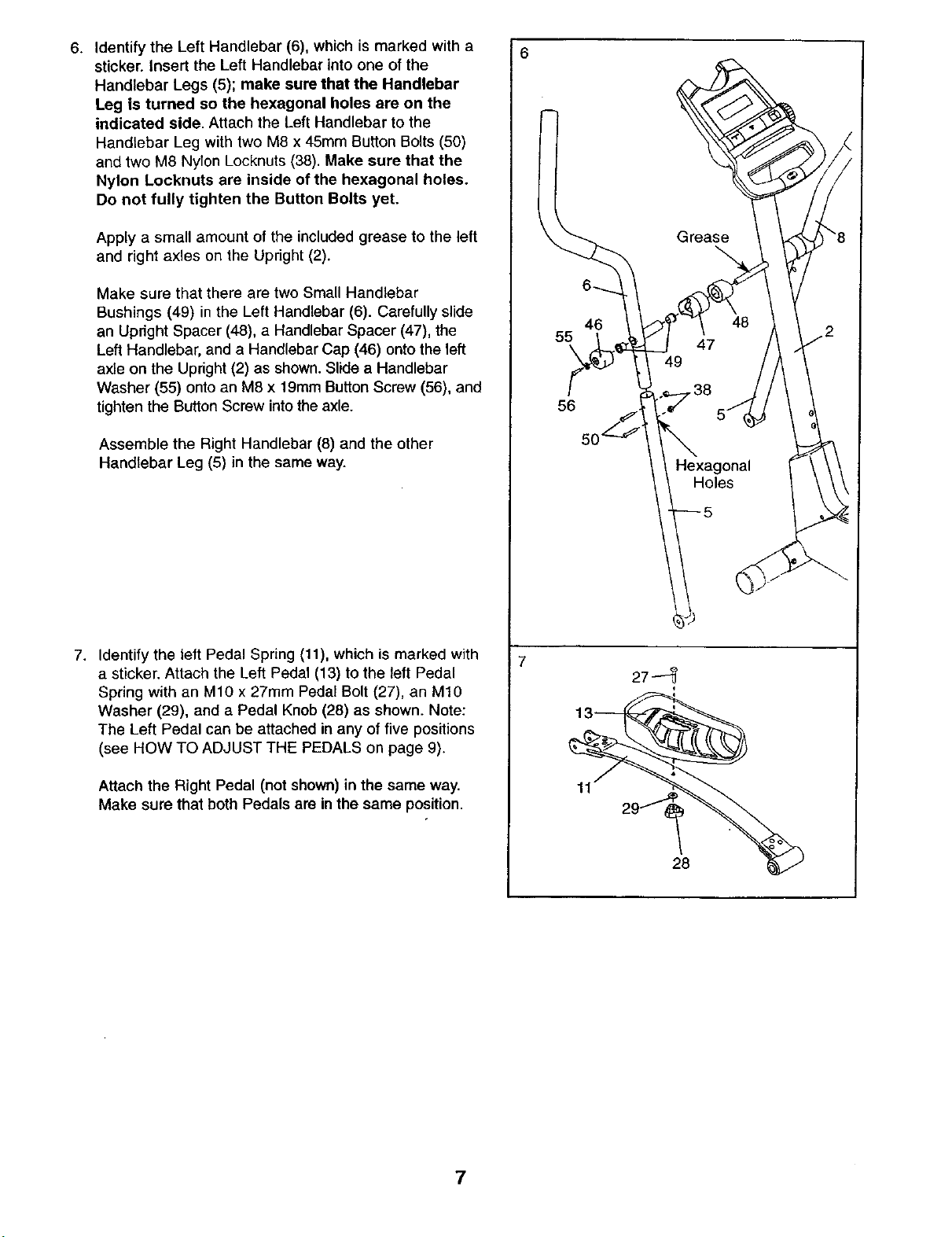
6. Identify the Left Handlebar (6), which is marked with a
sticker, insert the Left Handlebar into one of the
Handlebar Legs (5); make sure that the Handlebar
Leg is turned so the hexagonal holes are on the
indicated side. Attach the Left Handlebar to the
Handlebar Leg with two M8 x 45mm Button Bolts (50)
and two M6 Nylon Locknuts(38). Make sure that the
Nylon Locknuts are inside of the hexagonal holes.
Do not fully tighten the Button Bolts yet.
Apply a small amount of the included grease to the left
and right axles on the Upright (2).
Make sure that there are two Small Handlebar
Bushings (49) in the Left Handlebar (6). Carefully slide
an Upright Spacer (48), a Handlebar Spacer (47), the
Left Handlebar, and a Handlebar Cap (46) onto the left
axle on the Upright (2) as shown. Slide a Handlebar
Washer (55) onto an M8 x 19mm Button Screw (56), and
tighten the Button Screw into the axle.
Assemble the Right Handlebar (8) and the other
Handlebar Leg (5) in the same way.
7. Identify the left Pedal Spring (11), which is marked with
a sticker. Attach the Left Pedal (13) to the left Pedal
Spring with an M10 x 27mm Pedal Bolt (27), an M1O
Washer (29), and a Pedal Knob (28) as shown. Note:
The Left Pedal can be attached in any of five positions
(see HOW TO ADJUST THE PEDALS on page 9).
Attach the Right Pedal (not shown) in the same way.
Make sure that both Pedals are inthe same position.
6
46
55
\
56
27--
28
7
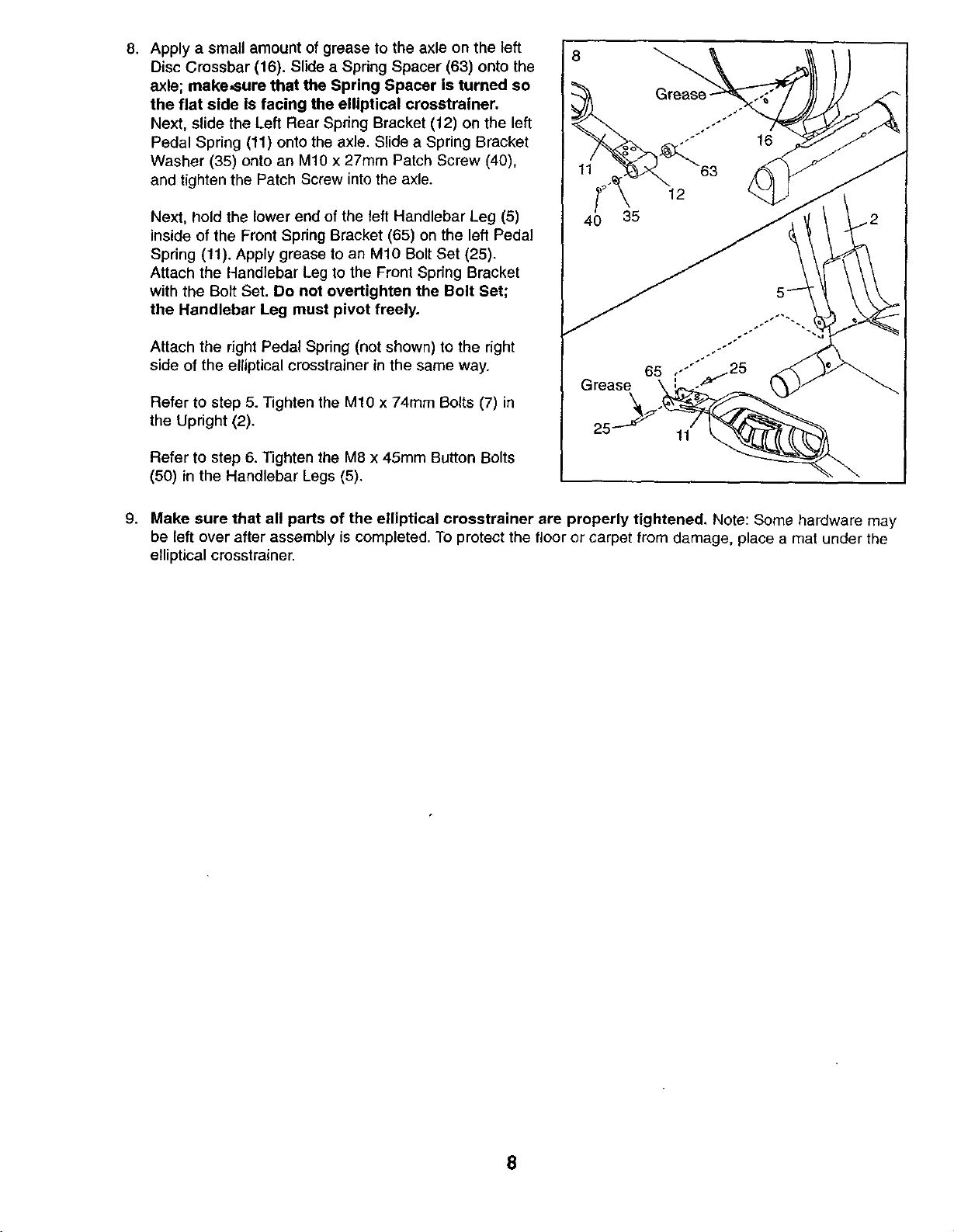
8. Apply a small amount of grease to the axle on the left
Disc Crossbar (16). Slide a Spdng Spacer (63) onto the
axle; make,sure that the Spring Spacer is turned so
the flat side Is facing the elliptical crosstrainer.
Next, slide the Left Rear Spring Bracket (12) on the left
Pedal Spring (11) onto the axle. Slide a Spring Bracket
Washer (35) onto an M10 x 27mm Patch Screw (40),
and tighten the Patch Screw into the axle.
Next, hold the lower end of the left Handlebar Leg (5)
inside of the Front Spring Bracket (65) on the left Pedal
Spring (11). Apply grease to an M10 Bolt Set (25).
Attach the Handlebar Leg to the Front Spring Bracket
with the Bolt Set. Do not overtighten the Bolt Set;
the Handlebar Leg must pivot freely.
Attach the right Pedal Spring (not shown) to the right
side of the elliptical crosstrainer in the same way.
Refer to step 5. Tighten the M10 x 74ram Bolts (7) in
the Upright (2).
Refer to step 6. Tighten the M8 x 45mm Button Bolts
(50) in the Handlebar Legs (5),
8
40 35
Grease
Grease
11
9. Make sure that all parts of the elliptical crosstrainer are properly tightened. Note: Some hardware may
be left over after assembly is completed. To protect the floor or carpet from damage, place a mat under the
elliptical crosstrainer.
8
HOW TO USE THE ELLIPTICAL CROSSTRAINER
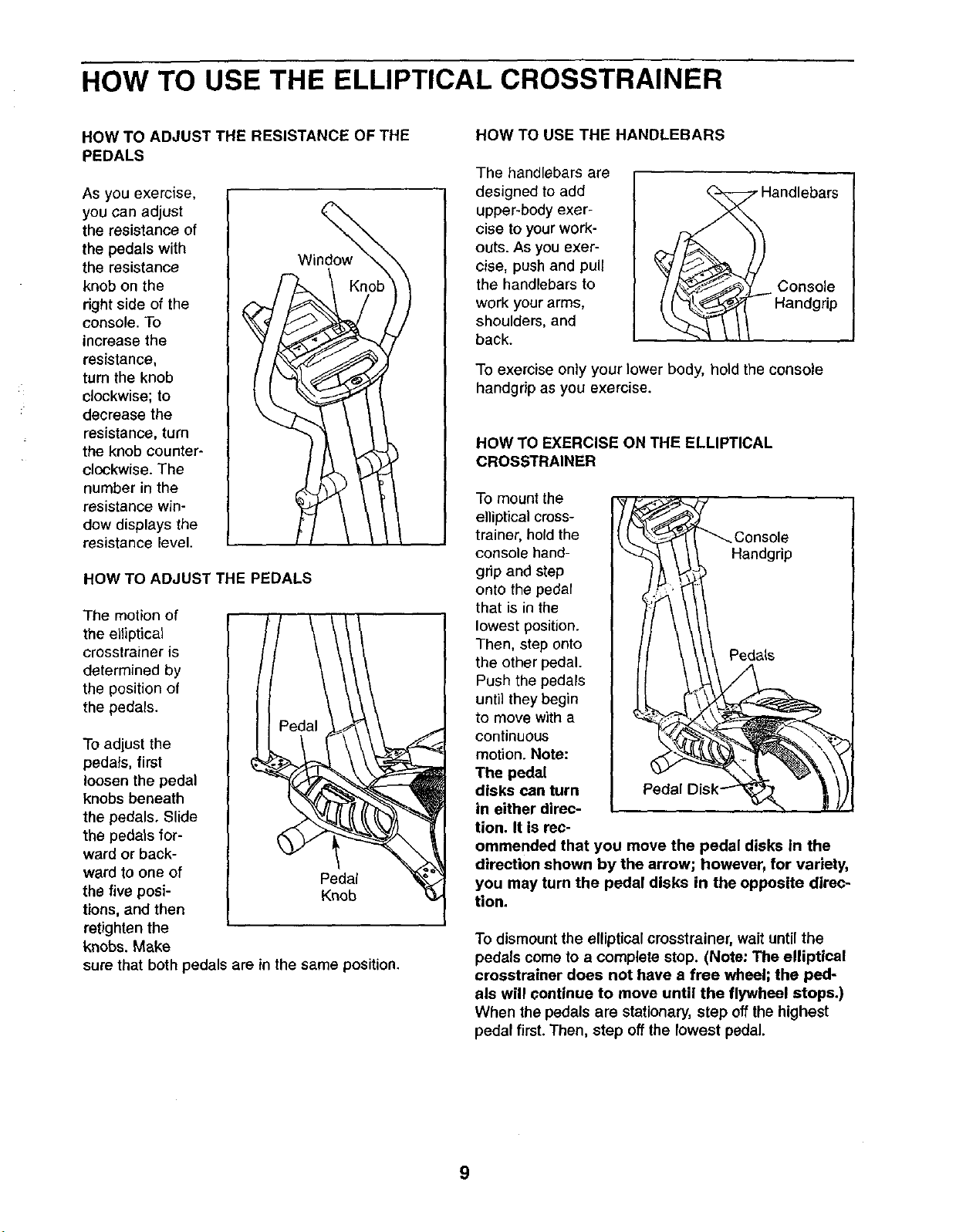
HOW TO ADJUST THE RESISTANCE OF THE
PEDALS
As you exercise,
you can adjust
the resistance of
the pedals with
the resistance
knob on the
right side of the
console. To
increase the
resistance,
tum the knob
clockwise; to
decrease the
resistance, turn
the knob counter-
clockwise. The
number in the
resistance win-
dow displays the
resistance level.
Window
HOW TO ADJUST THE PEDALS
The motion of
the elliptical
crosstrainer is
determined by
the position of
the pedals.
To adjust the
pedals, first
loosen the pedal
knobs beneath
the pedals. Slide
the pedals for-
ward or back-
ward to one of Pedal
the five posi- Knob k3_
tions, and then
J
retighten the
knobs. Make
sure that both pedals are in the same position.
HOW TO USE THE HANDLEBARS
The handlebars are
designed to add
upper-body exer-
cise to your work-
outs. As you exer-
cise, push and pull
the handlebars to
work your arms,
shoulders, and
back.
andlebars
Console
Handgrip
To exercise only your lower body, hold the console
handgrip as you exercise.
HOW TO EXERCISE ON THE ELLIPTICAL
CROSSTRAINER
To mount the
elliptical cross-
trainer, hold the
console hand- Handgrip
grip and step
onto the pedal
that is in the
lowest position.
Then, step onto
the other pedal. Pedals
Push the pedals
until they begin
to move with a
continuous
motion. Note:
The pedal
disks can turn
in either direc-
tion. It is rec-
ommended that you move the pedal disks In the
direction shown by the arrow; however, for variety,
you may turn the pedal disks in the opposite direc-
tion.
To dismount the elliptical crosstrainer, wait until the
pedals come to a complete stop. (Note: The elliptical
crosstrainer does not have a free wheel; the ped-
als will continue to move until the flywheel stops.)
When the pedals are stationary, step offthe highest
pedal first. Then, step off the lowest pedal.
9
FEATURES OF THE CONSOLE
(15:58
ON/RSS__) mSPLAyMO_::: 1 (_
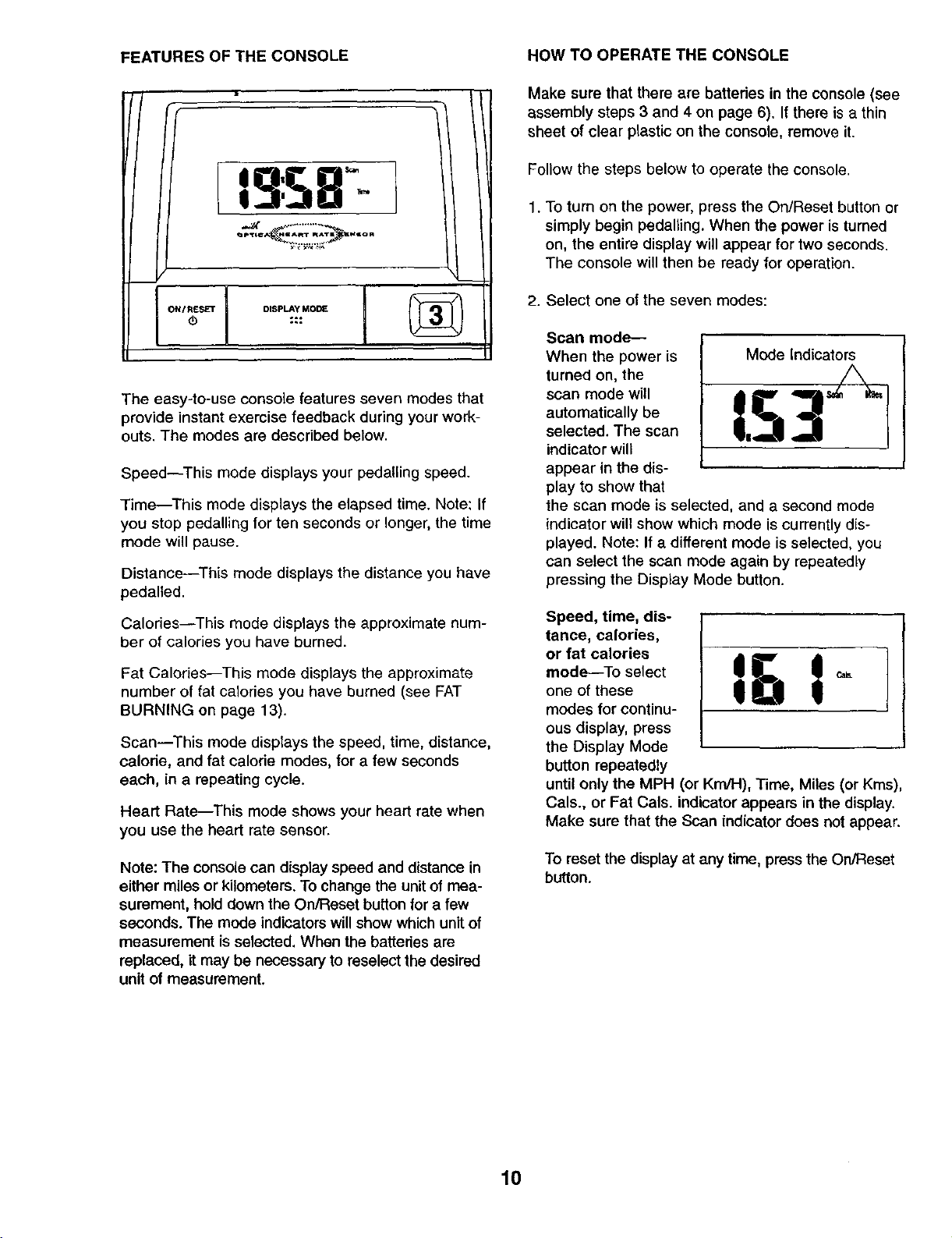
The easy-to-use console features seven modes that
provide instant exercise feedback during your work-
outs. The modes are described below.
Speed--This mode displays your pedalling speed.
Time--This mode displays the elapsed time. Note: If
you stop pedalling for ten seconds or longer, the time
mode will pause.
Distance--This mode displays the distance you have
pedalled.
Calories--This mode displays the approximate num-
ber of calories you have burned.
Fat Calodes--This mode displays the approximate
number of fat calories you have burned (see FAT
BURNING on page 13).
Scan--This mode displays the speed, time, distance,
calode, and fat calode modes, for a few seconds
each, in a repeating cycle.
Heart Rate--This mode shows your heart rate when
you use the heart rate sensor.
Note: The console can display speed and distance in
either miles or kilometers. To change the unitof mea-
surement, hold down the On/Reset button for a few
seconds. The mode indicators will show which unit of
measurement is selected. When the batteries are
replaced, it may be necessary to reselect the desired
unit of measurement.
HOW TO OPERATE THE CONSOLE
Make sure that there are batteries in the console (see
assembly steps 3 and 4 on page 6), If there is a thin
sheet of clear plastic on the console, remove it,
Follow the steps below to operate the console.
1. To turn on the power, press the On/Reset button or
simply begin pedalling. When the power is turned
on, the entire display will appear for two seconds.
The console will then be ready for operation.
2. Select one of the seven modes:
Scan mode--
When the power is
turned on, the
scan mode will
automatically be
selected. The scan
indicator will
appear in the dis-
play to show that
Mode Indicators
the scan mode is selected, and a second mode
indicator will show which mode is currently dis-
played. Note: If a different mode is selected, you
can select the scan mode again by repeatedly
pressing the Display Mode button.
Speed, time, dis-
tance, calories,
or fat calories
mode--To select l_!l Ic_one of these
modes for continu-
ous display, press
the Display Mode
button repeatedly
until only the MPH (or Km/H), Time, Miles (or Kms),
Cals., or Fat Cals. indicator appears in the display.
Make sure that the Scan indicator does not appear.
To reset the display at any time, press the On/Reset
button.
10
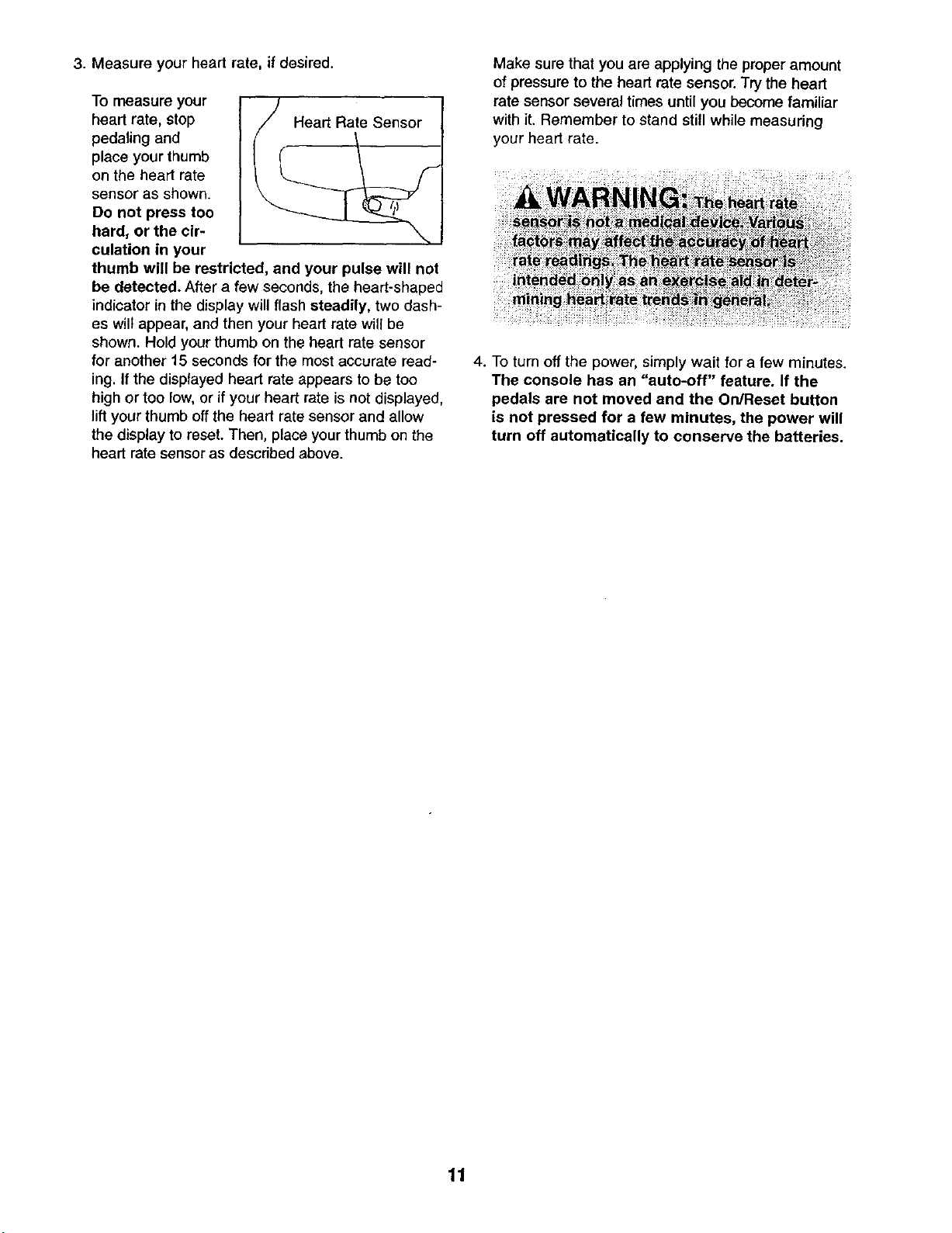
3. Measure your heart rate, if desired.
To measure your
heart rate, stop
pedaling and
place your thumb
on the heart rate
sensor as shown.
De not press too
hard, or the eir-
culation in your
-_/Heart Rate Sensor
thumb will be restricted, and your pulse will not
be detected. After a few seconds, the heart-shaped
indicator in the display will flash steadily, two dash-
es wilt appear, and then your heart rate will be
shown. Hold your thumb on the beart rate sensor
for another 15 seconds for the most accurate read-
ing. If the displayed heart rate appears to be too
high or too low,or ifyour heart rate is not displayed,
liftyour thumb off the heart rate sensor and allow
the display to reset. Then, place your thumb on the
bead rate sensoras described above.
Make sure that you are applying the proper amount
of pressure to the heart rate sensor. Try the heart
rate sensor several times until you become familiar
with it. Remember to stand still while measuring
your heart rate.
4. To turn off the power, simply wait for a few minutes.
The console has an "auto.off" feature. If the
pedals are not moved and the On/Reset button
is not pressed for a few minutes, the power will
turn off automatically to conserve the batteries.
11
MAINTENANCE AND TROUBLESHOOTING
Inspect and tighten all parts of the elliptical crosstrainer
regularly. Replace any worn parts immediately.
To clean the elliptical crosstrainer, use a damp cloth
and a small amount of mild detergent. Important:
Keep liquids away from the console and keep the
console out of direct sunlight. During storage,
remove the batteries from the console.
BATTERY REPLACEMENT
If the console display becomes dim, the batteries
should be replaced. Refer to assembly steps 3 and 4
on page 6 for replacement instructions.
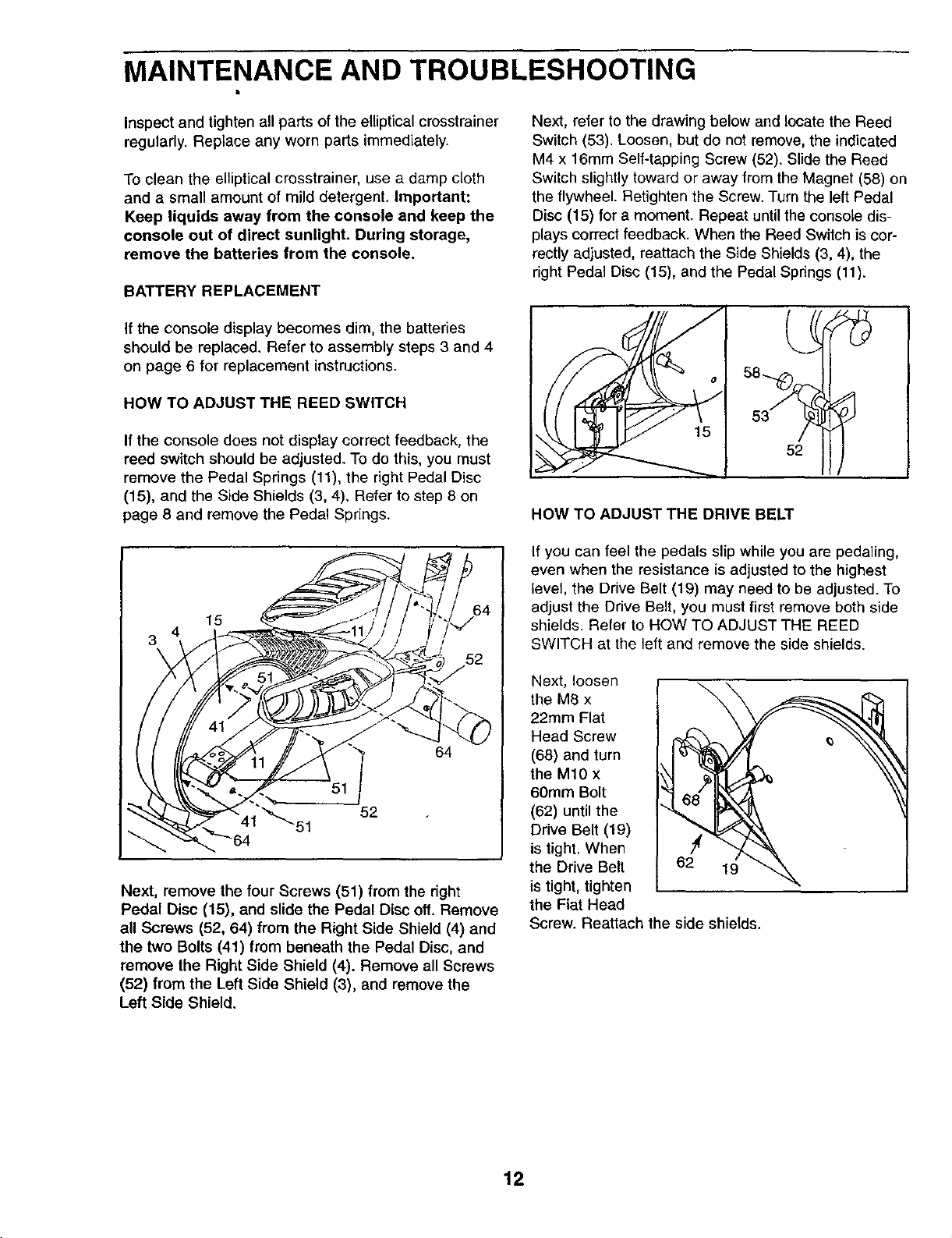
HOW TO ADJUST THE REED SWITCH
If the console does not display correct feedback, the
reed switch should be adjusted. To do this, you must
remove the Pedal Springs (11), the right Pedal Disc
(15), and the Side Shields (3, 4). Refer to step 8 on
page 8 and remove the Pedal Springs.
15
Next, remove the four Screws (51) from the right
Pedal Disc (15), and slide the Pedal Disc off. Remove
all Screws (52, 64) from the Right Side Shield (4) and
the two Bolts (41) from beneath the Pedal Disc, and
remove the Right Side Shield (4). Remove all Screws
(52) from the Left Side Shield (3), and remove the
Left Side Shield.
Next, refer to the drawing below and locate the Reed
Switch (53). Loosen, but de not remove, the indicated
M4 x 16mm Self-tapping Screw (52). Slide the Reed
Switch slightly toward or away from the Magnet (58) on
the flywheel. Retighten the Screw. Turn the left Pedal
Disc (15) for a moment. Repeat until the console dis-
plays correct feedback. When the Reed Switch is cor-
rectly adjusted, reattach the Side Shields (3, 4), the
right Pedal Disc (15), and the Pedal Spnngs (11).
58....0
1
52
HOW TO ADJUST THE DRIVE BELT
If you can feel the pedals slip while you are pedaling,
even when the resistance is adjusted to the highest
level, the Drive Belt (19) may need to be adjusted. To
adjust the Drive Belt, you must first remove both side
shields. Refer to HOW TO ADJUST THE REED
SWITCH at the left and remove the side shields.
Next, loosen
the M8 x
22ram Flat
Head Screw
(68) and turn
the M10 x
60mm Bolt
(62) until the
Drive Belt (19)
is tight. When
the Drive Belt
is tight, tighten
the Fiat Head
Screw. Reattach the side shields.
12
CONDITIONING GUIDELINES
WARNING:: :=
The following guidelines will help you to plan your
exercise program. Remember that proper nutrition
and adequate rest are essential for successful results.
EXERCISE INTENSITY
Whether your goal is to burn fat or to strengthen your
cardiovascular system, the key to achieving the
desired results is to exercise with the proper intensity.
The proper intensity level can be found by using your
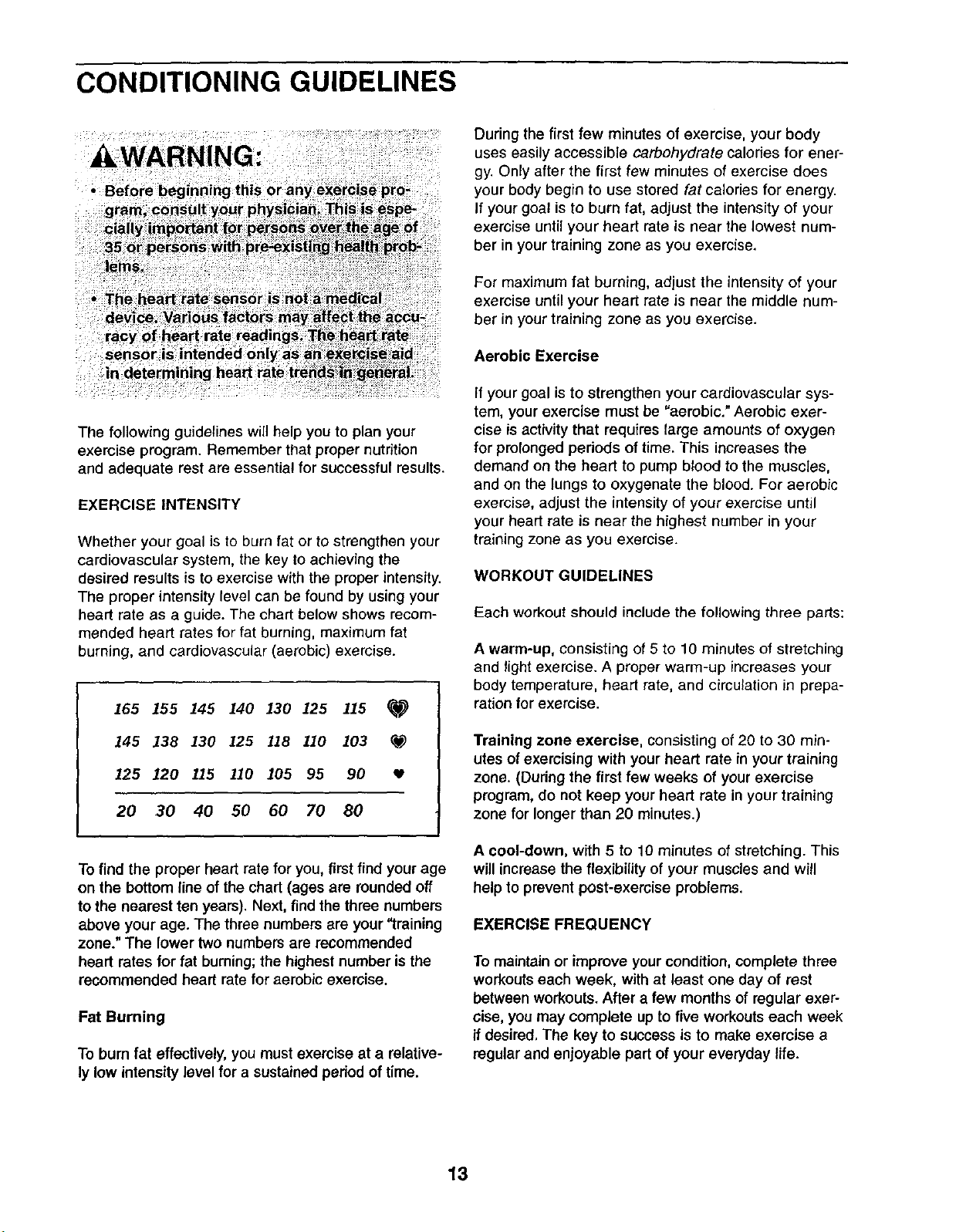
heart rate as a guide. The chart below shows recom-
mended heart rates for fat burning, maximum fat
burning, and cardiovascular (aerobic) exercise.
165 155 145 140 130 125 115 _1_
145 138 130 125 118 110 103 ¢_
125 120 115 110 105 95 90
20 30 40 50 60 70 80
To find the proper heart rate for you, first find your age
on the bottom line of the chart (ages are rounded off
to the nearest ten years). Next, find the three numbers
above your age. The three numbers are your "training
zone." The lower two numbers are recommended
heart rates for fat burning;the highest number is the
recommended heart rate for aerobic exorcise.
Fat Burning
To bum fat effectively, you must exercise at a relative-
ly low intensity level for a sustained period of time.
During the first few minutes of exercise, your body
uses easily accessible carbohydrate calories for ener-
gy. Only after the first few minutes of exercise does
your body begin to use stored fat calories for energy.
If your goal is to burn fat, adjust the intensity of your
exercise until your heart rate is near the lowest num-
ber in your training zone as you exercise.
For maximum fat burning, adjust the intensity of your
exercise until your heart rate is near the middle num-
ber in your training zone as you exercise.
Aerobic Exercise
If your goal is to strengthen your cardiovascular sys-
tem, your exercise must be "aerobic." Aerobic exer-
cise is activity that requires large amounts of oxygen
for prolonged periods of time. This increases the
demand on the heart to pump blood to the muscles,
and on the lungs to oxygenate the blood. For aerobic
exercise, adjust the intensity of your exercise until
your heart rate is near the highest number in your
training zone as you exercise.
WORKOUT GUIDELINES
Each workout should include the following three parts:
A warm-up, consisting of 5 to 10 minutes of stretching
and light exercise. A proper warm-up increases your
body temperature, heart rate, and circulation in prepa-
ration for exercise.
Training zone exercise, consisting of 20 to 30 min-
utes of exercising with your heart rate in your training
zone. (Dudng the first few weeks of your exercise
program, do not keep your heart rate in your training
zone for longer than 20 minutes.)
A cool-down, with 5 to 10 minutes of stretching. This
will increase the flexibility of your muscles and will
help to prevent post-exercise problems.
EXERCISE FREQUENCY
To maintain or improve your condition, complete three
workouts each week, with at least one day of rest
between workouts. After a few months of regular exer-
cise, you may complete up to five workouts each week
if desired, The key to success is to make exercise a
regular and enjoyable part of your everyday life.
13
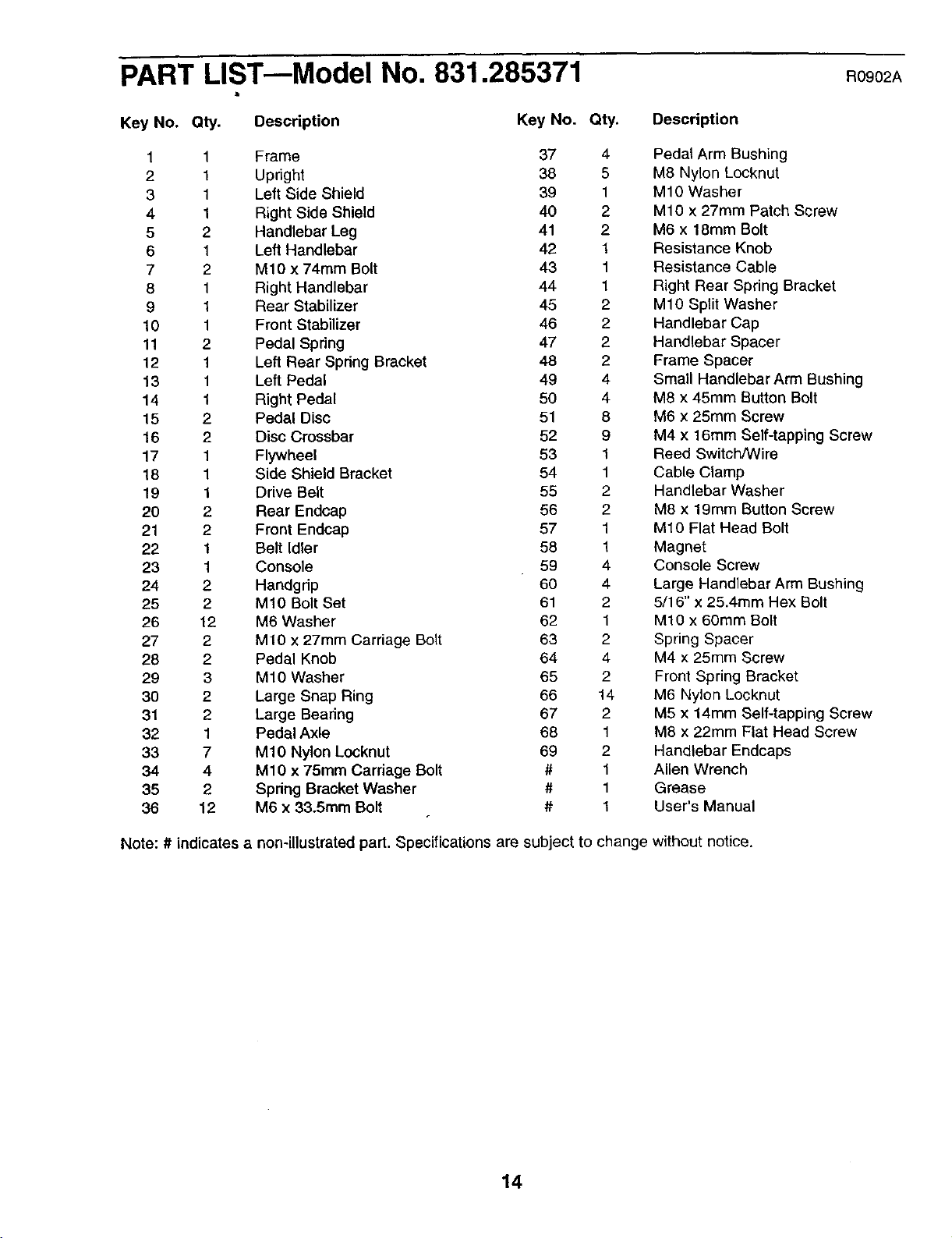
PART LIST--Model No. 831.285371 R0gO2A
Key No. Qty.
Description
Key No. Qty.
1 1 Frame 37 4
2 1 Upnght 38 5
3 1 Left Side Shield 39 1
4 1 Right Side Shield 40 2
5 2 Handlebar Leg 41 2
6 1 Left Handlebar 42 1
7 2 M10 x 74ram Bolt 43 1
8 1 Right Handlebar 44 1
9 1 Rear Stabilizer 45 2
10 1 Front Stabilizer 46 2
11 2 Pedal Spring 47 2
12 1 Left Rear Spring Bracket 48 2
13 1 Left Pedal 49 4
14 1 Right Pedal 50 4
15 2 Pedal Disc 51 8
16 2 Disc Crossbar 52 9
17 1 Flywheel 53 1
18 1 Side Shield Bracket 54 1
19 1 Drive Belt 55 2
20 2 Rear Endcap 56 2
21 2 Front Endcap 57 1
22 1 Belt Idler 58 1
23 1 Console 59 4
24 2 Handgdp 60 4
25 2 MIO Bolt Set 61 2
26 12 M6 Washer 62 1
27 2 M10 x 27mm Carriage Bolt 63 2
28 2 Pedal Knob 64 4
29 3 M10 Washer 65 2
30 2 Large Snap Ring 66 14
31 2 Large Beadng 67 2
32 1 Pedal Axle 68 1
33 7 M10 Nylon Locknut 69 2
34 4 M10 x 75mm Cardage Bolt # 1
35 2 Spdng Bracket Washer # 1
36 12 M6 x 33.5mm Bolt # 1
Note: # indicates a non-illustrated part. Specifications are subject to
Description
Pedal Arm Bushing
M8 Nylon Locknut
M10 Washer
M10 x 27mm Patch Screw
M6 x 18mm Bolt
Resistance Knob
Resistance Cable
Right Rear Spring Bracket
M10 Split Washer
Handlebar Cap
Handlebar Spacer
Frame Spacer
Small Handlebar Arm Bushing
M8 x 45mm Button Bolt
M6 x 25mm Screw
M4 x 16mm Self-tapping Screw
Reed Switch/Wire
Cable Clamp
Handlebar Washer
M8 x 19mm Button Screw
M10 Flat Head Bolt
Magnet
Console Screw
Large Handlebar Arm Bushing
5/16" x 25.4mm Hex Bolt
M10 x 60mm Bolt
Spring Spacer
M4 x 25mm Screw
Front Spring Bracket
M6 Nylon Locknut
M5 x 14ram Self-tapping Screw
M8 x 22mm Flat Head Screw
Handlebar Endcaps
Allen Wrench
Grease
User's Manual
change without notice.
14
EXPLODED DRAWINGmModel No. 831.285371
RO902A
59-
_47
46 _ 49
10
21
36 27-_,
40
69
_2 ;
i
f
', 49
i
68
i
46 f
._.50 52
51
13
36
37
37
66
38
2O
52
29 _2_
33
16"-
33 "'...
".. 66--*""
41
f
84
52
14 36_, 40-._
,35
44
751
9
15
SE /ARS
Model No. 831°285371
QUESTIONS?
If you find that:
• you need help assembling or
operating the PROFORM ®650
CARDIO CROSSTRAINER
• a part is missing
• or you need to schedule repair
service
call our toll-free HELPLINE
1-800-736-6879
Monday-Saturday, 7 am-7 pm
Central Time (excluding holidays)
REPLACEMENT
PARTS
If parts become worn and need
to be replaced, call the following
toll-free number
1-800-FON-PART
(1-800-366-7278)
The model number and serial number of your PROFORM ®650
CARDIO CROSSTRAINER are listed on a decal attached to the
frame. See the front cover of this manual to find the location of
the decal.
All replacement parts are available for immediate purchase or
special order when you visit your nearest SEARS Service Center.
To request service or to order parts by telephone, call the toll-free
numbers listed at the left.
When requesting help or service, or ordering pads, please be
prepared to provide the following information:
• The NAME OF THE PRODUCT (PROFORM ®650 CARDIO
CROSSTRAINER)
• The MODEL NUMBER OF THE PRODUCT (831.285371)
• The KEY NUMBER OF THE PART (see page 15)
• The DESCRIPTION OF THE PART (see page 14)
[ FULL 90 DAY WARRANTY 1
For 90 days from the date of purchase, if failure occurs due to defect in material or workmanship in this
SEARS ELLIPTICAL EXERCISER, contact the nearest SEARS Service Center throughout the United
States and SEARS will repair or replace the ELLIPTICAL EXERCISER, free of charge,
This warranty does not apply when the ELLIPTICAL EXERCISER is used commercially or for rental pur-
poses,
This warranty gives you specific legal rights, and you may also have other rights which vary from state
to state.
SEARS, ROEBUCK AND CO., DEPT. 817WA, HOFFMAN ESTATES, IL 60179
I
Part No. 189963 R0902A Pdnted in China © 2002 Sears, Roebuck & Co.