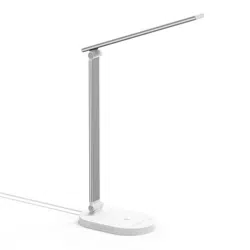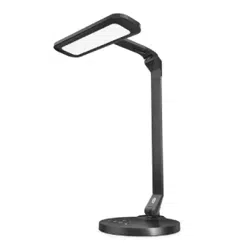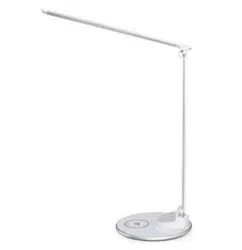
MODEL: TT-DL056
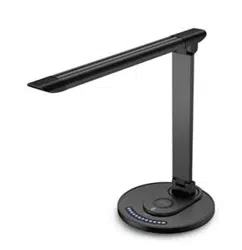
TAOTRONICS LED DESK LAMP
User Guide
www.taotronics.com
EUROPE
E-mail:
support.uk@taotronics.com(UK)
support.de@taotronics.com(DE)
support.fr@taotronics.com(FR)
support.es@taotronics.com(ES)
support.it@taotronics.com(IT)
EU Importer: ZBT International Trading GmbH
Address:Halstenbeker Weg 98C, 25462 Rellingen, Deutschland
NORTH AMERICA
E-mail : suppor[email protected](US)
support.ca@taotronics.com(CA)
Tel : 1-888-456-8468 (Monday-Friday: 9:00 – 17:00 PST)
US Distributor: SUNVALLEYTEK INTERNATIONAL INC.
Address:46724 Lakeview Blvd, Fremont, CA 94538
Manufacturer: Shenzhen NearbyExpress Technology Development Co.,Ltd.
Address: 333 Bulong Road, Shenzhen, China, 518129
MANUFACTURER
ASIA PACIFIC
TT-DL056_V1.0
MADE IN CHINA

MODEL: TT-DL056
TAOTRONICS LED DESK LAMP
User Guide
www.taotronics.com
EUROPE
E-mail:
support.uk@taotronics.com(UK)
support.de@taotronics.com(DE)
support.fr@taotronics.com(FR)
support.es@taotronics.com(ES)
support.it@taotronics.com(IT)
EU Importer: ZBT International Trading GmbH
Address:Halstenbeker Weg 98C, 25462 Rellingen, Deutschland
NORTH AMERICA
E-mail : support@taotronics.com(US)
support.ca@taotronics.com(CA)
Tel : 1-888-456-8468 (Monday-Friday: 9:00 – 17:00 PST)
US Distributor: SUNVALLEYTEK INTERNATIONAL INC.
Address:46724 Lakeview Blvd, Fremont, CA 94538
Manufacturer: Shenzhen NearbyExpress Technology Development Co.,Ltd.
Address: 333 Bulong Road, Shenzhen, China, 518129
MANUFACTURER
ASIA PACIFIC
TT-DL056_V1.0
MADE IN CHINA

CONTENTS
English
Deutsch
Français
Español
Italiano
01-08
09-16
17-24
25-32
33-40
41-47
CONTENTS
English
Deutsch
Français
Español
Italiano
01-08
09-16
17-24
25-32
33-40
41-47

Thank you for choosing the TaoTronics TT-DL056 LED Desk Lamp.
Please read this guide carefully and keep it for future reference.
EN
Product Features
•
Metallic lamp body
•
Multi-angle rotatable lamp head and arm
•
Brightness & color temperature memory function
•
Touch panel with LED indicator
•
Auto-off timer function
•
Brightness & color temperature favorite function
•
Night light function
•
High efficiency LED light
•
5V/2A USB port
Package Contents
•
1 x TaoTronics LED Desk Lamp (Model: TT-DL056)
•
1 x Power Adapter
•
1 x Cleaning Cloth
•
1 x User Guide
Specifications
Model
Operation Voltage
USB Output
Power
Color Temperature
CRI
TT-DL056
DC 12V
DC 5V / 2A
12W Max
2700-3000K, 3000-3500K, 4000-4500K,
5000-5500K,6000-6500K
>80
0201
Thank you for choosing the TaoTronics TT-DL056 LED Desk Lamp.
Please read this guide carefully and keep it for future reference.
EN
Product Features
•
Metallic lamp body
•
Multi-angle rotatable lamp head and arm
•
Brightness & color temperature memory function
•
Touch panel with LED indicator
•
Auto-off timer function
•
Brightness & color temperature favorite function
•
Night light function
•
High efficiency LED light
•
5V/2A USB port
Package Contents
•
1 x TaoTronics LED Desk Lamp (Model: TT-DL056)
•
1 x Power Adapter
•
1 x Cleaning Cloth
•
1 x User Guide
Specifications
Model
Operation Voltage
USB Output
Power
Color Temperature
CRI
TT-DL056
DC 12V
DC 5V / 2A
12W Max
2700-3000K, 3000-3500K, 4000-4500K,
5000-5500K,6000-6500K
>80
0201
How to Use
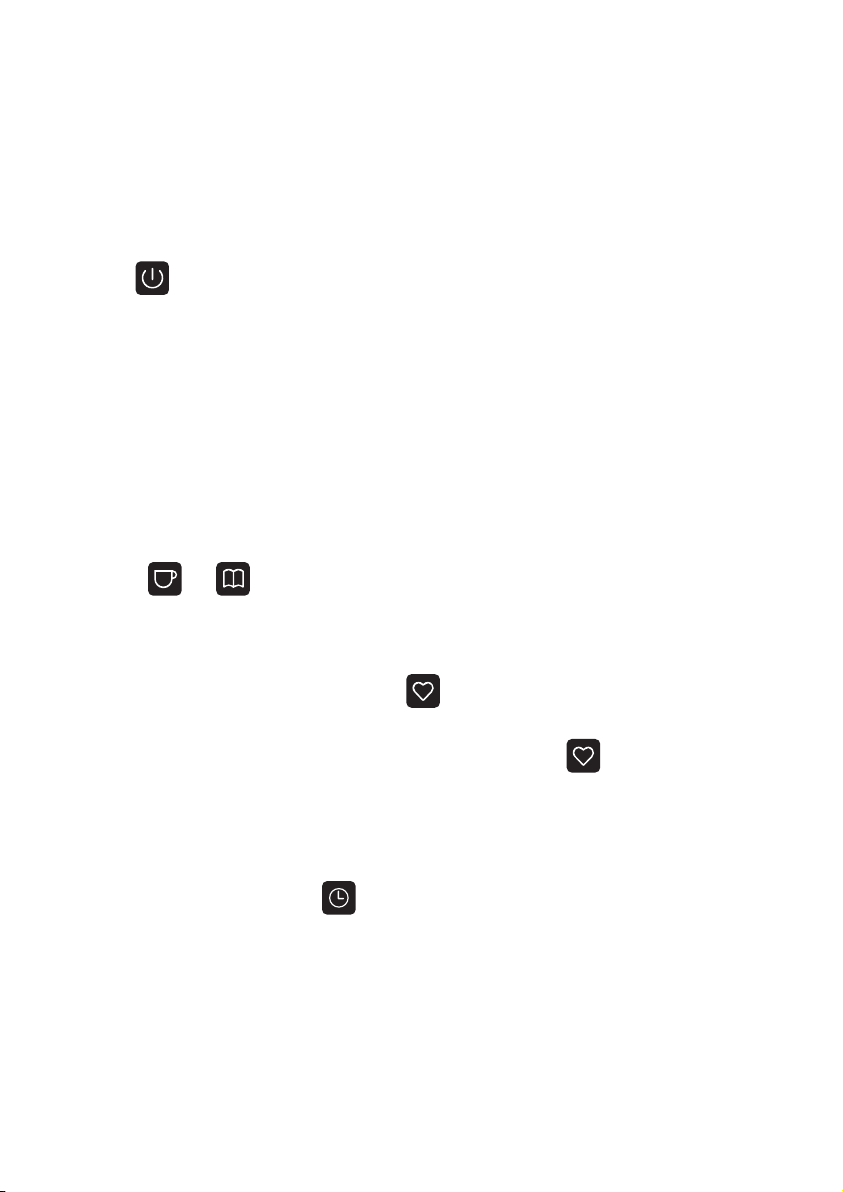
1. On / Off
The On / Off LED indicator will light up when the lamp is connected with power.
Tap the button to turn on the lamp and the touch panel. Tap again to turn
off. The TT-DL056 Desk Lamp includes a brightness and color temperature
memory function; it will directly activate the previous settings each time it’s
turned on.
2. Brightness Adjustment
To adjust the brightness, tap or slide across the Brightness Setting icons from the
left (least bright) to the right (most bright).
3. Color Temperature Adjustment
Press the or button to go through the 5 levels of color temperature.
The indicator will flash 3 times when it reaches the highest or the lowest setting.
4. Favorite Function
When the lamp is on, tap and hold the button for 2 seconds. The indicator
will flash 3 times and the current color temperature and brightness will be set as
your favorite. Each time the lamp is turned on, tap on the button once to
activate your favorite setting. Tap and hold again for 2 seconds to erase and set
a new favorite.
5. Timer Function
When the lamp is on, tap the button and the indicator will slowly flashes 3
times to start timing. The lamp will automatically turn off in 60 minutes. Tap again
in timer mode to cancel the timer setting. The LED indicator will flash once.
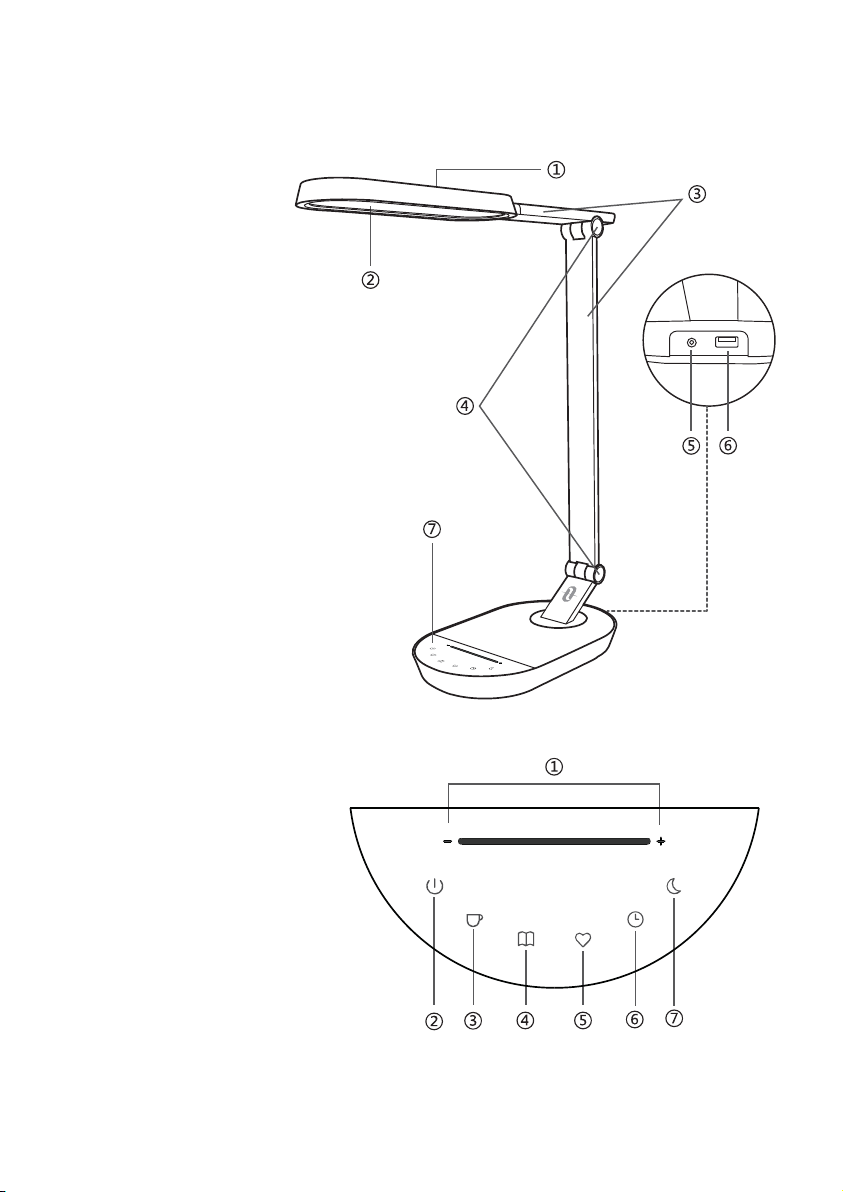
Product Diagram
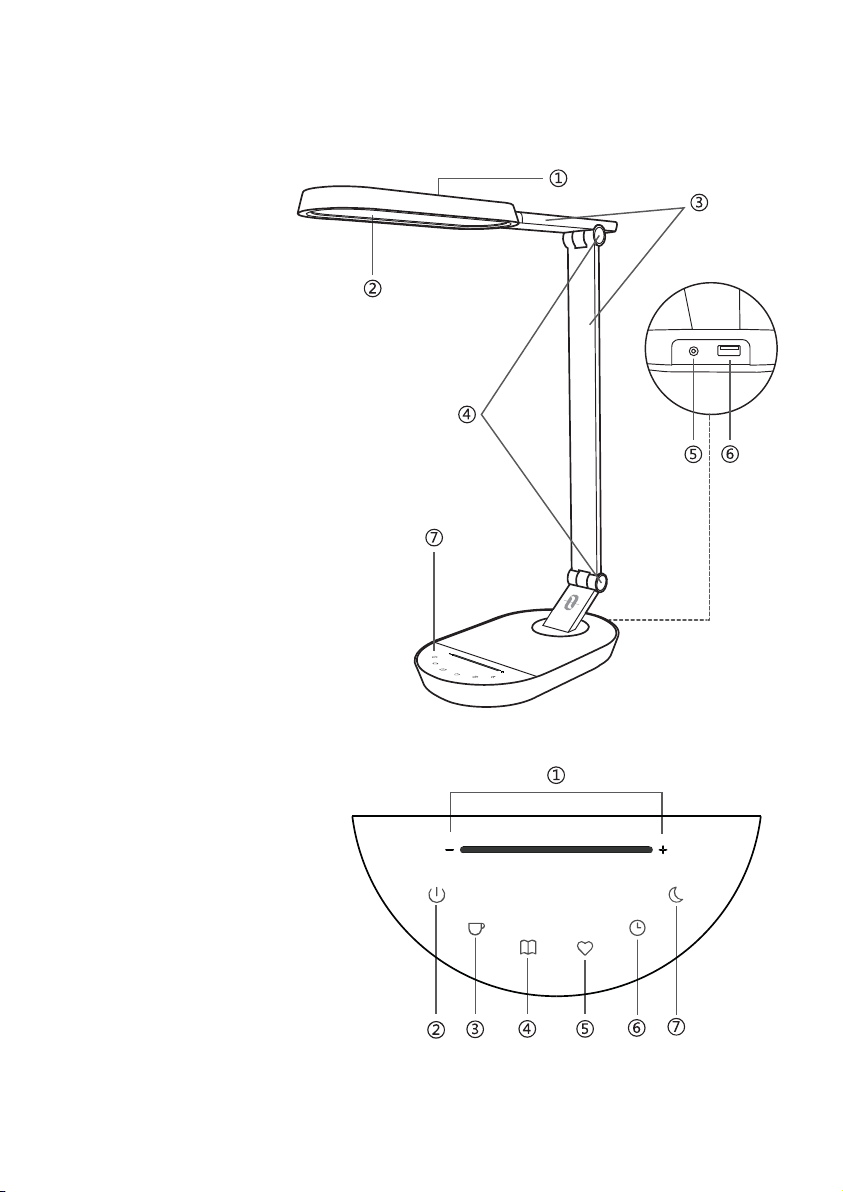
Desk Lamp
①
Lamp Head
②
Night Light
③
Lamp Arm
④
Tension Adjuster
⑤
Power Adapter
⑥
USB port
⑦
Touch Panel
Touch Panel
①
Brightness Setting
②
On / Off
③
Color Temperature –
④
Color Temperature +
⑤
Favorite
⑥
Timer
⑦
Night Light
0403
How to Use
1. On / Off
The On / Off LED indicator will light up when the lamp is connected with power.
Tap the button to turn on the lamp and the touch panel. Tap again to turn
off. The TT-DL056 Desk Lamp includes a brightness and color temperature
memory function; it will directly activate the previous settings each time it’s
turned on.
2. Brightness Adjustment
To adjust the brightness, tap or slide across the Brightness Setting icons from the
left (least bright) to the right (most bright).
3. Color Temperature Adjustment
Press the or button to go through the 5 levels of color temperature.
The indicator will flash 3 times when it reaches the highest or the lowest setting.
4. Favorite Function
When the lamp is on, tap and hold the button for 2 seconds. The indicator
will flash 3 times and the current color temperature and brightness will be set as
your favorite. Each time the lamp is turned on, tap on the button once to
activate your favorite setting. Tap and hold again for 2 seconds to erase and set
a new favorite.
5. Timer Function
When the lamp is on, tap the button and the indicator will slowly flashes 3
times to start timing. The lamp will automatically turn off in 60 minutes. Tap again
in timer mode to cancel the timer setting. The LED indicator will flash once.
Product Diagram
Desk Lamp
①
Lamp Head
②
Night Light
③
Lamp Arm
④
Tension Adjuster
⑤
Power Adapter
⑥
USB port
⑦
Touch Panel
Touch Panel
①
Brightness Setting
②
On / Off
③
Color Temperature –
④
Color Temperature +
⑤
Favorite
⑥
Timer
⑦
Night Light
0403
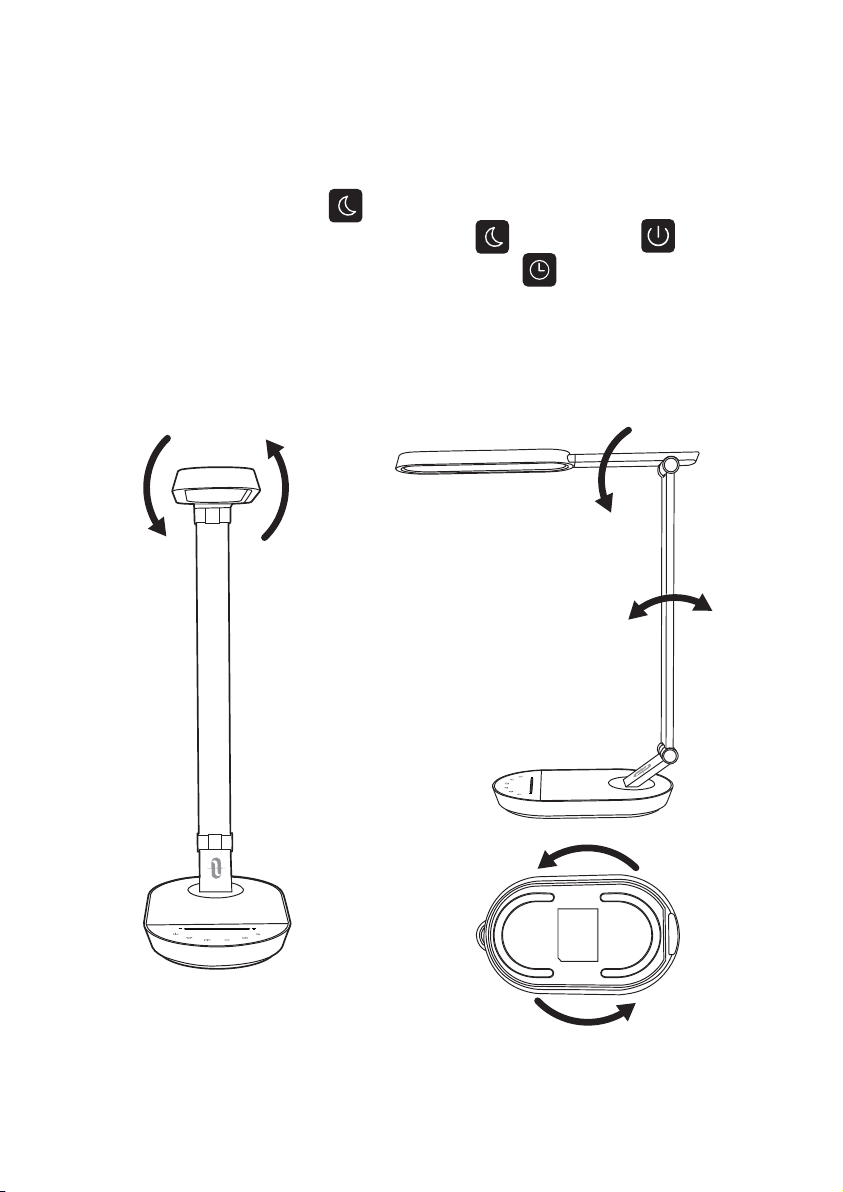
6. Night Light Function
When the lamp is on, tap the button until the indicator slowly flashes 3
times to light up the night light. Tap either the button or the button to
turn off the night light. In Night Light mode, tap the button to set or cancel
the 60 minute timer.
Note: The night light and main lamp will not light up at the same time.
Structural Parts
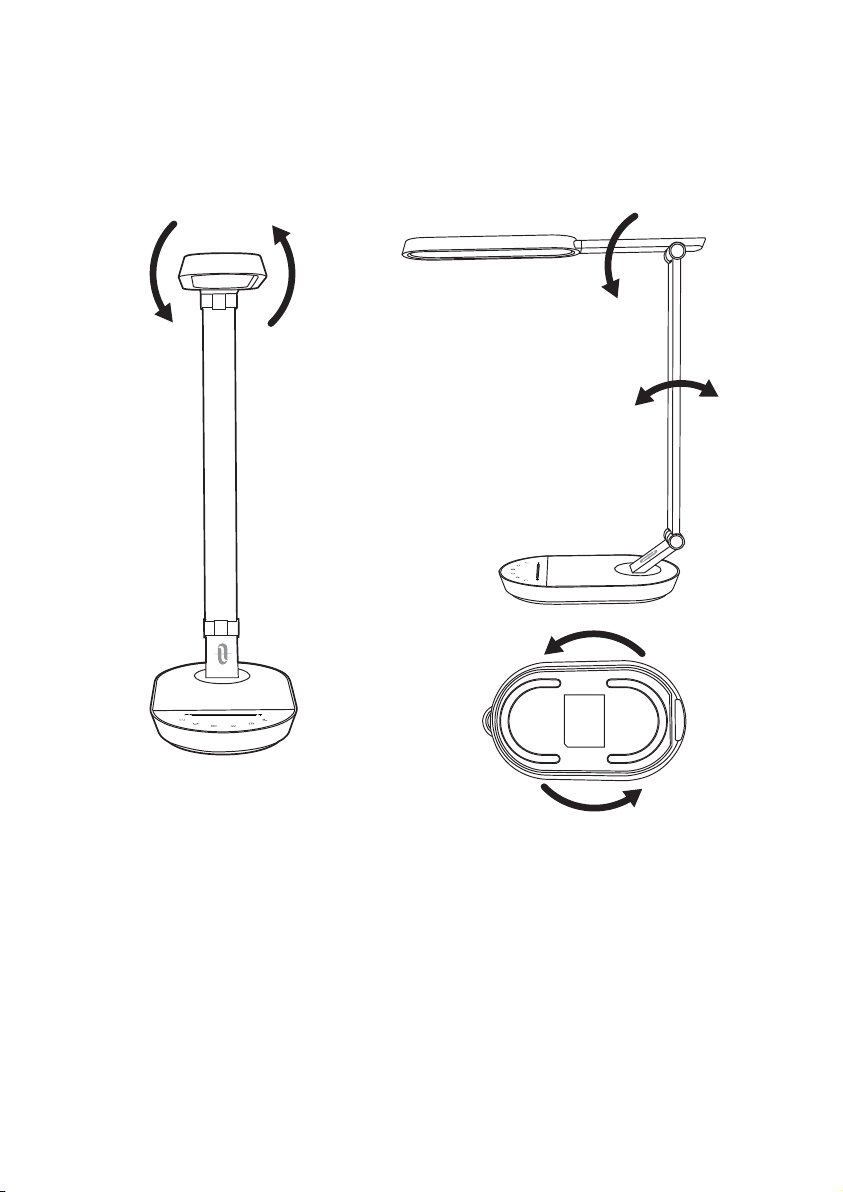
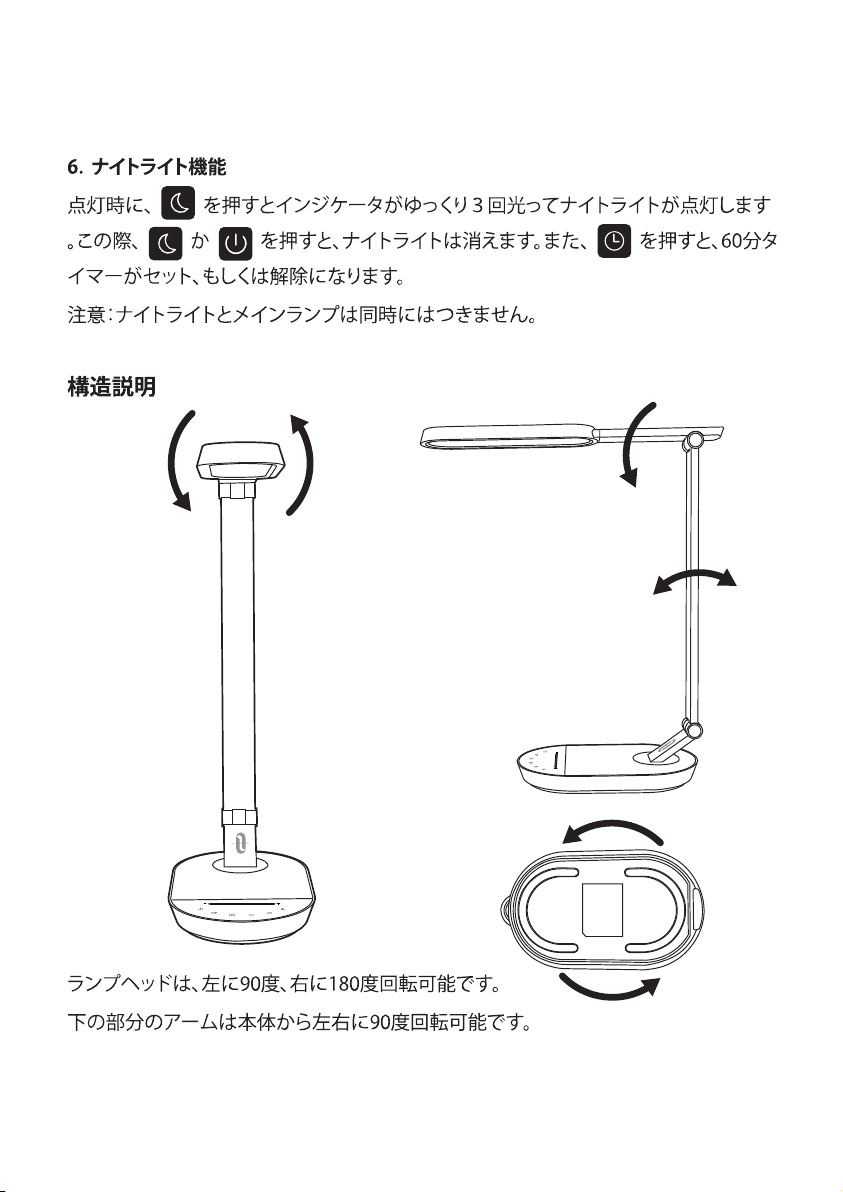
The lamp head is 90 degrees rotatable to the left and 180 degrees to the right.
The lower lamp arm is 90 degrees rotatable to the left / right on the base.
The lower lamp arm is 90 degrees forward and 15 degrees backward rotatable.
The upper lamp arm is 90 degrees forward rotatable.
Caution
• Use only the supplied AC power adapter.
• Please do not dismantle the product by yourself, always ask professional
electricians or authorized technicians for repair.
• If you smell bad odor or anything unusual, please turn off the unit immediate-
ly.
• Please do not remove the power plug with wet hands as it may cause
electrical shock.
• Keep away from children.
• Do not put this unit near extreme heat sources, moisture, or corrosive
substances.
• Regularly clean the lamp.
• Please store in a dry and cool place if not using for a long period of time.
0605
90°
180°

6. Night Light Function
When the lamp is on, tap the button until the indicator slowly flashes 3
times to light up the night light. Tap either the button or the button to
turn off the night light. In Night Light mode, tap the button to set or cancel
the 60 minute timer.
Note: The night light and main lamp will not light up at the same time.
Structural Parts
The lamp head is 90 degrees rotatable to the left and 180 degrees to the right.
The lower lamp arm is 90 degrees rotatable to the left / right on the base.
The lower lamp arm is 90 degrees forward and 15 degrees backward rotatable.
The upper lamp arm is 90 degrees forward rotatable.
Caution
• Use only the supplied AC power adapter.
• Please do not dismantle the product by yourself, always ask professional
electricians or authorized technicians for repair.
• If you smell bad odor or anything unusual, please turn off the unit immediate-
ly.
• Please do not remove the power plug with wet hands as it may cause
electrical shock.
• Keep away from children.
• Do not put this unit near extreme heat sources, moisture, or corrosive
substances.
• Regularly clean the lamp.
• Please store in a dry and cool place if not using for a long period of time.
0605
90°
180°

Warranty
TaoTronics products are covered by a 12 month limited warranty from the date
of its original purchase. If any problems occur, please contact our support team.
We can only provide after sales service for products that are sold by TaoTronics
or TaoTronics authorized retailers and distributors. If you have purchased your
unit from a different place, please contact your seller for return and warranty
issues.
Troubleshooting Guide
Problem
Possible Cause
Solution
No power supply
The lamp is not turned on
Hands are wet
Voltage fluctuation causing
panel failure
LED component failed
Power adapter failed
Short circuit
The lamp does
not light up
The touch
panel is not
responsive
LED failure
Bad smell
Correctly plug in the
power adapter
Refer to the How to
Use section
Touch the panel with
dry hands
Disconnect power to
restart the lamp
Please contact the
TaoTronics Support Team
Please contact the
TaoTronics Support Team
Please contact the
TaoTronics Support Team
0807

Warranty
TaoTronics products are covered by a 12 month limited warranty from the date
of its original purchase. If any problems occur, please contact our support team.
We can only provide after sales service for products that are sold by TaoTronics
or TaoTronics authorized retailers and distributors. If you have purchased your
unit from a different place, please contact your seller for return and warranty
issues.
Troubleshooting Guide
Problem
Possible Cause
Solution
No power supply
The lamp is not turned on
Hands are wet
Voltage fluctuation causing
panel failure
LED component failed
Power adapter failed
Short circuit
The lamp does
not light up
The touch
panel is not
responsive
LED failure
Bad smell
Correctly plug in the
power adapter
Refer to the How to
Use section
Touch the panel with
dry hands
Disconnect power to
restart the lamp
Please contact the
TaoTronics Support Team
Please contact the
TaoTronics Support Team
Please contact the
TaoTronics Support Team
0807

Vielen Dank, dass Sie sich für die TaoTronics TT-DL056
LED-Schreibtischlampe entschieden haben. Bitte lesen Sie diese
Bedienungsanleitung aufmerksam und bewahren Sie sie zum
späteren Nachlesen auf.
DE
Produkteigenschaften
•
Metallisches Lampengehäuse
•
Lampenkopf und Arm in vielen Winkeln einstellbar
•
Helligkeit und Farbtemperatur Merkfunktion
•
Bedienfeld mit LED-Anzeige
•
Zeitschaltuhr für automatische Abschaltung
•
Funktion für favorisierte Helligkeit und Farbtemperatur
•
Nachtlichtfunktion
•
Hocheffizientes LED-Licht
•
5V/2A USB-Anschluss
Lieferumfang
•
1 x TaoTronics LED-Schreibtischlampe (Modell: TT-DL056)
•
1 x Netzteil
•
1 x Reinigungstuch
•
1 x Bedienungsanleitung
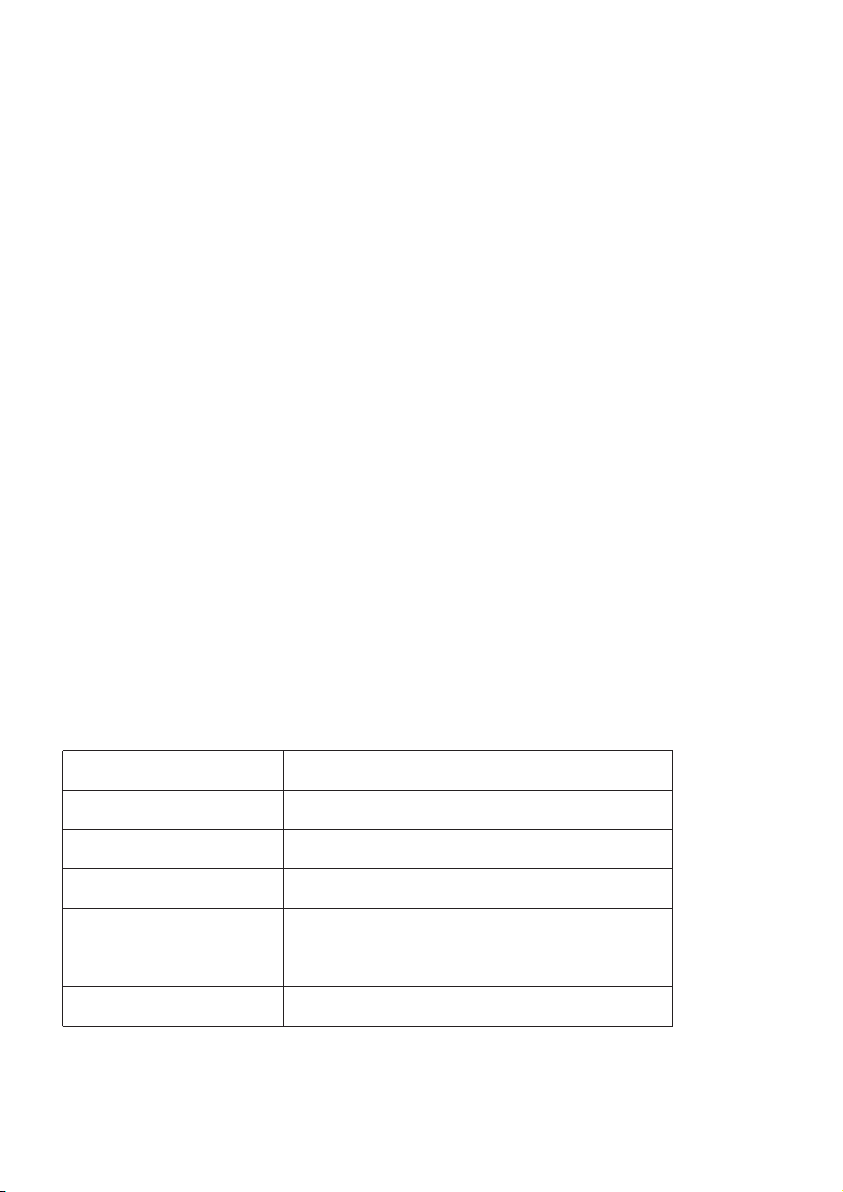
Spezifikationen
Modell
Betriebsspannung
USB-Ausgang
Leistung
Farbtemperatur
CRI
TT-DL056
DC 12 V
DC 5 V /2 A
12 W max.
2700-3000K, 3000-3500K, 4000-4500K,
5000-5500K, 6000-6500K
>80
1009
Vielen Dank, dass Sie sich für die TaoTronics TT-DL056
LED-Schreibtischlampe entschieden haben. Bitte lesen Sie diese
Bedienungsanleitung aufmerksam und bewahren Sie sie zum
späteren Nachlesen auf.
DE
Produkteigenschaften
•
Metallisches Lampengehäuse
•
Lampenkopf und Arm in vielen Winkeln einstellbar
•
Helligkeit und Farbtemperatur Merkfunktion
•
Bedienfeld mit LED-Anzeige
•
Zeitschaltuhr für automatische Abschaltung
•
Funktion für favorisierte Helligkeit und Farbtemperatur
•
Nachtlichtfunktion
•
Hocheffizientes LED-Licht
•
5V/2A USB-Anschluss
Lieferumfang
•
1 x TaoTronics LED-Schreibtischlampe (Modell: TT-DL056)
•
1 x Netzteil
•
1 x Reinigungstuch
•
1 x Bedienungsanleitung
Spezifikationen
Modell
Betriebsspannung
USB-Ausgang
Leistung
Farbtemperatur
CRI
TT-DL056
DC 12 V
DC 5 V /2 A
12 W max.
2700-3000K, 3000-3500K, 4000-4500K,
5000-5500K, 6000-6500K
>80
1009

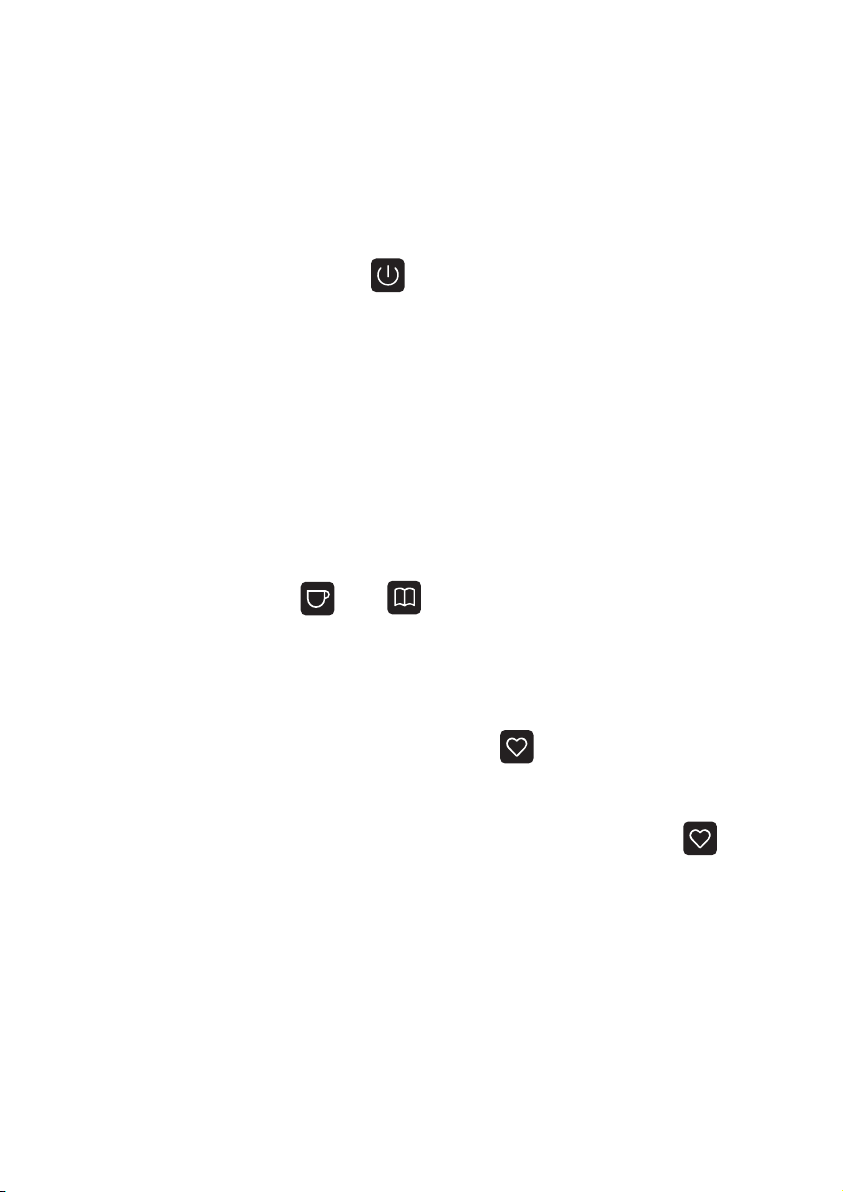
Anwendungsweise
1. Ein / Aus
Die Ein/Aus-LED leuchtet auf, wenn die Lampe an die Stromversorgung
angeschlossen ist.Drücken Sie die Taste zum Einschalten der Lampe und
des Bedienfelds. Ein zweites Drücken schaltet die Lampe aus. Die TT-DL056
Schreibtischlampe merkt sich die zuletzt gewählte Helligkeit und Farbtempera-
tur. Bei jedem Einschalten werden die letzten Einstellungen wiederhergestellt.
2. Helligkeitseinstellung
Zum Einstellen der Helligkeit, fahren Sie mit dem Finger über die Helligkeit-
sleiste (links: am dunkelsten, rechts: am hellsten) oder drücken Sie direkt auf die
gewünschte Einstellung.
3. Farbtemperatureinstellung
Durch Drücken der Tasten und wechseln Sie zwischen den fünf
Farbtemperaturen. Die Anzeige blinkt dreimal, wenn die höchste oder
niedrigste Einstellung erreicht ist.
4. Favoritenfunktion
Wenn die Lampe eingeschaltet ist, halten Sie die Taste 2 Sekunden lang
gedrückt. Die aktuelle Farbtemperatur und Helligkeit werden als Favoriten
gespeichert und die Anzeige blinkt dreimal. Jetzt können Sie, jedes Mal
nachdem Sie die Lampe eingeschaltet haben, mit einem Druck auf die
Taste Ihre Lieblingseinstellungen aktivieren. Halten Sie die Taste 2 Sekunden
lang gedrückt, um neue Favoriten festzulegen und die alte Einstellung zu
überschreiben.
Produktdiagramm
Schreibtischlampe
①
Lampenkopf
②
Nachtlicht
③
Lampenarm
④
Gelenk
⑤
Netzteil
⑥
USB-Anschluss
⑦
Bedienfeld
Bedienfeld
①
Helligkeitseinstellung
②
Ein / Aus
③
Farbtemperatur –
④
Farbtemperatur +
⑤
Lieblingseinstellung
⑥
Zeitschaltuhr
⑦
Nachtlicht
1211
Anwendungsweise
1. Ein / Aus
Die Ein/Aus-LED leuchtet auf, wenn die Lampe an die Stromversorgung
angeschlossen ist.Drücken Sie die Taste zum Einschalten der Lampe und
des Bedienfelds. Ein zweites Drücken schaltet die Lampe aus. Die TT-DL056
Schreibtischlampe merkt sich die zuletzt gewählte Helligkeit und Farbtempera-
tur. Bei jedem Einschalten werden die letzten Einstellungen wiederhergestellt.
2. Helligkeitseinstellung
Zum Einstellen der Helligkeit, fahren Sie mit dem Finger über die Helligkeit-
sleiste (links: am dunkelsten, rechts: am hellsten) oder drücken Sie direkt auf die
gewünschte Einstellung.
3. Farbtemperatureinstellung
Durch Drücken der Tasten und wechseln Sie zwischen den fünf
Farbtemperaturen. Die Anzeige blinkt dreimal, wenn die höchste oder
niedrigste Einstellung erreicht ist.
4. Favoritenfunktion
Wenn die Lampe eingeschaltet ist, halten Sie die Taste 2 Sekunden lang
gedrückt. Die aktuelle Farbtemperatur und Helligkeit werden als Favoriten
gespeichert und die Anzeige blinkt dreimal. Jetzt können Sie, jedes Mal
nachdem Sie die Lampe eingeschaltet haben, mit einem Druck auf die
Taste Ihre Lieblingseinstellungen aktivieren. Halten Sie die Taste 2 Sekunden
lang gedrückt, um neue Favoriten festzulegen und die alte Einstellung zu
überschreiben.
Produktdiagramm
Schreibtischlampe
①
Lampenkopf
②
Nachtlicht
③
Lampenarm
④
Gelenk
⑤
Netzteil
⑥
USB-Anschluss
⑦
Bedienfeld
Bedienfeld
①
Helligkeitseinstellung
②
Ein / Aus
③
Farbtemperatur –
④
Farbtemperatur +
⑤
Lieblingseinstellung
⑥
Zeitschaltuhr
⑦
Nachtlicht
1211
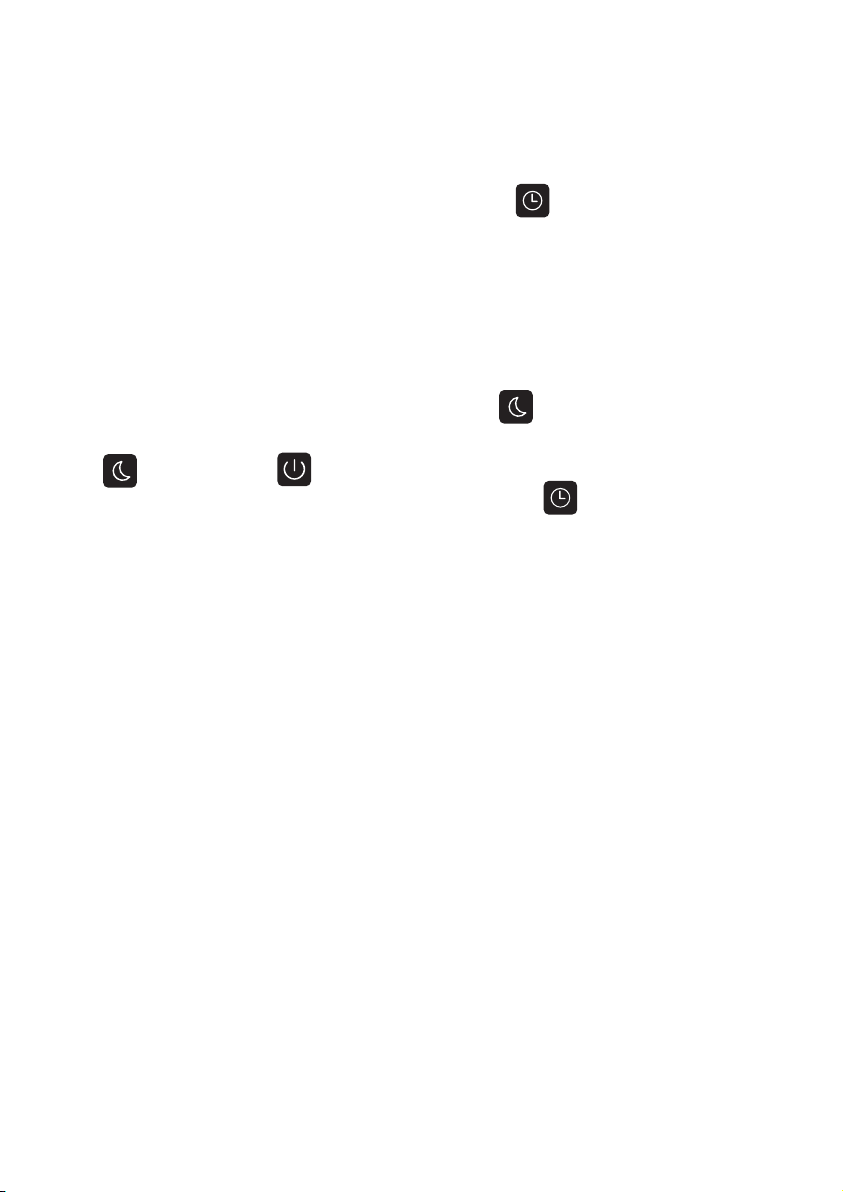
5. Zeitschaltuhr
Wenn die Lampe eingeschaltet ist, drücken Sie die Taste. Die Anzeige
blinkt dreimal langsam, um den Start der Zeitschaltuhr zu signalisieren. Nach 60
Minuten schaltet sich die Lampe automatisch aus. Sie können die Zeitschaltuhr
abbrechen, indem Sie die Taste noch einmal drücken. Die Anzeige blinkt dann
einmal.
6. Nachtlicht
Wenn die Lampe eingeschaltet ist, halten Sie die Taste gedrückt, bis die
Anzeige dreimal langsam blinkt und sich das Nachtlicht einschaltet. Drücken Sie
die Taste oder die Taste zum Ausschalten des Nachtlichts. Auch im
Nachtlichtmodus können Sie die Zeitschaltuhr mit der Taste starten und
abbrechen.
Hinweis: Das Nachtlicht und die Hauptlampe leuchten nicht gleichzeitig.
Strukturelle Teile
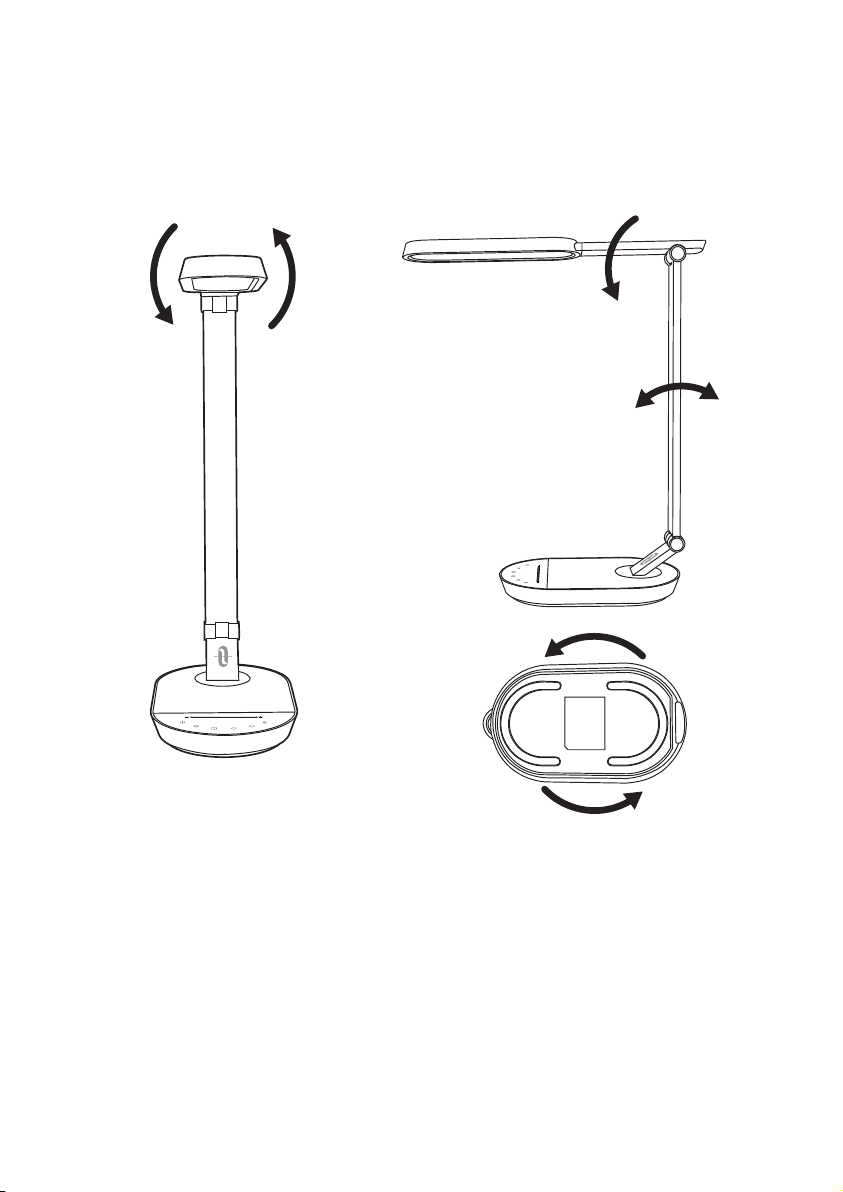
Die Lampe ist um 90° nach links und 180° nach rechts drehbar.
Der untere Lampenarm ist um 90 Grad nach links und rechts auf der Basis
drehbar.
Der untere Lampenarm ist um 90 Gradvorwärts und 15 Grad rückwärts drehbar.
Der obere Lampenarm ist um 90 Grad vorwärts drehbar.
1413
90°
180°
5. Zeitschaltuhr
Wenn die Lampe eingeschaltet ist, drücken Sie die Taste. Die Anzeige
blinkt dreimal langsam, um den Start der Zeitschaltuhr zu signalisieren. Nach 60
Minuten schaltet sich die Lampe automatisch aus. Sie können die Zeitschaltuhr
abbrechen, indem Sie die Taste noch einmal drücken. Die Anzeige blinkt dann
einmal.
6. Nachtlicht
Wenn die Lampe eingeschaltet ist, halten Sie die Taste gedrückt, bis die
Anzeige dreimal langsam blinkt und sich das Nachtlicht einschaltet. Drücken Sie
die Taste oder die Taste zum Ausschalten des Nachtlichts. Auch im
Nachtlichtmodus können Sie die Zeitschaltuhr mit der Taste starten und
abbrechen.
Hinweis: Das Nachtlicht und die Hauptlampe leuchten nicht gleichzeitig.
Strukturelle Teile
Die Lampe ist um 90° nach links und 180° nach rechts drehbar.
Der untere Lampenarm ist um 90 Grad nach links und rechts auf der Basis
drehbar.
Der untere Lampenarm ist um 90 Gradvorwärts und 15 Grad rückwärts drehbar.
Der obere Lampenarm ist um 90 Grad vorwärts drehbar.
1413
90°
180°

Garantie
TaoTronics Produkte sind ab dem Kaufdatum durch die 12-monatige Garantie
abgedeckt. Falls das Produkt während dieser Zeit defekt sein sollte, kontaktieren
Sie bitte unverzüglich den Kundendienst per E-Mail unter support.de@taotron-
ics.com.
Wir bieten unseren Kundendienst nur für Produkte an, die bei TaoTronics oder
einem von TaoTronics autorisierten Händler und Vertriebsdienstleister gekauft
wurden. Falls Sie Ihr Produkt bei einem anderen Händler gekauft haben, wenden
Sie sich bezüglich des Garantieanspruchs an den Verkäufer.
Fehlerbehebung
Problem
mögliche Ursache
Lösung
keine Stromversorgung
Helligkeitstaste wurde
nicht gedrückt
nasse Hände
Spannungsfluktuationen
verursachen
Bedienfeldfehler
defekte LED-Einheit
defektes Netzteil
Kurzschluss
Die Lampe
leuchtet nicht
Das Bedienfeld
reagiert nicht
LED
Fehlfunktion
schlechter
Geruch
Schließen Sie das
Netzteil korrekt an
Lesen Sie den Abschnitt „
Anwendungsweise“
Hände abtrocknen
Stromzufuhr trennen,
und wieder herstellen
Bitte kontaktieren Sie
den TaoTronics
Kundendienst
Bitte kontaktieren Sie
den TaoTronics
Kundendienst
Bitte kontaktieren Sie
den TaoTronics
Kundendienst
1615

Garantie
TaoTronics Produkte sind ab dem Kaufdatum durch die 12-monatige Garantie
abgedeckt. Falls das Produkt während dieser Zeit defekt sein sollte, kontaktieren
Sie bitte unverzüglich den Kundendienst per E-Mail unter support.de@taotron-
ics.com.
Wir bieten unseren Kundendienst nur für Produkte an, die bei TaoTronics oder
einem von TaoTronics autorisierten Händler und Vertriebsdienstleister gekauft
wurden. Falls Sie Ihr Produkt bei einem anderen Händler gekauft haben, wenden
Sie sich bezüglich des Garantieanspruchs an den Verkäufer.
Fehlerbehebung
Problem
mögliche Ursache
Lösung
keine Stromversorgung
Helligkeitstaste wurde
nicht gedrückt
nasse Hände
Spannungsfluktuationen
verursachen
Bedienfeldfehler
defekte LED-Einheit
defektes Netzteil
Kurzschluss
Die Lampe
leuchtet nicht
Das Bedienfeld
reagiert nicht
LED
Fehlfunktion
schlechter
Geruch
Schließen Sie das
Netzteil korrekt an
Lesen Sie den Abschnitt „
Anwendungsweise“
Hände abtrocknen
Stromzufuhr trennen,
und wieder herstellen
Bitte kontaktieren Sie
den TaoTronics
Kundendienst
Bitte kontaktieren Sie
den TaoTronics
Kundendienst
Bitte kontaktieren Sie
den TaoTronics
Kundendienst
1615

Merci d’avoir choisi la Lampe de Bureau à LED TaoTronics
TT-DL056. Veuillez lire ce manuel attentivement et le conserver pour
toute future référence.
FR
Caractéristiques du Produit
•
Corps de la lampe métallique
•
Bras et tête de lampe rotatifs multi-angles
•
Fonction mémoire de luminosité et température de couleur
•
Panneau de contrôle tactile avec indicateurs à LED
•
Fonction d’extinction automatique
•
Fonction de favoris de luminosité et température de couleurs
•
Fonction veilleuse
•
Lumière LED haute efficacité
•
Port USB 5V/2A
Contenu de la Boîte
•
1 x Lampe à LED de Bureau TaoTronics (Modèle : TT-DL056)
•
1 x Adaptateur Secteur
•
1 x Chiffon de Nettoyage
•
1 x Manuel d’Utilisation
Spécifications
Modèle
Tension d’alimentation
Sortie USB
Puissance
Températurede Couleur
CRI
TT-DL056
DC 12V
DC 5V / 2A
12W Max
2700-3000K, 3000-3500K, 4000-4500K,
5000-5500K, 6000-6500K
>80
1817
Merci d’avoir choisi la Lampe de Bureau à LED TaoTronics
TT-DL056. Veuillez lire ce manuel attentivement et le conserver pour
toute future référence.
FR
Caractéristiques du Produit
•
Corps de la lampe métallique
•
Bras et tête de lampe rotatifs multi-angles
•
Fonction mémoire de luminosité et température de couleur
•
Panneau de contrôle tactile avec indicateurs à LED
•
Fonction d’extinction automatique
•
Fonction de favoris de luminosité et température de couleurs
•
Fonction veilleuse
•
Lumière LED haute efficacité
•
Port USB 5V/2A
Contenu de la Boîte
•
1 x Lampe à LED de Bureau TaoTronics (Modèle : TT-DL056)
•
1 x Adaptateur Secteur
•
1 x Chiffon de Nettoyage
•
1 x Manuel d’Utilisation
Spécifications
Modèle
Tension d’alimentation
Sortie USB
Puissance
Températurede Couleur
CRI
TT-DL056
DC 12V
DC 5V / 2A
12W Max
2700-3000K, 3000-3500K, 4000-4500K,
5000-5500K, 6000-6500K
>80
1817
Mode d’Emploi
1. Marche / Arrêt
L’indicateur à LED Marche/Arrêt va s’allumer quand la lampe sera connectée au
courant.Tapez le bouton pour allumer la lampe et la panneau tactile. Tapez
à nouveau pour l’éteindre. La Lampe de Bureau TT-DL056 comprend une
fonction mémoire de luminosité et température de couleur. Elle va immédiate-
ment activer les réglages précédents à chaque fois qu’elle sera allumée.
2. Ajustement de la Luminosité
Pour ajuster la luminosité, tapez ou glissez à travers l’icône de Réglage de
Luminosité depuis la gauche (moins lumineux) vers la droite (plus lumineux).
3. Ajustement de la Température de Couleur
Appuyez sur les bouton ou pour passer par les 5 niveaux de
température de couleur. L’indicateur va clignoter 3 fois en atteignant le plus fort
ou le plus faible réglage.
4. Fonction Favoris
La lampe étant allumée, tapez et maintenez le bouton pendant 2 secondes.
L’indicateur va clignoter 3 fois et les actuelles température de couleur et
luminosité seront enregistrées comme favoris. A chaque fois que la lampe sera
allumée, tapez une fois sur le bouton pour activer les réglages favoris.
Tapez et maintenez à nouveau pendant 2 secondes pour effacer et enregistrer
un nouveau favori.
2019
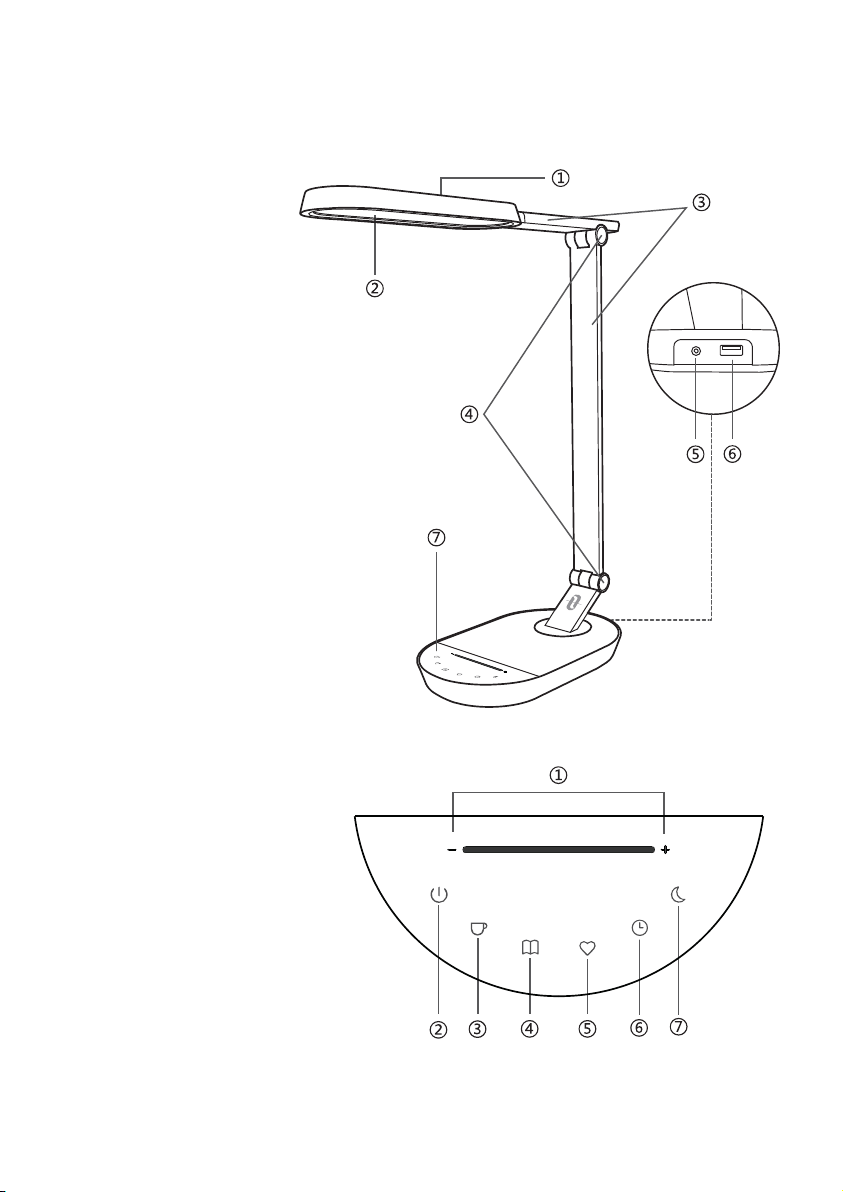
Description du Produit
Lampe de Bureau
①
Tête de lampe
②
Veilleuse
③
Bras
④
Réglages de Tension
⑤
Adaptateur Secteur
⑥
Port USB
⑦
Panneau Tactile
Panneau Tactile
①
Réglage de Luminosité
②
Marche / Arrêt
③
Température de
Couleur –
④
Température de
Couleur +
⑤
Favoris
⑥
Minuterie
⑦
Veilleuse
Mode d’Emploi
1. Marche / Arrêt
L’indicateur à LED Marche/Arrêt va s’allumer quand la lampe sera connectée au
courant.Tapez le bouton pour allumer la lampe et la panneau tactile. Tapez
à nouveau pour l’éteindre. La Lampe de Bureau TT-DL056 comprend une
fonction mémoire de luminosité et température de couleur. Elle va immédiate-
ment activer les réglages précédents à chaque fois qu’elle sera allumée.
2. Ajustement de la Luminosité
Pour ajuster la luminosité, tapez ou glissez à travers l’icône de Réglage de
Luminosité depuis la gauche (moins lumineux) vers la droite (plus lumineux).
3. Ajustement de la Température de Couleur
Appuyez sur les bouton ou pour passer par les 5 niveaux de
température de couleur. L’indicateur va clignoter 3 fois en atteignant le plus fort
ou le plus faible réglage.
4. Fonction Favoris
La lampe étant allumée, tapez et maintenez le bouton pendant 2 secondes.
L’indicateur va clignoter 3 fois et les actuelles température de couleur et
luminosité seront enregistrées comme favoris. A chaque fois que la lampe sera
allumée, tapez une fois sur le bouton pour activer les réglages favoris.
Tapez et maintenez à nouveau pendant 2 secondes pour effacer et enregistrer
un nouveau favori.
2019
Description du Produit
Lampe de Bureau
①
Tête de lampe
②
Veilleuse
③
Bras
④
Réglages de Tension
⑤
Adaptateur Secteur
⑥
Port USB
⑦
Panneau Tactile
Panneau Tactile
①
Réglage de Luminosité
②
Marche / Arrêt
③
Température de
Couleur –
④
Température de
Couleur +
⑤
Favoris
⑥
Minuterie
⑦
Veilleuse
5. Fonction Minuterie
La lampe étant allumée, tapez le bouton et le voyant va clignoter lentement
3 fois en démarrant la minuterie. La lampe s’éteindra automatiquement au bout
de 60 minutes. Tapez à nouveau en mode minuterie pour désactiver le réglage
de minuterie. L’indicateur à LED va clignoter une fois.
6. Fonction Veilleuse
Pour allumer la veilleuse, la lampe étant allumée, appuyez sur le bouton
jusqu’à ce que le voyant clignote lentement 3 fois. Tapez soit le bouton
soit le bouton pour éteindre la veilleuse. En mode veilleuse, tapez le
bouton pour activer ou désactiver la minuterie de 60 minutes.
Note: La veilleuse et la lampe principale ne s’allument pas en même temps.
Pièces Structurelles
La tête de la lampe est rotative à 90 degrés vers la gauche et à 180 degrés vers
la droite.
Le bras inférieur de la lampe et rotatif sur 90° vers la droite / gauche du socle.
Le bras inférieur de la lampe est rotatif sur 90° vers l’avant et 15° vers l’arrière.
Le bras supérieur de la lampe est rotatif sur 90° vers l’avant.
2221
90°
180°
5. Fonction Minuterie
La lampe étant allumée, tapez le bouton et le voyant va clignoter lentement
3 fois en démarrant la minuterie. La lampe s’éteindra automatiquement au bout
de 60 minutes. Tapez à nouveau en mode minuterie pour désactiver le réglage
de minuterie. L’indicateur à LED va clignoter une fois.
6. Fonction Veilleuse
Pour allumer la veilleuse, la lampe étant allumée, appuyez sur le bouton
jusqu’à ce que le voyant clignote lentement 3 fois. Tapez soit le bouton
soit le bouton pour éteindre la veilleuse. En mode veilleuse, tapez le
bouton pour activer ou désactiver la minuterie de 60 minutes.
Note: La veilleuse et la lampe principale ne s’allument pas en même temps.
Pièces Structurelles
La tête de la lampe est rotative à 90 degrés vers la gauche et à 180 degrés vers
la droite.
Le bras inférieur de la lampe et rotatif sur 90° vers la droite / gauche du socle.
Le bras inférieur de la lampe est rotatif sur 90° vers l’avant et 15° vers l’arrière.
Le bras supérieur de la lampe est rotatif sur 90° vers l’avant.
2221
90°
180°

Garantie
TaoTronics fourni une garantie limitée de 12 mois pour ce produit, à compter de
la date d’achat initial. Si votre produit devenait défectueux, veuillez contacter
l’équipe du Service Clients par email.
Nous ne pouvons fournir de service après-vente que pour les appareils vendus
par TaoTronics ou un de ses distributeurs ou revendeurs autorisés. Si vous avez
acheté votre appareil depuis un autre endroit, veuillez contacter le vendeur
pour les questions de retour et de garantie.
Guide de Dépannage
Problème
Cause Possible Solution
Pas d’alimentation
électrique
Vous n’avez pas appuyé
sur le Bouton de Luminosité
Vos mains sont humides
Des fluctuations de tension
ont causé la panne
du panneau
Panne d’un
composant LED
Panne de l’adaptateur
secteur
Court-circuit
La lampe ne
s’allume pas
La planche
tactile n'est pas
réactive
LED
échec
Mauvaise
odeur
Branchez correctement
l’adaptateur secteur
Voir la section Mode
d’Emploi
Touchez le panneau
avec les mains sèches
Débranchez
l’alimentation pour
redémarrer la lampe
Veuillez contacter
l’Équipe Support
TaoTronics
Veuillez contacter
l’Équipe Support
TaoTronics
Veuillez contacter
l’Équipe Support
TaoTronics
2423

Garantie
TaoTronics fourni une garantie limitée de 12 mois pour ce produit, à compter de
la date d’achat initial. Si votre produit devenait défectueux, veuillez contacter
l’équipe du Service Clients par email.
Nous ne pouvons fournir de service après-vente que pour les appareils vendus
par TaoTronics ou un de ses distributeurs ou revendeurs autorisés. Si vous avez
acheté votre appareil depuis un autre endroit, veuillez contacter le vendeur
pour les questions de retour et de garantie.
Guide de Dépannage
Problème
Cause Possible Solution
Pas d’alimentation
électrique
Vous n’avez pas appuyé
sur le Bouton de Luminosité
Vos mains sont humides
Des fluctuations de tension
ont causé la panne
du panneau
Panne d’un
composant LED
Panne de l’adaptateur
secteur
Court-circuit
La lampe ne
s’allume pas
La planche
tactile n'est pas
réactive
LED
échec
Mauvaise
odeur
Branchez correctement
l’adaptateur secteur
Voir la section Mode
d’Emploi
Touchez le panneau
avec les mains sèches
Débranchez
l’alimentation pour
redémarrer la lampe
Veuillez contacter
l’Équipe Support
TaoTronics
Veuillez contacter
l’Équipe Support
TaoTronics
Veuillez contacter
l’Équipe Support
TaoTronics
2423

Gracias por elegir la lámpara LED de escritorio de TaoTronics modelo
TT-DL056. Por favor lea a este manual cuidadosamente y consérvelo para
futuras consultas.
ES
Características del producto
•
Cuerpo metálico de la lámpara
•
Brazo y cabezal rotativo multi-ángulo
•
Función de brillo y memoria de temperatura de color
•
Panel táctil con indicador LED
•
Función de temporizador de apagado automático
•
Función de brillo y favoritos de color de temperatura
•
Función de luz nocturna
•
Luz LED de alta eficiencia
•
Puerto USB 5V/2A
Contenido del paquete
•
1 x Lámpara LED de escritorio TaoTronics (Modelo:TT-DL056)
•
1 x Adaptador de corriente
•
1 x Paño de limpieza
•
1 x Manual del usuario
Especificaciones
Modelo
Voltaje de operación
Salida USB
Energía
Temperatura de color
CRI
TT-DL056
DC 12V
DC 5V / 2A
12W Máx
2700-3000K, 3000-3500K, 4000-4500K,
5000-5500K, 6000-6500K
>80
2625

Gracias por elegir la lámpara LED de escritorio de TaoTronics modelo
TT-DL056. Por favor lea a este manual cuidadosamente y consérvelo para
futuras consultas.
ES
Características del producto
•
Cuerpo metálico de la lámpara
•
Brazo y cabezal rotativo multi-ángulo
•
Función de brillo y memoria de temperatura de color
•
Panel táctil con indicador LED
•
Función de temporizador de apagado automático
•
Función de brillo y favoritos de color de temperatura
•
Función de luz nocturna
•
Luz LED de alta eficiencia
•
Puerto USB 5V/2A
Contenido del paquete
•
1 x Lámpara LED de escritorio TaoTronics (Modelo:TT-DL056)
•
1 x Adaptador de corriente
•
1 x Paño de limpieza
•
1 x Manual del usuario
Especificaciones
Modelo
Voltaje de operación
Salida USB
Energía
Temperatura de color
CRI
TT-DL056
DC 12V
DC 5V / 2A
12W Máx
2700-3000K, 3000-3500K, 4000-4500K,
5000-5500K, 6000-6500K
>80
2625
Cómo funciona
1. Encendido / Apagado
El On / Off LED indicador se encenderá cuando la lámpara esté conectada a la
fuente de alimentación. Toque en la botón para encender la lámpara y la
pantalla táctil. Pulse otra vez para desactivar. La lámpara de escritorio TT-DL056
incluye un brillo y una función de memoria de la temperatura de color; activará
directamente la configuración anterior, cada vez se enciende.
2. Ajuste del brillo
Para ajustar el brillo, pulse o deslice a través de los iconos de ajuste de brillo
desde la izquierda (menos brillante) a la derecha (más brillante).
3. Ajuste de la temperatura de color
Presione la o botón para pasar a través de los 5 niveles de temperatu-
ra de color. El indicador parpadeará 3 veces cuando alcanza el máximo o el
mínimo ajuste.
4. Función favorita
Cuando la luz está encendida, pulse y sostenga el botón durante 2
segundos. El indicador parpadeará 3 veces y la temperatura actual del color y el
brillo se establecerá como su favorito.Cada vez que la lámpara está encendida,
pulse el botón una vez para activar la configuración favorita. Toque y
mantenga otra vez durante 2 segundos para borrar y establecer un nuevo
favorito.
Diagrama del producto
Lámpara de escritorio
①
Cabezal
②
Luz nocturna
③
Brazo de lámpara
④
Ajustador de tensión
⑤
Adaptador de corriente
⑥
Puerto USB
⑦
Panel táctil
Panel táctil
①
Ajuste brillo
②
Encendido / Apagado
③
Temperatura de color –
④
Temperatura de color +
⑤
Favorito
⑥
Temporizador
⑦
Luz nocturna
2827

Cómo funciona
1. Encendido / Apagado
El On / Off LED indicador se encenderá cuando la lámpara esté conectada a la
fuente de alimentación. Toque en la botón para encender la lámpara y la
pantalla táctil. Pulse otra vez para desactivar. La lámpara de escritorio TT-DL056
incluye un brillo y una función de memoria de la temperatura de color; activará
directamente la configuración anterior, cada vez se enciende.
2. Ajuste del brillo
Para ajustar el brillo, pulse o deslice a través de los iconos de ajuste de brillo
desde la izquierda (menos brillante) a la derecha (más brillante).
3. Ajuste de la temperatura de color
Presione la o botón para pasar a través de los 5 niveles de temperatu-
ra de color. El indicador parpadeará 3 veces cuando alcanza el máximo o el
mínimo ajuste.
4. Función favorita
Cuando la luz está encendida, pulse y sostenga el botón durante 2
segundos. El indicador parpadeará 3 veces y la temperatura actual del color y el
brillo se establecerá como su favorito.Cada vez que la lámpara está encendida,
pulse el botón una vez para activar la configuración favorita. Toque y
mantenga otra vez durante 2 segundos para borrar y establecer un nuevo
favorito.
Diagrama del producto
Lámpara de escritorio
①
Cabezal
②
Luz nocturna
③
Brazo de lámpara
④
Ajustador de tensión
⑤
Adaptador de corriente
⑥
Puerto USB
⑦
Panel táctil
Panel táctil
①
Ajuste brillo
②
Encendido / Apagado
③
Temperatura de color –
④
Temperatura de color +
⑤
Favorito
⑥
Temporizador
⑦
Luz nocturna
2827
5. Función de temporizador
Cuando la luz esté encendida, pulse el botón y el indicador se parpadea
lentamente 3 veces para iniciar el cronometraje. La lámpara se apagará
automáticamente en 60 minutos. Pulse otra vez en el modo de temporizador
para cancelar el ajuste del temporizador. El indicador LED parpadeará una vez.
6. Función de luz nocturna
Cuando la luz está encendida, pulse el botón hasta que el indicador
parpadee lentamente 3 veces a la luz a la luz de la noche.Pulse ya sea el
botón o el botón para apagar la luz de la noche. En modo de luz de la
noche, toque la botón para programar o cancelar el temporizador de 60
minutos.
Nota: La noche luz y lámpara principal no se encienden al mismo tiempo.
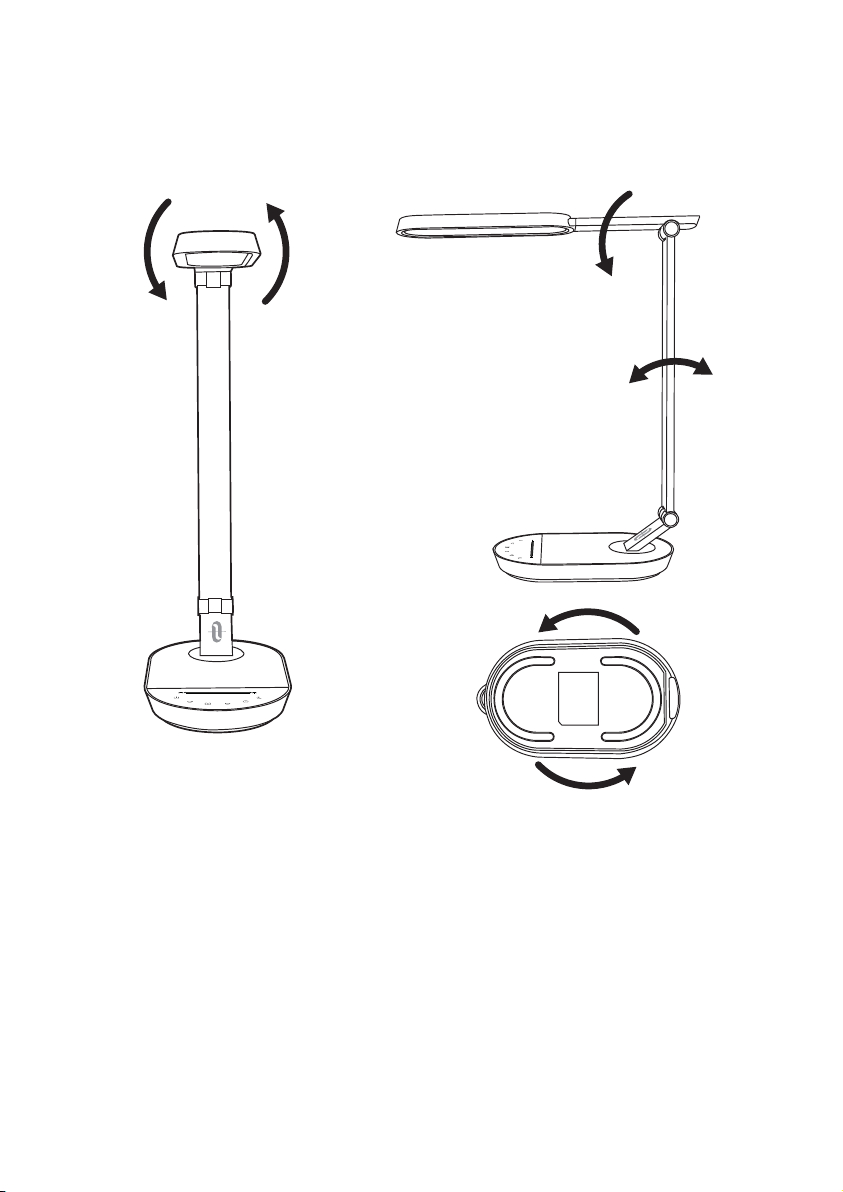
Piezas estructurales
Piezas estructurales
La cabeza de la lámpara es 90 grados giratoria a la izquierda y 180 grados a la
derecha.
El brazo inferior de la lámpara es de 90 grados giratorio a la izquierda / derecha
en la base.
El brazo inferior de la lámpara es de 90 grados hacia adelante y hacia atrás 15
grados giratorio.
El brazo superior de la lámpara es de 90 grados hacia adelante rotativo.
3029
90°
180°
5. Función de temporizador
Cuando la luz esté encendida, pulse el botón y el indicador se parpadea
lentamente 3 veces para iniciar el cronometraje. La lámpara se apagará
automáticamente en 60 minutos. Pulse otra vez en el modo de temporizador
para cancelar el ajuste del temporizador. El indicador LED parpadeará una vez.
6. Función de luz nocturna
Cuando la luz está encendida, pulse el botón hasta que el indicador
parpadee lentamente 3 veces a la luz a la luz de la noche.Pulse ya sea el
botón o el botón para apagar la luz de la noche. En modo de luz de la
noche, toque la botón para programar o cancelar el temporizador de 60
minutos.
Nota: La noche luz y lámpara principal no se encienden al mismo tiempo.
Piezas estructurales
Piezas estructurales
La cabeza de la lámpara es 90 grados giratoria a la izquierda y 180 grados a la
derecha.
El brazo inferior de la lámpara es de 90 grados giratorio a la izquierda / derecha
en la base.
El brazo inferior de la lámpara es de 90 grados hacia adelante y hacia atrás 15
grados giratorio.
El brazo superior de la lámpara es de 90 grados hacia adelante rotativo.
3029
90°
180°

Garantía
TaoTronics ofrece una garantía limitada de 12 meses para este producto desde
la fecha de compra original. Si su producto resulta defectuoso, póngase en
contacto con nuestro equipo de atención al cliente por correo electrónico.
Sólo podemos ofrecer servicios de postventa de los productos que se venden
por TaoTronics o TaoTronics autorizados minoristas y distribuidores. Si usted ha
comprado su unidad desde un lugar diferente, por favor póngase en contacto
con el vendedor directamente para cuestiones de retorno y de garantía.
Guía de solución de problemas
Problema
Posible Causa
Solución
Ninguna fuente de
alimentación
No oprima el botón
de brillo
Las manos están mojadas
Falta de panel causa
tensión fluctuación
Componente de LED
estropeado
Adaptador de corriente
estropeado
Corto circuito
La lámpara no
se enciende
La pantalla
táctil no
responde
Fallo de LED
Mal olor
Enchufe correctamente
el adaptador de
corriente
Consulte la sección
"Cómo funciona"
Toque el panel con
las manos secas
Desconecte la
alimentación eléctrica
para reiniciar la
lámpara
Por favor, póngase en
contacto con el equipo
de soporte de TaoTronics
Por favor, póngase en
contacto con el equipo
de soporte de TaoTronics
Por favor, póngase en
contacto con el equipo
de soporte de TaoTronics
3231

Garantía
TaoTronics ofrece una garantía limitada de 12 meses para este producto desde
la fecha de compra original. Si su producto resulta defectuoso, póngase en
contacto con nuestro equipo de atención al cliente por correo electrónico.
Sólo podemos ofrecer servicios de postventa de los productos que se venden
por TaoTronics o TaoTronics autorizados minoristas y distribuidores. Si usted ha
comprado su unidad desde un lugar diferente, por favor póngase en contacto
con el vendedor directamente para cuestiones de retorno y de garantía.
Guía de solución de problemas
Problema
Posible Causa
Solución
Ninguna fuente de
alimentación
No oprima el botón
de brillo
Las manos están mojadas
Falta de panel causa
tensión fluctuación
Componente de LED
estropeado
Adaptador de corriente
estropeado
Corto circuito
La lámpara no
se enciende
La pantalla
táctil no
responde
Fallo de LED
Mal olor
Enchufe correctamente
el adaptador de
corriente
Consulte la sección
"Cómo funciona"
Toque el panel con
las manos secas
Desconecte la
alimentación eléctrica
para reiniciar la
lámpara
Por favor, póngase en
contacto con el equipo
de soporte de TaoTronics
Por favor, póngase en
contacto con el equipo
de soporte de TaoTronics
Por favor, póngase en
contacto con el equipo
de soporte de TaoTronics
3231

Caratteristiche del Prodotto
•
Corpo in Metallo
•
Braccio e Testa Multiangolo ruotabile
•
Funzione di Memoria di Luminosità & temperatura di colore
•
Pannello Touch con indicatore LED
•
Funzione Autospegnimento
•
Funzione favoriti per Luminosità & temperatura di colore
•
Funzione luce notturna
•
Luci LED ad alta efficienza
•
Porta USB 5V/2A
Contenuto della Confezione
•
1 x Lampada da Scrivania LED TaoTronics (Modello: TT-DL056)
•
1 x Adattatore
•
1 x Panno Pulente
•
1 x Manuale Utente
Specifiche Tecniche
Modello
Voltaggio Operativo
Uscita USB
Potenza
Temperatura di colore
CRI
TT-DL056
DC 12V
DC 5V / 2A
12W Max
2700-3000K, 3000-3500K, 4000-4500K,
5000-5500K, 6000-6500K
>80
Grazie per aver scelto la Lampada da Scrivania LED TT-DL056
TaoTronics. Vi invitiamo a leggere attentamente il seguente manuale
e a conservarlo per future consultazioni.
IT
3433
Caratteristiche del Prodotto
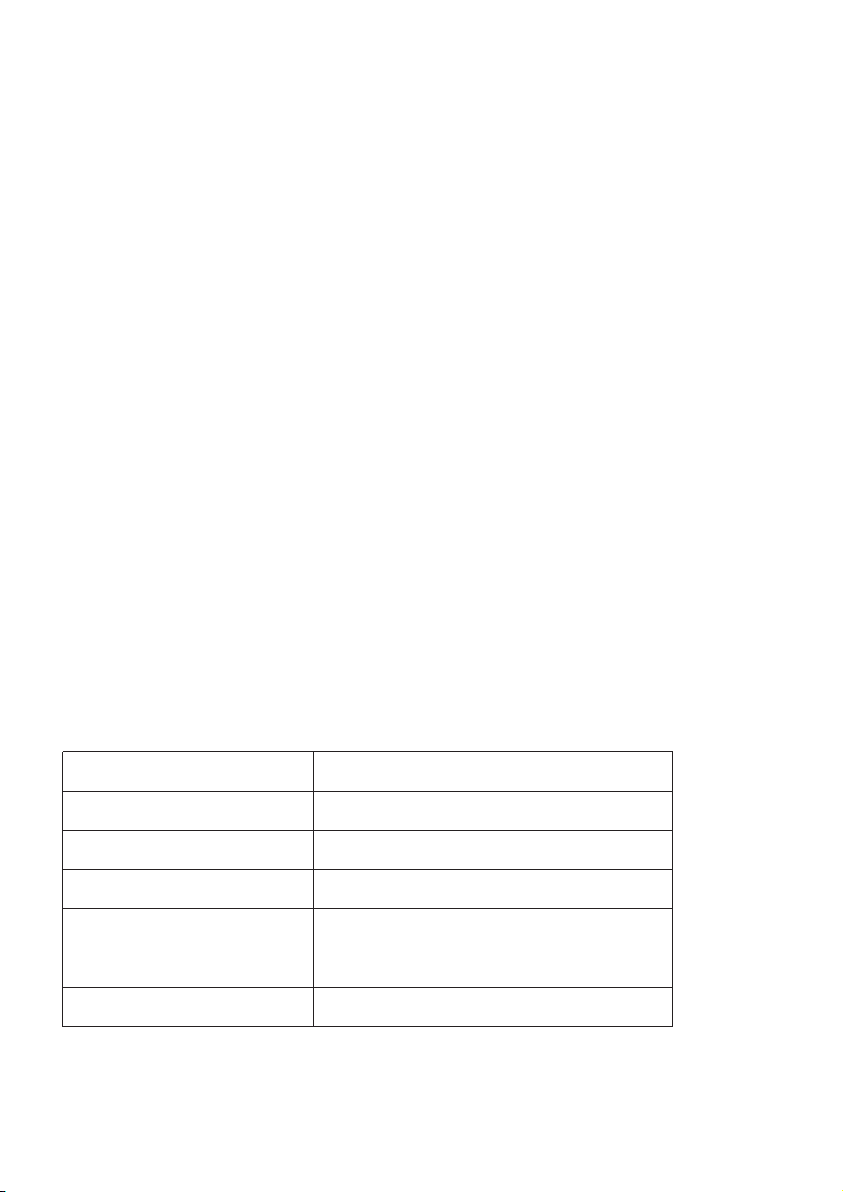
•
Corpo in Metallo
•
Braccio e Testa Multiangolo ruotabile
•
Funzione di Memoria di Luminosità & temperatura di colore
•
Pannello Touch con indicatore LED
•
Funzione Autospegnimento
•
Funzione favoriti per Luminosità & temperatura di colore
•
Funzione luce notturna
•
Luci LED ad alta efficienza
•
Porta USB 5V/2A
Contenuto della Confezione
•
1 x Lampada da Scrivania LED TaoTronics (Modello: TT-DL056)
•
1 x Adattatore
•
1 x Panno Pulente
•
1 x Manuale Utente
Specifiche Tecniche
Modello
Voltaggio Operativo
Uscita USB
Potenza
Temperatura di colore
CRI
TT-DL056
DC 12V
DC 5V / 2A
12W Max
2700-3000K, 3000-3500K, 4000-4500K,
5000-5500K, 6000-6500K
>80
Grazie per aver scelto la Lampada da Scrivania LED TT-DL056
TaoTronics. Vi invitiamo a leggere attentamente il seguente manuale
e a conservarlo per future consultazioni.
IT
3433
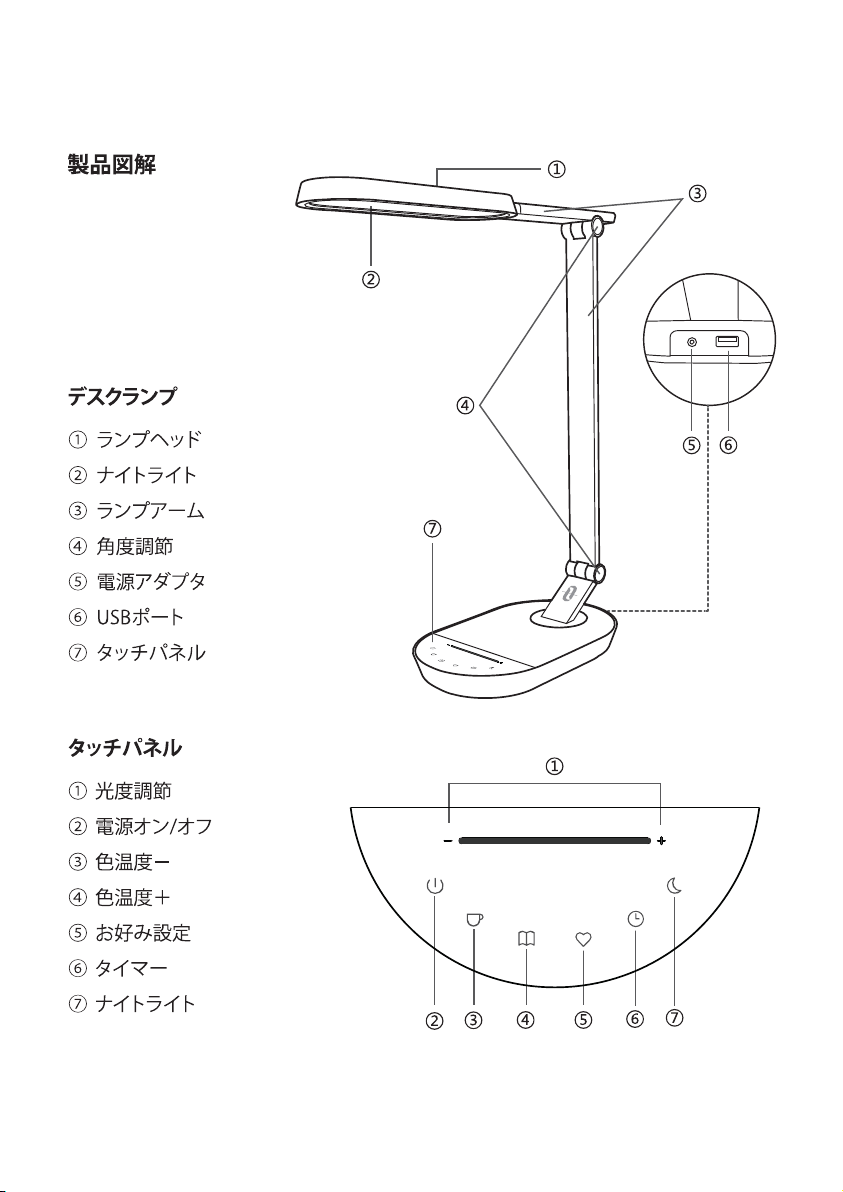
Schema del Prodotto
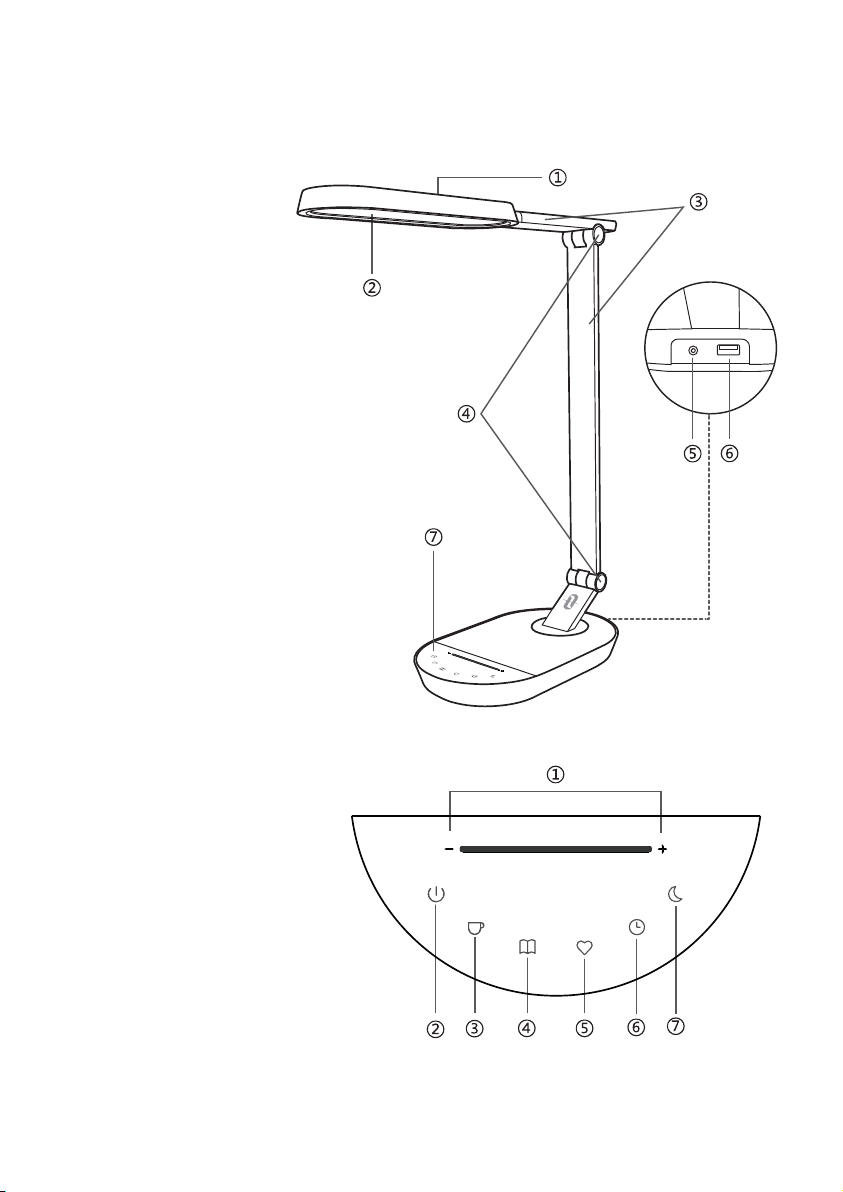
Lampada da Scrivania
①
Testa
②
Luce Notturna
③
Braccio
④
Regolatore di tensione
⑤
Adattatore
⑥
Porta USB
⑦
Pannello Touch
Pannello Touch
①
Impostazioni Luminosità
②
On / Off
③
Temperatura di
colore -
④
Temperatura di
colore +
⑤
Favoriti
⑥
Timer
⑦
Luce Notturna
Funzionamento
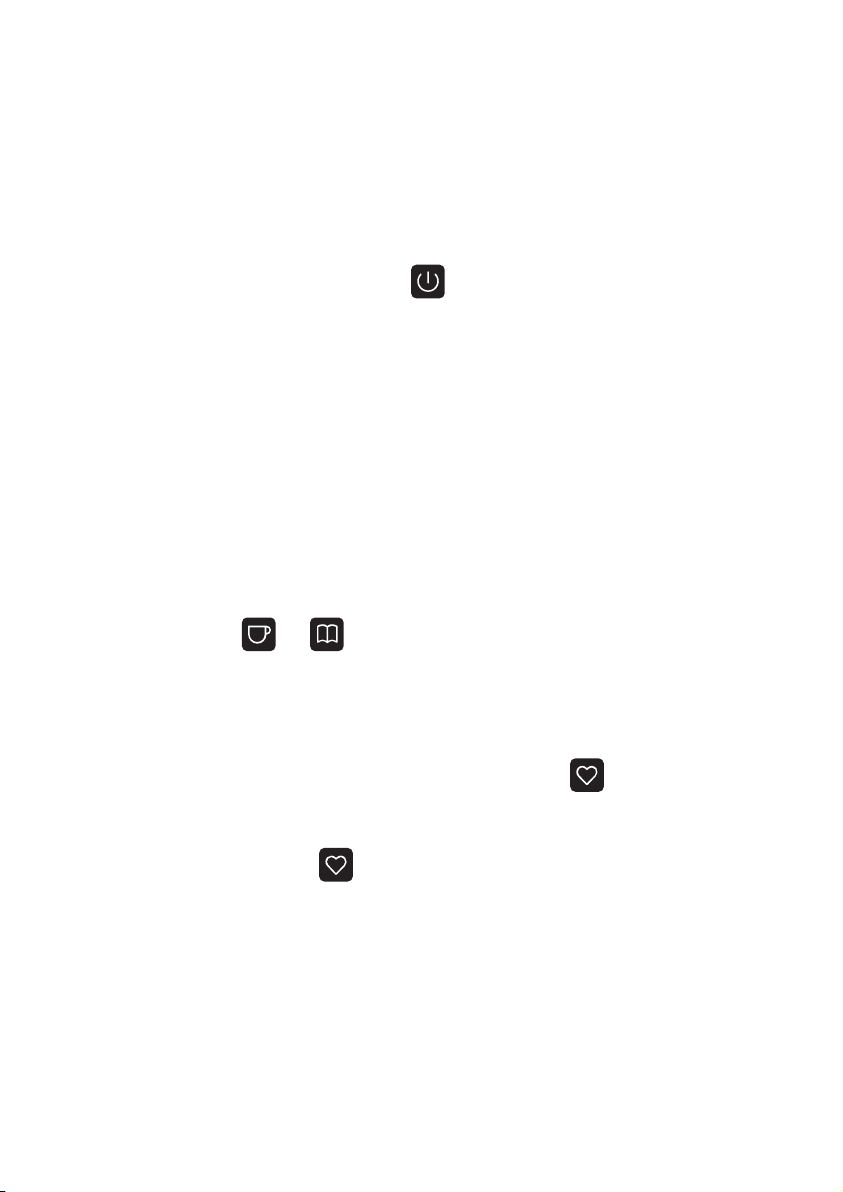
1. On / Off
L'indicatore LED On / Off si accenderà quando la lampada sarà connessa
all'alimentazione. Fare tap sul pulsante per accendere la lampada e il
pannello touch. Fare nuovamente tap per spegnere. La Lampada da Scrivania
TT-DL056 Desk include una funzione di memoria per luminosità e temperatura
di colore che permetterà di attivare le impostazioni precedenti ogni volta viene
accesa.
2. Regolazione Luminosità
Per regolare la luminosità, fare tap o trascinare il dito sull'icona delle impostazi-
oni della luminosità da sinistra (per diminuire la luminosità) a destra ( per
aumentare la luminosità).
3. Regolazione Temperatura di Colore
Premere il pulsante o per scegliere tra 5 livelli di temperatura di
colore differenti. L'indicatore lampeggerà 3 volte quando raggiunge l'impostazi-
one massima e minima.
4. Funzione Favoriti
A lampada accesa, fare tap e mantenere premuto il tasto per 2 secondi.
L'indicatore lampeggerà 3 volte e sia l'attuale temperatura di colore che la
luminosità saranno impostati come favoriti. Ogni volta che la lampada viene
accesa, fare tap sul pulsante una sola volta per attivare l'impostazione
favoriti. Fare nuovamente tap e mantenere premuto il pulsante per 2 secondi
per impostare un nuovo favorito.
3635
Schema del Prodotto
Lampada da Scrivania
①
Testa
②
Luce Notturna
③
Braccio
④
Regolatore di tensione
⑤
Adattatore
⑥
Porta USB
⑦
Pannello Touch
Pannello Touch
①
Impostazioni Luminosità
②
On / Off
③
Temperatura di
colore -
④
Temperatura di
colore +
⑤
Favoriti
⑥
Timer
⑦
Luce Notturna
Funzionamento
1. On / Off
L'indicatore LED On / Off si accenderà quando la lampada sarà connessa
all'alimentazione. Fare tap sul pulsante per accendere la lampada e il
pannello touch. Fare nuovamente tap per spegnere. La Lampada da Scrivania
TT-DL056 Desk include una funzione di memoria per luminosità e temperatura
di colore che permetterà di attivare le impostazioni precedenti ogni volta viene
accesa.
2. Regolazione Luminosità
Per regolare la luminosità, fare tap o trascinare il dito sull'icona delle impostazi-
oni della luminosità da sinistra (per diminuire la luminosità) a destra ( per
aumentare la luminosità).
3. Regolazione Temperatura di Colore
Premere il pulsante o per scegliere tra 5 livelli di temperatura di
colore differenti. L'indicatore lampeggerà 3 volte quando raggiunge l'impostazi-
one massima e minima.
4. Funzione Favoriti
A lampada accesa, fare tap e mantenere premuto il tasto per 2 secondi.
L'indicatore lampeggerà 3 volte e sia l'attuale temperatura di colore che la
luminosità saranno impostati come favoriti. Ogni volta che la lampada viene
accesa, fare tap sul pulsante una sola volta per attivare l'impostazione
favoriti. Fare nuovamente tap e mantenere premuto il pulsante per 2 secondi
per impostare un nuovo favorito.
3635
5. Funzione Timer
Quando la lampada è accesa, fare tap sul pulsante e l'indicatore
lampeggerà lentamente 3 volte prima di avviare il timer. La lampada si spegnerà
automaticamente dopo 60 minuti. Fare nuovamente tap in modalità timer per
cancellare l'impostazione del timer. L'indicatore LED lampeggerà una sola volta.
6. Funzione Luce Notturna
Quando la lampada è accesa, fare tap sul pulsante fino al lampeggiare
dell'indicatore per 3 volte e all'attivarsi della luce notturna. Fare tap sul pulsante
o sul pulsante per spegnere la luce notturna. In modalità Luce
Notturna, fare tap sul pulsante per impostare o cancellare il timer di 60
minuti.
Nota: La Luce Notturna e la lampada principale non saranno attive allo stesso
tempo.
Parti Strutturali
La testa della lampada è 90 gradi ruotabile a sinistra e 180 gradi a destra.
Il della lampada inferiore è rotabile alla base a 90 gradi da sinistra a destra.
Il braccio della lampada è rotabile a 90 gradi in avanti e 15 indietro.
Il braccio della lampada superiore è rotabile a 90 gradi.
3837
90°
180°

5. Funzione Timer
Quando la lampada è accesa, fare tap sul pulsante e l'indicatore
lampeggerà lentamente 3 volte prima di avviare il timer. La lampada si spegnerà
automaticamente dopo 60 minuti. Fare nuovamente tap in modalità timer per
cancellare l'impostazione del timer. L'indicatore LED lampeggerà una sola volta.
6. Funzione Luce Notturna
Quando la lampada è accesa, fare tap sul pulsante fino al lampeggiare
dell'indicatore per 3 volte e all'attivarsi della luce notturna. Fare tap sul pulsante
o sul pulsante per spegnere la luce notturna. In modalità Luce
Notturna, fare tap sul pulsante per impostare o cancellare il timer di 60
minuti.
Nota: La Luce Notturna e la lampada principale non saranno attive allo stesso
tempo.
Parti Strutturali
La testa della lampada è 90 gradi ruotabile a sinistra e 180 gradi a destra.
Il della lampada inferiore è rotabile alla base a 90 gradi da sinistra a destra.
Il braccio della lampada è rotabile a 90 gradi in avanti e 15 indietro.
Il braccio della lampada superiore è rotabile a 90 gradi.
3837
90°
180°

Guida Risoluzione dei Problemi
Problema
Possibile Causa
Soluzione
Mancanza di
alimentazione
Non è stato premuto il
pulsante della Luminosità
Mani bagnate
Pannello danneggiato in
seguito ad una fluttuazione
di voltaggio
Componente LED guasto
Adattatore guasto
Corto circuito
La lampada
non si accende
Il pannello
touch non
risponde al
tatto
LED guasto
Cattivo Odore
Collegare ad un
adattatore in maniera
corretta
Controllare la sezione
“Funzionamento”
Toccare il pannello
touch con le mani
asciutte
Scollegare
dall'alimentatore e
riaccendere la lampada
Contattare il Supporto
Clienti di TaoTronics
Contattare il Supporto
Clienti di TaoTronics
Contattare il Supporto
Clienti di TaoTronics
Garanzia
TaoTronics fornisce per questo prodotto, una garanzia limitata di 12 mesi dalla
sua data d'acquisto. In caso di difetti del prodotto, si prega di contattare via
email il nostro team di supporto clienti.
Forniamo servizio di post vendita esclusivamente per prodotti venduti da
TaoTronics o da distributori e rivenditori autorizzati TaoTronics. Se acquistati da
terzi, vi invitiamo a rivolgervi al vostro venditore per casi attinenti alla
restituzione del prodotto e questioni sulla garanzia.
4039

Guida Risoluzione dei Problemi
Problema
Possibile Causa
Soluzione
Mancanza di
alimentazione
Non è stato premuto il
pulsante della Luminosità
Mani bagnate
Pannello danneggiato in
seguito ad una fluttuazione
di voltaggio
Componente LED guasto
Adattatore guasto
Corto circuito
La lampada
non si accende
Il pannello
touch non
risponde al
tatto
LED guasto
Cattivo Odore
Collegare ad un
adattatore in maniera
corretta
Controllare la sezione
“Funzionamento”
Toccare il pannello
touch con le mani
asciutte
Scollegare
dall'alimentatore e
riaccendere la lampada
Contattare il Supporto
Clienti di TaoTronics
Contattare il Supporto
Clienti di TaoTronics
Contattare il Supporto
Clienti di TaoTronics
Garanzia
TaoTronics fornisce per questo prodotto, una garanzia limitata di 12 mesi dalla
sua data d'acquisto. In caso di difetti del prodotto, si prega di contattare via
email il nostro team di supporto clienti.
Forniamo servizio di post vendita esclusivamente per prodotti venduti da
TaoTronics o da distributori e rivenditori autorizzati TaoTronics. Se acquistati da
terzi, vi invitiamo a rivolgervi al vostro venditore per casi attinenti alla
restituzione del prodotto e questioni sulla garanzia.
4039
JP
4241
JP
4241
4443
4443
4645
90°
180°
4645
90°
180°
WEEE Compliance
Correct Disposal of This Product (Waste Electrical & Electronic Equipment)
(Applicable in countries with separate collection systems)
This marking on the product, accessories or literature indicates that the product and its
electronic accessories should not be disposed of with other household waste at the end
of their working life. To prevent possible harm to the environment or human health from
uncontrolled waste disposal, please separate these items from other types of waste and
recycle them responsibly to promote the sustainable reuse of material resources.
Household users should contact either the retailer where they purchased this product,
or their local government office, for details of where and how they can take these items
for environmentally safe recycling. Business users should contact their supplier and
check the terms and conditions of the purchase contract. This product and its electronic
accessories should not be mixed with other commercial wastes for disposal.
FCC Compliance
This device complies with Part 15 of the FCC Rules. Operation is subject to the following
two conditions: (1) this device may not cause harmful interference, and (2) this device
must withstand any interference received, including interference that may cause
undesired operation.
47

WEEE Compliance
Correct Disposal of This Product (Waste Electrical & Electronic Equipment)
(Applicable in countries with separate collection systems)
This marking on the product, accessories or literature indicates that the product and its
electronic accessories should not be disposed of with other household waste at the end
of their working life. To prevent possible harm to the environment or human health from
uncontrolled waste disposal, please separate these items from other types of waste and
recycle them responsibly to promote the sustainable reuse of material resources.
Household users should contact either the retailer where they purchased this product,
or their local government office, for details of where and how they can take these items
for environmentally safe recycling. Business users should contact their supplier and
check the terms and conditions of the purchase contract. This product and its electronic
accessories should not be mixed with other commercial wastes for disposal.
FCC Compliance
This device complies with Part 15 of the FCC Rules. Operation is subject to the following
two conditions: (1) this device may not cause harmful interference, and (2) this device
must withstand any interference received, including interference that may cause
undesired operation.
47