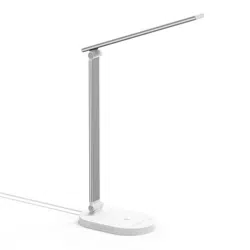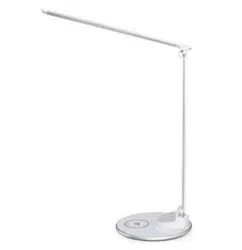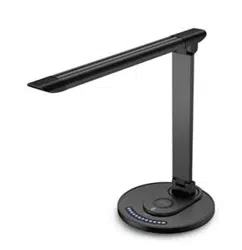
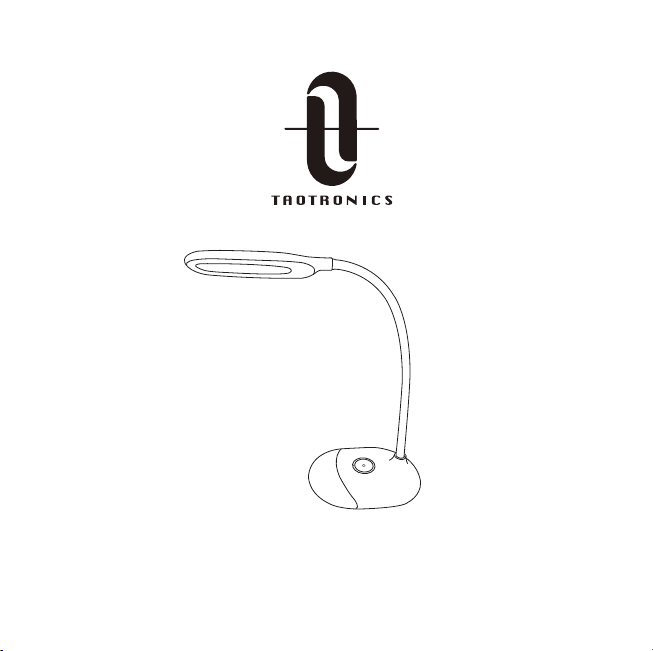
LED DESK LAMP
User Guide
Learn more about the EU Declaration of Conformity:
https://www.taotronics.com/downloads-TT-DL070-CE-Cert.html
TT-DL070_V1.0
EUROPE
E-mail:
support.uk@taotronics.com(UK)
support.de@taotronics.com(DE)
support.fr@taotronics.com(FR)
support.es@taotronics.com(ES)
support.it@taotronics.com(IT)
EU Importer: ZBT International Trading GmbH
Address: Halstenbeker Weg 98C, 25462 Rellingen, Deutschland
NORTH AMERICA
E-mail : support@taotronics.com(US)
support.ca@taotronics.com(CA)
Tel : 1-888-456-8468 (Monday-Friday: 9:00 – 17:00 PST)
US Distributor: SUNVALLEYTEK INTERNATIONAL INC.
Address:46724 Lakeview Blvd, Fremont, CA 94538
Manufacturer: Shenzhen NearbyExpress Technology Development Co.,Ltd.
Address: 333 Bulong Road, Shenzhen, China, 518129
MANUFACTURER
ASIA PACIFIC
E-mail: support.jp@taotronics.com(JP)
Tel:03-5542-0238(10〜18時/土日祝除く)
JPImporter:株式会社SUNVALLEYJAPAN
〒104-0032東京都中央区八丁堀3丁目18-6PMO京橋東9F
www.taotronics.com
MADE IN CHINA
MODEL: TT-DL070

CONTENTS
English
Deutsch
Français
Español
Italiano
01/04
05/08
09/12
13/16
17/20
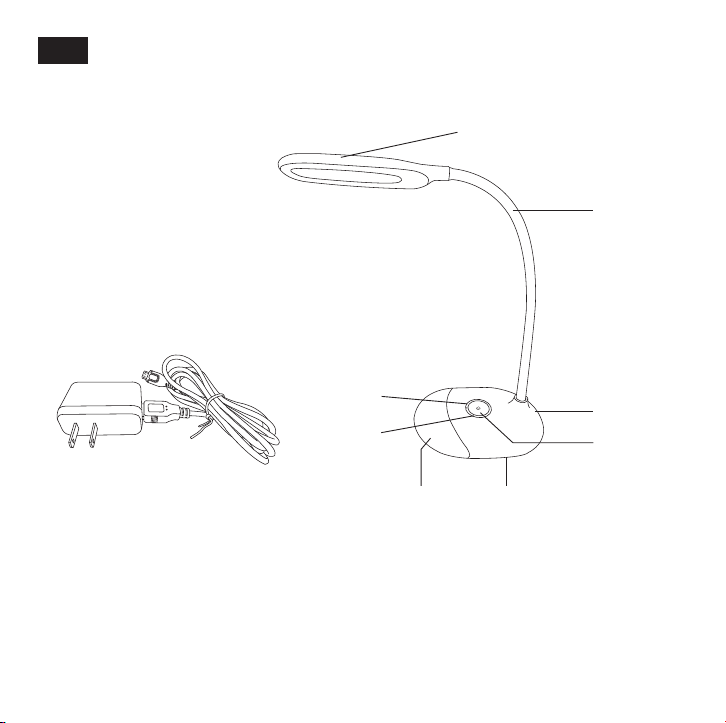
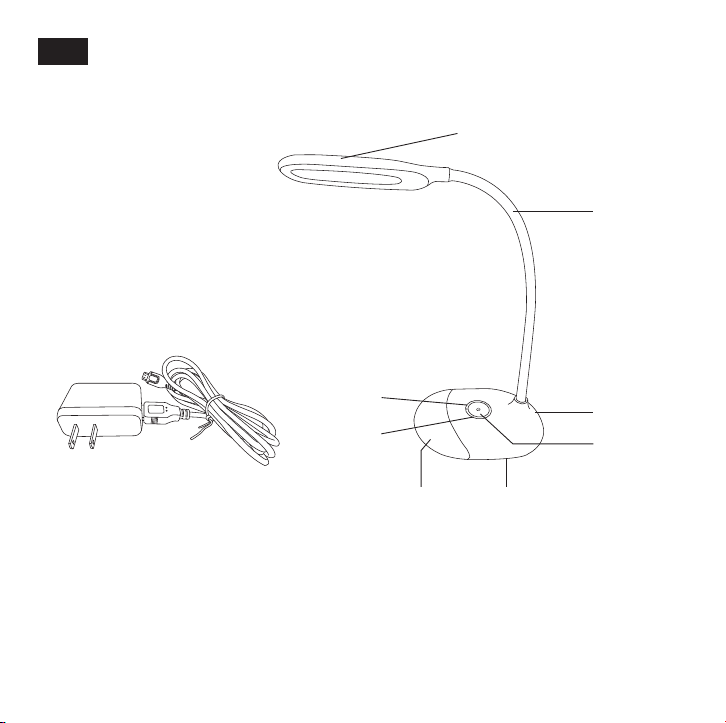
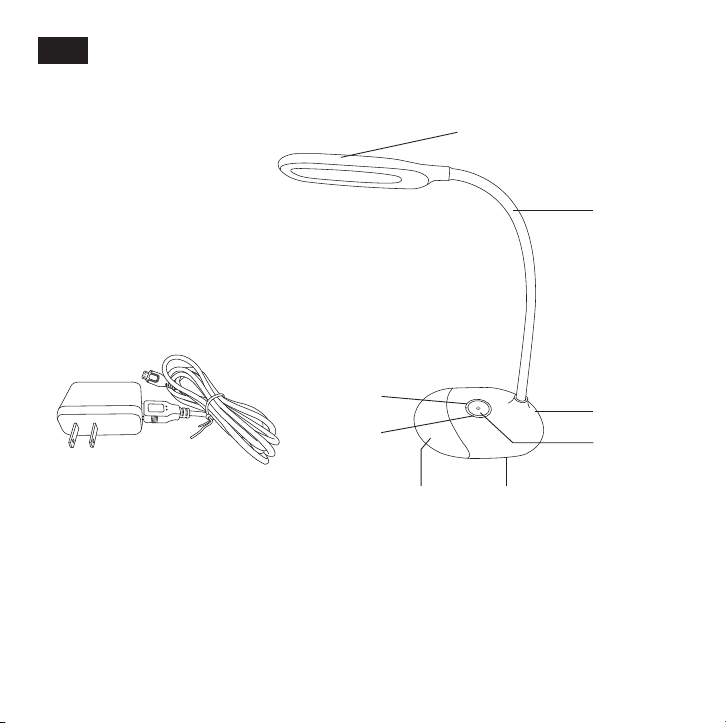
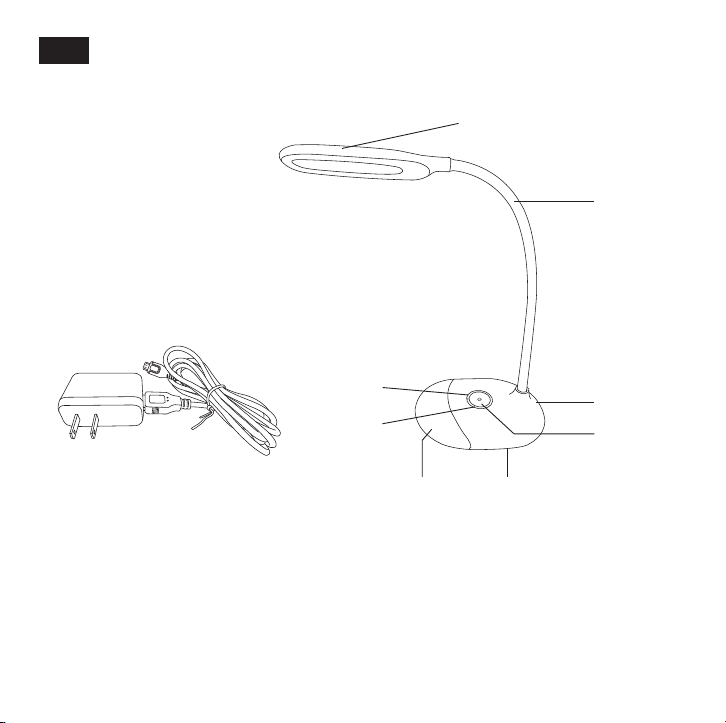
① Lamp Head (White Light)
② Lamp Arm
③ DC Power Port
④ White Light Power /
Brightness Button
1 x TaoTronics LED Desk Lamp (Model: TT-DL070)
1 x Power Adapter (With Detachable Micro USB Cable)
1 x User Guide
Product Diagram
Specifications
Package Contents
The lamp enters standby mode by default once the battery is fully
charged. When the battery is low, use the power adapter or
connect the USB cable to any USB outlet with a 5V/1A output to
charge the lamp.
How to Use
EN
01/02
①
④
⑤
⑥
⑦
⑧
②
③
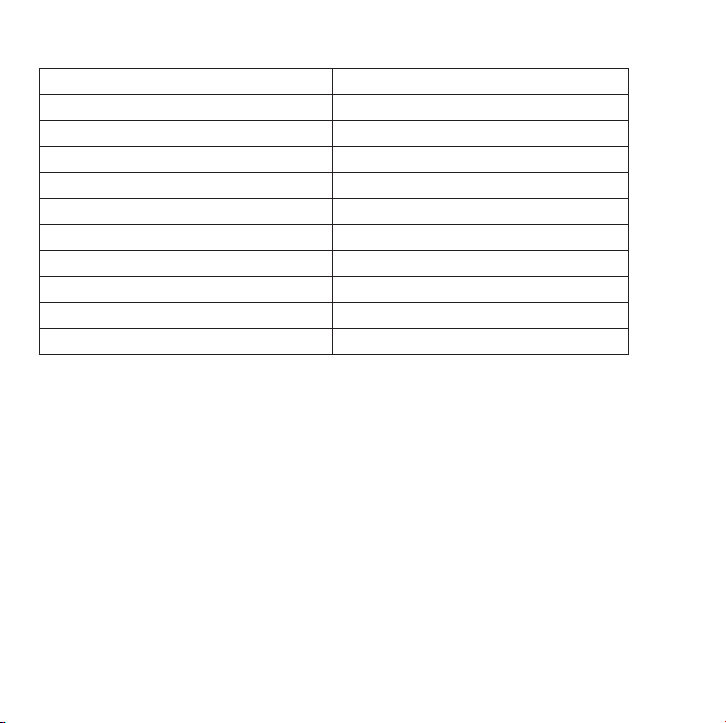
Model
Light Source
Operating Voltage
Power
Color Temperature
Battery Capacity
Charging Time
Working Time (Built-in Battery)
Lumens
Operating Temperature
CRI
TT-DL070
LED
DC 5V / 1A
7W
5000-5500K (White Light)
1000mAh
3 hours
Up to 6 hours
258 lm
-20°C to 40°C / -4°F to 104°F
> 80
⑤ Multi-color Light Power Button
⑥ Color Slider (Multi-color Light)
⑦ Multi-color Light
⑧ Lamp Base
① Lamp Head (White Light)
② Lamp Arm
③ DC Power Port
④ White Light Power /
Brightness Button
1 x TaoTronics LED Desk Lamp (Model: TT-DL070)
1 x Power Adapter (With Detachable Micro USB Cable)
1 x User Guide
Product Diagram
Specifications
Package Contents
The lamp enters standby mode by default once the battery is fully
charged. When the battery is low, use the power adapter or
connect the USB cable to any USB outlet with a 5V/1A output to
charge the lamp.
How to Use
EN
01/02
①
④
⑤
⑥
⑦
⑧
②
③
Model
Light Source
Operating Voltage
Power
Color Temperature
Battery Capacity
Charging Time
Working Time (Built-in Battery)
Lumens
Operating Temperature
CRI
TT-DL070
LED
DC 5V / 1A
7W
5000-5500K (White Light)
1000mAh
3 hours
Up to 6 hours
258 lm
-20°C to 40°C / -4°F to 104°F
> 80
⑤ Multi-color Light Power Button
⑥ Color Slider (Multi-color Light)
⑦ Multi-color Light
⑧ Lamp Base

In standby mode, tap the White Light Power Button once to power
on / off the white light.
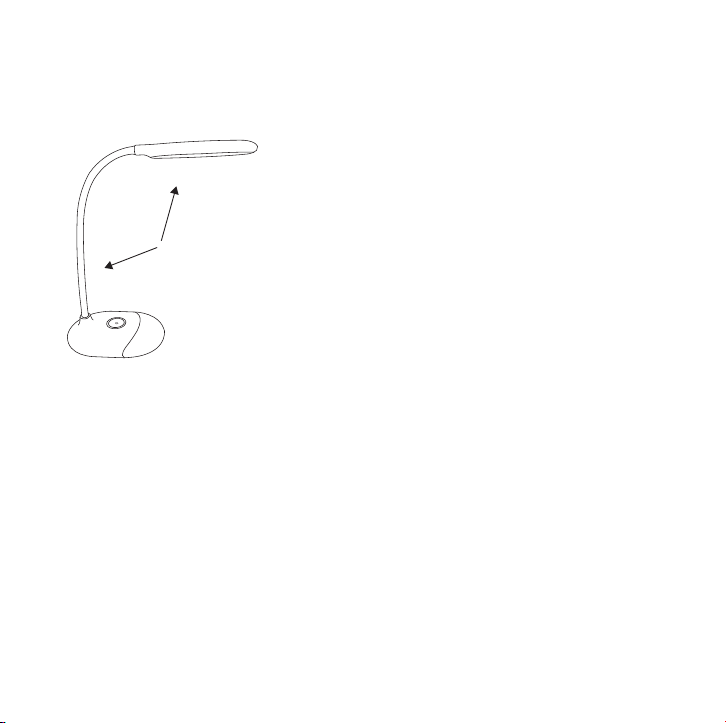
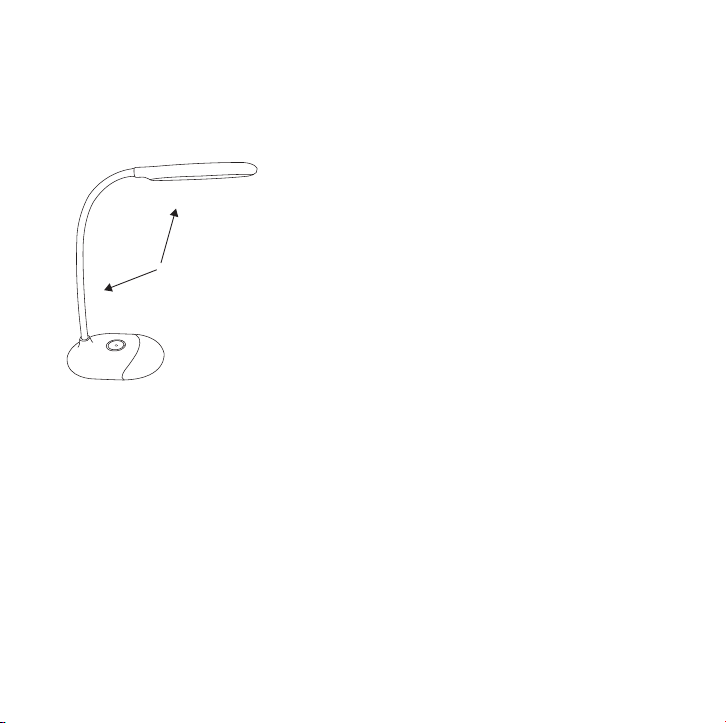
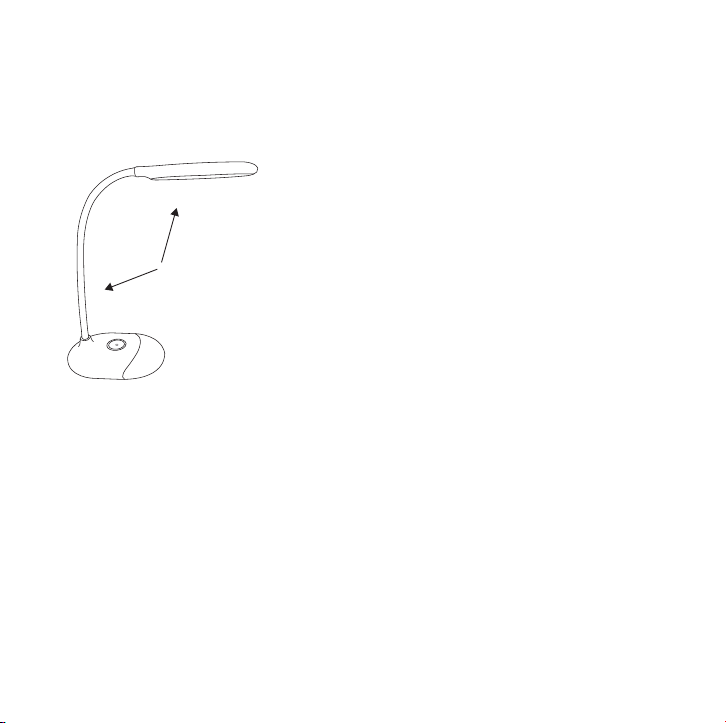
·The lamp head and arm is rotatable. Hold the lamp base by one
hand and adjust the angle of the lamp within 160°.
·Rotate the lamp head and arm within the allowed range.
Please do not swivel with excessive force to prevent damages.
Press the Multi-color Light Power Button to turn on / off the
multi-color light.
Power On / Off
The highest brightness is activated by default when you turn on the
white light the first time after the battery is fully charged. Press and
hold the White Light Power Button to adjust the brightness.
Brightness Adjustment
Power On / Off
Slide across the Color Slider to select from different colors
corresponding to the color patterns on the slider.
Color Selection
When the battery is not drained, the white light / multi-color light will
resume the brightness / color of the last use.
Note: Set the white light to low brightness level when you turn it off
to prevent glares.
Brightness / Color Memory Function
Multi-color Light
White Light Caution
03/04
≤160°
In standby mode, tap the White Light Power Button once to power
on / off the white light.
·The lamp head and arm is rotatable. Hold the lamp base by one
hand and adjust the angle of the lamp within 160°.
·Rotate the lamp head and arm within the allowed range.
Please do not swivel with excessive force to prevent damages.
Press the Multi-color Light Power Button to turn on / off the
multi-color light.
Power On / Off
The highest brightness is activated by default when you turn on the
white light the first time after the battery is fully charged. Press and
hold the White Light Power Button to adjust the brightness.
Brightness Adjustment
Power On / Off
Slide across the Color Slider to select from different colors
corresponding to the color patterns on the slider.
Color Selection
When the battery is not drained, the white light / multi-color light will
resume the brightness / color of the last use.
Note: Set the white light to low brightness level when you turn it off
to prevent glares.
Brightness / Color Memory Function
Multi-color Light
White Light Caution
03/04
≤160°
05/06
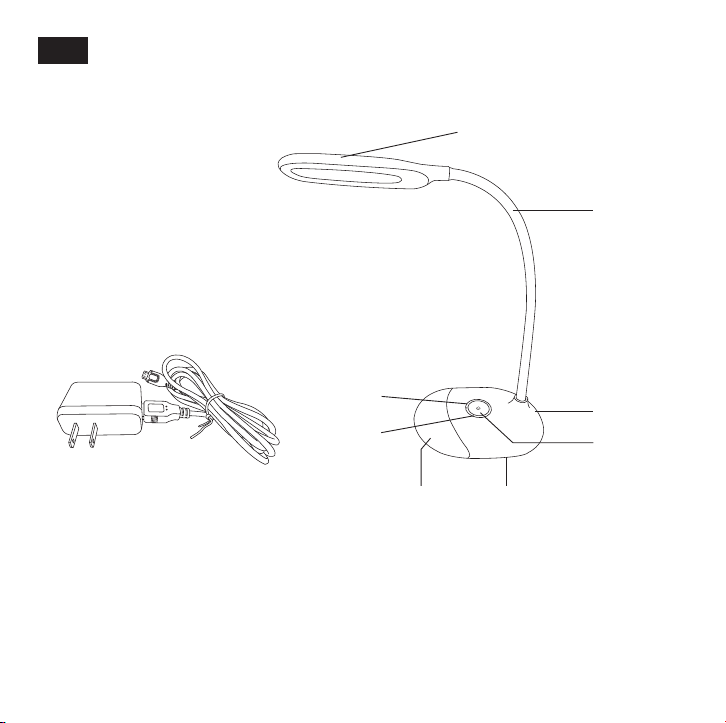
① Lampenkopf (Weißes Licht)
② Lampenarm
③ DC-Anschluss
④ An-/Aus-Schalter für weißes
Licht / Helligkeitsregler
1 x TaoTronics LED-Schreibtischlampe (Modell: TT-DL070)
1 x Stromadapter (Mit abnehmbarem Micro-USB-Kabel)
1 x Bedienungsanleitung
Produktabbildung
Spezifikationen
Im Lieferumfang enthalten
Die Lampe wechselt standardmäßig in den Standby-Modus, sobald
der Akku vollständig geladen ist. Nutzen Sie den Stromadapter oder
schließen Sie das USB-Kabel an einem USB-Anschluss mit 5V/1A
Ausgangsleistung an, um die Lampe zu laden, wenn der Akkustand
niedrig ist.
Anleitung
DE
①
④
⑤
⑥
⑦
⑧
②
③
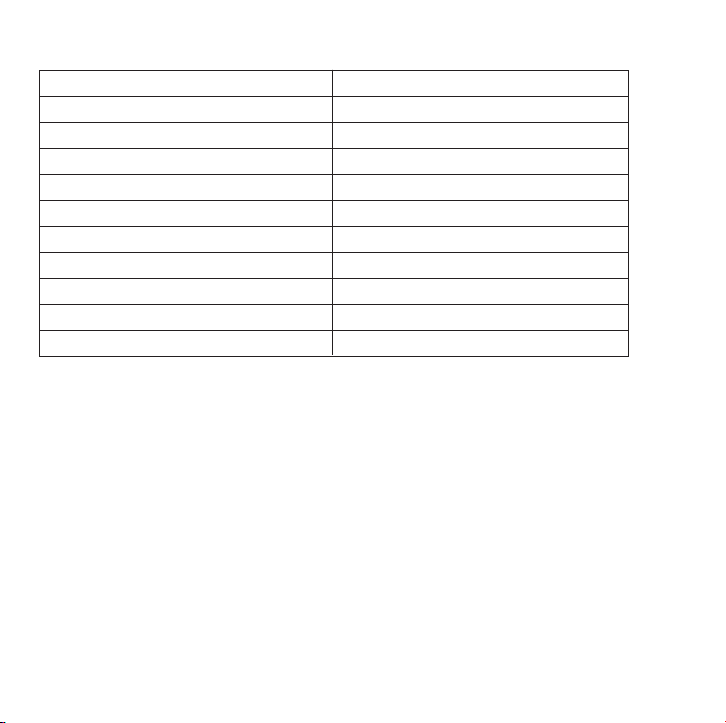
Modell
Lichtquelle
Betriebsspannung
Leistung
Farbtemperatur
Akkukapazität
Ladedauer
Betriebszeit (Integrierter Akku)
Lumen
Betriebstemperatur
CRI
TT-DL070
LED
DC 5V / 1A
7W
5000-5500K (Weißes Licht)
1000mAh
3 Stunden
Bis zu 6 Stunden
258 lm
-20°C bis 40°C / -4°F bis 104°F
> 80
⑤ An-/Aus-Schalter für
mehrfarbiges Licht
⑥ Farbregler (Mehrfarbiges Licht)
⑦ Mehrfarbiges Licht
⑧ Lampenfuß
05/06
① Lampenkopf (Weißes Licht)
② Lampenarm
③ DC-Anschluss
④ An-/Aus-Schalter für weißes
Licht / Helligkeitsregler
1 x TaoTronics LED-Schreibtischlampe (Modell: TT-DL070)
1 x Stromadapter (Mit abnehmbarem Micro-USB-Kabel)
1 x Bedienungsanleitung
Produktabbildung
Spezifikationen
Im Lieferumfang enthalten
Die Lampe wechselt standardmäßig in den Standby-Modus, sobald
der Akku vollständig geladen ist. Nutzen Sie den Stromadapter oder
schließen Sie das USB-Kabel an einem USB-Anschluss mit 5V/1A
Ausgangsleistung an, um die Lampe zu laden, wenn der Akkustand
niedrig ist.
Anleitung
DE
①
④
⑤
⑥
⑦
⑧
②
③
Modell
Lichtquelle
Betriebsspannung
Leistung
Farbtemperatur
Akkukapazität
Ladedauer
Betriebszeit (Integrierter Akku)
Lumen
Betriebstemperatur
CRI
TT-DL070
LED
DC 5V / 1A
7W
5000-5500K (Weißes Licht)
1000mAh
3 Stunden
Bis zu 6 Stunden
258 lm
-20°C bis 40°C / -4°F bis 104°F
> 80
⑤ An-/Aus-Schalter für
mehrfarbiges Licht
⑥ Farbregler (Mehrfarbiges Licht)
⑦ Mehrfarbiges Licht
⑧ Lampenfuß

07/08
Tippen Sie ein Mal den An-/Aus-Schalter für weißes Licht im
Standby-Modus an, um das weiße Licht ein-/auszuschalten.
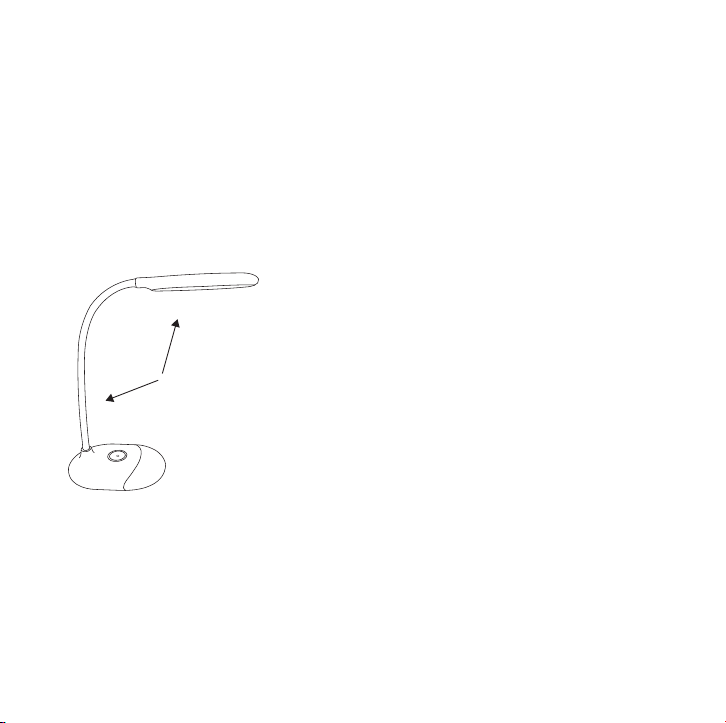
·Lampenkopf und Lampenarm sind drehbar. Halten Sie den
Lampenfuß mit einer Hand und stellen Sie den Winkel der Lampe
innerhalb von 160° ein.
·Drehen Sie Lampenkopf und -arm innerhalb des zulässigen
Bereichs. Bitte schwenken Sie sie nicht mit Gewalt, um Schäden
vorzubeugen.
Drücken Sie den An-/Aus-Schalter für mehrfarbiges Licht, um das
mehrfarbige Licht ein-/auszuschalten.
Ein- / Ausschalten
Standardmäßig ist die hellste Helligkeitseinstellung aktiv, wenn Sie
das weiße Licht zum ersten Mal einschalten, nachdem der Akku
vollständig geladen wurde. Halten Sie den An-/Aus-Schalter für
weißes Licht gedrückt, um die Helligkeit einzustellen.
Helligkeitssteuerung
Ein- / Ausschalten
Streichen Sie mit dem Finger über den Farbregler, um aus den
verschiedenen Farben entsprechend der Farbpalette auf dem
Regler auszuwählen.
Farbwahl
Solange der Akku nicht leer ist, übernimmt die Lampe die Helligkeit /
Farbe des zuletzt genutzten weißen / mehrfarbigen Lichts.
Anmerkung: Setzen Sie das weiße Licht auf eine niedrige
Helligkeitsstufe, wenn Sie es ausschalten, um es zu vermeiden, dass
Sie geblendet werden.
Helligkeits- / Farbspeicherfunktion
Mehrfarbiges Licht
Weißes Licht
Achtung
≤160°
07/08
Tippen Sie ein Mal den An-/Aus-Schalter für weißes Licht im
Standby-Modus an, um das weiße Licht ein-/auszuschalten.
·Lampenkopf und Lampenarm sind drehbar. Halten Sie den
Lampenfuß mit einer Hand und stellen Sie den Winkel der Lampe
innerhalb von 160° ein.
·Drehen Sie Lampenkopf und -arm innerhalb des zulässigen
Bereichs. Bitte schwenken Sie sie nicht mit Gewalt, um Schäden
vorzubeugen.
Drücken Sie den An-/Aus-Schalter für mehrfarbiges Licht, um das
mehrfarbige Licht ein-/auszuschalten.
Ein- / Ausschalten
Standardmäßig ist die hellste Helligkeitseinstellung aktiv, wenn Sie
das weiße Licht zum ersten Mal einschalten, nachdem der Akku
vollständig geladen wurde. Halten Sie den An-/Aus-Schalter für
weißes Licht gedrückt, um die Helligkeit einzustellen.
Helligkeitssteuerung
Ein- / Ausschalten
Streichen Sie mit dem Finger über den Farbregler, um aus den
verschiedenen Farben entsprechend der Farbpalette auf dem
Regler auszuwählen.
Farbwahl
Solange der Akku nicht leer ist, übernimmt die Lampe die Helligkeit /
Farbe des zuletzt genutzten weißen / mehrfarbigen Lichts.
Anmerkung: Setzen Sie das weiße Licht auf eine niedrige
Helligkeitsstufe, wenn Sie es ausschalten, um es zu vermeiden, dass
Sie geblendet werden.
Helligkeits- / Farbspeicherfunktion
Mehrfarbiges Licht
Weißes Licht
Achtung
≤160°
09/10
① Tête de Lampe
(Lumière Blanche)
② Bras de Lampe
③ Port d’alimentation DC
④ Bouton d’allumage Lumière
Blanche / Réglage Luminosité
1 x TaoTronics Lampe de bureau LED (Modèle: TT-DL070)
1 x Adaptateur secteur (avec câble Micro USB détachable)
1 x Guide utilisateur
Schéma produit
Spécifications
Contenu de la boîte
La lampe passe en mode veille par défaut lorsque la batterie est
complètement chargée. Lorsque la batterie est faible,
utilisez l’adaptateur secteur ou branchez le câble USB à n’importe
quelle prise USB avec une sortie de 5V/1A pour recharger la lampe.
Comment l’utiliser
FR
①
④
⑤
⑥
⑦
⑧
②
③
Modèle
Source lumineuse
Tension de fonctionnement
Puissance
Température de couleur
Capacité de la batterie
Temps de charge
Autonomie (sur batterie)
Lumens
Température de fonctionnement
CRI
TT-DL070
LED
DC 5V / 1A
7W
5000-5500K (Lumière blanche)
1000mAh
3 heures
Jusqu’à 6 heures
258 lm
-20°C à 40°C / -4°F à 104°F
> 80
⑤ Bouton Lumière Multicolore
⑥ Curseur de couleur
(Lumière Multicolore)
⑦ Lumière Multicolore
⑧ Base de Lampe
09/10
① Tête de Lampe
(Lumière Blanche)
② Bras de Lampe
③ Port d’alimentation DC
④ Bouton d’allumage Lumière
Blanche / Réglage Luminosité
1 x TaoTronics Lampe de bureau LED (Modèle: TT-DL070)
1 x Adaptateur secteur (avec câble Micro USB détachable)
1 x Guide utilisateur
Schéma produit
Spécifications
Contenu de la boîte
La lampe passe en mode veille par défaut lorsque la batterie est
complètement chargée. Lorsque la batterie est faible,
utilisez l’adaptateur secteur ou branchez le câble USB à n’importe
quelle prise USB avec une sortie de 5V/1A pour recharger la lampe.
Comment l’utiliser
FR
①
④
⑤
⑥
⑦
⑧
②
③
Modèle
Source lumineuse
Tension de fonctionnement
Puissance
Température de couleur
Capacité de la batterie
Temps de charge
Autonomie (sur batterie)
Lumens
Température de fonctionnement
CRI
TT-DL070
LED
DC 5V / 1A
7W
5000-5500K (Lumière blanche)
1000mAh
3 heures
Jusqu’à 6 heures
258 lm
-20°C à 40°C / -4°F à 104°F
> 80
⑤ Bouton Lumière Multicolore
⑥ Curseur de couleur
(Lumière Multicolore)
⑦ Lumière Multicolore
⑧ Base de Lampe

11/12
En mode veille, touchez le bouton d’allumage de la lumière
blanche une fois pour allumer / éteindre la lumière blanche.
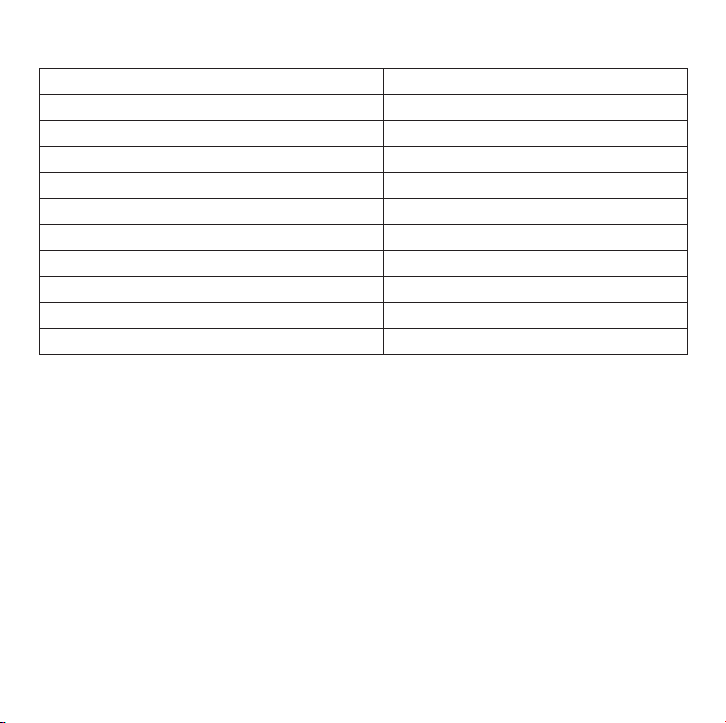
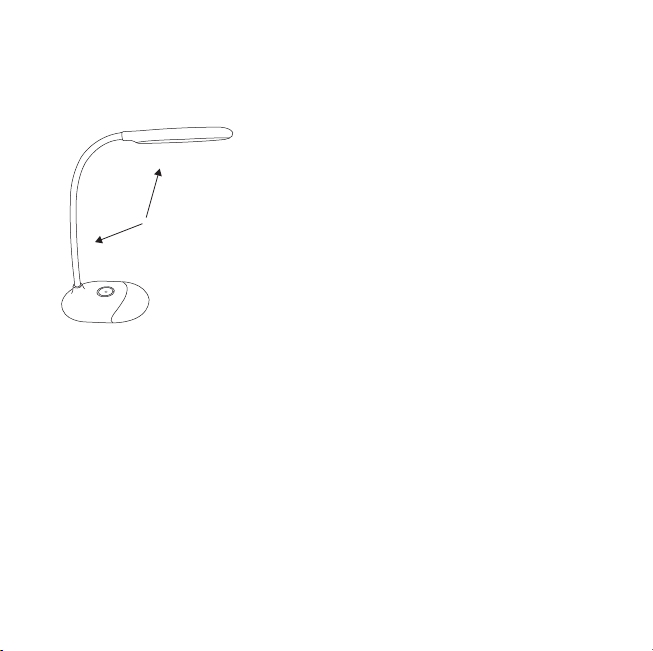
·La tête et le bras de lampe sont pivotants. Tenez la lampe par la
base à une main et ajustez l’angle à 160°.
·Pivotez la tête et le bras de lampe dans les fourchettes
d’amplitude possibles. Ne pas forcer excessivement au
risque de la casser.
Appuyez sur le bouton de lumière multicolore pour allumer /
éteindre la lumière multicolore.
Allumage / Extinction
La luminosité la plus élevée est activée par défaut lorsque vous
allumez la lumière blanche pour la première fois après une
recharge complète. Appuyez et maintenez le bouton d’allumage
de lumière blanche pour régler la luminosité.
Réglage de luminosité
Allumage / Extinction
Faites glisser le curseur de couleur pour sélectionner différents
schémas de couleur au curseur.
Sélection de couleur
Lorsque la batterie n’est pas vide, la lumière blanche / multicolore
retournera à sa luminosité / couleur de la dernière utilisation.
Note: Réglez la luminosité de la lumière blanche à niveau faible
lorsque vous l’éteignez pour prévenir les éblouissements
Fonction mémoire de luminosité / couleur
Lumière multicolore
Lumière blanche Prudence
≤160°
11/12
En mode veille, touchez le bouton d’allumage de la lumière
blanche une fois pour allumer / éteindre la lumière blanche.
·La tête et le bras de lampe sont pivotants. Tenez la lampe par la
base à une main et ajustez l’angle à 160°.
·Pivotez la tête et le bras de lampe dans les fourchettes
d’amplitude possibles. Ne pas forcer excessivement au
risque de la casser.
Appuyez sur le bouton de lumière multicolore pour allumer /
éteindre la lumière multicolore.
Allumage / Extinction
La luminosité la plus élevée est activée par défaut lorsque vous
allumez la lumière blanche pour la première fois après une
recharge complète. Appuyez et maintenez le bouton d’allumage
de lumière blanche pour régler la luminosité.
Réglage de luminosité
Allumage / Extinction
Faites glisser le curseur de couleur pour sélectionner différents
schémas de couleur au curseur.
Sélection de couleur
Lorsque la batterie n’est pas vide, la lumière blanche / multicolore
retournera à sa luminosité / couleur de la dernière utilisation.
Note: Réglez la luminosité de la lumière blanche à niveau faible
lorsque vous l’éteignez pour prévenir les éblouissements
Fonction mémoire de luminosité / couleur
Lumière multicolore
Lumière blanche Prudence
≤160°
13/14
① Cabeza de Lámpara
(Luz Blanca)
② Brazo de la Lámpara
③ Puerto de Alimentación
de AC
④ Encendido de Luz Blanca/
Botón de Brillo
1 x Lámpara LED de Escritorio de TaoTronics (Modelo: TT-DL070)
1 x Adaptador de Corriente (Con Cable Micro USB Desmontable)
1 x Guía del Usuario
Diagrama del Producto
Especificaciones
Contenidos del Paquete
La lámpara entra en el modo de espera de forma automática una
vez que la batería esté completamente cargada. Cuando la
batería esté baja, utilice el adaptador de corriente o conecte el
cable USB a cualquier toma USB con una salida de 5V/1A para
cargar la lámpara.
Cómo Utilizar
ES
①
④
⑤
⑥
⑦
⑧
②
③
Modelo
Fuente de luz
Voltaje de Operación
Consumo de Energia
Temperatura del Color
Capacidad de la Batería
Tiempo de Carga
Tiempo de Operación
(Batería Integrada)
Lúmenes
Temperatura de Funcionamiento
CRI
TT-DL070
LED
DC 5V / 1A
7W
5000-5500K (Luz Blanca)
1000mAh
3 horas
Hasta 6 horas
258 lm
-20°C a 40°C / -4°F a 104°F
> 80
⑤ Botón de Luz Multi Color
⑥ Seleccionador de Color
⑦ Luz Multi-Color
⑧ Base de Lámpara

13/14
① Cabeza de Lámpara
(Luz Blanca)
② Brazo de la Lámpara
③ Puerto de Alimentación
de AC
④ Encendido de Luz Blanca/
Botón de Brillo
1 x Lámpara LED de Escritorio de TaoTronics (Modelo: TT-DL070)
1 x Adaptador de Corriente (Con Cable Micro USB Desmontable)
1 x Guía del Usuario
Diagrama del Producto
Especificaciones
Contenidos del Paquete
La lámpara entra en el modo de espera de forma automática una
vez que la batería esté completamente cargada. Cuando la
batería esté baja, utilice el adaptador de corriente o conecte el
cable USB a cualquier toma USB con una salida de 5V/1A para
cargar la lámpara.
Cómo Utilizar
ES
①
④
⑤
⑥
⑦
⑧
②
③
Modelo
Fuente de luz
Voltaje de Operación
Consumo de Energia
Temperatura del Color
Capacidad de la Batería
Tiempo de Carga
Tiempo de Operación
(Batería Integrada)
Lúmenes
Temperatura de Funcionamiento
CRI
TT-DL070
LED
DC 5V / 1A
7W
5000-5500K (Luz Blanca)
1000mAh
3 horas
Hasta 6 horas
258 lm
-20°C a 40°C / -4°F a 104°F
> 80
⑤ Botón de Luz Multi Color
⑥ Seleccionador de Color
⑦ Luz Multi-Color
⑧ Base de Lámpara

15/16
En el modo de espera, presione el Botón de Luz Blanca una vez
para encender/apagar la luz blanca.
·La cabeza de la lámpara y el brazo son giratorios. Sostenga la
base de la lámpara en una mano, y ajuste el ángulo de la
lámpara en un rango de 160°.
·Gire la cabeza y el brazo de la lámpara dentro del rango
permitido. Por favor, no gire con una fuerza excesiva para
evitar daños.
Presione el Botón de Encendido de Luz Multicolor para encender/
apagar la luz multicolor.
Encendido / Apagado
El brillo más alto se activa automáticamente cuando se enciende
la luz blanca por primera vez después de que la batería esté
completamente cargada. Mantenga presionando el Botón de
Encendido de Luz Blanca para ajustar el brillo.
Ajuste de Brillo
Encendido / Apagado
Deslice la rueda de selección de color para seleccionar entre
diferentes colores correspondientes a los colores mostrados en
la rueda.
Selección de Color
Mientras que la batería no esté agotada, la luz multi-color/ luz
blanca tendrá el brillo/color de la última vez que se usa.
Aviso: Ajuste la luz blanca a nivel de brillo bajo cuando la apague
para evitar deslumbramientos.
Función de Memoria de Brillo/ Color
Luz Multicolor
Luz blanca Precaución
≤160°
15/16
En el modo de espera, presione el Botón de Luz Blanca una vez
para encender/apagar la luz blanca.
·La cabeza de la lámpara y el brazo son giratorios. Sostenga la
base de la lámpara en una mano, y ajuste el ángulo de la
lámpara en un rango de 160°.
·Gire la cabeza y el brazo de la lámpara dentro del rango
permitido. Por favor, no gire con una fuerza excesiva para
evitar daños.
Presione el Botón de Encendido de Luz Multicolor para encender/
apagar la luz multicolor.
Encendido / Apagado
El brillo más alto se activa automáticamente cuando se enciende
la luz blanca por primera vez después de que la batería esté
completamente cargada. Mantenga presionando el Botón de
Encendido de Luz Blanca para ajustar el brillo.
Ajuste de Brillo
Encendido / Apagado
Deslice la rueda de selección de color para seleccionar entre
diferentes colores correspondientes a los colores mostrados en
la rueda.
Selección de Color
Mientras que la batería no esté agotada, la luz multi-color/ luz
blanca tendrá el brillo/color de la última vez que se usa.
Aviso: Ajuste la luz blanca a nivel de brillo bajo cuando la apague
para evitar deslumbramientos.
Función de Memoria de Brillo/ Color
Luz Multicolor
Luz blanca Precaución
≤160°
17/18
① Testa della Lampada
(Luce Bianca)
② Braccio della Lampada
③ Porta di Alimentazione
④ Pulsante Luce Bianca /
Luminosità
1 x Lampada da Tavolo a LED TaoTronics (Modello: TT-DL070)
1 x Adattatore di Corrente (Con Cavo Micro USB Rimovibile)
1 x Manuale Utente
Schema del Prodotto
Specifiche
Contenuto della Confezione
La lampada entra per default in modalità stand-by una volta che
la batteria è completamente carica. Quando il livello della batteria
è basso, utilizzare l'adattatore di corrente o connettere il cavo USB
a qualsiasi porta USB con un'uscita di 5V/1A per ricaricare la
lampada.
Modalità d'Uso
IT
①
④
⑤
⑥
⑦
⑧
②
③
Modello
Fonte Luminosa
Tensione di Esercizio
Consumo Energetico
Temperatura Colore
Capacità della Batteria
Tempo di Ricarica
Durata (Batteria Integrata)
Lumen
Temperatura di Esercizio
IRC
TT-DL070
LED
5V DC / 1A
7W
5000-5500K (Luce Bianca)
1000mAh
3 ore
Fino a 6 ore
258 lm
Da -20°C a 40°C / Da -4°F a 104°F
> 80
⑤ Pulsante Accensione Luce
Multicolore
⑥ Cursore di Scorrimento Colore
(Luce Multicolore)
⑦ Luce Multicolore
⑧ Base della Lampada

17/18
① Testa della Lampada
(Luce Bianca)
② Braccio della Lampada
③ Porta di Alimentazione
④ Pulsante Luce Bianca /
Luminosità
1 x Lampada da Tavolo a LED TaoTronics (Modello: TT-DL070)
1 x Adattatore di Corrente (Con Cavo Micro USB Rimovibile)
1 x Manuale Utente
Schema del Prodotto
Specifiche
Contenuto della Confezione
La lampada entra per default in modalità stand-by una volta che
la batteria è completamente carica. Quando il livello della batteria
è basso, utilizzare l'adattatore di corrente o connettere il cavo USB
a qualsiasi porta USB con un'uscita di 5V/1A per ricaricare la
lampada.
Modalità d'Uso
IT
①
④
⑤
⑥
⑦
⑧
②
③
Modello
Fonte Luminosa
Tensione di Esercizio
Consumo Energetico
Temperatura Colore
Capacità della Batteria
Tempo di Ricarica
Durata (Batteria Integrata)
Lumen
Temperatura di Esercizio
IRC
TT-DL070
LED
5V DC / 1A
7W
5000-5500K (Luce Bianca)
1000mAh
3 ore
Fino a 6 ore
258 lm
Da -20°C a 40°C / Da -4°F a 104°F
> 80
⑤ Pulsante Accensione Luce
Multicolore
⑥ Cursore di Scorrimento Colore
(Luce Multicolore)
⑦ Luce Multicolore
⑧ Base della Lampada

19/20
In modalità stand-by, premere una volta il Pulsante di Accensione
Luce Bianca per accendere/spegnere la luce bianca.
·La testa e il braccio della lampada sono ruotabili. Tenere
saldamente la base della lampada con una mano e regolare
l'angolo della lampada entro un raggio di 160°.
·Ruotare la testa e il braccio della lampada all'interno dell'angolo
massimo consentito. Si prega di non ruotare con forza eccessiva
per evitare danni al prodotto.
Premere il Pulsante di Accensione Luce Multicolore per accendere
/ spegnere la luce multicolore.
Accensione / Spegnimento
Il livello più alto di luminosità è attivo per default quando si
accende la luce bianca per la prima volta dopo che la batteria è
completamente carica. Premere e tenere premuto il Pulsante di
Accensione Luce Bianca per regolare la luminosità.
Regolazione Luminosità
Accensione / Spegnimento
Scorrere col dito sul Cursore di Scorrimento Colore per selezionare il
colore corrispondente indicato dal cursore stesso.
Selezione del Colore
Quando la batteria ha ancora della carica residua, la luce bianca
e la luce multicolore utilizzeranno la luminosità e il colore dell'ultimo
utilizzo.
Nota: Allo spegnimento, impostare la lampada su un livello di
luminosità basso per prevenire bagliori eccessivi.
Funzione di Memoria Luminosità / Colore
Luce Multicolore
Luce Bianca Attenzione
≤160°
19/20
In modalità stand-by, premere una volta il Pulsante di Accensione
Luce Bianca per accendere/spegnere la luce bianca.
·La testa e il braccio della lampada sono ruotabili. Tenere
saldamente la base della lampada con una mano e regolare
l'angolo della lampada entro un raggio di 160°.
·Ruotare la testa e il braccio della lampada all'interno dell'angolo
massimo consentito. Si prega di non ruotare con forza eccessiva
per evitare danni al prodotto.
Premere il Pulsante di Accensione Luce Multicolore per accendere
/ spegnere la luce multicolore.
Accensione / Spegnimento
Il livello più alto di luminosità è attivo per default quando si
accende la luce bianca per la prima volta dopo che la batteria è
completamente carica. Premere e tenere premuto il Pulsante di
Accensione Luce Bianca per regolare la luminosità.
Regolazione Luminosità
Accensione / Spegnimento
Scorrere col dito sul Cursore di Scorrimento Colore per selezionare il
colore corrispondente indicato dal cursore stesso.
Selezione del Colore
Quando la batteria ha ancora della carica residua, la luce bianca
e la luce multicolore utilizzeranno la luminosità e il colore dell'ultimo
utilizzo.
Nota: Allo spegnimento, impostare la lampada su un livello di
luminosità basso per prevenire bagliori eccessivi.
Funzione di Memoria Luminosità / Colore
Luce Multicolore
Luce Bianca Attenzione
≤160°

FCC Compliance
This device complies with Part 15 of the FCC Rules. Operation is subject to the following
two conditions: (1) this device may not cause harmful interference, and (2) this device must
withstand any interference received, including interference that may cause undesired
operation.
WEEE Compliance
Correct Disposal of This Product (Waste Electrical & Electronic Equipment)
(Applicable in countries with separate collection systems)
This marking on the product, accessories or literature indicates that the product and its
electronic accessories should not be disposed of with other household waste at the end of
their working life. To prevent possible harm to the environment or human health from
uncontrolled waste disposal, please separate these items from other types of waste and
recycle them responsibly to promote the sustainable reuse of material resources.
Household users should contact either the retailer where they purchased this product, or
their local government office, for details of where and how they can take these items for
environmentally safe recycling. Business users should contact their supplier and check the
terms and conditions of the purchase contract. This product and its electronic accessories
should not be mixed with other commercial wastes for disposal.
LED DESK LAMP
User Guide
Learn more about the EU Declaration of Conformity:
https://www.taotronics.com/downloads-TT-DL070-CE-Cert.html
TT-DL070_V1.0
EUROPE
E-mail:
EU Importer: ZBT International Trading GmbH
Address: Halstenbeker Weg 98C, 25462 Rellingen, Deutschland
NORTH AMERICA
E-mail : [email protected](US)
Tel : 1-888-456-8468 (Monday-Friday: 9:00 – 17:00 PST)
US Distributor: SUNVALLEYTEK INTERNATIONAL INC.
Address:46724 Lakeview Blvd, Fremont, CA 94538
Manufacturer: Shenzhen NearbyExpress Technology Development Co.,Ltd.
Address: 333 Bulong Road, Shenzhen, China, 518129
MANUFACTURER
ASIA PACIFIC
E-mail: [email protected](JP)
Tel:03-5542-0238(10〜18時/土日祝除く)
JPImporter:株式会社SUNVALLEYJAPAN
〒104-0032東京都中央区八丁堀3丁目18-6PMO京橋東9F
www.taotronics.com
MADE IN CHINA
MODEL: TT-DL070