www.taotronics.com
Learn more about the EU Declaration of Conformity:
https://www.taotronics.com/pages/user-manual
03-25-2020
TT-DL036_V2.2
EUROPE
E-mail:
support.uk@taotronics.com(UK)
support.de@taotronics.com(DE)
support.fr@taotronics.com(FR)
support.es@taotronics.com(ES)
support.it@taotronics.com(IT)
NORTH AMERICA
E-mail:
support@taotronics.com(US)
support.ca@taotronics.com(CA)
Tel: 1-888-456-8468 (Monday-Friday: 9:00 – 17:00 PST)
Manufacturer: Shenzhen NearbyExpress Technology Development Co.,Ltd.
Address: Floor 7, Building E, Galaxy World Phase II, Shenzhen, China
MANUFACTURER
ASIA PACIFIC
E-mail: support.jp@taotronics.com(JP)
JP Importer: 株式会社SUNVALLEY JAPAN
Address: 〒104-0032東京都中央区八丁堀3丁目18-6PMO京橋東9F
MADE IN CHINA
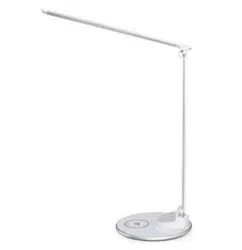
TaoTronics LED Desk Lamp
User Guide
Model: TT-DL036
CONTENTS
English
Deutsch
Français
Español
Italiano
日本語
01/02
03/04
05/06
07/08
09/10
11/12
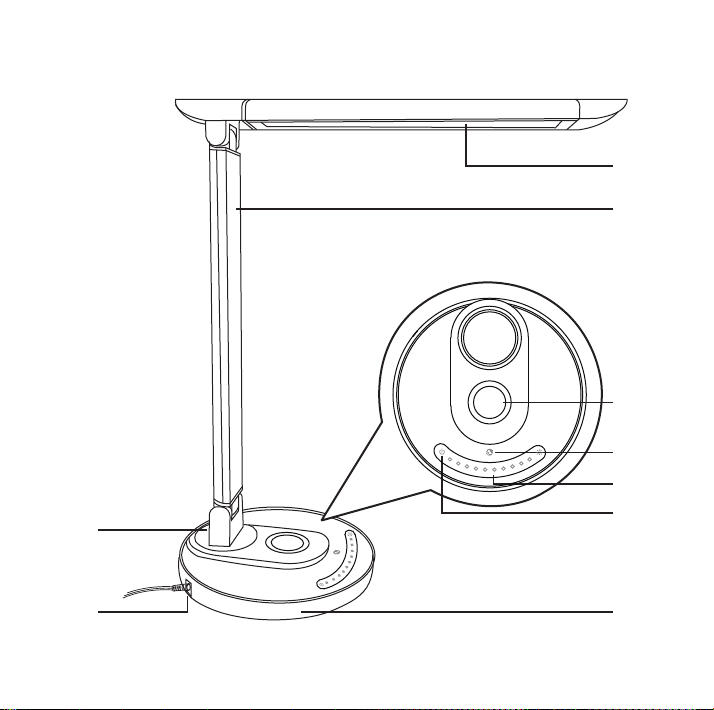
①
②
③
④
⑥
⑤
⑦⑧
⑨
EN
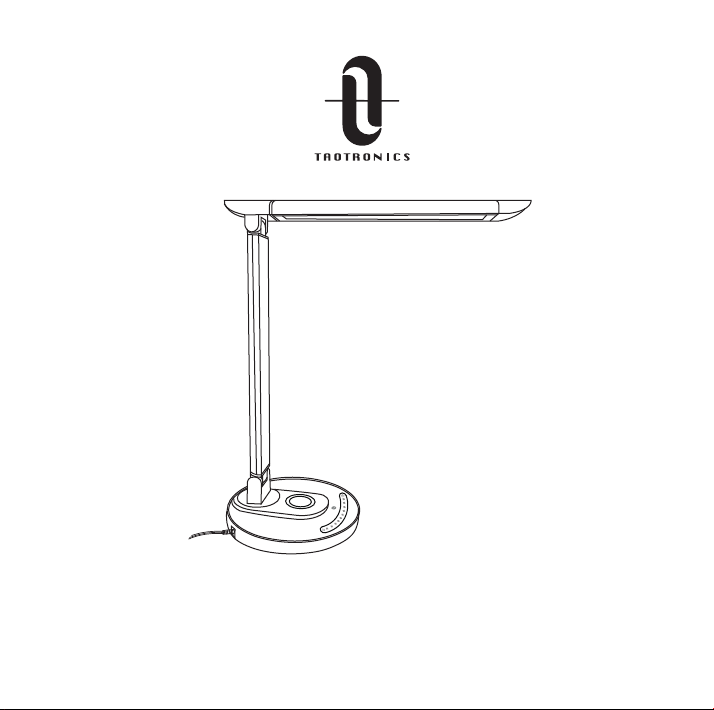
Product Diagram
① Lamp Head
② Lamp Arm
③ Wireless Charger
④ Mode Button
⑤ Brightness Slider
⑥ Power Button
⑦ Lamp Base
⑧ Power Adapter
Connector
⑨ USB Charging Port
DE
Produktabbildung
① Lampenkopf
② Lampenarm
③ Qi Ladegerät
④ Modus-Taste
⑤ Helligkeitsregler
⑥ Einschaltknopf
⑦ Basis
⑧ Stromkabel
⑨ USB-Ladebuchse
FR
Description du Produit
① Tête de la Lampe
② Bras de la Lampe
③ Chargeur Sans-fil
④ Bouton Mode
⑤ Curseur de Luminosité
⑥ Interrupteur
⑦ Base de la Lampe
⑧ Port d’Alimentation
⑨ Port de Charge USB
ES
Diagrama del Producto
① Cabeza de Lámpara
② Brazo de Lámpara
③ Cargador Inalámbrico
④ Botón de Modos
⑤ Control Deslizante de Brillo
⑥ Botón de Encendido
⑦ Base de Lámpara
⑧ Conector del Adaptador
de Corriente
⑨ Puerto de Carga USB
IT
Schema del Prodotto
① Testa della Lampada
② Braccio della Lampada
③ Caricabatterie Wireless
④ Pulsante Modalità
⑤ Cursore Luminosità
⑥ Pulsante di Accensione
⑦ Base della Lampada
⑧ Connettore per Adattatore
di Alimentazione
⑨ Porta di Ricarica USB
JP
製品図
①ライトヘッド
② ライトアー ム
③ワイヤレス充電
④モードボタン
⑤タッチコントロールパネル
⑥電源ボタン
⑦ライトベース
⑧電源アダプターポート
⑨USB充電ポート
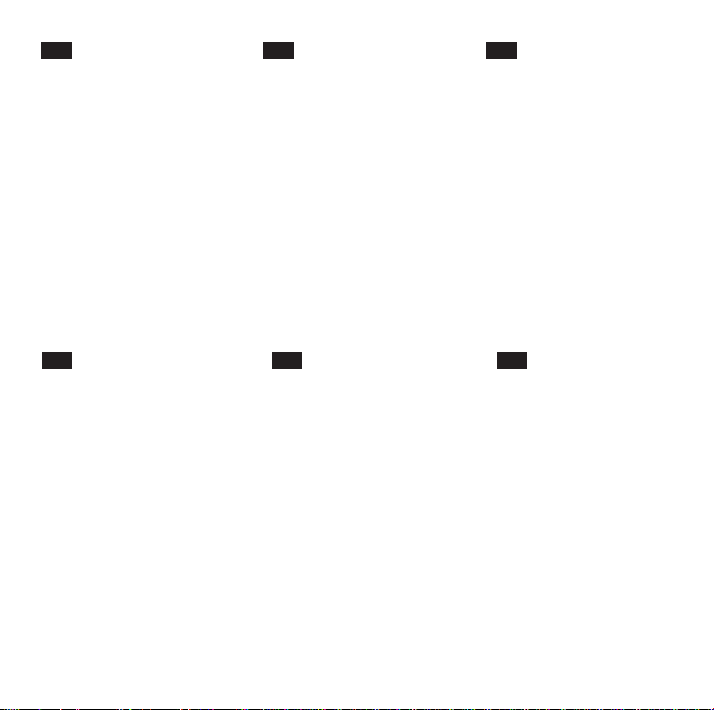
①
②
③
④
⑥
⑤
⑦⑧
⑨
EN
Product Diagram
① Lamp Head
② Lamp Arm
③ Wireless Charger
④ Mode Button
⑤ Brightness Slider
⑥ Power Button
⑦ Lamp Base
⑧ Power Adapter
Connector
⑨ USB Charging Port
DE
Produktabbildung
① Lampenkopf
② Lampenarm
③ Qi Ladegerät
④ Modus-Taste
⑤ Helligkeitsregler
⑥ Einschaltknopf
⑦ Basis
⑧ Stromkabel
⑨ USB-Ladebuchse
FR
Description du Produit
① Tête de la Lampe
② Bras de la Lampe
③ Chargeur Sans-fil
④ Bouton Mode
⑤ Curseur de Luminosité
⑥ Interrupteur
⑦ Base de la Lampe
⑧ Port d’Alimentation
⑨ Port de Charge USB
ES
Diagrama del Producto
① Cabeza de Lámpara
② Brazo de Lámpara
③ Cargador Inalámbrico
④ Botón de Modos
⑤ Control Deslizante de Brillo
⑥ Botón de Encendido
⑦ Base de Lámpara
⑧ Conector del Adaptador
de Corriente
⑨ Puerto de Carga USB
IT
Schema del Prodotto
① Testa della Lampada
② Braccio della Lampada
③ Caricabatterie Wireless
④ Pulsante Modalità
⑤ Cursore Luminosità
⑥ Pulsante di Accensione
⑦ Base della Lampada
⑧ Connettore per Adattatore
di Alimentazione
⑨ Porta di Ricarica USB
JP
製品図
①ライトヘッド
② ライトアー ム
③ワイヤレス充電
④モードボタン
⑤タッチコントロールパネル
⑥電源ボタン
⑦ライトベース
⑧電源アダプターポート
⑨USB充電ポート
01/02
EN
What’s In the Box
· TaoTronics LED Desk Lamp (TT-DL036)
· Power Adapter
Specifications
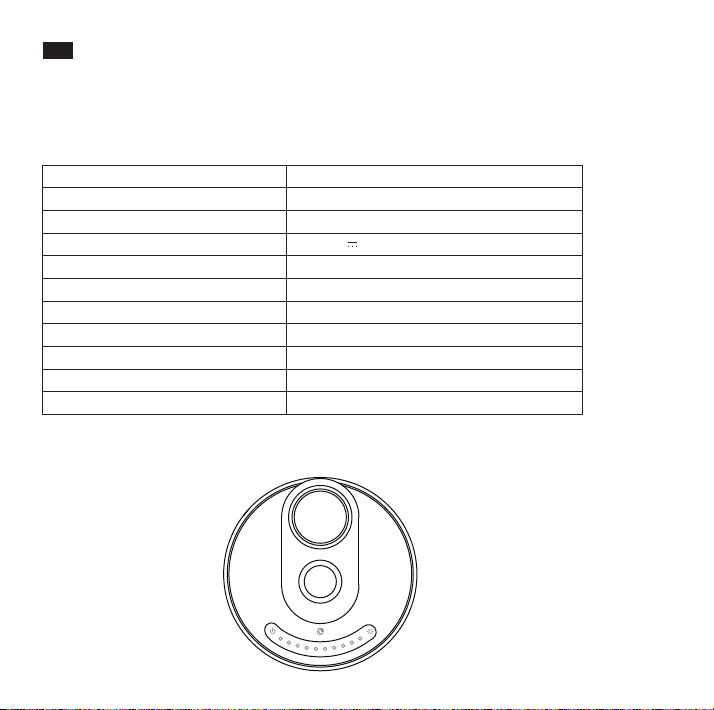
Model
Light Source
CRI
Operating Voltage
Power (Only for the Light)
USB Output
Wireless Charger Output
Lumens
Color Temperature
Operating Temperature
Lifespan
TT-DL036
LED
>80
DC 10V 3A
12W
5W
7.5W for iPhone, 10W for Samsung
410 lm
2700-6000K
-10 °C to 40 °C / - 14 °F to 104 °F
50,000 hours
How to Use
Power On / Off
1. Connect the adapter to a wall outlet, the product enters standby mode with the Power
Button indicator lighting up.
2. Tap and hold the Power Button to turn off the light.
Brightness Control
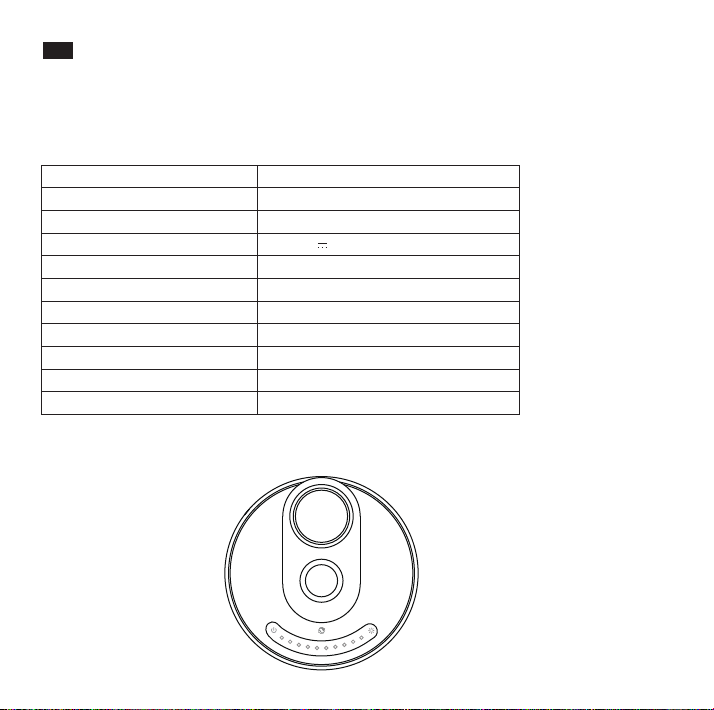
Slide your finger along the Brightness Slider to adjust the brightness
Color Temperature Control
Tap on the Mode Button to cycle through 5 levels of color temperature
Memory Function
The lamp will retain the color temperature and brightness setting of the time when it was last
turned off.
Note: Set the lamp to low brightness level when you turn it off to prevent glare.
USB Port
Charge your smartphone, tablet, e-reader or any USB devices through the 5V/1A USB port.
Wireless Charger
Place your phone with Qi-BPP compatibility on the wireless charging station to automatically
start charging.
Note:
If charging does not occur, adjust the phone so its receiver can be detected. Please note
that different model phones have their receivers in different positions.
Caution
· Hold the lamp base when adjusting the angle of the lamp head.
· Rotate the lamp head within an appropriate angle range. Do not pull with excessive force
to prevent damaging the product

01/02
EN
What’s In the Box
· TaoTronics LED Desk Lamp (TT-DL036)
· Power Adapter
Specifications
Model
Light Source
CRI
Operating Voltage
Power (Only for the Light)
USB Output
Wireless Charger Output
Lumens
Color Temperature
Operating Temperature
Lifespan
TT-DL036
LED
>80
DC 10V 3A
12W
5W
7.5W for iPhone, 10W for Samsung
410 lm
2700-6000K
-10 °C to 40 °C / - 14 °F to 104 °F
50,000 hours
How to Use
Power On / Off
1. Connect the adapter to a wall outlet, the product enters standby mode with the Power
Button indicator lighting up.
2. Tap and hold the Power Button to turn off the light.
Brightness Control
Slide your finger along the Brightness Slider to adjust the brightness
Color Temperature Control
Tap on the Mode Button to cycle through 5 levels of color temperature
Memory Function
The lamp will retain the color temperature and brightness setting of the time when it was last
turned off.
Note: Set the lamp to low brightness level when you turn it off to prevent glare.
USB Port
Charge your smartphone, tablet, e-reader or any USB devices through the 5V/1A USB port.
Wireless Charger
Place your phone with Qi-BPP compatibility on the wireless charging station to automatically
start charging.
Note:
If charging does not occur, adjust the phone so its receiver can be detected. Please note
that different model phones have their receivers in different positions.
Caution
· Hold the lamp base when adjusting the angle of the lamp head.
· Rotate the lamp head within an appropriate angle range. Do not pull with excessive force
to prevent damaging the product
03/04
DE
Lieferumfang
· TaoTronics LED Schreibtischlampe (TT-DL036)
· Netzstecker
Spezifikationen
Modell
Lichtquelle
CRI
Betriebsspannung
Leistung (nur beim Licht)
USB-Ausgang
Qi Ladegerät-Ausgang
Lumen
Farbtemperatur
Betriebstemperatur
Lebensdauer
TT-DL036
LED
>80
DC 10V 3A
12W
5W
7.5W für iPhone, 10W für Samsung
410 lm
2700-6000K
-10 °C bis 40 °C / - 14 °F bis 104 °F
50.000 Stunden
Anleitung
Ein- / Ausschalten
1. Schließen Sie den Adapter an eine Steckdose an. Die Lampe geht automatisch in den
Standby-Modus und der Powerknopf leuchtet auf.
2. Halten Sie den Powerknopf gedrückt, um die Lampe auszuschalten.
Helligkeit einstellen
Streichen Sie mit dem Finger über den Helligkeitsregler, um die Helligkeit anzupassen
Farbtemperatur einstellen
Drücken Sie auf die Modus-Taste, um aus 5 verschiedenen Farbtemperaturen auszuwählen
Speicherfunktion
Die Lampe behält die Einstellungen der Farbtemperatur und Helligkeit bei.
Hinweis:
Stellen Sie vor dem Ausschalten die Lampe auf eine geringe Helligkeit ein, um beim erneuten
Einschalten Blenden zu vermeiden.
USB-Anschluss
Laden Sie Ihr Handy, Tablet, E-Reader oder andere USB-Geräte mit dem 5V/1A USB-Anschluss.
Kabellos aufladen
Legen Sie Ihr Handy mit Qi-Kompatibilität auf die kabellose Ladestation, um es automatisch
aufzuladen.
Hinweis:
Wenn das Laden nicht automatisch beginnt, legen Sie Ihr Handy so hin, dass der Empfänger
gesehen werden kann. Bitte beachten Sie, dass verschiedene Handymodelle ihren
Empfänger an unterschiedlichen Positionen haben.
Achtung
· Halten Sie die Basis der Lampe fest, wenn Sie den Lampenkopf / Lampenarm bewegen.
· Justieren Sie Lampenarm und -kopf innerhalb des zulässigen Bereichs. Wenden Sie keine
übermäßige Gewalt an.

03/04
DE
Lieferumfang
· TaoTronics LED Schreibtischlampe (TT-DL036)
· Netzstecker
Spezifikationen
Modell
Lichtquelle
CRI
Betriebsspannung
Leistung (nur beim Licht)
USB-Ausgang
Qi Ladegerät-Ausgang
Lumen
Farbtemperatur
Betriebstemperatur
Lebensdauer
TT-DL036
LED
>80
DC 10V 3A
12W
5W
7.5W für iPhone, 10W für Samsung
410 lm
2700-6000K
-10 °C bis 40 °C / - 14 °F bis 104 °F
50.000 Stunden
Anleitung
Ein- / Ausschalten
1. Schließen Sie den Adapter an eine Steckdose an. Die Lampe geht automatisch in den
Standby-Modus und der Powerknopf leuchtet auf.
2. Halten Sie den Powerknopf gedrückt, um die Lampe auszuschalten.
Helligkeit einstellen
Streichen Sie mit dem Finger über den Helligkeitsregler, um die Helligkeit anzupassen
Farbtemperatur einstellen
Drücken Sie auf die Modus-Taste, um aus 5 verschiedenen Farbtemperaturen auszuwählen
Speicherfunktion
Die Lampe behält die Einstellungen der Farbtemperatur und Helligkeit bei.
Hinweis:
Stellen Sie vor dem Ausschalten die Lampe auf eine geringe Helligkeit ein, um beim erneuten
Einschalten Blenden zu vermeiden.
USB-Anschluss
Laden Sie Ihr Handy, Tablet, E-Reader oder andere USB-Geräte mit dem 5V/1A USB-Anschluss.
Kabellos aufladen
Legen Sie Ihr Handy mit Qi-Kompatibilität auf die kabellose Ladestation, um es automatisch
aufzuladen.
Hinweis:
Wenn das Laden nicht automatisch beginnt, legen Sie Ihr Handy so hin, dass der Empfänger
gesehen werden kann. Bitte beachten Sie, dass verschiedene Handymodelle ihren
Empfänger an unterschiedlichen Positionen haben.
Achtung
· Halten Sie die Basis der Lampe fest, wenn Sie den Lampenkopf / Lampenarm bewegen.
· Justieren Sie Lampenarm und -kopf innerhalb des zulässigen Bereichs. Wenden Sie keine
übermäßige Gewalt an.
05/06
FR
Contenu de la Boîte
· Lampe de Bureau à LED TaoTronics (TT-DL036)
· Adaptateur Secteur
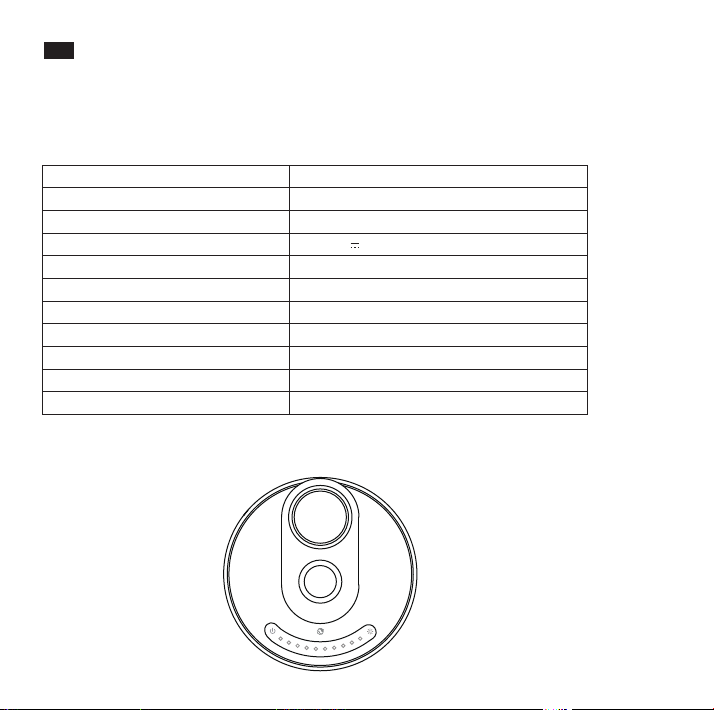
Spécifications
Modèle
Source Lumineuse
CRI
Tension d’Alimentation
Puissance (lampe uniquement)
Sortie USB
Sortie Chargeur Sans-fil
Lumens
Température de Couleur
Température de Fonctionnement
Durée de Vie
TT-DL036
LED
>80
DC 10V 3A
12W
5W
7.5W pour iPhone, 10W pour Samsung
410 lm
2700-6000K
-10 °C to 40 °C
50,000 heures
Mode d’Emploi
Marche / Arrêt
1. Branchez l'adaptateur sur une prise murale. Le produit passe en mode veille avec le
voyant du bouton d'alimentation allumé.
2. Appuyez et maintenez le bouton d'alimentation pour éteindre la lumière.
Contrôle de Luminosité
Faites glisser votre doigt le long du Curseur de Luminosité pour régler la luminosité
Contrôle de la Température de Couleur
Appuyez sur le Bouton Mode pour alterner entre les 5 niveaux de température de couleur
Fonction Mémoire
La lampe mémorisera la température de couleur et la luminosité réglées lors de la
précédente extinction.
Nota :
Réglez la lampe sur un niveau de luminosité faible lorsque vous l'éteignez pour éviter d’être
éblouit.
Port USB
Chargez votre smartphone, tablette, liseuse électronique, ou tout autre périphérique USB via
le port USB 5V / 1A.
Chargeur Sans-fil
Placez votre téléphone compatible Qi-BPP sur la station de charge sans fil pour démarrer
automatiquement le chargement.
Note :
Si le chargement ne démarre pas, bougez le téléphone pour que son récepteur puisse être
détecté. Veuillez noter que suivant le modèle de téléphone, les récepteurs sont dans
différentes positions.
Précautions
· Tenez la base de la lampe lorsque vous réglez l'angle de la tête.
· Tournez la tête de la lampe dans une plage d'angle appropriée. Ne pas tirer avec une f
orce excessive pour éviter d'endommager le produit.

05/06
FR
Contenu de la Boîte
· Lampe de Bureau à LED TaoTronics (TT-DL036)
· Adaptateur Secteur
Spécifications
Modèle
Source Lumineuse
CRI
Tension d’Alimentation
Puissance (lampe uniquement)
Sortie USB
Sortie Chargeur Sans-fil
Lumens
Température de Couleur
Température de Fonctionnement
Durée de Vie
TT-DL036
LED
>80
DC 10V 3A
12W
5W
7.5W pour iPhone, 10W pour Samsung
410 lm
2700-6000K
-10 °C to 40 °C
50,000 heures
Mode d’Emploi
Marche / Arrêt
1. Branchez l'adaptateur sur une prise murale. Le produit passe en mode veille avec le
voyant du bouton d'alimentation allumé.
2. Appuyez et maintenez le bouton d'alimentation pour éteindre la lumière.
Contrôle de Luminosité
Faites glisser votre doigt le long du Curseur de Luminosité pour régler la luminosité
Contrôle de la Température de Couleur
Appuyez sur le Bouton Mode pour alterner entre les 5 niveaux de température de couleur
Fonction Mémoire
La lampe mémorisera la température de couleur et la luminosité réglées lors de la
précédente extinction.
Nota :
Réglez la lampe sur un niveau de luminosité faible lorsque vous l'éteignez pour éviter d’être
éblouit.
Port USB
Chargez votre smartphone, tablette, liseuse électronique, ou tout autre périphérique USB via
le port USB 5V / 1A.
Chargeur Sans-fil
Placez votre téléphone compatible Qi-BPP sur la station de charge sans fil pour démarrer
automatiquement le chargement.
Note :
Si le chargement ne démarre pas, bougez le téléphone pour que son récepteur puisse être
détecté. Veuillez noter que suivant le modèle de téléphone, les récepteurs sont dans
différentes positions.
Précautions
· Tenez la base de la lampe lorsque vous réglez l'angle de la tête.
· Tournez la tête de la lampe dans une plage d'angle appropriée. Ne pas tirer avec une f
orce excessive pour éviter d'endommager le produit.
07/08
ES
Lo que está en la caja
· Lámpara LED de Escritorio de TaoTronics (TT-DL036)
· Adaptador de Corriente
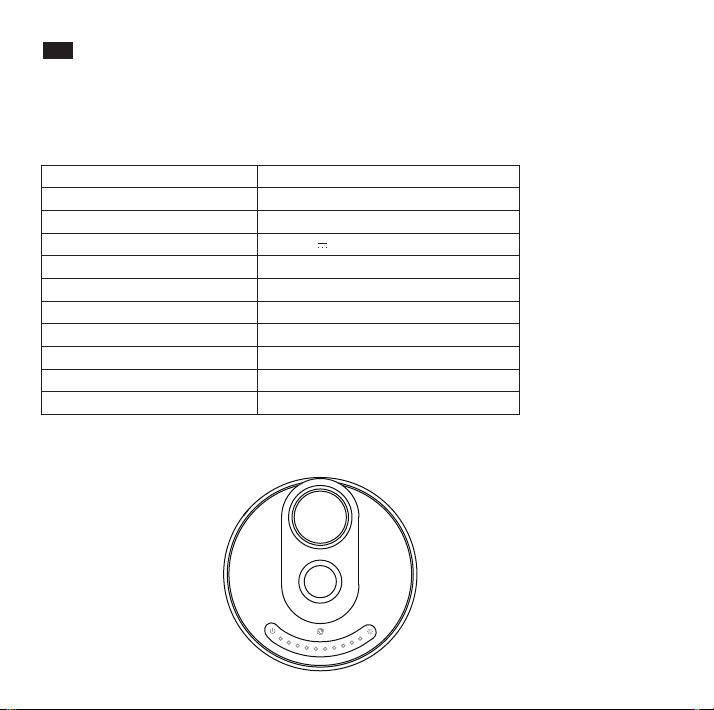
Especificaciones
Modelo
Fuente de Luz
CRI
Voltaje de Operación
Potencia (solo para la luz)
Salida USB
Salida del Cargador Inalámbrico
Lúmenes
Temperatura de Color
Temperatura de Operación
Vida Útil
TT-DL036
LED
> 80
DC 10V 3A
12W
5W
7.5W para iPhone, 10W para Samsung
410 lm
2700-6000K
-10°C a 40°C / - 14°F a 104°F
50,000 horas
Cómo Usarla
Encender / Apagar On / Off
1. Conecte el adaptador a una toma de corriente, el producto entrará en modo de espera
con el indicador del Botón de Encendido encendido.
2. Presione y mantenga presionado el Botón de Encendido para apagar la luz.
Control de Brillo
Deslice el dedo a lo largo del control deslizante de brillo para ajustar el brillo
Control de Temperatura de Color
Toque el Botón de Modo para recorrer los 5 niveles de temperatura de color
Función de Memoria
La lámpara retendrá la temperatura de color y la configuración de brillo de su último uso.
Nota:
Ajuste el brillo de la lámpara a bajo nivel cuando la apague para evitar el deslumbramiento.
Puerto USB
Cargue su smartphone, tableta, e-reader o cualquier dispositivo USB a través del puerto USB
5V /1A .
Cargador Inalámbrico
Coloque su teléfono con compatibilidad Qi-BPP en la estación de carga inalámbrica para
comenzar la carga automáticamente.
Nota:
Si no se inicia la carga, ajuste el teléfono para que se pueda detectar su receptor. Tenga en
cuenta que diferentes modelos de teléfono tienen sus receptores en diferentes lugares.
Precaución
· Sostenga la base de la lámpara cuando está ajustando el ángulo de la cabeza de la
lámpara.
· Gire la cabeza de la lámpara dentro de un rango apropiado. No tire con demasiada
fuerza para evitar el daño del producto.

07/08
ES
Lo que está en la caja
· Lámpara LED de Escritorio de TaoTronics (TT-DL036)
· Adaptador de Corriente
Especificaciones
Modelo
Fuente de Luz
CRI
Voltaje de Operación
Potencia (solo para la luz)
Salida USB
Salida del Cargador Inalámbrico
Lúmenes
Temperatura de Color
Temperatura de Operación
Vida Útil
TT-DL036
LED
> 80
DC 10V 3A
12W
5W
7.5W para iPhone, 10W para Samsung
410 lm
2700-6000K
-10°C a 40°C / - 14°F a 104°F
50,000 horas
Cómo Usarla
Encender / Apagar On / Off
1. Conecte el adaptador a una toma de corriente, el producto entrará en modo de espera
con el indicador del Botón de Encendido encendido.
2. Presione y mantenga presionado el Botón de Encendido para apagar la luz.
Control de Brillo
Deslice el dedo a lo largo del control deslizante de brillo para ajustar el brillo
Control de Temperatura de Color
Toque el Botón de Modo para recorrer los 5 niveles de temperatura de color
Función de Memoria
La lámpara retendrá la temperatura de color y la configuración de brillo de su último uso.
Nota:
Ajuste el brillo de la lámpara a bajo nivel cuando la apague para evitar el deslumbramiento.
Puerto USB
Cargue su smartphone, tableta, e-reader o cualquier dispositivo USB a través del puerto USB
5V /1A .
Cargador Inalámbrico
Coloque su teléfono con compatibilidad Qi-BPP en la estación de carga inalámbrica para
comenzar la carga automáticamente.
Nota:
Si no se inicia la carga, ajuste el teléfono para que se pueda detectar su receptor. Tenga en
cuenta que diferentes modelos de teléfono tienen sus receptores en diferentes lugares.
Precaución
· Sostenga la base de la lámpara cuando está ajustando el ángulo de la cabeza de la
lámpara.
· Gire la cabeza de la lámpara dentro de un rango apropiado. No tire con demasiada
fuerza para evitar el daño del producto.
09/10
IT
Contenuto della Confezione
· Lampada da Tavolo a LED TaoTronics (TT-DL036)
· Adattatore di Alimentazione
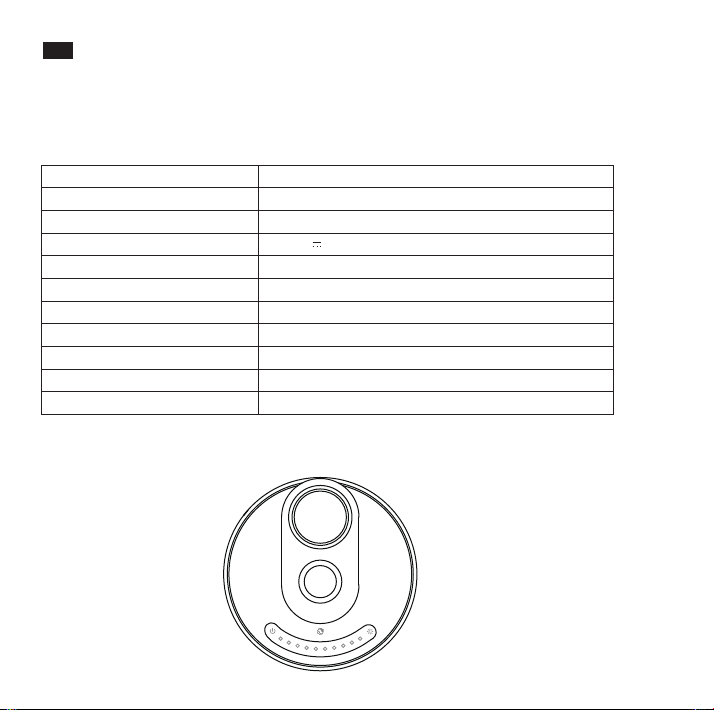
Specifiche
Modello
Fonte Luminosa
IRC
Tensione di Esercizio
Potenza (Luce)
Uscita USB
Uscita Caricabatterie Wireless
Lumen
Temperatura Colore
Temperatura di Esercizio
Durata di vita
TT-DL036
LED
>80
10V DC 3A
12W
5W
7,5 W per iPhone, 10 W per Samsung
410 lm
2700-6000K
Da -10 °C a 40 °C / da -14 °F a 104 °F
50.000 ore
Modalità di Utilizzo
Accensione / Spegnimento
1. Collegare l'adattatore a una presa a muro, il prodotto entra in modalità standby con
l'indicatore del pulsante di accensione acceso.
2. Tocca e tieni premuto il pulsante di accensione per spegnere la luce.
Controllo della Luminosità
Far scorrere il dito sul Cursore Luminosità per regolare la luminosità
Controllo della Temperatura Colore
Premere sul Pulsante Modalità per passare in rassegna 5 diversi livelli di temperatura colore
Funzione Memoria
La lampada ricorderà le impostazioni di temperatura colore e luminosità attive prima
dell’ultimo spegnimento.
Nota:
Impostare la lampada su un livello di luminosità basso prima di spegnerla per evitare
bagliori indesiderati.
Porta USB
Per ricaricare smartphone, tablet, e-reader o qualsiasi altro dispositivo USB attraverso la porta
USB da 5V/1A.
Caricabatterie Wireless
Appoggiare un telefono compatibile con lo standard Qi-BPP sulla base di ricarica wireless
per iniziare automaticamente la ricarica.
Nota:
Se la ricarica non parte, regolare il telefono in modo che il suo ricevitore possa essere .
rilevato. Si prega di notare che non tutti i telefoni hanno il ricevitore nella stessa posizione.
Attenzione
· Tenere salda la base della lampada durante la regolazione dell’angolo della testa della
lampada.
· Ruotare la testa della lampada entro l’angolatura massima consentita. Non imprimere
una forza eccessiva per evitare danni al prodotto.

09/10
IT
Contenuto della Confezione
· Lampada da Tavolo a LED TaoTronics (TT-DL036)
· Adattatore di Alimentazione
Specifiche
Modello
Fonte Luminosa
IRC
Tensione di Esercizio
Potenza (Luce)
Uscita USB
Uscita Caricabatterie Wireless
Lumen
Temperatura Colore
Temperatura di Esercizio
Durata di vita
TT-DL036
LED
>80
10V DC 3A
12W
5W
7,5 W per iPhone, 10 W per Samsung
410 lm
2700-6000K
Da -10 °C a 40 °C / da -14 °F a 104 °F
50.000 ore
Modalità di Utilizzo
Accensione / Spegnimento
1. Collegare l'adattatore a una presa a muro, il prodotto entra in modalità standby con
l'indicatore del pulsante di accensione acceso.
2. Tocca e tieni premuto il pulsante di accensione per spegnere la luce.
Controllo della Luminosità
Far scorrere il dito sul Cursore Luminosità per regolare la luminosità
Controllo della Temperatura Colore
Premere sul Pulsante Modalità per passare in rassegna 5 diversi livelli di temperatura colore
Funzione Memoria
La lampada ricorderà le impostazioni di temperatura colore e luminosità attive prima
dell’ultimo spegnimento.
Nota:
Impostare la lampada su un livello di luminosità basso prima di spegnerla per evitare
bagliori indesiderati.
Porta USB
Per ricaricare smartphone, tablet, e-reader o qualsiasi altro dispositivo USB attraverso la porta
USB da 5V/1A.
Caricabatterie Wireless
Appoggiare un telefono compatibile con lo standard Qi-BPP sulla base di ricarica wireless
per iniziare automaticamente la ricarica.
Nota:
Se la ricarica non parte, regolare il telefono in modo che il suo ricevitore possa essere .
rilevato. Si prega di notare che non tutti i telefoni hanno il ricevitore nella stessa posizione.
Attenzione
· Tenere salda la base della lampada durante la regolazione dell’angolo della testa della
lampada.
· Ruotare la testa della lampada entro l’angolatura massima consentita. Non imprimere
una forza eccessiva per evitare danni al prodotto.
11/12
JP
同梱物
·TaoTronicsLEDデスクライト(TT-DL036)
·電源アダプター
仕様
モデル
光源
CRI
動作電圧
パワー(ライトのみ)
USB出力
ワイヤレス充電器出力
ルーメン
色温度
動作温度
寿命
TT-DL036
LED
>80
DC10V3A
12W
5W
iPhoneの場合7.5Wに対応、Samsungの場合10Wに対応
410lm
2700-6000K
-10°Cto40°C/-14°Fto104°F
50,000時間
使い方
電源オン/オフ
1.アダプタをコンセントに接続すると、電源ボタンインジケータライトが点灯し、スタンバイモードにな
ります。
2.電源ボタンを長押ししてライトを消します。
明るさコントロール
タッチコントロールパネルに沿って指をスライドさせて明るさを調整します
色温度コントロール
モードボタンをタップすると、5つのレベルの色温度に変えることができます
メモリ機能
ライトは、消灯前の色温度と明るさの設定で再開します。
注:点灯時に眩しくないように、暗めの設定で消灯することをおすすめします。
USBポート
5V / 1A USBポートからスマートフォン、タブレットなどのUSBデバイスを充電できます。
ワイヤレス充電 器
Qi-BPP (Qi Baseline Power Profile) 規格と互換性を備えたデバイスをワイヤレス充電スタンドに設置す
ると、自動的に充電が開始されます。
注 意:
充電が行われない場合は、検出されるようにスマホを調整してください。デバイスは、それぞれ異なる位置
に受信機を持っています。
注意
·ライトヘッドの角度を調整するときは、ライトベースを持ってください。
·ライトヘッドを適切な角度範囲内で回転させてください。製品に損傷を与えないように、無理な力を加え
て引っ張らないでください。

11/12
JP
同梱物
·TaoTronicsLEDデスクライト(TT-DL036)
·電源アダプター
仕様
モデル
光源
CRI
動作電圧
パワー(ライトのみ)
USB出力
ワイヤレス充電器出力
ルーメン
色温度
動作温度
寿命
TT-DL036
LED
>80
DC10V3A
12W
5W
iPhoneの場合7.5Wに対応、Samsungの場合10Wに対応
410lm
2700-6000K
-10°Cto40°C/-14°Fto104°F
50,000時間
使い方
電源オン/オフ
1.アダプタをコンセントに接続すると、電源ボタンインジケータライトが点灯し、スタンバイモードにな
ります。
2.電源ボタンを長押ししてライトを消します。
明るさコントロール
タッチコントロールパネルに沿って指をスライドさせて明るさを調整します
色温度コントロール
モードボタンをタップすると、5つのレベルの色温度に変えることができます
メモリ機能
ライトは、消灯前の色温度と明るさの設定で再開します。
注:点灯時に眩しくないように、暗めの設定で消灯することをおすすめします。
USBポート
5V / 1A USBポートからスマートフォン、タブレットなどのUSBデバイスを充電できます。
ワイヤレス充電 器
Qi-BPP (Qi Baseline Power Profile) 規格と互換性を備えたデバイスをワイヤレス充電スタンドに設置す
ると、自動的に充電が開始されます。
注 意:
充電が行われない場合は、検出されるようにスマホを調整してください。デバイスは、それぞれ異なる位置
に受信機を持っています。
注意
·ライトヘッドの角度を調整するときは、ライトベースを持ってください。
·ライトヘッドを適切な角度範囲内で回転させてください。製品に損傷を与えないように、無理な力を加え
て引っ張らないでください。

FCC Compliance
This device complies with Part 15 &18 of the FCC Rules. Operation is subject to the following two
conditions:
(1) This device may not cause harmful interference, and
(2) This device must accept any interference received, including interference that may cause
undesired operation.
However, there is no guarantee that interference will not occur in a particular installation. If this
equipment does cause harmful interference to radio or television reception, which can be
determined by turning the equipment off and on, the user is encouraged to try to correct the
interference by one or more of the following measures:
- Reorient or relocate the receiving antenna.
- Increase the separation between the equipment and receiver.
- Connect the equipment into an outlet on a circuit different from that to which the receiver is
connected.
- Consult the dealer or an experienced radio/TV technician for help.
Changes or modifications not expressly approved by the party responsible for compliance could
void the user's authority to operate the equipment.
FCC Radiation Exposure Statement
This equipment complies with FCC radiation exposure limits set forth for an uncontrolled
environment. This equipment should be installed and operated with minimum distance 20cm
between the radiator & your body.
WEEE Compliance
Correct Disposal of This Product (Waste Electrical & Electronic Equipment)
(Applicable in countries with separate collection systems)
This marking on the product, accessories or literature indicates that the product and its electronic
accessories should not be disposed of with other household waste at the end of their working life.
To prevent possible harm to the environment or human health from uncontrolled waste disposal,
please separate these items from other types of waste and recycle them responsibly to promote
the sustainable reuse of material resources. Household users should contact either the retailer
where they purchased this product, or their local government office, for details of where and how
they can take these items for environmentally safe recycling. Business users should contact their
supplier and check the terms and conditions of the purchase contract. This product and its
electronic accessories should not be mixed with other commercial wastes for disposal.

FCC Compliance
This device complies with Part 15 &18 of the FCC Rules. Operation is subject to the following two
conditions:
(1) This device may not cause harmful interference, and
(2) This device must accept any interference received, including interference that may cause
undesired operation.
However, there is no guarantee that interference will not occur in a particular installation. If this
equipment does cause harmful interference to radio or television reception, which can be
determined by turning the equipment off and on, the user is encouraged to try to correct the
interference by one or more of the following measures:
- Reorient or relocate the receiving antenna.
- Increase the separation between the equipment and receiver.
- Connect the equipment into an outlet on a circuit different from that to which the receiver is
connected.
- Consult the dealer or an experienced radio/TV technician for help.
Changes or modifications not expressly approved by the party responsible for compliance could
void the user's authority to operate the equipment.
FCC Radiation Exposure Statement
This equipment complies with FCC radiation exposure limits set forth for an uncontrolled
environment. This equipment should be installed and operated with minimum distance 20cm
between the radiator & your body.
WEEE Compliance
Correct Disposal of This Product (Waste Electrical & Electronic Equipment)
(Applicable in countries with separate collection systems)
This marking on the product, accessories or literature indicates that the product and its electronic
accessories should not be disposed of with other household waste at the end of their working life.
To prevent possible harm to the environment or human health from uncontrolled waste disposal,
please separate these items from other types of waste and recycle them responsibly to promote
the sustainable reuse of material resources. Household users should contact either the retailer
where they purchased this product, or their local government office, for details of where and how
they can take these items for environmentally safe recycling. Business users should contact their
supplier and check the terms and conditions of the purchase contract. This product and its
electronic accessories should not be mixed with other commercial wastes for disposal.
www.taotronics.com
Learn more about the EU Declaration of Conformity:
https://www.taotronics.com/pages/user-manual
03-25-2020
TT-DL036_V2.2
EUROPE
E-mail:
NORTH AMERICA
E-mail:
Tel: 1-888-456-8468 (Monday-Friday: 9:00 – 17:00 PST)
Manufacturer: Shenzhen NearbyExpress Technology Development Co.,Ltd.
Address: Floor 7, Building E, Galaxy World Phase II, Shenzhen, China
MANUFACTURER
ASIA PACIFIC
E-mail: [email protected](JP)
JP Importer: 株式会社SUNVALLEY JAPAN
Address: 〒104-0032東京都中央区八丁堀3丁目18-6PMO京橋東9F
MADE IN CHINA
TaoTronics LED Desk Lamp
User Guide
Model: TT-DL036