
OWNER'S MANUAL
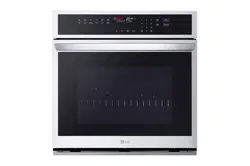
WALL OVEN
Read this owner's manual thoroughly before operating the
appliance and keep it handy for reference at all times.
ENGLISH
WSEP4727*
MFL51224549
Rev.01_021323
www.lg.com
Copyright © 2023 LG Electronics Inc. All Rights Reserved.
Scan to see the online manual.

TABLE OF CONTENTS
2
4 IMPORTANT SAFETY
INSTRUCTIONS
4 READ ALL INSTRUCTIONS BEFORE USE
4 Safety Messages
4 WARNING
4 Installation
5 Operation
5 Maintenance
6Risk of Fire and Flammable Materials
6CAUTION
6 Operation
7 Maintenance
8 PRODUCT OVERVIEW
8 Product Features
8 Exterior / Interior
8 Accessories
10 OPERATION
10 Operating Control Panel
10 Control Panel Features
10 Energy Saving Tips
11 Changing Settings
11 Clock
11 Timer On/Off
11 Settings (Hour Mode, Convection Auto
Conversion, Oven Temperature, Display
Language, Preheat Alarm Light, Beeper
Volume, Fahrenheit or Celsius)
13 Start Time (Delayed Timed Cook)
14 Cook Time (Timed Cook)
14 Sabbath Mode
15 Minimum & Maximum Default Settings
15 Operating the Oven
15 Before Using the Oven
16 Using Standard Oven Racks
16 Using Gliding Oven Racks
17 Instaview
17 Convection Bake and Roast Mode
18 Bake Mode
19 Recommended Baking Guide
20 Broil Mode
21 Recommended Broiling Guide
23 Frozen Meal
24 Warm Mode
24 Proof Mode
25 Favorite Mode
25 Air Fry
27 Recommended Air Frying Guide
28 Probe Mode
29 Recommended Probe Guide
30 Steam Function
31 Steam Bake and Roast Mode
32 Steam Sous Vide
33 Sous Vide Cooking Guide
33 Remote Start Mode
35 SMART FUNCTIONS
35 LG ThinQ Application
35 LG ThinQ Application Features
35 Installing LG ThinQ Application and
Connecting an LG Appliance
36 RF Module Specifications
36 FCC Notice
36 Open Source Software Notice Information
37 Smart Diagnosis
TM
Feature
37 Using LG ThinQ to Diagnose Issues
37 Using Audible Diagnosis to Diagnose
Issues
38 MAINTENANCE
38 Cleaning
38 Interior
38 Exterior
39 EasyClean
41 Self Clean
44 Cleaning the Steam Feeder Tank
44 Cleaning Scale on Oven Bottom
44 Drying the Oven Interior
45 Periodic Maintenance
45 Changing the Oven Light
46 TROUBLESHOOTING
46 FAQs
46 Frequently Asked Questions
48 Before Calling for Service

4 IMPORTANT SAFETY INSTRUCTIONS
IMPORTANT SAFETY INSTRUCTIONS
READ ALL INSTRUCTIONS BEFORE USE
Safety Messages
Your safety and the safety of others are very important.
We have provided many important safety messages in this manual and on your appliance. Always read and
follow all safety messages.
All safety messages will tell you what the potential hazard is, tell you how to reduce the chance of injury,
and tell you what may happen if the instructions are not followed.
WARNING
WARNING
• To reduce the risk of explosion, fire, death, electric shock, injury or scalding to persons when using this
product, follow basic precautions, including the following:
Installation
• Never allow anyone to climb, sit, stand or hang on the oven door. Injury might result from contact with
hot food or the oven itself.
• Do not line the oven walls, racks, bottom, or any other part of the oven with aluminum foil or any other
material. Doing so will disrupt heat distribution, produce poor baking results and cause permanent
damage to the oven interior (aluminum foil will melt to the interior surface of the oven).
• Do not use aluminum foil or any other material to line the oven bottom. Improper installation of oven
liners may result in a risk of electric shock or fire.
• Make sure your appliance is properly installed and grounded by a qualified installer, according to the
installation instructions. Any adjustment and service should be performed only by qualified installers or
service technicians.
• Be certain that all packing materials are removed from the appliance before operating. Keep plastic,
clothes, paper, and other flammable materials away from parts of the appliance that may become hot.
• The electrical power must be shut off while the electrical connections are being made.
• Improper connection of aluminum house wiring to copper leads can result in an electrical hazard or fire.
Use only connectors designed for joining copper to aluminum and follow the manufacturer’s
recommended procedure closely.
This is the safety alert symbol.
This symbol alerts you to potential hazards that can kill or injure you and others. All safety messages
will follow the safety alert symbol and either the word WARNING or CAUTION.
These words mean:
WARNING
You may be killed or seriously injured if you do not follow instructions.
CAUTION
You may be injured or cause damage to the product if you do not follow instructions.

5IMPORTANT SAFETY INSTRUCTIONS
ENGLISH
Operation
• DO NOT TOUCH HEATING ELEMENTS OR INTERIOR SURFACES OF OVEN. Heating elements may be hot
even though they are dark in color. Interior surfaces of an oven become hot enough to cause burns.
During and after use, do not touch or let clothing or other flammable materials contact heating elements
or interior surfaces of oven until they have had sufficient time to cool. Other surfaces, such as oven vent
openings and surfaces near these openings, oven doors, and windows of oven doors, also get hot and
may cause burns if not allowed to cool.
• Use care when opening door. The hot air and steam that escape can cause burns to hands, face and
eyes. Let hot air or steam escape from the oven before removing or replacing food in the oven.
• Do not use plastic to cover food. Use foil or oven-safe lids only.
• Never attempt to dry a pet in the oven.
• Never use your appliance for warming or heating the room.
• Always use pot holders or oven mitts when removing food from an oven or cooktop. Cookware will be
hot. Use only dry pot holders. Moist or damp pot holders on hot surfaces may result in burns from
steam. Do not let the pot holder touch hot heating elements. Do not use a towel or other bulky cloth to
remove food.
• Do not heat unopened food containers. Pressure in the containers may cause them to burst which may
result in injury.
• Do not allow aluminum foil or the temperature probe to contact heating elements.
• Do not touch the oven racks while they are hot.
• Only arrange oven racks when the oven is cool. If a rack must be moved while the oven is hot, do not let
the pot holder contact the hot heating element in the oven.
• Pull the oven rack to the stop-lock position when loading and unloading food from the oven. This helps
prevent burns caused by touching hot surfaces of the door and oven walls.
• Do not use the oven if a heating element develops a glowing spot during use or shows other signs of
damage. A glowing spot indicates the heating element may fail and present a potential burn, fire, or
shock hazard. Turn the oven off immediately and have the heating element replaced by a qualified
service technician.
• Do not leave children alone or unsupervised near the appliance when it is in use or is still hot. Children
should never be allowed to sit or stand on any part of the appliance as they could be injured or burned.
• DO NOT block the oven vent during operation. This can damage the electric parts of the oven. Air must
be able to move freely. The bottom vent trim should be properly assembled on the front bottom of oven
before installing the oven door.
• Do not put large, heavy items such as whole turkeys on the open oven door.
• Take care when the door is open to avoid injury.
• If the door or door seals are damaged, the oven must not be operated until it has been repaired by a
competent person.
• Do not allow children to crawl into the oven.
• Do not put your hand under the controller or between the door and bottom vent trim during operation.
The outside of the oven can become very hot to the touch.
Maintenance
• Do not store items of interest to children on the back guard or in cabinets above a cooking appliance.
Children climbing on the oven to reach items could be seriously injured.
• Let hot cookware and utensils cool in a safe place, out of reach of small children.
• If the door glass, surface, or oven heating unit of the appliance are damaged, discontinue use of the
appliance and call for service.
• Always disconnect power from the appliance before servicing.

6 IMPORTANT SAFETY INSTRUCTIONS
• Before replacing the oven light, switch off the electrical power to the oven at the main fuse or circuit
breaker panel.
• Never pour cold water over a hot oven for cleaning purposes.
• Oversized food or oversized metal utensils should not be inserted in a microwave/toaster oven as they
may create a fire or risk of electric shock.
• Do not clean with metal scouring pads. Pieces can burn off the pad and touch electrical parts causing a
risk of electric shock.
• Do not store any materials, other than manufacturer’s recommended accessories, in this oven when not
in use.
• Do not cover racks or any other part of the oven with metal foil. This will cause overheating of the oven.
• If the self-cleaning mode malfunction light goes on, or if the audible signal sounds, turn off or
disconnect the appliance from the power supply and have it serviced by a qualified technician.
• If the oven is heavily soiled with oil, self-clean the oven before using the oven again. The oil could cause
a fire.
• If there is a fire in the oven during self-clean, turn the oven off and wait for the fire to go out. Do not
force the door open. Introduction of fresh air at self-clean temperatures may lead to a burst of flame
from the oven. Failure to follow this instruction may result in severe burns.
• If your oven is dropped or damaged, have it thoroughly checked by a qualified service technician before
using it.
Risk of Fire and Flammable Materials
• Do not store or use flammable material in or near the oven. Flammable materials include paper, plastic,
pot holders, linens, wall coverings, curtains, and gasoline or other flammable vapors and liquids such as
grease or cooking oil. These materials can be ignited when the oven is in use.
• Use extreme caution when moving or disposing of hot grease.
• Wear proper apparel. Do not wear loose-fitting or hanging garments, which may ignite if they contact
hot surfaces, and cause severe burns.
• Do not use the oven for drying clothes. Only use the oven for its intended purpose.
• If cabinet storage is provided directly above the oven, use it to store items that are not frequently used
and can be safely stored in an area subjected to heat. Temperatures may be unsafe for volatile items
such as flammable liquids, cleaners or aerosol sprays.
• Do not use water on grease fires. Should an oven fire occur, leave the oven door closed and turn the
oven off. If the fire continues, throw baking soda on the fire or use a fire extinguisher. Do not put water
or flour on the fire. Flour may be explosive and water can spread a grease fire and cause personal injury.
CAUTION
CAUTION
• To reduce the risk of minor injury to persons, malfunction, or damage to the product or property when
using this product, follow basic precautions, including the following:
Operation
• Always heat fat slowly, and watch as it heats.
• If frying combinations of oils and fats, stir them together before heating.
• Use a deep fat thermometer, if possible, to prevent overheating fat beyond the smoking point.
• Use the least possible amount of fat for effective shallow or deep-fat frying. Filling the pan with too much
fat can cause spillovers when food is added.

7IMPORTANT SAFETY INSTRUCTIONS
ENGLISH
SAVE THESE INSTRUCTIONS
• Accessible parts may become hot when the grill is in use.
• Do not place food or cookware on the bottom of the oven cavity. Doing so will cause permanent damage
to the oven bottom finish.
• When using cooking or roasting bags in the oven, follow the manufacturer’s directions.
• To protect against food-borne illnesses, cook meat and poultry thoroughly. The USDA has indicated the
following as safe minimum internal temperatures for consumption:
- Ground beef: 160 °F (71 ℃)
- Poultry: 165 °F (74 ℃)
- Beef, veal, pork, or lamb: 145 °F (68 ℃)
- Fish/seafood: 145 °F (68 ℃)
• Do not use this oven for commercial purposes. It is made for household use only.
• The door or the outer surface may get hot when the appliance is operating.
• Do not use this oven for purposes other than cooking.
• Use caution if opening the door when the oven is operating. Hot surfaces can cause serious burns.
Maintenance
• Do not repair or replace any part of the appliance unless specifically recommended in the manual. All
other servicing should be performed by a qualified technician.
• Do not use harsh, etching, abrasive cleaners or sharp metal scrapers to clean the oven door glass since
they can scratch the surface. Scratches may cause the glass to shatter.
• Make sure oven lights are cool before cleaning.
• Do not clean the door gasket. The door gasket is essential for a good seal. Care should be taken not to
rub, damage, or move the gasket.
• Never keep pet birds in the kitchen. The health of birds is extremely sensitive to the fumes released
during an oven self-clean cycle. Fumes may be harmful or fatal to birds. Move birds to a well-ventilated
room.
• Do not rinse trays and racks by placing them in water just after cooking. This may cause breakage or
damage.
• The oven should be cleaned regularly and any food deposits should be removed. Failure to maintain the
oven in a clean condition could lead to deterioration of the surface that could shorten the life of the
appliance and possibly result in a hazardous situation.
• Clean in the self-clean cycle only parts listed in this manual. Before self-cleaning the oven, remove the
broiler pan, all oven racks, the meat probe and any utensils or food from the oven.
8 PRODUCT OVERVIEW
PRODUCT OVERVIEW
Product Features
The appearance and specifications listed in this manual may vary due to constant product improvements.
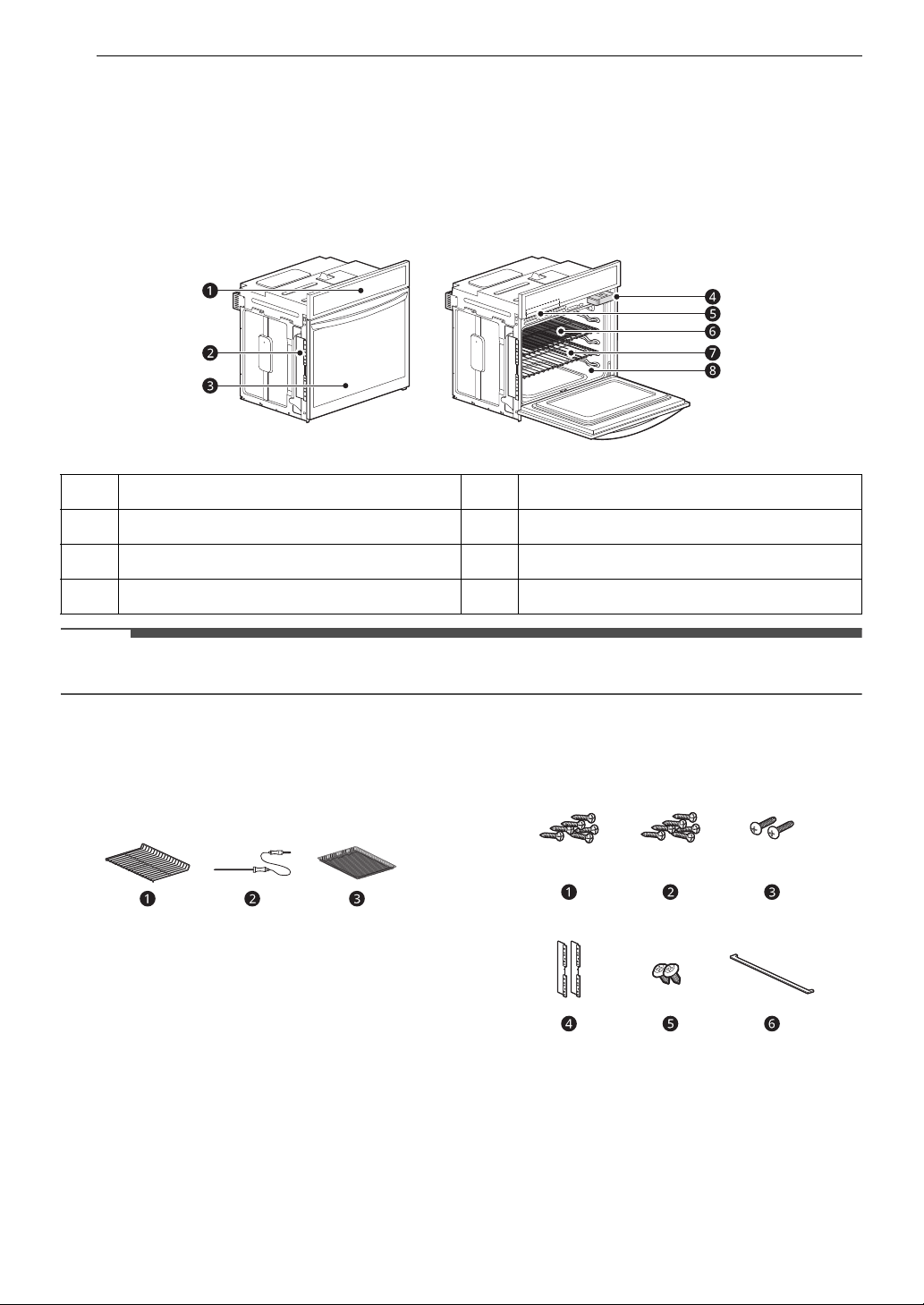
Exterior / Interior
NOTE
• The model and serial number can be verified at the rating label.
Accessories
Accessories for Cooking
a Heavy Duty Standard Rack (2ea)
b Meat Probe
c Air Fry Tray
Accessories for Installation
a 4X14 Wood screws for mounting (6 ea including
4 extras)
b 4X24 Wood screws for mounting (6 ea for flush
installation)
c 4X22 Self-tapping screws for cover bracket (2
ea)
a
Oven Controller
e
Rating Label, Model and Serial Number Plate
b
Spacer (2ea)
f
Air Fry Tray
c
Oven Door
g
Standard Rack (2ea)
d
Steam Feeder Tank
h
Gasket

9PRODUCT OVERVIEW
ENGLISH
d Cover brackets for flush installation (2 ea)
e 4X10 Screws for bottom decorative trim (2 ea)
f Bottom Decorative Trim
Optional Accessories (sold separately)
a Grid
b Broiler Pan
c Gliding Rack
NOTE
• Contact LG Customer Service at 1-800-243-0000
(1-888-542-2623 in Canada) if any accessories
are missing.
• For your safety and for extended product life,
only use authorized components.
• The manufacturer is not responsible for product
malfunction or accidents caused by the use of
separately purchased, unauthorized
components or parts.
• The images in this guide may be different from
the actual components and accessories, which
are subject to change by the manufacturer
without prior notice for product improvement
purposes.
10 OPERATION
OPERATION
Operating Control Panel
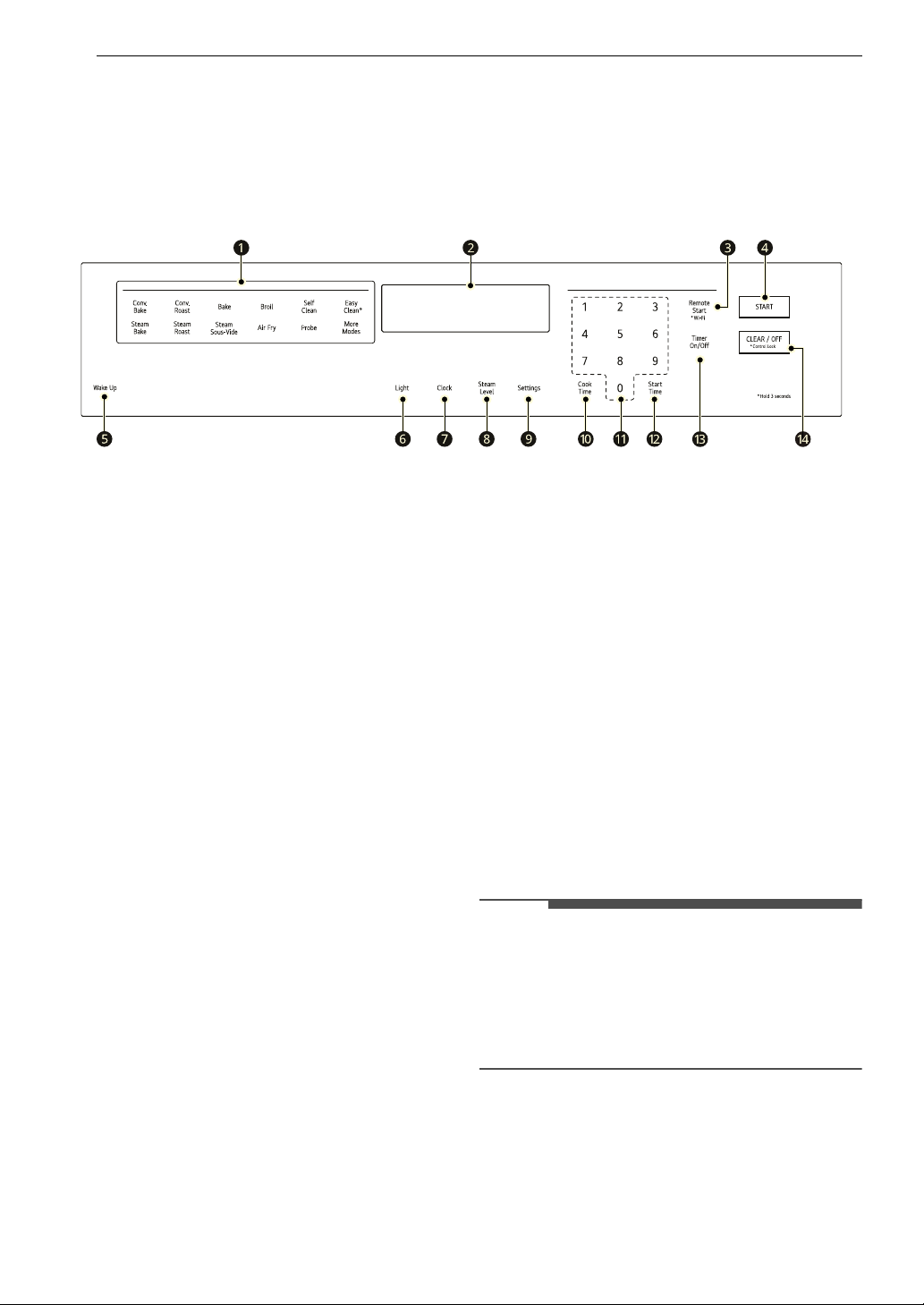
Control Panel Features
a Oven Functions
Select various functions of the oven. See
Operating the Oven.
b Display
Oven operation and settings appear in the
display
c Remote Start
• Press to select the Remote Start function.
Wi-Fi
• Press and hold the button for 3 seconds to
connect the appliance to a Wi-Fi network.
d START
Press to start all functions in the oven.
e Wake Up
Press to activate the display.
f Light
Press to turn light on and off.
g Clock
Press to set the time of day.
h Steam Level
Press to set the steam level of the cooking.
i Settings
Press to select and adjust oven settings.
j Cook Time
Press to set the desired amount of time for
food to cook. The oven shuts off when the set
cooking time runs out.
k Number Pad
Use to set any function requiring numbers such
as the time of day on the clock, the timer, the
oven temperature, the start time, and the
length of operation for timed baking, etc.
l Start Time
Press to set the delayed timed cook. The oven
starts at the set time.
m Timer On/Off
Press to set or cancel the oven timer.
n CLEAR / OFF
• Press to stop cooking or cancel settings of
the oven.
Control Lock
• Press and hold the CLEAR/OFF button for 3
seconds to activate/deactivate Control Lock.
NOTE
• Setting the Time, Timer and Temperature
If you enter one digit of a number incorrectly,
enter the entire number again to correct it. For
example, if you press 1, 0, 3 and 1 to set the
clock for 10:30, press 1, 0, 3 and 0 to enter the
correct time.
Energy Saving Tips
• Multiple-rack cooking saves time and energy.
Whenever possible, cook foods requiring the
same cooking temperature together in one
oven.

11OPERATION
ENGLISH
• For optimal performance and energy savings,
follow the guides for proper rack and pan
placement.
• Reduce energy use by cleaning light oven soil
with the EasyClean feature instead of self-clean.
• Avoid opening the oven door more than
necessary during use. This helps the oven
maintain temperature, prevents unnecessary
heat loss, and saves on energy use.
Changing Settings
Clock
The clock must be set to the correct time of day in
order for the automatic oven timing functions to
work properly.
1 Press Clock.
2 Press the numbers to set the time. For
example, to set the clock for 10:30, press the
numbers: 1, 0, 3 and 0.
3 Press START.
NOTE
• The time of day cannot be changed during a
timed baking or self-clean cycle.
• To check the time of day when the display is
showing other information, press Clock.
• If no other buttons are pressed within 25
seconds of pressing Clock, the display reverts to
the original setting.
• If the display time is blinking, there may have
been a power failure. Reset the time.
Timer On/Off
The Timer On/Off serves as an extra timer in the
kitchen that beeps when the set time has run out.
It does not start or stop cooking.
The Timer On/Off feature can be used during any
of the other oven control functions.
For example, to set 5 minutes:
1 Press Timer On/Off once.
0:00 appears and Timer flashes in the display.
2 Press 5.
0:05 appears in the display.
3 Press Timer On/Off to start the Timer. The
remaining time countdown appears in the
display.
NOTE
•If Timer On/Off is not pressed, the timer returns
to the time of day.
4 When the set time runs out, End shows in the
display. The indicator tones sound every 15
seconds until Timer On/Off is pressed.
NOTE
• If the remaining time is not in the display, recall
the remaining time by pressing Timer On/Off.
•Press Timer On/Off once to set the time in
hours and minutes.
•Press Timer On/Off twice to set the time in
minutes and seconds.
Canceling the Timer
1 Press Timer On/Off once.
The display returns to the time of day.
Settings (Hour Mode, Convection
Auto Conversion, Oven
Temperature, Display Language,
Preheat Alarm Light, Beeper
Volume, Fahrenheit or Celsius)
Press the Settings button repeatedly to toggle
through and change oven settings.
The Settings button allows you to:
• set the hour mode on the clock (12 or 24 hours)
• enable/disable convection auto conversion
• adjust the oven temperature
• select display language
• activate/deactivate the preheating alarm light
• set the beeper volume
• switch the temperature scale between
Fahrenheit and Celsius

12 OPERATION
Setting the Hour Mode
The control is set to use a 24-hour clock. To reset
the clock to 12-hour mode, follow the steps below.
1 Press Settings once.
2 Press 1 to select a 12-hour clock, or 2 to select
a 24-hour clock.
3 Press START to accept the change.
Setting Convection Auto Conversion
When Conv. Bake and Conv. Roast are selected,
Convection Auto Conversion automatically
converts the standard recipe temperature entered
to a convection temperature by subtracting 25 ℉ /
14 ℃. This auto converted temperature shows on
the display. For example, select Conv. Bake, enter
350 ℉, and 325 ℉ shows on the display after
preheat.
Convection Auto Conversion is enabled by default.
To change the setting, follow these instructions.
1 Press Settings repeatedly until Avto appears
in the display.
2 Press 1 to enable or 2 to disable auto
conversion.
3 Press START to accept the change.
Adjusting the Oven Temperature
Your new oven may cook differently from the one
it replaced. Use your new oven for a few weeks to
become more familiar with it before changing the
temperature settings. If after familiarizing yourself
with the new oven, you still think that it is too hot
or too cold, you can adjust the oven thermostat
yourself.
• To begin, either raise or lower the thermostat 15
℉ (8 ℃). Try the oven with the new setting. If the
oven still needs adjustment, raise or lower the
thermostat again, using the first adjustment as a
gauge. For example, if the adjustment was too
much, raise or lower the thermostat 10 ℉ (5 ℃).
If the adjustment was not enough, raise or lower
the thermostat 20 ℉ (12 ℃). Proceed in this way
until the oven is adjusted to your satisfaction.
1 Press Settings repeatedly until AdJU appears
in the display.
2 Use the number buttons to enter the number
of degrees you want to adjust the oven
temperature.
3 Adjust the temperature either up or down by
pressing Settings repeatedly to toggle
between plus (+) or minus (-).
4 Press START to accept the change.
NOTE
• This adjustment does not affect the broiling or
Self Clean temperatures. The adjustment is
retained in memory after a power failure. The
oven temperature can be increased (+) or
decreased (-) as much as 35 ℉ or 19 ℃.
• Once the temperature is increased or decreased,
the display shows the adjusted temperature
until it is changed.
• The thermostat adjustment for Bake will also
affect Convection Bake, Convection Roast, Roast
or Crisp Convection.
Selecting the Display Language
The oven control is set to display in English but can
be changed to display in Spanish or French.
1 Press Settings repeatedly until LNG appears in
the display.
2 Press 1 for English, 2 for Spanish, or 3 for
French.
3 Press START to accept the change.
Turning the Preheat Alarm Light On/
Off
When the oven reaches its set-temperature, the
preheating alarm light flashes 5 times or until the
oven door is opened.
You can activate or deactivate the preheating
alarm light.
1 Press Settings repeatedly until PrE appears in
the display.
2 Press 1 to turn the light on and 2 to turn the
light off.
13OPERATION
ENGLISH
3 Press START to accept the change.
Adjusting the Beeper Volume
1 Press Settings repeatedly until 8EEP appears
in the display.
2 Press 1 for Loud, 2 for Low, and 3 for Mute.
3 Press START to accept the change.
Selecting Fahrenheit or Celsius
Set the oven temperature display to show either
Fahrenheit (℉) or Celsius (℃) units. The oven
defaults to Fahrenheit unless changed by the user.
1 Press Settings repeatedly until UNit appears
in the display.
2 Press 1 for ℉ (Fahrenheit) or 2 for ℃ (Celsius).
3 Press START to accept the change.
Start Time (Delayed Timed Cook)
The automatic timer of this function turns the oven
on and off at the time you select.
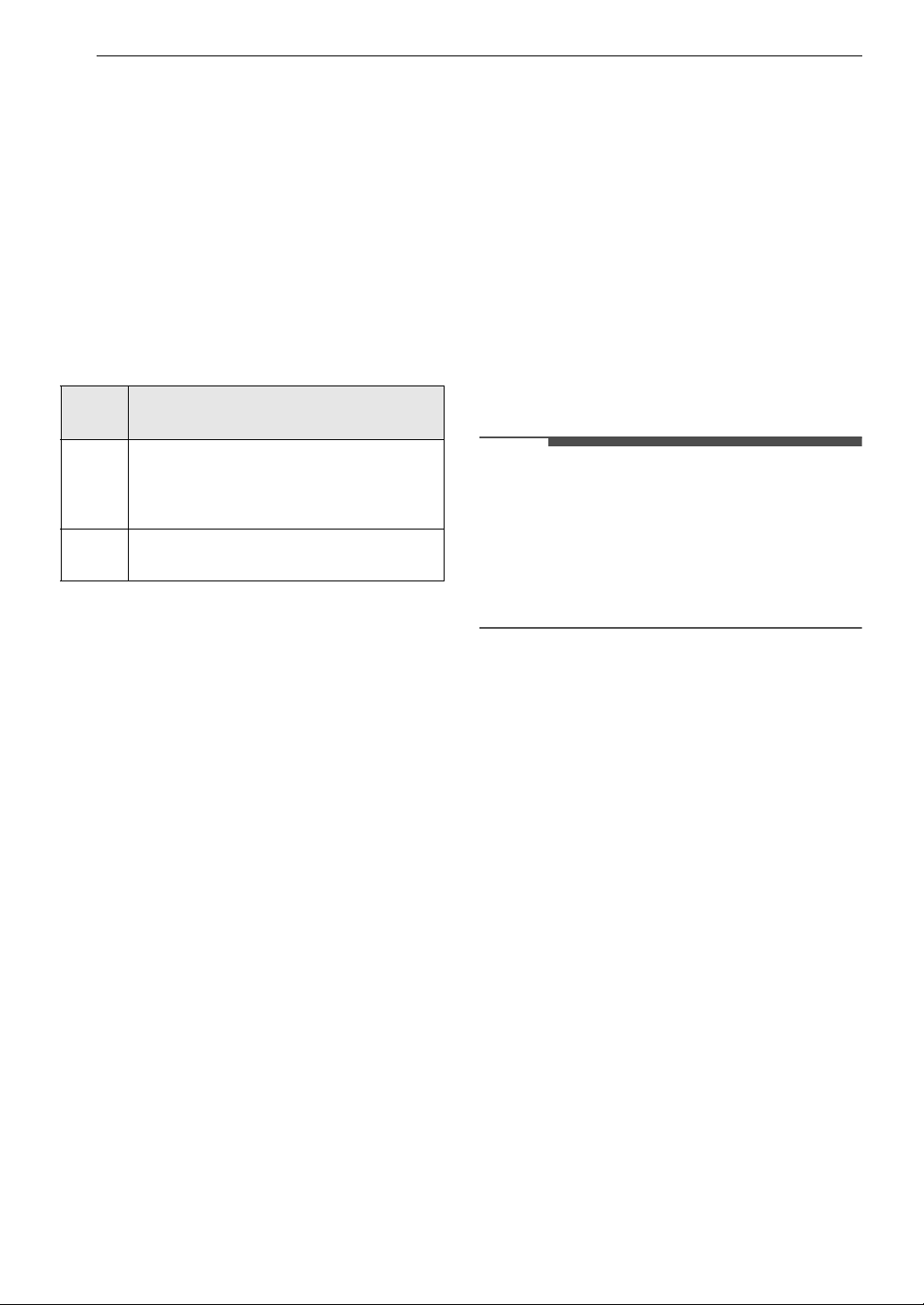
This function can only be used with the below oven
functions.
CAUTION
• Use caution with the Delayed Timed Cook
features. Use the automatic timer when cooking
cured or frozen meats and most fruits and
vegetables. Foods that can easily spoil, such as
milk, eggs, fish, meat or poultry, should be
chilled in the refrigerator first. Even when
chilled, they should not stand in the oven for
more than 1 hour before cooking begins, and
should be removed promptly when cooking is
complete. Eating spoiled food can result in
sickness from food poisoning.
Setting a Delayed Timed Cook
For example, to bake at 300 ℉ and delay the start
of baking until 4:30, first set the clock for the
correct time of day.
1 Arrange interior oven rack(s) and place the
food in the oven.
2 Press Bake. 350 ℉ appears in the display.
3 Set the temperature: press 3, 0 and 0.
4 Press Cook Time and press the number
buttons to set the baking time.
• The baking time can be set for any amount
of time between 1 minute and 11 hours and
59 minutes.
5 Press Start Time.
6 Set the start time: press 1, 6, 3 and 0 for 4:30.
7 Press START. A short beep sounds and the
start time appears in the display. The oven
begins baking at the set start time.
NOTE
• cancel this function, press CLEAR/OFF at any
time.
• To change the cooking time, repeat step 4 and
press START.
• If the oven clock is set as a 12-hour clock, you
can delay the cook time for 12 hours. If the oven
clock is set as a 24-hour clock, you can delay the
cook time for 24 hours.
• During the preheating mode, the convection fan
operates constantly to circulate the hot air. The
convection fan turns off automatically after the
preset temperature is attained.
• After any cooking cycle has been completed
cooling fans operate to protect the control
panel. This is normal.
Mod
el
Oven Functions
WSE
P472
7*
Bake, Conv. Bake, Conv. Roast, Steam
Bake, Steam Roast
WSE
P472
3*
Bake, Conv. Bake, Conv. Roast
14 OPERATION
The oven will continue to cook for the set amount
of time and then turn off automatically. When the
cooking time has elapsed:
• The time of day shows in the display.
• The cook end indicator tone sounds every 60
seconds until CLEAR/OFF is pressed.
Cook Time (Timed Cook)
Set the oven to cook for a specific length of time
using this function.
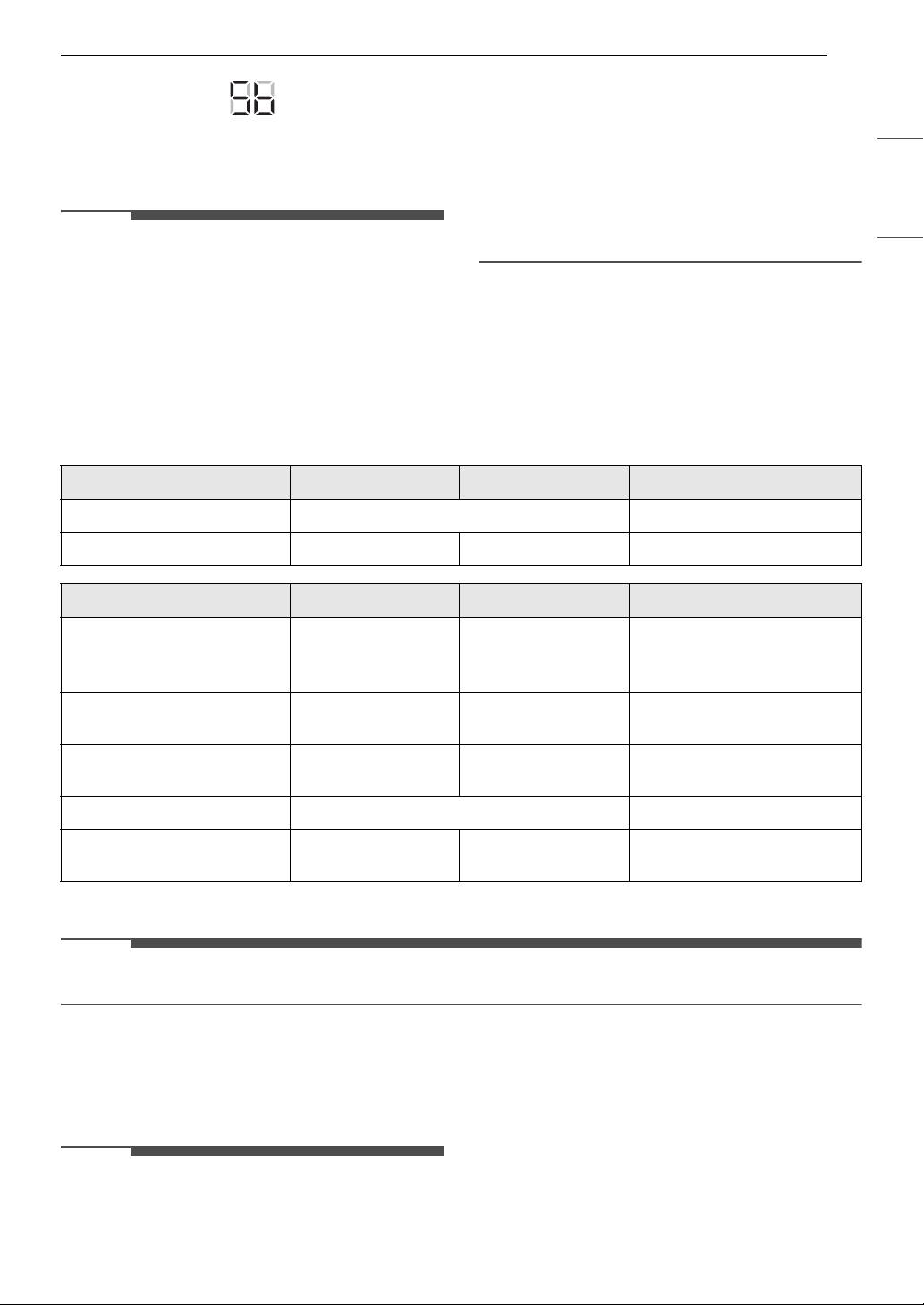
This function can only be used with the below oven
functions.
Setting a Timed Cook
For example, to bake at 300 ℉ for 30 minutes, first
set the clock to the correct time of day.
1 Press Bake. 350 ℉ appears in the display.
2 Set the temperature. Press 3, 0 and 0.
3 Press Cook Time. Timed flashes in the
display. Bake, 0:00 and 300 ℉ appear in the
display.
4 Set the baking time: press 3 and 0 (for 30
minutes).
• The baking time can be set for any amount
of time between 1 minute and 11 hours and
59 minutes.
5 Press START.
6 Press CLEAR/OFF to cancel this function at
any time.
The oven will continue to cook for the set amount
of time and then turn off automatically. When the
cooking time has elapsed:
• The time of day shows in the display.
• The cook end indicator tone sounds every 60
seconds until CLEAR/OFF is pressed.
Changing the Cook Time during Cooking
For example, to change the cook time to 1 hour
and 30 minutes during cooking:
1 Press Cook Time.
2 Change the baking time: press 1, 3, 0.
3 Press START to accept the change or press
CLEAR/OFF to reset the time.
NOTE
• During the preheating mode, the convection fan
operates constantly to circulate the hot air. The
convection fan turns off automatically after the
preset temperature is attained.
• After any cooking cycle has been completed
cooling fans operate to protect the control
panel. This is normal.
Sabbath Mode
Sabbath mode is typically used on the Jewish
Sabbath and Holidays. While the oven is in Sabbath
mode, the temperature cannot be changed and
the timer, light, and alarm functions are disabled.
When the Sabbath mode is activated, the oven
does not turn off until the Sabbath mode is
deactivated. In Sabbath mode, all function buttons
are inactive.
sb will appear in the display.
1 Disconnect the probe. The probe function is
not available in Sabbath mode.
2 Press Bake.
3 Press the numbers to enter the desired
temperature.
4 Press START.
5 Press and hold Settings for 3 seconds. sb
appears in the display when the Sabbath
mode is activated.
Mode
l
Oven Functions
WSEP4
727*
Bake, Conv. Bake, Conv. Roast, Broil,
Steam Bake, Steam Roast, Steam Sous-
Vide, Air Fry, Frozen Meal, Favorite
Mode
WSEP4
723*
Bake, Conv. Bake, Conv. Roast, Broil,
Air Fry, Frozen Meal, Favorite Mode
15OPERATION
ENGLISH
6 To stop the Sabbath mode, press and hold
Settings for 3 seconds.
NOTE
• If a cook time is set, the oven turns off
automatically at the end of the cook time,
without chiming. The oven remains in Sabbath
mode, but is turned off.
• If no cook time is set, the oven will not
automatically turn off.
• After a power failure, the display will turn back
on in Sabbath mode, but the oven will be off.
• Always close the oven door before engaging
Sabbath Mode.
Minimum & Maximum Default Settings
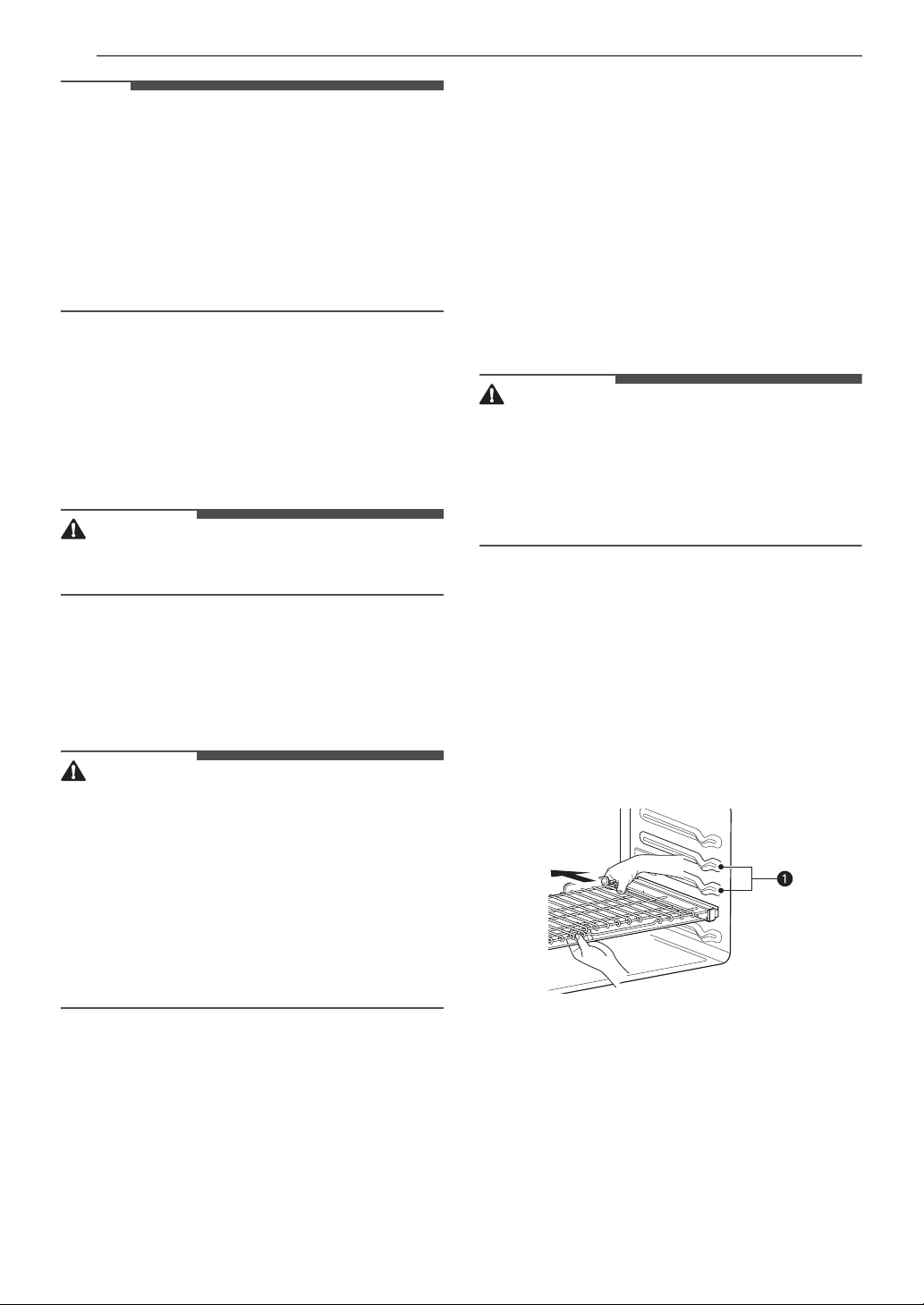
All of the features listed have a minimum and a maximum time or temperature setting that may be
entered into the control. An entry acceptance beep sounds each time a control button is pressed.
An entry error tone (two short tones) sounds if the entry of the temperature or time is below the minimum
or above the maximum setting for the feature.
† Using auto conversion
NOTE
• Default cook mode times are without setting a cook time.
Operating the Oven
Before Using the Oven
NOTE
• Because the oven temperature cycles, an oven
thermometer placed in the oven cavity may not
show the same temperature that is set on the
oven.
• It is normal for the convection fan to run while
preheating during a regular bake cycle.
• The convection fan motor may run periodically
during a regular bake cycle.
Feature Min. Time Max. Time Default
Warm -3 hr.
Self Clean 3 hr. 5 hr. 4 hr.
Feature Min. Temp. Max. Temp. Default
Conv. Bake / Conv. Roast
170 ℉ /
80 ℃
550 ℉ /
285 ℃
350 ℉
(325 ℉)
†
/
12 hr.
Bake / Roast
170 ℉ /
80 ℃
550 ℉ /
285 ℃
350 ℉ /
12 hr.
Broil
Lo
350 ℉
Hi
550 ℉
Hi
550 ℉
Proof - 100 ℉
Warm
Lo
140 ℉
HI
200 ℉
Medium: 170 ℉
16 OPERATION
NOTE
• The heat turns off if the door is left open during
baking. If the door is left open for longer than 30
seconds during baking, the heat turns off. The
heat turns back on automatically once the door
is closed.
• Avoid opening the oven door more than
necessary during use. This helps the oven
maintain temperature, prevents unnecessary
heat loss, and saves on energy use.
Oven Vent
Areas near the vent may become hot during
operation and may cause burns. Avoid placing
plastics near the vent as heat may distort or melt
the plastic.
It is normal for steam to be visible when cooking
foods with high moisture content.
WARNING
• Do not block the vent opening at the bottom of
the oven.
Using Standard Oven Racks
The racks have a turned-up back edge that
prevents them from being pulled out of the oven
cavity.
CAUTION
• Replace oven racks before turning the oven on
to prevent burns.
• Do not cover the racks with aluminum foil, or
any other material, or place anything on the
bottom of the oven. Doing so will result in poor
baking and may damage the oven bottom.
• Do not place objects heavier than 33 lb (15 kg)
on the racks. Do not place heavy objects on the
corners of the racks. Doing so can damage the
racks.
Removing Racks
1 Pull the rack straight out until it stops.
2 Lift up the front of the rack and pull it out.
Replacing Racks
1 Place the end of the rack on the support.
2 Tilt the front end up and push the rack in.
Using Gliding Oven Racks
The optional gliding racks slide in and out on a
frame. This keeps heavy cookware level and
prevents it from sliding forward when the rack is
completely extended.
CAUTION
• Place oven racks in the desired location before
turning on the oven to avoid burns.
• Do not cover the racks with aluminum foil, or
any other material, or place anything on the
bottom of the oven. Doing so will result in poor
baking and may damage the oven bottom.
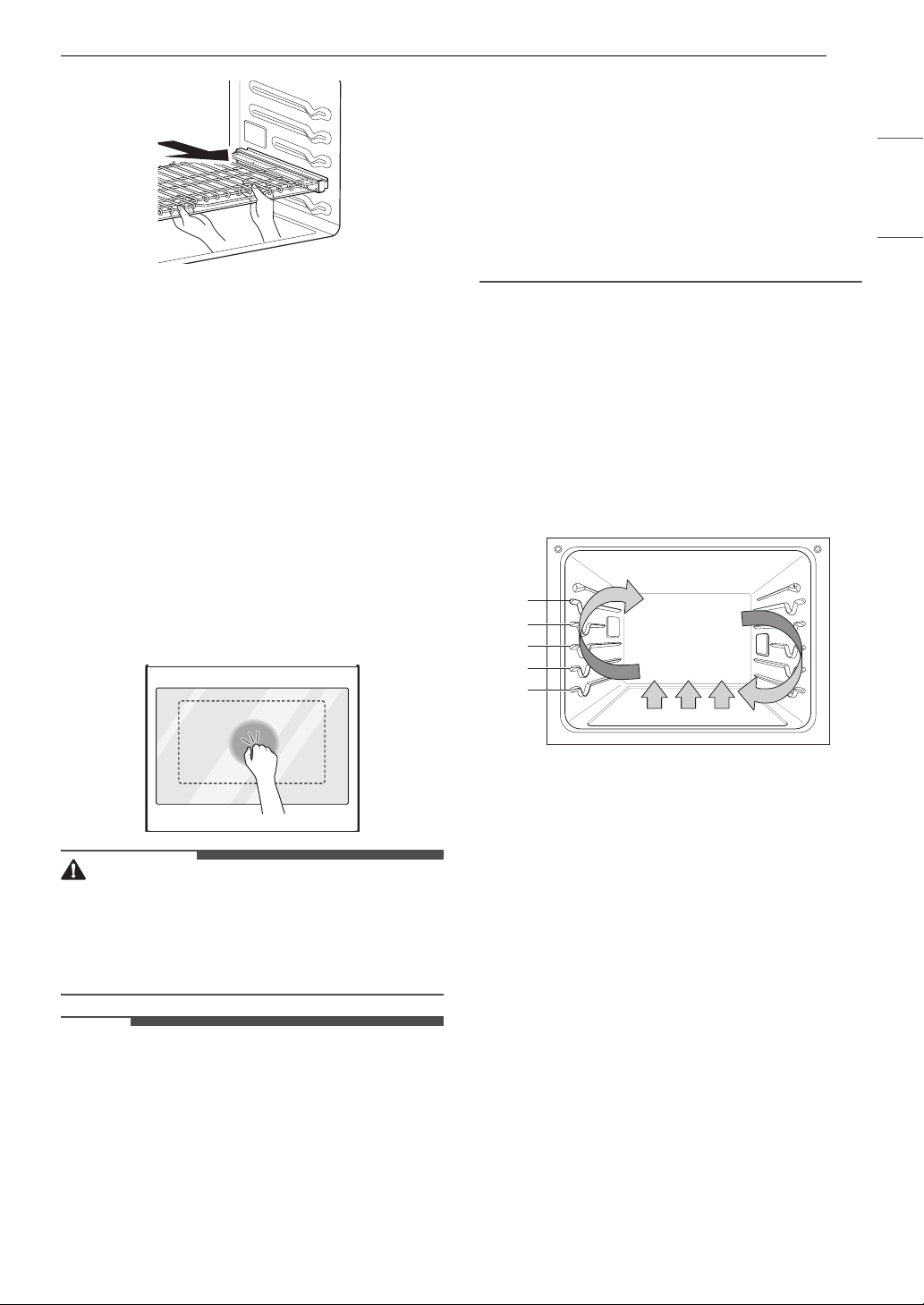
Installing Gliding Racks
1 Start with the rack in the closed position. Hold
the rack with one hand at the center front and
the other hand at the back right corner.
2 Carefully insert the rack between the rack
guides, and slide it back until the shelf drops
into place.
a Rack Guides
3 Once the rack is secured in the back, pull the
entire rack forward until the rack locks into
place.
17OPERATION
ENGLISH
Removing Gliding Racks
1 With the rack in the closed position, grasp the
front of the rack and frame and lift up. Slowly
push the rack towards the back wall until it is
free of the rack stop.
2 After disengaging the rack stop, lift the back
of the rack and pull the rack and frame out
between the rack guides.
Instaview
Knock twice on the center of the glass panel to
reveal the contents of the oven without opening
the door.
CAUTION
• Do not hit the glass door panel with excessive
force. Do not allow hard objects like cookware or
glass bottles to hit the glass door panel. The
glass could break, resulting in a risk of personal
injury.
NOTE
• Knocking twice on the glass panel turns the
interior light on or off.
• The light turns off automatically after 150
seconds.
• The InstaView function is disabled when the
oven door is opened and for one second after
closing the door.
• The InstaView function is disabled during Self
Clean, Control Lock, Sabbath Mode and initial
power input.
• Tapping the edges of the glass panel may not
activate the InstaView function.
• The taps on the glass panel must be hard
enough to be audible.
• Loud noises near the oven may activate the
InstaView function.
Convection Bake and Roast Mode
The convection system uses a fan to circulate the
heat evenly within the oven. Improved heat
distribution allows for even cooking and excellent
results while cooking with single or multiple racks.
The oven can be programmed to bake at any
temperature from 170 ℉ (80 ℃) to 550 ℉ (285 ℃).
The default temperature is 350 ℉ (175 ℃).
Using Convection
1 Press Conv.Bake or Conv.Roast.
2 Press the numbers to enter the desired
temperature.
3 If desired, press Cook Time to set the cook
time or Start Time to set the delayed start
time. Press the numbers to set the time
settings.
4 Press START. The oven starts to preheat.
5 If the cook time is set, the remaining time
appears in the display. If a delayed start time
is set, the start time appears in the display.
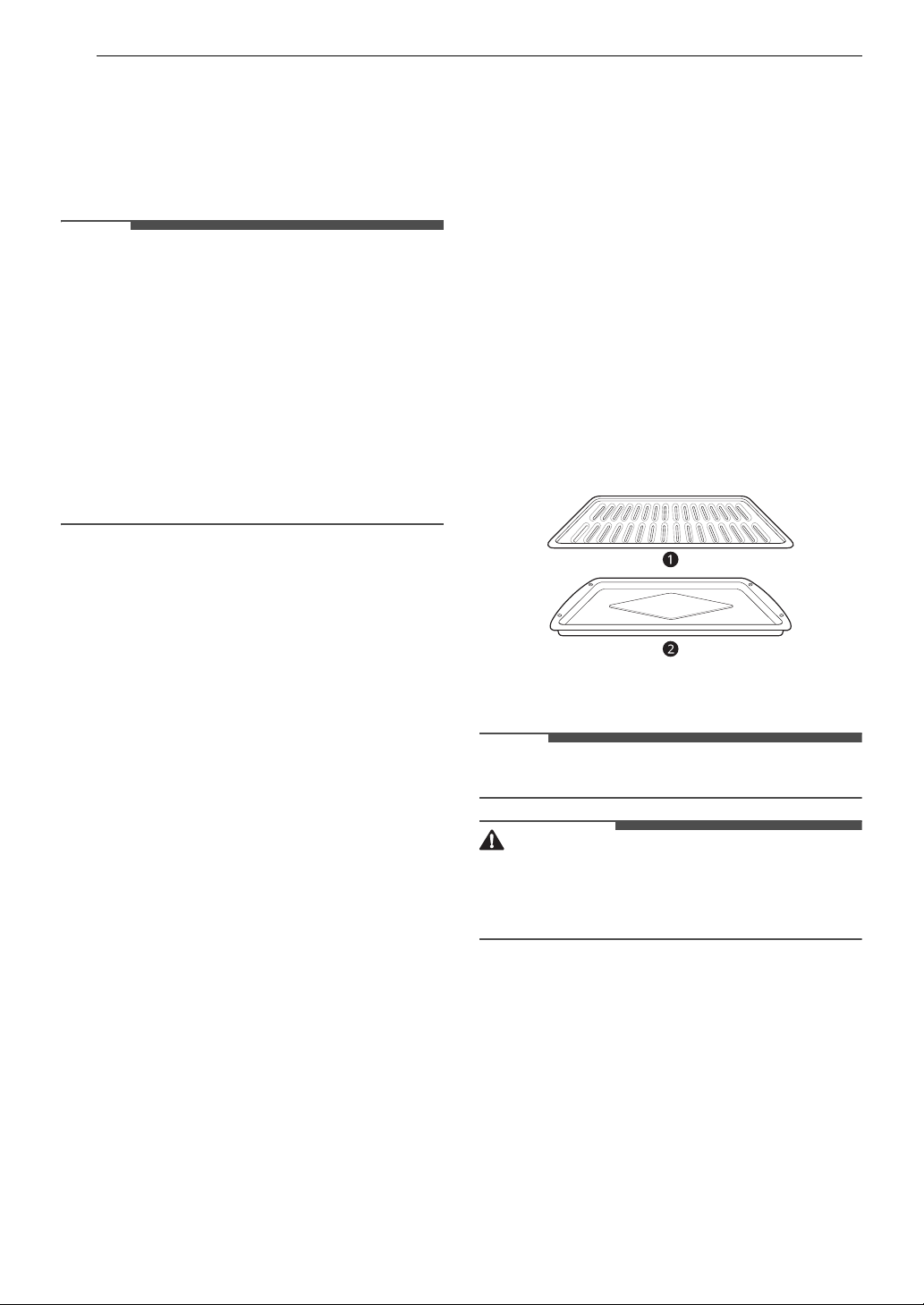
A
B
C
D
E
18 OPERATION
6 A chime sounds once preheating is complete.
7 A chime sounds at the end of the set cook
time and a notification appears in the display.
Open the oven door and remove the food.
NOTE
• If no cook time is set, the oven turns off
automatically after 12 hours.
• The heating elements and fan turn off
immediately when the door is opened. They turn
on again approximately 1 second after the door
is closed.
• Press Stop in the display to cancel Convection
Bake and Convection Roast at any time.
• The oven fan runs while convection baking and
convection roasting. The fan stops when the
door is opened. In some cases, the fan may shut
off during a convection bake cycle.
Changing the Cook Settings
1 Press Conv.Bake or Conv.Roast.
2 Press the numbers to enter the desired
temperature.
3 Press START.
To Stop Cooking
1 Press CLEAR / OFF.
Tips for Convection Baking
• Use Convection Bake for faster and more even
multiple-rack cooking of pastries, cookies,
muffins, biscuits, and breads of all kinds.
• Bake cookies and biscuits on pans with no sides
or very low sides to allow heated air to circulate
around the food. Food baked on pans with a
dark finish will cook faster.
• When using Convection Bake with a single rack,
place oven rack in position
C. If cooking on
multiple racks, place the oven racks in positions
B and D.
• Multiple oven rack cooking may slightly increase
cook times for some foods.
• Cakes, cookies and muffins have better results
when using multiple racks.
The Convection Roast feature is designed to give
optimum roasting performance. Convection Roast
combines cooking with the convection fan to roast
meats and poultry. The heated air circulates
around the food from all sides, sealing in juices
and flavors. Foods are crispy brown on the outside
while staying moist on the inside. Convection
roasting is especially good for large tender cuts of
meat, uncovered.
Tips for Convection Roasting
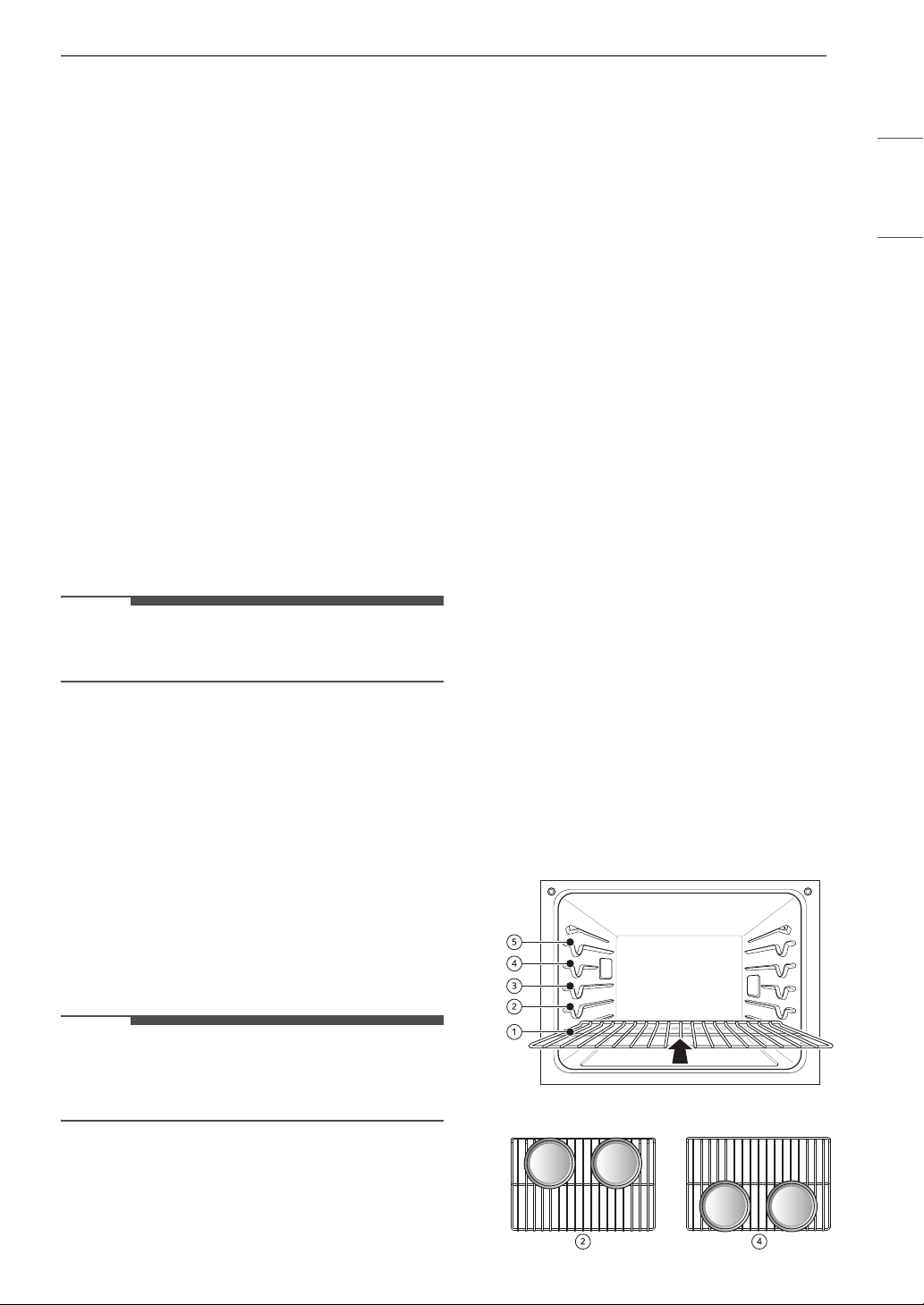
Use a *broiler pan and *grid when preparing
meats for convection roasting. The broiler pan
catches grease spills and the grid helps prevent
grease splatters.
1 Place the oven rack in position A or B.
2 Place the grid a in the broiler pan b.
3 Place the broiler pan on the oven rack.
NOTE
• * : Sold separately
CAUTION
• Do not use a broiler pan without a grid.
• Do not cover the grid with aluminum foil.
• Position food (fat side up) on the grid.
Bake Mode
Bake is used to prepare foods such as pastries,
breads and casseroles.
The oven can be programmed to bake at any
temperature from 170 ℉ (80 ℃) to 550 ℉ (285 ℃).
The default temperature is 350 ℉ (175 ℃).
Setting the Bake Function
1 Press Bake.
19OPERATION
ENGLISH
2 Press the numbers to enter the desired
temperature.
3 If desired, press Cook Time to set the cook
time or Start Time to set the delayed start
time. Press the numbers to set the time
settings.
4 Press START. The oven starts to preheat.
5 If the cook time is set, the remaining time
appears in the display. If a delayed start time
is set, the start time appears in the display.
6 A chime sounds once preheating is complete.
7 A chime sounds at the end of the set cook
time and a notification appears in the display.
Open the oven door and remove the food.
NOTE
• If no cook time is set, the oven turns off
automatically after 12 hours.
Changing the Cook Settings
1 Press Bake.
2 Press the numbers to enter the desired
temperature.
3 Press START.
To Stop Cooking
Press CLEAR / OFF.
NOTE
• It is normal for the convection fan to operate
periodically throughout a normal bake cycle in
the oven. This is to ensure even baking results.
Baking Tips
• For best results, food should be placed on a
single rack with at least 1” to 1 1/2” of air space
between the pans and oven walls.
• Baking time and temperature will vary
depending on the characteristics, size, and
shape of the baking pan used.
• Check for food doneness at the minimum recipe
time.
• Use metal bakeware (with or without a nonstick
finish), heatproof glass-ceramic, ceramic or
other bakeware recommended for oven use.
• Dark metal pans or nonstick coatings will cook
food faster with more browning. Insulated
bakeware will slightly lengthen the cooking time
for most foods.
• The oven bottom has a porcelain-enamel finish.
To make cleaning easier, protect the oven
bottom from excessive spillovers by placing a
cookie sheet on the rack below the rack you are
cooking on. This is particularly important when
baking a fruit pie or other foods with a high acid
content. Hot fruit fillings or other foods that are
highly acidic may cause pitting and damage to
the porcelain-enamel surface and should be
wiped up immediately.
Recommended Baking Guide
Rack and Pan Placement
Baking results will be better if baking pans are
centered in the oven as much as possible. If
cooking on multiple racks, place the oven racks in
the positions shown.
Multiple-rack cooking saves time and energy.
Whenever possible, cook foods requiring the same
cooking temperature together in one oven.
If baking with more than one pan, place the pans
so that each one has at least 1” to 1 ½” of air space
around them.
Multiple Rack
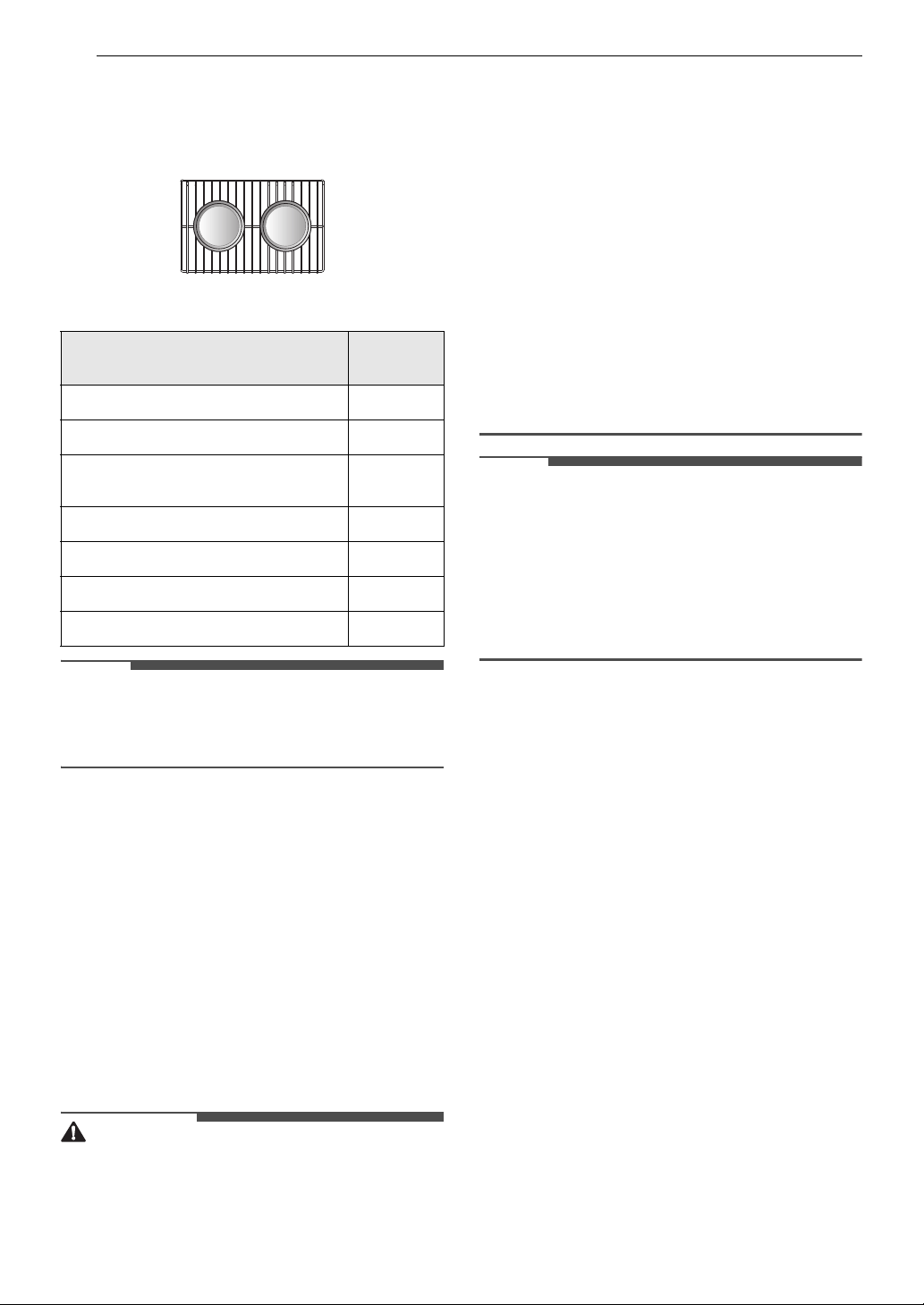
20 OPERATION
Standard Rack (Position B)
Standard Rack (Position
D)
Single Rack
Baking Rack Guide
NOTE
• When baking cakes and cookies on multiple
racks, use the Convection Bake mode and place
racks in positions B and D.
Broil Mode
Setting the Oven to Broil
Broiling uses an intense, radiant heat to cook food.
Both the inner and outer broil elements heat
during full broiling. Only the inner broil element
heats during center broiling. The element(s) cycle
on and off at intervals to maintain the oven
temperature. The meat probe cannot be used with
this mode.
Keep the oven door closed while broiling. Let the
oven preheat for approximately 5 minutes before
cooking food.
CAUTION
• Do not use a broiler pan without a grid. Oil can
cause a grease fire.
• Do not cover the grid and broiler pan with
aluminum foil. Doing so will cause a fire.
• Always use a broiler pan and grid for excess fat
and grease drainage. This will help to reduce
splatter, smoke, and flare-ups.
• Should an oven fire occur, leave the oven door
closed and turn the oven off. If the fire
continues, throw baking soda on the fire or use a
fire extinguisher.
• DO NOT put water or flour on the fire. Flour may
be explosive and water can cause a grease fire to
spread and cause personal injury.
• When using your broiler, the temperature inside
the oven will be extremely high. Take care to
avoid possible burns by:
- Keeping the door closed when broiling
- Always wearing oven mitts when inserting or
removing food items
NOTE
• This appliance is designed for closed-door
broiling. Close the door to set the Broil function.
If the door is open, the Broil function cannot be
set and DOOR OPEN appears on the display.
Close the door and reset the Broil function. If the
door is opened during broiling, the broil burner
turns off after five seconds. The broiler turns
back on automatically once the door is closed.
1 Place the food on the grid in the broiler pan.
2 Press Broil.
3 Press 1 for Full broil, 2 for Center broil.
4 Press 1 for High, 2 for Medium, or 3 for Low
temperature setting.
5 If desired, press Cook Time to set the cook
time. Press the numbers to set the time
settings.
6 Press START.
7 Let the oven preheat for approximately 5
minutes before cooking the food.
Type of Food
Rack
Position
Angel food cake, frozen pies
C
Bundt or pound cakes
B
Biscuits, muffins, brownies, cookies,
cupcakes, layer cakes, pies
C
Casseroles
B
Turkey, roasts, or ham
A
Frozen pizza
C
Roast chicken
B
21OPERATION
ENGLISH
8 If the cook time is set, the remaining time
appears in the display.
9 Press CLEAR / OFF to cancel at any time or
when cooking is complete.
NOTE
• If the cook time is not set, the oven automatically
turns off after 3 hours.
• The heating element(s) turn off immediately
when the door is opened. They turn on again
approximately 1 second after the door is closed.
Changing the Broil Settings
1 Press Broil.
2 Press the numbers to enter the desired
temperature.
3 Press START.
To Stop Broiling
Press CLEAR / OFF.
Tips for Reducing Smoke
Due to the intense heat associated with broiling, it
is normal to experience smoke during the cooking
process. This smoke is a natural byproduct of
searing and should not cause you to worry. If you
are experiencing more smoke than you are
comfortable with, use the following tips to reduce
the amount of smoke in your oven.
• Always use a broiler pan. Do not use saute pans
or regular baking sheets for safety reasons.
• The broiler pan should always be thoroughly
cleaned and at room temperature at the
beginning of cooking.
• ALWAYS run your cooktop ventilation system or
vent hood during broiling.
• Keep the interior of your oven as clean as
possible. Leftover debris from prior meals can
burn or catch fire.
• Avoid fatty marinades and sugary glazes. Both of
these will increase the amount of smoke you
experience. If you would like to use a glaze,
apply it at the very end of cooking.
• If you are experiencing significant smoke with
any food item, consider:
- Lowering the broiler to the LO setting.
- Lowering the rack position to cook the food
farther away from the broiler.
- Using the HI broil setting to achieve the level
of searing you desire, and then either
switching to the LO broil setting, or switching
to the Bake function.
• As a rule, fattier cuts of meat and fish will
produce more smoke than leaner items.
• Adhere to the guidelines in the Recommended
Broiling Guide section whenever possible.
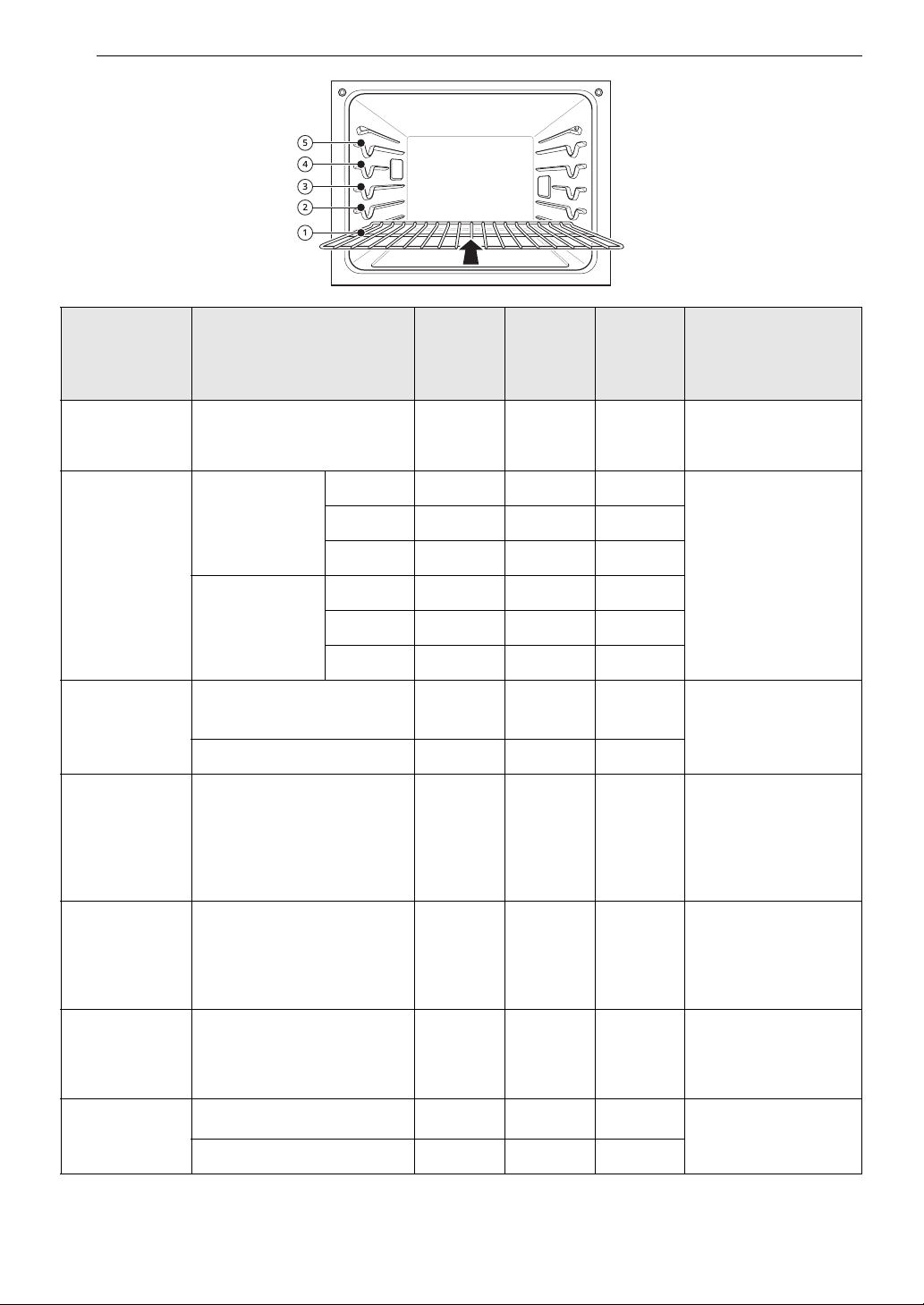
Recommended Broiling Guide
Recommended Broiling Guide
The size, weight, thickness, starting temperature, and your preference of doneness will affect broiling
times.
This guide is based on meats at refrigerator temperature. For best results when broiling, use a pan
designed for broiling.
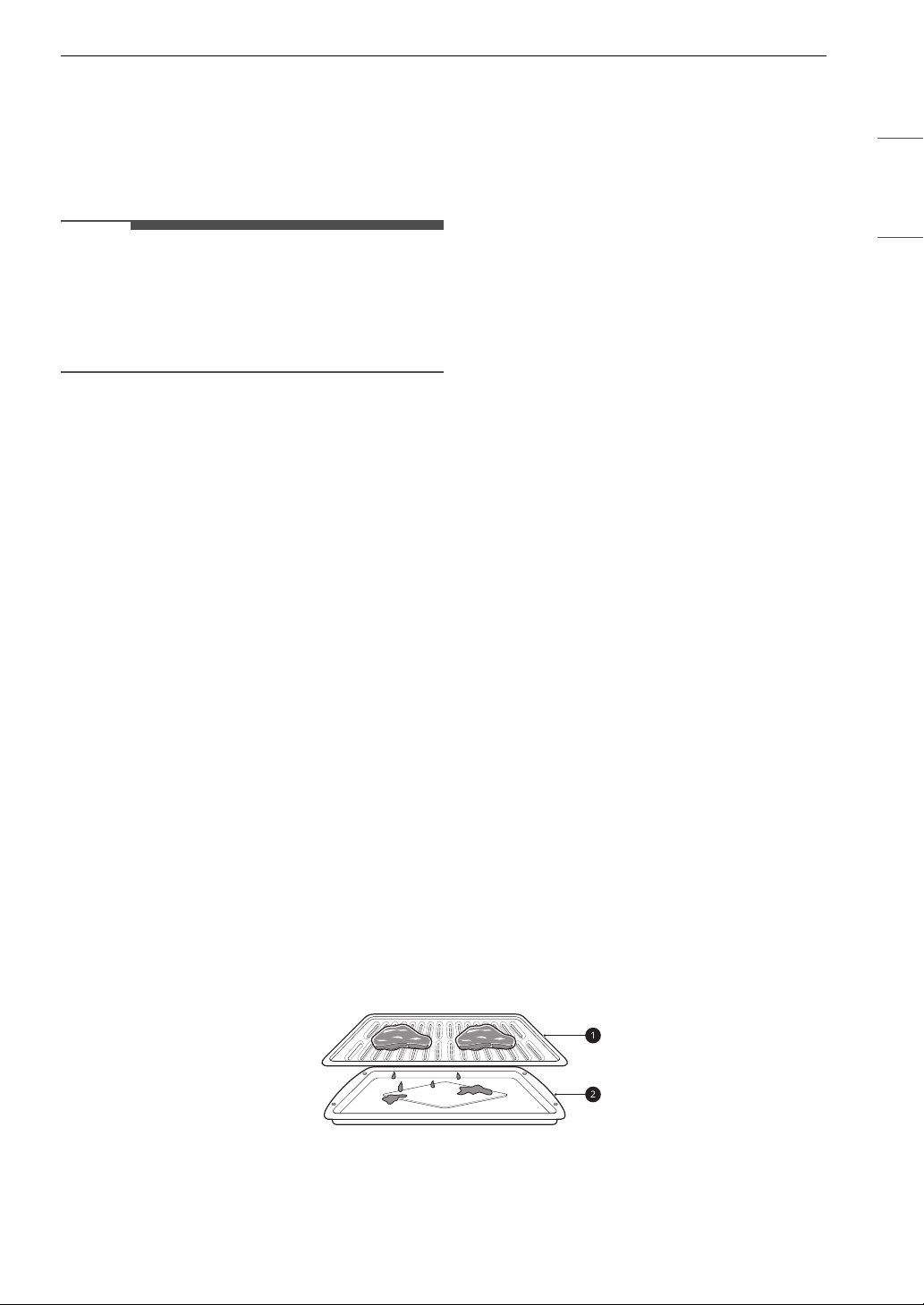
a Grid (sold separately)
b Broiler Pan (sold separately)
22 OPERATION
Food
Quantity and/or
Thickness
Rack
Position
First
Side
Time
(min.)
Second
Side
Time
(min.)
Comments
Ground Beef
1 lb (9 patties)
1/2 to 3/4" thick
E
4-6 3-4
Space evenly. Up to 9
patties may be broiled
at once.
Beef Steaks
1" thick
1 to 1
1
/
2
lbs.
Rare
D
62-3
Steaks less than 1"
thick cook through
before browning.
Pan frying is
recommended. Slash
fat.
Medium
D
72-3
Well done
D
83-4
1
1
/
2
" thick
2 to 2
1
/
2
lbs
Rare
D
10 4-6
Medium
D
12 6-8
Well done
D
14 8-10
Chicken
1 whole, 2 to 2
1
/
2
lbs., split
lengthwise
C
20 6-8
Broil skin-side-down
first.
2 Breasts
C
20 6-10
Lobster Tails
2–4
10 to 12 oz each
C
12-14
Do not
turn over.
Cut through back of
shell. Spread open.
Brush with melted
butter before broiling
and after half of
broiling time.
Fish Fillets
1
/
4
to
1
/
2
" thick
D or E
5-6 3-4
Handle and turn very
carefully. Brush with
lemon butter before
and during cooking, if
desired.
Ham Slices
(precooked)
1
/
2
" thick
D
53-5
Increase time 5 to 10
minutes per side for 1
1/2" thick or home-
cured ham.
Pork Chops
Well done
2 (
1
/
2
" thick)
D or E
76-8
Slash fat.
2 (1" thick) about 1lb.
D or E
9-10 7-9

23OPERATION
ENGLISH
• This guide is only for reference. Adjust cook time according to your preference.
NOTE
• The USDA advises that consuming raw or undercooked fish, meat, or poultry can increase your risk of
food-borne illness.
• The USDA has indicated the following as safe minimum internal temperatures for consumption:
- Ground beef: 160 ℉ (71.1 ℃)
- Poultry: 165 ℉ (73.9 ℃)
- Beef, veal, pork, or lamb: 145 ℉ (62.8 ℃)
- Fish / Seafood: 145 ℉ (62.8 ℃)
Tips for Broiling
Beef
• Steaks and chops should always be allowed to rest for five minutes before being cut into and eaten. This
allows the heat to distribute evenly through the food and creates a more tender and juicy result.
• Pieces of meat that are thicker than two inches should be removed from the refrigerator 30 minutes
prior to cooking. This will help them cook more quickly and evenly, and will produce less smoke when
broiling. Cooking times will likely be shorter than the times indicated in the Broiling Chart.
• For bone-in steaks or chops that have been frenched (all meat removed from around the bone), wrap the
exposed sections of bone in foil to reduce burning.
Seafood
• When broiling skin-on fish, always use the Lo broil setting and always broil the skin side last.
• Seafood is best consumed immediately after cooking. Allowing seafood to rest after cooking can cause
the food to dry out.
• It is a good idea to rub a thin coating of oil on the surface of the broiling pan before cooking to reduce
sticking, especially with fish and seafood. You can also use a light coating of non-stick pan spray.
Vegetables
Toss your vegetables lightly in oil before cooking to improve browning.
Frozen Meal
The Frozen Meal function is specially designed for
cooking frozen prepared meals. It heats from both
the top and bottom to brown food more evenly.
Lamb Chops
2 (1" thick)
about 10 to 12
oz
Medium
D
64-6
Slash fat.
Well done
D
87-9
2 (1
1
/
2
" thick)
about 1lb
Medium
D
11 9
Well done
D
13 9-11
Salmon Steaks
2 (1" thick)
D or E
83-4
Grease pan. Brush
steaks with melted
butter.
4 (1" thick) about 1 lb
D or E
94-6
Food
Quantity and/or
Thickness
Rack
Position
First
Side
Time
(min.)
Second
Side
Time
(min.)
Comments

24 OPERATION
This system is designed to give the optimum
cooking performance by automatically selecting a
combination of the broil and bake heating
systems. No preheating is required when using the
Frozen Meal mode. For best results with frozen
pizza, cook food on a single rack placed in position
4 at 400 °F.
Setting the Frozen Meal Function
1 Press More Modes.
2 Press 1.
3 Press START or the numbers to enter the
desired temperature from 300 ℉ to 550 ℉.
4 If desired, press Cook Time to set the cook
time. Press the numbers to set the time
settings.
5 Press START
Changing the Frozen Meal Settings
1 Press More Modes.
2 Press the numbers to enter the desired
temperature.
3 Press START
Canceling the Frozen Meal Function
Press CLEAR / OFF.
Warm Mode
This function will maintain an oven temperature of
less than 200 ℉ (93.3 ℃). It will keep cooked food
warm for serving up to 3 hours after cooking has
finished.
Setting the Warm Mode
1 Press More Modes.
2 Press 2.
3 Press 1 for High, 2 for Medium, or 3 for Low
temperature setting.
• High: 200 ℉ (93.3 ℃)
• Medium: 170 ℉ (76.7 ℃)
• Low: 140 ℉ (60 ℃)
4 Press START. If the run time was set, the
remaining time appears in the display.
Canceling the Warm Function
Press CLEAR / OFF.
NOTE
• The Warm function is intended to keep food
warm. Do not use it to cool food down.
Proof Mode
This feature maintains a warm oven for rising
yeast-leavened products before baking.
Setting the Proof Mode
1 Press More Modes.
2 Press 3.
3 Press the numbers to set the time settings.
4 Press START. The remaining proofing time
appears in the display.
NOTE
• If the proofing time is not set, the oven
automatically turns off after 12 hours.
Canceling the Proof Function
Press CLEAR / OFF.
NOTE
• To avoid lowering the oven temperature and
lengthening proofing time, do not open the oven
door unnecessarily. Check bread products early
to avoid over proofing.
• Do not use the Proofing mode for warming food
or keeping food hot. The proofing oven

25OPERATION
ENGLISH
temperature is not hot enough to keep foods at
safe temperatures. Use the Warm feature to
keep food warm. Proofing does not operate
when the oven is above 125 ℉. OVEN IS HOT
shows in the display.
• It is normal for the fan to operate during the
Proof function.
• The proof feature automatically provides the
optimum temperature for the proofing process,
and therefore does not have a temperature
adjustment.
• For best results, cover the dough with a cloth or
with plastic wrap. (The plastic may need to be
anchored underneath the container so the oven
fan does not blow it off.)
Favorite Mode
For frequently used cooking menus, you can
combine up to three different temperatures and
cooking modes into one hot key.
Creating a Favorite
• When combining two or more cooking modes, a
cooking time or probe temperature must be set
before selecting an additional cooking mode.
• The Probe function cannot be used with the
Broil, Sous Vide, Steam Maintenance, Warm, or
Proof modes.
1 Press More Modes.
2 Press 4.
3 Press More Modes repeatedly to select the
desired recipe.
4 Press the numbers to enter the desired
temperature.
• Only the selected temperature is stored, not
the cooking time.
• If the oven temperature is changed, the
changed temperature is stored.
5 If desired, press Cook Time to set the cook
time. Press the numbers to set the time
settings.
6 Press START. Once the oven reaches the
desired temperature, PAEHEAυιξη appears in
the display.
NOTE
• If the probe was inserted in the oven jack to add
a probe temperature, remember to remove it.
• After the steam mode is used for 8 hours, a
reminder to descale the product appears in the
display the next time the steam mode is
selected. You will not be able to use the steam
mode until the Descaling function is run. To
avoid this delay, run the Descaling function after
every 2-3 uses of the steam mode.
• If the descaling reminder appears, press OK to
run the Descaling function.
• Proofing doesn't operate when the oven is above
125 ℉ (52 ℃).
• If using Proof after cooking, wait for the oven to
cool first.
• The Proof mode can only be set as a single stage,
not as part of multi-stage cooking.
Air Fry
This feature automatically increases the entered
temperature by 45 ℉ for optimal performance
when using Air Fry.
The Air Fry mode on the upper oven can be
programmed to cook at any temperature from 300
℉ (150 ℃) to 500 ℉ (260 ℃). The default
temperature is 400 ℉ (205 ℃).
The Air Fry function is specially designed for oil-
free frying.
Setting the Air Fry Mode
1 Press Air Fry.
Recipe
Default
Temp. (℉)
(may be
changed and
recalled)
Cooking
Mode
1. Bread 375 Bake
2. Meat 325 Conv.Roast
3. Chicken 350 Conv.Roast
26 OPERATION
2 Press the numbers to enter the desired
temperature.
3 If desired, press Cook Time to set the cook
time. Press the numbers to set the time
settings.
4 Press START.
5 If the cook time is set, the remaining time
appears in the display.
Changing the Cook Settings
1 Press Air Fry.
2 Press the numbers to enter the desired
temperature.
3 Press START.
To Stop Cooking
Press CLEAR / OFF.
NOTE
• No preheating is required when using the Air Fry
mode.
• If cooking multiple batches, the later batches
may take less time to cook.
• Wet batters and coatings will not crisp or set
when using the Air Fry mode.
Tips for Air Fry
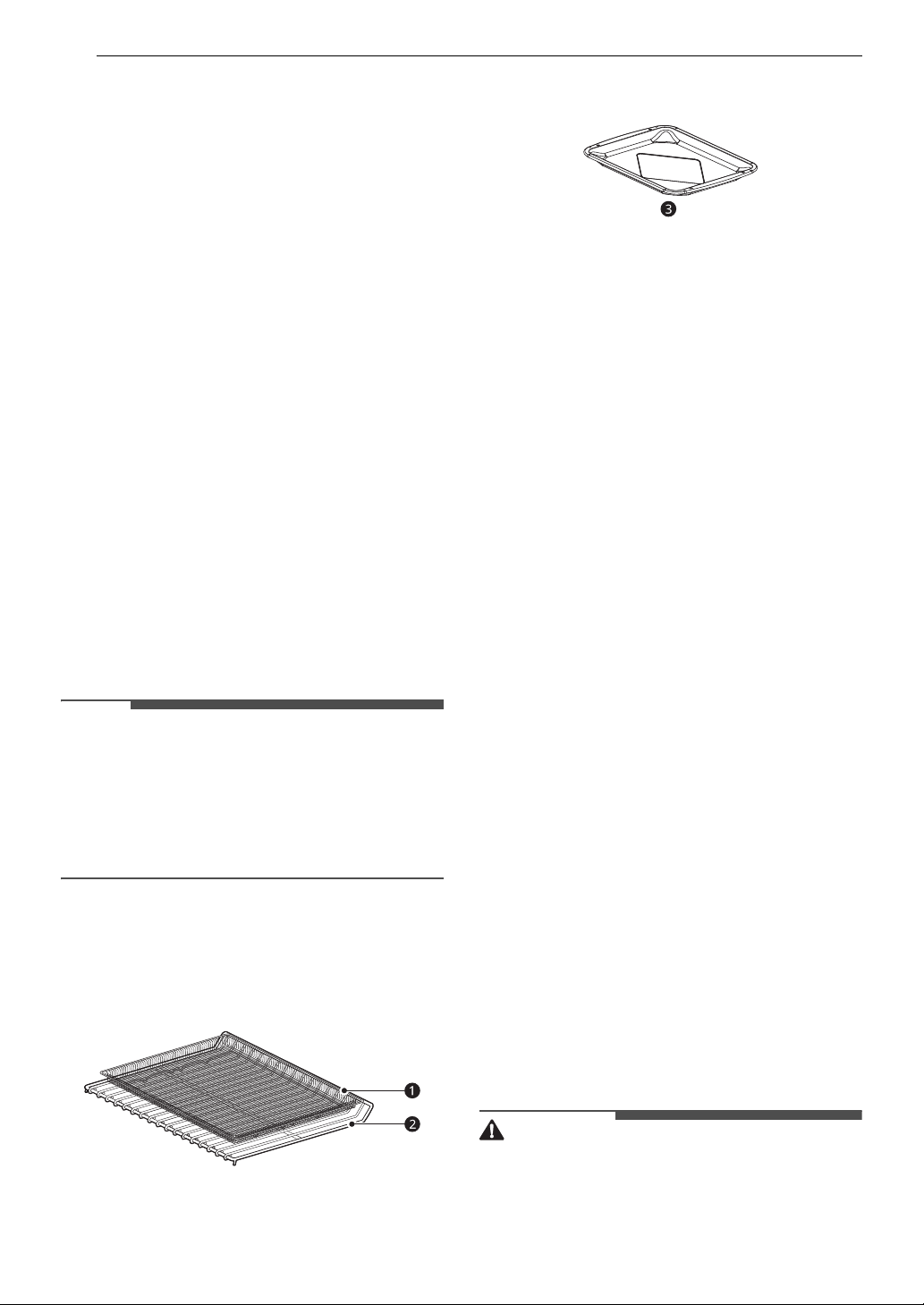
• For best results, use the provided air fry tray.
- The mesh section of the air fry tray can be
cleaned in a dishwasher.
a Air Fry Tray
b Heavy Duty Rack
• If you don't have the air fry tray, place food on a
wire rack inside a foil-lined broiler pan.
c Broiler Pan
• For best results, cook food on a single rack
placed in positions suggested in the chart in this
manual.
• Spread the food out evenly in a single layer.
• Use either the air fry tray or a dark baking tray
with no sides or short sides that does not cover
the entire rack. This allows for better air
circulation.
• If desired, spray the baking tray or air fry tray
with a pan spray. Use an oil that can be heated to
a high temperature before smoking, such as
avocado, grapeseed, peanut or sunflower oil.
• Place a foil-lined baking tray on a rack in position
1 to catch the oil falling from the food. For high-
fat foods like chicken wings, add a few sheets of
parchment paper to absorb the fat.
• Check food often and shake it or turn it over for
crisper results.
• Prepared frozen foods may cook faster with the
Air Fry mode than stated on the package.
Reduce the cooking time by about 20 percent,
check food early, and adjust cooking time as
needed.
• Use a food thermometer to make sure food has
reached a safe temperature for consumption.
Eating undercooked meats can increase your
risk of food-borne illness.
• For the crispiest results, dredge fresh chicken
wings or tenders in seasoned flour. Use 1/3 cup
flour for 2 pounds of chicken.
Recommendations When Air Frying
High-Fat Foods
Foods high in fat will smoke when using the Air Fry
mode. For best results, follow these
recommendations when air frying foods that are
high in fat, such as chicken wings, bacon, sausage,
hot dogs, turkey legs, lamb chops, ribs, pork loin,
duck breasts, or some plant-based proteins.
CAUTION
• Never cover slots, holes, or passages in the oven
bottom or cover entire racks with materials such
as aluminum foil. Doing so blocks airflow
through the oven and can result in carbon
monoxide poisoning. Aluminum foil can also
27OPERATION
ENGLISH
trap heat, causing a fire hazard or poor oven
performance.
• Turn on your exhaust hood at a high fan setting
before you start Air Fry and leave it on for 15
minutes after you're done.
• Open a window or sliding glass door, if possible,
to make sure the kitchen is well-ventilated.
• Clean the grease filters on your exhaust hood
regularly.
• Keep the oven free from grease buildup. Wipe
down the interior of the oven before and after
air frying (once the oven has cooled).
• Run oven cleaning cycles (Easy Clean or
SelfClean) regularly, depending on how often
and what types of food you Air Fry.
• Avoid opening the oven door more than
necessary to help maintain the oven
temperature, prevent heat loss, and save
energy.
• Air-frying fresh chicken pieces such as wings or
drumsticks with the skin left on can produce
smoke as the fat renders at high temperatures.
If the smoke is excessive, use the Convection
Roast mode instead of Air Fry.
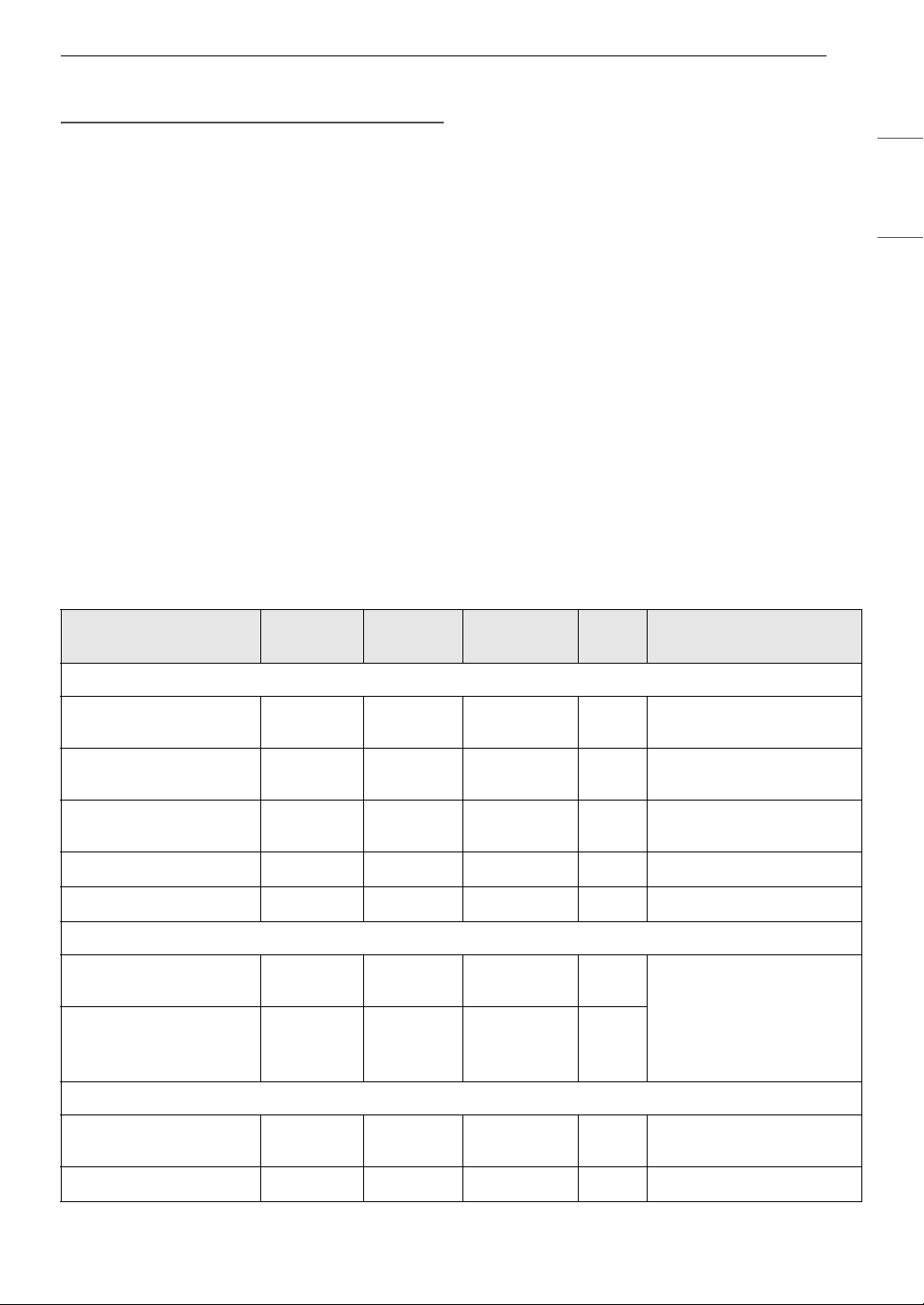
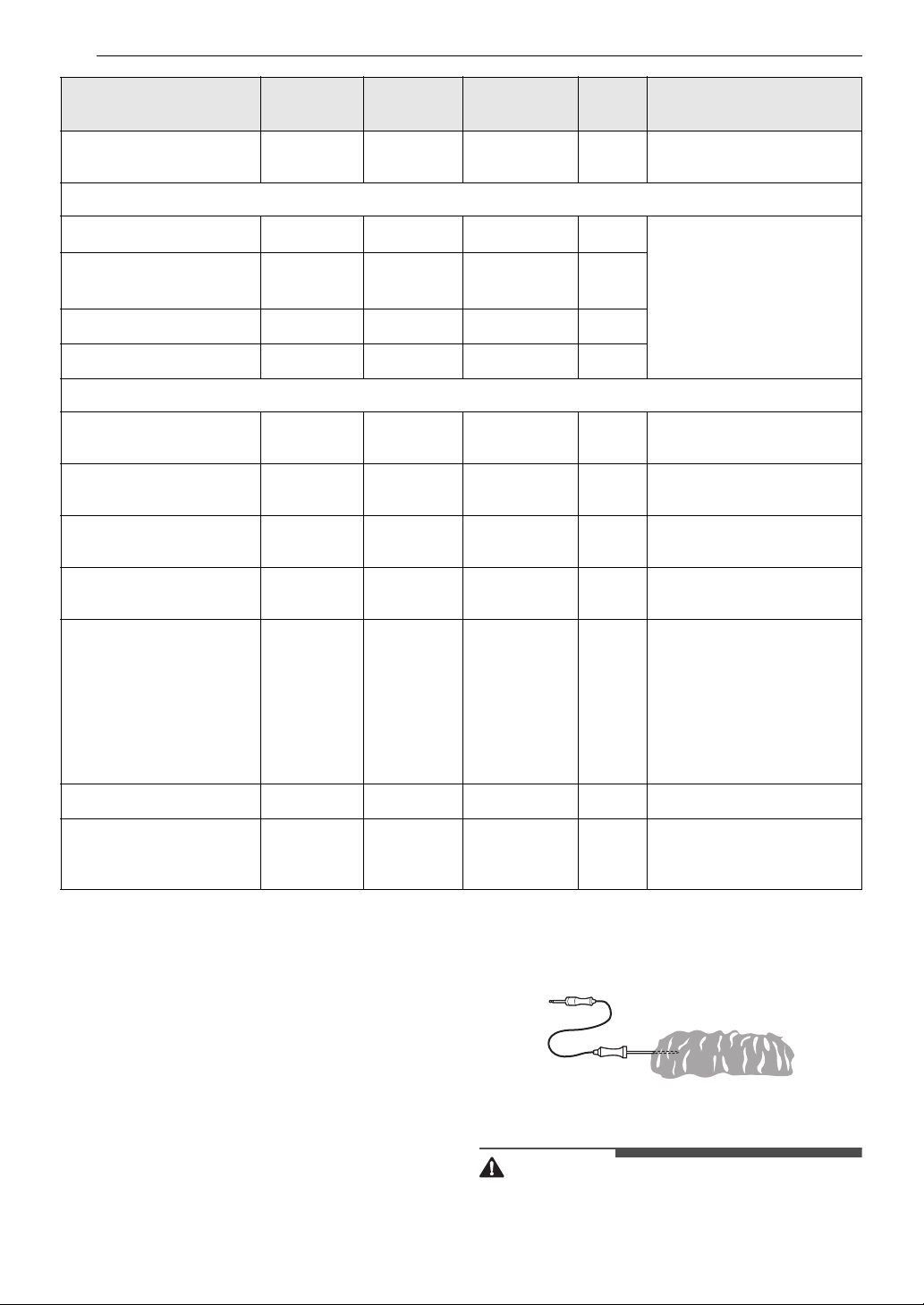
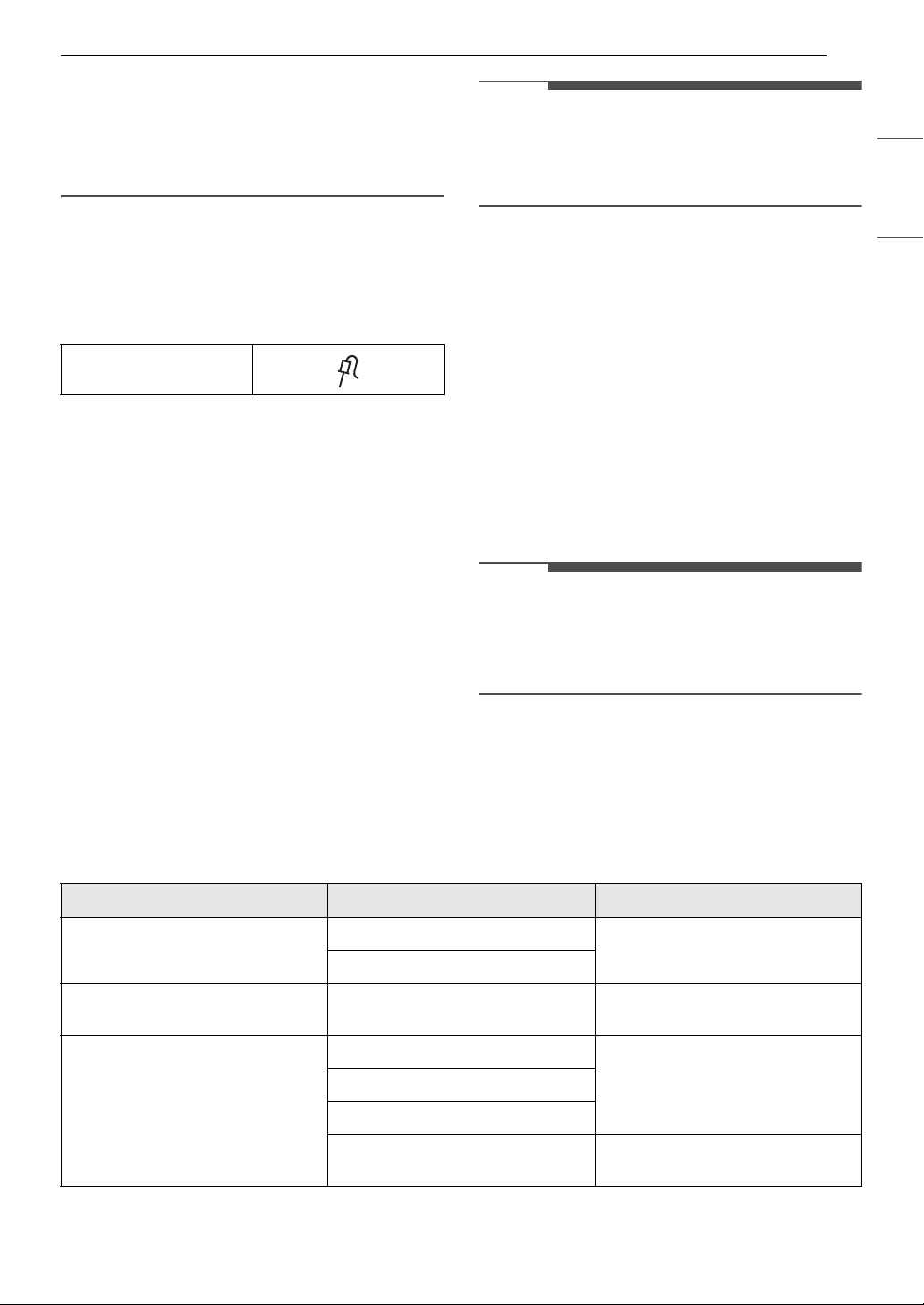
Recommended Air Frying Guide
• Arrange food evenly in a single layer.
• Put a foil-lined baking pan on a rack in position B to catch drips. If needed, add parchment paper to
absorb oil and reduce smoking.
• Flip food over during cooking to avoid burning it.
† High-fat items may produce more smoke when cooked using Air Fry. For less smoke, cook using
Convection Roast mode.
Recommended Items
Quantity
(oz)
Temp. (°F)
Rack
Position
Time Guide
POTATOES-Frozen
Frozen French Fries
(Shoestring)
20 425
C
15-25 -
Frozen French Fries
(Crinkle cut, 10x10 mm)
35 400
C
18-28 -
Frozen Sweet Potato
Fries
25 400
C
15-25 -
Frozen Tater Tots 50 425
C
18-28 -
Frozen Hash Browns 40 425
C
18-28 -
POTATOES-Fresh/Homemade
Homemade French Fries
(10x10 mm)
25 425
C
20-30 Cut the potatoes and soak
for 30 minutes in hot tap
water. Drain and pat
dry.Brush or lightly spray
with 3 tbsp. of oil. Add salt
and pepper to taste.
Homemade Potato
Wedges
60 425
C
30-40
CHICKEN-Frozen
Frozen Chicken Nuggets,
Crispy
30 400
C
15-25 -
Frozen Chicken Strips 35 400
C
25-35 -
28 OPERATION
Probe Mode
The probe accurately measures the internal
temperature of meat, poultry and casseroles.
Always unplug and remove the probe from the
oven before removing food. Before using, insert
the probe into the center of the thickest part of
meat or into the inner thigh or breast of poultry,
away from fat or bone. Place food in the oven and
connect the meat probe to the jack. Keep the
probe as far away from heat sources as possible.
• The probe can be used in the Conv.Bake,
Conv.Roast, Bake, Steam Bake, Steam Roast.
• For thin cuts of meat, insert probe in thickest
side of meat.
Using the Meat Probe Feature
CAUTION
• Always use an oven mitt to remove the
temperature probe. Do NOT touch the broil
Frozen Hot Wings, Bone-
in
50 400
C
25-35 -
CHICKEN-Fresh, Skin on
Fresh Chicken Wings
†
40 450
C
25-35 Brush or lightly spray with
1 tbsp. of oil. Add salt and
pepper to taste.
Fresh Chicken
Drumsticks
†
70 450
C
30-40
Thighs 40 450
C
25-35
Breasts 40 450
C
25-35
OTHER
Frozen Onion Rings,
Breaded
20 400
C
15-25 -
Frozen Spring Rolls (0.7
oz each)
45 400
C
15-25 -
Thin Sausage (2.5 oz
each, diameter 0.8")
90 400
C
15-25 -
Frozen Coconut Shrimp 25 400
C
15-25 Brush or lightly spray the
surface of food with oil.
Fresh Scallops on the half
shell (35.3 oz)
35 400
C
15-25 Melt 4 tbsp. of butter and
brush on scallops. Mix 1/2
cup bread crumbs, 1 tbsp.
minced garlic, 1/4 cup
grated parmesan cheese
and season to taste.
Sprinkle mixture over
scallops.
Fresh Shrimp 50 400
C
15-25 -
Mixed Vegetables 35 425
C
13-23 Brush or lightly spray with
4 tbsp. of olive oil. Add salt
and pepper to taste.
Recommended Items
Quantity
(oz)
Temp. (°F)
Rack
Position
Time Guide
29OPERATION
ENGLISH
element. Failure to follow this warning can result
in severe personal injury.
• To avoid damage to the meat probe, do not use
tongs to pull on the probe when removing it.
• Do not store the meat probe in the oven.
1 Select the desired cooking mode.
2 Connect the probe to the jack in the oven.
Probe icon pops up in the display.
3 Press Probe.
4 Press the numbers to enter the desired
temperature.
• The default probe temperature is 150 ℉ (65
℃), but can be changed to any temperature
between 80 ℉ (27 ℃) and 210 ℉ (100 ℃).
5 Press START.
6 When the set probe temperature is reached,
the oven shuts off automatically.
NOTE
• Calculating a total cooking time by weight is no
longer necessary using this feature. See the
Recommended Probe Temperature Chart to set
the probe temperature.
Changing the Probe Temperature
while Cooking
1 Press Probe.
2 Press the numbers to enter the desired
temperature.
3 Press START.
To Stop Cooking
Press CLEAR / OFF.
NOTE
• To avoid breaking the probe, make sure food is
completely defrosted before inserting.
• While the meat probe mode is running,
EasyClean does not respond.
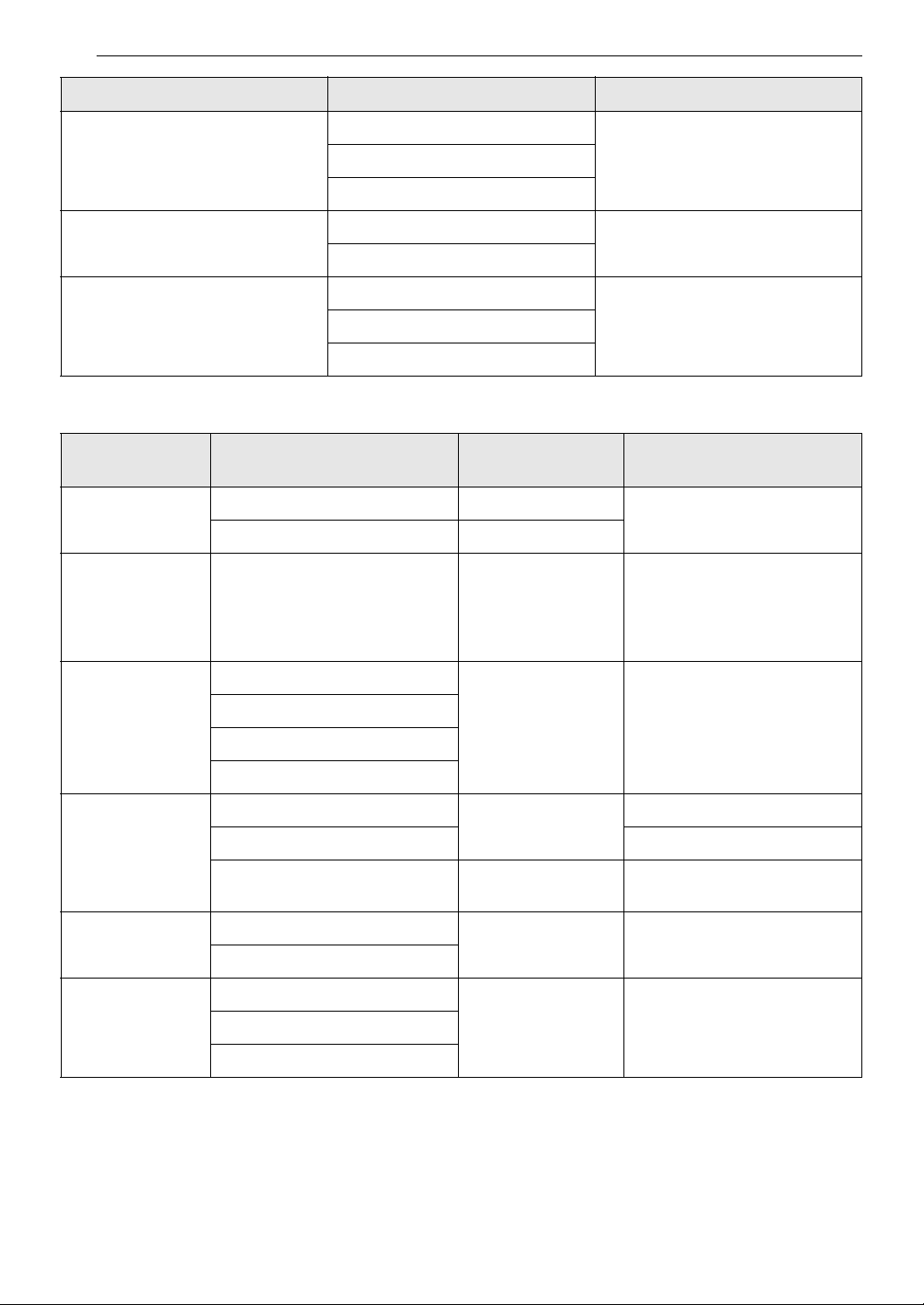
Recommended Probe Guide
Recommended Probe Placement Chart
Probe icon
Category Examples of Food Probe Placement
Ground Meat & Meat Mixtures
Meatloaf
Insert in the thickest part
Meatballs
Fresh Beef, Veal, Lamb Steaks, Roasts, Chops
Insert in the thickest part, away
from bone, fat and gristle
Poultry
Whole Chicken or Turkey
Insert in the thickest part of thigh,
avoiding bone
Poultry Breasts or Roasts
Duck, Goose, Pheasant
Stuffing (Alone or in Bird)
Insert in the thickest part of the
dish
30 OPERATION
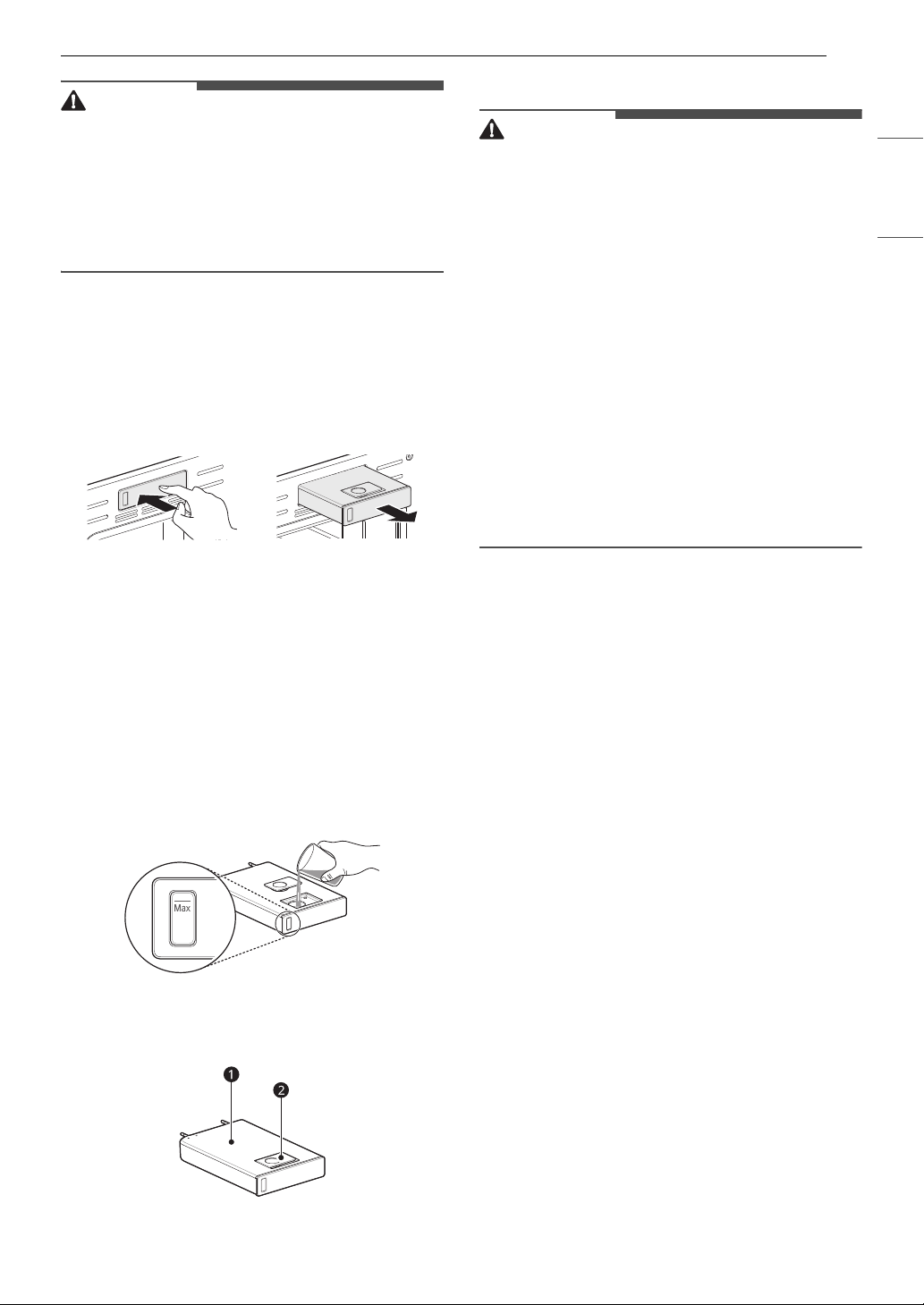
Recommended Probe Temperature Chart
Steam Function
Steam cooking uses the moist heat of steam to
cook food. This is an ideal cooking method for
delicate food items such as seafood, which can
lose nutrients when boiled.
The oven provides 3 methods of steam cooking:
Steam Bake, Steam Roast and Steam Sous Vide.
Pork & Ham
Fresh Pork
Insert in the thickest part, away
from bone, fat and gristle
Fresh Ham (Raw)
Precooked Ham (Reheat & Serve)
Leftovers & Casseroles
Leftovers
Insert in the thickest part of the
dish
Casseroles
Seafood
Whole Fish
Insert in the thickest part of the
fish
Fish Fillet (Side of Fish)
Fish Steaks or Portions
Category Examples of Food
Safe Internal
Temp.
Desired Doneness
Ground Meat &
Meat Mixtures
Meatloaf 160 ℉ (71 ℃)
-
Meatballs 165 ℉ (74 ℃)
Fresh Beef, Veal,
Lamb
Roasts 145 ℉ (63 ℃)
Rare: 120 ℉ (49 ℃)
Medium rare: 135 ℉ (57 ℃)
Medium: 140 ℉ (60 ℃)
Medium well: 150 ℉ (66 ℃)
Well done: 160 ℉ (71 ℃)
Poultry
Whole Chicken or Turkey
165 ℉ (74 ℃)-
Poultry Breasts or Roasts
Duck, Goose, Pheasant
Stuffing (Alone or in Bird)
Pork & Ham
Fresh Pork
145 ℉ (63 ℃)
Well done: 160 ℉ (71 ℃)
Fresh Ham (Raw) Well done: 165 ℉ (74 ℃)
Precooked Ham (Reheat &
Serve)
140 ℉ (60 ℃)-
Leftovers &
Casseroles
Leftovers
165 ℉ (74 ℃)-
Casseroles
Seafood Whole Fish
145 ℉ (62.8 ℃)-Fish Fillet (Side of Fish)
Fish Steaks or Portions
Category Examples of Food Probe Placement
31OPERATION
ENGLISH
CAUTION
• Take care when opening the oven door during or
after steam cooking. Hot steam can cause
scalding.
• After any steam cooking cycle, the drying
function will run automatically. It is normal to
hear the steam pump running during the drying
function.
Using the Steam Feeder Tank
The steam feeder tank is located over the oven
cavity.
1 Gently push the front of the steam feeder
tank to slide it out.
2 Remove the tank and place it on a flat surface.
3 Remove the tank cover or flip open the fill lid
at the front of the tank cover.
4 Fill the tank to the max line located at the
front of the tank. Use softened, filtered water,
if possible. Hard water may clog the steam
generator more quickly with scale buildup.
5 Assemble the cover or snap closed the fill lid.
a Tank cover
b Fill lid
CAUTION
• Make sure the steam feeder tank cover and fill
lid are closed before putting the tank in the
oven.
• Use potable water only.
• Do not fill the steam feeder tank with any fluid or
mixture other than water.
• Do not fill the steam feeder tank with hot water.
• Fill the steam feeder tank up to the line indicated
on the front.
• Do not tilt the steam feeder tank while it is full.
• Discard any remaining water and clean the
steam feeder tank after cooking.
• Use the steam feeder tank only for its intended
purpose of providing water for steam cooking.
• Monitor the water level in the tank and refill as
needed for steam cooking. Use oven mitts to
avoid burns when handling the hot tank.
6 Carefully insert the tank into the steam feeder
slot, making sure to keep the tank level while
carrying it. If the tank is not kept level, water
will drain out of the tubes in the back.
7 Slide the tank into the slot until it clicks into
place.
Steam Bake and Roast Mode
The Steam Bake and Roast modes heat food
gradually, using both the oven heating elements
and moist steam heat. The oven can be
programmed to cook at any temperature from 210
℉ (100 ℃) to 550 ℉ (285 ℃). Preset temperature
options start at 350 ℉ (175 ℃).
Setting Steam Cook Mode
1 Press Steam Bake or Steam Roast.
2 Press Steam Level repeatedly to select the
desired temperature and steam level: Low,
Medium, or High.
3 Press START to enter the desired
temperature.

32 OPERATION
4 If desired, press Cook Time to set the cook
time or Start Time to set the delayed start
time. Press the numbers to set the time
settings.
5 Press START.
6 Once cooking is finished, allow the oven to
cool completely. Then wipe up any water left
on the oven interior.
NOTE
• Once Steam Bake cooking is started, an indicator
on the display shows the status of the steam
function.
• Make sure the steam feeder tank is filled with
water before starting the Steam Bake mode. If
the water in the tank runs out during cooking, a
chime sounds and a popup appears in the
display. The oven continues to cook without
steam.
• Remember to drain the steam feeder tank after
use.
• When the temperature rises in the oven, steam
may not be visible.
• It is normal to hear the sound of boiling water
from the steam generator while running the
steam functions.
Changing the Steam Cook Settings
1 Press Steam Bake or Steam Roast.
2 Press the numbers to enter the desired
temperature.
3 Press START.
To Stop Steam Cooking
Press CLEAR / OFF.
Steam Sous Vide
Steam Sous Vide cooking uses steam to cook foods
"low and slow." Use it to cook meat, fish, seafood,
poultry or vegetables. Food must be vacuum
packed in pouches.
It is not necessary to preheat the oven when using
sous vide.
Refer to the cooking guide for recommended sous
vide settings.
Benefits of Sous Vide
The lower temperatures and long cooking times
used in sous vide cooking provide many benefits.
• Healthier
Compared to other cooking methods, sous vide
retains most of the original nutrients in food.
• Safe and Convenient
The long cooking times used in sous vide
cooking allow food to be pasteurized. Because
food is vacuum packed before cooking, the
unopened pouches can be quickly chilled then
easily stored after cooking.
• Crisp and Moist Results
The fine temperature control of sous vide
cooking is an excellent way to achieve the
perfect texture when cooking meat and poultry.
The low temperatures used retain more of the
moisture in food than conventional cooking
methods. After cooking, a final sear in a frying
pan adds the perfect crisp finish.
Setting Sous Vide Mode
1 Fill the tank with water up to the max line
located at the front of the tank.
2 Place the standard rack in position C and
place the sealed food bag on it.
3 Press Steam Sous-Vide.
4 Press the numbers to enter the desired
temperature.
5 If desired, press Cook Time to set the cook
time. Press the numbers to set the time
settings.
6 Press START.
7 Once cooking is finished, allow the oven to
cool completely. Then wipe up any water left
on the oven interior.
33OPERATION
ENGLISH
Changing the Sous Vide Settings
1 Press Steam Sous-Vide.
2 Press the numbers to enter the desired
temperature.
3 Press START.
To Stop Cooking
Press CLEAR / OFF.
NOTE
• As the temperature in the oven rises, steam may
not be visible.
Sous Vide Cooking Guide
The size, weight, thickness, starting temperature, and your personal preferences will affect operating
times. This guide is only for reference. Adjust the cook time according to your preference.
• Cook 30 mins. or 1 hour more if you use meats thicker than 1".
• If you use larger cuts of meat, cut to match the recommended weight. Be careful not to put pieces of
meat too close together.
Remote Start Mode
If the appliance is connected to a home Wi-Fi
network, the preheating function of the oven can
be started or stopped using the LG ThinQ
smartphone app.
Preparing the Oven for a Remote Start
1 Open the oven door to make sure the oven is
empty and ready for preheating. Do not place
food in the oven. Close the oven door. Remote
Start can only be set when the oven door is
closed.
2 Press Remote Start.
3 When Remote Start Ready appears in the
display, the Remote Start function is ready to
use.
4 Follow the instructions in the LG ThinQ
smartphone app for using the Remote Start
function.
NOTE
• Remote Start is disconnected in the following
situations:
- Remote Start is never set up in the
smartphone app.
- The Remote Start status is "ready".
- Remote Start experiences a problem during
operation.
Food
Quantity
(oz)
Temp.
(℉)
Time
Min Target Max
Beef Steak
(Medium rare)
1” thick
14.1-17.6 oz
135 - 2.5 hr. 3 hr.
Chicken
breast
4.2-5.3 oz 149 - 2.5 hr. 3 hr.
Salmon 1” thick
7 oz
140 - 2 hr. 2.5 hr.
Asparagus 2.8 oz / 6 ea
5.6 oz / 12 ea
185 20 min. 30 min. 45 min.

34 OPERATION
NOTE
• The Wi-Fi icon on the display shows the status of
the appliance's network connection. If the Wi-Fi
icon is not lit, use the smartphone app to select
the Wi-Fi network or connect the product again.
• A faulty Wi-Fi connection could delay the Remote
Start function.
• Disconnect the probe if attached.
35SMART FUNCTIONS
ENGLISH
SMART FUNCTIONS
LG ThinQ Application
This feature is only available on models with Wi-Fi.
The LG ThinQ application allows you to
communicate with the appliance using a
smartphone.
LG ThinQ Application Features
• Product Upgrades
- On models with the LG UP Home Appliance
feature, experience new features by
upgrading the product through the LG ThinQ
app.
• Scan to Cook
- Scan the barcode on a ready-made meal using
the LG ThinQ application and send the
recommended or customized cooking
instructions straight to your oven. Remote
Start must be activated on the oven to use
Scan to Cook.
• Monitoring
- This function helps you check the current
status, remaining time, cook settings and end
time in one place.
• Product Notifications
- Turn on the Push Alerts to receive appliance
status notifications. The notifications are
triggered even if the LG ThinQ application is
not open.
• Timer
- You can set the timer from the application.
• Settings
- Allows you to set various options on the oven
and in the application.
• Smart Diagnosis
TM
- This function provides useful information for
diagnosing and solving issues with the
appliance based on the pattern of use.
• Firmware Update
- Keep the appliance updated.
NOTE
• If you change your wireless router, Internet
service provider, or password, delete the
connected appliance from the LG ThinQ
application and connect it again.
• This information is current at the time of
publication. The application is subject to change
for product improvement purposes without
notice to users.
• Scan to Cook cannot be used while the timer is
running. Cancel the timer operation to use Scan
to Cook.
Installing LG ThinQ Application and
Connecting an LG Appliance
Models with QR Code
Scan the QR code attached to the product using
the camera or a QR code reader application on
your smartphone.
NOTE
• To verify the Wi-Fi connection, check that the f
icon on the control panel is lit.
• The appliance supports 2.4 GHz Wi-Fi networks
only. To check your network frequency, contact
your Internet service provider or refer to your
wireless router manual.
• LG ThinQ is not responsible for any network
connection problems or any faults, malfunctions,
or errors caused by network connection.
• The surrounding wireless environment can
make the wireless network service run slowly.
• If the distance between the appliance and the
wireless router is too far, the signal becomes
weak. It may take a long time to connect or fail
to install the application.
• If the appliance is having trouble connecting to
the Wi-Fi network, it may be too far from the
router. Purchase a Wi-Fi repeater (range
extender) to improve the Wi-Fi signal strength.
• The network connection may not work properly
depending on the Internet service provider.
• The Wi-Fi may not connect or the connection
may be interrupted because of the home
network environment.
36 SMART FUNCTIONS
NOTE
• If the appliance cannot be connected due to
problems with the wireless signal transmission,
unplug the appliance and wait about a minute
before trying again.
• If the firewall on your wireless router is enabled,
disable the firewall or add an exception to it.
• The wireless network name (SSID) should be a
combination of English letters and numbers. (Do
not use special characters.)
• Smartphone user interface (UI) may vary
depending on the mobile operating system (OS)
and the manufacturer.
• If the security protocol of the router is set to
WEP, network setup may fail. Change the
security protocol (WPA2 is recommended), and
connect the product again.
• To reconnect the appliance or add another user,
press and hold the Wi-Fi button for 3 seconds.
Run the LG ThinQ application and follow the
instructions in the application to connect the
appliance.
RF Module Specifications
FCC Notice
The following notice covers the transmitter
module contained in this product.
This equipment has been tested and found to
comply with the limits for a Class B digital device,
pursuant to Part 15 of the FCC Rules. These limits
are designed to provide reasonable protection
against harmful interference in a residential
installation. This equipment generates, uses, and
can radiate radio frequency energy and, if not
installed and used in accordance with the
instructions, may cause harmful interference to
radio communications. However, there is no
guarantee that interference will not occur in a
particular installation. If this equipment does
cause harmful interference to radio or television
reception, which can be determined by turning the
equipment off and on, the user is encouraged to
try to correct the interference by one or more of
the following measures:
• Reorient or relocate the receiving antenna.
• Increase the separation between the equipment
and the receiver.
• Connect the equipment into an outlet on a
circuit different from that to which the receiver is
connected.
• Consult the dealer or an experienced radio/TV
technician for help.
This device complies with part 15 of the FCC Rules.
Operation is subject to the following two
conditions:
(1) This device may not cause harmful interference
and
(2) This device must accept any interference
received, including interference that may cause
undesired operation.
Any changes or modifications in construction of
this device which are not expressly approved by
the party responsible for compliance could void
the user’s authority to operate the equipment.
FCC RF Radiation Exposure Statement
This equipment complies with FCC radiation
exposure limits set forth for an uncontrolled
environment. This transmitter must not be co-
located or operating in conjunction with any other
antenna or transmitter.
This equipment should be installed and operated
with a minimum distance of 20 cm (7.8 inches)
between the antenna and your body. Users must
follow the specific operating instructions for
satisfying RF exposure compliance.
Open Source Software Notice
Information
To obtain the source code that is contained in this
product, under GPL, LGPL, MPL, and other open
source licenses that have the obligation to disclose
source code, and to access all referred license
terms, copyright notices and other relevant
documents, please visit https://
opensource.lge.com.
LG Electronics will also provide open source code
to you on CD-ROM for a charge covering the cost
of performing such distribution (such as the cost of
media, shipping, and handling) upon email
request to opensource@lge.com.
This offer is valid to anyone in receipt of this
information for a period of three years after our
last shipment of this product.
Type
Frequency
Range
Output
Power (Max.)
Wi-Fi
2412 - 2462
MHz
< 30 dBm
Bluetooth
2402 - 2480
MHz
< 30 dBm
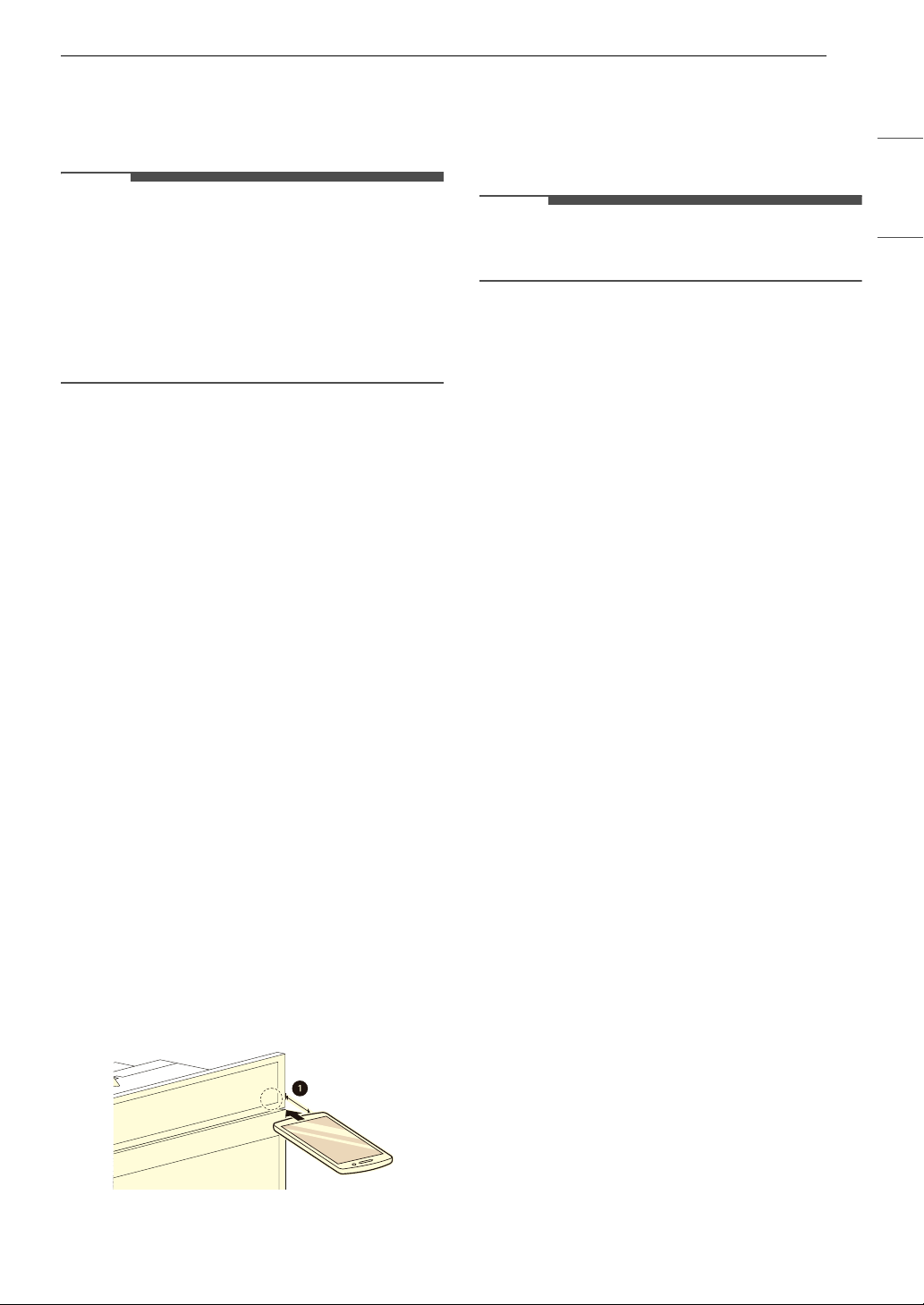
37SMART FUNCTIONS
ENGLISH
Smart Diagnosis
TM
Feature
Use this feature to help you diagnose and solve
problems with your appliance.
NOTE
• For reasons not attributable to LGE’s negligence,
the service may not operate due to external
factors such as, but not limited to, Wi-Fi
unavailability, Wi-Fi disconnection, local app
store policy, or app unavailability.
• The feature may be subject to change without
prior notice and may have a different form
depending on where you are located.
Using LG ThinQ to Diagnose Issues
If you experience a problem with your Wi-Fi
equipped appliance, it can transmit
troubleshooting data to a smartphone using the
LG ThinQ application.
• Launch the LG ThinQ application and select the
Smart Diagnosis feature in the menu. Follow
the instructions provided in the LG ThinQ
application.
Using Audible Diagnosis to
Diagnose Issues
Follow the instructions below to use the audible
diagnosis method.
• Launch the LG ThinQ application and select the
Smart Diagnosis feature in the menu. Follow
the instructions for audible diagnosis provided
in the LG ThinQ application.
1 Press the START button for 3 seconds.
• If the display has been locked, you must
deactivate the lock and then reactivate it.
2 Hold the mouthpiece of your phone in front of
the control panel, as shown below.
a Max: 3/8" (10 mm)
3 Keep the phone in place until the tone
transmission has finished. The display will
count down the time. Once the countdown is
over and the tones have stopped, the
diagnosis will be displayed in the application.
NOTE
• For best results, do not move the phone while
the tones are being transmitted.
38 MAINTENANCE
MAINTENANCE
Cleaning
Interior
Do not use oven cleaners to clean the oven cavity.
Use the product's EasyClean function regularly to
clean light soil. For stubborn soil, use the Self
Clean function (on some models) or clean
manually using the following tips.
• A plastic spatula can be used as a scraper to
scrape off any chunks or debris before and
during oven cleaning.
• Using the rough side of a non-scratch scouring
pad may help to take off burnt-on stains better
than a soft sponge or towel.
• Certain non-scratch scrubbing sponges, such as
those made of melamine foam, available at local
stores, can also help improve cleaning.
CAUTION
• Do not use oven cleaners, harsh chemical
cleaners, bleach, vinegar, steel scouring pads, or
abrasive pads or cleansers to clean the oven, as
they can permanently damage the oven surface.
• Do not clean the gasket.
Exterior
Painted and Decorative Trim
For general cleaning, use a cloth with hot soapy
water. For more difficult soils and built-up grease,
apply a liquid detergent directly onto the soil.
Leave it on for 30 to 60 minutes. Rinse with a damp
cloth and dry. Do not use abrasive cleaners.
Stainless Steel Surfaces
To avoid scratches, do not use steel wool pads.
1 Place a small amount of stainless steel
appliance cleaner or polish on a damp cloth or
paper towel.
2 Clean a small area, rubbing with the grain of
the stainless steel if applicable.
3 Dry and buff with a clean, dry paper towel or
soft cloth.
4 Repeat as necessary.
NOTE
• To clean the stainless steel surface, use warm
sudsy water or a stainless steel cleaner or polish.
• Always wipe in the direction of the metal surface
finish.
• Stainless steel appliance cleaner or polish can be
purchased online or from most retailers of
appliances or home goods.
Oven Cavity
DO NOT use oven cleaners.
NEVER wipe a warm or hot porcelain surface with a
damp sponge; it may cause chipping or crazing
(tiny hairlike cracks). Food spills should be cleaned
when the oven cools. At high temperature, foods
react with porcelain and a permanent dull spot can
result. When cleaning a spot, use only non-
abrasive cleaners or scrubbers.
Oven Door
CAUTION
• Do not use harsh cleaners or harsh abrasive
cleaning materials on the outside of the oven
door. Doing so can cause damage.
• Use soapy water to thoroughly clean the oven
door. Rinse well. Do not immerse the door in
water.
• You may use a glass cleaner on the outside glass
of the oven door. Do not spray water or glass
cleaner on the door vents.
• Do not use oven cleaners, cleaning powders, or
harsh abrasive cleaning materials on the outside
of the oven door.
• Do not clean the oven door gasket. The oven
door gasket is made of a woven material that is
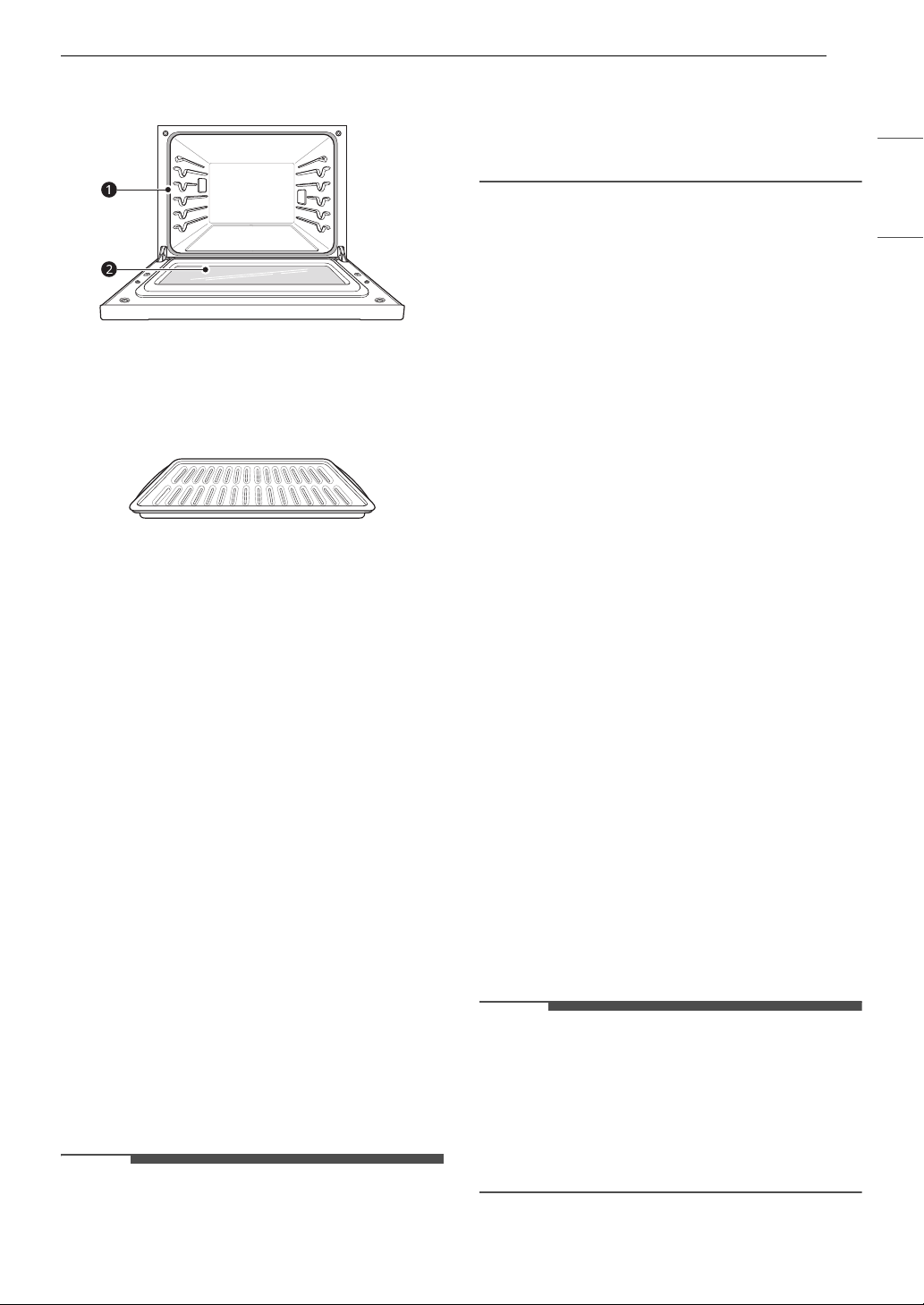
39MAINTENANCE
ENGLISH
essential for a good seal. Care should be taken
not to rub, damage, or remove this gasket.
a Don’t hand clean oven door gasket
b Do hand clean door
Broiler Pan and Grid
• Do not store a soiled broiler pan or grid
anywhere in the appliance.
• Do not clean the broiler pan or grid in a self
cleaning mode. (Available on some models)
• Remove the grid from the pan. Carefully pour
out the grease from the pan into a proper
container.
• Wash and rinse the broiler pan and grid in hot
water with a soap-filled or plastic scouring pad.
• If food has burned on, sprinkle the grid with
cleaner while hot and cover with wet paper
towels or a dishcloth. Soaking the pan will
remove burned-on foods.
• Both the broiler pan and grid may be cleaned
with a commercial oven cleaner or in the
dishwasher.
Oven Racks
Remove the oven racks before operating the Self
Clean cycle and EasyClean.
1 Clean with a mild, abrasive cleaner.
• Food spilled into the tracks could cause the
racks to become stuck.
2 Rinse with clean water and dry.
NOTE
If the racks are cleaned using the Self Clean cycle
(not recommended), the color will turn slightly
blue and the finish will become dull. After the Self
Clean cycle is complete, and the oven has cooled,
rub the sides of the racks with wax paper or a cloth
containing a small amount of vegetable oil. This
will make the racks glide more easily into the rack
tracks.
EasyClean
LG’s EasyClean enamel technology provides two
cleaning options for the inside of the oven. The
EasyClean feature takes advantage of LG’s new
enamel to help lift soils without harsh chemicals,
and it runs using ONLY WATER for just 10 minutes
in low temperatures to help loosen LIGHT soils
before hand cleaning.
While EasyClean is quick and effective for small
and LIGHT soils, the Self Clean feature can be
used to remove HEAVY, built up soils. The intensity
and high heat of the Self Clean cycle may result in
smoke which will require the opening up of
windows to provide ventilation. Compared to the
more intense Self Clean process, your LG oven
gives you the option of cleaning with LESS HEAT,
LESS TIME, and virtually NO SMOKE OR FUMES.
You can reduce energy use by cleaning light oven
soils with the EasyClean feature instead of Self
Clean.
When needed, the oven still provides the Self
Clean option for longer, more thorough oven
cleaning for heavier, built up soils.
• For hard to reach areas such as the back surface
of the oven, it is better to use the Self Clean
cycle.
Benefits of EasyClean
• Helps loosen light soils before hand-cleaning
• EasyClean only uses water; no chemical cleaners
• Makes for a better Self Clean experience.
- Delays the need for a Self Clean cycle
- Minimizes smoke and odors
- Can allow shorter Self Clean time
NOTE
• For models without Self Clean option
- The EasyClean feature may not be effective in
removing heavy, built-up soils. Because the
oven does not include a Self Clean option,
clean the oven regularly using the EasyClean
feature to prevent heavy, burnt-on soil from
building up in the oven.
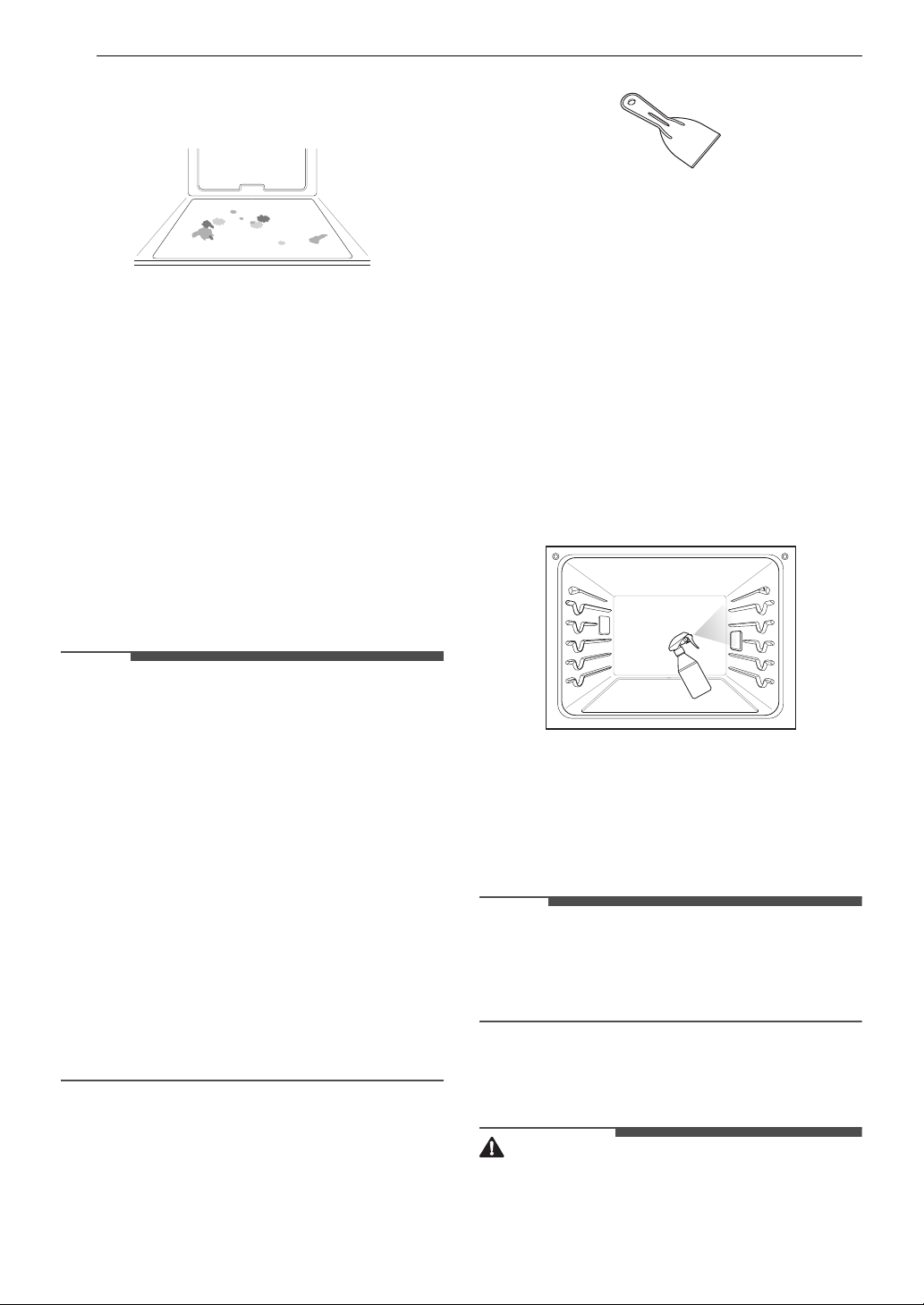
40 MAINTENANCE
When to Use EasyClean
• Example of oven soiling
Case 1
- Soil pattern: Small drops or spots
- Types of soils: Cheese or other ingredients
- Common food items that can soil your oven:
Pizza
Case 2
- Soil pattern: Light splatter
- Types of soils: Fat/grease
- Common food items that can soil your oven:
Steaks, broiled / Fish, broiled / Meat roasted at
low temperatures
EasyClean Instruction Guide
NOTE
• Allow the oven to cool to room temperature
before using the EasyClean cycle. If your oven
cavity is above 150 ℉ (65 ℃), the EasyClean cycle
will not be activated until the oven cavity cools
down.
• The oven should be level to ensure that the
bottom surface of the oven cavity is entirely
covered by water at the beginning of the
EasyClean cycle.
• For best results, use distilled or filtered water.
Tap water may leave mineral deposits on the
oven bottom.
• Soil baked on through several cooking cycles will
be more difficult to remove with the EasyClean
cycle.
• Do not open the oven door during the
EasyClean cycle. Water will not get hot enough if
the door is opened during the cycle.
1 Remove oven racks and accessories from the
oven.
2 Scrape off and remove any burnt-on debris
with a plastic scraper.
• Suggested plastic scrapers:
- Hard plastic spatula
- Plastic pan scraper
- Plastic paint scraper
- Old credit card
3 Fill a spray bottle (10 oz or 300 ml) with water
and use the spray bottle to thoroughly spray
the inside surfaces of the oven.
4 Use at least 1/5 (2 oz or 60 ml) of the water in
the bottle to completely saturate the soil on
both the walls and in the corners of the oven.
5 Spray or pour the remaining water (8 oz or
240 ml) onto the bottom center of the oven
cavity. The indentation on the oven bottom
should be fully covered to submerge all soils.
Add water if necessary.
NOTE
• If cleaning multiple ovens, use an entire bottle of
water to clean each oven. Do not spray water
directly on the door. Doing so will result in water
dripping to the floor.
6 Close the oven door. Press EasyClean. Press
START.
CAUTION
• Some surfaces may be hot after the EasyClean
cycle. Wear rubber gloves while cleaning to
prevent burns.
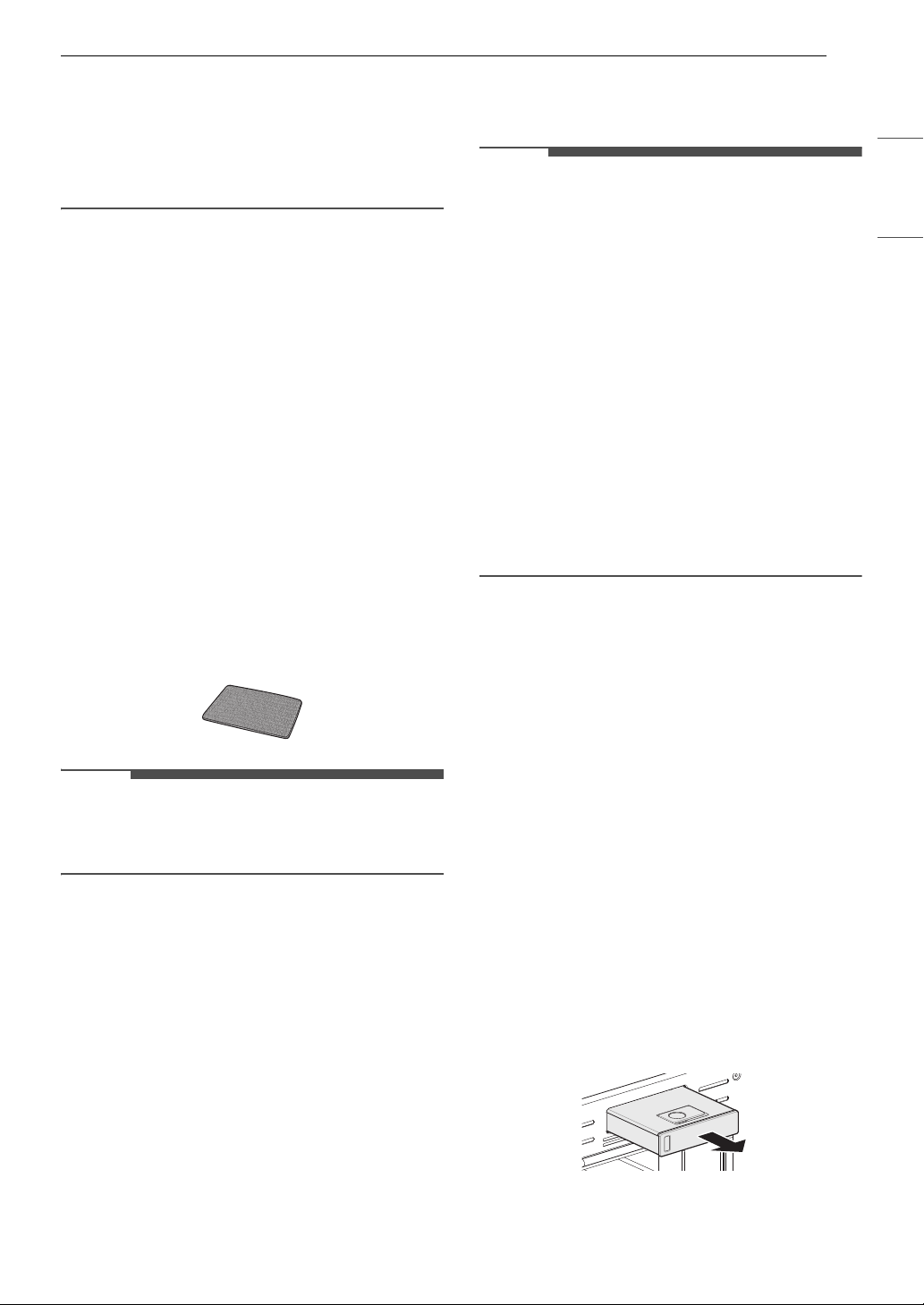
41MAINTENANCE
ENGLISH
•During the EasyClean cycle, the oven becomes
hot enough to cause burns. Wait until the cycle is
over before wiping the inside surface of the
oven. Failure to do so may result in burns.
• Avoid leaning or resting on the oven door glass
while cleaning the oven cavity.
7 A tone will sound at the end of the 10 minute
cycle. Press CLEAR/OFF to clear the display
and end the tone.
8 After the cleaning cycle and during hand-
cleaning, enough water should remain on the
oven bottom to completely submerge all soils.
Add water if necessary. Place a towel on the
floor in front of the oven to capture any water
that may spill out during hand-cleaning.
9 Clean the oven cavity immediately after the
EasyClean cycle by scrubbing with a wet, non-
scratch scouring sponge or pad. (The scouring
side will not scratch the finish.) Some water
may spill into the bottom vents while
cleaning, but it will be captured in a pan under
the oven cavity and will not hurt the burner.
NOTE
• Do not use any steel scouring pads, abrasive
pads or cleaners as these materials can
permanently damage the oven surface.
10 Once the oven cavity is cleaned, wipe any
excess water with a clean dry towel. Replace
racks and any other accessories.
11 If some light soils remain, repeat the above
steps, making sure to thoroughly soak the
soiled areas.
• If stubborn soils remain after multiple
EasyClean cycles, run the Self Clean cycle.
Be sure that the oven cavity is empty of
oven racks and other accessories, and that
the oven cavity surface is dry before
running the Self Clean cycle. Consult the
Self Clean section of your owner’s manual
for further details. If a Self Clean option is
not available, scrape off and remove
stubborn soil using a scraper.
NOTE
• If you forget to saturate the inside of the oven
with water before starting EasyClean, press
CLEAR/OFF to end the cycle. Wait for the oven to
cool to room temperature and then spray or
pour water into the oven and start another
EasyClean cycle.
• The cavity gasket may be wet when the
EasyClean cycle finishes. This is normal. Do not
clean the gasket.
• If mineral deposits remain on the oven bottom
after cleaning, use a cloth or sponge soaked in
vinegar to remove them.
• It is normal for the fan to operate during the
EasyClean cycle.
• Using commercial oven cleaners or bleach to
clean the oven is not recommended. Instead,
use a mild liquid cleanser with a pH value below
12.7 to avoid discoloring the enamel.
Self Clean
The Self Clean cycle uses extremely hot
temperatures to clean the oven cavity. While
running the Self Clean cycle, you may notice
smoking or an odor. This is normal, especially if
the oven is heavily soiled. During Self Clean, the
kitchen should be well ventilated to minimize the
odors from cleaning.
Before Starting Self Clean
• Clean only parts listed in manual. Remove the
water tank, oven racks, broiler pan, broiler grid,
all cookware, aluminum foil or any other
material from the oven.
- If oven racks are left in the oven cavity during
the Self Clean cycle, they will discolor and
become difficult to slide in and out.
- If you don't remove the water tank from the
oven, a beep sounds and the Self Clean cycle
does not start.
• The kitchen should be well ventilated to
minimize the odors from cleaning. Open a
42 MAINTENANCE
window or turn on a ventilation fan or hood
before self-cleaning.
• Wipe any heavy spillovers on the bottom of the
oven.
• Make sure that the oven light cover is in place
and the oven light is off.
• Clean the frame of the oven and door with hot
soapy water. Rinse well.
WARNING
• If the oven is heavily soiled with oil, self-clean the
oven before using the oven again. The oil could
cause a fire.
• If there is a fire in the oven during self-clean,
turn the oven off and wait for the fire to go out.
Do not force the door open. Introduction of
fresh air at self-clean temperatures may lead to
a burst of flame from the oven. Failure to follow
this instruction may result in severe burns.
CAUTION
• Do not use oven cleaners. Commercial oven
cleaner or oven liner protective coating of any
kind should not be used in or around any part of
the oven.
• The oven displays an
F error code and sounds
three long beeps during the self-cleaning
process if it malfunctions in the self-clean mode.
Switch off the electrical power to the main fuse
or breaker and have the oven serviced by a
qualified technician.
• If the self cleaning mode malfunctions, turn the
oven off and disconnect the power supply. Have
it serviced by a qualified technician.
• It is normal for parts of the oven to become hot
during a Self Clean cycle. Avoid touching the
door, window or oven vent area during a Self
Clean cycle.
• Do not leave small children unattended near the
appliance. During the Self Clean cycle, the
outside of the oven can become very hot to the
touch.
•If you have pet birds, move them to another
well-ventilated room. The health of some birds is
extremely sensitive to the fumes given off during
the Self Clean cycle of any oven.
• Do not line the oven walls, racks, bottom or any
other part of the oven with aluminum foil or any
other material. Doing so will destroy heat
distribution, produce poor baking results and
cause permanent damage to the oven interior
(aluminum foil will melt to the interior surface of
the oven).
• Do not force the door open. This can damage the
automatic door locking system. Use care when
opening the oven door after the Self Clean cycle.
Stand to the side of the oven when opening the
door to allow hot air or steam to escape. The
oven may still be VERY HOT.
NOTE
• The oven light cannot be turned on during a Self
Clean cycle. The oven light cannot be turned on
until the oven temperature has cooled below
500 ℉ (260 ℃) after a Self Clean cycle is
complete.
• Clean the frame of the oven and door with hot
soapy water. Rinse well.
• Do not clean the gasket. The fiberglass material
of the oven door gasket cannot withstand
abrasion. It is essential for the gasket to remain
intact. If you notice it becoming worn or frayed,
replace it.
• It is normal for the fan to operate during the Self
Clean cycle.
• As the oven heats, you may hear sounds of metal
parts expanding and contracting. This is normal
and will not damage the oven.
• You may notice some white ash in the oven.
Wipe it off with a damp cloth or a soap-filled
steel wool pad after the oven cools. If the oven is
not clean after one Self Clean cycle, repeat the
cycle.
• If oven racks were left in the oven and do not
slide smoothly after a Self Clean cycle, wipe
racks and rack supports with a small amount of
vegetable oil to make them glide more easily.
•After a Self Clean cycle, fine lines may appear in
the porcelain because it went through heating
and cooling. This is normal and will not affect
performance.
•The Self Clean cycle cannot be started if the
Control Lock feature is active.
• Once the Self Clean cycle is set, the oven door
locks automatically. You will not be able to open
the oven door until the oven is cooled. The lock
releases automatically.
• Once the door has been locked, the lock
k
indicator light stops flashing and remains on.
Allow about 15 seconds for the oven door lock to
activate.
• If the clock is set for a 12-hour display (default)
the Delayed Self Clean can never be set to start
more than 12 hours in advance.
• After the oven is turned off, the convection fan
keeps operating until the oven has cooled down.
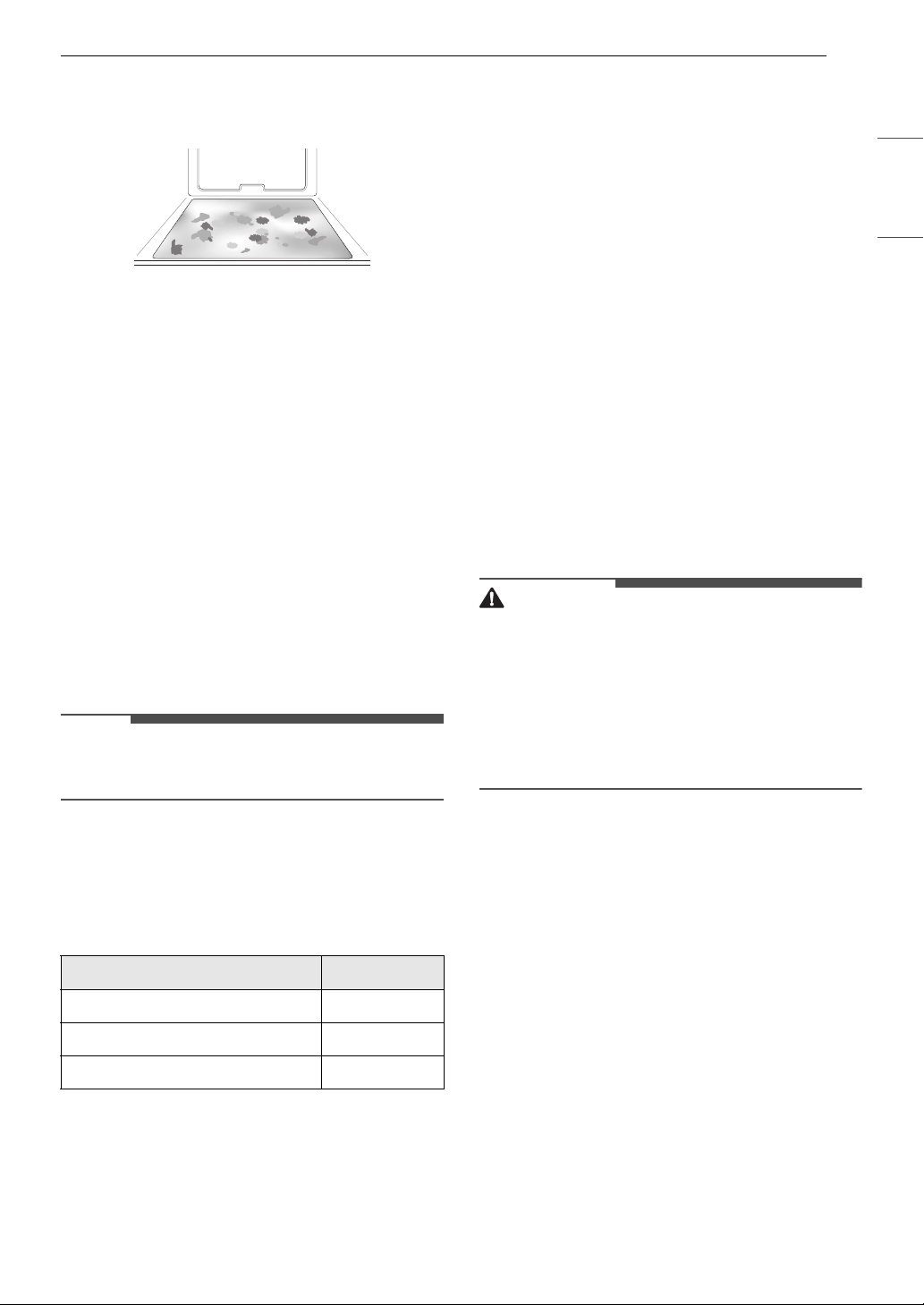
43MAINTENANCE
ENGLISH
When to Use Self Clean
• Example of oven soiling
Case 1
• Soil pattern: Medium to heavy splatter
• Types of soils: Fat/grease
• Common food items that can soil your oven:
Meat roasted at high temperatures
Case 2
• Soil pattern: Drops or spots
• Types of soils: Filling or sugar based soils
• Common food items that can soil your oven: Pies
Case 3
• Soil pattern: Drops or spots
• Types of soils: Cream or tomato sauce
• Common food items that can soil your oven:
Casseroles
NOTE
•The Self Clean cycle can be used for soil that has
been built up over time.
Setting Self Clean
The Self Clean function has cycle times of 3, 4, or 5
hours.
Self Clean Soil Guide
1 Remove all racks and accessories from the
oven.
2 Press Self Clean.
The oven defaults to the recommended four-
hour self clean for a moderately soiled oven.
3 Press Self Clean repeatedly to set the time
settings.
4 If desired, press Start Time to set the delayed
start time. Press the numbers to set the time
settings.
5 Press START. The remaining time or the
delayed start time appears in the display.
6 Once the self-clean cycle is set, the oven door
locks automatically and the lock icon displays.
• You will not be able to open the oven door
until the oven has cooled. The lock releases
automatically when the oven has cooled.
CAUTION
• Do not force the oven door open when the lock
icon is displayed. The oven door remains locked
until the oven temperature has cooled. Forcing
the door open will damage the door.
• It may become necessary to cancel or interrupt a
Self Clean cycle due to excessive smoke or fire in
the oven. To cancel the Self Clean function,
press CLEAR / OFF.
During Self Clean
•The Self Clean cycle uses extremely hot
temperatures to clean the oven cavity. While
running the Self Clean cycle, you may notice
smoking or an odor. This is normal, especially if
the oven is heavily soiled.
• As the oven heats, you may hear sounds of metal
parts expanding and contracting. This is normal
and will not damage the oven.
• Do not force the oven door open when the lock
k is displayed. The oven door remains locked
until the oven temperature has cooled. Forcing
the door open will damage the door.
After the Self Clean Cycle
• The oven door remains locked until the oven
temperature has cooled.
• You may notice some white ash in the oven.
Wipe it off with a damp cloth or a soap-filled pad
Soil Level Cycle Setting
Lightly Soiled Oven Cavity 3-Hour
Moderately Soiled Oven Cavity 4-Hour
Heavily Soiled Oven Cavity 5-Hour
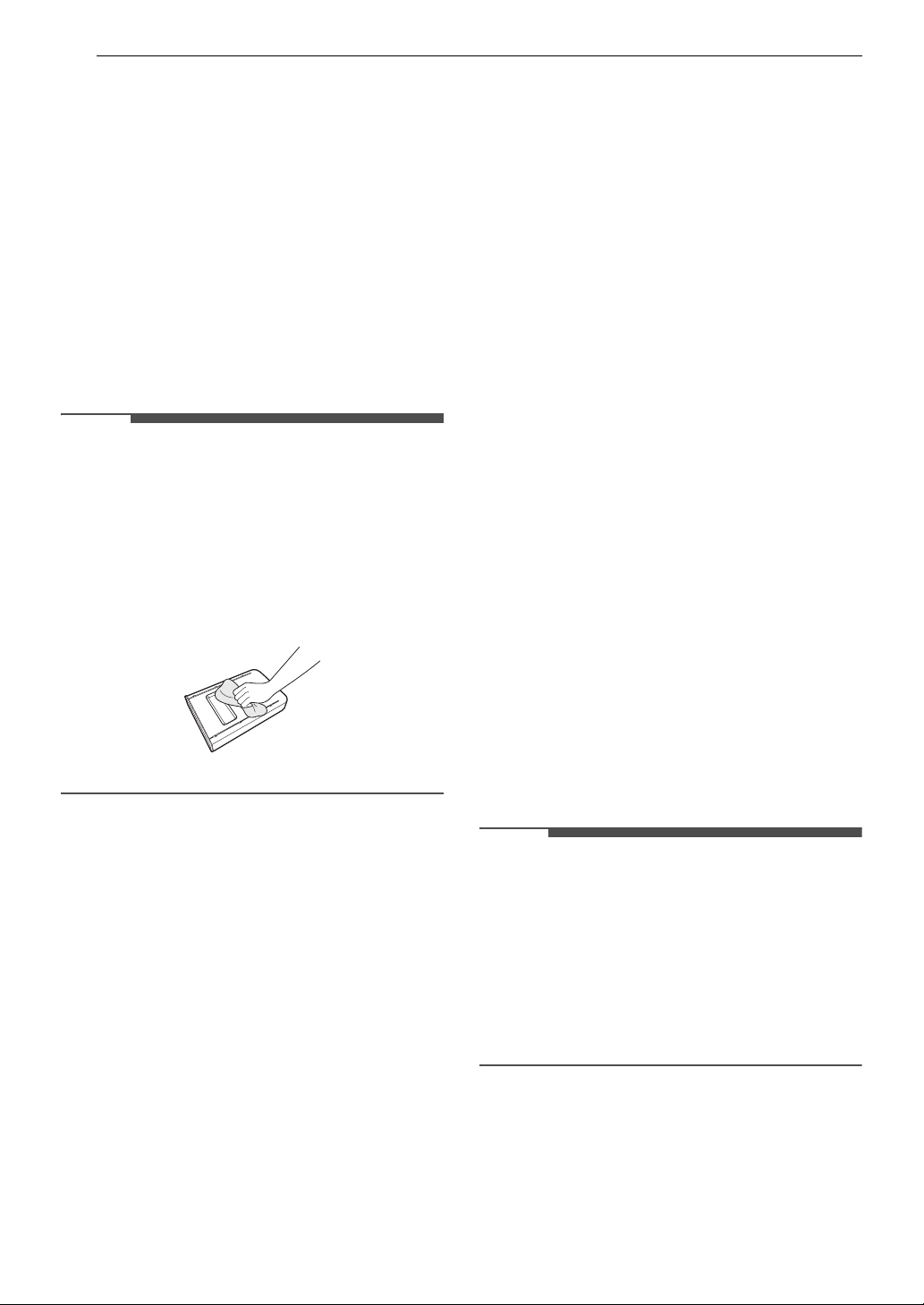
44 MAINTENANCE
after the oven cools. If the oven is not clean after
one self-clean cycle, repeat the cycle.
• If oven racks were left in the oven and do not
slide smoothly after a self-clean cycle, wipe racks
and rack supports with a small amount of
vegetable oil to make them glide more easily.
• Fine lines may appear in the porcelain because it
went through heating and cooling. This is
normal and will not affect performance.
Cleaning the Steam Feeder Tank
The steam feeder tank is used during the steam
cooking functions. Use filtered, softened water if
possible.
NOTE
• After using the steam function, the steam feeder
tank should be drained. To avoid bacteria or
odors, clean and dry the steam feeder tank after
every use.
• Do not clean in a dishwasher.
• If the steam feeder tank does not slide in as
smoothly as it should, clean the bottom of the
tank.
Hard Water Scale
If hard water is used in the steam feeder tank, the
steam generator may become clogged with hard
water scale. In areas with hard water, run the
Descaling function frequently or use softened
water.
Cleaning Scale on Oven Bottom
To remove mineral deposits that remain on the
oven bottom after using the steam mode, use a
cloth or sponge soaked in vinegar or a weak citric
acid solution. For more stubborn or extensive
scaling, use the Descaling function.
Descaling
Use this function to remove the white deposits
that form after the steam generator is used for a
long period.
The Descaling function runs for 1 hour 43 minutes.
Water will come out of the steam generator while
it is being cleaned.
For instructions on removing and filling the steam
feeder tank, see "Using the Steam Feeder Tank."
Setting Descaling
1 Fill the steam feeder tank with a 50:1 mixture
of water and citric acid. For example, use 4 tsp
of citric acid in 4 1/4 cups water (20 g citric
acid in 1000 ml water).
2 Insert the steam feeder tank into the slot over
the upper oven cavity and push it in until it
clicks into place.
3 Press More Modes and press 5. Press START.
4 After 1 hour 43 minutes of descaling, a popup
will appear in the display. Following the
instructions, drain the tank and fill it with
clean water.
5 Insert the tank and start the Rinsing function.
6 Once the Rinsing function is complete, dry the
inside of the oven with a soft cloth. Leave the
oven door open and allow the oven to dry
completely.
NOTE
• The Rinsing function must be completed even if
the Descaling function is canceled.
• If water remains on the oven bottom after
descaling, it can leave a residue after the oven is
used. To remove the residue, see the
instructions under "Cleaning Scale on Oven
Bottom."
• After running the Descaling function, clean the
steam feeder tank.
Drying the Oven Interior
The Drying function removes residual water inside
the steam generator. The function takes a little
over 1 minute and runs automatically after any
steam cooking cycle. The Drying function can also
be started manually, if needed.
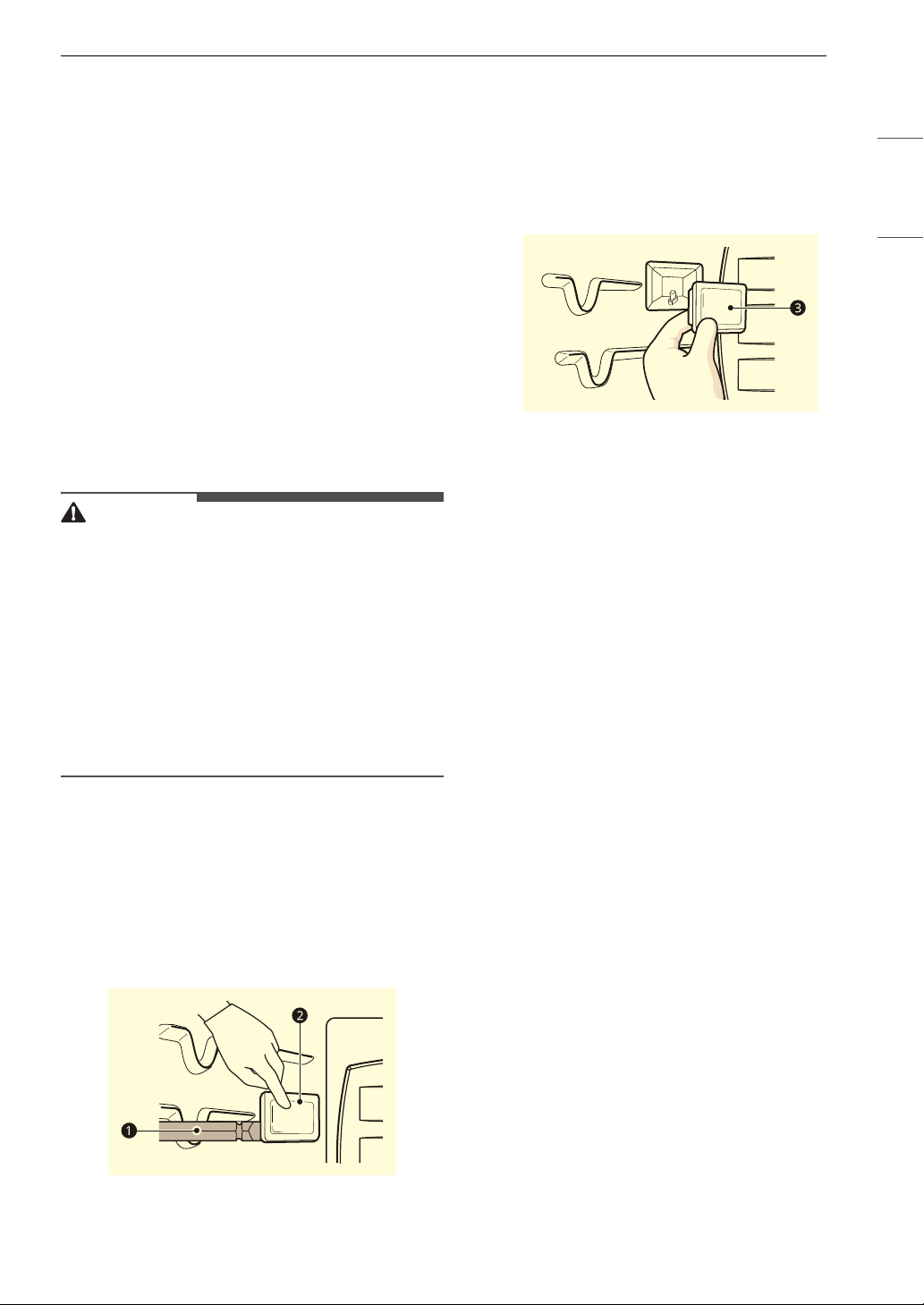
45MAINTENANCE
ENGLISH
Setting Drying
1 Make sure that the steam feeder tank is
empty.
2 Press More Modes and press 6.
3 Press START to begin Drying. The remaining
time appears in the display.
Periodic Maintenance
Changing the Oven Light
The oven light is a standard 25-watt halogen bulb
for ovens.
WARNING
• Make sure that the oven and bulb are cool.
• Disconnect the electrical power to the appliance
at the main fuse or circuit breaker panel. Failure
to do so can result in severe personal injury,
death, or electrical shock.
• Wear gloves while changing the oven light. Glass
fragments from broken bulbs can cause risk of
injury.
• Gently twist the screwdriver blade while
changing the oven light. If you apply force, the
glass or oven may crack.
1 Unplug the oven or disconnect power.
2 Remove the oven racks.
3 Slide a flat blade screwdriver a between the
housing and the glass light cover b.
4 Support the glass light cover with two fingers
to prevent the cover from falling to the
bottom of the oven.
5 Gently twist the screwdriver blade to loosen
the glass light cover c.
6 Remove the bulb from the socket.
7 Replace the bulb, and reassemble the light
cover by snapping it back into place.
8 Plug in the oven or reconnect power.

46 TROUBLESHOOTING
TROUBLESHOOTING
FAQs
Frequently Asked Questions
CAUTION
• Foil may be used to wrap food in the oven, but do not allow the foil to come into contact with the
exposed heating/broiling elements in the oven. The foil could melt or ignite, causing smoke, fire, or
injury.
Q: My new oven doesn’t cook like my old one. Is there something wrong with the temperature
settings?
A: No. Your oven has been factory tested and calibrated. For the first few uses, follow your recipe times
and temperatures carefully. If you still think your new oven is too hot or too cold, you can adjust the
oven temperature yourself to meet your specific cooking needs. Refer to the Changing Settings
section in this manual for easy instructions on how to adjust your thermostat.
Q: Is it normal to hear a clicking noise coming from the back of my oven when I am using it?
A: Your new appliance is designed to maintain a tighter control over your oven’s temperature. You may
hear your oven’s heating elements click on and off more frequently on your new oven. This is normal.
Q: During convection cooking the fan stops when I open the door. Is that normal?
A: Yes, this is normal. When the door is opened, the convection fan will stop until the door is closed.
Q: Can I use aluminum foil to catch drippings in my oven cavity?
A: Never use aluminum foil to line the bottom or sides of the oven. The foil will melt and stick to the
bottom surface of the oven and will not be removable. Use a foil-lined sheet pan placed on a lower
oven rack to catch drippings instead. (If foil has already melted onto the bottom of the oven, it will not
interfere with the oven’s performance.)
Q: Can I use aluminum foil on the racks?
A: Do not cover racks with aluminum foil. Covering entire racks with foil restricts air flow, leading to
poor cooking results. Use a sheet pan lined with foil under fruit pies or other acidic or sugary foods to
prevent spillovers from damaging the oven finish.
Q: Can I leave my racks in the oven when running a Self Clean cycle?
A: No. Although it will not damage the racks, it will discolor them and may make them hard to slide in
and out during use. Remove all items from the oven before starting a Self Clean cycle.
Q: What should I do if my racks are sticky and have become hard to slide in and out?
A: Over time, the racks may become hard to slide in and out. Apply a small amount of olive oil to the
sides of the racks. This will work as a lubricant for easier gliding.
Q: Should I broil with the door open or closed?
A: Your oven isn't designed for open door broiling. If you broil with the oven door open, it can damage
the display.
Q: Why aren't the function buttons working?
A:
Make sure that the appliance is not in Control Lock mode. The lock
k will show in the display if
Control Lock is activated. To deactivate Control Lock, refer to the Control Lock section. The unlock
melody sounds and
Loc appears in the display until the controls are unlocked.

47TROUBLESHOOTING
ENGLISH
Q: My appliance is still dirty after running the EasyClean cycle. What else should I do?
A: The EasyClean cycle only helps to loosen light soils in your appliance to assist in hand-cleaning of
your oven. It does not automatically remove all soils after the cycle. Some scrubbing of your
appliance is required after running the EasyClean cycle.
Q: I tried scrubbing my oven after running EasyClean, but some soils still remain. What can I do?
A: The EasyClean feature works best when the soils are fully soaked and submerged in water before
running the cycle and during hand-cleaning. If soils are not sufficiently soaked in water, it can
negatively affect the cleaning performance. Repeat the EasyClean process using sufficient water.
Sugar-based and certain greasy soils are especially hard to clean. If some stubborn soils remain, use
the Self Clean feature to thoroughly clean your oven.
Q: Soils on my oven walls are not coming off. How can I get the oven walls clean?
A: Soils on the side and rear walls of your appliance may be more difficult to fully soak with water. Try
repeating the EasyClean process with more than the ¼ cup (2 oz or 60 ml) of spray recommended.
Q: Will EasyClean get all of the soils and stains out completely?
A: It depends on the soil type. Sugar-based and certain grease stains are especially hard to clean. Also, if
stains are not sufficiently soaked in water, this can negatively affect cleaning performance.
If stubborn or built-up stains remain, use the Self Clean feature. Refer to the Self Clean section of
your owner's manual.
Q: Are there any tricks to getting some of the stubborn soils out?
A: Scraping the soils with a plastic scraper before and during hand-cleaning is recommended. Fully
saturating soils with water is also recommended.
However, certain types of soils are harder to clean than others. For these stubborn soils, the Self
Clean cycle is recommended. Consult the Self Clean section of your owner's manual for details.
Q: Is it safe for my convection fan or heater element to get wet during EasyClean?
A: Yes. The convection fan or heater element may get a little wet during cleaning. However, direct spray
onto the broil burner and heater elements is not necessary because these are self-cleaning during
regular use.
Q: Do I need to use all 1 ¼ cups (10 oz or 300 ml) of water for EasyClean?
A: Yes. It is highly recommended that 1 cup (8 oz or 240 ml) of water be sprayed or poured on the
bottom and an additional ¼ cup (2 oz or 60 ml) of water be sprayed on walls and other soiled areas to
fully saturate the soils for better cleaning performance.
Q: I see smoke coming out of my appliance’s vents during EasyClean. Is this normal?
A: This is normal. This is not smoke. It is actually water vapor (steam) from the water in the oven cavity.
As the oven heats briefly during EasyClean, the water in the cavity evaporates and escapes through
the oven vents.
Q: How often should I use EasyClean?
A: EasyClean can be performed as often as you wish. EasyClean works best when your oven is LIGHTLY
soiled from such things as LIGHT grease splatter and small drops of cheese. Please refer to the
EasyClean section in your owner's manual for more information.
Q: What is required for EasyClean?
A: A spray bottle filled with 1¼ cups (10 oz or 300 ml) of water, a plastic scraper, a non-scratch scrubbing
pad and a towel. You should not use abrasive scrubbers such as heavy-duty scouring pads or steel
wool.
48 TROUBLESHOOTING
Before Calling for Service
Review this section before calling for service; doing so will save you both time and money.
Cooking
Problem Possible Cause & Solution
Oven will not work Plug on appliance is not completely inserted in the electrical outlet.
• Make sure electrical plug is plugged into a live, properly grounded outlet.
A fuse in your home may be blown or the circuit breaker tripped.
• Replace the fuse or reset the circuit breaker.
Oven controls improperly set.
• See the "Operating the Oven" section in the Operation chapter.
Oven too hot.
• Allow the oven to cool to below locking temperature.
Steam is exhausted
through the oven
vent.
Cooking foods with high moisture produces steam.
• This is normal.
Appliance does not
operate.
Cord is not plugged in correctly.
• Make sure cord is plugged correctly into outlet. Check circuit breakers.
Service wiring is not complete.
• Contact your electrician for assistance.
Power outage.
• Check house lights to be sure. Call your local electric company for service.
Oven smokes
excessively during
broiling.
Control not set properly.
• Follow instructions under Setting Oven Controls.
Meat too close to the element.
• Reposition the rack to provide proper clearance between the meat and the element.
Preheat broil element for searing.
Meat not properly prepared.
• Remove excess fat from meat. Cut remaining fatty edges to prevent curling.
Insert on broiler pan wrong side up and grease not draining.
• Always place the grid on the broiler pan with ribs up and slots down to allow grease to drip
into the pan.
Grease has built up on oven surfaces. Old grease or food spatters cause excessive
smoking.
• Regular cleaning is necessary when broiling frequently.
Food does not bake
or roast properly
Oven controls improperly set.
• See the "Operating the Oven" section in the Operation chapter.
Rack position is incorrect or the rack is not level.
• See the "Operating the Oven" section in the Operation chapter.
Incorrect cookware or cookware of improper size being used.
• See the "Operating the Oven" section in the Operation chapter.
Oven sensor needs to be adjusted.
• See the "Adjusting the Oven Temperature" section in the Operation chapter.
49TROUBLESHOOTING
ENGLISH
Food does not broil
properly
Oven controls improperly set.
• Make sure you select the Broil mode properly.
Improper rack position being used.
• See the Broiling Guide.
Cookware not suited for broiling.
• Use broiling pan and grid.
Aluminum foil used on the broiling pan and grid has not been fitted properly and slit as
recommended.
• See the "Operating the Oven" section in the Operation chapter.
In some areas the power voltage may be low.
• Preheat the broil element for 5-7 minutes. See the Broiling Guide.
Oven temperature
too hot or too cold
Oven sensor needs to be adjusted.
• See the "Temperature Adjustment" section in the Operation chapter.
Excessive smoking
during a Self Clean
cycle
Excessive soil.
• Turn off the Self Clean function. Open the windows to rid the room of smoke. Wait until the
Self Clean mode is cancelled. Wipe up the excess soil and reset the self clean.
Burning or oily odor
emitting from the
vent
This is normal in a new oven.
• This will disappear in time. To speed the process, set a Self Clean cycle for a minimum of 3
hours. See the Self Clean section. (On some models)
Moisture collects on
oven window or
steam comes from
oven vent
This happens when cooking foods high in moisture.
• This is normal.
A very wet cloth was used when cleaning the window.
• Do not use too much water when cleaning the window.
Warm air venting
into kitchen after
oven has been
turned off.
Warm air exhaust is needed to maintain and cool down oven temperatures. It turns off
automatically when the heat cools to a safe temperature.
• This is normal.
Oven will not steam
cook
Improper assembly
• Make sure to slide the tank into the slot until it clicks into place.
The drain in the water tank may be clogged with hard water scale.
• If this happens, the descaling function must be run before the steam function can be used.
Water pools in the
bottom of the oven
during or after
steam cooking
During steam cooking, the water in the water tank is transferred to the bottom of the
oven.
• It is normal for water to fill the bottom of the oven during or after the Steam mode.
• If the water leaves mineral deposits on the oven bottom, remove the deposits with a cloth
or sponge soaked in vinegar.
White residue
appears on the oven
bottom after steam
cooking
Using hard water in the water tank can result in hard water scale on the oven bottom.
• To remove mineral deposits that remain on the oven bottom, use a cloth or sponge soaked
in vinegar or a weak citric acid solution.
The sous vide
module beeps during
operation
This alert sounds when the sous vide module is operated without water in the steam
feeder tank.
• Fill the steam feeder tank to the recommended level before using.
Problem Possible Cause & Solution
50 TROUBLESHOOTING
Parts & Features
Problem Possible Cause & Solution
Oven control beeps
and displays any
F
code error.
Electronic control has detected a fault condition.
• Turn off the oven function you are using to clear the display and stop beeping. Reprogram
oven. If fault recurs, record fault number and call for service.
[Case 1]
- Code: F-3
- Cause: Key short error
[Case 2]
- Code: F-9
- Cause: Oven not heating
Displayed colon in
the clock is flashing.
This means that the product has just been plugged in, or that it has experienced a
power interruption.
• This is normal. Reset the clock or press any button to stop the flashing.
CLEAN and door
flash in the display.
The Self Clean cycle has been selected, but the door is not closed.
• Close the oven door.
Loc is on in the
display when you
want to cook.
The oven is locked because of the Control Lock feature.
• Deactivate the Control Lock feature.
Oven light does not
work.
It is time to replace the lamp or the lamp is loose.
• Replace or tighten lamp. See Changing the Oven Light section in this Owner’s Manual.
Convection fan
stops. (During
Conv.Bake mode)
Convection fan stops during a convection bake cycle. It is done to allow for more even
heating during the cycle.
• This is not a failure of the appliance and should be considered normal operation.
Fan operation
(During Bake mode)
This is to ensure even baking results.
• It is normal for the fan to operate periodically throughout a normal bake cycle in the oven.
Oven will not Self
Clean.
The oven temperature is too high to set a Self Clean operation.
• Allow the oven to cool and reset the controls.
Oven controls improperly set.
• See the Self Clean section.
A Self Clean cycle cannot be started if the oven Control Lock feature is active.
• See the Changing Settings section.
Oven door does not
open after a Self
Clean cycle.
Oven is too hot.
• Allow the oven to cool below locking temperature.
The control and door may be locked.
• Allow about one hour for the oven to cool after the completion of a Self Clean cycle. The
door can be opened when the lock
k is no longer displayed.
The oven is not clean
after a Self Clean
cycle.
Oven controls not properly set.
• See the Self Clean section.
Oven was heavily soiled.
• Clean up heavy spillovers before starting the clean cycle. Heavily soiled ovens may need to
Self Clean again or for a longer period of time.
Oven racks are
difficult to slide.
The shiny, silver-colored racks were cleaned in a Self Clean cycle.
• Apply a small amount of vegetable oil to a paper towel and wipe the edges of the oven
racks with the paper towel.
51TROUBLESHOOTING
ENGLISH
Noises
Wi-Fi
Problem Possible Cause & Solution
“Crackling” or
“popping” sound
This is the sound of the metal heating and cooling during both the cooking and Self
Clean functions.
• This is normal.
Fan noise A convection fan may automatically turn on and off.
• This is normal.
Problem Possible Cause & Solution
Trouble connecting
appliance and
smartphone to Wi-Fi
network
The password for the Wi-Fi network was entered incorrectly.
• Delete your home Wi-Fi network and begin the connection process again.
Mobile data for your smartphone is turned on.
• Turn off the Mobile data on your smartphone before connecting the appliance.
The wireless network name (SSID) is set incorrectly.
• The wireless network name (SSID) should be a combination of English letters and
numbers. (Do not use special characters.)
The router frequency is not 2.4 GHz.
• Only a 2.4 GHz router frequency is supported. Set the wireless router to 2.4 GHz and
connect the appliance to the wireless router. To check the router frequency, check with
your Internet service provider or the router manufacturer.
The appliance and the router are too far apart.
• If the appliance is too far from the router, the signal may be weak and the connection may
not be configured correctly. Move the router closer to the appliance or purchase and
install a Wi-Fi repeater.
During Wi-Fi setup, the app is requesting a password to connect to the product (on
certain phones).
• Locate the network name which starts with "LG" under Settings > Networks. Note the last
part of the network name.
- If the network name looks like LGE_Appliance_XX-XX-XX, enter lge12345.
- If the network name looks like LGE_Appliance_XXXX, enter XXXX twice as your password.
For example, if the network name appears as LGE_Appliance_8b92, then you would
enter 8b928b92 as your password. In this instance, the password is case sensitive and
the last 4 characters are unique to your appliance.
52 LIMITED WARRANTY
LIMITED WARRANTY
USA
TERMS AND CONDITIONS
ARBITRATION NOTICE: THIS LIMITED WARRANTY CONTAINS AN ARBITRATION PROVISION THAT
REQUIRES YOU AND LG ELECTRONICS (“LG”) TO RESOLVE DISPUTES BY BINDING ARBITRATION
INSTEAD OF IN COURT, UNLESS YOU CHOOSE TO OPT OUT. IN ARBITRATION, CLASS ACTIONS AND
JURY TRIALS ARE NOT PERMITTED. PLEASE SEE THE SECTION TITLED “PROCEDURE FOR RESOLVING
DISPUTES” BELOW.
Should your LG Electric Oven ("Product") fail due to a defect in materials or workmanship under normal
and proper use, during the warranty period set forth below, LG will, at its option, repair or replace the
Product. This limited warranty is valid only to the original retail purchaser of the Product (“You”) and
applies only when purchased lawfully and used within the United States including U.S. Territories.
• Replacement Products and parts are warranted for the remaining portion of the original warranty period
or ninety (90) days, whichever is greater.
• Replacement Products and parts may be new, reconditioned, refurbished, or otherwise factory
remanufactured.
• Replaced Product or part(s) will be the property of LG.
• Proof of original retail purchase specifying the Product model and date of purchase is required to obtain
warranty service under this limited warranty.
EXCEPT TO THE EXTENT PROHIBITED BY APPLICABLE LAW, ANY IMPLIED WARRANTY OF
MERCHANTABILITY OR FITNESS FOR A PARTICULAR PURPOSE ON THE PRODUCT IS LIMITED IN
DURATION TO THE DURATION OF THE ABOVE LIMITED WARRANTY. UNDER NO CIRCUMSTANCES
SHALL LG OR ITS U.S. DISTRIBUTORS/DEALERS BE LIABLE FOR ANY INDIRECT, INCIDENTAL,
CONSEQUENTIAL, SPECIAL, OR PUNITIVE DAMAGES, INCLUDING, WITHOUT LIMITATION, LOST
GOODWILL, LOST REVENUES OR PROFITS, WORK STOPPAGE, IMPAIRMENT OF OTHER GOODS, COST OF
REMOVAL AND REINSTALLATION OF THE PRODUCT, LOSS OF USE, OR ANY OTHER DAMAGES WHETHER
BASED IN CONTRACT, TORT, OR OTHERWISE. LG’S TOTAL LIABILITY, IF ANY, SHALL NOT EXCEED THE
PURCHASE PRICE PAID BY YOU FOR THE PRODUCT.
SOME STATES DO NOT ALLOW THE EXCLUSION OR LIMITATION OF INCIDENTAL OR CONSEQUENTIAL
DAMAGES OR LIMITATIONS ON HOW LONG AN IMPLIED WARRANTY LASTS, SO THE ABOVE
EXCLUSIONS OR LIMITATIONS MAY NOT APPLY TO YOU. THIS LIMITED WARRANTY GIVES YOU
SPECIFIC LEGAL RIGHTS AND YOU MAY ALSO HAVE OTHER RIGHTS THAT VARY FROM STATE TO STATE.
THIS LIMITED WARRANTY DOES NOT COVER
• Service trips to deliver, pick up, or install, educate how to operate, correct wiring, or correct
unauthorized repairs.
• Damage or failure of the Product to perform during power failures and interrupted or inadequate
electrical service.
• Damage or failure of the Product caused by leaky or broken water pipes, frozen water pipes, restricted
drain lines, inadequate or interrupted water supply or inadequate supply of air.
• Damage or failure of the Product resulting from operating the Product in a corrosive atmosphere or
contrary to the Product owner’s manual.
Warranty Period Scope of Warranty HOW SERVICE IS HANDLED
One (1) year from the date of
original retail purchase
Parts and Labor (internal /
functional parts only)
LG will provide, free of charge, all
labor and in-home service to
replace defective part(s).

53LIMITED WARRANTY
ENGLISH
• Damage or failure of the Product caused by accidents, pests and vermin, lightning, wind, fire, floods, acts
of nature, or any other causes beyond the control of LG.
• Damage or failure of the Product caused by unauthorized modification or alteration, or if the Product is
used for other than the intended purpose, or any water leakage where the Product was not properly
installed.
• Damage or failure of the Product caused by incorrect electrical current, voltage, or plumbing codes.
• Damage or failure of the Product caused by transportation, storage, and/or handling, including
scratches, dents, chips, and/or other damage to the finish of the Product, unless such damage is
reported within one (1) week of delivery.
• Damage or failure of the Product resulting from misuse, abuse, improper installation, repair, or
maintenance. Improper repair includes the use of parts not authorized by LG. Improper installation or
maintenance includes installation or maintenance contrary to the Product owner’s manual.
• Damage or failure of the Product caused by the use of parts, components, accessories, consumable
cleaning products, or any other products or services that were not authorized by LG.
• Damage or missing items to any display or open box Product.
• Refurbished Product or any Product sold “As Is”, “Where Is”, “With all Faults”, or similar disclaimer.
• Products with original serial numbers that have been removed, altered, or cannot be readily determined.
• Increases in utility costs and additional utility expenses.
• Any noises associated with normal operation.
• Products used for other than normal and proper household use (e.g., commercial or industrial use) or
contrary to the Product owner’s manual.
• Costs associated with removal and reinstallation of the Product for repairs, or the removal and
reinstallation of the Product if it is installed in an inaccessible location or not installed in accordance with
the Product Owner's manual.
• Accessories, removable components, or consumable parts (e.g. Shelves, door bins, drawers, water/air
filters, racks, light bulbs, batteries, etc., as applicable), except for internal/functional parts covered under
this limited warranty.
The cost of repair or replacement under these excluded circumstances shall be borne by You.
TO OBTAIN WARRANTY SERVICE AND ADDITIONAL INFORMATION
Call 1-800-243-0000 and select the appropriate option from the menu.
Or visit our website at http://www.lg.com
Or by mail: LG Electronics Customer Service P.O. Box 240007 Huntsville, AL 35813 ATTN: CIC
PROCEDURE FOR RESOLVING DISPUTES
ALL DISPUTES BETWEEN YOU AND LG ARISING OUT OF OR RELATING IN ANY WAY TO THIS LIMITED
WARRANTY OR THE PRODUCT SHALL BE RESOLVED EXCLUSIVELY THROUGH BINDING ARBITRATION, AND
NOT IN A COURT OF GENERAL JURISDICTION. BINDING ARBITRATION MEANS THAT YOU AND LG ARE EACH
WAIVING THE RIGHT TO A JURY TRIAL AND TO BRING OR PARTICIPATE IN A CLASS ACTION.
Definitions. For the purposes of this section, references to “LG” mean LG Electronics U.S.A., Inc., its
parents, subsidiaries and affiliates, and each of their officers, directors, employees, agents, beneficiaries,
predecessors in interest, successors, assigns and suppliers; references to “dispute” or “claim” shall include
any dispute, claim or controversy of any kind whatsoever (whether based in contract, tort, statute,
regulation, ordinance, fraud, misrepresentation or any other legal or equitable theory) arising out of or
relating in any way to the sale, condition or performance of the product or this Limited Warranty.
Notice of Dispute. In the event you intend to commence an arbitration proceeding, you must first notify
LG in writing at least 30 days in advance of initiating the arbitration by sending a letter to LG at LG
Electronics, USA, Inc. Attn: Legal Department- Arbitration 111 Sylvan Avenue, Englewood Cliffs, NJ 07632
USA. You and LG agree to engage in good faith discussions in an attempt to amicably resolve your claim.
The notice must provide your name, address, and telephone number; identify the product that is the

54 LIMITED WARRANTY
subject of the claim; and describe the nature of the claim and the relief being sought. If you and LG are
unable to resolve the dispute within 30 days, either party may proceed to file a claim for arbitration.
Agreement to Binding Arbitration and Class Action Waiver. Upon failure to resolve the dispute during
the 30 day period after sending written notice to LG, you and LG agree to resolve any claims between us
only by binding arbitration on an individual basis, unless you opt out as provided below. Any dispute
between you and LG shall not be combined or consolidated with a dispute involving any other person’s or
entity’s product or claim. More specifically, without limitation of the foregoing, any dispute between you
and LG shall not under any circumstances proceed as part of a class or representative action. Instead of
arbitration, either party may bring an individual action in small claims court, but that small claims court
action may not be brought on a class or representative basis.
Arbitration Rules and Procedures. To begin arbitration of a claim, either you or LG must make a written
demand for arbitration. The arbitration will be administered by the American Arbitration Association
(“AAA”) and will be conducted before a single arbitrator under the AAA’s Consumer Arbitration Rules that
are in effect at the time the arbitration is initiated (referred to as the “AAA Rules”) and under the
procedures set forth in this section. The AAA Rules are available online at www.adr.org/consumer. Send a
copy of your written demand for arbitration, as well as a copy of this provision, to the AAA in the manner
described in the AAA Rules. You must also send a copy of your written demand to LG at LG Electronics,
USA, Inc. Attn: Legal Department- Arbitration 111 Sylvan Avenue, Englewood Cliffs, NJ 07632 USA. If there
is a conflict between the AAA Rules and the rules set forth in this section, the rules set forth in this section
will govern. This arbitration provision is governed by the Federal Arbitration Act. Judgment may be entered
on the arbitrator’s award in any court of competent jurisdiction. All issues are for the arbitrator to decide,
except that issues relating to the scope and enforceability of the arbitration provision and to the
arbitrability of the dispute are for the court to decide. The arbitrator is bound by the terms of this
provision.
Governing Law. The law of the state of your residence shall govern this Limited Warranty and any
disputes between us except to the extent that such law is preempted by or inconsistent with applicable
federal law.
Fees/Costs. You do not need to pay any fee to begin an arbitration. Upon receipt of your written demand
for arbitration, LG will promptly pay all arbitration filing fees to the AAA unless you seek more than $25,000
in damages, in which case the payment of these fees will be governed by the AAA Rules. Except as
otherwise provided for herein, LG will pay all AAA filing, administration and arbitrator fees for any
arbitration initiated in accordance with the AAA Rules and this arbitration provision. If you prevail in the
arbitration, LG will pay your attorneys’ fees and expenses as long as they are reasonable, by considering
factors including, but not limited to, the purchase amount and claim amount. Notwithstanding the
foregoing, if applicable law allows for an award of reasonable attorneys’ fees and expenses, an arbitrator
can award them to the same extent that a court would. If the arbitrator finds either the substance of your
claim or the relief sought in the demand is frivolous or brought for an improper purpose (as measured by
the standards set forth in Federal Rule of Civil Procedure 11(b)), then the payment of all arbitration fees will
be governed by the AAA Rules. In such a situation, you agree to reimburse LG for all monies previously
disbursed by it that are otherwise your obligation to pay under the AAA Rules. Except as otherwise
provided for, LG waives any rights it may have to seek attorneys’ fees and expenses from you if LG prevails
in the arbitration.
Hearings and Location. If your claim is for $25,000 or less, you may choose to have the arbitration
conducted solely on the basis of (1) documents submitted to the arbitrator, (2) through a telephonic
hearing, or (3) by an in-person hearing as established by the AAA Rules. If your claim exceeds $25,000, the
right to a hearing will be determined by the AAA Rules. Any in-person arbitration hearings will be held at a
location within the federal judicial district in which you reside unless we both agree to another location or
we agree to a telephonic arbitration.
Opt Out. You may opt out of this dispute resolution procedure. If you opt out, neither you nor LG can
require the other to participate in an arbitration proceeding. To opt out, you must send notice to LG no
later than 30 calendar days from the date of the first consumer purchaser’s purchase of the product by
either: (i) sending an e-mail to opto[email protected], with the subject line: “Arbitration Opt Out” or (ii) calling 1-
800-980-2973. You must include in the opt out e-mail or provide by telephone: (a) your name and address;
(b) the date on which the product was purchased; (c) the product model name or model number; and (d)
the serial number (the serial number can be found (i) on the product; or (ii) online by accessing https://
www.lg.com/us/support/repair-service/schedule-repair-continued and clicking on “Find My Model & Serial
Number”).

55LIMITED WARRANTY
ENGLISH
You may only opt out of the dispute resolution procedure in the manner described above (that is, by e-mail
or telephone); no other form of notice will be effective to opt out of this dispute resolution procedure.
Opting out of this dispute resolution procedure will not affect the coverage of the Limited Warranty in any
way, and you will continue to enjoy the full benefits of the Limited Warranty. If you keep this product and
do not opt out, then you accept all terms and conditions of the arbitration provision described above.
LG Customer Information Center
Register your product Online!
www.lg.com
For inquiries or comments,
visit www.lg.com or call:
1-800-243-0000
U.S.A.
1-888-542-2623
CANADA
