
HW-S50B
Imagine the possibilities
Thank you for purchasing this Samsung product.
To receive more complete service, please register
your product at www.samsung.com/register
FULL MANUAL
ENG - 2
SAFETY INFORMATION
SAFETY WARNINGS
TO REDUCE THE RISK OF ELECTRIC SHOCK, DO
NOT REMOVE THE COVER (OR BACK).
NO USER-SERVICEABLE PARTS ARE INSIDE.
REFER SERVICING TO QUALIFIED SERVICE
PERSONNEL.
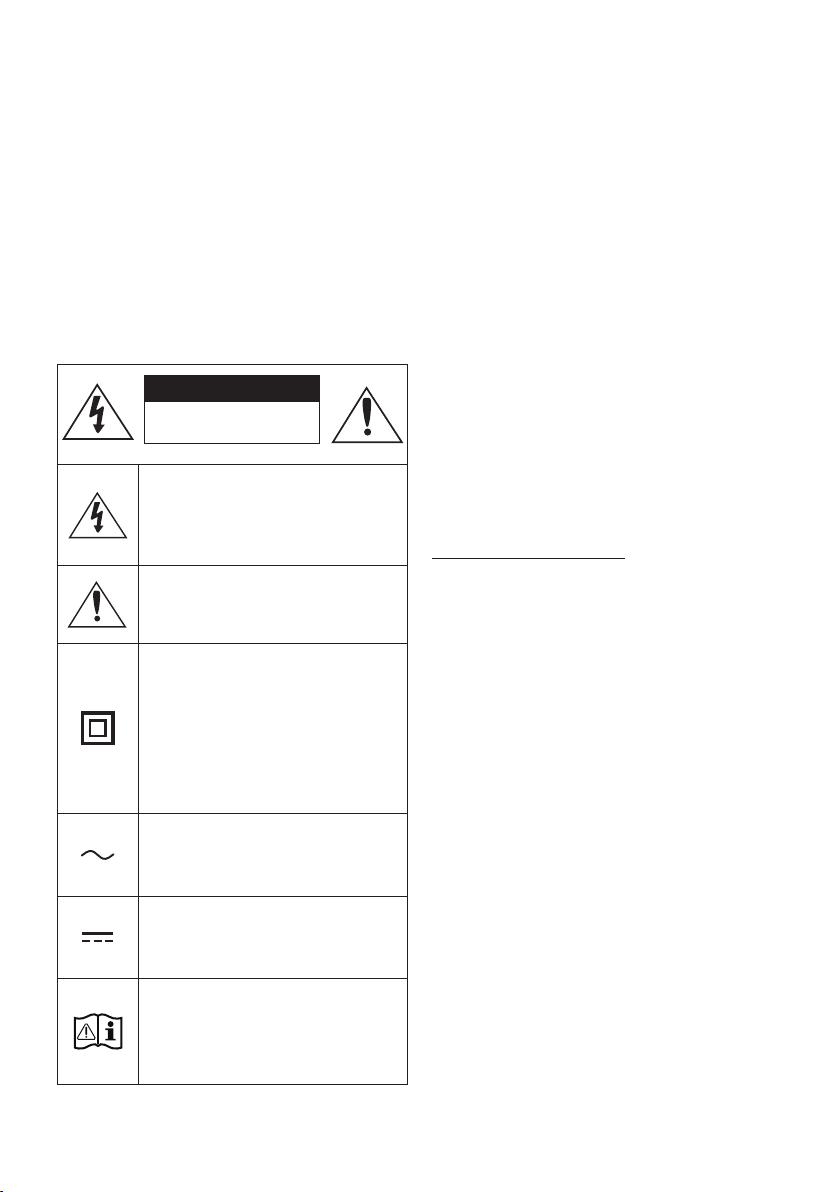
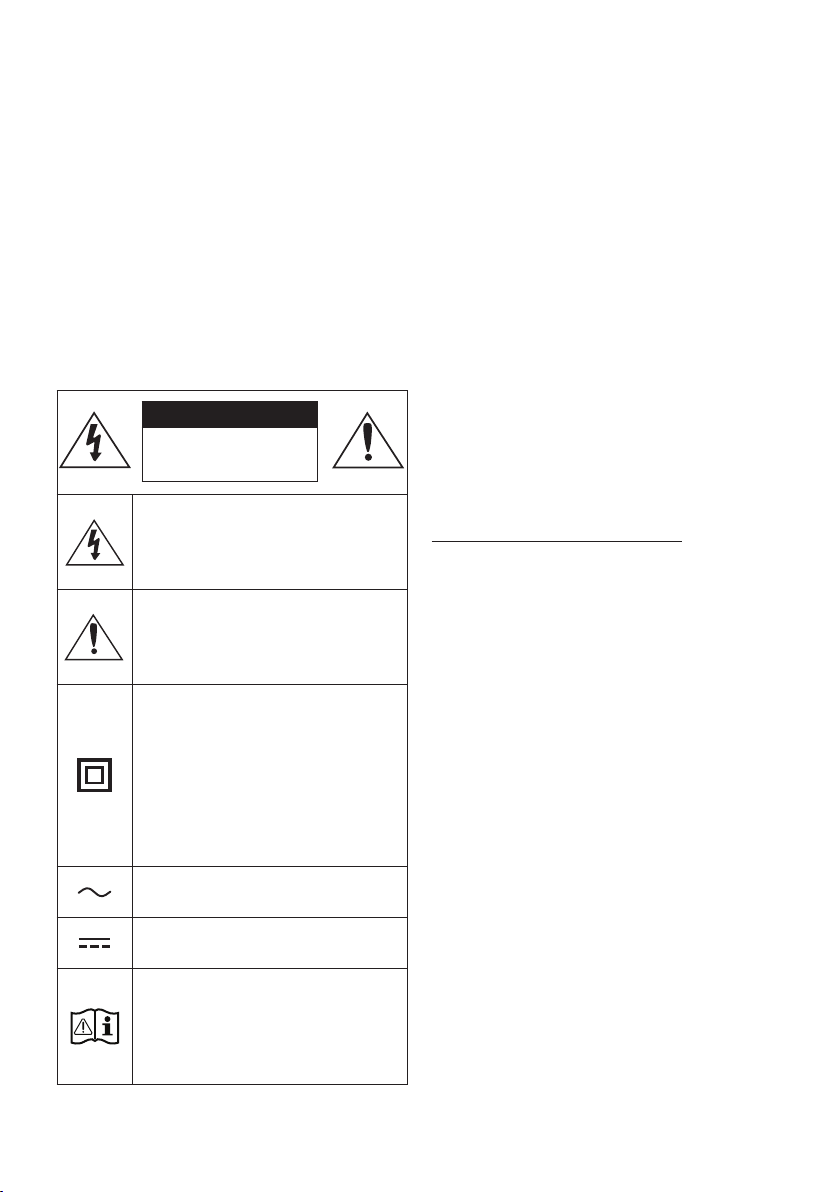
Refer to the table below for an explanation of
symbols which may be on your Samsung product.
CAUTION
RISK OF ELECTRIC SHOCK.
DO NOT OPEN.
This symbol indicates that high voltage
is present inside. It is dangerous to
make any kind of contact with any
internal part of this product.
This symbol indicates that this product
has included important literature
concerning operation and maintenance.
Class II product : This symbol indicates
that it does not require a safety
connection to electrical earth (ground).
If this symbol is not present on a
product with a power cord, the product
MUST have a reliable connection to
protective earth (ground).
AC voltage : This symbol indicates that
the rated voltage marked with the
symbol is AC voltage.
DC voltage : This symbol indicates that
the rated voltage marked with the
symbol is DC voltage.
Caution, Consult instructions for use :
This symbol instructs the user to
consult the user manual for further
safety related information.
WARNING
• To reduce the risk of re or electric shock, do
not expose this appliance to rain or moisture.
• To prevent injury, this apparatus must be
securely attached to the oor/wall in
accordance with the installation instructions.
CAUTION
• Do not expose this apparatus to dripping or
splashing. Do not put objects lled with
liquids, such as vases, on the apparatus.
• To turn this apparatus off completely, you
must pull the power plug out of the wall
socket. Consequently, the power plug must
be easily and readily accessible at all times.
CAUTION (for Canada)
This device contains licence-exempt
transmitter(s)/receiver(s) that comply with
Innovation, Science and Economic Development
Canada’s licence-exempt RSS(s). Operation is
subject to the following two conditions:
(1) This device may not cause interference.
(2) This device must accept any interference,
including interference that may cause undesired
operation of the device.
This device and its antenna(s) must not be co-
located or operation in conjunction with any other
antenna or transmitter.
This device may automatically discontinue
transmission if there is no information to
transmit, or an operational failure. Note that this
is not intended to prohibit the transmission of
control or signaling information or the use of
repetitive codes where required by the
technology.
This Class B digital apparatus complies with
Canadian ICES-003.

ENG - 3
Radiation Exposure Statement
This equipment complies with IC RSS-102
radiation exposure limits set forth for an
uncontrolled environment. This equipment should
be installed and operated with minimum distance
20 cm between the radiator & your body.
Important Safety Instructions
Read these operating instructions carefully
before using the unit. Follow all the safety
instructions listed below. Keep these operating
instructions handy for future reference.
1. Read these instructions.
2. Keep these Instructions.
3. Heed all warnings.
4. Follow all instructions.
5. Do not use this apparatus near water.
6. Clean only with dry cloth.
7. Do not block any ventilation openings.
Install in accordance with the manufacturer’s
instructions.
8. Do not install near any heat sources such as
radiators, heat registers, stoves, or other
apparatus (including ampliers) that produce
heat.
9. Do not defeat the safety purpose of the
polarized or grounding-type plug.
A polarized plug has two blades with one
wider than the other. A grounding type plug
has two blades and a third grounding prong.
The wide blade or the third prong are
provided for your safety. If the provided plug
does not t into your outlet, consult an
electrician for replacement of the obsolete
outlet.
10. Protect the power cord from being walked
on or pinched particularly at plugs,
convenience receptacles, and the point
where they exit from the apparatus.
11. Only use attachments/accessories specied
by the manufacturer.
12. Use only with the cart, stand,
tripod, bracket, or table
specied by the manufacturer,
or sold with the apparatus.
When a cart is used, use caution when
moving the cart/apparatus combination to
avoid injury from tip-over.
13. Unplug this apparatus during lightning
storms or when unused for long periods of
time.
14. Refer all servicing to qualied service
personnel. Servicing is required when the
apparatus has been damaged in any way,
such as power-supply cord or plug is
damaged, liquid has been spilled or objects
have fallen into the apparatus, the apparatus
has been exposed to rain or moisture, does
not operate normally, or has been dropped.

ENG - 4
PRECAUTIONS
1. Ensure that the AC power supply in your
house complies with the power
requirements listed on the identication
sticker located on the bottom of your
product. Install your product horizontally, on
a suitable base (furniture), with enough
space around it for ventilation (3~4 inches).
Make sure the ventilation slots are not
covered. Do not place the unit on ampliers
or other equipment which may become hot.
This unit is designed for continuous use.
To fully turn off the unit, disconnect the AC
plug from the wall outlet. Unplug the unit if
you intend to leave it unused for a long
period of time.
2. During thunderstorms, disconnect the AC
plug from the wall outlet. Voltage peaks due
to lightning could damage the unit.
3. Do not expose the unit to direct sunlight or
other heat sources. This could lead to
overheating and cause the unit to
malfunction.
4. Protect the product from moisture (i.e.
vases), and excess heat (e.g. a replace) or
equipment creating strong magnetic or
electric elds. Unplug the power cable from
the AC wall socket if the unit malfunctions.
Your product is not intended for industrial
use. It is for personal use only. Condensation
may occur if your product has been stored in
cold temperatures. If transporting the unit
during the winter, wait approximately
2 hours until the unit has reached room
temperature before using.
5. The battery used with this product contains
chemicals that are harmful to the
environment. Do not dispose of the battery
in the general household trash. Do not
expose the battery to excess heat, direct
sunlight, or re. Do not short circuit,
disassemble, or overheat the battery.
CAUTION : Danger of explosion if the battery
is replaced incorrectly. Replace only with the
same or equivalent type.

ENG - 5
CONTENTS
01 Checking the Components 7
02 Product Overview 8
Front Panel / Top Panel of the Soundbar
------------------------- 8
Bottom Panel of the Soundbar
------------------------- 9
03 Using the Remote Control 10
Inserting Batteries before using the Remote Control (AAA batteries X 2)
------------------------- 10
How to Use the Remote Control
-------------------------
10
Using the Hidden Buttons (Buttons with more than one function)
-------------------------
15
Output specications for the different sound effect modes
-------------------------
15
Adjusting the Soundbar volume with a TV remote control
------------------------- 16
04 Connecting the Soundbar 17
Connecting Electrical Power
-------------------------
17
Connecting the Samsung Wireless Rear Kit and Subwoofer to your
Soundbar
-------------------------
17
05 Using a wired connection to the TV 18
Method 1. Connecting with HDMI
-------------------------
18
Method 2. Connecting using an Optical Cable
-------------------------
20
06 Using a wireless connection to the TV 22
Connecting via Bluetooth
-------------------------
22

ENG - 6
07 Connecting an External Device 24
Connecting using an Optical Cable
-------------------------
24
08 Connecting a USB Storage Device 25
09 Connecting a Mobile Device 27
Connecting via Bluetooth
-------------------------
27
Using Tap Sound
-------------------------
32
10 Installing the Wall Mount 33
Installation Precautions
-------------------------
33
Wallmount Components
-------------------------
33
11 Installing the Soundbar in front of TV 35
12 Software Update 36
Reset
-------------------------
37
13 Troubleshooting 38
14 License 39
15 Open Source License Notice 40
16 Important Notes About Service 40
17 SpecicationsandGuide 41
Specications
-------------------------
41
ENG - 7
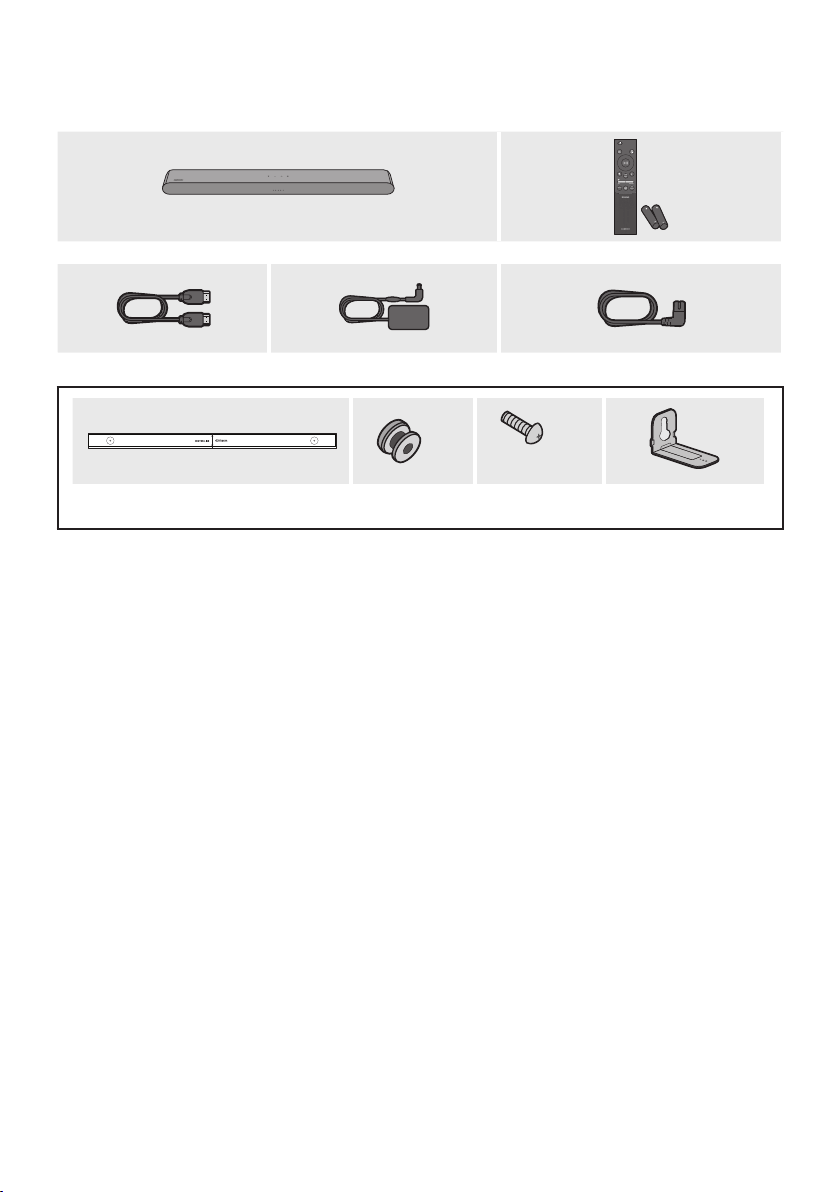
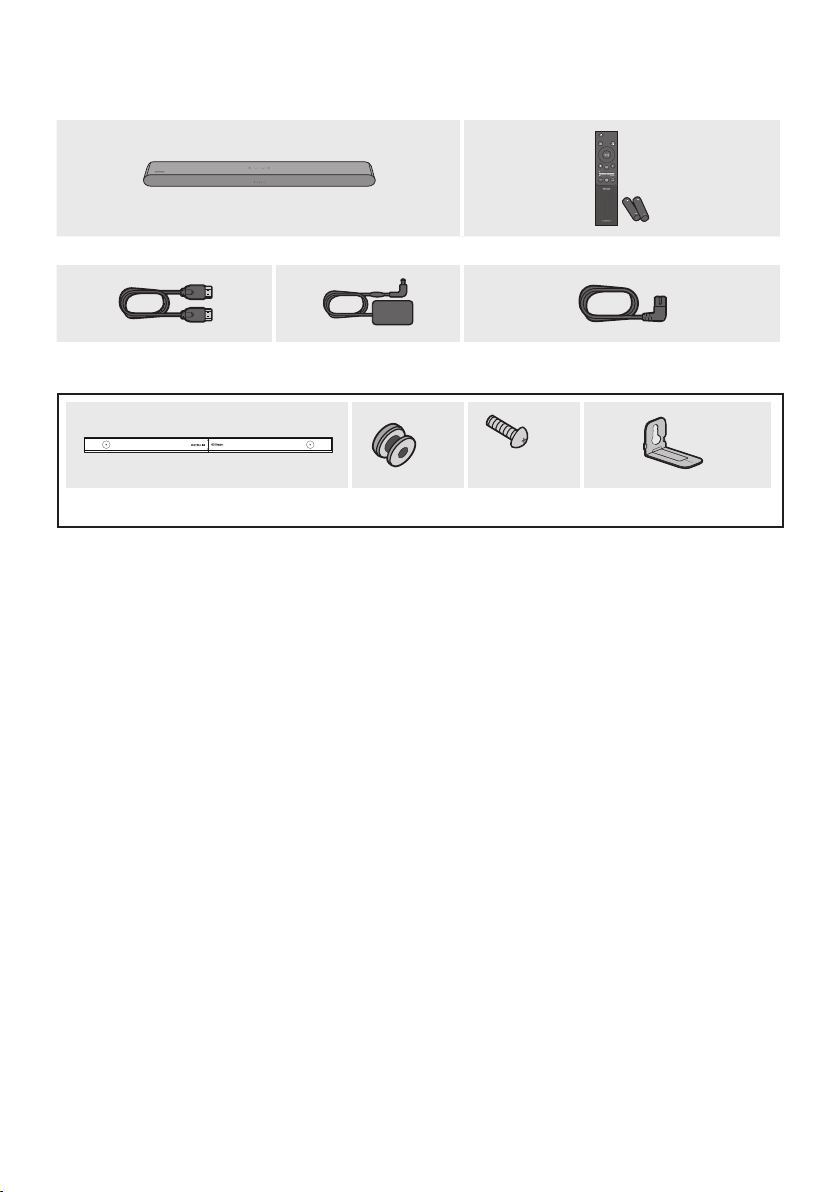
01 CHECKING THE COMPONENTS
SOUND
MODE
WOOFER
TONE
CONTROL
CH LEVEL
Soundbar Main Unit Soundbar Remote Control
/ Batteries
HDMI Cable AC/DC Adapter (Soundbar)
Power Cord (Soundbar)
x 2
(M4 x L10)
x 2
x 2
Wall Mount Guide Holder-Screw Screw Bracket-Wall Mount
• For more information about the power supply and power consumption, refer to the label attached
to the product. (Label: Bottom of the Soundbar Main Unit)
• To purchase additional components or optional cables, contact a Samsung Service Center or
Samsung Customer Care.
• For more information about the wallmount see page 33.
• Design, specications are subject to change without prior notice.
• The appearance of the accessories may differ slightly from the illustrations above.
ENG - 8
02 PRODUCT OVERVIEW
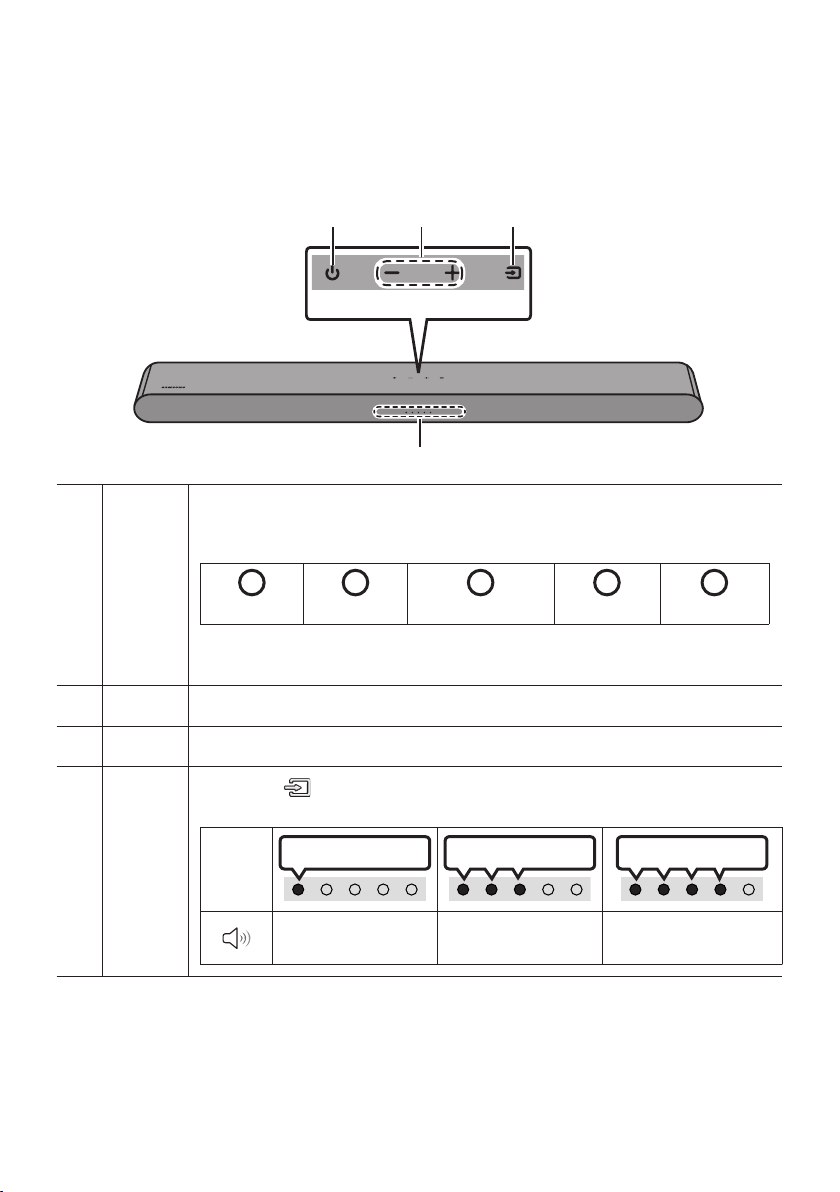
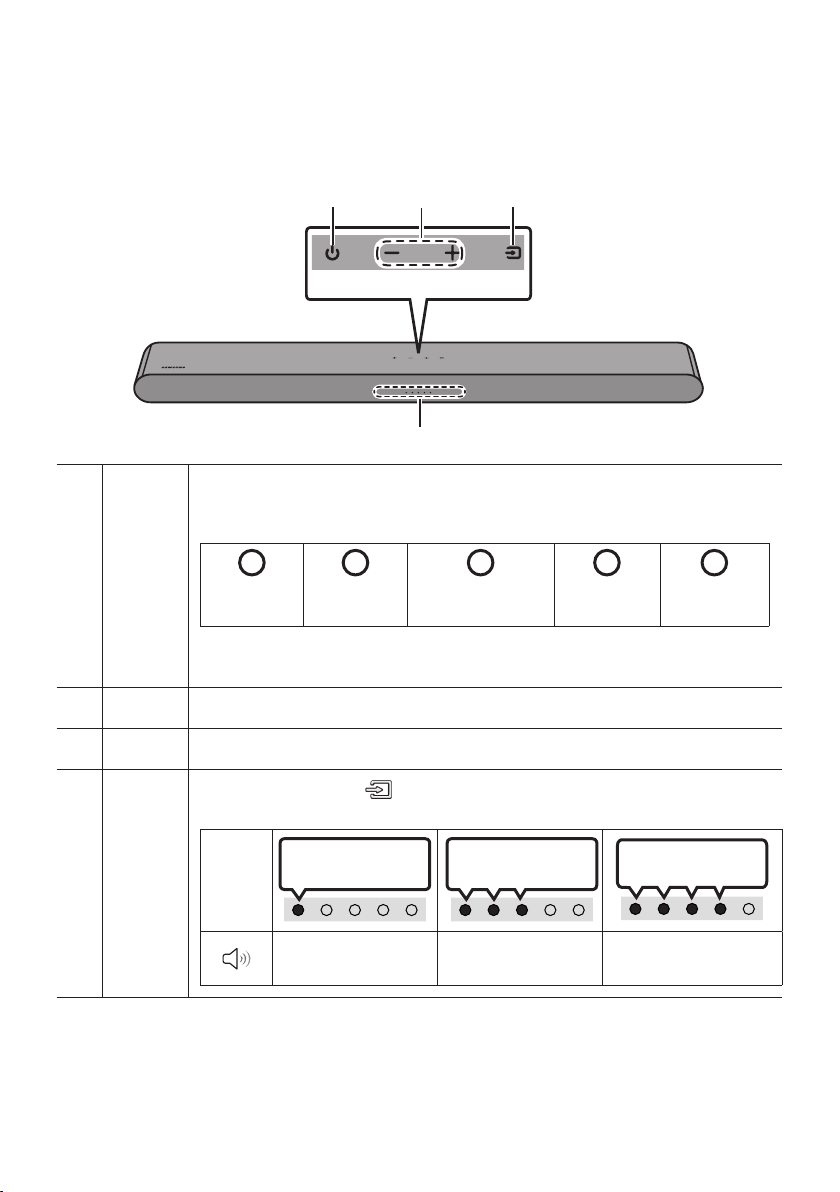
Front Panel / Top Panel of the Soundbar
Top Panel
LED
indicator
The LED Indicator ashes, glows, or changes color depending on the Soundbar's current
mode or status. The color of the LED indicator and the number of lights indicate the active
mode as described below.
W
White LED
W
White LED
M
Multicolor LED
W
White LED
W
White LED
• The Multicolor LED changes to White, Cyan, Green, Red, Yellow, Orange, Purple and
Blue depending on the mode or status.
Power Turns the power on and off.
Volume Adjusts the volume.
Source
• Press the
(Source) button to change the mode. Each time you change the mode,
the LED lights in white and then turns off.
LED
Indicator
White On -> Off White On -> Off White On -> Off
“Digital Audio In” or
“TV ARC”
“Bluetooth” “USB”
ENG - 9
• When you plug in the AC cord, the power button will begin working in 4 to 6 seconds.
• When you turn on this unit, there will be a 4 to 5 second delay before it produces sound.
• If you hear sounds from both the TV and Soundbar, go to the Settings menu for the TV audio and
change the TV speaker to External Speaker.
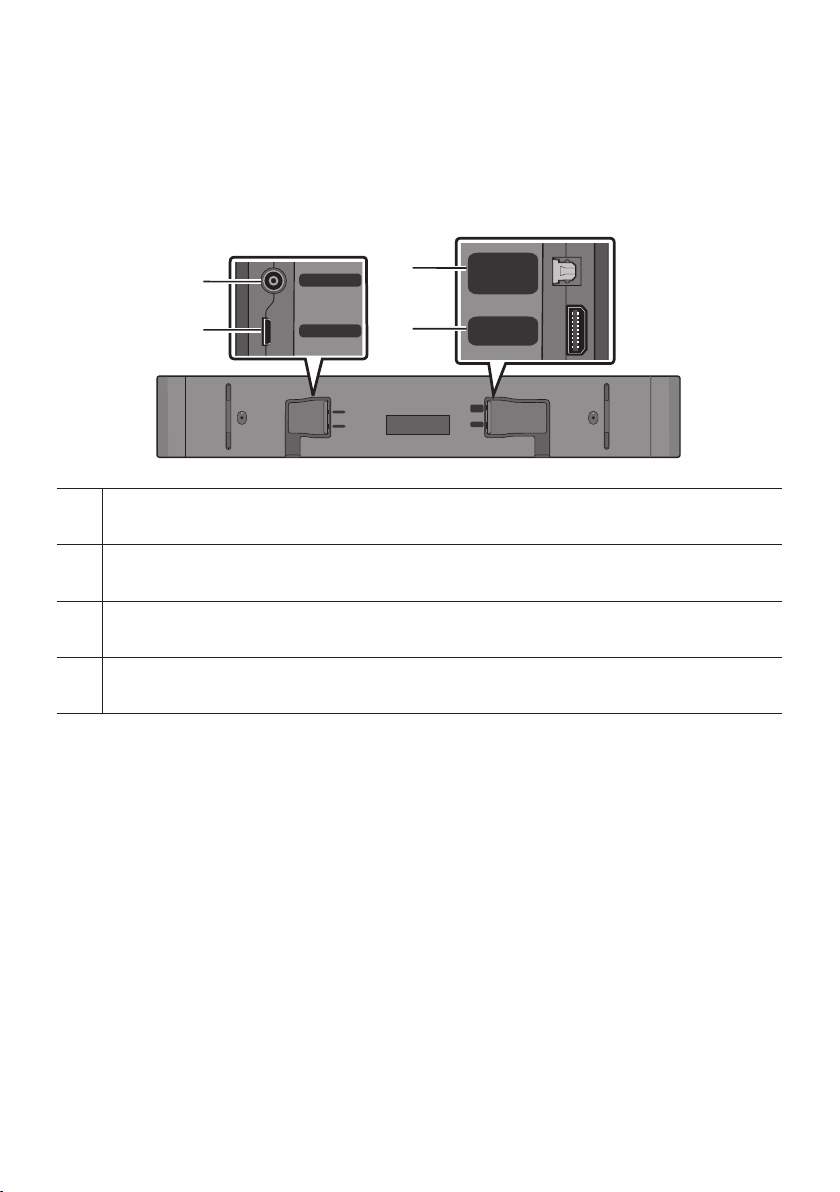
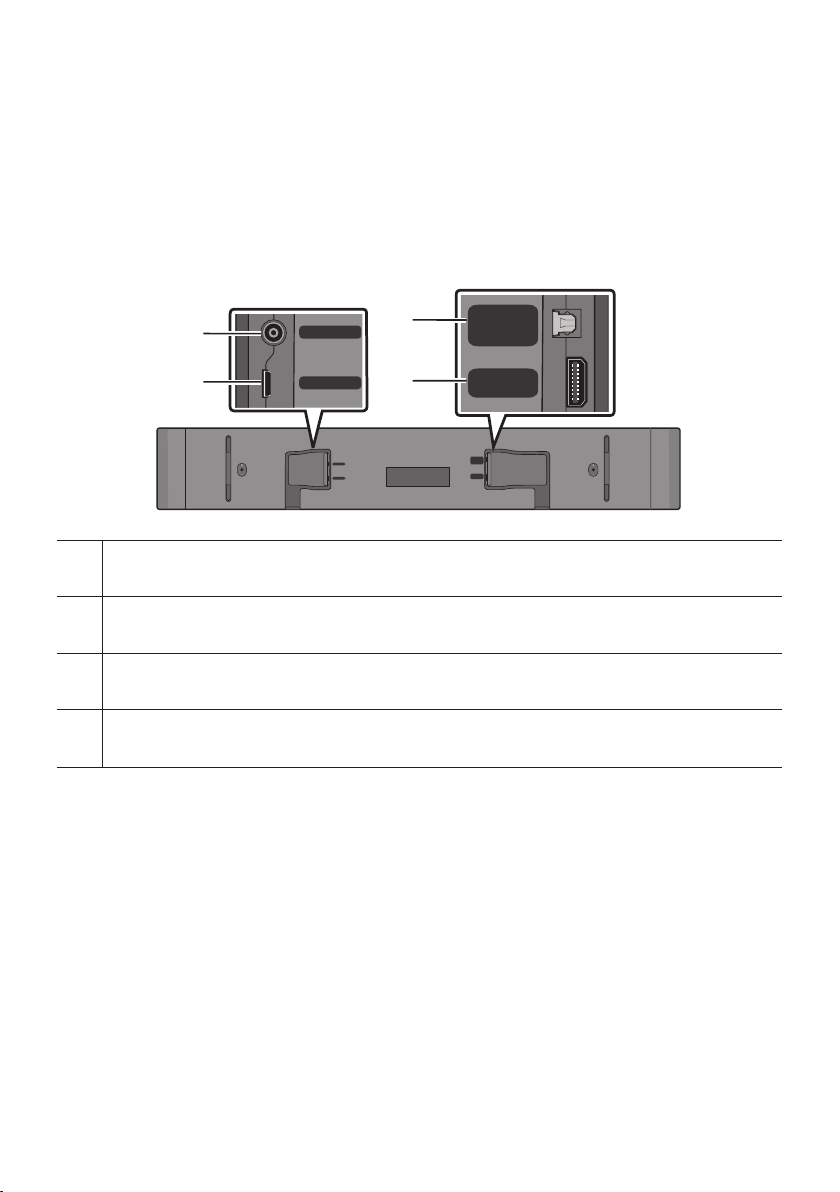
Bottom Panel of the Soundbar
USB (5V 0.5A)
DC 19V
DIGITAL
AUDIO IN
(OPTICAL)
HDMI
(ARC)
DIGITAL
AUDIO IN
(OPTICAL)
HDMI
(ARC)
USB (5V 0.5A)
DC 19V
DC 19V (Power Supply In)
Connect the AC/DC power adapter.
USB (5V 0.5A)
Connect a USB device here to play music les stored on the USB device through the Soundbar.
DIGITAL AUDIO IN (OPTICAL)
Connect to the digital (optical) output of an external device.
HDMI (ARC)
Connect to the HDMI (ARC) port on a TV.
• When disconnecting the power cable of the AC/DC power adapter from a wall outlet, pull the plug.
Do not pull the cable.
• Do not connect this unit or other components to an AC outlet until all connections between
components are complete.
ENG - 10
03 USING THE REMOTE CONTROL
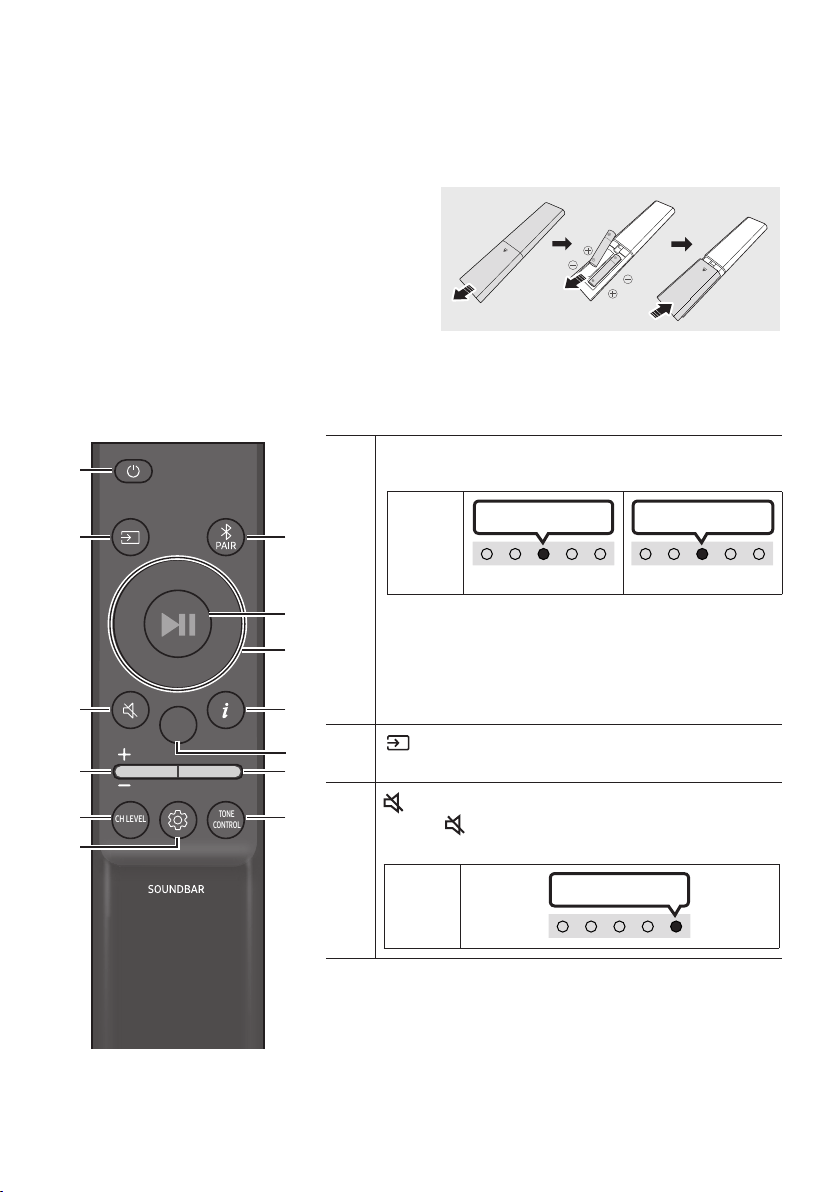
Inserting Batteries before using the Remote Control (AAA batteries X 2)
Slide the back cover in the direction of the arrow
until it is completely removed.
Insert 2 AAA batteries (1.5V) oriented so that their
polarity is correct. Slide the back cover back into
position.
How to Use the Remote Control
SOUND
MODE
WOOFER
TONE
CONTROL
CH LEVEL
Power
Turns the Soundbar on and off.
LED
Indicator
Cyan Blinks X1
On
Off
Red Blinks X3
• Auto Power Down Function
The unit turns off automatically in the following
situations:
– In “Digital Audio In” or “TV ARC” / “Bluetooth” /
“USB” mode if there is no audio signal for 20 minutes.
(Source)
Press to select a source connected to the Soundbar.
(Mute)
Press the (Mute) button to mute the sound.
Press it again to unmute the sound.
LED
Indicator
Blinks X Repeatly
ENG - 11
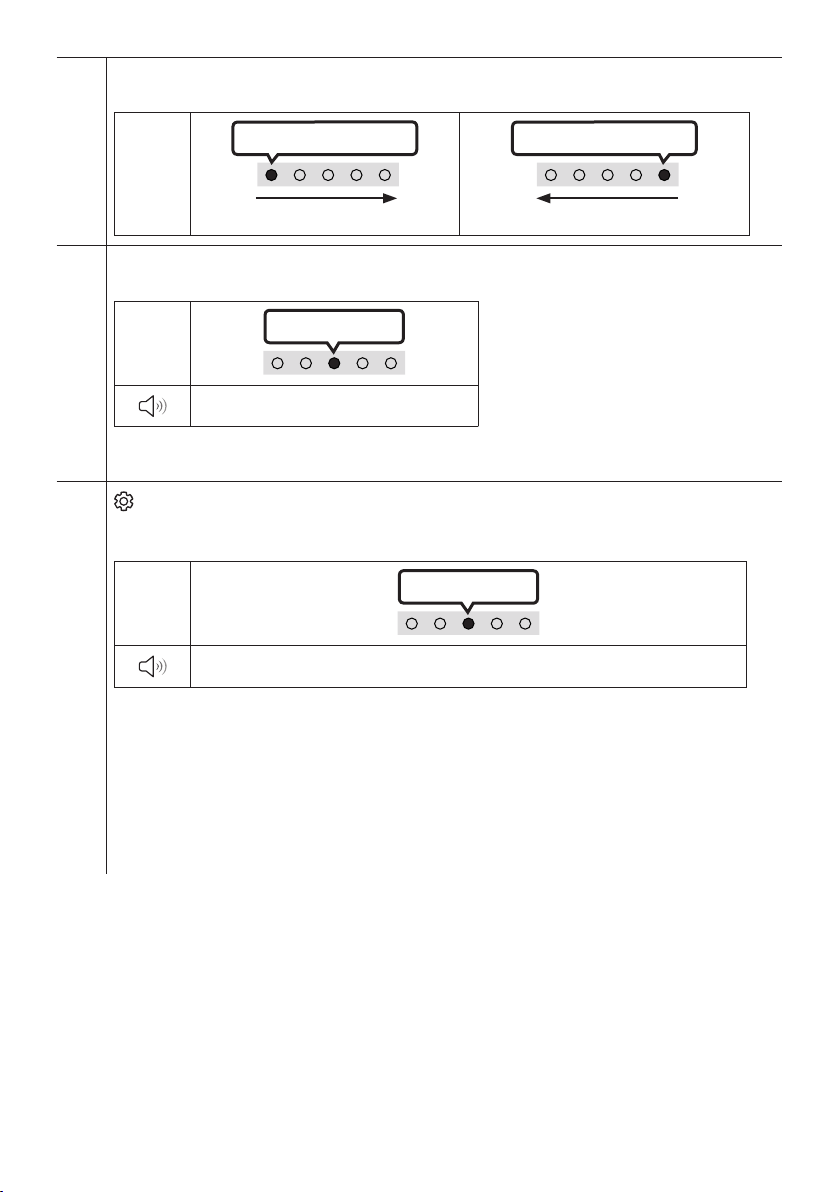
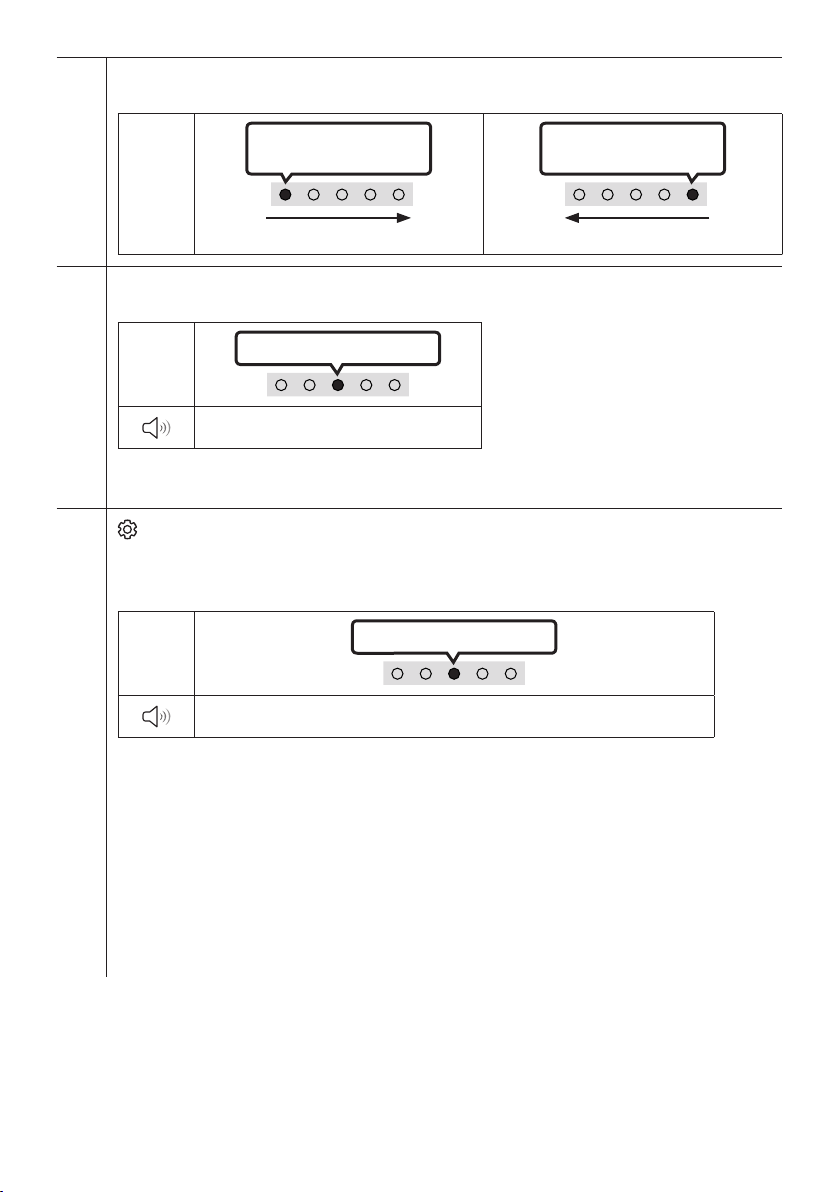
Volume
Push the button up or down to adjust the volume.
LED
Indicator
White moves to right X1
Volume Up
White moves to left X1
Volume Down
CH LEVEL
By pressing the button, you can adjust the volume of the each speaker.
LED
Indicator
White Blinks X1
“Center Level”
– If the Rear Speakers (sold separately) are connected, the setting “Rear Level” is supported. To adjust
the volume of the “Rear Level” between -6 to +6 by using the Up/Down buttons.
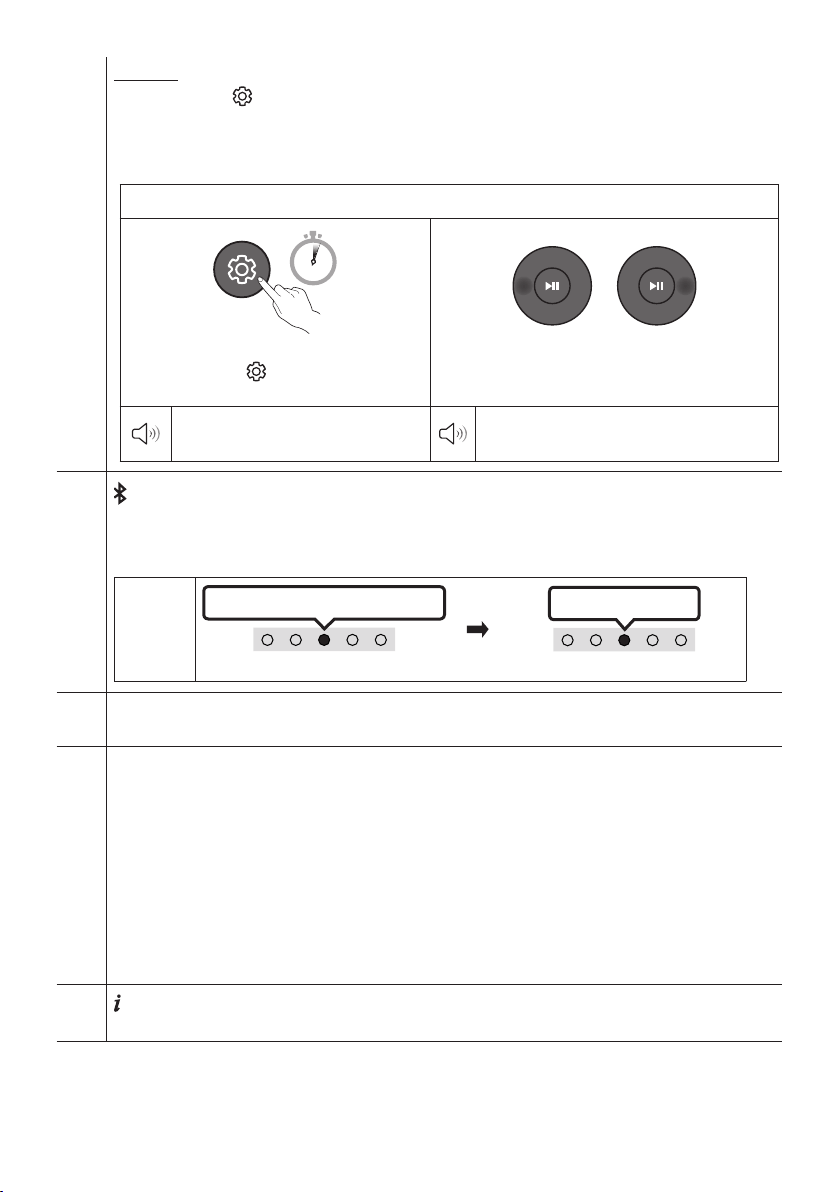
(Sound Control)
By pressing the button, you can set the audio function. The desired item can be adjusted using the Up/
Down buttons. Each time the mode changes, the Multicolor LED blinks in white.
LED
Indicator
White Blinks X1
“Sync” “Night mode” “Voice enhancement”
– If the video on the TV and audio from the Soundbar are not synchronized, select “Sync” in Sound
Control, and then set the audio delay between 0~300 milliseconds by using the Up/Down buttons.
(Not available in “USB” or “Bluetooth”mode.)
– “Sync” is only supported for some functions.
– “Night mode” and “Voice enhancement” are not supported in “DTS Virtual:X” sound mode.
– “Night mode” is optimized for night time viewing with the settings adjusted to bring the volume
down but keep the dialog clear.
– “Voice enhancement” makes it easier to hear spoken dialog in movies and TV.
ENG - 12
7 Band EQ
Press and hold the (Sound Control) button for about 5 seconds to adjust the sound for each frequency
band. 150Hz, 300Hz, 600Hz, 1.2kHz, 2.5kHz, 5kHz, and 10kHz are selectable using the Left/Right buttons
and each can be adjusted to a setting between -6 to +6 using the Up/Down buttons. (Make sure the Sound
mode is set to "Standard".)
7 Band EQ
5 Sec
Press and hold the (Sound Control) button
for about 5 seconds.
Using the Left/Right buttos and each can be
adjusted to setting between -6 to+6.
“150Hz”
“150Hz” “300Hz” “600Hz” “1.2kHz”
“2.5kHz” “5kHz” “10kHz”
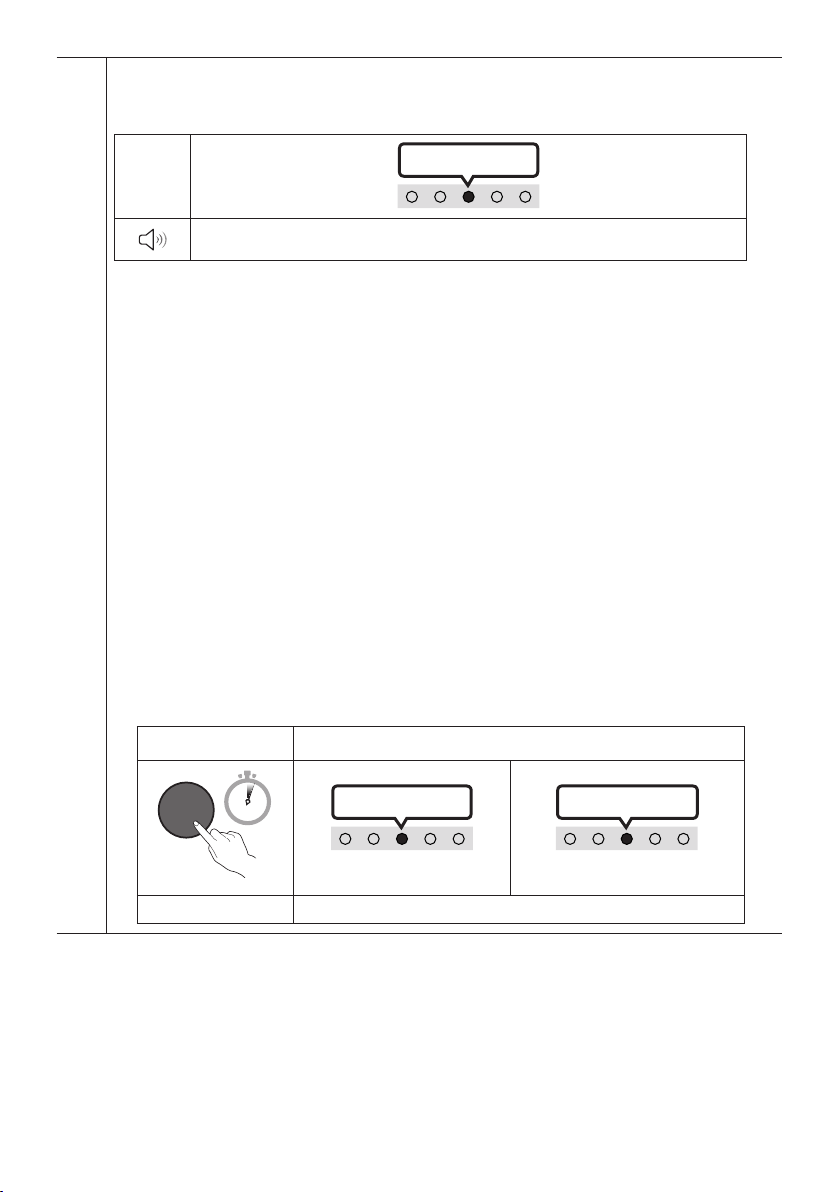
Bluetooth PAIR
Switch the Soundbar to Bluetooth pairing mode.
When you press the button, the LED display changes as shown below.
• Until pairing is complete, the Multicolor LED changes as Red → Green → Blue in turn.
LED
Indicator
Red → Green → Blue Blinks
Pairing
Connection is complete
Cyan Blinks X3
p (Play / Pause)
You can also play or pause music by pressing the button in "USB" mode.
Up/Down/Left/Right
Press Up/Down/Left/Right on the button to select or set functions.
• Repeat
To use the Repeat function in “USB” mode, press the Up button.
• Music Skip
Press the Right button to select the next music le. Press the Left button to select the previous music
le.
• ID SET
Press and hold the Up button for 5 seconds to complete ID SET (when connecting to a wireless
subwoofer or wireless rear speakers).
(Info)
Press the button to display information about the current function. (See page 8.)
ENG - 13
SOUND MODE
By pressing the button, you can select the desired audio mode. Each time the mode changes, the
Multicolor LED blinks in white. (The sound mode may differ with the TV model.)
LED
Indicator
White Blinks X1
“DTS Virtual:X” “Standard” “Music” “Game” “Adaptive Sound”
– DTS Virtual:X
Immersive 3D sound from any content.
– Standard
Outputs the original sound.
– Music
Provides more natural and room lling sound for music content.
– Game
Provides stereoscopic sound to immerse you in the action while gaming.
– Adaptive Sound
Analyzes the content in real time and automatically provides the optimal sound eld based on the
characteristics of the content.
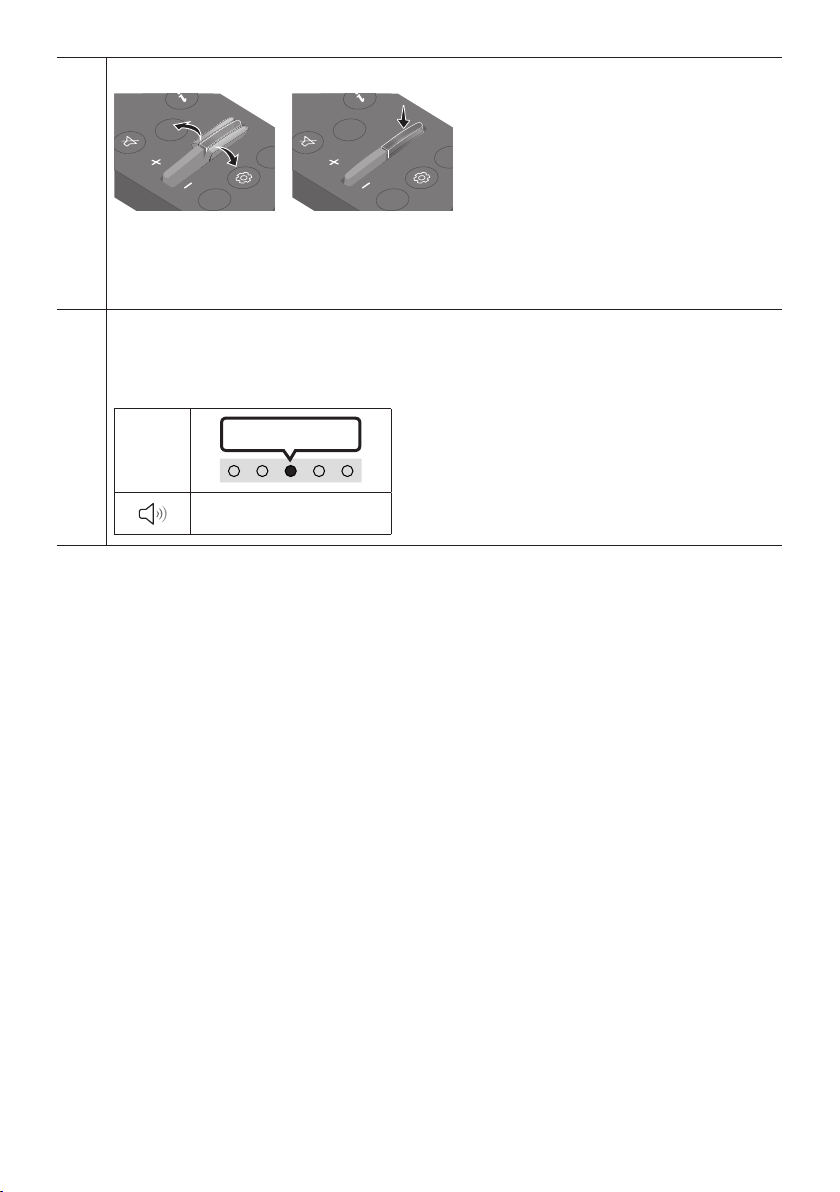
• Bluetooth Power On/Off
This feature automatically turns the Soundbar on when it receives a connection request from a
previously connected TV or Bluetooth device. The setting is On by default.
– Press and hold the SOUND MODE button for more than 5 seconds to turn off the Bluetooth Power
function.
• DRC (Dynamic Range Control) On/Off
Lets you apply dynamic range control to Dolby Digital tracks. Press and hold the SOUND MODE
button for more than 5 seconds while the Soundbar is powered off to turn DRC (Dynamic Range
Control) on or off. With the DRC turned on, loud sound is reduced. (The sound may be distorted.)
SOUND MODE button LED Indicator
SOUND
MODE
5 Sec
Cyan Blinks X1
On (Default) Off
Red Blinks X1
DRC On/Off Toggle On Off
ENG - 14
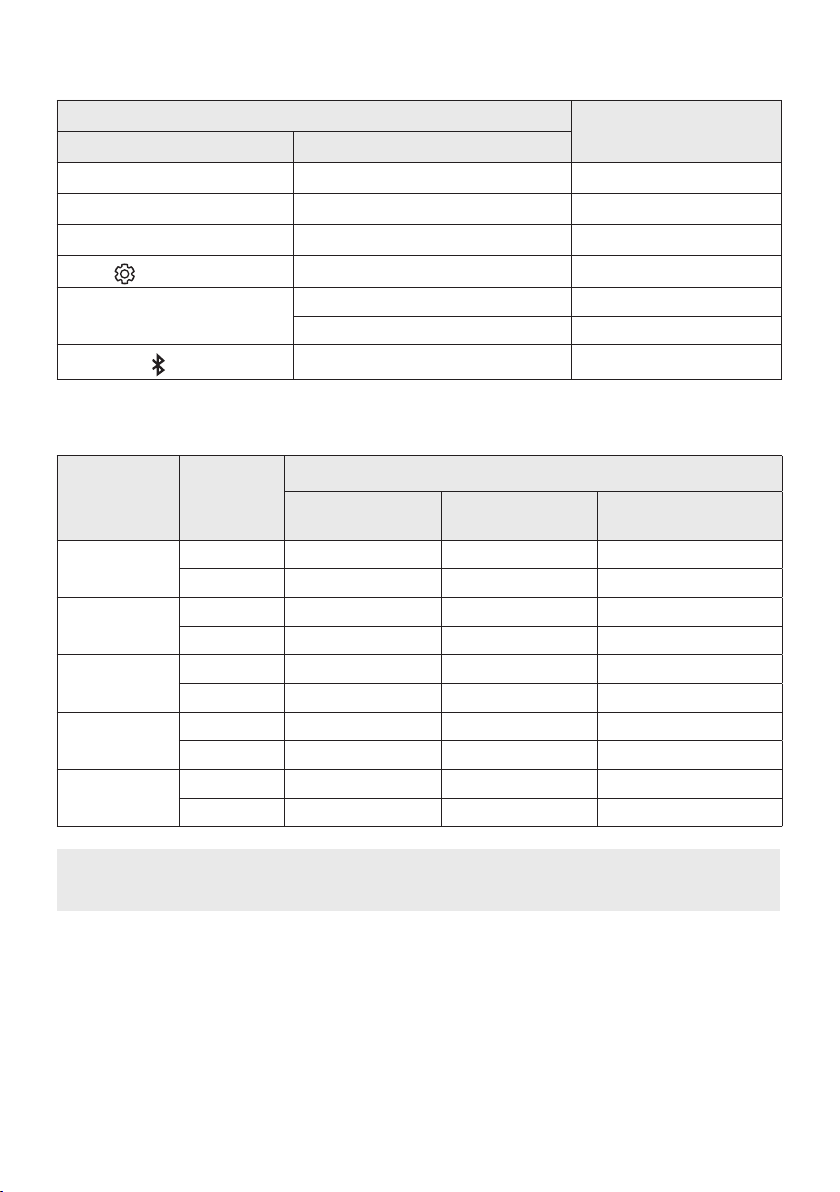
WOOFER (BASS) LEVEL
CH LEVEL
TONE
CONTR
WOOFER
SOUND
MODE
CH LEVEL
TONE
CONTR
WOOFER
SOUND
MODE
When subwoofer is connected, push the button up or down to adjust the woofer level to -12 or between -6
to +6. When subwoofer is disconnected, push the button up or down to adjust the bass level between -6 to
+6.
To set the woofer (bass) volume level to 0 (Default), press the button. (If Soundbar connected to
wireless subwoofer (sold separately)).
TONE CONTROL
By pressing the button, you can adjust the volume of the treble or bass sound. The desired item can be
adjusted using the Up/Down buttons. (This feature is available in all sound modes except “Standard”
mode.)
LED
Indicator
White Blinks X1
“Treble” “Bass”
ENG - 15
Using the Hidden Buttons (Buttons with more than one function)
Hidden Button
Reference page
Remote Control Button Function
WOOFER (Up) TV remote control On/Off page 16
Left TV Auto connect On/Off page 23
Up ID SET page 12
(Sound Control)
7 Band EQ page 12
SOUND MODE
DRC On/Off page 13
Bluetooth Power On/Off page 13
PAIR
Bluetooth Multi connection On/Off page 30
Outputspecicationsforthedifferentsoundeffectmodes
Effect Input
Output
With Soundbar only With Subwoofer Only
With Subwoofer &
Wireless Rear Speaker Kit
DTS Virtual:X
2.0 ch 3.0 ch 3.1 ch 5.1 ch
5.1 ch 3.0 ch 3.1 ch 5.1 ch
Standard
2.0 ch 2.0 ch 2.1 ch 2.1 ch
5.1 ch 3.0 ch 3.1 ch 5.1 ch
Music
2.0 ch 3.0 ch 3.1 ch 5.1 ch
5.1 ch 3.0 ch 3.1 ch 5.1 ch
Game
2.0 ch 3.0 ch 3.1 ch 5.1 ch
5.1 ch 3.0 ch 3.1 ch 5.1 ch
Adaptive Sound
2.0 ch 3.0 ch 3.1 ch 5.1 ch
5.1 ch 3.0 ch 3.1 ch 5.1 ch
• The Samsung Wireless Rear Speaker Kit, and Subwoofer can be purchased separately.
To purchase a Kit or the Subwoofer, contact the vendor you purchased the Soundbar from.
ENG - 16
Adjusting the Soundbar volume with a TV remote control
Adjust the Soundbar volume using the TV’s remote control.
• This function can be used with IR remote controls only. Bluetooth remote controls (remote
controls that require pairing) are not supported.
• Set the TV speaker to External Speaker to use this function.
• Manufacturers supporting this function:
Samsung, VIZIO, LG, Sony, Sharp, PHILIPS, PANASONIC, TOSHIBA, Hisense, RCA
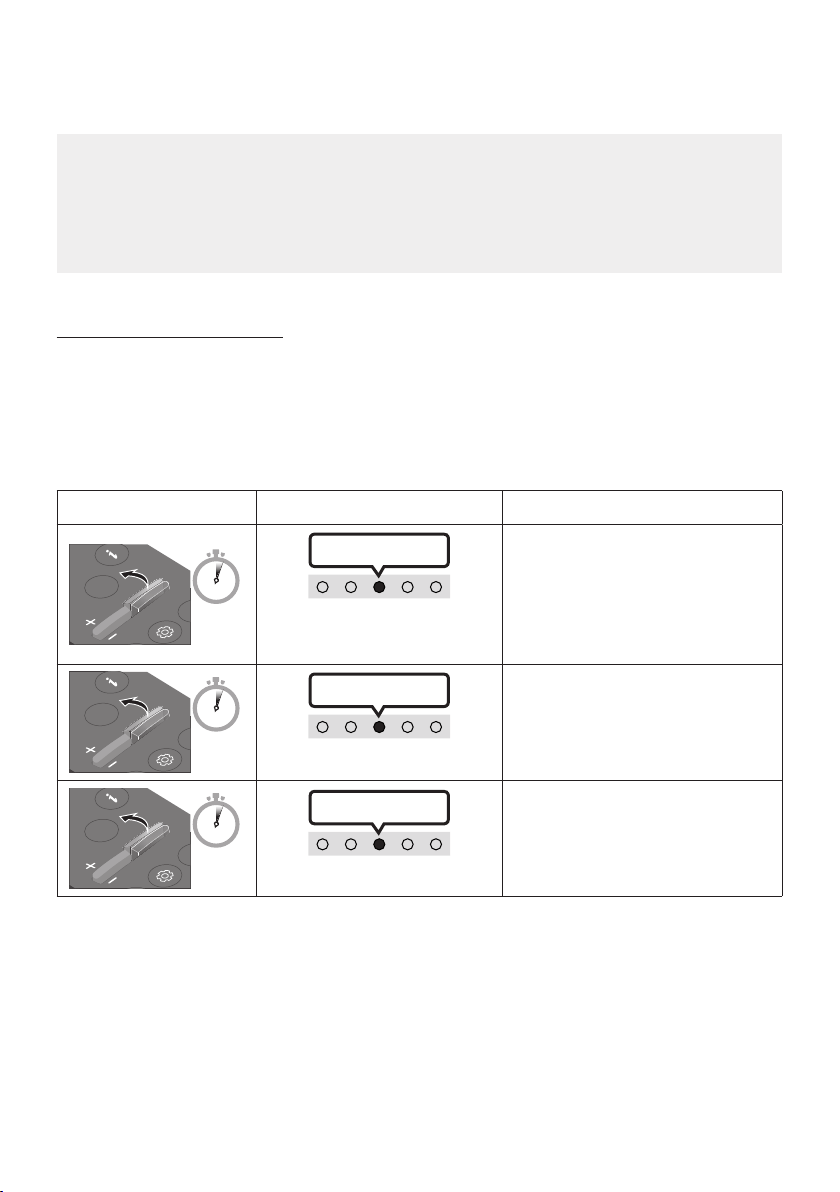
TV remote control On/Off
1. Turn Off the Soundbar.
2. Push up and hold the WOOFER button for 5 seconds.
Each time you push the WOOFER button up and hold it for 5 seconds, the mode switches in the
following order: “Off-TV Remote” (Default mode), “Samsung-TV Remote”, “All-TV Remote”.
The LED indicator status changes each time the mode is changed, as shown below.
Remote Control Button LED Indicator Status
SOUND
MODE
WOOFER
L
TONE
CON
5 Sec
"Off-TV Remote"
(Default mode)
Red Blinks X1
Disable the TV remote control.
SOUND
MODE
WOOFER
L
TONE
CON
5 Sec
"Samsung-TV Remote"
Cyan Blinks X1
Enable a Samsung TV’s IR remote
control.
SOUND
MODE
WOOFER
L
TONE
CON
5 Sec
"All-TV Remote"
Blue Blinks X1
Enable a third-party TV’s IR remote
control.
ENG - 17
04 CONNECTING THE SOUNDBAR
Connecting Electrical Power
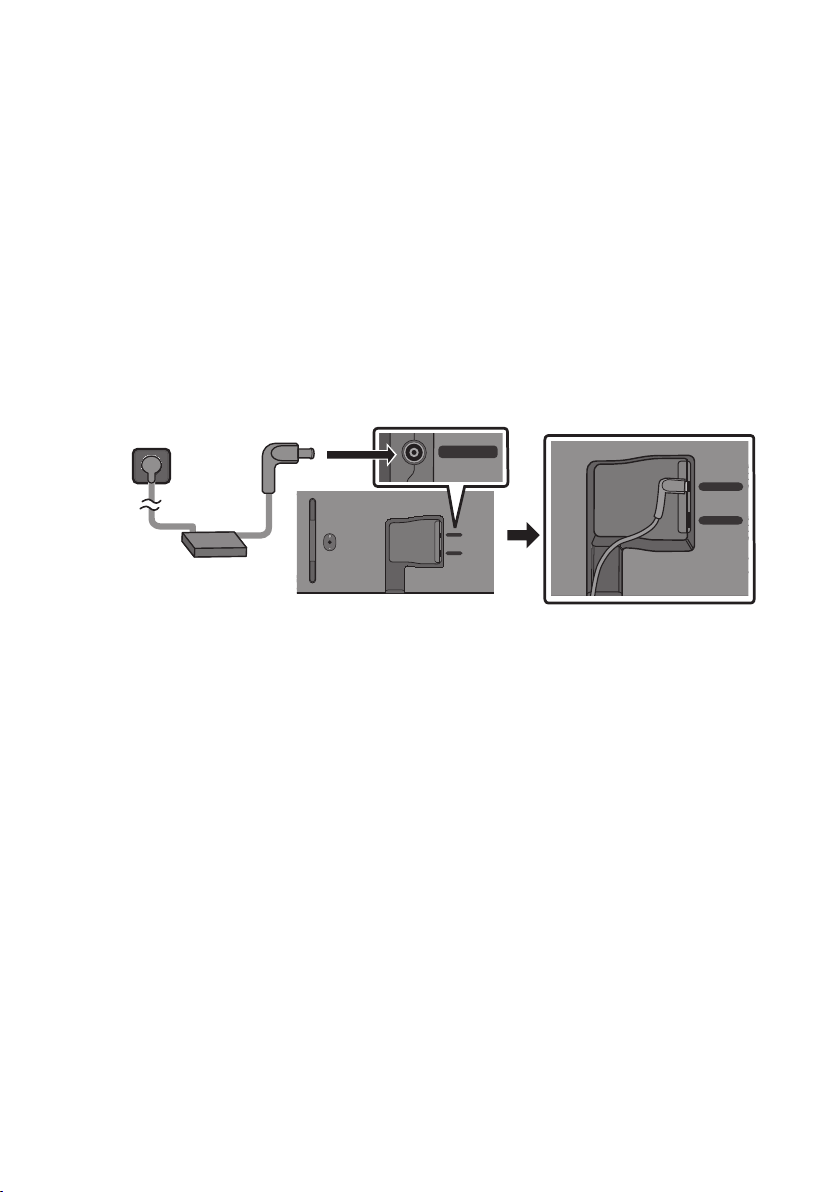
Use the power components to connect the Soundbar to an electrical outlet in the following order:
• For more information about the required electrical power and power consumption, refer to the
label attached to the product. (Label: Bottom of the Soundbar Main Unit)
1. First connect the power cable to the AC/DC adapter.
Connect the AC/DC adapter (with the power cable) to the Soundbar.
2. Connect the power cord to a wall socket.
Bottom of the Soundbar Main Unit
USB (5V 0.5A)
DC 19V
DC 19V
Power Cord
AC/DC Adapter
USB (5V 0.5A)
DC 19V
NOTES
• If you unplug and reconnect the power cord when the product is turned on, the Soundbar turns on
automatically.
• Make sure to rest the AC/DC Adapter at on a table or the oor. If you place the AC/DC Adapter so
that it is hanging with the AC cord input facing upwards, water or other foreign substances could
enter the Adapter and cause the Adapter to malfunction.
Connecting the Samsung Wireless Rear Kit and Subwoofer to your
Soundbar
Expand to true wireless surround sound by connecting the Samsung Wireless Rear Speaker Kit
(SWA-9100S or SWA-9200S, sold separately) and Wireless Subwoofer (SWA-W510, sold separately) to
your Soundbar.
For detailed information on connections, see the Samsung Wireless Rear Speaker Kit and Wireless
Subwoofer manual.

ENG - 18
05 USING A WIRED CONNECTION TO THE TV
Method 1. Connecting with HDMI
CAUTION
• When both the HDMI cable and optical cable are connected, the HDMI signal is received rst.
• To connect the HDMI cable between the TV and Soundbar, be sure to connect the terminals
marked ARC. Otherwise, the TV sound may not be output.
• The recommended cable is High Speed HDMI Cable with Ethernet.
Connecting the TV that supports HDMI ARC (Audio Return Channel)
HDMI IN
(ARC)
(OPTICAL)
HDMI
(ARC)
Connect to the HDMI IN (ARC) or
(eARC) port of your TV.
HDMI Cable
Bottom of the
Soundbar
Connect to the HDMI (ARC) port of
the Soundbar main unit.
Top of the Soundbar
LED
Indicator
White On -> Off
“TV ARC”
1. With the Soundbar and TV turned off, connect the HDMI cable as shown in the gure.
2. Turn on the Soundbar and TV.
3. TV sound is output from the Soundbar.

ENG - 19
• When the TV sound is not output, press the top panel of the Soundbar or the
(Source)
button on the remote control to select the “Digital Audio In” mode.
• When the sound is not output, check the HDMI Cable connection again.
• Use the volume buttons on the TV’s remote control to change the volume on the Soundbar.
NOTES
• When you connect the TV that supports the HDMI ARC (Audio Return Channel) to the Soundbar
with an HDMI cable, you can transmit the digital video and audio data without connecting a
separate optical cable.
• We recommend you use a coreless HDMI cable if possible. If you use a cored HDMI cable, use one
whose diameter is less than 0.55 inches (14 mm).
• This function is not available if the HDMI cable does not support ARC.
• When the audio in a broadcast is encoded in Dolby Digital and the “Digital Output Audio Format” on
your TV is set to PCM, we recommend that you change the setting to Dolby Digital. When the
setting on the TV is changed, you will experience better sound quality. (The TV menu may use
different words for Dolby Digital and PCM depending on the TV manufacturer.)
ENG - 20
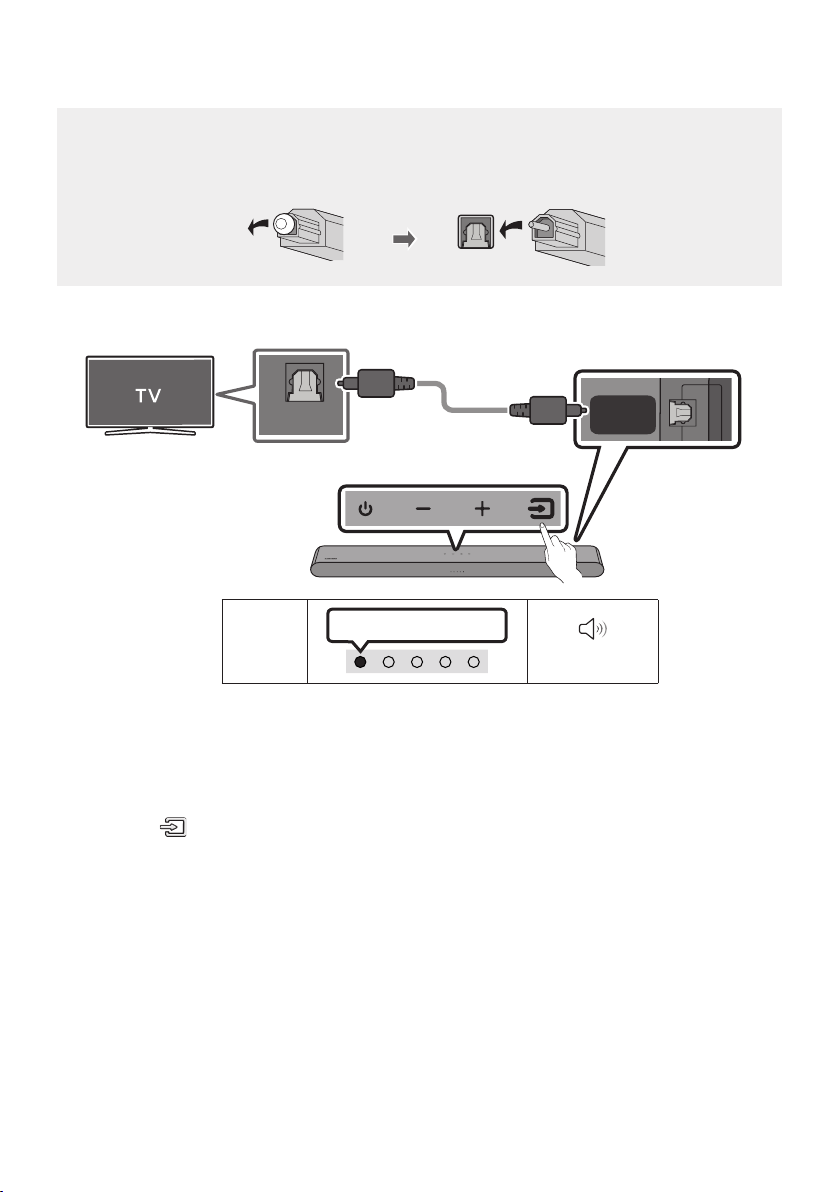
Method 2. Connecting using an Optical Cable
Pre-connection Checklist
• When both the HDMI cable and optical cable are connected, the HDMI signal is received rst.
• When you use an optical cable and the terminals have covers, be sure to remove the covers.
LED
Indicator
White On -> Off
“Digital Audio In”
DIGITAL
AUDIO IN
(OPTICAL)
OPTICAL OUT
Bottom of the
Soundbar
Optical Cable (not supplied)
Top of the Soundbar
1. With the TV and Soundbar turned off, connect the DIGITAL AUDIO IN (OPTICAL) port on the
Soundbar and the OPTICAL output port on the TV with the optical cable (not supplied), as shown in
the gure.
2. Turn on the Soundbar and TV.
3. Press the (Source) button on the top panel or remote control, and then select the “Digital
Audio In” mode.
4. The TV sound is output from the Soundbar.
ENG - 21
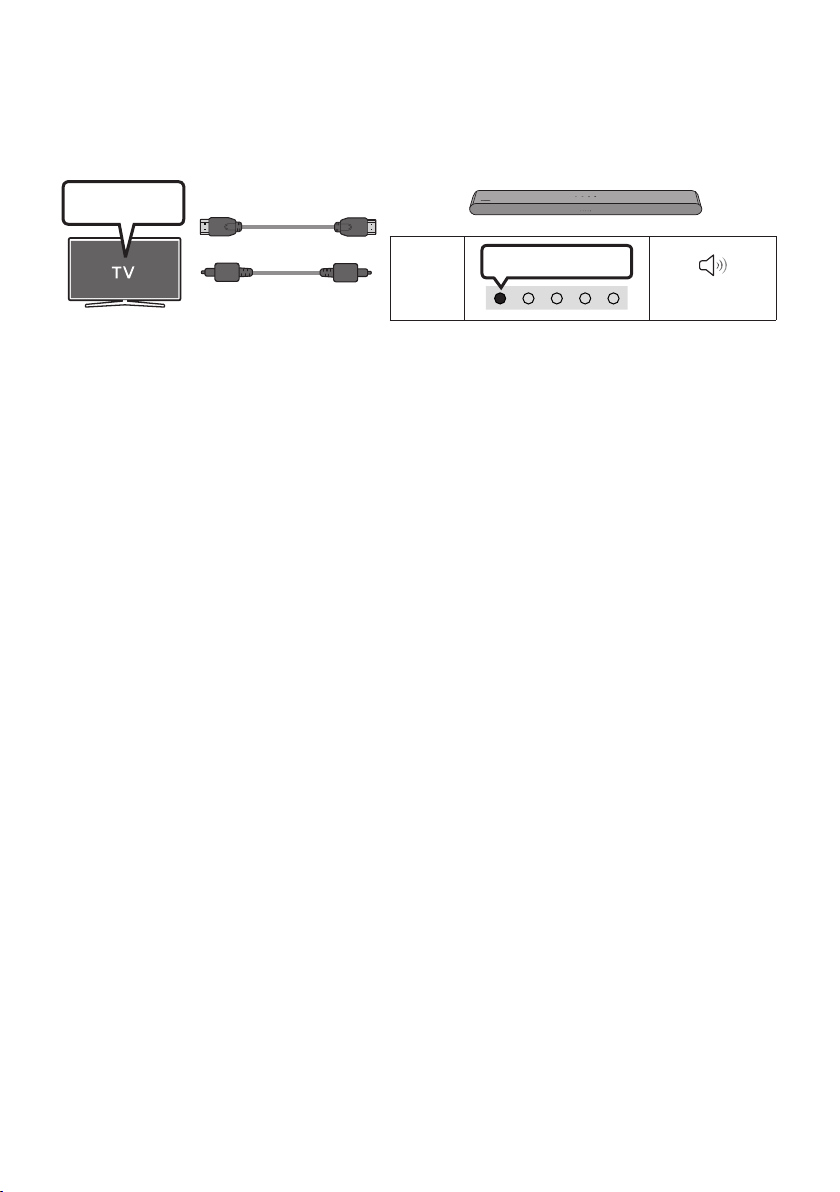
Using the Q-Symphony Function
For Q-Symphony, the Soundbar syncs with a Samsung TV to output sound through two devices for
optimum surround effect. When the Soundbar is connected, the menu, “TV+Soundbar” appears under
the Sound Output menu of the TV. Select the corresponding menu.
LED
Indicator
White On -> Off
“Digital Audio In”
TV Menu
OR
Optical Cable (not supplied)
HDMI Cable
• TV menu example: TV + [AV] Soundbar series name (HDMI)
NOTES
• It can operate according to the Codec supported by TV.
• This function is supported only when the HDMI Cable or Optical Cable (not supplied) is connected.
• The message displayed may differ with the TV model.
• This function is available in some Samsung TVs and some Soundbar models.
ENG - 22
06 USING A WIRELESS CONNECTION TO THE TV
Connecting via Bluetooth
When a Samsung TV is connected using Bluetooth, you can hear stereo sound
without the hassle of cables.
• Only one Samsung TV can be connected at a time.
• Samsung TV that supports Bluetooth can be connected.
Check the specications of your TV.
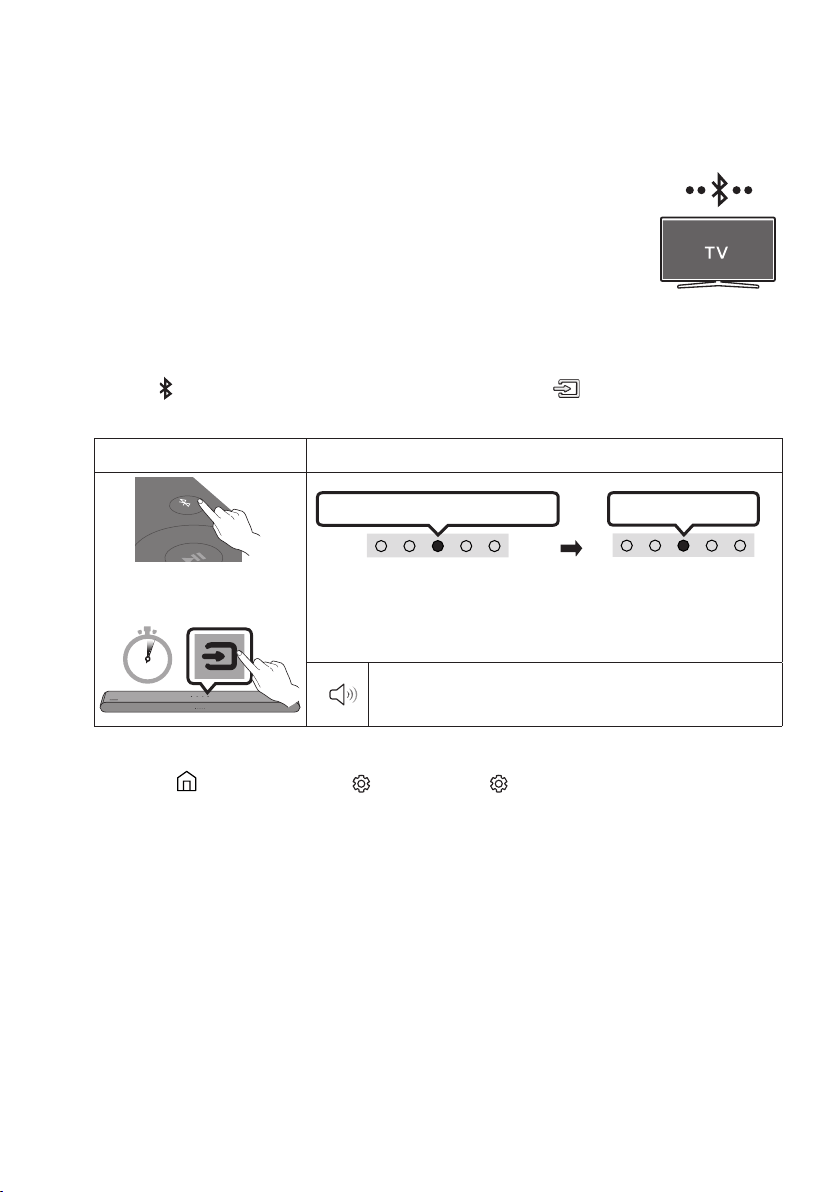
The initial connection
1. Press the PAIR button on the Soundbar remote control or press (Source) button on the
Soundbar top panel to enter the "Bluetooth" mode.
Bluetooth Pairing button LED Indicator
PAIR
OR
Red → Green → Blue Blinks
Pairing
Connection is complete
Cyan Blinks X3
When in “Bluetooth” mode
5 Sec
• Until pairing is complete, the Multicolor LED changes as Red → Green
→ Blue in turn.
“Ready to connect via Bluetooth.”
2. Select Bluetooth mode on the Samsung TV.
(e.g. Home (
) → Menu → Settings ( ) → All Settings ( ) Sound Sound Output
Bluetooth Speaker List [AV] Soundbar S5B-Series (Bluetooth))
3. Select “[AV] Soundbar S5B-Series” from the list on TV’s screen.
An available Soundbar is indicated with “Needs pairing” or “Paired” on the TV’s Bluetooth device
list. To connect the Samsung TV to the Soundbar, select the message, and then establish a
connection.
4. You can now hear Samsung TV sound from the Soundbar.
• If there is a connection log between the Soundbar and Samsung TV, the Soundbar is
automatically connected by changing its mode to “Bluetooth”.
ENG - 23
If the device fails to connect
• If you have an existing Soundbar (e.g., [AV] Soundbar S5B-Series) on the list of speakers on the
Samsung TV, delete it.
• Then repeat steps 1 through 3.
Disconnecting the Soundbar from the Samsung TV
Press the
(Source)
button on the top panel or on the remote control to select the mode other than
“Bluetooth”.
• Disconnecting takes time because the Samsung TV must receive a response from the Soundbar.
(The time required may differ, depending on the Samsung TV model.)
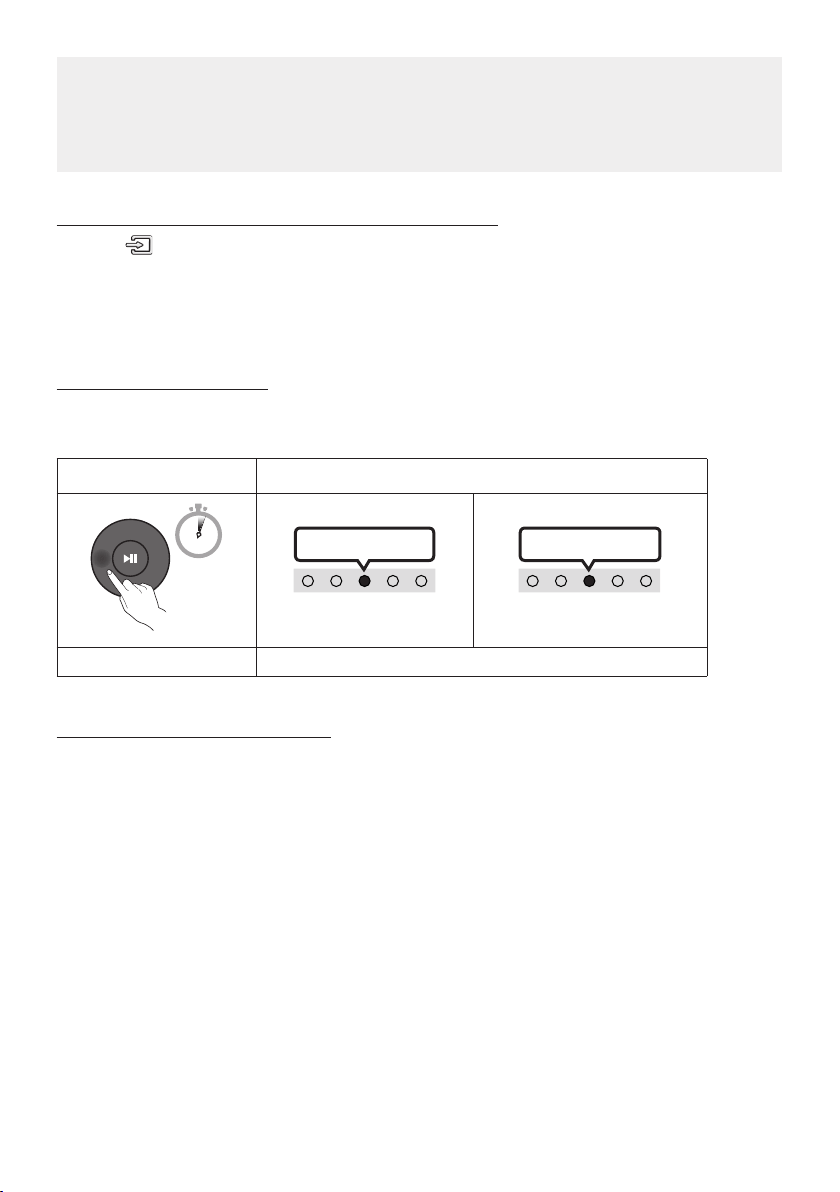
TV Auto connect On/Off
To cancel the automatic Bluetooth connection between the Soundbar and TV, press the
Left button on
the remote control for 5 seconds with the Soundbar in “Bluetooth Ready” status. (Toggle On → Off)
Left button LED Indicator
5 Sec
Cyan Blinks X1
On (Default) Off
Red Blinks X1
Bluetooth Ready Toggle On Off
Notes on Bluetooth connection
• Locate a new device within 3.28 ft (1 m) to connect via Bluetooth communication.
• If asked for a PIN code when connecting a Bluetooth device, enter <0000>.
• The Soundbar automatically turns off after 20 minutes in the Ready state.
• The Soundbar may not perform Bluetooth search or connection correctly under the following
circumstances:
– If there is a strong electrical eld around the Soundbar.
– If several Bluetooth devices are simultaneously paired with the Soundbar.
– If the Bluetooth device is turned off, not in place, or malfunctions.
• Electronic devices may cause radio interference. Devices that generate electromagnetic waves
must be kept away from the Soundbar main unit - e.g., microwaves, wireless LAN devices, etc.
ENG - 24
07 CONNECTING AN EXTERNAL DEVICE
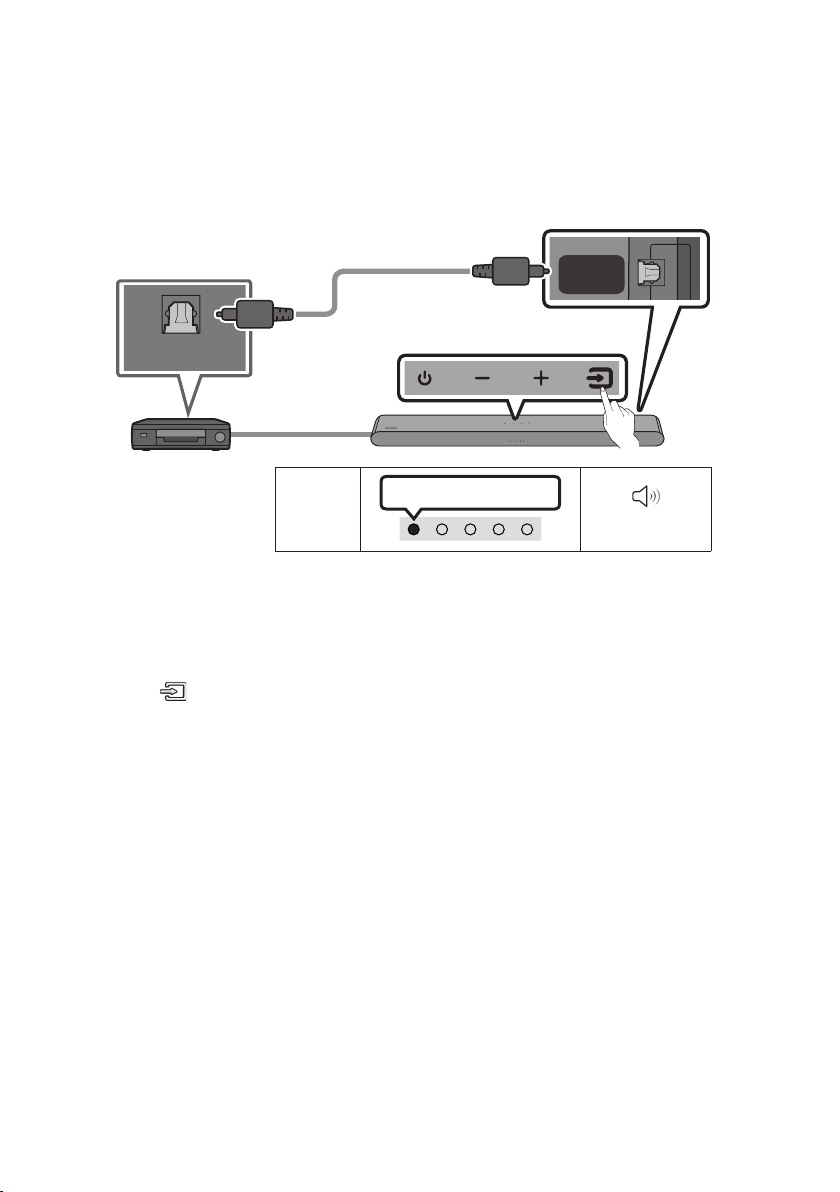
Connecting using an Optical Cable
LED
Indicator
White On -> Off
“Digital Audio In”
OPTICAL OUT
DIGITAL
AUDIO IN
(OPTICAL)
Bottom of the Soundbar
Optical Cable
(not supplied)
Top of the Soundbar
BD / DVD player / Set-top
box / Game console
1. With the external device and Soundbar turned off, connect the DIGITAL AUDIO IN (OPTICAL) port
on the Soundbar and the OPTICAL output port on the external device with the optical cable (not
supplied), as shown in the gure.
2. Turn on the Soundbar and external device.
3. Press the (Source) button on the top panel or remote control, and then select the “Digital
Audio In” mode.
4. The external device sound is output from the Soundbar.
ENG - 25
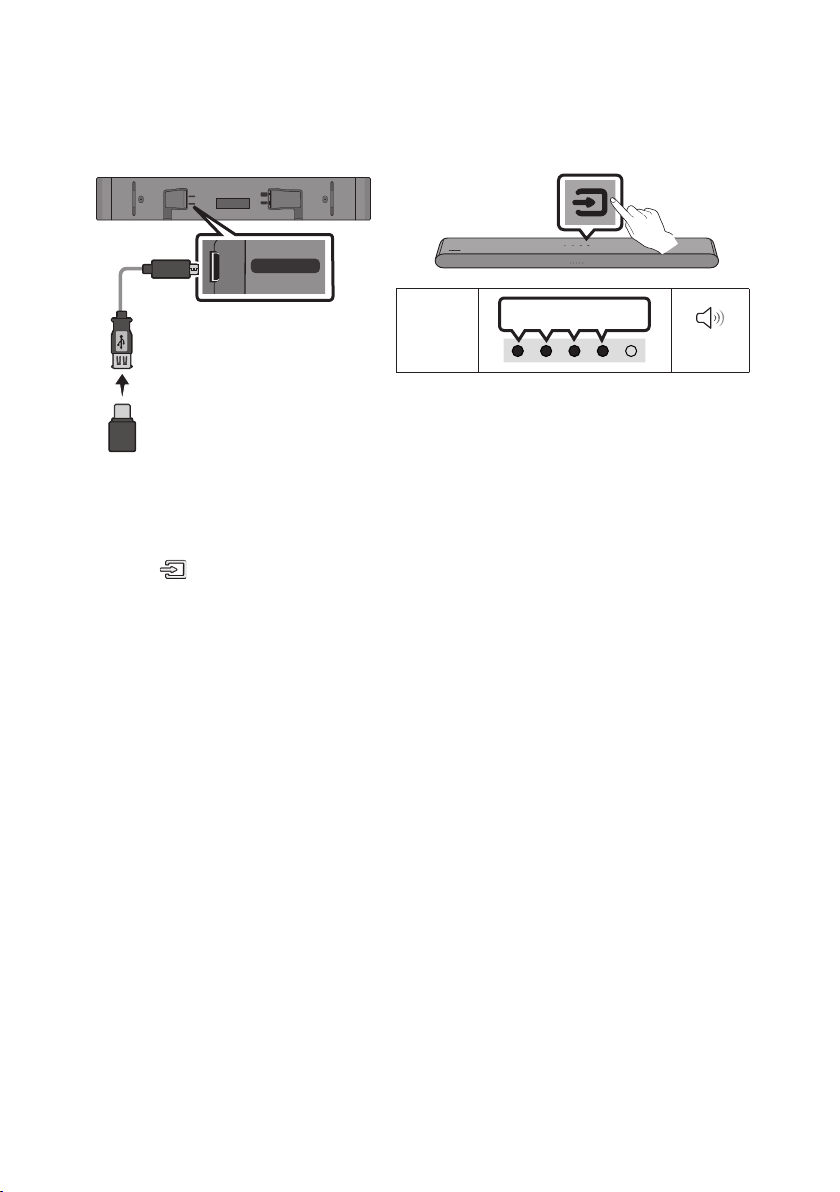
08 CONNECTING A USB STORAGE DEVICE
You can play music les located on USB storage devices through the Soundbar.
USB (5V 0.5A)
DC 19V
DIGITAL
AUDIO IN
(OPTICAL)
HDMI
(ARC)
USB (5V 0.5A)
LED
Indicator
White On -> Off
“USB”
Micro USB to
USB adapter Cable
(not supplied)
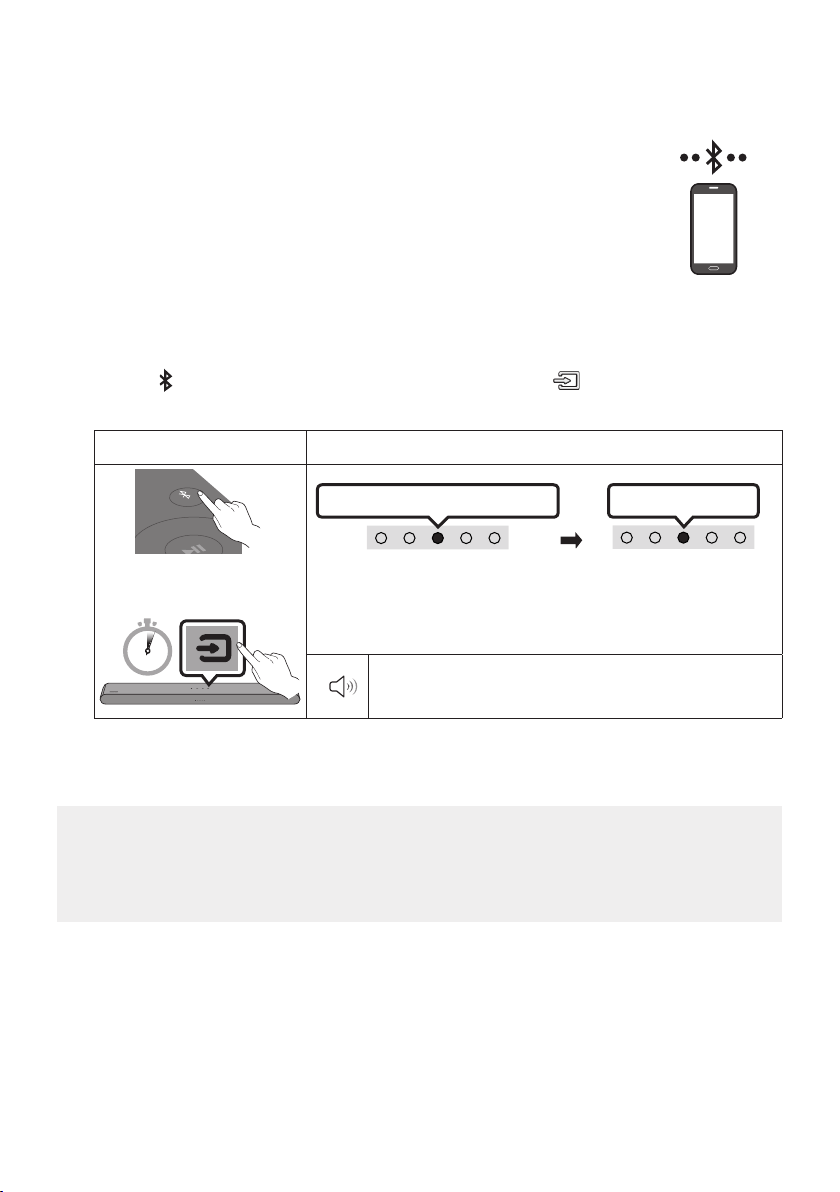
1. Connect the Soundbar with the USB stick by the USB adapter cable above.
• The Micro USB to USB adapter cable is sold separately. To purchase, contact a Samsung Service
Center or Samsung Customer Care.
2. Press the (Source) button on the top panel or remote control, and then select the “USB” mode.
3. Play music les from the USB storage device through the Soundbar.
• The Soundbar automatically turns off (Auto Power Down) if no USB device has been connected
for more than 20 minutes.

ENG - 26
File Format Type Compatibility list
Extension Codec Sampling Rate Bit Rate
*.mp3 MPEG1 Layer2 32kHz ~ 48kHz 32kbps ~ 320kbps
MPEG1 Layer3 32kHz ~ 48kHz 32kbps ~ 320kbps
MPEG2 Layer3 16kHz ~ 24kHz 8kbps ~ 160kbps
MPEG2.5 Layer3 8kHz ~ 12kHz 8kbps ~ 160kbps
*.wma WMA7/8/9 32kHz ~ 48kHz 32kbps ~ 320kbps
*.ogg Vorbis 32kHz ~ 48kHz 45kbps ~ 500kbps
*.aa c
*.m 4a
A AC- LC
(MPEG2/MPEG4 Audio Only)
32kHz ~ 48kHz 32kbps ~ 320kbps
*.wav LPCM 32kHz ~ 192kHz 1,024kbps ~ 9,216kbps
*.ac FLAC 32kHz ~ 192kHz 162kbps ~ 8,100kbps
*.aif f AIFF 32kHz ~ 192kHz 1,024kbps ~ 9,216kbps
• If there are too many folders (about 200) and les (about 2000) stored on the USB device, it may
take the Soundbar some time to access and play les.
• The Soundbar only supports USB devices with FAT16 (~2GB), FAT32 (~2TB) or NTFS (~2TB) le
systems.
ENG - 27
09 CONNECTING A MOBILE DEVICE
Connecting via Bluetooth
When a mobile device is connected using Bluetooth, you can hear stereo sound
without the hassle of cables.
• When you connect a paired Bluetooth device with the Soundbar off, the
Soundbar automatically turns on.
The initial connection
• When connecting to a new Bluetooth device, make sure the device is within 3.28 ft (1 m) distance.
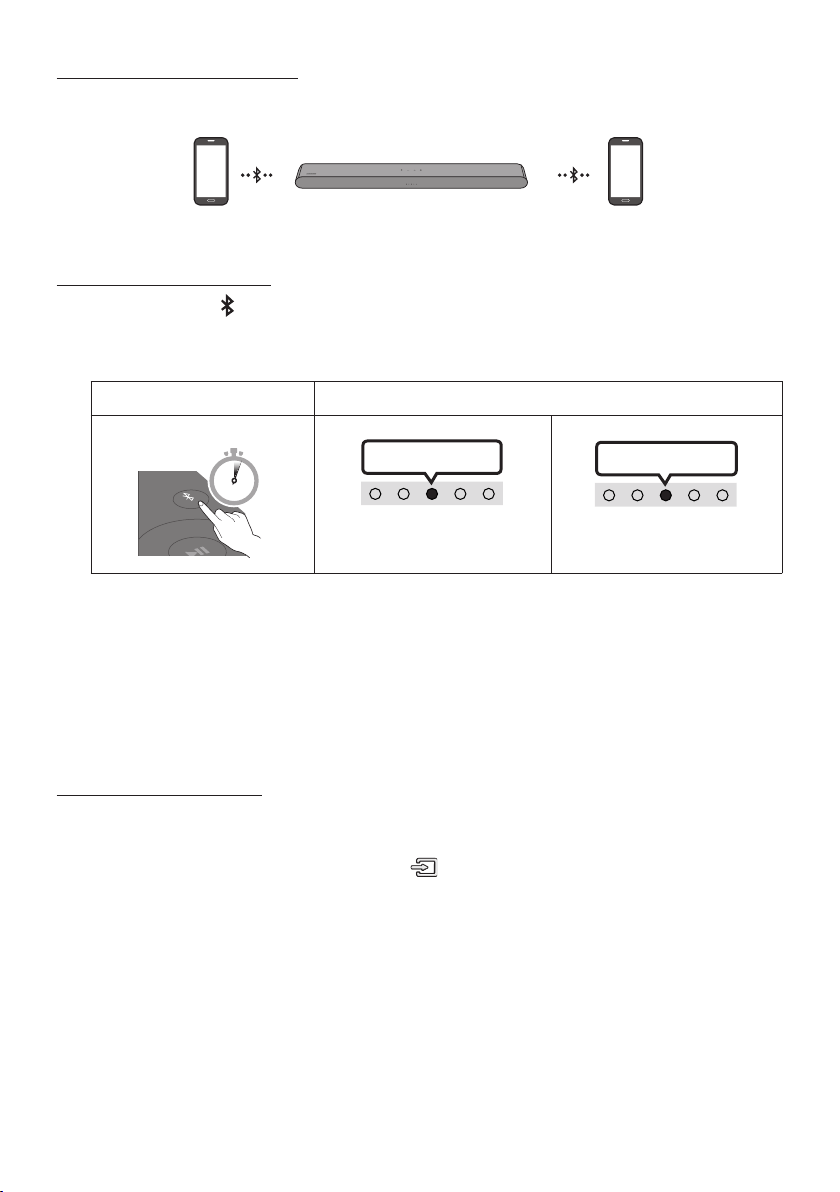
1. Press the
PAIR button on the Soundbar remote control or press (Source) button on the
Soundbar top panel to enter the "Bluetooth" mode.
Bluetooth Pairing button LED Indicator
PAIR
OR
Red → Green → Blue Blinks
Pairing
Connection is complete
Cyan Blinks X3
When in “Bluetooth” mode
5 Sec
• Until pairing is complete, the Multicolor LED changes as Red → Green
→ Blue in turn.
“Ready to connect via Bluetooth.”
2. On your device, select “[AV] Samsung Soundbar S5B-Series” from the list that appears.
3. Play music les from the device connected via Bluetooth through the Soundbar.
If the device fails to connect
• If you have an existing Soundbar (e.g., [AV] Samsung Soundbar S5B-Series) on the list of
speakers on the Mobile device, delete it.
• Then repeat steps 1 and 2.
mobile device

ENG - 28
Notes on Bluetooth connection
• Locate a new device within 3.28 ft (1 m) to connect via Bluetooth communication.
• If asked for a PIN code when connecting a Bluetooth device, enter <0000>.
• The Soundbar automatically turns off after 20 minutes in the Ready state.
• The Soundbar may not perform Bluetooth search or connection correctly under the following
circumstances:
– If there is a strong electrical eld around the Soundbar.
– If several Bluetooth devices are simultaneously paired with the Soundbar.
– If the Bluetooth device is turned off, not in place, or malfunctions.
• Electronic devices may cause radio interference. Devices that generate electromagnetic waves
must be kept away from the Soundbar main unit - e.g., microwaves, wireless LAN devices, etc.
• The Soundbar supports SBC data (44.1kHz, 48kHz).
• Connect only to a Bluetooth device that supports the A2DP (AV) function.
• You cannot connect the Soundbar to a Bluetooth device that supports only the HF (Hands Free)
function.
• When connecting the Soundbar to a Bluetooth device, place them as close to each other as possible.
• The farther the Soundbar and Bluetooth device are from each other, the lower the sound quality
will become.
The Bluetooth connection may break when the devices are out of the effective range.
• The Bluetooth connection may not function as intended in areas with poor reception.
• A Bluetooth device may experience noise or malfunction under in the following conditions:
– When the body is in contact with the signal transceiver on the Bluetooth device or Soundbar
– In corners or when there is an obstacle in proximity, such as a wall or partition, where electrical
changes may occur.
– When exposed to radio interferences by other products operating on the same frequency
ranges, such as medical equipment, microwave ovens, and wireless LAN devices.
– Obstacles such as doors and walls may still impact the sound quality even when the devices
are within the effective range.
• Note that your Soundbar cannot be paired with other Bluetooth devices while using the Bluetooth
option.
• This wireless device may cause electrical interference during operation.

ENG - 29
Bluetooth Power On/Off
If a previously paired Bluetooth device tries to pair with the Soundbar when the Bluetooth Power On
function is on and the Soundbar is turned off, the Soundbar turns on automatically.
1. Press and hold the SOUND MODE button for more than 5 seconds on the remote while the
Soundbar is turned on.
2. Multicolor LED indicator on the Soundbar blinks "Cyan”.
SOUND MODE button LED Indicator
SOUND
MODE
5 Sec
Cyan Blinks X1
On (Default) Off
Red Blinks X1
Bluetooth Power
On/Off
Toggle On Off
Disconnecting the Bluetooth device from a Soundbar
You can disconnect a Bluetooth device from the Soundbar. For instructions, see the Bluetooth device’s
user manual.
• The Soundbar will be disconnected.
• If the Soundbar is disconnected from the Bluetooth device, the multicolor LED indicator on the
Soundbar blinks "Red” three times.
Disconnecting the Soundbar from the Bluetooth device
Press the
(Source)
button on the top panel or on the remote control to select the mode other than
“Bluetooth”.
• Disconnecting takes time because the Bluetooth device must receive a response from the
Soundbar. (Disconnection time may differ, depending on the Bluetooth device)
ENG - 30
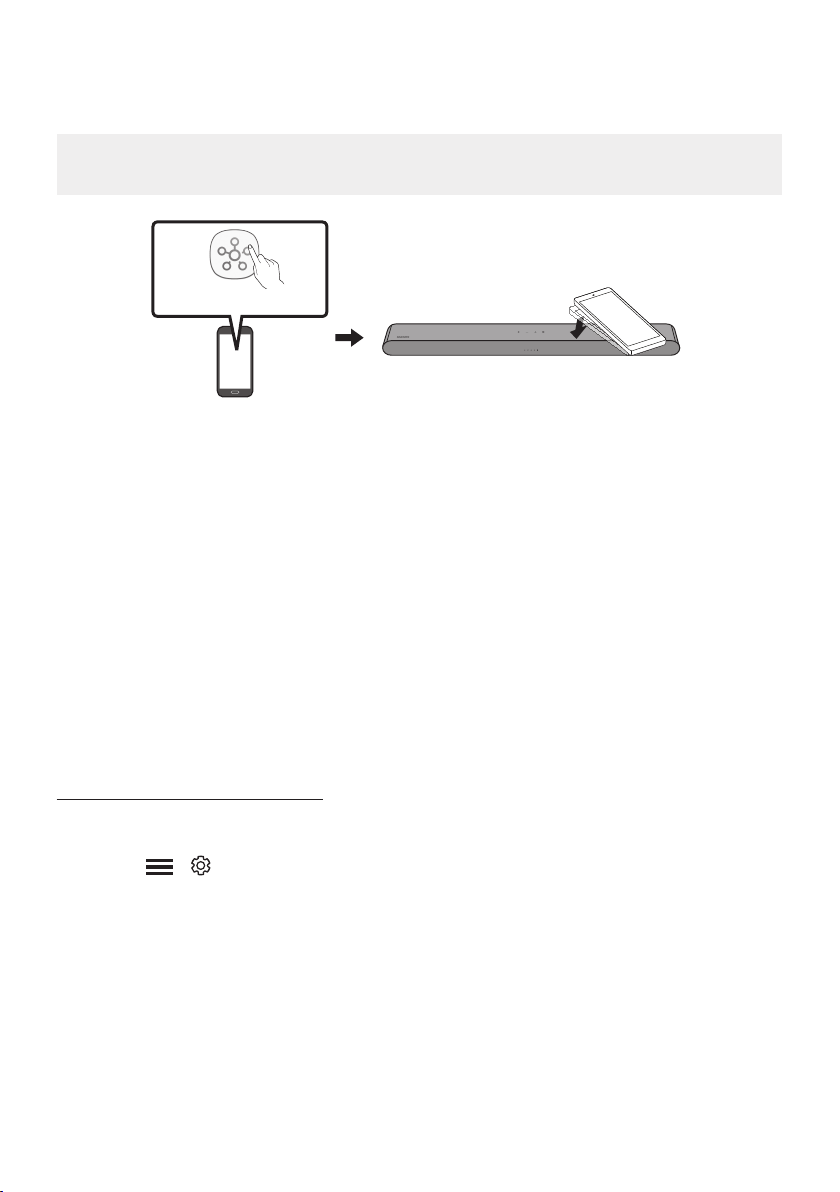
Bluetooth Multi connection
The Soundbar can be connected to 2 Bluetooth devices at the same time.
Bluetooth device A Bluetooth device B
TV Auto connect On/Off
1. Press and hold the
PAIR button for more than 5 seconds on the remote while the Soundbar is
turned off.
2. Multicolor LED indicator on the Soundbar blinks "Cyan”.
Bluetooth Pairing button LED Indicator
When in standby mode
PAIR
5 Sec
Cyan Blinks X1
Multi connection On (Default)
Multi connection Off
Red Blinks X1
3. Connect the Soundbar to up to two Bluetooth devices. (See page 27)
4. Play music from one of the connected Bluetooth devices while two devices are connected.
5. If music is played from the Bluetooth device “B” while playing from the device “A”, the music is
started playing on the device “B” and automatically being stopped/paused playback on the device
“A”.
6. In versions prior to AVRCP V1.4, the switching time of the device playing music may be delayed.
Bluetooth Multi Pairing
How to pair multiple devices to the Soundbar
1. Turn on the Soundbar.
2. Only in “Bluetooth” mode, press and hold the
(Source) button on the top of the Soundbar for
more than 5 seconds for the Soundbar to go into “Bluetooth Pairing” mode, then on the Bluetooth
device side, switch Bluetooth on, and select the Soundbar from the list of available devices, the
Soundbar will automatically connect to the Bluetooth device.
3. A 2nd Bluetooth device can be paired and connected to the Soundbar using the same method.
If you attempt to connect a 3rd device, a connected device that is not playing audio will lose its
Bluetooth connection, but will still be paired with the Soundbar.
4. Using the same method, you can pair up to 8 Bluetooth devices, but only the last 2 will stay
connected to the Soundbar at the same time.

ENG - 31
NOTES
• Connect the Soundbar to up to two Bluetooth devices.
• Play music from one of the connected Bluetooth devices while two devices are connected.
• If music is played from the Bluetooth device “B” while playing from the device “A”, the music is
started playing on the device “B” and automatically being stopped/paused playback on the device
A”.
• In versions prior to AVRCP V1.4, the switching time of the device playing music may be delayed.
• The device can be switched by notication or alarm on some devices.
• Some devices do not support Bluetooth multi connection.
• “Bluetooth Pairing” mode stops when no device is paired within 3 minutes.
• Switching devices may take about 7 seconds on some apps.
• If you attempt to connect a 3rd Bluetooth device, the A or B devices will be disconnected.
(A device that is not currently playing will be disconnected.)
• Only 1 Samsung TV, or 2 Bluetooth devices can be connected to the Soundbar at one time.
• The Soundbar will be disconnected from Bluetooth devices when it receives a connection request
from a Samsung TV.
ENG - 32
Using Tap Sound
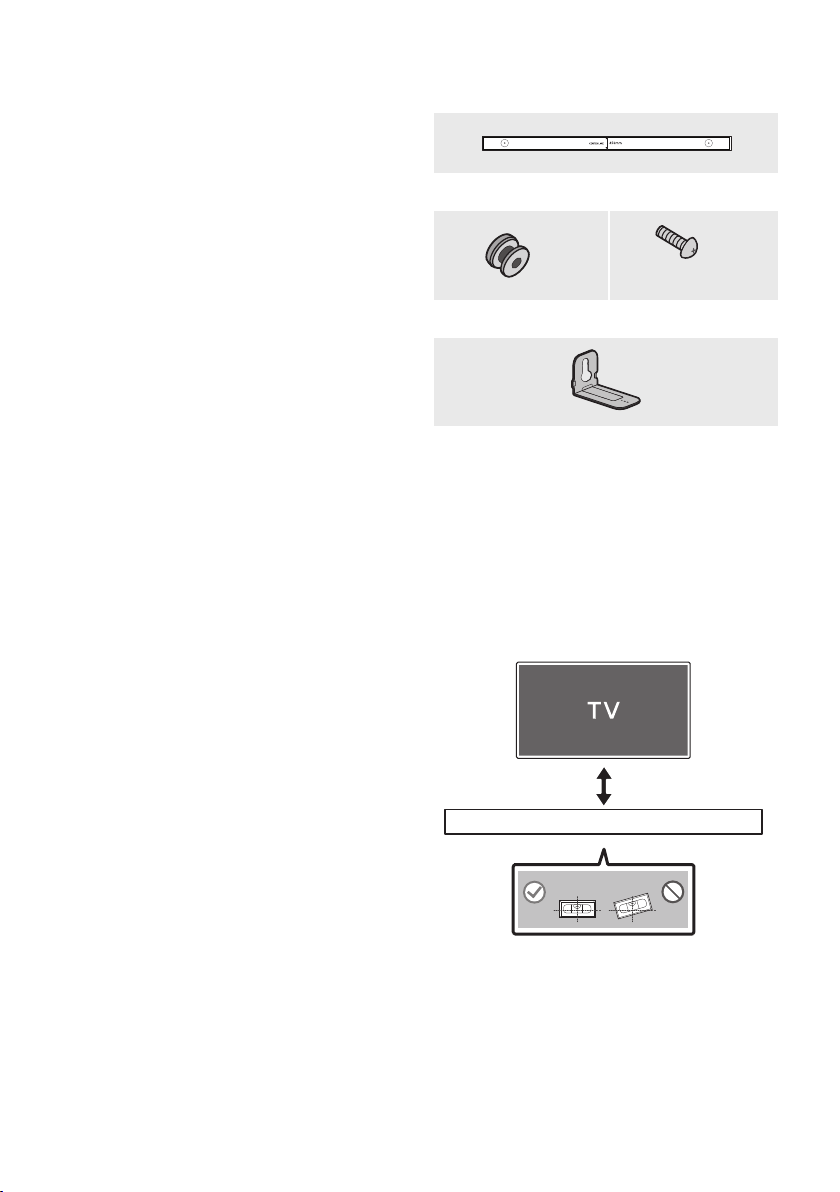
Tap the Soundbar with your mobile device to play audio from the mobile device through the Soundbar.
• This function may not be supported, depending on the mobile device.
• This function is only compatible on Samsung mobile devices with Android 8.1 or later.
Mobile device
SmartThings App
Top of the Soundbar
1. Turn on the Tap Sound function on your mobile device.
• For details on how to turn on the function, refer to “Enable the Tap Sound function” below.
2. Tap the Soundbar with the mobile device. Select “Start now” in the displayed message window.
A connection is established between the mobile device and Soundbar via Bluetooth.
3. Play audio from the mobile device through the Soundbar.
• This function connects a mobile device to the Soundbar via Bluetooth by detecting vibration
that occurs when the device touches the Soundbar.
• Make sure the mobile device does not tap a sharp corner of the Soundbar. The Soundbar or
mobile device may become scratched or damaged.
• It is recommended that the mobile device be covered with a case. Lightly tap the wide area in
the upper portion of the Soundbar, without using excessive force.
• To use this function, update the SmartThings app to the latest version.
The function may not be supported, depending on the app version.
Enable the Tap Sound function
Use the SmartThings app to turn on the Tap View, Tap Sound function.
1. On the mobile device, run the SmartThings app.
2. Select (
→ ) in the SmartThings app screen displayed on the mobile device.
3. Set “Tap View, Tap Sound” to On to allow the function to work when a mobile device moves close to
the Soundbar.
NOTES
• When the mobile device is in power-saving mode, the Tap Sound function does not work.
• The Tap Sound function may not work if there are devices near the Soundbar that cause radio
interference such as electric devices. Make sure devices that may cause radio interference are
placed at a sufcient distance away from the Soundbar.
ENG - 33
10 INSTALLING THE
WALL MOUNT
Installation Precautions
• Install on a vertical wall only.
• Do not install in a place with high
temperature or humidity.
• Verify whether the wall is strong enough to
support the product’s weight. If not, reinforce
the wall or choose another installation point.
• Purchase and use the xing screws or
anchors appropriate for the kind of wall you
have (plaster board, iron board, wood, etc.). If
possible, x the support screws into wall
studs.
• Purchase wall mounting screws according to
the type and thickness of the wall you want to
mount the Soundbar on.
– Diameter: M5
– Length: 1 3/8 inches (35 mm) or longer
recommended.
• Connect cables from the unit to external
devices before you install the Soundbar on
the wall.
• Make sure the unit is turned off and
unplugged from the power source before you
install it. Otherwise, it may cause an electric
shock.
Wallmount Components
Wall Mount Guide
x 2
(M4 x L10)
x 2
Holder-Screw Screw
x 2
Bracket-Wall Mount
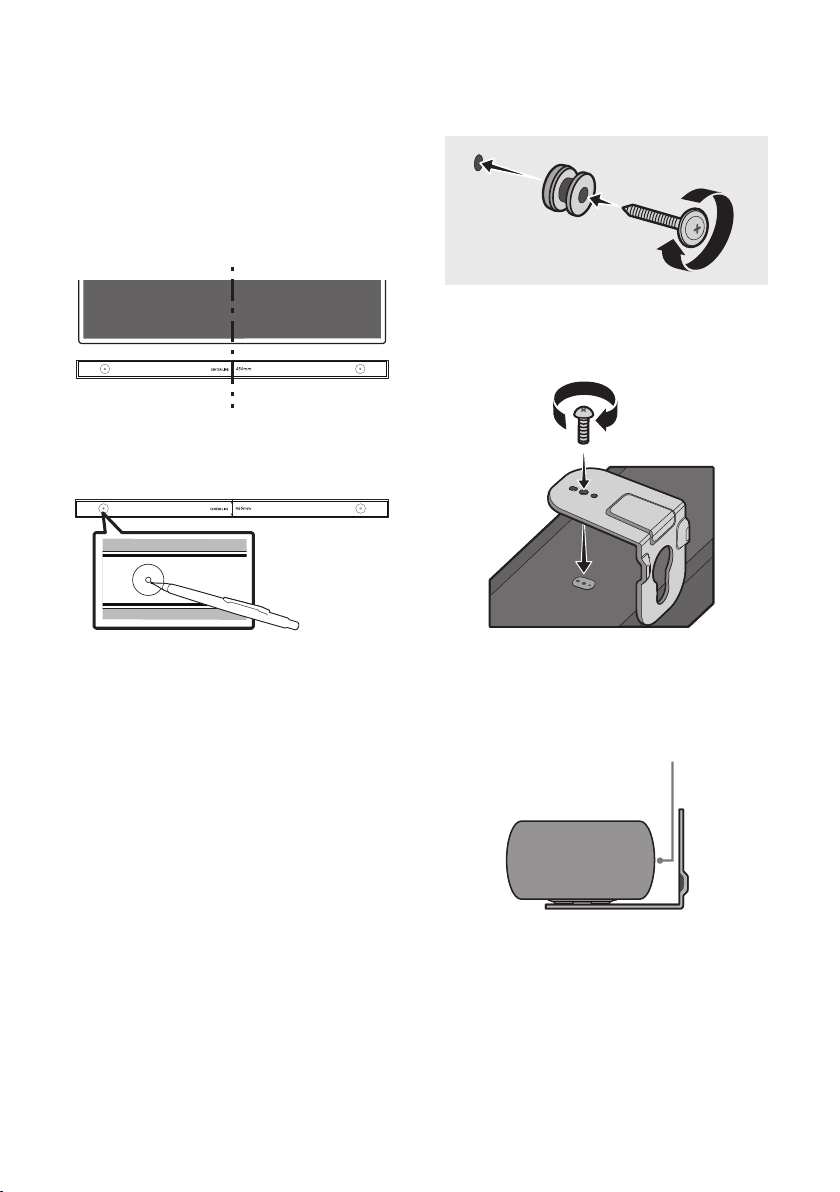
1. Place the Wall Mount Guide against the wall
surface.
• The Wall Mount Guide must be level.
• If your TV is mounted on the wall, install
the Soundbar at least 2 inches (5 cm)
below the TV.
2 inches (5 cm) or more
ENG - 34
2. Align the Wall Mount Guide’s Center Line
with the center of your TV (if you are
mounting the Soundbar below your TV), and
then x the Wall Mount Guide to the wall
using tape.
• If you are not mounting below a TV, place
the Center Line in the center of the
installation area.
Center Line
3. Use a pen to mark the positions of the holes
and remove the Wall Mount Guide.
4. Using an appropriately sized drill bit, drill a
hole in the wall at each marking.
• If the markings do not correspond to the
positions of studs, make sure you insert
appropriate anchors into the holes before
you insert the support screws. If you use
anchors, make sure the holes you drill are
large enough for the anchors you use.
5. Push a screw (not supplied) through each
Holder-Screw, and then screw each screw
rmly into a support screw hole.
(Not supplied)
6. Install the 2 Bracket-Wall Mounts in the
correct orientation on the bottom of the
Soundbar using 2 Screws.
• When assembling, make sure the hanger
part of the Bracket-Wall Mounts are
located behind the rear of the Soundbar.
Rear of Soundbar
Right end of Soundbar
ENG - 35
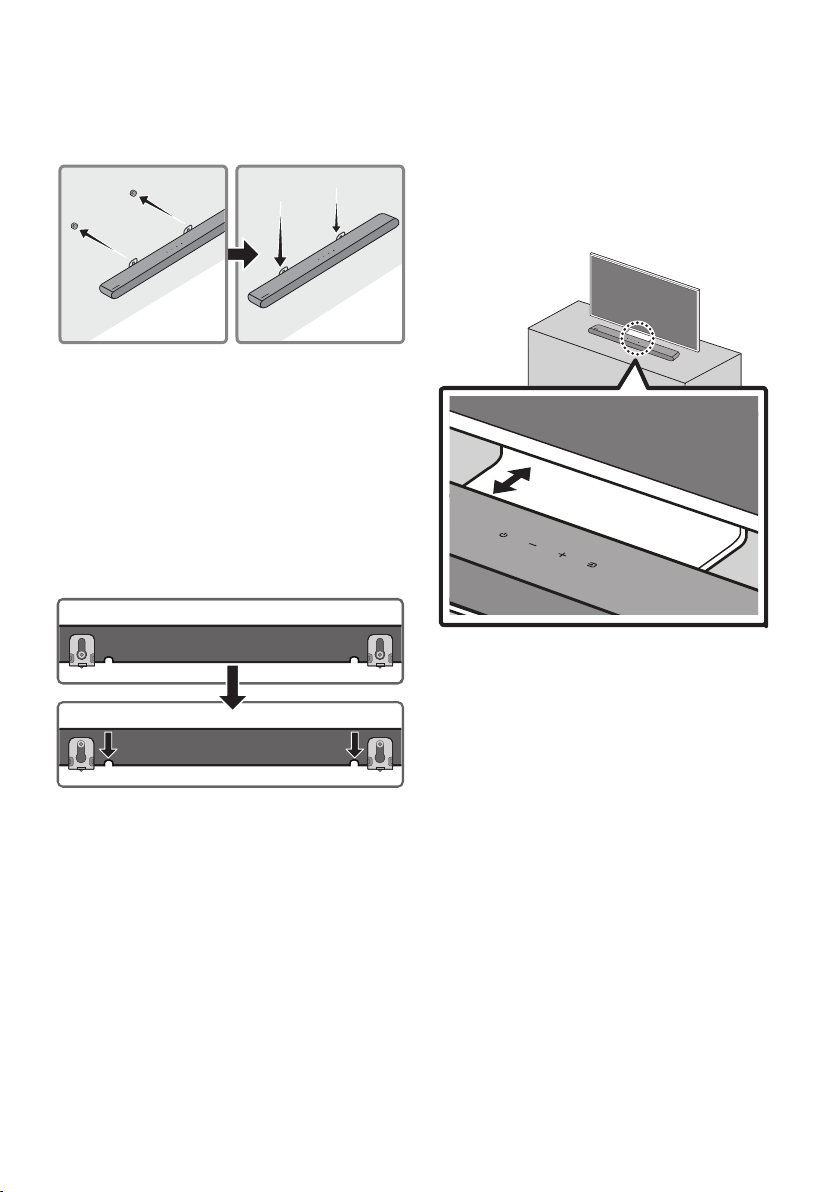
7. Install the Soundbar with the attached
Bracket-Wall Mounts by hanging the
Bracket-Wall Mounts on the Holder-Screws
on the wall.
8. Slide the Soundbar down as shown below so
that the Bracket-Wall Mounts rest securely
on the Holder-Screws.
• Insert the Holder-Screws into the wide
(bottom) part of the Bracket-Wall
Mounts, and then slide the Bracket-Wall
Mounts down so that the Bracket-Wall
Mounts rest securely on the
Holder-Screws.
11 INSTALLING THE
SOUNDBAR IN
FRONT OF TV
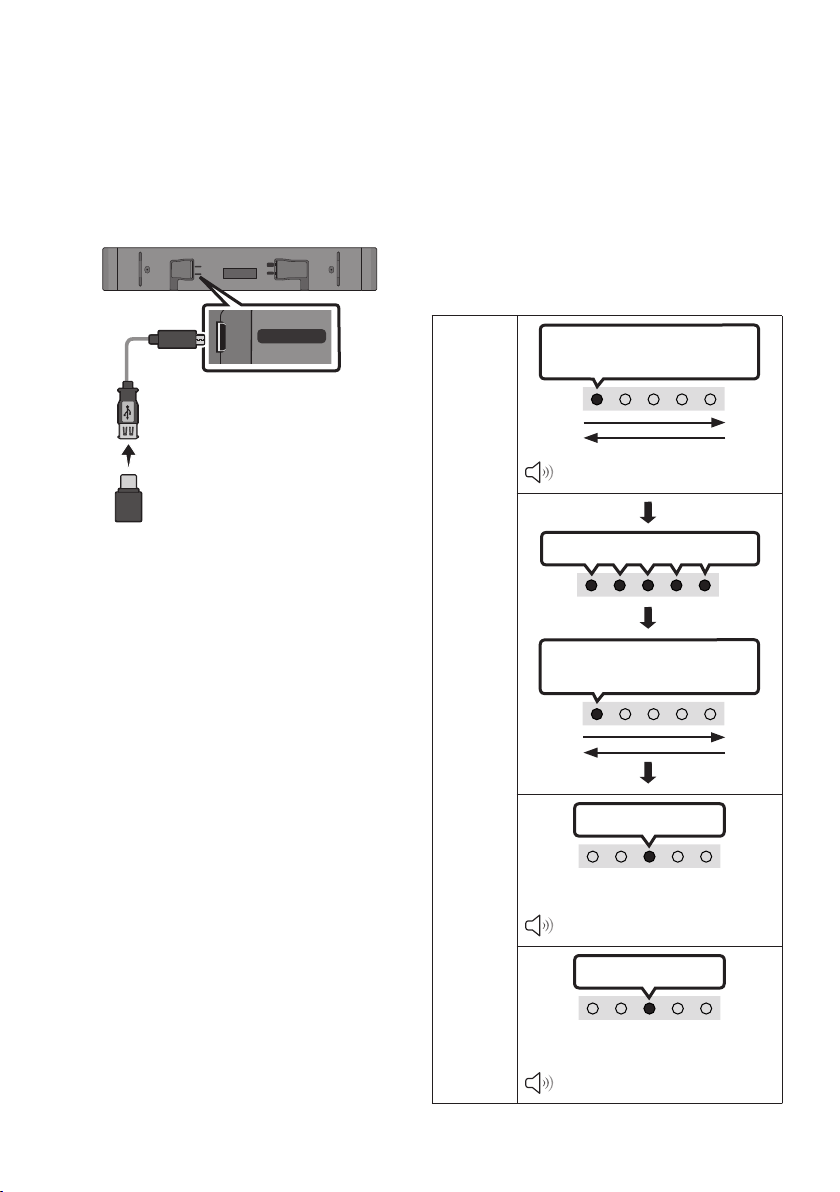
1.2 inches (3cm) or more
Align the center of the Soundbar to the center of
the TV as illustrated in the image.
Place the Soundbar at least 1.2 inches (3cm) away
from the TV.
NOTES
• Make sure the Soundbar is placed on a at
and solid surface.
• Insufcient gap from the TV may cause
acoustic problems.
ENG - 36
12 SOFTWARE
UPDATE
Important: After upgrading, keep the original
Settings.
USB (5V 0.5A)
DC 19V
DIGITAL
AUDIO IN
(OPTICAL)
HDMI
(ARC)
USB (5V 0.5A)
Micro USB to
USB adapter Cable
(not supplied)
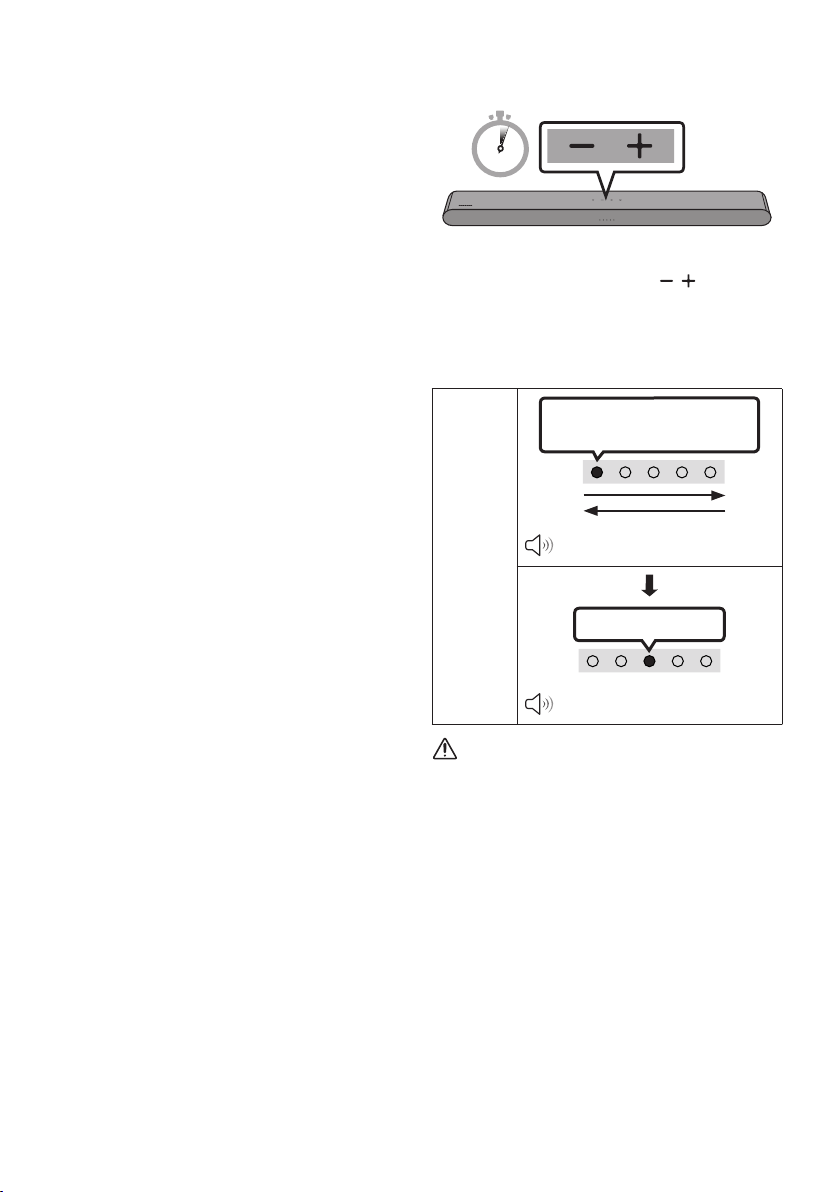
1. Connect a USB memory stick to the USB port
on your computer.
Important: Make sure there are no music
les on the USB memory stick drive. This
may cause the rmware update to fail.
2. Go to (samsung.com)
select Enter Model
Number and enter the model of your
Soundbar. Select manuals and downloads
and download the latest software le.
3. Save the downloaded software to a USB
memory stick and select “Extract Here” to
unzip the folder.
4. Turn on the Soundbar and connect the USB
memory stick containing the software
update to the female port on a Micro USB
adapter cable. Connect the cable to the USB
port on the Soundbar.
5. Plug USB into Soudbar and switch to USB
source, the software will update
automatically and will complete update
within 2 minutes. During the update process,
the 5 LEDs will start ashing in a loop, and
then the 5 LEDs will all be bright white, and
then the 5 LEDs will ash in a loop again.
When the update is complete, the cyan
indicator blinks 3 times, and the soundbar
automatically restarts.
LED
Indicator
White moves from left to right
and right to left X 1
“Start the software update.”
5 LEDs display White
White moves from left to right
and right to left X 1
Cyan Blinks X3
Software Update Finish
“The software update is complete.”
Red Blinks X3
Software Update Failed
“The software update failed.”
ENG - 37
• This product has a DUAL BOOT function.
If the rmware fails to update, you can
update the rmware again.
IfLEDsequenceashingisnot
displayed
1. Turn off the Soundbar, disconnect and then
reconnect the USB storage device that
contains the update les to the Soundbar’s
USB port.
2. Disconnect the Soundbar’s power cord,
reconnect it, and then turn on the Soundbar.
NOTES
• The rmware update may not work properly
if audio les supported by the Soundbar are
stored in the USB storage device.
• Do not disconnect the power or remove the
USB device while updates are being applied.
The main unit will turn off automatically after
completing the rmware update.
• After upgrading, keep the original Settings.
(include Volume, sound eld, etc.)
– When the rmware update is complete,
the soundbar automatically turns on, and
the Voice UI comes out.
If the software update fails, check if the
USB stick is defective.
• Mac OS users should use MS-DOS (FAT) as the
USB format.
• Updating via USB may not be available,
depending on the USB storage device
manufacturer.
Reset
5 Sec
With the Soundbar on, press the (Volume)
buttons on the body at the same time for at least
5 seconds. The LED display changes as shown
below and then the Soundbar is reset.
LED
Indicator
White moves from left to right
and right to left
“Start the factory reset.”
Cyan Blinks X3
“The factory reset is complete.”
CAUTION
• All the settings of the Soundbar are reset.
Be sure to perform this only when a reset is
required.
ENG - 38
13 TROUBLESHOOTING
Before seeking assistance, check the following.
Soundbar does not turn on.
; Check whether the power cord of the
Soundbar is correctly inserted into the
outlet.
Soundbar works erratically.
; After removing the power cord, insert it
again.
; Power cycle the external device and try
again.
; If there is no signal, the Soundbar
automatically turns off after a certain
period of time. Turn on the power.
(See page 10.)
Remote control does not work.
; Point the remote directly at the Soundbar.
; Replace the batteries with new ones.
Soundbar does not output any sound.
; The volume of the Soundbar is too low or
muted. Adjust the volume.
; When any external device (STB, Bluetooth
device, mobile device, etc.) is connected,
adjust the volume of the external device.
; For sound output of the TV, select
Soundbar. (Samsung TV: Home (
) →
Menu → Settings ( ) → All Settings ( )
→ Sound → Sound Output → Select
Soundbar)
; The cable connection to the Soundbar may
not be loose. Remove the cable and
connect again.
; Remove the power cord completely,
reconnect, and turn the power on.
; Reset the product and try again.
(See page 37.)
If
the TV is not connected via HDMI (ARC).
; Check whether the HDMI cable is correctly
connected to the ARC terminal.
(See page18)
; Connection may not be possible due to the
connected external device (set-top box,
game machine, etc.). Directly connect the
Soundbar.
; HDMI-CEC may not be activated on the TV.
Turn on the CEC on the TV menu. (Samsung
TV: Home ( ) → Menu → Settings ( ) →
All Settings ( ) → Connection → External
Device Manager → Anynet+ (HDMI-CEC)
ON)
Soundbar does not connect via Bluetooth.
; When connecting a new device, switch to
Bluetooth Pairing for connection. (Press the
PAIR button on the remote control or
press the (Source) button on the body
for at least 5 seconds.)
; If the Soundbar is connected to another
device, disconnect that device rst to
switch the device.
; Reconnect it after removing the Bluetooth
speaker list on the device to connect.
(Samsung TV: Home ( ) → Menu →
Settings ( ) → All Settings ( ) → Sound
→ Sound Output → Bluetooth Speaker List)
; Remove and reconnect the power plug,
then try again.
; Reset the product and try again.
(See page 37.)
ENG - 39
Sound drops out when connected via
Bluetooth.
; If your device that is connected via
Bluetooth moves too far away from the
Soundbar, it may cause the sound to drop
out. Move the device closer to the
Soundbar.
; If a part of your body is in contact with the
Bluetooth transceiver or the product is
installed on metal furniture, sound may
drop out. Check the installation
environment and conditions for use.
Bluetooth multi connection does not work.
; When the TV is connected to the soundbar,
Bluetooth multi connection may not
operate. Disconnect the Soundbar from the
TV and try again.
; Check whether the Bluetooth Multi
connection setting is turned on.
(Refer to the "Soundbar does not connect
via Bluetooth." section.)
; Disconnect the device currently playing,
pair with the device that you want to
connect, and reconnect the previous
device.
; If the sound is inaudible even after
connecting properly, refer to the "Sound
drops out when connected via Bluetooth."
section.
Soundbar does not turn on automatically with
the TV.
; When you turn off the Soundbar while
watching TV, power synchronization with
the TV is disabled. First turn off the TV.
14 LICENSE
Manufactured under license from Dolby
Laboratories. Dolby, Dolby Audio and the
double-D symbol are trademarks of Dolby
Laboratories Licensing Corporation.
* This product does not support Dolby Atmos®.
For DTS patents, see http://patents.dts.com.
Manufactured under license from DTS, Inc.
(for companies headquartered in the U.S./
Japan/Taiwan) or under license from DTS
Licensing Limited (for all other companies).
DTS, Digital Surround, and the DTS logo are
registered trademarks or trademarks of DTS,
Inc. in the United States and other countries.
© 2021 DTS, Inc. ALL RIGHTS RESERVED.
The terms HDMI and HDMI High-Denition
Multimedia Interface, and the HDMI Logo are
trademarks or registered trademarks of HDMI
Licensing Administrator, Inc. in the United
States and other countries.
The Bluetooth® word mark and logos are
registered trademarks owned by Bluetooth SIG, Inc.
and any use of such marks by Samsung Electronics
Co., Ltd. is under license. Other trademarks and
trade names are those of their respective owners.

ENG - 40
[ENERGY STAR]
ENERGYSTARqualiedmodelonly
– Your Samsung product is ENERGY STAR
qualied in its factory default setting.
Change to certain features, settings and
functionality in this product can change the
power consumption, possibly beyond the
limits required for ENERGY STAR
qualication.
– Environmental Protection Agency and
Department of Energy. ENERGY STAR is a
joint program of the Government agencies,
designed to promote energy efcient
products and practices.
Refer to www.energystar.gov for more
information of the ENERGY STAR Program.
ENERGYSTARqualiedmodelonly
(Applicable to Thin Client models only)
As an ENERGY STAR® Partner, SAMSUNG has
determined that this product meets the
ENERGY STAR® guidelines for energy
efciency.
– The ENERGY STAR Program has been to
reduced greenhouse gas emissions and
save energy through voluntary labeling.
– Power management setting of this product
have been enabled by default, and have
various timing setting from 1 minutes to 5
hours.
– The product can wake with a button press
on the chassis from sleep mode.
ENERGYSTARqualiedmodelonly(Theother
models)
– As an ENERGY STAR Partner, Samsung has
determined that this product or product
models meets the ENERGY STAR guideline
for energy efciency.
15 OPEN SOURCE
LICENSE NOTICE
To send inquiries and requests for questions
regarding open sources, contact Samsung Open
Source (http://opensource.samsung.com)
16 IMPORTANT
NOTES ABOUT
SERVICE
Figures and illustrations in this User Manual are
provided for reference only and may differ from
actual product appearance.

ENG - 41
17 SPECIFICATIONS AND GUIDE
Specications
Model Name HW-S50B
USB 5V/0.5A
Weight 5.3 lbs (2.4 kg)
Dimensions (W x H x D)
26.4 x 2.5 x 4.1 inches
(670.0 x 62.3 x 105.0 mm)
Operating Temperature Range +41°F to +95°F (+5°C to +35°C)
Operating Humidity Range 10 % ~ 75 %
AMPLIFIER
Rated Output power
(30W x 2) + (30W x 2) + 20W
Supported play formats
DTS, Dolby® Digital (DTS Virtual Surround is
played in DTS format.)
LPCM 2ch, Dolby Audio™ (supporting Dolby®
Digital), DTS, DTS Virtual:X
Bluetooth
Port deactivation method
Press and hold the SOUND MODE button for
more than 5 seconds to turn off Bluetooth Power
function.
NOTES
• Samsung Electronics Co., Ltd reserves the right to change the specications without notice.
• Weight and dimensions are approximate.
LIMITED WARRANTY TO ORIGINAL PURCHASER
Samsung Electronics Canada Inc.(SECA), warrants that this product is free from
defective material and workmanship.
SECA further warrants that if this product falls to operate properly within the specied
warranty period and the failure is due to improper workmanship or defective
materials, SECA will repair or replace the product at its option.
All warranty repairs must be performed by a SECA Authorized Service Center. (The name and
address of the location nearest you can be obtained by calling toll free: 1- 800- SAMSUNG)
LABOR
One year (Carry- in)
PARTS
One year
On carry-in models, transportation to and from the service center is the customer’s
responsibility.
The original dated sales receipt must be retained by the customer and is the only
acceptable proof of purchase. It must be presented to the authorized service center at
the time service is requested.
EXCLUSIONS (WHAT IS NOT COVERED)
This warranty does not cover damage due to accident, re, ood and/ or other acts of
God; misuse, incorrect line voltage, improper installation, improper or unauthorized
repairs, commercial use or damage that occurs in shipping. Exterior and interior nish,
lamps, glass are not covered under this warranty. Customer adjustments which are
explained in the instruction manual are not covered under the terms of this warranty.
This warranty will automatically be voided for any unit found with a missing or altered
serial number. This warranty is valid only on products purchased and used in Canada.
Samsung Electronics Canada Inc
2050 Derry Rd West
Mississauga, On. L5N 0B9
Tel: 1-800-SAMSUNG (726-7864)
Fax: (905) 542- 1199
Website: www.samsung.com/ca
© 2022 Samsung Electronics Co., Ltd. All rights reserved.
Contact SAMSUNG WORLD WIDE
If you have any questions or comments relating to Samsung products, please contact the SAMSUNG customer
care Center.
HEADQUARTERS
Samsung Electronics Canada Inc. 2050 Derry Road West, Mississauga, Ontario L5N 0B9 Canada
TEL: 1-800-SAMSUNG (1-800-726-7864)
www.samsung.com/ca/support
Country Samsung Service Center
Web Site
`
North America
CANADA 1-800-SAMSUNG (726-7864)
www.samsung.com/ca/support (English)
www.samsung.com/ca_fr/support (French)
U.S.A 1-800-SAMSUNG (726-7864) www.samsung.com/us/support

HW-S50B
MANUEL COMPLET
Imaginez les possibilités
Merci d’avoir choisi un appareil Samsung.
Pour recevoir une assistance plus complète,
veuillez enregistrer votre produit sur
www.samsung.com/register
FRA - 2
INFORMATIONS RELATIVES À LA SÉCURITÉ
AVERTISSEMENTS
POUR ÉVITER LES RISQUES DE CHOC
ÉLECTRIQUE, NE DÉMONTEZ PAS LE CAPOT.
L’APPAREIL NE CONTIENT PAS DE PIÈCES
RÉPARABLES PAR L’UTILISATEUR. S’ADRESSER À
UN SERVICE APRÈS-VENTE QUALIFIÉ.
Reportez-vous au tableau ci-dessous pour
comprendre les symboles pouvant gurer sur
votre produit Samsung.
MISE EN GARDE
RISQUE DE CHOC
ÉLECTRIQUE NE PAS
OUVRIR
Ce symbole indique la présence d'une
haute tension à l'intérieur. Tout contact
avec une pièce interne de l'appareil
présente un danger.
Ce symbole vous informe qu'une
documentation importante relative au
fonctionnement et à l'entretien est
fournie avec le produit.
Produit de catégorie II: Ce symbole
indique qu'il ne nécessite pas une
connextion de sécurité à la terre
(masse). Si ce symbole n'est pas présent
sur un produit équipé d'un cordon
d'alimentation, le produit DOIT être
raccordé à la terre de manière able à
des ns de protection.
Tension CA: Ce symbole indique que la
tension nominale est la tension CA.
Tension CC : Ce symbole indique que la
tension nominale est la tension CC.
Attention, consultez les instructions aux
ns d'utilisation : Ce symbole indique à
l'utilisateur qu'il doit consulter le guide
d'utilisation pour avoir de l'information
au sujet de la sécurité.
AVERTISSEMENT
• An de diminuer les risques d’incendie ou de
choc électrique, n’exposez pas cet appareil à
la pluie ou à l’humidité.
• Pour éviter des blessures, cet appareil doit
être solidement xé au plancher/au mur
conformément aux directives d’installation.
MISE EN GARDE
• Veillez à éviter toute projection sur l’appareil.
Ne placez jamais de récipients contenant un
liquide (ex. : vase) dessus.
• La prise d’alimentation fait ofce de système
de déconnexion. Elle doit donc rester
disponible en permanence.
ATTENTION (Pour le Canada)
L’émetteur/récepteur exempt de licence contenu
dans le présent appareil est conforme aux CNR
d’Innovation, Sciences et Développement
économique Canada applicables aux appareils
radio exempts de licence. L’exploitation est
autorisée aux deux conditions suivantes :
1) L’appareil ne doit pas produire de brouillage;
2) L’appareil doit accepter tout brouillage
radioélectrique subi, même si le brouillage est
susceptible d’en compromettre le fonctionnement.
Cet appareil et son ou ses antennes ne doivent
pas etre installés a proximité ou etre utilisés
conjointement avec une autre antenne ou un
autre émetteur.
Le dispositif pourrait automatiquement cesser
d’émettre en cas d’absence d’informations à
transmettre, ou une défaillance opérationnelle.
Notez que ce n’est pas l’intention d’interdire la
transmission des informations de contrôle ou de
signalisation ou l’utilisation de codes répétitifs
lorsque requis par la technologie.
Cet appareil numerique de la classe B est
conforme a la norme NMB-003 du Canada.

FRA - 3
Declaration d’exposition aux radiations:
Cet equipement est conforme aux limites
d’exposition aux rayonnements IC RSS-102
etablies pour un environnement non controle.
Cet equipement doit etre installe et utilise avec
un minimum de 20 cm de distance entre la source
de rayonnement et votre corps.
Consignes de sécurité importantes
Lisez attentivement ces consignes avant d’utiliser
l’appareil. Veillez à respecter toutes les consignes
répertoriées ci-après. Conservez ces instructions à
portée de main pour vous y référer ultérieurement.
1. Lisez attentivement ces consignes.
2. Conservez-les précieusement.
3. Tenez compte de tous les avertissements
mentionnés.
4. Respectez toutes les instructions sans
exception.
5. N’utilisez pas cet appareil à proximité de
l’eau.
6. Nettoyez-le à l’aide d’un tissu sec.
7. Ne bloquez pas les ouvertures de ventilation.
Installez l’appareil conformément aux
instructions du fabricant.
8. N’installez pas le lecteur à proximité d’une
source de chaleur de type radiateur, registre
de chaleur, cuisinière ou tout autre appareil
(y compris les récepteurs AV) générateur de
chaleur.
9. Ne désactivez pas le dispositif de sécurité de
la che de mise à la terre ou de la che
polarisée. Une che polarisée comporte
deux lames dont l’une est plus large que
l’autre. Une che de mise à la terre comporte
deux lames et une troisième broche de mise
à la terre. La lame la plus large et la
troisième broche sont destinées à assurer
votre sécurité. Si la che fournie ne s’insère
pas dans la prise utilisée, faites appel à un
électricien pour faire remplacer celle-ci.
10. Placez le cordon d’alimentation de sorte qu’il
ne puisse être ni piétiné ni pincé,
particulièrement au niveau de la che, de la
prise de courant et du point de sortie de
l’appareil.
11. Utilisez exclusivement les xations/
accessoires spéciés par le fabricant.
12. Utilisez exclusivement le
meuble à roulettes, le socle, le
trépied, le support ou la table
recommandés par le fabricant
ou vendus avec l’appareil.
Si l’appareil est posé sur un meuble à
roulettes, déplacez l’ensemble avec
précaution pour éviter de faire tomber le
lecteur et de vous blesser.
13. Débranchez l’appareil en cas d’orage ou
lorsqu’il est inutilisé pendant une période
prolongée.
14. Conez toutes les réparations à un technicien
qualié. Votre appareil doit impérativement
être réparé lorsqu’il a été endommagé de
quelque manière que ce soit :
détérioration
du cordon ou de la che d’alimentation,
projection de liquide sur l’appareil, chute
d’objets à l’intérieur de l’appareil, exposition
à la pluie ou à l’humidité, dysfonctionnement,
chute.

FRA - 4
PRÉCAUTIONS
1. Assurez-vous que le bloc d'alimentation CA
chez vous est conforme aux exigences de
puissance gurant sur la plaque
d'identication située à en dessous de votre
produit. Installez votre produit
horizontalement, sur un socle approprié
(meuble), en laissant un espace sufsant
pour la ventilation sur le pourtour 3~4 po.
Faites attention à ne pas obstruer les orices
de ventilation. Ne posez pas l’ensemble sur
un amplicateur ou un autre appareil
susceptible de chauffer. Cet ensemble est
conçu pour une utilisation en continu.
Pour éteindre totalement l’appareil,
débranchez la che c.a. de la prise murale.
Débranchez l’appareil si vous prévoyez une
longue période d’inactivité.
2. En cas d’orage, débranchez la che de
l’appareil de la prise murale. Les surtensions
occasionnées par l’orage pourraient
endommager votre appareil.
3. N’exposez pas l’ensemble aux rayons directs
du soleil ou à toute autre source de chaleur.
Cela pourrait causer une surchauffe du l et
causer un dysfonctionnement de l’unité.
4.
Protégez le produit de l’humidité (comme les
vases) et d’une chaleur excessive (comme une
cheminée) ou de tout équipement capable de
créer des champs magnétiques ou électriques.
Débranchez le câble d’alimentation en cas de
dysfonctionnement. Votre produit n’est pas
prévu pour un usage industriel. Ce produit ne
peut être utilisé qu’à des ns personnelles.
Une condensation peut se former si le produit
ou un disque a été stocké à basse
température. Si vous devez transporter
l’ensemble pendant l’hiver, attendez environ
2 heures que l’appareil ait atteint la
température de la pièce avant de l’utiliser.
5. Les piles utilisées dans ce produit peuvent
contenir des produits chimiques dangereux
pour l’environnement. Ne jetez pas les piles
dans votre poubelle habituelle. Ne vous
débarrassez pas des piles en les faisant
brûler. Les piles ne doivent pas être court-
circuitées, démontées ou subir de surchauffe.
MISE EN GARDE : Le remplacement
incorrect des piles peut entraîner un danger
d’explosion. Remplacez-les uniquement par
des produits similaires ou équivalents.

FRA - 5
SOMMAIRE
01 Véricationdescomposants 7
02 Présentation du produit 8
Panneau avant/Panneau supérieur du Soundbar
------------------------- 8
Panneau dessous du Soundbar
------------------------- 9
03 Utilisation de la télécommande 10
Insertion des piles avant d’utiliser la télécommande (2 piles AAA)
------------------------- 10
Comment utiliser la télécommande
-------------------------
10
Utilisation des boutons masqués (boutons ayant plusieurs fonctions)
-------------------------
15
Caractéristiques de sortie pour les différents modes d’effets sonores
-------------------------
15
Réglage du volume du Soundbar avec une télécommande du téléviseur
------------------------- 16
04 Connexion du Soundbar 17
Connexion de l'alimentation électrique
-------------------------
17
Connexion du kit haut-parleur arrière sans l Samsung et du caisson de
basse à votre Soundbar
-------------------------
17
05 Utilisationd'uneconnexionlaireavecle
téléviseur 18
Méthode1. Connexion avec un câble HDMI
-------------------------
18
Méthode2. Connexion à l'aide d'un câble optique
-------------------------
20
06 Utilisationd'uneconnexionsanslavecle
téléviseur 22
Connexion par Bluetooth
-------------------------
22

FRA - 6
07 Connexion d'un appareil externe 24
Connexion à l'aide d'un câble optique
-------------------------
24
08 Connexion à un périphérique de stockage USB 25
09 Connexion d'un appareil mobile 27
Connexion par Bluetooth
-------------------------
27
Utilisation de la fonction Tap Sound
-------------------------
32
10 Installation du support mural 33
Précautions d’installation
-------------------------
33
Composants de montage mural
-------------------------
33
11 InstallationduSoundbardevantletéléviseur 35
12 Mise à jour logicielle 36
Réinitialisation
-------------------------
37
13 Dépannage 38
14 Licence 39
15 AvisdeLicencesLibres 40
16 RemarqueImportanteConcernantleService 40
17 Caractéristiques et Guide 41
Spécications
-------------------------
41
FRA - 7
01 VÉRIFICATION DES COMPOSANTS
SOUND
MODE
WOOFER
TONE
CONTROL
CH LEVEL
Unité principale du Soundbar Télécommande/piles du Soundbar
Câble HDMI Adaptateur CA/CC
(Soundbar)
Cordon d’alimentation (Soundbar)
x 2
(M4 x L10)
x 2
x 2
Guide de montage mural Visdexation Vis Support de montage mural
• Pour plus d'informations sur l'alimentation et la consommation électriques, reportez-vous à
l'étiquette apposée sur le produit (Étiquette : Partie inférieure de l’unité principale du Soundbar)
• Pour acheter des composants supplémentaires ou des câbles en option, contactez un centre de
service Samsung ou le service clientèle Samsung.
• Pour plus d'informations sur le support mural, consultez la page 33.
• La conception, les spécications sont susceptibles d’être modiées sans préavis.
• L’apparence des accessoires peut différer légèrement des illustrations ci-dessus.
FRA - 8
02 PRÉSENTATION DU PRODUIT
Panneauavant/PanneausupérieurduSoundbar
Panneau supérieur
Voyant DEL
Le voyant DEL clignote, s'allume ou change de couleur en fonction du statut ou du mode en
cours du Soundbar. La couleur du voyant DEL et le nombre de lumières indiquent le mode
actif tel que décrit ci-dessous.
W
Voyant DEL
blanc
W
Voyant DEL
blanc
M
Voyant DEL
multicolore
W
Voyant DEL
blanc
W
Voyant DEL
blanc
• Le voyant DEL multicolore devient Blanc, Cyan, Vert, Rouge, Jaune, Orange, Violet et
Bleu selon le mode ou le statut.
Alimentation
Permet d'allumer et d'éteindre l'appareil.
Volume Règle le volume.
Source
• Appuyez sur le bouton
(Source) pour changer le mode. Chaque fois que vous
changez de mode, le voyant DEL s'allume en blanc puis s'éteint.
Voyant
DEL
Voyant blanc allumé
-> éteint
Voyant blanc allumé
-> éteint
Voyant blanc allumé
-> éteint
«Digital Audio In» ou
«TV ARC»
«Bluetooth» «USB»
FRA - 9
• Lorsque vous branchez le câble d’alimentation CA, le bouton d’alimentation se met à fonctionner au
bout de 4 à 6 secondes.
• Lorsque vous allumez cet appareil, vous devrez patienter 4 à 5 secondes avant qu’il ne produise du
son.
• Si le son provient à la fois du téléviseur et du Soundbar, accédez au menu Paramètres
correspondant au son du téléviseur et dénissez le haut-parleur du téléviseur sur Haut-p. externe.
Panneau dessous du Soundbar
USB (5V 0.5A)
DC 19V
DIGITAL
AUDIO IN
(OPTICAL)
HDMI
(ARC)
DIGITAL
AUDIO IN
(OPTICAL)
HDMI
(ARC)
USB (5V 0.5A)
DC 19V
DC 19V (Entrée de l'alimentation)
Connectez l'adaptateur secteur CA/CC.
USB (5V 0.5A)
Se branche à un périphérique USB pour lire des morceaux de ce périphérique via le Soundbar.
DIGITAL AUDIO IN (OPTICAL)
Permet de connecter la sortie numérique (optique) d'un appareil externe.
HDMI (ARC)
Se branche au raccord HDMI (ARC) d'un téléviseur.
• Lorsque vous déconnectez le câble d’alimentation de l’adaptateur CA/CC de la prise murale, tirez
sur la prise. Ne tirez pas sur le câble.
• Ne connectez pas cet appareil ou d’autres composants à une prise CA tant que toutes les connexions
entre les composants ne sont pas établies.

FRA - 10
03 UTILISATION DE LA TÉLÉCOMMANDE
Insertiondespilesavantd’utiliserlatélécommande(2pilesAAA)
Faites glisser le panneau arrière dans le sens de la
èche jusqu’à ce qu’il soit complètement retiré.
Insérez 2 piles AAA (1,5V) dans le bon sens (polarité
correcte). Refaites glisser le panneau arrière dans
sa position initiale.
Comment utiliser la télécommande
SOUND
MODE
WOOFER
TONE
CONTROL
CH LEVEL
Alimentation
Permet d'allumer et d'éteindre le Soundbar.
Voyant
DEL
Levoyantcyan
clignote 1 fois
Activation
Désactivation
Levoyantrouge
clignote 3 fois
• Fonction Auto Power Down
L'appareil s'éteint automatiquement dans les situations
suivantes :
– En mode «Digital Audio In» ou «TV ARC» /
«Bluetooth» / «USB» en l'absence de signal audio
pendant 20 minutes.
(Source)
Appuyez sur ce bouton pour sélectionner une source
connectée au Soundbar.
(Mise en sourdine)
Appuyez sur le bouton (Mise en sourdine) pour désactiver
le son.
Appuyez de nouveau sur ce bouton pour activer le son.
Voyant
DEL
Clignotement répété
FRA - 11
Volume
Faites basculer ce bouton vers le haut ou vers le bas pour régler le volume.
Voyant
DEL
Levoyantblancsedéplace
versladroite1fois
Augmentation du volume
Levoyantblancsedéplace
verslagauche1fois
Diminution du volume
CH LEVEL
En appuyant sur le bouton, vous pouvez ajuster le volume de chaque haut-parleur.
Voyant
DEL
Levoyantblancclignote1fois
« CenterLevel »
– Si les haut-parleurs arrière (vendus séparément) sont connectés, le réglage «RearLevel» est
disponible. Pour régler le volume «RearLevel» entre -6 et +6 en utilisant les boutons Haut/Bas.
(Contrôle du son)
En appuyant sur le bouton, vous pouvez régler la fonction audio. L'élément souhaité peut être ajusté à
l'aide des boutons Haut/Bas. Chaque fois que vous changez de mode, le voyant DEL multicolore clignote
en blanc.
Voyant
DEL
Levoyantblancclignote1fois
« Sync » « Night mode » « Voice enhancement »
– Si la vidéo de la télévision et l’audio du Soundbar ne sont pas synchronisés, sélectionnez «Sync»
dans les réglages sonores, puis réglez le retard de l’audio entre 0 et 300 millisecondes à l’aide des
boutons Haut/Bas. (Non disponible en mode « USB » ou « Bluetooth ».)
– L’option «Sync» n’est prise en charge que pour certaines fonctions.
– Les modes «Night mode» et «Voice enhancement» ne sont pas pris en charge en mode de son
«DTS Virtual:X».
– «Night mode» est optimisé pour un visionnement nocturne lorsque les paramètres sont réglés de
façon à baisser le volume tout en préservant la clarté des dialogues.
– «Voice enhancement» vous permet de mieux entendre les dialogues dans les lms et à la
télévision.
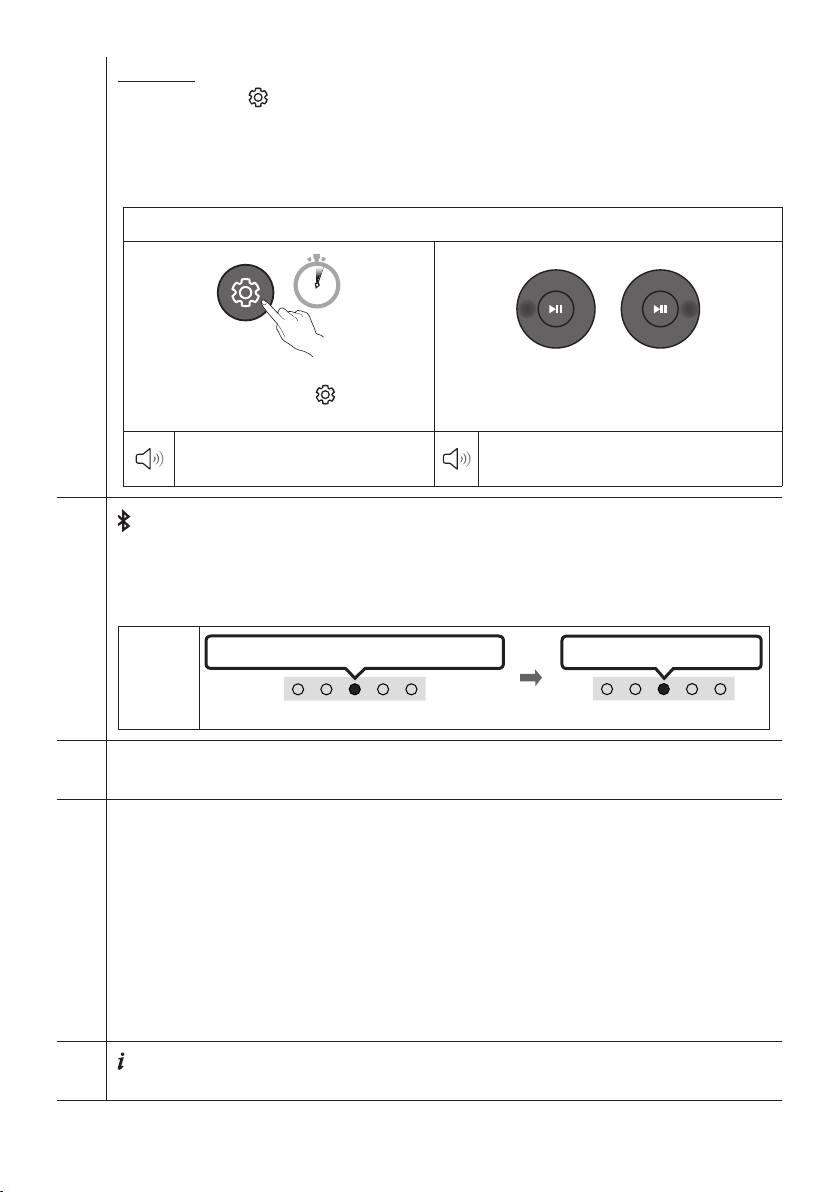
FRA - 12
EQ 7 bandes
Maintenez le bouton (Contrôle du son) enfoncé pendant environ 5 secondes pour régler le son pour
chaque bande de fréquence. Vous pouvez utiliser les boutons Gauche/Droite pour sélectionner les
fréquences suivantes : 150 Hz, 300 Hz, 600 Hz, 1,2 kHz, 2,5 kHz, 5 kHz et 10 kHz. Vous pouvez également
dénir chaque fréquence sur une valeur allant de -6 à +6 à l’aide des boutons Haut/Bas.
(Veillez à ce que le mode son soit déni sur « Standard ».)
EQ 7 bandes
5 Sec
Maintenez enfoncé le bouton (Contrôle du
son) pendant environ 5 secondes.
Avec les boutons Gauche/Droite, réglez chaque
fréquence entre -6 et +6.
« 150Hz »
« 150Hz » « 300Hz » « 600Hz » «
1.2kHz » « 2.5kHz » « 5kHz » « 10kHz »
Bluetooth PAIR
Basculez le Soundbar en mode association Bluetooth.
Lorsque vous appuyez sur le bouton, l'afchage des voyants DEL change comme indiqué ci-dessous.
• Jusqu'à ce que l'appairage soit terminé, les voyants DEL multicolores s'allument successivement :
Rouge → Vert → Bleu.
Voyant
DEL
Appairage
LesvoyantsRouge→ Vert → Bleu clignotent
Connexion établie
Levoyantcyanclignote3fois
p (Lecture/Pause)
Vous pouvez également écouter ou mettre en pause la musique en mode «USB».
Haut/Bas/Gauche/Droite
Appuyez sur Haut/Bas/Gauche/Droite sur le bouton pour sélectionner ou dénir des fonctions.
• Répéter
Pour utiliser la fonction Répéter en mode «USB», appuyez sur le bouton du Haut.
• Passer un morceau
Appuyez sur le bouton de Droite pour sélectionner le prochain morceau. Appuyez sur le bouton de
Gauche pour sélectionner le morceau précédent.
• ID SET
Maintenez le bouton Haut enfoncé pendant 5 secondes pour terminer ID SET (lors de la connexion
d’un caisson de basses sans l ou de haut-parleurs arrière sans l).
(Info)
Lorsque vous appuyez sur ce bouton, les informations relatives à chaque mode apparaissent. (Voir page 8.)
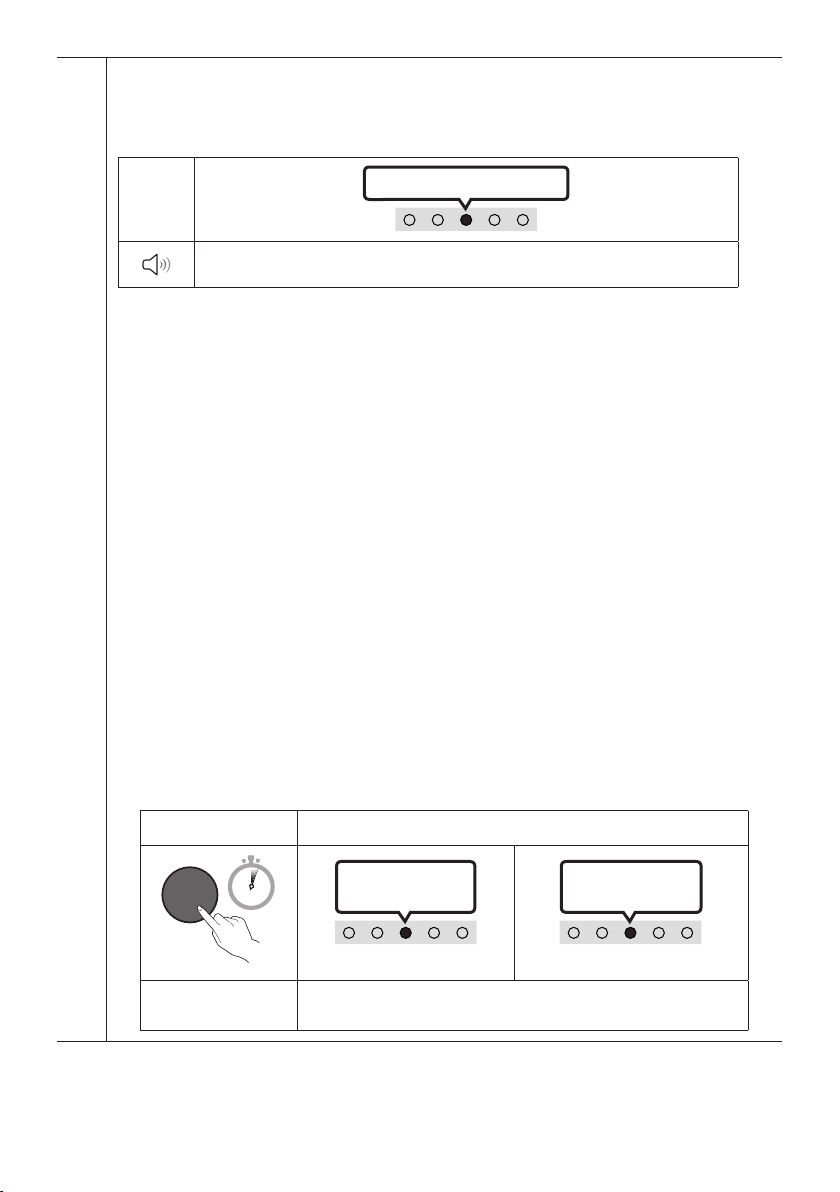
FRA - 13
SOUND MODE
En appuyant sur le bouton, vous pouvez sélectionner le mode audio souhaité. Chaque fois que vous
changez de mode, le voyant DEL multicolore clignote en blanc. (Le mode de son peut varier selon le
modèle de téléviseur.)
Voyant
DEL
Levoyantblancclignote1fois
« DTS Virtual:X » « Standard » « Music » « Game » « AdaptiveSound»
– DTS Virtual:X
Son 3D immersif à partir de n’importe quel contenu.
– Standard
Émet le son d’origine.
– Music
Fournit un son plus naturel et plus enveloppant pour le contenu musical.
– Game
Émet un son stéréoscopique an de vous plonger dans le feu de l’action lorsque vous jouez.
– AdaptiveSound
Analyse le contenu en temps réel et fournit automatiquement le champ sonore optimal en
fonction des caractéristiques du contenu.
• Activation/DésactivationdeBluetoothPower
Cette fonction est activée automatiquement sur le Soundbar lors de la réception d’une demande de
connexion depuis un appareil Bluetooth ou un téléviseur connecté précédemment. Le paramètre est activé
par défaut.
– Appuyez sur la touche SOUND MODE et maintenez-la enfoncée pendant plus de
5 secondes pour désactiver la fonction Bluetooth Power.
• Activation/DésactivationdeDRC(DynamicRangeControl)
Vous permet d’appliquer la commande de portée dynamique aux pistes Dolby Digital. Maintenez
enfoncé le bouton SOUND MODE pendant plus de 5secondes pendant que le Soundbar est hors
tension pour activer ou désactiver la fonction DRC (commande de portée dynamique). Quand la
fonction DRC est activée, les sont forts sont limités.
(Il peut se produire une distorsion du son.)
Bouton SOUND MODE Voyant DEL
SOUND
MODE
5 Sec
Levoyantcyan
clignote 1 fois
Activation (par défaut)
Désactivation
Levoyantrouge
clignote 1 fois
Activation/
DésactivationdeDRC
CommutationActivationDésactivation
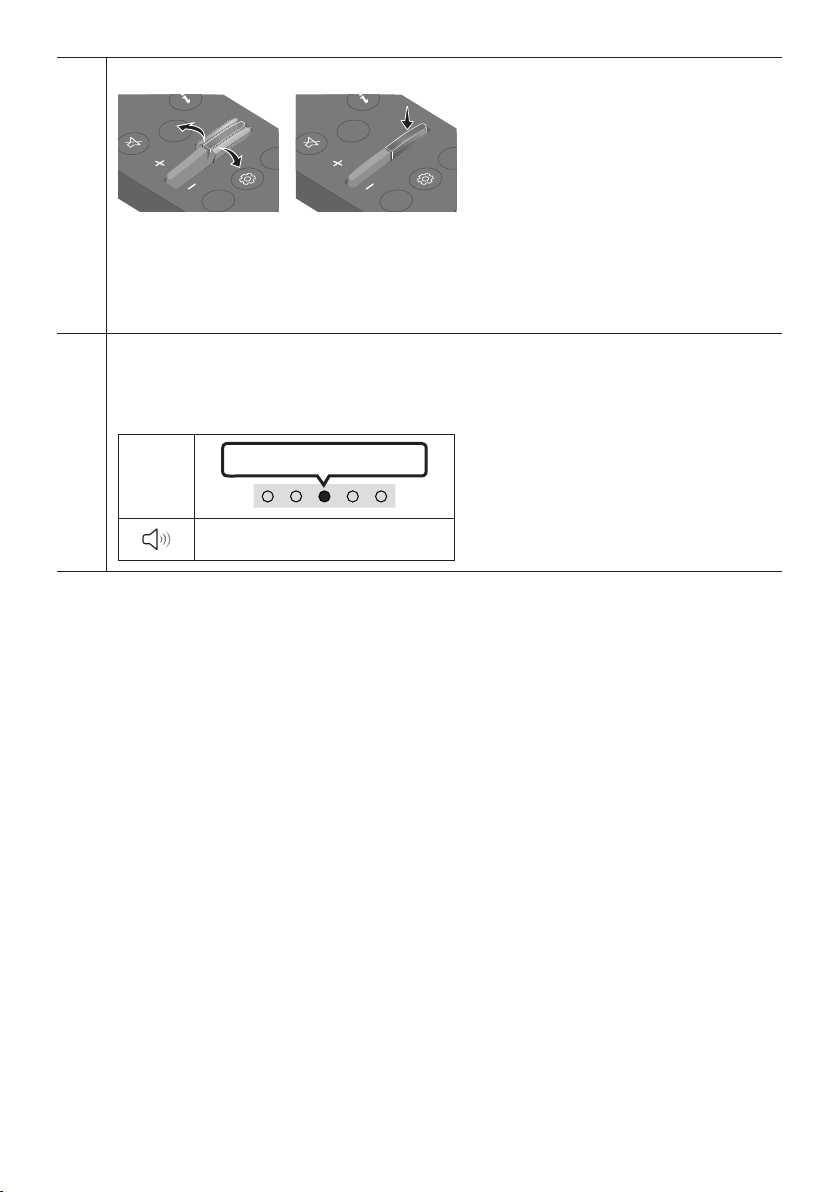
FRA - 14
NIVEAU du WOOFER (BASSES)
CH LEVEL
TONE
CONTR
WOOFER
SOUND
MODE
CH LEVEL
TONE
CONTR
WOOFER
SOUND
MODE
Lorsque le caisson de basses est connecté, appuyez sur le bouton vers le haut ou le bas pour le régler à-12
ou entre-6 et+6. Lorsque le caisson de basses est déconnecté, appuyez sur le bouton vers le haut ou le
bas pour régler le niveau des graves entre-6 et+6. Pour régler le volume du caisson de basses (graves)
à0 (valeur par défaut), appuyez sur le bouton (si le Soundbar est connecté au caisson de basses sans l
[vendu séparément]).
TONE CONTROL
En appuyant sur le bouton, vous pouvez ajuster le volume des aigus ou des basses. L'élément souhaité
peut être ajusté à l'aide des boutons Haut/Bas. (Cette fonction est offerte dans tous les modes audio,
sauf le mode «Standard».)
Voyant
DEL
Levoyantblancclignote1fois
«Treble» «Bass»
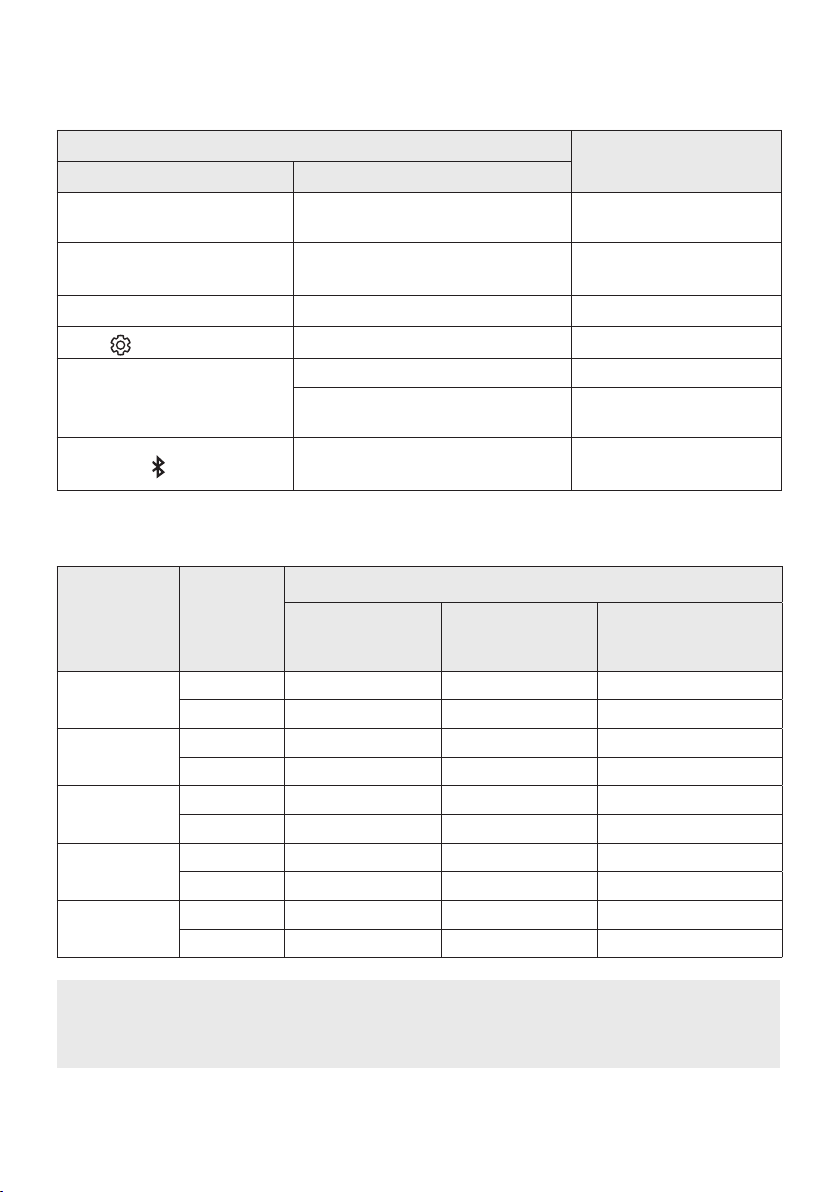
FRA - 15
Utilisation des boutons masqués (boutons ayant plusieurs
fonctions)
Bouton masqué
Page de référence
Bouton de la télécommande Fonction
WOOFER (Haut)
Activation/Désactivation de la
télécommande du téléviseur
page 16
Gauche
Activation/désactivation de la connexion
automatique du téléviseur
page 23
Haut ID SET page 12
(Contrôle du son)
EQ 7 bandes page 12
SOUND MODE
Activation/Désactivation de DRC page 13
Activation/Désactivation de
Bluetooth Power
page 13
PAIR
Activation/Désactivation de la
multiconnexion Bluetooth
page 30
Caractéristiques de sortie pour les différents modes d’effets sonores
Effet Entrée
Sortie
AvecleSoundbar
uniquement
Aveclecaissonde
basses uniquement
Aveccaissondesbasses
et haut-parleur arrière
sansl
DTS Virtual:X
2.0 canaux 3.0 canaux 3.1 canaux 5.1 canaux
5.1 canaux 3.0 canaux 3.1 canaux 5.1 canaux
Standard
2.0 canaux 2.0 canaux 2.1 canaux 2.1 canaux
5.1 canaux 3.0 canaux 3.1 canaux 5.1 canaux
Music
2.0 canaux 3.0 canaux 3.1 canaux 5.1 canaux
5.1 canaux 3.0 canaux 3.1 canaux 5.1 canaux
Game
2.0 canaux 3.0 canaux 3.1 canaux 5.1 canaux
5.1 canaux 3.0 canaux 3.1 canaux 5.1 canaux
Adaptive Sound
2.0 canaux 3.0 canaux 3.1 canaux 5.1 canaux
5.1 canaux 3.0 canaux 3.1 canaux 5.1 canaux
• Le haut-parleur arrière sans l Samsung et le caisson des basses peuvent être achetés
séparément. Pour acheter le haut-parleur ou le caisson des basses, communiquez avec le
vendeur auprès duquel vous avez acheté le Soundbar.
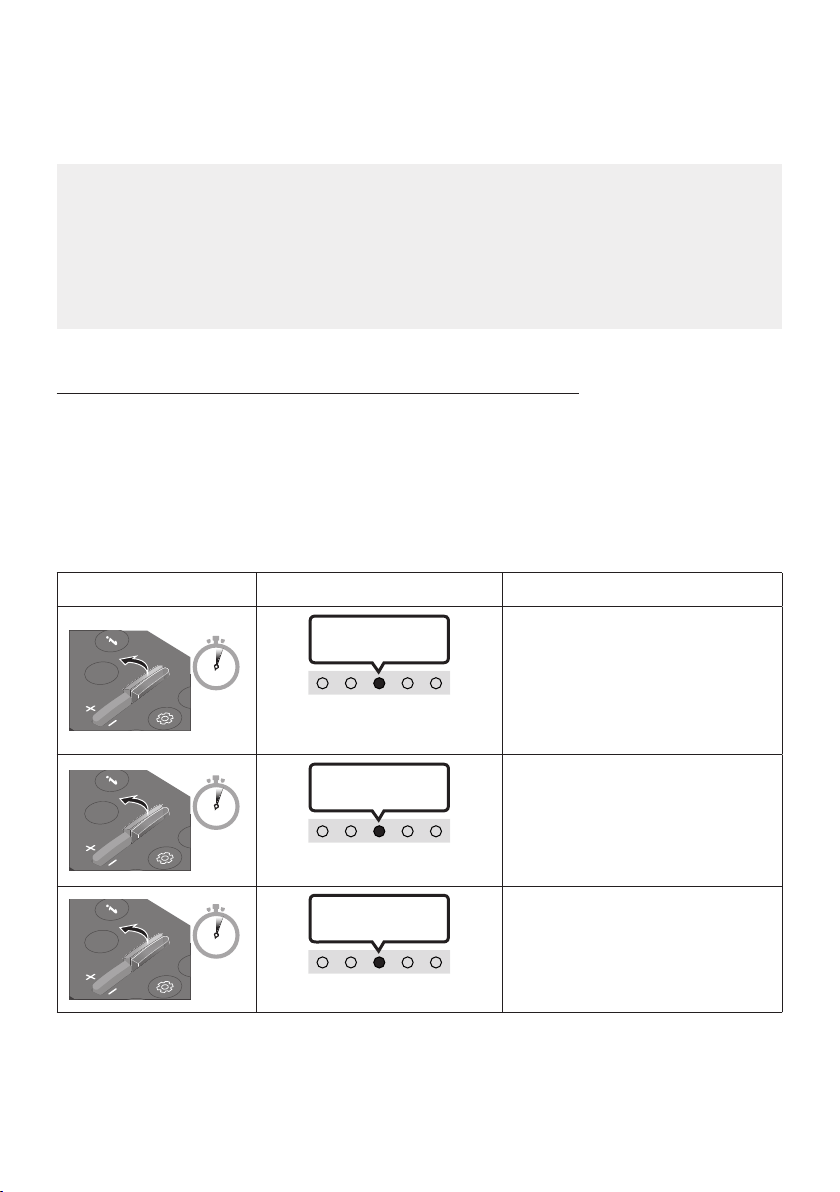
FRA - 16
RéglageduvolumeduSoundbaravecunetélécommandedu
téléviseur
Contrôlez le volume du Soundbar à l’aide de la télécommande du téléviseur.
• Cette fonction ne peut être utilisée qu’avec des télécommandes infrarouges. Les
télécommandes Bluetooth (télécommandes qui nécessitent un appairage) ne sont pas prises en
charge.
• Réglez le haut-parleur du téléviseur sur Haut-p. externe pour utiliser cette fonction.
• Fabricants qui utilisent cette fonction :
Samsung, VIZIO, LG, Sony, Sharp, PHILIPS, PANASONIC, TOSHIBA, Hisense, RCA
Activation/Désactivationdelatélécommandedutéléviseur
1. Éteignez le Soundbar.
2. Appuyez sur le bouton WOOFER et maintenez-le enfoncé pendant 5 secondes.
À chaque fois que vous faites basculer le bouton WOOFER vers le haut et le maintenez enfoncé
pendant 5 secondes, le mode change, dans l’ordre suivant : « Off-TV Remote » (Mode par défaut),
« Samsung-TV Remote », « All-TV Remote ».
L'état du voyant DEL change à chaque changement de mode, comme illustré ci-dessous.
Bouton de la télécommande Voyant DEL État
SOUND
MODE
WOOFER
L
TONE
CON
5 Sec
« Off-TV Remote »
(Mode par défaut)
Levoyantclignote
en rouge 1 fois
Télécommande du téléviseur
désactivée.
SOUND
MODE
WOOFER
L
TONE
CON
5 Sec
« Samsung-TV Remote »
Levoyantcyan
clignote 1 fois
Télécommande infrarouge du
téléviseur Samsung activée.
SOUND
MODE
WOOFER
L
TONE
CON
5 Sec
« All-TV Remote »
Levoyantclignote
en bleu 1 fois
Télécommande infrarouge du
téléviseur tiers activée.
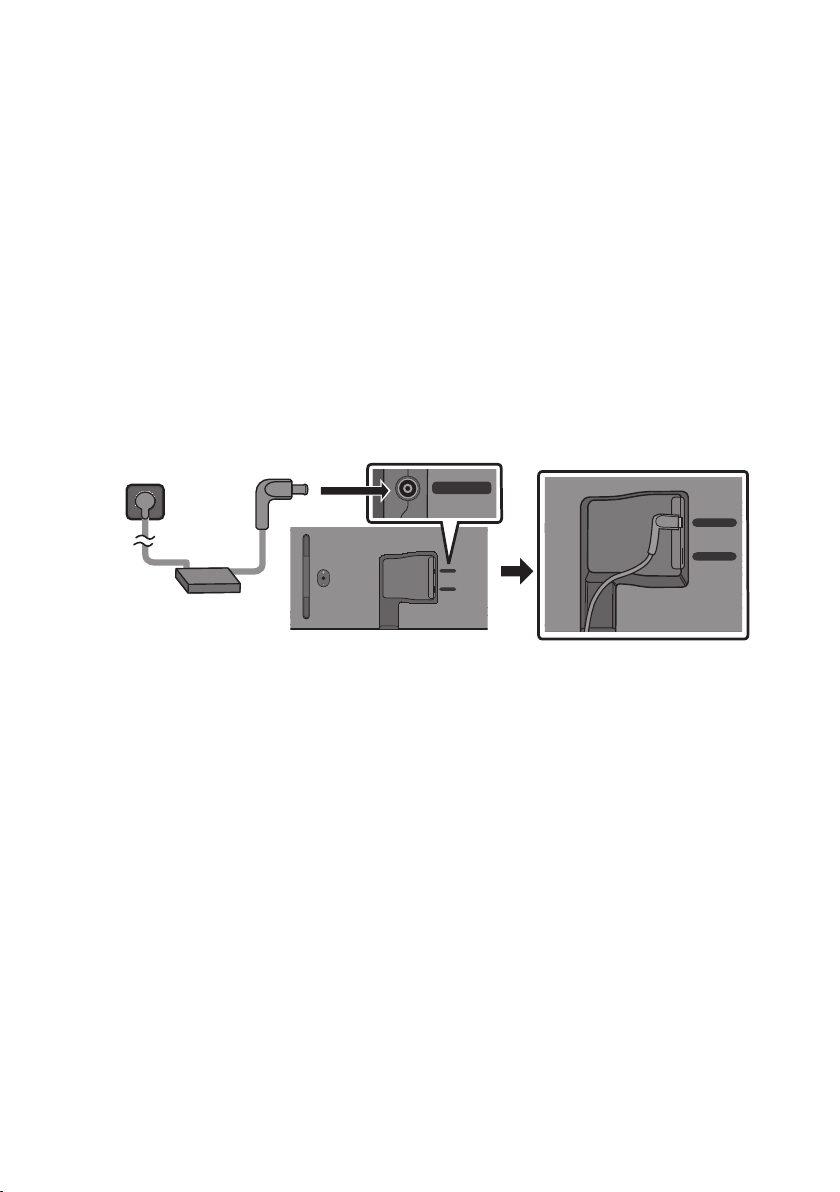
FRA - 17
04 CONNEXION DU SOUNDBAR
Connexion de l'alimentation électrique
An de brancher le Soundbar à une prise électrique, utilisez les composants d’alimentation dans l’ordre
suivant :
• Pour plus d'informations sur les exigences en matière d'alimentation électrique et de
consommation d'énergie, reportez-vous à l'étiquette apposée sur le produit. (Étiquette : Partie
inférieure de l’unité principale du Soundbar)
1. Tout d’abord, raccordez le câble d’alimentation à l’adaptateur CA/CC.
Connectez l’adaptateur CA/CC (avec le câble d’alimentation) au Soundbar.
2. Raccordez le cordon d'alimentation à une prise murale.
Dessous de l'unité principale du
Soundbar
USB (5V 0.5A)
DC 19V
DC 19V
Cordon
d'alimentation
Adaptateur CA/CC
USB (5V 0.5A)
DC 19V
REMARQUES
• Si vous débranchez et rebranchez le cordon d'alimentation lorsque le produit est sous tension, le
Soundbar s'allume automatiquement.
• Veillez à bien poser à plat l'adaptateur CA/CC sur une table ou au sol. Si l'adaptateur CA/CC est
suspendu, avec l'entrée du câble d'alimentation CA vers le haut, de l'eau ou d'autres substances
étrangères peuvent pénétrer dans l'adaptateur et provoquer son dysfonctionnement.
Connexiondukithaut-parleurarrièresanslSamsungetdu
caissondebasseàvotreSoundbar
Obtenez un véritable son ambiophonique sans l en connectant le haut-parleur arrière sans l
Samsung (SWA-9100S ou SWA-9200S, vendu séparément) et le caisson de basses sans l (SWA-W510,
vendu séparément) à votre Soundbar.
Pour plus d'informations sur les connexions, veuillez consulter le manuel d'utilisation du haut-parleur
arrière sans l et du caisson de basses sans l Samsung.
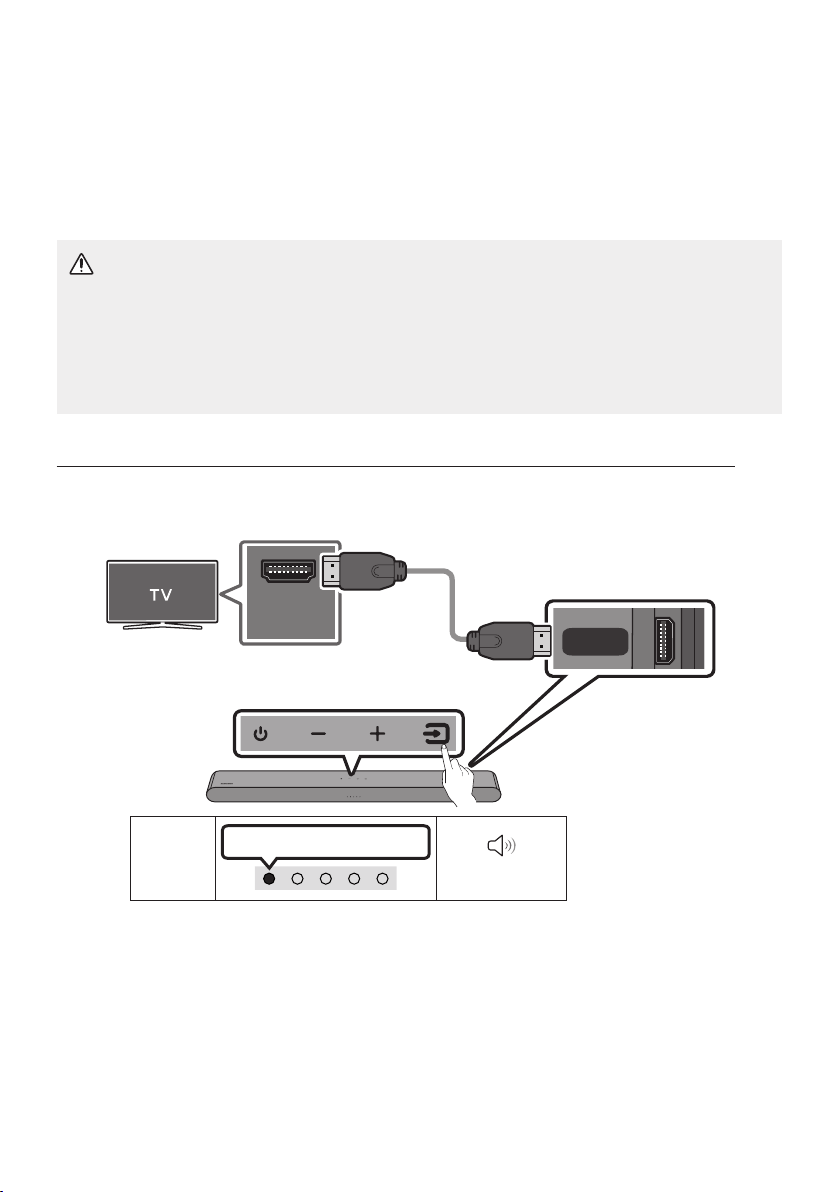
FRA - 18
05 UTILISATION D'UNE CONNEXION FILAIRE
AVEC LE TÉLÉVISEUR
Méthode1.ConnexionavecuncâbleHDMI
MISE EN GARDE
• Lorsque le câble HDMI et le câble optique sont tous les deux connectés, le signal HDMI est reçu
en premier.
• Pour connecter le câble HDMI entre le téléviseur et le Soundbar, assurez-vous de connecter les
bornes marquées ARC. Sinon, le son du téléviseur risque de ne pas être émis.
• Le câble recommandé est le High-Speed HDMI Cable with Ethernet.
ConnexiondutéléviseurprenantenchargeHDMIARC(AudioReturnChannel)
HDMI IN
(ARC)
(OPTICAL)
HDMI
(ARC)
Connectez le câble au port
HDMI IN (ARC)
ou (eARC)
devotretéléviseur.
Câble HDMI
Panneau dessous
du Soundbar
Connectez le câble au port HDMI
(ARC) de l'unité principale du
Soundbar.
Dessus du Soundbar
Voyant
DEL
Voyant blanc allumé -> éteint
«TV ARC»
1. Connectez le câble HDMI comme indiqué sur la gure en vous assurant que le Soundbar et le
téléviseur sont éteints.
2. Allumez le Soundbar et le téléviseur.
3. Le son du téléviseur est émis par le Soundbar.

FRA - 19
• Si le son du téléviseur n'est pas audible, appuyez sur le panneau supérieur du Soundbar ou sur
la touche
(Source) de la télécommande pour sélectionner le mode «Digital Audio In».
• Si aucun son ne sort, vériez à nouveau la connexion du câble HDMI.
• Utilisez les boutons de volume de la télécommande du téléviseur pour modier le volume du
Soundbar.
REMARQUES
• Lorsque vous connectez le téléviseur prenant en charge HDMI ARC (Audio Return Channel) au
Soundbar avec un câble HDMI, vous pouvez transmettre les données vidéo et audio numériques
sans connecter de câble optique séparé.
• Nous vous recommandons d'utiliser si possible un câble HDMI sans noyau. Si vous utilisez un câble
HDMI à noyau, utilisez-en un dont le diamètre est inférieur à 0,55 po (14 mm).
• Cette fonction n'est pas disponible si le câble HDMI ne prend pas en charge ARC.
• Lorsque le son d'une diffusion est encodé en Dolby Digital et que le paramètre «Format de sortie
audio numérique» est déni sur PCM sur votre téléviseur, nous recommandons de changer ce
paramètre en le dénissant sur Dolby Digital. Une fois que vous aurez modié ce paramètre sur le
téléviseur, vous pourrez proter d'une meilleure qualité sonore. (Le menu du téléviseur peut utiliser
des mots différents pour Dolby Digital et PCM selon le fabricant du téléviseur.)
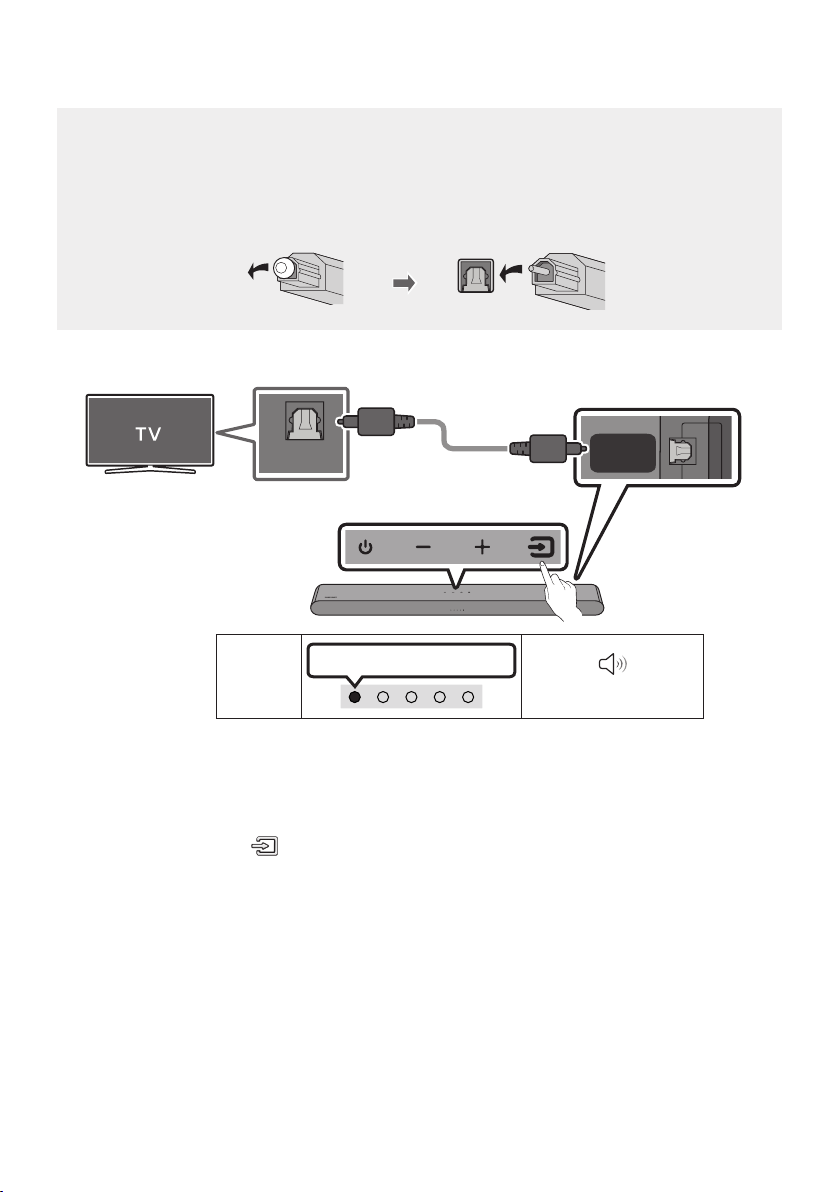
FRA - 20
Méthode2.Connexionàl'aided'uncâbleoptique
Liste de contrôle de pré-connexion
• Lorsque le câble HDMI et le câble optique sont tous les deux connectés, le signal HDMI est reçu
en premier.
• Lorsque vous utilisez un câble optique et que les bornes ont leurs caches, assurez-vous de
retirer les caches.
DIGITAL
AUDIO IN
(OPTICAL)
OPTICAL OUT
Panneau dessous
du Soundbar
Câble optique
(non fourni)
Dessus du Soundbar
Voyant
DEL
Voyant blanc allumé -> éteint
«Digital Audio In»
1. Le téléviseur et le Soundbar étant éteints, connectez le port DIGITAL AUDIO IN (OPTICAL) du
Soundbar et le port de sortie OPTICAL du téléviseur à l'aide du câble optique (non fourni), comme
indiqué sur la gure.
2. Allumez le Soundbar et le téléviseur.
3. Appuyez sur le bouton
(Source) du panneau supérieur ou de la télécommande, puis
sélectionnez le mode « Digital Audio In ».
4. Le son du téléviseur est émis par le Soundbar.

FRA - 21
Utilisation de la fonction Q-Symphony
Pour utiliser la fonction Q-Symphony, le Soundbar se synchronise avec un téléviseur Samsung an de
restituer le son via deux appareils pour un effet ambiophonique optimal. Lorsque le Soundbar est
connecté, le menu «TV+Soundbar» apparaît au-dessous du menu Sortie audio du téléviseur.
Sélectionnez le menu correspondant.
Voyant
DEL
Voyant blanc allumé -> éteint
«Digital
Audio In»
Menu du
téléviseur
OU
Câble optique (non fourni)
Câble HDMI
• Exemple de menu du téléviseur : Téléviseur + [AV] Soundbar numéro de série (HDMI)
REMARQUES
• Le fonctionnement dépend du codec pris en charge par le téléviseur.
• Cette fonction est prise en charge uniquement lorsque le câble HDMI ou le câble optique (non
fourni) est connecté
• Le message qui s’afche peut varier selon le modèle de téléviseur.
• Cette fonction est disponible sur certains téléviseurs Samsung et sur certains modèles de
Soundbar.
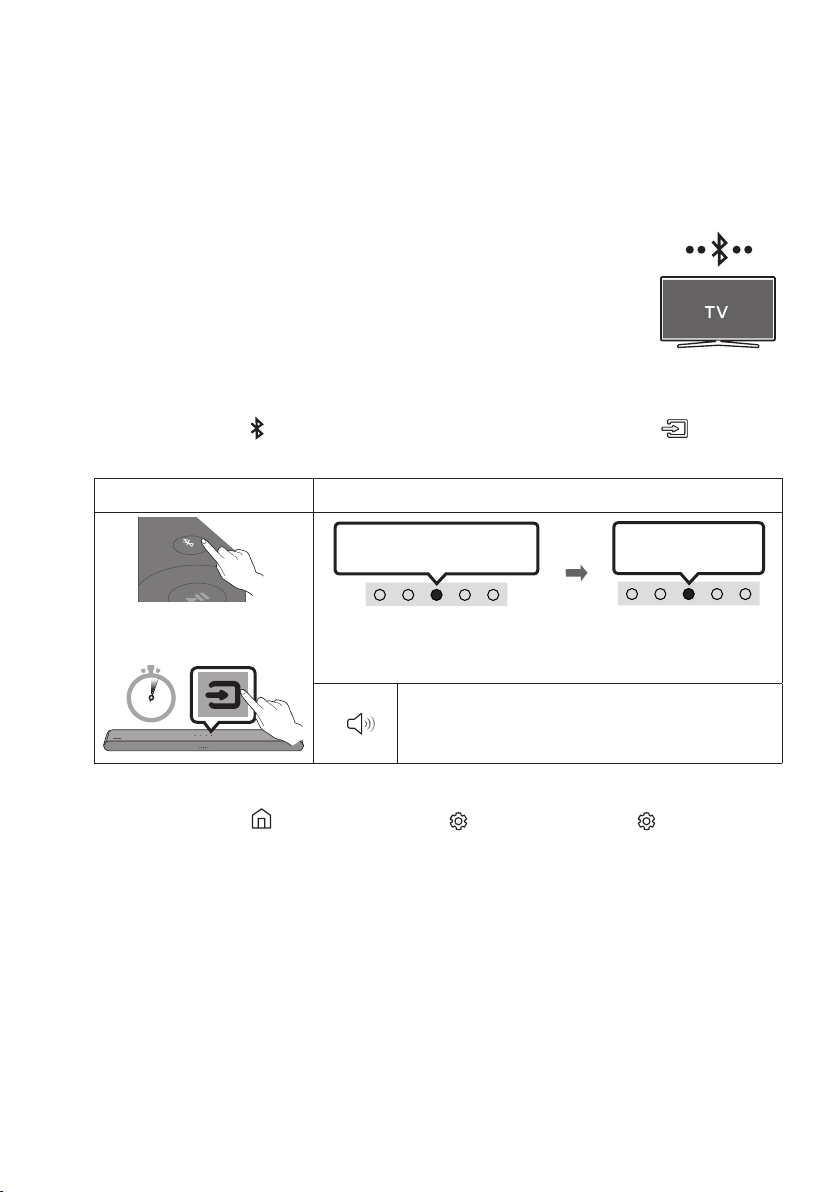
FRA - 22
06 UTILISATION D'UNE CONNEXION SANS
FIL AVEC LE TÉLÉVISEUR
Connexion par Bluetooth
Lorsqu'un téléviseur Samsung est connecté via Bluetooth, vous pouvez entendre le
son stéréo sans les tracas du câblage.
• Un seul téléviseur Samsung peut être connecté à la fois.
• Un téléviseur Samsung prenant en charge Bluetooth peut être connecté.
Vériez les spécications de votre téléviseur.
Connexion initiale
1. Appuyez sur le bouton
PAIR de la télécommande du Soundbar ou sur le bouton (Source) du
panneau supérieur du Soundbar pour passer en mode «Bluetooth».
Bouton Appairage Bluetooth Voyant DEL
PAIR
OU
Appairage
LesvoyantsRouge→ Vert →
Bleu clignotent
Levoyantcyan
clignote 3 fois
Connexion établie
En mode « Bluetooth »
5 Sec
• Jusqu'à ce que l'appairage soit terminé, les voyants DEL multicolores
s'allument successivement : Rouge → Vert → Bleu.
«ReadytoconnectviaBluetooth.»
2. Sélectionnez le mode Bluetooth sur le téléviseur Samsung.
(Par exemple, Accueil (
)
→ Menu
Paramètres ( )
→ Tous les paramètres ( )
Son Sortie
audio Liste des haut-parleurs Bluetooth [AV] Soundbar S5B-Series (Bluetooth))
3. Sélectionnez «[AV] Soundbar S5B-Series» dans la liste sur l'écran du téléviseur.
Un Soundbar disponible est indiquée par «Association requise» ou «Associé» sur la liste des
appareils Bluetooth du téléviseur. Pour connecter le téléviseur Samsung au Soundbar, sélectionnez
le message, puis établissez une connexion.
4. Vous pouvez maintenant entendre le son du téléviseur Samsung à partir du Soundbar.
• S'il existe un historique de connexion entre le Soundbar et le téléviseur Samsung, le Soundbar
est automatiquement connecté lorsque vous passez au mode «Bluetooth».
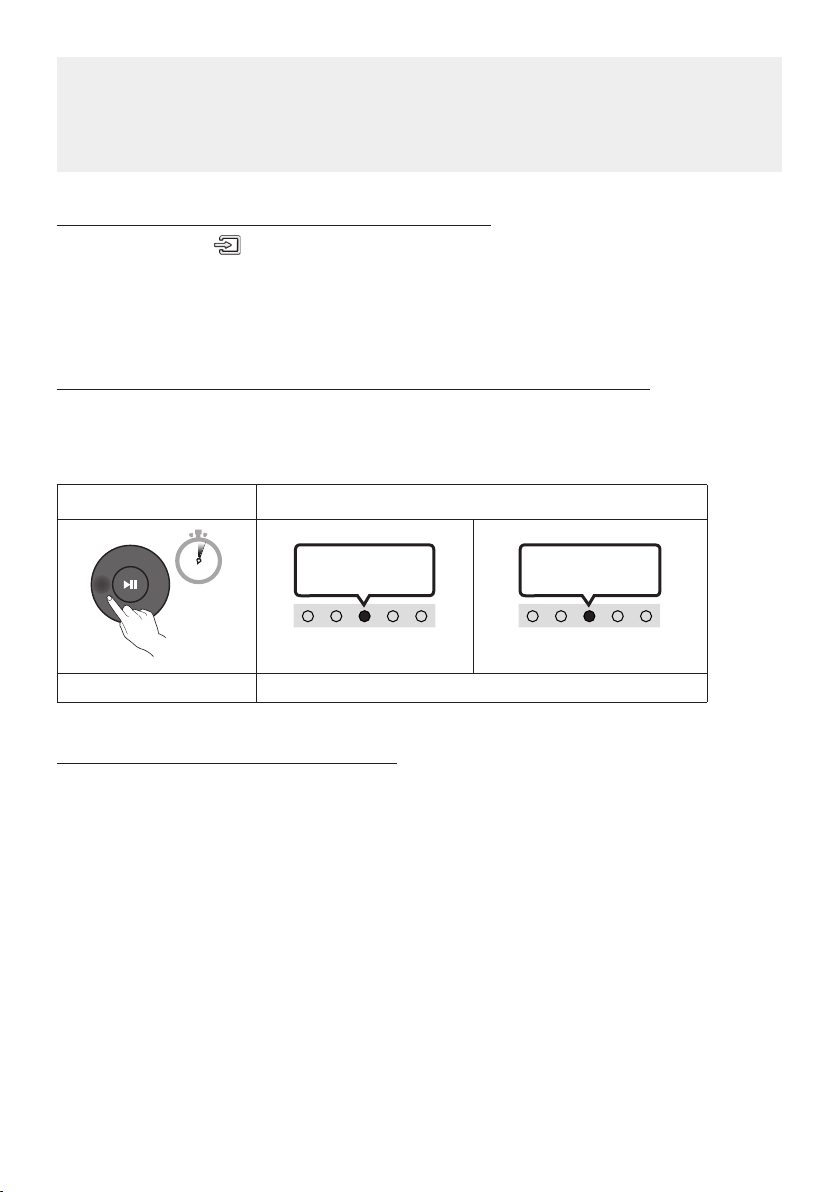
FRA - 23
En cas d'échec de la connexion de l'équipement
• Si vous avez un Soundbar existant (par exemple, “[AV] Soundbar S5B-Series) dans la liste des
haut-parleurs du téléviseur Samsung, supprimez-le.
• Répétez ensuite les étapes 1à3.
DéconnexionduSoundbardutéléviseurSamsung
Appuyez sur le bouton
(Source)
du panneau supérieur ou de la télécommande pour sélectionner le
mode, autre que « Bluetooth ».
• La déconnexion prend du temps car le téléviseur Samsung doit recevoir une réponse du Soundbar.
(Le temps requis peut varier en fonction du modèle de téléviseur Samsung.)
Activation/désactivationdelaconnexionautomatiquedutéléviseur
Pour annuler la connexion Bluetooth automatique entre le Soundbar et le téléviseur, appuyez sur la
touche Gauche de la télécommande pendant 5 secondes en mode «
Bluetooth Ready
». (La fonction
passe de Activé à Désactivé)
Bouton gauche Voyant DEL
5 Sec
Levoyantcyan
clignote 1 fois
Activation (par défaut)
Désactivation
Levoyantrouge
clignote 1 fois
Bluetooth Ready CommutationActivationDésactivation
Remarques sur la connexion Bluetooth
• Localisez un nouvel appareil à moins d’3,28 pi (1 m) pour vous connecter via la communication
Bluetooth.
• Si un code PIN vous est demandé lors de la connexion d'un appareil Bluetooth, entrez <0000>.
• Le Soundbar s'éteint automatiquement au bout de 20minutes à l'état Prêt.
• Le Soundbar peut ne pas effectuer correctement la recherche ou la connexion Bluetooth dans les
circonstances suivantes:
– S'il y a un fort champ électrique autour du Soundbar.
– Si plusieurs appareils Bluetooth sont associés simultanément au Soundbar.
– Si l'appareil Bluetooth est éteint, pas en place ou fonctionne mal.
• Les appareils électroniques peuvent créer des interférences radio. Les appareils produisant des
ondes électromagnétiques doivent être gardés à distance de l'unité principale du Soundbar, par
exemple les micro-ondes, les appareils de réseau sans l, etc.
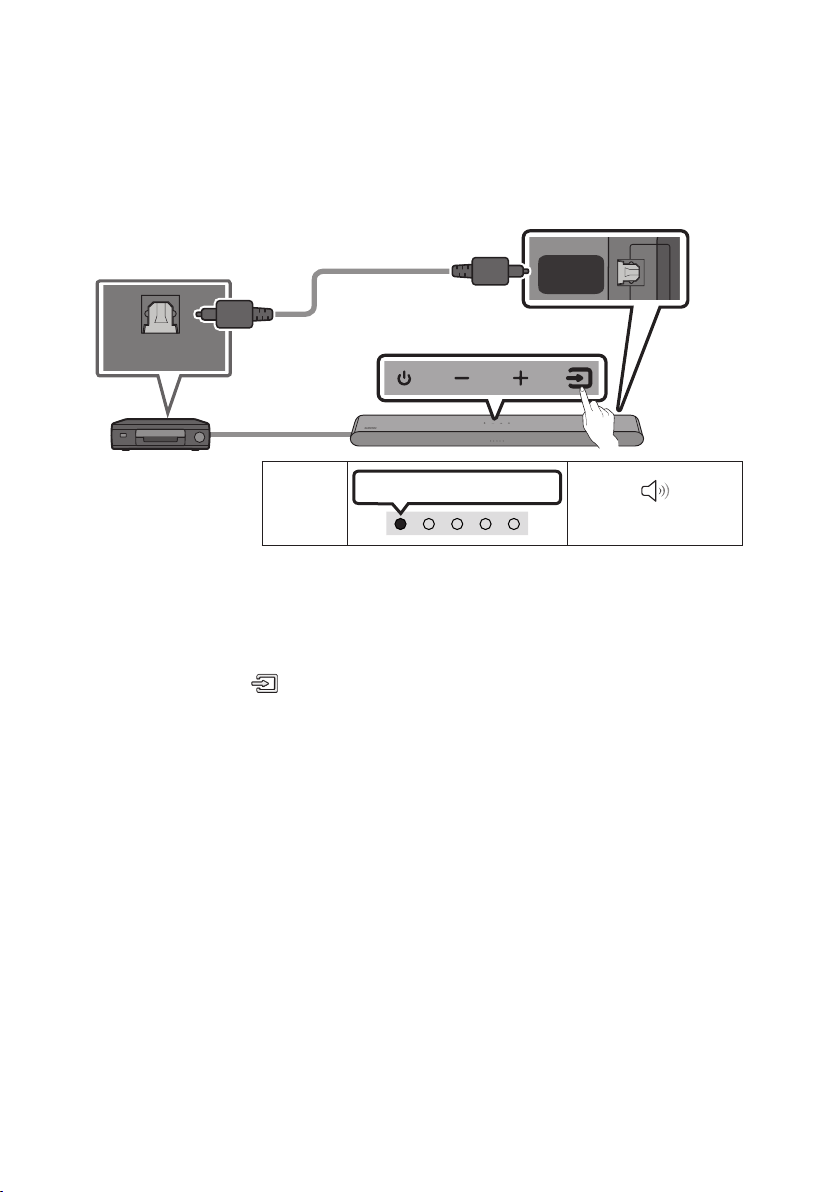
FRA - 24
07 CONNEXION D'UN APPAREIL EXTERNE
Connexion à l'aide d'un câble optique
OPTICAL OUT
DIGITAL
AUDIO IN
(OPTICAL)
Panneau dessous du Soundbar
Câble optique
(non fourni)
Dessus du Soundbar
Lecteur BD/DVD/
Décodeur/Console de jeu
Voyant
DEL
Voyant blanc allumé -> éteint
«Digital Audio In»
1. Éteignez l'appareil externe et le Soundbar, puis connectez le port DIGITAL AUDIO IN (OPTICAL) du
Soundbar et le port de sortie OPTICAL de l'appareil externe à l'aide du câble optique (non fourni),
comme indiqué sur la gure.
2. Allumez le Soundbar et l'appareil externe.
3. Appuyez sur le bouton
(Source) du panneau supérieur ou de la télécommande, puis
sélectionnez le mode « Digital Audio In ».
4. Le son de l'appareil externe est émis par le Soundbar.
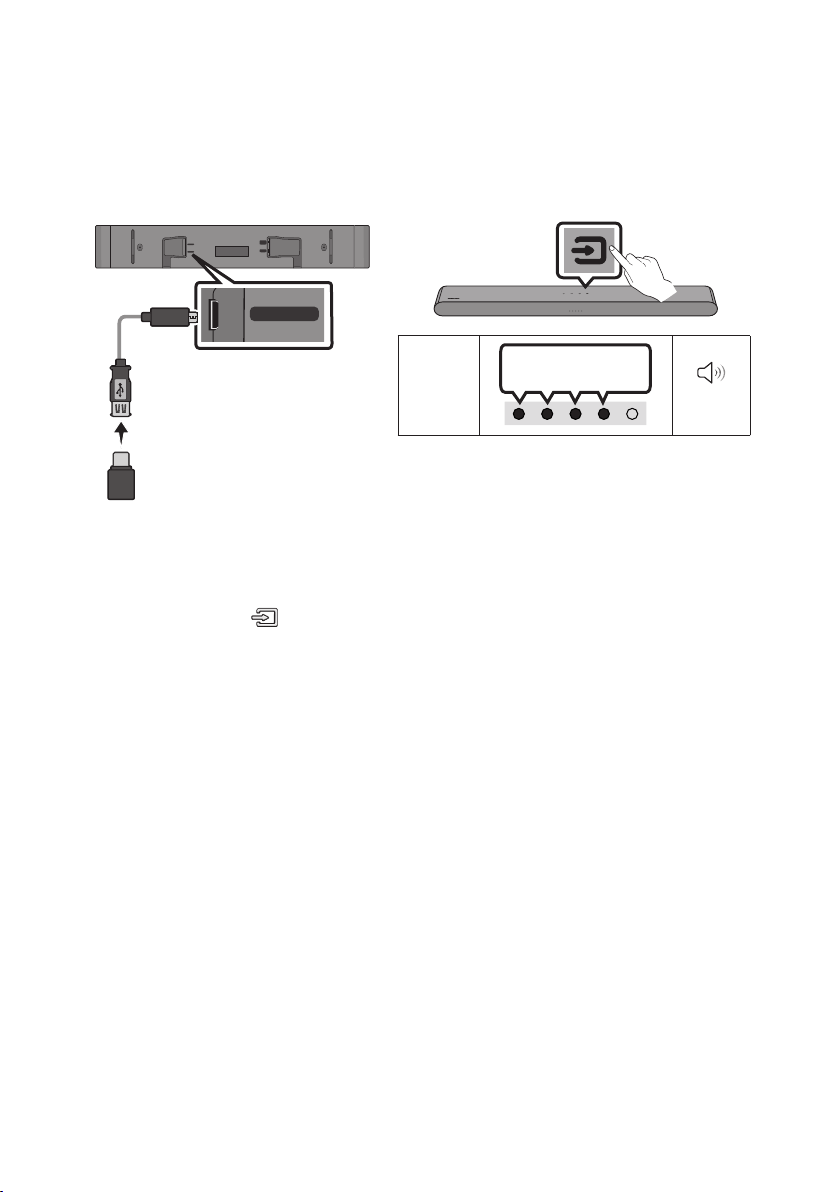
FRA - 25
08 CONNEXION À UN PÉRIPHÉRIQUE DE
STOCKAGE USB
Vous pouvez diffuser des morceaux se trouvant sur des périphériques de stockage à l’aide du Soundbar.
USB (5V 0.5A)
DC 19V
DIGITAL
AUDIO IN
(OPTICAL)
HDMI
(ARC)
USB (5V 0.5A)
Câble adaptateur
MicroUSBvers
USB (non fourni)
Voyant
DEL
Voyant blanc allumé
-> éteint
« USB»
1. Connectez la clé USB au Soundbar à l’aide du câble adaptateur USB comme indiqué ci-dessus.
• Le câble adaptateur MicroUSB vers USB est vendu séparément. Pour l’acheter, contactez un
Centre de service Samsung ou le service clientèle Samsung.
2. Appuyez sur le bouton
(Source) du panneau supérieur ou de la télécommande, puis
sélectionnez le mode « USB».
3. Diffusez des morceaux à partir du périphérique de stockage via le Soundbar.
• Le Soundbar se désactive automatiquement (Auto Power Down) si aucun périphérique USB
n’est connecté depuis plus de 20 minutes.

FRA - 26
Liste de compatibilité
Rallonge Codec Taux d’échantillonnage Débit binaire
*.m p3 MPEG1 Layer2 32 kHz à 48 kHz 32 à 320 kbps
MPEG1 Layer3 32 kHz à 48 kHz 32 à 320 kbps
MPEG2 Layer3 16 kHz à 24 kHz 8 à 160 kbps
MPEG2.5 Layer3 8 kHz à 12 kHz 8 à 160 kbps
*.wma WMA7/8/9 32 kHz à 48 kHz 32 à 320 kbps
*.ogg Vorbis 32 kHz à 48 kHz 45 à 500 kbps
*.aac
*.m 4a
A AC- LC
(MPEG2/MPEG4 audio uniquement)
32 kHz à 48 kHz 32 à 320 kbps
*.wav LPCM 32 kHz à 192 kHz 1,024 à 9,216 kbps
*.ac FLAC 32 kHz à 192 kHz 162 à 8,100 kbps
*.aif f AIFF 32 kHz à 192 kHz 1,024 à 9,216 kbps
• Si un trop grand nombre de dossiers (environ 200) et de chiers (environ 2000) sont stockés sur le
périphérique USB, le Soundbar peut mettre un certain temps pour accéder aux chiers et les lire.
• Le Soundbar ne prend en charge que les périphériquesUSB dotés des systèmes de chiersFAT16
(~2Go), FAT32 (~ 2To) ou NTFS (~2To).
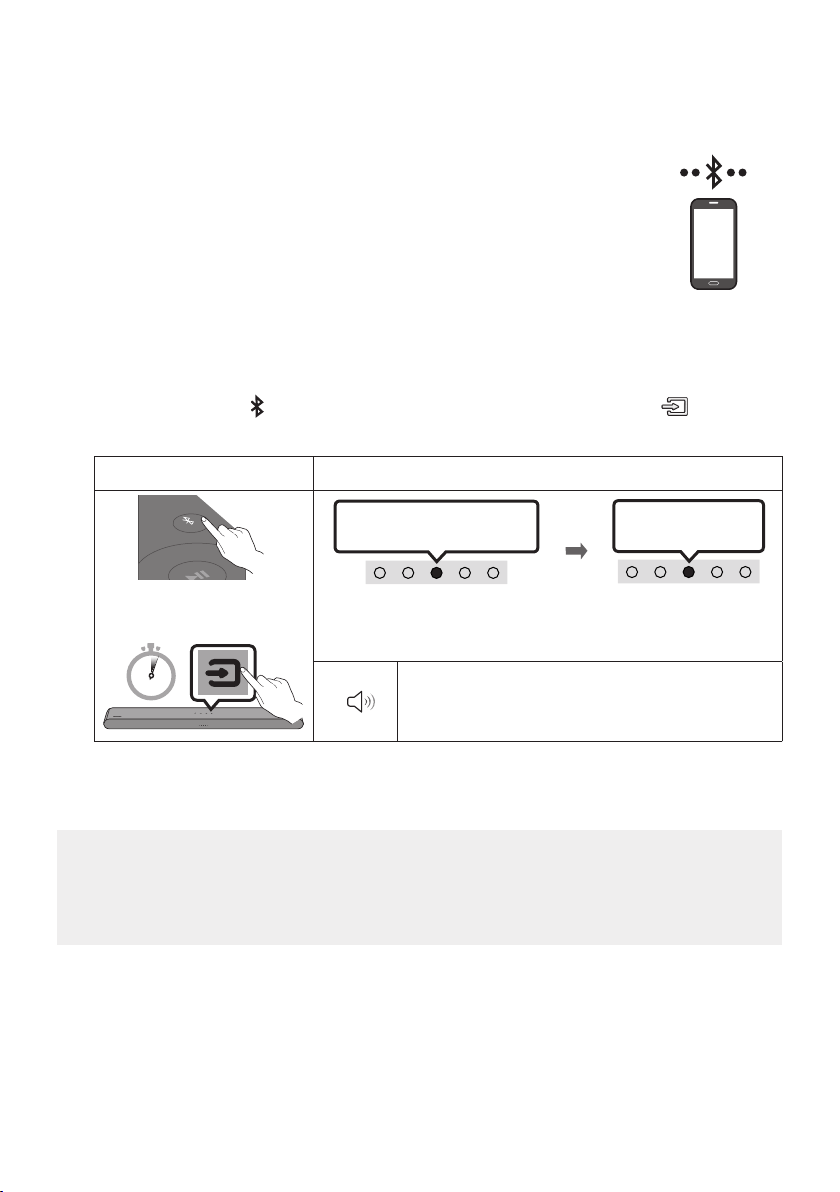
FRA - 27
09 CONNEXION D'UN APPAREIL MOBILE
Connexion par Bluetooth
Lorsqu'un appareil mobile est connecté par Bluetooth, vous pouvez entendre le
son stéréo sans les tracas du câblage.
• Lorsque vous connectez un appareil Bluetooth associé alors que le Soundbar
est éteint, le Soundbar s'allume automatiquement.
La connexion initiale
• Lors de la connexion à un nouvel appareil Bluetooth, assurez-vous que l'appareil est à moins d’3,28 pi
(1 m) de distance.
1. Appuyez sur le bouton PAIR de la télécommande du Soundbar ou sur le bouton (Source) du
panneau supérieur du Soundbar pour passer en mode «Bluetooth».
Bouton Appairage Bluetooth Voyant DEL
PAIR
OU
Appairage
LesvoyantsRouge→ Vert →
Bleu clignotent
Levoyantcyan
clignote 3 fois
Connexion établie
En mode « Bluetooth »
5 Sec
• Jusqu'à ce que l'appairage soit terminé, les voyants DEL multicolores
s'allument successivement : Rouge → Vert → Bleu.
«ReadytoconnectviaBluetooth.»
2. Sur votre appareil, sélectionnez «[AV] Samsung Soundbar S5B-Series» dans la liste qui apparaît.
3. Lisez les chiers musicaux de l'appareil connecté par Bluetooth via le Soundbar.
En cas d’échec de la connexion de l’équipement
• Si un Soundbar (par exemple, [AV] Samsung Soundbar S5B-Series) gure déjà dans la liste des
haut-parleurs de l’appareil mobile, supprimez-le.
• Répétez les étapes 1 et 2.
Appareil mobile

FRA - 28
Remarques sur la connexion Bluetooth
• Localisez un nouvel appareil à moins d’3,28 pi (1 m) pour vous connecter via la communication
Bluetooth.
• Si un code PIN vous est demandé lors de la connexion d’un appareil Bluetooth, entrez <0000>.
• Le Soundbar s’éteint automatiquement au bout de 20minutes à l’état Prêt.
• Le Soundbar peut ne pas effectuer correctement la recherche ou la connexion Bluetooth dans les
circonstances suivantes:
– S’il y a un fort champ électrique autour du Soundbar.
– Si plusieurs appareils Bluetooth sont associés simultanément au Soundbar.
– Si l’appareil Bluetooth est éteint, pas en place ou fonctionne mal.
• Les appareils électroniques peuvent créer des interférences radio. Les appareils produisant des
ondes électromagnétiques doivent être gardés à distance de l’unité principale du Soundbar, par
exemple les micro-ondes, les appareils de réseau sans l, etc.
• Le Soundbar prend en charge les données SBC (44,1 kHz, 48 kHz).
• Connectez-vous uniquement à un périphérique Bluetooth prenant en charge la fonction A2DP (AV).
• Vous ne pouvez pas connecter le Soundbar à un périphérique Bluetooth qui prend uniquement en
charge la fonction HF (Hands Free).
• Lorsque vous connectez le Soundbar à un périphérique Bluetooth, placez-les aussi près que
possible l’un de l’autre.
• Plus le Soundbar et le périphérique Bluetooth sont éloignés l’un de l’autre, plus la qualité sonore
diminue. La connexion Bluetooth peut se rompre lorsque les appareils sont hors de portée
effective.
• La connexion Bluetooth peut ne pas fonctionner comme prévu dans les zones où la réception est
mauvaise.
• Un périphérique Bluetooth peut émettre du bruit ou devenir défaillant dans les conditions suivantes :
– Lorsque le corps est en contact avec l’émetteur-récepteur de signal sur l’appareil Bluetooth ou
le Soundbar
– Dans les coins ou lorsqu’il y a un obstacle à proximité, tel qu’un mur ou une cloison, où des
changements électriques peuvent se produire.
– Lorsqu’il est exposé à des interférences radio par d’autres produits fonctionnant sur les mêmes
gammes de fréquences, comme des équipements médicaux, des fours à micro-ondes et des
périphériques LAN sans l.
– - Les obstacles tels que les portes et les murs peuvent avoir un impact sur la qualité sonore,
même lorsque les appareils sont dans le champ de portée effective.
• Notez que votre Soundbar ne peut pas être appairé avec d’autres périphériques Bluetooth lorsque
vous utilisez l’option Bluetooth.
• Cet appareil sans l peut provoquer des interférences électriques lorsqu’il est en marche.
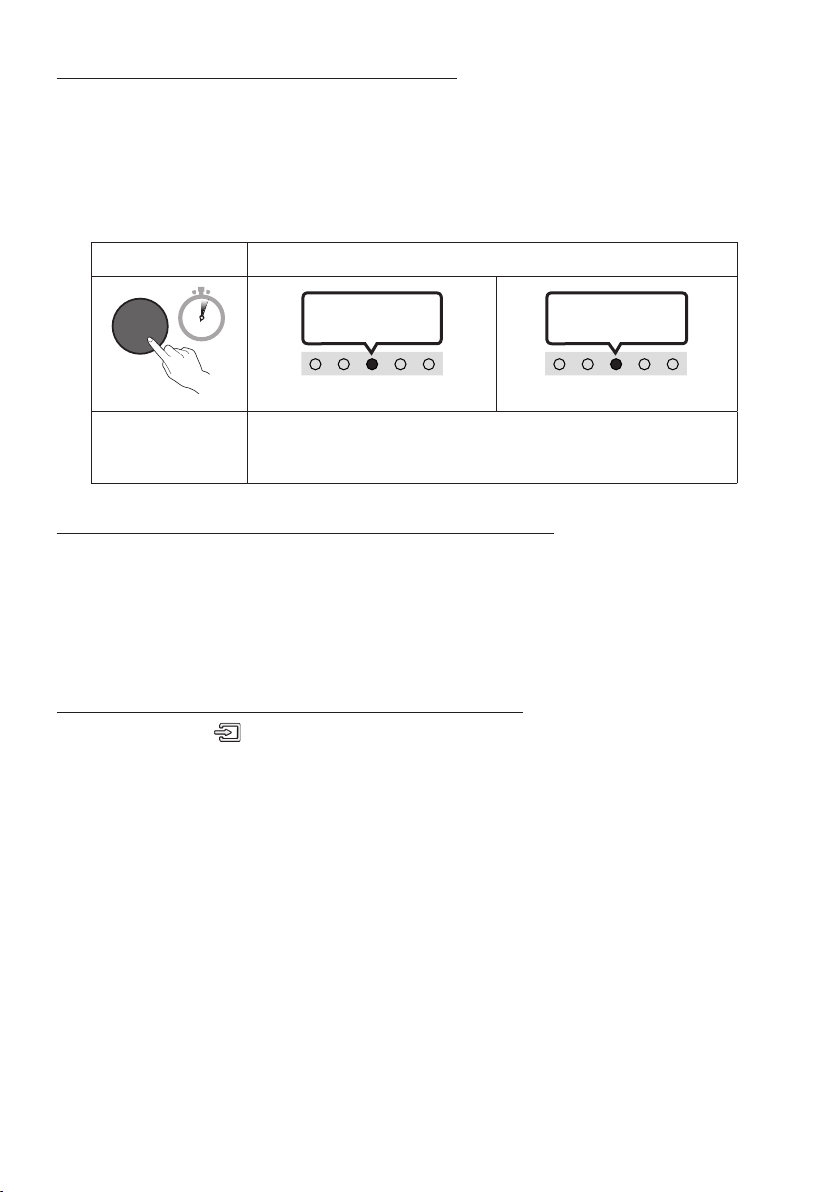
FRA - 29
Activation/DésactivationdeBluetoothPower
Si un périphérique Bluetooth précédemment apparié tente de s’apparier avec le Soundbar lorsque la
fonction Bluetooth Power est activée et que le Soundbar est éteint, celui-ci se met automatiquement
en marche.
1. Appuyez sur la touche SOUND MODE de la télécommande et maintenez-la enfoncée pendant plus
de 5 secondes pendant que le Soundbar est allumé.
2. Le voyant multicolore du Soundbar clignote en
«
Cyan
»
.
Bouton SOUND MODE Voyant DEL
SOUND
MODE
5 Sec
Levoyantcyan
clignote 1 fois
Activation (par défaut)
Désactivation
Levoyantrouge
clignote 1 fois
Activation/
Désactivationde
Bluetooth Power
CommutationActivationDésactivation
Déconnexion d’un périphérique Bluetooth d’un Soundbar
Vous pouvez déconnecter le périphérique Bluetooth à partir du système Soundbar. Pour des directives,
consultez le manuel d’utilisation du périphérique Bluetooth.
• Le système Soundbar sera déconnecté.
• Si le Soundbar est déconnecté de l'appareil Bluetooth, le voyant DEL multicolore du Soundbar
clignote « Rouge » trois fois.
Déconnexion du Soundbar du périphérique Bluetooth
Appuyez sur le bouton
(Source)
du panneau supérieur ou de la télécommande pour sélectionner le
mode, autre que « Bluetooth ».
• La déconnexion prend du temps car le périphérique Bluetooth doit recevoir une réponse du
Soundbar. (Le temps de déconnexion requis peut différer en fonction du périphérique Bluetooth.)
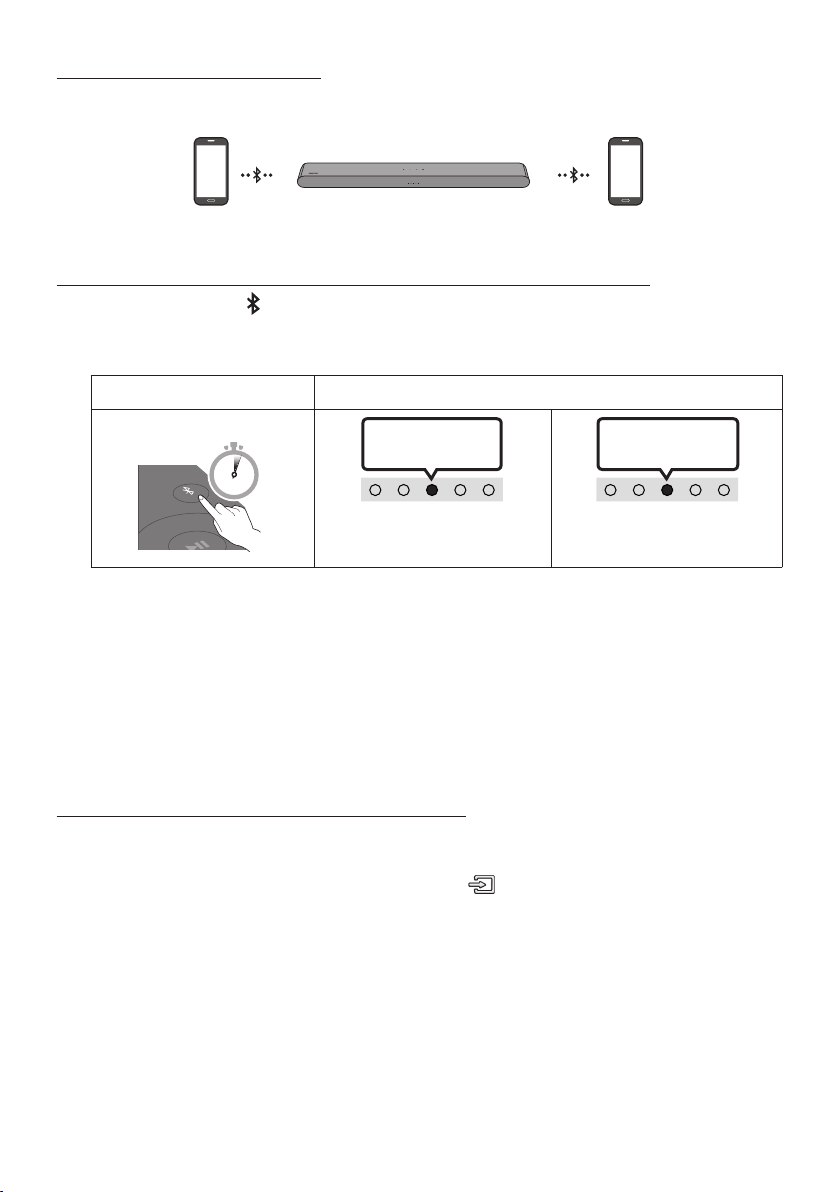
FRA - 30
Connexion Bluetooth multiple
Le Soundbar peut être connecté à 2 appareils Bluetooth simultanément.
Appareil Bluetooth A Appareil Bluetooth B
Activation/désactivationdelaconnexionautomatiquedutéléviseur
1. Appuyez sur le bouton
PAIR de la télécommande plus de5secondes pendant que le Soundbar est
éteint.
2. Le voyant multicolore du Soundbar clignote en
«
Cyan
»
.
Bouton Appairage Bluetooth Voyant DEL
En mode veille
PAIR
5 Sec
Levoyantcyan
clignote 1 fois
Multiconnexion activée
(par défaut)
Multiconnexion désactivée
Levoyantrouge
clignote 1 fois
3. Connectez le Soundbar à deux appareils Bluetooth au maximum (voir page 27).
4. Écoutez de la musique à partir de l’un des appareils Bluetooth connectés pendant que deux
appareils sont connectés.
5. Si de la musique est lue à partir de l’appareil Bluetooth «B» alors que la lecture est en cours à
partir de l’appareil «A», la musique est lue sur l’appareil «B» et est automatiquement arrêtée/
mise en pause sur l’appareil «A».
6. Dans les versions antérieures à AVRCP V1.4, il est possible de retarder le temps de commutation de
l’appareil qui lit de la musique.
AssociationavecplusieursappareilsBluetooth
Comment associer plusieurs appareils au Soundbar
1. Allumez le Soundbar.
2. En mode « Bluetooth » seulement, appuyez sur le bouton (Source) sur le dessus du Soundbar et
maintenez-le enfoncé pendant plus de 5secondes an que le Soundbar passe en mode
« Bluetooth Pairing ». Ensuite, activez Bluetooth sur l'appareil Bluetooth et sélectionnez le Soundbar dans
la liste des appareils disponibles. Le Soundbar sera automatiquement connecté à l'appareil Bluetooth.
3. Un deuxième appareil Bluetooth peut être associé et connecté au Soundbar en procédant de la
même façon. Si vous essayez de connecter un troisième appareil, un appareil connecté qui ne lit
pas d’audio perdra sa connexion Bluetooth, mais sera toujours associé au Soundbar.
4. En utilisant la même méthode, vous pouvez associer jusqu’à 8 appareils Bluetooth, mais seuls les 2
derniers resteront connectés au Soundbar en même temps.

FRA - 31
REMARQUES
• Connectez le Soundbar à deux appareils Bluetooth au maximum.
• Écoutez de la musique à partir de l’un des appareils Bluetooth connectés pendant que deux
appareils sont connectés.
• Si de la musique est lue à partir de l’appareil Bluetooth «B» pendant que la lecture est en cours à
partir de l’appareil «A», la musique est lue sur l’appareil «B» et est automatiquement arrêtée/
mise en pause sur l’appareil «A».
• Dans les versions antérieures à AVRCPV1.4, il est possible de retarder le temps de commutation de
l’appareil qui lit de la musique.
• La commutation entre les appareils peut être activée par une notication ou une alarme sur
certains appareils.
• Certains appareils ne prennent pas en charge la multiconnexion Bluetooth.
• Le mode «Bluetooth Pairing» s’arrête si aucun appareil n’est apparié dans les 3minutes.
• La commutation entre appareils peut prendre environ 7secondes sur certaines applications.
• Si vous essayez de connecter un troisième appareil Bluetooth, les appareilsA ou B seront
déconnectés. (Un appareil qui n’est pas en cours de lecture est déconnecté.)
• Un seul téléviseurSamsung ou deux appareils Bluetooth peuvent être connectés au Soundbar en
même temps.
• Le Soundbar se déconnecte des appareils Bluetooth lorsqu’il reçoit une demande de connexion d’un
téléviseur Samsung.
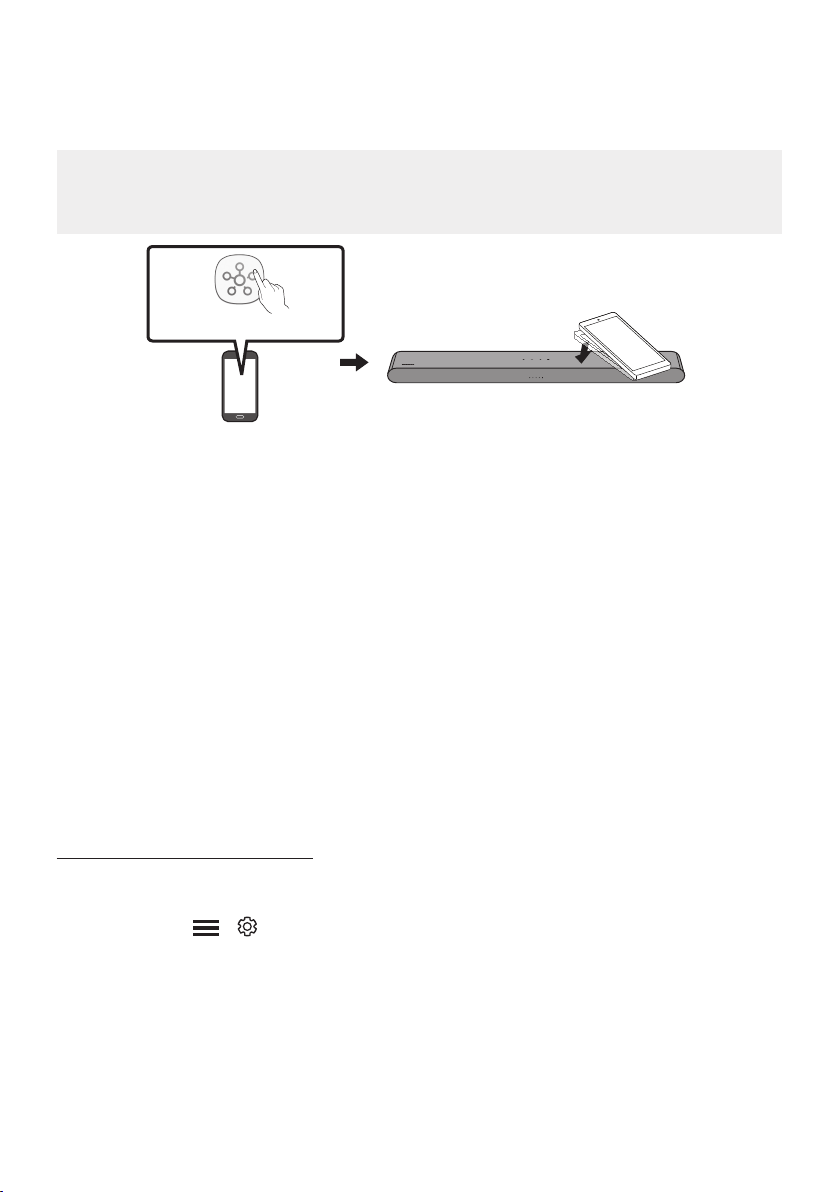
FRA - 32
Utilisation de la fonction Tap Sound
Appuyez sur le Soundbar avec votre appareil mobile pour écouter le son de l’appareil mobile au moyen
du Soundbar.
• Cette fonction peut ne pas être prise en charge en fonction de l’appareil mobile.
• Cette fonction n’est compatible qu’avec les appareils mobiles Samsung fonctionnant sous
Android 8.1 ou une version ultérieure.
Appareil mobile
Application SmartThings
Dessus du Soundbar
1. Activez la fonction Tap Sound sur votre appareil mobile.
• Pour plus d’informations sur la façon d’activer cette fonction, reportez-vous à la section
«ActiverlafonctionTapSound » ci-dessous.
2. Appuyez sur le Soundbar avec l’appareil mobile. Sélectionnez « Démarrer » dans la boîte de
dialogue afchée.
La connexion est établie entre l’appareil mobile et le Soundbar via Bluetooth.
3. Lisez le son de l’appareil mobile au moyen du Soundbar.
• Cette fonction connecte un appareil mobile au Soundbar via Bluetooth en détectant les
vibrations produites lorsque l’appareil touche le Soundbar.
• Veillez à ne pas appuyer l’appareil mobile sur un coin pointu du Soundbar. Cela pourrait rayer ou
endommager le Soundbar ou l’appareil mobile.
• Il est recommandé de placer l’appareil mobile dans un étui. Appuyez légèrement sur la zone
large de la partie supérieure du Soundbar, sans exercer de force excessive.
• Pour utiliser cette fonction, mettez à jour l’application SmartThings vers la dernière version.
Cette fonction peut ne pas être prise en charge en fonction de la version de l’application.
ActiverlafonctionTapSound
Utilisez l’application SmartThings pour activer la fonction Tap View, Tap Sound.
1. Sur l’appareil mobile, lancez l’application SmartThings.
2. Sélectionnez (
→ ) sur l’écran de l’application SmartThings qui apparaît sur l’appareil mobile.
3. Dénissez « Tap View, Tap Sound » sur Activé pour permettre à la fonction de se lancer lorsqu’un
appareil mobile se rapproche du Soundbar.
REMARQUES
• Lorsque l’appareil mobile est en mode d’économie d’énergie, la fonction Tap Sound ne fonctionne pas.
• La fonction Tap Sound peut ne pas fonctionner si des appareils à proximité du Soundbar, par exemple
des appareils électriques, provoquent des interférences radio. Assurez-vous que les appareils
susceptibles de provoquer des interférences radio sont placés à une distance sufsante du Soundbar.

FRA - 33
10 INSTALLATION
DU SUPPORT
MURAL
Précautions d’installation
• Procédez à l’installation sur un mur vertical
uniquement.
• N’installez pas le produit dans un endroit où
la température ou le taux d’humidité est
élevé.
• Vériez que le mur est sufsamment solide
pour supporter le poids du produit. Sinon,
renforcez le mur ou choisissez un autre point
d’installation.
• Achetez et utilisez les vis de xation ou les
chevilles adaptées au type de mur que vous
possédez (plaque de plâtre, plaque de fer,
bois, etc.). Si possible, xez les vis de support
dans les poteaux muraux.
• Achetez des vis de montage mural en
fonction du type et de l’épaisseur du mur sur
lequel vous souhaitez monter le Soundbar.
– Diamètre: M5
– Longueur: 1 3/8 pouces (35 mm) ou plus
recommandé.
• Connectez les câbles de l’unité aux appareils
externes avant d’installer le Soundbar sur le
mur.
• Assurez-vous que l’unité est éteinte et
débranchée de la source d’alimentation avant
de l’installer. Sinon, cela pourrait provoquer
un choc électrique.
Composants de montage mural
Guide de montage mural
x 2
(M4 x L10)
x 2
Visdexation Vis
x 2
Support de montage mural
1. Placez le Guide de montage mural contre la
surface du mur.
• Le Guide de montage mural doit être à
niveau.
• Si votre téléviseur est xé au mur,
installez le Soundbar au moins 2 pouces
(5 cm) en dessous du téléviseur.
2 pouces (5 cm) ou plus
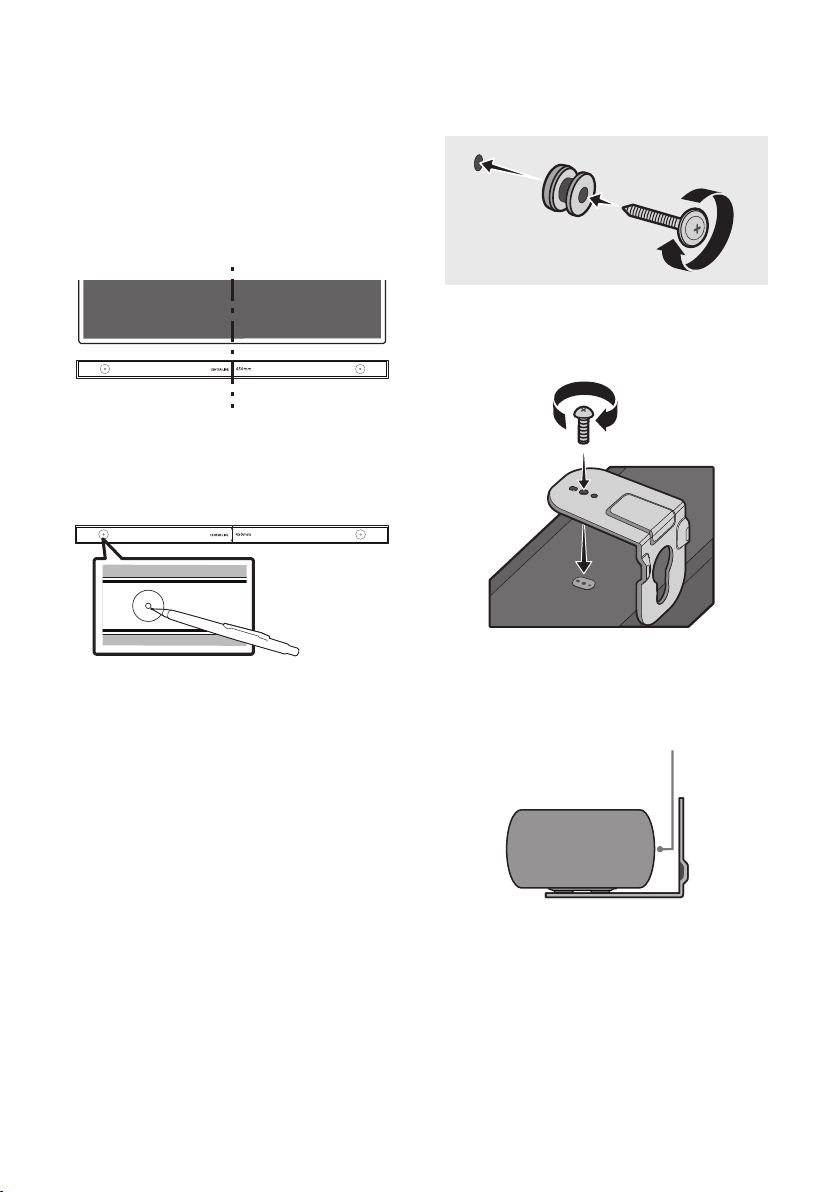
FRA - 34
2. Alignez la Ligne Centrale du Guide de
montage mural sur le centre de votre
téléviseur (si vous montez le Soundbar sous
ce dernier), puis xez le Guide de montage
mural au mur avec du ruban adhésif.
• Si vous ne l’installez pas sous un
téléviseur, placez la Ligne Centrale au
centre de la zone d’installation.
Ligne centrale
3. Utilisez un crayon pour marquer la position
des trous et retirez le Guide de montage
mural.
4. À l’aide d’un foret de taille appropriée, percez
un trou dans le mur à chaque marque.
• Si les marques ne correspondent pas à la
position des montants de la cloison, veillez
à insérer les ancrages appropriés dans les
trous avant d’insérer les vis de support. Si
vous utilisez des ancrages, assurez-vous
que les trous que vous percez sont assez
grands pour les accommoder.
5. Poussez une vis (non fournie) dans chaque
Visdexation, puis vissez fermement
chaque vis dans un trou de vis de support.
(Non fournie)
6. Installez les 2 Support de montage mural
selon l’orientation correcte en bas de la
Soundbar, à l’aide de 2 Vis.
• Lors du montage, assurez-vous que
l’étrier des Support de montage mural
est situé à l’arrière du Soundbar.
Arrière du Soundbar
Extrémité droite du Soundbar
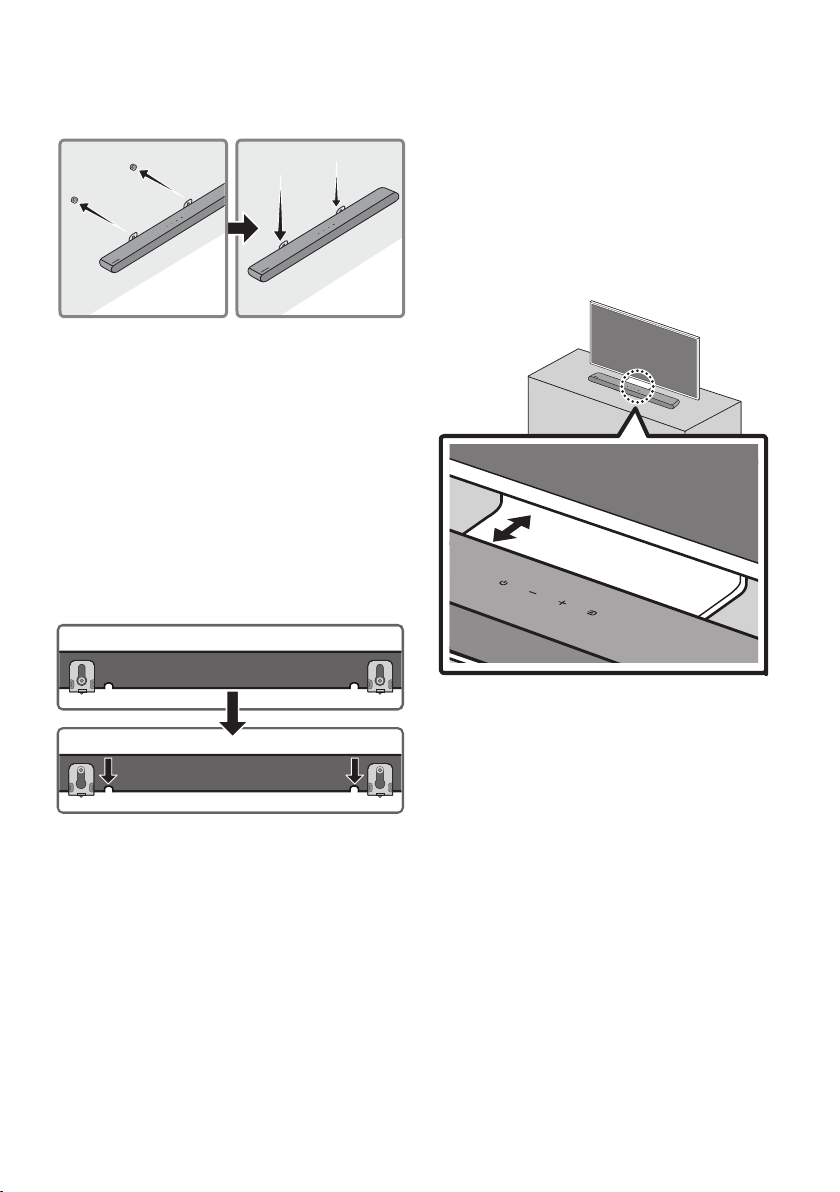
FRA - 35
7. Installez le Soundbar à l’aide des Support de
montage mural en accrochant ces derniers
sur les Visdexation xées au mur.
8. Faites glisser la Soundbar vers le bas, comme
illustré ci-dessous, an que les Support de
montage mural reposent fermement sur les
Visdexation.
• Insérez les Visdexation dans la partie
large (inférieure) des Support de
montage mural, puis faites glisser les
Support de montage mural vers le bas
an que les Support de montage mural
reposent fermement sur les Vis de
xation.
11 INSTALLATION
DU SOUNDBAR
DEVANT LE
TÉLÉVISEUR
3 cm (1,2 pouce) ou plus
Installez le centre du Soundbar au centre du
téléviseur comme illustré sur l'image.
Placez le Soundbar à une distance minimale de
3cm (1,2 pouce) du téléviseur.
REMARQUES
• Assurez-vous que le Soundbar est placé sur
une surface plane et solide.
• Un espace insufsant par rapport au
téléviseur peut entraîner des problèmes
d'ordre acoustique.
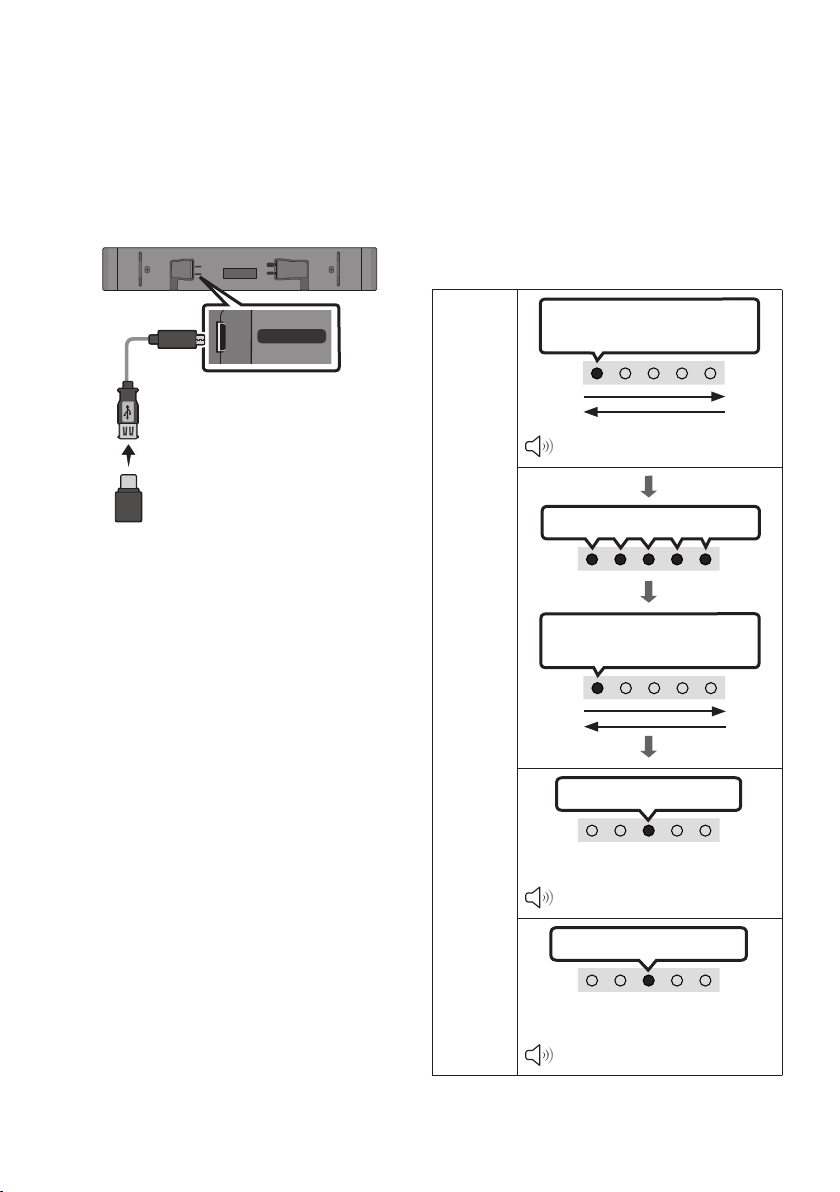
FRA - 36
12 MISE À JOUR
LOGICIELLE
Important: après la mise à niveau, conservez les
paramètres d’origine.
USB (5V 0.5A)
DC 19V
DIGITAL
AUDIO IN
(OPTICAL)
HDMI
(ARC)
USB (5V 0.5A)
Câble adaptateur
MicroUSBvers
USB (non fourni)
1. Connectez une clé USB au port USB de votre
ordinateur.
Important:assurez-vous qu’il n’y a pas de
chiers musicaux sur la clé USB. S’il y en a,
cela risque de faire échouer la mise à jour du
micrologiciel.
2. Accédez au site (samsung.com)
sélectionnez Entrez le numéro de modèle.
et entrez le modèle de votre Soundbar.
Sélectionnez Manuels et téléchargements,
puis téléchargez la dernière version du
logiciel.
3. Sauvegardez le logiciel téléchargé sur une
clé USB et sélectionnez «Extraire ici» pour
décompresser le dossier.
4. Allumez le Soundbar et branchez la cléUSB
contenant la mise à jour logicielle sur le port
femelle d’un câble adaptateur Micro USB.
Branchez le câble sur le port USB du
Soundbar.
5. Insérez le connecteur USB dans le Soundbar et
sélectionnez la source USB. Le logiciel se met
à jour automatiquement en 2minutes.
Pendant le processus de mise à jour, les
5voyants commencent à clignoter en boucle,
puis restent allumés en blanc, puis clignotent
à nouveau en boucle. Une fois la mise à jour
terminée, le voyant cyan clignote 3fois et le
Soundbar redémarre automatiquement.
Voyant
DEL
Le blanc se déplace de gauche à
droite et de droite à gauche 1 fois
« Start the software update. »
Les5voyantss’allumentenblanc
Le blanc se déplace de gauche à
droite et de droite à gauche 1 fois
Levoyantcyanclignote3fois
Fin de la mise à jour du logiciel
« The software update is complete. »
Levoyantrougeclignote3fois
Échec de la mise à jour du logiciel
« The software update failed. »
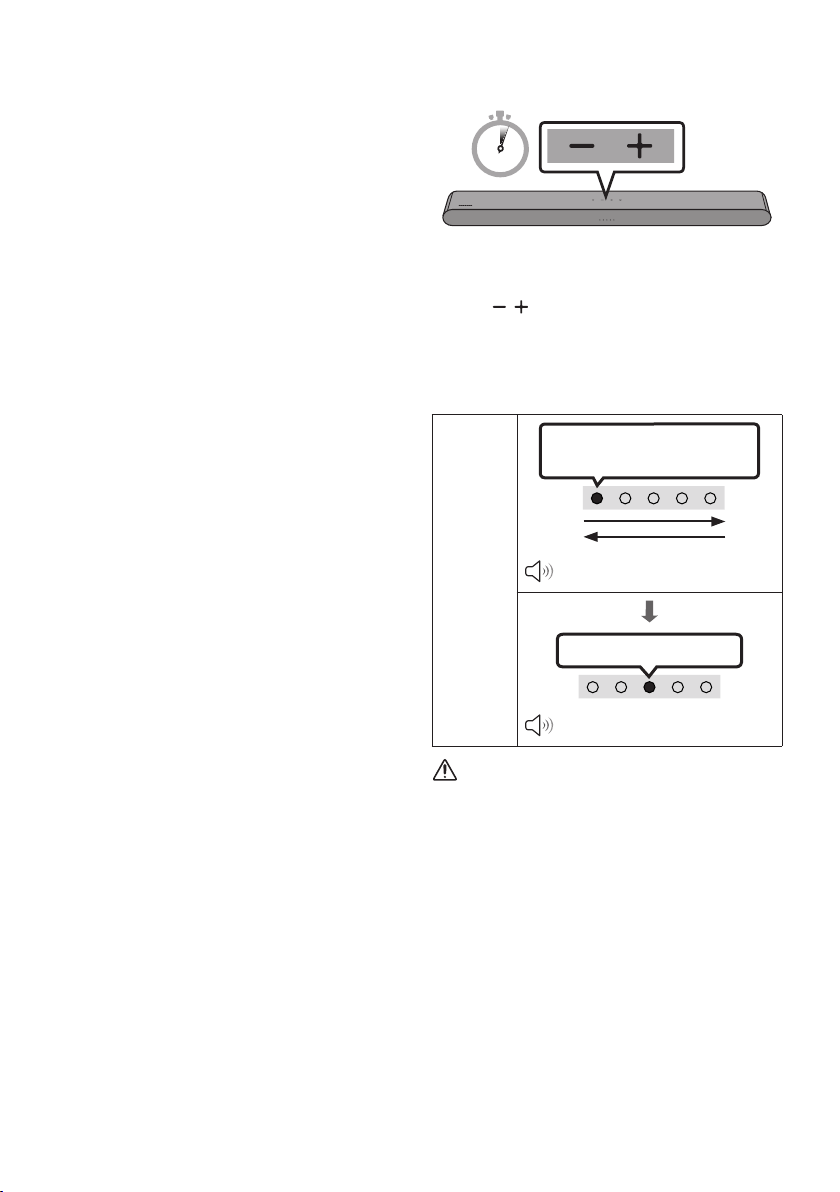
FRA - 37
• Ce produit a une fonction DUAL BOOT.
Si le micrologiciel ne parvient pas à
effectuer la mise à jour, vous pouvez à
nouveau mettre à jour le micrologiciel.
SilesvoyantsDELneclignotent
pas dans l'ordre attendu
1. Éteignez le Soundbar, débranchez le
périphérique de stockage qui contient les
chiers de mise à jour du port USB du
Soundbar, puis rebranchez-le.
2. Débranchez le cordon d’alimentation du
Soundbar, rebranchez-le, puis allumez le
Soundbar.
REMARQUES
• La mise à jour du micrologiciel peut ne pas
fonctionner correctement si les chiers audio
pris en charge par le Soundbar sont stockés
dans le périphérique de stockage.
• Ne coupez pas l’alimentation et ne retirez pas
le périphérique USB pendant que les mises à
jour sont en train d’être appliquées. L’unité
principale s’éteindra automatiquement après
avoir terminé la mise à jour du micrologiciel.
• Après la mise à niveau, conservez les paramètres
d'origine. (volume, champ sonore, etc.)
– Une fois la mise à jour du micrologiciel
terminée, le Soundbar s'allume
automatiquement et l'interface vocale
s'active. Si la mise à jour du logiciel
échoue, vériez que la clé USB n'est pas
défectueuse.
• Les utilisateurs de Mac OS doivent utiliser
MS-DOS (FAT) comme format USB.
• La mise à jour par USB peut ne pas être
disponible. Cela dépend du fabricant du
périphérique de stockage.
Réinitialisation
5 Sec
Alors que le Soundbar est allumé, appuyez sur les
boutons (Volume) de l'unité pendant au
moins 5secondes. L'afchage des voyantschange
comme indiqué ci-dessous, et le Soundbar est
réinitialisé.
Voyant
DEL
Le blanc se déplace de gauche à
droite et de droite à gauche
«Start the factory reset.»
Levoyantcyanclignote3fois
«The factory reset is complete.»
MISE EN GARDE
• Tous les paramètres du Soundbar sont
réinitialisés. Veillez à effectuer cette
opération uniquement lorsqu’une
réinitialisation est requise.

FRA - 38
13 DÉPANNAGE
Avant de contacter l'assistance, effectuez les vérications suivantes.
Le Soundbar ne s’allume pas.
; Vériez si le cordon d'alimentation du Soundbar
est correctement inséré dans la prise.
Le Soundbar fonctionne par intermittence.
; Après avoir retiré le cordon d’alimentation,
réinsérez-le.
; Mettez l’appareil externe sous tension et
réessayez.
; S’il n’y a pas de signal, le Soundbar s’éteint
automatiquement après un certain temps.
Allumez le produit. (Voir la page 10.)
La télécommande ne fonctionne pas.
; Pointez la télécommande directement sur
le Soundbar.
; Remplacez les piles.
Le Soundbar n’émet aucun son.
; Le volume du Soundbar est trop faible ou
coupé. Réglez le volume.
; Lorsqu’un appareil externe (STB, appareil
Bluetooth, appareil mobile, etc.) est connecté,
réglez le volume de l’appareil externe.
; Pour la sortie audio du téléviseur, sélectionnez
Soundbar. (
Téléviseur Samsung: Accueil ( )
→ Menu → Paramètres ( ) → Tous les
paramètres ( ) → Son → Sortie audio →
Sélectionnez le Soundbar
)
; La connexion du câble au Soundbar ne doit
pas être lâche. Débranchez le câble et
rebranchez-le.
; Retirez complètement le cordon
d’alimentation, rebranchez-le et mettez
l’appareil sous tension.
; Initialisez le produit et réessayez.
(Voir page 37.)
Siletéléviseurn’estpasconnectéparHDMI
(ARC).
; Vériez que le câble HDMI est
correctement connecté à la borne ARC.
(Voir la page 18.)
; La connexion peut ne pas être possible en
raison de l’appareil externe connecté
(décodeur, machine de jeux, etc.).
Connectez directement le Soundbar.
; HDMI-CEC peut ne pas être activé sur le
téléviseur. Activez le CEC dans le menu du
téléviseur. (Téléviseur Samsung: Accueil
(
) → Menu → Paramètres ( ) → Tous
les paramètres ( ) → Connexion →
Gestionnaire de périphérique externe →
Anynet+ (HDMI-CEC) ACTIVÉ)
Le Soundbar ne se connecte pas par Bluetooth.
; Lors de la connexion d'un nouvel appareil,
passez à l'appairage Bluetooth pour la
connexion. (Appuyez sur le bouton PAIR
de la télécommande ou sur le bouton
(Source) de l'unité pendant au moins
5secondes.)
; Si le Soundbar est connecté à un autre
appareil, débranchez d’abord cet appareil
pour commuter l’appareil.
; Reconnectez l’appareil après avoir supprimé la
liste des haut-parleurs Bluetooth sur l’appareil
à connecter. (
Téléviseur Samsung: Accueil
( ) → Menu → Paramètres ( ) → Tous les
paramètres ( ) → Son → Sortie audio →
Liste des haut-parleurs Bluetooth
)
; Retirez et rebranchez la che
d’alimentation, puis réessayez.
; Initialisez le produit et réessayez.
(Voir page 37.)
FRA - 39
Le son se coupe lors d’une connexion par
Bluetooth.
; Si votre appareil connecté par Bluetooth
est trop éloigné du Soundbar, il est possible
que le son soit coupé. Rapprochez l’appareil
du Soundbar.
; Si une partie de votre corps est en contact
avec l’émetteur-récepteur Bluetooth ou
que le produit est installé sur un meuble en
métal, une coupure du son peut se
produire. Vériez l’environnement
d’installation et les conditions d’utilisation.
La multiconnexion Bluetooth ne fonctionne
pas.
; Lorsque le téléviseur est connecté au
Soundbar, la multiconnexion Bluetooth
pourrait ne pas fonctionner. Déconnectez le
Soundbar du téléviseur et réessayez.
; Vériez que le paramètre de multiconnexion
Bluetooth est activé. (Reportez-vous à la
section « Le Soundbar ne se connecte pas par
Bluetooth. »)
; Déconnectez l’appareil en cours de lecture,
appariez-le avec l’appareil que vous souhaitez
connecter, puis reconnectez l’appareil
précédent.
; Si le son est inaudible même après avoir établi
correctement la connexion, reportez-vous à la
section « Le son se coupe lors d’une connexion
par Bluetooth. ».
Le Soundbar ne s’allume pas
automatiquementavecletéléviseur.
; Lorsque vous éteignez le Soundbar tout en
regardant la télévision, la synchronisation
de l'alimentation avec le téléviseur est
désactivée. Éteignez d'abord le téléviseur.
14 LICENCE
Manufactured under license from Dolby
Laboratories. Dolby, Dolby Audio and the
double-D symbol are trademarks of Dolby
Laboratories Licensing Corporation.
* Ce produit ne prend pas en charge Dolby Atmos®.
For DTS patents, see http://patents.dts.com.
Manufactured under license from DTS, Inc.
(for companies headquartered in the U.S./
Japan/Taiwan) or under license from DTS
Licensing Limited (for all other companies).
DTS, Digital Surround, and the DTS logo are
registered trademarks or trademarks of DTS,
Inc. in the United States and other countries.
© 2021 DTS, Inc. ALL RIGHTS RESERVED.
Les termes HDMI et HDMI High-Denition
Multimedia Interface, de même que le logo
HDMI sont des marques commerciales ou des
marques déposées de HDMI Licensing
Administrator, Inc. aux États-Unis et dans
d'autres pays.
The Bluetooth® word mark and logos are
registered trademarks owned by Bluetooth SIG, Inc.
and any use of such marks by Samsung Electronics
Co., Ltd. is under license. Other trademarks and
trade names are those of their respective owners.

FRA - 40
[ENERGY STAR]
ENERGYSTARqualiedmodelonly
– Your Samsung product is ENERGY STAR
qualied in its factory default setting.
Change to certain features, settings and
functionality in this product can change the
power consumption, possibly beyond the
limits required for ENERGY STAR
qualication.
– Environmental Protection Agency and
Department of Energy. ENERGY STAR is a
joint program of the Government agencies,
designed to promote energy efcient
products and practices.
Refer to www.energystar.gov for more
information of the ENERGY STAR Program.
ENERGYSTARqualiedmodelonly
(Applicable to Thin Client models only)
As an ENERGY STAR® Partner, SAMSUNG has
determined that this product meets the
ENERGY STAR® guidelines for energy
efciency.
– The ENERGY STAR Program has been to
reduced greenhouse gas emissions and
save energy through voluntary labeling.
– Power management setting of this product
have been enabled by default, and have
various timing setting from 1 minutes to 5
hours.
– The product can wake with a button press
on the chassis from sleep mode.
ENERGYSTARqualiedmodelonly(Theother
models)
– As an ENERGY STAR Partner, Samsung has
determined that this product or product
models meets the ENERGY STAR guideline
for energy efciency.
15 AVIS DE
LICENCES LIBRES
Pour envoyer des questions concernant les
sources ouvertes, communiquez avec Samsung
Open Source (http://opensource.samsung.com).
16 REMARQUE
IMPORTANTE
CONCERNANT LE
SERVICE
Les chiffres et les illustrations contenus dans ce
Guide d’utilisation sont fournis à titre de référence
uniquement et pourraient ne pas représenter
exactement le produit.

FRA - 41
17 CARACTÉRISTIQUES ET GUIDE
Spécications
Nom de modèle HW-S50B
USB 5V/0,5A
Poids 5,3 lbs (2,4 kg)
Dimensions (L x H x P)
26,4 x 2,5 x 4,1 po
(670,0 x 62,3 x 105,0 mm)
Plage de températures en fonctionnement +41°F à +95°F (+5°C à +35°C)
Plage d’humidité en fonctionnement 10 % à 75 %
AMPLIFICATEUR
Puissance de sortie nominale (30W x 2) + (30W x 2) + 20W
Formats de lecture pris en charge
DTS, Dolby® Digital (Le son DTS Virtual
Surround est lu en format DTS.)
LPCM 2ch, Dolby Audio™ (prise en charge de
Dolby® Digital), DTS, DTS Virtual:X
Bluetooth
Méthode de désactivation du port
Appuyez sur le bouton SOUND MODE pendant
au moins 5 secondes pour désactiver la fonction
Bluetooth Power.
REMARQUES
• Samsung Electronics Co., Ltd se réserve le droit de modier les caractéristiques sans préavis.
• Le poids et les dimensions sont approximatifs.
GARANTIE LIMITÉE À L’ACHETEUR INITIAL
Samsung Electronics Canada Inc. (SECA) garantit ce produit contre tout défaut de fabrication.
SECA garantit aussi que si cet appareil ne fonctionne pas convenablement durant la
période de garantie SECA se réservera le droit de réparer ou de remplacer l’appareil
défectueux.
Toutes les réparations sous garantie doivent être effectuées par un Centre de service
autorisé SECA. Le nom et l’adresse du Centre de service le plus près de chez vous peut
être obtenu en composant sans frais le 1- 800- SAMSUNG ou en visitant notre site web
au www.samsung.ca
MAIN-D’OEUVRE
UN (1) AN (AU COMPTOIR)
PIÈCES
UN (1) AN
Pour tous les modèles portatifs, le transport de l’appareil sera la responsabilité du client.
Le reçu de vente original doit être conservé par le client car cela constitue la seule preuve
d’achat acceptée. Le client doit le présenter au Centre de service agréé au moment où il
fait la demande d’une réparation sous garantie.
EXCLUSIONS (CE QUI N’EST PAS COUVERT)
Cette garantie ne couvre pas les dommages causés par un accident, un incendie, une
inondation, un cas de force majeure, un mauvais usage ou une tension incorrecte.
La garantie ne couvre pas une mauvaise installation, une mauvaise réparation, une
réparation non autorisée et tout usage commercial ou dommages survenus durant le
transport. Le ni extérieur et intérieur de même que les lampes ne sont pas couverts par
cette garantie. Les ajustements par le client qui sont expliqués dans le guide de l’utilisateur
ne sont pas couverts en vertu de cette garantie. Cette garantie sera automatiquement
annulée pour tout appareil qui aurait un numéro de série manquant ou modié. Cette
garantie est valable seulement sur les appareils achetés et utilisés au Canada.
Samsung Electronics Canada Inc
2050 Derry Rd West
Mississauga, On. L5N 0B9
Tel: 1-800-SAMSUNG (726-7864)
Fax: (905) 542- 1199
Website: http://www.samsung.com/ca_fr
© 2022 Samsung Electronics Co., Ltd. Tous droits réservés.
Comment contacter Samsung dans le monde
Si vous avez des suggestions ou des questions concernant les produits Samsung, veuillez contacter le Service
Consommateurs Samsung.
SIÈGE SOCIAL
Samsung Electronics Canada Inc. 2050 Derry Road West, Mississauga, Ontario L5N 0B9 Canada
TEL: 1-800-SAMSUNG (1-800-726-7864)
www.samsung.com/ca_fr/support
Pays Centre de service Samsung
Site Web
`
Amérique du Nord
CANADA 1-800-SAMSUNG (726-7864)
www.samsung.com/ca/support (English)
www.samsung.com/ca_fr/support (French)
U.S.A 1-800-SAMSUNG (726-7864) www.samsung.com/us/support