ഊೠ
J
2316145
X08061826
X08061826
B
ϫġJ߫ᄜēჾֱĢ
น۱ౄӦౄĢ
ൎပઝఘჾ௲cூēϢԄပরcēํ௬ສĢ
ġď
Đ;ďĐēďӦสġPPĐĢ
รᅟ٤Еზ*%7PĢ
ཞౄރჼ໒ڴΡ༖࠼ڶཙ֟Ϧ௲ఊ܊ֺટಓСēСଶིྻןྂߑนᅹĢ
ۦ5R+6ຣγᅹྑௐۤ5($&+ᄗগd
ഊೠ࠾ವဴϦדԅำᆓӖໟᆓغէΡ༖ӖဟPPd
英
邱良顺2023.1.29
2023.1.29
匡永坤2023.1.29
ёઁҲ2023.1.29
2023.1.29
第23,27,28页修改

lish
SESE
HWFS8514E
HWFS1015E
12
21
22
40
42
22
23
26
30
37
38
39
42
43
44
45
47
48
51
46
46
49
53
13
14
15
15
17
17
18
20
55 Wi-Fi connection
Drum clea
Drum clea
8.5
10.0
C
D
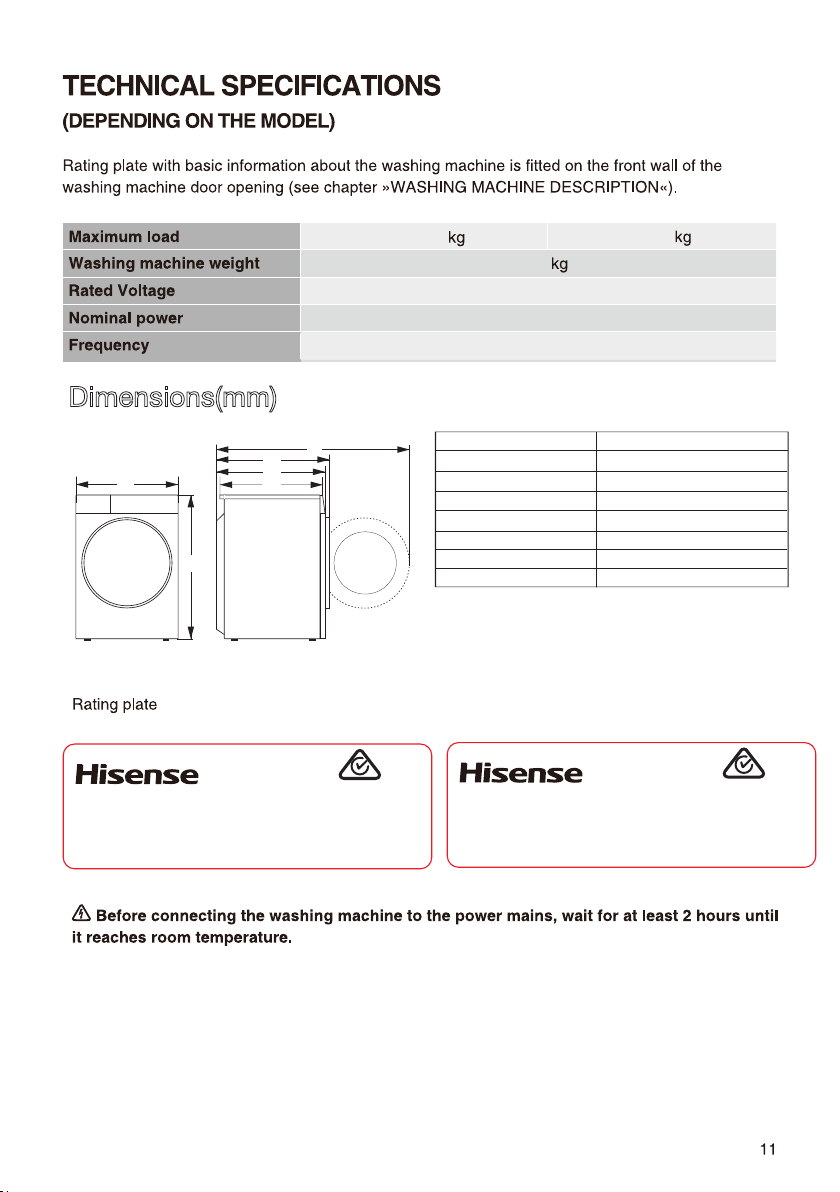
Dimensions(mm)
595
845
560
590
620
1100
A
B
C
D
E
F
8.5kg/10.0kg
Maximum load
Dimension(mm)
Index
67
220-240V~
50Hz
1750W
Clothes Washing Machine
HWFS8514E
8.5kg
220-240V~ 50Hz 1750W IPX4
Made in China
SGS-220998-EA
APPROVAL NO.
Hisense Australia Pty Ltd.
E6101
Clothes Washing Machine
HWFS1015E
10.0kg
220-240V~ 50Hz 1750W IPX4
Made in China
SGS-220998-EA
APPROVAL NO.
Hisense Australia Pty Ltd.
E6101
12
13
completely
four
14
15

16
17
18
19
20
21
Drum Cleam
22
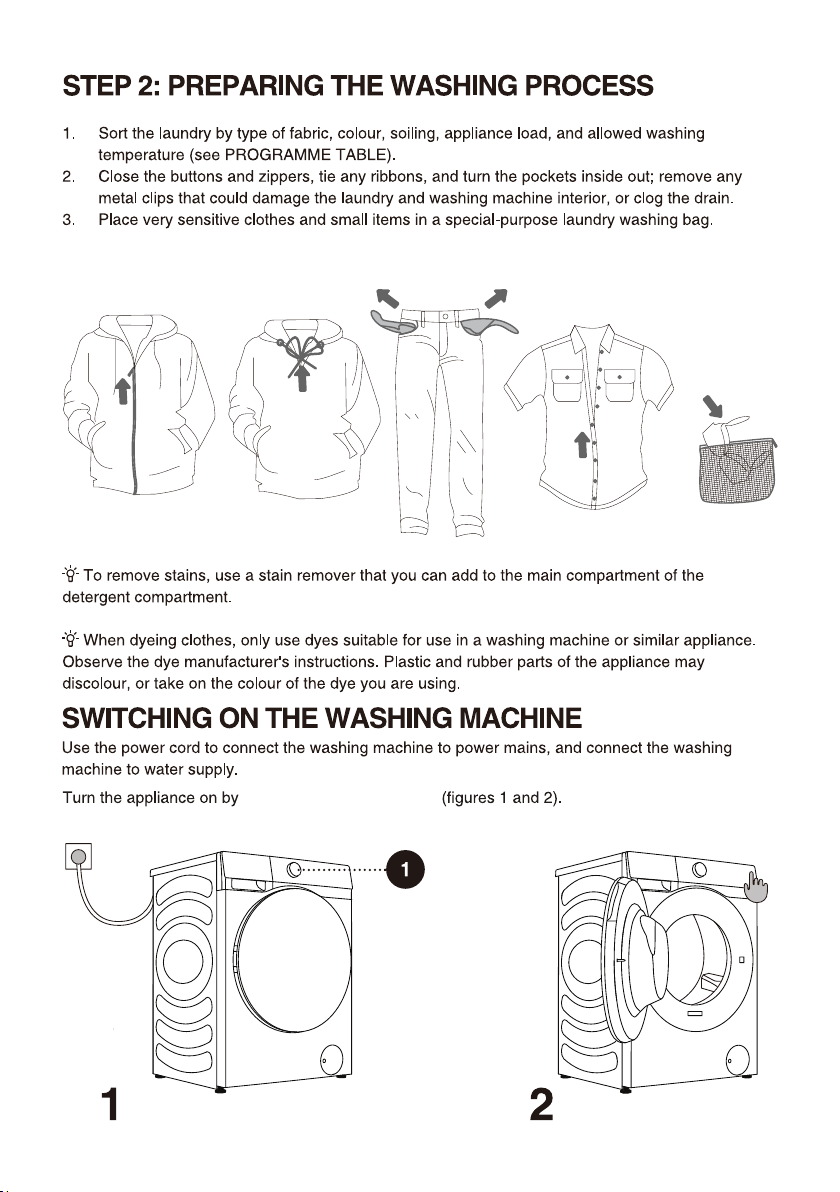
23
press the button "POWER"
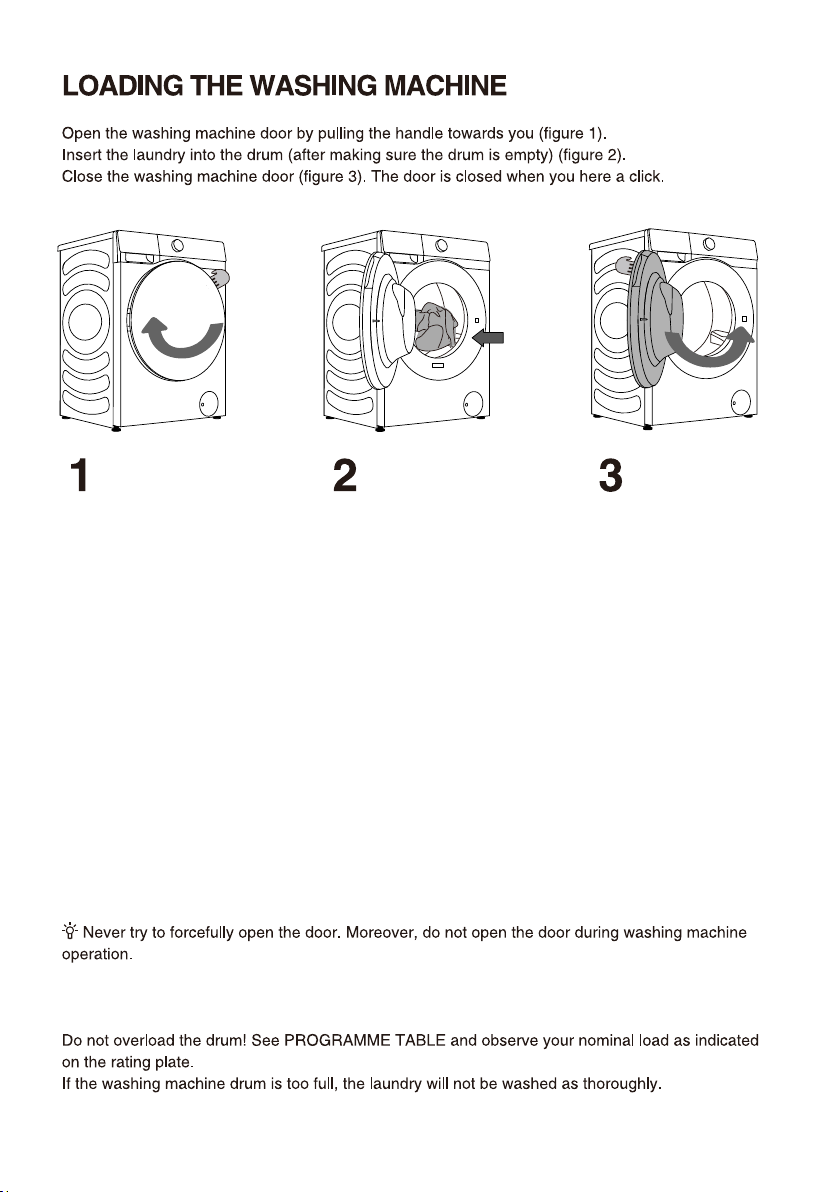
24
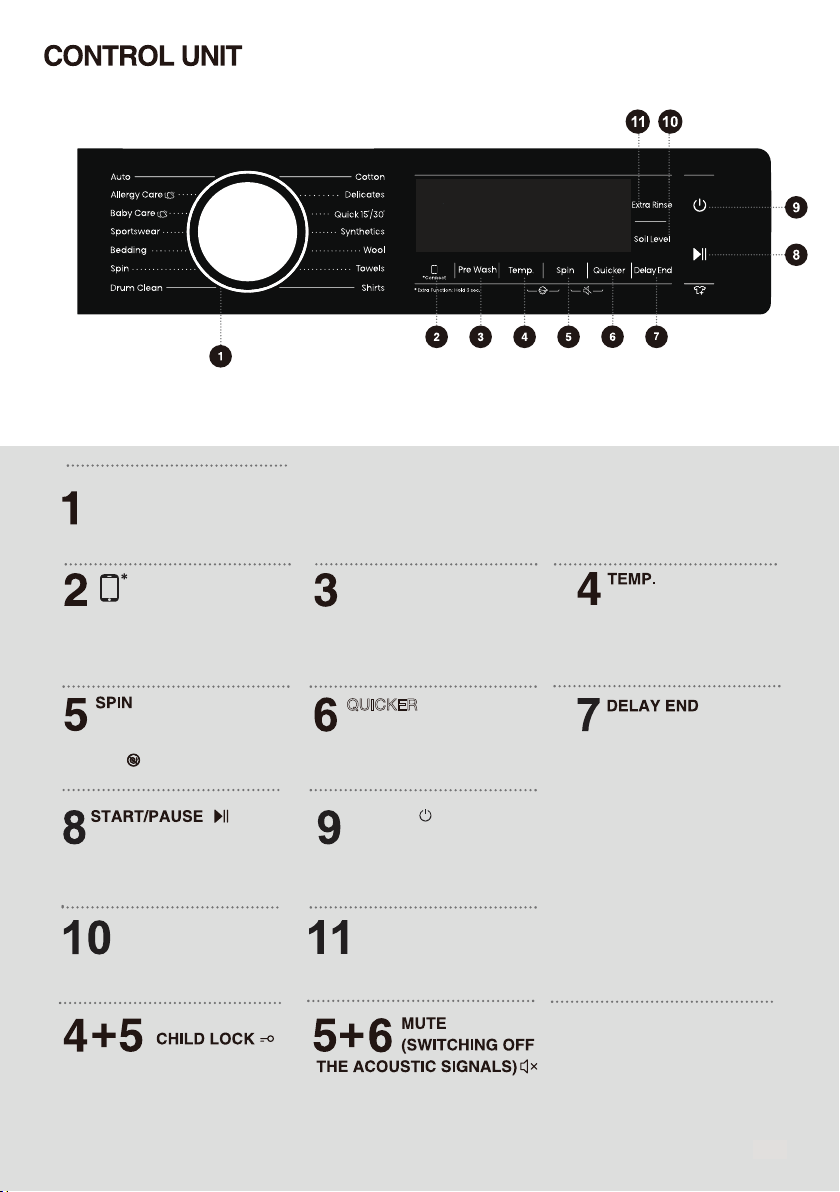
&<&/(6(/(&725
32:(5
35(:$6+&211(&7
ur the ial to select
a cycle
Press to change the spinning
speed for the current cycle.
NO Spin :The drum does not
spin after the final drain cycle.
Delay lets you set the
e time of the curret cycle
ase o your settis the
start time of the cycle ill e
etermie y the machies
iteral loicor eamplethis
setti is useful for prorammi
your machie to fiish a ash
at the time you ormally retum
home from or ress to choose
a preset uit of hours
or etra fuctioress a
hol for 3 secos
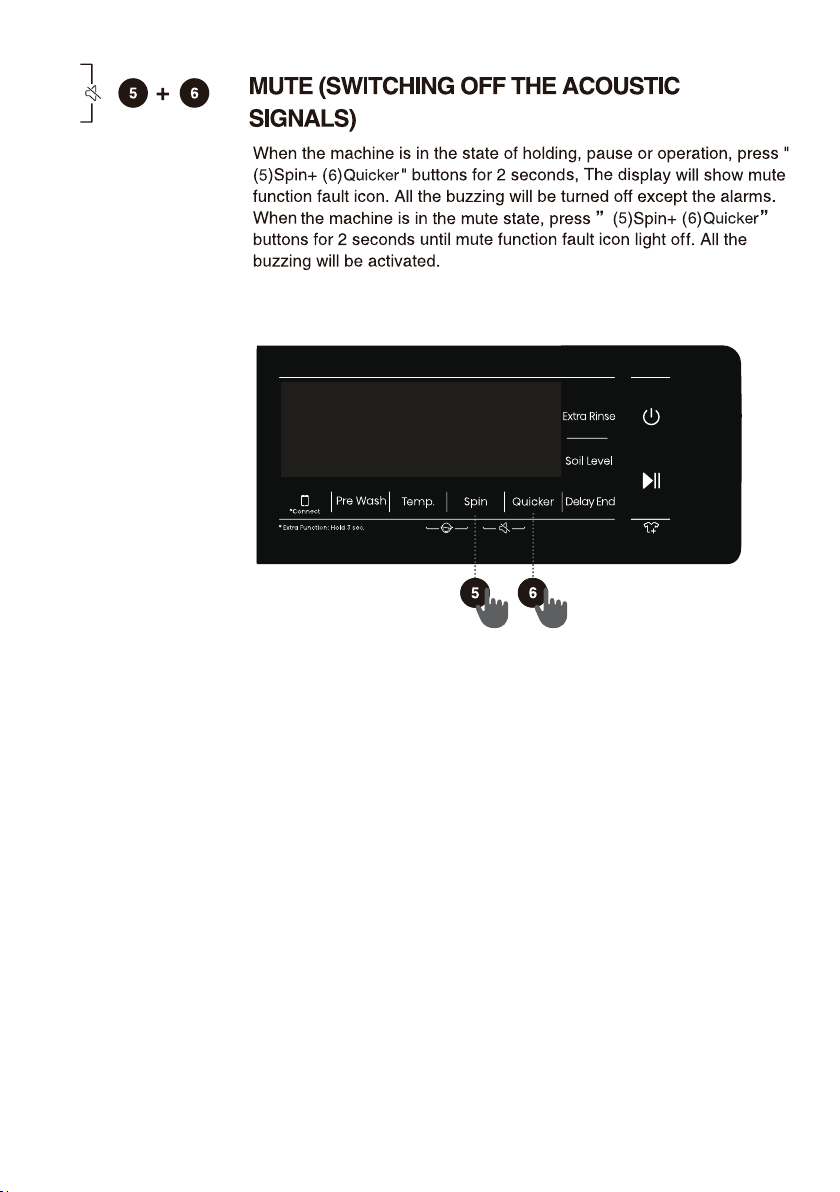
ress to tur ooff the
ashi machie
Add or subtract Pre wash
functions by long press
and short press.
Q
UICKER
Change washing time
or rinse times.
Start/Pause the whole
machine program
running.
ress these to eys at the
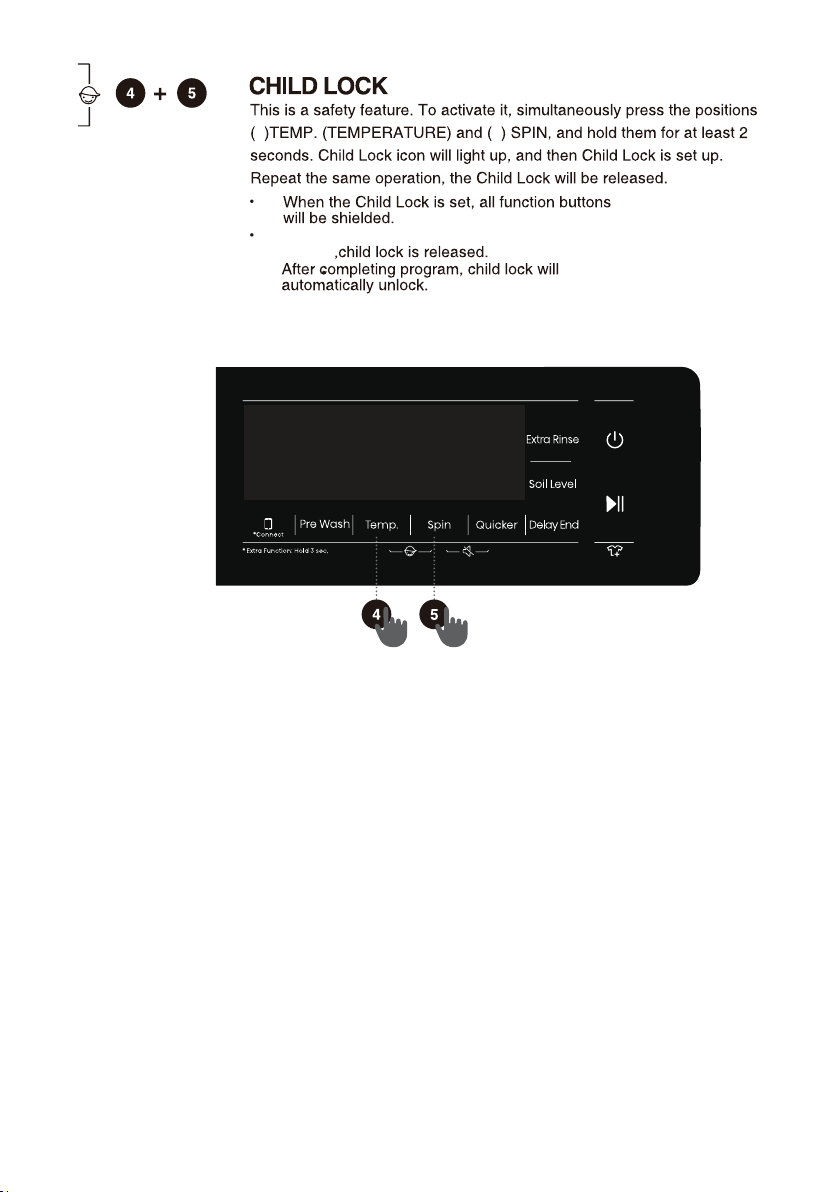
same time to eale or
isale the chil loc fuctio
(;75$5,16(
62,//(9(/
ress to chae the
rise cout for curret cycle
y selecti ifferet
leels to ash clothes ith
ifferet irt leels
Washing machine
network control key.
See the wifi guide on the last
page for how to configure the
network.
ress to chae the ater
temperature for the selecte
cycle
25
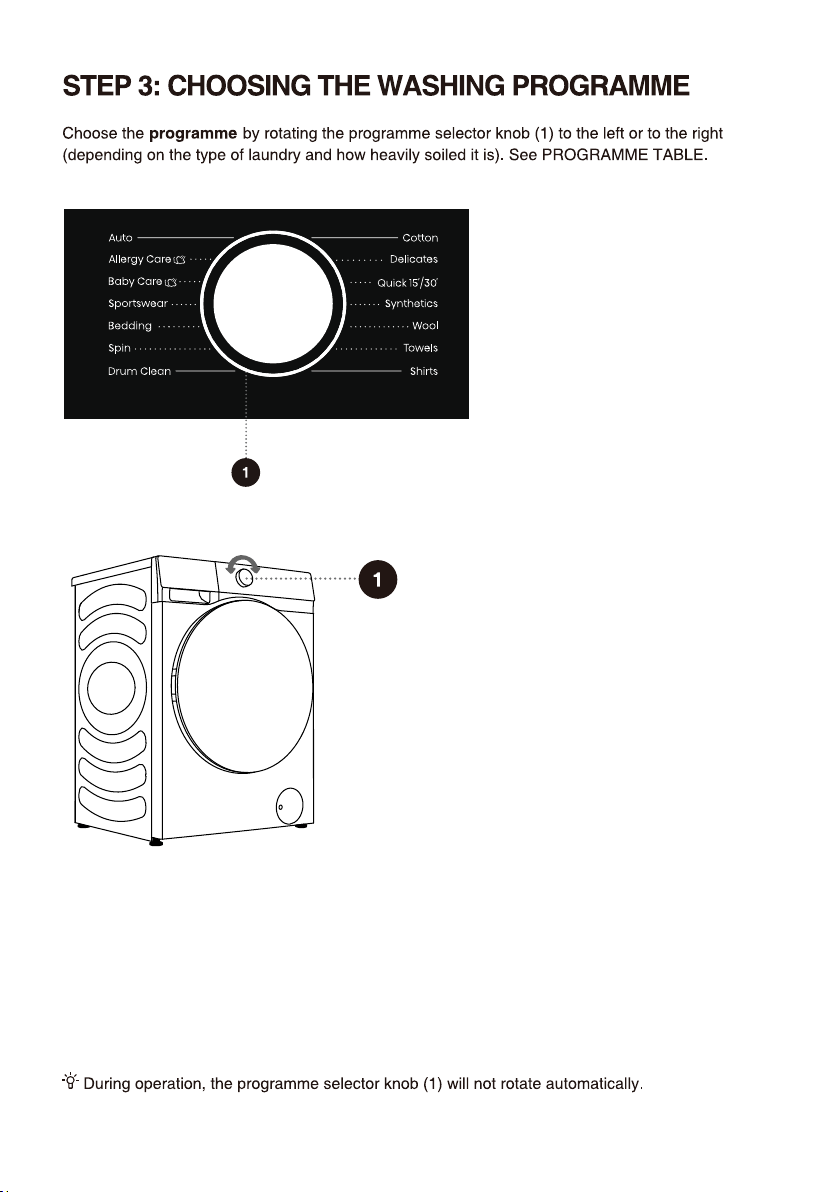
26
XLFN
OOHUJ\FDUH
6
XWR
8
C 6C
BDE\FDUH
C 6C C
1400
1400
800
600
1400
1200
1400
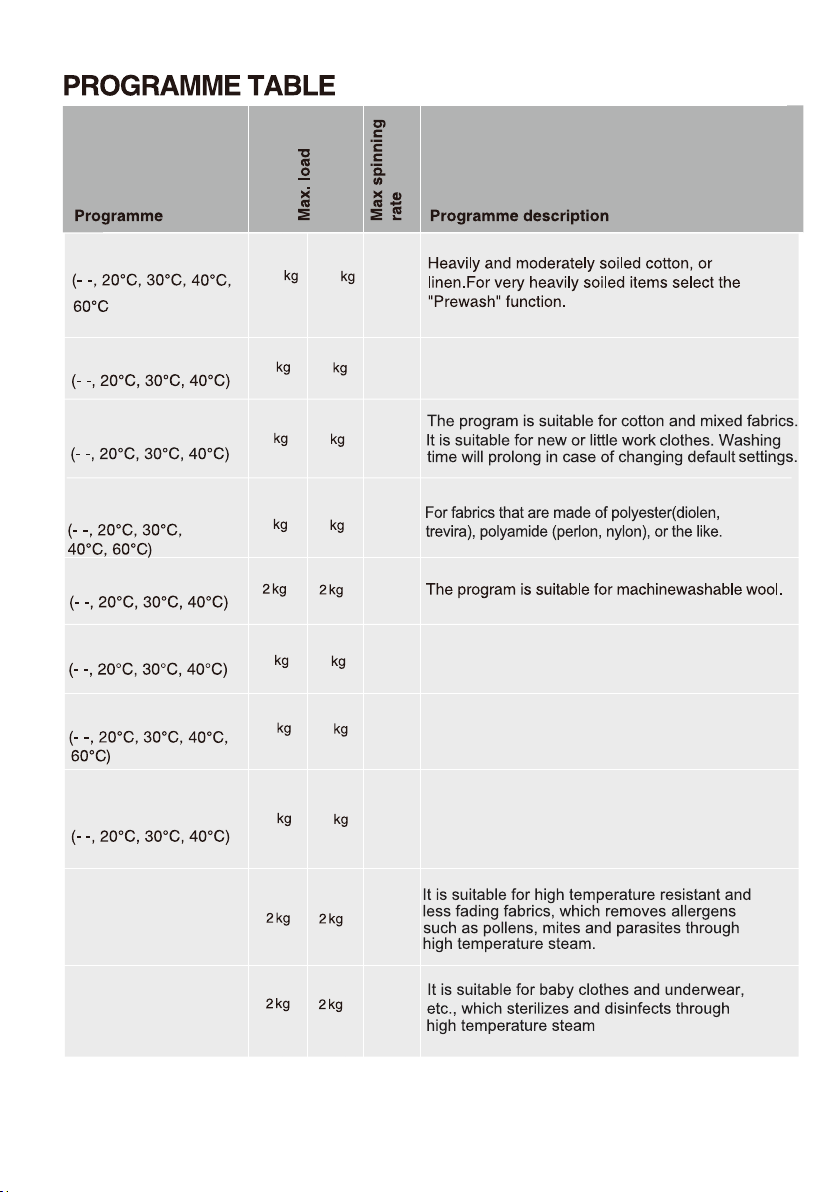
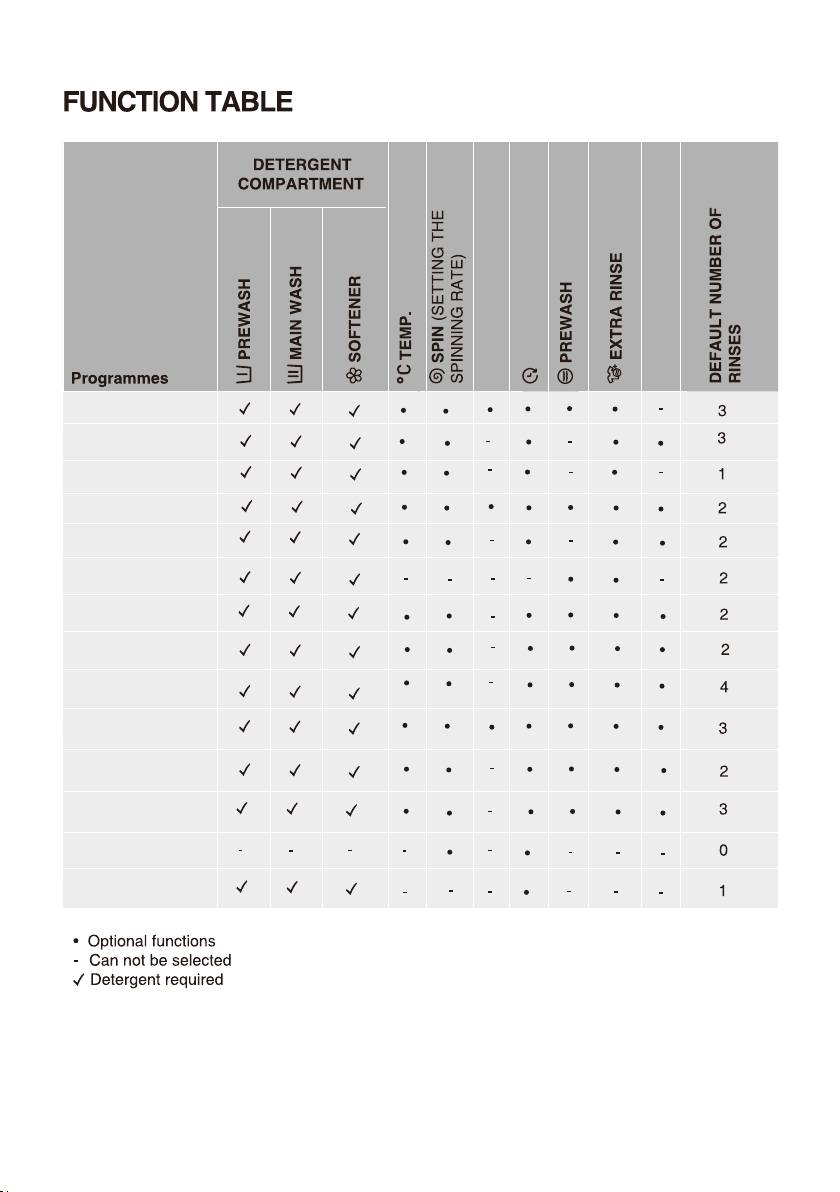
The program will automatically adjust the main
washing duration and rinsing times according to the
amount of clothes in the washing machine. It is
applicable for lightly soiled clothes.
*n
nei
C
1
KLUWV
800
3
Non-iron shirts or blouses made of cotton, linen,
synthetic fibres or blended fabrics.
'HOLFDWHV
7RZHOV
Soft delicate fabrics and machine washable silk.
(Refer to the washing label attached to the clothing).
600
2
8.5
27
For low level of soil cotton items such as towels.
800
4
6
8
1
3
2
10
4
1500
1500
800
600
1500
1200
1500
800
600
800
B
1400
800
B
Bedding
1400
Sin
en
3
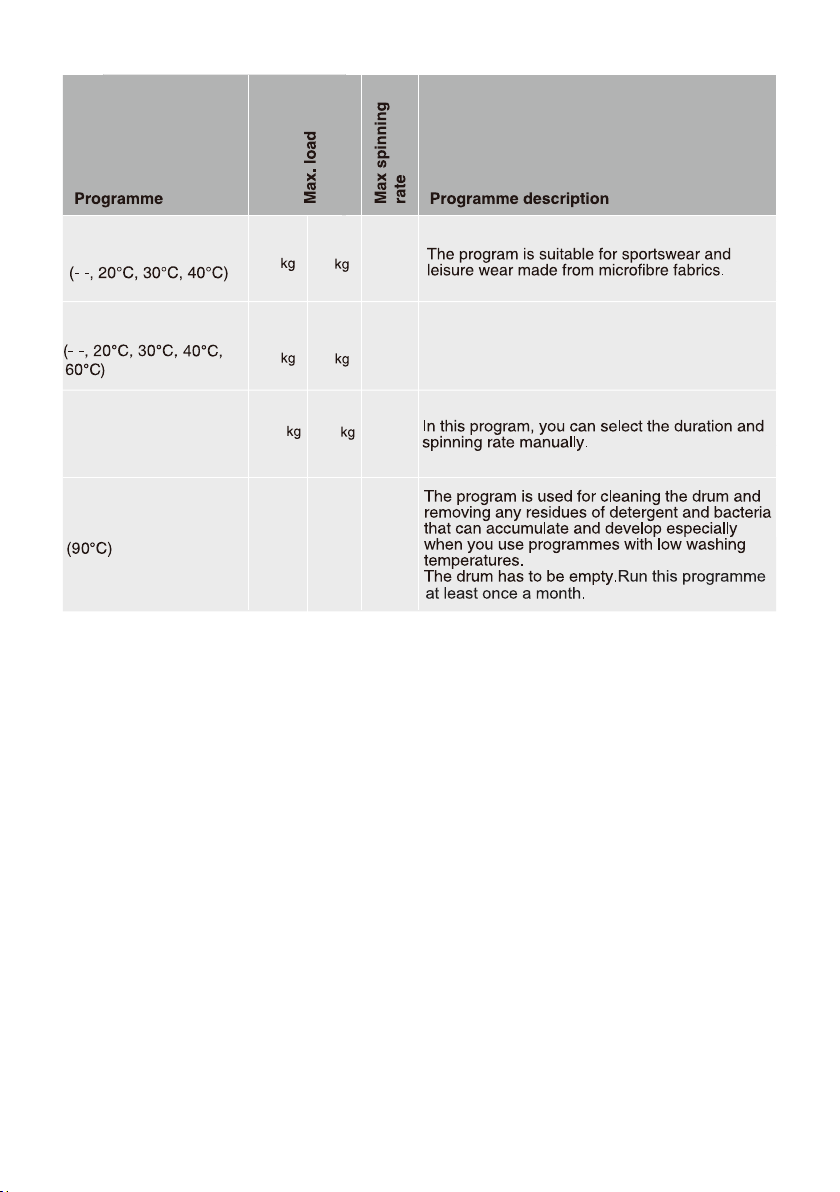
Program adapted to wash large items - e.g.
Curtains, sheets, duvet covers.
SRUWVZHDU
4
1000
8.5
28
*HWFS8514E:
The program “ ‘Cotton’, Temp: 40 C , Spin speed: 1400 rpm, Extra Rinse” is recommended for a normally
soiled load equal to the rated load capacity.
HWFS1015E:
The program “ ‘Cotton’, Temp: 40 C , Spin speed: 1500 rpm, Extra Rinse” is recommended for a normally
soiled load equal to the rated load capacity.
NOTE:
1)Water Temperature: Select the appropriate water temperature for chosen wash programme. Always
follow garment manufacturer's care label or instructions when washing to avoid damage to clothes.
2)Actual water temperature may differ from the declared cycle temperature.
3)The test results depend on water pressure, water hardness, water inlet temperature, room temperature,
type and amount of load, degree of soiling utilized detergent, fluctuations in the main electricty supply and
chosen additional options.
4)Netural (non sudsing) detergent is recommended.
5)Dry powder detergent should be mixed with warm water (in all cases not just energy program).
1500
800
1500
1000
B
3
4
10
29
8
8
4
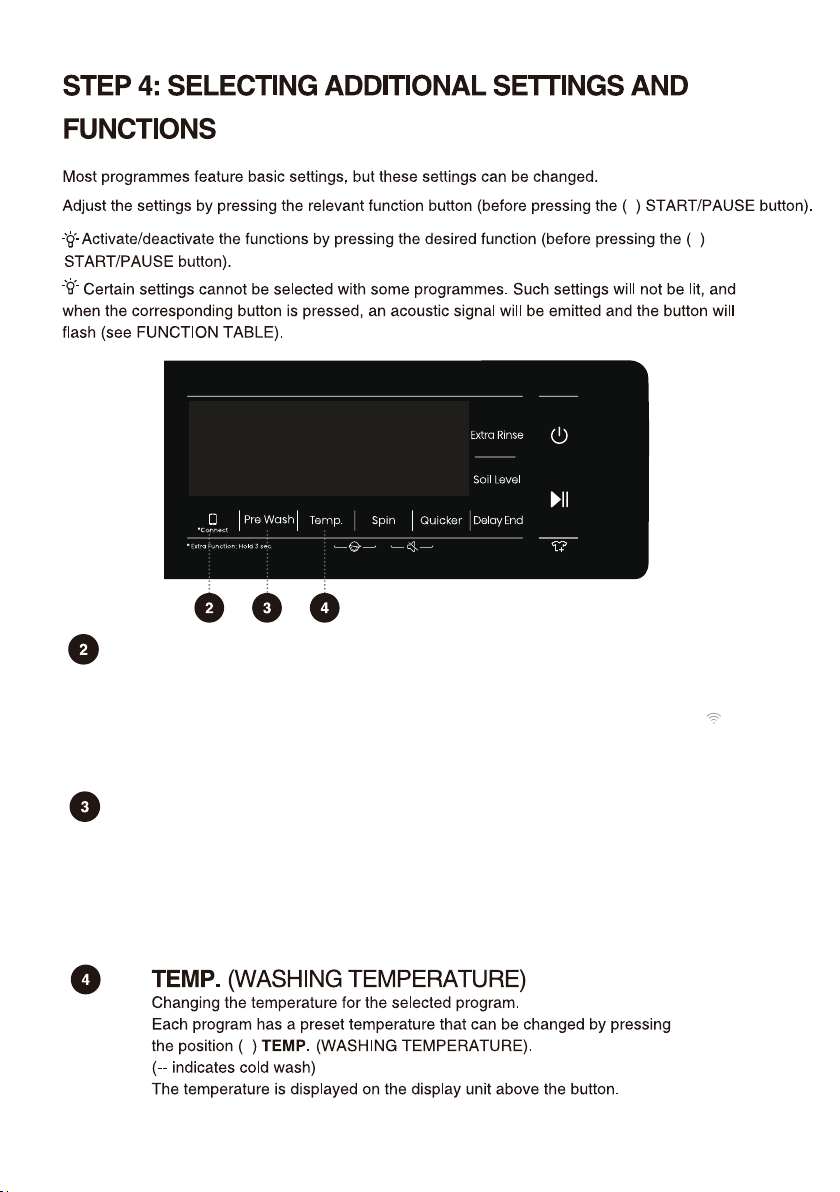
Connect
It is divided into two modes: "press and hold" and "press briefly".
Press briefly: start the remote control permission of the washing machine;
Press and hold: Connect the WiFi of the washing machine, the control panel symbol " "
flashes, and then conduct the networking operation. See the networking description for
the specific networking method.
Pre wash
Press briefly: Add "Pre wash" function, press twice to cancel the function, and cycle in
sequence.
1. Select this function to add a Pre Wash program before the Main Wash stage.
2. After the program is started, the indicator remains on until the end of Pre Wash
program. After the end of Pre Wash, the indicator will off.
30
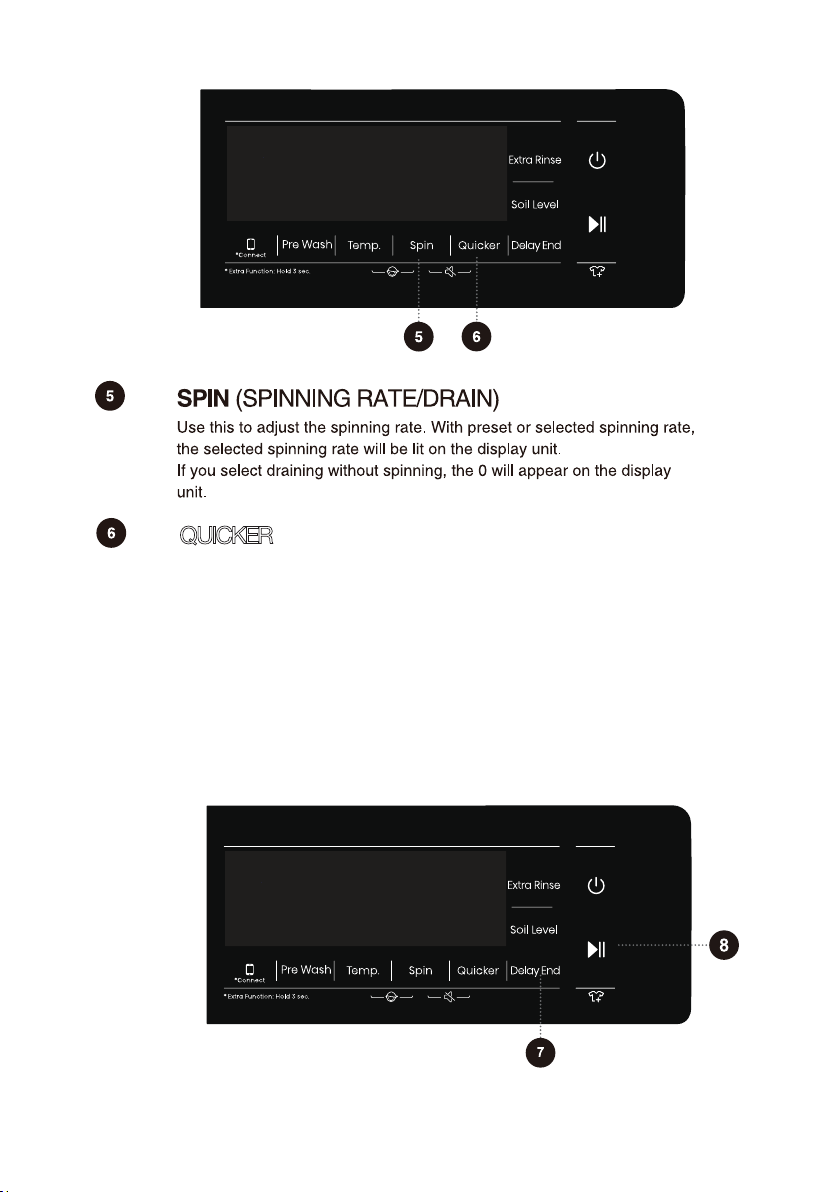
QUICKER
After pressing this function key, the program time will be shortened by setting, and
press it again, the program time will be increased back to the original setting. After
the program is started, the indicator is always on.
1) This function can only be set in the standby mode of the applicable program,
that is, before the program starts running, and cannot be selected after the
program runs.
2) When this function is selected, the pre wash time will be reduced or the number
of rinsing times will be reduced for the determined main wash time.
3) Weighing will be canceled after triggering this function, weighing will not be
resumed even if the function is canceled.
31
32
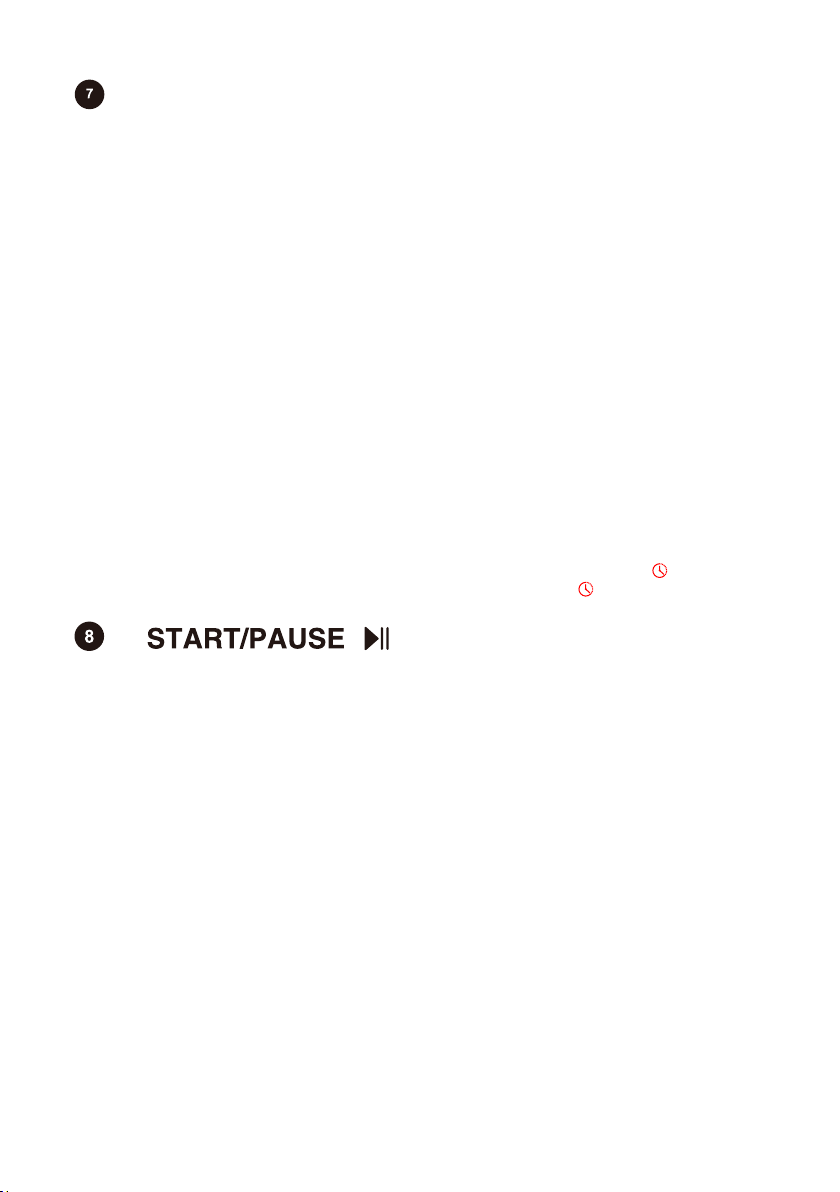
DELAY END
1) Control the washing machine from the standby state to the program running
state, or from the program running state to the program pausing state.
2) Press the key in the standby mode to switch to door locking mode. If the door is
unlocked, the washing machine cannot start the program. At the same time, the
door locking error alarm will occur.
3) After setting the Preset function, press this key in the standby state. If the door is
normally locked, the washing machine will switch to the Preset running state. If it is
not locked, the washing machine will switch to the abnormal state and the door
locking error alarm will occur.
4) If the program is switched from the running state to the pausing state, the
program will remain in the stopped position and wait for the user to press this key
again to switch to the running state of the program. When the program switched
from the Spin state to the program pausing state and then enters the program
running state again, the program will start from the initial position of the Spin
program.
5) Control the washing machine to switch from abnormal state to program running
state. This abnormal state applies only to alarm exceptions that can be canceled.
6) When the washing machine is paused, the door will be unlocked automatically if
the following conditions are met: 1.The water level is lower than the water level for
opening the door; 2. The sensor temperature in the drum is lower than 50ºC; 3. The
motor speed is 0. If the unlocking conditions above are not met, there will be no
action.
7) After starting the washing machine, the set parameters can not be adjusted.
1.Press this key to set the Delay End time. This key is only valid in standby mode.
2.After the Delay End function is selected, each time the Delay End key is pressed, the
time increases by 1h. If the programme time before the Delay End does not meet the
integer multiple of 1h, then the first Delay End will make up the integer multiple of 1h.
And after that, each time the Delay End key is pressed, the time increases by 1h. After
the Delay End time is set up to 24h, the Delay End key can be pressed again to cancel
this setting. If you turn the knob to select another programme or press other keys
(including invalid keys, the principle is that any key that affects the washing process
will cancel the Delay End program; however, Child Lock, Quiet, and remote control
permission will not cancel the Delay End program) after the Delay End function is set
and before the programme starts running, the current Delay End programme will be
cancelled.
3.The Delay End time is the end time, that is, it includes the washing time, so the Delay
End time must be greater than the washing time. For example, if the total time of the
currently selected programme is 2:28, the selection range of Delay End time is 3-24
hours. That means, the display changes from 2:28 to 3:00, 4:00, ..., 9:00, h:10, ..., h:21
to h:24 in order. After the Delay End programme starts, the time display will change
from h:24, h:23, ..., h:10, 9:59, 9:58, ..., until after the washing programme starts to
run, at which time the display shows 2:28. This judgment condition also applies to the
automatic weighing time function. When the display only shows the hour, the display
shows the remaining time of the Delay End programme with the rounding method.
(e.g. For 21:59, it still shows 21 hours.)
4.When the Delay End function is being selected (set), the Clock icon" " is always on;
When the Delay End programme is running, the Clock icon" " flashes.
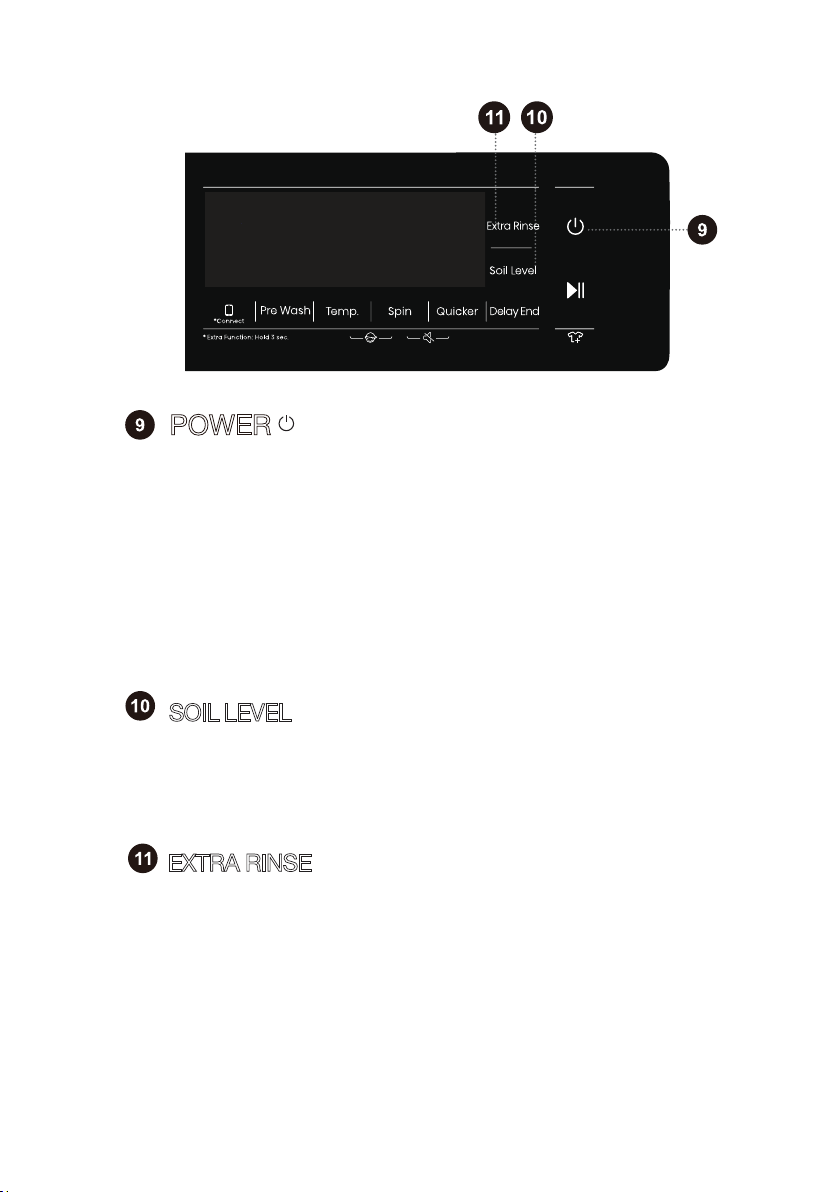
1) Control the washing machine to switch between "shutdown state" and "standby
state". In the shutdown state, all display and output are turned off. The shutdown
response time is 2s when the power key is pressed continuously.
2) Press the power key in the shutdown state, and the buzzer will sound to enter
the standby state. The display's indications light up in turn as soon as the power is
turned on.
3) Press the power key to start the machine and judge the door lock state.
4) After the washing machine is in standby state or the END is displayed, the door
will be unlocked, and press the power key to shut down. If there is no shutdown
operation within 2 minutes, the washing machine will automatically power off.
5) In the pausing state, the display time and colon on the LED flash at the same
time.
SOIL LEVEL
1) The default soil level is Medium (two bars). The washing time after selecting Low
(one bar) is reduced by X minutes, and the washing time after selecting the High
(three bars) is increased by X minutes.
2)X will be confirmed by grades according to the time of water intake plus mixing.
3)Weighing will be canceled after this function is triggered.
EXTRA RINSE
1) This function can be selected in standby state and cannot be changed after
startup.
2) In the standby state, after Extra Rinse is selected, the number of Extra Rinse is
shown, which may be used a maximum of three times. In addition, the default
rinsing times plus the number of Extra Rinse cannot exceed five times.
3) After the program is started, the indicator is always on.
POWER
33
45
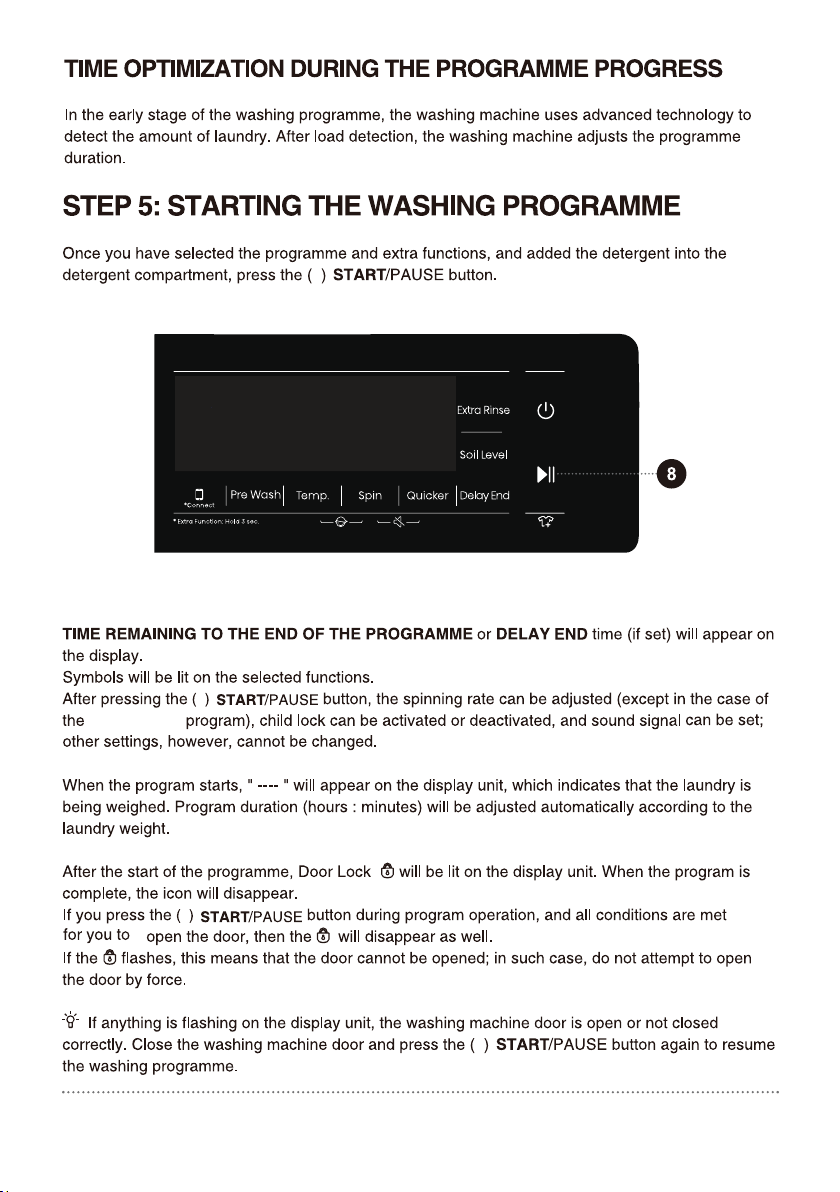
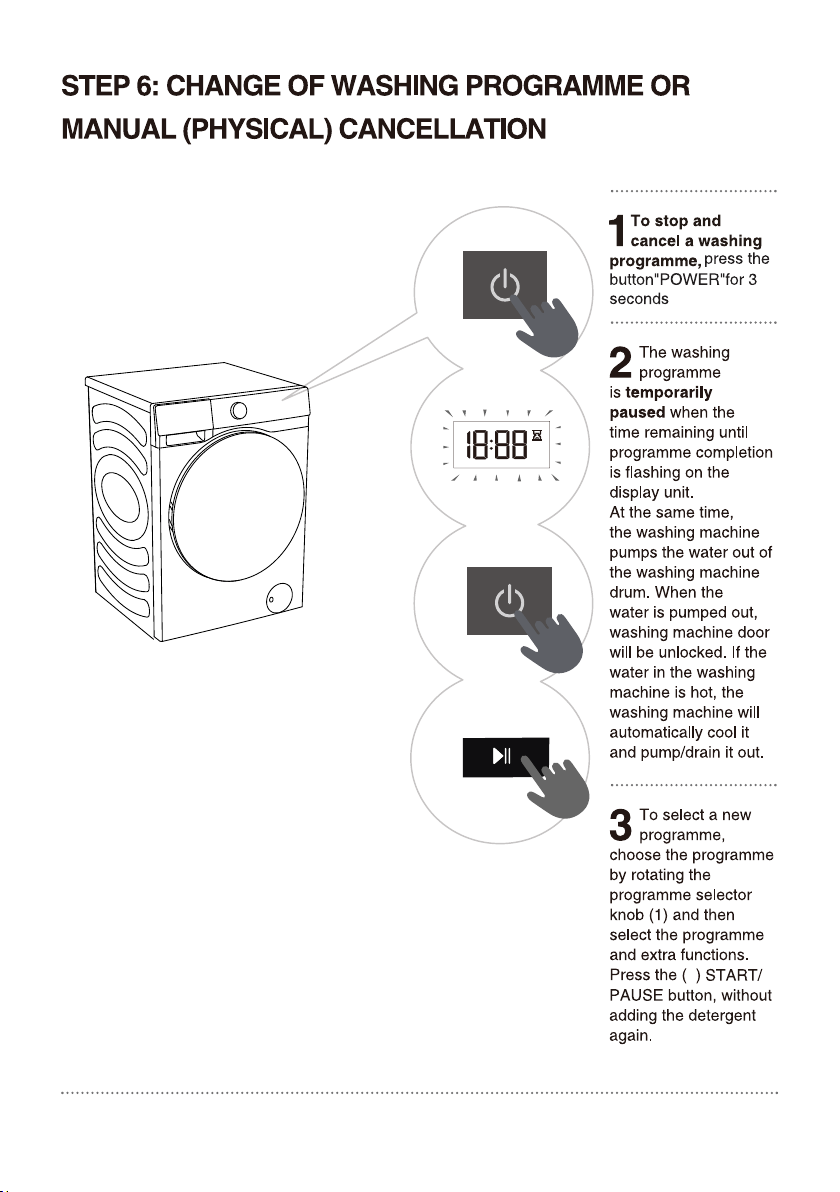
Power off in 3 seconds by touching the power
button
34
35
36
Shirts
Quick 15'/30'
Sportswear
Allergy care
Baby care
Auto
Towels
Bedding
Spin
Drum Clean
Wool
Cotton
Synthetics
SOIL LEVEL
DELAY END
QUICKER
Delicates
8
8
8
8
37
Drum Cleam
8
38
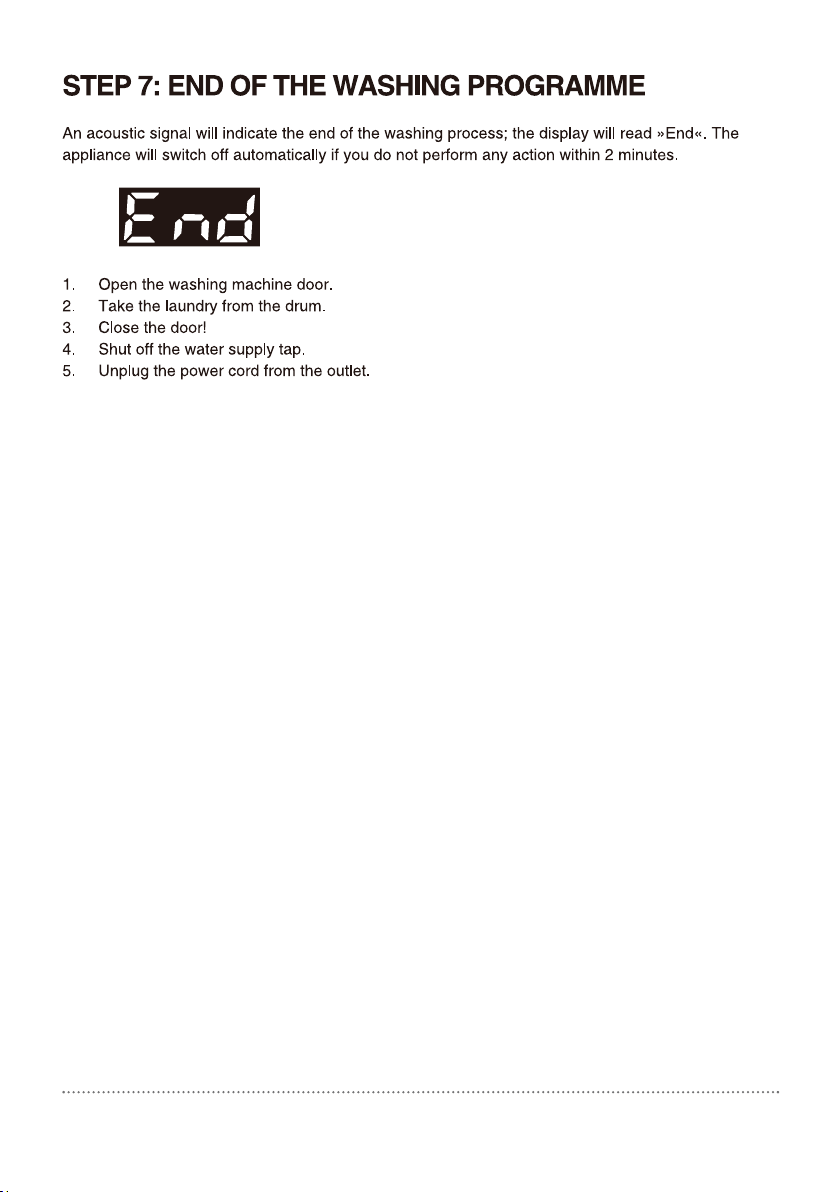
39
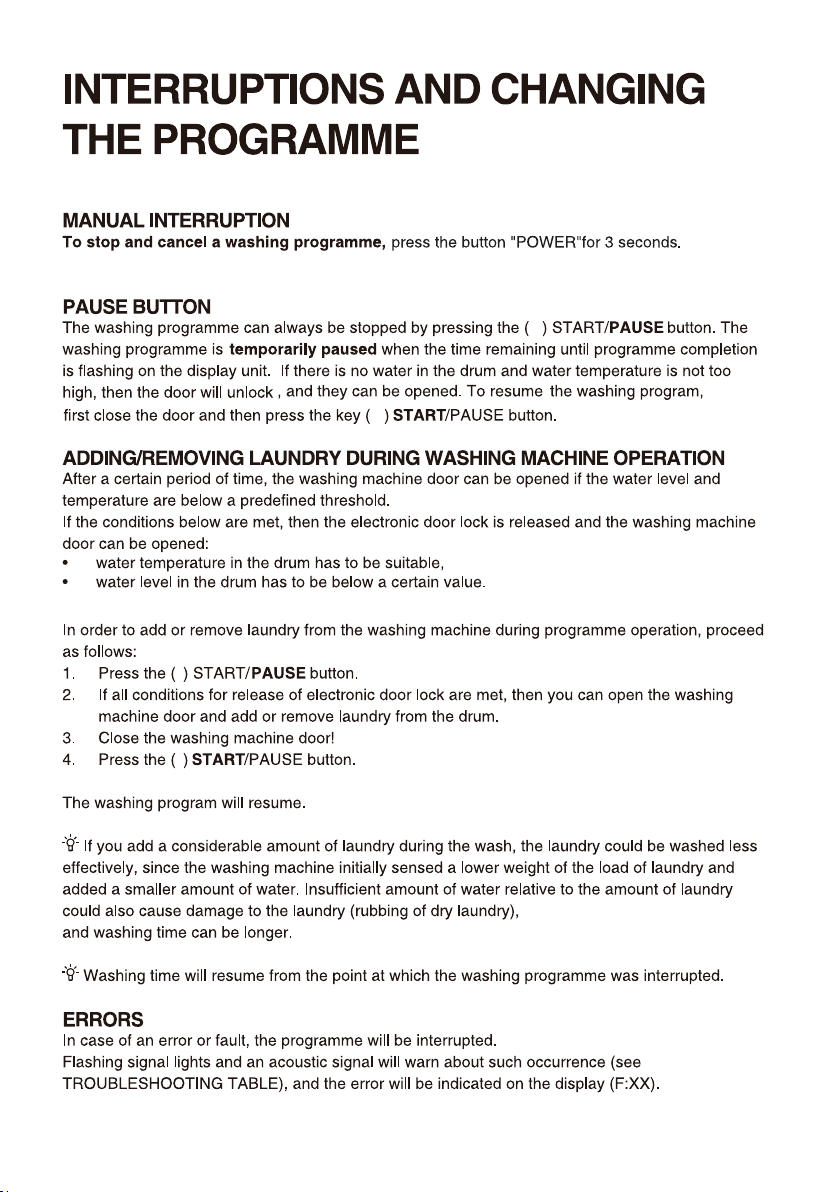
8
8
8
8
40
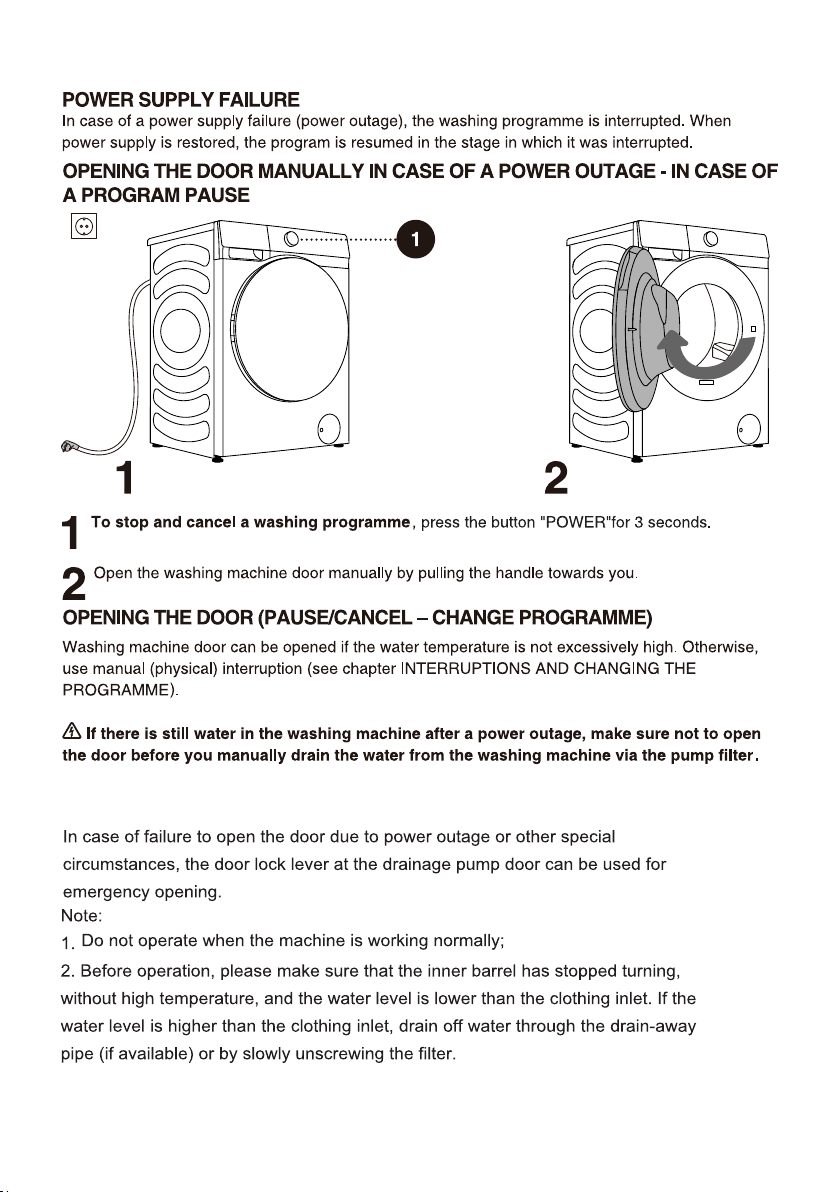
(0(5*(1&<'22523(1,1*
41
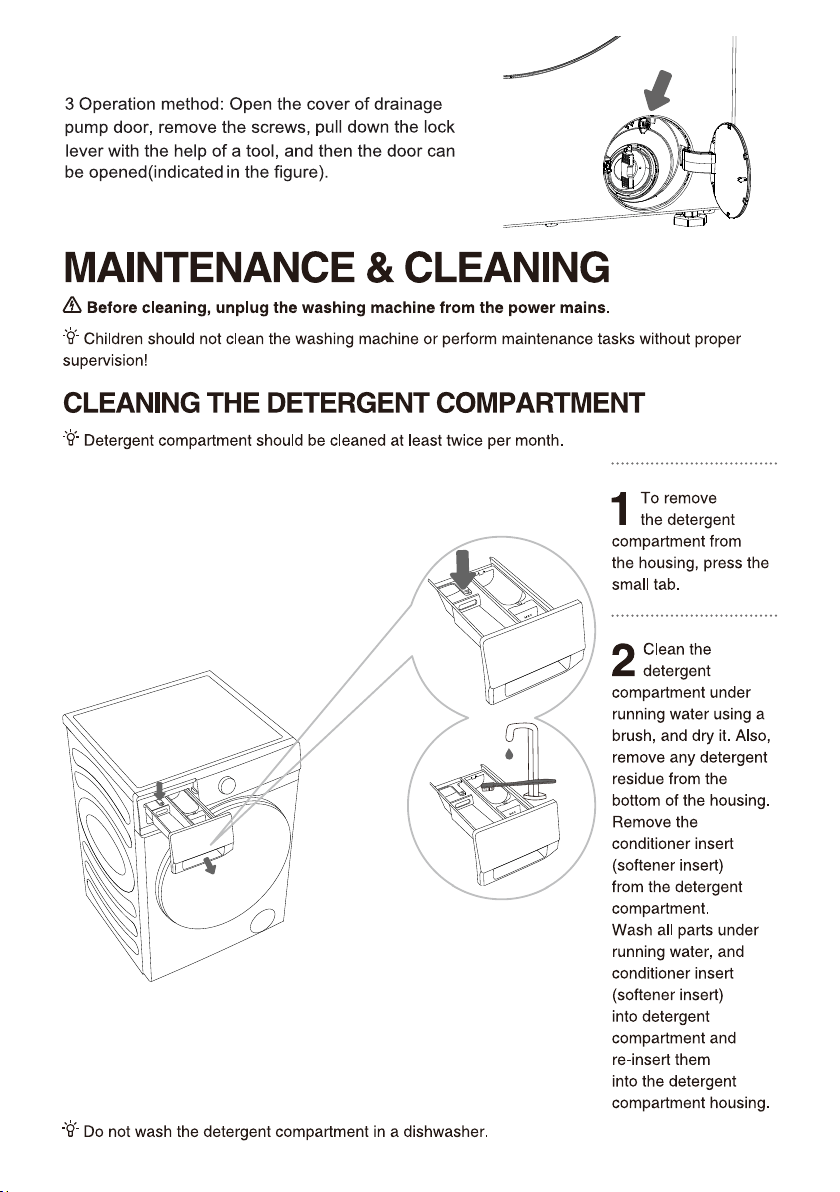
.
42
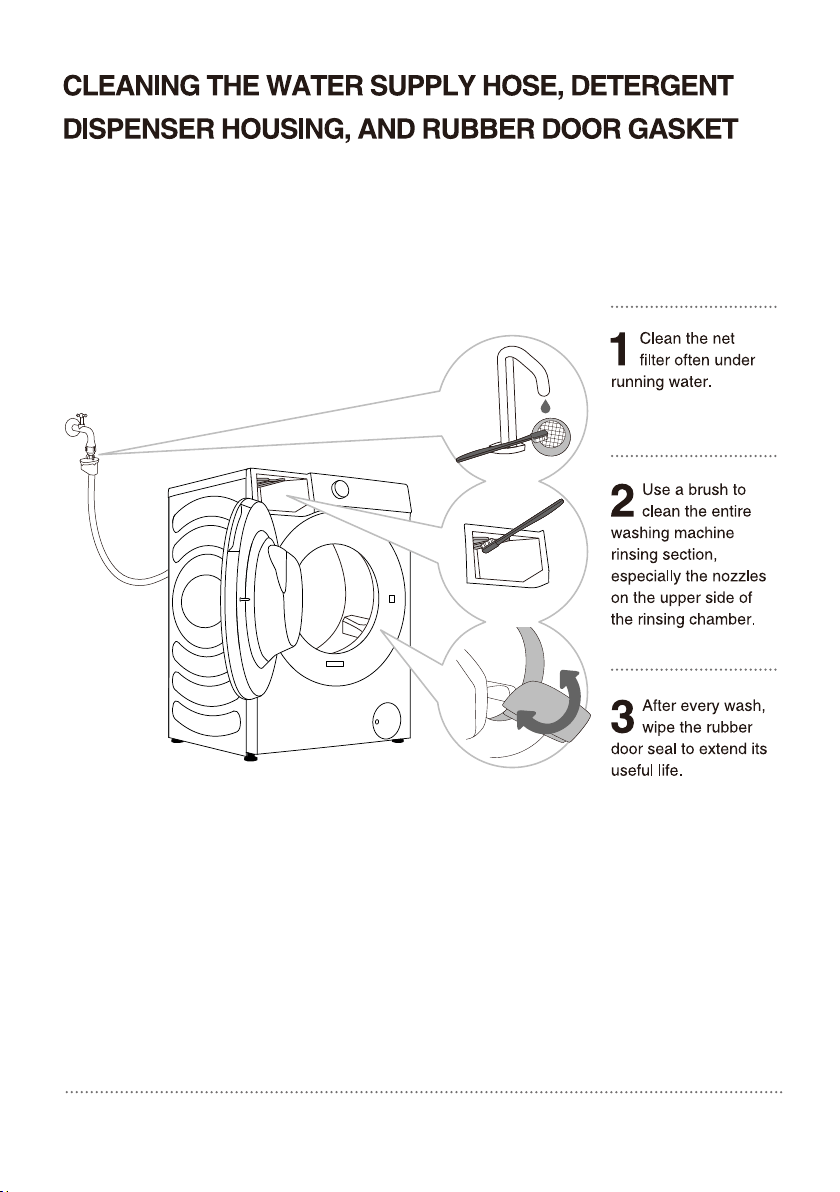
43
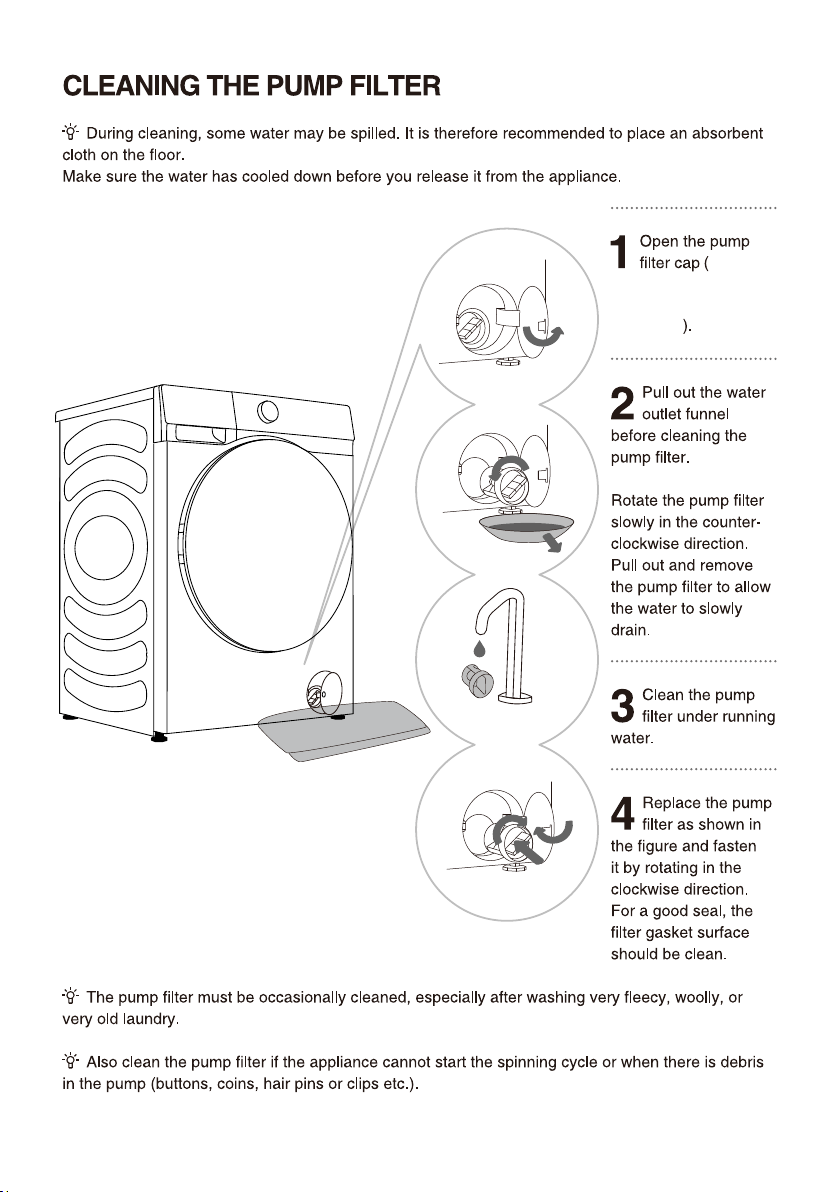
Press the door cover
and automatically
pop open
44
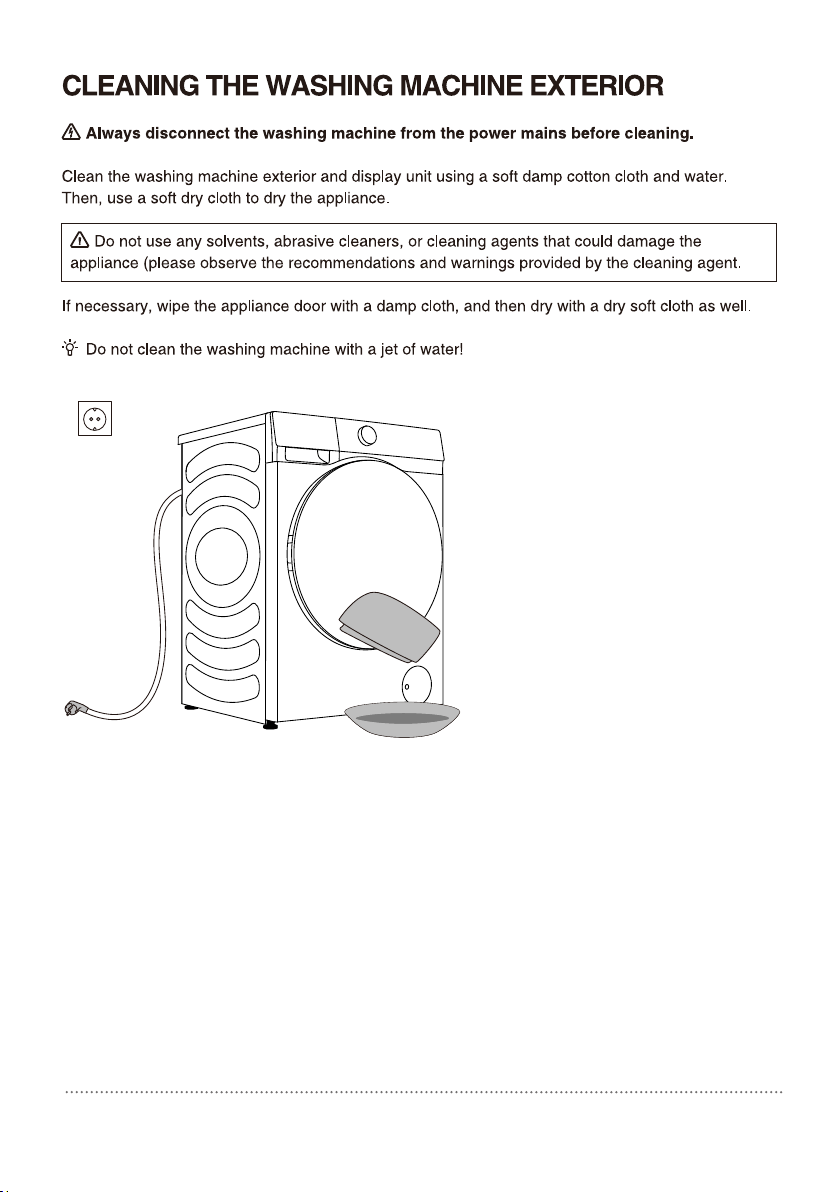
45
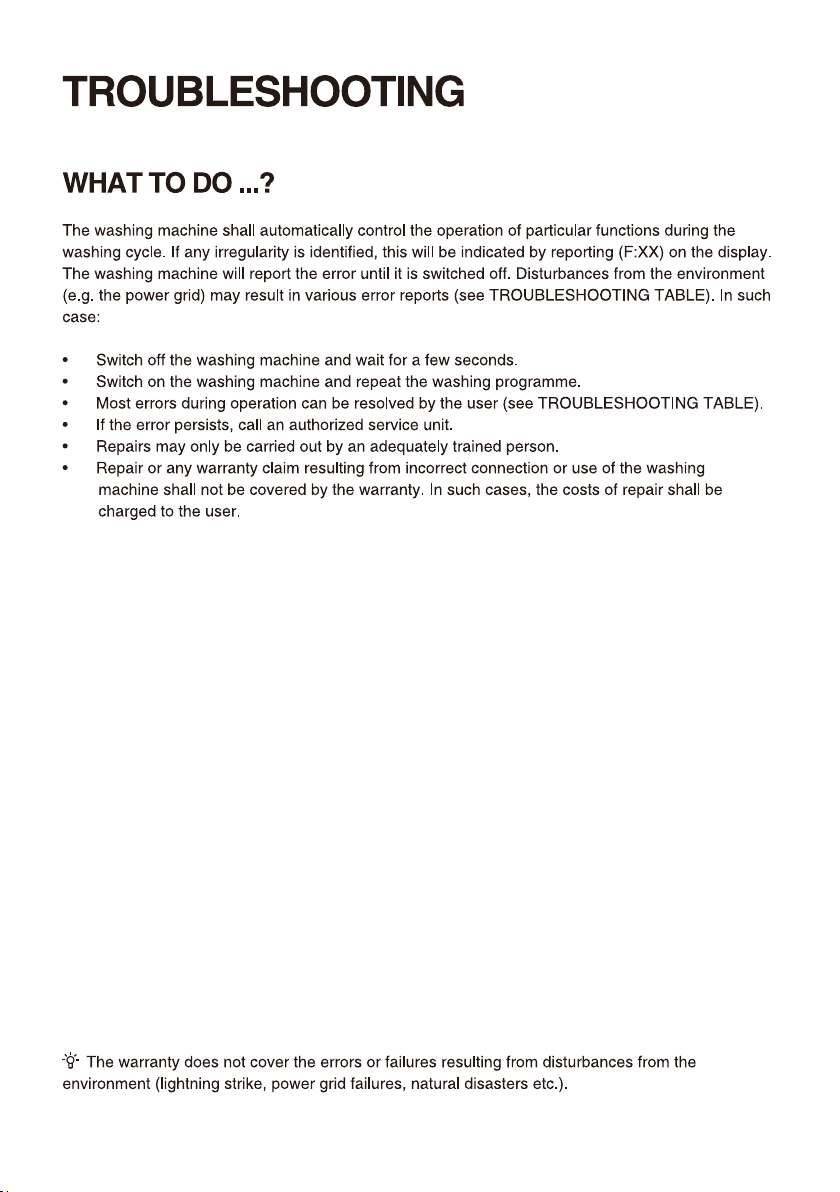
46
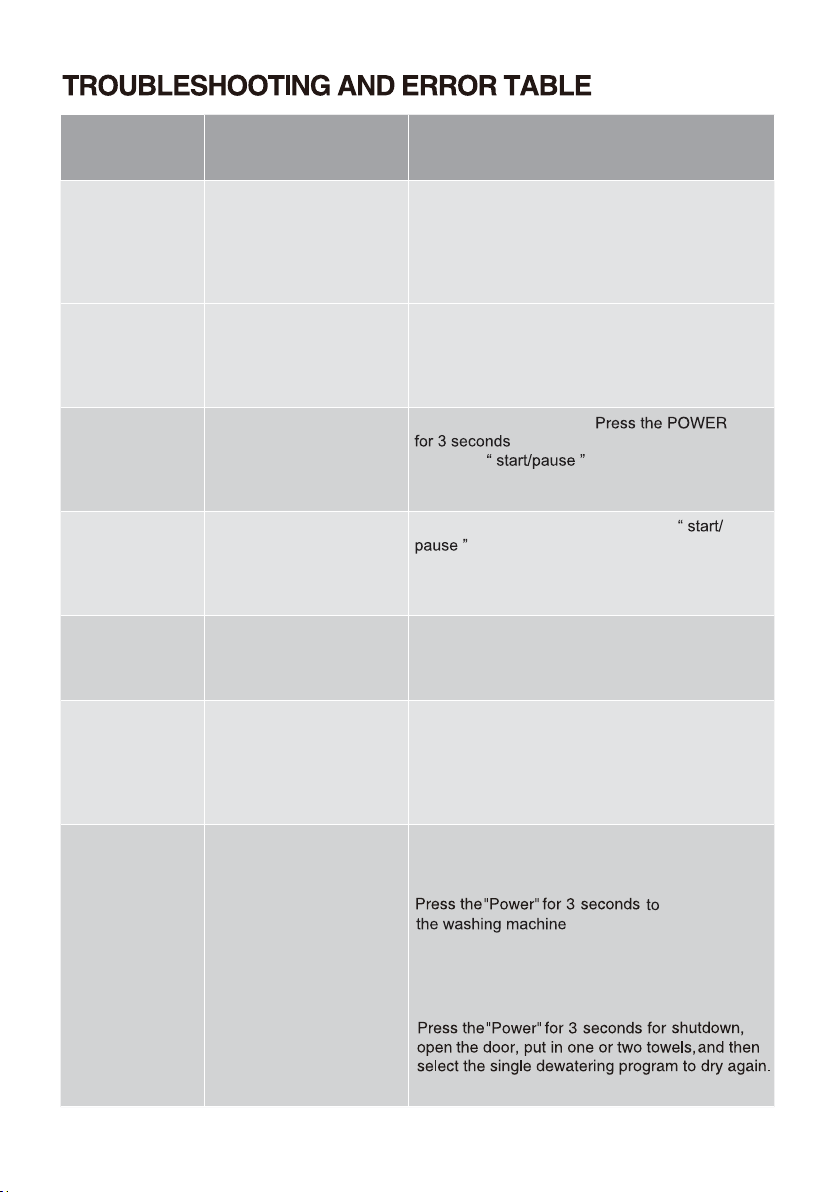
Problem/
error
Indication on the display
unit and problem
description
What to do?
F01
Water inflow fault
Check the following:
• Is the water supply tap open and is the
pressure too low?
• Is the water supply hose pinched?
• Is the filter on the water supply hose clogged
• Is the hose frozen?
F03
Drainage fault
Check the following:
• Is the hose pinched, does the water flo
through it?
• Is the filter on the drain hose clogged
• Is the hose frozen?
F04/F05/F06/
F07/F23
Electronic module fault
Switch off the appliance;
.
Press the
button again. If the
error reoccurs, call a service technician.
F24
Water level reaches
overflow level
Stop the programme by pressing the
button. Restart the programme.
If the appliance continues to pump water into
the tub, close the water tap and call a service
technician
F13
Error while locking the
door
Door is closed, but it cannot be locked.
Switch off the washing machine. Switch it back
on and restart the washing programme.
If the error reoccurs, call a service technician.
F14
Error while locking the
door
Door is closed, but it cannot be unlocked.
Turn off the appliance, then turn it back on. If
the error reoccurs, call a service technician.
Unb Unb Unbalance alarm
Unbalance alarm shall be solved by the following
methods
1.Laundry winding
shutdown
, open the door, shake the
clothes and put them back into the washing
machine, then select the single dewatering
program to dry again.
Too light-weighted laundry2.
47
48
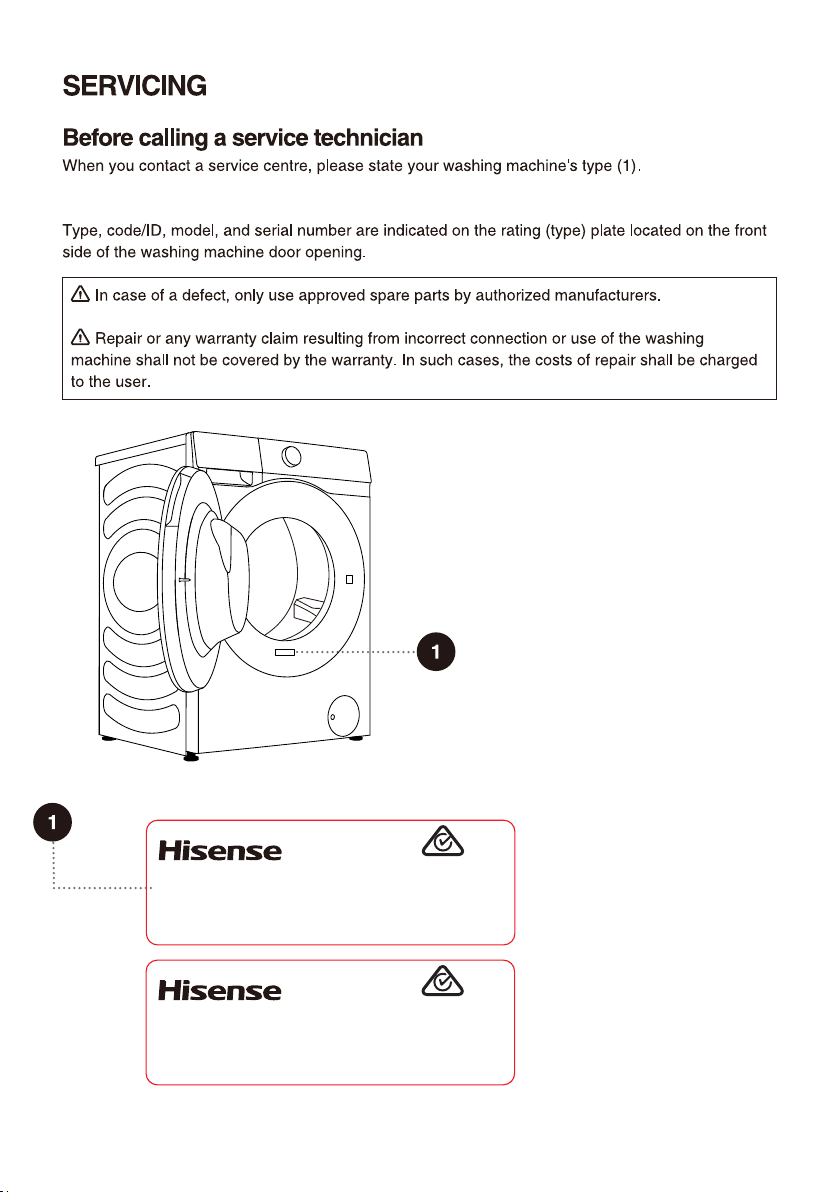
Clothes Washing Machine
HWFS8514E
8.5kg
220-240V~ 50Hz 1750W IPX4
Made in China
SGS-220998-EA
APPROVAL NO.
Hisense Australia Pty Ltd.
E6101
Clothes Washing Machine
HWFS1015E
10.0kg
220-240V~ 50Hz 1750W IPX4
Made in China
SGS-220998-EA
APPROVAL NO.
Hisense Australia Pty Ltd.
E6101
Drum Clean.
49
50
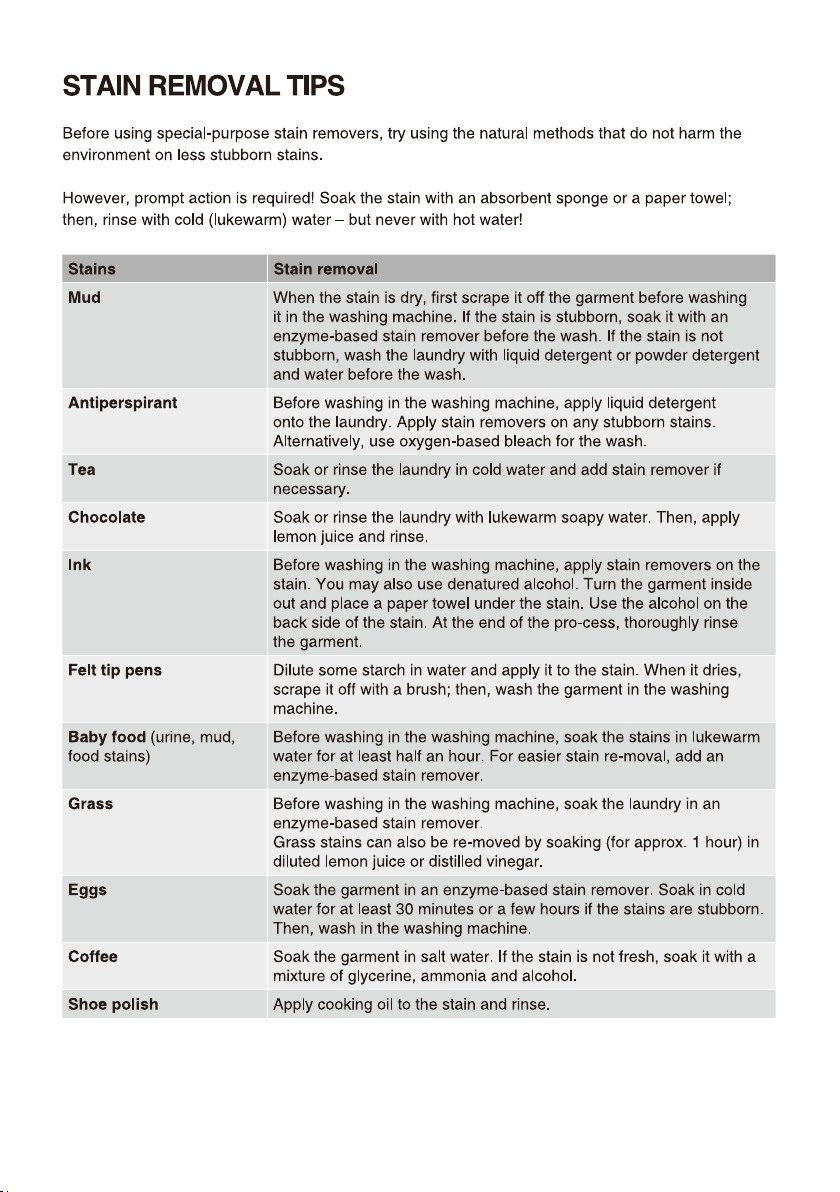
51
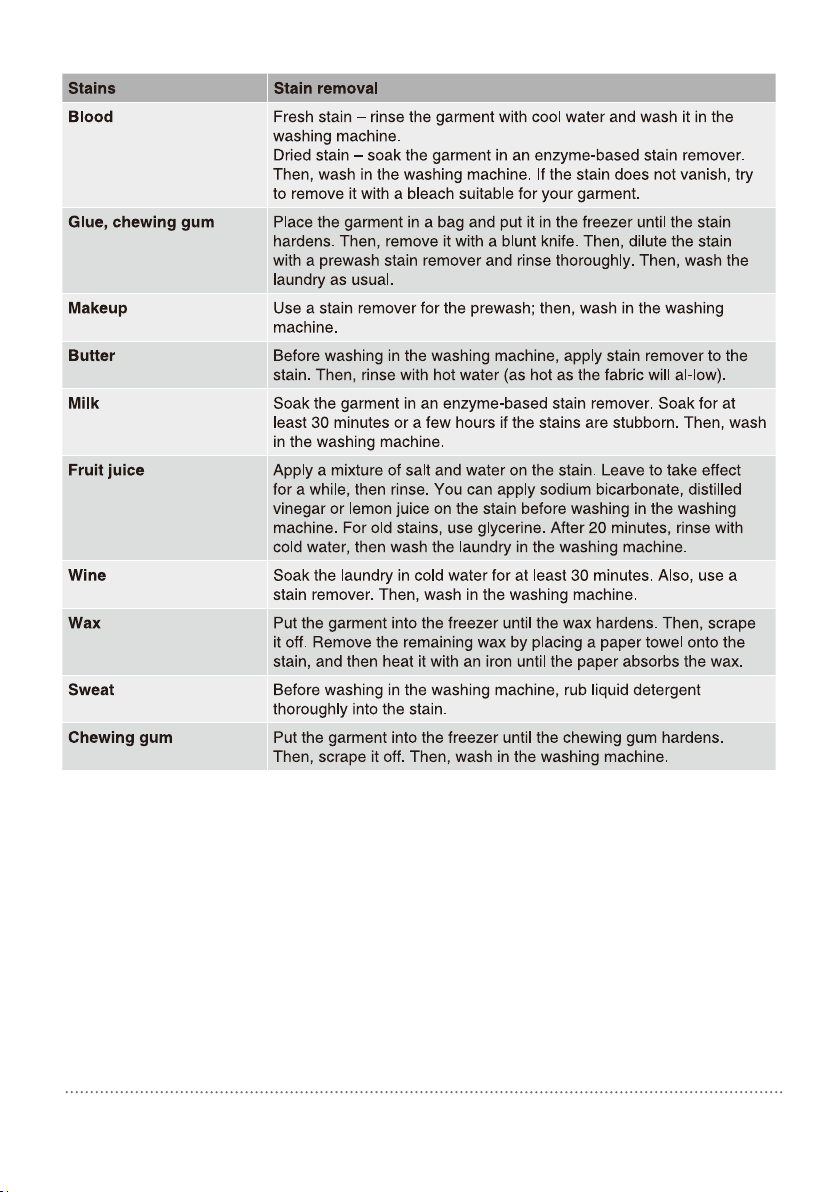
52
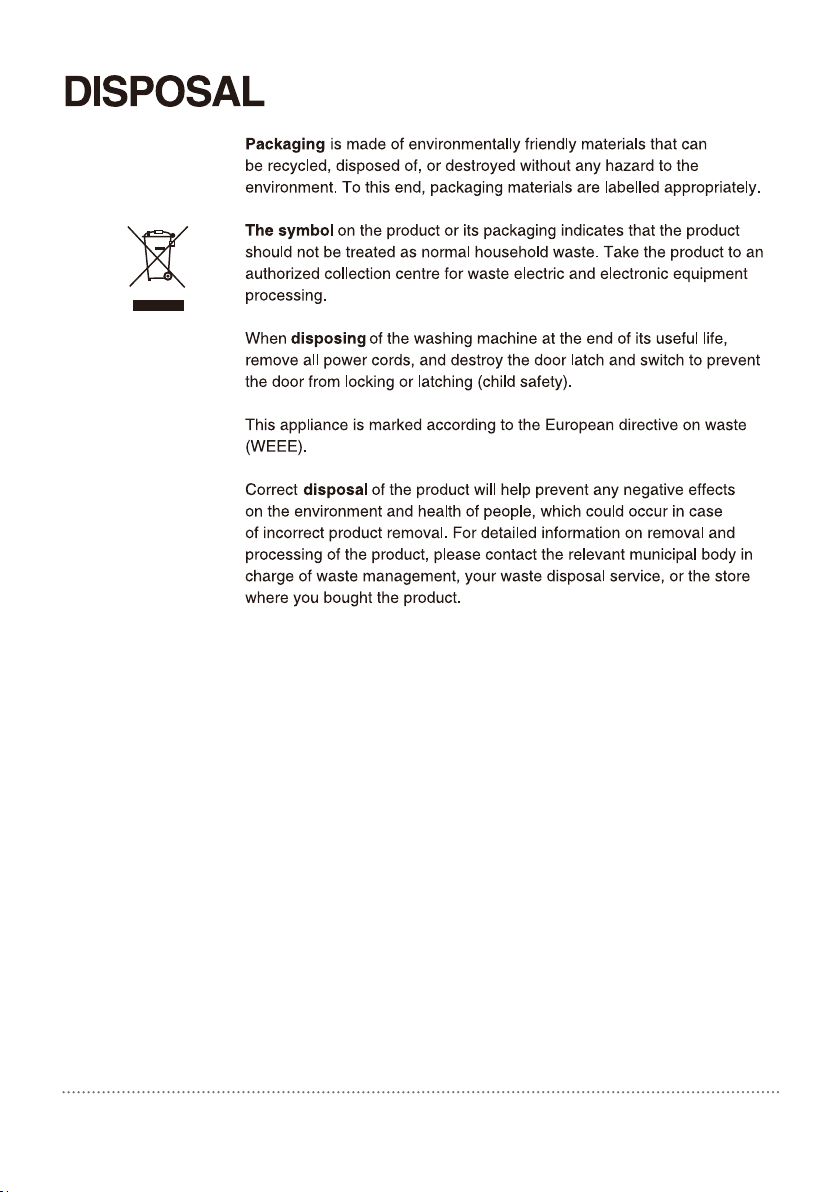
53
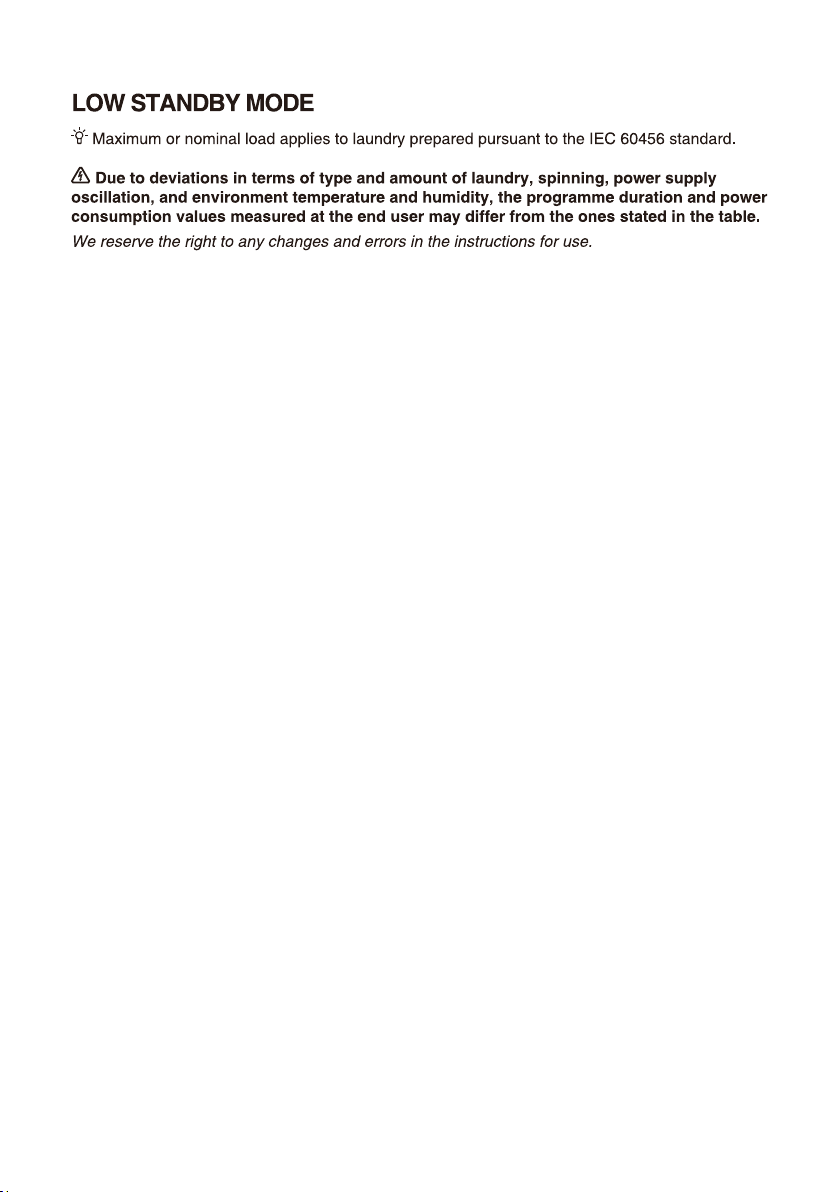
54
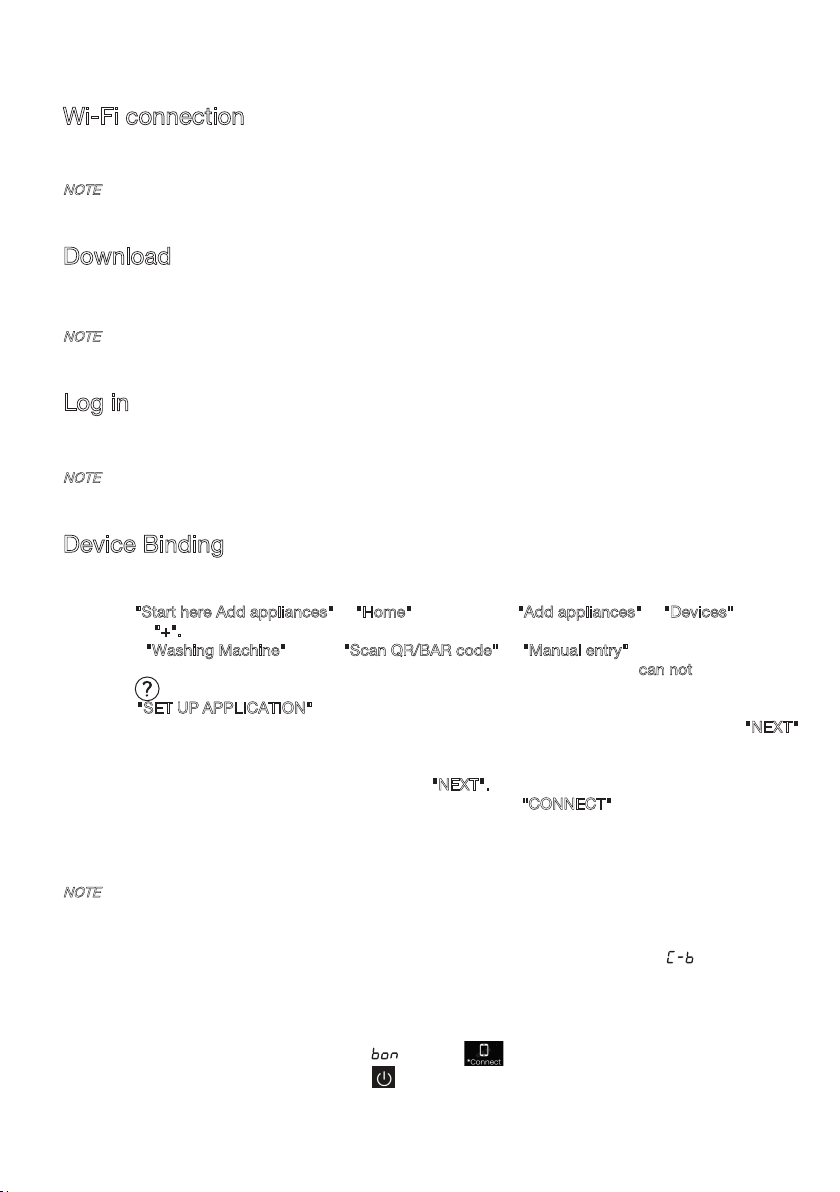
This device can support the 2.4 GHz Wi-Fi.
Wi-Fi connection
Enter the "Settings" interface on your smartphone or tablet PC, enable the Bluetooth and
Wireless Connection, and connect to the wireless network.
NOTE
Download
In the APP Store (Google Play Store, Apple App Store) on your smartphone or tablet PC, find the
ConnectLife app, download and install it.
NOTE
In order to improve performance and experience, the application may be updated without notification.
L
og in
You need to log in to ConnectLife with your account first. If you do not have a ConnectLife account,
you will need to create a new one. Please refer to the App Instructions for details.
NOTE
If you already have a Google account, you can use your Google account to log in directly.
NOTE
How to reset Wi-Fi and unbind all the binding relationship of the device:
1. Press the power key to start the device and make it connect to the network normally.
2. Press the last two keys simultaneously for 3 seconds, and the screen will display " ".
3. Shut down and restart the device to make a new binding.
4.
5. How to exit the network distribution mode:
If you want to quit when screen display " " , press"
"simultaneously for 3 seconds
Device Binding
1. Open ConnectLife on your smartphone or tablet PC;
2. Bind your device on ConnectLife as follows:
A.Click "Start here Add appliances" in "Home" page, or click "Add appliances" in "Devices" page,
or click "+".
B.Select "Washing Machine" or click "Scan QR/BAR code" or "Manual entry" below.
C.Scan the QR/BAR code on the device or enter the AUID/SN manually. If you can not find
it,clickfor instructions.
D.Click "SET UP APPLICATION"
E.Read the instructions, operate the device into the Networking and Binding state, and click "NEXT".
F.At this time, the app starts to search for devices, and you can select the device to be connected to
the network from the search list; If it is not found, check your bluetooth whether turn on. Bluetooth
should be keep it on at all time. And then click "NEXT".
G.Select your home Wi-Fi, enter the password, Then click the "CONNECT". The appliance will start
networking and binding.
H.After binding successfully, you can set the device name and room.
I .Now, the device can be control remotely by APP.
After unbinding, the device must be restarted, or the unbinding will fail. Unbinding
will delete users information stored in appliance before.
you can turn off the appliance by press " " or wait for 5 minutes.
55

2316145-X08061826