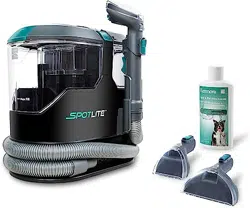

Model/Modelo/Modèle: KW2001
Portable Carpet Spot and Pet Stain
Cleaner
Limpiadora de Alfombras Portátil
Para Salpicaduras y Manchas de
Mascotas
Nettoyeur de Tapis Portatif Pour
Taches et Souillures d’animaux
Familiers
www.kenmorefloorcare.com
Vacuum Cleaner Help Line:
1-877-531-7321 (US) / 1-844-608-3081 (CA)
8:00am-5:00pm EST, M-F
Use & Care Guide
Manual de Uso y Cuidado
Manuel d'entretien et d'utilisation

- 2 -
Before Using Your New Carpet Cleaner ........................................................................... 2
Packing List ..................................................................................................................... 2
Important Safety Instructions ........................................................................................3-4
Double Insulation Instructions .......................................................................................... 5
Carpet Cleaner Warranty ................................................................................................. 6
Parts and Features ...........................................................................................................7
Assembly Instructions ...................................................................................................8-9
Operating Instructions .................................................................................................9-12
Performance/Safety Features .........................................................................................13
Maintenance and Care .............................................................................................. 13-15
Troubleshooting ..............................................................................................................16
Requesting Assistance or Service ......................................................................Back Cover
TABLE OF CONTENTS
PACKING LIST
Your KENMORE CARPET SPOT CLEANER is packaged with the following parts and
components assembled separately in the carton:
1 Spot Vacuum Cleaner
1 Tough Stain Tool
1 Wide Path Tool
1 Use & Care Guide
1 8 oz. Carpet Cleaning Formula
1 Hose Storage Holder (with 1 screw pre-attached)
Read this Use & Care Guide. It will help you assemble and operate your new Kenmore
carpet cleaner in the safest and most effective way.
For more information about carpet cleaner care and operation, call the Vacuum Cleaner
Help Line at 1-877-531-7321 (US) / 1-844-608-3081 (CA). You will need the complete model
and serial numbers when requesting information.
Your carpet cleaner’s model and serial numbers are located on the Model and Serial
Number Plate. Use the space below to record the model number and serial number of your
new Kenmore carpet cleaner.
Model No.____________________________________________
Serial No. ____________________________________________
Date of Purchase ______________________________________
Keep this book and your sales check (receipt) in a safe place for future reference.
BEFORE USING YOUR NEW CARPET CLEANER
- 3 -
WARNING!
Your safety is important to us. To reduce the risk of fire, electrical shock, injury to persons
or damage when using your carpet cleaner, follow basic safety precautions including the
following:
IMPORTANT SAFETY INSTRUCTIONS
• Use your carpet cleaner only as described
in this Use & Care Guide. Use only
with manufacturer’s recommended
attachments.
• Fully assemble before operating.
• Operate cleaner only at voltage specified
on data plate.
• Do not leave carpet cleaner when plugged
in. Unplug from outlet when not in use and
before performing maintenance.
• Do not expose to rain. Store indoors.
• Do not immerse. Use only on carpet
moistened by cleaning process.
• Do not allow to be used as a toy. Close
attention is necessary when used by or
near children.
• Do not use with a damaged cord or
plug. If carpet cleaner is not working as
it should, has been dropped, damaged,
left outdoors, or dropped in water,
immediately discontinue use and call
1-877-531-7321 (US) / 1-844-608-3081
(CA) for assistance.
• Do not pull or carry by cord, use cord as a
handle, close a door on cord, or pull cord
around sharp edges or corners. Do not run
carpet cleaner over cord. Keep cord away
from heated surfaces.
• Do not unplug by pulling on cord. To
unplug, grasp the plug, not the cord.
• Do not handle plug or carpet cleaner with
wet hands.
• Do not put any objects into openings.
• Do not use with any opening blocked;
keep free of dust, lint, hair, and anything
that may reduce air flow.
Read all instructions in this guide before assembling or using your carpet cleaner.
• Keep hair, loose clothing, fingers, and all
parts of body away from openings and
moving parts.
• Turn off all controls before unplugging.
• Use extra care when cleaning on stairs.
To avoid personal injury or damage,
and to prevent the carpet cleaner from
falling, always place carpet cleaner at
bottom of stairs or on floor. Do not place
carpet cleaner on stairs or furniture, as it
may result in injury or damage.
• Do not put on chairs, tables, etc. Keep on
floor.
• Do not use carpet cleaner to pick
up flammable or combustible liquids
(gasoline, cleaning fluid, perfumes,
etc.), or use in areas where they may be
present. The fumes from these substances
can create a fire hazard or explosion.
• To reduce the risk of health hazards from
vapors or dusts, do not vacuum toxic
materials.
• Do not use or store near hazardous
materials.
• Do not pick up anything that is burning or
smoking, such as cigarettes, matches, or
hot ashes.
• Do not use carpet cleaner without tanks
in place.
• Do not clean over floor electrical outlets.
• Do not use the carpet cleaner to pick
up sharp hard objects, small toys, pins,
paper clips, etc. They may damage the
carpet cleaner or dust cup.
• Do not use sharp objects to clean out
hose as they can cause damage.
- 4 -
IMPORTANT SAFETY INSTRUCTIONS
SAVE THESE INSTRUCTIONS
Proper assembly and safe use of your carpet cleaner are your responsibilities. Your carpet
cleaner is intended for
Household use
. Read this Use & Care Guide carefully for important
use and safety information. This guide contains safety statements under warning and caution
symbols.
• To help prevent matting and resoiling,
avoid contact with carpets until they are
dry. Keep children and pets away from
carpets until they are completely dry.
• Do not store the carpet cleaner with
solution in tanks.
• This carpet cleaner is provided with
double insulation. Use only identical
replacement parts. See DOUBLE
INSULATION INSTRUCTIONS.
• You are responsible for making sure
that your vacuum cleaner is not used by
anyone unable to operate it properly.
CAUTION
To reduce the risk of injury from moving
parts - Unplug before servicing.
WARNING
To reduce the risk of electric shock - Unplug
before cleaning or servicing.
- 5 -
WARNING
To reduce the risk of electric shock - Do not
expose to rain. Store indoors.
This carpet cleaner is double insulated,
eliminating the need for a separate
grounding system. Use only identical
replacements parts. Read the instructions
for Servicing Double-Insulated Carpet
Cleaners before servicing. Use this carpet
cleaner as described in this manual.
Observe the following warnings that
appear on the motor housing of your
carpet cleaner.
Double Insulated - Grounding not
required - When servicing use only identical
replacement parts.
WARNING
Servicing of Double-Insulated Carpet
Cleaners
With a double-insulated carpet cleaner, two
systems of insulation are provided instead
of grounding. No grounding means is
provided on a double-insulated appliance,
nor should a means for grounding be
added. Servicing a double insulated
carpet cleaner requires extreme care and
knowledge of the system and should be
done only by qualified service personnel.
Replacement parts for a double-insulated
carpet cleaner must be identical to the parts
they replace. Your double-insulated carpet
cleaner is marked with the words ‘Double
Insulated’ and the symbol
(square within
a square) may also be marked on the
appliance.
WARNING
For your own safety, read and understand
the Use & Care Guide. Do not run
unattended. Do not pick up hot ashes,
coals, toxic, flammable or other hazardous
materials. Do not use around explosive
liquids or vapors.
DOUBLE INSULATION INSTRUCTIONS

- 6 -
CARPET CLEANER WARRANTY
LIMITED WARRANTY
FOR ONE YEAR from the date of sale this product is warranted against defects in material
or workmanship.
WITH PROOF OF SALE a defective product will be replaced free of charge.
The Kenmore brand is used under license. Direct all claims for warranty service to:
1-877-531-7321 (US) / 1-844-608-3081 (CA).
This warranty is void if this product is ever used for other than private household purposes.
This warranty gives you specific legal rights, and you may also have other rights which
vary from state to state.
Cleva North America, Inc., Greenville SC 29607
- 7 -
PARTS AND FEATURES
It is important to know your carpet cleaner’s parts and features to assure its proper and
safe use. Review these before using your carpet cleaner.
REPLACEMENT PARTS
To order a replacement part, call 1-877-531-7321 (US) / 1-844-608-3081 (CA).
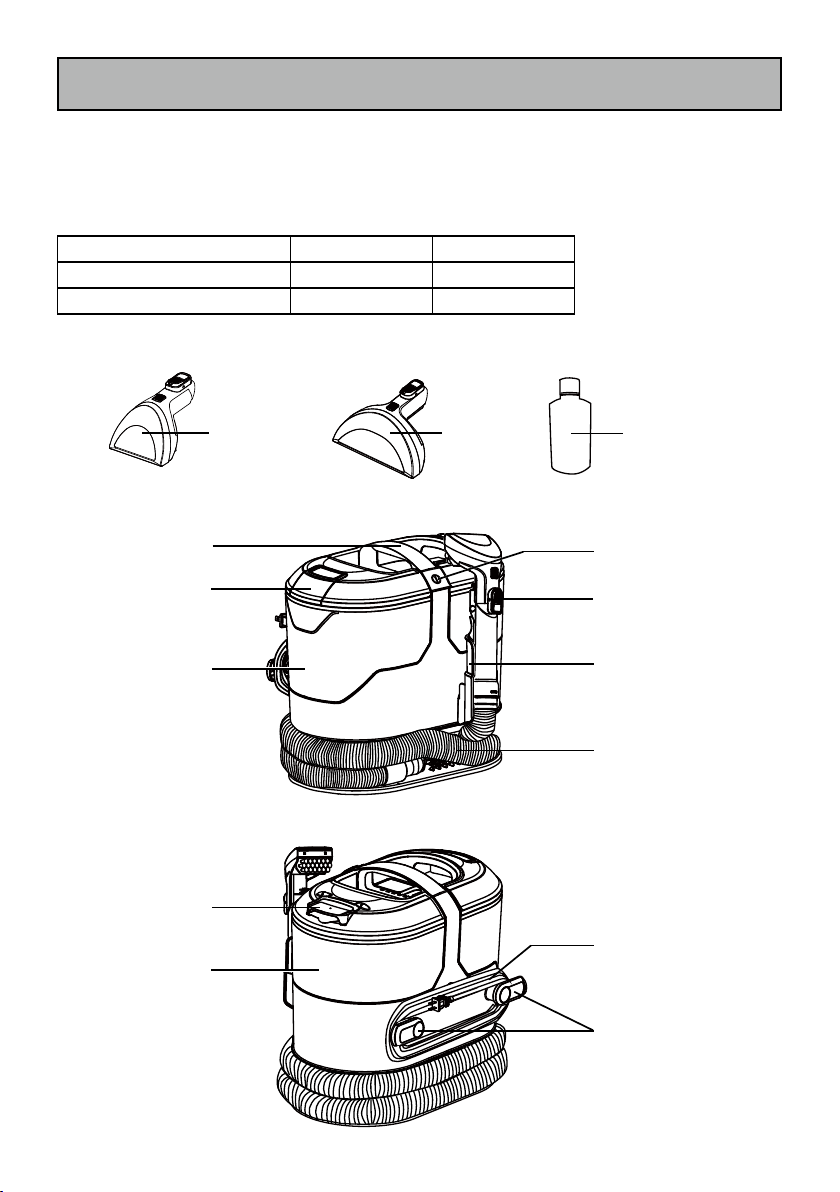
Item Part No.(US) Part No.(CA)
3.5'' Tough Stain Tool 591033101 591033101
6.5'' Wide Path Tool 591033102 591033102
Tough Stain
Tool
Wide Path
Tool
Carpet Cleaning
Formula
Handle
Tool Release
Button
Dirty Water Tank
Cover Release
Power Cord
Cord
Hooks
Dirty Water
Tank
Clean Water
Tank Cap
Hose Storage
Holder
Flexible
Hose
Clean Water
Tank
Power Button
- 8 -
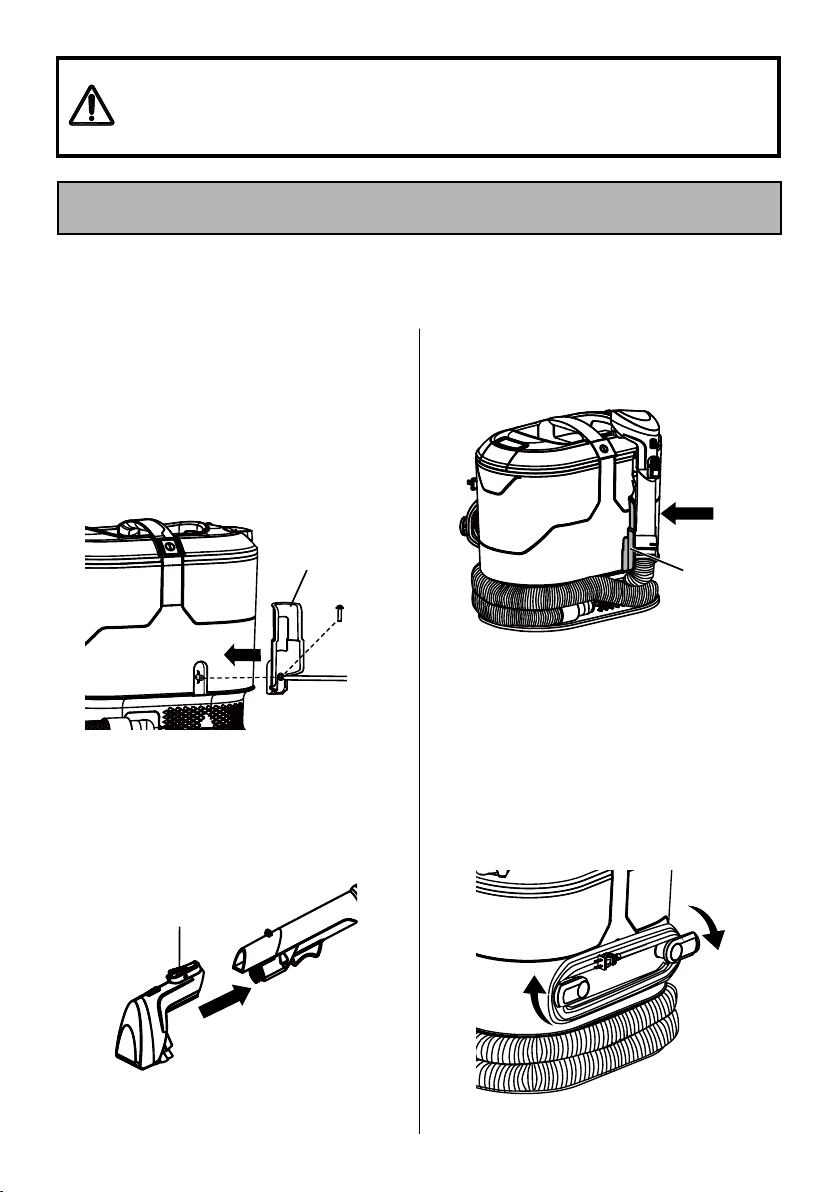
3. Make sure both cord hooks are in the
proper position as shown. Wrap the
power cord loosely around the cord
hooks.
NOTE:
Make sure to wrap the power
cord around the right cord hook first, and
then around the left cord hook to avoid
damaging the power cord.
1. Loosen the screw pre-attached on the
hose storage holder. Secure the hose
storage holder onto the carpet cleaner
body with the screw.
NOTE:
Tighten the screw with a Phillips
screwdriver. Ensure that the screw is
secured.
2. Select preferred tool and slide it onto
the hose end until you hear a ‘click’.
To remove: Press the tool release button
and pull out the tool.
Tool Release
Button
Before assembling the carpet cleaner, check the PACKING LIST (page 2). Use this list
to verify that you have received all the components of your new Kenmore Carpet Spot
Cleaner.
Please pay special attention to these hazard alert boxes, and follow any
instructions given.
WARNING
statements alert you to such hazards as fire,
electric shock, burns and personal injury.
CAUTION
statements alert you to
such hazards as personal injury and/or property damage.
ASSEMBLY INSTRUCTIONS
Hose
Storage
Holder
NOTE:
Snap the end of the hose with
the tool installed into the hose storage
holder when not in use.
Hose Storage
Holder
- 9 -
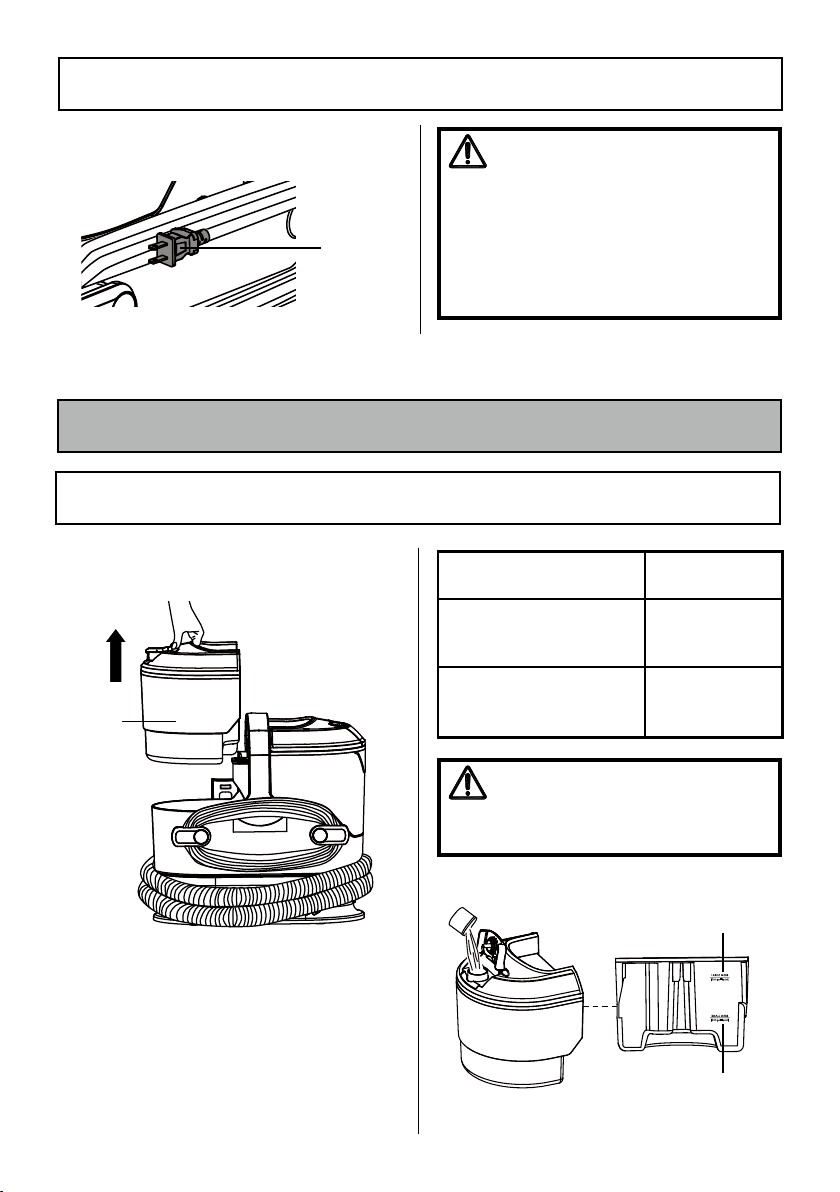
Power
Cord
Plug
WARNING
Electrical Shock and Personal Injury
Hazard
Wrapping the cord too tightly with
excessive stress on the cord may cause
cord damage. A damaged cord is an
electrical shock hazard and could cause
personal injury or damage.
ASSEMBLY INSTRUCTIONS
4. Lock power cord plug onto the power
cord.
OPERATING INSTRUCTIONS
FILLING THE CLEAN WATER TANK
Clean
Water
Tank
1. Lift up the clean water tank from the
side of the unit.
2. Open the clean water tank cap. Fill the
tank with room temperature water to
the desired water fill line (for SMALL or
LARGE messes). For a small job, add
3 cap fills of cleaning formula to the
tank. For a large job, add 9 cap fills of
cleaning formula.
CAUTION
Do not fill with water above 104°F
(40°C).
Small Mess
(0.2 gal liquid)
Large Mess
(0.6 gal liquid)
Room Temperature Water
Kenmore
Cleaning Formula
Small mess – bottom fill line
(0.2 gal liquid)
3 caps
Large mess – top fill line
(0.6 gal liquid)
9 caps
- 10 -
FILLING THE CLEAN WATER TANK
WARNING
To reduce the risk of electric shock, this
appliance has a polarized plug (one
blade is wider than the other). This plug
will fit in a polarized outlet only one
way. If the plug does not fit fully in the
outlet, reverse the plug. If it still does
not fit, contact a qualified electrician to
install the proper outlet. Do not change
the plug in any way.
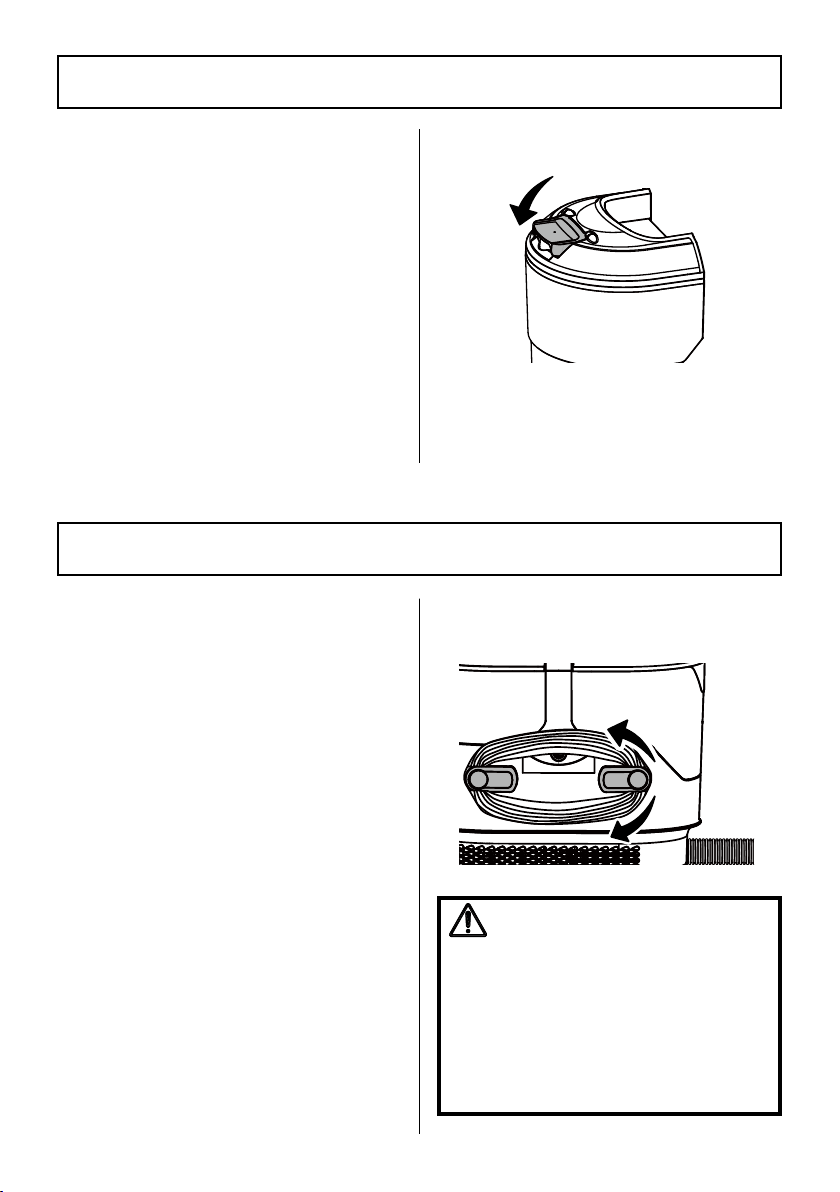
2. Turn the cord hooks inward from either
side to release the power cord.
NOTE:
Before using the carpet cleaner,
use a vacuum to remove loose dirt from
area to be cleaned. Test a small hidden
area for colorfastness. Gently rub surface
with a dampened white cloth. Wait 10
minutes and check for color removal with
a white paper towel. If color changes, do
not use.
NOTE:
To prevent staining, use plastic
or aluminum foil to protect wood or metal
surfaces from possible water spray.
To protect the wood floors underneath rugs
or carpet, place waterproof material (e.g.
plastic) underneath them before cleaning.
1. Unwrap the hose from the unit. Select
the preferred tool and make sure it is
attached securely.
3.5'' Tough Stain Tool: Use for carpet stains,
furniture and other hard-to-reach surfaces.
6.5'' Wide Path Tool: Use for cleaning
stairs and larger furniture areas.
USING THE CARPET SPOT CLEANER
3. Snap the clean water tank cap back into
place.
4. Slide the clean water tank back into the
unit, pressing down firmly until it feels
secure.
NOTE:
An 8 oz. (236ml) bottle of
cleaning formula is provided with this
carpet cleaner. Ensure the cleaning formula
and water are mixed correctly. Water must
be at room temperature. Once depleted,
the cleaning formula can be replaced by a
high-quality liquid carpet cleaning solution
that can be purchased from a local
retailer.
NOTE:
Using more than the
recommended amount of cleaning formula
may cause excessive foaming. KEEP OUT
OF REACH OF CHILDREN. In case of eye
contact, thoroughly flush with cold water.
If irritation persists, consult a physician.
- 11 -
6. To lift away the stain, apply downward
pressure on the front of the cleaning tool
and pull the tool backward slowly to
vacuum up excess dirty liquids. Repeat
as necessary.
7. Empty the dirty water tank when the
dirty liquid reaches the "Max Fill"
line and there is a loss in suction. See
instructions in the EMPTYING THE DIRTY
WATER TANK (page 12).
8. Once you have completed cleaning,
press the power button; unplug the
power cord plug from the outlet.
9. Turn the cord hooks to the proper
position and wrap the cord loosely
around the cord hooks.
WARNING
Personal Injury and Product Damage
Hazard
· When any abnormality/failure occurs,
stop using the product immediately and
disconnect the power plug.
· DO NOT clean over floor electrical
outlets. Water will drip from the tool
after use and may puddle.
USING THE CARPET SPOT CLEANER
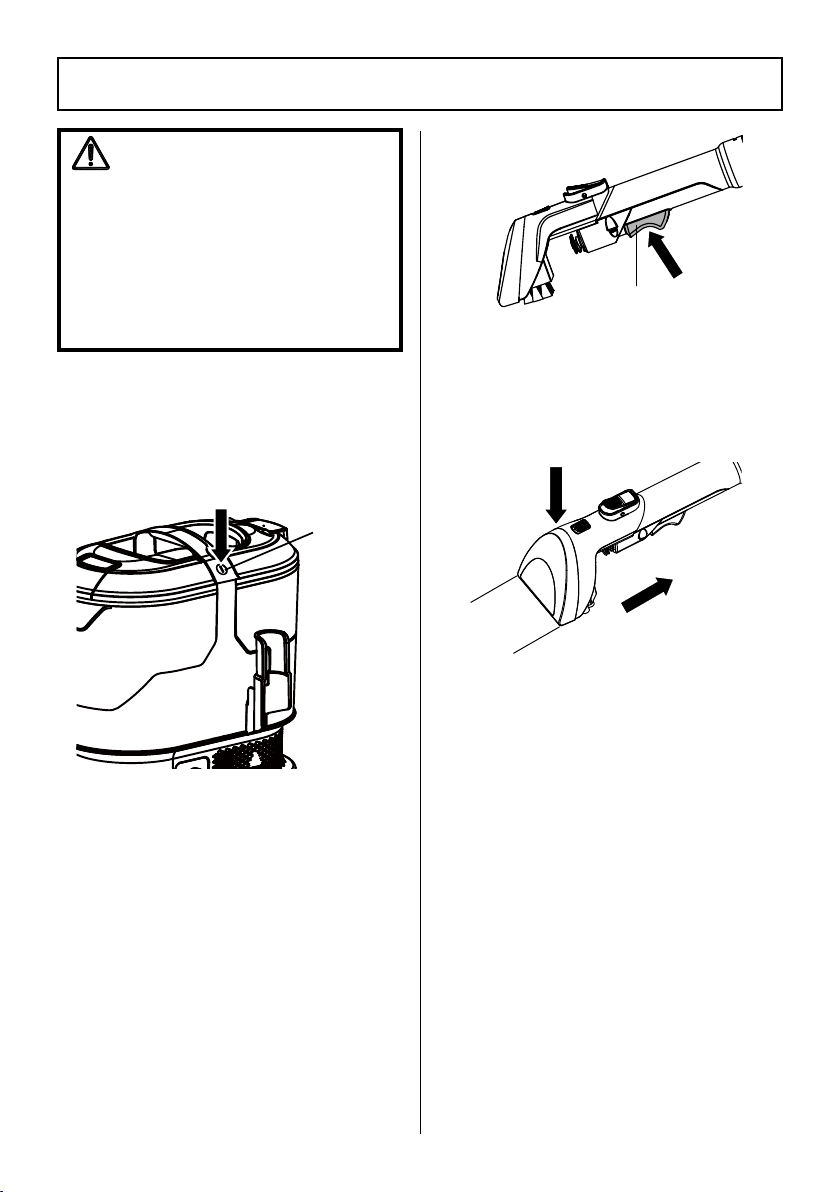
Spray Trigger
3. Detach the power cord plug from the
power cord. Plug the power cord plug
into an outlet located near the floor.
4. Press the power button to turn the
vacuum cleaner on.
5. Hold the tool about 1 inch over the stain
to be cleaned. Squeeze the spray trigger
to spray a generous amount of cleaning
solution over the soiled area. Use the
brush on the tool to agitate stains by
scrubbing in a back and forth motion.
Power
Button
- 12 -
EMPTYING THE DIRTY WATER TANK
WARNING
Always unplug power cord from
electrical outlet before performing any
service on carpet cleaner.
Empty the dirty water tank when the dirty
liquid reaches the "Max Fill" line and there
is a loss in suction. During normal use,
debris may accumulate in the dirty water
tank. In order to keep the carpet cleaner
functioning properly, rinse out the dirty
water tank with clean water after each
use.
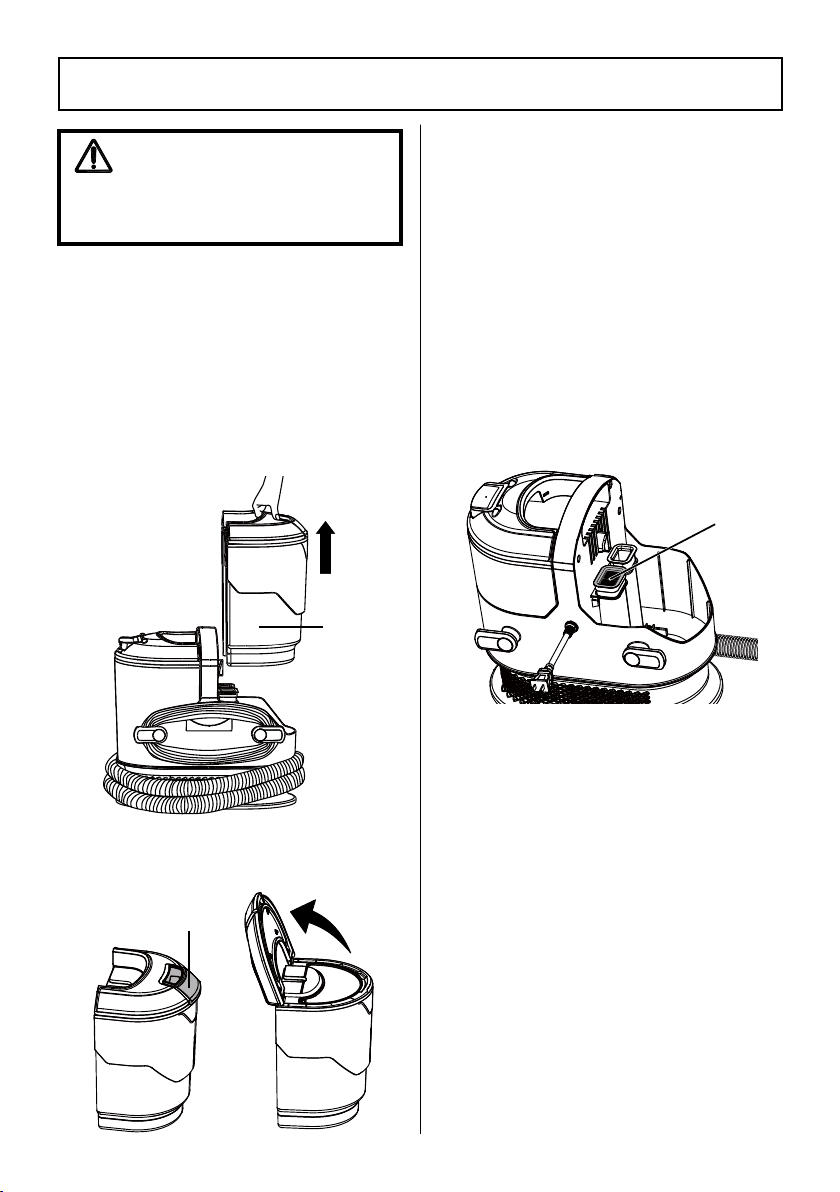
1. Lift up the dirty water tank from the side
of the unit.
2. Pull the dirty water tank cover release
horizontally, and open the cover.
Dirty
Water
Tank
3. Empty the tank. Drain liquids into a
suitable receptacle or drain. Rinse the
tank thoroughly with clean water. Allow
the tank to air dry before reinstalling.
DO NOT wash in the dishwasher.
DO NOT install damp.
4. Close the tank cover. Push back the
cover release to original place to secure
the cover.
5. Before replacing tank back into the unit,
remove any debris from the air outlet
area as shown.
6. Replace the dirty water tank back into
the unit, pressing down firmly until it
feels secure.
Dirty Water Tank
Cover Release
Air Outlet
- 13 -
PERFORMANCE/SAFETY FEATURES
THERMAL PROTECTOR
This carpet cleaner has a thermal protector
which automatically trips to protect it from
overheating. When the thermal protector
activates, the attached tool will stop
spraying.
To reset thermal protector:
Turn the carpet
cleaner off and unplug the power cord
from the outlet to allow the carpet cleaner
to cool and the thermal protectors to reset.
Empty the dirty water tank. Also check
for any obstructions if necessary. Wait
approximately 30 minutes before restarting
carpet cleaner.
If the problem persists, contact the vacuum
cleaner help line for assistance.
Always follow all safety precautions when performing maintenance to the carpet cleaner.
MAINTENANCE AND CARE
WARNING
Electrical Shock and Personal Injury Hazard
Disconnect electrical supply before servicing or cleaning the carpet cleaner. Failure to
do so could result in electrical shock or personal injury from carpet cleaner suddenly
starting.
CLEANING EXTERIOR AND ATTACHMENTS
1. Turn off and unplug carpet cleaner. DO
NOT drip water on carpet cleaner.
2. To clean exterior, or to reduce static
electricity and dust build-up, wipe outer
surface with a clean, soft cloth that has
been dipped in a solution of mild liquid
detergent and water, then wrung dry.
Wipe dry after cleaning.
NOTE:
Wash attachments in warm
soapy water, rinse and air dry. Do not
clean in dishwasher.
- 14 -
It is recommended to clean tools with
water after each use.
NOTE:
When the tools are worn or
broken, replace the tools. To purchase
tools, call 1-877-531-7321 (US) / 1-844-
608-3081 (CA).
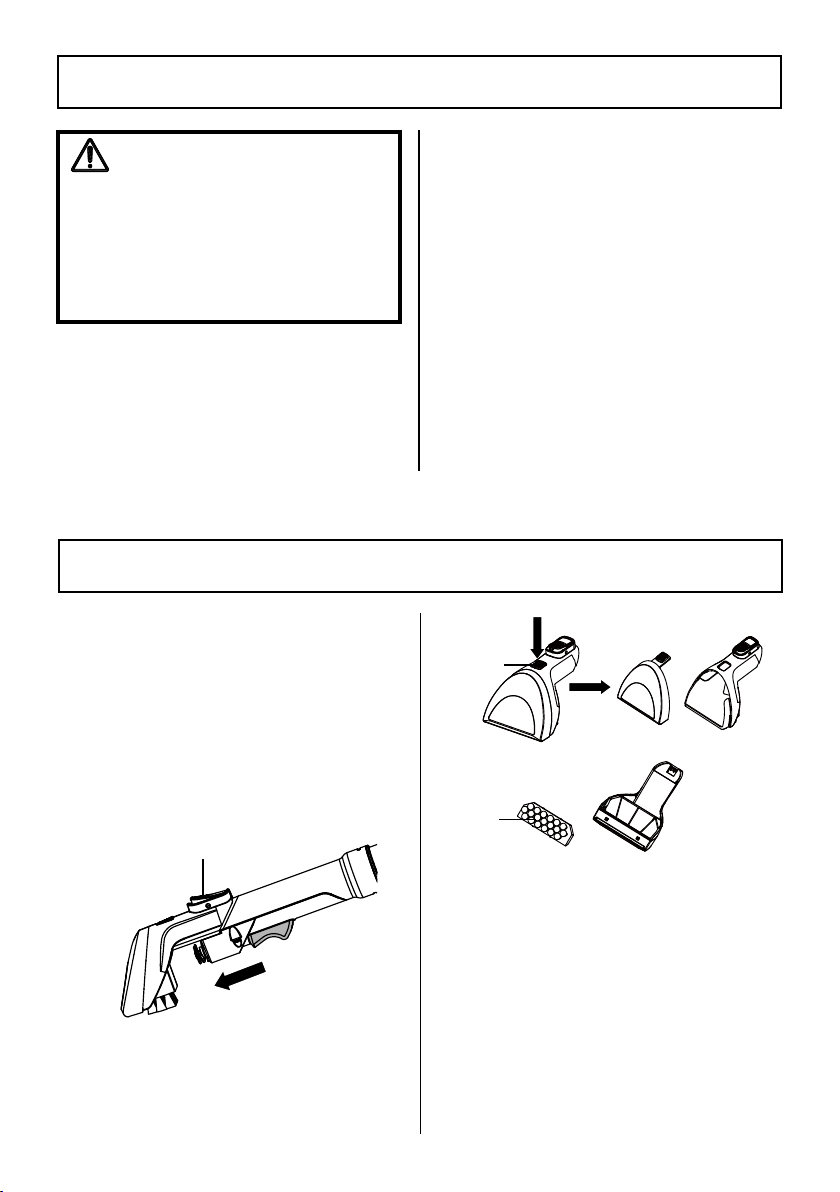
1. Press the tool release button to remove
the tool from the hose.
2. Press the cover release button on the tool
and pull off tool cover. Remove the insert
by pulling it off with force, if necessary.
CARPET CLEANER STORAGE
WARNING
Electrical Shock and Personal Injury
Hazard
Wrapping the cord too tightly puts stress
on the cord and can cause cord damage.
A damaged cord is an electrical shock
hazard and could cause personal injury
or damage.
CLEANING TOOLS
Tool Release Button
3. Rinse thoroughly with clean water. Allow
the parts to dry before reinstalling.
DO NOT wash in the dishwasher.
DO NOT install damp.
4. Reinstall the tool cover and the insert
back into place until a click is heard.
Cover
Release
Button
Insert
1. Place flexible hose and attachments in
storage position.
2. Gather the cord and wrap it loosely
around the cord hooks. Lock plug
retainer onto the power cord.
3. Empty the clean water tank (if
necessary). Rinse it out before replacing
on the unit. Open the clean water tank
cap to allow it to air dry.
4. Empty the dirty water tank then rinse,
clean and dry before placing back
on the unit. The wide tank opening
is designed to fit your hand inside to
thoroughly clean, rinse and dry.
5. Store the carpet cleaner in a dry, indoor
area at room temperature.
- 15 -
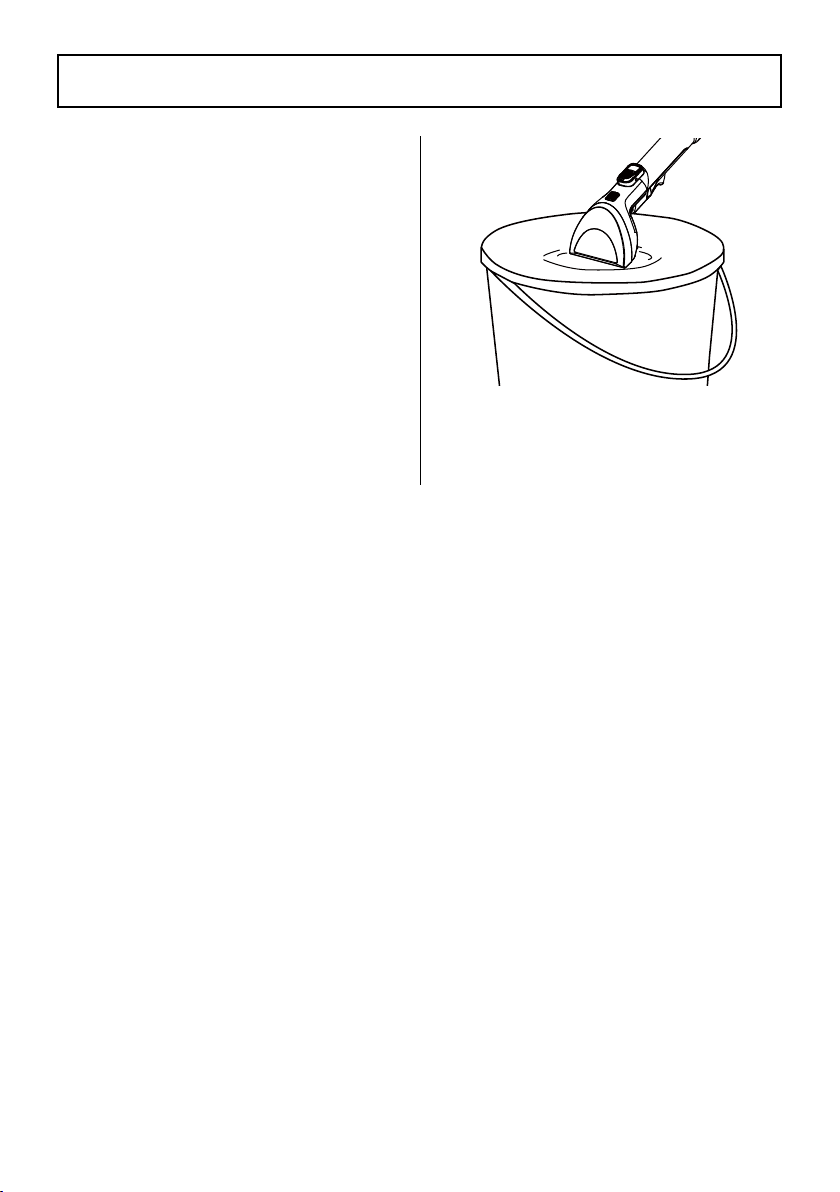
CLEANING THE FLEXIBLE HOSE
It is recommended to clean the hose with
clean water after each use.
1. Empty the dirty water tank. Ensure both
the clean water tank and dirty water
tank are placed correctly on the unit.
2. Install the tool onto the hose end.
3. Suck up clean water from a bowl (or
bucket) to rinse the hose. Lift the end of
the hose and stretch out to ensure all
water is cleared.
- 16 -
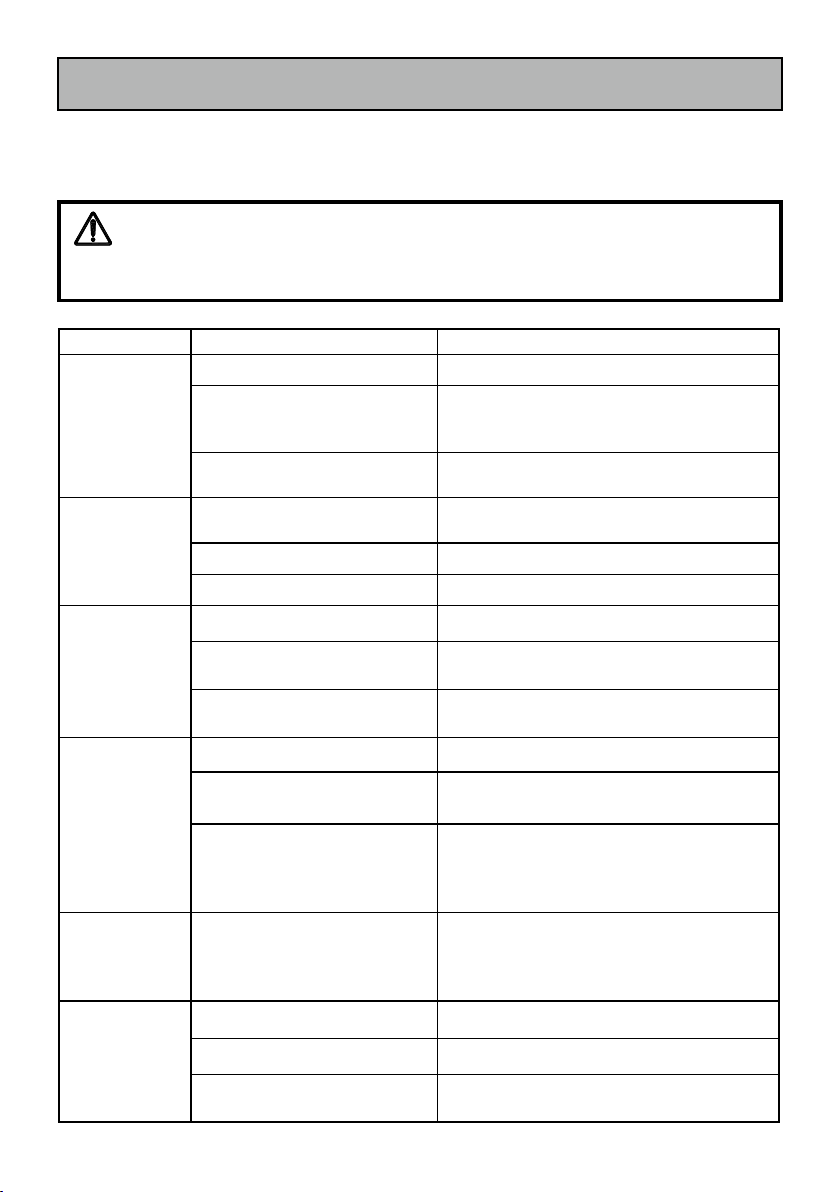
Review this table to find do-it-yourself solutions for minor performance problems. Any
service needed, other than maintenance described in this Use & Care Guide, should be
performed by a qualified service agent.
TROUBLESHOOTING
WARNING
Disconnect electrical supply before performing maintenance to the carpet cleaner.
Failure to do so could result in electrical shock or personal injury.
PROBLEM POSSIBLE CAUSE SOLUTION
The cleaner will
not run.
Unplugged at wall outlet. Plug in firmly.
Defective wall outlet.
Check with a good appliance or lamp. Be sure
the power cord plug is fully plugged into a
good wall outlet.
The motor is damaged.
Call 1-877-531-7321 (US) / 1-844-608-3081
(CA) for assistance.
Poor job of dirt
pick-up.
Dirty water tank is not installed
correctly.
Check the dirty water tank for correct
installation. Ensure it is installed in place.
Dirty water tank is full. Empty the dirty water tank.
The flexible hose is clogged. Clean the hose. Follow instructions on page 15.
Water escapes
from the cleaner.
Dirty water tank is full. Empty the dirty water tank.
Dirty water tank is not installed
correctly.
Check the dirty water tank for correct
installation. Ensure it is installed in place.
Clean water tank is not installed
correctly.
Check the clean water tank for correct
installation. Ensure it is installed in place.
The cleaner will
not dispense.
Clean water tank is empty. Fill the clean water tank.
Clean water tank is not installed
correctly.
Check the clean water tank for correct
installation. Ensure it is installed in place.
The cleaner is overheated.
Unplug the power cord and let the cleaner cool
down for 30 minutes. Restart the cleaner. If the
problem persists, call 1-877-531-7321 (US) /
1-844-608-3081 (CA) for assistance.
Hose nozzle will
not spray after
filling the clean
water tank.
Air is trapped in the pump and
hose.
Turn on the cleaner. If hose does not spray,
prime the pump by lowering the hose down to
the floor and hold the trigger for up to 1 minute.
Motor noise
becomes
high-pitched.
Dirty water tank is full. Empty the dirty water tank.
The flexible hose is clogged. Clean the hose. Follow instructions on page 15.
The float in the dirty water tank
has been activated.
Empty and clean the dirty water tank.
®/MD
