Breville
Moments
™
hot drink maker

2
! This appliance generates heat during use. Adequate precaution must be taken to
prevent the risk of burns, scalds, res or other damage to persons or property caused
by touching the exterior whilst in use or during cooling.
! Never use this appliance for anything other than its intended use. This appliance is for
household use only. Do not use this appliance outdoors.
! Always ensure that hands are dry before handling the plug or switching on the
appliance.
! Always use the appliance on a stable, secure, dry and level surface.
! Do not position the appliance under a cupboard or shelf to prevent the risk of injury
from released steam.
! This appliance must not be placed on or near any potentially hot surfaces (such as a
gas or electric hob).
! Do not use the appliance if it has been dropped, if there are any visible signs of
damage or if it is leaking.
! Ensure the appliance is switched off and unplugged from the supply socket after use
and before cleaning. Always allow the appliance to cool before cleaning or storing.
! Never immerse any part of the appliance or power cord and plug in water or any other
liquid.
! Never let the power cord hang over the edge of a worktop, touch hot surfaces or
become knotted, trapped or pinched.
! Never leave the appliance unattended when in use.
! Never place anything on top of the appliance.
! Never ll the water boiler with any liquid other than water. To prevent damage, never
use the appliance without water.
! Never ll the milk tank above the MAX marking.
product safety
READ CAREFULLY AND KEEP FOR FUTURE REFERENCE
This appliance can be used by children aged from 8 years and above and persons
with reduced physical, sensory or mental capabilities or lack of experience and
knowledge if they have been given supervision or instruction concerning use
of the appliance in a safe way and understand the hazards involved. Children
shall not play with the appliance. Cleaning and user maintenance shall not
be made by children unless they are older than 8 and supervised. Keep the
appliance and its cord out of the reach of children aged less than 8 years.
If the supply cord is damaged, it must be replaced by the manufacturer, its
service agent or similarly qualied persons in order to avoid a hazard.
Ensure that the appliance control lever is in the OFF position when the
milk tank assembly is detached from the main housing unit.
Never use the appliance without the mixing chamber in place, or remove
the mixing chamber while the appliance is turned on.
3
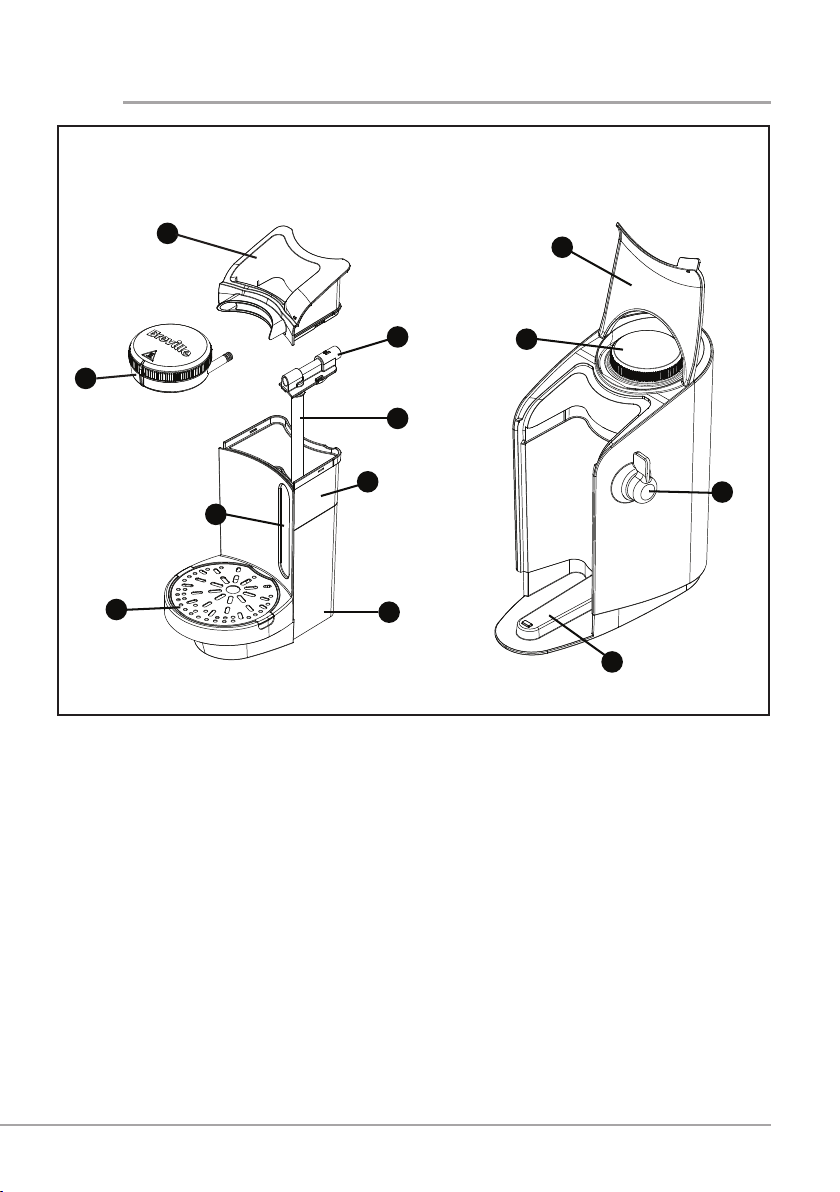
parts
1. Mixing chamber and lid
2. Quick ll funnel
3. Steam pipe
4. Milk pipe
5. Milk tank
6. Milk tank housing
7. Drip tray
8. Milk level window
9. Water boiler cap
10. Hinged lid
11. Control lever
12. Location guide
1
2
3
4
5
6
7
9
8
10
11
12
MILK TANK ASSEMBLY MAIN HOUSING UNIT
4
Remove your Breville Moments
™
hot drink maker carefully from the box. Remove any
packaging and promotional material and position the unit on a dry, level, secure work
surface away from the edge.
Before using for the rst time, wash the milk tank assembly.
Cleaning the milk tank assembly
All parts of the milk tank assembly are dishwasher safe. DO NOT put the water boiler cap
in the dishwasher.
Always remove the milk tank assembly as one complete unit.
For clarity, all of the unit’s parts that must be cleaned regularly are coloured red, or are
transparent or stainless steel.
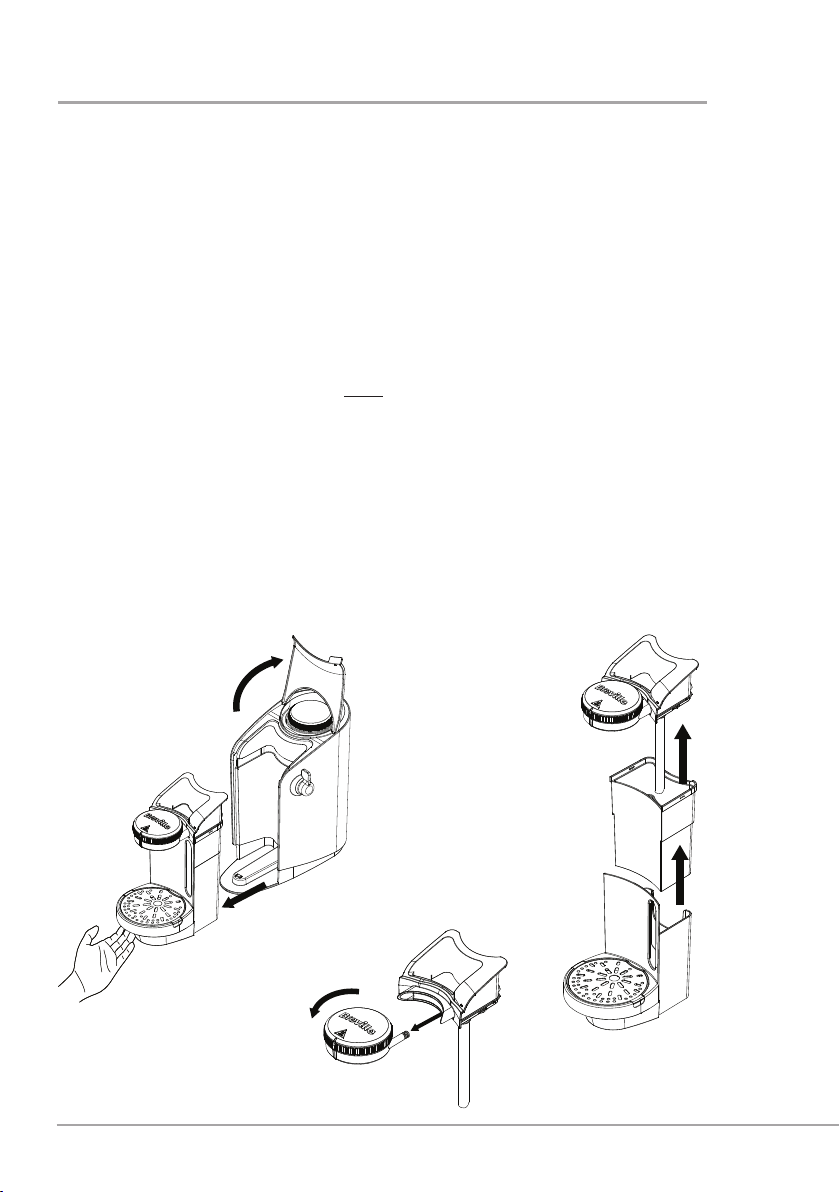
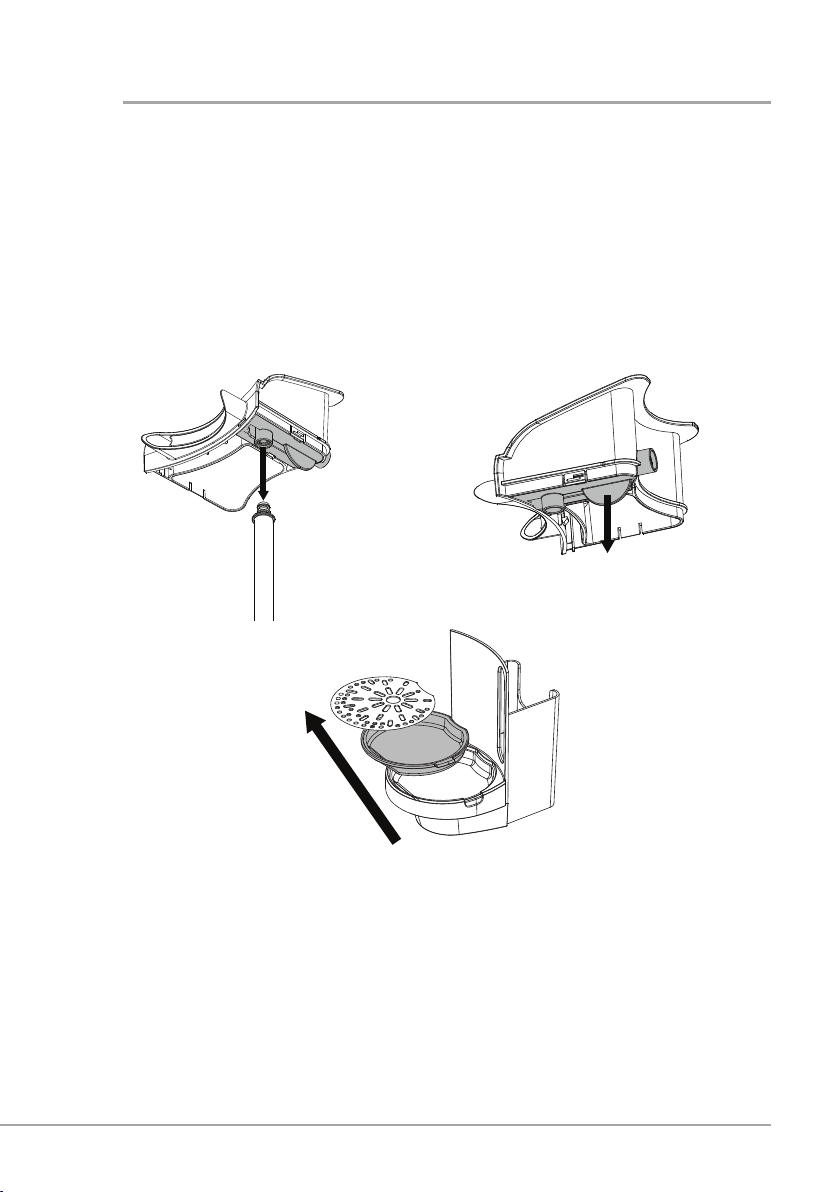
1. Lift the unit’s hinged lid and gently pull out the milk tank assembly using the
indentation underneath the drip tray.
2. Lift out the milk tank from its housing and separate the quick ll funnel and mixing
chamber assembly.
3. Pull out the mixing chamber from the quick ll funnel and remove the mixing chamber
lid by turning it anti‑clockwise. Do not try to remove the mixing chamber when it is
in position on the milk tank assembly because there is a tab that prevents you from
doing this.
cleaning
w
e
q
5
4. Pull out the milk pipe from its connector on the steam pipe (coloured red) underneath
the quick ll funnel.
5. Remove the steam pipe from the quick ll funnel by pulling the tab.
6. Lift out the drip tray (coloured red) using the side tabs and remove the stainless steel
drip tray cover.
7. Wash the parts in the dishwasher, or by hand in warm soapy water. Wipe dry before
reassembling (perform steps 1 to 6 in reverse order, with reference to Reassembling
the steam and milk pipe on page 6.)
y
r t
cleaning
6
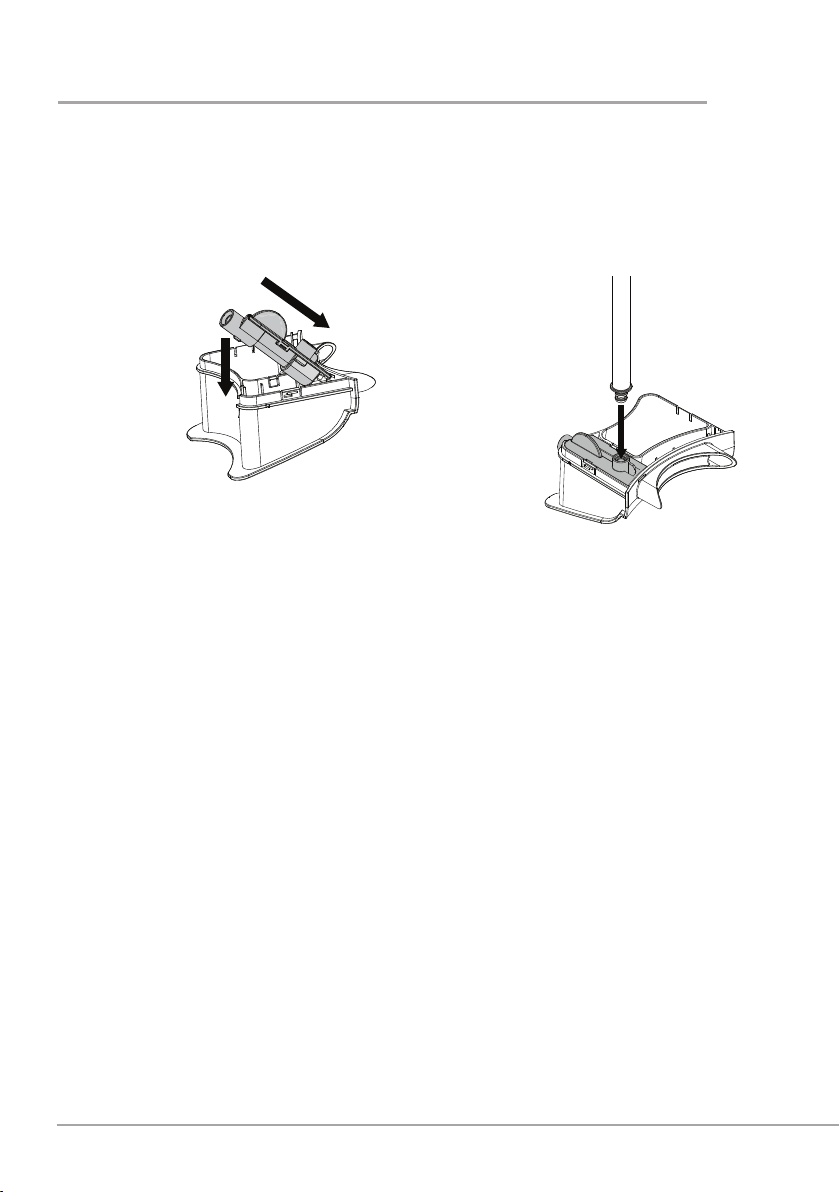
Reassembling the steam and milk pipe
1. Locate the dip at the front of the steam pipe before pivoting downwards into position
on the quick ll funnel.
2. Insert the milk pipe into its connector on the steam pipe.
cleaning
wq
Cleaning the main unit
Wipe the outside of the unit with a damp soapy cloth, then wipe dry with a soft cloth.
If the Breville Moments
™
hot drink maker is not going to be used for a period of time, the
water boiler can be emptied. Make sure that the unit is turned off and unplugged, and has
been allowed to cool before commencing. Remove all loose parts. Empty any remaining
water by tipping upside down over a sink.
7
before first use
To ensure that any residue left over from the manufacturing process is removed, ush the
unit with clean water as described in the following procedure:
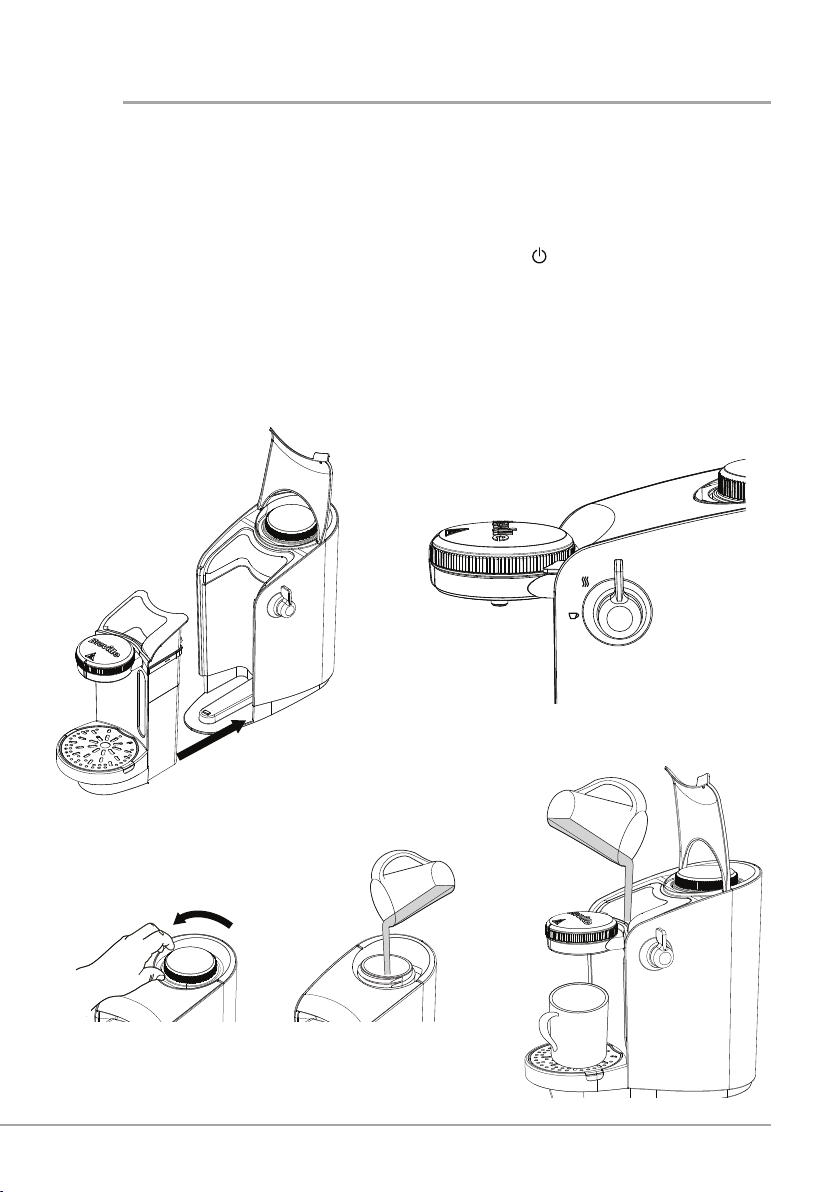
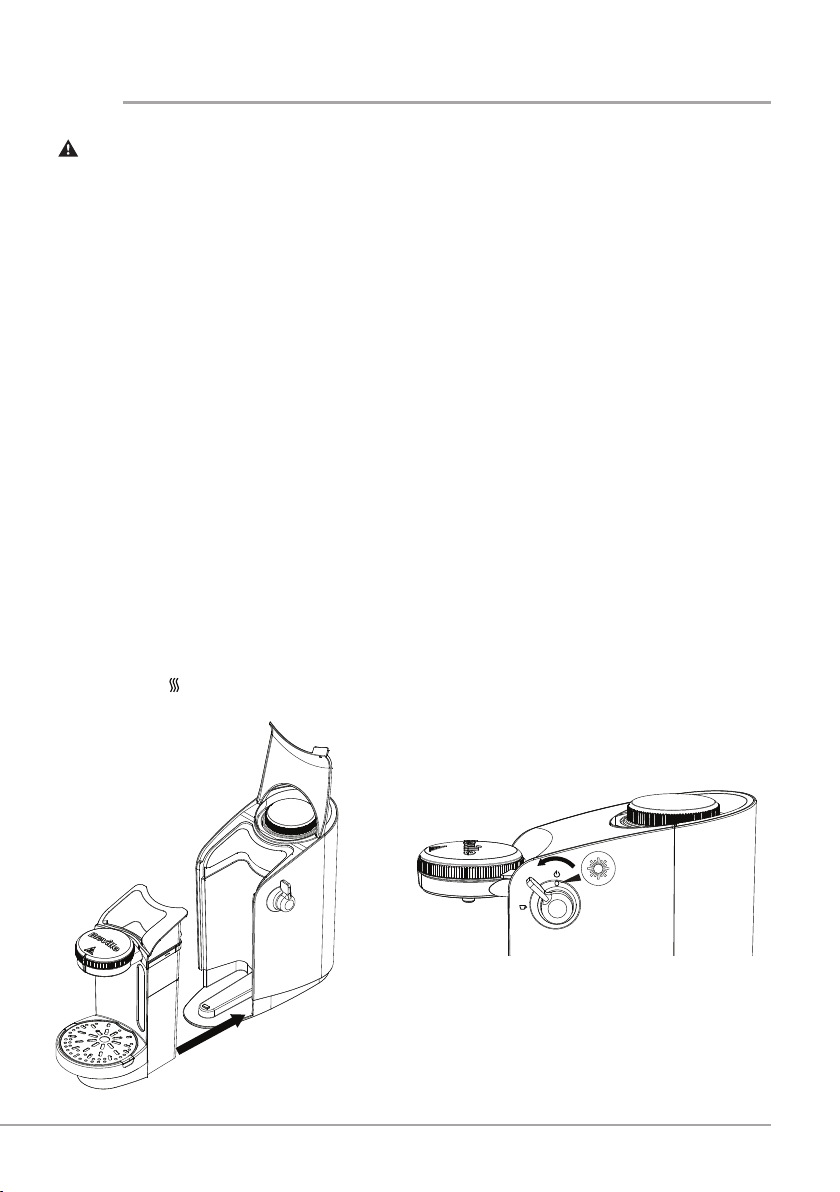
1. Reassemble the milk tank assembly after initial cleaning and push rmly into position
on the main housing unit using the location guide.
2. Make sure that the control lever is in the OFF position (
).
3. Remove the water boiler cap by turning it anti‑clockwise and lifting off. Fill the
boiler with a maximum of 400ml of water and replace the cap securely by turning it
clockwise.
4. Lift the unit’s hinged lid and half ll the milk tank with clean water by pouring directly
into the quick ll funnel. Lower the hinged lid and click into place. Place your mug or
cup on the drip tray under the dispensing nozzle.
wq
e
r
8
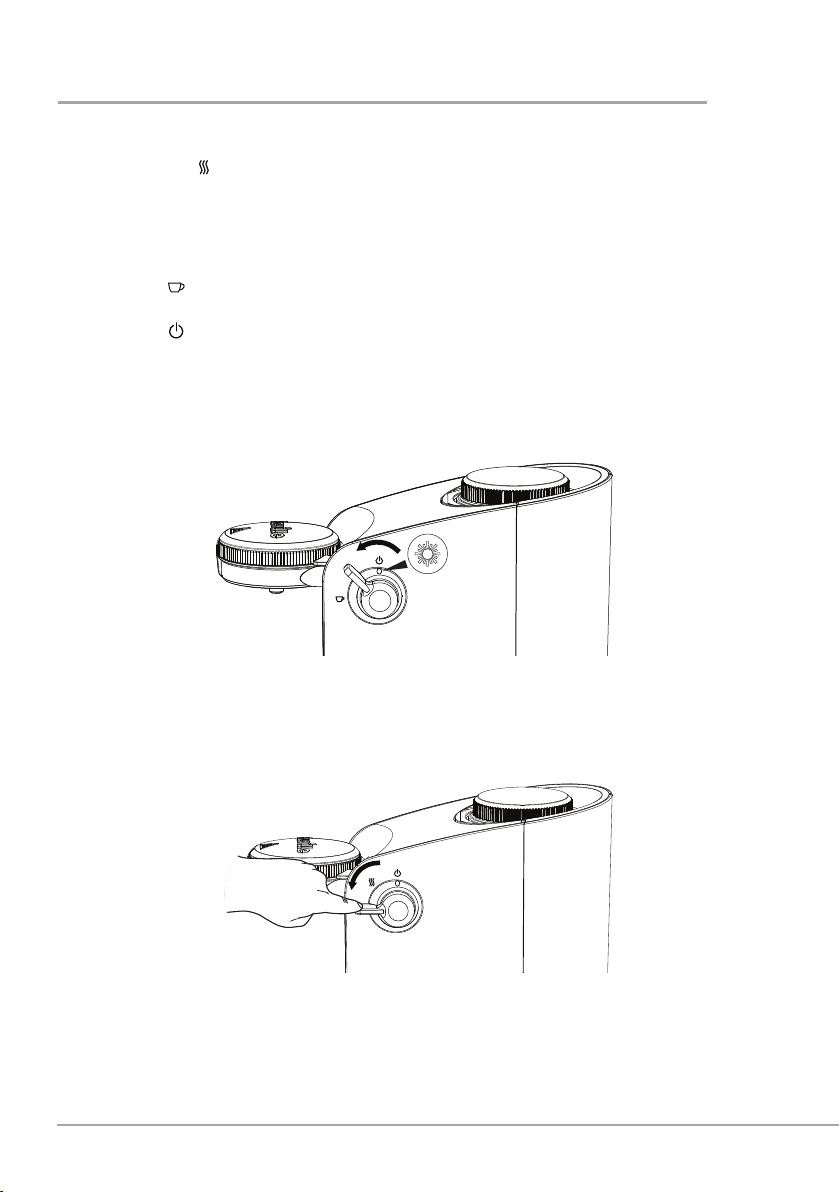
5. Plug the unit into the mains supply and switch on. Turn the control lever to the HEAT
UP position ( ). The power indicator light will ash. After approximately 3 minutes
the power indicator light will remain on to show that the water is hot.
Note that the time taken for the water to heat fully will depend on the amount of water
in the boiler.
6. To start cleaning, turn the control lever anti‑clockwise and hold in the DISPENSE
position (
). Clean water will be ushed through the unit into the cup. When all of
the water from the milk tank has ushed through, turn the control lever to the OFF
position (
). A small amount of water will continue to be dispensed. Remove and
empty the cup.
Your Breville Moments
™
hot drink maker is now clean and ready for use.
before first use
t
y
9
DO NOT USE FRESH OR GROUND COFFEE PRODUCTS. YOUR
BREVILLE MOMENTS
™
HOT DRINK MAKER IS DESIGNED TO USE INSTANT
COFFEE AND HOT CHOCOLATE. FOR BEST RESULTS ADD MALTED MILK
DRINK PRODUCTS DIRECTLY TO THE CUP. DO NOT USE SACHETS OF INSTANT
CAPPUCCINO OR LATTE IN THIS UNIT.
To prevent damage, never use your Breville Moments
™
hot drink maker without
water.
The time taken for your Breville Moments
™
hot drink maker to heat the water fully
will depend on the amount of water in the water boiler.
For safety purposes, the water boiler cap cannot be removed when pressure builds
in the water boiler as a result of the water heating. The water boiler cap will spin
freely if you try to remove it during use. You must wait for the unit to cool down
fully before removing the cap.
Ensure that the control lever is in the OFF position when the milk tank assembly is
detached from the main housing unit.
Do not operate the unit without the mixing chamber in place on the milk tank
assembly.
1. If you have not used the unit for a while, check that there is water in the boiler. The
maximum ll capacity is 400ml. If the unit was disassembled after last use, make
sure that the milk tank assembly is fully inserted into the main housing unit.
2. Plug the unit into the mains supply, and turn the control lever to the HEAT UP
position (
). The power indicator light will ash.
making coffee
q w
10
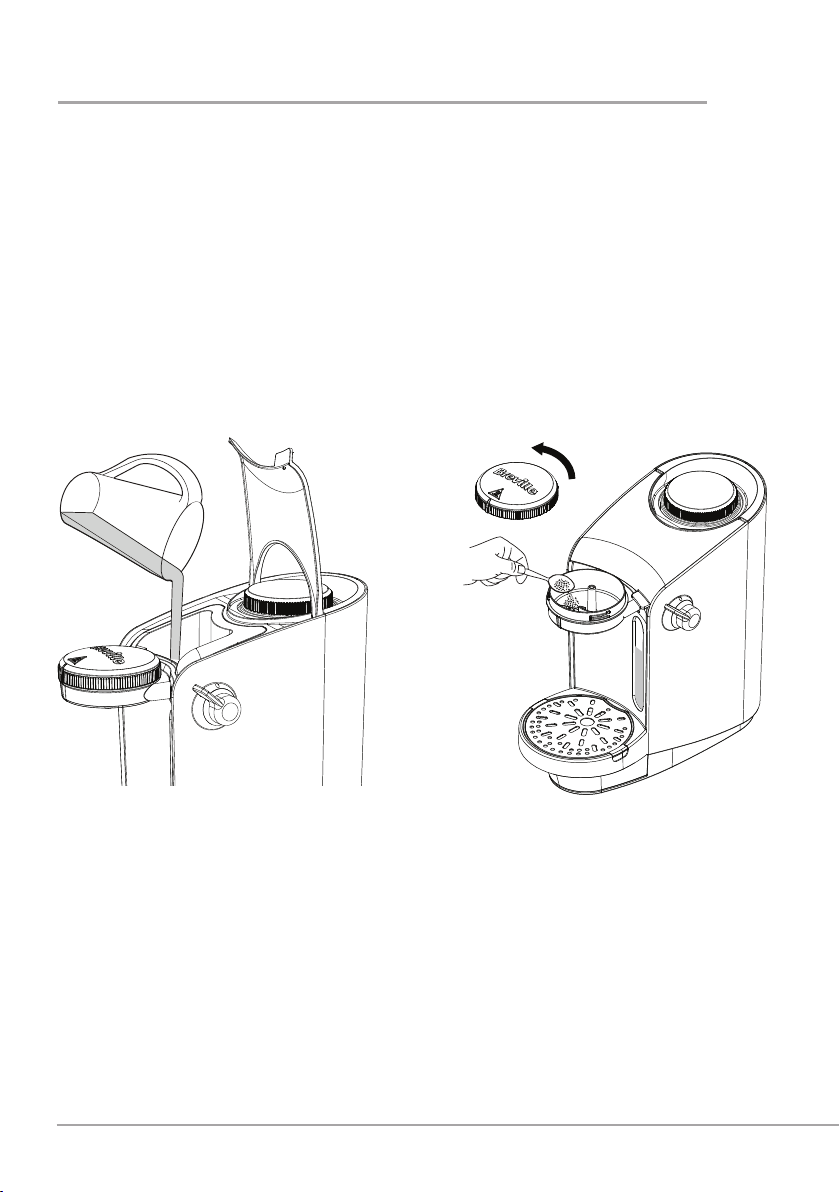
3. Lift the hinged lid and ll the milk tank with milk using the quick ll funnel, up to the
level required. The maximum capacity will provide 2 large mugs or 4 cups. DO NOT
EXCEED THE MAXIMUM LEVEL. You can add more milk easily if you want to make
more drinks. Lower the hinged lid and click into place.
4. Remove the mixing chamber lid by turning it anti‑clockwise. Use a teaspoon to add
the instant coffee into the front of the mixing chamber (look for the embossed spoon
for guidance). Only add enough coffee to brew ONE cup at a time. You can adjust
the quantity to suit your own taste, but you may nd that you need more coffee than
when making it with water.
Replace the lid of the mixing chamber by turning it clockwise to secure the correct lid
orientation.
e r
making coffee
11
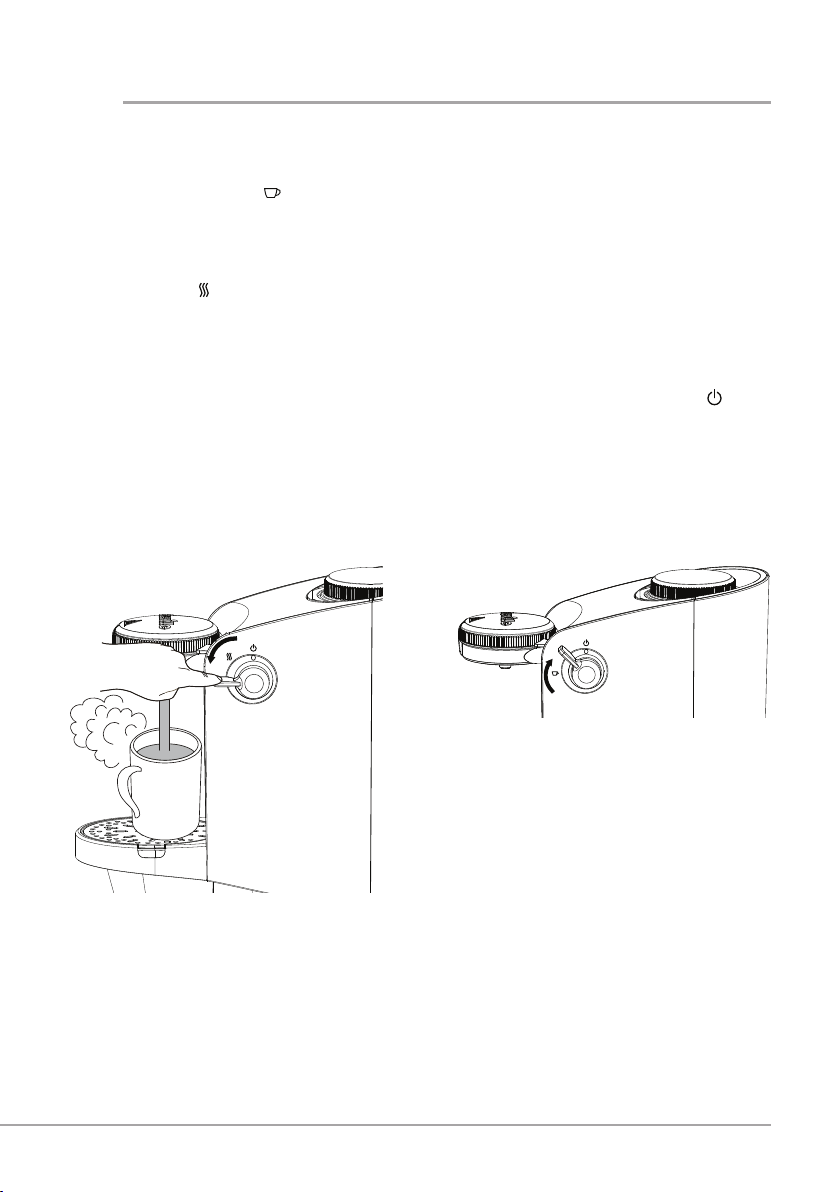
5. Place a mug or cup on the drip tray. When the power indicator light stays on
continuously (after approx. 3 minutes) press and hold the control lever in the
DISPENSE position ( ). The unit will start to dispense the coffee.
You must hold the control lever in the DISPENSE position throughout the length of
the coffee dispense.
6. When the mug or cup is nearly full, release the control lever to return it to the HEAT
UP position (
). The unit will continue to dispense until there is no milk left in the
mixing chamber.
To make further drinks, remove the lid of the mixing chamber and add another teaspoon
of coffee. Then repeat steps 5 and 6, adding more milk when required.
When you have nished using the unit, turn the control lever to the OFF position (
).
Clean the unit as described in Cleaning on pages 4‑6.
Note: The power indicator light will change between being constantly on and ‘ashing’ as
the unit brings itself back up to temperature. It is perfectly normal for this to happen while
making multiple drinks.
t y
making coffee
12
troubleshooting
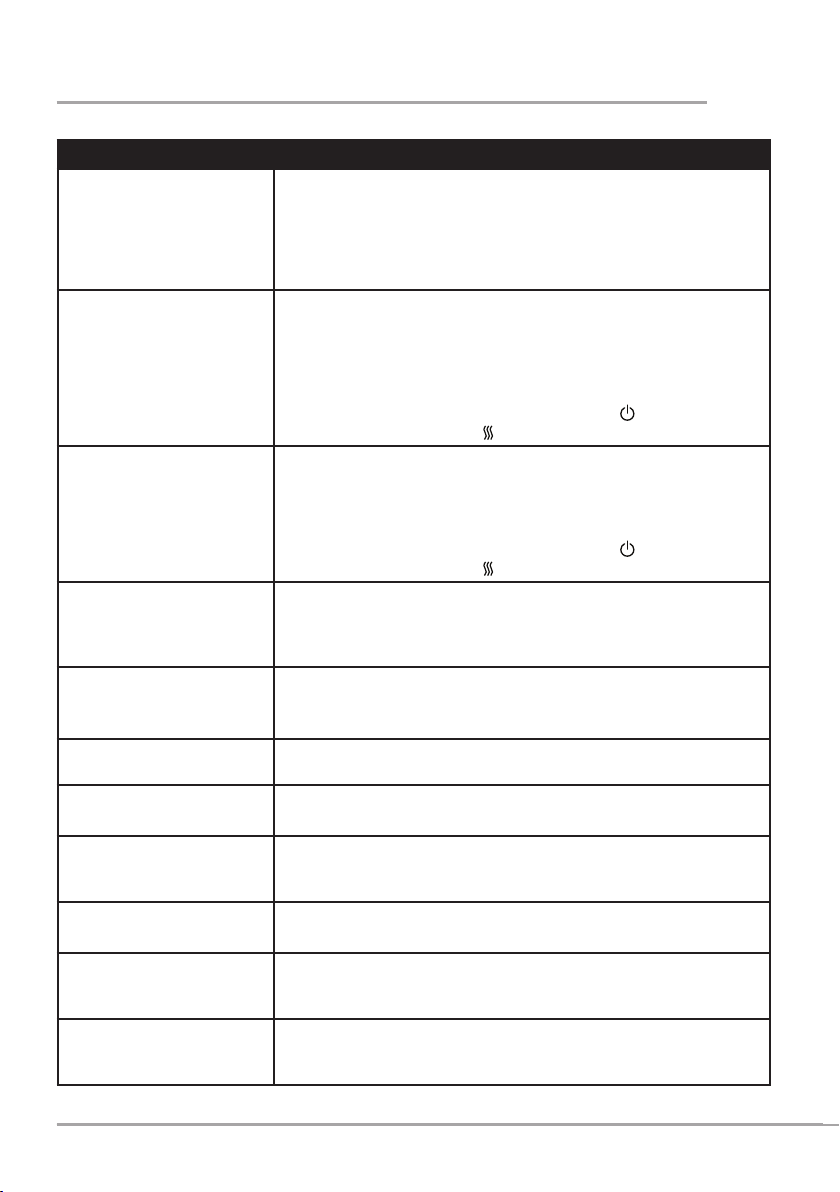
Problem • Cause/solution
Power indicator light does
not come on
• Make sure that the unit is plugged in to the mains supply.
• Turn the control lever to the HEAT UP position ( ).
• Make sure that the milk tank assembly is pushed fully back
onto the unit because this activates a switch.
• Check the fuse in the mains plug.
The power indicator
light does not come on
constantly.
• The unit has not reached operating temperature yet. This takes
approximately 3 minutes, depending on the amount of water in
the boiler tank.
• The unit does not have any power, see above.
• The unit enters Standby mode if left turned on for 30 minutes.
Turn the control lever to the OFF position (
), then back to
the HEAT UP position (
) to re‑activate.
The unit stops dispensing
coffee.
• The milk tank has run dry. Rell the tank using the quick ll
funnel.
• Power has failed. Check supply/fuse.
• The unit enters Standby mode if left turned on for 30 minutes.
Turn the control lever to the OFF position (
), then back to
the HEAT UP position ( ) to re‑activate.
The coffee is not very warm. Allow the unit to reach full operating temperature before making
each cup. This is important if making more than one cup. The
power indicator light will stop ashing when the machine is at
operating temperature.
The unit makes a loud noise
and creates a lot of steam
while dispensing coffee.
• The milk tank has run dry. Rell the tank using the quick ll
funnel.
• Check that the milk pipe is fully inserted into the steam pipe.
Milk isn’t drawing into the
mixing chamber.
Make sure that the milk pipe is correctly tted and that the milk tank
has not run dry.
Milk is leaking from the
mixing chamber.
Make sure that the mixing chamber lid is rmly locked in position
and that the chamber is fully inserted into the milk tank assembly.
Coffee continues to
dispense after the control
lever has been released.
A small amount of uid will continue to be dispensed until all the
milk has left the mixing chamber. Please make allowances for this
when lling your cup.
Steam escapes from the
water boiler cap.
Make sure that the water boiler cap is fully tightened.
The power indicator light
keeps coming on and going
off.
The unit is tted with a thermostat to maintain the temperature. It is
perfectly normal for the light to change between being constantly on
and ashing while the unit is in use.
The water boiler has run
dry.
Turn the unit off, then pour up to a maximum of 400ml of water into
the boiler. Secure the water boiler cap, switch the unit back on and
allow it to reach operation temperature and continue to dispense.
13
troubleshooting
Problem • Cause/solution
The mixing chamber
cannot be removed from or
inserted into the quick ll
funnel correctly.
The mixing chamber can only be removed or fully inserted into the
quick ll funnel when it is separated from the milk tank assembly.
Make sure that the mixing chamber is fully inserted into the quick ll
funnel before attaching to the milk tank assembly. This ensures that
the tab on the mixing chamber is correctly inserted into the slot on
the milk tank assembly.
A whistling sound comes
from the water boiler cap.
The water boiler cap isn’t secured tightly enough. Allow unit to cool
and fully tighten.
The unit is making coffee
with only water.
The boiler tank has been overlled. Keep dispensing coffee to
reduce the water level in the boiler. When the excess water has
been purged, the unit will automatically draw up the milk.

14
Milk
It is possible to use fresh or long life milk and a variety of different types (lactose‑free,
soy, almond, etc.). It is also possible to mix milk and water with a ratio of 50:50. The ratio
of milk to water will depend on each individual so experiment to nd your own personal
preference.
Types of Beverages
This unit can use your favourite brand and variety of instant coffee granules and
powders. You can adjust the quantity of coffee to suit your own taste. You can also use
hot chocolate powder in this unit – for best results ensure that the mixing chamber is dry
when adding the powder.
When making malted milk drinks, add the powder directly to the cup in accordance with
the manufacturer’s guidelines. The powder will not dispense properly if added to the
mixing chamber.
Do not use instant drink powders (including lighter versions) that are mixed with milk
powder in your mixing chamber, because they will not dispense properly. These types of
powders are designed to be made with hot water and are not suitable for use with your
Breville Moments™ hot drink maker.
Any syrups or liquid avourings should be added directly to the cup.
Here are some recipes you may like to try:
Café Latte
• 2 teaspoons of instant coffee
• Milk – ll to required level on milk tank
Method
1. Place a cup on the drip tray under the dispense nozzle.
Lattes are usually long drinks, so it is advisable to use a taller cup or mug.
2. Add the instant coffee to the mixing chamber.
3. Turn and hold the control lever down in the DISPENSE position to ll your cup.
4. Repeat method for each café latte.
recipes

15
recipes
Cappuccino
• 2 teaspoons of instant coffee
• Semi‑skimmed milk – ll to required level on milk tank
• Cocoa powder for dusting
Method
1. Place a cup on the drip tray under the dispense nozzle.
2. Add the instant coffee to the mixing chamber.
3. Turn and hold the control lever down in the DISPENSE position to ll your cup.
4. Dust with cocoa powder to serve.
5. Repeat method for each cappuccino.
Café Mocha
• 1½ teaspoon of instant coffee
• 2 heaped teaspoons of chocolate powder
• Milk – ll to required level on milk tank
• Chocolate shavings to decorate
Method
1. Place a cup on the drip tray under the dispense nozzle.
2. Add the instant coffee and the chocolate powder to the mixing chamber and distribute
evenly around the chamber. For best results, make sure that the mixing chamber is
dry.
3. Turn and hold the control lever down in the DISPENSE position to ll your cup.
4. Sprinkle topping with chocolate shavings.
5. Repeat method for each café mocha.

16
recipes
Hot Chocolate
• 3 heaped teaspoons of chocolate powder
• Milk – ll to required level on milk tank
• Mini Marshmallows to decorate
• Whipped cream (optional)
Method
1. Place a cup on the drip tray under the dispense nozzle.
2. Add the chocolate powder to the mixing chamber and distribute evenly around the
chamber. For best results, make sure that the mixing chamber is dry.
3. Turn and hold the control lever down in the DISPENSE position to ll your cup.
4. Add a swirl of whipped cream and mini marshmallows. Dust with a little chocolate
powder or chocolate shavings.
5. Repeat method for each hot chocolate.
Cinnamon and Vanilla Coffee
• ¼ teaspoon of cinnamon placed directly into each cup
• 2 teaspoons of vanilla avouring placed directly into each cup
• 2 teaspoons of instant coffee
• Milk – ll to required level on milk tank
Method
1. Add the cinnamon and vanilla to a cup, stir well and place the cup on the drip tray
under the dispense nozzle.
1. Add the instant coffee to the mixing chamber.
2. Turn and hold the control lever down in the DISPENSE position to ll your cup.
3. Stir and sprinkle topping with cinnamon if desired.
4. Repeat the method for each cinnamon and vanilla coffee.

17
recipes
Irish Coffee
• 2 tablespoons of whiskey placed directly into each cup
• 2 teaspoons of instant coffee
• Milk – ll to required level on milk tank
Method
1. Add the whiskey to a cup and place on the drip tray under the dispense nozzle.
2. Add the instant coffee to the mixing chamber.
3. Turn and hold the control lever down in the DISPENSE position to ll your cup.
4. Repeat the method for each Irish coffee.
Irish Cream Hot Chocolate
• 4 teaspoons of Irish cream liqueur placed directly into each cup
• 3 teaspoons of chocolate powder
• Milk – ll to required level on milk tank
Method
1. Add the Irish cream liqueur to a cup and place on the drip tray under the dispense
nozzle.
2. Add the chocolate powder to the mixing chamber and distribute evenly around the
chamber. For best results, make sure that the mixing chamber is dry.
3. Turn and hold the control lever down in the DISPENSE position to ll your cup.
4. Repeat the method for each Irish cream hot chocolate.
Turn on your Creativity
™
Let the Breville
®
team help you turn on your creativity with a gateway to a world of food
and drinks without limits. You don’t have to travel far—just to your computer, tablet or
mobile—where you will discover our FREE website with top tips and recipes to inspire
your imagination. Join us now at:
www.turnonyourcreativity.com
®
18
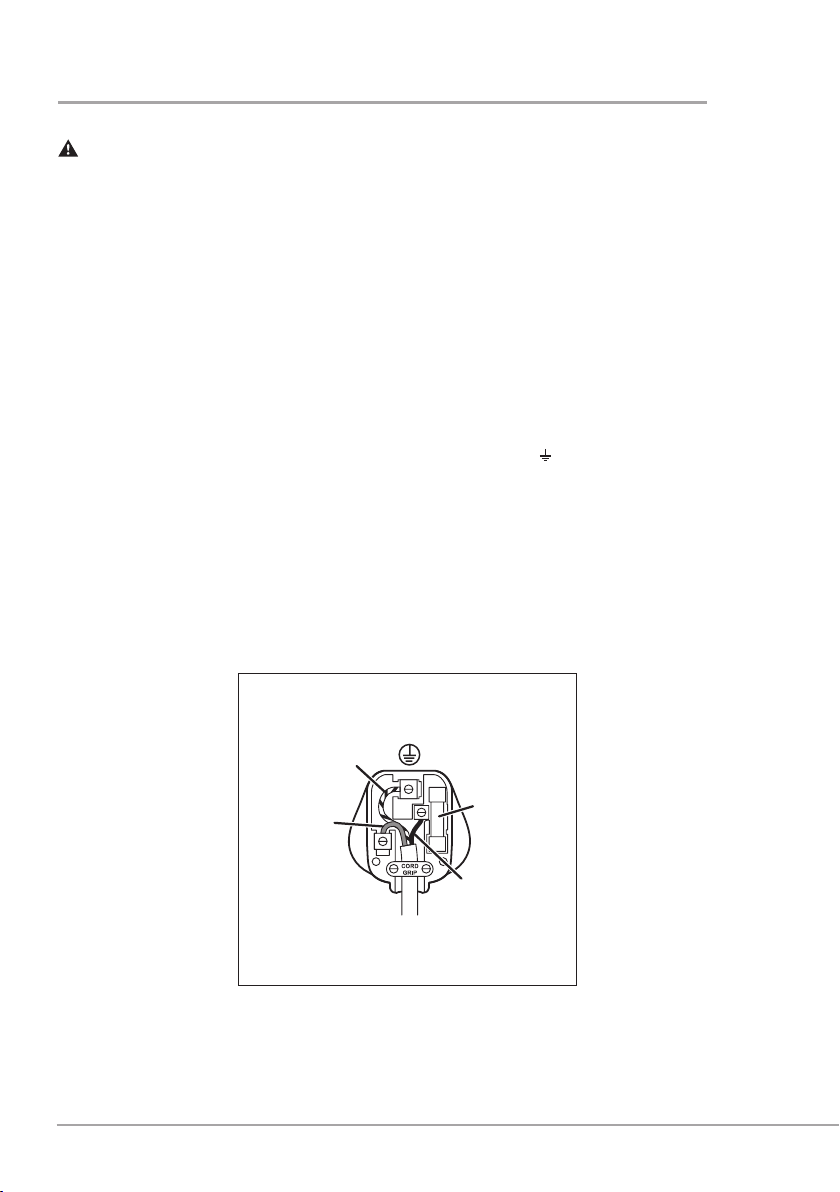
This appliance must be earthed.
This appliance is tted with either a moulded or rewirable BS1363, 13 amp plug. The fuse
should be rated at 5 amps and be ASTA approved to BS1362.
If the fuse in a moulded plug needs to be changed, the fuse cover must be retted. The
appliance must not be used without the fuse cover tted.
If the plug is unsuitable, it should be dismantled and removed from the supply cord
and an appropriate plug tted as detailed below. If you remove the plug it must not be
connected to a 13 amp socket and the plug must be disposed of immediately.
The wires of the mains lead are coloured in accordance with the following code:
GREEN/YELLOW = EARTH BLUE = NEUTRAL BROWN = LIVE
The wire which is coloured GREEN/YELLOW must be connected to the terminal in
your plug which is marked with an E or by the earth symbol (
) or coloured GREEN or
GREEN /YELLOW.
The wire which is coloured BLUE must be connected to the terminal in your plug which is
marked with the letter N or coloured BLACK.
The wire which is coloured BROWN must be connected to the terminal in your plug which
is marked with the letter L or coloured RED.
If any other plug is used, a 5 amp fuse must be tted either in the plug or adaptor or at the
distributor board.
connection to the mains supply
Blue
(Neutral)
Brown
(Live)
Fuse
Green/Yellow
(Earth)
Plug should be ASTA approved to BS1363
Fuse should be ASTA approved to BS1362
Ensure that the outer sheath of
the cable is firmly held by the cord grip
5A

19
after sales service
These appliances are built to the very highest of standards. There are no user serviceable
parts. Follow these steps if the unit fails to operate:
1. Check that the instructions have been followed correctly.
2. Check that the fuse has not blown.
3. Check that the mains supply is functional.
If the appliance will still not operate, return the appliance to the place it was purchased for
a replacement. To return the appliance to the Customer Service Department, follow the
steps below:
1. Pack it carefully (preferably in the original carton). Ensure the unit is clean.
2. Enclose your name and address and quote the model number on all correspondence.
3. Give the reason why you are returning it.
4. If within the guarantee period, state when and where it was purchased and include
proof of purchase (e.g. till receipt).
5. Send it to our Customer Service Department at the address below:
Customer Service Department
Jarden Consumer Solutions (Europe) Limited
Middleton Road, Royton, Oldham
OL2 5LN, UK
Telephone: 0161 621 6900 Fax: 0161 626 0391
e-mail: [email protected]

20
Please keep your receipt as this will be required for any claims under this guarantee.
This appliance is guaranteed for 1 year after your purchase as described in this
document.
During this guaranteed period, if in the unlikely event the appliance no longer functions
due to a design or manufacturing fault, please take it back to the place of purchase, with
your till receipt and a copy of this guarantee.
The rights and benets under this guarantee are additional to your statutory rights, which
are not affected by this guarantee. Only Jarden Consumer Solutions (Europe) Limited
(“JCS (Europe)”) has the right to change these terms.
JCS (Europe) undertakes within the guarantee period to repair or replace the appliance,
or any part of appliance found to be not working properly free of charge provided that:
• you promptly notify the place of purchase or JCS (Europe) of the problem; and
• the appliance has not been altered in any way or subjected to damage, misuse,
abuse, repair or alteration by a person other than a person authorised by JCS
(Europe).
Faults that occur through, improper use, damage, abuse, use with incorrect voltage, acts
of nature, events beyond the control of JCS (Europe), repair or alteration by a person
other than a person authorised by JCS (Europe) or failure to follow instructions for use
are not covered by this guarantee. Additionally, normal wear and tear, including, but not
limited to, minor discoloration and scratches are not covered by this guarantee.
The rights under this guarantee shall only apply to the original purchaser and shall not
extend to commercial or communal use.
If your appliance includes a country‑specic guarantee or warranty insert please refer
to the terms and conditions of such guarantee or warranty in place of this guarantee or
contact your local authorized dealer for more information.
Waste electrical products should not be disposed of with household waste. Please recycle
where facilities exist. E‑mail us at [email protected] for further recycling
and WEEE information.
Jarden Consumer Solutions (Europe) Limited
5400 Lakeside
Cheadle Royal Business Park
Cheadle
SK8 3GQ
UK
guarantee

21
notes

22
notes

23
notes

VCF041_Rev1 09/15 94014-0 UKPUL
P.N. 183811
Jarden Consumer Solutions (Europe) Limited
Cheadle Royal Business Park, Cheadle, SK8 3GQ, United Kingdom
e-mail: [email protected]
Telephone: 0161 621 6900
For Customer Service details, please see the website.
www.breville.co.uk
© 2015 Jarden Consumer Solutions (Europe) Limited
All rights reserved. Imported and distributed by Jarden Consumer Solutions (Europe) Limited,
Cheadle Royal Business Park, Cheadle, SK8 3GQ, United Kingdom.
The product supplied may differ slightly from the one illustrated due to continuing product development.
Printed in China
®
