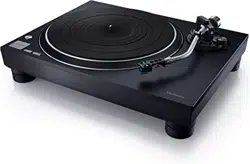
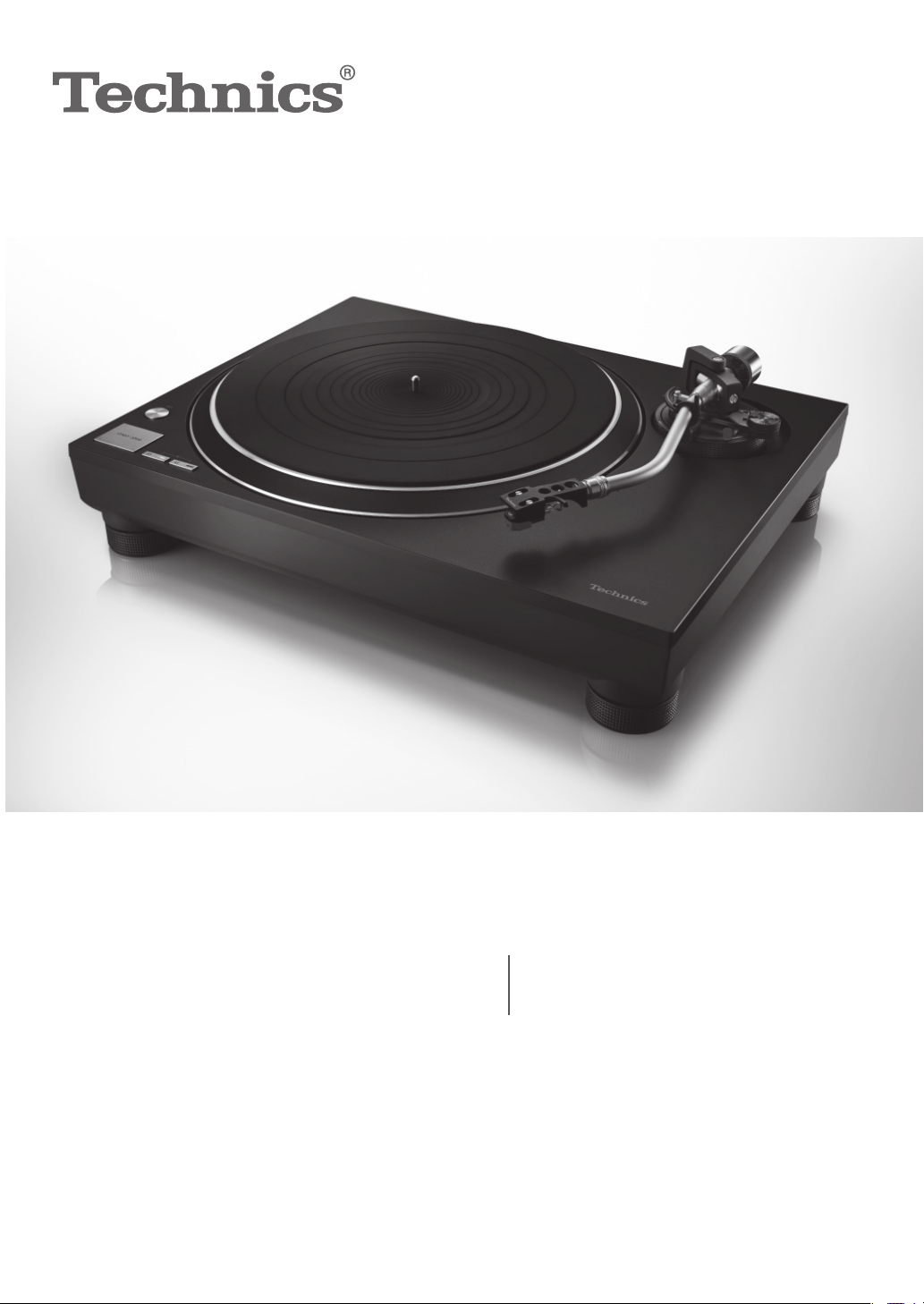
SL-100C
Owner’s Manual
Manuel d’utilisation
Direct Drive Turntable System
Platine tourne-disque à entraînement direct
SL-100CPP.indb1SL-100CPP.indb1 2022/03/2815:22:342022/03/2815:22:34

English
(02)
02
Delivering the Ultimate Emotive Musical Experience to All
At Technics we understand that the listening experience is not purely about technology but the
magical and emotional relationship between people and music.
We want people to experience music as it was originally intended and enable them to feel the
emotional impact that enthuses and delights them.
Through delivering this experience we want to support the development and enjoyment of the
world’s many musical cultures. This is our philosophy.
With a combination of our love of music and the vast high-end audio experience of the
Technics team, we stand committed to building a brand that provides the ultimate emotive
musical experience by music lovers, for music lovers.
Apportez à tous l’expérience musicale empreinte d’émotions
Chez Technics, nous savons que l’expérience de l’écoute n’est pas purement et simplement une
question de technologie, mais de relation magique entre les personnes et la musique.
Nous voulons que tout un chacun puisse ressentir la musique telle qu’elle a été conçue à
l’origine et lui permettre de ressentir le choc émotionnel qu’il brûle de connaître.
En apportant ce vécu, nous cherchons à accompagner le développement et le plaisir des
nombreuses cultures musicales du monde. Telle est notre philosophie.
Ici et maintenant, alliant l’amour de la musique et la grande expérience musicale de l’équipe
Technics, nous sommes pleinement déterminés à construire une marque qui apporte le vécu
musical émotionnel aux fervents de la musique.
Director
Directeur
Michiko Ogawa
Music is borderless and timeless, touching people’s hearts across cultures and generations.
Each
day the discovery of a truly emotive experience from an unencountered sound awaits.
Let us take you on your journey to rediscover music.
Sans frontières, la musique est aussi intemporelle, touchant le coeur des gens en traversant les
cultures et les générations.
Tous les jours, nous attendons la révélation d’une expérience émotionnelle authentique à partir d’un
son venu de nulle part.
Permettez-nous de vous emmener en voyage pour redécouvrir la musique.
SL-100CPP.indb02SL-100CPP.indb02 2022/03/2815:22:352022/03/2815:22:35

Before use Getting started
Playing
back
Maintenance
English
(03)
03
Table of contents
Before use
IMPORTANT SAFETY INSTRUCTIONS ............04
Accessories ...................................................06
Parts Name ...................................................08
Getting started
Putting the player together ...........................10
Before fitting the turntable ......................11
Fitting the turntable ................................11
Fitting the turntable mat .........................11
Attaching the head shell ..........................11
Attaching the balance weight ..................11
To remove turntable ................................11
Connections and installation .........................12
Connecting to an integrated amplifier or
component system .................................12
Installation ..............................................13
Fit the dust cover .....................................13
Adjustment ...................................................14
Horizontal balance ..................................14
Stylus pressure ........................................14
Anti-skating .............................................15
Tone arm height ......................................16
Armlift height ..........................................17
Playing back
Playing records ..............................................18
Maintenance
Maintenance .................................................20
Replacing the cartridge .................................21
Troubleshooting guide ..................................22
Specifications ................................................ 23
Limited Warranty (ONLY FOR U.S.A.) ............24
Limited Warranty (ONLY FOR CANADA) ........25
Features
Introduction
Thank you for purchasing this product.
Please read these instructions carefully before
using this product, and save this manual for
future use.
About descriptions in these operating instructions
- Pages to be referred to are indicated as “(
00)”.
- The illustrations shown may differ from your unit.
If you have any questions, visit:
U.S.A.: http://shop.panasonic.com/support
Canada: www.panasonic.ca/english/support
Register online at http://shop.panasonic.com/
support (U.S. customers only)
Coreless direct drive motor to achieve
high precision, stable rotation and high
reliability
Stable rotation is achieved by combining the
coreless direct drive motor that reduces minute
vibration during rotation with the motor control
technology that switches the drive mode
depending on the operational status of the motor.
In addition to providing superior performance, the
direct drive motor requires no parts replacement
or maintenance.
High-precision bearings for highly sensitive
tone arm
The machine-cut, high-precision bearing used in
the tone arm bearing with gimbal suspension
allows for high initial response sensitivity and
accurate record tracking.
Auto lift-up function to automatically
lift up the tone arm
This unit is equipped with an auto lift-up function
to automatically lift up the tone arm as a record
finishes playing.
Complete package, including the
following, to enjoy playing back records
High-quality VM type cartridge
SL-100CPP.indb03SL-100CPP.indb03 2022/03/2815:22:362022/03/2815:22:36

English
(04)
04
IMPORTANT SAFETY INSTRUCTIONS
Warning
Caution
AC power supply cord
The power plug is the disconnecting device.
Install this unit so that the power plug can be
unplugged from the socket outlet immediately.
Ensure the earth pin on the power plug is securely
connected to prevent electrical shock.
- An apparatus with CLASS I construction shall be
connected to a power socket outlet with a protective
earthing connection.
Unit
To reduce the risk of fire, electric shock or product
damage,
- Do not expose this unit to rain, moisture, dripping or
splashing.
- Do not place objects filled with liquids, such as vases,
on this unit.
- Use only the recommended accessories.
- Do not remove covers.
- Do not repair this unit by yourself.
Refer servicing to qualified service personnel.
Read these operating instructions carefully before using
the unit. Follow the safety instructions on the unit and
the applicable safety instructions listed below.
Keep these operating instructions handy for future
reference.
1 Read these instructions.
2 Keep these instructions.
3 Heed all warnings.
4 Follow all instructions.
5 Do not use this apparatus near water.
6 Clean only with dry cloth.
7 Do not block any ventilation openings. Install in
accordance with the manufacturer’s instructions.
8 Do not install near any heat sources such as
radiators, heat registers, stoves, or other apparatus
(including amplifiers) that produce heat.
9 Do not defeat the safety purpose of the polarized
or grounding-type plug. A polarized plug has two
blades with one wider than the other. A grounding type
plug has two blades and a third grounding prong.
The wide blade or the third prong are provided for your
safety. If the provided plug does not fit into your outlet,
consult an electrician for replacement of the obsolete
outlet.
10 Protect the power cord from being walked on or
pinched particularly at plugs, convenience receptacles,
and the point where they exit from the apparatus.
11 Only use attachments/accessories specified by the
manufacturer.
12 Use only with the cart, stand,
tripod, bracket, or table specified
by the manufacturer, or sold with
the apparatus. When a cart is used,
use caution when moving the cart/
apparatus combination to avoid injury
from tip-over.
13 Unplug this apparatus during lightning storms or when
unused for long periods of time.
14 Refer all servicing to qualified service personnel.
Servicing is required when the apparatus has been
damaged in any way, such as power-supply cord or
plug is damaged, liquid has been spilled or objects
have fallen into the apparatus, the apparatus has
been exposed to rain or moisture, does not operate
normally, or has been dropped.
Unit
Do not place sources of naked flames, such as lighted
candles, on this unit.
Placement
To reduce the risk of fire, electric shock or product
damage,
- Do not install or place this unit in a bookcase, built-in
cabinet or in another confined space.
Ensure this unit is well ventilated.
- Do not obstruct this unit’s ventilation openings with
newspapers, tablecloths, curtains, and similar items.
Keep your speakers at least 10 mm (
13
/
32
”) away from
the system for proper ventilation.
Keep any IC card or magnetic card such as a credit card
away from the turntable.
- Otherwise the IC card or magnetic card may become
unusable due to magnetic effect.
SL-100CPP.indb04SL-100CPP.indb04 2022/03/2815:22:362022/03/2815:22:36
Before use
English
(05)
05
The following mark and symbols are located on
bottom of the unit.
Conforms to UL STD 62368-1.
Certified to CAN/CSA STD C22.2 No.62368-1.
THE FOLLOWING APPLIES ONLY IN CANADA.
CAN ICES-3(B)/NMB-3(B)
Information on Disposal in other
Countries outside the European Union
This symbol is only valid in the European
Union.
If you wish to discard this product, please
contact your local authorities or dealer and
ask for the correct method of disposal.
The lightning flash with arrowhead symbol, within an
equilateral triangle, is intended to alert the user to the
presence of uninsulated “dangerous voltage” within
the product’s enclosure that may be of sufficient
magnitude to constitute a risk of electric shock to persons.
CAUTION
The exclamation point within an equilateral triangle is
intended to alert the user to the presence of important
operating and maintenance (servicing) instructions in
the literature accompanying the appliance.
RISK
OF
ELECTRIC
SHOCK
DO
NOT
OPEN
TO REDUCE THE RISK OF ELECTRIC
SHOCK, DO NOT REMOVE SCREWS.
NO USER-SERVICEABLE PARTS INSIDE.
REFER SERVICING TO QUALIFIED
SERVICE PERSONNEL.
CAUTION :
THE FOLLOWING APPLIES ONLY IN THE U.S.A.
FCC Note:
This equipment has been tested and found to comply with
the limits for a Class B digital device, pursuant to Part 15
of the FCC Rules.
These limits are designed to provide reasonable protection
against harmful interference in a residential installation.
This equipment generates, uses and can radiate radio
frequency energy and, if not installed and used in
accordance with the instructions, may cause harmful
interference to radio communications.
However, there is no guarantee that interference will
not occur in a particular installation. If this equipment
does cause harmful interference to radio or television
reception, which can be determined by turning the
equipment off and on, the user is encouraged to try to
correct the interference by one or more of the following
measures:
Reorient or relocate the receiving antenna.
Increase the separation between the equipment and
receiver.
Connect the equipment into an outlet on a circuit
different from that to which the receiver is connected.
Consult the dealer or an experienced radio/TV
technician for help.
FCC Caution:
To assure continued compliance, follow the attached
installation instructions and use only shielded interface
cables when connecting to peripheral devices.
Any changes or modifications not expressly approved by
the party responsible for compliance could void the user’s
authority to operate this equipment.
This device complies with Part 15 of the FCC Rules.
Operation is subject to the following two conditions:
(1) This device may not cause harmful interference, and
(2) this device must accept any interference received,
including interference that may cause undesired
operation.
Supplier’s Declaration of Conformity
Trade Name: Technics
Model No.: SL-100C
Responsible Party:
Panasonic Corporation of North America
Two Riverfront Plaza, Newark, NJ 07102-5490
Support Contact: http://shop.panasonic.com/support
SL-100CPP.indb05SL-100CPP.indb05 2022/03/2815:22:362022/03/2815:22:36
English
(06)
06
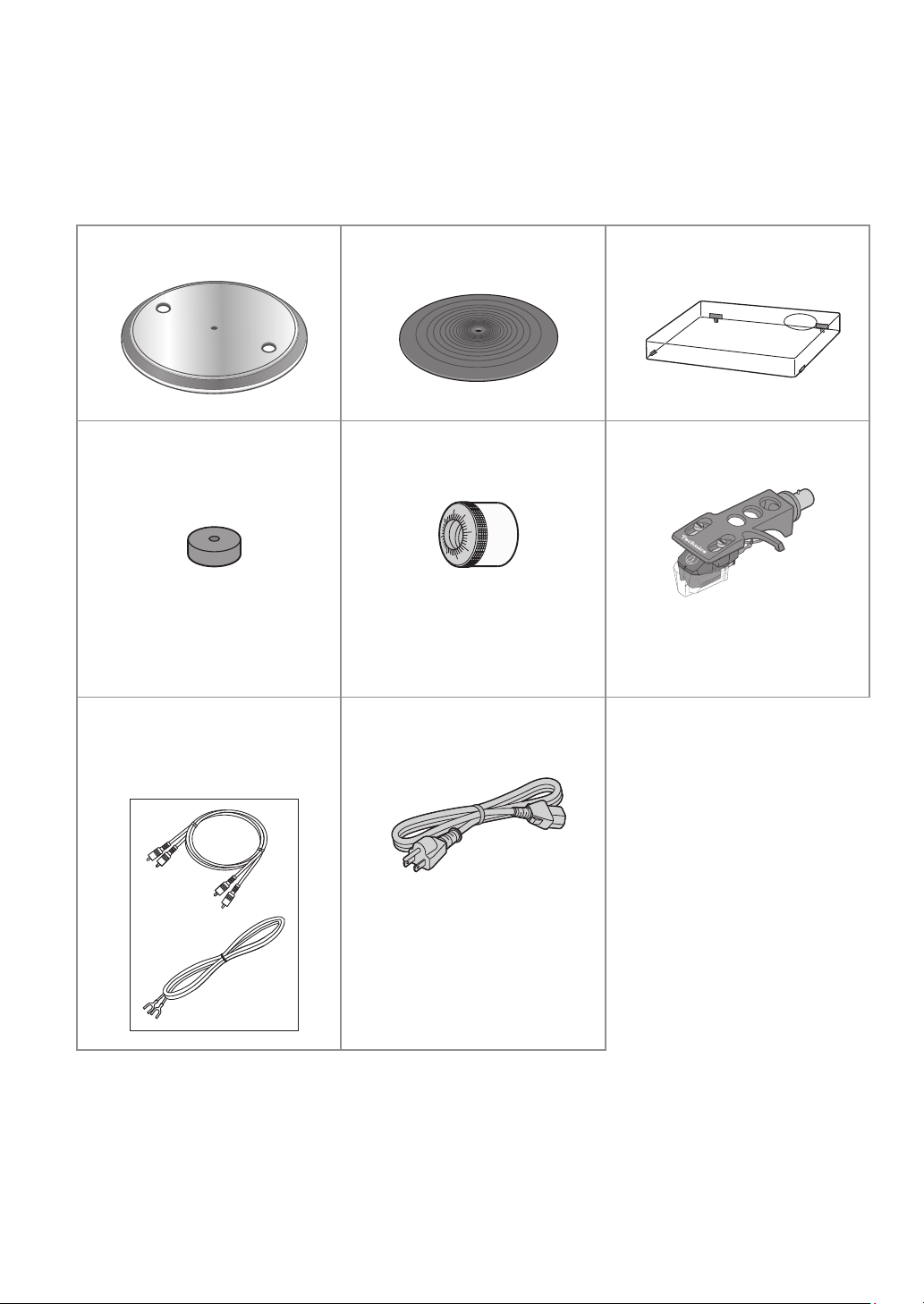
Accessories
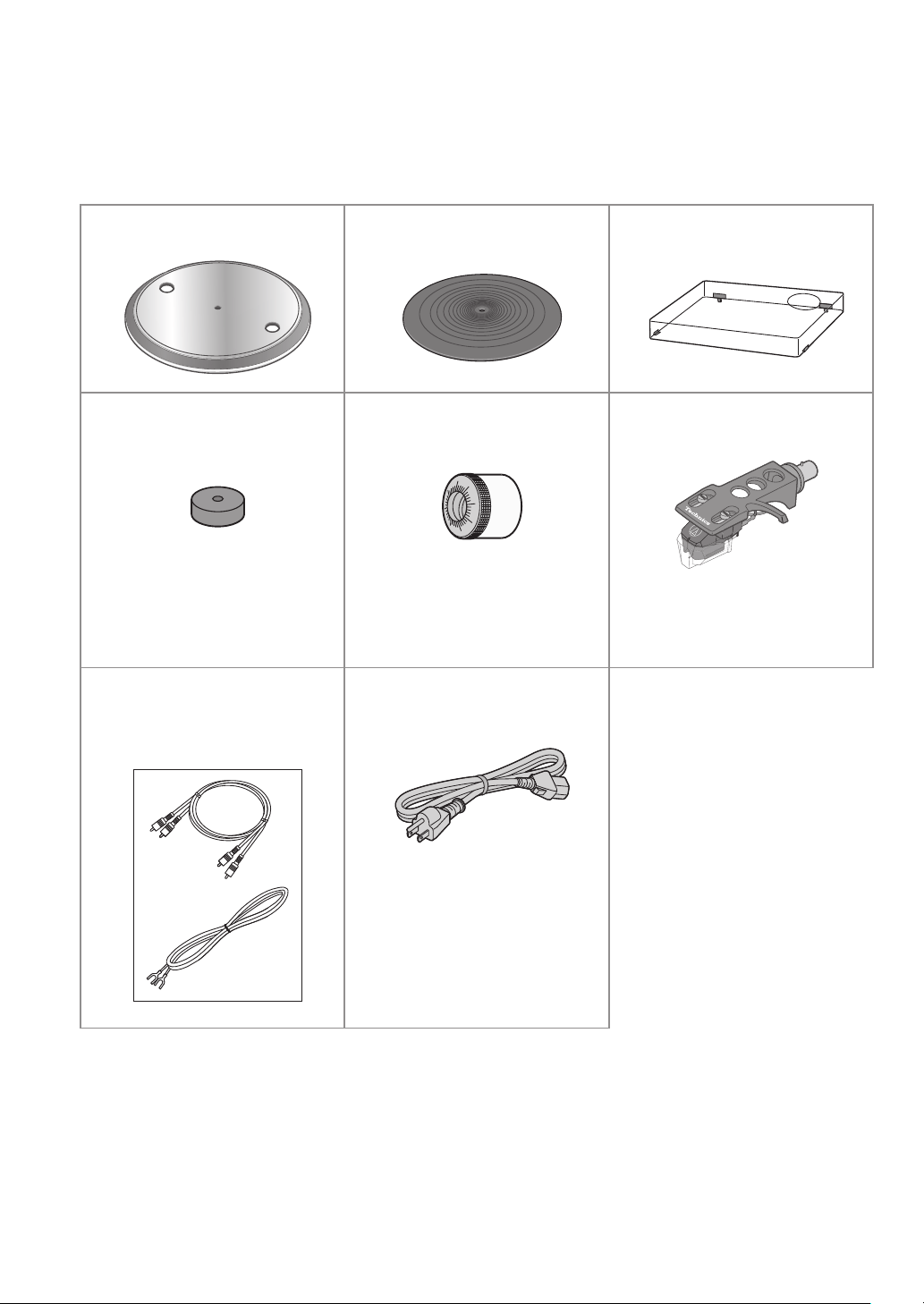
In order to prevent damage during shipping some of the equipment has been disassembled.
Please check and identify the supplied accessories. (Some accessories parts are supplied in a bag.)
Turntable (1 pc.)
(TYL0422)
Turntable mat (1 pc.)
(TEFX5019)
Dust cover (1 pc.)
(TTFA0457)
EP record adaptor (1 pc.)
(TPH0339)
Balance weight (1 pc.)
(TYL0361)
Head shell with cartridge
(1 pc.) (TYL0576)
The head shell comes with
a cartridge equivalent to
“Audio-Technica AT-VM95C”.
PHONO cable (1pc.)
PHONO earth lead (1pc.)
(TAQ0036)
AC power supply cord (1 pc.)
(K2CG3YY00219)
SL-100CPP.indb06SL-100CPP.indb06 2022/03/2815:22:362022/03/2815:22:36

Before use
English
(07)
07
The model numbers of the accessories are as of April 2022.
They are subject to change without notice.
Keep the packaging materials after taking out the goods.
You will need them when carrying the product over long distances.
Follow the local regulations when disposing of the product.
Do not use any other AC power supply cord, PHONO cable and PHONO earth lead except the
supplied one.
Keep the cartridge, EP record adaptor out of reach of children to prevent swallowing.
The stylus is a consumable item. When replacing, purchase Audio-Technica “AT-VMN95C”.
SL-100CPP.indb07SL-100CPP.indb07 2022/03/2815:22:382022/03/2815:22:38
English
(08)
08
Numbers such as (
00) indicate reference pages.
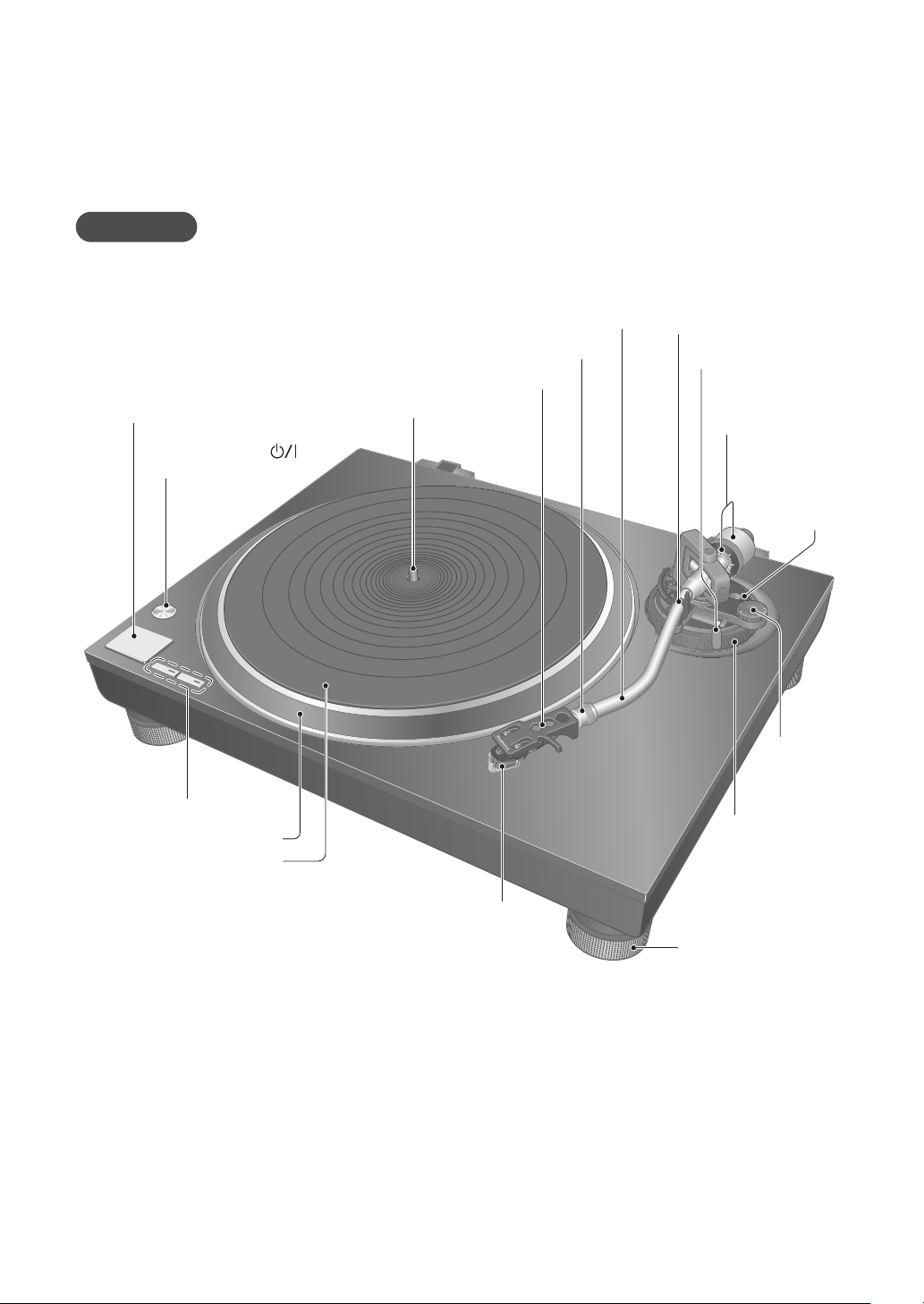
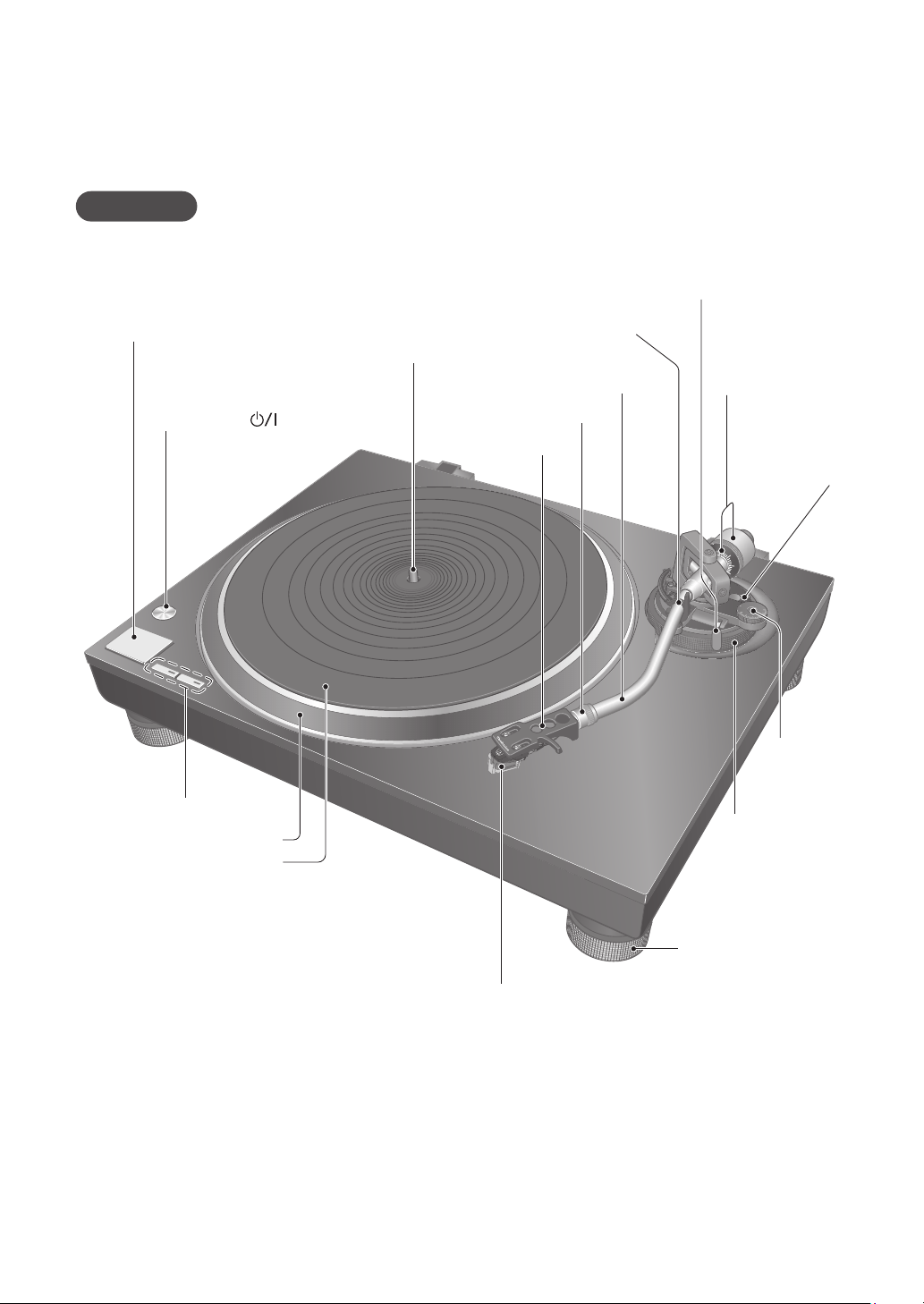
Parts Name
Front
Balance weight (
11)
Stylus pressure
control (
14)
Arm lock
(
16)
Arm-height adjuster
(
16)
Anti-skating
control
(
15)
Arm clamp (
14)
Arm rest (
14)
Cue lever (
14,19)
Speed select buttons (
18)
Turntable (
10)
Turntable mat (
10)
Cartridge
(
6,18,21)
Stylus
(
6,18,21)
Center spindle (
10)
Insulator (
13)
START-STOP button (
18)
ON/OFF (power) [
]
(
18)
Head shell (
11,21)
Locking nut (
11,21)
Tone arm (
14,16)
SL-100CPP.indb08SL-100CPP.indb08 2022/03/2815:22:382022/03/2815:22:38
Before use
English
(09)
09
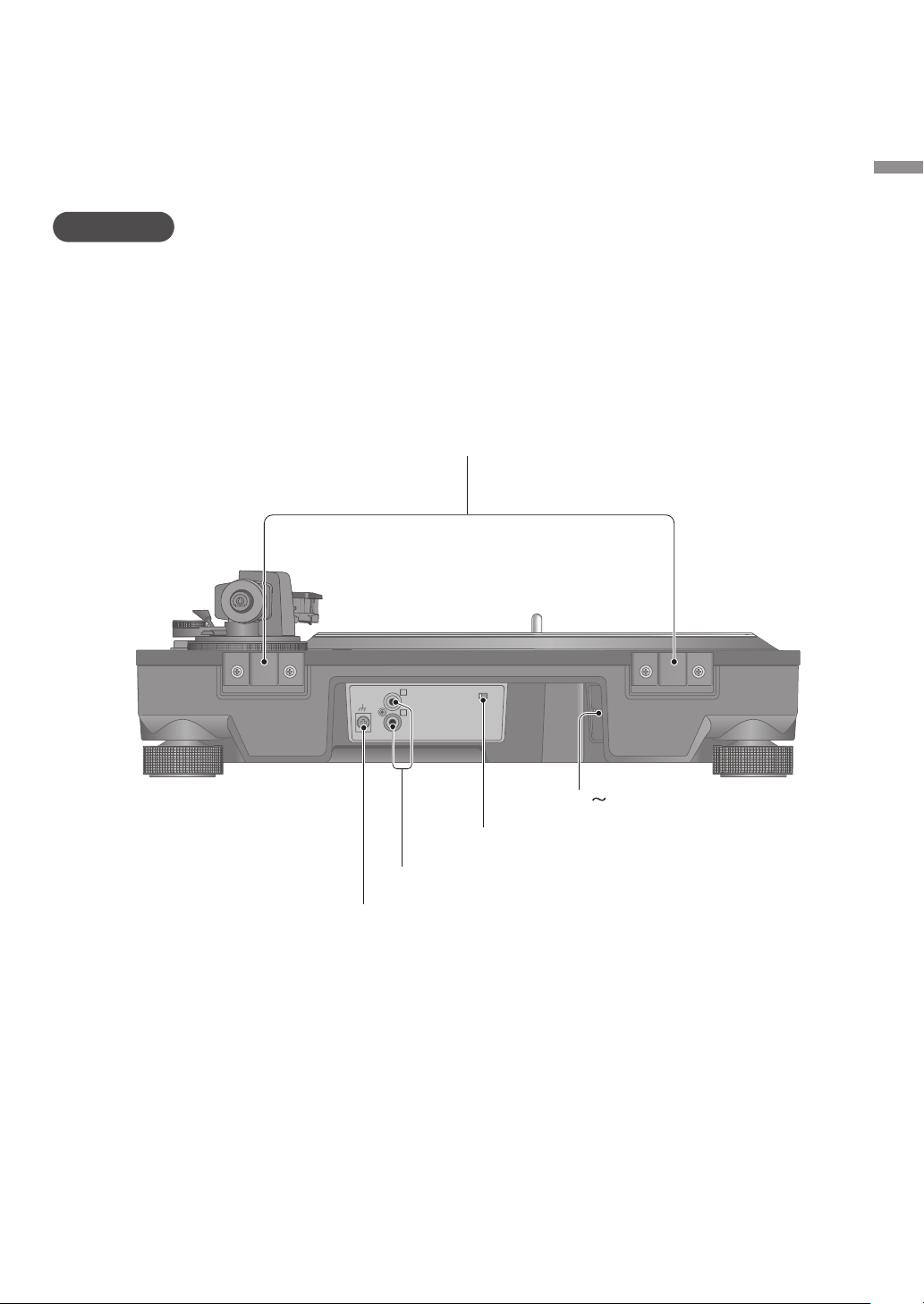
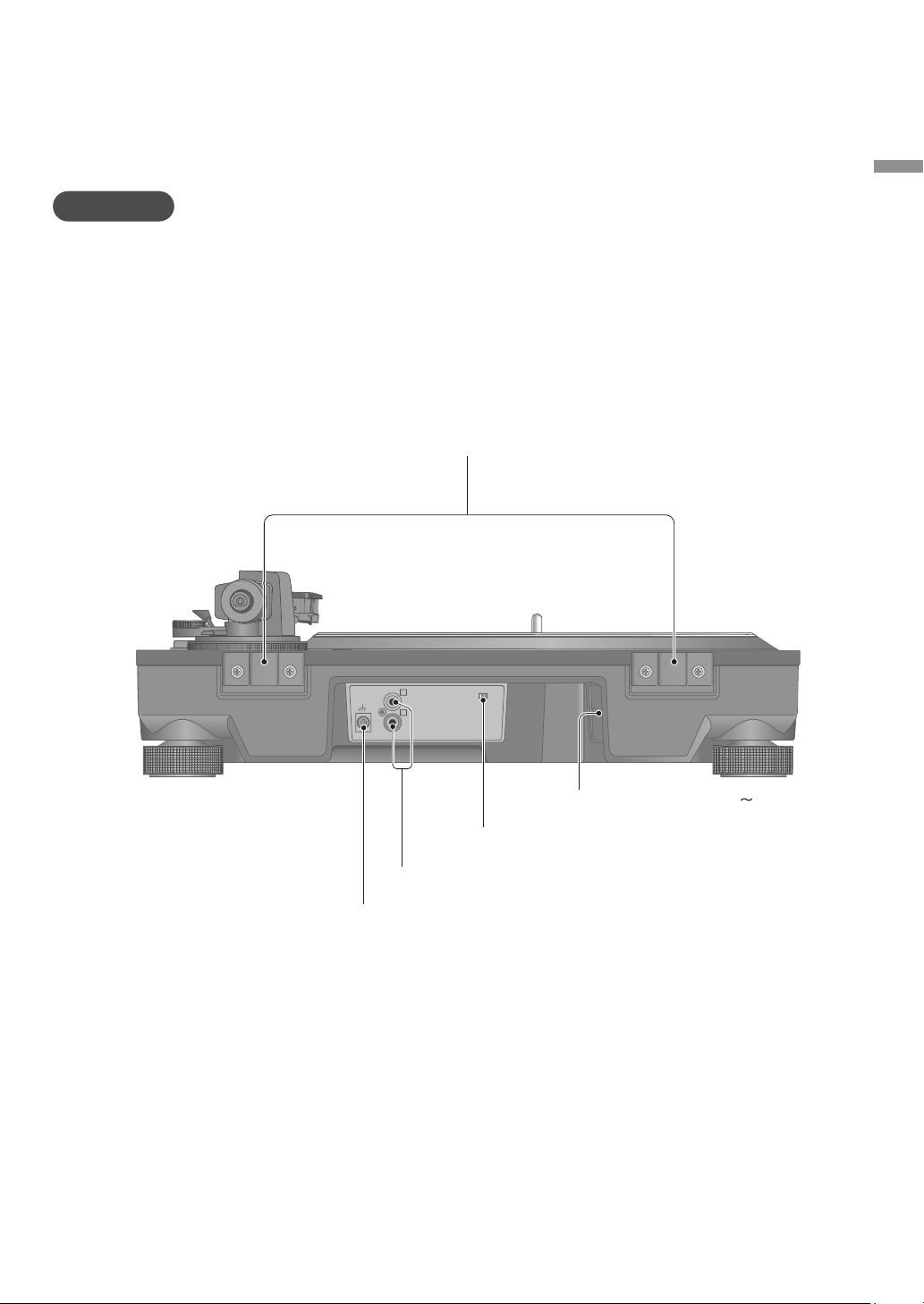
Back
ヱラヰワヰ
ユモンヵラ
ヱラヰワヰチヰヶヵ
ロ
ン
モヶヵヰチロリョヵチヶヱ
ヰョョ ヰワ
PHONO earth terminal (
12)
AC (
) input terminal (
12)
PHONO output terminal (
12)
Dust cover fitting part (
13)
Auto lift-up switch (
19)
SL-100CPP.indb09SL-100CPP.indb09 2022/03/2815:22:382022/03/2815:22:38
10
English
(10)
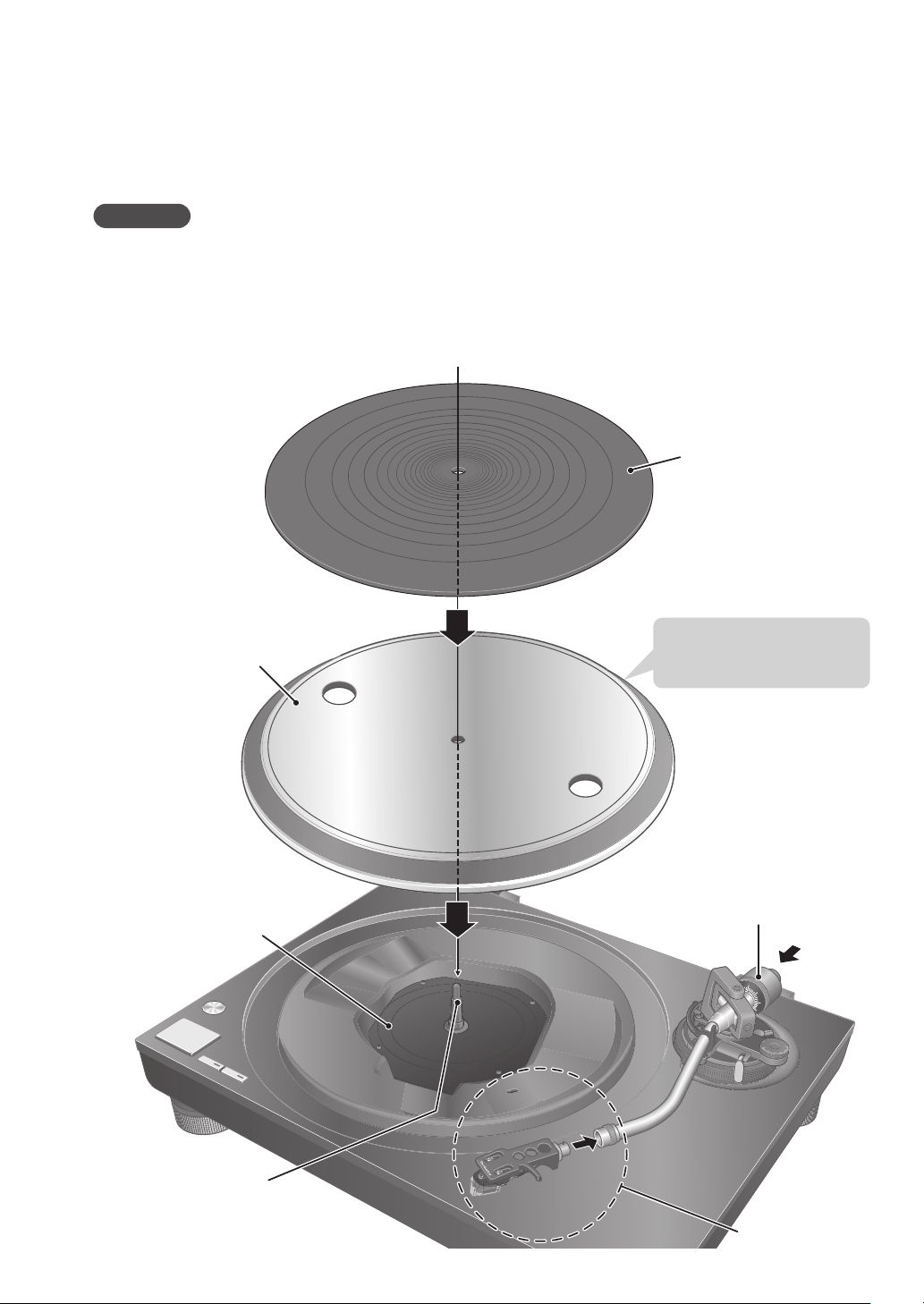
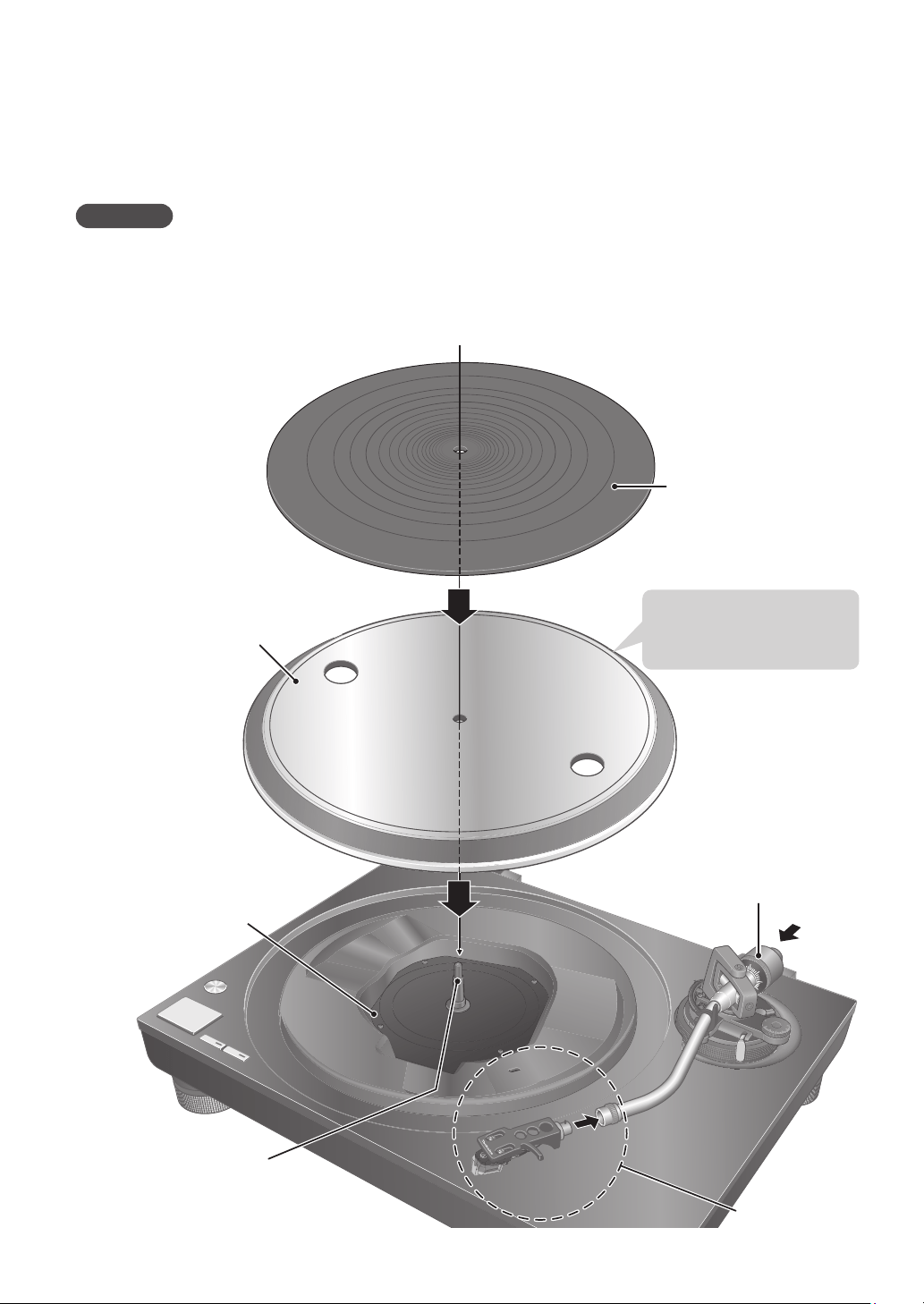
Putting the player together
In order to prevent damage during shipping, some of the equipment has been disassembled.
Put the player together in the following order.
Before setting up, put on the stylus guard to protect the stylus tip (
18), return the tone arm to
the arm rest and fix it with the arm clamp.
Do not connect the AC power supply cord until set up is complete.
When fitting the turntable, prevent foreign material from getting in between the main unit and
turntable.
Do not touch or scratch the board.
Turntable
Board
Center spindle
Balance weight
Turntable mat
Head shell
Attention
Handle carefully as
this is heavy.
SL-100CPP.indb10SL-100CPP.indb10 2022/03/2815:22:382022/03/2815:22:38
Getting started
English
(11)
11
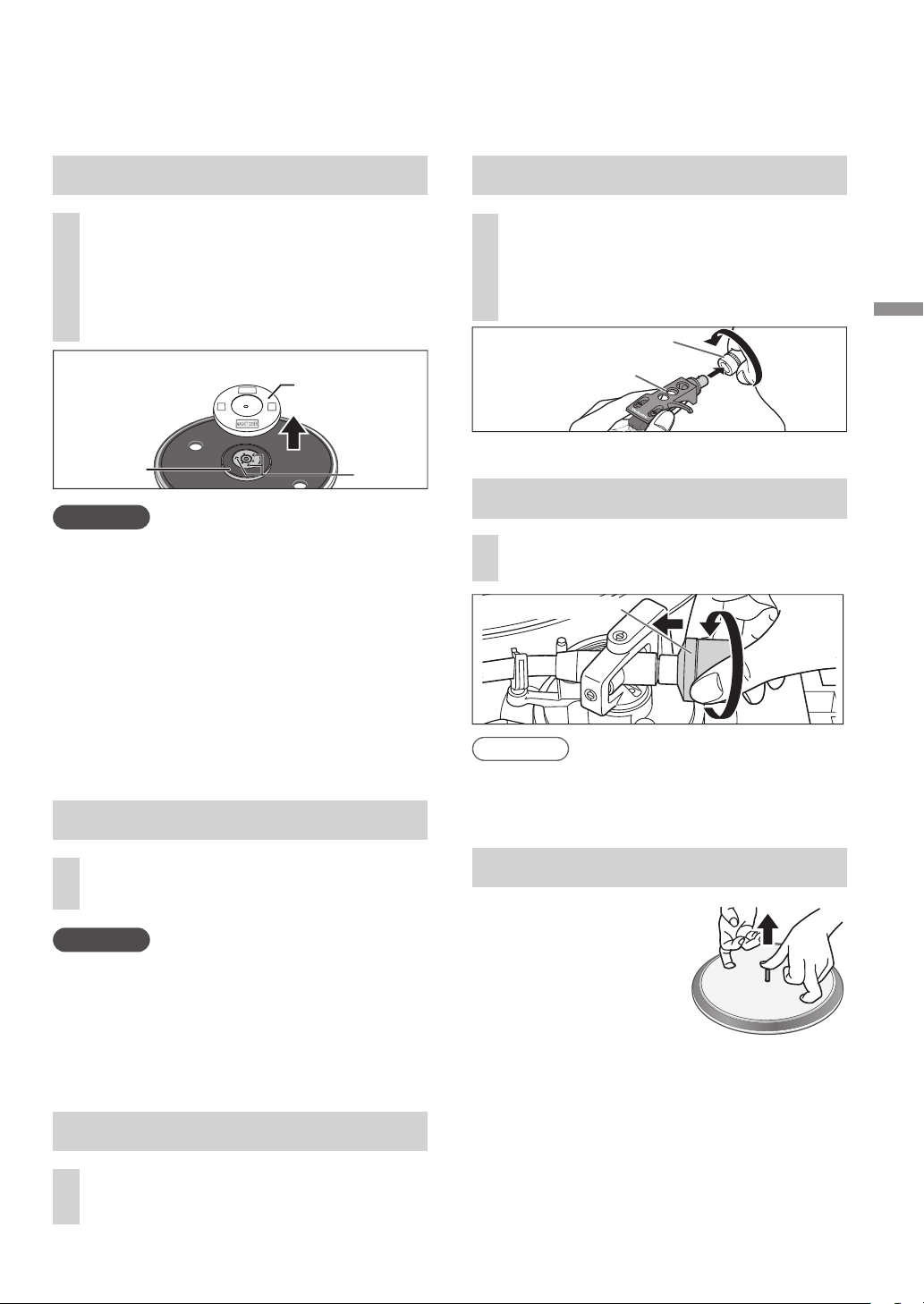
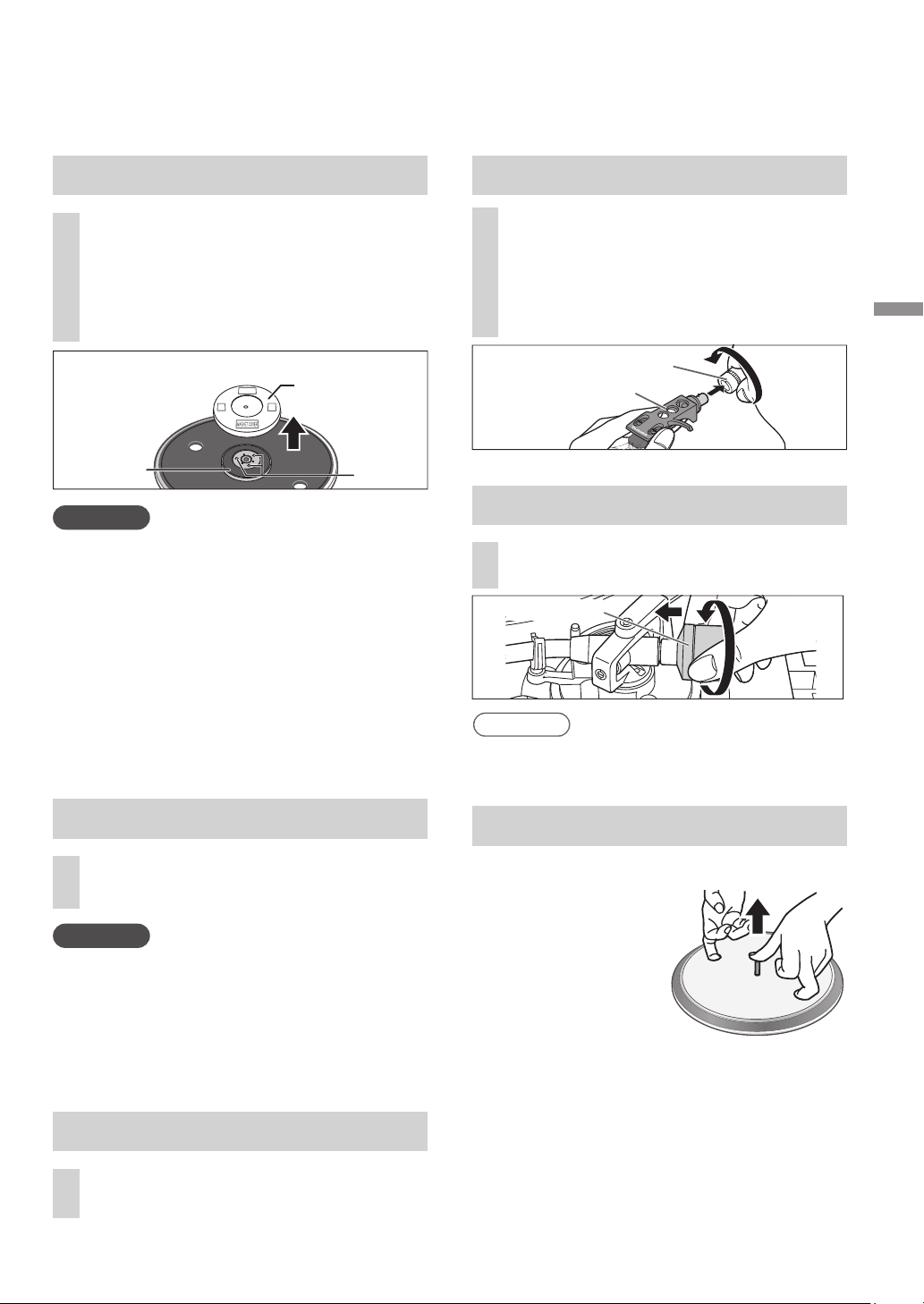
Before fitting the turntable
1
Remove the magnet cover from
the turntable.
There is a magnet and its cover on the
back side of the turntable.
Remove the magnet cover before fitting
to the main unit.
Back side of the turntable
Magnet cover
Magnet
Fixing
screw
Attention
Keep any magnetic-sensitive object such as
a magnetic card and watch away from the
magnet.
Prevent the turntable from hitting the main
unit or falling off.
Prevent dust or iron powder from adhering
to the magnet on the back side.
Do not touch the fixing screws (three
locations) of the turntable. The rating
performance cannot be guaranteed if they
are out of position.
Fitting the turntable
2
Slowly set the turntable on the
center spindle.
Attention
Be careful when handling the turntable, as it
is heavy.
Keep your fingers from being caught.
Wipe off fingerprints or dirt with a soft cloth.
Fitting the turntable mat
3
Lay the turntable mat on the
turntable.
The inside of the balance weight is greased.
Note
To remove the turntable
As shown in the
figure on the right,
set your fingers in
the two holes on
the turntable, hold
the center spindle
down and remove the turntable
upward.
Attaching the balance weight
5
Attach the balance weight to the
rear of the tone arm.
4
Fit the head shell with the
cartridge into the tone arm.
Keep the head shell horizontal
and tighten the locking nut.
Be careful not to touch the stylus tip.
Attaching the head shell
Locking nut
Head shell
Balance weight
SL-100CPP.indb11SL-100CPP.indb11 2022/03/2815:22:392022/03/2815:22:39
12
English
(12)
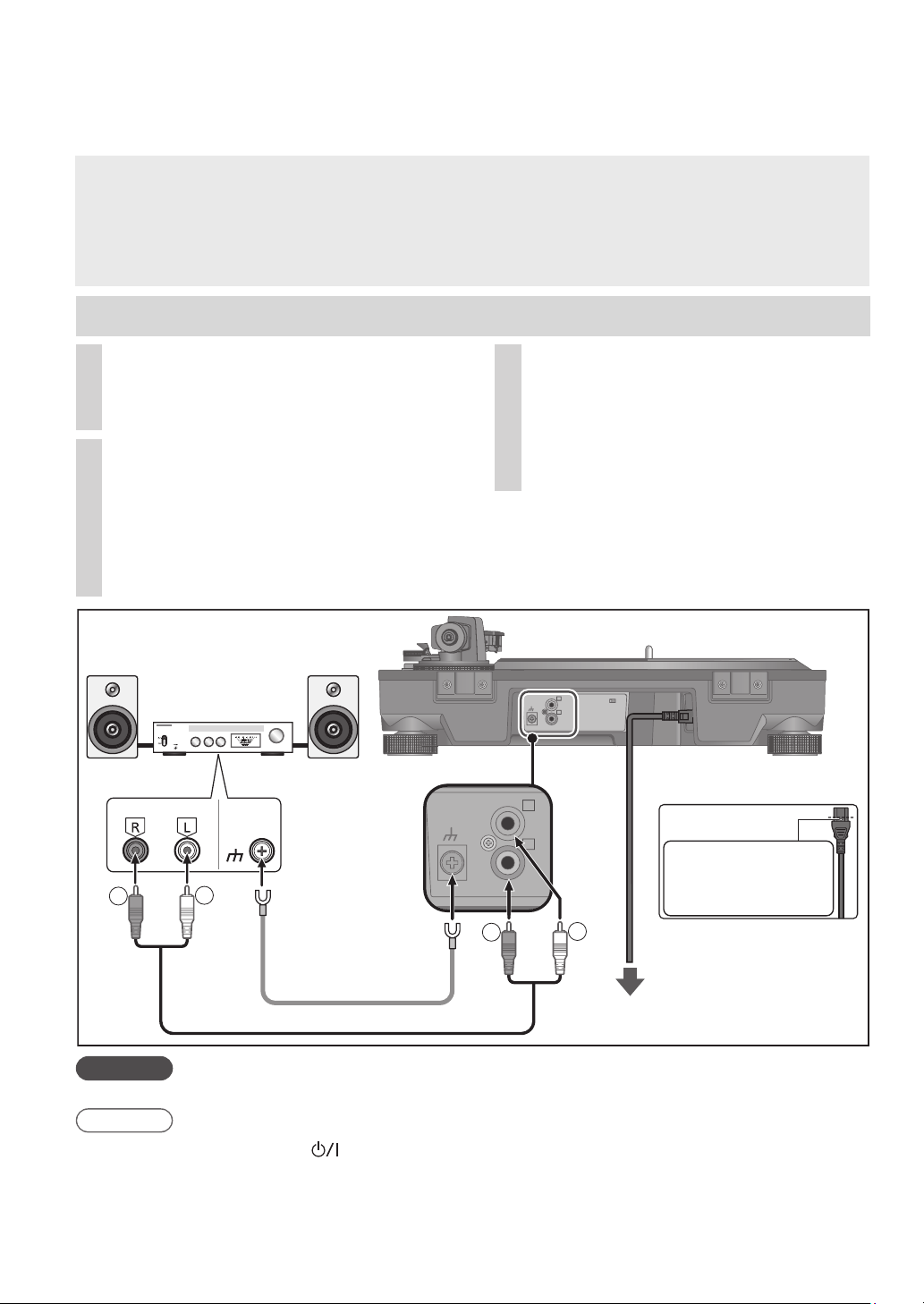
Connections and installation
Note
Attention
Tighten the PHONO earth terminal using a Phillips head screwdriver.
Turn off all units and disconnect the AC power supply cord from the socket before
making any connections.
Connect the AC power supply cord only after all other connections are completed.
Be sure to connect the PHONO earth lead. Otherwise mains hum may occur.
Refer also to the instruction manual of the connected device.
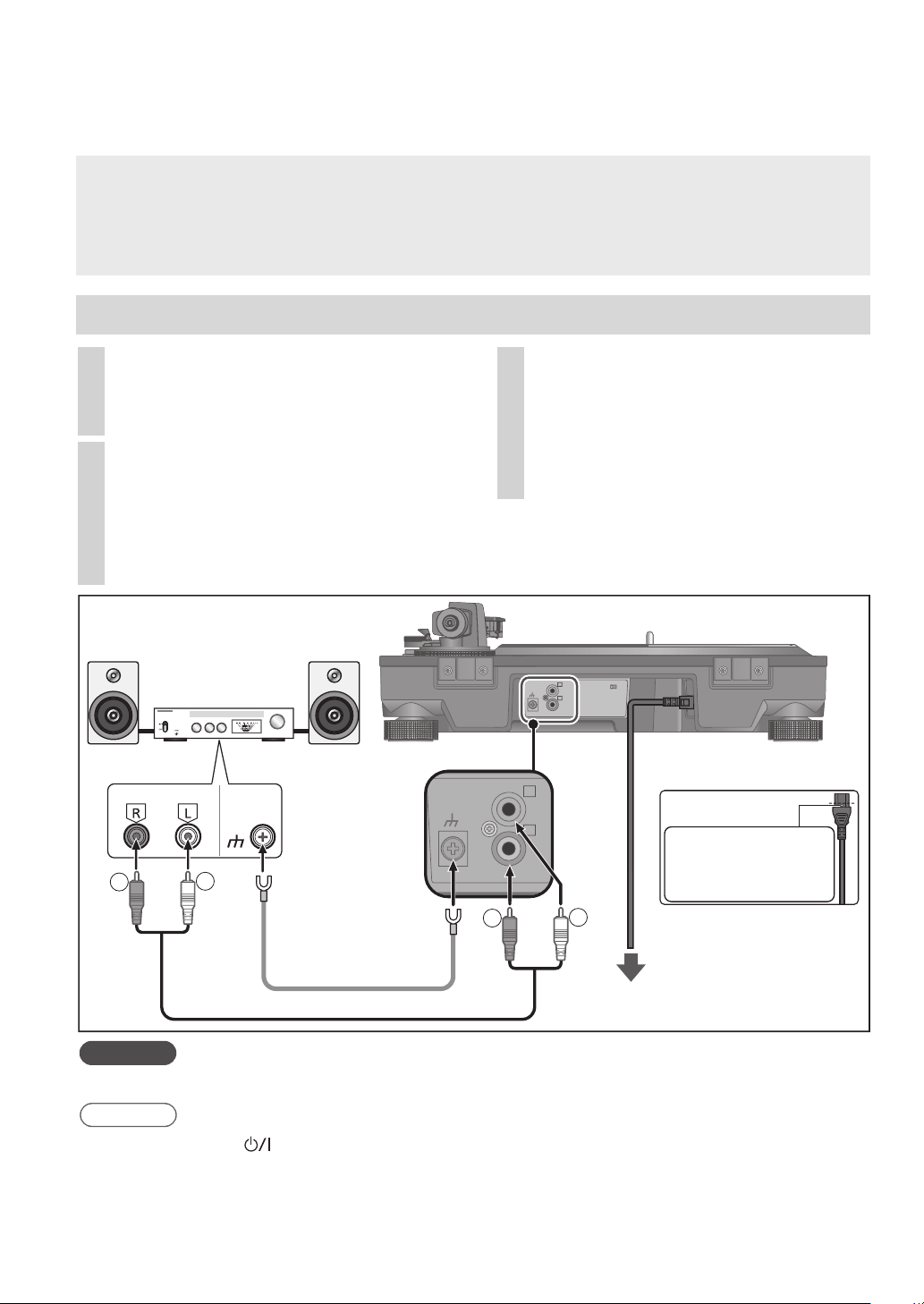
Connecting to an integrated amplifier or component system
1
Turn off the unit and the
connected device, and disconnect
the AC power supply cord from the
socket.
2
Connect the PHONO cable and
PHONO earth lead to the PHONO
input terminals of the connected
equipment.
You will not have adequate volume or
sound quality if the connected amplifier
has no PHONO input terminals.
3
Connect the AC power supply
cord.
Confirm the wattage of the AC outlet on
the connected equipment before using it
for this unit.
For the power consumption of this unit,
see the specifications. (
23)
ヱラヰワヰ
ユモンヵラ
ヱラヰワヰチヰヶヵ
ロ
ン
モヶヵヰチロリョヵチヶヱ
ヰョョ ヰワ
ヱラヰワヰ
ユモンヵラ
ヱラヰワヰチヰヶヵ
ロ
ン
R
L
R
L
PHONO PHONO
EARTH
Amplifier (not included)
Back of main unit
To a household
mains socket
PHONO earth lead
PHONO cable
Insert the AC power
supply cord up to a
point just before the
round hole.
PHONO
OUT
AC power supply cord
Stanby/on switch [
] (OFF/ON)
Press to switch the unit from on to standby mode or vice versa.
In standby mode, the unit is still consuming a small amount of power.
Remove the plug from the mains socket if you will not be using the unit for an extended period of
time. Place the unit so that the plug can be easily removed.
SL-100CPP.indb12SL-100CPP.indb12 2022/03/2815:22:432022/03/2815:22:43
Getting started
English
(13)
13
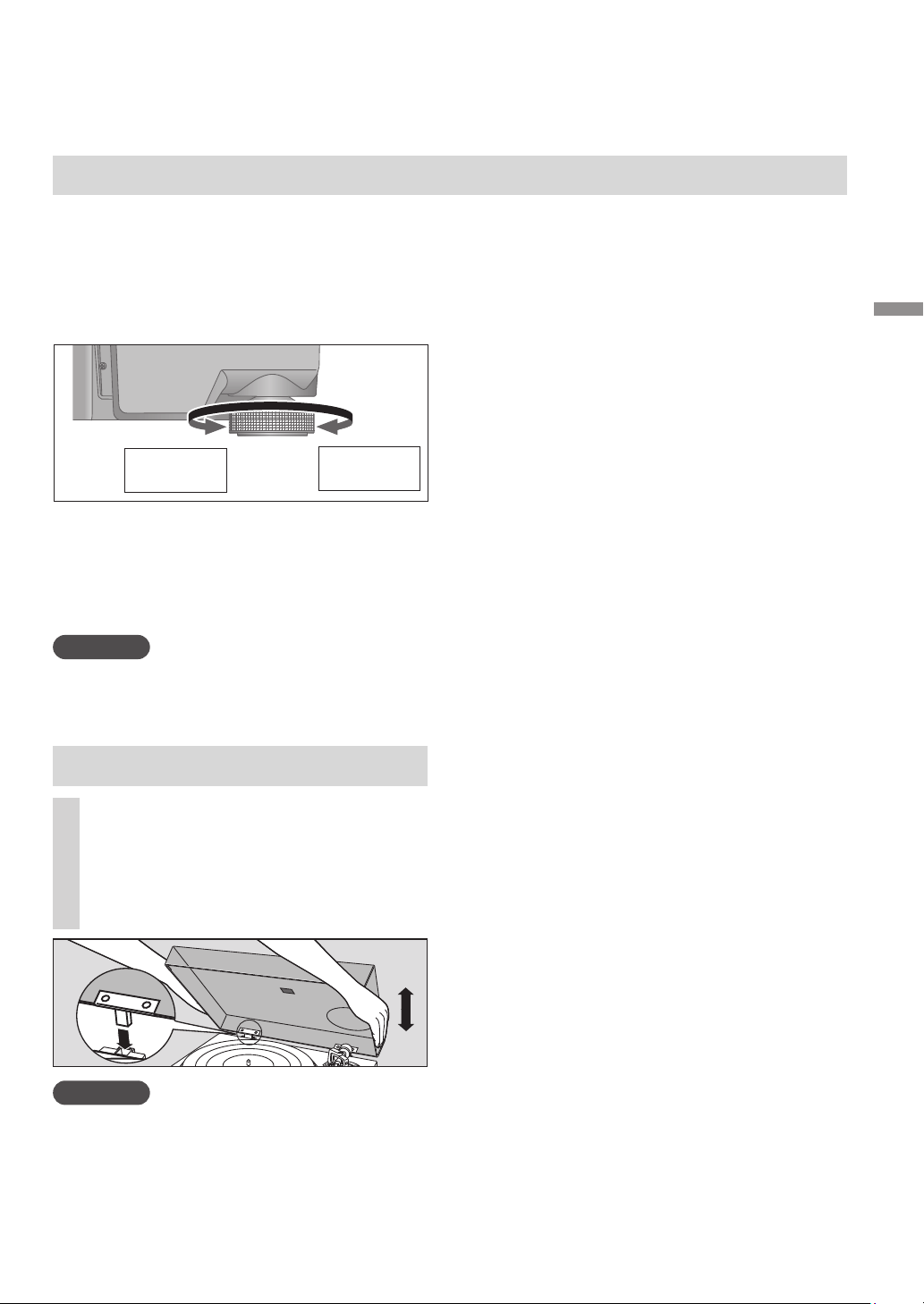
Installation
Fit the dust cover
Install the unit on a horizontal surface
protected from vibrations.
Keep this unit as far as possible from speakers.
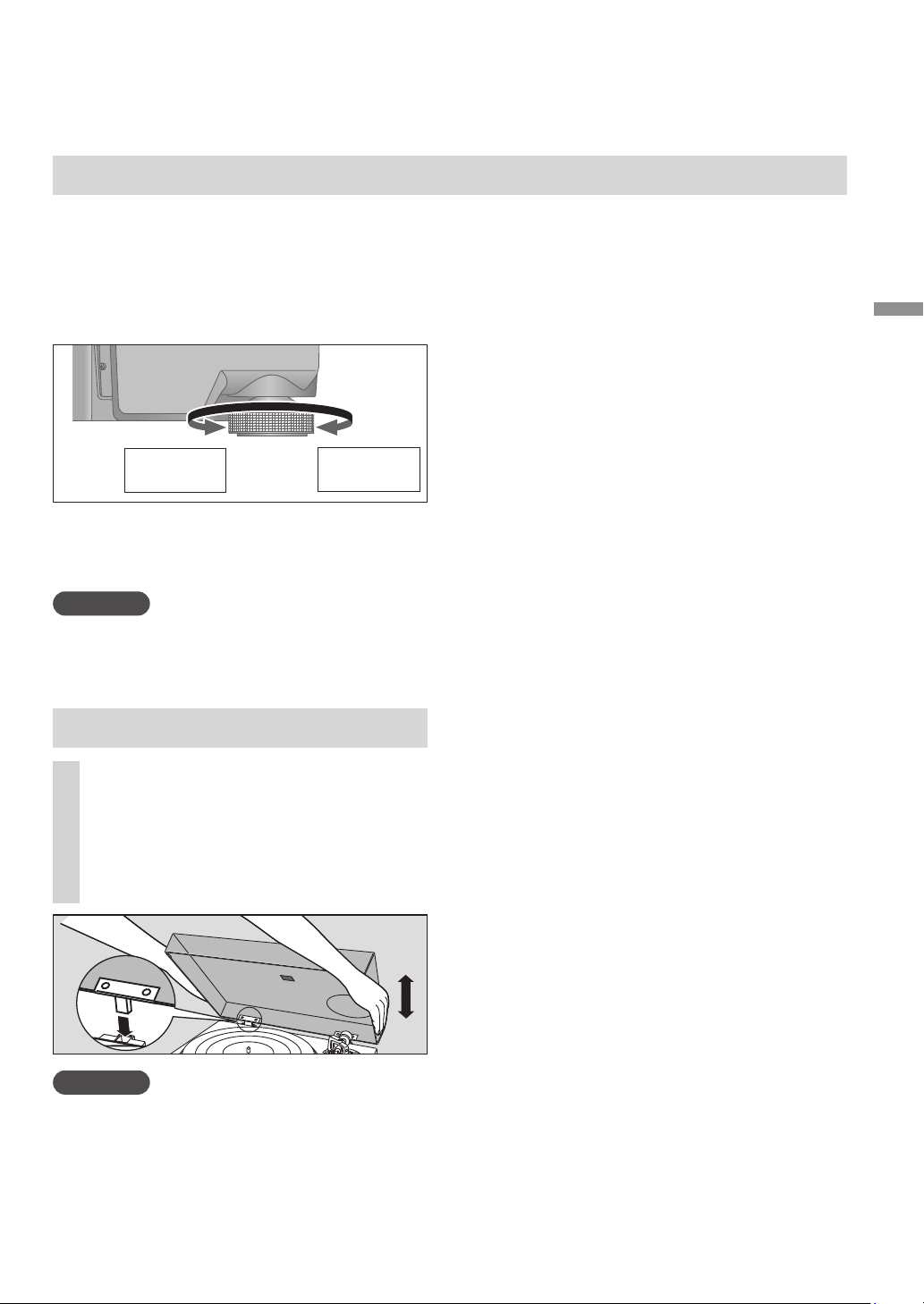
Adjusting the height to make the
unit horizontal
Reduces
the height
Increases
the height
Raise the main unit to turn the insulators and
adjust the height.
Clockwise: Reduces the height.
Anti-clockwise: Increases the height.
Attention
Do not turn the insulators too far.
Doing so may cause them to come off or
damage them.
Notes for installation
Before you move the unit, turn the unit off,
pull out the power plug and disconnect all
connected devices.
Ensure the unit is not exposed to direct
sunlight, dust, humidity, and heat from a
heating appliance.
This unit may pick up interference from a
radio if there is one nearby.
Keep the unit as far as possible from a radio.
Do not install the unit on a heat source.
Avoid a place with large temperature variations.
Avoid a place with frequent condensation.
Avoid an unstable place.
Do not put an object on the unit.
Do not install the unit in a confined space
such as a book shelf.
Install the unit at a position well away from
walls or other devices to ensure effective
heat radiation from the inside of the unit.
Make sure the installation location is
sufficiently strong to withstand the total
weight of the unit and system. (
23)
Note that the unit may be damaged by
cigarette smoke or moisture from an
ultrasonic humidifier.
Condensation
Think of taking out a cold bottle from a
refrigerator. If you leave it in a room for a while,
dewdrops will form on the bottle surface.
This phenomenon is called “condensation“.
Conditions causing condensation
Rapid temperature change (caused by
moving from a warm place to a cold place or
vice versa, rapid cooling or heating, or direct
exposure to cooled air)
High humidity in a room with much steam,
etc.
Rainy season
Condensation may damage the unit. If it
has occurred, turn the unit off and leave it
until it adapts to the ambient temperature
(approximately 2 to 3 hours).
1
Hold the dust cover with both
hands and insert it into the dust
cover fitting parts (
09) on the
player.
To remove the dust cover, keep it open
and lift it straight above.
Attention
Return the tone arm to the arm rest and fix
it with the arm clamp before you attach or
detach the dust cover.
Remove the dust cover while playing.
When inserting the dust cover, prevent the tip
of the hinges from hitting and damaging the
main unit.
SL-100CPP.indb13SL-100CPP.indb13 2022/03/2815:22:432022/03/2815:22:43
14
English
(14)
Adjustment
Anti-skating control
Arm clamp
Arm rest
Cue lever
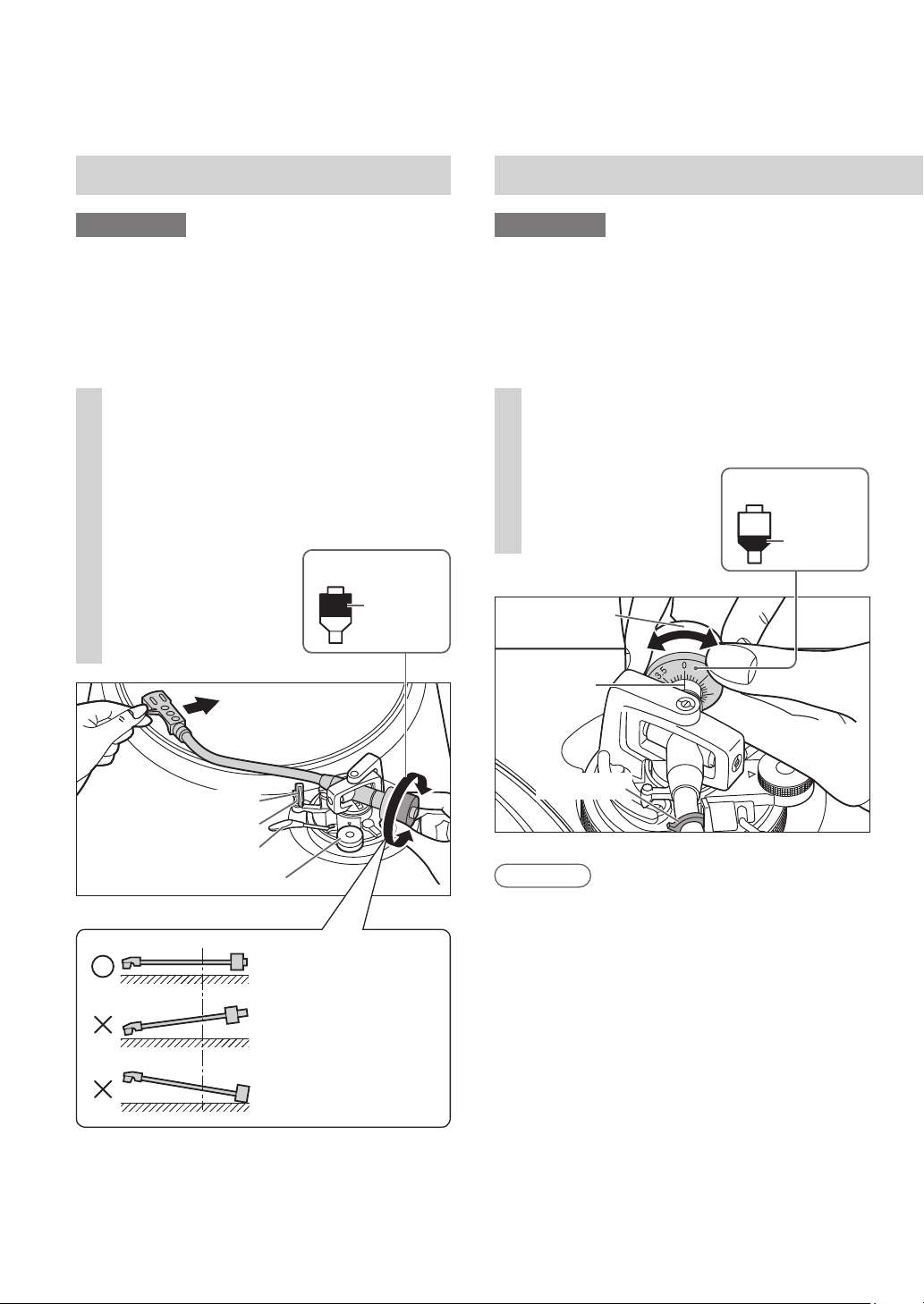
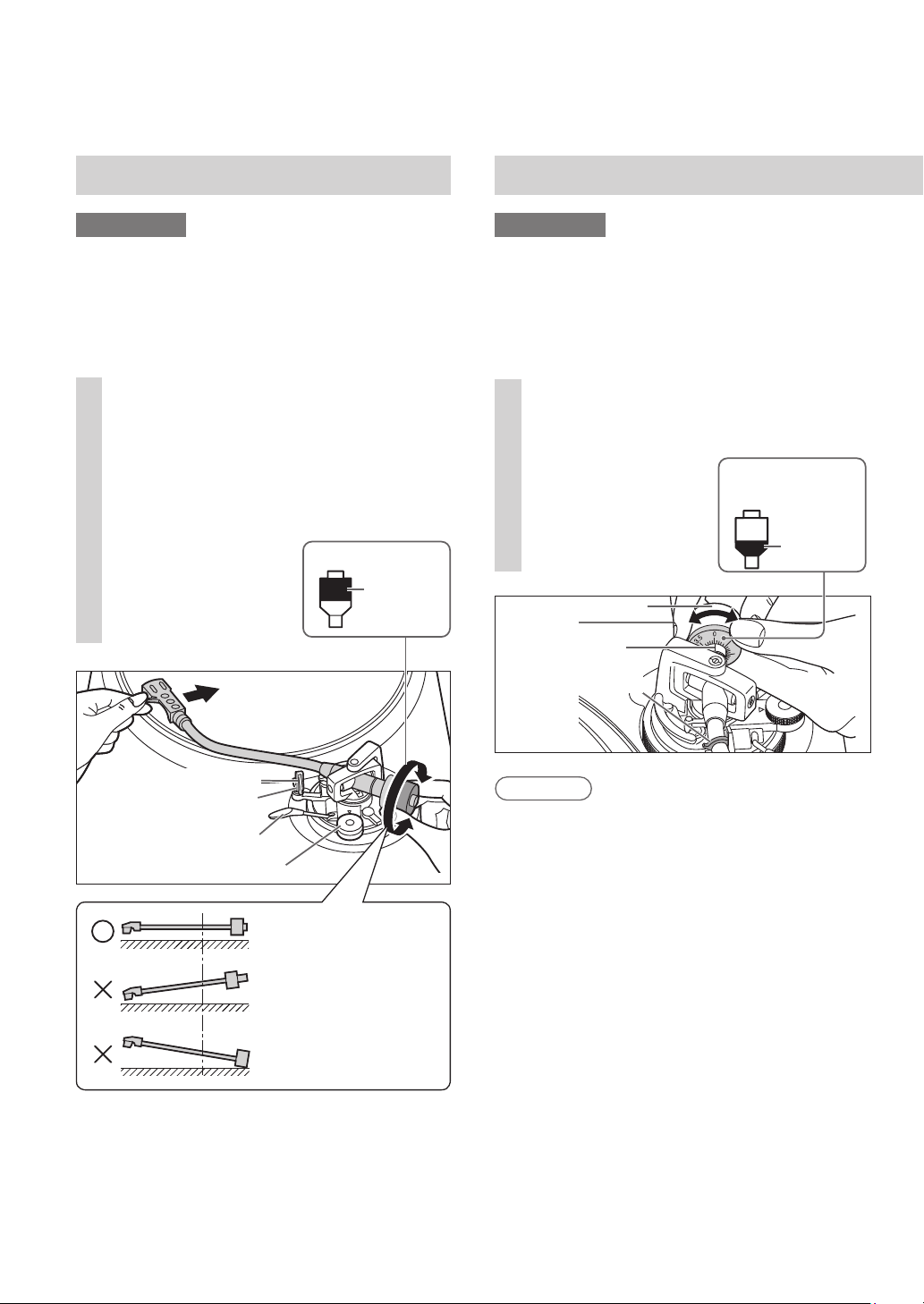
1
Free the tone arm from the arm
rest and adjust horizontal balance
by turning the balance weight.
Hold the tone arm and turn the balance
weight in the arrow direction to adjust
the balance until the arm is approximately
horizontal.
Take care not to
allow the stylus tip
to touch the
turntable or main
unit.
Balance weight
Hold here
to turn
1
Turn the stylus pressure control
until “0“ comes to the center line
of the rear of the tone arm.
Hold the balance
weight still while
doing this.
Preparation
Return the tone arm to the arm rest and fix it
with the arm clamp.
Horizontal balance Stylus pressure
Preparation
First, remove the dust cover.
Remove the stylus cover (
18), taking care
not to damage the stylus, then release the
arm clamp.
Lower the cue lever.
Turn the anti-skating control to “0”.
Balance weight
Arm clamp
Center line
Stylus pressure
control
Hold here
to turn
Balanced and the tone
arm is parallel to the
turntable.
The balance weight is
too far forward.
The balance weight is
too far back.
Stylus pressure of the supplied cartridge:
1.8 to 2.2
g
(2.0
g
standard)
When using a separately sold cartridge, refer
to the user’s guide for your cartridge for the
appropriate stylus pressure.
Note
SL-100CPP.indb14SL-100CPP.indb14 2022/03/2815:22:442022/03/2815:22:44
Getting started
English
(15)
15
0
1
3
2
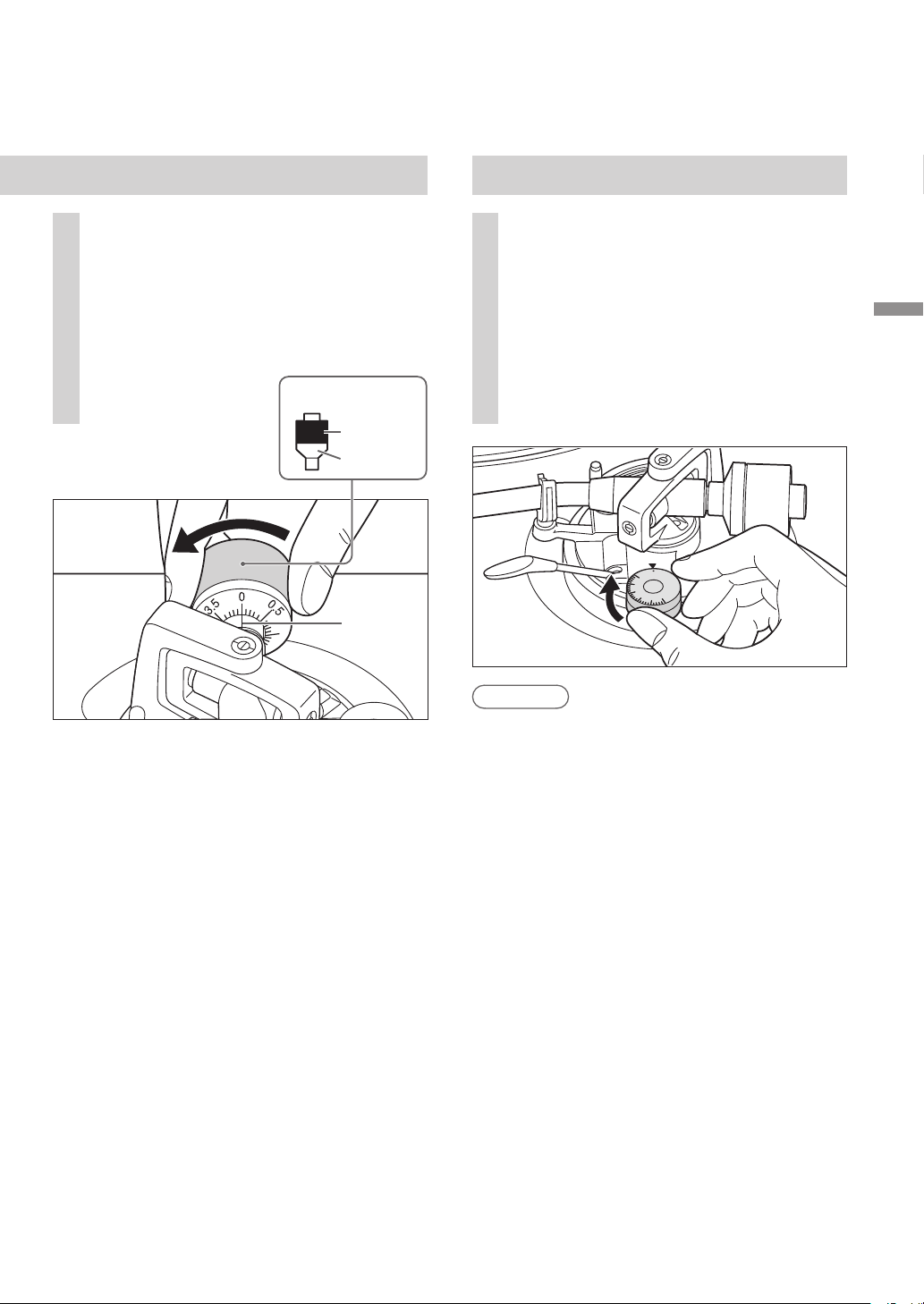
Anti-skating
1
Turn the anti-skating control to
adjust it to the same value as the
stylus pressure control.
2
Turn the balance weight to adjust
to the appropriate stylus pressure
for the cartridge.
The stylus pressure control will turn
together with the balance weight.
Turn until the center line points to the
appropriate stylus pressure.
Center line
Balance weight
Hold here
to turn
Turns
together
For stylus pressures 3
g
and above, adjust
anti-skating control to “3”.
Note
SL-100CPP.indb15SL-100CPP.indb15 2022/03/2815:22:442022/03/2815:22:44

English
(16)
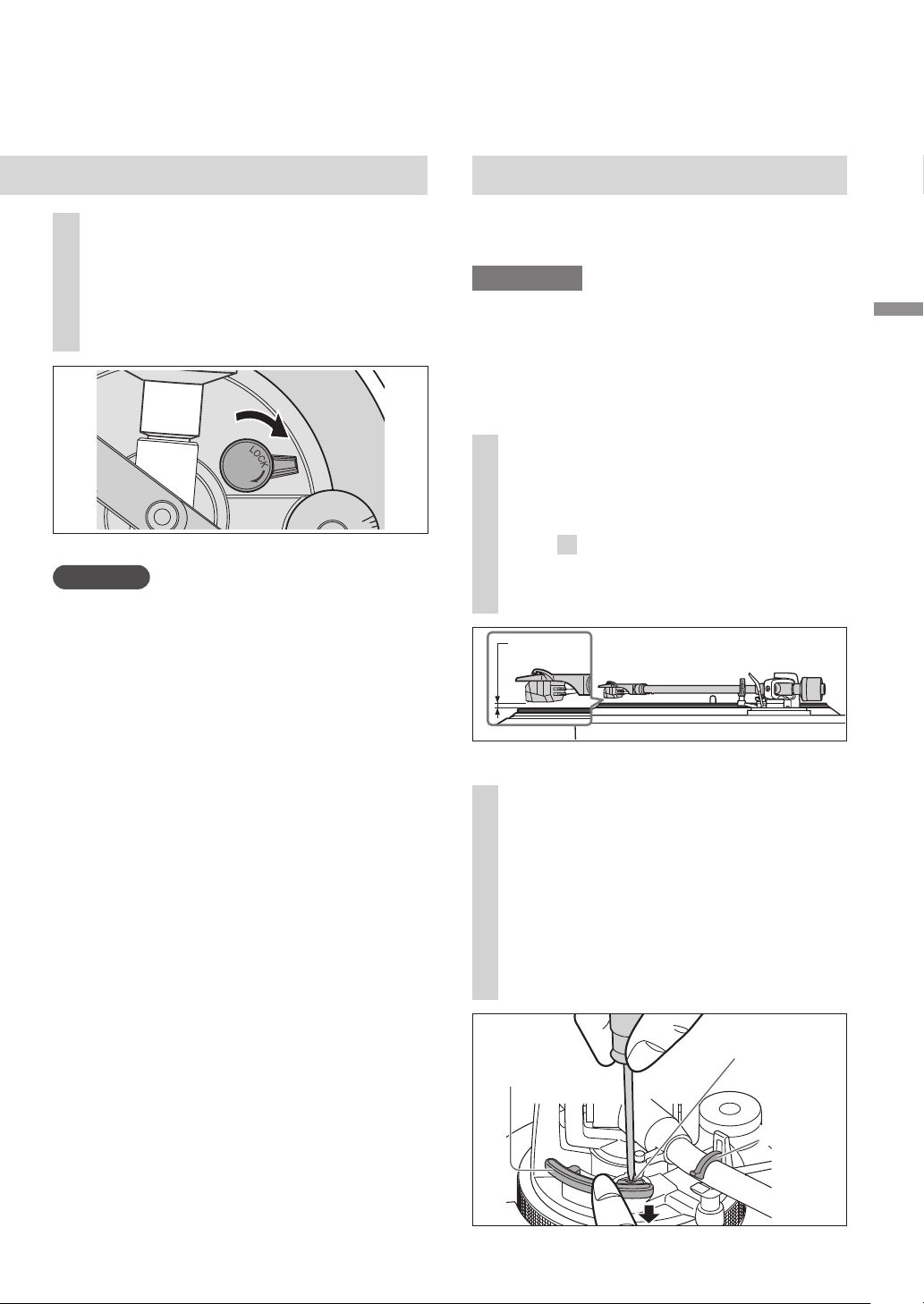
Tone arm height
Make this adjustment only if the cartridge you
are using makes it necessary.
Preparation
Put a record on the turntable.
1
Release the arm lock.
Adjustment
(continued)
Use the chart below as reference to find the
appropriate position mark for the height of
your cartridge.
2
Adjust the height with the arm-
height adjuster.
Adjust the arm height until the tone arm
becomes parallel to the record.
(For supplied head shell)
16
2
4
6
Hold the arm-height adjuster and slide it up
or down to align the position mark with the
index line. 0 to 6 mm (0 to
15
/
64
“) are marked
on the arm height adjuster.
Index line
Arm-height
adjuster
When you don’t know the cartridge
height (H) or when you don’t use
the accessory head shell
Remove the stylus cover, taking care not to
damage the stylus, then release the arm clamp.
Lower the cue lever, rest the stylus on the
record and adjust the height control until the
tone arm and record are parallel.
If the cartridge height (H) is too small to
make them parallel to each other, add a
“cartridge spacer” (not supplied).
Parallel to a record
2
4
6
When checking the index line of the Arm-
height adjuster, check with your eyes on the
same level.
(Released) (Locked)
Arm lock
Cartridge height
(H) in millimeters
Height control
position
14
15
16
17
18
19
20
0
1
2
3
4
5
6
Height of the accessory cartridge H = 17.2 (mm)
(
Height control position : 3.2
)
SL-100CPP.indb16SL-100CPP.indb16 2022/03/2815:22:452022/03/2815:22:45
Getting started
17
English
(17)
Armlift height
Make an adjustment according to your
cartridge if necessary.
Preparation
Put a record on the turntable.
Remove the stylus cover (
18), taking care
not to damage the stylus, then release the
arm clamp.
Lift the cue lever and move the tone arm over
the record.
3
After arm height adjustment is
finished, lock the tone arm by
turning the arm lock knob.
Be sure to turn the arm lock knob to the
end as shown in the figure below. You
may need to apply some force to do so.
Attention
Be careful not to damage the stylus tip.
Do not use the product with the arm lock
released.
For finer adjustment, use a level (not included)
to adjust the arm height so that the cartridge
becomes parallel to a record.
(
5
/
16
to
33
/
64
“)
8 to 13 mm
1
Check the armlift height (distance
between the stylus tip and record
surface).
If adjustment is needed, go to
step
2
.
The armlift height is factory-adjusted to
8 to 13 mm
(
5
/
16
to
33
/
64
”)
.
3
A
N
T
I
-
S
K
A
T
I
N
G
2
Return the tone arm to the arm
rest, clamp it with the arm clamp
and while pressing the armlift
down with your finger, turn the
screw to adjust the height.
Turning the screw clockwise lowers the
armlift.
Turning the screw anti-clockwise raises
the armlift.
Armlift screw
Armlift
Arm clamp
SL-100CPP.indb17SL-100CPP.indb17 2022/03/2815:22:452022/03/2815:22:45
English
(18)
Speed select buttons
Indicators
·
3 4
2
Center spindle
1
2
2
1
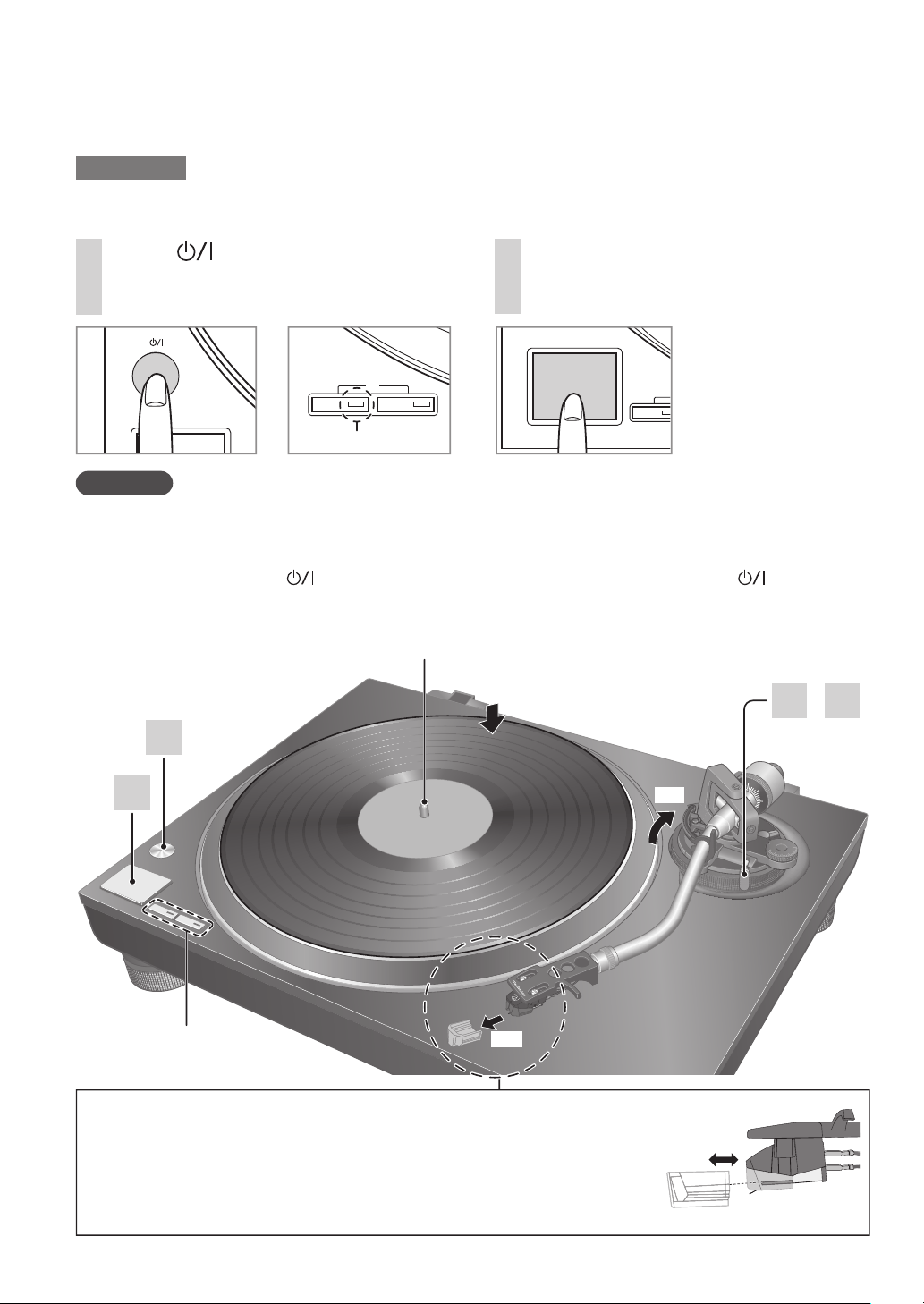
Playing records
18
Preparation
1 Put a record (not included) on the turntable.
2 Take off the stylus cover and release the arm clamp.
1
Press [ ] to turn the unit on.
33-
1
/
3
rpm is automatically selected and
the indicator [33] lights.
2
Press [START-STOP].
The turntable starts revolving.
Attention
Do not press [START-STOP] when the turntable is removed.
If you have accidentally pressed [START-STOP]
·
The indicator of the speed select button ([33] or [45]) starts blinking.
If it is blinking, press [
] to turn the unit off, fit the turntable and then press [ ] to turn
the unit on.
Turn the unit on or off with the volume on the connected device set to the minimum.
ピピ フブ
ヘベ
ヴヵモンヵ〔ヴヵヰヱ
ピピ
Indicator
Removing the stylus cover
Remove the stylus cover by sliding it straight and slowly in the cartridge
front direction while taking care not to damage the stylus.
Attaching the stylus cover
Hold the stylus cover firmly from both sides, align with the front of the cartridge,
and attach by sliding it slowly while taking care not to damage the stylus.
Stylus cover
Cartridge
SL-100CPP.indb18SL-100CPP.indb18 2022/03/2815:22:462022/03/2815:22:46
Playing
back
English
(19)
4
Lower the cue lever slowly.
The tone arm moves down slowly.
Play starts.
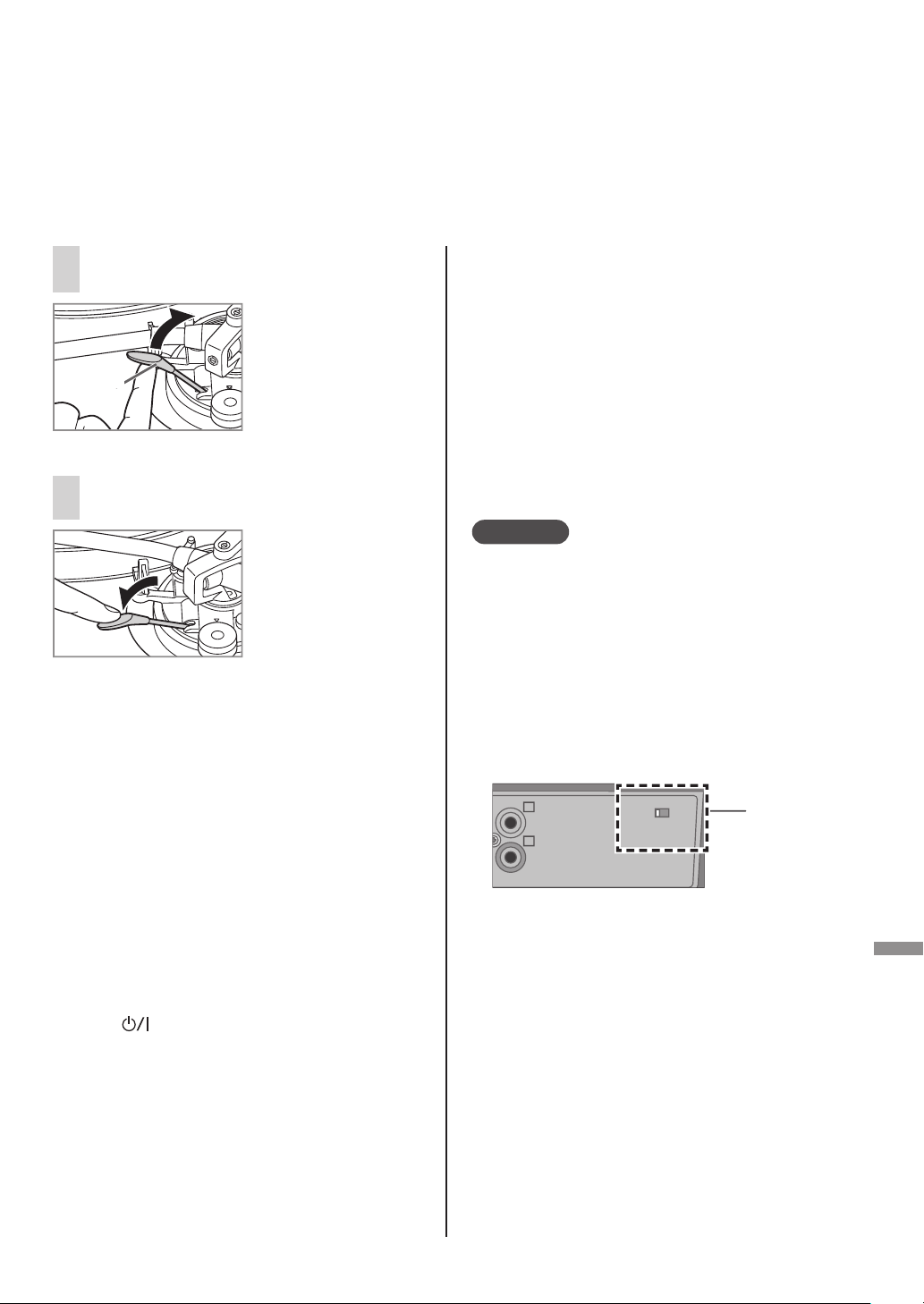
3
Lift the cue lever and move the
tone arm over the record.
Cue lever
19
To temporarily stop play
Lift the cue lever.
The stylus lifts off the record.
To start play again, lower the cue lever.
When play finishes
After lifting the cue lever to return the tone
arm to the arm rest, lower it completely.
Press [START-STOP].
The electronic brake gently stops the
turntable.
Press [ ] to turn the unit off.
Clamp the tone arm with the arm clamp.
Put the stylus cover back on (to protect the
stylus tip).
When playing EP records
Press the speed select button [45]
([45] lights).
Fit the EP record adaptor over the center
spindle.
When playing SP (78 rpm) records
Press the speed select buttons [33] and [45]
at the same time (78 rpm: [33] and [45]
light).
When using a record stabilizer
(not included)
See the instruction manual of the record
stabilizer.
Maximum weight: 1 k
g
Auto lift-up function
This function automatically lifts up the tone arm
after a record finishes playing. It prevents the
last groove from playing back repeatedly.
(It does not stop the turntable rotation.)
This function requires the following setting to
become active.
Setting: With the unit turned off, set the auto
lift-up switch on the rear side to “ON”.
(The factory setting is “ON”.)
After an auto lift-up, be sure to perform the
steps
to
described above in “When play
finishes”.
Attention
Depending on the record, it may take some
time (approximately 60 seconds) after the
play finishes for the auto lift-up to operate, or
it may operate while the record is still playing.
If the tone arm is lifted during play, set the
auto lift-up switch to “OFF”.
The auto lift-up function may not operate
normally. For the auto lift-up function to operate
normally, the cue lever must be completely
lowered after the tone arm is returned to the
arm rest following the end of play.
Auto lift-up
switch
ラヰワヰチヰヶヵ
ロ
ン
モヶヵヰチロリョヵチヶヱ
ヰョョ ヰワ
SL-100CPP.indb19SL-100CPP.indb19 2022/03/2815:22:462022/03/2815:22:46
English
(20)
Maintenance
Cleaning the dust cover and
cabinet
Wipe the dust cover and cabinet with a soft
cloth.
Do not touch the board while cleaning.
Otherwise, the player may fail.
When dirt is heavy, wring a wet cloth tightly to
wipe the dirt, and then wipe it with a soft cloth.
Do not use solvents including benzene,
thinner, alcohol, kitchen detergent, a
chemical wiper, etc. This might cause the
exterior case to be deformed or the coating
to come off.
Do not wipe the dust cover when it is in
place. Doing so may cause the tone arm to
be attracted towards the dust cover as a
result of the generated static electricity.
Be sure the dust cover is removed while
playing a record.
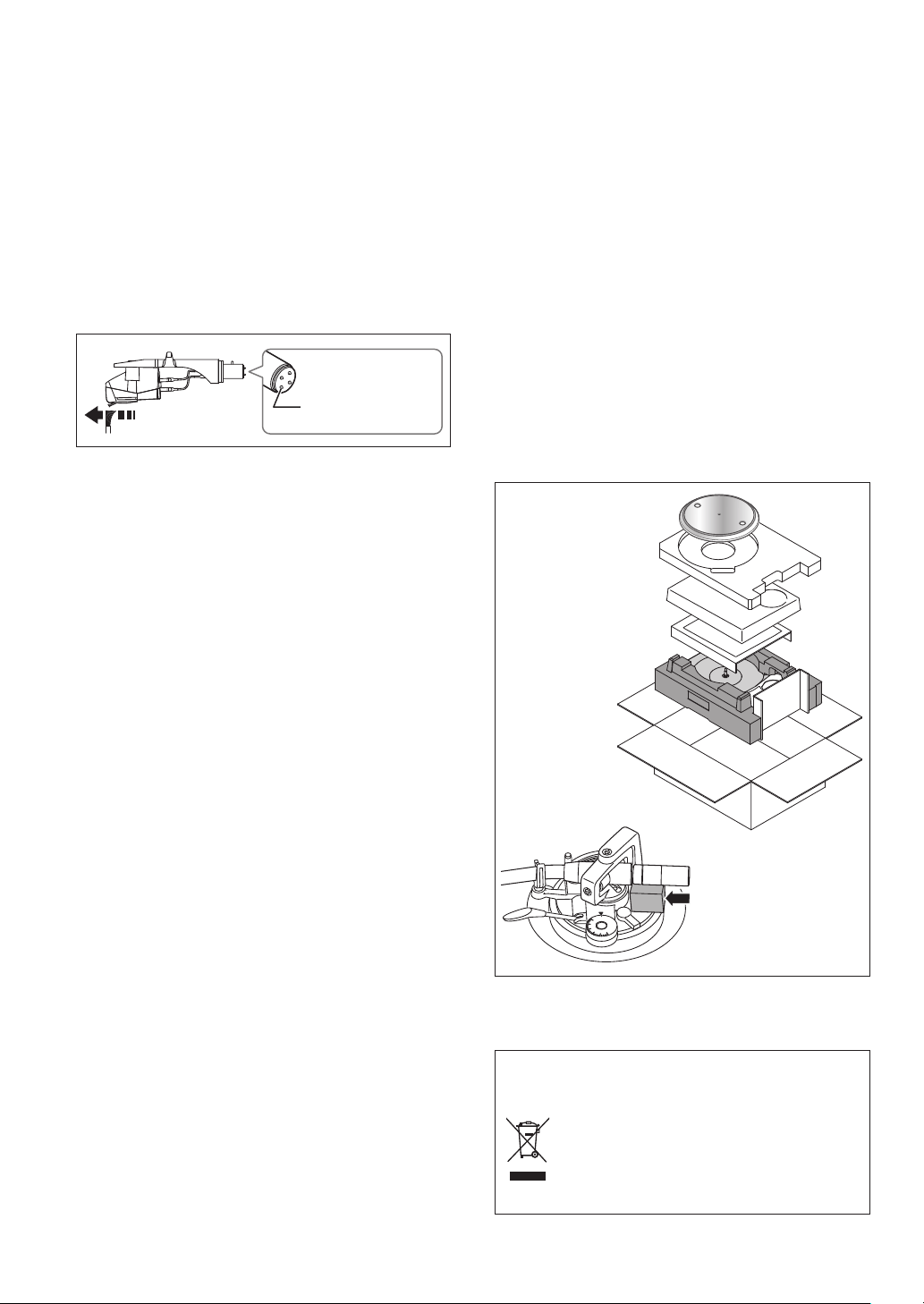
Moving the unit
Repackage the unit in the packaging it came
in.
Keep the packaging materials after taking out
the goods.
If you no longer have the packaging, do the
following:
Take off the turntable and turntable mat and
carefully wrap them.
Remove the head shell and balance weight
from the tone arm and carefully wrap them.
Clamp the tone arm with the arm clamp and
tape it in place.
Carefully wrap the main unit in a blanket or
paper.
WEEE symbol
Disposal of the product outside the EU
countries
This symbol is valid within the EU
only.
Contact a local governmental office
or your dealer to confirm a right
manner of disposal.
20
Before repackaging,
remove the balance
weight and insert the
tone arm support
under the tone arm.
Repackaging
0
1
3
2
Care of the parts
Thoroughly clean dust off the stylus and
record.
Take off the head shell with the cartridge and
clean the stylus using a soft brush.
Brush from the base to the tip.
Use a record cleaner to keep your records
clean.
Head shell
terminals
Wipe the head shell terminals occasionally.
Wipe the head shell terminals with a soft cloth
and fit the head shell to the tone arm.
Turn the amplifier volume down or turn the
amplifier off before fitting or removing the
head shell.
Damage to your speakers can occur if the head
shell is moved while the volume is turned up.
SL-100CPP.indb20SL-100CPP.indb20 2022/03/2815:22:472022/03/2815:22:47
Maintenance
English
(21)
21
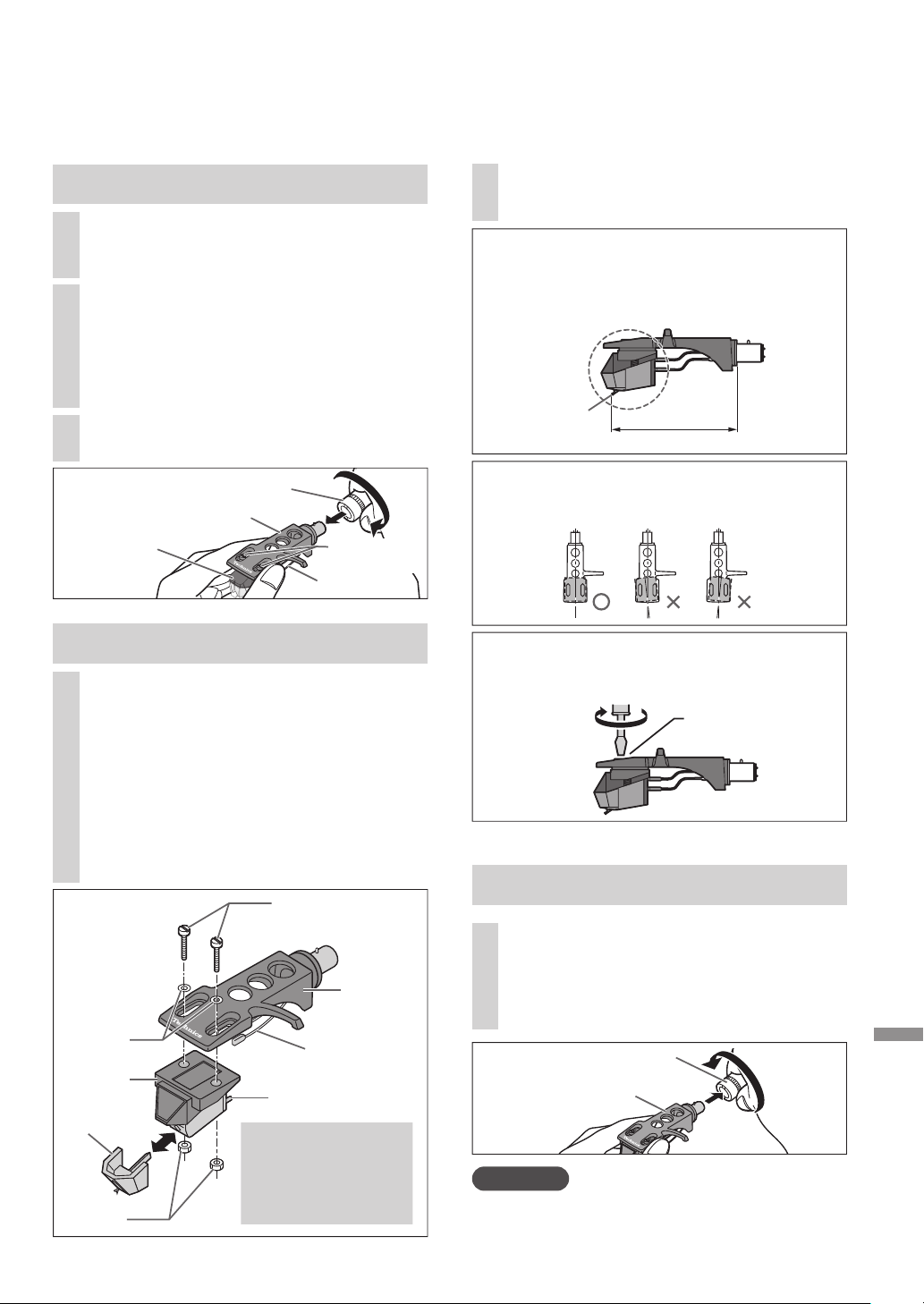
Replacing the cartridge
1
Attach a cartridge tentatively.
Follow the instructions of the replacement
cartridge to correctly attach it to the head
shell, and tighten the screws lightly.
If the mounting screws are included in
the cartridge, use them.
When playing SP records, use a cartridge
for SP records.
Use a commercially available mini flat
screwdriver (4 mm
[
5
/
32
“]
).
Be careful not to touch the stylus tip.
Attaching the cartridge
Removing the supplied cartridge
Screw for
cartridge
Head
shell
Lead wire
Nuts
Washers
The cartridge can be replaced with one of your preference.
Terminal
(Example)
Stylus
2
Loosen the cartridge mounting
screws to remove the supplied
cartridge from the head shell.
Use a commercially available mini flat
screwdriver (4 mm
[
5
/
32
“]
).
Be careful not to touch the stylus tip.
1
Attach the stylus cover (
18) and
loosen the locking nut to remove
the tone arm from the head shell.
3
Remove the leads from the terminals.
Be careful not to cut the leads.
Cartridge
Tighten the screw for cartridge.
The cartridge should be parallel on the shell
head when viewed from the top
and side (the illustration is the top view).
Screw for cartridge
Be careful not to allow the cartridge to
slip out of place.
Attaching the head shell
3
Fit the head shell with the
cartridge into the tone arm.
Keep the head shell horizontal
and tighten the locking nut.
Be careful not to touch the stylus tip.
Locking nut
Head shell
2
Adjust the overhang.
Be careful not to touch the stylus tip.
Move the cartridge to adjust the overhang
in such a way that the stylus tip is at
52 mm (2-
3
/
64
“) from the head shell
mounting end, as shown in the figure
below.
52 mm
Stylus tip
Attention
Store the removed screws, washers and nuts in
such a way that they do not get lost.
(2-
3
/
64
“
)
Lead wire
Locking nut
Head shell
Cartridge
Screw for
cartridge
(Lead wire) (Terminal)
Red
R+(Red)
Green
R- (Green)
White
L+ (White)
Blue
L- (Blue)
SL-100CPP.indb21SL-100CPP.indb21 2022/03/2815:22:472022/03/2815:22:47

English
(22)
22
Troubleshooting guide
Before requesting service, make the below checks. If you are in doubt about some of the check
points, or if the remedies indicated in the chart do not solve the problem, contact your dealer.
No power.
Is the AC power supply cord plugged in?
Plug the AC power supply cord in firmly. (
12)
There is power but no sound.
Sound is weak.
Are connections to the amplifier/receiver’s PHONO terminals correct?
Connect the PHONO cables to the amplifier’s PHONO input terminals. (
12)
Left and right sounds are reversed.
Are the stereo connection cable connections to the amplifier or receiver reversed?
Double check all connections. (
12)
Are connections of the head shell’s lead wires to the cartridge terminals correct?
Double check all connections. (
21)
Humming is heard during play.
Are there other appliances or their AC power supply cord near the stereo connection cable?
Separate the appliances and their AC power supply cord from this unit.
Is the earth lead connected?
Make sure the earth lead is correctly connected. (
12)
The indicator on the speed select button [33] or [45] blinks.
Perform the following operations when the indicator on the speed select button [33] or [45] blinks.
The symptom may be improved.
Press [ ] to OFF.
Pull out the power plug, wait for three seconds or more, and then insert the plug again.
Press [ ] to turn the unit on and press [START-STOP] to rotate the turntable.
If the indicator on the speed select button blinks again, check which one is blinking and contact our
service representative.
SL-100CPP.indb22SL-100CPP.indb22 2022/03/2815:22:482022/03/2815:22:48
Maintenance
English
(23)
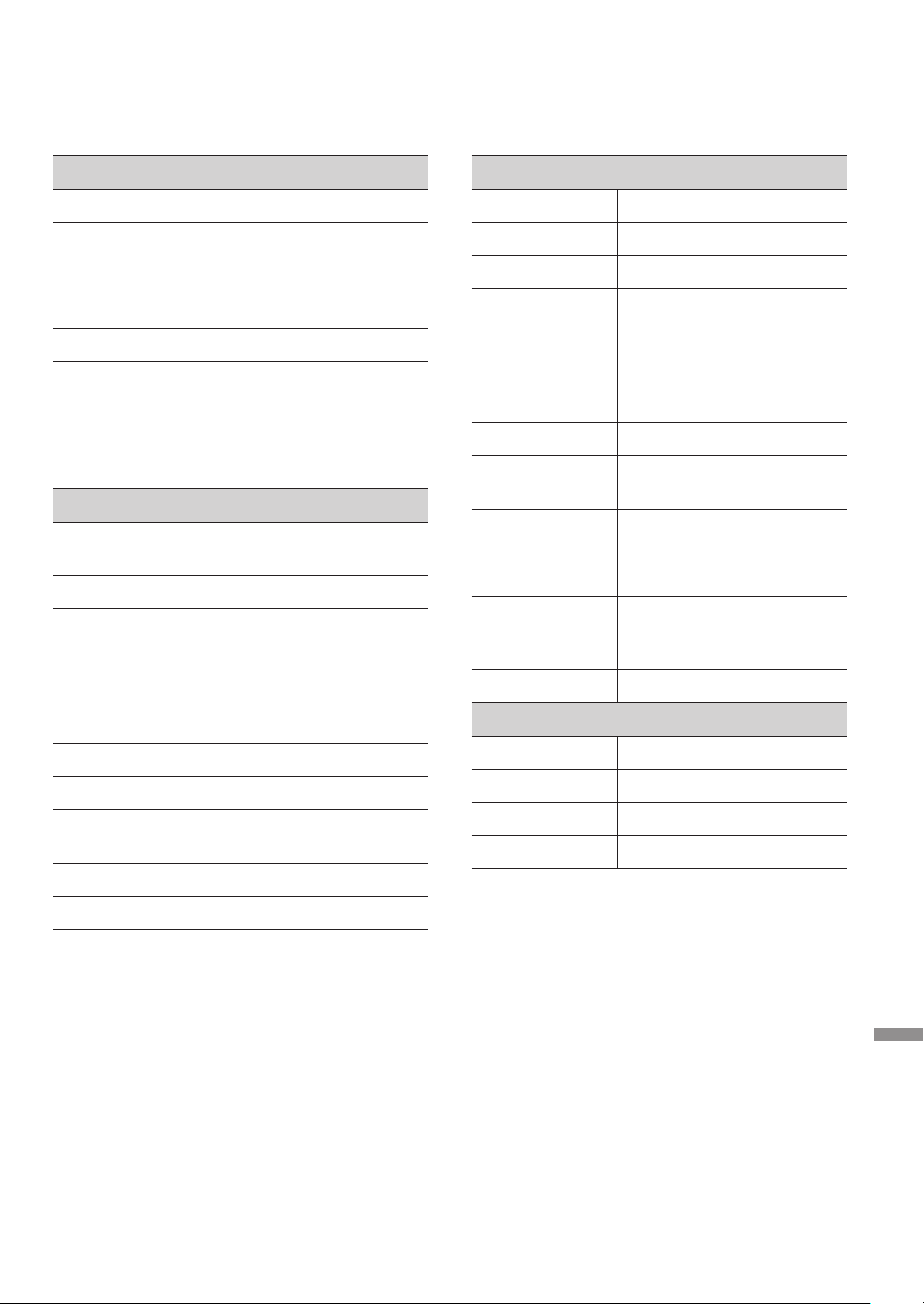
Specifications
General
Power supply AC 120 V, 60 Hz
Power
consumption
8.0 W (Power ON)
Approx. 0.2 W (Power OFF)
Dimensions
(W×H×D)
453 x 169 x 372 mm
(17-
27
/
32
“ × 6-
21
/
32
“ × 14-
21
/
32
“)
Mass Approx. 9.9 k
g
(21.9 lbs
)
Operating
temperature
range
0 °C to +40 °C
Operating
humidity range
35 % to 80 % RH
(no condensation)
Turntable section
Drive method Direct drive manual
turntable
Motor Brushless DC motor
Turntable platter Aluminum diecast
Diameter: 332 mm
(13-
5
/
64
“ inch)
Weight: About 2.0 k
g
(4.5 lbs
)
(including rubber sheet)
Turntable speeds 33-
1
/
3
rpm, 45 rpm, 78 rpm
Starting torque 1.8 k
g
·cm (1.56 lbs-in)
Build-up
characteristics
0.7 s. from standstill to
33-
1
/
3
rpm
Braking system Electronic brake
Wow and flutter 0.025 % W.R.M.S.
Tone arm section
Type Static Balance
Effective length 230 mm (9-
1
/
16
“)
Overhang 15 mm (
19
/
32
“)
Tracking error
angle
Within 2° 32’
(at the outer groove of
30 cm (12“) record)
Within 0° 32’
(at the inner groove of
30 cm (12“) record)
Offset angle 22°
Arm-height
adjustment range
0 – 6 mm (0 -
15
/
64
“)
Stylus pressure
adjustment range
0 – 4
g
(direct reading)
Head shell weight Approx. 7.6
g
Applicable
cartridge weight
range
5.6 – 12.0
g
14.3 – 20.7
g
(including the head shell)
Shell terminal ø1.2 mm 4 pin terminal
Cartridge section
Type VM type
Output voltage 4.0 mV (1 kHz, 5 cm/sec.)
Mass 6.1
g
Stylus pressure 1.8 to 2.2
g
(2.0
g
standard)
Specifications are subject to change without
notice.
23
SL-100CPP.indb23SL-100CPP.indb23 2022/03/2815:22:482022/03/2815:22:48
English
(24)
24
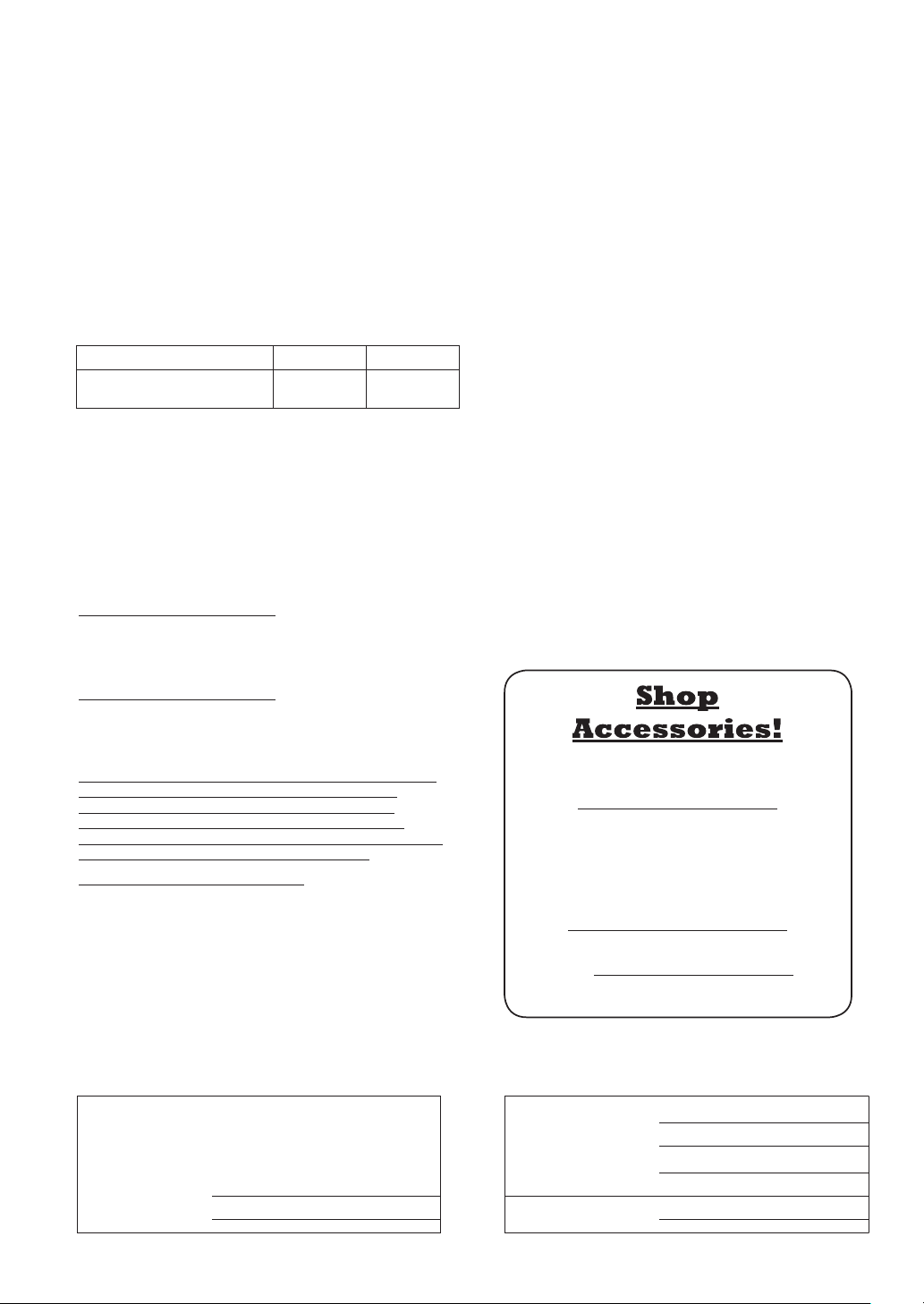
Limited Warranty (ONLY FOR U.S.A.)
Technics Products – Limited Warranty
Limited Warranty Coverage
(For USA Only)
SL-100C
Product or Part Name
Parts Labor
Technics Turntable System
(SL-100C)
2(two)years 2(two)years
If your product does not work properly because of a defect in materials
or workmanship, Panasonic Corporation of North America (referred to
as “the warrantor”) will, for the length of the period indicated on the
chart below, which starts with the date of original purchase (“warranty
period”), at its option either (a) repair your product with new or
refurbished parts, (b) replace it with a new or a refurbished equivalent
v
alue product, or (c) refund your purc
hase price. The decision to repair,
replace or refund will be made by the warrantor.
During the “Labor” warranty period there will be no charge for
labor. During the “Parts” warranty period, there will be no charge
for parts. This Limited Warranty excludes both parts and labor for
non-rechargeable batteries, antennas, and cosmetic parts
(cabinet). This warranty only applies to products purchased and
serviced in the United States. This warranty is extended only to the
original purchaser of a new product which was not sold “as is”.
Mail-In Service--Online Repair Request
Online Repair Request
To submit a new repair request and for quick repair status visit our
Web Site at
http://shop.panasonic.com/support
When shipping the unit, carefully pack, include all supplied
accessories listed in the Owner’s Manual, and send it prepaid,
adequately insured and packed well in a carton box. When
shipping Lithium Ion batteries please visit our Web Site at
http://shop.panasonic.com/support
as Panasonic is committed to
providing the most up to date information. Include a letter
detailing the complaint, a return address and provide a daytime
phone number where you can be reached. A valid registered
receipt is required under the Limited Warranty.
IF REPAIR IS NEEDED DURING THE WARRANTY PERIOD, THE
PURCHASER WILL BE REQUIRED TO FURNISH A SALES
RECEIPT/PROOF OF PURCHASE INDICATING DATE OF
PURCHASE, AMOUNT PAID AND PLACE OF PURCHASE.
CUSTOMER WILL BE CHARGED FOR THE REPAIR OF ANY UNIT
RECEIVED WITHOUT SUCH PROOF OF PURCHASE.
Limited Warranty Limits and Exclusions
This warranty ONLY COVERS failures due to defects in materials or
workmanship, and DOES NOT COVER normal wear and tear or
cosmetic damage. The warranty ALSO DOES NOT COVER damages
which occurred in shipment, or failures which are caused by products
not supplied by the warrantor, or failures which result from accidents,
misuse, abuse, neglect, mishandling, misapplication, alteration,
f
aulty installation, set-up adjustments, misadjustment of consumer
controls, improper maintenance, power line surge, lightning damage,
modification,introduction of sand, humidity or liquids, commercial use
such as hotel, office, restaurant, or other business or rental use of
t
he product, or service by anyone other than a Factory Service Center
or other Authorized Servicer, or damage that is attributable to acts
of God.
THERE ARE NO EXPRESS WARRANTIES EXCEPT AS LISTED
UNDER “LIMITED WARRANTY COVERAGE”.
THE WARRANTOR IS NOT LIABLE FOR INCIDENTAL OR
CONSEQUENTIAL DAMAGES RESULTING FROM THE USE OF
THIS PRODUCT, OR ARISING OUT OF ANY BREACH OF THIS
W
ARRANTY.
(As examples, this excludes damages for lost time, travel to and
from the servicer, loss of or damage to media or images, data or
other memory or recorded content. The items listed are not
exclusive, but
for illustration only.)
ALL EXPRESS AND IMPLIED WARRANTIES, INCLUDING THE
WARRANTY OF MERCHANTABILITY, ARE LIMITED TO THE
PERIOD OF THE LIMITED WARRANTY.
Some states do not allow the exclusion or limitation of incidental
or consequential damages, or limitations on how long an implied
warranty lasts, so the exclusions may not apply to you.
This warranty gives you specific legal rights and you may also have
other rights which vary from state t
o state. If a problem with this
product develops during or after the warranty period, you may
contact your dealer or Service Center. If the problem is not handled
to your satisfaction, then write to:
Panasonic Corporation of North America
Consumer Affairs Department 8th Fl.
Two Riverfront Plaza
Newark NJ 07102-5490
PARTS AND SERVICE, WHICH ARE NOT COVERED BY THIS
LIMITED WARRANTY, ARE YOUR RESPONSIBILITY.
for all your Technics gear
Go to
http://shop.panasonic.com/support
Get everything you need to get the most out of
your Technics products
Accessories & Parts for your Camera, Phone, A/V
products, TV, Computers & Networking, Personal
Care, Home Appliances, Headphones, Batteries,
Backup Chargers & more…
Customer Services Directory
For Product Information, Operating Assistance,
Parts, Owner’s Manuals, Dealer and Service info
go to http://shop.panasonic.com/support
For the hearing or speech impaired TTY: 1- 877-833-8855
User memo:
The model number and serial number of this product can
be found on either the back or the bottom of the unit.
Please note them in the space provided below and keep
for future reference.
DATE OF PURCHASE
DEALER NAME
DEALER ADDRESS
MODEL NUMBER
REBMUN ENOHPELET
REBMUN LAIRES
Product registration is not mandatory. Failure to complete the
form does not affect the consumer's warranty rights.
As of April 2022
SL-100CPP.indb24SL-100CPP.indb24 2022/03/2815:22:482022/03/2815:22:48

Maintenance
English
(25)
25
Limited Warranty (ONLY FOR CANADA)
Panasonic Canada Inc.
5770 Ambler Drive, Mississauga, Ontario L4W 2T3
TECHNICS PRODUCT - LIMITED WARRANTY
Technics Turntable System
(SL-100C)
2 (two) years parts and labour
Panasonic Canada Inc. warrants this product to be free from defects in material and workmanship under normal use and for
a period as stated below from the date of original purchase agrees to, at its option either (a) repair your product with new or
refurbished parts, (b) replace it with a new or a refurbished equivalent value product, or (c) refund your purchase price.
T
he decision to repair, replace or refund will be made by Panasonic Canada Inc.
This warranty is given only to the original purchaser, or the person for whom it was purchased as a gift, of a Technics brand
product mentioned above sold by an authorized Panasonic dealer in Canada and purchased and used in Canada, which
product was not sold “as is”, and which product was delivered to you in new condition in the original packaging.
IN ORDER TO BE ELIGIBLE TO RECEIVE WARRANTY SERVICE HEREUNDER, A PURCHASE RECEIPT OR OTHER PROOF
OF DATE OF ORIGINAL PURCHASE, SHOWING AMOUNT PAID AND PLACE OF PURCHASE
IS REQUIRED
LIMITATIONS AND EXCLUSIONS
This warranty ONLY COVERS failures due to defects in materials or workmanship, and DOES NOT COVER normal wear and
tear or cosmetic damage. The warranty ALSO DOES NOT COVER damages which occurred in shipment, or failures which are
caused by products not supplied by Panasonic Canada Inc., or failures which result from accidents, misuse, abuse, neglect,
mishandling, misapplication, alteration, faulty installation, set-up adjustments, misadjustment of consumer controls,
improper maintenance, power line surge, lightning damage, modification, introduction of sand, humidity or liquids,
commercial use such as hotel, office, restaurant, or other business or rental use of the product, or service by anyone other
than an Authorized Servicer, or damage that is attributable to acts of God.
Dry cell batteries are also excluded from coverage under this warranty.
T
HIS EXPRESS, LIMITED WARRANTY IS IN LIEU OF ALL OTHER WARRANTIES, EXPRESS OR IMPLIED, INCLUDING ANY
IMPLIED WARRANTIES OF MERCHANTABILITY AND FITNESS FOR A PARTICULAR PURPOSE. IN NO EVENT WILL
PANASONIC CANADA INC. BE LIABLE FOR ANY SPECIAL, INDIRECT OR CONSEQUENTIAL DAMAGES RESULTING FROM
THE USE OF THIS PRODUCT OR ARISING OUT OF ANY BREACH OF ANY EXPRESS OR IMPLIED WARRANTY. (As examples,
this warranty excludes damages for lost time, travel to and from the Authorized Servicer, loss of or damage to media or
images, data or other m
emory or recorded content. This list of items is not exhaustive, but for illustration only.)
In certain instances, some jurisdictions do not allow the exclusion or limitation of incidental or consequential damages, or
the exclusion of implied warranties, so the above limitations and exclusions may not be applicable. This warranty gives you
specific legal rights and you may have other rights which vary depending on your province or territory.
WARRANTY SERVICE
For product operation, repairs and information assistance, please visit our Support page on:
www.panasonic.ca/english/support
IF YOU SHIP THE PRODUCT TO A SERVICENTRE
Carefully pack and send prepaid, adequately insured and preferably in the original carton.
Include details of the defect claimed, and proof of date of original purchase.
SL-100CPP.indb25SL-100CPP.indb25 2022/03/2815:22:502022/03/2815:22:50

Français
(
Canada
)
(26)
02
Caractéristiques
Introduction
Nous vous remercions d’avoir arrêté votre choix sur cet appareil. Veuillez lire attentivement ces instructions avant
d’utiliser ce produit et conservez ce manuel pour une utilisation future.
À propos des descriptions dans ce manuel d’utilisation
- Les pages auxquelles se reporter sont indiquées comme suit « (
00) ».
- Les illustrations présentées peuvent différer de votre tourne-disque.
Moteur à entraînement direct
sans noyau pour une précision et
une fiabilité élevées, ainsi qu’une
rotation stable
Une rotation stable est obtenue avec le
moteur à entraînement direct sans noyau
qui réduit les vibrations infimes lors de
la rotation combiné à la technologie de
commande du moteur qui commute le
mode d’entraînement selon l’état de
fonctionnement du moteur.
En plus de fournir des performances
supérieures, le moteur à entraînement direct
ne nécessite aucun remplacement de pièces
ou de maintenance.
Roulements de haute précision
pour bras de lecture hautement
sensible
Le roulement de haute précision usiné qui
est utilisé dans le roulement du bras de
lecture avec suspension à cardan permet une
sensibilité de réponse initiale élevée et un
suivi précis des enregistrements.
Fonction de levage automatique
pour lever le bras de lecture
Cet appareil est équipé d’une fonction de
levage automatique pour lever le bras de
lecture lorsque la lecture du disque est
terminée.
Ensemble complet, incluant les
éléments ci-après, pour une écoute
agréable des disques
Cellule type VM de haute qualité.
SL-100CPP.indb26SL-100CPP.indb26 2022/03/2815:22:502022/03/2815:22:50

Avant toute
utilisation
Démarrage Lecture Entretien
Français
(
Canada
)
(27)
03
Table des matières
Avant toute utilisation
IMPORTANTES MISES EN GARDE ........................................ 04
Accessoires ......................................................................... 06
Nom des pièces ................................................................... 08
Démarrage
Assemblage du tourne-disque ............................................. 10
Avant la mise en place du plateau .......................... 11
Mise en place du plateau ........................................ 11
Mise en place du tapis du plateau ........................... 11
Mise en place de la coquille .................................... 11
Mise en place du contrepoids ................................. 11
Retrait du plateau .................................................. 11
Raccordements et installation .............................................. 12
Connexion à un amplificateur ou
un système à composants ...................................... 12
Installation ............................................................. 13
Mise en place du couvercle ..................................... 13
Réglage .............................................................................. 14
Équilibrage horizontal ............................................. 14
Force d’appui de la pointe de lecture ...................... 14
Antipatinage .......................................................... 15
Hauteur du bras de lecture ..................................... 16
Hauteur du lève-bras .............................................. 17
Lecture
Lecture de disques .............................................................. 18
Entretien
Entretien ............................................................................. 20
Remplacement de la cellule ................................................. 21
Guide de dépannage ........................................................... 22
Spécifications ...................................................................... 23
Certificat de garantie limitée
(CANADA SEULEMENT)....................................................... 24
SL-100CPP.indb27SL-100CPP.indb27 2022/03/2815:22:502022/03/2815:22:50

Français
(
Canada
)
(28)
04
IMPORTANTES MISES EN GARDE
AVERTISSEMENT
ATTENTION
Cordon d’alimentation c.a.
La fiche d’alimentation permet de déconnecter
l’appareil. L’appareil doit être installé à proximité d’une
prise secteur facile d’accès.
Assurez-vous que la lame pour la mise à la terre est
insérée bien à fond afin de prévenir tout choc électrique.
- Un appareil de classe 1 peut être branché dans une
prise secteur avec une protection pour mise à la terre.
Appareil
Pour réduire les risques d’incendie, de choc électrique ou
de dommages à l’appareil,
- N’exposez pas cet appareil à la pluie, à l’humidité, à
l’égouttement ou aux éclaboussements.
- Ne placez sur l’appareil aucun objet rempli de liquide,
comme par exemple des vases.
- Utilisez exclusivement les accessoires recommandés.
- Ne retirez pas les couvercles.
- Toute réparation doit être faite par un personnel
qualifié et non par l’usager.
Avant d’utiliser l’appareil, lire attentivement les instructions
qui suivent. Se conformer tout particulièrement aux
avertissements inscrits sur l’appareil et aux consignes de
sécurité indiquées ci-dessous. Conserver le présent manuel
pour consultation ultérieure.
1 Lire attentivement ces instructions.
2 Conserver ces instructions.
3 Lire toutes les mises en garde.
4 Suivre toutes les instructions.
5 Ne pas utiliser cet appareil près d’une source d’eau.
6 Ne nettoyer qu’avec un chiffon sec.
7 Ne pas bloquer les évents d’aération. Installer l’appareil
selon les instructions du fabricant.
8 Ne pas installer l’appareil près d’un appareil de
chauffage tel qu’un radiateur, une cuisinière, un registre
de chaleur ou tout dispositif émettant de la chaleur (y
compris un amplificateur).
9 Pour des raisons de sécurité, ne pas modifier la fiche
polarisée ou celle de mise à la terre. Une fiche polarisée
est une fiche à deux lames, dont une plus large. Une
fiche de mise à la terre est une fiche à deux lames avec
une broche de masse. La lame plus large ou la broche
de masse procure une protection accrue. Si ce genre
de fiche ne peut être inséré dans une prise de courant,
communiquer avec un électricien pour remplacer la
prise.
10 S’assurer que le cordon est placé dans un endroit
où il ne risque pas d’être écrasé, piétiné ou coincé.
Faire particulièrement attention à ses extrémités de
branchement, y compris sa fiche.
11 N’utiliser que les accessoires ou périphériques
recommandés par le fabricant.
12 N’utiliser l’appareil qu’avec un chariot,
meuble, trépied, support ou table
recommandé par le fabricant ou vendu
avec l’appareil. Lors de l’utilisation
d’un chariot, le déplacer avec le plus
grand soin afin d’éviter tout dommage.
13 Débrancher cet appareil lors d’un orage ou en cas de
non-utilisation prolongée.
14 Confier l’appareil à un technicien qualifié pour
toute réparation : cordon d’alimentation ou fiche
endommagé, liquide renversé ou objet tombé dans
l’appareil, exposition à la pluie ou à une humidité
excessive, mauvais fonctionnement ou échappement de
l’appareil.
Appareil
Ne placer sur l’appareil aucune source de flamme nue,
telles des bougies allumées.
Emplacement
Pour réduire les risques d’incendie, de choc électrique ou
de dommages à l’appareil,
- Ne pas installer cet appareil dans une bibliothèque, une
armoire ou tout autre espace confiné.
S’assurer que la ventilation de l’appareil est adéquate.
- Ne pas obstruer les évents d’aération de l’appareil avec
des journaux, des nappes, des rideaux ou d’autres
objets similaires.
Installer les enceintes à au moins 10 mm (
13
/
32
po) de
l’appareil pour assurer une ventilation adéquate.
Maintenir toute carte IC ou carte magnétique telle
qu’une carte de crédit éloignée du plateau.
- Sinon, la carte IC ou la carte magnétique peut devenir
inutilisable en raison de l’effet magnétique.
SL-100CPP.indb28SL-100CPP.indb28 2022/03/2815:22:502022/03/2815:22:50
Avant toute
utilisation
Français
(
Canada
)
(29)
05
Conforme à la norme CAN/CSA STD C22.2 No.62368-1.
CE QUI SUIT NE S’APPLIQUE QU’AU CANADA.
CAN ICES-3(B)/NMB-3(B)
Le symbole de l’éclair dans un triangle équilatéral
indique la présence d’une tension suffisamment
élevée pour engendrer un risque de chocs
électriques.
AVIS: AFIN DE PRÉVENIR LE RISQUE DE CHOCS
ÉLECTRIQUES, NE PAS RETIRER LES VIS.
CONFIER TOUTE RÉPARATION
À UN TECHNICIEN QUALIFIÉ.
Le point d’exclamation dans un triangle équilatéral indique
que le manuel d’utilisation inclus avec l’appareil contient
d’importantes recommandations quant au fonctionnement
et à l’entretien de ce dernier.
RISQUE DE CHOC ÉLECTRIQUE
NE PAS OUVRIR
AVIS
Information sur la mise au rebut dans
les pays n’appartenant pas à l’Union
européenne
Ce symbole est uniquement valide dans
l’Union européenne.
Si vous désirez mettre ce produit au rebut,
contactez l’administration locale ou le
revendeur et informez-vous de la bonne
façon de procéder.
La marque et le symbole suivants sont situés
sous le fond de l’appareil.
SL-100CPP.indb29SL-100CPP.indb29 2022/03/2815:22:502022/03/2815:22:50
Français
(
Canada
)
(30)
06
Accessoires
Dans le but de prévenir tout risque de dommages pendant l’expédition, le tourne-disque a été
démonté. Vérifiez la présence et l’état des pièces et accessoires suivants.
(Certaines pièces sont fournies dans un sac.)
Plateau (1 pc.)
(TYL0422)
Tapis du plateau (1 pc.)
(TEFX5019)
Couvercle (1 pc.)
(TTFA0457)
Adaptateur pour 45 tours
prolongé (1 pc.)
(TPH0339)
Contrepoids (1 pc.)
(TYL0361)
Coquille avec cellule
(1 pc.) (TYL0576)
La coquille est livrée avec une
cellule équivalente à
« Audio-Technica AT-VM95C ».
Câble PHONO (1pc.)
Fil de terre PHONO (1 pc.)
(TAQ0036)
Cordon d’alimentation (1 pc.)
(K2CG3YY00219)
SL-100CPP.indb30SL-100CPP.indb30 2022/03/2815:22:512022/03/2815:22:51

Avant toute
utilisation
Français
(
Canada
)
(31)
07
Les numéros de modèle des accessoires datent d'avril 2022.
Ils sont sujets à changements sans préavis.
Conservez les matériaux d’emballage après avoir sorti les marchandises.
Vous en aurez besoin lors du transport du produit sur une longue distance.
Suivez les règlements locaux concernant la mise au rebut du produit.
N’utilisez aucun autre cordon d’alimentation, câble PHONO et fil de terre PHONO à l’exception de
ceux fournis.
Conservez la coquille avec cellule et le adaptateur pour 45 tours prolongé hors de portée des
enfants pour éviter toute ingestion.
La pointe de lecture est un article consommable.
Lors du remplacement, achetez une pointe de lecture « Audio-Technica AT-VMN95C ».
SL-100CPP.indb31SL-100CPP.indb31 2022/03/2815:22:512022/03/2815:22:51
Français
(
Canada
)
(32)
08
Avant
Nom des pièces
Contrepoids (
11)
Commande de la force
d’appui de la pointe de
lecture (
14)
Verrou du bras
(
16)
Dispositif de réglage
de la hauteur du bras
(
16)
Commande
antipatinage
(
15)
Agrafe du bras (
14)
Reposoir (
14)
Sélecteurs de vitesse (
18)
Plateau (
10)
Isolant (
13)
Touche de marche/arrêt de la
rotation [START/STOP] (
18)
Les numéros tels que (
00) indiquent les pages de référence.
Levier de positionnement
du bras
(
14,19)
Tapis du plateau (
10)
Cellule (
6,18,21)
Pointe de lecture (
6,18,21)
Interrupteur [ON/OFF]
(alimentation)
] (
18)
Axe central (
10)
Coquille (
11,21)
Écrou de blocage (
11,21)
Bras de lecture (
14,16)
SL-100CPP.indb32SL-100CPP.indb32 2022/03/2815:22:522022/03/2815:22:52
Avant toute
utilisation
Français
(
Canada
)
(33)
Français
(
Canada
)
(33)
09
Arrière
ヱラヰワヰ
ユモンヵラ
ヱラヰワヰチヰヶヵ
ロ
ン
モヶヵヰチロリョヵチヶヱ
ヰョョ ヰワ
Connecteur de mise à la terre PHONO
(
12)
Connecteur d’entrée c.a.
( )
(
12)
Connecteur de sortie PHONO
(
12)
Pièces de fixation du couvercle (
13)
Interrupteur de levage automatique (
19)
SL-100CPP.indb33SL-100CPP.indb33 2022/03/2815:22:522022/03/2815:22:52
Français
(
Canada
)
(34)
10
Assemblage du tourne-disque
Dans le but de prévenir tout risque de dommages pendant l’expédition, le tourne-disque a été démonté.
Assemblez le tourne-disque dans l’ordre suivant.
Avant la mise en place, installez la protection sur la pointe de lecture pour protéger son extrémité
(
18), replacez le bras de lecture sur le reposoir et bloquez-le avec l’agrafe du bras.
Ne branchez pas le cordon d’alimentation avant d’avoir terminé l’assemblage.
Lors de la mise en place du plateau, empêchez tout matériau étranger de pénétrer entre l’unité
principale et le plateau.
Ne touchez ou grattez pas la table.
Attention
Manipulez avec
précaution car il
est lourd.
Plateau
Axe central
Contrepoids
Tapis du plateau
Coquille
Table
SL-100CPP.indb34SL-100CPP.indb34 2022/03/2815:22:522022/03/2815:22:52
Démarrage
Français
(
Canada
)
(35)
11
Retrait du plateau
Comme le montre la figure de
droite, placez
les doigts dans
les deux trous
sur le plateau,
maintenez l’axe
central abaissé
et retirez le
plateau vers le haut.
Avant la mise en place du plateau
1
Retirez le couvercle aimanté du
plateau.
L’aimant et son couvercle se trouvent à
l’arrière du plateau.
Retirez le couvercle aimanté avant de le
fixer à l’unité principale.
Côté arrière du plateau
Couvercle
aimanté
Aimant
Vis de
fixation
Attention
Gardez tout objet magnétique sensible,
telle une carte magnétique ou une montre,
éloigné de l’aimant.
Empêchez le plateau de heurter l’unité
principale ou de tomber. Empêchez que de
la poussière ou de la poudre de fer adhère à
l’aimant sur la face arrière.
Ne touchez pas les vis de fixation (trois
emplacements) du plateau. La performance
nominale ne peut être garantie si elles ne
sont pas convenablement positionnées.
Mise en place du plateau
2
Fixez lentement le plateau sur
l’axe central.
Attention
Soyez prudent lorsque vous manipulez le
plateau, car il est lourd.
Veillez à ce que vos doigts ne restent pas
coincés.
Essuyez les traces de doigts ou la poussière
avec un chiffon doux.
Mise en place du tapis du plateau
3
Déposez le tapis du plateau sur le
plateau.
4
Fixez la coquille avec la cartouche
dans le bras de lecture.
Maintenez la coquille horizontale
et serrez l’écrou de blocage.
Veillez à ne pas toucher l’extrémité de la
pointe de lecture.
Mise en place de la coquille
Écrou de blocage
Coquille
Nota
L’intérieur du contrepoids est graissé.
Mise en place du contrepoids
5
Fixez le contrepoids à l’arrière du
bras de lecture.
Contrepoids
SL-100CPP.indb35SL-100CPP.indb35 2022/03/2815:22:522022/03/2815:22:52
Français
(
Canada
)
(36)
12
Mettez tous les appareils hors marche et débranchez le cordon d’alimentation de la prise avant
d’effectuer tout branchement.
Branchez les cordons d’alimentation seulement après avoir terminé tous les autres
raccordements.
Veillez à connecter le fil de terre PHONO. Sinon des ronflements peuvent se produire.
Consultez également le mode d’emploi de l’appareil connecté.
ヱラヰワヰ
ユモンヵラ
ヱラヰワヰチヰヶヵ
ロ
ン
モヶヵヰチロリョヵチヶヱ
ヰョョ ヰワ
ヱラヰワヰ
ユモンヵラ
ヱラヰワヰチヰヶヵ
ロ
ン
R
L
R
L
PHONO PHONO
EARTH
Raccordements et installation
Nota
Amplificateur (vendu séparément)
Cordon d’alimentation
Connexion à un amplificateur ou un système à composants
1
Mettez hors marche l’appareil
et l’équipement connecté, puis
débranchez le cordon d’alimentation
de la prise.
2
Connectez le câble PHONO et le fil
de terre PHONO aux connecteurs
d’entrée PHONO de l’équipement
connecté.
Si l’amplificateur connecté n’est pas
muni de connecteurs d’entrée PHONO,
vous n’obtiendrez ni le volume ni le
rendu sonore adéquat.
3
Branchez le cordon d’alimentation.
Vérifiez le courant minimal de la prise
d’alimentation de l’équipement connecté
avant d’y brancher cet appareil.
Pour connaître la consommation
électrique de cet appareil, consultez les
spécifications. (
23)
Connecteur de
sortie PHONO
Attention
Vissez le connecteur de mise à la terre PHONO à l’aide d’un tournevis cruciforme.
Arrière de l’appareil
Vers une prise
secteur
Fil de terre PHONO
Câble PHONO
Insérez le cordon
d’alimentation jusqu’à
un point juste avant le
trou rond.
Interrupteur veille/marche [
]
Appuyez pour faire passer l’appareil du mode veille au mode marche ou vice versa. En mode veille,
l’appareil consomme toujours une faible quantité d’énergie.
Retirez la fiche de la prise électrique principale si vous ne comptez pas utiliser l’appareil pendant
une longue période. Placez l’appareil de sorte que la prise puisse être facilement enlevée.
SL-100CPP.indb36SL-100CPP.indb36 2022/03/2815:22:532022/03/2815:22:53
Démarrage
Français
(
Canada
)
(37)
13
Installation
Installez le tourne-disque sur une surface de
niveau, à l’abri de toute vibration.
Éloignez le tourne-disque le plus loin possible
des enceintes.
Réglage de la hauteur pour mettre
le tourne-disque au niveau
Soulevez le tourne-disque pour tourner les
isolateurs et réglez la hauteur.
Dans le sens des aiguilles d’une montre :
Réduit la hauteur.
Dans le sens inverse des aiguilles d’une
montre : Augmente la hauteur.
Attention
Ne tournez pas trop loin les isolateurs.
Cela peut les amener à se détacher ou peut
les endommager.
Remarques pour l’installation
Avant de déplacer l’appareil, mettez-le hors
marche, débranchez la fiche et tous les
appareils connectés.
Protégez l’appareil contre les rayons directs
du soleil, la poussière, l’humidité et les
sources de chaleur.
Il est possible que l’appareil capte les
interférences d’une radio, s’il y en a une à
proximité. Éloignez le plus possible le tourne-
disque d’une radio.
N’installez pas le tourne-disque sur une
source de chaleur.
Évitez tout endroit présentant de grandes
variations de température.
Évitez tout endroit présentant fréquemment
de la condensation.
Évitez tout endroit instable.
Ne placez pas d’objet sur le tourne-disque.
N’installez pas le tourne-disque dans un
espace confiné tel qu’une étagère.
Installez le tourne-disque dans un
emplacement suffisamment éloigné des
murs ou d’autres dispositifs pour assurer
un rayonnement thermique efficace de
l’intérieur de l’appareil.
Assurez-vous que l’emplacement de
l’installation est suffisamment solide pour
supporter le poids total de l’unité et du
système. (
23)
Notez que le tourne-disque peut être
endommagé par la fumée de cigarette ou
l’humidité d’un humidificateur à ultrasons.
Condensation
Pensez à l’exemple d’une bouteille froide
sortie d’un réfrigérateur. Si elle est laissée
dans une pièce pendant un certain temps, de
la condensation se forme sur la surface de la
bouteille. Ce phénomène est appelé
« condensation ».
Conditions provoquant de la condensation
Changement rapide de température
(provoqué par un déplacement d’un endroit
chaud à un endroit froid ou vice versa, par un
refroidissement ou un chauffage rapide, ou
une exposition directe à l’air froid)
Une forte humidité dans une pièce avec
beaucoup de vapeur, etc.
Saison des pluies
La condensation peut endommager le
tourne-disque. Si cela se produit, mettez le
tourne-disque hors marche et attendez qu’il
s’adapte à la température ambiante (environ
2 à 3 heures).
Mise en place du couvercle
1
Maintenez le couvercle avec les
deux mains et insérez-le dans les
pièces de fixation du couvercle
(
09) sur le tourne-disque.
Pour retirer le couvercle, gardez-le ouvert
et soulevez-le à la verticale.
Attention
Ramenez le bras de lecture sur le reposoir et
fixez-le avec l’agrafe du bras avant d’installer
ou de retirer le couvercle.
Retirez le couvercle pendant la lecture.
En insérant le couvercle, évitez que
l’extrémité des charnières ne vienne heurter
et endommager l’unité principale.
Réduit la
hauteur
Augmente
la hauteur
SL-100CPP.indb37SL-100CPP.indb37 2022/03/2815:22:542022/03/2815:22:54
Français
(
Canada
)
(38)
14
1
Tournez la commande de la force
d’appui de la pointe de lecture
jusqu’à ce que « 0 » arrive sur la
ligne centrale de
l’arrière du bras
de lecture.
Tenez le contrepoids
pendant ce réglage.
Force d’appui de la pointe de lecture
Réglage
Tenez ici
pour
tourner
Commande d’antipatinage
Levier de
positionnement du bras
Reposoir
1
Libérez le bras de lecture du reposoir
et réglez l’équilibre horizontal en
tournant le contrepoids.
Maintenez le bras de lecture et tournez
le contrepoids dans le sens de la flèche
pour régler l’équilibre jusqu’à ce que le
bras soit horizontal le plus possible.
Prenez soin de ne pas
laisser l’extrémité de
la pointe de lecture
toucher le plateau ou
l’unité principale.
Contrepoids
Tenez
ici pour
tourner
Équilibrage horizontal
Préparatifs Préparatifs
Tout d'abord, retirez le couvercle.
Retirez le couvercle de la pointe de lecture
(
18), en prenant bien soin de ne pas
l’abîmer, puis dégagez l’agrafe du bras.
Abaissez le levier de positionnement du bras.
Mettez la commande d’antipatinage sur « 0 ».
Ramenez le bras sur le reposoir et fixez-le
avec l’agrafe du bras.
Le bras de lecture
équilibré est parallèle au
plateau.
Le contrepoids est trop
en avant.
Le contrepoids est trop
en arrière.
Pression de la pointe de lecture de la cellule
de lecture fournie: 1,8 - 2.2
g
(norme de 2,0
g
)
Si vous utilisez une cellule de lecture
vendue séparément, reportez-vous au guide
d’utilisateur de votre cellule de lecture pour la
pression de pointe de lecture appropriée.
Nota
Commande de la
force d’appui de la
pointe de lecture
Repère central
Contrepoids
Agrafe du bras
Agrafe du bras
SL-100CPP.indb38SL-100CPP.indb38 2022/03/2815:22:542022/03/2815:22:54
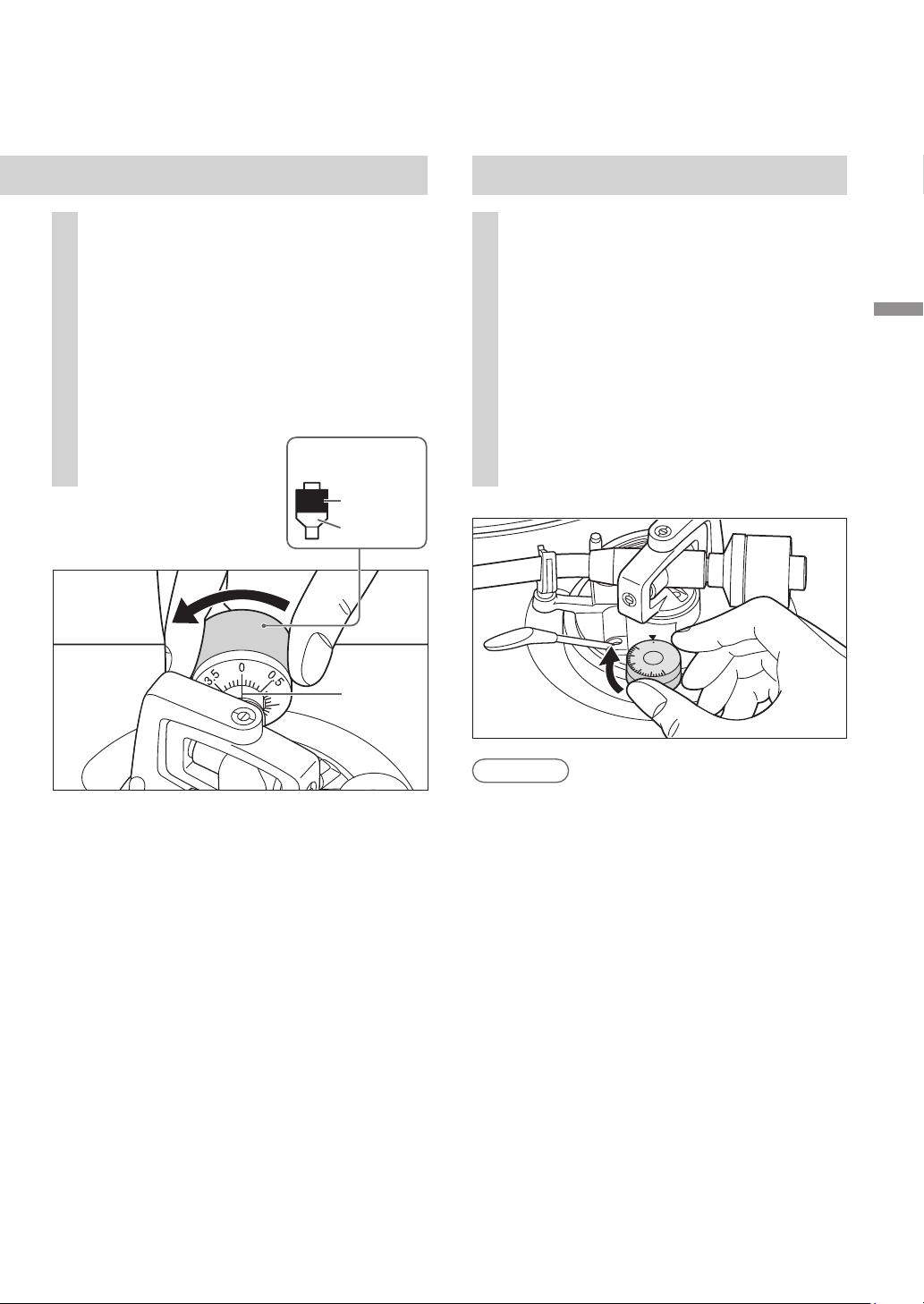
Démarrage
Français
(
Canada
)
(39)
15
Repère
central
2
Tournez le contrepoids de
manière à régler la force d’appui
de la pointe de lecture appropriée
pour la cellule.
La commande de la force d’appui de la
pointe de lecture tourne conjointement
avec le contrepoids.
Tournez jusqu’à ce que la ligne centrale
pointe vers la force d’appui de la pointe
de lecture appropriée.
1
Tournez la commande
antipatinage pour la régler sur
la même valeur que celle de la
commande de la force d’appui de
la pointe de lecture.
Contrepoids
Tenez ici
pour
tourner
Tournent
ensemble
Antipatinage
Nota
Pour des forces d’appui de la pointe de
lecture de 3 g et plus, réglez la commande
antipatinage sur « 3 ».
0
1
3
2
SL-100CPP.indb39SL-100CPP.indb39 2022/03/2815:22:542022/03/2815:22:54
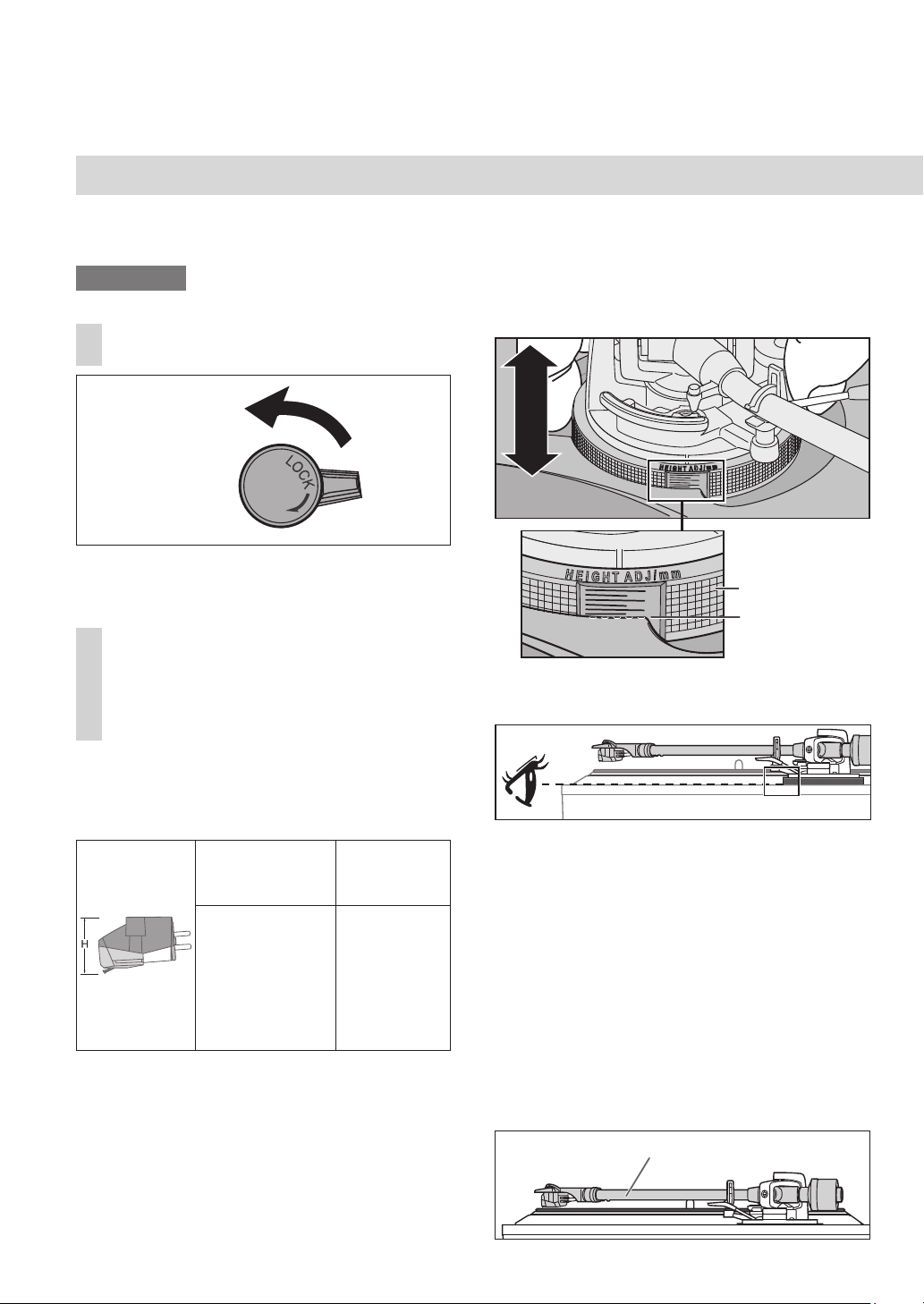
Français
(
Canada
)
(40)
Réglage
(suite)
Hauteur du bras de lecture
Ne faites ce réglage que si la cellule utilisée le
rend nécessaire.
Préparatifs
Mettez un disque en place sur le plateau.
1
Dégagez le bras de son agrafe.
Hauteur de la
cellule
(H) en millimètres
Position de la
commande
14
15
16
17
18
19
20
0
1
2
3
4
5
6
Consultez le tableau ci-dessous pour trouver
le repère de l’emplacement appropriée pour
la hauteur de la cellule.
Tenez le dispositif de réglage de la hauteur
du bras et faites-le glisser vers le haut ou le
bas pour aligner le repère de position sur
la ligne d’index. De 0 à 6 mm (0 à
15
/
64
po)
sont indiqués sur le dispositif de réglage de
la hauteur du bras.
2
Réglez la hauteur à l’aide du
dispositif de réglage de la hauteur
du bras.
Réglez la hauteur du bras jusqu’à ce que le
bras de lecture soit parallèle au disque.
(Pour la coquille fournie)
16
Si vous ne connaissez pas la
hauteur de la cellule de lecture (H)
ou lorsque vous n’utilisez pas la
coquille porte-cellule fournie
Retirez le couvercle de la pointe de lecture,
en prenant bien soin de ne pas l’abîmer, puis
dégagez l’agrafe du bras. Abaissez le levier de
positionnement du bras, reposez la pointe de
lecture sur un disque et réglez la commande de
la hauteur jusqu’à ce que le bras de lecture et le
disque soient parallèles.
Si la hauteur de la cellule de lecture (H) est
trop basse pour les rendre parallèles, ajoutez
un « espaceur de cellule de lecture »
(non fourni).
Ligne de repérage
Dispositif de
réglage de la
hauteur du bras
2
4
6
2
4
6
Parallèlement à un disque
Hauteur de la cellule fournie H = 17.2 (mm)
(
Position de la commande : 3.2
)
Lorsque vous vérifiez la ligne d’index du
dispositif de réglage de la hauteur du bras,
vérifiez en ayant les yeux au même niveau.
(Dégagé) (Verrouillé)
Verrou du bras
SL-100CPP.indb40SL-100CPP.indb40 2022/03/2815:22:552022/03/2815:22:55
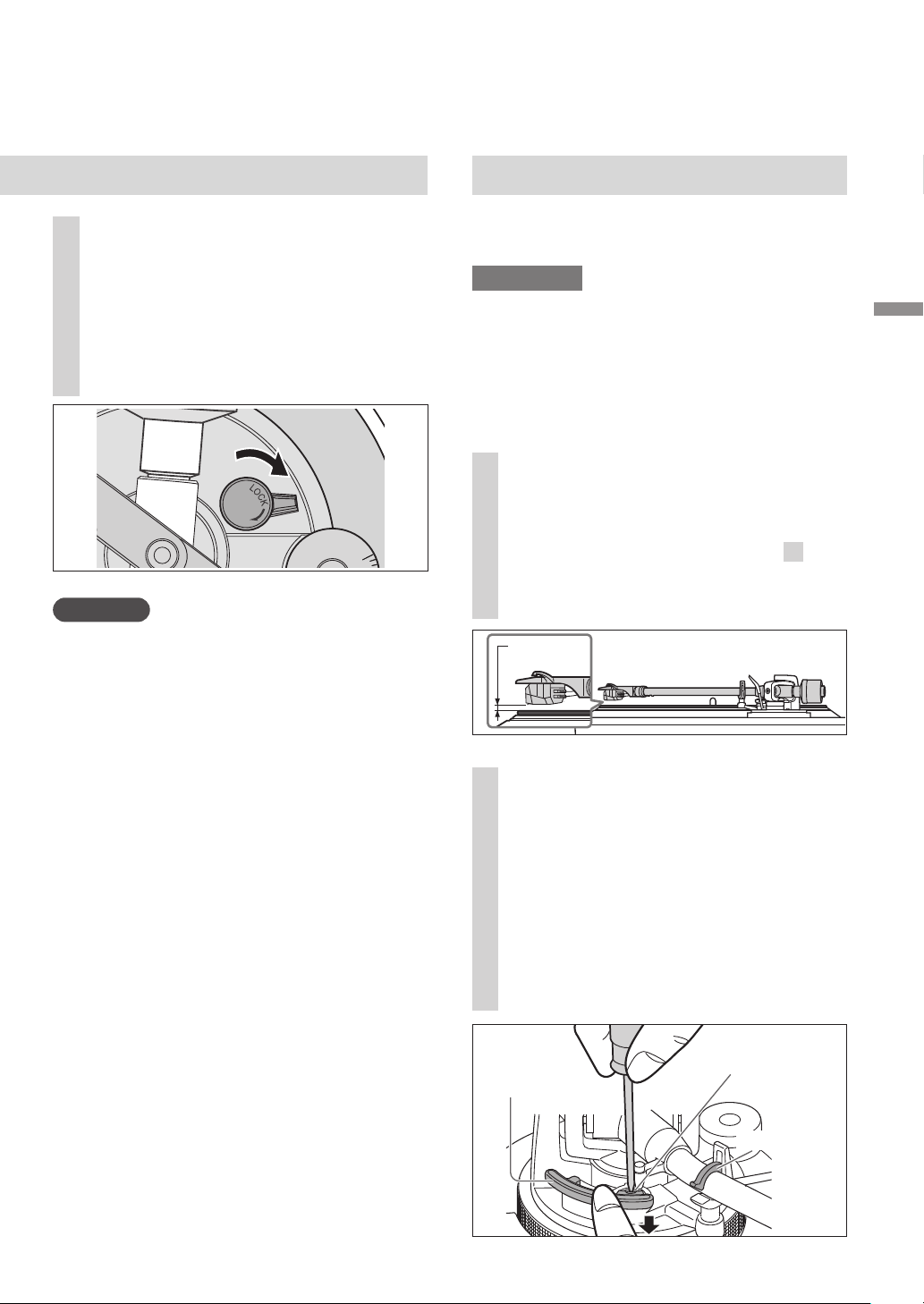
Démarrage
Français
(
Canada
)
(41)
3
Après le réglage de la hauteur du
bras, verrouillez le bras de lecture
en tournant le verrou du bras.
Assurez-vous de tourner le bouton de
verrouillage du bras jusqu’au bout,
comme indiqué sur la figure ci-dessous.
Il faudra peut-être appliquer une certaine
force pour y parvenir.
Attention
Veillez à ne pas endommager l’extrémité de la
pointe de lecture.
N’utilisez pas le produit sans que le bras ne soit
verrouillé.
Pour un réglage plus fin, utilisez un niveau
(non inclus) pour régler la hauteur du bras
afin que la cellule de lecture devienne
parallèle au disque.
Hauteur du lève-bras
Procédez à un ajustement en fonction de votre
cellule, si nécessaire.
Préparatifs
Mettez un disque en place sur le plateau.
Retirez le couvercle de la pointe de lecture
(
18), en prenant bien soin de ne pas
l’abîmer, puis dégagez l’agrafe du bras.
Soulevez le levier de positionnement du bras
et déplacez le bras au-dessus de la surface du
disque.
1
Vérifiez la hauteur du lève-bras
(distance entre l’extrémité de la
pointe de lecture et la surface
du disque). Si un réglage est
nécessaire, passez à l’étape
2
.
La hauteur du lève-bras est réglée par
défaut de 8 à 13 mm
(
5
/
16
à
33
/
64
po
)
.
2
Replacez le bras de lecture sur
le reposoir, fixez-le avec l'agrafe
du bras et, tout en appuyant
vers le bas sur le lève-bras avec le
doigt, tournez la vis pour régler la
hauteur.
Tournez la vis dans le sens des aiguilles
d’une montre pour abaisser le lève-bras.
Tournez la vis dans le sens inverse des
aiguilles d’une montre pour lever le lève-
bras.
17
(
5
/
16
à
33
/
64
po)
8 à 13 mm
Vis de réglage
du lève-bras
Lève-bras
Agrafe du bras
3
A
N
T
I
-
S
K
A
T
I
N
G
SL-100CPP.indb41SL-100CPP.indb41 2022/03/2815:22:552022/03/2815:22:55
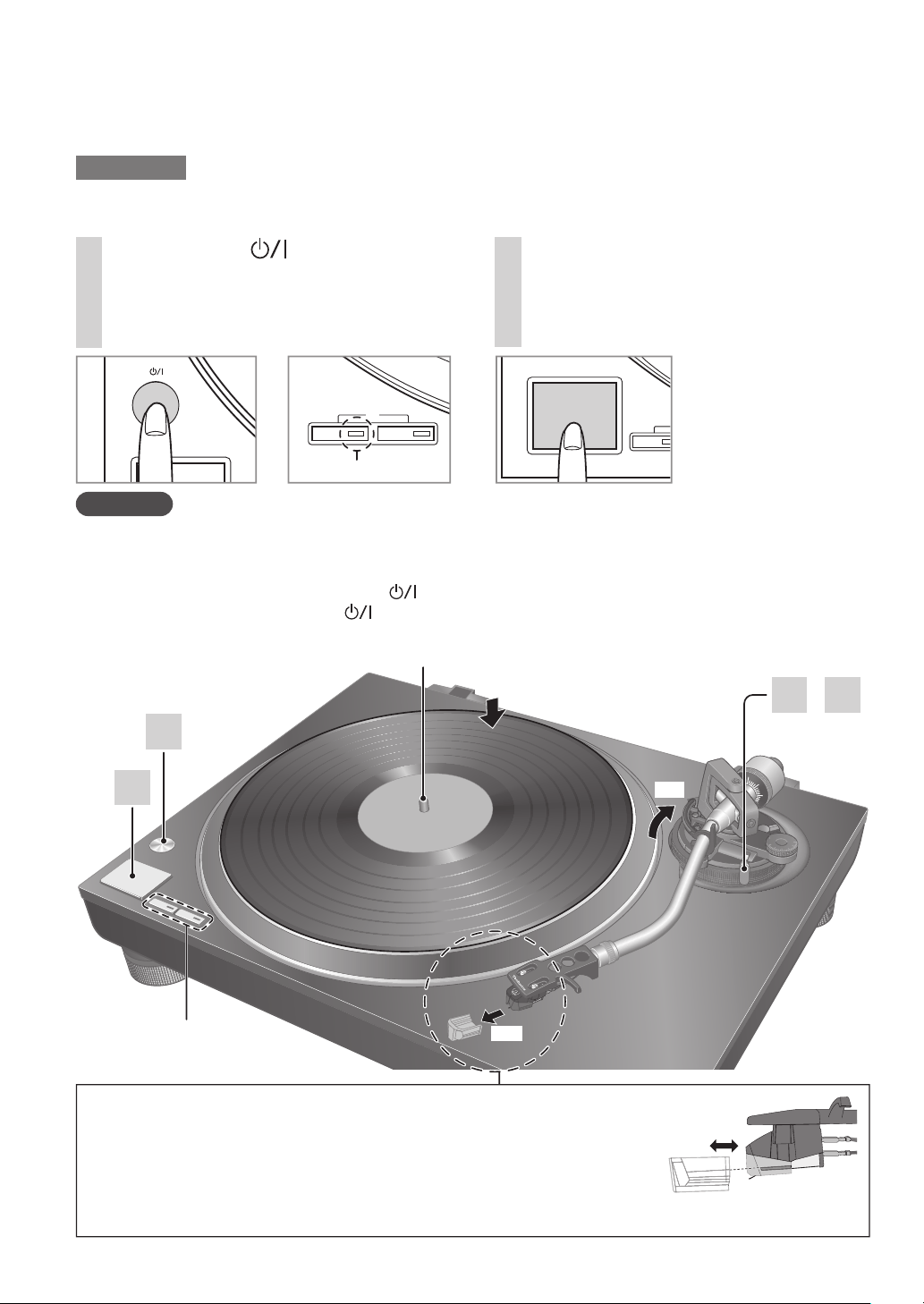
Français
(
Canada
)
(42)
Sélecteurs de vitesse
Indicateurs
·
3 4
2
Axe central
1
2
2
1
Retrait de la couvercle de la pointe de lecture
Retirez le couvercle du stylet en le faisant glisser tout droit et lentement
vers l’avant de la cartouche tout en prenant soin de ne pas endommager le stylet.
Fixation de la couvercle de la pointe de lecture
Tenez fermement le couvercle du stylet des deux côtés, alignez-le avec l’avant de
la cartouche et fixez-le en le faisant glisser lentement tout en prenant soin de ne
pas endommager le stylet.
Cellule
Couvercle de
la pointe de lecture
Lecture de disques
1
Appuyez sur [ ] pour mettre
l’appareil en marche.
La lumière stroboscopique s’allume.
33
1
/
3
tr/min est automatiquement
sélectionné et l’indicateur [33] s’allume.
2
Appuyez sur [START-STOP].
La rotation du plateau s’amorce.
Préparatifs
1 Mettez un disque (non inclus) en place sur le plateau.
2 Retirez le couvercle de la pointe de lecture et dégagez l’agrafe.
18
Attention
N’appuyez pas sur [START-STOP] lorsque le plateau est retiré.
Si vous avez accidentellement appuyé sur [START-STOP]
·
L’indicateur du bouton de sélection de vitesse ([33] ou [45]) commence à clignoter.
Si le témoin clignote, appuyez sur [
] pour mettre hors marche l
’
appareil, placez le plateau,
puis appuyez à nouveau sur [
] pour mettre en marche l’appareil.
Mettez l’appareil sous tension ou hors tension avec le volume sur l’appareil connecté réglé au minimum.
ピピ フブ
ヘベ
ヴヵモンヵ〔ヴヵヰヱ
ピピ
Indicateur
SL-100CPP.indb42SL-100CPP.indb42 2022/03/2815:22:552022/03/2815:22:55
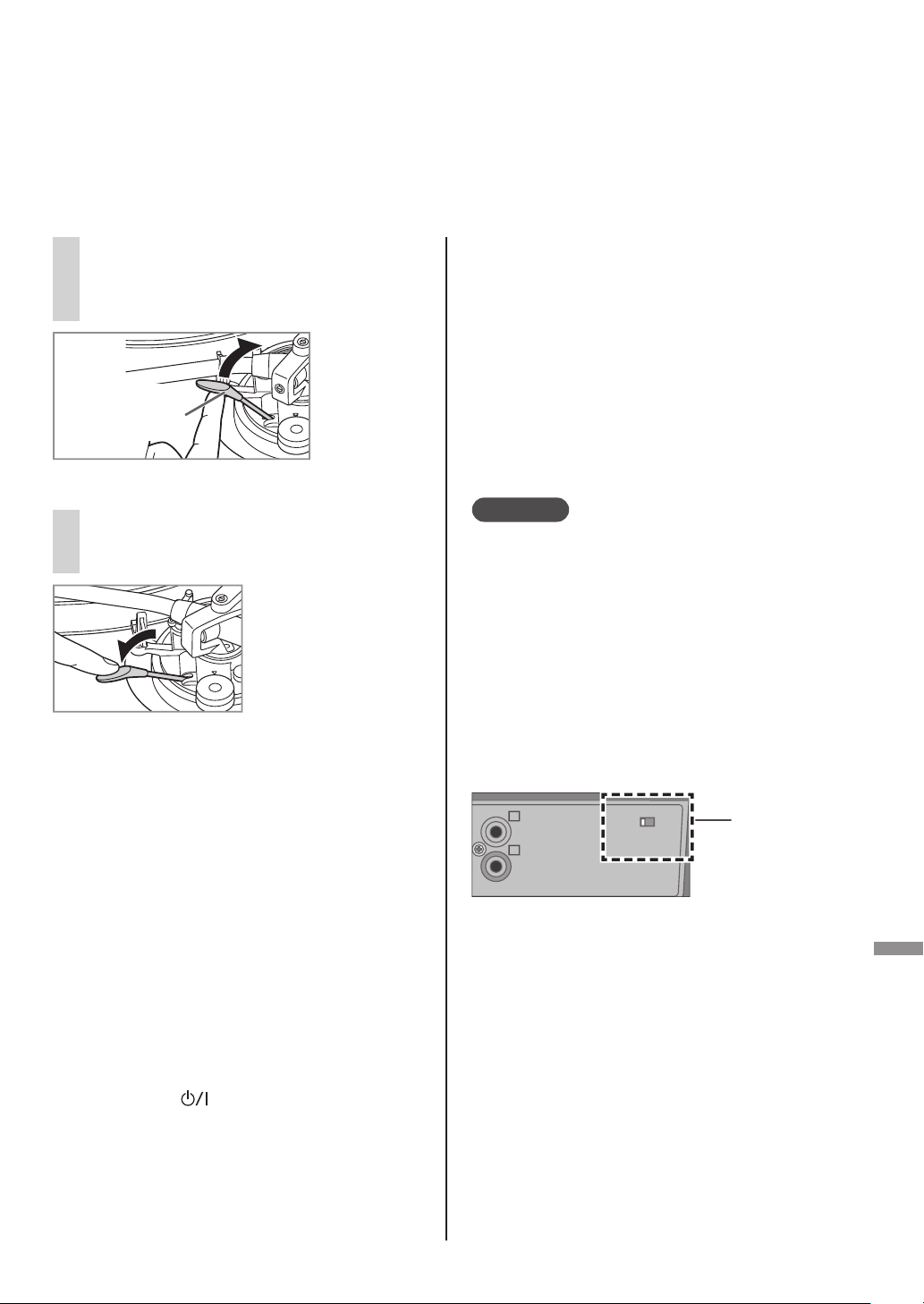
Lecture
Français
(
Canada
)
(43)
Lors de la lecture de 45 tours prolongé
Appuyez sur le sélecteur de vitesse [45]
([45] s’allume).
Montez l’adaptateur pour 45 tours prolongé
sur l’axe central.
Lors de la lecture de 78 tours
Appuyez en même temps sur les sélecteurs
de vitesse [33] et [45]
(78 tours : [33] et [45] s’allume).
Lors de l’utilisation d’un
stabilisateur de disque (non inclus)
Consultez le manuel d’instruction du
stabilisateur de disque.
Poids maximum : 1 k
g
Pour interrompre
momentanément la lecture
Levez le levier de positionnement du bras.
La pointe de lecture s’élève au-dessus du disque.
Pour reprendre la lecture, abaissez le levier de
positionnement du bras.
Après la fin de la lecture
Après avoir soulevé le levier de
positionnement du bras pour ramener le
bras de lecture sur le reposoir, abaissez-le
complètement.
Appuyez sur [START-STOP].
Le frein électrique arrête la rotation du
plateau en douceur.
Appuyez sur [ ] pour mettre l’appareil
hors marche.
Fixez le bras de lecture avec l’agrafe du bras.
Remettez le couvercle de la pointe de lecture
(pour protéger l’extrémité de la pointe de
lecture).
3
Soulevez le levier de
positionnement du bras et
déplacez le bras au-dessus de la
surface du disque.
19
4
Abaissez lentement le levier de
positionnement du bras.
Le bras de lecture s’abaisse lentement.
La lecture
commence.
Levier de
positionnement
du bras
Fonction de levage automatique
Cette fonction lève automatiquement le bras de
lecture à la fin de la lecture d’un disque.
Cela empêche la lecture répétée du dernier sillon.
(Cela n’arrête pas la rotation du plateau.)
Cette fonction nécessite le réglage suivant pour
être activée. Réglage : Lorsque l’appareil est hors
marche, réglez l’interrupteur de levage automatique
à l’arrière sur «ON».
(Le réglage d’usine est « ON ».)
Après un levage automatique, assurez-vous
de suivre les étapes
à
décrites ci-contre à
gauche dans « Après la fin de la lecture ».
Attention
En fonction du disque, le levage automatique peut
prendre un certain temps (environ 60 secondes)
après la fin de la lecture, ou il peut être actionné
lorsque le disque est toujours en cours de lecture.
Si le bras de lecture est relevé pendant la lecture,
réglez l’interrupteur de levage automatique sur
«OFF».
La fonction de levage automatique peut ne pas
fonctionner normalement. Pour que le levage
automatique fonctionne normalement, le levier de
positionnement du bras doit être complètement
abaissé lorsque le bras de lecture est ramené sur le
reposoir après la fin de la lecture.
Interrupteur
de levage
automatique
ヱラヰワヰチヰヶヵ
ロ
ン
モヶヵヰチロリョヵチヶヱ
ヰョョ ヰワ
SL-100CPP.indb43SL-100CPP.indb43 2022/03/2815:22:562022/03/2815:22:56
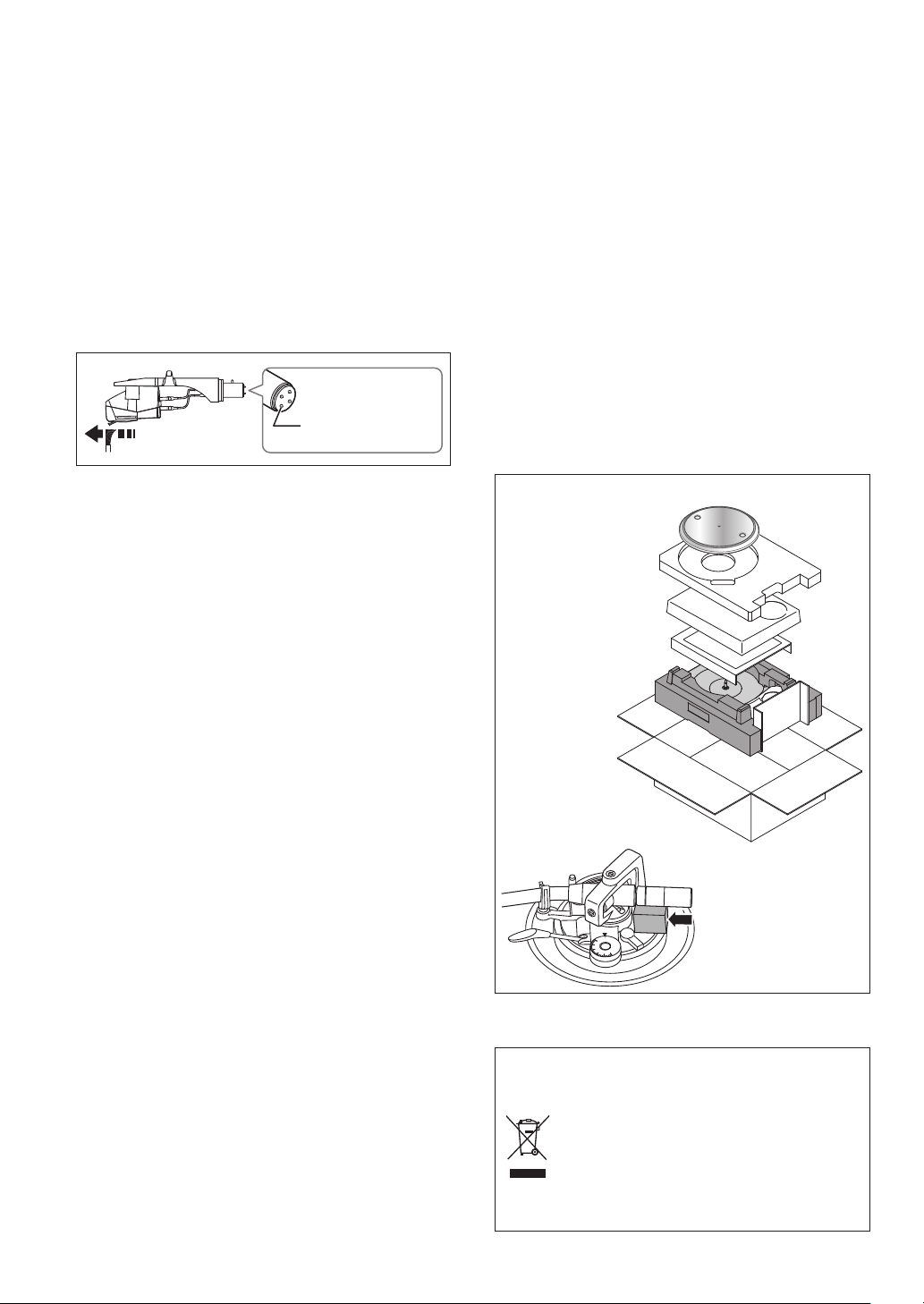
Français
(
Canada
)
(44)
Entretien
Entretien des pièces
Enlevez toute poussière sur la pointe de
lecture et sur le disque.
Enlevez la coquille avec la cellule et nettoyez
la pointe de lecture à l’aide d’un pinceau
doux. Brossez depuis la base jusqu’à la
pointe.
Utilisez un nettoyant pour disque pour garder
vos disques propres.
Essuyez occasionnellement les connecteurs
de la coquille.
Essuyez les connecteurs de la coquille avec un
chiffon doux et fixez la coquille sur le bras de
lecture.
Baissez le volume de l’amplificateur ou
mettez l’amplificateur hors tension avant de
fixer ou de retirer la coquille.
Si la coquille est retirée alors que le volume
n’est pas coupé, les haut-parleurs pourraient
être endommagés.
Nettoyage du couvercle et du
boîtier
Essuyez le couvercle et le boîtier avec un
chiffon doux.
Ne pas toucher la table pendant le
nettoyage. Sinon, le lecteur pourrait ne pas
fonctionner.
Lorsque la saleté est tenace, essorez un chiffon
humide pour enlever la saleté, puis essuyez
avec un chiffon doux.
N’utilisez pas de solvants, benzène, diluant,
alcool, détergent de cuisine, liquide d’essuie-
glace, etc. Cela pourrait déformer le boîtier
externe ou décoller le revêtement.
N’essuyez pas le couvercle lorsqu’il est
en place. Cela risquerait d’attirer le bras
de lecture vers le couvercle à cause de
l’électricité statique générée.
Assurez-vous que le couvercle soit retiré
pendant la lecture d’un disque.
Transport du tourne-disque
Remettez l’appareil dans son emballage
d’origine.
Conservez les matériaux d’emballage après
avoir sorti les marchandises.
Si l’emballage d’origine n’a pas été conservé,
procédez comme suit :
Retirez le plateau et le tapis et enveloppez-les
soigneusement.
Retirez la coquille et le contrepoids du bras
de lecture et enveloppez-les soigneusement.
Fixez le bras de lecture avec l’agrafe de bras
et attachez-le avec du ruban adhésif.
Enveloppez l’unité principale dans une
serviette ou du papier.
20
Symbole WEEE
Mise au rebut du produit en dehors des
pays de l’UE
Ce symbole est uniquement valable
dans l’UE.
Contactez un service gouvernemental
local ou votre revendeur pour savoir
comment mettre ce produit au rebut
convenablement.
0
1
3
2
Avant le
reconditionnement,
retirez le contrepoids
d’équilibrage et
insérez le support de
bras de lecture sous
le bras de lecture.
Reconditionnement
Connecteurs
de la coquille
SL-100CPP.indb44SL-100CPP.indb44 2022/03/2815:22:572022/03/2815:22:57
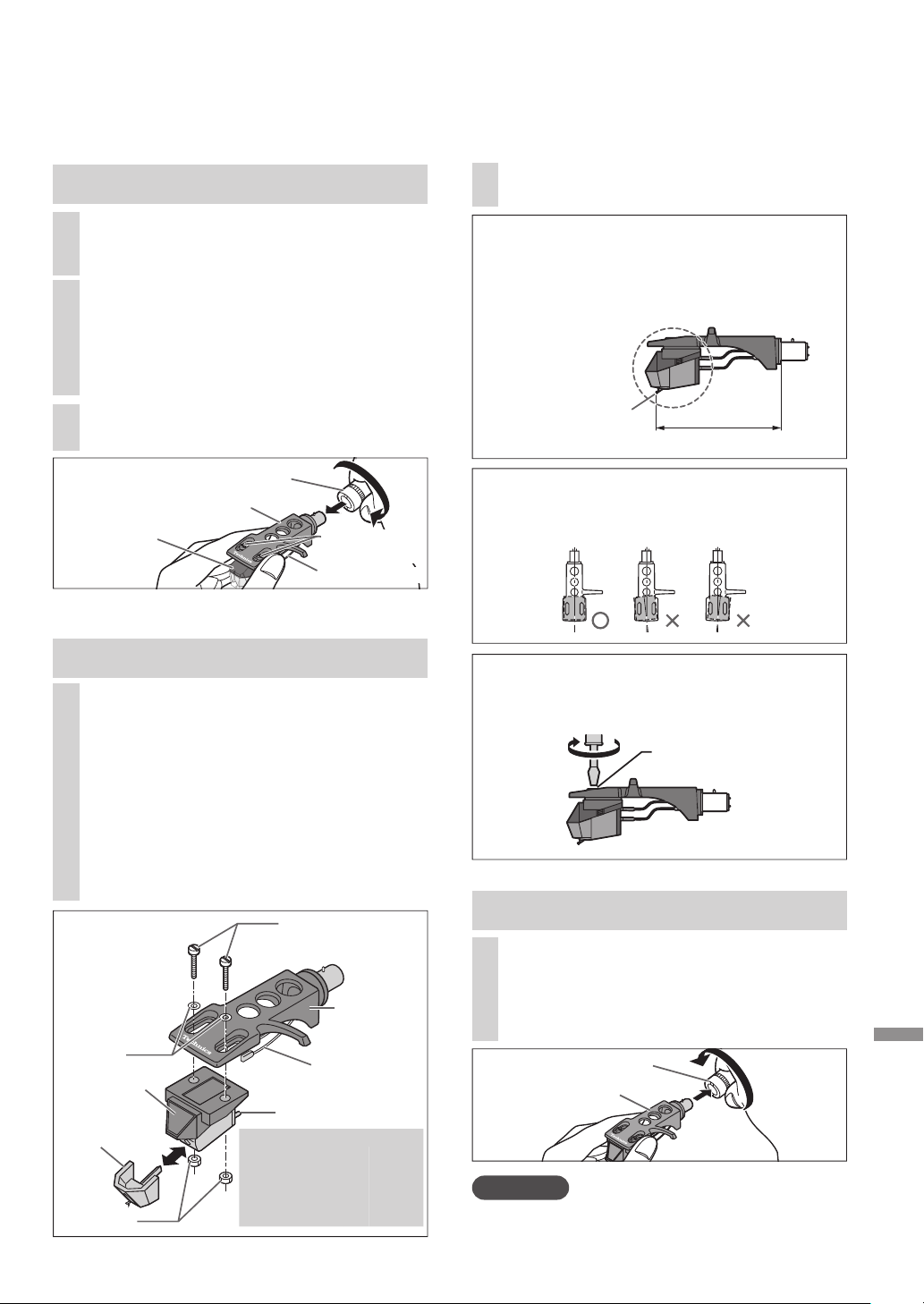
Entretien
Français
(
Canada
)
(45)
21
Remplacement de la cellule
1
Fixez provisoirement une cellule
(achetée en magasin).
Suivez les instructions d’installation de la cellule
de remplacement pour la fixer correctement à la
coquille et serrez légèrement les vis.
Si des vis de fixation sont incluses avec la
cellule, les utiliser.
Lors de la lecture d’un disque 78 tours,
utilisez une cellule spécifique pour 78 tours.
Utilisez un mini tournevis plat
(4 mm [
5
/
32
po]).
Veillez à ne pas toucher la pointe de lecture.
Fixation de la cellule
Vis pour cellule
de lecture
Coquille
Fil
conducteur
Cellule
Pointe de
lecture
(Fil conducteur) (Connecteur)
Rouge
R+ (Rouge)
Vert
R- (Vert)
Blanc
L+ (Blanc)
Bleu
L- (Bleu)
Connecteur
(Exemple)
La cellule doit être parallèle à la coquille
vue du dessus et du côté
(l’illustration présente la vue du dessus).
Écrous
Rondelles
Serrez les vis de la cellule.
Vis pour cellule de
lecture
Veillez à ne pas laisser la cellule glisser
hors de l’emplacement.
Écrou de blocage
Coquille
2
Réglez le porte-à-faux.
Veillez à ne pas toucher la pointe de lecture.
Déplacez la cellule pour régler le porte-
à-faux afin que l’extrémité de la pointe
de lecture se trouve à 52 mm (
2-
3
/
64
po
)
de l’extrémité de montage de la coquille,
comme indiqué dans la figure ci-dessous.
52 mm
Extrémité de la
pointe de lecture
(2
3
/
64
po)
Mise en place de la coquille
3
Fixez la coquille avec la cartouche
dans le bras de lecture.
Maintenez la coquille horizontale et
serrez l’écrou de blocage.
Veillez à ne pas toucher la pointe de lecture.
Retrait de la cellule fournie
La cellule peut être remplacée par une cellule de votre préférence.
2
Desserrez les vis de montage de la
cellule pour retirer la cellule fournie
de la coquille.
Utilisez un mini tournevis plat
(4 mm [
5
/
32
po]).
Veillez à ne pas toucher la pointe de lecture.
1
Fixez la protection de la pointe de lecture
(
18) et desserrez l’écrou de blocage pour
retirer le bras de lecture de la coquille.
3
Retirez les fils des connecteurs.
Veillez à ne pas couper les fils.
Attention
Rangez les vis, rondelles et écrous de manière à ne
pas les perdre.
Écrou de blocage
Coquille
Cellule
Fil conducteur
Vis pour cellule
de lecture
SL-100CPP.indb45SL-100CPP.indb45 2022/03/2815:22:572022/03/2815:22:57

Français
(
Canada
)
(46)
Avant de faire appel au service, procédez aux vérifications ci-dessous. Si vous avez un doute
concernant certains des points de vérification, ou si les solutions proposées dans le tableau ne
résolvent pas le problème, communiquez avec votre revendeur.
Pas d’alimentation.
Le cordon d’alimentation est-il branché?
Branchez le cordon en prenant soin d’introduire la fiche à fond dans la prise. (
12)
Aucun son n’est entendu.
Le volume est faible.
Les connexions aux prises PHONO de l’amplificateur/récepteur sont-elles adéquates?
Connectez les câbles PHONO aux prises PHONO de l’amplificateur. (
12)
Les signaux des canaux gauche et droit sont inversés.
Les connexions du câble de raccordement stéréo à l’amplificateur ou au récepteur sont-elles
inversées?
Vérifiez tous les raccordements. (
12)
Les connexions des fils conducteurs de la coquille aux connecteurs de la cellule sont-elles
adéquates?
Vérifiez tous les raccordements. (
21)
Un ronflement se produit pendant la lecture.
Les câbles stéréo se trouvent-ils près d’appareils électriques ou de leur cordon d’alimentation?
Éloignez tout appareil électrique (et leur cordon d’alimentation) du tourne-disque.
Le fil de terre est-il raccordé?
Assurez-vous que le fil de terre est bien raccordé. (
12)
Le voyant du sélecteur de vitesse [33] ou [45] clignote.
Procédez comme suit lorsque l’indicateur du sélecteur de vitesse [33] ou [45] clignote.
Pour corriger ceci :
Appuyez sur [ ] pour OFF.
Débranchez le cordon d’alimentation, attendez au moins trois secondes, puis réinsérez la fiche.
Appuyez sur [ ] pour mettre en marche l’appareil et appuyez sur [START-STOP] pour faire
pivoter le plateau.
Si le voyant du sélecteur de vitesse clignote à nouveau, vérifiez lequel clignote et contactez notre
service clientèle.
Guide de dépannage
22
SL-100CPP.indb46SL-100CPP.indb46 2022/03/2815:22:582022/03/2815:22:58
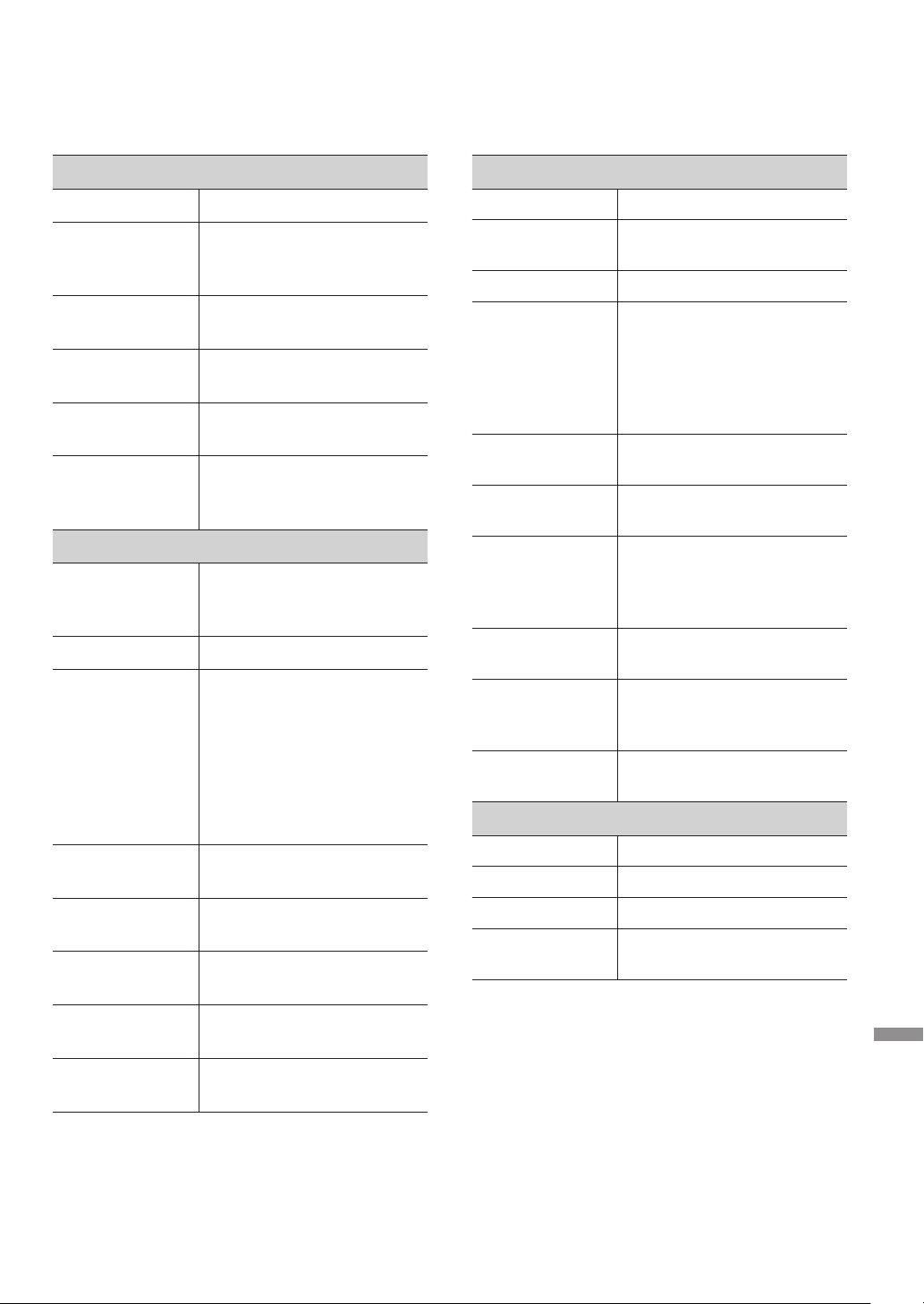
Entretien
Français
(
Canada
)
(47)
Spécifications
Divers
Alimentation 120 V c.a., 60 Hz
Consommation 8,0 W (EN MARCHE)
Environ 0,2 W
(HORS MARCHE)
Dimensions
(L×H×P)
453 x 169 x 372 mm
(17-
27
/
32
po × 6-
21
/
32
po × 14-
21
/
32
po)
Poids Environ 9,9 k
g
(21,9 lb
)
Température de
fonctionnement
0 °C à +40 °C
Humidité relative 35 % à 80 %
d’humidité relative
(sans condensation)
Section tourne-disque
Méthode
d’entraînement
Système de plateau à
entraînement direct
(manuel)
Moteur Moteur c.c. sans balais
Plateau Aluminium moulé sous
pression
Diamètre : 332 mm
(13
5
/
64
po)
Poids : Environ 2,0 k
g
(4,5 lb)
(y compris une feuille de
caoutchouc)
Vitesses de
rotation
33
1
/
3
tr/min, 45 tr/min,
78 tr/min
Couple de
démarrage
1,8 k
g
·cm (1,56 lb-po)
Caractéristiques
d’établissement
0,7 s, pour passer de l’arrêt
à 33
1
/
3
tr/min
Système de
freinage
Frein électronique
Pleurage /
scintillement
0,025 % eff. pondéré
Section bras de lecture
Type Type statique équilibré
Longueur
effective
230 mm (9
1
/
16
po)
Porte-à-faux 15 mm (
19
/
32
po)
Angle d’erreur de
poursuite
Moins de 2° 32’
(au début d’un disque de
30 cm (12 po))
Moins de 0° 32’
(à la fin d’un disque de
30 cm (12 po))
Angle correcteur
d’erreur de piste
22°
Plage de réglage
de la hauteur
0 - 6 mm (0 -
15
/
64
po)
Plage de réglage
de la force
d’appui de la
pointe de lecture
0 - 4
g
(lecture directe)
Contrepoids de la
coquille
Environ 7,6
g
Plage applicable
pour le poids de
la cellule
5,6 à 12,0
g
14,3 à 20,7
g
(y compris la coquille)
Connecteurs de la
coquille
4 broches 1,2 mm ø
Section cellule
Type Type VM
Tension de sortie 4,0 mV (1 kHz, 5 cm/sec.)
Poids 6,1
g
Pression de la
pointe de lecture
1,8 à 2,2
g
(norme de 2,0
g
)
Sujet à changements sans préavis.
23
SL-100CPP.indb47SL-100CPP.indb47 2022/03/2815:22:582022/03/2815:22:58

Français
(
Canada
)
(48)
24
Certificat de garantie limitée (CANADA SEULEMENT)
Panasonic Canada Inc.
5770, Ambler Drive, Mississauga (Ontario) L4W 2T3
PRODUIT TECHNICS – GARANTIE LIMITÉE
Platine tourne-disque Technics
(SL-100C)
Deux (2) ans, pièces et main-d’œuvre
Homologation :
Il est recommandé de noter, dans l’espace prévu
ci-dessous, le numéro de modèle et le numéro de série
inscrits à l’arrière, ou sous le fond de l’appareil, et de
conserver ce manuel pour référence ultérieure.
DATE D’ACHAT
ADRESSE DU DÉTAILLANT
NUMÉRO DE MODÈLE
EIRÉS ED ORÉMUN
N° DE TÉLÉPHONE
DÉTAILLANT
Panasonic Canada Inc. garantit que ce produit est exempt de défauts de matériaux et de main-d’œuvre dans un contexte
d’utilisation normale pendant la période indiquée ci-après à compter de la date d’achat original et, dans l’éventualité d’une
défectuosité, accepte, à sa discrétion, de (a) réparer le produit avec des pièces neuves ou remises à neuf, (b) remplacer
le produit par un produit neuf ou remis à neuf d’une valeur équivalente ou (c) rembourser le prix d’achat. La décision de
réparer, remplacer ou rembourser appartient à Panasonic Canada Inc.
La présente garantie n’est fournie qu’à l’acheteur original d’un des produits de marque Technics indiqués plus haut, ou à
la personne l’ayant reçu en cadeau, vendu par un détaillant Panasonic agréé au Canada et utilisé au Canada. Le produit
ne doit pas avoir été « vendu tel quel » et doit avoir été livré à l’état neuf dans son emballage d’origine.
POUR ÊTRE ADMISSIBLE AUX SERVICES AU TITRE DE LA PRÉSENTE GARANTIE, LA PRÉSENTATION D’UN REÇU D’ACHAT OU DE TOUTE
AUTRE PIÈCE JUSTIFICATIVE DE LA DATE D’ACHAT ORIGINAL, INDIQUANT LE MONTANT PAYÉ ET LE LIEU DE L’ACHAT, EST REQUISE.
RESTRICTIONS ET EXCLUSIONS
La présente garantie COUVRE SEULEMENT les défaillances attribuables à un défaut des matériaux ou à un vice de
fabrication et NE COUVRE PAS l’usure normale ni les dommages esthétiques. La présente garantie NE COUVRE PAS
NON PLUS les dommages subis pendant le transport, les défaillances causées par des produits non fournis par Panasonic
Canada Inc., ni celles résultant d’un accident, d’un usage abusif ou impropre, de négligence, d’une manutention
inadéquate, d’une mauvaise application, d’une altération, d’une installation ou de réglages impropres, d’un mauvais
réglage des contrôles de l’utilisateur, d’un mauvais entretien, d’une surtension temporaire, de la foudre, d’une
modification, de la pénétration de sable, de liquides ou d’humidité, d’une utilisation commerciale (dans un hôtel, un
bureau, un restaurant ou tout autre usage par affaires ou en location), d’une réparation effectuée par une entité autre
qu’un centre de service Panasonic agréé ou encore d’une catastrophe naturelle.
Les piles sèches sont également exclues de la présente garantie.
CETTE GARANTIE LIMITÉE ET EXPRESSE REMPLACE TOUTE AUTRE GARANTIE, EXPRESSE OU IMPLICITE, INCLUANT
LES GARANTIES IMPLICITES DU CARACTÈRE ADÉQUAT POUR LA COMMERCIALISATION ET UN USAGE PARTICULIER.
PANASONIC CANADA INC. N’AURA D’OBLIGATION EN AUCUNE CIRCONSTANCE POUR TOUT DOMMAGE DIRECT,
INDIRECT OU CONSÉCUTIF RÉSULTANT DE L’UTILISATION DE CE PRODUIT OU DÉCOULANT DE TOUTE DÉROGATION
À UNE GARANTIE EXPRESSE OU IMPLICITE. (À titre d’exemples, cette garantie exclut les dommages relatifs à une perte
de temps, le transport jusqu’à et depuis un centre de service agréé, la perte ou la détérioration de supports ou d’images,
de données ou de tout autre contenu en mémoire ou enregistré. Cette liste n’est pas exhaustive et n’est fournie qu’à
des fins explicatives.) Certaines juridictions ne reconnaissent pas les exclusions ou limitations de dommages indirects ou
consécutifs, ou les exclusions de garanties implicites. Dans de tels cas, les limitations stipulées ci-dessus peuvent ne pas
être applicables. La présente garantie vous confère des droits précis; vous pourriez aussi avoir d’autres droits pouvant
varier selon votre province ou territoire de résidence.
SERVICE SOUS GARANTIE
Pour tout renseignement sur les produits, réparation ou assistance technique, veuillez visiter notre page Soutien :
www.panasonic.ca/french/support
EXPÉDITION D’UN PRODUIT À UN CENTRE DE SERVICE
Emballez soigneusement, de préférence dans son carton d’origine, et expédiez, franco de port, suffisamment assuré.
Accompagnez le tout d’une description de la défectuosité présumée et d’une pièce justificative de la date d’achat original.
SL-100C
SL-100CPP.indb48SL-100CPP.indb48 2022/03/2815:22:582022/03/2815:22:58

Entretien
Français
(
Canada
)
(49)
25
SL-100CPP.indb49SL-100CPP.indb49 2022/03/2815:22:592022/03/2815:22:59

Français
(
Canada
)
(50)
26
SL-100CPP.indb50SL-100CPP.indb50 2022/03/2815:22:592022/03/2815:22:59

Français
(
Canada
)
(51)
27
SL-100CPP.indb51SL-100CPP.indb51 2022/03/2815:22:592022/03/2815:22:59

CfEn
TQBM0844
S0422AK0
Panasonic Corporation of North America
Two Riverfront Plaza, Newark, NJ 07102-5490
http://www.panasonic.com
Panasonic Canada Inc.
5770 Ambler Drive,
Mississauga, Ontario,
L4W 2T3
www.panasonic.com
© Panasonic Corporation 2022
SL-100CPP.indb52SL-100CPP.indb52 2022/03/2815:22:322022/03/2815:22:32
