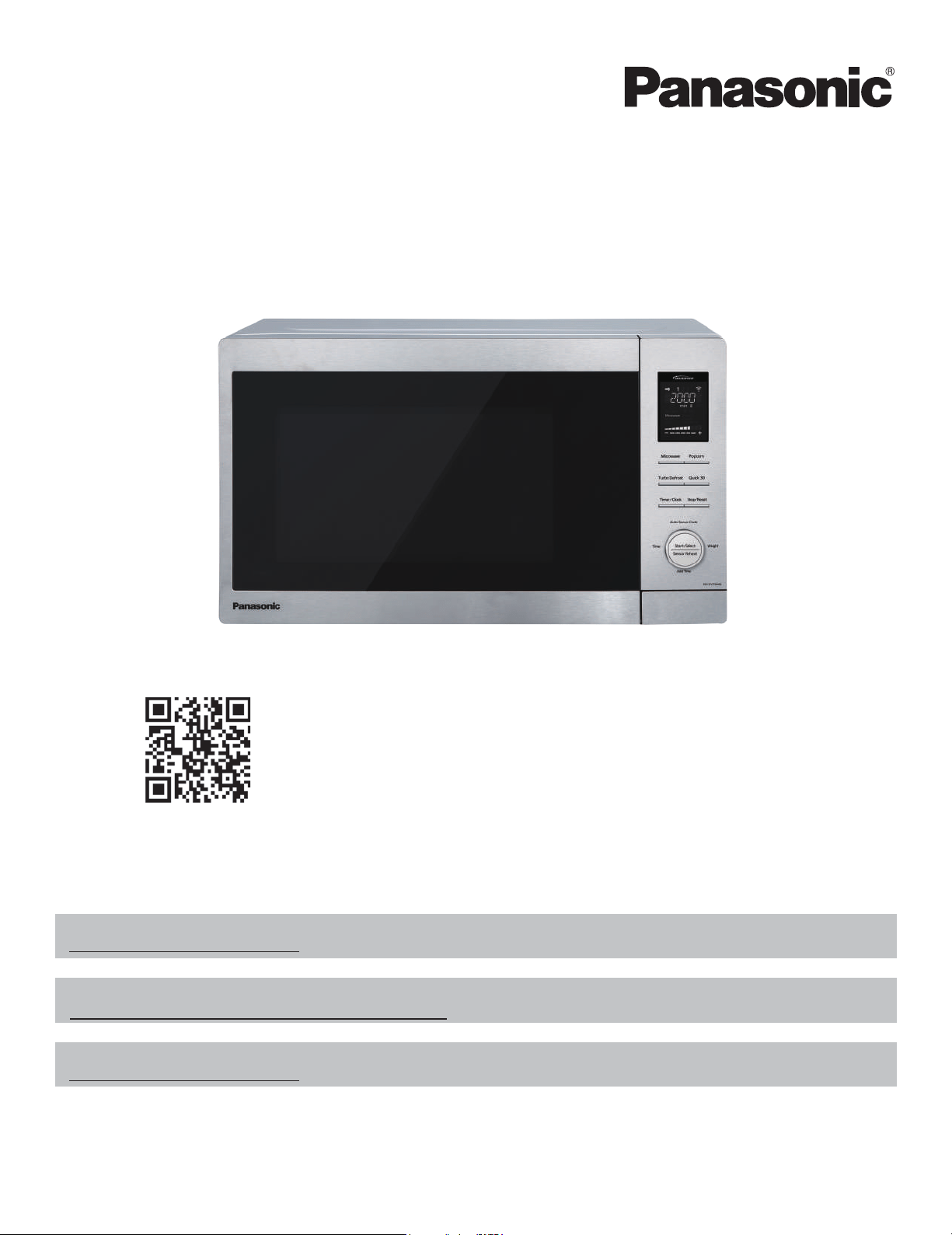
Owner’s Manual
Microwave Oven
Household Use Only
Model No.
READ ALL INSTRUCTIONS CAREFULLY BEFORE USING THE OVEN.
Scan this code for special instructions and features.
(U.S.A only)
For microwave oven safety reference, please visit the FDA’s web page at:
Para obtener instrucciones en español, por favor visite la página web en:
NNSN744S_Web_English.indd 1 2014/9/30 9:15:00
For assistance, please contact us via the web at:
http://shop.panasonic.com/support
http://www.fda.gov/Radiation
-EmittingProducts/default.htm
㻌
http://shop.panasonic.com/support
NN-SV79MS
Printed in China
, 2022
Panasonic Consumer Electronics Company

Interference
Dial
CONTENTS
b
TERMS & POLICIES..........................................................1
Safty Information
IMPORTANT SAFETY INSTRUCTIONS....................... 2-3
Utensils.................................................................................. 3
Food Preparation........................................................... 5-6
Cookware Gui
de................................................................. 7
Operation
Location of controls.......................................................... 8
Display Window..................................................................9
Feature ................................................................... 9
Operation.....................................................................
10-3
4
Settin
g up Alexa on your microwave oven..
10-11
Using the Microwave for the First Time............... 12
Disconnect wireles
s network/Factory reset.......
12
Demo Mode................................................................... 13
Menu Action ON/OFF.
................................................
13
Settin
g the Clock.........................................................
14
Setting the Child Safety Lock.................................. 14
Cooking.................................................................... 15-1
6
Keep Warm.................................................................... 17
Quick 30.......................................................................... 18
Setting the Kitchen Timer.........................................19
Settin
g a Standing Time............................................
20
Settin
g a Delayed Start..............................................
21
3-Sta
ge ..........................................................
22
Add Tim
e........................................................................
23
Popcorn...........................................................................24
Turbo Defrost......................................................... 25-2
6
Sensor
Reheat...............................................................
27
Auto/Sensor cook.
..........................................................
28-3
3
Bevera
ge/Soup(No.1-3)..............................................
29
Sens
or Cook(No.4-14)...........................................
30-31
Frozen
Pancake/Reheat Desert(No.15-16)...........
32
Melt & Soften(N
o.17-20).............................................
33
MICROWAVE REC
IPES........................................................
34
Voi
ce Command Chart...............................................
35-3
8
Food Chara
cteristics..........................................................
39
Maintenance
Care and Cleaning of Your Microwave Oven............40
Shop Accessories................................................................40
Before Requesting Service........................................... ....41
Limited Warranty................................................................42
General Information
Copyright Information...............................................
43-53
Specifications.......................................................................54
User's Record........................................................................58
Installation............................................................................5
Radio ............................................................. 4
S
etting
....
Grounding Instructions.................................................... 4

TERMS & POLICIES
www.amazon.com/devicesupport or found in the Alexa App in Help & Feedback
Privacy Notice in the Help section of the
Servicing your appliance, go to http://shop.panasonic.com/support
Assistance with Alexa, please contact Amazon Customer Support.
Contact details can be found at www.amazon.com/devicesupport.
>
Legal & Compliance. You can find
Amazon
’
s
Alexa App or at www.amazon.com/privacy.
CONTACT US
AMAZON TERMS & POLICIES
Your microwave oven works with Amazon Alexa.
By using your microwave oven, you agree to Amazon
’
s Conditions of Use, available
at www.amazon.com/conditionsofuse, and all the terms located at
1
DO NOT
(a) DO NOT
DO NOTDO NOT
DO NOTDO NOT
DO NOT
Do not
DO NOT
DO NOT
DO NOT
Thank you for purchasing a Panasonic Microwave Oven
To reduce the risk of burns, electric shock, fire, injury to persons, or exposure to
excessive microwave energy:
WARNING
1.
2. PRECAUTIONS TO AVOID POSSIBLE EXPOSURE TO EXCESSIVE MICROWAVE ENERGY
3. GROUNDING INSTRUCTIONS
4
4.
5.
6. -
7.
8.
(a) DO NOT
IMPORTANT SAFETY INSTRUCTIONS
Your safety and the safety of others are very important.
We have provided important safety messages in this manual and on your appliance. Always read and obey all safety
messages.
This is the safety alert symbol. It is used to alert you to potential hazards that can kill or hurt you and others.
All safety messages will follow the safety alert symbol and either the word “DANGER”, “WARNING” or “CAUTION”. These
words mean:
You can be killed or seriously injured if you don’t immediately follow instructions.
You can be killed or seriously injured if you don’t follow instructions.
You can be exposed to a potentially hazardous situation which, if not avoided, may result in
minor or moderate injury.
All safety messages will tell you what the potential hazard is, tell you how to reduce the chance of injury, and tell you what can happen
if the instructions are not followed.
DANGER
WARNING
CAUTION
PRECAUTIONS TO AVOID POSSIBLE EXPOSURE
TO EXCESSIVE MICROWAVE ENERGY
(a)
DO NOT
(b)
DO NOT
(c) DO NOT
2
above.
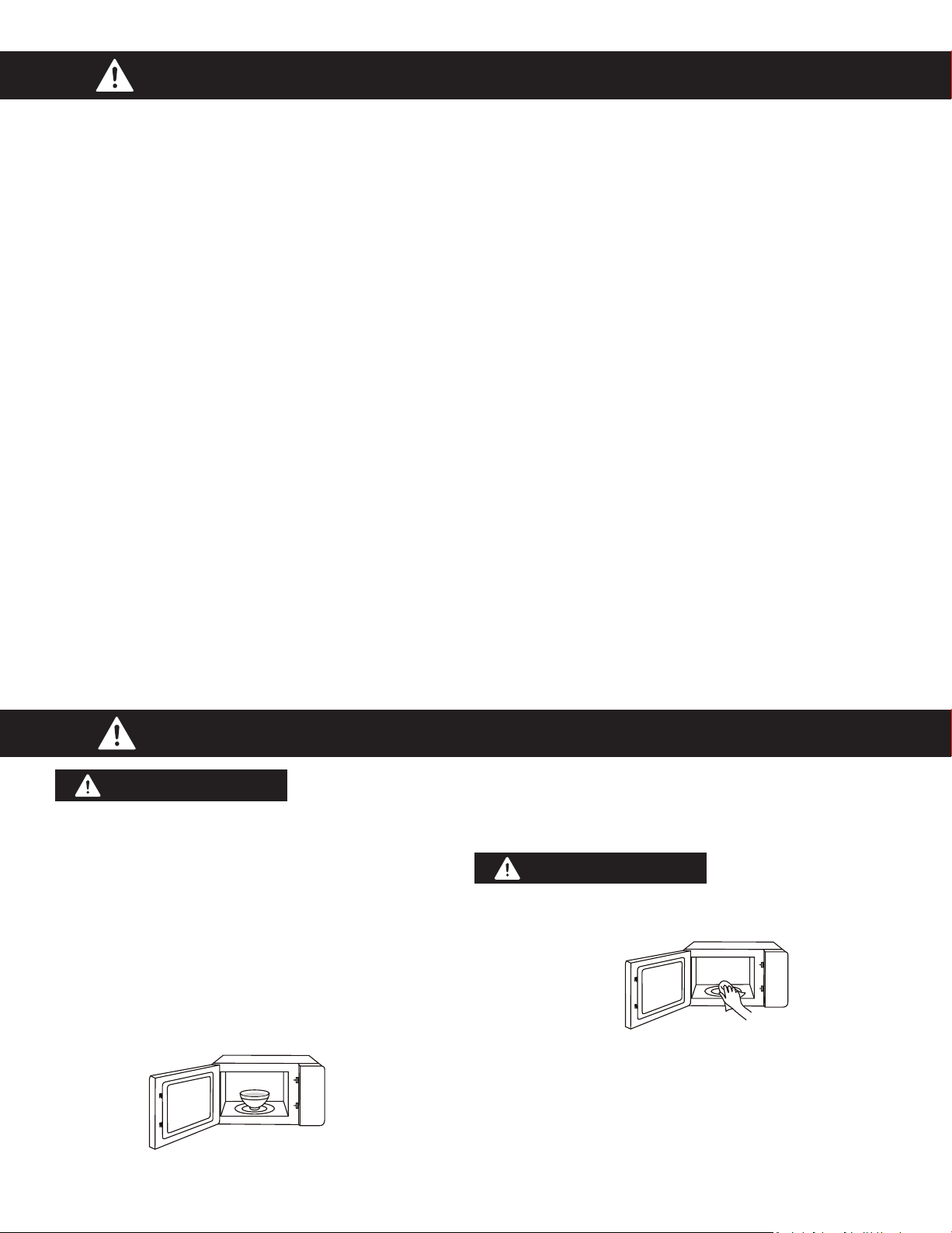
SAVE THESE INSTRUCTIONS
HOUSEHOLD USE ONLY
(NOT FOR COMMERCIAL USE)
IMPORTANT SAFETY INSTRUCTIONS (con�nued)
PRECAUTIONS TO AVOID POSSIBLE EXPOSURE TO EXCESSIVE MICROWAVE ENERGY
GROUNDING INSTRUCTIONS
(a) DO NOT
DO NOT
(a) DO NOT
DO NOTDO NOT
DO NOTDO NOT
DO NOT
Do not
DO NOT
DO NOT
DO NOT
UTENSILS
Personal Injury Hazard:
Utensil Test:
CAUTION
DO NOT
CAUTION
3

RADIO INTERFERENCE
This device complies with part
18 of the FCC Rules.
GROUNDING INSTRUCTIONS
Grounding Instruc�ons
THIS APPLIANCE MUST BE GROUNDED.
WARNING
DANGER
Electric Shock Hazard:
Electric Shock Hazard:
WARNING
4
2. Long cord sets or extension cords are not recommended.
Installa�on
1
DO NOT
a a a
Examine Your Oven
a a a aa a a
a aa a a a
a a aa
DO NOT
a
aa
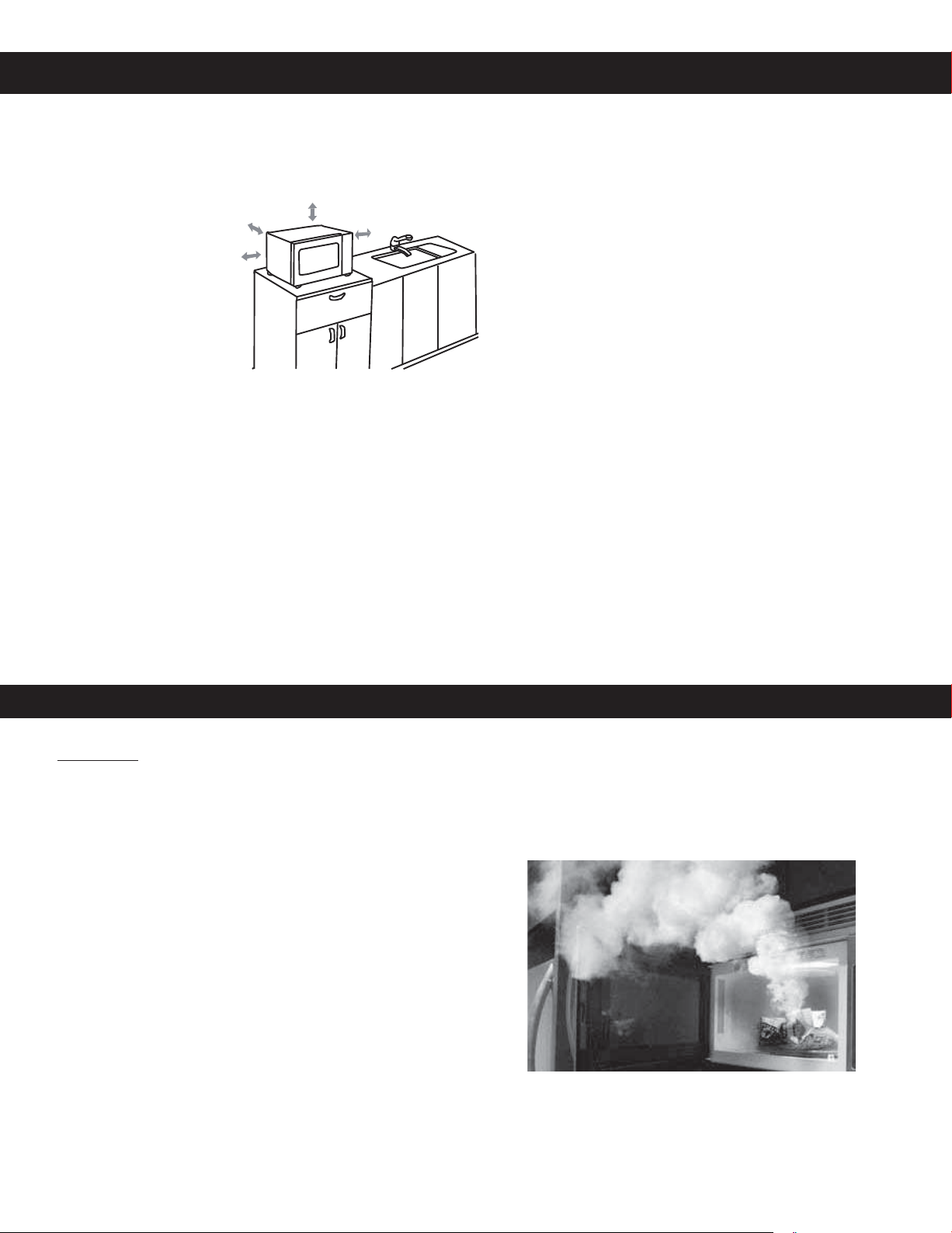
Placement of Oven
a a a a a a
aa
Installa�on
a
(a)
DO NOT
DO NOT
a a a
DO NOT
Food Preparation
Follow these Safety Precautions when cooking in your oven.
IMPORTANT
Proper cooking depends upon the power, the time setting
and quantity of food. If you use a smaller portion than
recommended but cook at the time for the recommended
portion, fire could result.
1) HOME CANNING / STERILIZING / DRYING FOODS / SMALL
QUANTITIES OF FOODS
• DO NOT use your oven for home canning. Your oven cannot
maintain the food at the proper canning temperature. The food
may be contaminated and then spoil.
• DO NOT use the microwave oven to sterilize objects (baby
bottles, etc.). It is difficult to keep the oven at the high
temperature needed for sterilization.
• DO NOT dry meats, herbs, fruits or vegetables in your oven.
Small quantities of food or foods with low moisture content can
dry out, scorch or catch on fire if overheated.
2) POPCORN
Popcorn may be popped in a microwave oven corn popper.
Microwave popcorn that pops in its own package is also available.
Follow popcorn manufacturers’ directions and use a brand suitable
for the cooking power of your microwave oven.
CAUTION: When using pre-packaged microwave popcorn, you
can follow recommended package instructions or use the Popcorn
button (refer to page 24). Otherwise, the popcorn may not pop
adequately or may ignite and cause a fire. Never leave the oven
unattended when popping popcorn. Allow the popcorn bag to cool
before opening, and always open the bag facing away from your
face and body to prevent steam burns.
5
3) DEEP FAT FRYING
• DO NOT deep fat fry in your microwave oven. Cooking oils
may burst into flames and may cause damage to the oven and
may result in burns. Microwave utensils may not withstand the
temperature of the hot oil, and can shatter or melt.
4) FOODS WITH NONPOROUS SKINS
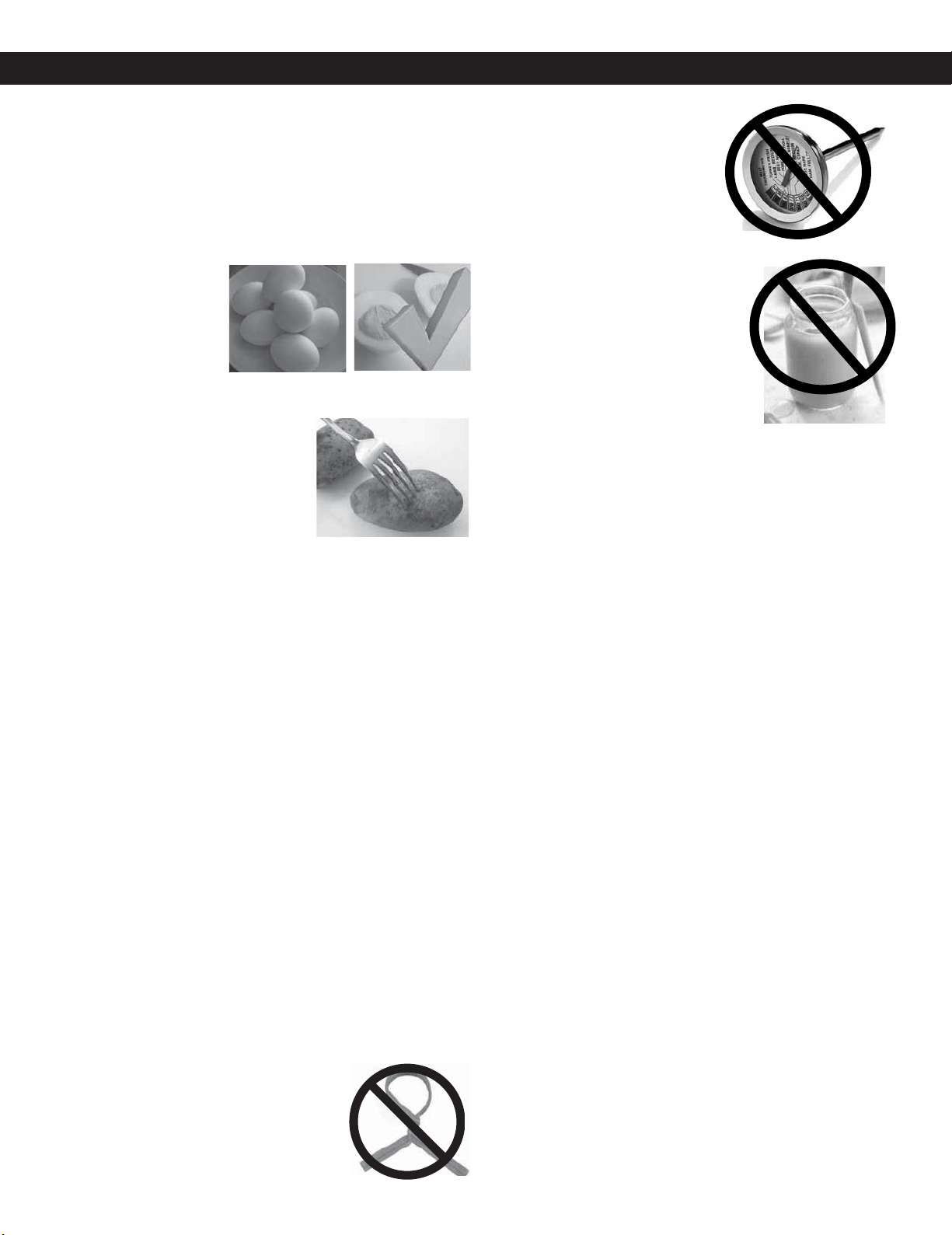
• DO NOT COOK / REHEAT WHOLE EGGS, WITH OR WITHOUT
THE SHELL.
Steam buildup in whole
eggs may cause them
to explode, and possibly
damage the oven or
cause injury. Reheating
SLICED hard-boiled eggs
and cooking SCRAMBLED eggs is safe.
• Potatoes, apples, whole squash
and sausages are examples of
foods with nonporous skins. These
types of foods must be pierced
before microwave cooking to
prevent them from exploding.
CAUTION: Cooking dry or old
potatoes can cause fire.
5)
GLASS TRAY / COOKING CONTAINERS / FOIL
• Cooking containers get hot during microwaving. Heat is
transferred from the HOT food to the container and the Glass
Tray. Use pot holders when removing containers from the oven
or when removing lids or plastic wrap covers from cooking
containers, to avoid burns.
• The Glass Tray will get hot during cooking. It should be allowed
to cool before handling or before paper products, such as paper
plates or microwave popcorn bags, are placed in the oven for
microwave cooking.
• When using foil in the oven, allow at least 1-inch (2.5 cm) of
space between foil and interior oven walls or door.
• Dishes with metallic trim should not be used, as arcing
may occur.
6) PAPER TOWELS / CLOTHS
• DO NOT use paper towels or cloths that contain a synthetic fiber
woven into them. The synthetic fiber may cause the towel to
ignite. Use paper toweling under supervision.
7) BROWNING DISHES / OVEN COOKING BAGS
DO NOT
preheat browning dish more than six minutes.
• If an oven cooking bag is used for microwave cooking, prepare
according to package directions. DO NOT
use a wire twist-tie to close bag. Instead
use plastic ties, cotton string or a strip cut
from the open end of the bag.
8) THERMOMETERS
• DO NOT use a conventional
meat thermometer in
your oven. Arcing may
occur. Microwave safe
thermometers are available
for both meat and candy.
9) BABY FORMULA / BABY FOOD
• DO NOT heat baby formula or baby
food in the microwave oven. The glass
jar or surface of the food may appear
warm while the interior can be so hot
as to burn the infant’s mouth and
esophagus.
10) REHEATING PASTRY PRODUCTS
• When reheating pastry products, check temperatures of any
fillings before eating. Some foods have fillings, which heat faster
and can be extremely hot, while the surface remains warm to the
touch (for example, jelly donuts).
11) GENERAL OVEN USAGE GUIDELINES
• DO NOT use the oven for any purpose other than the
preparation of food.
Food Preparation (continued)
•
Only use browning dishes that are designed
for microwave cooking. Check browning dish
information for instructions/heating chart.
6

Aluminum Foil
It is not recommended
to use. Arcing can occur
if foil is too close to oven
wall or door and cause
damage to your oven.
Browning Dish
Yes. Only use browning dishes that are designed
for microwave cooking. Check browning dish
information for instructions/heating chart. Do
not preheat for more than six minutes.
Brown Paper Bags
No. They may cause a fire in
the oven.
Microwave Safe
Yes. If labeled Microwave Safe, check
manufacturers’ directions for use in
microwave heating.
Some dinnerware
may state on the back
of the dish, “Oven-
Microwave Safe”.
Dinnerware
If unlabeled, use CONTAINER TEST below.
Disposable Polyester Paperboard Dishes
Yes. Some frozen foods
are packaged in these
dishes. Also can be
purchased in some
grocery stores.
Fast Food Cartons with
Metal Handle
No. Metal handle may cause
arcing.
Frozen Dinner Trays
If made for the microwave,
then yes. If it contains metal,
then no.
Glass Jars
No. Most glass jars are not
heat resistant.
Heat Resistant Oven
Glassware/Ceramic
Yes, but only ones for
microwave cooking
and browning.
(See CONTAINER
TEST below.)
Metal Bakeware
No. Metal can cause
arcing and damage to
your oven.
Metal Twist-Ties
No. May cause arcing
which could cause a fire in
the oven.
Oven Cooking Bag
Yes. Follow manufacturers’ directions. Close bag
with the nylon tie provided, a strip cut from the
end of the bag, or a piece of cotton string. Do
not close with metal twist-tie. Make six
1
⁄2-inch
slits near the closure.
Paper Plates/Cups
Yes. Use to warm cooked
foods, and to cook foods that
require short cooking time,
such as hot dogs. Do not
microwave paper cups; they
may overheat and ignite.
Towels & Napkins
Yes, only paper napkins/towels. Use
to warm rolls and sandwiches, only
if labeled safe for microwave use.
Do NOT use recycled paper towels.
Parchment Paper
Yes. Use as a cover to prevent splattering.
Plastic Cookware
Yes, with caution.
Should be labeled,
“Suitable for
Microwave Heating.”
Check Microwave Safe manufacturers’ directions
for recommended uses. Some microwave safe
plastic containers are not suitable for cooking
foods with high fat or sugar content. The heat
from hot food may cause warping.
Plastic, Melamine
No. This material absorbs microwave energy.
Dishes get HOT!
Plastic Foam Cups
Yes, with caution. Plastic foam
will melt if foods reach a high
temperature. Use short term
only to reheat foods to a low
serving temperature. Do not
microwave paper cups; they
may overheat and ignite.
Plastic Wrap
Yes. Use to cover
food during cooking
to retain moisture
and prevent
splattering.
Should be labeled “Suitable for Microwave
Heating”. Check package directions.
Straw, Wicker, Wood
Yes, short term only.
Use only for short term
reheating and to bring
food to a low serving
temperature. Wood may dry out, split or crack.
Thermometers
Only microwave safe
thermometers can be
used, NOT conventional
thermometers.
Wax Paper
Yes. Use as a cover to
prevent splattering
and to retain moisture.
Cookware Guide
CONTAINER TEST
TO TEST A CONTAINER FOR SAFE MICROWAVE OVEN USE: Fill a microwave safe cup with cool water and place it in
the microwave oven along side the empty container to be tested; heat one (1) minute at PL10 (HIGH). If the container is
microwave oven safe (transparent to microwave energy), the empty container should remain comfortably cool and the
water should be hot. If the container is hot, it has absorbed some microwave energy and should NOT be used. This test
cannot be used for plastic containers.
This section answers the question, “Can I use in the Microwave?”
7
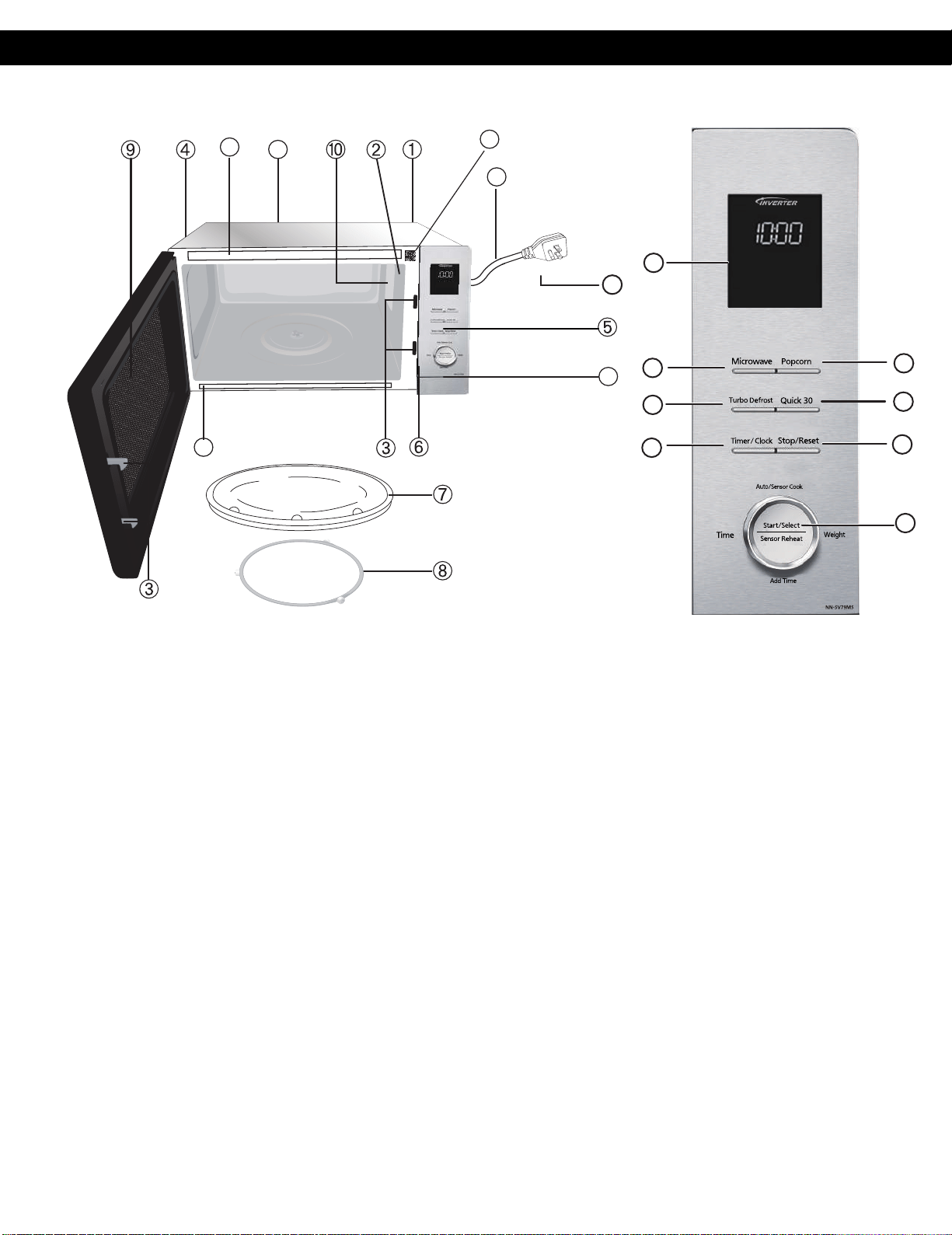
Location of Controls
1 External Air Vent
2 Internal Air Vent
3 Door Safety Lock System
4 Exhaust Air Vent
5 Control Panel
6 Identification Plate
7 Glass Tray
8 Roller Ring
9 Heat/Vapor Barrier Film
(do not remove)
10 Waveguide Cover
(do not remove)
11 Door Release Button
12 Warning label
13 Menu label
Power Supply Cord
15
Power Supply Plug
16
Display Window (page 9)
17
Microwave Button (page 16)
18
Turbo Defrost Button (page 25-26)
19
21
20
Timer/Clock Button (page 14, 19)
Popcorn Button (page 24)
22
Beep Sound:
When a pad is pressed correctly, a beep will be heard. If a pad is
pressed and no beep is heard, the unit did not or cannot accept
the instruction.
When operating, the oven will beep twice between programmed
stages. At the end of any complete program, the oven will beep 5
times.
When customer don't open/close door for 10 minutes, the unit
don't accept to start cooking and will beep 3 times.
NOTE:
If an operation(except “One Push Reheating” )
is set and Start is not pressed, after 6 minutes
,
the
oven
will automatically cancel
the
operation. The display will revert back
.
23
Stop/Reset Button
Quick 30 Button (page 18)
to clock
or colon mode
16
17
18
19
20
21
22
23
24
11
12
14
15
13
Auto
Defrost
More Less
TURBO
DEFROST
NN-SV79MS
12
14
Alexa Barcode label (page 10-11)
Before cooking:
One press clears your instructions.
During cooking:
One press temporarily stops the
cooking process. Another press cancels
all your instructions and colon or time
of day appears in the display window.
24
Dial
The dial have 4 function
(see details on next page)
The clock or colon(:) will disappear to save
power if no operation for 3 minutes.
8
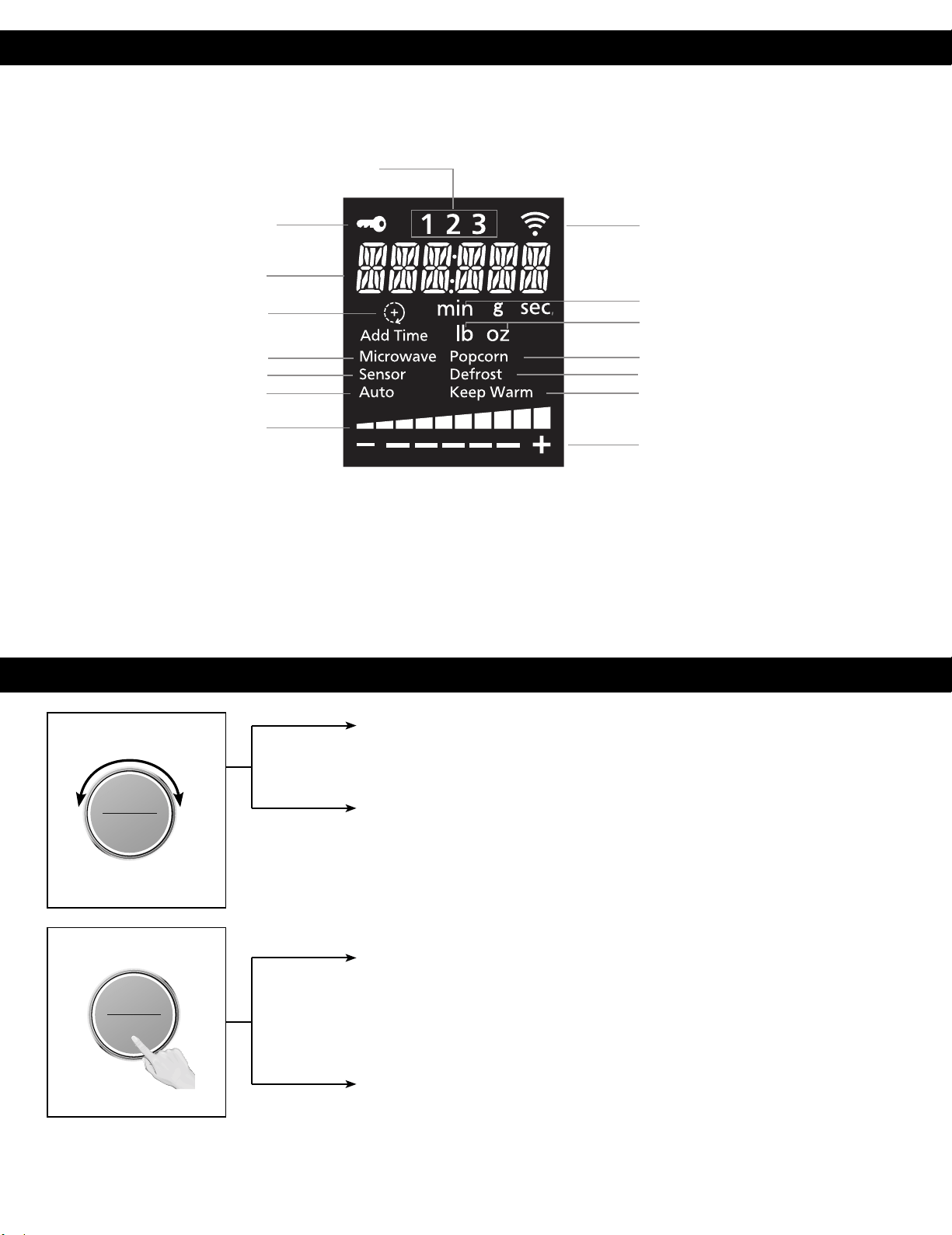
Display Window
Dial Feature
To help you operate the oven conveniently, the present state will appear in the display window.
Note: When cooking time is longer than 60 minutes, the time will appear in hours and minutes.
Time (Cooking time)
After selecting a manual cooking mode, enter time by turning the dial. Use the dial for
the Add Time function (page 23).
Auto Cook (Auto/Sensor Cook)
a. When clock mode is displayed, turn the dial to select auto programs and weight
(pages 29-33).
Start/Select (Confirmation)
Press the dial to start operating the oven or confirm the setting. If during cooking the
door is opened or Stop/Reset is pressed once, Start has to be pressed again to continue
cooking.
Sensor Reheat (One Push Reheating)
When Clock mode is displayed, press dial for quick start reheating chilled meal (page 27).
ヵㄊㄎㄆ ヸㄆㄊㄈㄉㄕ
バ
モㄖㄕㄐ チ
ヤㄐㄐㄌ
ヴㄕㄓㄕバヴㄆㄍㄆㄕ
ヴㄆㄏㄔㄐㄓチンㄆㄉㄆㄕ
ヴㄕㄓㄕバヴㄆㄍㄆㄕ
ヴㄆㄏㄔㄐㄓチンㄆㄉㄆㄕ
3-Stage Display
Child Safety Lock Setting
Number/Character
Wireless Network Display
Add Time Display
Microwave Mode
Sensor Cook Mode
Auto Cook Mode
Power Level
Time (Minute/Second)
Weight
Popcorn Mode
Defrost Mode
Keep Warm Mode
More/Less
ヴㄆㄏㄔㄐㄓ
チ
9
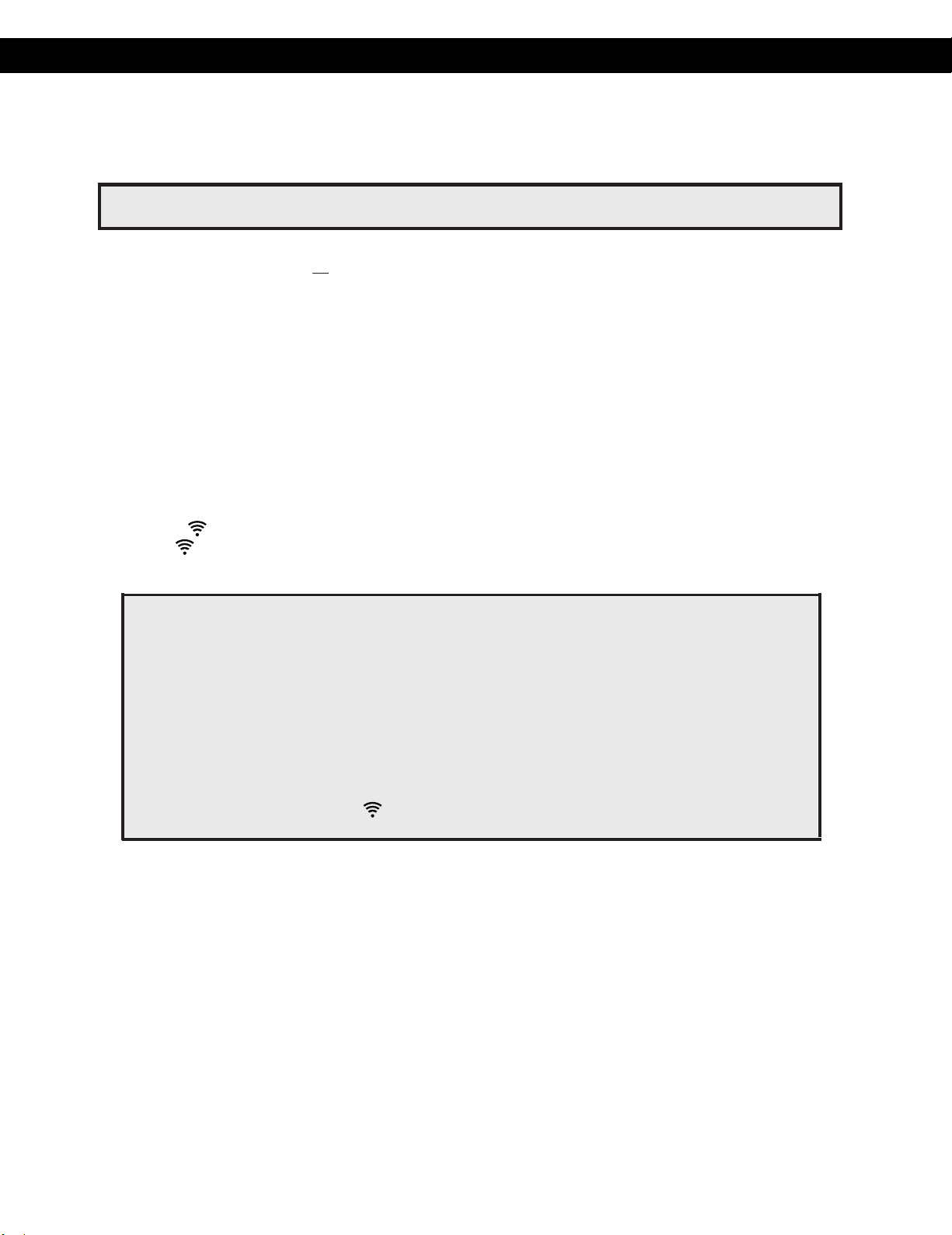
SETTING UP ALEXA ON YOUR MICROWAVE OVEN
Your microwave oven can be controlled with Alexa using any Alexa-enabled device such as Echo or Echo Dot.
To
c
ontrol your microwave oven using Alexa, you’ll need to set up your microwave and connect to Alexa using one of
the below pairing methods.
Pairing Method 1: Zero-Touch Setup (ZTS)
In order to pair using this method, all pre-requisites listed below must be met. If not, go to pairing method #2 or #3.
You opted-in to store your wireless network credentials to your Amazon account in the past. This
occurs when you previously set up another Echo family device or a Works with Alexa device.
The microwave must have been ordered from the same Amazon account and while ordering you must
have opted to link the device upon purchase. If microwave was purchased/received as a gift, or user de-
selected this option upon purchase, the microwave will not be linked to end user's Amazon/Alexa account
and ZTS will not be enabled. Please go to pairing method #2 or #3.
The microwave would need to be within the range of the user’s wireless network.
The microwave should be within the wireless range of an Echo family device, which was signed into using the
same Amazon account.
If above conditions are met:
Pairing Method 2: Barcode Setup (BCS)
If Zero-Touch Setup (ZTS) is not possible, you can set up your microwave and connect to Alexa using Barcode Setup
(BCS).
1. Install the latest version of Alexa app on your smart device and login with your Amazon account.
2. Plug the microwave oven into a power outlet that is grounded.
3. Ensure that home is on.
4-a. If your Alexa app automatically find your microwave oven by showing popup dialog after app is opened,
4-b.
1. Plug the microwave oven into a power outlet that is grounded.
2. Ensure that home wireless network is on and the device is in setup mode.
3. If the stops blinking and stays on steadily, the device is ready to be controlled by using Alexa. (If
the is off, press the
Popcorn button for 3 sec.
to turn the wireless network on.)
4. Open Alexa app on your phone and sign into the same Amazon account as the one above. The
Microwave should appear in the list of devices.
Operation
wireless network
5. Press "NEXT", When a screen with 2D Barcode appears, press "SCAN BARCODE", then scan the 2D
barcode for your microwave oven. Follow on-screen instructions to set up your microwave oven.
10
NOTE:This function can be used by only 2.4GHz for wireless network frequency. Please connect
your Alexa-enabled device and app to 2.4GHz.
• Setup mode : There are 2 type of set up mode as below.
- Initial setup mode
After plug on, Display show "READY TO SETUP-CONNECT TO ALEXA APP" .
When this mode, you
can connect wireless network by only pairing method #1 and #2
without pushing any button.
- Normal set up mode
When this mode, you can connect wireless network by pairing method #3 with pushing popcorn
button for
3 sec.
After setup by this
mode, you can proceed weight/beep sound setup mode(page 12)
When display show clock time or ":", you
can
use this mode by pushing Popcorn button for 3 sec.
After
pushing Popcorn key for 3 sec, display show "ENTER SETUP MODE" and you can connect wireless
network by paring method #2 or #3.
While the device is in setup mode, is flashing until successfully paired.
Setup mode is activated for 5 minutes. After activated time, setup mode will time out.
press continue and please go to step.5.
If your Alexa app automatically doesn't find your microwave oven, open the Alexa App, tap the Devices icon in
the lower right, and tap the “+” icon in the top right. Select “Add Device” and “Microwave” to begin set up for
your microwave oven. Press "Panasonic"
.

Operation
NOTE: The QR code used for microwave oven setup is attached inside
the product. Please open the door and scan the QR code to the
right of a key image on the front side of the product.
Pairing Method 3: User Guided Setup (UGS)
If the QR code on the device is lost or has been damaged and you cannot use Pairing Method #2, you can set up your
microwave and connect to Alexa using User Guided Setup (UGS).
1. Install the latest version of Alexa app on your smart device and login with your Amazon account.
2. Plug the microwave oven into a power outlet that is grounded.
3. Ensure that home wireless network is on.
4-a. If your Alexa app automatically find your microwave oven by showing popup dialog after app is opened,
press continue and please go to step.6.
5.
4-b. If your Alexa app automatically doesn't find your microwave oven or you try to connect with normal setup
6.
7.
mode, Press the Popcorn button for 3 seconds. The screen will display 'ENTER SETUP MODE'. Then the
microwave oven is ready for setup.
Open the Alexa App, tap the Devices icon in the lower right, and tap the “+” icon in the top right. Select
“Add
Device” and “Microwave Oven” to begin set up for your microwave oven. Press "Panasonic".
Press "NEXT", When a screen with 2D Barcode appears, press "DON'T HAVE A BARCODE" to continue
setup. And then, follow the on-screen instructions to set up your microwave oven.
If stop blinking and is off, restart from the step 4-b .
When "CONNECTED" shows on the microwave LED display and the beep sounds, set up is complete.
After set up, the LED display will turn on the and show local time in your location.
NOTE: It may take a few minutes for the LED display to show the correct local time.
Once set up is completed, it is automatically set up even after turning the power of the oven off and on.
NOTE: When you delete the product from the Alexa app, you must set up again.
7. If stop blinking and is off, restart from the step 4-b.
11
How to disconnect with Alexa
If you no longer need Alexa connection, you can turn off this function.
Press and hold Defrost and Quick 30 button simultaneously for 3 seconds.
Your microwave will be back to initial setup.
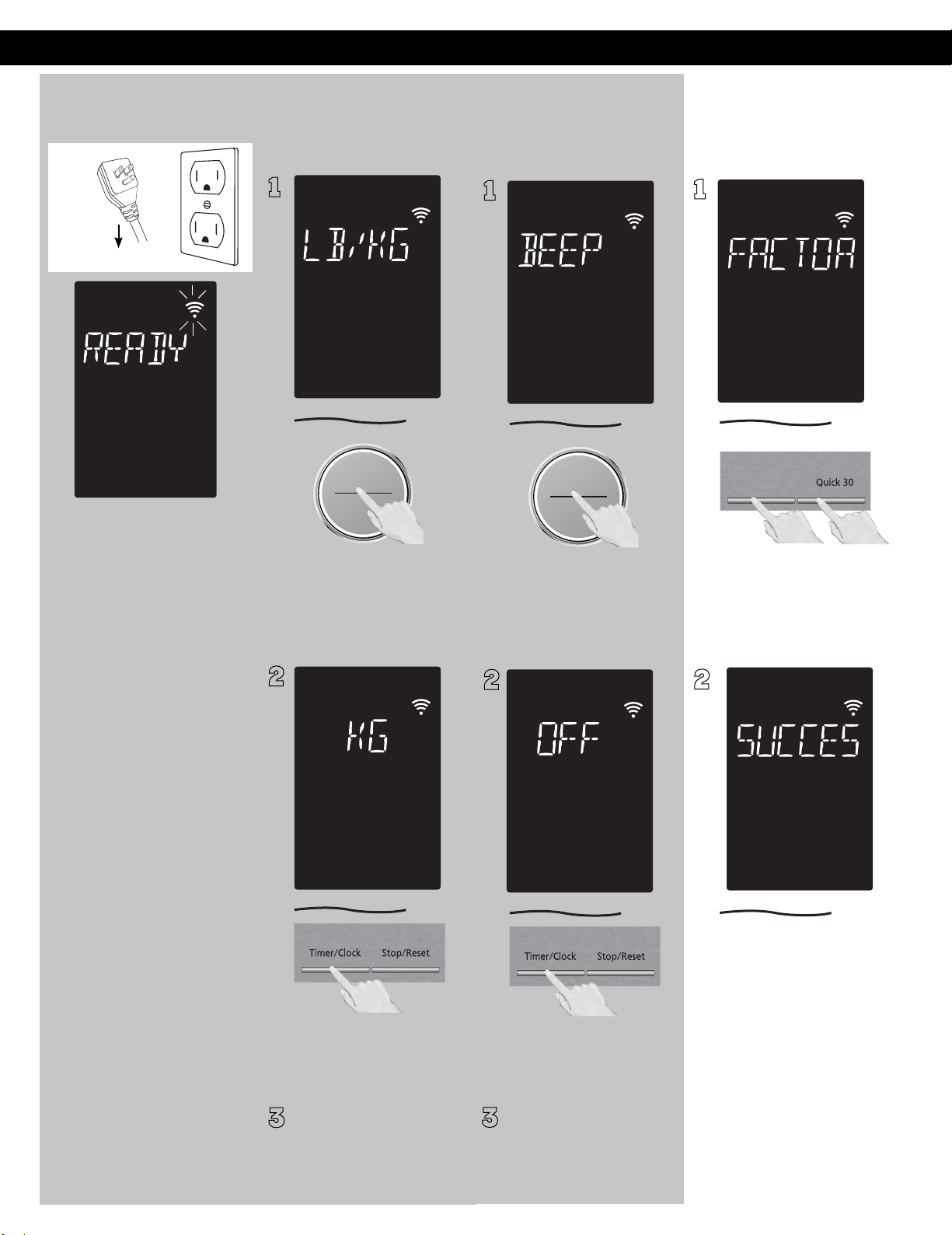
Operation
Function Features
This unique function of your
Panasonic microwave oven
allows you to establish the
initial non-cooking features of
your Oven.
This microwave oven has the
functions below:
Plug into a properly
grounded electrical outlet.
BEEP CHOICE: The oven has
both Beep On and Beep Off
mode.
3
Press Start (Dial) 2 times.
"BEEP ON/OFF" scrolls across
display window.
The default mode is Beep ON.
Press Timer/Clock once. The
mode changes to Beep OFF.
After setting, press Stop/Reset
to exit.
NOTES:
1. These choices can be
selected only when you
plug-in the oven.
2. Press Stop/Reset, it will
revert to initial mode (" : ").
Using the Microwave
for the First Time
Plug into a properly grounded
electrical outlet. "READY TO
" scrolls across display
window.
1
ヴㄕㄓㄕバヴㄆㄍㄆㄕ
ヴㄆㄏㄔㄐㄓチンㄆㄉㄆㄕ
2
Display Window
SETUP-CONNECT TO ALEXA
APP
• WEIGHT UNITS CHOICE
• BEEP CHOICE
3.
After beep setting, it will
revert back to the Weight
Units Choice setting if Start
dial is pressed again.
WEIGHT
UNITS CHOICE:
The oven
has a choice of
Metric Units or
Imperial
Units display.
3
Press Start (Dial) once
within 10 sec. "LB /KG "
scrolls across display
window.
Select the "LB" or "KG" by
pressing Timer/Clock.
The default weight unit is LB.
After setting, press Stop/Reset
to exit.
1
ヴㄕㄓㄕバヴㄆㄍㄆㄕ
ヴㄆㄏㄔㄐㄓチンㄆㄉㄆㄕ
2
12
Then, you can proceed Alexa
setup mode.(page 10-11)
If you don't need to connect
Alexa, you can skip it and
proceed weight/beep sound
setup mode.
After Alexa setup complete
or plug on,
1
2
Disconnect wireless network
/ Factory Reset
This feature helps you to
disconnect wireless network and
reset wireless network
information for your unit.
Press and hold Defrost
and Quick 30 button
simultaneously for 3
seconds.
Display "SUCCESS" and
wireless network mark
start to blink. After 5 min.,
wireless network mark will
disappear.
If you want to connect
Alexa again, please follow
method on page 10-11.
Turbo Defrost
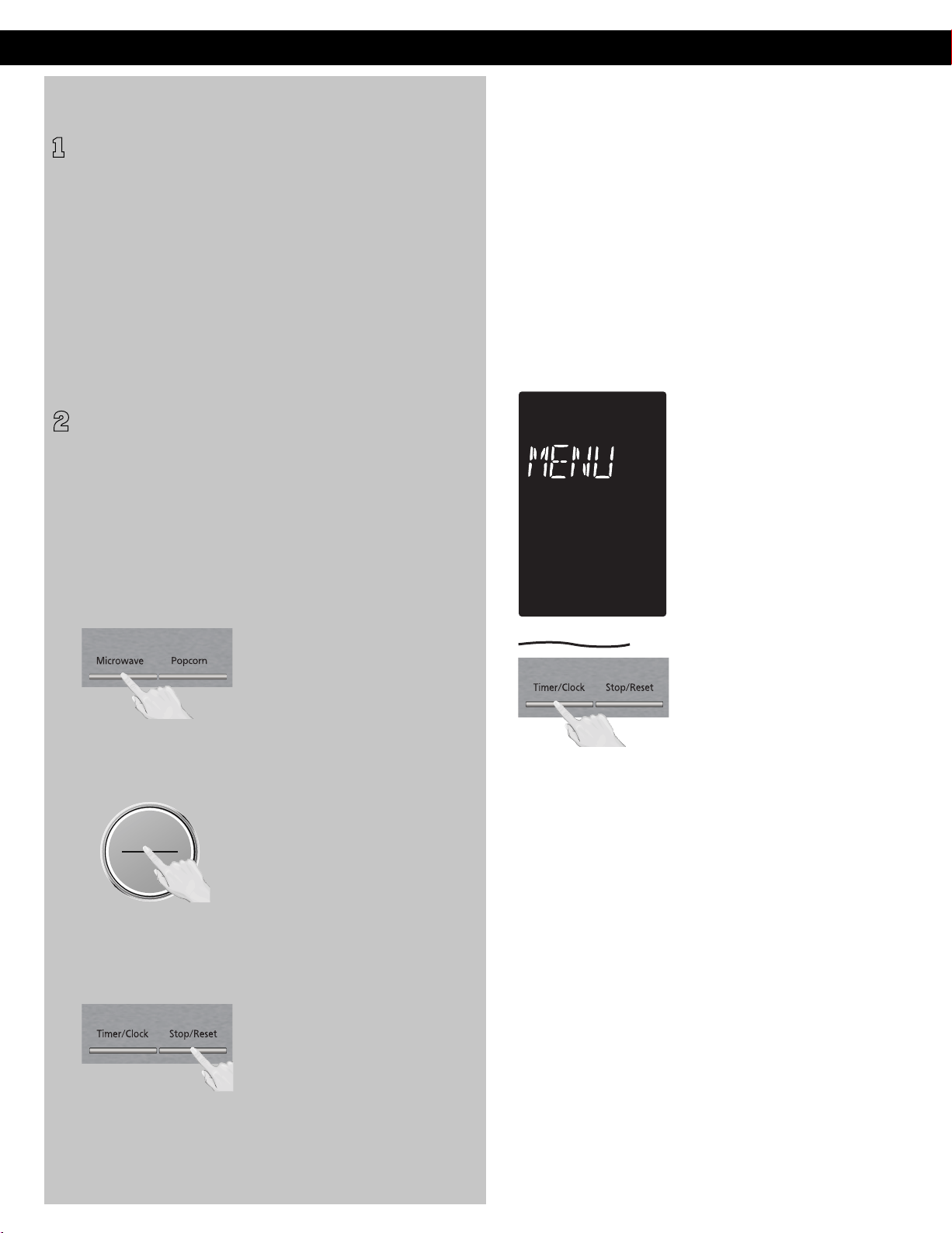
Demo Mode Menu Action ON/OFF
2
To cancel:
To turn ON/OFF:
Step 1.
Step 2.
Step 3.
When "DEMO MODE
PRESS ANY KEY" or "D"
appears in the display
window, it means the oven is
under demonstration mode,
microwave does not emit.
Demo mode is designed for
retail store display. In this mode,
the oven can be demonstrated
with no cooking power in the
oven.
This feature helps you to
program your oven by
prompting the next step to
be taken. When you become
familiar with your oven, the
prompt can be turned off. This
feature can be selected when
colon or clock appears in the
display window.
Press Microwave once, Start
4 times and Stop/Reset 4 times.
Press Timer/Clock 4 times to
turn Menu Action ON/OFF.
The default setting is Menu
Action ON.
NOTES:
1. To set Demo Mode, repeat
step 1-3.
2. Default mode is Demo
Mode off.
NOTES:
This function only can be
operated when word prompt
turns on.
1
Operation (continued)
ヴㄕㄓㄕバヴㄆㄍㄆㄕ
ヴㄆㄏㄔㄐㄓチンㄆㄉㄆㄕ
13
Operation (continued)
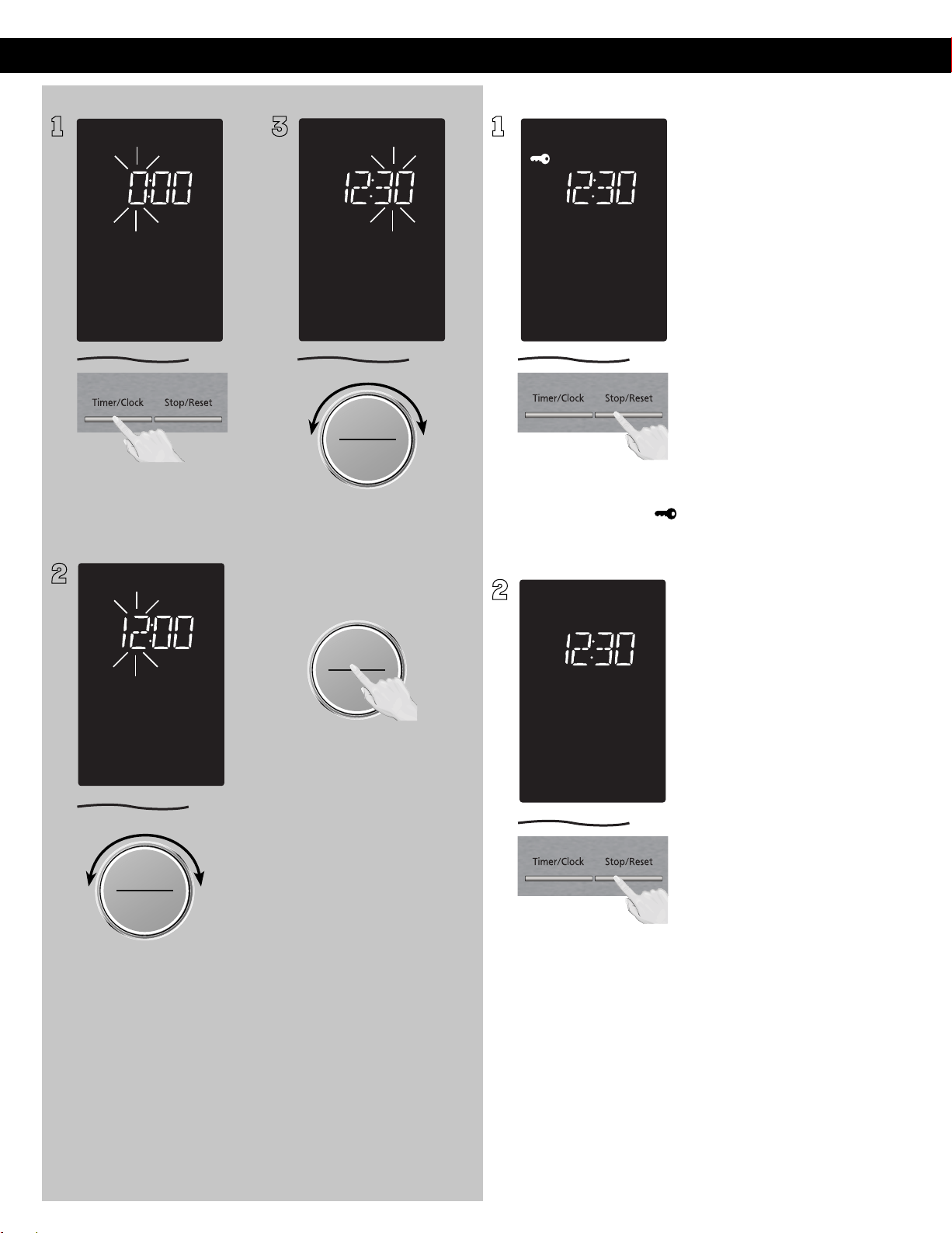
Setting the Clock Setting the Child Safety Lock
1
With the oven NOT cooking,
press Timer/Clock twice; the
hour will blink.
2
ヵㄊㄎㄆ ヸㄆㄊㄈㄉㄕ
ヴㄕㄓㄕバヴㄆㄍㄆㄕ
ヴㄆㄏㄔㄐㄓチンㄆㄉㄆㄕ
3 1
When the colon or time of day
appears in the display, press
Stop/Reset three times; “ ”
will appear in the display.
2
Press Stop/Reset three times;
the display will return to
the colon or time of the day
and Child Safety Lock will be
cancelled.
NOTES:
1. This feature prevents the
electronic operation of the
oven until cancelled. It does
not lock the door.
2. To set or cancel Child Safety
Lock, Stop/Reset button
must be pressed 3 times
within 10 seconds.
3. You can set Child Safety
Lock feature when the
display shows a colon or
time of day.
バ
モㄖㄕㄐ チ
ヤㄐㄐㄌ
ヴㄆㄏㄔㄐㄓ
14
ヴㄕㄓㄕバヴㄆㄍㄆㄕ
ヴㄆㄏㄔㄐㄓチンㄆㄉㄆㄕ
ヵㄊㄎㄆ ヸㄆㄊㄈㄉㄕ
ヴㄕㄓㄕバヴㄆㄍㄆㄕ
ヴㄆㄏㄔㄐㄓチンㄆㄉㄆㄕ
バ
モㄖㄕㄐ チ
ヤㄐㄐㄌ
ヴㄆㄏㄔㄐㄓ
T
urn the Start/Select dial to
set hours.
After setting hour,
press Start/Select
again, and turn dial
to set minutes.
Once minutes are set
press Start/Select to
finish.
Time wll apper in the
display window.
NOTES:
1. To reset the clock, repeat
steps.
2. The clock will retain the
time of day as long as the
oven is plugged in and
electricity is supplied.
3. The clock is a 12-hour
display.
4. Oven will not operate
while time is blinking.
5. The clock or colon(:) will
disappear to save power if
no operation for 3 minutes.
6. If you connect wireless
network with Alexa, time
will be automatically
appear on display.
Operation (continued)
You can use your oven without setting it up for Alexa control.
However, we highly recommend using your oven with Alexa control to unlock the full potential.
Throughout this section, the following icons indicate:
NOTE: As a safety measure, the oven can only be commanded using voice within 10 minutes of the
door being closed.
"Alexa,microwave for X. "
To microwave by time, say “Alexa, microwave for X,” where X is the amount of time you’d like to cook for
This feature allows you to set the desired power and time to cook food. Do not place food directly on the glass
tray. Use microwave safe dishes, plates or bowls covered with a lid or pierced cling lm.
For example, to cook for 5 minutes, say “Alexa, microwave for 5 minutes.” Or, to cook for 2 minutes and 39 seconds,
say “Alexa, microwave for 2 minutes and 39 seconds.”
"Alexa, add X in the microwave."
While microwaving, you can ask to cook for additional time by saying “Alexa, add X in the microwave,” where X is the
amount of time you’d like to add. For example, to add 2 minutes to the cooking time while the microwave is already
running, say “Alexa, add 2 minutes in the microwave.”
: ETON By default, the oven will microwave at PL10 (maximum power)
"Alexa, microwave for X on power Y."
By default, your oven will microwave at PL10 (maximum power). To cook at a specic power, say “Alexa,
microwave for X on power Y,” where X is the amount of time you’d like to cook for and Y is the power level.
For example, to cook at power 5 for 3 minutes, say “Alexa, microwave for 3 minutes at power 5.”
OPERATING YOUR MICROWAVE OVEN
instructions to operate the oven with voice.
Continued on the
Next Page
C
ooking
15
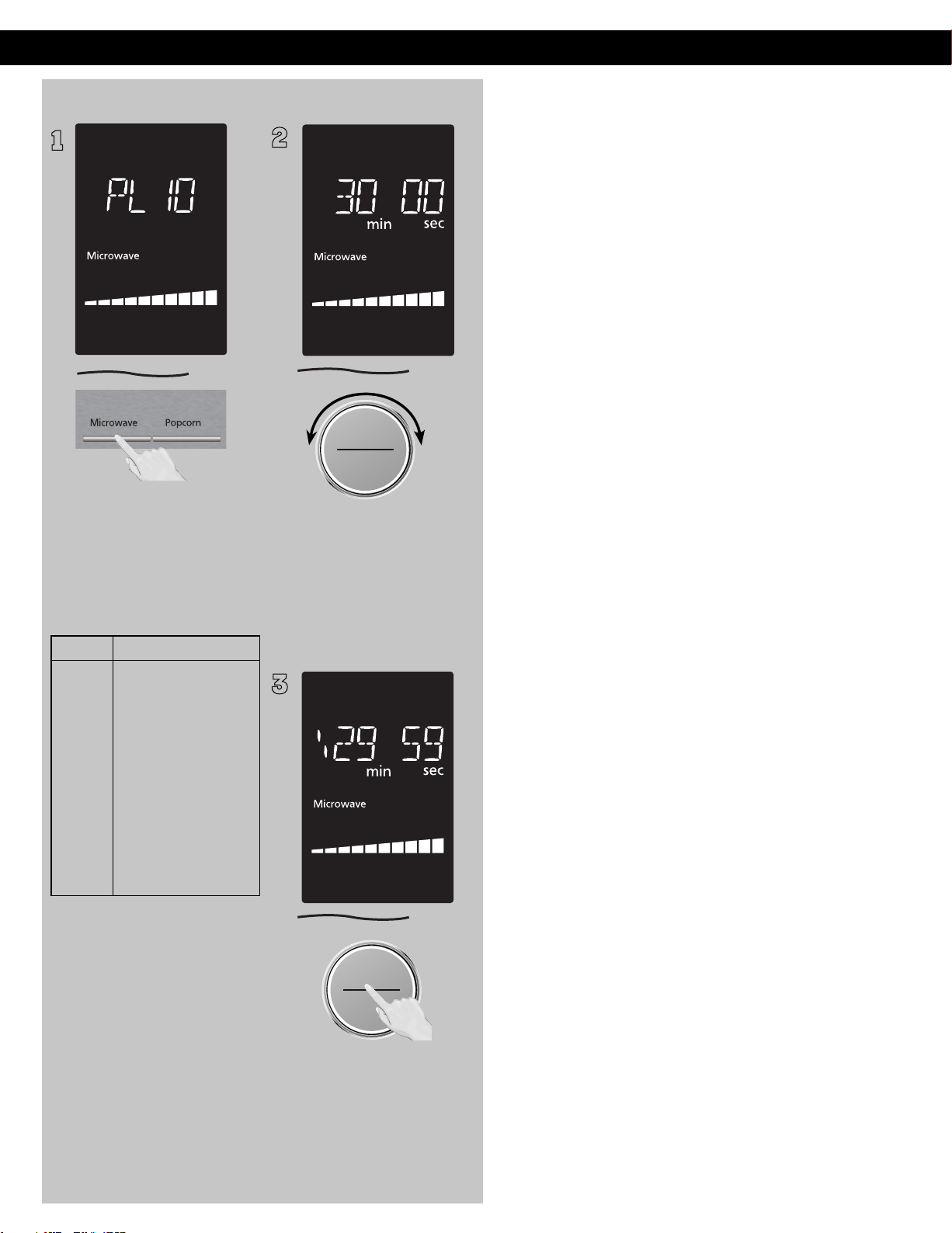
1
Press Microwave until the
desired power level appears
in the display. PL10 is the
highest and PL1 is the
lowest.
Press Power level
once
twice
3 times
4 times
5 times
6 times
7 times
2
ヵㄊㄎㄆ ヸㄆㄊㄈㄉㄕ
ヴㄕㄓㄕバヴㄆㄍㄆㄕ
ヴㄆㄏㄔㄐㄓチンㄆㄉㄆㄕ
Set cooking time by turning
dial. and KEEP WARM
have max. cooking time of 30
minutes. For other power levels,
the max. time is 1 hour and 30
minutes.
3
ヴㄕㄓㄕバヴㄆㄍㄆㄕ
ヴㄆㄏㄔㄐㄓチンㄆㄉㄆㄕ
Press dial to Start; the cooking
will start and the time will
count down in the display. At
the end of cooking, five beeps
will sound.
NOTES:
1. Opening the door and
taking out the defrosted
parts during the operating
time is recommended. Turn
over, stir or rearrange the
parts which are still in icy.
2. When the selected cooking
time is less than one hour,
the time counts down
second by second.
3. When the selected cooking
time is over one hour, the
time counts down minute
by minute until only “1H 00”
(1 hour) remains. The display
then indicates minutes and
seconds and counts down
second by second.
DO NOT OVERCOOK:
This oven requires less time
to cook than older units.
Overcooking will cause food to
dry out and may cause a fire.
A microwave oven’s cooking
power tells you the amount of
microwave power available for
cooking.
Caution:
DO NOT defrost food at a high
power setting. Doing so can
cause energy concentration at
a focused point, which can lead
to arcing and damage to the
oven. Use the “Defrost” function
instead.
Operation (continued)
Cooking(Continued)
8 times
9 times
10 times
11 times
PL10 (HIGH)
PL9
PL8
PL7 (MED-HIGH)
PL1 (LOW)
(MEDIUM)
PL4
PL5
PL6
PL3 (MED-LOW/
DEFROST)
PL2
KEEP WARM
PL10
4. For reheating, use PL10 (HIGH)
for liquids, PL7 (MED-HIGH) for
most foods, and PL6 (MEDIUM)
for dense foods.
5. For defrosting, use PL3
(MED-LOW).
バ
モㄖㄕㄐ チ
ヤㄐㄐㄌ
ヴㄆㄏㄔㄐㄓ
16
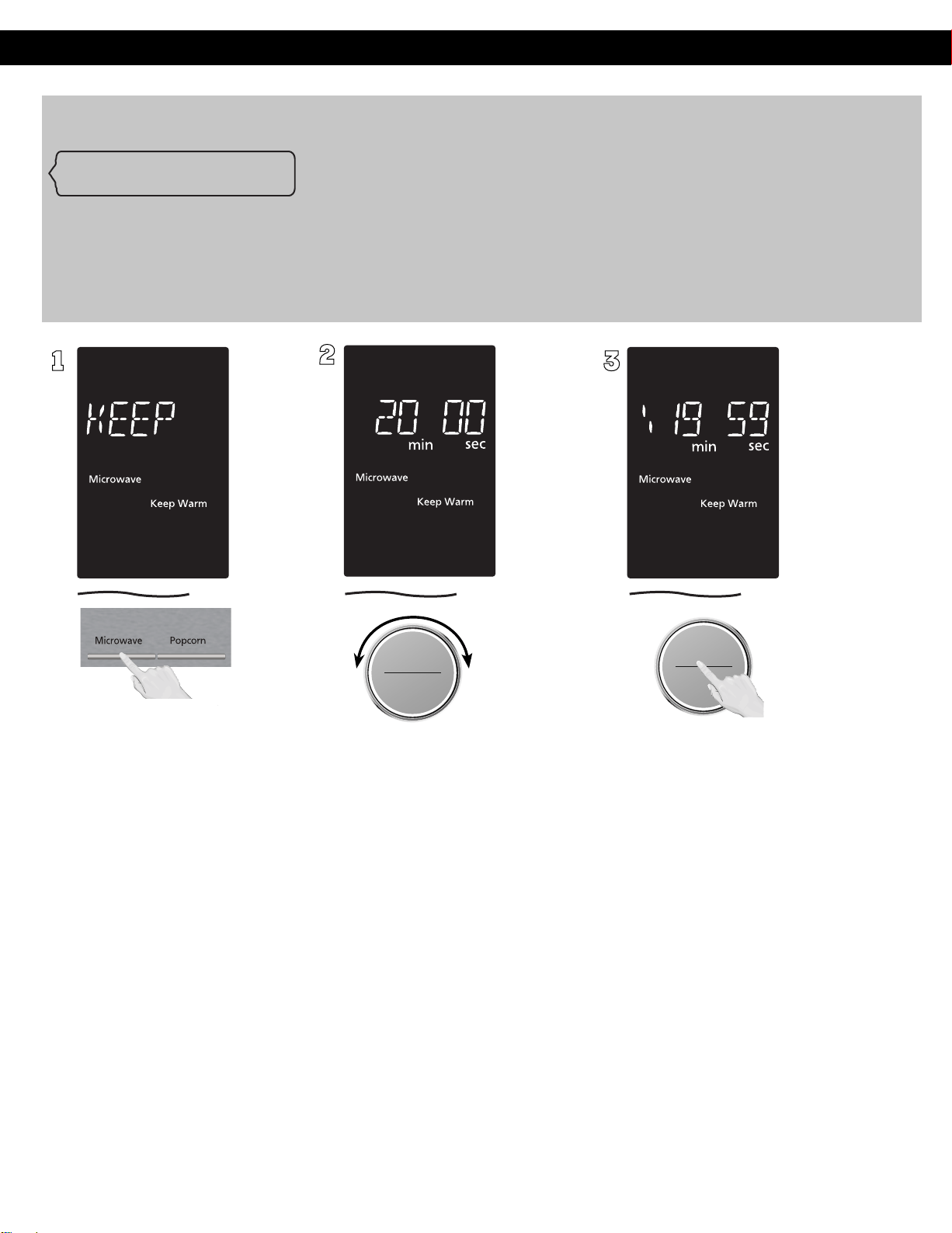
Keep Warm
(Will keep “cooked“ food warm for up to 30 minutes after cooking)
1
ヵㄊㄎㄆ ヸㄆㄊㄈㄉㄕ
ヴㄕㄓㄕバヴㄆㄍㄆㄕ
ヴㄆㄏㄔㄐㄓチンㄆㄉㄆㄕ
Set warming time by turning
dial (up to 30 minutes). Set
20 minutes cooking for an
example.
3
ヴㄕㄓㄕバヴㄆㄍㄆㄕ
ヴㄆㄏㄔㄐㄓチンㄆㄉㄆㄕ
Press dial to Start, the cooking
will start and the time will
count down in the display. At
the end of cooking, five beeps
will sound.
NOTES:
KEEP WARM can be set as
the final stage after cook time
has been manually entered.
It cannot be used with
Sensor or auto features.
Operation (continued)
Alexa, warm for X.
To keep warm by time, say “Alexa, warm for X,” where X is the amount of time you’d like to keep warm for
For example,
to keep warm for 5 minutes, say “Alexa, warm for 5 minutes.” Or, to keep warm for 2 minutes and 39 seconds, say “Alexa,
warm for 2 minutes and 39 seconds.” When you say "warm", product always work with "Keep Warm" program which is
PL1 even if you say
warm with other power level. If you say "Alexa, warm for 10 minutes at power level 5", product work
with PL1.
バ
モㄖㄕㄐ チ
ヤㄐㄐㄌ
ヴㄆㄏㄔㄐㄓ
Press Microwave 11
times to
select the KEEP WARM
.
2
17
Operation (continued)
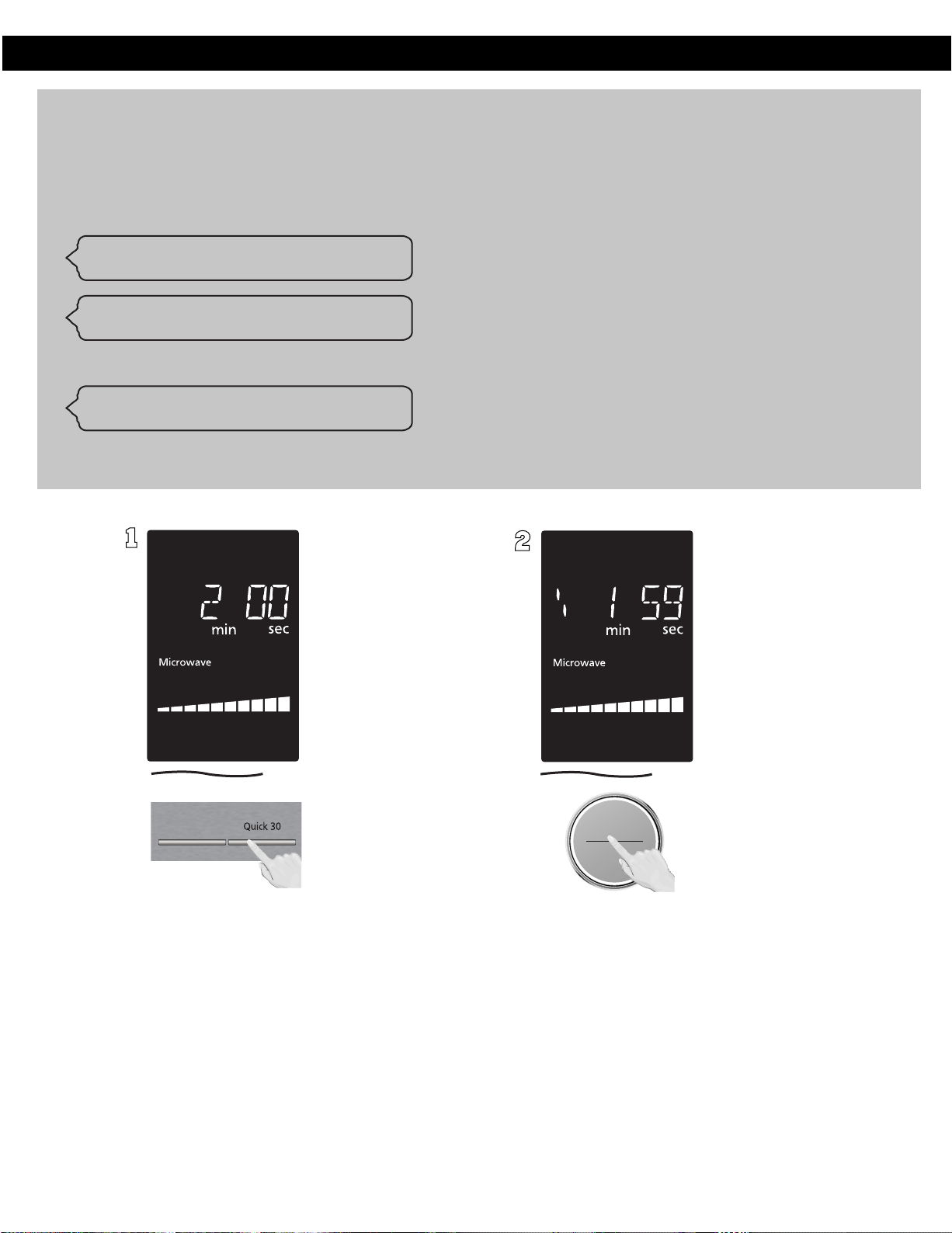
Quick 30
(Set or add cooking time in 30 seconds increments)
1
Press Quick 30 until the
desired cooking time (up to
5 minutes) appears in the
display. Power level is pre-set
at PL10.
2
ヴㄕㄓㄕバヴㄆㄍㄆㄕ
ヴㄆㄏㄔㄐㄓチンㄆㄉㄆㄕ
Press dial to Start; the cooking
will start and the time will
count down in the display. At
the end of cooking, five beeps
will sound.
Quick 30 allows
you to reheat for 30 seconds at 100%
(full power) by simply pressing the Quick 30 button. By repeatedly pressing the Quick 30 button, you can also
extend reheating time to to 5 minutes by 30 second increments. To microwave by Quick 30, say like this.
"Alexa, microwave for 30 seconds."
"Alexa, cook for 30 seconds."
"Alexa, add 30 seconds in the microwave."
if you want to add more 30 seconds while microwaving, say like this.
"Alexa, microwave for 30 seconds."
"Alexa, cook for 30 seconds."
"Alexa, add 30 seconds in the microwave."
Turbo Defrost
18
NOTES:
1. If desired, you can use other power levels. Select desired power level before pressing Quick 30
2. After setting the time by Quick 30 button, you cannot use the Dial
3. Quick 30 button can also be used to add more time during manual cooking.
4. It cannot be used with auto programs (such as Defrost, Sensor Reheat, Auto/Sensor Cook.
Operation (continued)
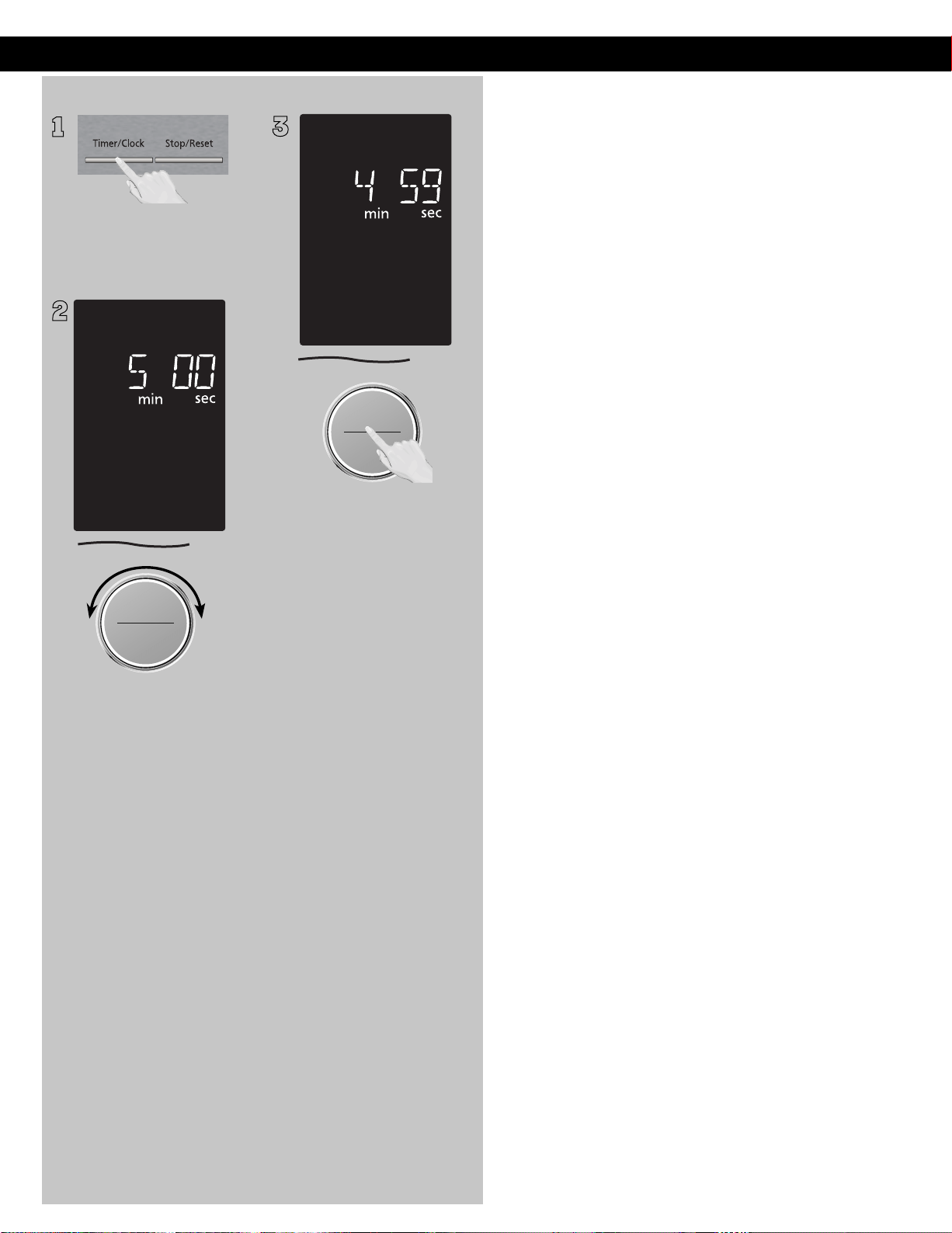
Setting the Kitchen Timer
1
This feature allows you to
program the oven as a kitchen
timer. Press Timer/Clock once.
2
ヵㄊㄎㄆ ヸㄆㄊㄈㄉㄕ
ヴㄕㄓㄕバヴㄆㄍㄆㄕ
ヴㄆㄏㄔㄐㄓチンㄆㄉㄆㄕ
Set desired amount of kitchen
time by turning dial (up to 1 hour
and 30 minutes).
3
ヴㄕㄓㄕバヴㄆㄍㄆㄕ
ヴㄆㄏㄔㄐㄓチンㄆㄉㄆㄕ
Press dial to Start. Time will
count down without oven
operating.
Caution: If oven lamp is lit
while using the timer feature
with door closed, the oven is
NOT set properly; STOP OVEN
IMMEDIATELY and re-read
instructions.
NOTES:
1. If the oven door is opened
during Kitchen Timer,
Standing Time, Delay Start,
the time in the display
window will continue to
count down.
2. If the time exceeds one
hour, it will count down
in units of minutes. If less
than one hour, the time
will count down in units of
seconds.
3. An “H” will appear in the
display to denote hours.
バ
モㄖㄕㄐ チ
ヤㄐㄐㄌ
ヴㄆㄏㄔㄐㄓ
19
Operation (continued)
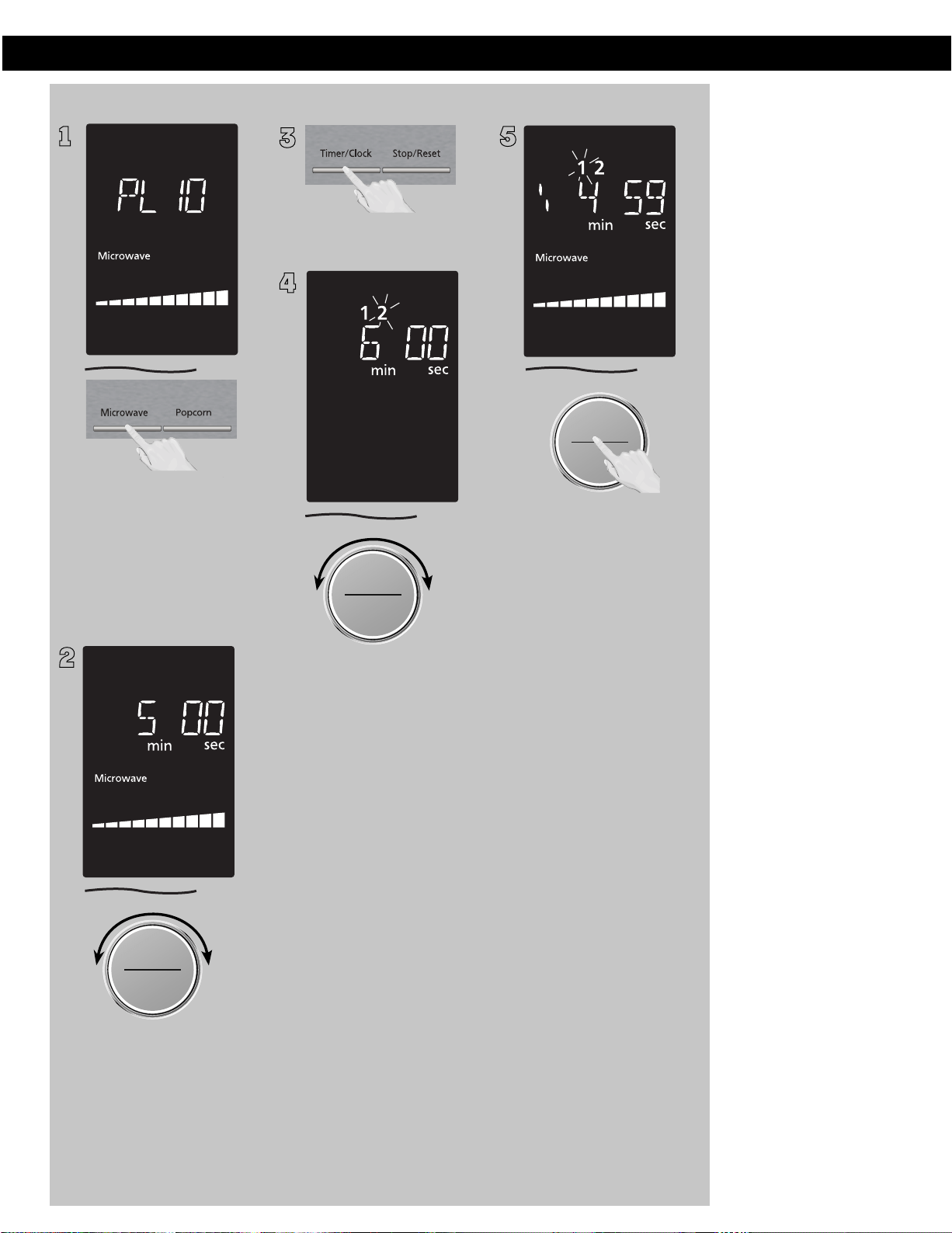
Setting a Standing Time
1
Some recipes call for a
standing time after cooking.
Press Microwave until the
desired power level appears
in the display. PL10 is the
highest and PL1 is the
lowest.
2
ヵㄊㄎㄆ ヸㄆㄊㄈㄉㄕ
ヴㄕㄓㄕバヴㄆㄍㄆㄕ
ヴㄆㄏㄔㄐㄓチンㄆㄉㄆㄕ
Set cooking time by turning
dial (see previous page for
maximum times).
3
Press Timer/Clock once.
4
ヵㄊㄎㄆ ヸㄆㄊㄈㄉㄕ
ヴㄕㄓㄕバヴㄆㄍㄆㄕ
ヴㄆㄏㄔㄐㄓチンㄆㄉㄆㄕ
Set desired standing time by
turning dial (up to 1 hour and
30 minutes).
5
ヴㄕㄓㄕバヴㄆㄍㄆㄕ
ヴㄆㄏㄔㄐㄓチンㄆㄉㄆㄕ
Press dial to Start. Cooking will
start. After cooking, standing
time will count down without
oven operating.
NOTES:
during Kitchen Timer,
Standing Time, Delay Start,
the time in the display
window will continue to
count down.
hour, it will count down in
units of minutes. If less than
one hour, the time will count
down in units of seconds.
display to denote hours.
When each stage finishes,
the oven will beep twice. At
the end of the program, the
oven will beep five times.
Standing Time, Delay Start
and Stage Cooking cannot
be used by Alexa control.
1.
7.
2. If the oven door is opened
3.
4.
Standing Time and
Delay Start can not be
programmed together
with auto programs
(such as Defrost, Sensor
Reheat, Auto/Sensor
Cook )and preheating. This
is to prevent the starting
temperature of food from
rising before defrosting or
cooking begins. A change is
starting temperature could
cause inaccurate results.
When using Standing Time
or Delay Start, it is up to 2
power stages.
5. If the time exceeds one
6. An “H” will appear in the
バ
モㄖㄕㄐ チ
ヤㄐㄐㄌ
ヴㄆㄏㄔㄐㄓ
バ
モㄖㄕㄐ チ
ヤㄐㄐㄌ
ヴㄆㄏㄔㄐㄓ
20
Operation (continued)
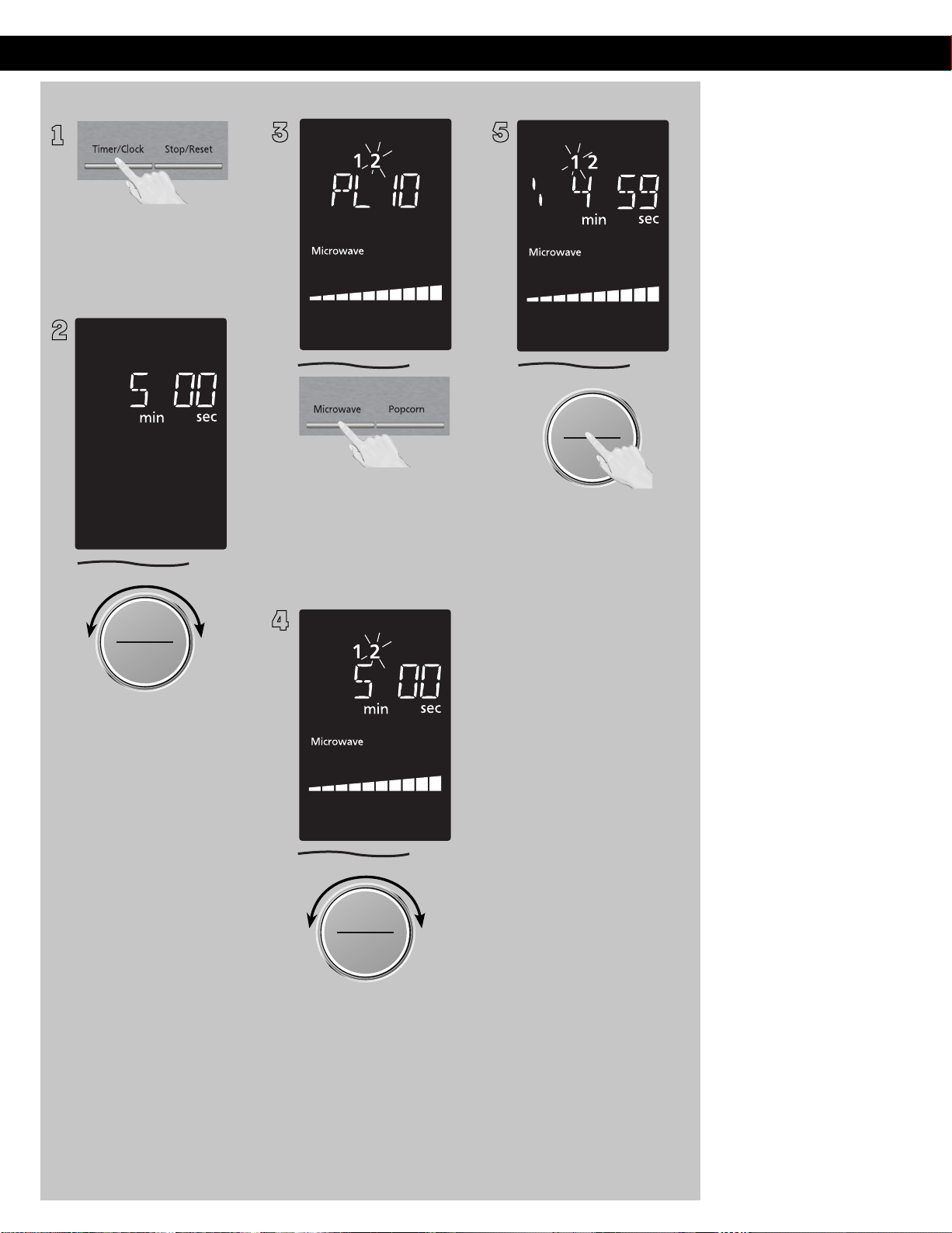
Setting a Delayed Start
1
The start time can be delayed
to start cooking at a later time.
To do this, first press Timer/
Clock once.
2
ヵㄊㄎㄆ ヸㄆㄊㄈㄉㄕ
ヴㄕㄓㄕバヴㄆㄍㄆㄕ
ヴㄆㄏㄔㄐㄓチンㄆㄉㄆㄕ
Set the desired delay time by
turning dial (up to 1 hour and
30 minutes).
3
Press Microwave until the
desired power level appears
in the display. PL10 is the
highest and PL1 is the
lowest.
4
ヵㄊㄎㄆ ヸㄆㄊㄈㄉㄕ
ヴㄕㄓㄕバヴㄆㄍㄆㄕ
ヴㄆㄏㄔㄐㄓチンㄆㄉㄆㄕ
Set cooking time by turning
dial (see previous page for
maximum times).
5
ヴㄕㄓㄕバヴㄆㄍㄆㄕ
ヴㄆㄏㄔㄐㄓチンㄆㄉㄆㄕ
Press dial to Start, the delay
time will count down, then
cooking will begin.
NOTES:
during Kitchen Timer,
Standing Time, Delay Start,
the time in the display
window will continue to
count down.
hour, it will count down in
units of minutes. If less than
one hour, the time will count
down in units of seconds.
display to denote hours.
When each stage finishes,
the oven will beep twice. At
the end of the program, the
oven will beep five times.
Standing Time, Delay Start
and Stage Cooking cannot
be used by Alexa control.
1.
7.
2. If the oven door is opened
3.
4.
Standing Time and
Delay Start can not be
programmed together
with auto programs
(such as Defrost, Sensor
Reheat, Auto/Sensor
Cook )and preheating. This
is to prevent the starting
temperature of food from
rising before defrosting or
cooking begins. A change is
starting temperature could
cause inaccurate results.
When using Standing Time
or Delay Start, it is up to 2
power stages.
5. If the time exceeds one
6. An “H” will appear in the
バ
モㄖㄕㄐ チ
ヤㄐㄐㄌ
ヴㄆㄏㄔㄐㄓ
バ
モㄖㄕㄐ チ
ヤㄐㄐㄌ
ヴㄆㄏㄔㄐㄓ
21
Operation (continued)
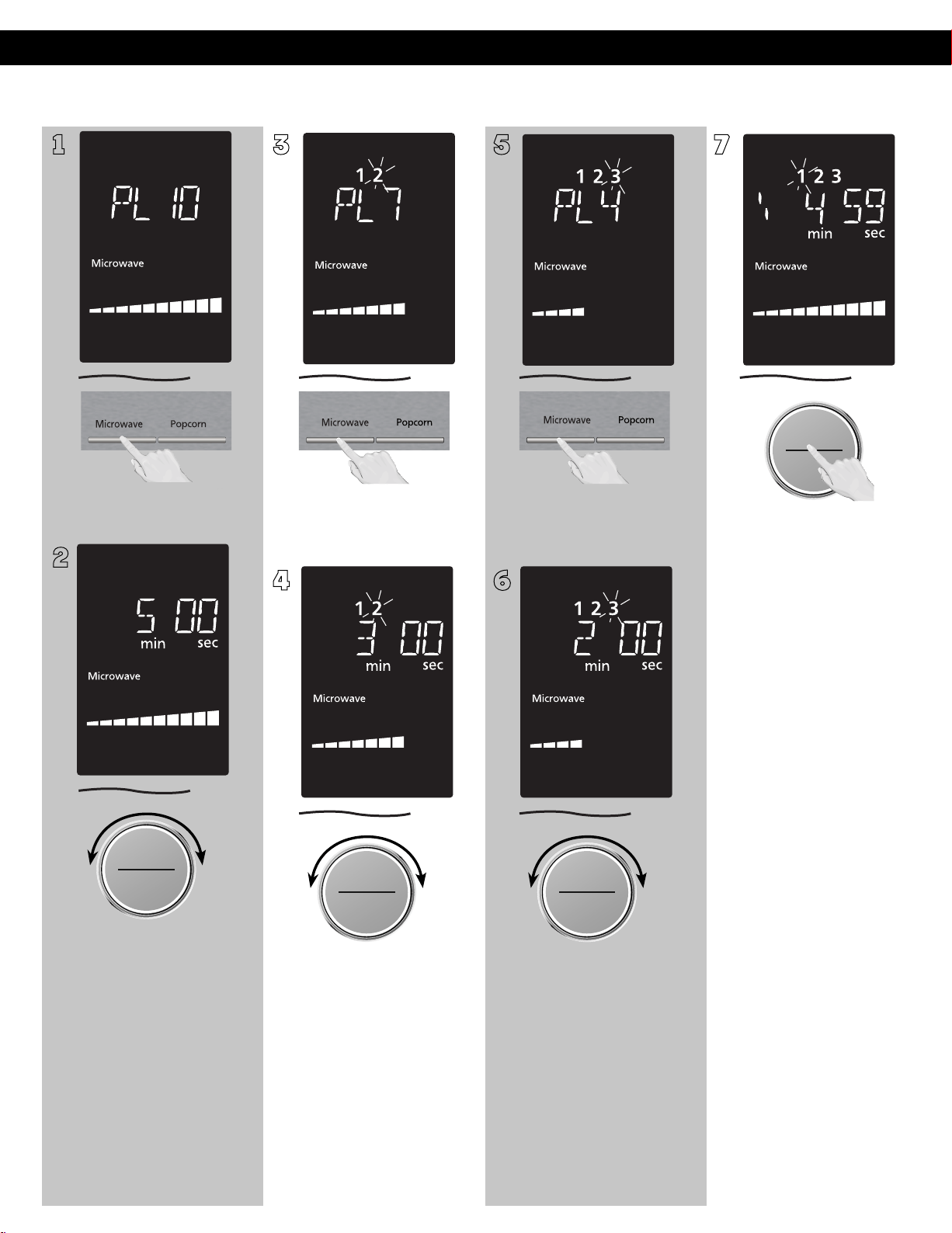
3-Stage Setting
(Example: Continually set PL10
1
Press once to
select .
2
ヵㄊㄎㄆ ヸㄆㄊㄈㄉㄕ
ヴㄕㄓㄕバヴㄆㄍㄆㄕ
ヴㄆㄏㄔㄐㄓチンㄆㄉㄆㄕ
Set as 5 minutes by turning
dial.
3
.
4
ヵㄊㄎㄆ ヸㄆㄊㄈㄉㄕ
ヴㄕㄓㄕバヴㄆㄍㄆㄕ
ヴㄆㄏㄔㄐㄓチンㄆㄉㄆㄕ
Set as 3 minutes by turning
dial.
5
Press Microwave 7 times to
select
.
6
ヵㄊㄎㄆ ヸㄆㄊㄈㄉㄕ
ヴㄕㄓㄕバヴㄆㄍㄆㄕ
ヴㄆㄏㄔㄐㄓチンㄆㄉㄆㄕ
Set as 5 minutes by turning
dial.
7
ヴㄕㄓㄕバヴㄆㄍㄆㄕ
ヴㄆㄏㄔㄐㄓチンㄆㄉㄆㄕ
Press dial to Start. The time
will count down at the first
stage in the display window.
NOTES:
1. When operating, two beeps
will sound between each
stage.
2. Auto programs (such as
Defrost, Sensor Reheat,
Auto/Sensor Cook
and Steam Clean) and
preheating can not be used
with 3-stage cooking.
3. Standing Time, Delay Start
can be used with 3-stage
cooking.
4. During cooking, one press
on Stop/Reset stops the
operation. You can re-start it
by pressing Start. A second
press of Stop/Reset will
cancel the selected program.
5. Whilst not operating, one
press of Stop/Reset cancels
the selected program.
for 5 minutes, P7 for 3 minutes and P4 for 5 minutes.)
PL10
Press Microwave 4 times to
se
l
ect
PL7
PL4
Standing Time, Delay Start
and Stage Cooking cannot
be used by Alexa control.
6.
バ
モㄖㄕㄐ チ
ヤㄐㄐㄌ
ヴㄆㄏㄔㄐㄓ
バ
モㄖㄕㄐ チ
ヤㄐㄐㄌ
ヴㄆㄏㄔㄐㄓ
バ
モㄖㄕㄐ チ
ヤㄐㄐㄌ
ヴㄆㄏㄔㄐㄓ
Microwave
22
Operation (continued)
NOTES:
1. This feature is not available
for auto programs (such
as Defrost, Sensor Reheat,
Auto/Sensor Cook
).
2. The Add Time function
will be cancelled if you
do not perform any
operation within 1
minute after cooking.
3. The Add Time function can
be used after the 3-stage
cooking.
4. The power level is the
same as the last stage.
23
Add Time
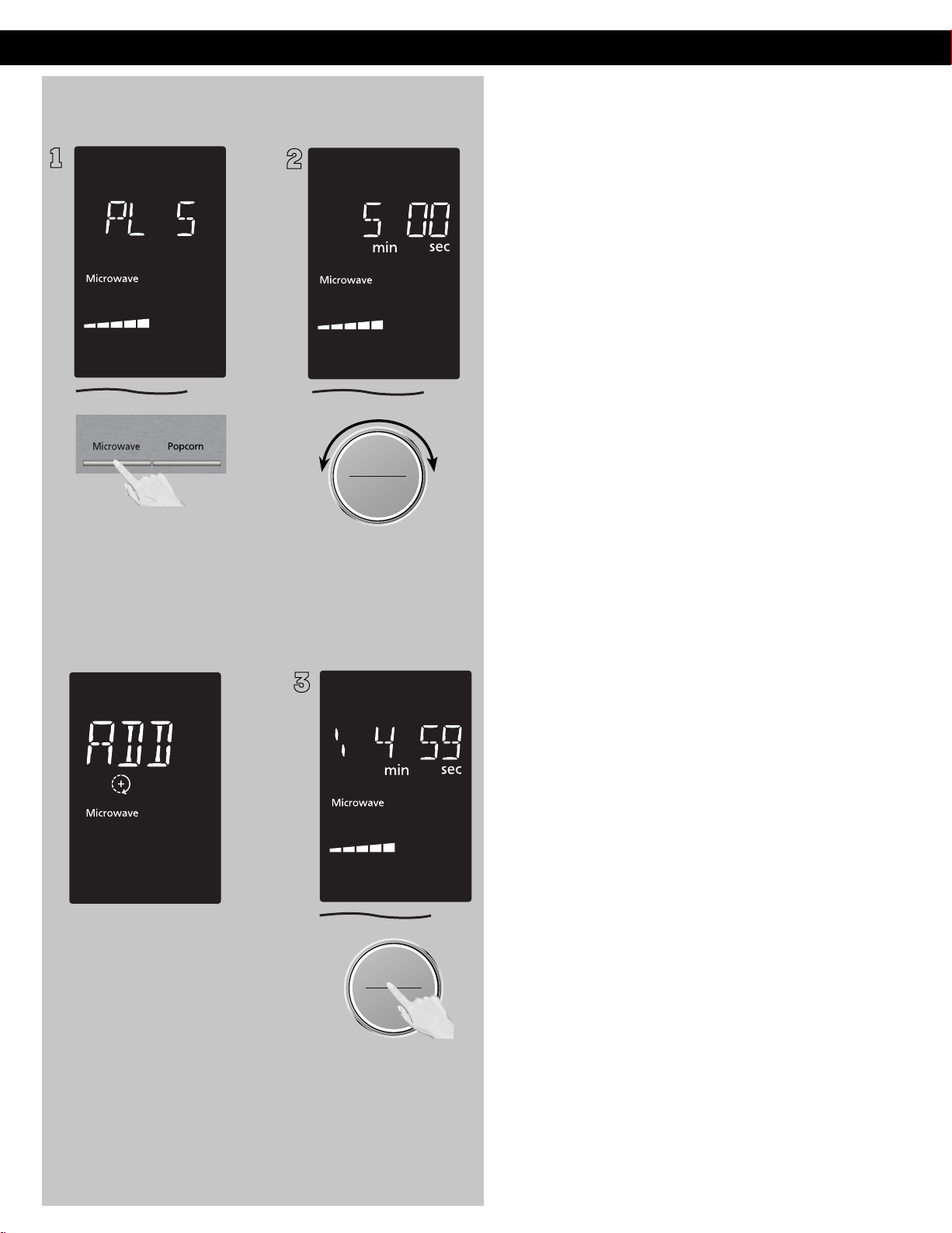
(Example: To add cooking time after PL5)
1
Set the desired cooking
program, by entering cooking
method and time required.
After cooking, “ADD TIME
OR ENJOY YOUR MEAL” will
appear in the display window .
2
Set desired cooking time
by turning dial.
3
ヴㄕㄓㄕバヴㄆㄍㄆㄕ
ヴㄆㄏㄔㄐㄓチンㄆㄉㄆㄕ
Press dial to Start. Time
will be added. The time in
the display window will
count down.
ヵㄊㄎㄆ ヸㄆㄊㄈㄉㄕ
ヴㄕㄓㄕバヴㄆㄍㄆㄕ
ヴㄆㄏㄔㄐㄓチンㄆㄉㄆㄕ
バ
モㄖㄕㄐ チ
ヤㄐㄐㄌ
ヴㄆㄏㄔㄐㄓ
Operation (continued)
NOTES:
escape.
instructions on popcorn package.
oven. Overcooking can burn popcorn or cause fire.
10. When popping multiple bags one right after the other, the
cooking time may vary slightly. This does not affect the
popcorn results.
1 2 3
ヴㄕㄓㄕバヴㄆㄍㄆㄕ
ヴㄆㄏㄔㄐㄓチンㄆㄉㄆㄕ
4
1. Pop one bag at a time.
2. Place bag in oven according to manufacturers’ directions.
3. Start with popcorn at room temperature.
4. Allow popped corn to sit unopened for a few minutes.
5. Open bag carefully to prevent burns, because steam will
6. Do not reheat unpopped kernels or reuse bag.
7. If popcorn is of a different weight than listed, follow
8. Never leave the oven unattended.
9. If popping slows to 2 to 3 seconds between pops, stop
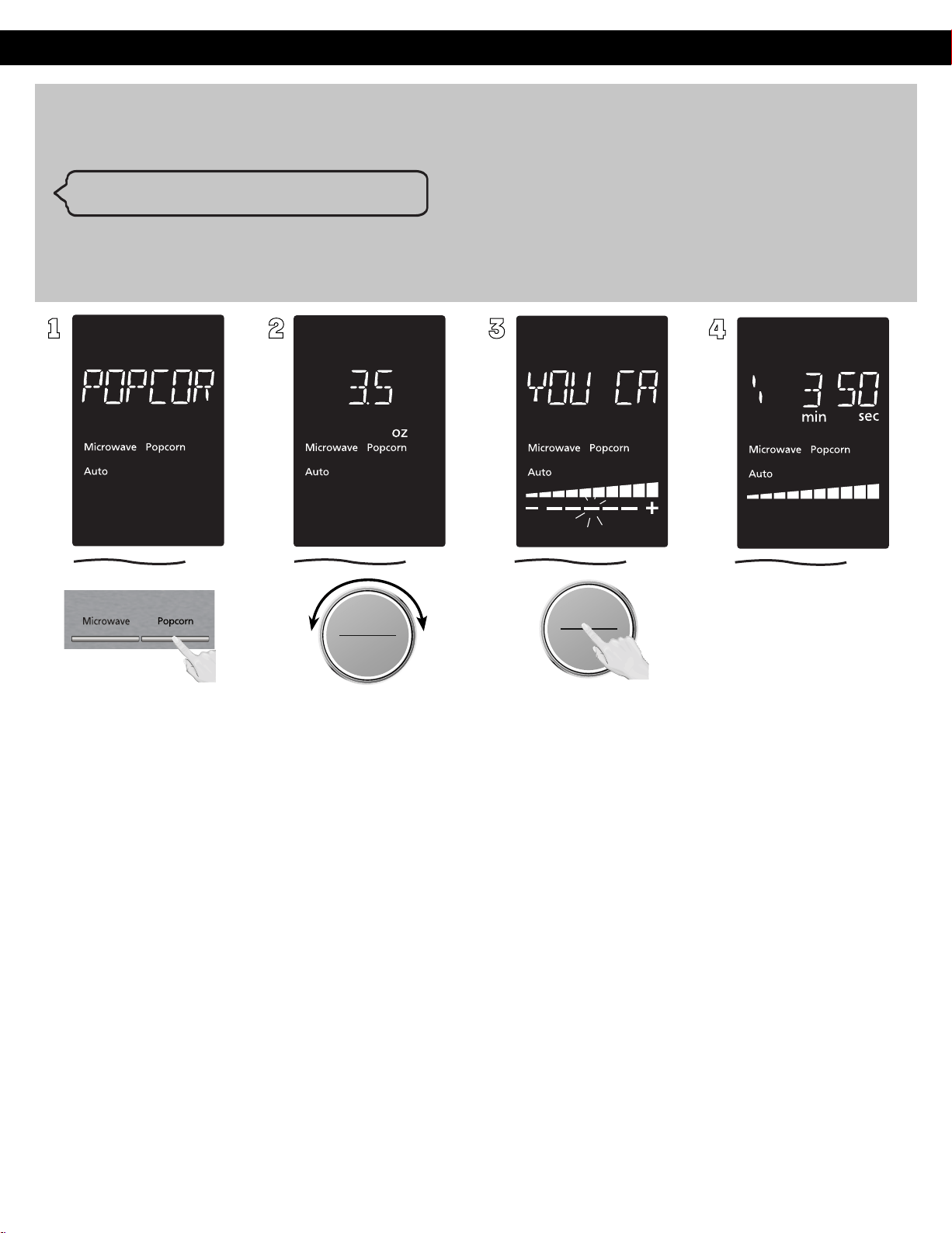
Press Popcorn button
Popcorn
(Example:To pop 3.5 oz (100g). of popcorn)
Alexa, microwave three point five ounce of popcorn
Weight range is 1.5 - 3.5 oz.(40 - 100 g).
Weight stride is 0.1 oz.(1 g).
Select the weight of the
food by turning dial.
Turning the dial slowly will
count up in 0.1 oz(1 g)
steps.
Initial weight is 3.0oz(85g)
Press dial to Start.
"YOU CAN ADJUST
COOKING TIME MORE/
LESS" will appear in the
display window.
If desires, More/Less
adjustment can be done.
Turn dial to add or
subtract the cooking time
(5 levels can be select),
after turning the dial
within 14 seconds.
After 14sec., The time
appears in the display
window and begins to
count down.
At the
end of cooking, five beeps
will sound.
ヵㄊㄎㄆ ヸㄆㄊㄈㄉㄕ
ヴㄕㄓㄕバヴㄆㄍㄆㄕ
ヴㄆㄏㄔㄐㄓチンㄆㄉㄆㄕ
バ
モㄖㄕㄐ チ
ヤㄐㄐㄌ
ヴㄆㄏㄔㄐㄓ
24
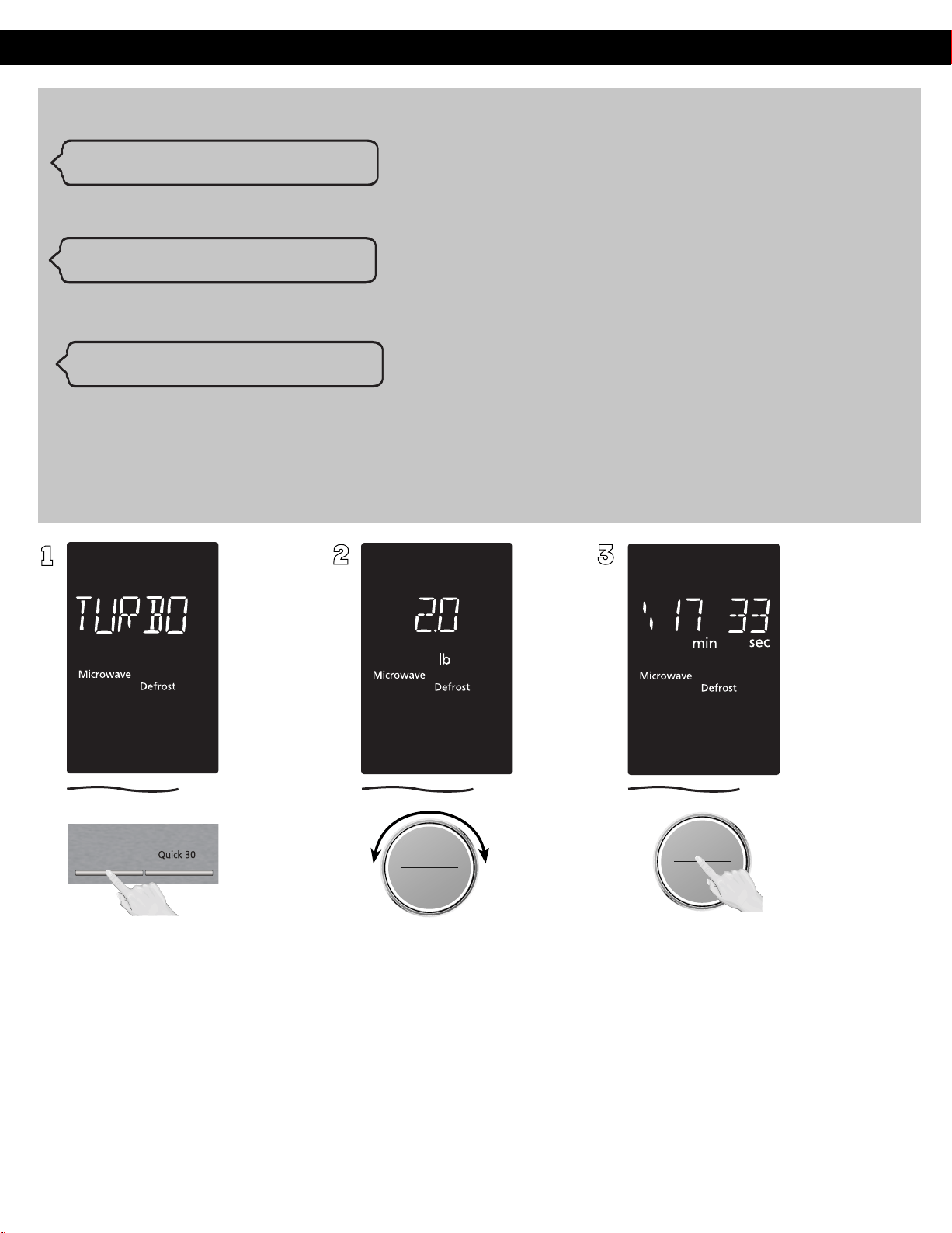
Operation (continued)
1
2
ヵㄊㄎㄆ ヸㄆㄊㄈㄉㄕ
ヴㄕㄓㄕバヴㄆㄍㄆㄕ
ヴㄆㄏㄔㄐㄓチンㄆㄉㄆㄕ
ヴㄕㄓㄕバヴㄆㄍㄆㄕ
ヴㄆㄏㄔㄐㄓチンㄆㄉㄆㄕ
3
You can use food name(Ex. Beef/Fish/Frozen Fruites) instead of only "food".(See Voice Cooking Chart on Page.35)
When you operate Defrost by time
with voice, product work with PL3.
"Alexa, Defrost for 10 minutes."
"
Alexa, Defrost two pounds of food."
Weight range is 0.3 - 6.0 lb.(100 - 2700 g).
Weight stride is 0.1 lb.(10 g).
Select the weight of the food by
turning dial. Turning the dial slowly
will count up in 0. 2 lb( 50g) steps.
Press dial to Start. The time appears
in the display window
and begins to count down.
Turbo
Defrost
Continued on the
Next Page
バ
モㄖㄕㄐ チ
ヤㄐㄐㄌ
ヴㄆㄏㄔㄐㄓ
Turbo Defrost
25
"Alexa, Defrost for two breads
You can use " Defrost " with food quantity by only Alexa control.(See Voice Command Chart on Page.35)
Quantity range is 1-4.
When you operate Defrost by weight with voice, product work with PL6.
Press Turbo Defrost
Operation (continued)
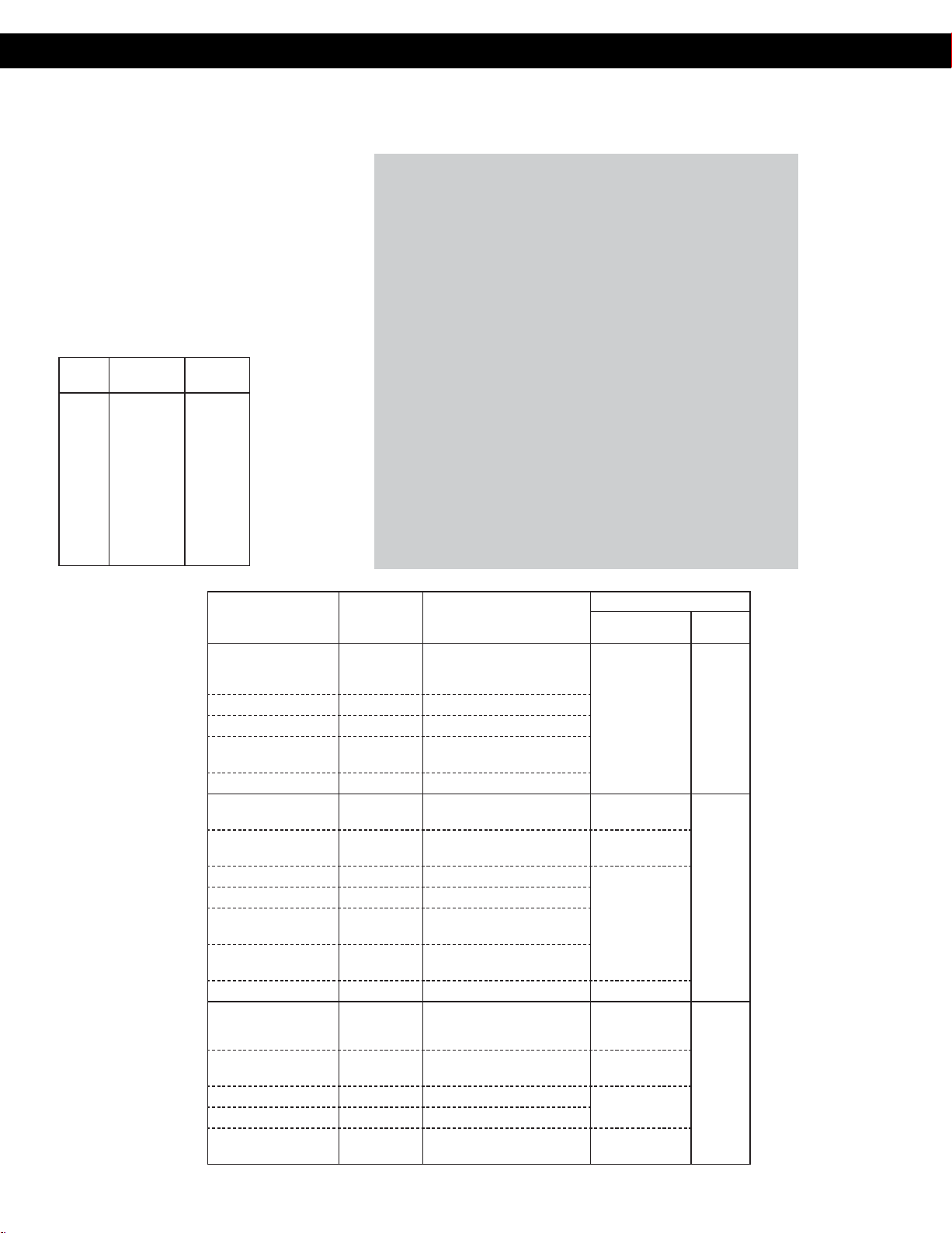
Defrosting Tips & TechniquesConversion
Follow the chart to convert
ounces or hundredths of a
pound into tenths of a pound.
To use Turbo Defrost,
enter the weight of the food
in pounds (1.0) and tenths of a
pound (0.1). If a piece of meat
weighs 1.95 lbs or 1 lb 14 oz,
enter 1.9 lbs.
Ounces
Hundredths
of a Pound
Tenths of
a Pound
0
1 - 2
3 - 4
5
6 - 7
8
9 - 10
11 - 12
13
14 - 15
.01 - .05
.06 - .15
.16 - .25
.26 - .35
.36 - .45
.46 - .55
.56 - .65
.66 - .75
.76 - .85
.86 - .95
0.0
0.1
0.2
0.3
0.4
0.5
0.6
0.7
0.8
0.9
Preparation For Freezing:
1. Freeze meats, poultry, and fish in
packages with only one or two
layers of food. Place wax paper
between layers.
2. Package in heavy-duty plastic
wraps, bags (labeled “For
Freezer”), or freezer paper.
3. Remove as much air as possible.
4. Seal securely, date, and label.
To Defrost:
1. Remove wrapper. This helps
moisture to evaporate. Juices
from food can get hot and cook
the food.
2. Set food in microwave safe dish.
3. Place roasts fat-side down. Place
whole poultry breast-side down.
4. Select power and minimum
time so that items will be under-
defrosted.
5. Drain liquids during defrosting.
6. Turn over (invert) items during
defrosting.
After Defrosting:
1. Large items may be icy in the
center. Defrosting will complete
during Standing Time.
2. Let stand, covered, following
stand time directions on
page 9.
3. Rinse foods indicated in the chart.
4. Items which have been layered
should be rinsed separately or
have a longer stand time.
FOOD
DEFROST
TIME at P3
mins (per lb)
DURING DEFROSTING
AFTER DEFROSTING
Stand Time Rinse
Fish and Seafood
Crabmeat
[up to 3 lbs. (1.4
kg
)]
6 Break apart/Rearrange
5 min. YES
Fish Steaks 4 to 6 Turn over
Fish Fillets 4 to 6 Turn over/Rearrange
Sea Scallops 4 to 6
Break apart/
Remove defrosted pieces
Whole sh 4 to 6 Turn over
Meat
Ground Meat
4 to 5
Turn over/
Remove defrosted portion
10 min.
NO
Roasts
[2½-4 lbs. (1.1-1.8
kg
)]
4 to 8 Turn over 30 min. in fridge.
Chops/Steak 6 to 8 Turn over/Rearrange
5 min.
Ribs/T-bone 6 to 8 Turn over/Rearrange
Stew Meat 4 to 8
Break apart/
Remove defrosted pieces
Liver (thinly sliced) 4 to 6
Drain liquid/Turn over/
Separate pieces
Bacon (sliced) 4 Turn over ----
Poultry
Chicken, Whole
[up to 3 lbs. (1.4
kg
)]
4 to 6 Turn over 20 min. in fridge.
YES
Cutlets 4 to 6
Break apart/Turn over/
Remove defrosted Pieces
5 min.
Pieces 4 to 6 Break apart/Turn over
10 min.
Cornish hens 6 to 8 Turn over
Turkey Breast
[5-6 lbs. (2.3-2.7
kg
)]
6 Turn over 20 min. in fridge.
Turbo Defrost (Continued)
26
Operation (continued)
Sensor Reheat
(One Push Reheating)
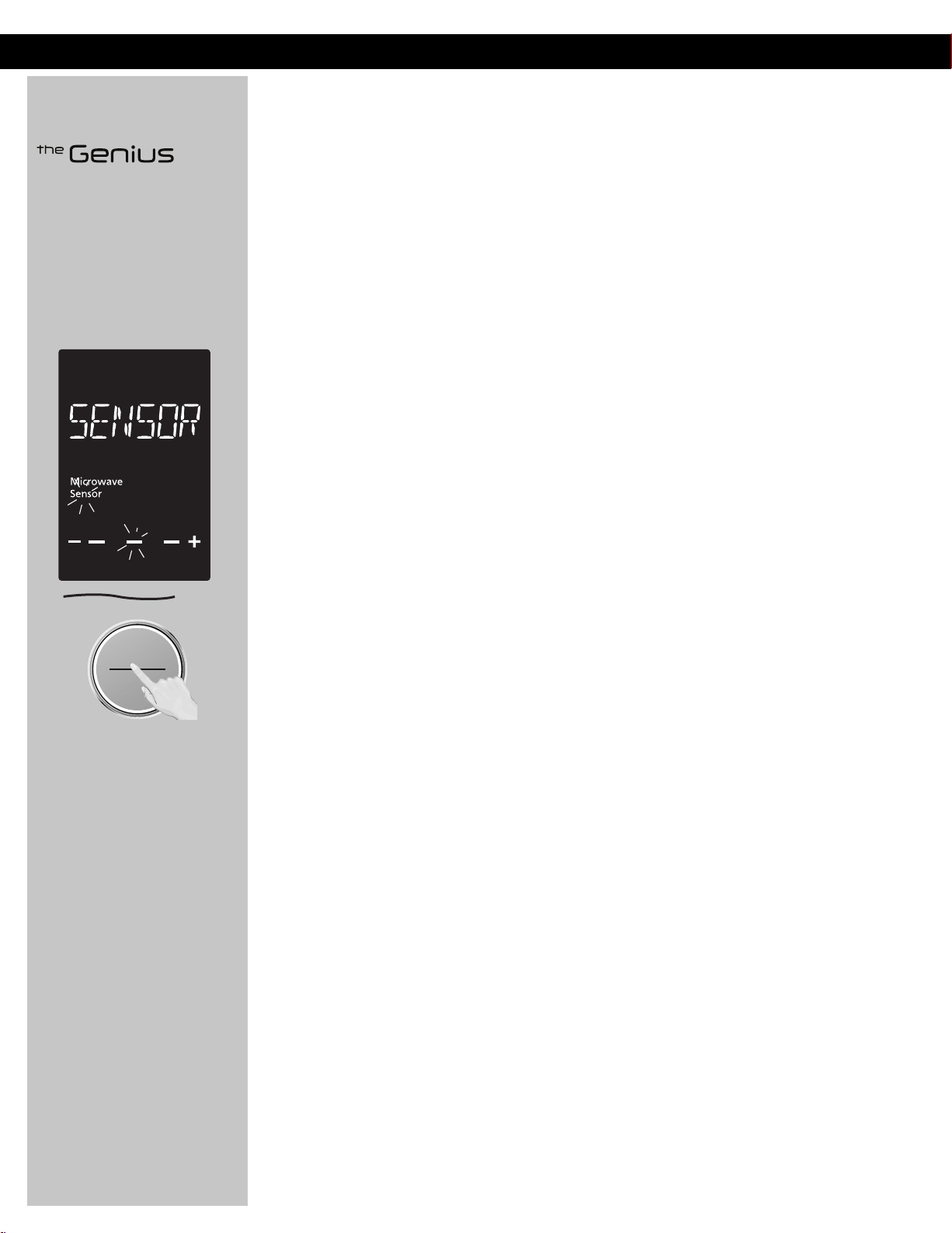
This unique feature ‘the
Genius’ built-in sensor allows
you to reheat a chilled meal
with one push of the dial. It
is not necessary to select the
power level or cooking time.
The built-in sensor measures
the humidity of the food and
calculates the cooking time.
ヴㄕㄓㄕバヴㄆㄍㄆㄕ
ヴㄆㄏㄔㄐㄓチンㄆㄉㄆㄕ
When clock mode is displayed,
press the dial to Start. To reset
oven and return to clock mode,
press Stop/Reset twice.
How it works
Once the One Push Reheating has been selected, the food is heated up. As food begins to get hot,
steam is emitted. When the food reaches a certain temperature and begins to cook, an even greater
amount of steam is released. The increase in steam emission is detected by a humidity sensor in
the oven. This acts as a signal for the oven to calculate how much longer the food needs to cook.
The remaining cooking time will appear in the display window after two beeps. Whilst the Sensor
symbol is still flashing in the display window the oven door should not be opened. Wait until the
cooking time appears in the window, and then open the door if required, to stir or turn the food.
Adjust to Taste
The One Push Reheating reheats a chilled meal for average tastes. You are able to adjust the
reheating program to your own taste. After pressing Start, +/- symbol and flashing bar appears in
the display, turn dial clockwise for more time or anticlockwise for less time. This operation should be
completed within 14 seconds. Default mode is normal.
Notes:
1. Press the dial in two minutes right after the door was closed, otherwise One Push Reheating
Function will be rejected and beeps will sound. Open the door and close it again will release the
One Push Reheating Function.
2. The oven automatically calculates the reheating time or the remaining reheating time.
3. The door should not be opened before the time appears in the display window.
4. To prevent any mistakes during One Push Reheating ensure that glass tray and the container
are
dry.
5. The room temperature should not be more than 95 °F (35 °C) and not less than 32 °F (0 °C).
6. "Sensor Reheat" cannot be used by Alexa control. If you use "Reheat" by Alexa control, product work
w
i
t
h
PL10(max power).
Casseroles: Add three to four
tablespoons of liquid, cover with
lid or vented plastic wrap. Stir
when time appears in the display
window.
Canned foods: Empty contents
into casserole dish or serving
bowl, cover dish with lid or vented
plastic wrap. After reheating, let
stand for a few minutes.
Plate of food: Arrange food on
plate; top with butter, gravy, etc.
Cover with lid or vented plastic
wrap. After reheating, let stand for
a few minutes.
DO NOT USE SENSOR REHEAT:
1. To reheat bread and pastry
products. Use manual power
and time for these foods.
2. For raw or uncooked foods.
3. If oven cavity is warm.
4. For beverages.
5. For frozen foods.
27

Operation (continued)
Auto/Sensor Cook
You can cook some food with special Sensor /Auto program. (See Voice Cooking Chart on Page.35-38)
Auto Reheat
"Alexa, Reheat Y (cups of) X."
X is the food name and Y is the food weight or quantity you’d like to reheat. For
example, to cook 2 cups of Coffee, say “Alexa, reheat 2 cups of Coffee.” Please refer
Notes on Page. 29 for Auto Reheat Cooking.
Sensor Cook
Melt/Soften
"Alexa, Microwave X."
"Alexa, Cook X."
"Alexa, Melt Y ounce of X."
"Alexa, Soften Y ounce of X."
X is the food name you’d like to cook with sensor.
For example, to cook Potato, say “Alexa, microwave Potato.” Or “Alexa, cook Potato.”
You don' need to mention about weight or quantity.
Please refer Notes on Page. 30 - 31 for Sensor Cooking.
X is the food name and Y is the food weight you’d like to melt/soften.
For example, to melt five ounce of butter, say “Alexa, melt five ounce of Butter.”
Please refer Notes on Page. 33 for Melt/Soften Cooking.
Continued on the
Next Page
28
Operation (continued)
Beverage/Soup (No.1 - No.3)
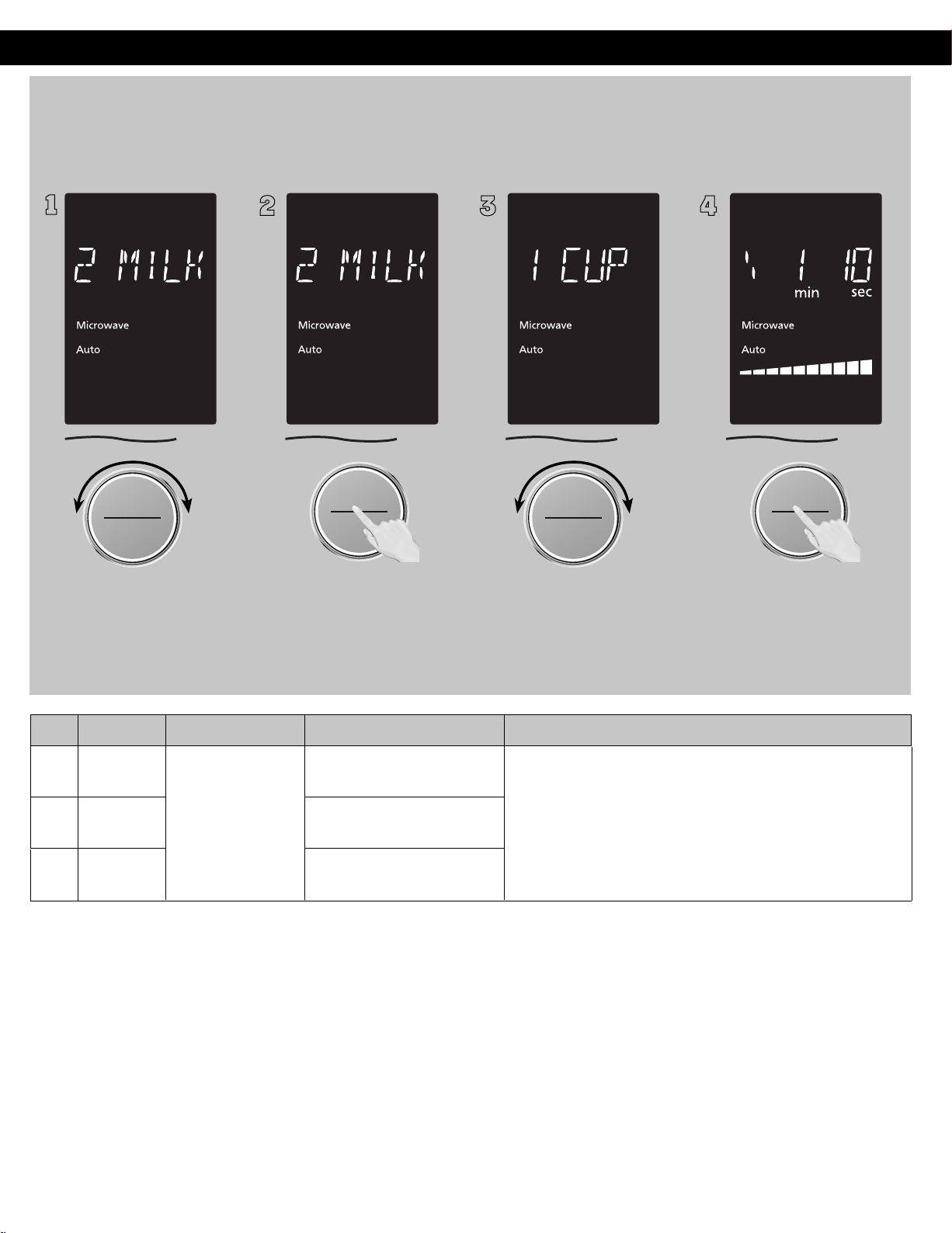
(Example: To reheat 1 cup milk.)
ヵㄊㄎㄆ ヸㄆㄊㄈㄉㄕ
ヴㄕㄓㄕバヴㄆㄍㄆㄕ
ヴㄆㄏㄔㄐㄓチンㄆㄉㄆㄕ
To allow auto program
operation, ensure the oven is in
clock mode. Select the desired
menu by turning the dial.
(see chart below)
2
ヴㄕㄓㄕバヴㄆㄍㄆㄕ
ヴㄆㄏㄔㄐㄓチンㄆㄉㄆㄕ
Press the dial to confirm the
program selection.
3
ヵㄊㄎㄆ ヸㄆㄊㄈㄉㄕ
ヴㄕㄓㄕバヴㄆㄍㄆㄕ
ヴㄆㄏㄔㄐㄓチンㄆㄉㄆㄕ
Select the weight of the food by
turning dial.
4
ヴㄕㄓㄕバヴㄆㄍㄆㄕ
ヴㄆㄏㄔㄐㄓチンㄆㄉㄆㄕ
Press dial to Start. The time
appears in the display window
and begins to count down.
NOTES:
1. Use a microwave safe cup/bowl.
2 Heated liquids can erupt if not mixed with air. Do not heat liquids in your microwave oven without stirring before and halfway
through heating.
3. Care must be exercised not to overheat liquids when using the Beverage/Soup feature. It is programmed to give proper results
when heating 1-4 cups of liquid, starting from room temperature and refrigerator temperature. Overheating will cause an increased
risk of scalding, or water eruption. Refer to page 3,item 18.
No. Menu Weight Range
Recommended Container
Hints
1
Coff ee
microwave safe cup
This feature allows you to reheat 1 cup (250 ml) or 2 cups
(500 ml) or 3 cups(750ml) or 4 cups(1000 ml) of room
temperature beverages/soup without setting power and
time.(Refer to NOTES 3)
2
Milk
microwave safe cup
1
3
Soup
micro-safe bowl
1 cup - 4 cups
(250 - 1000ml)
Auto/Sensor Cook(Continued)
Auto Reheat
バ
モㄖㄕㄐ チ
ヤㄐㄐㄌ
ヴㄆㄏㄔㄐㄓ
バ
モㄖㄕㄐ チ
ヤㄐㄐㄌ
ヴㄆㄏㄔㄐㄓ
29
Operation (continued)
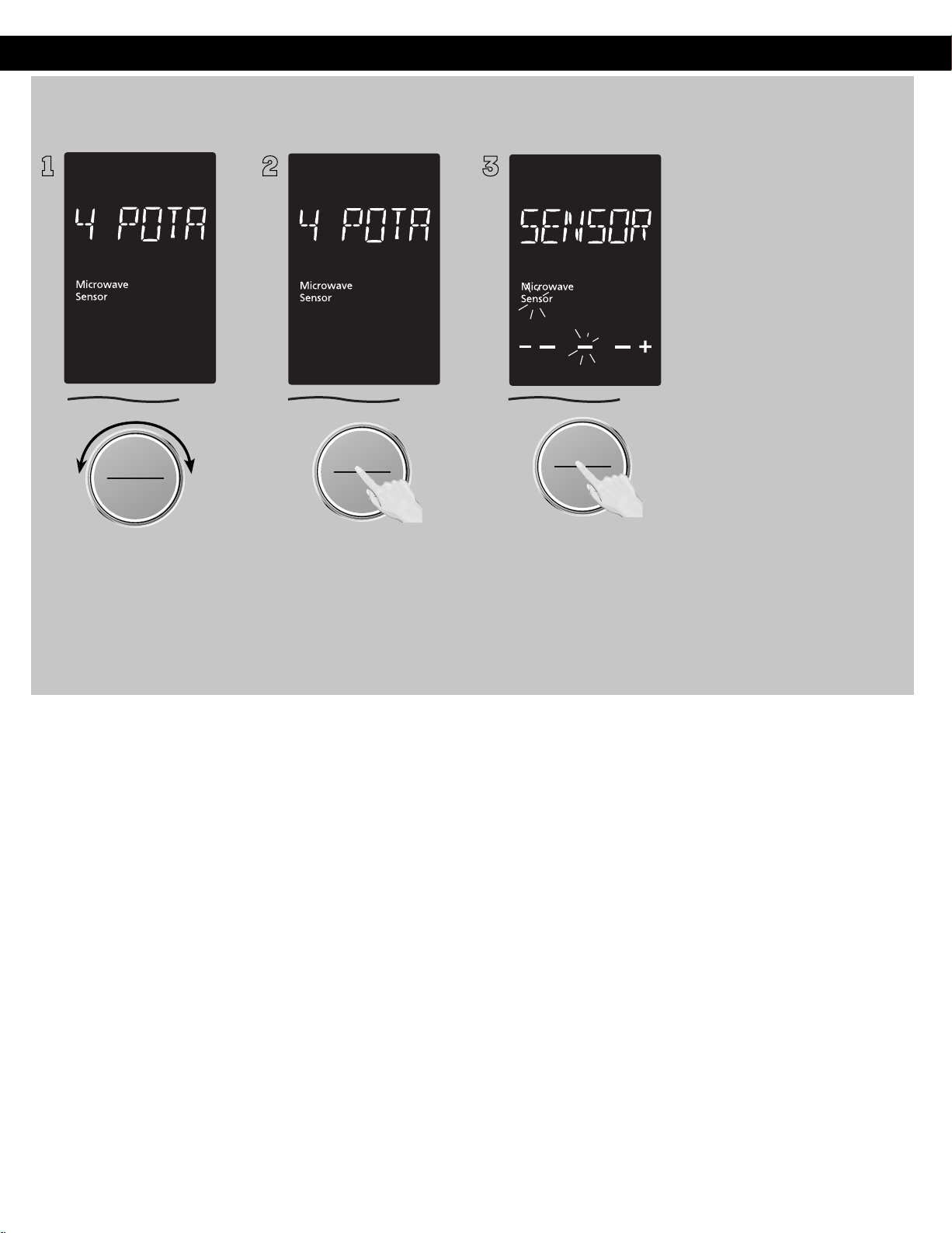
Sensor Cook :
(No.4 - No.14)
1
ヵㄊㄎㄆ ヸㄆㄊㄈㄉㄕ
ヴㄕㄓㄕバヴㄆㄍㄆㄕ
ヴㄆㄏㄔㄐㄓチンㄆㄉㄆㄕ
To allow auto program
operation, ensure the oven is in
Clock mode. Select the desired
menu by turning the dial.
(see chart on the next page.)
2
ヴㄕㄓㄕバヴㄆㄍㄆㄕ
ヴㄆㄏㄔㄐㄓチンㄆㄉㄆㄕ
Press the dial to confirm the
program.
3
ヴㄕㄓㄕバヴㄆㄍㄆㄕ
ヴㄆㄏㄔㄐㄓチンㄆㄉㄆㄕ
Press dial to Start. The food
category will be repeated in
the display window until the
oven calculates the cooking
time after detecting a burst
of steam. Do not open the
oven door until the remaining
cooking time appears in the
display window.
NOTES:
1. If desires, More/Less adjustment can be done. Turn dial to add
or subtract the cooking time (3 levels can be select), after
turning the dial within 14 seconds.
2. After havin
g used the Sensor Cook feature a few times, you may
decide you would prefer your food cooked to a different
doneness – that is why you would like to turning the dial.
3. When steam is detected by the Genius Sensor and two beeps
sound, the remaining cooking time will appear in the display.
4. Automatic features are provided for your convenience. If
results are not suitable to your individual preference, or if
serving size is other than what is listed in next page, please
refer to manual cooking on page 16.
For the best results with the GENIUS SENSOR, follow these
recommendations:
BEFORE Reheating/Cooking:
1. The room temperature surrounding the oven should be below
95 °F (35 °C).
2. Food weight should exceed 4 oz. (110 g).
3. Be sure the glass tray, the outside of the cooking containers
and the inside of the microwave oven are dry before placing
food in the oven. Residual beads of moisture turning into
steam can mislead the sensor.
4. Cover food with lid, or with vented plastic wrap. Never use
tightly sealed plastic containers—they can prevent steam from
escaping and cause food to overcook.
DURING Reheating/Cooking:
DO NOT open the oven door until two beeps sound and cooking time
appears in the display. Doing so will cause inaccurate cooking since
the steam from food is no longer contained within the oven cavity.
Once the cooking time begins to count down, the oven door may
be opened to stir, turn or rearrange foods.
AFTER Reheating/Cooking:
All foods should have a standing time.
Auto/Sensor Cook(Continued)
バ
モㄖㄕㄐ チ
ヤㄐㄐㄌ
ヴㄆㄏㄔㄐㄓ
30
Operation (continued)
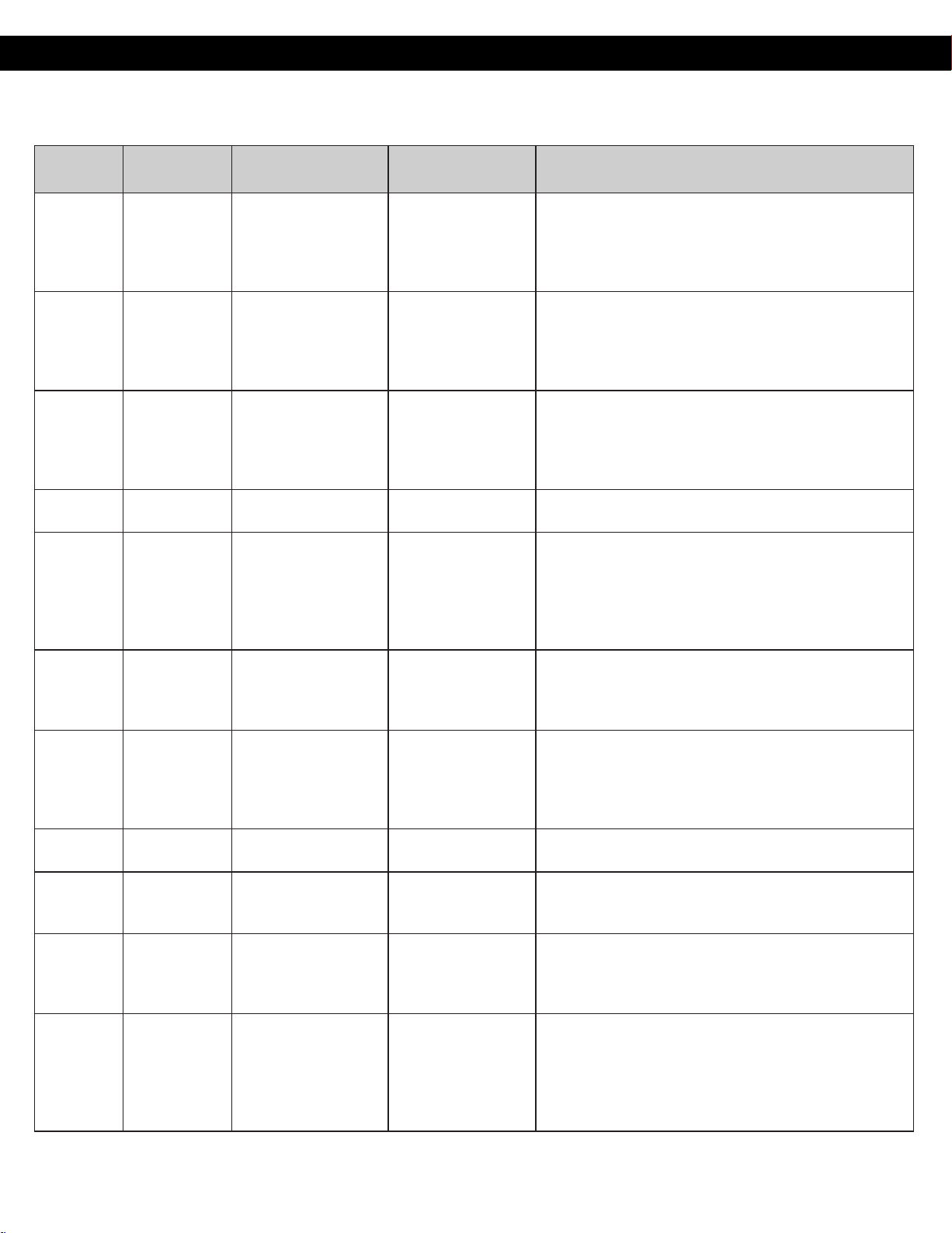
No. Menu Weight Range
Recommended
Container
Hints
4 Potatoes
1 - 4 potatoes
(6 - 8 oz. each)
(170 - 220 g)
kitchen paper
Pierce each potato with a fork 6 times spacing around
surface. Place potato or potatoes around the edge of
paper-towel-lined glass tray (Turntable), at least 1 inch
(2.5 cm) apart. Do not cover. Turn over after 2 beeps. Let
stand 5 minutes to complete cooking.
5
Fresh
Vegetables
4 - 16 oz
(110 - 450 g)
microwave safe
casserole with a lid
or plastic wrap
All pieces should be the same size. Wash thoroughly, add
1 tbsp. of w
ater per ½ cup of vegetables, and cover with
lid or vented plastic wrap. Do not salt/butter until after
cooking.
After 2 beeps, stir or rearrange. Re-cover and press Start .
6
Frozen
Vegetables
4 - 16 oz
(110 - 450 g)
microwave safe
casserole with a lid
or plastic wrap
Add 1 tbsp. of water per ½ cup of vegetables, and cover
with lid or vented plastic wrap.
Do not salt/butter until after cooking. (Not suitable for
vegetables in butter or sauce.)
After 2 beeps, stir or rearrange. Re-cover and press Start.
7
Frozen Pizza
(single)
6 - 12 oz
(170 - 340 g)
Package
Follow manufacturers’ directions for preparation.
Add more time of cooking if needed.
8 Frozen Entrées
6 - 32 oz
(170 - 900 g)
Package
Follow manufacturers' directions for preparation. After
2 beeps, stir or rearrange. Be careful when removing the
film cover after cooking. Remove facing away from you
to
avoid steam burns. If additional time is needed,
continue to cook manually.
9 Frozen Dinners
11 - 16 oz
(300 - 450 g)
Package
Follow manufacturers' directions for preparation. Be
careful when removing the lm cover after cooking.
Remove facing away from you to avoid steam burns. If
additional time is needed, continue to cook manually.
10
Frozen
Breakfast
1 - 2 pcs Package
It is suitable for Frozen breakfast, Brito, hot pockets
and sandwich. Follow manufactures' directions for
prepration. Be careful when open the package after
cooking. If additional time is needed, continue to cook
manually.
11 Frozen Nuggets
4 - 12 oz
(110 - 340 g)
microwave-safe dish
Place frozen nuggets on a microwave safe dish. Do not
cover.
12 Oatmeal
0.5 - 1.0 cup
(1.4 - 2.8 oz)
(40 - 80 g)
microwave-safe bowl
Place inside a microwave safe serving bowl with no
cover.
Follow manufacturers' directions for preparation.
13 Rice 0.5 - 1.5 cups
microwave-safe
casserole dish
Place rice with hot tap water in a microwave safe
casserole dish. Cover with lid or vented plastic wrap. Let
stand 5 to 10 minutes before serving. Add 1 ½ parts
water to 1 part rice.
14 Pasta
1.75 - 5.5 oz
(50 - 155 g)
microwave-safe
casserole dish
Place 1.75 oz.(50 g) pasta with 3 cups (750 ml) hot tap
water in a 2 qt microwave safe casserole, salt and oil, if
desired, covered with lid or vented plastic wrap. For 4
oz.(110 g) pasta use 4 cups (1000 ml)hot tap water, for
5.5 oz.(155 g) pasta use 6 cups (1500 ml) hot tap water
in 3 qt casserole.
31
Operation (continued)
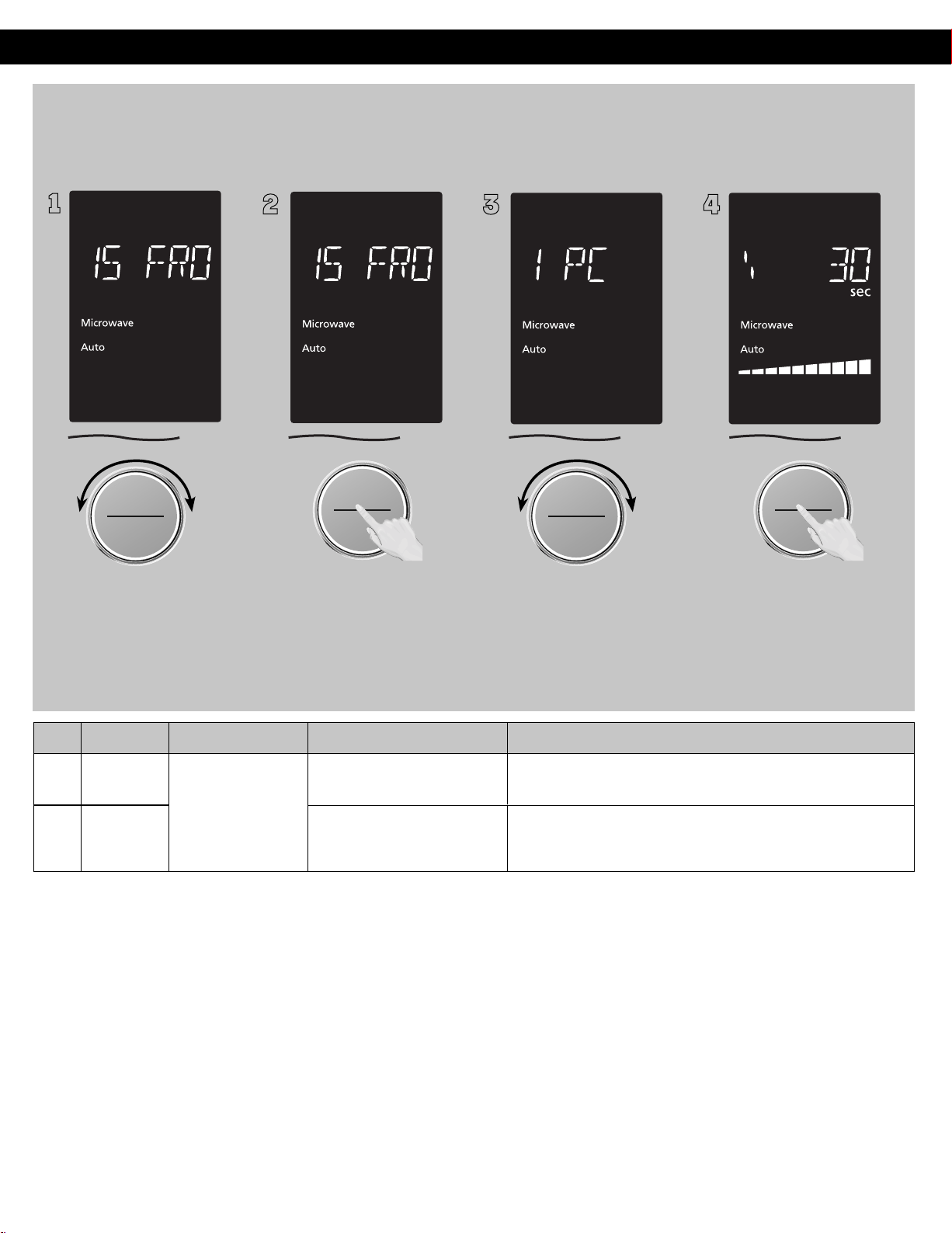
ヵㄊㄎㄆ ヸㄆㄊㄈㄉㄕ
ヴㄕㄓㄕバヴㄆㄍㄆㄕ
ヴㄆㄏㄔㄐㄓチンㄆㄉㄆㄕ
To allow auto program
operation, ensure the oven is in
clock mode. Select the desired
menu by turning the dial.
(see chart below)
2
ヴㄕㄓㄕバヴㄆㄍㄆㄕ
ヴㄆㄏㄔㄐㄓチンㄆㄉㄆㄕ
Press the dial to confirm the
program selection.
3
ヵㄊㄎㄆ ヸㄆㄊㄈㄉㄕ
ヴㄕㄓㄕバヴㄆㄍㄆㄕ
ヴㄆㄏㄔㄐㄓチンㄆㄉㄆㄕ
Select the weight of the food by
turning dial.
4
ヴㄕㄓㄕバヴㄆㄍㄆㄕ
ヴㄆㄏㄔㄐㄓチンㄆㄉㄆㄕ
Press dial to Start. The time
appears in the display window
and begins to count down.
NOTES:
1.
Automatic features are
provided for
your convenience.If
results are
not suitable to your individual preference, or if serving size is
other than what is listed on above, please refer to manual cooking on page 15.
BEFORE Reheating/Cooking:
1. Cover food with lid, or with vented
plastic wrap. Never use tightly sealed plastic containers—they can prevent steam from escaping
and
cause food to overcook.
AFTER Reheating/Cooking:
All foods should have a standing time.
No. Menu Weight Range
Recommended Container
Hints
1
5
Frozen
Pancake
microwave-safe dish
It is suitable for frozen pancake. Place pancake on a
microwave-safe dish. Do not cover.
16
Reheat
Dessert
microwave-safe dish
1
1 pc - 4 pcs
(30g-40g / each)
(1oz-1 ½ oz / each)
Auto/Sensor Cook(Continued)
Auto Reheat
Frozen Pancake/Reheat Desert(No.15 - No.16)
(Example: To reheat 1 pc Pancake .)
It is suitable for cake, brownie, pancake from room
temperature. Place dessert on a microwave safe dish.
Do not cover.
バ
モㄖㄕㄐ チ
ヤㄐㄐㄌ
ヴㄆㄏㄔㄐㄓ
バ
モㄖㄕㄐ チ
ヤㄐㄐㄌ
ヴㄆㄏㄔㄐㄓ
32
(60 - 230 g)
Operation (continued)
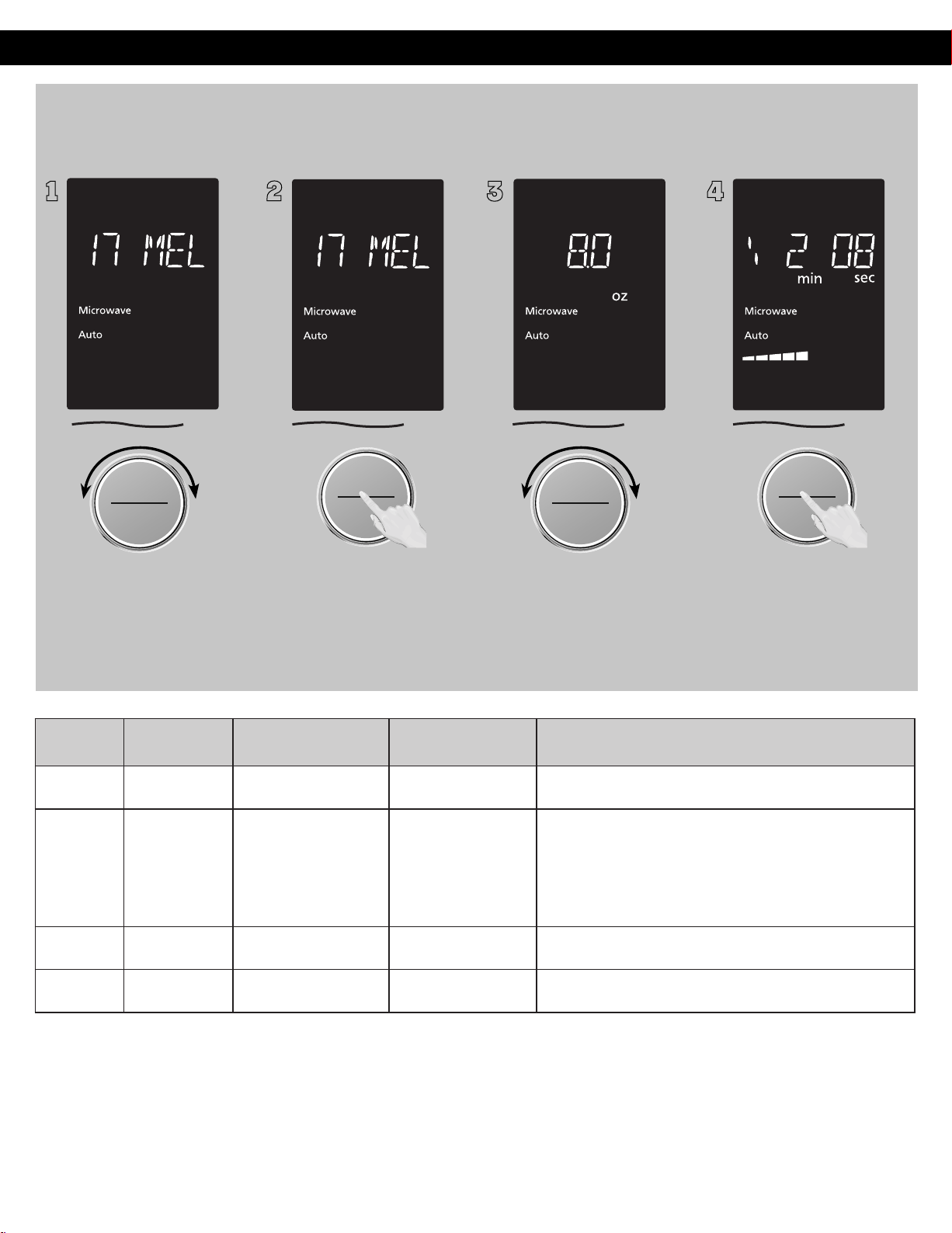
1
ヵㄊㄎㄆ ヸㄆㄊㄈㄉㄕ
ヴㄕㄓㄕバヴㄆㄍㄆㄕ
ヴㄆㄏㄔㄐㄓチンㄆㄉㄆㄕ
To allow auto program
operation, ensure the oven is in
Clock mode. Select the desired
menu by turning the dial.
(see chart below)
2
ヴㄕㄓㄕバヴㄆㄍㄆㄕ
ヴㄆㄏㄔㄐㄓチンㄆㄉㄆㄕ
Press the dial to confirm the
program.
3
ヵㄊㄎㄆ ヸㄆㄊㄈㄉㄕ
ヴㄕㄓㄕバヴㄆㄍㄆㄕ
ヴㄆㄏㄔㄐㄓチンㄆㄉㄆㄕ
Select the weight of the food by
turning dial.
4
ヴㄕㄓㄕバヴㄆㄍㄆㄕ
ヴㄆㄏㄔㄐㄓチンㄆㄉㄆㄕ
Press dial to Start. The time
appears in the display window
and begins to count down.
Auto/Sensor Cook(Continued)
Auto Cook:
Melt & Soften (No.17 - No.20)
No. Menu Weight Range
Recommended
Container
Hints
17 Melt Butter
2 - 12 oz
(60 - 340 g)
microwave-safe dish
Remove wrapper, cut butter into 1 inch (3 cm) cube, and
place in a microwave safe dish. Cover with plastic wrap.
18 Melt Chocolate
2 - 8 oz
microwave-safe dish
Suitable for melting milk chocolate. Remove wrapper,
separate chocolate into small pieces, and place in a
microwave safe dish. Cook without cover. Stir after
2 beeps, and replace and press Start. Stir well after
cooking.
19 Soften Butter
2 - 12 oz
(60 - 340 g)
microwave-safe dish
Remove wrapper, cut butter into 1 inch (3 cm) cube, and
place in a microwave safe dish. Cover with plastic wrap.
20
Soften Cream
Cheese
2 - 12 oz
(60 - 340 g)
microwave-safe dish
Remove wrapper, cut cheese into 1 inch (3 cm) cube, and
place in a microwave safe dish. Cover with plastic wrap.
バ
モㄖㄕㄐ チ
ヤㄐㄐㄌ
ヴㄆㄏㄔㄐㄓ
バ
モㄖㄕㄐ チ
ヤㄐㄐㄌ
ヴㄆㄏㄔㄐㄓ
33

Operation (continued)
MICROWAVE RECIPES
OMELET
Basic Omelet Recipe
Yield: 1 Serving
1 tablespoon buer or margarine
2 eggs
2 ablespoons milk
Salt and ground black pepper, if desired Heat buer in a microwave safe 8-inch round dish, 20 seconds at PL10, or unl melted.
Turn the dish to coat the boom with buer.
Meanwhile, combine the remaining ingredients in a separate bowl, beat together and pour into the dish. Cook, covered with vented
plasc wrap, cook 2 minutes at PL10. Let stand 2 minutes. With a spatula, loosen the edges of the omelet from the dish, fold into thirds to
serve. Always beat the eggs before making the omelet.
NOTE: Double ingredients for a 4-egg Omelet.
Yield: 4 - 6 servings
2 1/2 tablespoons buer
1 1/2 tablespoons chopped onion
1/2 clove minced garlic
4 tablespoons all-purpose flour
2/3 teaspoon dry mustard
2/3 teaspoon salt
1/8 teaspoon ground black pepper
1 1/2 cups milk
1 1/2 cups grated cheddar cheese
140 g (5 oz.) (dry weight) macaroni, cooked and drained
3 tablespoons bread crumbs
2/3 teaspoon paprika
In a casserole dish, melt the buer for 40 seconds at PL10, with cover with lid or vented plasc wrap. Add onion and garlic, cover the
casserole dish with lid or vented plasc wrap, and cook for 1 minute at PL10. Sr in flour, mustard, salt and pepper, and gradually add the
milk. Cover the casserole dish with lid or vented plasc wrap and cook for 3-4 minutes at PL10 unl sauce thickens, srring once.
Add the cheddar cheese and the macaroni into the sauce and sr well.
Sprinkle the bread crumbs and paprika on the top of the dish.
Cover with lid or vented plasc wrap.
Cook with the
Yield: 4 - 6 servings
220 g (1/2 pound) lean ground beef
1/2 small onion, chopped
1/4 green bell pepper, chopped
1/2 cup chopped celery
1 (430 g/15 oz.) can tomato sauce
2/3 cup water
1/2 cup uncooked elbow macaroni
1/2 teaspoon parsley
1/4 teaspoon salt
1/8 teaspoon grounded back pepper
1/4 cup grated cheddar cheese
Crumble the ground beef in a 3 t. casserole dish.
in the remaining ingredients, except cheese. Cover with lid or vented plasc wrap.
Cook with the Sprinkle with
cheese. Cover and let stand 5 minutes.
MACARONI AND CHEESE
BEEF AND MACARONI CASSEROLE
q
3 t.
q
t
PL10 4-5minutes, then cook PL5 5minutes.
PL10 4-5minutes, then cook PL5 5minutes.
34
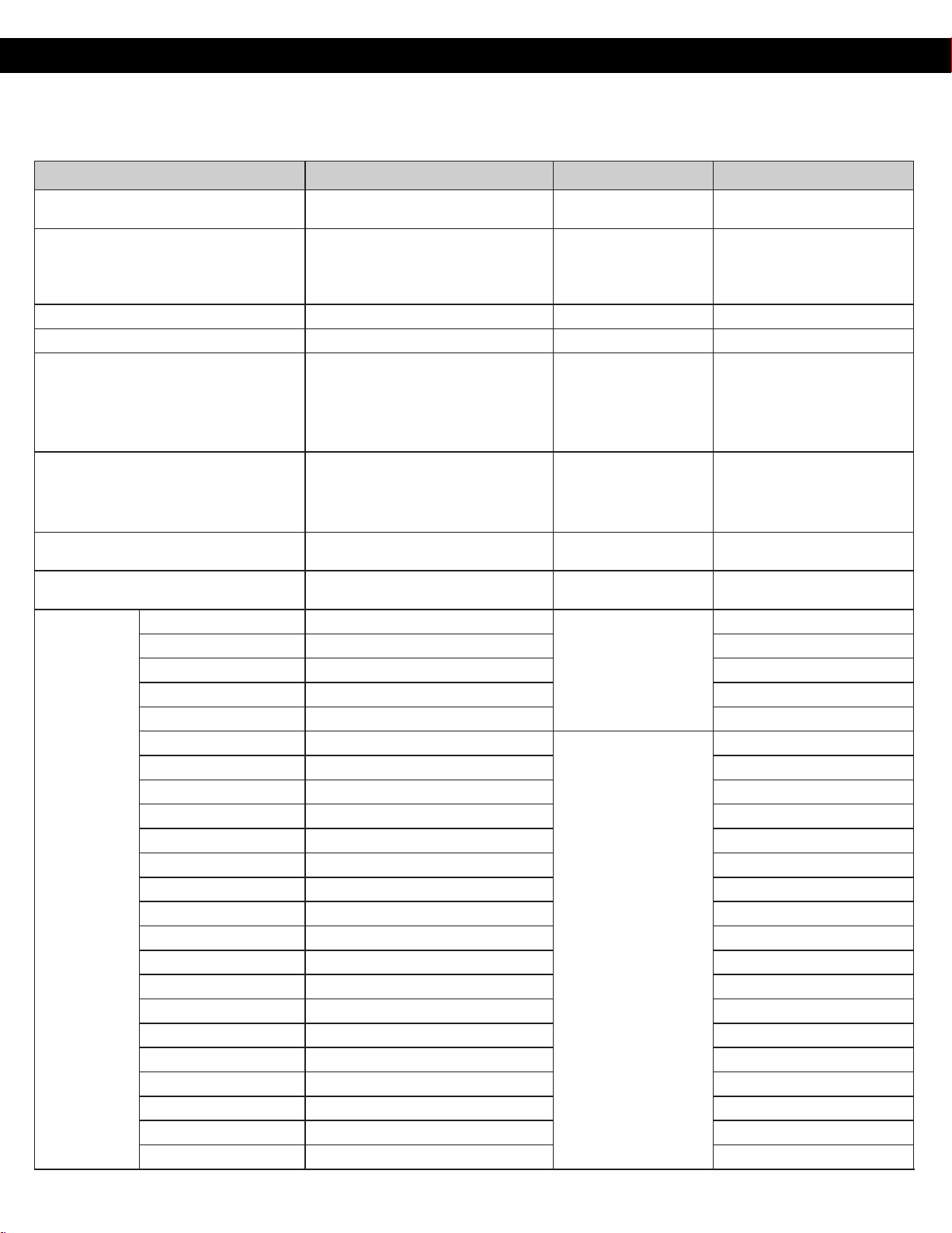
Voice Command Chart
With the Amazon Alexa App or an Echo device you can enjoy hands-free cooking with over 100 Alexa voice commands.
MENU ITEM COMMAND QUANTITY RANGE HINTS
Quick 30
Alexa, add 30 seconds to the
microwave.
PL1 - PL10 -
Add Time
Alexa, add X minutes to the
microwave.
Alexa, add Y seconds to the
microwave.
X = 01:00 – 60:00
Y = 00:01 - 00:59
-
Pause Time Alexa, pause the microwave/cooking. - -
Stop Time Alexa, stop the microwave. - -
Time Cook
Alexa, microwave for X minutes and Y
seconds (at Z).
Alexa, cook for X minutes and Y
seconds (at Z).
X = 01:00 - 90:00
Y = 00:01 - 00:59
Z = Power Level 1~10
low/middium/high
If you don't mention Z(Power
level), product always work
with High power(PL10).
PL10 cannot work with more
than 30 min.
Warm
Alexa, Warm for X minutes and Y
seconds.
X = 01:00 – 30:00
Y = 00:01 - 00:59
When you say "Warm",
product always work with
PL1 even though you
mention other power level.
Time Defrost
Alexa, defrost for X minutes and Y
seconds.
X = 01:00 - 90:00
Y = 00:01 - 00:59
-
Weight Defrost Alexa, defrost X of food.
X = 0.3 - 6.0 lb.
(100 - 2700 g)
-
Auto Defrost
Bread Alexa, defrost X of Bread.
X= 1 - 4
-
Waes Alexa, defrost X of Waes. -
Roll Alexa, defrost X of Roll. -
Sliced Bread Alexa, defrost X of Slice bread. -
Pie Alexa, defrost X of Pie. -
Ground beef Alexa, defrost X of Ground beef.
X = 0.3 - 6.0 lb.
(100 - 2700 g)
-
Ground pork Alexa, defrost X of Ground pork. -
Ground sausage Alexa, defrost X of Ground sausage. -
Ground chicken Alexa, defrost X of Ground chicken. -
Ground meat Alexa, defrost X of Ground meat. -
Pattie Alexa, defrost X of Pattie. -
Sausage Alexa, defrost X of Sausage. -
Brat Alexa, defrost X of Brat. -
Meat Alexa, defrost X of Meat. -
Beef Alexa, defrost X of Beef. -
Steak Alexa, defrost X of Steak. -
Ribs Alexa, defrost X of Ribs. -
Lamb chop Alexa, defrost X of Lamb chop. -
Pork chop Alexa, defrost X of Pork chop. -
Pork loin Alexa, defrost X of Pork loin. -
Whole chicken Alexa, defrost X of Whole chicken. -
Chicken thigh Alexa, defrost X of Chicken thigh. -
Chicken breast Alexa, defrost X of Chicken breast. -
35
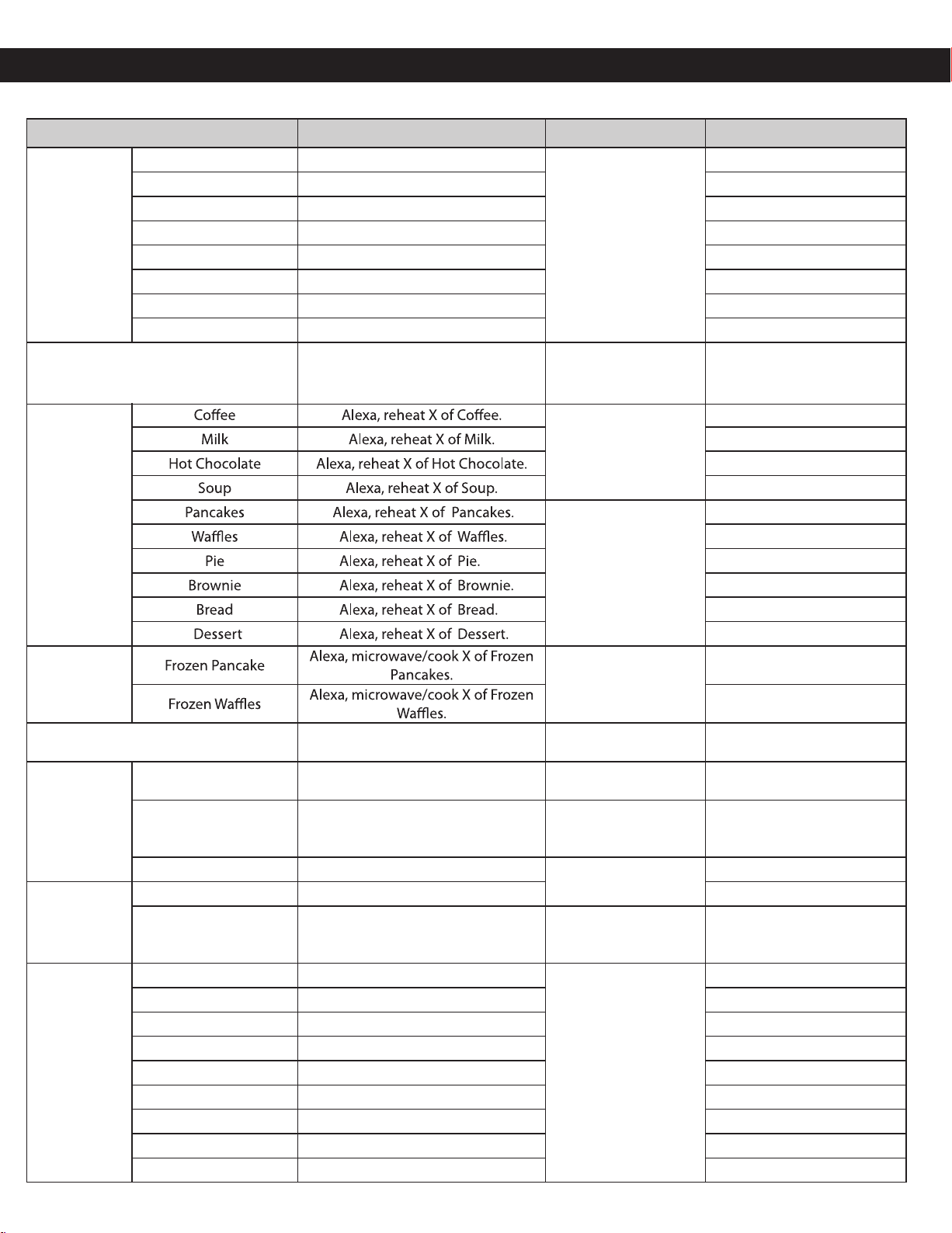
MENU ITEM COMMAND QUANTITY RANGE HINTS
Auto Defrost
X = 0.3 - 6.0 lb.
(100 - 2700 g)
Chicken wings Alexa, defrost X of Chicken wings. -
Fish Alexa, defrost X of Fish. -
Salmon Alexa, defrost X of Salmon. -
Cod Alexa, defrost X of Cod. -
Frozen Fruite Alexa, defrost X of Frozen Fruites. -
Frozen Berries Alexa, defrost X of Frozen Berries. -
Frozen Mango Alexa, defrost X of Frozen Mango. -
Frozen Vegetables Alexa, defrost X of Frozen Vegetables. -
Reheat
Alexa, reheat for X minutes and Y
seconds.
X = 01:00 - 30:00
Y = 00:01 - 00:59
If you don't mention food
name, product work with
High power(PL10).
Voice Command Chart
Weight reheat
X= 1 - 4 cups
1cup=250ml
1cup=250ml
1cup=250ml
1cup=250ml
X= 1 - 4
1= 1oz-1 ½oz(30-40g)
1= 1oz-1 ½oz(30-40g)
1= 2oz-3oz(60-85g)
1= 1oz-1 ½oz(30-40g)
1= 1oz-1 ½oz(30-40g)
1= 1oz-1 ½oz(30-40g)
Weight reheat
(Frozen food)
X= 1 - 4
1= 1oz-1 ½oz(30-40g)
1= 1oz-1 ½oz(30-40g)
Popcorn Alexa, microwave/cook X of popcorn.
X = 1.5 - 3.5 oz.
(40 - 100 g)
-
Soften
Butter Alexa, soften X of Butter.
X= 2 - 12 oz.
(60 - 340 g)
-
Ice cream Alexa, soften X of Ice cream.
X= 3 - 48 oz.
(85 - 1360 g)
-
Cream cheese Alexa, soften X of Cream cheese.
X= 2 - 12 oz.
(60 - 340 g)
-
Melt
Butter Alexa, melt X of Butter. -
Chocolate Alexa, melt X of Chocolate.
X= 2 - 8 oz.
(60 - 230 g)
-
Sensor reheat
Leftovers Alexa, reheat Leftovers.
8 - 16 oz.
(225 - 450 g)
-
Pizza Alexa, reheat Pizza. -
Casserole Alexa, reheat Casserole. -
Potatoes Alexa, reheat Potatoes. -
Vegetables Alexa, reheat Vegetables. -
Chicken Alexa, reheat Chicken. -
Lasagna Alexa, reheat Lasagna. -
Pasta Alexa, reheat Pasta. -
Dinner Alexa, reheat Dinner. -
36
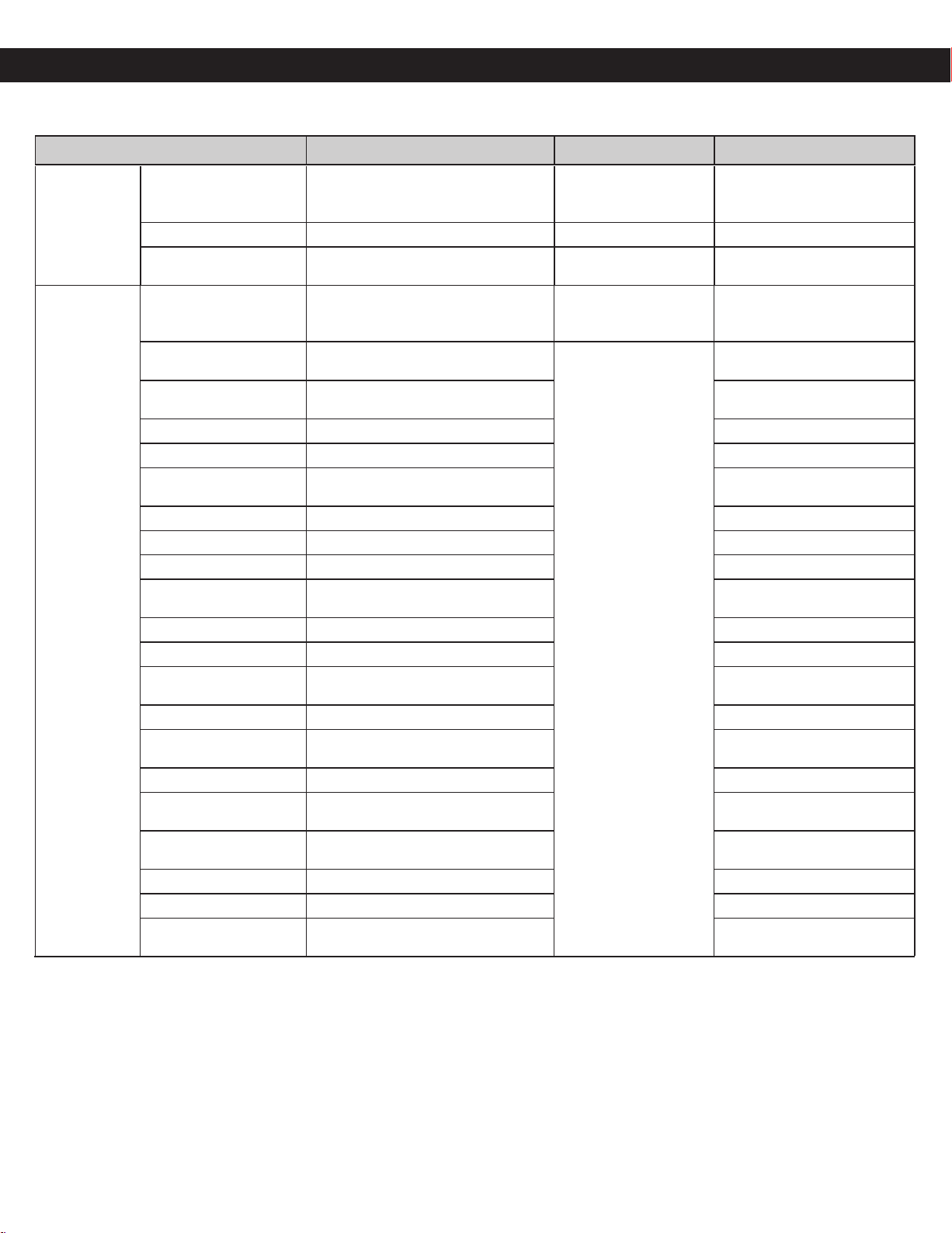
Voice Command Chart
MENU ITEM COMMAND QUANTITY RANGE HINTS
Sensor cook
Oatmeal Alexa, microwave/cook Oatmeal.
0.5 - 1.0 cup
(1.4 - 2.8 oz)
(40 - 80 g)
-
Rice Alexa, microwave/cook Rice. 0.5 - 1.5 cups -
Pasta Alexa, microwave/cook Pasta.
1.75 - 5.5 oz
(50 - 155 g)
-
Sensor cook
(Vegetables)
Potatoes Alexa, microwave/cook Potatoes.
1 - 4 potatoes
(6 - 8 oz. each)
(170 - 220 g)
-
Fresh Vegetables
Alexa, microwave/cook Fresh
Vegetables.
4 - 16 oz
(110 - 450 g)
-
Frozen Vegetables
Alexa, microwave/cook Frozen
Vegetables.
-
Vegetables Alexa, microwave/cook Vegetables. -
Broccoli Alexa, microwave/cook Broccoli. -
Frozen Broccoli
Alexa, microwave/cook Frozen
Broccoli.
-
Corn Alexa, microwave/cook Corn. -
Frozen corn Alexa, microwave/cook Frozen corn. -
Green beans Alexa, microwave/cook Green beans. -
Frozen Green beans
Alexa, microwave/cook Frozen Green
beans.
-
Peas Alexa, microwave/cook Peas. -
Frozen Peas Alexa, microwave/cook Frozen Peas. -
Frozen Edamame
Alexa, microwave/cook Frozen
Edamame.
-
Squash Alexa, microwave/cook Squash. -
Frozen Squash
Alexa, microwave/cook Frozen
Squash.
-
Sprouts Alexa, microwave/cook Sprouts. -
Brussel Sprouts
Alexa, microwave/cook Brussel
Sprouts.
-
Frozen Brussel Sprouts
Alexa, microwave/cook Frozen Brussel
Sprouts.
-
Carrot Alexa, microwave/cook Carrot. -
Frozen carrot Alexa, microwave/cook Frozen carrot. -
(Frozen)Mixed
vegetables
Alexa, microwave/cook (Frozen)Mixed
vegetables.
-
37
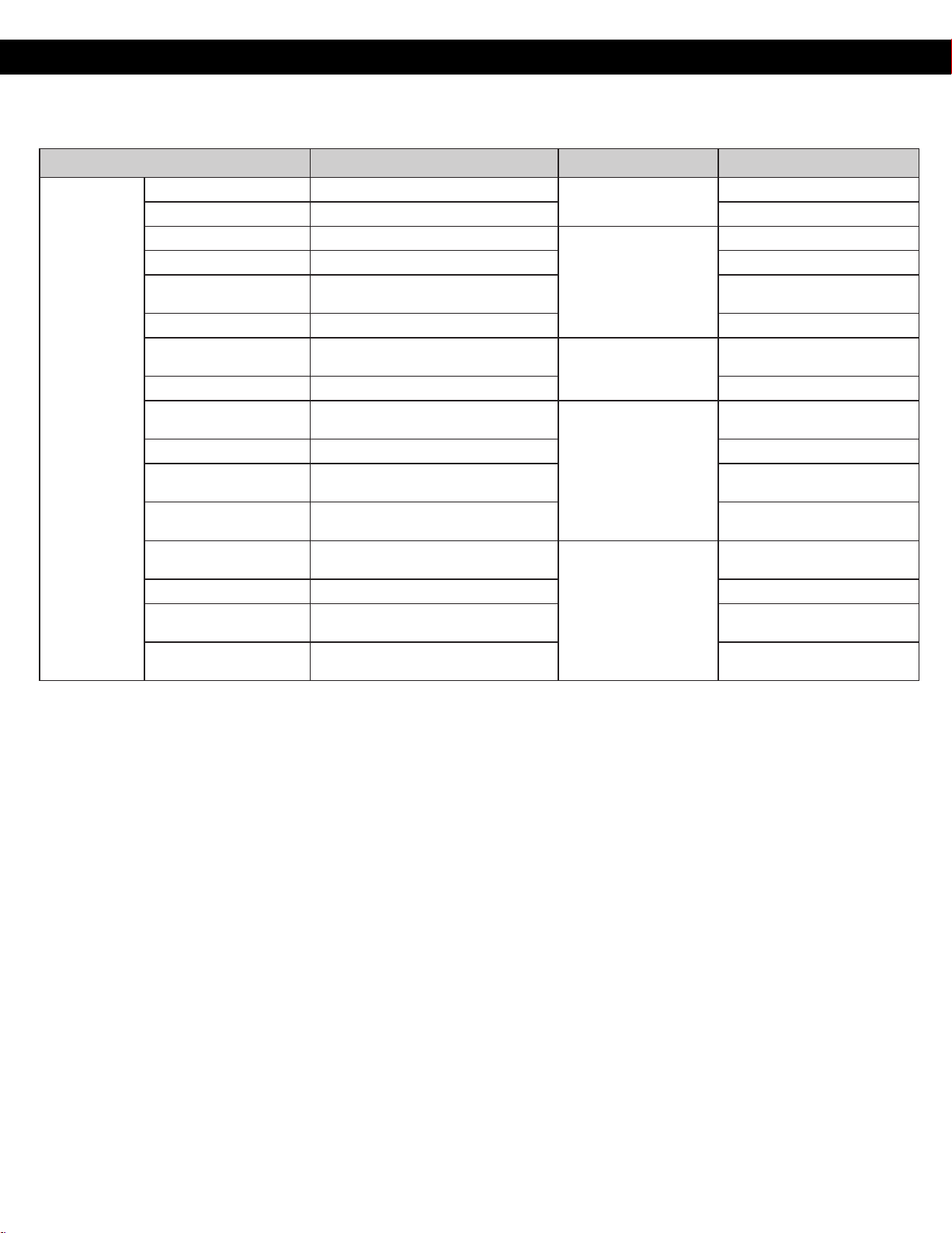
Voice Command Chart
MENU ITEM COMMAND QUANTITY RANGE HINTS
Sensor cook
(Frozen food)
Frozen Pizza Alexa, microwave/cook Frozen Pizza.
6 - 12 oz
(170 - 340 g)
-
Frozen Pie Alexa, microwave/cook Frozen Pie. -
Frozen Entrée Alexa, microwave/cook Frozen Entrée.
6 - 32 oz
(170 - 900 g)
-
Frozen Bowl Alexa, microwave/cook Frozen Bowl. -
Frozen Lasagna
Alexa, microwave/cook Frozen
Lasagna.
-
Frozen Pasta Alexa, microwave/cook Frozen Pasta. -
Frozen Dinner
Alexa, microwave/cook Frozen
Dinner.
11 - 16 oz
(300 - 450 g)
-
Frozen Meal Alexa, microwave/cook Frozen Meal. -
Frozen Nuggets
Alexa, microwave/cook Frozen
Nuggets.
4 - 12 oz
(110 - 340 g)
-
Frozen Fries Alexa, microwave/cook Frozen Fries. -
Frozen Appetizers
Alexa, microwave/cook Frozen
Appetizers.
-
Frozen Quiche
Alexa, microwave/cook Frozen
Quiche.
-
Frozen Sandwich
Alexa, microwave/cook Frozen
Sandwich.
1 - 2
-
Frozen Burrito Alexa, microwave/cook Frozen Burrito. -
Frozen hot pockets
Alexa, microwave/cook Frozen hot
pockets.
-
Frozen Breakfast
Alexa, microwave/cook Frozen
Breakfast.
-
38
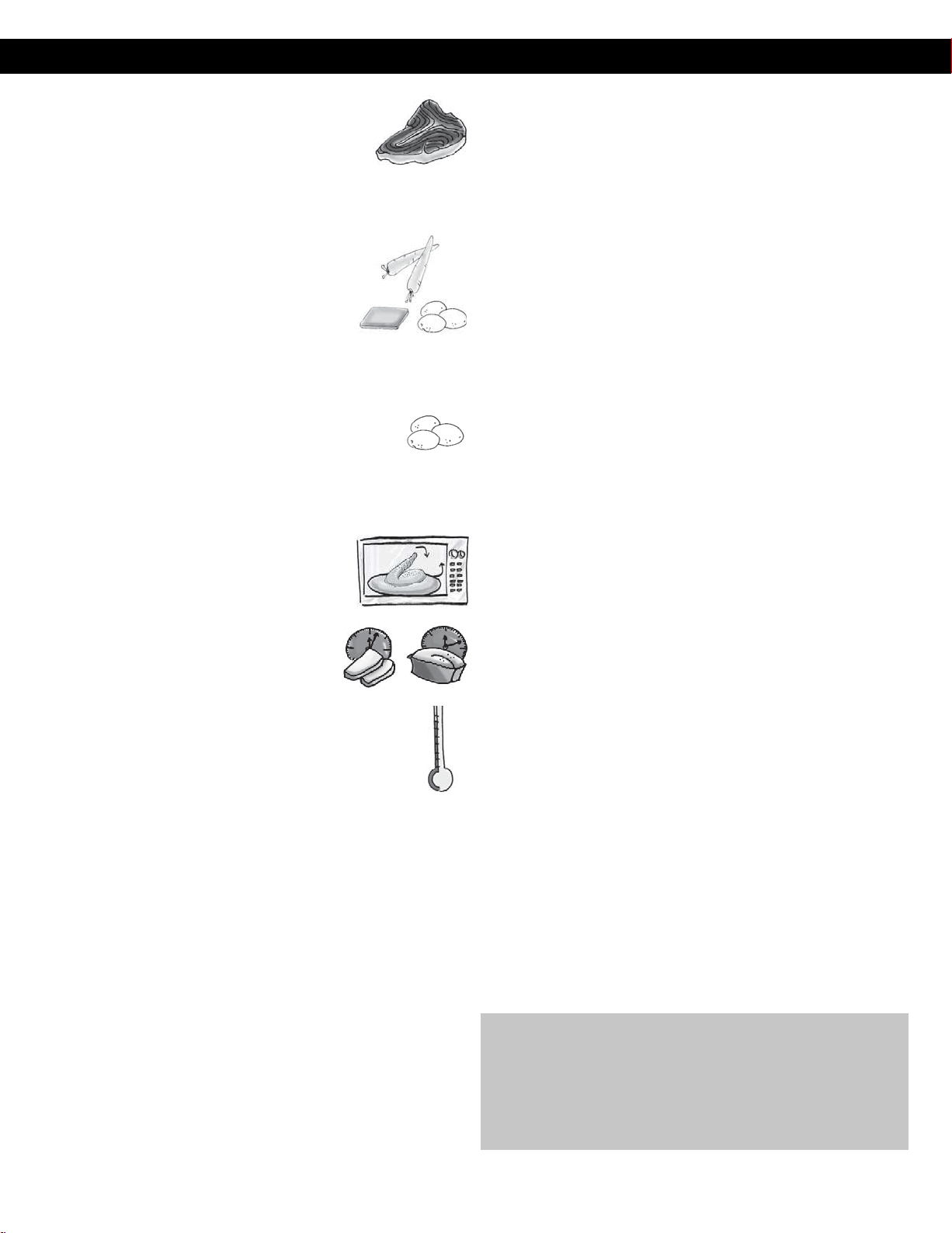
Food Characteristics
Food Characteristics
Bone and Fat
Both bone and fat affect cooking. Bones may cause
irregular cooking. Meat next to the tips of bones may
overcook while meat positioned under a large bone,
such as a ham bone, may be undercooked. Large
amounts of fat absorb microwave energy and the meat next to these areas
may overcook.
Density
Porous, airy foods such as breads, cakes or rolls take
less time to cook than heavy, dense foods such as
potatoes and roasts. When reheating donuts or other
foods with different centers be very careful. Certain
foods have centers made with sugar, water, or fat and
these centers attract microwaves (for example, jelly
donuts). When a jelly donut is heated, the jelly can become extremely hot
while the exterior remains warm to the touch. This could result in a burn if
the food is not allowed to cool properly in the center.
Quantity
Two potatoes take longer to cook than one potato. As the
quantity of the food decreases so does the cooking time.
Overcooking will cause the moisture content in the food to decrease and a
fire could result. Never leave microwave unattended while in use.
Shape
Uniform sizes heat more evenly. The thin end of a
drumstick will cook more quickly than the meaty end.
To compensate for irregular shapes, place thin parts
toward the center of the dish and thick pieces toward
the edge.
Size
Thin pieces cook more quickly than thick pieces.
Starting Temperature
Foods that are at room temperature take less time to cook than
if they are chilled, refrigerated or frozen.
Cooking Techniques
Piercing
Foods with skins or membranes must be pierced, scored or have a strip of skin
peeled before cooking to allow steam to escape. Pierce clams, oysters, chicken
livers, whole potatoes and whole vegetables. Whole apples or new potatoes
should have a 1-inch strip of skin peeled before cooking. Score sausages and
frankfurters. Do not Cook/Reheat whole eggs, with or without the shell. Steam
buildup in whole eggs may cause them to explode, and possibly damage
the oven or cause injury. Reheating SLICED hard-boiled eggs and cooking
SCRAMBLED eggs is safe.
Browning
Foods will not have the same brown appearance as conventionally cooked foods
or those foods which are cooked utilizing a browning feature. Meats and poultry
may be coated with browning sauce, Worcestershire sauce, barbecue sauce or
shake-on browning sauce. To use, combine browning sauce with melted butter
or margarine and brush on before cooking. For quick breads or muffins, brown
sugar can be used in the recipe in place of granulated sugar, or the surface can be
sprinkled with dark spices before cooking.
Spacing
Individual foods, such as baked potatoes, cupcakes and appetizers, will cook
more evenly if placed in the oven equal distances apart. When possible,
arrange foods in a circular pattern.
Covering
As with conventional cooking, moisture evaporates during microwave
cooking. Casserole lids or plastic wrap are used for a tighter seal. When using
plastic wrap, vent the plastic wrap by folding back part of the plastic wrap
from the edge of the dish to allow steam to escape. Loosen or remove plastic
wrap as recipe directs for stand time. When removing plastic wrap covers,
as well as any glass lids, be careful to remove them away from you to avoid
steam burns. Various degrees of moisture retention are also obtained by using
wax paper or paper towels.
Cooking
Time
Cooking times will vary because of food shape variations, starting
temperature, and regional preferences. Always cook food for the minimum
cooking time given in a recipe and check for doneness. If the food is
undercooked, continue cooking. It is easier to add time to an undercooked
product. Once the food is overcooked, nothing can be done.
Stirring
Stirring is usually necessary during microwave cooking. Always bring the
cooked outside edges toward the center and the less cooked center portions
toward the outside of the dish.
Rearranging
Rearrange small items such as chicken pieces, shrimp, hamburger patties or
pork chops. Rearrange pieces from the edge to the center and pieces from the
center to the edge of the dish.
Turning
It is not possible to stir some foods to distribute the heat evenly. At times,
microwave energy will concentrate in one area of the food. To help ensure
even cooking, these foods need to be turned. Turn over large foods, such as
roasts or turkeys, halfway through cooking.
Standing
Time
Most foods will continue to cook by conduction after the microwave oven
is turned off. After cooking meat, the internal temperature will rise 5 °F to
15 °F (3 °C to 8 °C), if allowed to stand, tented with foil, for 10 to 15 minutes.
Casseroles and vegetables need a shorter amount of standing time, but this
standing time is necessary to allow foods to complete cooking to the center
without overcooking on the edges.
Test
for
Doneness
The same tests for doneness used in conventional cooking may be used for
microwave cooking. Meat is done when fork-tender or splits at fibers. Chicken
is done when juices are clear yellow and drumstick moves freely. Fish is done
when it flakes and is opaque. Cake is done when a toothpick or cake tester is
inserted and comes out clean.
Check foods to see that they are cooked to the United States Department of
Agriculture’s recommended temperatures.
To test for doneness, insert a meat thermometer in a thick or dense area
away from fat or bone. NEVER leave the thermometer in the food during
cooking, unless it is approved for microwave oven use.
Temp Food
160 °F For fresh pork, ground meat, boneless white poultry, fish,
seafood, egg dishes and frozen prepared food.
165 °F For leftover, ready-to-reheat refrigerated, and deli and
carryout “fresh” food.
170 °F For white meat poultry.
180 °F For dark meat poultry.
39
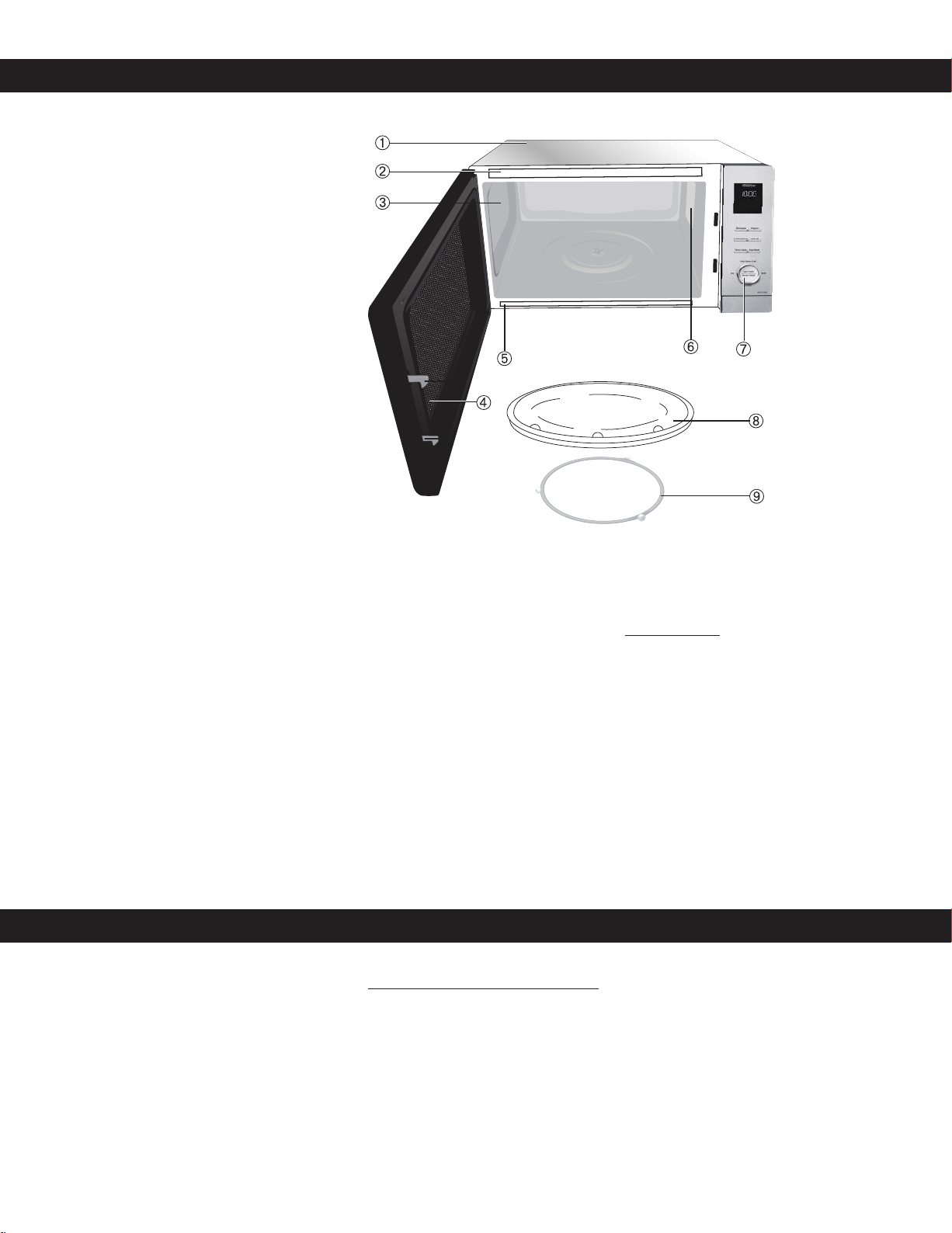
Care and Cleaning of Your Microwave Oven
Please see below and the following page
for particular cleaning instructions for
each section of the oven.
BEFORE CLEANING: Unplug oven at wall
outlet. If outlet is inaccessible, leave oven
door open while cleaning.
AFTER CLEANING: Be sure to place the
Roller Ring and the Glass Tray in the proper
position and press Stop/Reset Button to
clear the Display.
1. Outside oven surfaces: Clean with a
damp cloth. To prevent damage to the
operating parts inside the oven, water
should not be allowed to seep into
ventilation openings.
2. Label: Do not remove. Wipe with a
damp cloth.
3. Inside the Oven: Wipe with a damp
cloth after using. Mild detergent may
be used if needed. Do not use harsh
detergents or abrasives.
4. Oven Door: Wipe with a soft dry cloth
when steam accumulates inside or
around the outside of the oven door.
During cooking, especially under high
humidity conditions, steam is given
off from the food. (Some steam will
condense on cooler surfaces, such as
the oven door. This is normal.) Inside surface is covered with a heat and vapor barrier film. Do not remove.
5. Oven Cavity Floor: Clean the bottom surface of the oven with mild detergent, water or window cleaner, and dry.
6. Wave Guide Cover: Do not remove Wave Guide Cover. It is important to keep cover clean in the same manner as the inside of the
oven.
7. Control Panel: The Control Panel is covered with a removable protective film to prevent scratches during shipping. Small bubbles
may appear under this film, so if this is the case, remove by applying masking or clear tape to an exposed corner and pull gently. If
the Control Panel becomes wet, clean it with a soft dry cloth. Do not use harsh detergents or abrasives.
8. Glass Tray: Remove and wash in warm soapy water or in a dishwasher.
9. Roller Ring: Roller Ring may be washed in mild soapy water or dishwasher. These areas should be kept clean to avoid excessive noise.
IT IS IMPORTANT TO KEEP THE OVEN CLEAN AND DRY. FOOD RESIDUE AND CONDENSATION MAY CAUSE
RUSTING OR ARCING AND DAMAGE TO THE OVEN. AFTER USE, WIPE DRY ALL SURFACES,
INCLUDING VENT OPENINGS, OVEN SEAMS, AND UNDER GLASS TRAY.
Purchase Parts, Accessories and Instruction Books online for all Panasonic Products by visiting our Web Site at:
Parts Available to Order:
Instructions/Operating Manual (this book) ...................................................
Glass Tray ...................................................................................................................
Roller Ring Assembly ..............................................................................................
Shop Accessories
http://shop.panasonic.com/support
12170000004310
12570000008334
16170000A87548
Auto
Defrost
More Less
oz
lb
/
g
kg
/
TURBO
DEFROST
40
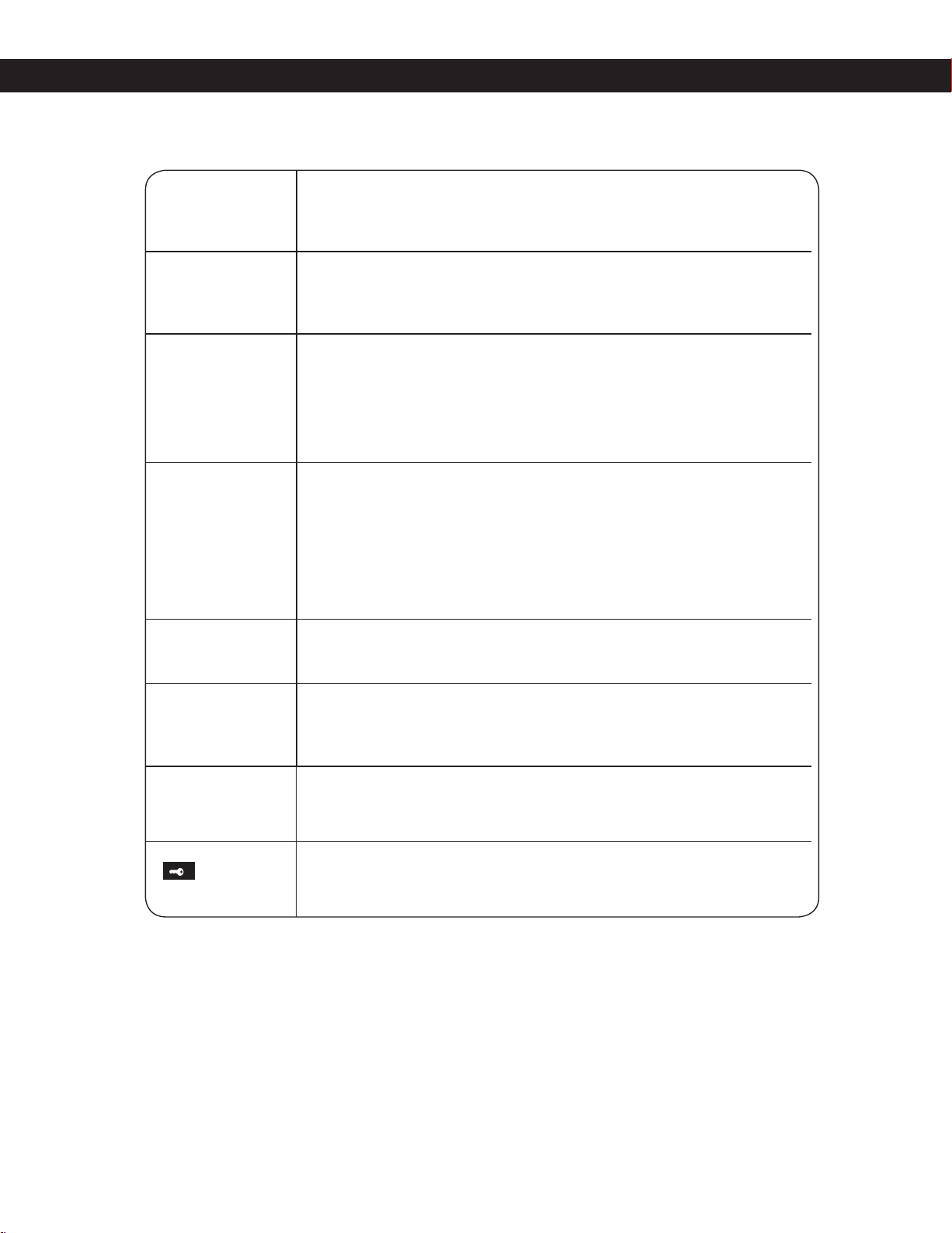
Before Requesting Service
See below before calling for service, as most problems can easily be remedied by following these simple solutions:
The oven causes TV
interference.
Some radio and TV interference might occur when you cook with the microwave
oven. This interference is similar to the interference caused by small appliances
such as mixers, vacuums, blow dryers, etc. It does not indicate a problem with
your oven.
Steam accumulates
on oven door and
warm air comes from
the oven vents.
During cooking, steam and warm air are given off from the food. Most of the
steam and warm air are removed from the oven by the air which circulates in the
oven cavity. However, some steam will condense on cooler surfaces such as the
oven door. This is normal. After use, the oven should be wiped dry (see page 40).
Oven will not turn on.
The oven is not plugged in securely or needs to be reset; remove plug from
outlet, wait ten seconds and re-insert.
Main circuit breaker or main fuse is tripped; reset main circuit breaker or replace
main fuse.
There is a problem with the outlet; plug another appliance into the outlet to
check if it is working.
Oven will not start
cooking.
The door is not completely closed; close the oven door securely.
Start was not pressed after programming; press Start.
Another program is already entered into the oven; press Stop/Reset to cancel
the previous program and enter new program.
The program is not correct; program again according to the Operating
Instructions.
Stop/Reset has been pressed accidentally; program oven again.
The Glass Tray
wobbles.
The Glass Tray is not positioned properly on the Roller Ring or there is food under
the Roller Ring; take out Glass Tray and Roller Ring. Wipe with a damp cloth and
reset Roller Ring and Glass Tray properly.
When the oven is
operating, there is
noise coming from
the Glass Tray.
The Roller Ring and oven bottom are dirty; clean these parts according to Care
and Cleaning of Your Microwave Oven (see page 40).
“”
appears in the
display.
The CHILD SAFETY LOCK was activated by pressing three times;
CHILD SAFETY LOCK by pressing Stop/Reset three times.
“”
appears in the
display.
The CHILD SAFETY LOCK was activated by pressing three times;
Deactivate
CHILD SAFETY LOCK by pressing
Stop/Reset
three times.
“DEMO MODE PRESS
ANY KEY” or “D”
appears in the display
window.
The oven is under demonstration mode. Press Microwave button once, Start 4
times and Stop/Reset button 4 times.
41
Limited Warranty (Only for U.S.A.)
Panasonic Products Limited Warranty
Limited Warranty Coverage (For USA Only)
If your product does not work properly because of a defect in materials or
workmanship, Panasonic Consumer Electronics Company (referred to as
“the warrantor”) will, for the length of the period indicated on the chart below,
which starts with the date of original purchase (“warranty period”), at its
option either (a) repair your product with new or refurbished parts, (b) replace
it with a new or a refurbished equivalent value product, or (c) refund your
purchase price. The decision to repair, replace or refund will be made by the
warrantor.
Product or Part Name Labor Parts
ALL PARTS (EXCEPT MAGNETRON TUBE)
1 yr. 1 yr.
MAGNETRON TUBE
1 yr. 5 yr.
During the “Labor” warranty period there will be no charge for labor. During
the “Parts” warranty period, there will be no charge for parts.
This warranty only applies to products purchased and serviced in the United
States. This warranty is extended only to the original purchaser of a new
product which was not sold “as is”.
Mail-In Service – Online Repair Request
Online Repair Request
To submit a new repair request, and for quick repair status visit our Web
Site at: http://shop.panasonic.com/support
When shipping the unit, carefully pack and send it in the original (or supplied)
carton. Include a letter detailing the complaint along with the bill of sales and
provide a daytime phone number where you can be reached. A valid
registered receipt is required under the Limited Warranty.
When shipping Lithium Ion batteries please visit our web site at
http://shop.panasonic.com/support as Panasonic is committed to
providing the most up to date information.
IF REPAIR IS NEEDED DURING THE WARRANTY PERIOD, THE
PURCHASER WILL BE REQUIRED TO FURNISH A SALES
RECEIPT/PROOF OF PURCHASE INDICATING DATE OF PURCHASE,
AMOUNT PAID AND PLACE OF PURCHASE. CUSTOMER WILL BE
CHARGED FOR THE REPAIR OF ANY UNIT RECEIVED WITHOUT SUCH
PROOF OF PURCHASE.
Limited Warranty Limits And Exclusions
This warranty ONLY COVERS failures due to defects in materials or
workmanship, and DOES NOT COVER glass, plastic parts, temperature
probes (if included) and normal wear and tear or cosmetic damage. The
warranty ALSO DOES NOT COVER damages which occurred in shipment,
or failures which are caused by products not supplied by the warrantor, or
failures which result from accidents, misuse, abuse, neglect, bug infestation,
mishandling, misapplication, alteration, faulty installation, set-up
adjustments, maladjustment of consumer controls, improper maintenance,
power line surge, lightning damage, modification, or commercial use (such
as in a hotel, office, restaurant, or other business), rental use of the product,
service by anyone other than a Factory Service center or other Authorized
Servicer, or damage that is attributable to acts of God.
THERE ARE NO EXPRESS WARRANTIES EXCEPT AS LISTED UNDER
“LIMITED WARRANTY COVERAGE”.
THE WARRANTOR IS NOT LIABLE FOR INCIDENTAL OR
CONSEQUENTIAL DAMAGES RESULTING FROM THE USE OF THIS
PRODUCT, OR ARISING OUT OF ANY BREACH OF THIS WARRANTY.
(As examples, this excludes damages for lost time, travel to and from the
servicer, loss of or damage to media or images, data or other memory or
recorded content. The items listed are not exclusive, but for illustration only.)
ALL EXPRESS AND IMPLIED WARRANTIES, INCLUDING THE
WARRANTY OF MERCHANTABILITY, ARE LIMITED TO THE PERIOD
OF THE LIMITED WARRANTY.
Some states do not allow the exclusion or limitation of incidental or
consequential damages, or limitations on how long an implied warranty lasts,
so the exclusions may not apply to you.
This warranty gives you specific legal rights and you may also have other
rights which vary from state to state. If a problem with this product develops
during or after the warranty period, you may contact your dealer or Service
Center. If the problem is not handled to your satisfaction, then write to:
Panasonic Consumer Electronics Company of North America
Consumer Affairs Department 8th Fl.
Two Riverfront Plaza
Newark NJ 07102-5490
PARTS AND SERVICE, WHICH ARE NOT COVERED BY THIS LIMITED
WARRANTY, ARE YOUR RESPONSIBILITY.
Networking,
42
Product registration is not mandatory. Failure to complete the form does not
affect the consumer' s warranty rights.
As of October 15 2021

Copyright Information
This product incorporates the following software:
(1)the software developed for Panasonic Consumer Electronics Company
(2)the software owned by third party and licensed to Panasonic Consumer Electronics Company,
(3)open source software.
The software categorized as (3) is distributed in the hope that it will be useful, but WITHOUT ANY WARRANTY, without even the implied
warranty of MERCHANTABILITY or FITNESS FOR A PARTICULAR PURPOSE. Please refer to the detailed terms and conditions there of shown
below.
ACK Module with MediaTek chipset Firmware 1352 (3.211135220.build2009222236)
Copyright 2020 Amazon.com, Inc. or its affiliates. All Rights Reserved.
NOTICE RELATING TO OPEN SOURCE SOFTWARE
This product contains software (“Open Source Software”) that is provided to you under open source licenses. In the event of a conflict
between the software license in the Amazon terms applicable to this product and the open source license applicable to such Open Source
Software, the open source license will prevail with respect to that Open Source Software. Some open source licenses give you the right to
obtain a copy of source code. A copy of source code for Open Source Software licensed under such licenses is provided with this product.
***************************
Open Source
Software Components
***************************
** mbedTLS; version 2.16.6 -- https://tls.mbed.org/
Copyright (C) 2006-2015, ARM Limited,
All Rights Reserved
Apache License
Version 2.0, January 2004
http://www.apache.org/licenses/ TERMS AND CONDITIONS FOR USE, REPRODUCTION, AND
DISTRIBUTION
1. Definitions.
"License" shall mean the terms and conditions for use, reproduction, anddistribution as defined by Sections 1 through 9
of this
document. "Licensor" shall mean the copyright owner or entity authorized by the copyright owner that is granting the License.
"Legal Entity" shall mean the union of the acting entity and all other entities that control, are controlled by, or are under common
control with that entity. For the purposes of this definition, "control" means (i) the power, direct or indirect, to cause the direction or
management of such entity, whether by contract or otherwise, or (ii) ownership of fifty percent (50%) or more of the outstanding
shares, or (iii)beneficial ownership of such entity.
"You" (or "Your") shall mean an individual or Legal Entity exercising permissions granted by this License.
"Source" form shall mean the preferred form for making modifications, including but not limited to software source code,
documentation source, and configuration files.
"Object" form shall mean any form resulting from mechanical transformation or translation of a Source form, including but not limited
to compiled object code, generated documentation, and conversions to other media types.
"Work" shall mean the work of authorship, whether in Source or Object form, made available under the License, as indicated by a
copyright notice that is included in or attached to the work (an example is provided in the Appendix below).
"Derivative Works" shall mean any work, whether in Source or Object form,that is based on (or derived from) the Work and for which the
editorial revisions, annotations, elaborations, or other modifications represent, as a whole, an original work of authorship. For the
purposes
of this License, Derivative Works shall not include works that remain separable from, or merely link (or bind by name) to the
interfaces of, the Work and Derivative Works thereof.
"Contribution" shall mean any work of authorship, including the original version of the Work and any modifications or additions to that
Work or Derivative Works thereof, that is intentionally submitted to Licensor for inclusion in the Work by the copyright owner or by an
43
Copyright (C) 2020 Nuvoton Technology Corp. All rights reserved
Copyright (C) 2018 Nuvoton Technology Corp. All rights reserved
Copyright 2018-2019 Amazon.com, Inc. or its affiliates. All Rights Reserved
Copyright (c) 2009 - 2015 ARM LIMITED
Copyright (C) 2010-2014 ARM Limited. All rights reserved
Copyright (C) 2010-2015 ARM Limited. All rights reserved

Copyright Information
individual or Legal Entity authorized to submit on behalf of the copyright owner. For the purposes of this definition, "submitted" means
any form of electronic, verbal, or written communication sent to the Licensor or its
representatives, including but not limited to
communication on electronic mailing lists, source code control systems, and issue tracking systems that are managed by, or on behalf of,
the Licensor for the purpose of discussing and improving the Work, but excluding communication that is conspicuously marked or
otherwise designated in writing by the copyright owner as "Not a Contribution."
"Contributor" shall mean Licensor and any individual or Legal Entity on behalf of whom a Contribution has been received by Licensor
and subsequently incorporated within the Work.
2. Grant of Copyright License. Subject to the terms and conditions of this License, each Contributor hereby grants to You a perpetual,
worldwide, non-exclusive, no-charge, royalty-free, irrevocable copyright license to reproduce, prepare Derivative Works of, publicly display,
publicly perform, sublicense, and distribute the Work and such Derivative Works in Source or Object form.
3. Grant of Patent License. Subject to the terms and conditions of this
License, each Contributor hereby grants to You a perpetual,
worldwide, non-exclusive, no-charge, royalty-free, irrevocable (except as stated in this section) patent license to make, have made, use, offer
to sell, sell, import, and otherwise transfer the Work, where such license applies only to those patent claims licensable by such Contributor
that are necessarily infringed by their Contribution(s) alone or by combination of their Contribution(s) with the Work to which such
Contribution(s) was submitted. If You institute patent litigation against any entity (including a cross-claim or counterclaim in a lawsuit)
alleging that the Work or a Contribution incorporated within the Work constitutes direct or contributory patent infringement, then any
patent licenses granted to You under this License for that Work shall terminate as of the date such litigation is filed.
4. Redistribution. You may reproduce and distribute copies of the Work or Derivative Works thereof in any medium, with or without
modifications, and in Source or Object form, provided that You meet the following conditions:
(a) You must give any other recipients of the Work or Derivative Works a copy of this License; and
(b) You must cause any modified files to carry prominent notices stating that You changed the files; and
(c) You must retain, in the Source form of any Derivative Works that You distribute, all copyright, patent, trademark, and attribution
notices from the Source form of the Work, excluding those notices that do not pertain to any part of the Derivative Works; and
(d) If the Work includes a "NOTICE" text file as part of its distribution, then any Derivative Works that You distribute must include a
readable copy of the attribution notices contained within such NOTICE file, excluding those notices that do not pertain to any part of the
Derivative Works, in at least one of the following places: within a NOTICE text file distributed as part of the Derivative Works; within the
Source form or documentation, if provided along with the Derivative Works; or, within a display generated by the Derivative Works,
if
and wherever such third-party notices normally appear. The contents of the NOTICE file are for informational purposes only and do not
modify the License. You may add Your own attribution notices within Derivative Works that You distribute, alongside or as an
addendum to the NOTICE text from the Work, provided that such additional attribution notices cannot be construed as modifying the
License. You may add Your own copyright statement to Your modifications and may provide additional or different license terms and
conditions for use, reproduction, or distribution of Your modifications, or for any such Derivative Works as a whole, provided Your use,
reproduction, and distribution of the Work otherwise complies with the conditions stated in this License.
5. Submission of Contributions. Unless You explicitly state otherwise, any Contribution intentionally submitted for inclusion in the Work by
You to the Licensor shall be under the terms and conditions of this License, without any additional terms or conditions
Notwithstanding the
above, nothing herein shall supersede or modify the terms of any separate license agreement you may have executed with Licensor
regarding such Contributions.
6. Trademarks. This License does not grant permission to use the trade names, trademarks, service marks, or product names of the Licensor,
except as required for reasonable and customary use in describing the origin of the Work and reproducing the content of the NOTICE file.
7. Disclaimer of Warranty. Unless required by applicable law or agreed to in writing, Licensor provides the Work (and each Contributor
provides its Contributions) on an "AS IS" BASIS, WITHOUT WARRANTIES OR CONDITIONS OF ANY KIND, either express or implied, including,
without limitation, any warranties or conditions of TITLE, NON-INFRINGEMENT, MERCHANTABILITY, or FITNESS FOR A PARTICULAR PURPOSE.
You are solely responsible for determining the appropriateness of using or redistributing the Work and assume any risks associated with
Your exercise of permissions under this License.
44

Copyright Information
8. Limitation of Liability. In no event and under no legal theory, whether in tort (including negligence), contract, or otherwise, unless required
by applicable law (such as deliberate and grossly negligent acts) or agreed to in writing, shall any Contributor be liable to You for damages,
including any direct, indirect, special, incidental, or consequential damages of any character arising as a result of this License or out of the
use or inability to use the Work (including but not limited to damages for loss of goodwill, work stoppage, computer failure or malfunction,
or any and all other commercial damages or losses), even if such Contributor has been advised of the possibility of such damages.
9. Accepting Warranty or Additional Liability. While redistributing the Work or Derivative Works thereof, You may choose to offer, and charge
a fee for, acceptance of support, warranty, indemnity, or other liability obligations and/or rights consistent with this License. However, in
accepting such obligations, You may act only on Your own behalf and on Your sole responsibility, not on behalf of any other Contributor,
and only if You agree to indemnify, defend, and hold each Contributor harmless for any liability incurred by, or claims asserted against, such
Contributor by reason of your accepting any such warranty or additional liability. END OF TERMS AND CONDITIONS.
APPENDIX: How to apply the Apache License to your work.
To apply the Apache License to your work, attach the following boilerplate notice, with the fields enclosed by brackets "[]" replaced with
your own identifying information. (Don't include the brackets!) The text should be enclosed in the appropriate comment syntax for the file
format. We also recommend that a file or class name and description of purpose be included on the same "printed page" as the copyright
notice for easier identification within third-party archives.
Copyright [yyyy] [name of copyright owner] Licensed under the Apache License, Version 2.0 (the "License"); you may not use this file except
in compliance with the License. You may obtain a copy of the License at http://www.apache.org/licenses/LICENSE-2.0 Unless required by
applicable law or agreed to in writing, software distributed under the License is distributed on an "AS IS" BASIS,
WITHOUT WARRANTIES OR CONDITIONS OF ANY KIND, either express or implied. See the License for the specific language governing
permissions and limitations under the License.
* For mbedTLS see also this required NOTICE:
Copyright (C) 2006-2015, ARM Limited, All Rights Reserved
------
** axTLS Embedded SSL; version not declared --http://sourceforge.net/projects/axtls/ Copyright (c) 2008, Cameron Rich All rights reserved.
Redistribution and use in source and binary forms, with or without modification, are permitted provided that the following conditions are
met:
Redistributions of source code must retain the above copyright notice, this list of conditions and the following disclaimer. Redistributions in
binary form must reproduce the above copyright notice, this list of conditions and the following disclaimer in the documentation and/or
other materials provided with the distribution. Neither the name of the axTLS Project nor the names of its contributors may be used to
endorse or promote products derived from this software without specific prior written permission.
THIS SOFTWARE IS PROVIDED BY THE COPYRIGHT HOLDERS AND CONTRIBUTORS "AS IS" AND ANY EXPRESS OR IMPLIED WARRANTIES,
INCLUDING, BUT NOT LIMITED TO, THE IMPLIED WARRANTIES OF MERCHANTABILITY AND FITNESS FOR A PARTICULAR PURPOSE ARE
DISCLAIMED. IN NO EVENT SHALL THE REGENTS OR CONTRIBUTORS BE LIABLE FOR ANY DIRECT, INDIRECT, INCIDENTAL, SPECIAL,
EXEMPLARY, OR CONSEQUENTIAL DAMAGES (INCLUDING, BUT NOT LIMITED TO, PROCUREMENT OF SUBSTITUTE GOODS OR SERVICES; LOSS
OF USE, DATA, OR PROFITS; OR BUSINESS INTERRUPTION) HOWEVER CAUSED AND ON ANY THEORY OF LIABILITY, WHETHER IN CONTRACT,
STRICT LIABILITY, OR TORT (INCLUDING NEGLIGENCE OR OTHERWISE) ARISING IN ANY WAY OUT OF THE USE OF THIS SOFTWARE, EVEN IF
ADVISED OF THE POSSIBILITY OF SUCH DAMAGE.
------
** FreeBSD; version 8.2 -- https://www.freebsd.org/
Copyright (c) 1992-2017 The FreeBSD Project. All rights reserved.
# $FreeBSD$
# @(#)COPYRIGHT 8.2 (Berkeley) 3/21/94
The compilation of software known as FreeBSD is distributed under the following terms:
Copyright (c) 1992-2017 The FreeBSD Project. All rights reserved.
Redistribution and use in source and binary forms, with or without modification, are permitted provided that the following conditions are
met:
1. Redistributions of source code must retain the above copyright notice, this list of conditions and the following disclaimer.
2. Redistributions in binary form must reproduce the above copyright notice, this list of conditions and the following disclaimer in the
documentation and/or other materials provided with the distribution.
THIS SOFTWARE IS PROVIDED BY THE AUTHOR AND CONTRIBUTORS ``AS IS'' AND ANY EXPRESS OR IMPLIED WARRANTIES, INCLUDING, BUT
NOT LIMITED TO, THE IMPLIED WARRANTIES OF MERCHANTABILITY AND FITNESS FOR A PARTICULAR PURPOSE ARE DISCLAIMED. IN NO
EVENT SHALL THE AUTHOR OR CONTRIBUTORS BE LIABLE FOR ANY DIRECT, INDIRECT, INCIDENTAL, SPECIAL, EXEMPLARY, OR
CONSEQUENTIAL DAMAGES (INCLUDING, BUT NOT LIMITED TO, PROCUREMENT OF SUBSTITUTE GOODS OR SERVICES; LOSS OF USE, DATA,
OR PROFITS; OR BUSINESS INTERRUPTION) HOWEVER CAUSED AND ON ANY THEORY OF LIABILITY, WHETHER IN CONTRACT, STRICT
LIABILITY, OR TORT (INCLUDING NEGLIGENCE OR OTHERWISE) ARISING IN ANY WAY OUT OF THE USE OF THIS SOFTWARE, EVEN IF ADVISED
OF THE POSSIBILITY OF SUCH DAMAGE.
45

Copyright Information
The 4.4BSD and 4.4BSD-Lite software is distributed under the following terms:
All of the documentation and software included in the 4.4BSD and 4.4BSD-Lite. Releases is copyrighted by The Regents of the University of
California. Copyright 1979, 1980, 1983, 1986, 1988, 1989, 1991, 1992, 1993, 1994 .The Regents of the University of California. All rights
reserved.
Redistribution and use in source and binary forms, with or without modification, are permitted provided that the following conditions are
met:
1. Redistributions of source code must retain the above copyright notice, this list of conditions and the following disclaimer.
2. Redistributions in binary form must reproduce the above copyright notice, this list of conditions and the following disclaimer in the
documentation and/or other materials provided with the distribution.
3. All advertising materials mentioning features or use of this software must display the following acknowledgement:
This product includes software developed by the University of California, Berkeley and its contributors.
4. Neither the name of the University nor the names of its contributors may be used to endorse or promote products derived from this
software without specific prior written permission.
THIS SOFTWARE IS PROVIDED BY THE REGENTS AND CONTRIBUTORS ``AS IS'' AND ANY EXPRESS OR IMPLIED WARRANTIES, INCLUDING,
BUT NOT LIMITED TO, THE IMPLIED WARRANTIES OF MERCHANTABILITY AND FITNESS FOR A PARTICULAR PURPOSE ARE DISCLAIMED. IN
NO EVENT SHALL THE REGENTS OR CONTRIBUTORS BE LIABLE FOR ANY DIRECT, INDIRECT, INCIDENTAL, SPECIAL, EXEMPLARY, OR
CONSEQUENTIAL DAMAGES (INCLUDING, BUT NOT LIMITED TO, PROCUREMENT OF SUBSTITUTE GOODS OR SERVICES; LOSS OF USE,
DATA, OR PROFITS; OR BUSINESS INTERRUPTION) HOWEVER CAUSED AND ON ANY THEORY OF LIABILITY, WHETHER IN CONTRACT, STRICT
LIABILITY, OR TORT (INCLUDING NEGLIGENCE OR OTHERWISE) ARISING IN ANY WAY OUT OF THE USE OF THIS SOFTWARE, EVEN IF
ADVISED OF THE POSSIBILITY OF SUCH DAMAGE.
The Institute of Electrical and Electronics Engineers and the American National Standards Committee X3, on Information Processing
Systems have given us permission to reprint portions of their documentation.
In the following statement, the phrase ``this text'' refers to portions of the system documentation.
Portions of this text are reprinted and reproduced in electronic form in the second BSD Networking Software Release, from IEEE Std
1003.1-1988, IEEE Standard Portable Operating System Interface for Computer Environments (POSIX), copyright C 1988 by the Institute of
Electrical and Electronics Engineers, Inc. In the event of any discrepancy between these versions and the original IEEE Standard, the
original IEEE Standard is the referee document.
In the following statement, the phrase ``This material'' refers to portions of the system documentation.
This material is reproduced with permission from American National Standards Committee X3, on Information Processing Systems.
Computer and Business Equipment Manufacturers Association (CBEMA), 311 First St., NW, Suite 500, Washington, DC 20001-2178. The
developmental work of Programming Language C was completed by the X3J11 Technical Committee.
The views and conclusions contained in the software and documentation are those of the authors and should not be interpreted as
representing official policies, either expressed or implied, of the Regents of the University of California.
NOTE: The copyright of UC Berkeley's Berkeley Software Distribution ("BSD")
source has been updated. The copyright addendum may be found at
ftp://ftp.cs.berkeley.edu/pub/4bsd/README.Impt.License.Change and is
included below.
July 22, 1999
To All Licensees, Distributors of Any Version of BSD:
As you know, certain of the Berkeley Software Distribution ("BSD") source code files require that further distributions of products
containing all or portions of the software, acknowledge within their advertising materials that such products contain software developed
by UC Berkeley and its contributors.
Specifically, the provision reads:
" * 3. All advertising materials mentioning features or use of this software
* must display the following acknowledgement:
* This product includes software developed by the University of
* California, Berkeley and its contributors."
Effective immediately, licensees and distributors are no longer required to include the acknowledgement within advertising materials.
Accordingly, the foregoing paragraph of those BSD Unix files containing it is hereby deleted in its entirety.
William Hoskins
Director, Office of Technology Licensing University of California, Berkeley
------
** iperf; version not declared -- https://github.com/esnet/iperf iperf, Copyright (c) 2014-2018, The Regents of the University of California,
through Lawrence Berkeley National Laboratory (subject to receipt of any required approvals from the U.S. Dept. of Energy). All rights
reserved.
46

Copyright Information
Redistribution and use in source and binary forms, with or without modification, are permitted provided that the following conditions
are met:
(1) Redistributions of source code must retain the above copyright notice, this list of conditions and the following disclaimer.
(2) Redistributions in binary form must reproduce the above copyright notice, this list of conditions and the following disclaimer in the
documentation and/ or other materials provided with the distribution.
(3) Neither the name of the University of California, Lawrence Berkeley National Laboratory, U.S. Dept. of Energy nor the names of its
contributors may be used to endorse or promote products derived from this software without specific prior written permission.
THIS SOFTWARE IS PROVIDED BY THE COPYRIGHT HOLDERS AND CONTRIBUTORS "AS IS" AND ANY EXPRESS OR IMPLIED WARRANTIES,
INCLUDING, BUT NOT LIMITED TO, THE IMPLIED WARRANTIES OF MERCHANTABILITY AND FITNESS FOR A PARTICULAR PURPOSE ARE
DISCLAIMED. IN NO EVENT SHALL THE COPYRIGHT OWNER OR CONTRIBUTORS BE LIABLE FOR
ANY DIRECT, INDIRECT, INCIDENTAL,
SPECIAL, EXEMPLARY, OR CONSEQUENTIAL DAMAGES (INCLUDING, BUT NOT LIMITED TO, PROCUREMENT OF SUBSTITUTE GOODS OR
SERVICES; LOSS OF USE, DATA, OR PROFITS; OR BUSINESS INTERRUPTION) HOWEVER CAUSED AND ON ANY THEORY OF LIABILITY,
WHETHER IN CONTRACT, STRICT LIABILITY, OR TORT (INCLUDING NEGLIGENCE OR OTHERWISE) ARISING IN ANY WAY OUT OF THE USE OF
THIS SOFTWARE, EVEN IF ADVISED OF THE POSSIBILITY OF SUCH DAMAGE.
You are under no obligation whatsoever to provide any bug fixes, patches, or upgrades to the features, functionality or performance of
the source code ("Enhancements") to anyone; however, if you choose to make your Enhancements available either publicly, or directly to
Lawrence Berkeley National Laboratory, without imposing a separate written license agreement for such Enhancements, then you
hereby grant the following license: a non-exclusive, royalty-free perpetual license to install, use, modify, prepare derivative works,
incorporate into other computer software, distribute, and sublicense such enhancements or derivative works thereof, in binary and
source code form.
=====
This software contains source code (src/cjson.{c,h}) that is:
Copyright (c) 2009 Dave Gamble
Permission is hereby granted, free of charge, to any person obtaining a copy of this software and associated documentation files (the
"Software"), to deal in the Software without restriction, including without limitation the rights to use, copy, modify, merge, publish,
distribute, sublicense, and/or sell copies of the Software, and to permit persons to whom the Software is furnished to do so, subject to
the following conditions:
The above copyright notice and this permission notice shall be included in all copies or substantial portions of the Software.
THE SOFTWARE IS PROVIDED "AS IS", WITHOUT WARRANTY OF ANY KIND, EXPRESS OR IMPLIED, INCLUDING BUT NOT LIMITED TO THE
WARRANTIES OF MERCHANTABILITY, FITNESS FOR A PARTICULAR PURPOSE AND NONINFRINGEMENT. IN NO EVENT SHALL THE
AUTHORS OR COPYRIGHT HOLDERS BE LIABLE FOR ANY CLAIM, DAMAGES OR OTHER LIABILITY, WHETHER IN AN ACTION OF CONTRACT,
TORT OR OTHERWISE, ARISING FROM, OUT OF OR IN CONNECTION WITH THE SOFTWARE OR THE USE OR OTHER DEALINGS IN THE
SOFTWARE.
=====
This software contains source code (src/net.{c,h}) that is:
This software was developed as part of a project at MIT.
Copyright (c) 2005-2007 Russ Cox,
Massachusetts Institute of Technology
Permission is hereby granted, free of charge, to any person obtaining a copy of this software and associated documentation files (the
"Software"), to deal in the Software without restriction, including without limitation the rights to use, copy, modify, merge, publish,
distribute, sublicense, and/or sell copies of the Software, and to permit persons to whom the Software is furnished to do so, subject to
the following conditions:
The above copyright notice and this permission notice shall be included in all copies or substantial portions of the Software.
THE SOFTWARE IS PROVIDED "AS IS", WITHOUT WARRANTY OF ANY KIND, EXPRESS OR IMPLIED, INCLUDING BUT NOT LIMITED TO THE
WARRANTIES OF MERCHANTABILITY, FITNESS FOR A PARTICULAR PURPOSE AND NONINFRINGEMENT. IN NO EVENT SHALL THE
AUTHORS OR COPYRIGHT HOLDERS BE LIABLE FOR ANY CLAIM, DAMAGES OR OTHER LIABILITY, WHETHER IN AN ACTION OF CONTRACT,
TORT OR OTHERWISE, ARISING FROM, OUT OF OR IN CONNECTION WITH THE SOFTWARE OR THE USE OR OTHER DEALINGS IN THE
SOFTWARE.
===
Contains parts of an earlier library that has:
* The authors of this software are Rob Pike, Sape Mullender, and Russ Cox
* Copyright (c) 2003 by Lucent Technologies.
* Permission to use, copy, modify, and distribute this software for any purpose without fee is hereby granted, provided that this entire
notice is included in all copies of any software which is or includes a copy or modification of this software and in all copies of the
supporting documentation for such software.
47

Copyright Information
* THIS SOFTWARE IS BEING PROVIDED "AS IS", WITHOUT ANY EXPRESS OR IMPLIED WARRANTY. IN PARTICULAR, NEITHER THE AUTHORS
NOR LUCENT TECHNOLOGIES MAKE ANY REPRESENTATION OR WARRANTY OF ANY KIND CONCERNING THE MERCHANTABILITY OF THIS
SOFTWARE OR ITS FITNESS FOR ANY PARTICULAR PURPOSE.
* THIS SOFTWARE IS BEING PROVIDED "AS IS", WITHOUT ANY EXPRESS OR IMPLIED WARRANTY. IN PARTICULAR, NEITHER THE AUTHORS
NOR LUCENT TECHNOLOGIES MAKE ANY REPRESENTATION OR WARRANTY OF ANY KIND CONCERNING THE MERCHANTABILITY OF THIS
SOFTWARE OR ITS FITNESS FOR ANY PARTICULAR PURPOSE.
=====
This software contains source code (src/net.c) that is:
* Redistribution and use in source and binary forms, with or without modification, are permitted provided that the following conditions
are met:
1. Redistributions of source code must retain the above copyright notice, this list of conditions and the following disclaimer.
2. Redistributions in binary form must reproduce the above copyright notice, this list of conditions and the following disclaimer in the
documentation and/or other materials provided with the distribution.
3. The name of the author may not be used to endorse or promote products derived from this software without specific prior written
permission.
*THIS SOFTWARE IS PROVIDED BY THE AUTHOR ``AS IS'' AND ANY EXPRESS OR IMPLIED WARRANTIES, INCLUDING, BUT NOT LIMITED TO,
THE IMPLIED WARRANTIES OF MERCHANTABILITY AND FITNESS FOR A PARTICULAR PURPOSE ARE DISCLAIMED. IN NO EVENT SHALL THE
AUTHOR BE LIABLE FOR ANY DIRECT, INDIRECT, INCIDENTAL, SPECIAL, EXEMPLARY, OR CONSEQUENTIAL DAMAGES (INCLUDING, BUT
NOT LIMITED TO, PROCUREMENT OF SUBSTITUTE GOODS OR SERVICES; LOSS OF USE, DATA, OR PROFITS; OR BUSINESS INTERRUPTION)
HOWEVER CAUSED AND ON ANY THEORY OF LIABILITY, WHETHER IN CONTRACT, STRICT LIABILITY, OR TORT (INCLUDING NEGLIGENCE
OR OTHERWISE) ARISING IN ANY WAY OUT OF THE USE OF THIS SOFTWARE, EVEN IF ADVISED OF THE POSSIBILITY OF SUCH DAMAGE.
=====
This software contains source code (src/queue.h) that is:
* Copyright (c) 1991, 1993
* The Regents of the University of California. All rights reserved.
* Redistribution and use in source and binary forms, with or without modification, are permitted provided that the following conditions
are met:
1. Redistributions of source code must retain the above copyright notice, this list of conditions and the following disclaimer.
2. Redistributions in binary form must reproduce the above copyright notice, this list of conditions and the following disclaimer in the
documentation and/or other materials provided with the distribution.
3. Neither the name of the University nor the names of its contributors may be used to endorse or promote products derived from this
software without specific prior written permission.
* THIS SOFTWARE IS PROVIDED BY THE REGENTS AND CONTRIBUTORS ``AS IS'' AND ANY EXPRESS OR IMPLIED WARRANTIES, INCLUDING,
BUT NOT LIMITED TO, THE IMPLIED WARRANTIES OF MERCHANTABILITY AND FITNESS FOR A PARTICULAR PURPOSE ARE DISCLAIMED.
IN NO EVENT SHALL THE REGENTS OR CONTRIBUTORS BE LIABLE FOR ANY DIRECT, INDIRECT, INCIDENTAL, SPECIAL, EXEMPLARY, OR
CONSEQUENTIAL DAMAGES (INCLUDING, BUT NOT LIMITED TO, PROCUREMENT OF SUBSTITUTE GOODS OR SERVICES; LOSS OF USE,
DATA, OR PROFITS; OR BUSINESS INTERRUPTION) HOWEVER CAUSED AND ON ANY THEORY OF LIABILITY, WHETHER IN CONTRACT,
STRICT LIABILITY, OR TORT (INCLUDING NEGLIGENCE OR OTHERWISE) ARISING IN ANY WAY OUT OF THE USE OF THIS SOFTWARE, EVEN
IF ADVISED OF THE POSSIBILITY OF SUCH DAMAGE.
=====
@(#)queue.h 8.5 (Berkeley) 8/20/94
=====
This software contains source code (src/units.{c.h}) that is:
*---------------------------------------------------------------
* Copyright (c) 1999,2000,2001,2002,2003 The Board of Trustees of the University of Illinois All Rights Reserved.
*---------------------------------------------------------------
* Permission is hereby granted, free of charge, to any person obtaining a copy of this software (Iperf) and associated documentation files
(the "Software"), to deal in the Software without restriction, including without limitation the rights to use, copy, modify, merge, publish,
distribute, sublicense, and/or sell copies of the Software, and to permit persons to whom the Software is furnished to do so, subject to
the following conditions:
* Redistributions of source code must retain the above copyright notice, this list of conditions and the following disclaimers.
* Redistributions in binary form must reproduce the above copyright notice, this list of conditions and the following disclaimers in the
documentation and/or other materials provided with the distribution.
* Neither the names of the University of Illinois, NCSA, nor the names of its contributors may be used to endorseor promote products
derived from this Software without specific prior written permission.
* THE SOFTWARE IS PROVIDED "AS IS", WITHOUT WARRANTY OF ANY KIND, EXPRESS OR IMPLIED, INCLUDING BUT NOT LIMITED TO THE
WARRANTIES OF MERCHANTABILITY, FITNESS FOR A PARTICULAR PURPOSE AND NONINFRINGEMENT. IN NO EVENT SHALL THE
*
* stdio.c
* -------------------------------------------------------------------
* input and output numbers, converting with kilo, mega, giga
* ------------------------------------------------------------------- */
48

CONTIBUTORS OR COPYRIGHT HOLDERS BE LIABLE FOR ANY CLAIM, DAMAGES OR OTHER LIABILITY, WHETHER IN AN ACTION OF
CONTRACT, TORT OR OTHERWISE, ARISING FROM, OUT OF OR IN CONNECTION WITH THE SOFTWARE OR THE USE OR OTHER DEALINGS
IN THE SOFTWARE.
* National Laboratory for Applied Network Research National Center for Supercomputing Applications University of Illinois at Urbana-
Champaign http://www.ncsa.uiuc.edu
=====
This software contains source code (src/portable_endian.h) that is:// "License": Public Domain // I, Mathias Panzenböck, place this file
hereby into the public domain. Use it at your own risk for whatever you like.
=====
* lwIP; version not declared -- http://savannah.nongnu.org/projects/lwip/ Copyright (c) 2001-2004 Swedish Institute of Computer
Science. All rights reserved. Redistribution and use in source and binary forms, with or without modification, are permitted provided
that the following conditions are met:
1. Redistributions of source code must retain the above copyright notice, this list of conditions and the following disclaimer.
2. Redistributions in binary form must reproduce the above copyright notice, this list of conditions and the following disclaimer in the
documentation and/or other materials provided with the distribution.
3. The name of the author may not be used to endorse or promote products derived from this software without specific prior written
permission.
THIS SOFTWARE IS PROVIDED BY THE AUTHOR ``AS IS AND ANY EXPRESS OR IMPLIED WARRANTIES, INCLUDING, BUT NOT LIMITED TO,
THE IMPLIED WARRANTIES OF MERCHANTABILITY AND FITNESS FOR A PARTICULAR PURPOSE ARE DISCLAIMED. IN NO
EVENT SHALL THE AUTHOR BE LIABLE FOR ANY DIRECT, INDIRECT, INCIDENTAL, SPECIAL, EXEMPLARY, OR CONSEQUENTIAL DAMAGES
(INCLUDING, BUT NOT LIMITED TO, PROCUREMENT OF SUBSTITUTE GOODS OR SERVICES; LOSS OF USE, DATA, OR PROFITS; OR
BUSINESS INTERRUPTION) HOWEVER CAUSED AND ON ANY THEORY OF LIABILITY, WHETHER IN CONTRACT, STRICT LIABILITY, OR TORT
(INCLUDING NEGLIGENCE OR OTHERWISE) ARISING IN ANY WAY OUT OF THE USE OF THIS SOFTWARE, EVEN IF ADVISED OF THE
POSSIBILITY OF SUCH DAMAGE.
------
* Protobuf; version 3.1.0 -- https://developers.google.com/protocol-buffers/ Copyright 2008 Google Inc. All rights reserved.
Redistribution and use in source and binary forms, with or without modification, are permitted provided that the following conditions
are met:
* Redistributions of source code must retain the above copyright notice, this list of condition and the following disclaimer.
* Redistributions in binary form must reproduce the above copyright notice, this list of conditions and the following disclaimer in the
documentation and/or other materials
provided with the distribution.
* Neither the name of Google Inc. nor the names of its contributors may be used to endorse or promote products derived from this
software without specific prior written permission.
THIS SOFTWARE IS PROVIDED BY THE COPYRIGHT HOLDERS AND CONTRIBUTORS "AS IS" AND ANY EXPRESS OR IMPLIED WARRANTIES,
INCLUDING, BUT NOT LIMITED TO, THE IMPLIED WARRANTIES OF MERCHANTABILITY AND FITNESS FOR A PARTICULAR PURPOSE ARE
DISCLAIMED. IN NO EVENT SHALL THE COPYRIGHT OWNER OR CONTRIBUTORS BE LIABLE FOR ANY DIRECT, INDIRECT, INCIDENTAL,
SPECIAL, EXEMPLARY, OR CONSEQUENTIAL DAMAGES (INCLUDING, BUT NOT LIMITED TO, PROCUREMENT OF SUBSTITUTE GOODS OR
SERVICES; LOSS OF USE, DATA, OR PROFITS; OR BUSINESS INTERRUPTION) HOWEVER CAUSED AND ON ANY THEORY OF LIABILITY,
WHETHER IN CONTRACT, STRICT LIABILITY, OR TORT (INCLUDING NEGLIGENCE OR OTHERWISE) ARISING IN ANY WAY OUT OF THE USE
OF THIS SOFTWARE, EVEN IF ADVISED OF THE POSSIBILITY OF SUCH DAMAGE.
Code generated by the Protocol Buffer compiler is owned by the owner of the input file used when generating it. This code is not
standalone and requires a support library to be linked with it. This support library is itself covered by the above license.
------
* Eclipse Paho; version not declared --http://repo.maven.apache.org/maven2//org/eclipse/paho/java-parent/
Copyright (c) 2007, Eclipse Foundation, Inc. and its licensors.
Redistribution and use in source and binary forms, with or without
modification, are permitted provided that the following conditions
are met:
Redistributions of source
code must retain the above copyright notice, thi
list of
conditions and the following disclaimer.
Copyright Information
49

Redistributions in
binary form must reproduce the above copyright notice, this list of conditions
and
the following disclaimer in the
documentation and/or other materials provided with the distribution. Neither the name of the Eclipse Foundation, Inc. nor the names of
its contributors may be used to endorse or promote products derived from this software without specific prior written permission.
THIS SOFTWARE IS PROVIDED BY THE COPYRIGHT HOLDERS AND CONTRIBUTORS "AS IS" AND ANY EXPRESS OR IMPLIED WARRANTIES,
INCLUDING, BUT NOT LIMITED TO, THE IMPLIED WARRANTIES OF MERCHANTABILITY AND FITNESS FOR A PARTICULAR PURPOSE ARE
DISCLAIMED. IN NO EVENT SHALL THE COPYRIGHT OWNER OR CONTRIBUTORS BE LIABLE FOR ANY DIRECT, INDIRECT, INCIDENTAL,
SPECIAL, EXEMPLARY, OR CONSEQUENTIAL DAMAGES (INCLUDING, BUT NOT LIMITED TO,
PROCUREMENT OF SUBSTITUTE GOODS OR SERVICES; LOSS OF USE, DATA, OR PROFITS; OR BUSINESS INTERRUPTION) HOWEVER CAUSED
AND ON ANY THEORY OF LIABILITY, WHETHER IN CONTRACT, STRICT LIABILITY, OR TORT (INCLUDING NEGLIGENCE OR OTHERWISE)
ARISING IN ANY WAY OUT OF THE USE OF THIS SOFTWARE, EVEN IF ADVISED OF THE POSSIBILITY OF SUCH DAMAGE.
** Kiss FFT; version not declared -- http://sourceforge.net/projects/kissfft/ Copyright (c) 2003-2010 Mark Borgerding All rights reserved.
Redistribution and use in source and binary forms, with or without modification, are permitted provided that the following conditions
are met:
* Redistributions of source code must retain the above copyright notice, this list of conditions and the following disclaimer.
* Redistributions in binary form must reproduce the above copyright notice, this list of conditions and the following disclaimer in the
documentation and/or other materials provided with the distribution.
* Neither the author nor the names of any contributors may be used to endorse or promote products derived from this software without
specific prior written permission.
THIS SOFTWARE IS PROVIDED BY THE COPYRIGHT HOLDERS AND CONTRIBUTORS "AS IS" AND ANY EXPRESS OR IMPLIED WARRANTIES,
INCLUDING, BUT NOT LIMITED TO, THE IMPLIED WARRANTIES OF MERCHANTABILITY AND FITNESS FOR A PARTICULAR PURPOSE ARE
DISCLAIMED. IN NO EVENT SHALL THE COPYRIGHT OWNER OR CONTRIBUTORS BE LIABLE FOR ANY DIRECT, INDIRECT, INCIDENTAL,
SPECIAL, EXEMPLARY, OR CONSEQUENTIAL DAMAGES (INCLUDING, BUT NOT LIMITED TO, PROCUREMENT OF SUBSTITUTE GOODS OR
SERVICES; LOSS OF USE, DATA, OR PROFITS; OR BUSINESS INTERRUPTION) HOWEVER CAUSED AND ON ANY THEORY OF LIABILITY,
WHETHER IN CONTRACT, STRICT LIABILITY, OR TORT (INCLUDING NEGLIGENCE OR OTHERWISE) ARISING IN ANY WAY OUT OF THE USE OF
THIS SOFTWARE, EVEN IF ADVISED OF THE POSSIBILITY OF SUCH DAMAGE.
------
* Xmodem; version not declared -- https://www.menie.org/georges/embedded/ Copyright 1979, 1980, 1983, 1986, 1988, 1989, 1991,
1992, 1993, 1994 The Regents of the University of California. All rights reserved.
Redistribution and use in source and binary forms, with or without
modification, are permitted provided that the following conditions are met:
Redistributions of source code must retain the above copyright notice, this list of conditions and the following disclaimer.
Redistributions in binary form must reproduce the above copyright notice, this list of conditions and the following disclaimer in the
documentation and/or other materials provided with the distribution. All advertising materials mentioning features or use of this
software must display the following acknowledgement:
This product includes software developed by the University of California, Berkeley and its contributors.
Neither the name of the University nor the names of its contributors may be used to endorse or promote products derived from this
software without specific prior written permission.
THIS SOFTWARE IS PROVIDED BY THE REGENTS AND CONTRIBUTORS ``AS IS'' AND ANY EXPRESS OR IMPLIED WARRANTIES, INCLUDING,
BUT NOT LIMITED TO, THE IMPLIED WARRANTIES OF MERCHANTABILITY AND FITNESS FOR A PARTICULAR PURPOSE ARE DISCLAIMED. IN
NO EVENT SHALL THE REGENTS OR CONTRIBUTORS BE LIABLE FOR ANY DIRECT, INDIRECT, INCIDENTAL, SPECIAL, EXEMPLARY, OR
CONSEQUENTIAL DAMAGES (INCLUDING, BUT NOT LIMITED TO, PROCUREMENT OF SUBSTITUTE GOODS OR SERVICES; LOSS OF USE,
DATA, OR PROFITS; OR BUSINESS INTERRUPTION) HOWEVER CAUSED AND ON ANY THEORY OF LIABILITY, WHETHER IN CONTRACT,
STRICT LIABILITY, OR TORT (INCLUDING NEGLIGENCE OR OTHERWISE) ARISING IN ANY WAY OUT OF THE USE OF THIS SOFTWARE, EVEN IF
ADVISED OF THE POSSIBILITY OF SUCH DAMAGE.
* WPA supplicant; version not declared -- http://hostap.epitest.fi/wpa_supplicant/ Copyright (c) 2003-2017, Jouni Malinen <[email protected]> and
contributors
This software may be
distributed, used, and modified under the terms of BSD license:
Redistribution and use in source and binary forms, with or without modification, are permitted provided that the following conditions
are met:
Copyright Information
50

1. Redistributions of source code must retain the above copyright notice, this list of conditions and the following disclaimer.
2. Redistributions in binary form must reproduce the above copyright notice, this list of conditions and the following disclaimer in the
documentation and/or other materials provided with the distribution.
3. Neither the name(s) of the above-listed copyright holder(s) nor the names of its contributors may be used to endorse or promote
products derived from this software without specific prior written permission.
THIS SOFTWARE IS PROVIDED BY THE COPYRIGHT HOLDERS AND CONTRIBUTORS "AS IS" AND ANY EXPRESS OR IMPLIED WARRANTIES,
INCLUDING, BUT NOT LIMITED TO, THE IMPLIED WARRANTIES OF MERCHANTABILITY AND FITNESS FOR A PARTICULAR PURPOSE ARE
DISCLAIMED. IN NO EVENT SHALL THE COPYRIGHT OWNER OR CONTRIBUTORS BE LIABLE FOR ANY DIRECT, INDIRECT, INCIDENTAL,
SPECIAL, EXEMPLARY, OR CONSEQUENTIAL DAMAGES (INCLUDING, BUT NOT LIMITED TO, PROCUREMENT OF SUBSTITUTE GOODS OR
SERVICES; LOSS OF USE, DATA, OR PROFITS; OR BUSINESS INTERRUPTION) HOWEVER CAUSED AND ON ANY THEORY OF LIABILITY,
WHETHER IN CONTRACT, STRICT LIABILITY, OR TORT (INCLUDING NEGLIGENCE OR OTHERWISE) ARISING IN ANY WAY OUT OF THE USE
OF THIS SOFTWARE, EVEN IF ADVISED OF THE POSSIBILITY OF SUCH DAMAGE.
* CMSIS; version not declared -- https://github.com/ARM-software/CMSIS Copyright (C) 2009-2014 ARM Limited.
Redistribution and use in source and binary forms, with or without modification, are permitted provided that the following conditions
are met:
- Redistributions of source code must retain the above copyright notice, this list of conditions and the following disclaimer.
- Redistributions in binary form must reproduce the above copyright notice, this list of conditions and the following disclaimer in the
documentation and/or other materials provided with the distribution.
- Neither the name of ARM nor the names of its contributors may be used to endorse or promote products derived from this software
without specific prior written permission.
THIS SOFTWARE IS PROVIDED BY THE COPYRIGHT HOLDERS AND CONTRIBUTORS "AS IS" AND ANY EXPRESS OR IMPLIED WARRANTIES,
INCLUDING, BUT NOT LIMITED TO, THE IMPLIED WARRANTIES OF MERCHANTABILITY AND FITNESS FOR A PARTICULAR PURPOSE
ARE DISCLAIMED. IN NO EVENT SHALL COPYRIGHT HOLDERS AND CONTRIBUTORS BE LIABLE FOR ANY DIRECT, INDIRECT, INCIDENTAL,
SPECIAL, EXEMPLARY, OR CONSEQUENTIAL DAMAGES (INCLUDING, BUT NOT LIMITED TO, PROCUREMENT OF SUBSTITUTE GOODS OR
SERVICES; LOSS OF USE, DATA, OR PROFITS; OR BUSINESS INTERRUPTION) HOWEVER CAUSED AND ON ANY THEORY OF LIABILITY,
WHETHER IN CONTRACT, STRICT LIABILITY, OR TORT (INCLUDING NEGLIGENCE OR OTHERWISE) ARISING IN ANY WAY OUT OF THE USE
OF THIS SOFTWARE, EVEN IF ADVISED OF THE POSSIBILITY OF SUCH DAMAGE.
* Cexception; version not declared --https://github.com/ThrowTheSwitch/Cexception Copyright (c) 2007-2017 Mark VanderVoord
This software is licensed under the MIT License
Permission is hereby granted, free of charge, to any person obtaining a copy of this software and associated documentation files (the
"Software"), to deal in the Software without restriction, including without limitation the rights to use, copy, modify, merge, publish,
distribute, sublicense, and/or sell copies of the Software, and to permit persons to whom the Software is furnished to do so, subject to
the following conditions:
The above copyright notice and this permission notice shall be included in all copies or substantial portions of the Software.
THE SOFTWARE IS PROVIDED "AS IS", WITHOUT WARRANTY OF ANY KIND, EXPRESS OR IMPLIED, INCLUDING BUT NOT LIMITED TO THE
WARRANTIES OF MERCHANTABILITY, FITNESS FOR A PARTICULAR PURPOSE AND NONINFRINGEMENT. IN NO EVENT SHALL THE
AUTHORS OR COPYRIGHT HOLDERS BE LIABLE FOR ANY CLAIM, DAMAGES OR OTHER LIABILITY, WHETHER IN AN ACTION OF CONTRACT,
TORT OR OTHERWISE, ARISING FROM, OUT OF OR IN CONNECTION WITH THE SOFTWARE OR THE USE OR OTHER DEALINGS IN THE
SOFTWARE.
* Fake function framework; version not declared --https://github.com/meekrosoft/fff Copyright (c) 2010 Michael Long
The MIT License (MIT)
Permission is hereby granted, free of charge, to any person obtaining a copy of this software and associated documentation files (the
"Software"), to deal in the Software without restriction, including without limitation the rights to use, copy, modify, merge, publish,
distribute, sublicense, and/or sell copies of the Software, and to permit persons to whom the Software is furnished to do so, subject to
the following conditions:
The above copyright notice and this permission notice shall be included in all copies or substantial portions of the Software.
THE SOFTWARE IS PROVIDED "AS IS", WITHOUT WARRANTY OF ANY KIND, EXPRESS OR IMPLIED, INCLUDING BUT NOT LIMITED TO THE
WARRANTIES OF MERCHANTABILITY, FITNESS FOR A PARTICULAR PURPOSE AND NONINFRINGEMENT. IN NO EVENT SHALL THE
AUTHORS OR COPYRIGHT HOLDERS BE LIABLE FOR ANY CLAIM, DAMAGES OR OTHER LIABILITY, WHETHER IN AN ACTION OF CONTRACT,
TORT OR OTHERWISE, ARISING FROM, OUT OF OR IN CONNECTION WITH THE SOFTWARE OR THE USE OR OTHER DEALINGS IN THE
SOFTWARE.
* CJSON; version 1.7.7 -- https://github.com/DaveGamble/cJSON Copyright (c) 2009-2017 Dave Gamble and cJSON contributors etl;
version 11.8.0 -- http://www.etlcpp.com
Copyright (c) 2016 jwellbelove FreeRTOS Modifications; version not declared -- https://www.mediatek.com/ Copyright (C) 2014-2018
MediaTek Inc. All rights reserved.
* http-parser; version not declared -- https://github.com/nodejs/http-parser Copyright Joyent, Inc. and other Node contributors.
* JSMN; version not declared -- https://zserge.com/jsmn.html ©2012–2018 · Serge Zaitsev · [email protected]
Copyright Information
51

* nghttp2; version not declared -- https://github.com/nghttp2/nghttp2 Copyright (c) 2012, 2014, 2015, 2016 Tatsuhiro Tsujikawa
Copyright (c) 2012, 2014, 2015, 2016 nghttp2 contributors
* Pycrc; version not declared -- https://pycrc.org/ Copyright (c) 2006-2015, Thomas Pircher <[email protected]>
* Unity; version not declared -- https://throwtheswitch.org
Copyright (c) 2007 - 2017 Unity Project by Mike Karlesky, Mark VanderVoord, and Greg Williams
Permission is hereby granted, free of charge, to any person obtaining a copy of this software and associated documentation files (the
"Software"), to deal in the Software without restriction, including without limitation the rights to use, copy, modify, merge, publish,
distribute, sublicense, and/or sell copies of the Software, and to permit persons to whom the Software is furnished to do so, subject to the
following conditions:
The above copyright notice and this permission notice shall be included in all copies or substantial portions of the Software.
THE SOFTWARE IS PROVIDED "AS IS", WITHOUT WARRANTY OF ANY KIND, EXPRESS OR IMPLIED, INCLUDING BUT NOT LIMITED TO THE
WARRANTIES OF MERCHANTABILITY, FITNESS FOR A PARTICULAR PURPOSE AND NONINFRINGEMENT. IN NO EVENT SHALL THE
AUTHORS OR COPYRIGHT HOLDERS BE LIABLE FOR ANY CLAIM, DAMAGES OR OTHER LIABILITY, WHETHER IN AN ACTION OF CONTRACT,
TORT OR OTHERWISE, ARISING FROM, OUT OF OR IN CONNECTION WITH THE SOFTWARE OR THE USE OR OTHER DEALINGS IN THE
SOFTWARE.
* NanoPB; version 0.3.9 -- https://github.com/nanopb/nanopb Copyright (c) 2011 Petteri Aimonen <jpa at nanopb.mail.kapsi.fi>
This software is provided 'as-is', without any express or implied warranty. In no event will the authors be held liable for any damages
arising from the use of this software.
Permission is granted to anyone to use this software for any purpose, including commercial applications, and to alter it and redistribute it
freely, subject to the following restrictions:
1. The origin of this software must not be misrepresented; you must not claim that you wrote the original software. If you use this software
in a product, an acknowledgment in the product documentation would be appreciated but is not required.
2. Altered source versions must be plainly marked as such, and must not be misrepresented as being the original software.
3. This notice may not be removed or altered from any source distribution.
* Ceedling; version 0.28.2 -- https://github.com/ThrowTheSwitch/Ceedling Copyright (c) 2007-2017 Mike Karlesky, Mark VanderVoord,
Greg Williams
Permission is hereby granted, free of charge, to any person obtaining a copy of this software and associated documentation files (the
"Software"), to deal in the Software without restriction, including without limitation the rights to use, copy, modify, merge, publish,
distribute, sublicense, and/or sell copies of the Software, and to permit persons to whom the Software is furnished to do so,
subject to the following conditions:
The above copyright notice and this permission notice shall beincluded in all copies or substantial portions of the Software. The end-user
documentation included with the redistribution, if any, must include the following acknowledgment: "This product includes software
developed for the Unity Project, by Mike Karlesky, Mark VanderVoord, and Greg Williams and other contributors", in the same place and
form as other third-party acknowledgments. Alternately, this acknowledgment may appear in the software itself, in the
same form and location as other such third-party acknowledgments.
THE SOFTWARE IS PROVIDED "AS IS", WITHOUT WARRANTY OF ANY KIND, EXPRESS OR IMPLIED, INCLUDING BUT NOT LIMITED TO THE
WARRANTIES OF MERCHANTABILITY, FITNESS FOR A PARTICULAR PURPOSE AND NONINFRINGEMENT. IN NO EVENT SHALL THE AUTHORS
OR COPYRIGHT HOLDERS BE LIABLE FOR ANY CLAIM, DAMAGES OR OTHER LIABILITY, WHETHER IN AN ACTION OF CONTRACT, TORT OR
OTHERWISE, ARISING FROM, OUT OF OR IN CONNECTION WITH THE SOFTWARE OR THE USE OR OTHER DEALINGS IN THE
SOFTWARE.
Copyright Information
NOTICE RELATING TO OPEN SOURCE SOFTWARE
The ACK Getting started guide will instruct you to retrieve and use Arduino – a third-party environments, and/or software packages at
install-time or build-time ("External Dependencies") from third-party sources. There are terms and conditions that you need to agree to
abide by if you choose to install the External Dependencies. If you do not agree with every term and condition associated with the
External Dependencies, then you are not permitted to use the software package/environment. Provided below is a list of the External
Dependencies and
the applicable terms and conditions as indicated by the documentation associated with the External Dependencies
as of Amazon's most recent review of such documentation.
THIS INFORMATION IS PROVIDED FOR CONVENIENCE ONLY. AMAZON DOES NOT PROMISE THAT THE LIST OR THE APPLICABLE TERMS
AND CONDITIONS ARE COMPLETE, ACCURATE, OR UP-TO-DATE, AND AMAZON WILL HAVE NO LIABILITY FOR ANY INACCURACIES. YOU
SHOULD CONSULT
THE DOWNLOAD SITES FOR THE EXTERNAL DEPENDENCIES FOR THE MOST COMPLETE AND UP-TO-DATE LICENSING
INFORMATION. YOUR USE OF THE EXTERNAL DEPENDENCIES IS AT YOUR SOLE RISK. IN NO EVENT WILL AMAZON BE LIABLE FOR ANY
DAMAGES, INCLUDING WITHOUT LIMITATION ANY DIRECT, INDIRECT, CONSEQUENTIAL, SPECIAL, INCIDENTAL, OR PUNITIVE DAMAGES
(INCLUDING FOR ANY LOSS OF GOODWILL, BUSINESS INTERRUPTION, LOST PROFITS OR DATA, OR COMPUTER FAILURE OR
MALFUNCTION) ARISING FROM OR RELATING TO THE EXTERNAL DEPENDENCIES, HOWEVER CAUSED AND REGARDLESS OF THE THEORY
OF LIABILITY, EVEN IF AMAZON HAS BEEN ADVISED OF THE POSSIBILITY OF SUCH DAMAGES. THESE LIMITATIONS AND DISCLAIMERS
APPLY EXCEPT TO THE EXTENT PROHIBITED BY APPLICABLE LAW.
52

This sample software includes software (“Open Source Software”) that is provided to you under open source licenses. In the event of a
conflict between the software license in the Amazon terms of use applicable to this sample software and the open source license
applicable to such Open Source Software, the
open source license will prevail with respect to that Open Source Software.
Please see external/ for more information.
* Nanopb is licensed as follows:
Copyright (c) 2011 Petteri Aimonen <jpa at nanopb.mail.kapsi.fi>
This software is provided 'as-is', without any express or implied warranty. In no event will the authors be held liable for any damages
arising from the use of this software.
Permission is granted to anyone to use this software for any purpose, including commercial applications, and to alter it and redistribute it
freely, subject to the following restrictions:
1. The origin of this software must not be misrepresented; you must not claim that you wrote the original software. If you use this
software in a product, an acknowledgment in the product documentation would be appreciated but is not required.
2. Altered source versions must be plainly marked as such, and must not be misrepresented as being the original software.
3. This notice may not be removed or altered from any source distribution.
* Protocol Buffers is licensed as follows:
Copyright 2008 Google Inc. All rights reserved.
Redistribution and use in source and binary forms, with or without modification, are permitted provided that the following conditions
are met:
* Redistributions of source code must retain the above copyright notice, this list of conditions and the following disclaimer.
* Redistributions in binary form must reproduce the above copyright notice, his list of conditions and the following disclaimer in the
documentation and/or other materials provided with the distribution.
* Neither the name of Google Inc. nor the names of its contributors may be used to endorse or promote products derived from this
software without specific prior written permission.
THIS SOFTWARE IS PROVIDED BY THE COPYRIGHT HOLDERS AND CONTRIBUTORS "AS IS" AND ANY EXPRESS OR IMPLIED WARRANTIES,
INCLUDING, BUT NOT LIMITED TO, THE IMPLIED WARRANTIES OF MERCHANTABILITY AND FITNESS FOR A PARTICULAR PURPOSE ARE
DISCLAIMED. IN NO EVENT SHALL THE COPYRIGHT OWNER OR CONTRIBUTORS BE LIABLE FOR ANY DIRECT, INDIRECT, INCIDENTAL,
SPECIAL, EXEMPLARY, OR CONSEQUENTIAL DAMAGES (INCLUDING, BUT NOT LIMITED TO, PROCUREMENT OF SUBSTITUTE GOODS OR
SERVICES; LOSS OF USE, DATA, OR PROFITS; OR BUSINESS INTERRUPTION) HOWEVER CAUSED AND ON ANY THEORY OF LIABILITY,
WHETHER IN CONTRACT, STRICT LIABILITY, OR TORT (INCLUDING NEGLIGENCE
OR OTHERWISE) ARISING IN ANY WAY OUT OF THE USE OF
THIS SOFTWARE, EVEN IF ADVISED OF THE POSSIBILITY OF SUCH DAMAGE.
* Unity is licensed as follows:
Copyright (c) <year> 2007-14 Mike Karlesky, Mark VanderVoord, Greg Williams
Permission is hereby granted, free of charge, to any person obtaining a copy of this software and associated documentation files (the
"Software"), to deal in the Software without restriction, including without limitation the rights to use, copy, modify, merge, publish,
distribute, sublicense, and/or sell copies of the Software, and to permit persons to whom the Software is furnished to do so,
subject to the following conditions:
The above copyright notice and this permission notice shall be included in all copies or substantial portions of the Software.
THE SOFTWARE IS PROVIDED "AS IS", WITHOUT WARRANTY OF ANY KIND, EXPRESS OR IMPLIED, INCLUDING BUT NOT LIMITED TO THE
WARRANTIES OF MERCHANTABILITY, FITNESS FOR A PARTICULAR PURPOSE AND NONINFRINGEMENT. IN NO EVENT SHALL THE AUTHORS
OR COPYRIGHT HOLDERS BE LIABLE FOR ANY CLAIM, DAMAGES OR OTHER LIABILITY, WHETHER IN AN ACTION OF CONTRACT, TORT OR
OTHERWISE, ARISING FROM, OUT OF OR IN CONNECTION WITH THE SOFTWARE OR THE USE OR OTHER DEALINGS IN THE SOFTWARE.
Copyright Information
* Code from STMicroelectronics is licensed as follows:
COPYRIGHT(c) <year> STMicroelectronics
Redistribution and use in source and binary forms, with or without modification, are permitted provided that the following conditions are
met:
1. Redistributions of source code must retain the above copyright notice,
this list of conditions and the following disclaimer.
2. Redistributions in binary form must reproduce the above copyright notice,
this list of conditions and the following disclaimer in the documentation
and/or other materials provided with the distribution.
3. Neither the name of STMicroelectronics nor the names of its contributors
may be used to endorse or promote products derived from this software
without specific prior written permission.
THIS SOFTWARE IS PROVIDED BY THE COPYRIGHT HOLDERS AND CONTRIBUTORS "AS IS" AND ANY EXPRESS OR IMPLIED WARRANTIES,
INCLUDING, BUT NOT LIMITED TO, THE IMPLIED WARRANTIES OF MERCHANTABILITY AND FITNESS FOR A PARTICULAR PURPOSE ARE
DISCLAIMED. IN NO EVENT SHALL THE COPYRIGHT HOLDER OR CONTRIBUTORS BE LIABLE FOR ANY DIRECT, INDIRECT, INCIDENTAL,
SPECIAL, EXEMPLARY, OR CONSEQUENTIAL DAMAGES (INCLUDING, BUT NOT LIMITED TO, PROCUREMENT OF SUBSTITUTE GOODS OR
SERVICES; LOSS OF USE, DATA, OR PROFITS; OR BUSINESS INTERRUPTION) HOWEVER CAUSED AND ON ANY THEORY OF LIABILITY,
WHETHER IN CONTRACT, STRICT LIABILITY, OR TORT (INCLUDING NEGLIGENCE OR OTHERWISE) ARISING IN ANY WAY OUT OF THE USE
OF THIS SOFTWARE, EVEN IF ADVISED OF THE POSSIBILITY OF SUCH DAMAGE.
53

Specifications
Power Source ............................................................................................................................................................................................................................120 V, 60 Hz
Power Consumption ..................................................................................................................................................................................................12 Amps, 1,400 W
Cooking Power* ............................................................................................................................................................................................................................... 1,200 W
Operating Frequency ................................................................................................................................................................................................................ 2,450 MHz
Net Weight ..................................................................................................................................................................................................... Approx. 27.3 lbs (12
*IEC Test procedure Specifications subject to change without notice.
Outside Dimensions (W x H x D) ..............................................................................................................................................................
(329 mm x 519 mm x 442 mm)
Oven Cavity Dimensions (W x H x D) ............................................................................................................................................................
10
⁄
13
32 ” x 13
7
⁄ 8 ” x 16
1
⁄
16
”
(264.7 mm x 353 mm x 407.8 mm)
.4kg)
54
7
12 ⁄ ” x 2 0
15
16
⁄ ” x 116 7 ⁄
13
32
”

55

56

57
The serial number of this product may be found on the back side of the oven or on the left side of the control panel.
You should note the model number and the serial number of this oven in the space provided and retain this book as
a permanent record of your purchase for future reference.
Model No. ______________________________
Serial No. ______________________________
Date of Purchase ________________________
Scan this code for special
instructions and features
User’s Record
58
PN:16170000A87548