User Manual
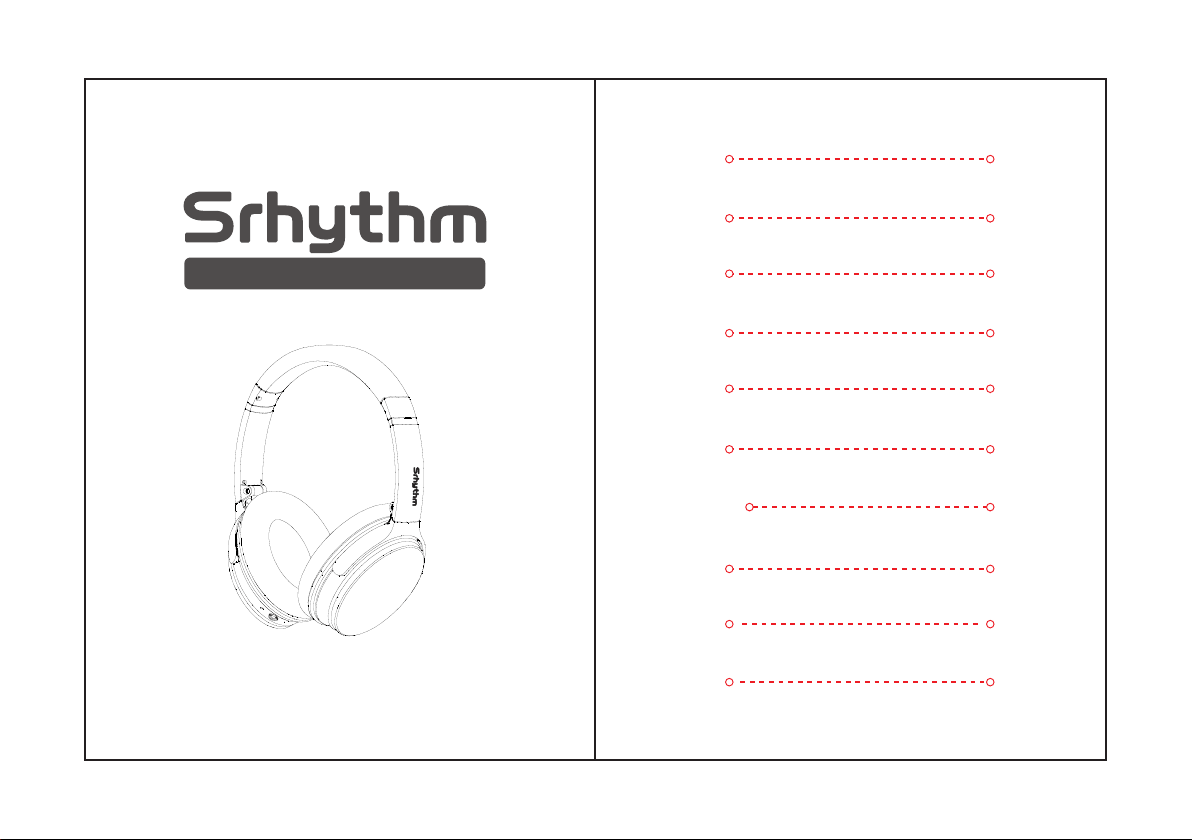
NiceComfort 25(NC25)
Findtherhythmofyoursoul
1-13
English
27-39
Français
40-52
Italiana
53-65
Espanol
66-78
日本語
79-91
Português
14-26
Deutsch
118-130
Türkçe
92-104
한국어
105-117
תירִבְﬠִ
User Manual
1.Please do not use headphone while driving and
charging.
3.Please do not listen for a long time at high
volume to avoid hearing damage.
4.For your safety,please do not turn the volume too
high while running outside to ensure that you can
hear sound in your surroundings.
2.Please use cautiously and stop using headphone
in dangerous situation.
1.Use original or certified cables for charging and
voltage within 6.3V.Power will be cut off and start
protection mode when the voltage exceed 6.3V and
within 36V.Headphone will be broken when the
voltage over 36V.
3.Avoid dropping headphone and operating in the
extreme temperature. Please use headphone within
operation temperature range: -15 °C (5 F) – 55°
C(131 F).
4.Do not submerge headphone in the water.
5.Do not use corrosive cleaner/oil to clean
headphone
6.Turn off headphone Bluetooth and ANC function
to save power when you do not use headphone.
2.Keep away from children to avoid danger from
improper use.
Safety instructions
Hearing safety:
Operation Safety:
English
English
12
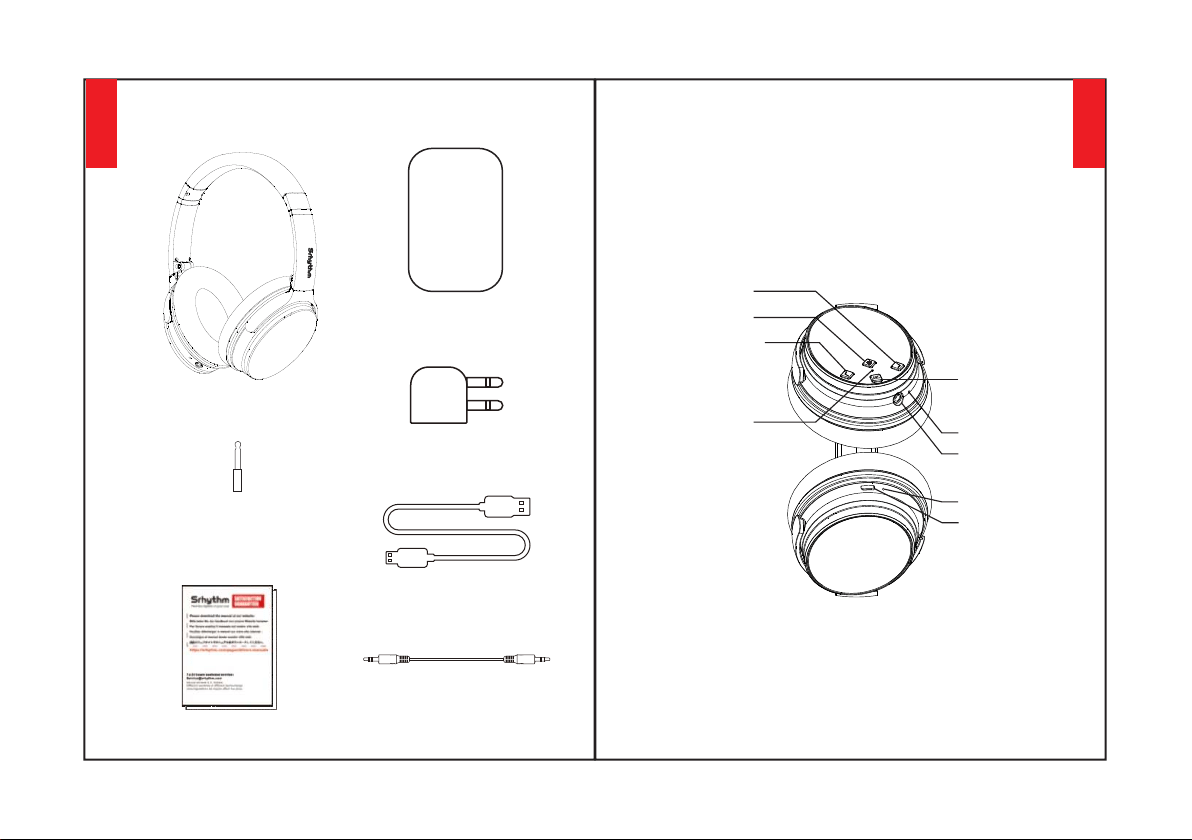
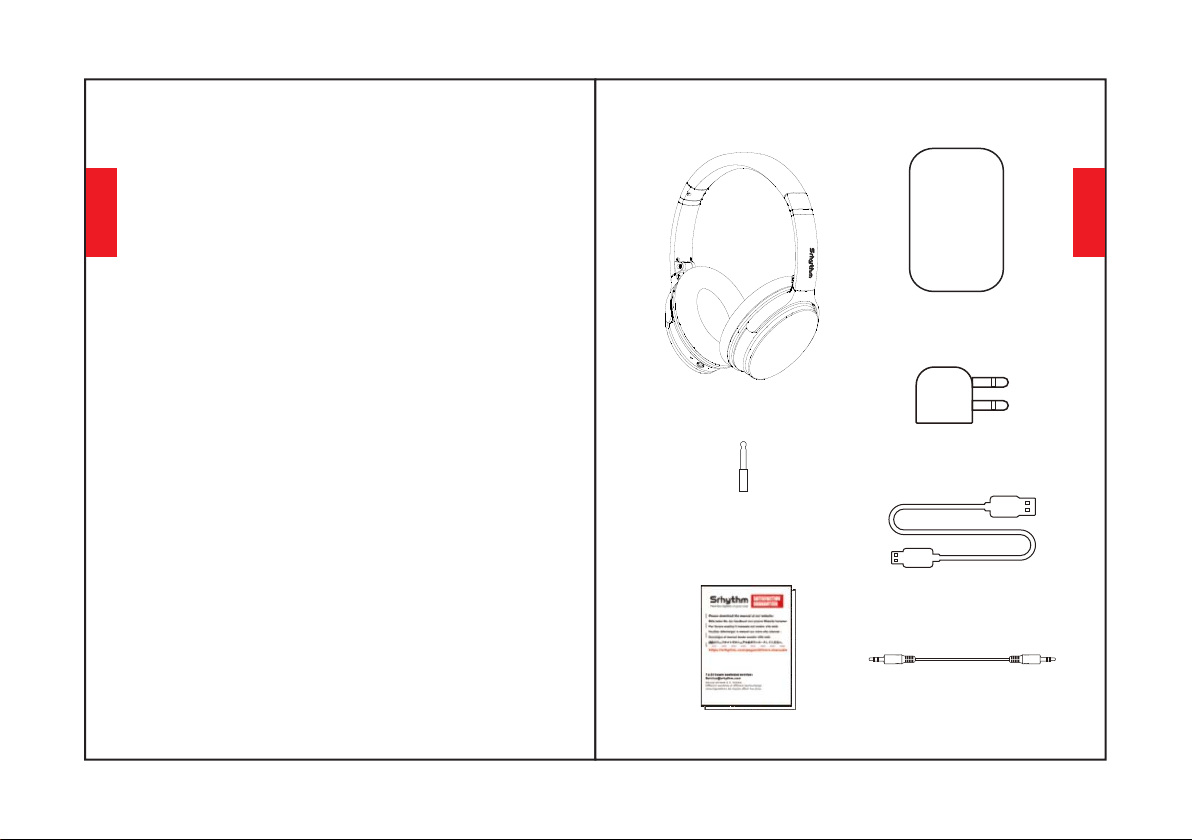
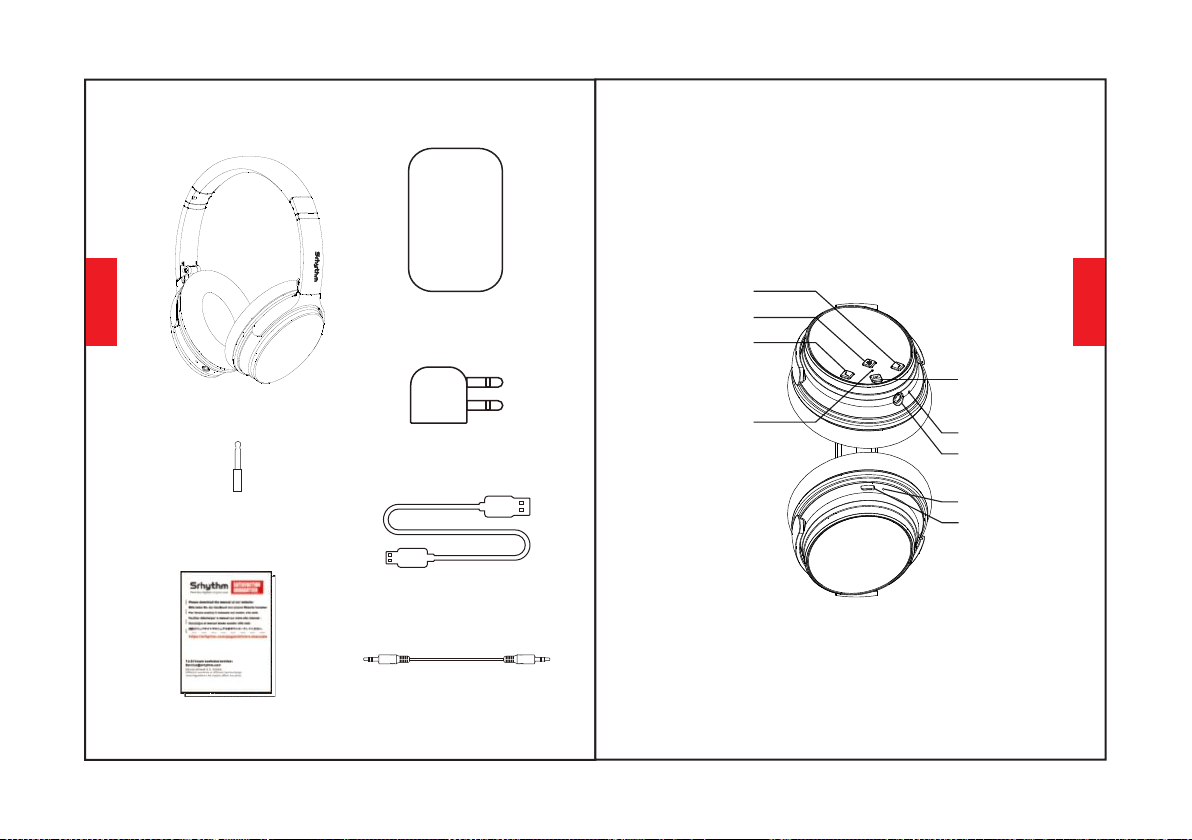
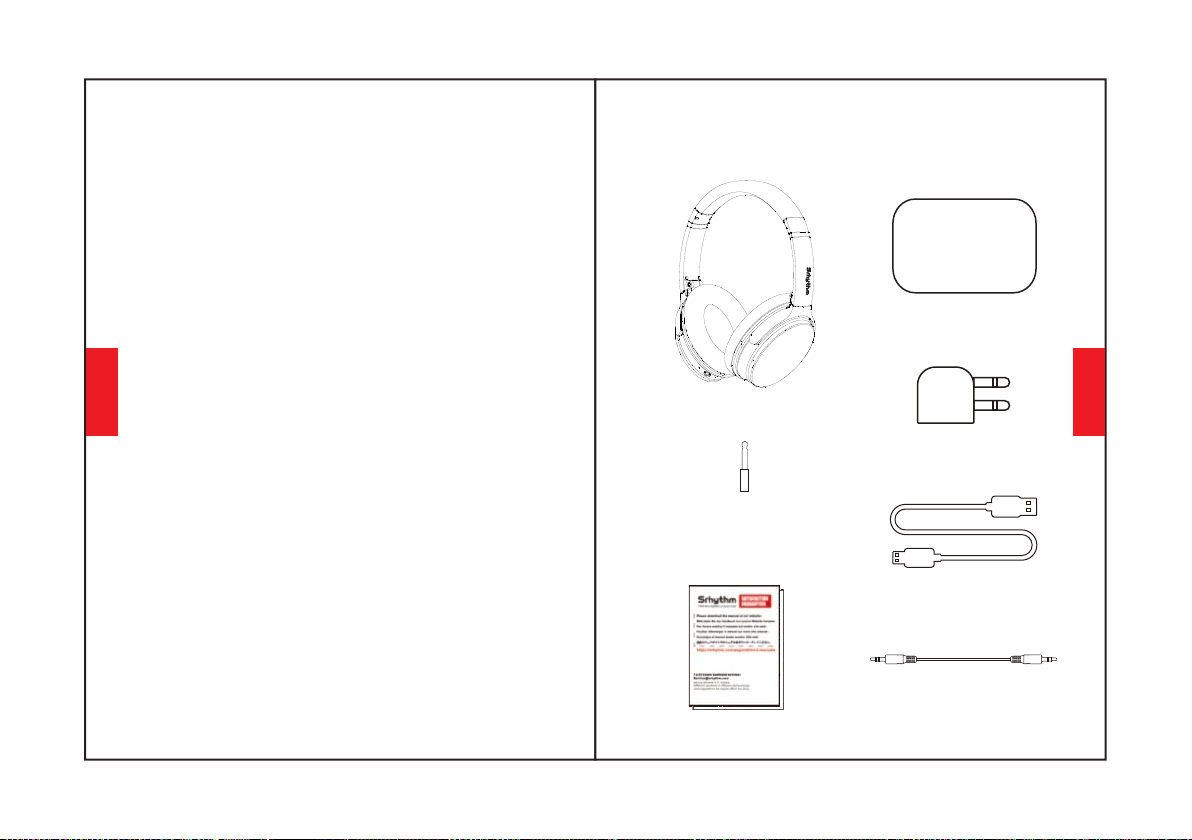
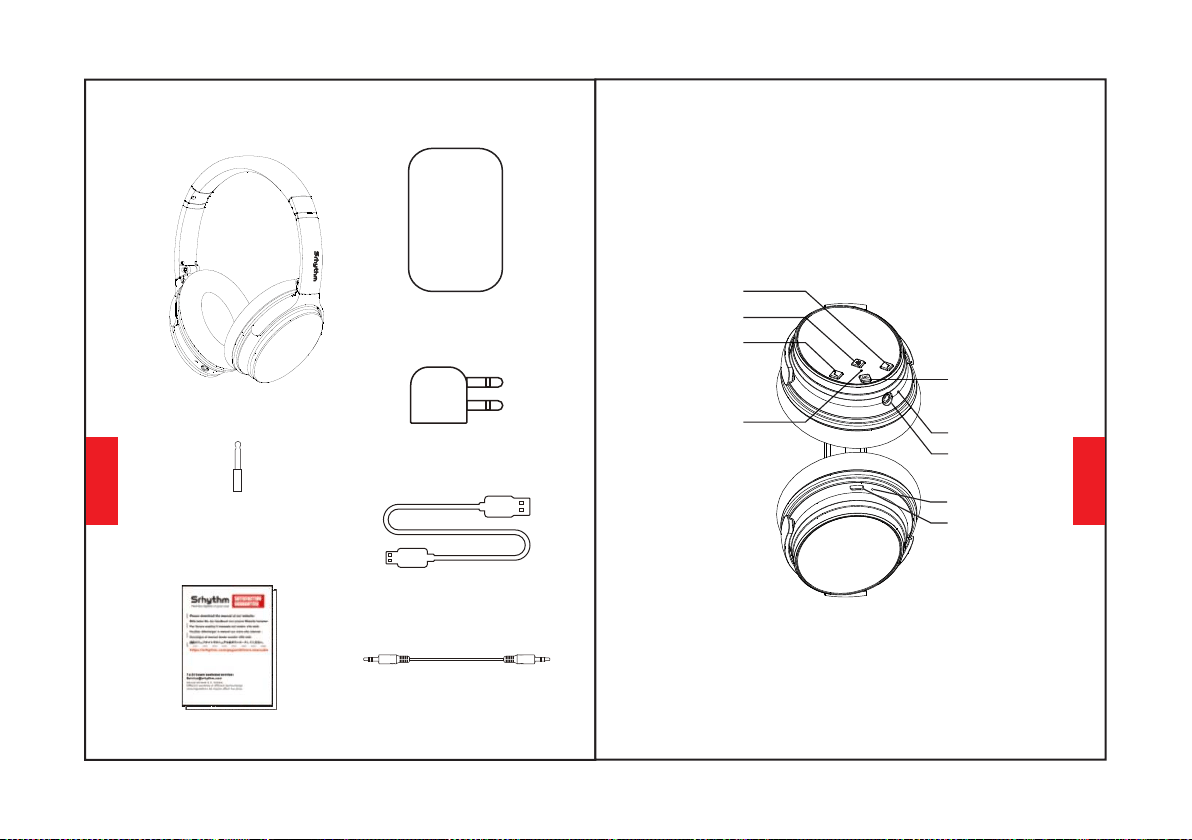
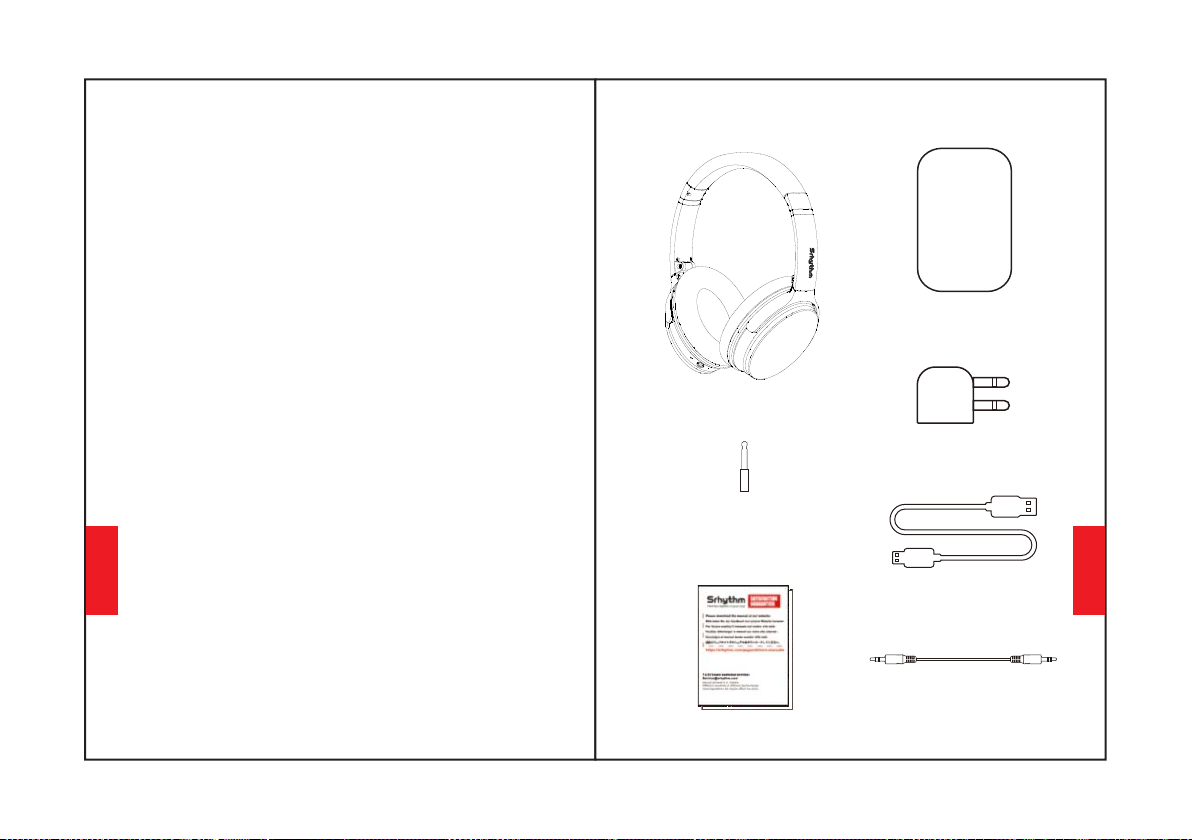
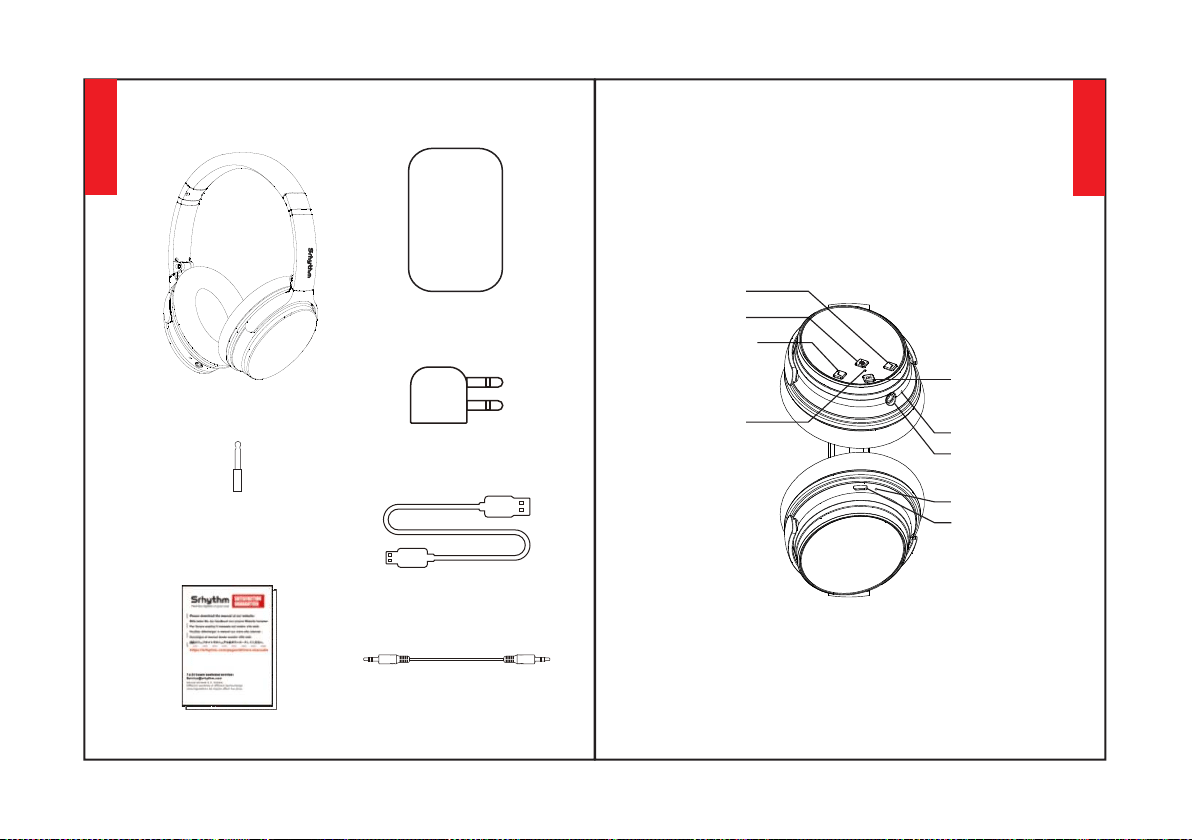
What's in the Box
NC25 Headphone *1
Portable Carry Case*1
Airplane Adaptor *1
(Only use for airplane)
Type-C Charging Cable *1
Audio Cable *1
3.5mm to 6.35mm
Piano Adaptor *1
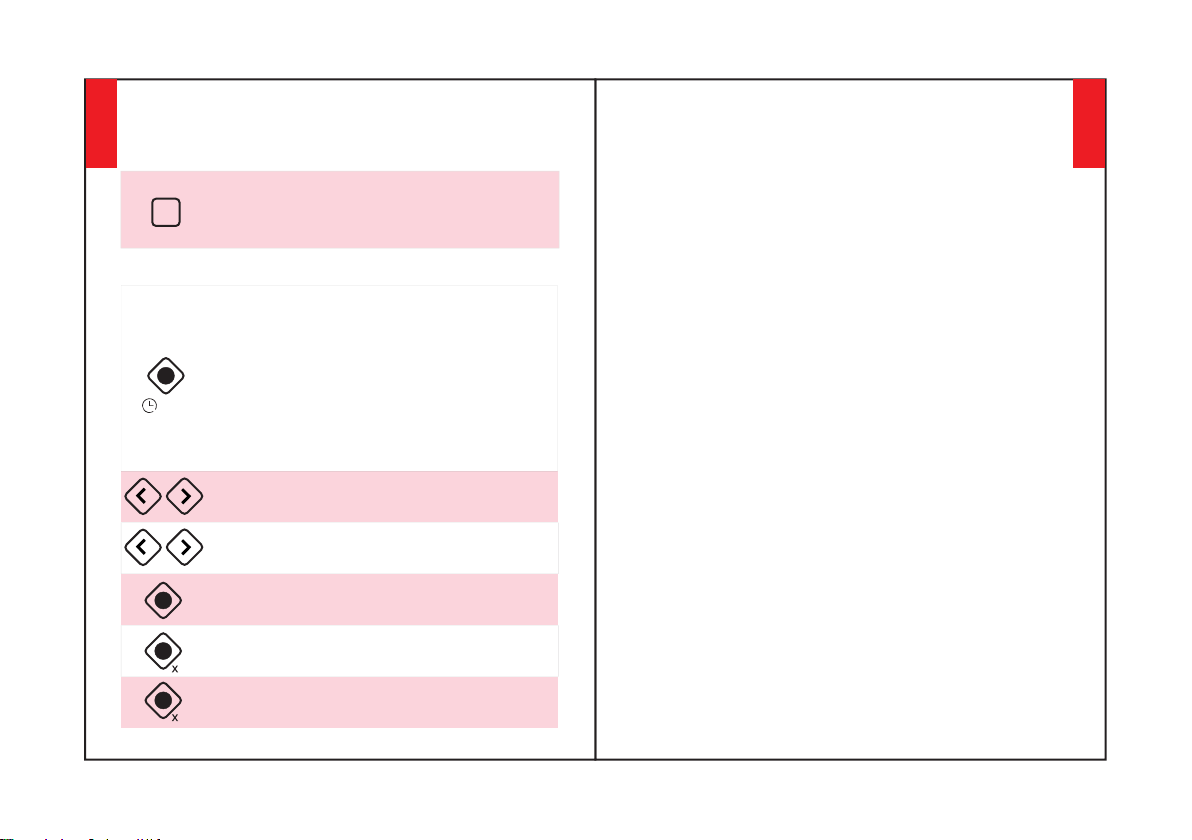
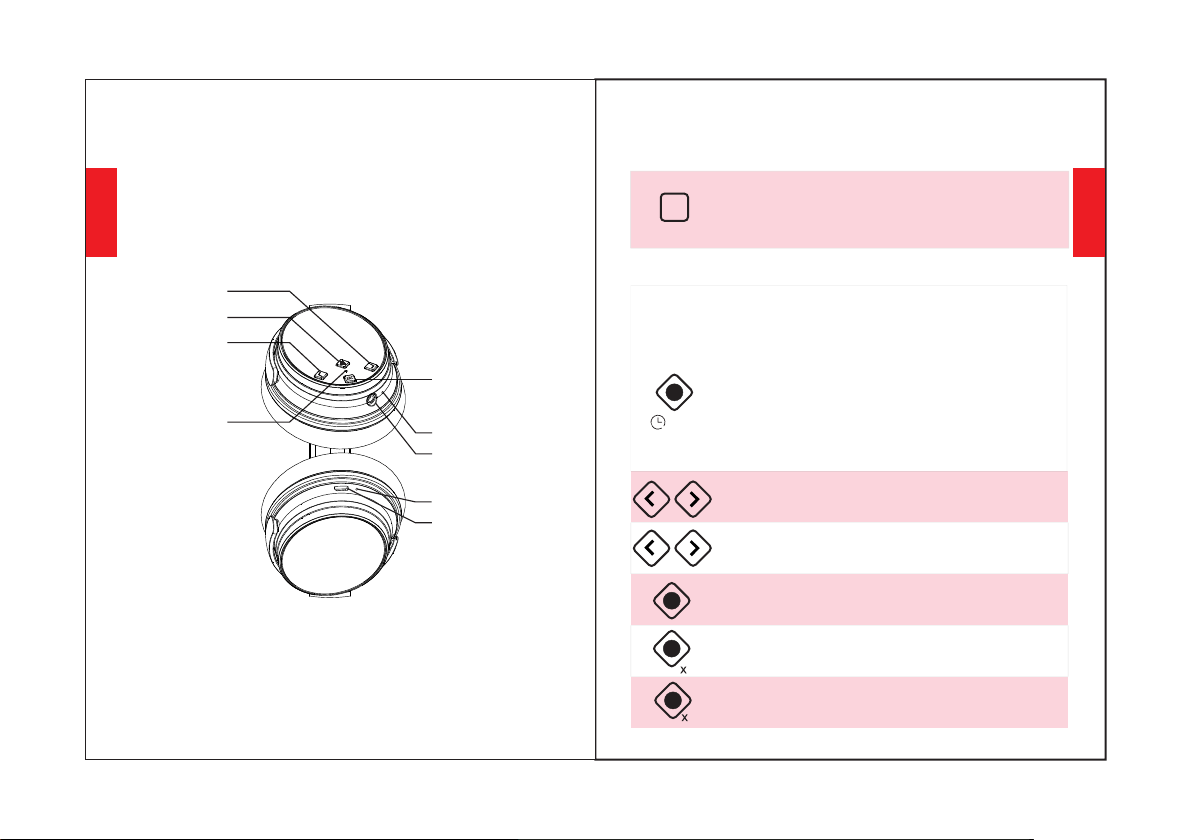
Volume UP/Next Song
At a Glance
English
English
34
Multi-function Button
Charging Port
Bluetooth/ANC LED
indicator light
Microphones
AUX Port
Volume Down/Previous Song
ANC Button
Charging indicator
Use ANC Function
How to Use
(the LED indicator light will be green when ANC
ON.)
Press the ANC Button to turn Active Noise
Cancellation ON/OFF
Use Bluetooth Function
1.Hold the Multi-function Button for 3-5
seconds to turn headphone Bluetooth on,then
enter pairing mode.(the LED indicator light will
be blue and red flashing quickly.)
2.Start your mobile phone Bluetooth and find
headphone Bluetooth pairing name "NC25" to
click it to pair.(the LED indicator light will be
blue flashing slowly after pairing successfully.)
3.Hold the Multi-function Button for 3-5
seconds to turn headphone Bluetooth off.
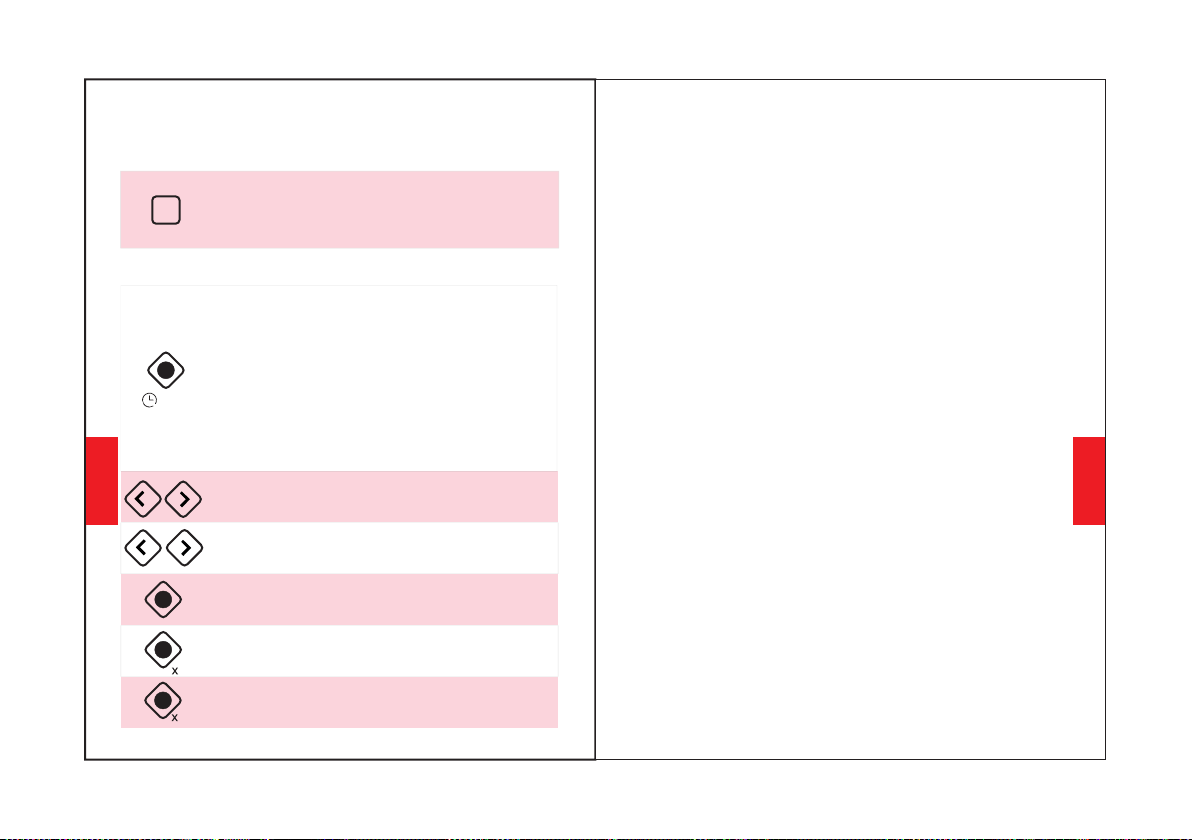
Press to adjust volume. Long press to
skip to next/previous song.
Function Details
Easy Paring
4. If you are asked for a password/PIN code during
pairing procedure,please enter "0000" (four zeros).
1. Hold the Multi-function Button for 3-5 seconds to
turn headphone Bluetooth on,then enter
pairing mode.(the LED indicator light will be blue and
red flashing quickly.)
3. Turn on your mobile phone Bluetooth. Search for
headphone Bluetooth signal on mobile phone and
click “NC25” to pair.(the LED indicator light will be
blue flashing slowly after pairing successfully.)
2. Keep headphone and your mobile phone as close
as possible during pairing process.
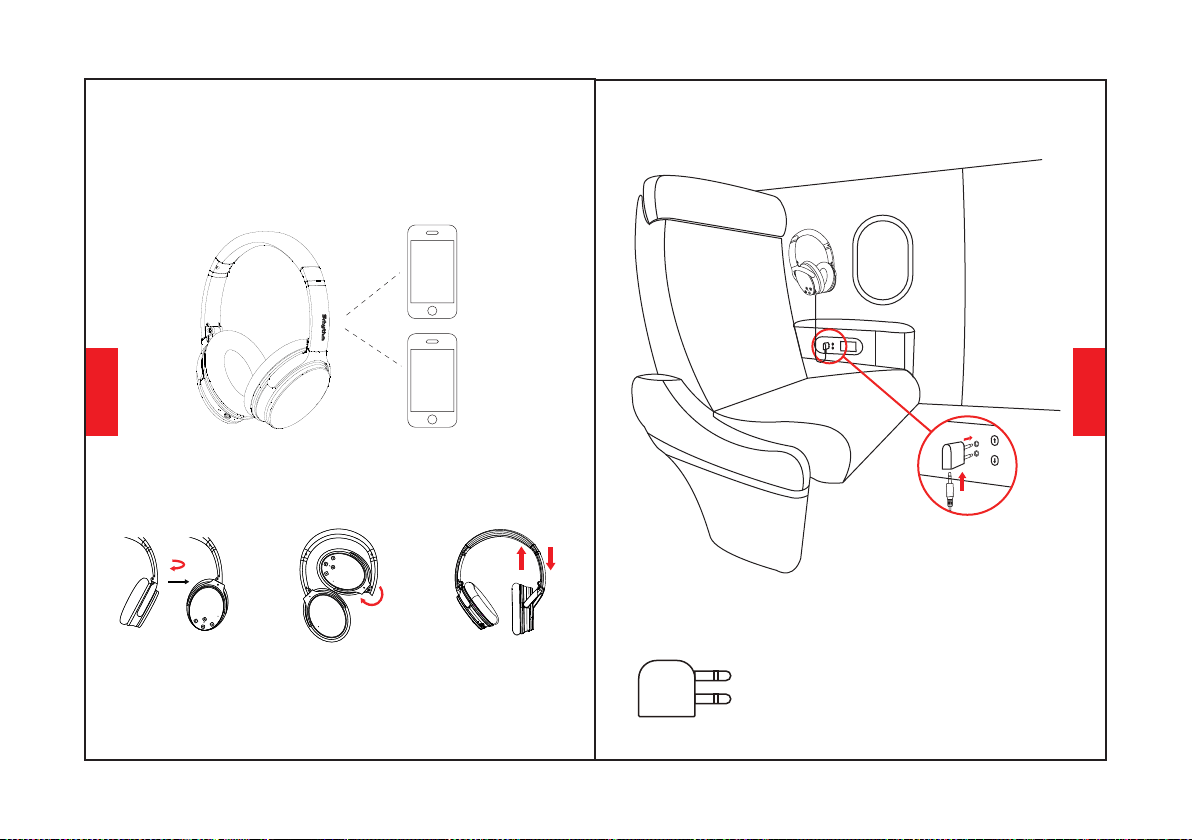
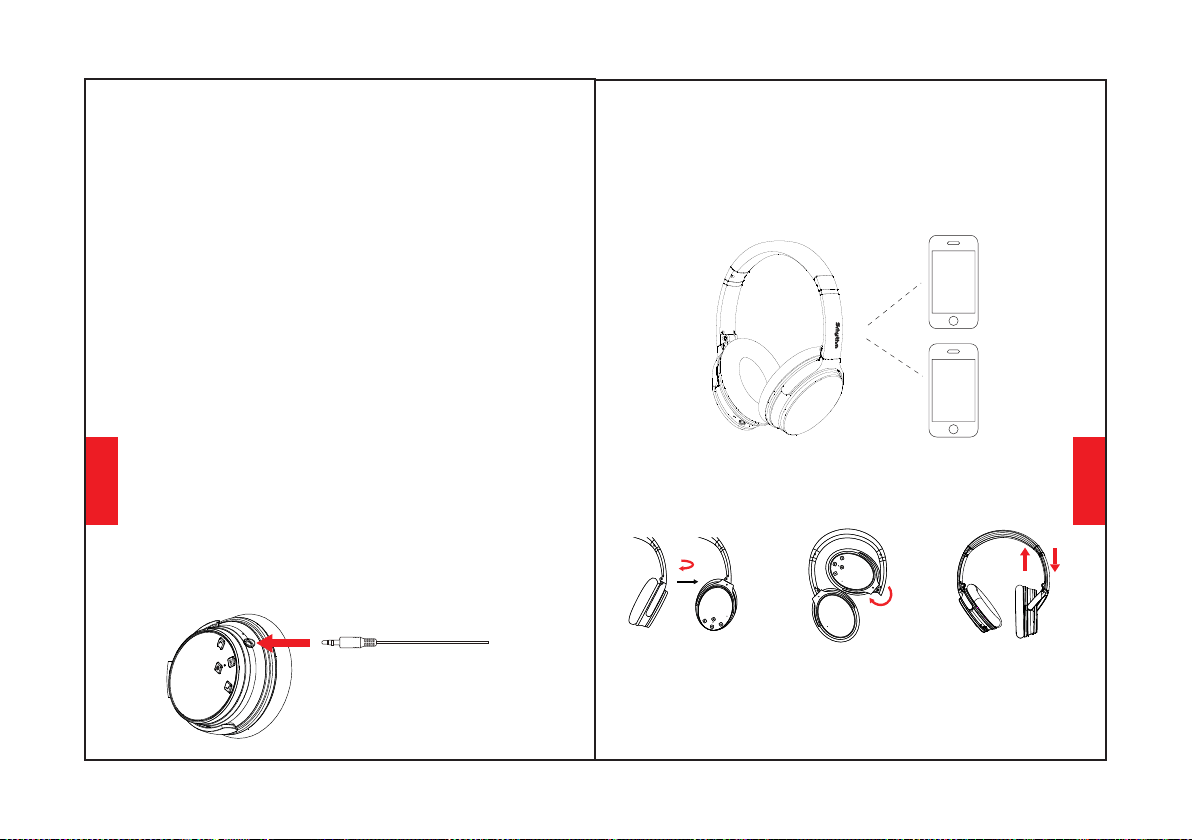
Pair to the Second Bluetooth Device
4. Return to the first Bluetooth device and pair it with
headphone again. Now both of your devices are
paired with headphone.
2. Hold the Multi-function button until the
headphone switch off and continue with the steps
"Easy Pairing"(Let the headphone re-enter pairing
mode,the LED indicator light will flash blue and red
alternately).
1. Please make sure that headphone is connected to
the first Bluetooth device successfully and music is
not playing.
3. Pair headphone with the second device according
to "Easy Pairing" steps.
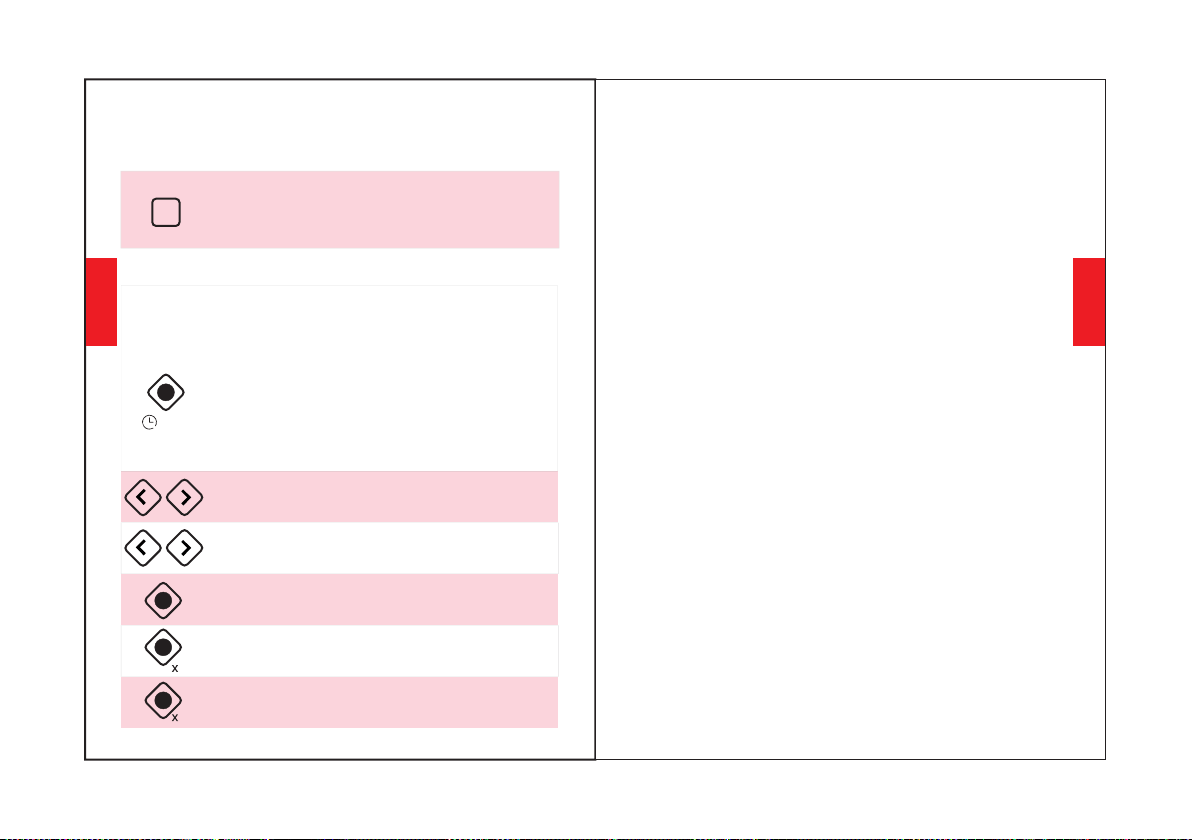
Double-press the Multi-function Button
to reject an incoming call.
Press the Multi-function Button to
play/pause music or answer/end call.
2
3-5S
English
English
56
ANC
Press the multi-function button three times to
turn on the low-latency game mode
3
Long press the plus and minus keys for
5 seconds to clear the pairing
Active Noise Canceling(ANC) ON/OFF
To turn off ANC, press the ANC Button;
(the LED indicator light will be green when ANC ON.)
To turn on ANC, press the ANC Button;
(the LED indicator light green color will be off when
ANC OFF.)
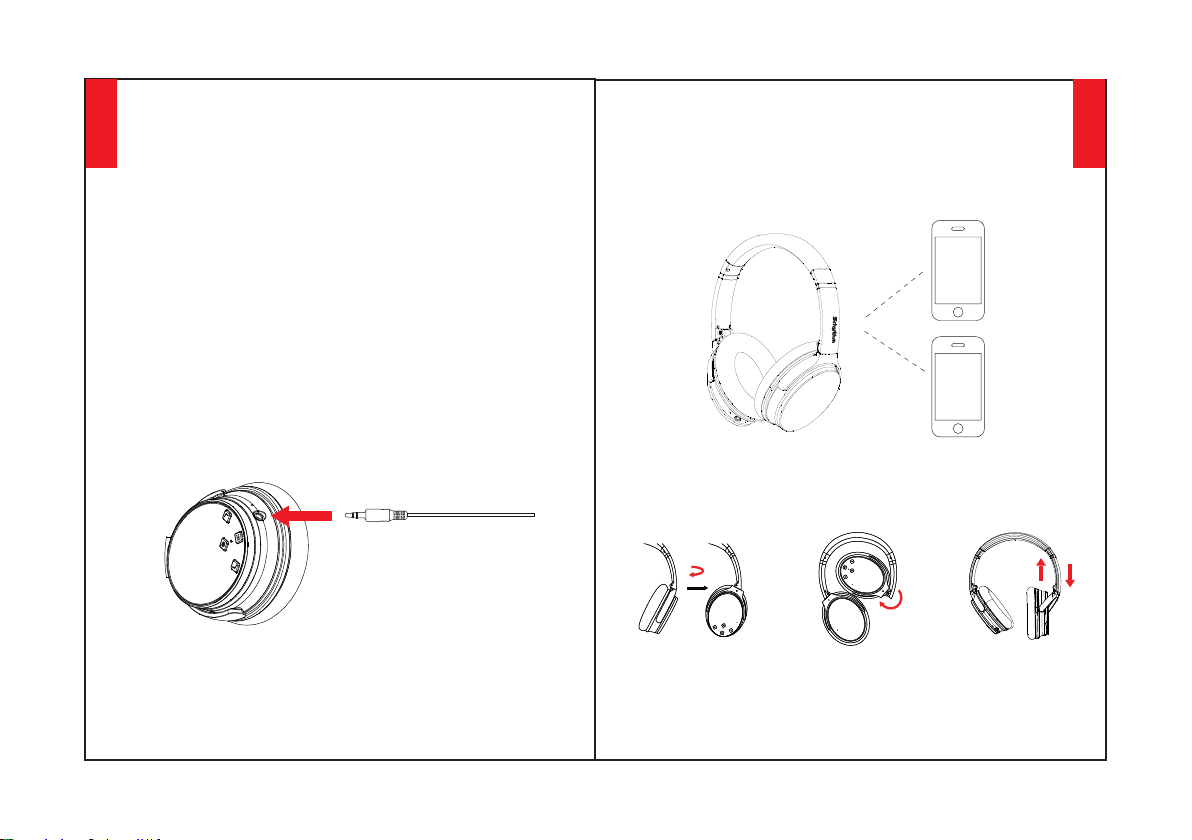
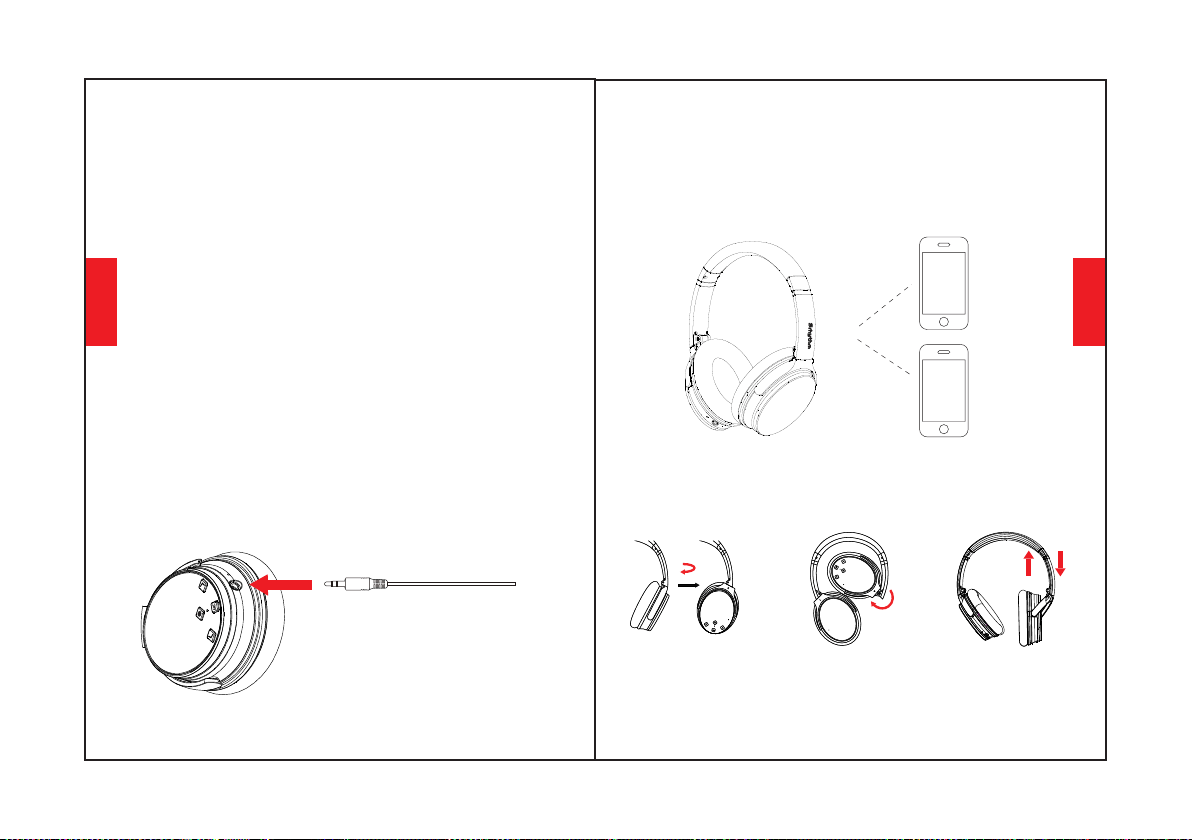
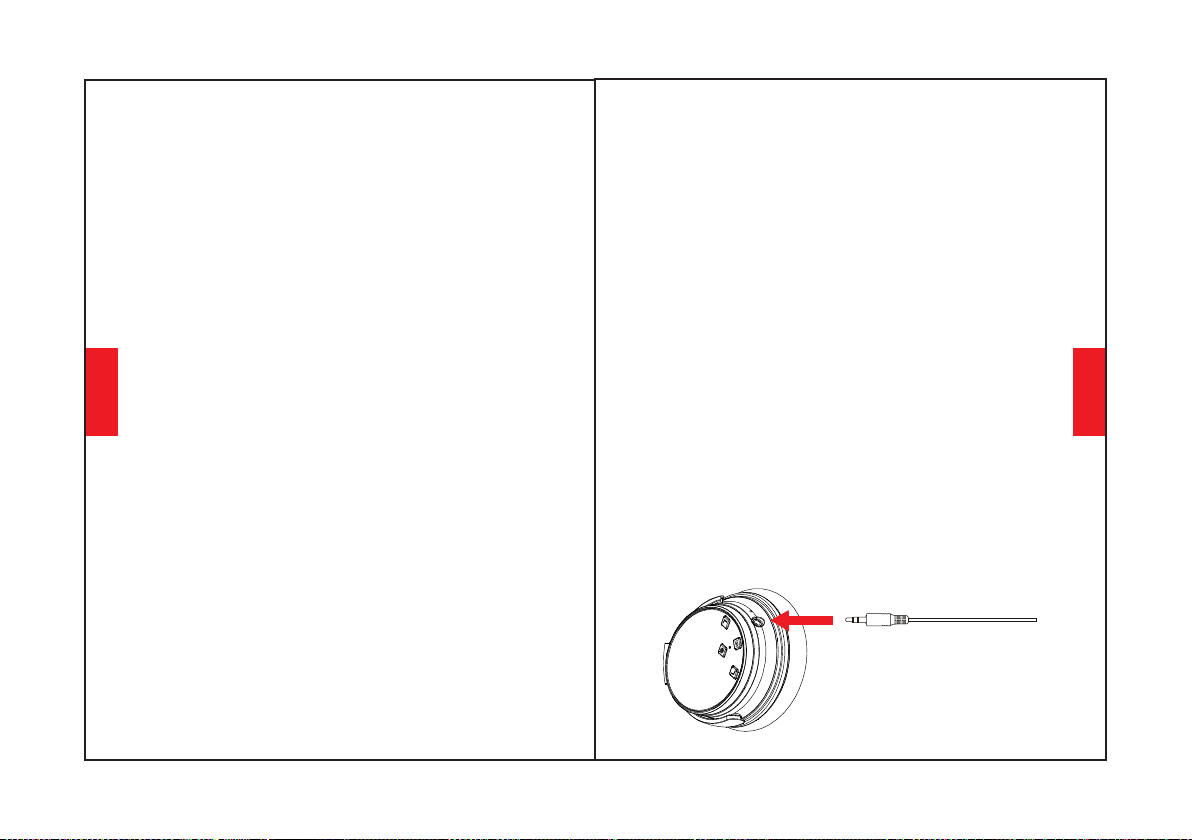
Wired Mode
Headphone support AUX input for wired external
audio source connection. Simply turn headphone
Bluetooth off and plug in the audio cable.For any
ANC Bluetooth headphone,it is still need battery
power support for wired mode.
ANC also works in wired mode.Microphones only
works in Bluetooth mode,not for wired mode.
Please note that CAN NOT adjust volume on
headphones in wired mode
Voice Dialing
Press both “Volume Up” and “Volume Down”
buttons simultaneously to activate voice dialing
function(compatible with iPhone Siri and selected
Android voice dialing software).
How to Wear
100° inward rotation
Adjustable Headband
English
English
78
120° inward folding
100°
120°
Headphone Specification
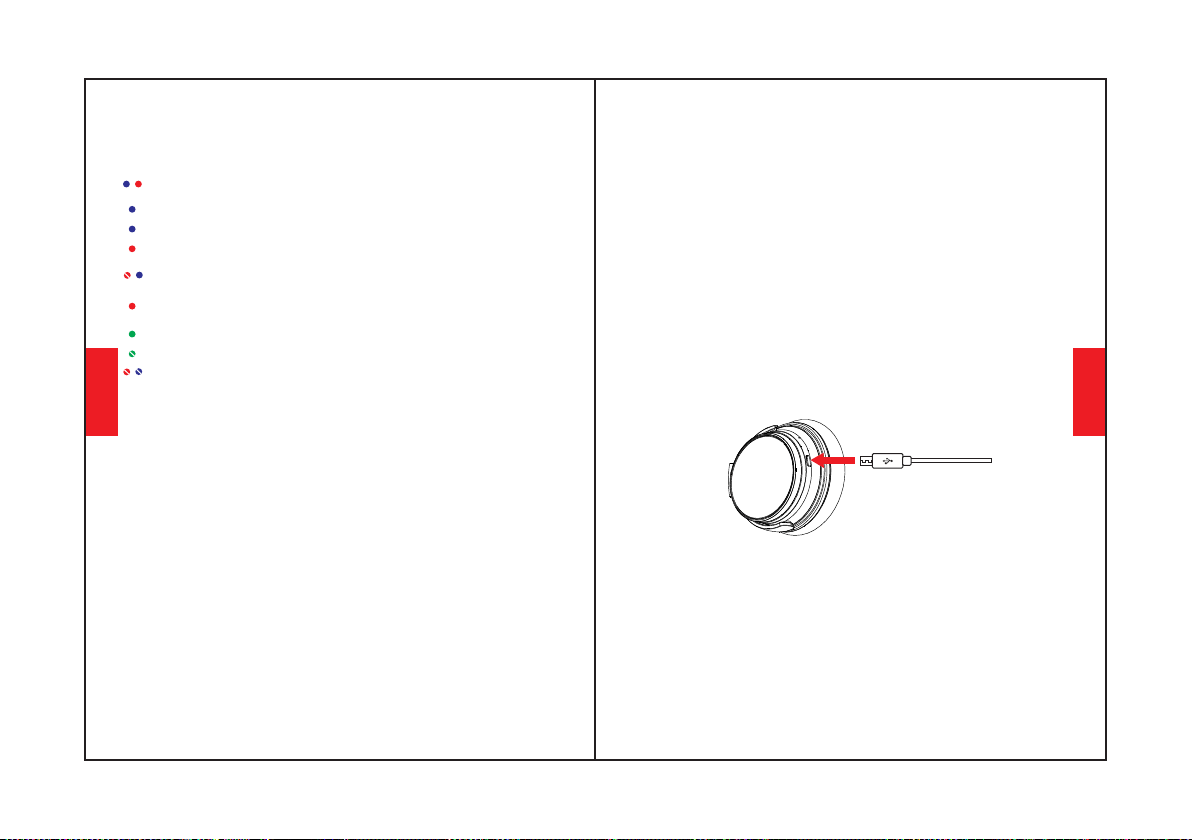
LED Indicator Light
Bluetooth OFF: Blue and red lights turn off
Pairing: Blue and red lights flash alternately
Playing:Blue light slowly flashes
Full Charge: Red light turns off or Blue light turns
on
Battery Low: Red light turns on with voice prompt
Charging: Red light turns on
Paired: Blue light flashes
ANC ON: Green light turns on
ANC OFF: Green light turns off
Technical Specification
•Bluetooth profile: A2DP, AVRCP, HSP, HFP
•Bluetooth range: 10m/33ft
•Bluetooth version: V5.0
•Product name: Srhythm NC25
•Use time: 50 hours
•Net weight: 180g •Impedance: 32 Ω
•Frequency response: 20–20KHz
•Battery capacity: 1000mAh
•Input: 5V 220mAh •Chip: ATS
•Charging time: About 2 hours
•Waterproof rating: IPX4
•Driver diameter: Φ40mm
* Please kindly note that perhaps sometimes these
LED indicator light color will be mixed to become
other colors(pink,purple,etc.) occasionally.
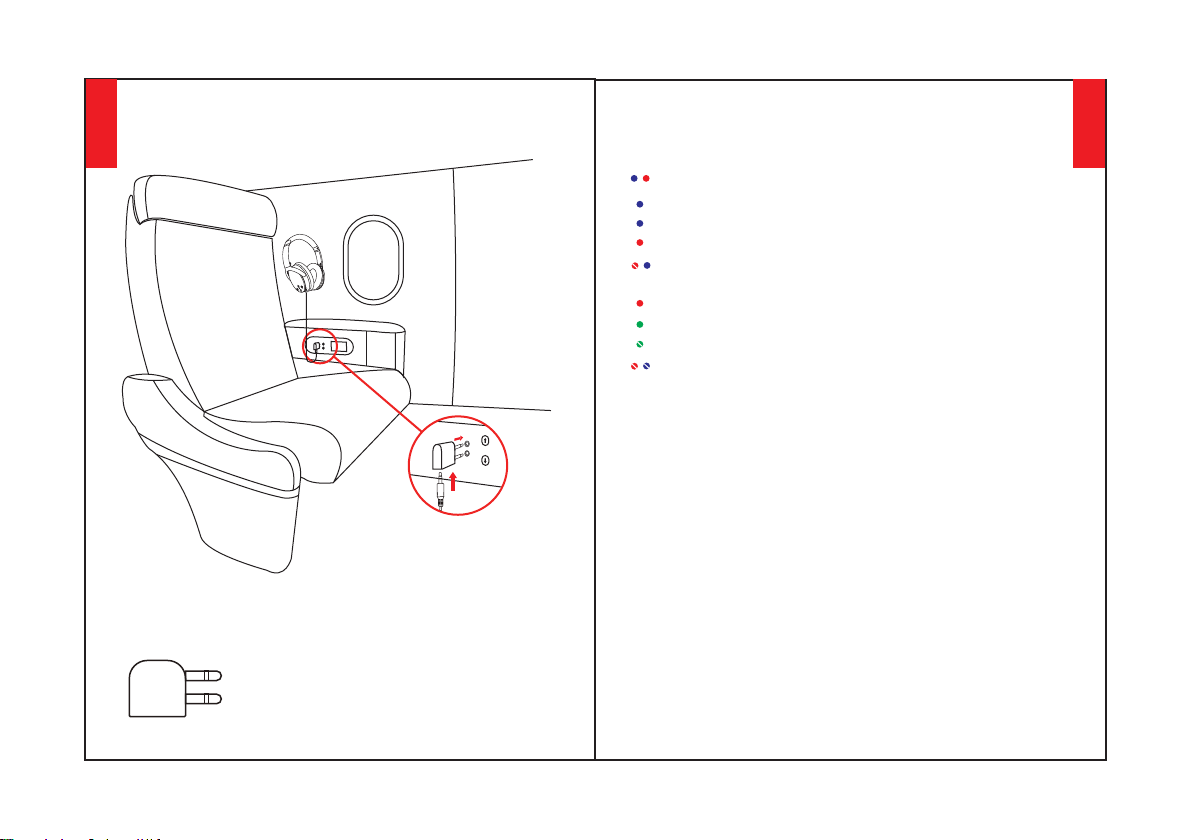
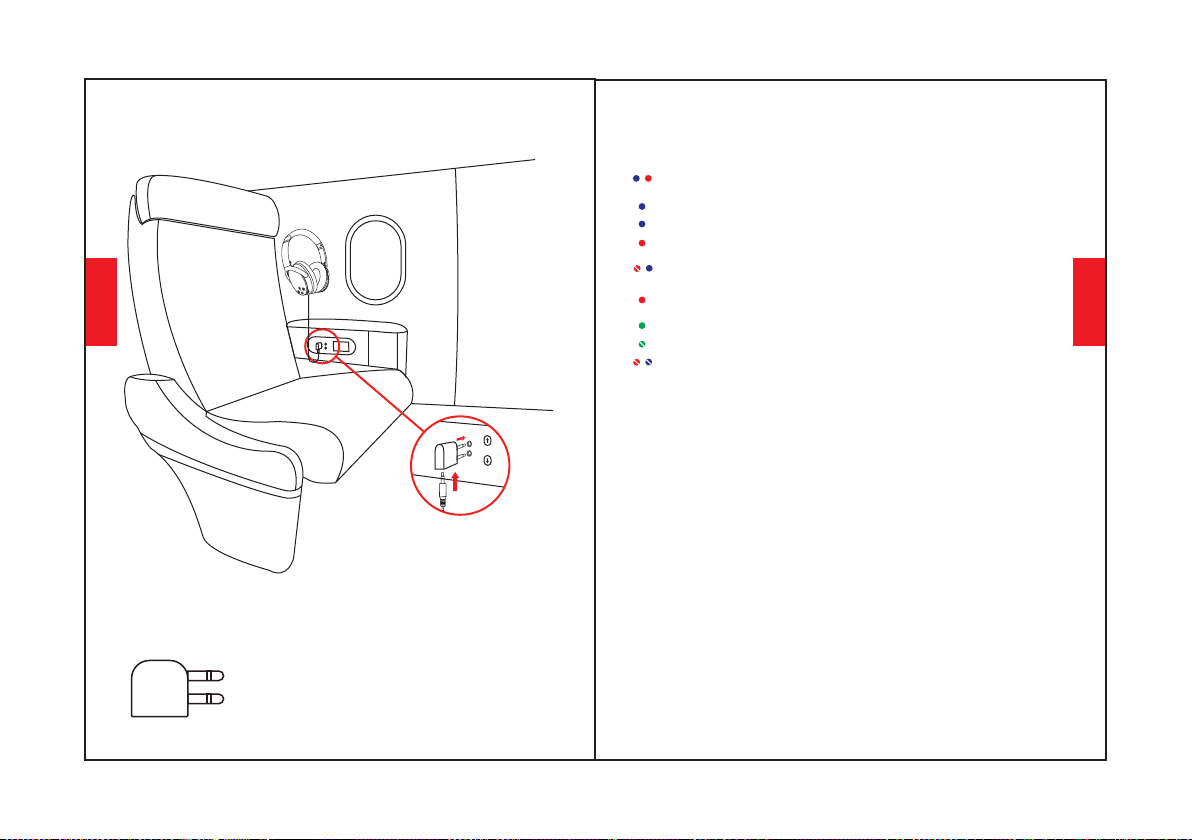
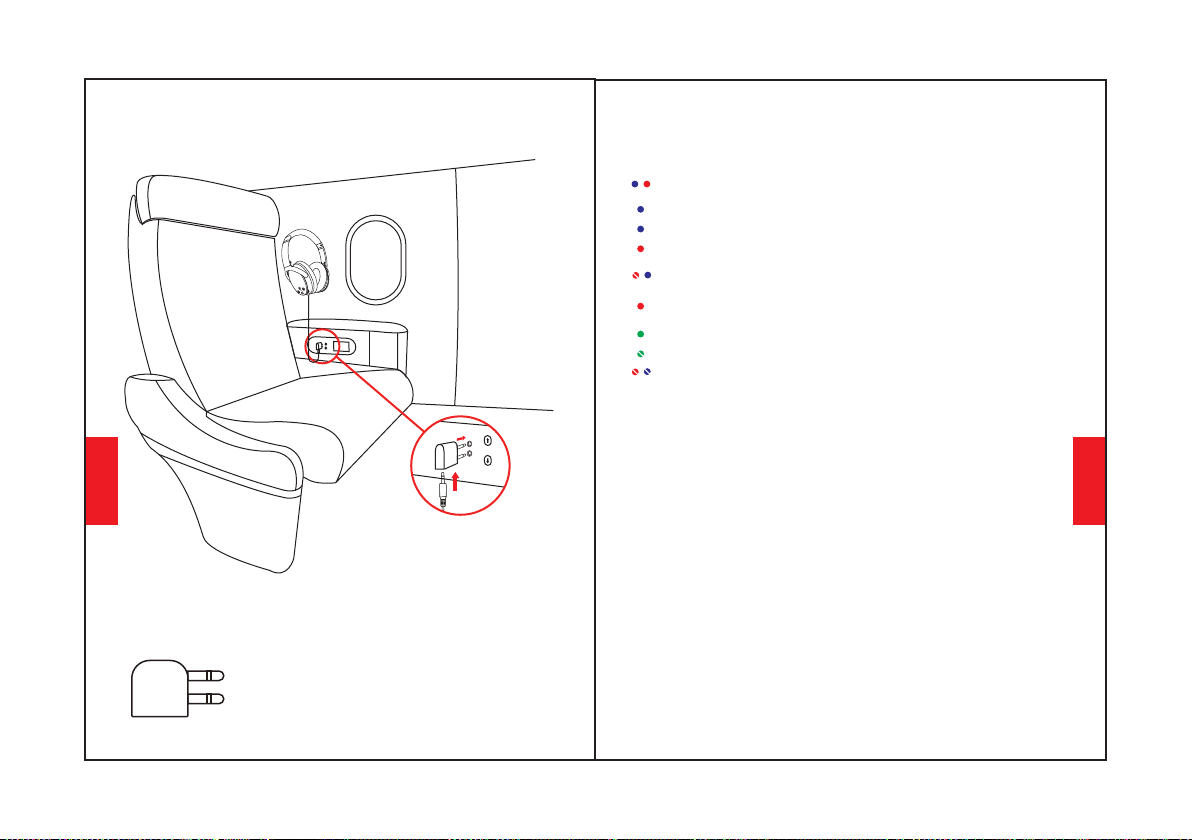
Airplane Adaptor Connection
Connect the Airplane Adaptor
to audio socket(double holes)
of aircraft seat,use 3.5mm
audio cable to connect with
your headphone and Airplane
Adaptor.
Only use for airplane,Can not be
plugged into the power socket
Warning:
English
English
910
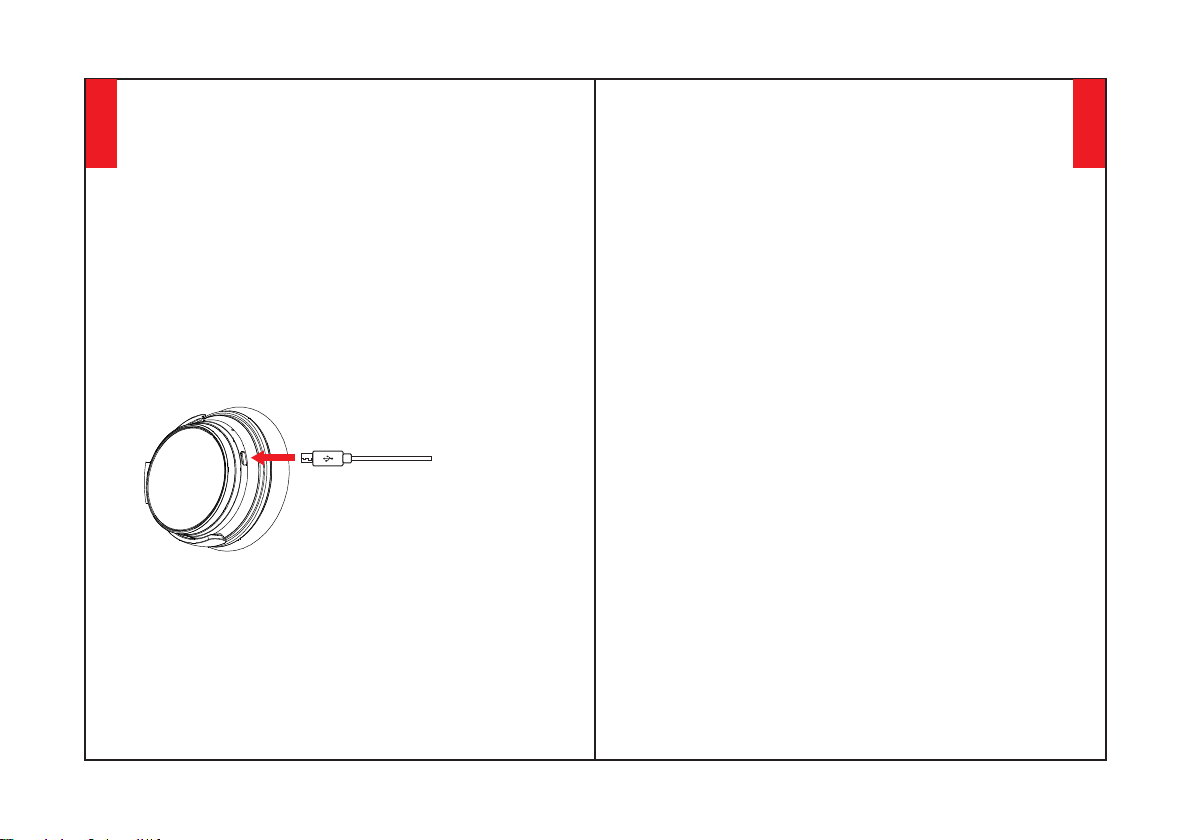
If any issues, here tips for you:1. Full charge your
headphone(don't use fast charger)2. Reset
headphone by inserting audio cable into
headphone audio socket then removing it. Or the
upgraded NC25 headphones would be reset
automatically when charging.
Delete Pairing: Hold both "Volume Up" and
"Volume Down" buttons simutaneously for 5
seconds
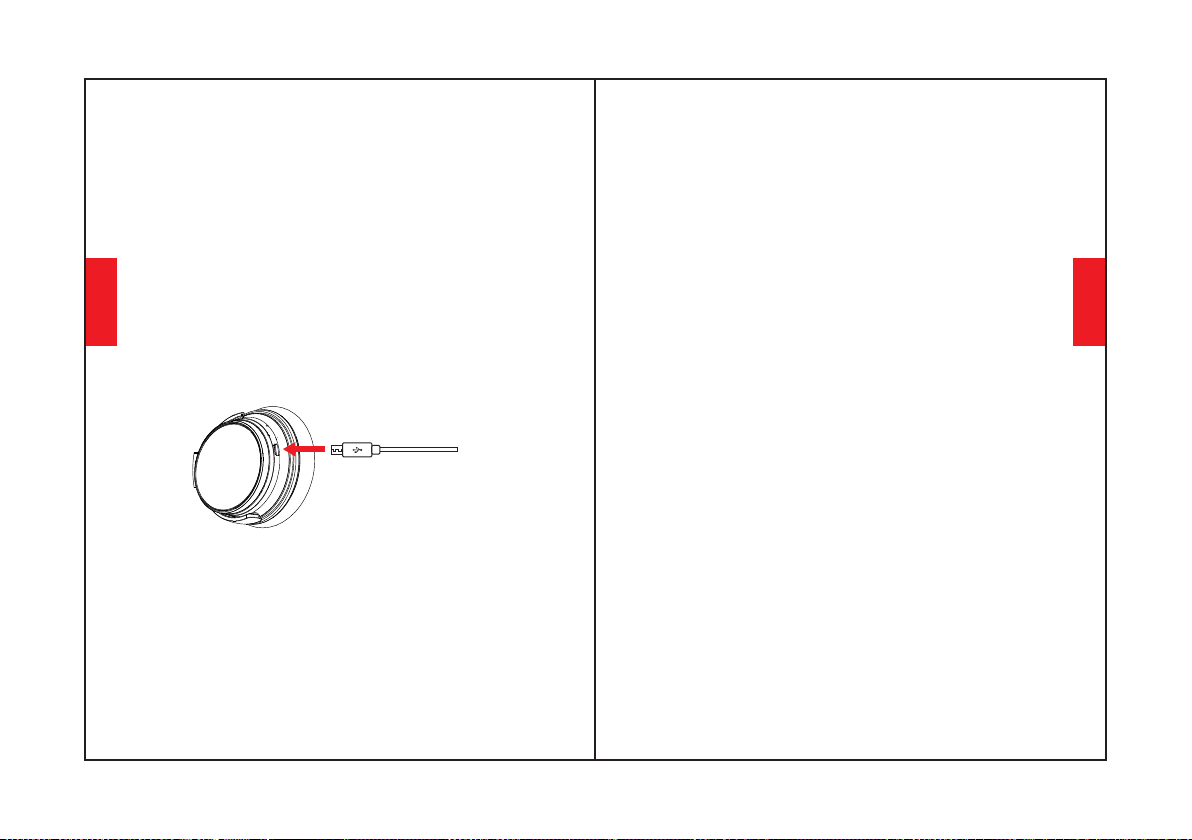
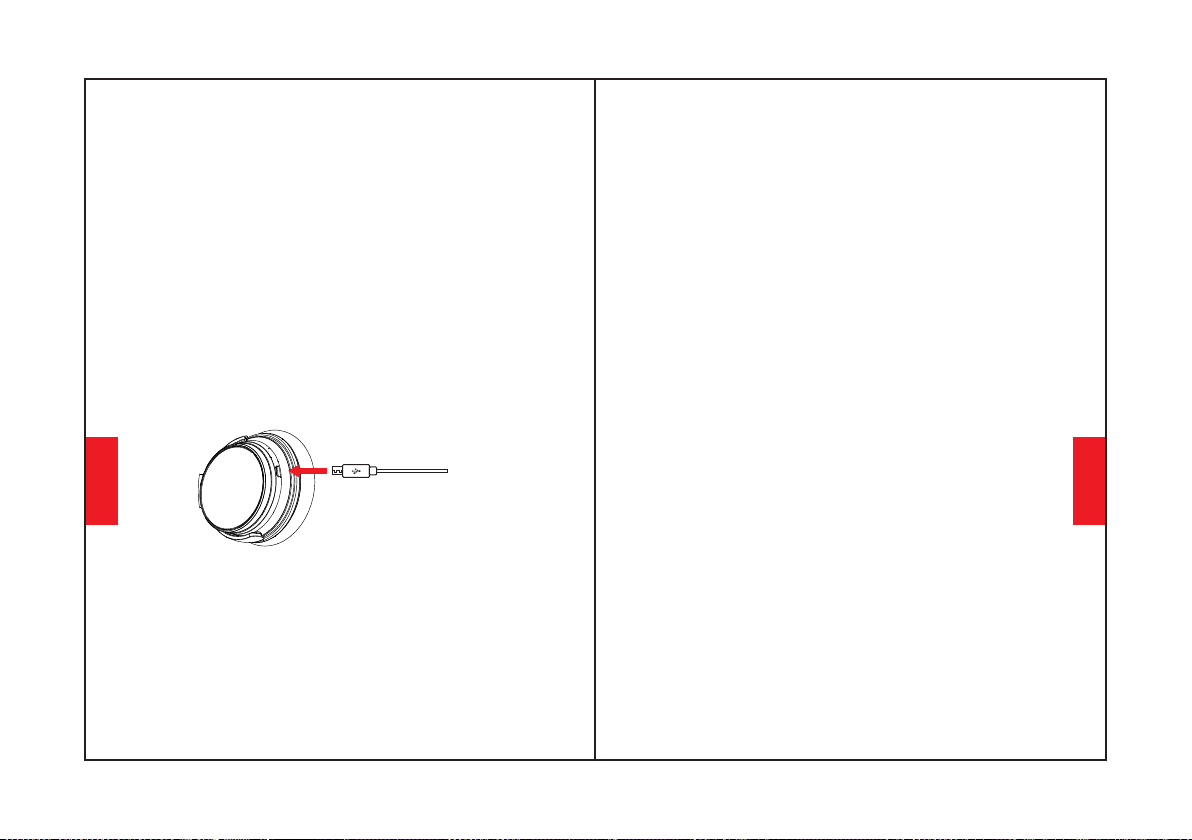
Charging
Use the included Type-C charging cable to connect to
headphone Charging Port. Connect the other end of
charging cable to a computer USB port or USB wall
charger under 6.3V voltage.Turn off headphone
Bluetooth and ANC function before charging.Please
don't use headphone while charging.The LED
indicator light will be off or blue color when full of
charge basing on headphone turn off status.
Start your mobile phone Bluetooth and find
headphone Bluetooth pairing name NC25 to click it to
pair.(the LED indicator light will be blue flashing
slowly after pairing successfully.)
Hold the Multi-function Button for 3-5 seconds to
turn headphone Bluetooth off.
Q&A
A: Please check if output channel of your computer supports
A2DP profile.Also check the volume settings on your
headphone and computer/mobile phone.
A: Due to configurations of different application
software,headphone may not be completely
compatible with some APPs.
A: For your safety,we strongly recommend that you do not
use headphone while driving to avoid distraction.
A: Please check if there are any metal materials or obstacles
within a relatively close range or your surroundings that
perhaps interfering with Bluetooth connection.This may
happen becauseBluetooth is a radio technology which is
sensitive to objects between headphone and other devices.
5. Q: Why does headphone sometimes disconnects with
Bluetooth device within 10 meters?
6. Q: Why can't I hear any sound from my computer or
mobile phone?
7. Q: Why am I unable to use headphone to control the
volume of a track playing on an APP on my mobile phone?
3. Q: Can I replace battery in the headphone?
1. Q: Why can't headphone pair with my mobile phone?
A: Please check if your headphone is in pairing mode or re-
connection mode,check if Bluetoothsearch function of your
Bluetooth device is turned on,if all done,then go to Bluetooth
menu of your Bluetooth device,delete/ignore the headphone
Bluetooth pairing name NC25.After that,you can try to
reconnect Bluetooth according to above “Easy Pairing”
steps.
2. Q: Why can't headphone turn on?
A: Please double check the battery status of your headphone.
A: No,you can not.Headphone uses a built-in non-detachable
Li-Polymer battery that can't be replaced.
4. Q: Can I use headphone while driving?
English
English
1112
8. Q: What do I do if Bluetooth can not close or open?
A: Please reset Bluetooth function of headphone by inserting
an audio cable into headphone
audio port,then removing it.Before re-connecting,kindly
remember to delete/ignore headphone bluetooth pairing
name NC25 on your mobile phone.
9. Q: Why does Bluetooth turn off when I connect an audio
cable?
A: This is one of our special features. When users insert an
audio cable into headphone audio port, all Bluetooth feature
buttons stop working and Bluetooth turns off. But,Bluetooth
will be available again when audio cable is moved.
10. Q: Why can't I turn headphone on/off?
A: Please note that ANC and Bluetooth are indicated by the
same LED indicator light(but different light color), with a
green light for ANC and a blue light for Bluetooth. If you
need to turn Bluetooth on/off,you can turn off ANC firstly in
case that you make confused by the color lights.But you will
be very familiar with the light color meaning after using few
times because it is simple and easy.
12.Q:Why is the headphone sound so low?
11. Q: Why does audio quality become poor on Windows
PC?
A: Increase both device and headphone volume. For some
software such as SPOTIFY,you may need turn the equalizer to
OFF,then the full spectrum come through and the volume will
be easily adjustable.
A: Some customers have mentioned poor audio quality on
Windows PC.Please note that there are “Headset” and
“Headphone” modes you can toggle by changing your
output device.Selecting “Headphone Mode” will drastically
improve the audio quality.”Headset Mode” is designed for
highly compressed VOIP calls,etc.That’s not the fault of
headphone product,that’s just the limitation of that
protocol.If you are in “Headphone Mode”,the audio quality
is fantastic.
Bedienungsanleitung
English
Deutsch
1314
3. Zur Vermeidung von Gehörschäden bitte nicht
über längere Zeit mit hoher Lautstärke verwenden.
4. Zu Ihrer Sicherheit drehen Sie bitte die
Lautstärke während Sie im Freien unterwegs sind,
nicht zu hoch, damit Sie die Geräusche in Ihrer
Umgebung wahrnehmen können.
1. Verwenden Sie während des Fahrens und
Aufladens bitte keine Kopfhörer.
2. Verwenden Sie die Kopfhörer mit Vorsicht und
benutzen Sie sie nicht in gefährlichen Situationen.
3. Vermeiden Sie es, die Kopfhörer fallen zu lassen
und unter extremen Temperaturen zu benutzen.
Bitte verwenden Sie Kopfhörer innerhalb des
Temperaturbereichs: -15 °C (5 °F) - 55°C (131 °F).
4. Kopfhörer nicht ins Wasser eintauchen.
5. Keine ätzenden Reiniger/Öle zum Reinigen der
Kopfhörer verwenden.
6. Schalten Sie die Bluetooth und ANC-Funktion
der Kopfhörer aus, um Strom zu sparen, wenn Sie
keine Kopfhörer verwenden.
1. Verwenden Sie originale oder geprüfte Kabel für
das Laden und die Spannung innerhalb von 6,3V.
Der Strom wird unterbrochen und der Schutzmodus
gestartet, wenn die Spannung 6,3 V übersteigt und
im Bereich von 36 V liegt. Der Kopfhörer wird
zerstört, wenn die Spannung über 36V liegt.
2. Von Kindern fernhalten, um Gefahren durch
unsachgemäßen Gebrauch zu vermeiden.
Sicherheitshinweise
Gehörschutz:
Anwendungssicherheit:
Lieferumfang der Box
NC25 Kopfhörer *1
Tragbare Tragetasche * 1
Flugzeug Adapter *1
(Nur für Flugzeug verwenden)
Ladekabel Type C *1
Audiokabel *1
3,5 mm bis 6,35 mm
Piano Adapter *1
Deutsch
Deutsch
1516
3
LED Anzeigeleuchte
Ladeanschluss
AUX-Anschluss
Auf einen Blick
ANC-Taste
Lautstärke erhöhen/
Nächstes Lied
Multifunktionstaste
Lautstärke verringern/
Vorheriges Lied
ANC Funktion verwenden
Anwendung
Drücken Sie die ANC-Taste, um die
Rauschunterdrückung ein- und auszuschalten.
(die LED-Anzeige leuchtet grün, wenn ANC ON).
Bluetooth Funktion verwenden
1.Halten Sie die Multifunktionstaste 3-5 Sekunden lang
gedrückt, um den Bluetooth Modus des Kopfhörers
einzuschalten, und aktivieren Sie dann den
Verbindungsmodus. (die LED-Anzeige leuchtet
abwechselnd blau und rot).
2. Starten Sie die Bluetooth-Funktion Ihres
Mobiltelefons und suchen Sie nach dem Bluetooth
Kopfhörer Verbindungsnamen "NC25", klicken Sie
darauf, um die Verbindung herzustellen. (die LED-
Anzeigelampe blinkt nach erfolgreicher Verbindung
langsam blau).
3. Halten Sie die Multifunktionstaste 3-5 Sekunden lang
gedrückt, um Kopfhörer-Bluetooth auszuschalten.
Drücken, um die Lautstärke einzustellen.
Lang drücken, um zum nächsten/vorherigen
Lied zu springen.
Drücken Sie die Multifunktionstaste zweimal,
um einen eingehenden Anruf abzulehnen.
Drücken Sie die Multifunktionstaste, um
Musik abzuspielen/zu unterbrechen oder
einen Anruf anzunehmen/zu beenden.
Deutsch
Deutsch
1718
Mikrofone
2
3-5S
ANC
Halten Sie die Lautstärketasten 5 Sekunden lang
gedrückt,um die Bluetooth-Kopplung zu löschen
Drücken Sie zum Drehen dreimal die Multifunktionstaste
im Spielemodus mit geringer Latenz
Ladeanzeige
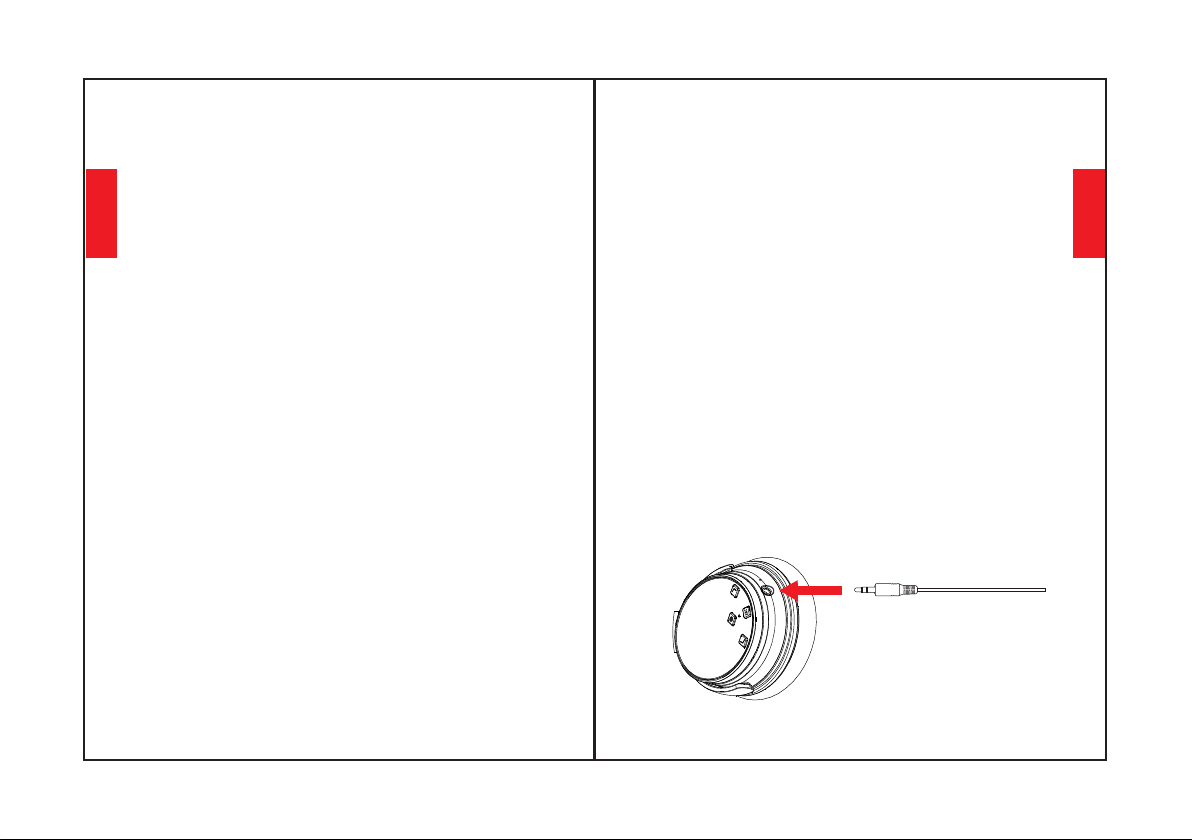
Funktionsdetails
Einfaches Verbinden
3. Schalten Sie den Bluetooth Modus im Handy ein.
Suchen Sie auf dem Mobiltelefon nach dem Bluetooth
Kopfhörersignal und klicken Sie auf "NC25", um die
Verbindung herzustellen. (die LED-Anzeigelampe
blinkt nach erfolgreicher Verbindung langsam blau).
2. Halten Sie den Kopfhörer und Ihr Mobiltelefon
während des Verbindungsvorgangs so nah wie möglich
beieinander.
4. Wenn Sie während des Verbindungsvorgangs nach
einem Passwort/PIN-Code gefragt werden, geben Sie
bitte "0000" (vier Nullen) ein.
1. Halten Sie die Multifunktionstaste 3-5 Sekunden
lang gedrückt, um den Bluetooth Modus des
Kopfhörers einzuschalten, und aktivieren Sie dann
den Verbindungsmodus. (die LED-Anzeige leuchtet
abwechselnd blau und rot).
Verbindung mit dem zweiten Bluetooth Gerät
2. Halten Sie die Multifunktionstaste gedrückt, bis
sich der Kopfhörer ausschaltet, und fahren Sie mit
den Schritten "Einfaches Pairing" fort (Lassen Sie den
Kopfhörer wieder in den Pairing-Modus wechseln,
1. Achten Sie bitte darauf, dass der Kopfhörer
erfolgreich mit dem ersten Bluetooth Gerät
verbunden ist und keine Musik abgespielt wird.
die LED-Anzeigeleuchte blinkt abwechselnd blau
und rot).
3. Verbinden Sie den Kopfhörer mit dem zweiten
Gerät gemäß den Schritten des " Einfachen
Verbindens".
4. Kehren Sie zum ersten Bluetooth Gerät zurück und
koppeln Sie es erneut mit dem Kopfhörer. Nun sind
beide Geräte mit Kopfhörer verbunden.
Rauschunterdrückung (ANC) EIN/AUS
Um ANC einzuschalten, drücken Sie die ANC-Taste;
Um ANC auszuschalten, drücken Sie den ANC-Taste;
(die LED-Anzeige leuchtet nicht mehr grün, wenn
ANC ausgeschaltet ist.)
(die LED-Anzeige leuchtet grün, wenn der ANC
eingeschaltet ist.)
Kabelmodus
Die Kopfhörer unterstützen einen AUX-Eingang für
den Anschluss eines verkabelten externen
Audioquelle. Schalten Sie einfach Kopfhörer-
Bluetooth aus und schließen Sie das Audiokabel an.
Für jeden ANC Bluetooth Kopfhörer ist weiterhin die
Unterstützung der Batterie für den Kabelmodus
erforderlich.
ANC funktioniert auch im Kabelmodus.
Mikrofone funktionieren nur im Bluetooth Modus,
nicht im Kabelmodus.
Bitte beachten Sie, dass die Lautstärke von
Kopfhörern im kabelgebundenen Modus NICHT
eingestellt werden kann
Deutsch
Deutsch
1920
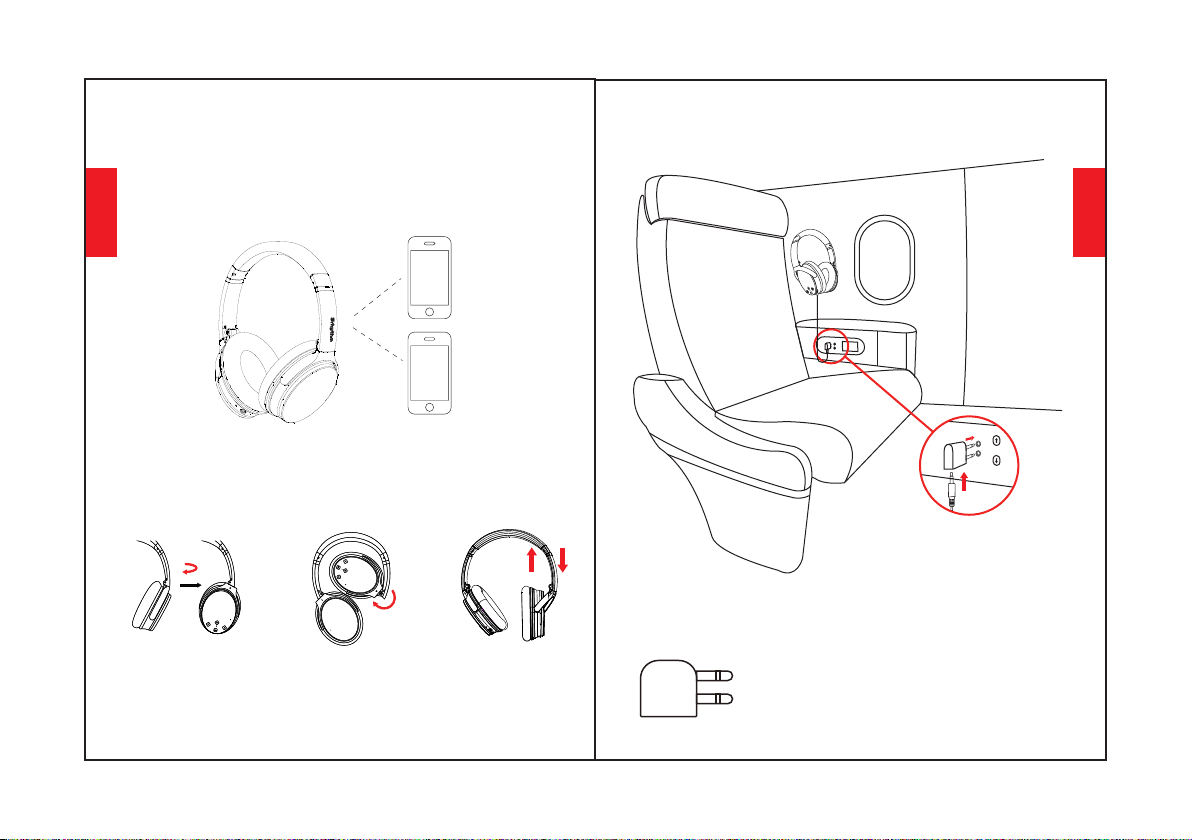
Sprach Funktion
Drücken Sie gleichzeitig die beiden Tasten
"Lautstärke erhöhen" und "Lautstärke verringern",
um die Sprachfunktion zu aktivieren (kompatibel mit
iPhone Siri und ausgewählter Android-
Sprachsoftware).
Trageweise
Einstellbares
Kopfband
Anschluss des Flugzeugadapters
Schließen Sie den Flugzeugadapter
an die Audiobuchse (Doppellöcher)
des Flugzeugsitzes an und verbinden
Sie ihn mit Ihrem Kopfhörer und dem
Flugzeugadapter mit einem 3,5-mm-
Audiokabel.
Nur für Flugzeuge verwenden. Kann
nicht an die Steckdose angeschlossen
werden
Warnung:
Deutsch
Deutsch
2122
100° nach
innen drehen
120° nach innen
klappbar
100°
120°
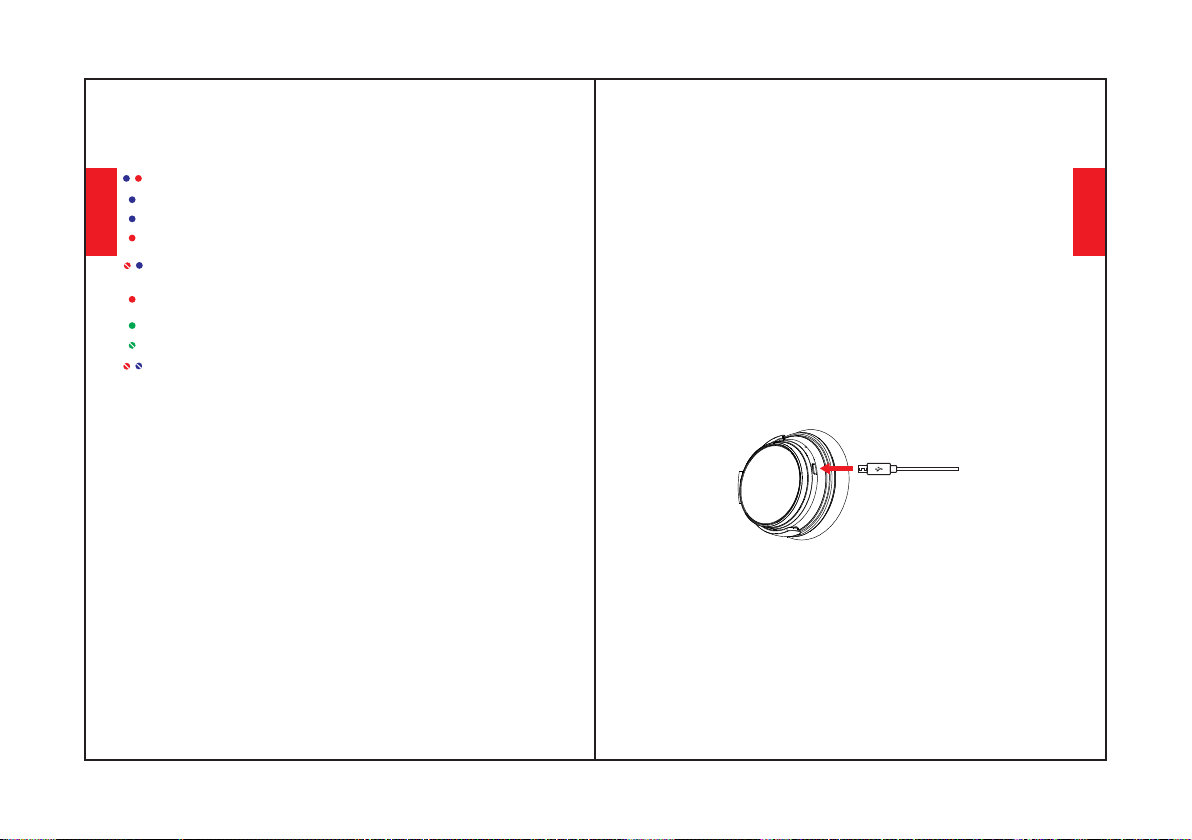
Kopfhörer-Spezifikation
LED-Anzeigeleuchte
Verbinden: Blaue und rote Lichter blinken abwechselnd
Verbunden: Blaues Licht blinkt
Aufladen: Rotes Licht geht an
Volle Ladung: Rotes Licht geht aus oder blaues Licht
geht an
Batterie schwach: Rotes Licht geht mit Sprachansagen
an
ANC EIN: Grünes Licht geht an
ANC OFF: Grünes Licht geht aus
Bluetooth AUS: Blaue und rote Lichter gehen aus
Wiedergabe: Blaues Licht blinkt langsam
Technische Spezifikation
•Eingang: 5V 220mAh •Chip: ATS
•Anwendungszeit: 50 Stunden
•Wasserschutzgrad: IPX4
•Bluetooth Version: V5.0
•Produktname: Srhythm NC25
•Batteriekapazität: 1000mAh
•Ladezeit: 2 Stunden
•Bluetooth Profil: A2DP, AVRCP, HSP, HFP
•Bluetooth Reichweite: 10m/33ft
•Nettogewicht: 180g •Widerstand: 32 Ω
•Treiber Durchmesser: Φ40mm
•Frequenzgang: 20–20KHz
* Bitte beachten Sie, dass diese LED-Leuchtfarben
gelegentlich zu anderen Farben (rosa, violett, etc.)
kombiniert werden.
Wenn irgendwelche Probleme auftreten, hier Tipps für
Sie: 1. Laden Sie Ihren Kopfhörer vollständig auf
(verwenden Sie kein Schnellladegerät) 2. Setzen Sie den
Kopfhörer zurück, indem Sie das Audiokabel in die
Kopfhörerbuchse stecken und dann entfernen. Oder die
aktualisierten NC25-Kopfhörer werden beim Aufladen
automatisch zurückgesetzt.
Verbindung entfernen: Halten Sie die beiden Tasten
"Lautstärke erhöhen" und "Lautstärke verringern"
gleichzeitig 5 Sekunden lang gedrückt.
Aufladen
Bitte verwenden Sie während des Ladevorgangs die
Kopfhörer nicht. Die LED-Anzeigelampe ist aus oder blau ,
wenn der Kopfhörer voll geladen ist, ausgehend vom
ausgeschalteten Zustand des Kopfhörers.
Schalten Sie den Bluetooth Modus im Handy ein. Suchen Sie
auf dem Mobiltelefon nach dem Bluetooth Kopfhörersignal
und klicken Sie auf "NC25", um die Verbindung herzustellen.
(die LED-Anzeigelampe blinkt nach erfolgreicher Verbindung
langsam blau).
Halten Sie die Multifunktionstaste 3-5 Sekunden lang
gedrückt, um die Kopfhörer Bluetooth Funktion
auszuschalten.
Verwenden Sie das mitgelieferte Type-C Ladekabel zur
Verbindung mit dem Kopfhörer Ladeanschluss. Verbinden Sie
das andere Ende des Ladekabels mit dem USB Anschluss eines
Computers oder USB Ladegeräts unter 6,3V Spannung.
Schalten Sie die Bluetooth und ANC-Funktion des Kopfhörers
vor dem Aufladen aus.
Deutsch
Deutsch
2324
12.F: Warum ist der Kopfhörerton so leise?
A: Erhöhen Sie die Lautstärke des Geräts und des Kopfhörers.Für
einige Software wie SPOTIFY müssen Sie den Equalizer
möglicherweise auf OFF stellen, dann kommt das volle Spektrum
durch und die Lautstärke lässt sich leicht einstellen.
A: Einige Kunden haben eine schlechte Audioqualität auf
Windows-PCs erwähnt. Bitte beachten Sie, dass es "Headset"- und
"Kopfhörer"-Modi gibt, die Sie durch Wechseln des
Ausgabegeräts umschalten können. Die Auswahl von "Kopfhörer-
Modus" wird die Audioqualität deutlich verbessern. Der
"Headset-Modus" ist für hochkomprimierte VOIP-Anrufe usw.
vorgesehen. Das ist kein Fehler des Kopfhörerprodukts, sondern
lediglich die Einschränkung dieses Protokolls. Wenn Sie sich im
"Kopfhörer-Modus" befinden, ist die Audioqualität fantastisch.
A: Bitte beachten Sie, dass ANC und Bluetooth durch die gleiche
LED-Anzeige (aber mit unterschiedlicher Lichtfarbe) angezeigt
werden, mit einem grünen Licht für ANC und einem blauen Licht
für Bluetooth. Wenn Sie Bluetooth ein-/ausschalten müssen,
können Sie zunächst den ANC ausschalten, falls Sie durch die
Farblichter irritiert werden. Die Bedeutung der Lichtfarbe wird
Ihnen aber schon nach wenigen Benutzungen sehr vertraut sein,
da es einfach und leicht ist.
11. F: Warum wird die Audioqualität auf einem Windows-PC
immer schlechter?
A: Dies ist eines unserer speziellen Funktionen. Wenn der
Benutzer ein Audiokabel in den Audioanschluss des Kopfhörers
steckt, schalten sich alle Bluetooth Funktionstasten ab und
Bluetooth schaltet sich aus. Bluetooth ist jedoch wieder
verfügbar, wenn das Audiokabel wieder entfernt wird.
9. F: Warum wird Bluetooth ausgeschaltet, wenn ich ein
Audiokabel anschließe?
10. F: Warum kann ich Kopfhörer nicht ein- und ausschalten?
8. F: Was muss ich tun, wenn sich Bluetooth nicht schließen
oder öffnen lässt?
A: Bitte setzen Sie die Bluetooth Funktion des Kopfhörers zurück,
indem Sie ein Audiokabel in den Kopfhörer stecken und wieder
entfernen. Bevor Sie die Verbindung wiederherstellen, denken Sie
bitte daran, den Kopfhörer Bluetooth Verbindungsnamen NC25
auf Ihrem Mobiltelefon zu entfernen/ignorieren.
FRAGEN UND ANTWORTEN
1. F: Warum kann ich keine Kopfhörer mit meinem Mobiltelefon
verbinden?
A: Bitte prüfen Sie, ob sich Ihr Kopfhörer im Verbindungs- oder
Wiederverbindungsmodus befindet, prüfen Sie, ob die Bluetooth
Suchfunktion Ihres Bluetooth Geräts eingeschaltet ist, wenn dies
der Fall ist, dann gehen Sie in das Bluetooth Menü Ihres Bluetooth
Geräts, entfernen/ ignorieren Sie den Kopfhörer
Bluetoothverbindungsnamen NC25 Anschließend können Sie die
Bluetooth Verbindung erneut herstellen, wie oben unter "Einfaches
Verbinden" beschrieben.
2. F: Warum lässt sich der Kopfhörer nicht einschalten?
A: Bitte überprüfen Sie den Batteriestatus Ihres Kopfhörers.
4. F: Kann ich während der Fahrt Kopfhörer benutzen?
A: Bitte prüfen Sie, ob der Ausgabekanal Ihres Computers das
A2DP-Profil unterstützt. Überprüfen Sie auch die
Lautstärkeeinstellungen Ihres Kopfhörers und Ihres
Computers/Handys.
A: Nein, das können Sie nicht. Der Kopfhörer verwendet eine
eingebaute, nicht austauschbare Li-Polymer-Batterie, die nicht
ersetzt werden kann.
A: Bitte prüfen Sie, ob sich in der Nähe oder in Ihrer Umgebung
Metallmaterialien oder sonstige Hindernisse befinden, die
möglicherweise die Bluetooth Verbindung stören. Der Grund dafür
könnte die Empfindlichkeit von Bluetooth als Funktechnologie
sein, die auf Gegenstände zwischen Kopfhörer und anderen
Geräten reagieren kann.
A: Durch Konfigurationen unterschiedlicher
Anwendungssoftware kann es vorkommen, dass der Kopfhörer
nicht vollständig mit einigen APPs kompatibel ist.
7. F: Warum kann ich die Lautstärke eines Titels, der auf einer
APP auf meinem Mobiltelefon abgespielt wird, nicht über
Kopfhörer regeln?
A: Zu Ihrer Sicherheit empfehlen wir Ihnen ausdrücklich, während
der Fahrt keine Kopfhörer zu verwenden, um eine Ablenkung zu
vermeiden.
5. F: Warum wird die Verbindung zwischen Kopfhörer und
Bluetooth-Gerät gelegentlich im Radius von 10 Metern
unterbrochen?
3. F: Kann ich die Batterie im Kopfhörer austauschen?
6. F: Warum höre ich keinen Ton von meinem Computer oder
Mobiltelefon?
Deutsch
Deutsch
2526
Mode d'emploi
1.Veuillez ne pas utiliser de casque pendant que vous
conduisez un véhicule ou durant son chargement.
3.Veuillez ne pas écouter longtemps à un volume élevé
afin d'éviter des lésions auditives.
2.Veuillez utiliser le casque avec précaution et ne pas
l'utiliser dans des situations dangereuses.
4.Pour votre sécurité, ne réglez pas le volume trop fort
lorsque vous courez dehors afin de vous assurer que
vous pouvez entendre le son dans votre
environnement.
5. N'utilisez pas de nettoyant ou d'huile corrosif pour
nettoyer vos écouteurs
1. Utilisez des câbles originaux ou certifiés pour
charger le produit et utiliser une tension de 6,3V.
L'alimentation sera coupée et le mode de protection
démarrera lorsque la tension dépassera 6,3V et sera
inférieure à 36V. Le casque se désactivera tout seul si la
tension va au-delà de 36V.
2.Ne laissez pas les enfants s’amuser avec notre
produit.
3. Évitez de laisser tomber votre casque et de travailler
dans des conditions de température extrêmes. Veuillez
utiliser le casque dans la plage de température de
fonctionnement : -15 °C (5 F) - 55°C (131 F).
6. Désactivez la fonction Bluetooth et ANC des
écouteurs pour économiser l'énergie lorsque vous
n'utilisez pas les écouteurs.
4.Ne mettez pas votre casque dans l’eau ou sous
l’eau.
Consignes de sécurité
Sécurité auditive :
Fonctionnement en toute sécurité :
Français
Français
2728
Contenu de la boite
Casque d'écoute NC25 *1
Étui de transport
portable * 1
Adaptateur pour avion *1
(A utiliser uniquement dans l'avion)
Câble de charge de
type C * 1
Câble audio *1
3.5mm to 6.35mm
Adaptateur pour piano *1
LED Témoin lumineux
Port de chargement
Port AUX
En un coup d'œil
Bouton ANC
Volume en baisse/
chanson précédente
Bouton multifonctionnel
Augmentation du volume/
chanson suivante
Français
Français
2930
Microphones
Indicateur de charge
Appuyez trois fois sur le bouton multifonction pour
tourner sur l e mode de jeu à faible latence
3
Maintenez les boutons d'augmentation et de
diminution du volume enfoncés pendant 5 secondes
pour effacer le couplage Bluetooth
Utiliser la fonction ANC
Comment l'utiliser
Appuyez sur le bouton ANC pour activer/désactiver
l'annulation active du bruit
(le voyant LED sera vert lorsque l'ANC est activé).
Utiliser la fonction Bluetooth
3. Maintenez le bouton multifonction pendant 3 - 5
secondes pour désactiver la fonction Bluetooth des
écouteurs.
1. Maintenez le gros bouton multifonction pendant 3 -
5 secondes pour activer le Bluetooth des écouteurs,
puis passez en mode jumelage. (le voyant LED sera bleu
et rouge et clignotera rapidement).
2. Démarrez le Bluetooth de votre téléphone portable
et trouvez le nom de couplage Bluetooth pour casque
"NC25 " pour cliquer sur le couplage. (le voyant LED
sera bleu et clignotera lentement après un appairage
réussi).
Appuyez sur cette touche pour régler le volume.
Appuyez longuement pour passer à la chanson
suivante/précédente.
Détails sur les fonctions
Couplage facile
2. Gardez votre casque et votre téléphone portable
aussi près que possible pendant le processus de
jumelage.
3. Allumez le Bluetooth de votre téléphone portable.
Recherchez le signal Bluetooth du casque sur le
téléphone portable et cliquez sur "NC25" pour le
coupler. (le voyant lumineux LED sera bleu et
clignotera lentement après un appairage réussi).
4. Si un mot de passe/code PIN vous est demandé
lors de la procédure de jumelage, veuillez saisir
"0000" (quatre zéros).
1. Maintenez le bouton multifonction pendant 3 - 5
secondes pour activer le Bluetooth des écouteurs,
puis passez en mode d'appairage. (le voyant LED sera
bleu et rouge et clignotera rapidement).
Jumelage avec un deuxième appareil Bluetooth
1. Veuillez-vous assurer que le casque est bien
connecté au premier appareil Bluetooth et que la
musique ne marche pas.
2. Maintenez le bouton multifonction enfoncé
jusqu'à ce que le casque s'éteigne et continuez avec
les étapes «Couplage facile» (laissez le casque
revenir en mode de couplage,le voyant LED
clignotera alternativement en bleu et en rouge).
3. Jumelez le casque avec le deuxième appareil selon
les étapes du " jumelage facile ".
4. Retournez au premier appareil Bluetooth et
couplez-le à nouveau avec un casque. Vos deux
appareils sont maintenant jumelés avec le casque.
Appuyez deux fois sur le bouton multifonction
pour rejeter un appel entrant.
Appuyez sur le bouton multifonction pour
écouter/pauser la musique ou
répondre/terminer l'appel.
Français
Français
3132
2
3-5S
ANC
Suppression active du bruit (ANC)
MARCHE/ARRÊT
(le voyant LED sera vert lorsque l'ANC est activé).
Pour éteindre l'ANC, appuyez sur le bouton ANC ;
Pour activer l'ANC, appuyez sur le bouton ANC ;
(le voyant LED de couleur verte s'éteint lorsque
l'ANC est désactivé).
Mode filaire
L'ANC fonctionne également en mode filaire. Les
microphones ne fonctionnent qu'en mode
Bluetooth, pas en mode filaire.
Prise en charge des écouteurs Entrée AUX pour la
connexion d'une source audio externe câblée. Il
suffit de désactiver le Bluetooth du casque et de
brancher le câble audio. Tout casque Bluetooth ANC
doit être alimenté par une batterie pour le mode
filaire.
Veuillez noter que ne peut pas régler le volume sur
les écouteurs en mode filaire
Numérotation vocale
Appuyez simultanément sur les deux boutons
"Volume +" et "Volume -" pour activer la fonction de
numérotation vocale (compatible avec l'iPhone Siri
et certains logiciels de numérotation vocale
Android).
Comment le porter
Serre-tête ajustable
Français
Français
3334
Rotation de 100°
vers l'intérieur
Pliage vers
l'intérieur à 120°
100°
120°
Connexion de l'adaptateur pour avion
Connectez l'adaptateur d'avion à la
prise audio (doubles trous) du siège
de l'avion, utilisez un câble audio de
3,5 mm pour vous connecter à votre
casque et à votre adaptateur
d'avion.
Utiliser uniquement pour l'avion, ne
peut pas être branché sur la prise de
courant
Avertissement:
Caractéristiques du casque d'écoute
Témoin lumineux LED
Charge : Le feu rouge s'allume
Pleine charge : La lumière rouge s'éteint ou la lumière
bleue s'allume
Jouer : La lumière bleue clignote lentement
Appariement : Les lumières bleue et rouge clignotent en
alternance
Jumelé : La lumière bleue clignote
ANC ACTIVÉ : Le feu vert s'allume
ANC ÉTEINT : Le feu vert s'éteint
Bluetooth ÉTEINT : les lumières bleue et rouge s'éteignent
Batterie faible : le voyant rouge s'allume avec un message
vocal
Spécifications techniques
•Capacité de la batterie :1000mAh
•Temps de chargement :2 heures
•Portée Bluetooth : 10m/33ft
•Réponse en fréquence : 20–20KHz
•Entrée :5V 220mAh •Puce :ATX
·Diamètre du conducteur : Φ40mm
·Nom du produit : Srhythm NC25
•Profil Bluetooth : A2DP, AVRCP, HSP, HFP
·Temps d'utilisation :50 heures
·Version Bluetooth :V5.0
•Waterproof rating: IPX4
•Poids net :180g •Impédance :32 Ω
* Veuillez noter que parfois, la couleur de ces voyants
LED peut être mélangée pour devenir d'autres
couleurs (rose, violet, etc.) à l'occasion.
Français
Français
3536
En cas de problème, voici des conseils pour vous: 1.
Chargez complètement votre casque (n'utilisez pas de
chargeur rapide) 2. Réinitialisez le casque en insérant le
câble audio dans la prise audil du casque, puis en le
retirant. Ou le casque NC25 amélioré serait réinitialisé
automatiquement lors du chargement.
Supprimer le jumelage : Maintenez les deux boutons
"Volume fort" et "Volume faible" simultanément pendant
5 secondes
Chargement
Démarrez le Bluetooth de votre téléphone portable et trouvez
le nom de couplage Bluetooth pour casque NC25 pour cliquer
sur le nom de couplage. (le voyant LED sera bleu et clignotera
lentement après un appairage réussi).
Utilisez le câble de chargement Type-C inclus pour vous
connecter au port de chargement des écouteurs. Connectez
l'autre extrémité du câble de charge à un port USB de
l'ordinateur ou à un chargeur mural USB sous une tension de
6,3V. Désactivez la fonction Bluetooth et ANC du casque avant
de le charger.
N'utilisez pas de casque pendant la charge. Le témoin
lumineux LED sera éteint ou de couleur bleue lorsque le
casque est complètement chargé, en fonction de l'état de
désactivation du casque.
Maintenez le bouton multifonction pendant 3 - 5 secondes
pour désactiver la fonction Bluetooth des écouteurs.
Foire aux questions
R : Veuillez vérifier si votre casque est en mode de couplage
ou de reconnexion, vérifiez si la fonction de recherche
Bluetooth de votre appareil Bluetooth est activée, si tout est
fait, puis allez dans le menu Bluetooth de votre appareil
Bluetooth, supprimez/notez le nom de couplage Bluetooth
du casque NC25, après quoi vous pouvez essayer de
reconnecter Bluetooth en suivant les étapes de "couplage
facile" ci-dessus.
2. Q : Pourquoi le casque ne s'allume-t-il pas ?
3. Q : Puis-je remplacer la batterie de l'écouteur ?
R : Non, vous ne pouvez pas. Le casque utilise une batterie Li-
Polymère intégrée et non détachable qui ne peut pas être
remplacée.
R : Veuillez vérifier l'état de la batterie de votre casque.
4. Q : Puis-je utiliser le casque en conduisant ?
R : Pour votre sécurité, nous vous recommandons vivement
de ne pas utiliser de casque au volant afin d'éviter toute
distraction.
1. Q : Pourquoi les écouteurs ne peuvent-ils pas s'apparier
avec mon téléphone portable ?
5. Q : Pourquoi le casque se déconnecte-t-il parfois avec
un appareil Bluetooth dans un rayon de 10 mètres ?
R : Veuillez vérifier s'il n'y a pas de matériaux métalliques ou
d'obstacles à une distance relativement proche ou dans votre
environnement qui pourraient interférer avec la connexion
Bluetooth. Cela peut se produire parce que Bluetooth est une
technologie radio sensible aux objets entre le casque et
d'autres appareils.
6. Q : Pourquoi ne puis-je pas entendre le son de mon
ordinateur ou de mon téléphone portable ?
7. Q : Pourquoi suis-je incapable d'utiliser un casque pour
contrôler le volume d'un titre joué sur un APP sur mon
téléphone portable ?
R : En raison de la configuration des différents logiciels
d'application, le casque peut ne pas être complètement
compatible avec certaines APP.
R : Veuillez vérifier si le canal de sortie de votre ordinateur
prend en charge le profil A2DP. Vérifiez également les
paramètres de volume de votre casque et de votre
ordinateur/téléphone portable.
Français
Français
3738
9. Q : Pourquoi le Bluetooth se désactive-t-il lorsque je
connecte un câble audio ?
8. Q : Que dois-je faire si Bluetooth ne peut pas se fermer ou
s'ouvrir ?
10. Q : Pourquoi ne puis-je pas allumer/éteindre le casque ?
R : Veuillez noter que l'ANC et le Bluetooth sont indiqués par le
même témoin lumineux (mais de couleur différente), avec une
lumière verte pour l'ANC et une lumière bleue pour le Bluetooth.
Si vous avez besoin d'activer/désactiver le Bluetooth, vous
pouvez d'abord désactiver l'ANC au cas où vous seriez confondu
par les voyants de couleur. Mais vous serez très familier avec la
signification de la couleur de la lumière après quelques
utilisations, car elle est simple et facile.
12.Q.Pourquoi le son du casque est-il si faible ?
R : Certains clients ont mentionné une mauvaise qualité audio sur
les PC Windows. Veuillez noter qu'il existe des modes "Casque" et
"Casque" que vous pouvez activer en changeant de périphérique
de sortie. La sélection du mode "Casque" améliore
considérablement la qualité audio. Le mode "Casque" est conçu
pour les appels VOIP hautement compressés, etc. Ce n'est pas la
faute du produit "Casque", c'est juste la limitation de ce
protocole. Si vous êtes en "Mode Casque", la qualité audio est
fantastique.
R : C'est l'une de nos caractéristiques spéciales. Lorsque les
utilisateurs insèrent un câble audio dans le port audio du casque,
tous les boutons de fonction Bluetooth cessent de fonctionner et
Bluetooth s'éteint. Cependant, le Bluetooth sera de nouveau
disponible lorsque le câble audio sera déplacé.
11. Q : Pourquoi la qualité audio devient-elle mauvaise sur un
PC Windows ?
R : Augmentez le volume de l'appareil et du casque. Pour certains
logiciels tels que SPOTIFY, vous devrez peut-être désactiver
l'égaliseur, puis le spectre complet sera diffusé et le volume sera
facilement réglable.
port audio, puis en le supprimant. Avant de vous reconnecter,
n'oubliez pas de supprimer/ignorer le nom de couplage bluetooth
NC25 de votre téléphone portable.
R : Veuillez réinitialiser la fonction Bluetooth de l'écouteur en
insérant un câble audio dans l'écouteur
Manuale Utente
Italiana
Français
3940
2. Si prega di utilizzare le cuffie con cautela e
interromperne temporaneamente l'uso in
situazioni potenzialmente pericolose.
3. Si prega di non ascoltare musica ad alto volume a
lungo per evitare danni all'udito
4. Per motivi di sicurezza, si prega di non alzare
troppo il volume in luoghi dove occorre sentire I
suoni provenienti dall'ambiente circostante.
1. Si prega di non utilizzare le cuffie mentre si guida
un veicolo o quando il dispositivo è sotto carica.
1. Utilizzare cavi originali o certificati per caricare il
dispositivo con tensione entro i 6,3 V.
L'alimentazione verrà interrotta e si entrerà nella
modalità di protezione quando la tensione supera i
6,3 V e entro i 36 V. Quando la tensione supera i 36
V le cuffie si potrebbero rompere.
3. Evitare di far cadere o schiacciare le cuffie e non
esporle a temperature estreme. Utilizzare le cuffie
entro l'intervallo di temperatura operativa: -15 °C
(5 F) – 55°C(131 F).
4. Non immergere le cuffie in acqua.
5. Non utilizzare detergenti/sostanze abrasive per
pulire le cuffie.
6. Disattivare il Bluetooth delle cuffie e
linterrompere la funzione ANC quando non in uso
per evitare inutili consumi.
2. Tenere lontano dalla portata dei bambini per
evitare eventuali pericoli derivanti da un uso
improprio.
Istruzioni di sicurezza
Sicurezza per l'udito:
Sicurezza per un corretto funzionamento:
Italiana
Italiana
Cosa c'è all'interno della
confezione
1 x Cuffie NC25
1 x Custodia da
trasporto portatile
1 x Adattatore aereo
(Da usare solo in aereo)
1 x Cavo di ricarica di type C
1x Cavo audio
1 xDa 3,5 mm a 6,35 mm
Adattatore per pianoforte
4142

3
Italiana
Italiana
Usare la funzione ANC
Come usare
Premere il pulsante ANC per attivare/disattivare la
cancellazione del rumore
(la spia LED diventerà verde quando la funzione ANC è
ATTIVA.)
Usare la funzione Bluetooth
2. Attivare il Bluetooth del telefono e trovare il nome
"NC25", cliccare su di esso per accoppiare. (la spia
LED blu lampeggerà lentamente dopo che
l'associazione sarà avvenuta con successo.)
3. Tenere premuto il pulsante multifunzione per 3-5
secondi per disattivare il Bluetooth delle cuffie.
1. Tenere premuto il pulsante multifunzione per 3-5
secondi per attivare il Bluetooth delle cuffie, quindi
accedere alla modalità di associazione. (la spia LED
diventerà blu e rossa e lampeggerà rapidamente.)
Premere per regolare il volume. Premere a
lungo per passare al prossimo brano/brano
precedente.
Premere due volte il pulsante multifunzione
per rifiutare una chiamata in entrata.
Premere il pulsante multifunzione per
riprodurre/mettere in pausa la musica o
rispondere/terminare una chiamata.
indicatore di carica
Porta AUX
A prima vista
Pulsante ANC
Tasto volume su/
Brano successivo
Pulsante multifunzione
Tasto volume giù/
Brano precedente
43
44
LED Spia
2
3-5S
ANC
Microfoni
Tieni premuti i pulsanti di aumento e diminuzione del
volumeper 5 secondi per cancellare l'associazione
Bluetooth
Premere il pulsante multifunzione tre volte per girare
nella modalità d i gioco a bassa latenza
Porta di ricarica
Attivare/Disattivare la funzione Cancellazione
del rumore (ANC)
(la spia LED verde si spegnerà quando la funzione
ANC è DISATTIVATA.)
Per disattivare la funzione ANC, premere il pulsante
ANC;
Per attivare la funzione ANC, remere il pulsante ANC;
(la spia LED diventerà verde quando la funzione ANC
è ATTIVATA.)
Connessione tramite cavo
Si prega di notare che NON È POSSIBILE regolare il
volume sulle cuffie in modalità cablata
Le cuffie supportono l'ingresso AUX per per
collegare il dispositivo tramite cavo. Disattivare
semplicemente il Bluetooth delle cuffie e inserire il
cavo audio. Per qualsiasi cuffia Bluetooth con
funzione ANC, è ancora necessario il supporto della
batteria per la connessione tramite cavo. Inoltre la
funzione ANC funziona solo con la connessione
tramite cavo.
I microfoni funzionano invece solo tramite la
modalità Bluetooth, non con la connessione
tramite cavo.
Italiana
Italiana
Dettagli sulle funzioni
Associazione facile
4. Se viene richiesta una password/codice PIN
durante la procedura di associazione, si prega di
inserire "0000" (4 zeri).
3. Attivare il Bluetooth del telefono. Cercare il
segnale Bluetooth delle cuffie sul telefono cellulare e
cliccare su “NC25” per avviare il processo di
accoppiamento. (la spia LED blu lampeggerà
lentamente dopo che l'associazione sarà avvenuta
con successo.)
1. Tenere premuto il pulsante multifunzione per 3-5
secondi per attivare il Bluetooth delle cuffie, quindi
accedere alla modalità di associazione. (la spia LED
diventerà blu e rossa e lampeggerà rapidamente.)
2. Tenere le cuffie e il telefono cellulare il più vicini
possibile durante il processo di associazione.
Associare a un secondo dispositivo Bluetooth
2. Tieni premuto il pulsante Multifunzione fino a
quando le cuffie non si spengono e continua con i
passaggi "Accoppiamento facile" (Lascia che le cuffie
entrino nuovamente in modalità di accoppiamento,
la spia LED lampeggerà alternamente in blu e in rosso).
4. Tornare al primo dispositivo Bluetooth e
accoppiarlo di nuovo con le cuffie. Ora entrambi I tuoi
dispositivi sono associati alle tue cuffie.
1. Assicurarsi che le cuffie siano connesse
correttamente al primo dispositivo Bluetooth e che la
musica non sia in riproduzione.
3. Associare le cuffie al secondo dispositivo in base
alla procedura "Associazione facile".
4546
Composizione vocale
Premere il pulsante “Vlolume su” and “Volume gi
ù” contemporaneamente per attivare la funzione di
composizione vocale (compatibile con iPhone Siri e
deterinati software di composizione vocale Android).
Come indossarli
Fascia regolabile
Collegamento adattatore aereo
Collegare l'adattatore per
aereo alla presa audio (doppi
fori) del sedile dell'aereo,
utilizzare un cavo audio da 3,5
mm per il collegamento con le
cuffie e l'adattatore per aereo.
Utilizzare solo per l'aereo, non può
essere collegato alla presa di
corrente
Avvertimento:
Italiana
Italiana
4748
Rotazione
interna di 100°
Piegatura verso
l'interno di 120°
100°
120°
Caratteristiche delle cuffie
Spia LED
Accoppiamento: la spia blu e rosse lampeggerà
alternativamente
Accoppiato: a spia blu lampeggia
In riproduzione: a spia blu lampeggia lentamente
In carica: la spia rossa è accesa
Carica completa: la spia rossa è spenta o la spia blu è
accesa
Batteria scarica: la spia rossa è accesa e viene
comunicata con un messaggio vocale
Funzione ANC ATTIVATA: la spia verde è accesa
Funzione ANC DISATTIVATA: la spia verde è spenta
Bluetooth DISATTIVATO: Le spie blu e rosse sono spente
Specifiche tecniche
•Portata Bluetooth: 10m/33ft
•Versione Bluetooth: V5.0
•Nome del prodotto: Srhythm NC25
•Ingresso: 5V 220mAh •Chip: ATS
•Diametro del driver: Φ40mm
•Tempo di ricarica:2 ore
•Tempo di utilizzo: 50 ore
·Capacità della batteria: 1000mAh
•Profilo Bluetooth:A2DP, AVRCP, HSP, HFP
•Grado di impermeabilità: IPX4
•Peso netto: 180g •Impedenza: 32 Ω
•Risposta in frequenza: 20–20KHz
* Si prega di notare che probabilmente il colore della
spia LED può assumere altri colori (rosa, viola, ecc.).
In caso di problemi, ecco i suggerimenti per te: 1. Carica
completamente le cuffie (non utilizzare il caricabatterie
rapido) 2. Ripristina le cuffie inserendo il cavo audio nella
presa audil delle cuffie, quindi rimuovendolo. Oppure le
cuffie NC25 aggiornate verrebbero ripristinate
automaticamente durante la ricarica.
Eliminare l'accoppiamento: Tenere premuto
contemporaneamente il pulsante "Volume su" e "Volume
giù" per 5 secondi.
Carica
Non usare le cuffie mentre sono sotto carica. La spia LED si
spegnerà o diventerà blu quando la carica è completata in
base allo stato di spegnimento delle cuffie.
Tebere premuto il pulsante multifunzione per 3-5 secondi per
disattivare il Bluetooth delle cuffie.
Avviare il Bluetooth del telefono e trovare il nome ''NC25'',
cliccare su di esso per accoppiare il dispositivo. (La spia LED
lampeggerà lentamente in blu dopo che l'associazione sarà
avvenuta con successo.)
Utilizzare il cavo di ricarica Type-C incluso nella confezione
per connettersi alla porta di ricarica delle cuffie. Collegare
l'altra estremità del cavo di ricarica a una porta USB del
computer o a un caricatore a muro USB con una tensione di 6,3
V. Spegnere il Bluetooth delle cuffie e la funzione ANC prima
di mettere sotto carica.
Italiana
Italiana
4950
8. Domanda: Cosa devo fare se non riesco a spegnere o
accendere il Bluetooth?
A: Ripristinare la funzione Bluetooth della cuffia inserendo un
cavo audio nella cuffia. Poi rimuovilo. Prima di tentare un'altra
connessione, ricordarsi di eliminare/ignorare dal telefono il nome
NC25 relativo alle cuffie.
10. Domanda: Perché non riesco ad accendere/spegnere le
cuffie?
Risposta: Si prega di notare che la funzione ANC e Bluetooth sono
indicati tramite la stessa spia LED (ma con colore differente), con
una luce verde per quanto riguarda la funzione ANC e una luce blu
per la funzione Bluetooth. Se si deve attivare/disattivare il
Bluetooth, bisogna prima disattivare la funzione ANC nel caso si
faccia confusione sul significato del colore delle varie spie.
Riuscirai comunque a distinguerli con facilità e in poco tempo
grazie alla sua semplice interfaccia.
Risposta: Questo accade grazie a una caratteristica speciale che
abbiamo integrato. Quando viene inserito un cavo audio nella
determinata porta, il Bluetooth e tutti i pulsanti relativi a tale
funzione si disattivano automaticamente. Tuttavia, il Bluetooth
sarà nuovamente disponibile quando il cavo audio viene
scollegato.
12.Q:Perché il suono delle cuffie è così basso?
Risposta: Alcuni clienti hanno menzionato una scarsa qualità
audio su PC Windows. Da notare che sono presenti le modalità
"Auriclari" e "Cuffie" le quali possono essere alternate
modificando il dispositivo di output. Scegliendo la "Modalità
cuffia" la qualità audio miglioretà drasticamente. La "modalità
auricolare" è progettata per chiamate VOIP ad alta compressione,
ecc. Quindi la qualità del suono non dipende dalle cuffie ma dalla
modalità scelta. Se sei in "Modalità cuffia" la qualità audio
migliora nettamente.
11. Domanda: Perché la qualità dell'audio delle cuffie è scarsa
se utilizzate su un PC Windows?
A: Aumenta il volume del dispositivo e delle cuffie.Per alcuni
software come SPOTIFY, potrebbe essere necessario disattivare
l'equalizzatore, quindi l'intero spettro viene visualizzato e il
volume sarà facilmente regolabile.
9. Domanda: Perché il Bluetooth si spegne quando si collega un
cavo audio?
Domande e risposte
Risposta: No, non puoi. Le cuffie utilizzano una batteria ai
polimeri di litio incorporata non rimovibile e quindi non può
essere sostituita.
1. Domanda: Perchè non riesco ad associare le cuffie al mio
telefono?
2. Domanda: Perchè le cuffie non si accendono?
3. Domanda: Posso sostituire la batteria delle cuffie?
Risposta: Si prega di controllare se sono presenti materiali
metallici o ostacoli entro un determinato raggio d'azione o
nell'ambiente circostante che potrebbe interferire con la
connessione Bluetooth del dispositivo. Ciò può accadere perché il
Bluetooth è una tecnologia radio sensibile agli oggetti che si
interpongono compromettendo il segnale delle cuffie.
Risposta: Controllare se il canale di uscita del computer supporti il
profilo A2DP. Controllare anche le impostazioni del volume sulle
cuffie e sul computer/telefono.
Risposta: Controllare se le cuffie non siano in modalità
associazione o di riconnessione, controllare se la funzione di
ricerca Bluetooth è attiva sul dispositivo, se tutto risulta in regola,
accedere al menu Bluetooth del proprio dispositivo,
eliminare/ignorare il nome di accoppiamento Bluetooth delle
cuffie NC25. Successivamente, provare a ricollegare il Bluetooth
in base alla procedura "Associazione facile'' citata sopra.
Risposta: Per la tua sicurezza, si consiglia vivamente di non
utilizzare le cuffie mentre si guida per evitare eventuali distrazioni
derivanti dal suo uso.
5. Domanda: Perché capita che le cuffie si disconnettono anche
se il dispositivo Bluetooth si trova entro i 10 metri di distanza?
7. Domanda: Perché non riesco a utilizzare le cuffie per
controllare il volume di un brano riprodotto tramite
un'applicazione del telefono?
Risposta: A causa delle differenti configurazioni presenti in ogni
software, le cuffie potrebbero non essere completamente
compatibili con diverse applicazioni.
Risposta: Si prega di controllare nuovamente lo stato della
batteria delle cuffie.
4. Domanda: Posso usare le cuffie mentre guido?
6. Domanda: Perché non riesco a sentire alcun suono dal mio
computer o dal mio telefono?
Italiana
Italiana
5152
Manual de usuario
2.Por favor, utilice los audífonos con precaución y
no los utilice en situaciones peligrosas.
1.Por favor, no utilice los audífonos mientras
conduce ni cuando estos se estén cargando.
3.Para evitar daño auditivo, no escuche a un
volumen alto durante mucho tiempo.
4.Por su seguridad, cuando salga a correr, escuche a
un volumen moderado que le permita escuchar el
sonido de su entorno.
1. Para cargar los auriculares, use los cables
originales o cables certificados de hasta 6.3V. Si se
excede el voltaje de 6.3V y hasta 36V, la energía se
cortará y los auriculares entrarán en modo de
protección. Los auriculares se averiarán con
voltajes superiores a 36V.
5. No utilice líquidos limpiadores o aceites
corrosivos para limpiar los auriculares.
6. Cuando no utilice los auriculares, desactive las
funciones de Bluetooth y Cancelación Activa de
Ruido (ANC) para ahorrar energía.
2.Mantener lejos del alcance de los niños para
evitar peligros por uso inapropiado.
3.Evite dejar caer los auriculares. Evite utilizar los
auriculares en temperaturas extremas. Rango de
temperatura de funcionamiento: -15 °C (5 °F) – 55
°C (131 °F).
4. No sumerja los auriculares en el agua.
Instrucciones de seguridad
Seguridad auditiva:
Seguridad durante la operación:
Espanol
Espanol
5354
Contenido del paquete
Auriculares NC25 x 1
1 x Estuche de
transporte portátil
Adaptador para avión x 1
(Solo para uso en avión)
Cable de carga type C x 1
Cable de audio x 1
De 3.5 mm a 6.35 mm
Adaptador para piano x 1
Puerto de carga
En un vistazo
L
Botón ANC
Subir volumen/
siguiente canción
Botón multifunción
Bajar volumen/
canción anterior
Espanol
Espanol
5556
Micrófono
Puerto AUX
Luz indicadora LED
indicador de carga
3
Mantenga presionados los botones de subir y bajar el
volumen durante 5 segundos para borrar el
emparejamiento de bluetooth
Presione el botón multifunción tres veces para girar
en el modo de juego de baja latencia
Utilizar la función ANC
Cómo utilizar
Presione el botón ANC para ENCENDER/APAGAR la
Cancelación Activa de Ruido (la luz indicadora LED se
encenderá en verde cuando la función ANC esté activa).
Utilizar la función Bluetooth
2. Encienda el Bluetooth de su teléfono móvil y busque
el nombre “NC25” para la sincronización de los
auriculares con Bluetooth. Haga clic en “NC25” para
sincronizar los dispositivos. Cuando ambos
dispositivos estén sincronizados correctamente, la luz
indicadora LED titilará lentamente en azul.
1. Para encender el Bluetooth de los auriculares,
mantenga presionado el botón multifunción durante 3
a 5 segundos. Después, ingrese al modo de
sincronización (la luz indicadora LED titilará
rápidamente en azul y rojo).
3.Para apagar el Bluetooth de los auriculares,
mantenga presionado el botón multifunción durante 3
a 5 segundos.
Presione para ajustar el volumen. Para saltar a la
canción siguiente/anterior, mantenga el botón
presionado.
Detalles de funcionamiento
Sincronización fácil
3. Encienda el Bluetooth de su teléfono móvil. Espere
la señal de Bluetooth de los auriculares en el teléfono
móvil. Haga clic en “NC25” para sincronizar los
dispositivos (cuando ambos estén sincronizados
correctamente, la luz indicadora LED titilará
lentamente en azul).
4. Si durante la sincronización le es requerido una
contraseña o número de PIN, ingrese el código
"0000" (cuatro ceros).
1. Para encender el Bluetooth de los auriculares,
mantenga presionado el botón multifunción durante
3 a 5 segundos. Después, ingrese al modo de
sincronización (la luz indicadora LED titilará
rápidamente en azul y rojo).
2. Durante el proceso de sincronización, mantenga
los auriculares y el teléfono móvil lo más cerca
posible.
Sincronizar con un segundo dispositivo Bluetooth
2. Mantenga presionado el botón multifunción hasta
que los auriculares se apaguen y continúe con los pasos
"Emparejamiento fácil" (deje que los auriculares
vuelvan a ingresar al modo de emparejamiento,la luz
indicadora LED titilará alternativamente entre azul y
rojo).
1. Primero, asegúrese de que los auriculares estén
conectados correctamente con el primer dispositivo
Bluetooth y que no se esté reproduciendo música.
3. Sincronice los auriculares con un segundo dispositivo
siguiendo los pasos de "Sincronización fácil".
4. Regrese al primer dispositivo Bluetooth y vuelva a
sincronizarlo con los auriculares. Ahora, ambos
dispositivos estarán sincronizados con los auriculares.
Para rechazar una llamada entrante, presione
dos veces el botón multifunción.
Presione el botón multifunción para
reproducir/pausar la música o para responder
/finalizar una llamada.
Espanol
Espanol
5758
2
3-5S
ANC
ENCENDER/APAGAR la Cancelación Activa de
Ruido (ANC)
(la luz indicadora LED se apagará cuando la función
ANC sea apagada).
Para apagar la función ANC, presione el botón ANC;
Para encender la función ANC, presione el botón
ANC;
(la luz indicadora LED se encenderá en verde cuando
la función ANC esté encendida).
Conexión con cable
Tenga en cuenta que NO PUEDE ajustar el volumen
de los auriculares en modo cableado
Los micrófonos solo funcionan en modo
Bluetooth, no funcionan cuando la conexión es
con cable.
Los auriculares son compatibles con la entrada AUX
para la conexión de fuentes externas de audio con
cable. Simplemente apague la conexión de
Bluetooth en los auriculares y conecte el cable de
audio. Cuando se usa la conexión con cable, todos
los auriculares Bluetooth ANC necesitarán
alimentación de potencia con batería. La función
ANC también funciona cuando la conexión es con
cable.
Marcación por voz
Para activar la función de marcación por voz,
presione simultáneamente los botones “Subir
volumen”y “Bajar volumen” (compatible con Siri
de iPhone y software de marcación de voz de Android
seleccionado).
Cómo ponérselos
Diadema ajustable
Espanol
Espanol
5960
Rotación de 100 °
hacia adentro
Plegado hacia
adentro de 120 °
100°
120°
Conexión para adaptador de avión
Conecte el adaptador de avión a la
toma de audio (orificios dobles) del
asiento del avión, use un cable de
audio de 3,5 mm para conectar sus
auriculares y el adaptador de avión.
Solo se usa para avión, no se puede
enchufar a la toma de corriente.
Advertencia:
Especificaciones de los auriculares
Luz indicadora LED
Carga completa: la luz roja se apaga o la luz azul se
enciende
ANC ENCENDIDO: se enciende la luz verde
Batería baja: la luz roja se enciende junto con un
mensaje de voz
ANC APAGADO: la luz verde se apaga
Bluetooth APAGADO: las luces azules y rojas se apagan
Sincronizado: la luz azul titila
Sonando: la luz azul titila lentamente
Cargando: se enciende la luz roja
Sincronizando: las luces azules y rojas titilan
alternativamente
Especificaciones técnicas
·Capacidad de la batería: 1000mAh
·Nombre del producto: Srhythm NC25
•Perfil de Bluetooth:A2DP, AVRCP, HSP, HFP
•Clasificación de resistencia al agua:IPX4
•Respuesta de frecuencia: 20–20KHz
•Peso neto: 180g •Impedancia: 32 Ω
·Tiempo de uso: 50 horas
•Voltaje de entrada: 5V 220mAh •Chip: ATS
•Portata Bluetooth: 10m/33ft
•Tiempo de carga: 2 horas
·Versión de Bluetooth:V5.0
·Diámetro del controlador:Φ40mm
* Por favor tenga en cuenta que, ocasionalmente, los
colores de la luz indicadora LED se pueden mezclar y
mostrar otro color (rosa, púrpura, etc.)
Espanol
Espanol
6162
Elimine la sincronización: presione simultáneamente los
botones “Subir volumen” y “Bajar volumen” durante 5
segundos.
Si tiene algún problema, aquí tiene algunos consejos: 1.
Cargue por completo sus auriculares (no use un cargador
rápido) 2. Reinicie los auriculares insertando el cable de
audio en la toma de audio de los auriculares y luego
retirándolo. O los auriculares NC25 actualizados se
restablecerían automáticamente al cargar.
Cargando
Utilice el cable de carga Type-C incluido. Conecte el cable al
puerto de carga de los auriculares y la otra terminal del cable a
un puerto USB de computadora o de un cargador de pared
que tenga un voltaje menor a 6.3V. Antes de comenzar la
carga, apague las funciones de Bluetooth y ANC.
Encienda el Bluetooth de su teléfono móvil y busque el
nombre “NC25” para la sincronización de los auriculares
con Bluetooth. Haga clic en “NC25” para sincronizar los
dispositivos. Cuando ambos dispositivos estén sincronizados
correctamente, la luz indicadora LED titilará lentamente en
azul.
Para apagar el Bluetooth de los auriculares, mantenga
presionado el botón multifunción durante 3 a 5 segundos.
No utilice los auriculares mientras se estén cargando. Cuando
la carga esté completa, la luz indicadora LED se apagará o
permanecerá en color azul según el estado de apagado de los
auriculares.
Preguntas y respuestas
R: Verifique que los auriculares estén en modo de
sincronización/reconexión. Verifique que la función de
búsqueda de Bluetooth de su dispositivo esté activada. Si ha
cumplido con todo lo anterior, vaya al menú de Bluetooth de
su dispositivo y elimine/ignore el nombre “NC25” para la
sincronización de los audífonos con Bluetooth. Después,
intente nuevamente a reconectar el Bluetooth siguiendo los
pasos de la sección “Sincronización fácil”.
2. P: ¿Por qué no puedo encender los auriculares?
3. P: ¿Puedo reemplazar la batería de los auriculares?
4. P: ¿Puedo utilizar los auriculares mientras conduzco?
R: Verifique si hay materiales u obstáculos de metal dentro de
un rango relativamente cercano o circundante que pueda
estar interfiriendo con la conexión Bluetooth. La
interferencia puede ocurrir porque Bluetooth es una
tecnología de radio sensible a objetos ubicados entre los
auriculares y otros dispositivos.
6. P: ¿Por qué no puedo escuchar ningún sonido
proveniente de mi computadora o teléfono móvil?
5. P: ¿Por qué cuando los auriculares están conectados con
Bluetooth a veces se desconectan dentro de los 10 metros?
R: Debido a la configuración del software de las diferentes
aplicaciones, es posible que los auriculares no sean
totalmente compatibles con algunas aplicaciones.
R: No, no puede. Los auriculares tienen incorporada una
batería de polímero de litio no extraíble y no reemplazable.
1. P: ¿Por qué no puedo sincronizar los auriculares con mi
teléfono móvil?
R: Verifique el estado de la batería de los auriculares.
R: Por su seguridad, recomendamos no utilizar los auriculares
mientras conduce para evitar distracciones.
R: Verifique si el canal de salida de la computadora es
compatible con el perfil A2DP. Verifique también la
configuración del volumen tanto de los auriculares como de
la computadora/teléfono móvil.
7. P: ¿Por qué no puedo utilizar el control de volumen de
los auriculares para controlar el volumen de una canción
reproducida desde una aplicación o mi teléfono móvil?
Espanol
Espanol
6364
R: Restablezca la función de Bluetooth en los auriculares
insertando un cable de audio en el puerto de audio de los
auriculares. A continuación, retire el cable. Antes de reconectar el
dispositivo, asegúrese de eliminar/ignorar en su teléfono móvil el
nombre “NC25” para la sincronización de los auriculares con
Bluetooth.
9. P: ¿Por qué se apaga Bluetooth cuando conecto un cable de
audio?
R: Esta es una característica especial de los auriculares. Cuando se
inserta un cable de audio en el puerto de audio de los auriculares,
todos los botones de funciones de Bluetooth dejan de funcionar y
Bluetooth se apaga. Bluetooth volverá a estar disponible cuando
retire el cable de audio.
8. P: ¿Qué debo hacer si no puedo encender/apagar Bluetooth?
10. P: ¿Por qué no puedo encender/apagar los auriculares?
R: Tome en consideración que las funciones ANC y Bluetooth usan
la misma luz indicadora LED, pero con diferente color de luz
(verde para ANC y azul para Bluetooth). Si necesita
encender/apagar Bluetooth, puede desactivar primero la función
ANC para evitar confusión con el color de las luces. Con el uso, se
familiarizará rápidamente con el significado del color de la luz
porque es simple y fácil.
11. P: ¿Por qué la calidad del audio es mala con una
computadora con Windows?
R: Algunos clientes han mencionado la mala calidad del audio con
una computadora con Windows. Tenga en consideración que hay
“Modo de Auriculares” y “Modo de Audífonos” que puede
alternar cambiando el dispositivo de salida. La selección de
“Modo de Auriculares” mejorará la calidad del audio
drásticamente. El “Modo de Audífonos” está diseñado para
llamadas VoIP altamente comprimidas, etc. Esto no es un
problema de los auriculares sino una limitación de ese protocolo.
Usando el “Modo de Auriculares”, la calidad del audio es
fantástica.
12.P: ¿Por qué el sonido de los auriculares es tan bajo?
R: Aumente el volumen del dispositivo y de los auriculares.Para
algunos programas, como SPOTIFY, es posible que deba apagar el
ecualizador, luego aparecerá el espectro completo y el volumen
será fácilmente ajustable.
30
ユーザーマニュアル
日本語
Espanol
6566
4.安全のためにも、外を走っている間は音量を大きくしす
ぎないようにして、周囲の音が聞こえるようにしてくださ
い。
3.聴力障害を避けるため、大音量で長時間聴かないように
してください。
2.注意して使用し、危険な状況でのヘッドホンの使用はお
やめください。
1.運転中や充電中にヘッドホンを使用しないでください。
3. ヘッドホンを落としたり、極端な温度での動作を
したりすることを避けてご使用ください。次の操作温度範
囲内でヘッドホンを使用してください:-15 °C (5
F)~55°C (131 F)。
2. 不適切な使用により発生する可能性のある危険を避ける
ため、子どもの手の届かない場所に保管してください。
6. ヘッドホンを使用しない場合は、節電のためにヘッド
ホンのBluetoothとANC機能をオフにしてください。
1. 充電には6.3V以内の電圧の付属、または認証済みのケ
ーブルをご使用ください。電圧が 6.3V を超過し、36Vで
あるときは電力の供給が断ち切られ、保護モードが開始さ
れます。ヘッドホンは 36Vを超える電圧での使用時には壊
れる場合があります。
5. ヘッドホンを清掃するのに腐食性の洗剤/オイルを使用
しないでください。
4. 水にヘッドホンを沈めないでください。
安全のための注意事項
聴覚の安全性:
操作の安全性:
内容物
NC25 ヘッドホン 1個
携帯用キャリーケース 1個
飛行機用アダプター 1個
(飛行機用のみ)
Type C 充電ケーブル
1個
オーディオケーブル 1個
6.35mmから3.5mm
ピアノアダプター 1個
日本語
日本語
6768
3
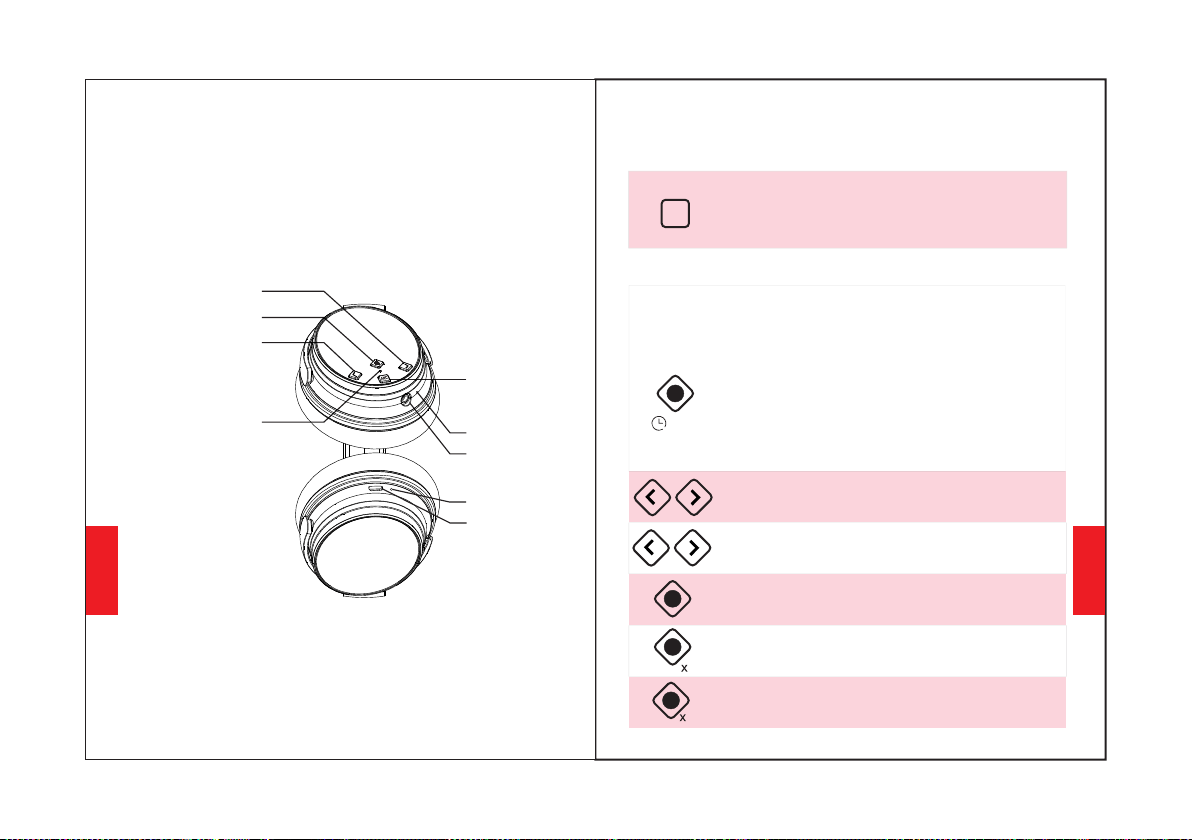
充電ポート
マイク
AUXポート
確認できる内容
ANCボタン
ボリュームアップ/次の曲
多機能ボタン
ボリュームダウン/前の曲
ANC機能を使用する
使用方法
ANCボタンを押すと、ノイズキャンセリングの有効化
(ON/OFF)ができます。
(ANCが有効化になっている時はLEDインディケーターが緑
色に点灯します。)
Bluetooth機能を使用する
1.ヘッドホンの Bluetooth を使用するには、多機能ボタン
を3-5秒間長押しすることでペアリングモードをお使い
いただけます。(LEDインディケーターは青と、点滅する赤
です)。
2.お使いの携帯電話のBluetoothを起動し、ヘッドホンの
Bluetoothペアリング名「NC25」を選択し、クリックして
ペアリングします。(LEDインディケーターライトは、正常
にペアリングすると、ゆっくりと点滅する青になります)。
3.多 機能 ボタ ンを3~5秒間押 し続 けてヘッドホンの
Bluetoothをオフにします。
押すと音量を調整します。長押しすると、次の
曲/前の曲にスキップします。
多機能ボタンを二度押しすると、着信を拒否
することができます。
多機能ボタンを押すと、音楽の再生/一時停止、
通話の応答/終了ができます。
日本語
日本語
6970
LED インディケーター
2
3-5S
ANC
音量アップボタンと音量ダウンボタンを5秒間押し
続けて、Bluetoothペアリングをクリアします
多機能ボタンを3回押して回します
低遅延ゲームモードで
充電インジケーター
機能詳細
簡単なペアリング
1.多機能ボタンを3〜5秒間長押ししてヘッドホンの
Bluetoothをオンにし、ペアリングモードに入ります。
(LEDインディケーターライトは青と赤の点滅表示です)。
2.ペアリング中は、ヘッドホンと携帯電話をできるだけ近
づけてください。
3.携帯電話のBluetoothをオンにします。携帯電話でヘッ
ドホンのBluetooth信号を検索し、「NC25」を選択して
ペアリングします。(LEDインディケーターライトは、正常
にペアリングすると、ゆっくりと点滅する青になります)
4.ペアリング手続き中にパスワード/PINコードを要求され
た場合は、「0000」(0を4つ)を入力してください。
2台目のBluetoothデバイスとペアリング
1.最初のBluetoothデバイスにヘッドホンが正常に接続さ
れ、音楽が再生されていないことを確認してください。
2.ヘッドフォンがオフになるまで多機能ボタンを押し続
け、「簡単なペアリング」の手順を続行します(ヘッドフ
ォンをペアリングモードに戻します,LEDインディケー
ターが青と赤に交互に点滅します)。
4.最初のBluetoothデバイスに戻り、再びヘッドホンとペ
アリングします。両方のデバイスはヘッドホンとペアリン
グされました。
3.「イージーペアリング」の手順に従って、2台目のデバ
イスとヘッドホンをペアリングします。
アクティブノイズキャンセリング(ANC)ON/OFF
ANCをオフにするには、ANCボタンを押します。
(ANCがオフの場合、LEDインディケーターの緑のライト
は消灯します。)
ANCを有効にするには、ANCボタンを押します。
(ANCがオンの場合、LEDインディケーターライトは緑色
になります。)
有線モード
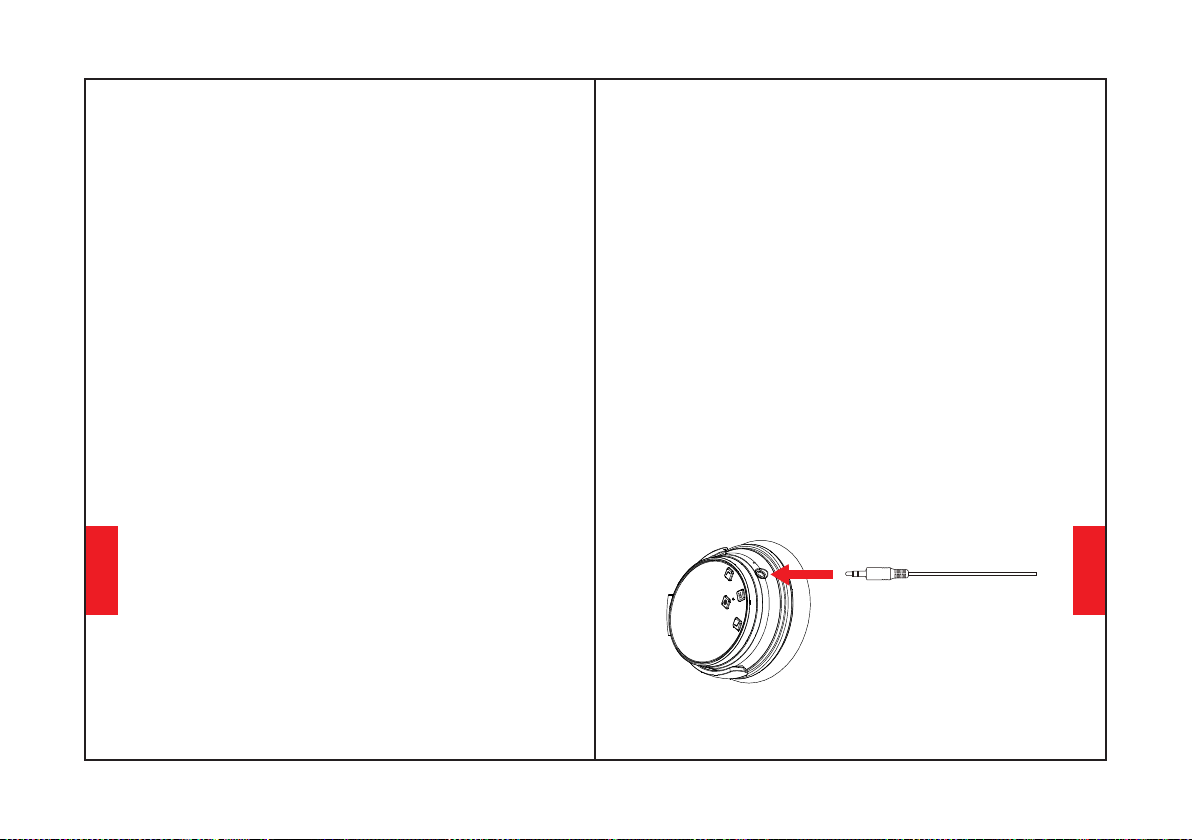
ANCは有線モードでも動作します。マイクは
Bluetoothモードでのみ動作し、有線モードでは動作しま
せん。
ヘッドホンは有線の外部音源接続用のAUX入力に対応して
います。ヘッドホンのBluetoothをオフにして、オーディ
オケーブルを差し込むだけです。任意のANC
Bluetoothヘッドホンの場合は有線モードに切り替えるた
め、バッテリ電源のサポートが必要です。
有線モードではヘッドホンの音量を調整できないことに注
意してください
日本語
日本語
7172
音声ダイヤリング
「ボリュームアップ」と「ボリュームダウン」のボタンを
同時に押すと、音声ダイヤル機能が有効になります
(iPhone Siriと一部のAndroid音声ダイヤルソフトとの互
換性あり)。
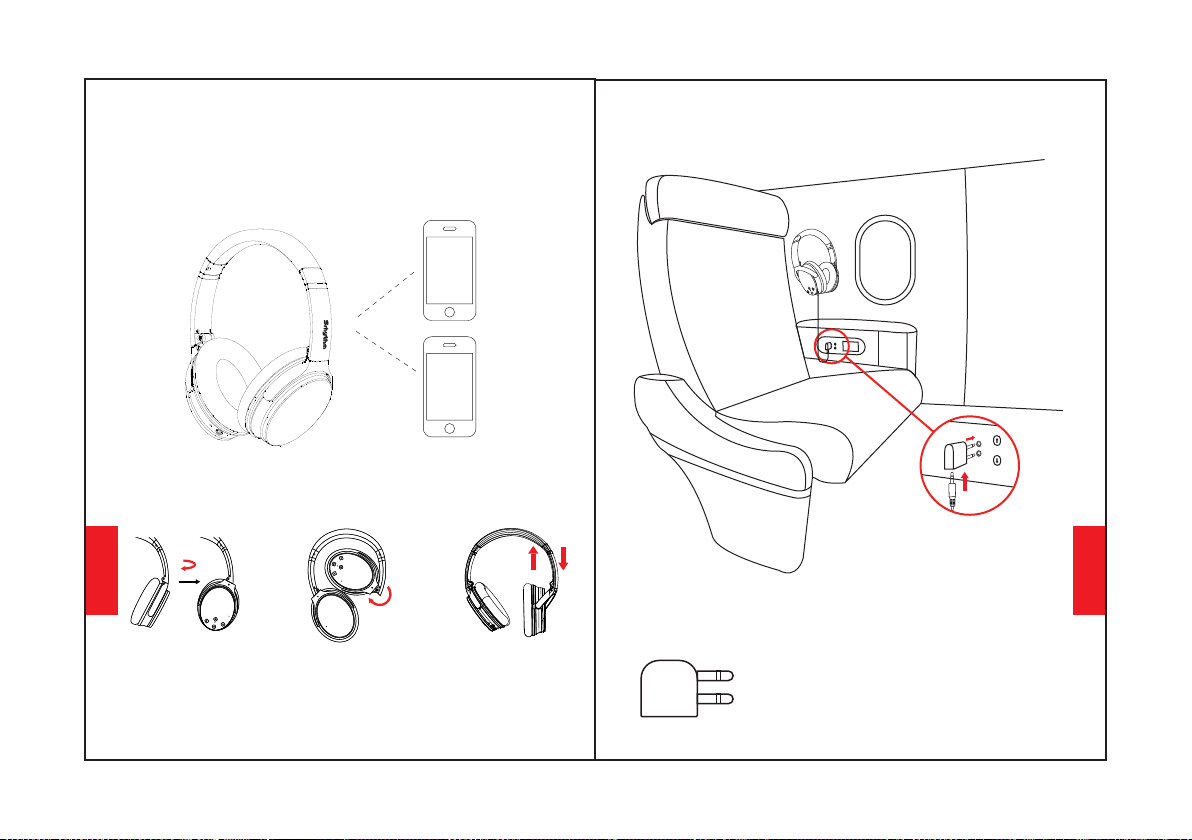
装着方法
調節可能なヘッドバンド
飛行機のアダプター接続
飛行機アダプターを航空機の座席のオー
ディオソケット(二重穴)に接続し、
3.5mmオーディオケーブルを使用して
ヘッドフォンと飛行機アダプターに接続
します。
飛行機でのみ使用し、電源ソケットに差
し込むことはできません。
警告:
日本語
日本語
7374
100°内向き回転
120°内側への折りたたみ
100°
120°

問題がある場合は、ここにヒントがあります:1。 ヘッドフォンを
フル充電します(急速充電器は使用しないでください)2。 オー
ディオケーブルをヘッドホンオーディルソケットに挿入してから
取り外して、ヘッドホンをリセットします。 または、アップグ
レードされたNC25ヘッドフォンは、充電時に自動的にリセットさ
れます。
ペアリングの削除:「ボリュームアップ」と「ボリュームダウ
ン」ボタンを同時に5秒間長押しします。
充電
お使いの携帯電話のBluetoothを起動し、ヘッドホンの
Bluetoothペアリング名NC25を選択し、クリックしてペアリング
します。(LEDインディケーターライトは、正常にペアリングする
と、ゆっくりと点滅する青になります)多機能ボタンを3~5秒長押
しすると、ヘッドホンのBluetoothがオフになります。
充電中はヘッドホンを使用しないでください。LEDインディケー
ターライトは、充電が完了している場合は、ヘッドホンの電源が切
れた状態でオフ または青色 を表示しています。
付属のType-C充電ケーブルを使用して、ヘッドホンの充電ポート
に接続します。充電ケーブルのもう一方の先端をコンピュータの
USBポートまたは6.3Vの電圧を超えないUSBのウォール充電器に接
続します。充電する前にヘッドホンのBluetoothとANC機能をオフ
にしてください。
ヘッドホン仕様
LEDインディケーター
Bluetoothオフ:青と赤のライトがオフ
ペアリング済み:青色のライトが点滅
再生:青色のライトがゆっくり点滅
充電中:赤のライトが点灯
フル充電:赤のライトがオフまたは青のライトがオン
バッテリー残量が少ない:音声プロンプトで赤いライトが
点灯
ペアリング:青と赤のライトが交互に点滅
ANC On:緑色のライトが点灯
ANC OFF:緑色のライトが消灯
技術的な仕様
•充電時間:2 時間
·Bluetoothバージョン:V5.0
•防水評価: IPX4
•周波数応答:20–20KHz
•バッテリー容量:1000mAh
•Bluetoothプロファイル:A2DP, AVRCP, HSP, HFP
•製品名: Srhythm NC25
•入力: 5V 220mAh •チップ: ATS
•使用時間: 50 時間
•Bluetooth範囲: 10m/33ft
•重量:180g •インピーダンス:32 Ω
•ドライバー直径:Φ40mm
※LEDインディケーターの色が混ざり合って他の色(ピンク、
紫など)になる場合がございますので、あらかじめご了承くだ
さい。
日本語
日本語
7576
A: これは私たちの特別な機能の一つです。ユーザーがオーディオケーブ
ルをヘッドホンのオーディオポートに差し込むと、すべての
Bluetooth機能ボタンが動作を停止し、Bluetoothがオフになります。
しかし、オーディオケーブルを移動させると、Bluetoothは再び利用可
能になります。
11.Q: Windows PCでオーディオの品質が悪くなるのはなぜですか?
A: ヘッドホンのオーディオポートにオーディオケーブルを挿入して削除
することで、ヘッドホンのBluetooth機能をリセットしします。再接続
する前に、あなたの携帯電話でヘッドホンのBluetoothペアリング名
NC25を削除/無視することをご留意ください。
12.Q:ヘッドホンの音が小さいのはなぜですか?
A: ANCとBluetoothは同じLEDインディケーターライト(光の色が異な
ります)で表示され、ANCは緑色、Bluetoothは青色で表示されます。
Bluetoothをオン/オフにする必要がある場合は、ライトの色が分かりに
くい場合に備えて、まずANCをオフにすることができます。しかし、シ
ンプルで簡単なので、何度か使っているうちに色の意味がよくわかるよ
うになります。
A: 一部のお客様からは、Windows PCでの音質の悪さを指摘されていま
す。出力デバイスを変更することで切り替えられる「ヘッドセット」と
「ヘッドホン」モードがありますので、ご注意ください。「ヘッドセッ
トモード」を選択することで、音質が飛躍的に向上します。「ヘッド
セットモード」は圧縮率の高いVOIP通話などに対応しています。それは
ヘッドホン製品のせいではなく、そのプロトコルの限界に過ぎません。
「ヘッドホンモード」でお使いいただけると、高音質でご利用いただけ
ます。
8.Q: Bluetoothが閉じたり開いたりできない場合はどうすればいいです
か?
9.Q: オーディオケーブルを接続するとBluetoothがオフになるのはなぜ
ですか?
10.Q: ヘッドホンのオン/オフができないのはなぜですか?
A:デバイスとヘッドフォンの両方の音量を上げてください。
SPOTIFYなどの一部のソフトウェアでは、イコライザーをオフにする必
要がある場合があります。そうすると、全スペクトルが通過し、音量を
簡単に調整できます。
Q&A
1.Q: ヘッドホンが携帯電話とペアリングできないのですが、なぜ
ですか?
A: ヘッドホンのバッテリーの状態を再確認してください。
3.Q: ヘッドホンの電池交換はできますか?
ヘッドホンがペアリングモードまたは再接続モードにあるかどうか
を確認してください、お使いのBluetoothデバイスのBluetooth検
索機能がオンになっているかどうかを確認してください。すべてを
確認してから、BluetoothデバイスのBluetoothメニューに移動し、
ヘッドホンのBluetoothペアリング名NC25を削除/無視し、上記の
"簡単ペアリング"の手順に従ってBluetoothを再接続しようとする
ことができます。
A: いいえ、できません。ヘッドホンは、交換できない着脱式のリチ
ウムポリマーバッテリーを内蔵しています。
4.Q: 運転中にヘッドホンは使えますか?
A: 安全のためにも、運転中にヘッドホンを使用して気が散らないよ
うにすることを強くお勧めします。
2.Q: ヘッドホンの電源が入らないのですが、なぜですか?
5.Q: ヘッドホンが時々10メートル以内にあるBluetoothデバイス
と切断されるのですが、なぜですか?
7.Q: 携帯電話のアプリで再生中のトラックの音量を、ヘッドホン
を使用して調整できないのはなぜですか?
A: コンピュータの出力チャンネルがA2DPプロファイルをサポート
しているかどうかを確認してください。また、ヘッドホンとコン
ピュータ/携帯電話の音量設定も確認してください。
6.Q:パソコンや携帯電話から音が聞こえないのはなぜですか?
A: 異なるアプリケーションソフトウェアののため、ヘッドホン
がそのアプリと全に性がない可性があります。
A: 比較的近い距離に金属素材や障害物がないか、またはお使いの環
境によって、Bluetooth接続を妨害する可能性がないかをご確認く
ださい。これは、Bluetoothはヘッドホンと他のデバイスの間にあ
る物体に敏感な無線技術であるために起こる可能性があります。
日本語
日本語
7778
Manual do usuário
2.Favor usar com cautela e cessar o uso do fone de
ouvido em situações perigosas.
3.Favor evitar o uso contínuo do produto no volume
alto para evitar danos auditivos.
4.Para sua segurança, favor não aumentar
demasiadamente o volume ao se exercitar ao ar
livre para garantir que você ouça os sons ao seu
redor.
1.Favor não usar os fones de ouvido ao dirigir e
enquanto carregam.
2.Mantenha longe de crianças para evitar danos
vindos do mal uso.
1.Use cabos originais ou certificados para o
carregamento, com voltagem de até 6.3V. Caso essa
voltagem seja excedida, mas se mantenha dentro
de 36V, a energia será cortada e o fone entrará no
modo de proteção. O fone estragará quando a
voltagem exceder 36V.
5.Não usar produtos de limpeza ou óleo corrosivos
para limpar o fone
3.Evitar derrubar o fone de ouvido e operá-lo em
temperaturas extremas. Favor usar o fone dentro
da faixa operacional de temperatura: -15 °C (5 F) –
55°C(131 F).
4.Não submergi-los em água.
6.Desligue o Bluetooth e a função ANC para poupar
energia quando não estiver usando o fone.usar o
fone de ouvido.
Instruções de Segurança
Segurança auditiva:
Segurança de Operação:
Português
7980
Português
Conteúdo
Fone de ouvido NC25*1
Estojo Portátil de
Armazenamento*1
Adaptador para Avião *1
(Usar apenas em aviões)
Cabo de Energia Tipo-C *1
Cabo de áudio *1
Adaptador para Piano
3.5mm a 6.35mm * 1
Aumentar o volume /
próxima música
Recursos
8182
Botão multifuncional
Entrada do Carregador
Indicador LED de
Bluetooth/ANC
Microfones
Entrada AUX
Abaixar Volume/
Canção Anterior
Botão ANC
Indicador de carga
Português
Português
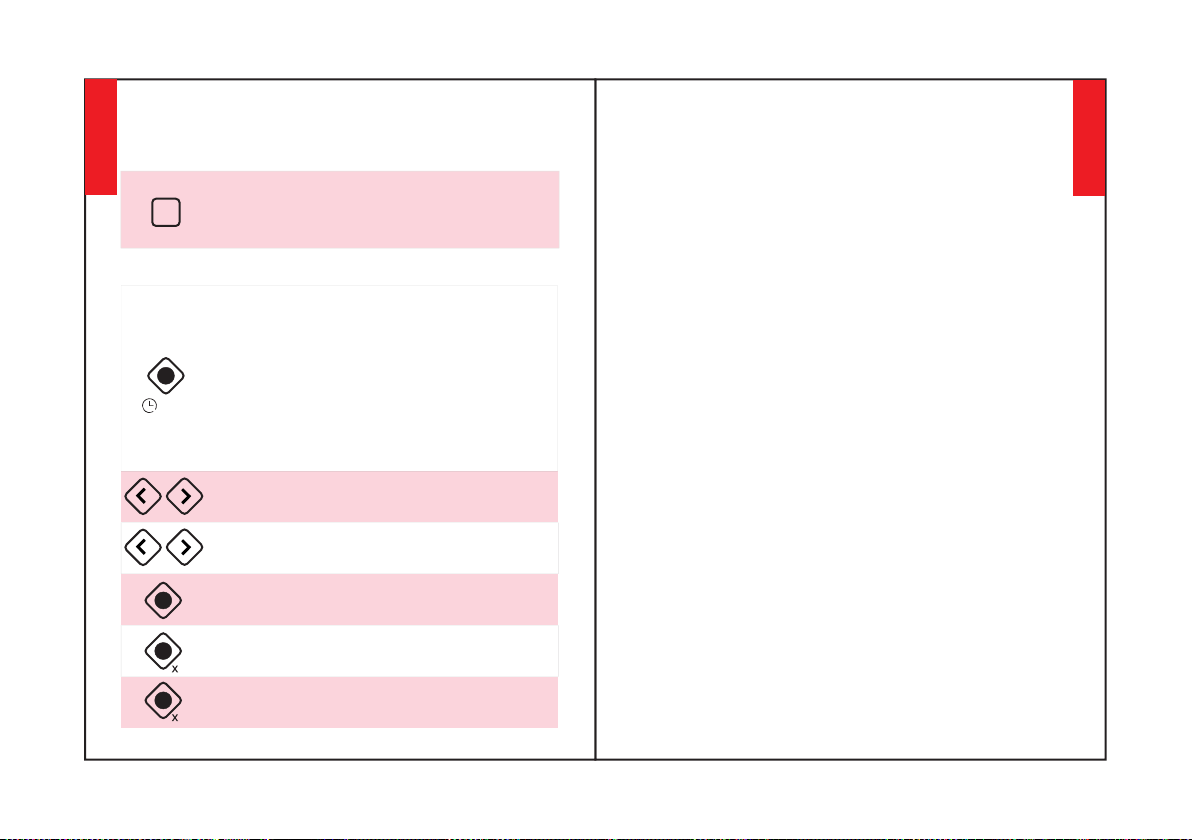
Como usar a Função ANC
Como usar
Pressione o Botão ANC para ligar ou desligar o
Cancelamento de Ruído (quando ativado, o LED de
indicação ficará verde)
Como usar a Função Bluetooth
1. Pressione o Botão Multi-função por 3-5 segundos
para ligar o fone de ouvido Bluetooth, depois entre
no modo de emparelhamento (a luz indicadora LED
será azul e vermelha piscando rapidamente).
3. Pressione o Botão Multi-função por 3-5 segundos
para desligar o Bluetooth do fone de ouvido.
2. Inicie o Bluetooth de seu telefone celular e
encontre o nome de emparelhamento de fones de
ouvido Bluetooth "Nc25" para clicar nele para
emparelhar (a luz indicadora LED ficará azul
piscando lentamente após o emparelhamento com
sucesso).
Pressione para ajustar o volume. Pressione por mais
tempo para pular para a canção seguinte/anterior.
Detalhes das Funções
Emparelhamento fácil
1. Mantenha o botão multifuncional por 3-5 segundos para
ligar o Bluetooth dos fones de ouvido, depois entre no modo
de emparelhamento (a luz indicadora LED será azul e
vermelha piscando rapidamente).
4. Se for solicitada uma senha/PIN durante o processo de
emparelhamento, favor digitar "0000" (quatro zeros).
3. Ligue o Bluetooth de seu telefone celular. Procure o sinal
Bluetooth do fone de ouvido no telefone celular e clique em
"Nc25" para emparelhar (a luz indicadora LED ficará azul
piscando lentamente após o emparelhamento com sucesso).
2. Mantenha os fones de ouvido e seu celular o mais próximo
possível durante o processo de emparelhamento.
Emparelhar a um Segundo Dispositivo
Bluetooth
Etapa 2: Emparelhe o NC25 com o segundo dispositivo via
Bluetooth.
Etapa 1: emparelhe o NC25 com o primeiro dispositivo via
Bluetooth com sucesso e, em seguida, desligue o Bluetooth
do primeiro dispositivo.
Etapa 3: ligue o Bluetooth do primeiro dispositivo e
emparelhe-o com o fone de ouvido novamente.
Agora, os dois dispositivos estão emparelhados com NC25
para facilitar a comutação.
Dê um toque duplo no Botão Multi-função para
recusar uma chamada recebida.
Pressione o Botão Multi-função para tocar/pausar
a música ou atender/encerrar uma chamada.
2
3-5S
8384
ANC
Pressione o Botão Multi-função três vezes para
ativar o modo de jogo de baixa latência.
3
Pressione por 5 segundos as teclas de mais e menos
para limpar o emparelhamento
Português
Português
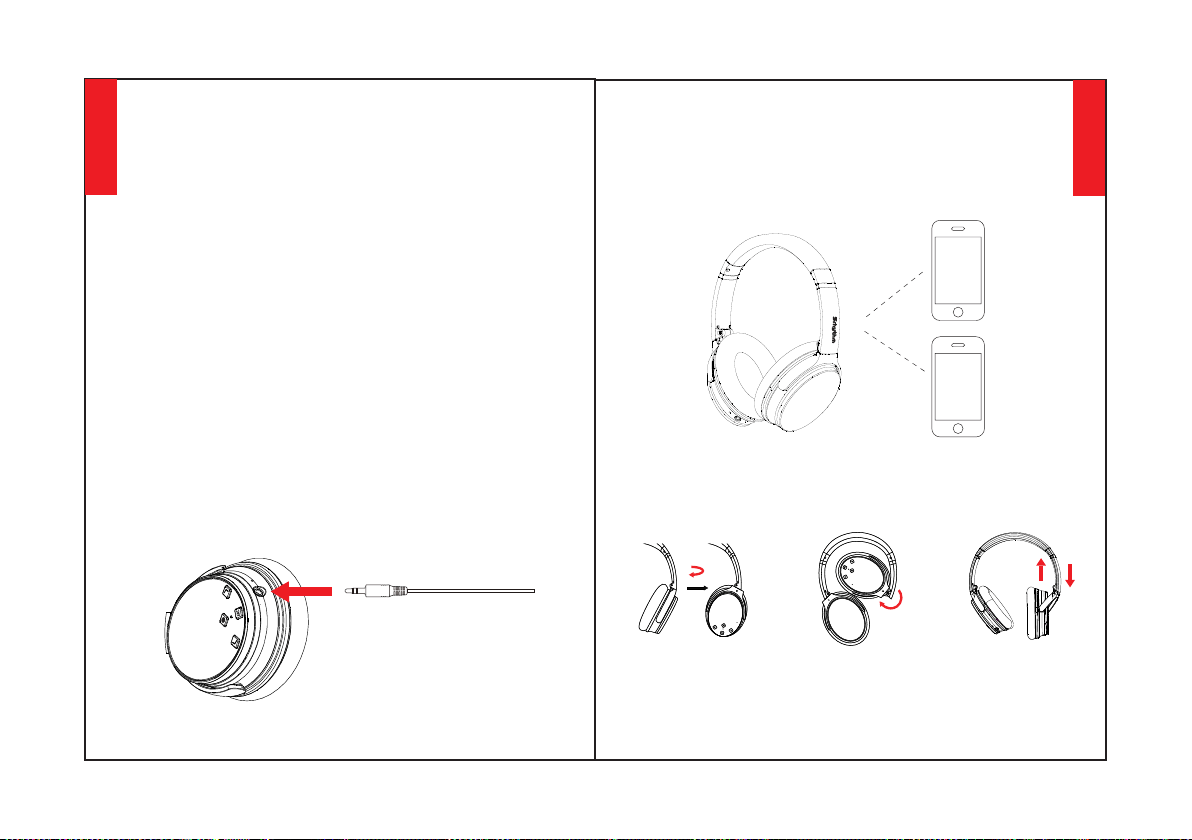
Cancelamento de Ruído (ANC) ON/OFF
(O indicador LED verde apagará quando o ANC estiver
OFF)
Para ligar o ANC, pressione o Botão ANC;
(O indicador LED ficará verde quando o ANC estiver ON)
Para desligar o ANC, pressione o Botão ANC;
Modo com fio
ANC também funciona no modo com fio. Os
microfones só funcionam no modo Bluetooth, não
no modo com fio.
Favor notar que não é possível ajustar o volume no
modo com fio.
O fone de ouvido aceita input AUX para conexão de
fonte de áudio externo com cabo. Basta desligar o
Bluetooth dos fones e conectar o cabo de áudio. Para
qualquer fone Bluetooth ANC, ainda é necessário
manter suporte de energia para a bateria no modo
com fio.
Discagem por Voz
Pressione os botões "Volume Up" e "Volume Down"
simultaneamente para ativar a função de discagem
por voz (compatível com o iPhone Siri e o software de
discagem por voz Android
Como usar
Rotação interna
de 100°
Headband
Ajustável
8586
Dobramento
interno de 120°
Português
Português
100°
120°
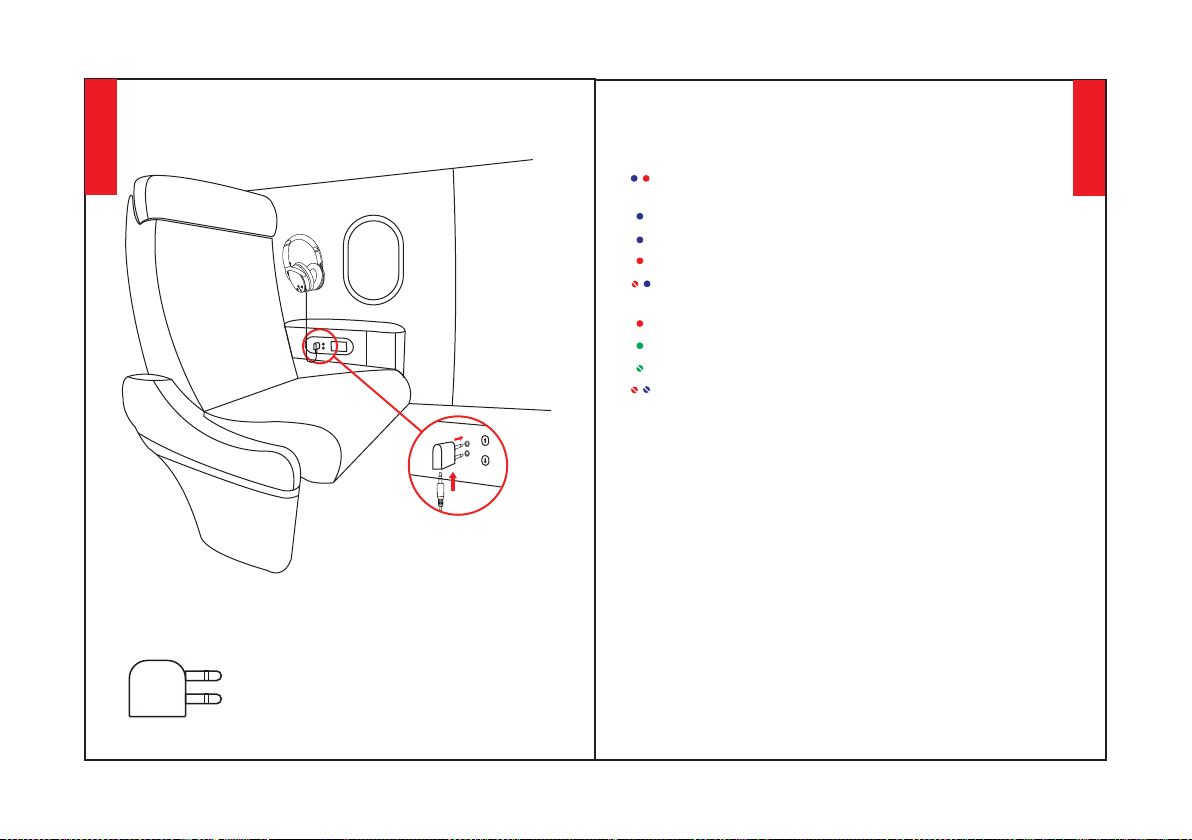
Especificações do Fone de Ouvido
Luz Indicadora LED
Pareado: Luz azul pisca.
ANC ON: Luz verde acende.
Carregando: Luz vermelha acende.
ANC OFF: Luz verde apaga.
Bluetooth OFF: Luzes vermelha e azul apagam.
Pareamento: Luzes vermelha e azul piscando
alternadamente.
Bateria baixa: Luz vermelha acende por comando de voz.
Carregamento Completo: Luz vermelha apaga e luz Azul
acende.
Tocando: Luz azul pisca lentamente.
Especificações Técnicas
•Nome do Produto: Srhythm NC25
·Tempo de carregamento: Por volta de 2 horas
·Capacidade de bateria: 1000mAh
•Versão Bluetooth: V5.0
•Alcance do Bluetooth: 10m / 33 pés
·Perfil do Bluetooth: A2DP, AVRCP, HSP, HFP
•Peso líquido: 180g •Impedância: 32 Ω
·Diâmetro do condutor: Φ40mm
·Classificação de Resistência à Água: IPX4
·Frequência de resposta: 20–20KHz
·Tempo de uso: 50 horas
·Input: 5V 220mAh ·Chip: ATS
* Por favor, note que talvez às vezes essas luzes indicadoras
de LED sejam misturadas para se tornarem outras cores (rosa,
roxo, etc.) ocasionalmente.
Adaptador de Conexão de Avião
Conecte o adaptador para avião
à tomada de áudio (dois buracos)
da cadeira da aeronave, use o
cabo de áudio de 3,5 mm para
conectar com seu fone de
ouvido e adaptador para avião.
Usar apenas no avião. Não pode ser
conectado na tomada.
Aviso:
8788
Português
Português
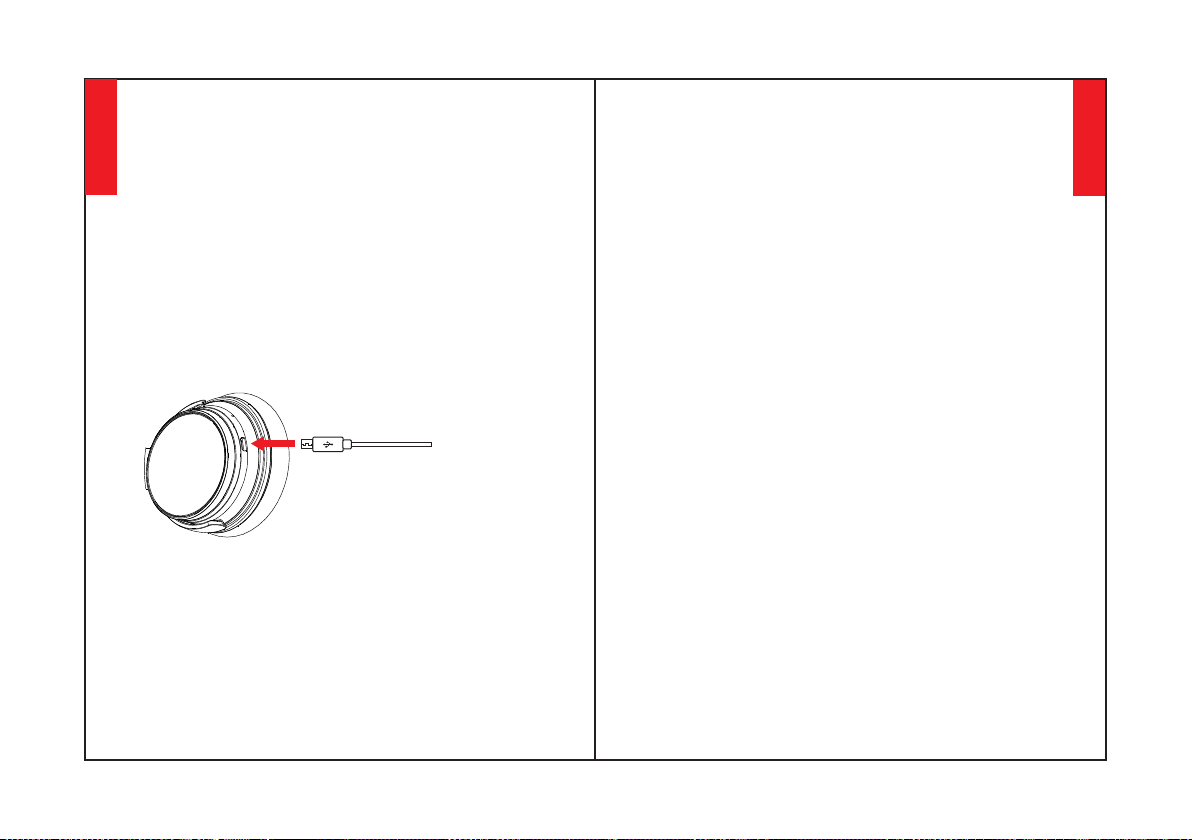
Se houver algum problema, aqui estão as dicas para você:
1. Carregue seu fone de ouvido completamente (não use
carregador rápido); 2. Reinicie o fone de ouvido inserindo
o cabo de áudio na tomada de áudio do fone de ouvido e,
em seguida, removendo-o. Ou os fones de ouvido NC25
atualizados seriam zerados automaticamente ao carregar.
Deletar emparelhamento: Mantenha ambos os botões
"Volume para cima" e "Volume para baixo"
simultaneamente por 5 segundos.
Carregando
Mantenha o botão Multi-função por 3-5 segundos para
desligar o Bluetooth do fone de ouvido.
Use o cabo de carga Tipo C incluído para conectar à porta de
carga dos fones de ouvido. Conecte a outra extremidade do
cabo de carga a uma porta USB do computador ou carregador
de parede USB sob tensão de 6,3V. Desligue a função
Bluetooth e ANC dos fones de ouvido antes de carregar.
Inicie o Bluetooth de seu telefone celular e encontre o nome
de emparelhamento de fones de ouvido Bluetooth Nc25 para
clicar nele para emparelhar (a luz indicadora LED ficará azul
piscando lentamente após o emparelhamento com sucesso).
Perguntas & Respostas
R: Devido às configurações de diferentes softwares de aplicação,
os fones de ouvido podem não ser completamente compatíveis
com alguns APPs.
1. P: Por que não posso fazer um par de fones de ouvido com
meu telefone celular?
5. P: Por que às vezes os fones de ouvido se desconectam com o
dispositivo Bluetooth dentro de 10 metros?
R: Por favor, verifique se seu fone de ouvido está em modo de
emparelhamento ou reconexão, verifique se a função Bluetooth
search (encontrar bluetooth) de seu dispositivo Bluetooth está
ligada, se tudo estiver feito, então vá para o menu Bluetooth de
seu dispositivo Bluetooth, apague/ignore o nome do
emparelhamento de fones de ouvido Bluetooth NC25.
2. P: Por que não se pode ligar os fones de ouvido?
3. P: Posso substituir a bateria do fone de ouvido?
R: Por favor, verifique novamente o estado da bateria de seu fone
de ouvido.
R: Para sua segurança, recomendamos fortemente que você não
use fones de ouvido enquanto estiver dirigindo para evitar distraç
ões.
7. P: Por que não consigo usar fones de ouvido para controlar o
volume de uma faixa tocando em um APP em meu telefone
celular?
4. P: Posso usar fone de ouvido enquanto dirijo?
R: Por favor, verifique se existem materiais metálicos ou obstá
culos dentro de um alcance relativamente próximo ou em seu
entorno que talvez interfiram com a conexão Bluetooth, porque o
Bluetooth é uma tecnologia de rádio sensível a objetos entre os
fones de ouvido e outros dispositivos.
R: Não, você não pode. Os fones de ouvido usam uma bateria de
Li-Polímero não destacável que não pode ser substituída.
6. P: Por que não consigo ouvir nenhum som do meu
computador ou telefone celular?
R: Por favor, verifique se o canal de saída de seu computador
suporta o perfil A2DP. Verifique também as configurações de
volume em seu fone de ouvido e computador/telefone móvel.
8990
Português
Português
R: Favor observar que ANC e Bluetooth são indicados pela mesma
luz indicadora LED (mas de cor diferente), com uma luz verde para
ANC e uma luz azul para Bluetooth. Se você precisar ligar/desligar
o Bluetooth, você pode desligar o ANC primeiro no caso de
confundir as luzes coloridas, mas você estará muito familiarizado
com o significado da cor da luz depois de usar poucas vezes,
porque é simples e fácil.
8. P: O que devo fazer se o Bluetooth não puder fechar ou abrir?
R: Alguns clientes mencionaram a má qualidade de áudio no
Windows PC. Por favor note que existem os modos "Headset" e
"Headphone" que você pode alternar mudando seu dispositivo de
saída. Selecionar "Headphone Mode" melhorará drasticamente a
qualidade de áudio. "Headset Mode" é projetado para chamadas
VOIP altamente comprimidas, etc. Isso não é culpa do produto de
headphone, é apenas a limitação desse protocolo. Se você estiver
no "Headphone Mode", a qualidade de áudio é fantástica.
10. P: Por que eu não consigo ligar/desligar os fones de ouvido?
R: Por favor, reinicie a função Bluetooth do fone de ouvido
inserindo um cabo de áudio na porta de áudio do fone de ouvido e
depois removendo-o. Antes de reconectar, lembre-se de
apagar/ignorar o nome do emparelhamento de fones de ouvido
Bluetooth NC25 em seu telefone celular.
12.Q:Por que o som dos fones de ouvido está tão baixo?
11. P: Por que a qualidade de áudio se torna ruim no PC
Windows?
9. P: Por que o Bluetooth é desligado quando eu conecto um
cabo de áudio?
R: Esta é uma de nossas características especiais. Quando os usuá
rios inserem um cabo de áudio na porta de áudio do fone de
ouvido, todos os botões de recurso Bluetooth param de funcionar
e o Bluetooth se desliga. Mas, o Bluetooth estará disponível
novamente quando o cabo de áudio for movido.
R: Aumente tanto o volume do dispositivo quanto o dos fones de
ouvido. Para alguns softwares como o SPOTIFY, você pode
precisar virar o equalizador para OFF, então todo o espectro será
passado e o volume será facilmente ajustável.
91
Português
사용자매뉴얼
한국어
92
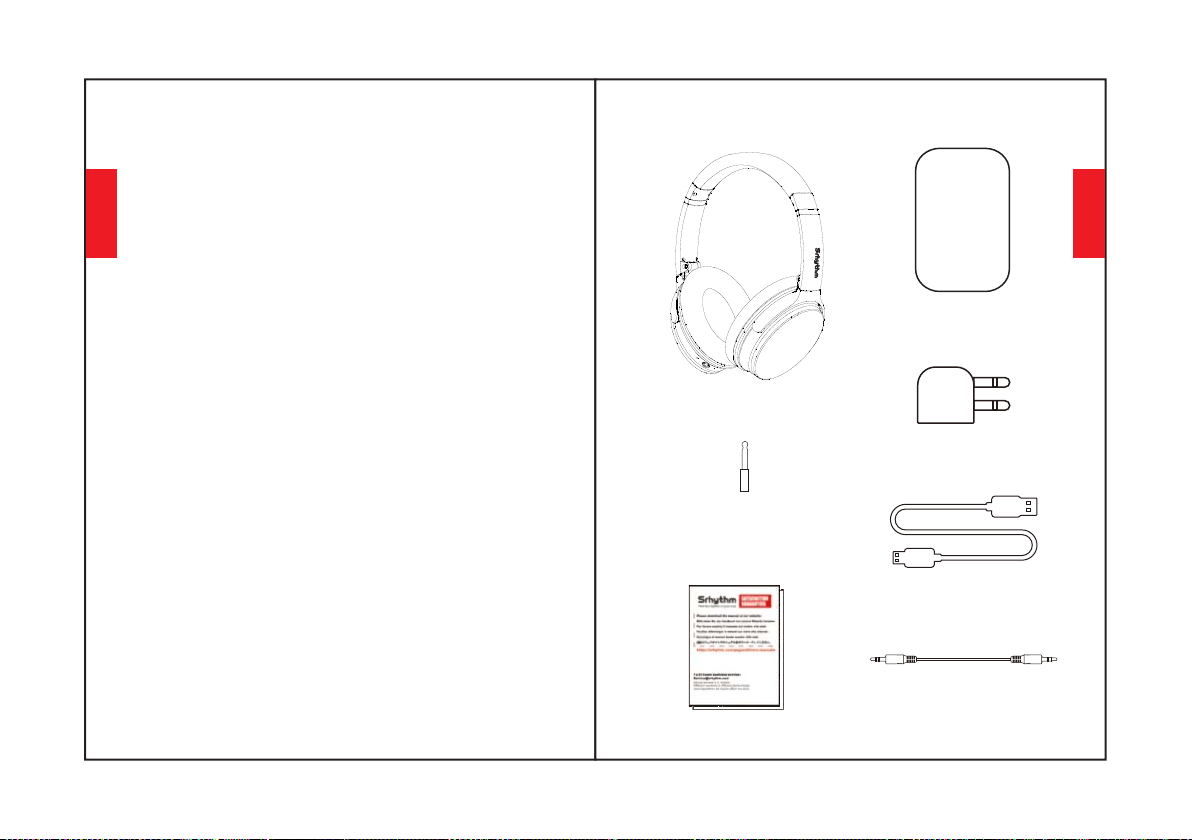
1.운전중이거나 충전 중에는 헤드폰을 사용하지 마십시오.
2.위험한 상황에서는 헤드폰 사용을 멈추거나 주의해서 사
용하십시오.
3.청력 손상을 방지하기 위해 높은 볼륨으로 장시간 듣지 마
십시오.
4.바깥에서 달리는 경우 안전을 위해, 주변의 소리가 들릴
수 있도록 볼륨을 작게 유지해주세요.
2.어린이가 접촉하지 못하도록 해주세요. 부적절한 사용으
로 인한 위험을 방지해주세요.
4. 헤드폰을 물에 담그지 마십시오.
3. 헤드폰을 떨어뜨리지 않도록 조심하고, 극한 온도에서
작동을 피하십시오. 헤드폰은 -15°C(5F) – 55°C(131F) 범
위 내에서 사용해주시길 바랍니다.
6.헤드폰 비사용 시, 전원을 절약하려면 헤드폰의 블루투스
와 ANC기능을 꺼주세요.
5.부식성 클리너/오일을 사용해서 헤드폰을 청소하지 마십
시오.
1.충전시 정품이나 6.3V 이내의 공인된 케이블을 사용해주
세요. 전압이 6.3V를 초과하거나, 36V 이내에 있을 경우, 전
원이 차단되고 보호 모드가 시작됩니다. 전압이 36V를 넘
게되면 헤드폰이 고장납니다.
안전지침
청력안전:
작동안전:
9394
한국어
한국어
박스내부구성
NC25 헤드폰*1
휴대용 케이스*1
비행기 어댑터 *1
(비행기 전용)
Type-C 충전 케이블 *1
오디오 케이블*1
3.5mm ~ 6.35mm
피아노 어댑터 *1
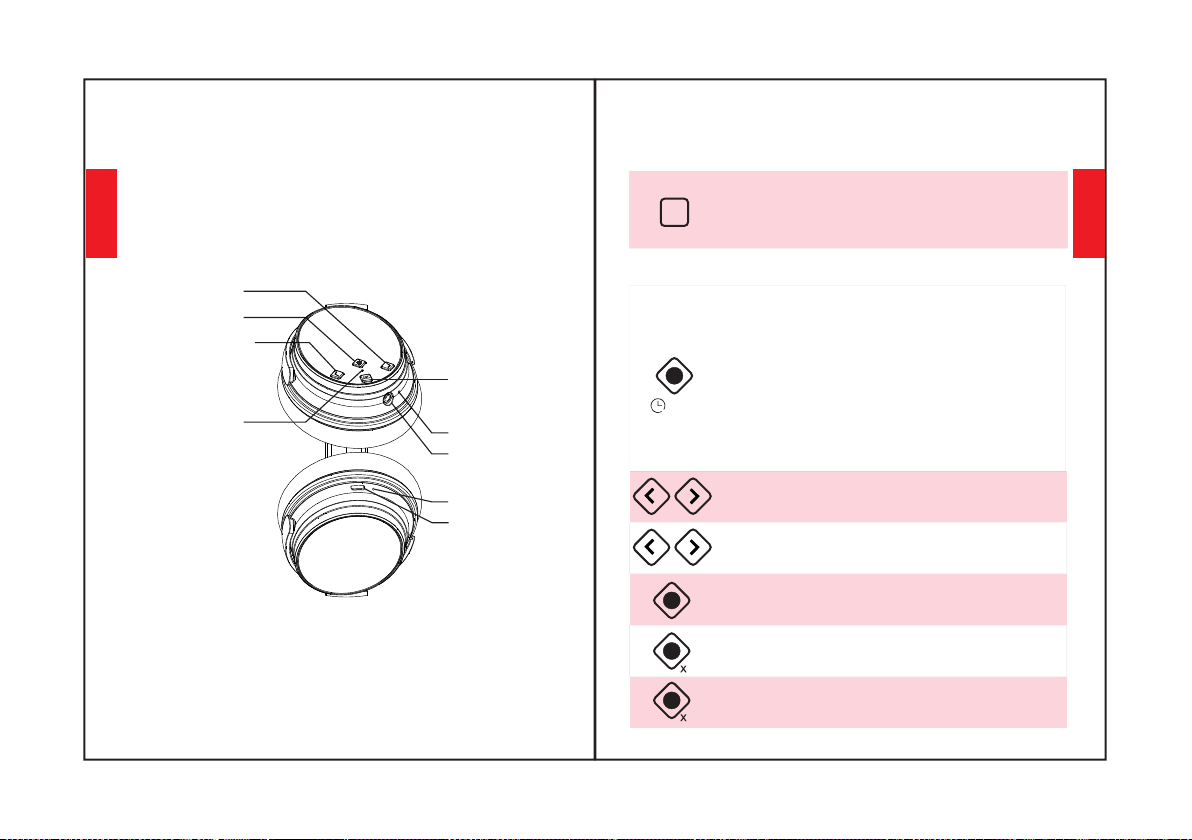
볼륨 업/다음 곡
기기표면
9596
다기능 버튼
충전 포트
블루투스/ANC LED 표시등
마이크
AUX 포트
볼륨 다운/이전 노래
ANC 버튼
충전 표시기
ANC기능 사용하기
사용방법
ANC 버튼을 눌러 노이즈 캔슬링 활성을 ON/OFF 해주
세요(ANC가 켜지면 LED 표시등이 녹색이 됩니다).
블루투스기능사용하기
2.휴대폰 블루투스를 시작하세요. 헤드폰 블루투스 페
어링 이름 "NC25"를 찾은 뒤, 클릭하면 페어링이 시작
됩니다. 페어링이 완료되면 파란색 LED 표시등이 느리
게 깜박입니다.
1.다기능 버튼을 3~5초간 누르면 헤드폰 블루투스가
켜집니다. 그러면 페어링 모드로 들어가게 됩니다.(파
란색과 빨간색 LED 표시등이 빠르게 깜박입니다.)
3.헤드폰 블루투스를 끄려면 다기능 버튼을 3~5초간
누르고 있으면 됩니다.
눌러서 볼륨을 조정할 수 있습니다. 길게 누르면
다음/이전 곡으로 건너뜁니다.
다기능 버튼을 두 번 누르면, 걸려오는 전화를
거부합니다.
다기능 버튼을 눌러 음악을 재생/일시 중지하거나
통화를 응답/종료합니다.
2
3-5S
ANC
다기능 버튼을 세 번 누르면, 짧은 대기시간
게임모드가 켜집니다.
3
"볼륨 업" 및 "볼륨 다운" 버튼을 5초 이상
길게 눌러 페어링을 해제합니다.
한국어
한국어
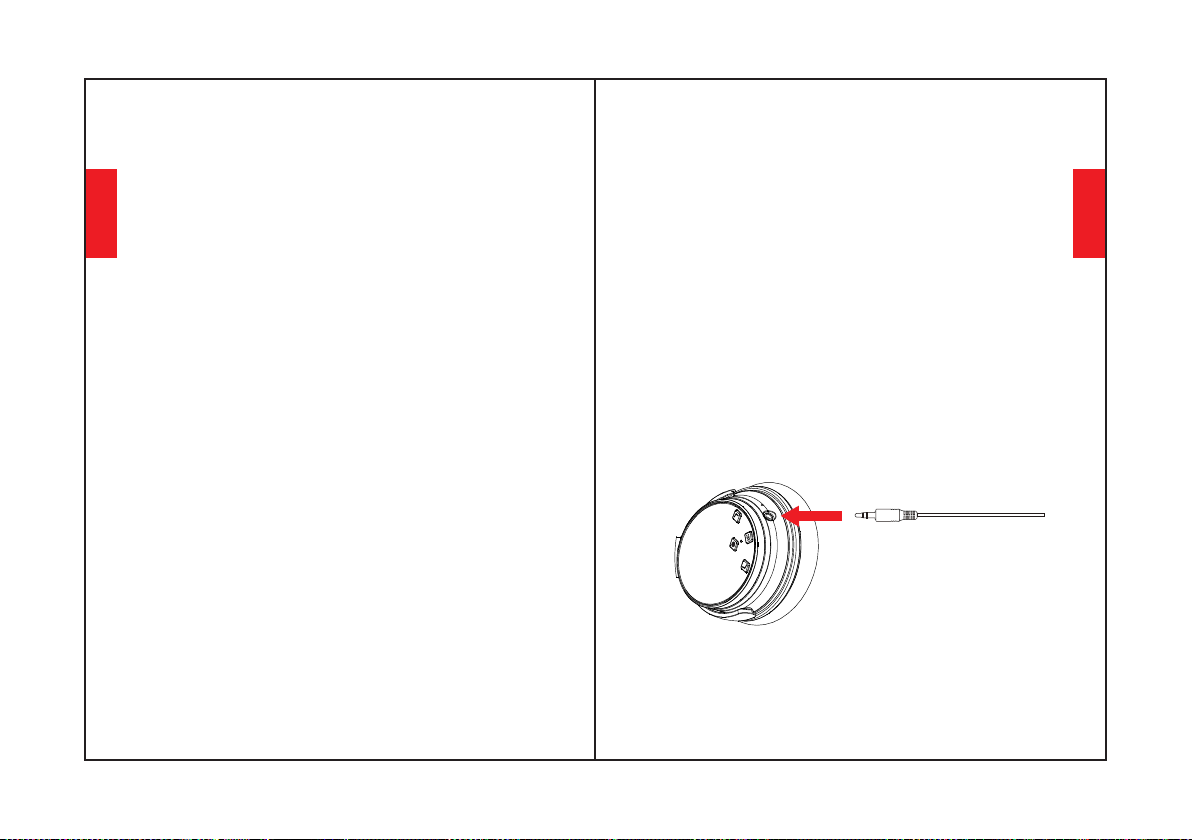
기능상세소개
쉽게페어링하기
3. 휴대폰 블루투스를 켜세요. 휴대폰에서 헤드폰 블루투스
신호를 검색하고 "Nc25"를 클릭하여 페어링하십시오. 페어링
이 완료되면 파란색 LED 표시등이 느리게 깜박일 겁니다.
2. 페어링하는 동안 헤드폰과 휴대폰을 최대한 가까이 두십시
오.
4. 페어링 중에 비밀번호/PIN 코드를 입력하라는 메시지가 표
시되면 "0000"을 입력하세요(숫자 0 네개).
1. 다기능 버튼을 3~5초간 눌러 헤드폰 블루투스를 켠 다음,
페어링 모드로 들어갑니다(파란색 빨간색 LED 표시등이 빠
르게 깜박입니다).
두번째블루투스장치에페어링하기
1단계: Bluetooth를 통해 NC25를 첫 번째 장치와 성공적으로
페어링한 다음 첫 번째 장치의 Bluetooth를 끕니다.
2단계: 블루투스를 통해 NC25를 두 번째 장치와 페어링합니
다.
3단계: 첫 번째 장치의 Bluetooth를 켜고 헤드폰과 다시 페어
링합니다.
이제 두 장치 모두 NC25와 페어링되어 쉽게 전환할 수 있습
니다.
9798
노이스캔슬링활성(ANC)ON/OFF
ANC 기능을 켜려면 ANC버튼을 눌러주세요.
ANC 기능을 끄려면 ANC 버튼을 눌러주세요.
(ANC가 꺼지면 LED 표시등이 꺼집니다.)
(ANC가 켜지면 LED 표시등이 녹색으로 바뀝니다.)
Wired Mode 유선 모드
ANC는 유선 모드에서도 작동합니다. 마이크는 블루투스 모
드에서만 작동하며 유선 모드에서는 작동하지 않습니다.
유선모드에서는헤드폰볼륨을조정할수없음에주의해주세
요.
헤드폰은 유선 외부 오디오 소스 연결을 위한 AUX 입력을 지
원합니다. 방법은 간단합니다. 헤드폰 블루투스를 끄고 오디
오 케이블을 꽂아주면 됩니다. ANC 블루투스 헤드폰의 경우,
유선 모드를 위한 배터리 전원 지원이 필요합니다.
한국어
한국어
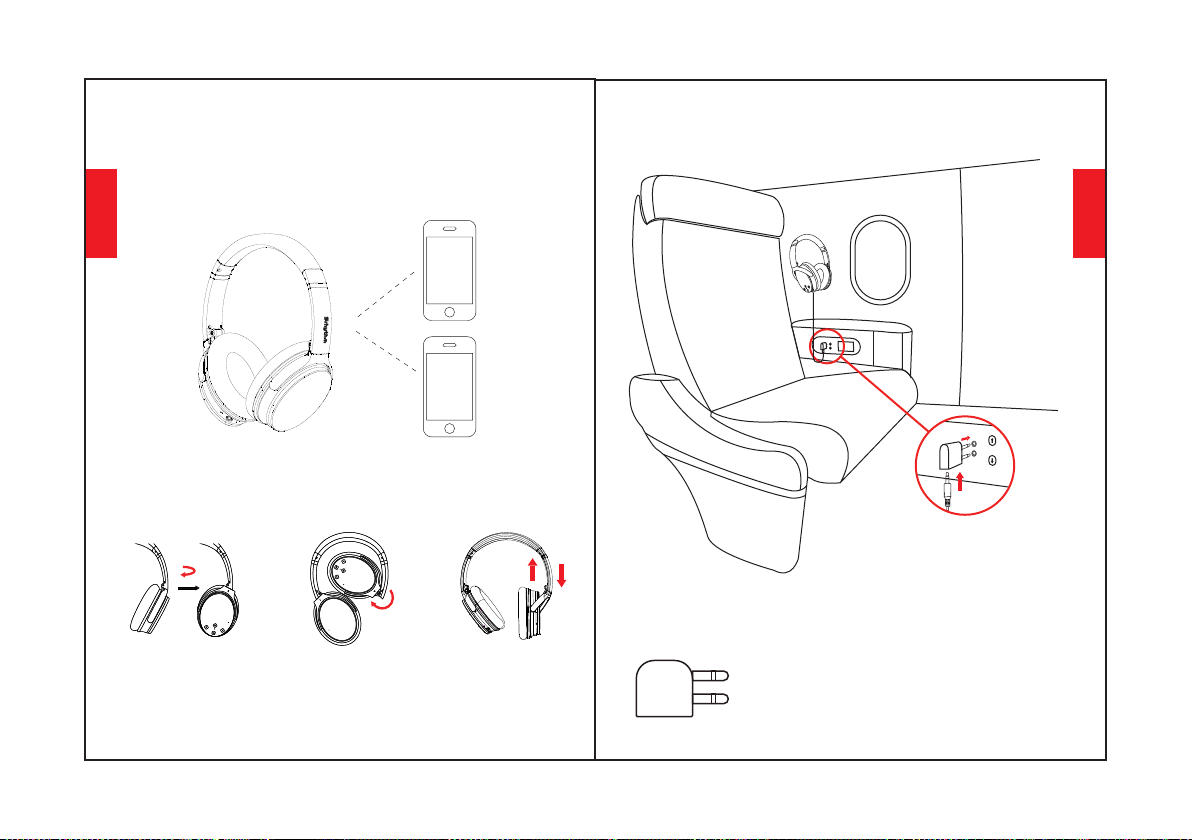
음성다이얼링
"Volume Up"과 "Volume Down" 버튼을 동시에 눌러 음성 다
이얼링 기능(iPhone Siri 및 선택한 안드로이드 음성 다이얼
링 소프트웨어와 호환)을 활성화합니다.
착용방법
안쪽으로100°회전
조절식머리띠
99100
안쪽으로120°접힘
100°
120°
비행기어댑터연결
비행기 어댑터를 항공기 시트의 오
디오 소켓(이중 구멍)에 연결하고,
3.5mm 오디오 케이블을 사용하여
헤드폰 및 비행기 어댑터에 연결합
니다.
비행기에서만 사용할 수 있으며, 전원 소켓
에는 플러그를 꽂을 수 없습니다.
경고:
한국어
한국어
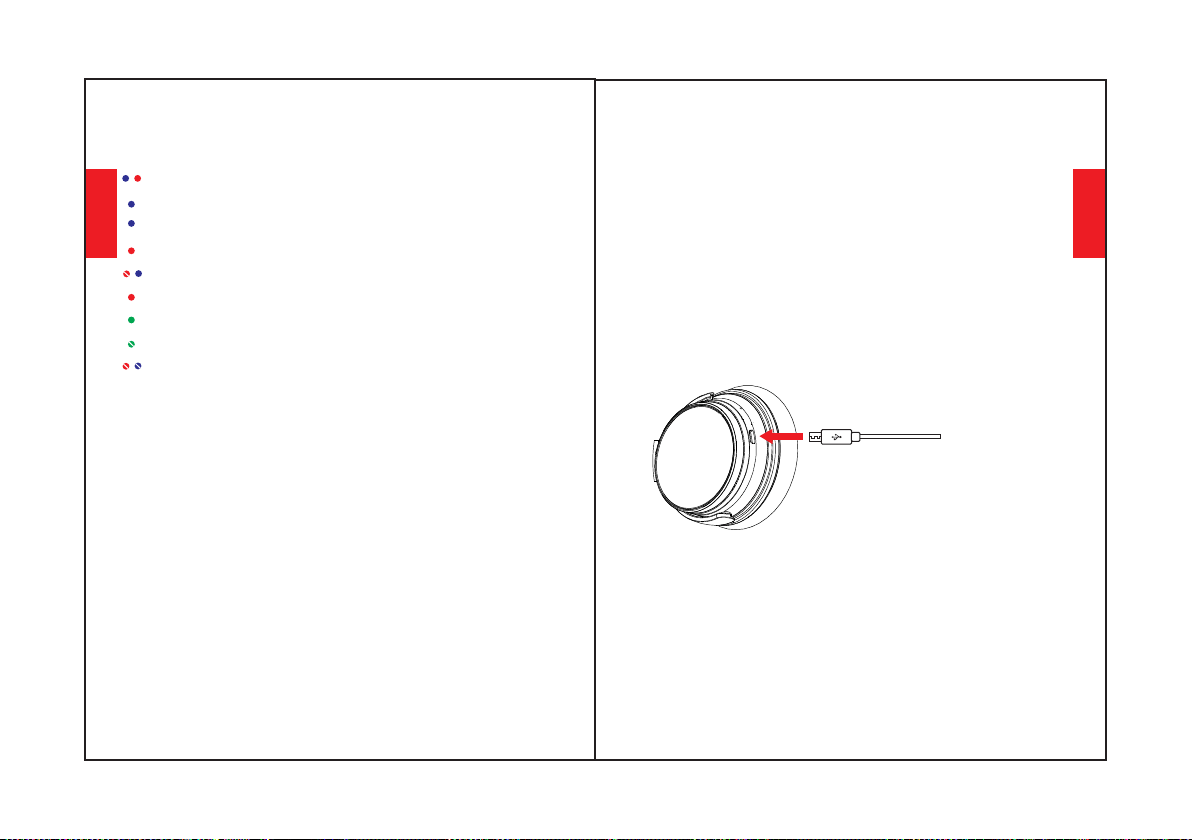
헤드폰사양
LED 표시등
ANC OFF: 녹색 불이 꺼집니다.
ANC ON: 녹색 불이 켜집니다.
페어링 됨: 파란색 표시등이 깜박입니다.
배터리 부족: 음성안내와 함께 빨간색 불이 켜집니다.
Bluetooth OFF: 파란색 및 빨간색 불이 꺼집니다.
페어링 중: 파란색과 빨간색 표시등이 번갈아 깜박입니다.
충전중: 빨간색 불이 켜집니다.
충전완료: 빨간색 불이 꺼지거나 파란색 불이 켜집니다.
재생중: 파란 불이 천천히 깜박입니다.
기술사양
•제품명:SrhythmNc25
•배터리용량:1000mAh
· Input: 5V 640mAh · Chip: ATS
•블루투스버전:V5.0
•블루투스프로필:A2DP,AVRCP,HSP,HFP
•블루투스범위:10m/33ft
•방수등급:IPX4
•중량:180g•임피던스:32Ω
•충전시간:약2시간
•주파수응답:20-20KHz
•드라이버지름:Φ40mm
•사용시간:50시간
※ 다양한 색깔이 지원됨에 따라, LED 표시등의 색깔이 서로
혼합되어 다른 색(핑크, 퍼플 등)으로 보일수도 있습니다. 이
점에 유의해 사용해주시길 바랍니다.
101102
페어링삭제:"VolumeUp"및"VolumeDown"버튼을동시
에5초간누르고있습니다.
만약문제가발생할경우다음팁을참조하십시오:1.헤드폰을
완전히충전해주세요(고속충전기사용제외).2.헤드폰오디
오소켓에오디오케이블을삽입하여헤드폰을리셋해주세요.
리셋후케이블을뽑으세요.그외업그레이드된NC25헤드폰
은충전시자동으로리셋됩니다.
충전
동봉된 Type-C 충전 케이블을 헤드폰 충전 포트에 연결해 주세
요. 충전 케이블의 다른 쪽 끝을 컴퓨터 USB 포트나 6.3V 전압
이하의 USB벽면 충전기에 연결해 주세요. 충전하기 앞서 헤드
폰 블루투스 및 ANC 기능을 꺼주시고, 충전 중에는 헤드폰을
사용해선 안됩니다. 헤드폰의 전원이 꺼진 상태에서는 충전상
태에 따라 LED 표시등이 꺼지거나 파란색이 됩니다.
휴대폰 블루투스를 시작하고, 헤드폰 블루투스 페어링 이름
NC25를 찾아 클릭하면 페어링이 시작됩니다(페어링이 완료되
면 파란색 LED 표시등이 천천히 깜박입니다).
다기능 버튼을 3~5초간 누르고 있으면 헤드폰 블루투스가 꺼
지게 됩니다.
한국어
한국어
Q&A
1. Q: 휴대폰과 헤드폰이 페어링 되지 않습니다
A: 헤드폰이 페어링 모드인지 재연결 모드인지 확인해주세요. 블루투
스 블루투스 검색 기능이 켜져 있는지 확인한 다음, 블루투스 메뉴로
이동하여 헤드폰 블루투스 페어링 이름 NC25를 삭제하거나 무시하세
요. 그런 다음 위의 "쉽게 페어링하기" 단계에 따라 블루투스를 다시 연
결할 수 있습니다.
2. Q: 헤드폰이 켜지지 않습니다
A: 헤드폰 배터리 상태를 재확인 해주세요.
3. Q: 헤드폰 배터리를 교체할 수 있나요?
6. Q: 컴퓨터나 핸드폰에서 소리가 들리지 않을 경우
A: 가까운 거리에 금속 소재같은 블루투스 연결을 방해하는 장애물이
있는지 확인하십시오.블루투스는 헤드폰과 다른 장치 사이의 물체에
민감한 무선 기술이기 때문에 이러한 현상이 발생할 수 있습니다.
5. Q: 10m 이내에서 헤드폰이 블루투스 기기와 연결이 끊기는 이유는
무엇입니까?
A: 고객님의 안전을 위해, 운전중 헤드폰 사용 자제를 강력히 권고 드
립니다.
7. Q: 왜 휴대폰 앱에서 재생되는 트랙의 볼륨을 헤드폰에서 조절할
수 없는 걸까요?
4. Q: 운전중 헤드폰을 사용해도 될까요?
A: 안됩니다. 헤드폰은 교체할 수 없는 내장형 분리불가형 Li-Polymer
배터리를 사용합니다.
A: 애플리케이션 소프트웨어 구성이 다르기 때문에 일부 앱과 완전히
호환되지 않을 수 있습니다.
A: 컴퓨터의 출력 채널이 A2DP 프로필을 지원하는지 확인해주세요.
헤드폰과 컴퓨터/휴대폰의 볼륨 설정도 확인하십시오.
103104
8. Q: 블루투스가 닫히거나 열리지 않는 경우
9. Q: 오디오 케이블을 연결했을 때 블루투스가 꺼지는 이유는 무엇
입니까?
11. Q: Windows PC 에서 오디오 음질이 떨어집니다
A: 이것은 저희 제품의 특별 기능입니다. 사용자가 헤드폰 오디오 포트
에 오디오 케이블을 삽입하면, 모든 블루투스 기능 버튼이 작동을 중지
하고 꺼지게 됩니다. 오디오 케이블을 뽑으면 다시 블루투스를 사용할
수 있습니다.
10. Q: 헤드폰을키거나끌수없습니다
A: 헤드폰 오디오 포트에 오디오 케이블을 삽입하여 블루투스 기능
을 리셋한 후, 케이블을 뽑아주세요. 다시 연결하기 앞서, 휴대폰
에서 헤드폰 블루투스 페어링 이름 NC25를 삭제/무시해주세요.
A: ANC와 블루투스는 동일한 LED 표시등에서 다양한 색으로 표시됩
니다. ANC는 녹색, 블루투스는 파란색으로 표시됩니다. 만약 블루투
스를 키거나 끌 경우, 먼저 ANC를 끔으로서 표시등 색상 혼동을 피할
수 있습니다 하지만 간단하고 쉽기 때문에 몇 번의 사용 후에 색상 표시
에 매우 익숙해질수 있을 겁니다.
A: 일부 고객들은 Windows PC 사용시 음질이 나쁘다고 합니다. 출력
장치를 변경하여 전환할 수 있는 "헤드셋" 및 "헤드폰" 모드가 있는 것
을 기억해주세요. "헤드폰 모드"를 선택하면 오디오 음질이 크게 향상
될 것입니다. "헤드셋 모드"는 고도로 압축된 VOIP 통화 등을 위해 설
계되었습니다. 이는 제품 품질의 문제가 아닌, 규약의 한계일 뿐입니다.
"헤드폰 모드"로 설정을 해주시면 오디오 음질이 아주 좋아질 것입니다.
12.Q:헤드폰볼륨이너무작습니다
A: 디바이스와 헤드폰 볼륨을 모두 높여주세요. SPOTIFY와 같은 일부
소프트웨어의 경우 이퀄라이저 전원을 OFF로 해주셔야, 전체 스펙트
럼이 통과되어 쉽게 볼륨을 조정할 수 있습니다.
한국어
한국어
ךירדמ שמתשמל
.atהניעטו הגיהנ ןמזב תוינזואב שמתשהל אל אנ.1
קזנ עונמל ידכ הובג םוילװב בר ןמז ךשמב ןיזאהל אל אנ.3
.העימשל
בצמב תוינזואב שמתשהל קיספהלו תוריהזב שמתשהל אנ.2
.ןכוסמ
ידמ הובג עמשה תמצוע תא תולעהל אל אנ, ךתוחיטב ןעמל.4
.הביבסה תא עומשל לכותש חיטבהל ידכ ץוחב הציר ןמזב
אנא. תינוציק הרוטרפמטב הלעפהו תוינזוא תלפהמ ענמיה.3
סויזלצ תולעמ: 55-15 הרוטרפמט חװטב תוינזואב שמתשה
חװטב חתמב הניעטל םירשואמ וא םײרוקמ םילבכב שמתשה.1
לע הלעי חתמה רשאכ הנגה בצמל סנכױ קתוני חתמה 6.3V. לש
36V.לעמ חתמה רשאכ דובעל וקיספי תוינזואה 36V. דע6.3V
.ןוכנ אל שומישמ הנכס עונמל ידכ םידלימ קחרה.2
.םימל תוינזואה תא סינכהל ןיא.4
למשחב ךוסחל ידכ ANC תײצקנופו Bluetooth תוינזוא הבכ.6
.תוינזואב שמתשמ ךניא רשאכ
תוינזוא ױקינל ןמש/ױקינ רמוחב שמתשהל ןיא.5
תוחיטב תוארוה
: העימש תוחיטב
:תילועפת תוחיטב
105106
תירִבְﬠִ
תירִבְﬠִ
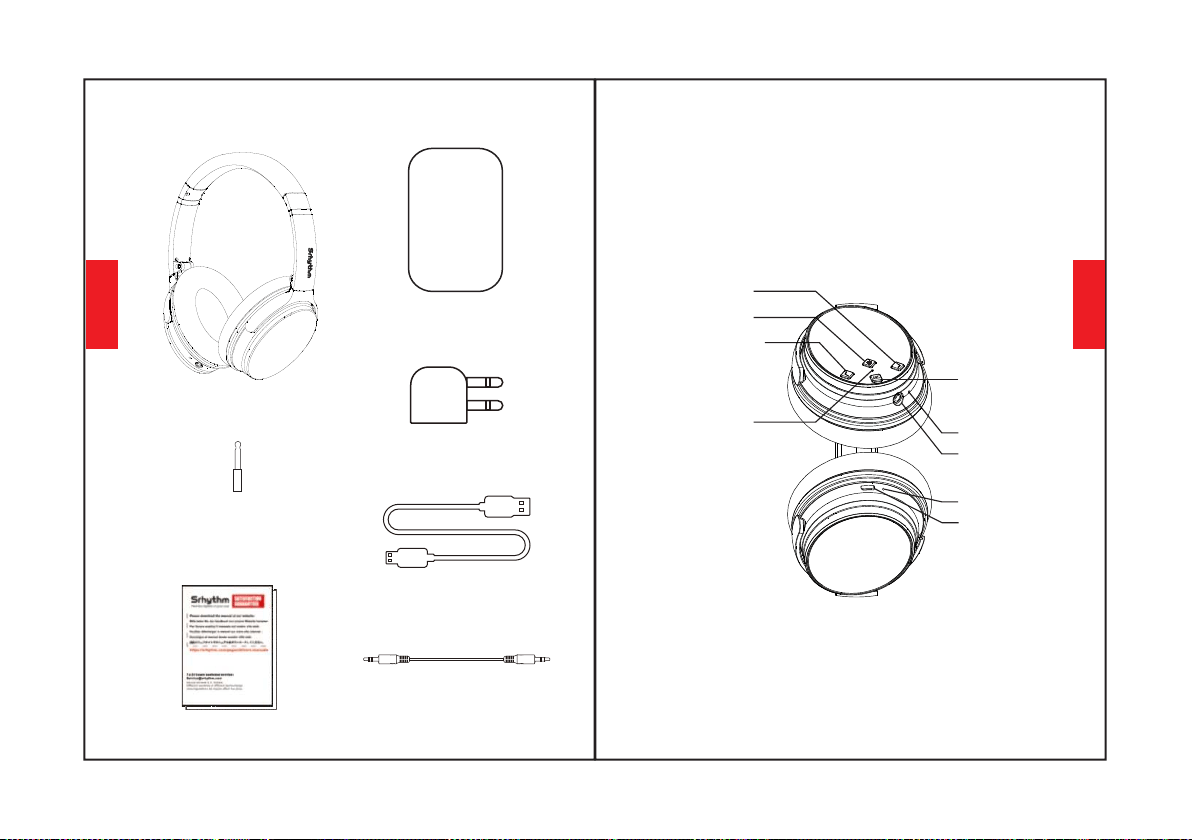
המ שי אספוקב
NC25תוינזוא
האישנ קית
סוטמל םאתמ
(סוטמ רובע קר שומישל)
Cהניעט לבכ
עמש לבכ
מ"מ - 6.35 מ"מ 3.5 רתנספל םאתמ
אבה רישה/עמשה תמצוע תרבגה
ןושאר טבמב
107108
יתילכת-בר רותפכ
הניעט עקש
Bluetooth/ANC LEDיװיח תירונ
םינופורקימ
AUXתאיצי
םדוקה רישה /עמשה תמצוע תכמנה
ANCרותפכ
הניעט ןװחמ
תירִבְﬠִ
תירִבְﬠִ
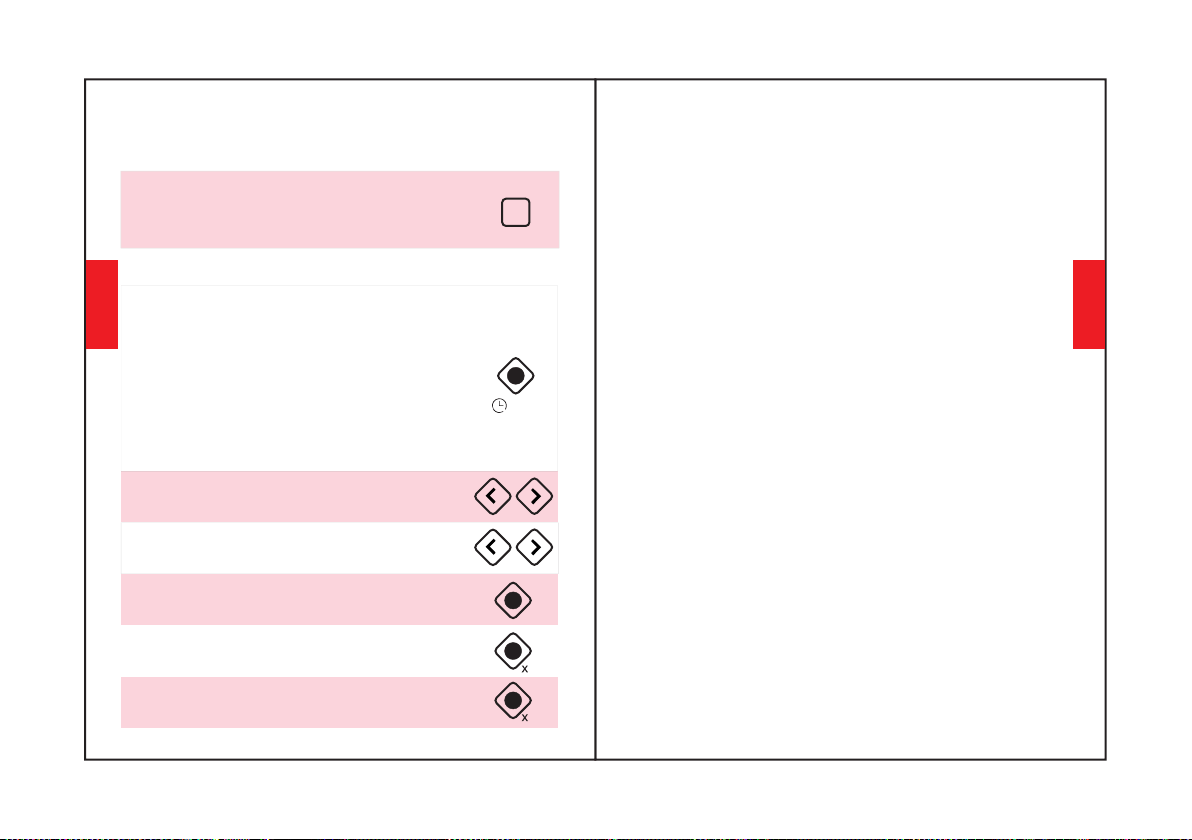
ANCתײצקנופב שמתשה
שמתשיהל ךיא
. םישער לוטיב תא תובכל/ליעפהל ידכ ANC ןצחל לע ץחל
(לעפומ ANC רשאכ הקורי היהת יװיחה תירונ)
Bluetoothתײצקנופב שמתשה
ידכ תוינש 3-5 ךשמל יתילכת-ברה ןצחלה תא קזחה1.
בצמל סנכיה ןכמ רחאלו-Bluetooth, ה תא ליעפהל
.(תוריהמב םודאו לוחכב בהבהת יװיחה תירונ). המאתה
ידכ תוינש 3-5 ךשמל יתילכת-ברה ןצחלה תא קזחה3.
-Bluetooth.ה תא תובכל
תא אצמו ךלש דײנה ןופלטה לש-Bluetooth ה תא לעפה2.
ידכ וילע ץחל "Nc25", תוינזואה לש-Bluetooth ה
רחאל תויטיאב לוחכב בהבהת יװיחה תירונ).םיאתהל
.(החלצהב המאתהה
.לוקה תמצוע תא ןנװכל ידכ ץחל
.םדוקה/אבה רישל גלדל ידכ הכורא הציחל ץחל
היצקנופ יטרפ
הלק המאתה
אנא, המאתהה ךילה ךלהמב PIN דוק/המסיס ןיזהל שקבתת םא.4
.(םיספא העברא)"0000”ןזה
תא ליעפהל ידכ תוינש 3-5 ךשמל יתילכת-ברה ןצחלה תא קזחה.1
יװיחה תירונ).המאתה בצמל סנכיה ןכמ רחאלו-Bluetooth, ה
(תוריהמב םודאו לוחכב בהבהת
רשפאה לככ בורק ךלש דײנה ןופלטה תאו תוינזואה תא רומש.2
.המאתהה ךלהמב
תוא תא שפח. ךלש דײנה ןופלטה לש-Bluetooth ה תא לעפה.3
ידכ "Nc25" לע ץחלו דײנה ןופלטב תוינזואה לש-Bluetooth ה
המאתהה רחאל תויטיאב לוחכב בהבהת יװיחה תירונ).םיאתהל
(החלצהב
ינשה-Bluetooth ה ןקתהל םאתה
Bluetooth. תועצמאב ינשה רישכמל NC25 תא דמצ.2
Bluetooth תועצמאב ןושארה רישכמל-NC25 ה תא רבח.1
. ןושארה ןקתהה לש-Bluetooth ה תא הבכ ןכמ רחאלו החלצהב
בוש ותוא םאתהו ןושארה רישכמה לש-Bluetooth ה תא לעפה.3
. תוינזואל
.תסנכנ החיש תוחדל ידכ יתילכת-ברה ןצחלה לע םײמעפ ץחל
ליעפהל ידכ יתילכת-ברה ןצחלה לע ץחל
.החיש םײסל/תונעל וא הקיזומ תוהשהל/
2
3-5S
109110
ANC
ליעפהל ידכ םימעפ שולש יתילכת-ברה ןצחלה לע ץחל
ךומנ ןויבח םע קחשמ בצמ תא
3
םינצחלה לע הכורא הציחל ץחל
ךשמל" לוקה תמצוע תדרוה"ו" לוקה תמצוע תרבגה "
המאתהה תא תוקנל ידכ תוינש-5 מ רתוי
תירִבְﬠִ
תירִבְﬠִ
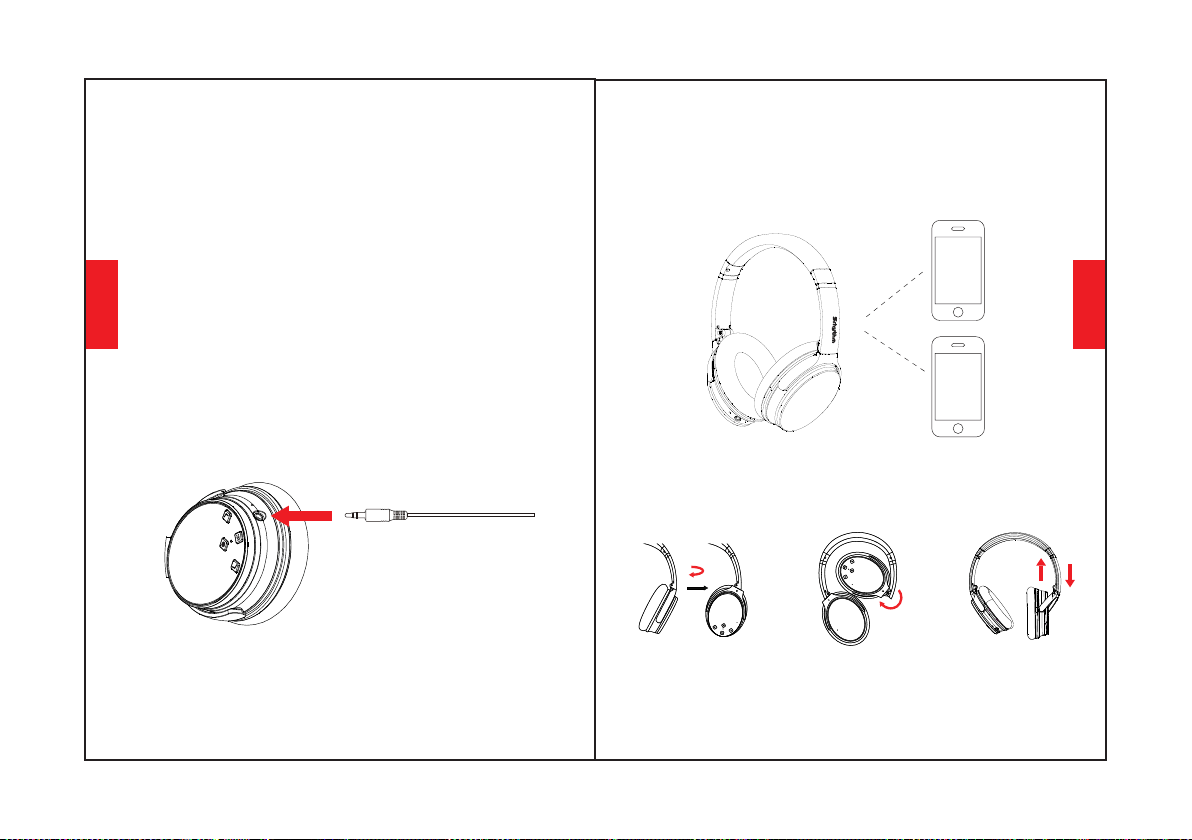
. ױביכ/הלעפה (ANC) ליעפ םישער לוטיב
(.ױבכ ANC רשאכ ױבכ היהי LED יװיח לש קוריה עבצה)
ANC;ןצחל לע ץחל ANC, תא ליעפהל ידכ
ANCןצחל לע ץחל ANC, תא תובכל ידכ
(.לעופ ANC רשאכ הקורי היהת יװיחה תירונ)
יװק בצמ
ךילעש לכ. יװק ינוציח עמש רוקמ רוביחל AUX תסינכ תכימת
רובע. עמשה לבכ תא רבחלו-Bluetooth ה תא תובכל אוה תושעל
.יװק בצמ רובע הללוסב ךרוצ שי ANC Bluetooth, תוינזוא לכ
ילוק גויח
תמצוע תכמנה"ו" עמשה תמצוע תרבגה "םינצחלה ינש לע ץחל
םאות (ילוקה גויחה תײצקנופ תא ליעפהל ידכ תינמז-וב" עמשה
(.דיאורדנא לש ילוק גויח תנכותלו Siri ןופײאל
שובלל ךיא
המינפ תולעמ 100 לש בוביס
ןנװכתמ שאר טרס
111112
המינפ תולעמ 120 לופיק
100°
120°
בצמב קר םילעופ םינופורקימ. יװק בצמב םג לעופANC
.יװק בצמב אלBluetooth,
.יװק בצמב תוינזואב לוקה תמצוע תא ןנװכל ןתינ אלש בל םיש
תירִבְﬠִ
תירִבְﬠִ
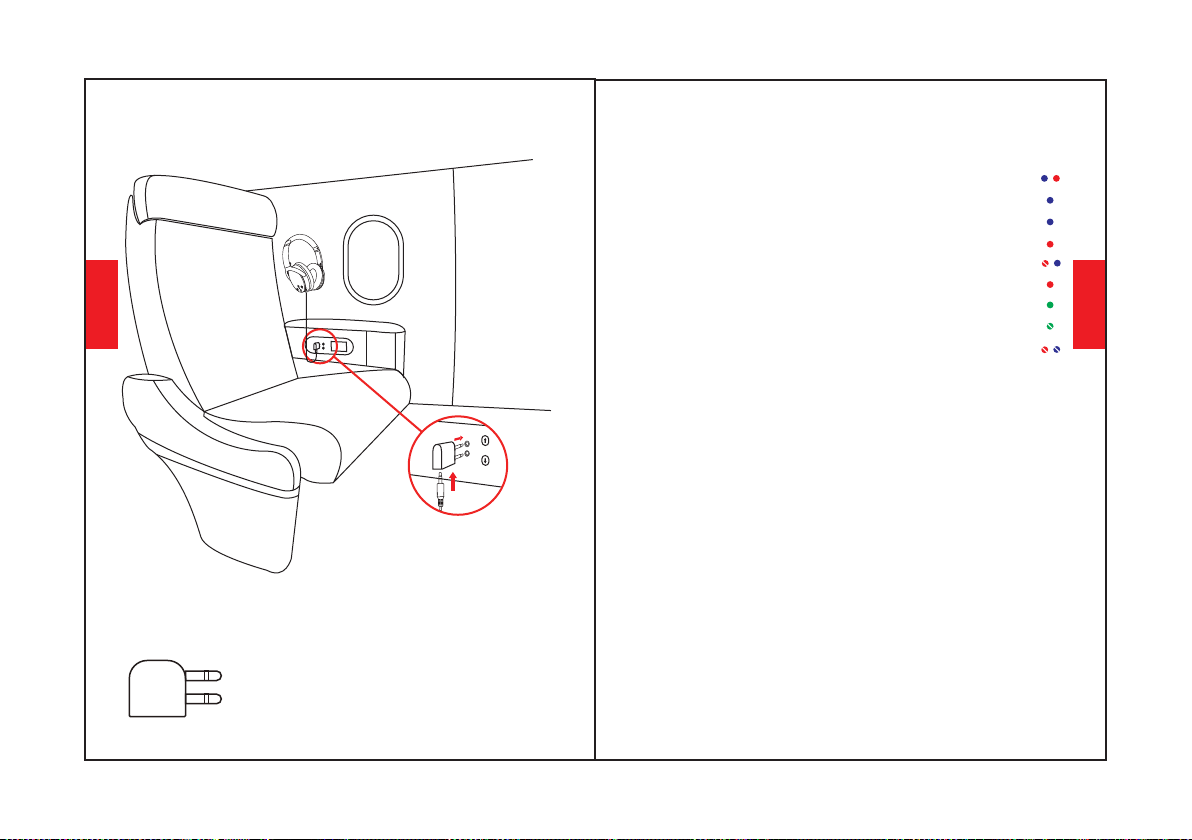
תוינזוא טרפמ
LEDיװיח תירונ
.ןיגוריסל םיבהבהמ םימודאו םילוחכ תורוא: המאתה
.קלדנ לוחכה רואה וא הבכנ םודאה רואה: האלמ הניעט
.תויטיאב בהבהמ לוחכה רואה: קחשמ
.בהבהמ לוחכ רוא: םאתומ
.קלדנ קורי רוא: לעופANC
.םיבכנ םימודאו םילוחכ תורוא: ױבכBluetooth
.הבכנ קוריה רואהANC OFF:
.קלדנ םודא רוא: הניעט
.תילוק היחנה םע תקלדנ המודא הרונ: השלח הללוס
ינכט טרפמ
Srhythm Nc25:רצומה םש•
1000mAh:הללוס תלוביק•
32 Ω: הבכע•
לגר'/33 מ 10 Bluetooth: חװט•
תועש 50: שומיש ןמז•
םרג 180 : יקנ לקשמ•
20–20KHz : רדת תבוגת•
: 5V 640mAh טלק•
מ"מΦ40: ןקתהה רטוק•
Bluetooth V5.0 : תסרג•
םײתעשכ: הניעט ןמז•
A2DP, AVRCP, HSP, HFP Bluetooth: ליפורפ•
: IPX4םימל תודימע•
םיעבצל ךופהױ בברעתי הז יװיח עבצ םימעפל ילואש בל םיש אנא*
.םעפ ידמ(' וכו לוגס, דורו) םירחא
סוטמל םאתמ רוביח
וידוא עקשל סוטמה םאתמ תא רבח
שמתשה, סוטמה לש )הלופכ הסינכ(
תוינזואה תא רבחל ידכ מ"מ 3.5 לבכב
.ךלש סוטמה םאתמל
עקשל רבחל ןתינ אל, סוטמ רוביחב קר שמתשה
.למשחה
:הרהזא
113114
תירִבְﬠִ
תירִבְﬠִ
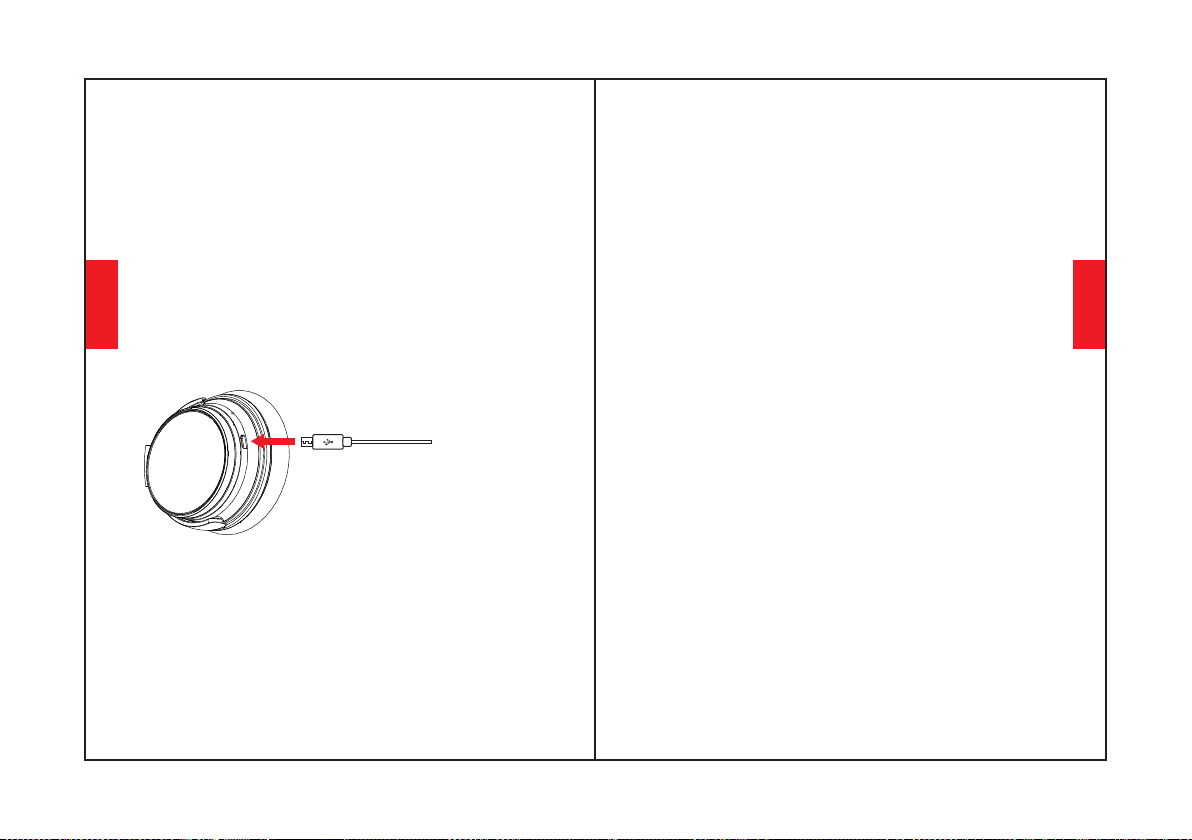
תמצוע תרבגה "םינצחלה תא קזחה: המאתה תקיחמ
תוינש 5 ךשמל תינמז-וב" עמשה תמצוע תכמנה"ו" עמשה
תוינזואה לש האלמ הניעט.1:ךליבשב םיפיט הנה, תויעב שי םא
ידי לע תוינזואה תא ספא .2 (ריהמ ןעטמב שמתשת לא) ךלש
רסה ןכמ רחאלו תוינזואה לש וידואה עקשל עמש לבכ תסנכה
תעב תיטמוטוא וספואי תוגרדושמה-NC25 ה תוינזואש וא. ותוא
.הניעטה
הניעט
הניעטה תאיציל רבחתהל ידכ C גוסמ לולכה הניעטה לבכב שמתשה
וא USB תאיציל הניעטה לבכ לש ינשה הצקה תא רבח. תוינזואה לש
-ה תײצקנופ תא הבכ 6.3V. לש חתממ ךומנה USB ריק ןעטמל
ןמזב תוינזואב שמתשהל אל אנ. הניעטה ינפל-ANC הוBluetooth
אוה רשאכ לוחכ עבצב וא הױבכ היהת LED לש יװיחה תירונ. הניעטה
.תוינזואה ױביכ בצמ לע ססבתהב הניעטב אלמ
-ה תא תובכל ידכ תוינש 3-5 ךשמל יתילכת-ברה ןצחלה תא קזחה
Bluetooth.
לש-Bluetooth ה תמאתה םש תא אצמו-Bluetooth ה תא לעפה
לוחכב בהבהת יװיחה תירונ).םיאתהל ידכ וילע ץחל Nc25, תוינזואה
(.החלצהב המאתה רחאל תויטיאב
תובושתו תולאש
?ילש דײנה ןופלטל תוינזוא םיאתהל ןתינ אל עודמ: ש.1
115116
, שדחמ רוביח בצמ וא המאתה בצמב תואצמנ ךלש תוינזואה םא קודב אנא: ת
רובע, השענ לכה םא, תלעפומ-Bluetooth ה שופיח תײצקנופ םא קודב
NC25. תוינזואה לש המאתההמ םלעתה/קחמ-Bluetooth, ה טירפתל
המאתה "יבלש יפל Bluetooth תא שדחמ רבחל תוסנל לוכי התא, ןכמ רחאל
.ליעל" הלק
?קלדיהל תולוכי אל תוינזואה עודמ: ש.2
.ךלש תוינזואה לש הללוסה בצמ תא בוש קודב אנא: ת
?תוינזואב הללוס ףילחהל לוכי ינא םאה: ש.3
תינבומ Li-Polymer תללוסב תושמתשמ תוינזואה. לוכי אל התא, אל: ת
.הפלחהו הרסהל תנתינ הניאש
?הגיהנ ןמזב תוינזואב שמתשהל לוכי ינא םאה: ש.4
ידכ הגיהנ ןמזב תוינזואב שמתשהל אל םוחב םיצילממ ונא, ךתוחיטב ןעמל: ת
.תעד תחסה עונמל
לש חװטב Bluetooth רישכממ תוקתנתמ תוינזואה םימעפל עודמ: ש.5
?םירטמ10
וא תיסחי בורק חװטב םילושכמ וא תכתמ ירמוח םנשי םא קודב אנא: ת
-ש ןװיכמ תורקל לולע הז Bluetooth. רוביחל םיעירפמ ילואש ךלש הביבסב
םינקתהל תוינזוא ןיב םיצפחל השיגרה וידר תײגולונכט איהBluetooth
?ילש דײנה ןופלטהמ וא בשחמהמ לילצ םוש עומשל לוכי אל ינא המל: ש.6
םג קודב A2DP. ליפורפב ךמות ךלש בשחמה לש טלפה ץורע םא קודב אנא: ת
.םירחא. דײנ ןופלט/בשחמבו תוינזואב לוקה תמצוע תורדגה תא
לש לוקה תמצועב טולשל ידכ תוינזואב שמתשהל לוכי יניא עודמ: ש.7
?ילש דײנה ןופלטב היצקילפאב תנגנתמה העוצר
ירמגל ויהי אל תוינזואהש ןכתײ, תונוש םימושײ תונכות לש תורוצת בקע: ת
.תויצקילפאהמ קלחל תומאות
תירִבְﬠִ
תירִבְﬠִ
?תובכהל וא קלדיהל לוכי אל Bluetooth םא תושעל ײלע המ: ש.8
117
תירִבְﬠִ
עמש לבכ תסנכה ידי לע תוינזואה לש-Bluetooth ה תײצקנופ תא ספא אנ: ת
רוכז אנא, שדחמ רוביח ינפל. ותוא רסה ןכמ רחאלו, וידוא תאיצי תוינזואל
.ךלש דײנה ןופלטב NC25 םשב תוינזואהמ םלעתהל/קוחמל
?עמש לבכ רבחמ ינא רשאכ הבכנ Bluetooth עודמ: ש.9
עמש לבכ םיסינכמ םישמתשמ רשאכ. ונלש תודחוימה תונוכתה תחא וז: ת
-Bluetooth הו לועפל םיקיספמ-Bluetooth ה ינצחל לכ, וידואה תאיציל
.רבעומ וידוא לבכ רשאכ בוש ןימז היהי-Bluetooth ה לבא. הבכנ
?תוינזוא תובכל/ליעפהל לוכי אל ינא המל: ש.10
ךא (יװיח תירונ התוא ידי לע םינמוסמ-Bluetooth ו-ANC ש בל םיש אנא: ת
התא םא Bluetooth. רובע לוחכ רואו ANC רובע קורי רוא םע), הנוש עבצ
לכ םדוק ANC תא תובכל לוכי התא-Bluetooth, ה תא תובכל/ליעפהל ךירצ
תועמשמ תא בטיה ריכת התא לבא. םײנועבצה תורואהמ לבלבתתש הרקמל
.לקו טושפ הז יכ םימעפ םישומיש המכ רחאל ריהבה עבצה
? Windowsבשחמב הדורי תכפוה עמשה תוכיא עודמ: ש.11
בל םיש אנא Windows. בשחמב הדורי עמש תוכיא ונײצ תוחוקלהמ קלח: ת
ױניש ידי לע תונשל לוכי התאש" ןופורקימו תוינזוא-"ו" תוינזוא "יבצמ שיש
תוכיא תא יטסרד ןפואב רפשת" תוינזוא "בצמב הריחב. ךלש טלפה ןקתה
, רצומה תמשא אל וז VOIP. תוחישל דעוימ" ןופורקימו תוינזוא בצמ." עמשה
עמשה תוכיא", תוינזוא "בצמב התא םא. הזה לוקוטורפה לש הלבגמה קר וז
.תיטסטנפ
Kullanım Kılavuzu
118
Türkçe
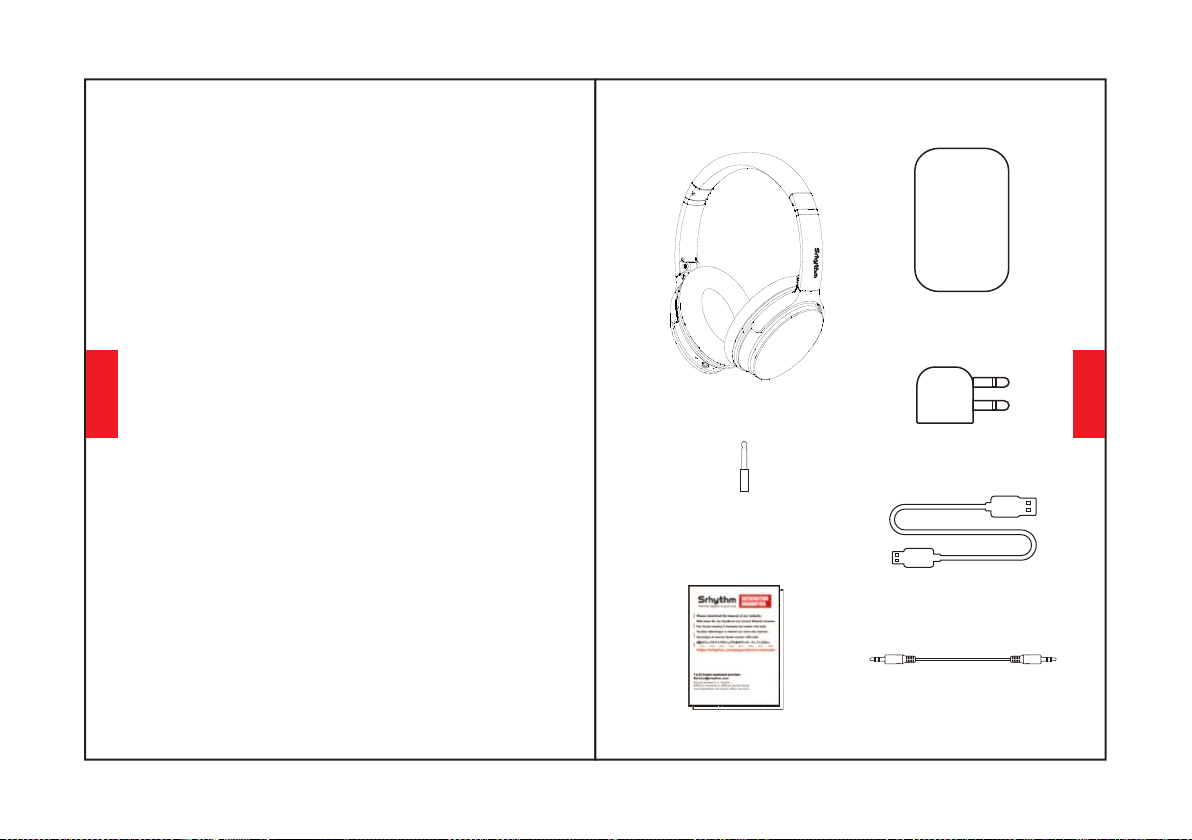
1.Sürüş ve şarj sırasında lütfen kulaklık kullanmayın.
2.Lütfen dikkatli kullanın ve tehliklei durumlarda
kullanmayı bırakın.
3.İşitme hasarını önlemek için lütfen uzun süre yü
ksek sesle dinlemeyin.
4.Güvenliğiniz için çevrenizdeki sesleri
duyabilmeniz içim lütfen dışarıda koşarken sesi çok
yükseltmeyin.
1. Şarj ve voltaj için 6.3V içinde orijinal veya
sertifikalı kablolar kullanın.Voltaj 6.3V'u aştığında ve
36V içinde güç kesilir ve koruma moduna
başlar.Voltaj 36V üzerinde olduğunda kulaklık
bozulur.
3. Kulaklığı düşürmekten ve aşırı sıcaklıkta ç
alıştırmaktan kaçının. Lütfen aşağıdaki çalışma
sıcaklığı aralığında kulaklık kullanın: -15 °C (5 F) – 55°
C(131 F).
5. Kulaklığı temizlemek için aşındırıcı temizleyici/yağ
kullanmayın
2. Uygunsuz kullanımdan kaynaklanan tehlikeyi ö
nlemek için çocuklardan uzak tutun.
4. Kulaklığı suya batırmayın.
6. Kulaklık kullanmadığınızda güç tasarrufu yapmak
için kulaklık Bluetooth ve ANC işlevini kapatın.
Güvenlik talimatları
İşitme güvenliği
Operasyon Güvenliği:
119120
Türkçe
Türkçe
Kutuda ne var
NC25 KULAKLIK *1
Taşınabilir Taşıma Çantası*1
Uçak Adaptörü *1
(Sadece uçak için kullanın)
Tip-C Şarj Kablosu *1
Ses kablosu *1
3,5 mm - 6,35 mm
Piyano Adaptörü *1
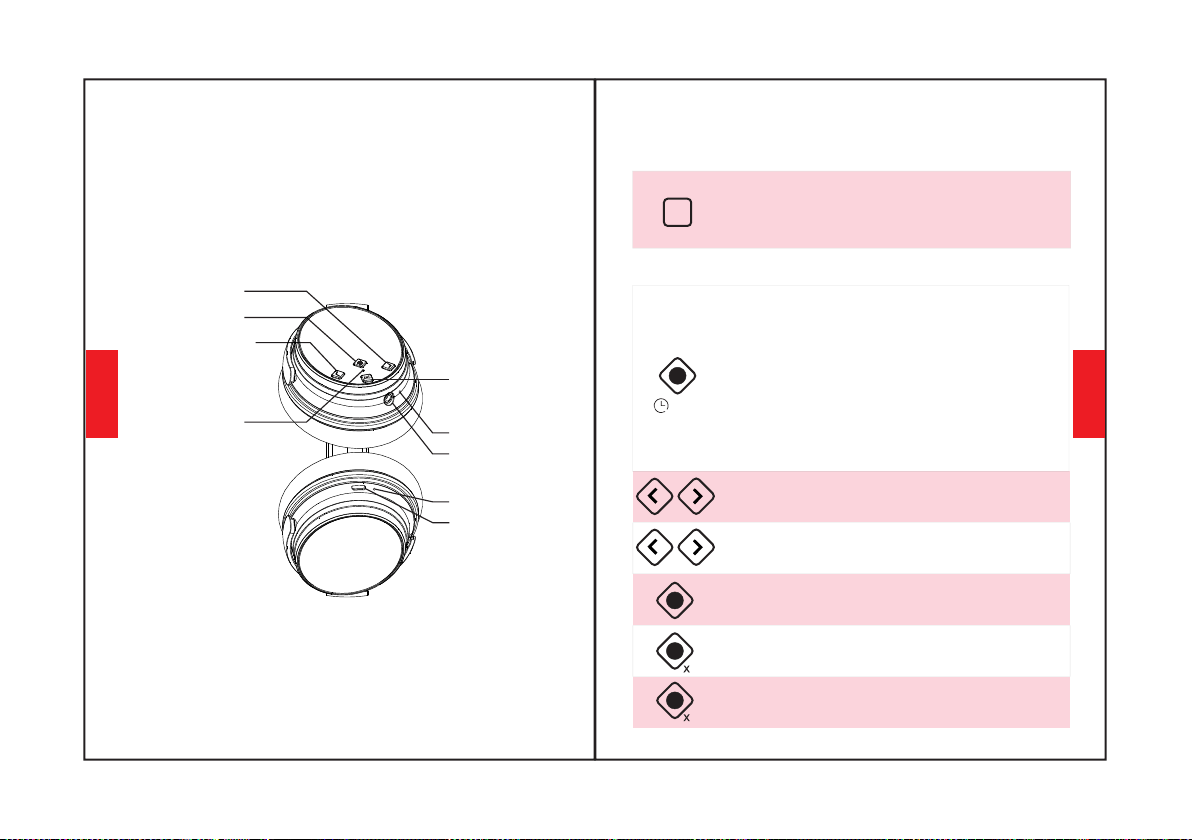
Ses YUKARI/Sonraki Şarkı
Bir Bakışta
121122
Çok fonksiyonlu Düğme
Şarj bağlantı noktası
Bluetooth/ANC
LED gösterge ışığı
mikrofonlar
AUX Bağlantı Noktası
Sesi Kısma/Önceki Şarkı
ANC Düğmesi
Şarj göstergesi
ANC İşlevini Kullan
NASIL KULLANILIR
Aktif Gürültü Önlemeyi AÇMAK/KAPATMAK için
ANC Düğmesine basın. (ANC AÇIK olduğunda
LED gösterge ışığı yeşil olacaktır.)
Bluetooth İşlevini Kullan
3. Kulaklık Bluetooth'unu kapatmak için Çok İşlevli
Düğmeyi 3-5 saniye basılı tutun.
1. Kulaklık Bluetooth'u açmak için Çok İşlevli Dü
ğmeyi 3-5 saniye basılı tutun, ardından eşleştirme
moduna girin. (LED gösterge ışığı mavi olacak ve
kırmızı hızla yanıp sönecektir.)
2. Cep telefonunuzun Bluetooth'unu başlatın ve
eşleştirmek için tıklamak için "Nc25" kulaklık
Bluetooth eşleştirme adını bulun. (başarılı bir
şekilde eşleştirildikten sonra LED gösterge ışığı
yavaşça mavi yanıp sönecektir.)
Sesi ayarlamak için basın. Sonraki/önceki şarkıya
atlamak için uzun basın.
Gelen bir aramayı reddetmek için Çok İşlevli
Düğmeye iki kez basın.
Müziği çalmak/duraklatmak veya aramayı
cevaplamak/bitirmek için Çok İşlevli Düğmeye basın.
2
3-5S
ANC
Düşük gecikmeli oyun modunu açmak için çok işlevli
düğmeye üç kez basın.
3
Eşleştirmeyi silmek için artı ve eksi tuşlarına
5 saniye boyunca uzun basın.
Türkçe
Türkçe
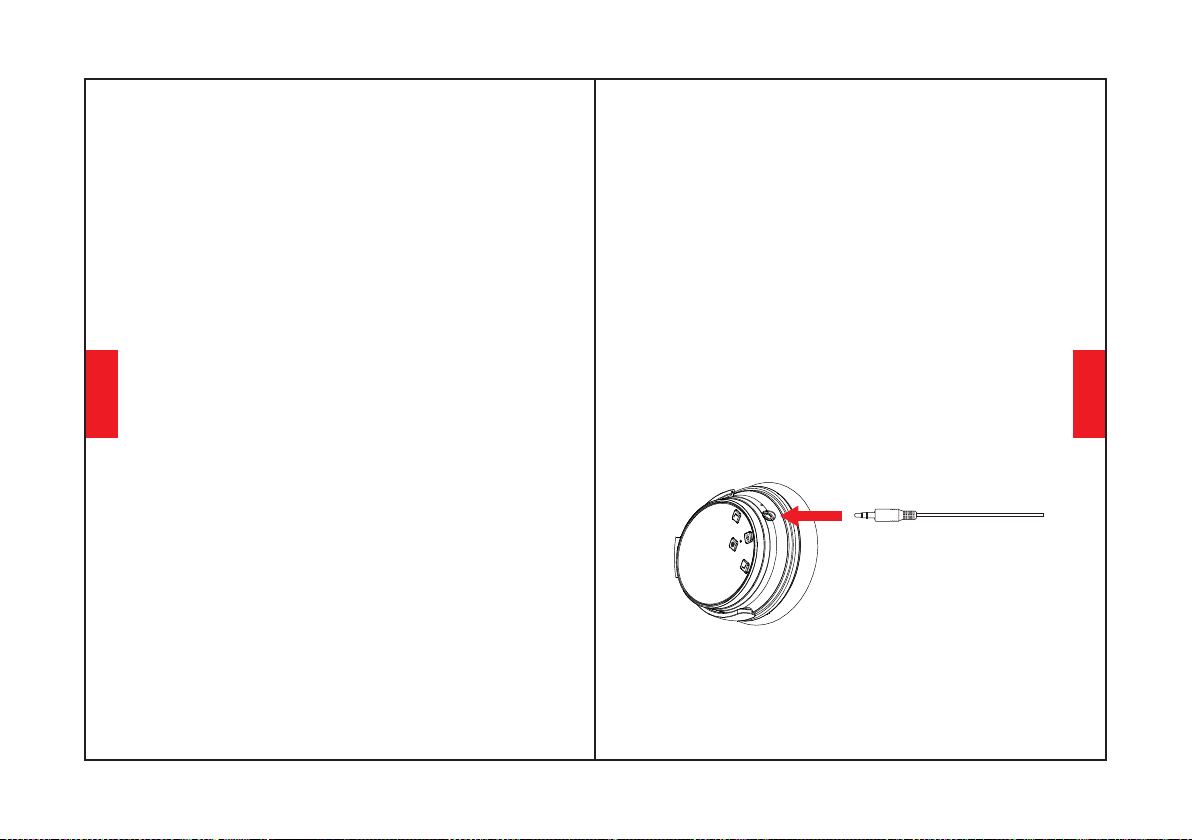
İşlev Ayrıntıları
Kolay Eşleme
4. Eşleştirme işlemi sırasında sizden bir şifre/PIN
kodu istenirse, lütfen "0000" (dört sıfır) girin.
2. Eşleştirme işlemi sırasında kulaklığınızı ve cep
telefonunuzu mümkün olduğunca yakın tutun.
1. Kulaklık Bluetooth'unu açmak için Çok İşlevli Dü
ğmeyi 3-5 saniye basılı tutun, ardından eşleştirme
moduna girin. (LED gösterge ışığı mavi olacak ve
kırmızı hızla yanıp sönecektir.)
3. Cep telefonunuzun Bluetooth'unu açın. Cep
telefonunda kulaklık Bluetooth sinyalini arayın ve
eşleştirmek için “Nc25”e tıklayın. (eşleştirme
başarıyla tamamlandıktan sonra LED gösterge ışığı
yavaşça mavi renkte yanıp sönecektir.)
İkinci Bluetooth Aygıtıyla Eşleştirme
1. Lütfen kulaklığın ilk Bluetooth cihazına başarılı bir
şekilde bağlandığından ve müziğin çalmadığından
emin olun.
2. Çok işlevli düğmeyi kulaklık kapanana kadar basılı
tutun ve "Kolay Eşleştirme" adımlarına devam edin
(Kulaklığın yeniden eşleştirme moduna girmesine
izin verin, LED gösterge ışığı sırayla mavi ve kırmızı
yanıp sönecektir).
3. "Kolay Eşleştirme" adımlarına göre kulaklığı ikinci
cihazla eşleştirin.
4. İlk Bluetooth cihazına dönün ve tekrar kulaklıkla
eşleştirin. Artık her iki cihazınız da kulaklıkla
eşleştirildi.
123124
Aktif Gürültü Önleme (ANC) AÇIK/KAPALI
ANC'yi açmak için ANC Düğmesine basın;
(ANC KAPALI olduğunda LED gösterge ışığı yeşil renk
(ANC AÇIK olduğunda LED gösterge ışığı yeşil
olacaktır.)
ANC'yi kapatmak için ANC Düğmesine basın;
Kablolu Mod
Kablolu harici ses kaynağı bağlantısı için kulaklık
desteği AUX girişi. Kulaklık Bluetooth'u kapatın ve ses
kablosunu takın. Herhangi bir ANC Bluetooth kulaklık için,
kablolu mod için hala pil gücü desteğine ihtiyaç vardır.
ANC ayrıca kablolu modda da çalışır. Mikrofonlar
kablolu modda değil, yalnızca Bluetooth modunda
çalışır.
Kablolu modda kulaklıkların ses düzeyini
AYARLAMAYACAĞINIZI lütfen unutmayın.
Türkçe
Türkçe
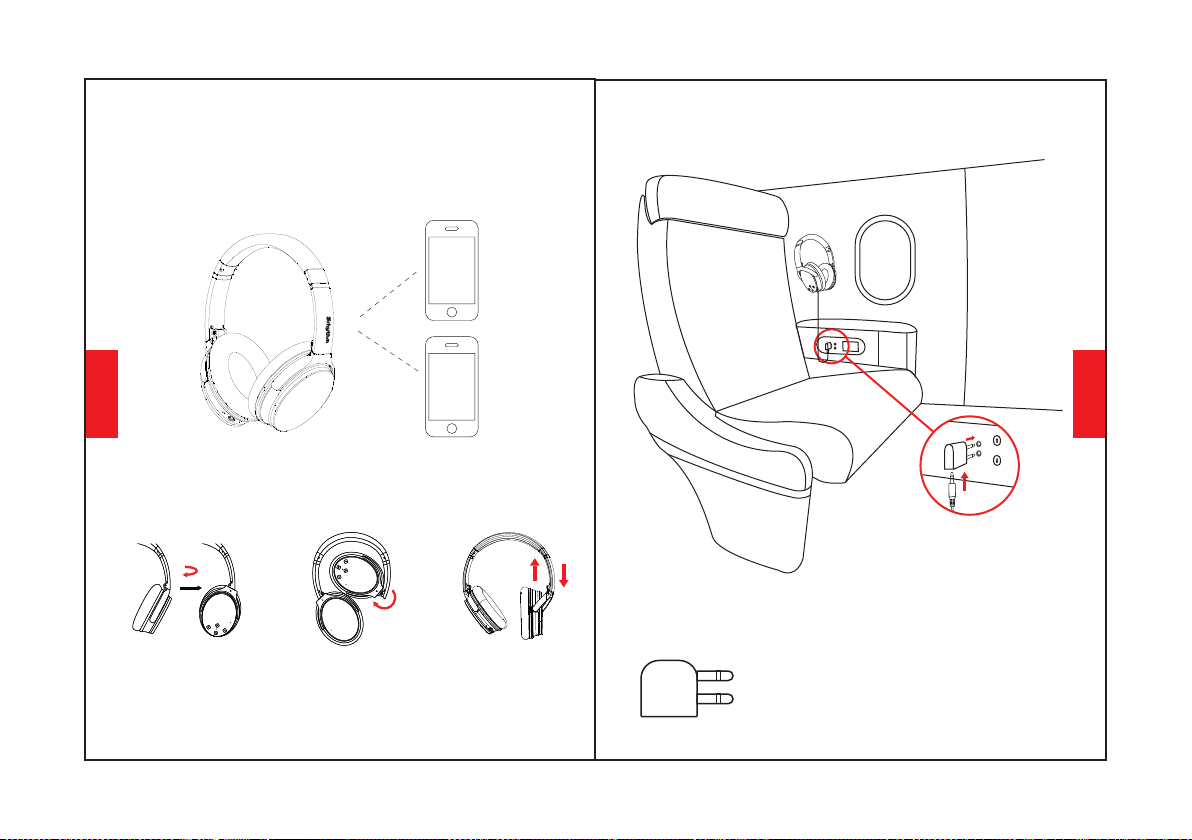
Sesli arama
Sesli arama işlevini (iPhone Siri ve seçili Android sesli
arama yazılımı ile uyumlu) etkinleştirmek için "Sesi Aç
" ve "Sesi Azalt" düğmelerine aynı anda basın.
Nasıl giyinilir
100° içe dönüş
Ayarlanabilir Kafa Bandı
125126
120° içe katlama
100°
120°
Uçak Adaptörü Bağlantısı
Uçak Adaptörünü uçak
koltuğunun ses soketine (çift
delikli) bağlayın, kulaklığınıza
ve Uçak Adaptörüne bağlamak
için 3,5 mm ses kablosu
kullanın.
Sadece uçak için kullanın, Elektrik
prizine takılamaz.
Uyarı:
Türkçe
Türkçe
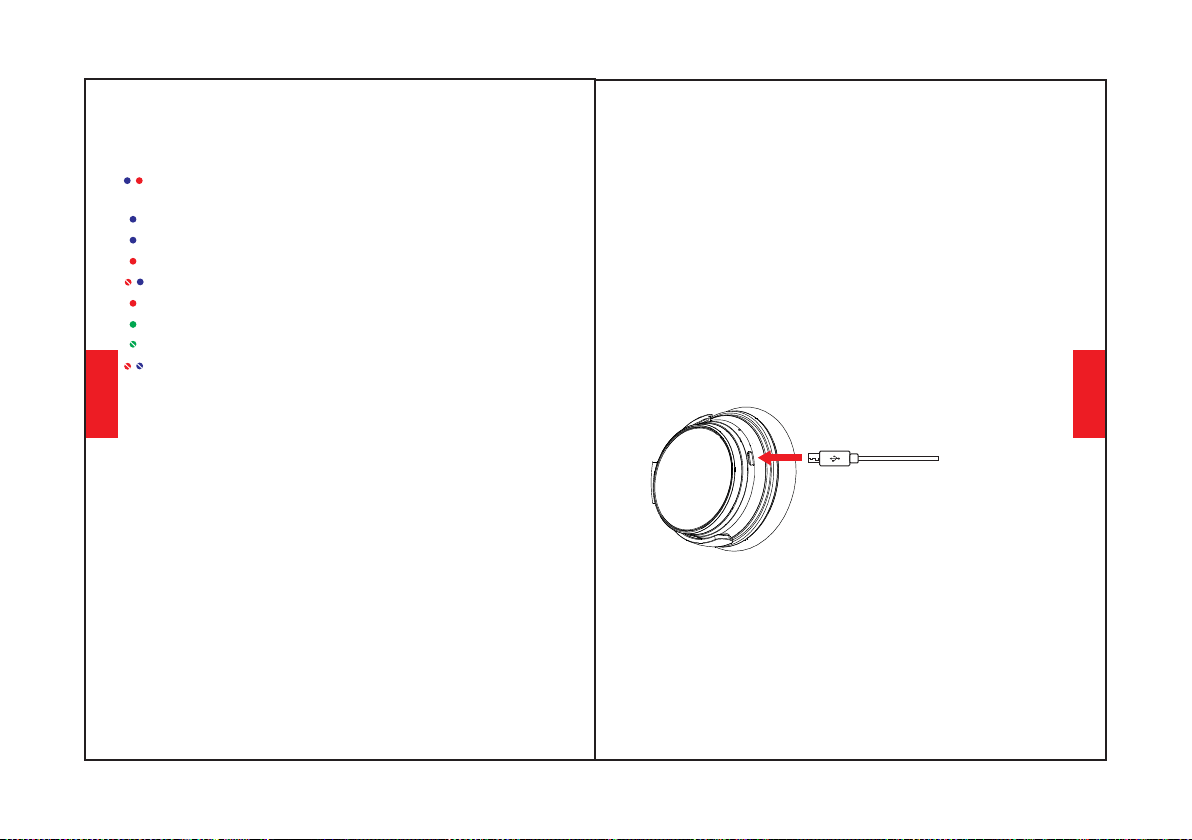
Kulaklık Özellikleri
LED Gösterge Işığı
Oynama: Mavi ışık yavaşça yanıp söner.
Tam Şarj: Kırmızı ışık söner veya Mavi ışık yanar.
Pil Düşük: Sesli uyarı ile kırmızı ışık yanar.
Şarj oluyor: Kırmızı ışık yanar.
ANC ON: Yeşil ışık yanar.
ANC OFF: Yeşil ışık söner.
Eşleştirme: Mavi ve kırmızı ışıklar dönüşümlü
olarak yanıp söner.
Bluetooth KAPALI: Mavi ve kırmızı ışıklar kapanır.
Eşleştirilmiş: Mavi ışık yanıp söner.
Teknik özellik
•Product name: Srhythm NC25
•Input: 5V 220mAh •Chip: ATS
•Charging time: About 2 hours
•Battery capacity: 1000mAh
•Bluetooth version: V5.0
•Bluetooth range: 10m/33ft
•Frekans yanıtı: 20–20KHz
•Driver diameter: Φ40mm
•Waterproof rating: IPX4
•Use time: 50 hours
•Bluetooth profile: A2DP, AVRCP, HSP, HFP
•Net weight: 180g •Impedance: 32 Ω
* Lütfen bazen bu LED gösterge ışığı renginin bazen
başka renkler (pembe, mor, vb.) olacak şekilde
karıştırılacağını lütfen unutmayın.
128127
Herhangi bir sorun varsa, işte size ipuçları: 1.
Kulaklığınızı tam olarak şarj edin (hızlı şarj cihazı
kullanmayın) 2. Ses kablosunu kulaklık ses soketine
takıp çıkararak kulaklığı sıfırlayın. Veya yükseltilmiş
NC25 kulaklıklar, şarj olurken otomatik olarak
sıfırlanır.
Eşleştirmeyi Sil: "Sesi Aç" ve "Sesi Azalt" düğmelerini
aynı anda 5 saniye basılı tutun
Doldurma
Cep telefonunuzun Bluetooth'unu başlatın ve eşleştirmek
için tıklamak için kulaklık Bluetooth eşleştirme adını Nc25
bulun. (başarıyla eşleştirmeden sonra LED gösterge ışığı
yavaşça mavi yanıp sönecektir.)
Kulaklık Bluetooth'unu kapatmak için Çok İşlevli Düğmeyi
3-5 saniye basılı tutun.
Kulaklık Şarj Bağlantı Noktasına bağlanmak için ürünle
birlikte verilen Type-C şarj kablosunu kullanın. Şarj
kablosunun diğer ucunu bir bilgisayarın USB bağlantı
noktasına veya 6.3V voltaj altındaki USB duvar şarj
cihazına bağlayın.Şarj etmeden önce kulaklık Bluetooth
ve ANC işlevini kapatın.Şarj sırasında lütfen kulaklık
kullanmayın.LED gösterge ışığı kapalı veya mavi renkte
olacaktır. kulaklığa bağlı olarak şarj dolduğunda durumu
kapatın.
Türkçe
Türkçe
Soru-Cevap
5. Q: Kulaklık neden bazen 10 metre içinde Bluetooth
cihazıyla bağlantıyı kesiyor?
A: Lütfen kulaklığınızın pil durumunu iki kez kontrol edin.
A: Farklı uygulama yazılımlarının konfigürasyonları nedeniyle,
kulaklık bazı APP'lerle tamamen uyumlu olmayabilir.
7. Q:Cep telefonumdaki bir APP'de çalan bir parçanın
sesini kontrol etmek için neden kulaklık kullanamıyorum?
A: Lütfen kulaklığınızın eşleştirme modunda mı yoksa
yeniden bağlantı modunda mı olduğunu kontrol edin, kontrol
edin. Bluetooth cihazınızın Bluetooth arama işlevi açıksa, her
şey bittiyse, Bluetooth cihazınızın Bluetooth menüsüne gidin,
kulaklık Bluetooth eşleştirme adı NC25'i silin/yoksayın.
Bundan sonra, Bluetooth'u yukarıdaki “Kolay Eşleştirmeye
göre yeniden bağlamayı deneyebilirsiniz. ” adımları.
A: Lütfen nispeten yakın bir mesafede veya çevrenizde
Bluetooth bağlantısını engelleyebilecek herhangi bir metal
malzeme veya engel olup olmadığını kontrol edin. Bunun nedeni,
Bluetooth'un kulaklık ve diğer cihazlar arasındaki nesnelere
duyarlı bir radyo teknolojisi olması olabilir.
A: Hayır, yapamazsınız.Kulaklık, değiştirilemeyen yerleşik, ç
ıkarılamayan bir Li-Polimer pil kullanır.
A: Lütfen bilgisayarınızın çıkış kanalının A2DP profilini
destekleyip desteklemediğini kontrol edin. Ayrıca kulaklık ve
bilgisayar/cep telefonunuzdaki ses ayarlarını kontrol edin.
A: Güvenliğiniz için, dikkatinizin dağılmaması için sürüş
sırasında kulaklık kullanmamanızı şiddetle tavsiye ederiz.
6. Q: Bilgisayarımdan veya cep telefonumdan neden ses
duyamıyorum?
2. Q: Kulaklık neden açılmıyor?
4. Q: Araba kullanırken kulaklık kullanabilir miyim?
1. Q: Kulaklık neden cep telefonumla eşleştirilemiyor?
3. Q: Kulaklıktaki pili değiştirebilir miyim?
129130
10. Q: Neden kulaklığı açıp kapatamıyorum?
9. Q: Bir ses kablosu bağladığımda Bluetooth neden
kapanıyor?
11. Q: Windows PC'de ses kalitesi neden düşüyor?
A: ANC ve Bluetooth'un aynı LED gösterge ışığıyla (ancak
farklı ışık rengiyle), ANC için yeşil ışık ve Bluetooth için mavi
ışıkla gösterildiğini lütfen unutmayın. Bluetooth'u aç
ıp/kapatmanız gerekiyorsa, renkli ışıklardan dolayı kafanız
karışırsa, öncelikle ANC'yi kapatabilirsiniz. Ancak basit ve
kolay olduğu için birkaç kez kullandıktan sonra ışık renginin
anlamını çok iyi anlayacaksınız.
A: Lütfen kulaklık ses bağlantı noktasına bir ses kablosu takıp
ardından çıkararak kulaklığın Bluetooth işlevini sıfırlayın.
Yeniden bağlamadan önce, cep telefonunuzdaki kulaklık
Bluetooth eşleştirme adı NC25'i silmeyi/yoksaymayı lütfen
unutmayın.
A: Bu bizim özel özelliklerimizden biridir. Kullanıcılar kulaklık
ses bağlantı noktasına bir ses kablosu taktığında, tüm
Bluetooth özellik düğmeleri çalışmayı durdurur ve Bluetooth
kapanır. Ancak, ses kablosu hareket ettirildiğinde Bluetooth
tekrar kullanılabilir olacaktır.
8. Q: Bluetooth kapanamıyor veya açılamıyorsa ne
yapmalıyım?
A: Bazı müşteriler Windows PC'de düşük ses kalitesinden
bahsettiler. Çıkış cihazınızı değiştirerek değiştirebileceğiniz
"Kulaklık" ve "Kulaklık" modları olduğunu lütfen unutmayın.
"Kulaklık Modu"nu seçmek, ses kalitesini önemli ölçüde
artıracaktır. "Kulaklık Modu" yüksek oranda sıkıştırılmış VOIP
aramaları vb. için tasarlanmıştır. Bu, kulaklık ürününün hatası
değildir, bu sadece o protokolün sınırlamasıdır. "Kulaklık
Modu"ndaysanız, ses kalitesi harikadır.
12.Q:Kulaklık sesi neden bu kadar az?
A: Hem cihaz hem de kulaklık sesini artırın. SPOTIFY gibi bazı
yazılımlar için ekolayzırı KAPALI konuma getirmeniz
gerekebilir, ardından tüm spektrum gelir ve ses kolayca
ayarlanabilir.
Türkçe
Türkçe