6
(1) GOOD BATTERY
2.5 Battery Test Result
Battery test result includes 5 types as following.
• The battery is without any problem.
(5) BAD CELL
• There has been bad cell problem inside the battery and needs to be
replaced.
Note: The inside of the 12V lead-acid battery is composed of 6 cells of 2V
units in series, and the bad cell is that at least one cell has been
short-circuited and damaged.
(2) GOOD - RECHARGE
• Good battery but low power, recharge
before using.
(4) CHARGE - RETEST
• Low power leads to inaccurate results,
please test again after charging.
(3) REPLACE
• The battery is near to or already
reached the end of the using life,
replace battery.
Note: Due to vehicle conditions,
temperature, etc., the battery may still
be able to start the engine, but it may
not work at any time, and it is
recommended to replace it.
4. CHARGING TEST
• Press the " " or " " key to select
the Charging Test.
• The charging test is used to test the
vehicle's alternator and charging
system.
• SoH means state of health.
• SoC means state of charge.
12V/6V Lead-acid Battery Test
12V Cranking System Test
12V Charging System Test
Graphical Operating System
V
2
4
/
1
2
/
6
12V/6V
1. PRODUCT DESCRIPTION
1.1 Product Introduction
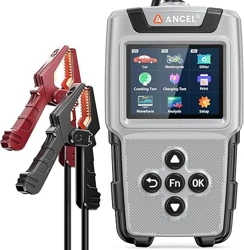
The battery tester adopts the world's most advanced conductance test
technology, which can conveniently, quickly and accurately measure the
cold cranking amps and battery health of the vehicle battery without
damaging the battery performance.
1
1.2 Function Description
• Test the 12V/6V vehicle cranking system and charging system.
• Test the 12V/6V lead-acid battery CCA (cold cranking amps)
/internal resistance/voltage/state of charge/state of health.
• Real-time voltage curve graphic display, can be saved up to 120 seconds
and played back.
• Can save up to 1400 historical test records, including battery test, cranking
test, charging test, voltage curve, 350 records each.
• Built-in protection of short circuit and reverse connection.
• One-key quick test function for batch battery continuous test or
real-time voltage curve.
• Support 13 languages, including English, French, Dutch, German,
Spanish, Italian, Chinese, Japanese, Korean, Russian, Portuguese,
Polish and Finnish.
1.3 Technical Specifications
Input Voltage Range: 5V~32V DC
Tester Working Temperature: -10°C~60°C (14°F~140°F)
Storage Temperature: -20°C~70°C (-4°F~158°F)
Display: 2.8" TFT color screen
Dimensions: (L) 160 x (W) 91 x (H) 32 mm
2. BATTERY TEST
4
2.1 Select Battery Application
• Press the " " or " " key to select the battery application Car,
Motorcycle(12V), Motorcycle(6V).
Note: No need to select the battery voltage, the battery tester can
automatically judge whether the battery is 6V, 12V , just need to
choose the application of the battery: car, motorcycle(12V), motorcycle(6V).
Regular Flooded
AGM Flat Plate
GEL
EFB
Select Type
AGM Spiral
2.2 Select Battery Type
• Press the " " or " " key to select battery type.
Note: AGM, GEL, and EFB batteries will all have obvious markings on
the battery.
• Test the cold cranking amps (CCA) of the battery, and compare it with the
rated CCA value to judge whether the battery is good or bad.
3
1.5 Technical Parameters
Car, Motorcycle Battery Cold Cranking Amps Measure Range
Battery
Standard
Description
Measure Range
CCA
MCA
JIS
DIN
IEC
EN
SAE
GB
BCI
CA
Cold Cranking Amps
Marine Cranking
Amps Standard
Japan Industrial Standard
German Auto Industry
Committee Standard
Internal Electro Technical
Commission Standard
European Automobile
Industry Association Standard
Society of Automotive
Engineers Standard
China National Standard
Battery Council
International Standard
Cranking Amps Standard
Car
26A17-245H52
Motorcycle
26A17-150F51
2.3 Select Battery Standard
Select Standard
CCA
CA
DIN
Battery Rated
500A
505A
495A
2.4 Enter Rated CCA Value of the Battery
• Press the " " key to start the battery test.
5
• As shown on the right, the label pointed by
the arrow indicates the standard and rated
CCA value of the battery.
• The battery tester supports the following
battery standards: CCA, DIN, JIS, EN, IEC,
GB, SAE, MCA, BCI, CA.
• Press the " " or " " key to select the correct battery standard
(specified on the battery label), then press " " key to continue.
• Press the " " or " " key to select the battery rated CCA value.
Car
Motorcycle
20 1000
100 2000
Car
Motorcycle
20 700
100 1400
Car
Motorcycle
20 1000
100 2000
Car
Motorcycle
20 1000
100 2000
Car
Motorcycle
20 700
100 1400
Car
Motorcycle
20 1000
100 2000
Car
Motorcycle
20 1000
100 2000
Car
Motorcycle
20 1000
100 2000
Car
Motorcycle
2 120Ah
30 220Ah
• Then choose whether the battery voltage is 12V.
• Follow the on-screen guidance to do the unloaded test, loaded test and
ripple test.
• Do not turn off the engine during the test.
7 8
9 10 11
• Choose whether the battery voltage is
12V
• Follow the prompts to start the engine.
• The tester will display the test results,
which are the start-up duration,
start-up status, and start-up voltage.
Duration
560ms
Cranking Voltage
11.29V
15V
13V
11V
9V
0s
0.6s
1.2s
1.8s
2.4s
NORMAL
• The tester will display test results, which are charging status, unloaded
voltage, loaded voltage, ripple voltage.
Note: "NO OUTPUT" means that the charging system has no output. When
the battery power is exhausted, the vehicle will stop working. Check the
alternator immediately or contact a service center.
• If the voltage is outside the normal range, the tester reports an error.
14.25V
UNLOADED
13.87V
LOADED
19mV
RIPPLE
NORMAL
8. SETUP
Language
• Press the " " or " " key to select Language.
Beep
• The status of the buzzer can be set to ON or OFF.
Brightness
• Press the " " or " " key to select and set Brightness.
• Press the " " or " " key to select About.
• Press the " " or " " key to select the Setup.
• Can set the shortcut key " " to battery test or voltage waveform function.
Fn
About
SoH 96%
GOOD BATTERY
MEASURED
SoC
98%
490A
RESISTANCE
6.1mΩ
500A
RATED
CCA
VOLTAGE
12.66V
STANDARD
BATTERY TESTER
3. CRANKING TEST
Note: Before selecting cranking test,
the engine should be off.
• Press the " " or " " key to select
the Cranking Test.
• The cranking test is used to test the
start-up system of the vehicle. If it
shows that the cranking voltage is low,
it may be a battery problem or other
vehicle problems.
Charging Test
Waveform
Analysis
Setup
Print
Cranking Test
Charging Test
Waveform
Analysis
Setup
Print
Charging TestCranking Test
5. PRINT
• Press the " " or " " key to select the Print.
Cranking Test
Print All
Print
Charging Test
Battery Test
Charging Test
Analysis
Setup
Cranking Test
Waveform
Print
Waveform
• Connected to a computer via USB, it can print three kinds of test data:
battery test, cranking test and charging test.
• Press the " " or " " key to select Car, Motorcycle(12V), Motorcycle(6V)
to review historical data.
7. ANALYSIS
• Press the " " or " " key to
select the Analysis.
Charging Test
ReviewReview
Setup
Print
Cranking Test
Waveform
Analysis
• Analysis is the viewing of historical
test data as a waveform graph.
Up to 350 records can be saved
for each type of data.
Select Delete Results to delete all historical data.
6. WAVEFORM
• Press the " " or " " key to select the Waveform.
• The tester will display real-time voltage curve.
• The voltage curve can be saved for up to 120 seconds.
Charging Test
Analysis
Setup
Print
Cranking Test
WaveformWaveform
Waveform
17.0V
15.0V
13.0V
9.0V
VOLT 14.10 MAX 14.20
MIN 12.27
11.0V
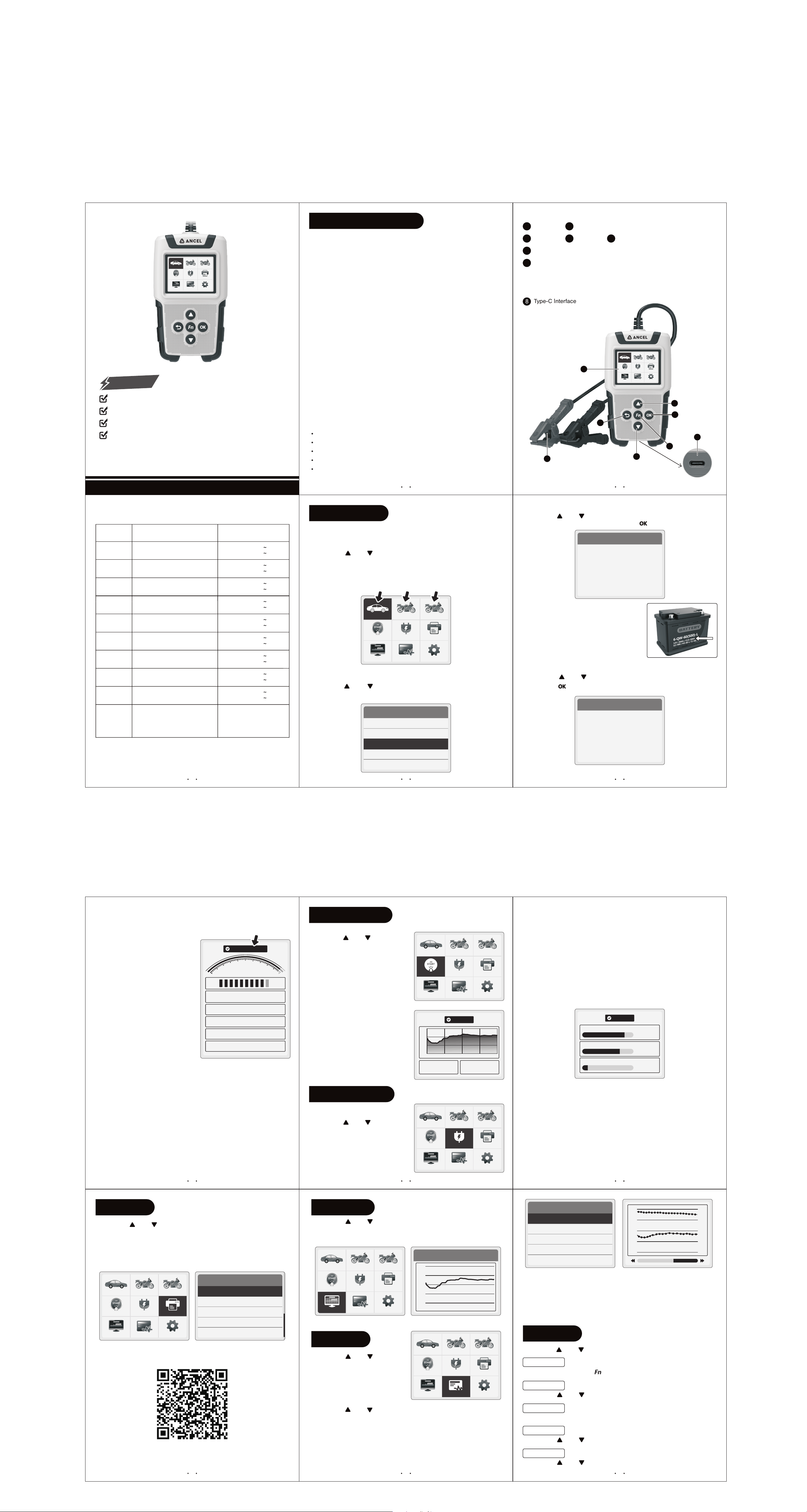
1.4 Product Information
6
1
Display
Fn key - Battery test or voltage waveform test function can be set.
7
Connect the red clamp to the positive terminal (+) of the battery.
Connect the black clamp to the negative terminal (-) of the battery.
Red/Black Clamps:
2
Up Key
3
Down Key
4
Back Key
5
OK Key
It is very important to clamp directly to the original battery terminals. Test
results may be inaccurate if clamped elsewhere.
2
8
Type-C Interface
• Select the type of test the user wants to print, including a battery test,
cranking test, or charging test. In addition, waveform graphs can be
reviewed by select Waveform.
Motorcycle(12V)
Analysis
Motorcycle(6V)
Delete Results
500A
375A
250A
0A
125A
Car
16.0V
14.8V
13.5V
12.2V
11.0V
• The waveform of voltage data is in blue colour, the corresponding scale is
on the right side of the waveform, the waveform of CCA is in yellow colour,
the corresponding scale is on the left side.
• The points on the CCA waveform have two colours, red means bad battery
or need to be replaced, green means good battery.
• Press the up and down keys to pan the waveform.
• Can print the battery test, cranking test and charging test data by
connecting it to the computer via USB.
• View voltage and CCA data of car, motorcycle(12V) and motorcycle(6V) in
the form of waveform.
• Use your mobile phone to scan the QR code below to download the PC
software package.
https://link.dh5z.com/printCom.html
Charging TestCranking Test
Waveform
Analysis
Setup
Motorcycle(6V)
Car
Print
Motorcycle(12V)
Charging TestCranking Test
Waveform
Analysis
Setup
Motorcycle(6V)
Car
Print
Motorcycle(12V)
7
4
5
2
6
1
3
8
Charging TestCranking Test
Waveform
Analysis
Setup
Motorcycle(6V)
Car
Print
Motorcycle(12V)
Motorcycle(6V)
Car
Motorcycle(12V)
Motorcycle(6V)
Car
Motorcycle(12V)
Motorcycle(6V)
Car
Motorcycle(12V)
Motorcycle(6V)
Car
Motorcycle(12V)
Motorcycle(6V)
Car
Motorcycle(12V)
BA101 Plus