1. Overview
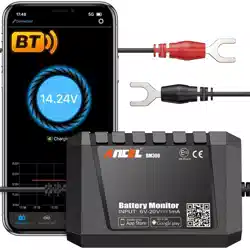
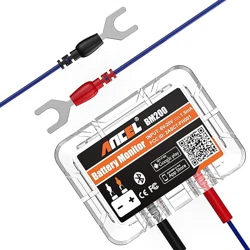
The ANCEL BM300 Pro is a universal battery monitoring device designed for 6V, 12V, and 24V electrical systems. It connects to your smartphone via Bluetooth 5.3 to provide real-time monitoring, diagnostic tests, and alerts for battery health.
Primary Functions:
- Monitor State of Charge (SOC), voltage, and temperature.
- Perform cranking and charging system tests (12V/24V only).
- Track up to four batteries simultaneously.
- Provide historical data trends and real-time alerts.

Note: For 6V systems, only SOC, voltage, and temperature monitoring are available. Charging and cranking tests are not supported on 6V.
2. Features and Specifications
2.1 Key Features
- Universal Compatibility: Auto-detects 6V, 12V, and 24V systems. Compatible with Lead-Acid (Flooded, AGM, Gel, EFB) and Lithium-Ion batteries.
- Multi-Battery Monitoring: The associated mobile app can monitor up to four separate battery monitors simultaneously.
- Bluetooth 5.3 Connectivity: Provides a stable connection with an effective range of up to 10 meters (33 feet).
- Diagnostic Testing: Performs battery, cranking, and charging system tests to assess health and performance.
- Real-Time Alerts: Sends smartphone notifications for voltage drops, charging failures, or weak cranking.
- Data History & Analytics: Stores and displays voltage, SOC, and temperature history in graph form for up to 72 days.
- Rugged Design: Reinforced composite shell with an IP67 rating for water and dust resistance. Operating temperature range: -30°C to 85°C (-22°F to 185°F).
- Safety Protections: Includes reverse polarity and short-circuit protection.
- Low Power Consumption: Draws an average of 1mA to prevent battery drain.
2.2 Technical Specifications
- Input Voltage Range: 3V - 35V DC
- Compatible Systems: 6V, 12V, 24V
- Bluetooth Version: 5.3
- Protection Rating: IP67
- Accuracy: Voltage reading accuracy ±0.1V
- Dimensions: 4.33 x 0.98 x 5.12 inches (110 x 25 x 130 mm)
- Included Components: BM300 Pro Battery Monitor unit.

3. Installation Guide
3.1 Physical Installation
- Choose Location: Select a mounting location on or near the battery. For optimal Bluetooth signal, avoid locations behind thick metal obstructions.
- Connect to Battery:
- Connect the RED clamp to the POSITIVE (+) battery terminal.
- Connect the BLACK clamp to the NEGATIVE (-) battery terminal.
- Mount the Device (Optional): If desired, use the provided adhesive or mounting hardware to secure the monitor to the battery case or a nearby surface. For accurate temperature readings, it is recommended to attach the device to the battery case.

3.2 App Installation & Pairing
- Download the App: Search for "ANCEL" in the Apple App Store (iOS 11+) or Google Play Store (Android 6.0+). Download and install the official ANCEL app.
- Enable Permissions: Upon first launch, grant all requested permissions (Bluetooth, location, notifications). These are required for full functionality.
- Pair the Device:
- Open the ANCEL app.
- Ensure the BM300 Pro is powered (connected to the battery).
- The app should detect the device. Select it from the list to pair.
- No manual code entry is required.
- Account (Optional): You can use basic features without an account. Create an account only if you wish to save your monitoring history across devices.
4. Use Guide
4.1 App Interface Overview
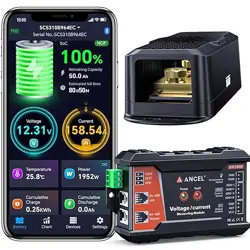
The main app screen typically displays:
- Real-time Voltage: Current battery voltage.
- State of Charge (SOC): Estimated battery charge percentage.
- Battery Temperature: Current temperature reading.
- Status Indicators: Icons for connection health, alerts, and test availability.
- Navigation: Tabs or menus for accessing Tests, History, Alerts, and Settings.

4.2 Performing Diagnostic Tests
Note: Cranking and Charging tests are only available for 12V and 24V systems.
Battery Test
Assesses the general health and capacity of the battery.
- Navigate to the 'Test' section in the app.
- Select 'Battery Test'.
- Follow the on-screen instructions. The test will run automatically and provide a result (e.g., Good, Fair, Replace).
Cranking Test
Simulates engine start conditions to check the battery's ability to deliver power to the starter.
- Navigate to the 'Test' section.
- Select 'Cranking Test'.
- Turn the vehicle's ignition to the "On" position (do not start).
- Follow the app's prompt to start the engine. The test will run during cranking.
- The app will display results indicating cranking voltage health.
Charging Test
Checks if the vehicle's alternator is properly charging the battery while the engine runs.
- Navigate to the 'Test' section.
- Select 'Charging Test'.
- Start the engine and let it idle.
- Initiate the test in the app. It will measure the charging voltage.
- The app will indicate if the charging system is functioning correctly.

4.3 Monitoring and Alerts
- Real-Time Monitoring: The app's home screen provides continuous readouts. You can monitor up to four different BM300 Pro devices by adding them in the app settings.
- History & Graphs: Access the 'History' section to view trends for voltage, SOC, and temperature over 72 days.
- Setting Alerts: Go to 'Alerts' or 'Settings' to configure thresholds for low voltage, high temperature, etc. When a threshold is crossed, you will receive a push notification on your phone.
- Trip Logging: The app automatically records and lists the time and duration of each vehicle driving session.
5. Troubleshooting
- No Bluetooth Connection:
- Ensure the device is properly connected to battery terminals.
- Check that smartphone Bluetooth is on and the app has location/Bluetooth permissions.
- Move the smartphone closer to the monitor, avoiding thick metal barriers.
- Restart the app and smartphone Bluetooth.
- Inaccurate Readings:
- Ensure battery terminals and monitor clamps are clean and tight.
- Verify the device is mounted on the battery case for accurate temperature.
- Allow the monitor to sync for a few minutes after installation.
- App Not Receiving Alerts:
- Check that app notifications are enabled in your phone's settings.
- Ensure the app is allowed to run in the background (check app settings on your phone).
- Verify alert thresholds are set correctly in the app.
- Test Not Available (6V Systems): Cranking and Charging tests are only supported on 12V and 24V systems. For 6V, only monitoring functions are available.
6. Important Information
- The input voltage range of the device is 3V~35V, suitable for 24V, 12V, and 6V vehicle/boat batteries. Exceeding 35V input will cause permanent damage.
- For accurate battery temperature readings, adhere the device to the battery case.
- When installing the app, you must grant all requested permissions. If permissions are denied, some functions will not work.
- Some functions require the app to be allowed to auto-start and run in the background. The app is optimized for minimal power consumption.
- The app supports monitoring data from up to 4 devices, but each physical monitor is connected to only one battery.
Privacy: No sign-up is required for basic use. An account is only needed to save history. Data is encrypted and not shared.