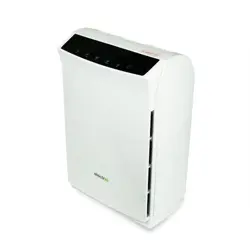
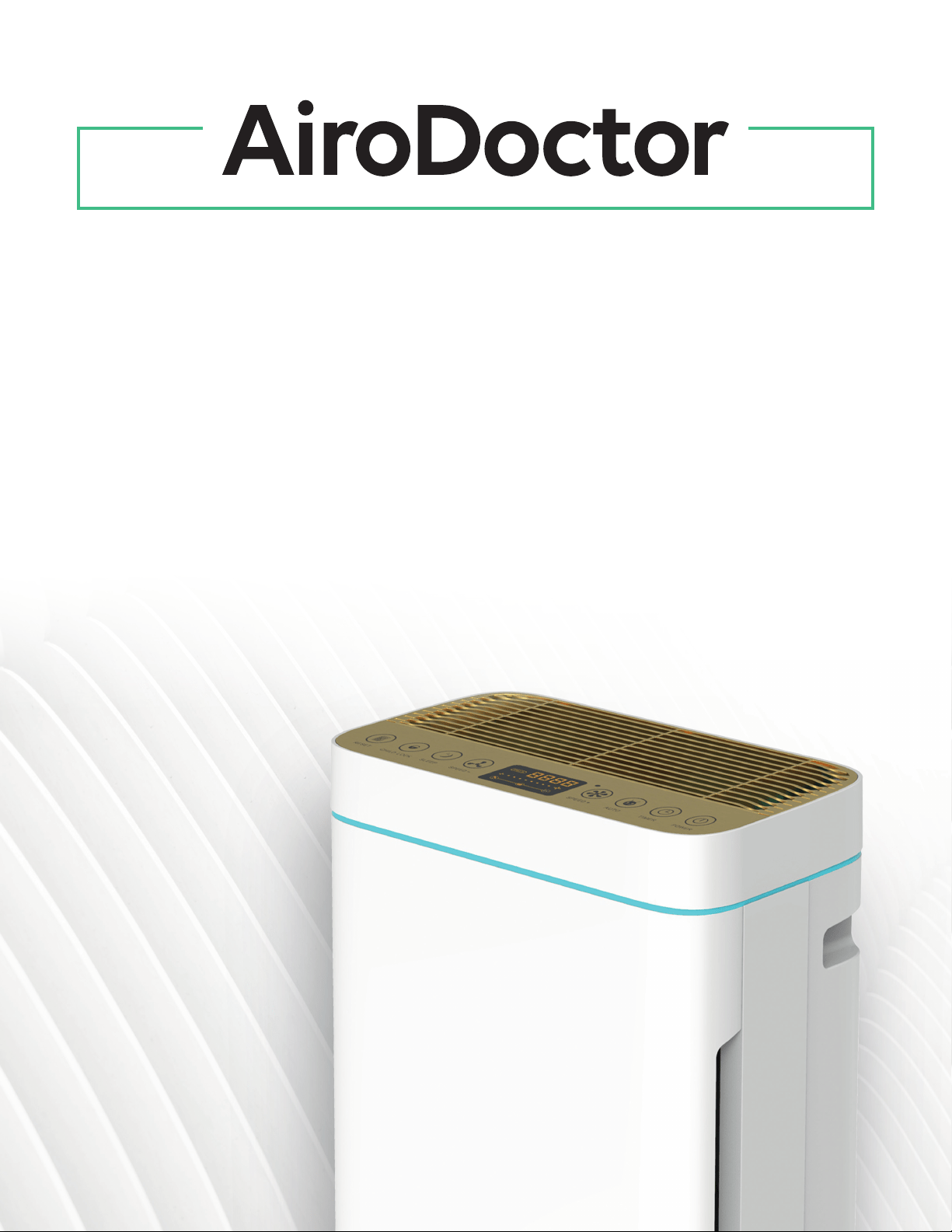
UVA LED PHOTOCATALYTIC
AIR PURIFICATION SYSTEM
Please read this manual carefully before using this product.
User Manual
WAD-M20
Dear Customer,
Thank you for purchasing AiroDoctor.
The AiroDoctor Medical Device meets U.S. Food and Drug Administration (FDA) requirements
for U.S. Commercial Distribution during the COVID-19 public health emergency.
It is not yet FDA-cleared or approved for broader use.
In order to facilitate the installation and use of this unit,
we recommend that you carefully read this manual
in its entirety. To ensure that you always enjoy clean
air, use this manual for qualied and standardized
installation, proper use and maintenance.
If any questions arise from use, please consult this
manual. If it is in accordance with the warranty, we
kindly welcome you to contact the place of purchase.
We welcome any feedback you have about our
product and services.
2
Content
Scientic Data
Components
Features
Filtering System
Installation/Use Instructions
Important Safety Instructions
Installing the Product
Cleaning & Maintenance
Filter Replacement
Troubleshooting
Specications
03
03
04
04
05
06
07
10
11
12
13
3
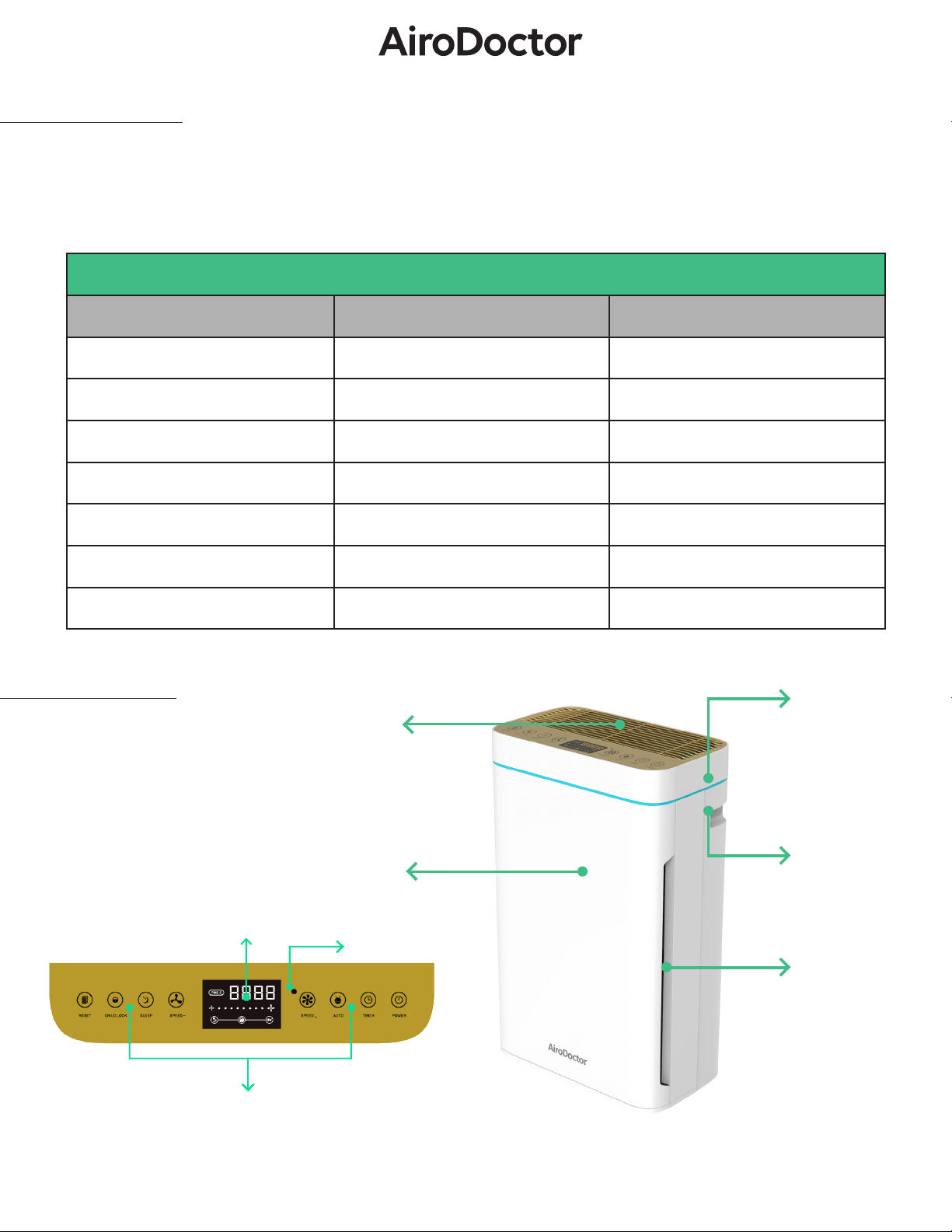
Air outlet
Illuminated display
for air quality
Handle
(on both sides)
Air intake
(on both sides)
Front cover
Components
Scientic Data
Summary of Evalution Results - UVA LED Photocatalytic System
Testing Parameter Microorganism Percent Reduction
Virus Human Coronavirus >99.9%
Bacteria E. Coli >99.9%
Bacteria Salmonella >99%
Virus Rotavirus >99%
Virus Norovirus (Murine) >99%
Virus Inuenza A >99.9%
Bacteria MRSA >99.9%
Light sensorLight sensor
Display
Control panel
Learn more at www.airodoctor.com/us/resources/
4
AiroDoctor air purier with photocatalytic functionality completely breaks down harmful substances, such as viruses
and pathogenic bacteria. This process is very ecient and safe for the environment as it produces no ozone or other
chemical substances. The ne-pored structure of the photocatalytic system allows ltration of particles from PM2.5
classications to less than 0.1μm.
Illuminated display
for air quality
Handle
(on both sides)
Air intake
(on both sides)
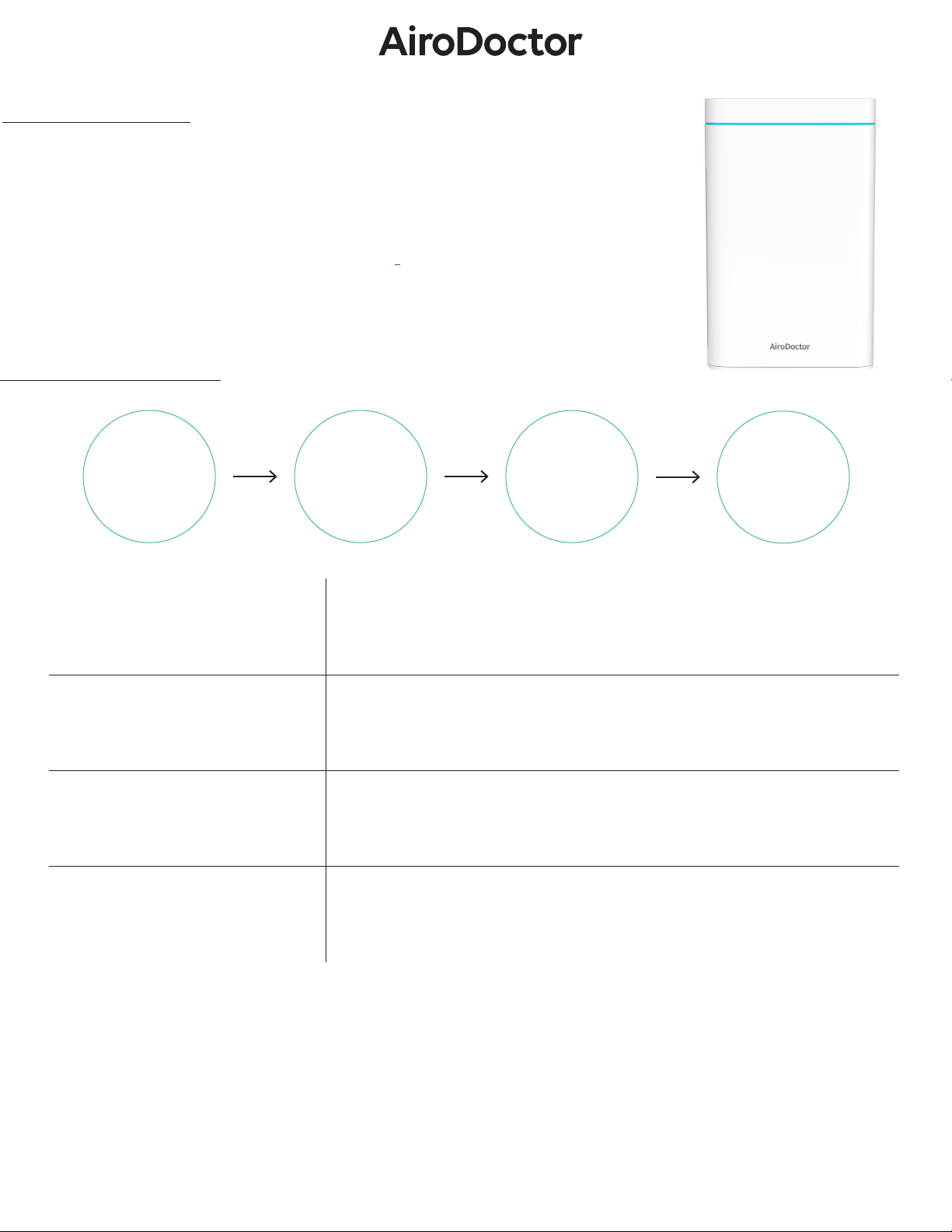
Key Features
Pre-Filter
Activated
Carbon Filter
HEPA Filter
UVA LED
Photocatalytic
Filter
Pre-Filter
Eectively adsorbs large particles with a diameter of around 5 μm,
such as hair, bers and dust.
Activated Carbon Filter
Highly ecient cellular activated carbon neutralizes tobacco smoke,
chemicals, odors, pollutants and organic compounds.
HEPA Filter (H13)
Filters out up to 99.9% of the ultrane dust particles, pollutants,
fungal spores and bacteria (up to 0.3 μm).
UVA LED Photocatalytic Filter
Environmentally friendly UVA LED photocatalysis technology with
250g of solid titanium dioxide permanently eliminates harmful gas-
es and substances as well as the smallest viruses and bacteria.
• CarbonandHEPAltersareintegratedlters.
• Removes >99% of tested viruses, bacteria, harmful gas and odors by decomposition
1
• 4-stage clean air purication system
(Pre-Filter ―› Carbon-Filter ―› HEPA-Filter ―› UVA LED Photocatalytic Filter)
• Using eco-friendly UVA LED photocatalytic technology
• No ozone production nor harmful byproducts
1
Filtering Systems
https://airodoctor.com/us/denitions-and-references
1
5
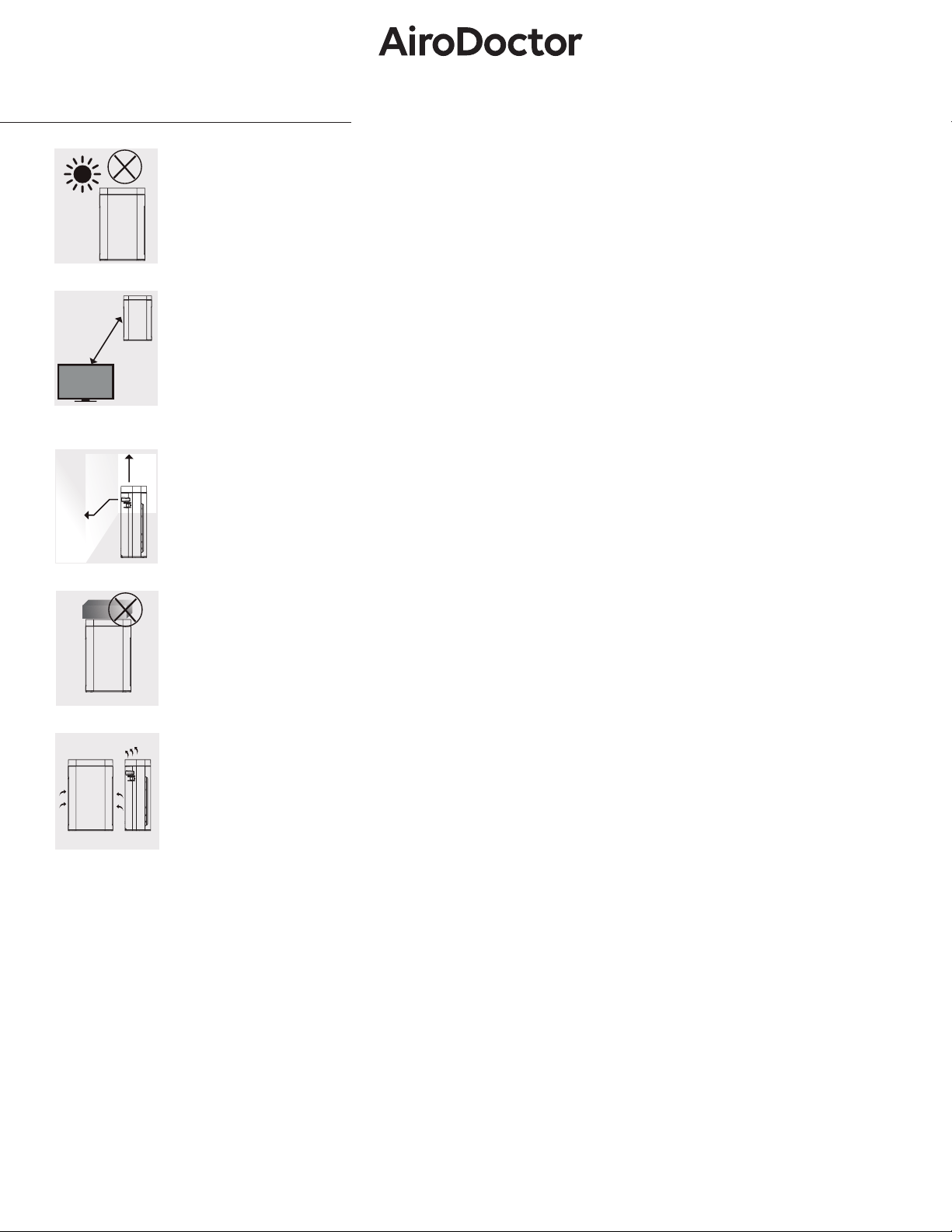
3 ft
Installation/Use Instructions
1 ft
8 in.
Do not place in direct sunlight, facing air conditioner vents, or heated places. It may cause the
unit warp, deteriorate, discolor, or malfunction.
Do not place near TVs or radios. This may distort images or produce noise. Using AiroDoctor
Remote may cause interference with your TV or radio. Place at a distance of 3 ft or more from
these devices. If you are sharing outlets with these devices, plugging in the purier may distort
images or produce noise. Do not plug power into one outlet (multitap) with other products.
For eective room circulation, place the unit approximately 1 ft or more away from walls or
other objects. Keep the backside at least 8 inches away from the wall to enable it to work more
eectively.
Do not place items on the unit as it may lead to malfunction. Be careful not to place magnets or
any other metal items on unit.
Do not block the exhaust vent or supply vent. Do not place objects on top of the exhaust vent or
in front of the supply vent. Do not place ammable substances (sprays, gases, etc.) near the unit.
6
Pull
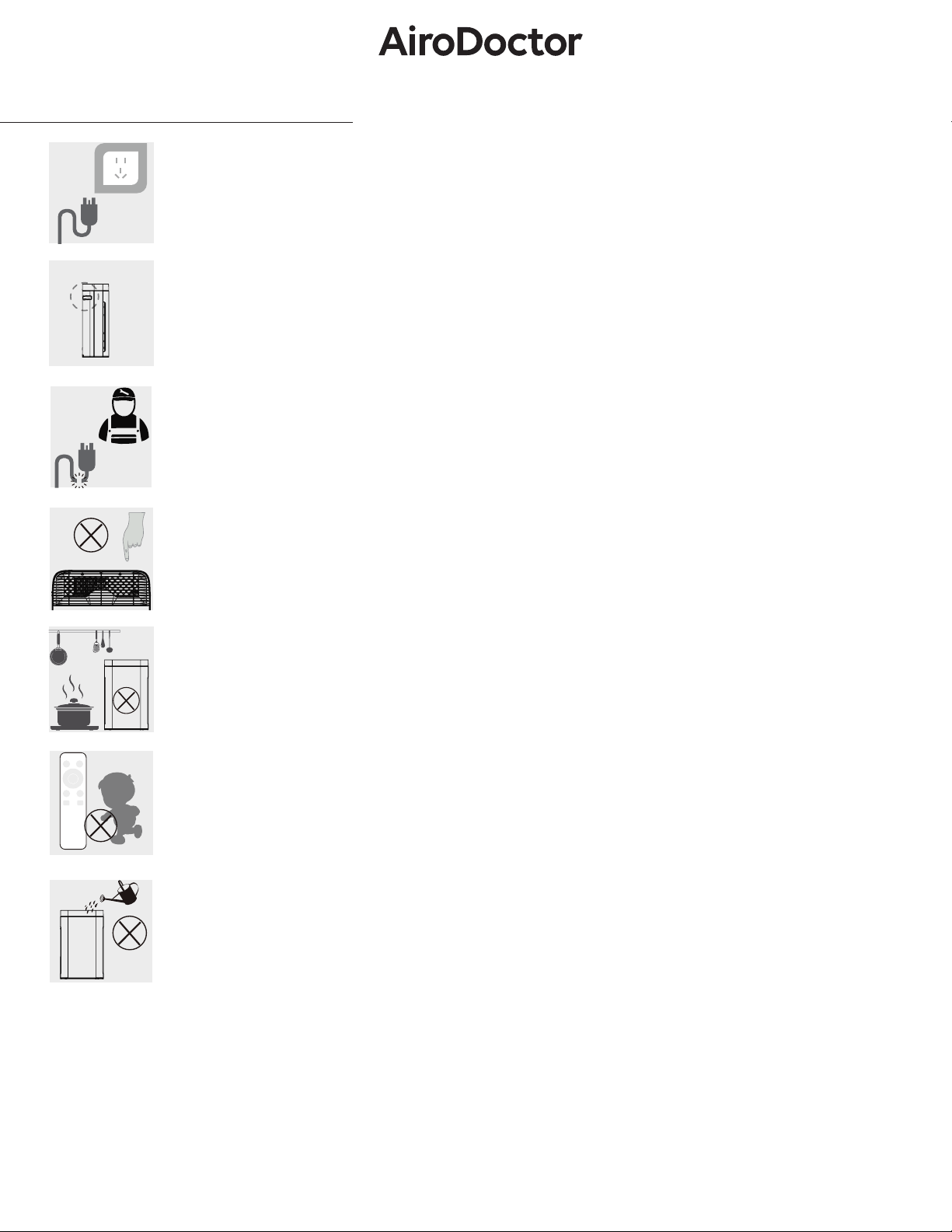
110 V
Important Safety Information
When moving or storing the device, power down via power button then unplug the device. Do not pull
on the power cord as this may cause a short circuit or internal damage to the power cord which may
lead to a re or electric shock.
Whenever moving the unit, use built-in handles on the side of the main body. Using other parts as a
handle to move can cause damage and/or injury.
Do not cut, excessively twist, pull, or bend the power cord. If the power cord is damaged, for your safety
please call the manufacturer, service department, or a trained professional to replace it.
To avoid electrical shock or re, do not allow water, ammable cleaners, or other liquids to enter the
product. If you do not operate the unit for a longer period than one week, leave unit unplugged. Do not
place your ngers or metal objects into the air vents. This may cause electrical shock or injury.
Do not use this product near gas appliances, heating appliances, or stoves.
Please keep AiroDoctor and AiroDoctor remote out of reach of children to avoid unintended damage or
injury.
Do not use the air purier in a room that is using an incense-type insect killer. Chemical residue may
accumulate in the unit and release back into the air, causing harm to physical health. After using insect
killer or mosquito repellent, allow the room to be fully ventilated before using the air purier.
Turn o the unit should any of the following occur:
- Strange noises or vibrations during operation
- Product is unusually hot, or emits a burning smell
7
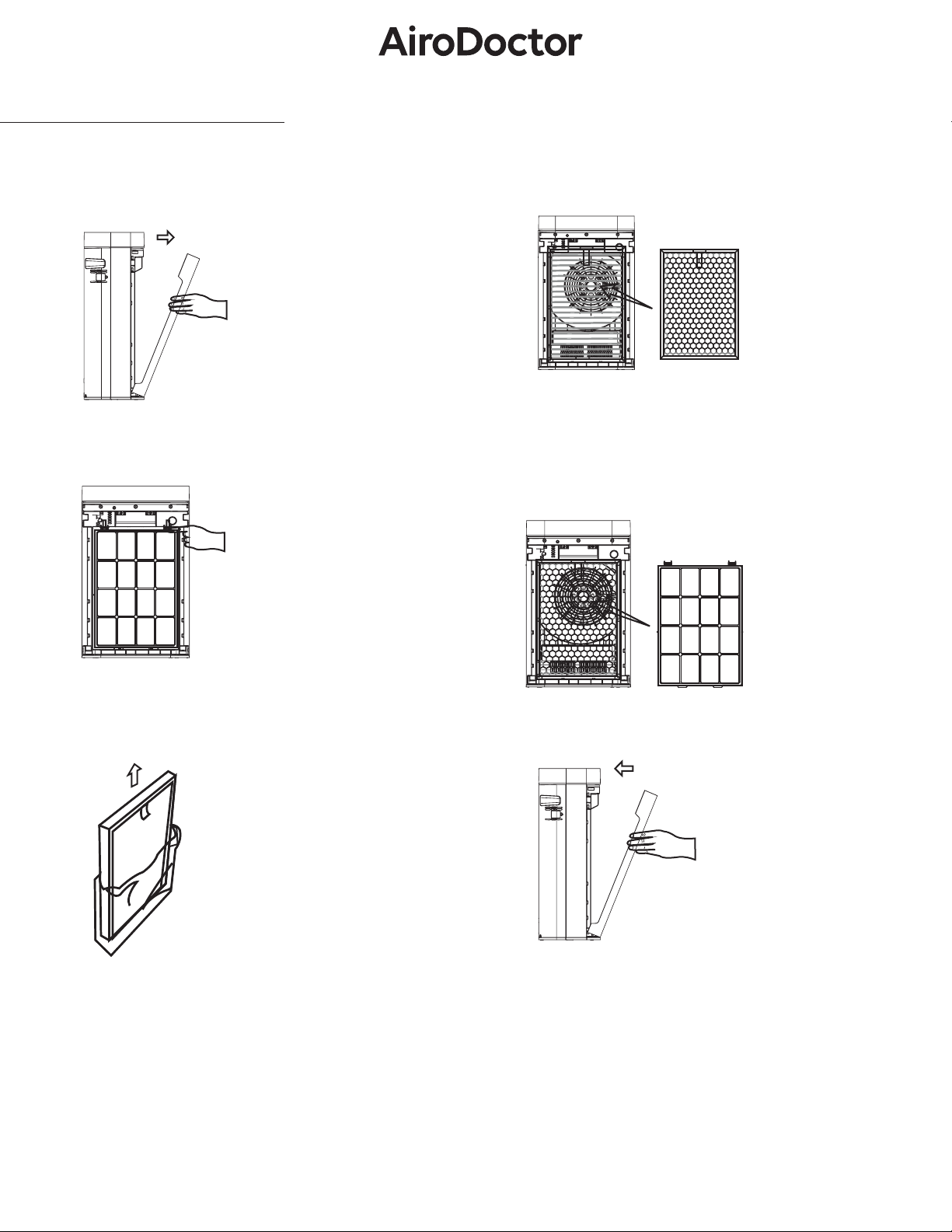
Installing the product
* Makesuretoremoveplasticcoveroofl-
terbeforeuse.
* Theproductwillnotrunifthefrontcoverisuncovered.
Installing the Filter
1. Remove the Front Cover (Use both hands to pull).
2. Remove the Pre-Filter
3. Take the lter out of the Packaging.
4. There are dierences between the inside and the
outside of the absorption lter (Carbon Filter and HEPA
Filter).
5. There are dierences between the inside and the
outside of the Pre-Filter. The side with release tabs should
be facing outward and on the topside.
6. Install the Front Cover.
8
Installing the Product
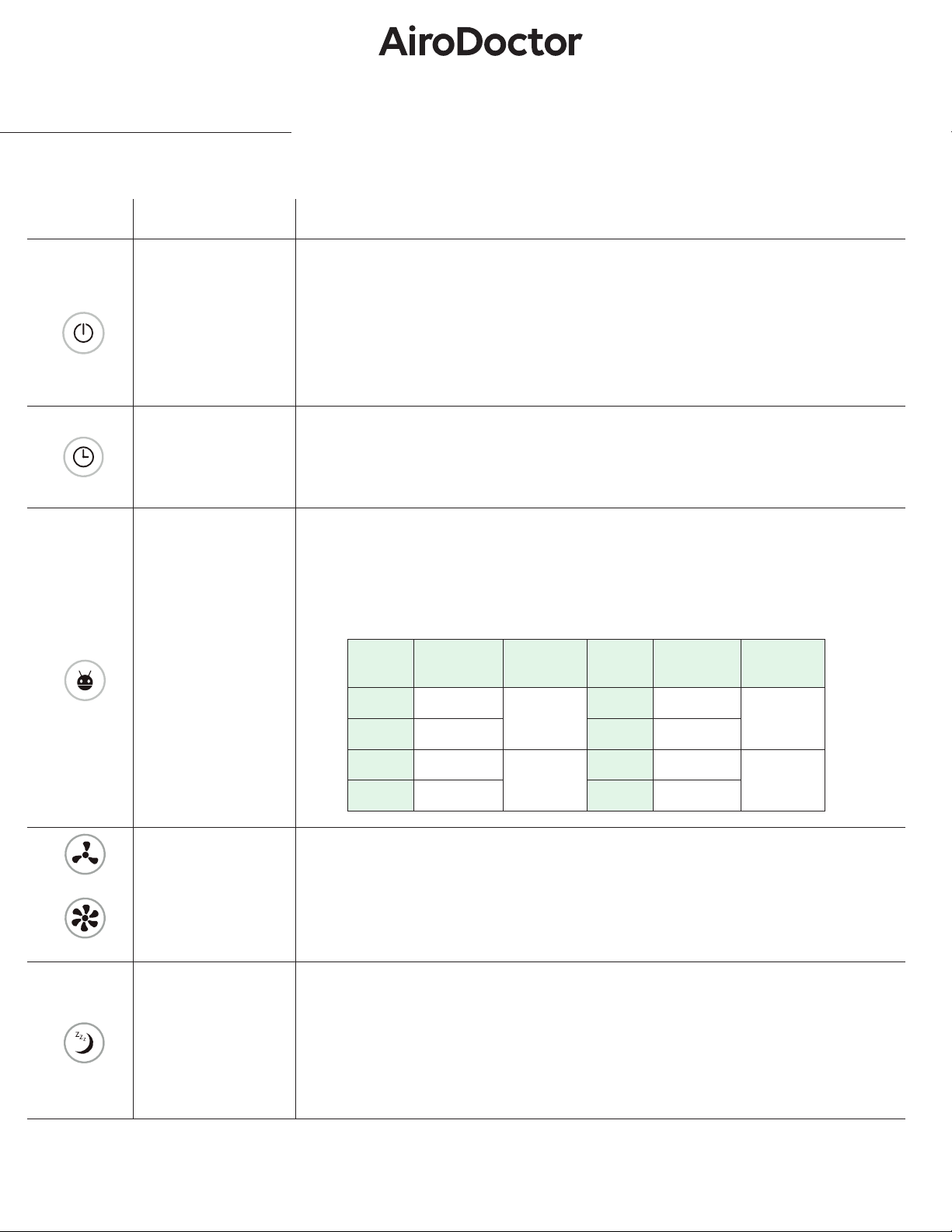
Functional Description
Icon Name Description
Power
ON/OFF
When the product is plugged in and on standby, the “POWER” button turns on the
product. Pressing “POWER” again sets the unit to standby. (The icon is red when in
standby and green when powered on)
If you press the power button on the operation panel while the product is running,
the product will enter standby mode. (And the icon will turn red)
TIMER
When the product is on, each time the “TIMER” button is pressed, it will add 1 hour
to the run time. When it accumulates to 12 hours, an additional press of the button
will turn it o. (The icon will stay on when the product operates in “TIMER“ mode, oth-
erwise it will be o)
AUTO
When the product is on, after pressing the “AUTO” button, the negative ion genera-
tor and germicidal lamp will start to work, and the gears will change according to the
sensor’s data. (The icon will stay on when the product operates in “AUTO” mode, oth-
erwise it will be o). If the speed is changed under “AUTO” mode, the product will quit
this mode automatically.
SPEED
When the product is on, press “SPEED –” or “SPEED +” to switch the gear and change
the operating speed. After the gear speed is changed, the motor will work only at the
setting level without being aected by the sensor. (By pressing the “SPEED” button,
the product will quit “AUTO” mode)
SLEEP
When the product is on, it will turn to sleep mode 5 seconds after the “SLEEP” but-
ton is pressed. In sleep mode all lights turn o and the product works in rst gear.
To wake it up, press any button then press “SLEEP” to quit sleep mode. Product is
operational in “SLEEP” mode. In “AUTO” mode, when surrounding light is reduced for
two minutesthis product will continue running in “SLEEP” mode. When surrounding
light increases for 3 minutes, it will exit sleep mode and continue to run in auto mode.
Gear PM2.5 Data Light
Color
Gear PM2.5 Data Light
Color
1 0~50
Green
(Good)
5 121~140
Yellow
(Below
Average)
2 51~80 6 141~160
3 80~100
Blue
(Average)
7 161~300
Red
(Poor)
4 101~120 8 301~500
SPEED-
SPEED+
9
Installing the unit
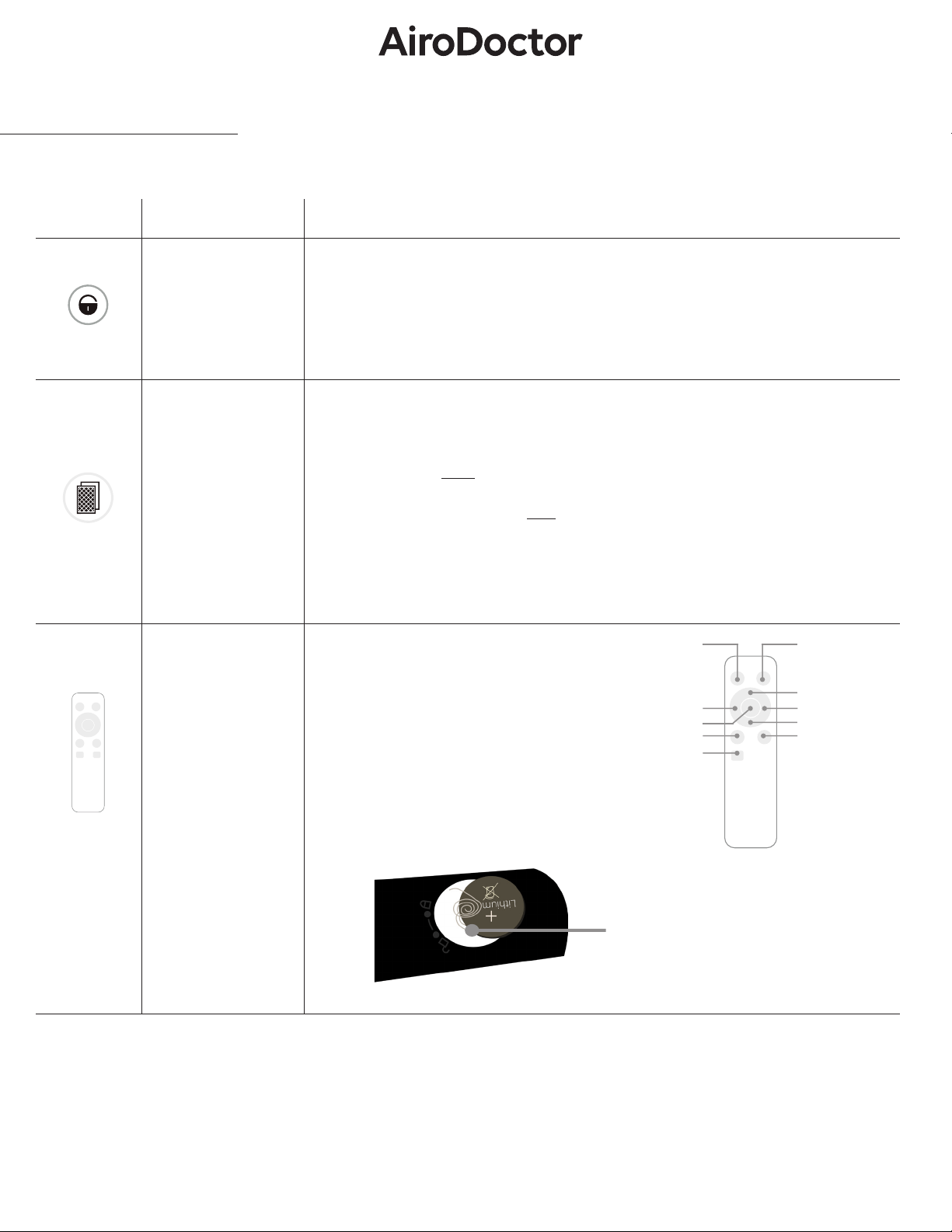
Functional Description
Power
ON/OFF
CHILD LOCK
NO FUNCTION
SPEED (–)SPEED (+)
AUTO
TIMER
RESET
SLEEP
CHILD UNLOCK
Icon Name Description
CHILD LOCK
When the product is on, press the “CHILD LOCK” button to lock all buttons. In this
mode, buttons will have no reaction to any touch. To turn o this mode, press
“CHILD LOCK” for 5 seconds.
RESET
This unit has a regular reminder function for cleaning or lter replacement, which
is set to every 320 hours and 1500 hours. After every 320 hours the indicator light
on the panel will ash to inform users to clean the pre-lter. After cleaning, press
the “RESET” button for 5 seconds, then the light will stop ashing. After every 1500
hours, the indicator light will stay on to inform users to clean the carbon + HEPA
lter. At that time, press the button for 5 seconds so that the timing can be reset.
To check operational time in hours, press the “RESET” button once and it will dis-
play on screen.
Remote
Control
This product is provided with a remote
controller powered by lithium 3V battery.
There is a one-to-one correspondence
between the buttons on the remote
controller and the operation panel. The
functions and operation methods are the
same. When placing battery into remote,
ensure you are placing battery between
the two metal springs. See below picture.
BATTERY FITS
BETWEEN SPRINGS
10
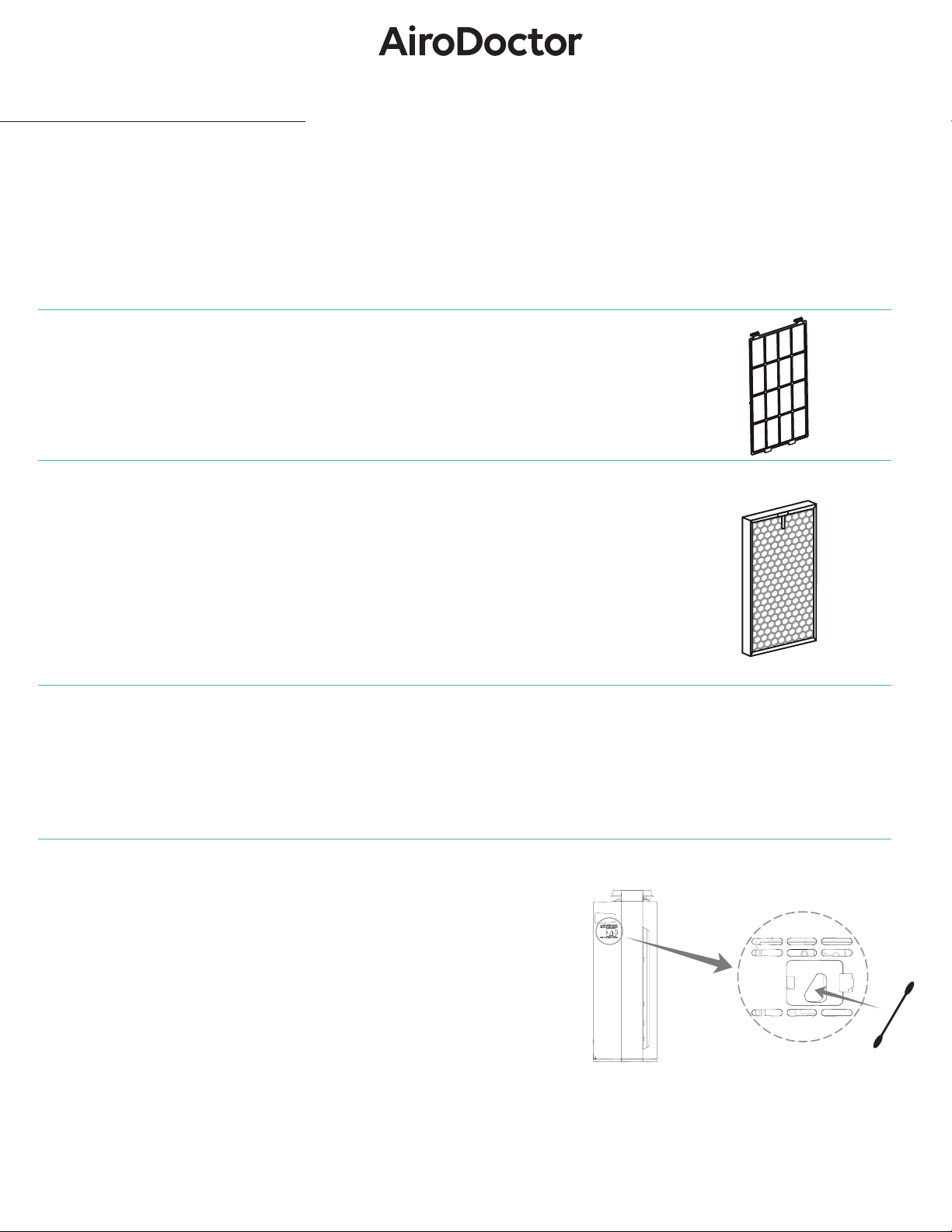
Cleaning & Maintenance
Unplug power cord before cleaning & maintenance of the product.
Exterior Body of Unit
• Use a soft cloth to remove stains and dirt from the unit body.
• For tougher stains, dampen cloth with water and/or use mild detergent and wipe o.
Pre-Filter (approximately twice per month)
• Clean the surface of the lter with a vacuum cleaner or wash with water.
• Allow to dry thoroughly.
Integrated (Carbon + HEPA) Filter (approximately once every two months)
• Clean dust and any visible particles from the front of the lter with a vacuum cleaner.
• Do not use water to clean this lter.
• The lter is delicate. Do not press too hard on the lter while vacuuming.
• Do not expose to direct sunlight.
UVA LED Photocatalytic Filter
• In case any dust or particles are against the grill, use a vacuum cleaner to remove.
• Make sure not to apply too much pressure.
Particulate Sensor (approximately once every two months)
• Be sure to unplug the power cord.
• Wipe the lens with a dry cotton swab periodically to remove any dirt,
moisture, or any residue as they may cause improper sensor readings.
• Do not use the cotton swap on any other area other than the surface
of the lens. Lens position: Diagonally
11
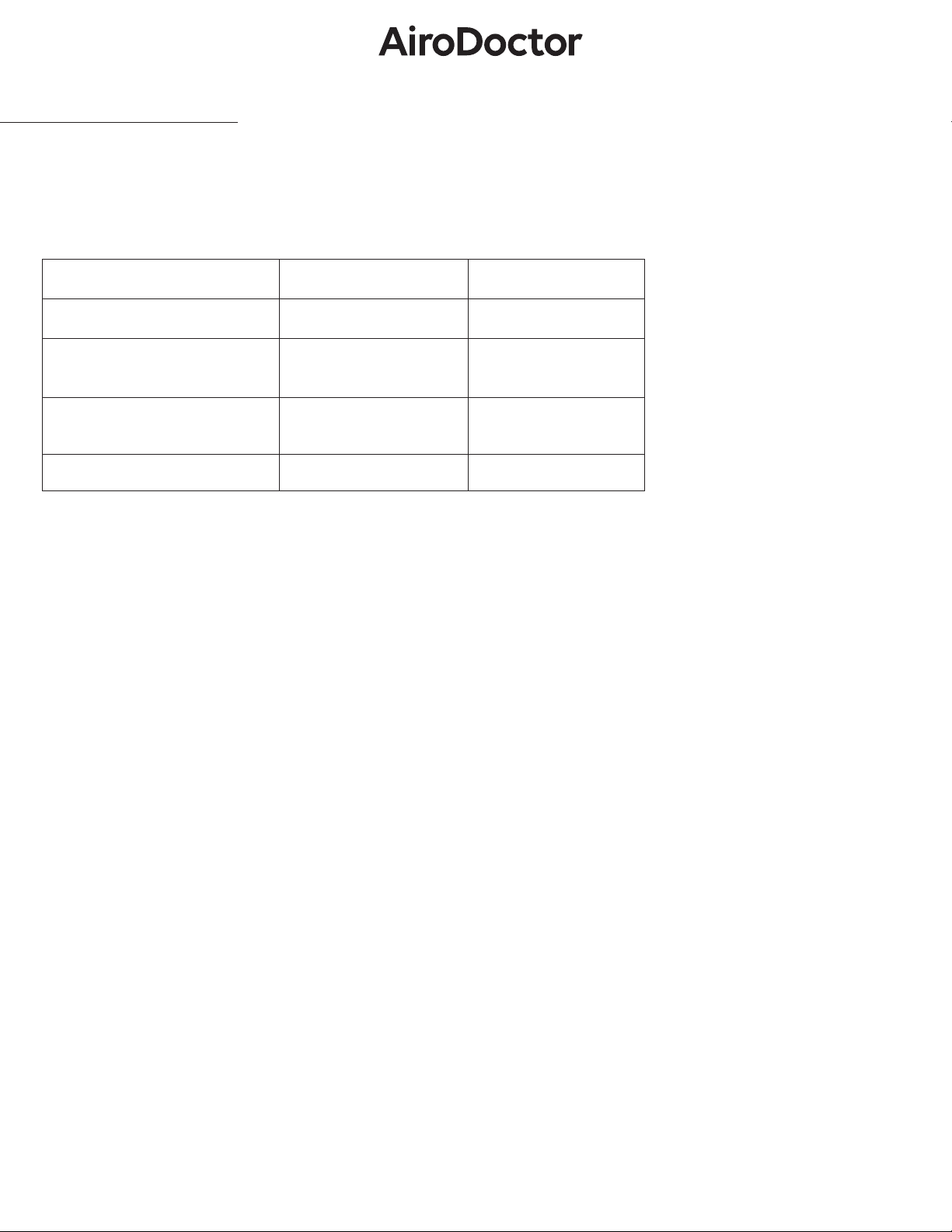
Filter Replacement
• Refertopage10forahow-toguidetocleanthelter.
•
UVALEDPhotocatalyticFiltersdonotrequireaseparatereplacement.Donotremoveitwhencleaning.Ifthereis
anabnormalityinthephotocatalyticlter,pleasecontactthevendoryoupurchasedtheproductfrom.
You may need to replace lters sooner than recommended depending on where and how you use the appliance
(such as an environment or areas with higher air pollution). Additional lters must be purchased separately.
Recommended lter cleaning/replacement period
Item Cleaning period Replacement period
Pre Filter 4 Weeks -
Integrated Filter (Carbon +
HEPA)
4 Weeks 6 months
UVA LED Photocatalytic Filter Once a year –
Particulate Sensor 4 Weeks -
12
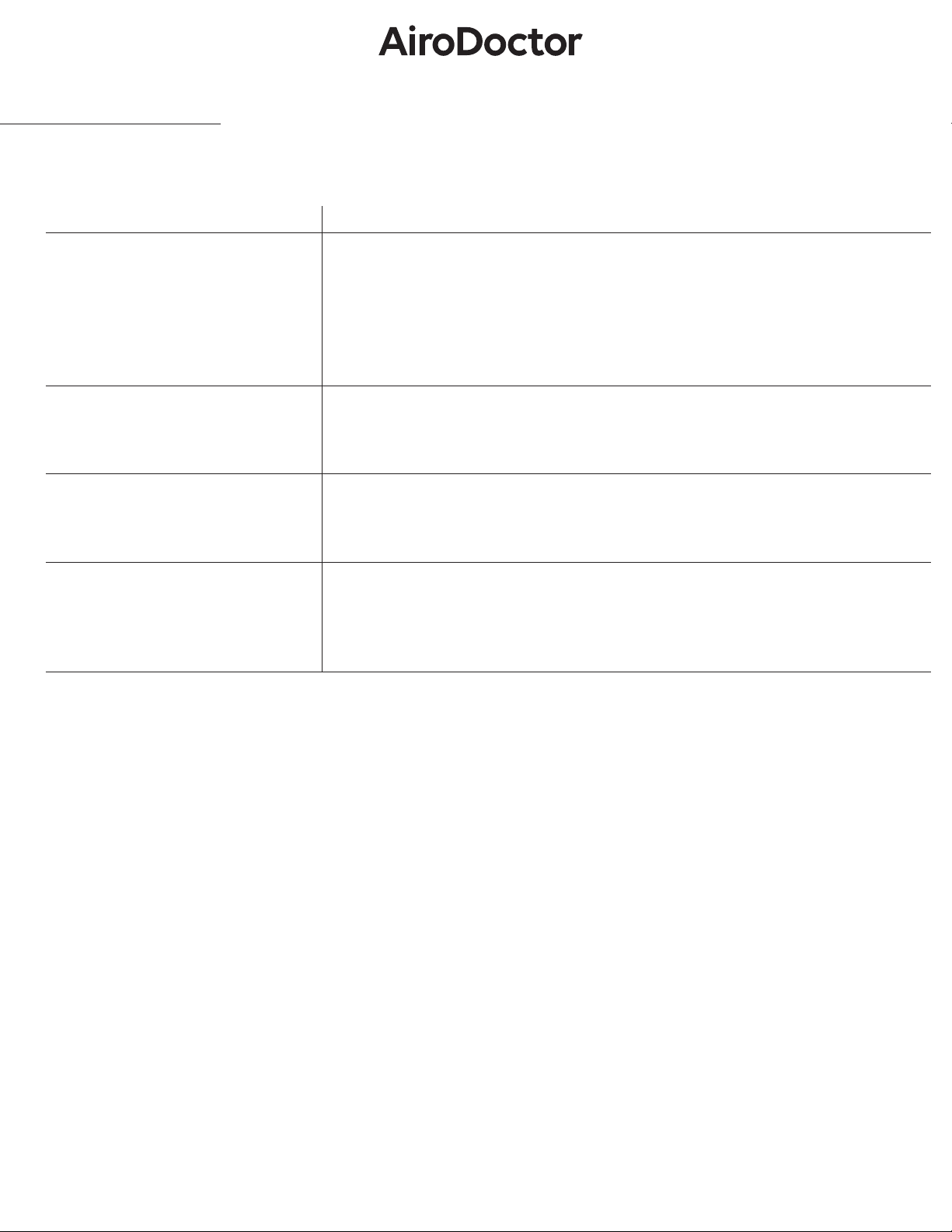
Troubleshooting
Malfunction Inspect / How to x
Not powering on or unresponsive.
1. Make sure the power plug is fully inserted into the outlet, then retry powering on.
2. Make sure the front cover is inserted correctly.
3. Make sure that the product is safely installed on a at or level oor.
4. If the screen has childlock turned on, press the lock button for 5 seconds to turn it o.
If you feel air is not clean but indicator
light shows green.
This may be a product location issue. Place unit in the space where you feel the air is
compromised.
If the air indicator light shows red (poor)
even though the product has been run-
ning for a period of time.
Refer to manual to clean the particulate sensor and/or lters. (See page 10)
When the unit is not producing odor-
less air.
1. Clean the air intake and all the internal lters.
2. If you haven't replaced the lter in the recommended timeframe (See page 11),
replace with a new lter.
Check the following troubleshooting instructions and contact the vendor where you purchased the unit if the issue is not resolved.
13
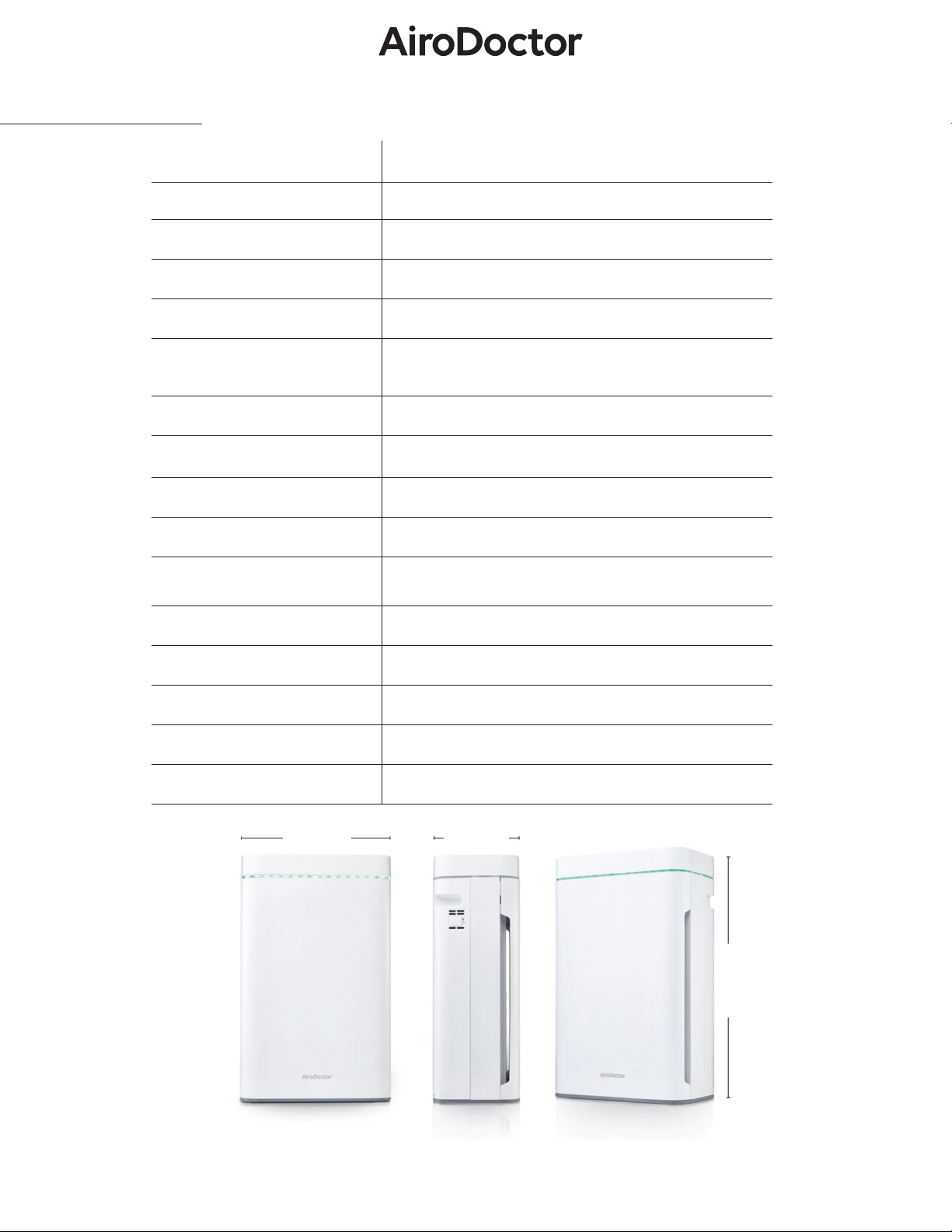
Specications
Product Name AiroDoctor Air Purier
Model Name WAD-M20
Max. Room Size Up to 2150ft
2
CADR (Clean Air Delivery Rate) 282 ft
3
/m
Noise Level (Max.) 55dB
Filter Type
Pre-Filter, Integrated (Carbon+HEPA) Filter, UVA
LED Photocatalytic Filter with 250g of solid titanium
dioxide
HEPA Filter Grade H13
Fan Speed 1 ~ 8 Levels
Timer 12 hours (max), Set in 1 hour increments
Filter Replacement Notice Yes
Indicator Light of Air Quality
4 Levels
Green (Good), Blue (Average), Yellow (Below Aver-
age), Red (Poor)
Energy Eciency Class 4
Rated Voltage 110-220 V AC, 50/60 Hz
Power Consumption 85W
Weight 25.4lbs
Dimensions 15.8 (W) × 9.1 (D) × 25.2 (H) inches
15.8 inches
9.1 inches
25.2 inches
14

Thispageintentionallyleftblank.
15

For cleaner and healthier air
AiroDoctor is distributed in the USA and Canada by:
AEX TECHNOLOGY SOLUTIONS, LLC.
444 West Lake Street
Suite 1700
Chicago, IL 60606
www.airodoctor.com/us