ZW21
User Guide

LEGAL INFORMATION
Thank you for choosing this ZTE mobile device. In order to
keep your device in its best condition, please read this
manual and keep it for future reference.
Copyright
Copyright © 2019 ZTE CORPORATION
All rights reserved.
No part of this publication may be quoted, reproduced,
translated or used in any form or by any means, electronic or
mechanical, including photocopying and microfilm, without
the prior written permission of ZTE Corporation.
Notice
ZTE Corporation reserves the right to make modifications on
print errors or update specifications in this guide without
prior notice. This manual has been designed with the utmost
care to ensure the accuracy of its content. However, all
statements, information, and recommendations contained
therein do not constitute a warranty of any kind, either
expressed or implied. Please refer to For Your Safety to be
sure to use your phone properly and safely. We offer
self-service for our smart terminal device users. Please visit
the ZTE official website (at http://www.ztedevices.com/) for
more information on self-service and supported product
models. Information on the website takes precedence.

Disclaimer
ZTE Corporation expressly disclaims any liability for faults
and damages caused by unauthorized modifications of the
software.
Images and screenshots used in this manual may differ from
the actual product. Content in this manual may differ from
the actual product or software.
Trademarks
ZTE and the ZTE logos are trademarks of ZTE Corporation.
Other trademarks and trade names are those of their
respective owners.
Version No.: R1.0
Edition Time: November 18, 2019
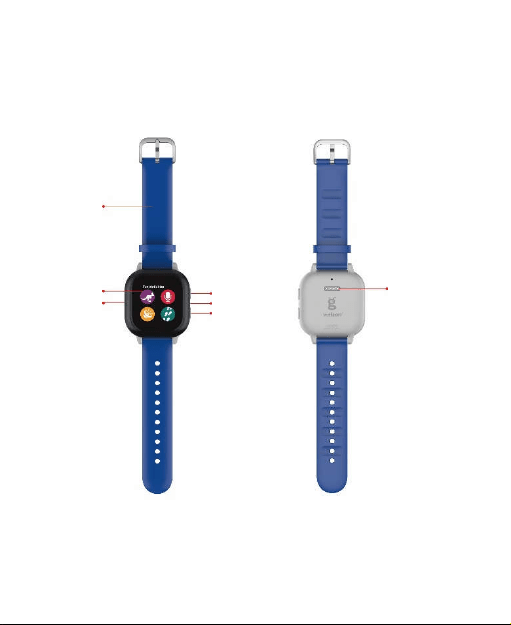
About your watch
Wrist
band
Touch
screen
Speaker
Back button
Microphone
Power button
Charging
contacts

Setting up your watch
Charging your watch
Before turning on your watch, charge it fully.
1. Align the gold pins on the charging dock with the gold
charging contacts on the back of the watch.
2. Plug the other end of the cord into the charging adapter
and plug the adapter into an electrical outlet.
WARNING!
Only use approved chargers with your device. Use of
incompatible chargers or tempering with the charger port could
damage your device and void the warranty.
Preparing your watch
Download the GizmoHub app from the Google Play Store or the
Apple App Store.
The GizmoHub app lets you set up, call, message, find, and
control your child’s watch.
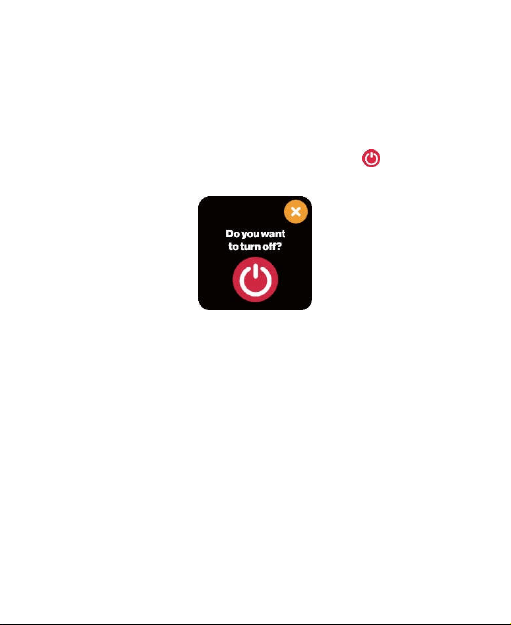
Turning your watch on and off
To turn your watch on, press and hold the Power button until the
screen lights up.
To turn it off, press and hold the Power button until you see “Do
you want to turn off?” on the screen. Then touch to turn off
your watch.
Setting up your watch
Follow the instructions in the GizmoHub app and on your watch
to complete setup.
Using your watch
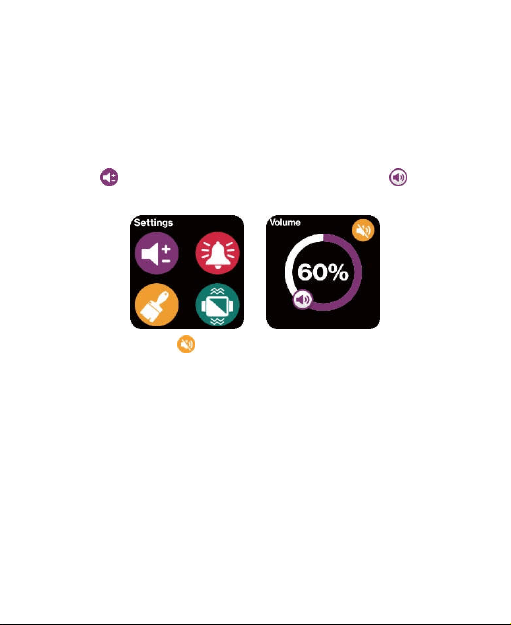
Adjusting the volume
Swipe to the right from the watch face to the Settings screen.
Touch to go to the Volume screen. Then drag the to
adjust the volume.
You can also touch to turn off the sound or turn it back on.
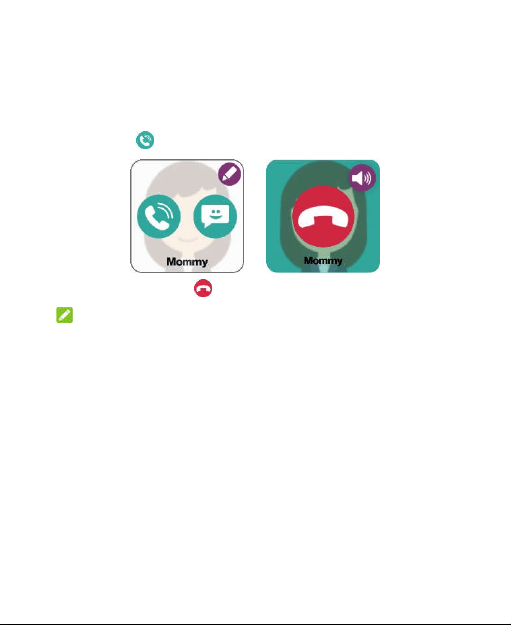
Making a call
1. From the watch face, swipe left to the Contacts list. Then
touch the contact you want to call.
2. Touch to make a call.
To end the call, touch .
NOTE:
Your watch can only make and receive calls from phone numbers
on the Contacts list. You can manage the contacts in the
GizmoHub app on your phone.
Receiving a call
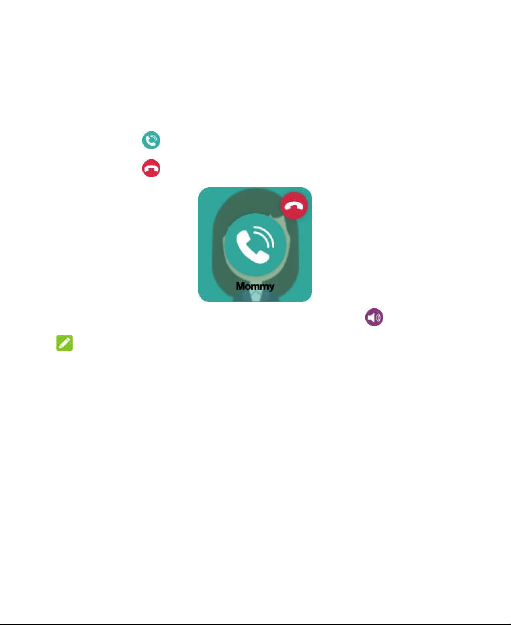
When someone calls the watch, it will ring and the caller name
will be shown on the screen.
Touch to answer the call.
Touch to reject or end the call.
To adjust the volume during the call, touch .
NOTE:
Making and receiving calls and messages require a network
connection.
Sending a message
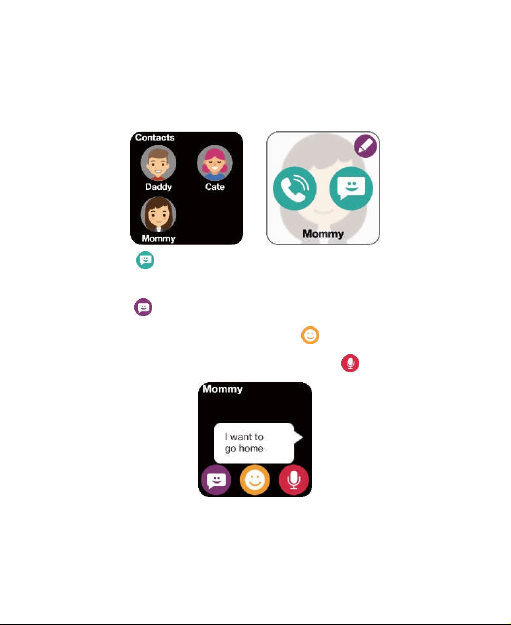
1. From the watch face, swipe left to the Contacts list. Then
touch the contact you want to message.
2. Touch to create a new message. Then:
To choose from a list of pre-written messages, touch
.
To choose an emoji, touch .
To create a voice message, touch .
Receiving a message
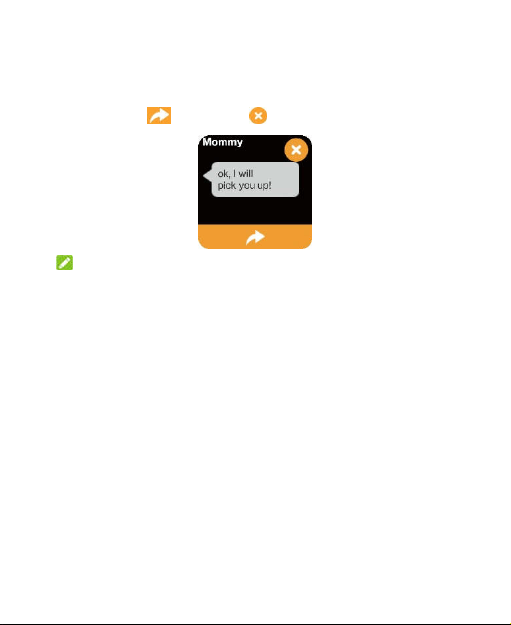
When the watch receives a new message, it will appear on the
screen. Touch to reply or to close the message.
NOTE:
The watch can only exchange messages with contacts whose
permission is Guardian, Caregiver, or GizmoBuddy. You can
manage contact permissions with the GizmoHub app.
For Your Safety
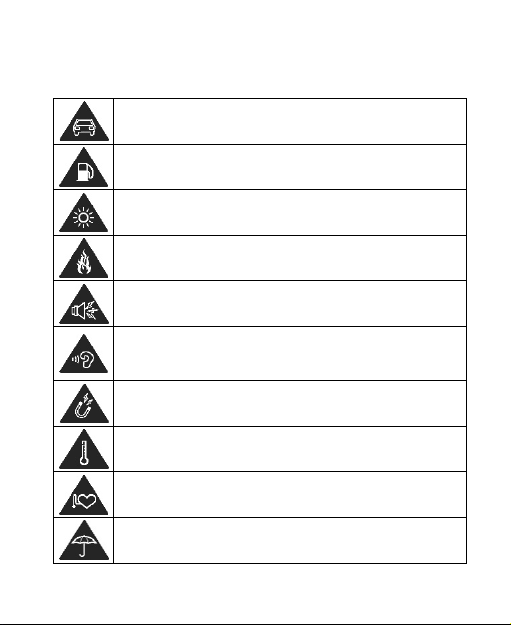
Don’t use while walking or running. Pay attention to the traffic.
Don’t use at gas stations.
Your device may produce a bright or flashing light.
Don’t dispose of your device in fire.
Your device can produce a loud sound.
To prevent possible hearing damage, do not listen at high volume
levels for long periods. Exercise caution when holding the device
near your ear.
Avoid contact with anything magnetic.
Avoid extreme temperatures.
Keep away from pacemakers and other electronic medical
devices.
Avoid contact with liquids. Keep your device dry.
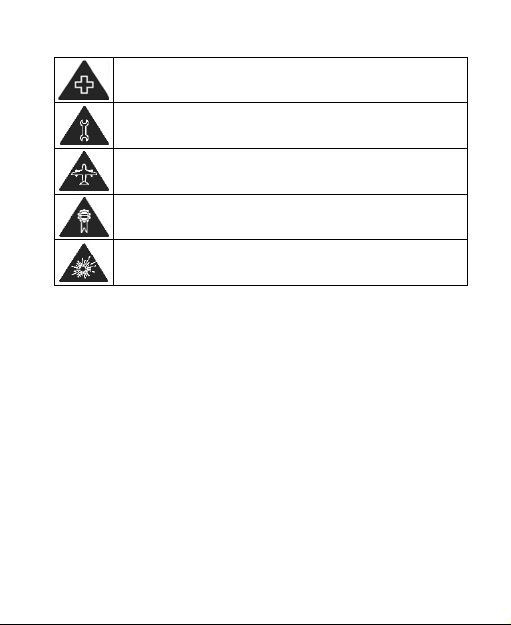
Turn off when asked to in hospitals and medical facilities.
Don’t take your device apart.
Turn off when told to in aircraft and airports.
Only use approved accessories.
Turn off when near explosive materials or liquids.
FCC RF Exposure Information (SAR)
This device is designed and manufactured not to exceed the
emission limits for exposure to radio frequency (RF) energy set
by the Federal Communications Commission of the United
States.
The exposure standard for wireless devices employs a unit of
measurement known as the Specific Absorption Rate, or SAR.
The SAR limit set by the FCC is 1.6W/kg for 1g SAR and 4.0W/kg
for 10g SAR.
The FCC has granted an Equipment Authorization for this model
device with all reported SAR levels evaluated as in compliance
with the FCC RF exposure guidelines. SAR information on this

model device is on file with the FCC and can be found under the
Display Grant section of www.fcc.gov/oet/ea/fccid after
searching on
FCC ID: SRQ-ZW21.
For this device, the highest reported mouth SAR value is
0.44W/kg and the highest wrist-worn SAR value is 0.90 W/kg.
This device has been tested and meets RF exposure guidelines
when used with an accessory that contains no metal and that
positions the mobile device a minimum of 0.0 cm from the
extremity.
FCC Regulations
This device complies with part 15 of the FCC Rules. Operation is
subject to the following two conditions: (1) This device may not
cause harmful interference, and (2) this device must accept any
interference received, including interference that may cause
undesired operation.
This device has been tested and found to comply with the limits
for a Class B digital device, pursuant to Part 15 of the FCC Rules.
These limits are designed to provide reasonable protection
against harmful interference in a residential installation. This
equipment generates, uses and can radiated radio frequency
energy and, if not installed and used in accordance with the
instructions, may cause harmful interference to radio

communications. However, there is no guarantee that
interference will not occur in a particular installation. If this
equipment does cause harmful interference to radio or
television reception, which can be determined by turning the
equipment off and on, the user is encouraged to try to correct
the interference by one or more of the following measures:
Reorient or relocate the receiving antenna.
Increase the separation between the equipment and
receiver.
Connect the equipment into an outlet on a circuit different
from that to which the receiver is connected.
Consult the dealer or an experienced radio/TV technician
for help.
CAUTION: Changes or modifications not expressly approved by
the party responsible for compliance could void the user‘s
authority to operate the equipment.
CTIA Requirements
Do not disassemble or crush, bend or deform, puncture or
shred the battery.
Do not modify or remanufacture, attempt to insert foreign
objects into the battery, immerse or expose to water or
other liquids, expose to fire, explosion or other hazards.

Only use the battery for the device for which it is specified.
Only use the battery with a charging system that has been
qualified with the system per CTIA Certification
Requirements for Battery System Compliance to IEEE 1725.
Use of an unqualified battery or charger may present a risk
of fire, explosion, leakage, or other hazards.
Do not short-circuit a battery or allow metallic conductive
objects to contact battery terminals.
Replace the battery only with another battery that has
been qualified with the system per this standard,
IEEE-Std-1725. Use of an unqualified battery may present a
risk of fire, explosion, leakage or other hazards. Only
authorized service providers shall replace the battery (if the
battery is not user-replaceable.)
Promptly dispose of used batteries in accordance with local
regulations.
Battery usage by children should be supervised.
Avoid dropping the device or battery. If the device or
battery is dropped, especially on a hard surface, and the
user suspects damage, take it to a service center for
inspection.
Improper battery use may result in a fire, explosion or other
hazards.
The device shall only be connected to CTIA certified

adapters, products that bear the USB-IF logo or products
that have completed the USB-IF compliance program.
Distraction While Walking
Full attention must be given to traffic at all times when walking
or running in order to reduce the risk of an accident. Please
observe relevant provisions on prohibitions or restrictions on the
use of mobile phones.
Product Handling
General Statement on Handling and Use
You alone are responsible for how you use your device and any
consequences of its use.
Always treat your device and its accessories with care and
keep them in a clean place.
Keep the screen clean. An unclean screen may slow down
the device’s reaction to your operations.
Clean the device and its accessories with a soft material
such as a microfiber cleaning cloth. Do not use alcohol or
other corrosive substances for cleaning or allow them to
get inside.
Do not expose your device or its accessories to open flames

or lit tobacco products.
Do not expose your device or its accessories to liquid,
moisture or high humidity.
Do not drop, throw or try to bend your device or its
accessories.
Do not use harsh chemicals, cleaning solvents, or aerosols
to clean the device or its accessories.
Do not paint your device or its accessories.
Do not attempt to disassemble your device or its
accessories. Only authorized personnel can do so.
Do not place your device inside or near heating equipment
or high-pressure containers, such as water heaters,
microwave ovens, or hot cooking utensils. Otherwise, your
device may be damaged.
Please check local regulations for disposal of electronic
products.
Do not wrap your device, charging cable or adapter in quilts
or other packages during use or charging. Poor ventilation
may cause heat build-up and damage internal components
or cause fire.
Do not wear or play with the device while it is being
charged.
Do not use conductive foreign objects (such as metal plates,

pencils, etc.) to contact with the charging port or
connectors.
Do not expose or use your device or its accessories in an
environment with or that can reach extreme temperatures.
Battery Safety
Using ZTE-unapproved or incompatible battery, charger or
power adapter may damage your device, shorten its
lifespan or cause a fire, explosion or other hazards.
The recommended operating temperatures are 0 °C to
35 °C and the storage temperatures are -20 °C to +45 °C.
Extreme temperatures can damage the device and reduce
the charging capacity and lifespan of your device and
battery.
The battery is not removable. Removal may cause fire or
explosion.
Do not change or replace the built-in rechargeable battery
in your device by yourself. The battery can only be changed
or replaced by ZTE or ZTE authorized service provider.
Do not place the device or the battery in or near heating
equipment, such as microwave ovens, stoves or radiators.
Keep the device and the battery away from excessive heat
and direct sunlight. If not, the device or the battery may
overheat and cause explosion or fire.

Do not disassemble, squeeze or puncture the device, as this
can cause explosion or fire.
Do not throw the device into a fire to avoid explosion.
Please disconnect the charger when the battery is fully
charged. Overcharging may shorten the battery life.
When not using the device for a long period, please charge
the battery about half and then store the device in a cool
dry place.
If the battery damages or shows signs of swelling or leakage,
please stop use immediately and contact ZTE or ZTE
authorized service provider for replacement.
Small Children
Do not leave your device and its accessories within the reach of
small children or allow them to play with it.
They could hurt themselves or others, or could accidentally
damage the device.
Your device contains small parts that may cause an injury or may
become detached and create a choking hazard.
Demagnetization
To avoid the risk of demagnetization, do not allow electronic
devices or magnetic media close to your device for a long time.

Seizures/Blackouts
Your device can produce a bright or flashing light. A small
percentage of people may be susceptible to blackouts or
seizures (even if they have never had one before) when exposed
to flashing lights or light patterns such as when playing games or
watching video. If you have experienced seizures or blackouts or
have a family history of such occurrences, please consult a
physician. To reduce the risk of blackouts or seizures, use your
device in a well-lit room and take frequent breaks.
Emergency Calls
This device operates using radio signals, which cannot guarantee
connection in all conditions.
Loud Noise
This device is capable of producing loud noises, which may
damage your hearing. Turn down the volume if necessary.
Users who have heart disease should pay attention to the
vibration and volume settings.
Sensitive Skin
Some people may have allergic reaction when their skin is
exposed to wearable items for a long time. This may be due to
allergies, environmental factors, exposure to irritants (such as
soap or sweat) or other factors. If you have allergies, you may

feel uncomfortable when using a wearable device. If you do have
skin allergy, please pay special attention.
Do not wear the device too tight. Let the skin breathe by
removing the device regularly. Keep the device clean and dry will
reduce the likelihood of skin discomfort. If the skin shows
redness, swelling, itching or other allergic symptoms around the
area where you wear the device, please remove the device and
consult a physician.
Even when the symptoms alleviate, they may be induced again if
you continue to wear the device.
Device Cleaning
Keep your watch clean and dry. After exercising or sweating,
clean and dry the watch, the bands and your skin. If exposed to
water, dry the device thoroughly.
Clean the watch when following situations appear: contact with
dirt or other damaging substances (such as dust or sand,
cosmetics, ink, soap, cleaning agent, acid or acid food), contact
with non-water liquid and liquid that may cause skin allergy
(such as sweat, brine, soap water, perfume, pesticide spray,
lotion, sunscreen, oil, hair dyer, or solvent).
Watch and bands color may vary, or fade over time. Clean the
watch with a soft non-fleece cloth. If necessary, moisten the
cloth with clean water.

Device Heating
Your device may become warm during charging and during
normal use.
During use in high temperature environments, such as inside a
car or under direct sunshine for a long time, the watch may start
to control its temperature to prevent users from being burned.
You may encounter the following situations: charging slows
down or stops, the screen turns dark, temperature warning
appears on the screen, data transmission is suspended or
delayed, or the watch may be turned off. If your arm feels
uncomfortable, please take off the watch temporarily.
The watch may become warm during FOTA upgrade. Please took
off the watch during the upgrade.
The surface temperature of the watch complies with standards
and limits on temperature rise. However, even within these
limits, prolonged contact with a warm surface may cause
discomfort or injury. If the temperature of the watch makes you
uncomfortable, take it off.
Electrical Safety
Accessories
Use only approved accessories. Do not connect with
incompatible products or accessories.

Never puncture the surface of the device with sharp objects.
Faulty and Damaged Products
Do not attempt to disassemble the device or its accessories. Only
qualified personnel can service or repair the device or its
accessories.
If your device (or its accessories) has been submerged in water,
punctured, or subjected to a severe fall, do not use it until you
have taken it to be checked at an authorized service center.
Radio Frequency Interference
General Statement on Interference
Care must be taken when using the device in close proximity to
personal medical devices, such as pacemakers and hearing aids.
Please consult your doctor and the device manufacturers to
determine if the operation of your watch may interfere with the
operation of your medical devices.
Pacemakers
Pacemaker manufacturers recommend that a minimum
separation of 15 cm be maintained between a mobile device and
a pacemaker to avoid potential interference with the pacemaker.
To achieve this, use the device on the opposite ear to your
pacemaker and do not carry it in a breast pocket.

Hearing Aids
People with hearing aids or other cochlear implants may
experience interfering noises when using wireless devices or
when one is nearby.
The level of interference will depend on the type of hearing
device and the distance from the interference source. Increasing
the separation between them may reduce the interference. You
may also consult your hearing aid manufacturer to discuss
alternatives.
Medical Equipment
Turn off your wireless device when you are requested to do so in
hospitals, clinics or health care facilities. These requests are
designed to prevent possible interference with sensitive medical
equipment.
Aircraft
Turn off your wireless device whenever you are instructed to do
so by airport or airline staff.
Consult the airline staff about the use of wireless devices
onboard the aircraft. If your device offers a ‘airplane mode’, this
must be enabled prior to boarding an aircraft.
Interference in Vehicles
Please note that because of possible interference with electronic

equipment, some vehicle manufacturers forbid the use of mobile
devices in their vehicles unless a hands-free kit with an external
antenna is included in the installation.
Explosive Environments
Gas Stations and Explosive Atmospheres
In locations with potentially explosive atmospheres, obey all
posted signs to turn off wireless devices such as your watch or
other radio equipment.
Areas with potentially explosive atmospheres include fuelling
areas, below decks on boats, fuel or chemical transfer or storage
facilities, and areas where the air contains chemicals or particles,
such as grain, dust, or metal powders.
Blasting Caps and Areas
Power off your mobile device when in a blasting area or in areas
where signs are posted to power off “two-way radios” or
“electronic devices” to avoid interfering with blasting
operations.