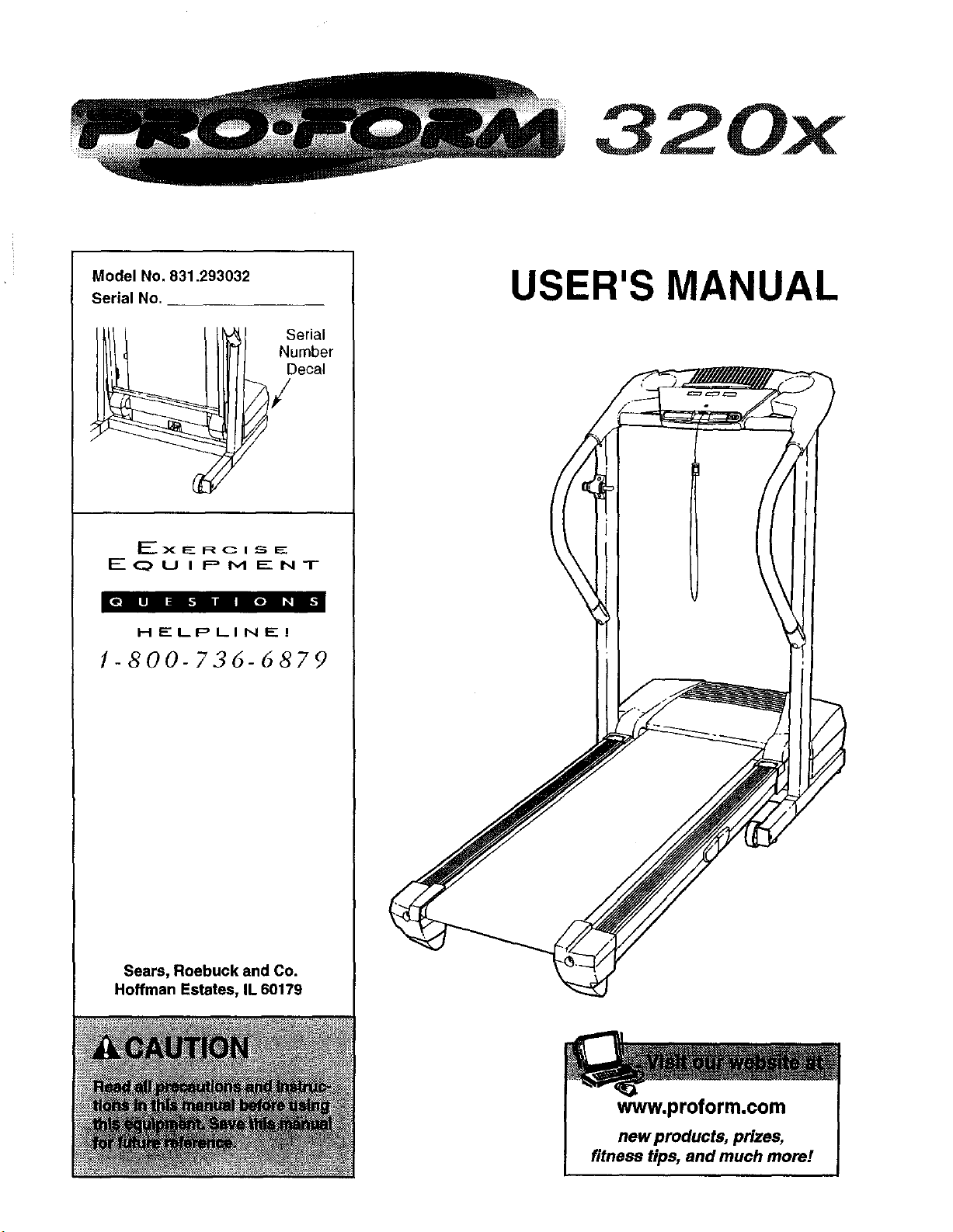
320x
Model No. 831.293032
Serial No.
erial
Number
Decal
EX_RCI_E
EOU I PM ENT
EOili _liReB _1
HELPLINEI
1-800-736-6879
Sears, Roebuck and Co.
Hoffman Estates, IL 60179
USER'S MANUAL
www.proform.com
new products, prizes,
fitness tips, and much more!
TABLE OF CONTENTS
IMPORTANT PRECAUTIONS .......................................................
BEFORE YOU BEGIN .........................................................
ASSEMBLY ........................................................................
OPERATION AND ADJUSTMENT ......................................
HOW TO FOLD AND MOVE THE TREADMILL ....................................
TROUBLESHOOTING ................................................
CONDITIONING GUIDELINES ...........................................................
ORDERING REPLACEMENT PARTS ............................. Back Co_
FULL 90 DAY WARRANTY ................................... Back Co,
Note An EXPLODED DRAWING and a PART LIST are attached in the center of this manual.
IMPORTANT PRECAUTIONS
J_WARNING: To_-_thtar_kofbums.ftmo_=,=_or I,mu_tope,o,.._d t_
following important precautions and information before operating tile treadmill.
t. _ Ezthe _esptansibility of the owner to ertswe
tbal all uears of this treadmill tareadequately
int_o_ oi all wamlnas sindDreeautions.
_, Use the tri_dmilt on!y as ffe&;i_ibed.
3. PIS_e the treadmill on a lever taufface, with at
least eight feet of clearance behind [t and two
feet on each side=Do not plaoe the treadmill
on any surface th_ blocks air openings, To
pr .o_, _ floor _w_arpet f_ dpnmge_ plaea
wearing o_ly stockings, or tn sandals,
10. When _'me_J'ng _ power cord (see page 8),
into a grounded blr_abie_ 15
or more _linpe. No other _liml¢_ should be or
the same circuit. Do not use an extension cord.
11. Use only a single-outlet surge suppressor that
mea_ eli _ the spe_,_iohs described on
i_g61LTO _sti_ _so_,_ee
2
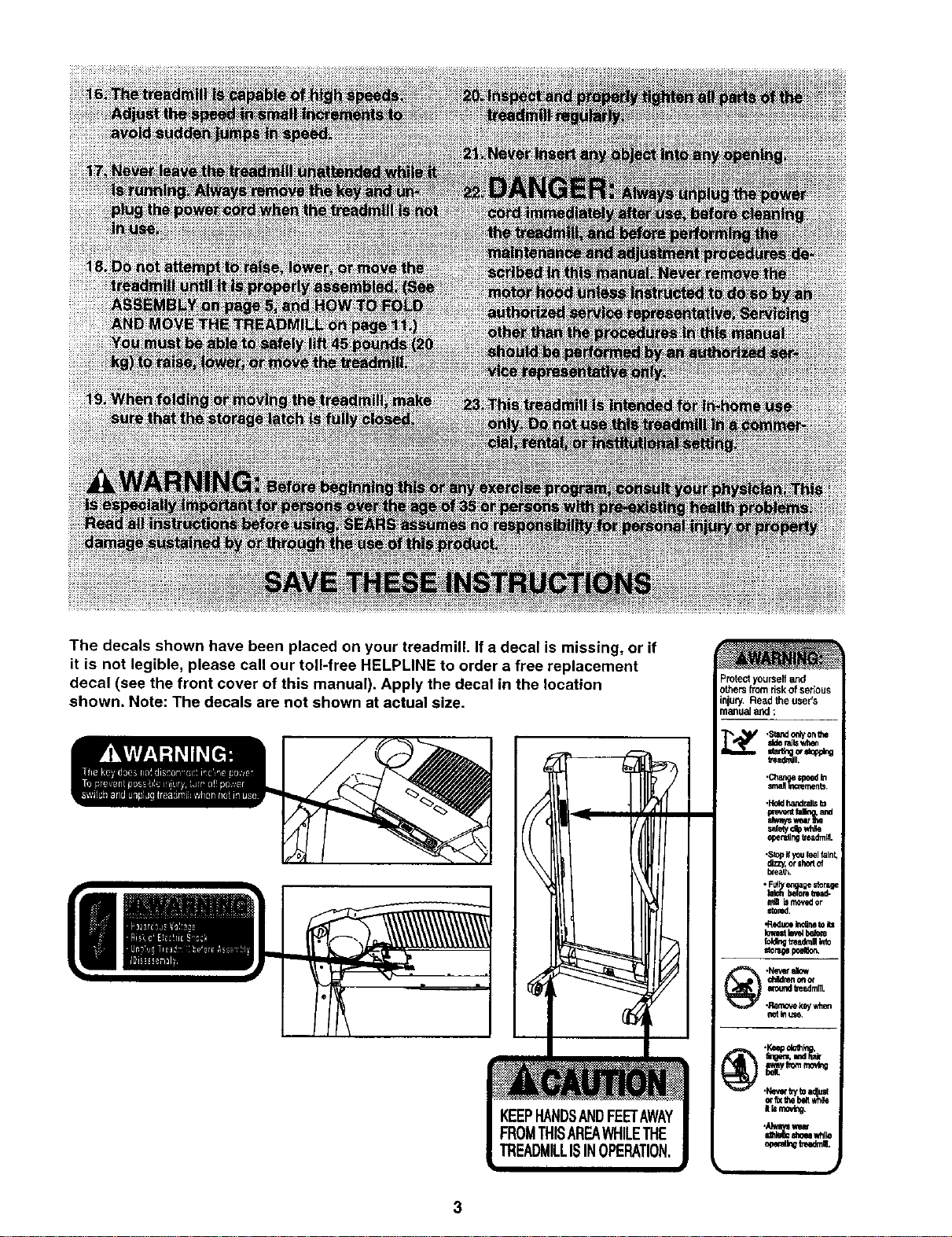
The decals shown have been placed on your treadmill. If a decal is missing, or if
it is not legible, please call our toll-free HELPLINE to order a free replacement
decal (see the front cover of this manual). Apply the decal in the location
shown. Note: The decals are not shown at actual size.
Protectyourselfand
others fromrisk of serious
injury.Readthe users
manu_ and :
BEFORE YOU BEGIN
Thank you for selecting the revolutionary PROFORM ®
320x treadmill. The 320x treadmill combines advanced
technology with innovative design to help you get the
most from your exercise program in the convenience
and privacy of your home. And when you're not exer-
cising, the unique 320x treadmill can be folded up, re-
quiring less than half the floor space of other treadmills.
For your benefit, read this manual carefully before
using the treadmill. Ifyou have additional questions,
• please calt ourtoll-free HELPLINE at 1-800-736-6879,
Monday through Saturday, 7 a.m. until 7 p.m. Central
Time (excluding holidays). To help us assist you,
please note the product model number and serial num-
ber before calling. The model number of the treadmill
is 831.293032. The serial number can be found on a
decal attached to the treadmill (see the front cover of
this manual for the location)•
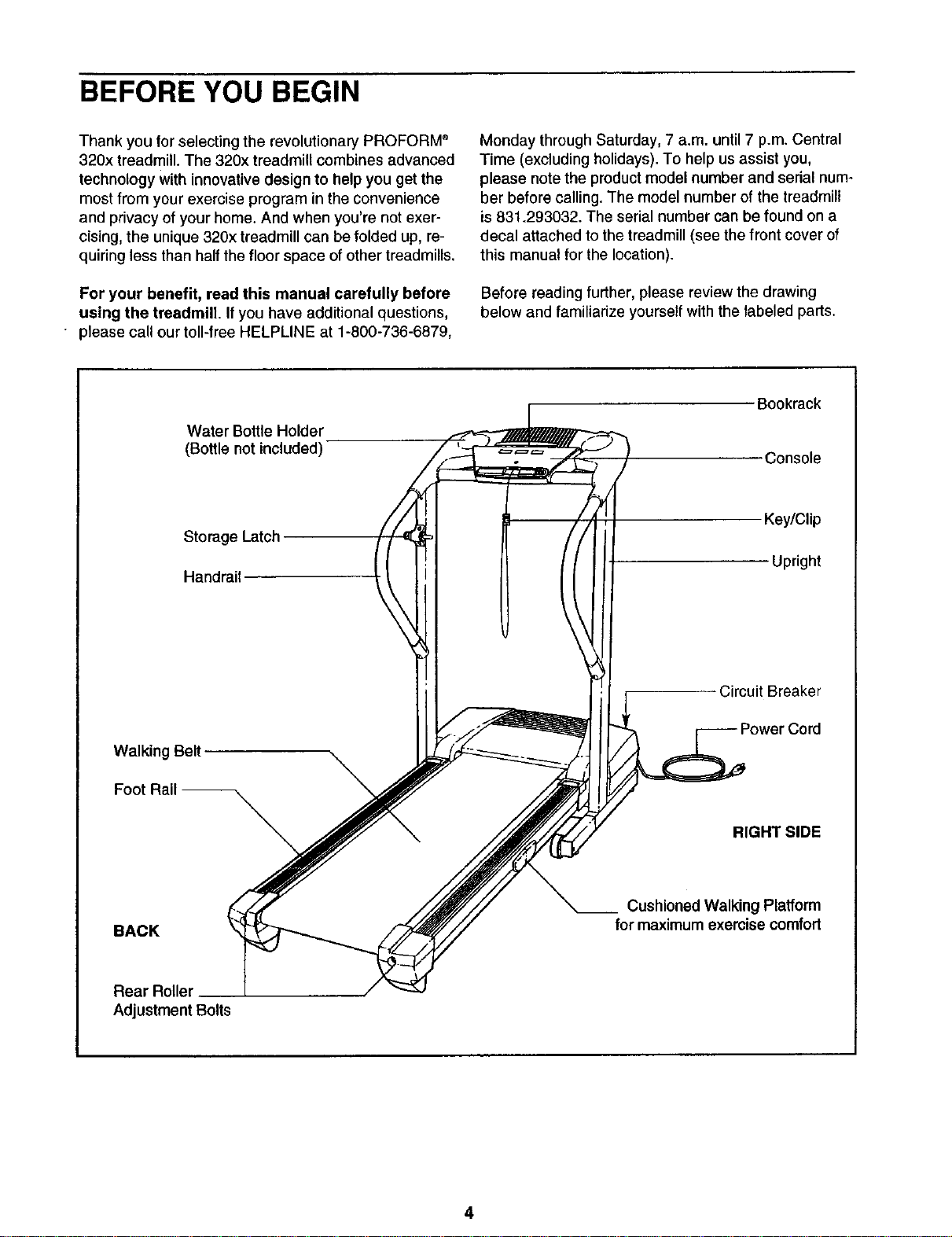
Before reading further, please review the drawing
below and familiarize yourself with the labeled parts.
Water Bottle Holder
(Bottle not included)
Storage Latch
Handrail
Walking Belt
Foot Rail --
\
Bookrack
Console
Key/Clip
Upright
Circuit Breaker
Cord
RIGHT SIDE
BACK
Cushioned Walking Platform
for maximum exercise comfort
Adjustment Bolts
4
ASSEMBLY
Assembly requires two persons. Set the treadmill in a cleared area and remove all packing materials. Do not
dispose of the packing materials untilassembly iscompleted.
Note: The underside of the treadmill walking belt iscoated with high-performance lubricant. During shipping, a
small amount of lubricant may be transferred to the top of the walking belt or the shipping carton. This isa normal
condition and does not affect treadmill performance. If there is lubricant on top of the walking belt, simply wipe off
the lubricantwith a soft cloth and a mild, non-abrasive cleaner.
Assembly requires the included allen wr_ and your own phillips screwdriver _,
rubber mallet _, wire cutters _, and needlenose pliers _.
To identify small parts, use the PART IDENTIFICATION CHART attached in the center of this manual.
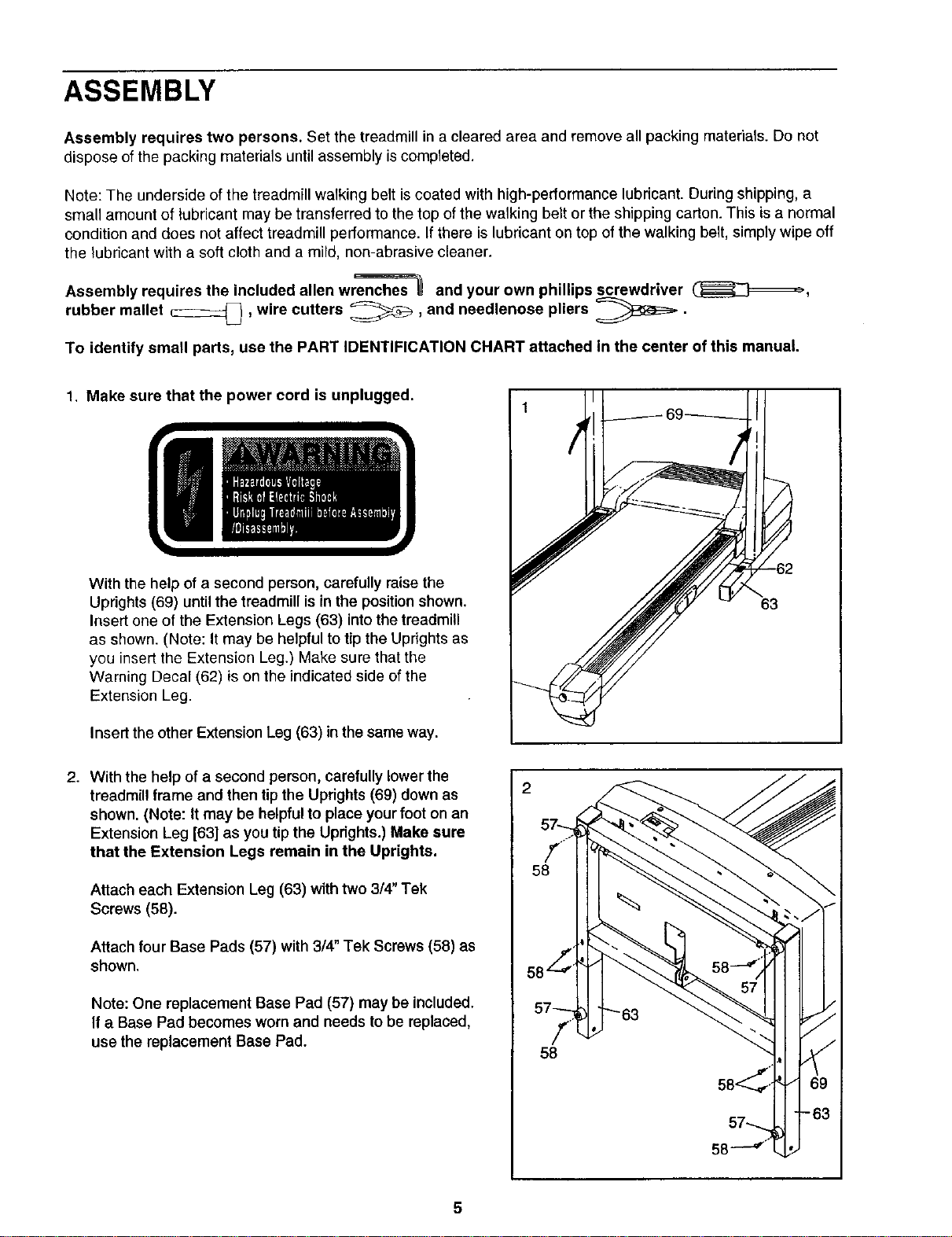
1. Make sure that the power cord is unplugged.
With the help of a second person, carefully raise the
Uprights (69) until the treadmill is in the position shown.
Insert one of the Extension Legs (63) into the treadmill
as shown. (Note: It may be helpful to tip the Uprights as
you insert the Extension Leg.) Make sure that the
Warning Decal (62) is on the indicated side of the
Extension Leg.
Insert the other Extension Leg (63) in the same way.
63
2. With the help of a second person, carefully lower the
treadmill frame and then tip the Uprights (69) down as
shown. (Note: it may be helpful to place your foot on an
Extension Leg [63] as you tip the Uprights.) Make sure
that the Extension Legs remain in the Uprights.
Attach each Extension Leg (63) with two 3/4" Tek
Screws (58).
Attach four Base Pads (57) with 3/4" Tek Screws (58) as
shown.
Note: One replacement Base Pad (57) may be included.
If a Base Pad becomes worn and needs to be replaced,
use the replacement Base Pad.
57-.._
f.
58
I
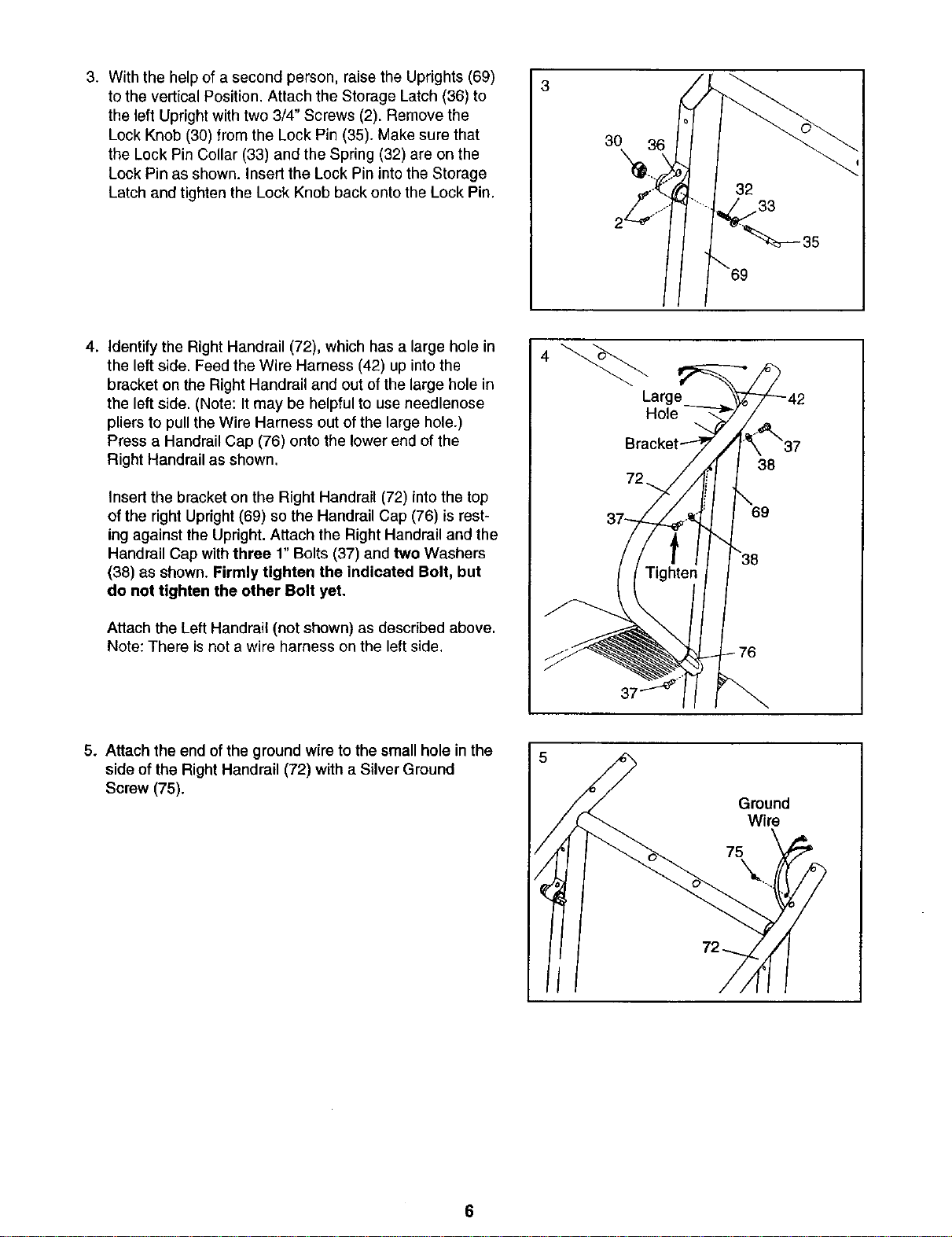
3. With the help of a second person, raise the Uprights (69)
to the vertical Position. Attach the Storage Latch (36) to
the left Upright with two 3/4" Screws (2). Remove the
Lock Knob (30) from the Lock Pin (35). Make sure that
the Lock Pin Collar (33) and the Spring (32) are on the
Lock Pin as shown. Insert the Lock Pin into the Storage
Latch and tighten the Lock Knob back onto the Lock Pin.
3
30
\
4. Identify the Right Handrail (72), which has a large hole in
the left side. Feed the Wire Harness (42) up into the
bracket on the Right Handrail and out of the large hole in
the left side. (Note: It may be helpful to use needlenose
pliers to pull the Wire Harness out of the large hole.)
Press a Handrail Cap (76) onto the lower end of the
Right Handrail as shown.
Insertthe bracket on the Right Handrail (72) into the top
of the right Upright (69) so the Handrail Cap (76) is rest-
ing against the Upright. Attach the Right Handrail and the
Handrail Cap with three 1" Bolts (37) and two Washers
(38) as shown. Firmly tighten the indicated Bolt, but
do not tighten the other Bolt yet.
Attach the Left Handrail (not shown) as described above.
Note: There is not a wire harness on the left side.
Large
Hole
38
76
69
5. Attach the end of the ground wire to the small hole in the
side of the Right Handrail (72) with a Silver Ground
Screw (75).
Ground
Wire
75
6
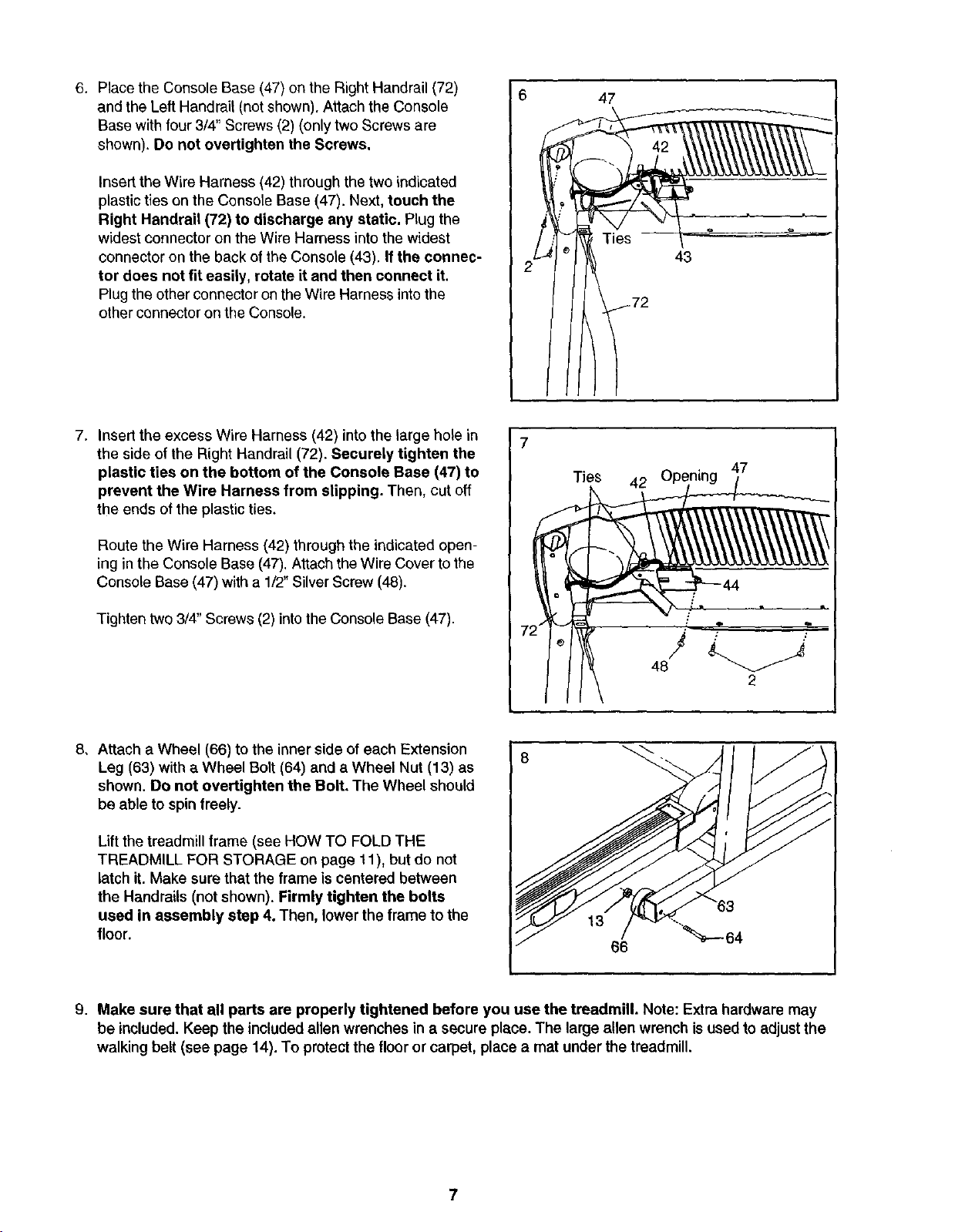
6. Place the Console Base (47) on the Right Handrail (72)
and the Left Handrail (not shown). Attach the Console
Base with four 3/4" Screws (2) (only two Screws are
shown). Do not overtighten the Screws.
Insert the Wire Harness (42) through the two indicated
plastic ties on the Console Base (47). Next, touch the
Right Handrail (72) to discharge any static. Plug the
widest connecter on the Wire Harness into the widest
connector on the back of the Console (43). If the connec-
tor does not fit easily, rotate it and then connect it.
Plugthe otherconnector on theWire Harness intothe
other connectoron the Console.
6
47
2
43
I
7. Insert the excess Wire Harness (42) into the large hole in
the side of the Right Handrail (72). Securely tighten the
plastic ties on the bottom of the Console Base (47) to
prevent the Wire Harness from slipping. Then, cut off
the ends of the plastic ties.
Route the Wire Harness (42) through the indicated open-
ing in the Console Base (47). Attach the Wire Cover to the
Console Base (47) with a 1/2" Silver Screw (48).
Tighten two 3/4" Screws (2) into the Console Base (47).
7;
Ties
42
47
46J
2
8, Attach a Wheel (66) to the inner side of each Extension
Leg (63) with a Wheel Bolt (64) and a Wheel Nut (13) as
shown. Do not overtighten the Bolt, The Wheel should
be able to spin freely.
Lift the treadmill frame (see HOW TO FOLD THE
TREADMILL FOR STORAGE on page 11), but do not
latch it. Make sure that the frame is centered between
the Handrails (not shown). Firmly tighten the botts
used in assembly step 4. Then, lower the frame to the
floor.
13
66
64
9. Make sure that all parts are properly tightened before you use the treadmill. Note: Extra hardware may
be included. Keep the included allen wrenches in a secure place. The large allen wrench is used to adjustthe
walking belt (see page 14). To protectthe floor or carpet, place a mat under the treadmill.
OPERATION AND ADJUSTMENT
THE PERFORMANT LUBETM WALKING BELT
Your treadmill features a walking belt coated with
PERFORMANT LUBE TM, a high-performance lubricant.
IMPORTANT: Never apply silicone spray or other
substances to the walking belt or the walking plat-
form. Such substances will deteriorate the walking
belt and cause excessive wear,
HOW TO PLUG IN THE POWER CORD
an equipment-grounding conductor and a grounding
plug. Plug the power cord into a surge suppressor,
and plug the surge suppressor into an appropriate
outlet that is properly installed and grounded in
accordance with all local codes and ordinances.
Important: The treadmill is not compatible with
GFCI-equipped outlets.
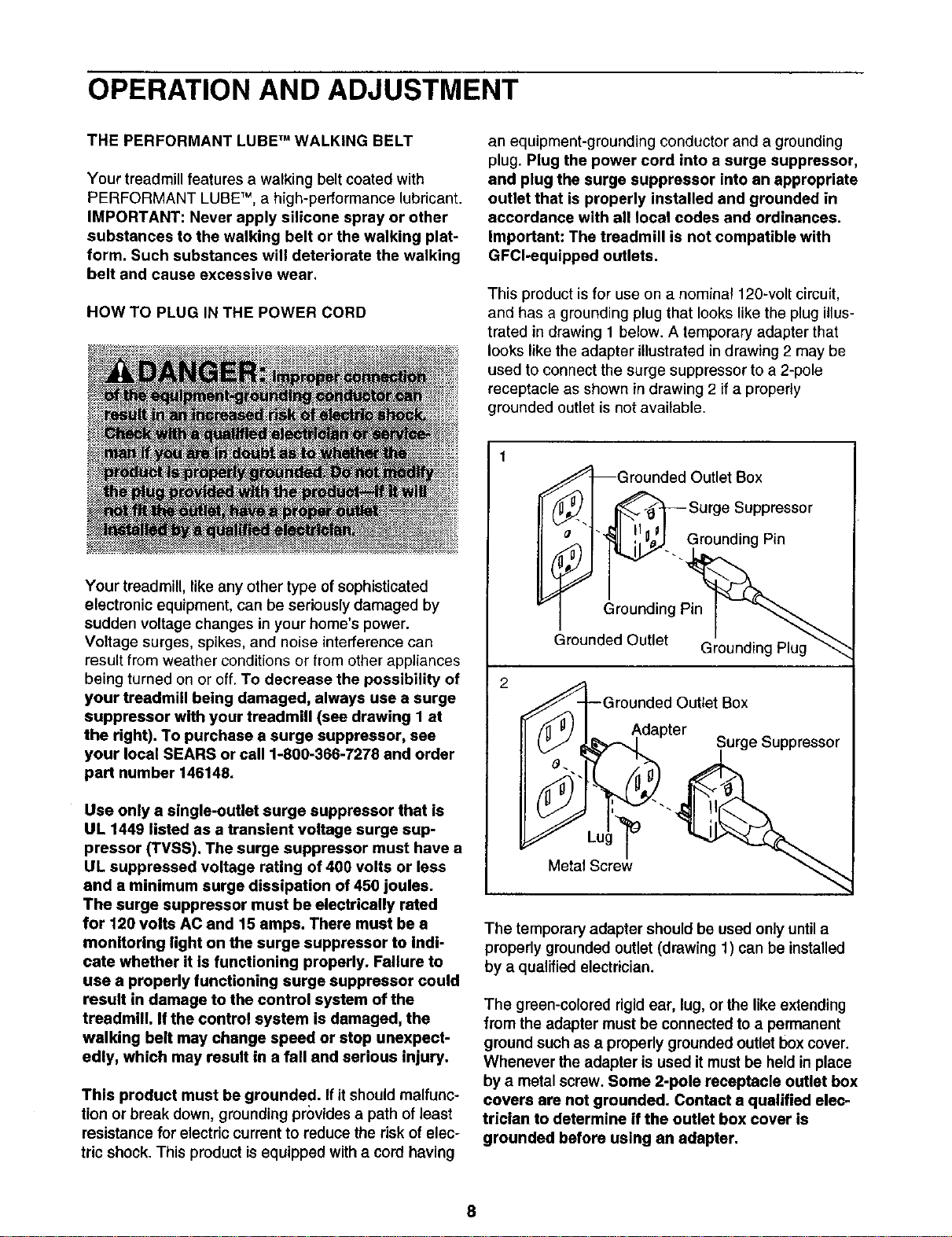
This product isfor use on a nominal 120-volt circuit,
and has a grounding plug that looks like the plug illus-
trated in drawing 1 below, A temporary adapter that
looks like the adapter illustrated in drawing 2 may be
used to connect the surge suppressor to a 2-pole
receptacle as shown in drawing 2 if a properly
grounded outlet is not available.
Your treadmill, like any other type of sophisticated
electronic equipment, can be seriously damaged by
sudden voltage changes in your home's power.
Voltage surges, spikes, and noise interference can
result from weather conditions or from other appliances
being turned on or off. To decrease the possibility of
your treadmill being damaged, always use a surge
suppressor with your treadmill (see drawing I at
the right). To purchase a surge suppressor, see
your local SEARS or call 1-800-366-7278 and order
part number 146148.
Use only a single-outlet surge suppressor that is
UL 1449 listed as a transient voltage surge sup-
pressor (TVSS). The surge suppressor must have a
UL suppressed voltage rating of 400 volts or less
and a minimum surge dissipation of 450 joules.
The surge suppressor must be electrically rated
for 120 volts AC and 15 amps. There must be a
monitoring light on the surge suppressor to Indi-
cate whether it is functioning properly. Failure to
use a properly functioning surge suppressor could
result in damage to the control system of the
treadmill. If the control system is damaged, the
walking belt may change speed or stop unexpect-
edly, which may result in a fall and serious injury.
This product must be grounded. Ifit should malfunc-
tion or break down, groundingprovides a path of least
resistance for electric current to reduce the dsk of elec-
tric shock. This product is equipped with a cord having
,,""S_Grounded Outlet Box
_/_.. ] _ Surge Suppressor
Grounded Outlet Grounding Plug_"_
_--G rou;::pdteOuttet Box
__.. Surge buppressor
%
The temporary adapter should be used only until a
properly grounded outlet (drawing 1) can be installed
by a qualified electrician.
The green-colored rigid ear, lug, or the like extending
from the adapter must be connected to a permanent
ground such as a properly grounded outlet box cover.
Whenever the adapter is used it must be held in place
by a metal screw. Some 2-pole receptacle outlet box
covers are not grounded. Contact a qualified elec-
trician to determine if the outlet box cover is
grounded before using an adapter,
CONSOLE DIAGRAM
Displays
9:58 3.0.
TiME DISTANOE FAT OALS. PULSE SPEED
J
--INCLINE _ SPEED //
\\ ))(i =-_--
. .__. ,. ,. ,.0,. ,,,,,0,0. .p_,o_%.
a hm sheet of Key
Note: If there is t ' _' _'-_-_.,., .
plastic on the console, remove it. Clip ---_--ILI_J Pulse Sensor
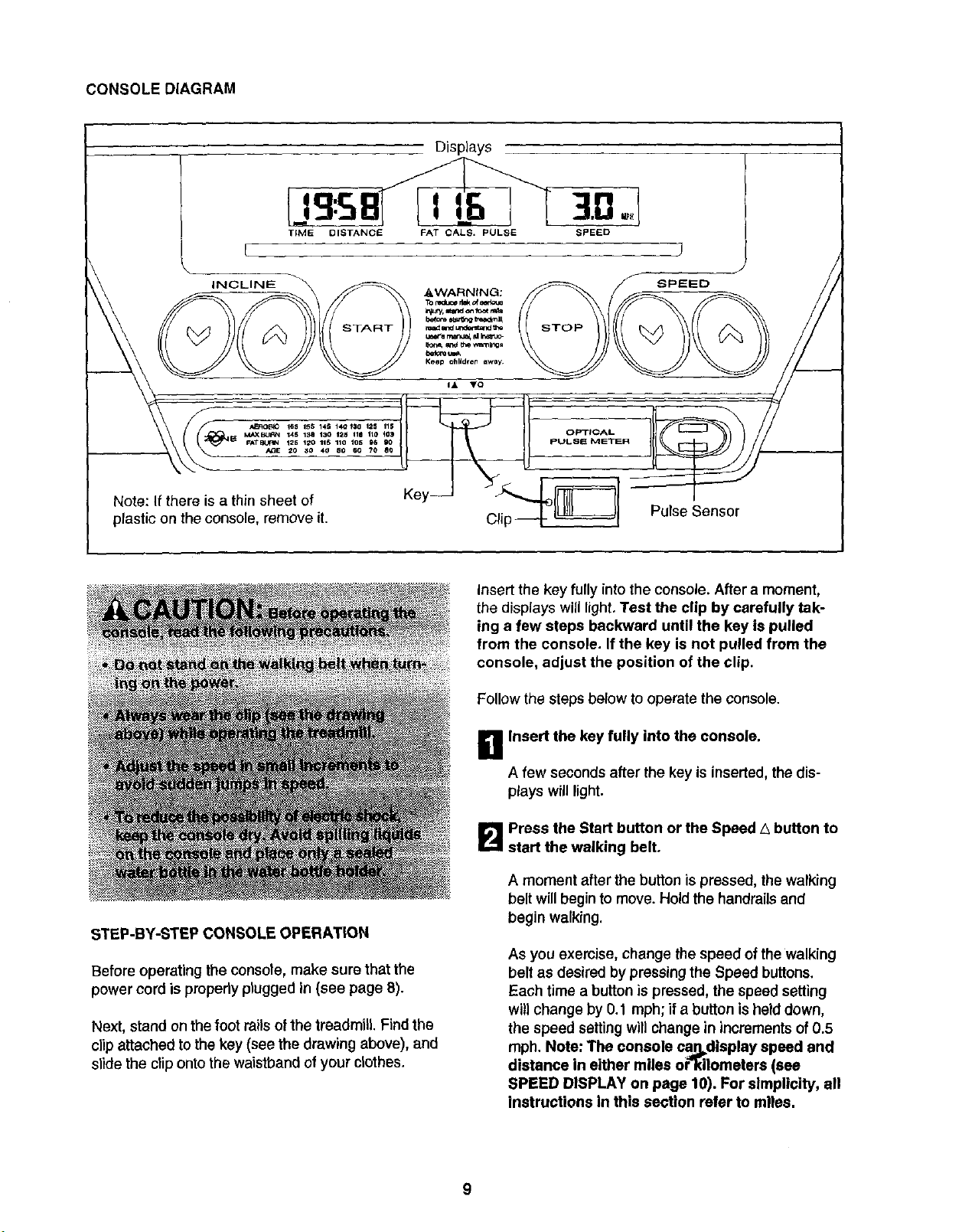
STEP-BY-STEP CONSOLE OPERATION
Before operating the console, make sure that the
power cord is properly plugged in (see page 8).
Next, stand on the foot rails of the treadmill. Find the
clip attached to the key (see the drawing above), and
slide the clip onto the waistband of your clothes,
Insert the key fully into the console. After a moment,
the displays will light. Test the clip by carefully tak-
ing a few steps backward until the key is pulled
from the console. If the key is not pulled from the
console, adjust the position of the clip.
Follow the steps below to operate the console.
B Insert the key fully into the console.
A few seconds after the key is inserted, the dis-
plays will light.
B Press the Start button or the Speed _ button to
start the walking belt,
A moment after the button is pressed, the walking
belt will begin to move. Hold the handrails and
begin walking.
As you exercise, change the speed of the walking
belt as desired by pressingthe Speed buttons.
Each time a button ispressed, the speed setting
will change by 0.1 mph; if a button isheld down,
the speed settingwill change in incrementsof 0.5
mph. Note: The console ca_display speed and
distance in either miles or"_ilometers (see
SPEED DISPLAY on page 10). For simplicity, all
instructions In this section refer to miles.
9
To stop the walking belt, press the Stop button.
The elapsed time will begin to flash in the
Time/Distance display.
Note: During the first few minutes that the treadmill
is used, inspect the alignment of the walking belt,
and align it if necessary (see page 14).
1_1 Change the incline of the treadmill as desired.
To change the incline of the treadmill, press either
of the Inclinebuttons until the desired incline level
is reached.
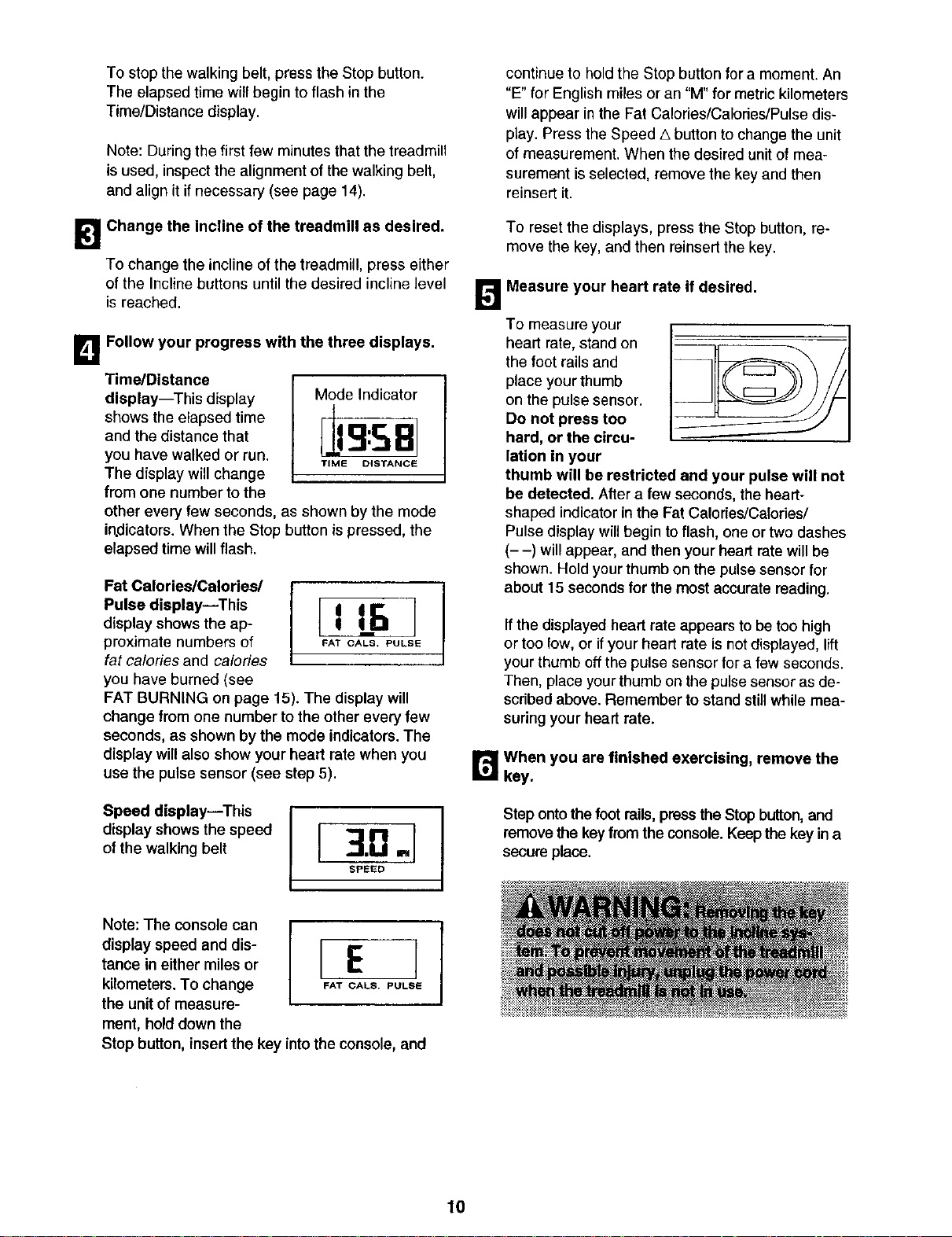
_1 Follow your progress with the three displays.
Time/Distance
display--This display
shows the elapsed time
and the distance that
you have walked or run.
The dfsplaywill change
from one number tothe
Mode Indicator
Jg:SB]
TIME DISTANCE
other every few seconds, as shown by the mode
indicators. When the Stop button ispressed, the
elapsed time will flash.
Fat Calories/Calories/
Pulse display--This
display shows the ap-
proximate numbers of
fat calories and calories
you have burned (see
FAT BURNING on page 15). The display will
change from one number to the other every few
seconds, as shown by the mode indicators. The
display will also show your heart rate when you
use the pulse sensor (see step 5).
Speed display--This
display shows the speed
of the walking belt
continue to hold the Stop button for a moment. An
"E" for English miles or an "M" for metric kilometers
will appear in the Fat Calories/Calories/Pulse dis-
play. Press the Speed A button to change the unit
of measurement. When the desired unit of mea-
surement is selected, remove the key and then
reinsert it.
To reset the displays, press the Stop button, re-
move the key, and then reinsert the key.
_'t Measure your heart rate if desired.
To measure your
heart rate, stand on
the foot rails and
place your thumb
on the pulse sensor.
Do not press too
hard, or the circu-
lation in your
thumb will be restricted and your pulse will not
be detected. After a few seconds, the heart-
shaped indicatorin the Fat Calories/Calories/
Pulse displaywillbegin toflash, one ortwo dashes
(- -) willappear, and then your heart rate willbe
shown. Hold your thumb on the pulsesensor for
about 15 secondsfor the most accurate marling.
If the displayed heart rate appears to be too high
or too low, or if your heart rate is not displayed, lift
your thumb off the pulse sensor for a few seconds.
Then, place your thumb on the pulse sensor as de-
scribed above. Remember to stand still while mea-
suring your heart rate.
r_When you are finished exercising, remove the
key.
Step ontothe foot mils,press the Stop button, and
removethe keyfrom the console. Keep the key in a
secure place,
Note: The console can
display speed and dis-
tance in either miles or
kilometers. To change
the unit of measure-
ment, hold down the
rE]
FAT CALS. PULSIE
Stop button, insertthe key intothe console, and
10
HOW TO FOLD AND MOVE THE TREADMILL
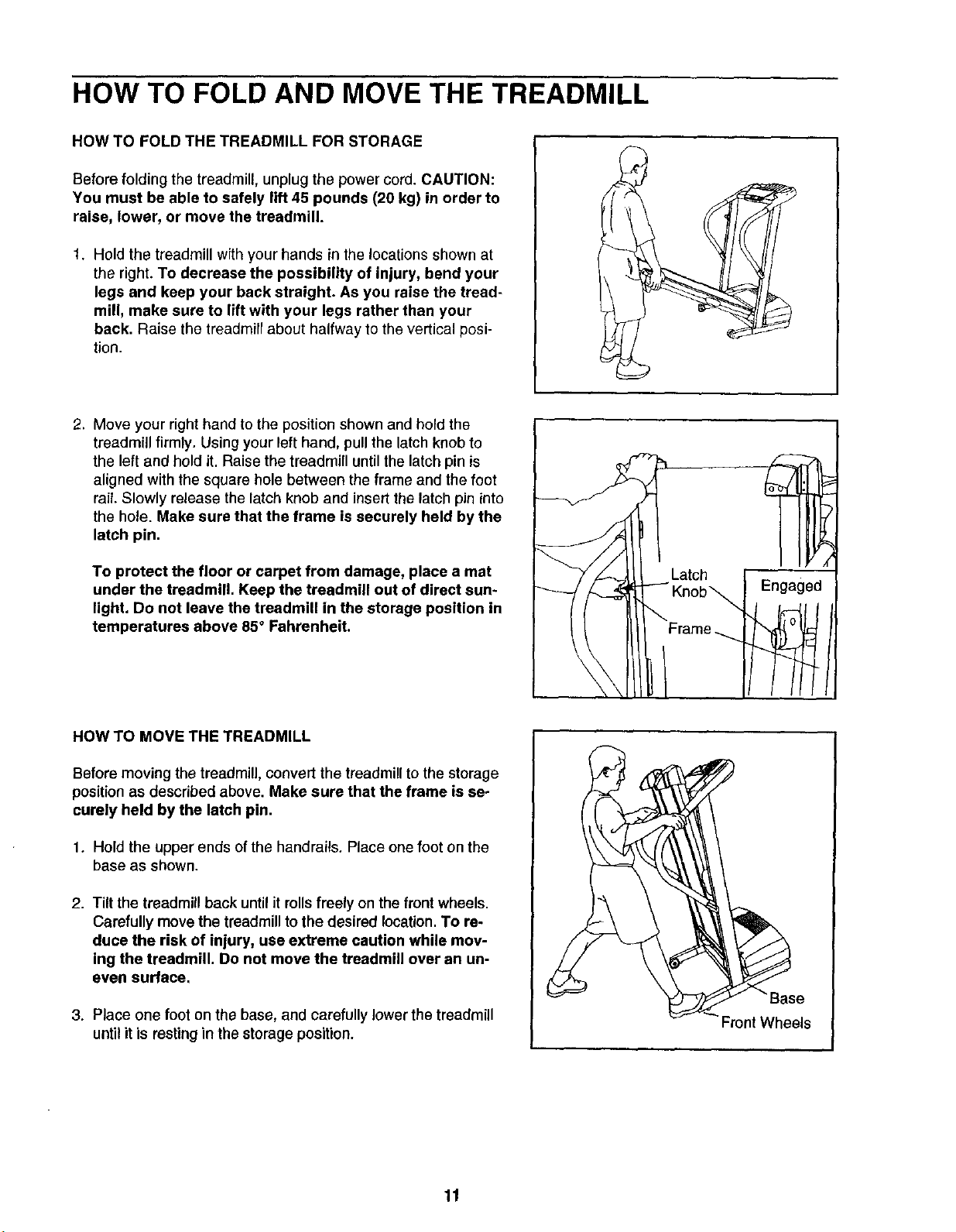
HOW TO FOLD THE TREADMILL FOR STORAGE
Before folding the treadmill, unplug the power cord. CAUTION:
You must be able to safely lift 45 pounds (20 kg) in order to
raise, lower, or move the treadmill.
1. Hold the treadmill with your hands in the locations shown at
the right. To decrease the possibility of injury, bend your
legs and keep your back straight. As you raise the tread-
mill, make sure to lift with your legs rather than your
back. Raise the treadmill about halfway to the vertical posi-
tion.
2. Move your right hand to the position shown and hold the
treadmill firmly. Using your left hand, pull the latch knob to
the left and hold it. Raise the treadmill until the latch pin is
aligned with the square hole between the frame and the foot
rail. Slowly release the latch knob and insert the latch pin into
the hole. Make sure that the frame is securely held by the
latch pin.
To protect the floor or carpet from damage, place a mat
under the treadmill. Keep the treadmill out of direct sun-
light. Do not leave the treadmill in the storage position in
temperatures above 85° Fahrenheit.
HOW TO MOVE THE TREADMILL
Before moving the treadmill, convert the treadmill to the storage
position as described above. Make sure that the frame is se-
curely held by the latch pin.
1. Hold the upper ends of the handrails. Place one foot on the
base as shown.
2. Tilt the treadmill back until itrolls freely on the front wheels.
Carefully move the treadmillto the desired location.To re-
duce the risk of injury, use extreme caution while mov-
ing the treadmill. Do not move the treadmill over an un-
even surface.
3. Place one foot on the base, and carefully lower the treadmill
until it is resting in the storage position.
11
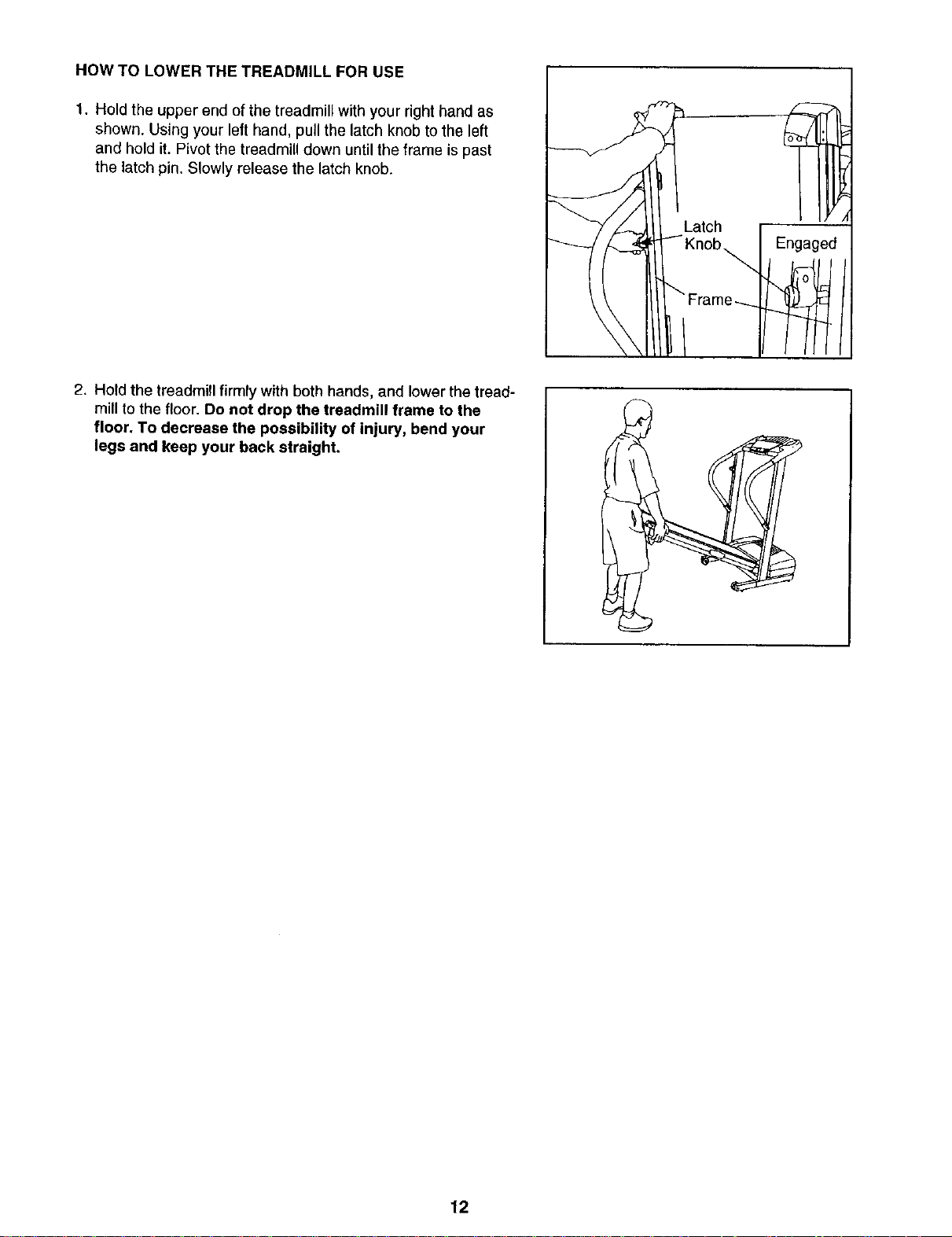
HOW TO LOWER THE TREADMILL FOR USE
1. Hold the upper end of the treadmill with your right hand as
shown. Using your left hand, pull the latch knob to the left
and hold it. Pivot the treadmill down until the frame is past
the latch pin. Slowly release the latch knob.
I
Engaged
2. Hold the treadmill firmly with both hands, and lower the tread-
mill to the floor. Do not drop the treadmill frame to the
floor, To decrease the possibility of injury, bend your
legs and keep your back straight.
12
TROUBLESHOOTING
Most treadmill problems can be solved by following the simple steps below. Find the symptom that
applies, and follow the steps listed. If further assistance is needed, call our toll-free HELPLINE at
1-800-736-6879, Monday through Saturday, 7 a.m. until 7 p.m. Central Time (excluding holidays).
PROBLEM: The power does not turn on
SOLUTION: a. Make sure thatthe power cord is plugged into a surge suppressor, and that the surge suppressor
is plugged into a properly grounded outlet (see page 8). Use only a single-outlet surge suppressor
that meets all of the specifications described on page 8. Important: The treadmill is not compatible
with GFCI-equipped outlets.
b. After the power cord has been plugged in, make sure that the key isfully inserted intothe console.
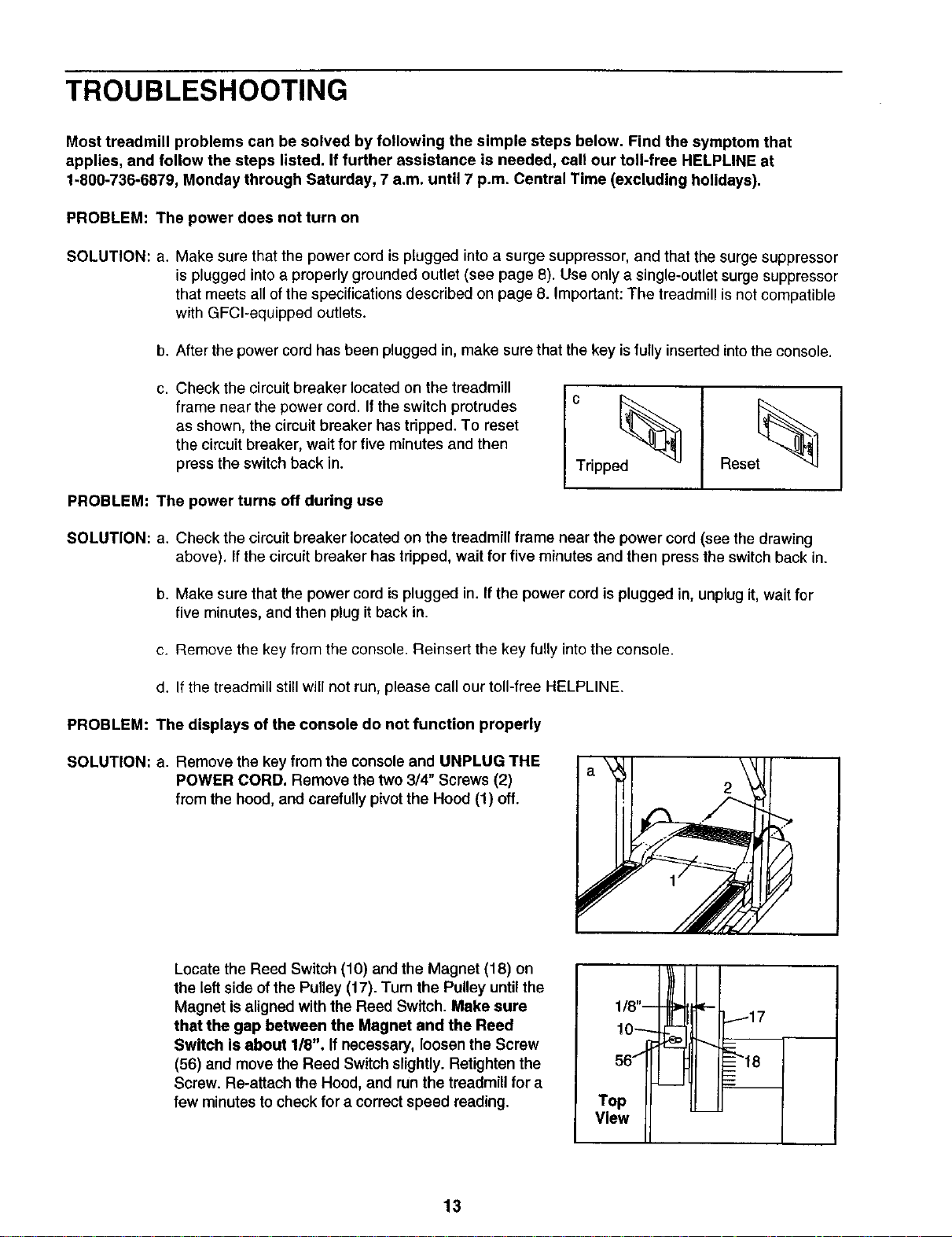
c. Check the circuit breaker located on the treadmill
frame near the power cord. If the switch protrudes
as shown, the circuit breaker has tripped. To reset
the circuit breaker, wait for five minutes and then
press the switch back in.
Tripped
Reset_
PROBLEM: The power turns off during use
SOLUTION: a. Check the circuit breaker located on the treadmill frame near the power cord (see the drawing
above). If the circuit breaker has tripped, wait for five minutes and then press the switch back in.
b. Make sure that the power cord is plugged in. If the power cord is plugged in, unplug it, wait for
five minutes, and then plug it back in.
c. Remove the key from the console. Reinsert the key fully intothe console.
d. If the treadmill still will not run, please call cur toll-free HELPLINE.
PROBLEM: The displays of the console do not function properly
SOLUTION: a. Remove the key from the console and UNPLUG THE
POWER CORD. Remove the two 3/4" Screws (2)
from the hood, and carefully pivotthe Hood (1) off.
\
2
Locate the Reed Switch (10) and the Magnet (18) on
the left side of the Pulley (17). Turn the Pulley until the
Magnet is aligned with the Reed Switch. Make sure
that the gap between the Magnet and the Reed
Switch is about 1/8". If necessary, loosen the Screw
(56) and move the Reed Switch slightly. Retighten the
Screw. Re-attach the Hood, and runthe treadmill for a
few minutes to check for a correctspeed reading.
56
Top
V,ewII
13
PROBLEM: The walking belt slows when walked on
SOLUTION: a. Use only a single-outlet surge suppressorthat meets all of the specifications described on page 8.
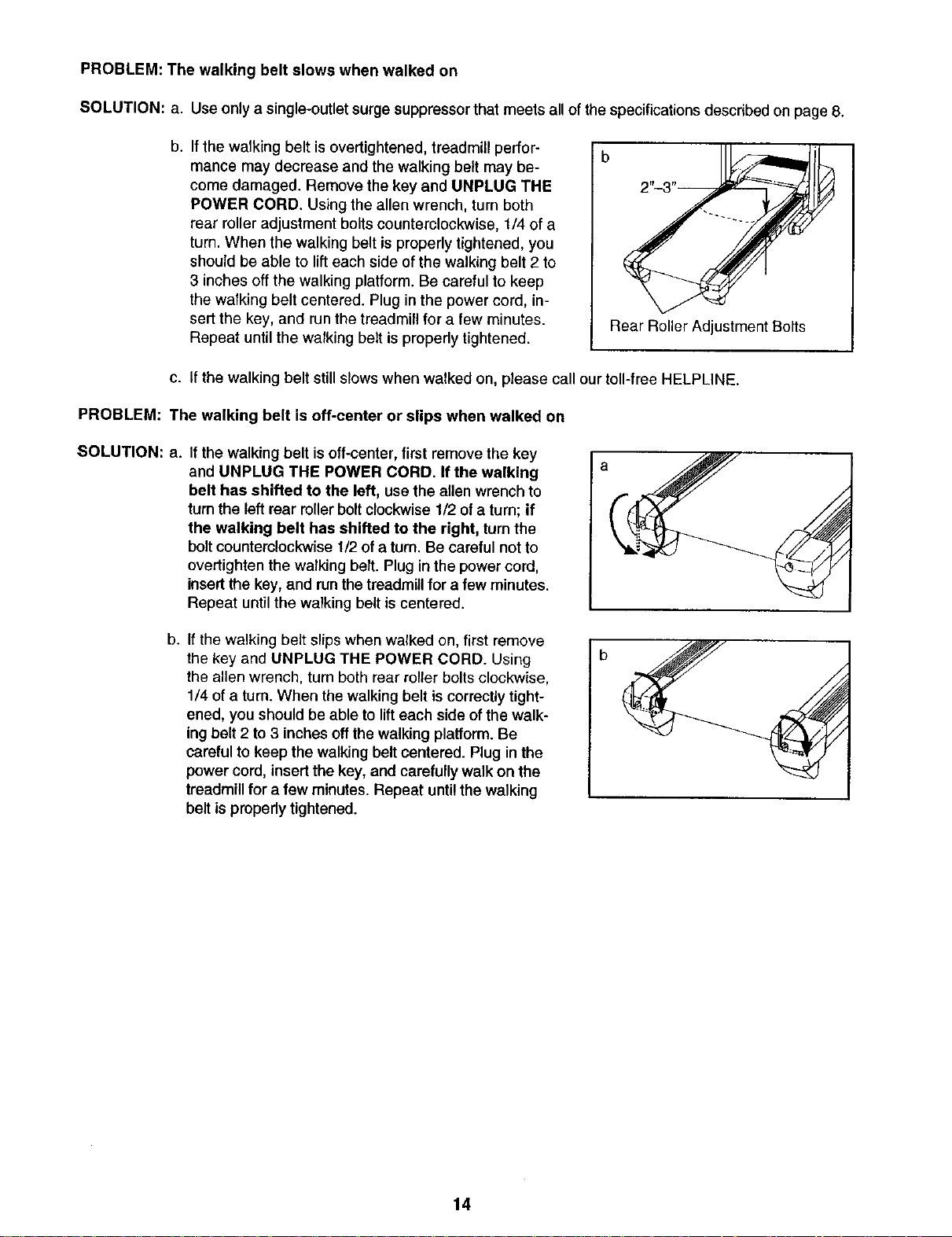
b.
If the walking belt isovertightened, treadmill perfor-
mance may decrease and the walking belt may be-
come damaged. Remove the key and UNPLUG THE
POWER CORD. Using the allen wrench, turn both
rear roller adjustment bolts counterclockwise, 1/4 of a
turn. When the walking belt is properly tightened, you
should be able to lift each side of the walking belt 2 to
3 inches off the walking platform. Be careful to keep
the walking belt centered. Plug in the power cord, in-
sert the key, and run the treadmill for a few minutes.
Repeat until the walking belt is properly tightened.
b
Rear Roller Adjustment Bolts
c. If the walking belt still slows when walked on, please call our toll-free HELPLINE.
PROBLEM: The walking belt is off-center or slips when walked on
SOLUTION: a.
If the walking belt isoff-center, first remove the key
and UNPLUG THE POWER CORD. If the walking
belt has shifted to the left, use the allen wrench to
turn the left rear roller bolt clockwise 1/2 of a turn; if
the walking belt has shifted to the right, turn the
bolt counterclockwise 1/2 of a turn. Be careful not to
overfighten the walking belt. Plug in the power cord,
insert the key, and run the treadmill for a few minutes.
Repeat until the walking belt is centered.
a
b.
If the walking belt slips when walked on, first remove
the key and UNPLUG THE POWER CORD. Using
the allen wrench, turn both rear roller bolts clockwise,
1/4 of a turn. When the walking belt is correctly tight-
ened, you should be able to lift each side of the walk-
ing belt 2 to 3 inches off the walking platform. Be
careful to keep the walking belt centered. Plug in the
power cord, insert the key, and carefully walk on the
treadmill for a few minutes. Repeat until the walking
belt is properly tightened.
14
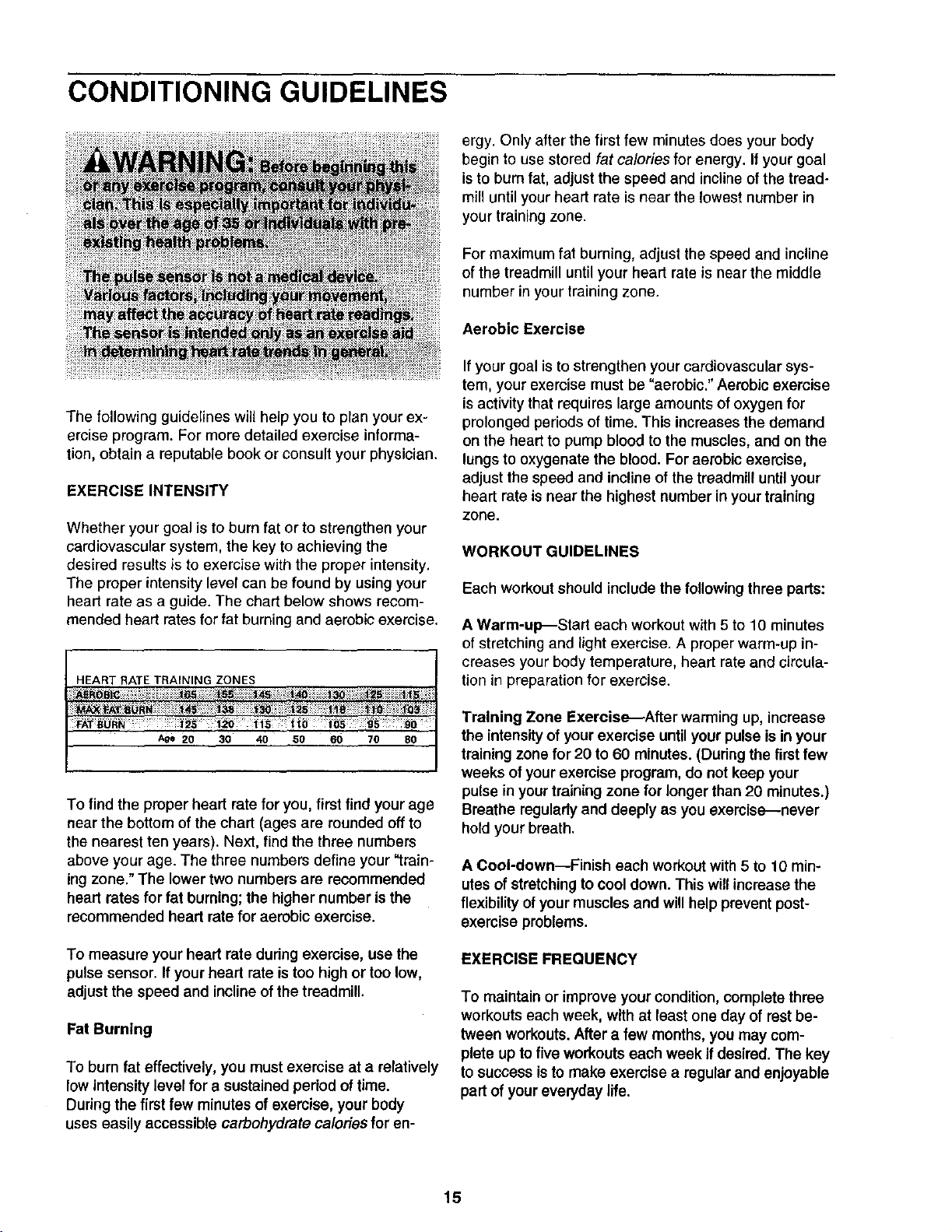
CONDITIONING GUIDELINES
The following guidelines will help you to plan your ex-
ercise program. For more detailed exercise informa-
tion, obtain a reputable book or consult your physician.
EXERCISE INTENSITY
Whether your goal isto bum fat or to strengthen your
cardiovascular system, the key to achieving the
desired results is to exercise with the proper intensity.
The proper intensity level can be found by using your
heart rate as a guide. The chart below shows recom-
mended heart rates for fat burning and aerobic exercise.
HEART RATE TRAINING ZONES
Age 20 :30 40 50 60 70 80
To find the proper heart rate for you, first find your age
near the bottom of the chart (ages are rounded off to
the nearest ten years). Next, find the three numbers
above your age. The three numbers define your "train-
ingzone." The lower two numbers are recommended
heart rates for fat burning; the higher number is the
recommended heart rate for aerobic exercise.
To measure your heart rate during exercise, use the
pulse sensor. If your heart rate istoo high or too low,
adjust the speed and incline of the treadmill.
Fat Burning
To burn fat effectively, you must exercise at a relatively
low intensity level for a sustained period of time.
During the first few minutes of exercise, your body
uses easily accessible carbohydrate calories for en-
ergy. Only after the first few minutes does your body
begin to use stored fat calories for energy. If your goal
is to bum fat, adjust the speed and incline of the tread-
mill until your heart rate is near the lowest number in
your training zone.
For maximum fat burning, adjust the speed and incline
of the treadmill until your heart rate is near the middle
number in your training zone.
Aerobic Exercise
If your goal isto strengthen your cardiovascular sys-
tem, your exercise must be "aerobic." Aerobic exercise
is activity that requires large amounts of oxygen for
prolonged periodsof time. This increases the demand
on the heart to pump blood to the muscles, and on the
lungs to oxygenate the blood. For aerobic exercise,
adjust the speed and incline of the treadmill until your
heart rate is near the highest number in your training
zone.
WORKOUT GUIDELINES
Each workout should includethe followingthree parts:
A Warm-up--Start each workout with 5 to 10 minutes
of stretching and light exercise. A proper warm-up in-
creases your body temperature, heart rate and circula-
tion in preparation for exercise.
Training Zone Exercis_After warming up, increase
the intensityof yourexercise untilyour pulse is inyour
training zone for 20 to 60 minutes. (Duringthe first few
weeks of your exercise program, do not keep your
pulse in yourtraining zone for longer than 20 minutes.)
Breathe regularlyand deeply as you exemise--never
hold your breath.
A Cool-down--Finish each workoutwith 5 to 10 min-
utes of stretchingto cool down. This willincrease the
flexibility of your muscles and will help prevent post-
exercise problems.
EXERCISE FREQUENCY
To maintain or improve your condition, complete three
workouts each week, with at least one day of rest be-
tween workouts. After a few months, you may com-
plete up to five workouts each week if desired. The key
to success is to make exercise a regular and enjoyable
part of your everyday life.
15
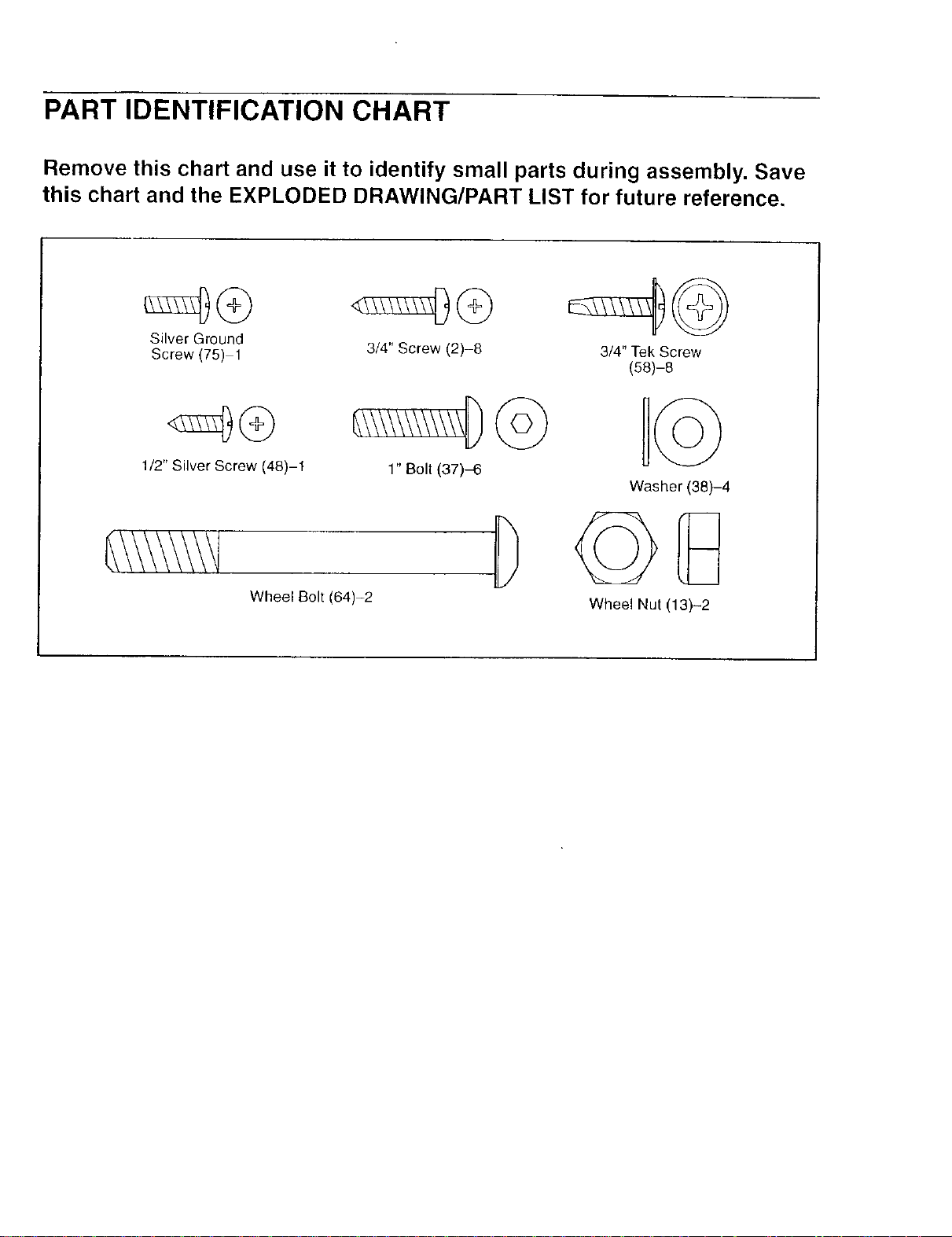
PART IDENTIFICATION CHART
Remove this chart and use it to identify small parts during assembly. Save
this chart and the EXPLODED DRAWING/PART LIST for future reference.
Silver Ground
Screw (75) 1
3/4" Screw (2)-8
1/2" Silver Screw (48)-1
1" Bolt (37)-6
Wheel Bolt (64)-2
3/4" Tek Screw
(58)-8
Washer (38)-4
Wheel Nut (13)-2
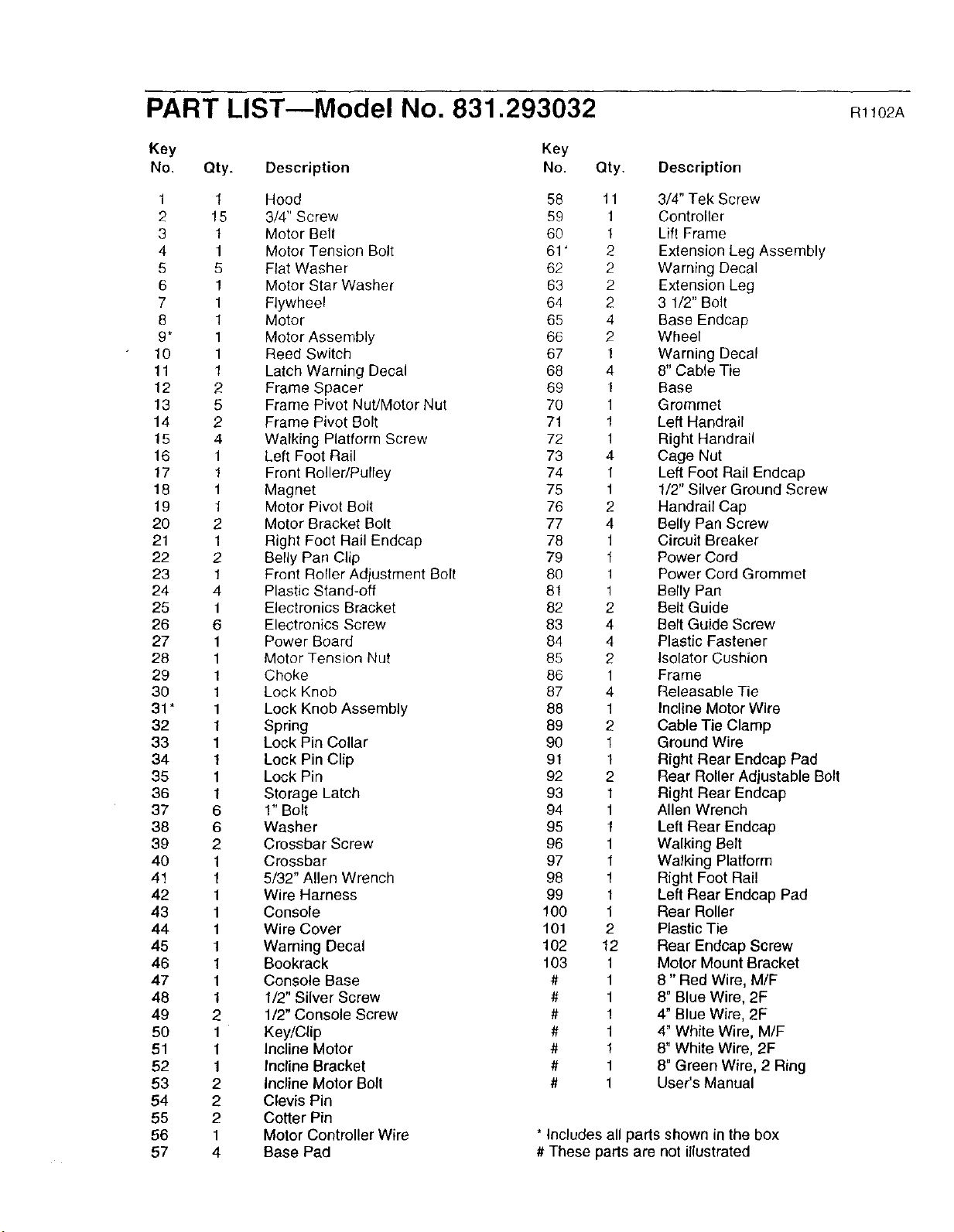
PART LIST--Model No. 831.293032 mt02A
Key Key
No, Qty. Description No.
1 1 Hood 58
2 15 3/4" Screw 59
3 1 Motor Belt 60
4 1 Motor Tension Bolt 61 '
5 5 Flat Washer 62
6 1 Motor Star Washer 63
7 1 Flywheel 64
8 1 Motor 65
9* 1 Motor Assembly 66
10 1 Reed Switch 67
11 1 Latch Warning Decal 68
12 2 Frame Spacer 69
13 5 Frame Pivot Nut/Motor Nut 70
14 2 Frame Pivot Bolt 71
15 4 Walking Platform Screw 72
16 1 Left Foot Rail 73
17 1 Front RolledPulley 74
18 1 Magnet 75
19 1 Motor Pivot Bolt 76
20 2 Motor Bracket Bolt 77
21 1 Right Foot Rail Endcap 78
22 2 Belly Pan Clip 79
23 1 Front Roller Adjustment Bolt 80
24 4 Plastic Stand-off 81
25 1 Electronics Bracket 82
26 6 Electronics Screw 83
27 1 Power Board 84
28 1 Motor Tension Nut 85
29 1 Choke 86
30 1 Lock Knob 87
31 * 1 Lock Knob Assembly 88
32 1 Spring 89
33 1 Lock Pin Collar 90
34 1 Lock Pin Clip 91
35 1 Lock Pin 92
36 1 Storage Latch 93
37 6 1" Bolt 94
38 6 Washer 95
39 2 Crossbar Screw 96
40 1 Crossbar 97
4! 1 5/32" Allen Wrench 98
42 1 Wire Harness 99
43 1 Console 100
44 1 Wire Cover 101
45 1 Warning Decal 102
46 1 Bookrack 103
47 1 Console Base #
48 1 1/2" Silver Screw #
49 2 1/2" Console Screw #
50 1 Key/Clip #
51 1 Incline Motor #
52 1 Incline Bracket #
53 2 incline Motor Bolt #
54 2 Clevis Pin
55 2 Cotter Pin
56 1 Motor Controller Wire
57 4 Base Pad
Qty. Description
11 3/4" Tek Screw
1 Controller
1 Lift Frame
2 Extension Leg Assembly
2 Warning Decal
2 Extension Leg
2 3 1/2" Bolt
4 Base Endcap
2 Wheel
1 Warning Decal
4 8" Cable Tie
1 Base
1 Grommet
1 Left Handrail
1 Right Handrail
4 Cage Nut
I Left Foot Rail Endcap
1 1/2" Silver Ground Screw
2 Handrail Cap
4 Belly Pan Screw
1 Circuit Breaker
1 Power Cord
1 Power Cord Grommet
1 Belly Pan
2 Belt Guide
4 Belt Guide Screw
4 Plastic Fastener
2 Isolator Cushion
1 Frame
4 Releasable Tie
1 Incline Motor Wire
2 Cable Tie Clamp
1 Ground Wire
1 Right Rear Endcap Pad
2 Rear Roller Adjustable Bolt
1 Right Rear Endcap
1 Allen Wrench
1 Left Rear Endcap
1 Walking Belt
1 Walking Platform
1 Right Foot Rail
1 Left Rear Endcap Pad
1 Rear Roller
2 Plastic Tie
12 Rear Endcap Screw
1 Motor Mount Bracket
1 8" Red Wire, M/F
1 8" Blue Wire, 2F
1 4" Blue Wire, 2F
1 4" White Wire, M/F
1 8" White Wire, 2F
1 8" Green Wire, 2 Ring
1 User's Manual
* Includes all parts shown in the box
# These parts are not illustrated
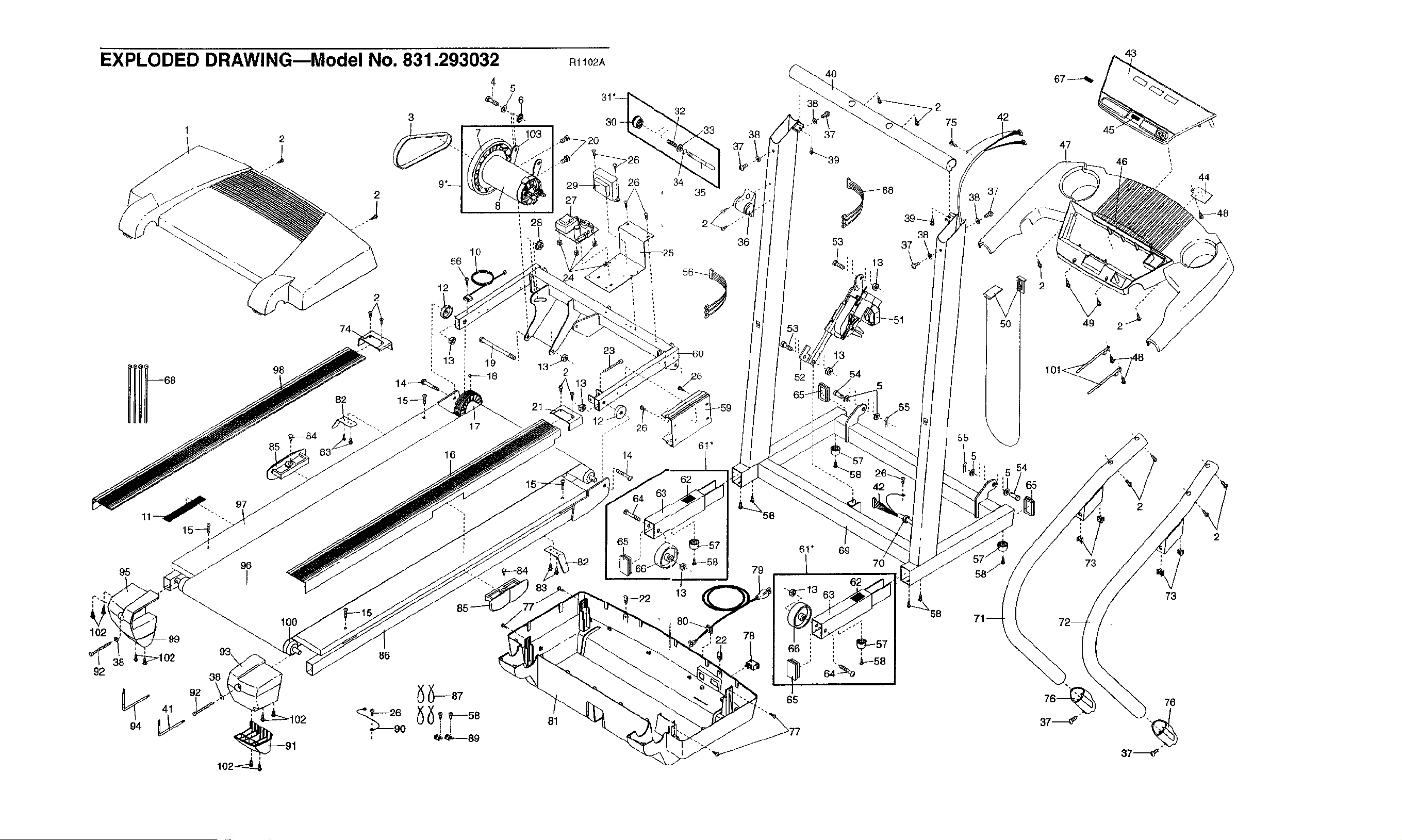
EXPLODED DRAWING--Model No. 831.293032 R1102A
3
2 U
56
10
12
2
92
92
41
38
90 _j
_'_'_89
21
81
30 32
720 33
26 34 I_,_
35
38
36
79
78
4O
q
37
_"-39
88
53
4_' 13
13
/
52 ; _l( 54
;'""-._58 26
"'", 42
61" 69
1 70
62
"'_>13 63
L
L
' _57
q ,
' ' ,IF-58
"'" 64
65
,2
75
39_
38
37
42
l
5
d
, 5 '
43
47
46
49
73
,,'" 44
37_
73

SEARS
Model No. 831.293032
QUESTIONS?
If you find that:
• you need help assembling or
operating the PROFORM 320x
treadmill
• a part is missing
• or you need to schedule repair
service
call our toll-free HELPLINE
1-800-736-6879
Monday-Saturday, 7 am-7 pm
Central Time (excluding holidays)
REPLACEMENT
PARTS
If parts become worn and need
to be replaced, call the following
toll-free number
1-800-FON-PART
(1-800-366-7278)
The model number and serial number of your PROFORM ®320x
treadmill are listed on a decal attached to the frame. See the front
cover of this manual to find the location of the decal.
All replacement parts are available for immediate purchase or
special order when you visit your nearest SEARS Service Center.
To request service or to order parts by telephone, call the toll-free
numbers listed at the left.
When requesting help or service, or ordering parts, please be
prepared to provide the following information:
• The NAME OF THE PRODUCT (PROFORM ®320x treadmill)
• The MODEL NUMBER OFTHE PRODUCT (831.293032)
• The KEY NUMBER AND DESCRIPTION OF THE PART (see the
EXPLODED DRAWING and PART LIST in the center of this
manual)
FULL 90 DAY WARRANTY
For 90 days from the date of purchase, if failure occurs due to defect in material or workmanship in this
SEARS TREADMILL EXERCISER, contact the nearest SEARS Service Center throughout the United
States and SEARS will repair or replace the TREADMILL EXERCISER, free of charge.
This warranty does not apply when the TREADMILL EXERCISER is used commercially or for rental pur-
poses.
This warranty gives you specific legal rights, and you may also have other rights which vary from state
to state.
Sears, Roebuck and Co., Dept. 817WA, Hoffman Estates, IL 60179
Part No. 193427 R1102A Printed in USA © 2002 Sears, Roebuck and Co.