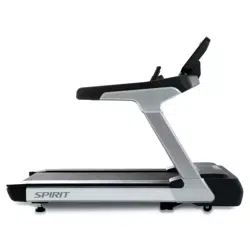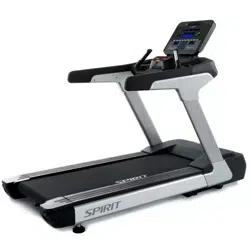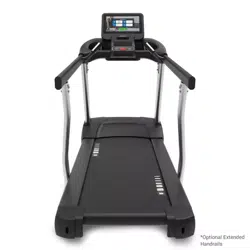
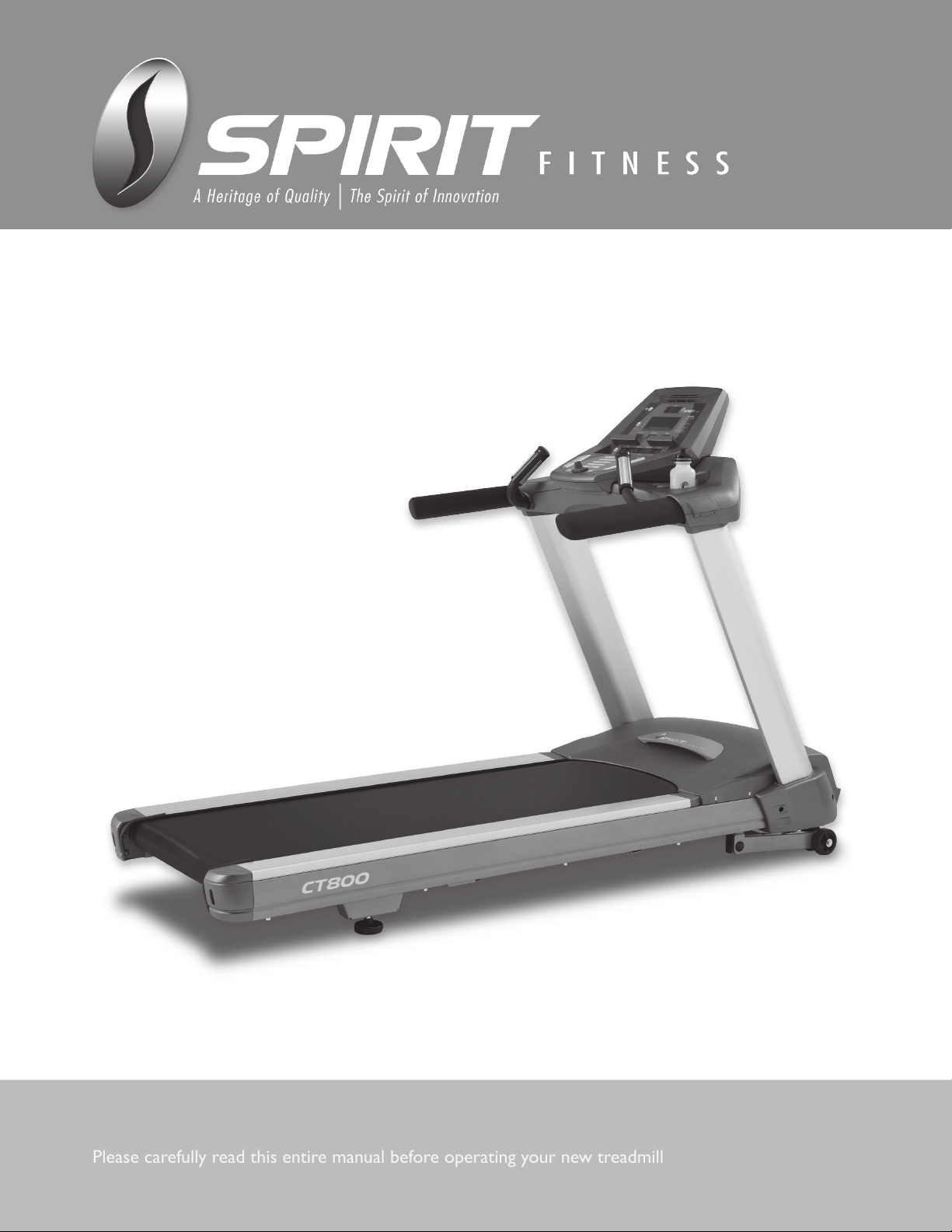
Treadmill
CT800
Please carefully read this entire manual before operating your new treadmill
OWNER’S MANUAL

2
Treadmill
CT800

1
2
3
4
5
10
13
19
21
23
25
Product Registration
Important Safety Instructions
Important Electrical Instructions
Important Operation Instructions
CT800
Assembly Instructions
Operation of Your Console
Programmable Features
Using Heart Rate Transmitter
General Maintenance
Service Checklist - Diagnosis Guide
Manufacturer’s Limited Warranty
Table of Contents

1
Treadmill
CT800
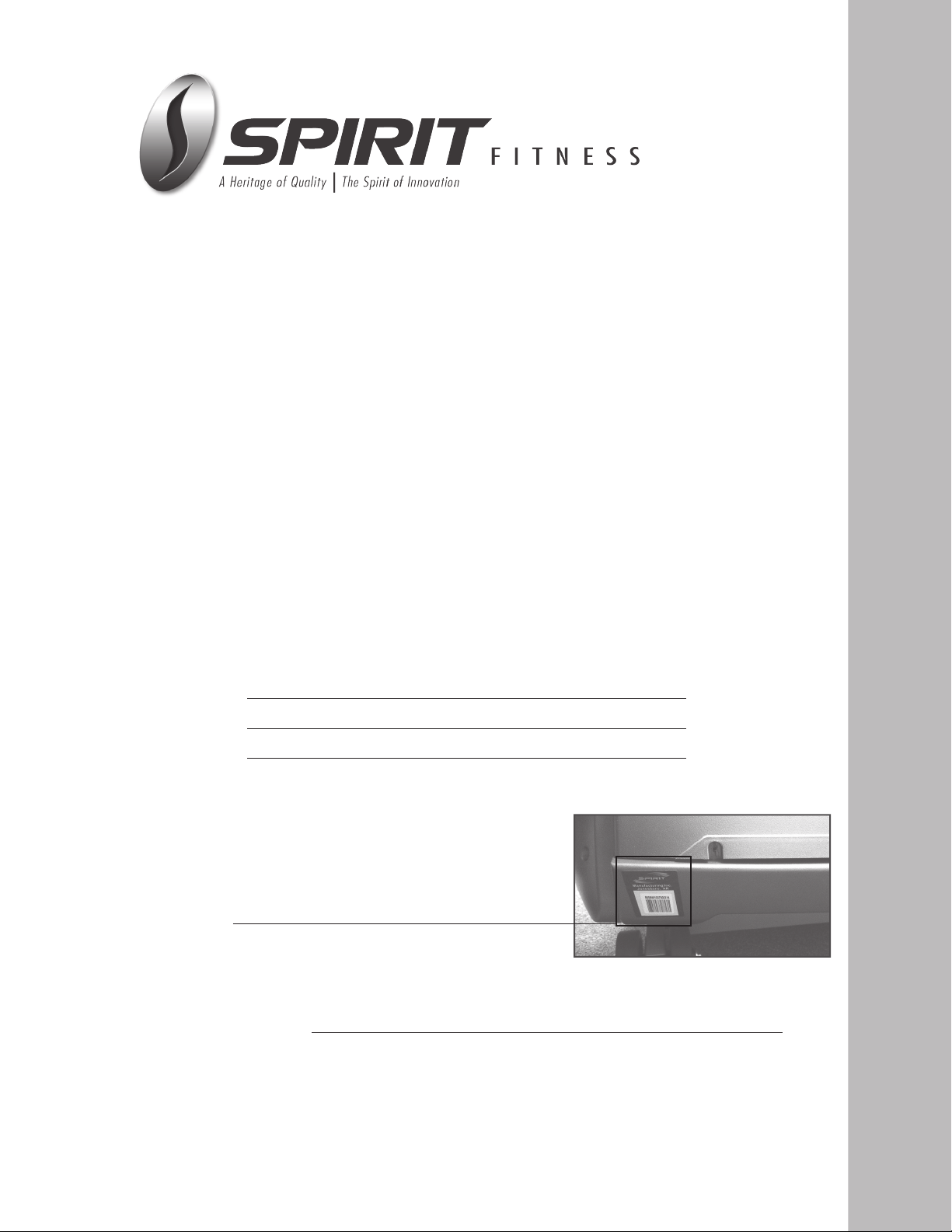
Record Your Serial Number
Please record the serial number of this tness product
in the space provided below.
Serial Number
Register Your Purchase
The self-addressed product registration card must be completed in full and returned to Spirit
Fitness. You can also go to https://www.spirittness.com/residentialwarrantyregistration.html
under the Support tab to register online.
Thank you for your purchase of this quality group treadmill from Spirit Fitness. Your new treadmill
was manufactured by one of the leading tness manufacturers in the world and is backed by one
of the most comprehensive warranties available. Through your dealer, Spirit Fitness will do all we
can to make your ownership experience as pleasant as possible for many years to come. If not
purchased direct from Spirit Fitness, the local dealership where you purchased this treadmill is
your administrator for all Spirit Fitness warranty and service needs. Their responsibility is to
provide you with the technical knowledge and service personnel to make your experience
more informed and any difculties easier to remedy.
Please take a moment at this time to record the name of the dealer, their telephone number,
and the date of purchase below to make any future, needed contact easy. We appreciate your
support and we will always remember that you are the reason that we are in business. Please
complete and mail your registration card today and enjoy your new treadmill.
Yours in Health,
Spirit Fitness
Congratulations on your new treadmill and welcome to the Spirit Fitness family!
Name of Dealer
Dealer Phone #
Purchase Date
CT800_20120614
Product Registration

2
Treadmill
CT800
Important Safety Instructions
When using an electrical appliance, basic precautions hsould always be followed,
including the following:
Read all instructions before using this appliance.
DANGER - To reduce the risk of electric shock:
1. Always unplug this applicance from the electrical outlet immediately after using and before
cleaning.
WARNING - To reduce the risk of burns, re electric shock, or injury to persons:
1. An appliance should never be left unattended when plugged in. Unplug from outlet when not
in use, and before putting on or taking off parts.
2. Do not operate under blanket or pillow. Excessive heating can occur and cause re, electric
shock, or injury to persons.
3. Close supervision is necessary when this appliance is used by, on, or near children, invalids, or
disabled persons.
4. Use this appliance only for its intended use as described in this manual. Do not use
attachments not recommended by the manufacturer.
5. Never operate this appliance if it has a damaged cord or plug, if it is not working properly, if it
has been dropped or damaged, or dropped into water. Return the appliance to a service
center for examination and repair.
6. Do not carry this appliance by supply cord or use cord as a handle.
7. Keep the cord away from heated surfaces.
8. Never operate the appliance with the air openings blocked. Keep the air openings free of lint,
hair, and the like.
9. Never drop or insert any object into any opening.
10. Do not use outdoors.
11. Do not operate where aerosol (spray) products are being use or where oxygen is being ad
ministered.
12. Connect this appliance to a properly grounded outlet only. See Grounding Instructions.
13. The appliance is intended for household use.
SAVE THESE INSTRUCTIONS - THINK SAFETY!
3
Treadmill
CT800
Important Electrical Instructions
WARNING!
NEVER use a ground fault circuit interrupt (GFCI) wall outlet with this treadmill. As with any appliance with a large
motor, the GFCI will trip often. Route the power cord away from any moving part of the treadmill including the
elevation mechanism and transport wheels.
NEVER remove any cover without rst disconnecting AC power. If voltage varies by ten percent (10%) or more,
the performance of your treadmill may be affected. Such conditions are not covered under your warranty. If you
suspect the voltage is low, contact your local power company or a licensed electrician for proper testing.
NEVER expose this treadmill to rain or moisture. This product is NOT designed for use outdoors, near a pool or
spa, or in any other high humidity environment. The operating temperature specication is 40 to 120 degrees
Fahrenheit, and humidity is 95% non-condensing (no water drops forming on surfaces).
Circuit Breakers: Some circuit breakers used in homes are not rated for high inrush currents that can occur
when a treadmill is rst turned on or even during use. If your treadmill is tripping the house circuit breaker (even
though it is the proper current rating) but the circuit breaker on the treadmill itself does not trip, you will need to
replace the home breaker with a high inrush type. This is not a warranty defect. This is a condition we as a
manufacture have no ability to control. This part is available through most electrical supply stores. Examples: Grainger
part # 1D237, or available online at www.squared.com part #QO120HM. The electrical outlet used should have a
dedicated 15 amp circuit breaker.
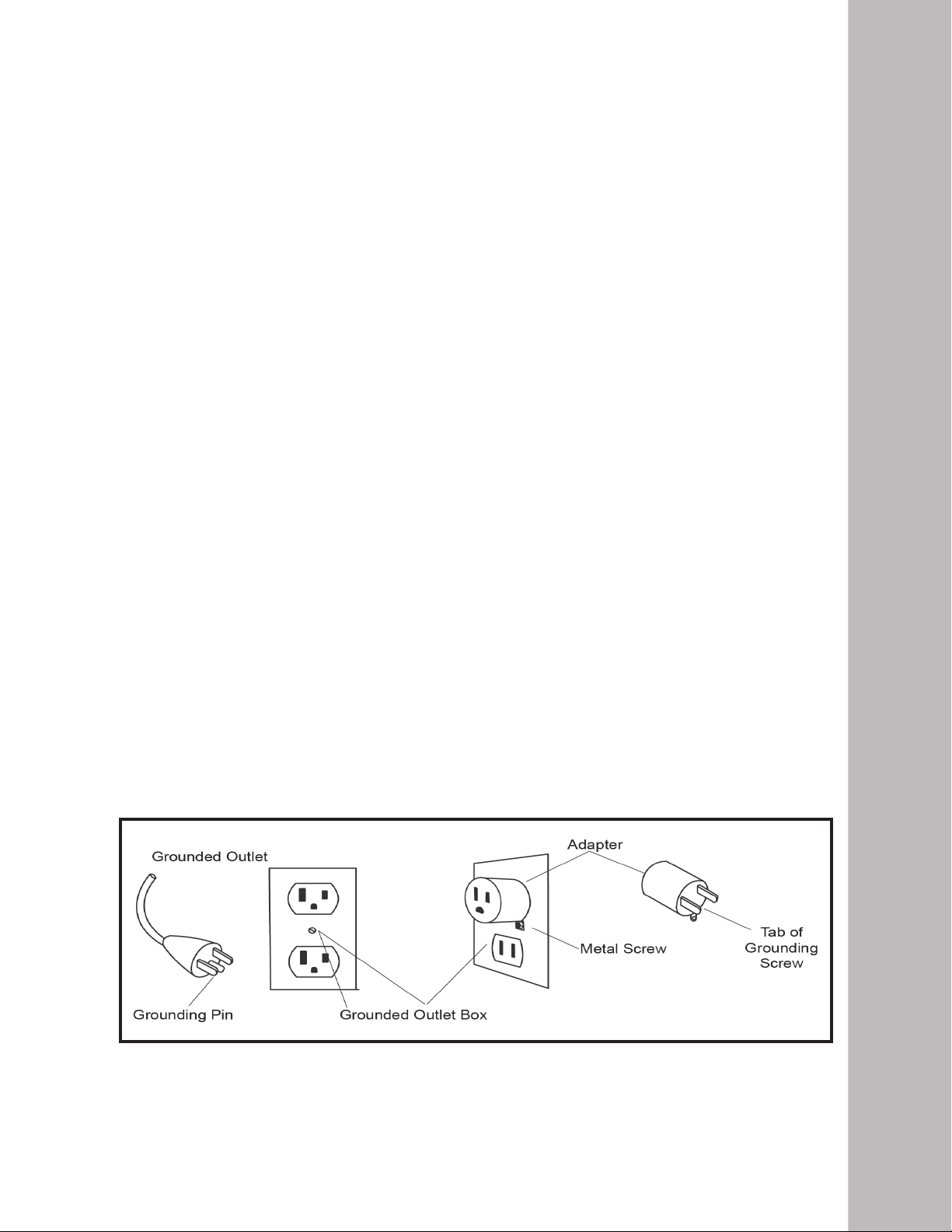
This product must be grounded. If the treadmill should malfunction or breakdown, grounding provides a
path of least resistance for electric current, reducing the risk of electric shock. This product is equipped with a cord
having an equipment-grounding plug. The plug must be plugged into an appropriate outlet that is properly installed
and grounded in accordance with all local codes and ordinances.
DANGER - Improper connection of the equipment-grounding conductor can result in a risk of electric shock. Check
with a qualied electrician or serviceman if you are in doubt as to whether the product is properly grounded. Do not
modify the plug provided with the product if it will not t the outlet; have a proper outlet installed by a qualied
electrician.
This product is for use on a nominal 110-volt/15 amp dedicated circuit, and has a grounding plug that looks like the
plug illustrated below. A temporary adapter that looks like the adapter illustrated below may be used to connect this
plug to a 2-pole receptacle as shown below if a properly grounded outlet is not available. The temporary adapter
should be used only until a properly grounded outlet, (shown below) can be installed by a qualied electrician. The
green colored rigid ear-lug, or the like, extending from the adapter, must be connected to a permanent ground such
as a properly grounded outlet box cover. Whenever the adapter is used, it must be held in place by a metal screw.
Grounding Instructions

4
Treadmill
CT800
Important Operation Instructions
NEVER operate this treadmill without reading and completely understanding the results of
any operational change you request from the computer.
Understand that changes in speed and incline do not occur immediately. Set your desired
work level on the computer console and release the adjustment key. The computer will obey
the command gradually.
NEVER use your treadmill during an electrical storm. Surges may occur in your household
power supply that could damage treadmilll components. Unplug the treadmill during an
electrical storm as a precaution.
Use caution while participating in other activities while walking on your treadmilll; such as
watching television, reading, etc. These distractions may cause you to lose balance which may
result in serious injury.
Do not use excessive pressure on console control keys. They are precision set to function
properly with little nger pressure.
A safety tether cord is provided with this unit. It is a simple magnetic design that should be
used at all times. It is for your safety should you fall or move too far back on the tread-belt.
Pulling this safety tether cord will stop tread-belt
movement. To Use:
1. Place the magnet into position on the round metal portion of the console control head.
Your treadmill will not start and operate without this. Removing the magnet also secures
the treadmill from unauthorized use.
2. Fasten the plastic clip onto your clothing securely to assure good holding power. Note: The
magnet has strong enough power to minimize accidental, unexpected stopping. The clip
should be attached securely to make certain it does not come off. Be familiar with its
function and limitations. The treadmill will stop, depending on speed, with a one to two
step coast anytime the magnet is pulled off the console. Use the Stop / Pause switch in
normal operation.
Safety Tether Cord
5
Treadmill
CT800
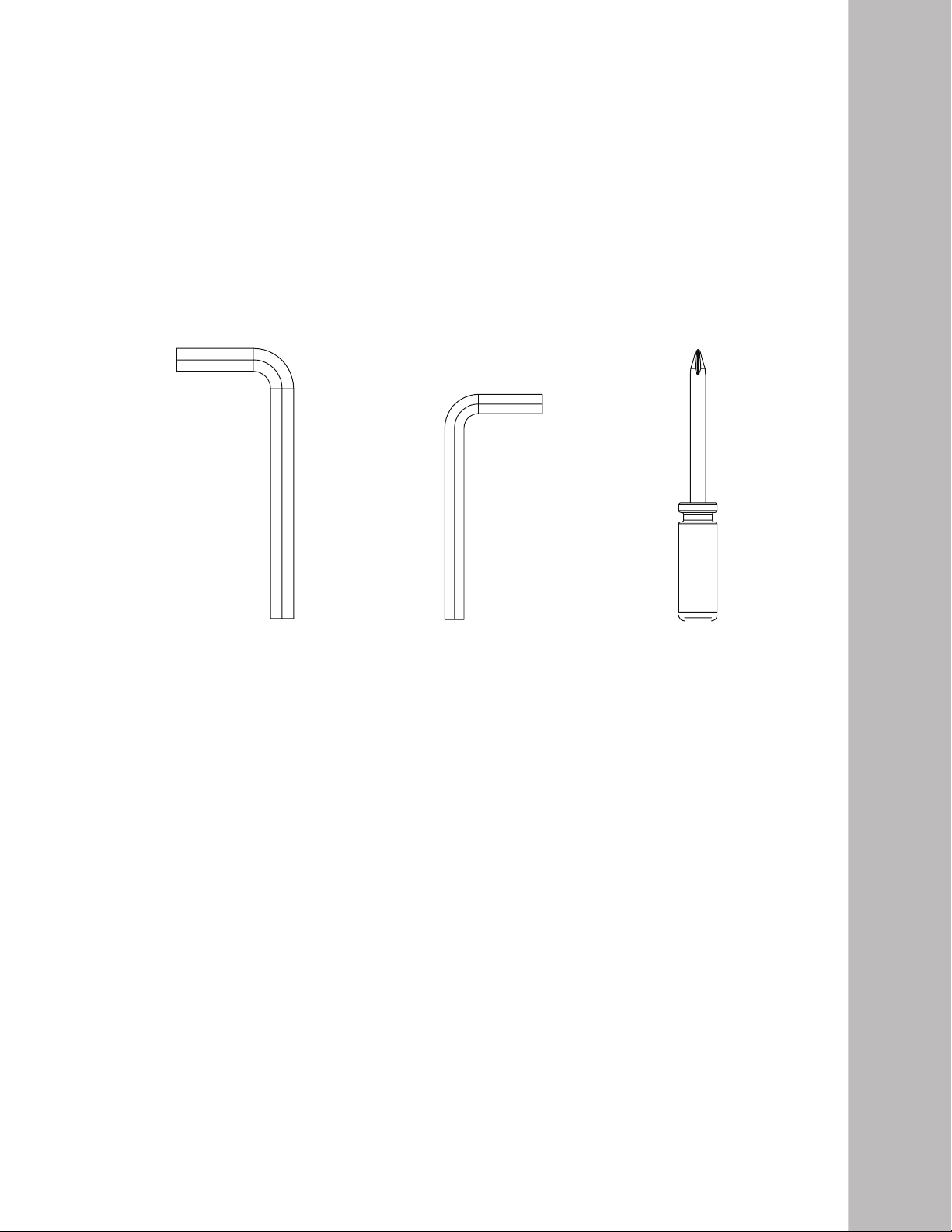
Phillip Head Screwdriver10mm Allen Wrench
1. Cut the straps, then along the dotted line on the bottom of the box; lift the box over the unit and unpack.
2. Locate the hardware package. Remove the tools rst. Remove the hardware for each step as needed to avoid
confusion. The numbers in the instructions that are in parenthesis (#) are the item number from the assembly
drawing for reference.
Pre-Assembly
3/8” Allen Wrench
CT800
Assembly Instructions
Assembly Tools
6
Treadmill
CT800
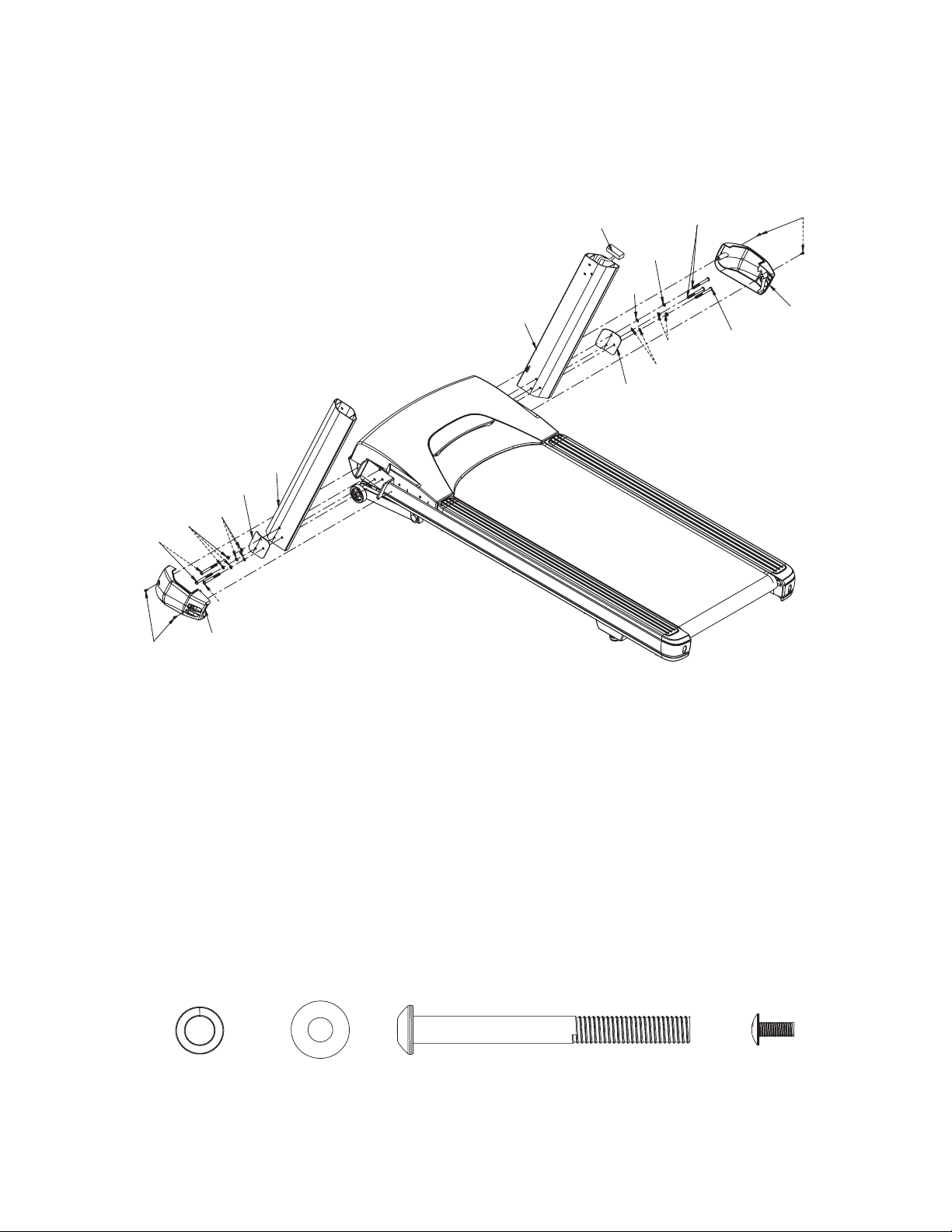
1. The right side console mast tube (19) has computer cable A (87) pre-installed. Lift the tube off the walking
surface and attach it to the base frame. You need to gently pull on the computer cable as you line up the upright
tube, taking the slack out, so the cable does not get pinched between the tube and the base frame. Assemble
one bolt (104), split washer (58) and at washer (59) through the top hole in the retaining plate (21), and
corresponding top hole in the upright tube, and screw into the base frame. Now install the other two bolts
(104) and washers (58 & 59) and tighten all three securely.
2. Install the left console mast tube (18) in the same manner.
3. Install the lower side caps (32 & 33) with four screws (73).
HARDWARE
STEP 1: Console Mast Tubes
#59. 3/8”
Flat Washer
(6 pcs)
#104. 3/8” x 3-3/4”
Stainless Steel Bolt
(6 pcs)
#73. M5 x 12mm Self
Tapping Screw
(4 pcs)
#58. 3/8”
Split Washer
(6 pcs)
A
104
104
104
104
73
73
58
58
58
59
59
59
20
21
19
18
33
32
7
Treadmill
CT800
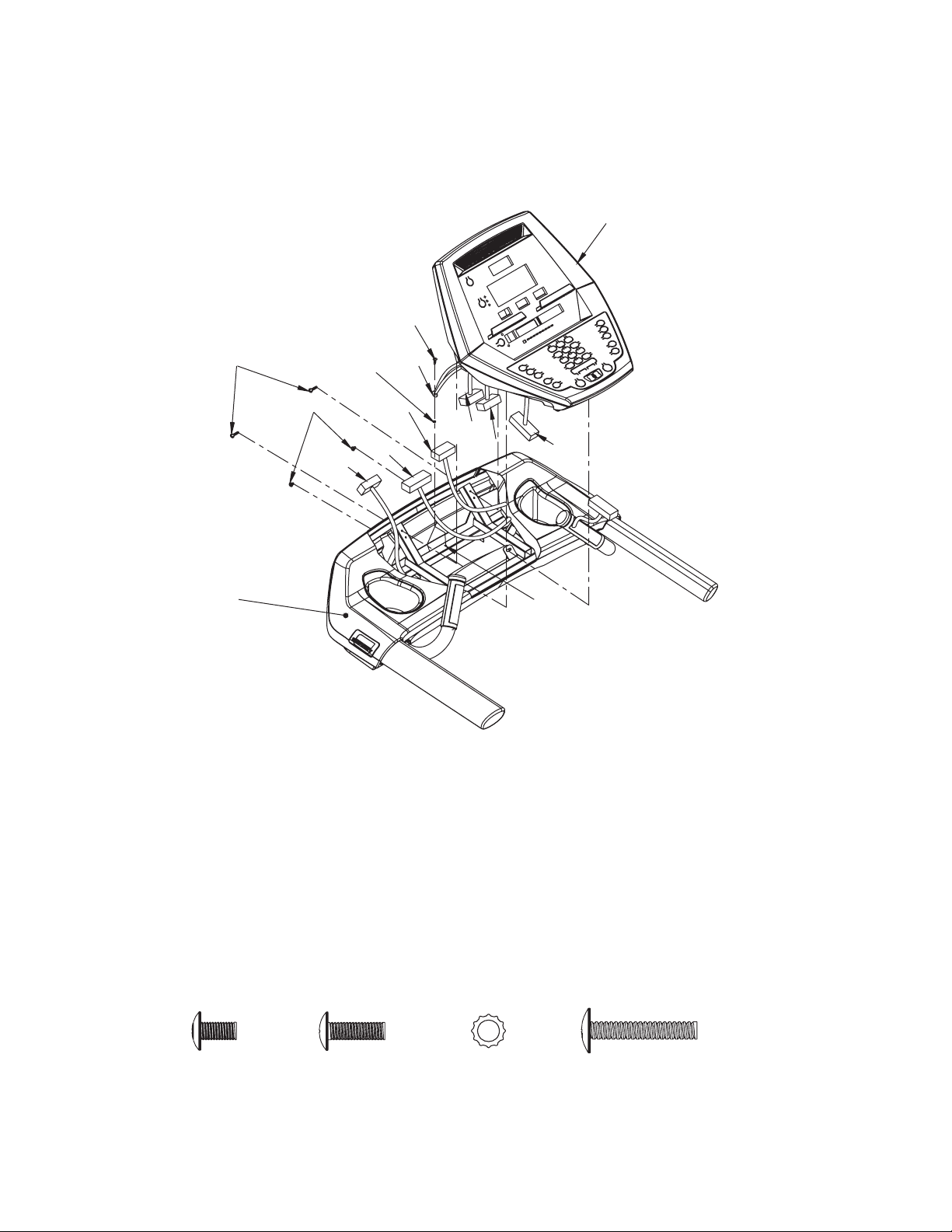
1. Connect computer cables G (86) & C (120), hand pulse cables D (122) & F (88), on the right and B (28) &
E (88) on the left, and attach the ground cable H (121) to the hole I in the steel frame with a screw (73) and
a star washer (125) .
2. Mount the console (36) to the handle bar frame (5) with two screws (112) in the upper set of holes and two
screws (110) in the lower set of holes.
HARDWARE
STEP 2: Console
#110. M5 x10mm
Machine Screw
(2 pcs)
#73. M5 x 12mm
Sheet Metal Screw
(1 pc)
#125. M5
Star Washer
(1 pc)
112
110
125
73
5
36
B
C
D
H
E
F
G
I
#112. M5 x 30mm
Machine Screw
(2 pcs)

8
Treadmill
CT800
When assembling the console mounting interface brackets (3 & 4) please be sure to slide the
brackets all the way toward the back of the console before tightening the bolts.
Important Assembly Note
Push mounting bracket
all the way to the back
of the console, then
tighten the screws.
9
Treadmill
CT800
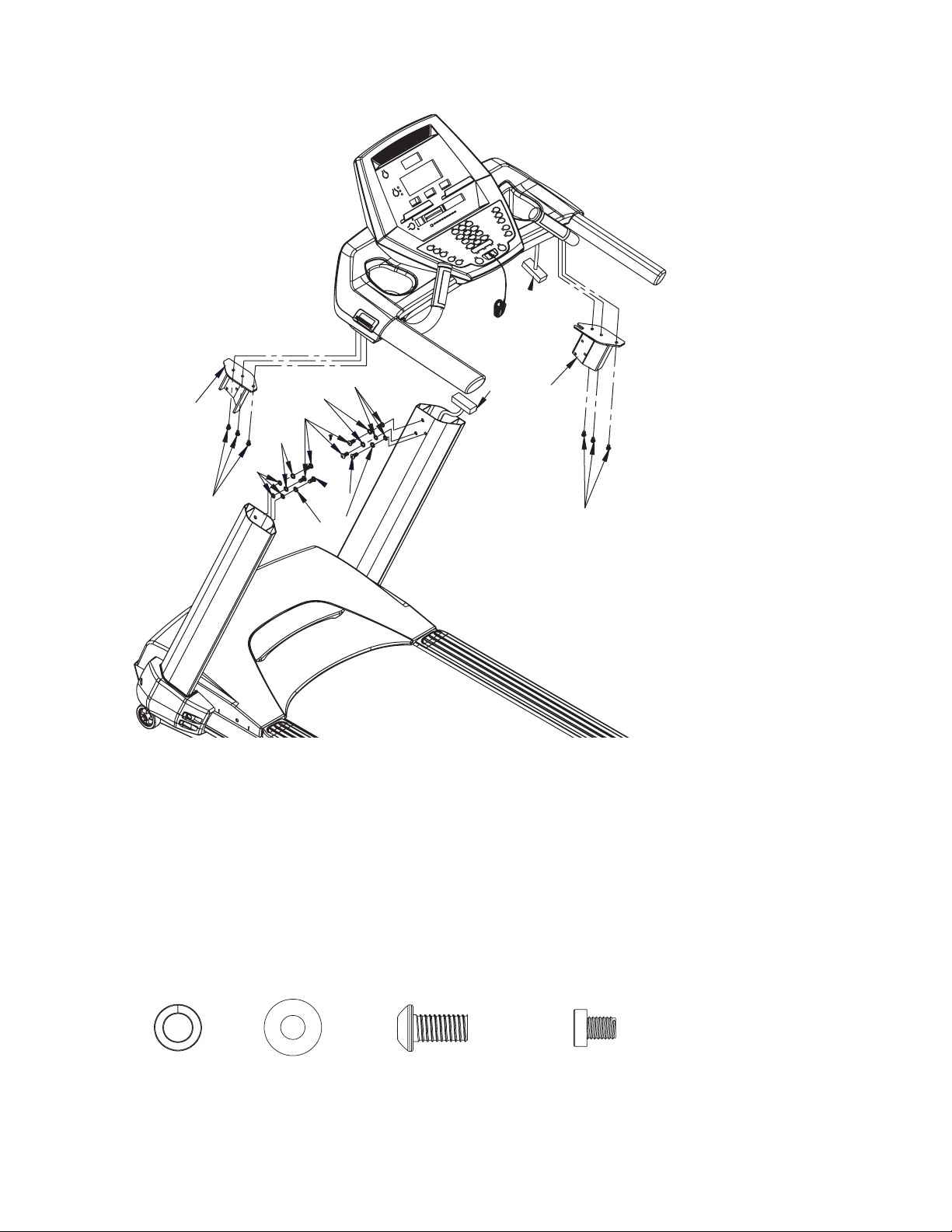
1. Attach the two interface mounts (3 left & 4 right) to the console assembly frame with six bolts (108).
2. Connect console computer cable C (120) to cable A (87) from the console mast tube.
3. Attach the console assembly to the top of the console mast tubes with six bolts (105), split washers (58) and
at washers (59). Be careful not to pinch the computer cable.
HARDWARE
STEP 3: Console To Console Mast Tubes
#105. 3/8” x 3/4”
Button Head Socket Bolt
(6 pcs)
#58. 3/8”
Split Washer
(6 pcs)
#59. 3/8”
Flat Washer
(6 pcs)
#108. M8 x 12mm
Socket Cap Bolt
(6 pcs)
108
A
4
C
108
3
59
59
58
58
58
105
105
10
Treadmill
CT800
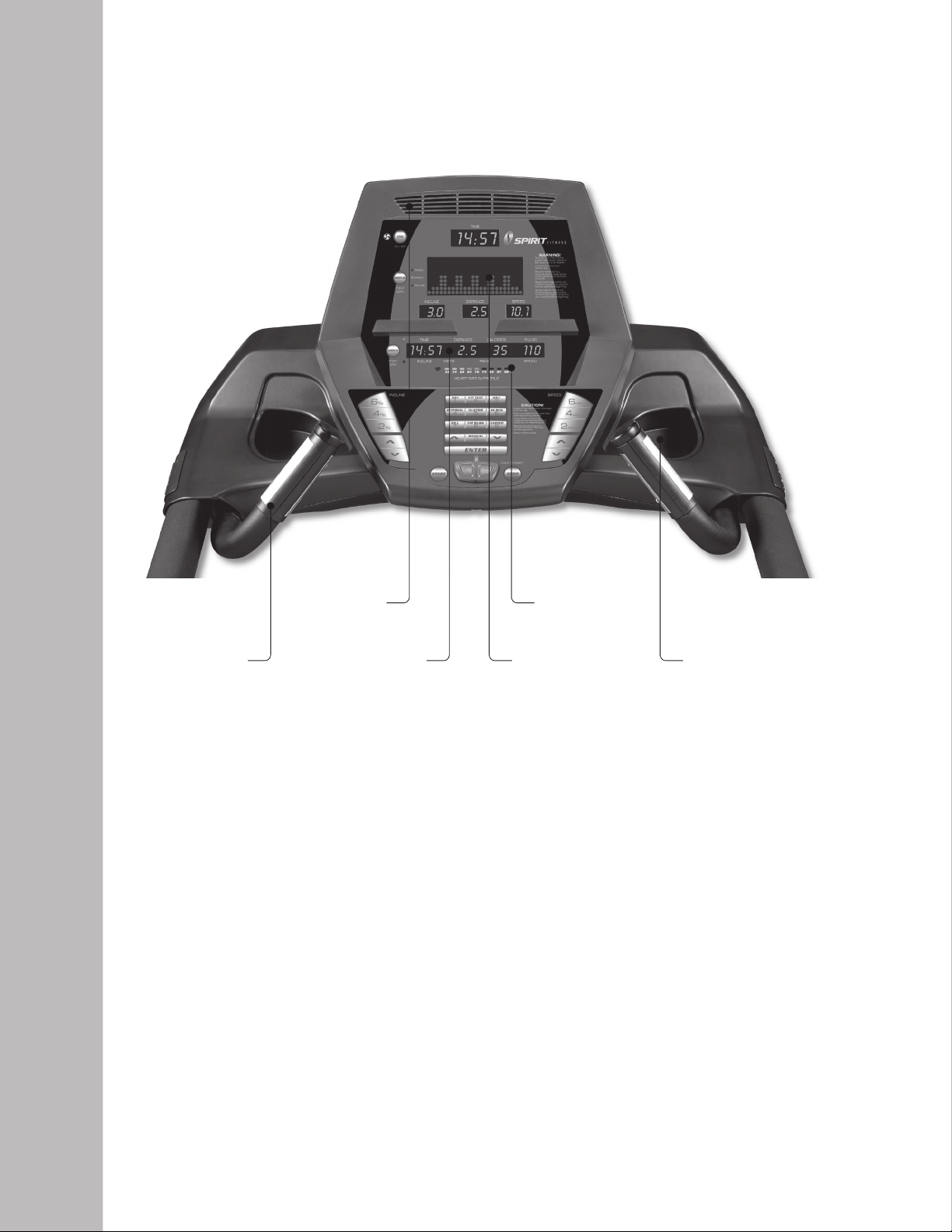
Fan to keep
you cool
Large Blue-LED
Matrix Window
Contact Heart
Rate Grips
20-Character
Message Center
Convenient water bottle
holder and cargo
compartment for keys,
phone, or MP3 player
Heart Rate
% Profile
CT800
Console
Power the treadmill on by plugging it into an appropriate wall outlet, then turn on the power
switch located at the front of the treadmill below the motor hood. Ensure that the safety key is
installed, as the treadmill will not power on without it.
When the power is turned on, all the lights on the display will light for a short time. Then the
Time and Distance windows will display odometer readings for a short time. The Time
window will show how many hours the treadmill has been in use and the Distance window
will show how many miles (or Kilometers if the treadmill is set to metric readings; see
maintenance for changing settings) the treadmill has gone. A message will be displayed showing
the current software version. The treadmill will then enter idle mode, which is the starting point
for operation.
Power Up
Operation of Your Console

11
Treadmill
CT800
Press and release any key to wake display up if not already on.
Press and release the Start key to begin belt movement at 0.5 mph, then adjust to the
desired speed using the Up/Down keys. You may also use the rapid speed keys 2 through
6 to set to a specic speed directly.
To slow tread-belt press and hold the Down key (console or hand rail) to the desired
speed. You may also press the rapid speed adjust keys, 2 through 6.
To stop the tread-belt press and release red Stop key.
Quick Start Operation
Pause/Stop/Preset
When the treadmill is running the pause feature may be utilized by pressing the red Stop
key once. This will slowly decelerate the tread-belt to a stop. The incline will go to zero
percent. The Time, Distance and Calorie readings will hold while the unit is in the pause
mode. After 5 minutes the display will reset and return to the start up screen.
To resume your exercise when in Pause mode, press the Start key. The speed and incline
will return to their previous settings.
Pressing the Stop key twice will end the program and a workout summary will be displayed.
If the Stop button is pressed a third time, the console will return to the idle mode (start up)
screen.
If the Stop button is held down for more than 3 seconds the console will reset.
When you are setting data, such as age and time, for a program pressing the Stop key will
allow you to go back one step for each key press.
Incline
Incline may be adjusted anytime after the belt starts moving.
Press and hold the adjust ^ / v keys to achieve desired level of effort. You may also choose
a more rapid increase / decrease by selecting a quick key, 2 through 6, on left hand side of
console (incline).
The display will indicate incline numbers as percent of grade (the same as grade of a road) as
adjustments are made.
Dot Matrix Center Display
Ten rows of dots indicate each level of a workout in manual mode. The dots are only to show an
approximate level (speed/incline) of effort. They do not necessarily indicate a specic value - only
an approximate percent to compare levels of intensity. In Manual Operation the Speed / Incline
dot matrix window will build a prole “picture” as values are changed during a workout. There
are twenty-four columns, indicating time. The 24 columns are divided into 1/24th of the total time
of the program. When the time is counting up from zero (as in quick start) each column
represents 1 minute.

12
Treadmill
CT800
The 1/4-mile track (0.4 km) will be displayed around the dot matrix window. The ashing dot
indicates your progress. In the center of the track there is a lap counter for reference.
1/4 Mile Track
Next to the Dot Matrix window are three LED lights labeled: Track, Speed and Incline,
along with a display button. When the Track LED is lit the dot matrix displays the Track
prole, when the Speed LED is lit the Dot matrix displays the Speed prole and when the
Incline LED is lit the Dot Matrix displays the Incline prole. You may change the Dot Matrix
prole view by pressing the Display button. After scrolling through the three proles the Dot
matrix will automatically scroll through the three displays showing each one for four seconds. The
LED associated with each prole will blink while that view is displayed. One more press of the
Display button will return you to the Track prole.
The Pulse (Heart Rate) window will display your current heart rate in beats per minute during
the workout. You must use both left and right stainless steel sensors to pick up your pulse. Pulse
values are displayed anytime the computer is receiving a Grip Pulse signal. You may use the Grip
Pulse feature while in Heart Rate Control. The CT800 will also pick up wireless heart rate
transmitters that are Polar compatible, including coded transmissions.
Heart Rate Feature
Displays a graphical representation of your heart rate as a percentage of your estimated
maximum heart rate. When you enter your age during programming, the console will calculate
your maximum heart rate then light up the graph to show the percent of estimated maximum
heart rate you are currently achieving.
Heart Rate Bar Graph
Displays messages that help guide you through the programming process. During a program the
message window displays your workout data.
Message Window Display
The display will automatically turn off (go to sleep) after 30 minutes of inactivity. This function is
called sleep mode. In sleep mode, the treadmill will power down most everything except for a
minimum of circuitry for detecting key presses and the safety key so it will start up again if these
are activated. There is only a tiny amount of current used in sleep mode (about the same as your
TV when it is turned off) and it is perfectly ne to leave the main power switch on in sleep mode.
Of course you may also remove the safety key or turn off the main power switch to power
down the treadmill.
To Turn Treadmill Off

13
Treadmill
CT800
The Spirit Fitness
CT800
offers ve preset programs, a Custom User dened program, two
heart rate control programs, a Gerkin protocol based Fitness Test and one Manual program.
1. Select a program then press the Enter key to begin customizing the program with your
personal data, or just press the Start key to begin the program with the default settings.
2. After selecting a program and pressing enter to set your personal data, the Time window
will blink with the default value of 20 minutes. You may use any of the Up/Down keys to
adjust the time. After adjusting the time, press Enter. (Note: You may press Start at any
time during the programming to begin with only settings you have modied at that point).
3. The Incline window will now be blinking a value indicating your Age. Entering the correct
age will affect the Heart Rate Bar Graph accuracy and also needed for the HR programs. Use
the Up/Down keys to adjust, and then press enter.
4. The Distance window will now be blinking a value indicating your Bodyweight. Entering
your correct bodyweight affects the Kcal readout accuracy. Use the Up/Down keys to
adjust, and then press Enter.
5. The Speed window will now be blinking, showing the preset top speed of the selected
program. Use the Up/Down keys to adjust, and then press Enter. Each program has
various speed changes throughout; this allows you to limit the highest speed the program
will attain during your workout.
6. Now press the Start key to begin your workout.
7. There will be a 3 minute warm-up to begin. You can press the Start button to bypass this
and go straight to the workout. During the warm-up the clock will count down from 3
minutes.
To Select and Start A Preset Program
Programmable Features
14
Treadmill
CT800
Preset Programs Speed/Incline Settings
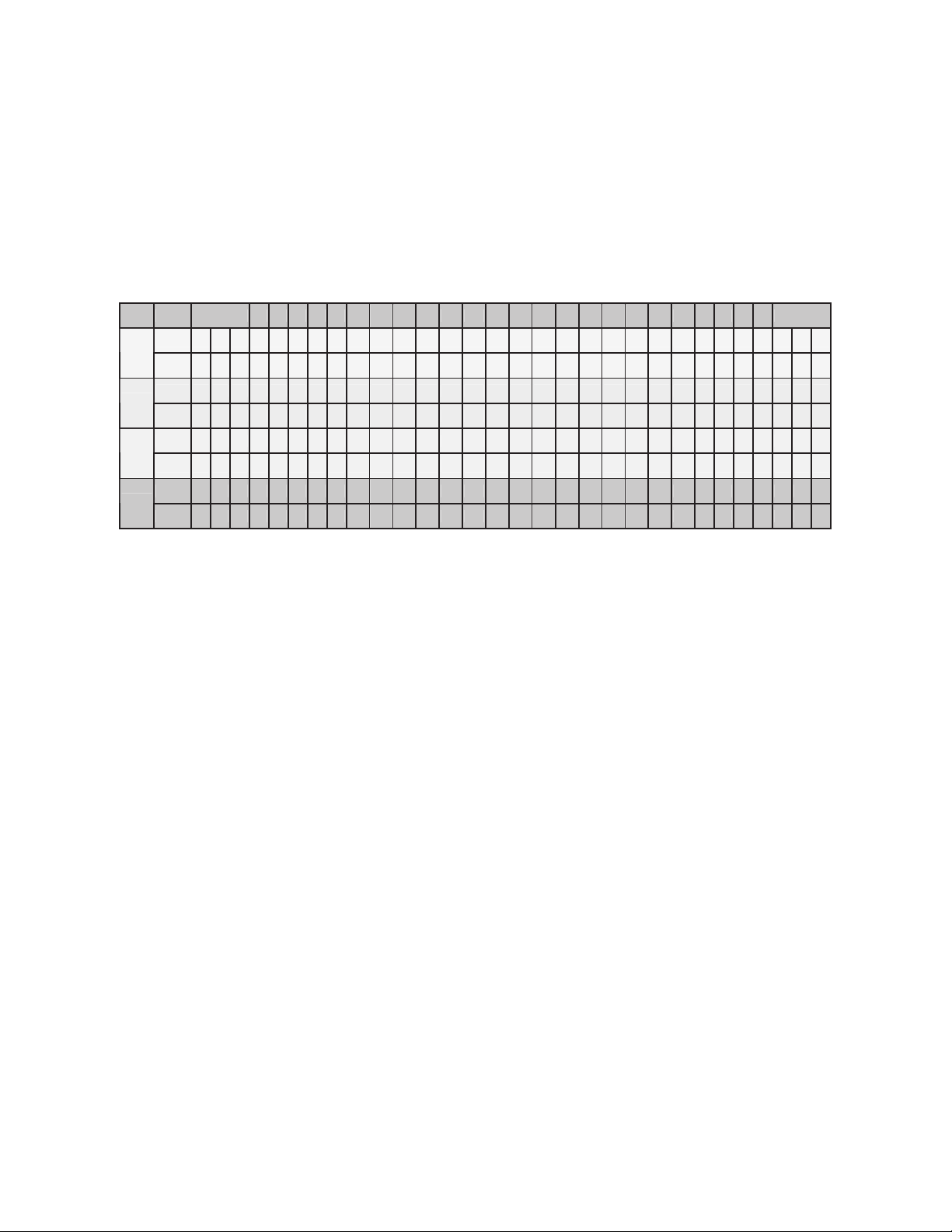
The preset program Speed and Incline levels are shown in the chart below. The Speed numbers shown in the
chart indicate a percentage of the top speed of the program. For instance, the rst Speed setting for P1 (Program
1, HILL) shows the number 20. This means that this segment of the program will have a speed that is 20% of the top
speed for the program (The user sets the top speed in the procedure above). If the user sets the top speed to 10
mph, then the rst segment will be 2 mph. You will notice that segment 12 shows 100 which means, the speed will
be set to 100% of 10 mph or simply 10 mph.
1. Select the Custom program then press Enter. Note that the dot matrix display portion
will light a single row of dots at the bottom (Unless there is a previously saved program).
2. The clock (Time) window will be ashing. Use the up and down adjustment keys to set the
program for the desired time. Press the Enter key. This is a must to continue even if the time
is not adjusted.
3. The Incline window will now be blinking a value indicating your Age. Entering the correct age
will affect the Heart Rate Bar Graph accuracy. Use the Up/Down keys to adjust and then
press Enter.
4. The Distance window will now be blinking a value indicating your Bodyweight.
Entering your correct bodyweight affects the Calorie readout accuracy. Use the Up/Down
keys to adjust, and then press Enter.
5. The rst speed setting column (segment) will now be blinking. Using the Up/Down keys,
adjust the speed to your desired effort level for the rst segment then press Enter. The
second column will now be blinking. Note that the previous segment value has been
carried over to the new segment. Repeat the above process until all segments have been
programmed.
6. The rst column will be blinking again. The console is now ready for the incline settings.
Repeat the same process used to set the speed values for programming the segments for
incline.
7. Press the Start button to begin the workout and also save the program to memory.
Custom Program
Prog
SEG Warm up 1 2 3 4 5 6 7 8 9 10 11 12 13 14 15 16 17 18 19 20 21 22 23 24 Cool down
Speed 20 30 40 50 60 60 70 70 70 80 80 70 80 80 100 100 70 80 80 70 70 80 80 70 60 60 50 40 30 20
P1
Incline 0 0 0 0 1 2 3 3 4 3 3 4 4 5 3 3 4 3 3 4 4 5 4 3 1 1 0 0 0 0
Speed 20 30 40 50 60 60 70 80 100 100 100 100 100 100 100 100 100 100 100 100 100 100 100 80 70 60 50 40 30 20
P2
Incline 0 0 0 0 1 2 3 3 3 4 5 3 3 4 4 3 3 2 2 3 4 5 6 4 2 1 0 0 0 0
Speed 20 30 40 50 60 60 70 70 70 80 70 70 80 80 60 70 80 80 70 70 70 100 70 80 60 60 50 40 30 20
P3
Incline 0 0 0 0 1 1 1 2 2 3 2 2 3 3 1 2 3 3 2 2 4 4 2 3 1 1 0 0 0 0
Speed 20 30 40 50 60 60 70 80 100 60 60 70 80 100 60 70 100 60 70 100 60 70 80 70 60 60 50 40 30 20
P5
Incline 0 0 0 0 1 2 3 5 6 2 3 5 6 7 2 3 7 2 3 8 2 3 5 4 3 1 0 0 0 0
P1= Hill; P2= Fatburn; P3= Cardio; P5= Interval
15
Treadmill
CT800
5K Run
This program automatically sets a 5k (5 kilometer) distance as your goal. The track display will show one loop that
is the equivalent of 5 kilometers and the Distance window will also show 5k to start. When the program begins the
Distance will count down; once it reaches zero the program ends.
*Please note that the Speed readout is in MPH if the console is not set to Metric.
Fitness Test
The tness test is based on the Gerkin protocol, also known as the reman’s protocol, and is a submax Vo2 (volume
of oxygen) test. The test will increase speed and elevation alternately until you reach 85% of your Max heart rate.
The time it takes for you to reach 85% determines the test score (Vo2 max) as shown in the chart below.
Stage Time Speed Grade VO2 Max
1 0 to 1:00 4.5mph 0% 31.15
2.1 1:15 4.5mph 2% 32.55
2.2 1:30 4.5mph 2% 33.6
2.3 1:45 4.5mph 2% 34.65
2.4 2:00 4.5mph 2% 35.35
3.1 2:15 5.0mph 2% 37.45
3.2 2:30 5.0mph 2% 39.55
3.3 2:45 5.0mph 2% 41.3
3.4 3:00 5.0mph 2% 43.4
4.1 3:15 5.0mph 4% 44.1
4.2 3:30 5.0mph 4% 45.15
4.3 3:45 5.0mph 4% 46.2
4.4 4:00 5.0mph 4% 46.5
5.1 4:15 5.5mph 4% 48.6
5.2 4:30 5.5mph 4% 50
5.3 4:45 5.5mph 4% 51.4
5.4 5:00 5.5mph 4% 52.8
6.1 5:15 5.5mph 6% 53.9
6.2 5:30 5.5mph 6% 54.9
6.3 5:45 5.5mph 6% 56
6.4 6:00 5.5mph 6% 57
7.1 6:15 6.0mph 6% 57.7
7.2 6:30 6.0mph 6% 58.8
7.3 6:45 6.0mph 6% 60.2
7.4 7:00 6.0mph 6% 61.2
8.1 7:15 6.0mph 8% 62.3
8.2 7:30 6.0mph 8% 63.3
8.3 7:45 6.0mph 8% 64
8.4 8:00 6.0mph 8% 65
9.1 8:15 6.5mph 8% 66.5
9.2 8:30 6.5mph 8% 68.2
9.3 8:45 6.5mph 8% 69
9.4 9:00 6.5mph 8% 70.7
10.1 9:15 6.5mph 10% 72.1
10.2 9:30 6.5mph 10% 73.1
10.3 9:45 6.5mph 10% 73.8
10.4 10:00 6.5mph 10% 74.9
11.1 10:15 7.0mph 10% 76.3
11.2 10:30 7.0mph 10% 77.7
11.3 10:45 7.0mph 10% 79.1
11.4 11:00 7.0mph 10% 80

16
Treadmill
CT800
Fitness Test Programming
1. Press the Fit-Test button and press Enter.
2. The Message Window will ask you to enter your Age. You may adjust the age setting, shown in the Incline window,
using the Up and Down keys then press the Enter key to accept the new number and proceed on to the next screen.
3. You are now asked to enter your Weight. You may adjust the weight setting, shown in the Distance window, using the
Up and Down keys then press Enter to continue.
4. Now press Start to begin the test.
Before The Test
Make sure you are in good health; check with your physician before performing any exercise if you are over the age of 35 or
persons with pre-existing health conditions.
Make sure you have warmed up and stretched before taking the test.
Do not take in caffeine before the test.
Hold the hand grips gently, do not tense up.
What Your Score Means
VO2max Chart for females and de-conditioned males
18-25 26-35 36-45 46-55 56-65 65+
years
old
years
old
years
old
years
old
years
old
years
old
excellent >60 >56 >51 >45 >41 >37
good 52-60 49-56 43-51 39-45 36-41 33-37
above
average 47-51 43-48 39-42 35-38 32-35 29-32
average 42-46 40-42 35-38 32-35 30-31 26-28
below
average 37-41 35-39 31-34 29-31 26-29 22-25
poor 30-36 30-34 26-30 25-28 22-25 20-21
very poor <30 <30 <26 <25 <22 <20
18-25 26-35 36-45 46-55 56-65 65+
years
old
years
old
years
old
years
old
years
old
years
old
excellent 56 52 45 40 37 32
good 47-56 45-52 38-45 34-40 32-37 28-32
above
average 42-46 39-44 34-37 31-33 28-31 25-27
average 38-41 35-38 31-33 28-30 25-27 22-24
below
average 33-37 31-34 27-30 25-27 22-24 19-22
poor 28-32 26-30 22-26 20-24 18-21 17-18
very poor <28 <26 <22 <20 <18 <17
18-25 26-35 36-45 46-55 56-65 65+
years
old
years
old
years
old
years
old
years
old
years
old
excellent >60 >56 >51 >45 >41 >37
good 52-60 49-56 43-51 39-45 36-41 33-37
above
average 47-51 43-48 39-42 35-38 32-35 29-32
average 42-46 40-42 35-38 32-35 30-31 26-28
below
average 37-41 35-39 31-34 29-31 26-29 22-25
poor 30-36 30-34 26-30 25-28 22-25 20-21
very poor <30 <30 <26 <25 <22 <20
18-25 26-35 36-45 46-55 56-65 65+
years
old
years
old
years
old
years
old
years
old
years
old
excellent 56 52 45 40 37 32
good 47-56 45-52 38-45 34-40 32-37 28-32
above
average 42-46 39-44 34-37 31-33 28-31 25-27
average 38-41 35-38 31-33 28-30 25-27 22-24
below
average 33-37 31-34 27-30 25-27 22-24 19-22
poor 28-32 26-30 22-26 20-24 18-21 17-18
very poor <28 <26 <22 <20 <18 <17
VO2max Chart for males and very t females
During The Test
The console must be receiving a steady heart rate for the test to begin. You may use the hand pulse sensors or wear a heart
rate chest strap transmitter.
The test will start with a 3 minute warm-up at 3 MPH before the actual test begins.
The data shown during the test is:
a. Time indicates total elapsed time
b. Incline in percent grade
c. Distance in Miles or Kilometers depending on preset parameter.
d. Speed in MPH or KPH depending on preset parameter.
e. Target Heart Rate and Actual Heart Rate are shown in the Message Window.
After The Test
Cool down for about one to three minutes.
Take note of your score because the console will automatically return to the start-up mode after a few minutes.
17
Treadmill
CT800
Heart Rate Programs
The old motto, “no pain, no gain”, is a myth that has been overpowered by the benets of
exercising comfortably. A great deal of this success has been promoted by the use of heart rate monitors.
With the proper use of a heart rate monitor, many people nd that their usual choice of exercise intensity
was either too high or too low and exercise is much more enjoyable by
maintaining their heart rate in the desired benet range.
To determine the benet range in which you wish to train, you must rst determine your
Maximum Heart Rate. This can be accomplished by using the following formula: 220 minus your age. This
will give you the Maximum Heart Rate (MHR)for someone of your age. To determine the effective heart
rate range for specic goals you simply calculate a percentage of your MHR. Your Heart rate training zone
is 50% to 90% of your maximum heart rate. 60% of your MHR is the zone that burns fat while 80% is for
strengthening the cardio vascular system. This 60% to 80% is the zone to stay in for maximum benet.
For someone who is 40 years old their
target heart rate zone is calculated:
220 – 40 = 180 (maximum heart rate)
180 x .6 = 108 beats per minute
(60% of maximum)
180 X .8 = 144 beats per minute
(80% of maximum)
So for a 40 year old the training zone would be 108
to 144 beats per minute.
If you enter your age during programming the
console will perform this calculation
automatically. Entering your age is used for the Heart Rate programs. After calculating your MHR you can
decide upon which goal you would like to pursue.
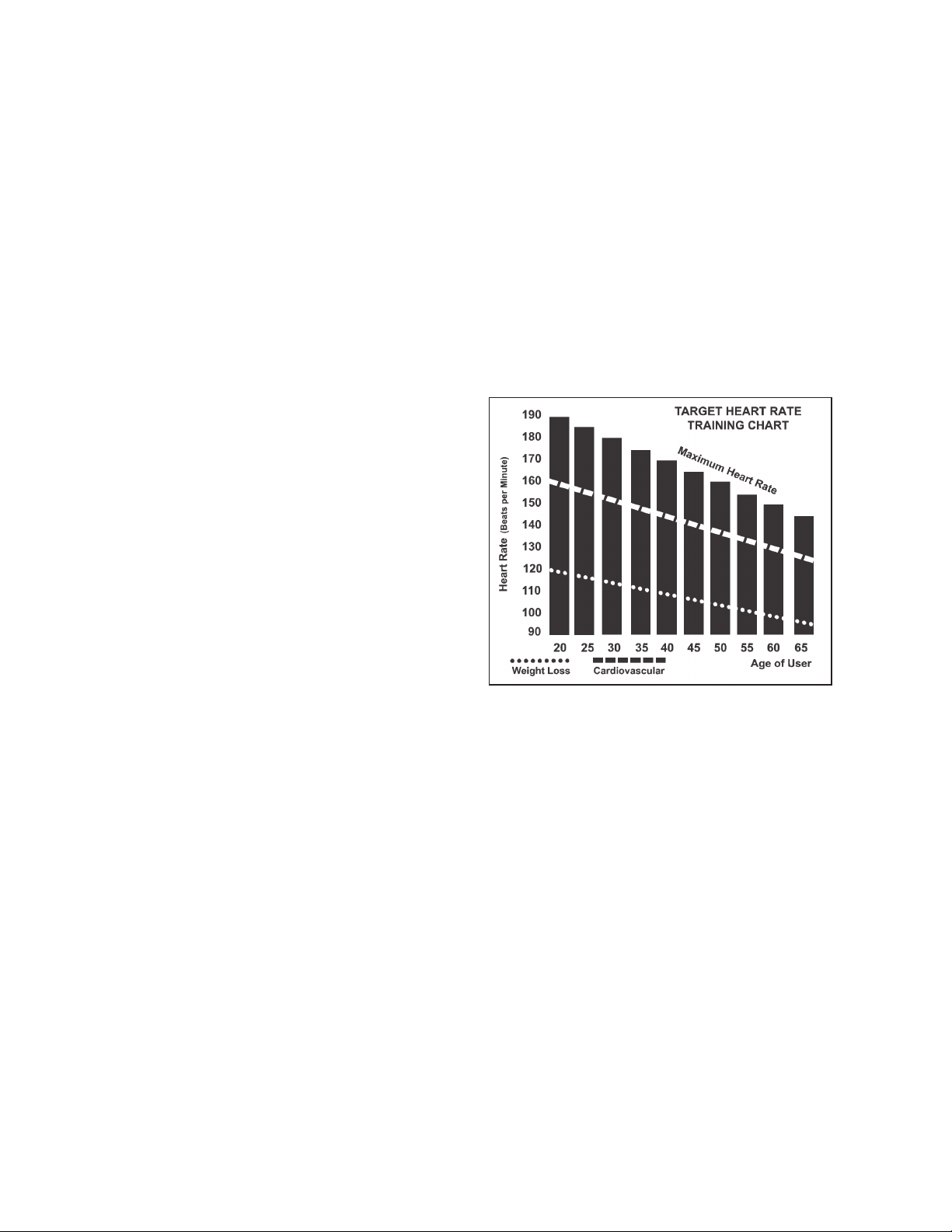
The two most popular reasons for, or goals, of exercise are cardiovascular tness (training for the
heart and lungs) and weight control. The black columns on the chart above represent the MHR for a
person whose age is listed at the bottom of each column. The training heart rate, for either cardiovascular
tness or weight loss, is represented by two different lines that cut diagonally through the chart. A deni-
tion of the lines’ goal is in the bottom left-hand corner of the chart. If your goal is cardiovascular tness or
if it is weight loss, it can be achieved by training at 80% or 60%, respectively, of your MHR on a schedule
approved by your physician. Consult your
physician before participating in any exercise program.
With all Spirit Fitness Heart Rate programs treadmills you may use the heart rate monitor feature without
using the Heart Rate program. This function can be used during manual mode or during any of the nine
different programs. The Heart Rate program automatically controls
resistance at the pedals.

18
Treadmill
CT800
Heart rate is important but listening to your body also has a lot of advantages. There are more
variables involved in how hard you should workout than just heart rate. Your stress level, physical
health, emotional health, temperature, humidity, the time of day, the last time you ate and what
you ate, all contribute to the intensity at which you should workout. If you listen to your body, it
will tell you all of these things.
The rate of perceived exertion (RPE), also know as the Borg scale, was developed by Swedish
physiologist G.A.V. Borg. This scale rates exercise intensity from 6 to 20 depending upon how you
feel or the perception of your effort.
The scale is as follows:
Rating Perception of Effort
6 Minimal
7 Very,very light
8 Very,very light +
9 Very light
10 Very light +
11 Fairly light
12 Comfortable
13 Somewhat hard
14 Somewhat hard +
15 Hard
16 Hard +
17 Very hard
18 Very hard +
19 Very,very hard
20 Maximal
You can get an approximate heart rate level for each rating by simply adding a zero to each rat-
ing. For example a rating of 12 will result in an approximate heart rate of 120 beats per minute.
Your RPE will vary depending up the factors discussed earlier. That is the major benet of this
type of training. If your body is strong and rested, you will feel strong and your pace will feel
easier. When your body is in this condition, you are able to train harder and the RPE will support
this. If you are feeling tired and sluggish, it is because your body needs a break. In this condition,
your pace will feel harder. Again, this will show up in your RPE and you will train at the proper
level for that day.
Rate of Perceived Exertion
19
Treadmill
CT800
Wearing The Chest Strap
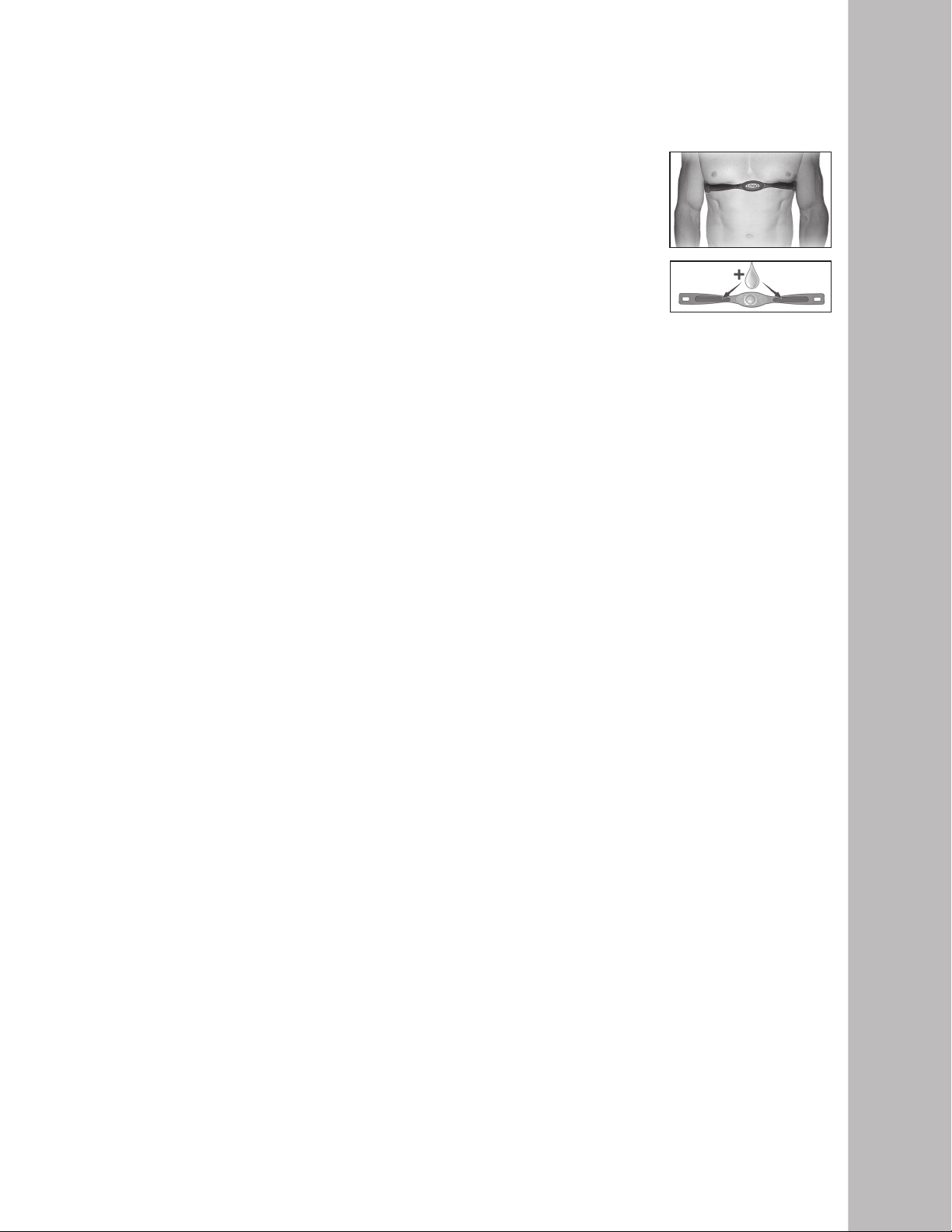
1. Attach the transmitter to the elastic strap using the locking parts.
2. Adjust the strap as tightly as possible as long as the strap is not too tight to re-
main comfortable.
3. Position the transmitter with the logo centered in the middle of your torso facing
away from your chest (some people must position the
transmitter slightly left of center). Attach the nal end of the elastic strap by
inserting the round end and, using the locking parts, secure the transmitter and
strap around your chest.
4. Position the transmitter directly below the pectoral muscles.
5. Sweat is the best conductor to measure very minute heart beat electrical signals.
However, plain water can also be used to pre-wet the electrodes (2 ribbed oval areas on the reverse side of
the belt and both sides of the transmitter). It’s also recommended that you wear the
transmitter strap a few minutes before your work out. Some users, because of body chemistry, have a more
difcult time in achieving a strong, steady signal at the beginning. After “warming up”, this problem lessens. As
noted, wearing clothing over the transmitter/strap doesn’t affect performance.
6. Your workout must be within range - distance between transmitter/receiver – to achieve a strong steady
signal. The length of range may vary somewhat but generally stay close enough to the
console to maintain good, strong, reliable readings. Wearing the transmitter directly on bare skin
assures you of proper operation. If you wish, you may wear the transmitter over a shirt. To do so, wet the
areas of the shirt that the electrodes will rest upon.
Note: The transmitter is automatically activated when it detects activity from the user’s heart. Additionally, it
automatically deactivates when it does not receive any activity. Although the transmitter is water resistant,
moisture can have the effect of creating false signals, so you should take precautions to completely dry the
transmitter after use to prolong battery life (estimated transmitter battery life is 2500 hours). The replacement
battery is Panasonic CR2032.
Caution! Do not use this treadmill for Heart Rate programs unless a steady, solid Actual Heart
Rate value is being displayed. High, wild, random numbers being displayed
indicate a problem.
Areas to look for interference which may cause erratic heart rate:
1. Microwave ovens, TV’s, small appliances, etc.
2. Fluorescent lights.
3. Some household security systems.
4. Perimeter fence for a pet.
5. Some people have problems with the transmitter picking up a signal from their skin. If you have problems try
wearing the transmitter upside down. Normally the transmitter will be oriented so the Spirit Fitness logo is
right side up.
6. The antenna that picks up your heart rate is very sensitive. If there is an outside noise source,
turning the whole machine 90 degrees may de-tune the interference.
7. Another Individual wearing a transmitter within 3’ of your machine’s console.
If you continue to experience problems contact your dealer.
Erratic Operation
Using A Heart Rate Transmitter

20
Treadmill
CT800
Heart Rate Control
Heart Rate Control Programming
How the Heart Rate Control Programs Work:
Heart Rate Control (HRC) uses your treadmill’s incline system to control your heart rate. In-
creases and decreases in elevation affect heart rate much more efciently than changes in speed
alone. The HRC program automatically changes elevation gradually to achieve the programmed
target heart rate.
Selecting a Heart Rate Control Program:
You have the option, during the setup mode, to choose either the Weight Control (HR-1)
program or the Cardiovascular (HR-2) program. The Weight Control program will attempt to
maintain your heart rate at 60% of your Maximum Heart Rate. The Cardiovascular program will
attempt to maintain your heart rate at 85% of your Maximum Heart Rate. Your Maximum Heart
Rate is based upon a formula that subtracts your age from a constant of 220. Your HR setting is
automatically calculated during the setup mode when you enter your age.
You must receive a strong / steady value in heart rate window or the program will not start.
1. Press HR1 or HR2 button.
2. The Pulse window will be blinking, showing the default HR for this program. You may
adjust it and press Enter if you want or just press enter to accept the default value.
3. The Calorie will now be blinking showing bodyweight. Adjust and press Enter or press
Enter to accept default.
4. The Pulse window will now be blinking showing age. Adjust and press Enter or press
Enter to accept default. Adjusting Age will change the Target HR value.
5. The Time window will now be blinking. Adjust the time and press enter.
6. Press Start to begin program.
7. During the program you may increase or decrease the target heart rate by pressing the
Incline Up/Down buttons.

21
Treadmill
CT800
Your treadmill uses a very high-efcient low-friction hard waxed deck. Performance is maximized
when the deck is kept as clean as possible. Use a soft, damp cloth, or paper towel, wipe the edge
of the belt and the area between the belt edge and the frame. Also reach as far as practical
directly under the belt edge. This should be done once a month to extend belt and deck life. A
mild soap and water solution along with a nylon scrub brush will clean the top of the textured
belt. Allow to dry before using.
The low maintenance (routine monthly cleaning), dual sided hard wax deck is designed to
withstand up to 20,000 miles on each side. If the original side of the deck shows signicant wear,
it needs to be ipped. Contact your service technician for assistance. Do not apply any
type of lubricant or wax to the surface.
General Maintenance
Belt/Deck
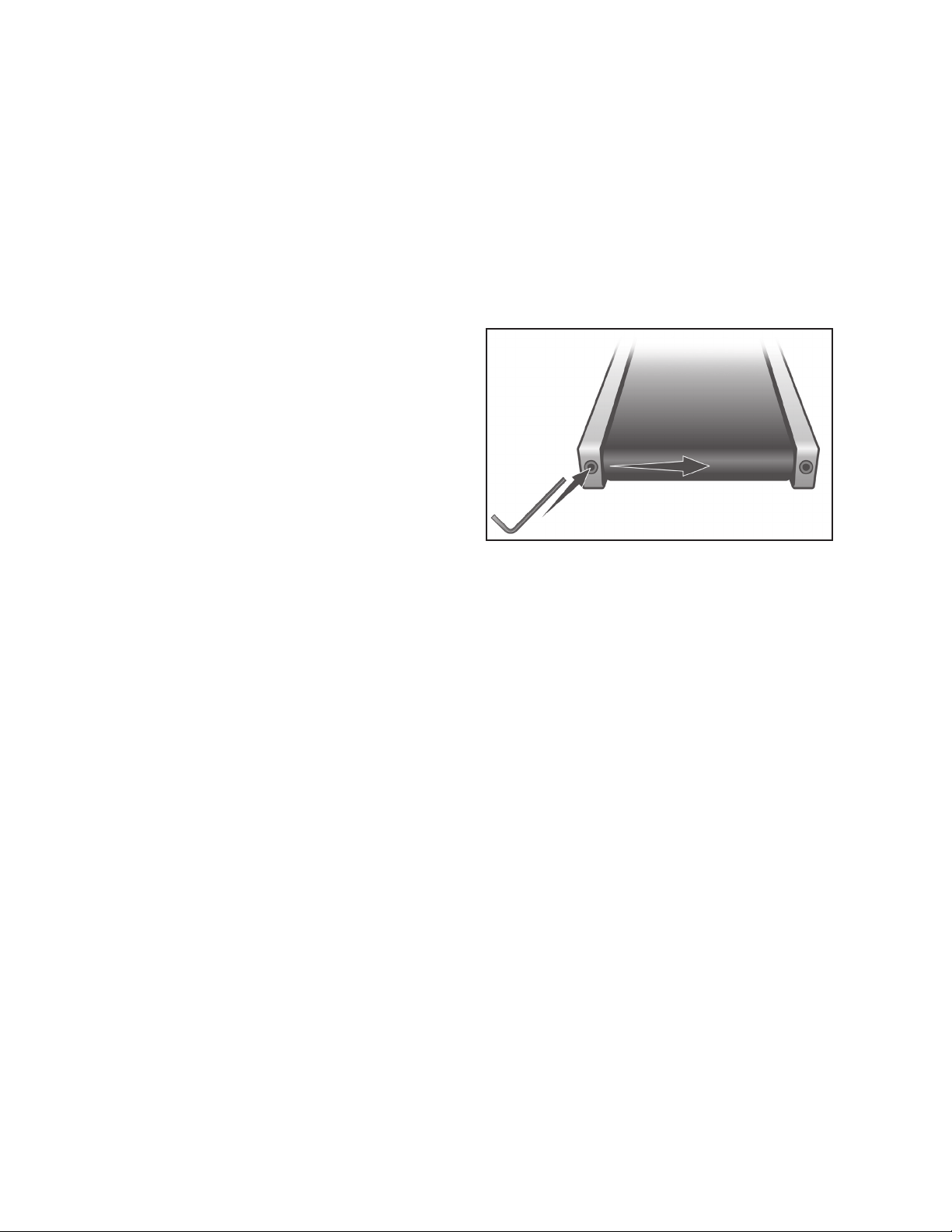
Tread-belt Tension Adjustment - Belt tension is not critical for most users. It is very important
though for joggers and runners in order to provide a smooth, steady running surface.
Adjustment must be made from the rear roller with the 8mm Allen wrench provided in the parts
package. The adjustment bolts are located at the end of the step rails as shown in the diagram
below.
Tighten the rear roller only enough to prevent slippage
at the front roller. Turn the tread-belt tension adjusting
bolts 1/4 turn each and inspect for proper tension by
walking on the belt and making sure it is not slipping or
hesitating with each step. When an adjustment is made
to the belt tension, you must be sure to turn the bolts
on both sides evenly or the belt could start tracking to
one side instead of running in the middle of the deck.
DO NOT OVERTIGHTEN – Over tightening will cause belt damage and premature bearing
failure. If you tighten the belt a lot and it still slips, the problem could actually be the drive belt -
located under the motor cover - that connects the motor to the front roller. If that belt is loose
it feels similar to the walking belt being loose. Tightening the motor belt should be done by a
trained service person.
Belt Adjustments
Task How To Daily Weekly Monthly
Semi-
Annually
Annually
Wipe Down Unit
Damp cloth w/
water
Clean Under Belt Towel or vacuum
Check Belt Tension/Tracking Feel/Visual
Clean Under Motor Cover Vacuum carefully
Check Hardware Wrench
Inspect for Deck Wear Visual
Inspect Drive Belt Visual
22
Treadmill
CT800
The treadmill is designed so that the tread-belt remains reasonably centered while in use. It is
normal for some belts to drift near one side while in use, depending on a user’s gait and if they
favor one leg. But if during use the belt continues to move toward one side, adjustments are
necessary.
SETTING TREAD-BELT TRACKING
An 8mm Allen wrench is provided for this adjustment. Make tracking adjustments on the left side
bolt. Set belt speed at 3 mph. Be aware that a small adjustment can make a dramatic difference
which may not be apparent right away. If the belt
is too close to the left side, then turn the bolt
only a 1/4 turn to the right (clockwise) and wait
a few minutes for the belt to adjust itself.
Continue to make 1/4 turns until the belt
stabilizes in the center of the running deck.
If the belt is too close to the right side, turn the
bolt counter-clockwise. The belt may require
periodic tracking adjustment depending on use
and walking/running characteristics. Some users may affect tracking differently. Expect to make
adjustments as required to center the tread-belt. Adjustments will become less of a maintenance
concern as the belt is used. Proper belt tracking is an owner responsibility common with all
treadmills.
ATTENTION
Damage to the running belt resulting from improper tracking / tension adjustments is not
covered under the Spirit Fitness warranty.
Treadbelt Tracking Adjustment
23
Treadmill
CT800
1. Tether cord not in position.
2. Circuit breaker on front grill tripped.
Push circuit breaker in until it locks.
3. Plug is disconnected. Make sure plug is rmly pushed
into 115 VAC wall outlet.
4. Breaker panel circuit breaker may be tripped.
5. Treadmill defect. Contact your Spirit Fitness dealer.
Display does not light
Problem Solution/Cause
Tread-belt does not stay centered
Treadmill belt hesitates when
walked/run on
The user may be walking while favoring or putting more
weight on either the left or right foot. If this
walking pattern is natural, track the belt slightly
off-center to the side opposite from the belt
movement. See General Maintenance section on
Tread-belt Tension. Adjust as necessary.
1. If the belt moves, but stops after a short time and
thedisplay shows “LS”, run calibration.
2. If you press start and the belt never moves, then the
display shows LS, contact service.
Motor is not responsive after press-
ing start
Treadmill will only achieve
approximately 7 mph but shows higher
speed on display
This indicates motor should be receiving power to oper-
ate. Low AC voltage to treadmill. Do not use an extension
cord. If an extension cord is required it should be as short
as possible and heavy duty 16 gauge minimum. Low
voltage. Contact an electrician or your Spirit Fitness dealer.
A minimum of 110 volt AC current is required.
High belt/deck friction. See General Maintenance
section on cleaning the deck. If cleaning doesn’t prevent
this from reoccurring, check to see if there is signicant
wear of the deck. If so, the deck may need to be ipped if
it is on its original side
Tread-belt stops quickly/suddenly when
tether cord is pulled
High belt/deck friction. See General Maintenance. If
cleaning doesn’t prevent this from reoccurring, check the
amp draw of the motor. If this is high and there are signs
of signicant wear of the deck, it may need to be ipped if
it is on its original side
Treadmill trips on board 15 amp circuit
Treadmill may not be grounded. Static electricity is
“crashing” the computer. Refer to Grounding
Instructions on page 3.
Computer shuts off when console is
touched (on a cold day) while
walking/running
Need to replace the breaker with a “High In-rush current”
type breaker (see page 3 for details)
Circuit breaker trips, but not the
treadmill circuit breaker
Service Checklist - Diagnosis Guide

24
Treadmill
CT800
The console has built in maintenance/diagnostic software. The software will allow you to change
the console settings from English to Metric and turn off the beeping of the speaker when a key
is pressed for example. To enter the Engineering Mode Menu press and hold down the Start,
Stop and Enter keys, then insert the safety key. Keep holding the keys down until the Message
Center displays Engineering Mode Menu. Press the Enter button to access the menu below:
a. Key Test (Will allow you to test all the keys to make sure they are functioning)
b. Security (Allows the keypad to be locked to prevent unauthorized use)
c. Functions (Press Enter to access settings and Up arrow to scroll)
i. Sleep Mode (Turn on to have the console power down automatically after 20 minutes of inactivity)
ii. Beep (Turns off the speaker so no beeping sound is heard)
iii. Grade Return - Returns the elevation to lowest setting when pause is pressedUnits (Sets the display to
readout in English or Metric display measurements)
iv. Units (Set to English or Metric display readings)
v. Maintenance (Resets the lube reset message and odometer)
vi. Pause Mode (Turn on allow 5 minutes of pause, turn off to have the console pause indenitely)
d. Display Test (Tests all the display functions)
Calibration Procedure
1. Remove the safety key
2. Press and hold down the Start and Fast + buttons and replace the safety key.
Continue to hold the Start and Fast key until the window displays “Factory settings”, then press the
Enter key.
3. You will now be able to set the display to show Metric or English settings (Miles vs.
Kilometers). To do this, press the up or down key to show which you want, then press Enter.
4. Make sure the wheel size diameter is 2.98 then press Enter
5. Adjust the minimum speed (if needed) to 0.5 and then press Enter
6. Adjust the maximum speed (if needed) to 12.0 and then press Enter
7. Adjust the maximum elevation (if needed) to 15 and then press Enter
8. Grade return – On (This allows the incline to return to zero when Stop is pressed. For sale in Europe,
EU standards require this to be off)
9. Press Start to begin calibration. The process is automatic; the speed will start up
without warning, so do not stand on the belt.
Adjusting The Speed Sensor
If the calibration does not pass you may need to check the speed sensor alignment.
1. Remove the motor cover hood by loosening the 8 screws that hold it
in place. Set it aside.
2. The speed sensor is located on the left side of the frame, right next to the
front roller pulley (the pulley will have a belt around it that also goes to the
motor). The speed sensor is a small rectangular shaped black box with a
wire connected to it.
3. You will see a magnet on the outside edge of the pulley; make sure the
speed sensor is aligned with the center of the magnet when it passes by.
There are two a screws that hold the sensor in place that need to be
loosened to adjust the sensor. Re-tighten the screws when nished.
Engineering Mode Menu

25
Treadmill
CT800
Treadmill Warranty - Effective March 1, 2012
Spirit Fitness warrants all its treadmill parts for a period of time listed below from the date of sale, as determined by sale receipt, or in the absence
of a sales receipt eighteen (18) months from the original factory shipping date. Spirit Fitness’ responsibilities include providing new or remanufac-
tured parts, at Spirit Fitness’ option, and technical support to our independent dealers and servicing organizations. In the absence of a dealer or
service organization, these warranties will be administered by Spirit Fitness directly to a consumer. The warranty period applies to the following
components:
NORMAL RESPONSIBILITIES OF THE CONSUMER
This warranty applies only to products in ordinary household or in commercial facilities (excluding health clubs, YMCAs, community recreation
centers). The consumer or commercial facility is responsible for the items listed below:
1. The warranty registration card must be completed and returned to the address listed on the card within 10 days of the original purchase to
validate the manufacturer’s limited warranty.
2. Proper use of the treadmill in accordance with the instructions provided in this manual
3. Proper installation in accordance with instructions provided with the treadmill and with all local electric codes.
4. Proper connection to a grounded power supply of sufcient voltage, replacement of blown fuses, repair of loose connections or defects in
house or facility wiring.
5. Expenses for making the treadmill accessible for servicing, including any item that was not part of the treadmill at the time it was shipped
from the factory.
6. Damages to the treadmill nish during shipping, installation or following installation.
7. Routine maintenance of this unit as specied in this manual.
EXCLUSIONS
This warranty does not cover the following:
1. CONSEQUENTIAL, COLLATERAL, OR INCIDENTAL DAMAGES SUCH AS PROPERTY DAMAGE AND INCIDENTAL EXPENSES
RESULTING FROM ANY BREACH OF THIS WRITTEN OR ANY IMPLIED WARRANTY.
Note: Some states do not allow the exclusion or limitation of incidental or consequential damages, so this limitation or exclusion may not
apply to you.
2. Service call reimbursement to the consumer. Service call reimbursement to the dealer that does not involve malfunction or defects in
workmanship or material, for units that are beyond the warranty period, for units that are beyond the service call reimbursement period, for
treadmill not requiring component replacement, or treadmill not in ordinary facility or household use.
3. Damages caused by services performed by persons other than authorized Spirit Fitness service companies; use of parts other than original
Spirit Fitness parts; or external causes such as corrosion, discoloration of paint or plastic, alterations, modications, abuse, misuse, accident,
improper maintenance, inadequate power supply, or acts of God.
4. Products with original serial numbers that have been removed or altered.
5. Products that have been: sold, transferred, bartered, or given to a third party.
6. Products that do not have a warranty registration card on le at Spirit Fitness. Spirit Fitness reserves the right to request proof of purchase if
no warranty record exists for the product.
7. THIS WARRANTY IS EXPRESSLY IN LIEU OF ALL OTHER WARRANTIES EXPRESSED OR IMPLIED, INCLUDING THE WARRANTIES
OF MERCHANTABILITY AND/OR FITNESS FOR A PARTICULAR PURPOSE.
8. Product used in a dues paying facility
9. Warranties outside of the United States may vary. Please contact your local dealer for details.
SERVICE
Keep your bill of sale. Twelve (12) months from the date on the bill of sale or eighteen (18) months from the date of factory shipping as deter-
mined by the serial number establishes the labor warranty period should service be required. If service is performed, it is in your best interest
to obtain and keep all receipts. This written warranty gives you specic legal rights. You may also have other rights that vary from state to state.
Service under this warranty must be obtained by following these steps, in order:
1. Contact your selling authorized Spirit Fitness dealer. OR
2. Contact your local authorized Spirit Fitness service organization.
3. If there is a question as to where to obtain service, contact our service department at (870) 935-1107.
4. Spirit Fitness’ obligation under this warranty is limited to repairing or replacing, at Spirit Fitness’ option, the product through one of our
authorized service centers. All repairs must be preauthorized by Spirit Fitness. If the product is shipped to a service center freight charges to
and from the service center will be the customer’s responsibility. For replacement parts shipped while the product is under warranty, the
customer will be responsible for shipping and handling charges. Forin-home service, the customer will be responsible for a trip charge. There
will be an additional trip charge if the customer is located over 100 miles from the nearest service center.
5. The owner is responsible for adequate packaging upon return to Spirit Fitness. Spirit Fitness is not responsible for damages in shipping. Make
all freight damage claims with the appropriate freight carrier. DO NOT SHIP ANY UNIT TO OUR FACTORY WITHOUT A RETURN
AUTHORIZATION NUMBER. All units arriving without a return authorization number will be refused.
6. For any further information, or to contact our service department by mail, send your correspondence to:
Product features or specications as described or illustrated are subject to change without notice. All warranties are made by Spirit Fitness.
This warranty applies only in the 50 states of the U.S.A.
Spirit Fitness
P.O. Box 2037
Jonesboro, AR 72402-2037
Manufacturer’s Limited Warranty
Warranty
Commercial
Residential
Frame
Lifetime
Lifetime
Motor/Deck
5 Years
Lifetime
Parts
5 Years
10 Years
Labor
2 Years
2 Years

www.spiritfitness.com
2601 Commerce Drive Jonesboro, AR 72401 - Phone: 800-258-4555 - Fax: 870-935-7611
© 2011 All Rights Reserved.
CT800
Owner’s Manual 1.1
Rev. 1