10.08.2019
Bedienungsanleitung
Instruction Manual
EINBAU-BACKOFEN
BUILT-IN OVEN
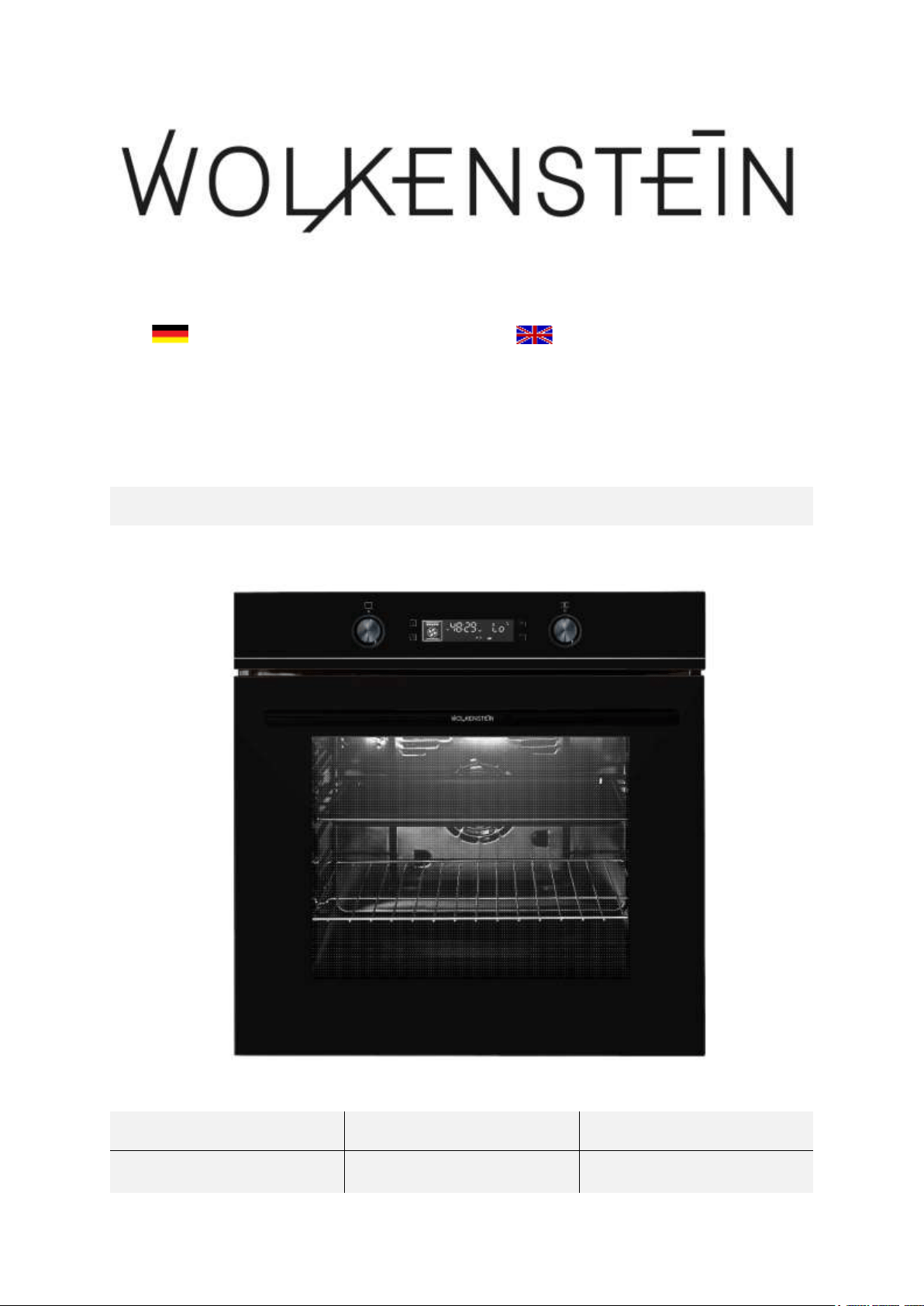
WMO 13
Deutsch
Seite
2
English
Page
56

2
Sehr geehrter Kunde! Sehr geehrte Kundin! Wir möchten Ihnen herzlich danken,
dass Sie sich zum Erwerb eines Produkts aus unserem reichhaltigen Angebot
entschieden haben. Lesen Sie die gesamte Bedienungsanleitung, bevor Sie das Gerät
zum ersten Mal benutzen. Verwahren Sie diese Bedienungsanleitung zur zukünftigen
Verwendung an einem sicheren Ort. Falls Sie das Gerät weitergeben, müssen Sie
diese Bedienungsanleitung ebenfalls mit übergeben.
Inhalt
1. Sicherheitshinweise ........................................................................................................ 4
1.1 Signalwörter .............................................................................................................. 5
1.2 Sicherheitsanweisungen ........................................................................................... 5
2. Installation .................................................................................................................... 11
2.1 Entpacken und Wahl des Standorts ..................................................................... 12
2.2 Einbau des Backofens ........................................................................................... 13
2.3 Elektrischer Anschluss .......................................................................................... 16
3. Gerätebeschreibung ..................................................................................................... 18
3.1 Backofen ................................................................................................................. 18
3.1.1 Zubehör ........................................................................................................... 19
3.2 Bedienfeld ............................................................................................................... 21
3.3 Display ..................................................................................................................... 23
4. Bedienung ..................................................................................................................... 25
4.1 Vor der ersten Benutzung ..................................................................................... 25
4.1.1 Reinigung des Zubehörs ................................................................................ 26
4.2 Benutzung des Backofens ..................................................................................... 26
4.2.1 Allgemeine Bedienung des Backofens .......................................................... 27
4.2.2 Standby - Modus ............................................................................................. 28
4.2.3 Einstellung der Uhrzeit / Systemzeit ........................................................... 28
4.3 Programmierung des Backofens .......................................................................... 29
4.3.1 Timer ................................................................................................................ 29
4.3.2 Dauer der Koch-, Backzeit einstellen ........................................................... 31
4.3.3 Automatische Koch- / Backfunktion ........................................................... 33
4.3.4 Löschen der Programmierungen .................................................................. 37

3
4.4 Reinigungsprogramm: « Hydro Clean » .............................................................. 38
4.5 Kindersicherung ..................................................................................................... 40
4.6 Zeitabfragefunktion ............................................................................................... 41
4.7 Backofenfunktionen und automatische Programme (P) .................................. 42
5. Umweltschutz ............................................................................................................... 47
6. Hinweise für das Backen, Braten und Grillen im Backofen ................................... 47
6.1 Hinweise für das Backen und Braten .................................................................. 48
6.2 Hinweise für das Grillen ....................................................................................... 48
7. Reinigung und Pflege .................................................................................................. 49
7.1 Reinigung des Backofens ...................................................................................... 50
7.2 Reinigung der Backofentür ................................................................................... 50
7.3 Austausch des Leuchtmittels ................................................................................ 50
7.4 Entnahme der Backofentür .................................................................................. 51
7.5 Entnahme der Glasscheibe der Backofentür ...................................................... 52
7.6 Entnahme des Seitenracks .................................................................................... 53
7.7 Problembehandlung .............................................................................................. 53
7.7.1 Fehlercodes ...................................................................................................... 55
8. Technische Daten ........................................................................................................ 55
9. Entsorgung ................................................................................................................... 57
10. Garantiebedingungen ................................................................................................ 58
Entsorgen Sie dieses Gerät nicht zusammen mit ihrem Hausmüll. Das
Gerät darf nur über eine Sammelstelle für wiederverwendbare
elektrische und elektronische Geräte entsorgt werden. Entfernen Sie
nicht die Symbole / Aufkleber am Gerät.
Die in dieser Bedienungsanleitung enthaltenen Abbildungen können in einigen
Details von dem tatsächlichen Design Ihres Gerätes abweichen. Folgen Sie in
einem solchen Fall dennoch den beschriebenen Sachverhalten. Lieferung ohne
Inhalt.
Der Hersteller behält sich das Recht vor, solche Änderungen vorzunehmen, die
keinen Einfluss auf die Funktionsweise des Gerätes haben.
Entsorgen Sie das Verpackungsmaterial entsprechend den örtlichen Vorschriften
Ihres Wohnorts.
Das von Ihnen gekaufte Gerät wurde möglicherweise inzwischen verbessert und
weist somit vielleicht Unterschiede zur Bedienungsanleitung auf. Dennoch sind

4
die Funktionen und Betriebsbedingungen identisch, sodass Sie die
Bedienungsanleitung im vollen Umfang nutzen können.
Technische Änderungen bzw. Druckfehler bleiben vorbehalten.
EG - KONFORMITÄTSERKLÄRUNG
Die in dieser Bedienungsanleitung beschriebenen Produkte entsprechen
sämtlichen harmonisierten Anforderungen.
Die relevanten Unterlagen können durch die zuständigen Behörden über den
Produktverkäufer angefordert werden.
DIESE BEDIENUNGSANLEITUNG MUSS FÜR JEDE PERSON, WELCHE
DAS GERÄT BETREIBT, STETS ZUGÄNGLICH SEIN; VERGEWISSERN
SIE SICH, DASS DIE BEDIENUNGSANLEITUNG VOR DEM BETRIEB
DES GERÄTES GELESEN UND VERSTANDEN WURDE.
1. Sicherheitshinweise
LESEN SIE VOR DER ERSTEN BENUTZUNG DES GERÄTES DIE
GESAMTEN SICHERHEITSHINWEISE UND
SICHERHEITSANWEISUNGEN GRÜNDLICH DURCH.
Die darin enthaltenen Informationen dienen dem Schutz Ihrer Gesundheit.
Die Nichtbeachtung der Sicherheitshinweise und Sicherheitsanweisungen
kann zu schweren Beeinträchtigungen Ihrer Gesundheit und im schlimmsten
Fall zum Tod führen.
Bewahren Sie diese Bedienungsanleitung so auf, dass sie bei Bedarf jederzeit
griffbereit ist. Befolgen Sie sorgfältig alle Hinweise, um Unfälle oder eine
Beschädigung des Gerätes zu vermeiden.
Prüfen Sie auf jeden Fall auch das technische Umfeld des Gerätes! Sind alle
Kabel oder Leitungen, die zu ihrem Gerät führen, in Ordnung? Oder sind sie
veraltet und halten der Geräteleistung nicht mehr Stand? Daher muss durch
eine qualifizierte Fachkraft (Elektrotechniker/-in) eine Überprüfung
bereits vorhandener wie auch neuer Anschlüsse erfolgen. Sämtliche Arbeiten,
die zum Anschluss des Gerätes an die Stromversorgung notwendig sind, dürfen
nur von einer qualifizierten Fachkraft (Elektrotechniker/-in)
durchgeführt werden.
Das Gerät ist ausschließlich zur privaten Nutzung bestimmt.
Das Gerät ist ausschließlich zum Kochen in einem Privathaushalt bestimmt.
Das Gerät ist ausschließlich zum Betrieb innerhalb geschlossener Räume
bestimmt.
5
Dieses Gerät darf nicht für gewerbliche Zwecke, beim Camping und in
öffentlichen Verkehrsmitteln betrieben werden.
Betreiben Sie das Gerät ausschließlich im Sinne seiner bestimmungsgemäßen
Verwendung.
Erlauben Sie niemandem, der mit der Bedienungsanleitung nicht vertraut ist,
das Gerät zu benutzen.
Dieses Gerät kann von Kindern ab 8 Jahren und darüber sowie von Personen
mit verringerten physischen, sensorischen oder mentalen Fähigkeiten oder
Mangel an Erfahrung und Wissen benutzt werden, wenn sie beaufsichtigt oder
bezüglich des sicheren Gebrauchs des Gerätes unterwiesen wurden und die
daraus resultierenden Gefahren verstehen. Kinder dürfen nicht mit dem Gerät
spielen. Reinigung und Benutzer-Wartung dürfen nicht von Kindern ohne
Beaufsichtigung durchgeführt werden.
DIESE BEDIENUNGSANLEITUNG MUSS FÜR JEDE PERSON, WELCHE
DAS GERÄT BETREIBT, STETS ZUGÄNGLICH SEIN; VERGEWISSERN
SIE SICH, DASS DIE BEDIENUNGSANLEITUNG VOR DEM BETRIEB
DES GERÄTES GELESEN UND VERSTANDEN WURDE.
1.1 Signalwörter
GEFAHR! verweist auf eine
Gefahrensituation, die, wenn sie nicht
abgewendet wird, eine unmittelbare
Gefährdung für Leben und Gesundheit
zur Folge hat.
WARNUNG! verweist auf eine
Gefahrensituation, die, wenn sie nicht
abgewendet wird, eine mögliche
bevorstehende Gefährdung für Leben
und Gesundheit zur Folge hat.
VORSICHT! verweist auf eine
Gefahrensituation, die, wenn sie nicht
abgewendet wird, zu mittelschweren
oder kleineren Verletzungen führen
kann.
HINWEIS! verweist auf eine
Gefahrensituation, die, wenn sie nicht
abgewendet wird, eine mögliche
Beschädigung des Gerätes zur Folge hat.
1.2 Sicherheitsanweisungen
GEFAHR!
Zur Verringerung der Stromschlaggefahr:
1. Eine Nichtbeachtung der Anweisungen in dieser
Bedienungsanleitung gefährdet das Leben und die Gesundheit des
Gerätebetreibers und / oder kann das Gerät beschädigen.

6
2. Alle eventuell notwendigen elektrischen Arbeiten müssen von einer
qualifizierten Fachkraft (Elektrotechniker/-in) durchgeführt werden.
Es dürfen keine Änderungen oder willkürlichen Veränderungen an
der Stromversorgung durchgeführt werden. Der Anschluss muss in
Übereinstimmung mit den örtlich geltenden gesetzlichen
Bestimmungen erfolgen.
3. Schalten Sie vor dem Aufbau/Einbau und Anschluss des Gerätes
unbedingt die Stromversorgung ab (entsprechende Haussicherung
abschalten). STROMSCHLAGGEFAHR!
4. Schließen Sie das Gerät keinesfalls an die Stromversorgung an,
wenn das Gerät, das Netzkabel oder der Netzstecker sichtbare
Beschädigungen aufweisen.
5. Die Stromspannung und die Leistungsfrequenz der
Stromversorgung muss den auf dem Typenschild angegebenen
Werten entsprechen.
6. Achten Sie darauf, dass sich das Netzanschlusskabel nicht unter
dem Gerät befindet oder durch das Bewegen des Gerätes
beschädigt wird.
7. Versuchen Sie niemals selbst, das Gerät zu reparieren. Reparaturen,
die von dazu nicht qualifizierten Personen durchgeführt werden,
können zu ernsthaften Verletzungen und Schäden führen. Falls Ihr
Gerät nicht ordnungsgemäß funktioniert, kontaktieren Sie den
Kundendienst. Lassen Sie nur Original-Ersatzteile einbauen.
8. Sollte es zu irgendeiner Fehlfunktion aufgrund eines technischen
Defekts kommen, trennen Sie das Gerät umgehend von der
Stromversorgung (entsprechende Haussicherung abschalten).
Melden Sie die Fehlfunktion ihrem Kundendienst, damit diese
umgehend behoben werden kann. STROMSCHLAGGEFAHR!
9. Verändern Sie niemals den mit dem Gerät mitgelieferten
Netzstecker. Falls dieser nicht für Ihre Netzsteckdose geeignet sein
sollte, lassen Sie die Netzsteckdose immer von einer qualifizierten
Fachkraft (Elektrotechniker/-in) ersetzen (Keine Garantieleistung).
10. Wenn das Netzanschlusskabel beschädigt ist, darf es ausschließlich
vom Hersteller oder einem vom Hersteller autorisierten
Kundendienst oder einer qualifizierten Fachkraft (Elektrotechniker/-
in) ausgetauscht werden.
11. Benutzen Sie zum Ziehen des Netzsteckers niemals das
Netzanschlusskabel. Ziehen Sie immer am Netzstecker selbst, um
das Gerät von der Stromversorgung zu trennen.
STROMSCHLAGGEFAHR!
12. Berühren Sie Netzanschlussstecker, Netzschalter oder andere
elektrische Komponenten niemals mit nassen oder feuchten
Händen. STROMSCHLAGGEFAHR!

7
WARNUNG!
Zur Verringerung der Verbrennungsgefahr, Stromschlaggefahr,
Feuergefahr oder von Personenschäden:
1. Betreiben Sie das Gerät nur mit 220 - 240 V AC / 50 Hz.
2. Trennen Sie das Gerät von der Stromversorgung, bevor Sie
irgendwelche Reinigungs- oder Wartungsarbeiten an dem Gerät
vornehmen.
3. Das Gerät darf ausschließlich an einer ordnungsgemäß geerdeten
Steckdose angeschlossen werden. Verwenden Sie nur eine
entsprechende Sicherheitssteckdose, um die Gefahr eines
Stromschlags zu minimieren.
4. Die technischen Daten Ihrer elektrischen Versorgung müssen den
auf dem Typenschild angegebenen Werten entsprechen. Ihr
Hausstrom muss mit einem Sicherungsautomaten zur
Notabschaltung des Gerätes ausgestattet sein.
5. Falls Sie sich nicht sicher sind, ob das Gerät ordnungsgemäß an die
Stromversorgung angeschlossen ist, lassen Sie den elektrischen
Anschluss von einer qualifizierten Fachkraft (Elektrotechniker / -in)
überprüfen (keine Garantieleistung).
6. Sämtliche Arbeiten, die zum Anschluss des Gerätes an die
Stromversorgung notwendig sind, dürfen nur von einer qualifizierten
Fachkraft (Elektrotechniker/-in) durchgeführt werden.
7. Halten Sie das Netzanschlusskabel von erwärmten Flächen fern.
8. Nehmen Sie keine Veränderungen an dem Gerät vor.
9. Verwenden Sie zum Anschluss des Gerätes keine Adapter,
Steckdosenleisten oder Verlängerungskabel. BRANDGEFAHR!
10. Benutzen Sie das Gerät nicht zum Frittieren. Das heiße Öl kann
Teile des Gerätes beschädigen und durch Verbrennungen
Personenschäden verursachen.
11. So reduzieren Sie mögliche Brandrisiken im Inneren des Gerätes:
a. Überprüfen Sie laufend das Gerät.
b. Schalten Sie das Gerät ab und trennen Sie es von der
Stromzufuhr, falls Sie das Entstehen von Rauch bemerken.
Halten Sie das Gerät verschlossen, um die Flammen zu
ersticken.
c. Benutzen Sie das Gerät nicht zu Lagerungszwecken.

8
d. Lassen Sie keine Gegenstände aus Papier, Kochutensilien
oder Lebensmittel im Gerät, wenn Sie das Gerät nicht
benutzen.
12. Lassen Sie das Gerät während des Kochens niemals
unbeaufsichtigt.
13. Erhitzen Sie niemals Lebensmittel und Flüssigkeiten in
geschlossenen Behältern, da diese Explosionen verursachen
können.
14. Der Küchenraum muss trocken und gut zu belüften sein. Wenn das
Gerät aufgebaut wird, müssen alle Kontroll- und Bedienelemente gut
zugänglich sein.
15. Die Furnierungen von Schränken müssen mit einem hitzeresistenten
Leim befestigt sein, der Temperaturen von mindestens 100
0
C
widersteht.
16. Angrenzende Möbelstücke und alle zur Installation verwendeten
Materialien müssen mindestens einer Temperatur von 85
0
C über der
Raumtemperatur des Raums, in dem das Gerät installiert ist,
während des Betriebs des Gerätes widerstehen können.
17. Falls der Backofen über einer Schublade des Einbaumöbels
installiert wird, muss zwischen der Schublade und dem Backofen ein
fester Zwischenboden montiert werden.
18. Schließen Sie das Gerät nicht in Räumen oder an Orten an, in denen
oder in deren Umgebung sich brennbare Materialien wie Benzin, Gas
oder Farben befinden. Dieser Warnhinweis bezieht sich auch auf die
Dämpfe, die durch diese Materialien freigesetzt werden.
19. Dunstabzugshauben müssen entsprechend den Anweisungen ihrer
Hersteller angebracht werden.
20. Benutzen Sie das Gerät nicht zum Heizen oder zum Trocknen von
Wäsche.
21. Schließen Sie das Gerät nicht in der Nähe von Vorhängen oder
Polstermöbeln an. BRANDGEFAHR!
22. Lagern Sie keine Gegenstände im Backofen. BRANDGEFAHR!
23. Haushaltsausstattungen sowie elektrische Leitungen aller Art dürfen
niemals das Gerät berühren, da deren Isolierungsmaterial durch
hohe Temperaturen beschädigt oder zerstört wird.
24. Benutzen Sie niemals einen Dampfreiniger zum Reinigen des
Gerätes. Der Dampf kann die Elektrik des Gerätes nachhaltig
beschädigen. STROMSCHLAGGEFAHR!
25. Die zugänglichen Bereiche und Teile des Backofens werden bei der
Benutzung sehr heiß. Kinder müssen deshalb während der
Benutzung des Gerätes von diesem ferngehalten werden. Das Gerät
während seines Betriebs zu berühren, kann zu schweren
Verbrennungen führen.

9
26. Kinder dürfen nicht mit dem Gerät spielen.
27. Beaufsichtigen Sie Kinder stets, wenn diese sich in der Nähe des
Gerätes aufhalten.
28. Erlauben Sie Kindern nur dann, das Gerät unbeaufsichtigt zu
benutzen, wenn sie vorher in einer solchen Art und Weise im
Gebrauch des Gerätes unterwiesen wurden, dass sie das Gerät
sicher bedienen können und sich der Gefahren, die durch eine
unsachgemäße Bedienung entstehen, unbedingt bewusst sind.
29. Achten Sie beim Auspacken unbedingt darauf, dass die Bestandteile
der Verpackung nicht in die Reichweite von Kindern und Tieren
gelangen. VERLETZUNGSGEFAHR! ERSTICKUNGSGEFAHR!
30. Verwenden Sie nur Zeitwächter, die vom Hersteller des Gerätes
entwickelt wurden oder in der Bedienungsanweisung als geeignet
angegeben sind oder im Gerät integriert sind. Die Verwendung
ungeeigneter Zeitwächter kann zu Unfällen führen!
VORSICHT!
1. Das Gerät wird während des Betriebs heiß. Berühren Sie nicht die
heißen Teile innerhalb des Backofens.
2. Benutzen Sie keine aggressiven oder ätzenden Reinigungsmittel und
keine scharfkantigen Gegenstände zum Reinigen der Tür, da diese
die Oberfläche verkratzen und somit Risse im Glas verursachen.
3. Stellen oder legen Sie kein Kochgeschirr und keine Backbleche
direkt auf den Boden des Backofeninnenraums. Decken Sie den
Boden des Backofeninnenraums nicht mit Aluminiumfolie ab.
4. Halten Sie die Backofentür beim Betrieb des Backofens immer
geschlossen.
5. Stellen Sie kein Kochgeschirr direkt auf den Boden des Backofens.
Nutzen Sie stattdessen das Backblech oder den Rost.
6. Die inneren Bestandteile des Backofens werden sehr heiß. Berühren
Sie keine dieser Bereiche, während Sie mit Ihrem Kochgeschirr
umgehen. VERBRENNUNGSGEFAHR!
7. Seien Sie vorsichtig, wenn Sie die Backofentür öffnen. Kommen Sie
nicht in Kontakt mit den heißen Bereichen oder mit dem Dampf, der
aus dem geöffneten Backofen entweicht.
VERBRENNUNGSGEFAHR! VERBRÜHUNGSGEFAHR!
8. Benutzen Sie stets Backofenhandschuhe.
9. Kochutensilien können aufgrund der durch die Lebensmittel
weitergeleitete Hitze heiß werden. Verwenden Sie immer Topflappen
oder Backofenhandschuhe zum Umgang mit Ihrem Essgeschirr /
Kochgeschirr.
10. Das Gerät entspricht der gegenwärtigen europäischen

10
Sicherheitsgesetzgebung. Wir möchten hierbei aber ausdrücklich
betonen, dass diese Entsprechung nichts an der Tatsache ändert,
dass die Oberflächen des Gerätes während der Benutzung heiß
werden und nach dem Ende der Benutzung noch Restwärme
ausstrahlen.
HINWEIS!
1. Wenn Sie das Gerät bewegen, halten Sie es immer am unteren Ende
fest und heben Sie es vorsichtig an. Halten Sie das Gerät dabei
aufrecht.
2. Benutzen Sie niemals die Tür selbst zum Transport des Gerätes, da
Sie dadurch die Scharniere beschädigen.
3. Das Gerät muss von mindestens zwei Personen transportiert und
angeschlossen werden.
4. Merken Sie sich die Positionen aller Teile des Gerätes, wenn Sie es
auspacken, für den Fall, es noch einmal einpacken und
transportieren zu müssen.
5. Benutzen Sie das Gerät nicht, bevor alle dazugehörigen Teile sich
ordnungsgemäß an ihren dafür vorgesehenen Stellen befinden.
6. Benutzen Sie den Boden, die Schubladen, die Türen etc. des
Gerätes niemals als Standfläche oder Stütze.
7. Stellen oder legen Sie keine schweren Gegenstände auf die
geöffnete Backofentür und lehnen Sie sich nicht an die geöffnete
Backofentür. Dadurch beschädigen Sie die Türscharniere.
8. Entfernen Sie sämtliches Verpackungsmaterial, bevor Sie das Gerät
an die Stromversorgung anschließen. Benutzen Sie keine
aggressiven Reinigungsmittel, um Reste von Transportsicherungen
zu entfernen.
9. Konstante Pflege und Wartung gewährleisten einen einwandfreien
Betrieb und die optimale Leistung Ihres Gerätes.
10. Überprüfen Sie Ihr Essgeschirr / Kochgeschirr, ob es zur
Verwendung in einem Backofen geeignet ist.
11. Verwenden Sie ausschließlich geeignetes und feuerfestes
Essgeschirr / Kochgeschirr.
12. Die Belüftungsöffnungen des Gerätes oder dessen
Einbauvorrichtung (falls Ihr Gerät für einen Einbau geeignet ist)
müssen immer frei und unbedeckt sein.
13. Das Typenschild darf niemals unleserlich gemacht oder gar entfernt
werden! Zuwiderhandlungen führen zum Garantieausschluss!
11
LESEN SIE DIESE ANLEITUNG GRÜNDLICH DURCH UND
BEWAHREN SIE DIESE SICHER AUF.
Bei Nichtbeachtung dieser Anweisungen wird keinerlei Haftung für
Personen- oder Materialschäden übernommen.
2. Installation
GEFAHR! Alle eventuell notwendigen elektrischen Arbeiten
müssen von einer qualifizierten Fachkraft (Elektrotechniker/-in)
durchgeführt werden. Es dürfen keine Änderungen oder willkürlichen
Veränderungen an der Stromversorgung durchgeführt werden. Der
Anschluss muss in Übereinstimmung mit den örtlich geltenden
gesetzlichen Bestimmungen erfolgen. STROMSCHLAGGEFAHR!
WARNUNG! Die Furnierungen von Schränken müssen mit einem
hitzeresistenten Leim befestigt sein, der Temperaturen von mindestens
100
0
C widersteht.
WARNUNG! Angrenzende Möbelstücke und alle zur Installation
verwendeten Materialien müssen mindestens einer Temperatur von 85
0
C
über der Raumtemperatur des Raums, in dem das Gerät installiert ist,
während des Betriebs des Gerätes widerstehen können.
WARNUNG! Achten Sie beim Entpacken unbedingt darauf, dass die
Bestandteile der Verpackung (Polyethylentüten, Polystyrenstücke) nicht in
die Reichweite von Kindern und Tieren gelangen.
ERSTICKUNGSGEFAHR! VERLETZUNGSGEFAHR!
VORSICHT! Lassen Sie das Gerät so installieren, dass eine optimale
Wärmeabstrahlung zur Aufrechterhaltung der Betriebssicherheit
ermöglicht wird.
VORSICHT! Zur Vermeidung von Schäden müssen die
Verbundschichten und Kleber hitzeresistent sein.

12
Die Installation liegt in der Verantwortung des Kunden. Falls die Hilfe des
Herstellers zur Korrektur von Fehlern, die auf Grund einer unsachgemäßen
Installation entstanden sind, benötigt wird, ist eine solche Hilfeleistung nicht
durch die Garantie abgedeckt. Eine unsachgemäße Installation kann zu
erheblichen Verletzungen von Personen oder Tieren bzw. zu einer Beschädigung
Ihres Eigentums führen. Der Hersteller kann für solche Verletzungen bzw.
Schäden nicht verantwortlich gemacht werden.
2.1 Entpacken und Wahl des Standorts
1. Packen Sie das Gerät vorsichtig aus. Beachten Sie unbedingt die Hinweise zur
Entsorgung des Gerätes in dieser Bedienungsanleitung.
2. Das Gerät ist möglicherweise für den Transport mit Transportsicherungen
geschützt. Entfernen Sie diese komplett. Benutzen Sie keine aggressiven
Reinigungsmittel, um Reste der Transportsicherungen zu entfernen.
3. Überprüfen Sie vor dem Anschluss des Gerätes, ob das Netzanschlusskabel oder
das Gerät selbst keine Beschädigungen aufweisen.
4. Wählen Sie für den Aufbau einen trockenen und gut belüfteten Raum.
5. Stellen Sie das Gerät nicht an einem Ort auf, an dem es mit Wasser oder Regen
in Kontakt kommen kann, damit die Isolierungen der Elektrik keinen Schaden
nehmen.
6. Stellen Sie das Gerät auf einem geraden, trockenen und festen Untergrund
auf. Kontrollieren Sie mit einer Wasserwaage den ordnungsgemäßen Aufbau
Ihres Gerätes.
7. Entfernen Sie vor Inbetriebnahme sämtliches Verpackungsmaterial innerhalb und
außerhalb des Backofens.
8. Das Gerät muss ordnungsgemäß mit der Stromversorgung verbunden sein.
Schließen Sie das Gerät ausschließlich an einer ordnungsgemäß geerdeten
Sicherheitssteckdose an. (s. Kapitel 2.3 ELEKTRISCHER ANSCHLUSS).
9. Fabrikationsrückstände oder Ölrückstände, die in dem Gerät oder am
Heizelement verblieben sind, können Gerüche und eine leichte
Rauchentwicklung bewirken. Dies sind normale Betriebsparameter, die nach
einigen Benutzungen nicht weiter auftreten. Lassen Sie die Zimmertür oder ein
Fenster offen, um eine gute Belüftung zu gewährleisten.
10. Das Typenschild befindet sich im Inneren des Gerätes oder außen an der
Rückwand.

13
2.2 Einbau des Backofens
GEFAHR! Schalten Sie vor dem Aufbau/Einbau und Anschluss
des Gerätes unbedingt die Stromversorgung ab (entsprechende
Haussicherung abschalten). STROMSCHLAGGEFAHR!
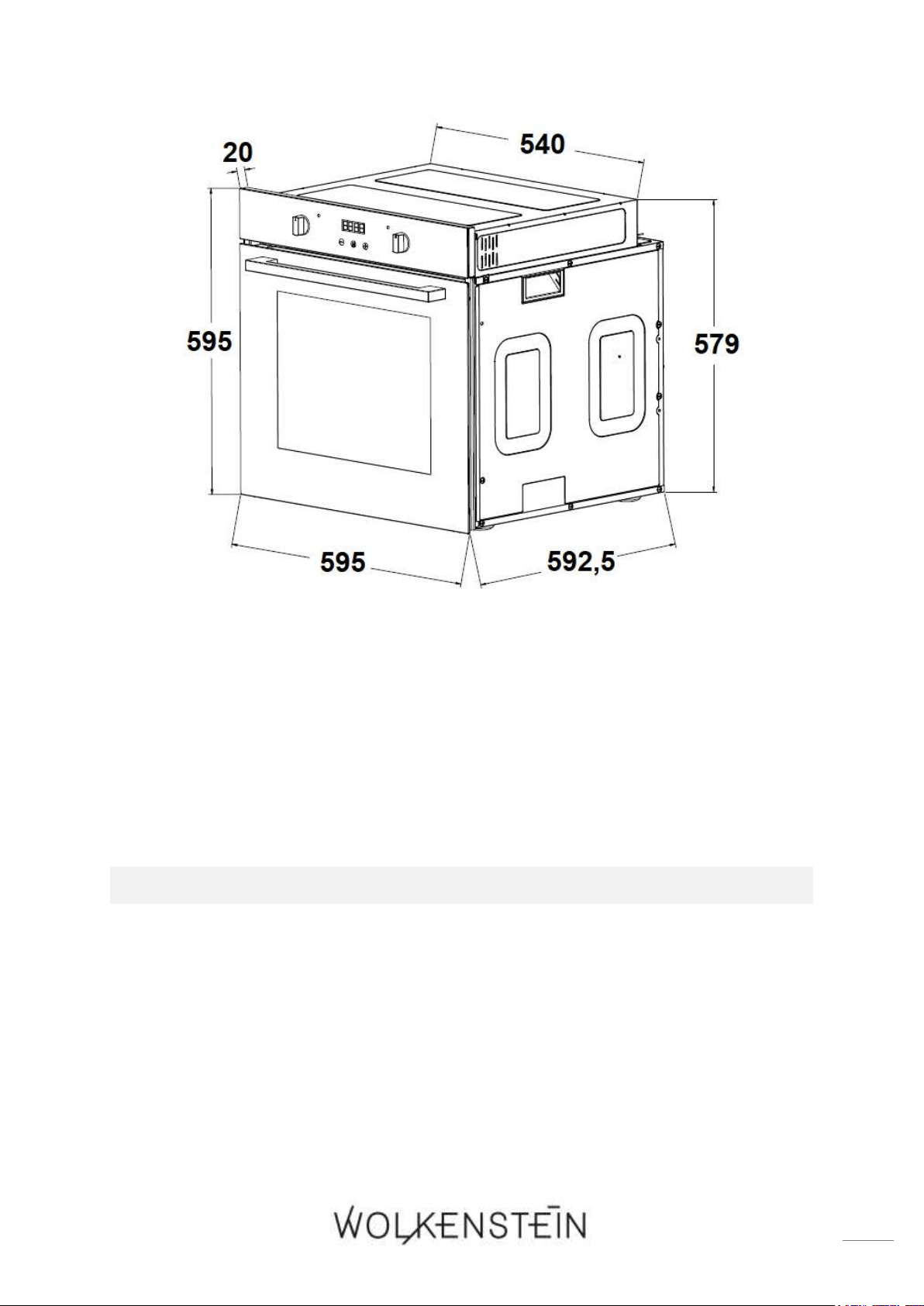
1. Alle Abmessungen in den folgenden Abbildungen sind in Millimetern
angegeben.
Benutzen Sie die eingelassenen Griffe bzw. Drahtgriffe
1
an beiden Seiten des
Backofens, um das Gerät zu bewegen (s. Abb. in Kapitel 3.1 BACKOFEN).
Das Einbaumöbel muss einen stabilen Stand aufweisen und sicher befestigt sein.
Zwischen dem Gerät und den umliegenden Seiten des Einbaumöbels muss ein
Spalt von 5 mm verbleiben.
Das Netzanschlusskabel darf nicht eingeklemmt oder geknickt werden.
Falls der Backofen über einer Schublade des Einbaumöbels installiert wird,
muss zwischen der Schublade und dem Backofen ein fester Zwischenboden
montiert werden.
EINBAU
1. Schalten Sie den Strom mittels der entsprechenden Sicherungen in Ihrem
Haussicherungskasten ab.
ABB. 1: MAßE / BACKOFEN
1
Ausstattung abhängig vom Modell
14
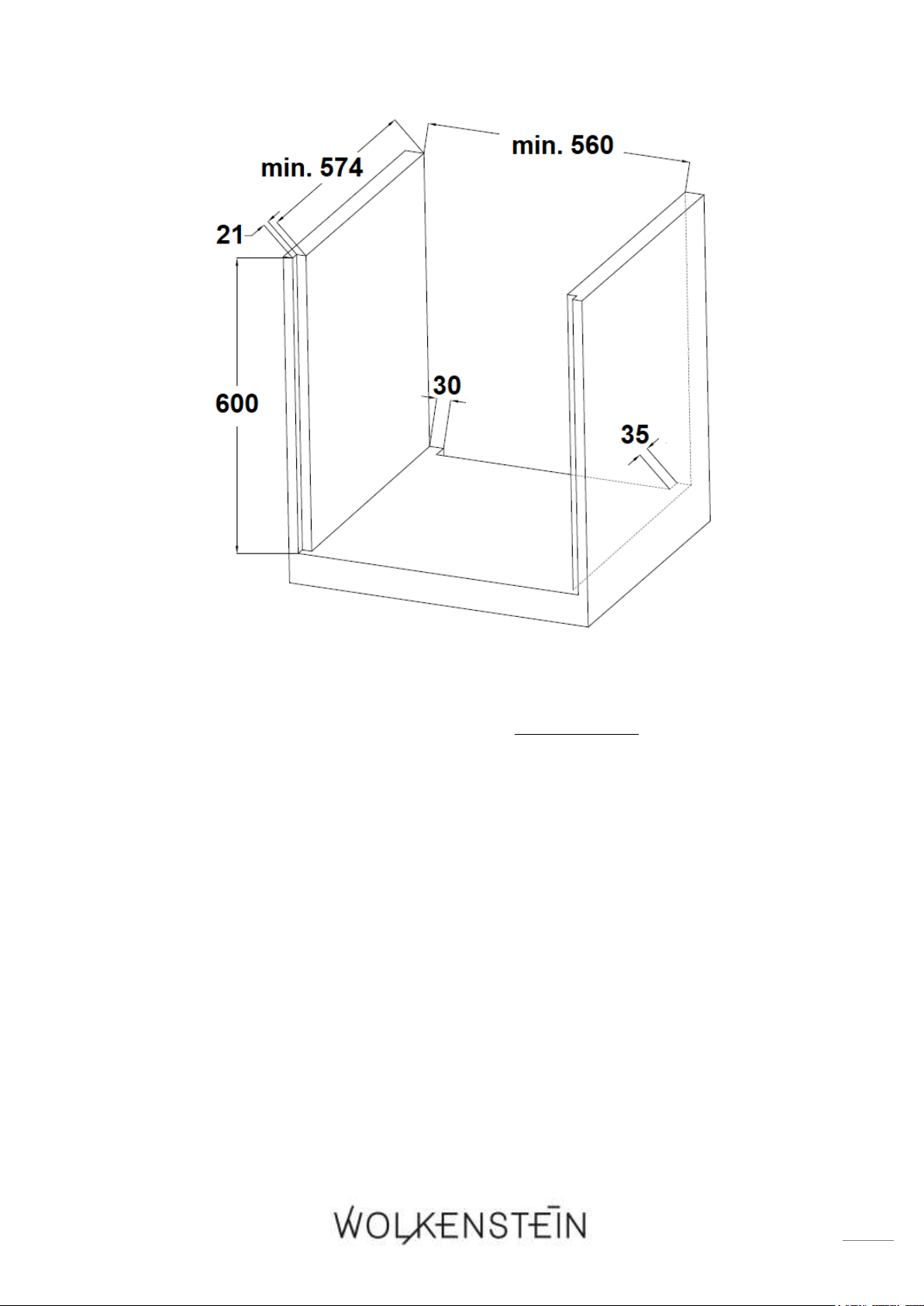
2. Die Einbauöffnung für den Backofen muss über die auf Abbildung 2 genannten
Abmessungen verfügen (s. unten).
ABB. 2: MAßE / EINBAUMÖBEL
15
3. Stellen Sie den Backofen in die Nähe der Einbauöffnung.
4. Vergewissern Sie sich, dass der Strom ausgeschaltet ist (Sicherung im
Haussicherungskasten).
5. Schließen Sie den Backofen an das Stromnetz an. Beachten Sie unbedingt die
Anweisungen im Kapitel 2.3 ELEKTRISCHER ANSCHLUSS.
6. Setzen Sie den Backofen vorsichtig in die vorbereitete Öffnung ein und richten
Sie ihn aus. Das Netzanschlusskabel darf nicht eingeklemmt oder geknickt
werden.
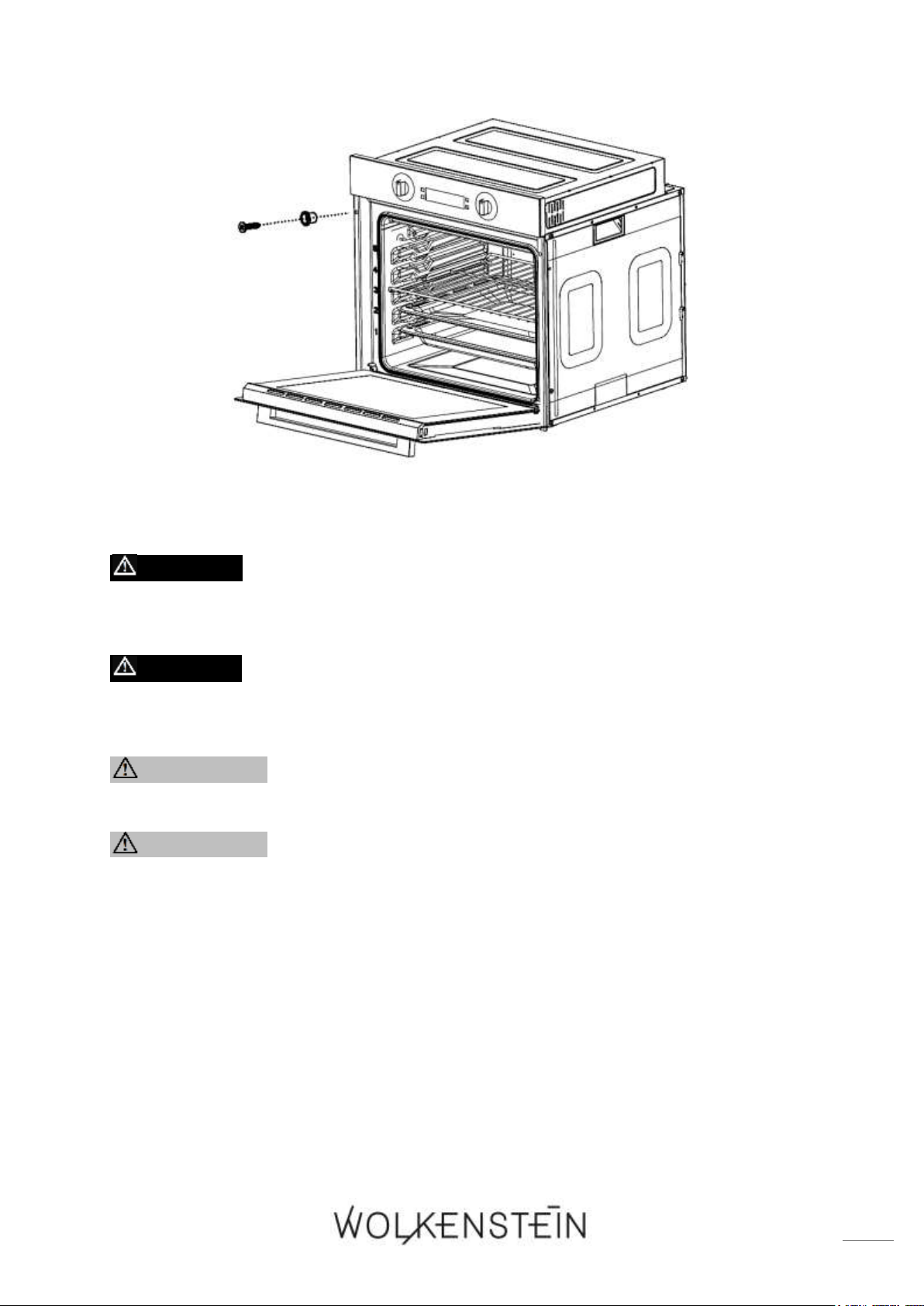
7. Befestigen Sie den Backofen mit den beiliegenden 2 Schrauben und den 2
Unterlegscheiben; wie auf der Abbildung unten gezeigt.
16
2.3 Elektrischer Anschluss
GEFAHR! Schalten Sie vor dem Anschluss des Gerätes
unbedingt die Stromversorgung ab (entsprechende Haussicherung
abschalten). STROMSCHLAGGEFAHR!
GEFAHR! Die Stromspannung und die Leistungsfrequenz der
Stromversorgung muss den auf dem Typenschild angegebenen Werten
entsprechen.
WARNUNG! Verwenden Sie keine Steckdosenleisten,
Mehrfachsteckdosen oder Verlängerungskabel.
WARNUNG! Das Gerät muss an einer ordnungsgemäß geerdeten
Steckdose angeschlossen werden. Verwenden Sie ausschließlich eine
entsprechende Sicherheitssteckdose, um die Gefahr eines Stromschlags
zu minimieren.
❖ Das Gerät ist mit einem Netzanschlusskabel und einem Netzanschlussstecker
(Schukostecker) ausgestattet.
❖ Verwenden Sie ausschließlich das mit dem Gerät mitgelieferte
Netzanschlusskabel.
❖ Ihr Hausstromnetz muss für die Leistungsaufnahme des Gerätes geeignet sein.

17
❖ Verwenden Sie zum Anschluss keine Adapter, Spannungsminderer oder
Verzweigungsvorrichtungen, da diese zu einer Überhitzung führen können.
BRANDGEFAHR!
❖ Verändern Sie niemals den mit dem Gerät mitgelieferten Netzstecker. Falls
dieser nicht für Ihre Netzsteckdose geeignet sein sollte, lassen Sie die
Netzsteckdose immer von einer qualifizierten Fachkraft (Elektrotechniker/-in)
ersetzen (Keine Garantieleistung).
❖ Wenn das Netzanschlusskabel beschädigt ist, darf es ausschließlich vom
Hersteller oder einem vom Hersteller autorisierten Kundendienst oder einer
gleichartig qualifizierten Person ausgetauscht werden.
❖ Das Netzanschlusskabel darf keine heißen Bereiche berühren und muss dergestalt
verlegt werden, dass seine Temperatur 75
0
C nicht übersteigt.
❖ Wenn die Netzsteckdose nach der Installation des Gerätes für den Benutzer nicht
mehr zugänglich ist, muss bei der Installation eine Trennvorrichtung für jeden
Pol eingebaut werden. Als Trennvorrichtung werden Schalter mit einer
Kontaktöffnung von mindestens 3 mm bezeichnet. Dazu gehören LS-Schalter,
Sicherungen und Schütze (EN 60335).
❖ Kontaktschutz muss bei Installation des Gerätes gewährleistet sein.
Falls Sie sich nicht sicher sind, ob das Gerät ordnungsgemäß an die
Stromversorgung angeschlossen ist, lassen Sie den elektrischen Anschluss
von einer qualifizierten Fachkraft (Elektrotechniker / -in) überprüfen
(keine Garantieleistung).
WARNUNG! Jegliche Schäden, die durch ein nicht ordnungsgemäß
an die Stromversorgung angeschlossenes Gerät entstehen, unterliegen
nicht der Garantie.
18
3. Gerätebeschreibung
3.1 Backofen
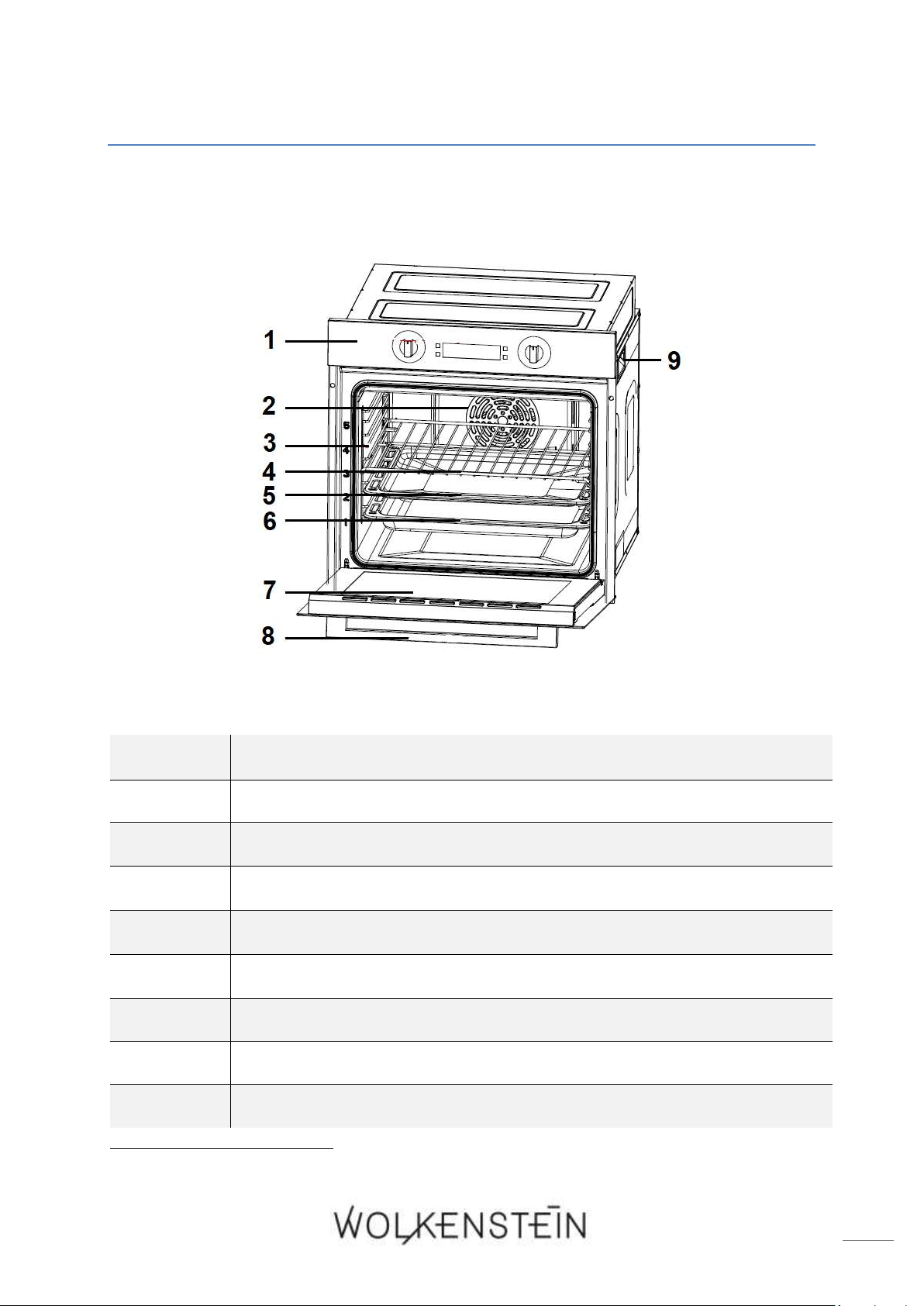
Abb. ähnlich: Modifikationen sind möglich.
1
BEDIENFELD (s. Kapitel 3.2 BEDIENFELD)
2
LÜFTERMOTOR (hinter einer Stahlplatte)
3
SEITENRACK mit bis zu fünf
2
unterschiedlichen Einschubhöhen
4
Grillrost
5
TROPFSCHALE (Backofenpfanne)
6
BACKBLECH (tiefe Backofenpfanne)
3
7
TÜR des Backofens
8
TÜRGRIFF
9
SEITLICHER GRIFF zum Bewegen des Gerätes (an beiden Seiten)
2
Abhängig vom Modell
3
Ausstattung abhängig vom Modell
19
3.1.1 Zubehör
❖ Abhängig vom Modell sind ein Grillrost, eine Tropfschale (Backofenpfanne)
sowie ein Backblech (tiefe Backofenpfanne) im Lieferumfang Ihres Gerätes
enthalten.
Bevor Sie das Gerät zum ersten Mal benutzen, reinigen Sie das im Lieferumfang
enthaltende Zubehör mit warmem Seifenwasser und einem weichen Tuch.
Wenn die Einschubelemente (z.B. Grillrost / Tropfschale / Backblech) heiß
werden, können sie sich verformen. Sobald die Zubehörteile abgekühlt sind,
nehmen sie wieder ihre ursprüngliche Form an. Die Funktionalität wird hierbei
nicht beeinträchtigt.
HINWEIS! Achten Sie darauf, dass die Einschubelemente (z.B. Grillrost /
Tropfschale / Backblech) immer komplett in den Backofen eingeschoben
sind, sodass sie beim Schließen der Backofentür nicht mit dieser
kollidieren. BESCHÄDIGUNGSGEFAHR!
HINWEIS! Verwenden Sie beim Grillen immer die Tropfschale oder das
Backblech, um das von dem Grillgut abtropfende Fett aufzufangen.
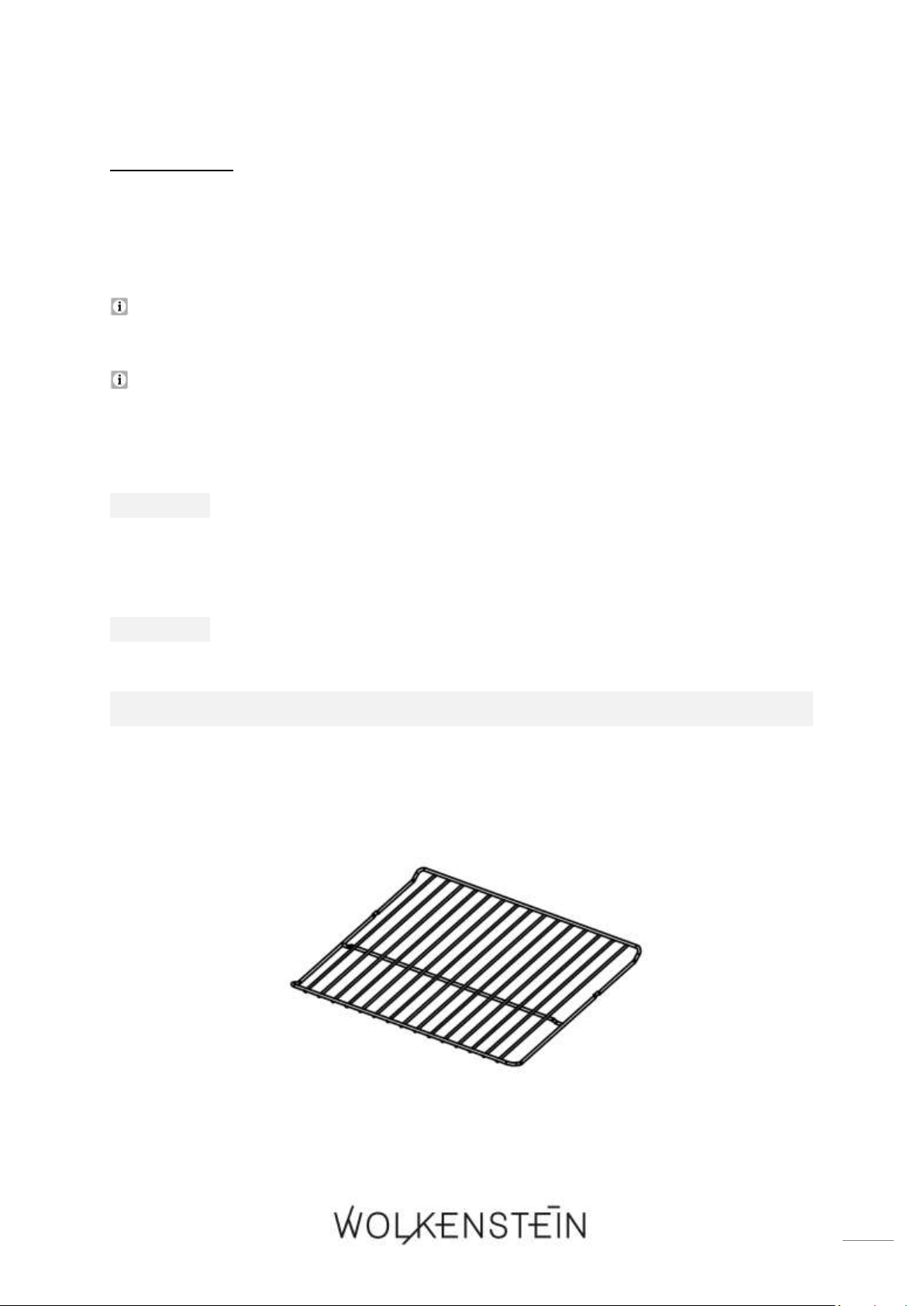
GRILLROST
❖ Der Grillrost ist zum Grillen, zum Braten und zum Backen von Lebensmitteln
geeignet; ebenso ist er zum Garen von Speisen in Auflaufformen und zum Backen
von Kuchen in Kuchenformen geeignet.
20
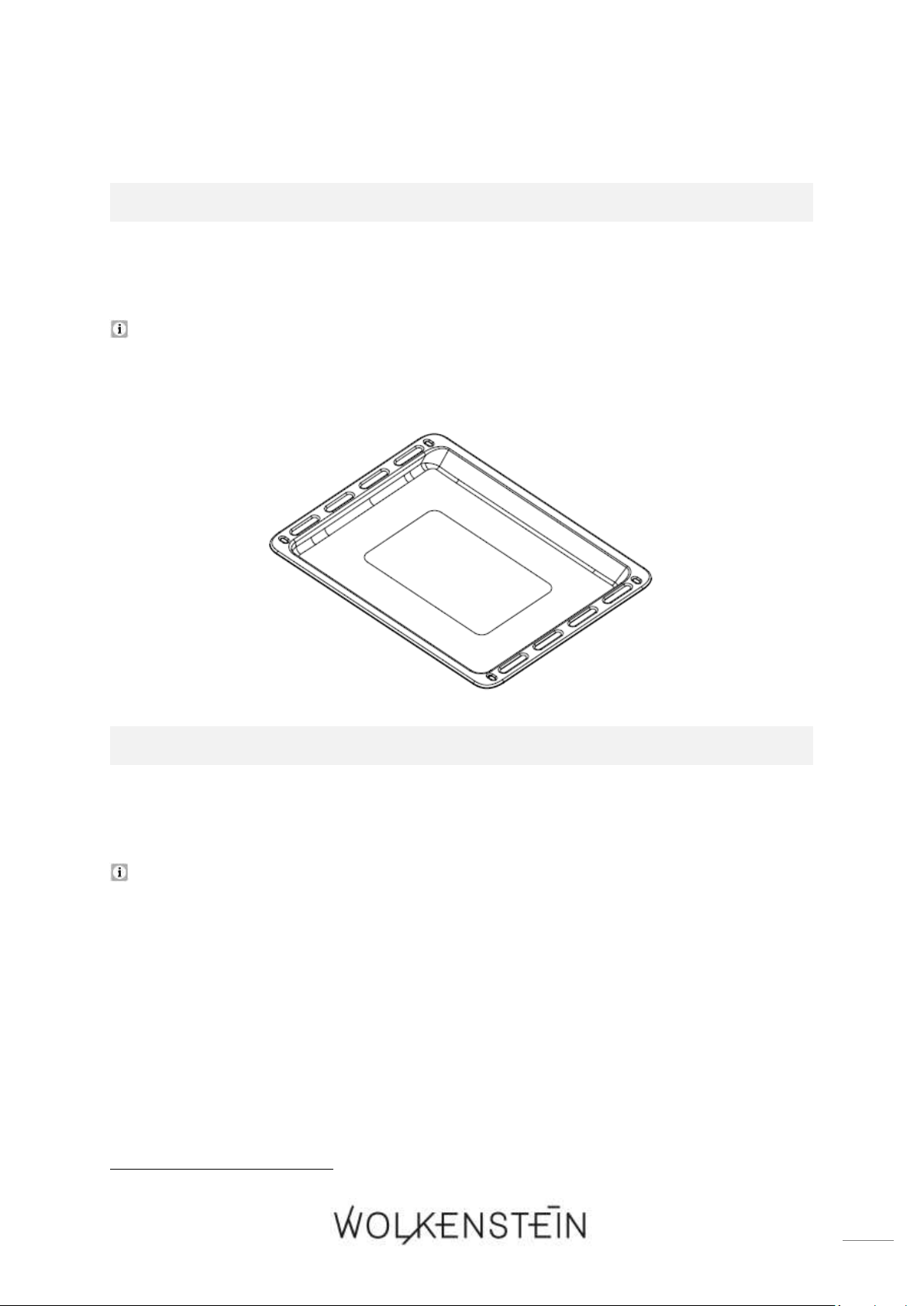
TROPFSCHALE (BACKOFENPFANNE)
❖ Die Tropfschale bzw. Backofenpfanne ist zum Backen von Kuchen und Gebäck,
zum Zubereiten von Tiefkühlgerichten und großen Bratenstücken etc. geeignet.
Wenn Sie direkt auf dem Grillrost grillen, sollten Sie die Tropfschale bzw.
Backofenpfanne ebenfalls verwenden, um das von dem Grillgut abtropfende Fett
aufzufangen.
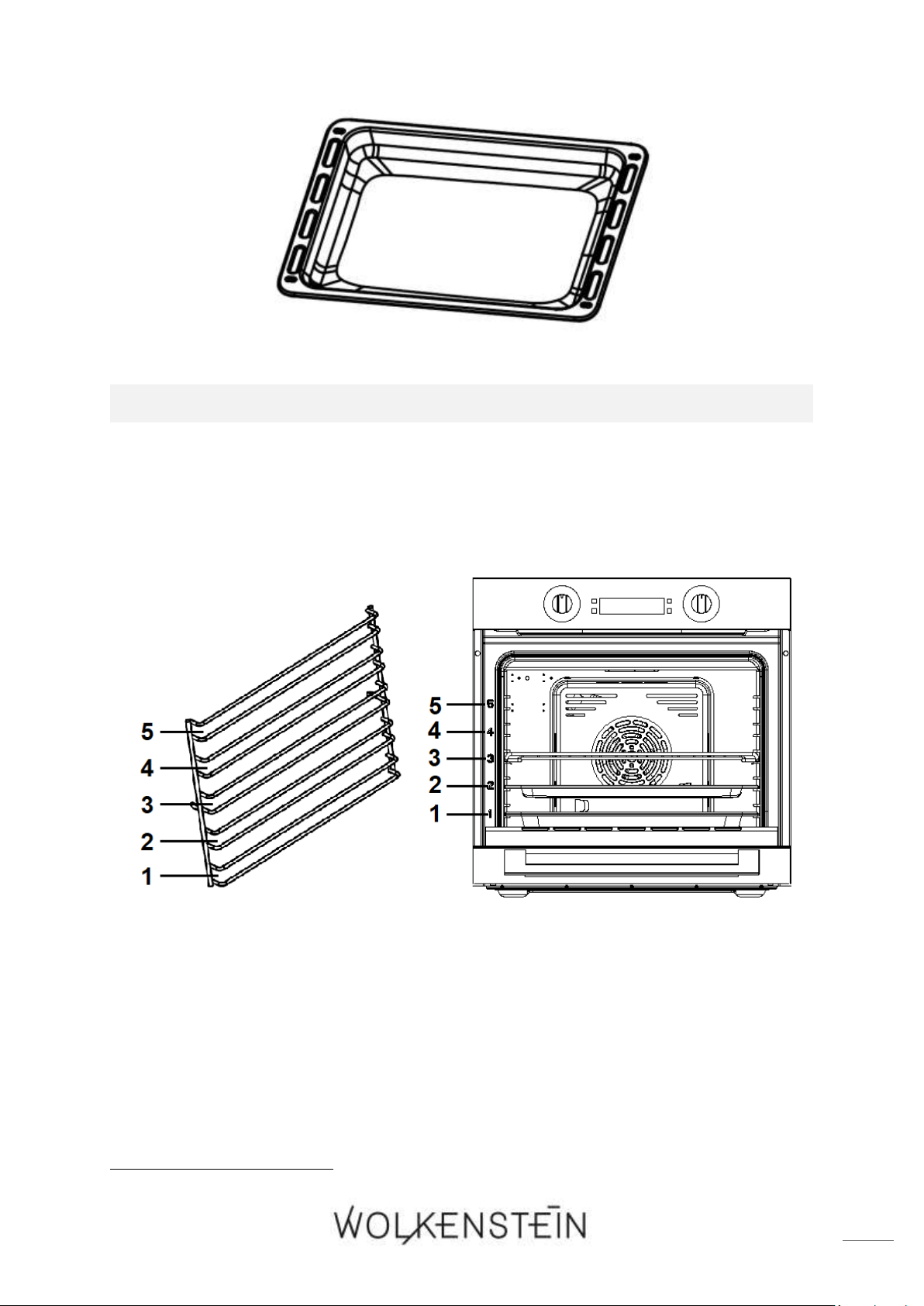
BACKBLECH (TIEFE BACKOFENPFANNE)
4
❖ Das Backblech bzw. die tiefe Backofenpfanne sind zum Backen von Kuchen und
Gebäck, zum Zubereiten von großen Bratenstücken etc. geeignet.
Wenn Sie direkt auf dem Grillrost grillen, ist das Backblech ebenso wie die
Tropfschale dazu geeignet, um das von dem Grillgut abtropfende Fett
aufzufangen.
4
Optionales Zubehör: Ausstattung abhängig vom Modell
21
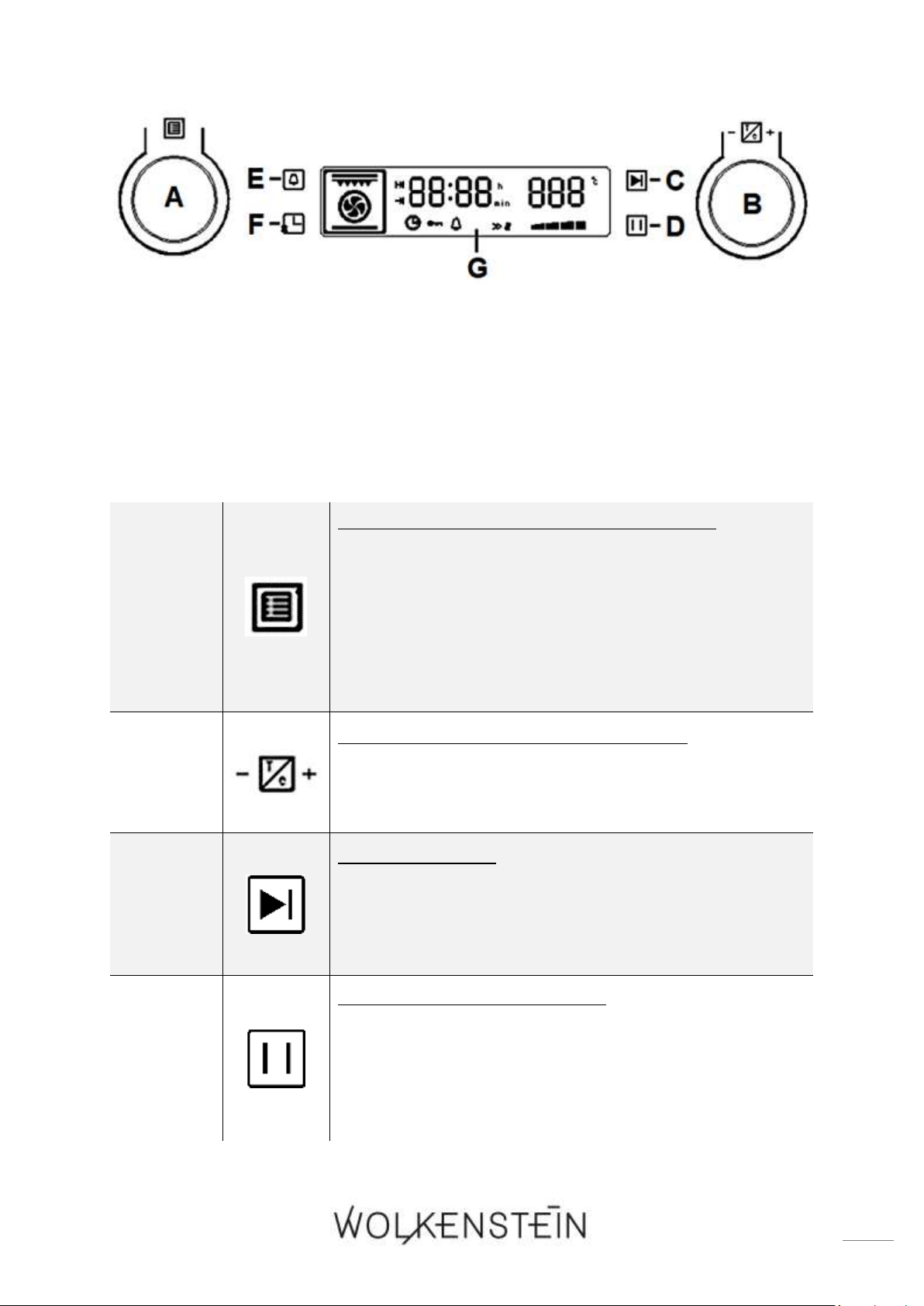
SEITENRACK
❖ Sie können den Grillrost, die Tropfschale sowie das Backblech in die bis zu fünf
5
unterschiedlichen Einschubhöhen des Seitenracks einsetzen (s. Abb. unten). So
können Sie ganz nach Ihren Bedürfnissen auf verschiedenen Einschubhöhen
backen, braten oder grillen.
Abb. ähnlich: Modifikationen sind möglich.
3.2 Bedienfeld
5
Abhängig vom Modell
22
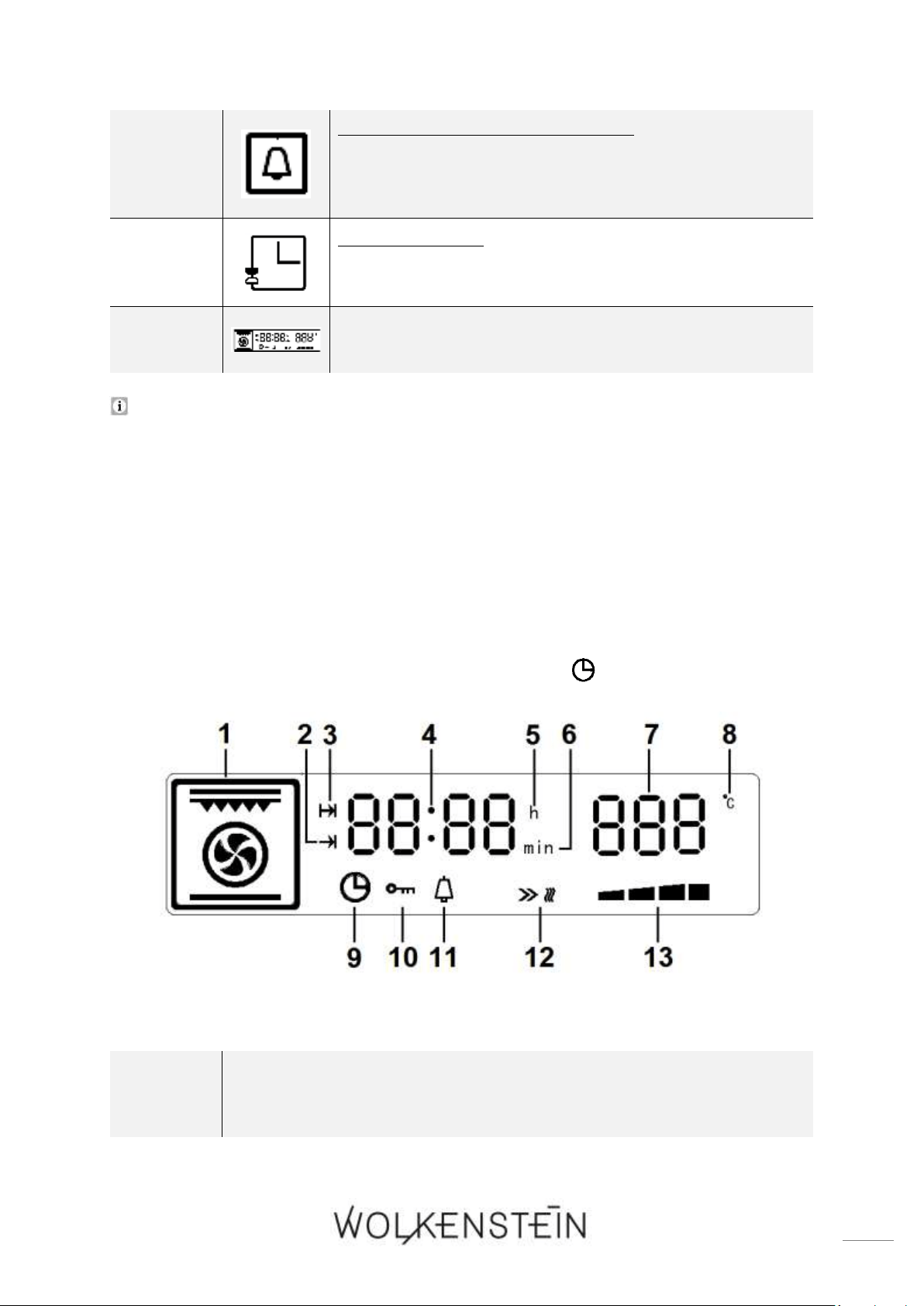
Abb. ähnlich: Modifikationen sind möglich.
A
DREHKNOPF « BACKOFENFUNKTIONEN »:
➢ zur Auswahl der BACKOFENFUNKTIONEN.
➢ Funktionswahl zur Zubereitung verschiedener
Speisen.
➢ Dreizehn verschiedene Backofenfunktionen sind
wählbar (inkl. vier automatische Programme); s.
Kapitel 4.7 BACKOFENFUNKTIONEN UND
AUTOMATISCHE PROGRAMME (P).
B
DREHKNOPF « TEMPERATUR / ZEIT »:
➢ zur Einstellung der TEMPERATUR (erhöhen /
vermindern).
➢ zur Einstellung der ZEIT (erhöhen / vermindern).
C
TASTE « START »:
➢ Taste zum STARTEN des Kochvorgangs.
➢ Taste zur Aktivierung der KINDERSICHERUNG;
Tasten C und D gleichzeitig drücken; s. Kapitel 4.5
KINDERSICHERUNG.
D
TASTE « PAUSE / LÖSCHEN »:
➢ Taste zum PAUSIEREN des Kochvorgangs.
➢ Taste zum LÖSCHEN der Programmierungen.
➢ Taste zur Aktivierung der KINDERSICHERUNG;
Tasten C und D gleichzeitig drücken; s. Kapitel 4.5
KINDERSICHERUNG.
23
E
TASTE « TIMER / PARAMETER »:
➢ Taste zur Einstellung des TIMERS.
➢ Taste zum WECHSELN zwischen den Parameter-
einstellungen TEMPERATUR und KOCH-, BACKZEIT.
F
TASTE « ZEIT »:
➢ Taste zum Einstellen der UHRZEIT / SYSTEMZEIT.
G
DISPLAY (Beschreibung s. Kapitel 3.3)
Das Gerät ist -abhängig vom Modell- mit versenkbaren Drehknöpfen
ausgestattet.
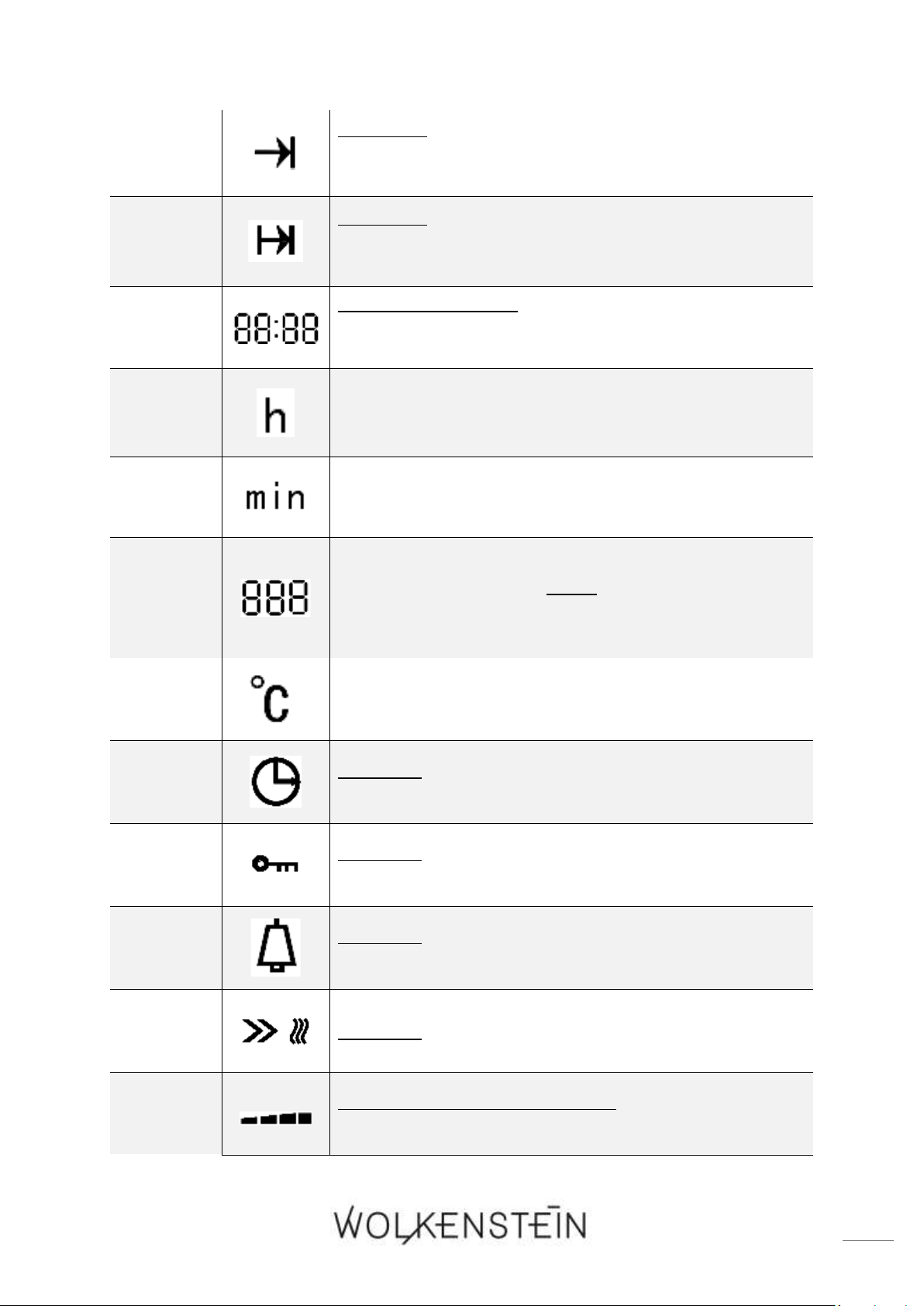
3.3 Display
❖ Im STANDBY - MODUS zeigt das Display die Systemzeit bzw. die eingestellte
Uhrzeit und die Anzeige « UHRZEIT / SYSTEMZEIT » ist erleuchtet.
Abb. ähnlich: Modifikationen sind möglich.
1
ANZEIGE der eingestellten BACKOFENFUNKTION (Heißluft, Grill,
automatische Kochprogramme etc.)
24
2
ANZEIGE:
➢ Einstellung « DAUER DER KOCH-, BACKZEIT »
ausgewählt.
3
ANZEIGE:
➢ Einstellung « ENDE DER KOCH-, BACKZEIT »
ausgewählt
4
ANZEIGE DER ZEIT:
➢ Stunden, Minuten und Sekunden (Sekunden:
dargestellt durch das Dezimalpunktsymbol).
5
ANZEIGE DER ZEITEINHEIT: « STUNDEN ».
6
ANZEIGE DER ZEITEINHEIT: « MINUTEN ».
7
ANZEIGE DER EINGESTELLTEN TEMPERATUR in
0
C
ODER
ANZEIGE DES AUSGEWÄHLTEN AUTOMATISCHEN
PROGRAMMS (P - 1 bis P - 4).
8
SYMBOL der TEMPERATUREINHEIT: «
0
C »
9
ANZEIGE:
➢ Einstellung « UHRZEIT / SYSTEMZEIT » ausgewählt.
10
ANZEIGE:
➢ « KINDERSICHERUNG » aktiviert.
11
ANZEIGE:
➢ Einstellung « TIMER » (Zeitwächter) ausgewählt.
12
ANZEIGE: « STARTSYMBOL DER BACKOFENFUNKTION »
13
DYNAMISCHE ANZEIGELEISTE:
➢ zeigt den « ARBEITSSTATUS » des Backofens an.

25
4. Bedienung
Lesen Sie die komplette Bedienungsanleitung, bevor Sie das Gerät
erstmalig in Betreib nehmen. Beachten Sie hierbei besonders die
Sicherheits- und Warnhinweise!
Entfernen Sie alle Schutzfolien, die sich noch an dem Gerät befinden können.
4.1 Vor der ersten Benutzung
Fabrikationsrückstände oder Ölrückstände, die im Garraum oder am
Heizelement verblieben sind, können Gerüche und eine leichte
Rauchentwicklung bewirken. Dies sind normale Betriebsparameter, die nach
einigen Benutzungen nicht weiter auftreten.
❖ Heizen Sie deshalb das Gerät auf (leer und geschlossen), bevor Sie es zum ersten
Mal zum Kochen verwenden, um diese Rückstände und die daraus resultierenden
Gerüche zu entfernen.
GERÄT AUFHEIZEN
1. Entfernen Sie sämtliche Verpackungsmaterialien.
2. Reinigen Sie den Backofeninnenraum von dem aufgetragenen Schutzmittel.
3. Nehmen Sie die Ausstattungselemente heraus (Blech etc.) und reinigen Sie diese
mit warmem Wasser und etwas Spülmittel.
4. Schalten Sie die Raumbelüftung ein oder öffnen Sie das Fenster.
5. Lassen Sie den Backofen mit Ober- und Unterhitze auf 250
0
C für 60 Minuten
laufen (s. Kapitel 4.3 PROGRAMMIERUNG DES BACKOFENS). Entfernen Sie
anschließend Verunreinigungen und säubern Sie den Innenraum. Hierbei kann es
für etwa 15 Minuten zu einer leichten Rauchentwicklung und zur Freisetzung von
Geruch kommen. Dies ist ein normaler Betriebsvorgang, der durch eine
Schutzimprägnierung gegen Korrosionsschäden während des Transports
verursacht wird.
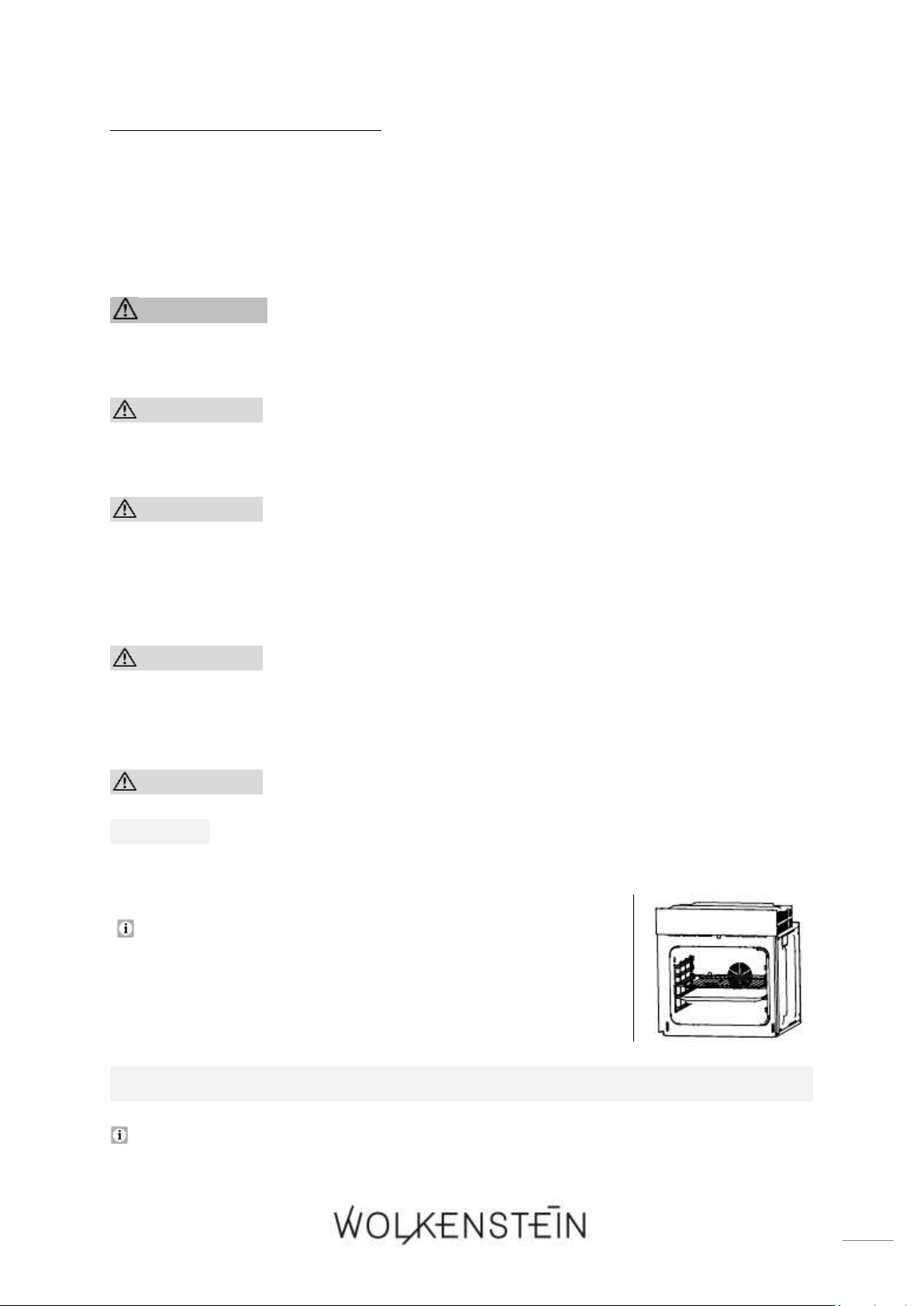
HINWEIS! Reinigen Sie den Innenraum des Backofens nur mit etwas
warmem Wasser und Spülmittel.
HINWEIS! Vergewissern Sie sich, dass vor Inbetriebnahme sämtliches
Verpackungsmaterial innerhalb und außerhalb des Gerätes entfernt
wurde.
26
4.1.1 Reinigung des Zubehörs
❖ Bevor Sie das Gerät zum ersten Mal benutzen, reinigen Sie das im Lieferumfang
enthaltende Zubehör mit warmem Seifenwasser und einem weichen Tuch.
4.2 Benutzung des Backofens
WARNUNG! Während des Betriebs können zugängliche Teile des
Gerätes heiß werden. Berühren Sie die heißen Bereiche nicht und halten
Sie Kinder vom Gerät fern. VERBRENNUNGSGEFAHR!
VORSICHT! Die inneren Bestandteile des Backofens werden sehr
heiß. Berühren Sie keine dieser Bereiche, während Sie mit Ihrem
Kochgeschirr umgehen. VERBRENNUNGSGEFAHR!
VORSICHT! Seien Sie vorsichtig, wenn Sie die Backofentür öffnen.
Kommen Sie nicht in Kontakt mit den heißen Bereichen oder mit dem
Dampf, der aus dem geöffneten Backofen entweicht.
VERBRENNUNGSGEFAHR! VERBRÜHUNGSGEFAHR!
VORSICHT! Kochutensilien können aufgrund der durch die
Lebensmittel weitergeleitete Hitze heiß werden. Verwenden Sie immer
Topflappen oder Backofenhandschuhe zum Umgang mit Ihrem
Essgeschirr / Kochgeschirr.
VORSICHT! Benutzen Sie stets Backofenhandschuhe.
HINWEIS! Verwenden Sie ausschließlich geeignetes und feuerfestes
Essgeschirr / Kochgeschirr.
Für einen sicheren Betrieb des Gerätes ist die
ordnungsgemäße Positionierung der Einschubelemente
erforderlich, damit bei deren Entnahme kein heißes
Koch- / Backgut oder Kochgeschirr herausfallen kann.
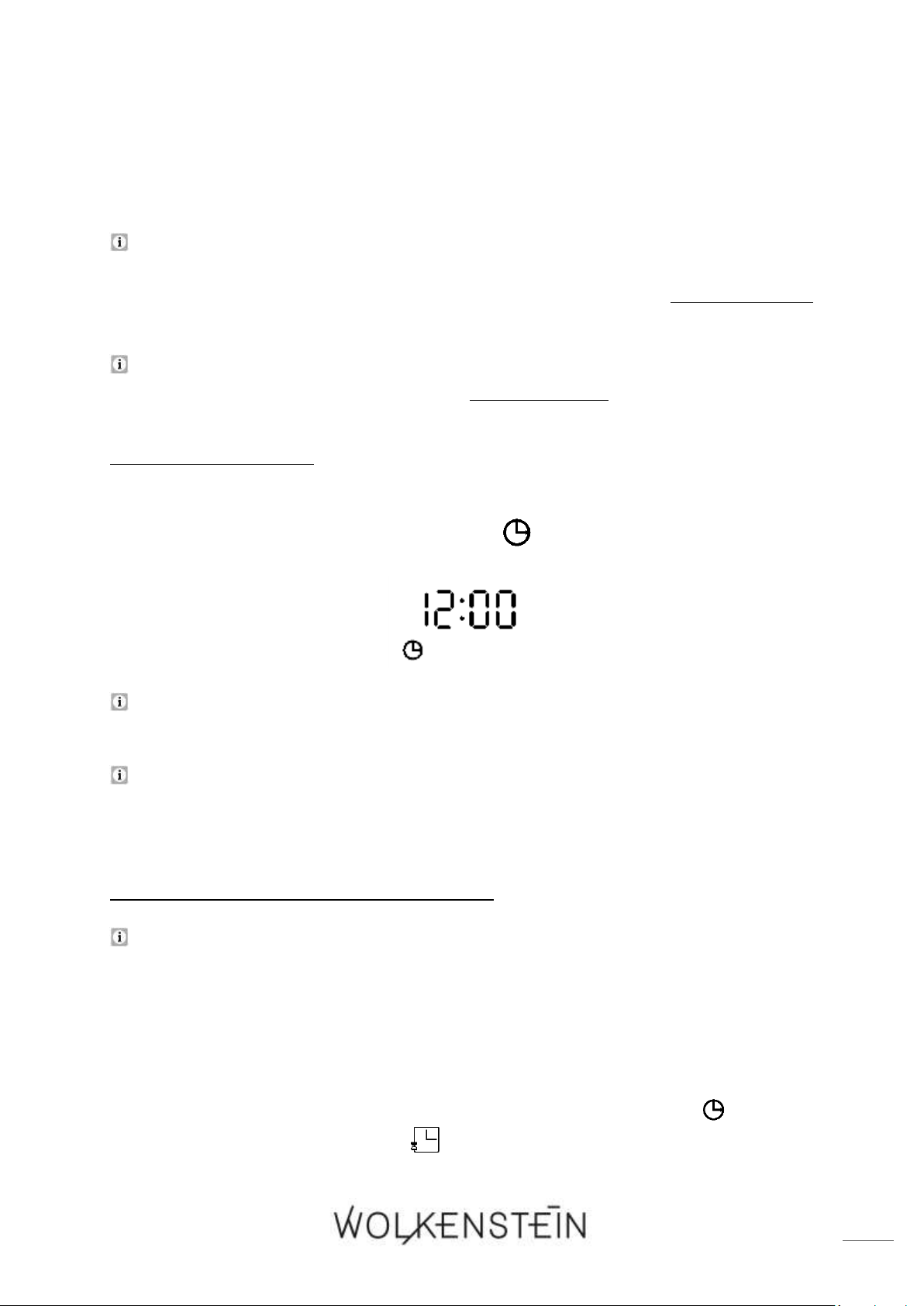
NACH ANSCHLUSS DES GERÄTES AN DIE STROMVERSORGUNG:
Wenn Sie das Gerät zum ersten Mal an die Stromversorgung anschließen,
leuchten alle Anzeigen für 1 Sekunde auf. Das Display zeigt « 12:00 » an und die

27
Stundenanzeige « 12 » blinkt. Sie können nun die aktuelle Uhrzeit einstellen; s.
Kapitel 4.2.3 EINSTELLEN DER UHRZEIT / SYSTEMZEIT. Wenn Sie keine Zeit
(Stunden) einstellen wechselt das Gerät nach ca. 10 Sekunden, ohne weitere
Betätigung der Tasten, in die Minuteneinstellung. Falls weiterhin keine
Zeiteinstellung vorgenommen wird, wechselt das Gerät nach weiteren 10
Sekunden automatisch in den STANDBY - MODUS; s. Kapitel 4.2.2
STANDBY - MODUS.
Bevor Sie den Backofen generell benutzen können, müssen Sie die
Uhrzeit / Systemzeit einstellen.
4.2.1 Allgemeine Bedienung des Backofens
❖ Die Benutzung des Backofens wird durch die Bedientasten und die Drehknöpfe
für die BACKOFENFUNKTIONEN und die ZEIT- UND TEMPERATUREINSTELLUNG
(A / B) kontrolliert; s. Kapitel 3.2 BEDIENFELD.
❖ Dreizehn verschiedene Backofenfunktionen inkl. 4 automatischer Programme
(P - 1 / P - 2 / P - 3 / P - 4) sind wählbar; s. Kapitel 4.7 BACKOFEN-
FUNKTIONEN UND AUTOMATISCHE PROGRAMME (P).
❖ Die Temperaturen der Backofenfunktionen sind von 0
0
C bis 250
0
C individuell
einstellbar. Die Temperaturen der automatischen Programme sind werkseitig
voreingestellt und können nicht verändert werden; siehe auch Kapitel 4.7
BACKOFENFUNKTIONEN UND AUTOMATISCHE PROGRAMME (P).
Wenn die Temperatur innerhalb des Backofens die eingestellte Temperatur
beinahe erreicht hat, ertönt für 2 Sekunden ein akustisches Signal.
Falls die Temperatur innerhalb des Backofens 30
0
C unterschreitet, zeigt die
Temperaturanzeige des Displays « LO » an.
Nachdem der Backofen ca. 15 Minuten in Betrieb ist, beginnt der Lüfter zu
arbeiten. Der Lüfter des Backofens läuft nach Betriebsende noch einige Zeit
weiter (ca. 35 Minuten), auch wenn das Gerät selbst ausgeschaltet ist. Der Lüfter
schaltet sich automatisch aus, wenn die Innentemperatur des Backofens 100
0
C
unterschreitet.
Das Gerät ist mit einem 24 h Display ausgestattet.
HINWEISE BEZÜGLICH DER AUTOMATISCHEN PROGRAMME:
28
❖ Das Gerät ist mit drei automatischen Grillprogrammen (P - 1 / P - 2 / P - 3) und
mit einem automatischen Reinigungsprogramm ausgestattet (P - 4);
Beschreibung der Programme: siehe Kapitel 4.7 BACKOFENFUNKTIONEN UND
AUTOMATISCHE PROGRAMME (P).
Die werkseitig voreingestellte jeweilige Dauer der Grillzeit der Programme P - 1,
P - 2 und P - 3 kann individuell verändert werden. Die werkseitig
voreingestellten Temperaturen dieser Programme können nicht verändert
werden.
Die werkseitig voreingestellte Zeitdauer und voreingestellte Temperatur des
Reinigungsprogramms P - 4 können nicht verändert werden.
4.2.2 Standby - Modus
❖ Im STANDBY - MODUS zeigt das Display die eingestellte Uhrzeit / Systemzeit an
und die Anzeige « UHRZEIT / SYSTEMZEIT » leuchtet (s. Abb. unten).
Nach ca. 5 Minuten, ohne weitere Betätigung der Tasten, wird der Backofen
automatisch ausgeschaltet und das Display erlischt.
Wenn der Backofen ausgeschaltet ist, drücken Sie eine beliebige Taste oder
betätigen Sie den Drehknopf für die BACKOFENFUNKTIONEN (A), um das Gerät
wieder in den STANDBY -MODUS zu setzen.
4.2.3 Einstellung der Uhrzeit / Systemzeit
Bevor Sie den Backofen generell benutzen können, müssen Sie die
Uhrzeit / Systemzeit einstellen.
1. Der Backofen muss sich im STANDBY - MODUS befinden. Wenn der Backofen
ausgeschaltet ist, drücken Sie eine beliebige Taste oder betätigen Sie den
Drehknopf für die BACKOFENFUNKTIONEN, um das Gerät in den STANDBY -
MODUS zu setzen. Im STANDBY - MODUS zeigt das Display die
Uhrzeit / Systemzeit an und die Anzeige « UHRZEIT / SYSTEMZEIT » leuchtet.
2. Drücken Sie die Taste « ZEIT » einmal, um den Einstellungsmodus der
Uhrzeit / Systemzeit zu aktivieren.

29
3. Auf dem Display leuchtet die Stundenanzeige « » auf und der Stundenwert der
Zeitanzeige « » blinkt einmal pro Sekunde.
4. Drehen Sie den Drehknopf « TEMPERATUR / ZEIT », um den
Stundenwert (0 - 23) der aktuellen Uhrzeit einzustellen. Bitte beachten Sie, dass
das Gerät mit einem 24 h Display ausgestattet ist.
5. Drücken Sie dann die Taste « ZEIT » noch einmal, um in die
Minuteneinstellung zu wechseln.
6. Auf dem Display leuchtet die Minutenanzeige « » auf und der Minutenwert
der Zeitanzeige « » blinkt.
7. Drehen Sie den Drehknopf « TEMPERATUR / ZEIT », um den
Minutenwert (0 - 59) der aktuellen Uhrzeit einzustellen.
8. Drücken Sie dann die Taste « ZEIT » erneut, um die Einstellung zu bestätigen;
die Anzeigen « » bzw. « » erlöschen.
9. Die Uhrzeit / Systemzeit ist eingestellt und das Dezimalpunktsymbol blinkt nun
einmal pro Sekunde.
Falls die Zeiteinstellung nicht innerhalb von 10 Sekunden bestätigt wird,
vervollständigt das Gerät die Uhrzeit und wechselt automatisch in den
STANDBY - MODUS. Vergewissern Sie sich, dass die eingestellte
Uhrzeit / Systemzeit der aktuellen Uhrzeit entspricht!
Falls die Uhrzeit / Systemzeit nicht innerhalb von 20 Sekunden nach Anschluss
des Gerätes an die Stromversorgung eingestellt wird, wird die
Uhrzeit / Systemzeit auf die voreingestellte Zeit (12:00) eingestellt und das Gerät
wechselt automatisch in den STANDBY - MODUS. Bitte beachten Sie: Stellen Sie
in diesem Fall sobald wie möglich die aktuelle Uhrzeit / Systemzeit ein.
Wenn Sie Taste « PAUSE / LÖSCHEN » einmal drücken, während Sie die
Uhrzeit / Systemzeit einstellen, wird die aktuelle Einstellung gelöscht und das
Gerat wechselt direkt in den STANDBY - MODUS.
4.3 Programmierung des Backofens
4.3.1 Timer
❖ Der TIMER dient als Zeitmesser und zählt die eingestellte Zeit (Countdown-Zeit)
ab.
Die maximal einstellbare Countdown-Zeit beträgt 23 Stunden und 59 Minuten.
30
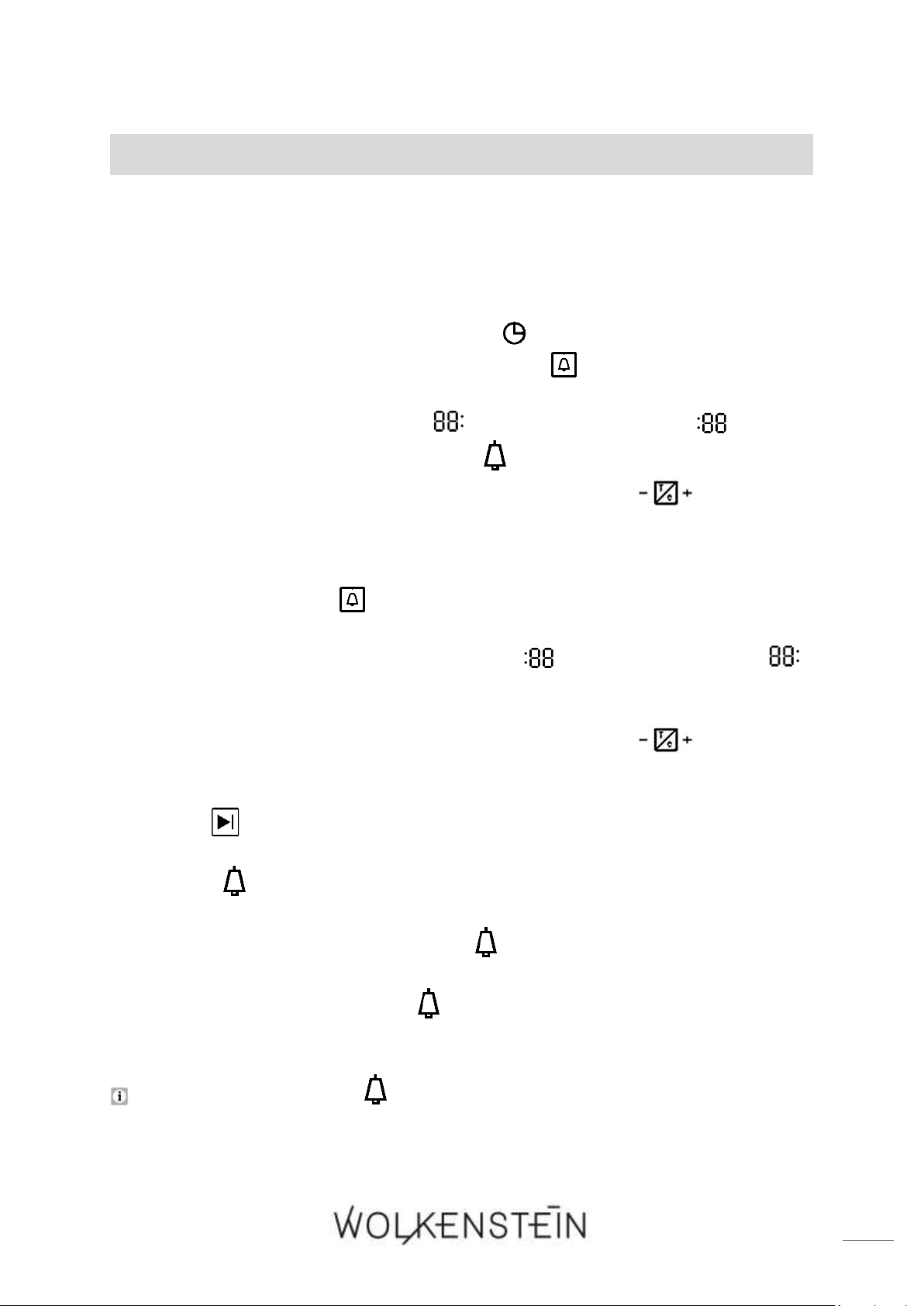
EINSTELLEN DES TIMERS (ZEITWÄCHTER)
1. Der Backofen muss sich im STANDBY - MODUS befinden. Wenn der Backofen
ausgeschaltet ist, drücken Sie eine beliebige Taste oder betätigen Sie den
Drehknopf für die BACKOFENFUNKTIONEN, um das Gerät in den STANDBY -
MODUS zu setzen.
2. Im STANDBY - MODUS zeigt das Display die eingestellte Uhrzeit / Systemzeit an
und die Anzeige « UHRZEIT / SYSTEMZEIT » leuchtet.
3. Drücken Sie die Taste « TIMER / PARAMETER », um die Einstellung des
TIMERS zu aktivieren.
4. Der Stundenwert der Zeitanzeige « » blinkt, der Minutenwert « » leuchtet
dauerhaft und die Anzeige des TIMERS « » leuchtet auf.
5. Drehen Sie den Drehknopf « TEMPERATUR / ZEIT », um den
Stundenwert (0 - 23) des TIMERS einzustellen. Bitte beachten Sie, dass das Gerät
mit einem 24 h Display ausgestattet ist.
6. Wenn Sie den gewünschten Stundenwert eingestellt haben, drücken Sie die Taste
« TIMER / PARAMETER » noch einmal, um in die Minuteneinstellung zu
wechseln.
7. Nun blinkt der Minutenwert der Zeitanzeige « » und der Stundenwert « »
leuchtet dauerhaft.
8. Drehen Sie den Drehknopf « TEMPERATUR / ZEIT », um den
Minutenwert (0 - 59) des TIMERS einzustellen.
9. Wenn Sie den gewünschten Minutenwert eingestellt haben, drücken Sie die Taste
« START », um die Einstellung des TIMERS (Countdown-Zeit) zu bestätigen.
10. Der Countdown startet; das Dezimalpunktsymbol blinkt und die Anzeige des
TIMERS « » leuchtet.
11. Wenn die eingestellte Zeit abgelaufen, ist ertönt ein akustisches Signal einmal pro
Sekunde und die Anzeige des TIMERS « » blinkt.
12. Das akustische Signal endet automatisch nach ca. 1 Minute. Sie können das
akustische und optische Signal (« ») aber auch durch Drücken einer beliebigen
Taste auf dem Display ausschalten.
Die Anzeige des TIMERS « » leuchtet dauerhaft, solange der Countdown aktiv
ist. Nach Ablauf der eingestellten Zeit blinkt die Anzeige.
31
WARNUNG! Bei o.g. Verwendung wird der Backofen nach Ablauf der
gewählten Zeitspanne nicht automatisch abgeschaltet.
4.3.2 Dauer der Koch-, Backzeit einstellen
❖ Mit dieser Funktion können Sie eine COUNTDOWN-ZEIT einstellen, bei der nach
Ablauf der Zeit der Backofen automatisch ausgeschaltet wird (DAUER DER
KOCH, -BACKZEIT).
DAUER DER KOCH- / BACKZEIT EINSTELLEN
❖ Stellen Sie eine COUNTDOWN-ZEIT ein, bei der nach Ablauf der Zeit der
Backofen automatisch ausgeschaltet wird.
Die maximal einstellbare Countdown-Zeit beträgt 150 Minuten (2 ½ h).
1. Der Backofen muss sich im STANDBY - MODUS befinden. Wenn der Backofen
ausgeschaltet ist, drücken Sie eine beliebige Taste oder betätigen Sie den
Drehknopf für die BACKOFENFUNKTIONEN, um das Gerät in den STANDBY -
MODUS zu setzen.
2. Im STANDBY - MODUS zeigt das Display die eingestellte Uhrzeit / Systemzeit an
und die Anzeige « UHRZEIT / SYSTEMZEIT » leuchtet.
3. Stellen Sie das Koch- / Backgut in den Backofen und schließen Sie die Tür
ordnungsgemäß.
4. Drehen Sie den Drehknopf für die BACKOFENFUNKTIONEN « », bis die
gewünschte Backofenfunktion auf dem Display angezeigt wird; siehe Kapitel 4.7
BACKOFENFUNKTIONEN UND AUTOMATISCHE PROGRAMME (P).
Abhängig von der gewählten Backofenfunktion, zeigt die ZEITANZEIGE
« » die voreingestellte Zeit und die TEMPERATURANZEIGE « » zeigt
die voreingestellte Temperatur der gewählten Funktion an.
Falls Sie die Backofenfunktion 9 « ECO / » auswählen, zeigt die Zeitanzeige
« ECO » an.
5. Um die Temperatureinstellung zu aktivieren, drücken Sie die Taste
« TIMER / PARAMETER », bis die Temperaturanzeige « » und das
Symbol « » blinken.
32
6. Um die Temperatur einzustellen, drehen Sie den Drehknopf
« TEMPERATUR / ZEIT », bis die gewünschte Temperatur auf der
Temperaturanzeige « » angezeigt wird.
7. Um die Einstellung der Countdown-Zeit (Dauer der Koch-, Backzeit) zu
aktivieren, drücken Sie die Taste « TIMER / PARAMETER », bis die Zeitanzeige
« » und die Anzeige « DAUER DER KOCH-, BACKZEIT » blinken.
8. Um die Countdown-Zeit (Dauer der Koch-, Backzeit) einzustellen, drehen Sie
den Drehknopf « TEMPERATUR / ZEIT », bis die gewünschte Koch-,
Backzeitdauer auf der Zeitanzeige « » angezeigt wird.
9. Drücken Sie innerhalb von 10 Sekunden die Taste « START », um den
Kochvorgang zu beginnen (Arbeitsmodus). Der Countdown startet.
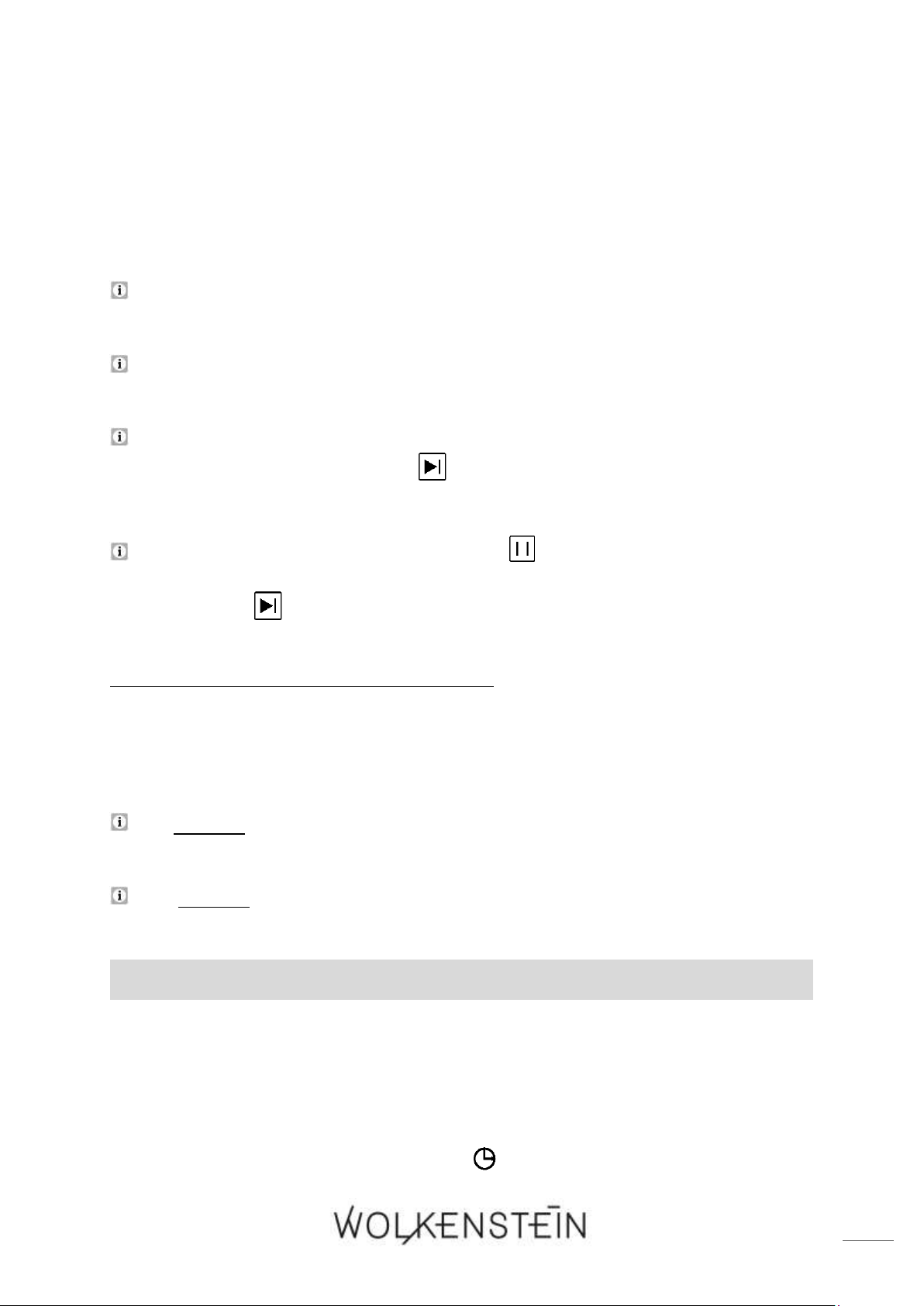
10. Der Backofen ist in Betrieb; auf dem Display werden folgende Symbole angezeigt
(als Beispiel siehe auch Abb. unten):
a) Die gewählte Backofenfunktion wird angezeigt (1 / s. Abb. unten).
b) Die Anzeige « DAUER DER KOCH-, BACKZEIT » leuchtet (2).
c) Die Zeitanzeige « » zeigt die Countdown-Zeit (Dauer der Koch- /
Backzeit) und die Zeiteinheit wird angezeigt; (4 und 6 / hier als Beispiel: 40
Minuten).
d) Die Temperaturanzeige « » zeigt die voreingestellte oder selbst gewählte
Temperatur (7).
e) Das Startsymbol der Backofenfunktion « » wird angezeigt (12).
f) Die dynamische Anzeigeleiste « » zeigt den Arbeitsstatus des
Backofens an (13).
Wenn die Temperatur innerhalb des Backofens die eingestellte Temperatur
beinahe erreicht hat, ertönt für 2 Sekunden ein akustisches Signal.
33
11. Wenn die eingestellte Zeit abgelaufen ist, ertönt 10-mal ein akustisches Signal, der
Backofen wird automatisch abgeschaltet und wechselt in den
STANDBY - MODUS.
12. Der Lüfter des Backofens läuft nach Betriebsende noch einige Zeit weiter, auch
wenn das Gerät selbst ausgeschaltet ist.
Der Lüfter des Backofens schaltet sich automatisch aus, wenn die
Innentemperatur des Backofens 100
0
C unterschreitet.
Falls die Temperatur innerhalb des Backofens 30
0
C unterschreitet, zeigt die
Temperaturanzeige des Displays « LO » an.
Falls Sie keine Temperatur oder keine Koch-, Backzeitdauer einstellen oder nach
dem Einstellen die Taste « START » nicht innerhalb von 10 Sekunden drücken,
wechselt das Gerät automatisch in den STANDBY - MODUS.
Drücken Sie die Taste « PAUSE / LÖSCHEN » einmal, um den Kochvorgang
zu pausieren. Die Anzeige der Temperatur und der Zeit blinken. Drücken Sie die
Taste « START », um den Kochvorgang fortzusetzen.
4.3.3 Automatische Koch- / Backfunktion
❖ Mit dieser Funktion können Sie die Dauer der Koch-, Backzeit einstellen und
gleichzeitig die Uhrzeit auswählen, an der der Backofen automatisch
ausgeschaltet werden soll.
Die maximal einstellbare Koch-, Backdauer beträgt 150 Minuten (2 ½ h).
Die maximal einstellbare Uhrzeit für das Ende der Koch-, Backzeit muss
innerhalb 23 Stunden und 59 Minuten ab der angezeigten Uhrzeit liegen.
EINSTELLEN DER AUTOMATISCHEN KOCH- / BACKFUNKTION
1. Der Backofen muss sich im Standby - Modus befinden. Wenn der Backofen
ausgeschaltet ist, drücken Sie eine beliebige Taste oder betätigen Sie den
Drehknopf für die BACKOFENFUNKTIONEN, um das Gerät in den Standby -
Modus zu setzen.
2. Im Standby - Modus zeigt das Display die eingestellte Uhrzeit / Systemzeit an
und die Anzeige « Uhrzeit / Systemzeit » leuchtet.
34
3. Stellen Sie das Koch- / Backgut in den Backofen und schließen Sie die Tür
ordnungsgemäß.
4. Drehen Sie den Drehknopf für die BACKOFENFUNKTIONEN « », bis die
gewünschte Backofenfunktion auf dem Display angezeigt wird; siehe Kapitel 4.7
BACKOFENFUNKTIONEN UND AUTOMATISCHE PROGRAMME (P).
Abhängig von der gewählten Backofenfunktion, zeigt die ZEITANZEIGE
« » die voreingestellte Zeit, und die TEMPERATURANZEIGE « » zeigt
die voreingestellte Temperatur der gewählten Funktion an.
Falls Sie die Backofenfunktion 9 « Eco / » auswählen, zeigt die Zeitanzeige
« Eco » an.
5. Um die Temperatureinstellung zu aktivieren, drücken Sie die Taste
« Timer / Parameter », bis die Temperaturanzeige « » und das Symbol
« » blinken.
6. Um die Temperatur einzustellen, drehen Sie den Drehknopf
« TEMPERATUR / ZEIT », bis die gewünschte Temperatur auf der
Temperaturanzeige « » angezeigt wird.
7. Um die Einstellung der Countdown-Zeit (Dauer der Koch-, Backzeit) zu
aktivieren, drücken Sie die Taste « Timer / Parameter », bis die Zeitanzeige
« » und die Anzeige « Dauer der Kochzeit » blinken.
8. Um die Countdown-Zeit (Dauer der Koch-, Backzeit) einzustellen, drehen Sie
den Drehknopf « TEMPERATUR / ZEIT », bis die gewünschte Koch-,
Backzeitdauer auf der Zeitanzeige « » angezeigt wird.
9. Drücken Sie nun die Taste « ZEIT » einmal, um die Einstellung « ENDE DER
KOCHZEIT » zu aktivieren.
10. Die Anzeige « ENDE DER KOCH-, BACKZEIT » und der Stundenwert der
Zeitanzeige « » blinken.
11. Drehen Sie den Drehknopf « TEMPERATUR / ZEIT »», um den
Stundenwert (0 - 23) der gewünschten Uhrzeit einzustellen, an der Kochvorgang
beendet und der Backofen automatisch ausgeschaltet werden soll (Ende der
Koch- / Backzeit). Bitte beachten Sie, dass das Gerät mit einem 24 h Display
ausgestattet ist.
12. Drücken Sie dann die Taste « ZEIT » noch einmal, um in die
Minuteneinstellung zu wechseln.
13. Auf dem Display blinkt der Minutenwert der Zeitanzeige « ».
35
14. Drehen Sie den Drehknopf « TEMPERATUR / ZEIT », um den
Minutenwert (0 - 59) der gewünschten Uhrzeit einzustellen, an der Kochvorgang
beendet und der Backofen automatsch ausgeschaltet werden soll.
Drücken Sie die Taste « ZEIT » wiederholt, um zwischen Stunden- und
Minuteneinstellung zu wechseln.
15. Wenn die gewünschte Uhrzeit auf dem Display angezeigt wird, drücken Sie
innerhalb von 10 Sekunden die Taste « START », um die Einstellungen zu
speichern.
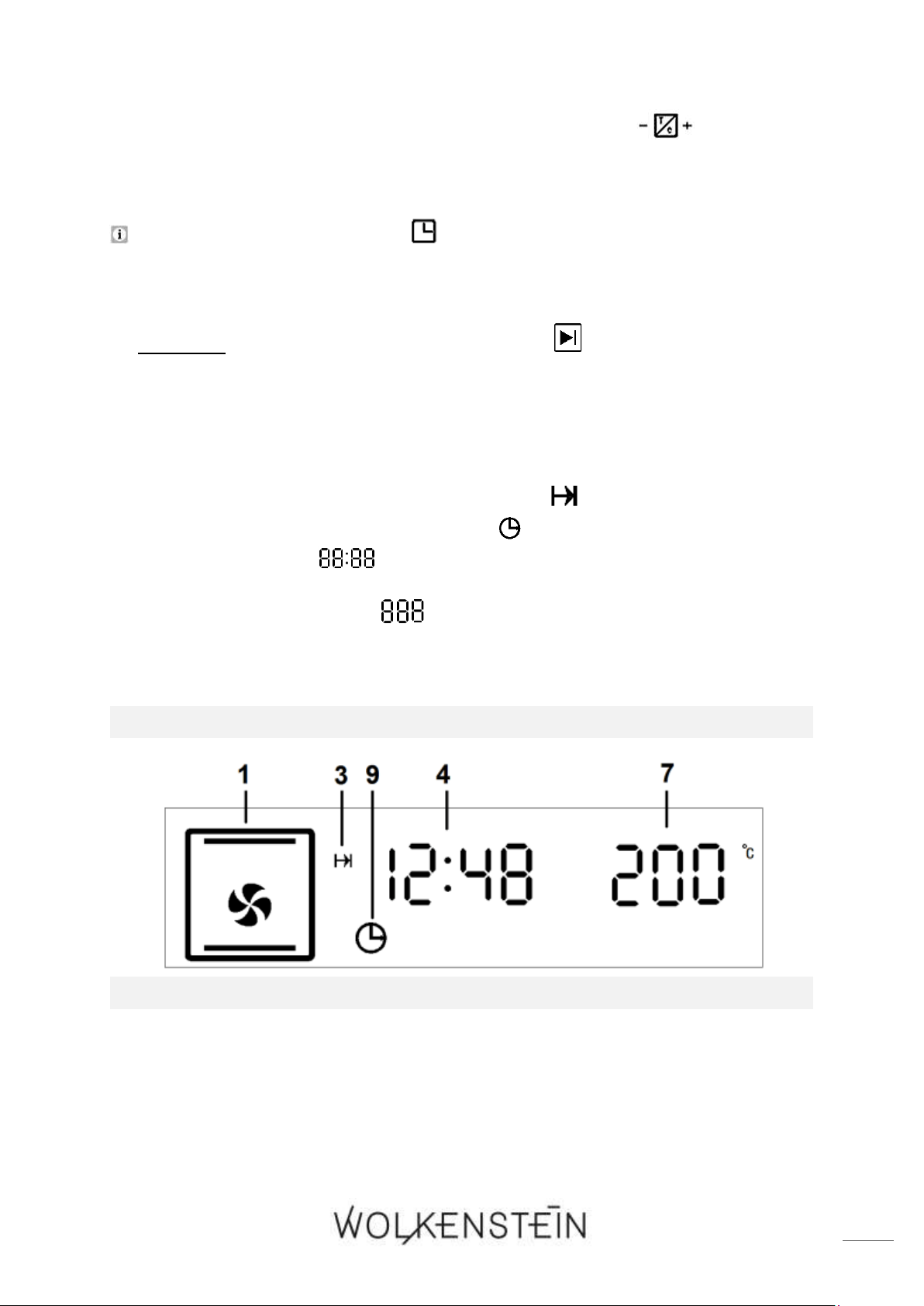
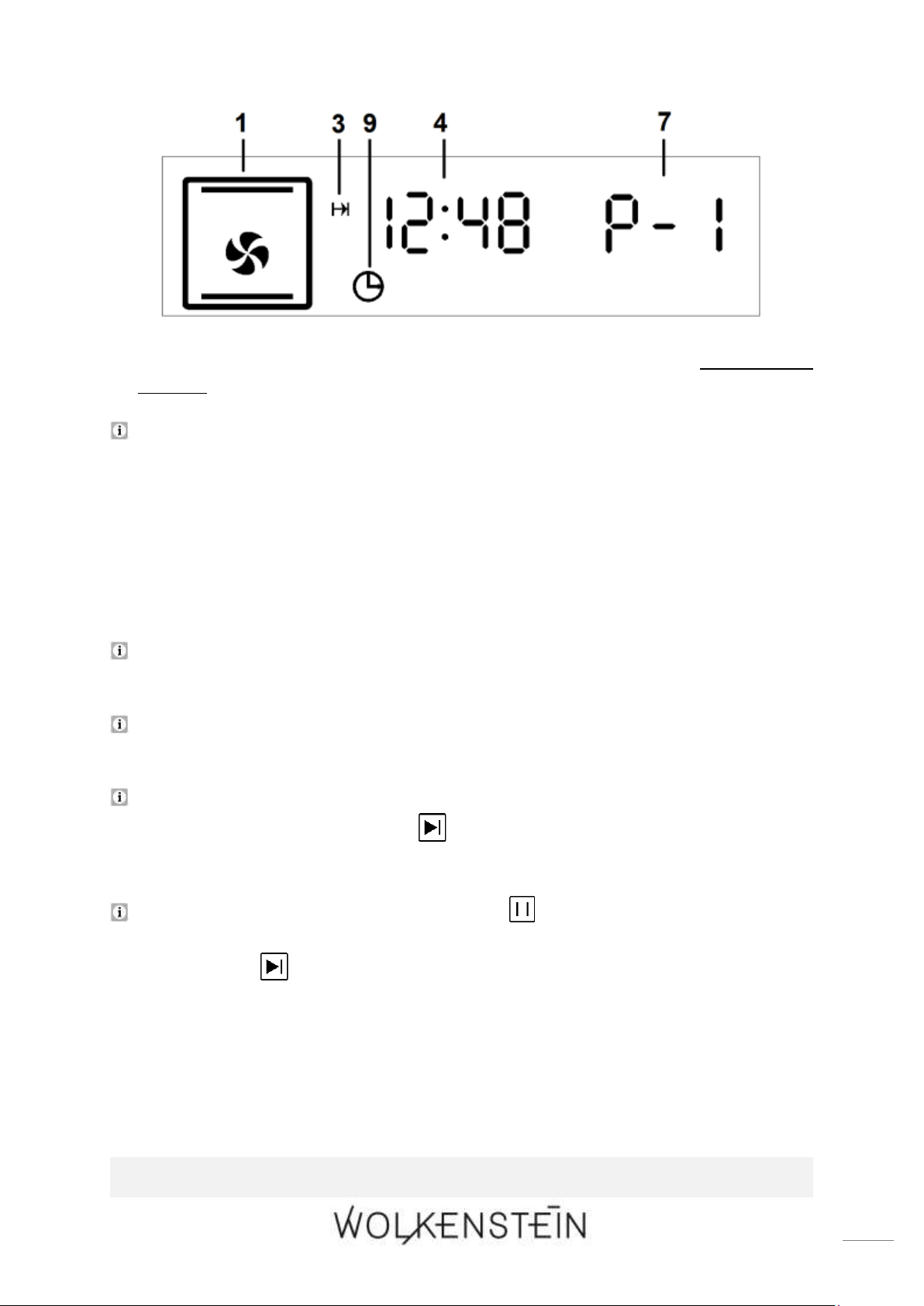
16. Auf dem Display werden folgende Symbole angezeigt (als Beispiel siehe auch
Abb. unten):
a) Die gewählte Backofenfunktion wird angezeigt (1 / s. Abb. unten).
b) Die Anzeige « ENDE DER KOCH-, BACKZEIT » leuchtet (3).
c) Die Anzeige « UHRZEIT / SYSTEMZEIT » leuchtet (9).
d) Die Zeitanzeige « » zeigt die aktuelle Uhrzeit / Systemzeit; (4 / hier
als Beispiel: 12:48 Uhr).
e) Die Temperaturanzeige « » zeigt die voreingestellte oder selbst gewählte
Temperatur (7); falls Sie ein automatisches Programm eingestellt haben, zeigt
die Temperaturanzeige das ausgewählte Programm an (P - 1, P - 2 etc.).
MANUELLE BACKOFENFUNKTION EINGESTELLT:
AUTOMATSCHES PROGRAMM P - 1 EINGESTELLT:
36
17. Der Koch- / Backvorgang (Arbeitsmodus) startet zu der berechneten
Uhrzeit.
Wenn die Temperatur innerhalb des Backofens die eingestellte Temperatur
beinahe erreicht hat, ertönt für 2 Sekunden ein akustisches Signal.
18. Wenn die eingestellte Zeit abgelaufen ist, ertönt 10-mal ein akustisches Signal, der
Backofen wird automatisch abgeschaltet und wechselt in den
STANDBY - MODUS.
19. Der Lüfter des Backofens läuft nach Betriebsende noch einige Zeit weiter, auch
wenn das Gerät selbst ausgeschaltet ist.
Der Lüfter des Backofens schaltet sich automatisch aus, wenn die
Innentemperatur des Backofens 100
0
C unterschreitet.
Falls die Temperatur innerhalb des Backofens 30
0
C unterschreitet, zeigt die
Temperaturanzeige des Displays « LO » an.
Falls Sie keine Temperatur oder keine Koch-, Backzeitdauer einstellen oder nach
dem Einstellen die Taste « START » nicht innerhalb von 10 Sekunden drücken,
wechselt das Gerät automatisch in den STANDBY - MODUS.
Drücken Sie die Taste « PAUSE / LÖSCHEN » einmal, um den Kochvorgang
zu pausieren. Die Anzeige der Temperatur und der Zeit blinken. Drücken Sie die
Taste « START », um den Kochvorgang fortzusetzen.
BEISPIEL:
37
❖ Es ist 8:00 Uhr. Sie möchten Koch- / Backgut für 2 Stunden garen. Um 13:00
Uhr soll die Koch- / Backzeit enden.
❖ Zum Einstellen des Programms gehen Sie bitte wie oben unter « EINSTELLEN
DER AUTOMATISCHEN KOCH- / BACKFUNKTION » beschrieben vor:
1. Stellen Sie die Dauer der Koch- / Backzeit auf 2 Stunden.
2. Stellen Sie das Ende der Koch- / Backzeit ein: 13:00 Uhr.
3. Der berechnete Kochvorgang beginnt um 11:00 Uhr.
4. Um 13:00 Uhr wird der Backofen automatisch abgeschaltet und wechselt in den
STANDBY - MODUS.
4.3.4 Löschen der Programmierungen
LÖSCHEN DES TIMERS (ZEITWÄCHTER)
➢ Wenn Sie Taste « PAUSE / LÖSCHEN » einmal drücken, während Sie den
Timer einstellen, wird die aktuelle Einstellung gelöscht und das Gerat wechselt
in den STANDBY - MODUS.
ODER
➢ Wenn der Timer in Betrieb ist, drücken und halten Sie die Taste « PAUSE /
LÖSCHEN » für einige Sekunden. Die Timer - Funktion wird gelöscht und
das Gerat wechselt in den STANDBY - MODUS.
DAUER DER KOCH- UND BACKZEIT LÖSCHEN:
➢ Wenn Sie nach Beendigung der Einstellungen die Taste « PAUSE / LÖSCHEN »
drücken, bevor Sie die Taste « START » drücken, werden die Einstellungen
gelöscht und das Gerät wechselt in den STANDBY - MODUS.
ODER
➢ Wenn sich der Backofen im Arbeitsmodus befindet, drücken Sie die Taste
« PAUSE / LÖSCHEN » 2-mal (1-mal drücken = Pause / 2-mal drücken =
Löschen), um den Kochvorgang abzubrechen und die Einstellungen zu löschen.
Das Gerät wechselt in den STANDBY - MODUS.
38
LÖSCHEN DER AUTOMATISCHEN KOCH- UND BACKFUNKTION
➢ Wenn Sie nach Beendigung der Einstellungen die Taste « PAUSE / LÖSCHEN »
drücken, bevor Sie die Taste « START » drücken, werden die Einstellungen
gelöscht und das Gerät wechselt in den STANDBY - MODUS.
ODER
➢ Wenn sich der Backofen im Arbeitsmodus befindet, drücken Sie die Taste
« PAUSE / LÖSCHEN » 2-mal (1-mal drücken: Pause / 2-mal drücken:
Löschen), um den Kochvorgang abzubrechen und die Einstellungen zu löschen.
Das Gerät wechselt in den STANDBY - MODUS.
4.4 Reinigungsprogramm: « Hydro Clean »
❖ Das Gerät ist mit einem automatischen Reinigungsprogramm ausgestattet,
welches Ihnen die Reinigung des Backofeninnenraums erleichtert.
REINIGUNGSPROGRAMM: « HYDRO CLEAN » (P - 4)
-REINIGUNG DES BACKOFENS MIT WASSERDAMPF-
Die ZEITDAUER und die TEMPERATUR des Reinigungsprogramms sind
werkseitig voreingestellt und können nicht verändert werden.
1. Der Backofen muss sich im Standby - Modus befinden. Wenn der Backofen
ausgeschaltet ist, drücken Sie eine beliebige Taste oder betätigen Sie den
Drehknopf für die BACKOFENFUNKTIONEN, um das Gerät in den Standby -
Modus zu setzen.
2. Im Standby - Modus zeigt das Display die eingestellte Uhrzeit / Systemzeit an
und die Anzeige « Uhrzeit / Systemzeit » leuchtet.
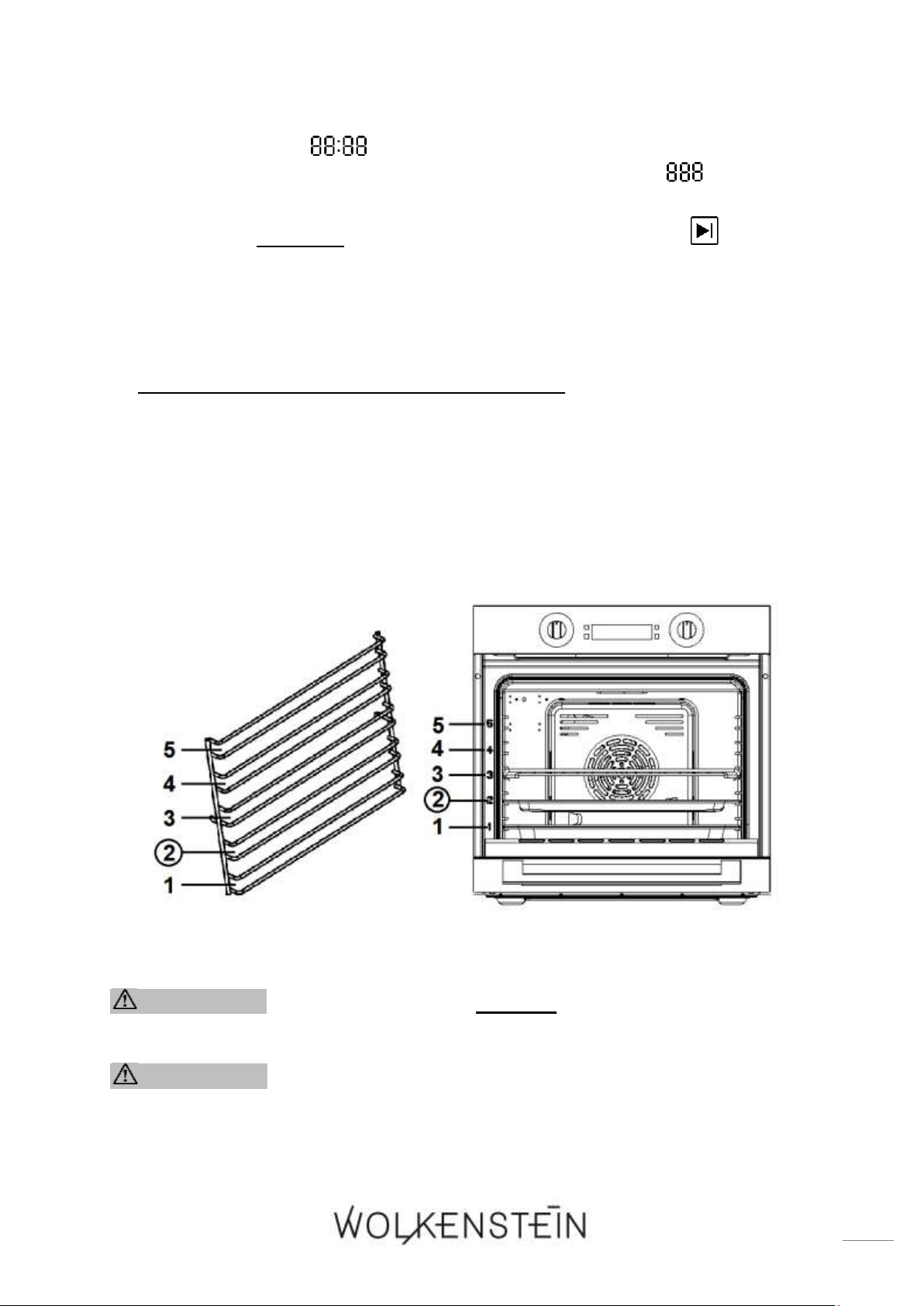
3. Füllen Sie 250 ml Wasser in die Tropfschale oder tiefe Backofenpfanne
6
und
platzieren Sie diese in einer niedrigen Einschubhöhe (zweite Schiene); s. Abb.
unten.
4. Schließen Sie die Backofentür.
5. Drehen Sie den Drehknopf für die BACKOFENFUNKTIONEN « », bis das
Symbol für das Reinigungsprogramm (Funktion 13 / automatisches
Programm P - 4; s. auch Kapitel 4.7) auf dem Display angezeigt wird.
6
Ausstattung abhängig vom Modell
39
6. Die Zeitanzeige « » zeigt die für das Reinigungsprogramm P - 4
voreingestellte Zeitdauer und die Temperaturanzeige « » zeigt das
eingestellte Programm « P - 4 » an.
7. Drücken Sie innerhalb von 10 Sekunden die Taste « START », um den
Reinigungsprogramm zu starten.
8. Der Backofen ist in Betrieb.
9. Wenn die voreingestellte Zeit abgelaufen ist, ertönt 10-mal ein akustisches Signal,
der Backofen wird automatisch abgeschaltet und wechselt in den
STANDBY - MODUS.
10. Nach der Verwendung des Reinigungsprogramms: Lassen Sie den Backofen für
die abschließende Reinigung erst vollständig abkühlen, bevor Sie die
Backofentür öffnen. VERBRENNUNGSGEFAHR! VERLETZUNGSGEFAHR!
11. Öffnen Sie die Backofentür und wischen Sie das Innere des Backofens mit einem
Tuch aus.
12. Falls nötig, reinigen Sie dann das Innere des Backofens zusätzlich noch mit
warmem Wasser und ein wenig Spülmittel.
13. Wischen Sie nach der Reinigung das Innere des Backofens gründlich trocken.
Abb. ähnlich: Modifikationen sind möglich.
WARNUNG! Benutzen Sie niemals einen Dampfreiniger
STROMSCHLAGGEFAHR!
WARNUNG! Nach der Verwendung des Reinigungsprogramms:
Lassen Sie den Backofen für die abschließende Reinigung erst
vollständig abkühlen, bevor Sie die Backofentür öffnen.
VERBRENNUNGSGEFAHR! VERLETZUNGS-GEFAHR!
40
HINWEIS! Benutzen Sie dieses Programm ausschließlich zur Reinigung
des Backofens.
4.5 Kindersicherung
❖ Der Backofen ist mit einer KINDERSICHERUNG ausgestattet.
Sie können das Bedienfeld des Backofens sperren, um diesen gegen
unbeabsichtigte Benutzung als auch gegen die Benutzung durch Kinder zu
sichern.
Die Kindersicherung kann sowohl im STANDBY - MODUS als auch im
ARBEITSMODUS (Backofen in Betrieb) aktiviert werden.
AKTIVIERUNG DER KINDERSICHERUNG
1. Drücken und halten Sie die Tasten « PAUSE / LÖSCHEN » und « START »
gleichzeitig für ca. 3 Sekunden.
2. Es ertönt ein längeres akustisches Signal und die Anzeige der Kindersicherung
« » leuchtet auf.
3. Die Kindersicherung ist aktiviert.
Falls Sie bei aktivierter Kindersicherung Einstellungen am Backofen vornehmen
möchten (z.B. die Programmierung löschen etc.), müssen Sie die
Kindersicherung zuerst deaktivieren (s.u.).
DEAKTIVIERUNG DER KINDERSICHERUNG
1. Drücken und halten Sie die Tasten « PAUSE / LÖSCHEN » und « START »
gleichzeitig für ca. 3 Sekunden.
2. Es ertönt ein längeres akustisches Signal und die Anzeige der Kindersicherung
« » erlischt.
3. Die Kindersicherung ist deaktiviert.
HINWEIS! Wenn die Kindersicherung aktiviert ist, sind alle Tasten und
Drehknöpfe des Bedienfelds außer Funktion gesetzt; außer den Tasten,
die für die Deaktivierung der Kindersicherung nötig sind: +
(gleichzeitig drücken).
41
4.6 Zeitabfragefunktion
ABFRAGE DER UHRZEIT / SYSTEMZEIT
1. Der Backofen ist in Betrieb.
2. Auf dem Display wird die Koch-, Backzeit angezeigt.
3. Um die aktuelle Uhrzeit / Systemzeit auf dem Display anzuzeigen, drücken Sie
die Taste « ZEIT » einmal.
4. Die Zeitanzeige des Displays zeigt nun die aktuelle Uhrzeit / Systemzeit an.
5. Nach 10 Sekunden zeigt das Display automatisch wieder die Koch-, Backzeit an.
Sie können aber auch die Taste « ZEIT » noch einmal drücken, um zu der
Anzeige der Koch-, Backzeit zurückzukehren.
ABFRAGE DER VERBLEIBENDEN COUNTDOWN-ZEIT DES TIMERS, DER
AUTOMATISCHER KOCH-, BACKFUNKTION ETC.
1. Die Zeitanzeige des Displays zeigt die Uhrzeit / Systemzeit an.
2. Um die eingestellte verbleibende Countdown-Zeit auf dem Display anzuzeigen,
drücken Sie die Taste « TIMER / PARAMETER » einmal.
3. Die Zeitanzeige des Displays zeigt nun die verbleibende Countdown-Zeit an.
4. Nach 10 Sekunden zeigt das Display automatisch wieder die Uhrzeit / Systemzeit
an.
Wenn die verbleibende Countdown-Zeit weniger als 1 Minute beträgt, zeigt das
Display « 0:00 » an.
ABFRAGE DER STARTZEIT DES KOCHVORGANGS BEI EINGESTELLTER
AUTOMATISCHER KOCH-, BACKFUNKTION
1. Die automatsche Koch-, Backfunktion ist eingestellt.
2. Auf dem Display wird die aktuelle Uhrzeit / Systemzeit angezeigt.
3. Um die Startzeit des Kochvorgangs auf dem Display anzuzeigen, drücken Sie
die Taste « ZEIT ».
4. Die Zeitanzeige des Displays zeigt nun die Startzeit des Kochvorgangs an
5. Nach 10 Sekunden zeigt die Zeitanzeige des Displays automatisch wieder die
aktuelle Uhrzeit / Systemzeit an. Sie können aber auch die Taste « ZEIT »
noch einmal drücken, um zu der Anzeige der Uhrzeit / Systemzeit
zurückzukehren.
42
4.7 Backofenfunktionen und automatische Programme (P)
FUNKTION
SYMBOL
BESCHREIBUNG
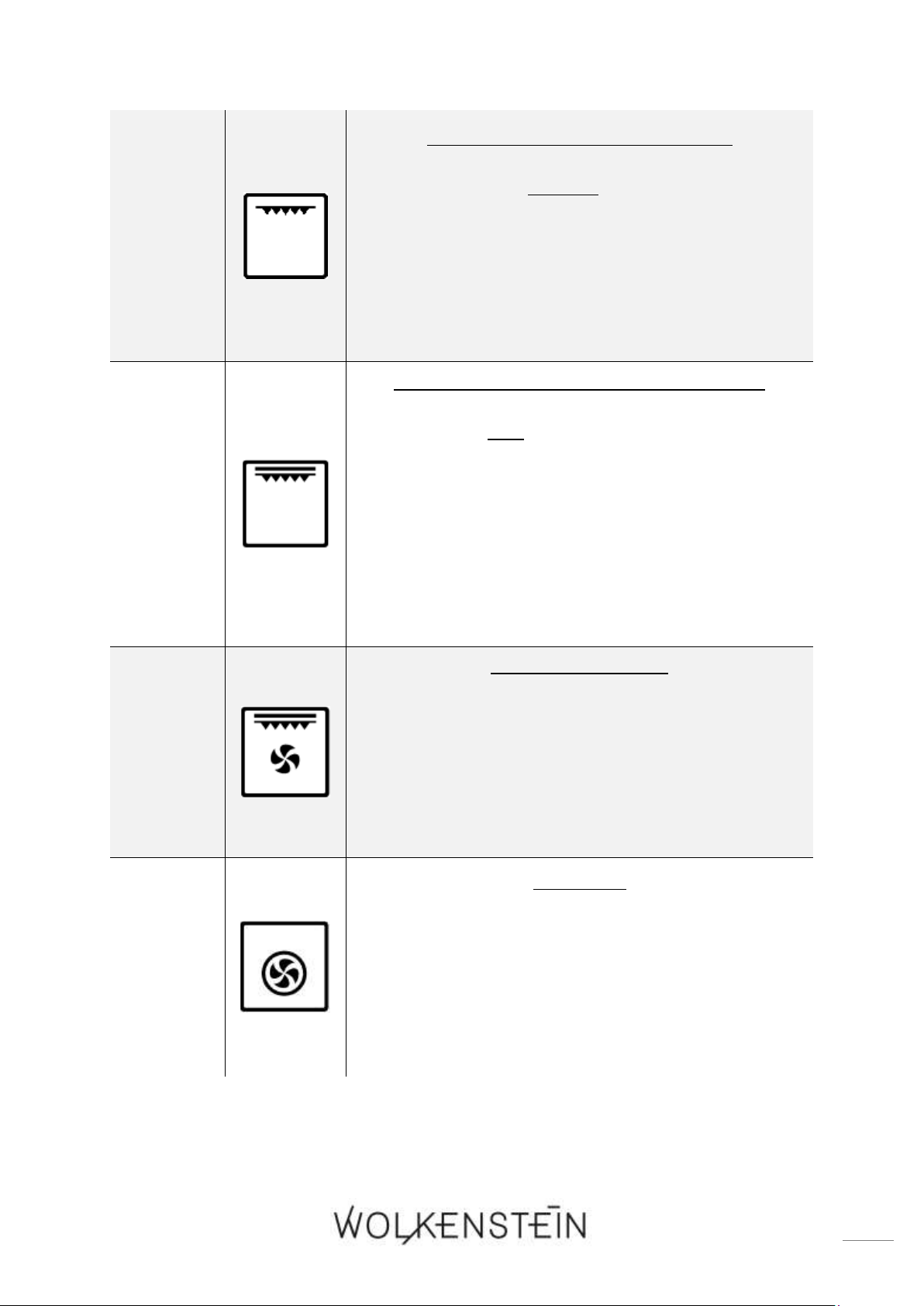
1
UNTERHITZE (MIT UMLUFT)
➢ Beheizt den Backofen nur mit der Unterhitze, z.B.
zum abschließenden Backen von unten (Pizza etc.).
➢ Aufgrund der Umluft zirkuliert die Hitze und sorgt
so für ein gleichmäßiges Koch- / Backergebnis.
➢ Diese Funktion eignet sich ebenfalls zum
Sterilisieren und Konservieren von
Einweckgläsern.
2
OBERHITZE UND UNTERHITZE
➢ Bei dieser Einstellung wird der Backofen
konventionell beheizt.
➢ Vor einem Koch- / Backvorgang sollte der
Backofen vorgeheizt werden.
➢ Geeignet um auf einer Ebene zu Backen /
Kochen.
3
OBERHITZE UND UNTERHITZE (MIT UMLUFT)
➢ Bei dieser Einstellung wird der Backofen mit
Umluft von oben und unten beheizt.
➢ Aufgrund der Umluft zirkuliert die Hitze und sorgt
so für ein gleichmäßiges Koch- / Backergebnis.
43
4
GRILL (INNERES GRILLELEMENT)
➢ Schaltet nur den inneren Teil des Grillelements
ein.
➢ Die Hitze wird direkt auf die Speisen abgegeben,
die sich unter dem Grillelement befinden.
➢ Das innere Grillelement ist geeignet zum Grillen
von kleinen Portionen; z.B. von Speck, Toast,
kleineren Fleisch-, Fischportionen etc.
5
GRILL (VOLLSTÄNDIGES GRILLELEMENT)
➢ Der innere und äußere Teil des Grillelements
arbeiten gleichzeitig.
➢ Die Hitze wird direkt auf die Speisen abgegeben,
die sich unter dem Grillelement befinden.
➢ Das Grillen mit vollständigem Grillelement erlaubt
höhere Temperaturen im oberen Garbereich,
intensiviert das Bräunen und erlaubt das
Zubereiten größerer Portionen; z.B. von
Würstchen, Steaks, Fisch etc.
6
GRILL MIT UMLUFT
➢ Der Grill und die Umluft arbeiten gleichzeitig.
➢ Beschleunigt das Grillen und verbessert den
Geschmack des Grillguts.
➢ Geeignet zum schnellen Bräunen von Speisen.
➢ Erhält die Saftigkeit des Grillguts, z.B. von Steaks,
Hamburgern etc.
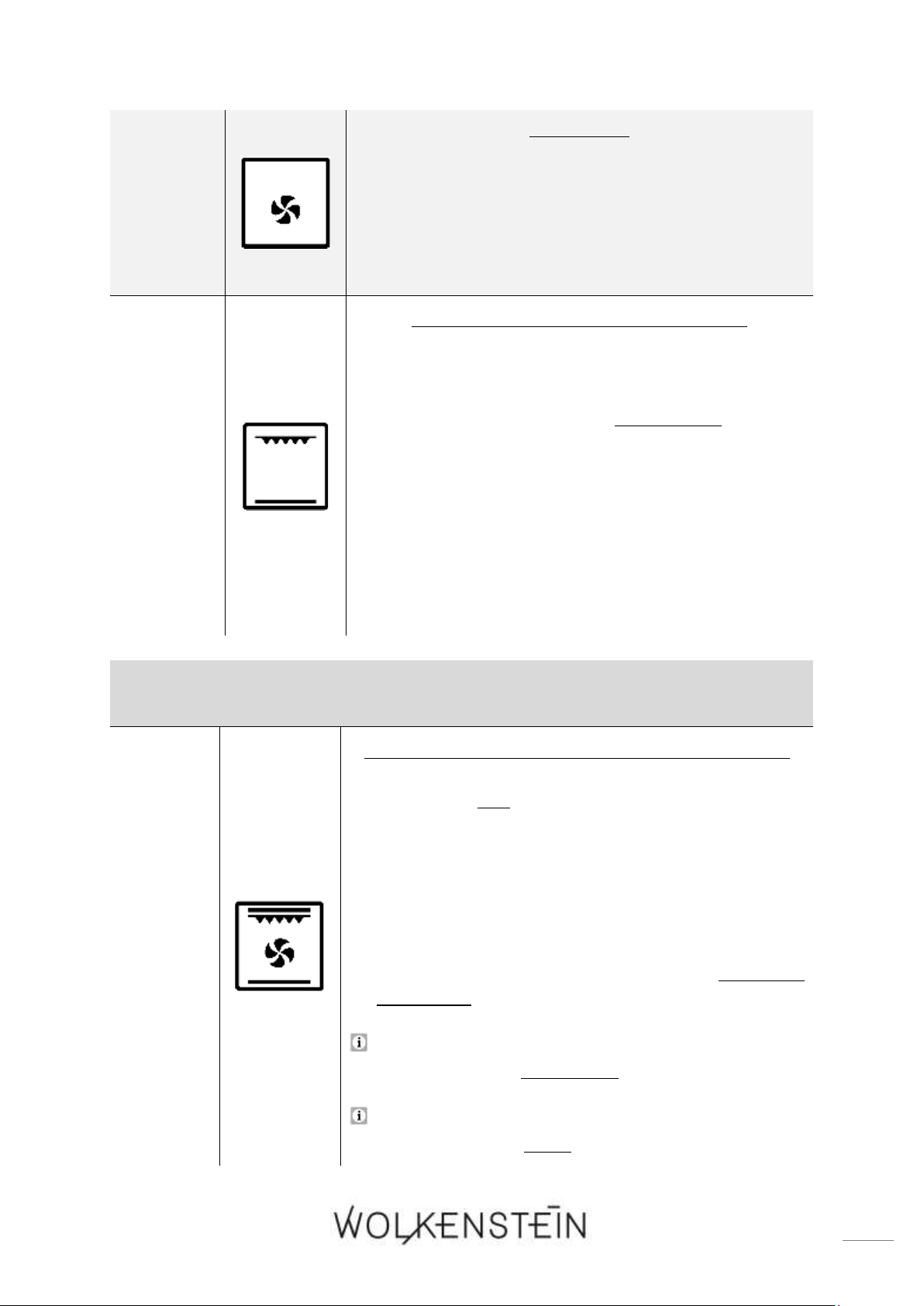
7
HEIßLUFT
➢ Der Ventilator ist mit einem Heizelement
umgeben; somit wird die Heißluft gleichmäßig in
der Backröhre verteilt und erlaubt einen
schnelleren Garprozess.
➢ Hiermit können Sie z.B. auf zwei Ebenen
gleichzeitig Backen / Kochen.
44
8
AUFTAUEN
➢ Die Umluft läuft ohne Wärmeeinstellung.
➢ Reduziert die Auftauzeit von gefrorenen
Lebensmitteln.
➢ Auftauzeit: Abhängig von Zimmertemperatur
sowie Menge und Art der Lebensmittel.
9
ECO
ENERGIESPARENDE GRILLFUNKTION
➢ Der innere Teil des Grillelements und die
Unterhitze arbeiten gleichzeitig.
➢ Der Backofen arbeitet abwechselnd für 20
Sekunden und pausiert dann für 30 Sekunden etc.
➢ Die Backofentemperatur steigt langsam an und die
Hitze kann so vollständig in das Koch- / Grillgut
eindringen. So wird die überschüssige Hitze
reduziert und das Grillen dadurch
energiesparender.
➢ Diese Funktion eignet sich hauptsächlich für die
Zubereitung großer Portionen.
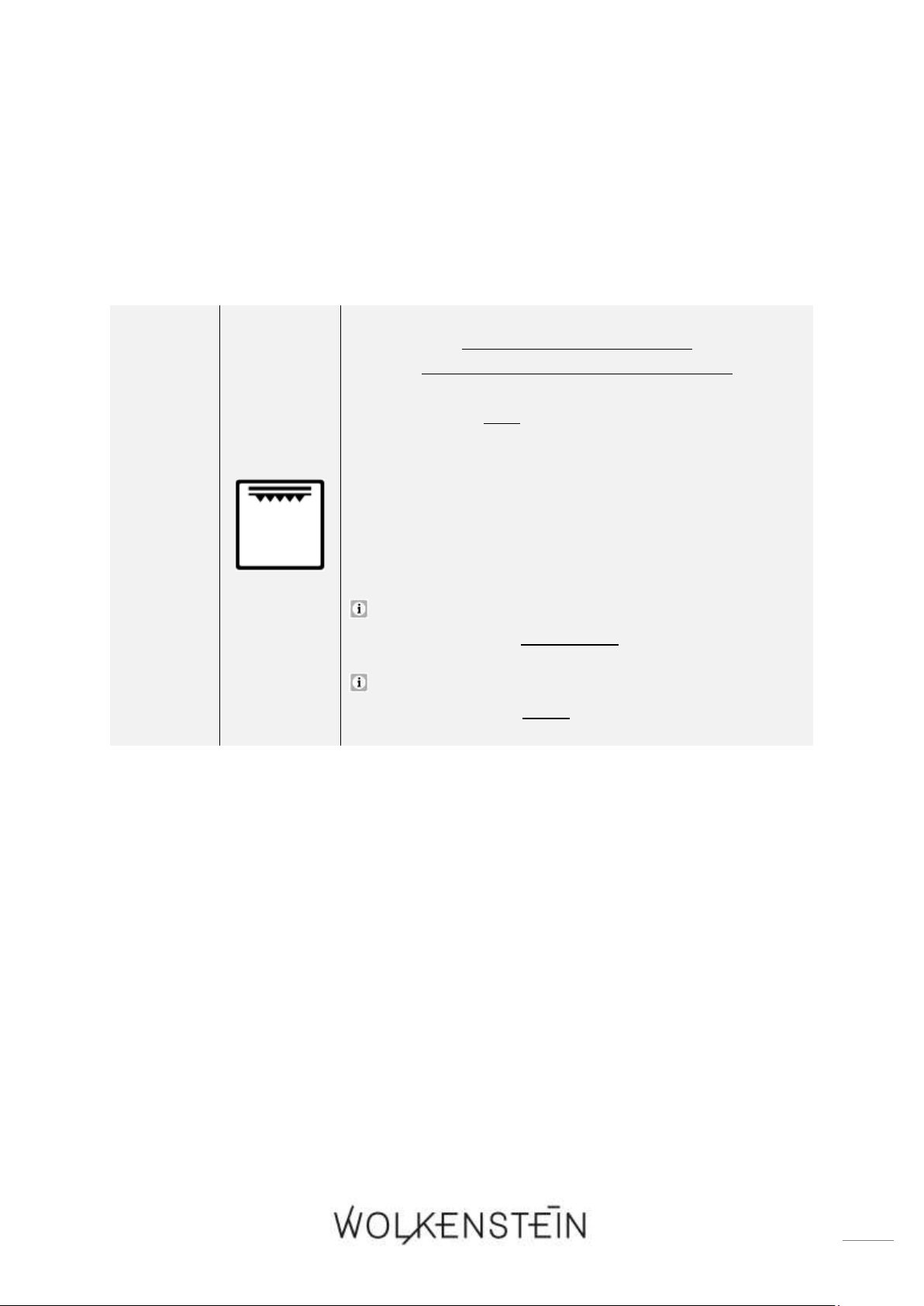
AUTOMATISCHE PROGRAMME:
10
P - 1
PROGRAMM P - 1 = « SCHNELLES VORHEIZEN »
➢ Der innere und äußere Teil des Grillelements, die
Unterhitze und die Umluft arbeiten gleichzeitig,
um eine abwechselnde Wärmezirkulation zu
erhalten.
➢ Aufgrund der zusätzlich aktivierten Umluft
zirkuliert die Hitze und sorgt so für ein
gleichmäßige Wärmeverteilung.
➢ Diese Funktion eignet sich zum schnellen
Vorheizen des Backofens.
Die werkseitig voreingestellte DAUER DER
GRILLZEIT kann individuell verändert werden.
Die werkseitig voreinstellte TEMPERATUR beträgt
200
0
C und kann nicht verändert werden.
45
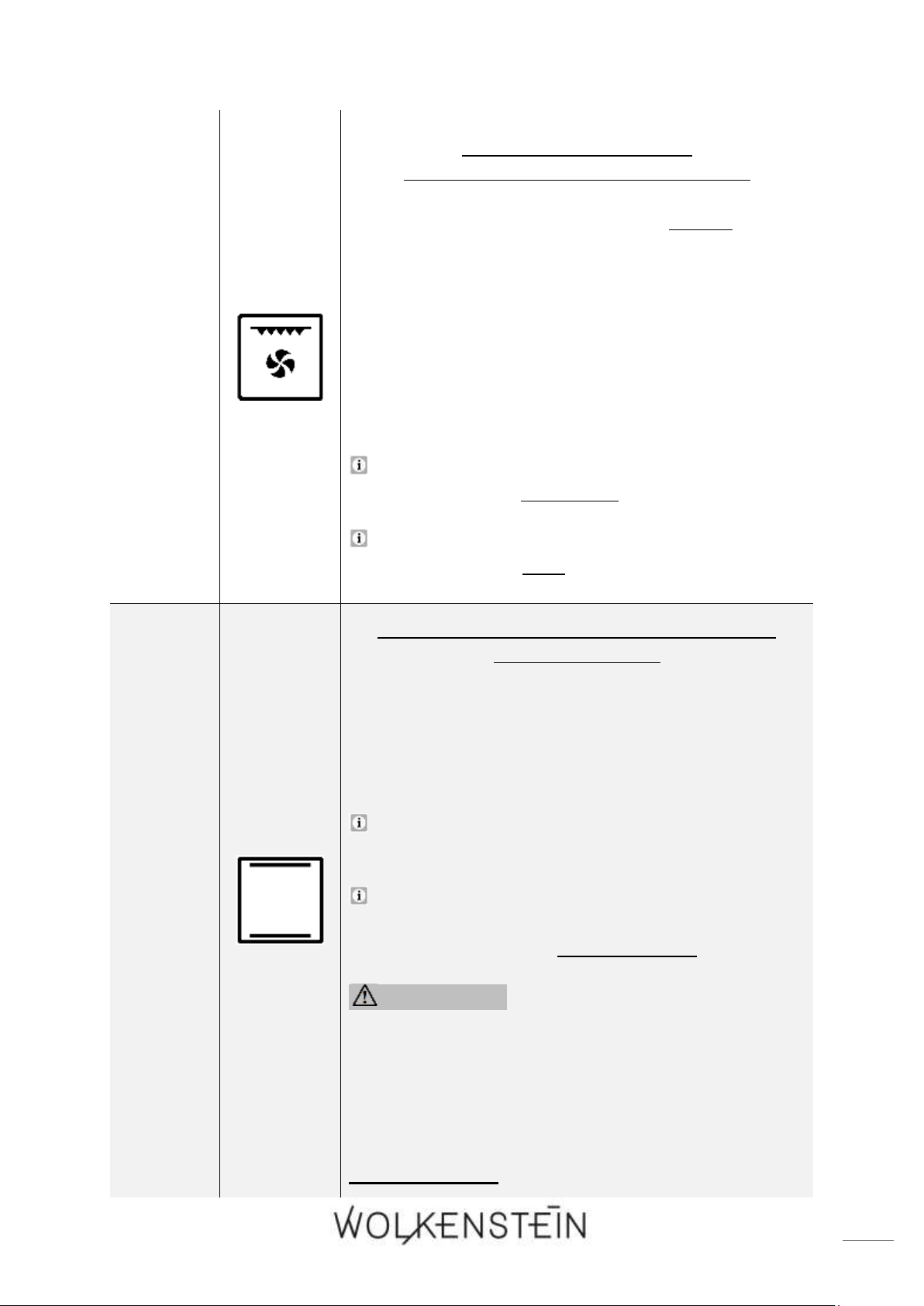
11
P - 2
PROGRAMM P - 2 = GRILL
(VOLLSTÄNDIGES GRILLELEMENT)
➢ Der innere und äußere Teil des Grillelements
arbeiten gleichzeitig.
➢ Die Hitze wird direkt auf die Speisen abgegeben,
die sich unter dem Grillelement befinden.
➢ Dieses Programm intensiviert das Bräunen und
erlaubt das Zubereiten größerer Portionen; z.B. von
Würstchen, Steaks, Fisch etc.
Die werkseitig voreingestellte DAUER DER
GRILLZEIT kann individuell verändert werden.
Die werkseitig voreinstellte TEMPERATUR beträgt
160
0
C und kann nicht verändert werden.
46
12
P - 3
PROGRAMM P - 3 = GRILL
(INNERES GRILLELEMENT) + UMLUFT
➢ Das Programm P - 3 schaltet den inneren Teil des
Grillelements und die Umluft ein.
➢ Die Hitze wird direkt auf die Speisen abgegeben,
die sich unter dem Grillelement befinden.
➢ Die Umluft sorgt für eine gleichmäßigeres
Grillergebnis.
➢ Dieses Programm ist geeignet zum Grillen von
kleinen Portionen; z.B. von Speck, Toast, kleineren
Fleisch-, Fischportionen etc.
Die werkseitig voreingestellte DAUER DER
GRILLZEIT kann individuell verändert werden.
Die werkseitig voreinstellte TEMPERATUR beträgt
180
0
C und kann nicht verändert werden.
13
P - 4
PROGRAMM P - 4 = REINIGUNGSPROGRAMM:
« HYDRO CLEAN »
❖ Das « HYDRO CLEAN » Reinigungsprogramm
erleichtert die Reinigung des Backofeninnenraums;
Beschreibung der Anwendung: siehe Kapitel 4.4
REINIGUNGS-PROGRAMM.
Die werkseitig voreinstellte TEMPERATUR beträgt
120
0
C.
Die werkseitig voreingestellte ZEITDAUER und
voreingestellte TEMPERATUR des Reinigungs-
programms können nicht verändert werden.
WARNUNG! Nach der Verwendung des
Reinigungsprogramms: Lassen Sie den
Backofen für die abschließende Reinigung erst
vollständig abkühlen, bevor Sie die
Backofentür öffnen.
HINWEIS! Benutzen Sie dieses Programm
ausschließlich zur Reinigung des Backofens.

47
5. Umweltschutz
ENERGIE SPAREN:
❖ Öffnen Sie die Backofentür nicht unnötig oft.
❖ Schalten Sie den Backofen rechtzeitig ab und nutzen Sie die Restwärme.
❖ Benutzen Sie den Backofen nur zur Zubereitung größerer Mengen.
❖ Fleisch mit einem Gewicht von unter 1 kg kann in einem Kochgeschirr auf dem
Kochfeld wirtschaftlicher zubereitet werden.
❖ Nutzen Sie die Restwärme des Backofens.
❖ Falls die Garzeit mehr als 40 Minuten beträgt, schalten Sie den Backofen 10
Minuten vor Ende der Garzeit ab.
❖ Zum Backen ist es besser, schwarze Bleche zu verwenden, welche die Hitze
besser leiten und die Backzeit verkürzen.
❖ Achten Sie darauf, dass die Ofentür richtig geschlossen ist.
❖ Aufgrund von Verunreinigungen an der Türdichtung kann dort Wärme
entweichen. Entfernen Sie deshalb umgehend alle Verunreinigungen.
❖ Schließen Sie das Gerät nicht in der unmittelbaren Umgebung von Kühl-
und/oder Gefriergeräten an. Andernfalls kann der Energieverbrauch unnötig
ansteigen.
6. Hinweise für das Backen, Braten und Grillen im Backofen
WARNUNG! Lassen Sie beim Braten und Frittieren äußerste Vorsicht
walten, da Öle und Fette sehr schnell erhitzen; besonders bei einer hohen
Einstellung der Leistungsstärke. Extrem heiße Öle und Fette entzünden
sich spontan und stellen somit eine ernsthafte Brandgefahr dar.
WARNUNG! Versuchen Sie NIEMALS, ein durch Öl oder Fett
unterstütztes Feuer mit Wasser zu löschen. Stattdessen schalten Sie das
Gerät ab und ersticken Sie das Feuer mittels eines Deckels oder einer
Feuerdecke.
VORSICHT! Die inneren Bestandteile des Backofens werden sehr
heiß. Berühren Sie keine dieser Bereiche, während Sie mit Ihrem
Kochgeschirr umgehen. VERBRENNUNGSGEFAHR!

48
VORSICHT! Seien Sie vorsichtig, wenn Sie die Backofentür öffnen.
Kommen Sie nicht in Kontakt mit den heißen Bereichen oder mit dem
Dampf, der aus dem geöffneten Backofen entweicht.
VERBRENNUNGSGEFAHR! VERBRÜHUNGSGEFAHR!
VORSICHT! Kochutensilien können aufgrund der durch die
Lebensmittel weitergeleitete Hitze heiß werden. Verwenden Sie immer
Topflappen oder Backofenhandschuhe zum Umgang mit Ihrem
Essgeschirr / Kochgeschirr.
6.1 Hinweise für das Backen und Braten
❖ Wir empfehlen die Nutzung des Backblechs, das mit dem Herd geliefert wurde.
❖ Es ist auch möglich, in Kuchenformen und auf Blechen zu backen, die an anderer
Stelle gekauft wurden. Zum Backen ist es besser, schwarze Bleche zu
verwenden, welche die Hitze besser leiten und die Backzeit verkürzen.
❖ Formen und Bleche mit hellen oder glänzenden Oberflächen werden nicht
empfohlen, wenn die konventionelle Aufheizmethode (obere und untere
Heizelemente) angewandt wird; die Nutzung solcher Formen kann zu einer zu
geringen Aufheizung des unteren Teils des Kuchens führen.
❖ Bevor der Kuchen aus dem Backofen herausgenommen wird, kontrollieren Sie,
ob das Backen abgeschlossen ist, indem Sie ein Holzstäbchen verwenden (der
Kuchen ist ausgebacken, wenn das Stäbchen trocken und sauber herauskommt,
nachdem Sie es in den Kuchen gesteckt haben).
❖ Nach dem Abschalten des Ofens ist es ratsam, den Kuchen für ungefähr 5
Minuten im Backofen zu lassen.
❖ Bereiten Sie Fleisch mit einem Gewicht von über 1 kg im Backofen zu; kleinere
Mengen sollten Sie auf einem Kochfeld zubereiten.
❖ Benutzen Sie backofengeeignetes Kochgeschirr. Achten Sie darauf, dass auch die
Griffe hitzeresistent sind.
❖ Wenn Sie Ihr Fleisch auf einem Gitterrost oder Grillrost zubereiten, schieben Sie
ein mit etwas Wasser gefülltes Backblech auf die niedrigste Einschubhöhe in den
Backofen.
❖ Wenden Sie während der Garzeit das Fleisch mindestens einmal. Übergießen Sie
das Fleisch mit seinem Bratensaft oder heißem Salzwasser.
❖ Gießen Sie niemals kaltes Wasser über das Fleisch.
6.2 Hinweise für das Grillen
1. Drehen Sie den Funktionswahlschalter, bis die gewünschte Grillfunktion auf dem
Display angezeigt wird.
2. Heizen Sie den Backofen für ca. 4 Minuten vor.

49
3. Geben Sie die zu grillenden Speisen in einer entsprechenden Höhe in das Gerät.
Wenn Sie auf dem Rost grillen, schieben Sie ein Blech darunter, um das
abtropfende Fett aufzufangen und den Backofen sauber zu halten.
4. Halten Sie die Ofentür beim Grillen immer geschlossen.
5. Wenden Sie das Grillgut nach der Hälfte der Garzeit.
6. Reiben Sie Fisch oder Fleisch vor dem Grillen mit ein wenig Öl ein.
HINWEIS! Verwenden Sie keine Aluminiumfolie beim Grillen, weder
zum Einwickeln des Grillguts noch zum Abdecken des Rostes oder des
Abtropfblechs. Die Aluminiumfolie reflektiert die Hitze der Grillelemente,
wodurch das Gerät beschädigt werden kann.
HINWEIS! Setzen Sie beim Grillen die Tropfschale (Backofenpfanne)
oder das Backblech (tiefe Backofenpfanne) nicht in die oberen Ebenen 4
und 5
7
des Backofens ein. Die intensive Hitze in den oberen Ebenen des
Backofens kann das Material des Zubehörs so verziehen, dass der
Backofenraum beim Herausnehmen der Tropfschale / Backblech
beschädigt werden kann. BESCHÄDIGUNGSGEFAHR!
7. Reinigung und Pflege
WARNUNG! Schalten Sie das Gerät vor dem Reinigen unbedingt aus
und lassen Sie es vollständig abkühlen. Trennen Sie das Gerät vor allen
Wartungsarbeiten von der Stromversorgung (entsprechende Sicherung im
Sicherungskasten der Hausstromversorgung ausschalten)!
WARNUNG! Benutzen Sie kein Dampfreinigungsgerät. Der Dampf
kann in Kontakt mit elektrischen Teilen kommen und so einen Kurzschluss
auslösen. STROMSCHLAGGEFAHR!
REINIGUNGSMITTEL
➢ Benutzen Sie keine Scheuermittel!
➢ Benutzen Sie keine organischen Reinigungsmittel!
8
➢ Benutzen Sie keine ätherischen Öle!
➢ Benutzen Sie niemals Lösungsmittel.
7
Ausstattung abhängig vom Modell
8
Z.B. Essig, Zitronensäure etc.

50
7.1 Reinigung des Backofens
1. Reinigen Sie den Backofen nach jeder Benutzung.
2. Reinigen Sie das Innere des Backofens nur mit warmem Wasser und ein wenig
Spülmittel. Nehmen Sie dazu einen Schwamm oder ein weiches Tuch. Benutzen
Sie niemals aggressive und ätzende Reinigungsmittel.
3. Wischen Sie nach der Reinigung das Innere des Backofens trocken.
4. Reinigen Sie die äußeren Bereiche des Backofens mit warmem Seifenwasser.
Nehmen Sie dazu einen Schwamm oder ein weiches Tuch. Benutzen Sie niemals
aggressive und ätzende Reinigungsmittel.
Zur Reinigung des Backofeninnenraums können Sie auch das
« HYDRO CLEAN » Reinigungsprogramm verwenden; s. Kapitel 4.4 REINIGUNGS-
PROGRAMM: « HYDRO CLEAN ».
WARNUNG! Benutzen Sie niemals einen Dampfreiniger
STROMSCHLAGGEFAHR!
HINWEIS! Wenn Sie einen speziellen Backofenreiniger anwenden,
überprüfen Sie unbedingt anhand der Angaben des Reinigungs-
herstellers, ob der Reiniger für Ihr Gerät geeignet ist.
HINWEIS! Alle durch ein Reinigungsmittel an Ihrem Gerät
verursachten Schäden werden nicht kostenfrei behoben, auch nicht
innerhalb des Garantierahmens.
7.2 Reinigung der Backofentür
➢ Reinigen Sie die Glasscheibe der Backofentür äußerst vorsichtig.
➢ Verwenden Sie keine Scheuermittel, da Sie ansonsten die Scheibe zerkratzen oder
zerbrechen können.
➢ Verwenden Sie etwas Spülmittel und warmes Wasser.
7.3 Austausch des Leuchtmittels
WARNUNG! Schalten Sie das Gerät unbedingt aus und lassen Sie es
vollständig abkühlen. Trennen Sie das Gerät vor allen Wartungsarbeiten
von der Stromversorgung (entsprechende Sicherung im
Sicherungskasten der Hausstromversorgung ausschalten)!
STROMSCHLAGGEFAHR!

51
HINWEIS! Benutzen Sie immer ein sauberes Tuch oder Handschuhe beim
Wiedereinsetzen des Leuchtmittels. Berühren Sie das neue Leuchtmittel
niemals mit bloßen Händen.
HINWEIS! Benutzen Sie niemals einen Schraubendreher, um die
Abdeckung zu entfernen. Entfernen Sie die Abdeckung nur von Hand.
BESCHÄDIGUNGSGEFAHR!
1. Trennen Sie das Gerät von der Stromversorgung: Schalten Sie die
entsprechende Sicherung im Sicherungskasten Ihrer Hausstrom-
versorgung aus!
2. Legen Sie ein Geschirrtuch in den Innenraum des kalten Backofens, um ihn vor
eventuellen Beschädigungen zu schützen.
3. Schrauben Sie die Leuchtmittelabdeckung entgegen des Uhrzeigersinns ab.
Reinigen Sie die Abdeckung und wischen Sie diese gründlich trocken.
4. Entfernen Sie das Leuchtmittel aus der Fassung und ersetzen Sie dieses durch ein
neues Hochtemperatur-Leuchtmittel (300
0
C) mit den folgenden Eigenschaften:
➢ Volt 230 V
➢ Leistung 25 W
➢ Gewinde G9
5. Benutzen Sie keinen anderen Leuchtmittel-Typ.
6. Setzen Sie das neue Leuchtmittel ein und überprüfen Sie sorgfältig, ob dieses sich
ordnungsgemäß in seinem Sockel befindet.
7. Schrauben Sie die Lampenabdeckung wieder an.
8. Entfernen Sie das Geschirrtuch und schalten Sie die entsprechende Sicherung im
Sicherungskasten der Hausstromversorgung wieder an.
Gemäß der EU Verordnung (EG) Nr. 244/2009 gilt Ihr Gerät im Rahmen der
umweltgerechten Gestaltung von Haushaltslampen mit ungebündeltem Licht als
Hausgerät. Das bedeutet, dass alle in einem Hausgerät verwendeten Leuchtmittel
nicht zur Raumbeleuchtung verwendet werden dürfen.
7.4 Entnahme der Backofentür
ENTNAHME DER BACKOFENTÜR
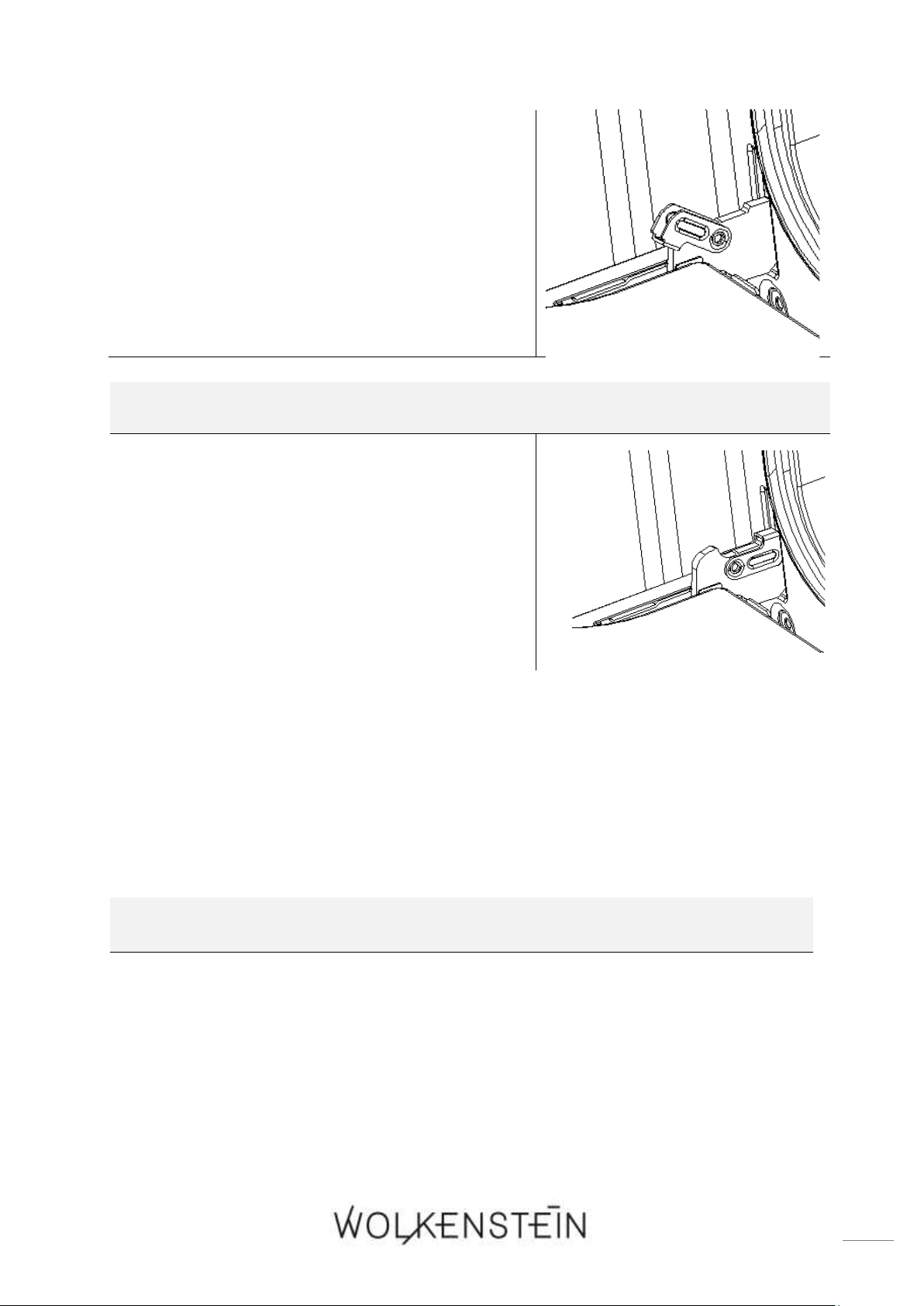
52
1. Öffnen Sie die Backofentür und drücken Sie
die Sicherungsbügel der beiden Scharniere
nach oben (s. Abb. rechts).
2. Schließen Sie die Tür nur leicht.
3. Heben Sie die Tür an und ziehen Sie diese
vorsichtig in Ihre Richtung heraus.
EINSETZEN DER BACKOFENTÜR
1. Um die Tür wieder zu installieren, verfahren
Sie in umgekehrter Reihenfolge (s. oben).
2. Vergewissern Sie sich bei der Montage, dass
die Kerbe des Scharnierhalters sicher in der
Führung sitzt.
3. Nachdem die Tür wieder in den Backofen
eingepasst ist, schließen Sie wieder vorsichtig
die Sicherheitsbügel (s. Abb. rechts).
4. Falls der Sicherheitsbügel nicht ordnungsgemäß geschlossen ist, wird
das Scharnier beim Schließen der Tür beschädigt.
7.5 Entnahme der Glasscheibe der Backofentür
ENTNAHME DER GLASSCHEIBE
1. Entnehmen Sie die Backofentür (s. Kapitel 7.4) und legen Sie sie auf ein Stück
Stoff, um das Glas vor Kratzern etc. zu schützen.
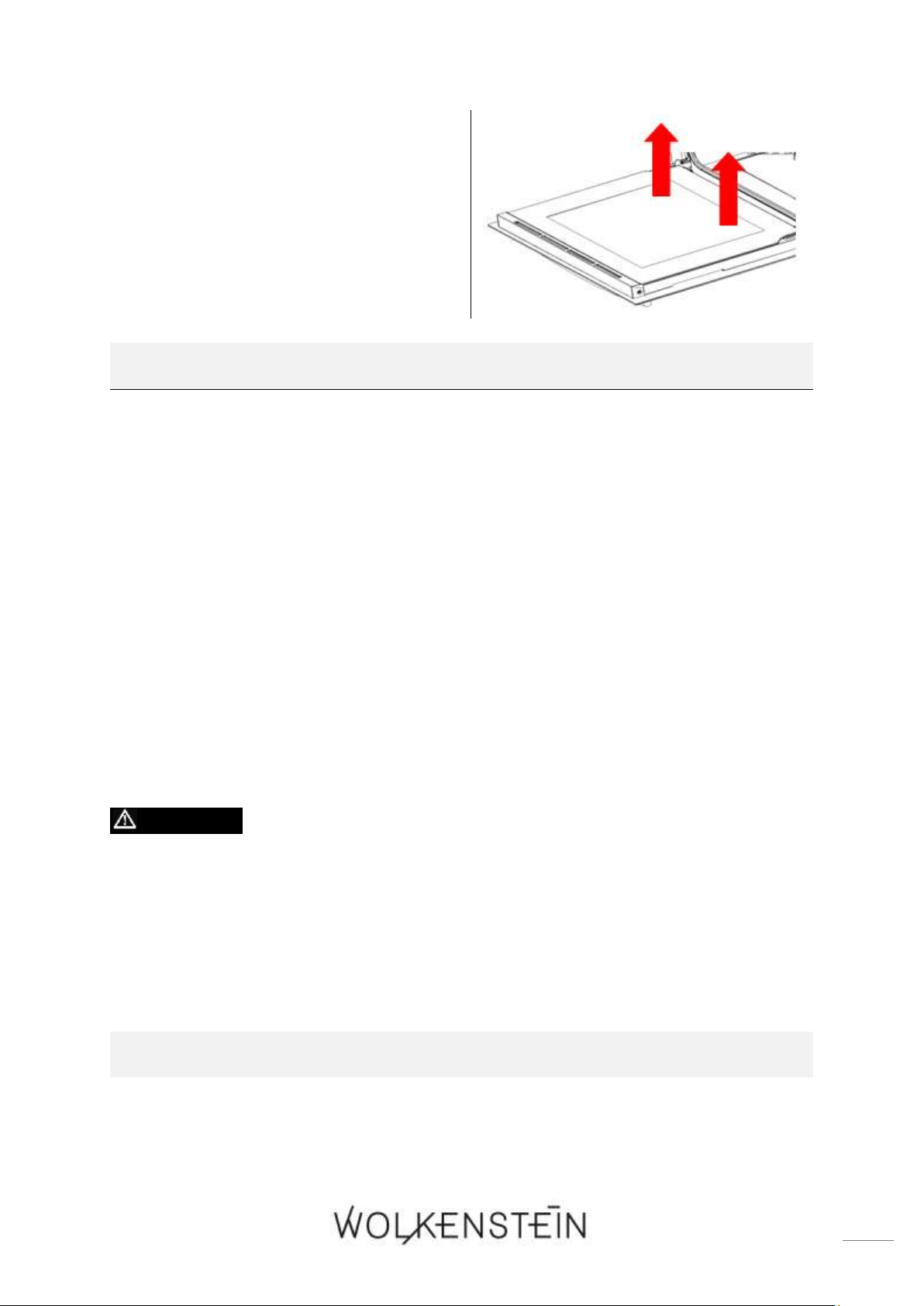
53
2. Drücken Sie mit einer Hand auf die
äußere Glasscheibe und ziehen Sie mit
der anderen Hand an der inneren
Glasscheibe. Halten Sie die
Glasscheibe fest und ziehen Sie sie
dann vorsichtig heraus (s. Abb.
rechts).
EINSETZEN DER GLASSCHEIBE
1. Setzen Sie die innere Glasscheibe in die zugehörige Rillennut ein.
2. Richten Sie beide Seiten der Glasscheibe ordnungsgemäß an ihren
Einsteckschlitzen aus und drücken Sie die Glasscheibe vorsichtig an ihren
Platz.
7.6 Entnahme des Seitenracks
1. Drücken Sie am unteren Ende das Seitenrack leicht nach unten, bis es sich von
der Befestigung löst.
2. Ziehen Sie das Seitenrack leicht nach vorne.
3. Halten Sie das Seitenrack waagerecht zum Backofen um es zu entnehmen.
4. Zum Befestigen gehen Sie bitte in umgekehrter Reihenfolge vor.
7.7 Problembehandlung
GEFAHR! Versuchen Sie niemals selbst, das Gerät zu reparieren.
Reparaturen, die von dazu nicht qualifizierten Personen durchgeführt
werden, können zu ernsthaften Verletzungen und Schäden führen. Falls
Ihr Gerät nicht ordnungsgemäß funktioniert, kontaktieren Sie den
Kundendienst
REGELMÄßIGE KONTROLLEN
1. Kontrollieren Sie regelmäßig die Kontrollelemente und Kocheinheiten des
Gerätes. Lassen Sie nach Ablauf der Garantie das Gerät mindestens einmal alle
zwei Jahre durch ein Kundendienst-Center inspizieren.
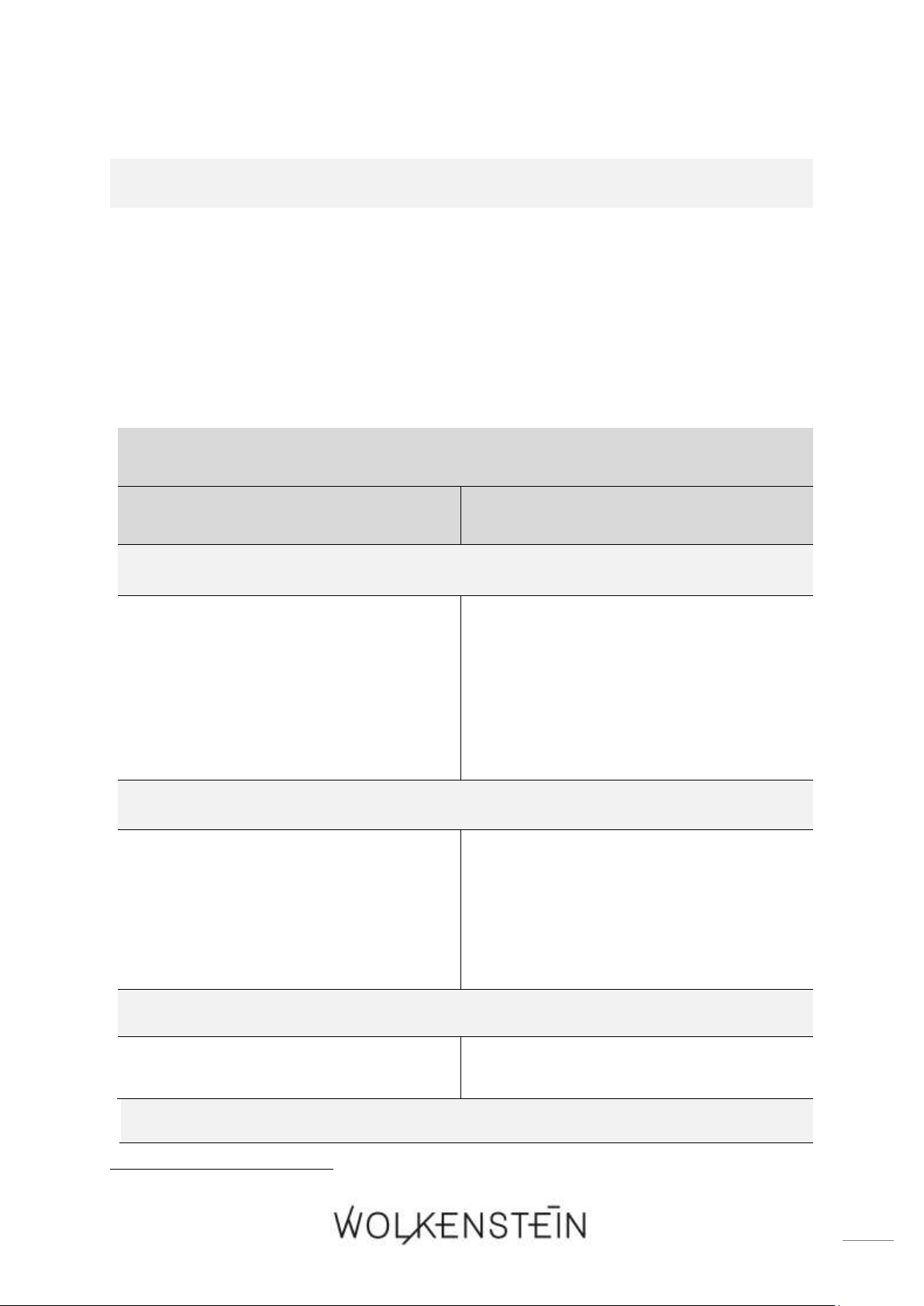
54
2. Lassen Sie alle Fehlfunktionen umgehend beheben.
GEHEN SIE BEI EINEM NOTFALL ODER EINER FEHLFUNKTION WIE FOLGT
VOR:
1. Schalten Sie das Gerät komplett ab.
2. Trennen Sie das Gerät von der Stromversorgung (entsprechende Sicherung im
Sicherungskasten der Hausstromversorgung).
3. Kontaktieren Sie Ihren Kundendienst.
➢ Überprüfen Sie die Angaben der Tabelle, bevor Sie den Kundendienst
kontaktieren.
FEHLER
MÖGLICHE URSACHE
MAßNAHMEN
DAS GERÄT ARBEITET ÜBERHAUPT NICHT.
➢ Das Gerät wird nicht mit Strom
versorgt.
➢ Kontrollieren Sie, ob das Gerät an
die Stromversorgung angeschlossen
ist. Überprüfen Sie die
entsprechende Sicherung im
Sicherungskasten der Hausstrom-
versorgung. Liegt ein Stromausfall in
Ihrem Wohngebiet vor?
DAS GERÄT HEIZT NICHT.
➢ Sie haben keine Temperatur
eingestellt
➢ Stellen Sie eine Temperatur ein.
➢ Sie haben den Timer
9
nicht
eingestellt
➢ Stellen Sie den Timer ein.
➢ Das Heizelement ist defekt.
➢ Kontaktieren Sie bitte den
Kundendienst.
DIE INNENBELEUCHTUNG FUNKTIONIERT NICHT.
➢ Das Leuchtmittel ist locker oder
beschädigt.
➢ Das Leuchtmittel festdrehen oder
ersetzen.
VENTILATIONSGERÄUSCHE DRINGEN AUS DEM GERÄT.
9
Ausstattung abhängig vom Modell
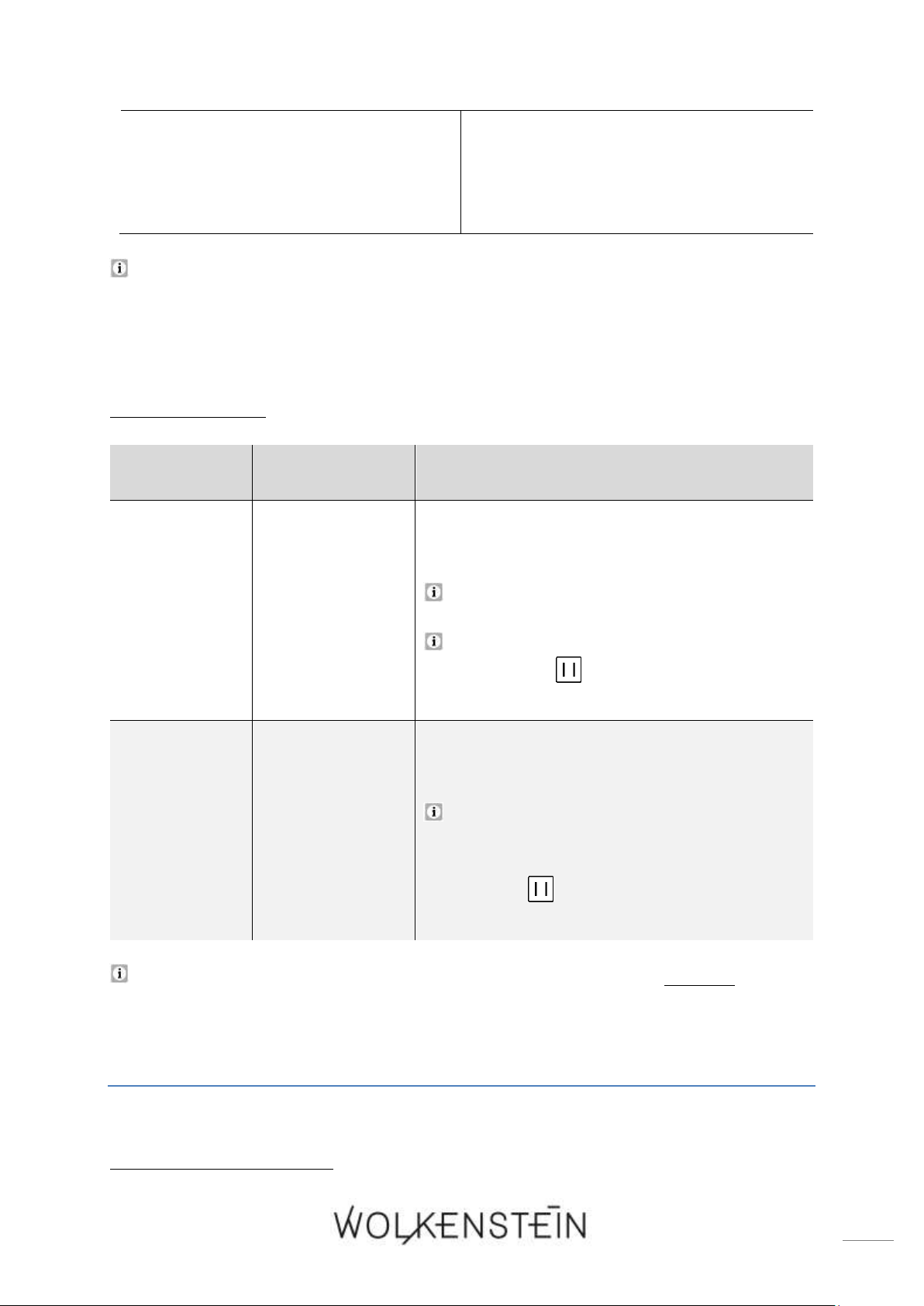
55
➢ Der eingebaute Ventilator
10
schützt
die Elektronik vor Überhitzung
und kann auch nach dem
Abschalten des Gerätes noch eine
Zeit lang weiterlaufen.
➢ Normaler Betriebszustand. Trennen
Sie bei laufendem Ventilator das
Gerät nicht von der
Stromversorgung.
Sollte das Gerät Störungen abweichend von den oben beschriebenen aufweisen,
oder falls Sie alle Punkte der Liste überprüft haben, das Problem aber nicht
behoben werden konnte, setzen Sie sich bitte mit dem Kundendienst in
Verbindung.
7.7.1 Fehlercodes
FEHLERCODE
FEHLER
BESCHREIBUNG / URSACHEN
E - 1
SENSORFEHLER
➢ Kurzschluss des Sensors.
➢ Sensor unterbrochen/nicht angeschlossen
Ein akustisches Signal ertönt 10-mal (1-
mal pro Sekunde).
Drücken Sie die Taste « PAUSE
/ LÖSCHEN », um das Gerät in den
STANDBY - MODUS zu setzen.
E - 2
FEHLER DES
HEIZELEMENTS
➢ Nach 5-minütigem Heizen beträgt die
Temperatur des Backofens < 35
0
C.
Ein akustisches Signal ertönt 10-mal (1-
mal pro Sekunde).
Drücken Sie die Taste « PAUSE
/ LÖSCHEN », um das Gerät in den
STANDBY - MODUS zu setzen.
Falls Fehlercodes auf dem Display angezeigt werden, trennen Sie das
Gerät von der Stromzufuhr und kontaktieren Sie den Kundendienst.
8. Technische Daten
10
Ausstattung abhängig vom Modell

56
TECHNISCHE DATEN *:
Geräteart
Einbaubackofen
Bedienfeld
Glas / Schwarz
Energieeffizienzklasse**
A
Energieeffizienzindex
93,00
Energieverbrauch (konventionell)
0,81 kW/h
Energieverbrauch (Umluft / Heißluft)
0,80 kW/h
Nettovolumen / Backröhre in Litern
74,00
Größe des Gerätes
Groß: Volumen > 70 l
Backofenfunktionen
Unterhitze (mit Umluft) / Ober- und
Unterhitze / Ober- und Unterhitze
(mit Umluft) / Grill (inneres
Grillelement) / Grill (vollständiges
Grillelement) / Grill (mit Umluft) /
Heißluft / Auftauen / Energie-
sparende Grillfunktion (Eco)
Automatische Programme
4: P - 1 (schnelles Vorheizen) / P - 2
(Grill, vollständiges Grillelement) /
P - 3 (Grill, inneres Grillelement +
Umluft) / P - 4 (Reinigungs-
programm « Hydro Clean »)
Grill
✓
Umluft
✓
Heißluft
✓
Vollglasinnentür
✓
Teleskopauszüge
✓
Timer
✓
Backofentür / Glasschichten
Schwarzes Glas / 3
Gehäusekühlung
✓
Griffe / Knöpfe
Aluminium
Versenkbare Drehknöpfe
✓
Anzahl Seitenracks / Teleskopauszüge
1 / 1
Tropfschale / Grillrost / Backblech
1 / 1 / 1
Geräuschemission
< 52 dB(A)
Max. Leistung
3,15 kW
Stromspannung/Frequenz
220 - 240 V AC / 50 Hz -
Schukostecker
✓
Kabellänge in cm
150,00
Einbaumaße Backofen H*B*T in cm
59,50*59,50*59,25
Gewicht netto / brutto in kg
33,00 / 36,00
❖ Technische Änderungen vorbehalten.
57
*
Gemäß Verordnung (EU) Nr. 65/2014
**
A+++ (höchste Effizienz) bis D (geringste Effizienz)
9. Entsorgung
1. Achten Sie beim Entpacken unbedingt darauf, dass die Bestandteile der
Verpackung (Polyethylentüten, Polystyrenstücke) nicht in die Reichweite von
Kindern und Tieren gelangen. ERSTICKUNGSGEFAHR!
VERLETZUNGSGAFAHR!
2. Nicht mehr benutzte und alte Geräte müssen der zuständigen
Wiederverwertungsstelle zugeführt werden. Keinesfalls offenen Flammen
aussetzen.
3. Bevor Sie ein beliebiges Altgerät entsorgen, machen Sie dieses vorher
unbedingt funktionsuntüchtig! Das bedeutet, immer den Netzstecker ziehen
und danach das Stromanschlusskabel am Gerät abschneiden und direkt mit dem
Netzstecker entfernen und entsorgen! Demontieren Sie immer die komplette
Tür, damit sich keine Kinder einsperren und in Lebensgefahr geraten können!
4. Entsorgen Sie Papier und Kartonagen in den dafür vorgesehenen Behältern.
5. Entsorgen Sie Kunststoffe in den dafür vorgesehenen Behältern.
6. Falls es in Ihrem Wohnumfeld keine geeigneten Entsorgungsbehälter gibt,
bringen Sie diese Materialien zu einer geeigneten kommunalen Sammelstelle.
7. Nähere Informationen erhalten Sie von Ihrem Fachhändler oder bei Ihren
entsprechenden kommunalen Entsorgungseinrichtungen.
Alle mit diesem Symbol
gekennzeichneten Materialien sind
wiederverwertbar.
Alle verfügbaren Informationen zur
Mülltrennung erhalten Sie bei Ihren
örtlichen Behörden.

58
10. Garantiebedingungen
Der Hersteller leistet dem Verbraucher für die Dauer von 24 Monaten, gerechnet
vom Tag des Kaufes Garantie für einwandfreies Material und fehlerfreie Fertigung.
Dem Verbraucher stehen neben den Rechten aus der Garantie die gesetzlichen
Gewährleistungsrechte zu, die der Verbraucher gegen den Verkäufer hat, bei dem er
das Gerät erworben hat. Diese werden durch die Garantie nicht eingeschränkt.
Der Garantieanspruch ist vom Käufer durch Vorlage des Kaufbelegs mit Kauf-
und/oder Lieferdatum nachzuweisen und unverzüglich nach Feststellung und
innerhalb von 24 Monaten nach Lieferung an den Erstendabnehmer zu melden.
Die Garantie begründet keine Ansprüche auf Rücktritt vom Kaufvertrag oder
Minderung (Herabsetzung des Kaufpreises). Ersetzte Teile oder ausgetauschte
Geräte gehen in unser Eigentum über.
Der Garantieanspruch erstreckt sich nicht auf:
1. zerbrechliche Teile wie z.B. Kunststoff oder Glas bzw. Glühlampen;
2. geringfügige Abweichungen der WOLKENSTEIN-Produkte von der Soll-
Beschaffenheit, die auf den Gebrauchswert des Produkts keinen Einfluss haben;
3. Schäden infolge Betriebs- und Bedienungsfehler,
4. Schäden durch aggressive Umgebungseinflüsse, Chemikalien, Reinigungsmittel;
5. Schäden am Produkt, die durch nicht fachgerechte Installation oder Transport
verursacht wurden;
6. Schäden infolge nicht haushaltsüblicher Nutzung;
7. Schäden, die außerhalb des Gerätes durch ein WOLKENSTEIN-Produkt
entstanden sind - soweit eine Haftung nicht zwingend gesetzlich angeordnet ist.
Die Gültigkeit der Garantie endet bei:
1. Nichtbeachten der Aufstell- und Bedienungsanleitung;
2. Reparatur durch nicht fachkundige Personen;
3. Schäden, verursacht durch den Verkäufer, Installateur oder dritte Personen;
4. unsachgemäße Installation oder Inbetriebnahme;
5. mangelnde oder fehlerhafte Wartung;
6. Geräten, die nicht ihrem vorgesehenen Zweck entsprechend verwendet werden;
7. Schäden durch höhere Gewalt oder Naturkatastrophen, insbesondere, aber nicht
abschließend bei Brand oder Explosion.
Garantieleistungen bewirken weder eine Verlängerung der Garantiefrist noch setzen
sie eine neue Garantiefrist in Lauf.
Der räumliche Geltungsbereich der Garantie erstreckt sich auf in Deutschland,
Österreich, Belgien, Luxemburg und in den Niederlanden gekaufte und verwendete
Geräte.
August 2014

59
Dear customer! We would like to thank you for purchasing a product from our wide
range of domestic appliances. Read the complete instruction manual before you
operate the appliance for the first time. Retain this instruction manual in a safe place
for future reference. If you transfer the appliance to a third party, also hand over this
instruction manual.
Index
1. Safety information ....................................................................................................... 61
1.1 Signal words ............................................................................................................ 62
1.2 Safety instructions .................................................................................................. 62
2. Installation .................................................................................................................... 66
2.1 Unpacking and positioning ................................................................................... 67
2.2 Installation of the oven ......................................................................................... 68
2.3 Electrical connection ............................................................................................. 70
3. Description of the appliance ...................................................................................... 71
3.1 Oven ........................................................................................................................ 71
3.1.1 Accessories ...................................................................................................... 72
3.2 Control panel .......................................................................................................... 75
3.3 Display ..................................................................................................................... 76
4. Operation ...................................................................................................................... 78
4.1 Before the first use ................................................................................................ 78
4.1.1 Cleaning of the accessories ........................................................................... 79
4.2 Use of the oven ..................................................................................................... 79
4.2.1 General operation of the oven ...................................................................... 80
4.2.2 Standby mode .................................................................................................. 81
4.2.3 Setting of the time / system time ................................................................. 81
4.3 Programming of the oven .................................................................................... 82
4.3.1 Timer ................................................................................................................ 82
4.3.2 Setting of the duration of the cooking / baking time ............................... 83
4.3.3 Automatic cooking / baking function .......................................................... 86
4.3.4 How to cancel the programming .................................................................. 89

60
4.4 Cleaning programme: « Hydro Clean » ............................................................... 90
4.5 Child safety lock ..................................................................................................... 92
4.6 Time query function .............................................................................................. 93
4.7 Functions and automatic programmes of the oven .......................................... 94
5. Environmental protection .......................................................................................... 98
6. Tips for baking, roasting and grilling in the oven .................................................... 99
6.1 Tips for baking and roasting ................................................................................ 99
6.2 Tips for grilling .................................................................................................... 100
7. Cleaning and maintenance ........................................................................................ 100
7.1 Cleaning of the oven ........................................................................................... 101
7.2 Cleaning of the oven door ................................................................................. 101
7.3 Replacing of the illuminant ................................................................................ 101
7.4 Removing of the oven door ............................................................................... 102
7.5 Removing of the glass pane of the oven door ................................................ 103
7.6 Removing of the side rack .................................................................................. 104
7.7 Trouble shooting .................................................................................................. 104
7.7.1 Error codes .................................................................................................... 105
8. Technical data ............................................................................................................. 106
9. Waste management .................................................................................................... 107
10. Guarantee conditions .............................................................................................. 108
Do not dispose of this appliance together with your domestic waste.
The appliance must be disposed of at a collecting centre for recyclable
electric and electronic appliances. Do not remove the symbol from
the appliance.
The figures in this instruction manual may differ in some details from the current
design of your appliance. Nevertheless, follow the instructions in such a case.
Delivery without content.
Any modifications, which do not influence the functions of the appliance. shall
remain reserved by the manufacturer.
Please dispose of the packing with respect to your current local and municipal
regulations.
The appliance you have purchased may be an enhanced version of the unit this
manual was printed for. Nevertheless, the functions and operating conditions are
identical. This manual is therefore still valid.
Technical modifications as well as misprints shall remain reserved.
61
EU - DECLARATION OF CONFORMITY
The products, which are described in this instruction manual, comply with the
harmonized regulations.
The relevant documents can be requested from the final retailer by the competent
authorities.
1. Safety information
READ THE SAFETY INFORMATION AND SAFETY INSTRUCTIONS
CAREFULLY BEFORE YOU OPERATE THE APPLIANCE FOR THE
FIRST TIME.
All information included in those pages serve for the protection of the
operator. If you ignore the safety information and safety instructions, you will
endanger your health and life.
Store this manual in a safe place so you can use it whenever it is needed. Strictly
observe the instructions to avoid damage to persons and property.
Check the technical periphery of the appliance! Do all wires and connections
to the appliance work properly? Or are they time-worn and do not match the
technical requirements of the appliance? A check-up of existing and newly-
made connections must be done by an authorized professional. All connections
and energy-leading components (incl. wires inside a wall) must be checked by a
qualified professional. All modifications to the electrical mains to enable the
installation of the appliance must be performed by a qualified professional.
The appliance is intended for private use only.
The appliance is intended for cooking in a private household only.
The appliance is intended for indoor-use only.
The appliance is not intended to be operated for commercial purposes, during
camping and in public transport.
Operate the appliance in accordance with its intended use only.
Do not allow anybody who is not familiar with this instruction manual to
operate the appliance.
This appliance may be operated by children aged from 8 years and above as
well as by persons with reduced physical, sensory and mental capabilities or lack
of experience and knowledge if they are supervised or have been instructed
concerning the safe use of the appliance and do comprehend the hazards
62
involved. Children must not play with the appliance. Cleaning and user-
maintenance must not be carried out by children unless they are supervised.
MAKE SURE THAT THIS MANUAL IS AVAILABLE TO ANYONE USING
THE APPLIANCE AND MAKE SURE THAT IT HAS BEEN READ AND
UNDERSTOOD PRIOR TO USING THE APPLIANCE.
1.1 Signal words
DANGER! indicates a hazardous
situation which, if ignored, will result in
death or serious injury.
WARNING! indicates a hazardous
situation which, if ignored, could result
in death or serious injury.
CAUTION! indicates a hazardous
situation which, if not avoided, may
result in minor or moderate injury.
NOTICE! indicates possible damage to
the appliance.
1.2 Safety instructions
DANGER!
To reduce the risk of electrocution:
1. Non-compliance of the orders of this instruction manual will endanger
the life and health of the operator and / or can result in damages to
the appliance.
2. All electrical work that may be necessary must be carried out by a
qualified professional. Do not modify the energy supply. The
connection must be carried out in accordance with the current local
and legal regulations.
3. Switch off the power supply (fuse box of your household power
supply) before you install the appliance and before you connect it to
the mains. RISK OF ELECTRIC SHOCK!
4. Do not connect the appliance to the mains if the appliance itself or
the power cord or the plug are visibly damaged.
5. The technical data of your energy supplier must meet the data on
the rating plate of the appliance.
6. Always check that the power cord is not placed under the appliance
or damaged by moving the appliance.
7. Never try to repair the appliance yourself. Repairs carried out by
unauthorized persons can cause serious damage. If the appliance

63
does not operate properly, please contact the customer service.
Original spare parts should be used only.
8. In case of an event caused by a technical malfunction, disconnect
the appliance from the mains (fuse box of your household power
supply). Report the malfunction to your customer service so it can be
repaired. RISK OF ELECTRIC SHOCK!
9. Do not modify the plug provided with the appliance, if it will not fit the
outlet, have a proper outlet installed by a qualified electrician (not
covered by the guarantee).
10. When the power cord is damaged, it must be replaced by the
manufacturer or an authorized aftersales service or a qualified
professional only.
11. Never pull the power supply cable to unplug the appliance. Always
use the power plug itself to unplug the appliance. RISK OF
ELECTRIC SHOCK!
12. Never touch power plugs, power switches or other electrical
components with wet or damp hands. RISK OF ELECTRIC SHOCK!
WARNING!
To reduce the risk of burns, electrocution, fire or injury to persons:
1. Operate the appliance with 220 ~ 240 V AC / 50 Hz only.
2. Disconnect the appliance from the mains before you clean or
maintain it.
3. Connect the appliance to a properly grounded socket only. Use a
safety socket to minimize any risk of electric shock.
4. The technical data of your energy supply must meet the data on the
rating label. The main current circuit must be equipped with a safety
shut-down device.
5. If you are in doubt as to whether the appliance is connected to the
mains properly, let the electrical connection be checked by a qualified
electrician (not covered by the guarantee).
6. All modifications to the electrical mains to enable the installation of
the appliance must be performed by a qualified professional.
7. Keep the cord away from heated surfaces.
8. Do not carry out any modifications to your appliance.
9. Do not use adapters, multiple sockets and extension cords for
connecting the appliance to the mains.
10. Do not fry in the appliance. Hot oil can damage parts of the appliance

64
and result in skin-burns.
11. In order to reduce any risk of fire in the appliance:
a. Check the appliance frequently.
b. Switch off or unplug the appliance if you notice any smoke.
Keep the appliance closed to stifle any flames.
c. Do not use the appliance to store anything inside.
d. Do not leave any items, e.g. paper, cooking utensils or food,
inside the appliance even when it is not running.
12. The appliance must not left unattended during cooking.
13. Never heat any food or liquids in sealed containers, because they
can explode.
14. The room the appliance is installed in must be dry and well-
ventilated. When the appliance is installed, an easy access to all
control elements is required.
15. The veneering of cabinets has to be fixed with a heat-resistant glue,
that is able to withstand a temperature of at least 100
0
C.
16. Adjacent furniture or housing and all materials used for installation
must be able to resist a temperature of min. 85
0
C above the ambient
temperature of the room the appliance is installed in during operation.
17. If the oven will be installed above a drawer of the built-in furniture, a
fixed intermediate shelf must be mounted between the oven and the
drawer.
18. Do not install the appliance in rooms or at areas which contain
flammable substances as petrol, gas or paint. This warning also
refers to the vapour these substances release.
19. Cooker-hoods should be installed according to their manufacturers'
instructions.
20. Do not heat your rooms or dry your washing by use of the appliance.
21. Do not install the appliance near to curtains or upholstered furniture.
RISK OF FIRE!
22. Do not store any objects in the oven. RISK OF FIRE!
23. Household equipment and connection leads must not touch the hot
oven or the hob as the insulation material is usually not heat-
resistant.
24. Never use a steam cleaner to clean the appliance. The steam will
cause serious damage to the electric components of the appliance.
RISK OF ELECTRIC SHOCK!
25. The accessible parts of the oven become hot during operation, so
keep children away from the operating appliance. Touching the
appliance while it is operating can cause serious burns.
26. Children must not play with the appliance.
27. Always supervise children if they are near the appliance.

65
28. Only allow children to use the appliance without supervision, when
adequate instructions have been given before so that the child is able
to use the appliance in a safe way and understands the risks of
improper use.
29. While unpacking, the packaging materials (polythene bags,
polystyrene pieces, etc.) should be kept away from children and pets.
RISK OF INJURY! CHOKING HAZARD!
30. Only use time guards designed by the manufacturer of the appliance
or indicated by the manufacturer of the appliance in the instructions
for use as suitable or hob guards incorporated in the appliance. The
use of inappropriate guards can cause accidents.
CAUTION!
1. The appliance becomes hot while operating. Do not touch the hot
components inside the oven.
2. Do not use any aggressive, abrasive and acrid detergents or sharp-
edged items to clean the door of the oven. Otherwise you may
scratch the surface and damage the glass.
3. Do not put any cookware or backing trays directly on the base inside
the oven. Do not cover the base inside the oven with aluminium foil.
4. Keep the door of the oven always closed if you use one of the oven-
functions.
5. Do not put any cookware directly on the base inside the oven. Use
the trays.
6. The interior parts of the oven become extremely hot. Do not touch
any parts inside the oven if you handle your cookware. RISK OF
BURNS!
7. Be careful if you open the door. Do not get in contact with the hot
parts of the oven or the steam, which will escape the oven. RISK OF
BURNS! RISK OF SCALDING!
8. Always use oven-gloves.
9. Cooking utensils may become hot because of the heat transferred by
the heated food. Potholders or oven gloves may be needed to handle
such utensils.
10. This appliance complies with the current European safety legislation.
We do wish to emphasize that this compliance does not negate the
fact that the surfaces of the appliance will become hot while
operating and will retain and emit heat even if it has stopped
operating.
NOTICE

66
1. When you move the appliance, hold it at its base and lift it carefully.
Keep the appliance in an upright position.
2. Never use the door for moving the appliance as you will damage the
hinges.
3. The appliance must be transported and installed by at least two
persons.
4. When you unpack the appliance, you should take note of the position
of every part of the interior accessories in case you have to repack
and transport it at a later point of time.
5. Do not operate the appliance unless all components are installed
properly.
6. Do not stand or lean on the base, the drawers, the doors etc of the
appliance.
7. Do not put any heavy items onto the open door of the oven. Do not
lean against the open door of the oven as you will damage the
hinges.
8. Do not connect your appliance to the mains unless all packaging and
transit protectors have been removed. Do not use any aggressive
detergents to remove the transit protectors.
9. Regularly cleaning and maintenance grants proper operation and
optimal performance of your appliance.
10. Check your utensils if they are suitable for the use in an oven.
11. Use suitable ovenware only.
12. The air vents of the appliance or its built-in structure (if the appliance
is suitable for being built-in) must be completely open, unblocked and
free of any kind of dirt.
13. The rating plate must not be removed or made illegible, otherwise
all terms of the warranty become invalid!
SAVE THESE INSTRUCTIONS.
The manufacturer and distributor are not responsible for any damage or
injury in the event of failure to comply with these instructions.
2. Installation
67
DANGER! All electrical work that may be necessary must be carried
out by a qualified professional. Do not modify the energy supply. The
connection must be carried out in accordance with the current local and
legal regulations. RISK OF ELECTRIC SHOCK!
WARNING! The veneering of cabinets has to be fixed with a heat-
resistant glue, that is able to withstand a temperature of at least 100
0
C.
WARNING! Adjacent furniture or housing and all materials used for
installation must be able to resist a temperature of min. 85
0
C above the
ambient temperature of the room the appliance is installed in during
operation.
WARNING! While unpacking, the packaging materials (polythene
bags, polystyrene pieces, etc.) should be kept away from children and
pets. CHOKING HAZARD! RISK OF INJURY!
CAUTION! When installing the appliance ensure optimal heat
radiation to maintain the operating safety.
CAUTION! To avoid any damage, the sandwich layer and adhesive
must resist heat.
The customer is responsible for the installation. If the manufacturer´s help is
needed to repair any damage due to improper installation, this repair work is not
covered by the guarantee. Improper installation may cause serious personal
injuries and/or property damage. The manufacturer cannot be held liable for such
injuries or damages.
2.1 Unpacking and positioning
1. Unpack the appliance carefully. Dispose of the packaging as described in chapter
waste management.
2. Completely remove the transport-protection. Be very careful and do not use any
aggressive or abrasive detergents to remove residuals of the transport-protection.
3. Check that the appliance and the power cord are not visible damaged.
4. Install the appliance in a dry and well-ventilated place.
5. Do not install the appliance in a place where it may come in contact with water
or rain; otherwise the insulation of the electrical system will be damaged.
6. Install the appliance on a level, dry and solid floor. Check the correct installation

68
with a bubble level.
7. Remove the complete packaging material (inside and outside the appliance)
before initial operation.
8. Connect the appliance to the mains properly. Only use a proper grounded safety
socket for connection (s. chapter 2.3 ELECTRICAL CONNECTION).
9. Manufacturing residues or oil having remained in the appliance or on the heating
element may cause some odours and smoke emission. These are normal
operational parameters, which will disappear after a number of uses. Open the
room door or a window to ensure proper ventilation.
10. The nameplate is situated inside the appliance or at the back.
2.2 Installation of the oven
DANGER! Switch off the power supply (fuse box of your
household power supply) before you install the appliance and before
you connect it to the mains. RISK OF ELECTRIC SHOCK!
All dimensions in the following figures are given in millimetres.
Use the embedded handles or wire handles
11
on both sides of the oven to move
the appliance (s. fig. in chapter 3.1 OVEN).
The built-in furniture must stand in a stable position and need to be securely
fastened.
A gap of 5 mm must remain between the appliance and the surrounding sides of
the built-in furniture.
The power cord must not be trapped or kinked.
If the oven will be installed above a drawer of the built-in furniture, a fixed
intermediate shelf must be mounted between the oven and the drawer.
INSTALLATION
1. Switch off the power supply (fuse box of your household power supply).
FIG. 1: DIMENSIONS / OVEN
11
Depending on model
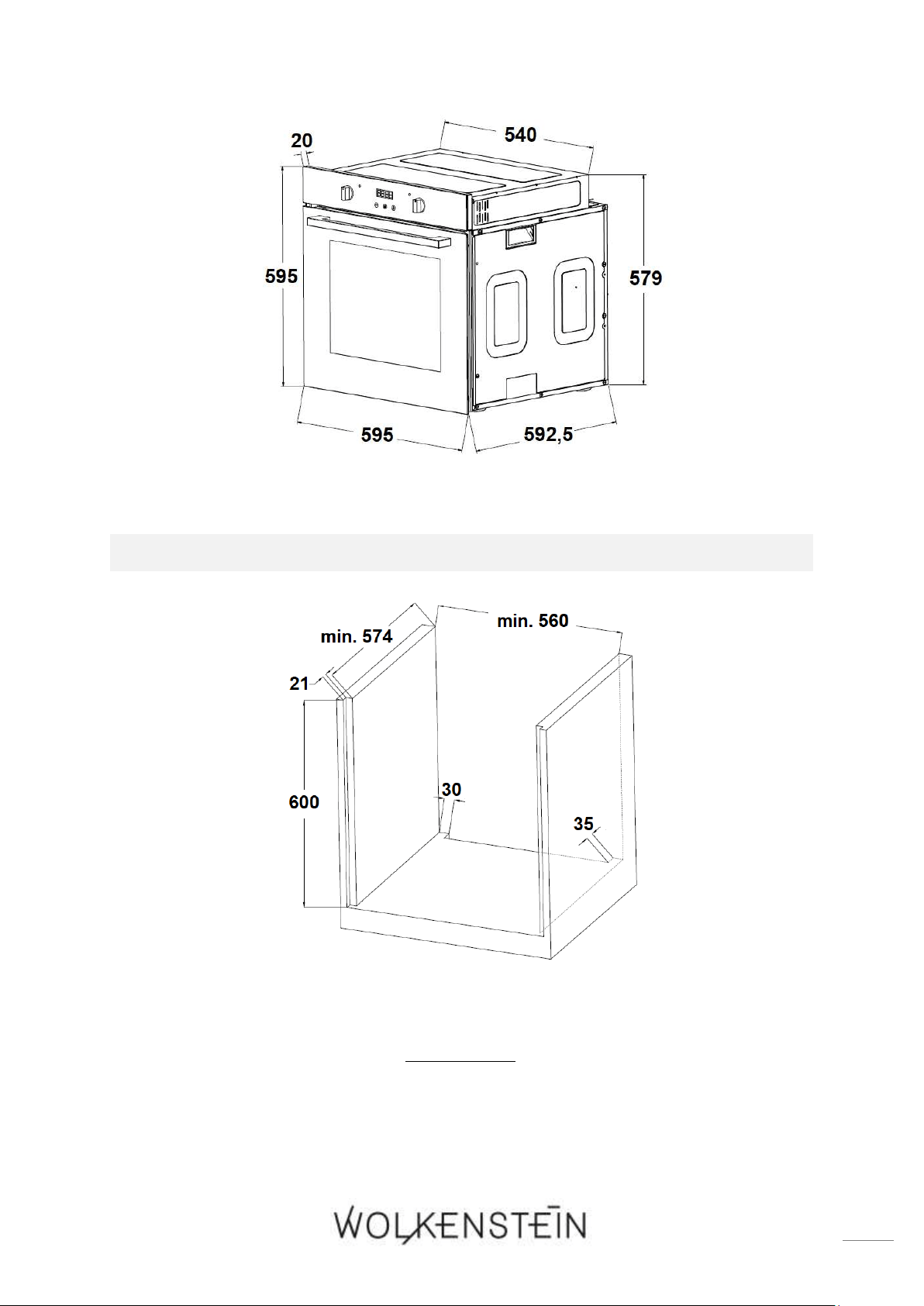
69
2. Provide an installation opening meeting the dimensions on the following drawing
(s. fig. 2; below).
FIG. 2: DIMENSIONS / BUILT-IN FURNITURE
3. Place the oven near the installation opening.
4. Ensure that the power supply is switched off (fuse box of your household power
supply).
5. Connect the oven to the mains. Strictly observe the instructions in chapter
2.3 ELECTRICAL CONNECTION.
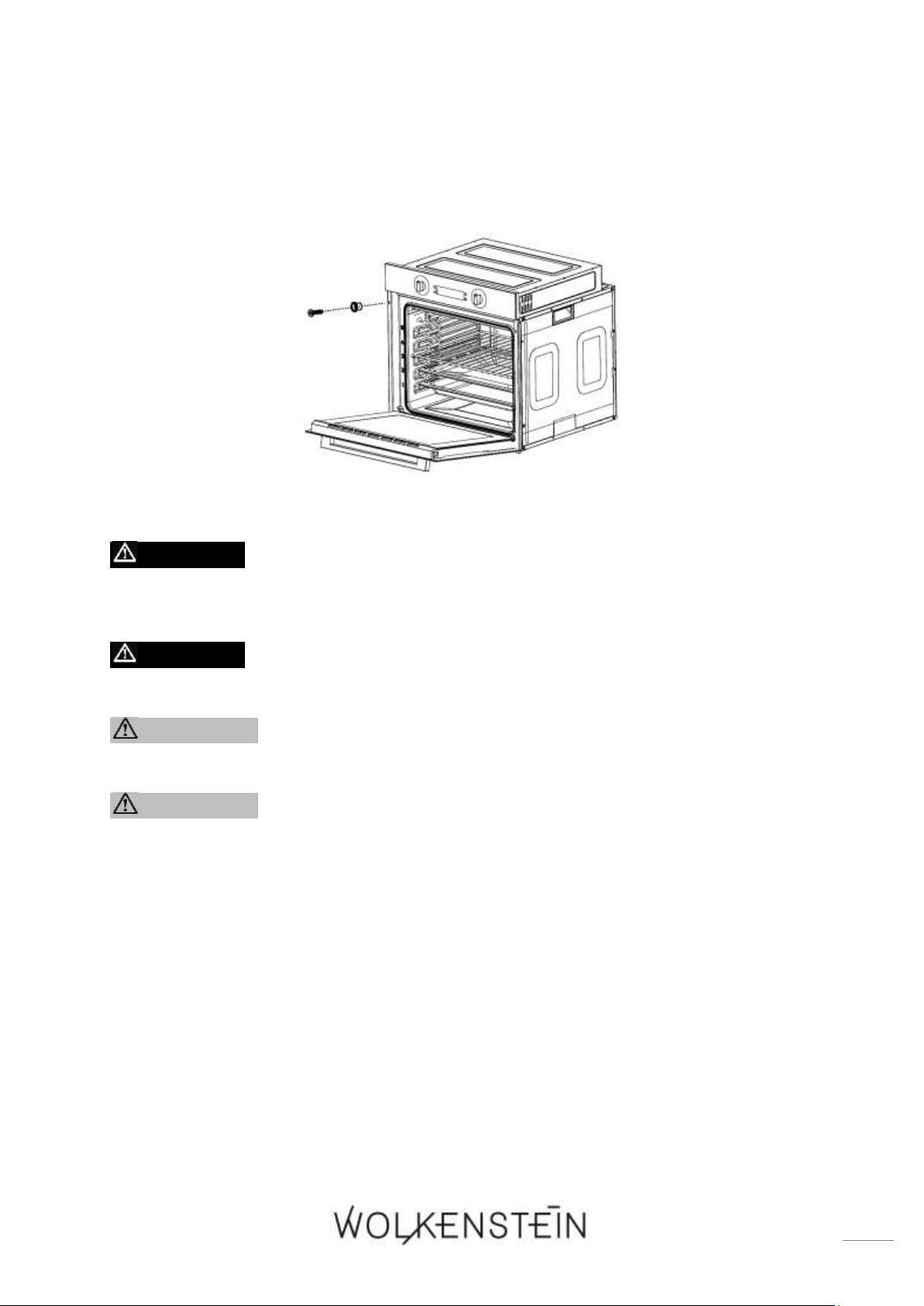
70
6. Insert the oven into the installation opening carefully. Ensure that the power
cable will not be trapped or kinked.
7. Fix the oven with the 2 screws and 2 washers supplied. (s. fig. below).
2.3 Electrical connection
DANGER! Switch off the power supply (fuse box of your
household power supply) before you connect the appliance to the
mains. RISK OF ELECTRIC SHOCK!
DANGER! The technical data of your energy supplier must meet the
data on the rating plate of the appliance.
WARNING! Do not use an extension cord, socket strips or a multiple
socket.
WARNING! Connect the appliance to a properly grounded socket only.
Use a safety socket to minimize any risk of electric shock.
❖ The appliance is equipped with a power supply cable and a power plug (safety
plug).
❖ Only use the power supply cable provided with the appliance.
❖ Your household power supply must meet the power consumption of the
appliance.
❖ When connecting do not use adapters, reducers and branching devices as they
cause overheating. RISK OF FIRE!
❖ Do not modify the plug provided with the appliance, if it will not fit the outlet,
have a proper outlet installed by a qualified electrician (not covered by the
guarantee).
❖ When the power cord is damaged, it must be replaced by the manufacturer or an
authorized aftersales service or a qualified professional only.
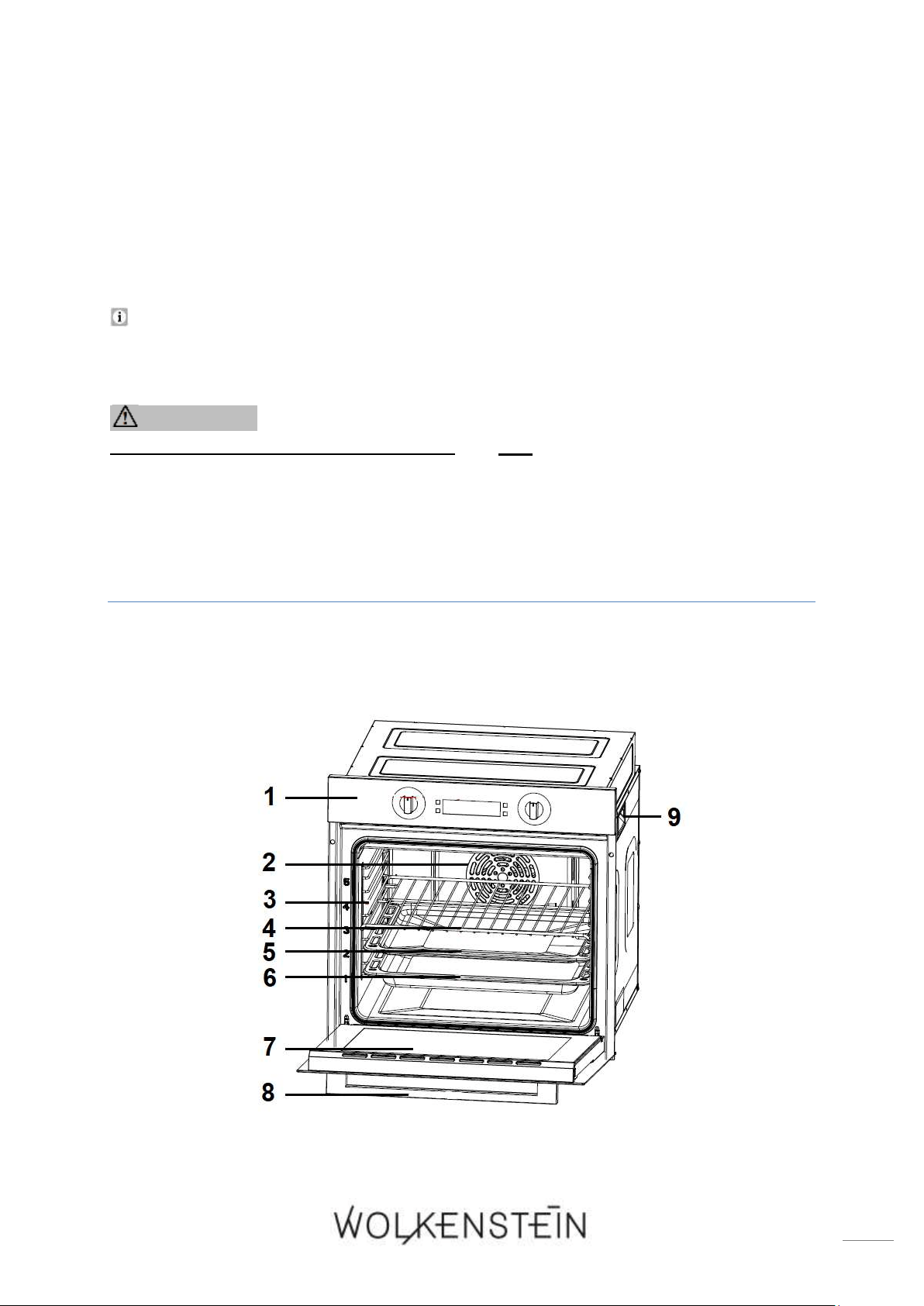
71
❖ The power cord must not touch hot areas and its temperature must not exceed
75
0
C.
❖ When the socket is not accessible for the user after the installation of the
appliance, an all-pole disconnecting device must be incorporated during
installation. Disconnecting devices are switches with a contact opening distance
of at least 3 mm. These include LS-switches, fuses and protectors (EN 30335).
❖ When installing the appliance, contact protection must be ensured.
If you are in doubt as to whether the appliance is connected to the mains
properly, let the electrical connection be checked by a qualified electrician
(not covered by the guarantee).
WARNING! Any damages which are caused by an appliance that is
not connected to the mains properly are not subject to the guarantee!
3. Description of the appliance
3.1 Oven
Fig. similar: modifications are possible.
72
1
CONTROL PANEL (s. chapter 3.2 CONTROL PANEL)
2
FAN MOTOR (behind a steel plate)
3
SIDE RACK with up to five
12
different insertion heights
4
GRILLING GRATE
4
DRIP TRAY (oven pan)
6
BAKING TRAY (deep oven pan)
13
7
DOOR of the oven
8
DOOR HANDLE
9
LATERAL HANDLE for the moving of the appliance (on both sides)
3.1.1 Accessories
❖ Depending on model, a grilling grate, a drip tray (oven pan) and a baking tray
(deep oven pan) are included in the scope of delivery.
Clean the supplied accessories with warm soapy water and a soft cloth before you
use the appliance for the first time.
When the trays (e.g. grilling grate / drip tray / baking tray) become hot, they may
deform. As soon as the accessories have cooled, they return to their original
shape. The functionality is not affected thereby.
NOTICE! Always ensure that the trays (e.g. grilling grate / drip tray / baking
tray) are fully inserted into the oven, so they do not collide with the oven
door when closing it
NOTICE! If you grill on the grilling grate directly, always use the drip tray
or the baking tray to catch the dripping grease of the food to be grilled.
GRILLING GRATE
❖ The grilling grate is suitable for the grilling, roasting and baking of food; it is also
suitable for the cooking of food in casseroles and for the baking of cakes in cake
moulds.
12
Depending on model
13
Depending on model
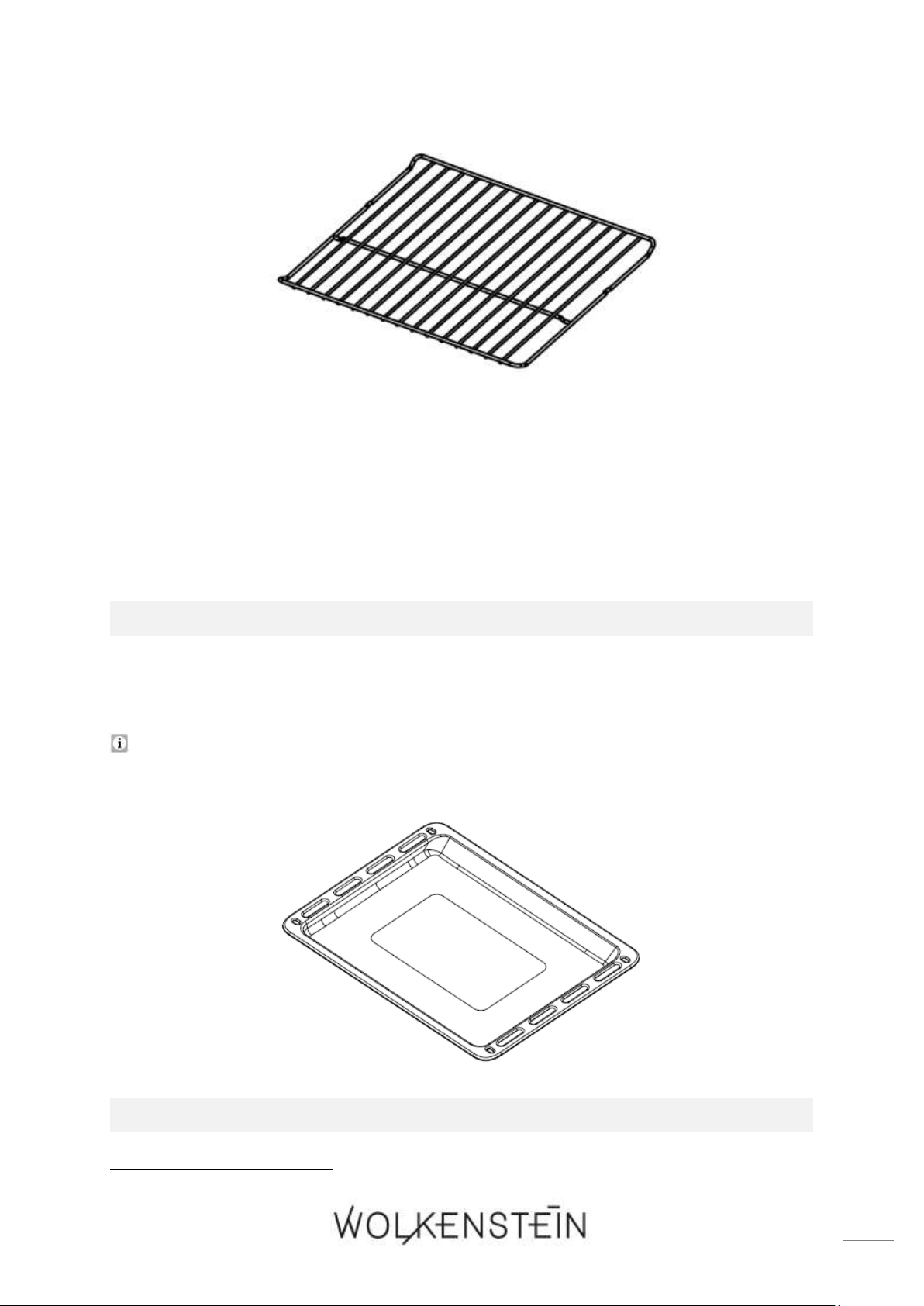
73
DRIP TRAY (OVEN PAN)
❖ The drip tray (oven pan) is suitable for the baking of cakes and biscuits and for
the preparing of frozen meals and large roasts.
If you grill on the grilling grate directly, the drip tray (oven pan) must also be used
to catch the dripping grease of the food to be grilled.
BAKING TRAY (DEEP OVEN PAN)
14
14
Optional accessory: depending on model
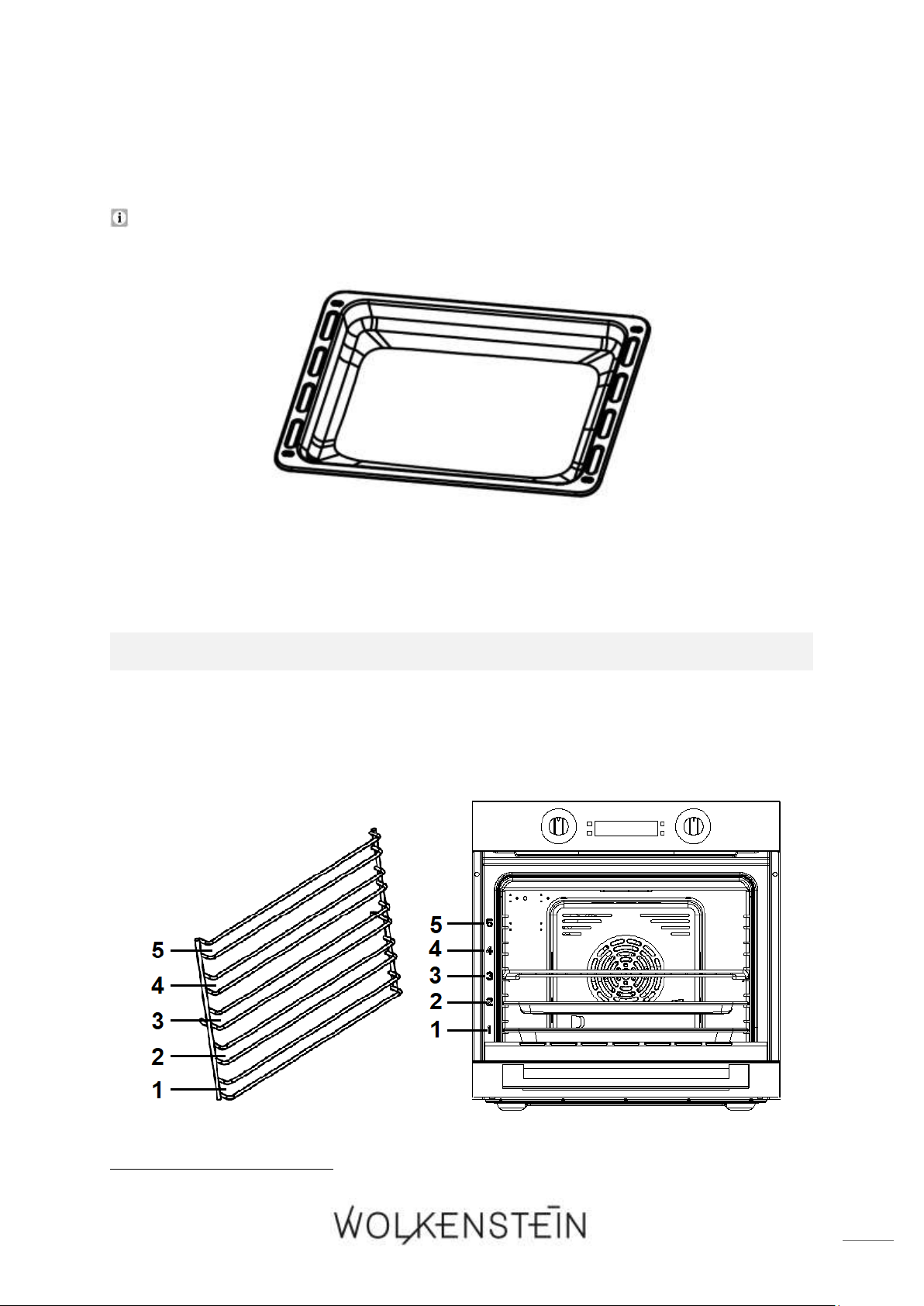
74
❖ The baking tray (deep oven pan) is suitable for the baking of cakes and biscuits
and for the preparing of large roasts, etc.
If you grill on the grilling grate directly, the baking tray as well as the drip tray is
suitable to catch the dripping grease of the food to be grilled.
SIDE RACK
❖ You can insert the grilling grate, the drip tray and the baking tray in the different
insertion heights (up to five
15
) of the side rack. According to your needs, you can
bake, roast or grill at different insertion heights.
15
Depending on model
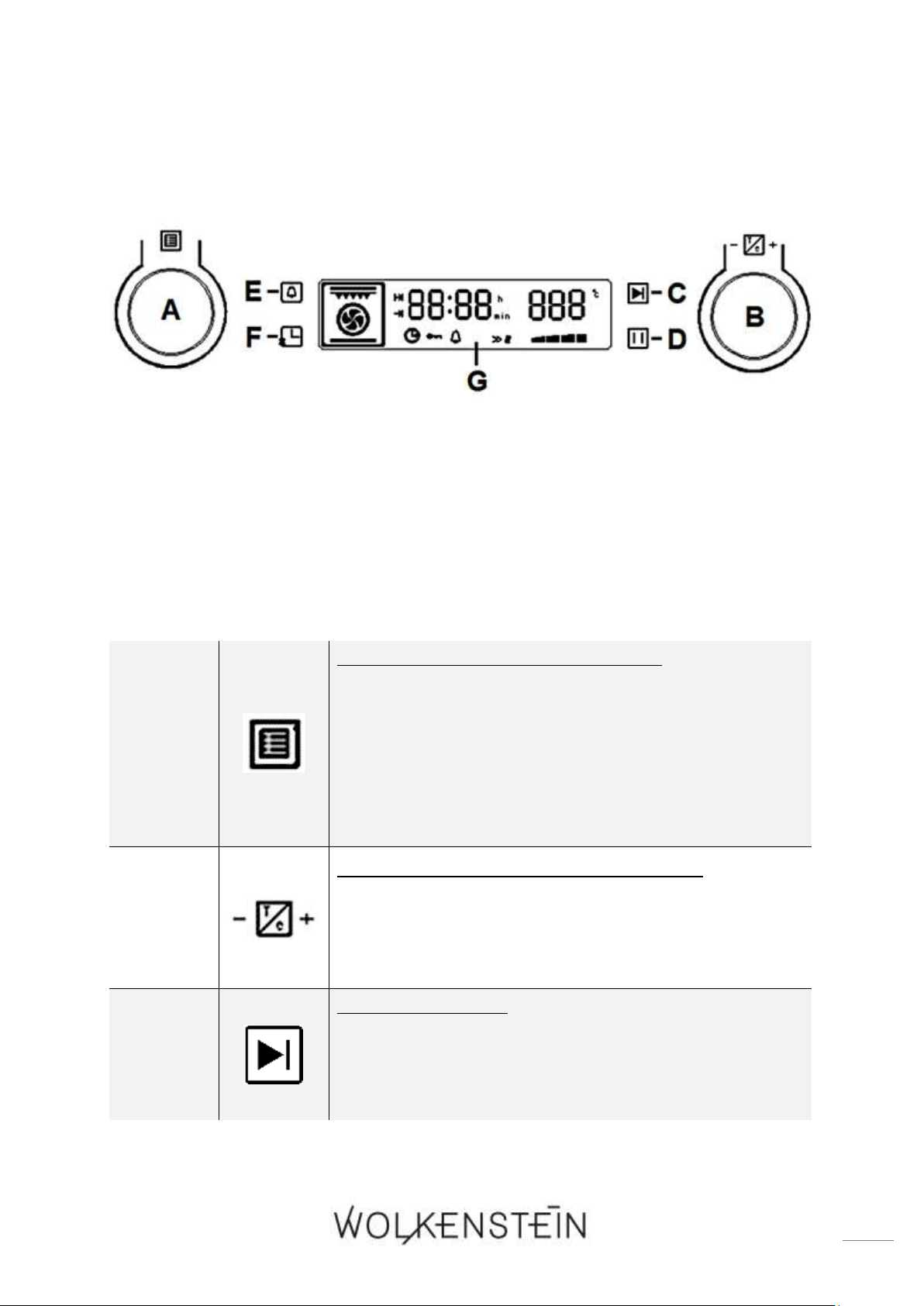
75
Fig. similar: modifications are possible.
3.2 Control panel
Fig. similar: modifications are possible.
A
ROTARY KNOB « OVEN FUNCTIONS »
➢ Rotary knob for the selection of the OVEN
FUNCTIONS.
➢ This rotary knob selects the desired cooking
function.
➢ Thirteen different oven functions are selectable (incl.
4 automatic programmes); s. chapter 4.7 FUNCTIONS
AND AUTOMATIC PROGRAMMES OF THE OVEN.
B
ROTARY KNOB « TEMPERATURE / TIME »
➢ Rotary knob for the setting of the OVEN
TEMPERATURE (increase / decrease).
➢ Rotary knob for the setting of the TIME (increase /
decrease)
C
BUTTON « START »
➢ Button for the STARTING of the cooking process.
➢ Button for the activation of the CHILD SAFETY LOCK;
press buttons C and D simultaneously / s. chapter
4.5 CHILD SAFETY LOCK.
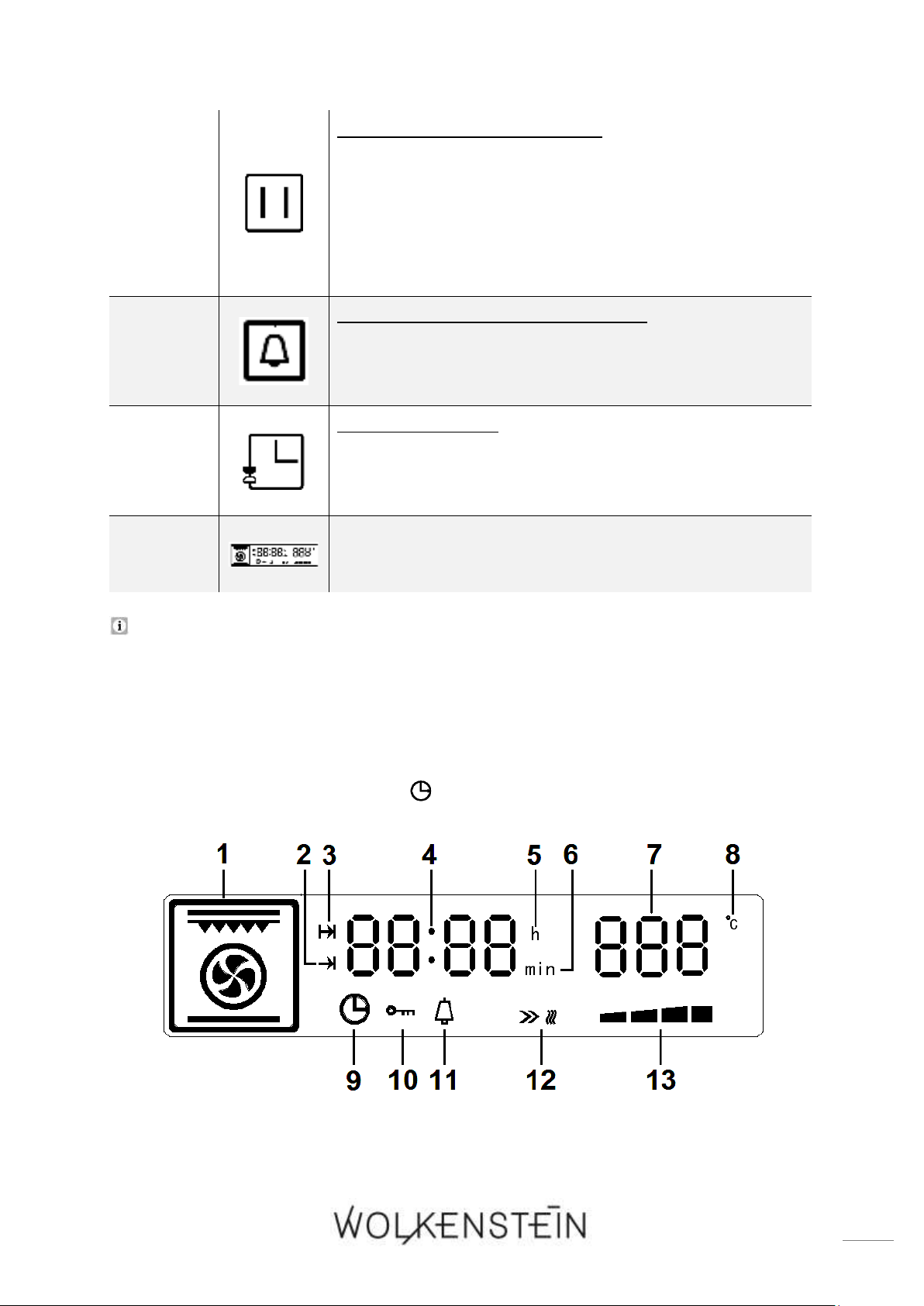
76
D
BUTTON « PAUSE / CANCEL »
➢ Button for the SHORT INTERRUPTION of the cooking
process.
➢ Button for the CANCELLATION of the programming.
➢ Button for the activation of the CHILD SAFETY LOCK;
press buttons C and D simultaneously / s. chapter
4.5 CHILD SAFETY LOCK.
E
BUTTON « TIMER / PARAMETER »:
➢ Button for the setting of the TIMER.
➢ Button to SWITCH between the parameter settings
TEMPERATURE and COOKING / BAKING TIME.
F
BUTTON « TIME »
➢ Button for the setting of the TIME / SYSTEM TIME.
➢ Button for the setting of the COOKING / BAKING
TIME.
G
DISPLAY (description: s. chapter 3.3)
Depending on model, the appliance is equipped with retractable rotary knobs.
3.3 Display
❖ In STANDBY MODE, the display indicates the system time or the set time and the
indicator « TIME / SYSTEM TIME » is on.
Fig. similar: modifications are possible.
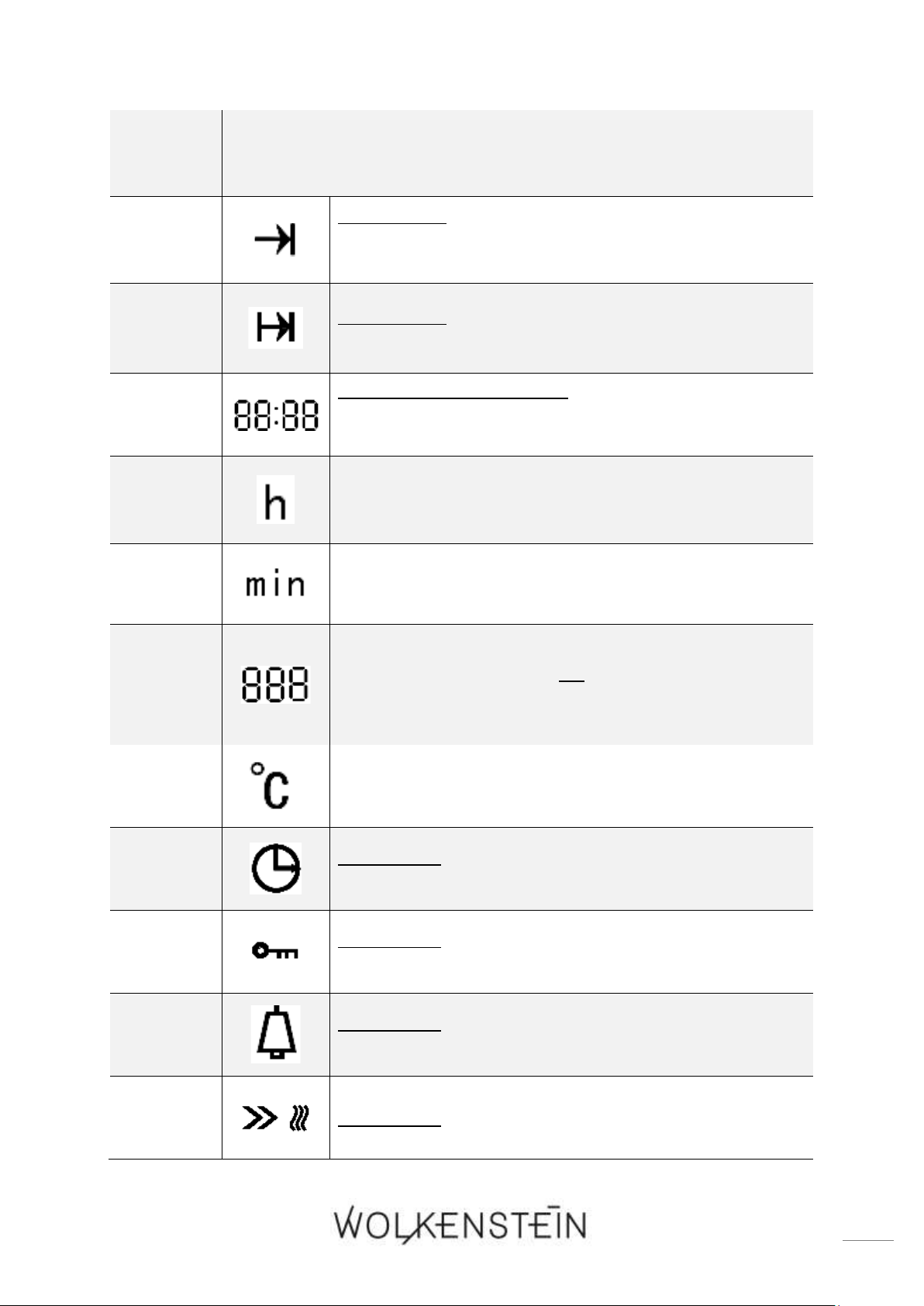
77
1
INDICATOR of the set OVEN FUNCTIONS (hot air, grill, automatic
cooking programmes, etc.).
2
INDICATOR:
➢ « DURATION OF THE COOKING / BAKING TIME » is
selected.
3
INDICATOR:
➢ « END OF THE COOKING / BAKING TIME » is selected.
4
INDICATOR OF THE TIME:
➢ Hours, minutes and seconds (seconds: represented
by the decimal point symbol).
5
INDICATOR OF THE TIME UNIT: « HOURS ».
6
INDICATOR OF THE TIME UNIT: « MINUTES ».
7
INDICATOR OF THE SET TEMPERATURE in
0
C
OR
INDICATOR OF THE SELECTED AUTOMATIC
PROGRAMME (P - 1, P - 2, P - 3 or P - 4).
8
ICON of the TEMPERATURE UNIT: «
0
C »
9
INDICATOR:
➢ « TIME / SYSTEM TIME » is selected.
10
INDICATOR:
➢ « CHILD SAFETY LOCK » is activated.
11
INDICATOR:
➢ « TIMER » (hob guard) is selected.
12
INDICATOR: « START ICON OF THE OVEN FUNCTION »
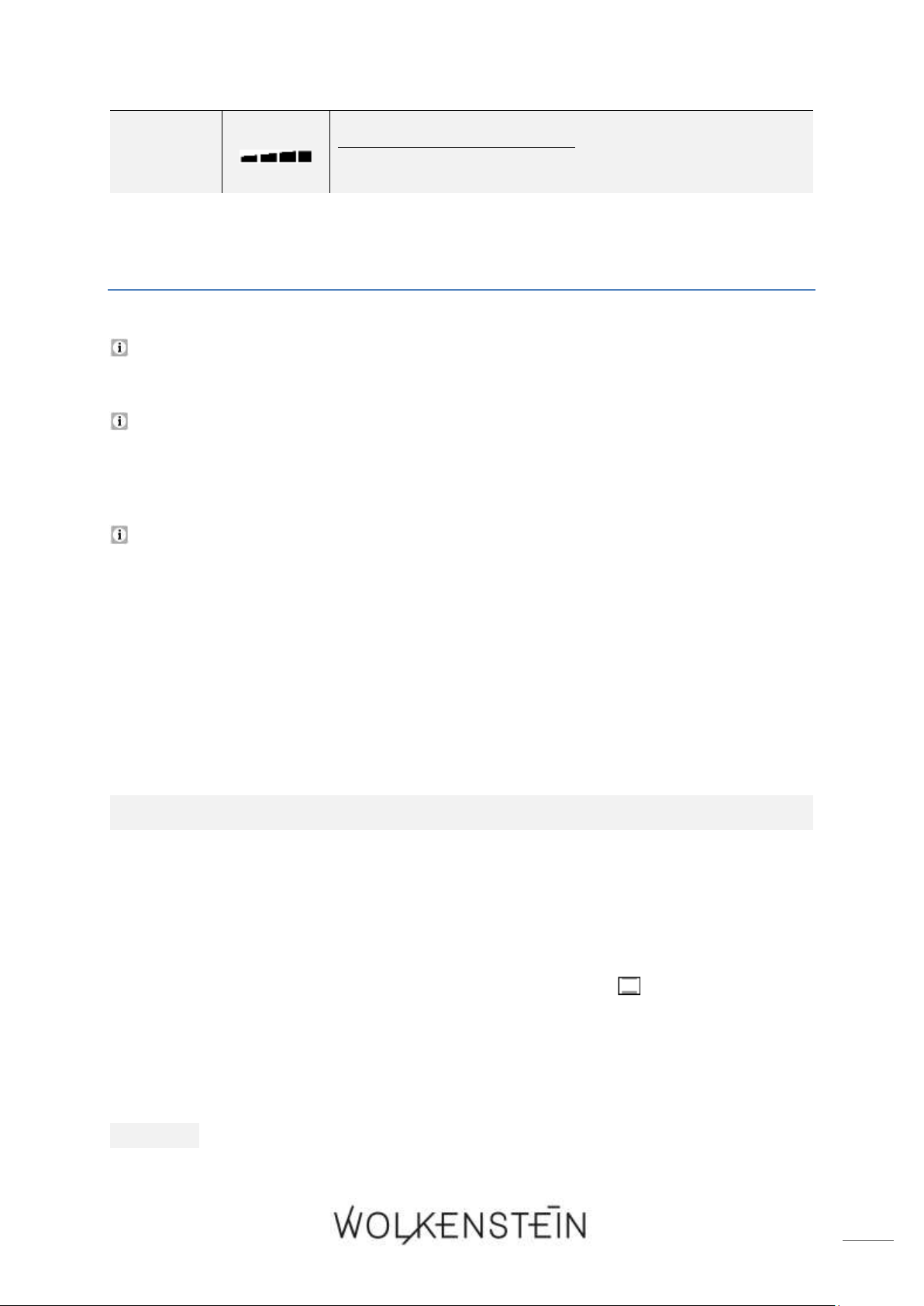
78
13
DYNAMIC INDICATOR BAR:
➢ indicates the « WORKING STATUS » of the oven.
4. Operation
Read the complete instruction manual before you operate the appliance
for the first time. Strictly observe the safety instructions!
Remove the complete protective film!
4.1 Before the first use
Manufacturing residues or oil having which have remained in the cooking
compartment or on the heating element may cause some odours and smoke
emission. These are normal operational parameters, which will disappear after a
number of uses.
❖ Heat the appliance (empty and closed) before you use it for the first time for
cooking to remove the residues and the resulting odours
HEATING OF THE APPLIANCE
1. Remove all packaging material.
2. Clean the oven inside from all protective agents.
3. Take out the supplied accessories and clean them with warm water and washing-
up liquid.
4. Switch on the room ventilation or open a window.
5. Let the oven operate for 60 minutes (top and bottom heat / 250
0
C / s. chapter
4.3 PROGRAMMING OF THE OVEN). A little bit of smoke and odour may be
generated for approx. 15 minutes. This is normal. They are generated by the
substance, that protects your appliance against damage caused by the shipment
from the manufacturer's works.
NOTICE! Clean the oven with warm water and washing-up liquid only.
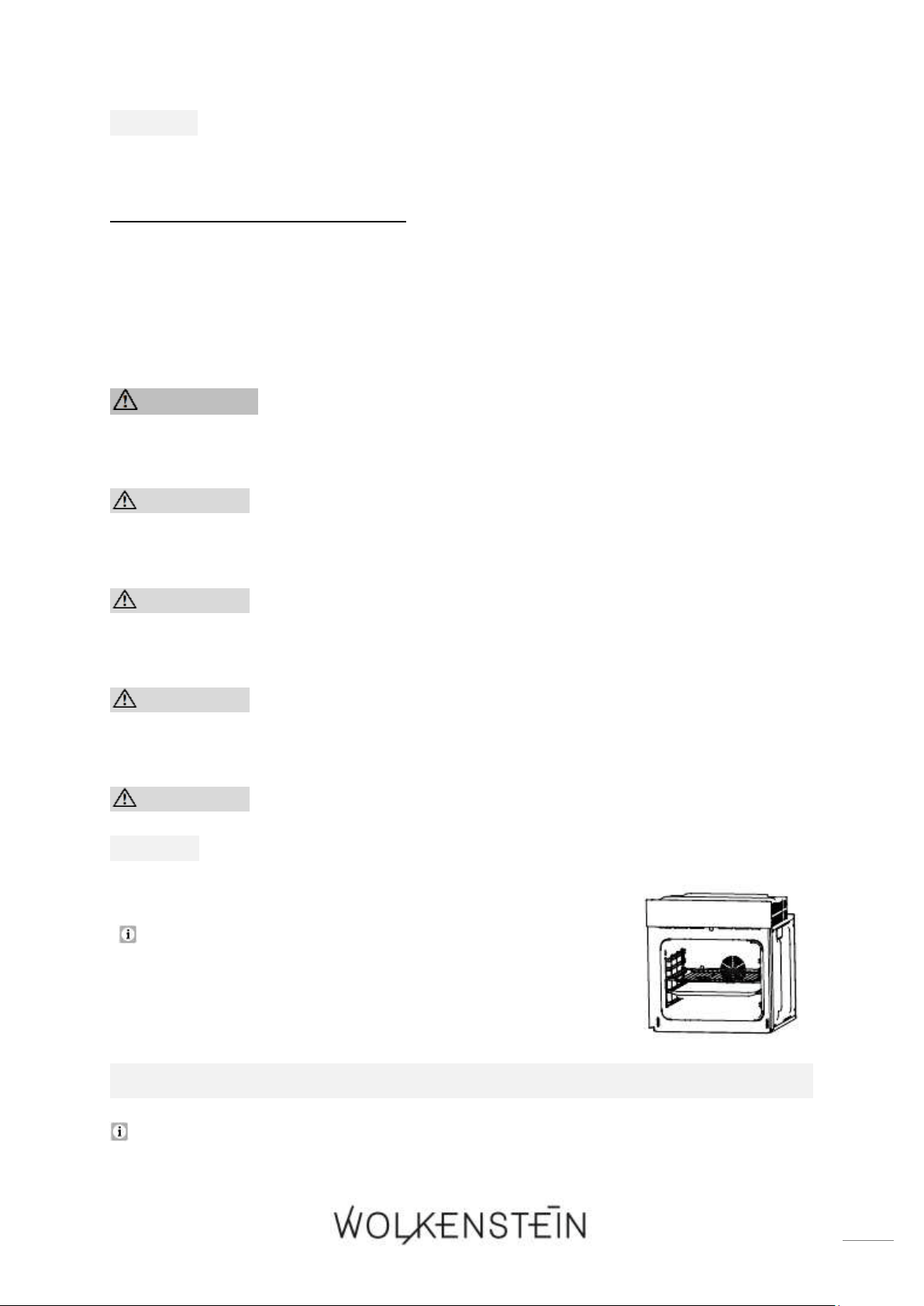
79
NOTICE! Ensure that the complete packaging material (inside and outside
of the appliance) has been removed before initial operation.
4.1.1 Cleaning of the accessories
❖ Clean the accessories which are included in delivery using warm soapy water and
a soft cloth before you use the appliance for the first time.
4.2 Use of the oven
WARNING! The accessible parts of the appliance become hot during
operation, so keep children away from the operating appliance. Touching
the appliance while it is operating can cause serious burns.
CAUTION! The interior parts of the appliance become extremely hot.
Do not touch any parts inside the appliance if you handle your cookware.
RISK OF BURNS!
CAUTION! Be careful if you open the door. Do not get in contact with
the hot parts of the oven or the steam, which will escape the oven. RISK
OF BURNS! RISK OF SCALDING!
CAUTION! Cooking utensils may become hot because of the heat
transferred by the heated food. Potholders or oven gloves may be needed
to handle such utensils.
CAUTION! Always use oven gloves.
NOTICE! Use suitable ovenware only.
Proper positioning of the trays is mandatory for safe
operation of the appliance. Otherwise hot food or
cookware can slide off the trays when removing them.
AFTER THE CONNECTION OF THE APPLIANCE TO THE MAINS
When you connect the appliance to the mains for the first time, all indicators are
on for approx. one second. The display indicates « 12:00 » and the hour indicator
« 12 » flashes. You can set the current time now; s. chapter 4.2.3 SETTING OF THE

80
TIME / SYSTEM TIME. If the time (hours) is not set, the appliance changes to the
minute setting after approx. 10 seconds without using any operating buttons. If
still no time setting is carried out, the appliance returns to STANDBY MODE
automatically after another 10 seconds without using any operating buttons; s.
chapter 4.2.2 STANDBY MODE.
Before you can use the oven generally, you must set the time / system
time.
4.2.1 General operation of the oven
❖ The operation of the oven is controlled by the operating buttons and the rotary
knobs for the selection of the OVEN FUNCTIONS and for the TIME and
TEMPERATURE SETTING (A / B / s. chapter 3.2 CONTROL PANEL).
❖ Thirteen different oven functions (incl. four automatic programmes:
P - 1 / P - 2 / P - 3 / P - 4) are selectable; s. chapter 4.7 FUNCTIONS AND
AUTOMATIC PROGRAMMES OF THE OVEN.
❖ The temperatures of the oven functions can be set within a range of 50
0
C - 250
0
C individually. The temperatures of the automatic programmes are
preprogrammed and cannot be changed; see also chapter 4.7 FUNCTIONS AND
AUTOMATIC PROGRAMMES OF THE OVEN.
When the temperature inside the oven has almost reach the set temperature, an
acoustic signal sounds for 2 seconds.
If the temperature inside the oven falls below 30
0
C, the indicator of the
temperature displays « Lo ».
After the oven has been in operation for about 15 minutes, the cooling fan starts
to work. After the end of operation, the cooling fan still continues to run for a
while (approx. 35 minutes), even if the appliance itself is switched off. When the
temperature inside the oven falls below 100
0
C, the cooling fan is switched off
automatically.
The appliance is equipped with a 24-hour display.
NOTES REGARDING THE AUTOMATIC PROGRAMMES:
❖ The appliance is equipped with three automatic grill programmes
(P - 1 / P - 2 / P - 3) and one automatic cleaning programme (P - 4); description
of the programmes: s. chapter 4.7 FUNCTIONS AND AUTOMATIC PROGRAMMES OF
THE OVEN.
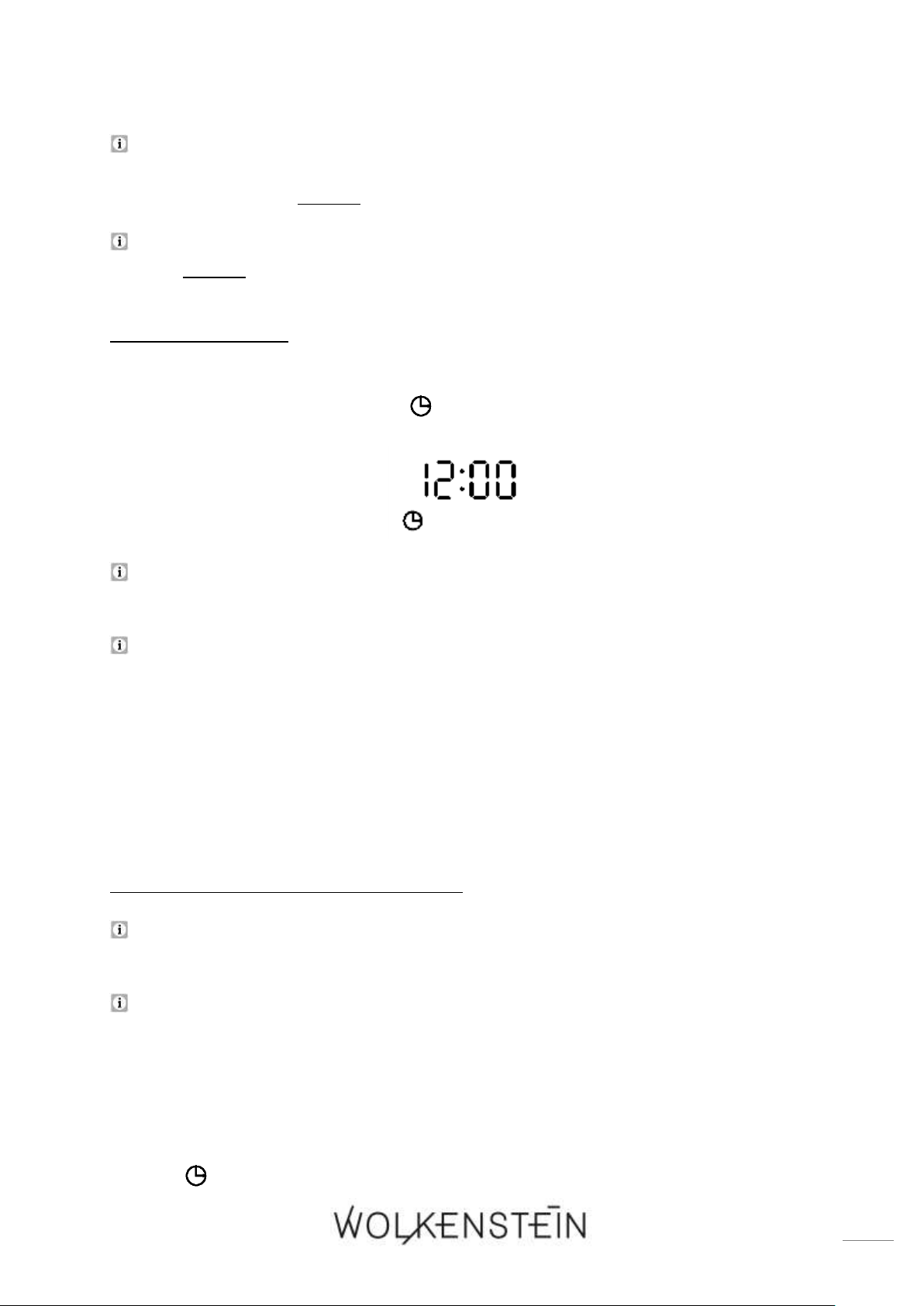
81
The respective preset duration of the grilling time of the programmes P - 1,
P - 2 and P - 3 can be set individually. The preprogrammed temperatures of
these programmes cannot be changed.
The preprogrammed duration and temperature of the cleaning programme
P - 4 cannot be changed.
4.2.2 Standby mode
❖ In STANDBY MODE, the display indicates the system time or the set time and the
indicator « TIME / SYSTEM TIME » is on (s. fig. below).
After approx. 5 minutes without using any operating buttons, the oven is
switched off automatically and the display goes off.
If the oven is switched off, press any operating button or turn the rotary knob
for the selection of the OVEN FUNCTIONS (A) to return the appliance to STANDBY
MODE.
4.2.3 Setting of the time / system time
Before you can use the oven generally, you must set the time / system
time.
Please note that the appliance is equipped with a 24-hour display. E.g.: if you
want to set the time “1.00 p.m.”, you must set the display to 13.00 o`clock, etc.
1. The oven must be in STANDBY MODE. If the oven is switched off, press any
operating button or turn the rotary knob for the selection of the OVEN
FUNCTIONS to return the appliance to STANDBY MODE. In STANDBY MODE, the
display indicates the time / system time and the indicator « TIME / SYSTEM
TIME » is on.
82
2. Press the button « TIME » once to activate the setting mode of the
time / system time.
3. The hour indicator « » on the display goes on und the hour value of the time
indicator « » flashes once per second.
4. Turn the rotary knob « TEMPERATURE / TIME » to set the hour value
(0 - 23) of the current time. Please note that the appliance is equipped with a 24-
hour display.
5. Press the button « TIME » again to change to the minute setting.
6. The minute indicator « » on the display goes on und the minute value of the
time indicator « » flashes.
7. Turn the rotary knob « TEMPERATURE / TIME » to set the minute value
(0 - 59) of the current time.
8. Press the button « TIME » once again to confirm the setting; the indicators
« » and « » go off, respectively.
9. The time / system time is set and the decimal point symbol flashes once per
second.
If the time setting is not confirmed within 10 seconds, the appliance completes
the time and returns to STANDBY MODE automatically. Ensure that the set
time / system time corresponds to the current time.
If the time / system time is not set within 20 seconds after the connection of
the appliance to the mains, the time / system time will be set to the preset time
(12:00) and the appliance returns to STANDBY MODE automatically. Please note:
in this case, set the current time as soon as possible.
When you press the button « PAUSE / CANCEL » once while you set the
time / system time, the current setting is cancelled and the appliance returns to
STANDBY MODE directly.
4.3 Programming of the oven
4.3.1 Timer
❖ The TIMER serves as a timepiece and counts down the set time (countdown time).
The maximum settable countdown time is 23 hours and 59 minutes.
HOW TO USE THE TIMER (HOB GUARD)
83
1. The oven must be in STANDBY MODE. If the oven is switched off, press any
operating button or turn the rotary knob for the selection of the OVEN
FUNCTIONS to return the appliance to STANDBY MODE.
2. In STANDBY MODE, the display indicates the time / system time and the indicator
« TIME / SYSTEM TIME » is on.
3. Press the button « TIMER / PARAMETER » to activate the setting of the TIMER.
4. The hour value of the time indicator « » flashes, the minute value « » is
on permanently and the indicator of the TIMER « » goes on.
5. Turn the rotary knob « TEMPERATURE / TIME » to set the hour value
(0 - 23) of the TIMER. Please note that the appliance is equipped with a 24-hour
display.
6. If the desired hour value is displayed, press the button « TIMER /PARAMETER »
again to change to the minute setting.
7. The minute value of the time indicator « » flashes and the hour value « »
is on permanently.
8. Turn the rotary knob « TEMPERATURE / TIME » to set the minute value
(0 - 59) of the TIMER.
9. If the desired minute value is displayed, press the button « START » to confirm
the set countdown time
10. The countdown starts; the decimal point symbol flashes and the indicator of the
TIMER « » is on.
11. When the set countdown time has elapsed, an acoustic signal sounds once per
second and the indicator of the TIMER « » flashes.
12. After approx. 1 minute the acoustic signal stops automatically. You can switch
off the acoustic and visual signal (« ») as well by pressing any button on the
display.
The indicator of the TIMER « » is on permanently so long as the countdown
is working. After the countdown time has elapsed, the indicator flashes.
WARNING When using the TIMER in countdown mode, the oven will
not be switched off automatically after the selected period of time has
elapsed.
4.3.2 Setting of the duration of the cooking / baking time
84
❖ This function enables to set a COUNTDOWN TIME by which the oven will be
switched off automatically after the time has elapsed (DURATION OF THE
COOKING / BAKING TIME).
The maximum settable countdown time is 150 minutes (2 ½ h).
HOW TO SET THE DURATION OF THE COOKING / BAKING TIME
1. The oven must be in STANDBY MODE. If the oven is switched off, press any
operating button or turn the rotary knob for the selection of the OVEN
FUNCTIONS to return the appliance to STANDBY MODE.
2. In STANDBY MODE, the display indicates the time / system time and the indicator
« TIME / SYSTEM TIME » is on.
3. Place the food to be cooked or baked in the oven and close the door properly.
4. Turn the rotary knob for the selection of the OVEN FUNCTIONS « » until the
desired oven function is displayed; s. chapter 4.7 FUNCTIONS AND AUTOMATIC
PROGRAMMES OF THE OVEN.
Depending on the selected oven function the TIME INDICATOR « » displays
the preset time and the TEMPERATURE INDICATOR « » displays the preset
temperature of the selected function.
If you select the oven function 9 « ECO / », the time indicator displays
« ECO ».
5. To activate the temperature setting, press the button « TIMER / PARAMETER »
until the temperature indicator « » and the icon « » are flashing.
6. To set the temperature, turn the rotary knob « TEMPERATURE / TIME »
until the desired temperature is displayed on the temperature indicator « ».
7. To activate the setting of the countdown time (duration of the
cooking / baking time), press the button « TIMER / PARAMETER » until the
time indicator « » and the indicator « DURATION OF THE COOKING
/ BAKING TIME » are flashing.
8. To set the countdown time (duration of the cooking / baking time), turn the
rotary knob « TEMPERATURE / TIME » until the desired countdown time
is displayed on the time indicator « ».
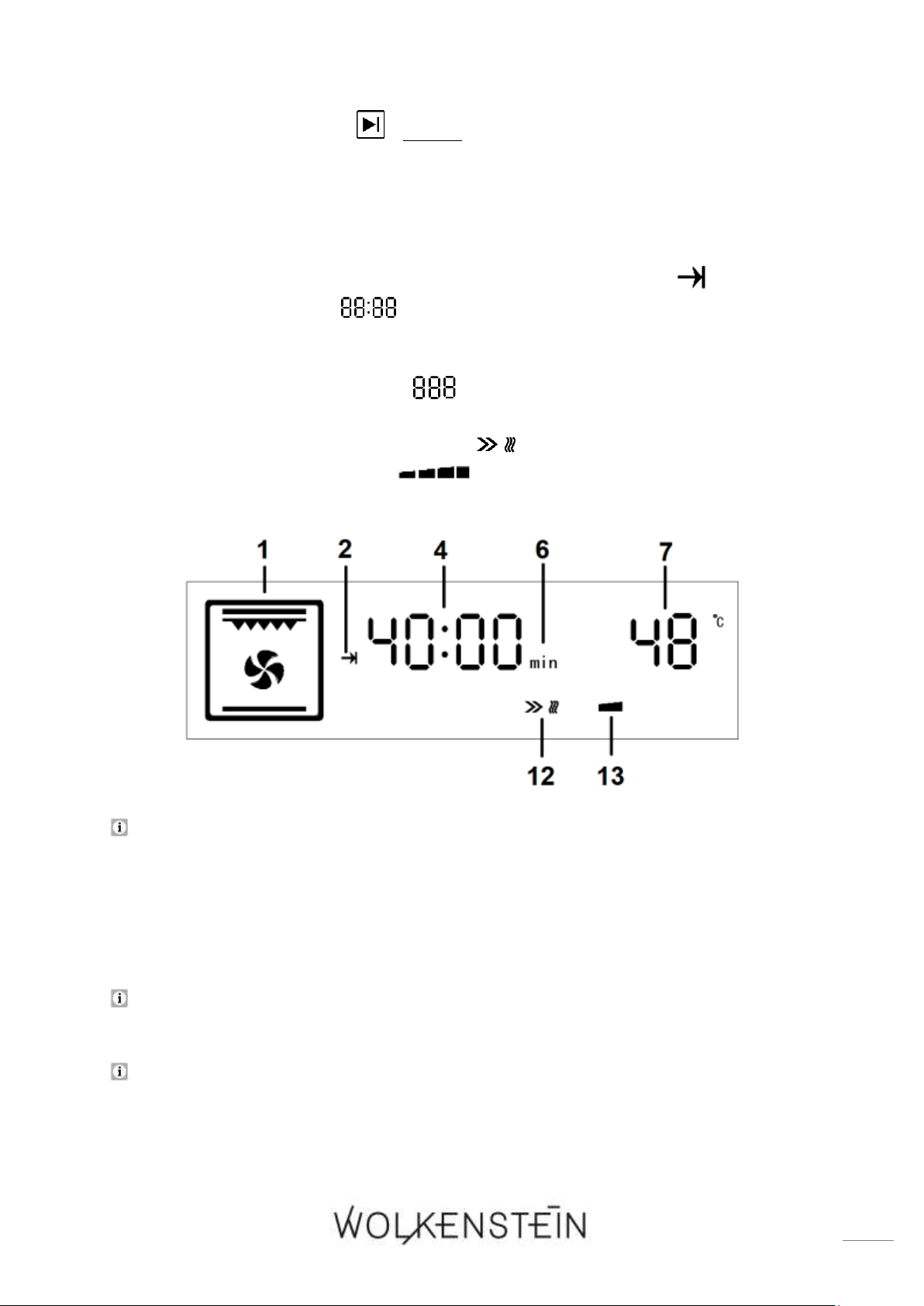
85
9. Press the button « START » within 10 seconds to start the cooking process
(working mode). The countdown starts.
10. The oven is in working mode; the following icons are displayed (for example see
also fig. below):
a) the selected oven function is displayed (1 / s. fig. below).
b) the indicator « DURATION OF THE COOKING / BAKING TIME » is on (2).
c) the time indicator « » displays the countdown time (duration of the
cooking / baking time) and the time unit is also displayed; (4 and 6 / here as
an example: 40 minutes).
d) the temperature indicator « » displays the preset or the self-chosen
temperature (7).
e) the start icon of the oven function « » is displayed (12).
f) the dynamic indicator bar « » displays the working status of the oven
(13).
When the temperature inside the oven has almost reach the set temperature, an
acoustic signal sounds for 2 seconds.
11. When the set countdown time has elapsed, an acoustic signal sounds 10 times;
the oven is switched off automatically and returns to STANDBY MODE.
12. After the end of operation, the cooling fan still continues to run for a while
(approx. 35 minutes), even if the appliance itself is switched off.
When the temperature inside the oven falls below 100
0
C, the cooling fan is
switched off automatically.
If the temperature inside the oven falls below 30
0
C, the temperature indicator
displays « Lo ».
86
If you do not set a temperature or a cooking / baking time, or if you do not press
the button « START » within 10 seconds after you have carried out the settings,
the appliance returns to standby mode automatically.
Press the button « PAUSE / CANCEL »once to pause the cooking process. The
indicators of the temperature and time are flashing. Press the button
« START » to continue the cooking process.
4.3.3 Automatic cooking / baking function
❖ This function enables to select the duration of the cooking / baking time and
the time by which the oven will be switched off automatically at the same
time.
The maximum settable duration of the cooking / baking time is 150 minutes
(2 ½ h).
The maximum settable time for the end of the cooking / baking time must be
within 23 hours and 59 minutes; starting from the time indicated on the display.
HOW TO SET THE AUTOMATIC COOKING / BAKING TIME
1. The oven must be in STANDBY MODE. If the oven is switched off, press any
operating button or turn the rotary knob for the selection of the OVEN
FUNCTIONS to return the appliance to STANDBY MODE.
2. In STANDBY MODE, the display indicates the time / system time and the indicator
« TIME / SYSTEM TIME » is on.
3. Place the food to be cooked or baked in the oven and close the door properly.
4. Turn the rotary knob for the selection of the OVEN FUNCTIONS « » until the
desired oven function is displayed; s. chapter 4.7 FUNCTIONS AND AUTOMATIC
PROGRAMMES OF THE OVEN.
Depending on the selected oven function the TIME INDICATOR « » displays
the preset time and the TEMPERATURE INDICATOR « » displays the preset
temperature of the selected function.
If you select the oven function 9 « ECO / », the time indicator displays
« ECO ».
87
5. To activate the temperature setting, press the button « TIMER / PARAMETER »
until the temperature indicator « » and the icon « » are flashing.
6. To set the temperature, turn the rotary knob « TEMPERATURE / TIME »
until the desired temperature is displayed on the temperature indicator « ».
7. To activate the setting of the countdown time (duration of the
cooking / baking time), press the button « TIMER / PARAMETER » until the
time indicator « » and the indicator « DURATION OF THE COOKING
/ BAKING TIME » are flashing.
8. To set the countdown time (duration of the cooking / baking time), turn the
rotary knob « TEMPERATURE / TIME » until the desired countdown time
is displayed on the time indicator « ».
9. Press the button « TIME » once to activate the setting « END OF THE
COOKING / BAKING TIME »
10. The indicator « END OF THE COOKING / BAKING TIME » and the hour value
of the time indicator « » flash.
11. Turn the rotary knob « TEMPERATURE / TIME » to set the hour value
(0 - 23) of the desired time by which the cooking / baking process should be
finished. Please note that the appliance is equipped with a 24-hour display.
12. Press the button « TIME » again to change to the minute setting.
13. The minute value of the time indicator « » flashes.
14. Turn the rotary knob « TEMPERATURE / TIME » to set the minute value
(0 - 59) of the desired time by which the cooking / baking process should be
finished.
Press the button repeatedly to change between hour and minute setting.
15. When the desired time is displayed, press the button « start » within 10
seconds to save the settings.
16. The following icons are displayed (for example see also fig. below):
a) the selected oven function is displayed (1 / s. fig. below).
b) the indicator « END OF THE COOKING / BAKING TIME » is on (3).
c) the indicator « TIME / SYSTEM TIME » is on (9).
d) the time indicator « » displays the current time / system time; (4 / here
as an example: 12:48 o`clock).
e) the temperature indicator « » displays the preset or the self-chosen
temperature (7); if you have set an automatic program, the temperature
indicator displays the selected programme (P - 1, P - 2, etc.).
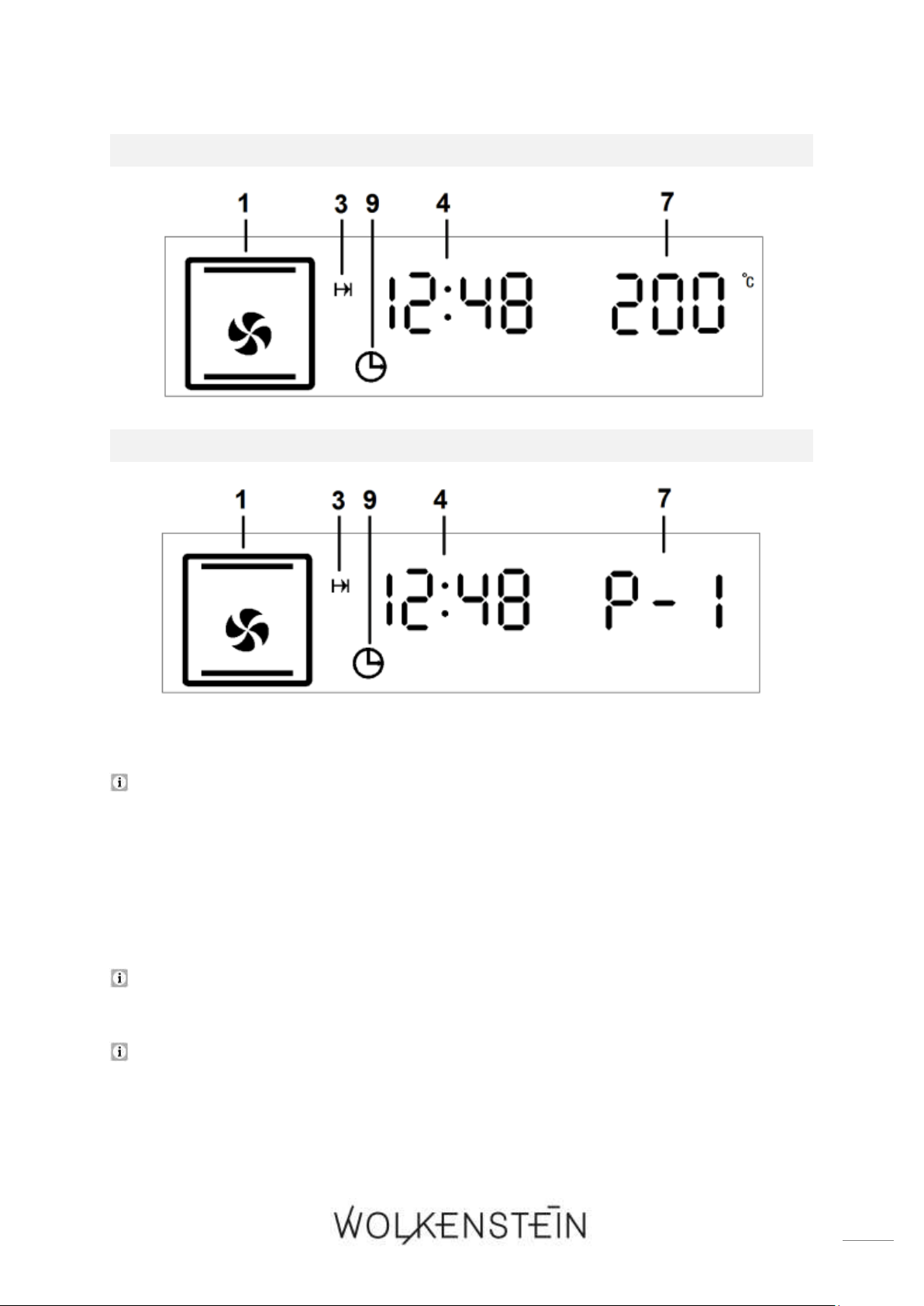
88
SETTING: MANUAL OVEN FUNCTION
SETTING: AUTOMATIC PROGRAMME:
17. The cooking process starts at the calculated time.
When the temperature inside the oven has almost reach the set temperature, an
acoustic signal sounds for 2 seconds.
18. When the set countdown time has elapsed, an acoustic signal sounds 10 times;
the oven is switched off automatically and returns to STANDBY MODE.
19. After the end of operation, the cooling fan still continues to run for a while
(approx. 35 minutes), even if the appliance itself is switched off.
When the temperature inside the oven falls below 100
0
C, the cooling fan is
switched off automatically.
If the temperature inside the oven falls below 30
0
C, the temperature indicator
displays « Lo ».
89
If you do not set a temperature or a cooking / baking time, or if you do not press
the button « START » within 10 seconds after you have carried out the settings,
the appliance returns to standby mode automatically.
Press the button « PAUSE / CANCEL »once to pause the cooking process. The
indicators of the temperature and time are flashing. Press the button
« START » to continue the cooking process.
EXAMPLE:
Please note that the appliance is equipped with a 24-hour display. E.g.: if
you want to set the time “1.00 p.m.”, you must set the display to 13.00
o`clock.
❖ It is 8:00 a.m. You want to cook or bake for 2 hours. The cooking / baking time
should be finished at 1:00 p.m.
❖ To set the programme please follow the instructions given above in: "HOW TO
SET THE AUTOMATIC COOKING / BAKING FUNCTION".
1. Set the duration of the cooking / baking time to 2 hours.
2. Set the time by which the cooking / baking process should be finished to 13:00.
3. The calculated cooking process starts at 11:00 a.m.
4. At 13:00 o`clock (1:00 p.m.) the oven will be switched off automatically.
4.3.4 How to cancel the programming
HOW TO CANCEL THE TIMER (HOB GUARD)
➢ If you press the button « PAUSE / CANCEL » once while you set the timer,
the current setting is cancelled and the appliance returns to STANDBY MODE.
OR
➢ When the timer is in operation, press and hold the button « PAUSE /
CANCEL » for a few seconds. The timer function is cancelled and the
appliance returns to STANDBY MODE.
90
HOW TO CANCEL THE DURATION OF THE COOKING / BAKING TIME:
➢ If you press the button « PAUSE / CANCEL » after you have carried out the
settings and before you press the button « START », the settings are cancelled
and the appliance returns to STANDBY MODE.
OR
➢ When the oven is in working mode: press the button « PAUSE / CANCEL »
twice (press once = pause / press twice = cancel) to cancel the cooking process
and the settings. The appliance returns to STANDBY MODE.
HOW TO CANCEL THE AUTOMATIC COOKING / BAKING FUNCTION
➢ If you press the button « PAUSE / CANCEL » after you have carried out the
settings and before you press the button « START », the settings are cancelled
and the appliance returns to STANDBY MODE.
OR
➢ When the oven is in working mode: press the button « PAUSE / CANCEL »
twice (press once = pause / press twice = cancel) to cancel the cooking process
and the settings. The appliance returns to STANDBY MODE.
4.4 Cleaning programme: « Hydro Clean »
❖ The appliance is equipped with an automatic cleaning programme which enables
an easier cleaning of the interior of the oven.
CLEANING PROGRAMME: « HYDRO CLEAN » (P - 4)
-CLEANING OF THE OVEN WITH STEAM-
The preprogrammed duration and temperature of the cleaning programme
P - 4 cannot be changed.
1. The oven must be in STANDBY MODE. If the oven is switched off, press any
operating button or turn the rotary knob for the selection of the OVEN
FUNCTIONS to return the appliance to STANDBY MODE.
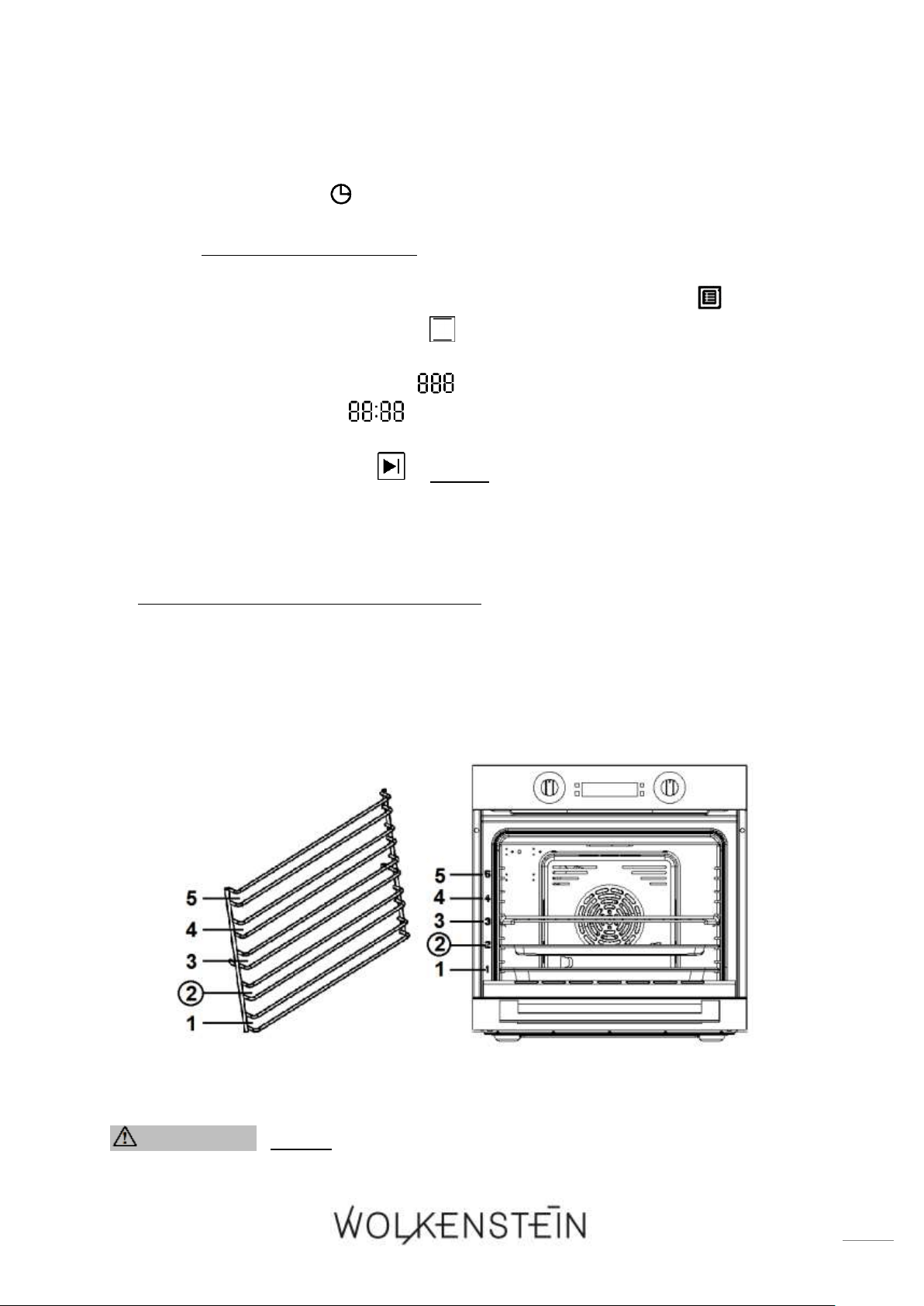
91
2. In STANDBY MODE, the display indicates the time / system time and the indicator
« TIME / SYSTEM TIME » is on.
3. Fill 250 ml of water in the drip tray or deep oven pan and place it in a low rack
height (second insertion height); s. fig. below.
4. Close the oven door.
5. Turn the rotary knob for the selection of the OVEN FUNCTIONS « » until the
icon of the cleaning programme « » (function 13 / automatic programme
P - 4; see also chapter 4.7) is displayed.
6. The TEMPERATURE INDICATOR « » displays the set programme « P - 4 » and
the TIME INDICATOR « » displays the preprogrammed time of the
cleaning programme.
7. Press the button « START » within 10 seconds to start the cleaning
programme.
8. The oven is in working mode.
9. When the preprogrammed time has elapsed, an acoustic signal sounds 10 times;
the oven is switched off automatically and returns to STANDBY MODE.
10. After the use of the cleaning programme: ensure that the oven has cooled down
completely before you open the door. RISK OF BURNS! RISK OF INJURY!
11. Open the oven door and wipe the interior with a cloth.
12. If necessary, clean the interior using warm water and a little bit of washing-liquid
additionally.
13. Dry the interior of the oven thoroughly after cleaning.
Fig. similar: modifications are possible.
WARNING! Never use a steam cleaner! RISK OF ELECTRIC
SHOCK!
92
WARNING! After the use of the cleaning programme: ensure that
the oven has cooled down completely before you open the door. RISK
OF BURNS! RISK OF INJURY!
NOTICE! Use this programme for the cleaning of the oven only.
4.5 Child safety lock
❖ The oven is equipped with a CHILD SAFETY LOCK.
You can lock the control panel of the oven to protect it from operation by
children or unintentional operation.
The CHILD SAFETY LOCK can be activated both in STANDBY MODE and in
WORKING MODE (oven in operation).
HOW TO ACTIVATE THE CHILD SAFETY LOCK
1. Press and hold the buttons « PAUSE / CANCEL » and « START » for
approx. 3 seconds simultaneously.
2. A long acoustic signal sounds and the indicator of the CHILD SAFETY LOCK
« » goes on.
3. The CHILD SAFETY LOCK is activated.
If you want to carry out any oven settings while the CHILD SAFETY LOCK is
activated, you must deactivate the child safety lock first (s. below).
HOW TO DEACTIVATE THE CHILD SAFETY LOCK
1. Press and hold the buttons « PAUSE / CANCEL » and « START » for
approx. 3 seconds simultaneously.
2. A long acoustic signal sounds and the indicator of the CHILD SAFETY LOCK
« » goes off.
3. The CHILD SAFETY LOCK is deactivated.
93
NOTICE! When the child safety lock is activated, all buttons and rotary
knobs are disabled; except the buttons which are necessary to deactivate
the child safety lock: + (press simultaneously).
4.6 Time query function
HOW TO QUERY THE TIME / SYSTEM TIME
1. The oven is in operation (working mode).
2. The time indicator displays the cooking / baking time.
3. To indicate the current time / system time on the display, press the button
« TIME » once.
4. The time indicator displays the current time / system time.
5. After 10 seconds the cooking / baking time is displayed automatically again.
You can also press the button « TIME » once again to return to the indication
of the cooking / baking time.
HOW TO QUERY THE REMAINING COUNTDOWN TIME OF THE TIMER, THE
AUTOMATIC COOKING / BAKING FUNCTION, ETC.
1. The time indicator displays the time / system time.
2. To indicate the remaining countdown time on the display, press the button
« TIMER / PARAMETER » once.
3. The time indicator displays the remaining countdown time.
4. After 10 seconds the time / system time is displayed automatically again.
If the remaining countdown time is less than one minute, « 0:00 » is displayed.
HOW TO QUERY THE STARTING TIME OF THE COOKING PROCESS WHEN THE
AUTOMATIC COOKING / BAKING FUNCTION IS SET
1. The automatic cooking / baking function is set.
2. The time indicator displays the current time / system time.
3. To indicate the starting time of the cooking process on the display, press the
button « TIME ».
4. The time indicator displays the starting time of the cooking process.
5. After 10 seconds the current time / system time is displayed automatically
again. You can also press the button « TIME » once again to return to the
indication of the time / system time.
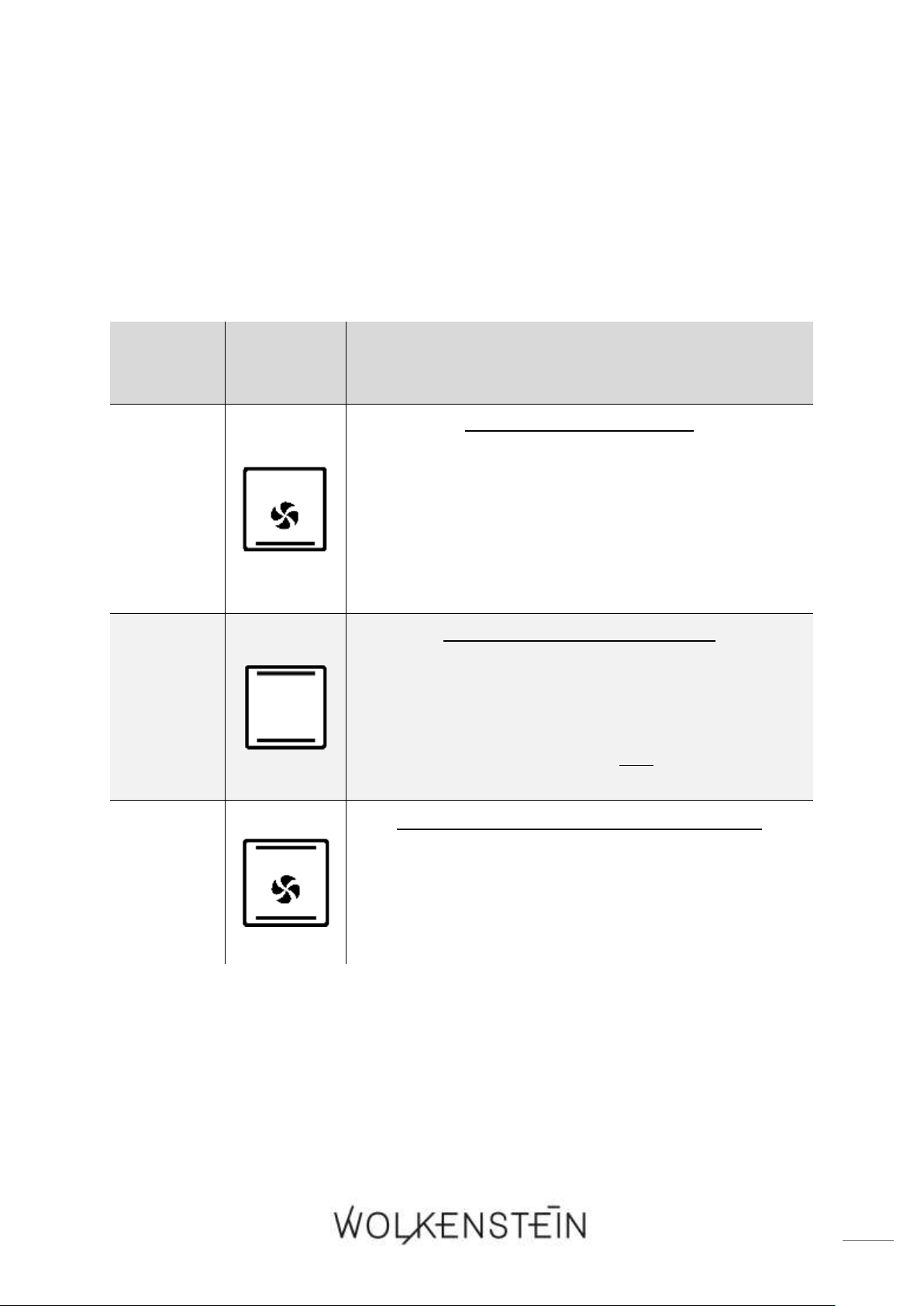
94
4.7 Functions and automatic programmes of the oven
FUNCTION
ICON
DESCRIPTION
1
BOTTOM HEAT INCL. FAN
➢ Switches on the bottom heat of the oven, e.g. for
final backing from the bottom (e.g. pizza, etc.).
➢ Due to the fan, the heat circulates; this circulation
ensures an even cooking and baking result.
➢ This function is also suitable for the sterilising and
preserving of jars.
2
TOP HEAT AND BOTTOM HEAT
➢ The oven is heated conventionally.
➢ The oven should be preheated before you start
cooking / baking.
➢ Suitable to cook / bake on one cooking / baking
level.
3
TOP HEAT AND BOTTOM HEAT INCL. FAN
➢ The oven is heated conventionally while using the
fan.
➢ Due to the fan, the heat circulates; this circulation
ensures an even cooking and baking result.
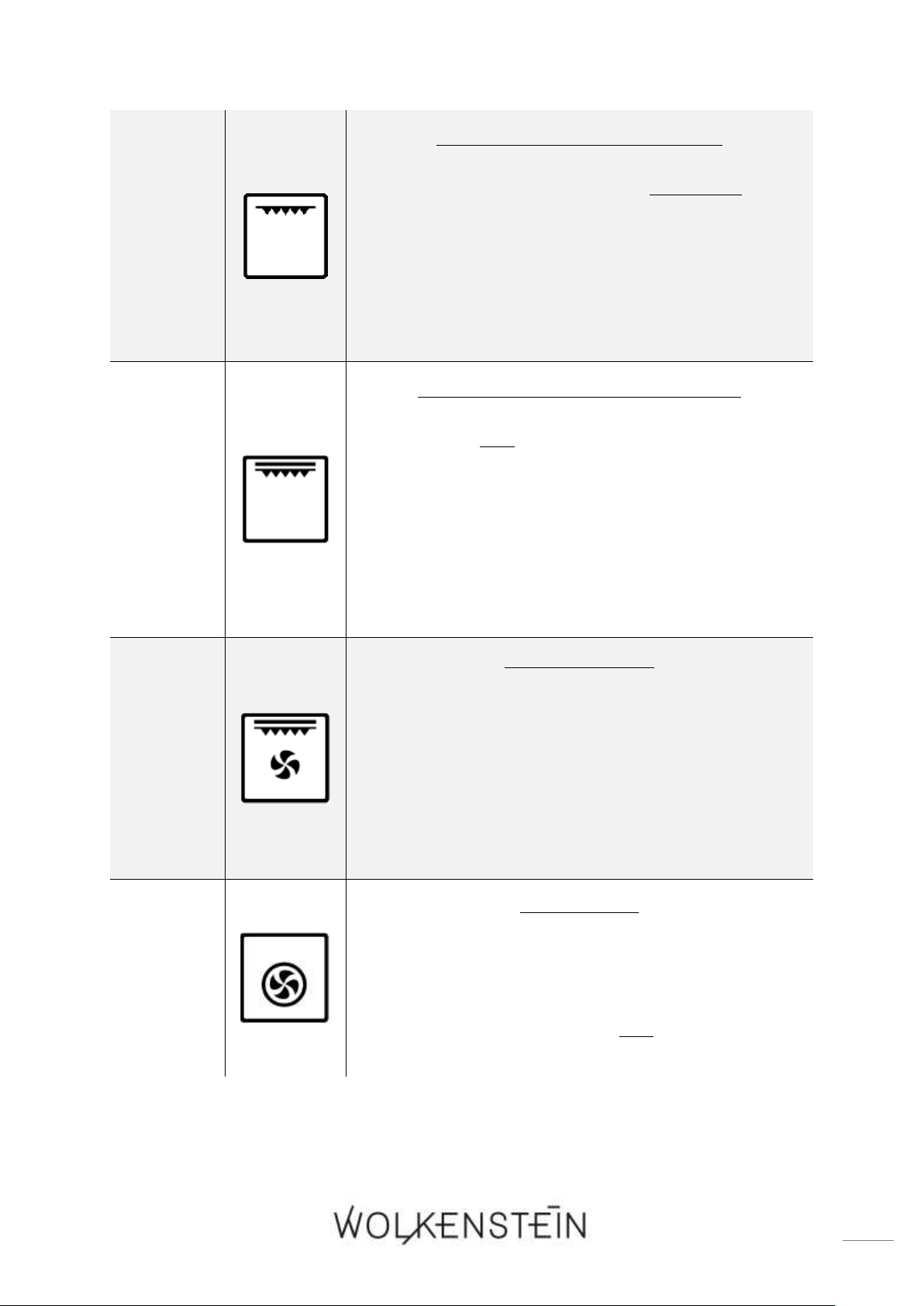
95
4
GRILL (INNER GRILL ELEMENT)
➢ This function switches on the inner part of the
grill element only.
➢ The heat is emitted directly on the food under the
grill element.
➢ The inner part of the grill element is suitable for
the grilling of small portions.; e.g. of bacon, of
toast, of small fish and meat portions, etc.
5
GRILL (COMPLETE GRILL ELEMENT)
➢ The inner and outer part of the grill element
operate simultaneously.
➢ The heat is emitted directly onto the food under
the grill element.
➢ Grilling with the complete grill element allows
higher temperatures in the top area and intensifies
browning; it also allows the preparing of larger
portions.; e.g. of sausages, steaks, fish, etc.
6
GRILL INCL. FAN
➢ The grill and the fan operate simultaneously.
➢ Accelerates grilling and improves the taste of the
food.
➢ Suitable for the fast browning of food, e.g. steaks,
burgers.
➢ Maintains the juiciness of the food, e.g. of steaks,
burgers, etc.
7
HOT AIR FAN
➢ The fan is surrounded by a heating element so the
hot air is evenly distributed and enables a faster
cooking process.
➢ Suitable to cook / bake on two cooking / baking
levels simultaneously.
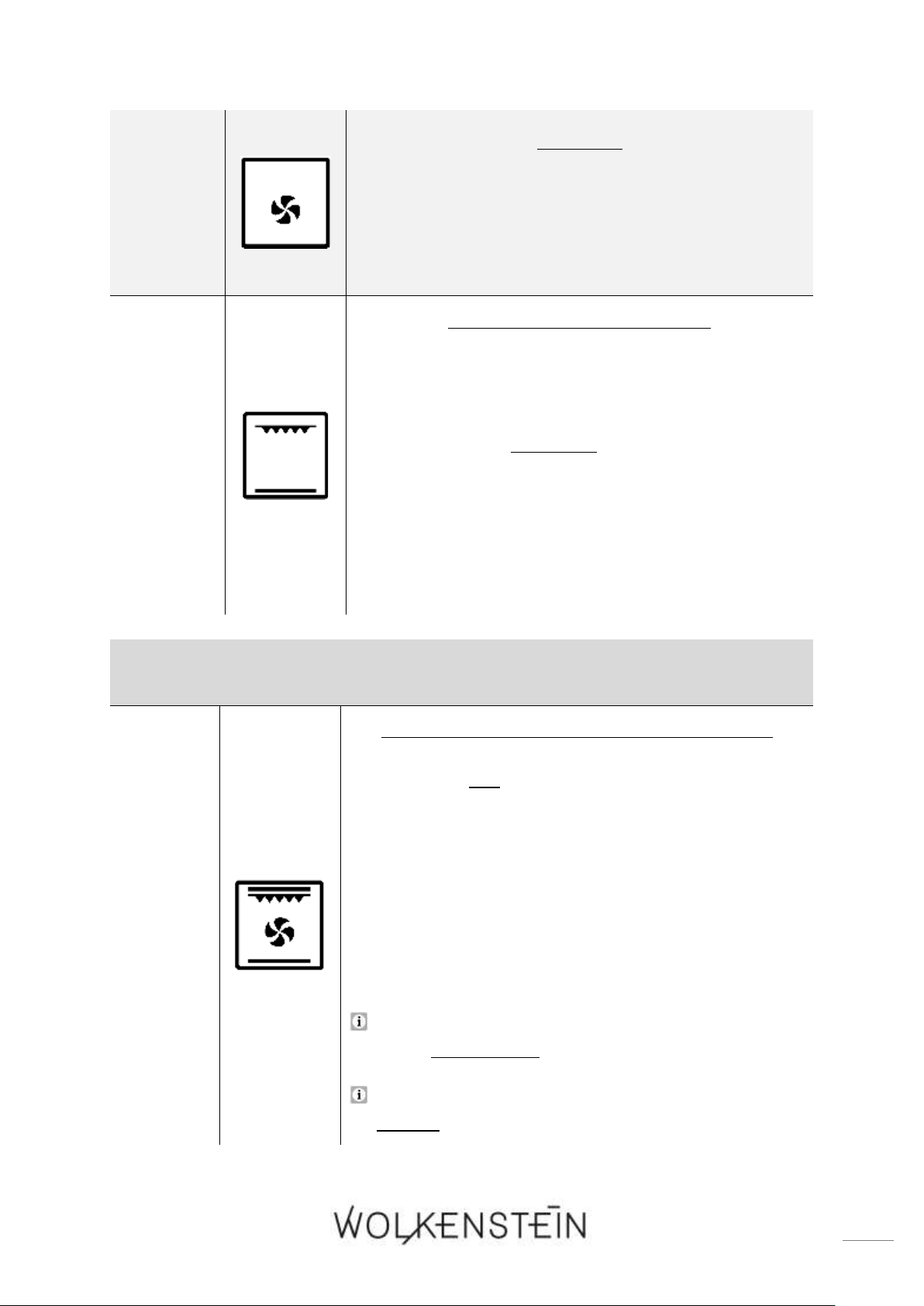
96
8
DEFROST
➢ The fan works without a heat setting.
➢ You can defrost frozen food.
➢ Defrosting time depends on size and weight of the
food.
9
ECO
ENERGY SAVING GRILL MODE
➢ The inner part of the grill element and the bottom
heat operate simultaneously.
➢ The oven works for 20 seconds and then pauses
for 30 seconds alternately.
➢ The oven temperature rises slowly and the heat can
penetrate into the food completely. This reduces
excess heat and makes grilling more energy
efficient.
➢ This mode is mainly suitable for the preparing of
large portions.
AUTOMATIC PROGRAMMES:
10
P - 1
PROGRAMME P - 1 = « RAPID PREHEATING »
➢ The inner and outer part of the grill element, the
bottom heat and the fan operate simultaneously
to obtain an alternating heat circulation.
➢ Due to the additionally activated fan, the heat
circulates; this circulation ensures an even heat
distribution.
➢ This function is suitable for the rapid preheating
of the oven.
The preset DURATION OF THE GRILLING TIME can
be set individually.
The preprogrammed TEMPERATURE is 200
0
C and
cannot be changed.
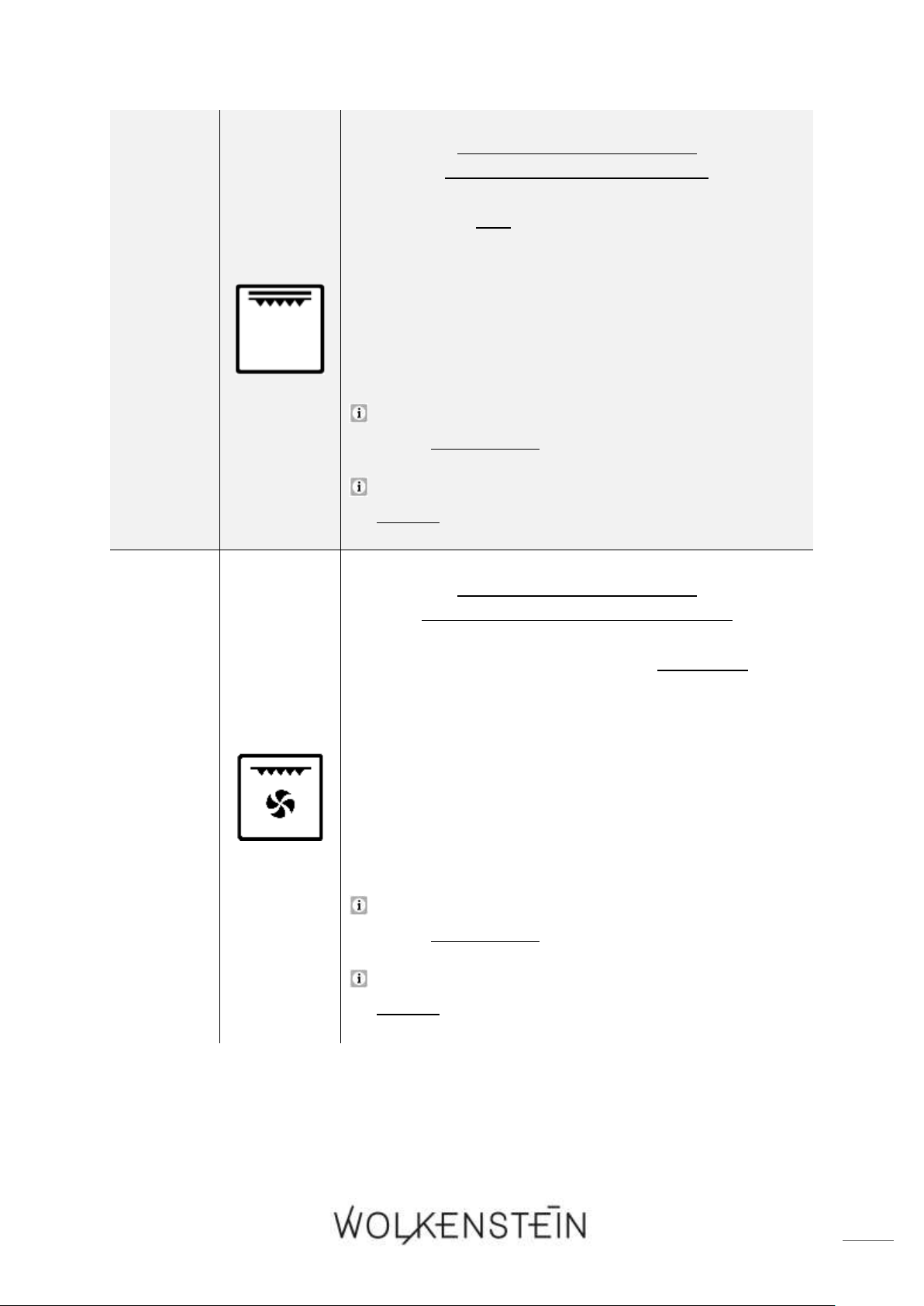
97
11
P - 2
PROGRAMME P - 2 = GRILL
(COMPLETE GRILL ELEMENT)
➢ The inner and outer part of the grill element
operate simultaneously.
➢ The heat is emitted directly onto the food under the
grill element.
➢ This programme intensifies browning; it also allows
the preparing of larger portions.; e.g. of sausages,
steaks, fish, etc.
The preset DURATION OF THE GRILLING TIME can
be set individually.
The preprogrammed TEMPERATURE is 160
0
C and
cannot be changed.
12
P - 3
PROGRAMME P - 3 = GRILL
(INNER GRILL ELEMENT INCL. FAN
➢ This programme switches on the inner part of the
grill element and the fan.
➢ The heat is emitted directly onto the food under the
grill element.
➢ Due to the fan, the heat circulates; this circulation
ensures an even grilling result.
➢ This programme is suitable for the grilling of small
portions.; e.g. of bacon, of toast, of small fish and
meat portions, etc.
The preset DURATION OF THE GRILLING TIME can
be set individually.
The preprogrammed TEMPERATURE is 180
0
C and
cannot be changed.
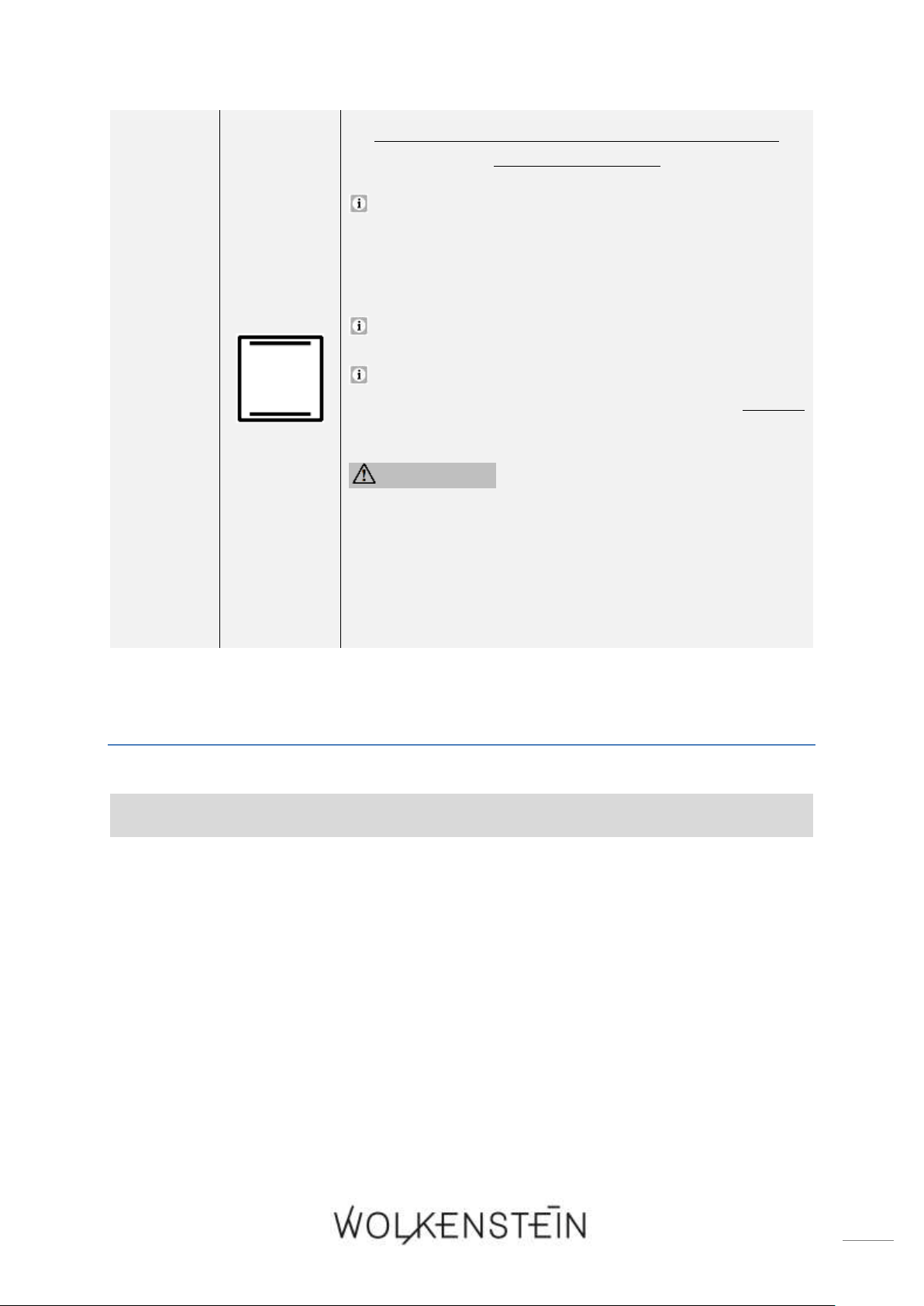
98
13
P - 4
PROGRAMME P - 4 = CLEANING PROGRAMME:
« HYDRO CLEAN »
The « HYDRO CLEAN » cleaning programme makes
it easier to clean the interior of the oven;
description of the use of the programme: s. chapter
4.4 CLEANING PROGRAMME.
The preprogrammed TEMPERATURE is 120
0
C.
The preprogrammed DURATION and
TEMPERATURE of the cleaning programme cannot
be changed.
WARNING! After the use of the cleaning
programme: ensure that the oven has cooled
down completely before you open the door.
RISK OF BURNS! RISK OF INJURY!
NOTICE! Use this programme for the cleaning
of the oven only.
5. Environmental protection
ENERGY SAVING:
❖ Do not open the oven door unnecessarily often.
❖ Switch off the oven in good time and make use of the residual heat.
❖ Only use the oven when cooking larger dishes.
❖ Meat of up to 1 kg can be cooked more economically in a pan on the hob.
❖ Make use of the residual heat of the oven.
❖ If the cooking time takes longer than 40 minutes, switch off the oven 10 minutes
before.
❖ For baking it is better to use black trays which conduct heat better and shorten
the baking time.
❖ Make sure the oven door is closed properly.
❖ Heat can escape through spillages on the door seals. Clean up any spillages
immediately.
99
❖ Do not install the cooker near of refrigerators / freezers. Otherwise the energy
consumption increases unnecessarily.
6. Tips for baking, roasting and grilling in the oven
WARNING! Be very careful when frying, because oil and fat heat up
very fast especially when operating a high power level. Extremely hot oil
and fat inflame spontaneously and represent a serious fire risk.
WARNING! NEVER try to extinguish a fire with water, but switch off
the appliance and then cover flame e.g. with a lid or a fire blanket.
CAUTION! The interior parts of the appliance become extremely hot.
Do not touch any parts inside the appliance if you handle your cookware.
RISK OF BURNS!
CAUTION! Be careful if you open the door. Do not get in contact with
the hot parts of the oven or the steam, which will escape the oven. RISK
OF BURNS! RISK OF SCALDING!
CAUTION! Cooking utensils may become hot because of the heat
transferred by the heated food. Potholders or oven gloves may be needed
to handle such utensils.
6.1 Tips for baking and roasting
❖ We recommend to use the supplied baking tray provided with your appliance.
❖ It is also possible to bake in cake tins and trays bought somewhere else. For
baking it is better to use black trays which conduct heat better and shorten
the baking time.
❖ Shapes and trays with bright or shiny surfaces are not recommended when using
the conventional heating method (top and bottom heaters). The use of such tins
can result in under-cooking the base of cakes.
❖ Before you take a cake out of the oven, check that it is ready using a wooden stick
(when the cake is ready the stick should come out dry and clean after having been
inserted in the cake).
❖ When switching off the oven leave the cake inside for about 5 minutes.
❖ Cook meat with a weight of more than 1 kg in the oven. Cook smaller pieces of
food on the hob.
❖ Use oven-proof cookware only. Check that their handles also are oven-proof.

100
❖ When you cook meat on a grilling grate, insert a drip tray with a small amount of
water in the oven (minimum rack height).
❖ Turn over meat at least once. Pour hot gravy or hot salted water over the meat.
❖ Never pour cold water over the meat.
6.2 Tips for grilling
1. Turn the rotary knob for the selection of the oven functions until the desired grill
function is displayed.
2. Preheat the oven for approx. 4 minutes.
3. When you grill your food on a grilling grate, also insert a drip tray to catch the
dripping grease and to keep the appliance clean.
4. Always keep the door of the oven closed.
5. Turn your food over after half of the grilling-time.
6. Spread your food with a little bit of oil before grilling.
NOTICE! Do not use aluminium foil for grilling. Do not wrap your food in
aluminium foil and do not cover the grillage with aluminium foil. The
aluminium foil will reflect the heat of the grill so the appliance may be
damaged.
NOTICE! Do not place the drip tray (oven pan) or the baking tray (deep
oven pan) in the upper levels (4 / 5
16
) of the oven. The intense heat in the
upper levels of the oven can warp the material of the accessories so that
the interior of the oven can be damaged when removing the drip tray /
baking tray. RISK OF DAMAGE!
7. Cleaning and maintenance
WARNING! Switch off the appliance and let it cool down completely
before cleaning. Disconnect the appliance from the mains before
maintenance (fuse box of your household power supply)!
WARNING! Never use a steam cleaner to clean the appliance. The
steam will cause serious damage to the electric components of the
appliance. RISK OF ELECTRIC SHOCK!
DETERGENTS
16
Depending on model

101
➢ Do not use any abrasive detergents!
➢ Do not use any organic detergents!
17
➢ Do not use essential oils!
➢ Never use solvents.
7.1 Cleaning of the oven
1. Clean the oven after each use.
2. Clean the interior with warm water and a little bit of washing-liquid. Use a sponge
or a soft cloth. Never use abrasive or aggressive detergents.
3. Dry after cleaning.
4. Clean the outside of the oven with warm soapy water. Use a sponge or a soft
cloth. Never use abrasive or aggressive detergents.
To clean the interior of the oven, you can also use the « HYDRO CLEAN » cleaning
programme; s. chapter 4.4 CLEANING PROGRAMME: « HYDRO CLEAN ».
WARNING! Never use a steam cleaner! RISK OF ELECTRIC
SHOCK!
NOTICE! If you use a special oven-detergent, check that the detergent is
suitable for your appliance (instructions on the packaging of the
detergent).
NOTICE! Any damage that is caused to the appliance by a cleaning
product will not be fixed free of charge, even if the guarantee period
of the appliance is still valid.
7.2 Cleaning of the oven door
➢ Clean the door very carefully.
➢ Do not use any abrasive detergents; otherwise you may damage or break the glass.
➢ Use wash-up liquid and warm water.
7.3 Replacing of the illuminant
WARNING! Switch off the appliance and let it cool down completely.
Disconnect the appliance from the mains before maintenance (fuse box of
your household power supply)! RISK OF ELECTRIC SHOCK!
17
Detergents such as vinegar, citric acid etc.

102
NOTICE! When you replace the illuminant, always use a clean cloth or
gloves. Never touch the new illuminant with your bare hands.
NOTICE! Never use a screwdriver to remove the cover. Remove the cover
by hand only! RISK OF DAMAGE!
1. Disconnect the appliance from the mains: switch off the corresponding
fuse in the fuse box of your household power supply!
2. Place a dishcloth in the interior of the cold oven to protect it from possible
damage.
3. Unscrew the lamp cover anticlockwise. Clean the lamp cover and wipe it dry
thoroughly.
4. Unscrew the illuminant from the socket, replace the illuminant. Choose a high
temperature illuminant (300
0
C) with the following parameters:
➢ Voltage 230 V
➢ Power 25 W
➢ Thread G9
5. Do not use any other type of illuminant.
6. Screw the new illuminant in. Check its proper position in the socket.
7. Replace the lamp cover.
8. Remove the dishcloth and switch on the corresponding fuse in the fuse box of
your household power supply again.
According to the EU regulation No. 244/2009, your appliance is classified as a
household appliance in accordance with the eco-design requirements for non-
directional household lamps. This means that illuminants, which are used in
household appliances, must not be used to illuminate domestic establishments.
7.4 Removing of the oven door
HOW TO REMOVE THE OVEN DOOR
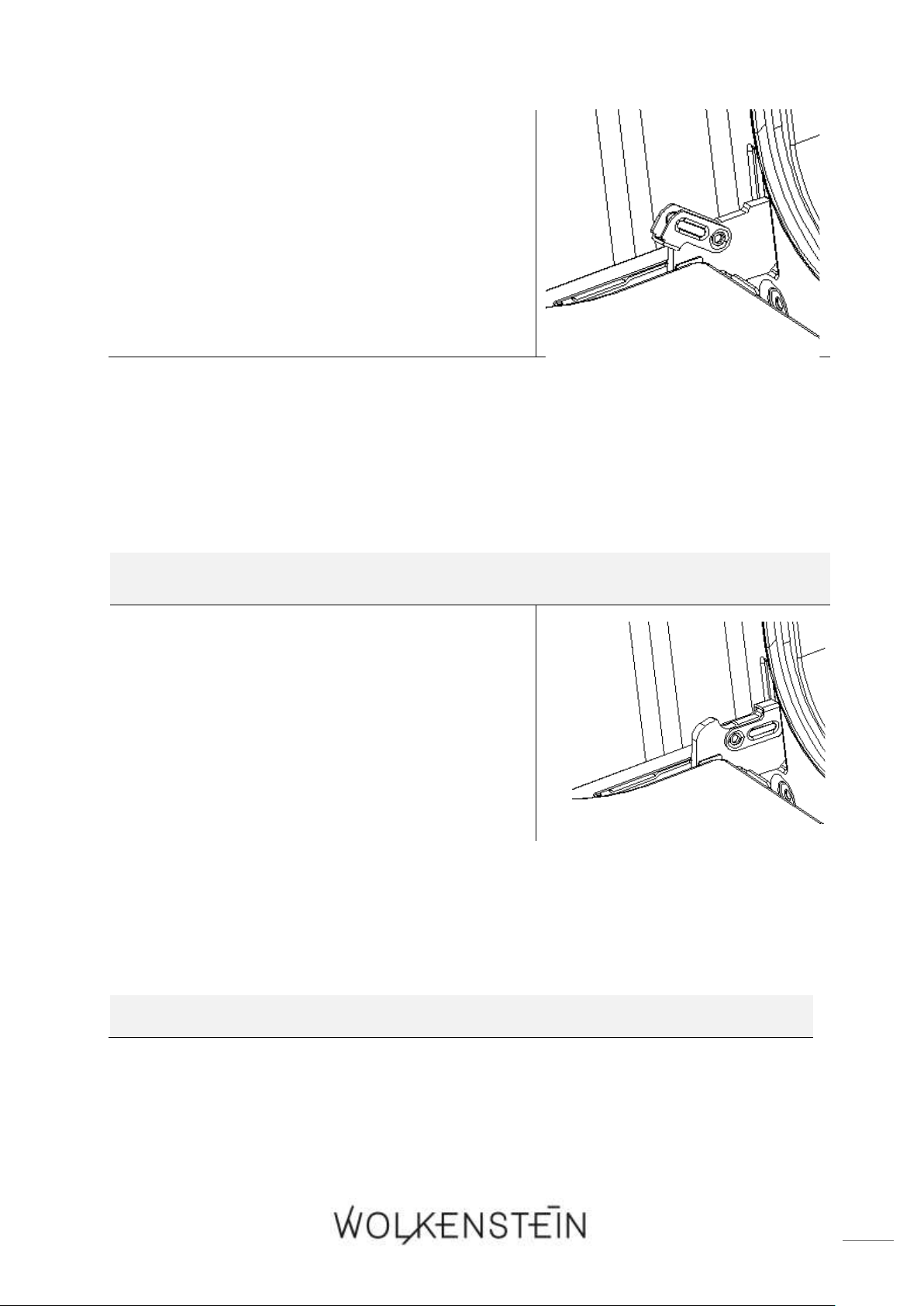
103
1. Open the door and push the safety catches of
the two hinges upwards (s. fig. on the right).
2. Close the door slightly.
4. Lift the door and pull it towards your
direction carefully.
HOW TO INSTALL THE OVEN DOOR
1. To reassemble proceed in reverse order (s.
above).
2. Check that the groove of the hinge bracket is
positioned properly in its guide.
3. After reassembling the door close the safety
catches carefully (s. fig on the right).
4. If the safety catch is not closed properly you will damage the hinges
when closing the door.
7.5 Removing of the glass pane of the oven door
HOW TO REMOVE THE GLASS PANE
1. Remove the oven door (s. chapter 7.4) and place it on a piece of cloth to protect
the glass from scratches, etc.
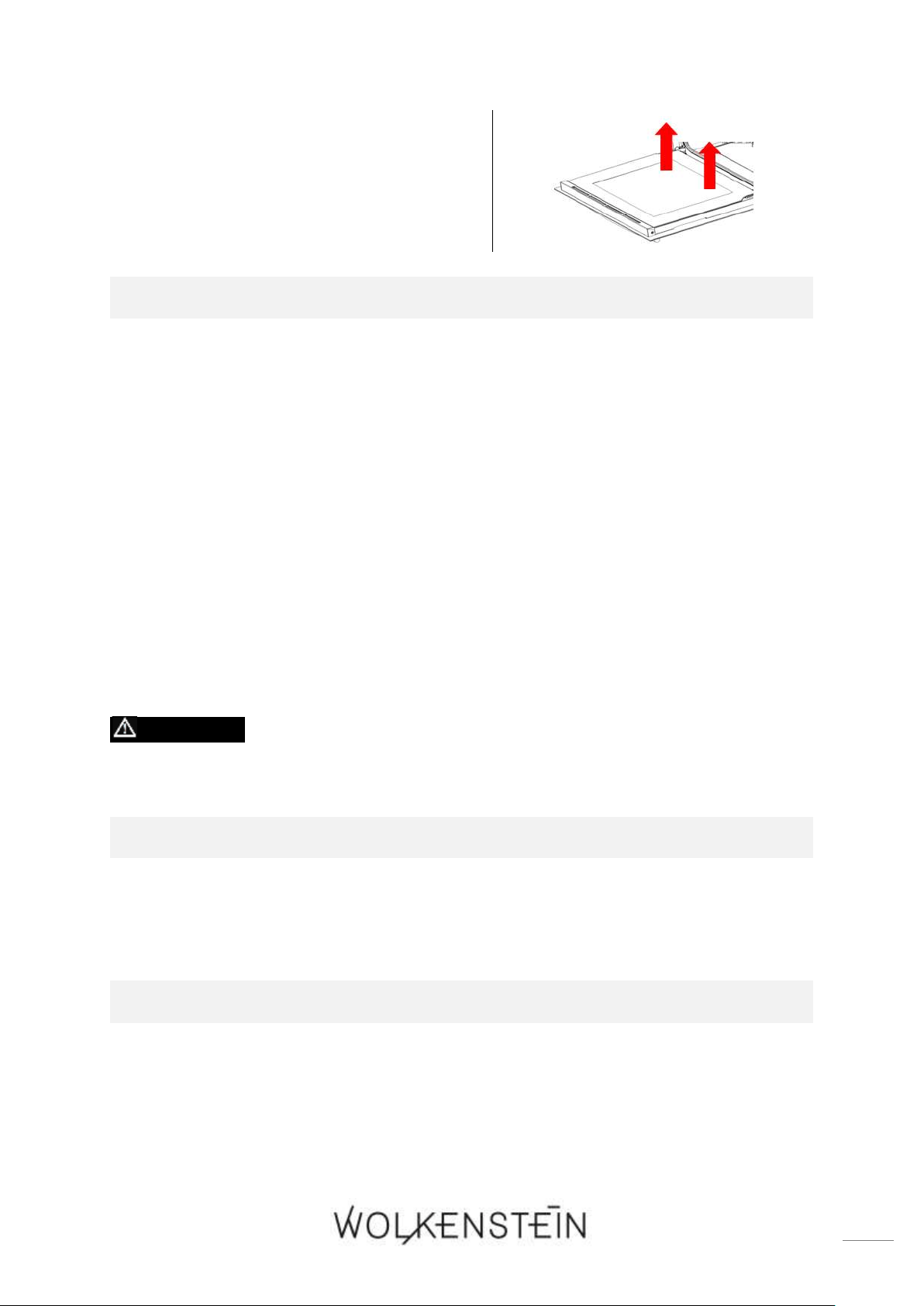
104
2. Push with one hand on the outer glass
pane and pull with the other hand on the
inner glass pane; be careful in doing so!
Hold the glass pane tight and pull it out
carefully (s. fig. on the right).
HOW TO INSTALL THE GLASS PANE
1. Insert the inner glass pane into the corresponding groove.
2. Align both sides of the glass pane with its slots properly and push the glass pane
in place carefully.
7.6 Removing of the side rack
1. Press the side rack at the bottom end downwards slightly until it has been
detached from the mounting.
2. Pull the detached side rack forward slightly.
3. To remove the side rack, hold it to the oven horizontally.
4. To reinsert the side rack, please proceed in reverse order.
7.7 Trouble shooting
DANGER! Never try to repair the appliance yourself. Repairs carried
out by unauthorized persons can cause serious damage. If the appliance
does not operate properly, please contact the customer service.
PERIODICAL CONTROLS
1. Carry out periodic inspections of the control elements and cooking units of the
cooker.
2. All malfunctions should be repaired immediately.
EMERGENCY MEASURES:
1. Switch off the entire appliance.
2. Disconnect the appliance from the mains (fuse box of your household power
supply).
3. Contact your customer service.
➢ Check the schedule below before you contact your aftersales service.
105
MALFUNCTION
POSSIBLE CAUSES
MEASURES
THE APPLIANCE DOES NOT WORK AT ALL.
➢ The appliance is not supplied with
energy.
➢ Check that the appliance is
connected to the mains. Check the
household fuse box. Is there a power
failure at your place of residence?
THE APPLIANCE DOES NOT HEAT.
➢ You have not set a temperature.
➢ Set a temperature.
➢ You have not set the timer
18
.
➢ Set the timer.
➢ The heating element is defective.
➢ Please contact the customer service.
THE INTERNAL LIGHT DOES NOT WORK.
➢ The illuminant is loose or damaged.
➢ Tighten or replace the illuminant.
NOISE CAUSED BY THE FAN INSIDE THE APPLIANCE.
➢ The cooling-fan the appliance is
equipped with
19
protects the
electronics from being overheated. It
may continue to run even after you
have switched the appliance off.
➢ Normal operating condition. Do not
disconnect the appliance from the
mains while the fan is running.
If the appliance has a malfunction not noted on the schedule above or if you
have checked all items on the above schedule but the problem still exists, please
contact the customer service.
7.7.1 Error codes
ERROR CODE
ERROR
DESCRIPTION / MEASURES
18
Depending on model
19
Depending on model
106
E - 1
SENSOR ERROR
➢ Short circuit of the sensor.
➢ Sensor interrupted / not connected
An acoustic signal sounds 10 times (once
per second).
Press the button « PAUSE / CANCEL »
to return the appliance to STANDBY MODE.
E - 2
ERROR OF THE
HEATING
ELEMENT
➢ After 5 minutes of heating, the
temperature of the oven is < 35
0
C.
An acoustic signal sounds 10 times (once
per second).
Press the button « PAUSE / CANCEL »
to return the appliance to STANDBY MODE
If any error codes are indicated on the display, DISCONNECT the appliance
from the mains and contact the customer service.
8. Technical data
TECHNICAL DATA*
Model
Built-in oven
Control panel
Glass / black
Energy efficiency category**
A
Energy efficiency index
93.00
Energy consumption / conventional
0.81 kW/h
Energy consumption (fan / hot air)
0.80 kW/h
Net volume oven in l
74.00
Size of the appliance
Large: volume > 70 l
Oven functions
Bottom heat incl. fan / top and
bottom heat / top and bottom heat
incl. fan / grill (inner grill element) /
grill (complete grill element) / grill
incl. fan / hot air fan / defrost /
energy saving grill mode (Eco)

107
Automatic programmes
4: P - 1 (rapid preheating) / P - 2
(grill, complete grill element) / P - 3
(grill, inner grill element incl. fan) /
P - 4 (cleaning programme: « Hydro
Clean »)
Grill
✓
Fan
✓
Hot air
✓
Full-glass inner door
✓
Telescopic rails
✓
Timer
✓
Oven door / glass sheets
Black glass / 3
Body cooling
✓
Handles / switches
Aluminium
Retractable rotary knobs
✓
Number of side racks / telescopic rails
1 / 1
Drip pan / grilling grate / baking tray
1 / 1 / 1
Noise emission
< 52 dB(A)
Max. power
3.15 kW
Voltage / frequency
220 - 240 V AC / 50 Hz
Safety plug
✓
Cable length in cm
150.00
Installation dimensions oven H*W*D
in cm
59.90*59.50*59.25
Weight net / gross in kg
33.00 / 36.00
❖ Technical modifications reserved.
*
According to Regulation (EU) No. 65/2014
**
A+++ (highest efficiency) to D (lowest efficiency)
9. Waste management
1. While unpacking, the packaging materials (polythene bags, polystyrene pieces,
etc.) should be kept away from children and pets. CHOKING HAZARD! RISK
OF INJURY!
2. Old and unused appliances must be sent for disposal to the responsible recycling
centre. Never expose to open flames.
3. Before you dispose of an old appliance, render it inoperative. Unplug the
appliance and cut off the entire power cord. Dispose of the power cord and the
plug immediately. Remove the door completely so children are not able to get

108
into the appliance as this endangers their lives!
4. Dispose of any paper and cardboard into the corresponding containers.
5. Dispose of any plastics into the corresponding containers.
6. If suitable containers are not available at your residential area, dispose of these
materials at a suitable municipal collection point for waste-recycling.
7. Receive more detailed information from your retailer or your municipal facilities.
Materials marked with this symbol are
recyclable.
Please contact your local authorities to
receive further information.
10. Guarantee conditions
This appliance includes a 24-month guarantee for the consumer given by the
manufacturer, dated from the day of purchase, referring to its flawless material-
components and its faultless fabrication. The consumer is accredited with both the
dues of the guarantee given by the manufacturer and the vendor's guarantees. These
are not restricted to the manufacturer's guarantee. Any guarantee claim has to be
made immediately after the detection and within 24 months after the delivery to
the first ultimate vendee. The guarantee claim has to be verified by the vendee by
submitting a proof of purchase including the date of purchase and/or the date of
delivery. The guarantee does not establish any entitlement to withdraw from the
purchase contract or for a price reduction. Replaced components or exchanged
appliances demise to us as our property.
The guarantee claim does not cover:
1. fragile components as plastic, glass or bulbs;

109
2. minor modifications of the WOLKENSTEIN-products concerning their authorized
condition if they do not influence the utility value of the product;
3. damage caused by handling errors or false operation;
4. damage caused by aggressive environmental conditions, chemicals, detergents;
5. damage caused by non-professional installation and haulage;
6. damage caused by non common household use;
7. damages which have been caused outside the appliance by a WOLKENSTEIN-
product unless a liability is forced by legal regulations.
The validity of the guarantee will be terminated if:
1. the prescriptions of the installation and operation of the appliance are not
observed.
2. the appliance is repaired by a non-professional.
3. the appliance is damaged by the vendor, the installer or a third party.
4. the installation or the start-up is performed inappropriately.
5. the maintenance is inadequately or incorrectly performed.
6. the appliance is not used for its intended purpose.
7. the appliance is damaged by force majeure or natural disasters, including, but with
not being limited to fires or explosions.
The guarantee claims neither extend the guarantee period nor initiate a new guarantee
period. The geographical scope of the guarantee is limited with respect to appliances,
which are purchased and used in Germany, Austria, Belgium, Luxembourg and the
Netherlands.
August 2014
110
SERVICE INFORMATION
Sie finden alle Informationen zum Kundendienst
auf der Einlage in dieser Bedienungsanleitung.
Aftersales service information
on the leaflet inside this instruction manual.
Änderungen vorbehalten
Subject to alterations
STAND
UPDATED
10.08.2019
08/10/2019
© PKM GmbH & Co. KG, Neuer Wall 2, 47441 Moers