Page 1
240-3720
18" Scroll Saw
OPERATOR’S MANUAL
CAUTION: To Reduce The Risk Of Injury, User Must Read
And Understand Operator’s Manual. Save These Instructions
For Future Reference.
For questions / comments, technical assistance or repair
parts - Please call toll free at: 1-877-684-8912 (Monday -
Friday 8am - 6pm EST.)

TABLE OF CONTENTS
Safety Symbols ............................................................................................................................................................
Safety Instructions .......................................................................................................................................................
Overview ......................................................................................................................................................................
Specications ..............................................................................................................................................................
Contents ....................................................................................................................................................................
Assembly ...................................................................................................................................................................
Operation ...................................................................................................................................................................
Maintenance ..............................................................................................................................................................
Troubleshooting .........................................................................................................................................................
Replacement parts list ...............................................................................................................................................
Warranty......................................................................................................................................................................
Page 2
Page 3
Page 8
Page 9
Page 10
Page 11
Page 19
Page 24
Page 26
Page 27
Page 28
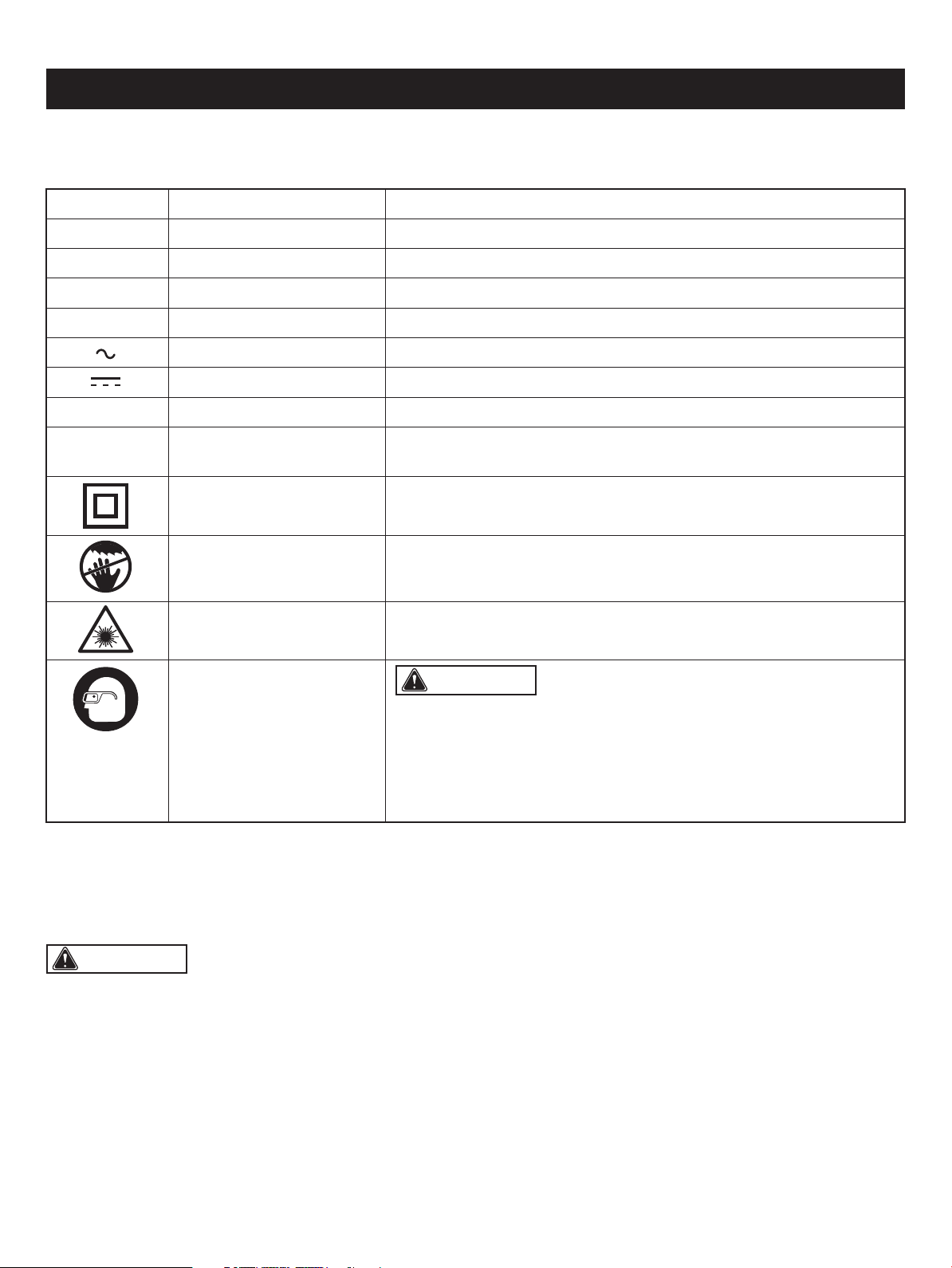
Some of these following symbols may be used on this tool. Please study them and learn their meaning. Proper interpretation
of these symbols will allow you to operate the tool better and safer.
SAFETY SYMBOLS
Page 2
WARNING: The operation of any power tool can result in
foreign objects being thrown into your eyes, which can result in severe
eye damage. Before beginning power tool operation, always wear
safety goggles or safety glasses with side shields and a full-face shield
when needed. We recommend a Wide Vision Safety Mask for use over
eyeglasses or standard safety glasses with side shields. Always use
eye protection which is marked to comply with ANSI Z87.1.
Symbol Name Designation / Explanation
V Volts Voltage
A Amperes Current
Hz Hertz Frequency (cycles per second)
W Watts Power
Alternating current Type of current
Direct current Type of characteristic of current
no No-load speed Rotational speed at no load
.../min
Per minute Revolutions, strokes, surface speed orbits, etc., per minute
Class II construction Double insulated construction
Be careful of your hand Danger keep hands away from blade
Wear safety goggles
Laser radiation Do not stare into beam or view directly with optical instruments
WARNING: To ensure safety and reliability, all repairs should be performed by a qualied service technician.
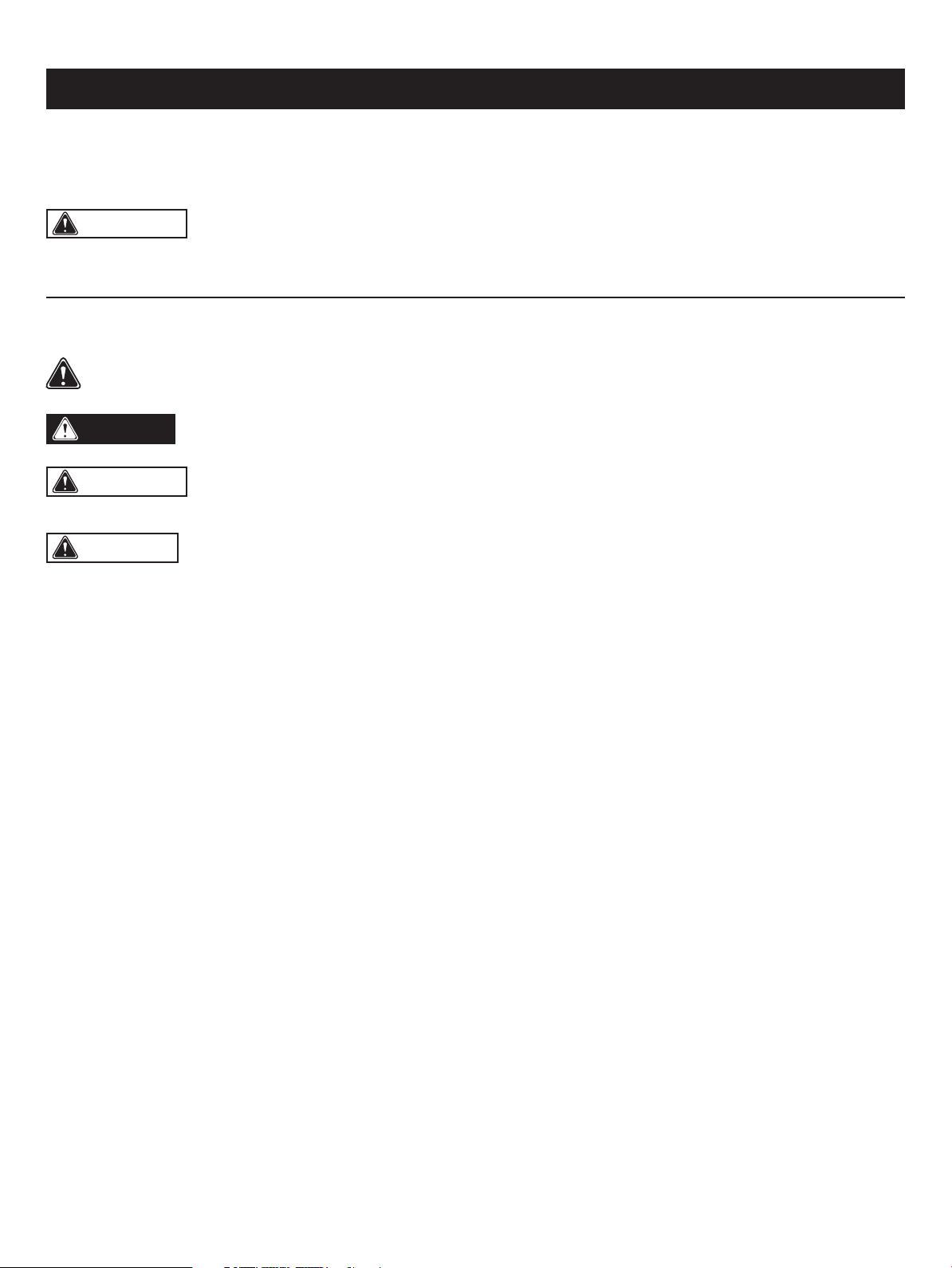
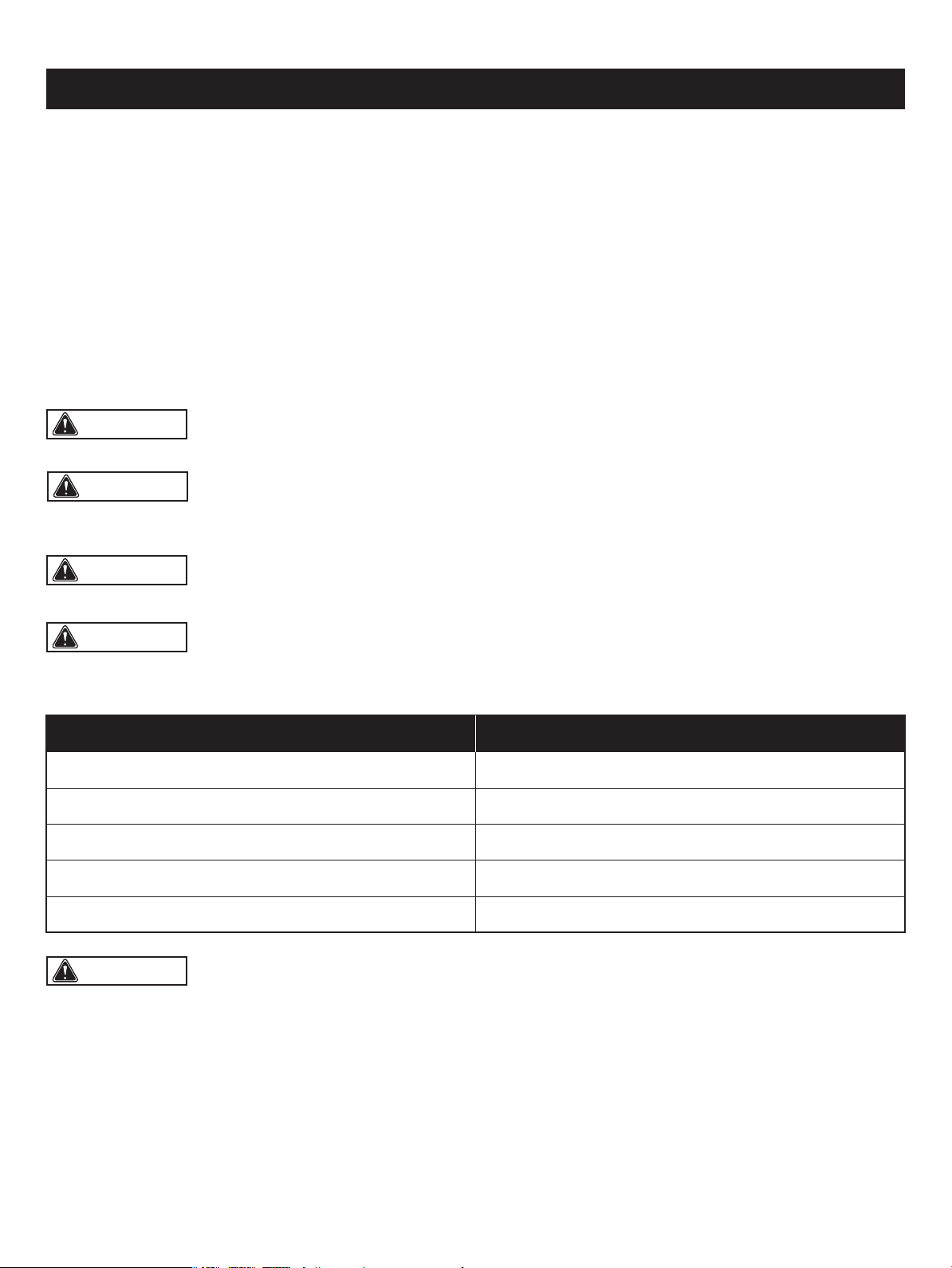
The purpose of safety symbols is to attract your attention to possible dangers. The safety symbols and the explanations
with them deserve your careful attention and understanding. The symbol warnings do not, by themselves, eliminate any
danger. The instructions and warnings they give are no substitutes for proper accident prevention measures.
SAFETY INSTRUCTIONS
Page 3
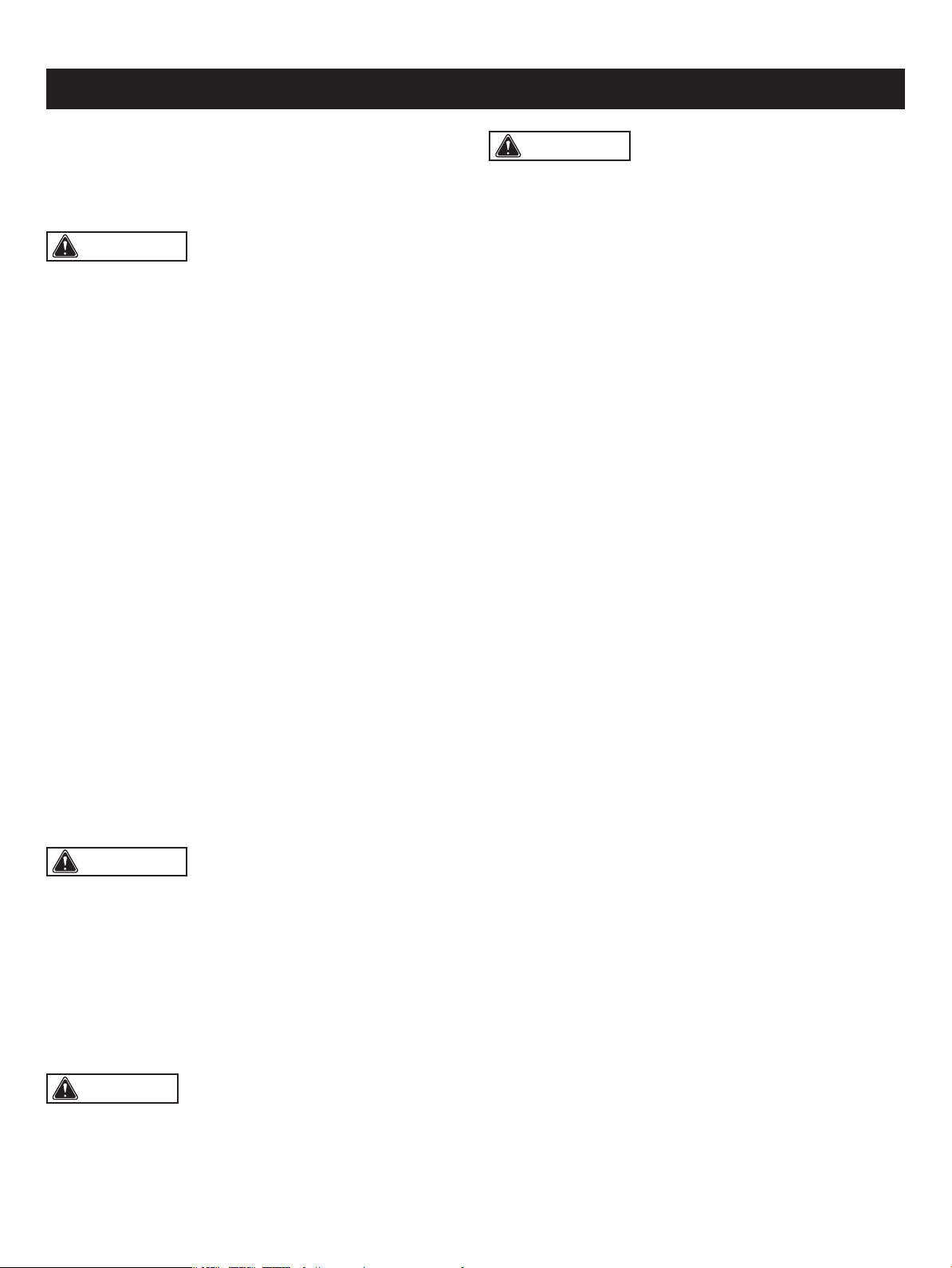
WARNING: Be sure to read and understand all safety instructions in this manual, including all safety alert symbols
such as “DANGER,” “WARNING,” and “CAUTION” before using this tool. Failure to follow all instructions listed below may
result in electric shock, re, and/or serious personal injury.
WARNING: Indicates a potentially hazardous situation, which, if not avoided, could result in death
or serious injury.
CAUTION: Indicates a potentially hazardous situation, which, if not avoided, could result in minor or moderate
injury.
DANGER: Indicates an imminently hazardous situation, which, if not avoided, will result in death or serious injury.
SYMBOL MEANING
SAFETY ALERT SYMBOL: Indicates DANGER, WARNING, OR CAUTION. May be used in conjunction with
other symbols or pictographs.
NOTICE: (Without Safety Alert Symbol) Indicates a situation that may result in property damage.
SAVE THESE INSTRUCTIONS!
PROPOSITION 65 WARNING
Some dust created by using power tools contain chemicals
known to the state of California to cause cancer, birth
defects or other reproductive harm. Some examples of
these chemicals are:
• Lead from lead-based paints.
• Crystalline silica from bricks and cement and other
masonry products, and
• Arsenic and chromium from chemically treated lumber.
Your risk from these exposures varies depending on how
often you do this type of work. To reduce your exposure to
these chemicals: work in a well ventilated area and work
with approved safety equipment, such as dust masks that
are specially designed to lter out microscopic particles.
Avoid prolonged contact with dust from power sanding,
sawing, grinding, drilling, and other construction activities.
Wear protective clothing and wash exposed areas with soap
and water. Allowing dust to get into your mouth or eyes or
to lie on the skin may promote absorption of harmful
chemicals.
Safety is a combination of using common sense, staying
alert, and knowing how your scroll saw works. Read this
manual to understand this scroll saw and how to use
it safely.
GENERAL SAFETY IMFORMATION
GENERAL SAFETY RULES
• KEEP GUARDS IN PLACE and in working order.
• REMOVE ADJUSTING KEYS AND WRENCHES. Form
habit of checking to see that keys and adjusting wrenches
are removed from tool before turning it on.
• KEEP WORK AREA CLEAN. Cluttered areas and benches
invite accidents.
• DON’T USE IN DANGEROUS ENVIRONMENTS. Don’t
use power tools in damp or wet locations, or expose them
to rain. Keep work area well lit.
• KEEP CHILDREN AWAY. All visitors should be kept at a
safe distance from work area.
• MAKE WORKSHOP CHILDPROOF with padlocks, master
switches, or by removing starter keys.
• DON’T FORCE THE TOOL. It will do the job better and
safer at the rate for which it was designed.
• USE THE RIGHT TOOLS. Don’t force tool or attachment
to do a job for which it was not designed.
• WEAR PROPER APPAREL. Do not wear loose clothing,
gloves, neckties, rings, bracelets, or other jewelry that
may get caught in moving parts. Nonslip footwear is
recommended. Wear protective hair covering to contain
long hair.
• ALWAYS USE SAFETY GLASSES. Also use face or dust
mask if cutting operation is dusty. Everyday eyeglasses
only have impact-resistant lenses, they are NOT safety
glasses.
• DON’T OVERREACH. Keep proper footing and balance
at all times.
• MAINTAIN TOOLS WITH CARE. Keep tools sharp and
clean for best and safest performance. Follow instructions
for lubricating and changing accessories.
• DISCONNECT TOOLS before servicing, when changing
accessories, such as knives and motor brushes.
• REDUCE THE RISK OF UNINTENTIONAL STARTING.
Make sure switch is in Off position before plugging in the
planer.
• USE RECOMMENDED ACCESSORIES. Consult the
instruction manual for recommended accessories. The
use of improper accessories may cause risk of injury.
• NEVER STAND ON TOOL. Serious injury could occur if
the tool is tipped or if the cutting tool is unintentionally
contacted.
• CHECK DAMAGED PARTS. Before further use of the tool,
a guard or other part that is damaged should be carefully
checked to determine that it will operate properly and
SAFETY INSTRUCTIONS
Page 4
WARNING: Read and understand all instructions.
Failure to follow all instructions listed below, may result in
electric shock, re and/or serious personal injury. Save all
warnings and instructions for future reference.
WARNING: The use of this tool can generate and/
or disburse dust, which may cause serious and permanent
respiratory or other injury. Always use protection appropriate
for the dust exposure. Direct particles away from the face
and body.
WARNING: To avoid the risk of personal injury,
do not modify this power tool or use accessories not
recommended to t your tool.
CAUTION: Always follow proper operating
procedures as dened in this manual — even if you
are familiar with use of this or similar tools. Remember that
being careless for even a fraction of a second can result in
severe personal injury.
Handling the power cord on this product may expose you
to chemicals known to the State of California to cause
cancer and birth defects or other reproductive harm. Wash
hands after handling.

SPECIFIC SAFETY RULES
perform its intended function. Check for alignment of
moving parts, binding of moving parts, breakage of parts,
mounting, and any other conditions that may affect the
tool's operation. A guard or other part that is damaged
should be properly repaired or replaced.
• DIRECTION OF FEED. Feed work into a knife against the
direction of rotation of the knife only.
• NEVER LEAVE TOOL RUNNING UNATTENDED. TURN
POWER OFF. Don’t leave tool until it comes to a complete
stop.
• DO NOT ALTER OR MISUSE THE TOOL. Any alteration
or modication is considered misuse and may result in
serious personal injury.
BEFORE OPERATING
• Check for proper assembly and proper alignment of
moving parts. Understand the function and proper use
of the ON/OFF switch.
• Know the condition of the scroll saw. If any part is missing,
bent or does not operate properly, replace the component
before you use the scroll saw.
• Determine the type of work you are going to be doing.
Properly protect your body including your eyes, hands,
face and ears.
• To avoid injury cause by pieces thrown from accessories,
use only recommended accessories designed for this saw.
Follow this instruction supplied with the accessory. The
use of improper accessories may cause risk of injury.
• To avoid contact with rotating equipment:
• Do not position your ngers where they could contact
the blade if the workpiece should unexpectedly shift or
your hand should slip.
• Do not cut a workpiece too small to be held safely.
• Do not reach under the scroll saw table when the motor
is running.
• Do not wear loose clothing or jewelry. Roll long sleeves
above the elbow. Tie back long hair.
• To avoid injury from a re hazard, do not operate the scroll
saw near ammable liquids, vapours or gases.
• To avoid back injury:
• Obtain help when it is necessary to raise the scroll saw
more than 10" (25.4 cm). Bend your knees when lifting
the scroll saw.
WHEN OPERATING THE SCROLL SAW
• Use the scroll saw on a rm, level surface with adequate
space for handling and supporting the workpiece.
• Be sure the scroll saw cannot move when operated.
Secure the scroll saw to a workbench or table with wood
screws or bolts with washers and nuts.
• Before moving the scroll saw, unplug the power cord from
the electrical outlet.
• To avoid injury from kickback:
• Hold the workpiece rmly against the tabletop.
• Do not feed the workpiece too fast while cutting. Only
feed the workpiece at the rate the saw will cut.
• Install the blade with the teeth pointing downward.
• Do not start the saw with the workpiece pressing against
the blade. Slowly feed the workpiece into the moving
blade.
• Use caution when cutting round or irregularly shaped
workpieces. Round items will roll and irregularly shaped
workpieces can pinch the blade.
• To avoid injury when operating the scroll saw:
• If you are not thoroughly familiar with the operation of
scroll saws, obtain advice from a qualied person.
• Before starting the saw, make sure the blade tension is
correct. Recheck and adjust tension as needed.
• Make sure the table is locked into position before
starting the saw.
• Do not use dull or bent blades.
• When cutting a large workpiece, make sure the material
is supported at the table height.
• Turn the saw OFF and unplug the power cord if
the blade jams in the workpiece while being backed out.
This condition is usually caused by sawdust clogging
the line you are cutting.
• Do not use if blade guard is damaged or missing.
• Do not clear away cut-off pieces until blade has stopped
and the saw is turned off.
SAFETY INSTRUCTIONS
Improper connection of the equipment-grounding conductor
can result in a risk of electric shock. The conductor with
a green outer surface, with or without yellow stripes, is the
Do not modify the plug provided. If it will not t the outlet,
have the proper outlet installed by a qualied electrician.
In the event of a malfunction or breakdown, grounding
provides a path of least resistance for electric current to
reduce the risk of electric shock. This tool is equipped with
an electric cord having an equipment-grounding conductor
and a grounding plug. The plug must be plugged into
a matching outlet that is properly installed and grounded in
accordance with all local codes and ordinances.
Page 5
WARNING: This product is not recommended for
drilling.
GROUNDING INSTRUCTIONS
• To avoid injury from unexpected scroll saw movement:
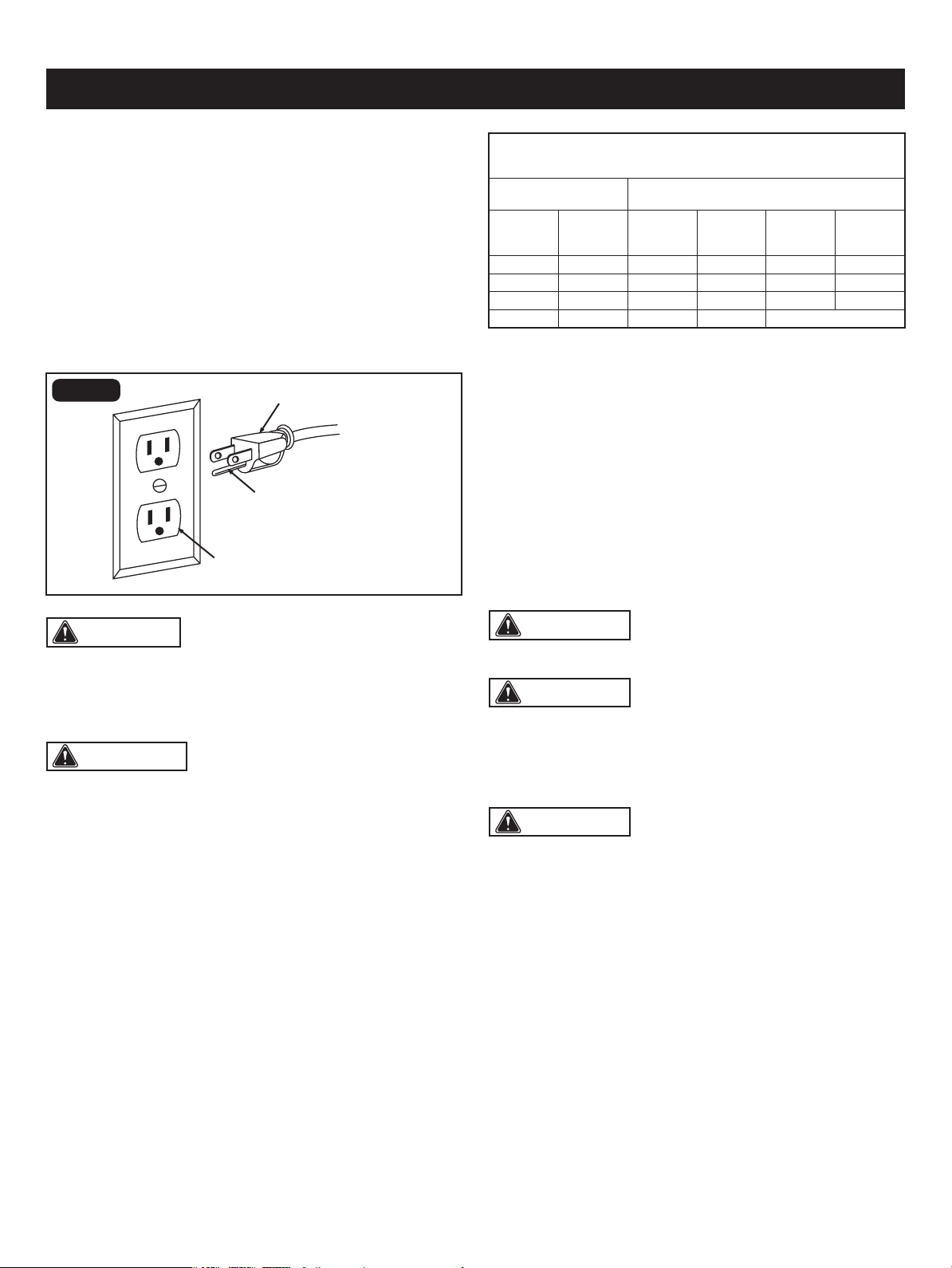
Check with a qualied electrician or service technician
if the grounding instructions are not completely understood,
or if in doubt as to whether the tool is properly grounded.
Use only three-wire extension cords that have three-prong
grounding plugs and three-pole receptacles that accept the
tool's plug, as shown in Fig. 1. Repair or replace a damaged
or worn cord immediately.
SAFETY INSTRUCTIONS
Page 6
CAUTION: In all cases, verify that the outlet in
question is properly grounded. if you are not sure, have a
licensed electrician check the outlet.
FIG. 1
The table below shows the correct size to use, depending
on the cord length and nameplate amperage rating. If
in doubt, use the next heavier gauge. The smaller the gauge
number, the heavier the cord.
Use a proper extension cord. Make sure extension cords
are in good condition. When using an extension cord, be
sure to use a cord that is heavy enough to carry the drawn
current needed by the saw. An undersized cord will cause
a drop in line voltage, resulting in loss of power and
overheating.
GUIDELINES FOR EXTENSION CORDS
This tool has a precision-built electric motor. It should be
connected to a power supply that is 120 volts, 60 Hz. A
substantial voltage drop will cause a loss of power and the
motor will overheat. If the tool does not operate when plugged
into an outlet, double check the power supply.
equipment-grounding conductor. If repair or replacement
of the electric cord or plug is necessary, do not connect the
equipment-grounding conductor to a live terminal.
ELECTRICAL CONNECTION
WARNING: Do not permit ngers to touch the
terminal or the plug when installing or removing the plug
from an outlet.
Be sure extension cords are properly wired and in good
condition. Always replace a damaged extension cord
or have it repaired by a qualied technician before using it.
Protect extension cords from sharp objects, excessive heat,
and damp or wet areas.
WARNING: Keep the extension cord clear of the
working area. Positon the cord so that it will not get caught
on lumber, tools, or other obstructions while you are working
with a power tool. Failure to do so can result in serious
personal injury.
WARNING: Check extension cords before each
use. If damaged replace immediately. Never use tool with
a damaged cord since touching the damaged area could
cause electrical shock resulting in serious injury.
WARNING: To avoid electrical hazards, re hazards,
or damage to the tool, use proper circuit protection.
Use a separate electrical circuit for power tools. This circuit
should be protected with a time delayed fuse. Before
connecting the tool to the power line, make sure the switch
is in the OFF position and the electric current is rated the
same as the current stamped on the motor’s nameplate.
Running at a lower voltage will damage the motor.
The safe use of this product requires an understanding of
the information on the tool and in this operator’s manual as
well as a knowledge of the project you are attempting.
Before use of this product, familiarize yourself with all
operating features and safety rules.
GLOSSARY OF TERMS
• Saw Blade: The saw blade furnished with the scroll saw
is a carbide-tipped combination blade that is 5" (12.7 cm)
long, 2.6 mm wide and has 18 teeth per inch. It is used
for producing a good quality cut for may applications.
• Blade Width: The width of the blade is the distance from
the tip of a tooth to back of the blade.
Three-prong plug
Grounding prong
Properly grounded outlet
MINIMUM GAUGE (AWG)
EXTENSION CORDS (120V use only)
Amperage rating
Total length
Not Recommended
Not more
than
25'
(7.5 m)
6 18
50'
(15 m)
16
100'
(30 m)
16
150'
(45 m)
14
More
than
0
10 18 16 14 126
12 16 16 14 1210
16 14 1212

SAFETY INSTRUCTIONS
Page 7
• Dust Blower: The dust blower keeps the line of cut on the
workpiece clean for more accurate scroll cuts. For best
results, always direct air ow at the blade and
the workpiece.
• LED Light: With an easy ON/OFF switch, the LED light
keeps the line of cut on the workpiece lit for more accurate
scroll cuts.
• Dust Extraction Port: This feature will alow you to attach
the vacuum hose for easy dust collection.
• LED Light Switch: A power switch that turns the LED
light on and off.
• Bevel Adjustment Knob: Allows you to tilt the table and
lock it at the desired angle, up to 45° right and left.
• Upper and Lower Blade Holders: Upper and lower blade
holders provide support and location of the saw blade.
• Table Insert: The table insert is located on the table slot
to support the workpiece with respect to the blade.
It prevents movement of the workpiece from the work table.
• Work Table: The surface where the workpiece is attached
to while performing cutting operations.
• Rubber Feet: The rubber feet are provided on four corners
of the table base.
• To Avoid Injury from Kickback:
• Hold the workpiece rmly against the tabletop.
• Do not feed the workpiece too fast while cutting. Only
feed the workpiece at the rate the saw will cut.
• Install the blade with the teeth pointing downward.
• Do not start the saw with the workpiece pressing against
the blade. Slowly feed the workpiece into the moving
blade.
• Use caution when cutting round or irregularly shaped
work pieces. Round items will roll and irregularly shaped
work pieces can pinch the blade.
• Blade Thickness: The blade thickness is the distance
between sides of blade. A thicker blade has more rigidity
and stronger teeth. A narrow, thick blade is used to make
curves and a wide, thin blade is used to make long,
straight cuts.
• Blade Pitch: The blade pitch is the number of teeth per
inch or tooth size. A blade with more teeth per inch
produces a smoother cut. The type of material to be cut
determines the number of teeth that should be in contact
with the workpiece.
• Freehand: Performing a cut without the workpiece being
guided by a fence, miter gauge or other aid. Workpiece
must supported by the work table.
• ON/OFF Switch: The ON/OFF swtich located on the top
of the scroll saw, allows the operator to turn ON/OFF the
scroll saw easily, and it turns the dust blower on and off.
• Bevel Scale and Bevel Indicator: The bevel scale and
bevel indicator show the angle of the saw blade with
respect to the work table.
• Storage Compartment: Located under the right side of
the work table used for storage of small accessories such
as saw blades or hex keys.
• Blade Guard: Protects the operator’s hand from being
cut while providing a clear view of the material to be cut
during cuts.
• Blade Tension Knob: Loosen or tighten blade tension by
pushing the blade tension knob up or down.
• Drop Foot and Drop Foot Lock Knob: The drop foot
should be lowered until it just rests on top of the workpiece
to prevent the workpiece from lifting, yet not so much that
the workpiece drags. The vertical portion provides a blade
protector to prevent accidental blade contact.
• Variable Speed Knob: Turn the knob to adjust the speed
from the high speed of approximately 1600 RPM to the
low speed of approximately 400 RPM.
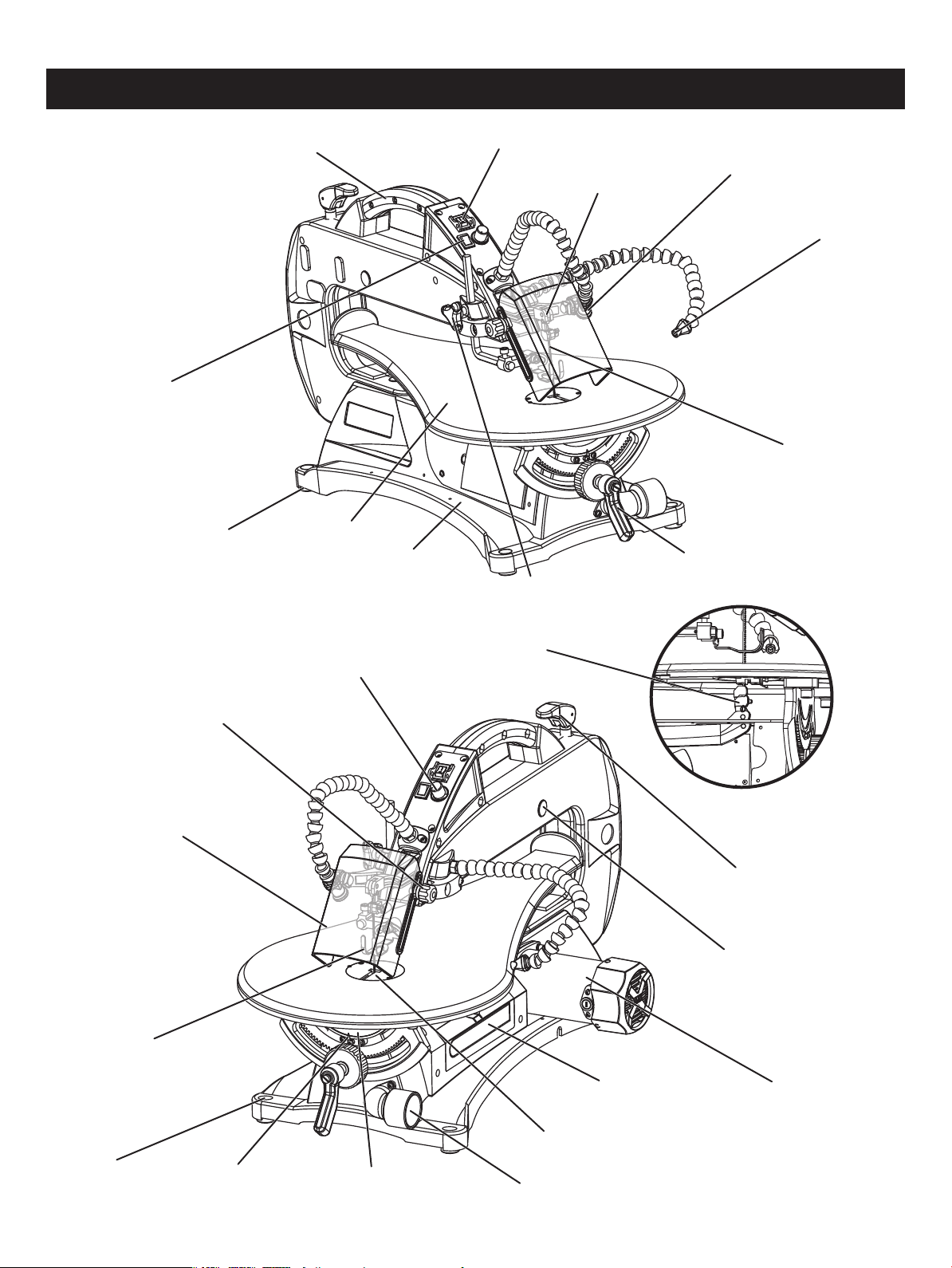
Page 8
OVERVIEW
ON/OFF switch
LED light switch
Variable speed knob
Blade guard
Carry handle
Work table
Rubber foot
Drop foot
Mounting hole
Bevel scale
Bevel indicator
Drop foot lock knob
Base
Lower blade holder
Upper blade holder
Dust blower
Saw blade
LED light
Bevel adjustment knob
Motor
Blade tension knob
Rubber bearing cover
Table insert
Storage compartment
Dust extraction port
Blade guard lock knob
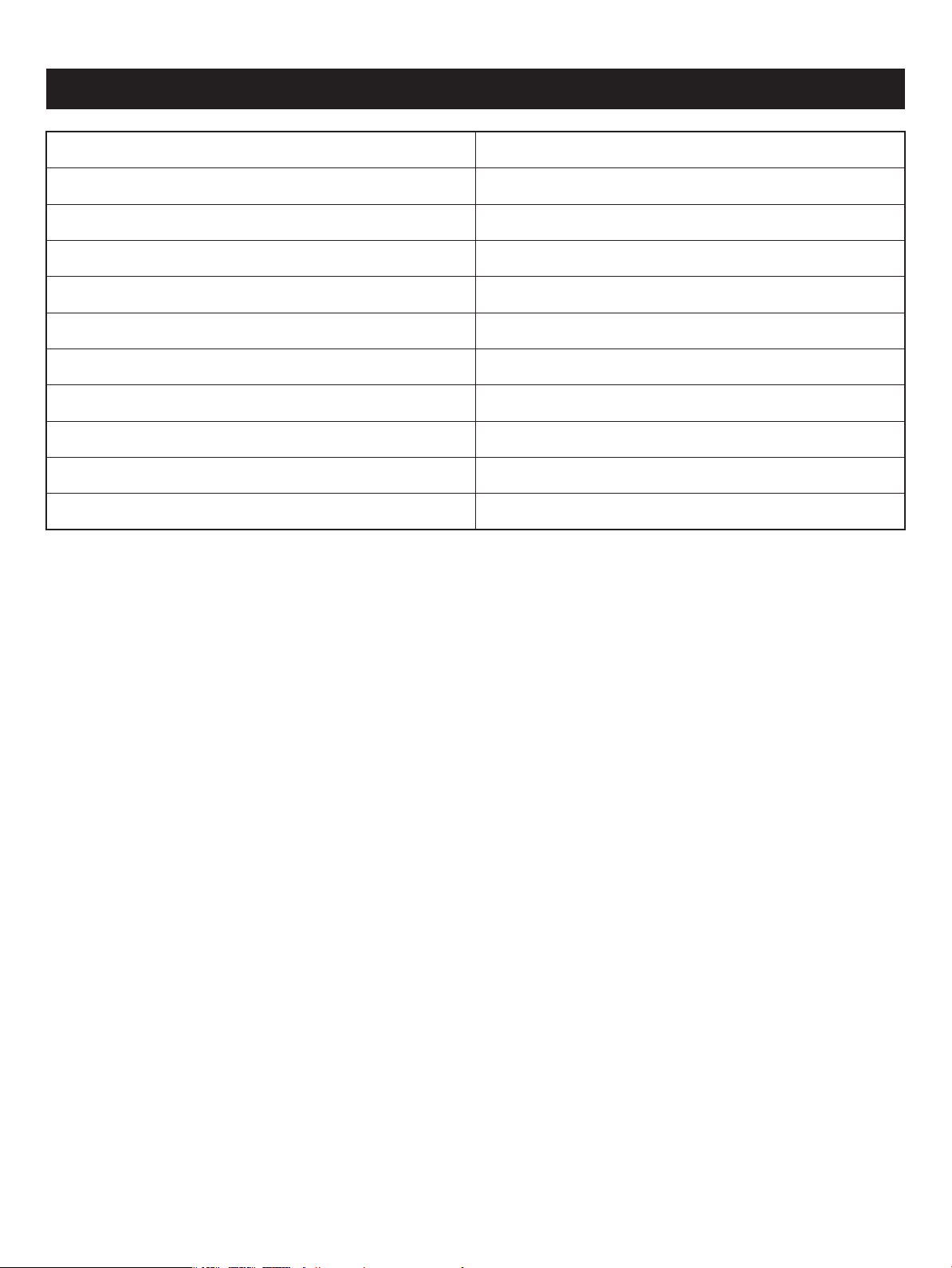
Page 9
Motor
Motor speed
Blade speed
Blade length
Blade width
5000 RPM (no load)
120 V~ 60 Hz 2A
400-1600 SPM
5in. (12.7 cm) 18 TPI
3/32 in. (0.26 cm)
Table size 24 1/2 x 13 in. (62.5 x 33 cm)
0-45°, right and left
Table tilting angle
Max. cutting depth 2 in. (5.1 cm)
Max. cutting width 18 in. (45.7 cm)
Travel 3/4 in. (1.9 cm)
Weight 43 lbs (19.5 kg)
SPECIFICATIONS
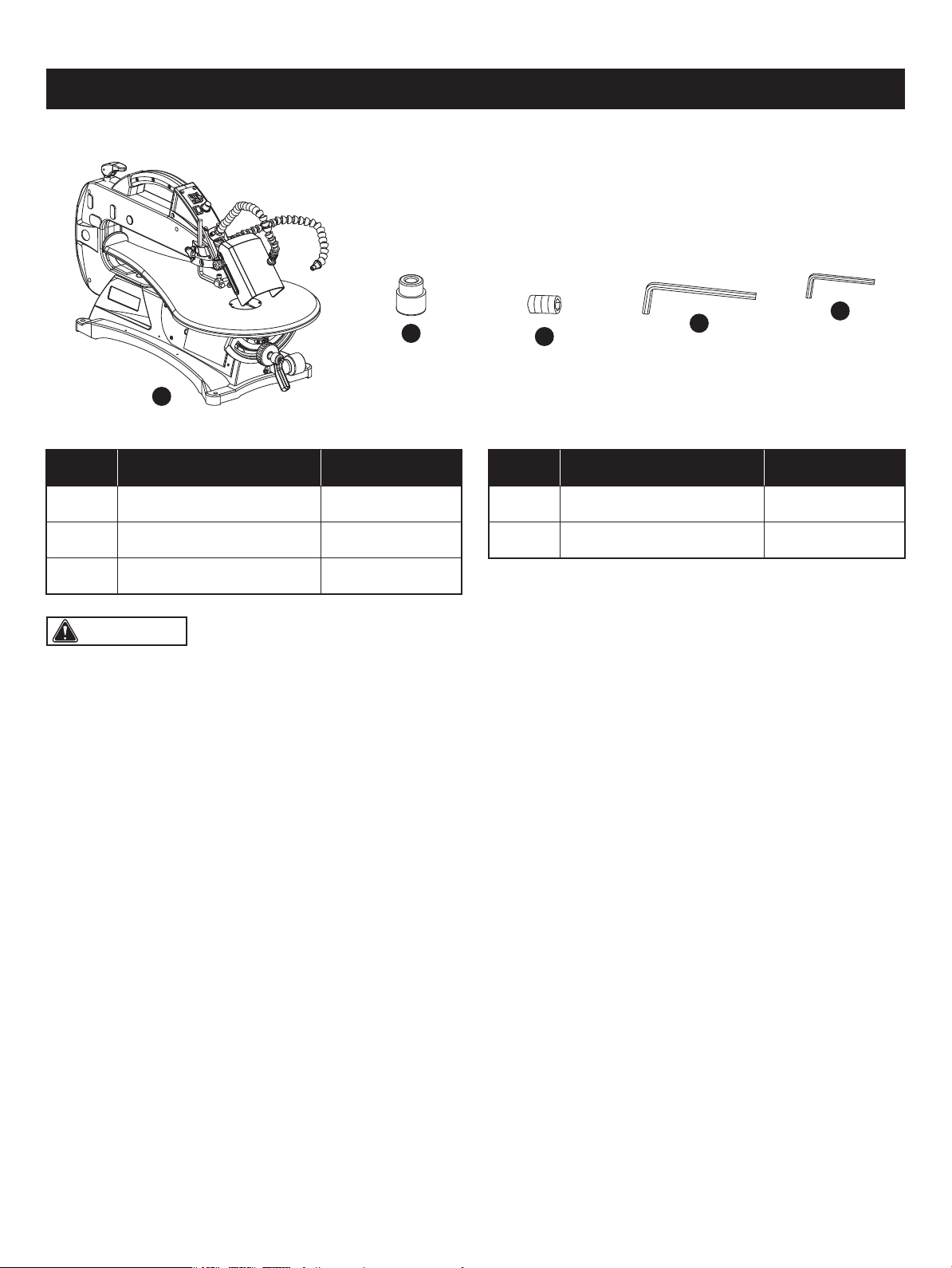
Page 10
CONTENTS
WARNING: The use of attachments or accessories not listed in this manual might be hazardous and could cause
serious personal injury.
A 1
B 4
C 2Blade Clamp Screw
Rubber Foot
Scroll Saw Assembly 1
The following items are included with your mini wood lathe:
A
B
C
E
D
PART DESCRIPTION QUANTITY
1E
D
2.5 mm Hex Key
5 mm Hex Key
PART DESCRIPTION QUANTITY
WARNING: To avoid injury, do not connect this scroll saw to a power source until it is completely assembled and
adjusted and you have read and understood the operator’s manual.
(ITEMS NOT SUPPLIED)
Phillps screwdriver
(ITEMS SUPPLIED)
5mm Hex key (1 pc)
2.5mm Hex key (1 pc)
UNPACKING YOUR SCROLL SAW
YOU WILL NEED
Do not use this product if any parts of the package contents are already assembled to your product when you unpack it.
Package contents are not assembled to the product by the manufacturer and require customer installation. Use
of a product that may have been improperly assembled could result in serious personal injury.
• Unpack all parts and lay them on a at, stable surface.
• Remove all packing materials and shipping devices if applicable.
• Inspect the tool carefully to make sure that no breakage or damage occurred during shipping.
• This scroll saw is factory set for accurate cutting. After assembling it, check for accuracy. If shipping has inuenced the
settings, refer to specic procedures explained in this manual.
• Do not discard the packing material until you have carefully inspected and satisfactorily operated the tool.
• If any parts are damaged or missing, please call 1-877-684-8912 for assistance.
WARNING: The use of attachments or accessories not listed in this manual might be hazardous and could cause
serious personal injury.
WARNING: Do not attempt to modify this tool or create accessories not recommended for use with this tool. Any
such alteration or modication is misuse, and could result in a hazardous condition leading to possible serious personal
injury.
WARNING: Do not connect to the power supply until assembly is complete. Failure to comply could result in
accidental starting and possible serious personal injury.
WARNING: Do not lift the scroll saw by the arm that holds the blade. The saw will be damaged.
Page 11
ASSEMBLY
Star-head screwdriver
12mm Open-end wrench or adjustment wrench
Right angle ruler
Page 12
ASSEMBLY
CAUTION: All bolts should be inserted from the top. Install the washers and nuts from the underside of the bench.
WARNING: To avoid serious personal injury from
unexpected tool movement, always secrurely mount scroll
saw to a workbench.
FIG. 2
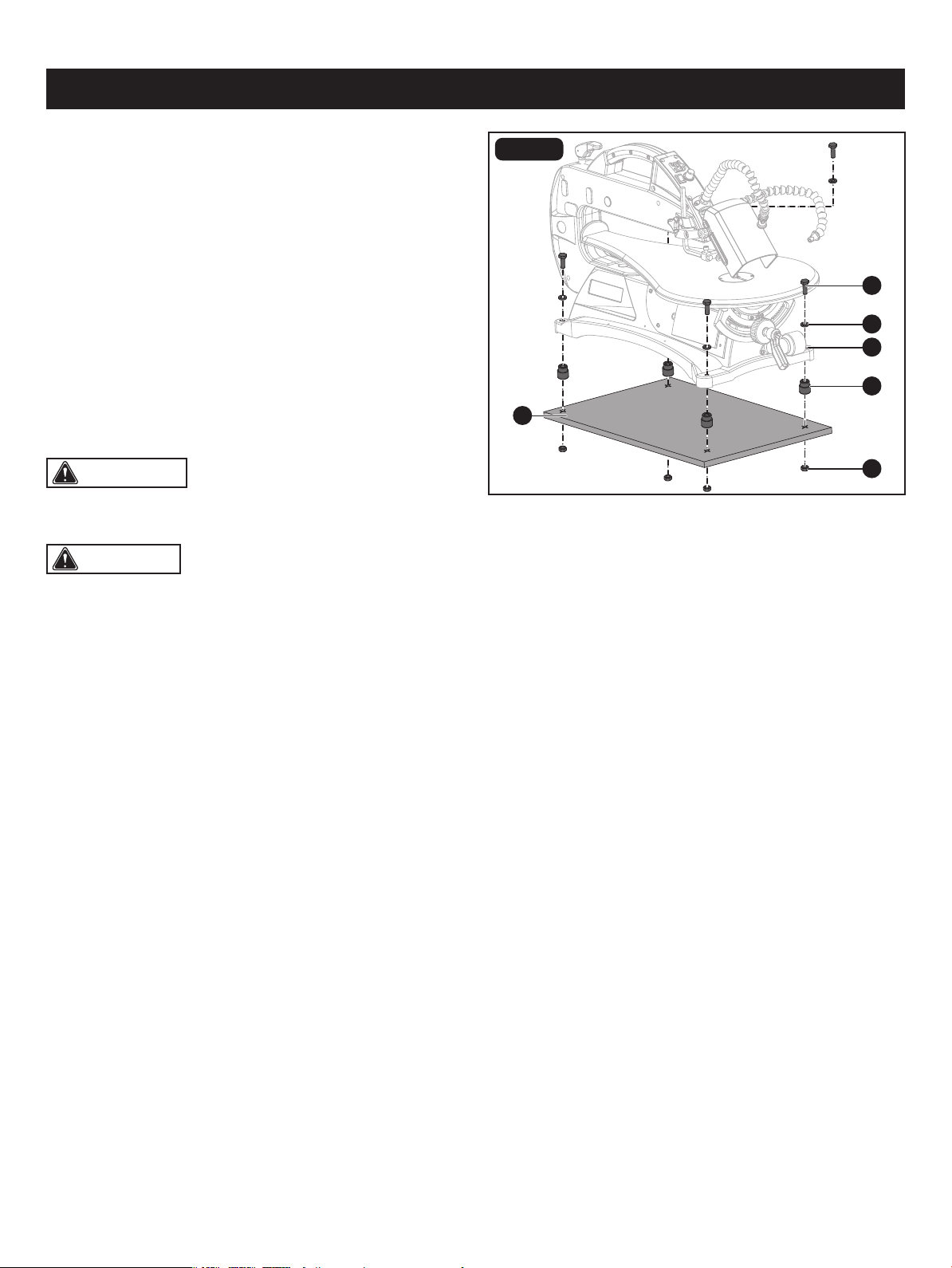
MOUNTING SCROLL SAW TO
WORKBENCH (Fig. 2)
If the scroll saw is to be used in a permanent application,
we recommend that you secure it in a permanent location
such as a workbench. When mounting the saw to a
workbench, holes should be drilled through the supporting
surface of the workbench.
• Insert one rubber foot (A) into each hole (B) of the base on
the scroll saw assembly.
• Each hole in the base of the saw should be bolted securely
using hex bolts (C), locking washers (D) and hex nuts (E)
(not included). Bolts should be of sufcient length to
accommodate the saw base, washers, nuts and the
thickness of the workbench (F).
• Place scroll saw on workbench. Using the saw base as a pattern, locate and mark the holes where the scroll saw is to
be mounted.
• Drill four holes through the workbench.
• Place scroll saw on workbench, aligning holes in the saw base with the holes drilled in the workbench.
• Insert all four bolts and tighten securely with washers and nuts.
Supporting surface where scroll saw is mounted should be examined carefully after mounting to insure that no movement
during use can result. If any tipping or walking is noted, secure workbench or supporting surface before beginning cutting
operations.
Reducing Noise and Vibration:
You may wish to place a foam pad or piece of carpet between the saw base and the workbench to help reduce noise and
vibration.
If a foam pad or piece of carpet is used, do not overtighten the mounting bolts. Leave some cushion between the padding
and the saw base to help absorb the noise and vibration.
The thickness of the padding material should be approximately 1/2" (13 mm).
A
E
C
D
B
F
Page 13
ASSEMBLY
FIG. 3
FIG. 4
FIG. 5
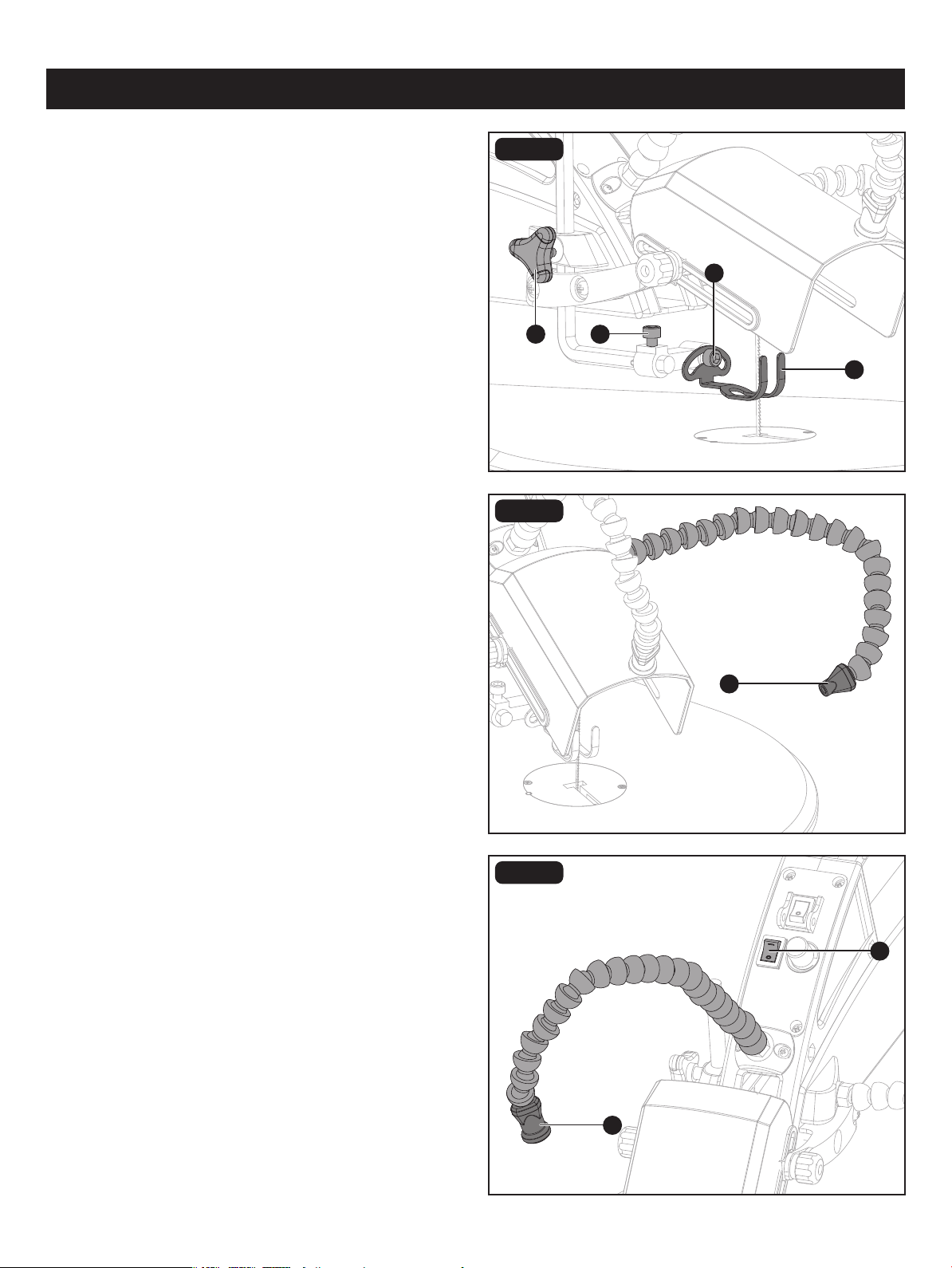
DROP FOOT ADJUSTMENT (Fig. 3)
To prevent workpiece from lifting, the drop foot (A) should
be rests at above the workpiece and the drop foot adjusted
so it is parallel to the working table when angle cutting. The
drop foot should not be adjusted so that the workpiece
drags.
Always retighten the drop foot lock knob (B) after each
adjustment has been made.
DUST BLOWER ADJUSTEMT (Fig. 4)
The attached dust blower (A) is designed to direct air to the
cutting line. Adjust the dust blower to the desired position.
For the best results, always direct air ow at the blade and
the workpiece.
LED LIGHT ADJUSTEMT (Fig. 5)
Input voltage : 3.2-3.4 V
Input current: < 55 mA
• To turn On the LED light, press the “I” button.
• To turn Off the LED light, press the “O” button.
With an easy ON/OFF switch (A), the attached LED light (B)
keeps the cutting line on the workpiece lighted for more
accurate scroll cut. Adjust the LED light to the desired
position.
• To adjust, loosen the screw (C), tilt the drop foot (A) so it
is parallel to the working table, and tighten the screw.
• Loosen the drop foot lock knob (B) to raise or lower the
drop foot until it just rests on top of the workpiece. Tighten
the knob.
• Loosen the horizontal adjustment screw (D) with hex key
5mm (included), then move the drop foot forward or
backward as needed.
The tall, front part of the drop foot acts as a blade protector
to prevent accidental contact with the blade.
C
A
B
A
D
A
B
Page 14
ASSEMBLY
CAUTION: When cutting at angles, the drop foot
should be tilted so it is parallel to the work table and rests
at against the workpiece. To tilt the drop foot, loosen screw
(B) with 5 mm hex key, tilt drop foot to the proper angle,
then retighten screw (B).
FIG. 6a
FIG. 6b
FIG. 6c
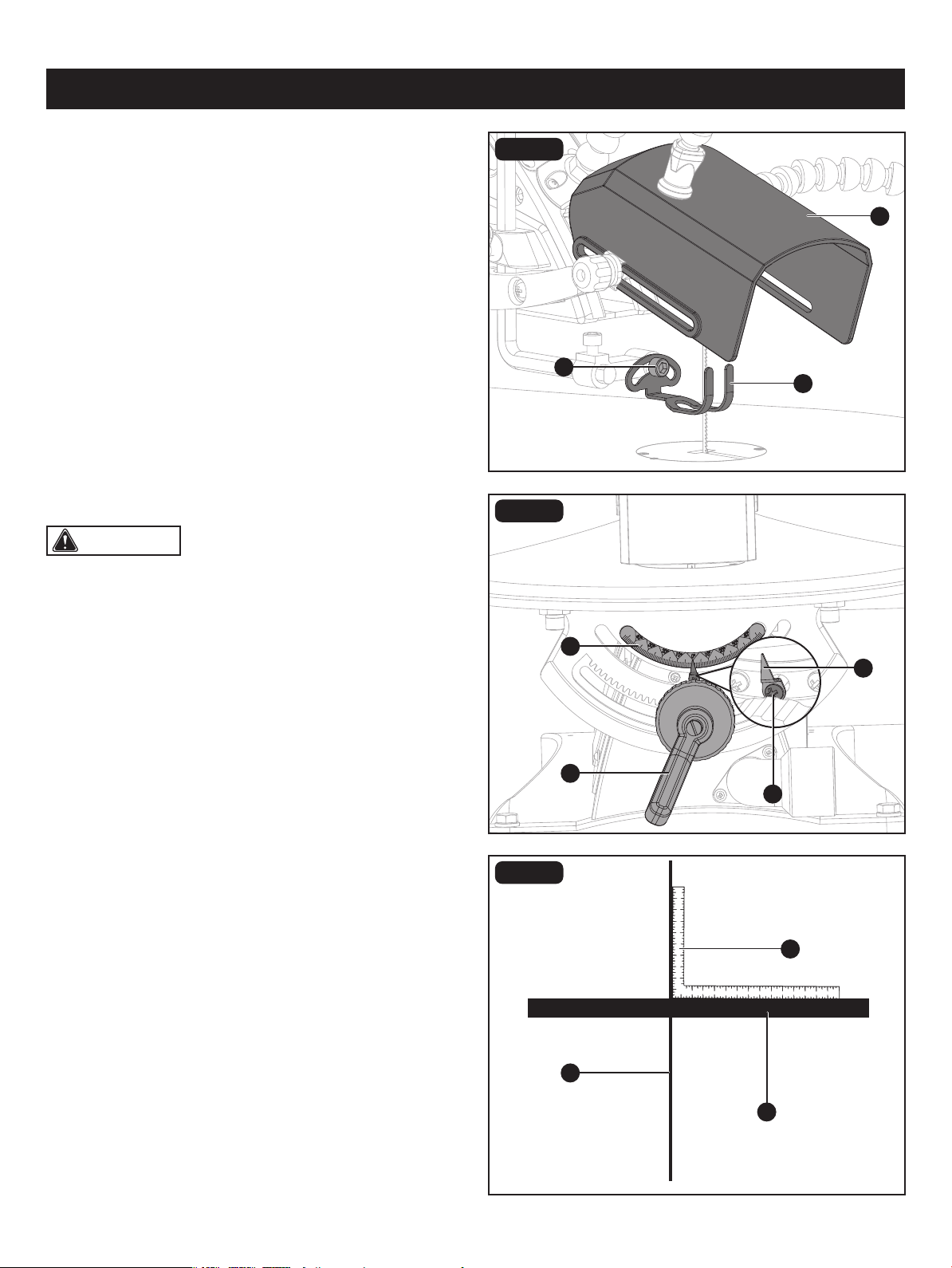
SQUARING THE WORKING TABLE TO
THE BLADE (Fig. 6a-6c)
• Open the blade guard (A) upward.
• Loosen the screw (B) and remove the drop foot (C).
• Loosen the bevel adjustment knob (D) to tilt the work table
until it is approximately perpendicular or at right angle to
the blade.
• Place a right angle ruler (E) on the work table (F) next to
the saw blade (G).
• Loosen the screw (H) holding the scale indicator (I). Move
indicator to the 0° mark and securely tighten screw.
Remember, the bevel scale (J) is a convenient guide but
should not be relied upon for precision. Make practice cuts
on scrap material to determine if your angle settings are
correct.
• Replace the drop foot and tighten the screw (B).
• Close the blade guard (A).
C
A
I
E
D
G
J
B
H
F
Page 15
ASSEMBLY
CAUTION: Thinner blades will have more possibilities for blade deection when cutting angles are not perpendicular
to the table.
CAUTION: Any and all servicing should be performed by a qualied service centre.
FIG. 7
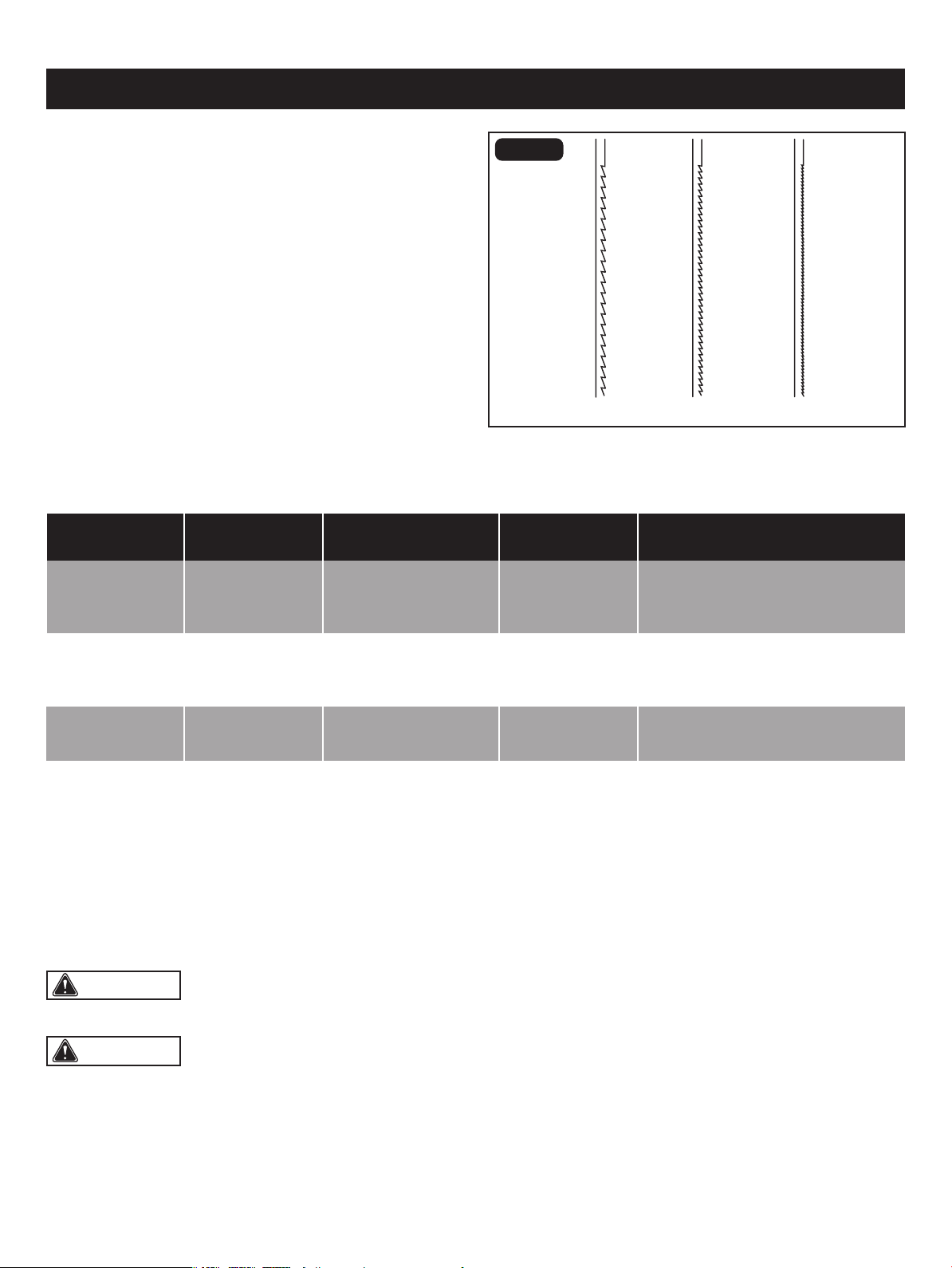
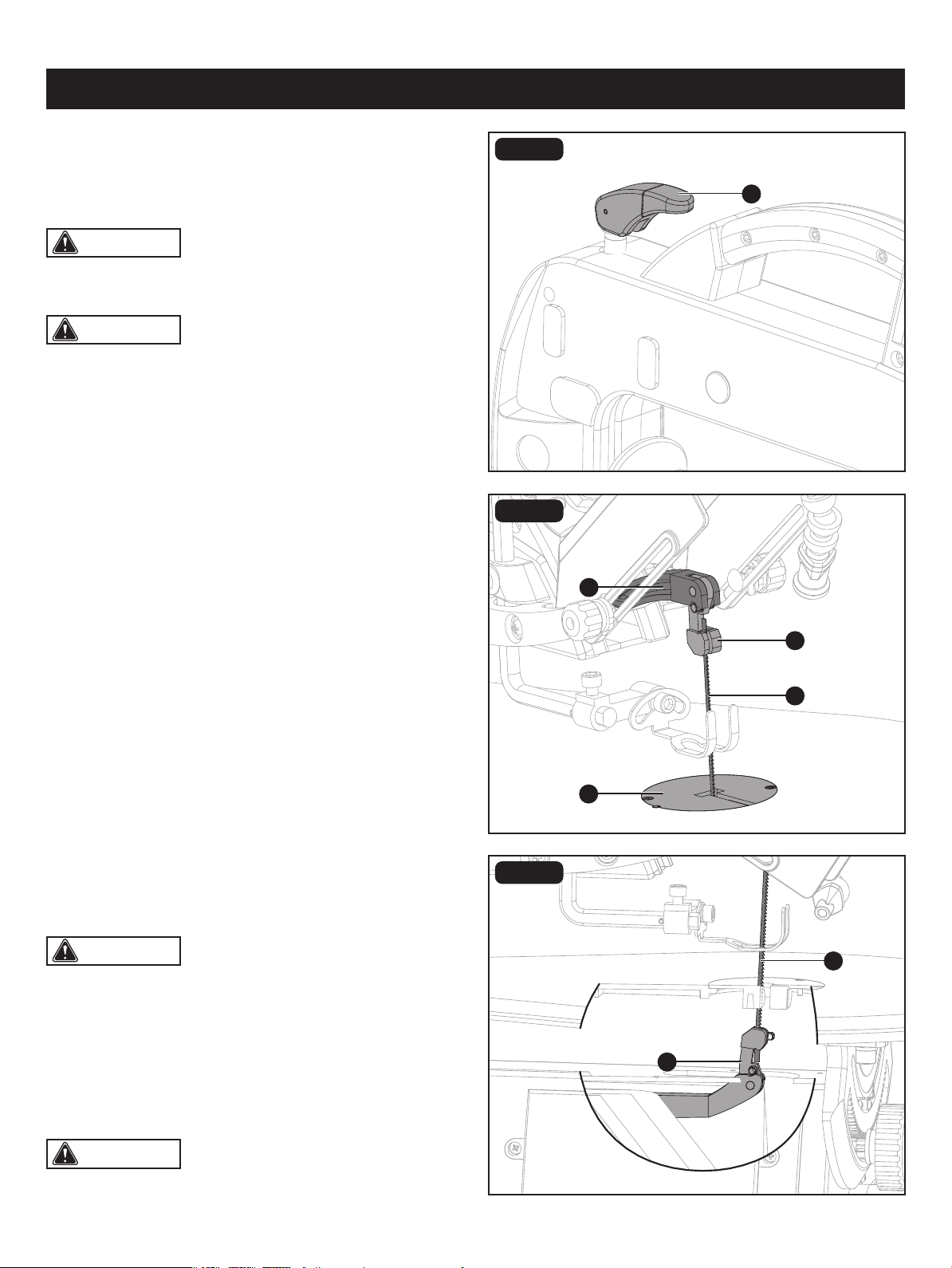
BLADE SELECTION (Fig. 7)
This scroll saw accepts 5" (12.7 cm) length pin-end and
pinless blades, with a wide variety of blade thicknesses and
widths. The type of material and intricacies of cutting
operations will determine the number of teeth required per
inch. Always select the narrowest blades for intricate (tight
radius and curves) curve cutting and the widest blades for
straight and large curve cutting operations. The following
table represents suggestions for various materials. When
purchasing blades, refer to the back of the package for best
use of blades on various materials. Use this table as
an example, but practice and your own personal preference
will be the best selection method.
When choosing a blade, use very ne, narrow blades to
scroll cut in thin wood 1/4" (6 mm) thick or less. Use wider
blades for thicker materials, but this will reduce the ability
to cut tight curves.
BLADE CARE
To maximize the life of your scroll saw blades:
• Do not bend blades when installing.
• Always set proper blade tension.
• Use the right blades (See instructions on replacement blade packaging for proper use.)
• Feed the workpiece correctly into the blade.
• Use thin blades for intricate cutting.
9.5-15 15-28 30-48
Teeth/inch
TPI
Blade width
Inch
Blade thickness
Inch
Blade/SPM
Material cut
10-15 0.110 0.018 500-1200
Medium turns on 1/4 -1 3/4"
(0.6 - 4.4 cm) wood, soft metal,
hardwood
15-28 0.055-0.110 0.010-0.018 800-1700
Small turns on 1/8 - 1 1/2"
(3.1 - 3.8 cm) wood, soft metal,
hardwood
30-48 0.024-0.041 0.012-0.019 Varies
Non-ferrous metal/hardwoods
using very slow speeds
Page 16
ASSEMBLY
CAUTION: Make sure the blade is properly located
in the blade holders.
CAUTION: adjust the blade tension after push down
the blade tension knob. If not, blade may be broken.
CAUTION: To prevent personal injury, always turn
saw OFF and disconnect the plug from the power source
before changing blades.
CAUTION: When installing pin-end blades, the slot
on the blade holder must be slightly wider than the thickness
of the blade. After the blade is installed, the blade tension
knob will keep it in place.
FIG. 8a
FIG. 8b
FIG. 8c
BLADE REMOVAL AND INSTALLATION
(Fig. 8a-8e)
PIN-END BLADE (Fig. 8a-8c)
Pin-end blades are thicker for stability and for faster
assembly. They provide faster cutting on a variety of
materials.
• Open the blade guard upward.
• Loosen the blade tension by pushing the blade tension
knob (A) up.
To remove a blade:
Lift the saw blade (B) out by pulling forward on blade, then
lifting the blade from the upper blade holder (C) and lower
blade holder (D). Slight downward pressure against the upper
arm (E) may be helpful when removing blade from upper
blade holder.
To install a blade:
• Place the new blade through the opening in the table insert
(F) with the teeth to the front of the saw and pointing down
toward the work table.
• Hook the new blade in the recess of the lower blade
holder (D).
• Pull up on the blade, press down on the upper arm (E) and
position the upper end of the blade in the slot on the upper
holder (C).
• Push down the blade tension knob (A).
• Adjust the blade tension by turning the blade tension knob.
Turn it clockwise will increase blade tension and turn it
counterclosewise will reduce blade tension.
Note: when blade is too tight or not installed, it may
viberate.
A
B
B
C
E
F
D
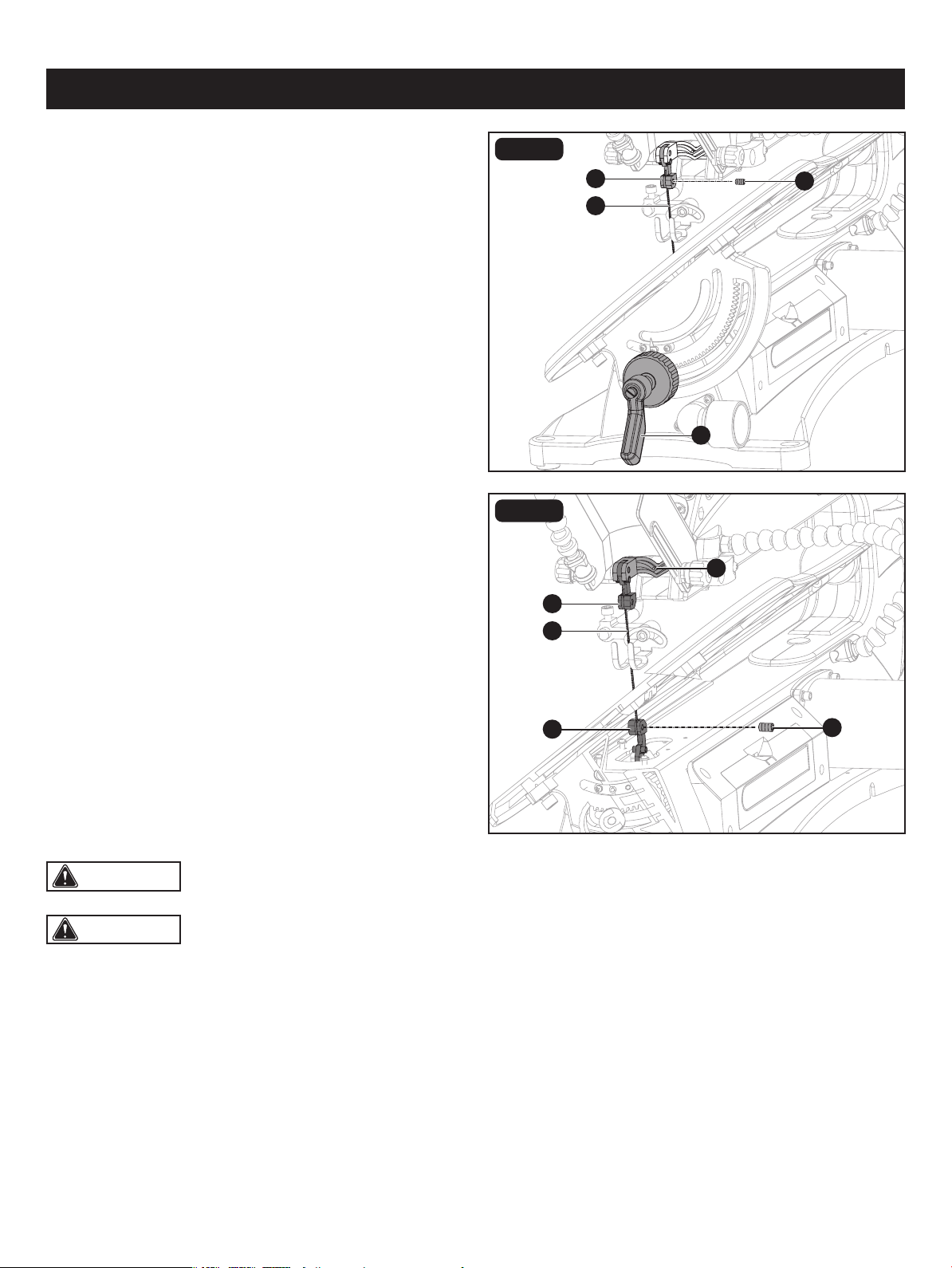
FIG. 8d
FIG. 8e
ASSEMBLY
Page 17
PINLESS BLADE (NOT INCLUDED)
(Fig. 8a, 8d-8e)
CAUTION: when blade is too tight or not installed, it may viberate.
To remove a blade:
• Open the blade guard upward.
• Loosen the blade tension by pushing the blade tension
knob (A) up. (Fig. 8a)
• Turn the bevel adjustment knob (G) clockwise to tilt the
work table until it is 45° left.
• Loosen the upper blade screw (H) and lower blade clamp
screw (I) with 2.5mm hex key supplied.
• Lift the saw blade (B) out by pulling forward on blade, then
lift the blade from the upper blade holder (C) and lower
blade holder (D). A slight downward pressure against the
upper arm (E) may be helpful when removing blade from
upper blade holder.
To install a blade:
• Place the new blade through the opening in the table
insert with the teeth to the front of the saw and pointing
down toward the work table.
• Keep the new blade (B) in the recess of the lower blade
holder (D).
• Gently tighten the lower blade clamp screw (I).
• Pull up on the blade, press down on the upper arm (E)
and position the upper end of the blade in the upper
holder (C).
• Gently tighten the upper blade clamp screw (H). Make
sure the blade is properly located in the blade holders.
Tighten both the upper and lower clamp screws.
• Push down the blade tension knob (A).
• Adjust the blade tension by turning the blade tension knob.
Turn it clockwise will increase blade tension and turn it
counterclosewise will reduce blade tension.
• Close the blade guard downward.
• Turn the bevel adjustment knob (G) anti-clockwise to tilt the work table until it is 0°.
C
G
H
E
I
C
B
C
B
D
CAUTION: adjust the blade tension after push down the blade tension knob. If not, blade may be broken.
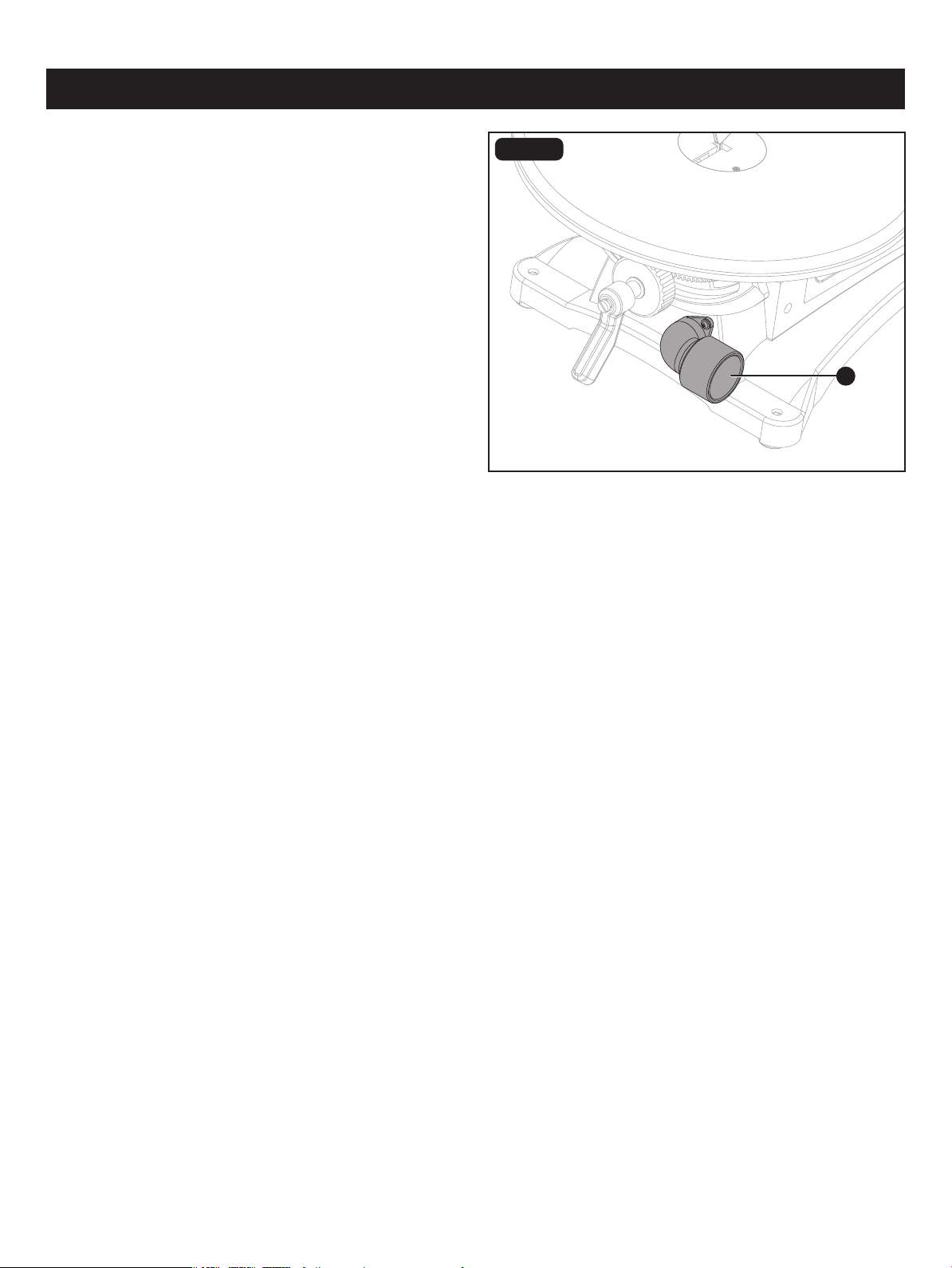
FIG. 9
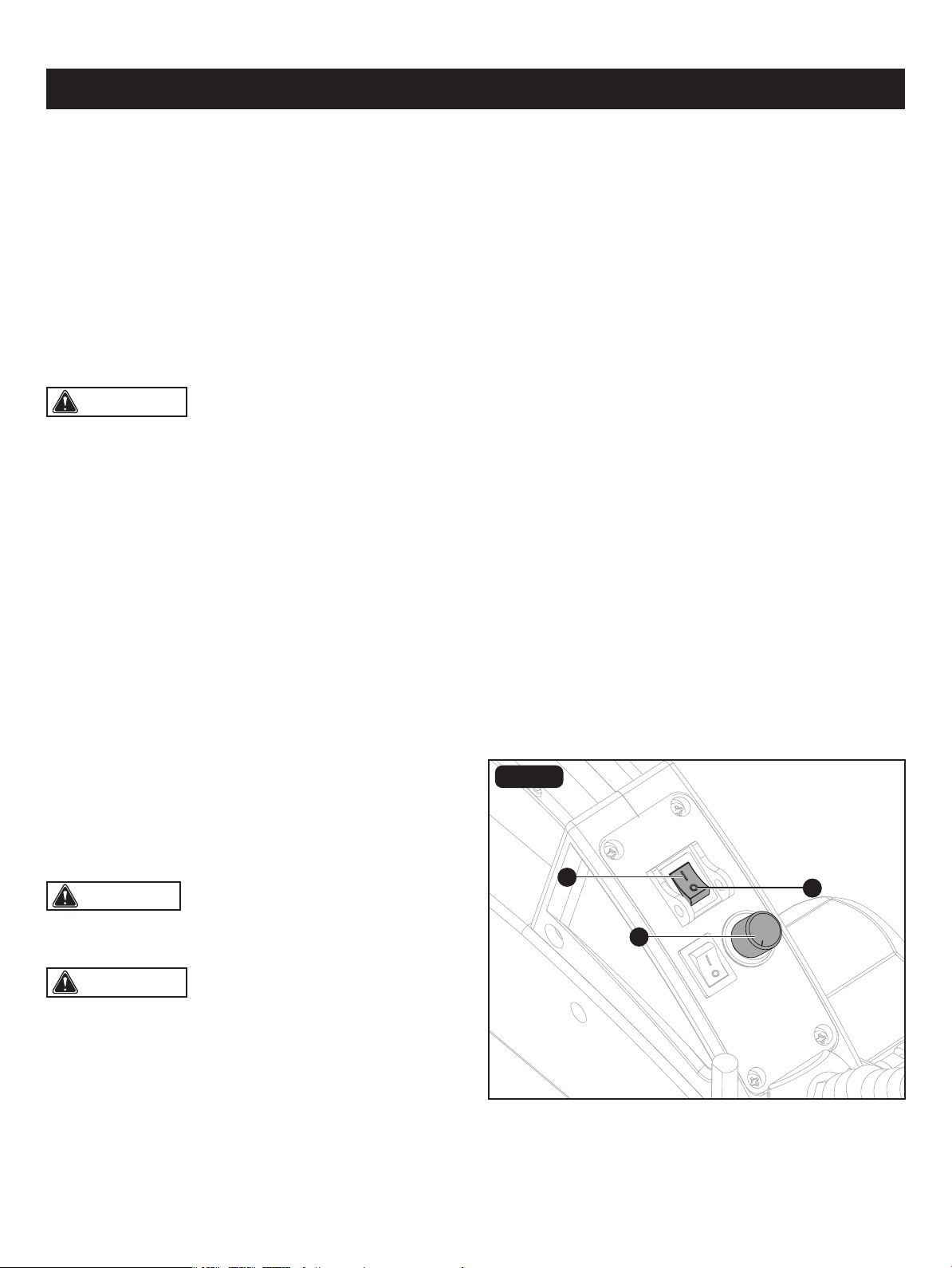
DUST EXTRACTION PORT (Fig. 9)
This scroll saw allows a hose or vacuum accessory
(not provided) to be connected to the dust-extraction port
(A) at the front of the saw.
If excessive sawdust buildup occurs inside the base, use a
wet/dry vacuum cleaner or manually remove sawdust.
This will keep your saw cutting efciently.
A
Page 18
ASSEMBLY

RECOMMENDATIONS FOR CUTTING
A scroll saw is basically a curve-cutting machine. It can also be used for straight cutting and beveling or angle cutting
operations. Please read and understand the following items before attempting to use the saw.
BASIC OPERATION OF THE SCROLL SAW
Before starting a cut, watch the saw run. If you experience excessive vibration or unusual noise, stop immediately. Turn
the saw off and unplug the saw. Do not restart until locating and correcting the problem.
CUTTING PROCEDURES
There is a learning curve for each person who wants to use this saw. During that period of time it is expected that some
blades will break until you learn how to use and adjust the saw.
• When feeding the workpiece into the blade, do not force it against the blade. This could cause blade deection. Allow
the saw to cut the material by guiding the workpiece into the blade as it cuts.
• The blade teeth cut material ONLY on the down stroke.
• Guide the wood into the blade slowly because the teeth of the blade are very small and remove wood only on the down
stroke.
• Best results are achieved when cutting wood 1" (2.5 cm) thick or less.
• When cutting wood thicker than 1" (2.5 cm), guide the wood very, very slowly into the blade and take extra care not to
bend or twist the blade while cutting in order to maximize blade life.
• Teeth on scroll saw blades wear out and the blades must be replaced frequently for best cutting results. Scroll saw blades
generally stay sharp for 30 minutes to two hours of cutting.
• To get accurate cuts, be prepared to compensate for the blade's tendency to follow the wood grain as you are cutting.
• This scroll saw is primarily designed to cut wood or wood products. For cutting precious and non-ferrous metals, the
variable control switch must be set at very slow speeds.
• When choosing a blade, use very ne, narrow blades to scroll cut in thin wood 1/4" (0.6 cm) thick or less. Use wider
blades for thicker materials, but this will reduce the ability to cut tight curves.
• Blades wear faster when cutting plywood or very abrasive particle board. Angle cutting in hardwoods wears blades down
faster.
• Plan the way you will hold the workpiece from start to nish.
• Keep your hands away from the blade. Do not hand hold pieces so small your ngers will go under the blade guard.
• Hold the workpiece rmly against the saw table.
• The blade teeth cut material only on the down stroke. Use gentle pressure and both hands when feeding the work into
the blade. Do not force the work.
• Guide the workpiece into the blade slowly because the teeth of the blade are very small and can only remove material
on the down stroke.
• Avoid awkward operations and hand positions where a sudden slip could cause serious injury from contact with the blade.
Never place hands in blade path.
• To get accurate cuts, compensate for the blade's tendency to follow the wood grain as you are cutting wood.
• Use extra supports (tables, saw horses, blocks, etc.) when cutting large, small or awkward workpieces.
• Never use another person as a substitute for a table extension or as additional support for a workpiece that is longer or
wider than the basic saw table.
• When cutting irregularly shaped workpieces, plan your work so it will not pinch the blade. Workpieces must not twist,
Page 19
OPERATION
CAUTION: The saw is primarily intended for woodworking. If it is being used for woodworking, choose a suitable
device that prevents you from inhaling the dust. Insert the nozzle to a standard vacuum hose.
CAUTION: After the saw is turned ON, a hesitation before blade movement is normal.
WARNING: Before removing loose pieces from the table or making adjustments, turn saw off and wait for all
moving parts to stop to avoid serious personal injury.
WARNING: To prevent serious personal injury,
never leave the saw unattended until the blade has come
to a complete stop.
REMOVING JAMMED MATERIAL
When backing out the workpiece, the blade may bind in the kerf (cut). This is usually caused by sawdust clogging the kerf
or when the blade comes out of the blade holders. If this happens:
AVOIDING INJURY
• Make sure saw is level and does not rock. Saw should always be on a rm, level surface with plenty of room for handling
and properly supporting the workpiece.
• Bolt saw to the support surface to prevent slipping, walking or sliding during operations like cutting long, heavy boards.
• Turn saw off and unplug cord from the power source before moving the saw.
• Do not remove jammed pieces until blade has come to a full and complete stop.
• Choose the right size and style blade for the material and type of cut you plan to do.
• Use only recommended accessories.
• With the exception of the workpiece and related support devises, clear everything off the saw table before turning the
saw on.
• Properly support round materials such as dowel rods or tubing because they have a tendency to roll during a cut, causing
the blade to “bite.” To avoid this, always use a “V” block or clamp workpiece to a miter gauge.
• Before removing loose pieces from the saw table, turn saw off and wait for all moving parts to stop.
rock or slip while being cut.
• Wait until the saw has come to a full and complete stop.
• Place the switch in the Off position.
• Unplug the saw from the power source.
• Remove the saw's blade and the workpiece, refer to section on “blade removal and installation.”
• Wedge the kerf open with a at screwdriver or wooden wedge, then remove the blade from the workpiece.
FIG. 10
B
A
C
Page 20
OPERATION
CAUTION: After saw is turned on, a hesitation
before blade movement is normal. Always wait for the saw
to come to a complete stop before restarting.
ON/OFF SWITCH AND VARIABLE SPEED
KNOB (Fig. 10)
• To turn the saw On, press the button “I” (A).
• To turn the saw Off, press the button “O” (B).
• Turn the variable speed knob (C) to adjust the blade speed to the desired setting. Turning the knob clockwise increases
speed. Turning it counterclockwise reduces speed.
You scroll saw has a variable speed knob. By turning the
knob, the variable speed control may be adjusted from the
high speed of approximately 1600 RPM to the low speed
of approximately 400 RPM. Suggested speeds are referred to the section “Blade Selection”.
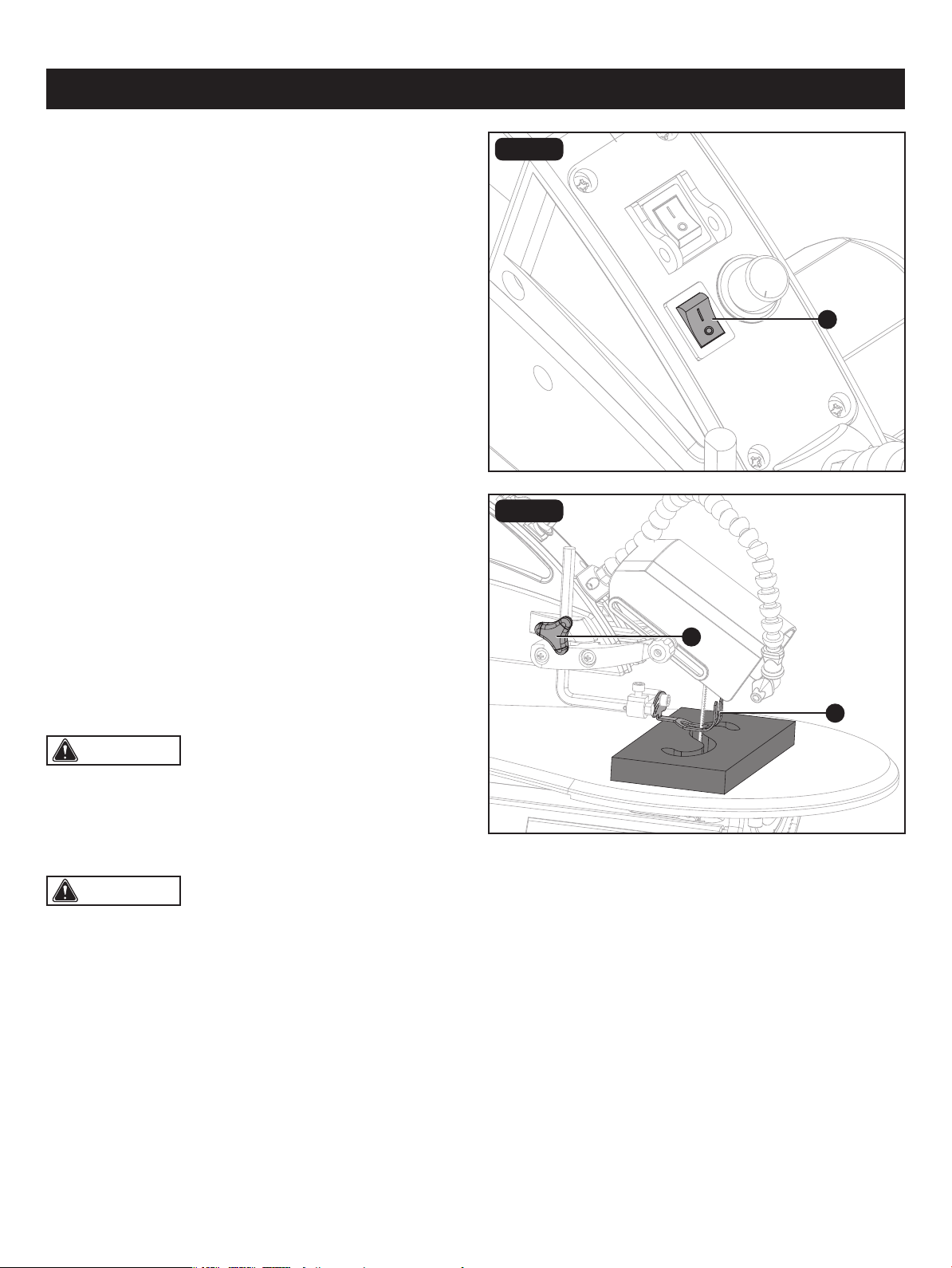
FIG. 11
LED LIGHT SWITCH (Fig. 11)
• To turn the light on, press the light switch (A) to the On (I)
position.
• To turn the light off, press the light switch(A) to the Off (O)
position.
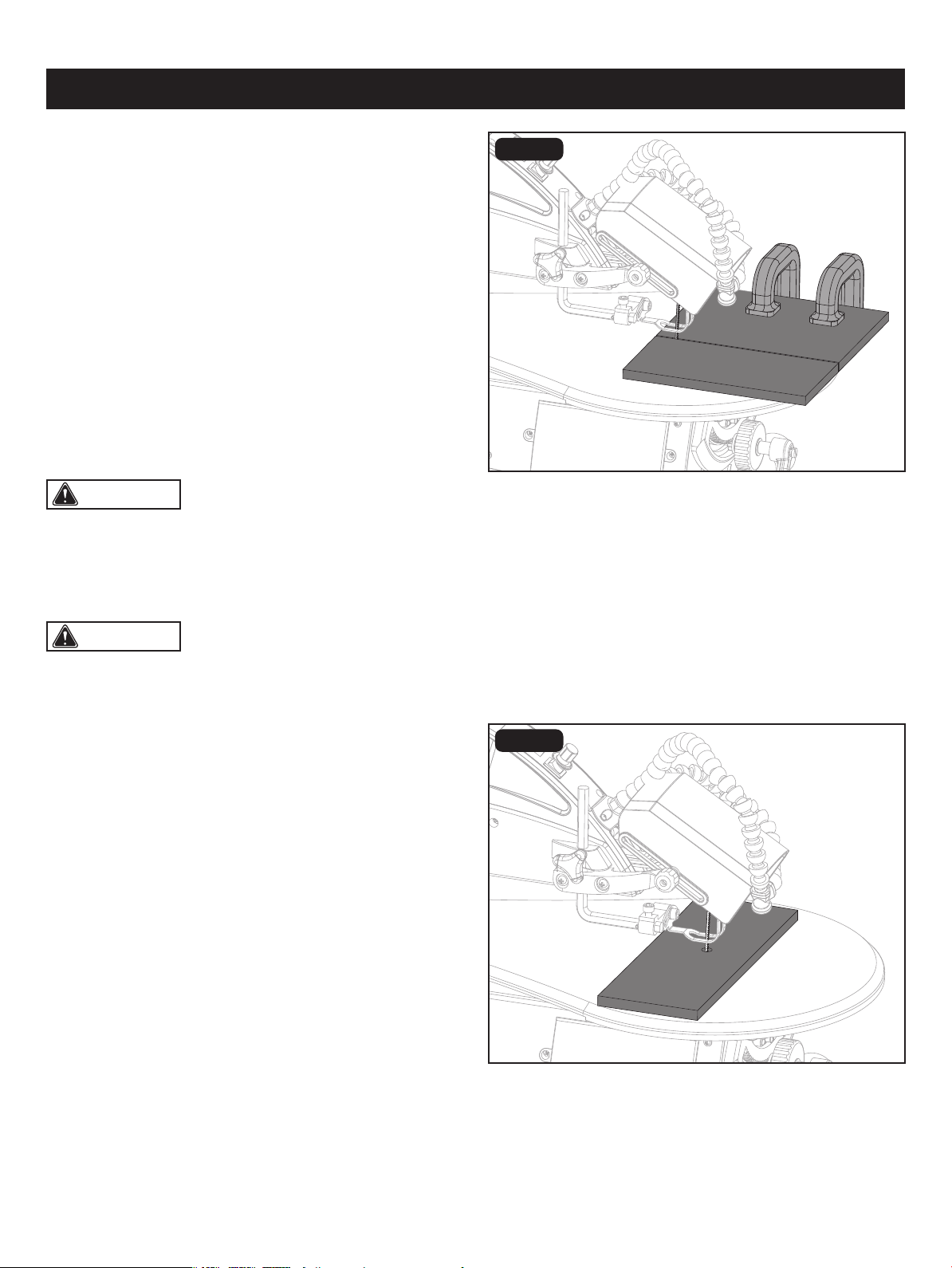
FIG. 12
FREEHAND CUTTING (Fig. 11)
• Lay out desired design, or secure design to the workpiece.
• Raise the drop foot (A) by loosening the drop foot lock
knob (B).
• Position the workpiece against the blade and place the
drop foot against the top surface of the workpiece.
• Secure the drop foot (A) by tightening the drop foot knob
knob (B).
• Remove the workpiece from the blade prior to turning the
scroll saw On.
• Slowly feed the workpiece into the blade by guiding and
pressing the workpiece down against the table.
• When the cut is complete, move the trailing edge of the
workpiece beyond the drop foot. Turn the switch Off.
A
A
B
OPERATION
Page 21
CAUTION: In order to avoid uncontrollable lifting
of the workpiece and to reduce blade breakage, do not turn
the switch on while the workpiece is against the blade.
CAUTION: you do not force the leading edge of the
workpiece into the blade. The blade will deect, reducing
accuracy of cut, and it may break.
Page 22
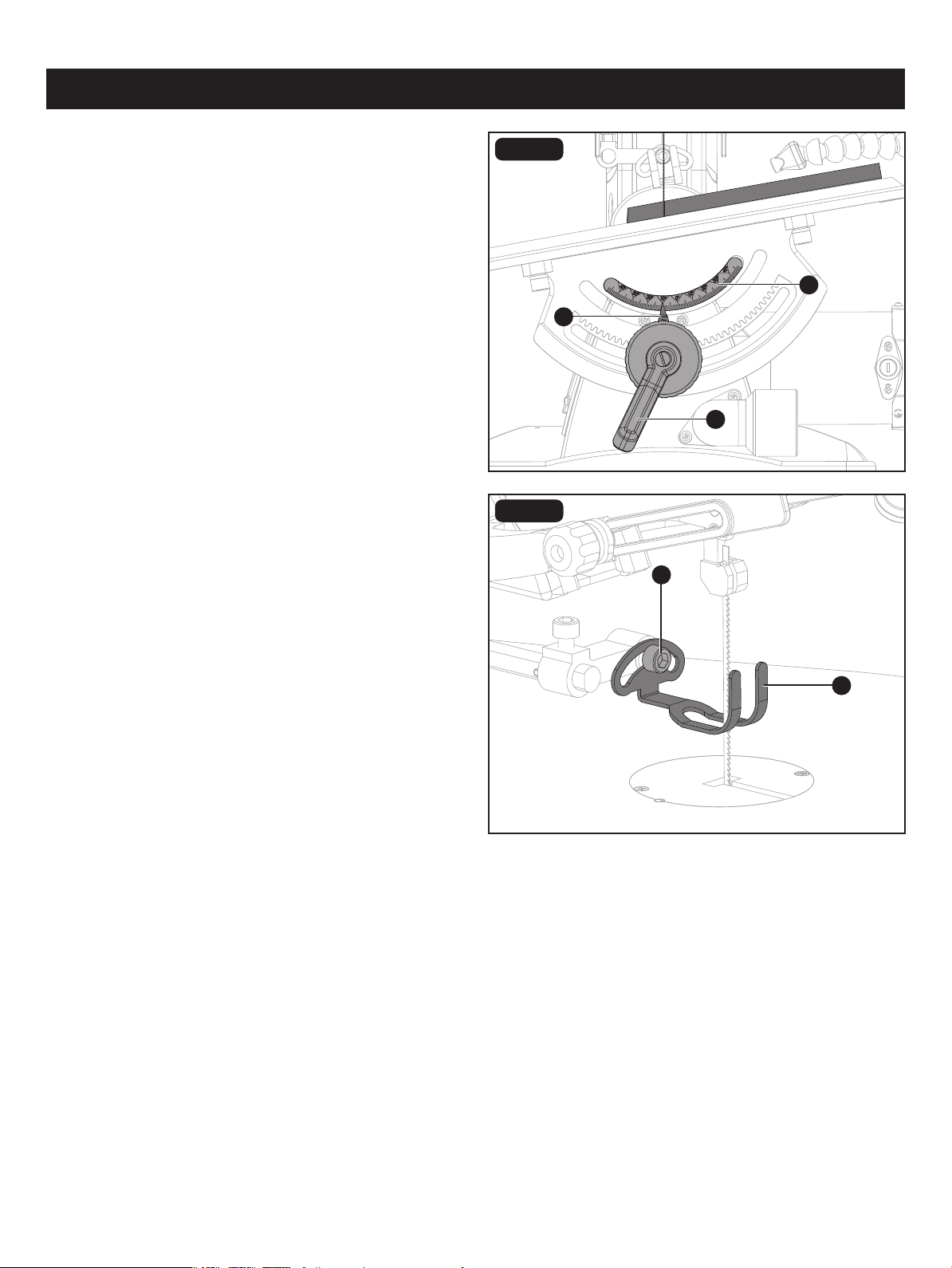
FIG. 13
RIP OR STRAIGHT LINE CUTTING
(Fig. 13)
• Raise the drop foot by loosening the drop foot lock knob.
• Measure from the tip of the blade to the desired distance.
Position the straight edge parallel to the blade at that
distance.
• Clamp the straight edge to the table.
• Recheck your measurements using the workpiece to be
cut and make sure the straight edge is secure.
• Position the drop foot against the the top surface of the
workpiece.
• Secure the drop foot in place by tightening the drop foot
lock knob.
• Remove the workpiece from the blade prior to turning the
scroll saw on.
INTERIOR CUTTING (Fig. 14)
• Lay out the design on the workpiece. Drill a 1/4" (0.6 cm)
hole in the workpiece.
• Remove the blade. Refer to the section “Blade Removal
and Installation.”
• Place the workpiece on the work table with the hole in the
workpiece over the access hole in the work table.
• Install a blade through the hole in the workpiece.
• Follow steps 3-7, under “Freehand Cutting”.
• When nished making the interior scroll cuts, simply turn
the scroll saw off.
FIG. 14
• When the cut is complete, move the trailing edge of the workpiece beyond the drop foot. Turn the switch off.
OPERATION
CAUTION: Do not force the leading edge of the workpiece into the blade. The blade will deect, reducing accuracy
of cut, and it may break.
CAUTION: In order to avoid uncontrollable lifting of the workpiece and to reduce blade breakage, do not turn the
switch on while the workpiece is against the blade.
• Position the workpiece against the straight edge prior to touching the leading edge of the workpiece against the blade.
• Slowly feed the workpiece into the blade, guiding the workpiece against the straight edge and pressing the workpiece
down against the table.
Unplug the saw before removing the blade from the blade
holder. Remove the workpiece from the table.
A
E
D
B
C
Page 23
FIG. 15a
FIG. 15b
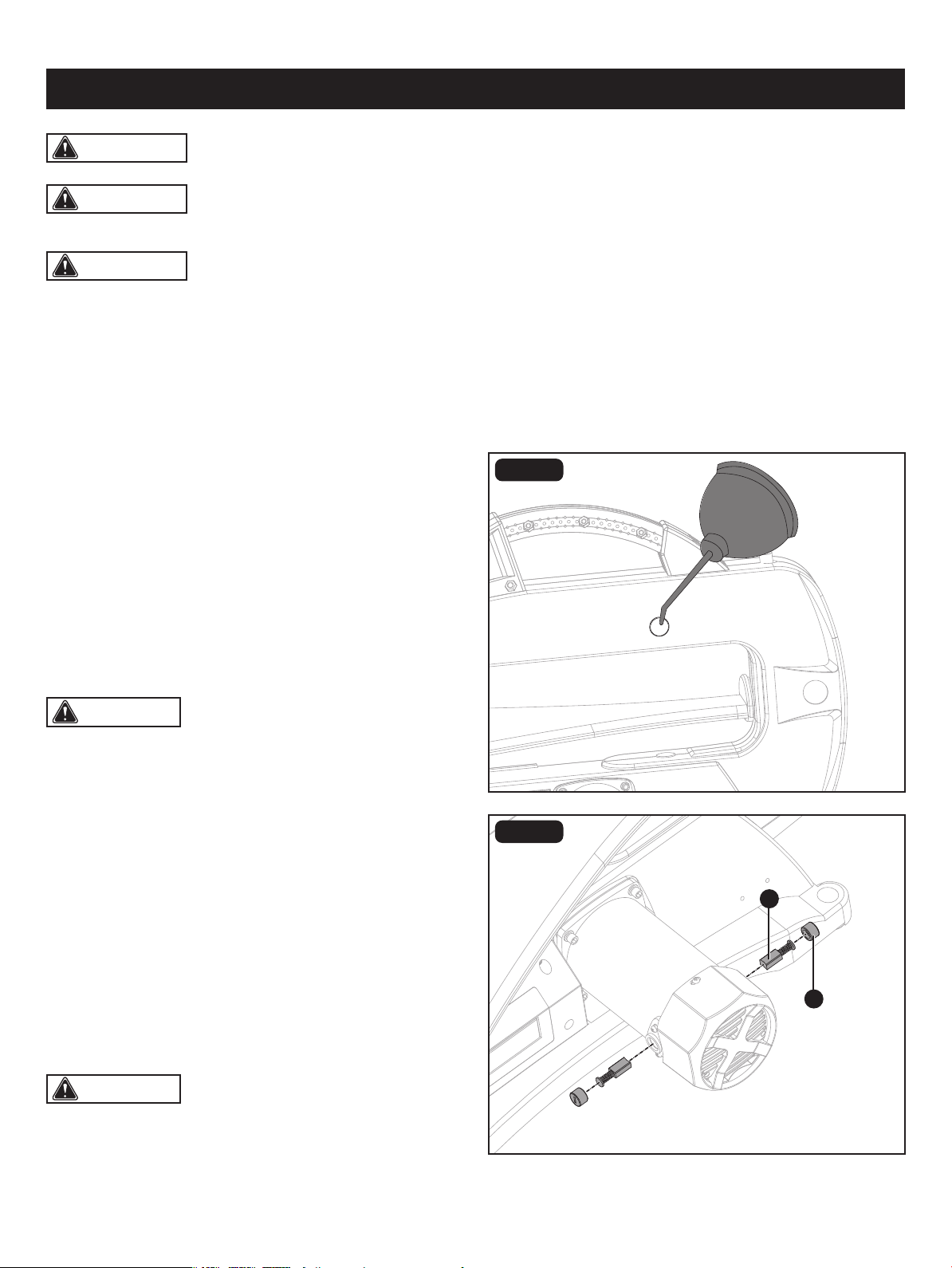
BEVEL CUTTING (ANGLE CUTTING)
(Fig. 15a-15b)
• Lay out or secure design to workpiece.
• Move the drop foot to the highest position by loosening
the drop foot lock knob. Retighten the drop foot lock knob.
• Tilt the table to the desired angle by loosening the bevel
adjusting knob (A) to move the work table to the proper
angle using the bevel scale (B) and the bevel indicator (C).
• Tighten the bevel adjusting knob (A).
• Loosen the screw (D) with 5 mm hex key, and tilt the drop
foot (E) to the same angle as the work table. Retighten the
screw.
• Position the workpiece on the right side of the blade.
Lower the drop foot against the surface by loosening the
drop foot lock knob. Retighten the drop foot lock knob.
• Follow steps 5-7 under “Freehand Cutting”.
OPERATION
WARNING: To ensure safety and reliability, all repairs should be performed by a qualied. service technician.
B
A
Page 24
CLEANING
• Keep your scroll saw clean.
• After cleaning the table top initially, apply a thin coat of automobile type (paste) wax to the table top so the wood slides
easily while cutting.
• Do not allow pitch to accumulate on the saw table. Clean with gum and pitch remover.
LUBRICATION (Fig. 16)
Lubricate the arm bearings (one on each side of the saw)
after the rst 10 hours of use. Oil after every 50 hours of use
or whenever there is a squeak coming from the bearings.
• Carefully place the saw on its side, as shown in Figure 16.
Remove the rubber cap from the upper and the lower arm
of the saw.
• Squirt a few drops of SAE20 oil around the shaft end and
arm bearings. Let oil soak in overnight, remaining in this
position.
FIG. 16
BRUSH REPLACEMENT (Fig. 17)
• Your saw has externally accessible motor brush assemblies
that should be checked after 50 hours of use for wear.
When one of the two brushes becomes worn to 1/16"
(2 mm) in length, replace both brushes.
• Unplug the saw from the power source.
• Loosen and remove the two brush caps (A) using a
screwdriver.
• Pull out each brush (B). Inspect the brush and replace if
necessary. Replace both brushes even if only one is
damaged.
• Position the brushes in the motor. Tighten the brush caps snugly. Do not overtighten.
FIG. 17
MAINTENANCE
CAUTION: You lubricate the bearings on the other
side of the saw in this same manner.
CAUTION: After inspecting the brushes, be sure to
re-install the brushes in the same position that they were in
if you are not installing new ones.
WARNING: When servicing, use only identical replacement parts. The use of any other parts may create a hazard
or cause damage to the tool.
WARNING: Always switch the product off, disconnect it from the power supply and let the product cool down
before performing inspection, maintenance, lubrication and cleaning work!
• Run the saw for approximately ve to ten minutes to allow the brushes to "seat" themselves. If the brushes are not seated
correctly, the electric brake may not function correctly and could damage the motor. While the brushes are seating,
some sparking may be noticed in the motor. This is normal for new brushes.
FIG. 18
STORAGE COMPARTMENT (Fig. 18)
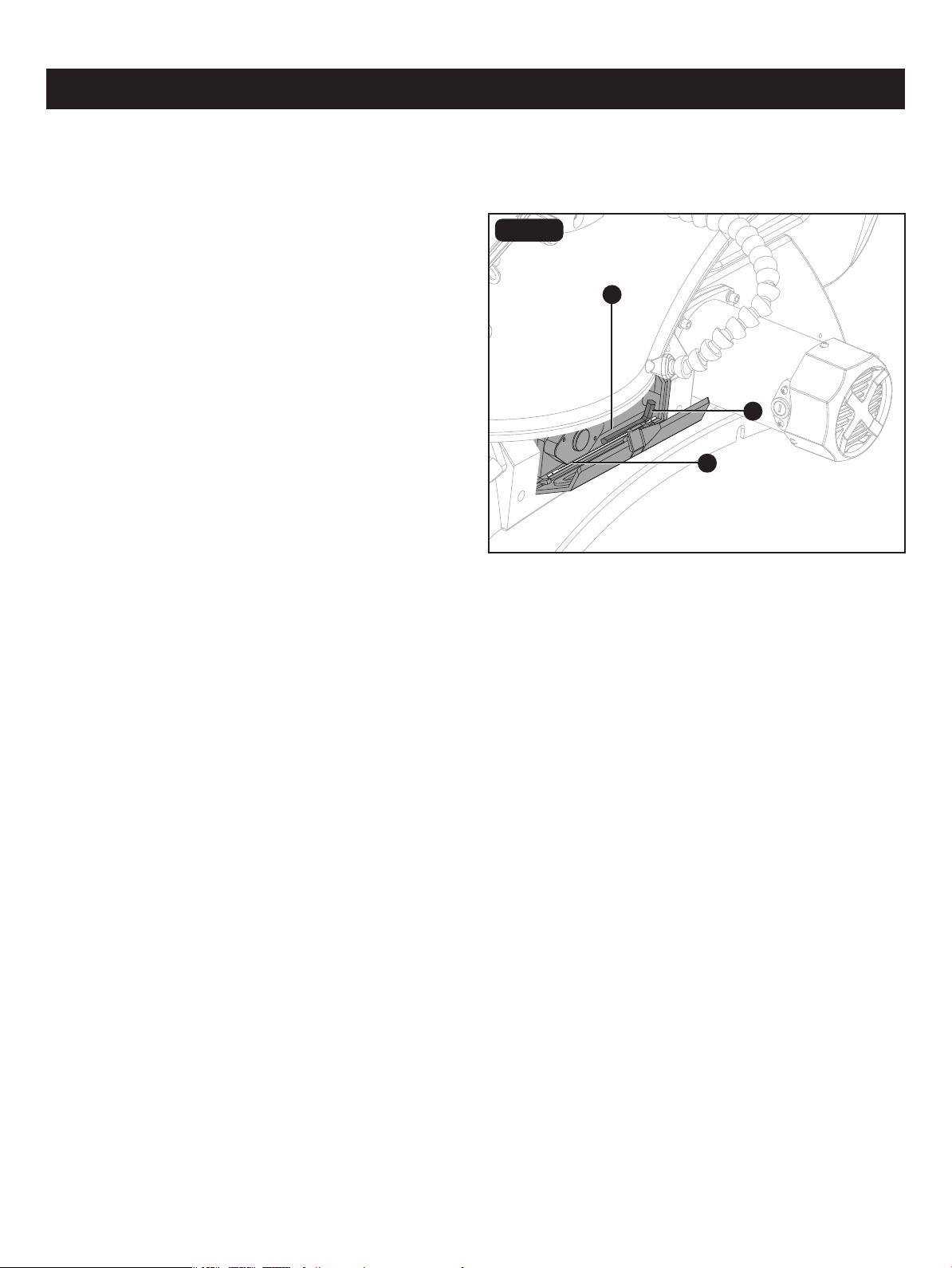
The scroll saw has the storage compartment (A) that is
located under the right side of the work table. It can be used
for storage of small accessories, such as saw blades (B) or
hex keys (C).
C
MAINTENANCE
Page 25
A
B

Page 26
TROUBLESHOOTING
Motor will not run. • Unplug saw, replace defective parts.
• Repairs MUST be made by a qualied
technician. Call service dept. for advice.
• Defective cord, plug or outlet.
• Defective motor.
Breaking blades. • Adjust blade tension.
• Reduce feed rate or replace blade.
• Use narrow blades for thin wood, wider
blades for thicker wood.
• Avoid side pressure on blade.
• Incorrect tension.
• Overworked (worn out) blade.
• Wrong blade being used.
• Twisting blade in wood.
PROBLEM PROBLEM CAUSE CORRECTIVE ACTION
Excessive vibration (Some
vibration is inevitable when
the saw and motor are
running).
• See proper mounting instructions.
• Replace plywood workbench surface
with solid lumber surface.
• Tighten table bevel lock handle.
• Tighten motor mount screws.
• Improper mounting of saw.
• Unsuitable mounting surface.
• Loose table.
• Motor mount is loose.
Blade runout. • Increase blade tension.
• Renew blade and correctly tension.
• Insufcient blade tension.
• Dull blade causing excessive force to be
used at workpiece.
Page 27
REPLACEMENT PARTS LIST
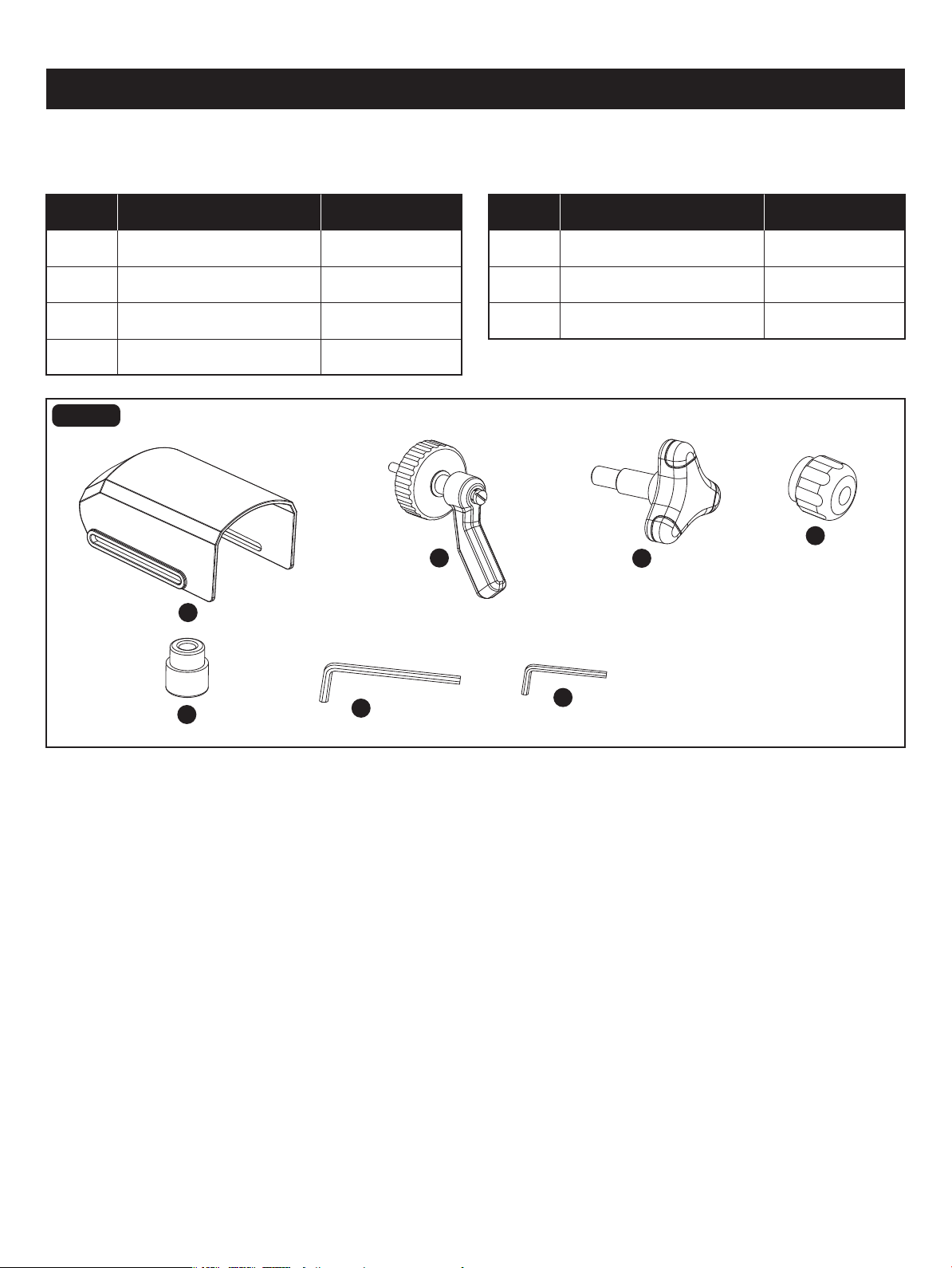
A
B
C
D
E
F
G
A 24037200001
24037200002
24037200003
24037200005
24037200007
Bevel Adjustment Knob
Blade Guard
Drop Foot Lock Knob
PART DESCRIPTION PART#
E
B
GC
24037200004Drop Foot Lock KnobD
24037200006F
Rubber Foot
5 mm Hex Key
2.5 mm Hex Key
PART DESCRIPTION PART#
For questions / comments, technical assistance or repair parts - Please call toll free at: 1-877-684-8912 (Monday - Friday
8am - 6pm EST.)
FIG. 19
Distributed by: Menard, Inc., Eau Claire, WI 54703
SAVE YOUR RECEIPTS
THIS WARRANTY IS VOID WITHOUT THEM
18" Scroll Saw
WARRANTY
90-DAY MONEY BACK GUARANTEE:
This MASTERFORCE
®
brand power tool carries our 90-DAY Money Back Guarantee.
If you are not completely satisfied with your MASTERFORCE
®
brand power tool
for any reason within ninety (90) days from the date of purchase, return the tool with
your original receipt to any MENARDS
®
retail store, and we will provide you a refund –
no questions asked.
3-YEAR LIMITED WARRANTY:
This MASTERFORCE
®
brand power tool carries our famous No Hassle 3-Year Limited
Warranty to the original purchaser. If, during normal use, this MASTERFORCE
®
power
tool breaks or fails due to a defect in material or workmanship within three (3) years
from the date of original purchase, simply bring this tool with the original sales receipt
back to your nearest MENARDS
®
retail store. At its discretion, MASTERFORCE
®
agrees to have the tool or any defective part(s) repaired or replaced with the same or
similar MASTERFORCE
®
product or part free of charge, within the stated warranty
period, when returned by the original purchaser with original sales receipt. Not
withstanding the foregoing, this limited warranty does not cover any damage that
has resulted from abuse or misuse of the Merchandise. This warranty: (1) excludes
expendable parts including but not limited to blades, brushes, belts, bits, light bulbs,
and/or batteries; (2) shall be void if
this tool is used for commercial and/or rental
purposes; and (3) does not cover any losses, injuries to persons/property or costs. This
warranty does give you specific legal rights and you may have other rights, which vary
from state to state. Be careful, tools are dangerous if improperly used or maintained.
Seller’s employees are not qualified to advise you on the use of this Merchandise.
Any oral representation(s) made will not be binding on seller or its employees. The
rights under this limited warranty are to the original purchaser of the Merchandise
and may not
be transferred to any subsequent owner. This limited warranty is in lieu
of all warranties, expressed or implied including warranties or merchantability and
fitness for a particular purpose. Seller shall not be liable for any special, incidental, or
consequential damages. The sole exclusive remedy against the seller will be for the
replacement of any defects as provided herein, as long as the seller is willing or able
to replace this product or is willing to refund the purchase price as provided above.
For insurance purposes, seller is not allowed to demonstrate an
y of these power tools
for you.
For questions / comments, technical assistance or repair parts – Please Call Toll
Free at: 1-877-684-8912. (M-F 8am – 6pm)