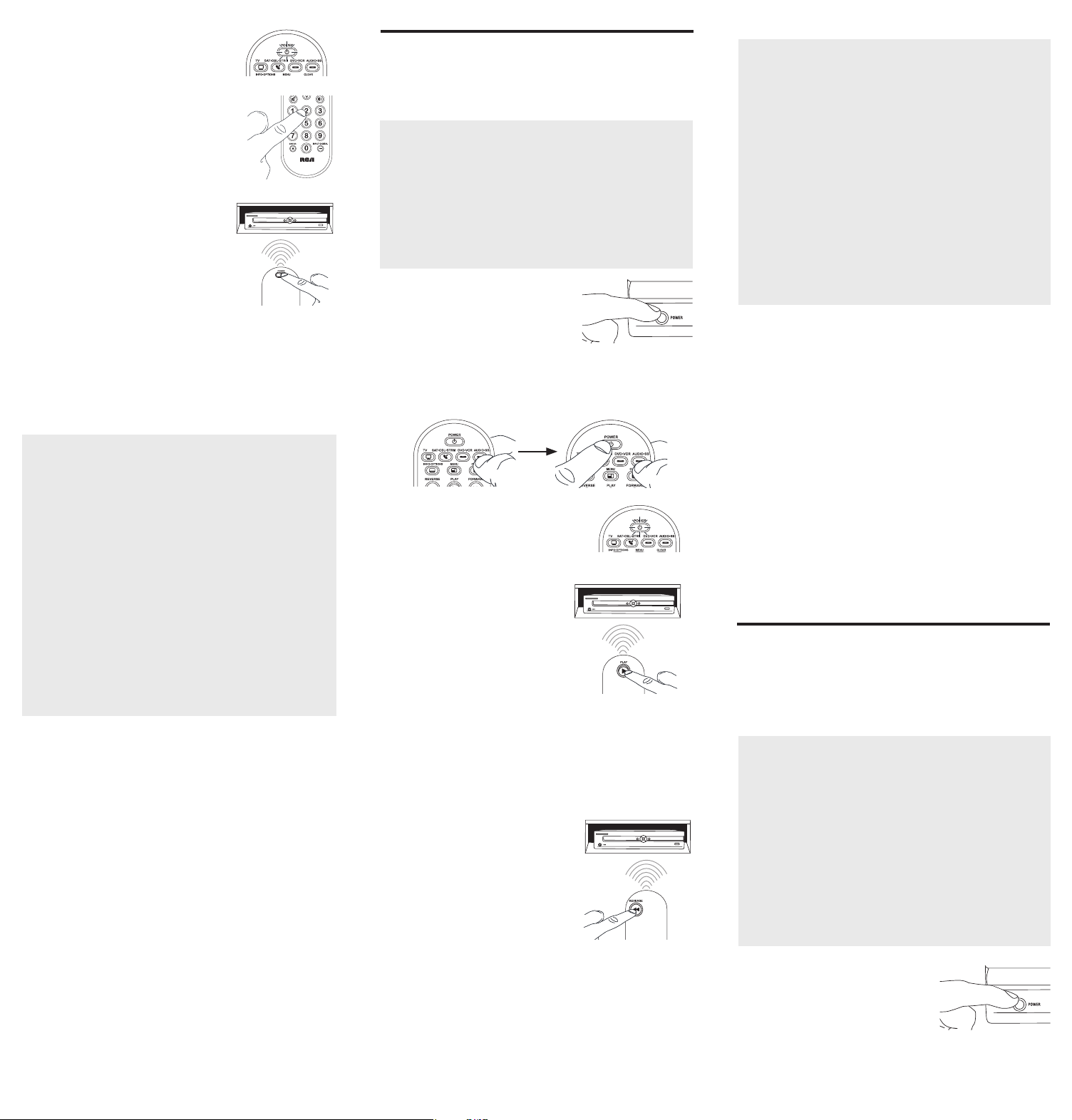
4. Whenyou’venished
enteringtheve-digitcode,
keepholdingdownthe
devicekeyandlookatthe
POWER key.
Is the POWER key on?
YES: You’redone!You’ve
programmedthisdevicekey.
NO, it blinked four times
and turned off: Youhaveeitherenteredacodenumber
thatisnotinthecodelistsormissedastepinthecode
entryprocedure.Trystep3again.
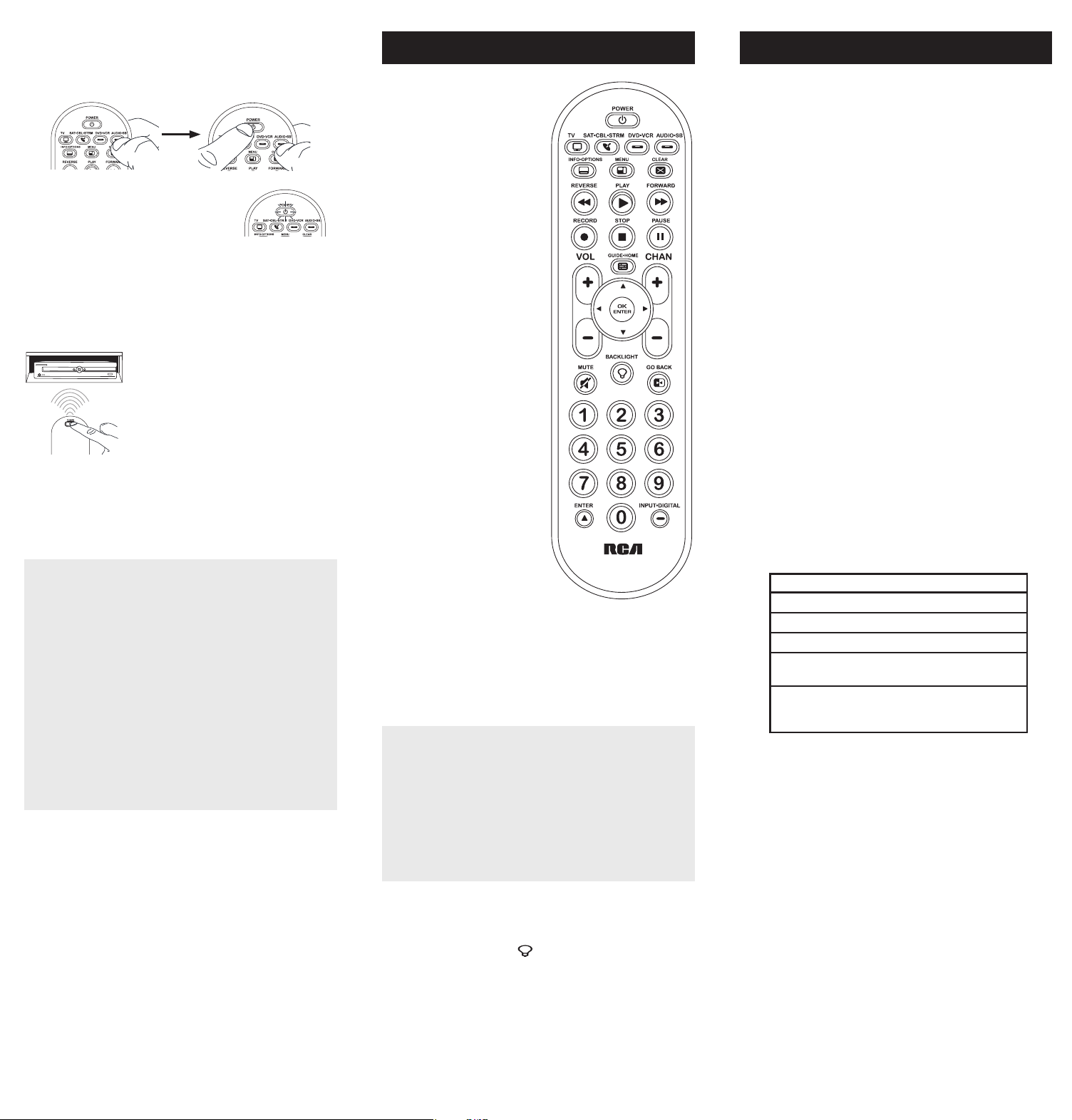
Inmostcases,thekeyson
thisremoteperformthesame
functionsasthekeysonyour
originalremotesonceyou’ve
programmedthisremoteto
operateyourdevices.Many
keysonthisremotehave
otherfunctionsaswell.
Devicekeys(TV,
SAT•CBL•STRM,DVD•VCR,
AUDIO•SB)puttheremote
intherightmodetocontrol
yourdevice.
GUIDE•HOMEandMENU
accessthesamefeatures
asthekeysonyouroriginal
remotes.
Arrowkeysactasnavigation
keysforstreamingmedia
playersaswellasinmenu
andguidesystemsforother
devices.
CLEARexitsremote
programming;italso
performsthesamefunctions
asonyouroriginalremotes.
CHANandVOLkeysact
aschannelandvolume
controllers.
The INPUTand— (dash)
keyhasthreefunctions:(1)
ittogglesthroughallthe
videosourcesconnectedto
yourTV;(2)whentheremote
isinVCRmode,thisbutton
togglesbetweenVCRand
theTVinput;(3)whenyou’re
enteringdigitalchannel
numbersdirectly,thisbutton
letsyouseparatethemain
channelnumberfromthe
sub-channelnumber(such
as59.1).
Battery Saver
Youruniversalremotecontrolsavesbatterypowerby
automaticallyturningoffifanykeyispressedformorethan
60seconds.Thissavesyourbatterylifeshouldyourremote
getstuckinaplacewherethekeysremaindepressed,suchas
betweensofacushions.
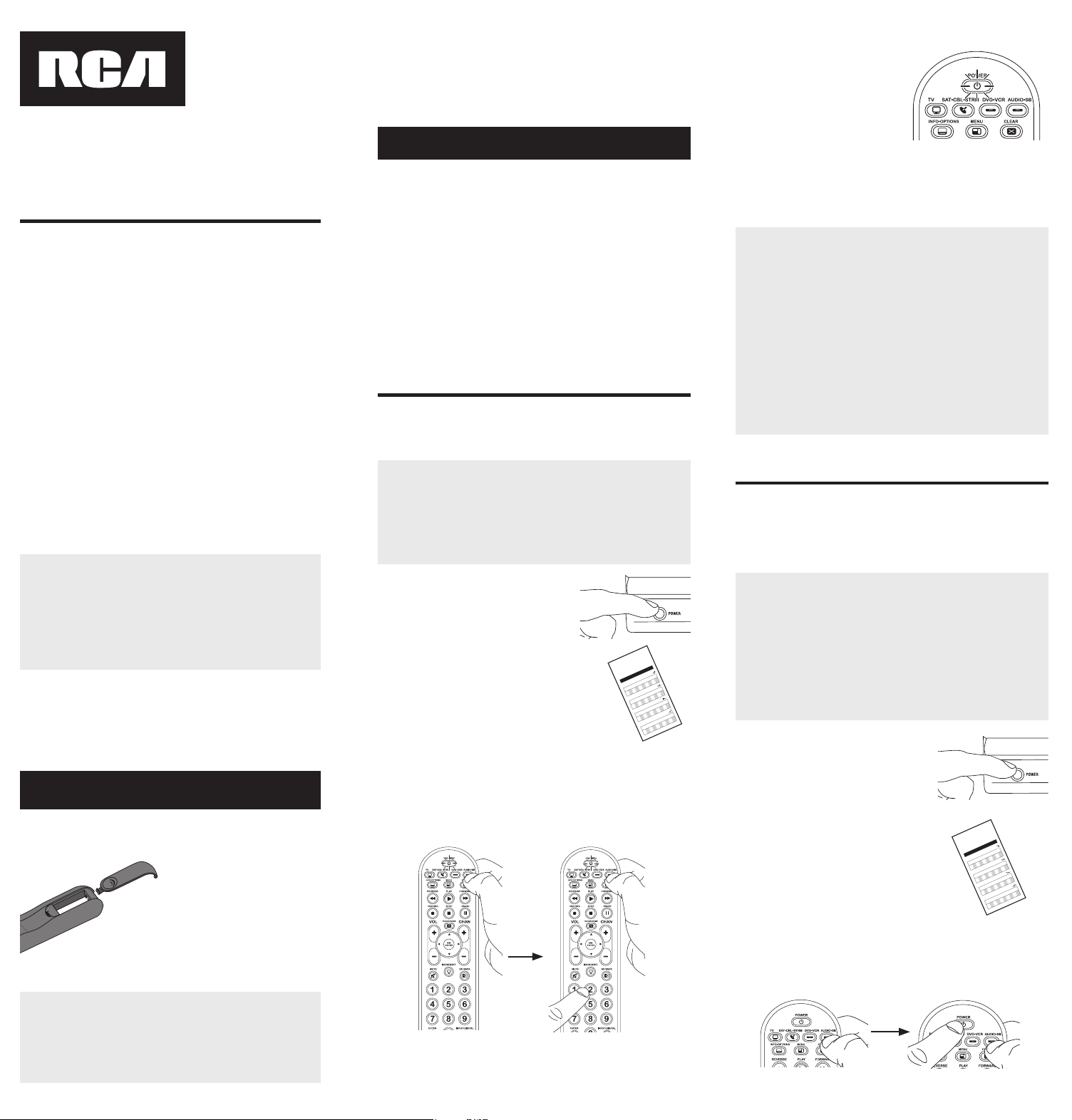
Congratulationsonyourpurchaseofthis4-deviceRCAUniversal
RemoteControl.Thisremotefeaturesalibraryofcodeswiththe
latestdevicesofallmajorbrands,withsupportforstreaming
mediaplayersaswell.Thenavigationkeyshavebeenredesigned
tofunctionseamlesslywiththemoresophisticatedmenuand
guidesystemsfoundintoday’shomeentertainmentdevices.
RCRBB04GBE
Universal Remote Control
Owner’s Manual
Manual del Propietario (parte posterior)
Actual model may vary from
illustration
Care and Maintenance
•Keeptheremotedry.Ifitgetswet,wipeitdryimmediately.
•Useandstoretheremoteonlyinnormaltemperature
environments.
•Handletheremotegentlyandcarefully.Don’tdropit.
•Keeptheremoteawayfromdustanddirt.
•Wipetheremotewithadampclothoccasionallytokeepit
lookingnew.
•Modifyingortamperingwiththeremote’sinternaldevices
cancausemalfunctionandinvalidateitswarranty.
SAVE THIS MANUAL AND THE CODE LISTS!
Remote controls can sometimes lose their programming when
you change the batteries. Make sure you keep the manual and
code lists in a safe place so that you can reprogram the remote
if you need to.
Tip: This remote is already programmed to operate most RCA-
branded TVs, VCRs, DVD players and satellite receivers. Just
press the corresponding key—DVD•VCR for a DVD player, TV
for a television, or SAT•CBL•STRM for a satellite receiver.
YouruniversalremoterequirestwoAAAalkalinebatteries(not
included).
To install the batteries:
1. Pressandpushthebattery
compartmentcoverto
removeit.
2. Insertthebatteries,
matchingthebatteriesto
the(+)and(–)marksinside
thebatterycompartment.
3. Pushthebatterycoverback
intoplace.
Battery Precautions:
• Do not mix old and new batteries.
• Do not mix alkaline, standard (carbon-zinc) or rechargeable
(nickel-cadmium) batteries.
• Always remove old, weak or worn-out batteries promptly
and recycle or dispose of them in accordance with Local and
National Regulations.
Tousethisuniversalremotewithyourhomeentertainment
system,rstyouneedtoprogramittocontrolyourdevices.
Therearefourwaysyoucanprogramtheuniversalremoteto
operateyourdevices.Trythemintheorderlistedhere:
• TheDirect Code Entryletsyouenteracodefromthe
accompanyingcodelistforyourbrandofdevice.
• TheBrand Code Searchsearchesthroughthecodesfor
selectbrandsofdevices.
• TheAuto Code Searchgoesautomaticallythroughallthe
codesforthedeviceyou’retryingtocontrol.
• TheManual Code Searchletsyoumanuallygothroughall
thecodesforthedeviceyou’retryingtocontrol.
Auto Code Search
TheAutoCodeSearchgoesautomaticallythroughallthe
codesforthedeviceyou’retryingtocontrol.Whenyound
theonethatoperatesyourdevice,youcanstopthesearch
andstorethatcode.
TIPS: Each device key is associated with a type of device—
the TV is preset to search for TVs, SAT•CBL•STRM for
satellite receivers, cable boxes or digital TV converters or
streaming media players, DVD•VCR for DVD players, and
AUDIO•SB for audio devices and soundbars. To program a
device key for a different type of device, see the Changinga
Key’sDeviceType section.
To exit without saving a new code at any point in the Auto
Code Search, press the CLEAR key.
1. Manuallyturnonthedeviceyou
wanttocontrol.
2. Pressandholdthedevicekeyyouwanttoprogram.While
you’reholdingdownthedevicekey,useyourotherhand
topressandholdtheremote’sPOWERkeyatthesame
time.
3. WaituntilthePOWERkeycomes
onandstayson.Thenreleaseboth
keys.
4. Keeptheremotepointed
directlyatthefrontpanelof
thedeviceyouwanttocontrol.
PressPLAYontheremoteand
wait5seconds.Theremoteis
testingabatchof10codeson
yourdevice.
Testing the Code for Maximum Functionality
1. Try a variety of the device’s functions with the remote. If
some device features don’t work, go to the next step to
try a different code.
2. RepeattheAutoCodeSearchMethodfromthe
beginning.Whenyourdeviceturnsoff,donotstop
searching.Instead,withtheunitnowoff,continueto
pressthePLAYkeyevery5secondsuntiltheunitturns
backon.
3. Oncetheunitturnsbackon,presstheREVERSEkeyon
theremoteevery2secondsuntilyourdeviceturnsoff
again.Whenyourdeviceturnsoffagain,presstheSTOP
key.
4. Testthekey’sfunctionalityagainbyattemptingto
controlavarietyofthedevice’sfunctions.Ifthecode
thathasbeenstoredcontrolsthemajorityofthedevice’s
functions,programmingiscomplete.Ifthecodestored
doesnotgivemaximumfunctionality,tryanothercode.
Did your device turn off?
YES: Gotostep5.
NO: PressPLAYagain.Theremoteteststhenextbatchof
10codes.
KeeppressingPLAYevery5secondsuntilyourdeviceturns
off.
5. Whenyourdeviceturnsoff,
presstheREVERSEkeyon
theremoteandwaitatleast2
seconds.Theremotetriesthe
lastoftheprevioustencodes.
Did your device turn on?
YES: PresstheSTOPkey.You’re
done!You’veprogrammedthis
devicekey.
NO: PressREVERSEagain.Theremoteteststhenext
codeinthebatch.
KeeppressingREVERSEevery2secondsuntilyourdevice
turnsbackon.Whenitdoes,pressSTOP.
Note: If you accidentally press the REVERSE key after your
device turns on, press the FORWARD key. Then, wait two
seconds to see if your device turns off again.
NOTES
Throughout the programming of each key, be sure to keep
the remote pointed at the IR sensor of the device you are
currently programming the remote to control.
Test the remote with the device to make sure the
device key is programmed with the correct code for
maximum functionality. If some features don’t work, try a
different code. See the “Testing the Code for Maximum
Functionality” section below for more information.
During the Auto Code Search, the remote ignores
keypresses that aren’t part of the search.
The search times out after two minutes (the POWER key
blinks four times and turns off, and the last programmed
code under that device key is retained).
The POWER key blinks four times and turns off when the
remote has gone through all the codes. The remote exits
the Auto Code Search. If your device hasn’t turned off yet,
try a different search method.
Testing the Code for Maximum Functionality
1. Try a variety of the device’s functions with the remote. If
some device features don’t work, go to the next step to
try a different code.
2. RepeattheBrandCodeSearchfromthebeginning.
Whenthedeviceturnsoffforthersttime,don’tpress
theSTOPkey,whichwouldstorethesamecode.Instead,
withtheunitnowoff,continuetopressthePOWERkey
repeatedlyuntiltheunitturnsbackon.
3. Oncetheunitturnsbackon,youhavefoundanother
codethatoperatesthedevice.PresstheSTOPkey.
4. Testthekey’sfunctionalityagainbyattemptingto
controlavarietyofthedevice’sfunctions.Ifthecode
thathasbeenstoredcontrolsthemajorityofthedevice’s
functions,programmingiscomplete.Ifthecodestored
doesnotgivemaximumfunctionality,tryanothercode.
Brand Code Search
TheBrandCodeSearchgoesthroughonlythecodesforoneof
theselectbrandslistedintheaccompanyingcodelist.Ifyour
brandofdeviceislisted,thissearchcanbeveryquickandeasy.
TIPS: Each device key is associated with a type of device—
the TV is preset to search for TVs, SAT•CBL•STRM for
satellite receivers, cable boxes or digital TV converters or
streaming media players, DVD•VCR for DVD players, and
AUDIO•SB for audio devices and soundbars. To program a
device key for a different type of device, see the Changinga
Key’sDeviceType section.
To exit without saving a new code at any point in the Brand
Code Search, press the CLEAR key.
1. Manuallyturnonthedeviceyou
wanttocontrol.
3. Pressandholdthedevicekeyyouwanttoprogram.While
you’reholdingdownthedevicekey,useyourotherhand
topressandholdtheremote’sPOWERkeyatthesame
time.
4. WaituntilthePOWERkeycomes
onandstayson.Thenreleaseboth
keys.
frontpanelofthedeviceyouwantto
control.PressPOWERontheremote
andwait2seconds.Theremoteis
testingasinglecodeforyourdevice’s
brand.
Did your device turn off?
YES: PresstheSTOPkeytostore
thecode.You’redone!You’veprogrammedthisdevice
key.
NO: PressPOWERagain.Theremoteteststhenextcode
foryourbrand.
KeeppressingPOWERevery2secondsuntilyourdevice
turnsoff.Whenitdoes,pressSTOP.
2. Findyourdevice’sbrandinthe
BrandCodelistsectionofthe
accompanyingcodelist.Circlethe
numberforyourbrandandkeep
thelisthandy.
Code Lists
Brand Codes are used for programming using the Brand Code Search
and Entry method outlined in the User’s Guide.
Lista de Códigos
Los códigos de las marcas son utilizados para programar utilizando
los métodos de búsqueda y entrada de códigos de marcas, resaltado
en la guía del usuario.
0
1
23
4
56
7
8
9
RCA
GE
PROSCAN
Insignia
JVC
Magnavox
Philips
Panasonic Samsung Sharp Sony Toshiba Vizio
TV
VCR
0
1
23
4
56
7
8
9
RCA
GE
PROSCAN
Apex JVC
Magnavox
Philips
Panasonic Pioneer Samsung Sharp Sony Toshiba
DVD
SAT/CABLE
0
1
23
4
56
7
8
9
RCA
GE
PROSCAN
Motorola DirecTV
Dish Network
Systems/
Echostar
General
Instruments
Hughes
Network
Systems
Scientific
Atlanta
Magnavox
Philips
AMNIO
ADB
Panasonic
Brand Code List/Lista de Códigos de Marcas
0
1
23
4
56
7
8
9
Samsung
Magnavox
Philips
Mitsubishi Panasonic Sharp Sony Toshiba
RCA
GE
PROSCAN
JVC
Symphonic
5. Lookatthenumberyoucircledforyour
device’sbrandcodenumber.Pressthat
numberontheremotekeypad.
6. Keeptheremotepointeddirectlyatthe
NOTES
Throughout the programming of each key, be sure to keep
the remote pointed at the IR sensor of the device you are
currently programming the remote to control.
Test the remote with the device to make sure the
device key is programmed with the correct code for
maximum functionality. If some features don’t work, try a
different code. See the “Testing the Code for Maximum
Functionality” section below for more information.
During the Brand Code Search, the remote ignores
keypresses that aren’t part of the search.
The search times out after two minutes (the POWER key
blinks four times and turns off, and the last programmed
code under that device key is retained).
The POWER key blinks four times and turns off when the
remote has gone through all the codes. The remote exits
the Brand Code Search. If your device hasn’t turned off yet,
try a different search method.
Direct Code Entry
DirectCodeEntryletsyouenteracodefromthe
accompanyingcodelistforyourbrandofdevice.
TIP: Each device key is associated with a type of device—the
TV is preset to search for TVs, SAT•CBL•STRM for satellite
receivers, cable boxes or digital TV converters or streaming
media players, DVD•VCR for DVD players, and AUDIO•SB
for audio devices and soundbars. To program a device key
for a different type of device, see the ChangingaKey’s
DeviceType section.
1. Manuallyturnonthedeviceyou
wanttocontrol.
3. Pressandholdthedevicekeyyouwanttoprogram(the
POWERkeycomeson).
Whileyou’reholdingdownthedevicekey,useyourother
handentertherstve-digitcodeforyourbrandinthe
codelist(thePOWERkeygoesoffaftertherstdigit).
2. FindtheCodeListthatcamewith
theremote.Locatethesectionfor
thetypeofdeviceyou’retryingto
program,andndyourbrandinthat
section.Circlethecodesforyour
brandandkeepthemhandy.
Code Lists
Brand Codes are used for programming using the Brand Code Search
and Entry method outlined in the User’s Guide.
Lista de Códigos
Los códigos de las marcas son utilizados para programar utilizando
los métodos de búsqueda y entrada de códigos de marcas, resaltado
en la guía del usuario.
0
1
23
4
56
7
8
9
RCA
GE
PROSCAN
Insignia
JVC
Magnavox
Philips
Panasonic Samsung Sharp Sony Toshiba Vizio
TV
VCR
0
1
23
4
56
7
8
9
RCA
GE
PROSCAN
Apex JVC
Magnavox
Philips
Panasonic Pioneer Samsung Sharp Sony Toshiba
DVD
SAT/CABLE
0
1
23
4
56
7
8
9
RCA
GE
PROSCAN
Motorola DirecTV
Dish Network
Systems/
Echostar
General
Instruments
Hughes
Network
Systems
Scientific
Atlanta
Magnavox
Philips
AMNIO
ADB
Panasonic
Brand Code List/Lista de Códigos de Marcas
0
1
23
4
56
7
8
9
Samsung
Magnavox
Philips
Mitsubishi Panasonic Sharp Sony Toshiba
RCA
GE
PROSCAN
JVC
Symphonic
NOTES
Remember to enter the code for future reference in the box
provided in the Code Retrieval section of this manual.
If your brand isn’t listed in the code list, use one of the Code
Search methods to program the remote control. (Refer to
the Auto and Manual Code Search methods.)
If you release the device key any time during the Direct
Code Entry procedure, the POWER key blinks four times,
and the process is exited. The last programmed code under
the device key is retained.
Test the remote with the device to make sure the device
key is programmed with the correct code for maximum
functionality. If some features don’t work, try a different code
in the list.
Manual Code Search
TheManualCodeSearchletsyougoone-by-onethroughallthe
codesforthedeviceyou’retryingtocontrol.Whenyoundthe
onethatoperatesyourdevice,youcanstopthesearchandstore
thatcode.
TIPS: The Manual Code Search method may take a long
time because the remote searches through all of the codes
in its memory one-by-one. If your brand is listed in the Brand
Codes or the Code Lists, rst try the Brand Code Search or
the Direct Code Entry method.
Each device key is associated with a type of device—the
TV is preset to search for TVs, SAT•CBL•STRM for satellite
receivers, cable boxes or digital TV converters or streaming
media players, DVD•VCR for DVD players, and AUDIO•SB
for audio devices and soundbars. To program a device key
for a different type of device, see the ChangingaKey’s
DeviceType section.
To exit without saving a new code at any point in the Manual
Code Search, press the CLEAR key.
1. Manuallyturnonthedevice
youwanttocontrol.
2. Pressandholdthedevicekeyyouwanttoprogram.While
you’reholdingdownthedevicekey,useyourotherhand
topressandholdtheremote’sPOWERkeyatthesame
time.
3. WaituntilthePOWERkeycomes
onandstayson.Thenrelease
bothkeys.
4. Keeptheremotepointeddirectlyatthefrontpanelofthe
deviceyouwanttocontrol.PressPOWERontheremote
andwait2seconds.Theremoteistestingasinglecodefor
yourdevice.
Did your device turn off?
YES:PresstheSTOPkeytostore
thecode.You’redone!You’ve
programmedthisdevicekey.
NO: PressPOWERagain.The
remoteteststhenextcodeforyour
device.
KeeppressingPOWERevery2
secondsuntilyourdeviceturnsoff.
Whenitdoes,pressSTOP.
TIP: Because there are so many codes, you may have to
press the POWER key many times—possibly hundreds of
times.
NOTES
Throughout the programming of each key, keep the remote
pointed at the IR sensor of the device you are programming
the remote to control.
Test the remote with the device to make sure the
device key is programmed with the correct code for
maximum functionality. If some features don’t work, try a
different code. See the “Testing the Code for Maximum
Functionality” section below for more information.
During the Manual Code Search, the remote ignores
keypresses that aren’t part of the search.
The search times out after two minutes (the POWER key
blinks four times and turns off, and the last programmed
code under that device key is retained).
The POWER key blinks four times and turns off when the
remote has gone through all the codes. The remote exits
the Brand Code Search. If your device hasn’t turned off yet,
try a different search method.
Testing the Code for Maximum Functionality
1. Try a variety of the device’s functions with the remote. If
some features of your devices don’t work, go to the next
step to try a different code.
2. RepeattheManualCodeSearchandEntryMethodfrom
thebeginning.Whenthedeviceturnsoffforthersttime,
don’tpresstheSTOPkey,whichwouldstorethesame
code.Instead,withtheunitnowoff,continuetopressthe
POWERkeyrepeatedlyuntiltheunitturnsbackon.
3. Oncetheunitturnsbackon,youhavefoundanother
codethatoperatesthedevice.PresstheSTOPkey.
4. Testthekey’sfunctionalityagainbytryingavarietyof
functions.Ifthecodecontrolsthemajorityofthedevice’s
functions,programmingiscomplete.Ifthecodestored
doesnotgivemaximumfunctionality,tryanothercode.
Changing A Key’s Device Type
Eachdevicekeyisassociatedwithatypeofdevice—the
TVispresettosearchforTVs,SAT•CBL•STRMforsatellite
receivers,digitalTVconvertersorstreamingmediaplayers,
orcableboxes,DVD•VCRforDVDplayersorVCRs,and
AUDIO•SBforaudiodevicesandsoundbars.Toprogram
thesekeystocontroladifferentkindofdevice,youhaveto
reassignthemrst.
Reassigning the DVD•VCR Key to Control a VCR
TheDVD•VCRkeydefaultstocontrolaDVDplayer.Ifyouwant
theDVD•VCRkeytocontrolaVCR,youmustreassignit.
1. PressandholdtheDVD•VCRkey.ThePOWERkeyturns
on.KeepholdingdowntheDVD•VCRkey.
2. WhileholdingdowntheDVD•VCRkey,pressandrelease
thenumber2keyonthekeypad.ThePOWERkeyturns
off.
3. ReleasetheDVD•VCRkey.ThePOWERkeyblinkstwo
timesandthenturnsoff.TheDVD•VCRkeyisnowsetto
controlaVCR.
4. Followthedirectionsintheauto,brand,directentry,or
manualcodesearchtoprogramtheDVD•VCRkeyfor
yourVCR.
Reassigning the AUDIO•SB Key To Control Other Devices
TheAUDIO•SBkeydefaultstocontrolanaudiodevice.If
youwanttheAUDIO•SBkeytocontroladifferentdevice
(anadditionalTV,DVD,satellite, digitalTVconvertersor
streamingmediaplayers,orcablebox,forexample),youmust
reassignit.
1. PressandholdtheAUDIO•SBkey.ThePOWERkeyturns
on.
2. WhileholdingdowntheAUDIO•SBkey,pressandrelease
thenumberkeyonthekeypadforthedeviceyouwishto
control(seethechartbelow).ThePOWERkeyturnsoff.
DEVICE KEY CONTROLS:
AdditionalTV press1
VCRorDVR press2
AdditionalDVD press3
Additionalaudiodeviceor
soundbar
press4
Additionalsatellite,digitalTV
convertersorstreamingmedia
players,orcablebox
press5
3. ReleasetheAUDIO•SBkey.ThePOWERkeyblinkstwo
timesandthenturnsoff.TheAUDIO•SBkeyisnowsetto
controlthedevicetypeyouselected.
4. Followthedirectionsintheauto,brand,directentry,or
manualcodesearchtoprogramtheAUDIO•SBkey.
Code Retrieval
Onceyou’veprogrammedtheremotetocontrolyourdevices,
youmaywanttorecordthecodesforfuturereference.If
youusedtheDirectCodeEntrymethod,thisiseasy.Just
ndthecodesyouenteredandmakeanoteoftheminthe
boxesbelow.IfyouusedoneoftheCodeSearchmethodsto
programyourremoteorifyouusedtheDirectEntrymethod
butdon’trememberthecode,youwillneedtoretrieveeach
device’sve-digitcode.Retrievingtheactualcodeandwriting
itdownwillsaveyoutimeifyoueverneedtoprogramthe
remoteagain(e.g.,ifprogrammingislostwhenyouchange
thebatteries).Ifthecodesarerecorded,youcanusethe
DirectEntrymethodtoreprogramyourremotetocontrolyour
devices,whichisquickandeasy.
1. Pressandholdthedevice
key(TV,SAT•CBL•STRM,
DVD•VCR,AUDIO•SB)whose
codeyouwishtoretrieve.The
POWER keyturnson.Keep
pressingthedevicekey.
2. Whileholdingthedevicekeydown,pressandholdthe
INFOkey.ThePOWER keyturnsoff.Afterholdingdown
bothkeysforthreeseconds,thePOWER keyturnsback
on.
3. Releasebothkeys.ThePOWER keyremainson.
4. Startingwiththenumber1key,pressandreleaseeach
numberkeyonthekeypadinthefollowingorder:1-9,
then0.ThenumberthatcausesthePOWER keytoblinkis
therstnumberofthecode.Asyoundeachnumberof
thecode,writeitdownforfuturereference.
Note: All TV codes begin with the number 1; all VCR and
DVR codes begin with the number 2; all DVDs, the number
3; all audio devices, the number 4; and all satellite receivers,
digital TV converters or streaming media players, and cable
boxes, the number 5.
5. Repeatstep4untilyouhaveretrievedallvenumbers
inthecode.Afterthefourthnumberisretrieved,the
POWER keyblinksbriey,thenturnsoff.
TIP: To exit the Code Retrieval Mode at any time, press the
CLEAR key.
Note: If you press an invalid key during the Code Retrieval
process, the remote will not respond. If you do not press a
valid Code Retrieval key (TV, SAT•CBL•STRM, DVD•VCR,
AUDIO•SB, INFO, CLEAR), Code Retrieval times out after 15
seconds. The POWER key blinks four times, and then turns
off.
IMPORTANT
Because this remote controls more than one device, you
must rst “tell” the remote which device you wish to
operate. That means, if you wish to operate your TV, you
must rst press the TV key to put the remote in the TV
Mode. The remote stays in that device mode until you
press a different device key. For example, if your remote is
in TV Mode and you want to operate the DVD player, you
must press the DVD key to change device modes.
Problem: The remote does not operate your device.
• Makesuretheremoteisinthecorrectmodebypressingthe
correspondingdevicekey(TV,SAT•CBL•STRM,DVD•VCR,
AUDIO•SB).Thistellstheremotewhichdevicetooperate.
• Removeanyobstaclesbetweentheremoteandthedevice.
Makesureyou’reaimingtheremoteatthedevice’sIRsensor.
• Makesurethebatteriesarefreshandareproperlyinstalled.
ReplacethebatterieswithtwonewAAAbatteries,ifnecessary
(seetheBatteryInstallationsection).
Problem: The remote can’t be programmed to operate
your device.
• Ifyouaretestingtheremotewhileprogrammingit,youmaybe
toofarawayfromthedeviceoratawrongangle.Theremustbe
anunobstructedpathbetweentheremoteandtheIRsensoron
thedevice.Movecloserandmakesureyoupointtheremoteat
thedeviceyou’retryingtocontrol.
• Ifyou’reusingtheDirectEntryprogrammingmethodtoenter
thecodesforyourbrandandtheunitisstillnotfunctioning
properly,trytheauto,brand,ormanualsearchmethod.
• Tocontrolcombounits,likeTV/VCRsorTV/DVDs,youmust
programtheindividualcorrespondingdevicekeystocontrol
eachpartofthecombounit.Onceprogrammedsuccessfully,
theTVkeycontrolstheTVfunctions,andtheDVD•VCRkey
controlstheVCRorDVDfunctions.
• Makesurethebatteriesarefreshandareproperlyinstalled.
Problem: The remote doesn’t perform commands properly.
• Makesuretheremoteisinthecorrectmodebypressingthe
correspondingdevicekey(TV,SAT•CBL•STRM,DVD•VCR,
AUDIO•SB).Thistellstheremotewhichdevicetooperate.
• Makesuredeviceisready(forexample,theDVDplayerhasa
discloaded).
• Youmayhavepressedaninvalidkeyforthemodetheremoteisin.
• Ifyou’retryingtoenterachannelnumberdirectly,trypressing
theOKkeyafterenteringthechannelnumberasthisisa
requirementofcertainmodelsandbrands.
• Thereisapossibilitythataprogrammedcodemayonlybe
abletocontrolsomeofyourdevicefeatures(forexample,only
turnsadeviceonandoff).Toconrmthatthedevicekeyis
programmedwiththecorrectcodeformaximumfunctionality,
testthedevice.Attempttocontrolavarietyofthedevice’s
functionswiththeremote.Ifsomeofthefeaturesofyour
devicesdon’twork,tryprogrammingtheremotewitha
differentcodeinthelistusingtheDirectCodeEntryMethod,
untilyoundthecodethatallowstheremotetocontrolthe
majorityofyourdevice’sfunctions.Differentcodescanprovide
differentlevelsoffunctionality.
Problem: The POWER key does not light when you press a
key.
• Youmayhavepressedaninvalidkeyforthemodetheremoteis
in.
• Makesuretheremoteisinthecorrectmodebypressingthe
correspondingdevicekey(TV,SAT•CBL•STRM,DVD•VCR,
AUDIO•SB).Thistellstheremotewhichdevicetooperate.
• Makesurethebatteriesarefreshandareproperlyinstalled.
ReplacethebatterieswithtwonewAAAbatteries,ifnecessary
(seetheBatteryInstallationsection).
Problem: The remote will not change channels on device.
• Makesuretheremoteisinthecorrectmodebypressingthe
correspondingdevicekey(TV,SAT•CBL•STRM,DVD•VCR,
AUDIO•SB).Thistellstheremotewhichdevicetooperate.
• PresstheOKkeyafteryouenterachannelnumber.
• Removeanyobstaclesbetweentheremoteandthedevice.
MakesuretoaimtheremoteattheIRsensoronthedevice.
VoxxAccessoriesCorporation(the“Company”)warrantstoyouthe
originalretailpurchaserofthisproductthatshouldit,undernormaluse
andconditions,beprovendefectiveinmaterialorworkmanshipduringits
lifetimewhileyouownit,suchdefect(s)willberepairedorreplaced(atthe
Company’soption)withoutchargeforpartsandrepairlabor.
Toobtainrepairorreplacementwithinthetermsofthewarranty,theproduct
istobedeliveredwithproofofwarrantycoverage(e.g.datedbillofsale),
specicationofdefect(s),transportationprepaid,toanapprovedwarranty
station.Forthelocationofthenearestwarrantystationtoyou,calltoll-freeto
ourcontrolofce:1-800-645-4994.
ThisWarrantydoesnotcoverproductpurchased,servicedorusedoutside
theUnitedStatesorCanada.ThisWarrantyisnottransferableanddoes
notextendtocostsincurredforinstallation,removalorreinstallationof
theproduct.ThisWarrantydoesnotapplyifintheCompany’sopinion,
theproducthasbeendamagedthroughalteration,improperinstallation,
mishandling,misuse,neglect,accident,orthesimultaneoususeofdifferent
batterytypes(e.g.alkaline,standardorrechargeable).
THEEXTENTOFTHECOMPANY’SLIABILITYUNDERTHISWARRANTYIS
LIMITEDTOTHEREPAIRORREPLACEMENTPROVIDEDABOVEAND,IN
NOEVENT,SHALLTHECOMPANY’SLIABILITYEXCEEDTHEPURCHASE
PRICEPAIDBYPURCHASERFORTHEPRODUCT.
ThisWarrantyisinlieuofallotherexpresswarrantiesorliabilities.ANY
IMPLIEDWARRANTIES,INCLUDINGANYIMPLIEDWARRANTYOF
MERCHANTABILITYORFITNESSFORAPARTICULARPURPOSESHALL
BELIMITEDTODURATIONOFTHISWARRANTY.INNOCASESHALL
THECOMPANYBELIABLEFORANYCONSEQUENTIALORINCIDENTAL
DAMAGESWHATSOEVER.Nopersonorrepresentativeisauthorized
toassumefortheCompanyanyliabilityotherthanexpressedhereinin
connectionwiththesaleofthisproduct.
Somestates/provincesdonotallowlimitationsonhowlonganimplied
warrantylastsortheexclusionorlimitationofincidentalorconsequential
damagesotheabovelimitationsorexclusionsmaynotapplytoyou.This
Warrantygivesyouspeciclegalrightsandyoumayalsohaveotherrights,
whichvaryfromstate/provincetostate/province.
Trademark(s)®Registered
Step 1: Install your batteries
Step 2: Program your remote
Tour of the Remote Advanced Functions
Troubleshooting
Limited Lifetime Warranty
DVD•VCR CODE AUDIO•SB CODE
5
SAT•CBL•STRM CODE
1
TV CODE
SAT CABLE DTV CONVERTER
DVD VCR AUDIO SOUNDBAR
©2018VoxxAccessoriesCorp.
3502WoodviewTrace,Suite220
Indianapolis,IN46268
Backlighting
Backlightilluminationhelpsyouseetheremotecontrolkeys
betterinthedark.Youcanturnbacklightilluminationonby
pressingthebacklightkey( ).Backlightingstaysonaslong
askeysarebeingpressedandturnsoffvesecondsafterthe
lastkeypress.
FCC Statement:
Thisdevicecomplieswithpart15oftheFCCRules.Operationissubject
tothefollowingtwoconditions:(1)Thisdevicemaynotcauseharmful
interference,and(2)thisdevicemustacceptanyinterferencereceived,
includinginterferencethatmaycauseundesiredoperation.
Note:Thisequipmenthasbeentestedandfoundtocomplywiththelimits
foraClassBdigitaldevice,pursuanttopart15oftheFCCRules.These
limitsaredesignedtoprovidereasonableprotectionagainstharmful
interferenceinaresidentialinstallation.Thisequipmentgenerates,uses
andcanradiateradiofrequencyenergyand,ifnotinstalledandusedin
accordancewiththeinstructions,maycauseharmfulinterferencetoradio
communications.However,thereisnoguaranteethatinterferencewill
notoccurinaparticularinstallation.Ifthisequipmentdoescauseharmful
interferencetoradioortelevisionreception,whichcanbedeterminedby
turningtheequipmentoffandon,theuserisencouragedtotrytocorrect
theinterferencebyoneormoreofthefollowingmeasures:
• Reorientorrelocatethereceivingantenna.
• Increasetheseparationbetweentheequipmentandreceiver.
• Connecttheequipmentintoanoutletonacircuitdifferentfromthatto
whichthereceiverisconnected.
• Consultthedealeroranexperiencedradio/TVtechnicianforhelp.
Caution:AnyChangesormodicationsnotexpresslyapprovedbytheparty
responsibleforcompliancecouldvoidtheuser’sauthoritytooperatethis
equipment.
Industry Canada Regulatory Information
CANICES-3(B)/NMB-3(B)
Avis d’Industrie Canada
CANICES-3(B)/NMB-3(B)
Problem: The device’s menu does not appear on the TV
screen.
• MakesureyouhaveconnectedthedevicetoyourTVproperly
andselectedthecorrectinput.(Seeyourdevices’Owner’s
Manualsforproperconnectionprocedures.)
• Makesuretheremoteisinthecorrectmodebypressingthe
correspondingdevicekey(TV,SAT•CBL•STRM,DVD•VCR,
AUDIO•SB).Thistellstheremotewhichdevicetooperate.
• Menuaccessisn’tsupportedforallbrands.Youmayneedto
useyouroriginalremotecontroltoaccessmenufunctionsfor
somedevices.
For more information, including instructional videos,
remote programming codes, and customer support, visit
www.RCACodeSupport.com
Channel Lock
Channellockautomaticallysendschannelcommands,likethe
CH,GOBACK,and0–9numberkeys,toyoursatellitereceiver,
cablebox,ordigitalTVconverterwhenyou’reinTVmode.
Thiscansaveyoukeypressesifyouuseadeviceotherthan
yourTVtochangechannels.
To turn channel lock on:
1. Pressandholdthedevicekeyforthedeviceyouuseto
changechannels.Whileyou’reholdingdownthisdevice
key,useyourotherhandtopressandholdtheremote’s
CHupkeyatthesametime.
2. Waituntiltheremote’sPOWERkeycomesonandstays
on.Thenreleasebothkeys.
3. PressENTERtolockchannelcommandstothisdevice.
To turn channel lock off:
1. PressandholdtheTVkey.Whileyou’reholdingdown
theTVkey,useyourotherhandtopressandholdthe
remote’sCHdownkeyatthesametime.
2. Waituntiltheremote’sPOWERkeycomesonandstays
on.Thenreleasebothkeys.
3. PressENTERtostartchangingchannelswithyourTV.
RCRBB04GBEUS01 2597
4. Whenyou’venished
enteringtheve-digitcode,
keepholdingdownthe
devicekeyandlookatthe
POWER key.
Is the POWER key on?
YES: You’redone!You’ve
programmedthisdevicekey.
NO, it blinked four times
and turned off: Youhaveeitherenteredacodenumber
thatisnotinthecodelistsormissedastepinthecode
entryprocedure.Trystep3again.
Inmostcases,thekeyson
thisremoteperformthesame
functionsasthekeysonyour
originalremotesonceyou’ve
programmedthisremoteto
operateyourdevices.Many
keysonthisremotehave
otherfunctionsaswell.
Devicekeys(TV,
SAT•CBL•STRM,DVD•VCR,
AUDIO•SB)puttheremote
intherightmodetocontrol
yourdevice.
GUIDE•HOMEandMENU
accessthesamefeatures
asthekeysonyouroriginal
remotes.
Arrowkeysactasnavigation
keysforstreamingmedia
playersaswellasinmenu
andguidesystemsforother
devices.
CLEARexitsremote
programming;italso
performsthesamefunctions
asonyouroriginalremotes.
CHANandVOLkeysact
aschannelandvolume
controllers.
The INPUTand— (dash)
keyhasthreefunctions:(1)
ittogglesthroughallthe
videosourcesconnectedto
yourTV;(2)whentheremote
isinVCRmode,thisbutton
togglesbetweenVCRand
theTVinput;(3)whenyou’re
enteringdigitalchannel
numbersdirectly,thisbutton
letsyouseparatethemain
channelnumberfromthe
sub-channelnumber(such
as59.1).
Battery Saver
Youruniversalremotecontrolsavesbatterypowerby
automaticallyturningoffifanykeyispressedformorethan
60seconds.Thissavesyourbatterylifeshouldyourremote
getstuckinaplacewherethekeysremaindepressed,suchas
betweensofacushions.
Congratulationsonyourpurchaseofthis4-deviceRCAUniversal
RemoteControl.Thisremotefeaturesalibraryofcodeswiththe
latestdevicesofallmajorbrands,withsupportforstreaming
mediaplayersaswell.Thenavigationkeyshavebeenredesigned
tofunctionseamlesslywiththemoresophisticatedmenuand
guidesystemsfoundintoday’shomeentertainmentdevices.
RCRBB04GBE
Universal Remote Control
Owner’s Manual
Manual del Propietario (parte posterior)
Actual model may vary from
illustration
Care and Maintenance
•Keeptheremotedry.Ifitgetswet,wipeitdryimmediately.
•Useandstoretheremoteonlyinnormaltemperature
environments.
•Handletheremotegentlyandcarefully.Don’tdropit.
•Keeptheremoteawayfromdustanddirt.
•Wipetheremotewithadampclothoccasionallytokeepit
lookingnew.
•Modifyingortamperingwiththeremote’sinternaldevices
cancausemalfunctionandinvalidateitswarranty.
SAVE THIS MANUAL AND THE CODE LISTS!
Remote controls can sometimes lose their programming when
you change the batteries. Make sure you keep the manual and
code lists in a safe place so that you can reprogram the remote
if you need to.
Tip: This remote is already programmed to operate most RCA-
branded TVs, VCRs, DVD players and satellite receivers. Just
press the corresponding key—DVD•VCR for a DVD player, TV
for a television, or SAT•CBL•STRM for a satellite receiver.
YouruniversalremoterequirestwoAAAalkalinebatteries(not
included).
To install the batteries:
1. Pressandpushthebattery
compartmentcoverto
removeit.
2. Insertthebatteries,
matchingthebatteriesto
the(+)and(–)marksinside
thebatterycompartment.
3. Pushthebatterycoverback
intoplace.
Battery Precautions:
• Do not mix old and new batteries.
• Do not mix alkaline, standard (carbon-zinc) or rechargeable
(nickel-cadmium) batteries.
• Always remove old, weak or worn-out batteries promptly
and recycle or dispose of them in accordance with Local and
National Regulations.
Tousethisuniversalremotewithyourhomeentertainment
system,rstyouneedtoprogramittocontrolyourdevices.
Therearefourwaysyoucanprogramtheuniversalremoteto
operateyourdevices.Trythemintheorderlistedhere:
• TheDirect Code Entryletsyouenteracodefromthe
accompanyingcodelistforyourbrandofdevice.
• TheBrand Code Searchsearchesthroughthecodesfor
selectbrandsofdevices.
• TheAuto Code Searchgoesautomaticallythroughallthe
codesforthedeviceyou’retryingtocontrol.
• TheManual Code Searchletsyoumanuallygothroughall
thecodesforthedeviceyou’retryingtocontrol.
Auto Code Search
TheAutoCodeSearchgoesautomaticallythroughallthe
codesforthedeviceyou’retryingtocontrol.Whenyound
theonethatoperatesyourdevice,youcanstopthesearch
andstorethatcode.
TIPS: Each device key is associated with a type of device—
the TV is preset to search for TVs, SAT•CBL•STRM for
satellite receivers, cable boxes or digital TV converters or
streaming media players, DVD•VCR for DVD players, and
AUDIO•SB for audio devices and soundbars. To program a
device key for a different type of device, see the Changinga
Key’sDeviceType section.
To exit without saving a new code at any point in the Auto
Code Search, press the CLEAR key.
1. Manuallyturnonthedeviceyou
wanttocontrol.
2. Pressandholdthedevicekeyyouwanttoprogram.While
you’reholdingdownthedevicekey,useyourotherhand
topressandholdtheremote’sPOWERkeyatthesame
time.
3. WaituntilthePOWERkeycomes
onandstayson.Thenreleaseboth
keys.
4. Keeptheremotepointed
directlyatthefrontpanelof
thedeviceyouwanttocontrol.
PressPLAYontheremoteand
wait5seconds.Theremoteis
testingabatchof10codeson
yourdevice.
Testing the Code for Maximum Functionality
1. Try a variety of the device’s functions with the remote. If
some device features don’t work, go to the next step to
try a different code.
2. RepeattheAutoCodeSearchMethodfromthe
beginning.Whenyourdeviceturnsoff,donotstop
searching.Instead,withtheunitnowoff,continueto
pressthePLAYkeyevery5secondsuntiltheunitturns
backon.
3. Oncetheunitturnsbackon,presstheREVERSEkeyon
theremoteevery2secondsuntilyourdeviceturnsoff
again.Whenyourdeviceturnsoffagain,presstheSTOP
key.
4. Testthekey’sfunctionalityagainbyattemptingto
controlavarietyofthedevice’sfunctions.Ifthecode
thathasbeenstoredcontrolsthemajorityofthedevice’s
functions,programmingiscomplete.Ifthecodestored
doesnotgivemaximumfunctionality,tryanothercode.
Did your device turn off?
YES: Gotostep5.
NO: PressPLAYagain.Theremoteteststhenextbatchof
10codes.
KeeppressingPLAYevery5secondsuntilyourdeviceturns
off.
5. Whenyourdeviceturnsoff,
presstheREVERSEkeyon
theremoteandwaitatleast2
seconds.Theremotetriesthe
lastoftheprevioustencodes.
Did your device turn on?
YES: PresstheSTOPkey.You’re
done!You’veprogrammedthis
devicekey.
NO: PressREVERSEagain.Theremoteteststhenext
codeinthebatch.
KeeppressingREVERSEevery2secondsuntilyourdevice
turnsbackon.Whenitdoes,pressSTOP.
Note: If you accidentally press the REVERSE key after your
device turns on, press the FORWARD key. Then, wait two
seconds to see if your device turns off again.
NOTES
Throughout the programming of each key, be sure to keep
the remote pointed at the IR sensor of the device you are
currently programming the remote to control.
Test the remote with the device to make sure the
device key is programmed with the correct code for
maximum functionality. If some features don’t work, try a
different code. See the “Testing the Code for Maximum
Functionality” section below for more information.
During the Auto Code Search, the remote ignores
keypresses that aren’t part of the search.
The search times out after two minutes (the POWER key
blinks four times and turns off, and the last programmed
code under that device key is retained).
The POWER key blinks four times and turns off when the
remote has gone through all the codes. The remote exits
the Auto Code Search. If your device hasn’t turned off yet,
try a different search method.
Testing the Code for Maximum Functionality
1. Try a variety of the device’s functions with the remote. If
some device features don’t work, go to the next step to
try a different code.
2. RepeattheBrandCodeSearchfromthebeginning.
Whenthedeviceturnsoffforthersttime,don’tpress
theSTOPkey,whichwouldstorethesamecode.Instead,
withtheunitnowoff,continuetopressthePOWERkey
repeatedlyuntiltheunitturnsbackon.
3. Oncetheunitturnsbackon,youhavefoundanother
codethatoperatesthedevice.PresstheSTOPkey.
4. Testthekey’sfunctionalityagainbyattemptingto
controlavarietyofthedevice’sfunctions.Ifthecode
thathasbeenstoredcontrolsthemajorityofthedevice’s
functions,programmingiscomplete.Ifthecodestored
doesnotgivemaximumfunctionality,tryanothercode.
Brand Code Search
TheBrandCodeSearchgoesthroughonlythecodesforoneof
theselectbrandslistedintheaccompanyingcodelist.Ifyour
brandofdeviceislisted,thissearchcanbeveryquickandeasy.
TIPS: Each device key is associated with a type of device—
the TV is preset to search for TVs, SAT•CBL•STRM for
satellite receivers, cable boxes or digital TV converters or
streaming media players, DVD•VCR for DVD players, and
AUDIO•SB for audio devices and soundbars. To program a
device key for a different type of device, see the Changinga
Key’sDeviceType section.
To exit without saving a new code at any point in the Brand
Code Search, press the CLEAR key.
1. Manuallyturnonthedeviceyou
wanttocontrol.
3. Pressandholdthedevicekeyyouwanttoprogram.While
you’reholdingdownthedevicekey,useyourotherhand
topressandholdtheremote’sPOWERkeyatthesame
time.
4. WaituntilthePOWERkeycomes
onandstayson.Thenreleaseboth
keys.
frontpanelofthedeviceyouwantto
control.PressPOWERontheremote
andwait2seconds.Theremoteis
testingasinglecodeforyourdevice’s
brand.
Did your device turn off?
YES: PresstheSTOPkeytostore
thecode.You’redone!You’veprogrammedthisdevice
key.
NO: PressPOWERagain.Theremoteteststhenextcode
foryourbrand.
KeeppressingPOWERevery2secondsuntilyourdevice
turnsoff.Whenitdoes,pressSTOP.
2. Findyourdevice’sbrandinthe
BrandCodelistsectionofthe
accompanyingcodelist.Circlethe
numberforyourbrandandkeep
thelisthandy.
Code Lists
Brand Codes are used for programming using the Brand Code Search
and Entry method outlined in the User’s Guide.
Lista de Códigos
Los códigos de las marcas son utilizados para programar utilizando
los métodos de búsqueda y entrada de códigos de marcas, resaltado
en la guía del usuario.
0
1
23
4
56
7
8
9
RCA
GE
PROSCAN
Insignia
JVC
Magnavox
Philips
Panasonic Samsung Sharp Sony Toshiba Vizio
TV
VCR
0
1
23
4
56
7
8
9
RCA
GE
PROSCAN
Apex JVC
Magnavox
Philips
Panasonic Pioneer Samsung Sharp Sony Toshiba
DVD
SAT/CABLE
0
1
23
4
56
7
8
9
RCA
GE
PROSCAN
Motorola DirecTV
Dish Network
Systems/
Echostar
General
Instruments
Hughes
Network
Systems
Scientific
Atlanta
Magnavox
Philips
AMNIO
ADB
Panasonic
Brand Code List/Lista de Códigos de Marcas
0
1
23
4
56
7
8
9
Samsung
Magnavox
Philips
Mitsubishi Panasonic Sharp Sony Toshiba
RCA
GE
PROSCAN
JVC
Symphonic
5. Lookatthenumberyoucircledforyour
device’sbrandcodenumber.Pressthat
numberontheremotekeypad.
6. Keeptheremotepointeddirectlyatthe
NOTES
Throughout the programming of each key, be sure to keep
the remote pointed at the IR sensor of the device you are
currently programming the remote to control.
Test the remote with the device to make sure the
device key is programmed with the correct code for
maximum functionality. If some features don’t work, try a
different code. See the “Testing the Code for Maximum
Functionality” section below for more information.
During the Brand Code Search, the remote ignores
keypresses that aren’t part of the search.
The search times out after two minutes (the POWER key
blinks four times and turns off, and the last programmed
code under that device key is retained).
The POWER key blinks four times and turns off when the
remote has gone through all the codes. The remote exits
the Brand Code Search. If your device hasn’t turned off yet,
try a different search method.
Direct Code Entry
DirectCodeEntryletsyouenteracodefromthe
accompanyingcodelistforyourbrandofdevice.
TIP: Each device key is associated with a type of device—the
TV is preset to search for TVs, SAT•CBL•STRM for satellite
receivers, cable boxes or digital TV converters or streaming
media players, DVD•VCR for DVD players, and AUDIO•SB
for audio devices and soundbars. To program a device key
for a different type of device, see the ChangingaKey’s
DeviceType section.
1. Manuallyturnonthedeviceyou
wanttocontrol.
3. Pressandholdthedevicekeyyouwanttoprogram(the
POWERkeycomeson).
Whileyou’reholdingdownthedevicekey,useyourother
handentertherstve-digitcodeforyourbrandinthe
codelist(thePOWERkeygoesoffaftertherstdigit).
2. FindtheCodeListthatcamewith
theremote.Locatethesectionfor
thetypeofdeviceyou’retryingto
program,andndyourbrandinthat
section.Circlethecodesforyour
brandandkeepthemhandy.
Code Lists
Brand Codes are used for programming using the Brand Code Search
and Entry method outlined in the User’s Guide.
Lista de Códigos
Los códigos de las marcas son utilizados para programar utilizando
los métodos de búsqueda y entrada de códigos de marcas, resaltado
en la guía del usuario.
0
1
23
4
56
7
8
9
RCA
GE
PROSCAN
Insignia
JVC
Magnavox
Philips
Panasonic Samsung Sharp Sony Toshiba Vizio
TV
VCR
0
1
23
4
56
7
8
9
RCA
GE
PROSCAN
Apex JVC
Magnavox
Philips
Panasonic Pioneer Samsung Sharp Sony Toshiba
DVD
SAT/CABLE
0
1
23
4
56
7
8
9
RCA
GE
PROSCAN
Motorola DirecTV
Dish Network
Systems/
Echostar
General
Instruments
Hughes
Network
Systems
Scientific
Atlanta
Magnavox
Philips
AMNIO
ADB
Panasonic
Brand Code List/Lista de Códigos de Marcas
0
1
23
4
56
7
8
9
Samsung
Magnavox
Philips
Mitsubishi Panasonic Sharp Sony Toshiba
RCA
GE
PROSCAN
JVC
Symphonic
NOTES
Remember to enter the code for future reference in the box
provided in the Code Retrieval section of this manual.
If your brand isn’t listed in the code list, use one of the Code
Search methods to program the remote control. (Refer to
the Auto and Manual Code Search methods.)
If you release the device key any time during the Direct
Code Entry procedure, the POWER key blinks four times,
and the process is exited. The last programmed code under
the device key is retained.
Test the remote with the device to make sure the device
key is programmed with the correct code for maximum
functionality. If some features don’t work, try a different code
in the list.
Manual Code Search
TheManualCodeSearchletsyougoone-by-onethroughallthe
codesforthedeviceyou’retryingtocontrol.Whenyoundthe
onethatoperatesyourdevice,youcanstopthesearchandstore
thatcode.
TIPS: The Manual Code Search method may take a long
time because the remote searches through all of the codes
in its memory one-by-one. If your brand is listed in the Brand
Codes or the Code Lists, rst try the Brand Code Search or
the Direct Code Entry method.
Each device key is associated with a type of device—the
TV is preset to search for TVs, SAT•CBL•STRM for satellite
receivers, cable boxes or digital TV converters or streaming
media players, DVD•VCR for DVD players, and AUDIO•SB
for audio devices and soundbars. To program a device key
for a different type of device, see the ChangingaKey’s
DeviceType section.
To exit without saving a new code at any point in the Manual
Code Search, press the CLEAR key.
1. Manuallyturnonthedevice
youwanttocontrol.
2. Pressandholdthedevicekeyyouwanttoprogram.While
you’reholdingdownthedevicekey,useyourotherhand
topressandholdtheremote’sPOWERkeyatthesame
time.
3. WaituntilthePOWERkeycomes
onandstayson.Thenrelease
bothkeys.
4. Keeptheremotepointeddirectlyatthefrontpanelofthe
deviceyouwanttocontrol.PressPOWERontheremote
andwait2seconds.Theremoteistestingasinglecodefor
yourdevice.
Did your device turn off?
YES:PresstheSTOPkeytostore
thecode.You’redone!You’ve
programmedthisdevicekey.
NO: PressPOWERagain.The
remoteteststhenextcodeforyour
device.
KeeppressingPOWERevery2
secondsuntilyourdeviceturnsoff.
Whenitdoes,pressSTOP.
TIP: Because there are so many codes, you may have to
press the POWER key many times—possibly hundreds of
times.
NOTES
Throughout the programming of each key, keep the remote
pointed at the IR sensor of the device you are programming
the remote to control.
Test the remote with the device to make sure the
device key is programmed with the correct code for
maximum functionality. If some features don’t work, try a
different code. See the “Testing the Code for Maximum
Functionality” section below for more information.
During the Manual Code Search, the remote ignores
keypresses that aren’t part of the search.
The search times out after two minutes (the POWER key
blinks four times and turns off, and the last programmed
code under that device key is retained).
The POWER key blinks four times and turns off when the
remote has gone through all the codes. The remote exits
the Brand Code Search. If your device hasn’t turned off yet,
try a different search method.
Testing the Code for Maximum Functionality
1. Try a variety of the device’s functions with the remote. If
some features of your devices don’t work, go to the next
step to try a different code.
2. RepeattheManualCodeSearchandEntryMethodfrom
thebeginning.Whenthedeviceturnsoffforthersttime,
don’tpresstheSTOPkey,whichwouldstorethesame
code.Instead,withtheunitnowoff,continuetopressthe
POWERkeyrepeatedlyuntiltheunitturnsbackon.
3. Oncetheunitturnsbackon,youhavefoundanother
codethatoperatesthedevice.PresstheSTOPkey.
4. Testthekey’sfunctionalityagainbytryingavarietyof
functions.Ifthecodecontrolsthemajorityofthedevice’s
functions,programmingiscomplete.Ifthecodestored
doesnotgivemaximumfunctionality,tryanothercode.
Changing A Key’s Device Type
Eachdevicekeyisassociatedwithatypeofdevice—the
TVispresettosearchforTVs,SAT•CBL•STRMforsatellite
receivers,digitalTVconvertersorstreamingmediaplayers,
orcableboxes,DVD•VCRforDVDplayersorVCRs,and
AUDIO•SBforaudiodevicesandsoundbars.Toprogram
thesekeystocontroladifferentkindofdevice,youhaveto
reassignthemrst.
Reassigning the DVD•VCR Key to Control a VCR
TheDVD•VCRkeydefaultstocontrolaDVDplayer.Ifyouwant
theDVD•VCRkeytocontrolaVCR,youmustreassignit.
1. PressandholdtheDVD•VCRkey.ThePOWERkeyturns
on.KeepholdingdowntheDVD•VCRkey.
2. WhileholdingdowntheDVD•VCRkey,pressandrelease
thenumber2keyonthekeypad.ThePOWERkeyturns
off.
3. ReleasetheDVD•VCRkey.ThePOWERkeyblinkstwo
timesandthenturnsoff.TheDVD•VCRkeyisnowsetto
controlaVCR.
4. Followthedirectionsintheauto,brand,directentry,or
manualcodesearchtoprogramtheDVD•VCRkeyfor
yourVCR.
Reassigning the AUDIO•SB Key To Control Other Devices
TheAUDIO•SBkeydefaultstocontrolanaudiodevice.If
youwanttheAUDIO•SBkeytocontroladifferentdevice
(anadditionalTV,DVD,satellite, digitalTVconvertersor
streamingmediaplayers,orcablebox,forexample),youmust
reassignit.
1. PressandholdtheAUDIO•SBkey.ThePOWERkeyturns
on.
2. WhileholdingdowntheAUDIO•SBkey,pressandrelease
thenumberkeyonthekeypadforthedeviceyouwishto
control(seethechartbelow).ThePOWERkeyturnsoff.
DEVICE KEY CONTROLS:
AdditionalTV press1
VCRorDVR press2
AdditionalDVD press3
Additionalaudiodeviceor
soundbar
press4
Additionalsatellite,digitalTV
convertersorstreamingmedia
players,orcablebox
press5
3. ReleasetheAUDIO•SBkey.ThePOWERkeyblinkstwo
timesandthenturnsoff.TheAUDIO•SBkeyisnowsetto
controlthedevicetypeyouselected.
4. Followthedirectionsintheauto,brand,directentry,or
manualcodesearchtoprogramtheAUDIO•SBkey.
Code Retrieval
Onceyou’veprogrammedtheremotetocontrolyourdevices,
youmaywanttorecordthecodesforfuturereference.If
youusedtheDirectCodeEntrymethod,thisiseasy.Just
ndthecodesyouenteredandmakeanoteoftheminthe
boxesbelow.IfyouusedoneoftheCodeSearchmethodsto
programyourremoteorifyouusedtheDirectEntrymethod
butdon’trememberthecode,youwillneedtoretrieveeach
device’sve-digitcode.Retrievingtheactualcodeandwriting
itdownwillsaveyoutimeifyoueverneedtoprogramthe
remoteagain(e.g.,ifprogrammingislostwhenyouchange
thebatteries).Ifthecodesarerecorded,youcanusethe
DirectEntrymethodtoreprogramyourremotetocontrolyour
devices,whichisquickandeasy.
1. Pressandholdthedevice
key(TV,SAT•CBL•STRM,
DVD•VCR,AUDIO•SB)whose
codeyouwishtoretrieve.The
POWER keyturnson.Keep
pressingthedevicekey.
2. Whileholdingthedevicekeydown,pressandholdthe
INFOkey.ThePOWER keyturnsoff.Afterholdingdown
bothkeysforthreeseconds,thePOWER keyturnsback
on.
3. Releasebothkeys.ThePOWER keyremainson.
4. Startingwiththenumber1key,pressandreleaseeach
numberkeyonthekeypadinthefollowingorder:1-9,
then0.ThenumberthatcausesthePOWER keytoblinkis
therstnumberofthecode.Asyoundeachnumberof
thecode,writeitdownforfuturereference.
Note: All TV codes begin with the number 1; all VCR and
DVR codes begin with the number 2; all DVDs, the number
3; all audio devices, the number 4; and all satellite receivers,
digital TV converters or streaming media players, and cable
boxes, the number 5.
5. Repeatstep4untilyouhaveretrievedallvenumbers
inthecode.Afterthefourthnumberisretrieved,the
POWER keyblinksbriey,thenturnsoff.
TIP: To exit the Code Retrieval Mode at any time, press the
CLEAR key.
Note: If you press an invalid key during the Code Retrieval
process, the remote will not respond. If you do not press a
valid Code Retrieval key (TV, SAT•CBL•STRM, DVD•VCR,
AUDIO•SB, INFO, CLEAR), Code Retrieval times out after 15
seconds. The POWER key blinks four times, and then turns
off.
IMPORTANT
Because this remote controls more than one device, you
must rst “tell” the remote which device you wish to
operate. That means, if you wish to operate your TV, you
must rst press the TV key to put the remote in the TV
Mode. The remote stays in that device mode until you
press a different device key. For example, if your remote is
in TV Mode and you want to operate the DVD player, you
must press the DVD key to change device modes.
Problem: The remote does not operate your device.
• Makesuretheremoteisinthecorrectmodebypressingthe
correspondingdevicekey(TV,SAT•CBL•STRM,DVD•VCR,
AUDIO•SB).Thistellstheremotewhichdevicetooperate.
• Removeanyobstaclesbetweentheremoteandthedevice.
Makesureyou’reaimingtheremoteatthedevice’sIRsensor.
• Makesurethebatteriesarefreshandareproperlyinstalled.
ReplacethebatterieswithtwonewAAAbatteries,ifnecessary
(seetheBatteryInstallationsection).
Problem: The remote can’t be programmed to operate
your device.
• Ifyouaretestingtheremotewhileprogrammingit,youmaybe
toofarawayfromthedeviceoratawrongangle.Theremustbe
anunobstructedpathbetweentheremoteandtheIRsensoron
thedevice.Movecloserandmakesureyoupointtheremoteat
thedeviceyou’retryingtocontrol.
• Ifyou’reusingtheDirectEntryprogrammingmethodtoenter
thecodesforyourbrandandtheunitisstillnotfunctioning
properly,trytheauto,brand,ormanualsearchmethod.
• Tocontrolcombounits,likeTV/VCRsorTV/DVDs,youmust
programtheindividualcorrespondingdevicekeystocontrol
eachpartofthecombounit.Onceprogrammedsuccessfully,
theTVkeycontrolstheTVfunctions,andtheDVD•VCRkey
controlstheVCRorDVDfunctions.
• Makesurethebatteriesarefreshandareproperlyinstalled.
Problem: The remote doesn’t perform commands properly.
• Makesuretheremoteisinthecorrectmodebypressingthe
correspondingdevicekey(TV,SAT•CBL•STRM,DVD•VCR,
AUDIO•SB).Thistellstheremotewhichdevicetooperate.
• Makesuredeviceisready(forexample,theDVDplayerhasa
discloaded).
• Youmayhavepressedaninvalidkeyforthemodetheremoteisin.
• Ifyou’retryingtoenterachannelnumberdirectly,trypressing
theOKkeyafterenteringthechannelnumberasthisisa
requirementofcertainmodelsandbrands.
• Thereisapossibilitythataprogrammedcodemayonlybe
abletocontrolsomeofyourdevicefeatures(forexample,only
turnsadeviceonandoff).Toconrmthatthedevicekeyis
programmedwiththecorrectcodeformaximumfunctionality,
testthedevice.Attempttocontrolavarietyofthedevice’s
functionswiththeremote.Ifsomeofthefeaturesofyour
devicesdon’twork,tryprogrammingtheremotewitha
differentcodeinthelistusingtheDirectCodeEntryMethod,
untilyoundthecodethatallowstheremotetocontrolthe
majorityofyourdevice’sfunctions.Differentcodescanprovide
differentlevelsoffunctionality.
Problem: The POWER key does not light when you press a
key.
• Youmayhavepressedaninvalidkeyforthemodetheremoteis
in.
• Makesuretheremoteisinthecorrectmodebypressingthe
correspondingdevicekey(TV,SAT•CBL•STRM,DVD•VCR,
AUDIO•SB).Thistellstheremotewhichdevicetooperate.
• Makesurethebatteriesarefreshandareproperlyinstalled.
ReplacethebatterieswithtwonewAAAbatteries,ifnecessary
(seetheBatteryInstallationsection).
Problem: The remote will not change channels on device.
• Makesuretheremoteisinthecorrectmodebypressingthe
correspondingdevicekey(TV,SAT•CBL•STRM,DVD•VCR,
AUDIO•SB).Thistellstheremotewhichdevicetooperate.
• PresstheOKkeyafteryouenterachannelnumber.
• Removeanyobstaclesbetweentheremoteandthedevice.
MakesuretoaimtheremoteattheIRsensoronthedevice.
VoxxAccessoriesCorporation(the“Company”)warrantstoyouthe
originalretailpurchaserofthisproductthatshouldit,undernormaluse
andconditions,beprovendefectiveinmaterialorworkmanshipduringits
lifetimewhileyouownit,suchdefect(s)willberepairedorreplaced(atthe
Company’soption)withoutchargeforpartsandrepairlabor.
Toobtainrepairorreplacementwithinthetermsofthewarranty,theproduct
istobedeliveredwithproofofwarrantycoverage(e.g.datedbillofsale),
specicationofdefect(s),transportationprepaid,toanapprovedwarranty
station.Forthelocationofthenearestwarrantystationtoyou,calltoll-freeto
ourcontrolofce:1-800-645-4994.
ThisWarrantydoesnotcoverproductpurchased,servicedorusedoutside
theUnitedStatesorCanada.ThisWarrantyisnottransferableanddoes
notextendtocostsincurredforinstallation,removalorreinstallationof
theproduct.ThisWarrantydoesnotapplyifintheCompany’sopinion,
theproducthasbeendamagedthroughalteration,improperinstallation,
mishandling,misuse,neglect,accident,orthesimultaneoususeofdifferent
batterytypes(e.g.alkaline,standardorrechargeable).
THEEXTENTOFTHECOMPANY’SLIABILITYUNDERTHISWARRANTYIS
LIMITEDTOTHEREPAIRORREPLACEMENTPROVIDEDABOVEAND,IN
NOEVENT,SHALLTHECOMPANY’SLIABILITYEXCEEDTHEPURCHASE
PRICEPAIDBYPURCHASERFORTHEPRODUCT.
ThisWarrantyisinlieuofallotherexpresswarrantiesorliabilities.ANY
IMPLIEDWARRANTIES,INCLUDINGANYIMPLIEDWARRANTYOF
MERCHANTABILITYORFITNESSFORAPARTICULARPURPOSESHALL
BELIMITEDTODURATIONOFTHISWARRANTY.INNOCASESHALL
THECOMPANYBELIABLEFORANYCONSEQUENTIALORINCIDENTAL
DAMAGESWHATSOEVER.Nopersonorrepresentativeisauthorized
toassumefortheCompanyanyliabilityotherthanexpressedhereinin
connectionwiththesaleofthisproduct.
Somestates/provincesdonotallowlimitationsonhowlonganimplied
warrantylastsortheexclusionorlimitationofincidentalorconsequential
damagesotheabovelimitationsorexclusionsmaynotapplytoyou.This
Warrantygivesyouspeciclegalrightsandyoumayalsohaveotherrights,
whichvaryfromstate/provincetostate/province.
Trademark(s)®Registered
Step 1: Install your batteries
Step 2: Program your remote
Tour of the Remote Advanced Functions
Troubleshooting
Limited Lifetime Warranty
DVD•VCR CODE AUDIO•SB CODE
5
SAT•CBL•STRM CODE
1
TV CODE
SAT CABLE DTV CONVERTER
DVD VCR AUDIO SOUNDBAR
©2018VoxxAccessoriesCorp.
3502WoodviewTrace,Suite220
Indianapolis,IN46268
Backlighting
Backlightilluminationhelpsyouseetheremotecontrolkeys
betterinthedark.Youcanturnbacklightilluminationonby
pressingthebacklightkey( ).Backlightingstaysonaslong
askeysarebeingpressedandturnsoffvesecondsafterthe
lastkeypress.
FCC Statement:
Thisdevicecomplieswithpart15oftheFCCRules.Operationissubject
tothefollowingtwoconditions:(1)Thisdevicemaynotcauseharmful
interference,and(2)thisdevicemustacceptanyinterferencereceived,
includinginterferencethatmaycauseundesiredoperation.
Note:Thisequipmenthasbeentestedandfoundtocomplywiththelimits
foraClassBdigitaldevice,pursuanttopart15oftheFCCRules.These
limitsaredesignedtoprovidereasonableprotectionagainstharmful
interferenceinaresidentialinstallation.Thisequipmentgenerates,uses
andcanradiateradiofrequencyenergyand,ifnotinstalledandusedin
accordancewiththeinstructions,maycauseharmfulinterferencetoradio
communications.However,thereisnoguaranteethatinterferencewill
notoccurinaparticularinstallation.Ifthisequipmentdoescauseharmful
interferencetoradioortelevisionreception,whichcanbedeterminedby
turningtheequipmentoffandon,theuserisencouragedtotrytocorrect
theinterferencebyoneormoreofthefollowingmeasures:
• Reorientorrelocatethereceivingantenna.
• Increasetheseparationbetweentheequipmentandreceiver.
• Connecttheequipmentintoanoutletonacircuitdifferentfromthatto
whichthereceiverisconnected.
• Consultthedealeroranexperiencedradio/TVtechnicianforhelp.
Caution:AnyChangesormodicationsnotexpresslyapprovedbytheparty
responsibleforcompliancecouldvoidtheuser’sauthoritytooperatethis
equipment.
Industry Canada Regulatory Information
CANICES-3(B)/NMB-3(B)
Avis d’Industrie Canada
CANICES-3(B)/NMB-3(B)
Problem: The device’s menu does not appear on the TV
screen.
• MakesureyouhaveconnectedthedevicetoyourTVproperly
andselectedthecorrectinput.(Seeyourdevices’Owner’s
Manualsforproperconnectionprocedures.)
• Makesuretheremoteisinthecorrectmodebypressingthe
correspondingdevicekey(TV,SAT•CBL•STRM,DVD•VCR,
AUDIO•SB).Thistellstheremotewhichdevicetooperate.
• Menuaccessisn’tsupportedforallbrands.Youmayneedto
useyouroriginalremotecontroltoaccessmenufunctionsfor
somedevices.
For more information, including instructional videos,
remote programming codes, and customer support, visit
www.RCACodeSupport.com
Channel Lock
Channellockautomaticallysendschannelcommands,likethe
CH,GOBACK,and0–9numberkeys,toyoursatellitereceiver,
cablebox,ordigitalTVconverterwhenyou’reinTVmode.
Thiscansaveyoukeypressesifyouuseadeviceotherthan
yourTVtochangechannels.
To turn channel lock on:
1. Pressandholdthedevicekeyforthedeviceyouuseto
changechannels.Whileyou’reholdingdownthisdevice
key,useyourotherhandtopressandholdtheremote’s
CHupkeyatthesametime.
2. Waituntiltheremote’sPOWERkeycomesonandstays
on.Thenreleasebothkeys.
3. PressENTERtolockchannelcommandstothisdevice.
To turn channel lock off:
1. PressandholdtheTVkey.Whileyou’reholdingdown
theTVkey,useyourotherhandtopressandholdthe
remote’sCHdownkeyatthesametime.
2. Waituntiltheremote’sPOWERkeycomesonandstays
on.Thenreleasebothkeys.
3. PressENTERtostartchangingchannelswithyourTV.
RCRBB04GBEUS01 2597
4. Whenyou’venished
enteringtheve-digitcode,
keepholdingdownthe
devicekeyandlookatthe
POWER key.
Is the POWER key on?
YES: You’redone!You’ve
programmedthisdevicekey.
NO, it blinked four times
and turned off: Youhaveeitherenteredacodenumber
thatisnotinthecodelistsormissedastepinthecode
entryprocedure.Trystep3again.
Inmostcases,thekeyson
thisremoteperformthesame
functionsasthekeysonyour
originalremotesonceyou’ve
programmedthisremoteto
operateyourdevices.Many
keysonthisremotehave
otherfunctionsaswell.
Devicekeys(TV,
SAT•CBL•STRM,DVD•VCR,
AUDIO•SB)puttheremote
intherightmodetocontrol
yourdevice.
GUIDE•HOMEandMENU
accessthesamefeatures
asthekeysonyouroriginal
remotes.
Arrowkeysactasnavigation
keysforstreamingmedia
playersaswellasinmenu
andguidesystemsforother
devices.
CLEARexitsremote
programming;italso
performsthesamefunctions
asonyouroriginalremotes.
CHANandVOLkeysact
aschannelandvolume
controllers.
The INPUTand— (dash)
keyhasthreefunctions:(1)
ittogglesthroughallthe
videosourcesconnectedto
yourTV;(2)whentheremote
isinVCRmode,thisbutton
togglesbetweenVCRand
theTVinput;(3)whenyou’re
enteringdigitalchannel
numbersdirectly,thisbutton
letsyouseparatethemain
channelnumberfromthe
sub-channelnumber(such
as59.1).
Battery Saver
Youruniversalremotecontrolsavesbatterypowerby
automaticallyturningoffifanykeyispressedformorethan
60seconds.Thissavesyourbatterylifeshouldyourremote
getstuckinaplacewherethekeysremaindepressed,suchas
betweensofacushions.
Congratulationsonyourpurchaseofthis4-deviceRCAUniversal
RemoteControl.Thisremotefeaturesalibraryofcodeswiththe
latestdevicesofallmajorbrands,withsupportforstreaming
mediaplayersaswell.Thenavigationkeyshavebeenredesigned
tofunctionseamlesslywiththemoresophisticatedmenuand
guidesystemsfoundintoday’shomeentertainmentdevices.
RCRBB04GBE
Universal Remote Control
Owner’s Manual
Manual del Propietario (parte posterior)
Actual model may vary from
illustration
Care and Maintenance
•Keeptheremotedry.Ifitgetswet,wipeitdryimmediately.
•Useandstoretheremoteonlyinnormaltemperature
environments.
•Handletheremotegentlyandcarefully.Don’tdropit.
•Keeptheremoteawayfromdustanddirt.
•Wipetheremotewithadampclothoccasionallytokeepit
lookingnew.
•Modifyingortamperingwiththeremote’sinternaldevices
cancausemalfunctionandinvalidateitswarranty.
SAVE THIS MANUAL AND THE CODE LISTS!
Remote controls can sometimes lose their programming when
you change the batteries. Make sure you keep the manual and
code lists in a safe place so that you can reprogram the remote
if you need to.
Tip: This remote is already programmed to operate most RCA-
branded TVs, VCRs, DVD players and satellite receivers. Just
press the corresponding key—DVD•VCR for a DVD player, TV
for a television, or SAT•CBL•STRM for a satellite receiver.
YouruniversalremoterequirestwoAAAalkalinebatteries(not
included).
To install the batteries:
1. Pressandpushthebattery
compartmentcoverto
removeit.
2. Insertthebatteries,
matchingthebatteriesto
the(+)and(–)marksinside
thebatterycompartment.
3. Pushthebatterycoverback
intoplace.
Battery Precautions:
• Do not mix old and new batteries.
• Do not mix alkaline, standard (carbon-zinc) or rechargeable
(nickel-cadmium) batteries.
• Always remove old, weak or worn-out batteries promptly
and recycle or dispose of them in accordance with Local and
National Regulations.
Tousethisuniversalremotewithyourhomeentertainment
system,rstyouneedtoprogramittocontrolyourdevices.
Therearefourwaysyoucanprogramtheuniversalremoteto
operateyourdevices.Trythemintheorderlistedhere:
• TheDirect Code Entryletsyouenteracodefromthe
accompanyingcodelistforyourbrandofdevice.
• TheBrand Code Searchsearchesthroughthecodesfor
selectbrandsofdevices.
• TheAuto Code Searchgoesautomaticallythroughallthe
codesforthedeviceyou’retryingtocontrol.
• TheManual Code Searchletsyoumanuallygothroughall
thecodesforthedeviceyou’retryingtocontrol.
Auto Code Search
TheAutoCodeSearchgoesautomaticallythroughallthe
codesforthedeviceyou’retryingtocontrol.Whenyound
theonethatoperatesyourdevice,youcanstopthesearch
andstorethatcode.
TIPS: Each device key is associated with a type of device—
the TV is preset to search for TVs, SAT•CBL•STRM for
satellite receivers, cable boxes or digital TV converters or
streaming media players, DVD•VCR for DVD players, and
AUDIO•SB for audio devices and soundbars. To program a
device key for a different type of device, see the Changinga
Key’sDeviceType section.
To exit without saving a new code at any point in the Auto
Code Search, press the CLEAR key.
1. Manuallyturnonthedeviceyou
wanttocontrol.
2. Pressandholdthedevicekeyyouwanttoprogram.While
you’reholdingdownthedevicekey,useyourotherhand
topressandholdtheremote’sPOWERkeyatthesame
time.
3. WaituntilthePOWERkeycomes
onandstayson.Thenreleaseboth
keys.
4. Keeptheremotepointed
directlyatthefrontpanelof
thedeviceyouwanttocontrol.
PressPLAYontheremoteand
wait5seconds.Theremoteis
testingabatchof10codeson
yourdevice.
Testing the Code for Maximum Functionality
1. Try a variety of the device’s functions with the remote. If
some device features don’t work, go to the next step to
try a different code.
2. RepeattheAutoCodeSearchMethodfromthe
beginning.Whenyourdeviceturnsoff,donotstop
searching.Instead,withtheunitnowoff,continueto
pressthePLAYkeyevery5secondsuntiltheunitturns
backon.
3. Oncetheunitturnsbackon,presstheREVERSEkeyon
theremoteevery2secondsuntilyourdeviceturnsoff
again.Whenyourdeviceturnsoffagain,presstheSTOP
key.
4. Testthekey’sfunctionalityagainbyattemptingto
controlavarietyofthedevice’sfunctions.Ifthecode
thathasbeenstoredcontrolsthemajorityofthedevice’s
functions,programmingiscomplete.Ifthecodestored
doesnotgivemaximumfunctionality,tryanothercode.
Did your device turn off?
YES: Gotostep5.
NO: PressPLAYagain.Theremoteteststhenextbatchof
10codes.
KeeppressingPLAYevery5secondsuntilyourdeviceturns
off.
5. Whenyourdeviceturnsoff,
presstheREVERSEkeyon
theremoteandwaitatleast2
seconds.Theremotetriesthe
lastoftheprevioustencodes.
Did your device turn on?
YES: PresstheSTOPkey.You’re
done!You’veprogrammedthis
devicekey.
NO: PressREVERSEagain.Theremoteteststhenext
codeinthebatch.
KeeppressingREVERSEevery2secondsuntilyourdevice
turnsbackon.Whenitdoes,pressSTOP.
Note: If you accidentally press the REVERSE key after your
device turns on, press the FORWARD key. Then, wait two
seconds to see if your device turns off again.
NOTES
Throughout the programming of each key, be sure to keep
the remote pointed at the IR sensor of the device you are
currently programming the remote to control.
Test the remote with the device to make sure the
device key is programmed with the correct code for
maximum functionality. If some features don’t work, try a
different code. See the “Testing the Code for Maximum
Functionality” section below for more information.
During the Auto Code Search, the remote ignores
keypresses that aren’t part of the search.
The search times out after two minutes (the POWER key
blinks four times and turns off, and the last programmed
code under that device key is retained).
The POWER key blinks four times and turns off when the
remote has gone through all the codes. The remote exits
the Auto Code Search. If your device hasn’t turned off yet,
try a different search method.
Testing the Code for Maximum Functionality
1. Try a variety of the device’s functions with the remote. If
some device features don’t work, go to the next step to
try a different code.
2. RepeattheBrandCodeSearchfromthebeginning.
Whenthedeviceturnsoffforthersttime,don’tpress
theSTOPkey,whichwouldstorethesamecode.Instead,
withtheunitnowoff,continuetopressthePOWERkey
repeatedlyuntiltheunitturnsbackon.
3. Oncetheunitturnsbackon,youhavefoundanother
codethatoperatesthedevice.PresstheSTOPkey.
4. Testthekey’sfunctionalityagainbyattemptingto
controlavarietyofthedevice’sfunctions.Ifthecode
thathasbeenstoredcontrolsthemajorityofthedevice’s
functions,programmingiscomplete.Ifthecodestored
doesnotgivemaximumfunctionality,tryanothercode.
Brand Code Search
TheBrandCodeSearchgoesthroughonlythecodesforoneof
theselectbrandslistedintheaccompanyingcodelist.Ifyour
brandofdeviceislisted,thissearchcanbeveryquickandeasy.
TIPS: Each device key is associated with a type of device—
the TV is preset to search for TVs, SAT•CBL•STRM for
satellite receivers, cable boxes or digital TV converters or
streaming media players, DVD•VCR for DVD players, and
AUDIO•SB for audio devices and soundbars. To program a
device key for a different type of device, see the Changinga
Key’sDeviceType section.
To exit without saving a new code at any point in the Brand
Code Search, press the CLEAR key.
1. Manuallyturnonthedeviceyou
wanttocontrol.
3. Pressandholdthedevicekeyyouwanttoprogram.While
you’reholdingdownthedevicekey,useyourotherhand
topressandholdtheremote’sPOWERkeyatthesame
time.
4. WaituntilthePOWERkeycomes
onandstayson.Thenreleaseboth
keys.
frontpanelofthedeviceyouwantto
control.PressPOWERontheremote
andwait2seconds.Theremoteis
testingasinglecodeforyourdevice’s
brand.
Did your device turn off?
YES: PresstheSTOPkeytostore
thecode.You’redone!You’veprogrammedthisdevice
key.
NO: PressPOWERagain.Theremoteteststhenextcode
foryourbrand.
KeeppressingPOWERevery2secondsuntilyourdevice
turnsoff.Whenitdoes,pressSTOP.
2. Findyourdevice’sbrandinthe
BrandCodelistsectionofthe
accompanyingcodelist.Circlethe
numberforyourbrandandkeep
thelisthandy.
Code Lists
Brand Codes are used for programming using the Brand Code Search
and Entry method outlined in the User’s Guide.
Lista de Códigos
Los códigos de las marcas son utilizados para programar utilizando
los métodos de búsqueda y entrada de códigos de marcas, resaltado
en la guía del usuario.
0
1
23
4
56
7
8
9
RCA
GE
PROSCAN
Insignia
JVC
Magnavox
Philips
Panasonic Samsung Sharp Sony Toshiba Vizio
TV
VCR
0
1
23
4
56
7
8
9
RCA
GE
PROSCAN
Apex JVC
Magnavox
Philips
Panasonic Pioneer Samsung Sharp Sony Toshiba
DVD
SAT/CABLE
0
1
23
4
56
7
8
9
RCA
GE
PROSCAN
Motorola DirecTV
Dish Network
Systems/
Echostar
General
Instruments
Hughes
Network
Systems
Scientific
Atlanta
Magnavox
Philips
AMNIO
ADB
Panasonic
Brand Code List/Lista de Códigos de Marcas
0
1
23
4
56
7
8
9
Samsung
Magnavox
Philips
Mitsubishi Panasonic Sharp Sony Toshiba
RCA
GE
PROSCAN
JVC
Symphonic
5. Lookatthenumberyoucircledforyour
device’sbrandcodenumber.Pressthat
numberontheremotekeypad.
6. Keeptheremotepointeddirectlyatthe
NOTES
Throughout the programming of each key, be sure to keep
the remote pointed at the IR sensor of the device you are
currently programming the remote to control.
Test the remote with the device to make sure the
device key is programmed with the correct code for
maximum functionality. If some features don’t work, try a
different code. See the “Testing the Code for Maximum
Functionality” section below for more information.
During the Brand Code Search, the remote ignores
keypresses that aren’t part of the search.
The search times out after two minutes (the POWER key
blinks four times and turns off, and the last programmed
code under that device key is retained).
The POWER key blinks four times and turns off when the
remote has gone through all the codes. The remote exits
the Brand Code Search. If your device hasn’t turned off yet,
try a different search method.
Direct Code Entry
DirectCodeEntryletsyouenteracodefromthe
accompanyingcodelistforyourbrandofdevice.
TIP: Each device key is associated with a type of device—the
TV is preset to search for TVs, SAT•CBL•STRM for satellite
receivers, cable boxes or digital TV converters or streaming
media players, DVD•VCR for DVD players, and AUDIO•SB
for audio devices and soundbars. To program a device key
for a different type of device, see the ChangingaKey’s
DeviceType section.
1. Manuallyturnonthedeviceyou
wanttocontrol.
3. Pressandholdthedevicekeyyouwanttoprogram(the
POWERkeycomeson).
Whileyou’reholdingdownthedevicekey,useyourother
handentertherstve-digitcodeforyourbrandinthe
codelist(thePOWERkeygoesoffaftertherstdigit).
2. FindtheCodeListthatcamewith
theremote.Locatethesectionfor
thetypeofdeviceyou’retryingto
program,andndyourbrandinthat
section.Circlethecodesforyour
brandandkeepthemhandy.
Code Lists
Brand Codes are used for programming using the Brand Code Search
and Entry method outlined in the User’s Guide.
Lista de Códigos
Los códigos de las marcas son utilizados para programar utilizando
los métodos de búsqueda y entrada de códigos de marcas, resaltado
en la guía del usuario.
0
1
23
4
56
7
8
9
RCA
GE
PROSCAN
Insignia
JVC
Magnavox
Philips
Panasonic Samsung Sharp Sony Toshiba Vizio
TV
VCR
0
1
23
4
56
7
8
9
RCA
GE
PROSCAN
Apex JVC
Magnavox
Philips
Panasonic Pioneer Samsung Sharp Sony Toshiba
DVD
SAT/CABLE
0
1
23
4
56
7
8
9
RCA
GE
PROSCAN
Motorola DirecTV
Dish Network
Systems/
Echostar
General
Instruments
Hughes
Network
Systems
Scientific
Atlanta
Magnavox
Philips
AMNIO
ADB
Panasonic
Brand Code List/Lista de Códigos de Marcas
0
1
23
4
56
7
8
9
Samsung
Magnavox
Philips
Mitsubishi Panasonic Sharp Sony Toshiba
RCA
GE
PROSCAN
JVC
Symphonic
NOTES
Remember to enter the code for future reference in the box
provided in the Code Retrieval section of this manual.
If your brand isn’t listed in the code list, use one of the Code
Search methods to program the remote control. (Refer to
the Auto and Manual Code Search methods.)
If you release the device key any time during the Direct
Code Entry procedure, the POWER key blinks four times,
and the process is exited. The last programmed code under
the device key is retained.
Test the remote with the device to make sure the device
key is programmed with the correct code for maximum
functionality. If some features don’t work, try a different code
in the list.
Manual Code Search
TheManualCodeSearchletsyougoone-by-onethroughallthe
codesforthedeviceyou’retryingtocontrol.Whenyoundthe
onethatoperatesyourdevice,youcanstopthesearchandstore
thatcode.
TIPS: The Manual Code Search method may take a long
time because the remote searches through all of the codes
in its memory one-by-one. If your brand is listed in the Brand
Codes or the Code Lists, rst try the Brand Code Search or
the Direct Code Entry method.
Each device key is associated with a type of device—the
TV is preset to search for TVs, SAT•CBL•STRM for satellite
receivers, cable boxes or digital TV converters or streaming
media players, DVD•VCR for DVD players, and AUDIO•SB
for audio devices and soundbars. To program a device key
for a different type of device, see the ChangingaKey’s
DeviceType section.
To exit without saving a new code at any point in the Manual
Code Search, press the CLEAR key.
1. Manuallyturnonthedevice
youwanttocontrol.
2. Pressandholdthedevicekeyyouwanttoprogram.While
you’reholdingdownthedevicekey,useyourotherhand
topressandholdtheremote’sPOWERkeyatthesame
time.
3. WaituntilthePOWERkeycomes
onandstayson.Thenrelease
bothkeys.
4. Keeptheremotepointeddirectlyatthefrontpanelofthe
deviceyouwanttocontrol.PressPOWERontheremote
andwait2seconds.Theremoteistestingasinglecodefor
yourdevice.
Did your device turn off?
YES:PresstheSTOPkeytostore
thecode.You’redone!You’ve
programmedthisdevicekey.
NO: PressPOWERagain.The
remoteteststhenextcodeforyour
device.
KeeppressingPOWERevery2
secondsuntilyourdeviceturnsoff.
Whenitdoes,pressSTOP.
TIP: Because there are so many codes, you may have to
press the POWER key many times—possibly hundreds of
times.
NOTES
Throughout the programming of each key, keep the remote
pointed at the IR sensor of the device you are programming
the remote to control.
Test the remote with the device to make sure the
device key is programmed with the correct code for
maximum functionality. If some features don’t work, try a
different code. See the “Testing the Code for Maximum
Functionality” section below for more information.
During the Manual Code Search, the remote ignores
keypresses that aren’t part of the search.
The search times out after two minutes (the POWER key
blinks four times and turns off, and the last programmed
code under that device key is retained).
The POWER key blinks four times and turns off when the
remote has gone through all the codes. The remote exits
the Brand Code Search. If your device hasn’t turned off yet,
try a different search method.
Testing the Code for Maximum Functionality
1. Try a variety of the device’s functions with the remote. If
some features of your devices don’t work, go to the next
step to try a different code.
2. RepeattheManualCodeSearchandEntryMethodfrom
thebeginning.Whenthedeviceturnsoffforthersttime,
don’tpresstheSTOPkey,whichwouldstorethesame
code.Instead,withtheunitnowoff,continuetopressthe
POWERkeyrepeatedlyuntiltheunitturnsbackon.
3. Oncetheunitturnsbackon,youhavefoundanother
codethatoperatesthedevice.PresstheSTOPkey.
4. Testthekey’sfunctionalityagainbytryingavarietyof
functions.Ifthecodecontrolsthemajorityofthedevice’s
functions,programmingiscomplete.Ifthecodestored
doesnotgivemaximumfunctionality,tryanothercode.
Changing A Key’s Device Type
Eachdevicekeyisassociatedwithatypeofdevice—the
TVispresettosearchforTVs,SAT•CBL•STRMforsatellite
receivers,digitalTVconvertersorstreamingmediaplayers,
orcableboxes,DVD•VCRforDVDplayersorVCRs,and
AUDIO•SBforaudiodevicesandsoundbars.Toprogram
thesekeystocontroladifferentkindofdevice,youhaveto
reassignthemrst.
Reassigning the DVD•VCR Key to Control a VCR
TheDVD•VCRkeydefaultstocontrolaDVDplayer.Ifyouwant
theDVD•VCRkeytocontrolaVCR,youmustreassignit.
1. PressandholdtheDVD•VCRkey.ThePOWERkeyturns
on.KeepholdingdowntheDVD•VCRkey.
2. WhileholdingdowntheDVD•VCRkey,pressandrelease
thenumber2keyonthekeypad.ThePOWERkeyturns
off.
3. ReleasetheDVD•VCRkey.ThePOWERkeyblinkstwo
timesandthenturnsoff.TheDVD•VCRkeyisnowsetto
controlaVCR.
4. Followthedirectionsintheauto,brand,directentry,or
manualcodesearchtoprogramtheDVD•VCRkeyfor
yourVCR.
Reassigning the AUDIO•SB Key To Control Other Devices
TheAUDIO•SBkeydefaultstocontrolanaudiodevice.If
youwanttheAUDIO•SBkeytocontroladifferentdevice
(anadditionalTV,DVD,satellite, digitalTVconvertersor
streamingmediaplayers,orcablebox,forexample),youmust
reassignit.
1. PressandholdtheAUDIO•SBkey.ThePOWERkeyturns
on.
2. WhileholdingdowntheAUDIO•SBkey,pressandrelease
thenumberkeyonthekeypadforthedeviceyouwishto
control(seethechartbelow).ThePOWERkeyturnsoff.
DEVICE KEY CONTROLS:
AdditionalTV press1
VCRorDVR press2
AdditionalDVD press3
Additionalaudiodeviceor
soundbar
press4
Additionalsatellite,digitalTV
convertersorstreamingmedia
players,orcablebox
press5
3. ReleasetheAUDIO•SBkey.ThePOWERkeyblinkstwo
timesandthenturnsoff.TheAUDIO•SBkeyisnowsetto
controlthedevicetypeyouselected.
4. Followthedirectionsintheauto,brand,directentry,or
manualcodesearchtoprogramtheAUDIO•SBkey.
Code Retrieval
Onceyou’veprogrammedtheremotetocontrolyourdevices,
youmaywanttorecordthecodesforfuturereference.If
youusedtheDirectCodeEntrymethod,thisiseasy.Just
ndthecodesyouenteredandmakeanoteoftheminthe
boxesbelow.IfyouusedoneoftheCodeSearchmethodsto
programyourremoteorifyouusedtheDirectEntrymethod
butdon’trememberthecode,youwillneedtoretrieveeach
device’sve-digitcode.Retrievingtheactualcodeandwriting
itdownwillsaveyoutimeifyoueverneedtoprogramthe
remoteagain(e.g.,ifprogrammingislostwhenyouchange
thebatteries).Ifthecodesarerecorded,youcanusethe
DirectEntrymethodtoreprogramyourremotetocontrolyour
devices,whichisquickandeasy.
1. Pressandholdthedevice
key(TV,SAT•CBL•STRM,
DVD•VCR,AUDIO•SB)whose
codeyouwishtoretrieve.The
POWER keyturnson.Keep
pressingthedevicekey.
2. Whileholdingthedevicekeydown,pressandholdthe
INFOkey.ThePOWER keyturnsoff.Afterholdingdown
bothkeysforthreeseconds,thePOWER keyturnsback
on.
3. Releasebothkeys.ThePOWER keyremainson.
4. Startingwiththenumber1key,pressandreleaseeach
numberkeyonthekeypadinthefollowingorder:1-9,
then0.ThenumberthatcausesthePOWER keytoblinkis
therstnumberofthecode.Asyoundeachnumberof
thecode,writeitdownforfuturereference.
Note: All TV codes begin with the number 1; all VCR and
DVR codes begin with the number 2; all DVDs, the number
3; all audio devices, the number 4; and all satellite receivers,
digital TV converters or streaming media players, and cable
boxes, the number 5.
5. Repeatstep4untilyouhaveretrievedallvenumbers
inthecode.Afterthefourthnumberisretrieved,the
POWER keyblinksbriey,thenturnsoff.
TIP: To exit the Code Retrieval Mode at any time, press the
CLEAR key.
Note: If you press an invalid key during the Code Retrieval
process, the remote will not respond. If you do not press a
valid Code Retrieval key (TV, SAT•CBL•STRM, DVD•VCR,
AUDIO•SB, INFO, CLEAR), Code Retrieval times out after 15
seconds. The POWER key blinks four times, and then turns
off.
IMPORTANT
Because this remote controls more than one device, you
must rst “tell” the remote which device you wish to
operate. That means, if you wish to operate your TV, you
must rst press the TV key to put the remote in the TV
Mode. The remote stays in that device mode until you
press a different device key. For example, if your remote is
in TV Mode and you want to operate the DVD player, you
must press the DVD key to change device modes.
Problem: The remote does not operate your device.
• Makesuretheremoteisinthecorrectmodebypressingthe
correspondingdevicekey(TV,SAT•CBL•STRM,DVD•VCR,
AUDIO•SB).Thistellstheremotewhichdevicetooperate.
• Removeanyobstaclesbetweentheremoteandthedevice.
Makesureyou’reaimingtheremoteatthedevice’sIRsensor.
• Makesurethebatteriesarefreshandareproperlyinstalled.
ReplacethebatterieswithtwonewAAAbatteries,ifnecessary
(seetheBatteryInstallationsection).
Problem: The remote can’t be programmed to operate
your device.
• Ifyouaretestingtheremotewhileprogrammingit,youmaybe
toofarawayfromthedeviceoratawrongangle.Theremustbe
anunobstructedpathbetweentheremoteandtheIRsensoron
thedevice.Movecloserandmakesureyoupointtheremoteat
thedeviceyou’retryingtocontrol.
• Ifyou’reusingtheDirectEntryprogrammingmethodtoenter
thecodesforyourbrandandtheunitisstillnotfunctioning
properly,trytheauto,brand,ormanualsearchmethod.
• Tocontrolcombounits,likeTV/VCRsorTV/DVDs,youmust
programtheindividualcorrespondingdevicekeystocontrol
eachpartofthecombounit.Onceprogrammedsuccessfully,
theTVkeycontrolstheTVfunctions,andtheDVD•VCRkey
controlstheVCRorDVDfunctions.
• Makesurethebatteriesarefreshandareproperlyinstalled.
Problem: The remote doesn’t perform commands properly.
• Makesuretheremoteisinthecorrectmodebypressingthe
correspondingdevicekey(TV,SAT•CBL•STRM,DVD•VCR,
AUDIO•SB).Thistellstheremotewhichdevicetooperate.
• Makesuredeviceisready(forexample,theDVDplayerhasa
discloaded).
• Youmayhavepressedaninvalidkeyforthemodetheremoteisin.
• Ifyou’retryingtoenterachannelnumberdirectly,trypressing
theOKkeyafterenteringthechannelnumberasthisisa
requirementofcertainmodelsandbrands.
• Thereisapossibilitythataprogrammedcodemayonlybe
abletocontrolsomeofyourdevicefeatures(forexample,only
turnsadeviceonandoff).Toconrmthatthedevicekeyis
programmedwiththecorrectcodeformaximumfunctionality,
testthedevice.Attempttocontrolavarietyofthedevice’s
functionswiththeremote.Ifsomeofthefeaturesofyour
devicesdon’twork,tryprogrammingtheremotewitha
differentcodeinthelistusingtheDirectCodeEntryMethod,
untilyoundthecodethatallowstheremotetocontrolthe
majorityofyourdevice’sfunctions.Differentcodescanprovide
differentlevelsoffunctionality.
Problem: The POWER key does not light when you press a
key.
• Youmayhavepressedaninvalidkeyforthemodetheremoteis
in.
• Makesuretheremoteisinthecorrectmodebypressingthe
correspondingdevicekey(TV,SAT•CBL•STRM,DVD•VCR,
AUDIO•SB).Thistellstheremotewhichdevicetooperate.
• Makesurethebatteriesarefreshandareproperlyinstalled.
ReplacethebatterieswithtwonewAAAbatteries,ifnecessary
(seetheBatteryInstallationsection).
Problem: The remote will not change channels on device.
• Makesuretheremoteisinthecorrectmodebypressingthe
correspondingdevicekey(TV,SAT•CBL•STRM,DVD•VCR,
AUDIO•SB).Thistellstheremotewhichdevicetooperate.
• PresstheOKkeyafteryouenterachannelnumber.
• Removeanyobstaclesbetweentheremoteandthedevice.
MakesuretoaimtheremoteattheIRsensoronthedevice.
VoxxAccessoriesCorporation(the“Company”)warrantstoyouthe
originalretailpurchaserofthisproductthatshouldit,undernormaluse
andconditions,beprovendefectiveinmaterialorworkmanshipduringits
lifetimewhileyouownit,suchdefect(s)willberepairedorreplaced(atthe
Company’soption)withoutchargeforpartsandrepairlabor.
Toobtainrepairorreplacementwithinthetermsofthewarranty,theproduct
istobedeliveredwithproofofwarrantycoverage(e.g.datedbillofsale),
specicationofdefect(s),transportationprepaid,toanapprovedwarranty
station.Forthelocationofthenearestwarrantystationtoyou,calltoll-freeto
ourcontrolofce:1-800-645-4994.
ThisWarrantydoesnotcoverproductpurchased,servicedorusedoutside
theUnitedStatesorCanada.ThisWarrantyisnottransferableanddoes
notextendtocostsincurredforinstallation,removalorreinstallationof
theproduct.ThisWarrantydoesnotapplyifintheCompany’sopinion,
theproducthasbeendamagedthroughalteration,improperinstallation,
mishandling,misuse,neglect,accident,orthesimultaneoususeofdifferent
batterytypes(e.g.alkaline,standardorrechargeable).
THEEXTENTOFTHECOMPANY’SLIABILITYUNDERTHISWARRANTYIS
LIMITEDTOTHEREPAIRORREPLACEMENTPROVIDEDABOVEAND,IN
NOEVENT,SHALLTHECOMPANY’SLIABILITYEXCEEDTHEPURCHASE
PRICEPAIDBYPURCHASERFORTHEPRODUCT.
ThisWarrantyisinlieuofallotherexpresswarrantiesorliabilities.ANY
IMPLIEDWARRANTIES,INCLUDINGANYIMPLIEDWARRANTYOF
MERCHANTABILITYORFITNESSFORAPARTICULARPURPOSESHALL
BELIMITEDTODURATIONOFTHISWARRANTY.INNOCASESHALL
THECOMPANYBELIABLEFORANYCONSEQUENTIALORINCIDENTAL
DAMAGESWHATSOEVER.Nopersonorrepresentativeisauthorized
toassumefortheCompanyanyliabilityotherthanexpressedhereinin
connectionwiththesaleofthisproduct.
Somestates/provincesdonotallowlimitationsonhowlonganimplied
warrantylastsortheexclusionorlimitationofincidentalorconsequential
damagesotheabovelimitationsorexclusionsmaynotapplytoyou.This
Warrantygivesyouspeciclegalrightsandyoumayalsohaveotherrights,
whichvaryfromstate/provincetostate/province.
Trademark(s)®Registered
Step 1: Install your batteries
Step 2: Program your remote
Tour of the Remote Advanced Functions
Troubleshooting
Limited Lifetime Warranty
DVD•VCR CODE AUDIO•SB CODE
5
SAT•CBL•STRM CODE
1
TV CODE
SAT CABLE DTV CONVERTER
DVD VCR AUDIO SOUNDBAR
©2018VoxxAccessoriesCorp.
3502WoodviewTrace,Suite220
Indianapolis,IN46268
Backlighting
Backlightilluminationhelpsyouseetheremotecontrolkeys
betterinthedark.Youcanturnbacklightilluminationonby
pressingthebacklightkey( ).Backlightingstaysonaslong
askeysarebeingpressedandturnsoffvesecondsafterthe
lastkeypress.
FCC Statement:
Thisdevicecomplieswithpart15oftheFCCRules.Operationissubject
tothefollowingtwoconditions:(1)Thisdevicemaynotcauseharmful
interference,and(2)thisdevicemustacceptanyinterferencereceived,
includinginterferencethatmaycauseundesiredoperation.
Note:Thisequipmenthasbeentestedandfoundtocomplywiththelimits
foraClassBdigitaldevice,pursuanttopart15oftheFCCRules.These
limitsaredesignedtoprovidereasonableprotectionagainstharmful
interferenceinaresidentialinstallation.Thisequipmentgenerates,uses
andcanradiateradiofrequencyenergyand,ifnotinstalledandusedin
accordancewiththeinstructions,maycauseharmfulinterferencetoradio
communications.However,thereisnoguaranteethatinterferencewill
notoccurinaparticularinstallation.Ifthisequipmentdoescauseharmful
interferencetoradioortelevisionreception,whichcanbedeterminedby
turningtheequipmentoffandon,theuserisencouragedtotrytocorrect
theinterferencebyoneormoreofthefollowingmeasures:
• Reorientorrelocatethereceivingantenna.
• Increasetheseparationbetweentheequipmentandreceiver.
• Connecttheequipmentintoanoutletonacircuitdifferentfromthatto
whichthereceiverisconnected.
• Consultthedealeroranexperiencedradio/TVtechnicianforhelp.
Caution:AnyChangesormodicationsnotexpresslyapprovedbytheparty
responsibleforcompliancecouldvoidtheuser’sauthoritytooperatethis
equipment.
Industry Canada Regulatory Information
CANICES-3(B)/NMB-3(B)
Avis d’Industrie Canada
CANICES-3(B)/NMB-3(B)
Problem: The device’s menu does not appear on the TV
screen.
• MakesureyouhaveconnectedthedevicetoyourTVproperly
andselectedthecorrectinput.(Seeyourdevices’Owner’s
Manualsforproperconnectionprocedures.)
• Makesuretheremoteisinthecorrectmodebypressingthe
correspondingdevicekey(TV,SAT•CBL•STRM,DVD•VCR,
AUDIO•SB).Thistellstheremotewhichdevicetooperate.
• Menuaccessisn’tsupportedforallbrands.Youmayneedto
useyouroriginalremotecontroltoaccessmenufunctionsfor
somedevices.
For more information, including instructional videos,
remote programming codes, and customer support, visit
www.RCACodeSupport.com
Channel Lock
Channellockautomaticallysendschannelcommands,likethe
CH,GOBACK,and0–9numberkeys,toyoursatellitereceiver,
cablebox,ordigitalTVconverterwhenyou’reinTVmode.
Thiscansaveyoukeypressesifyouuseadeviceotherthan
yourTVtochangechannels.
To turn channel lock on:
1. Pressandholdthedevicekeyforthedeviceyouuseto
changechannels.Whileyou’reholdingdownthisdevice
key,useyourotherhandtopressandholdtheremote’s
CHupkeyatthesametime.
2. Waituntiltheremote’sPOWERkeycomesonandstays
on.Thenreleasebothkeys.
3. PressENTERtolockchannelcommandstothisdevice.
To turn channel lock off:
1. PressandholdtheTVkey.Whileyou’reholdingdown
theTVkey,useyourotherhandtopressandholdthe
remote’sCHdownkeyatthesametime.
2. Waituntiltheremote’sPOWERkeycomesonandstays
on.Thenreleasebothkeys.
3. PressENTERtostartchangingchannelswithyourTV.
RCRBB04GBEUS01 2597
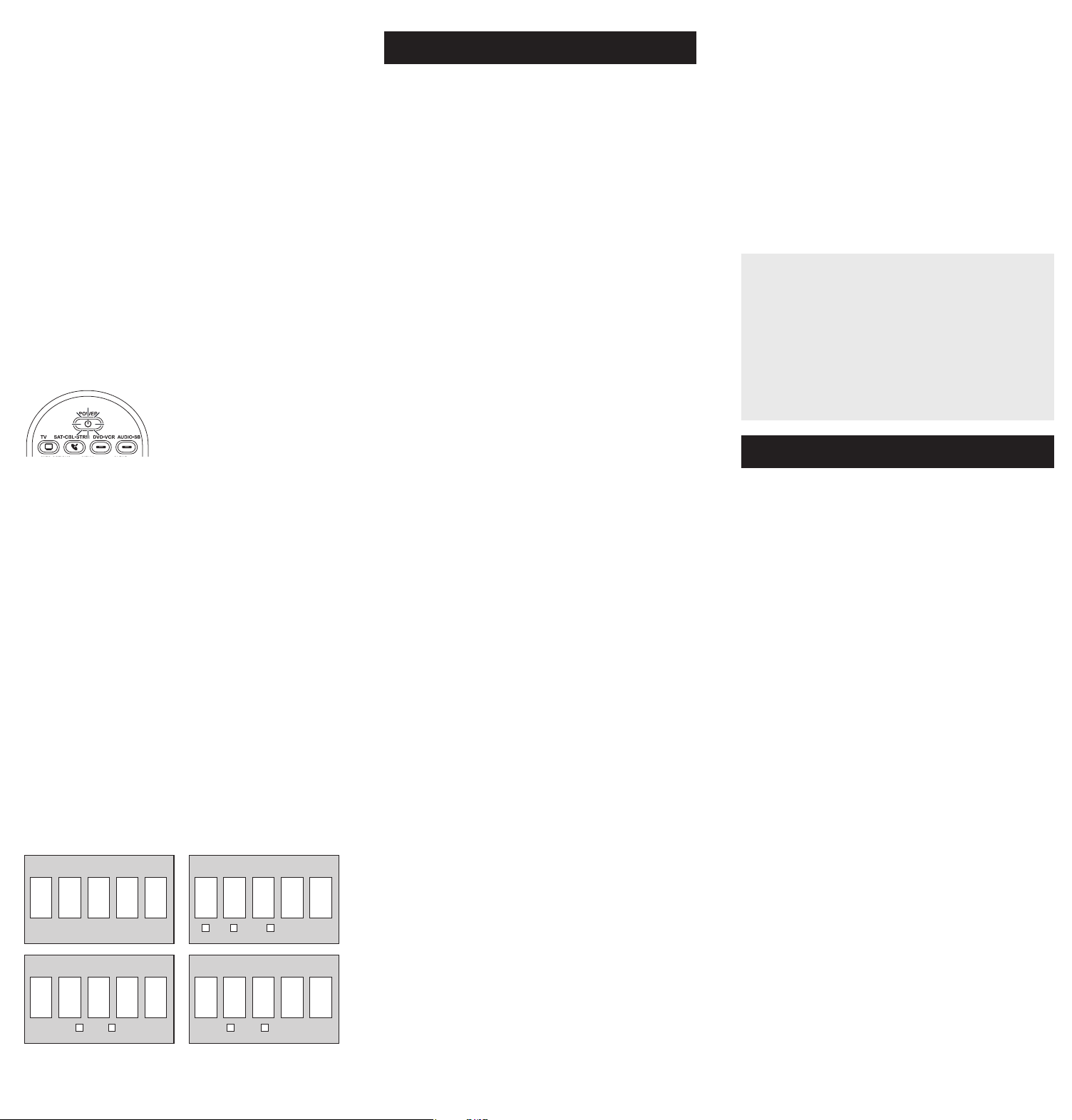
4. Whenyou’venished
enteringtheve-digitcode,
keepholdingdownthe
devicekeyandlookatthe
POWER key.
Is the POWER key on?
YES: You’redone!You’ve
programmedthisdevicekey.
NO, it blinked four times
and turned off: Youhaveeitherenteredacodenumber
thatisnotinthecodelistsormissedastepinthecode
entryprocedure.Trystep3again.
Inmostcases,thekeyson
thisremoteperformthesame
functionsasthekeysonyour
originalremotesonceyou’ve
programmedthisremoteto
operateyourdevices.Many
keysonthisremotehave
otherfunctionsaswell.
Devicekeys(TV,
SAT•CBL•STRM,DVD•VCR,
AUDIO•SB)puttheremote
intherightmodetocontrol
yourdevice.
GUIDE•HOMEandMENU
accessthesamefeatures
asthekeysonyouroriginal
remotes.
Arrowkeysactasnavigation
keysforstreamingmedia
playersaswellasinmenu
andguidesystemsforother
devices.
CLEARexitsremote
programming;italso
performsthesamefunctions
asonyouroriginalremotes.
CHANandVOLkeysact
aschannelandvolume
controllers.
The INPUTand— (dash)
keyhasthreefunctions:(1)
ittogglesthroughallthe
videosourcesconnectedto
yourTV;(2)whentheremote
isinVCRmode,thisbutton
togglesbetweenVCRand
theTVinput;(3)whenyou’re
enteringdigitalchannel
numbersdirectly,thisbutton
letsyouseparatethemain
channelnumberfromthe
sub-channelnumber(such
as59.1).
Battery Saver
Youruniversalremotecontrolsavesbatterypowerby
automaticallyturningoffifanykeyispressedformorethan
60seconds.Thissavesyourbatterylifeshouldyourremote
getstuckinaplacewherethekeysremaindepressed,suchas
betweensofacushions.
Congratulationsonyourpurchaseofthis4-deviceRCAUniversal
RemoteControl.Thisremotefeaturesalibraryofcodeswiththe
latestdevicesofallmajorbrands,withsupportforstreaming
mediaplayersaswell.Thenavigationkeyshavebeenredesigned
tofunctionseamlesslywiththemoresophisticatedmenuand
guidesystemsfoundintoday’shomeentertainmentdevices.
RCRBB04GBE
Universal Remote Control
Owner’s Manual
Manual del Propietario (parte posterior)
Actual model may vary from
illustration
Care and Maintenance
•Keeptheremotedry.Ifitgetswet,wipeitdryimmediately.
•Useandstoretheremoteonlyinnormaltemperature
environments.
•Handletheremotegentlyandcarefully.Don’tdropit.
•Keeptheremoteawayfromdustanddirt.
•Wipetheremotewithadampclothoccasionallytokeepit
lookingnew.
•Modifyingortamperingwiththeremote’sinternaldevices
cancausemalfunctionandinvalidateitswarranty.
SAVE THIS MANUAL AND THE CODE LISTS!
Remote controls can sometimes lose their programming when
you change the batteries. Make sure you keep the manual and
code lists in a safe place so that you can reprogram the remote
if you need to.
Tip: This remote is already programmed to operate most RCA-
branded TVs, VCRs, DVD players and satellite receivers. Just
press the corresponding key—DVD•VCR for a DVD player, TV
for a television, or SAT•CBL•STRM for a satellite receiver.
YouruniversalremoterequirestwoAAAalkalinebatteries(not
included).
To install the batteries:
1. Pressandpushthebattery
compartmentcoverto
removeit.
2. Insertthebatteries,
matchingthebatteriesto
the(+)and(–)marksinside
thebatterycompartment.
3. Pushthebatterycoverback
intoplace.
Battery Precautions:
• Do not mix old and new batteries.
• Do not mix alkaline, standard (carbon-zinc) or rechargeable
(nickel-cadmium) batteries.
• Always remove old, weak or worn-out batteries promptly
and recycle or dispose of them in accordance with Local and
National Regulations.
Tousethisuniversalremotewithyourhomeentertainment
system,rstyouneedtoprogramittocontrolyourdevices.
Therearefourwaysyoucanprogramtheuniversalremoteto
operateyourdevices.Trythemintheorderlistedhere:
• TheDirect Code Entryletsyouenteracodefromthe
accompanyingcodelistforyourbrandofdevice.
• TheBrand Code Searchsearchesthroughthecodesfor
selectbrandsofdevices.
• TheAuto Code Searchgoesautomaticallythroughallthe
codesforthedeviceyou’retryingtocontrol.
• TheManual Code Searchletsyoumanuallygothroughall
thecodesforthedeviceyou’retryingtocontrol.
Auto Code Search
TheAutoCodeSearchgoesautomaticallythroughallthe
codesforthedeviceyou’retryingtocontrol.Whenyound
theonethatoperatesyourdevice,youcanstopthesearch
andstorethatcode.
TIPS: Each device key is associated with a type of device—
the TV is preset to search for TVs, SAT•CBL•STRM for
satellite receivers, cable boxes or digital TV converters or
streaming media players, DVD•VCR for DVD players, and
AUDIO•SB for audio devices and soundbars. To program a
device key for a different type of device, see the Changinga
Key’sDeviceType section.
To exit without saving a new code at any point in the Auto
Code Search, press the CLEAR key.
1. Manuallyturnonthedeviceyou
wanttocontrol.
2. Pressandholdthedevicekeyyouwanttoprogram.While
you’reholdingdownthedevicekey,useyourotherhand
topressandholdtheremote’sPOWERkeyatthesame
time.
3. WaituntilthePOWERkeycomes
onandstayson.Thenreleaseboth
keys.
4. Keeptheremotepointed
directlyatthefrontpanelof
thedeviceyouwanttocontrol.
PressPLAYontheremoteand
wait5seconds.Theremoteis
testingabatchof10codeson
yourdevice.
Testing the Code for Maximum Functionality
1. Try a variety of the device’s functions with the remote. If
some device features don’t work, go to the next step to
try a different code.
2. RepeattheAutoCodeSearchMethodfromthe
beginning.Whenyourdeviceturnsoff,donotstop
searching.Instead,withtheunitnowoff,continueto
pressthePLAYkeyevery5secondsuntiltheunitturns
backon.
3. Oncetheunitturnsbackon,presstheREVERSEkeyon
theremoteevery2secondsuntilyourdeviceturnsoff
again.Whenyourdeviceturnsoffagain,presstheSTOP
key.
4. Testthekey’sfunctionalityagainbyattemptingto
controlavarietyofthedevice’sfunctions.Ifthecode
thathasbeenstoredcontrolsthemajorityofthedevice’s
functions,programmingiscomplete.Ifthecodestored
doesnotgivemaximumfunctionality,tryanothercode.
Did your device turn off?
YES: Gotostep5.
NO: PressPLAYagain.Theremoteteststhenextbatchof
10codes.
KeeppressingPLAYevery5secondsuntilyourdeviceturns
off.
5. Whenyourdeviceturnsoff,
presstheREVERSEkeyon
theremoteandwaitatleast2
seconds.Theremotetriesthe
lastoftheprevioustencodes.
Did your device turn on?
YES: PresstheSTOPkey.You’re
done!You’veprogrammedthis
devicekey.
NO: PressREVERSEagain.Theremoteteststhenext
codeinthebatch.
KeeppressingREVERSEevery2secondsuntilyourdevice
turnsbackon.Whenitdoes,pressSTOP.
Note: If you accidentally press the REVERSE key after your
device turns on, press the FORWARD key. Then, wait two
seconds to see if your device turns off again.
NOTES
Throughout the programming of each key, be sure to keep
the remote pointed at the IR sensor of the device you are
currently programming the remote to control.
Test the remote with the device to make sure the
device key is programmed with the correct code for
maximum functionality. If some features don’t work, try a
different code. See the “Testing the Code for Maximum
Functionality” section below for more information.
During the Auto Code Search, the remote ignores
keypresses that aren’t part of the search.
The search times out after two minutes (the POWER key
blinks four times and turns off, and the last programmed
code under that device key is retained).
The POWER key blinks four times and turns off when the
remote has gone through all the codes. The remote exits
the Auto Code Search. If your device hasn’t turned off yet,
try a different search method.
Testing the Code for Maximum Functionality
1. Try a variety of the device’s functions with the remote. If
some device features don’t work, go to the next step to
try a different code.
2. RepeattheBrandCodeSearchfromthebeginning.
Whenthedeviceturnsoffforthersttime,don’tpress
theSTOPkey,whichwouldstorethesamecode.Instead,
withtheunitnowoff,continuetopressthePOWERkey
repeatedlyuntiltheunitturnsbackon.
3. Oncetheunitturnsbackon,youhavefoundanother
codethatoperatesthedevice.PresstheSTOPkey.
4. Testthekey’sfunctionalityagainbyattemptingto
controlavarietyofthedevice’sfunctions.Ifthecode
thathasbeenstoredcontrolsthemajorityofthedevice’s
functions,programmingiscomplete.Ifthecodestored
doesnotgivemaximumfunctionality,tryanothercode.
Brand Code Search
TheBrandCodeSearchgoesthroughonlythecodesforoneof
theselectbrandslistedintheaccompanyingcodelist.Ifyour
brandofdeviceislisted,thissearchcanbeveryquickandeasy.
TIPS: Each device key is associated with a type of device—
the TV is preset to search for TVs, SAT•CBL•STRM for
satellite receivers, cable boxes or digital TV converters or
streaming media players, DVD•VCR for DVD players, and
AUDIO•SB for audio devices and soundbars. To program a
device key for a different type of device, see the Changinga
Key’sDeviceType section.
To exit without saving a new code at any point in the Brand
Code Search, press the CLEAR key.
1. Manuallyturnonthedeviceyou
wanttocontrol.
3. Pressandholdthedevicekeyyouwanttoprogram.While
you’reholdingdownthedevicekey,useyourotherhand
topressandholdtheremote’sPOWERkeyatthesame
time.
4. WaituntilthePOWERkeycomes
onandstayson.Thenreleaseboth
keys.
frontpanelofthedeviceyouwantto
control.PressPOWERontheremote
andwait2seconds.Theremoteis
testingasinglecodeforyourdevice’s
brand.
Did your device turn off?
YES: PresstheSTOPkeytostore
thecode.You’redone!You’veprogrammedthisdevice
key.
NO: PressPOWERagain.Theremoteteststhenextcode
foryourbrand.
KeeppressingPOWERevery2secondsuntilyourdevice
turnsoff.Whenitdoes,pressSTOP.
2. Findyourdevice’sbrandinthe
BrandCodelistsectionofthe
accompanyingcodelist.Circlethe
numberforyourbrandandkeep
thelisthandy.
Code Lists
Brand Codes are used for programming using the Brand Code Search
and Entry method outlined in the User’s Guide.
Lista de Códigos
Los códigos de las marcas son utilizados para programar utilizando
los métodos de búsqueda y entrada de códigos de marcas, resaltado
en la guía del usuario.
0
1
23
4
56
7
8
9
RCA
GE
PROSCAN
Insignia
JVC
Magnavox
Philips
Panasonic Samsung Sharp Sony Toshiba Vizio
TV
VCR
0
1
23
4
56
7
8
9
RCA
GE
PROSCAN
Apex JVC
Magnavox
Philips
Panasonic Pioneer Samsung Sharp Sony Toshiba
DVD
SAT/CABLE
0
1
23
4
56
7
8
9
RCA
GE
PROSCAN
Motorola DirecTV
Dish Network
Systems/
Echostar
General
Instruments
Hughes
Network
Systems
Scientific
Atlanta
Magnavox
Philips
AMNIO
ADB
Panasonic
Brand Code List/Lista de Códigos de Marcas
0
1
23
4
56
7
8
9
Samsung
Magnavox
Philips
Mitsubishi Panasonic Sharp Sony Toshiba
RCA
GE
PROSCAN
JVC
Symphonic
5. Lookatthenumberyoucircledforyour
device’sbrandcodenumber.Pressthat
numberontheremotekeypad.
6. Keeptheremotepointeddirectlyatthe
NOTES
Throughout the programming of each key, be sure to keep
the remote pointed at the IR sensor of the device you are
currently programming the remote to control.
Test the remote with the device to make sure the
device key is programmed with the correct code for
maximum functionality. If some features don’t work, try a
different code. See the “Testing the Code for Maximum
Functionality” section below for more information.
During the Brand Code Search, the remote ignores
keypresses that aren’t part of the search.
The search times out after two minutes (the POWER key
blinks four times and turns off, and the last programmed
code under that device key is retained).
The POWER key blinks four times and turns off when the
remote has gone through all the codes. The remote exits
the Brand Code Search. If your device hasn’t turned off yet,
try a different search method.
Direct Code Entry
DirectCodeEntryletsyouenteracodefromthe
accompanyingcodelistforyourbrandofdevice.
TIP: Each device key is associated with a type of device—the
TV is preset to search for TVs, SAT•CBL•STRM for satellite
receivers, cable boxes or digital TV converters or streaming
media players, DVD•VCR for DVD players, and AUDIO•SB
for audio devices and soundbars. To program a device key
for a different type of device, see the ChangingaKey’s
DeviceType section.
1. Manuallyturnonthedeviceyou
wanttocontrol.
3. Pressandholdthedevicekeyyouwanttoprogram(the
POWERkeycomeson).
Whileyou’reholdingdownthedevicekey,useyourother
handentertherstve-digitcodeforyourbrandinthe
codelist(thePOWERkeygoesoffaftertherstdigit).
2. FindtheCodeListthatcamewith
theremote.Locatethesectionfor
thetypeofdeviceyou’retryingto
program,andndyourbrandinthat
section.Circlethecodesforyour
brandandkeepthemhandy.
Code Lists
Brand Codes are used for programming using the Brand Code Search
and Entry method outlined in the User’s Guide.
Lista de Códigos
Los códigos de las marcas son utilizados para programar utilizando
los métodos de búsqueda y entrada de códigos de marcas, resaltado
en la guía del usuario.
0
1
23
4
56
7
8
9
RCA
GE
PROSCAN
Insignia
JVC
Magnavox
Philips
Panasonic Samsung Sharp Sony Toshiba Vizio
TV
VCR
0
1
23
4
56
7
8
9
RCA
GE
PROSCAN
Apex JVC
Magnavox
Philips
Panasonic Pioneer Samsung Sharp Sony Toshiba
DVD
SAT/CABLE
0
1
23
4
56
7
8
9
RCA
GE
PROSCAN
Motorola DirecTV
Dish Network
Systems/
Echostar
General
Instruments
Hughes
Network
Systems
Scientific
Atlanta
Magnavox
Philips
AMNIO
ADB
Panasonic
Brand Code List/Lista de Códigos de Marcas
0
1
23
4
56
7
8
9
Samsung
Magnavox
Philips
Mitsubishi Panasonic Sharp Sony Toshiba
RCA
GE
PROSCAN
JVC
Symphonic
NOTES
Remember to enter the code for future reference in the box
provided in the Code Retrieval section of this manual.
If your brand isn’t listed in the code list, use one of the Code
Search methods to program the remote control. (Refer to
the Auto and Manual Code Search methods.)
If you release the device key any time during the Direct
Code Entry procedure, the POWER key blinks four times,
and the process is exited. The last programmed code under
the device key is retained.
Test the remote with the device to make sure the device
key is programmed with the correct code for maximum
functionality. If some features don’t work, try a different code
in the list.
Manual Code Search
TheManualCodeSearchletsyougoone-by-onethroughallthe
codesforthedeviceyou’retryingtocontrol.Whenyoundthe
onethatoperatesyourdevice,youcanstopthesearchandstore
thatcode.
TIPS: The Manual Code Search method may take a long
time because the remote searches through all of the codes
in its memory one-by-one. If your brand is listed in the Brand
Codes or the Code Lists, rst try the Brand Code Search or
the Direct Code Entry method.
Each device key is associated with a type of device—the
TV is preset to search for TVs, SAT•CBL•STRM for satellite
receivers, cable boxes or digital TV converters or streaming
media players, DVD•VCR for DVD players, and AUDIO•SB
for audio devices and soundbars. To program a device key
for a different type of device, see the ChangingaKey’s
DeviceType section.
To exit without saving a new code at any point in the Manual
Code Search, press the CLEAR key.
1. Manuallyturnonthedevice
youwanttocontrol.
2. Pressandholdthedevicekeyyouwanttoprogram.While
you’reholdingdownthedevicekey,useyourotherhand
topressandholdtheremote’sPOWERkeyatthesame
time.
3. WaituntilthePOWERkeycomes
onandstayson.Thenrelease
bothkeys.
4. Keeptheremotepointeddirectlyatthefrontpanelofthe
deviceyouwanttocontrol.PressPOWERontheremote
andwait2seconds.Theremoteistestingasinglecodefor
yourdevice.
Did your device turn off?
YES:PresstheSTOPkeytostore
thecode.You’redone!You’ve
programmedthisdevicekey.
NO: PressPOWERagain.The
remoteteststhenextcodeforyour
device.
KeeppressingPOWERevery2
secondsuntilyourdeviceturnsoff.
Whenitdoes,pressSTOP.
TIP: Because there are so many codes, you may have to
press the POWER key many times—possibly hundreds of
times.
NOTES
Throughout the programming of each key, keep the remote
pointed at the IR sensor of the device you are programming
the remote to control.
Test the remote with the device to make sure the
device key is programmed with the correct code for
maximum functionality. If some features don’t work, try a
different code. See the “Testing the Code for Maximum
Functionality” section below for more information.
During the Manual Code Search, the remote ignores
keypresses that aren’t part of the search.
The search times out after two minutes (the POWER key
blinks four times and turns off, and the last programmed
code under that device key is retained).
The POWER key blinks four times and turns off when the
remote has gone through all the codes. The remote exits
the Brand Code Search. If your device hasn’t turned off yet,
try a different search method.
Testing the Code for Maximum Functionality
1. Try a variety of the device’s functions with the remote. If
some features of your devices don’t work, go to the next
step to try a different code.
2. RepeattheManualCodeSearchandEntryMethodfrom
thebeginning.Whenthedeviceturnsoffforthersttime,
don’tpresstheSTOPkey,whichwouldstorethesame
code.Instead,withtheunitnowoff,continuetopressthe
POWERkeyrepeatedlyuntiltheunitturnsbackon.
3. Oncetheunitturnsbackon,youhavefoundanother
codethatoperatesthedevice.PresstheSTOPkey.
4. Testthekey’sfunctionalityagainbytryingavarietyof
functions.Ifthecodecontrolsthemajorityofthedevice’s
functions,programmingiscomplete.Ifthecodestored
doesnotgivemaximumfunctionality,tryanothercode.
Changing A Key’s Device Type
Eachdevicekeyisassociatedwithatypeofdevice—the
TVispresettosearchforTVs,SAT•CBL•STRMforsatellite
receivers,digitalTVconvertersorstreamingmediaplayers,
orcableboxes,DVD•VCRforDVDplayersorVCRs,and
AUDIO•SBforaudiodevicesandsoundbars.Toprogram
thesekeystocontroladifferentkindofdevice,youhaveto
reassignthemrst.
Reassigning the DVD•VCR Key to Control a VCR
TheDVD•VCRkeydefaultstocontrolaDVDplayer.Ifyouwant
theDVD•VCRkeytocontrolaVCR,youmustreassignit.
1. PressandholdtheDVD•VCRkey.ThePOWERkeyturns
on.KeepholdingdowntheDVD•VCRkey.
2. WhileholdingdowntheDVD•VCRkey,pressandrelease
thenumber2keyonthekeypad.ThePOWERkeyturns
off.
3. ReleasetheDVD•VCRkey.ThePOWERkeyblinkstwo
timesandthenturnsoff.TheDVD•VCRkeyisnowsetto
controlaVCR.
4. Followthedirectionsintheauto,brand,directentry,or
manualcodesearchtoprogramtheDVD•VCRkeyfor
yourVCR.
Reassigning the AUDIO•SB Key To Control Other Devices
TheAUDIO•SBkeydefaultstocontrolanaudiodevice.If
youwanttheAUDIO•SBkeytocontroladifferentdevice
(anadditionalTV,DVD,satellite, digitalTVconvertersor
streamingmediaplayers,orcablebox,forexample),youmust
reassignit.
1. PressandholdtheAUDIO•SBkey.ThePOWERkeyturns
on.
2. WhileholdingdowntheAUDIO•SBkey,pressandrelease
thenumberkeyonthekeypadforthedeviceyouwishto
control(seethechartbelow).ThePOWERkeyturnsoff.
DEVICE KEY CONTROLS:
AdditionalTV press1
VCRorDVR press2
AdditionalDVD press3
Additionalaudiodeviceor
soundbar
press4
Additionalsatellite,digitalTV
convertersorstreamingmedia
players,orcablebox
press5
3. ReleasetheAUDIO•SBkey.ThePOWERkeyblinkstwo
timesandthenturnsoff.TheAUDIO•SBkeyisnowsetto
controlthedevicetypeyouselected.
4. Followthedirectionsintheauto,brand,directentry,or
manualcodesearchtoprogramtheAUDIO•SBkey.
Code Retrieval
Onceyou’veprogrammedtheremotetocontrolyourdevices,
youmaywanttorecordthecodesforfuturereference.If
youusedtheDirectCodeEntrymethod,thisiseasy.Just
ndthecodesyouenteredandmakeanoteoftheminthe
boxesbelow.IfyouusedoneoftheCodeSearchmethodsto
programyourremoteorifyouusedtheDirectEntrymethod
butdon’trememberthecode,youwillneedtoretrieveeach
device’sve-digitcode.Retrievingtheactualcodeandwriting
itdownwillsaveyoutimeifyoueverneedtoprogramthe
remoteagain(e.g.,ifprogrammingislostwhenyouchange
thebatteries).Ifthecodesarerecorded,youcanusethe
DirectEntrymethodtoreprogramyourremotetocontrolyour
devices,whichisquickandeasy.
1. Pressandholdthedevice
key(TV,SAT•CBL•STRM,
DVD•VCR,AUDIO•SB)whose
codeyouwishtoretrieve.The
POWER keyturnson.Keep
pressingthedevicekey.
2. Whileholdingthedevicekeydown,pressandholdthe
INFOkey.ThePOWER keyturnsoff.Afterholdingdown
bothkeysforthreeseconds,thePOWER keyturnsback
on.
3. Releasebothkeys.ThePOWER keyremainson.
4. Startingwiththenumber1key,pressandreleaseeach
numberkeyonthekeypadinthefollowingorder:1-9,
then0.ThenumberthatcausesthePOWER keytoblinkis
therstnumberofthecode.Asyoundeachnumberof
thecode,writeitdownforfuturereference.
Note: All TV codes begin with the number 1; all VCR and
DVR codes begin with the number 2; all DVDs, the number
3; all audio devices, the number 4; and all satellite receivers,
digital TV converters or streaming media players, and cable
boxes, the number 5.
5. Repeatstep4untilyouhaveretrievedallvenumbers
inthecode.Afterthefourthnumberisretrieved,the
POWER keyblinksbriey,thenturnsoff.
TIP: To exit the Code Retrieval Mode at any time, press the
CLEAR key.
Note: If you press an invalid key during the Code Retrieval
process, the remote will not respond. If you do not press a
valid Code Retrieval key (TV, SAT•CBL•STRM, DVD•VCR,
AUDIO•SB, INFO, CLEAR), Code Retrieval times out after 15
seconds. The POWER key blinks four times, and then turns
off.
IMPORTANT
Because this remote controls more than one device, you
must rst “tell” the remote which device you wish to
operate. That means, if you wish to operate your TV, you
must rst press the TV key to put the remote in the TV
Mode. The remote stays in that device mode until you
press a different device key. For example, if your remote is
in TV Mode and you want to operate the DVD player, you
must press the DVD key to change device modes.
Problem: The remote does not operate your device.
• Makesuretheremoteisinthecorrectmodebypressingthe
correspondingdevicekey(TV,SAT•CBL•STRM,DVD•VCR,
AUDIO•SB).Thistellstheremotewhichdevicetooperate.
• Removeanyobstaclesbetweentheremoteandthedevice.
Makesureyou’reaimingtheremoteatthedevice’sIRsensor.
• Makesurethebatteriesarefreshandareproperlyinstalled.
ReplacethebatterieswithtwonewAAAbatteries,ifnecessary
(seetheBatteryInstallationsection).
Problem: The remote can’t be programmed to operate
your device.
• Ifyouaretestingtheremotewhileprogrammingit,youmaybe
toofarawayfromthedeviceoratawrongangle.Theremustbe
anunobstructedpathbetweentheremoteandtheIRsensoron
thedevice.Movecloserandmakesureyoupointtheremoteat
thedeviceyou’retryingtocontrol.
• Ifyou’reusingtheDirectEntryprogrammingmethodtoenter
thecodesforyourbrandandtheunitisstillnotfunctioning
properly,trytheauto,brand,ormanualsearchmethod.
• Tocontrolcombounits,likeTV/VCRsorTV/DVDs,youmust
programtheindividualcorrespondingdevicekeystocontrol
eachpartofthecombounit.Onceprogrammedsuccessfully,
theTVkeycontrolstheTVfunctions,andtheDVD•VCRkey
controlstheVCRorDVDfunctions.
• Makesurethebatteriesarefreshandareproperlyinstalled.
Problem: The remote doesn’t perform commands properly.
• Makesuretheremoteisinthecorrectmodebypressingthe
correspondingdevicekey(TV,SAT•CBL•STRM,DVD•VCR,
AUDIO•SB).Thistellstheremotewhichdevicetooperate.
• Makesuredeviceisready(forexample,theDVDplayerhasa
discloaded).
• Youmayhavepressedaninvalidkeyforthemodetheremoteisin.
• Ifyou’retryingtoenterachannelnumberdirectly,trypressing
theOKkeyafterenteringthechannelnumberasthisisa
requirementofcertainmodelsandbrands.
• Thereisapossibilitythataprogrammedcodemayonlybe
abletocontrolsomeofyourdevicefeatures(forexample,only
turnsadeviceonandoff).Toconrmthatthedevicekeyis
programmedwiththecorrectcodeformaximumfunctionality,
testthedevice.Attempttocontrolavarietyofthedevice’s
functionswiththeremote.Ifsomeofthefeaturesofyour
devicesdon’twork,tryprogrammingtheremotewitha
differentcodeinthelistusingtheDirectCodeEntryMethod,
untilyoundthecodethatallowstheremotetocontrolthe
majorityofyourdevice’sfunctions.Differentcodescanprovide
differentlevelsoffunctionality.
Problem: The POWER key does not light when you press a
key.
• Youmayhavepressedaninvalidkeyforthemodetheremoteis
in.
• Makesuretheremoteisinthecorrectmodebypressingthe
correspondingdevicekey(TV,SAT•CBL•STRM,DVD•VCR,
AUDIO•SB).Thistellstheremotewhichdevicetooperate.
• Makesurethebatteriesarefreshandareproperlyinstalled.
ReplacethebatterieswithtwonewAAAbatteries,ifnecessary
(seetheBatteryInstallationsection).
Problem: The remote will not change channels on device.
• Makesuretheremoteisinthecorrectmodebypressingthe
correspondingdevicekey(TV,SAT•CBL•STRM,DVD•VCR,
AUDIO•SB).Thistellstheremotewhichdevicetooperate.
• PresstheOKkeyafteryouenterachannelnumber.
• Removeanyobstaclesbetweentheremoteandthedevice.
MakesuretoaimtheremoteattheIRsensoronthedevice.
VoxxAccessoriesCorporation(the“Company”)warrantstoyouthe
originalretailpurchaserofthisproductthatshouldit,undernormaluse
andconditions,beprovendefectiveinmaterialorworkmanshipduringits
lifetimewhileyouownit,suchdefect(s)willberepairedorreplaced(atthe
Company’soption)withoutchargeforpartsandrepairlabor.
Toobtainrepairorreplacementwithinthetermsofthewarranty,theproduct
istobedeliveredwithproofofwarrantycoverage(e.g.datedbillofsale),
specicationofdefect(s),transportationprepaid,toanapprovedwarranty
station.Forthelocationofthenearestwarrantystationtoyou,calltoll-freeto
ourcontrolofce:1-800-645-4994.
ThisWarrantydoesnotcoverproductpurchased,servicedorusedoutside
theUnitedStatesorCanada.ThisWarrantyisnottransferableanddoes
notextendtocostsincurredforinstallation,removalorreinstallationof
theproduct.ThisWarrantydoesnotapplyifintheCompany’sopinion,
theproducthasbeendamagedthroughalteration,improperinstallation,
mishandling,misuse,neglect,accident,orthesimultaneoususeofdifferent
batterytypes(e.g.alkaline,standardorrechargeable).
THEEXTENTOFTHECOMPANY’SLIABILITYUNDERTHISWARRANTYIS
LIMITEDTOTHEREPAIRORREPLACEMENTPROVIDEDABOVEAND,IN
NOEVENT,SHALLTHECOMPANY’SLIABILITYEXCEEDTHEPURCHASE
PRICEPAIDBYPURCHASERFORTHEPRODUCT.
ThisWarrantyisinlieuofallotherexpresswarrantiesorliabilities.ANY
IMPLIEDWARRANTIES,INCLUDINGANYIMPLIEDWARRANTYOF
MERCHANTABILITYORFITNESSFORAPARTICULARPURPOSESHALL
BELIMITEDTODURATIONOFTHISWARRANTY.INNOCASESHALL
THECOMPANYBELIABLEFORANYCONSEQUENTIALORINCIDENTAL
DAMAGESWHATSOEVER.Nopersonorrepresentativeisauthorized
toassumefortheCompanyanyliabilityotherthanexpressedhereinin
connectionwiththesaleofthisproduct.
Somestates/provincesdonotallowlimitationsonhowlonganimplied
warrantylastsortheexclusionorlimitationofincidentalorconsequential
damagesotheabovelimitationsorexclusionsmaynotapplytoyou.This
Warrantygivesyouspeciclegalrightsandyoumayalsohaveotherrights,
whichvaryfromstate/provincetostate/province.
Trademark(s)®Registered
Step 1: Install your batteries
Step 2: Program your remote
Tour of the Remote Advanced Functions
Troubleshooting
Limited Lifetime Warranty
DVD•VCR CODE AUDIO•SB CODE
5
SAT•CBL•STRM CODE
1
TV CODE
SAT CABLE DTV CONVERTER
DVD VCR AUDIO SOUNDBAR
©2018VoxxAccessoriesCorp.
3502WoodviewTrace,Suite220
Indianapolis,IN46268
Backlighting
Backlightilluminationhelpsyouseetheremotecontrolkeys
betterinthedark.Youcanturnbacklightilluminationonby
pressingthebacklightkey( ).Backlightingstaysonaslong
askeysarebeingpressedandturnsoffvesecondsafterthe
lastkeypress.
FCC Statement:
Thisdevicecomplieswithpart15oftheFCCRules.Operationissubject
tothefollowingtwoconditions:(1)Thisdevicemaynotcauseharmful
interference,and(2)thisdevicemustacceptanyinterferencereceived,
includinginterferencethatmaycauseundesiredoperation.
Note:Thisequipmenthasbeentestedandfoundtocomplywiththelimits
foraClassBdigitaldevice,pursuanttopart15oftheFCCRules.These
limitsaredesignedtoprovidereasonableprotectionagainstharmful
interferenceinaresidentialinstallation.Thisequipmentgenerates,uses
andcanradiateradiofrequencyenergyand,ifnotinstalledandusedin
accordancewiththeinstructions,maycauseharmfulinterferencetoradio
communications.However,thereisnoguaranteethatinterferencewill
notoccurinaparticularinstallation.Ifthisequipmentdoescauseharmful
interferencetoradioortelevisionreception,whichcanbedeterminedby
turningtheequipmentoffandon,theuserisencouragedtotrytocorrect
theinterferencebyoneormoreofthefollowingmeasures:
• Reorientorrelocatethereceivingantenna.
• Increasetheseparationbetweentheequipmentandreceiver.
• Connecttheequipmentintoanoutletonacircuitdifferentfromthatto
whichthereceiverisconnected.
• Consultthedealeroranexperiencedradio/TVtechnicianforhelp.
Caution:AnyChangesormodicationsnotexpresslyapprovedbytheparty
responsibleforcompliancecouldvoidtheuser’sauthoritytooperatethis
equipment.
Industry Canada Regulatory Information
CANICES-3(B)/NMB-3(B)
Avis d’Industrie Canada
CANICES-3(B)/NMB-3(B)
Problem: The device’s menu does not appear on the TV
screen.
• MakesureyouhaveconnectedthedevicetoyourTVproperly
andselectedthecorrectinput.(Seeyourdevices’Owner’s
Manualsforproperconnectionprocedures.)
• Makesuretheremoteisinthecorrectmodebypressingthe
correspondingdevicekey(TV,SAT•CBL•STRM,DVD•VCR,
AUDIO•SB).Thistellstheremotewhichdevicetooperate.
• Menuaccessisn’tsupportedforallbrands.Youmayneedto
useyouroriginalremotecontroltoaccessmenufunctionsfor
somedevices.
For more information, including instructional videos,
remote programming codes, and customer support, visit
www.RCACodeSupport.com
Channel Lock
Channellockautomaticallysendschannelcommands,likethe
CH,GOBACK,and0–9numberkeys,toyoursatellitereceiver,
cablebox,ordigitalTVconverterwhenyou’reinTVmode.
Thiscansaveyoukeypressesifyouuseadeviceotherthan
yourTVtochangechannels.
To turn channel lock on:
1. Pressandholdthedevicekeyforthedeviceyouuseto
changechannels.Whileyou’reholdingdownthisdevice
key,useyourotherhandtopressandholdtheremote’s
CHupkeyatthesametime.
2. Waituntiltheremote’sPOWERkeycomesonandstays
on.Thenreleasebothkeys.
3. PressENTERtolockchannelcommandstothisdevice.
To turn channel lock off:
1. PressandholdtheTVkey.Whileyou’reholdingdown
theTVkey,useyourotherhandtopressandholdthe
remote’sCHdownkeyatthesametime.
2. Waituntiltheremote’sPOWERkeycomesonandstays
on.Thenreleasebothkeys.
3. PressENTERtostartchangingchannelswithyourTV.
RCRBB04GBEUS01 2597
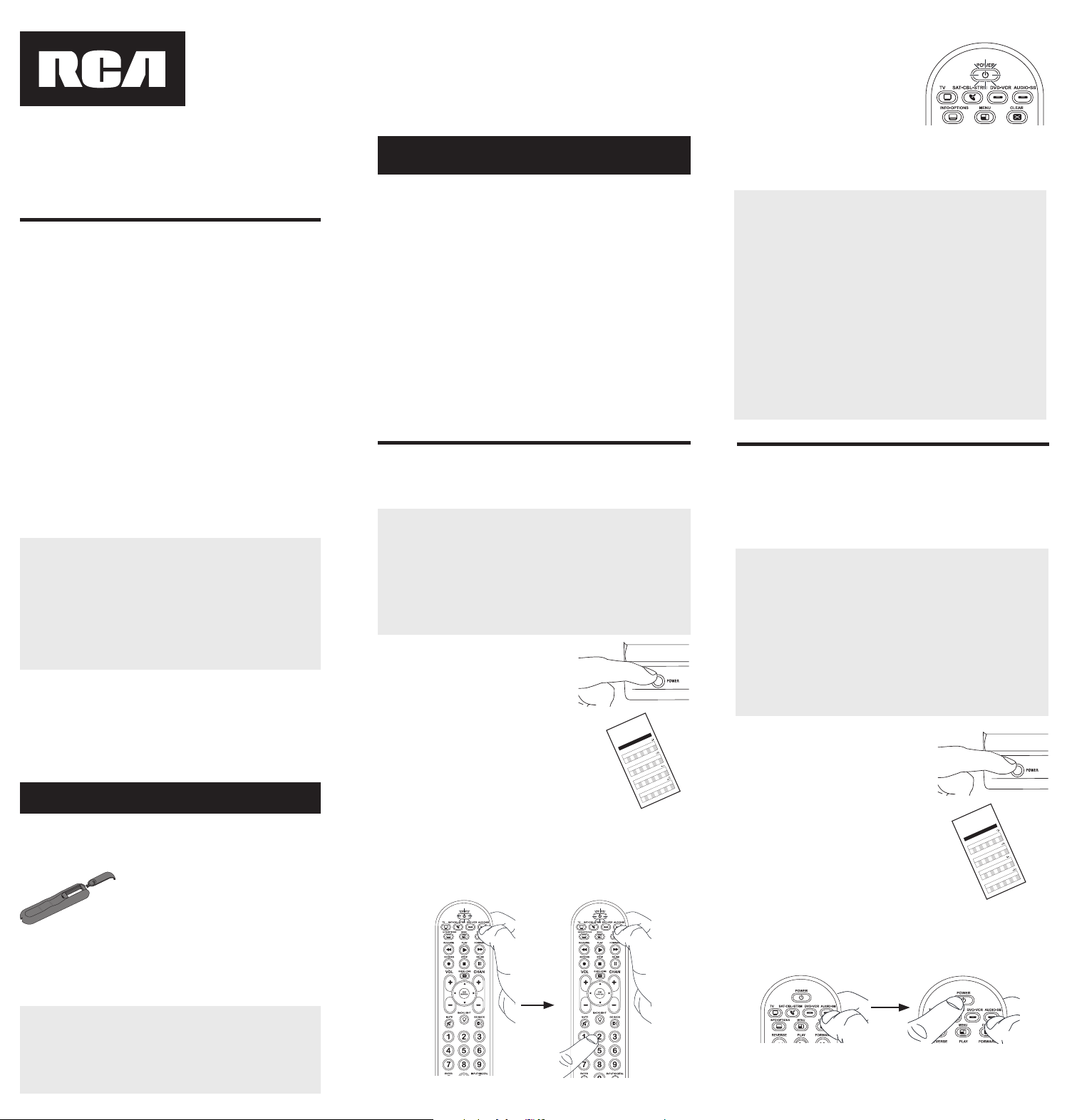
5. Cuandoeldispositivoseapague,oprima
lateclaREVERSEdelcontrolremoto
yespereporlomenos2segundos.El
controlremotopruebaelúltimocódigo
delgrupoanteriorde10códigos.
¿Se encendió el dispositivo?
SÍ: OprimalateclaSTOP.¡Listo!Latecla
dedispositivoestáprogramada.
NO: OprimaREVERSEnuevamente.
Elcontrolremotopruebaelpróximocódigoenelgrupode
códigos.
ContinúeoprimiendoREVERSEcada2segundoshastaqueel
dispositivoseencienda.Cuandoseencienda,oprimaSTOP.
Aviso: Si oprime accidentalmente la tecla REVERSE luego de que
el dispositivo se encienda, oprima la tecla FORWARD. Luego,
espere dos segundos para ver si su dispositivo se vuelve a apagar.
Enlamayoríadeloscasos,
lasteclasdelcontrolremoto
desempeñanlasmismas
funcionesquelasteclasdelos
controlesremotosoriginales
unavezprogramaestecontrol
remotoparamanejarlos
componentes.Lamayoríadelas
teclasdeestecontrolremoto
tienenotrasfunciones.
Lasteclasdedispositivo(
TV,
SAT•CBL•STRM,DVD•VCR,
AUDIO•SB)ponenelcontrol
remotoenelmodocorrectopara
manejareldispositivo.
GUIDE•HOME y MENU
danaccesoalasmismas
característicasquelasteclas
ensuscontrolesremotos
originales.
Lasteclasdeechaactúan
comoteclasdenavegación
parareproductoresde
transmisióndemediosasí
comoensistemasdeguíasy
menúparaotrosdispositivos.
CLEAR
saledelaprogramación
delcontrolremoto;además,
desempeñalasmismasfunciones
queenloscontrolesremotos
originales.
LasteclasCHAN y VOL
actúancomocontrolesde
canalyvolumen.
Latecla INPUT y — (guión)
tienetresfunciones:(1)alterna
entretodaslasfuentesde
videoconectadasaltelevisor;
(2)cuandoelcontrolremotose
encuentraenelmodoVCR,este
botónalternaentrelaentrada
VCRyTV;(3)cuandoingresa
directamentenúmerosdecanales
digitales,estebotónlepermite
separarelnúmerodelcanal
principaldelnúmerodelcanal
secundario(talcomo59.1).
Ahorro de Batería
Sucontrolremotouniversalahorralapotenciadelasbateríasal
apagarautomáticamentecualquierteclaqueseoprimapormásde
60segundos.Estaacciónprolongalavidaútildelasbateríasencaso
dequeelcontrolremotoquedepilladoenunlugardondelasteclas
permanezcanoprimidas,talcomoentreloscojinesdeunsofá.
RCRBB04GBE
Manual del Propietario del
Control Remoto Universal
Owner’s Manual (English on back)
El modelo actual puede ser
diferente al ilustrado
Cuidado y Mantenimiento
•Mantengaelcontrolremotoseco.Sisemoja,séqueloinmediatamente.
•Utiliceyalmaceneelcontrolremotoúnicamenteenentornosde
temperaturanormal.
•Manejeelcontrolremotodeformacuidadosa.Nolodejecaer.
•Mantengaelcontrolremotoresguardadodelpolvoylasuciedad.
•Limpieelcontrolremotoconunpañohúmedodevezencuandopara
mantenerloenbuenascondicionesdeoperación.
•Modicarosabotearlosdispositivosinternosdelcontrolremotopodría
ocasionardesperfectosyanularlagarantía.
¡GUARDE ESTE MANUAL Y LAS LISTAS DE CÓDIGOS!
En ocasiones los controles remotos pierden su programación
cuando se cambian las baterías. Asegúrese de mantener el
manual y las listas de códigos en un lugar seguro de manera
que pueda volver a programar el control remoto de ser
necesario.
Consejo: Este control remoto ya está programado para la
mayoría de televisores, VCR, lectores de DVD y receptores de
satélite RCA. Sencillamente oprima la tecla correspondiente—
DVD•VCR para un Lector de DVD, TV para un televisor, o
SAT•CBL•STRM para un receptor de satélite.
ElcontrolremotonecesitadosbateríasalcalinasAAA(no
suministradas).
Para instalar las baterías:
1. Oprimayempujelatapadel
compartimientodelasbateríaspara
removerla.
2. Insertelasbaterías,cerciorándose
dequelaspolaridades(+)y(–)
correspondanconeldiagramaque
apareceenelcompartimientodelas
baterías.
3. Vuelvaacolocarlatapadel
compartimientodelasbateríasensu
posición.
Precauciones sobre las Baterías:
• No combine baterías nuevas y viejas.
• No combine diferentes tipos de baterías: alcalinas, estándar
(carbón-zinc) o recargables (níquel-cadmio).
• Siempre remueva de inmediato baterías viejas, débiles o
desgastadas, y recíclelas o deséchelas según lo disponen las
normas locales y nacionales.
Parautilizarestecontrolremotouniversalconsusistemade
entretenimientoenelhogar,necesitaráprimeroprogramarlo
paramanejarsusdispositivos.Paraprogramarelcontrolremoto
universalparamanejarsusdispositivos.Pruébelosenelorden
listadoaquí:
• LaEntrada de Código Directo (Direct Code Entry) le
permiteingresaruncódigodelalistadecódigosque
acompañanasumarcadedispositivo.
• LaBúsqueda de Código de Marca (Brand Code Search)
buscaatravésdeloscódigosmarcaseleccionadasde
dispositivos.
• LaBúsqueda de Código Automática (Auto Code Search)
pasaautomáticamenteatravésdetodosloscódigosparael
dispositivoqueustedestátratandodecontrolar.
• LaBúsqueda de Código Manual (Manual Code Search)pasa
manualmenteatravésdetodosloscódigosparaeldispositivo
queustedestátratandodecontrolar.
Búsqueda Automática de Códigos
LaBúsquedaAutomáticadeCódigosrecorreautomáticamente
todosloscódigosdeldispositivoquedeseamanejar.Cuando
encuentreelquemanejasudispositivo,puededetenerla
búsquedayguardarelcódigo.
CONSEJOS: Cada tecla de dispositivo está asociada con un
tipo de dispositivo — la de TV está prestablecida para buscar
TVs, SAT•CBL•STRM para receptores satelitales, convertidores
de cable o TV digital o reproductores de transmisión de
medios, DVD•VCR para reproductores DVD, y AUDIO•SB para
dispositivos de audio y barras de sonido. Para programar una
tecla de dispositivo para un tipo diferente de dispositivo, vea la
sección Cambio de Tipo de Dispositivo de Tecla.
Para salir en cualquier momento de la Búsqueda Automática de
Códigos sin guardar un código nuevo, oprima la tecla CLEAR.
1. Enciendamanualmenteeldispositivo
quedeseamanejar.
2. Oprimaysostengalatecladedispositivoquedeseaprogramar.
Alavezquesostienelatecladedispositivo,utilicelaotramano
paraoprimirysostenersimultáneamentelateclaPOWERdel
controlremoto.
3. EsperehastaquelateclaPOWER
seilumineypermanezcailuminado.
Luego,suelteambasteclas.
4. Mantengaelcontrolremoto
apuntadodirectamentealpanel
frontaldeldispositivoquedesea
manejar.OprimalateclaPLAYdel
controlremotoyespere5segundos.
Elcontrolremotoestáprobando
ungrupode10códigosparael
dispositivo.
¿Se apagó el dispositivo?
SÍ: VayaalPaso5.
NO: OprimaPLAYnuevamente.Elcontrolremotopruebael
próximogrupode10códigos.
ContinúeoprimiendoPLAYcada5segundoshastaqueel
dispositivoseapague.
Cómo Probar el Código para Obtener Máxima Funcionalidad
1. Pruebe una variedad de funciones del dispositivo con el
control remoto. Si no puede utilizar alguna de las funciones
de sus dispositivos, vaya al próximo paso e intente un código
diferente.
2. RepitalaBúsquedadeCódigosporMarcadesdeelcomienzo.
Cuandoeldispositivoseapagueporprimeravez,nooprima
lateclaSTOP,conlacualquedaríaguardadoelmismocódigo.
Envez,conlaunidadapagada,continúeoprimiendolatecla
POWERrepetidamentehastaquelaunidadsevuelvaa
encender.
3. Sisevuelveaencenderlaunidad,habráencontradootrocódigo
quepuedemanejaresedispositivo.OprimaSTOP.
4. Pruebelafuncionalidaddelateclanuevamenteintentando
unavariedaddefunciones.Sielcódigocontrolalamayoría
delasfuncionesdeldispositivo,entonceshabráconcluidola
programación.Sielcódigoguardadonobrindaunamáxima
funcionalidad,intenteotrocódigo.
Búsqueda de Códigos por Marca
LaBúsquedadeCódigosporMarcarecorresóloloscódigos
deunadelasmarcasseleccionadasqueaparecenenlalistade
códigossuministrada.Silamarcadeldispositivoapareceenlalista,
posiblementelabúsquedasellevaráacabodemanerafácilyrápida.
CONSEJOS: Cada tecla de dispositivo está asociada con un
tipo de dispositivo — la de TV está prestablecida para buscar
TVs, SAT•CBL•STRM para receptores satelitales, convertidores
de cable o TV digital o reproductores de transmisión de
medios, DVD•VCR para reproductores DVD, y AUDIO•SB para
dispositivos de audio y barras de sonido. Para programar una
tecla de dispositivo para un tipo diferente de dispositivo, vea
la sección Cambio de Tipo de Dispositivo de Tecla.
Para salir en cualquier momento de la Búsqueda de Códigos
por Marca sin guardar un código nuevo, oprima la tecla
CLEAR.
1. Enciendamanualmenteeldispositivo
quedeseamanejar.
3. Oprimaysostengalatecladedispositivoquedeseaprogramar.
Alavezquesostienelatecladedispositivo,utilicelaotramano
paraoprimirysostenersimultáneamentelateclaPOWERdel
controlremoto.
4. EsperehastaquelateclaPOWERse
ilumineypermanezcailuminado.Luego,
suelteambasteclas.
6. Mantengaelcontrolremotoapuntado
directamentealpanelfrontaldel
dispositivoquedeseamanejar.Oprima
lateclaPOWERdelcontrolremotoy
espere2segundos.Elcontrolremoto
estáprobandouncódigoparalamarca
deldispositivo.
¿Se apagó el dispositivo?
SÍ: OprimalateclaSTOPparaguardarelcódigo.¡Listo!Latecla
dedispositivoestáprogramada.
NO: OprimaPOWERnuevamente.Elcontrolremotopruebael
próximocódigoparasumarca.
ContinúeoprimiendoPOWERcada2segundoshastaqueel
dispositivoseapague.Cuandoseapague,oprimaSTOP.
2. Encuentrelamarcadeldispositivoen
laseccióndeCódigosporMarcadela
listadecódigossuministrada.Marque
conuncírculoelnúmerodelamarcay
mantengalalistaamano.
5. Fíjeseenelnúmeroquemarcópara
elnúmerodecódigodelamarcadel
dispositivo.Oprimadichonúmeroenel
tecladodelcontrolremoto.
NOTAS
A través de la programación de cada tecla, asegúrese de
mantener el control remoto apuntado directamente al sensor
infrarrojo del dispositivo que está actualmente programando
con el control remoto.
Pruebe el control remoto con el dispositivo para asegurarse que
la tecla de dispositivo esté programada con el código correcto
y garantizar así su máxima funcionalidad. Si no puede utilizar
alguna de las funciones, intente con otro código. Para obtener
mayor información, consulte la sección “Cómo Probar el Código
para Obtener Máxima Funcionalidad” a continuación.
Durante la Búsqueda de Códigos por Marca, el control remoto
ignora la opresión de teclas que no son parte de la búsqueda.
La búsqueda se detendrá luego de dos minutos (la tecla POWER
parpadea cuatro veces y se apaga, y se retiene el último código
programado bajo la tecla de dispositivo).
La tecla POWER parpadea cuatro veces y se apaga cuando
el control remoto ha recorrido todos los códigos. El control
remoto sale del método de Búsqueda de Códigos por Marca.
Si su dispositivo aún no se ha apagado, intente un método de
búsqueda diferente.
Entrada Directa de Códigos
LaEntradaDirectadeCódigoslepermiteingresaruncódigodela
listadecódigossuministradaparalamarcadesudispositivo.
CONSEJO: Cada tecla de dispositivo está asociada con un
tipo de dispositivo — la de TV está prestablecida para buscar
TVs, SAT•CBL•STRM para receptores satelitales, convertidores
de cable o TV digital o reproductores de transmisión de
medios, DVD•VCR para reproductores DVD, y AUDIO•SB para
dispositivos de audio y barras de sonido. Para programar una
tecla de dispositivo para un tipo diferente de dispositivo, vea la
sección Cambio de Tipo de Dispositivo de Tecla.
1. Enciendamanualmenteeldispositivo
quedeseamanejar.
3. Oprimaysostengalatecladedispositivoquedeseaprogramar
(lateclaPOWERseilumina).
Mientrasoprimelatecladedispositivo,ingreseconlaotramano
elprimercódigodecincodígitosparalamarcadelalistade
códigos(lateclaPOWERseapagaluegodelprimerdígito).
2. EncuentrelaListadeCódigos
suministradaconelcontrolremoto.
Encuentrelasecciónparaeltipode
dispositivoquedeseaprogramar,
ylocalicelamarcaenesasección.
Marqueconuncírculoloscódigos
paralamarcaymanténgalosamano.
NOTAS
Recuerde ingresar el código para referencia futura en el
recuadro provisto en la sección Recuperación de Códigos de
este manual.
Si la marca de su dispositivo no aparece en la lista de códigos,
utilice uno de los métodos de Búsqueda de Códigos para
programar el control remoto. (Consulte los métodos de
Búsqueda Automática y Manual de Códigos)
Si suelta la tecla de dispositivo en cualquier momento durante
el proceso de Entrada Directa de Códigos, la tecla POWER
parpadea cuatro veces, y se sale del proceso. Se retendrá el
último código programado bajo la tecla de dispositivo.
Pruebe el control remoto con el dispositivo para asegurarse que
la tecla de dispositivo esté programada con el código correcto
y garantizar así su máxima funcionalidad. Si no puede utilizar
alguna de las funciones, intente con otro código de la lista.
4. Cuandohayaingresadoel
códigodecincodígitos,continúe
oprimiendolatecladedispositivoy
observelateclaPOWER.
¿Se iluminó la tecla POWER?
SÍ: ¡Listo!Latecladedispositivoestá
programada.
No, parpadeó cuatro veces y se apagó: Haingresadounnúmero
decódigoquenoseencuentraenlaslistasdecódigosuomitióun
pasoenelprocedimientodeentradadecódigos.Intenteelpaso3
nuevamente.
Búsqueda Manual de Códigos
LaBúsquedaManualdeCódigoslepermiterecorrerunoporuno
todosloscódigosdeldispositivoquedeseamanejar.Cuando
encuentreelquemanejasudispositivo,puededetenerlabúsqueday
guardarelcódigo.
CONSEJOS: El método de Búsqueda Manual de Códigos podría
tomar más tiempo porque el control remoto busca a través
de todos los códigos en su memoria uno por uno. Si su marca
aparece en las Listas de Códigos por Marca o Listas de Códigos,
intente primero la Búsqueda de Códigos por Marca o el método
de Entrada Directa de Códigos.
Cada tecla de dispositivo está asociada con un tipo de dispositivo
— la de TV está prestablecida para buscar TVs, SAT•CBL•STRM
para receptores satelitales, convertidores de cable o TV digital
o reproductores de transmisión de medios, DVD•VCR para
reproductores DVD, y AUDIO•SB para dispositivos de audio y
barras de sonido. Para programar una tecla de dispositivo para
un tipo diferente de dispositivo, vea la sección Cambio de Tipo
de Dispositivo de Tecla.
Para salir en cualquier momento de la Búsqueda Manual de
Códigos sin guardar un código nuevo, oprima la tecla CLEAR.
1. Enciendamanualmenteeldispositivo
quedeseamanejar.
2. Oprimaysostengalatecladedispositivoquedeseaprogramar.
Alavezquesostienelatecladedispositivo,utilicelaotramano
paraoprimirysostenersimultáneamentelateclaPOWERdel
controlremoto.
3. EsperehastaquelateclaPOWER
seilumineypermanezcailuminado.
Luego,suelteambasteclas.
4. Mantengaelcontrolremotoapuntadodirectamentealpanel
frontaldeldispositivoquedeseamanejar.Oprimalatecla
POWERdelcontrolremotoyespere2segundos.
¿Se apagó el dispositivo?
SÍ:OprimalateclaSTOPparaguardarel
código.¡Listo!Latecladedispositivoestá
programada.
NO: OprimaPOWERnuevamente.El
controlremotopruebaelpróximocódigo
parasudispositivo.
ContinúeoprimiendoPOWERcada2
segundoshastaqueeldispositivose
apague.Cuandoseapague,oprimaSTOP.
CONSEJO: Debido a la gran cantidad de códigos, quizás necesite
oprimir la tecla POWER varias veces-posiblemente cientos de
veces.
NOTAS
A través de la programación de cada tecla, mantenga el control
remoto apuntado directamente al sensor infrarrojo del dispositivo
que está programando con el control remoto.
Pruebe el control remoto con el dispositivo para asegurarse que
la tecla de dispositivo esté programada con el código correcto
y garantizar así su máxima funcionalidad. Si no puede utilizar
alguna de las funciones, intente con otro código. Para obtener
mayor información, consulte la sección “Cómo Probar el Código
para Obtener Máxima Funcionalidad” a continuación.
Durante la Búsqueda Manual de Códigos, el control remoto
ignora la opresión de teclas que no son parte de la búsqueda.
La búsqueda se detendrá luego de dos minutos (la tecla POWER
parpadea cuatro veces y se apaga, y se retiene el último código
programado bajo la tecla de dispositivo).
La tecla POWER parpadea cuatro veces y se apaga cuando
el control remoto ha recorrido todos los códigos. El control
remoto sale del método de Búsqueda Manual de Códigos. Si
su dispositivo aún no se ha apagado, intente un método de
búsqueda diferente.
Cómo Probar el Código para Obtener Máxima Funcionalidad
1. Pruebe una variedad de funciones del dispositivo con el
control remoto. Si no puede utilizar alguna de las funciones
del dispositivo, vaya al próximo paso e intente un código
diferente.
2. RepitaelMétododeBúsquedaManualdeCódigosdesdeel
comienzo.Cuandohayaencontradoelcódigoquevuelvaa
encendereldispositivo,nooprimalateclaSTOP,conlacual
quedaríaguardadoelmismocódigo.Envez,conlaunidad
apagada,continúeoprimiendolateclaPOWERrepetidamente
hastaquelaunidadsevuelvaaencender.
3. Sisevuelveaencenderlaunidad,habráencontradootrocódigo
quepuedemanejaresedispositivo.OprimalateclaSTOP.
4. Nuevamente,pruebelafuncionalidaddelateclaintentando
controlarunavariedaddefuncionesdeldispositivo.Sielcódigo
quesehaalmacenadocontrolalamayoríadelasfuncionesdel
dispositivo,entonceshabráconcluidolaprogramación.Siel
códigoguardadonobrindaunamáximafuncionalidad,intente
otrocódigo.
Cómo Cambiar el Tipo de Dispositivo de Una
Tecla
Cadatecladedispositivoestáasociadaconuntipodedispositivo—
ladeTVestáprestablecidaparabuscarTVs,SAT•CBL•STRMpara
receptoressatelitales,convertidoresdeTVdigitaloreproductores
detransmisióndemedios,oconvertidoresdecable,DVD•VCRpara
reproductoresDVDoVideograbadoras,yAUDIO•SBparadispositivos
deaudioybarrasdesonido.Paraprogramarestasteclaspara
controlaruntipodiferentededispositivo,ustedtienequereasignarlas
primero.
Cómo Reasignar la Tecla DVD•VCR para Manejar una VCR
LateclaDVD•VCRvienepreestablecidadefábricaparamanejarun
LectordeDVD.SideseaquelateclaDVD•VCRmanejeunaVCR,
deberáreasignarla.
1. OprimaysostengalateclaDVD•VCR.LateclaPOWERse
encenderá.ContinúesosteniendolatecladeDVD•VCR
2. MientrassostienelateclaDVD•VCR,oprimaysueltelatecla
numérica2enelteclado.LateclaPOWERseapagará.
3. SueltelateclaDVD•VCR.LateclaPOWERparpadeadosveces
yluegoseapaga.LateclaDVD•VCRestáahoraconguradapara
manejarunaVCR.
4. Observelasinstruccionesdelabúsquedadecódigosautomática,
pormarca,manualoentradadirectaparaprogramarlatecla
DVD•VCRparasuVCR.
Cómo Reasignar la Tecla AUDIO•SB para Manejar Otros
Dispositivos
LateclaAUDIO•SBestápredeterminadaparacontrolarun
dispositivodeaudio.SiustedquierequelateclaAUDIO•SB
controleenformaadicionalundiferentedispositivo(TV,DVD,
convertidorsatelital,deTVdigitaloreproductordetransmisiónde
medios,oconvertidordecableadicional,porejemplo),usteddebe
reasignarla.
1. OprimaysostengalateclaAUDIO•SB. LateclaPOWERse
encenderá.
2. MientrassostienelateclaAUDIO•SB,oprimaysueltelatecla
numéricaeneltecladoparaeldispositivoquedeseamanejar
(consultelatablaabajo).LateclaPOWERseapagará.
CONTROLES DE TECLA DE DISPOSITIVO:
TVadicional oprima1
VCRoDVR oprima2
LectordeDVDadicional oprima3
Dispositivodeaudioobarradesonido
adicional
oprima4
Paraconvertidorsatelital,TVdigitalo
reproductoresdetransmisióndemedios,o
convertidordecable
oprima5
3. SueltelateclaAUDIO•SB. LateclaPOWERparpadeados
vecesyluegoseapaga.LateclaAUDIO•SBestáahora
conguradaparamanejareltipodedispositivoseleccionado.
4. Observelasinstruccionesdelabúsquedadecódigos
automática,pormarca,manualoentradadirectapara
programarlateclaAUDIO•SB.
Recuperación de Códigos
Unavezhayaprogramadoelcontrolremotoparamanejarsus
dispositivos,serecomiendaanotarloscódigosparafutura
referencia.SiutilizóelmétododeEntradaDirectadeCódigos,
esmuysencillo.Simplementeencuentreloscódigosqueingresó
yanótelosenlosrecuadrosacontinuación.Siutilizóunodelos
métodosdeBúsquedadeCódigosparaprogramarelcontrol
remotoosiutilizóelmétododeEntradaDirectaperonorecuerda
elcódigo,necesitarárecuperarelcódigodecincodígitosde
cadaunodelosdispositivos.Recuperaryanotarelcódigoreal
leahorrarátiemposialgunaveznecesitavolveraprogramarel
controlremoto(porejemplo,sisepierdelaprogramacióncuando
cambialasbaterías).Sianotaloscódigos,puedeutilizarelmétodo
deEntradaDirectaparavolveraprogramarelcontrolremotoan
demanejarotrosdispositivos,unprocesorápidoysencillo.
1. Oprimaysostengalateclade
dispositivo(TV,SAT•CBL•STRM,
DVD•VCR,AUDIO•SB)cuyocódigo
desearecuperar.LateclaPOWER
seencenderá.Continúeoprimiendo
latecladedispositivo.
2. Mientrassostienelatecladedispositivo,oprimaysostengala
teclaINFO.LateclaPOWERseapagará.Luegodesostener
ambasteclasdurantetressegundos,lateclaPOWERse
encenderánuevamente.
3. Suelteambasteclas. LateclaPOWERpermaneceencendido.
4. Comenzandoconlateclanumérica1,oprimaysueltecadatecla
numéricaeneltecladoenelsiguienteorden1-9,luego0.El
númeroquehacequelateclaPOWERparpadeeeselprimer
númerodelcódigo.Mientrasencuentralosnúmerosdelcódigo,
anótelosparareferenciafutura.
Aviso: Todos los códigos de TV comienzan con el número 1; todos
los códigos VCR y DVR comienzan con el número 2; todos los
DVDs, el número 3; todos los dispositivos de audio, el número
4; y todos los receptores satelitales, convertidores de TV digital
o reproductores de transmisión de medios, y convertidores de
cable, con el número 5.
5. Repitaelpaso4hastahaberrecuperadoloscinconúmerosdel
código.Luegoderecuperarelquintonúmero,lateclaPOWER
parpadeabrevemente,yluegoseapaga.
CONSEJO: Para salir del Modo de Recuperación de Códigos en
cualquier momento, oprima la tecla CLEAR.
Aviso: Si oprime una tecla inválida durante el proceso de
Recuperación de Códigos, el control remoto no responderá.
Si no oprime una tecla de Recuperación de Códigos válida,
(TV, SAT•CBL•STRM, DVD•VCR, AUDIO•SB, INFO, CLEAR), la
Recuperación de Códigos se detendrá al cabo de 15 segundos. La
tecla POWER parpadea cuatro veces y luego se apaga.
IMPORTANTE
Dado que este control remoto maneja más de un dispositivo,
deberá primero “indicarle” al control remoto cuál dispositivo
desea manejar. En otras palabras, si desea manejar el televisor,
deberá primero oprimir la tecla TV para poner el control
remoto en el Modo TV. El control remoto permanece en ese
modo de dispositivo hasta que oprima una tecla de dispositivo
diferente. Por ejemplo, si el control remoto se encuentra en el
Modo TV y desea manejar el Lector de DVD, deberá oprimir la
tecla DVD•VCR para cambiar los modos de dispositivo.
Problema: El control remoto no maneja su dispositivo.
• Asegúresequeelcontrolremotoseencuentreenelmodo
correctooprimiendolatecladedispositivocorrespondiente(TV,
SAT•CBL•STRM,DVD•VCR,AUDIO•SB).Estoleindicaalcontrol
remotoeldispositivoquedebemanejar.
• Retirelosobstáculosubicadosentreelcontrolremotoy
eldispositivo.Asegúresedeapuntarelcontrolremoto
directamentealsensorinfrarrojodeldispositivo.
• Asegúresequelasbateríasesténcargadasydebidamente
instaladas.ReemplacelasbateríascondosbateríasAAAnuevas,
desernecesario(consultelasecciónInstalacióndelasBaterías).
Problema: El control remoto no puede programarse para
manejar su dispositivo.
• Siestáprobandoelcontrolremotomientrasloestá
programando,podríaestardemasiadoalejadodeldispositivo
oenunánguloincorrecto.Deberáhaberunatrayectoriasin
obstáculosentreelcontrolremotoyelsensorinfrarrojodel
dispositivo.Acérquesemásyasegúresedeapuntardirectamente
aldispositivoqueestáintentandomanejar.
• SiestáutilizandoelmétododeprogramacióndeEntrada
Directaparaingresarloscódigosparasumarcaylaunidad
aúnnofuncionadebidamente,intenteelmétododebúsqueda
automática,pormarcaomanual.
• ParamanejarunidadesdecombinacióntalescomoTV/
VCRoTV/DVD,deberáprogramarlasteclasdedispositivo
correspondientesindividualesparamanejarcadapartedela
unidaddecombinación.Unavezprogramadasdemaneraexitosa,
lateclaTVmanejalasfuncionesdeltelevisor,ylateclaDVD•VCR
manejalasfuncionesdelLectordeDVDyVCR.
• Asegúresequelasbateríasesténcargadasydebidamenteinstaladas.
Problema: El control remoto no ejecuta los comandos
debidamente.
• Asegúresequeelcontrolremotoseencuentreenelmodo
correctooprimiendolatecladedispositivocorrespondiente(TV,
SAT•CBL•STRM,DVD•VCR,AUDIO•SB).Estoleindicaalcontrol
remotoeldispositivoquedebemanejar.
• Asegúresequeeldispositivoseencuentrelisto(porejemplo,el
LectordeDVDtengaundiscocargado).
• Puedehaberoprimidounateclainválidaparaelmodoenquese
encuentraelcontrolremoto.
• Siestátratandodeingresardirectamenteunnúmerodecanal,
intenteoprimirlateclaENTERluegodeingresarelnúmerodel
canalyaquealgunasmarcasymodelosrequierenestaacción.
• Existelaposibilidaddequeuncódigoprogramadopuedamanejar
únicamentealgunasdelasfuncionesdeldispositivo(porejemplo,
sóloenciendeyapagaundispositivo).Paraconrmarquelatecla
dedispositivohasidoprogramadaconelcódigocorrectopara
obtenermáximafuncionalidad,pruebeeldispositivo.Intente
manejarunavariedaddefuncionesdeldispositivoconelcontrol
remoto.Sialgunasdelasfuncionesdesusdispositivosnotrabajan,
intenteprogramarelcontrolremotoconuncódigodiferenteen
lalistaatravésdelMétododeEntradaDirectadeCódigoshasta
queencuentreelcódigoquelepermitaalcontrolremotomanejar
lamayoríadelasfuncionesdeldispositivo.Diferentescódigos
puedenproporcionardiferentesnivelesdefuncionalidad.
Problema: La tecla POWER no se ilumina cuando oprime una
tecla.
• Puedehaberoprimidounateclainválidaparaelmodoenquese
encuentraelcontrolremoto.
• Asegúresequeelcontrolremotoseencuentreenelmodo
correctooprimiendolatecladedispositivocorrespondiente
(TV,SAT•CBL•STRM,DVD•VCR,AUDIO•SB).Estoleindicaal
controlremotoeldispositivoquedebemanejar.
• Asegúresequelasbateríasesténcargadasydebidamente
instaladas.ReemplacelasbateríascondosbateríasAAAnuevas,
desernecesario(consultelasecciónInstalacióndelasBaterías).
Problema: El control remoto no cambia canales en el
dispositivo.
• Asegúresequeelcontrolremotoseencuentreenelmodo
correctooprimiendolatecladedispositivocorrespondiente(TV,
SAT•CBL•STRM,DVD•VCR,AUDIO•SB).Estoleindicaalcontrol
remotoeldispositivoquedebemanejar.
• OprimalateclaENTERluegodehaberingresadounnúmerode
canal.
• Retirelosobstáculosubicadosentreelcontrolremotoy
eldispositivo.Asegúresedeapuntarelcontrolremoto
directamentealsensorIRdeldispositivo.
VoxxAccessoriesCorporation(la“Compañía”)legarantizaausted,el
compradororiginaldeesteproductoquesi,bajocondicionesyuso
normales,seencontraraquepresentadefectosmaterialesodemanode
obradurantesuvidaútilmientrasseadesupropiedad,talesdefectosserán
reparadosoreemplazados(aopcióndelaCompañía)sincargoalgunopor
laspiezasylaboresdereparación.
Paraobtenerlosserviciosdereparaciónoreemplazodentrodelostérminos
deestagarantía,elproductoseentregaráconpruebadecubiertade
garantía(porejemplo,facturafechadadeventa),especicacióndelos
defectos,transporteprepagado,aunaestacióndegarantíaaprobada.Para
ubicarlaestacióndegarantíamáscercanaasudomicilio,llamesincostoa
nuestraocinadecontrol:al1-800-645-4994.
EstaGarantíanocubreunproductoadquirido,mantenidooutilizadofuera
delosEstadosUnidosoCanadá.
EstaGarantíanoestransferibleynoincluyeloscostosincurridosenla
instalación,remociónoreinstalacióndeesteproducto.EstaGarantíano
aplicasi,esopinióndelaCompañíaque,esteproductohasufridodaños
debidoaalteraciones,instalacióninadecuada,abuso,usoindebido,
negligencia,accidenteoelusosimultáneodebateríasdetiposdiferentes
(p.ej.,alcalinas,estándarorecargables).
ELALCANCEDELARESPONSABILIDADDELACOMPAÑÍABAJOESTA
GARANTÍAESTÁLIMITADOALAREPARACIÓNOELREEMPLAZO
PROVISTOARRIBAY,ENNINGÚNCASO,DEBERÁLARESPONSABILIDAD
DELACOMPAÑÍAEXCEDERELPRECIODECOMPRAPAGADOPOREL
COMPRADORDEESTEPRODUCTO.
EstaGarantíareemplazacualesquieraotrasresponsabilidadesogarantías
expresas.CUALESQUIERAGARANTÍASIMPLÍCITAS,INCLUYENDO
CUALQUIERGARANTÍAIMPLÍCITADECOMERCIABILIDADO
ADAPTABILIDADPARAUNPROPÓSITOENPARTICULARESTARÁN
LIMITADASALADURACIÓNDEESTAGARANTÍA.ENNINGÚNCASO
LACOMPAÑÍASERÁRESPONSABLEPORDAÑOSEMERGENTESO
INCIDENTALES.Ningunapersonanirepresentanteestáautorizadoaasumir,
anombredelaCompañía,ningunaresponsabilidadsalvolaexpresadaaquí
enconexiónconlaventadeesteproducto.
Algunosestados/provinciasnopermitenlimitacionessobreladuraciónde
unagarantíaimplícitaolaexclusiónolalimitacióndedañosincidentales
oemergentes,demodoqueesposiblequelaslimitacionesoexclusiones
anterioresnoseapliquenensucaso.EstaGarantíaleconerederechos
legalesespecícos;segúnelestado/provincia,puededisfrutarademásde
otrosderechos.
Paso 1: Instale las baterías
Paso 2: Programe el control remoto
Recorrido del control remoto
Funciones Avanzadas
Garantía Limitada Durante la Vida Útil del Producto
CÓDIGO DE DVD•VCR CÓDIGO DE AUDIO•SB
5
CÓDIGO DE SAT•CBL•STRM
1
CÓDIGO DE TV
SAT CABLE CONVERTIDOR DE DTV
LECTOR DE DVD VCR
DISPOSITIVO DE AUDIO
BARRA DE SONIDO
FelicidadesporlacompradeesteControlRemotoUniversal
RCApara4dispositivos.Estecontrolremotocuentaconuna
coleccióndecódigosdelosdispositivosmásrecientesde
todaslasmarcasprincipales,consoporteparareproductores
detransmisióndemedios(streamingmedia).Lasteclasde
navegaciónhansidorediseñadasparafuncionaralaperfección
conlosmássosticadossistemasdeguíaymenúquese
encuentranenlosdispositivosdeentretenimientoencasaenla
actualidad.
Cómo Probar el Código para Obtener Máxima Funcionalidad
1. Pruebe una variedad de funciones del dispositivo con el
control remoto. Si no puede utilizar alguna de las funciones
del dispositivo, vaya al próximo paso e intente un código
diferente.
2. RepitalaBúsquedaAutomáticadeCódigosdesdeelcomienzo.
Cuandosudispositivoseapague,nodetengalabúsqueda.En
vez,conlaunidadapagada,continúeoprimiendolateclaPLAY
cada5segundoshastaquelaunidadsevuelvaaencender.
3. Cuandosevuelvaaencenderlaunidad,oprimalatecla
REVERSEenelcontrolremotocada2segundoshastaqueel
dispositivosevuelvaaapagar.Cuandoeldispositivosevuelva
aapagar,oprimalateclaSTOP.
4. Nuevamente,pruebelafuncionalidaddelateclaintentando
controlarunavariedaddefuncionesdeldispositivo.Sielcódigo
quesehaalmacenadocontrolalamayoríadelasfuncionesdel
dispositivo,entonceshabráconcluidolaprogramación.Siel
códigoguardadonobrindaunamáximafuncionalidad,intente
otrocódigo.
NOTAS
A través de la programación de cada tecla, asegúrese de
mantener el control remoto apuntado directamente al sensor
infrarrojo del dispositivo que está actualmente programando
con el control remoto.
Pruebe el control remoto con el dispositivo para asegurarse que
la tecla de dispositivo esté programada con el código correcto
y garantizar así su máxima funcionalidad. Si no puede utilizar
alguna de las funciones, intente con otro código. Para obtener
mayor información, consulte la sección “Cómo Probar el Código
para Obtener Máxima Funcionalidad” a continuación.
Durante la Búsqueda Automática de Códigos, el control remoto
ignora la opresión de teclas que no son parte de la búsqueda.
La búsqueda se detendrá luego de dos minutos (la tecla POWER
parpadea cuatro veces y se apaga, y se retiene el último código
programado bajo la tecla de dispositivo).
La tecla POWER parpadea cuatro veces y se apaga cuando
el control remoto ha recorrido todos los códigos. El control
remoto sale del método de Búsqueda Automática de Códigos.
Si su dispositivo aún no se ha apagado, intente un método de
búsqueda diferente.
Luz de fondo
Lailuminacióndefondoleayudaavermejorlasteclasdelcontrol
remotoenlaoscuridad.Puedeencenderlailuminaciónde
fondooprimiendolatecladeluzdefondo
( ).Laluzdefondo
permaneceencendidasiempreycuandosecontinúeoprimiendo
teclasyseapagacincosegundosluegodelaúltimaopresiónde
unatecla.
Marca(s)®Registrada(s)
©2018VoxxAccessoriesCorp.
3502WoodviewTrace,Suite220
Indianapolis,IN46268
Code Lists
Brand Codes are used for programming using the Brand Code Search
and Entry method outlined in the User’s Guide.
Lista de Códigos
Los códigos de las marcas son utilizados para programar utilizando
los métodos de búsqueda y entrada de códigos de marcas, resaltado
en la guía del usuario.
0
1
23
4
56
7
8
9
RCA
GE
PROSCAN
Insignia
JVC
Magnavox
Philips
Panasonic Samsung Sharp Sony Toshiba Vizio
TV
VCR
0
1
23
4
56
7
8
9
RCA
GE
PROSCAN
Apex JVC
Magnavox
Philips
Panasonic Pioneer Samsung Sharp Sony Toshiba
DVD
SAT/CABLE
0
1
23
4
56
7
8
9
RCA
GE
PROSCAN
Motorola DirecTV
Dish Network
Systems/
Echostar
General
Instruments
Hughes
Network
Systems
Scientific
Atlanta
Magnavox
Philips
AMNIO
ADB
Panasonic
Brand Code List/Lista de Códigos de Marcas
0
1
23
4
56
7
8
9
Samsung
Magnavox
Philips
Mitsubishi Panasonic Sharp Sony Toshiba
RCA
GE
PROSCAN
JVC
Symphonic
Code Lists
Brand Codes are used for programming using the Brand Code Search
and Entry method outlined in the User’s Guide.
Lista de Códigos
Los códigos de las marcas son utilizados para programar utilizando
los métodos de búsqueda y entrada de códigos de marcas, resaltado
en la guía del usuario.
0
1
23
4
56
7
8
9
RCA
GE
PROSCAN
Insignia
JVC
Magnavox
Philips
Panasonic Samsung Sharp Sony Toshiba Vizio
TV
VCR
0
1
23
4
56
7
8
9
RCA
GE
PROSCAN
Apex JVC
Magnavox
Philips
Panasonic Pioneer Samsung Sharp Sony Toshiba
DVD
SAT/CABLE
0
1
23
4
56
7
8
9
RCA
GE
PROSCAN
Motorola DirecTV
Dish Network
Systems/
Echostar
General
Instruments
Hughes
Network
Systems
Scientific
Atlanta
Magnavox
Philips
AMNIO
ADB
Panasonic
Brand Code List/Lista de Códigos de Marcas
0
1
23
4
56
7
8
9
Samsung
Magnavox
Philips
Mitsubishi Panasonic Sharp Sony Toshiba
RCA
GE
PROSCAN
JVC
Symphonic
Información FCC
EsteaparatoobedecelasespecicacionesdelaParte15delasregulaciones
FCC.Lasfuncionesestánsujetasalassiguientescondiciones:1)Este
aparatonopuedecausarinterferenciasdañinas,y2)esteaparatopuede
recibircualquierainterferencia,incluyendoaquellasquepuedancausar
funcionesnodeseadas.
Nota:Seprobóesteequipoypodemosarmarquecumpleconlas
restriccionesestablecidasparaundispositivodigitalClaseB,deacuerdo
conlaSección15delaReglamentacióndeFCC.Estasrestriccionesfueron
designadasparabrindarunaprotecciónrazonablefrentealainterferencia
perjudicialenunainstalaciónresidencial.Esteequipogenera,usaypuede
irradiarenergíaderadiofrecuenciay,sinoestáinstaladoonoseloutilizade
acuerdoconlasinstrucciones,puedeocasionarinterferenciasperjudiciales
paralascomunicacionesderadio.Sinembargo,noexisteningunagarantía
dequenosevayaaproducirunainterferenciaenunainstalaciónparticular.
Siesteequipoproduceunainterferenciaperjudicialconlarecepcióndela
radioolatelevisión,locualpodríadeterminarseapagandoyencendiendo
elequipo,selepidealusuarioqueintentecorregirlainterferencia
siguiendounaovariasdelassiguientesmedidas.
• Vuelvaaorientarocambiedelugarlaantenareceptora.
• Aumentelaseparaciónentreelequipoyelreceptor.
• Conecteesteequipoauntomacorrienteenuncircuitodiferentealque
estéconectadoelreceptor.
• Consultealdistribuidoroauntécnicoexperimentadoderadioy
televisiónparasolicitarasistencia.
Precaución:Cualquiercambioomodicaciónnoexpresamenteaprobados
porlaparteresponsableporelcumplimientopodríainvalidarlaautoridad
delusuarioparaoperaresteequipo.
Información Regulatoria de la Industria Canadiense
CANICES-3(B)/NMB-3(B)
Problema: El menú del dispositivo no aparece en la pantalla
del televisor.
• Asegúresedehaberconectadodebidamenteeldispositivoal
televisoryhaberseleccionadolaentradacorrecta.(Consulteel
ManualdelPropietariodelosdispositivosparainformarsesobrelos
procedimientosdeconexióncorrectos.)
• Asegúresequeelcontrolremotoseencuentreenelmodo
correctooprimiendolatecladedispositivocorrespondiente(TV,
SAT•CBL•STRM,DVD•VCR,AUDIO•SB).Estoleindicaalcontrol
remotoeldispositivoquedebemanejar.
• Elaccesoalosmenúsnoesrespaldadoportodaslasmarcas.
Posiblementeseanecesarioutilizarelcontrolremotooriginalpara
lograraccesoalasfuncionesdemenúdealgunosdispositivos.
Para obtener más información, incluido videos instructivos,
códigos de programación con control remoto y asistencia al
cliente, visite www.RCACodeSupport.com
Resolución de Problemas
Bloqueo de Canales
BloqueodeCanalesenvíaautomáticamentecomandosdecanal,
talescomoCH,GOBACKylasteclasnuméricas0-9,asureceptor
desatélite,aparatodecableoconvertidordeTVdigitalcuando
seencuentraenelmodoTV.Estopuedeahorrarleopresionesde
teclassiutilizaundispositivodiferenteasutelevisorparacambiar
canales.
Para activar el bloqueo de canales:
1. Oprimaysostengalatecladedispositivoparaeldispositivo
queutilizaparacambiarcanales.Alavezquesostiene
estatecladedispositivo,utilicelaotramanoparaoprimir
ysostenersimultáneamentelateclaCHarribadelcontrol
remoto.
2. EsperehastaquelateclaPOWERdelcontrolremotose
ilumineypermanezcailuminada.Luego,suelteambasteclas.
3. OprimaENTERparabloquearloscomandosdecanalpara
estedispositivo.
Para desactivar el bloqueo de canales:
1. OprimaysostengalateclaTV.Alavezquesostiene
lateclaTV,utilicelaotramanoparaoprimirysostener
simultáneamentelateclaCHabajodelcontrolremoto.
2. EsperehastaquelateclaPOWERdelcontrolremotose
ilumineypermanezcailuminada.Luego,suelteambasteclas.
3. OprimaENTERparacomenzaracambiarcanalesconsu
televisor.
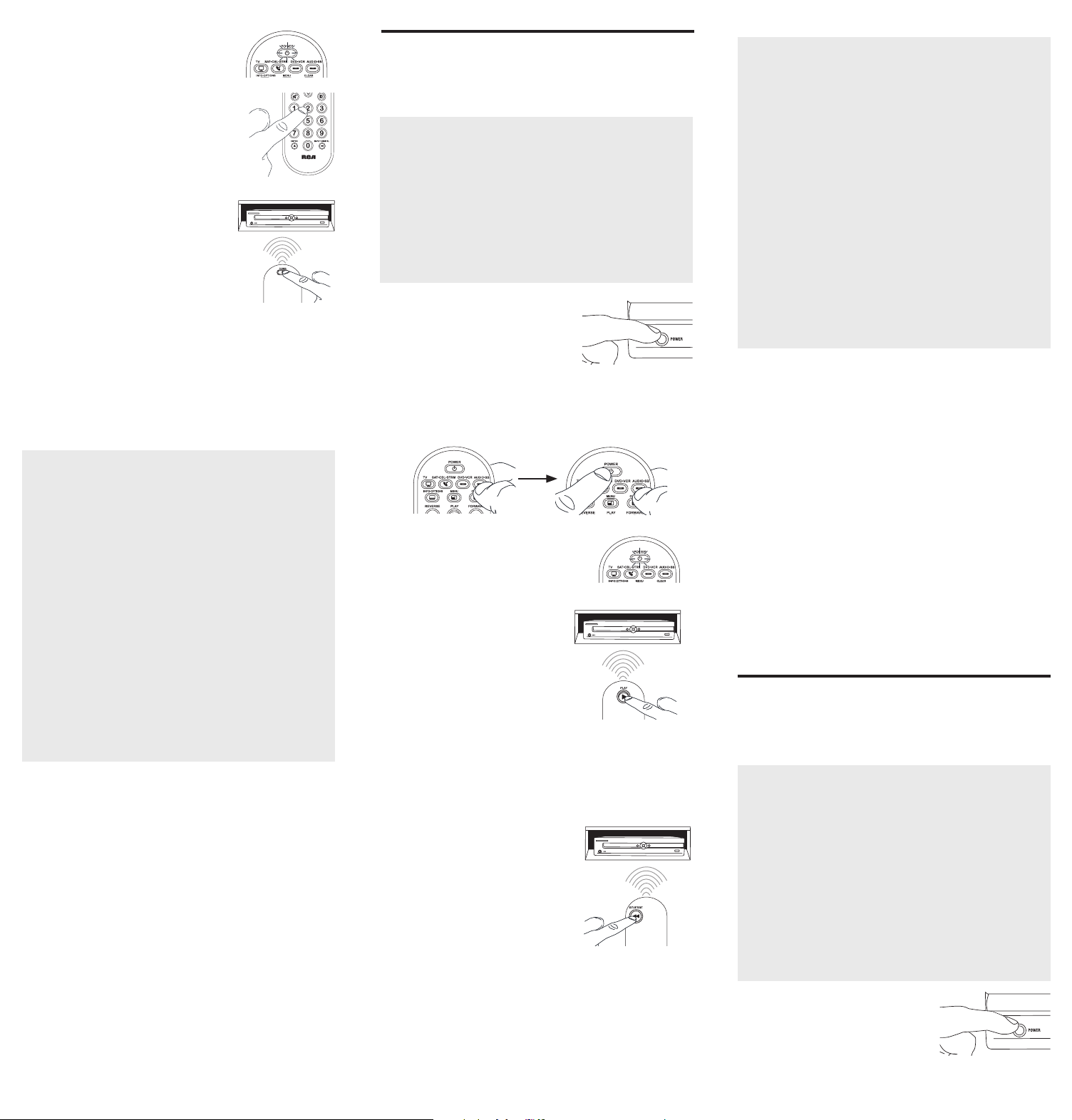
5. Cuandoeldispositivoseapague,oprima
lateclaREVERSEdelcontrolremoto
yespereporlomenos2segundos.El
controlremotopruebaelúltimocódigo
delgrupoanteriorde10códigos.
¿Se encendió el dispositivo?
SÍ: OprimalateclaSTOP.¡Listo!Latecla
dedispositivoestáprogramada.
NO: OprimaREVERSEnuevamente.
Elcontrolremotopruebaelpróximocódigoenelgrupode
códigos.
ContinúeoprimiendoREVERSEcada2segundoshastaqueel
dispositivoseencienda.Cuandoseencienda,oprimaSTOP.
Aviso: Si oprime accidentalmente la tecla REVERSE luego de que
el dispositivo se encienda, oprima la tecla FORWARD. Luego,
espere dos segundos para ver si su dispositivo se vuelve a apagar.
Enlamayoríadeloscasos,
lasteclasdelcontrolremoto
desempeñanlasmismas
funcionesquelasteclasdelos
controlesremotosoriginales
unavezprogramaestecontrol
remotoparamanejarlos
componentes.Lamayoríadelas
teclasdeestecontrolremoto
tienenotrasfunciones.
Lasteclasdedispositivo(
TV,
SAT•CBL•STRM,DVD•VCR,
AUDIO•SB)ponenelcontrol
remotoenelmodocorrectopara
manejareldispositivo.
GUIDE•HOME y MENU
danaccesoalasmismas
característicasquelasteclas
ensuscontrolesremotos
originales.
Lasteclasdeechaactúan
comoteclasdenavegación
parareproductoresde
transmisióndemediosasí
comoensistemasdeguíasy
menúparaotrosdispositivos.
CLEAR
saledelaprogramación
delcontrolremoto;además,
desempeñalasmismasfunciones
queenloscontrolesremotos
originales.
LasteclasCHAN y VOL
actúancomocontrolesde
canalyvolumen.
Latecla INPUT y — (guión)
tienetresfunciones:(1)alterna
entretodaslasfuentesde
videoconectadasaltelevisor;
(2)cuandoelcontrolremotose
encuentraenelmodoVCR,este
botónalternaentrelaentrada
VCRyTV;(3)cuandoingresa
directamentenúmerosdecanales
digitales,estebotónlepermite
separarelnúmerodelcanal
principaldelnúmerodelcanal
secundario(talcomo59.1).
Ahorro de Batería
Sucontrolremotouniversalahorralapotenciadelasbateríasal
apagarautomáticamentecualquierteclaqueseoprimapormásde
60segundos.Estaacciónprolongalavidaútildelasbateríasencaso
dequeelcontrolremotoquedepilladoenunlugardondelasteclas
permanezcanoprimidas,talcomoentreloscojinesdeunsofá.
RCRBB04GBE
Manual del Propietario del
Control Remoto Universal
Owner’s Manual (English on back)
El modelo actual puede ser
diferente al ilustrado
Cuidado y Mantenimiento
•Mantengaelcontrolremotoseco.Sisemoja,séqueloinmediatamente.
•Utiliceyalmaceneelcontrolremotoúnicamenteenentornosde
temperaturanormal.
•Manejeelcontrolremotodeformacuidadosa.Nolodejecaer.
•Mantengaelcontrolremotoresguardadodelpolvoylasuciedad.
•Limpieelcontrolremotoconunpañohúmedodevezencuandopara
mantenerloenbuenascondicionesdeoperación.
•Modicarosabotearlosdispositivosinternosdelcontrolremotopodría
ocasionardesperfectosyanularlagarantía.
¡GUARDE ESTE MANUAL Y LAS LISTAS DE CÓDIGOS!
En ocasiones los controles remotos pierden su programación
cuando se cambian las baterías. Asegúrese de mantener el
manual y las listas de códigos en un lugar seguro de manera
que pueda volver a programar el control remoto de ser
necesario.
Consejo: Este control remoto ya está programado para la
mayoría de televisores, VCR, lectores de DVD y receptores de
satélite RCA. Sencillamente oprima la tecla correspondiente—
DVD•VCR para un Lector de DVD, TV para un televisor, o
SAT•CBL•STRM para un receptor de satélite.
ElcontrolremotonecesitadosbateríasalcalinasAAA(no
suministradas).
Para instalar las baterías:
1. Oprimayempujelatapadel
compartimientodelasbateríaspara
removerla.
2. Insertelasbaterías,cerciorándose
dequelaspolaridades(+)y(–)
correspondanconeldiagramaque
apareceenelcompartimientodelas
baterías.
3. Vuelvaacolocarlatapadel
compartimientodelasbateríasensu
posición.
Precauciones sobre las Baterías:
• No combine baterías nuevas y viejas.
• No combine diferentes tipos de baterías: alcalinas, estándar
(carbón-zinc) o recargables (níquel-cadmio).
• Siempre remueva de inmediato baterías viejas, débiles o
desgastadas, y recíclelas o deséchelas según lo disponen las
normas locales y nacionales.
Parautilizarestecontrolremotouniversalconsusistemade
entretenimientoenelhogar,necesitaráprimeroprogramarlo
paramanejarsusdispositivos.Paraprogramarelcontrolremoto
universalparamanejarsusdispositivos.Pruébelosenelorden
listadoaquí:
• LaEntrada de Código Directo (Direct Code Entry) le
permiteingresaruncódigodelalistadecódigosque
acompañanasumarcadedispositivo.
• LaBúsqueda de Código de Marca (Brand Code Search)
buscaatravésdeloscódigosmarcaseleccionadasde
dispositivos.
• LaBúsqueda de Código Automática (Auto Code Search)
pasaautomáticamenteatravésdetodosloscódigosparael
dispositivoqueustedestátratandodecontrolar.
• LaBúsqueda de Código Manual (Manual Code Search)pasa
manualmenteatravésdetodosloscódigosparaeldispositivo
queustedestátratandodecontrolar.
Búsqueda Automática de Códigos
LaBúsquedaAutomáticadeCódigosrecorreautomáticamente
todosloscódigosdeldispositivoquedeseamanejar.Cuando
encuentreelquemanejasudispositivo,puededetenerla
búsquedayguardarelcódigo.
CONSEJOS: Cada tecla de dispositivo está asociada con un
tipo de dispositivo — la de TV está prestablecida para buscar
TVs, SAT•CBL•STRM para receptores satelitales, convertidores
de cable o TV digital o reproductores de transmisión de
medios, DVD•VCR para reproductores DVD, y AUDIO•SB para
dispositivos de audio y barras de sonido. Para programar una
tecla de dispositivo para un tipo diferente de dispositivo, vea la
sección Cambio de Tipo de Dispositivo de Tecla.
Para salir en cualquier momento de la Búsqueda Automática de
Códigos sin guardar un código nuevo, oprima la tecla CLEAR.
1. Enciendamanualmenteeldispositivo
quedeseamanejar.
2. Oprimaysostengalatecladedispositivoquedeseaprogramar.
Alavezquesostienelatecladedispositivo,utilicelaotramano
paraoprimirysostenersimultáneamentelateclaPOWERdel
controlremoto.
3. EsperehastaquelateclaPOWER
seilumineypermanezcailuminado.
Luego,suelteambasteclas.
4. Mantengaelcontrolremoto
apuntadodirectamentealpanel
frontaldeldispositivoquedesea
manejar.OprimalateclaPLAYdel
controlremotoyespere5segundos.
Elcontrolremotoestáprobando
ungrupode10códigosparael
dispositivo.
¿Se apagó el dispositivo?
SÍ: VayaalPaso5.
NO: OprimaPLAYnuevamente.Elcontrolremotopruebael
próximogrupode10códigos.
ContinúeoprimiendoPLAYcada5segundoshastaqueel
dispositivoseapague.
Cómo Probar el Código para Obtener Máxima Funcionalidad
1. Pruebe una variedad de funciones del dispositivo con el
control remoto. Si no puede utilizar alguna de las funciones
de sus dispositivos, vaya al próximo paso e intente un código
diferente.
2. RepitalaBúsquedadeCódigosporMarcadesdeelcomienzo.
Cuandoeldispositivoseapagueporprimeravez,nooprima
lateclaSTOP,conlacualquedaríaguardadoelmismocódigo.
Envez,conlaunidadapagada,continúeoprimiendolatecla
POWERrepetidamentehastaquelaunidadsevuelvaa
encender.
3. Sisevuelveaencenderlaunidad,habráencontradootrocódigo
quepuedemanejaresedispositivo.OprimaSTOP.
4. Pruebelafuncionalidaddelateclanuevamenteintentando
unavariedaddefunciones.Sielcódigocontrolalamayoría
delasfuncionesdeldispositivo,entonceshabráconcluidola
programación.Sielcódigoguardadonobrindaunamáxima
funcionalidad,intenteotrocódigo.
Búsqueda de Códigos por Marca
LaBúsquedadeCódigosporMarcarecorresóloloscódigos
deunadelasmarcasseleccionadasqueaparecenenlalistade
códigossuministrada.Silamarcadeldispositivoapareceenlalista,
posiblementelabúsquedasellevaráacabodemanerafácilyrápida.
CONSEJOS: Cada tecla de dispositivo está asociada con un
tipo de dispositivo — la de TV está prestablecida para buscar
TVs, SAT•CBL•STRM para receptores satelitales, convertidores
de cable o TV digital o reproductores de transmisión de
medios, DVD•VCR para reproductores DVD, y AUDIO•SB para
dispositivos de audio y barras de sonido. Para programar una
tecla de dispositivo para un tipo diferente de dispositivo, vea
la sección Cambio de Tipo de Dispositivo de Tecla.
Para salir en cualquier momento de la Búsqueda de Códigos
por Marca sin guardar un código nuevo, oprima la tecla
CLEAR.
1. Enciendamanualmenteeldispositivo
quedeseamanejar.
3. Oprimaysostengalatecladedispositivoquedeseaprogramar.
Alavezquesostienelatecladedispositivo,utilicelaotramano
paraoprimirysostenersimultáneamentelateclaPOWERdel
controlremoto.
4. EsperehastaquelateclaPOWERse
ilumineypermanezcailuminado.Luego,
suelteambasteclas.
6. Mantengaelcontrolremotoapuntado
directamentealpanelfrontaldel
dispositivoquedeseamanejar.Oprima
lateclaPOWERdelcontrolremotoy
espere2segundos.Elcontrolremoto
estáprobandouncódigoparalamarca
deldispositivo.
¿Se apagó el dispositivo?
SÍ: OprimalateclaSTOPparaguardarelcódigo.¡Listo!Latecla
dedispositivoestáprogramada.
NO: OprimaPOWERnuevamente.Elcontrolremotopruebael
próximocódigoparasumarca.
ContinúeoprimiendoPOWERcada2segundoshastaqueel
dispositivoseapague.Cuandoseapague,oprimaSTOP.
2. Encuentrelamarcadeldispositivoen
laseccióndeCódigosporMarcadela
listadecódigossuministrada.Marque
conuncírculoelnúmerodelamarcay
mantengalalistaamano.
5. Fíjeseenelnúmeroquemarcópara
elnúmerodecódigodelamarcadel
dispositivo.Oprimadichonúmeroenel
tecladodelcontrolremoto.
NOTAS
A través de la programación de cada tecla, asegúrese de
mantener el control remoto apuntado directamente al sensor
infrarrojo del dispositivo que está actualmente programando
con el control remoto.
Pruebe el control remoto con el dispositivo para asegurarse que
la tecla de dispositivo esté programada con el código correcto
y garantizar así su máxima funcionalidad. Si no puede utilizar
alguna de las funciones, intente con otro código. Para obtener
mayor información, consulte la sección “Cómo Probar el Código
para Obtener Máxima Funcionalidad” a continuación.
Durante la Búsqueda de Códigos por Marca, el control remoto
ignora la opresión de teclas que no son parte de la búsqueda.
La búsqueda se detendrá luego de dos minutos (la tecla POWER
parpadea cuatro veces y se apaga, y se retiene el último código
programado bajo la tecla de dispositivo).
La tecla POWER parpadea cuatro veces y se apaga cuando
el control remoto ha recorrido todos los códigos. El control
remoto sale del método de Búsqueda de Códigos por Marca.
Si su dispositivo aún no se ha apagado, intente un método de
búsqueda diferente.
Entrada Directa de Códigos
LaEntradaDirectadeCódigoslepermiteingresaruncódigodela
listadecódigossuministradaparalamarcadesudispositivo.
CONSEJO: Cada tecla de dispositivo está asociada con un
tipo de dispositivo — la de TV está prestablecida para buscar
TVs, SAT•CBL•STRM para receptores satelitales, convertidores
de cable o TV digital o reproductores de transmisión de
medios, DVD•VCR para reproductores DVD, y AUDIO•SB para
dispositivos de audio y barras de sonido. Para programar una
tecla de dispositivo para un tipo diferente de dispositivo, vea la
sección Cambio de Tipo de Dispositivo de Tecla.
1. Enciendamanualmenteeldispositivo
quedeseamanejar.
3. Oprimaysostengalatecladedispositivoquedeseaprogramar
(lateclaPOWERseilumina).
Mientrasoprimelatecladedispositivo,ingreseconlaotramano
elprimercódigodecincodígitosparalamarcadelalistade
códigos(lateclaPOWERseapagaluegodelprimerdígito).
2. EncuentrelaListadeCódigos
suministradaconelcontrolremoto.
Encuentrelasecciónparaeltipode
dispositivoquedeseaprogramar,
ylocalicelamarcaenesasección.
Marqueconuncírculoloscódigos
paralamarcaymanténgalosamano.
NOTAS
Recuerde ingresar el código para referencia futura en el
recuadro provisto en la sección Recuperación de Códigos de
este manual.
Si la marca de su dispositivo no aparece en la lista de códigos,
utilice uno de los métodos de Búsqueda de Códigos para
programar el control remoto. (Consulte los métodos de
Búsqueda Automática y Manual de Códigos)
Si suelta la tecla de dispositivo en cualquier momento durante
el proceso de Entrada Directa de Códigos, la tecla POWER
parpadea cuatro veces, y se sale del proceso. Se retendrá el
último código programado bajo la tecla de dispositivo.
Pruebe el control remoto con el dispositivo para asegurarse que
la tecla de dispositivo esté programada con el código correcto
y garantizar así su máxima funcionalidad. Si no puede utilizar
alguna de las funciones, intente con otro código de la lista.
4. Cuandohayaingresadoel
códigodecincodígitos,continúe
oprimiendolatecladedispositivoy
observelateclaPOWER.
¿Se iluminó la tecla POWER?
SÍ: ¡Listo!Latecladedispositivoestá
programada.
No, parpadeó cuatro veces y se apagó: Haingresadounnúmero
decódigoquenoseencuentraenlaslistasdecódigosuomitióun
pasoenelprocedimientodeentradadecódigos.Intenteelpaso3
nuevamente.
Búsqueda Manual de Códigos
LaBúsquedaManualdeCódigoslepermiterecorrerunoporuno
todosloscódigosdeldispositivoquedeseamanejar.Cuando
encuentreelquemanejasudispositivo,puededetenerlabúsqueday
guardarelcódigo.
CONSEJOS: El método de Búsqueda Manual de Códigos podría
tomar más tiempo porque el control remoto busca a través
de todos los códigos en su memoria uno por uno. Si su marca
aparece en las Listas de Códigos por Marca o Listas de Códigos,
intente primero la Búsqueda de Códigos por Marca o el método
de Entrada Directa de Códigos.
Cada tecla de dispositivo está asociada con un tipo de dispositivo
— la de TV está prestablecida para buscar TVs, SAT•CBL•STRM
para receptores satelitales, convertidores de cable o TV digital
o reproductores de transmisión de medios, DVD•VCR para
reproductores DVD, y AUDIO•SB para dispositivos de audio y
barras de sonido. Para programar una tecla de dispositivo para
un tipo diferente de dispositivo, vea la sección Cambio de Tipo
de Dispositivo de Tecla.
Para salir en cualquier momento de la Búsqueda Manual de
Códigos sin guardar un código nuevo, oprima la tecla CLEAR.
1. Enciendamanualmenteeldispositivo
quedeseamanejar.
2. Oprimaysostengalatecladedispositivoquedeseaprogramar.
Alavezquesostienelatecladedispositivo,utilicelaotramano
paraoprimirysostenersimultáneamentelateclaPOWERdel
controlremoto.
3. EsperehastaquelateclaPOWER
seilumineypermanezcailuminado.
Luego,suelteambasteclas.
4. Mantengaelcontrolremotoapuntadodirectamentealpanel
frontaldeldispositivoquedeseamanejar.Oprimalatecla
POWERdelcontrolremotoyespere2segundos.
¿Se apagó el dispositivo?
SÍ:OprimalateclaSTOPparaguardarel
código.¡Listo!Latecladedispositivoestá
programada.
NO: OprimaPOWERnuevamente.El
controlremotopruebaelpróximocódigo
parasudispositivo.
ContinúeoprimiendoPOWERcada2
segundoshastaqueeldispositivose
apague.Cuandoseapague,oprimaSTOP.
CONSEJO: Debido a la gran cantidad de códigos, quizás necesite
oprimir la tecla POWER varias veces-posiblemente cientos de
veces.
NOTAS
A través de la programación de cada tecla, mantenga el control
remoto apuntado directamente al sensor infrarrojo del dispositivo
que está programando con el control remoto.
Pruebe el control remoto con el dispositivo para asegurarse que
la tecla de dispositivo esté programada con el código correcto
y garantizar así su máxima funcionalidad. Si no puede utilizar
alguna de las funciones, intente con otro código. Para obtener
mayor información, consulte la sección “Cómo Probar el Código
para Obtener Máxima Funcionalidad” a continuación.
Durante la Búsqueda Manual de Códigos, el control remoto
ignora la opresión de teclas que no son parte de la búsqueda.
La búsqueda se detendrá luego de dos minutos (la tecla POWER
parpadea cuatro veces y se apaga, y se retiene el último código
programado bajo la tecla de dispositivo).
La tecla POWER parpadea cuatro veces y se apaga cuando
el control remoto ha recorrido todos los códigos. El control
remoto sale del método de Búsqueda Manual de Códigos. Si
su dispositivo aún no se ha apagado, intente un método de
búsqueda diferente.
Cómo Probar el Código para Obtener Máxima Funcionalidad
1. Pruebe una variedad de funciones del dispositivo con el
control remoto. Si no puede utilizar alguna de las funciones
del dispositivo, vaya al próximo paso e intente un código
diferente.
2. RepitaelMétododeBúsquedaManualdeCódigosdesdeel
comienzo.Cuandohayaencontradoelcódigoquevuelvaa
encendereldispositivo,nooprimalateclaSTOP,conlacual
quedaríaguardadoelmismocódigo.Envez,conlaunidad
apagada,continúeoprimiendolateclaPOWERrepetidamente
hastaquelaunidadsevuelvaaencender.
3. Sisevuelveaencenderlaunidad,habráencontradootrocódigo
quepuedemanejaresedispositivo.OprimalateclaSTOP.
4. Nuevamente,pruebelafuncionalidaddelateclaintentando
controlarunavariedaddefuncionesdeldispositivo.Sielcódigo
quesehaalmacenadocontrolalamayoríadelasfuncionesdel
dispositivo,entonceshabráconcluidolaprogramación.Siel
códigoguardadonobrindaunamáximafuncionalidad,intente
otrocódigo.
Cómo Cambiar el Tipo de Dispositivo de Una
Tecla
Cadatecladedispositivoestáasociadaconuntipodedispositivo—
ladeTVestáprestablecidaparabuscarTVs,SAT•CBL•STRMpara
receptoressatelitales,convertidoresdeTVdigitaloreproductores
detransmisióndemedios,oconvertidoresdecable,DVD•VCRpara
reproductoresDVDoVideograbadoras,yAUDIO•SBparadispositivos
deaudioybarrasdesonido.Paraprogramarestasteclaspara
controlaruntipodiferentededispositivo,ustedtienequereasignarlas
primero.
Cómo Reasignar la Tecla DVD•VCR para Manejar una VCR
LateclaDVD•VCRvienepreestablecidadefábricaparamanejarun
LectordeDVD.SideseaquelateclaDVD•VCRmanejeunaVCR,
deberáreasignarla.
1. OprimaysostengalateclaDVD•VCR.LateclaPOWERse
encenderá.ContinúesosteniendolatecladeDVD•VCR
2. MientrassostienelateclaDVD•VCR,oprimaysueltelatecla
numérica2enelteclado.LateclaPOWERseapagará.
3. SueltelateclaDVD•VCR.LateclaPOWERparpadeadosveces
yluegoseapaga.LateclaDVD•VCRestáahoraconguradapara
manejarunaVCR.
4. Observelasinstruccionesdelabúsquedadecódigosautomática,
pormarca,manualoentradadirectaparaprogramarlatecla
DVD•VCRparasuVCR.
Cómo Reasignar la Tecla AUDIO•SB para Manejar Otros
Dispositivos
LateclaAUDIO•SBestápredeterminadaparacontrolarun
dispositivodeaudio.SiustedquierequelateclaAUDIO•SB
controleenformaadicionalundiferentedispositivo(TV,DVD,
convertidorsatelital,deTVdigitaloreproductordetransmisiónde
medios,oconvertidordecableadicional,porejemplo),usteddebe
reasignarla.
1. OprimaysostengalateclaAUDIO•SB. LateclaPOWERse
encenderá.
2. MientrassostienelateclaAUDIO•SB,oprimaysueltelatecla
numéricaeneltecladoparaeldispositivoquedeseamanejar
(consultelatablaabajo).LateclaPOWERseapagará.
CONTROLES DE TECLA DE DISPOSITIVO:
TVadicional oprima1
VCRoDVR oprima2
LectordeDVDadicional oprima3
Dispositivodeaudioobarradesonido
adicional
oprima4
Paraconvertidorsatelital,TVdigitalo
reproductoresdetransmisióndemedios,o
convertidordecable
oprima5
3. SueltelateclaAUDIO•SB. LateclaPOWERparpadeados
vecesyluegoseapaga.LateclaAUDIO•SBestáahora
conguradaparamanejareltipodedispositivoseleccionado.
4. Observelasinstruccionesdelabúsquedadecódigos
automática,pormarca,manualoentradadirectapara
programarlateclaAUDIO•SB.
Recuperación de Códigos
Unavezhayaprogramadoelcontrolremotoparamanejarsus
dispositivos,serecomiendaanotarloscódigosparafutura
referencia.SiutilizóelmétododeEntradaDirectadeCódigos,
esmuysencillo.Simplementeencuentreloscódigosqueingresó
yanótelosenlosrecuadrosacontinuación.Siutilizóunodelos
métodosdeBúsquedadeCódigosparaprogramarelcontrol
remotoosiutilizóelmétododeEntradaDirectaperonorecuerda
elcódigo,necesitarárecuperarelcódigodecincodígitosde
cadaunodelosdispositivos.Recuperaryanotarelcódigoreal
leahorrarátiemposialgunaveznecesitavolveraprogramarel
controlremoto(porejemplo,sisepierdelaprogramacióncuando
cambialasbaterías).Sianotaloscódigos,puedeutilizarelmétodo
deEntradaDirectaparavolveraprogramarelcontrolremotoan
demanejarotrosdispositivos,unprocesorápidoysencillo.
1. Oprimaysostengalateclade
dispositivo(TV,SAT•CBL•STRM,
DVD•VCR,AUDIO•SB)cuyocódigo
desearecuperar.LateclaPOWER
seencenderá.Continúeoprimiendo
latecladedispositivo.
2. Mientrassostienelatecladedispositivo,oprimaysostengala
teclaINFO.LateclaPOWERseapagará.Luegodesostener
ambasteclasdurantetressegundos,lateclaPOWERse
encenderánuevamente.
3. Suelteambasteclas. LateclaPOWERpermaneceencendido.
4. Comenzandoconlateclanumérica1,oprimaysueltecadatecla
numéricaeneltecladoenelsiguienteorden1-9,luego0.El
númeroquehacequelateclaPOWERparpadeeeselprimer
númerodelcódigo.Mientrasencuentralosnúmerosdelcódigo,
anótelosparareferenciafutura.
Aviso: Todos los códigos de TV comienzan con el número 1; todos
los códigos VCR y DVR comienzan con el número 2; todos los
DVDs, el número 3; todos los dispositivos de audio, el número
4; y todos los receptores satelitales, convertidores de TV digital
o reproductores de transmisión de medios, y convertidores de
cable, con el número 5.
5. Repitaelpaso4hastahaberrecuperadoloscinconúmerosdel
código.Luegoderecuperarelquintonúmero,lateclaPOWER
parpadeabrevemente,yluegoseapaga.
CONSEJO: Para salir del Modo de Recuperación de Códigos en
cualquier momento, oprima la tecla CLEAR.
Aviso: Si oprime una tecla inválida durante el proceso de
Recuperación de Códigos, el control remoto no responderá.
Si no oprime una tecla de Recuperación de Códigos válida,
(TV, SAT•CBL•STRM, DVD•VCR, AUDIO•SB, INFO, CLEAR), la
Recuperación de Códigos se detendrá al cabo de 15 segundos. La
tecla POWER parpadea cuatro veces y luego se apaga.
IMPORTANTE
Dado que este control remoto maneja más de un dispositivo,
deberá primero “indicarle” al control remoto cuál dispositivo
desea manejar. En otras palabras, si desea manejar el televisor,
deberá primero oprimir la tecla TV para poner el control
remoto en el Modo TV. El control remoto permanece en ese
modo de dispositivo hasta que oprima una tecla de dispositivo
diferente. Por ejemplo, si el control remoto se encuentra en el
Modo TV y desea manejar el Lector de DVD, deberá oprimir la
tecla DVD•VCR para cambiar los modos de dispositivo.
Problema: El control remoto no maneja su dispositivo.
• Asegúresequeelcontrolremotoseencuentreenelmodo
correctooprimiendolatecladedispositivocorrespondiente(TV,
SAT•CBL•STRM,DVD•VCR,AUDIO•SB).Estoleindicaalcontrol
remotoeldispositivoquedebemanejar.
• Retirelosobstáculosubicadosentreelcontrolremotoy
eldispositivo.Asegúresedeapuntarelcontrolremoto
directamentealsensorinfrarrojodeldispositivo.
• Asegúresequelasbateríasesténcargadasydebidamente
instaladas.ReemplacelasbateríascondosbateríasAAAnuevas,
desernecesario(consultelasecciónInstalacióndelasBaterías).
Problema: El control remoto no puede programarse para
manejar su dispositivo.
• Siestáprobandoelcontrolremotomientrasloestá
programando,podríaestardemasiadoalejadodeldispositivo
oenunánguloincorrecto.Deberáhaberunatrayectoriasin
obstáculosentreelcontrolremotoyelsensorinfrarrojodel
dispositivo.Acérquesemásyasegúresedeapuntardirectamente
aldispositivoqueestáintentandomanejar.
• SiestáutilizandoelmétododeprogramacióndeEntrada
Directaparaingresarloscódigosparasumarcaylaunidad
aúnnofuncionadebidamente,intenteelmétododebúsqueda
automática,pormarcaomanual.
• ParamanejarunidadesdecombinacióntalescomoTV/
VCRoTV/DVD,deberáprogramarlasteclasdedispositivo
correspondientesindividualesparamanejarcadapartedela
unidaddecombinación.Unavezprogramadasdemaneraexitosa,
lateclaTVmanejalasfuncionesdeltelevisor,ylateclaDVD•VCR
manejalasfuncionesdelLectordeDVDyVCR.
• Asegúresequelasbateríasesténcargadasydebidamenteinstaladas.
Problema: El control remoto no ejecuta los comandos
debidamente.
• Asegúresequeelcontrolremotoseencuentreenelmodo
correctooprimiendolatecladedispositivocorrespondiente(TV,
SAT•CBL•STRM,DVD•VCR,AUDIO•SB).Estoleindicaalcontrol
remotoeldispositivoquedebemanejar.
• Asegúresequeeldispositivoseencuentrelisto(porejemplo,el
LectordeDVDtengaundiscocargado).
• Puedehaberoprimidounateclainválidaparaelmodoenquese
encuentraelcontrolremoto.
• Siestátratandodeingresardirectamenteunnúmerodecanal,
intenteoprimirlateclaENTERluegodeingresarelnúmerodel
canalyaquealgunasmarcasymodelosrequierenestaacción.
• Existelaposibilidaddequeuncódigoprogramadopuedamanejar
únicamentealgunasdelasfuncionesdeldispositivo(porejemplo,
sóloenciendeyapagaundispositivo).Paraconrmarquelatecla
dedispositivohasidoprogramadaconelcódigocorrectopara
obtenermáximafuncionalidad,pruebeeldispositivo.Intente
manejarunavariedaddefuncionesdeldispositivoconelcontrol
remoto.Sialgunasdelasfuncionesdesusdispositivosnotrabajan,
intenteprogramarelcontrolremotoconuncódigodiferenteen
lalistaatravésdelMétododeEntradaDirectadeCódigoshasta
queencuentreelcódigoquelepermitaalcontrolremotomanejar
lamayoríadelasfuncionesdeldispositivo.Diferentescódigos
puedenproporcionardiferentesnivelesdefuncionalidad.
Problema: La tecla POWER no se ilumina cuando oprime una
tecla.
• Puedehaberoprimidounateclainválidaparaelmodoenquese
encuentraelcontrolremoto.
• Asegúresequeelcontrolremotoseencuentreenelmodo
correctooprimiendolatecladedispositivocorrespondiente
(TV,SAT•CBL•STRM,DVD•VCR,AUDIO•SB).Estoleindicaal
controlremotoeldispositivoquedebemanejar.
• Asegúresequelasbateríasesténcargadasydebidamente
instaladas.ReemplacelasbateríascondosbateríasAAAnuevas,
desernecesario(consultelasecciónInstalacióndelasBaterías).
Problema: El control remoto no cambia canales en el
dispositivo.
• Asegúresequeelcontrolremotoseencuentreenelmodo
correctooprimiendolatecladedispositivocorrespondiente(TV,
SAT•CBL•STRM,DVD•VCR,AUDIO•SB).Estoleindicaalcontrol
remotoeldispositivoquedebemanejar.
• OprimalateclaENTERluegodehaberingresadounnúmerode
canal.
• Retirelosobstáculosubicadosentreelcontrolremotoy
eldispositivo.Asegúresedeapuntarelcontrolremoto
directamentealsensorIRdeldispositivo.
VoxxAccessoriesCorporation(la“Compañía”)legarantizaausted,el
compradororiginaldeesteproductoquesi,bajocondicionesyuso
normales,seencontraraquepresentadefectosmaterialesodemanode
obradurantesuvidaútilmientrasseadesupropiedad,talesdefectosserán
reparadosoreemplazados(aopcióndelaCompañía)sincargoalgunopor
laspiezasylaboresdereparación.
Paraobtenerlosserviciosdereparaciónoreemplazodentrodelostérminos
deestagarantía,elproductoseentregaráconpruebadecubiertade
garantía(porejemplo,facturafechadadeventa),especicacióndelos
defectos,transporteprepagado,aunaestacióndegarantíaaprobada.Para
ubicarlaestacióndegarantíamáscercanaasudomicilio,llamesincostoa
nuestraocinadecontrol:al1-800-645-4994.
EstaGarantíanocubreunproductoadquirido,mantenidooutilizadofuera
delosEstadosUnidosoCanadá.
EstaGarantíanoestransferibleynoincluyeloscostosincurridosenla
instalación,remociónoreinstalacióndeesteproducto.EstaGarantíano
aplicasi,esopinióndelaCompañíaque,esteproductohasufridodaños
debidoaalteraciones,instalacióninadecuada,abuso,usoindebido,
negligencia,accidenteoelusosimultáneodebateríasdetiposdiferentes
(p.ej.,alcalinas,estándarorecargables).
ELALCANCEDELARESPONSABILIDADDELACOMPAÑÍABAJOESTA
GARANTÍAESTÁLIMITADOALAREPARACIÓNOELREEMPLAZO
PROVISTOARRIBAY,ENNINGÚNCASO,DEBERÁLARESPONSABILIDAD
DELACOMPAÑÍAEXCEDERELPRECIODECOMPRAPAGADOPOREL
COMPRADORDEESTEPRODUCTO.
EstaGarantíareemplazacualesquieraotrasresponsabilidadesogarantías
expresas.CUALESQUIERAGARANTÍASIMPLÍCITAS,INCLUYENDO
CUALQUIERGARANTÍAIMPLÍCITADECOMERCIABILIDADO
ADAPTABILIDADPARAUNPROPÓSITOENPARTICULARESTARÁN
LIMITADASALADURACIÓNDEESTAGARANTÍA.ENNINGÚNCASO
LACOMPAÑÍASERÁRESPONSABLEPORDAÑOSEMERGENTESO
INCIDENTALES.Ningunapersonanirepresentanteestáautorizadoaasumir,
anombredelaCompañía,ningunaresponsabilidadsalvolaexpresadaaquí
enconexiónconlaventadeesteproducto.
Algunosestados/provinciasnopermitenlimitacionessobreladuraciónde
unagarantíaimplícitaolaexclusiónolalimitacióndedañosincidentales
oemergentes,demodoqueesposiblequelaslimitacionesoexclusiones
anterioresnoseapliquenensucaso.EstaGarantíaleconerederechos
legalesespecícos;segúnelestado/provincia,puededisfrutarademásde
otrosderechos.
Paso 1: Instale las baterías
Paso 2: Programe el control remoto
Recorrido del control remoto
Funciones Avanzadas
Garantía Limitada Durante la Vida Útil del Producto
CÓDIGO DE DVD•VCR CÓDIGO DE AUDIO•SB
5
CÓDIGO DE SAT•CBL•STRM
1
CÓDIGO DE TV
SAT CABLE CONVERTIDOR DE DTV
LECTOR DE DVD VCR
DISPOSITIVO DE AUDIO
BARRA DE SONIDO
FelicidadesporlacompradeesteControlRemotoUniversal
RCApara4dispositivos.Estecontrolremotocuentaconuna
coleccióndecódigosdelosdispositivosmásrecientesde
todaslasmarcasprincipales,consoporteparareproductores
detransmisióndemedios(streamingmedia).Lasteclasde
navegaciónhansidorediseñadasparafuncionaralaperfección
conlosmássosticadossistemasdeguíaymenúquese
encuentranenlosdispositivosdeentretenimientoencasaenla
actualidad.
Cómo Probar el Código para Obtener Máxima Funcionalidad
1. Pruebe una variedad de funciones del dispositivo con el
control remoto. Si no puede utilizar alguna de las funciones
del dispositivo, vaya al próximo paso e intente un código
diferente.
2. RepitalaBúsquedaAutomáticadeCódigosdesdeelcomienzo.
Cuandosudispositivoseapague,nodetengalabúsqueda.En
vez,conlaunidadapagada,continúeoprimiendolateclaPLAY
cada5segundoshastaquelaunidadsevuelvaaencender.
3. Cuandosevuelvaaencenderlaunidad,oprimalatecla
REVERSEenelcontrolremotocada2segundoshastaqueel
dispositivosevuelvaaapagar.Cuandoeldispositivosevuelva
aapagar,oprimalateclaSTOP.
4. Nuevamente,pruebelafuncionalidaddelateclaintentando
controlarunavariedaddefuncionesdeldispositivo.Sielcódigo
quesehaalmacenadocontrolalamayoríadelasfuncionesdel
dispositivo,entonceshabráconcluidolaprogramación.Siel
códigoguardadonobrindaunamáximafuncionalidad,intente
otrocódigo.
NOTAS
A través de la programación de cada tecla, asegúrese de
mantener el control remoto apuntado directamente al sensor
infrarrojo del dispositivo que está actualmente programando
con el control remoto.
Pruebe el control remoto con el dispositivo para asegurarse que
la tecla de dispositivo esté programada con el código correcto
y garantizar así su máxima funcionalidad. Si no puede utilizar
alguna de las funciones, intente con otro código. Para obtener
mayor información, consulte la sección “Cómo Probar el Código
para Obtener Máxima Funcionalidad” a continuación.
Durante la Búsqueda Automática de Códigos, el control remoto
ignora la opresión de teclas que no son parte de la búsqueda.
La búsqueda se detendrá luego de dos minutos (la tecla POWER
parpadea cuatro veces y se apaga, y se retiene el último código
programado bajo la tecla de dispositivo).
La tecla POWER parpadea cuatro veces y se apaga cuando
el control remoto ha recorrido todos los códigos. El control
remoto sale del método de Búsqueda Automática de Códigos.
Si su dispositivo aún no se ha apagado, intente un método de
búsqueda diferente.
Luz de fondo
Lailuminacióndefondoleayudaavermejorlasteclasdelcontrol
remotoenlaoscuridad.Puedeencenderlailuminaciónde
fondooprimiendolatecladeluzdefondo
( ).Laluzdefondo
permaneceencendidasiempreycuandosecontinúeoprimiendo
teclasyseapagacincosegundosluegodelaúltimaopresiónde
unatecla.
Marca(s)®Registrada(s)
©2018VoxxAccessoriesCorp.
3502WoodviewTrace,Suite220
Indianapolis,IN46268
Code Lists
Brand Codes are used for programming using the Brand Code Search
and Entry method outlined in the User’s Guide.
Lista de Códigos
Los códigos de las marcas son utilizados para programar utilizando
los métodos de búsqueda y entrada de códigos de marcas, resaltado
en la guía del usuario.
0
1
23
4
56
7
8
9
RCA
GE
PROSCAN
Insignia
JVC
Magnavox
Philips
Panasonic Samsung Sharp Sony Toshiba Vizio
TV
VCR
0
1
23
4
56
7
8
9
RCA
GE
PROSCAN
Apex JVC
Magnavox
Philips
Panasonic Pioneer Samsung Sharp Sony Toshiba
DVD
SAT/CABLE
0
1
23
4
56
7
8
9
RCA
GE
PROSCAN
Motorola DirecTV
Dish Network
Systems/
Echostar
General
Instruments
Hughes
Network
Systems
Scientific
Atlanta
Magnavox
Philips
AMNIO
ADB
Panasonic
Brand Code List/Lista de Códigos de Marcas
0
1
23
4
56
7
8
9
Samsung
Magnavox
Philips
Mitsubishi Panasonic Sharp Sony Toshiba
RCA
GE
PROSCAN
JVC
Symphonic
Code Lists
Brand Codes are used for programming using the Brand Code Search
and Entry method outlined in the User’s Guide.
Lista de Códigos
Los códigos de las marcas son utilizados para programar utilizando
los métodos de búsqueda y entrada de códigos de marcas, resaltado
en la guía del usuario.
0
1
23
4
56
7
8
9
RCA
GE
PROSCAN
Insignia
JVC
Magnavox
Philips
Panasonic Samsung Sharp Sony Toshiba Vizio
TV
VCR
0
1
23
4
56
7
8
9
RCA
GE
PROSCAN
Apex JVC
Magnavox
Philips
Panasonic Pioneer Samsung Sharp Sony Toshiba
DVD
SAT/CABLE
0
1
23
4
56
7
8
9
RCA
GE
PROSCAN
Motorola DirecTV
Dish Network
Systems/
Echostar
General
Instruments
Hughes
Network
Systems
Scientific
Atlanta
Magnavox
Philips
AMNIO
ADB
Panasonic
Brand Code List/Lista de Códigos de Marcas
0
1
23
4
56
7
8
9
Samsung
Magnavox
Philips
Mitsubishi Panasonic Sharp Sony Toshiba
RCA
GE
PROSCAN
JVC
Symphonic
Información FCC
EsteaparatoobedecelasespecicacionesdelaParte15delasregulaciones
FCC.Lasfuncionesestánsujetasalassiguientescondiciones:1)Este
aparatonopuedecausarinterferenciasdañinas,y2)esteaparatopuede
recibircualquierainterferencia,incluyendoaquellasquepuedancausar
funcionesnodeseadas.
Nota:Seprobóesteequipoypodemosarmarquecumpleconlas
restriccionesestablecidasparaundispositivodigitalClaseB,deacuerdo
conlaSección15delaReglamentacióndeFCC.Estasrestriccionesfueron
designadasparabrindarunaprotecciónrazonablefrentealainterferencia
perjudicialenunainstalaciónresidencial.Esteequipogenera,usaypuede
irradiarenergíaderadiofrecuenciay,sinoestáinstaladoonoseloutilizade
acuerdoconlasinstrucciones,puedeocasionarinterferenciasperjudiciales
paralascomunicacionesderadio.Sinembargo,noexisteningunagarantía
dequenosevayaaproducirunainterferenciaenunainstalaciónparticular.
Siesteequipoproduceunainterferenciaperjudicialconlarecepcióndela
radioolatelevisión,locualpodríadeterminarseapagandoyencendiendo
elequipo,selepidealusuarioqueintentecorregirlainterferencia
siguiendounaovariasdelassiguientesmedidas.
• Vuelvaaorientarocambiedelugarlaantenareceptora.
• Aumentelaseparaciónentreelequipoyelreceptor.
• Conecteesteequipoauntomacorrienteenuncircuitodiferentealque
estéconectadoelreceptor.
• Consultealdistribuidoroauntécnicoexperimentadoderadioy
televisiónparasolicitarasistencia.
Precaución:Cualquiercambioomodicaciónnoexpresamenteaprobados
porlaparteresponsableporelcumplimientopodríainvalidarlaautoridad
delusuarioparaoperaresteequipo.
Información Regulatoria de la Industria Canadiense
CANICES-3(B)/NMB-3(B)
Problema: El menú del dispositivo no aparece en la pantalla
del televisor.
• Asegúresedehaberconectadodebidamenteeldispositivoal
televisoryhaberseleccionadolaentradacorrecta.(Consulteel
ManualdelPropietariodelosdispositivosparainformarsesobrelos
procedimientosdeconexióncorrectos.)
• Asegúresequeelcontrolremotoseencuentreenelmodo
correctooprimiendolatecladedispositivocorrespondiente(TV,
SAT•CBL•STRM,DVD•VCR,AUDIO•SB).Estoleindicaalcontrol
remotoeldispositivoquedebemanejar.
• Elaccesoalosmenúsnoesrespaldadoportodaslasmarcas.
Posiblementeseanecesarioutilizarelcontrolremotooriginalpara
lograraccesoalasfuncionesdemenúdealgunosdispositivos.
Para obtener más información, incluido videos instructivos,
códigos de programación con control remoto y asistencia al
cliente, visite www.RCACodeSupport.com
Resolución de Problemas
Bloqueo de Canales
BloqueodeCanalesenvíaautomáticamentecomandosdecanal,
talescomoCH,GOBACKylasteclasnuméricas0-9,asureceptor
desatélite,aparatodecableoconvertidordeTVdigitalcuando
seencuentraenelmodoTV.Estopuedeahorrarleopresionesde
teclassiutilizaundispositivodiferenteasutelevisorparacambiar
canales.
Para activar el bloqueo de canales:
1. Oprimaysostengalatecladedispositivoparaeldispositivo
queutilizaparacambiarcanales.Alavezquesostiene
estatecladedispositivo,utilicelaotramanoparaoprimir
ysostenersimultáneamentelateclaCHarribadelcontrol
remoto.
2. EsperehastaquelateclaPOWERdelcontrolremotose
ilumineypermanezcailuminada.Luego,suelteambasteclas.
3. OprimaENTERparabloquearloscomandosdecanalpara
estedispositivo.
Para desactivar el bloqueo de canales:
1. OprimaysostengalateclaTV.Alavezquesostiene
lateclaTV,utilicelaotramanoparaoprimirysostener
simultáneamentelateclaCHabajodelcontrolremoto.
2. EsperehastaquelateclaPOWERdelcontrolremotose
ilumineypermanezcailuminada.Luego,suelteambasteclas.
3. OprimaENTERparacomenzaracambiarcanalesconsu
televisor.
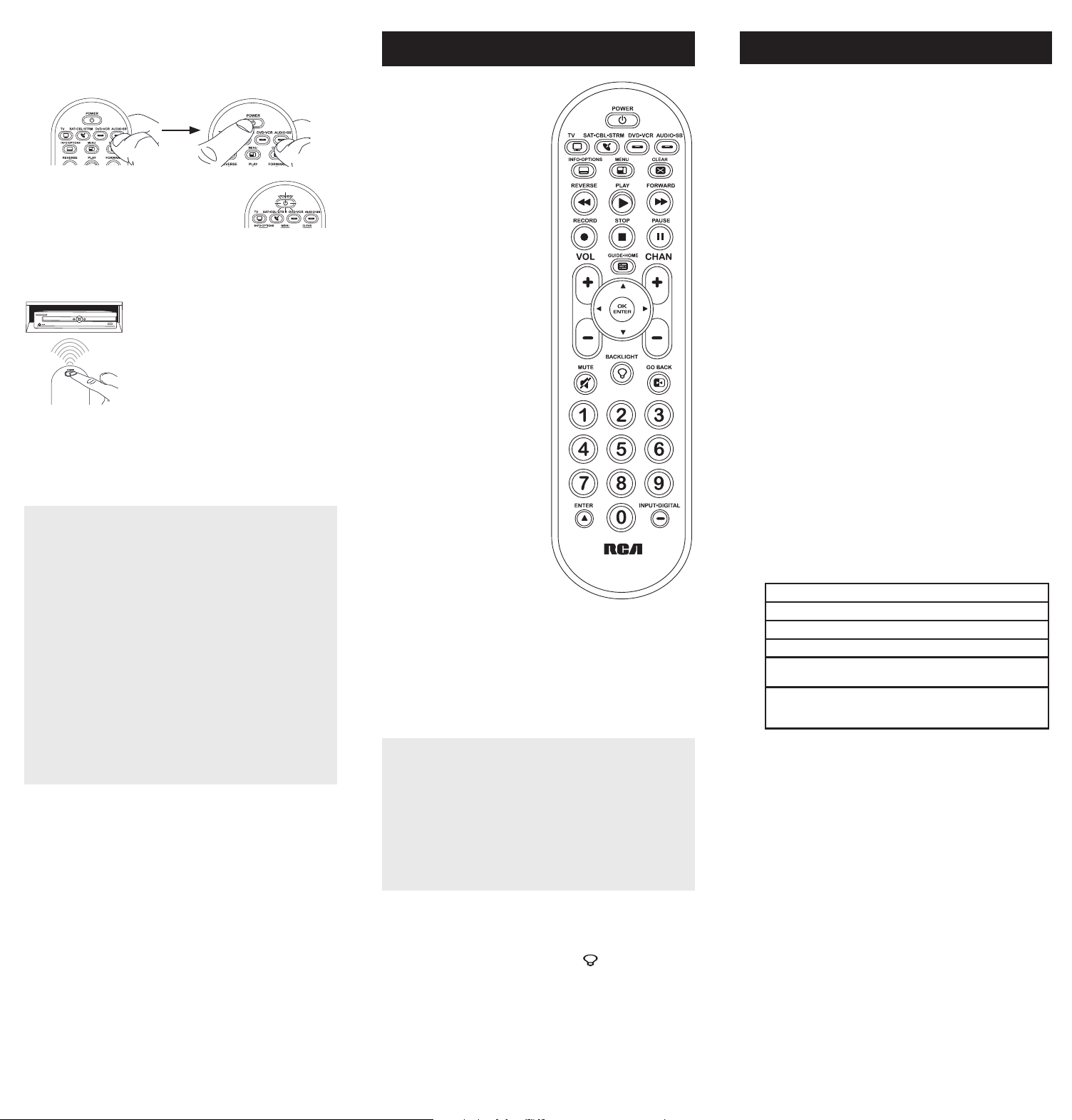
5. Cuandoeldispositivoseapague,oprima
lateclaREVERSEdelcontrolremoto
yespereporlomenos2segundos.El
controlremotopruebaelúltimocódigo
delgrupoanteriorde10códigos.
¿Se encendió el dispositivo?
SÍ: OprimalateclaSTOP.¡Listo!Latecla
dedispositivoestáprogramada.
NO: OprimaREVERSEnuevamente.
Elcontrolremotopruebaelpróximocódigoenelgrupode
códigos.
ContinúeoprimiendoREVERSEcada2segundoshastaqueel
dispositivoseencienda.Cuandoseencienda,oprimaSTOP.
Aviso: Si oprime accidentalmente la tecla REVERSE luego de que
el dispositivo se encienda, oprima la tecla FORWARD. Luego,
espere dos segundos para ver si su dispositivo se vuelve a apagar.
Enlamayoríadeloscasos,
lasteclasdelcontrolremoto
desempeñanlasmismas
funcionesquelasteclasdelos
controlesremotosoriginales
unavezprogramaestecontrol
remotoparamanejarlos
componentes.Lamayoríadelas
teclasdeestecontrolremoto
tienenotrasfunciones.
Lasteclasdedispositivo(
TV,
SAT•CBL•STRM,DVD•VCR,
AUDIO•SB)ponenelcontrol
remotoenelmodocorrectopara
manejareldispositivo.
GUIDE•HOME y MENU
danaccesoalasmismas
característicasquelasteclas
ensuscontrolesremotos
originales.
Lasteclasdeechaactúan
comoteclasdenavegación
parareproductoresde
transmisióndemediosasí
comoensistemasdeguíasy
menúparaotrosdispositivos.
CLEAR
saledelaprogramación
delcontrolremoto;además,
desempeñalasmismasfunciones
queenloscontrolesremotos
originales.
LasteclasCHAN y VOL
actúancomocontrolesde
canalyvolumen.
Latecla INPUT y — (guión)
tienetresfunciones:(1)alterna
entretodaslasfuentesde
videoconectadasaltelevisor;
(2)cuandoelcontrolremotose
encuentraenelmodoVCR,este
botónalternaentrelaentrada
VCRyTV;(3)cuandoingresa
directamentenúmerosdecanales
digitales,estebotónlepermite
separarelnúmerodelcanal
principaldelnúmerodelcanal
secundario(talcomo59.1).
Ahorro de Batería
Sucontrolremotouniversalahorralapotenciadelasbateríasal
apagarautomáticamentecualquierteclaqueseoprimapormásde
60segundos.Estaacciónprolongalavidaútildelasbateríasencaso
dequeelcontrolremotoquedepilladoenunlugardondelasteclas
permanezcanoprimidas,talcomoentreloscojinesdeunsofá.
RCRBB04GBE
Manual del Propietario del
Control Remoto Universal
Owner’s Manual (English on back)
El modelo actual puede ser
diferente al ilustrado
Cuidado y Mantenimiento
•Mantengaelcontrolremotoseco.Sisemoja,séqueloinmediatamente.
•Utiliceyalmaceneelcontrolremotoúnicamenteenentornosde
temperaturanormal.
•Manejeelcontrolremotodeformacuidadosa.Nolodejecaer.
•Mantengaelcontrolremotoresguardadodelpolvoylasuciedad.
•Limpieelcontrolremotoconunpañohúmedodevezencuandopara
mantenerloenbuenascondicionesdeoperación.
•Modicarosabotearlosdispositivosinternosdelcontrolremotopodría
ocasionardesperfectosyanularlagarantía.
¡GUARDE ESTE MANUAL Y LAS LISTAS DE CÓDIGOS!
En ocasiones los controles remotos pierden su programación
cuando se cambian las baterías. Asegúrese de mantener el
manual y las listas de códigos en un lugar seguro de manera
que pueda volver a programar el control remoto de ser
necesario.
Consejo: Este control remoto ya está programado para la
mayoría de televisores, VCR, lectores de DVD y receptores de
satélite RCA. Sencillamente oprima la tecla correspondiente—
DVD•VCR para un Lector de DVD, TV para un televisor, o
SAT•CBL•STRM para un receptor de satélite.
ElcontrolremotonecesitadosbateríasalcalinasAAA(no
suministradas).
Para instalar las baterías:
1. Oprimayempujelatapadel
compartimientodelasbateríaspara
removerla.
2. Insertelasbaterías,cerciorándose
dequelaspolaridades(+)y(–)
correspondanconeldiagramaque
apareceenelcompartimientodelas
baterías.
3. Vuelvaacolocarlatapadel
compartimientodelasbateríasensu
posición.
Precauciones sobre las Baterías:
• No combine baterías nuevas y viejas.
• No combine diferentes tipos de baterías: alcalinas, estándar
(carbón-zinc) o recargables (níquel-cadmio).
• Siempre remueva de inmediato baterías viejas, débiles o
desgastadas, y recíclelas o deséchelas según lo disponen las
normas locales y nacionales.
Parautilizarestecontrolremotouniversalconsusistemade
entretenimientoenelhogar,necesitaráprimeroprogramarlo
paramanejarsusdispositivos.Paraprogramarelcontrolremoto
universalparamanejarsusdispositivos.Pruébelosenelorden
listadoaquí:
• LaEntrada de Código Directo (Direct Code Entry) le
permiteingresaruncódigodelalistadecódigosque
acompañanasumarcadedispositivo.
• LaBúsqueda de Código de Marca (Brand Code Search)
buscaatravésdeloscódigosmarcaseleccionadasde
dispositivos.
• LaBúsqueda de Código Automática (Auto Code Search)
pasaautomáticamenteatravésdetodosloscódigosparael
dispositivoqueustedestátratandodecontrolar.
• LaBúsqueda de Código Manual (Manual Code Search)pasa
manualmenteatravésdetodosloscódigosparaeldispositivo
queustedestátratandodecontrolar.
Búsqueda Automática de Códigos
LaBúsquedaAutomáticadeCódigosrecorreautomáticamente
todosloscódigosdeldispositivoquedeseamanejar.Cuando
encuentreelquemanejasudispositivo,puededetenerla
búsquedayguardarelcódigo.
CONSEJOS: Cada tecla de dispositivo está asociada con un
tipo de dispositivo — la de TV está prestablecida para buscar
TVs, SAT•CBL•STRM para receptores satelitales, convertidores
de cable o TV digital o reproductores de transmisión de
medios, DVD•VCR para reproductores DVD, y AUDIO•SB para
dispositivos de audio y barras de sonido. Para programar una
tecla de dispositivo para un tipo diferente de dispositivo, vea la
sección Cambio de Tipo de Dispositivo de Tecla.
Para salir en cualquier momento de la Búsqueda Automática de
Códigos sin guardar un código nuevo, oprima la tecla CLEAR.
1. Enciendamanualmenteeldispositivo
quedeseamanejar.
2. Oprimaysostengalatecladedispositivoquedeseaprogramar.
Alavezquesostienelatecladedispositivo,utilicelaotramano
paraoprimirysostenersimultáneamentelateclaPOWERdel
controlremoto.
3. EsperehastaquelateclaPOWER
seilumineypermanezcailuminado.
Luego,suelteambasteclas.
4. Mantengaelcontrolremoto
apuntadodirectamentealpanel
frontaldeldispositivoquedesea
manejar.OprimalateclaPLAYdel
controlremotoyespere5segundos.
Elcontrolremotoestáprobando
ungrupode10códigosparael
dispositivo.
¿Se apagó el dispositivo?
SÍ: VayaalPaso5.
NO: OprimaPLAYnuevamente.Elcontrolremotopruebael
próximogrupode10códigos.
ContinúeoprimiendoPLAYcada5segundoshastaqueel
dispositivoseapague.
Cómo Probar el Código para Obtener Máxima Funcionalidad
1. Pruebe una variedad de funciones del dispositivo con el
control remoto. Si no puede utilizar alguna de las funciones
de sus dispositivos, vaya al próximo paso e intente un código
diferente.
2. RepitalaBúsquedadeCódigosporMarcadesdeelcomienzo.
Cuandoeldispositivoseapagueporprimeravez,nooprima
lateclaSTOP,conlacualquedaríaguardadoelmismocódigo.
Envez,conlaunidadapagada,continúeoprimiendolatecla
POWERrepetidamentehastaquelaunidadsevuelvaa
encender.
3. Sisevuelveaencenderlaunidad,habráencontradootrocódigo
quepuedemanejaresedispositivo.OprimaSTOP.
4. Pruebelafuncionalidaddelateclanuevamenteintentando
unavariedaddefunciones.Sielcódigocontrolalamayoría
delasfuncionesdeldispositivo,entonceshabráconcluidola
programación.Sielcódigoguardadonobrindaunamáxima
funcionalidad,intenteotrocódigo.
Búsqueda de Códigos por Marca
LaBúsquedadeCódigosporMarcarecorresóloloscódigos
deunadelasmarcasseleccionadasqueaparecenenlalistade
códigossuministrada.Silamarcadeldispositivoapareceenlalista,
posiblementelabúsquedasellevaráacabodemanerafácilyrápida.
CONSEJOS: Cada tecla de dispositivo está asociada con un
tipo de dispositivo — la de TV está prestablecida para buscar
TVs, SAT•CBL•STRM para receptores satelitales, convertidores
de cable o TV digital o reproductores de transmisión de
medios, DVD•VCR para reproductores DVD, y AUDIO•SB para
dispositivos de audio y barras de sonido. Para programar una
tecla de dispositivo para un tipo diferente de dispositivo, vea
la sección Cambio de Tipo de Dispositivo de Tecla.
Para salir en cualquier momento de la Búsqueda de Códigos
por Marca sin guardar un código nuevo, oprima la tecla
CLEAR.
1. Enciendamanualmenteeldispositivo
quedeseamanejar.
3. Oprimaysostengalatecladedispositivoquedeseaprogramar.
Alavezquesostienelatecladedispositivo,utilicelaotramano
paraoprimirysostenersimultáneamentelateclaPOWERdel
controlremoto.
4. EsperehastaquelateclaPOWERse
ilumineypermanezcailuminado.Luego,
suelteambasteclas.
6. Mantengaelcontrolremotoapuntado
directamentealpanelfrontaldel
dispositivoquedeseamanejar.Oprima
lateclaPOWERdelcontrolremotoy
espere2segundos.Elcontrolremoto
estáprobandouncódigoparalamarca
deldispositivo.
¿Se apagó el dispositivo?
SÍ: OprimalateclaSTOPparaguardarelcódigo.¡Listo!Latecla
dedispositivoestáprogramada.
NO: OprimaPOWERnuevamente.Elcontrolremotopruebael
próximocódigoparasumarca.
ContinúeoprimiendoPOWERcada2segundoshastaqueel
dispositivoseapague.Cuandoseapague,oprimaSTOP.
2. Encuentrelamarcadeldispositivoen
laseccióndeCódigosporMarcadela
listadecódigossuministrada.Marque
conuncírculoelnúmerodelamarcay
mantengalalistaamano.
5. Fíjeseenelnúmeroquemarcópara
elnúmerodecódigodelamarcadel
dispositivo.Oprimadichonúmeroenel
tecladodelcontrolremoto.
NOTAS
A través de la programación de cada tecla, asegúrese de
mantener el control remoto apuntado directamente al sensor
infrarrojo del dispositivo que está actualmente programando
con el control remoto.
Pruebe el control remoto con el dispositivo para asegurarse que
la tecla de dispositivo esté programada con el código correcto
y garantizar así su máxima funcionalidad. Si no puede utilizar
alguna de las funciones, intente con otro código. Para obtener
mayor información, consulte la sección “Cómo Probar el Código
para Obtener Máxima Funcionalidad” a continuación.
Durante la Búsqueda de Códigos por Marca, el control remoto
ignora la opresión de teclas que no son parte de la búsqueda.
La búsqueda se detendrá luego de dos minutos (la tecla POWER
parpadea cuatro veces y se apaga, y se retiene el último código
programado bajo la tecla de dispositivo).
La tecla POWER parpadea cuatro veces y se apaga cuando
el control remoto ha recorrido todos los códigos. El control
remoto sale del método de Búsqueda de Códigos por Marca.
Si su dispositivo aún no se ha apagado, intente un método de
búsqueda diferente.
Entrada Directa de Códigos
LaEntradaDirectadeCódigoslepermiteingresaruncódigodela
listadecódigossuministradaparalamarcadesudispositivo.
CONSEJO: Cada tecla de dispositivo está asociada con un
tipo de dispositivo — la de TV está prestablecida para buscar
TVs, SAT•CBL•STRM para receptores satelitales, convertidores
de cable o TV digital o reproductores de transmisión de
medios, DVD•VCR para reproductores DVD, y AUDIO•SB para
dispositivos de audio y barras de sonido. Para programar una
tecla de dispositivo para un tipo diferente de dispositivo, vea la
sección Cambio de Tipo de Dispositivo de Tecla.
1. Enciendamanualmenteeldispositivo
quedeseamanejar.
3. Oprimaysostengalatecladedispositivoquedeseaprogramar
(lateclaPOWERseilumina).
Mientrasoprimelatecladedispositivo,ingreseconlaotramano
elprimercódigodecincodígitosparalamarcadelalistade
códigos(lateclaPOWERseapagaluegodelprimerdígito).
2. EncuentrelaListadeCódigos
suministradaconelcontrolremoto.
Encuentrelasecciónparaeltipode
dispositivoquedeseaprogramar,
ylocalicelamarcaenesasección.
Marqueconuncírculoloscódigos
paralamarcaymanténgalosamano.
NOTAS
Recuerde ingresar el código para referencia futura en el
recuadro provisto en la sección Recuperación de Códigos de
este manual.
Si la marca de su dispositivo no aparece en la lista de códigos,
utilice uno de los métodos de Búsqueda de Códigos para
programar el control remoto. (Consulte los métodos de
Búsqueda Automática y Manual de Códigos)
Si suelta la tecla de dispositivo en cualquier momento durante
el proceso de Entrada Directa de Códigos, la tecla POWER
parpadea cuatro veces, y se sale del proceso. Se retendrá el
último código programado bajo la tecla de dispositivo.
Pruebe el control remoto con el dispositivo para asegurarse que
la tecla de dispositivo esté programada con el código correcto
y garantizar así su máxima funcionalidad. Si no puede utilizar
alguna de las funciones, intente con otro código de la lista.
4. Cuandohayaingresadoel
códigodecincodígitos,continúe
oprimiendolatecladedispositivoy
observelateclaPOWER.
¿Se iluminó la tecla POWER?
SÍ: ¡Listo!Latecladedispositivoestá
programada.
No, parpadeó cuatro veces y se apagó: Haingresadounnúmero
decódigoquenoseencuentraenlaslistasdecódigosuomitióun
pasoenelprocedimientodeentradadecódigos.Intenteelpaso3
nuevamente.
Búsqueda Manual de Códigos
LaBúsquedaManualdeCódigoslepermiterecorrerunoporuno
todosloscódigosdeldispositivoquedeseamanejar.Cuando
encuentreelquemanejasudispositivo,puededetenerlabúsqueday
guardarelcódigo.
CONSEJOS: El método de Búsqueda Manual de Códigos podría
tomar más tiempo porque el control remoto busca a través
de todos los códigos en su memoria uno por uno. Si su marca
aparece en las Listas de Códigos por Marca o Listas de Códigos,
intente primero la Búsqueda de Códigos por Marca o el método
de Entrada Directa de Códigos.
Cada tecla de dispositivo está asociada con un tipo de dispositivo
— la de TV está prestablecida para buscar TVs, SAT•CBL•STRM
para receptores satelitales, convertidores de cable o TV digital
o reproductores de transmisión de medios, DVD•VCR para
reproductores DVD, y AUDIO•SB para dispositivos de audio y
barras de sonido. Para programar una tecla de dispositivo para
un tipo diferente de dispositivo, vea la sección Cambio de Tipo
de Dispositivo de Tecla.
Para salir en cualquier momento de la Búsqueda Manual de
Códigos sin guardar un código nuevo, oprima la tecla CLEAR.
1. Enciendamanualmenteeldispositivo
quedeseamanejar.
2. Oprimaysostengalatecladedispositivoquedeseaprogramar.
Alavezquesostienelatecladedispositivo,utilicelaotramano
paraoprimirysostenersimultáneamentelateclaPOWERdel
controlremoto.
3. EsperehastaquelateclaPOWER
seilumineypermanezcailuminado.
Luego,suelteambasteclas.
4. Mantengaelcontrolremotoapuntadodirectamentealpanel
frontaldeldispositivoquedeseamanejar.Oprimalatecla
POWERdelcontrolremotoyespere2segundos.
¿Se apagó el dispositivo?
SÍ:OprimalateclaSTOPparaguardarel
código.¡Listo!Latecladedispositivoestá
programada.
NO: OprimaPOWERnuevamente.El
controlremotopruebaelpróximocódigo
parasudispositivo.
ContinúeoprimiendoPOWERcada2
segundoshastaqueeldispositivose
apague.Cuandoseapague,oprimaSTOP.
CONSEJO: Debido a la gran cantidad de códigos, quizás necesite
oprimir la tecla POWER varias veces-posiblemente cientos de
veces.
NOTAS
A través de la programación de cada tecla, mantenga el control
remoto apuntado directamente al sensor infrarrojo del dispositivo
que está programando con el control remoto.
Pruebe el control remoto con el dispositivo para asegurarse que
la tecla de dispositivo esté programada con el código correcto
y garantizar así su máxima funcionalidad. Si no puede utilizar
alguna de las funciones, intente con otro código. Para obtener
mayor información, consulte la sección “Cómo Probar el Código
para Obtener Máxima Funcionalidad” a continuación.
Durante la Búsqueda Manual de Códigos, el control remoto
ignora la opresión de teclas que no son parte de la búsqueda.
La búsqueda se detendrá luego de dos minutos (la tecla POWER
parpadea cuatro veces y se apaga, y se retiene el último código
programado bajo la tecla de dispositivo).
La tecla POWER parpadea cuatro veces y se apaga cuando
el control remoto ha recorrido todos los códigos. El control
remoto sale del método de Búsqueda Manual de Códigos. Si
su dispositivo aún no se ha apagado, intente un método de
búsqueda diferente.
Cómo Probar el Código para Obtener Máxima Funcionalidad
1. Pruebe una variedad de funciones del dispositivo con el
control remoto. Si no puede utilizar alguna de las funciones
del dispositivo, vaya al próximo paso e intente un código
diferente.
2. RepitaelMétododeBúsquedaManualdeCódigosdesdeel
comienzo.Cuandohayaencontradoelcódigoquevuelvaa
encendereldispositivo,nooprimalateclaSTOP,conlacual
quedaríaguardadoelmismocódigo.Envez,conlaunidad
apagada,continúeoprimiendolateclaPOWERrepetidamente
hastaquelaunidadsevuelvaaencender.
3. Sisevuelveaencenderlaunidad,habráencontradootrocódigo
quepuedemanejaresedispositivo.OprimalateclaSTOP.
4. Nuevamente,pruebelafuncionalidaddelateclaintentando
controlarunavariedaddefuncionesdeldispositivo.Sielcódigo
quesehaalmacenadocontrolalamayoríadelasfuncionesdel
dispositivo,entonceshabráconcluidolaprogramación.Siel
códigoguardadonobrindaunamáximafuncionalidad,intente
otrocódigo.
Cómo Cambiar el Tipo de Dispositivo de Una
Tecla
Cadatecladedispositivoestáasociadaconuntipodedispositivo—
ladeTVestáprestablecidaparabuscarTVs,SAT•CBL•STRMpara
receptoressatelitales,convertidoresdeTVdigitaloreproductores
detransmisióndemedios,oconvertidoresdecable,DVD•VCRpara
reproductoresDVDoVideograbadoras,yAUDIO•SBparadispositivos
deaudioybarrasdesonido.Paraprogramarestasteclaspara
controlaruntipodiferentededispositivo,ustedtienequereasignarlas
primero.
Cómo Reasignar la Tecla DVD•VCR para Manejar una VCR
LateclaDVD•VCRvienepreestablecidadefábricaparamanejarun
LectordeDVD.SideseaquelateclaDVD•VCRmanejeunaVCR,
deberáreasignarla.
1. OprimaysostengalateclaDVD•VCR.LateclaPOWERse
encenderá.ContinúesosteniendolatecladeDVD•VCR
2. MientrassostienelateclaDVD•VCR,oprimaysueltelatecla
numérica2enelteclado.LateclaPOWERseapagará.
3. SueltelateclaDVD•VCR.LateclaPOWERparpadeadosveces
yluegoseapaga.LateclaDVD•VCRestáahoraconguradapara
manejarunaVCR.
4. Observelasinstruccionesdelabúsquedadecódigosautomática,
pormarca,manualoentradadirectaparaprogramarlatecla
DVD•VCRparasuVCR.
Cómo Reasignar la Tecla AUDIO•SB para Manejar Otros
Dispositivos
LateclaAUDIO•SBestápredeterminadaparacontrolarun
dispositivodeaudio.SiustedquierequelateclaAUDIO•SB
controleenformaadicionalundiferentedispositivo(TV,DVD,
convertidorsatelital,deTVdigitaloreproductordetransmisiónde
medios,oconvertidordecableadicional,porejemplo),usteddebe
reasignarla.
1. OprimaysostengalateclaAUDIO•SB. LateclaPOWERse
encenderá.
2. MientrassostienelateclaAUDIO•SB,oprimaysueltelatecla
numéricaeneltecladoparaeldispositivoquedeseamanejar
(consultelatablaabajo).LateclaPOWERseapagará.
CONTROLES DE TECLA DE DISPOSITIVO:
TVadicional oprima1
VCRoDVR oprima2
LectordeDVDadicional oprima3
Dispositivodeaudioobarradesonido
adicional
oprima4
Paraconvertidorsatelital,TVdigitalo
reproductoresdetransmisióndemedios,o
convertidordecable
oprima5
3. SueltelateclaAUDIO•SB. LateclaPOWERparpadeados
vecesyluegoseapaga.LateclaAUDIO•SBestáahora
conguradaparamanejareltipodedispositivoseleccionado.
4. Observelasinstruccionesdelabúsquedadecódigos
automática,pormarca,manualoentradadirectapara
programarlateclaAUDIO•SB.
Recuperación de Códigos
Unavezhayaprogramadoelcontrolremotoparamanejarsus
dispositivos,serecomiendaanotarloscódigosparafutura
referencia.SiutilizóelmétododeEntradaDirectadeCódigos,
esmuysencillo.Simplementeencuentreloscódigosqueingresó
yanótelosenlosrecuadrosacontinuación.Siutilizóunodelos
métodosdeBúsquedadeCódigosparaprogramarelcontrol
remotoosiutilizóelmétododeEntradaDirectaperonorecuerda
elcódigo,necesitarárecuperarelcódigodecincodígitosde
cadaunodelosdispositivos.Recuperaryanotarelcódigoreal
leahorrarátiemposialgunaveznecesitavolveraprogramarel
controlremoto(porejemplo,sisepierdelaprogramacióncuando
cambialasbaterías).Sianotaloscódigos,puedeutilizarelmétodo
deEntradaDirectaparavolveraprogramarelcontrolremotoan
demanejarotrosdispositivos,unprocesorápidoysencillo.
1. Oprimaysostengalateclade
dispositivo(TV,SAT•CBL•STRM,
DVD•VCR,AUDIO•SB)cuyocódigo
desearecuperar.LateclaPOWER
seencenderá.Continúeoprimiendo
latecladedispositivo.
2. Mientrassostienelatecladedispositivo,oprimaysostengala
teclaINFO.LateclaPOWERseapagará.Luegodesostener
ambasteclasdurantetressegundos,lateclaPOWERse
encenderánuevamente.
3. Suelteambasteclas. LateclaPOWERpermaneceencendido.
4. Comenzandoconlateclanumérica1,oprimaysueltecadatecla
numéricaeneltecladoenelsiguienteorden1-9,luego0.El
númeroquehacequelateclaPOWERparpadeeeselprimer
númerodelcódigo.Mientrasencuentralosnúmerosdelcódigo,
anótelosparareferenciafutura.
Aviso: Todos los códigos de TV comienzan con el número 1; todos
los códigos VCR y DVR comienzan con el número 2; todos los
DVDs, el número 3; todos los dispositivos de audio, el número
4; y todos los receptores satelitales, convertidores de TV digital
o reproductores de transmisión de medios, y convertidores de
cable, con el número 5.
5. Repitaelpaso4hastahaberrecuperadoloscinconúmerosdel
código.Luegoderecuperarelquintonúmero,lateclaPOWER
parpadeabrevemente,yluegoseapaga.
CONSEJO: Para salir del Modo de Recuperación de Códigos en
cualquier momento, oprima la tecla CLEAR.
Aviso: Si oprime una tecla inválida durante el proceso de
Recuperación de Códigos, el control remoto no responderá.
Si no oprime una tecla de Recuperación de Códigos válida,
(TV, SAT•CBL•STRM, DVD•VCR, AUDIO•SB, INFO, CLEAR), la
Recuperación de Códigos se detendrá al cabo de 15 segundos. La
tecla POWER parpadea cuatro veces y luego se apaga.
IMPORTANTE
Dado que este control remoto maneja más de un dispositivo,
deberá primero “indicarle” al control remoto cuál dispositivo
desea manejar. En otras palabras, si desea manejar el televisor,
deberá primero oprimir la tecla TV para poner el control
remoto en el Modo TV. El control remoto permanece en ese
modo de dispositivo hasta que oprima una tecla de dispositivo
diferente. Por ejemplo, si el control remoto se encuentra en el
Modo TV y desea manejar el Lector de DVD, deberá oprimir la
tecla DVD•VCR para cambiar los modos de dispositivo.
Problema: El control remoto no maneja su dispositivo.
• Asegúresequeelcontrolremotoseencuentreenelmodo
correctooprimiendolatecladedispositivocorrespondiente(TV,
SAT•CBL•STRM,DVD•VCR,AUDIO•SB).Estoleindicaalcontrol
remotoeldispositivoquedebemanejar.
• Retirelosobstáculosubicadosentreelcontrolremotoy
eldispositivo.Asegúresedeapuntarelcontrolremoto
directamentealsensorinfrarrojodeldispositivo.
• Asegúresequelasbateríasesténcargadasydebidamente
instaladas.ReemplacelasbateríascondosbateríasAAAnuevas,
desernecesario(consultelasecciónInstalacióndelasBaterías).
Problema: El control remoto no puede programarse para
manejar su dispositivo.
• Siestáprobandoelcontrolremotomientrasloestá
programando,podríaestardemasiadoalejadodeldispositivo
oenunánguloincorrecto.Deberáhaberunatrayectoriasin
obstáculosentreelcontrolremotoyelsensorinfrarrojodel
dispositivo.Acérquesemásyasegúresedeapuntardirectamente
aldispositivoqueestáintentandomanejar.
• SiestáutilizandoelmétododeprogramacióndeEntrada
Directaparaingresarloscódigosparasumarcaylaunidad
aúnnofuncionadebidamente,intenteelmétododebúsqueda
automática,pormarcaomanual.
• ParamanejarunidadesdecombinacióntalescomoTV/
VCRoTV/DVD,deberáprogramarlasteclasdedispositivo
correspondientesindividualesparamanejarcadapartedela
unidaddecombinación.Unavezprogramadasdemaneraexitosa,
lateclaTVmanejalasfuncionesdeltelevisor,ylateclaDVD•VCR
manejalasfuncionesdelLectordeDVDyVCR.
• Asegúresequelasbateríasesténcargadasydebidamenteinstaladas.
Problema: El control remoto no ejecuta los comandos
debidamente.
• Asegúresequeelcontrolremotoseencuentreenelmodo
correctooprimiendolatecladedispositivocorrespondiente(TV,
SAT•CBL•STRM,DVD•VCR,AUDIO•SB).Estoleindicaalcontrol
remotoeldispositivoquedebemanejar.
• Asegúresequeeldispositivoseencuentrelisto(porejemplo,el
LectordeDVDtengaundiscocargado).
• Puedehaberoprimidounateclainválidaparaelmodoenquese
encuentraelcontrolremoto.
• Siestátratandodeingresardirectamenteunnúmerodecanal,
intenteoprimirlateclaENTERluegodeingresarelnúmerodel
canalyaquealgunasmarcasymodelosrequierenestaacción.
• Existelaposibilidaddequeuncódigoprogramadopuedamanejar
únicamentealgunasdelasfuncionesdeldispositivo(porejemplo,
sóloenciendeyapagaundispositivo).Paraconrmarquelatecla
dedispositivohasidoprogramadaconelcódigocorrectopara
obtenermáximafuncionalidad,pruebeeldispositivo.Intente
manejarunavariedaddefuncionesdeldispositivoconelcontrol
remoto.Sialgunasdelasfuncionesdesusdispositivosnotrabajan,
intenteprogramarelcontrolremotoconuncódigodiferenteen
lalistaatravésdelMétododeEntradaDirectadeCódigoshasta
queencuentreelcódigoquelepermitaalcontrolremotomanejar
lamayoríadelasfuncionesdeldispositivo.Diferentescódigos
puedenproporcionardiferentesnivelesdefuncionalidad.
Problema: La tecla POWER no se ilumina cuando oprime una
tecla.
• Puedehaberoprimidounateclainválidaparaelmodoenquese
encuentraelcontrolremoto.
• Asegúresequeelcontrolremotoseencuentreenelmodo
correctooprimiendolatecladedispositivocorrespondiente
(TV,SAT•CBL•STRM,DVD•VCR,AUDIO•SB).Estoleindicaal
controlremotoeldispositivoquedebemanejar.
• Asegúresequelasbateríasesténcargadasydebidamente
instaladas.ReemplacelasbateríascondosbateríasAAAnuevas,
desernecesario(consultelasecciónInstalacióndelasBaterías).
Problema: El control remoto no cambia canales en el
dispositivo.
• Asegúresequeelcontrolremotoseencuentreenelmodo
correctooprimiendolatecladedispositivocorrespondiente(TV,
SAT•CBL•STRM,DVD•VCR,AUDIO•SB).Estoleindicaalcontrol
remotoeldispositivoquedebemanejar.
• OprimalateclaENTERluegodehaberingresadounnúmerode
canal.
• Retirelosobstáculosubicadosentreelcontrolremotoy
eldispositivo.Asegúresedeapuntarelcontrolremoto
directamentealsensorIRdeldispositivo.
VoxxAccessoriesCorporation(la“Compañía”)legarantizaausted,el
compradororiginaldeesteproductoquesi,bajocondicionesyuso
normales,seencontraraquepresentadefectosmaterialesodemanode
obradurantesuvidaútilmientrasseadesupropiedad,talesdefectosserán
reparadosoreemplazados(aopcióndelaCompañía)sincargoalgunopor
laspiezasylaboresdereparación.
Paraobtenerlosserviciosdereparaciónoreemplazodentrodelostérminos
deestagarantía,elproductoseentregaráconpruebadecubiertade
garantía(porejemplo,facturafechadadeventa),especicacióndelos
defectos,transporteprepagado,aunaestacióndegarantíaaprobada.Para
ubicarlaestacióndegarantíamáscercanaasudomicilio,llamesincostoa
nuestraocinadecontrol:al1-800-645-4994.
EstaGarantíanocubreunproductoadquirido,mantenidooutilizadofuera
delosEstadosUnidosoCanadá.
EstaGarantíanoestransferibleynoincluyeloscostosincurridosenla
instalación,remociónoreinstalacióndeesteproducto.EstaGarantíano
aplicasi,esopinióndelaCompañíaque,esteproductohasufridodaños
debidoaalteraciones,instalacióninadecuada,abuso,usoindebido,
negligencia,accidenteoelusosimultáneodebateríasdetiposdiferentes
(p.ej.,alcalinas,estándarorecargables).
ELALCANCEDELARESPONSABILIDADDELACOMPAÑÍABAJOESTA
GARANTÍAESTÁLIMITADOALAREPARACIÓNOELREEMPLAZO
PROVISTOARRIBAY,ENNINGÚNCASO,DEBERÁLARESPONSABILIDAD
DELACOMPAÑÍAEXCEDERELPRECIODECOMPRAPAGADOPOREL
COMPRADORDEESTEPRODUCTO.
EstaGarantíareemplazacualesquieraotrasresponsabilidadesogarantías
expresas.CUALESQUIERAGARANTÍASIMPLÍCITAS,INCLUYENDO
CUALQUIERGARANTÍAIMPLÍCITADECOMERCIABILIDADO
ADAPTABILIDADPARAUNPROPÓSITOENPARTICULARESTARÁN
LIMITADASALADURACIÓNDEESTAGARANTÍA.ENNINGÚNCASO
LACOMPAÑÍASERÁRESPONSABLEPORDAÑOSEMERGENTESO
INCIDENTALES.Ningunapersonanirepresentanteestáautorizadoaasumir,
anombredelaCompañía,ningunaresponsabilidadsalvolaexpresadaaquí
enconexiónconlaventadeesteproducto.
Algunosestados/provinciasnopermitenlimitacionessobreladuraciónde
unagarantíaimplícitaolaexclusiónolalimitacióndedañosincidentales
oemergentes,demodoqueesposiblequelaslimitacionesoexclusiones
anterioresnoseapliquenensucaso.EstaGarantíaleconerederechos
legalesespecícos;segúnelestado/provincia,puededisfrutarademásde
otrosderechos.
Paso 1: Instale las baterías
Paso 2: Programe el control remoto
Recorrido del control remoto
Funciones Avanzadas
Garantía Limitada Durante la Vida Útil del Producto
CÓDIGO DE DVD•VCR CÓDIGO DE AUDIO•SB
5
CÓDIGO DE SAT•CBL•STRM
1
CÓDIGO DE TV
SAT CABLE CONVERTIDOR DE DTV
LECTOR DE DVD VCR
DISPOSITIVO DE AUDIO
BARRA DE SONIDO
FelicidadesporlacompradeesteControlRemotoUniversal
RCApara4dispositivos.Estecontrolremotocuentaconuna
coleccióndecódigosdelosdispositivosmásrecientesde
todaslasmarcasprincipales,consoporteparareproductores
detransmisióndemedios(streamingmedia).Lasteclasde
navegaciónhansidorediseñadasparafuncionaralaperfección
conlosmássosticadossistemasdeguíaymenúquese
encuentranenlosdispositivosdeentretenimientoencasaenla
actualidad.
Cómo Probar el Código para Obtener Máxima Funcionalidad
1. Pruebe una variedad de funciones del dispositivo con el
control remoto. Si no puede utilizar alguna de las funciones
del dispositivo, vaya al próximo paso e intente un código
diferente.
2. RepitalaBúsquedaAutomáticadeCódigosdesdeelcomienzo.
Cuandosudispositivoseapague,nodetengalabúsqueda.En
vez,conlaunidadapagada,continúeoprimiendolateclaPLAY
cada5segundoshastaquelaunidadsevuelvaaencender.
3. Cuandosevuelvaaencenderlaunidad,oprimalatecla
REVERSEenelcontrolremotocada2segundoshastaqueel
dispositivosevuelvaaapagar.Cuandoeldispositivosevuelva
aapagar,oprimalateclaSTOP.
4. Nuevamente,pruebelafuncionalidaddelateclaintentando
controlarunavariedaddefuncionesdeldispositivo.Sielcódigo
quesehaalmacenadocontrolalamayoríadelasfuncionesdel
dispositivo,entonceshabráconcluidolaprogramación.Siel
códigoguardadonobrindaunamáximafuncionalidad,intente
otrocódigo.
NOTAS
A través de la programación de cada tecla, asegúrese de
mantener el control remoto apuntado directamente al sensor
infrarrojo del dispositivo que está actualmente programando
con el control remoto.
Pruebe el control remoto con el dispositivo para asegurarse que
la tecla de dispositivo esté programada con el código correcto
y garantizar así su máxima funcionalidad. Si no puede utilizar
alguna de las funciones, intente con otro código. Para obtener
mayor información, consulte la sección “Cómo Probar el Código
para Obtener Máxima Funcionalidad” a continuación.
Durante la Búsqueda Automática de Códigos, el control remoto
ignora la opresión de teclas que no son parte de la búsqueda.
La búsqueda se detendrá luego de dos minutos (la tecla POWER
parpadea cuatro veces y se apaga, y se retiene el último código
programado bajo la tecla de dispositivo).
La tecla POWER parpadea cuatro veces y se apaga cuando
el control remoto ha recorrido todos los códigos. El control
remoto sale del método de Búsqueda Automática de Códigos.
Si su dispositivo aún no se ha apagado, intente un método de
búsqueda diferente.
Luz de fondo
Lailuminacióndefondoleayudaavermejorlasteclasdelcontrol
remotoenlaoscuridad.Puedeencenderlailuminaciónde
fondooprimiendolatecladeluzdefondo
( ).Laluzdefondo
permaneceencendidasiempreycuandosecontinúeoprimiendo
teclasyseapagacincosegundosluegodelaúltimaopresiónde
unatecla.
Marca(s)®Registrada(s)
©2018VoxxAccessoriesCorp.
3502WoodviewTrace,Suite220
Indianapolis,IN46268
Code Lists
Brand Codes are used for programming using the Brand Code Search
and Entry method outlined in the User’s Guide.
Lista de Códigos
Los códigos de las marcas son utilizados para programar utilizando
los métodos de búsqueda y entrada de códigos de marcas, resaltado
en la guía del usuario.
0
1
23
4
56
7
8
9
RCA
GE
PROSCAN
Insignia
JVC
Magnavox
Philips
Panasonic Samsung Sharp Sony Toshiba Vizio
TV
VCR
0
1
23
4
56
7
8
9
RCA
GE
PROSCAN
Apex JVC
Magnavox
Philips
Panasonic Pioneer Samsung Sharp Sony Toshiba
DVD
SAT/CABLE
0
1
23
4
56
7
8
9
RCA
GE
PROSCAN
Motorola DirecTV
Dish Network
Systems/
Echostar
General
Instruments
Hughes
Network
Systems
Scientific
Atlanta
Magnavox
Philips
AMNIO
ADB
Panasonic
Brand Code List/Lista de Códigos de Marcas
0
1
23
4
56
7
8
9
Samsung
Magnavox
Philips
Mitsubishi Panasonic Sharp Sony Toshiba
RCA
GE
PROSCAN
JVC
Symphonic
Code Lists
Brand Codes are used for programming using the Brand Code Search
and Entry method outlined in the User’s Guide.
Lista de Códigos
Los códigos de las marcas son utilizados para programar utilizando
los métodos de búsqueda y entrada de códigos de marcas, resaltado
en la guía del usuario.
0
1
23
4
56
7
8
9
RCA
GE
PROSCAN
Insignia
JVC
Magnavox
Philips
Panasonic Samsung Sharp Sony Toshiba Vizio
TV
VCR
0
1
23
4
56
7
8
9
RCA
GE
PROSCAN
Apex JVC
Magnavox
Philips
Panasonic Pioneer Samsung Sharp Sony Toshiba
DVD
SAT/CABLE
0
1
23
4
56
7
8
9
RCA
GE
PROSCAN
Motorola DirecTV
Dish Network
Systems/
Echostar
General
Instruments
Hughes
Network
Systems
Scientific
Atlanta
Magnavox
Philips
AMNIO
ADB
Panasonic
Brand Code List/Lista de Códigos de Marcas
0
1
23
4
56
7
8
9
Samsung
Magnavox
Philips
Mitsubishi Panasonic Sharp Sony Toshiba
RCA
GE
PROSCAN
JVC
Symphonic
Información FCC
EsteaparatoobedecelasespecicacionesdelaParte15delasregulaciones
FCC.Lasfuncionesestánsujetasalassiguientescondiciones:1)Este
aparatonopuedecausarinterferenciasdañinas,y2)esteaparatopuede
recibircualquierainterferencia,incluyendoaquellasquepuedancausar
funcionesnodeseadas.
Nota:Seprobóesteequipoypodemosarmarquecumpleconlas
restriccionesestablecidasparaundispositivodigitalClaseB,deacuerdo
conlaSección15delaReglamentacióndeFCC.Estasrestriccionesfueron
designadasparabrindarunaprotecciónrazonablefrentealainterferencia
perjudicialenunainstalaciónresidencial.Esteequipogenera,usaypuede
irradiarenergíaderadiofrecuenciay,sinoestáinstaladoonoseloutilizade
acuerdoconlasinstrucciones,puedeocasionarinterferenciasperjudiciales
paralascomunicacionesderadio.Sinembargo,noexisteningunagarantía
dequenosevayaaproducirunainterferenciaenunainstalaciónparticular.
Siesteequipoproduceunainterferenciaperjudicialconlarecepcióndela
radioolatelevisión,locualpodríadeterminarseapagandoyencendiendo
elequipo,selepidealusuarioqueintentecorregirlainterferencia
siguiendounaovariasdelassiguientesmedidas.
• Vuelvaaorientarocambiedelugarlaantenareceptora.
• Aumentelaseparaciónentreelequipoyelreceptor.
• Conecteesteequipoauntomacorrienteenuncircuitodiferentealque
estéconectadoelreceptor.
• Consultealdistribuidoroauntécnicoexperimentadoderadioy
televisiónparasolicitarasistencia.
Precaución:Cualquiercambioomodicaciónnoexpresamenteaprobados
porlaparteresponsableporelcumplimientopodríainvalidarlaautoridad
delusuarioparaoperaresteequipo.
Información Regulatoria de la Industria Canadiense
CANICES-3(B)/NMB-3(B)
Problema: El menú del dispositivo no aparece en la pantalla
del televisor.
• Asegúresedehaberconectadodebidamenteeldispositivoal
televisoryhaberseleccionadolaentradacorrecta.(Consulteel
ManualdelPropietariodelosdispositivosparainformarsesobrelos
procedimientosdeconexióncorrectos.)
• Asegúresequeelcontrolremotoseencuentreenelmodo
correctooprimiendolatecladedispositivocorrespondiente(TV,
SAT•CBL•STRM,DVD•VCR,AUDIO•SB).Estoleindicaalcontrol
remotoeldispositivoquedebemanejar.
• Elaccesoalosmenúsnoesrespaldadoportodaslasmarcas.
Posiblementeseanecesarioutilizarelcontrolremotooriginalpara
lograraccesoalasfuncionesdemenúdealgunosdispositivos.
Para obtener más información, incluido videos instructivos,
códigos de programación con control remoto y asistencia al
cliente, visite www.RCACodeSupport.com
Resolución de Problemas
Bloqueo de Canales
BloqueodeCanalesenvíaautomáticamentecomandosdecanal,
talescomoCH,GOBACKylasteclasnuméricas0-9,asureceptor
desatélite,aparatodecableoconvertidordeTVdigitalcuando
seencuentraenelmodoTV.Estopuedeahorrarleopresionesde
teclassiutilizaundispositivodiferenteasutelevisorparacambiar
canales.
Para activar el bloqueo de canales:
1. Oprimaysostengalatecladedispositivoparaeldispositivo
queutilizaparacambiarcanales.Alavezquesostiene
estatecladedispositivo,utilicelaotramanoparaoprimir
ysostenersimultáneamentelateclaCHarribadelcontrol
remoto.
2. EsperehastaquelateclaPOWERdelcontrolremotose
ilumineypermanezcailuminada.Luego,suelteambasteclas.
3. OprimaENTERparabloquearloscomandosdecanalpara
estedispositivo.
Para desactivar el bloqueo de canales:
1. OprimaysostengalateclaTV.Alavezquesostiene
lateclaTV,utilicelaotramanoparaoprimirysostener
simultáneamentelateclaCHabajodelcontrolremoto.
2. EsperehastaquelateclaPOWERdelcontrolremotose
ilumineypermanezcailuminada.Luego,suelteambasteclas.
3. OprimaENTERparacomenzaracambiarcanalesconsu
televisor.
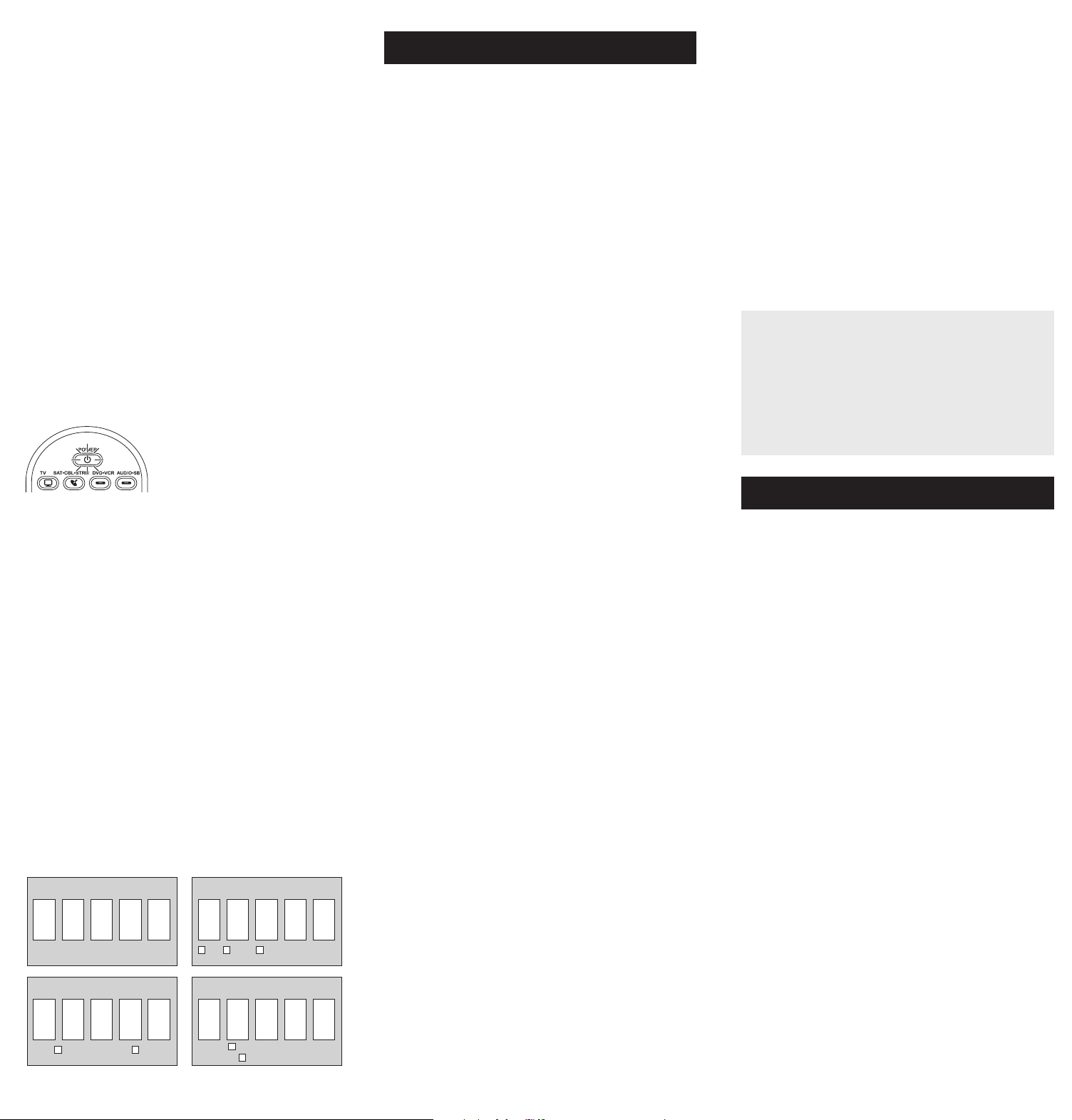
5. Cuandoeldispositivoseapague,oprima
lateclaREVERSEdelcontrolremoto
yespereporlomenos2segundos.El
controlremotopruebaelúltimocódigo
delgrupoanteriorde10códigos.
¿Se encendió el dispositivo?
SÍ: OprimalateclaSTOP.¡Listo!Latecla
dedispositivoestáprogramada.
NO: OprimaREVERSEnuevamente.
Elcontrolremotopruebaelpróximocódigoenelgrupode
códigos.
ContinúeoprimiendoREVERSEcada2segundoshastaqueel
dispositivoseencienda.Cuandoseencienda,oprimaSTOP.
Aviso: Si oprime accidentalmente la tecla REVERSE luego de que
el dispositivo se encienda, oprima la tecla FORWARD. Luego,
espere dos segundos para ver si su dispositivo se vuelve a apagar.
Enlamayoríadeloscasos,
lasteclasdelcontrolremoto
desempeñanlasmismas
funcionesquelasteclasdelos
controlesremotosoriginales
unavezprogramaestecontrol
remotoparamanejarlos
componentes.Lamayoríadelas
teclasdeestecontrolremoto
tienenotrasfunciones.
Lasteclasdedispositivo(
TV,
SAT•CBL•STRM,DVD•VCR,
AUDIO•SB)ponenelcontrol
remotoenelmodocorrectopara
manejareldispositivo.
GUIDE•HOME y MENU
danaccesoalasmismas
característicasquelasteclas
ensuscontrolesremotos
originales.
Lasteclasdeechaactúan
comoteclasdenavegación
parareproductoresde
transmisióndemediosasí
comoensistemasdeguíasy
menúparaotrosdispositivos.
CLEAR
saledelaprogramación
delcontrolremoto;además,
desempeñalasmismasfunciones
queenloscontrolesremotos
originales.
LasteclasCHAN y VOL
actúancomocontrolesde
canalyvolumen.
Latecla INPUT y — (guión)
tienetresfunciones:(1)alterna
entretodaslasfuentesde
videoconectadasaltelevisor;
(2)cuandoelcontrolremotose
encuentraenelmodoVCR,este
botónalternaentrelaentrada
VCRyTV;(3)cuandoingresa
directamentenúmerosdecanales
digitales,estebotónlepermite
separarelnúmerodelcanal
principaldelnúmerodelcanal
secundario(talcomo59.1).
Ahorro de Batería
Sucontrolremotouniversalahorralapotenciadelasbateríasal
apagarautomáticamentecualquierteclaqueseoprimapormásde
60segundos.Estaacciónprolongalavidaútildelasbateríasencaso
dequeelcontrolremotoquedepilladoenunlugardondelasteclas
permanezcanoprimidas,talcomoentreloscojinesdeunsofá.
RCRBB04GBE
Manual del Propietario del
Control Remoto Universal
Owner’s Manual (English on back)
El modelo actual puede ser
diferente al ilustrado
Cuidado y Mantenimiento
•Mantengaelcontrolremotoseco.Sisemoja,séqueloinmediatamente.
•Utiliceyalmaceneelcontrolremotoúnicamenteenentornosde
temperaturanormal.
•Manejeelcontrolremotodeformacuidadosa.Nolodejecaer.
•Mantengaelcontrolremotoresguardadodelpolvoylasuciedad.
•Limpieelcontrolremotoconunpañohúmedodevezencuandopara
mantenerloenbuenascondicionesdeoperación.
•Modicarosabotearlosdispositivosinternosdelcontrolremotopodría
ocasionardesperfectosyanularlagarantía.
¡GUARDE ESTE MANUAL Y LAS LISTAS DE CÓDIGOS!
En ocasiones los controles remotos pierden su programación
cuando se cambian las baterías. Asegúrese de mantener el
manual y las listas de códigos en un lugar seguro de manera
que pueda volver a programar el control remoto de ser
necesario.
Consejo: Este control remoto ya está programado para la
mayoría de televisores, VCR, lectores de DVD y receptores de
satélite RCA. Sencillamente oprima la tecla correspondiente—
DVD•VCR para un Lector de DVD, TV para un televisor, o
SAT•CBL•STRM para un receptor de satélite.
ElcontrolremotonecesitadosbateríasalcalinasAAA(no
suministradas).
Para instalar las baterías:
1. Oprimayempujelatapadel
compartimientodelasbateríaspara
removerla.
2. Insertelasbaterías,cerciorándose
dequelaspolaridades(+)y(–)
correspondanconeldiagramaque
apareceenelcompartimientodelas
baterías.
3. Vuelvaacolocarlatapadel
compartimientodelasbateríasensu
posición.
Precauciones sobre las Baterías:
• No combine baterías nuevas y viejas.
• No combine diferentes tipos de baterías: alcalinas, estándar
(carbón-zinc) o recargables (níquel-cadmio).
• Siempre remueva de inmediato baterías viejas, débiles o
desgastadas, y recíclelas o deséchelas según lo disponen las
normas locales y nacionales.
Parautilizarestecontrolremotouniversalconsusistemade
entretenimientoenelhogar,necesitaráprimeroprogramarlo
paramanejarsusdispositivos.Paraprogramarelcontrolremoto
universalparamanejarsusdispositivos.Pruébelosenelorden
listadoaquí:
• LaEntrada de Código Directo (Direct Code Entry) le
permiteingresaruncódigodelalistadecódigosque
acompañanasumarcadedispositivo.
• LaBúsqueda de Código de Marca (Brand Code Search)
buscaatravésdeloscódigosmarcaseleccionadasde
dispositivos.
• LaBúsqueda de Código Automática (Auto Code Search)
pasaautomáticamenteatravésdetodosloscódigosparael
dispositivoqueustedestátratandodecontrolar.
• LaBúsqueda de Código Manual (Manual Code Search)pasa
manualmenteatravésdetodosloscódigosparaeldispositivo
queustedestátratandodecontrolar.
Búsqueda Automática de Códigos
LaBúsquedaAutomáticadeCódigosrecorreautomáticamente
todosloscódigosdeldispositivoquedeseamanejar.Cuando
encuentreelquemanejasudispositivo,puededetenerla
búsquedayguardarelcódigo.
CONSEJOS: Cada tecla de dispositivo está asociada con un
tipo de dispositivo — la de TV está prestablecida para buscar
TVs, SAT•CBL•STRM para receptores satelitales, convertidores
de cable o TV digital o reproductores de transmisión de
medios, DVD•VCR para reproductores DVD, y AUDIO•SB para
dispositivos de audio y barras de sonido. Para programar una
tecla de dispositivo para un tipo diferente de dispositivo, vea la
sección Cambio de Tipo de Dispositivo de Tecla.
Para salir en cualquier momento de la Búsqueda Automática de
Códigos sin guardar un código nuevo, oprima la tecla CLEAR.
1. Enciendamanualmenteeldispositivo
quedeseamanejar.
2. Oprimaysostengalatecladedispositivoquedeseaprogramar.
Alavezquesostienelatecladedispositivo,utilicelaotramano
paraoprimirysostenersimultáneamentelateclaPOWERdel
controlremoto.
3. EsperehastaquelateclaPOWER
seilumineypermanezcailuminado.
Luego,suelteambasteclas.
4. Mantengaelcontrolremoto
apuntadodirectamentealpanel
frontaldeldispositivoquedesea
manejar.OprimalateclaPLAYdel
controlremotoyespere5segundos.
Elcontrolremotoestáprobando
ungrupode10códigosparael
dispositivo.
¿Se apagó el dispositivo?
SÍ: VayaalPaso5.
NO: OprimaPLAYnuevamente.Elcontrolremotopruebael
próximogrupode10códigos.
ContinúeoprimiendoPLAYcada5segundoshastaqueel
dispositivoseapague.
Cómo Probar el Código para Obtener Máxima Funcionalidad
1. Pruebe una variedad de funciones del dispositivo con el
control remoto. Si no puede utilizar alguna de las funciones
de sus dispositivos, vaya al próximo paso e intente un código
diferente.
2. RepitalaBúsquedadeCódigosporMarcadesdeelcomienzo.
Cuandoeldispositivoseapagueporprimeravez,nooprima
lateclaSTOP,conlacualquedaríaguardadoelmismocódigo.
Envez,conlaunidadapagada,continúeoprimiendolatecla
POWERrepetidamentehastaquelaunidadsevuelvaa
encender.
3. Sisevuelveaencenderlaunidad,habráencontradootrocódigo
quepuedemanejaresedispositivo.OprimaSTOP.
4. Pruebelafuncionalidaddelateclanuevamenteintentando
unavariedaddefunciones.Sielcódigocontrolalamayoría
delasfuncionesdeldispositivo,entonceshabráconcluidola
programación.Sielcódigoguardadonobrindaunamáxima
funcionalidad,intenteotrocódigo.
Búsqueda de Códigos por Marca
LaBúsquedadeCódigosporMarcarecorresóloloscódigos
deunadelasmarcasseleccionadasqueaparecenenlalistade
códigossuministrada.Silamarcadeldispositivoapareceenlalista,
posiblementelabúsquedasellevaráacabodemanerafácilyrápida.
CONSEJOS: Cada tecla de dispositivo está asociada con un
tipo de dispositivo — la de TV está prestablecida para buscar
TVs, SAT•CBL•STRM para receptores satelitales, convertidores
de cable o TV digital o reproductores de transmisión de
medios, DVD•VCR para reproductores DVD, y AUDIO•SB para
dispositivos de audio y barras de sonido. Para programar una
tecla de dispositivo para un tipo diferente de dispositivo, vea
la sección Cambio de Tipo de Dispositivo de Tecla.
Para salir en cualquier momento de la Búsqueda de Códigos
por Marca sin guardar un código nuevo, oprima la tecla
CLEAR.
1. Enciendamanualmenteeldispositivo
quedeseamanejar.
3. Oprimaysostengalatecladedispositivoquedeseaprogramar.
Alavezquesostienelatecladedispositivo,utilicelaotramano
paraoprimirysostenersimultáneamentelateclaPOWERdel
controlremoto.
4. EsperehastaquelateclaPOWERse
ilumineypermanezcailuminado.Luego,
suelteambasteclas.
6. Mantengaelcontrolremotoapuntado
directamentealpanelfrontaldel
dispositivoquedeseamanejar.Oprima
lateclaPOWERdelcontrolremotoy
espere2segundos.Elcontrolremoto
estáprobandouncódigoparalamarca
deldispositivo.
¿Se apagó el dispositivo?
SÍ: OprimalateclaSTOPparaguardarelcódigo.¡Listo!Latecla
dedispositivoestáprogramada.
NO: OprimaPOWERnuevamente.Elcontrolremotopruebael
próximocódigoparasumarca.
ContinúeoprimiendoPOWERcada2segundoshastaqueel
dispositivoseapague.Cuandoseapague,oprimaSTOP.
2. Encuentrelamarcadeldispositivoen
laseccióndeCódigosporMarcadela
listadecódigossuministrada.Marque
conuncírculoelnúmerodelamarcay
mantengalalistaamano.
5. Fíjeseenelnúmeroquemarcópara
elnúmerodecódigodelamarcadel
dispositivo.Oprimadichonúmeroenel
tecladodelcontrolremoto.
NOTAS
A través de la programación de cada tecla, asegúrese de
mantener el control remoto apuntado directamente al sensor
infrarrojo del dispositivo que está actualmente programando
con el control remoto.
Pruebe el control remoto con el dispositivo para asegurarse que
la tecla de dispositivo esté programada con el código correcto
y garantizar así su máxima funcionalidad. Si no puede utilizar
alguna de las funciones, intente con otro código. Para obtener
mayor información, consulte la sección “Cómo Probar el Código
para Obtener Máxima Funcionalidad” a continuación.
Durante la Búsqueda de Códigos por Marca, el control remoto
ignora la opresión de teclas que no son parte de la búsqueda.
La búsqueda se detendrá luego de dos minutos (la tecla POWER
parpadea cuatro veces y se apaga, y se retiene el último código
programado bajo la tecla de dispositivo).
La tecla POWER parpadea cuatro veces y se apaga cuando
el control remoto ha recorrido todos los códigos. El control
remoto sale del método de Búsqueda de Códigos por Marca.
Si su dispositivo aún no se ha apagado, intente un método de
búsqueda diferente.
Entrada Directa de Códigos
LaEntradaDirectadeCódigoslepermiteingresaruncódigodela
listadecódigossuministradaparalamarcadesudispositivo.
CONSEJO: Cada tecla de dispositivo está asociada con un
tipo de dispositivo — la de TV está prestablecida para buscar
TVs, SAT•CBL•STRM para receptores satelitales, convertidores
de cable o TV digital o reproductores de transmisión de
medios, DVD•VCR para reproductores DVD, y AUDIO•SB para
dispositivos de audio y barras de sonido. Para programar una
tecla de dispositivo para un tipo diferente de dispositivo, vea la
sección Cambio de Tipo de Dispositivo de Tecla.
1. Enciendamanualmenteeldispositivo
quedeseamanejar.
3. Oprimaysostengalatecladedispositivoquedeseaprogramar
(lateclaPOWERseilumina).
Mientrasoprimelatecladedispositivo,ingreseconlaotramano
elprimercódigodecincodígitosparalamarcadelalistade
códigos(lateclaPOWERseapagaluegodelprimerdígito).
2. EncuentrelaListadeCódigos
suministradaconelcontrolremoto.
Encuentrelasecciónparaeltipode
dispositivoquedeseaprogramar,
ylocalicelamarcaenesasección.
Marqueconuncírculoloscódigos
paralamarcaymanténgalosamano.
NOTAS
Recuerde ingresar el código para referencia futura en el
recuadro provisto en la sección Recuperación de Códigos de
este manual.
Si la marca de su dispositivo no aparece en la lista de códigos,
utilice uno de los métodos de Búsqueda de Códigos para
programar el control remoto. (Consulte los métodos de
Búsqueda Automática y Manual de Códigos)
Si suelta la tecla de dispositivo en cualquier momento durante
el proceso de Entrada Directa de Códigos, la tecla POWER
parpadea cuatro veces, y se sale del proceso. Se retendrá el
último código programado bajo la tecla de dispositivo.
Pruebe el control remoto con el dispositivo para asegurarse que
la tecla de dispositivo esté programada con el código correcto
y garantizar así su máxima funcionalidad. Si no puede utilizar
alguna de las funciones, intente con otro código de la lista.
4. Cuandohayaingresadoel
códigodecincodígitos,continúe
oprimiendolatecladedispositivoy
observelateclaPOWER.
¿Se iluminó la tecla POWER?
SÍ: ¡Listo!Latecladedispositivoestá
programada.
No, parpadeó cuatro veces y se apagó: Haingresadounnúmero
decódigoquenoseencuentraenlaslistasdecódigosuomitióun
pasoenelprocedimientodeentradadecódigos.Intenteelpaso3
nuevamente.
Búsqueda Manual de Códigos
LaBúsquedaManualdeCódigoslepermiterecorrerunoporuno
todosloscódigosdeldispositivoquedeseamanejar.Cuando
encuentreelquemanejasudispositivo,puededetenerlabúsqueday
guardarelcódigo.
CONSEJOS: El método de Búsqueda Manual de Códigos podría
tomar más tiempo porque el control remoto busca a través
de todos los códigos en su memoria uno por uno. Si su marca
aparece en las Listas de Códigos por Marca o Listas de Códigos,
intente primero la Búsqueda de Códigos por Marca o el método
de Entrada Directa de Códigos.
Cada tecla de dispositivo está asociada con un tipo de dispositivo
— la de TV está prestablecida para buscar TVs, SAT•CBL•STRM
para receptores satelitales, convertidores de cable o TV digital
o reproductores de transmisión de medios, DVD•VCR para
reproductores DVD, y AUDIO•SB para dispositivos de audio y
barras de sonido. Para programar una tecla de dispositivo para
un tipo diferente de dispositivo, vea la sección Cambio de Tipo
de Dispositivo de Tecla.
Para salir en cualquier momento de la Búsqueda Manual de
Códigos sin guardar un código nuevo, oprima la tecla CLEAR.
1. Enciendamanualmenteeldispositivo
quedeseamanejar.
2. Oprimaysostengalatecladedispositivoquedeseaprogramar.
Alavezquesostienelatecladedispositivo,utilicelaotramano
paraoprimirysostenersimultáneamentelateclaPOWERdel
controlremoto.
3. EsperehastaquelateclaPOWER
seilumineypermanezcailuminado.
Luego,suelteambasteclas.
4. Mantengaelcontrolremotoapuntadodirectamentealpanel
frontaldeldispositivoquedeseamanejar.Oprimalatecla
POWERdelcontrolremotoyespere2segundos.
¿Se apagó el dispositivo?
SÍ:OprimalateclaSTOPparaguardarel
código.¡Listo!Latecladedispositivoestá
programada.
NO: OprimaPOWERnuevamente.El
controlremotopruebaelpróximocódigo
parasudispositivo.
ContinúeoprimiendoPOWERcada2
segundoshastaqueeldispositivose
apague.Cuandoseapague,oprimaSTOP.
CONSEJO: Debido a la gran cantidad de códigos, quizás necesite
oprimir la tecla POWER varias veces-posiblemente cientos de
veces.
NOTAS
A través de la programación de cada tecla, mantenga el control
remoto apuntado directamente al sensor infrarrojo del dispositivo
que está programando con el control remoto.
Pruebe el control remoto con el dispositivo para asegurarse que
la tecla de dispositivo esté programada con el código correcto
y garantizar así su máxima funcionalidad. Si no puede utilizar
alguna de las funciones, intente con otro código. Para obtener
mayor información, consulte la sección “Cómo Probar el Código
para Obtener Máxima Funcionalidad” a continuación.
Durante la Búsqueda Manual de Códigos, el control remoto
ignora la opresión de teclas que no son parte de la búsqueda.
La búsqueda se detendrá luego de dos minutos (la tecla POWER
parpadea cuatro veces y se apaga, y se retiene el último código
programado bajo la tecla de dispositivo).
La tecla POWER parpadea cuatro veces y se apaga cuando
el control remoto ha recorrido todos los códigos. El control
remoto sale del método de Búsqueda Manual de Códigos. Si
su dispositivo aún no se ha apagado, intente un método de
búsqueda diferente.
Cómo Probar el Código para Obtener Máxima Funcionalidad
1. Pruebe una variedad de funciones del dispositivo con el
control remoto. Si no puede utilizar alguna de las funciones
del dispositivo, vaya al próximo paso e intente un código
diferente.
2. RepitaelMétododeBúsquedaManualdeCódigosdesdeel
comienzo.Cuandohayaencontradoelcódigoquevuelvaa
encendereldispositivo,nooprimalateclaSTOP,conlacual
quedaríaguardadoelmismocódigo.Envez,conlaunidad
apagada,continúeoprimiendolateclaPOWERrepetidamente
hastaquelaunidadsevuelvaaencender.
3. Sisevuelveaencenderlaunidad,habráencontradootrocódigo
quepuedemanejaresedispositivo.OprimalateclaSTOP.
4. Nuevamente,pruebelafuncionalidaddelateclaintentando
controlarunavariedaddefuncionesdeldispositivo.Sielcódigo
quesehaalmacenadocontrolalamayoríadelasfuncionesdel
dispositivo,entonceshabráconcluidolaprogramación.Siel
códigoguardadonobrindaunamáximafuncionalidad,intente
otrocódigo.
Cómo Cambiar el Tipo de Dispositivo de Una
Tecla
Cadatecladedispositivoestáasociadaconuntipodedispositivo—
ladeTVestáprestablecidaparabuscarTVs,SAT•CBL•STRMpara
receptoressatelitales,convertidoresdeTVdigitaloreproductores
detransmisióndemedios,oconvertidoresdecable,DVD•VCRpara
reproductoresDVDoVideograbadoras,yAUDIO•SBparadispositivos
deaudioybarrasdesonido.Paraprogramarestasteclaspara
controlaruntipodiferentededispositivo,ustedtienequereasignarlas
primero.
Cómo Reasignar la Tecla DVD•VCR para Manejar una VCR
LateclaDVD•VCRvienepreestablecidadefábricaparamanejarun
LectordeDVD.SideseaquelateclaDVD•VCRmanejeunaVCR,
deberáreasignarla.
1. OprimaysostengalateclaDVD•VCR.LateclaPOWERse
encenderá.ContinúesosteniendolatecladeDVD•VCR
2. MientrassostienelateclaDVD•VCR,oprimaysueltelatecla
numérica2enelteclado.LateclaPOWERseapagará.
3. SueltelateclaDVD•VCR.LateclaPOWERparpadeadosveces
yluegoseapaga.LateclaDVD•VCRestáahoraconguradapara
manejarunaVCR.
4. Observelasinstruccionesdelabúsquedadecódigosautomática,
pormarca,manualoentradadirectaparaprogramarlatecla
DVD•VCRparasuVCR.
Cómo Reasignar la Tecla AUDIO•SB para Manejar Otros
Dispositivos
LateclaAUDIO•SBestápredeterminadaparacontrolarun
dispositivodeaudio.SiustedquierequelateclaAUDIO•SB
controleenformaadicionalundiferentedispositivo(TV,DVD,
convertidorsatelital,deTVdigitaloreproductordetransmisiónde
medios,oconvertidordecableadicional,porejemplo),usteddebe
reasignarla.
1. OprimaysostengalateclaAUDIO•SB. LateclaPOWERse
encenderá.
2. MientrassostienelateclaAUDIO•SB,oprimaysueltelatecla
numéricaeneltecladoparaeldispositivoquedeseamanejar
(consultelatablaabajo).LateclaPOWERseapagará.
CONTROLES DE TECLA DE DISPOSITIVO:
TVadicional oprima1
VCRoDVR oprima2
LectordeDVDadicional oprima3
Dispositivodeaudioobarradesonido
adicional
oprima4
Paraconvertidorsatelital,TVdigitalo
reproductoresdetransmisióndemedios,o
convertidordecable
oprima5
3. SueltelateclaAUDIO•SB. LateclaPOWERparpadeados
vecesyluegoseapaga.LateclaAUDIO•SBestáahora
conguradaparamanejareltipodedispositivoseleccionado.
4. Observelasinstruccionesdelabúsquedadecódigos
automática,pormarca,manualoentradadirectapara
programarlateclaAUDIO•SB.
Recuperación de Códigos
Unavezhayaprogramadoelcontrolremotoparamanejarsus
dispositivos,serecomiendaanotarloscódigosparafutura
referencia.SiutilizóelmétododeEntradaDirectadeCódigos,
esmuysencillo.Simplementeencuentreloscódigosqueingresó
yanótelosenlosrecuadrosacontinuación.Siutilizóunodelos
métodosdeBúsquedadeCódigosparaprogramarelcontrol
remotoosiutilizóelmétododeEntradaDirectaperonorecuerda
elcódigo,necesitarárecuperarelcódigodecincodígitosde
cadaunodelosdispositivos.Recuperaryanotarelcódigoreal
leahorrarátiemposialgunaveznecesitavolveraprogramarel
controlremoto(porejemplo,sisepierdelaprogramacióncuando
cambialasbaterías).Sianotaloscódigos,puedeutilizarelmétodo
deEntradaDirectaparavolveraprogramarelcontrolremotoan
demanejarotrosdispositivos,unprocesorápidoysencillo.
1. Oprimaysostengalateclade
dispositivo(TV,SAT•CBL•STRM,
DVD•VCR,AUDIO•SB)cuyocódigo
desearecuperar.LateclaPOWER
seencenderá.Continúeoprimiendo
latecladedispositivo.
2. Mientrassostienelatecladedispositivo,oprimaysostengala
teclaINFO.LateclaPOWERseapagará.Luegodesostener
ambasteclasdurantetressegundos,lateclaPOWERse
encenderánuevamente.
3. Suelteambasteclas. LateclaPOWERpermaneceencendido.
4. Comenzandoconlateclanumérica1,oprimaysueltecadatecla
numéricaeneltecladoenelsiguienteorden1-9,luego0.El
númeroquehacequelateclaPOWERparpadeeeselprimer
númerodelcódigo.Mientrasencuentralosnúmerosdelcódigo,
anótelosparareferenciafutura.
Aviso: Todos los códigos de TV comienzan con el número 1; todos
los códigos VCR y DVR comienzan con el número 2; todos los
DVDs, el número 3; todos los dispositivos de audio, el número
4; y todos los receptores satelitales, convertidores de TV digital
o reproductores de transmisión de medios, y convertidores de
cable, con el número 5.
5. Repitaelpaso4hastahaberrecuperadoloscinconúmerosdel
código.Luegoderecuperarelquintonúmero,lateclaPOWER
parpadeabrevemente,yluegoseapaga.
CONSEJO: Para salir del Modo de Recuperación de Códigos en
cualquier momento, oprima la tecla CLEAR.
Aviso: Si oprime una tecla inválida durante el proceso de
Recuperación de Códigos, el control remoto no responderá.
Si no oprime una tecla de Recuperación de Códigos válida,
(TV, SAT•CBL•STRM, DVD•VCR, AUDIO•SB, INFO, CLEAR), la
Recuperación de Códigos se detendrá al cabo de 15 segundos. La
tecla POWER parpadea cuatro veces y luego se apaga.
IMPORTANTE
Dado que este control remoto maneja más de un dispositivo,
deberá primero “indicarle” al control remoto cuál dispositivo
desea manejar. En otras palabras, si desea manejar el televisor,
deberá primero oprimir la tecla TV para poner el control
remoto en el Modo TV. El control remoto permanece en ese
modo de dispositivo hasta que oprima una tecla de dispositivo
diferente. Por ejemplo, si el control remoto se encuentra en el
Modo TV y desea manejar el Lector de DVD, deberá oprimir la
tecla DVD•VCR para cambiar los modos de dispositivo.
Problema: El control remoto no maneja su dispositivo.
• Asegúresequeelcontrolremotoseencuentreenelmodo
correctooprimiendolatecladedispositivocorrespondiente(TV,
SAT•CBL•STRM,DVD•VCR,AUDIO•SB).Estoleindicaalcontrol
remotoeldispositivoquedebemanejar.
• Retirelosobstáculosubicadosentreelcontrolremotoy
eldispositivo.Asegúresedeapuntarelcontrolremoto
directamentealsensorinfrarrojodeldispositivo.
• Asegúresequelasbateríasesténcargadasydebidamente
instaladas.ReemplacelasbateríascondosbateríasAAAnuevas,
desernecesario(consultelasecciónInstalacióndelasBaterías).
Problema: El control remoto no puede programarse para
manejar su dispositivo.
• Siestáprobandoelcontrolremotomientrasloestá
programando,podríaestardemasiadoalejadodeldispositivo
oenunánguloincorrecto.Deberáhaberunatrayectoriasin
obstáculosentreelcontrolremotoyelsensorinfrarrojodel
dispositivo.Acérquesemásyasegúresedeapuntardirectamente
aldispositivoqueestáintentandomanejar.
• SiestáutilizandoelmétododeprogramacióndeEntrada
Directaparaingresarloscódigosparasumarcaylaunidad
aúnnofuncionadebidamente,intenteelmétododebúsqueda
automática,pormarcaomanual.
• ParamanejarunidadesdecombinacióntalescomoTV/
VCRoTV/DVD,deberáprogramarlasteclasdedispositivo
correspondientesindividualesparamanejarcadapartedela
unidaddecombinación.Unavezprogramadasdemaneraexitosa,
lateclaTVmanejalasfuncionesdeltelevisor,ylateclaDVD•VCR
manejalasfuncionesdelLectordeDVDyVCR.
• Asegúresequelasbateríasesténcargadasydebidamenteinstaladas.
Problema: El control remoto no ejecuta los comandos
debidamente.
• Asegúresequeelcontrolremotoseencuentreenelmodo
correctooprimiendolatecladedispositivocorrespondiente(TV,
SAT•CBL•STRM,DVD•VCR,AUDIO•SB).Estoleindicaalcontrol
remotoeldispositivoquedebemanejar.
• Asegúresequeeldispositivoseencuentrelisto(porejemplo,el
LectordeDVDtengaundiscocargado).
• Puedehaberoprimidounateclainválidaparaelmodoenquese
encuentraelcontrolremoto.
• Siestátratandodeingresardirectamenteunnúmerodecanal,
intenteoprimirlateclaENTERluegodeingresarelnúmerodel
canalyaquealgunasmarcasymodelosrequierenestaacción.
• Existelaposibilidaddequeuncódigoprogramadopuedamanejar
únicamentealgunasdelasfuncionesdeldispositivo(porejemplo,
sóloenciendeyapagaundispositivo).Paraconrmarquelatecla
dedispositivohasidoprogramadaconelcódigocorrectopara
obtenermáximafuncionalidad,pruebeeldispositivo.Intente
manejarunavariedaddefuncionesdeldispositivoconelcontrol
remoto.Sialgunasdelasfuncionesdesusdispositivosnotrabajan,
intenteprogramarelcontrolremotoconuncódigodiferenteen
lalistaatravésdelMétododeEntradaDirectadeCódigoshasta
queencuentreelcódigoquelepermitaalcontrolremotomanejar
lamayoríadelasfuncionesdeldispositivo.Diferentescódigos
puedenproporcionardiferentesnivelesdefuncionalidad.
Problema: La tecla POWER no se ilumina cuando oprime una
tecla.
• Puedehaberoprimidounateclainválidaparaelmodoenquese
encuentraelcontrolremoto.
• Asegúresequeelcontrolremotoseencuentreenelmodo
correctooprimiendolatecladedispositivocorrespondiente
(TV,SAT•CBL•STRM,DVD•VCR,AUDIO•SB).Estoleindicaal
controlremotoeldispositivoquedebemanejar.
• Asegúresequelasbateríasesténcargadasydebidamente
instaladas.ReemplacelasbateríascondosbateríasAAAnuevas,
desernecesario(consultelasecciónInstalacióndelasBaterías).
Problema: El control remoto no cambia canales en el
dispositivo.
• Asegúresequeelcontrolremotoseencuentreenelmodo
correctooprimiendolatecladedispositivocorrespondiente(TV,
SAT•CBL•STRM,DVD•VCR,AUDIO•SB).Estoleindicaalcontrol
remotoeldispositivoquedebemanejar.
• OprimalateclaENTERluegodehaberingresadounnúmerode
canal.
• Retirelosobstáculosubicadosentreelcontrolremotoy
eldispositivo.Asegúresedeapuntarelcontrolremoto
directamentealsensorIRdeldispositivo.
VoxxAccessoriesCorporation(la“Compañía”)legarantizaausted,el
compradororiginaldeesteproductoquesi,bajocondicionesyuso
normales,seencontraraquepresentadefectosmaterialesodemanode
obradurantesuvidaútilmientrasseadesupropiedad,talesdefectosserán
reparadosoreemplazados(aopcióndelaCompañía)sincargoalgunopor
laspiezasylaboresdereparación.
Paraobtenerlosserviciosdereparaciónoreemplazodentrodelostérminos
deestagarantía,elproductoseentregaráconpruebadecubiertade
garantía(porejemplo,facturafechadadeventa),especicacióndelos
defectos,transporteprepagado,aunaestacióndegarantíaaprobada.Para
ubicarlaestacióndegarantíamáscercanaasudomicilio,llamesincostoa
nuestraocinadecontrol:al1-800-645-4994.
EstaGarantíanocubreunproductoadquirido,mantenidooutilizadofuera
delosEstadosUnidosoCanadá.
EstaGarantíanoestransferibleynoincluyeloscostosincurridosenla
instalación,remociónoreinstalacióndeesteproducto.EstaGarantíano
aplicasi,esopinióndelaCompañíaque,esteproductohasufridodaños
debidoaalteraciones,instalacióninadecuada,abuso,usoindebido,
negligencia,accidenteoelusosimultáneodebateríasdetiposdiferentes
(p.ej.,alcalinas,estándarorecargables).
ELALCANCEDELARESPONSABILIDADDELACOMPAÑÍABAJOESTA
GARANTÍAESTÁLIMITADOALAREPARACIÓNOELREEMPLAZO
PROVISTOARRIBAY,ENNINGÚNCASO,DEBERÁLARESPONSABILIDAD
DELACOMPAÑÍAEXCEDERELPRECIODECOMPRAPAGADOPOREL
COMPRADORDEESTEPRODUCTO.
EstaGarantíareemplazacualesquieraotrasresponsabilidadesogarantías
expresas.CUALESQUIERAGARANTÍASIMPLÍCITAS,INCLUYENDO
CUALQUIERGARANTÍAIMPLÍCITADECOMERCIABILIDADO
ADAPTABILIDADPARAUNPROPÓSITOENPARTICULARESTARÁN
LIMITADASALADURACIÓNDEESTAGARANTÍA.ENNINGÚNCASO
LACOMPAÑÍASERÁRESPONSABLEPORDAÑOSEMERGENTESO
INCIDENTALES.Ningunapersonanirepresentanteestáautorizadoaasumir,
anombredelaCompañía,ningunaresponsabilidadsalvolaexpresadaaquí
enconexiónconlaventadeesteproducto.
Algunosestados/provinciasnopermitenlimitacionessobreladuraciónde
unagarantíaimplícitaolaexclusiónolalimitacióndedañosincidentales
oemergentes,demodoqueesposiblequelaslimitacionesoexclusiones
anterioresnoseapliquenensucaso.EstaGarantíaleconerederechos
legalesespecícos;segúnelestado/provincia,puededisfrutarademásde
otrosderechos.
Paso 1: Instale las baterías
Paso 2: Programe el control remoto
Recorrido del control remoto
Funciones Avanzadas
Garantía Limitada Durante la Vida Útil del Producto
CÓDIGO DE DVD•VCR CÓDIGO DE AUDIO•SB
5
CÓDIGO DE SAT•CBL•STRM
1
CÓDIGO DE TV
SAT CABLE CONVERTIDOR DE DTV
LECTOR DE DVD VCR
DISPOSITIVO DE AUDIO
BARRA DE SONIDO
FelicidadesporlacompradeesteControlRemotoUniversal
RCApara4dispositivos.Estecontrolremotocuentaconuna
coleccióndecódigosdelosdispositivosmásrecientesde
todaslasmarcasprincipales,consoporteparareproductores
detransmisióndemedios(streamingmedia).Lasteclasde
navegaciónhansidorediseñadasparafuncionaralaperfección
conlosmássosticadossistemasdeguíaymenúquese
encuentranenlosdispositivosdeentretenimientoencasaenla
actualidad.
Cómo Probar el Código para Obtener Máxima Funcionalidad
1. Pruebe una variedad de funciones del dispositivo con el
control remoto. Si no puede utilizar alguna de las funciones
del dispositivo, vaya al próximo paso e intente un código
diferente.
2. RepitalaBúsquedaAutomáticadeCódigosdesdeelcomienzo.
Cuandosudispositivoseapague,nodetengalabúsqueda.En
vez,conlaunidadapagada,continúeoprimiendolateclaPLAY
cada5segundoshastaquelaunidadsevuelvaaencender.
3. Cuandosevuelvaaencenderlaunidad,oprimalatecla
REVERSEenelcontrolremotocada2segundoshastaqueel
dispositivosevuelvaaapagar.Cuandoeldispositivosevuelva
aapagar,oprimalateclaSTOP.
4. Nuevamente,pruebelafuncionalidaddelateclaintentando
controlarunavariedaddefuncionesdeldispositivo.Sielcódigo
quesehaalmacenadocontrolalamayoríadelasfuncionesdel
dispositivo,entonceshabráconcluidolaprogramación.Siel
códigoguardadonobrindaunamáximafuncionalidad,intente
otrocódigo.
NOTAS
A través de la programación de cada tecla, asegúrese de
mantener el control remoto apuntado directamente al sensor
infrarrojo del dispositivo que está actualmente programando
con el control remoto.
Pruebe el control remoto con el dispositivo para asegurarse que
la tecla de dispositivo esté programada con el código correcto
y garantizar así su máxima funcionalidad. Si no puede utilizar
alguna de las funciones, intente con otro código. Para obtener
mayor información, consulte la sección “Cómo Probar el Código
para Obtener Máxima Funcionalidad” a continuación.
Durante la Búsqueda Automática de Códigos, el control remoto
ignora la opresión de teclas que no son parte de la búsqueda.
La búsqueda se detendrá luego de dos minutos (la tecla POWER
parpadea cuatro veces y se apaga, y se retiene el último código
programado bajo la tecla de dispositivo).
La tecla POWER parpadea cuatro veces y se apaga cuando
el control remoto ha recorrido todos los códigos. El control
remoto sale del método de Búsqueda Automática de Códigos.
Si su dispositivo aún no se ha apagado, intente un método de
búsqueda diferente.
Luz de fondo
Lailuminacióndefondoleayudaavermejorlasteclasdelcontrol
remotoenlaoscuridad.Puedeencenderlailuminaciónde
fondooprimiendolatecladeluzdefondo
( ).Laluzdefondo
permaneceencendidasiempreycuandosecontinúeoprimiendo
teclasyseapagacincosegundosluegodelaúltimaopresiónde
unatecla.
Marca(s)®Registrada(s)
©2018VoxxAccessoriesCorp.
3502WoodviewTrace,Suite220
Indianapolis,IN46268
Code Lists
Brand Codes are used for programming using the Brand Code Search
and Entry method outlined in the User’s Guide.
Lista de Códigos
Los códigos de las marcas son utilizados para programar utilizando
los métodos de búsqueda y entrada de códigos de marcas, resaltado
en la guía del usuario.
0
1
23
4
56
7
8
9
RCA
GE
PROSCAN
Insignia
JVC
Magnavox
Philips
Panasonic Samsung Sharp Sony Toshiba Vizio
TV
VCR
0
1
23
4
56
7
8
9
RCA
GE
PROSCAN
Apex JVC
Magnavox
Philips
Panasonic Pioneer Samsung Sharp Sony Toshiba
DVD
SAT/CABLE
0
1
23
4
56
7
8
9
RCA
GE
PROSCAN
Motorola DirecTV
Dish Network
Systems/
Echostar
General
Instruments
Hughes
Network
Systems
Scientific
Atlanta
Magnavox
Philips
AMNIO
ADB
Panasonic
Brand Code List/Lista de Códigos de Marcas
0
1
23
4
56
7
8
9
Samsung
Magnavox
Philips
Mitsubishi Panasonic Sharp Sony Toshiba
RCA
GE
PROSCAN
JVC
Symphonic
Code Lists
Brand Codes are used for programming using the Brand Code Search
and Entry method outlined in the User’s Guide.
Lista de Códigos
Los códigos de las marcas son utilizados para programar utilizando
los métodos de búsqueda y entrada de códigos de marcas, resaltado
en la guía del usuario.
0
1
23
4
56
7
8
9
RCA
GE
PROSCAN
Insignia
JVC
Magnavox
Philips
Panasonic Samsung Sharp Sony Toshiba Vizio
TV
VCR
0
1
23
4
56
7
8
9
RCA
GE
PROSCAN
Apex JVC
Magnavox
Philips
Panasonic Pioneer Samsung Sharp Sony Toshiba
DVD
SAT/CABLE
0
1
23
4
56
7
8
9
RCA
GE
PROSCAN
Motorola DirecTV
Dish Network
Systems/
Echostar
General
Instruments
Hughes
Network
Systems
Scientific
Atlanta
Magnavox
Philips
AMNIO
ADB
Panasonic
Brand Code List/Lista de Códigos de Marcas
0
1
23
4
56
7
8
9
Samsung
Magnavox
Philips
Mitsubishi Panasonic Sharp Sony Toshiba
RCA
GE
PROSCAN
JVC
Symphonic
Información FCC
EsteaparatoobedecelasespecicacionesdelaParte15delasregulaciones
FCC.Lasfuncionesestánsujetasalassiguientescondiciones:1)Este
aparatonopuedecausarinterferenciasdañinas,y2)esteaparatopuede
recibircualquierainterferencia,incluyendoaquellasquepuedancausar
funcionesnodeseadas.
Nota:Seprobóesteequipoypodemosarmarquecumpleconlas
restriccionesestablecidasparaundispositivodigitalClaseB,deacuerdo
conlaSección15delaReglamentacióndeFCC.Estasrestriccionesfueron
designadasparabrindarunaprotecciónrazonablefrentealainterferencia
perjudicialenunainstalaciónresidencial.Esteequipogenera,usaypuede
irradiarenergíaderadiofrecuenciay,sinoestáinstaladoonoseloutilizade
acuerdoconlasinstrucciones,puedeocasionarinterferenciasperjudiciales
paralascomunicacionesderadio.Sinembargo,noexisteningunagarantía
dequenosevayaaproducirunainterferenciaenunainstalaciónparticular.
Siesteequipoproduceunainterferenciaperjudicialconlarecepcióndela
radioolatelevisión,locualpodríadeterminarseapagandoyencendiendo
elequipo,selepidealusuarioqueintentecorregirlainterferencia
siguiendounaovariasdelassiguientesmedidas.
• Vuelvaaorientarocambiedelugarlaantenareceptora.
• Aumentelaseparaciónentreelequipoyelreceptor.
• Conecteesteequipoauntomacorrienteenuncircuitodiferentealque
estéconectadoelreceptor.
• Consultealdistribuidoroauntécnicoexperimentadoderadioy
televisiónparasolicitarasistencia.
Precaución:Cualquiercambioomodicaciónnoexpresamenteaprobados
porlaparteresponsableporelcumplimientopodríainvalidarlaautoridad
delusuarioparaoperaresteequipo.
Información Regulatoria de la Industria Canadiense
CANICES-3(B)/NMB-3(B)
Problema: El menú del dispositivo no aparece en la pantalla
del televisor.
• Asegúresedehaberconectadodebidamenteeldispositivoal
televisoryhaberseleccionadolaentradacorrecta.(Consulteel
ManualdelPropietariodelosdispositivosparainformarsesobrelos
procedimientosdeconexióncorrectos.)
• Asegúresequeelcontrolremotoseencuentreenelmodo
correctooprimiendolatecladedispositivocorrespondiente(TV,
SAT•CBL•STRM,DVD•VCR,AUDIO•SB).Estoleindicaalcontrol
remotoeldispositivoquedebemanejar.
• Elaccesoalosmenúsnoesrespaldadoportodaslasmarcas.
Posiblementeseanecesarioutilizarelcontrolremotooriginalpara
lograraccesoalasfuncionesdemenúdealgunosdispositivos.
Para obtener más información, incluido videos instructivos,
códigos de programación con control remoto y asistencia al
cliente, visite www.RCACodeSupport.com
Resolución de Problemas
Bloqueo de Canales
BloqueodeCanalesenvíaautomáticamentecomandosdecanal,
talescomoCH,GOBACKylasteclasnuméricas0-9,asureceptor
desatélite,aparatodecableoconvertidordeTVdigitalcuando
seencuentraenelmodoTV.Estopuedeahorrarleopresionesde
teclassiutilizaundispositivodiferenteasutelevisorparacambiar
canales.
Para activar el bloqueo de canales:
1. Oprimaysostengalatecladedispositivoparaeldispositivo
queutilizaparacambiarcanales.Alavezquesostiene
estatecladedispositivo,utilicelaotramanoparaoprimir
ysostenersimultáneamentelateclaCHarribadelcontrol
remoto.
2. EsperehastaquelateclaPOWERdelcontrolremotose
ilumineypermanezcailuminada.Luego,suelteambasteclas.
3. OprimaENTERparabloquearloscomandosdecanalpara
estedispositivo.
Para desactivar el bloqueo de canales:
1. OprimaysostengalateclaTV.Alavezquesostiene
lateclaTV,utilicelaotramanoparaoprimirysostener
simultáneamentelateclaCHabajodelcontrolremoto.
2. EsperehastaquelateclaPOWERdelcontrolremotose
ilumineypermanezcailuminada.Luego,suelteambasteclas.
3. OprimaENTERparacomenzaracambiarcanalesconsu
televisor.