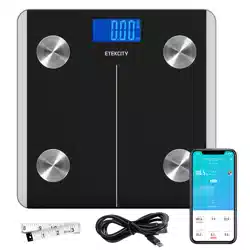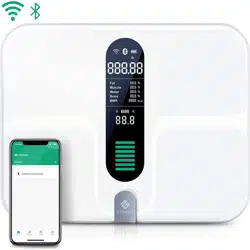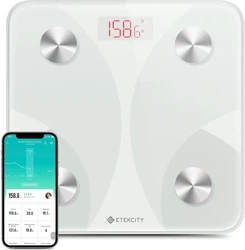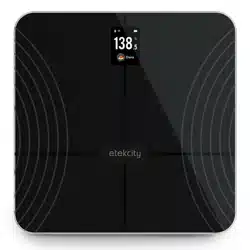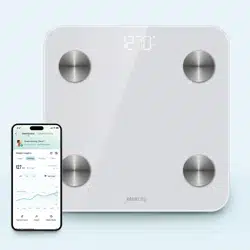
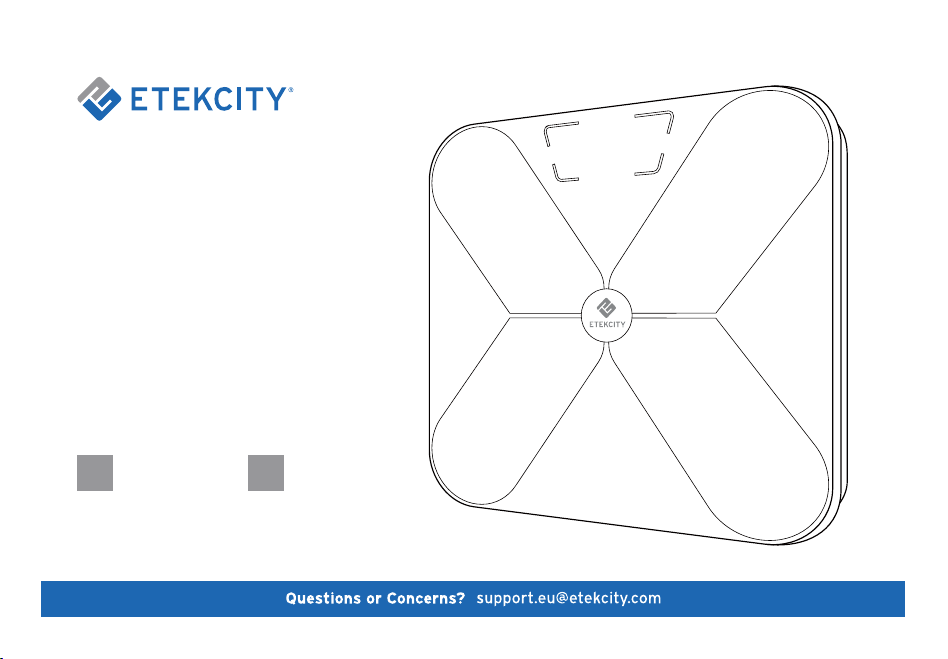
Smart Fitness Scale
Model No.: ESF17
EN DE
ENGLISH DEUTSCH

'What
can, 1
g£t
blJ
jbiniiuJ,?
1.
Enjoy
t
he
chance to win br
an
d
new
product
sforfree
l
2. Share
you
r thoughts a
nd
feedback-you
mi
ght
contribute
to
the
creation
of
new
E
te
kcityprcx:Jucts
3. Grabdealsanddiscounts inadva
nce
4.
Conn
ect
with
othe
r Etekcity
community
members
1/ow
do 1 jbin?
1. F
in
d
uso
nl
ine-----checkout the link
so
r
QR
codes on
th
is
ca
rd
2.
F
ol
l
ow
us
on Fac
eboo
ka
nd
keep
posted
on
our updates
ES
:
@Ete
k
c
ity
S~
n

Safety Information
Main Functions
Set-Up
Operation
Weighing without the VeSyncFit App
Weighing with the VeSyncFit App
Pairing the Scale with VeSyncFit
Viewing Repotrs & Setting/Deleting References
Share Progress
Adding/Deleting Users
Settings
Connecting with Other Fitness Apps
Google Fit
Fitbit
Maintenance
Troubleshooting
Frequently Asked Questions
Specifications
Package Contents
Warranty Information
Sicherheitshinweise
Hauptfunktionen
Inbetriebnahme
Bedienung
Wiegen ohne die VeSyncFit App
Wiegen mit der VeSyncFit App
Die Waage mit VeSyncFit Koppeln
Anzeigen von Berichten und Einstellen/Löschen
von Referenzen
Fortschritt Teilen
Benutzer Hinzufügen/Löschen
Einstellungen
Verbindung mit Anderen Fitness-Apps Herstellen
Google Fit
Fitbit
Pflegung
Fehlerbehebung
Häufig Gestellte Fragen (FAQ)
Spezifikationen
Packungsinhalt
GARANTIE
4
5
6
8
8
9
9
11
13
15
17
18
19
21
23
25
26
27
27
28
29
31
32
34
34
35
35
37
39
41
43
44
45
47
49
51
52
53
53
54

Model N
English
Smart Fitness Scale
o.: ESF17
Safety Information
IMPORTANT: Please read and comply with all
of the instructions and warnings provided in this
manual before using the product. Failure to comply
with the instructions and warnings provided herein
may result in inaccurate results and/or damage to
the product itself.
General Safety
• This scale should not be used to diagnose or treat
any medical condition. Consult your primary care
physician before making changes to your diet,
exercise plans, or physical activities.
• If you are pregnant, have a pacemaker, or other
internal device, you should not heavily rely on the
data provided by this product. Please note that
all data should be used as a reference and is not
a substitute for medical advice from a licensed
healthcare professional.
• Check the scale before each use. Do not use the
scale if it is damaged in anyway.
• The glass platform is slippery when wet. Make
sure the platform and feet are dry before stepping
on for measurement.
4
Use & Care
• This scale is not intended for commercial use.
• Always place the scale on a hard, flat surface
before measurement.
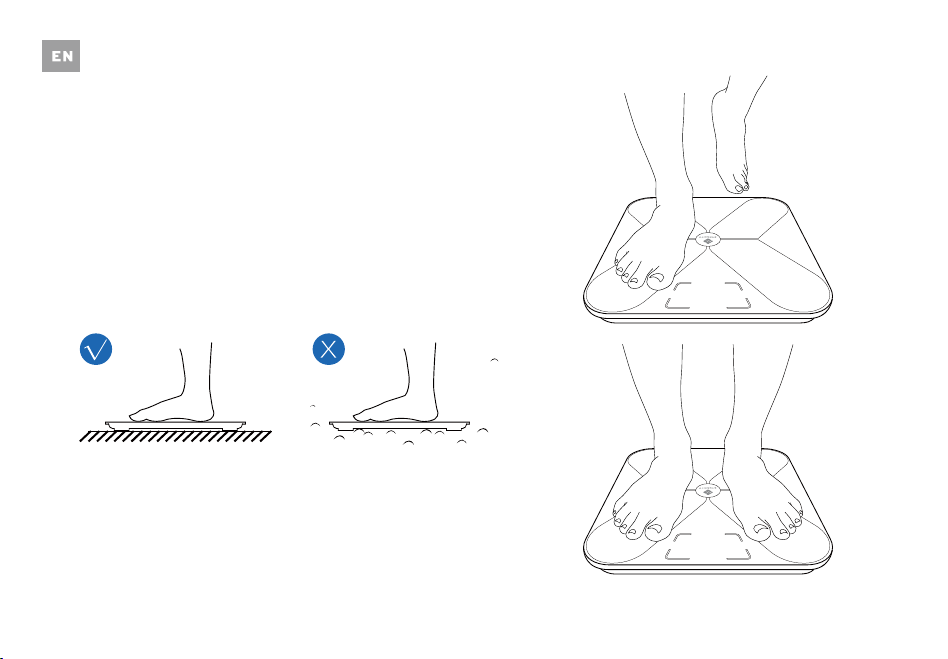
• To weigh safely and accurately, stand with your
feet shoulder-width apart while on the scale.
• DO NOT strike or drop the scale.
• DO NOT stand on the edge of the scale or jump
on it.
• DO NOT stand on the scale platform for a
prolonged period of time or when not in weighing
operation.
• DO NOT store or operate near heat sources or in
humid environments.
• Handle the scale with care, as it is a precision
instrument.
• Clean the scale with a damp and dry cloth and
avoid getting water or any other liquid inside the
scale.
•
DO NOT use chemical or abrasive cleaning agents
to clean the scale.
• Keep the scale in a cool environment with dry air.
•
Always keep the scale in a horizontal position, do
not store vertically.
• If the scale fails to turn on, check whether the
batteries are installed correctly. Replace the
batteries if necessary.
• If an error appears on the display or if the scale
does not turn off automatically, remove the
batteries for 3 seconds, then
reinstall them.
• DO NOT overload the scale (maximum weight
capacity: 180 kg/400 lb/28 st ).
• DO NOT mix new and used batteries or different
battery brands to power the scale.
• If the scale is not in use for an extended period
of time, remove the batteries to ensure battery
conservation and to extend the scale service
lifetime.
5
Main Functions
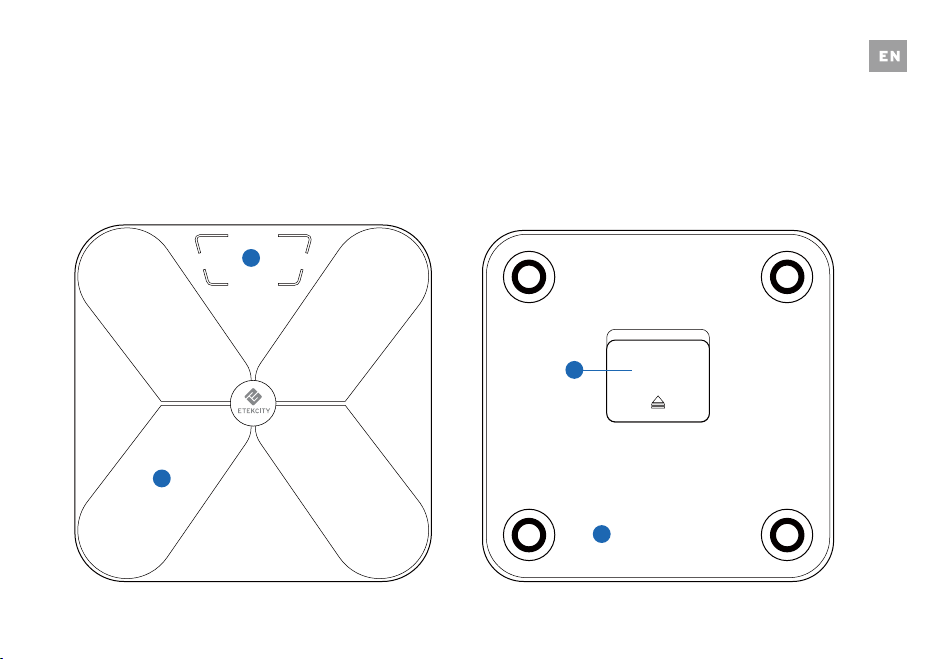
1
4
1. Weighing Platform
2. Display
3. Anti-skid Padding
4. Battery Compartment
2
3
6
3
Set-Up
Before First Use
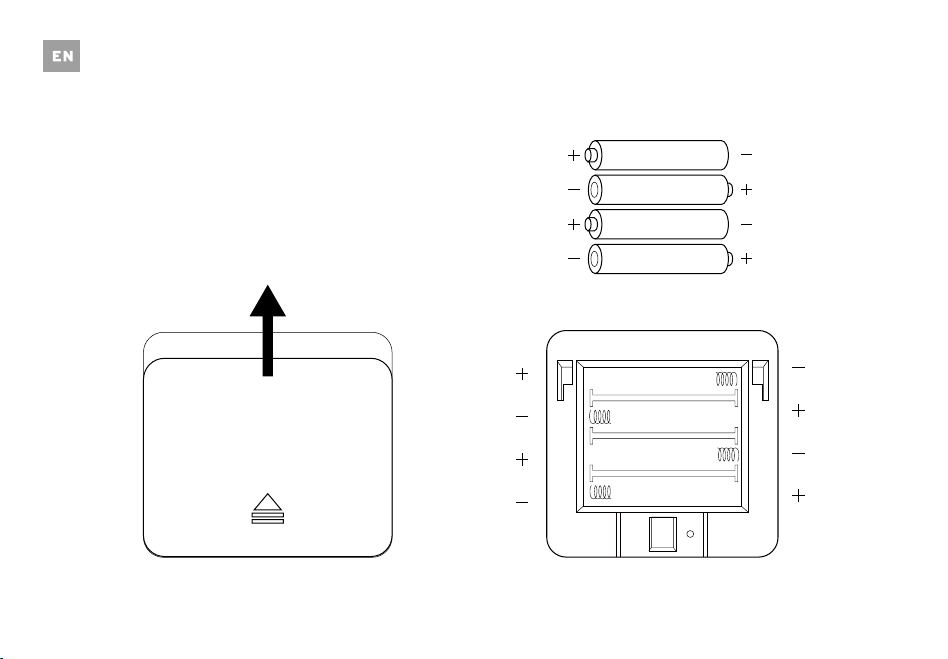
Open the battery compartment and remove the
plastic film from the four AAA 1.5V batteries. Install
the batteries under the correct polarity and replace
the battery compartment cover.
Slide
1.5v - AAA
1.5v - AAA
1.5v - AAA
1.5v - AAA
7
VeSyncFit
To view more in depth weight analyses, download
the free VeSyncFit app from the App Store or
Google Play Store. You can also scan the QR code(s)
below.
Operation
Weighing without the VeSyncFit App
1. Place the scale on a hard, flat surface.
2. Step onto the scale. The scale will automatically turn
on and start measuring your weight.
3. Keep standing on the scale until the digits on the
screen flash 2 times with your final measurement.
NOTE: To change weight units, you must download
the VeSyncFit app and select the desired weight unit
in the Settings menu (see page 1
7).
8
9
Weighing with the VeSyncFit App
Pairing the Scale with VeSyncFit
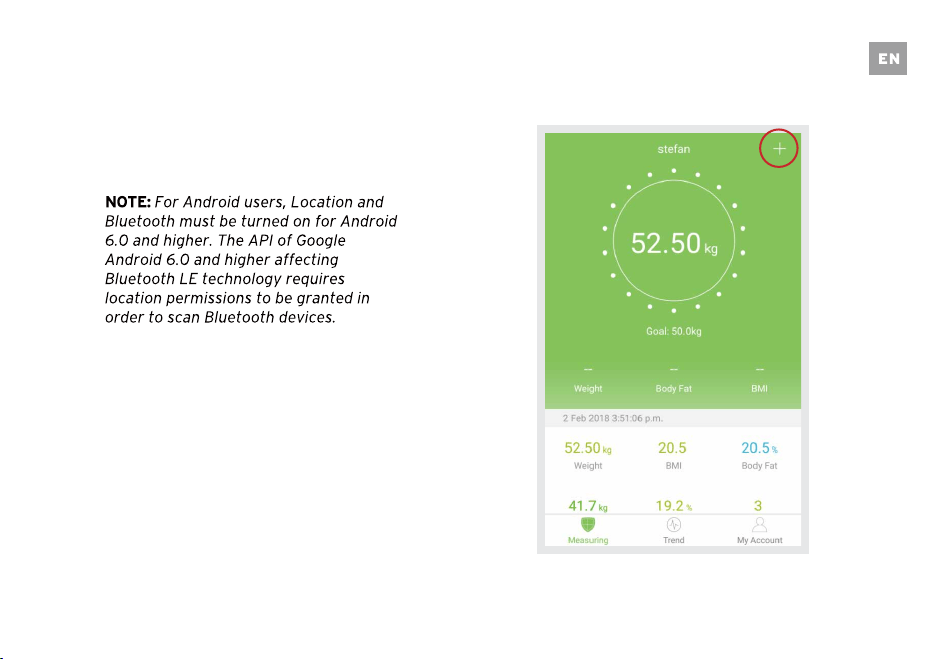
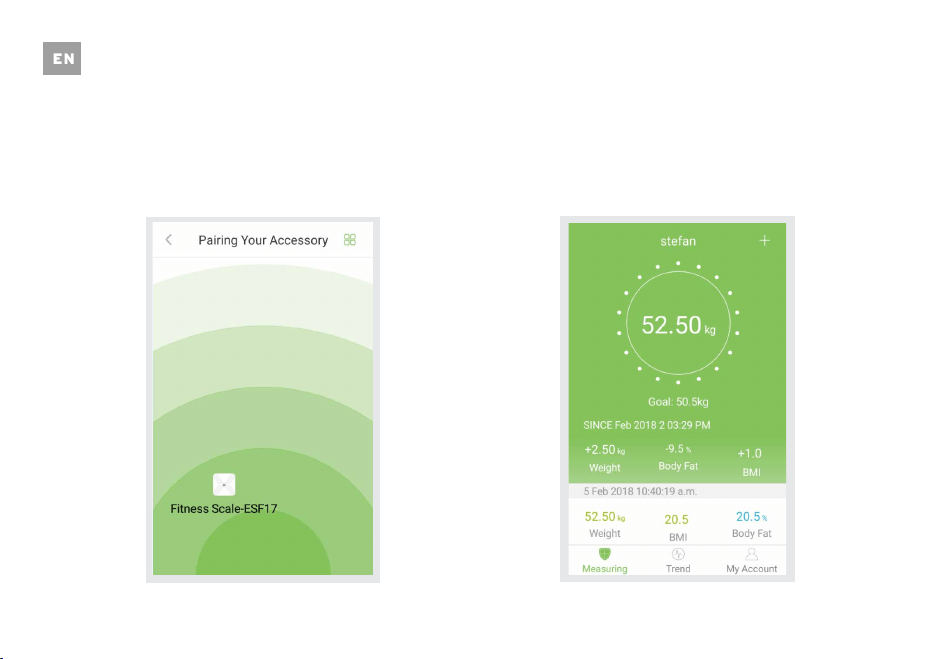
1. Turn on Bluetooth on your smartphone.
2. Tap ‘+’ on the measuring page to discover the
scale.
10
3. Step onto the scale with bare feet, then add the
device named “ESF17.”
4. Keep standing on the scale for 5-10 seconds.
Pairing is successful when your final weight
measurement appears on the VeSyncFit app.
NOTE: If you see a series of zeros
the display of your scale, it means that the scale
is sending measurement data to the VeSyncFit
app.
flash across
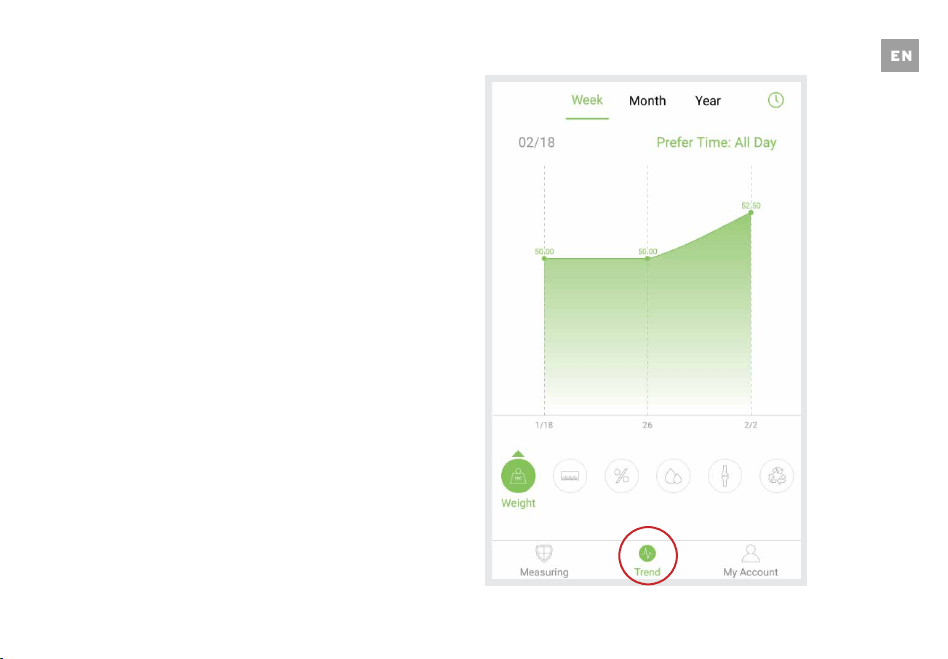
Viewing Reports & Setting/Deleting References
1. Tap ‘Trend’ to view your progress history. You
can select your progress for the week, month,
or year.
11
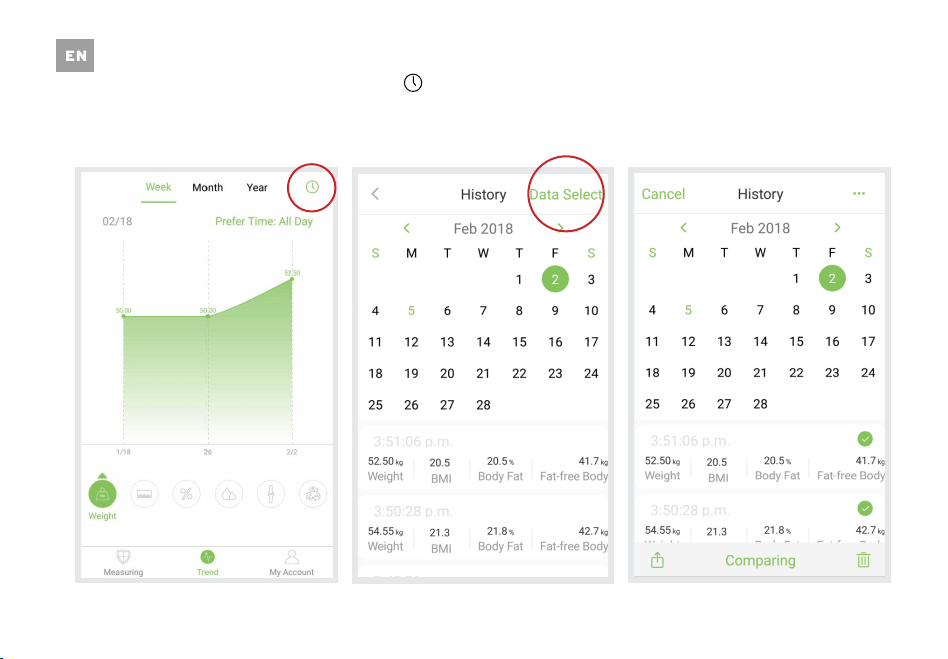
2. To view data for a specific day, tap the ‘ ‘ at
the top right corner of the screen.
12
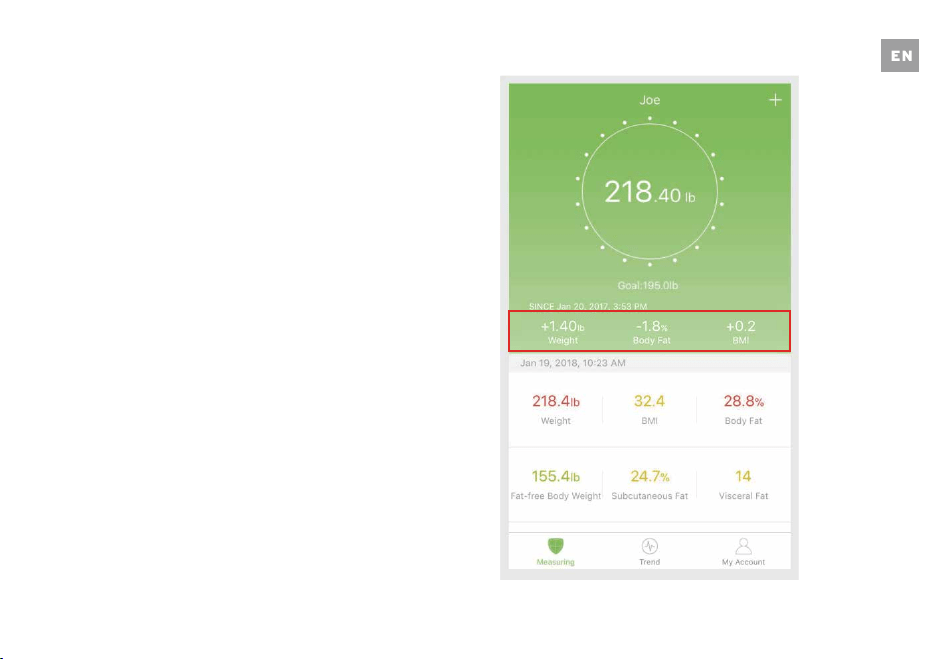
3. Tap ‘Data Select’ to select dates to view data
from a specific time frame.
13
Share Progress
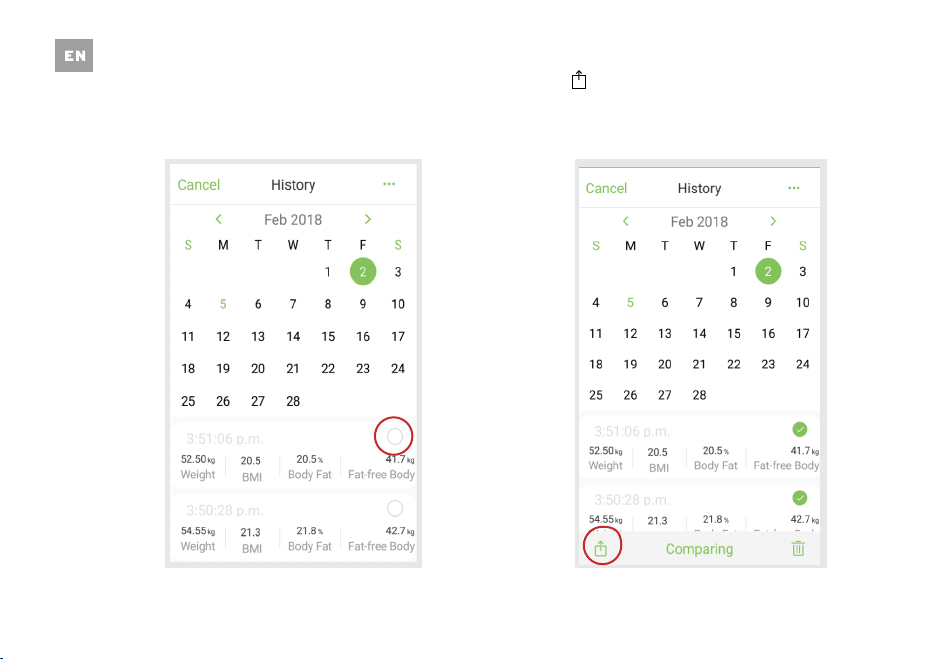
While viewing the History page, you are able to
share your data with through social media or text
message.
Note: You can also access the History page by
tapping the data directly below the weight display
circle on the home page.
14
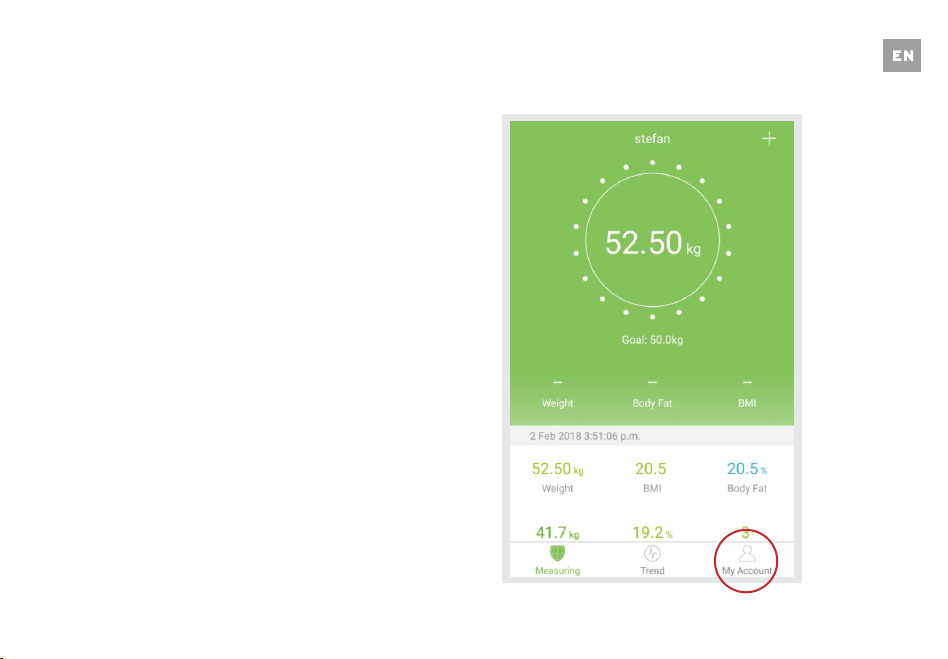
1. On the History page, select the desired data you
wish to share.
2. Tap ‘ ’ on the bottom left corner of the screen
to share your data on Facebook, Instagram, or
text message.
15
Adding/Deleting Users
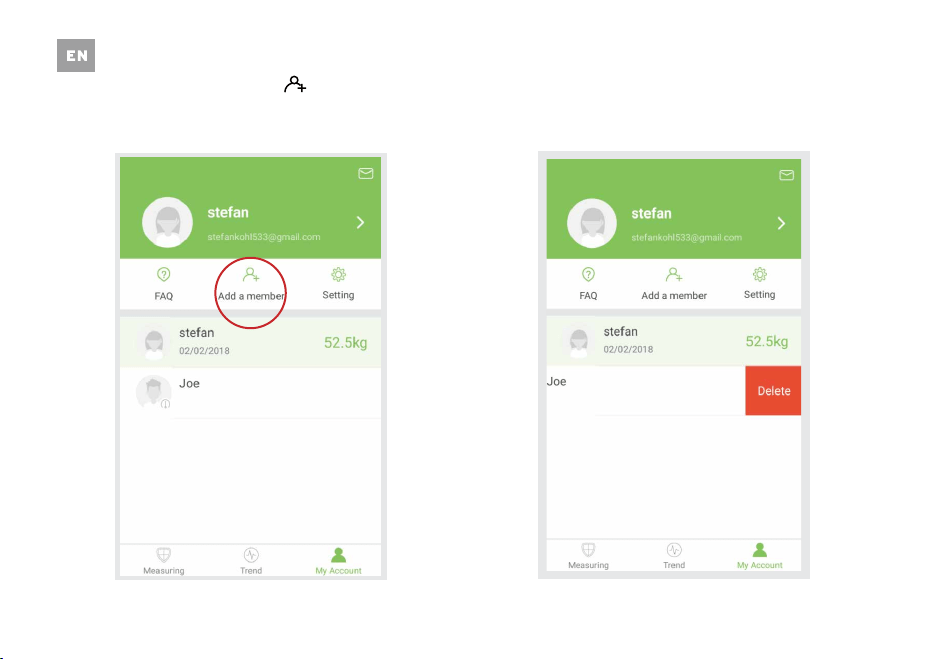
1. On the Measurement page, tap ‘My Account’ at
the bottom of the screen.
16
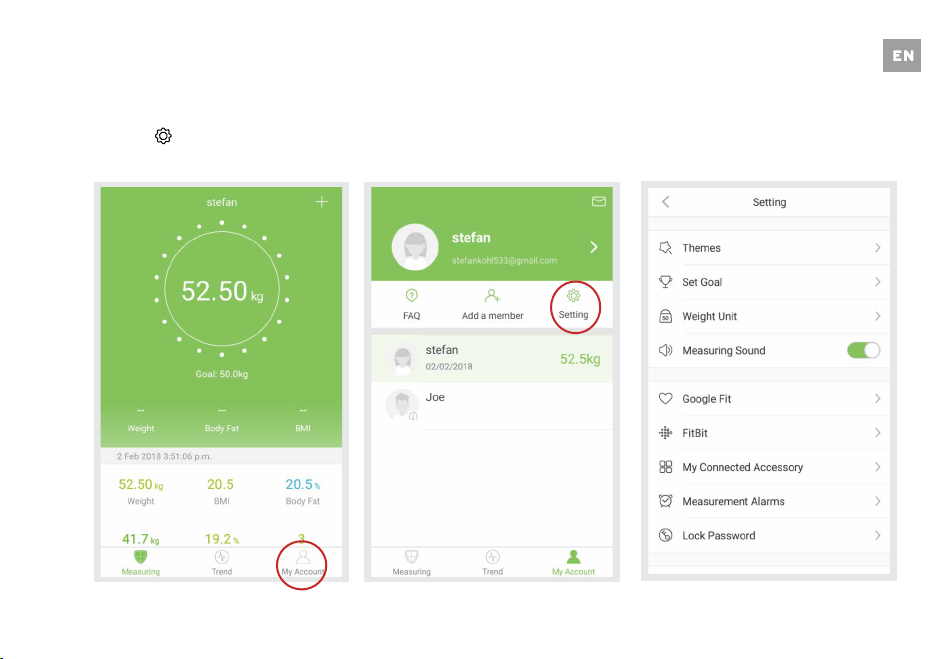
2. To add new users, tap ‘ .’ 3.
Swipe left on the account that you want to
delete and tap "Delete”.
17
Settings
1. To access the Settings menu tap ‘My Account.’
2. Tap ‘ .’
3.
You can change the app theme, set goal
weights, change weight units, select sounds and
select languages on the Settings menu.
18
Connecting with Other Fitness Apps
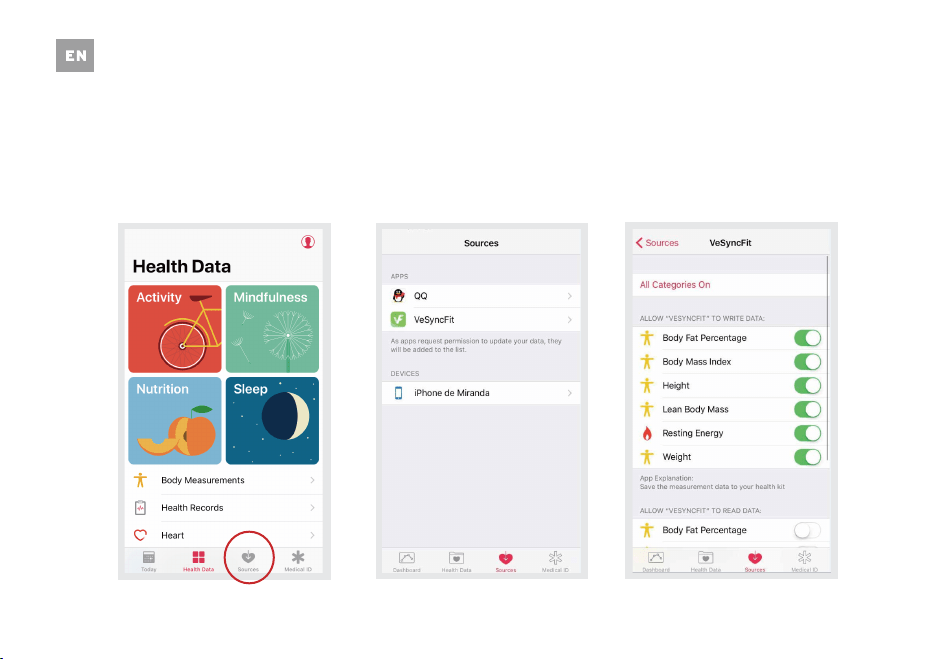
Apple Health
1. Open the Health App on your iPhone then tap
‘Sources.’ Be sure to turn on your Bluetooth
setting.
2. Select ‘VeSyncFit’ from the list.
3. Turn on all categories to allow the VeSyncFit app
to work.
19
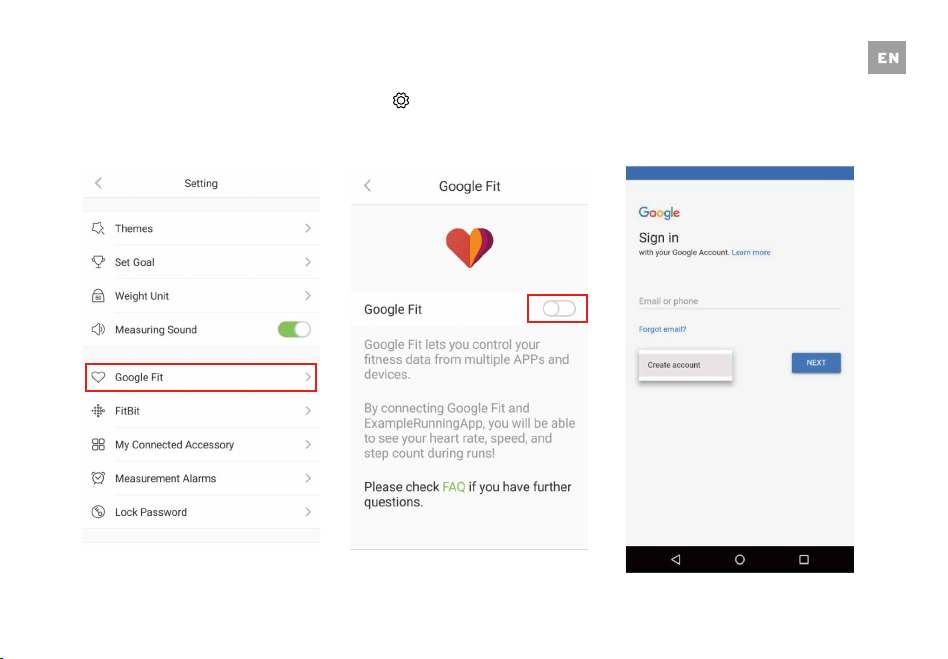
Google Fit
1. Access the Settings menu by tapping ‘ ’ on
VeSyncFit. Select ‘Google Fit’ from the menu.
2. Turn on Google Fit, then sign into your Google
Account. You will automatically be redirected to
the Google Fit page.
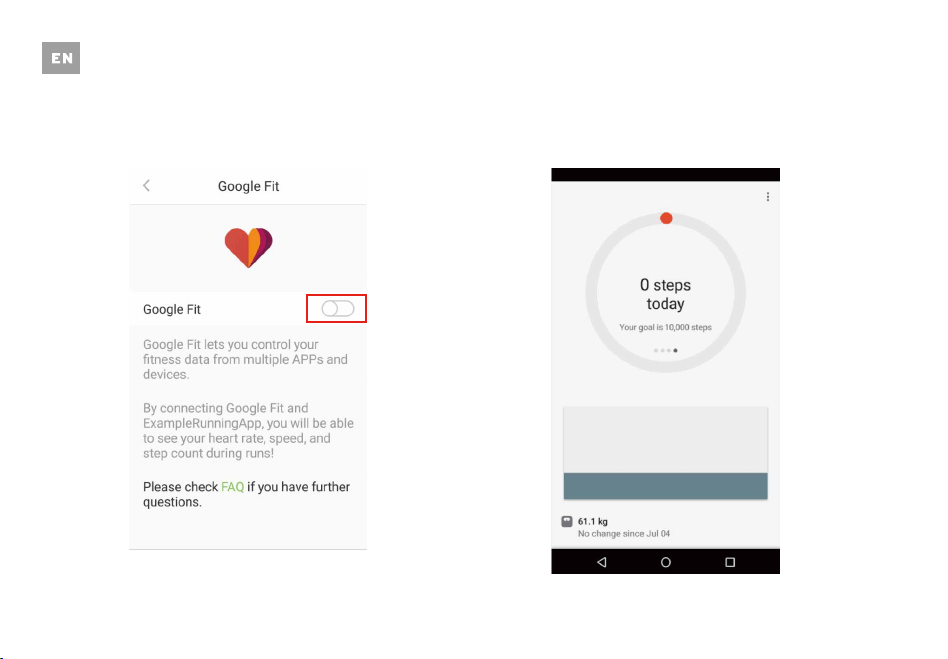
3. After successfully connecting, your weight data
will sync with Google Fit.
20
21
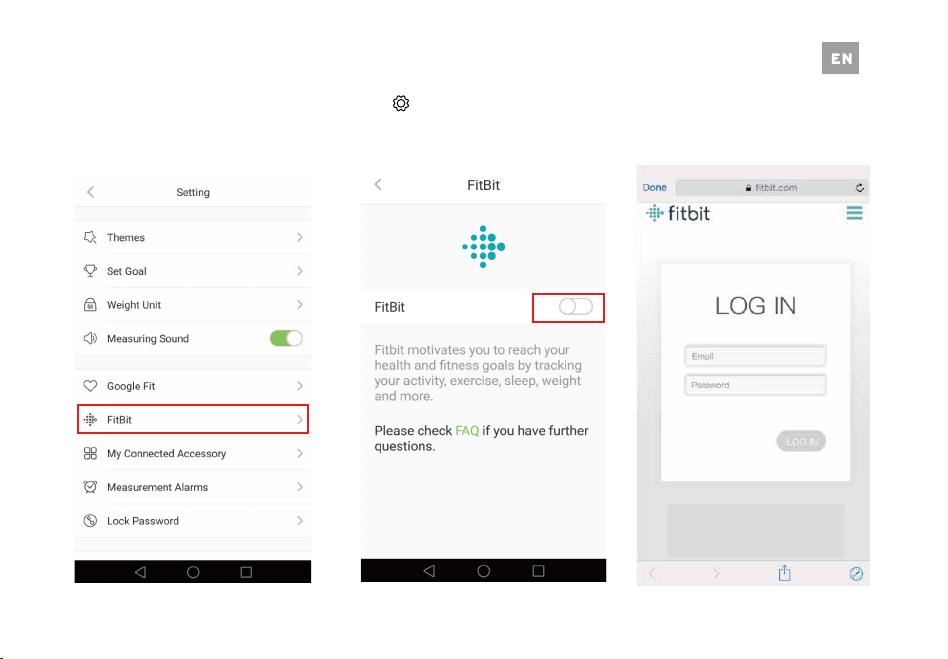
Fitbit
1. Access the Settings menu by tapping ‘ ’ on
VeSyncFit. Select ‘Fitbit’ from the menu.
2. Turn on Fitbit, then sign into your Fitbit
account.

22
3. Tap ‘Allow’ to access the Fitbit app. 4. After successfully connecting, your data will
sync to the Fitbit app. You will be able to view
your progress both on the app as well as online.
23
Maintenance
Recalibrating the Scale
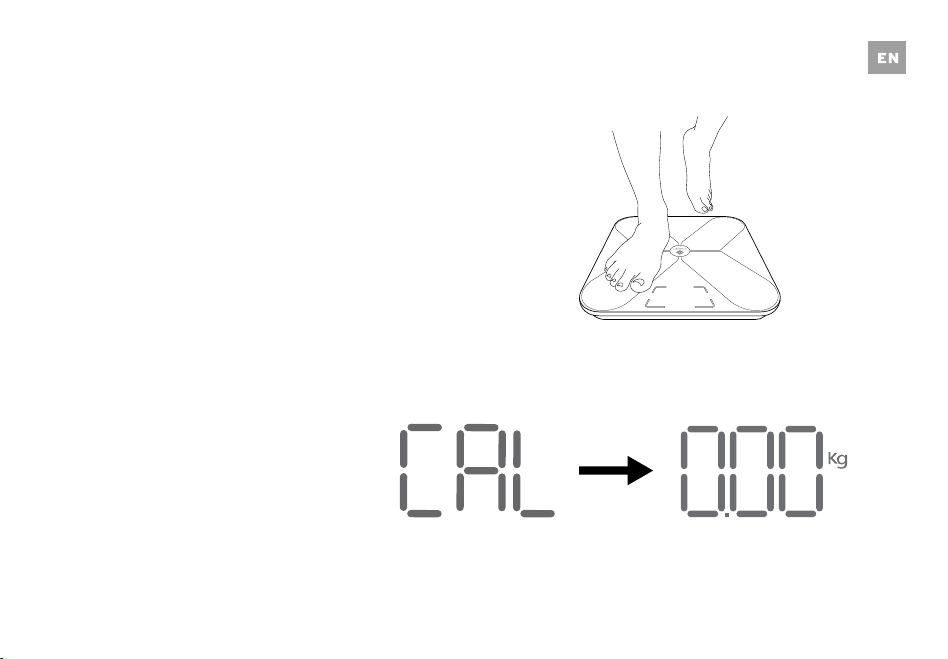
If the scale has been moved or flipped upside down,
it must be recalibrated to ensure accurate results.
1. Place the scale on a hard, flat surface.
2. Step on the scale with one foot until the display
until the digits appear on the display, then, step
off.
3. The scale will show “CAL” then “0.00,” indicating
that the calibration process is complete.
24
Battery Replacement
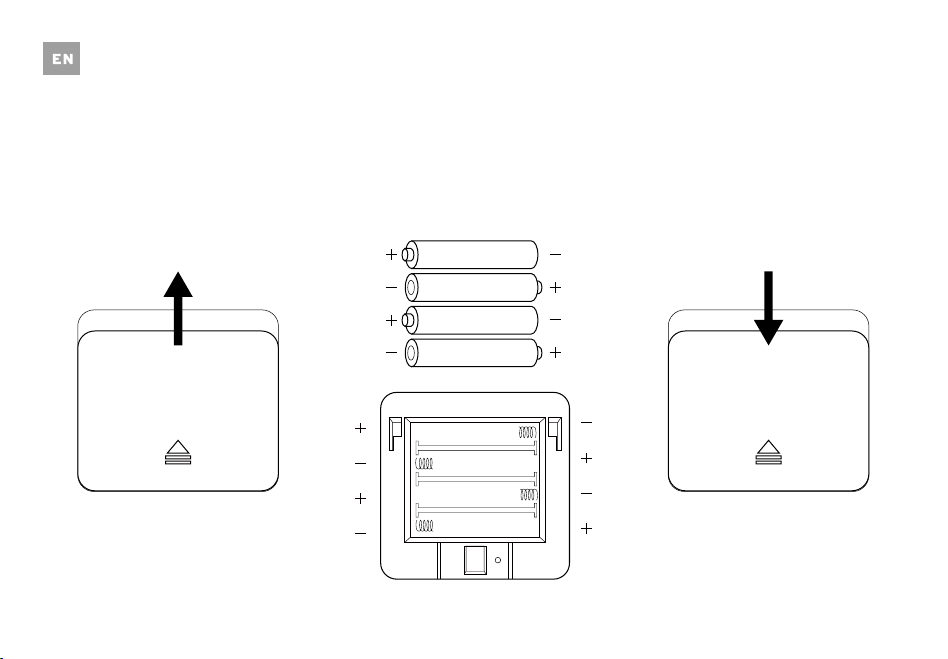
The display will show “Lo” when the batteries need
to be replaced.
1.
Open the battery compartment on the back of the
scale.
2.
Remove the old batteries and dispose of them
properly.
3. Install four new 1.5V AAA batteries, making sure
they are placed under the correct polarity.
4. Replace the battery compartment cover.
NOTE: The scale may need to be recalibrated after
replacing the batteries.
1.5v - AAA
1.5v - AAA
1.5v - AAA
1.5v - AAA
Troubleshooting
25
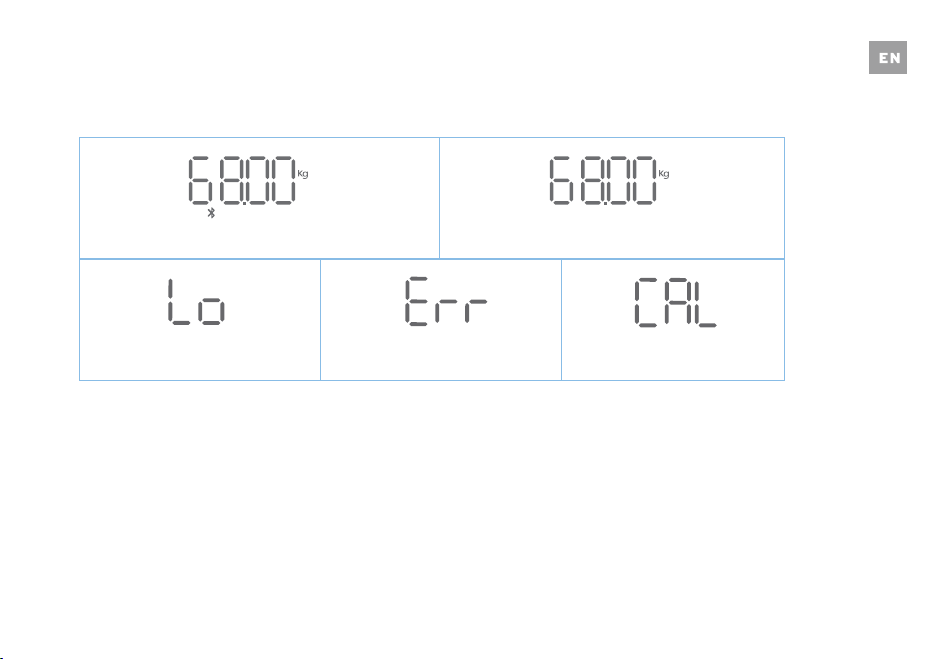
Wireless Connection
Change Battery Overload Calibrating
No Wireless Connection
26
Frequently Asked Questions
1. Why doesn’t the scale work?
• Check if the batteries are properly installed.
2. Why does the data flash on the screen and then disappear?
• The batteries are low and may need to be replaced.
3. Why doesn’t the scale connect with the VeSyncFit app?
• Make sure your phone’s operating system is running on iOS 8.0+ or Android 4.3.
• Download and open the newest version of the VeSyncFit app.
• Turn on Bluetooth on your phone (for Android users, make sure your Location is turned on as well).
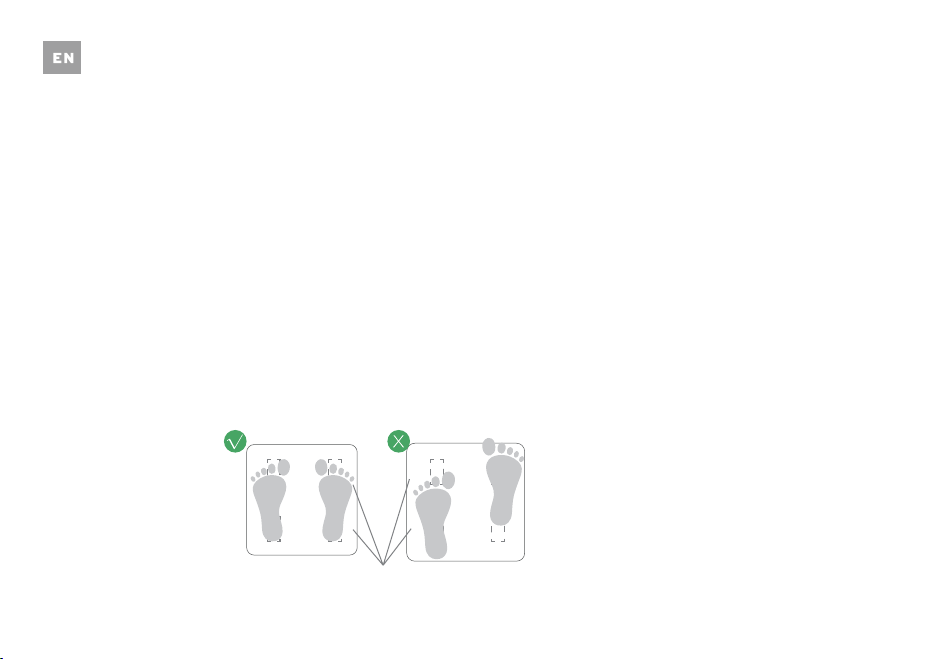
4. Why is my body fat not measured when weighing in?
• Step on the scale with dry, bare feet.
• Make sure Bluetooth is turned on.
• Enter your personal information when creating your VeSyncFit account.
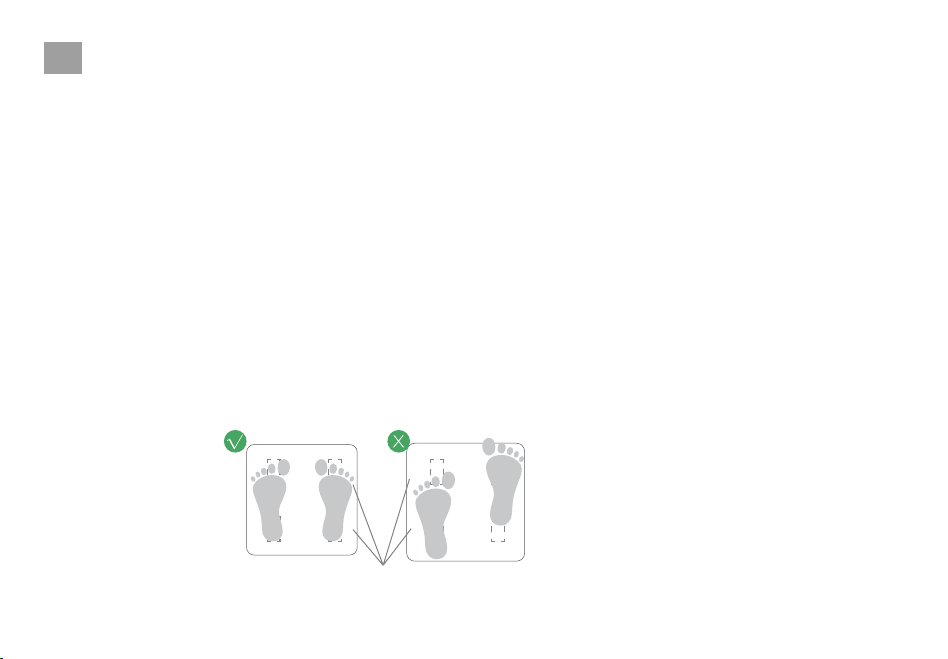
Conductive Areas

27
Specifications
Weight Capacity: 180 kg / 400 lb / 28 st
Graduation: 0.05 kg / 0.2 lb
Weight Units: kg / lb / st
Platform: Tempered glass
Battery: 4 x 1.5V AAA batteries
Dimensions: 310 x 310 x 25 mm
Package Contents
1 x Smart Fitness Scale
4 x 1.5V AAA Batteries
1 x User Manual

28
Etekcity Corporation
1202 N Miller Street, Suite A
Anaheim, CA 92806

29
Modell Nr.: ESF17
Deutsch
Smarte Fitness-Personenwaage
Sicherheitshinweise
WICHTIG: Bitte lesen Sie alle Anweisungen und
Sicherheitshinweise dieses Handbuches, bevor Sie
das Gerät verwenden. Das Missachten der Anweis-
ungen und Sicherheitshinweise, die hier enthalten
sind, oder die Verwendung in einer Art und Weise
oder für einen anderen Zweck als hier nicht
beschrieben, kann zu ernsthaften Verletzungen
und/oder zu Beschäigungen des Geräts führen.
Diese Waage sollte nicht zur Diagnose oder
Behandlung von Krankheiten verwendet
werden. Wenden Sie sich an Ihren Hausarzt,
bevor Sie Änderungen an Ihrer Ernährung,
Ihren Trainingsplänen oder Ihren körperlichen
Aktivitäten vornehmen.
Wenn Sie schwanger sind, einen Herzschritt-
macher oder ein anderes inneres Gerät haben,
sollten Sie sich nicht zu sehr auf die Daten
dieses Produkts verlassen. Bitte beachten Sie,
dass alle Daten als Referenz dienen und nicht
als Ersatz für die medizinische Beratung durch
einen lizenzierten Arzt dienen.
Überprüfen Sie die Waage vor jedem
Gebrauch. Benutzen Sie die Waage nicht, wenn
sie beschädigt ist.
Die Glasplattform ist rutschig, wenn sie nass
ist. Stellen Sie sicher, dass die Plattform und
Ihre Füße trocken sind, bevor Sie zum Wiegen
darauf treten.
•
•
•
•
Allgemeine Sicherheit
DE

30
Verwenden & Pflegen
Diese Waage ist nicht für die kommerzielle
Verwendung zugelassen.
Stellen Sie die Waage immer auf einen harten,
trockenen, flachen Untergrund, bevor Sie die
Messung starten.
Um sicher und genau zu wiegen, stehen Sie mit
Ihren Füßen schulterbreit auf der Waage.
NICHT die Waage schlagen oder sie fallen lassen.
NICHT am Rand der Waage stehen oder auf die
Waage springen.
NICHT für eine längere Zeit oder wenn Sie sich
nicht wiegen, auf der Waage-Plattform stehen.
NICHT die Waage in der Nähe von Wämequellen
oder in feuchter Umgebung lagern oder betreiben.
Behandeln Sie sie Waage sorgfältig – sie ist ein
Präzisionsmessinstrument.
Reinigen Sie die Waage mit einem nebelfeuchten
Tuch und vermeiden Sie, dass Wasser oder andere
Flüssigkeiten in die Waage eindringen können.
NICHT chemische Reinigungsmittel oder Scheuer-
mittel benutzen, um die Waage zu reinigen.
Bewahren Sie sie an einem kühlen,
trockenen Ort auf.
Halten Sie die Waage immer in einer
horizontalen Position, lagern Sie sie nicht
vertikal.
Wenn sich die Waage nicht einschalten lässt,
dann prüfen Sie zunächst, ob die Batterien
korrekt eingelegt sind. Ersetzen Sie diese,
falls nötig.
Wenn ein Fehler auf dem Display angezeigt
wird oder wenn sich die Waage nicht
automatisch wieder ausschaltet, dann
entfernen Sie die Batterien für 3 Sekunden
und installieren Sie danach erneut.
NICHT die Waage überlasten. (Maximale
Gewicht Kapazität 180 kg / 400 lb / 28 st)
NICHT neue und gebrauchte Batterien oder
verschiedene Akku-Marken mischen, um die
Waage zu betreiben.
Wenn die Waage für eine längere Zeit nicht
benutzt wird, dann entfernen Sie die
Batterien, um den Erhalt der Batterien
sicherzustellen und die Lebenszeit der
Waage zu verlängern.
• •
•
•
•
•
•
•
•
•
•
•
•
•
•
•
•
DE
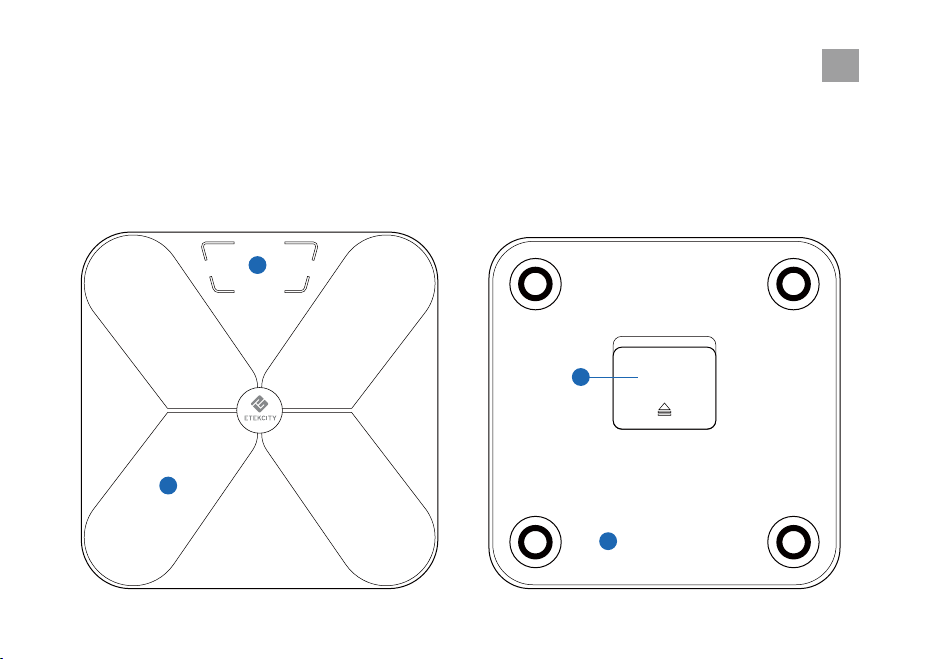
Hauptfunktionen
1
4
1. Wiege-Plattform
2. Display
3. Anti-Rutsch-Polsterung
4. Batteriefach
2
31
DE
3
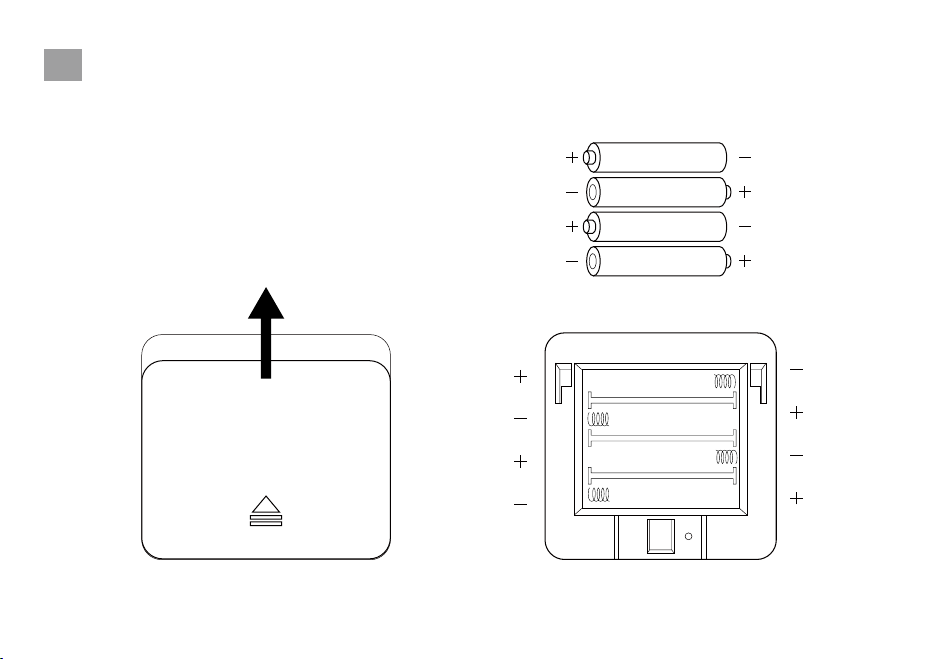
32
3
Inbetriebnahme
Vor der Ersten Verwendung
Gleiten
1.5v - AAA
1.5v - AAA
1.5v - AAA
1.5v - AAA
Öffnen Sie die Batteriefachabdeckung und entfernen
Sie die vier 1,5V AAA-Batterien aus ihrer Plastikfolie.
Legen Sie die Batterien mit der richtigen Polarität
ein und verschließen Sie das Batteriefach wieder.
DE

33
VeSyncFit
Um detailliertere Gewichtsanalysen anzuzeigen, laden
Sie die kostenlose VeSyncFit App aus dem App Store
oder dem Google Play Store herunter. Sie können
auch den/die untenstehenden QR-Code(s) scannen.
DE
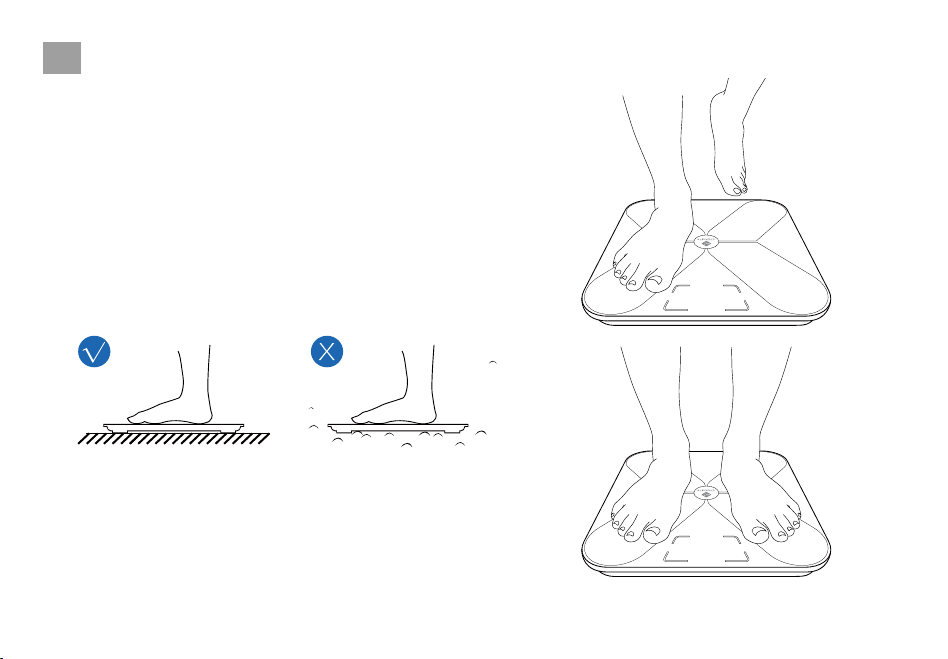
Bedienung
Wiegen ohne die VeSyncFit App
34
1. Stellen Sie die Waage auf einen harten, flachen Untergrund.
2. Steigen Sie auf die Waage. Die Waage wird sich automa
tisch einschalten und mit dem Wiegen beginnen.
3. Bleiben Sie so lange auf der Waage stehen, bis die Ziffern
auf dem Bildschirm 2 Male mit Ihrer letzten Messung
blinken.
HINWEIS:
Um die Gewichtseinheiten zu ändern, müssen Sie
die VeSyncFit App herunterladen und die gewünschte
Gewichtseinheit im Menü Einstellungen auswählen (siehe
Seite 43).
DE
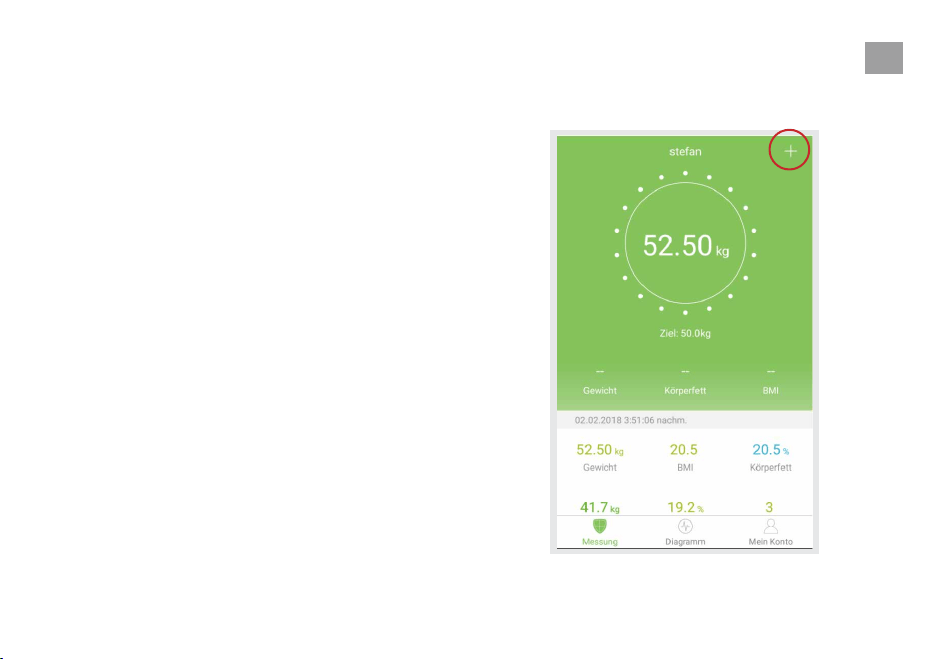
35
Wiegen mit der VeSyncFit App
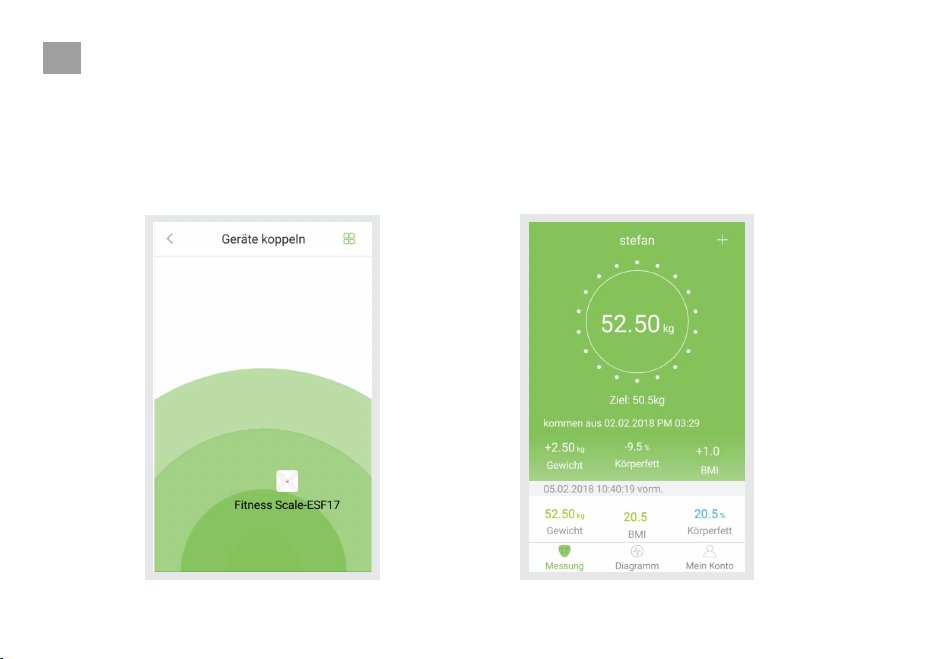
Die Waage mit VeSyncFit Koppeln
1. Schalten Sie Bluetooth auf Ihrem Smartphone ein.
2.
HINWEIS: Für Android-Benutzer müssen
Standort und Bluetooth für Android 6.0 und
höher aktiviert sein. Die API von Google
Android 6.0 und höher, die sich auf die
Bluetooth LE-Technologie auswirkt,
erfordert die Erteilung von Standortberech-
tigungen, um Bluetooth-Geräte zu scannen.
Tippen Sie auf der Messung-Seite auf ‘+’, um die
Waage zu entdecken.
DE
36
3.
4.
Gehen Sie barfuß auf die Waage und fügen Sie
das Gerät "ESF17" hinzu.
Bleiben Sie 5-10 Sekunden auf der Waage
stehen. Die Kopplung ist erfolgreich, wenn Ihre
endgültige Gewichtsmessung in der VeSyn-
cFit-Applikation erscheint.
HINWEIS: Wenn Sie eine Reihe von Nullen auf der
Anzeige Ihrer Waage blinken sehen, bedeutet dies,
dass die Waage jetzt Messdaten an die VeSyncFit
App sendet.
DE
1.
37
Anzeigen von Berichten und Einstellen/Löschen
von Referenzen
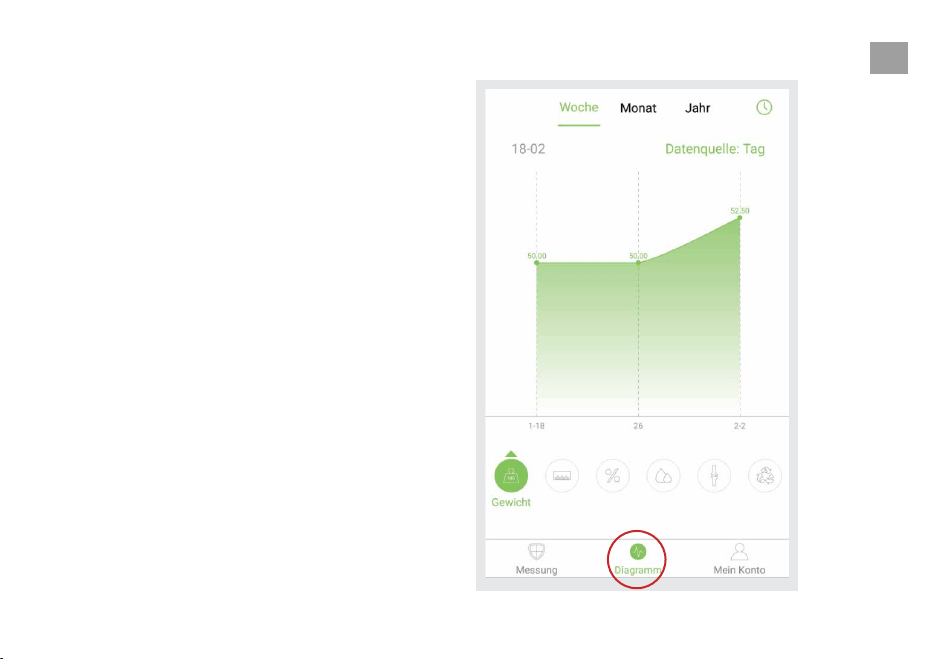
Tippen Sie auf ‘Diagramm’, um Ihre
Fortschritt-Geschichte zu sehen. Sie können
Ihren Fortschritt für die Woche, den Monat oder
das Jahr auswählen.
DE
38
2. 3.
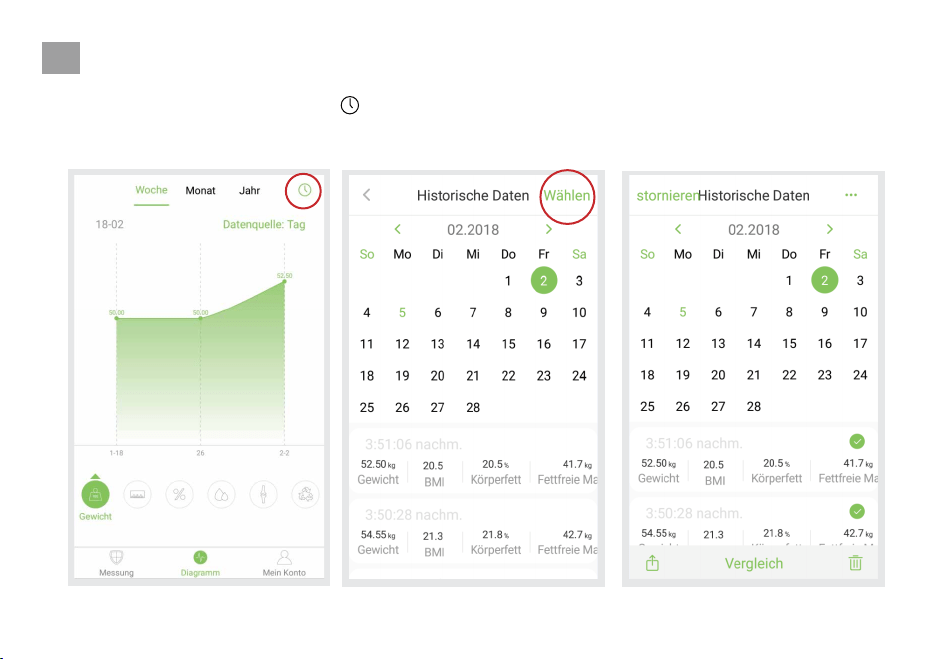
Um die Daten für einen bestimmten Tag zu
sehen, tippen Sie auf die Taste ‘ ’ in der
oberen rechten Ecke des Bildschirms.
Tippen Sie auf ‘Wählen’, um Daten auszu-
wählen, die in einem bestimmten Zeitraum
angezeigt werden sollen.
DE
39
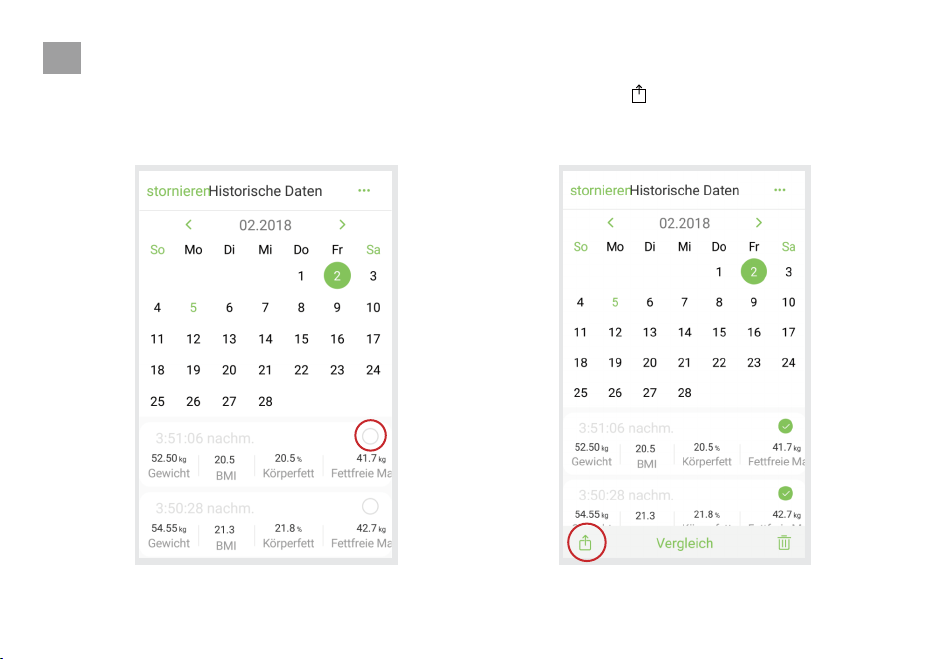
Fortschritt Teilen
Während Sie die Historische Daten-Seite
aufrufen, können Sie Ihre Daten über Social
Media oder SMS teilen.
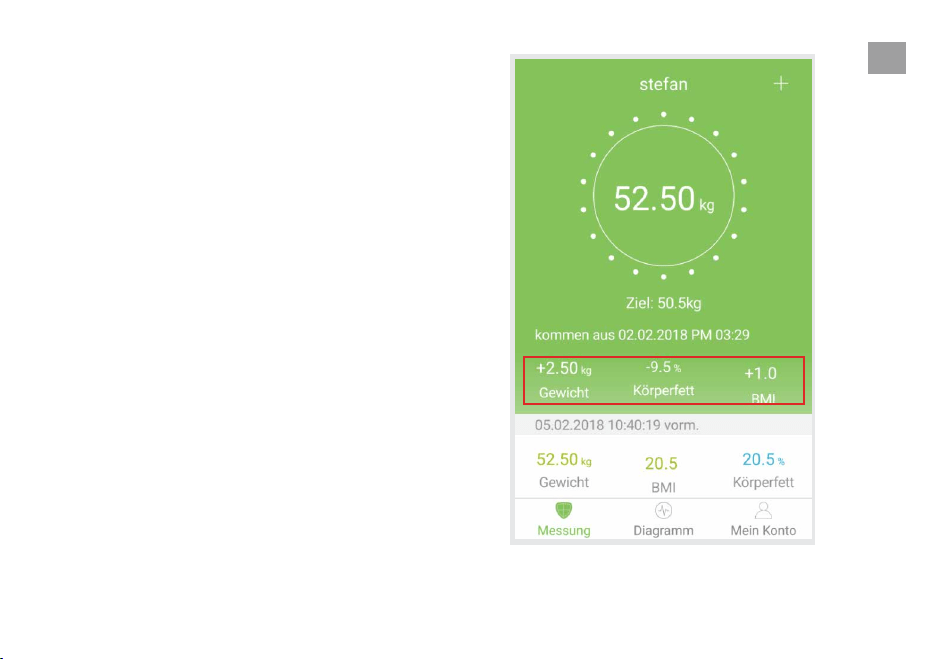
HINWEIS: Sie können auch auf die Historische
Daten-Seite zugreifen, indem Sie auf die Daten
direkt unter dem Gewichtsanzeige-Kreis auf der
Startseite tippen.
DE
40
1. 2.
Wählen Sie auf der Historische Daten-Seite die
gewünschten Daten aus, die Sie teilen möchten.
Tippen Sie auf ‘ ’ in der linken unteren Ecke des
Bildschirms, um Ihre Daten auf Facebook,
Instagram oder Textnachrichten zu teilen.
DE
41
Benutzer Hinzufügen/Löschen
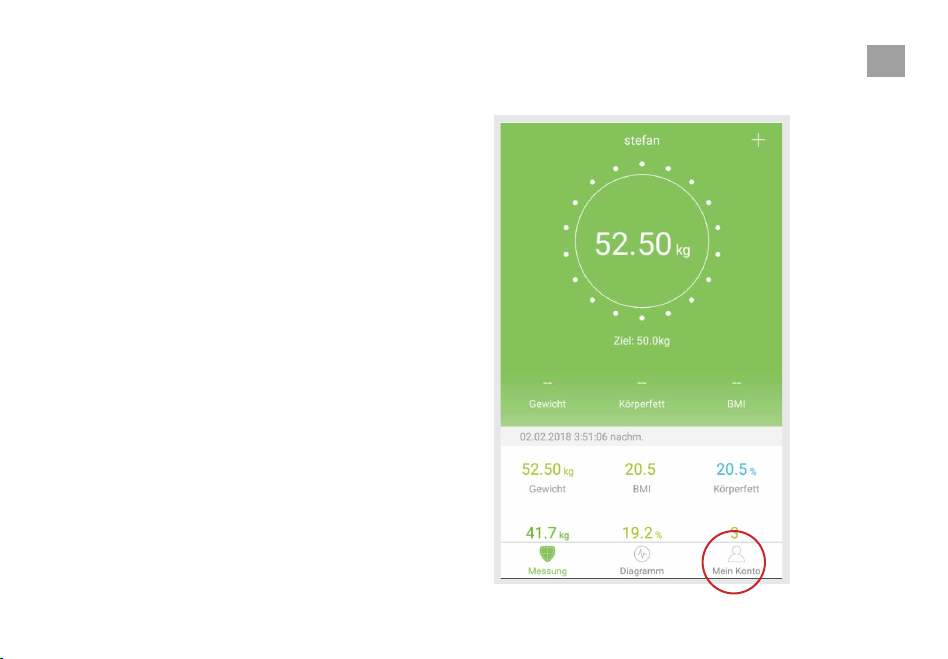
1.
Tippen Sie auf der Messung-Seite am unteren
Bildschirmrand auf "Mein Konto".
DE
42
2. 3.
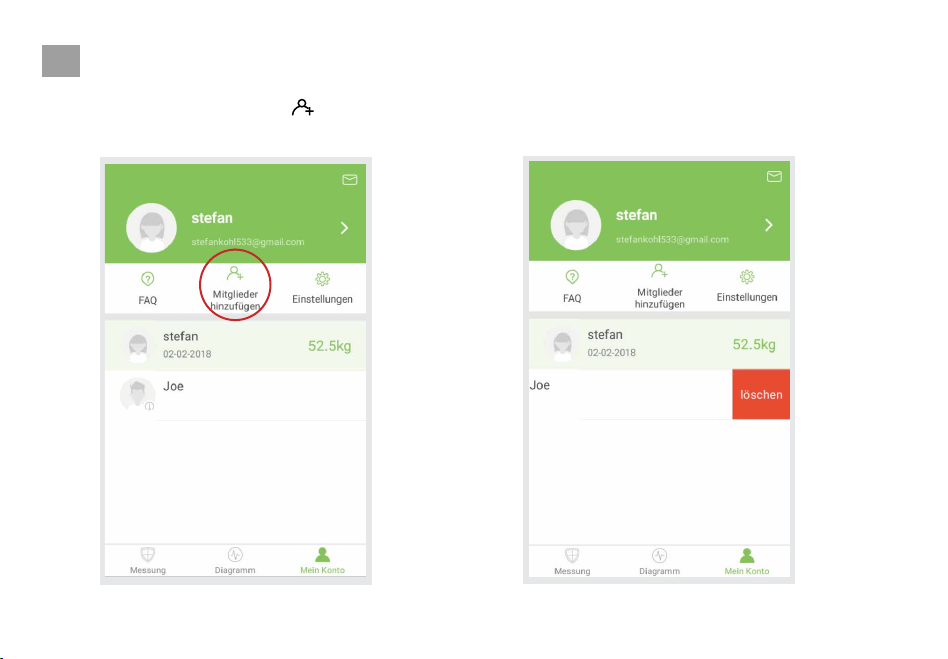
Wenn Sie neue Benutzer hinzufügen
möchten, tippen Sie auf ‘ ’.
Wischen Sie das Konto, das Sie löschen
möchten, nach links und tippen Sie auf
"Löschen".
DE
43
1.
2. Tippen Sie
‘ .’
3.
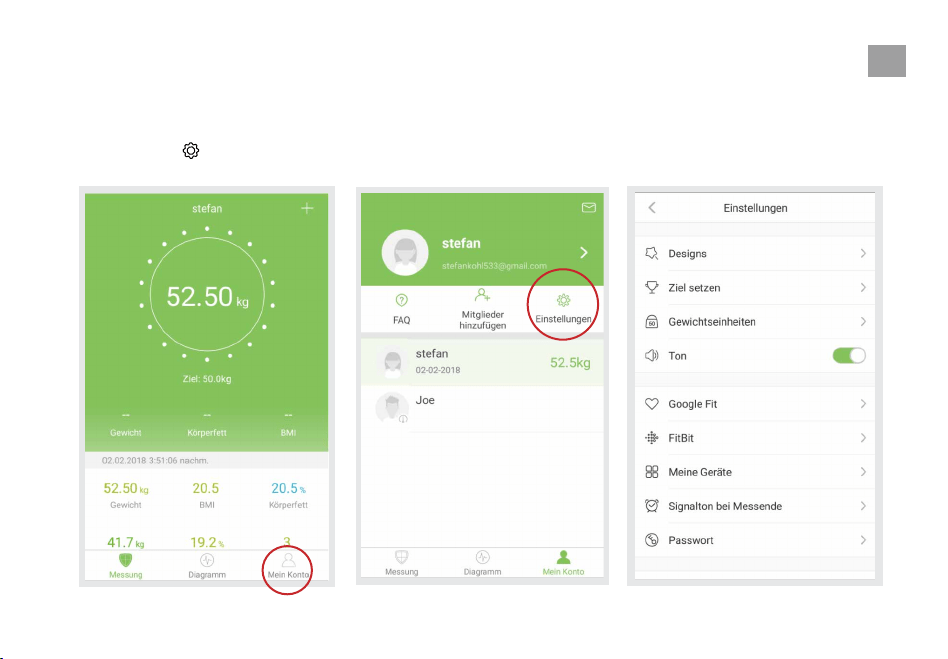
Einstellungen
Um das Einstellungen-Menü aufzurufen, tippen
Sie auf "Mein Konto".
Im Einstellungen-Menü können Sie das App-The-
ma ändern, Zielgewichte setzen, Gewichtsein-
heiten ändern, Sounds auswählen und Sprachen
auswählen.
DE
44
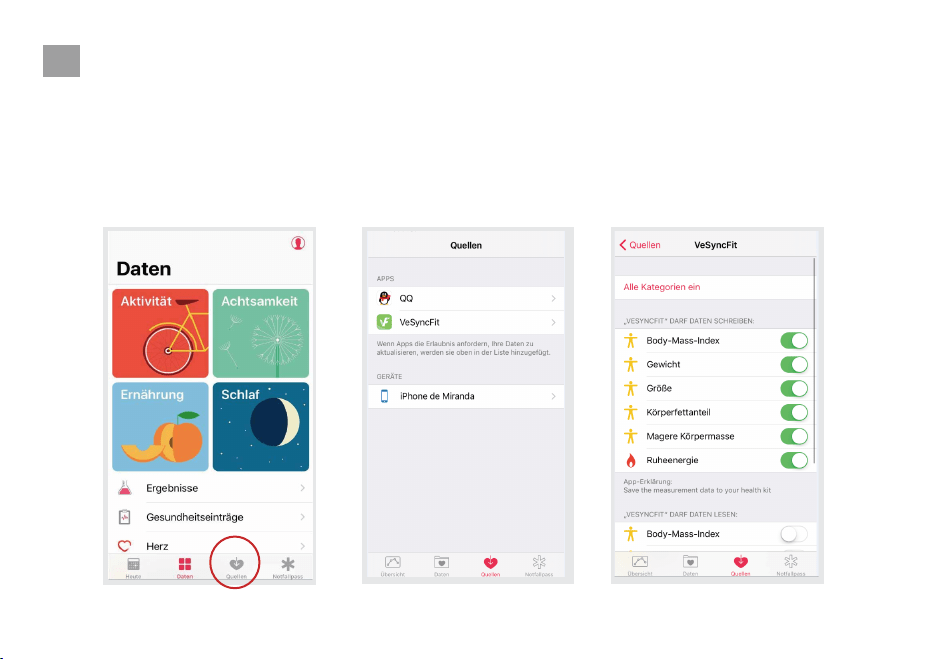
Verbindung mit Anderen Fitness-Apps Herstellen
Apple Health
1.
2. Wählen Sie "VeSyncFit" aus der Liste.
3.
Öffnen Sie die Health App auf Ihrem iPhone
und tippen Sie auf "Quellen". Stellen Sie
sicher, dass Sie Ihre Bluetooth-Einstellung
einschalten.
Schalten Sie alle Kategorien ein, damit die
VeSyncFit App funktioniert.
DE
45
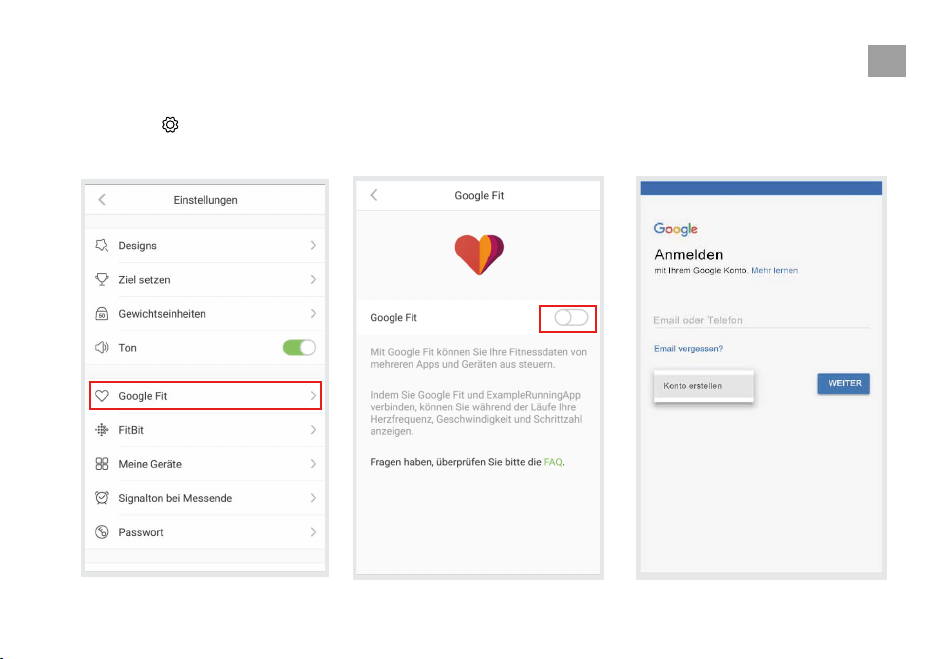
Google Fit
1.
2.
Gehen Sie in das Einstellungen-Menü, indem
Sie auf ‘ ’ in der VeSyncFit tippen. Wählen
Sie im Menü "Google Fit".
Aktivieren Sie Google Fit und melden Sie sich
dann in Ihrem Google-Konto an. Es wird
automatisch auf die Seite Google Fit
weitergeleitet.
DE
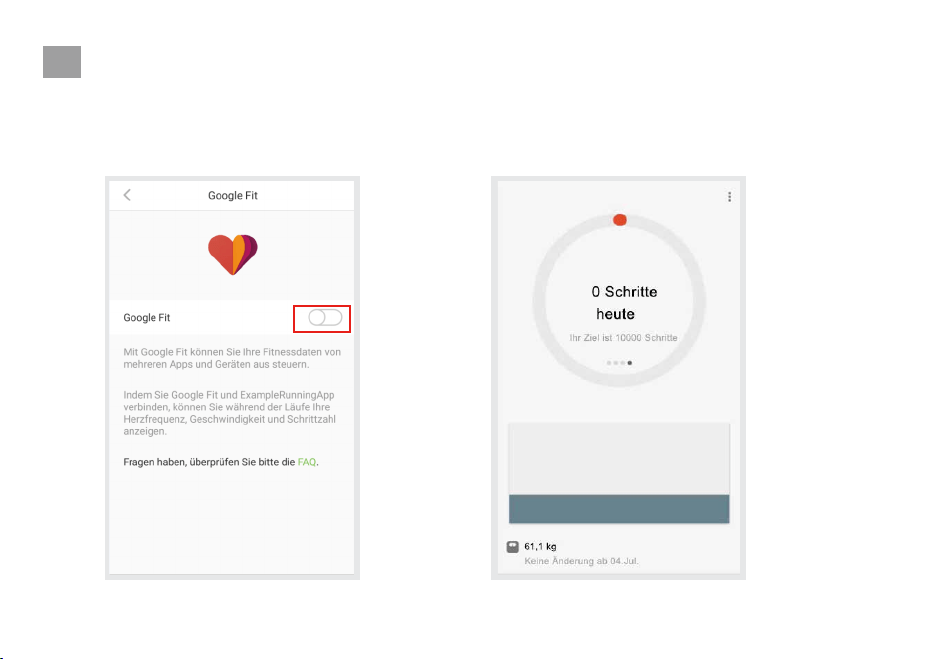
3.
46
Nach erfolgreicher Verbindung werden Ihre
Gewichtsdaten mit Google Fit synchronisiert.
DE
47
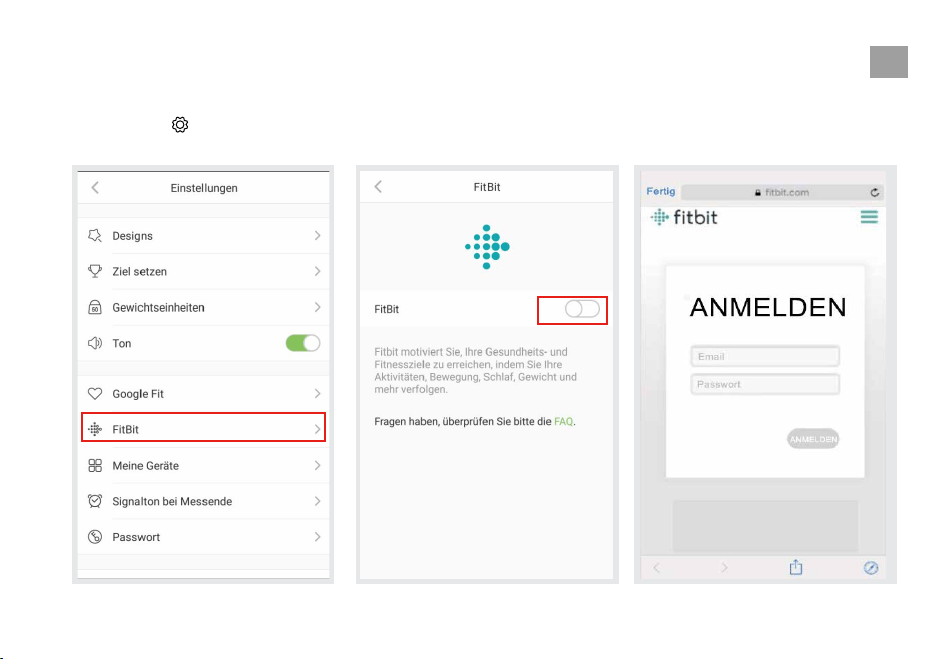
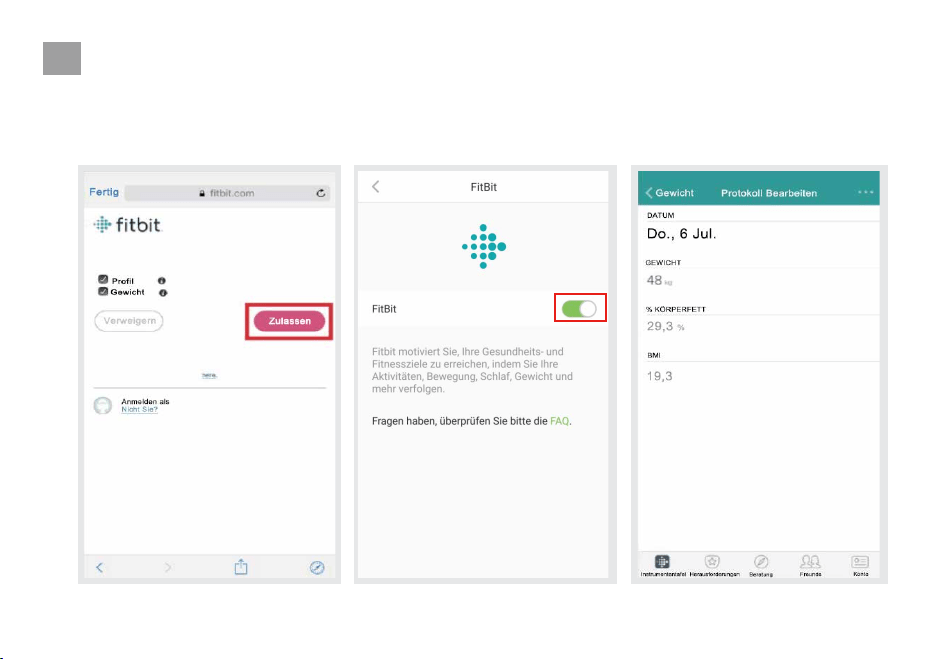
Fitbit
1.
2.
Gehen Sie in das Einstellungen-Menü, indem
Sie auf ‘ ‘in der VeSyncFit tippen. Wählen
Sie im Menü "Fitbit".
Schalten Sie Fitbit ein und melden Sie
sich dann bei Ihrem Fitbit-Konto an.
DE
48
3.
4.
Tippen Sie auf "Zulassen", um auf
die Fitbit-APP zuzugreifen.
Nach erfolgreicher Verbindung werden Ihre
Daten mit der Fitbit App synchronisiert. Sie
können Ihren Fortschritt sowohl auf der App als
auch online verfolgen.
DE
49
Pflegung
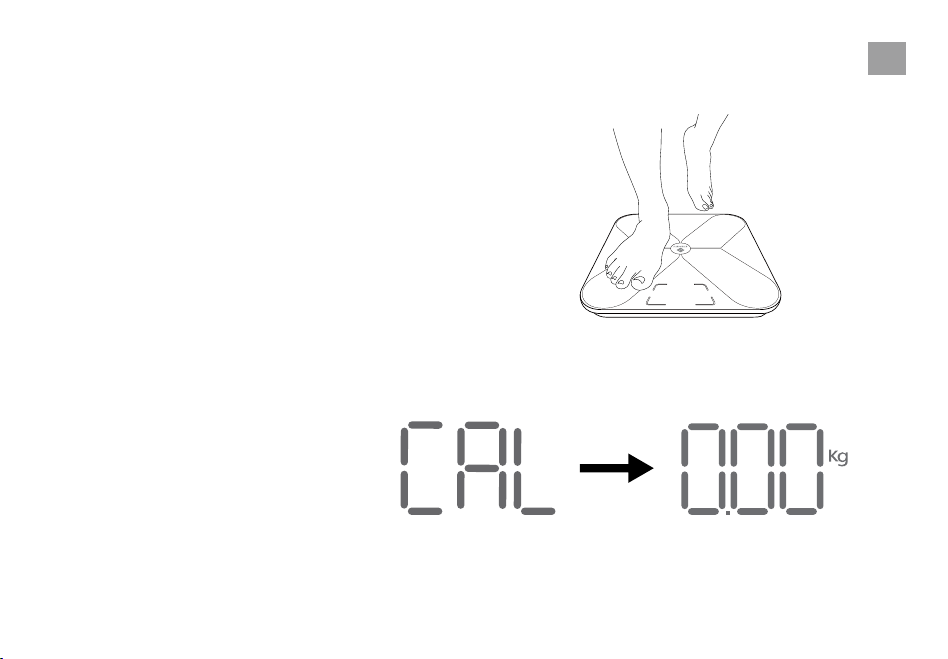
Rekalibrierung der Waage
1.
2.
3.
Wenn die Waage bewegt oder umgedreht wurde, muss
sie neu kalibriert werden, um genaue Ergebnisse zu
erzielen.
Stellen Sie die Waage auf einen harten, flachen
Untergrund.
Mit einem Fuß auf die Waage treten, bis die Ziffern
auf dem Display erscheinen.
Die Waage zeigt “CAL” , dann “0.00,” und zeigt
damit an, dass der Kalibriervorgang abgeschlossen
ist.
DE
50
Ersetzen der Batterien
1.
2.
3.
4.
1.5v - AAA
1.5v - AAA
1.5v - AAA
1.5v - AAA
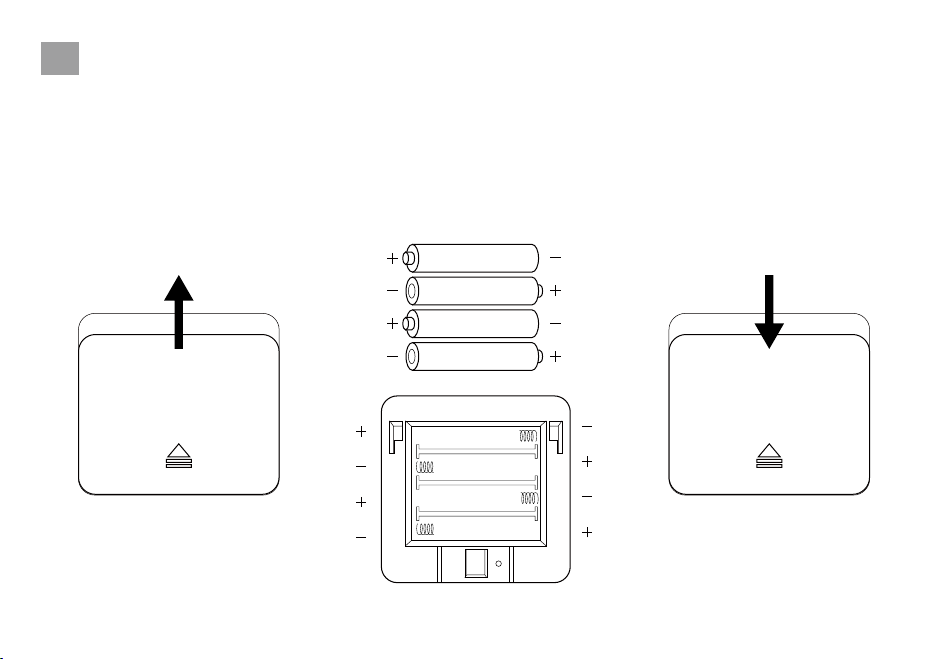
Das Display zeigt "Lo" an, wenn die Batterien
ausgetauscht werden sollen.
Öffnen Sie die Abdeckung des Batteriefaches
an der Rückseite der Waage.
Entfernen Sie die alten Batterien und
entsorgen Sie diese ordnungsgemäß.
Legen Sie vier neue 1,5V AAA-Batterien ein und
achten Sie dabei auf die richtige Polarität.
Setzen Sie die Abdeckung des Batteriefachs
wieder auf.
HINWEIS: Die Waage soll evtl. nachdem dem
Austausch der Batterien neu kalibriert werden.
DE
Fehlerbehebung
51
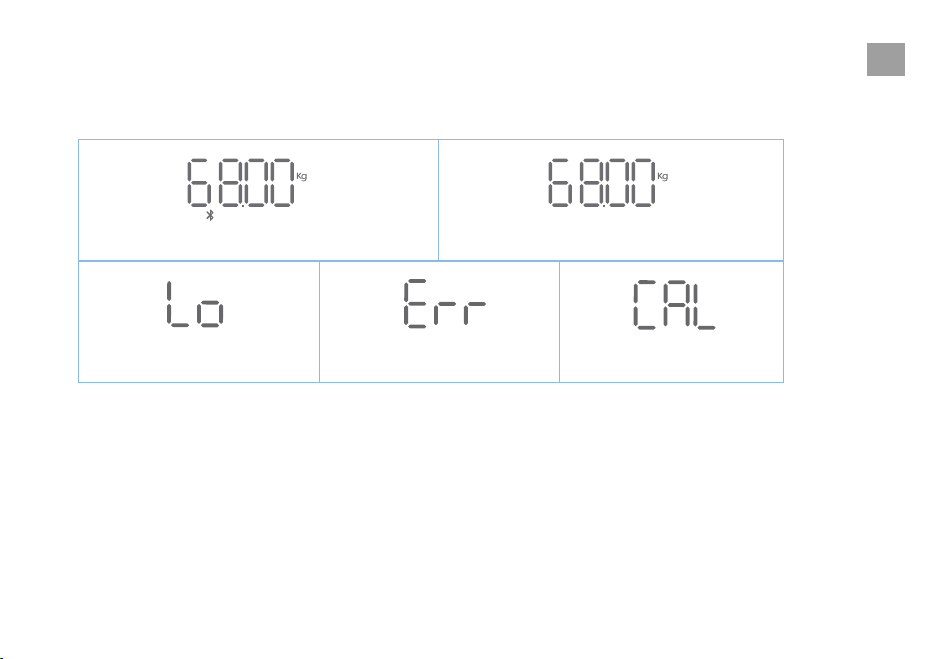
Kabellose Verbindung
Batterien Ersetzen Überlast Kalibrieren
Nicht Kabellose Verbindung
DE
52
Häufig Gestellte Fragen (FAQ)
1. Warum funktioniert die Waage nicht?
• Überprüfen Sie, ob die Batterien richtig eingesetzt sind.
2. Warum blinken die Daten auf dem Bildschirm und verschwinden dann?
• Die Batterien sind schwach und müssen ggf. ausgetauscht werden.
3. Warum ist die Waage nicht mit der VeSyncFit App verbunden?
• Stellen Sie sicher, dass das Betriebssystem Ihres Telefons auf iOS 8.0+ oder Android 4.3 läuft.
• Laden Sie die neueste Version der VeSyncFit App herunter und öffnen Sie diese.
• Schalten Sie Bluetooth auf Ihrem Handy ein (für Android-Benutzer stellen Sie sicher, dass Ihr Standort ebenfalls eingeschaltet ist).
4. Warum wird mein Körperfett beim Wiegen nicht gemessen?
• Treten Sie mit trockenen, nackten Füßen auf die Waage.
• Stellen Sie sicher, dass Bluetooth eingeschaltet ist.
• Geben Sie bei der Erstellung Ihres VeSyncFit-Kontos Ihre persönlichen Daten ein.
Leitfähige Bereiche
DE
Spezifikationen
53
Wiege Kapazität : 180 kg / 400 lb / 28 st
Einteilung: 0,05 kg / 0,2 lb
Wiege Einheiten: kg / lb / st
Plattform: Sicherheitsglas
Batterien: 4 x 1,5 V AAA-Batterien
Abmessung: 310 x 310 x 25 mm
Packungsinhalt
1 x Smarte Fitness-Personenwaage
4 x 1,5V AAA Batterien
1 x Bedienungsanleitung
DE

54
GARANTIE
BEDIENUNG & POLITIK
Etekcity Corporation
1202 N Miller Street, Suite A
Anaheim, CA 92806
Etekcity garantiert bei allen Produkten, dass wir die höchsten Standards bei den Materialien, der
Verarbeitung und beim Service anlegen. Diese Garantie ist gültig für zwei Jahre ab Kaufdatum.
Garantiezeiten können zwischen den Produktkategorien variieren.
Sollten eine Frage oder Probleme im Bezug auf eines unserer neuen Produkte auftreten, dann
können Sie jeder Zeit Kontakt mit unserem Kunden-Support Team durch eine E-Mail aufnehmen.
Ihre Zufriedenheit ist uns wichtig!
*Bitte halten Sie Ihre Bestellnummer bereit, bevor Sie den Kundendienst kontaktieren.
DE

.
ETEKCITY®
Building
on
better
living.