SalesandSupportInformation
CustomerCommunicationsCentre
• ForcustomerswithintheUK: 03448443899
• ForcustomerswithinIreland: 012898333
• Monday –Friday9:00 am –5:00 pm(Excludingpublicholidays).
• Forfurthersupportonyourproduct,pleasevisitourwebsite:
www.panasonic.co.uk
DirectSalesatPanasonicUK
• OrderaccessoryandconsumableitemsforyourproductwitheaseandconfidencebyphoningourCustomerCommunicationsCentre
Monday – Friday9:00 am – 5:00 pm(Excludingpublicholidays).
• OrgoonlinethroughourInternetAccessoryorderingapplicationatwww.pas-europe.com.
• Mostmajorcreditanddebitcardsaccepted.
• AllenquiriestransactionsanddistributionfacilitiesareprovideddirectlybyPanasonicUK.
• Itcouldn’tbesimpler!
• AlsoavailablethroughourInternetisdirectshoppingforawiderangeoffinishedproducts.Takeabrowseonourwebsiteforfurtherdetails.
PRO-031-F10 Issue 2.0 August 2016
Provides a 12 month parts & labour warranty on this product for manufacturing defects from date of purchase. In
addit ion to your rights under this warranty, Panasonic products come with consumer guarantees that cannot be
excluded under the Australian Consumer Law. If there is a major failure with the product, you can reject the product
and elect to have a refund or to have the product replaced or if you wish you may elect to keep the goods and be
compensated for the drop in value of the goods. You are also ent itled to have the product repaired or replaced if the
product fails to be of acceptable quality and the failure does not amount to a major failure.
For full de tails o r to claim warranty please contact Pana sonic Customer Care on 132 600 or visit
www.panasonic.com.au .
Panasonic Australia Pty. Ltd. 1 Innovat ion Road, Macquarie Park NSW 2113
For Australia
Pleasecheckandidentifythesuppliedaccessories.
Toorderaccessories,contactthedealerfromwhomyou
havemadeyourpurchase.
1 x USBchargingcord
1 x Detachablecord
OnlyforU.S.A.:
Toorderaccessories,referto“LimitedWarranty”.
Cleanthisunitwithadryandsoftcloth.
• Donotusesolventsincludingbenzine,thinner,alcohol,kitchen
detergent,achemicalwiper,etc.Thismightcausetheexterior
casetobedeformedorthecoatingtocomeoff.
Keepingthebatteryperformance.
• Duringthelongperiodofdisuse,fullchargethisunitonceevery
6 monthstokeepthebatteryperformance.
Vérifieretidentifierlesaccessoiresfournis.
Pourcommanderdesaccessoires,contacterlerevendeur.
1 x cordondechargeUSB
1 x cordondétachable
Nettoyercetappareilavecunchiffondouxetsec.
• Nepasutiliserdesolvants,commelabenzine,dudiluant,de
l’alcool,desdétergentsdecuisine,etc.Celapourraitmodifier
l’apparenceduboîtierexterneoudécollersonrevêtement.
Autonomiedelabatterie
• Lorsd’unelonguepériodedenon-utilisation,charger
complètementcetappareilunefoistousles6moispourpréserver
l'autonomiedelabatterie.
BasicOwner’sManual
Manueld’utilisationFonctionsdebase
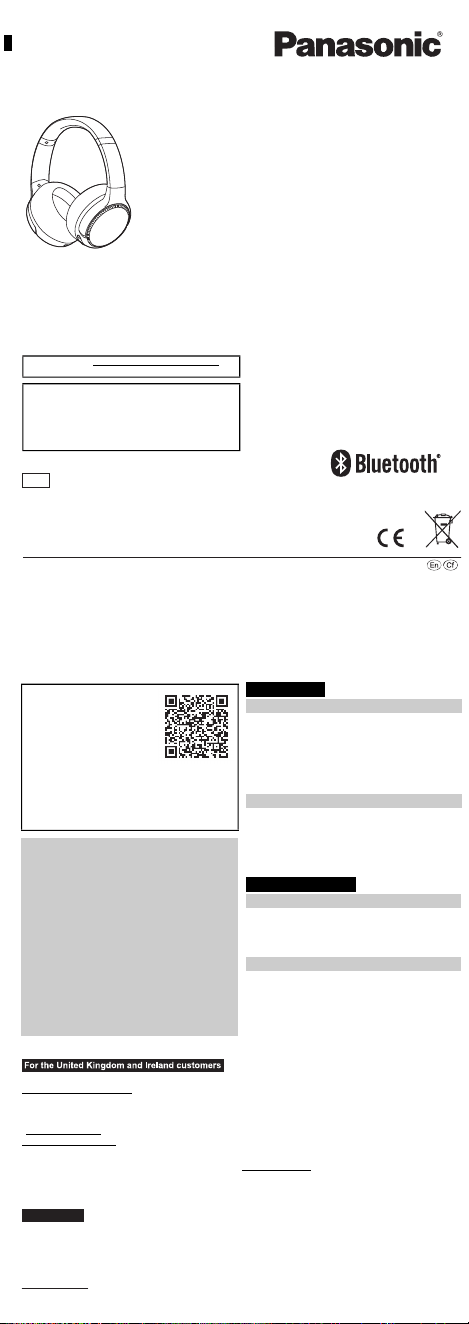
DigitalWirelessStereoHeadphones
Casqued’écoutestéréosansfilnumérique
RB-M500B
RB-M300B
Thankyouforpurchasingthisproduct.
Pleasereadtheseinstructionscarefullybeforeusingthisproduct,andsavethismanualforfutureuse.
Nousvousremercionsd’avoirarrêtévotrechoixsurcetappareil.
Avantd’utiliserl’appareil,ilestrecommandédelireattentivementcemanueld’utilisationetdeleconserverpourconsultation
ultérieure.
Registeronlineathttp://shop.panasonic.com/support
(U.S.customersonly)
Ifyouhaveanyquestions,visit:
IntheU.S.A.:
http://shop.panasonic.com/support
InCanada:
www.panasonic.ca/english/support
Pourtouteassistancesupplémentaire,visitez:
www.panasonic.ca/french/support
E
ModelNo./Modèle
EU
Panasonic Corporation
http://www.panasonic.com
Panasonic Corporation
Kadoma, Osaka, Japan
Panasonic Marketing Europe GmbH
Panasonic Testing Centre
Winsbergring 15, 22525 Hamburg, Germany
Manufactured by:
Authorized Representative in Europe:
Two Riverfront Plaza,
Newark, NJ 07102-5490
Panasonic Corporation of
North America
Panasonic Canada Inc.
5770 Ambler Drive, Mississauga,
Ontario L4W 2T3
www.panasonic.com
http://shop.panasonic.com
© Panasonic Corporation 2019
Printed in China/Imprimé en Chine
TQBM0669-1
F1219MH1020
English
Moredetailedoperatinginstructions
areavailablein“Owner’sManual(PDF
format)”.
Toreadit,downloaditfromthe
website.
https://panasonic.jp/support/global/
cs/accessories/oi/rb_m700b/
• Clickthedesiredlanguage.
Français(Canada)
Unmoded’emploiplusdétailléestdisponibledans“Manuel
d’utilisation(formatPDF)”.
Pourlelire,letéléchargerdepuislesiteweb.
https://panasonic.jp/support/global/cs/accessories/oi/rb_m700b/
• Cliquersurlalanguesouhaitée.
English
Expressionsusedinthisdocument
• Theproductillustrationsmaydifferfromtheactualproduct.
• Unlessotherwiseindicated,illustrationsintheseoperating
instructionsareofRB-M500B.
Marksdenotingmodelnames
Functionalitydifferencesbetweenmodelsareindicatedwiththe
modelmarksbelow.
RB-M500B: [RB-M500B] RB-M300B: [RB-M300B]
Français(Canada)
Expressionsutiliséesdanscedocument
• Lesillustrationsduproduitpeuventdifférerduproduitréel.
• Saufindicationcontraire,lesillustrationsprésentesdansce
manueld'utilisationreprésententleRB-M500B.
Symbolesdifférenciantlesnomsdemodèle
Lesdifférencesdefonctionnalitéentrelesmodèlessontindiquées
parlessymbolesci-dessous.
RB-M500B: [RB-M500B] RB-M300B: [RB-M300B]
English
Accessories
Maintenance
Français(Canada)
Accessoires
Entretien
IMPORTANTSAFETY
INSTRUCTIONS
Readtheseoperatinginstructionscarefullybeforeusingtheunit.
Followthesafetyinstructionsontheunitandtheapplicablesafety
instructionslistedbelow.Keeptheseoperatinginstructionshandyfor
futurereference.
1 Readtheseinstructions.
2 Keeptheseinstructions.
3 Heedallwarnings.
4 Followallinstructions.
5 Donotusethisapparatusnearwater.
6 Cleanonlywithdrycloth.
7 Donotblockanyventilationopenings.Installinaccordancewith
themanufacturer’sinstructions.
8 Donotinstallnearanyheatsourcessuchasradiators,heat
registers,stoves,orotherapparatus(includingamplifiers)that
produceheat.
9 Donotdefeatthesafetypurposeofthepolarizedor
grounding-typeplug.Apolarizedplughastwobladeswithone
widerthantheother.Agrounding-typeplughastwobladesanda
thirdgroundingprong.Thewidebladeorthethirdprongare
providedforyoursafety.Iftheprovidedplugdoesnotfitintoyour
outlet,consultanelectricianforreplacementoftheobsolete
outlet.
10 Protectthepowercordfrombeingwalkedonorpinched
particularlyatplugs,conveniencereceptacles,andthepoint
wheretheyexitfromtheapparatus.
11 Onlyuseattachments/accessoriesspecifiedbythemanufacturer.
12 Useonlywiththecart,stand,tripod,bracket,or
tablespecifiedbythemanufacturer,orsoldwith
theapparatus.Whenacartisused,usecaution
whenmovingthecart/apparatuscombinationto
avoidinjuryfromtip-over.
13 Unplugthisapparatusduringlightningstorms
orwhenunusedforlongperiodsoftime.
14 Referallservicingtoqualifiedservice
personnel.Servicingisrequiredwhentheapparatushasbeen
damagedinanyway,suchaspower-supplycordorplugis
damaged,liquidhasbeenspilledorobjectshavefallenintothe
apparatus,theapparatushasbeenexposedtorainormoisture,
doesnotoperatenormally,orhasbeendropped.
Unit
• Avoidusingorplacingthisunitnearsourcesofheat.
• Donotlistenwiththisunitathighvolumeinplaceswhereyouneed
tohearsoundsfromthesurroundingenvironmentforsafety,such
asatrailroadcrossings,andconstructionsites.
• Widebandcharacteristicvoltageequalorlargerthan75 mV.
• Keepthisunitawayfromsomethingsusceptibletothemagnetism.
Suchdevicesasaclockmaynotoperatecorrectly.
• Whenusingthisunitinanairplane,heedtheinstructionsgivenby
theairlinecompany.Someairlinesmayforbidyourusingtheunit.
Forfurtherdetails,contacttheairlineyouwillbeflyingwith.
Allergies
• Discontinueuseifyouexperiencediscomfortwiththeearpadsor
anyotherpartsthatdirectlycontactyourskin.
• Continuedusemaycauserashesorotherallergicreactions.
PrecautionsforlisteningwiththeHeadphones
• Excessivesoundpressurefromearphonesandheadphonescan
causehearingloss.
• Donotuseyourheadphonesatahighvolume.Hearingexperts
adviseagainstcontinuousextendedplay.
• Ifyouexperiencearinginginyourears,reducevolumeor
discontinueuse.
• Donotusewhileoperatingamotorisedvehicle.Itmaycreatea
traffichazardandisillegalinmanyareas.
• Youshoulduseextremecautionortemporarilydiscontinueusein
potentiallyhazardoussituations.
DeclarationofConformity(DoC)
Hereby,“PanasonicCorporation”declaresthatthisproductisin
compliancewiththeessentialrequirementsandotherrelevant
provisionsofDirective2014/53/EU.
CustomerscandownloadacopyoftheoriginalDoCtoourRE
productsfromourDoCserver:
http://www.ptc.panasonic.eu
ContacttoAuthorisedRepresentative:
PanasonicMarketingEuropeGmbH,
PanasonicTestingCentre,Winsbergring15,22525Hamburg,Germany
Usermemo:
English
Safetyprecautions
Alithiumionbatterythatis
recyclablepowersthe
productyouhave
purchased.Pleasecall
1-800-8-BATTERYfor
informationonhowto
recyclethisbattery.
THEFOLLOWINGAPPLIESONLYINTHEU.S.A.
ANDCANADA.
ThisdevicecomplieswithPart15ofFCCRulesandInnovation,
ScienceandEconomicDevelopmentCanada’slicence-exempt
RSS(s).Operationissubjecttothefollowingtwoconditions:
(1)thisdevicemaynotcauseinterference,and
(2)thisdevicemustacceptanyinterference,including
interferencethatmaycauseundesiredoperation.
[RB-M500B] [RB-M300B]
FCCID:ACJ-RB-M500B FCCID:ACJ-RB-M500B
Model:RB-M500B Model:RB-M300B
IC:216A-RBM500B IC:216A-RBM500B
Thistransmittermustnotbeco-locatedoroperatedinconjunction
withanyotherantennaortransmitter.
ThisequipmentcomplieswithFCC/ISEDradiationexposurelimits
setforthforanuncontrolledenvironmentandmeetstheFCC
radiofrequency(RF)ExposureGuidelinesandRSS-102ofthe
ISEDradiofrequency(RF)Exposurerulesasthisequipmenthas
verylowlevelsofRFenergy.
THEFOLLOWINGAPPLIESONLYINTHEU.S.A.
FCCNote:
Thisequipmenthasbeentestedandfoundtocomplywiththe
limitsforaClassBdigitaldevice,pursuanttoPart15oftheFCC
Rules.
Theselimitsaredesignedtoprovidereasonableprotection
againstharmfulinterferenceinaresidentialinstallation.This
equipmentgenerates,uses,andcanradiateradiofrequency
energyand,ifnotinstalledandusedinaccordancewiththe
instructions,maycauseharmfulinterferencetoradio
communications.
However,thereisnoguaranteethatinterferencewillnotoccurin
aparticularinstallation.Ifthisequipmentdoescauseharmful
interferencetoradioortelevisionreception,whichcanbe
determinedbyturningtheequipmentoffandon,theuseris
encouragedtotrytocorrecttheinterferencebyoneormoreofthe
followingmeasures:
• Reorientorrelocatethereceivingantenna.
• Increasetheseparationbetweentheequipmentandreceiver.
• Connecttheequipmentintoanoutletonacircuitdifferentfrom
thattowhichthereceiverisconnected.
• Consultthedealeroranexperiencedradio/TVtechnicianforhelp.
FCCCaution:
Anyunauthorizedchangesormodificationstothisequipment
wouldvoidtheuser’sauthoritytooperatethisdevice.
ThisdevicecomplieswithPart15oftheFCCRules.Operationis
subjecttothefollowingtwoconditions:(1)Thisdevicemaynot
causeharmfulinterference,and(2)thisdevicemustacceptany
interferencereceived,includinginterferencethatmaycause
undesiredoperation.
Supplier’sDeclarationofConformity
[RB-M500B] [RB-M300B]
TradeName:Panasonic TradeName:Panasonic
ModelNo.:RB-M500B ModelNo.:RB-M300B
ResponsibleParty:PanasonicCorporationofNorthAmerica
TwoRiverfrontPlaza,Newark,
NJ07102-5490
SupportContact:http://shop.panasonic.com/support
THEFOLLOWINGAPPLIESONLYINCANADA.
CANICES-3(B)/NMB-3(B)
For US and Canada only
Pour les É.-U. et le Canada seulement
3123480
Conforms to
UL STD 62368-1.
Certified to CAN/CSA STD
C22.2 No.62368-1.
Conforme à la norme CAN/CSA
C22.2 No.62368-1.
WARNING:
Toreducetheriskoffire,electricshockorproductdamage,
• Donotexposethisunittorain,moisture,drippingor
splashing.
• Donotplaceobjectsfilledwithliquids,suchasvases,on
thisunit.
• Usetherecommendedaccessories.
• Donotremovecovers.
• Donotrepairthisunitbyyourself.Referservicingto
qualifiedservicepersonnel.
Avoidtheuseinthefollowingconditions
• Highorlowextremetemperaturesduringuse,storageor
transportation.
• Disposalofabatteryintofireorahotoven,ormechanically
crushingorcuttingofabattery,thatcanresultinanexplosion.
• Extremelyhightemperatureand/orextremelylowairpressure
thatcanresultinanexplosionortheleakageofflammableliquid
orgas.
Thisunitmayreceiveradiointerferencecausedbymobile
telephonesduringuse.Ifsuchinterferenceoccurs,please
increaseseparationbetweenthisunitandthemobiletelephone.
UseonlythesuppliedUSBchargingcordwhenconnectingtoa
computer.
Thisunitisintendedforuseinmoderateandtropicalclimates.
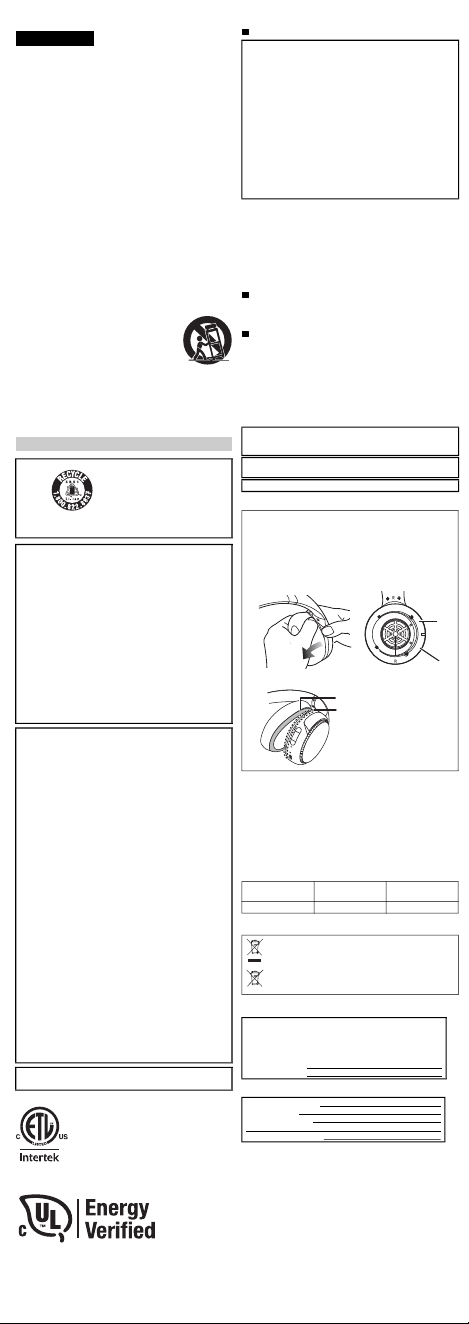
1 Removetherightearpadtoviewcertificationinformation.
2 Certificationinformation(
a
)isindicatedonthespeakerplate
portion(
b
),whichbecomesvisiblewhentherightearpad(R
side)isremoved.
3 Toattachtheearpad,fitthepart
d
oftheearpadintothepart
c
.
Ifyoupulltheearpadtoomuch,theearpadcantear.
Typeofwireless Frequencyband
Maximumpower
(dBme.i.r.p)
Bluetooth
®
2402-2480 MHz 4 dBm
OnlyforEuropeanUnionandcountrieswithrecycling
systems
Thesesymbolsindicateseparatecollectionofwaste
electricalandelectronicequipmentorwastebatteries.
Moredetailedinformationiscontainedin“Owner’sManual
(PDFformat)”.
Theserialnumberofthisproductcanbefoundontheleftside
oftheheadphones.
Removetheleftearpadtoseeit.
Pleasenotetheminthespaceprovidedbelowandkeepfor
futurereference.
MODELNUMBER
SERIALNUMBER
DATEOFPURCHASE
DEALERNAME
DEALERADDRESS
TELEPHONENUMBER
1 2
3
LimitedWarranty
(ONLYFORU.S.A.)
PanasonicProductsLimitedWarranty
LimitedWarrantyCoverage
Ifyourproductdoesnotworkproperlybecauseofadefectin
materialsorworkmanship,PanasonicCorporationofNorth
America(referredtoas“thewarrantor”)will,forthelengthofthe
periodindicatedonthechartbelow,whichstartswiththedateof
originalpurchase(“warrantyperiod”),atitsoptioneither(a)
repairyourproductwithneworrefurbishedparts,(b)replaceit
withaneworarefurbishedequivalentvalueproduct,or(c)
refundyourpurchaseprice.Thedecisiontorepair,replaceor
refundwillbemadebythewarrantor.
Duringthe“Labor”warrantyperiodtherewillbenochargefor
labor.Duringthe“Parts”warrantyperiod,therewillbeno
chargeforparts.ThisLimitedWarrantyexcludesbothpartsand
laborfornon-rechargeablebatteries,antennas,andcosmetic
parts(cabinet).Thiswarrantyonlyappliestoproducts
purchasedandservicedintheUnitedStates.Thiswarrantyis
extendedonlytotheoriginalpurchaserofanewproductwhich
wasnotsold“asis”.
Mail-InService--OnlineRepairRequest
OnlineRepairRequest
Tosubmitanewrepairrequestandforquickrepairstatusvisit
ourWebSiteat
http://shop.panasonic.com/support
Whenshippingtheunit,carefullypack,includeallsupplied
accessorieslistedintheOwner’sManual,andsenditprepaid,
adequatelyinsuredandpackedwellinacartonbox.When
shippingLithiumIonbatteriespleasevisitourWebSiteat
http://shop.panasonic.com/supportasPanasoniciscommitted
toprovidingthemostuptodateinformation.Includealetter
detailingthecomplaint,areturnaddressandprovideadaytime
phonenumberwhereyoucanbereached.Avalidregistered
receiptisrequiredundertheLimitedWarranty.
IFREPAIRISNEEDEDDURINGTHEWARRANTYPERIOD,
THEPURCHASERWILLBEREQUIREDTOFURNISHA
SALESRECEIPT/PROOFOFPURCHASEINDICATING
DATEOFPURCHASE,AMOUNTPAIDANDPLACEOF
PURCHASE.CUSTOMERWILLBECHARGEDFORTHE
REPAIROFANYUNITRECEIVEDWITHOUTSUCHPROOF
OFPURCHASE.
LimitedWarrantyLimitsandExclusions
ThiswarrantyONLYCOVERSfailuresduetodefectsin
materialsorworkmanship,andDOESNOTCOVERnormal
wearandtearorcosmeticdamage.ThewarrantyALSODOES
NOTCOVERdamageswhichoccurredinshipment,orfailures
whicharecausedbyproductsnotsuppliedbythewarrantor,or
failureswhichresultfromaccidents,misuse,abuse,neglect,
mishandling,misapplication,alteration,faultyinstallation,set-up
adjustments,misadjustmentofconsumercontrols,improper
maintenance,powerlinesurge,lightningdamage,modification,
introductionofsand,humidityorliquids,commercialusesuch
ashotel,office,restaurant,orotherbusinessorrentaluseofthe
product,orservicebyanyoneotherthanaFactoryService
CenterorotherAuthorizedServicer,ordamagethatis
attributabletoactsofGod.
THEREARENOEXPRESSWARRANTIESEXCEPTAS
LISTEDUNDER“LIMITEDWARRANTYCOVERAGE”.
THEWARRANTORISNOTLIABLEFORINCIDENTALOR
CONSEQUENTIALDAMAGESRESULTINGFROMTHEUSE
OFTHISPRODUCT,ORARISINGOUTOFANYBREACHOF
THISWARRANTY.
(Asexamples,thisexcludesdamagesforlosttime,traveltoand
fromtheservicer,lossofordamagetomediaorimages,dataor
othermemoryorrecordedcontent.Theitemslistedarenot
exclusive,butforillustrationonly.)
ALLEXPRESSANDIMPLIEDWARRANTIES,INCLUDING
THEWARRANTYOFMERCHANTABILITY,ARELIMITEDTO
THEPERIODOFTHELIMITEDWARRANTY.
Somestatesdonotallowtheexclusionorlimitationofincidental
orconsequentialdamages,orlimitationsonhowlongan
impliedwarrantylasts,sotheexclusionsmaynotapplytoyou.
Thiswarrantygivesyouspecificlegalrightsandyoumayalso
haveotherrightswhichvaryfromstatetostate.Ifaproblem
withthisproductdevelopsduringorafterthewarrantyperiod,
youmaycontactyourdealerorServiceCenter.Iftheproblemis
nothandledtoyoursatisfaction,thenwriteto:
PanasonicCorporationofNorthAmerica
ConsumerAffairsDepartment8thFl.
TwoRiverfrontPlaza
NewarkNJ07102-5490
PARTSANDSERVICE,WHICHARENOTCOVEREDBY
THISLIMITEDWARRANTY,AREYOURRESPONSIBILITY.
AsofDecember2019
LimitedWarranty
(ONLYFORCANADA)
PanasonicCanadaInc.
5770AmblerDrive,Mississauga,OntarioL4W2T3
PANASONICPRODUCT–LIMITEDWARRANTY
EXCHANGEPROGRAM
PanasonicCanadaInc.warrantsthisproducttobefreefrom
defectsinmaterialandworkmanshipundernormaluseandfor
aperiodasstatedbelowfromthedateoforiginalpurchase
agreesto,atitsoptioneither(a)repairyourproductwithnewor
refurbishedparts,(b)replaceitwithaneworarefurbished
equivalentvalueproduct,or(c)refundyourpurchaseprice.The
decisiontorepair,replaceorrefundwillbemadebyPanasonic
CanadaInc.
Thiswarrantyisgivenonlytotheoriginalpurchaser,orthe
personforwhomitwaspurchasedasagift,ofaPanasonic
brandproductmentionedabovesoldbyanauthorized
PanasonicdealerinCanadaandpurchasedandusedin
Canada,whichproductwasnotsold“asis”,andwhichproduct
wasdeliveredtoyouinnewconditionintheoriginalpackaging.
INORDERTOBEELIGIBLETORECEIVEWARRANTY
SERVICEHEREUNDER,APURCHASERECEIPTOR
OTHERPROOFOFDATEOFORIGINALPURCHASE,
SHOWINGAMOUNTPAIDANDPLACEOFPURCHASEIS
REQUIRED
LIMITATIONSANDEXCLUSIONS
ThiswarrantyONLYCOVERSfailuresduetodefectsin
materialsorworkmanship,andDOESNOTCOVERnormal
wearandtearorcosmeticdamage.ThewarrantyALSODOES
NOTCOVERdamageswhichoccurredinshipment,orfailures
whicharecausedbyproductsnotsuppliedbyPanasonic
CanadaInc.,orfailureswhichresultfromaccidents,misuse,
abuse,neglect,mishandling,misapplication,alteration,faulty
installation,set-upadjustments,misadjustmentofconsumer
controls,impropermaintenance,powerlinesurge,lightning
damage,modification,introductionofsand,humidityorliquids,
commercialusesuchashotel,office,restaurant,orother
businessorrentaluseoftheproduct,orservicebyanyone
otherthanaAuthorizedServicer,ordamagethatisattributable
toactsofGod.
Drycellbatteriesarealsoexcludedfromcoverageunderthis
warranty.
THISEXPRESS,LIMITEDWARRANTYISINLIEUOFALL
OTHERWARRANTIES,EXPRESSORIMPLIED,INCLUDING
ANYIMPLIEDWARRANTIESOFMERCHANTABILITYAND
FITNESSFORAPARTICULARPURPOSE.INNOEVENT
WILLPANASONICCANADAINC.BELIABLEFORANY
SPECIAL,INDIRECTORCONSEQUENTIALDAMAGES
RESULTINGFROMTHEUSEOFTHISPRODUCTOR
ARISINGOUTOFANYBREACHOFANYEXPRESSOR
IMPLIEDWARRANTY.(Asexamples,thiswarrantyexcludes
damagesforlosttime,traveltoandfromtheAuthorized
Servicer,lossofordamagetomediaorimages,dataorother
memoryorrecordedcontent.Thislistofitemsisnotexhaustive,
butforillustrationonly.)
Incertaininstances,somejurisdictionsdonotallowthe
exclusionorlimitationofincidentalorconsequentialdamages,
ortheexclusionofimpliedwarranties,sotheabovelimitations
andexclusionsmaynotbeapplicable.Thiswarrantygivesyou
specificlegalrightsandyoumayhaveotherrightswhichvary
dependingonyourprovinceorterritory.
CONTACTINFORMATION
Forproductoperationandinformationassistance,pleasevisit
ourSupportpage:
www.panasonic.ca/english/support
Fordefectiveproductexchangewithinthewarrantyperiod,
pleasecontacttheoriginaldealer.
Usefulinformation
(OnlyforLatinAmericancountries)
ProductorPartName Parts Labor
Headphones/
Earphones/Headset
1year NotApplicable
Allincluded
Accessories
90days NotApplicable
Accessories One(1)year
Customer Service
Customer Service Directory
COUNTRY WEB SITE CONTACT CENTER
800-7262
01-8000-947262
Dominican Rep.
01800-847-7262
Panama
Colombia
Ecuador
Costa Rica
El Salvador
Guatemala
Uruguay
Paraguay
Chile
Peru
Venezuela
Mexico
Argentina
www.panasonic.com/pa/soporte/
www.panasonic.com/co/soporte/
www.panasonic.com/pa/soporte/
www.panasonic.com/pa/soporte/
www.panasonic.com/pa/soporte/
www.panasonic.com/pa/soporte/
www.panasonic.com/pa/soporte/
www.panasonic.com/pa/soporte/
www.panasonic.com/cl/soporte/
www.panasonic.com/pe/soporte/
www.panasonic.com/pa/soporte/
www.panasonic.com/pa/soporte/
www.panasonic.com/mx/soporte/
www.panasonic.com/ar/soporte/
1-800-726276
800-7262737
800-7262
1-801-811-7262
0-800-7262
0-800-11-7262
800-390-602
0800-00726
800-7262-800
809-200-8000
022-797-5000
55-5000-1200
0800-333-7262
0810-321-7262
Obtain products information and operative assistant; localize the closer
distributor or Service Center; buy spare parts and accessories by our
Web Site to Latin America or calling our Contact Center:
For Caribbean countries that speak English please enter this web site
in order to find information of our products and operative assistant:
www.panasonic.com/caribbean
IMPORTANTESMISESENGARDE
Avantd’utiliserl’appareil,lireattentivementlesinstructionsquisuivent.
Seconformertoutparticulièrementauxavertissementsinscritssur
l’appareiletauxconsignesdesécuritéindiquéesci-dessous.
Conserverleprésentmanuelpourconsultationultérieure.
1 Lireattentivementcesinstructions.
2 Conservercesinstructions.
3 Liretouteslesmisesengarde.
4 Suivretouteslesinstructions.
5 Nepasutilisercetappareilprèsd’unesourced’eau.
6 Nenettoyerqu’avecunchiffonsec.
7 Nepasbloquerleséventsd’aération.Installerl’appareilselonles
instructionsdufabricant.
8 Nepasinstallerl’appareilprèsd’unappareildechauffagetel
qu’unradiateur,unecuisinière,unregistredechaleuroutout
dispositifémettantdelachaleur(ycomprisunamplificateur).
9 Pourdesraisonsdesécurité,nepasmodifierlafichepolarisée
oucelledemiseàlaterre.Unefichepolariséeestuneficheà
deuxlames,dontunepluslarge.Unefichedemiseàlaterreest
uneficheàdeuxlamesavecunebrochedemasse.Lalameplus
largeoulabrochedemasseprocureuneprotectionaccrue.Sice
genredefichenepeutêtreinsérédansuneprisedecourant,
communiqueravecunélectricienpourremplacerlaprise.
10 S’assurerquelecordonestplacédansunendroitoùilnerisque
pasd’êtreécrasé,piétinéoucoincé.Faireparticulièrement
attentionàsesextrémitésdebranchement,ycomprissafiche.
11 N’utiliserquelesaccessoiresoupériphériquesrecommandés
parlefabricant.
12 N’utiliserl’appareilqu’avecunchariot,meuble,
trépied,supportoutablerecommandéparle
fabricantouvenduavecl’appareil.Lorsde
l’utilisationd’unchariot,ledéplaceravecle
plusgrandsoinafind’évitertoutdommage.
13 Débranchercetappareillorsd’unorageouen
casdenon-utilisationprolongée.
14 Confierl’appareilàuntechnicienqualifiépour
touteréparation :cordond’alimentationouficheendommagé,
liquiderenverséouobjettombédansl’appareil,expositionàla
pluieouàunehumiditéexcessive,mauvaisfonctionnementou
échappementdel’appareil.
Appareil
• Éviterd’utiliseroudeplacercetappareilprèsd’unesourcede
chaleur.
• Nepasécouteraveccetappareilàunvolumeélevédansles
endroitsoùvousdevezentendredessonsprovenantdumilieu
environnantpourlasécurité,commelespassagesàniveauetles
chantiersdeconstruction.
• Tensioncaractéristiqueàlargebandeégaleousupérieureà75 mV.
• Tenircetappareiléloignédetoutobjetsusceptibled’être
magnétisé.Certainsdispositifs,commeleshorloges,peuventne
pasfonctionnercorrectement.
• Lorsdel’utilisationdecetappareildansunavion,respecterles
instructionsdonnéesparlacompagnieaérienne.Certaines
compagniesaériennespeuventinterdirel’utilisationdel’appareil.
Pourplusdedétails,contacterlacompagnieaérienneavantlevol.
Allergies
• Touteutilisationdoitcessersil’onrencontreuninconfortavecles
coussinetsoutouteautrepiècetouchantdirectementlapeau.
• Uneutilisationcontinuepeutprovoquerdeséruptionscutanéesou
d’autresréactionsallergiques.
Précautionsd’écouteaveclecasque
• Unepressionsonoreexcessiveprovenantd'écouteursoud'un
casqueaudiopeutprovoqueruneperteauditive.
• Nepasutiliservoscasquesàunvolumeélevé.Lesexpertsen
auditiondéconseillentl'utilisationprolongéesansinterruption.
• Siunbourdonnementsefaitentendre,réduirelevolumeouarrêter
d'utiliserl'appareil.
• Nepasutiliserdurantlaconduited'unvéhiculemotorisé.Celapeut
créerunrisqued'accidentsetestillégaldansplusieursrégions.
• Ilfautfairepreuved'uneextrêmeprudenceoucessertemporairement
del'utiliserdansdessituationspotentiellementdangereuses.
Certificatdegarantielimitée
(PourleCanadaseulement)
PanasonicCanadaInc.
5770,AmblerDrive,Mississauga(Ontario)L4W2T3
PRODUITPANASONIC–GARANTIELIMITÉE
PROGRAMMEDEREMPLACEMENT
PanasonicCanadaInc.garantitqueceproduitestexemptde
défautsdematériauxetdemain-d’œuvredansuncontexte
d’utilisationnormalependantlapériodeindiquéeci-aprèsà
compterdeladated’achatoriginalet,dansl’éventualitéd’une
défectuosité,accepte,àsadiscrétion,de(a)réparerleproduit
avecdespiècesneuvesouremisesàneuf,(b)remplacerle
produitparunproduitneufouremisàneufd’unevaleur
équivalenteou(c)rembourserleprixd’achat.Ladécisionde
réparer,remplacerourembourserappartientàPanasonic
CanadaInc.
Laprésentegarantien’estfourniequ’àl’acheteuroriginald’un
desproduitsdemarquePanasonicindiquésplushaut,ouàla
personnel’ayantreçuencadeau,venduparundétaillant
PanasonicagrééauCanadaetutiliséauCanada.Leproduit
nedoitpasavoirété“vendutelquel”etdoitavoirétélivréà
l’étatneufdanssonemballaged’origine.
POURÊTREADMISSIBLEAUXSERVICESAUTITREDELA
PRÉSENTEGARANTIE,LAPRÉSENTATIOND’UNREÇU
D’ACHATOUDETOUTEAUTREPIÈCEJUSTIFICATIVEDE
LADATED’ACHATORIGINAL,INDIQUANTLEMONTANT
PAYÉETLELIEUDEL’ACHAT,ESTREQUISE.
RESTRICTIONSETEXCLUSIONS
LaprésentegarantieCOUVRESEULEMENTlesdéfaillances
attribuablesàundéfautdesmatériauxouàunvicede
fabricationetNECOUVREPASl’usurenormaleniles
dommagesesthétiques.LaprésentegarantieNECOUVRE
PASNONPLUSlesdommagessubispendantletransport,les
défaillancescauséespardesproduitsnonfournispar
PanasonicCanadaInc.,nicellesrésultantd’unaccident,d’un
usageabusifouimpropre,denégligence,d’unemanutention
inadéquate,d’unemauvaiseapplication,d’unealtération,d’une
installationouderéglagesimpropres,d’unmauvaisréglagedes
contrôlesdel’utilisateur,d’unmauvaisentretien,d’une
surtensiontemporaire,delafoudre,d’unemodification,dela
pénétrationdesable,deliquidesoud’humidité,d’uneutilisation
commerciale(dansunhôtel,unbureau,unrestaurantoutout
autreusageparaffairesouenlocation),d’uneréparation
effectuéeparuneentitéautrequ’uncentredeservice
Panasonicagrééouencored’unecatastrophenaturelle.
Lespilessèchessontégalementexcluesdelaprésentegarantie.
CETTEGARANTIELIMITÉEETEXPRESSEREMPLACE
TOUTEAUTREGARANTIE,EXPRESSEOUIMPLICITE,
INCLUANTLESGARANTIESIMPLICITESDUCARACTÈRE
ADÉQUATPOURLACOMMERCIALISATIONETUNUSAGE
PARTICULIER.PANASONICCANADAINC.N’AURA
D’OBLIGATIONENAUCUNECIRCONSTANCEPOURTOUT
DOMMAGEDIRECT,INDIRECTOUCONSÉCUTIF
RÉSULTANTDEL’UTILISATIONDECEPRODUITOU
DÉCOULANTDETOUTEDÉROGATIONÀUNEGARANTIE
EXPRESSEOUIMPLICITE.(Àtitred’exemples,cettegarantie
exclutlesdommagesrelatifsàunepertedetemps,letransport
jusqu’àetdepuisuncentredeserviceagréé,laperteoula
détériorationdesupportsoud’images,dedonnéesoudetout
autrecontenuenmémoireouenregistré.Cettelisten’estpas
exhaustiveetn’estfourniequ’àdesfinsexplicatives.)
Certainesjuridictionsnereconnaissentpaslesexclusionsou
limitationsdedommagesindirectsouconsécutifs,oules
exclusionsdegarantiesimplicites.Dansdetelscas,les
limitationsstipuléesci-dessuspeuventnepasêtreapplicables.
Laprésentegarantievousconfèredesdroitsprécis;vous
pourriezaussiavoird’autresdroitspouvantvarierselonvotre
provinceouterritoirederésidence.
DEMANDEDERENSEIGNEMENTS
Pourtoutrenseignementsurlesproduitsetdel’assistance
technique,veuillezvisiternotrepageSoutien:
www.panasonic.ca/french/support
Pourleremplacementd’unproduitdéfectueuxcouvertparla
garantie,veuillezcommuniqueraveclerevendeurd’origine.
Homologation:
Français(Canada)
Précautionsdesécurité
L’appareilquevousvous
êtesprocuréestalimenté
parunebatterieau
lithium-ion.Pourdes
renseignementssurle
recyclagedelabatterie,
veuillezcomposerle
1-800-8-BATTERY.
CEQUISUITNES’APPLIQUEQU’AUX
ÉTATS-UNISETAUCANADA.
Leprésentappareilestconformeàlapartie15desrèglesdela
FCCetauxCNRd’Innovation,SciencesetDéveloppement
économiqueCanadaapplicablesauxappareilsradioexemptsde
licence.L’exploitationestautoriséeauxdeuxconditionssuivantes:
(1)l’appareilnedoitpasproduiredebrouillage,et
(2)l’appareildoitacceptertoutbrouillageradioélectriquesubi,
mêmesilebrouillageestsusceptibled’encompromettrele
fonctionnement.
[RB-M500B] [RB-M300B]
FCCID:ACJ-RB-M500B FCCID:ACJ-RB-M500B
Modèle:RB-M500B Modèle:RB-M300B
IC:216A-RBM500B IC:216A-RBM500B
Cetéquipementestconformeauxlimitesd’expositionaux
rayonnementsénoncéespourunenvironnementnoncontrôléet
respectelesrèglesd’expositionradioélectriques(RF)delaFCC
etleslignesdirectricesd’expositionauxfréquences
radioélectriques(RF)CNR-102del’ISDEpuisquecetappareil
émetuneénergieRFtrèsfaible.
CEQUISUITNES’APPLIQUEQU’AUCANADA.
CANICES-3(B)/NMB-3(B)
ATTENTION:
Pourréduirelesrisquesd’incendie,dechocélectriqueoude
dommagesàl’appareil,
• Nepasexposercetappareilàlapluie,àl’humidité,aux
gouttesouauxéclaboussures.
• Nepasplacerd’objetremplideliquide,commedesvases,
surcetappareil.
• Utiliserlesaccessoiresrecommandés.
• Nepasretirerlescouvercles.
• Nepasréparercetappareilparsoi-même.Référerla
réparationàunpersonneldeservicequalifié.
Éviterlesconditionssuivantes:
• Températuresextrêmementbassesouélevéesdurant
l'utilisation,lestockageouletransport.
• Miseaurebutd'unebatteriedanslefeuoudansunfourchaud,
ouécrasementoucoupuremécaniqued'unebatterie,pouvant
entraîneruneexplosion.
• Températureextrêmementélevéeet/oupressiondel'air
extrêmementbassepouvantentraîneruneexplosionouune
fuitedeliquideoudegazinflammable.
Durantl'utilisation,l'appareilpourraitrecevoirdesinterférences
provenantdetéléphonesmobiles.Sidesinterférencesse
produisent,augmenterladistanceentrecetappareiletle
téléphonemobile.
UtiliseruniquementlecordondechargeUSBfournilorsdela
connexionàunordinateur.
Cetappareilestconçupouruneutilisationenclimatmodéréet
tropical.
For US and Canada only
Pour les É.-U. et le Canada seulement
1 Retirerlecoussinetdroitpourvoirlesinformations
d'authentification.
2 Lesinformationsd'authentification(
a
)sontindiquéessurla
plaqueduhaut-parleur(
b
),visiblelorsquelecoussinetdroit
(côtéR)estretiré.
3 Pourmettreenplacelecoussinet,insérerlapartie
d
de
celui-cidanslapartie
c
.
Silecoussinetesttirétropfort,ilpourraitsedéchirer.
Accessoires Un(1)an
Lenumérodesériedeceproduitpeutêtretrouvésurlecôté
gaucheducasque.
Retirerlecoussinetdegauchepourlevoir.
Veuillezlenoterdansl’espacefournici-dessous,etconserver
letoutpourréférencefuture.
NUMÉRODEMODÈLE
NUMÉRODESÉRIE
DATED’ACHAT
DÉTAILLANT
ADRESSEDUDÉTAILLANT
NºDETÉLÉPHONE
1 2
3
SalesandSupportInformation
CustomerCommunicationsCentre
• ForcustomerswithintheUK: 03448443899
• ForcustomerswithinIreland: 012898333
• Monday –Friday9:00 am –5:00 pm(Excludingpublicholidays).
• Forfurthersupportonyourproduct,pleasevisitourwebsite:
www.panasonic.co.uk
DirectSalesatPanasonicUK
• OrderaccessoryandconsumableitemsforyourproductwitheaseandconfidencebyphoningourCustomerCommunicationsCentre
Monday – Friday9:00 am – 5:00 pm(Excludingpublicholidays).
• OrgoonlinethroughourInternetAccessoryorderingapplicationatwww.pas-europe.com.
• Mostmajorcreditanddebitcardsaccepted.
• AllenquiriestransactionsanddistributionfacilitiesareprovideddirectlybyPanasonicUK.
• Itcouldn’tbesimpler!
• AlsoavailablethroughourInternetisdirectshoppingforawiderangeoffinishedproducts.Takeabrowseonourwebsiteforfurtherdetails.
PRO-031-F10 Issue 2.0 August 2016
Provides a 12 month parts & labour warranty on this product for manufacturing defects from date of purchase. In
addit ion to your rights under this warranty, Panasonic products come with consumer guarantees that cannot be
excluded under the Australian Consumer Law. If there is a major failure with the product, you can reject the product
and elect to have a refund or to have the product replaced or if you wish you may elect to keep the goods and be
compensated for the drop in value of the goods. You are also ent itled to have the product repaired or replaced if the
product fails to be of acceptable quality and the failure does not amount to a major failure.
For full de tails o r to claim warranty please contact Pana sonic Customer Care on 132 600 or visit
www.panasonic.com.au .
Panasonic Australia Pty. Ltd. 1 Innovat ion Road, Macquarie Park NSW 2113
For Australia
Pleasecheckandidentifythesuppliedaccessories.
Toorderaccessories,contactthedealerfromwhomyou
havemadeyourpurchase.
1 x USBchargingcord
1 x Detachablecord
OnlyforU.S.A.:
Toorderaccessories,referto“LimitedWarranty”.
Cleanthisunitwithadryandsoftcloth.
• Donotusesolventsincludingbenzine,thinner,alcohol,kitchen
detergent,achemicalwiper,etc.Thismightcausetheexterior
casetobedeformedorthecoatingtocomeoff.
Keepingthebatteryperformance.
• Duringthelongperiodofdisuse,fullchargethisunitonceevery
6 monthstokeepthebatteryperformance.
Vérifieretidentifierlesaccessoiresfournis.
Pourcommanderdesaccessoires,contacterlerevendeur.
1 x cordondechargeUSB
1 x cordondétachable
Nettoyercetappareilavecunchiffondouxetsec.
• Nepasutiliserdesolvants,commelabenzine,dudiluant,de
l’alcool,desdétergentsdecuisine,etc.Celapourraitmodifier
l’apparenceduboîtierexterneoudécollersonrevêtement.
Autonomiedelabatterie
• Lorsd’unelonguepériodedenon-utilisation,charger
complètementcetappareilunefoistousles6moispourpréserver
l'autonomiedelabatterie.
BasicOwner’sManual
Manueld’utilisationFonctionsdebase
DigitalWirelessStereoHeadphones
Casqued’écoutestéréosansfilnumérique
RB-M500B
RB-M300B
Thankyouforpurchasingthisproduct.
Pleasereadtheseinstructionscarefullybeforeusingthisproduct,andsavethismanualforfutureuse.
Nousvousremercionsd’avoirarrêtévotrechoixsurcetappareil.
Avantd’utiliserl’appareil,ilestrecommandédelireattentivementcemanueld’utilisationetdeleconserverpourconsultation
ultérieure.
Registeronlineathttp://shop.panasonic.com/support
(U.S.customersonly)
Ifyouhaveanyquestions,visit:
IntheU.S.A.:
http://shop.panasonic.com/support
InCanada:
www.panasonic.ca/english/support
Pourtouteassistancesupplémentaire,visitez:
www.panasonic.ca/french/support
E
ModelNo./Modèle
EU
Panasonic Corporation
http://www.panasonic.com
Panasonic Corporation
Kadoma, Osaka, Japan
Panasonic Marketing Europe GmbH
Panasonic Testing Centre
Winsbergring 15, 22525 Hamburg, Germany
Manufactured by:
Authorized Representative in Europe:
Two Riverfront Plaza,
Newark, NJ 07102-5490
Panasonic Corporation of
North America
Panasonic Canada Inc.
5770 Ambler Drive, Mississauga,
Ontario L4W 2T3
www.panasonic.com
http://shop.panasonic.com
© Panasonic Corporation 2019
Printed in China/Imprimé en Chine
TQBM0669-1
F1219MH1020
English
Moredetailedoperatinginstructions
areavailablein“Owner’sManual(PDF
format)”.
Toreadit,downloaditfromthe
website.
https://panasonic.jp/support/global/
cs/accessories/oi/rb_m700b/
• Clickthedesiredlanguage.
Français(Canada)
Unmoded’emploiplusdétailléestdisponibledans“Manuel
d’utilisation(formatPDF)”.
Pourlelire,letéléchargerdepuislesiteweb.
https://panasonic.jp/support/global/cs/accessories/oi/rb_m700b/
• Cliquersurlalanguesouhaitée.
English
Expressionsusedinthisdocument
• Theproductillustrationsmaydifferfromtheactualproduct.
• Unlessotherwiseindicated,illustrationsintheseoperating
instructionsareofRB-M500B.
Marksdenotingmodelnames
Functionalitydifferencesbetweenmodelsareindicatedwiththe
modelmarksbelow.
RB-M500B: [RB-M500B] RB-M300B: [RB-M300B]
Français(Canada)
Expressionsutiliséesdanscedocument
• Lesillustrationsduproduitpeuventdifférerduproduitréel.
• Saufindicationcontraire,lesillustrationsprésentesdansce
manueld'utilisationreprésententleRB-M500B.
Symbolesdifférenciantlesnomsdemodèle
Lesdifférencesdefonctionnalitéentrelesmodèlessontindiquées
parlessymbolesci-dessous.
RB-M500B: [RB-M500B] RB-M300B: [RB-M300B]
English
Accessories
Maintenance
Français(Canada)
Accessoires
Entretien
IMPORTANTSAFETY
INSTRUCTIONS
Readtheseoperatinginstructionscarefullybeforeusingtheunit.
Followthesafetyinstructionsontheunitandtheapplicablesafety
instructionslistedbelow.Keeptheseoperatinginstructionshandyfor
futurereference.
1 Readtheseinstructions.
2 Keeptheseinstructions.
3 Heedallwarnings.
4 Followallinstructions.
5 Donotusethisapparatusnearwater.
6 Cleanonlywithdrycloth.
7 Donotblockanyventilationopenings.Installinaccordancewith
themanufacturer’sinstructions.
8 Donotinstallnearanyheatsourcessuchasradiators,heat
registers,stoves,orotherapparatus(includingamplifiers)that
produceheat.
9 Donotdefeatthesafetypurposeofthepolarizedor
grounding-typeplug.Apolarizedplughastwobladeswithone
widerthantheother.Agrounding-typeplughastwobladesanda
thirdgroundingprong.Thewidebladeorthethirdprongare
providedforyoursafety.Iftheprovidedplugdoesnotfitintoyour
outlet,consultanelectricianforreplacementoftheobsolete
outlet.
10 Protectthepowercordfrombeingwalkedonorpinched
particularlyatplugs,conveniencereceptacles,andthepoint
wheretheyexitfromtheapparatus.
11 Onlyuseattachments/accessoriesspecifiedbythemanufacturer.
12 Useonlywiththecart,stand,tripod,bracket,or
tablespecifiedbythemanufacturer,orsoldwith
theapparatus.Whenacartisused,usecaution
whenmovingthecart/apparatuscombinationto
avoidinjuryfromtip-over.
13 Unplugthisapparatusduringlightningstorms
orwhenunusedforlongperiodsoftime.
14 Referallservicingtoqualifiedservice
personnel.Servicingisrequiredwhentheapparatushasbeen
damagedinanyway,suchaspower-supplycordorplugis
damaged,liquidhasbeenspilledorobjectshavefallenintothe
apparatus,theapparatushasbeenexposedtorainormoisture,
doesnotoperatenormally,orhasbeendropped.
Unit
• Avoidusingorplacingthisunitnearsourcesofheat.
• Donotlistenwiththisunitathighvolumeinplaceswhereyouneed
tohearsoundsfromthesurroundingenvironmentforsafety,such
asatrailroadcrossings,andconstructionsites.
• Widebandcharacteristicvoltageequalorlargerthan75 mV.
• Keepthisunitawayfromsomethingsusceptibletothemagnetism.
Suchdevicesasaclockmaynotoperatecorrectly.
• Whenusingthisunitinanairplane,heedtheinstructionsgivenby
theairlinecompany.Someairlinesmayforbidyourusingtheunit.
Forfurtherdetails,contacttheairlineyouwillbeflyingwith.
Allergies
• Discontinueuseifyouexperiencediscomfortwiththeearpadsor
anyotherpartsthatdirectlycontactyourskin.
• Continuedusemaycauserashesorotherallergicreactions.
PrecautionsforlisteningwiththeHeadphones
• Excessivesoundpressurefromearphonesandheadphonescan
causehearingloss.
• Donotuseyourheadphonesatahighvolume.Hearingexperts
adviseagainstcontinuousextendedplay.
• Ifyouexperiencearinginginyourears,reducevolumeor
discontinueuse.
• Donotusewhileoperatingamotorisedvehicle.Itmaycreatea
traffichazardandisillegalinmanyareas.
• Youshoulduseextremecautionortemporarilydiscontinueusein
potentiallyhazardoussituations.
DeclarationofConformity(DoC)
Hereby,“PanasonicCorporation”declaresthatthisproductisin
compliancewiththeessentialrequirementsandotherrelevant
provisionsofDirective2014/53/EU.
CustomerscandownloadacopyoftheoriginalDoCtoourRE
productsfromourDoCserver:
http://www.ptc.panasonic.eu
ContacttoAuthorisedRepresentative:
PanasonicMarketingEuropeGmbH,
PanasonicTestingCentre,Winsbergring15,22525Hamburg,Germany
Usermemo:
English
Safetyprecautions
Alithiumionbatterythatis
recyclablepowersthe
productyouhave
purchased.Pleasecall
1-800-8-BATTERYfor
informationonhowto
recyclethisbattery.
THEFOLLOWINGAPPLIESONLYINTHEU.S.A.
ANDCANADA.
ThisdevicecomplieswithPart15ofFCCRulesandInnovation,
ScienceandEconomicDevelopmentCanada’slicence-exempt
RSS(s).Operationissubjecttothefollowingtwoconditions:
(1)thisdevicemaynotcauseinterference,and
(2)thisdevicemustacceptanyinterference,including
interferencethatmaycauseundesiredoperation.
[RB-M500B] [RB-M300B]
FCCID:ACJ-RB-M500B FCCID:ACJ-RB-M500B
Model:RB-M500B Model:RB-M300B
IC:216A-RBM500B IC:216A-RBM500B
Thistransmittermustnotbeco-locatedoroperatedinconjunction
withanyotherantennaortransmitter.
ThisequipmentcomplieswithFCC/ISEDradiationexposurelimits
setforthforanuncontrolledenvironmentandmeetstheFCC
radiofrequency(RF)ExposureGuidelinesandRSS-102ofthe
ISEDradiofrequency(RF)Exposurerulesasthisequipmenthas
verylowlevelsofRFenergy.
THEFOLLOWINGAPPLIESONLYINTHEU.S.A.
FCCNote:
Thisequipmenthasbeentestedandfoundtocomplywiththe
limitsforaClassBdigitaldevice,pursuanttoPart15oftheFCC
Rules.
Theselimitsaredesignedtoprovidereasonableprotection
againstharmfulinterferenceinaresidentialinstallation.This
equipmentgenerates,uses,andcanradiateradiofrequency
energyand,ifnotinstalledandusedinaccordancewiththe
instructions,maycauseharmfulinterferencetoradio
communications.
However,thereisnoguaranteethatinterferencewillnotoccurin
aparticularinstallation.Ifthisequipmentdoescauseharmful
interferencetoradioortelevisionreception,whichcanbe
determinedbyturningtheequipmentoffandon,theuseris
encouragedtotrytocorrecttheinterferencebyoneormoreofthe
followingmeasures:
• Reorientorrelocatethereceivingantenna.
• Increasetheseparationbetweentheequipmentandreceiver.
• Connecttheequipmentintoanoutletonacircuitdifferentfrom
thattowhichthereceiverisconnected.
• Consultthedealeroranexperiencedradio/TVtechnicianforhelp.
FCCCaution:
Anyunauthorizedchangesormodificationstothisequipment
wouldvoidtheuser’sauthoritytooperatethisdevice.
ThisdevicecomplieswithPart15oftheFCCRules.Operationis
subjecttothefollowingtwoconditions:(1)Thisdevicemaynot
causeharmfulinterference,and(2)thisdevicemustacceptany
interferencereceived,includinginterferencethatmaycause
undesiredoperation.
Supplier’sDeclarationofConformity
[RB-M500B] [RB-M300B]
TradeName:Panasonic TradeName:Panasonic
ModelNo.:RB-M500B ModelNo.:RB-M300B
ResponsibleParty:PanasonicCorporationofNorthAmerica
TwoRiverfrontPlaza,Newark,
NJ07102-5490
SupportContact:http://shop.panasonic.com/support
THEFOLLOWINGAPPLIESONLYINCANADA.
CANICES-3(B)/NMB-3(B)
For US and Canada only
Pour les É.-U. et le Canada seulement
3123480
Conforms to
UL STD 62368-1.
Certified to CAN/CSA STD
C22.2 No.62368-1.
Conforme à la norme CAN/CSA
C22.2 No.62368-1.
WARNING:
Toreducetheriskoffire,electricshockorproductdamage,
• Donotexposethisunittorain,moisture,drippingor
splashing.
• Donotplaceobjectsfilledwithliquids,suchasvases,on
thisunit.
• Usetherecommendedaccessories.
• Donotremovecovers.
• Donotrepairthisunitbyyourself.Referservicingto
qualifiedservicepersonnel.
Avoidtheuseinthefollowingconditions
• Highorlowextremetemperaturesduringuse,storageor
transportation.
• Disposalofabatteryintofireorahotoven,ormechanically
crushingorcuttingofabattery,thatcanresultinanexplosion.
• Extremelyhightemperatureand/orextremelylowairpressure
thatcanresultinanexplosionortheleakageofflammableliquid
orgas.
Thisunitmayreceiveradiointerferencecausedbymobile
telephonesduringuse.Ifsuchinterferenceoccurs,please
increaseseparationbetweenthisunitandthemobiletelephone.
UseonlythesuppliedUSBchargingcordwhenconnectingtoa
computer.
Thisunitisintendedforuseinmoderateandtropicalclimates.
1 Removetherightearpadtoviewcertificationinformation.
2 Certificationinformation(
a
)isindicatedonthespeakerplate
portion(
b
),whichbecomesvisiblewhentherightearpad(R
side)isremoved.
3 Toattachtheearpad,fitthepart
d
oftheearpadintothepart
c
.
Ifyoupulltheearpadtoomuch,theearpadcantear.
Typeofwireless Frequencyband
Maximumpower
(dBme.i.r.p)
Bluetooth
®
2402-2480 MHz 4 dBm
OnlyforEuropeanUnionandcountrieswithrecycling
systems
Thesesymbolsindicateseparatecollectionofwaste
electricalandelectronicequipmentorwastebatteries.
Moredetailedinformationiscontainedin“Owner’sManual
(PDFformat)”.
Theserialnumberofthisproductcanbefoundontheleftside
oftheheadphones.
Removetheleftearpadtoseeit.
Pleasenotetheminthespaceprovidedbelowandkeepfor
futurereference.
MODELNUMBER
SERIALNUMBER
DATEOFPURCHASE
DEALERNAME
DEALERADDRESS
TELEPHONENUMBER
1 2
3
LimitedWarranty
(ONLYFORU.S.A.)
PanasonicProductsLimitedWarranty
LimitedWarrantyCoverage
Ifyourproductdoesnotworkproperlybecauseofadefectin
materialsorworkmanship,PanasonicCorporationofNorth
America(referredtoas“thewarrantor”)will,forthelengthofthe
periodindicatedonthechartbelow,whichstartswiththedateof
originalpurchase(“warrantyperiod”),atitsoptioneither(a)
repairyourproductwithneworrefurbishedparts,(b)replaceit
withaneworarefurbishedequivalentvalueproduct,or(c)
refundyourpurchaseprice.Thedecisiontorepair,replaceor
refundwillbemadebythewarrantor.
Duringthe“Labor”warrantyperiodtherewillbenochargefor
labor.Duringthe“Parts”warrantyperiod,therewillbeno
chargeforparts.ThisLimitedWarrantyexcludesbothpartsand
laborfornon-rechargeablebatteries,antennas,andcosmetic
parts(cabinet).Thiswarrantyonlyappliestoproducts
purchasedandservicedintheUnitedStates.Thiswarrantyis
extendedonlytotheoriginalpurchaserofanewproductwhich
wasnotsold“asis”.
Mail-InService--OnlineRepairRequest
OnlineRepairRequest
Tosubmitanewrepairrequestandforquickrepairstatusvisit
ourWebSiteat
http://shop.panasonic.com/support
Whenshippingtheunit,carefullypack,includeallsupplied
accessorieslistedintheOwner’sManual,andsenditprepaid,
adequatelyinsuredandpackedwellinacartonbox.When
shippingLithiumIonbatteriespleasevisitourWebSiteat
http://shop.panasonic.com/supportasPanasoniciscommitted
toprovidingthemostuptodateinformation.Includealetter
detailingthecomplaint,areturnaddressandprovideadaytime
phonenumberwhereyoucanbereached.Avalidregistered
receiptisrequiredundertheLimitedWarranty.
IFREPAIRISNEEDEDDURINGTHEWARRANTYPERIOD,
THEPURCHASERWILLBEREQUIREDTOFURNISHA
SALESRECEIPT/PROOFOFPURCHASEINDICATING
DATEOFPURCHASE,AMOUNTPAIDANDPLACEOF
PURCHASE.CUSTOMERWILLBECHARGEDFORTHE
REPAIROFANYUNITRECEIVEDWITHOUTSUCHPROOF
OFPURCHASE.
LimitedWarrantyLimitsandExclusions
ThiswarrantyONLYCOVERSfailuresduetodefectsin
materialsorworkmanship,andDOESNOTCOVERnormal
wearandtearorcosmeticdamage.ThewarrantyALSODOES
NOTCOVERdamageswhichoccurredinshipment,orfailures
whicharecausedbyproductsnotsuppliedbythewarrantor,or
failureswhichresultfromaccidents,misuse,abuse,neglect,
mishandling,misapplication,alteration,faultyinstallation,set-up
adjustments,misadjustmentofconsumercontrols,improper
maintenance,powerlinesurge,lightningdamage,modification,
introductionofsand,humidityorliquids,commercialusesuch
ashotel,office,restaurant,orotherbusinessorrentaluseofthe
product,orservicebyanyoneotherthanaFactoryService
CenterorotherAuthorizedServicer,ordamagethatis
attributabletoactsofGod.
THEREARENOEXPRESSWARRANTIESEXCEPTAS
LISTEDUNDER“LIMITEDWARRANTYCOVERAGE”.
THEWARRANTORISNOTLIABLEFORINCIDENTALOR
CONSEQUENTIALDAMAGESRESULTINGFROMTHEUSE
OFTHISPRODUCT,ORARISINGOUTOFANYBREACHOF
THISWARRANTY.
(Asexamples,thisexcludesdamagesforlosttime,traveltoand
fromtheservicer,lossofordamagetomediaorimages,dataor
othermemoryorrecordedcontent.Theitemslistedarenot
exclusive,butforillustrationonly.)
ALLEXPRESSANDIMPLIEDWARRANTIES,INCLUDING
THEWARRANTYOFMERCHANTABILITY,ARELIMITEDTO
THEPERIODOFTHELIMITEDWARRANTY.
Somestatesdonotallowtheexclusionorlimitationofincidental
orconsequentialdamages,orlimitationsonhowlongan
impliedwarrantylasts,sotheexclusionsmaynotapplytoyou.
Thiswarrantygivesyouspecificlegalrightsandyoumayalso
haveotherrightswhichvaryfromstatetostate.Ifaproblem
withthisproductdevelopsduringorafterthewarrantyperiod,
youmaycontactyourdealerorServiceCenter.Iftheproblemis
nothandledtoyoursatisfaction,thenwriteto:
PanasonicCorporationofNorthAmerica
ConsumerAffairsDepartment8thFl.
TwoRiverfrontPlaza
NewarkNJ07102-5490
PARTSANDSERVICE,WHICHARENOTCOVEREDBY
THISLIMITEDWARRANTY,AREYOURRESPONSIBILITY.
AsofDecember2019
LimitedWarranty
(ONLYFORCANADA)
PanasonicCanadaInc.
5770AmblerDrive,Mississauga,OntarioL4W2T3
PANASONICPRODUCT–LIMITEDWARRANTY
EXCHANGEPROGRAM
PanasonicCanadaInc.warrantsthisproducttobefreefrom
defectsinmaterialandworkmanshipundernormaluseandfor
aperiodasstatedbelowfromthedateoforiginalpurchase
agreesto,atitsoptioneither(a)repairyourproductwithnewor
refurbishedparts,(b)replaceitwithaneworarefurbished
equivalentvalueproduct,or(c)refundyourpurchaseprice.The
decisiontorepair,replaceorrefundwillbemadebyPanasonic
CanadaInc.
Thiswarrantyisgivenonlytotheoriginalpurchaser,orthe
personforwhomitwaspurchasedasagift,ofaPanasonic
brandproductmentionedabovesoldbyanauthorized
PanasonicdealerinCanadaandpurchasedandusedin
Canada,whichproductwasnotsold“asis”,andwhichproduct
wasdeliveredtoyouinnewconditionintheoriginalpackaging.
INORDERTOBEELIGIBLETORECEIVEWARRANTY
SERVICEHEREUNDER,APURCHASERECEIPTOR
OTHERPROOFOFDATEOFORIGINALPURCHASE,
SHOWINGAMOUNTPAIDANDPLACEOFPURCHASEIS
REQUIRED
LIMITATIONSANDEXCLUSIONS
ThiswarrantyONLYCOVERSfailuresduetodefectsin
materialsorworkmanship,andDOESNOTCOVERnormal
wearandtearorcosmeticdamage.ThewarrantyALSODOES
NOTCOVERdamageswhichoccurredinshipment,orfailures
whicharecausedbyproductsnotsuppliedbyPanasonic
CanadaInc.,orfailureswhichresultfromaccidents,misuse,
abuse,neglect,mishandling,misapplication,alteration,faulty
installation,set-upadjustments,misadjustmentofconsumer
controls,impropermaintenance,powerlinesurge,lightning
damage,modification,introductionofsand,humidityorliquids,
commercialusesuchashotel,office,restaurant,orother
businessorrentaluseoftheproduct,orservicebyanyone
otherthanaAuthorizedServicer,ordamagethatisattributable
toactsofGod.
Drycellbatteriesarealsoexcludedfromcoverageunderthis
warranty.
THISEXPRESS,LIMITEDWARRANTYISINLIEUOFALL
OTHERWARRANTIES,EXPRESSORIMPLIED,INCLUDING
ANYIMPLIEDWARRANTIESOFMERCHANTABILITYAND
FITNESSFORAPARTICULARPURPOSE.INNOEVENT
WILLPANASONICCANADAINC.BELIABLEFORANY
SPECIAL,INDIRECTORCONSEQUENTIALDAMAGES
RESULTINGFROMTHEUSEOFTHISPRODUCTOR
ARISINGOUTOFANYBREACHOFANYEXPRESSOR
IMPLIEDWARRANTY.(Asexamples,thiswarrantyexcludes
damagesforlosttime,traveltoandfromtheAuthorized
Servicer,lossofordamagetomediaorimages,dataorother
memoryorrecordedcontent.Thislistofitemsisnotexhaustive,
butforillustrationonly.)
Incertaininstances,somejurisdictionsdonotallowthe
exclusionorlimitationofincidentalorconsequentialdamages,
ortheexclusionofimpliedwarranties,sotheabovelimitations
andexclusionsmaynotbeapplicable.Thiswarrantygivesyou
specificlegalrightsandyoumayhaveotherrightswhichvary
dependingonyourprovinceorterritory.
CONTACTINFORMATION
Forproductoperationandinformationassistance,pleasevisit
ourSupportpage:
www.panasonic.ca/english/support
Fordefectiveproductexchangewithinthewarrantyperiod,
pleasecontacttheoriginaldealer.
Usefulinformation
(OnlyforLatinAmericancountries)
ProductorPartName Parts Labor
Headphones/
Earphones/Headset
1year NotApplicable
Allincluded
Accessories
90days NotApplicable
Accessories One(1)year
Customer Service
Customer Service Directory
COUNTRY WEB SITE CONTACT CENTER
800-7262
01-8000-947262
Dominican Rep.
01800-847-7262
Panama
Colombia
Ecuador
Costa Rica
El Salvador
Guatemala
Uruguay
Paraguay
Chile
Peru
Venezuela
Mexico
Argentina
www.panasonic.com/pa/soporte/
www.panasonic.com/co/soporte/
www.panasonic.com/pa/soporte/
www.panasonic.com/pa/soporte/
www.panasonic.com/pa/soporte/
www.panasonic.com/pa/soporte/
www.panasonic.com/pa/soporte/
www.panasonic.com/pa/soporte/
www.panasonic.com/cl/soporte/
www.panasonic.com/pe/soporte/
www.panasonic.com/pa/soporte/
www.panasonic.com/pa/soporte/
www.panasonic.com/mx/soporte/
www.panasonic.com/ar/soporte/
1-800-726276
800-7262737
800-7262
1-801-811-7262
0-800-7262
0-800-11-7262
800-390-602
0800-00726
800-7262-800
809-200-8000
022-797-5000
55-5000-1200
0800-333-7262
0810-321-7262
Obtain products information and operative assistant; localize the closer
distributor or Service Center; buy spare parts and accessories by our
Web Site to Latin America or calling our Contact Center:
For Caribbean countries that speak English please enter this web site
in order to find information of our products and operative assistant:
www.panasonic.com/caribbean
IMPORTANTESMISESENGARDE
Avantd’utiliserl’appareil,lireattentivementlesinstructionsquisuivent.
Seconformertoutparticulièrementauxavertissementsinscritssur
l’appareiletauxconsignesdesécuritéindiquéesci-dessous.
Conserverleprésentmanuelpourconsultationultérieure.
1 Lireattentivementcesinstructions.
2 Conservercesinstructions.
3 Liretouteslesmisesengarde.
4 Suivretouteslesinstructions.
5 Nepasutilisercetappareilprèsd’unesourced’eau.
6 Nenettoyerqu’avecunchiffonsec.
7 Nepasbloquerleséventsd’aération.Installerl’appareilselonles
instructionsdufabricant.
8 Nepasinstallerl’appareilprèsd’unappareildechauffagetel
qu’unradiateur,unecuisinière,unregistredechaleuroutout
dispositifémettantdelachaleur(ycomprisunamplificateur).
9 Pourdesraisonsdesécurité,nepasmodifierlafichepolarisée
oucelledemiseàlaterre.Unefichepolariséeestuneficheà
deuxlames,dontunepluslarge.Unefichedemiseàlaterreest
uneficheàdeuxlamesavecunebrochedemasse.Lalameplus
largeoulabrochedemasseprocureuneprotectionaccrue.Sice
genredefichenepeutêtreinsérédansuneprisedecourant,
communiqueravecunélectricienpourremplacerlaprise.
10 S’assurerquelecordonestplacédansunendroitoùilnerisque
pasd’êtreécrasé,piétinéoucoincé.Faireparticulièrement
attentionàsesextrémitésdebranchement,ycomprissafiche.
11 N’utiliserquelesaccessoiresoupériphériquesrecommandés
parlefabricant.
12 N’utiliserl’appareilqu’avecunchariot,meuble,
trépied,supportoutablerecommandéparle
fabricantouvenduavecl’appareil.Lorsde
l’utilisationd’unchariot,ledéplaceravecle
plusgrandsoinafind’évitertoutdommage.
13 Débranchercetappareillorsd’unorageouen
casdenon-utilisationprolongée.
14 Confierl’appareilàuntechnicienqualifiépour
touteréparation :cordond’alimentationouficheendommagé,
liquiderenverséouobjettombédansl’appareil,expositionàla
pluieouàunehumiditéexcessive,mauvaisfonctionnementou
échappementdel’appareil.
Appareil
• Éviterd’utiliseroudeplacercetappareilprèsd’unesourcede
chaleur.
• Nepasécouteraveccetappareilàunvolumeélevédansles
endroitsoùvousdevezentendredessonsprovenantdumilieu
environnantpourlasécurité,commelespassagesàniveauetles
chantiersdeconstruction.
• Tensioncaractéristiqueàlargebandeégaleousupérieureà75 mV.
• Tenircetappareiléloignédetoutobjetsusceptibled’être
magnétisé.Certainsdispositifs,commeleshorloges,peuventne
pasfonctionnercorrectement.
• Lorsdel’utilisationdecetappareildansunavion,respecterles
instructionsdonnéesparlacompagnieaérienne.Certaines
compagniesaériennespeuventinterdirel’utilisationdel’appareil.
Pourplusdedétails,contacterlacompagnieaérienneavantlevol.
Allergies
• Touteutilisationdoitcessersil’onrencontreuninconfortavecles
coussinetsoutouteautrepiècetouchantdirectementlapeau.
• Uneutilisationcontinuepeutprovoquerdeséruptionscutanéesou
d’autresréactionsallergiques.
Précautionsd’écouteaveclecasque
• Unepressionsonoreexcessiveprovenantd'écouteursoud'un
casqueaudiopeutprovoqueruneperteauditive.
• Nepasutiliservoscasquesàunvolumeélevé.Lesexpertsen
auditiondéconseillentl'utilisationprolongéesansinterruption.
• Siunbourdonnementsefaitentendre,réduirelevolumeouarrêter
d'utiliserl'appareil.
• Nepasutiliserdurantlaconduited'unvéhiculemotorisé.Celapeut
créerunrisqued'accidentsetestillégaldansplusieursrégions.
• Ilfautfairepreuved'uneextrêmeprudenceoucessertemporairement
del'utiliserdansdessituationspotentiellementdangereuses.
Certificatdegarantielimitée
(PourleCanadaseulement)
PanasonicCanadaInc.
5770,AmblerDrive,Mississauga(Ontario)L4W2T3
PRODUITPANASONIC–GARANTIELIMITÉE
PROGRAMMEDEREMPLACEMENT
PanasonicCanadaInc.garantitqueceproduitestexemptde
défautsdematériauxetdemain-d’œuvredansuncontexte
d’utilisationnormalependantlapériodeindiquéeci-aprèsà
compterdeladated’achatoriginalet,dansl’éventualitéd’une
défectuosité,accepte,àsadiscrétion,de(a)réparerleproduit
avecdespiècesneuvesouremisesàneuf,(b)remplacerle
produitparunproduitneufouremisàneufd’unevaleur
équivalenteou(c)rembourserleprixd’achat.Ladécisionde
réparer,remplacerourembourserappartientàPanasonic
CanadaInc.
Laprésentegarantien’estfourniequ’àl’acheteuroriginald’un
desproduitsdemarquePanasonicindiquésplushaut,ouàla
personnel’ayantreçuencadeau,venduparundétaillant
PanasonicagrééauCanadaetutiliséauCanada.Leproduit
nedoitpasavoirété“vendutelquel”etdoitavoirétélivréà
l’étatneufdanssonemballaged’origine.
POURÊTREADMISSIBLEAUXSERVICESAUTITREDELA
PRÉSENTEGARANTIE,LAPRÉSENTATIOND’UNREÇU
D’ACHATOUDETOUTEAUTREPIÈCEJUSTIFICATIVEDE
LADATED’ACHATORIGINAL,INDIQUANTLEMONTANT
PAYÉETLELIEUDEL’ACHAT,ESTREQUISE.
RESTRICTIONSETEXCLUSIONS
LaprésentegarantieCOUVRESEULEMENTlesdéfaillances
attribuablesàundéfautdesmatériauxouàunvicede
fabricationetNECOUVREPASl’usurenormaleniles
dommagesesthétiques.LaprésentegarantieNECOUVRE
PASNONPLUSlesdommagessubispendantletransport,les
défaillancescauséespardesproduitsnonfournispar
PanasonicCanadaInc.,nicellesrésultantd’unaccident,d’un
usageabusifouimpropre,denégligence,d’unemanutention
inadéquate,d’unemauvaiseapplication,d’unealtération,d’une
installationouderéglagesimpropres,d’unmauvaisréglagedes
contrôlesdel’utilisateur,d’unmauvaisentretien,d’une
surtensiontemporaire,delafoudre,d’unemodification,dela
pénétrationdesable,deliquidesoud’humidité,d’uneutilisation
commerciale(dansunhôtel,unbureau,unrestaurantoutout
autreusageparaffairesouenlocation),d’uneréparation
effectuéeparuneentitéautrequ’uncentredeservice
Panasonicagrééouencored’unecatastrophenaturelle.
Lespilessèchessontégalementexcluesdelaprésentegarantie.
CETTEGARANTIELIMITÉEETEXPRESSEREMPLACE
TOUTEAUTREGARANTIE,EXPRESSEOUIMPLICITE,
INCLUANTLESGARANTIESIMPLICITESDUCARACTÈRE
ADÉQUATPOURLACOMMERCIALISATIONETUNUSAGE
PARTICULIER.PANASONICCANADAINC.N’AURA
D’OBLIGATIONENAUCUNECIRCONSTANCEPOURTOUT
DOMMAGEDIRECT,INDIRECTOUCONSÉCUTIF
RÉSULTANTDEL’UTILISATIONDECEPRODUITOU
DÉCOULANTDETOUTEDÉROGATIONÀUNEGARANTIE
EXPRESSEOUIMPLICITE.(Àtitred’exemples,cettegarantie
exclutlesdommagesrelatifsàunepertedetemps,letransport
jusqu’àetdepuisuncentredeserviceagréé,laperteoula
détériorationdesupportsoud’images,dedonnéesoudetout
autrecontenuenmémoireouenregistré.Cettelisten’estpas
exhaustiveetn’estfourniequ’àdesfinsexplicatives.)
Certainesjuridictionsnereconnaissentpaslesexclusionsou
limitationsdedommagesindirectsouconsécutifs,oules
exclusionsdegarantiesimplicites.Dansdetelscas,les
limitationsstipuléesci-dessuspeuventnepasêtreapplicables.
Laprésentegarantievousconfèredesdroitsprécis;vous
pourriezaussiavoird’autresdroitspouvantvarierselonvotre
provinceouterritoirederésidence.
DEMANDEDERENSEIGNEMENTS
Pourtoutrenseignementsurlesproduitsetdel’assistance
technique,veuillezvisiternotrepageSoutien:
www.panasonic.ca/french/support
Pourleremplacementd’unproduitdéfectueuxcouvertparla
garantie,veuillezcommuniqueraveclerevendeurd’origine.
Homologation:
Français(Canada)
Précautionsdesécurité
L’appareilquevousvous
êtesprocuréestalimenté
parunebatterieau
lithium-ion.Pourdes
renseignementssurle
recyclagedelabatterie,
veuillezcomposerle
1-800-8-BATTERY.
CEQUISUITNES’APPLIQUEQU’AUX
ÉTATS-UNISETAUCANADA.
Leprésentappareilestconformeàlapartie15desrèglesdela
FCCetauxCNRd’Innovation,SciencesetDéveloppement
économiqueCanadaapplicablesauxappareilsradioexemptsde
licence.L’exploitationestautoriséeauxdeuxconditionssuivantes:
(1)l’appareilnedoitpasproduiredebrouillage,et
(2)l’appareildoitacceptertoutbrouillageradioélectriquesubi,
mêmesilebrouillageestsusceptibled’encompromettrele
fonctionnement.
[RB-M500B] [RB-M300B]
FCCID:ACJ-RB-M500B FCCID:ACJ-RB-M500B
Modèle:RB-M500B Modèle:RB-M300B
IC:216A-RBM500B IC:216A-RBM500B
Cetéquipementestconformeauxlimitesd’expositionaux
rayonnementsénoncéespourunenvironnementnoncontrôléet
respectelesrèglesd’expositionradioélectriques(RF)delaFCC
etleslignesdirectricesd’expositionauxfréquences
radioélectriques(RF)CNR-102del’ISDEpuisquecetappareil
émetuneénergieRFtrèsfaible.
CEQUISUITNES’APPLIQUEQU’AUCANADA.
CANICES-3(B)/NMB-3(B)
ATTENTION:
Pourréduirelesrisquesd’incendie,dechocélectriqueoude
dommagesàl’appareil,
• Nepasexposercetappareilàlapluie,àl’humidité,aux
gouttesouauxéclaboussures.
• Nepasplacerd’objetremplideliquide,commedesvases,
surcetappareil.
• Utiliserlesaccessoiresrecommandés.
• Nepasretirerlescouvercles.
• Nepasréparercetappareilparsoi-même.Référerla
réparationàunpersonneldeservicequalifié.
Éviterlesconditionssuivantes:
• Températuresextrêmementbassesouélevéesdurant
l'utilisation,lestockageouletransport.
• Miseaurebutd'unebatteriedanslefeuoudansunfourchaud,
ouécrasementoucoupuremécaniqued'unebatterie,pouvant
entraîneruneexplosion.
• Températureextrêmementélevéeet/oupressiondel'air
extrêmementbassepouvantentraîneruneexplosionouune
fuitedeliquideoudegazinflammable.
Durantl'utilisation,l'appareilpourraitrecevoirdesinterférences
provenantdetéléphonesmobiles.Sidesinterférencesse
produisent,augmenterladistanceentrecetappareiletle
téléphonemobile.
UtiliseruniquementlecordondechargeUSBfournilorsdela
connexionàunordinateur.
Cetappareilestconçupouruneutilisationenclimatmodéréet
tropical.
For US and Canada only
Pour les É.-U. et le Canada seulement
1 Retirerlecoussinetdroitpourvoirlesinformations
d'authentification.
2 Lesinformationsd'authentification(
a
)sontindiquéessurla
plaqueduhaut-parleur(
b
),visiblelorsquelecoussinetdroit
(côtéR)estretiré.
3 Pourmettreenplacelecoussinet,insérerlapartie
d
de
celui-cidanslapartie
c
.
Silecoussinetesttirétropfort,ilpourraitsedéchirer.
Accessoires Un(1)an
Lenumérodesériedeceproduitpeutêtretrouvésurlecôté
gaucheducasque.
Retirerlecoussinetdegauchepourlevoir.
Veuillezlenoterdansl’espacefournici-dessous,etconserver
letoutpourréférencefuture.
NUMÉRODEMODÈLE
NUMÉRODESÉRIE
DATED’ACHAT
DÉTAILLANT
ADRESSEDUDÉTAILLANT
NºDETÉLÉPHONE
1 2
3
SalesandSupportInformation
CustomerCommunicationsCentre
• ForcustomerswithintheUK: 03448443899
• ForcustomerswithinIreland: 012898333
• Monday –Friday9:00 am –5:00 pm(Excludingpublicholidays).
• Forfurthersupportonyourproduct,pleasevisitourwebsite:
www.panasonic.co.uk
DirectSalesatPanasonicUK
• OrderaccessoryandconsumableitemsforyourproductwitheaseandconfidencebyphoningourCustomerCommunicationsCentre
Monday – Friday9:00 am – 5:00 pm(Excludingpublicholidays).
• OrgoonlinethroughourInternetAccessoryorderingapplicationatwww.pas-europe.com.
• Mostmajorcreditanddebitcardsaccepted.
• AllenquiriestransactionsanddistributionfacilitiesareprovideddirectlybyPanasonicUK.
• Itcouldn’tbesimpler!
• AlsoavailablethroughourInternetisdirectshoppingforawiderangeoffinishedproducts.Takeabrowseonourwebsiteforfurtherdetails.
PRO-031-F10 Issue 2.0 August 2016
Provides a 12 month parts & labour warranty on this product for manufacturing defects from date of purchase. In
addit ion to your rights under this warranty, Panasonic products come with consumer guarantees that cannot be
excluded under the Australian Consumer Law. If there is a major failure with the product, you can reject the product
and elect to have a refund or to have the product replaced or if you wish you may elect to keep the goods and be
compensated for the drop in value of the goods. You are also ent itled to have the product repaired or replaced if the
product fails to be of acceptable quality and the failure does not amount to a major failure.
For full de tails o r to claim warranty please contact Pana sonic Customer Care on 132 600 or visit
www.panasonic.com.au .
Panasonic Australia Pty. Ltd. 1 Innovat ion Road, Macquarie Park NSW 2113
For Australia
Pleasecheckandidentifythesuppliedaccessories.
Toorderaccessories,contactthedealerfromwhomyou
havemadeyourpurchase.
1 x USBchargingcord
1 x Detachablecord
OnlyforU.S.A.:
Toorderaccessories,referto“LimitedWarranty”.
Cleanthisunitwithadryandsoftcloth.
• Donotusesolventsincludingbenzine,thinner,alcohol,kitchen
detergent,achemicalwiper,etc.Thismightcausetheexterior
casetobedeformedorthecoatingtocomeoff.
Keepingthebatteryperformance.
• Duringthelongperiodofdisuse,fullchargethisunitonceevery
6 monthstokeepthebatteryperformance.
Vérifieretidentifierlesaccessoiresfournis.
Pourcommanderdesaccessoires,contacterlerevendeur.
1 x cordondechargeUSB
1 x cordondétachable
Nettoyercetappareilavecunchiffondouxetsec.
• Nepasutiliserdesolvants,commelabenzine,dudiluant,de
l’alcool,desdétergentsdecuisine,etc.Celapourraitmodifier
l’apparenceduboîtierexterneoudécollersonrevêtement.
Autonomiedelabatterie
• Lorsd’unelonguepériodedenon-utilisation,charger
complètementcetappareilunefoistousles6moispourpréserver
l'autonomiedelabatterie.
BasicOwner’sManual
Manueld’utilisationFonctionsdebase
DigitalWirelessStereoHeadphones
Casqued’écoutestéréosansfilnumérique
RB-M500B
RB-M300B
Thankyouforpurchasingthisproduct.
Pleasereadtheseinstructionscarefullybeforeusingthisproduct,andsavethismanualforfutureuse.
Nousvousremercionsd’avoirarrêtévotrechoixsurcetappareil.
Avantd’utiliserl’appareil,ilestrecommandédelireattentivementcemanueld’utilisationetdeleconserverpourconsultation
ultérieure.
Registeronlineathttp://shop.panasonic.com/support
(U.S.customersonly)
Ifyouhaveanyquestions,visit:
IntheU.S.A.:
http://shop.panasonic.com/support
InCanada:
www.panasonic.ca/english/support
Pourtouteassistancesupplémentaire,visitez:
www.panasonic.ca/french/support
E
ModelNo./Modèle
EU
Panasonic Corporation
http://www.panasonic.com
Panasonic Corporation
Kadoma, Osaka, Japan
Panasonic Marketing Europe GmbH
Panasonic Testing Centre
Winsbergring 15, 22525 Hamburg, Germany
Manufactured by:
Authorized Representative in Europe:
Two Riverfront Plaza,
Newark, NJ 07102-5490
Panasonic Corporation of
North America
Panasonic Canada Inc.
5770 Ambler Drive, Mississauga,
Ontario L4W 2T3
www.panasonic.com
http://shop.panasonic.com
© Panasonic Corporation 2019
Printed in China/Imprimé en Chine
TQBM0669-1
F1219MH1020
English
Moredetailedoperatinginstructions
areavailablein“Owner’sManual(PDF
format)”.
Toreadit,downloaditfromthe
website.
https://panasonic.jp/support/global/
cs/accessories/oi/rb_m700b/
• Clickthedesiredlanguage.
Français(Canada)
Unmoded’emploiplusdétailléestdisponibledans“Manuel
d’utilisation(formatPDF)”.
Pourlelire,letéléchargerdepuislesiteweb.
https://panasonic.jp/support/global/cs/accessories/oi/rb_m700b/
• Cliquersurlalanguesouhaitée.
English
Expressionsusedinthisdocument
• Theproductillustrationsmaydifferfromtheactualproduct.
• Unlessotherwiseindicated,illustrationsintheseoperating
instructionsareofRB-M500B.
Marksdenotingmodelnames
Functionalitydifferencesbetweenmodelsareindicatedwiththe
modelmarksbelow.
RB-M500B: [RB-M500B] RB-M300B: [RB-M300B]
Français(Canada)
Expressionsutiliséesdanscedocument
• Lesillustrationsduproduitpeuventdifférerduproduitréel.
• Saufindicationcontraire,lesillustrationsprésentesdansce
manueld'utilisationreprésententleRB-M500B.
Symbolesdifférenciantlesnomsdemodèle
Lesdifférencesdefonctionnalitéentrelesmodèlessontindiquées
parlessymbolesci-dessous.
RB-M500B: [RB-M500B] RB-M300B: [RB-M300B]
English
Accessories
Maintenance
Français(Canada)
Accessoires
Entretien
IMPORTANTSAFETY
INSTRUCTIONS
Readtheseoperatinginstructionscarefullybeforeusingtheunit.
Followthesafetyinstructionsontheunitandtheapplicablesafety
instructionslistedbelow.Keeptheseoperatinginstructionshandyfor
futurereference.
1 Readtheseinstructions.
2 Keeptheseinstructions.
3 Heedallwarnings.
4 Followallinstructions.
5 Donotusethisapparatusnearwater.
6 Cleanonlywithdrycloth.
7 Donotblockanyventilationopenings.Installinaccordancewith
themanufacturer’sinstructions.
8 Donotinstallnearanyheatsourcessuchasradiators,heat
registers,stoves,orotherapparatus(includingamplifiers)that
produceheat.
9 Donotdefeatthesafetypurposeofthepolarizedor
grounding-typeplug.Apolarizedplughastwobladeswithone
widerthantheother.Agrounding-typeplughastwobladesanda
thirdgroundingprong.Thewidebladeorthethirdprongare
providedforyoursafety.Iftheprovidedplugdoesnotfitintoyour
outlet,consultanelectricianforreplacementoftheobsolete
outlet.
10 Protectthepowercordfrombeingwalkedonorpinched
particularlyatplugs,conveniencereceptacles,andthepoint
wheretheyexitfromtheapparatus.
11 Onlyuseattachments/accessoriesspecifiedbythemanufacturer.
12 Useonlywiththecart,stand,tripod,bracket,or
tablespecifiedbythemanufacturer,orsoldwith
theapparatus.Whenacartisused,usecaution
whenmovingthecart/apparatuscombinationto
avoidinjuryfromtip-over.
13 Unplugthisapparatusduringlightningstorms
orwhenunusedforlongperiodsoftime.
14 Referallservicingtoqualifiedservice
personnel.Servicingisrequiredwhentheapparatushasbeen
damagedinanyway,suchaspower-supplycordorplugis
damaged,liquidhasbeenspilledorobjectshavefallenintothe
apparatus,theapparatushasbeenexposedtorainormoisture,
doesnotoperatenormally,orhasbeendropped.
Unit
• Avoidusingorplacingthisunitnearsourcesofheat.
• Donotlistenwiththisunitathighvolumeinplaceswhereyouneed
tohearsoundsfromthesurroundingenvironmentforsafety,such
asatrailroadcrossings,andconstructionsites.
• Widebandcharacteristicvoltageequalorlargerthan75 mV.
• Keepthisunitawayfromsomethingsusceptibletothemagnetism.
Suchdevicesasaclockmaynotoperatecorrectly.
• Whenusingthisunitinanairplane,heedtheinstructionsgivenby
theairlinecompany.Someairlinesmayforbidyourusingtheunit.
Forfurtherdetails,contacttheairlineyouwillbeflyingwith.
Allergies
• Discontinueuseifyouexperiencediscomfortwiththeearpadsor
anyotherpartsthatdirectlycontactyourskin.
• Continuedusemaycauserashesorotherallergicreactions.
PrecautionsforlisteningwiththeHeadphones
• Excessivesoundpressurefromearphonesandheadphonescan
causehearingloss.
• Donotuseyourheadphonesatahighvolume.Hearingexperts
adviseagainstcontinuousextendedplay.
• Ifyouexperiencearinginginyourears,reducevolumeor
discontinueuse.
• Donotusewhileoperatingamotorisedvehicle.Itmaycreatea
traffichazardandisillegalinmanyareas.
• Youshoulduseextremecautionortemporarilydiscontinueusein
potentiallyhazardoussituations.
DeclarationofConformity(DoC)
Hereby,“PanasonicCorporation”declaresthatthisproductisin
compliancewiththeessentialrequirementsandotherrelevant
provisionsofDirective2014/53/EU.
CustomerscandownloadacopyoftheoriginalDoCtoourRE
productsfromourDoCserver:
http://www.ptc.panasonic.eu
ContacttoAuthorisedRepresentative:
PanasonicMarketingEuropeGmbH,
PanasonicTestingCentre,Winsbergring15,22525Hamburg,Germany
Usermemo:
English
Safetyprecautions
Alithiumionbatterythatis
recyclablepowersthe
productyouhave
purchased.Pleasecall
1-800-8-BATTERYfor
informationonhowto
recyclethisbattery.
THEFOLLOWINGAPPLIESONLYINTHEU.S.A.
ANDCANADA.
ThisdevicecomplieswithPart15ofFCCRulesandInnovation,
ScienceandEconomicDevelopmentCanada’slicence-exempt
RSS(s).Operationissubjecttothefollowingtwoconditions:
(1)thisdevicemaynotcauseinterference,and
(2)thisdevicemustacceptanyinterference,including
interferencethatmaycauseundesiredoperation.
[RB-M500B] [RB-M300B]
FCCID:ACJ-RB-M500B FCCID:ACJ-RB-M500B
Model:RB-M500B Model:RB-M300B
IC:216A-RBM500B IC:216A-RBM500B
Thistransmittermustnotbeco-locatedoroperatedinconjunction
withanyotherantennaortransmitter.
ThisequipmentcomplieswithFCC/ISEDradiationexposurelimits
setforthforanuncontrolledenvironmentandmeetstheFCC
radiofrequency(RF)ExposureGuidelinesandRSS-102ofthe
ISEDradiofrequency(RF)Exposurerulesasthisequipmenthas
verylowlevelsofRFenergy.
THEFOLLOWINGAPPLIESONLYINTHEU.S.A.
FCCNote:
Thisequipmenthasbeentestedandfoundtocomplywiththe
limitsforaClassBdigitaldevice,pursuanttoPart15oftheFCC
Rules.
Theselimitsaredesignedtoprovidereasonableprotection
againstharmfulinterferenceinaresidentialinstallation.This
equipmentgenerates,uses,andcanradiateradiofrequency
energyand,ifnotinstalledandusedinaccordancewiththe
instructions,maycauseharmfulinterferencetoradio
communications.
However,thereisnoguaranteethatinterferencewillnotoccurin
aparticularinstallation.Ifthisequipmentdoescauseharmful
interferencetoradioortelevisionreception,whichcanbe
determinedbyturningtheequipmentoffandon,theuseris
encouragedtotrytocorrecttheinterferencebyoneormoreofthe
followingmeasures:
• Reorientorrelocatethereceivingantenna.
• Increasetheseparationbetweentheequipmentandreceiver.
• Connecttheequipmentintoanoutletonacircuitdifferentfrom
thattowhichthereceiverisconnected.
• Consultthedealeroranexperiencedradio/TVtechnicianforhelp.
FCCCaution:
Anyunauthorizedchangesormodificationstothisequipment
wouldvoidtheuser’sauthoritytooperatethisdevice.
ThisdevicecomplieswithPart15oftheFCCRules.Operationis
subjecttothefollowingtwoconditions:(1)Thisdevicemaynot
causeharmfulinterference,and(2)thisdevicemustacceptany
interferencereceived,includinginterferencethatmaycause
undesiredoperation.
Supplier’sDeclarationofConformity
[RB-M500B] [RB-M300B]
TradeName:Panasonic TradeName:Panasonic
ModelNo.:RB-M500B ModelNo.:RB-M300B
ResponsibleParty:PanasonicCorporationofNorthAmerica
TwoRiverfrontPlaza,Newark,
NJ07102-5490
SupportContact:http://shop.panasonic.com/support
THEFOLLOWINGAPPLIESONLYINCANADA.
CANICES-3(B)/NMB-3(B)
For US and Canada only
Pour les É.-U. et le Canada seulement
3123480
Conforms to
UL STD 62368-1.
Certified to CAN/CSA STD
C22.2 No.62368-1.
Conforme à la norme CAN/CSA
C22.2 No.62368-1.
WARNING:
Toreducetheriskoffire,electricshockorproductdamage,
• Donotexposethisunittorain,moisture,drippingor
splashing.
• Donotplaceobjectsfilledwithliquids,suchasvases,on
thisunit.
• Usetherecommendedaccessories.
• Donotremovecovers.
• Donotrepairthisunitbyyourself.Referservicingto
qualifiedservicepersonnel.
Avoidtheuseinthefollowingconditions
• Highorlowextremetemperaturesduringuse,storageor
transportation.
• Disposalofabatteryintofireorahotoven,ormechanically
crushingorcuttingofabattery,thatcanresultinanexplosion.
• Extremelyhightemperatureand/orextremelylowairpressure
thatcanresultinanexplosionortheleakageofflammableliquid
orgas.
Thisunitmayreceiveradiointerferencecausedbymobile
telephonesduringuse.Ifsuchinterferenceoccurs,please
increaseseparationbetweenthisunitandthemobiletelephone.
UseonlythesuppliedUSBchargingcordwhenconnectingtoa
computer.
Thisunitisintendedforuseinmoderateandtropicalclimates.
1 Removetherightearpadtoviewcertificationinformation.
2 Certificationinformation(
a
)isindicatedonthespeakerplate
portion(
b
),whichbecomesvisiblewhentherightearpad(R
side)isremoved.
3 Toattachtheearpad,fitthepart
d
oftheearpadintothepart
c
.
Ifyoupulltheearpadtoomuch,theearpadcantear.
Typeofwireless Frequencyband
Maximumpower
(dBme.i.r.p)
Bluetooth
®
2402-2480 MHz 4 dBm
OnlyforEuropeanUnionandcountrieswithrecycling
systems
Thesesymbolsindicateseparatecollectionofwaste
electricalandelectronicequipmentorwastebatteries.
Moredetailedinformationiscontainedin“Owner’sManual
(PDFformat)”.
Theserialnumberofthisproductcanbefoundontheleftside
oftheheadphones.
Removetheleftearpadtoseeit.
Pleasenotetheminthespaceprovidedbelowandkeepfor
futurereference.
MODELNUMBER
SERIALNUMBER
DATEOFPURCHASE
DEALERNAME
DEALERADDRESS
TELEPHONENUMBER
1 2
3
LimitedWarranty
(ONLYFORU.S.A.)
PanasonicProductsLimitedWarranty
LimitedWarrantyCoverage
Ifyourproductdoesnotworkproperlybecauseofadefectin
materialsorworkmanship,PanasonicCorporationofNorth
America(referredtoas“thewarrantor”)will,forthelengthofthe
periodindicatedonthechartbelow,whichstartswiththedateof
originalpurchase(“warrantyperiod”),atitsoptioneither(a)
repairyourproductwithneworrefurbishedparts,(b)replaceit
withaneworarefurbishedequivalentvalueproduct,or(c)
refundyourpurchaseprice.Thedecisiontorepair,replaceor
refundwillbemadebythewarrantor.
Duringthe“Labor”warrantyperiodtherewillbenochargefor
labor.Duringthe“Parts”warrantyperiod,therewillbeno
chargeforparts.ThisLimitedWarrantyexcludesbothpartsand
laborfornon-rechargeablebatteries,antennas,andcosmetic
parts(cabinet).Thiswarrantyonlyappliestoproducts
purchasedandservicedintheUnitedStates.Thiswarrantyis
extendedonlytotheoriginalpurchaserofanewproductwhich
wasnotsold“asis”.
Mail-InService--OnlineRepairRequest
OnlineRepairRequest
Tosubmitanewrepairrequestandforquickrepairstatusvisit
ourWebSiteat
http://shop.panasonic.com/support
Whenshippingtheunit,carefullypack,includeallsupplied
accessorieslistedintheOwner’sManual,andsenditprepaid,
adequatelyinsuredandpackedwellinacartonbox.When
shippingLithiumIonbatteriespleasevisitourWebSiteat
http://shop.panasonic.com/supportasPanasoniciscommitted
toprovidingthemostuptodateinformation.Includealetter
detailingthecomplaint,areturnaddressandprovideadaytime
phonenumberwhereyoucanbereached.Avalidregistered
receiptisrequiredundertheLimitedWarranty.
IFREPAIRISNEEDEDDURINGTHEWARRANTYPERIOD,
THEPURCHASERWILLBEREQUIREDTOFURNISHA
SALESRECEIPT/PROOFOFPURCHASEINDICATING
DATEOFPURCHASE,AMOUNTPAIDANDPLACEOF
PURCHASE.CUSTOMERWILLBECHARGEDFORTHE
REPAIROFANYUNITRECEIVEDWITHOUTSUCHPROOF
OFPURCHASE.
LimitedWarrantyLimitsandExclusions
ThiswarrantyONLYCOVERSfailuresduetodefectsin
materialsorworkmanship,andDOESNOTCOVERnormal
wearandtearorcosmeticdamage.ThewarrantyALSODOES
NOTCOVERdamageswhichoccurredinshipment,orfailures
whicharecausedbyproductsnotsuppliedbythewarrantor,or
failureswhichresultfromaccidents,misuse,abuse,neglect,
mishandling,misapplication,alteration,faultyinstallation,set-up
adjustments,misadjustmentofconsumercontrols,improper
maintenance,powerlinesurge,lightningdamage,modification,
introductionofsand,humidityorliquids,commercialusesuch
ashotel,office,restaurant,orotherbusinessorrentaluseofthe
product,orservicebyanyoneotherthanaFactoryService
CenterorotherAuthorizedServicer,ordamagethatis
attributabletoactsofGod.
THEREARENOEXPRESSWARRANTIESEXCEPTAS
LISTEDUNDER“LIMITEDWARRANTYCOVERAGE”.
THEWARRANTORISNOTLIABLEFORINCIDENTALOR
CONSEQUENTIALDAMAGESRESULTINGFROMTHEUSE
OFTHISPRODUCT,ORARISINGOUTOFANYBREACHOF
THISWARRANTY.
(Asexamples,thisexcludesdamagesforlosttime,traveltoand
fromtheservicer,lossofordamagetomediaorimages,dataor
othermemoryorrecordedcontent.Theitemslistedarenot
exclusive,butforillustrationonly.)
ALLEXPRESSANDIMPLIEDWARRANTIES,INCLUDING
THEWARRANTYOFMERCHANTABILITY,ARELIMITEDTO
THEPERIODOFTHELIMITEDWARRANTY.
Somestatesdonotallowtheexclusionorlimitationofincidental
orconsequentialdamages,orlimitationsonhowlongan
impliedwarrantylasts,sotheexclusionsmaynotapplytoyou.
Thiswarrantygivesyouspecificlegalrightsandyoumayalso
haveotherrightswhichvaryfromstatetostate.Ifaproblem
withthisproductdevelopsduringorafterthewarrantyperiod,
youmaycontactyourdealerorServiceCenter.Iftheproblemis
nothandledtoyoursatisfaction,thenwriteto:
PanasonicCorporationofNorthAmerica
ConsumerAffairsDepartment8thFl.
TwoRiverfrontPlaza
NewarkNJ07102-5490
PARTSANDSERVICE,WHICHARENOTCOVEREDBY
THISLIMITEDWARRANTY,AREYOURRESPONSIBILITY.
AsofDecember2019
LimitedWarranty
(ONLYFORCANADA)
PanasonicCanadaInc.
5770AmblerDrive,Mississauga,OntarioL4W2T3
PANASONICPRODUCT–LIMITEDWARRANTY
EXCHANGEPROGRAM
PanasonicCanadaInc.warrantsthisproducttobefreefrom
defectsinmaterialandworkmanshipundernormaluseandfor
aperiodasstatedbelowfromthedateoforiginalpurchase
agreesto,atitsoptioneither(a)repairyourproductwithnewor
refurbishedparts,(b)replaceitwithaneworarefurbished
equivalentvalueproduct,or(c)refundyourpurchaseprice.The
decisiontorepair,replaceorrefundwillbemadebyPanasonic
CanadaInc.
Thiswarrantyisgivenonlytotheoriginalpurchaser,orthe
personforwhomitwaspurchasedasagift,ofaPanasonic
brandproductmentionedabovesoldbyanauthorized
PanasonicdealerinCanadaandpurchasedandusedin
Canada,whichproductwasnotsold“asis”,andwhichproduct
wasdeliveredtoyouinnewconditionintheoriginalpackaging.
INORDERTOBEELIGIBLETORECEIVEWARRANTY
SERVICEHEREUNDER,APURCHASERECEIPTOR
OTHERPROOFOFDATEOFORIGINALPURCHASE,
SHOWINGAMOUNTPAIDANDPLACEOFPURCHASEIS
REQUIRED
LIMITATIONSANDEXCLUSIONS
ThiswarrantyONLYCOVERSfailuresduetodefectsin
materialsorworkmanship,andDOESNOTCOVERnormal
wearandtearorcosmeticdamage.ThewarrantyALSODOES
NOTCOVERdamageswhichoccurredinshipment,orfailures
whicharecausedbyproductsnotsuppliedbyPanasonic
CanadaInc.,orfailureswhichresultfromaccidents,misuse,
abuse,neglect,mishandling,misapplication,alteration,faulty
installation,set-upadjustments,misadjustmentofconsumer
controls,impropermaintenance,powerlinesurge,lightning
damage,modification,introductionofsand,humidityorliquids,
commercialusesuchashotel,office,restaurant,orother
businessorrentaluseoftheproduct,orservicebyanyone
otherthanaAuthorizedServicer,ordamagethatisattributable
toactsofGod.
Drycellbatteriesarealsoexcludedfromcoverageunderthis
warranty.
THISEXPRESS,LIMITEDWARRANTYISINLIEUOFALL
OTHERWARRANTIES,EXPRESSORIMPLIED,INCLUDING
ANYIMPLIEDWARRANTIESOFMERCHANTABILITYAND
FITNESSFORAPARTICULARPURPOSE.INNOEVENT
WILLPANASONICCANADAINC.BELIABLEFORANY
SPECIAL,INDIRECTORCONSEQUENTIALDAMAGES
RESULTINGFROMTHEUSEOFTHISPRODUCTOR
ARISINGOUTOFANYBREACHOFANYEXPRESSOR
IMPLIEDWARRANTY.(Asexamples,thiswarrantyexcludes
damagesforlosttime,traveltoandfromtheAuthorized
Servicer,lossofordamagetomediaorimages,dataorother
memoryorrecordedcontent.Thislistofitemsisnotexhaustive,
butforillustrationonly.)
Incertaininstances,somejurisdictionsdonotallowthe
exclusionorlimitationofincidentalorconsequentialdamages,
ortheexclusionofimpliedwarranties,sotheabovelimitations
andexclusionsmaynotbeapplicable.Thiswarrantygivesyou
specificlegalrightsandyoumayhaveotherrightswhichvary
dependingonyourprovinceorterritory.
CONTACTINFORMATION
Forproductoperationandinformationassistance,pleasevisit
ourSupportpage:
www.panasonic.ca/english/support
Fordefectiveproductexchangewithinthewarrantyperiod,
pleasecontacttheoriginaldealer.
Usefulinformation
(OnlyforLatinAmericancountries)
ProductorPartName Parts Labor
Headphones/
Earphones/Headset
1year NotApplicable
Allincluded
Accessories
90days NotApplicable
Accessories One(1)year
Customer Service
Customer Service Directory
COUNTRY WEB SITE CONTACT CENTER
800-7262
01-8000-947262
Dominican Rep.
01800-847-7262
Panama
Colombia
Ecuador
Costa Rica
El Salvador
Guatemala
Uruguay
Paraguay
Chile
Peru
Venezuela
Mexico
Argentina
www.panasonic.com/pa/soporte/
www.panasonic.com/co/soporte/
www.panasonic.com/pa/soporte/
www.panasonic.com/pa/soporte/
www.panasonic.com/pa/soporte/
www.panasonic.com/pa/soporte/
www.panasonic.com/pa/soporte/
www.panasonic.com/pa/soporte/
www.panasonic.com/cl/soporte/
www.panasonic.com/pe/soporte/
www.panasonic.com/pa/soporte/
www.panasonic.com/pa/soporte/
www.panasonic.com/mx/soporte/
www.panasonic.com/ar/soporte/
1-800-726276
800-7262737
800-7262
1-801-811-7262
0-800-7262
0-800-11-7262
800-390-602
0800-00726
800-7262-800
809-200-8000
022-797-5000
55-5000-1200
0800-333-7262
0810-321-7262
Obtain products information and operative assistant; localize the closer
distributor or Service Center; buy spare parts and accessories by our
Web Site to Latin America or calling our Contact Center:
For Caribbean countries that speak English please enter this web site
in order to find information of our products and operative assistant:
www.panasonic.com/caribbean
IMPORTANTESMISESENGARDE
Avantd’utiliserl’appareil,lireattentivementlesinstructionsquisuivent.
Seconformertoutparticulièrementauxavertissementsinscritssur
l’appareiletauxconsignesdesécuritéindiquéesci-dessous.
Conserverleprésentmanuelpourconsultationultérieure.
1 Lireattentivementcesinstructions.
2 Conservercesinstructions.
3 Liretouteslesmisesengarde.
4 Suivretouteslesinstructions.
5 Nepasutilisercetappareilprèsd’unesourced’eau.
6 Nenettoyerqu’avecunchiffonsec.
7 Nepasbloquerleséventsd’aération.Installerl’appareilselonles
instructionsdufabricant.
8 Nepasinstallerl’appareilprèsd’unappareildechauffagetel
qu’unradiateur,unecuisinière,unregistredechaleuroutout
dispositifémettantdelachaleur(ycomprisunamplificateur).
9 Pourdesraisonsdesécurité,nepasmodifierlafichepolarisée
oucelledemiseàlaterre.Unefichepolariséeestuneficheà
deuxlames,dontunepluslarge.Unefichedemiseàlaterreest
uneficheàdeuxlamesavecunebrochedemasse.Lalameplus
largeoulabrochedemasseprocureuneprotectionaccrue.Sice
genredefichenepeutêtreinsérédansuneprisedecourant,
communiqueravecunélectricienpourremplacerlaprise.
10 S’assurerquelecordonestplacédansunendroitoùilnerisque
pasd’êtreécrasé,piétinéoucoincé.Faireparticulièrement
attentionàsesextrémitésdebranchement,ycomprissafiche.
11 N’utiliserquelesaccessoiresoupériphériquesrecommandés
parlefabricant.
12 N’utiliserl’appareilqu’avecunchariot,meuble,
trépied,supportoutablerecommandéparle
fabricantouvenduavecl’appareil.Lorsde
l’utilisationd’unchariot,ledéplaceravecle
plusgrandsoinafind’évitertoutdommage.
13 Débranchercetappareillorsd’unorageouen
casdenon-utilisationprolongée.
14 Confierl’appareilàuntechnicienqualifiépour
touteréparation :cordond’alimentationouficheendommagé,
liquiderenverséouobjettombédansl’appareil,expositionàla
pluieouàunehumiditéexcessive,mauvaisfonctionnementou
échappementdel’appareil.
Appareil
• Éviterd’utiliseroudeplacercetappareilprèsd’unesourcede
chaleur.
• Nepasécouteraveccetappareilàunvolumeélevédansles
endroitsoùvousdevezentendredessonsprovenantdumilieu
environnantpourlasécurité,commelespassagesàniveauetles
chantiersdeconstruction.
• Tensioncaractéristiqueàlargebandeégaleousupérieureà75 mV.
• Tenircetappareiléloignédetoutobjetsusceptibled’être
magnétisé.Certainsdispositifs,commeleshorloges,peuventne
pasfonctionnercorrectement.
• Lorsdel’utilisationdecetappareildansunavion,respecterles
instructionsdonnéesparlacompagnieaérienne.Certaines
compagniesaériennespeuventinterdirel’utilisationdel’appareil.
Pourplusdedétails,contacterlacompagnieaérienneavantlevol.
Allergies
• Touteutilisationdoitcessersil’onrencontreuninconfortavecles
coussinetsoutouteautrepiècetouchantdirectementlapeau.
• Uneutilisationcontinuepeutprovoquerdeséruptionscutanéesou
d’autresréactionsallergiques.
Précautionsd’écouteaveclecasque
• Unepressionsonoreexcessiveprovenantd'écouteursoud'un
casqueaudiopeutprovoqueruneperteauditive.
• Nepasutiliservoscasquesàunvolumeélevé.Lesexpertsen
auditiondéconseillentl'utilisationprolongéesansinterruption.
• Siunbourdonnementsefaitentendre,réduirelevolumeouarrêter
d'utiliserl'appareil.
• Nepasutiliserdurantlaconduited'unvéhiculemotorisé.Celapeut
créerunrisqued'accidentsetestillégaldansplusieursrégions.
• Ilfautfairepreuved'uneextrêmeprudenceoucessertemporairement
del'utiliserdansdessituationspotentiellementdangereuses.
Certificatdegarantielimitée
(PourleCanadaseulement)
PanasonicCanadaInc.
5770,AmblerDrive,Mississauga(Ontario)L4W2T3
PRODUITPANASONIC–GARANTIELIMITÉE
PROGRAMMEDEREMPLACEMENT
PanasonicCanadaInc.garantitqueceproduitestexemptde
défautsdematériauxetdemain-d’œuvredansuncontexte
d’utilisationnormalependantlapériodeindiquéeci-aprèsà
compterdeladated’achatoriginalet,dansl’éventualitéd’une
défectuosité,accepte,àsadiscrétion,de(a)réparerleproduit
avecdespiècesneuvesouremisesàneuf,(b)remplacerle
produitparunproduitneufouremisàneufd’unevaleur
équivalenteou(c)rembourserleprixd’achat.Ladécisionde
réparer,remplacerourembourserappartientàPanasonic
CanadaInc.
Laprésentegarantien’estfourniequ’àl’acheteuroriginald’un
desproduitsdemarquePanasonicindiquésplushaut,ouàla
personnel’ayantreçuencadeau,venduparundétaillant
PanasonicagrééauCanadaetutiliséauCanada.Leproduit
nedoitpasavoirété“vendutelquel”etdoitavoirétélivréà
l’étatneufdanssonemballaged’origine.
POURÊTREADMISSIBLEAUXSERVICESAUTITREDELA
PRÉSENTEGARANTIE,LAPRÉSENTATIOND’UNREÇU
D’ACHATOUDETOUTEAUTREPIÈCEJUSTIFICATIVEDE
LADATED’ACHATORIGINAL,INDIQUANTLEMONTANT
PAYÉETLELIEUDEL’ACHAT,ESTREQUISE.
RESTRICTIONSETEXCLUSIONS
LaprésentegarantieCOUVRESEULEMENTlesdéfaillances
attribuablesàundéfautdesmatériauxouàunvicede
fabricationetNECOUVREPASl’usurenormaleniles
dommagesesthétiques.LaprésentegarantieNECOUVRE
PASNONPLUSlesdommagessubispendantletransport,les
défaillancescauséespardesproduitsnonfournispar
PanasonicCanadaInc.,nicellesrésultantd’unaccident,d’un
usageabusifouimpropre,denégligence,d’unemanutention
inadéquate,d’unemauvaiseapplication,d’unealtération,d’une
installationouderéglagesimpropres,d’unmauvaisréglagedes
contrôlesdel’utilisateur,d’unmauvaisentretien,d’une
surtensiontemporaire,delafoudre,d’unemodification,dela
pénétrationdesable,deliquidesoud’humidité,d’uneutilisation
commerciale(dansunhôtel,unbureau,unrestaurantoutout
autreusageparaffairesouenlocation),d’uneréparation
effectuéeparuneentitéautrequ’uncentredeservice
Panasonicagrééouencored’unecatastrophenaturelle.
Lespilessèchessontégalementexcluesdelaprésentegarantie.
CETTEGARANTIELIMITÉEETEXPRESSEREMPLACE
TOUTEAUTREGARANTIE,EXPRESSEOUIMPLICITE,
INCLUANTLESGARANTIESIMPLICITESDUCARACTÈRE
ADÉQUATPOURLACOMMERCIALISATIONETUNUSAGE
PARTICULIER.PANASONICCANADAINC.N’AURA
D’OBLIGATIONENAUCUNECIRCONSTANCEPOURTOUT
DOMMAGEDIRECT,INDIRECTOUCONSÉCUTIF
RÉSULTANTDEL’UTILISATIONDECEPRODUITOU
DÉCOULANTDETOUTEDÉROGATIONÀUNEGARANTIE
EXPRESSEOUIMPLICITE.(Àtitred’exemples,cettegarantie
exclutlesdommagesrelatifsàunepertedetemps,letransport
jusqu’àetdepuisuncentredeserviceagréé,laperteoula
détériorationdesupportsoud’images,dedonnéesoudetout
autrecontenuenmémoireouenregistré.Cettelisten’estpas
exhaustiveetn’estfourniequ’àdesfinsexplicatives.)
Certainesjuridictionsnereconnaissentpaslesexclusionsou
limitationsdedommagesindirectsouconsécutifs,oules
exclusionsdegarantiesimplicites.Dansdetelscas,les
limitationsstipuléesci-dessuspeuventnepasêtreapplicables.
Laprésentegarantievousconfèredesdroitsprécis;vous
pourriezaussiavoird’autresdroitspouvantvarierselonvotre
provinceouterritoirederésidence.
DEMANDEDERENSEIGNEMENTS
Pourtoutrenseignementsurlesproduitsetdel’assistance
technique,veuillezvisiternotrepageSoutien:
www.panasonic.ca/french/support
Pourleremplacementd’unproduitdéfectueuxcouvertparla
garantie,veuillezcommuniqueraveclerevendeurd’origine.
Homologation:
Français(Canada)
Précautionsdesécurité
L’appareilquevousvous
êtesprocuréestalimenté
parunebatterieau
lithium-ion.Pourdes
renseignementssurle
recyclagedelabatterie,
veuillezcomposerle
1-800-8-BATTERY.
CEQUISUITNES’APPLIQUEQU’AUX
ÉTATS-UNISETAUCANADA.
Leprésentappareilestconformeàlapartie15desrèglesdela
FCCetauxCNRd’Innovation,SciencesetDéveloppement
économiqueCanadaapplicablesauxappareilsradioexemptsde
licence.L’exploitationestautoriséeauxdeuxconditionssuivantes:
(1)l’appareilnedoitpasproduiredebrouillage,et
(2)l’appareildoitacceptertoutbrouillageradioélectriquesubi,
mêmesilebrouillageestsusceptibled’encompromettrele
fonctionnement.
[RB-M500B] [RB-M300B]
FCCID:ACJ-RB-M500B FCCID:ACJ-RB-M500B
Modèle:RB-M500B Modèle:RB-M300B
IC:216A-RBM500B IC:216A-RBM500B
Cetéquipementestconformeauxlimitesd’expositionaux
rayonnementsénoncéespourunenvironnementnoncontrôléet
respectelesrèglesd’expositionradioélectriques(RF)delaFCC
etleslignesdirectricesd’expositionauxfréquences
radioélectriques(RF)CNR-102del’ISDEpuisquecetappareil
émetuneénergieRFtrèsfaible.
CEQUISUITNES’APPLIQUEQU’AUCANADA.
CANICES-3(B)/NMB-3(B)
ATTENTION:
Pourréduirelesrisquesd’incendie,dechocélectriqueoude
dommagesàl’appareil,
• Nepasexposercetappareilàlapluie,àl’humidité,aux
gouttesouauxéclaboussures.
• Nepasplacerd’objetremplideliquide,commedesvases,
surcetappareil.
• Utiliserlesaccessoiresrecommandés.
• Nepasretirerlescouvercles.
• Nepasréparercetappareilparsoi-même.Référerla
réparationàunpersonneldeservicequalifié.
Éviterlesconditionssuivantes:
• Températuresextrêmementbassesouélevéesdurant
l'utilisation,lestockageouletransport.
• Miseaurebutd'unebatteriedanslefeuoudansunfourchaud,
ouécrasementoucoupuremécaniqued'unebatterie,pouvant
entraîneruneexplosion.
• Températureextrêmementélevéeet/oupressiondel'air
extrêmementbassepouvantentraîneruneexplosionouune
fuitedeliquideoudegazinflammable.
Durantl'utilisation,l'appareilpourraitrecevoirdesinterférences
provenantdetéléphonesmobiles.Sidesinterférencesse
produisent,augmenterladistanceentrecetappareiletle
téléphonemobile.
UtiliseruniquementlecordondechargeUSBfournilorsdela
connexionàunordinateur.
Cetappareilestconçupouruneutilisationenclimatmodéréet
tropical.
For US and Canada only
Pour les É.-U. et le Canada seulement
1 Retirerlecoussinetdroitpourvoirlesinformations
d'authentification.
2 Lesinformationsd'authentification(
a
)sontindiquéessurla
plaqueduhaut-parleur(
b
),visiblelorsquelecoussinetdroit
(côtéR)estretiré.
3 Pourmettreenplacelecoussinet,insérerlapartie
d
de
celui-cidanslapartie
c
.
Silecoussinetesttirétropfort,ilpourraitsedéchirer.
Accessoires Un(1)an
Lenumérodesériedeceproduitpeutêtretrouvésurlecôté
gaucheducasque.
Retirerlecoussinetdegauchepourlevoir.
Veuillezlenoterdansl’espacefournici-dessous,etconserver
letoutpourréférencefuture.
NUMÉRODEMODÈLE
NUMÉRODESÉRIE
DATED’ACHAT
DÉTAILLANT
ADRESSEDUDÉTAILLANT
NºDETÉLÉPHONE
1 2
3
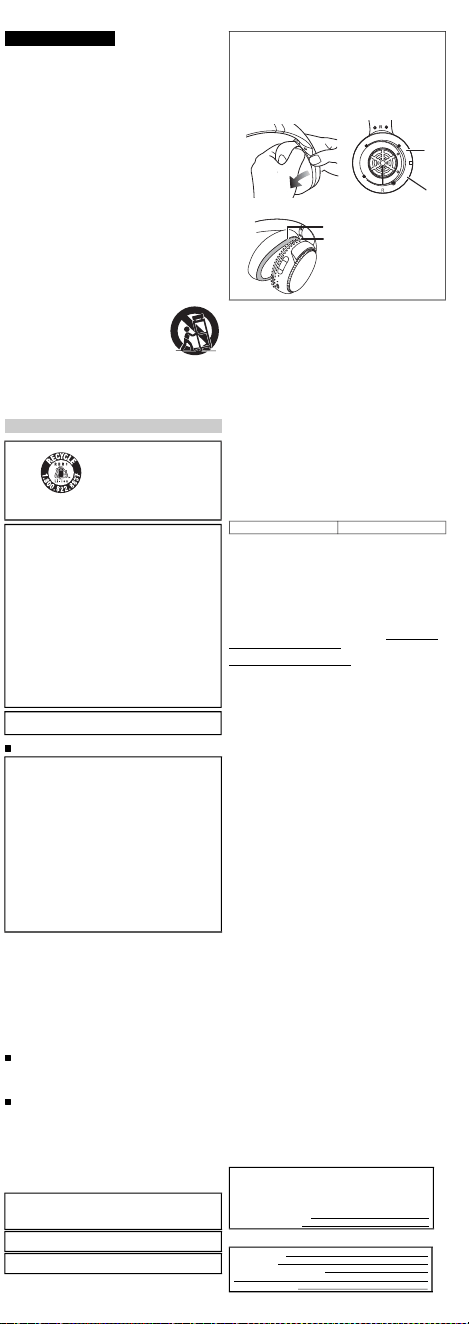
SalesandSupportInformation
CustomerCommunicationsCentre
• ForcustomerswithintheUK: 03448443899
• ForcustomerswithinIreland: 012898333
• Monday –Friday9:00 am –5:00 pm(Excludingpublicholidays).
• Forfurthersupportonyourproduct,pleasevisitourwebsite:
www.panasonic.co.uk
DirectSalesatPanasonicUK
• OrderaccessoryandconsumableitemsforyourproductwitheaseandconfidencebyphoningourCustomerCommunicationsCentre
Monday – Friday9:00 am – 5:00 pm(Excludingpublicholidays).
• OrgoonlinethroughourInternetAccessoryorderingapplicationatwww.pas-europe.com.
• Mostmajorcreditanddebitcardsaccepted.
• AllenquiriestransactionsanddistributionfacilitiesareprovideddirectlybyPanasonicUK.
• Itcouldn’tbesimpler!
• AlsoavailablethroughourInternetisdirectshoppingforawiderangeoffinishedproducts.Takeabrowseonourwebsiteforfurtherdetails.
PRO-031-F10 Issue 2.0 August 2016
Provides a 12 month parts & labour warranty on this product for manufacturing defects from date of purchase. In
addit ion to your rights under this warranty, Panasonic products come with consumer guarantees that cannot be
excluded under the Australian Consumer Law. If there is a major failure with the product, you can reject the product
and elect to have a refund or to have the product replaced or if you wish you may elect to keep the goods and be
compensated for the drop in value of the goods. You are also ent itled to have the product repaired or replaced if the
product fails to be of acceptable quality and the failure does not amount to a major failure.
For full de tails o r to claim warranty please contact Pana sonic Customer Care on 132 600 or visit
www.panasonic.com.au .
Panasonic Australia Pty. Ltd. 1 Innovat ion Road, Macquarie Park NSW 2113
For Australia
Pleasecheckandidentifythesuppliedaccessories.
Toorderaccessories,contactthedealerfromwhomyou
havemadeyourpurchase.
1 x USBchargingcord
1 x Detachablecord
OnlyforU.S.A.:
Toorderaccessories,referto“LimitedWarranty”.
Cleanthisunitwithadryandsoftcloth.
• Donotusesolventsincludingbenzine,thinner,alcohol,kitchen
detergent,achemicalwiper,etc.Thismightcausetheexterior
casetobedeformedorthecoatingtocomeoff.
Keepingthebatteryperformance.
• Duringthelongperiodofdisuse,fullchargethisunitonceevery
6 monthstokeepthebatteryperformance.
Vérifieretidentifierlesaccessoiresfournis.
Pourcommanderdesaccessoires,contacterlerevendeur.
1 x cordondechargeUSB
1 x cordondétachable
Nettoyercetappareilavecunchiffondouxetsec.
• Nepasutiliserdesolvants,commelabenzine,dudiluant,de
l’alcool,desdétergentsdecuisine,etc.Celapourraitmodifier
l’apparenceduboîtierexterneoudécollersonrevêtement.
Autonomiedelabatterie
• Lorsd’unelonguepériodedenon-utilisation,charger
complètementcetappareilunefoistousles6moispourpréserver
l'autonomiedelabatterie.
BasicOwner’sManual
Manueld’utilisationFonctionsdebase
DigitalWirelessStereoHeadphones
Casqued’écoutestéréosansfilnumérique
RB-M500B
RB-M300B
Thankyouforpurchasingthisproduct.
Pleasereadtheseinstructionscarefullybeforeusingthisproduct,andsavethismanualforfutureuse.
Nousvousremercionsd’avoirarrêtévotrechoixsurcetappareil.
Avantd’utiliserl’appareil,ilestrecommandédelireattentivementcemanueld’utilisationetdeleconserverpourconsultation
ultérieure.
Registeronlineathttp://shop.panasonic.com/support
(U.S.customersonly)
Ifyouhaveanyquestions,visit:
IntheU.S.A.:
http://shop.panasonic.com/support
InCanada:
www.panasonic.ca/english/support
Pourtouteassistancesupplémentaire,visitez:
www.panasonic.ca/french/support
E
ModelNo./Modèle
EU
Panasonic Corporation
http://www.panasonic.com
Panasonic Corporation
Kadoma, Osaka, Japan
Panasonic Marketing Europe GmbH
Panasonic Testing Centre
Winsbergring 15, 22525 Hamburg, Germany
Manufactured by:
Authorized Representative in Europe:
Two Riverfront Plaza,
Newark, NJ 07102-5490
Panasonic Corporation of
North America
Panasonic Canada Inc.
5770 Ambler Drive, Mississauga,
Ontario L4W 2T3
www.panasonic.com
http://shop.panasonic.com
© Panasonic Corporation 2019
Printed in China/Imprimé en Chine
TQBM0669-1
F1219MH1020
English
Moredetailedoperatinginstructions
areavailablein“Owner’sManual(PDF
format)”.
Toreadit,downloaditfromthe
website.
https://panasonic.jp/support/global/
cs/accessories/oi/rb_m700b/
• Clickthedesiredlanguage.
Français(Canada)
Unmoded’emploiplusdétailléestdisponibledans“Manuel
d’utilisation(formatPDF)”.
Pourlelire,letéléchargerdepuislesiteweb.
https://panasonic.jp/support/global/cs/accessories/oi/rb_m700b/
• Cliquersurlalanguesouhaitée.
English
Expressionsusedinthisdocument
• Theproductillustrationsmaydifferfromtheactualproduct.
• Unlessotherwiseindicated,illustrationsintheseoperating
instructionsareofRB-M500B.
Marksdenotingmodelnames
Functionalitydifferencesbetweenmodelsareindicatedwiththe
modelmarksbelow.
RB-M500B: [RB-M500B] RB-M300B: [RB-M300B]
Français(Canada)
Expressionsutiliséesdanscedocument
• Lesillustrationsduproduitpeuventdifférerduproduitréel.
• Saufindicationcontraire,lesillustrationsprésentesdansce
manueld'utilisationreprésententleRB-M500B.
Symbolesdifférenciantlesnomsdemodèle
Lesdifférencesdefonctionnalitéentrelesmodèlessontindiquées
parlessymbolesci-dessous.
RB-M500B: [RB-M500B] RB-M300B: [RB-M300B]
English
Accessories
Maintenance
Français(Canada)
Accessoires
Entretien
IMPORTANTSAFETY
INSTRUCTIONS
Readtheseoperatinginstructionscarefullybeforeusingtheunit.
Followthesafetyinstructionsontheunitandtheapplicablesafety
instructionslistedbelow.Keeptheseoperatinginstructionshandyfor
futurereference.
1 Readtheseinstructions.
2 Keeptheseinstructions.
3 Heedallwarnings.
4 Followallinstructions.
5 Donotusethisapparatusnearwater.
6 Cleanonlywithdrycloth.
7 Donotblockanyventilationopenings.Installinaccordancewith
themanufacturer’sinstructions.
8 Donotinstallnearanyheatsourcessuchasradiators,heat
registers,stoves,orotherapparatus(includingamplifiers)that
produceheat.
9 Donotdefeatthesafetypurposeofthepolarizedor
grounding-typeplug.Apolarizedplughastwobladeswithone
widerthantheother.Agrounding-typeplughastwobladesanda
thirdgroundingprong.Thewidebladeorthethirdprongare
providedforyoursafety.Iftheprovidedplugdoesnotfitintoyour
outlet,consultanelectricianforreplacementoftheobsolete
outlet.
10 Protectthepowercordfrombeingwalkedonorpinched
particularlyatplugs,conveniencereceptacles,andthepoint
wheretheyexitfromtheapparatus.
11 Onlyuseattachments/accessoriesspecifiedbythemanufacturer.
12 Useonlywiththecart,stand,tripod,bracket,or
tablespecifiedbythemanufacturer,orsoldwith
theapparatus.Whenacartisused,usecaution
whenmovingthecart/apparatuscombinationto
avoidinjuryfromtip-over.
13 Unplugthisapparatusduringlightningstorms
orwhenunusedforlongperiodsoftime.
14 Referallservicingtoqualifiedservice
personnel.Servicingisrequiredwhentheapparatushasbeen
damagedinanyway,suchaspower-supplycordorplugis
damaged,liquidhasbeenspilledorobjectshavefallenintothe
apparatus,theapparatushasbeenexposedtorainormoisture,
doesnotoperatenormally,orhasbeendropped.
Unit
• Avoidusingorplacingthisunitnearsourcesofheat.
• Donotlistenwiththisunitathighvolumeinplaceswhereyouneed
tohearsoundsfromthesurroundingenvironmentforsafety,such
asatrailroadcrossings,andconstructionsites.
• Widebandcharacteristicvoltageequalorlargerthan75 mV.
• Keepthisunitawayfromsomethingsusceptibletothemagnetism.
Suchdevicesasaclockmaynotoperatecorrectly.
• Whenusingthisunitinanairplane,heedtheinstructionsgivenby
theairlinecompany.Someairlinesmayforbidyourusingtheunit.
Forfurtherdetails,contacttheairlineyouwillbeflyingwith.
Allergies
• Discontinueuseifyouexperiencediscomfortwiththeearpadsor
anyotherpartsthatdirectlycontactyourskin.
• Continuedusemaycauserashesorotherallergicreactions.
PrecautionsforlisteningwiththeHeadphones
• Excessivesoundpressurefromearphonesandheadphonescan
causehearingloss.
• Donotuseyourheadphonesatahighvolume.Hearingexperts
adviseagainstcontinuousextendedplay.
• Ifyouexperiencearinginginyourears,reducevolumeor
discontinueuse.
• Donotusewhileoperatingamotorisedvehicle.Itmaycreatea
traffichazardandisillegalinmanyareas.
• Youshoulduseextremecautionortemporarilydiscontinueusein
potentiallyhazardoussituations.
DeclarationofConformity(DoC)
Hereby,“PanasonicCorporation”declaresthatthisproductisin
compliancewiththeessentialrequirementsandotherrelevant
provisionsofDirective2014/53/EU.
CustomerscandownloadacopyoftheoriginalDoCtoourRE
productsfromourDoCserver:
http://www.ptc.panasonic.eu
ContacttoAuthorisedRepresentative:
PanasonicMarketingEuropeGmbH,
PanasonicTestingCentre,Winsbergring15,22525Hamburg,Germany
Usermemo:
English
Safetyprecautions
Alithiumionbatterythatis
recyclablepowersthe
productyouhave
purchased.Pleasecall
1-800-8-BATTERYfor
informationonhowto
recyclethisbattery.
THEFOLLOWINGAPPLIESONLYINTHEU.S.A.
ANDCANADA.
ThisdevicecomplieswithPart15ofFCCRulesandInnovation,
ScienceandEconomicDevelopmentCanada’slicence-exempt
RSS(s).Operationissubjecttothefollowingtwoconditions:
(1)thisdevicemaynotcauseinterference,and
(2)thisdevicemustacceptanyinterference,including
interferencethatmaycauseundesiredoperation.
[RB-M500B] [RB-M300B]
FCCID:ACJ-RB-M500B FCCID:ACJ-RB-M500B
Model:RB-M500B Model:RB-M300B
IC:216A-RBM500B IC:216A-RBM500B
Thistransmittermustnotbeco-locatedoroperatedinconjunction
withanyotherantennaortransmitter.
ThisequipmentcomplieswithFCC/ISEDradiationexposurelimits
setforthforanuncontrolledenvironmentandmeetstheFCC
radiofrequency(RF)ExposureGuidelinesandRSS-102ofthe
ISEDradiofrequency(RF)Exposurerulesasthisequipmenthas
verylowlevelsofRFenergy.
THEFOLLOWINGAPPLIESONLYINTHEU.S.A.
FCCNote:
Thisequipmenthasbeentestedandfoundtocomplywiththe
limitsforaClassBdigitaldevice,pursuanttoPart15oftheFCC
Rules.
Theselimitsaredesignedtoprovidereasonableprotection
againstharmfulinterferenceinaresidentialinstallation.This
equipmentgenerates,uses,andcanradiateradiofrequency
energyand,ifnotinstalledandusedinaccordancewiththe
instructions,maycauseharmfulinterferencetoradio
communications.
However,thereisnoguaranteethatinterferencewillnotoccurin
aparticularinstallation.Ifthisequipmentdoescauseharmful
interferencetoradioortelevisionreception,whichcanbe
determinedbyturningtheequipmentoffandon,theuseris
encouragedtotrytocorrecttheinterferencebyoneormoreofthe
followingmeasures:
• Reorientorrelocatethereceivingantenna.
• Increasetheseparationbetweentheequipmentandreceiver.
• Connecttheequipmentintoanoutletonacircuitdifferentfrom
thattowhichthereceiverisconnected.
• Consultthedealeroranexperiencedradio/TVtechnicianforhelp.
FCCCaution:
Anyunauthorizedchangesormodificationstothisequipment
wouldvoidtheuser’sauthoritytooperatethisdevice.
ThisdevicecomplieswithPart15oftheFCCRules.Operationis
subjecttothefollowingtwoconditions:(1)Thisdevicemaynot
causeharmfulinterference,and(2)thisdevicemustacceptany
interferencereceived,includinginterferencethatmaycause
undesiredoperation.
Supplier’sDeclarationofConformity
[RB-M500B] [RB-M300B]
TradeName:Panasonic TradeName:Panasonic
ModelNo.:RB-M500B ModelNo.:RB-M300B
ResponsibleParty:PanasonicCorporationofNorthAmerica
TwoRiverfrontPlaza,Newark,
NJ07102-5490
SupportContact:http://shop.panasonic.com/support
THEFOLLOWINGAPPLIESONLYINCANADA.
CANICES-3(B)/NMB-3(B)
For US and Canada only
Pour les É.-U. et le Canada seulement
3123480
Conforms to
UL STD 62368-1.
Certified to CAN/CSA STD
C22.2 No.62368-1.
Conforme à la norme CAN/CSA
C22.2 No.62368-1.
WARNING:
Toreducetheriskoffire,electricshockorproductdamage,
• Donotexposethisunittorain,moisture,drippingor
splashing.
• Donotplaceobjectsfilledwithliquids,suchasvases,on
thisunit.
• Usetherecommendedaccessories.
• Donotremovecovers.
• Donotrepairthisunitbyyourself.Referservicingto
qualifiedservicepersonnel.
Avoidtheuseinthefollowingconditions
• Highorlowextremetemperaturesduringuse,storageor
transportation.
• Disposalofabatteryintofireorahotoven,ormechanically
crushingorcuttingofabattery,thatcanresultinanexplosion.
• Extremelyhightemperatureand/orextremelylowairpressure
thatcanresultinanexplosionortheleakageofflammableliquid
orgas.
Thisunitmayreceiveradiointerferencecausedbymobile
telephonesduringuse.Ifsuchinterferenceoccurs,please
increaseseparationbetweenthisunitandthemobiletelephone.
UseonlythesuppliedUSBchargingcordwhenconnectingtoa
computer.
Thisunitisintendedforuseinmoderateandtropicalclimates.
1 Removetherightearpadtoviewcertificationinformation.
2 Certificationinformation(
a
)isindicatedonthespeakerplate
portion(
b
),whichbecomesvisiblewhentherightearpad(R
side)isremoved.
3 Toattachtheearpad,fitthepart
d
oftheearpadintothepart
c
.
Ifyoupulltheearpadtoomuch,theearpadcantear.
Typeofwireless Frequencyband
Maximumpower
(dBme.i.r.p)
Bluetooth
®
2402-2480 MHz 4 dBm
OnlyforEuropeanUnionandcountrieswithrecycling
systems
Thesesymbolsindicateseparatecollectionofwaste
electricalandelectronicequipmentorwastebatteries.
Moredetailedinformationiscontainedin“Owner’sManual
(PDFformat)”.
Theserialnumberofthisproductcanbefoundontheleftside
oftheheadphones.
Removetheleftearpadtoseeit.
Pleasenotetheminthespaceprovidedbelowandkeepfor
futurereference.
MODELNUMBER
SERIALNUMBER
DATEOFPURCHASE
DEALERNAME
DEALERADDRESS
TELEPHONENUMBER
1 2
3
LimitedWarranty
(ONLYFORU.S.A.)
PanasonicProductsLimitedWarranty
LimitedWarrantyCoverage
Ifyourproductdoesnotworkproperlybecauseofadefectin
materialsorworkmanship,PanasonicCorporationofNorth
America(referredtoas“thewarrantor”)will,forthelengthofthe
periodindicatedonthechartbelow,whichstartswiththedateof
originalpurchase(“warrantyperiod”),atitsoptioneither(a)
repairyourproductwithneworrefurbishedparts,(b)replaceit
withaneworarefurbishedequivalentvalueproduct,or(c)
refundyourpurchaseprice.Thedecisiontorepair,replaceor
refundwillbemadebythewarrantor.
Duringthe“Labor”warrantyperiodtherewillbenochargefor
labor.Duringthe“Parts”warrantyperiod,therewillbeno
chargeforparts.ThisLimitedWarrantyexcludesbothpartsand
laborfornon-rechargeablebatteries,antennas,andcosmetic
parts(cabinet).Thiswarrantyonlyappliestoproducts
purchasedandservicedintheUnitedStates.Thiswarrantyis
extendedonlytotheoriginalpurchaserofanewproductwhich
wasnotsold“asis”.
Mail-InService--OnlineRepairRequest
OnlineRepairRequest
Tosubmitanewrepairrequestandforquickrepairstatusvisit
ourWebSiteat
http://shop.panasonic.com/support
Whenshippingtheunit,carefullypack,includeallsupplied
accessorieslistedintheOwner’sManual,andsenditprepaid,
adequatelyinsuredandpackedwellinacartonbox.When
shippingLithiumIonbatteriespleasevisitourWebSiteat
http://shop.panasonic.com/supportasPanasoniciscommitted
toprovidingthemostuptodateinformation.Includealetter
detailingthecomplaint,areturnaddressandprovideadaytime
phonenumberwhereyoucanbereached.Avalidregistered
receiptisrequiredundertheLimitedWarranty.
IFREPAIRISNEEDEDDURINGTHEWARRANTYPERIOD,
THEPURCHASERWILLBEREQUIREDTOFURNISHA
SALESRECEIPT/PROOFOFPURCHASEINDICATING
DATEOFPURCHASE,AMOUNTPAIDANDPLACEOF
PURCHASE.CUSTOMERWILLBECHARGEDFORTHE
REPAIROFANYUNITRECEIVEDWITHOUTSUCHPROOF
OFPURCHASE.
LimitedWarrantyLimitsandExclusions
ThiswarrantyONLYCOVERSfailuresduetodefectsin
materialsorworkmanship,andDOESNOTCOVERnormal
wearandtearorcosmeticdamage.ThewarrantyALSODOES
NOTCOVERdamageswhichoccurredinshipment,orfailures
whicharecausedbyproductsnotsuppliedbythewarrantor,or
failureswhichresultfromaccidents,misuse,abuse,neglect,
mishandling,misapplication,alteration,faultyinstallation,set-up
adjustments,misadjustmentofconsumercontrols,improper
maintenance,powerlinesurge,lightningdamage,modification,
introductionofsand,humidityorliquids,commercialusesuch
ashotel,office,restaurant,orotherbusinessorrentaluseofthe
product,orservicebyanyoneotherthanaFactoryService
CenterorotherAuthorizedServicer,ordamagethatis
attributabletoactsofGod.
THEREARENOEXPRESSWARRANTIESEXCEPTAS
LISTEDUNDER“LIMITEDWARRANTYCOVERAGE”.
THEWARRANTORISNOTLIABLEFORINCIDENTALOR
CONSEQUENTIALDAMAGESRESULTINGFROMTHEUSE
OFTHISPRODUCT,ORARISINGOUTOFANYBREACHOF
THISWARRANTY.
(Asexamples,thisexcludesdamagesforlosttime,traveltoand
fromtheservicer,lossofordamagetomediaorimages,dataor
othermemoryorrecordedcontent.Theitemslistedarenot
exclusive,butforillustrationonly.)
ALLEXPRESSANDIMPLIEDWARRANTIES,INCLUDING
THEWARRANTYOFMERCHANTABILITY,ARELIMITEDTO
THEPERIODOFTHELIMITEDWARRANTY.
Somestatesdonotallowtheexclusionorlimitationofincidental
orconsequentialdamages,orlimitationsonhowlongan
impliedwarrantylasts,sotheexclusionsmaynotapplytoyou.
Thiswarrantygivesyouspecificlegalrightsandyoumayalso
haveotherrightswhichvaryfromstatetostate.Ifaproblem
withthisproductdevelopsduringorafterthewarrantyperiod,
youmaycontactyourdealerorServiceCenter.Iftheproblemis
nothandledtoyoursatisfaction,thenwriteto:
PanasonicCorporationofNorthAmerica
ConsumerAffairsDepartment8thFl.
TwoRiverfrontPlaza
NewarkNJ07102-5490
PARTSANDSERVICE,WHICHARENOTCOVEREDBY
THISLIMITEDWARRANTY,AREYOURRESPONSIBILITY.
AsofDecember2019
LimitedWarranty
(ONLYFORCANADA)
PanasonicCanadaInc.
5770AmblerDrive,Mississauga,OntarioL4W2T3
PANASONICPRODUCT–LIMITEDWARRANTY
EXCHANGEPROGRAM
PanasonicCanadaInc.warrantsthisproducttobefreefrom
defectsinmaterialandworkmanshipundernormaluseandfor
aperiodasstatedbelowfromthedateoforiginalpurchase
agreesto,atitsoptioneither(a)repairyourproductwithnewor
refurbishedparts,(b)replaceitwithaneworarefurbished
equivalentvalueproduct,or(c)refundyourpurchaseprice.The
decisiontorepair,replaceorrefundwillbemadebyPanasonic
CanadaInc.
Thiswarrantyisgivenonlytotheoriginalpurchaser,orthe
personforwhomitwaspurchasedasagift,ofaPanasonic
brandproductmentionedabovesoldbyanauthorized
PanasonicdealerinCanadaandpurchasedandusedin
Canada,whichproductwasnotsold“asis”,andwhichproduct
wasdeliveredtoyouinnewconditionintheoriginalpackaging.
INORDERTOBEELIGIBLETORECEIVEWARRANTY
SERVICEHEREUNDER,APURCHASERECEIPTOR
OTHERPROOFOFDATEOFORIGINALPURCHASE,
SHOWINGAMOUNTPAIDANDPLACEOFPURCHASEIS
REQUIRED
LIMITATIONSANDEXCLUSIONS
ThiswarrantyONLYCOVERSfailuresduetodefectsin
materialsorworkmanship,andDOESNOTCOVERnormal
wearandtearorcosmeticdamage.ThewarrantyALSODOES
NOTCOVERdamageswhichoccurredinshipment,orfailures
whicharecausedbyproductsnotsuppliedbyPanasonic
CanadaInc.,orfailureswhichresultfromaccidents,misuse,
abuse,neglect,mishandling,misapplication,alteration,faulty
installation,set-upadjustments,misadjustmentofconsumer
controls,impropermaintenance,powerlinesurge,lightning
damage,modification,introductionofsand,humidityorliquids,
commercialusesuchashotel,office,restaurant,orother
businessorrentaluseoftheproduct,orservicebyanyone
otherthanaAuthorizedServicer,ordamagethatisattributable
toactsofGod.
Drycellbatteriesarealsoexcludedfromcoverageunderthis
warranty.
THISEXPRESS,LIMITEDWARRANTYISINLIEUOFALL
OTHERWARRANTIES,EXPRESSORIMPLIED,INCLUDING
ANYIMPLIEDWARRANTIESOFMERCHANTABILITYAND
FITNESSFORAPARTICULARPURPOSE.INNOEVENT
WILLPANASONICCANADAINC.BELIABLEFORANY
SPECIAL,INDIRECTORCONSEQUENTIALDAMAGES
RESULTINGFROMTHEUSEOFTHISPRODUCTOR
ARISINGOUTOFANYBREACHOFANYEXPRESSOR
IMPLIEDWARRANTY.(Asexamples,thiswarrantyexcludes
damagesforlosttime,traveltoandfromtheAuthorized
Servicer,lossofordamagetomediaorimages,dataorother
memoryorrecordedcontent.Thislistofitemsisnotexhaustive,
butforillustrationonly.)
Incertaininstances,somejurisdictionsdonotallowthe
exclusionorlimitationofincidentalorconsequentialdamages,
ortheexclusionofimpliedwarranties,sotheabovelimitations
andexclusionsmaynotbeapplicable.Thiswarrantygivesyou
specificlegalrightsandyoumayhaveotherrightswhichvary
dependingonyourprovinceorterritory.
CONTACTINFORMATION
Forproductoperationandinformationassistance,pleasevisit
ourSupportpage:
www.panasonic.ca/english/support
Fordefectiveproductexchangewithinthewarrantyperiod,
pleasecontacttheoriginaldealer.
Usefulinformation
(OnlyforLatinAmericancountries)
ProductorPartName Parts Labor
Headphones/
Earphones/Headset
1year NotApplicable
Allincluded
Accessories
90days NotApplicable
Accessories One(1)year
Customer Service
Customer Service Directory
COUNTRY WEB SITE CONTACT CENTER
800-7262
01-8000-947262
Dominican Rep.
01800-847-7262
Panama
Colombia
Ecuador
Costa Rica
El Salvador
Guatemala
Uruguay
Paraguay
Chile
Peru
Venezuela
Mexico
Argentina
www.panasonic.com/pa/soporte/
www.panasonic.com/co/soporte/
www.panasonic.com/pa/soporte/
www.panasonic.com/pa/soporte/
www.panasonic.com/pa/soporte/
www.panasonic.com/pa/soporte/
www.panasonic.com/pa/soporte/
www.panasonic.com/pa/soporte/
www.panasonic.com/cl/soporte/
www.panasonic.com/pe/soporte/
www.panasonic.com/pa/soporte/
www.panasonic.com/pa/soporte/
www.panasonic.com/mx/soporte/
www.panasonic.com/ar/soporte/
1-800-726276
800-7262737
800-7262
1-801-811-7262
0-800-7262
0-800-11-7262
800-390-602
0800-00726
800-7262-800
809-200-8000
022-797-5000
55-5000-1200
0800-333-7262
0810-321-7262
Obtain products information and operative assistant; localize the closer
distributor or Service Center; buy spare parts and accessories by our
Web Site to Latin America or calling our Contact Center:
For Caribbean countries that speak English please enter this web site
in order to find information of our products and operative assistant:
www.panasonic.com/caribbean
IMPORTANTESMISESENGARDE
Avantd’utiliserl’appareil,lireattentivementlesinstructionsquisuivent.
Seconformertoutparticulièrementauxavertissementsinscritssur
l’appareiletauxconsignesdesécuritéindiquéesci-dessous.
Conserverleprésentmanuelpourconsultationultérieure.
1 Lireattentivementcesinstructions.
2 Conservercesinstructions.
3 Liretouteslesmisesengarde.
4 Suivretouteslesinstructions.
5 Nepasutilisercetappareilprèsd’unesourced’eau.
6 Nenettoyerqu’avecunchiffonsec.
7 Nepasbloquerleséventsd’aération.Installerl’appareilselonles
instructionsdufabricant.
8 Nepasinstallerl’appareilprèsd’unappareildechauffagetel
qu’unradiateur,unecuisinière,unregistredechaleuroutout
dispositifémettantdelachaleur(ycomprisunamplificateur).
9 Pourdesraisonsdesécurité,nepasmodifierlafichepolarisée
oucelledemiseàlaterre.Unefichepolariséeestuneficheà
deuxlames,dontunepluslarge.Unefichedemiseàlaterreest
uneficheàdeuxlamesavecunebrochedemasse.Lalameplus
largeoulabrochedemasseprocureuneprotectionaccrue.Sice
genredefichenepeutêtreinsérédansuneprisedecourant,
communiqueravecunélectricienpourremplacerlaprise.
10 S’assurerquelecordonestplacédansunendroitoùilnerisque
pasd’êtreécrasé,piétinéoucoincé.Faireparticulièrement
attentionàsesextrémitésdebranchement,ycomprissafiche.
11 N’utiliserquelesaccessoiresoupériphériquesrecommandés
parlefabricant.
12 N’utiliserl’appareilqu’avecunchariot,meuble,
trépied,supportoutablerecommandéparle
fabricantouvenduavecl’appareil.Lorsde
l’utilisationd’unchariot,ledéplaceravecle
plusgrandsoinafind’évitertoutdommage.
13 Débranchercetappareillorsd’unorageouen
casdenon-utilisationprolongée.
14 Confierl’appareilàuntechnicienqualifiépour
touteréparation :cordond’alimentationouficheendommagé,
liquiderenverséouobjettombédansl’appareil,expositionàla
pluieouàunehumiditéexcessive,mauvaisfonctionnementou
échappementdel’appareil.
Appareil
• Éviterd’utiliseroudeplacercetappareilprèsd’unesourcede
chaleur.
• Nepasécouteraveccetappareilàunvolumeélevédansles
endroitsoùvousdevezentendredessonsprovenantdumilieu
environnantpourlasécurité,commelespassagesàniveauetles
chantiersdeconstruction.
• Tensioncaractéristiqueàlargebandeégaleousupérieureà75 mV.
• Tenircetappareiléloignédetoutobjetsusceptibled’être
magnétisé.Certainsdispositifs,commeleshorloges,peuventne
pasfonctionnercorrectement.
• Lorsdel’utilisationdecetappareildansunavion,respecterles
instructionsdonnéesparlacompagnieaérienne.Certaines
compagniesaériennespeuventinterdirel’utilisationdel’appareil.
Pourplusdedétails,contacterlacompagnieaérienneavantlevol.
Allergies
• Touteutilisationdoitcessersil’onrencontreuninconfortavecles
coussinetsoutouteautrepiècetouchantdirectementlapeau.
• Uneutilisationcontinuepeutprovoquerdeséruptionscutanéesou
d’autresréactionsallergiques.
Précautionsd’écouteaveclecasque
• Unepressionsonoreexcessiveprovenantd'écouteursoud'un
casqueaudiopeutprovoqueruneperteauditive.
• Nepasutiliservoscasquesàunvolumeélevé.Lesexpertsen
auditiondéconseillentl'utilisationprolongéesansinterruption.
• Siunbourdonnementsefaitentendre,réduirelevolumeouarrêter
d'utiliserl'appareil.
• Nepasutiliserdurantlaconduited'unvéhiculemotorisé.Celapeut
créerunrisqued'accidentsetestillégaldansplusieursrégions.
• Ilfautfairepreuved'uneextrêmeprudenceoucessertemporairement
del'utiliserdansdessituationspotentiellementdangereuses.
Certificatdegarantielimitée
(PourleCanadaseulement)
PanasonicCanadaInc.
5770,AmblerDrive,Mississauga(Ontario)L4W2T3
PRODUITPANASONIC–GARANTIELIMITÉE
PROGRAMMEDEREMPLACEMENT
PanasonicCanadaInc.garantitqueceproduitestexemptde
défautsdematériauxetdemain-d’œuvredansuncontexte
d’utilisationnormalependantlapériodeindiquéeci-aprèsà
compterdeladated’achatoriginalet,dansl’éventualitéd’une
défectuosité,accepte,àsadiscrétion,de(a)réparerleproduit
avecdespiècesneuvesouremisesàneuf,(b)remplacerle
produitparunproduitneufouremisàneufd’unevaleur
équivalenteou(c)rembourserleprixd’achat.Ladécisionde
réparer,remplacerourembourserappartientàPanasonic
CanadaInc.
Laprésentegarantien’estfourniequ’àl’acheteuroriginald’un
desproduitsdemarquePanasonicindiquésplushaut,ouàla
personnel’ayantreçuencadeau,venduparundétaillant
PanasonicagrééauCanadaetutiliséauCanada.Leproduit
nedoitpasavoirété“vendutelquel”etdoitavoirétélivréà
l’étatneufdanssonemballaged’origine.
POURÊTREADMISSIBLEAUXSERVICESAUTITREDELA
PRÉSENTEGARANTIE,LAPRÉSENTATIOND’UNREÇU
D’ACHATOUDETOUTEAUTREPIÈCEJUSTIFICATIVEDE
LADATED’ACHATORIGINAL,INDIQUANTLEMONTANT
PAYÉETLELIEUDEL’ACHAT,ESTREQUISE.
RESTRICTIONSETEXCLUSIONS
LaprésentegarantieCOUVRESEULEMENTlesdéfaillances
attribuablesàundéfautdesmatériauxouàunvicede
fabricationetNECOUVREPASl’usurenormaleniles
dommagesesthétiques.LaprésentegarantieNECOUVRE
PASNONPLUSlesdommagessubispendantletransport,les
défaillancescauséespardesproduitsnonfournispar
PanasonicCanadaInc.,nicellesrésultantd’unaccident,d’un
usageabusifouimpropre,denégligence,d’unemanutention
inadéquate,d’unemauvaiseapplication,d’unealtération,d’une
installationouderéglagesimpropres,d’unmauvaisréglagedes
contrôlesdel’utilisateur,d’unmauvaisentretien,d’une
surtensiontemporaire,delafoudre,d’unemodification,dela
pénétrationdesable,deliquidesoud’humidité,d’uneutilisation
commerciale(dansunhôtel,unbureau,unrestaurantoutout
autreusageparaffairesouenlocation),d’uneréparation
effectuéeparuneentitéautrequ’uncentredeservice
Panasonicagrééouencored’unecatastrophenaturelle.
Lespilessèchessontégalementexcluesdelaprésentegarantie.
CETTEGARANTIELIMITÉEETEXPRESSEREMPLACE
TOUTEAUTREGARANTIE,EXPRESSEOUIMPLICITE,
INCLUANTLESGARANTIESIMPLICITESDUCARACTÈRE
ADÉQUATPOURLACOMMERCIALISATIONETUNUSAGE
PARTICULIER.PANASONICCANADAINC.N’AURA
D’OBLIGATIONENAUCUNECIRCONSTANCEPOURTOUT
DOMMAGEDIRECT,INDIRECTOUCONSÉCUTIF
RÉSULTANTDEL’UTILISATIONDECEPRODUITOU
DÉCOULANTDETOUTEDÉROGATIONÀUNEGARANTIE
EXPRESSEOUIMPLICITE.(Àtitred’exemples,cettegarantie
exclutlesdommagesrelatifsàunepertedetemps,letransport
jusqu’àetdepuisuncentredeserviceagréé,laperteoula
détériorationdesupportsoud’images,dedonnéesoudetout
autrecontenuenmémoireouenregistré.Cettelisten’estpas
exhaustiveetn’estfourniequ’àdesfinsexplicatives.)
Certainesjuridictionsnereconnaissentpaslesexclusionsou
limitationsdedommagesindirectsouconsécutifs,oules
exclusionsdegarantiesimplicites.Dansdetelscas,les
limitationsstipuléesci-dessuspeuventnepasêtreapplicables.
Laprésentegarantievousconfèredesdroitsprécis;vous
pourriezaussiavoird’autresdroitspouvantvarierselonvotre
provinceouterritoirederésidence.
DEMANDEDERENSEIGNEMENTS
Pourtoutrenseignementsurlesproduitsetdel’assistance
technique,veuillezvisiternotrepageSoutien:
www.panasonic.ca/french/support
Pourleremplacementd’unproduitdéfectueuxcouvertparla
garantie,veuillezcommuniqueraveclerevendeurd’origine.
Homologation:
Français(Canada)
Précautionsdesécurité
L’appareilquevousvous
êtesprocuréestalimenté
parunebatterieau
lithium-ion.Pourdes
renseignementssurle
recyclagedelabatterie,
veuillezcomposerle
1-800-8-BATTERY.
CEQUISUITNES’APPLIQUEQU’AUX
ÉTATS-UNISETAUCANADA.
Leprésentappareilestconformeàlapartie15desrèglesdela
FCCetauxCNRd’Innovation,SciencesetDéveloppement
économiqueCanadaapplicablesauxappareilsradioexemptsde
licence.L’exploitationestautoriséeauxdeuxconditionssuivantes:
(1)l’appareilnedoitpasproduiredebrouillage,et
(2)l’appareildoitacceptertoutbrouillageradioélectriquesubi,
mêmesilebrouillageestsusceptibled’encompromettrele
fonctionnement.
[RB-M500B] [RB-M300B]
FCCID:ACJ-RB-M500B FCCID:ACJ-RB-M500B
Modèle:RB-M500B Modèle:RB-M300B
IC:216A-RBM500B IC:216A-RBM500B
Cetéquipementestconformeauxlimitesd’expositionaux
rayonnementsénoncéespourunenvironnementnoncontrôléet
respectelesrèglesd’expositionradioélectriques(RF)delaFCC
etleslignesdirectricesd’expositionauxfréquences
radioélectriques(RF)CNR-102del’ISDEpuisquecetappareil
émetuneénergieRFtrèsfaible.
CEQUISUITNES’APPLIQUEQU’AUCANADA.
CANICES-3(B)/NMB-3(B)
ATTENTION:
Pourréduirelesrisquesd’incendie,dechocélectriqueoude
dommagesàl’appareil,
• Nepasexposercetappareilàlapluie,àl’humidité,aux
gouttesouauxéclaboussures.
• Nepasplacerd’objetremplideliquide,commedesvases,
surcetappareil.
• Utiliserlesaccessoiresrecommandés.
• Nepasretirerlescouvercles.
• Nepasréparercetappareilparsoi-même.Référerla
réparationàunpersonneldeservicequalifié.
Éviterlesconditionssuivantes:
• Températuresextrêmementbassesouélevéesdurant
l'utilisation,lestockageouletransport.
• Miseaurebutd'unebatteriedanslefeuoudansunfourchaud,
ouécrasementoucoupuremécaniqued'unebatterie,pouvant
entraîneruneexplosion.
• Températureextrêmementélevéeet/oupressiondel'air
extrêmementbassepouvantentraîneruneexplosionouune
fuitedeliquideoudegazinflammable.
Durantl'utilisation,l'appareilpourraitrecevoirdesinterférences
provenantdetéléphonesmobiles.Sidesinterférencesse
produisent,augmenterladistanceentrecetappareiletle
téléphonemobile.
UtiliseruniquementlecordondechargeUSBfournilorsdela
connexionàunordinateur.
Cetappareilestconçupouruneutilisationenclimatmodéréet
tropical.
For US and Canada only
Pour les É.-U. et le Canada seulement
1 Retirerlecoussinetdroitpourvoirlesinformations
d'authentification.
2 Lesinformationsd'authentification(
a
)sontindiquéessurla
plaqueduhaut-parleur(
b
),visiblelorsquelecoussinetdroit
(côtéR)estretiré.
3 Pourmettreenplacelecoussinet,insérerlapartie
d
de
celui-cidanslapartie
c
.
Silecoussinetesttirétropfort,ilpourraitsedéchirer.
Accessoires Un(1)an
Lenumérodesériedeceproduitpeutêtretrouvésurlecôté
gaucheducasque.
Retirerlecoussinetdegauchepourlevoir.
Veuillezlenoterdansl’espacefournici-dessous,etconserver
letoutpourréférencefuture.
NUMÉRODEMODÈLE
NUMÉRODESÉRIE
DATED’ACHAT
DÉTAILLANT
ADRESSEDUDÉTAILLANT
NºDETÉLÉPHONE
1 2
3
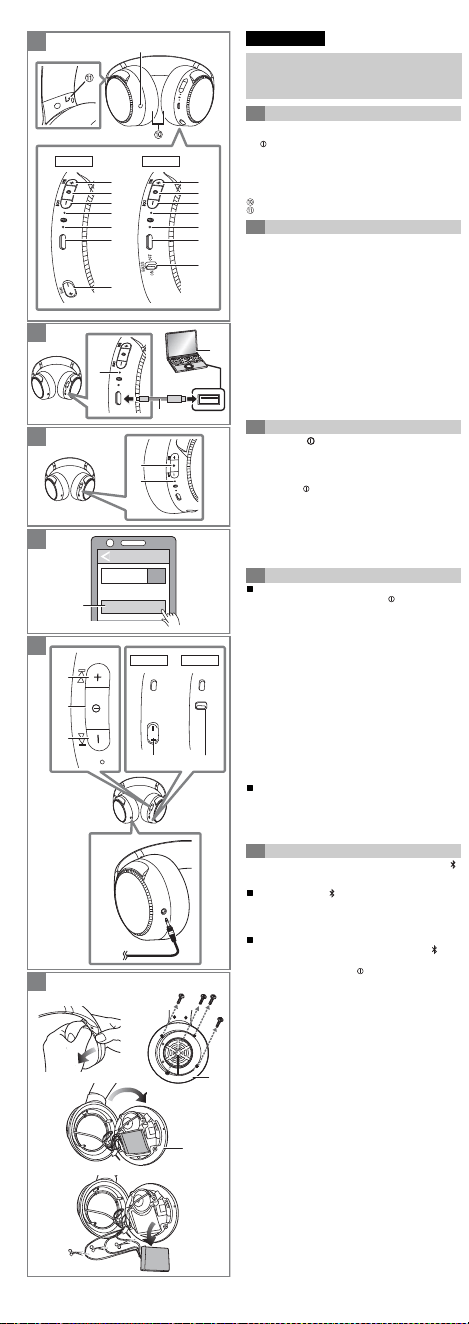
1
Audioinputterminal
2
[
i
]button
3
[ ]button
4
[
j
]button
5
Power/pairingLED
6
Microphone
7
Chargingterminal(DCIN)
8 [RB-M500B]
[BASS
i
]/[BASS
j
]button
9 [RB-M300B]
[BASS]switch
Earpads
Raiseddotindicatingtheleftside
Therechargeablebattery(installedintheunit)isnotcharged
initially.Chargethebatterybeforeusingtheunit.
Connectthisunittoacomputer(
a
)usingtheUSB
chargingcord(supplied)(
b
).
• Thepower/pairingLED(
c
)lightsinredwhenchargingisin
progress.Whenchargingiscompleted,thepower/pairingLEDwill
goout.
• Ittakesapprox.4 hourstochargethebatteryfromemptytofull.
• Checkthedirectionoftheterminalsandplugin/outstraightholding
ontotheplug.(Itmayresultinmalfunctionbythedeformingofthe
terminalifitispluggedinobliquelyorinwrongdirection.)
• ItisnotpossibletoturnthepoweronorconnecttoBluetooth
®
devicesduringcharging.
• Makesurethecomputeristurnedonandisnotonstandbyor
sleepmode.
• DonotuseanyotherUSBchargingcordsexceptthesuppliedone.
• Whenthebatterystartsrunninglowduringuseoftheunit,the
blinkingpower/pairingLEDwillturnfrombluetored.Abeepwill
soundevery1 minute.Whenthebatteryrunsout,anEnglish
guidancemessagewillbeheardandthepowerwillturnoff.
Pressandhold[ ](
a
)ofthisunitforapprox.3 seconds
untilthepower/pairingLED(blue)(
b
)blinks.
• Abeepwillsound,andthepower/pairingLED(blue)willblink
slowly.
Toturnthepoweroff
Pressandhold[ ]forapproximately3 seconds.AnEnglish
guidancemessagewillbeheard,andthepowerwillbeturned
off.
• IftheunitisnotconnectedtoaBluetooth
®
device,anEnglish
guidancemessagewillbeheardand turnofftheunitautomatically
approximately5 minutesafteryouhavestoppedusingit.(Auto
poweroff)
• Autopoweroffdoesnotworkwhenthedetachablecord(supplied)
isconnected.
Bluetooth
®
pairing
1 Inthepower-offstate,pressandhold[ ]ofthisunituntil
thepower/pairingLEDblinks.
– Whenpairingadeviceforthefirsttime:
approx.3 seconds
– Whenpairingasecondorsubsequentdevices:
approx.5 seconds
• ThisunitwillstarttosearchforaBluetooth
®
devicetoconnect
to,andthepower/pairingLEDwilllightalternatelyinblueand
red.
2 TurnonthepoweroftheBluetooth
®
device,andenablethe
Bluetooth
®
function.
3 Select“RB-M500B”or“RB-M300B”(
a
)fromtheBluetooth
®
device’smenu.
• Ifpromptedforapasskey,inputthepasskey“0000(fourzeros)”
ofthisunit.
• Whenthepower/pairingLED(blue)blinkstwiceeveryapprox.
2 seconds,pairing(registration)iscompleted.(Connection
established)
• Ifconnectiontoadeviceisnotestablishedwithinapproximately
5 minutes,theunitwillbeturnedoff.Performpairingagain.
ConnectingapairedBluetooth
®
device
1 Turnonthisunit.
2 Performsteps2and3of“Bluetooth
®
pairing”.(
l
above)
• Whenthepower/pairingLED(blue)blinkstwiceeveryapprox.
2 seconds,pairing(registration)iscompleted.(Connection
established)
Whenusingthefunctionsbelowthatareindicatedwiththe[ ]
mark,connecttheBluetooth
®
deviceandtheunit.
Listeningtomusic[ ]
SelectandplaythemusicontheBluetooth
®
device.
• Theunit’sheadphoneswilloutputthemusicortheaudioofthe
videobeingplayedback.
Remotecontrolling(AvailableonlyifyourBluetooth
®
devicesupports“AVRCP”Bluetooth
®
profiles)[ ]
(Operationexample)
• Thevolumecanbeadjustedin31 levels(16levelsduringcalls).
Whenthemaximumorminimumvolumeisreached,abeepwill
sound.
A
RB-M500B RB-M300B
B
1
2
3
4
F
C
Bluetooth
Bluetooth ON
RB-M500B
D
E
RB-M500B RB-M300B
BASS
O
N
O
FF
BASS
[RB-M500B]
English
• Unlessotherwiseindicated,illustrationsintheseoperating
instructionsareofRB-M500B.
• Functionalitydifferencesbetweenmodelsareindicatedwiththe
modelmarksbelow.
RB-M500B: [RB-M500B] RB-M300B: [RB-M300B]
A Partnames
B Charging
C Turningthepoweron/off
D ConnectingaBluetooth
®
device
E Usingtheheadphones
Play/Pause: Press[ ](
a
).
Increasethevolume: Press[
i
](
b
).
Decreasethevolume: Press[
j
](
c
).
Forwardtothestartof
nexttrack: Pressandhold[
i
]forapproximately
2 seconds.
Returntothestartof
currenttrack: Pressandhold[
j
]forapproximately
2 seconds.
[RB-M500B]
Bassreactor
WhileplayingbackmusicorvideosonadeviceconnectedviaBluetooth
®
Press[BASS
i
](
d
)or[BASS
j
](
d
)toadjusttheBass
reactorstrengthlevel.
• Thisunitvibratesalongwiththebassofthemusicorvideobeing
playedback.
• Bassreactorstrengthlevel:Off
,-.
Low
,-.
Middle
,-.
High
(ThedefaultvalueisLow.)
• Evenwhenthepoweristurnedoff,thesettingbeforeturningitoff
willbestoredtomemory.
• TheplaybacktimedependsonthemusicsourceandtheBass
reactorstrengthlevel.
• Thismaynotbeeffectivedependingonthemusicorvideobeing
playedback.
• IfyoufeelillwhileusingtheBassreactor,settheBassreactorto
Off.
• TurnonthisunittousetheBassreactorwhenusingthisunitwith
thedetachablecord(supplied)connected.
[RB-M300B]
Enhancingthebass(Bassenhancer)
Youcanenjoymusicwithenhancedbass.
Slide[BASS]switch(
e
)toON.
Toturnoffthebassenhancerfunction
When[BASS]switchisslidedtoOFF,thebassenhancerfunctionwillturn
off.
• Thismaynotbeeffectivedependingonthemusicorvideobeing
playedback.
Makingaphonecall[ ]
1 Press[ ](
a
)ontheunitandanswertheincomingcall.
• (HFPonly)Torejecttheincomingcall,press[ ]twicequickly.
2 Starttalking.
3 Press[ ]toendthephonecall.
• (HFPonly)Itmaybedifficulttohearphoneconversationswhenthe
unitisusedinlocationswithloudambientnoiseorinoutdooror
otherlocationsexposedtopowerfulwinds.Inthatcase,changethe
callinglocationorswitchthecallingdevicetotheBluetooth
®
enabledphonetocontinuethecall. (Press[ ]ontheunittwice
quicklytoswitch.)
• YoucanhavetheBluetooth
®
enabledphonemakephonecallsby
usingthemicrophoneoftheunitandanappoftheBluetooth
®
enabledphone.
(
l
below,“Activatingvoicefunctions”)
Activatingvoicefunctions[ ]
YoucanuseabuttononthisunittoactivateSiriorothervoice
functionsonyoursmartphoneorsimilardevice.
Press[ ](
a
)ofthisunittwicequickly.
Usingthedetachablecord(supplied)
Whilethepoweristurnedofforthebatteryhasnoremaining
charge,thisunitcanbeusedasnormalheadphonesby
connectingthedetachablecord(supplied).(
f
)
• Ifyouconnectthedetachablecord(supplied)duringBluetooth
®
connection,theBluetooth
®
connectionwillbelost.(
[RB-M300B]
The
unitturnsoff.)
• Noisemayoccurduetodirtontheplug.Cleantheplugwithasoft
dryclothifthisoccurs.
• Donotuseanyotherdetachablecordsexceptthesuppliedone.
•
[RB-M500B]
Whenthedetachablecord(supplied)isconnectedand
thepoweristurnedon,youcanusetheBassreactor.However,the
volumecannotbeadjustedinthiscase.
Restoringtothefactorysettings
Chargethebatterybeforerestoringtheunit.
1 Whilethepoweristurnedoff,pressandhold[ ](
a
)forat
least5 secondsuntilthepower/pairingLEDlightsalternately
inblueandred.
2 Whilethepower/pairingLEDislightingalternatelyinblue
andred,pressandhold[
i
](
b
)and[
j
](
c
)atthesametime
foratleast5 seconds.
• Thedefaultsettingswillberestoredafterthepower/pairingLED
(blue)blinksfastandtheunitturnsoff.
• Whenpairingadeviceagain,deletetheregisteringinformation
(Device:“RB-M500B”or“RB-M300B”)fromtheBluetooth
®
device’s
menu,andregisterthisunitwiththeBluetooth
®
deviceagain.
(
l
)
• Disassembleafterthebatteryrunsout.
• Keepdisassembledpartsoutofreachofchildren.
Regardingthehandlingofusedbattery
• Insulatetheterminalswithadhesivetapeorsimilarmaterial.
• Donotdisassemble.
Battery
• Donotheatorexposetoflame.
• Donotleavethebatteryinacarexposedtodirectsunlightfora
longperiodoftimewithdoorsandwindowsclosed.
• Batterymishandlingcancauseelectrolyteleakagewhichcan
damageitemstheleakedfluidcomesintocontactwith.If
electrolyteleaksfromthebattery,consultyourdealer.Wash
thoroughlywithwaterifelectrolytecomesincontactwithanypart
ofyourbody.
• Whendisposingofthebattery,pleasecontactyourlocalauthorities
ordealerandaskforthecorrectmethodofdisposal.
1 Removetheleftearpad.
2 Removethe4screws.
3 Removethepart
a
instep2.
4 Removethebattery,andcutoffthewiresonebyonewith
scissors.
Beforerequestingservice,makethefollowingchecks.Ifyouareindoubt
aboutsomeofthecheckpoints,oriftheremediesindicatedinthechartdo
notsolvetheproblem,referto“CustomerServicesDirectory”onthefront
pageifyouresideintheU.S.A.,orreferto“CONTACTINFORMATION”on
thefrontpageifyouresideinCanada,orconsultyourdealerfor
instructions.
Nosound.
• MakesurethattheunitandtheBluetooth
®
deviceareconnected
correctly.(
l
)
• CheckifmusicisplayingontheBluetooth
®
device.
• Makesurethattheunitisturnedonandthevolumeisnotsettoolow.
• PairandconnecttheBluetooth
®
deviceandtheunitagain.(
l
)
• CheckiftheBluetooth
®
compatibledevicesupports“A2DP”profile.For
detailsonprofiles,see“Listeningtomusic”in“Owner’sManual(PDF
format)”.AlsorefertotheoperatingmanualfortheBluetooth
®
compatibledevice.
Cannotadjustthevolume.
• Thecontrolbuttondoesnotworkwhenthedetachablecord(supplied)is
used.
Lowvolume.
• Increasethevolumeoftheunit.(
l
)
•
IncreasethevolumeontheBluetooth
®
device.
Soundfromthedeviceiscutoff./Toomuchnoise. /Soundqualityis
bad.
• Soundmaybedisruptedifsignalsareblocked.Donotfullycoverthis
unitwiththepalmofyourhand,etc.
• Thedevicemaybeoutofthe10 m(33 ft)communicationrange.Move
thedeviceclosertothisunit.
• Removeanyobstaclebetweenthisunitandthedevice.
• SwitchoffanywirelessLANdevicewhennotinuse.
Thedevicecannotbeconnected.
• DeletethepairinginformationforthisunitfromtheBluetooth
®
device,
thenpairthemagain.(
l
)
Youcannothearthepersonontheotherendofthecall.
• MakesurethattheunitandtheBluetooth
®
enabledphoneareturnedon.
• CheckiftheunitandtheBluetooth
®
enabledphoneareconnected.
(
l
)
• ChecktheaudiosettingsoftheBluetooth
®
enabledphone.Switchthe
callingdevicetotheunitifitissettotheBluetooth
®
enabledphone.
(
l
)
• Ifthevolumeoftheotherperson’svoiceistoolow,increasethevolume
ofboththeunitandtheBluetooth
®
enabledphone.
Cannotmakeaphonecall.
• CheckiftheBluetooth
®
compatibledevicesupports“HSP”or“HFP”
profile.Fordetailsonprofiles,see“Listeningtomusic”and“Makinga
phonecall”in“Owner’smanual(PDFformat)”.Alsorefertotheoperating
manualfortheBluetooth
®
enabledphone.
Theunitdoesnotrespond.
• Thisunitcanberesetwhenalloperationsarerejected.Toresettheunit,
connecttheunittoacomputerusingtheUSBchargingcord.(The
pairingdeviceinformationwillnotbedeleted.)
Cannotchargetheunit.
• IstheUSBportyouarecurrentlyusingworkingproperly?Ifyour
computerhasotherUSBports,unplugtheconnectorfromitscurrentport
andplugitintooneoftheotherports.
• Ifthemeasuresmentionedabovearenotapplicable,unplugtheUSB
chargingcordandplugitinagain.
• Ifthechargetimeandoperatingtimebecomeshortened,thebattery
mayhaverundown.(Numberofchargingtimesoftheinstalledbattery:
Approximately300)
Thepower/pairingLEDdoesnotlightduringcharging./Charging
takeslonger.
• IstheUSBchargingcordconnectedfirmlytotheUSBterminalofthe
computer?(
l
)
• Makesuretochargeinaroomtemperaturebetween10 oCand35 oC
(50 oFto95 oF).
Thepowerdoesnotturnon.
• Istheunitbeingcharged?ThepowercannotbeturnedONduring
charging.(
l
)
Theaudioguidancelanguagehaschanged.
• Theaudioguidancelanguagecanbeswitched.
(Pressandhold[ ]and[j]atthesametimeforatleast5 seconds.)
General
Bluetooth
®
section
Headphonesection
Speakersection
*1 Itmaybeshorterdependingontheoperatingconditions.
*2 Thetimerequiredtochargethebatteryfromemptytofull.
• Specificationsaresubjecttochangewithoutnotice.
ThistelecommunicationequipmentconformstoNTC/NBTC
technicalrequirement.
F
Toremovethebatterywhendisposingof
thisunit
Thefollowinginstructionsarenotintendedforrepairing
purposesbutforthedisposalofthisunit.Thisunitisnot
restorableoncedisassembled.
• Whendisposingofthisunit,takeoutthebatteryinstalledin
thisunitandrecycleit.
Copyrightnotice
ThisproductusesopensourcesoftwarebasedontheFreeSoftware
Foundation’sGPLandotherconditions.Therelevantconditionsapplyto
thesoftware.ThelicenseinformationfortheGPLshownonthisproduct
andinformationaboutopensourcesoftwarearepublishedonour
website.ThesourcecodelicensedundertheconditionsoftheGPLis
availablepublicly.Pleasenotethatthesetypesofsoftwarearenot
coveredbywarranty.Atleast3yearsfromsaleofthisproduct,
PanasonicCorporationwillgivetoanyindividualorgroupwhocontacts
us,forachargeofnomorethanthecostofphysicallydistributingsource
code,acompletemachine-readablecopyofthesourcecodeandthelist
ofcopyrightnoticescorrespondingtotheGPLsoftwarecoveredunder
theconditionsoftheGPLusageagreement.
RefertothefollowingURLtomakeenquiriesregardingtheabove
mentionedcontentandforinformationonhowtoobtaintherelevant
sourcecode:
https://panasonic.jp/support/global/cs/audio/download/index.html
D
Troubleshooting
Specifications
Powersupply DC5 V,300 mA
(Internalbattery:3.7 V
(Li-polymer))
Operatingtime
*1
[RB-M500B]
Approx.30 hours(BassReactor
off,SBC)
[RB-M300B]
Approx.50 hours(SBC)
Chargingtime
*2
(25
o
C(77
o
F)) Approx.4 hours
Chargingtemperaturerange 10
o
Cto35
o
C(50
o
Fto95
o
F)
Operatingtemperaturerange 0
o
Cto40
o
C(32
o
Fto104
o
F)
Operatinghumidityrange 35 %RHto80 %RH
(nocondensation)
Mass(Weight)
[RB-M500B]
Approx.316 g(11.1 oz)(without
cord)
[RB-M300B]
Approx.296 g(10.4 oz)(without
cord)
Frequencyband 2402 MHzto2480 MHz
Supportedprofiles A2DP,AVRCP,HSP,HFP
Supportedcodec SBC,AAC
Impedance
[RB-M500B]
27 Ω(Poweroff,withcord)
[RB-M300B]
34 Ω(Poweroff,withcord)
Powerhandlingcapacity 1000 mW(IEC)
TheBluetooth
®
wordmarkandlogosareregisteredtrademarksownedby
BluetoothSIG,Inc.andanyuseofsuchmarksbyPanasonicCorporation
isunderlicense.
Othertrademarksandtradenamesarethoseoftheirrespectiveowners.
SiriisatrademarksofAppleInc.,registeredintheU.S.andother
countries.
QRCodeisaregisteredtrademarkofDENSOWAVEINCORPORATED.
Othersystemnamesandproductnamesappearinginthisdocumentare
ingeneraltheregisteredtrademarksortrademarksoftherespective
developercompanies.
Notethatthe
TM
markand
®
markdonotappearinthisdocument.
D
D
E
D
D
D
B
B
Complies with
IMDA Standards
DB01017
1
Prised’entréeaudio
2
Touche[
i
]
3
Touche[ ]
4
Touche[
j
]
5
DELd'alimentation/couplage
6
Microphone
7
Bornedecharge(DCIN)
8 [RB-M500B]
Touche[BASS
i
]/[BASS
j
]
9 [RB-M300B]
Commutateur[BASS]
Coussinets
Pointsurélevéindiquantlecôtégauche
Labatterierechargeable(installéedansl’appareil)n'estpas
chargéeinitialement.Lachargeravantd’utilisercetappareil.
Branchercetappareilàunordinateur(
a
)enutilisantle
cordondechargeUSB(fourni)(
b
).
• LaDELd’alimentation/couplage(
c
)s’allumeenrougelorsquela
chargeestencours.Unefoislachargeterminée,laDELs’éteint.
• Ilfautcompterenviron4 heurespourchargerentièrementla
batterie.
• Vérifierlesensdesfiches,puislesbrancher/débranchertoutdroit.
(Unedéformationdelabornepeutentraînerundysfonctionnementsi
laficheestbranchéeobliquementoudansunemauvaisedirection.)
• Iln’estpaspossibledemettrel’appareilsoustensionoudele
connecteràdesdispositifsBluetooth
®
pendantlacharge.
• S’assurerquel’ordinateurestenmarcheetqu’iln’estpasen
attenteouenmodeveille.
• NepasutiliserunautrecordondechargeUSB,saufceluifourni.
• Lorsqueleniveaudelabatteriecommenceàêtrefaiblelorsde
l’utilisationdel’appareil,laDELd’alimentation/couplageclignotedu
bleuaurouge.Unbipsefaitentendrechaqueminute.Lorsquela
batterieestdéchargée,unmessaged’assistanceenanglaissefait
entendreetl’alimentationsecoupe.
Maintenirlatouche[ ](
a
)decetappareilenfoncée
pendantenviron3 secondesjusqu’àcequelaDEL
d’alimentation/couplage(bleue)(
b
)clignote.
• UnbipsefaitentendreetlaDELd'alimentation/couplage(bleue)
clignotelentement.
Misehorsmarche
Maintenirlatouche[ ]enfoncéependantenviron3 secondes.
Unmessaged’assistanceenanglaissefaitentendreet
l’alimentationestcoupée.
• Sil'appareiln’estpasbranchéàunautreappareilBluetooth
®
,un
messaged'assistanceenanglaissefaitentendreetl’appareil
s’éteintenviron5 minutesaprèsl’utilisation.(Misehorsmarche
automatique)
• Lamisehorstensionautomatiquenefonctionnepaslorsquele
cordondétachable(fourni)estutilisé.
CouplageBluetooth
®
1 Lorsquel’appareilesthorsmarche,maintenirlatouche[ ]
decetappareilenfoncéejusqu’àcequelaDELd’alimentation/
couplageclignote.
– Lorsducouplaged’undispositifpourlapremièrefois:
environ3 secondes
– Lorsducouplaged’undeuxièmeoudeplusieursdispositifs:
environ5 secondes
• Cetappareillancelarecherched’undispositifBluetooth
®
auquel
seconnecteretlaDELd’alimentation/couplages’allume
alternativementenbleuetenrouge.
2 MettresoustensionledispositifBluetooth
®
etactiverla
fonctionBluetooth
®
.
3 Sélectionner“RB-M500B”ou“RB-M300B”(
a
)depuisle
menududispositifBluetooth
®
.
• Àl'invited'unmotdepasse,saisirceluidecetappareil“0000
(quatrezéros)”.
• LorsquelaDELd'alimentation/couplage(bleu)clignotedeuxfois
àenvirontoutesles2 secondes,lecouplage(enregistrement)
estcomplété.(Connexionétablie)
• Silaconnexionàunappareilnes’établitpasenenviron5 minutes,
l’appareilseramishorsmarche.Refairelecouplage.
Connexiond’undispositifBluetooth
®
couplé
1 Mettrecetappareilenmarche.
2 Effectuerlesétapes2et3de“CouplageBluetooth
®
”
(
l
ci-dessus).
• LorsquelaDELd'alimentation/couplage(bleu)clignotedeuxfois
àenvirontoutesles2 secondes,lecouplage(enregistrement)
estcomplété.(Connexionétablie)
Lorsdel’utilisationdesfonctionsci-dessousquisontindiquées
parlesymbole[ ],connecterledispositifBluetooth
®
àl’appareil.
Écoutedemusique[ ]
Sélectionnereteffectuerlalecturedelamusiquesurle
dispositifBluetooth
®
.
• Leshaut-parleursdel’appareilreproduisentlamusiqueoul'audio
delavidéoencoursdelecture.
Télécommande(disponibleuniquementsiledispositif
Bluetooth
®
prendenchargelesprofilsBluetooth
®
“AVRCP”)[ ]
(Exempledefonctionnement)
• Levolumepeuts’ajustersur31 niveaux(16niveauxlorsdes
appels).Lorsquelevolumemaximumouminimumestatteint,un
bipsonoresefaitentendre.
[RB-M500B]
Réacteurdesgraves
Lorsdelalecturedelamusiqueoudesvidéossurundispositifconnecté
parBluetooth
®
Appuyersur[BASS
i
](
d
)ousur[BASS
j
](
d
)pourrégler
leniveaudepuissanceduréacteurdesgraves.
• Cetappareilvibrependantquelesgravesdelamusiqueouduson
delavidéosontproduits.
• Niveaudepuissanceduréacteurdesgraves:
Désactivé
,-.
Faible
,-.
Moyen
,-.
Élevé
(LavaleurpardéfautestFaible.)
• Leréglageeffectuéavantlamisehorsmarchedel'appareilest
conservéenmémoire.
• Laduréedelecturedépenddelasourcedelamusiqueetdu
niveaudepuissanceduréacteurdesgraves.
• Celapourraitnepasêtreefficaceselonlamusiqueoulavidéoen
coursdelecture.
• Encasdemalaiselorsdel'utilisationduréacteurdesgraves,
désactivercedernier.
• Mettreenmarchecetappareilpourutiliserleréacteurdesgraves
lorsdel'utilisationdecelui-ciaveclecordondétachable(fourni)
branché.
[RB-M300B]
Rehaussementdesgraves(Rehausseurde
graves)
Ilestpossibled'écouterdelamusiqueaveclesgravesrehaussés.
Faireglisserlecommutateur[BASS](
e
)surON(marche).
Pourdésactiverlafonctionderehaussementdesgraves
Lorsquelecommutateur[BASS]estplacésurOFF(horsmarche),la
fonctionderehaussementdesgravessedésactive.
• Celapourraitnepasêtreefficaceselonlamusiqueoulavidéoen
coursdelecture.
Compositiond’unappeltéléphonique[ ]
1 Appuyersurlatouche[ ](
a
)del'appareiletrépondreà
l'appelentrant.
• (HFPuniquement)Pourrefuserl’appelentrant,appuyer
rapidementdeuxfoissur[ ].
2 Commenceràparler.
3 Appuyersur[ ]pourmettrefinàl’appel.
• (HFPuniquement)Ilpeutêtredifficiled'entendredes
conversationstéléphoniqueslorsquel'appareilestutilisédansdes
endroitsoùlebruitambiantestfortouàl'extérieuroudansd'autres
endroitsexposésàdesventspuissants.Danscecas,changer
l'emplacementd'appelouchangerl'appareild'appelpourun
téléphoneprenantenchargeBluetooth
®
pourpoursuivrel'appel.
(Appuyerrapidementdeuxfoissurlatouche[ ]del'appareilpour
changer).
• LetéléphonecompatibleBluetooth
®
peuteffectuerdesappels
téléphoniquesenutilisantlemicrophonedel’appareiletune
applicationdutéléphonecompatibleBluetooth
®
.
(
l
ci-dessous,“Activationdesfonctionsvocales”)
Activationdesfonctionsvocales[ ]
Ilestpossibled’utiliserunetouchesurcetappareilpouractiver
Sirioud’autresfonctionsvocalessurvotretéléphoneintelligent
oudispositifsimilaire.
Appuyerrapidementdeuxfoissurlatouche[ ](
a
)decet
appareil.
Utilisationducordondétachable(fourni)
Lorsquel’appareilesthorsmarcheoulabatterieestdéchargée,
cetappareilpeutêtreutilisécommeuncasquenormalen
branchantlecordondétachable(fourni).(
f
)
• Silecordondétachable(fourni)estbranchépendantlaconnexion
Bluetooth
®
,laconnexionBluetooth
®
estperdue.
(
[RB-M300B]
L’appareilsemethorsmarche.)
• Ilestpossiblequ’ilyaitdubruitenraisondesaletésurlafiche.
Nettoyerlaficheàl’aided’untissudouxetsec.
• Nepasutiliserunautrecordondétachable,saufceluifourni.
•
[RB-M500B]
Lorsquelecordondétachable(fourni)estbranchéetque
l'appareilestenmarche,ilestpossibled'utiliserleréacteurdes
graves.Néanmoins,levolumenepeutpasêtreréglédanscecas.
Rétablissementdesparamètresd’usine
Chargerlabatterieavantderestaurerl’appareil.
1 Avecl’appareilhorsmarche,maintenirlatouche[ ](
a
)
enfoncéependantaumoins5 secondesjusqu’àcequela
DELd’alimentation/couplagecommenceàclignoter
alternativementenbleuetenrouge.
2 LorsquelaDELd’alimentation/couplages’allume
alternativementenbleuetenrouge,maintenirsimultanément
lestouches[
i
](
b
)et[
j
](
c
)pendantaumoins5 secondes.
• LesréglagespardéfautserontrestaurésaprèsquelaDEL
d'alimentation/couplage(bleu)clignoterapidementetlamise
horsmarchedel'appareil.
• Lorsdunouveaucouplaged’undispositif,supprimerles
renseignementsd’enregistrement(Dispositif:
“
RB-M500B
”ou
“
RB-M300B
”
)dumenududispositifBluetooth
®
,puisréenregistrer
cetappareilaudispositifBluetooth
®
.(
l
)
• Démonterunefoislabatterieépuisée.
• Garderlespiècesdésassembléeshorsdelaportéedesenfants.
Concernantlagestiondelabatterieusagée
• Isolerlesbornesàl’aided’unrubanadhésifousimilaire.
• Nepasdémonter.
Batterie
• Nepaschaufferounepasl’exposerauxflammes.
• Nepaslaisserlabatteriedansunvéhiculeexposédirectement
souslesrayonsdusoleilpendantunlongmomentavecportières
etfenêtresfermées.
• Unemauvaisemanipulationdelabatteriespeutprovoquerune
fuited’électrolytequipeutendommagerlesélémentsaveclesquels
lefluideenfuiteentreencontact.Sil’électrolytefuitdelabatterie,
consulterlerevendeur.Bienselaveravecdel’eausil’électrolyte
entreencontactavecunepartieducorps.
• Lorsdel’éliminationdelabatterie,communiqueraveclesautorités
localesouvotrerevendeuretdemanderlaméthodecorrecte
d'élimination.
1 Retirerlecoussinetdegauche.
2 Retirerles4vis.
3 Enleverlapièce
a
àl’étape2.
4 Retirerlabatterieetcouperlesfilsunparunavecdesciseaux.
Français(Canada)
• Saufindicationcontraire,lesillustrationsprésentesdansce
manueld'utilisationreprésententleRB-M500B.
• Lesdifférencesdefonctionnalitéentrelesmodèlessont
indiquéesparlessymbolesci-dessous.
RB-M500B: [RB-M500B] RB-M300B: [RB-M300B]
A Nomdespièces
B Charge
C Miseen/horsmarche
D Connexiond’undispositifBluetooth
®
E Utilisationducasqued’écoute
Lecture/Pause: Appuyersur[ ](
a
).
Augmentationdu
volume: Appuyersur[
i
](
b
).
Diminutionduvolume:
Appuyersur[
j
](
c
).
Passageaudébutde
laprochainepiste: Maintenirlatouche[
i
]enfoncée
pendantenviron2 secondes.
Retouraudébutdela
pisteencours: Maintenirlatouche[
j
]enfoncée
pendantenviron2 secondes.
F
Retraitdelabatterieavantlamiseaurebut
decetappareil
Lesinstructionssuivantesnesontpasdestinéesàdesfinsde
réparationmaispourlamiseaurebutdecetappareil.Cet
appareiln’estpasrécupérableunefoisqu’ilaétédésassemblé.
• Lorsdelamiseaurebutdecetappareil,retirerlabatterie
installéedanscetappareiletlarecycler.
D
Avantd’appeleruncentredeservice,fairelesvérificationsdécrites
ci-dessous.Encasdedoutesurcertainsdespointsdevérification,ousi
lessolutionsproposéesnerésolventpasleproblèmerencontré,consulter
lasection“DEMANDEDERENSEIGNEMENTS”àlapageavant.
Pasdeson.
• S’assurerquel’appareiletledispositifBluetooth
®
sontbienbranchés.
(
l
)
• VérifiersilamusiquejouesurledispositifBluetooth
®
.
• S’assurerquel'appareilestenmarcheetquelevolumen'estpastrop
bas.
• CoupleretreconnecterledispositifBluetooth
®
etl’appareil.(
l
)
• VérifiersiledispositifcompatibleBluetooth
®
prendenchargeleprofil
“A2DP”.Pourobtenirplusdedétailssurlesprofils,consulter“Écoutede
musique”dansle“Manueld’utilisation(formatPDF)”.Consulteraussile
moded’emploipourledispositifcompatibleBluetooth
®
.
Impossibled’ajusterlevolume.
• Latouchedecontrôlenefonctionnepaslorsquelecordondétachable
(fourni)estutilisé.
Faiblevolume.
• Augmenterlevolumedel’appareil.(
l
)
• AugmenterlevolumesurledispositifBluetooth
®
.
Lesonprovenantdudispositifs'estinterrompu./Tropdebruit./
Laqualitédusonestmauvaise.
• Lesonpeutêtreperturbésilessignauxsontbloqués.Nepascouvrir
complètementcetappareilaveclapaumedevotremain,etc.
• L'appareilpeutêtrehorsdelaplagedecommunicationde10 m(33 pi).
Rapprocherledispositifdecetappareil.
• Retirertoutobstaclesetrouvantentrel’appareiletledispositif.
• MettrehorsmarchetoutpériphériqueLANsansfillorsqu’iln’estpas
utilisé.
Ledispositifnepeutpasseconnecter.
• Supprimerlesrenseignementsreliésaucouplagedecetappareildu
dispositifBluetooth
®
,puiscouplerànouveau.(
l
)
Impossibled’entendrel’interlocuteur.
• S’assurerquel’appareiletletéléphoneactivéBluetooth
®
sonten
marche.
• Vérifiersil’appareiletletéléphoneactivéBluetooth
®
sontbranchés.
(
l
)
• VérifierlesparamètresaudiosurletéléphoneactivéBluetooth
®
.Passer
ledispositifd’appelversl’appareils’ilestréglésurletéléphoneactivé
Bluetooth
®
.(
l
)
• Silevolumedelavoixdel’autrepersonneesttropbas,augmenterle
volumedel’appareiletdutéléphoneactivéBluetooth
®
.
Impossibledefaireunappeltéléphonique.
• VérifiersiledispositifcompatibleBluetooth
®
prendenchargeleprofil
“HSP”ou“HFP”.Pourobtenirplusdedétailssurlesprofils,consulter
“Écoutedemusique”et“Compositiond’unappeltéléphonique”dansle
“Manueld’utilisation(formatPDF)”.Sereporterégalementaumode
d’emploidutéléphoneactivéBluetooth
®
.
L’appareilnerépondpas.
• Cetappareilpeutêtreréinitialisélorsquetouteslesopérationssont
rejetées.Pourréinitialiserl’appareil,brancherl’appareilàunordinateur
enutilisantlecordondechargeUSB.(Lesrenseignementssurle
dispositifdecouplageneserontpassupprimés.)
Impossibledechargerl'appareil.
• LeportUSButiliséfonctionne-t-ilcorrectement?Sil’ordinateurestmuni
d’autresportsUSB,débrancherleconnecteurdesonportactueletle
brancherdansl’undesautresports.
• Silesmesuresmentionnéesci-dessusnesontpasefficaces,
débrancherlecordondechargeUSBetlebrancherànouveau.
• Siletempsdechargeetdefonctionnementsontraccourcis,labatterie
peutêtreépuisée.(Nombredechargesdelabatterieinstallée:environ
300)
Levoyantd’alimentation/couplageàDELnes’allumepaspendantla
charge./Lachargeprendplusdetemps.
• LecordondechargeUSBest-ilbienbranchéauportUSBde
l’ordinateur?(
l
)
• S’assurerdechargeràunetempératureambiantesesituantentre10 oC
et35 oC(50 oFet95 oF).
L’alimentationnes’activepas.
• L’appareilest-ilchargé?L’alimentationnepeutpasêtreACTIVÉE
pendantlacharge.(
l
)
Lalangued’assistanceaudioachangé.
• Lalangued’assistanceaudiopeutêtrechangée.
(Maintenirsimultanémentlestouches[ ]et[j]pendantaumoins
5 secondes.)
Général
SectionBluetooth
®
Sectioncasque
Sectionhaut-parleurs
*1 EIlepeutêtrepluscourteenfonctiondesconditions
d’opération.
*2 Letempsrequispourrechargerentièrementlabatterie.
• Lescaractéristiquestechniquespeuventêtresujettesàdes
changementssanspréavis.
Dépannage
D
D
E
D
D
D
B
B
Spécifications
Alimentation 5 Vc.c.,300 mA
(Batterieinterne:3,7 V
(Li-polymère))
Duréedefonctionnement
*1
[RB-M500B]
Environ30 heures(Réacteurdes
gravesdésactivé,SBC)
[RB-M300B]
Environ50 heures(SBC)
Duréedecharge
*2
(25
o
C
(77
o
F))
Environ4 heures
Variationdetempératurede
charge
10
o
Cà35
o
C(50
o
Fà95
o
F)
Variationdetempérature
d’utilisation
0
o
Cà40
o
C(32
o
Fà104
o
F)
Variationd’humiditérelative
d’utilisation
35 %à80 %(pasde
condensation)
Masse
[RB-M500B]
Environ316 g(11,1 onces)
(sanscordon)
[RB-M300B]
Environ296 g(10,4 onces)
(sanscordon)
Bandedefréquences 2402 MHzà2480 MHz
Profilscompatibles A2DP,AVRCP,HSP,HFP
Codeccompatibles SBC,AAC
Impédance
[RB-M500B]
27 Ω(Horstension,aveccordon)
[RB-M300B]
34 Ω(Horstension,aveccordon)
Capacitédegestionde
l'alimentation
1000 mW(CEI)
LamarqueetleslogosBluetooth
®
sontdesmarquesdéposées
appartenantàBluetoothSIG,Inc.ettouteutilisationdetellesmarquespar
PanasonicCorporationestsouslicence.
Lesautresmarquesdecommerceetdénominationscommerciales
appartiennentàleurspropriétairesrespectifs.
Siriestunemarquedecommerced’AppleInc.,déposéeauxÉtats-Uniset
dansd’autrespays.
QRCodeestunemarquedéposéedeDENSOWAVEINCORPORATED.
Lesautresnomsdesystèmeetdeproduitsfigurantdanscedocument
sontengénérallesmarquesdéposéesoulesmarquesdecommercedes
entreprisesdedéveloppementrespectives.
Noterquelesmarques
TM
et
®
n’apparaissentpasdanscedocument.
Droitd'auteur
Ceproduitutiliseunlogiciellibrequisebasesurlesconditionsdela
Licencepubliquegénérale(GPL)delaFondationpourlelogiciellibre
ainsiquesurd’autresconditions.Lesconditionscorrespondantes
s'appliquentaulogiciel.LesinformationsdelaLicencepublique
générale(GPL)figurantsurceproduitetlesinformationsconcernantle
logiciellibresontpubliéessurnotresiteWeb.Lecodesourcesous
Licencepubliquegénérale(GPL)estdisponibleaupublic.Ilestànoter
quecestypesdelogicielnesontpascouvertsparlagarantie.Aumoins
3ansaprèslaventedeceproduit,PanasonicCorporationremettraà
toutepersonneougroupequienferalademande,moyennantdesfrais
nedépassantpaslecoûtdeladistributionphysiqueducodesource,une
copiecomplèteducodesourcelisibleparmachineetdelalistedes
droitsd’auteurcorrespondantaulogicielGPLcouvertparlesconditions
ducontratd’utilisationGPL.
Visiterl’adresseURLsuivantepoureffectuerdesrecherchesàpropos
ducontenumentionnéci-dessusetpouravoirdesinformationssurla
manièred’obtenirlecodesourcecorrespondant:
https://panasonic.jp/support/global/cs/audio/download/index.html
1
Audioinputterminal
2
[
i
]button
3
[ ]button
4
[
j
]button
5
Power/pairingLED
6
Microphone
7
Chargingterminal(DCIN)
8 [RB-M500B]
[BASS
i
]/[BASS
j
]button
9 [RB-M300B]
[BASS]switch
Earpads
Raiseddotindicatingtheleftside
Therechargeablebattery(installedintheunit)isnotcharged
initially.Chargethebatterybeforeusingtheunit.
Connectthisunittoacomputer(
a
)usingtheUSB
chargingcord(supplied)(
b
).
• Thepower/pairingLED(
c
)lightsinredwhenchargingisin
progress.Whenchargingiscompleted,thepower/pairingLEDwill
goout.
• Ittakesapprox.4 hourstochargethebatteryfromemptytofull.
• Checkthedirectionoftheterminalsandplugin/outstraightholding
ontotheplug.(Itmayresultinmalfunctionbythedeformingofthe
terminalifitispluggedinobliquelyorinwrongdirection.)
• ItisnotpossibletoturnthepoweronorconnecttoBluetooth
®
devicesduringcharging.
• Makesurethecomputeristurnedonandisnotonstandbyor
sleepmode.
• DonotuseanyotherUSBchargingcordsexceptthesuppliedone.
• Whenthebatterystartsrunninglowduringuseoftheunit,the
blinkingpower/pairingLEDwillturnfrombluetored.Abeepwill
soundevery1 minute.Whenthebatteryrunsout,anEnglish
guidancemessagewillbeheardandthepowerwillturnoff.
Pressandhold[ ](
a
)ofthisunitforapprox.3 seconds
untilthepower/pairingLED(blue)(
b
)blinks.
• Abeepwillsound,andthepower/pairingLED(blue)willblink
slowly.
Toturnthepoweroff
Pressandhold[ ]forapproximately3 seconds.AnEnglish
guidancemessagewillbeheard,andthepowerwillbeturned
off.
• IftheunitisnotconnectedtoaBluetooth
®
device,anEnglish
guidancemessagewillbeheardand turnofftheunitautomatically
approximately5 minutesafteryouhavestoppedusingit.(Auto
poweroff)
• Autopoweroffdoesnotworkwhenthedetachablecord(supplied)
isconnected.
Bluetooth
®
pairing
1 Inthepower-offstate,pressandhold[ ]ofthisunituntil
thepower/pairingLEDblinks.
– Whenpairingadeviceforthefirsttime:
approx.3 seconds
– Whenpairingasecondorsubsequentdevices:
approx.5 seconds
• ThisunitwillstarttosearchforaBluetooth
®
devicetoconnect
to,andthepower/pairingLEDwilllightalternatelyinblueand
red.
2 TurnonthepoweroftheBluetooth
®
device,andenablethe
Bluetooth
®
function.
3 Select“RB-M500B”or“RB-M300B”(
a
)fromtheBluetooth
®
device’smenu.
• Ifpromptedforapasskey,inputthepasskey“0000(fourzeros)”
ofthisunit.
• Whenthepower/pairingLED(blue)blinkstwiceeveryapprox.
2 seconds,pairing(registration)iscompleted.(Connection
established)
• Ifconnectiontoadeviceisnotestablishedwithinapproximately
5 minutes,theunitwillbeturnedoff.Performpairingagain.
ConnectingapairedBluetooth
®
device
1 Turnonthisunit.
2 Performsteps2and3of“Bluetooth
®
pairing”.(
l
above)
• Whenthepower/pairingLED(blue)blinkstwiceeveryapprox.
2 seconds,pairing(registration)iscompleted.(Connection
established)
Whenusingthefunctionsbelowthatareindicatedwiththe[ ]
mark,connecttheBluetooth
®
deviceandtheunit.
Listeningtomusic[ ]
SelectandplaythemusicontheBluetooth
®
device.
• Theunit’sheadphoneswilloutputthemusicortheaudioofthe
videobeingplayedback.
Remotecontrolling(AvailableonlyifyourBluetooth
®
devicesupports“AVRCP”Bluetooth
®
profiles)[ ]
(Operationexample)
• Thevolumecanbeadjustedin31 levels(16levelsduringcalls).
Whenthemaximumorminimumvolumeisreached,abeepwill
sound.
A
RB-M500B RB-M300B
B
1
2
3
4
F
C
Bluetooth
Bluetooth ON
RB-M500B
D
E
RB-M500B RB-M300B
BASS
O
N
O
FF
BASS
[RB-M500B]
English
• Unlessotherwiseindicated,illustrationsintheseoperating
instructionsareofRB-M500B.
• Functionalitydifferencesbetweenmodelsareindicatedwiththe
modelmarksbelow.
RB-M500B: [RB-M500B] RB-M300B: [RB-M300B]
A Partnames
B Charging
C Turningthepoweron/off
D ConnectingaBluetooth
®
device
E Usingtheheadphones
Play/Pause: Press[ ](
a
).
Increasethevolume: Press[
i
](
b
).
Decreasethevolume: Press[
j
](
c
).
Forwardtothestartof
nexttrack: Pressandhold[
i
]forapproximately
2 seconds.
Returntothestartof
currenttrack: Pressandhold[
j
]forapproximately
2 seconds.
[RB-M500B]
Bassreactor
WhileplayingbackmusicorvideosonadeviceconnectedviaBluetooth
®
Press[BASS
i
](
d
)or[BASS
j
](
d
)toadjusttheBass
reactorstrengthlevel.
• Thisunitvibratesalongwiththebassofthemusicorvideobeing
playedback.
• Bassreactorstrengthlevel:Off
,-.
Low
,-.
Middle
,-.
High
(ThedefaultvalueisLow.)
• Evenwhenthepoweristurnedoff,thesettingbeforeturningitoff
willbestoredtomemory.
• TheplaybacktimedependsonthemusicsourceandtheBass
reactorstrengthlevel.
• Thismaynotbeeffectivedependingonthemusicorvideobeing
playedback.
• IfyoufeelillwhileusingtheBassreactor,settheBassreactorto
Off.
• TurnonthisunittousetheBassreactorwhenusingthisunitwith
thedetachablecord(supplied)connected.
[RB-M300B]
Enhancingthebass(Bassenhancer)
Youcanenjoymusicwithenhancedbass.
Slide[BASS]switch(
e
)toON.
Toturnoffthebassenhancerfunction
When[BASS]switchisslidedtoOFF,thebassenhancerfunctionwillturn
off.
• Thismaynotbeeffectivedependingonthemusicorvideobeing
playedback.
Makingaphonecall[ ]
1 Press[ ](
a
)ontheunitandanswertheincomingcall.
• (HFPonly)Torejecttheincomingcall,press[ ]twicequickly.
2 Starttalking.
3 Press[ ]toendthephonecall.
• (HFPonly)Itmaybedifficulttohearphoneconversationswhenthe
unitisusedinlocationswithloudambientnoiseorinoutdooror
otherlocationsexposedtopowerfulwinds.Inthatcase,changethe
callinglocationorswitchthecallingdevicetotheBluetooth
®
enabledphonetocontinuethecall. (Press[ ]ontheunittwice
quicklytoswitch.)
• YoucanhavetheBluetooth
®
enabledphonemakephonecallsby
usingthemicrophoneoftheunitandanappoftheBluetooth
®
enabledphone.
(
l
below,“Activatingvoicefunctions”)
Activatingvoicefunctions[ ]
YoucanuseabuttononthisunittoactivateSiriorothervoice
functionsonyoursmartphoneorsimilardevice.
Press[ ](
a
)ofthisunittwicequickly.
Usingthedetachablecord(supplied)
Whilethepoweristurnedofforthebatteryhasnoremaining
charge,thisunitcanbeusedasnormalheadphonesby
connectingthedetachablecord(supplied).(
f
)
• Ifyouconnectthedetachablecord(supplied)duringBluetooth
®
connection,theBluetooth
®
connectionwillbelost.(
[RB-M300B]
The
unitturnsoff.)
• Noisemayoccurduetodirtontheplug.Cleantheplugwithasoft
dryclothifthisoccurs.
• Donotuseanyotherdetachablecordsexceptthesuppliedone.
•
[RB-M500B]
Whenthedetachablecord(supplied)isconnectedand
thepoweristurnedon,youcanusetheBassreactor.However,the
volumecannotbeadjustedinthiscase.
Restoringtothefactorysettings
Chargethebatterybeforerestoringtheunit.
1 Whilethepoweristurnedoff,pressandhold[ ](
a
)forat
least5 secondsuntilthepower/pairingLEDlightsalternately
inblueandred.
2 Whilethepower/pairingLEDislightingalternatelyinblue
andred,pressandhold[
i
](
b
)and[
j
](
c
)atthesametime
foratleast5 seconds.
• Thedefaultsettingswillberestoredafterthepower/pairingLED
(blue)blinksfastandtheunitturnsoff.
• Whenpairingadeviceagain,deletetheregisteringinformation
(Device:“RB-M500B”or“RB-M300B”)fromtheBluetooth
®
device’s
menu,andregisterthisunitwiththeBluetooth
®
deviceagain.
(
l
)
• Disassembleafterthebatteryrunsout.
• Keepdisassembledpartsoutofreachofchildren.
Regardingthehandlingofusedbattery
• Insulatetheterminalswithadhesivetapeorsimilarmaterial.
• Donotdisassemble.
Battery
• Donotheatorexposetoflame.
• Donotleavethebatteryinacarexposedtodirectsunlightfora
longperiodoftimewithdoorsandwindowsclosed.
• Batterymishandlingcancauseelectrolyteleakagewhichcan
damageitemstheleakedfluidcomesintocontactwith.If
electrolyteleaksfromthebattery,consultyourdealer.Wash
thoroughlywithwaterifelectrolytecomesincontactwithanypart
ofyourbody.
• Whendisposingofthebattery,pleasecontactyourlocalauthorities
ordealerandaskforthecorrectmethodofdisposal.
1 Removetheleftearpad.
2 Removethe4screws.
3 Removethepart
a
instep2.
4 Removethebattery,andcutoffthewiresonebyonewith
scissors.
Beforerequestingservice,makethefollowingchecks.Ifyouareindoubt
aboutsomeofthecheckpoints,oriftheremediesindicatedinthechartdo
notsolvetheproblem,referto“CustomerServicesDirectory”onthefront
pageifyouresideintheU.S.A.,orreferto“CONTACTINFORMATION”on
thefrontpageifyouresideinCanada,orconsultyourdealerfor
instructions.
Nosound.
• MakesurethattheunitandtheBluetooth
®
deviceareconnected
correctly.(
l
)
• CheckifmusicisplayingontheBluetooth
®
device.
• Makesurethattheunitisturnedonandthevolumeisnotsettoolow.
• PairandconnecttheBluetooth
®
deviceandtheunitagain.(
l
)
• CheckiftheBluetooth
®
compatibledevicesupports“A2DP”profile.For
detailsonprofiles,see“Listeningtomusic”in“Owner’sManual(PDF
format)”.AlsorefertotheoperatingmanualfortheBluetooth
®
compatibledevice.
Cannotadjustthevolume.
• Thecontrolbuttondoesnotworkwhenthedetachablecord(supplied)is
used.
Lowvolume.
• Increasethevolumeoftheunit.(
l
)
•
IncreasethevolumeontheBluetooth
®
device.
Soundfromthedeviceiscutoff./Toomuchnoise. /Soundqualityis
bad.
• Soundmaybedisruptedifsignalsareblocked.Donotfullycoverthis
unitwiththepalmofyourhand,etc.
• Thedevicemaybeoutofthe10 m(33 ft)communicationrange.Move
thedeviceclosertothisunit.
• Removeanyobstaclebetweenthisunitandthedevice.
• SwitchoffanywirelessLANdevicewhennotinuse.
Thedevicecannotbeconnected.
• DeletethepairinginformationforthisunitfromtheBluetooth
®
device,
thenpairthemagain.(
l
)
Youcannothearthepersonontheotherendofthecall.
• MakesurethattheunitandtheBluetooth
®
enabledphoneareturnedon.
• CheckiftheunitandtheBluetooth
®
enabledphoneareconnected.
(
l
)
• ChecktheaudiosettingsoftheBluetooth
®
enabledphone.Switchthe
callingdevicetotheunitifitissettotheBluetooth
®
enabledphone.
(
l
)
• Ifthevolumeoftheotherperson’svoiceistoolow,increasethevolume
ofboththeunitandtheBluetooth
®
enabledphone.
Cannotmakeaphonecall.
• CheckiftheBluetooth
®
compatibledevicesupports“HSP”or“HFP”
profile.Fordetailsonprofiles,see“Listeningtomusic”and“Makinga
phonecall”in“Owner’smanual(PDFformat)”.Alsorefertotheoperating
manualfortheBluetooth
®
enabledphone.
Theunitdoesnotrespond.
• Thisunitcanberesetwhenalloperationsarerejected.Toresettheunit,
connecttheunittoacomputerusingtheUSBchargingcord.(The
pairingdeviceinformationwillnotbedeleted.)
Cannotchargetheunit.
• IstheUSBportyouarecurrentlyusingworkingproperly?Ifyour
computerhasotherUSBports,unplugtheconnectorfromitscurrentport
andplugitintooneoftheotherports.
• Ifthemeasuresmentionedabovearenotapplicable,unplugtheUSB
chargingcordandplugitinagain.
• Ifthechargetimeandoperatingtimebecomeshortened,thebattery
mayhaverundown.(Numberofchargingtimesoftheinstalledbattery:
Approximately300)
Thepower/pairingLEDdoesnotlightduringcharging./Charging
takeslonger.
• IstheUSBchargingcordconnectedfirmlytotheUSBterminalofthe
computer?(
l
)
• Makesuretochargeinaroomtemperaturebetween10 oCand35 oC
(50 oFto95 oF).
Thepowerdoesnotturnon.
• Istheunitbeingcharged?ThepowercannotbeturnedONduring
charging.(
l
)
Theaudioguidancelanguagehaschanged.
• Theaudioguidancelanguagecanbeswitched.
(Pressandhold[ ]and[j]atthesametimeforatleast5 seconds.)
General
Bluetooth
®
section
Headphonesection
Speakersection
*1 Itmaybeshorterdependingontheoperatingconditions.
*2 Thetimerequiredtochargethebatteryfromemptytofull.
• Specificationsaresubjecttochangewithoutnotice.
ThistelecommunicationequipmentconformstoNTC/NBTC
technicalrequirement.
F
Toremovethebatterywhendisposingof
thisunit
Thefollowinginstructionsarenotintendedforrepairing
purposesbutforthedisposalofthisunit.Thisunitisnot
restorableoncedisassembled.
• Whendisposingofthisunit,takeoutthebatteryinstalledin
thisunitandrecycleit.
Copyrightnotice
ThisproductusesopensourcesoftwarebasedontheFreeSoftware
Foundation’sGPLandotherconditions.Therelevantconditionsapplyto
thesoftware.ThelicenseinformationfortheGPLshownonthisproduct
andinformationaboutopensourcesoftwarearepublishedonour
website.ThesourcecodelicensedundertheconditionsoftheGPLis
availablepublicly.Pleasenotethatthesetypesofsoftwarearenot
coveredbywarranty.Atleast3yearsfromsaleofthisproduct,
PanasonicCorporationwillgivetoanyindividualorgroupwhocontacts
us,forachargeofnomorethanthecostofphysicallydistributingsource
code,acompletemachine-readablecopyofthesourcecodeandthelist
ofcopyrightnoticescorrespondingtotheGPLsoftwarecoveredunder
theconditionsoftheGPLusageagreement.
RefertothefollowingURLtomakeenquiriesregardingtheabove
mentionedcontentandforinformationonhowtoobtaintherelevant
sourcecode:
https://panasonic.jp/support/global/cs/audio/download/index.html
D
Troubleshooting
Specifications
Powersupply DC5 V,300 mA
(Internalbattery:3.7 V
(Li-polymer))
Operatingtime
*1
[RB-M500B]
Approx.30 hours(BassReactor
off,SBC)
[RB-M300B]
Approx.50 hours(SBC)
Chargingtime
*2
(25
o
C(77
o
F)) Approx.4 hours
Chargingtemperaturerange 10
o
Cto35
o
C(50
o
Fto95
o
F)
Operatingtemperaturerange 0
o
Cto40
o
C(32
o
Fto104
o
F)
Operatinghumidityrange 35 %RHto80 %RH
(nocondensation)
Mass(Weight)
[RB-M500B]
Approx.316 g(11.1 oz)(without
cord)
[RB-M300B]
Approx.296 g(10.4 oz)(without
cord)
Frequencyband 2402 MHzto2480 MHz
Supportedprofiles A2DP,AVRCP,HSP,HFP
Supportedcodec SBC,AAC
Impedance
[RB-M500B]
27 Ω(Poweroff,withcord)
[RB-M300B]
34 Ω(Poweroff,withcord)
Powerhandlingcapacity 1000 mW(IEC)
TheBluetooth
®
wordmarkandlogosareregisteredtrademarksownedby
BluetoothSIG,Inc.andanyuseofsuchmarksbyPanasonicCorporation
isunderlicense.
Othertrademarksandtradenamesarethoseoftheirrespectiveowners.
SiriisatrademarksofAppleInc.,registeredintheU.S.andother
countries.
QRCodeisaregisteredtrademarkofDENSOWAVEINCORPORATED.
Othersystemnamesandproductnamesappearinginthisdocumentare
ingeneraltheregisteredtrademarksortrademarksoftherespective
developercompanies.
Notethatthe
TM
markand
®
markdonotappearinthisdocument.
D
D
E
D
D
D
B
B
Complies with
IMDA Standards
DB01017
1
Prised’entréeaudio
2
Touche[
i
]
3
Touche[ ]
4
Touche[
j
]
5
DELd'alimentation/couplage
6
Microphone
7
Bornedecharge(DCIN)
8 [RB-M500B]
Touche[BASS
i
]/[BASS
j
]
9 [RB-M300B]
Commutateur[BASS]
Coussinets
Pointsurélevéindiquantlecôtégauche
Labatterierechargeable(installéedansl’appareil)n'estpas
chargéeinitialement.Lachargeravantd’utilisercetappareil.
Branchercetappareilàunordinateur(
a
)enutilisantle
cordondechargeUSB(fourni)(
b
).
• LaDELd’alimentation/couplage(
c
)s’allumeenrougelorsquela
chargeestencours.Unefoislachargeterminée,laDELs’éteint.
• Ilfautcompterenviron4 heurespourchargerentièrementla
batterie.
• Vérifierlesensdesfiches,puislesbrancher/débranchertoutdroit.
(Unedéformationdelabornepeutentraînerundysfonctionnementsi
laficheestbranchéeobliquementoudansunemauvaisedirection.)
• Iln’estpaspossibledemettrel’appareilsoustensionoudele
connecteràdesdispositifsBluetooth
®
pendantlacharge.
• S’assurerquel’ordinateurestenmarcheetqu’iln’estpasen
attenteouenmodeveille.
• NepasutiliserunautrecordondechargeUSB,saufceluifourni.
• Lorsqueleniveaudelabatteriecommenceàêtrefaiblelorsde
l’utilisationdel’appareil,laDELd’alimentation/couplageclignotedu
bleuaurouge.Unbipsefaitentendrechaqueminute.Lorsquela
batterieestdéchargée,unmessaged’assistanceenanglaissefait
entendreetl’alimentationsecoupe.
Maintenirlatouche[ ](
a
)decetappareilenfoncée
pendantenviron3 secondesjusqu’àcequelaDEL
d’alimentation/couplage(bleue)(
b
)clignote.
• UnbipsefaitentendreetlaDELd'alimentation/couplage(bleue)
clignotelentement.
Misehorsmarche
Maintenirlatouche[ ]enfoncéependantenviron3 secondes.
Unmessaged’assistanceenanglaissefaitentendreet
l’alimentationestcoupée.
• Sil'appareiln’estpasbranchéàunautreappareilBluetooth
®
,un
messaged'assistanceenanglaissefaitentendreetl’appareil
s’éteintenviron5 minutesaprèsl’utilisation.(Misehorsmarche
automatique)
• Lamisehorstensionautomatiquenefonctionnepaslorsquele
cordondétachable(fourni)estutilisé.
CouplageBluetooth
®
1 Lorsquel’appareilesthorsmarche,maintenirlatouche[ ]
decetappareilenfoncéejusqu’àcequelaDELd’alimentation/
couplageclignote.
– Lorsducouplaged’undispositifpourlapremièrefois:
environ3 secondes
– Lorsducouplaged’undeuxièmeoudeplusieursdispositifs:
environ5 secondes
• Cetappareillancelarecherched’undispositifBluetooth
®
auquel
seconnecteretlaDELd’alimentation/couplages’allume
alternativementenbleuetenrouge.
2 MettresoustensionledispositifBluetooth
®
etactiverla
fonctionBluetooth
®
.
3 Sélectionner“RB-M500B”ou“RB-M300B”(
a
)depuisle
menududispositifBluetooth
®
.
• Àl'invited'unmotdepasse,saisirceluidecetappareil“0000
(quatrezéros)”.
• LorsquelaDELd'alimentation/couplage(bleu)clignotedeuxfois
àenvirontoutesles2 secondes,lecouplage(enregistrement)
estcomplété.(Connexionétablie)
• Silaconnexionàunappareilnes’établitpasenenviron5 minutes,
l’appareilseramishorsmarche.Refairelecouplage.
Connexiond’undispositifBluetooth
®
couplé
1 Mettrecetappareilenmarche.
2 Effectuerlesétapes2et3de“CouplageBluetooth
®
”
(
l
ci-dessus).
• LorsquelaDELd'alimentation/couplage(bleu)clignotedeuxfois
àenvirontoutesles2 secondes,lecouplage(enregistrement)
estcomplété.(Connexionétablie)
Lorsdel’utilisationdesfonctionsci-dessousquisontindiquées
parlesymbole[ ],connecterledispositifBluetooth
®
àl’appareil.
Écoutedemusique[ ]
Sélectionnereteffectuerlalecturedelamusiquesurle
dispositifBluetooth
®
.
• Leshaut-parleursdel’appareilreproduisentlamusiqueoul'audio
delavidéoencoursdelecture.
Télécommande(disponibleuniquementsiledispositif
Bluetooth
®
prendenchargelesprofilsBluetooth
®
“AVRCP”)[ ]
(Exempledefonctionnement)
• Levolumepeuts’ajustersur31 niveaux(16niveauxlorsdes
appels).Lorsquelevolumemaximumouminimumestatteint,un
bipsonoresefaitentendre.
[RB-M500B]
Réacteurdesgraves
Lorsdelalecturedelamusiqueoudesvidéossurundispositifconnecté
parBluetooth
®
Appuyersur[BASS
i
](
d
)ousur[BASS
j
](
d
)pourrégler
leniveaudepuissanceduréacteurdesgraves.
• Cetappareilvibrependantquelesgravesdelamusiqueouduson
delavidéosontproduits.
• Niveaudepuissanceduréacteurdesgraves:
Désactivé
,-.
Faible
,-.
Moyen
,-.
Élevé
(LavaleurpardéfautestFaible.)
• Leréglageeffectuéavantlamisehorsmarchedel'appareilest
conservéenmémoire.
• Laduréedelecturedépenddelasourcedelamusiqueetdu
niveaudepuissanceduréacteurdesgraves.
• Celapourraitnepasêtreefficaceselonlamusiqueoulavidéoen
coursdelecture.
• Encasdemalaiselorsdel'utilisationduréacteurdesgraves,
désactivercedernier.
• Mettreenmarchecetappareilpourutiliserleréacteurdesgraves
lorsdel'utilisationdecelui-ciaveclecordondétachable(fourni)
branché.
[RB-M300B]
Rehaussementdesgraves(Rehausseurde
graves)
Ilestpossibled'écouterdelamusiqueaveclesgravesrehaussés.
Faireglisserlecommutateur[BASS](
e
)surON(marche).
Pourdésactiverlafonctionderehaussementdesgraves
Lorsquelecommutateur[BASS]estplacésurOFF(horsmarche),la
fonctionderehaussementdesgravessedésactive.
• Celapourraitnepasêtreefficaceselonlamusiqueoulavidéoen
coursdelecture.
Compositiond’unappeltéléphonique[ ]
1 Appuyersurlatouche[ ](
a
)del'appareiletrépondreà
l'appelentrant.
• (HFPuniquement)Pourrefuserl’appelentrant,appuyer
rapidementdeuxfoissur[ ].
2 Commenceràparler.
3 Appuyersur[ ]pourmettrefinàl’appel.
• (HFPuniquement)Ilpeutêtredifficiled'entendredes
conversationstéléphoniqueslorsquel'appareilestutilisédansdes
endroitsoùlebruitambiantestfortouàl'extérieuroudansd'autres
endroitsexposésàdesventspuissants.Danscecas,changer
l'emplacementd'appelouchangerl'appareild'appelpourun
téléphoneprenantenchargeBluetooth
®
pourpoursuivrel'appel.
(Appuyerrapidementdeuxfoissurlatouche[ ]del'appareilpour
changer).
• LetéléphonecompatibleBluetooth
®
peuteffectuerdesappels
téléphoniquesenutilisantlemicrophonedel’appareiletune
applicationdutéléphonecompatibleBluetooth
®
.
(
l
ci-dessous,“Activationdesfonctionsvocales”)
Activationdesfonctionsvocales[ ]
Ilestpossibled’utiliserunetouchesurcetappareilpouractiver
Sirioud’autresfonctionsvocalessurvotretéléphoneintelligent
oudispositifsimilaire.
Appuyerrapidementdeuxfoissurlatouche[ ](
a
)decet
appareil.
Utilisationducordondétachable(fourni)
Lorsquel’appareilesthorsmarcheoulabatterieestdéchargée,
cetappareilpeutêtreutilisécommeuncasquenormalen
branchantlecordondétachable(fourni).(
f
)
• Silecordondétachable(fourni)estbranchépendantlaconnexion
Bluetooth
®
,laconnexionBluetooth
®
estperdue.
(
[RB-M300B]
L’appareilsemethorsmarche.)
• Ilestpossiblequ’ilyaitdubruitenraisondesaletésurlafiche.
Nettoyerlaficheàl’aided’untissudouxetsec.
• Nepasutiliserunautrecordondétachable,saufceluifourni.
•
[RB-M500B]
Lorsquelecordondétachable(fourni)estbranchéetque
l'appareilestenmarche,ilestpossibled'utiliserleréacteurdes
graves.Néanmoins,levolumenepeutpasêtreréglédanscecas.
Rétablissementdesparamètresd’usine
Chargerlabatterieavantderestaurerl’appareil.
1 Avecl’appareilhorsmarche,maintenirlatouche[ ](
a
)
enfoncéependantaumoins5 secondesjusqu’àcequela
DELd’alimentation/couplagecommenceàclignoter
alternativementenbleuetenrouge.
2 LorsquelaDELd’alimentation/couplages’allume
alternativementenbleuetenrouge,maintenirsimultanément
lestouches[
i
](
b
)et[
j
](
c
)pendantaumoins5 secondes.
• LesréglagespardéfautserontrestaurésaprèsquelaDEL
d'alimentation/couplage(bleu)clignoterapidementetlamise
horsmarchedel'appareil.
• Lorsdunouveaucouplaged’undispositif,supprimerles
renseignementsd’enregistrement(Dispositif:
“
RB-M500B
”ou
“
RB-M300B
”
)dumenududispositifBluetooth
®
,puisréenregistrer
cetappareilaudispositifBluetooth
®
.(
l
)
• Démonterunefoislabatterieépuisée.
• Garderlespiècesdésassembléeshorsdelaportéedesenfants.
Concernantlagestiondelabatterieusagée
• Isolerlesbornesàl’aided’unrubanadhésifousimilaire.
• Nepasdémonter.
Batterie
• Nepaschaufferounepasl’exposerauxflammes.
• Nepaslaisserlabatteriedansunvéhiculeexposédirectement
souslesrayonsdusoleilpendantunlongmomentavecportières
etfenêtresfermées.
• Unemauvaisemanipulationdelabatteriespeutprovoquerune
fuited’électrolytequipeutendommagerlesélémentsaveclesquels
lefluideenfuiteentreencontact.Sil’électrolytefuitdelabatterie,
consulterlerevendeur.Bienselaveravecdel’eausil’électrolyte
entreencontactavecunepartieducorps.
• Lorsdel’éliminationdelabatterie,communiqueraveclesautorités
localesouvotrerevendeuretdemanderlaméthodecorrecte
d'élimination.
1 Retirerlecoussinetdegauche.
2 Retirerles4vis.
3 Enleverlapièce
a
àl’étape2.
4 Retirerlabatterieetcouperlesfilsunparunavecdesciseaux.
Français(Canada)
• Saufindicationcontraire,lesillustrationsprésentesdansce
manueld'utilisationreprésententleRB-M500B.
• Lesdifférencesdefonctionnalitéentrelesmodèlessont
indiquéesparlessymbolesci-dessous.
RB-M500B: [RB-M500B] RB-M300B: [RB-M300B]
A Nomdespièces
B Charge
C Miseen/horsmarche
D Connexiond’undispositifBluetooth
®
E Utilisationducasqued’écoute
Lecture/Pause: Appuyersur[ ](
a
).
Augmentationdu
volume: Appuyersur[
i
](
b
).
Diminutionduvolume:
Appuyersur[
j
](
c
).
Passageaudébutde
laprochainepiste: Maintenirlatouche[
i
]enfoncée
pendantenviron2 secondes.
Retouraudébutdela
pisteencours: Maintenirlatouche[
j
]enfoncée
pendantenviron2 secondes.
F
Retraitdelabatterieavantlamiseaurebut
decetappareil
Lesinstructionssuivantesnesontpasdestinéesàdesfinsde
réparationmaispourlamiseaurebutdecetappareil.Cet
appareiln’estpasrécupérableunefoisqu’ilaétédésassemblé.
• Lorsdelamiseaurebutdecetappareil,retirerlabatterie
installéedanscetappareiletlarecycler.
D
Avantd’appeleruncentredeservice,fairelesvérificationsdécrites
ci-dessous.Encasdedoutesurcertainsdespointsdevérification,ousi
lessolutionsproposéesnerésolventpasleproblèmerencontré,consulter
lasection“DEMANDEDERENSEIGNEMENTS”àlapageavant.
Pasdeson.
• S’assurerquel’appareiletledispositifBluetooth
®
sontbienbranchés.
(
l
)
• VérifiersilamusiquejouesurledispositifBluetooth
®
.
• S’assurerquel'appareilestenmarcheetquelevolumen'estpastrop
bas.
• CoupleretreconnecterledispositifBluetooth
®
etl’appareil.(
l
)
• VérifiersiledispositifcompatibleBluetooth
®
prendenchargeleprofil
“A2DP”.Pourobtenirplusdedétailssurlesprofils,consulter“Écoutede
musique”dansle“Manueld’utilisation(formatPDF)”.Consulteraussile
moded’emploipourledispositifcompatibleBluetooth
®
.
Impossibled’ajusterlevolume.
• Latouchedecontrôlenefonctionnepaslorsquelecordondétachable
(fourni)estutilisé.
Faiblevolume.
• Augmenterlevolumedel’appareil.(
l
)
• AugmenterlevolumesurledispositifBluetooth
®
.
Lesonprovenantdudispositifs'estinterrompu./Tropdebruit./
Laqualitédusonestmauvaise.
• Lesonpeutêtreperturbésilessignauxsontbloqués.Nepascouvrir
complètementcetappareilaveclapaumedevotremain,etc.
• L'appareilpeutêtrehorsdelaplagedecommunicationde10 m(33 pi).
Rapprocherledispositifdecetappareil.
• Retirertoutobstaclesetrouvantentrel’appareiletledispositif.
• MettrehorsmarchetoutpériphériqueLANsansfillorsqu’iln’estpas
utilisé.
Ledispositifnepeutpasseconnecter.
• Supprimerlesrenseignementsreliésaucouplagedecetappareildu
dispositifBluetooth
®
,puiscouplerànouveau.(
l
)
Impossibled’entendrel’interlocuteur.
• S’assurerquel’appareiletletéléphoneactivéBluetooth
®
sonten
marche.
• Vérifiersil’appareiletletéléphoneactivéBluetooth
®
sontbranchés.
(
l
)
• VérifierlesparamètresaudiosurletéléphoneactivéBluetooth
®
.Passer
ledispositifd’appelversl’appareils’ilestréglésurletéléphoneactivé
Bluetooth
®
.(
l
)
• Silevolumedelavoixdel’autrepersonneesttropbas,augmenterle
volumedel’appareiletdutéléphoneactivéBluetooth
®
.
Impossibledefaireunappeltéléphonique.
• VérifiersiledispositifcompatibleBluetooth
®
prendenchargeleprofil
“HSP”ou“HFP”.Pourobtenirplusdedétailssurlesprofils,consulter
“Écoutedemusique”et“Compositiond’unappeltéléphonique”dansle
“Manueld’utilisation(formatPDF)”.Sereporterégalementaumode
d’emploidutéléphoneactivéBluetooth
®
.
L’appareilnerépondpas.
• Cetappareilpeutêtreréinitialisélorsquetouteslesopérationssont
rejetées.Pourréinitialiserl’appareil,brancherl’appareilàunordinateur
enutilisantlecordondechargeUSB.(Lesrenseignementssurle
dispositifdecouplageneserontpassupprimés.)
Impossibledechargerl'appareil.
• LeportUSButiliséfonctionne-t-ilcorrectement?Sil’ordinateurestmuni
d’autresportsUSB,débrancherleconnecteurdesonportactueletle
brancherdansl’undesautresports.
• Silesmesuresmentionnéesci-dessusnesontpasefficaces,
débrancherlecordondechargeUSBetlebrancherànouveau.
• Siletempsdechargeetdefonctionnementsontraccourcis,labatterie
peutêtreépuisée.(Nombredechargesdelabatterieinstallée:environ
300)
Levoyantd’alimentation/couplageàDELnes’allumepaspendantla
charge./Lachargeprendplusdetemps.
• LecordondechargeUSBest-ilbienbranchéauportUSBde
l’ordinateur?(
l
)
• S’assurerdechargeràunetempératureambiantesesituantentre10 oC
et35 oC(50 oFet95 oF).
L’alimentationnes’activepas.
• L’appareilest-ilchargé?L’alimentationnepeutpasêtreACTIVÉE
pendantlacharge.(
l
)
Lalangued’assistanceaudioachangé.
• Lalangued’assistanceaudiopeutêtrechangée.
(Maintenirsimultanémentlestouches[ ]et[j]pendantaumoins
5 secondes.)
Général
SectionBluetooth
®
Sectioncasque
Sectionhaut-parleurs
*1 EIlepeutêtrepluscourteenfonctiondesconditions
d’opération.
*2 Letempsrequispourrechargerentièrementlabatterie.
• Lescaractéristiquestechniquespeuventêtresujettesàdes
changementssanspréavis.
Dépannage
D
D
E
D
D
D
B
B
Spécifications
Alimentation 5 Vc.c.,300 mA
(Batterieinterne:3,7 V
(Li-polymère))
Duréedefonctionnement
*1
[RB-M500B]
Environ30 heures(Réacteurdes
gravesdésactivé,SBC)
[RB-M300B]
Environ50 heures(SBC)
Duréedecharge
*2
(25
o
C
(77
o
F))
Environ4 heures
Variationdetempératurede
charge
10
o
Cà35
o
C(50
o
Fà95
o
F)
Variationdetempérature
d’utilisation
0
o
Cà40
o
C(32
o
Fà104
o
F)
Variationd’humiditérelative
d’utilisation
35 %à80 %(pasde
condensation)
Masse
[RB-M500B]
Environ316 g(11,1 onces)
(sanscordon)
[RB-M300B]
Environ296 g(10,4 onces)
(sanscordon)
Bandedefréquences 2402 MHzà2480 MHz
Profilscompatibles A2DP,AVRCP,HSP,HFP
Codeccompatibles SBC,AAC
Impédance
[RB-M500B]
27 Ω(Horstension,aveccordon)
[RB-M300B]
34 Ω(Horstension,aveccordon)
Capacitédegestionde
l'alimentation
1000 mW(CEI)
LamarqueetleslogosBluetooth
®
sontdesmarquesdéposées
appartenantàBluetoothSIG,Inc.ettouteutilisationdetellesmarquespar
PanasonicCorporationestsouslicence.
Lesautresmarquesdecommerceetdénominationscommerciales
appartiennentàleurspropriétairesrespectifs.
Siriestunemarquedecommerced’AppleInc.,déposéeauxÉtats-Uniset
dansd’autrespays.
QRCodeestunemarquedéposéedeDENSOWAVEINCORPORATED.
Lesautresnomsdesystèmeetdeproduitsfigurantdanscedocument
sontengénérallesmarquesdéposéesoulesmarquesdecommercedes
entreprisesdedéveloppementrespectives.
Noterquelesmarques
TM
et
®
n’apparaissentpasdanscedocument.
Droitd'auteur
Ceproduitutiliseunlogiciellibrequisebasesurlesconditionsdela
Licencepubliquegénérale(GPL)delaFondationpourlelogiciellibre
ainsiquesurd’autresconditions.Lesconditionscorrespondantes
s'appliquentaulogiciel.LesinformationsdelaLicencepublique
générale(GPL)figurantsurceproduitetlesinformationsconcernantle
logiciellibresontpubliéessurnotresiteWeb.Lecodesourcesous
Licencepubliquegénérale(GPL)estdisponibleaupublic.Ilestànoter
quecestypesdelogicielnesontpascouvertsparlagarantie.Aumoins
3ansaprèslaventedeceproduit,PanasonicCorporationremettraà
toutepersonneougroupequienferalademande,moyennantdesfrais
nedépassantpaslecoûtdeladistributionphysiqueducodesource,une
copiecomplèteducodesourcelisibleparmachineetdelalistedes
droitsd’auteurcorrespondantaulogicielGPLcouvertparlesconditions
ducontratd’utilisationGPL.
Visiterl’adresseURLsuivantepoureffectuerdesrecherchesàpropos
ducontenumentionnéci-dessusetpouravoirdesinformationssurla
manièred’obtenirlecodesourcecorrespondant:
https://panasonic.jp/support/global/cs/audio/download/index.html

1
Audioinputterminal
2
[
i
]button
3
[ ]button
4
[
j
]button
5
Power/pairingLED
6
Microphone
7
Chargingterminal(DCIN)
8 [RB-M500B]
[BASS
i
]/[BASS
j
]button
9 [RB-M300B]
[BASS]switch
Earpads
Raiseddotindicatingtheleftside
Therechargeablebattery(installedintheunit)isnotcharged
initially.Chargethebatterybeforeusingtheunit.
Connectthisunittoacomputer(
a
)usingtheUSB
chargingcord(supplied)(
b
).
• Thepower/pairingLED(
c
)lightsinredwhenchargingisin
progress.Whenchargingiscompleted,thepower/pairingLEDwill
goout.
• Ittakesapprox.4 hourstochargethebatteryfromemptytofull.
• Checkthedirectionoftheterminalsandplugin/outstraightholding
ontotheplug.(Itmayresultinmalfunctionbythedeformingofthe
terminalifitispluggedinobliquelyorinwrongdirection.)
• ItisnotpossibletoturnthepoweronorconnecttoBluetooth
®
devicesduringcharging.
• Makesurethecomputeristurnedonandisnotonstandbyor
sleepmode.
• DonotuseanyotherUSBchargingcordsexceptthesuppliedone.
• Whenthebatterystartsrunninglowduringuseoftheunit,the
blinkingpower/pairingLEDwillturnfrombluetored.Abeepwill
soundevery1 minute.Whenthebatteryrunsout,anEnglish
guidancemessagewillbeheardandthepowerwillturnoff.
Pressandhold[ ](
a
)ofthisunitforapprox.3 seconds
untilthepower/pairingLED(blue)(
b
)blinks.
• Abeepwillsound,andthepower/pairingLED(blue)willblink
slowly.
Toturnthepoweroff
Pressandhold[ ]forapproximately3 seconds.AnEnglish
guidancemessagewillbeheard,andthepowerwillbeturned
off.
• IftheunitisnotconnectedtoaBluetooth
®
device,anEnglish
guidancemessagewillbeheardand turnofftheunitautomatically
approximately5 minutesafteryouhavestoppedusingit.(Auto
poweroff)
• Autopoweroffdoesnotworkwhenthedetachablecord(supplied)
isconnected.
Bluetooth
®
pairing
1 Inthepower-offstate,pressandhold[ ]ofthisunituntil
thepower/pairingLEDblinks.
– Whenpairingadeviceforthefirsttime:
approx.3 seconds
– Whenpairingasecondorsubsequentdevices:
approx.5 seconds
• ThisunitwillstarttosearchforaBluetooth
®
devicetoconnect
to,andthepower/pairingLEDwilllightalternatelyinblueand
red.
2 TurnonthepoweroftheBluetooth
®
device,andenablethe
Bluetooth
®
function.
3 Select“RB-M500B”or“RB-M300B”(
a
)fromtheBluetooth
®
device’smenu.
• Ifpromptedforapasskey,inputthepasskey“0000(fourzeros)”
ofthisunit.
• Whenthepower/pairingLED(blue)blinkstwiceeveryapprox.
2 seconds,pairing(registration)iscompleted.(Connection
established)
• Ifconnectiontoadeviceisnotestablishedwithinapproximately
5 minutes,theunitwillbeturnedoff.Performpairingagain.
ConnectingapairedBluetooth
®
device
1 Turnonthisunit.
2 Performsteps2and3of“Bluetooth
®
pairing”.(
l
above)
• Whenthepower/pairingLED(blue)blinkstwiceeveryapprox.
2 seconds,pairing(registration)iscompleted.(Connection
established)
Whenusingthefunctionsbelowthatareindicatedwiththe[ ]
mark,connecttheBluetooth
®
deviceandtheunit.
Listeningtomusic[ ]
SelectandplaythemusicontheBluetooth
®
device.
• Theunit’sheadphoneswilloutputthemusicortheaudioofthe
videobeingplayedback.
Remotecontrolling(AvailableonlyifyourBluetooth
®
devicesupports“AVRCP”Bluetooth
®
profiles)[ ]
(Operationexample)
• Thevolumecanbeadjustedin31 levels(16levelsduringcalls).
Whenthemaximumorminimumvolumeisreached,abeepwill
sound.
A
RB-M500B RB-M300B
B
1
2
3
4
F
C
Bluetooth
Bluetooth ON
RB-M500B
D
E
RB-M500B RB-M300B
BASS
O
N
O
FF
BASS
[RB-M500B]
English
• Unlessotherwiseindicated,illustrationsintheseoperating
instructionsareofRB-M500B.
• Functionalitydifferencesbetweenmodelsareindicatedwiththe
modelmarksbelow.
RB-M500B: [RB-M500B] RB-M300B: [RB-M300B]
A Partnames
B Charging
C Turningthepoweron/off
D ConnectingaBluetooth
®
device
E Usingtheheadphones
Play/Pause: Press[ ](
a
).
Increasethevolume: Press[
i
](
b
).
Decreasethevolume: Press[
j
](
c
).
Forwardtothestartof
nexttrack: Pressandhold[
i
]forapproximately
2 seconds.
Returntothestartof
currenttrack: Pressandhold[
j
]forapproximately
2 seconds.
[RB-M500B]
Bassreactor
WhileplayingbackmusicorvideosonadeviceconnectedviaBluetooth
®
Press[BASS
i
](
d
)or[BASS
j
](
d
)toadjusttheBass
reactorstrengthlevel.
• Thisunitvibratesalongwiththebassofthemusicorvideobeing
playedback.
• Bassreactorstrengthlevel:Off
,-.
Low
,-.
Middle
,-.
High
(ThedefaultvalueisLow.)
• Evenwhenthepoweristurnedoff,thesettingbeforeturningitoff
willbestoredtomemory.
• TheplaybacktimedependsonthemusicsourceandtheBass
reactorstrengthlevel.
• Thismaynotbeeffectivedependingonthemusicorvideobeing
playedback.
• IfyoufeelillwhileusingtheBassreactor,settheBassreactorto
Off.
• TurnonthisunittousetheBassreactorwhenusingthisunitwith
thedetachablecord(supplied)connected.
[RB-M300B]
Enhancingthebass(Bassenhancer)
Youcanenjoymusicwithenhancedbass.
Slide[BASS]switch(
e
)toON.
Toturnoffthebassenhancerfunction
When[BASS]switchisslidedtoOFF,thebassenhancerfunctionwillturn
off.
• Thismaynotbeeffectivedependingonthemusicorvideobeing
playedback.
Makingaphonecall[ ]
1 Press[ ](
a
)ontheunitandanswertheincomingcall.
• (HFPonly)Torejecttheincomingcall,press[ ]twicequickly.
2 Starttalking.
3 Press[ ]toendthephonecall.
• (HFPonly)Itmaybedifficulttohearphoneconversationswhenthe
unitisusedinlocationswithloudambientnoiseorinoutdooror
otherlocationsexposedtopowerfulwinds.Inthatcase,changethe
callinglocationorswitchthecallingdevicetotheBluetooth
®
enabledphonetocontinuethecall. (Press[ ]ontheunittwice
quicklytoswitch.)
• YoucanhavetheBluetooth
®
enabledphonemakephonecallsby
usingthemicrophoneoftheunitandanappoftheBluetooth
®
enabledphone.
(
l
below,“Activatingvoicefunctions”)
Activatingvoicefunctions[ ]
YoucanuseabuttononthisunittoactivateSiriorothervoice
functionsonyoursmartphoneorsimilardevice.
Press[ ](
a
)ofthisunittwicequickly.
Usingthedetachablecord(supplied)
Whilethepoweristurnedofforthebatteryhasnoremaining
charge,thisunitcanbeusedasnormalheadphonesby
connectingthedetachablecord(supplied).(
f
)
• Ifyouconnectthedetachablecord(supplied)duringBluetooth
®
connection,theBluetooth
®
connectionwillbelost.(
[RB-M300B]
The
unitturnsoff.)
• Noisemayoccurduetodirtontheplug.Cleantheplugwithasoft
dryclothifthisoccurs.
• Donotuseanyotherdetachablecordsexceptthesuppliedone.
•
[RB-M500B]
Whenthedetachablecord(supplied)isconnectedand
thepoweristurnedon,youcanusetheBassreactor.However,the
volumecannotbeadjustedinthiscase.
Restoringtothefactorysettings
Chargethebatterybeforerestoringtheunit.
1 Whilethepoweristurnedoff,pressandhold[ ](
a
)forat
least5 secondsuntilthepower/pairingLEDlightsalternately
inblueandred.
2 Whilethepower/pairingLEDislightingalternatelyinblue
andred,pressandhold[
i
](
b
)and[
j
](
c
)atthesametime
foratleast5 seconds.
• Thedefaultsettingswillberestoredafterthepower/pairingLED
(blue)blinksfastandtheunitturnsoff.
• Whenpairingadeviceagain,deletetheregisteringinformation
(Device:“RB-M500B”or“RB-M300B”)fromtheBluetooth
®
device’s
menu,andregisterthisunitwiththeBluetooth
®
deviceagain.
(
l
)
• Disassembleafterthebatteryrunsout.
• Keepdisassembledpartsoutofreachofchildren.
Regardingthehandlingofusedbattery
• Insulatetheterminalswithadhesivetapeorsimilarmaterial.
• Donotdisassemble.
Battery
• Donotheatorexposetoflame.
• Donotleavethebatteryinacarexposedtodirectsunlightfora
longperiodoftimewithdoorsandwindowsclosed.
• Batterymishandlingcancauseelectrolyteleakagewhichcan
damageitemstheleakedfluidcomesintocontactwith.If
electrolyteleaksfromthebattery,consultyourdealer.Wash
thoroughlywithwaterifelectrolytecomesincontactwithanypart
ofyourbody.
• Whendisposingofthebattery,pleasecontactyourlocalauthorities
ordealerandaskforthecorrectmethodofdisposal.
1 Removetheleftearpad.
2 Removethe4screws.
3 Removethepart
a
instep2.
4 Removethebattery,andcutoffthewiresonebyonewith
scissors.
Beforerequestingservice,makethefollowingchecks.Ifyouareindoubt
aboutsomeofthecheckpoints,oriftheremediesindicatedinthechartdo
notsolvetheproblem,referto“CustomerServicesDirectory”onthefront
pageifyouresideintheU.S.A.,orreferto“CONTACTINFORMATION”on
thefrontpageifyouresideinCanada,orconsultyourdealerfor
instructions.
Nosound.
• MakesurethattheunitandtheBluetooth
®
deviceareconnected
correctly.(
l
)
• CheckifmusicisplayingontheBluetooth
®
device.
• Makesurethattheunitisturnedonandthevolumeisnotsettoolow.
• PairandconnecttheBluetooth
®
deviceandtheunitagain.(
l
)
• CheckiftheBluetooth
®
compatibledevicesupports“A2DP”profile.For
detailsonprofiles,see“Listeningtomusic”in“Owner’sManual(PDF
format)”.AlsorefertotheoperatingmanualfortheBluetooth
®
compatibledevice.
Cannotadjustthevolume.
• Thecontrolbuttondoesnotworkwhenthedetachablecord(supplied)is
used.
Lowvolume.
• Increasethevolumeoftheunit.(
l
)
•
IncreasethevolumeontheBluetooth
®
device.
Soundfromthedeviceiscutoff./Toomuchnoise. /Soundqualityis
bad.
• Soundmaybedisruptedifsignalsareblocked.Donotfullycoverthis
unitwiththepalmofyourhand,etc.
• Thedevicemaybeoutofthe10 m(33 ft)communicationrange.Move
thedeviceclosertothisunit.
• Removeanyobstaclebetweenthisunitandthedevice.
• SwitchoffanywirelessLANdevicewhennotinuse.
Thedevicecannotbeconnected.
• DeletethepairinginformationforthisunitfromtheBluetooth
®
device,
thenpairthemagain.(
l
)
Youcannothearthepersonontheotherendofthecall.
• MakesurethattheunitandtheBluetooth
®
enabledphoneareturnedon.
• CheckiftheunitandtheBluetooth
®
enabledphoneareconnected.
(
l
)
• ChecktheaudiosettingsoftheBluetooth
®
enabledphone.Switchthe
callingdevicetotheunitifitissettotheBluetooth
®
enabledphone.
(
l
)
• Ifthevolumeoftheotherperson’svoiceistoolow,increasethevolume
ofboththeunitandtheBluetooth
®
enabledphone.
Cannotmakeaphonecall.
• CheckiftheBluetooth
®
compatibledevicesupports“HSP”or“HFP”
profile.Fordetailsonprofiles,see“Listeningtomusic”and“Makinga
phonecall”in“Owner’smanual(PDFformat)”.Alsorefertotheoperating
manualfortheBluetooth
®
enabledphone.
Theunitdoesnotrespond.
• Thisunitcanberesetwhenalloperationsarerejected.Toresettheunit,
connecttheunittoacomputerusingtheUSBchargingcord.(The
pairingdeviceinformationwillnotbedeleted.)
Cannotchargetheunit.
• IstheUSBportyouarecurrentlyusingworkingproperly?Ifyour
computerhasotherUSBports,unplugtheconnectorfromitscurrentport
andplugitintooneoftheotherports.
• Ifthemeasuresmentionedabovearenotapplicable,unplugtheUSB
chargingcordandplugitinagain.
• Ifthechargetimeandoperatingtimebecomeshortened,thebattery
mayhaverundown.(Numberofchargingtimesoftheinstalledbattery:
Approximately300)
Thepower/pairingLEDdoesnotlightduringcharging./Charging
takeslonger.
• IstheUSBchargingcordconnectedfirmlytotheUSBterminalofthe
computer?(
l
)
• Makesuretochargeinaroomtemperaturebetween10 oCand35 oC
(50 oFto95 oF).
Thepowerdoesnotturnon.
• Istheunitbeingcharged?ThepowercannotbeturnedONduring
charging.(
l
)
Theaudioguidancelanguagehaschanged.
• Theaudioguidancelanguagecanbeswitched.
(Pressandhold[ ]and[j]atthesametimeforatleast5 seconds.)
General
Bluetooth
®
section
Headphonesection
Speakersection
*1 Itmaybeshorterdependingontheoperatingconditions.
*2 Thetimerequiredtochargethebatteryfromemptytofull.
• Specificationsaresubjecttochangewithoutnotice.
ThistelecommunicationequipmentconformstoNTC/NBTC
technicalrequirement.
F
Toremovethebatterywhendisposingof
thisunit
Thefollowinginstructionsarenotintendedforrepairing
purposesbutforthedisposalofthisunit.Thisunitisnot
restorableoncedisassembled.
• Whendisposingofthisunit,takeoutthebatteryinstalledin
thisunitandrecycleit.
Copyrightnotice
ThisproductusesopensourcesoftwarebasedontheFreeSoftware
Foundation’sGPLandotherconditions.Therelevantconditionsapplyto
thesoftware.ThelicenseinformationfortheGPLshownonthisproduct
andinformationaboutopensourcesoftwarearepublishedonour
website.ThesourcecodelicensedundertheconditionsoftheGPLis
availablepublicly.Pleasenotethatthesetypesofsoftwarearenot
coveredbywarranty.Atleast3yearsfromsaleofthisproduct,
PanasonicCorporationwillgivetoanyindividualorgroupwhocontacts
us,forachargeofnomorethanthecostofphysicallydistributingsource
code,acompletemachine-readablecopyofthesourcecodeandthelist
ofcopyrightnoticescorrespondingtotheGPLsoftwarecoveredunder
theconditionsoftheGPLusageagreement.
RefertothefollowingURLtomakeenquiriesregardingtheabove
mentionedcontentandforinformationonhowtoobtaintherelevant
sourcecode:
https://panasonic.jp/support/global/cs/audio/download/index.html
D
Troubleshooting
Specifications
Powersupply DC5 V,300 mA
(Internalbattery:3.7 V
(Li-polymer))
Operatingtime
*1
[RB-M500B]
Approx.30 hours(BassReactor
off,SBC)
[RB-M300B]
Approx.50 hours(SBC)
Chargingtime
*2
(25
o
C(77
o
F)) Approx.4 hours
Chargingtemperaturerange 10
o
Cto35
o
C(50
o
Fto95
o
F)
Operatingtemperaturerange 0
o
Cto40
o
C(32
o
Fto104
o
F)
Operatinghumidityrange 35 %RHto80 %RH
(nocondensation)
Mass(Weight)
[RB-M500B]
Approx.316 g(11.1 oz)(without
cord)
[RB-M300B]
Approx.296 g(10.4 oz)(without
cord)
Frequencyband 2402 MHzto2480 MHz
Supportedprofiles A2DP,AVRCP,HSP,HFP
Supportedcodec SBC,AAC
Impedance
[RB-M500B]
27 Ω(Poweroff,withcord)
[RB-M300B]
34 Ω(Poweroff,withcord)
Powerhandlingcapacity 1000 mW(IEC)
TheBluetooth
®
wordmarkandlogosareregisteredtrademarksownedby
BluetoothSIG,Inc.andanyuseofsuchmarksbyPanasonicCorporation
isunderlicense.
Othertrademarksandtradenamesarethoseoftheirrespectiveowners.
SiriisatrademarksofAppleInc.,registeredintheU.S.andother
countries.
QRCodeisaregisteredtrademarkofDENSOWAVEINCORPORATED.
Othersystemnamesandproductnamesappearinginthisdocumentare
ingeneraltheregisteredtrademarksortrademarksoftherespective
developercompanies.
Notethatthe
TM
markand
®
markdonotappearinthisdocument.
D
D
E
D
D
D
B
B
Complies with
IMDA Standards
DB01017
1
Prised’entréeaudio
2
Touche[
i
]
3
Touche[ ]
4
Touche[
j
]
5
DELd'alimentation/couplage
6
Microphone
7
Bornedecharge(DCIN)
8 [RB-M500B]
Touche[BASS
i
]/[BASS
j
]
9 [RB-M300B]
Commutateur[BASS]
Coussinets
Pointsurélevéindiquantlecôtégauche
Labatterierechargeable(installéedansl’appareil)n'estpas
chargéeinitialement.Lachargeravantd’utilisercetappareil.
Branchercetappareilàunordinateur(
a
)enutilisantle
cordondechargeUSB(fourni)(
b
).
• LaDELd’alimentation/couplage(
c
)s’allumeenrougelorsquela
chargeestencours.Unefoislachargeterminée,laDELs’éteint.
• Ilfautcompterenviron4 heurespourchargerentièrementla
batterie.
• Vérifierlesensdesfiches,puislesbrancher/débranchertoutdroit.
(Unedéformationdelabornepeutentraînerundysfonctionnementsi
laficheestbranchéeobliquementoudansunemauvaisedirection.)
• Iln’estpaspossibledemettrel’appareilsoustensionoudele
connecteràdesdispositifsBluetooth
®
pendantlacharge.
• S’assurerquel’ordinateurestenmarcheetqu’iln’estpasen
attenteouenmodeveille.
• NepasutiliserunautrecordondechargeUSB,saufceluifourni.
• Lorsqueleniveaudelabatteriecommenceàêtrefaiblelorsde
l’utilisationdel’appareil,laDELd’alimentation/couplageclignotedu
bleuaurouge.Unbipsefaitentendrechaqueminute.Lorsquela
batterieestdéchargée,unmessaged’assistanceenanglaissefait
entendreetl’alimentationsecoupe.
Maintenirlatouche[ ](
a
)decetappareilenfoncée
pendantenviron3 secondesjusqu’àcequelaDEL
d’alimentation/couplage(bleue)(
b
)clignote.
• UnbipsefaitentendreetlaDELd'alimentation/couplage(bleue)
clignotelentement.
Misehorsmarche
Maintenirlatouche[ ]enfoncéependantenviron3 secondes.
Unmessaged’assistanceenanglaissefaitentendreet
l’alimentationestcoupée.
• Sil'appareiln’estpasbranchéàunautreappareilBluetooth
®
,un
messaged'assistanceenanglaissefaitentendreetl’appareil
s’éteintenviron5 minutesaprèsl’utilisation.(Misehorsmarche
automatique)
• Lamisehorstensionautomatiquenefonctionnepaslorsquele
cordondétachable(fourni)estutilisé.
CouplageBluetooth
®
1 Lorsquel’appareilesthorsmarche,maintenirlatouche[ ]
decetappareilenfoncéejusqu’àcequelaDELd’alimentation/
couplageclignote.
– Lorsducouplaged’undispositifpourlapremièrefois:
environ3 secondes
– Lorsducouplaged’undeuxièmeoudeplusieursdispositifs:
environ5 secondes
• Cetappareillancelarecherched’undispositifBluetooth
®
auquel
seconnecteretlaDELd’alimentation/couplages’allume
alternativementenbleuetenrouge.
2 MettresoustensionledispositifBluetooth
®
etactiverla
fonctionBluetooth
®
.
3 Sélectionner“RB-M500B”ou“RB-M300B”(
a
)depuisle
menududispositifBluetooth
®
.
• Àl'invited'unmotdepasse,saisirceluidecetappareil“0000
(quatrezéros)”.
• LorsquelaDELd'alimentation/couplage(bleu)clignotedeuxfois
àenvirontoutesles2 secondes,lecouplage(enregistrement)
estcomplété.(Connexionétablie)
• Silaconnexionàunappareilnes’établitpasenenviron5 minutes,
l’appareilseramishorsmarche.Refairelecouplage.
Connexiond’undispositifBluetooth
®
couplé
1 Mettrecetappareilenmarche.
2 Effectuerlesétapes2et3de“CouplageBluetooth
®
”
(
l
ci-dessus).
• LorsquelaDELd'alimentation/couplage(bleu)clignotedeuxfois
àenvirontoutesles2 secondes,lecouplage(enregistrement)
estcomplété.(Connexionétablie)
Lorsdel’utilisationdesfonctionsci-dessousquisontindiquées
parlesymbole[ ],connecterledispositifBluetooth
®
àl’appareil.
Écoutedemusique[ ]
Sélectionnereteffectuerlalecturedelamusiquesurle
dispositifBluetooth
®
.
• Leshaut-parleursdel’appareilreproduisentlamusiqueoul'audio
delavidéoencoursdelecture.
Télécommande(disponibleuniquementsiledispositif
Bluetooth
®
prendenchargelesprofilsBluetooth
®
“AVRCP”)[ ]
(Exempledefonctionnement)
• Levolumepeuts’ajustersur31 niveaux(16niveauxlorsdes
appels).Lorsquelevolumemaximumouminimumestatteint,un
bipsonoresefaitentendre.
[RB-M500B]
Réacteurdesgraves
Lorsdelalecturedelamusiqueoudesvidéossurundispositifconnecté
parBluetooth
®
Appuyersur[BASS
i
](
d
)ousur[BASS
j
](
d
)pourrégler
leniveaudepuissanceduréacteurdesgraves.
• Cetappareilvibrependantquelesgravesdelamusiqueouduson
delavidéosontproduits.
• Niveaudepuissanceduréacteurdesgraves:
Désactivé
,-.
Faible
,-.
Moyen
,-.
Élevé
(LavaleurpardéfautestFaible.)
• Leréglageeffectuéavantlamisehorsmarchedel'appareilest
conservéenmémoire.
• Laduréedelecturedépenddelasourcedelamusiqueetdu
niveaudepuissanceduréacteurdesgraves.
• Celapourraitnepasêtreefficaceselonlamusiqueoulavidéoen
coursdelecture.
• Encasdemalaiselorsdel'utilisationduréacteurdesgraves,
désactivercedernier.
• Mettreenmarchecetappareilpourutiliserleréacteurdesgraves
lorsdel'utilisationdecelui-ciaveclecordondétachable(fourni)
branché.
[RB-M300B]
Rehaussementdesgraves(Rehausseurde
graves)
Ilestpossibled'écouterdelamusiqueaveclesgravesrehaussés.
Faireglisserlecommutateur[BASS](
e
)surON(marche).
Pourdésactiverlafonctionderehaussementdesgraves
Lorsquelecommutateur[BASS]estplacésurOFF(horsmarche),la
fonctionderehaussementdesgravessedésactive.
• Celapourraitnepasêtreefficaceselonlamusiqueoulavidéoen
coursdelecture.
Compositiond’unappeltéléphonique[ ]
1 Appuyersurlatouche[ ](
a
)del'appareiletrépondreà
l'appelentrant.
• (HFPuniquement)Pourrefuserl’appelentrant,appuyer
rapidementdeuxfoissur[ ].
2 Commenceràparler.
3 Appuyersur[ ]pourmettrefinàl’appel.
• (HFPuniquement)Ilpeutêtredifficiled'entendredes
conversationstéléphoniqueslorsquel'appareilestutilisédansdes
endroitsoùlebruitambiantestfortouàl'extérieuroudansd'autres
endroitsexposésàdesventspuissants.Danscecas,changer
l'emplacementd'appelouchangerl'appareild'appelpourun
téléphoneprenantenchargeBluetooth
®
pourpoursuivrel'appel.
(Appuyerrapidementdeuxfoissurlatouche[ ]del'appareilpour
changer).
• LetéléphonecompatibleBluetooth
®
peuteffectuerdesappels
téléphoniquesenutilisantlemicrophonedel’appareiletune
applicationdutéléphonecompatibleBluetooth
®
.
(
l
ci-dessous,“Activationdesfonctionsvocales”)
Activationdesfonctionsvocales[ ]
Ilestpossibled’utiliserunetouchesurcetappareilpouractiver
Sirioud’autresfonctionsvocalessurvotretéléphoneintelligent
oudispositifsimilaire.
Appuyerrapidementdeuxfoissurlatouche[ ](
a
)decet
appareil.
Utilisationducordondétachable(fourni)
Lorsquel’appareilesthorsmarcheoulabatterieestdéchargée,
cetappareilpeutêtreutilisécommeuncasquenormalen
branchantlecordondétachable(fourni).(
f
)
• Silecordondétachable(fourni)estbranchépendantlaconnexion
Bluetooth
®
,laconnexionBluetooth
®
estperdue.
(
[RB-M300B]
L’appareilsemethorsmarche.)
• Ilestpossiblequ’ilyaitdubruitenraisondesaletésurlafiche.
Nettoyerlaficheàl’aided’untissudouxetsec.
• Nepasutiliserunautrecordondétachable,saufceluifourni.
•
[RB-M500B]
Lorsquelecordondétachable(fourni)estbranchéetque
l'appareilestenmarche,ilestpossibled'utiliserleréacteurdes
graves.Néanmoins,levolumenepeutpasêtreréglédanscecas.
Rétablissementdesparamètresd’usine
Chargerlabatterieavantderestaurerl’appareil.
1 Avecl’appareilhorsmarche,maintenirlatouche[ ](
a
)
enfoncéependantaumoins5 secondesjusqu’àcequela
DELd’alimentation/couplagecommenceàclignoter
alternativementenbleuetenrouge.
2 LorsquelaDELd’alimentation/couplages’allume
alternativementenbleuetenrouge,maintenirsimultanément
lestouches[
i
](
b
)et[
j
](
c
)pendantaumoins5 secondes.
• LesréglagespardéfautserontrestaurésaprèsquelaDEL
d'alimentation/couplage(bleu)clignoterapidementetlamise
horsmarchedel'appareil.
• Lorsdunouveaucouplaged’undispositif,supprimerles
renseignementsd’enregistrement(Dispositif:
“
RB-M500B
”ou
“
RB-M300B
”
)dumenududispositifBluetooth
®
,puisréenregistrer
cetappareilaudispositifBluetooth
®
.(
l
)
• Démonterunefoislabatterieépuisée.
• Garderlespiècesdésassembléeshorsdelaportéedesenfants.
Concernantlagestiondelabatterieusagée
• Isolerlesbornesàl’aided’unrubanadhésifousimilaire.
• Nepasdémonter.
Batterie
• Nepaschaufferounepasl’exposerauxflammes.
• Nepaslaisserlabatteriedansunvéhiculeexposédirectement
souslesrayonsdusoleilpendantunlongmomentavecportières
etfenêtresfermées.
• Unemauvaisemanipulationdelabatteriespeutprovoquerune
fuited’électrolytequipeutendommagerlesélémentsaveclesquels
lefluideenfuiteentreencontact.Sil’électrolytefuitdelabatterie,
consulterlerevendeur.Bienselaveravecdel’eausil’électrolyte
entreencontactavecunepartieducorps.
• Lorsdel’éliminationdelabatterie,communiqueraveclesautorités
localesouvotrerevendeuretdemanderlaméthodecorrecte
d'élimination.
1 Retirerlecoussinetdegauche.
2 Retirerles4vis.
3 Enleverlapièce
a
àl’étape2.
4 Retirerlabatterieetcouperlesfilsunparunavecdesciseaux.
Français(Canada)
• Saufindicationcontraire,lesillustrationsprésentesdansce
manueld'utilisationreprésententleRB-M500B.
• Lesdifférencesdefonctionnalitéentrelesmodèlessont
indiquéesparlessymbolesci-dessous.
RB-M500B: [RB-M500B] RB-M300B: [RB-M300B]
A Nomdespièces
B Charge
C Miseen/horsmarche
D Connexiond’undispositifBluetooth
®
E Utilisationducasqued’écoute
Lecture/Pause: Appuyersur[ ](
a
).
Augmentationdu
volume: Appuyersur[
i
](
b
).
Diminutionduvolume:
Appuyersur[
j
](
c
).
Passageaudébutde
laprochainepiste: Maintenirlatouche[
i
]enfoncée
pendantenviron2 secondes.
Retouraudébutdela
pisteencours: Maintenirlatouche[
j
]enfoncée
pendantenviron2 secondes.
F
Retraitdelabatterieavantlamiseaurebut
decetappareil
Lesinstructionssuivantesnesontpasdestinéesàdesfinsde
réparationmaispourlamiseaurebutdecetappareil.Cet
appareiln’estpasrécupérableunefoisqu’ilaétédésassemblé.
• Lorsdelamiseaurebutdecetappareil,retirerlabatterie
installéedanscetappareiletlarecycler.
D
Avantd’appeleruncentredeservice,fairelesvérificationsdécrites
ci-dessous.Encasdedoutesurcertainsdespointsdevérification,ousi
lessolutionsproposéesnerésolventpasleproblèmerencontré,consulter
lasection“DEMANDEDERENSEIGNEMENTS”àlapageavant.
Pasdeson.
• S’assurerquel’appareiletledispositifBluetooth
®
sontbienbranchés.
(
l
)
• VérifiersilamusiquejouesurledispositifBluetooth
®
.
• S’assurerquel'appareilestenmarcheetquelevolumen'estpastrop
bas.
• CoupleretreconnecterledispositifBluetooth
®
etl’appareil.(
l
)
• VérifiersiledispositifcompatibleBluetooth
®
prendenchargeleprofil
“A2DP”.Pourobtenirplusdedétailssurlesprofils,consulter“Écoutede
musique”dansle“Manueld’utilisation(formatPDF)”.Consulteraussile
moded’emploipourledispositifcompatibleBluetooth
®
.
Impossibled’ajusterlevolume.
• Latouchedecontrôlenefonctionnepaslorsquelecordondétachable
(fourni)estutilisé.
Faiblevolume.
• Augmenterlevolumedel’appareil.(
l
)
• AugmenterlevolumesurledispositifBluetooth
®
.
Lesonprovenantdudispositifs'estinterrompu./Tropdebruit./
Laqualitédusonestmauvaise.
• Lesonpeutêtreperturbésilessignauxsontbloqués.Nepascouvrir
complètementcetappareilaveclapaumedevotremain,etc.
• L'appareilpeutêtrehorsdelaplagedecommunicationde10 m(33 pi).
Rapprocherledispositifdecetappareil.
• Retirertoutobstaclesetrouvantentrel’appareiletledispositif.
• MettrehorsmarchetoutpériphériqueLANsansfillorsqu’iln’estpas
utilisé.
Ledispositifnepeutpasseconnecter.
• Supprimerlesrenseignementsreliésaucouplagedecetappareildu
dispositifBluetooth
®
,puiscouplerànouveau.(
l
)
Impossibled’entendrel’interlocuteur.
• S’assurerquel’appareiletletéléphoneactivéBluetooth
®
sonten
marche.
• Vérifiersil’appareiletletéléphoneactivéBluetooth
®
sontbranchés.
(
l
)
• VérifierlesparamètresaudiosurletéléphoneactivéBluetooth
®
.Passer
ledispositifd’appelversl’appareils’ilestréglésurletéléphoneactivé
Bluetooth
®
.(
l
)
• Silevolumedelavoixdel’autrepersonneesttropbas,augmenterle
volumedel’appareiletdutéléphoneactivéBluetooth
®
.
Impossibledefaireunappeltéléphonique.
• VérifiersiledispositifcompatibleBluetooth
®
prendenchargeleprofil
“HSP”ou“HFP”.Pourobtenirplusdedétailssurlesprofils,consulter
“Écoutedemusique”et“Compositiond’unappeltéléphonique”dansle
“Manueld’utilisation(formatPDF)”.Sereporterégalementaumode
d’emploidutéléphoneactivéBluetooth
®
.
L’appareilnerépondpas.
• Cetappareilpeutêtreréinitialisélorsquetouteslesopérationssont
rejetées.Pourréinitialiserl’appareil,brancherl’appareilàunordinateur
enutilisantlecordondechargeUSB.(Lesrenseignementssurle
dispositifdecouplageneserontpassupprimés.)
Impossibledechargerl'appareil.
• LeportUSButiliséfonctionne-t-ilcorrectement?Sil’ordinateurestmuni
d’autresportsUSB,débrancherleconnecteurdesonportactueletle
brancherdansl’undesautresports.
• Silesmesuresmentionnéesci-dessusnesontpasefficaces,
débrancherlecordondechargeUSBetlebrancherànouveau.
• Siletempsdechargeetdefonctionnementsontraccourcis,labatterie
peutêtreépuisée.(Nombredechargesdelabatterieinstallée:environ
300)
Levoyantd’alimentation/couplageàDELnes’allumepaspendantla
charge./Lachargeprendplusdetemps.
• LecordondechargeUSBest-ilbienbranchéauportUSBde
l’ordinateur?(
l
)
• S’assurerdechargeràunetempératureambiantesesituantentre10 oC
et35 oC(50 oFet95 oF).
L’alimentationnes’activepas.
• L’appareilest-ilchargé?L’alimentationnepeutpasêtreACTIVÉE
pendantlacharge.(
l
)
Lalangued’assistanceaudioachangé.
• Lalangued’assistanceaudiopeutêtrechangée.
(Maintenirsimultanémentlestouches[ ]et[j]pendantaumoins
5 secondes.)
Général
SectionBluetooth
®
Sectioncasque
Sectionhaut-parleurs
*1 EIlepeutêtrepluscourteenfonctiondesconditions
d’opération.
*2 Letempsrequispourrechargerentièrementlabatterie.
• Lescaractéristiquestechniquespeuventêtresujettesàdes
changementssanspréavis.
Dépannage
D
D
E
D
D
D
B
B
Spécifications
Alimentation 5 Vc.c.,300 mA
(Batterieinterne:3,7 V
(Li-polymère))
Duréedefonctionnement
*1
[RB-M500B]
Environ30 heures(Réacteurdes
gravesdésactivé,SBC)
[RB-M300B]
Environ50 heures(SBC)
Duréedecharge
*2
(25
o
C
(77
o
F))
Environ4 heures
Variationdetempératurede
charge
10
o
Cà35
o
C(50
o
Fà95
o
F)
Variationdetempérature
d’utilisation
0
o
Cà40
o
C(32
o
Fà104
o
F)
Variationd’humiditérelative
d’utilisation
35 %à80 %(pasde
condensation)
Masse
[RB-M500B]
Environ316 g(11,1 onces)
(sanscordon)
[RB-M300B]
Environ296 g(10,4 onces)
(sanscordon)
Bandedefréquences 2402 MHzà2480 MHz
Profilscompatibles A2DP,AVRCP,HSP,HFP
Codeccompatibles SBC,AAC
Impédance
[RB-M500B]
27 Ω(Horstension,aveccordon)
[RB-M300B]
34 Ω(Horstension,aveccordon)
Capacitédegestionde
l'alimentation
1000 mW(CEI)
LamarqueetleslogosBluetooth
®
sontdesmarquesdéposées
appartenantàBluetoothSIG,Inc.ettouteutilisationdetellesmarquespar
PanasonicCorporationestsouslicence.
Lesautresmarquesdecommerceetdénominationscommerciales
appartiennentàleurspropriétairesrespectifs.
Siriestunemarquedecommerced’AppleInc.,déposéeauxÉtats-Uniset
dansd’autrespays.
QRCodeestunemarquedéposéedeDENSOWAVEINCORPORATED.
Lesautresnomsdesystèmeetdeproduitsfigurantdanscedocument
sontengénérallesmarquesdéposéesoulesmarquesdecommercedes
entreprisesdedéveloppementrespectives.
Noterquelesmarques
TM
et
®
n’apparaissentpasdanscedocument.
Droitd'auteur
Ceproduitutiliseunlogiciellibrequisebasesurlesconditionsdela
Licencepubliquegénérale(GPL)delaFondationpourlelogiciellibre
ainsiquesurd’autresconditions.Lesconditionscorrespondantes
s'appliquentaulogiciel.LesinformationsdelaLicencepublique
générale(GPL)figurantsurceproduitetlesinformationsconcernantle
logiciellibresontpubliéessurnotresiteWeb.Lecodesourcesous
Licencepubliquegénérale(GPL)estdisponibleaupublic.Ilestànoter
quecestypesdelogicielnesontpascouvertsparlagarantie.Aumoins
3ansaprèslaventedeceproduit,PanasonicCorporationremettraà
toutepersonneougroupequienferalademande,moyennantdesfrais
nedépassantpaslecoûtdeladistributionphysiqueducodesource,une
copiecomplèteducodesourcelisibleparmachineetdelalistedes
droitsd’auteurcorrespondantaulogicielGPLcouvertparlesconditions
ducontratd’utilisationGPL.
Visiterl’adresseURLsuivantepoureffectuerdesrecherchesàpropos
ducontenumentionnéci-dessusetpouravoirdesinformationssurla
manièred’obtenirlecodesourcecorrespondant:
https://panasonic.jp/support/global/cs/audio/download/index.html

1
Audioinputterminal
2
[
i
]button
3
[ ]button
4
[
j
]button
5
Power/pairingLED
6
Microphone
7
Chargingterminal(DCIN)
8 [RB-M500B]
[BASS
i
]/[BASS
j
]button
9 [RB-M300B]
[BASS]switch
Earpads
Raiseddotindicatingtheleftside
Therechargeablebattery(installedintheunit)isnotcharged
initially.Chargethebatterybeforeusingtheunit.
Connectthisunittoacomputer(
a
)usingtheUSB
chargingcord(supplied)(
b
).
• Thepower/pairingLED(
c
)lightsinredwhenchargingisin
progress.Whenchargingiscompleted,thepower/pairingLEDwill
goout.
• Ittakesapprox.4 hourstochargethebatteryfromemptytofull.
• Checkthedirectionoftheterminalsandplugin/outstraightholding
ontotheplug.(Itmayresultinmalfunctionbythedeformingofthe
terminalifitispluggedinobliquelyorinwrongdirection.)
• ItisnotpossibletoturnthepoweronorconnecttoBluetooth
®
devicesduringcharging.
• Makesurethecomputeristurnedonandisnotonstandbyor
sleepmode.
• DonotuseanyotherUSBchargingcordsexceptthesuppliedone.
• Whenthebatterystartsrunninglowduringuseoftheunit,the
blinkingpower/pairingLEDwillturnfrombluetored.Abeepwill
soundevery1 minute.Whenthebatteryrunsout,anEnglish
guidancemessagewillbeheardandthepowerwillturnoff.
Pressandhold[ ](
a
)ofthisunitforapprox.3 seconds
untilthepower/pairingLED(blue)(
b
)blinks.
• Abeepwillsound,andthepower/pairingLED(blue)willblink
slowly.
Toturnthepoweroff
Pressandhold[ ]forapproximately3 seconds.AnEnglish
guidancemessagewillbeheard,andthepowerwillbeturned
off.
• IftheunitisnotconnectedtoaBluetooth
®
device,anEnglish
guidancemessagewillbeheardand turnofftheunitautomatically
approximately5 minutesafteryouhavestoppedusingit.(Auto
poweroff)
• Autopoweroffdoesnotworkwhenthedetachablecord(supplied)
isconnected.
Bluetooth
®
pairing
1 Inthepower-offstate,pressandhold[ ]ofthisunituntil
thepower/pairingLEDblinks.
– Whenpairingadeviceforthefirsttime:
approx.3 seconds
– Whenpairingasecondorsubsequentdevices:
approx.5 seconds
• ThisunitwillstarttosearchforaBluetooth
®
devicetoconnect
to,andthepower/pairingLEDwilllightalternatelyinblueand
red.
2 TurnonthepoweroftheBluetooth
®
device,andenablethe
Bluetooth
®
function.
3 Select“RB-M500B”or“RB-M300B”(
a
)fromtheBluetooth
®
device’smenu.
• Ifpromptedforapasskey,inputthepasskey“0000(fourzeros)”
ofthisunit.
• Whenthepower/pairingLED(blue)blinkstwiceeveryapprox.
2 seconds,pairing(registration)iscompleted.(Connection
established)
• Ifconnectiontoadeviceisnotestablishedwithinapproximately
5 minutes,theunitwillbeturnedoff.Performpairingagain.
ConnectingapairedBluetooth
®
device
1 Turnonthisunit.
2 Performsteps2and3of“Bluetooth
®
pairing”.(
l
above)
• Whenthepower/pairingLED(blue)blinkstwiceeveryapprox.
2 seconds,pairing(registration)iscompleted.(Connection
established)
Whenusingthefunctionsbelowthatareindicatedwiththe[ ]
mark,connecttheBluetooth
®
deviceandtheunit.
Listeningtomusic[ ]
SelectandplaythemusicontheBluetooth
®
device.
• Theunit’sheadphoneswilloutputthemusicortheaudioofthe
videobeingplayedback.
Remotecontrolling(AvailableonlyifyourBluetooth
®
devicesupports“AVRCP”Bluetooth
®
profiles)[ ]
(Operationexample)
• Thevolumecanbeadjustedin31 levels(16levelsduringcalls).
Whenthemaximumorminimumvolumeisreached,abeepwill
sound.
A
RB-M500B RB-M300B
B
1
2
3
4
F
C
Bluetooth
Bluetooth ON
RB-M500B
D
E
RB-M500B RB-M300B
BASS
O
N
O
FF
BASS
[RB-M500B]
English
• Unlessotherwiseindicated,illustrationsintheseoperating
instructionsareofRB-M500B.
• Functionalitydifferencesbetweenmodelsareindicatedwiththe
modelmarksbelow.
RB-M500B: [RB-M500B] RB-M300B: [RB-M300B]
A Partnames
B Charging
C Turningthepoweron/off
D ConnectingaBluetooth
®
device
E Usingtheheadphones
Play/Pause: Press[ ](
a
).
Increasethevolume: Press[
i
](
b
).
Decreasethevolume: Press[
j
](
c
).
Forwardtothestartof
nexttrack: Pressandhold[
i
]forapproximately
2 seconds.
Returntothestartof
currenttrack: Pressandhold[
j
]forapproximately
2 seconds.
[RB-M500B]
Bassreactor
WhileplayingbackmusicorvideosonadeviceconnectedviaBluetooth
®
Press[BASS
i
](
d
)or[BASS
j
](
d
)toadjusttheBass
reactorstrengthlevel.
• Thisunitvibratesalongwiththebassofthemusicorvideobeing
playedback.
• Bassreactorstrengthlevel:Off
,-.
Low
,-.
Middle
,-.
High
(ThedefaultvalueisLow.)
• Evenwhenthepoweristurnedoff,thesettingbeforeturningitoff
willbestoredtomemory.
• TheplaybacktimedependsonthemusicsourceandtheBass
reactorstrengthlevel.
• Thismaynotbeeffectivedependingonthemusicorvideobeing
playedback.
• IfyoufeelillwhileusingtheBassreactor,settheBassreactorto
Off.
• TurnonthisunittousetheBassreactorwhenusingthisunitwith
thedetachablecord(supplied)connected.
[RB-M300B]
Enhancingthebass(Bassenhancer)
Youcanenjoymusicwithenhancedbass.
Slide[BASS]switch(
e
)toON.
Toturnoffthebassenhancerfunction
When[BASS]switchisslidedtoOFF,thebassenhancerfunctionwillturn
off.
• Thismaynotbeeffectivedependingonthemusicorvideobeing
playedback.
Makingaphonecall[ ]
1 Press[ ](
a
)ontheunitandanswertheincomingcall.
• (HFPonly)Torejecttheincomingcall,press[ ]twicequickly.
2 Starttalking.
3 Press[ ]toendthephonecall.
• (HFPonly)Itmaybedifficulttohearphoneconversationswhenthe
unitisusedinlocationswithloudambientnoiseorinoutdooror
otherlocationsexposedtopowerfulwinds.Inthatcase,changethe
callinglocationorswitchthecallingdevicetotheBluetooth
®
enabledphonetocontinuethecall. (Press[ ]ontheunittwice
quicklytoswitch.)
• YoucanhavetheBluetooth
®
enabledphonemakephonecallsby
usingthemicrophoneoftheunitandanappoftheBluetooth
®
enabledphone.
(
l
below,“Activatingvoicefunctions”)
Activatingvoicefunctions[ ]
YoucanuseabuttononthisunittoactivateSiriorothervoice
functionsonyoursmartphoneorsimilardevice.
Press[ ](
a
)ofthisunittwicequickly.
Usingthedetachablecord(supplied)
Whilethepoweristurnedofforthebatteryhasnoremaining
charge,thisunitcanbeusedasnormalheadphonesby
connectingthedetachablecord(supplied).(
f
)
• Ifyouconnectthedetachablecord(supplied)duringBluetooth
®
connection,theBluetooth
®
connectionwillbelost.(
[RB-M300B]
The
unitturnsoff.)
• Noisemayoccurduetodirtontheplug.Cleantheplugwithasoft
dryclothifthisoccurs.
• Donotuseanyotherdetachablecordsexceptthesuppliedone.
•
[RB-M500B]
Whenthedetachablecord(supplied)isconnectedand
thepoweristurnedon,youcanusetheBassreactor.However,the
volumecannotbeadjustedinthiscase.
Restoringtothefactorysettings
Chargethebatterybeforerestoringtheunit.
1 Whilethepoweristurnedoff,pressandhold[ ](
a
)forat
least5 secondsuntilthepower/pairingLEDlightsalternately
inblueandred.
2 Whilethepower/pairingLEDislightingalternatelyinblue
andred,pressandhold[
i
](
b
)and[
j
](
c
)atthesametime
foratleast5 seconds.
• Thedefaultsettingswillberestoredafterthepower/pairingLED
(blue)blinksfastandtheunitturnsoff.
• Whenpairingadeviceagain,deletetheregisteringinformation
(Device:“RB-M500B”or“RB-M300B”)fromtheBluetooth
®
device’s
menu,andregisterthisunitwiththeBluetooth
®
deviceagain.
(
l
)
• Disassembleafterthebatteryrunsout.
• Keepdisassembledpartsoutofreachofchildren.
Regardingthehandlingofusedbattery
• Insulatetheterminalswithadhesivetapeorsimilarmaterial.
• Donotdisassemble.
Battery
• Donotheatorexposetoflame.
• Donotleavethebatteryinacarexposedtodirectsunlightfora
longperiodoftimewithdoorsandwindowsclosed.
• Batterymishandlingcancauseelectrolyteleakagewhichcan
damageitemstheleakedfluidcomesintocontactwith.If
electrolyteleaksfromthebattery,consultyourdealer.Wash
thoroughlywithwaterifelectrolytecomesincontactwithanypart
ofyourbody.
• Whendisposingofthebattery,pleasecontactyourlocalauthorities
ordealerandaskforthecorrectmethodofdisposal.
1 Removetheleftearpad.
2 Removethe4screws.
3 Removethepart
a
instep2.
4 Removethebattery,andcutoffthewiresonebyonewith
scissors.
Beforerequestingservice,makethefollowingchecks.Ifyouareindoubt
aboutsomeofthecheckpoints,oriftheremediesindicatedinthechartdo
notsolvetheproblem,referto“CustomerServicesDirectory”onthefront
pageifyouresideintheU.S.A.,orreferto“CONTACTINFORMATION”on
thefrontpageifyouresideinCanada,orconsultyourdealerfor
instructions.
Nosound.
• MakesurethattheunitandtheBluetooth
®
deviceareconnected
correctly.(
l
)
• CheckifmusicisplayingontheBluetooth
®
device.
• Makesurethattheunitisturnedonandthevolumeisnotsettoolow.
• PairandconnecttheBluetooth
®
deviceandtheunitagain.(
l
)
• CheckiftheBluetooth
®
compatibledevicesupports“A2DP”profile.For
detailsonprofiles,see“Listeningtomusic”in“Owner’sManual(PDF
format)”.AlsorefertotheoperatingmanualfortheBluetooth
®
compatibledevice.
Cannotadjustthevolume.
• Thecontrolbuttondoesnotworkwhenthedetachablecord(supplied)is
used.
Lowvolume.
• Increasethevolumeoftheunit.(
l
)
•
IncreasethevolumeontheBluetooth
®
device.
Soundfromthedeviceiscutoff./Toomuchnoise. /Soundqualityis
bad.
• Soundmaybedisruptedifsignalsareblocked.Donotfullycoverthis
unitwiththepalmofyourhand,etc.
• Thedevicemaybeoutofthe10 m(33 ft)communicationrange.Move
thedeviceclosertothisunit.
• Removeanyobstaclebetweenthisunitandthedevice.
• SwitchoffanywirelessLANdevicewhennotinuse.
Thedevicecannotbeconnected.
• DeletethepairinginformationforthisunitfromtheBluetooth
®
device,
thenpairthemagain.(
l
)
Youcannothearthepersonontheotherendofthecall.
• MakesurethattheunitandtheBluetooth
®
enabledphoneareturnedon.
• CheckiftheunitandtheBluetooth
®
enabledphoneareconnected.
(
l
)
• ChecktheaudiosettingsoftheBluetooth
®
enabledphone.Switchthe
callingdevicetotheunitifitissettotheBluetooth
®
enabledphone.
(
l
)
• Ifthevolumeoftheotherperson’svoiceistoolow,increasethevolume
ofboththeunitandtheBluetooth
®
enabledphone.
Cannotmakeaphonecall.
• CheckiftheBluetooth
®
compatibledevicesupports“HSP”or“HFP”
profile.Fordetailsonprofiles,see“Listeningtomusic”and“Makinga
phonecall”in“Owner’smanual(PDFformat)”.Alsorefertotheoperating
manualfortheBluetooth
®
enabledphone.
Theunitdoesnotrespond.
• Thisunitcanberesetwhenalloperationsarerejected.Toresettheunit,
connecttheunittoacomputerusingtheUSBchargingcord.(The
pairingdeviceinformationwillnotbedeleted.)
Cannotchargetheunit.
• IstheUSBportyouarecurrentlyusingworkingproperly?Ifyour
computerhasotherUSBports,unplugtheconnectorfromitscurrentport
andplugitintooneoftheotherports.
• Ifthemeasuresmentionedabovearenotapplicable,unplugtheUSB
chargingcordandplugitinagain.
• Ifthechargetimeandoperatingtimebecomeshortened,thebattery
mayhaverundown.(Numberofchargingtimesoftheinstalledbattery:
Approximately300)
Thepower/pairingLEDdoesnotlightduringcharging./Charging
takeslonger.
• IstheUSBchargingcordconnectedfirmlytotheUSBterminalofthe
computer?(
l
)
• Makesuretochargeinaroomtemperaturebetween10 oCand35 oC
(50 oFto95 oF).
Thepowerdoesnotturnon.
• Istheunitbeingcharged?ThepowercannotbeturnedONduring
charging.(
l
)
Theaudioguidancelanguagehaschanged.
• Theaudioguidancelanguagecanbeswitched.
(Pressandhold[ ]and[j]atthesametimeforatleast5 seconds.)
General
Bluetooth
®
section
Headphonesection
Speakersection
*1 Itmaybeshorterdependingontheoperatingconditions.
*2 Thetimerequiredtochargethebatteryfromemptytofull.
• Specificationsaresubjecttochangewithoutnotice.
ThistelecommunicationequipmentconformstoNTC/NBTC
technicalrequirement.
F
Toremovethebatterywhendisposingof
thisunit
Thefollowinginstructionsarenotintendedforrepairing
purposesbutforthedisposalofthisunit.Thisunitisnot
restorableoncedisassembled.
• Whendisposingofthisunit,takeoutthebatteryinstalledin
thisunitandrecycleit.
Copyrightnotice
ThisproductusesopensourcesoftwarebasedontheFreeSoftware
Foundation’sGPLandotherconditions.Therelevantconditionsapplyto
thesoftware.ThelicenseinformationfortheGPLshownonthisproduct
andinformationaboutopensourcesoftwarearepublishedonour
website.ThesourcecodelicensedundertheconditionsoftheGPLis
availablepublicly.Pleasenotethatthesetypesofsoftwarearenot
coveredbywarranty.Atleast3yearsfromsaleofthisproduct,
PanasonicCorporationwillgivetoanyindividualorgroupwhocontacts
us,forachargeofnomorethanthecostofphysicallydistributingsource
code,acompletemachine-readablecopyofthesourcecodeandthelist
ofcopyrightnoticescorrespondingtotheGPLsoftwarecoveredunder
theconditionsoftheGPLusageagreement.
RefertothefollowingURLtomakeenquiriesregardingtheabove
mentionedcontentandforinformationonhowtoobtaintherelevant
sourcecode:
https://panasonic.jp/support/global/cs/audio/download/index.html
D
Troubleshooting
Specifications
Powersupply DC5 V,300 mA
(Internalbattery:3.7 V
(Li-polymer))
Operatingtime
*1
[RB-M500B]
Approx.30 hours(BassReactor
off,SBC)
[RB-M300B]
Approx.50 hours(SBC)
Chargingtime
*2
(25
o
C(77
o
F)) Approx.4 hours
Chargingtemperaturerange 10
o
Cto35
o
C(50
o
Fto95
o
F)
Operatingtemperaturerange 0
o
Cto40
o
C(32
o
Fto104
o
F)
Operatinghumidityrange 35 %RHto80 %RH
(nocondensation)
Mass(Weight)
[RB-M500B]
Approx.316 g(11.1 oz)(without
cord)
[RB-M300B]
Approx.296 g(10.4 oz)(without
cord)
Frequencyband 2402 MHzto2480 MHz
Supportedprofiles A2DP,AVRCP,HSP,HFP
Supportedcodec SBC,AAC
Impedance
[RB-M500B]
27 Ω(Poweroff,withcord)
[RB-M300B]
34 Ω(Poweroff,withcord)
Powerhandlingcapacity 1000 mW(IEC)
TheBluetooth
®
wordmarkandlogosareregisteredtrademarksownedby
BluetoothSIG,Inc.andanyuseofsuchmarksbyPanasonicCorporation
isunderlicense.
Othertrademarksandtradenamesarethoseoftheirrespectiveowners.
SiriisatrademarksofAppleInc.,registeredintheU.S.andother
countries.
QRCodeisaregisteredtrademarkofDENSOWAVEINCORPORATED.
Othersystemnamesandproductnamesappearinginthisdocumentare
ingeneraltheregisteredtrademarksortrademarksoftherespective
developercompanies.
Notethatthe
TM
markand
®
markdonotappearinthisdocument.
D
D
E
D
D
D
B
B
Complies with
IMDA Standards
DB01017
1
Prised’entréeaudio
2
Touche[
i
]
3
Touche[ ]
4
Touche[
j
]
5
DELd'alimentation/couplage
6
Microphone
7
Bornedecharge(DCIN)
8 [RB-M500B]
Touche[BASS
i
]/[BASS
j
]
9 [RB-M300B]
Commutateur[BASS]
Coussinets
Pointsurélevéindiquantlecôtégauche
Labatterierechargeable(installéedansl’appareil)n'estpas
chargéeinitialement.Lachargeravantd’utilisercetappareil.
Branchercetappareilàunordinateur(
a
)enutilisantle
cordondechargeUSB(fourni)(
b
).
• LaDELd’alimentation/couplage(
c
)s’allumeenrougelorsquela
chargeestencours.Unefoislachargeterminée,laDELs’éteint.
• Ilfautcompterenviron4 heurespourchargerentièrementla
batterie.
• Vérifierlesensdesfiches,puislesbrancher/débranchertoutdroit.
(Unedéformationdelabornepeutentraînerundysfonctionnementsi
laficheestbranchéeobliquementoudansunemauvaisedirection.)
• Iln’estpaspossibledemettrel’appareilsoustensionoudele
connecteràdesdispositifsBluetooth
®
pendantlacharge.
• S’assurerquel’ordinateurestenmarcheetqu’iln’estpasen
attenteouenmodeveille.
• NepasutiliserunautrecordondechargeUSB,saufceluifourni.
• Lorsqueleniveaudelabatteriecommenceàêtrefaiblelorsde
l’utilisationdel’appareil,laDELd’alimentation/couplageclignotedu
bleuaurouge.Unbipsefaitentendrechaqueminute.Lorsquela
batterieestdéchargée,unmessaged’assistanceenanglaissefait
entendreetl’alimentationsecoupe.
Maintenirlatouche[ ](
a
)decetappareilenfoncée
pendantenviron3 secondesjusqu’àcequelaDEL
d’alimentation/couplage(bleue)(
b
)clignote.
• UnbipsefaitentendreetlaDELd'alimentation/couplage(bleue)
clignotelentement.
Misehorsmarche
Maintenirlatouche[ ]enfoncéependantenviron3 secondes.
Unmessaged’assistanceenanglaissefaitentendreet
l’alimentationestcoupée.
• Sil'appareiln’estpasbranchéàunautreappareilBluetooth
®
,un
messaged'assistanceenanglaissefaitentendreetl’appareil
s’éteintenviron5 minutesaprèsl’utilisation.(Misehorsmarche
automatique)
• Lamisehorstensionautomatiquenefonctionnepaslorsquele
cordondétachable(fourni)estutilisé.
CouplageBluetooth
®
1 Lorsquel’appareilesthorsmarche,maintenirlatouche[ ]
decetappareilenfoncéejusqu’àcequelaDELd’alimentation/
couplageclignote.
– Lorsducouplaged’undispositifpourlapremièrefois:
environ3 secondes
– Lorsducouplaged’undeuxièmeoudeplusieursdispositifs:
environ5 secondes
• Cetappareillancelarecherched’undispositifBluetooth
®
auquel
seconnecteretlaDELd’alimentation/couplages’allume
alternativementenbleuetenrouge.
2 MettresoustensionledispositifBluetooth
®
etactiverla
fonctionBluetooth
®
.
3 Sélectionner“RB-M500B”ou“RB-M300B”(
a
)depuisle
menududispositifBluetooth
®
.
• Àl'invited'unmotdepasse,saisirceluidecetappareil“0000
(quatrezéros)”.
• LorsquelaDELd'alimentation/couplage(bleu)clignotedeuxfois
àenvirontoutesles2 secondes,lecouplage(enregistrement)
estcomplété.(Connexionétablie)
• Silaconnexionàunappareilnes’établitpasenenviron5 minutes,
l’appareilseramishorsmarche.Refairelecouplage.
Connexiond’undispositifBluetooth
®
couplé
1 Mettrecetappareilenmarche.
2 Effectuerlesétapes2et3de“CouplageBluetooth
®
”
(
l
ci-dessus).
• LorsquelaDELd'alimentation/couplage(bleu)clignotedeuxfois
àenvirontoutesles2 secondes,lecouplage(enregistrement)
estcomplété.(Connexionétablie)
Lorsdel’utilisationdesfonctionsci-dessousquisontindiquées
parlesymbole[ ],connecterledispositifBluetooth
®
àl’appareil.
Écoutedemusique[ ]
Sélectionnereteffectuerlalecturedelamusiquesurle
dispositifBluetooth
®
.
• Leshaut-parleursdel’appareilreproduisentlamusiqueoul'audio
delavidéoencoursdelecture.
Télécommande(disponibleuniquementsiledispositif
Bluetooth
®
prendenchargelesprofilsBluetooth
®
“AVRCP”)[ ]
(Exempledefonctionnement)
• Levolumepeuts’ajustersur31 niveaux(16niveauxlorsdes
appels).Lorsquelevolumemaximumouminimumestatteint,un
bipsonoresefaitentendre.
[RB-M500B]
Réacteurdesgraves
Lorsdelalecturedelamusiqueoudesvidéossurundispositifconnecté
parBluetooth
®
Appuyersur[BASS
i
](
d
)ousur[BASS
j
](
d
)pourrégler
leniveaudepuissanceduréacteurdesgraves.
• Cetappareilvibrependantquelesgravesdelamusiqueouduson
delavidéosontproduits.
• Niveaudepuissanceduréacteurdesgraves:
Désactivé
,-.
Faible
,-.
Moyen
,-.
Élevé
(LavaleurpardéfautestFaible.)
• Leréglageeffectuéavantlamisehorsmarchedel'appareilest
conservéenmémoire.
• Laduréedelecturedépenddelasourcedelamusiqueetdu
niveaudepuissanceduréacteurdesgraves.
• Celapourraitnepasêtreefficaceselonlamusiqueoulavidéoen
coursdelecture.
• Encasdemalaiselorsdel'utilisationduréacteurdesgraves,
désactivercedernier.
• Mettreenmarchecetappareilpourutiliserleréacteurdesgraves
lorsdel'utilisationdecelui-ciaveclecordondétachable(fourni)
branché.
[RB-M300B]
Rehaussementdesgraves(Rehausseurde
graves)
Ilestpossibled'écouterdelamusiqueaveclesgravesrehaussés.
Faireglisserlecommutateur[BASS](
e
)surON(marche).
Pourdésactiverlafonctionderehaussementdesgraves
Lorsquelecommutateur[BASS]estplacésurOFF(horsmarche),la
fonctionderehaussementdesgravessedésactive.
• Celapourraitnepasêtreefficaceselonlamusiqueoulavidéoen
coursdelecture.
Compositiond’unappeltéléphonique[ ]
1 Appuyersurlatouche[ ](
a
)del'appareiletrépondreà
l'appelentrant.
• (HFPuniquement)Pourrefuserl’appelentrant,appuyer
rapidementdeuxfoissur[ ].
2 Commenceràparler.
3 Appuyersur[ ]pourmettrefinàl’appel.
• (HFPuniquement)Ilpeutêtredifficiled'entendredes
conversationstéléphoniqueslorsquel'appareilestutilisédansdes
endroitsoùlebruitambiantestfortouàl'extérieuroudansd'autres
endroitsexposésàdesventspuissants.Danscecas,changer
l'emplacementd'appelouchangerl'appareild'appelpourun
téléphoneprenantenchargeBluetooth
®
pourpoursuivrel'appel.
(Appuyerrapidementdeuxfoissurlatouche[ ]del'appareilpour
changer).
• LetéléphonecompatibleBluetooth
®
peuteffectuerdesappels
téléphoniquesenutilisantlemicrophonedel’appareiletune
applicationdutéléphonecompatibleBluetooth
®
.
(
l
ci-dessous,“Activationdesfonctionsvocales”)
Activationdesfonctionsvocales[ ]
Ilestpossibled’utiliserunetouchesurcetappareilpouractiver
Sirioud’autresfonctionsvocalessurvotretéléphoneintelligent
oudispositifsimilaire.
Appuyerrapidementdeuxfoissurlatouche[ ](
a
)decet
appareil.
Utilisationducordondétachable(fourni)
Lorsquel’appareilesthorsmarcheoulabatterieestdéchargée,
cetappareilpeutêtreutilisécommeuncasquenormalen
branchantlecordondétachable(fourni).(
f
)
• Silecordondétachable(fourni)estbranchépendantlaconnexion
Bluetooth
®
,laconnexionBluetooth
®
estperdue.
(
[RB-M300B]
L’appareilsemethorsmarche.)
• Ilestpossiblequ’ilyaitdubruitenraisondesaletésurlafiche.
Nettoyerlaficheàl’aided’untissudouxetsec.
• Nepasutiliserunautrecordondétachable,saufceluifourni.
•
[RB-M500B]
Lorsquelecordondétachable(fourni)estbranchéetque
l'appareilestenmarche,ilestpossibled'utiliserleréacteurdes
graves.Néanmoins,levolumenepeutpasêtreréglédanscecas.
Rétablissementdesparamètresd’usine
Chargerlabatterieavantderestaurerl’appareil.
1 Avecl’appareilhorsmarche,maintenirlatouche[ ](
a
)
enfoncéependantaumoins5 secondesjusqu’àcequela
DELd’alimentation/couplagecommenceàclignoter
alternativementenbleuetenrouge.
2 LorsquelaDELd’alimentation/couplages’allume
alternativementenbleuetenrouge,maintenirsimultanément
lestouches[
i
](
b
)et[
j
](
c
)pendantaumoins5 secondes.
• LesréglagespardéfautserontrestaurésaprèsquelaDEL
d'alimentation/couplage(bleu)clignoterapidementetlamise
horsmarchedel'appareil.
• Lorsdunouveaucouplaged’undispositif,supprimerles
renseignementsd’enregistrement(Dispositif:
“
RB-M500B
”ou
“
RB-M300B
”
)dumenududispositifBluetooth
®
,puisréenregistrer
cetappareilaudispositifBluetooth
®
.(
l
)
• Démonterunefoislabatterieépuisée.
• Garderlespiècesdésassembléeshorsdelaportéedesenfants.
Concernantlagestiondelabatterieusagée
• Isolerlesbornesàl’aided’unrubanadhésifousimilaire.
• Nepasdémonter.
Batterie
• Nepaschaufferounepasl’exposerauxflammes.
• Nepaslaisserlabatteriedansunvéhiculeexposédirectement
souslesrayonsdusoleilpendantunlongmomentavecportières
etfenêtresfermées.
• Unemauvaisemanipulationdelabatteriespeutprovoquerune
fuited’électrolytequipeutendommagerlesélémentsaveclesquels
lefluideenfuiteentreencontact.Sil’électrolytefuitdelabatterie,
consulterlerevendeur.Bienselaveravecdel’eausil’électrolyte
entreencontactavecunepartieducorps.
• Lorsdel’éliminationdelabatterie,communiqueraveclesautorités
localesouvotrerevendeuretdemanderlaméthodecorrecte
d'élimination.
1 Retirerlecoussinetdegauche.
2 Retirerles4vis.
3 Enleverlapièce
a
àl’étape2.
4 Retirerlabatterieetcouperlesfilsunparunavecdesciseaux.
Français(Canada)
• Saufindicationcontraire,lesillustrationsprésentesdansce
manueld'utilisationreprésententleRB-M500B.
• Lesdifférencesdefonctionnalitéentrelesmodèlessont
indiquéesparlessymbolesci-dessous.
RB-M500B: [RB-M500B] RB-M300B: [RB-M300B]
A Nomdespièces
B Charge
C Miseen/horsmarche
D Connexiond’undispositifBluetooth
®
E Utilisationducasqued’écoute
Lecture/Pause: Appuyersur[ ](
a
).
Augmentationdu
volume: Appuyersur[
i
](
b
).
Diminutionduvolume:
Appuyersur[
j
](
c
).
Passageaudébutde
laprochainepiste: Maintenirlatouche[
i
]enfoncée
pendantenviron2 secondes.
Retouraudébutdela
pisteencours: Maintenirlatouche[
j
]enfoncée
pendantenviron2 secondes.
F
Retraitdelabatterieavantlamiseaurebut
decetappareil
Lesinstructionssuivantesnesontpasdestinéesàdesfinsde
réparationmaispourlamiseaurebutdecetappareil.Cet
appareiln’estpasrécupérableunefoisqu’ilaétédésassemblé.
• Lorsdelamiseaurebutdecetappareil,retirerlabatterie
installéedanscetappareiletlarecycler.
D
Avantd’appeleruncentredeservice,fairelesvérificationsdécrites
ci-dessous.Encasdedoutesurcertainsdespointsdevérification,ousi
lessolutionsproposéesnerésolventpasleproblèmerencontré,consulter
lasection“DEMANDEDERENSEIGNEMENTS”àlapageavant.
Pasdeson.
• S’assurerquel’appareiletledispositifBluetooth
®
sontbienbranchés.
(
l
)
• VérifiersilamusiquejouesurledispositifBluetooth
®
.
• S’assurerquel'appareilestenmarcheetquelevolumen'estpastrop
bas.
• CoupleretreconnecterledispositifBluetooth
®
etl’appareil.(
l
)
• VérifiersiledispositifcompatibleBluetooth
®
prendenchargeleprofil
“A2DP”.Pourobtenirplusdedétailssurlesprofils,consulter“Écoutede
musique”dansle“Manueld’utilisation(formatPDF)”.Consulteraussile
moded’emploipourledispositifcompatibleBluetooth
®
.
Impossibled’ajusterlevolume.
• Latouchedecontrôlenefonctionnepaslorsquelecordondétachable
(fourni)estutilisé.
Faiblevolume.
• Augmenterlevolumedel’appareil.(
l
)
• AugmenterlevolumesurledispositifBluetooth
®
.
Lesonprovenantdudispositifs'estinterrompu./Tropdebruit./
Laqualitédusonestmauvaise.
• Lesonpeutêtreperturbésilessignauxsontbloqués.Nepascouvrir
complètementcetappareilaveclapaumedevotremain,etc.
• L'appareilpeutêtrehorsdelaplagedecommunicationde10 m(33 pi).
Rapprocherledispositifdecetappareil.
• Retirertoutobstaclesetrouvantentrel’appareiletledispositif.
• MettrehorsmarchetoutpériphériqueLANsansfillorsqu’iln’estpas
utilisé.
Ledispositifnepeutpasseconnecter.
• Supprimerlesrenseignementsreliésaucouplagedecetappareildu
dispositifBluetooth
®
,puiscouplerànouveau.(
l
)
Impossibled’entendrel’interlocuteur.
• S’assurerquel’appareiletletéléphoneactivéBluetooth
®
sonten
marche.
• Vérifiersil’appareiletletéléphoneactivéBluetooth
®
sontbranchés.
(
l
)
• VérifierlesparamètresaudiosurletéléphoneactivéBluetooth
®
.Passer
ledispositifd’appelversl’appareils’ilestréglésurletéléphoneactivé
Bluetooth
®
.(
l
)
• Silevolumedelavoixdel’autrepersonneesttropbas,augmenterle
volumedel’appareiletdutéléphoneactivéBluetooth
®
.
Impossibledefaireunappeltéléphonique.
• VérifiersiledispositifcompatibleBluetooth
®
prendenchargeleprofil
“HSP”ou“HFP”.Pourobtenirplusdedétailssurlesprofils,consulter
“Écoutedemusique”et“Compositiond’unappeltéléphonique”dansle
“Manueld’utilisation(formatPDF)”.Sereporterégalementaumode
d’emploidutéléphoneactivéBluetooth
®
.
L’appareilnerépondpas.
• Cetappareilpeutêtreréinitialisélorsquetouteslesopérationssont
rejetées.Pourréinitialiserl’appareil,brancherl’appareilàunordinateur
enutilisantlecordondechargeUSB.(Lesrenseignementssurle
dispositifdecouplageneserontpassupprimés.)
Impossibledechargerl'appareil.
• LeportUSButiliséfonctionne-t-ilcorrectement?Sil’ordinateurestmuni
d’autresportsUSB,débrancherleconnecteurdesonportactueletle
brancherdansl’undesautresports.
• Silesmesuresmentionnéesci-dessusnesontpasefficaces,
débrancherlecordondechargeUSBetlebrancherànouveau.
• Siletempsdechargeetdefonctionnementsontraccourcis,labatterie
peutêtreépuisée.(Nombredechargesdelabatterieinstallée:environ
300)
Levoyantd’alimentation/couplageàDELnes’allumepaspendantla
charge./Lachargeprendplusdetemps.
• LecordondechargeUSBest-ilbienbranchéauportUSBde
l’ordinateur?(
l
)
• S’assurerdechargeràunetempératureambiantesesituantentre10 oC
et35 oC(50 oFet95 oF).
L’alimentationnes’activepas.
• L’appareilest-ilchargé?L’alimentationnepeutpasêtreACTIVÉE
pendantlacharge.(
l
)
Lalangued’assistanceaudioachangé.
• Lalangued’assistanceaudiopeutêtrechangée.
(Maintenirsimultanémentlestouches[ ]et[j]pendantaumoins
5 secondes.)
Général
SectionBluetooth
®
Sectioncasque
Sectionhaut-parleurs
*1 EIlepeutêtrepluscourteenfonctiondesconditions
d’opération.
*2 Letempsrequispourrechargerentièrementlabatterie.
• Lescaractéristiquestechniquespeuventêtresujettesàdes
changementssanspréavis.
Dépannage
D
D
E
D
D
D
B
B
Spécifications
Alimentation 5 Vc.c.,300 mA
(Batterieinterne:3,7 V
(Li-polymère))
Duréedefonctionnement
*1
[RB-M500B]
Environ30 heures(Réacteurdes
gravesdésactivé,SBC)
[RB-M300B]
Environ50 heures(SBC)
Duréedecharge
*2
(25
o
C
(77
o
F))
Environ4 heures
Variationdetempératurede
charge
10
o
Cà35
o
C(50
o
Fà95
o
F)
Variationdetempérature
d’utilisation
0
o
Cà40
o
C(32
o
Fà104
o
F)
Variationd’humiditérelative
d’utilisation
35 %à80 %(pasde
condensation)
Masse
[RB-M500B]
Environ316 g(11,1 onces)
(sanscordon)
[RB-M300B]
Environ296 g(10,4 onces)
(sanscordon)
Bandedefréquences 2402 MHzà2480 MHz
Profilscompatibles A2DP,AVRCP,HSP,HFP
Codeccompatibles SBC,AAC
Impédance
[RB-M500B]
27 Ω(Horstension,aveccordon)
[RB-M300B]
34 Ω(Horstension,aveccordon)
Capacitédegestionde
l'alimentation
1000 mW(CEI)
LamarqueetleslogosBluetooth
®
sontdesmarquesdéposées
appartenantàBluetoothSIG,Inc.ettouteutilisationdetellesmarquespar
PanasonicCorporationestsouslicence.
Lesautresmarquesdecommerceetdénominationscommerciales
appartiennentàleurspropriétairesrespectifs.
Siriestunemarquedecommerced’AppleInc.,déposéeauxÉtats-Uniset
dansd’autrespays.
QRCodeestunemarquedéposéedeDENSOWAVEINCORPORATED.
Lesautresnomsdesystèmeetdeproduitsfigurantdanscedocument
sontengénérallesmarquesdéposéesoulesmarquesdecommercedes
entreprisesdedéveloppementrespectives.
Noterquelesmarques
TM
et
®
n’apparaissentpasdanscedocument.
Droitd'auteur
Ceproduitutiliseunlogiciellibrequisebasesurlesconditionsdela
Licencepubliquegénérale(GPL)delaFondationpourlelogiciellibre
ainsiquesurd’autresconditions.Lesconditionscorrespondantes
s'appliquentaulogiciel.LesinformationsdelaLicencepublique
générale(GPL)figurantsurceproduitetlesinformationsconcernantle
logiciellibresontpubliéessurnotresiteWeb.Lecodesourcesous
Licencepubliquegénérale(GPL)estdisponibleaupublic.Ilestànoter
quecestypesdelogicielnesontpascouvertsparlagarantie.Aumoins
3ansaprèslaventedeceproduit,PanasonicCorporationremettraà
toutepersonneougroupequienferalademande,moyennantdesfrais
nedépassantpaslecoûtdeladistributionphysiqueducodesource,une
copiecomplèteducodesourcelisibleparmachineetdelalistedes
droitsd’auteurcorrespondantaulogicielGPLcouvertparlesconditions
ducontratd’utilisationGPL.
Visiterl’adresseURLsuivantepoureffectuerdesrecherchesàpropos
ducontenumentionnéci-dessusetpouravoirdesinformationssurla
manièred’obtenirlecodesourcecorrespondant:
https://panasonic.jp/support/global/cs/audio/download/index.html