1. Overview
The LICORNE P099 is a cordless, portable air compressor designed for inflating tires and other inflatables. It is powered by a built-in rechargeable battery and features a digital pressure gauge, multiple preset inflation modes, and an integrated LED light.
Primary Uses: Inflating car, motorcycle, bicycle tires, and sports balls.
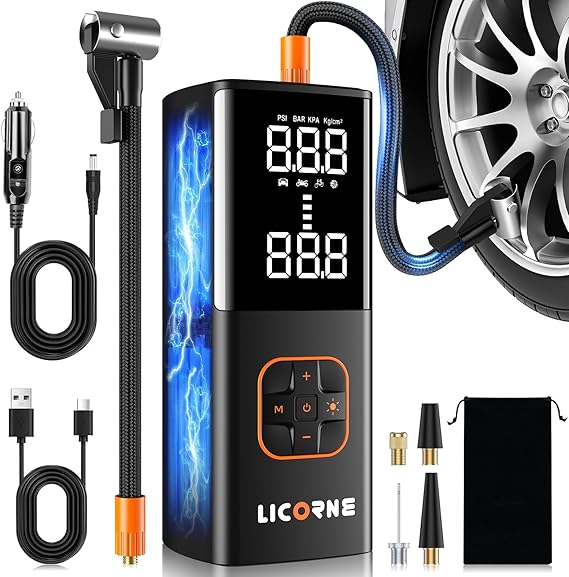
2. Package Contents
- LICORNE P099 Tire Inflator (Model P099)
- Air Nozzle
- Long Tapered Nozzle
- Ball Air Nozzle
- Cigarette Lighter Power Cord (12V DC Adapter)
- Presta Valve Needle
- Cloth Storage Bag
- Air Tube
- Type-C Charging Cable
- User Manual
3. Key Features & Specifications
3.1 Power & Performance
- Power Source: Built-in rechargeable battery (Cordless) and 12V DC car socket (via included cable).
- Voltage: 12V.
- Maximum Pressure: 180 PSI.
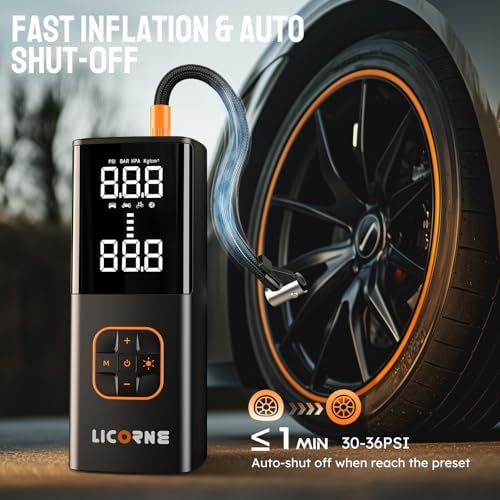
- Inflation Speed: Marketed as 5x faster than ordinary electric pumps. Can inflate a small car tire in under 1 minute.
- Cordless Runtime: Up to 2 hours on a full charge.
- Noise Level: Approximately 85 decibels.
3.2 Display & Controls
- Digital Display: Large LED screen shows real-time pressure and preset target pressure.
- Pressure Units: Switchable between PSI, KPA, BAR, and KG/CM².
- Automatic Shut-off: Stops inflation automatically when the preset pressure value is reached.
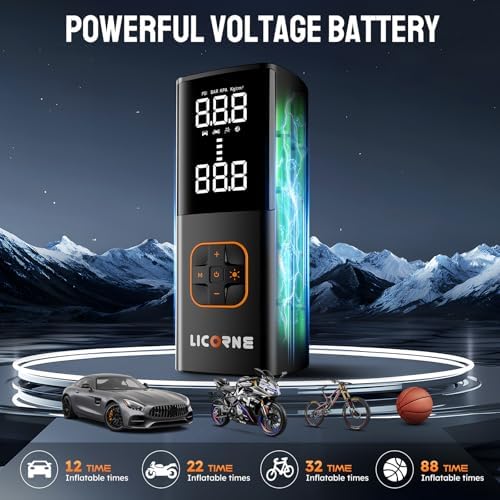
3.3 Inflation Modes
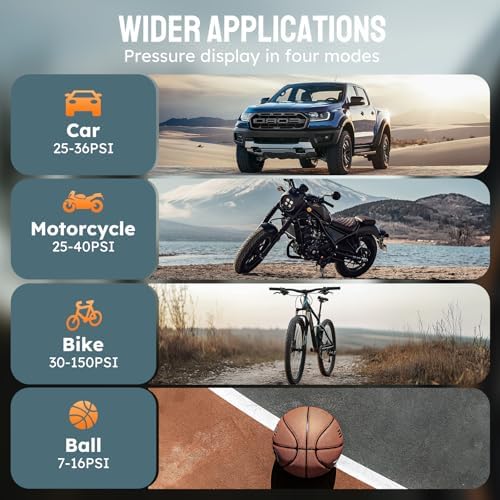
- Four Preset Modes: For Bikes, Motorcycles, Cars, and Balls.
- Custom Mode ("N"): Allows manual pressure setting up to 180 PSI.
3.4 Additional Functions
- LED Work Light: Top-mounted light for use in low-light conditions.
- Emergency Power Bank: Features a 5V/2A USB output port to charge electronic devices.
- Charging Port: Type-C port for recharging the internal battery.
3.5 Physical Specifications
- Color: Black.
- Item Weight: 2.1 lbs (0.95 kg).
- Dimensions (L x W x H): 5.56" x 7.2" x 2.9" (14.1 cm x 18.3 cm x 7.4 cm).
- Portable Design: Compact and includes a storage bag for transport.
4. Use Guide
4.1 Initial Setup & Charging
- Charge the Inflator: Before first use, fully charge the internal battery using the provided Type-C cable. Connect the cable to the inflator's Type-C port and a standard USB power adapter (not included).
- Alternative Power: The inflator can also be powered directly from a vehicle's 12V cigarette lighter socket using the included power cord. This will operate the inflator and charge the battery simultaneously.
4.2 Basic Operation for Inflating a Tire
- Power On: Press and hold the power button to turn on the device.
- Select Mode: Use the mode (M) button to cycle through the four presets (Bike, Motorcycle, Car, Ball) or the custom "N" mode.
- Set Pressure (Custom Mode): In "N" mode, use the "+" and "-" buttons to set your desired pressure value. Use the unit (U) button to switch between PSI, KPA, BAR, or KG/CM².
- Attach Nozzle: Screw the appropriate air nozzle onto the end of the air tube. For car/motorcycle tires, use the standard air nozzle. For bicycle tires with Presta valves, use the Presta valve needle adapter.
- Connect to Valve: Remove the valve cap from the tire and firmly press the nozzle onto the valve stem. Ensure it is sealed to prevent air leakage.
- Start Inflation: Press the start button. The display will show the current tire pressure rising. The inflator will automatically stop when it reaches the preset pressure.
- Disconnect: After the inflator stops, remove the nozzle from the valve stem and replace the valve cap.
- Power Off: Press and hold the power button to turn off the device.
4.3 Using the LED Light
Press the light button to turn the top-mounted LED light on or off. This is useful for nighttime inflation or as an emergency light.
4.4 Using the USB Power Bank
Connect a standard USB cable from your electronic device (e.g., smartphone) to the USB output port on the inflator. The internal battery will supply power to the device.
WARNING: Important Safety Notes
- Do NOT use this inflator for utility vehicles such as RVs, large trucks, or tractors. It may not achieve the required pressure and prolonged operation could damage the motor.
- The air nozzle may become hot during prolonged or high-power use. Avoid direct skin contact. Allow it to cool or wear protective gloves.
- Do not operate the inflator in wet conditions.
- Do not block the air intake or exhaust vents during operation.
- Always check the manufacturer's recommended pressure for your tire or inflatable object before use.
5. Care & Maintenance
- Store the inflator in the provided storage bag in a cool, dry place.
- Keep the air nozzles and tube clean and free of debris.
- Periodically check the battery level and recharge as needed to maintain battery health. Avoid completely draining the battery before recharging.
- If using the 12V car adapter, ensure your vehicle's engine is running to prevent draining the vehicle battery.
6. Troubleshooting
| Problem | Possible Cause | Solution |
|---|---|---|
| Inflator does not turn on. | Battery is depleted. Loose connection. | Recharge the battery. If using the 12V car cord, ensure it is firmly plugged into both the inflator and the car socket. |
| Inflation is very slow or stops prematurely. | Battery is low. Air leak at the valve connection. Clogged nozzle. | Recharge battery. Re-seat the nozzle on the valve stem. Check and clean the nozzle. |
| Display shows inaccurate pressure. | Needs calibration (rare). | Compare with a known accurate pressure gauge. If a significant discrepancy persists, contact support. |
| Inflator does not auto-stop. | Custom mode pressure not set correctly. Sensor issue. | In custom "N" mode, ensure the target pressure is set higher than the current tire pressure. If problem continues, stop manually and contact support. |
| Device becomes very hot. | Prolonged continuous use. | This is normal under heavy load. Stop operation and allow the unit to cool down before resuming. |
7. Warranty & Support
The LICORNE P099 Tire Inflator comes with a 1-year manufacturer's warranty from the date of purchase.
Manufacturer: LICORNE
Model Number: P099
UPC: 768795681445
ASIN: B0DRP39B76
For warranty service or technical support, contact the seller through your Amazon purchase history or visit the LICORNE Store on Amazon.
This user manual is based on product information available as of the date of publication. Specifications are subject to change without notice.