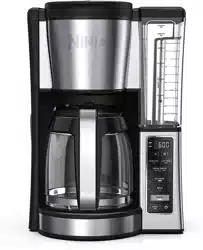
User manual Coffee Brewer
WHAT'S IN THE BOX
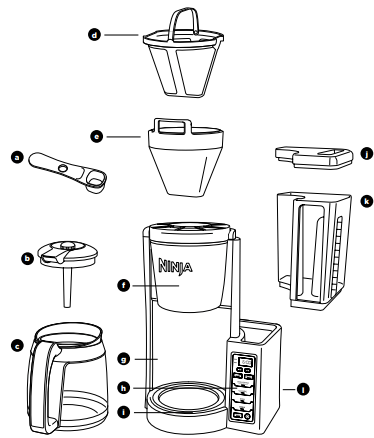
a Integrated Ninja® Scoop
b Brew-Through Lid with Flavor Straw
c Glass Carafe
d Gold-Tone Permanent Filter
e Removable Filter Holder
f Brew Basket
g Brewer
h Control Panel
i Precision Temp Warming Plate
j Water Reservoir Lid
k Removable Water Reservoir
l Power Cord & Storage (not shown)
GETTING TO KNOW YOUR NINJA® COFFEE BREWER
CONTROL PANEL
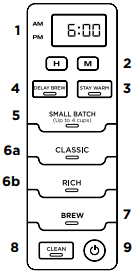
1 Programmable Digital Clock
2 Clock Hour and Minute Buttons
3 STAY WARM Button
4 DELAY BREW Button
5 SMALL BATCH Button
6 Brew Types
a CLASSIC Brew Button
b RICH Brew Button
7 BREW Button
8 Clean Cycle Button
9 Power Button
FEATURES OF THE NINJA COFFEE BREWER
-
Thermal Flavor Extraction® Technology – Blends automated controls for calibrated temperature, pre-infusion, coffee saturation, and flavor richness to unlock the full flavor potential of your coffee.
- SMALL BATCH Setting – When brewing 4 cups or fewer, add your desired amount of water to the reservoir and press SMALL BATCH to ensure the same great flavor as a Full Carafe brew. DO NOT add more water than cups of coffee you want to brew, as the unit will use up the total amount of water in the reservoir regardless of the Small Batch setting.
- Brew Types – Control the strength and style of your coffee:
a. CLASSIC Brew for smooth, balanced hot coffee.
b. RICH Brew for a richer-than-Classic but still smooth coffee flavor that stands up to milk, cream, or flavoring.
- Removable Water Reservoir with Easy Access – For quick and easy filling.
- 24-Hour Programmable Delay Brew – Set it to automatically brew at a desired time. The brewer will remain pre-heated and ready to brew at the time you programmed.
- Mid-Brew Pause – Automatically stops the flow of coffee from the brew basket when the carafe is removed, allowing you to pour a cup mid-brew.
- CLEAN Function – The clean function allows you to clean your unit whenever you would like. As a guideline, we suggest running a clean cycle when it takes longer than 12–15 minutes to brew a full carafe of coffee.
- Adjustable Warming Plate– Keep your brew at the ideal temperature for up to 4 hours.
- The Adjustable Warming Plate will activate during the brew and will automatically shut off after 2 hours by default. You can also program the warming plate to stay on for more or less time by pressing and holding STAY WARM.
BEFORE FIRST USE
1 Remove all packaging material and stickers from the coffee maker.
2 Wash the water reservoir, carafe, removable filter holder, and gold-tone permanent filter in warm, soapy water with a soft cloth. Rinse parts and dry thoroughly.
3 Prime the system by running 2 full carafes on Classic brew with water only. After each cycle is complete, discard the water.
SETTING THE CLOCK
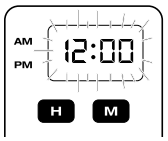
1 Plug the power cord into an electrical outlet and press the Power button ( ).
).
2 Press either the H (hour) button or M (minute) button and the display will flash. Use the H and M buttons to set the clock to the current time. The AM or PM indicator will illuminate on the left side of the display as you are setting the time.
3 When the desired time is reached, allow 5 seconds for it to set.
NOTE: If you unplug the brewer or experience a power loss, you will need to reset the clock the next time the brewer is powered on.
HOW TO BREW
1 Place the brewer on a dry, clean, and level surface. Plug your brewer in and power it on.
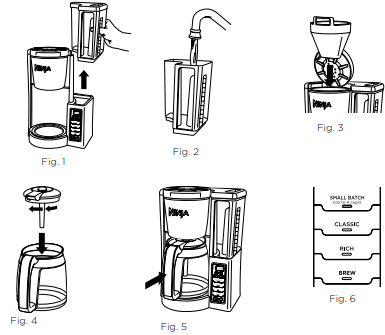
2 Remove the water reservoir from the unit by lifting it straight up (Fig. 1). Remove the lid entirely and fill the water reservoir to the desired level (Fig. 2).
NOTE: DO NOT fill past the 12-Cup Line. If overfilled, remove the water reservoir from the brewer and pour out water until the level is no higher than the 12-Cup Line.
3 Place the filter holder in the brew basket (Fig. 3). Then place the permanent filter or a #4 paper filter in the filter holder.
NOTE: If using a paper filter, fold the paper filter along the seams, open it fully, and firmly press it into the filter holder, making sure it is fully seated.
4 Add your desired amount of coffee grounds to the brew basket.
5 Place the brew-through lid on the carafe and turn clockwise to lock into place (Fig. 4). Then place carafe under the brew basket (Fig. 5).
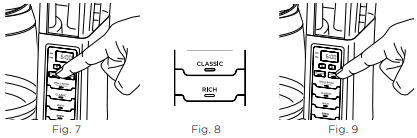
6 Select either CLASSIC or RICH brew. If you are brewing 4-cups or less, also select SMALL BATCH. (Fig. 6).
7 Press BREW to start brewing. When the brewing is complete, the unit will beep.
NOTE: Each brew has a pre-infusion cycle with varying times. The brew will begin, pause for a short period of time, and then continue brewing. This pre-infusion cycle is used to evenly saturate the coffee grounds.
HOW TO BREW PREPARING & USING YOUR NINJA® COFFEE BREWER
COFFEE MEASUREMENT CHART
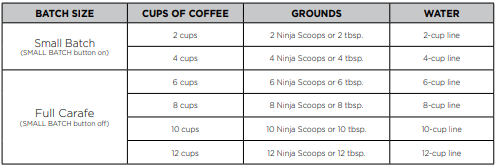
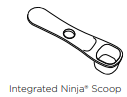
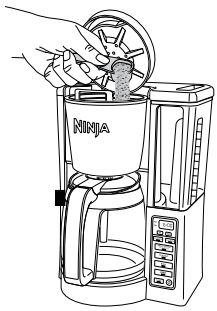
Integrated Ninja Scoop is equivalent to 1 tbsp. of coffee
PROGRAMMING DELAY BREW
NOTE: The unit must remain on for the Delay Brew function to work. DO NOT power off after setting Delay Brew.
1 Turn the unit on by pressing the Power button.
2 After filling the water reservoir and adding ground coffee to the brew basket, be sure the reservoir and brew basket are securely in place. Place the empty carafe under the brew basket.
3 Press DELAY BREW. The clock will flash “12:00”. Use the hour (H) and minute (M) buttons to set the time you would like the Delay Brew to begin. The AM or PM indicator will illuminate on the left side of the display as you are setting the time.
4 Select the brew style and that selection will illuminate. If brewing fewer than 4 cups, press SMALL BATCH, too.
5 Once you have set the time and brew style, press DELAY BREW to activate, or wait 5 seconds for Delay Brew to lock in. When activated, the unit will beep, and DELAY BREW will remain illuminated. 5 To cancel, press DELAY BREW or the Power button. Changing the brew style while Delay Brew is set or starting another brew will cancel the programmed Delay Brew.
ADJUSTABLE WARMING PLATE
The warming plate will turn on once the brew has started. Press the STAY WARM button after the brew to turn off the warming plate (Fig. 9). You can turn the warming plate back on by pressing STAY WARM again. Wait until surface has cooled completely before touching.
NOTE: DO NOT add additional water to the reservoir when using the STAY WARM function.
You can program the warming plate to stay on for up to 4 hours.
1 Press and hold STAY WARM until the clock flashes, displaying the time at which the warming plate is currently set to turn off.
2 Quickly press the hour (H) or minute (M) button to adjust the time up to 4 hours. The warming plate is automatically programmed to stay on for 2:00 hours.
3 To lock in the new duration, press STAY WARM again, or wait 5 seconds for it to lock in automatically.
CARE & MAINTENANCE
CLEANING AFTER A BREW
1 After the unit has cooled, remove the filter holder from the brew basket. If using a paper filter, discard it. If using the permanent filter, wash it thoroughly with soap and warm water or place on the top rack of the dishwasher.
2 Empty the water reservoir and hand-wash or place on the top rack of the dishwasher.
NOTE: For best results, we recommend rinsing the reservoir after brewing and refilling with fresh water the next time you brew
3 We recommend cleaning your carafe with warm, soapy water, or placing it on the top rack of your dishwasher. If you want to clean the carafe more thoroughly, we recommend using a soft foam brush such as the one shown to the right.

4 After the coffee maker has cooled, wipe down the main unit, showerhead, and water reservoir shelf with a cloth and warm water. DO NOT immerse the coffee maker in water.
DESCALING YOUR NINJA® COFFEE BREWER
NOTE: Make sure the SMALL BATCH button is not selected/illuminated.
1 Set the empty carafe beneath the brew basket.
2 Use a descaling solution specifically formulated for coffeemaker cleaning and follow the directions on the package. Fill the water reservoir up to, but not exceeding, the 12-Cup Line (60 fl. oz.).
OR
Add 16 oz. of white vinegar to the water reservoir, then fill the rest of the reservoir with water up to, but not exceeding, the 12-Cup Line (60 fl. oz.).
3 Once the water reservoir is filled with your cleaning solution or vinegar mixture, press the CLEAN button. The clean cycle takes approximately 25–35 minutes. To cancel the clean cycle, press the CLEAN button again or press the Power button.
4 The unit will beep when the clean cycle successfully completes. Refill the reservoir with fresh water up to, but not exceeding, the 12-Cup Line, and set the empty carafe beneath the brew basket. Run a full Classic Brew cycle with water only to remove any cleaning solution that could affect the flavor of your coffee.
TROUBLESHOOTING GUIDE
There is sediment in my coffee.
- If using a permanent filter, the sediment at the bottom of the brewed coffee may be due to using finely ground coffee.
- To reduce the amount of sediment in the brewed coffee, use a slightly coarser grind or use a paper filter.
NOTE: We DO NOT recommend using a paper filter in conjunction with the permanent filter, as this could cause water and/or coffee to clog or back up in the filter basket.
There are grounds in my coffee.
- Either the permanent filter or a paper filter must be inserted into filter holder when brewing.
- Using too many grounds can cause the filter holder to overflow. Once cooled, clean out the filter holder and refill using the appropriate amount of coffee (1 scoop per cup).
- Finely ground coffee can clog the filter holder. For best brewing results, use a medium-grind coffee.
Brew basket drips even after the brew cycle is completed.
- The removable filter holder valve may be clogged. Rinse the filter holder with water and press the valve repeatedly until the clog is cleared.
Paper filter is folding over.
- The unit is designed to take a #4 cone filter. Be sure you are using this size and shape, as larger sizes may fold over. Allow the filter holder to cool before handling. Be sure the paper filter is folded along its two seams and is pressed firmly into the filter holder. Alternatively, you can wet the sides of the paper filter to temporarily adhere it to the filter holder.
- If the problem persists, try using the permanent filter instead of a paper filter.
NOTE: When using a paper filter, DO NOT use the permanent filter.
Coffee is too weak.
- For a stronger coffee, use the Rich Brew setting, try darker-roast grounds, or use the permanent filter rather than a paper filter. If you want an even bolder flavor, you can add more coffee grounds. Additional grounds do absorb water, so you may get more concentrated coffee but overall less liquid volume.
Coffee is too strong.
- For milder coffee, try the Classic Brew setting using light-roast grounds and a paper filter rather than the permanent filter. If you want an even milder flavor, you can use fewer grounds.
Brew will not start.
NOTE: The brew will begin, pause, and then continue. This process is used to evenly saturate the coffee grounds.
- Ensure the unit is powered on and the display is illuminated. If there are no lights, the machine is not getting power. Try a different outlet and press the Power button.
- Check to make sure there is water in the water reservoir.
- Make sure the carafe is in place. The brewer will not dispense coffee if the carafe is not under the brew basket. If it is not in place, the brew will remain in the brew basket, which could lead to overflow.
- If the brew still does not start, it may be time to run a clean cycle. Please refer to the Descaling Your Ninja® Coffee Brewer section.
Brew cycle is too slow.
- A full carafe brew will take approximately 12–15 minutes. If a full carafe brew takes longer than expected, you may need to descale your unit.
Carafe overflowed.
- The carafe may not have been empty prior to brewing, or the water level exceeded the Max Fill line on the water reservoir prior to brewing. Reminder, DO NOT add additional water to the reservoir after a brew or cleaning cycle has already started.
- For Classic brew, the carafe holds 60 fl. oz. To avoid overflows, make sure carafe is empty prior to brewing and the water reservoir is not filled past the 12-Cup Line.
Brew basket overflowed.
- Check that the carafe is in place with the lid secured. If the carafe is in place, the bottom of the filter holder may be clogged. This can happen with finely ground coffee or too many coffee grounds in the filter holder. Rinse the filter holder with water and press the valve repeatedly until the clog is cleared.
NOTE: We recommend using medium-grind coffee.