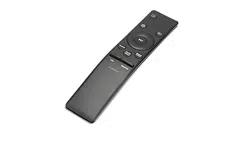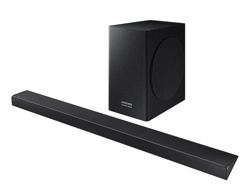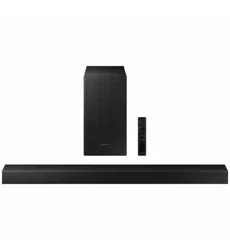

HW-MS550
FULL MANUAL
Imagine the possibilities
Thank you for purchasing this Samsung product.
To receive more complete service, please register
your product at www.samsung.com/register
ENG - ii
SAFETY INFORMATION
SAFETY WARNINGS
TO REDUCE THE RISK OF ELECTRIC SHOCK, DO
NOT REMOVE THE COVER (OR BACK).
NO USER-SERVICEABLE PARTS ARE INSIDE.
REFER SERVICING TO QUALIFIED SERVICE
PERSONNEL.
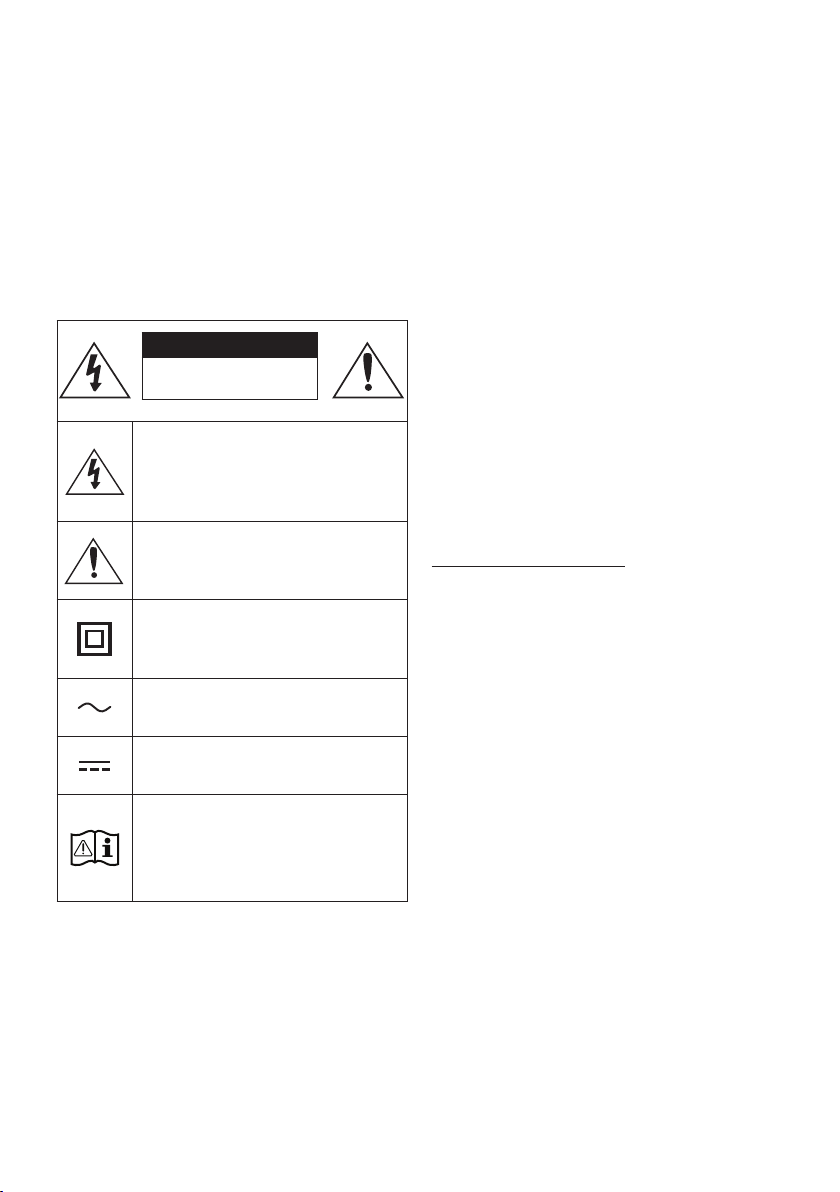
CAUTION
RISK OF ELECTRIC SHOCK.
DO NOT OPEN.
This symbol indicates that high voltage
is present inside. It is dangerous to make
any kind of contact with any internal
part of this product.
This symbol indicates that this product
has included important literature
concerning operation and maintenance.
Class II product : This symbol indicates
that a safety connection to electrical
earth (ground) is not required.
AC voltage : Rated voltage marked with
this symbol is AC voltage.
DC voltage : Rated voltage marked with
this symbol is DC voltage.
Caution. Consult Instructions for use :
This symbol instructs the user to consult
the user manual for further safety
related information.
WARNING
• To reduce the risk of re or electric shock, do
not expose this appliance to rain or moisture.
• To prevent injury, this apparatus must be
securely attached to the oor/wall in
accordance with the installation instructions.
CAUTION
• Do not expose this apparatus to dripping or
splashing. Do not put objects lled with
liquids, such as vases, on the apparatus.
• To turn this apparatus off completely, you
must pull the power plug out of the wall
socket. Consequently, the power plug must
be easily and readily accessible at all times.
CAUTION (for Canada)
This equipment complies with Industry Canada
licence-exempt RSS standard(s). Operation is
subject to the following two conditions: (1) this
device may not cause interference, and (2) this
device must accept any interference, including
interference that may cause undesired operation
of the device.
This device and its antenna(s) must not be co-
located or operation in conjunction with any other
antenna or transmitter.
This device may automatically discontinue
transmission if there is no information to
transmit, or an operational failure. Note that this
is not intended to prohibit the transmission of
control or signaling information or the use of
repetitive codes where required by the
technology.
This Class B digital apparatus complies with
Canadian ICES-003.

ENG - iii
Radiation Exposure Statement
This equipment complies with IC RSS-102
radiation exposure limits set forth for an
uncontrolled environment.
This equipment should be installed and operated
with minimum distance 20 cm between the
radiator & your body.
Important Safety Instructions
Read these operating instructions carefully
before using the unit. Follow all the safety
instructions listed below. Keep these operating
instructions handy for future reference.
1. Read these instructions.
2. Keep these Instructions.
3. Heed all warnings.
4. Follow all instructions.
5. Do not use this apparatus near water.
6. Clean only with dry cloth.
7. Do not block any ventilation openings.
Install in accordance with the manufacturer’s
instructions.
8. Do not install near any heat sources such as
radiators, heat registers, stoves, or other
apparatus (including ampliers) that produce
heat.
9. Do not defeat the safety purpose of the
polarized or grounding-type plug.
A polarized plug has two blades with one
wider than the other. A grounding type plug
has two blades and a third grounding prong.
The wide blade or the third prong are
provided for your safety. If the provided plug
does not t into your outlet, consult an
electrician for replacement of the obsolete
outlet.
10. Protect the power cord from being walked
on or pinched particularly at plugs,
convenience receptacles, and the point
where they exit from the apparatus.
11. Only use attachments/accessories specied
by the manufacturer.
12. Use only with the cart, stand,
tripod, bracket, or table
specied by the manufacturer,
or sold with the apparatus.
When a cart is used, use caution when
moving the cart/apparatus combination to
avoid injury from tip-over.
13. Unplug this apparatus during lightning
storms or when unused for long periods of
time.
14. Refer all servicing to qualied service
personnel. Servicing is required when the
apparatus has been damaged in any way,
such as power-supply cord or plug is
damaged, liquid has been spilled or objects
have fallen into the apparatus, the apparatus
has been exposed to rain or moisture, does
not operate normally, or has been dropped.

ENG - iv
PRECAUTIONS
1. Ensure that the AC power supply in your
house complies with the power
requirements listed on the identication
sticker located on the back of your product.
Install your product horizontally, on a
suitable base (furniture), with enough space
around it for ventilation (3~4 inches). Make
sure the ventilation slots are not covered. Do
not place the unit on ampliers or other
equipment which may become hot. This unit
is designed for continuous use. To fully turn
off the unit, disconnect the AC plug from the
wall outlet. Unplug the unit if you intend to
leave it unused for a long period of time.
2. During thunderstorms, disconnect the AC
plug from the wall outlet. Voltage peaks due
to lightning could damage the unit.
3. Do not expose the unit to direct sunlight or
other heat sources. This could lead to
overheating and cause the unit to
malfunction.
4. Protect the product from moisture (i.e.
vases), and excess heat (e.g. a replace) or
equipment creating strong magnetic or
electric elds. Unplug the power cable from
the AC wall socket if the unit malfunctions.
Your product is not intended for industrial
use. It is for personal use only. Condensation
may occur if your product has been stored in
cold temperatures. If transporting the unit
during the winter, wait approximately
2 hours until the unit has reached room
temperature before using.
5. The battery used with this product contains
chemicals that are harmful to the
environment. Do not dispose of the battery
in the general household trash. Do not
expose the battery to excess heat, direct
sunlight, or re. Do not short circuit,
disassemble, or overheat the battery.
Danger of explosion if the battery is replaced
incorrectly. Replace only with the same or
equivalent type.
ENG - v
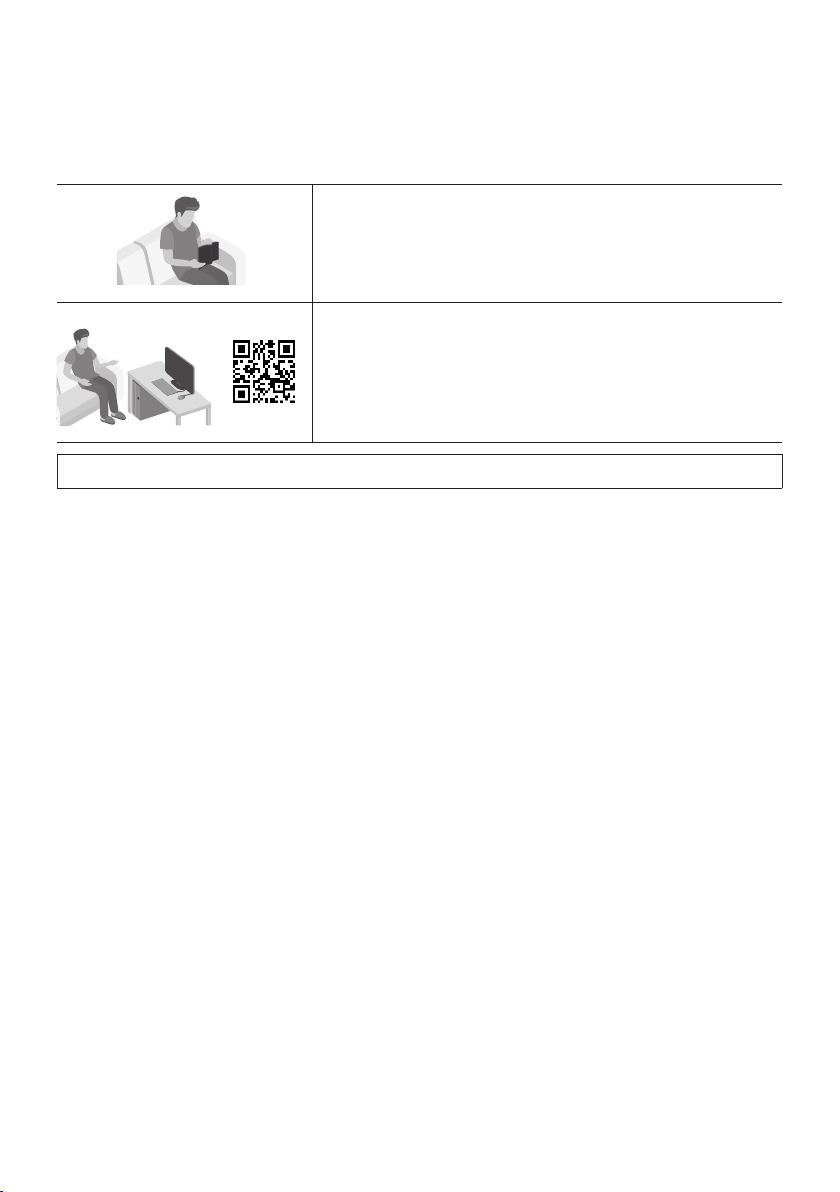
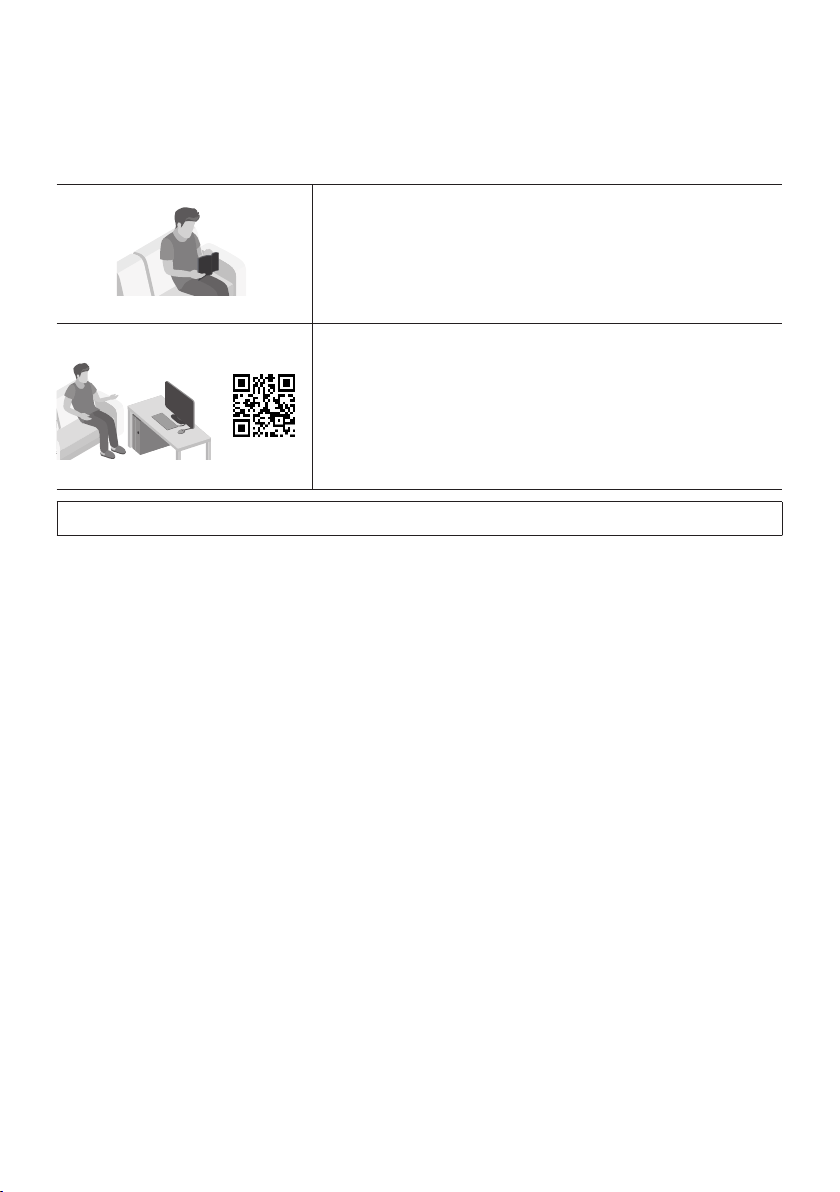
ABOUT THIS MANUAL
The user manual has two parts: this simple paper USER MANUAL and a detailed FULL MANUAL you can
download.
USER MANUAL
See this manual for safety instructions, product installation,
components, connections, and product specications.
FULL MANUAL
You can access the Full Manual on Samsung’s on-line customer
support center by scanning the QR code. To see the manual on
your PC or mobile device, download the manual in document
format from the website. (http://www.samsung.com/support)
Design, specications and App screen are subject to change without prior notice.

ENG - vi
CONTENTS
01 Checking the Components 2
Inserting Batteries before using the Remote Control (AA batteries X 2) ------------------------- 2
02 Product Overview 3
Front Panel / Right Side Panel of the Soundbar ------------------------- 3
Bottom Panel of the Soundbar ------------------------- 4
03 Connecting the Soundbar 5
Connecting Electrical Power
-------------------------
5
04 Connecting to your TV 7
Method 1. Connecting with a Cable
-------------------------
7
– Connecting using an Optical Cable
-------------------------
7
– Connecting a TV using an HDMI Cable
-------------------------
8
Method 2. Connecting Wirelessly
-------------------------
9
– Connecting a TV via Bluetooth
-------------------------
9
– Connecting via Wi-Fi
-------------------------
11
05 Connecting an External Device 13
Connecting using an Optical or Analog Audio (AUX) Cable
-------------------------
13
Connecting using an HDMI Cable
-------------------------
14
06 Connecting a USB 15

ENG - vii
07 Connecting a Mobile Device 17
Method 1. Connecting via Bluetooth
-------------------------
17
Method 2. Connecting via Wi-Fi (Wireless Network)
-------------------------
20
08 Using the Remote Control 22
How to Use the Remote Control
-------------------------
22
Adjusting the Soundbar volume with a TV remote control ------------------------- 25
Using the Hidden Buttons
-------------------------
26
09 Software Update 26
10 Installing the Wall Mount 27
Installation Precautions
-------------------------
27
Wallmount Components
-------------------------
27
Assembling the Holder-Cable
-------------------------
29
11 Troubleshooting 30
12 License 31
13 Open Source License Notice 31
14 Important Notes About Service 32
15 SpecicationsandGuide 32
Specications
-------------------------
32
ENG - 2
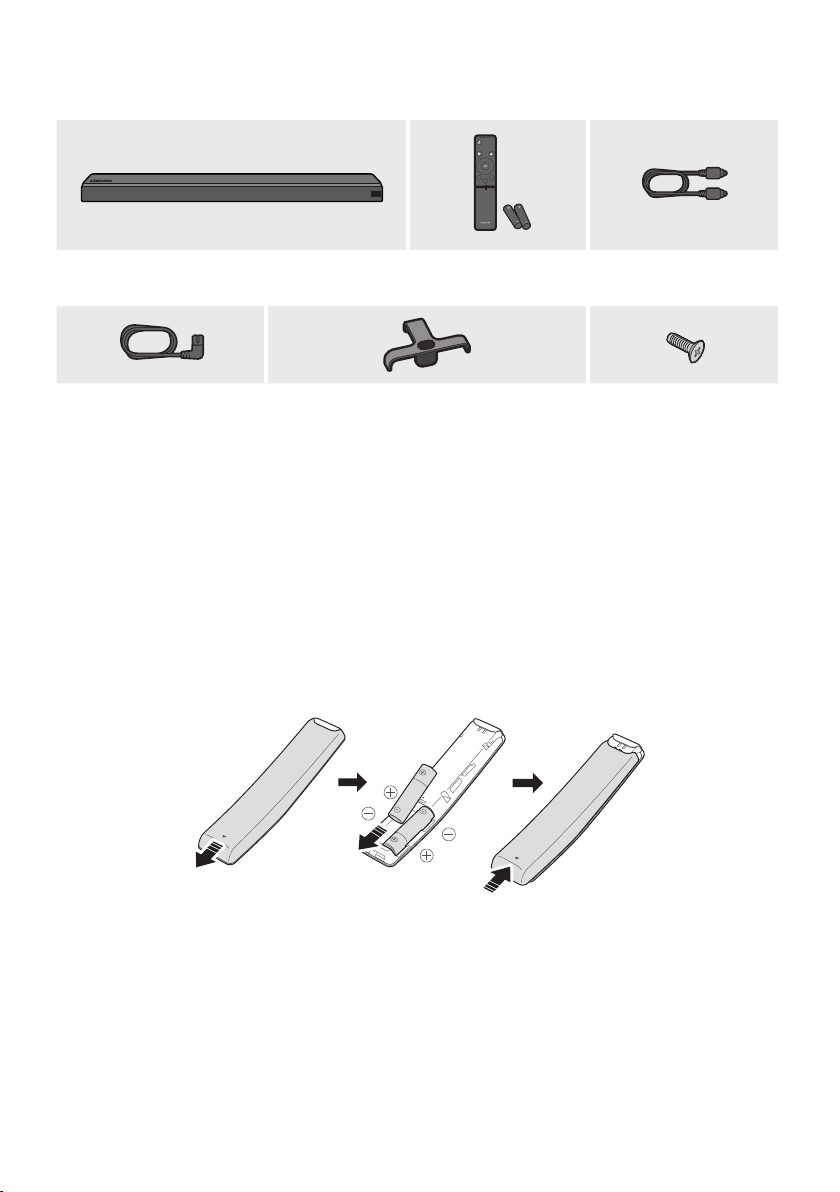
01 CHECKING THE COMPONENTS
Surround
VOL BASS
SOUNDBAR
SOUND
MODE
SMART
MODE
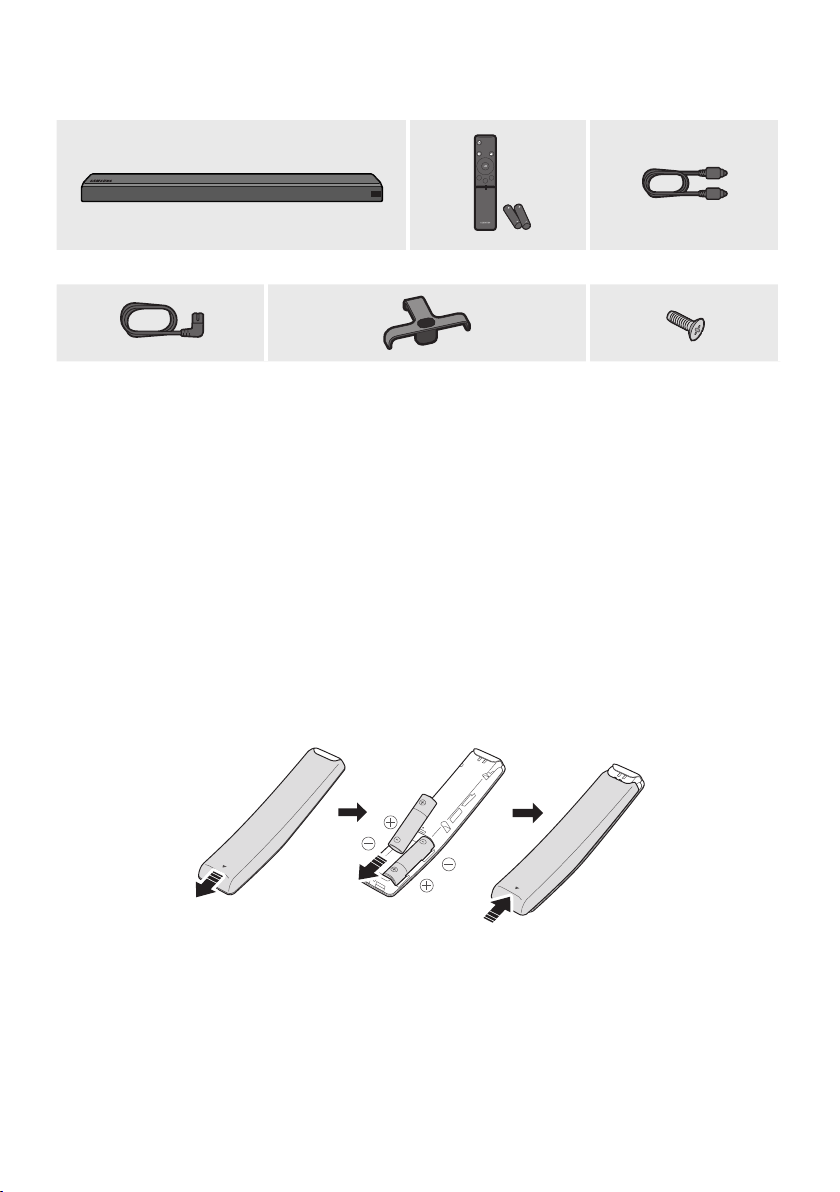
Soundbar Main Unit Remote Control /
Batteries
Optical Cable
Power Cord Holder-Cable Screw
• For Soundbar wall mounting components, see page 27.
• See page 29 for instructions on how to use the Holder-Cable.
• To purchase additional components or optional cables, contact a Samsung Service Center or
Samsung Customer Care.
• The appearance of the accessories may differ slightly from the illustrations above.
Inserting Batteries before using the Remote Control (AA batteries X 2)
Slide the battery cover in the direction of the arrow until it is completely removed. Insert 2 AA batteries
(1.5V) oriented so that their polarity is correct. Slide the battery cover back into position.
ENG - 3
02
PRODUCT OVERVIEW
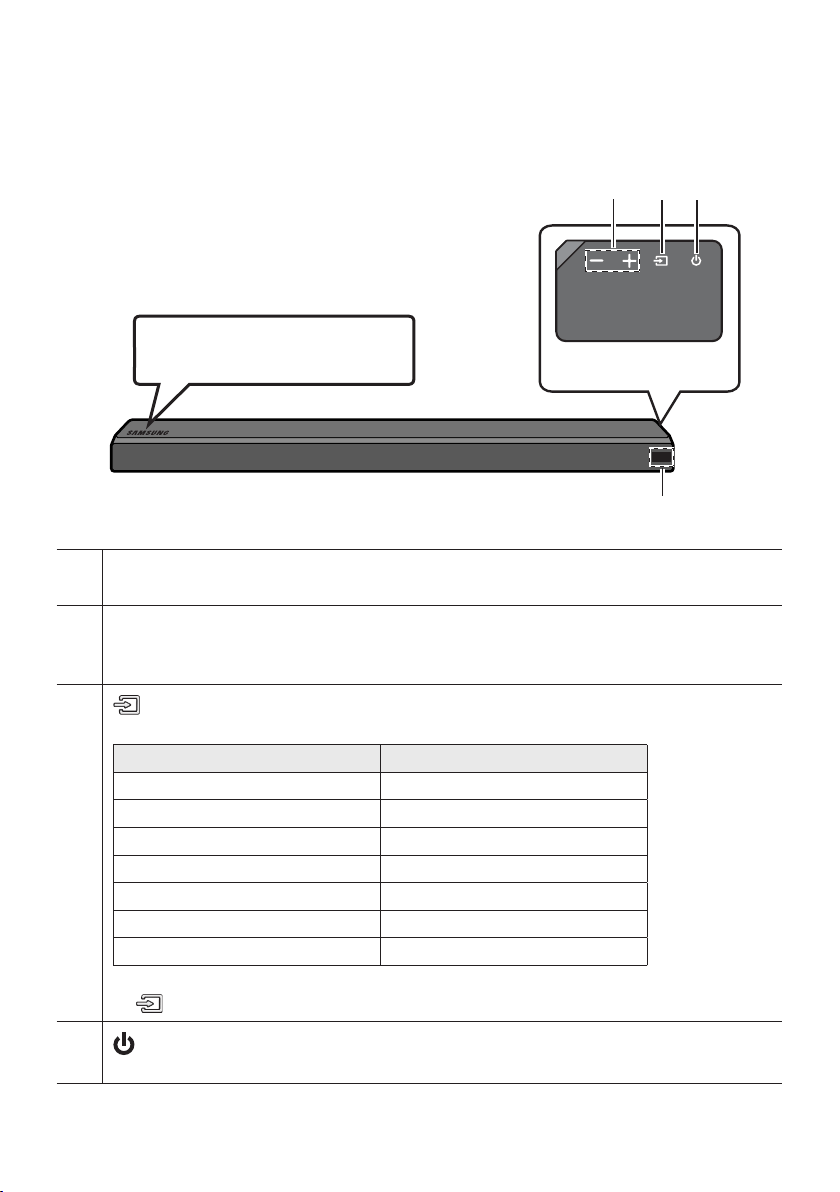
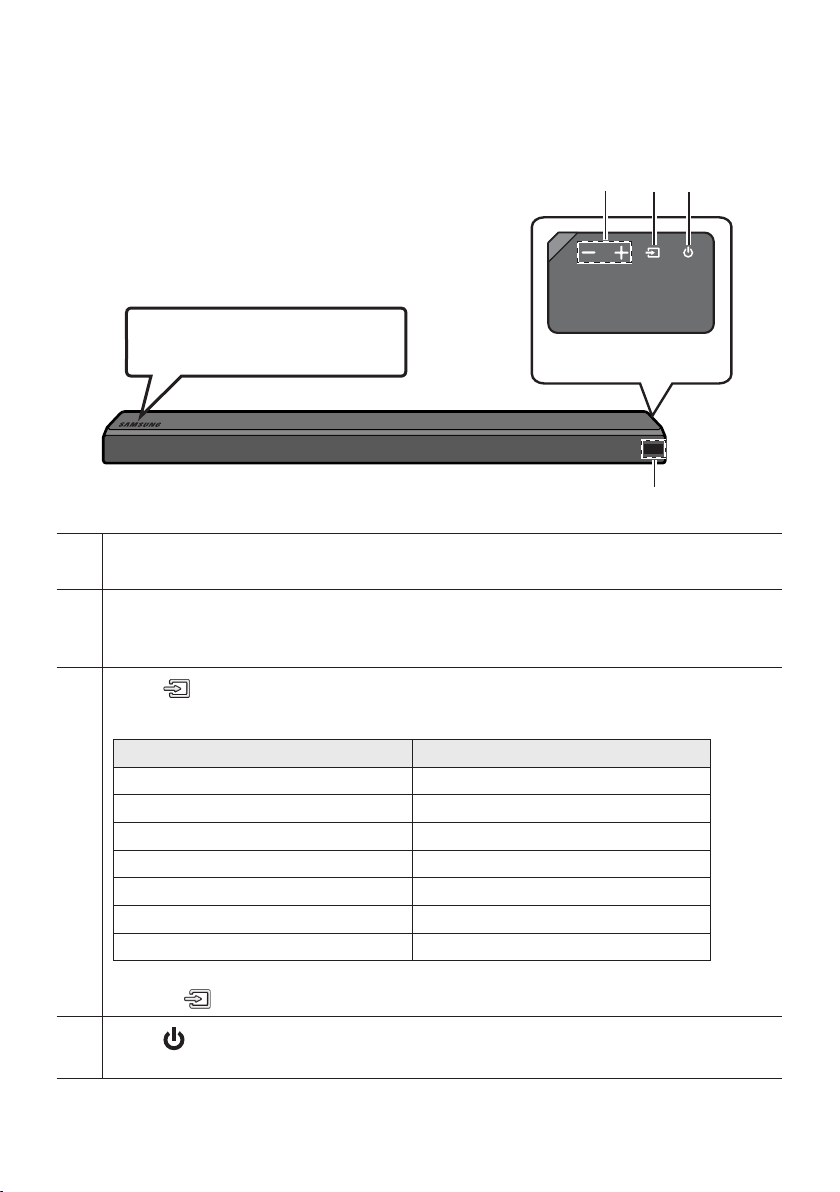
Front Panel / Right Side Panel of the Soundbar
Right Side of the Soundbar
Position the product so that the
SAMSUNG logo is located on the top.
Display
Displays the product’s status and current mode.
-/+ (Volume) Button
Adjusts the volume.
• When adjusted, the volume level appears on the Soundbar’s front display.
(Source) Button
Selects the source input mode.
Input mode Display
Optical Digital input D.IN
ARC (HDMI OUT) input D.IN TV ARC (Auto conversion)
AUX input AUX
HDMI input HDMI
Wi-Fi mode WIFI
BLUETOOTH mode BT
USB mode USB
• To turn on “BT PAIRING” mode, change the source to “BT” mode, and then press and hold the
(Source) button for more than 5 seconds.
(Power) Button
Turns the power on and off.
ENG - 4
•
When you plug in the AC cord, the power button will begin working in 4 to 6 seconds.
•
When you turn on this unit, there will be a 4 to 5 second delay before it produces sound.
•
If you want to enjoy sound only from the Soundbar, you must turn off the TV’s speakers in the Audio
Setup menu of your TV. Refer to the owner’s manual supplied with your TV.
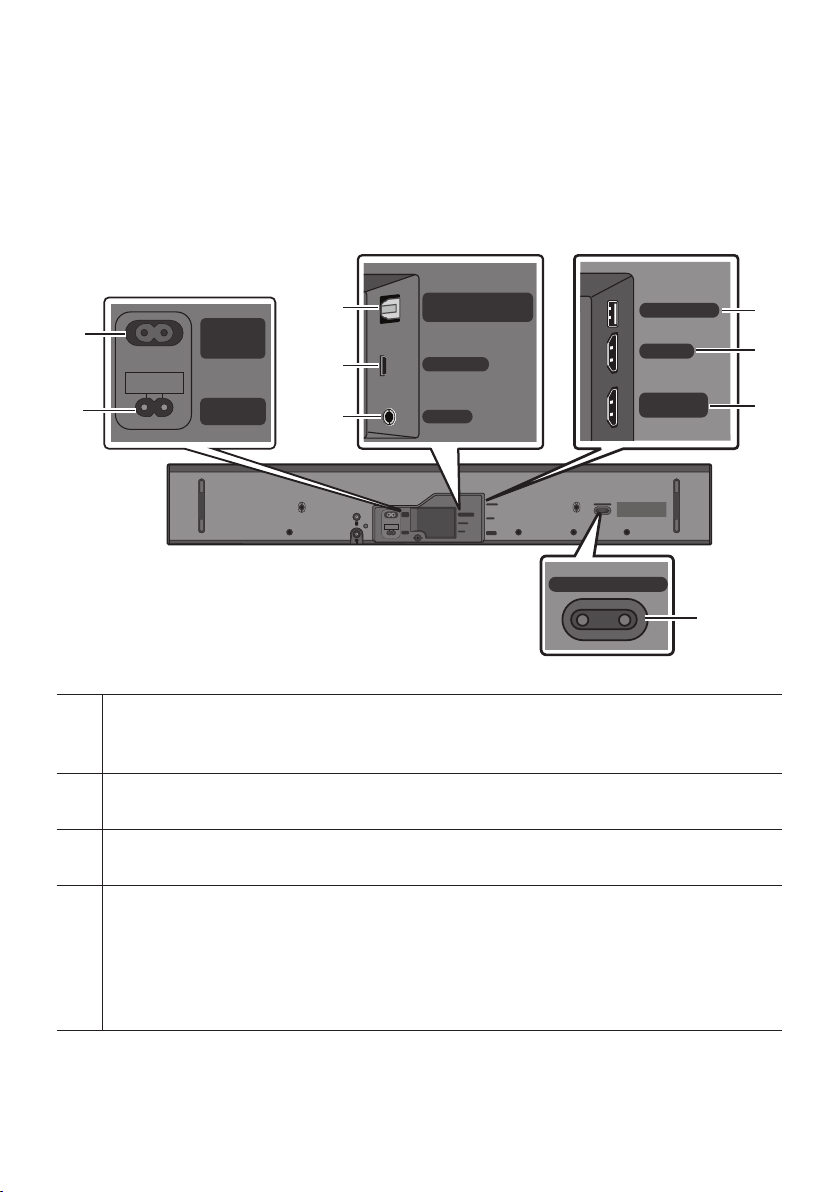
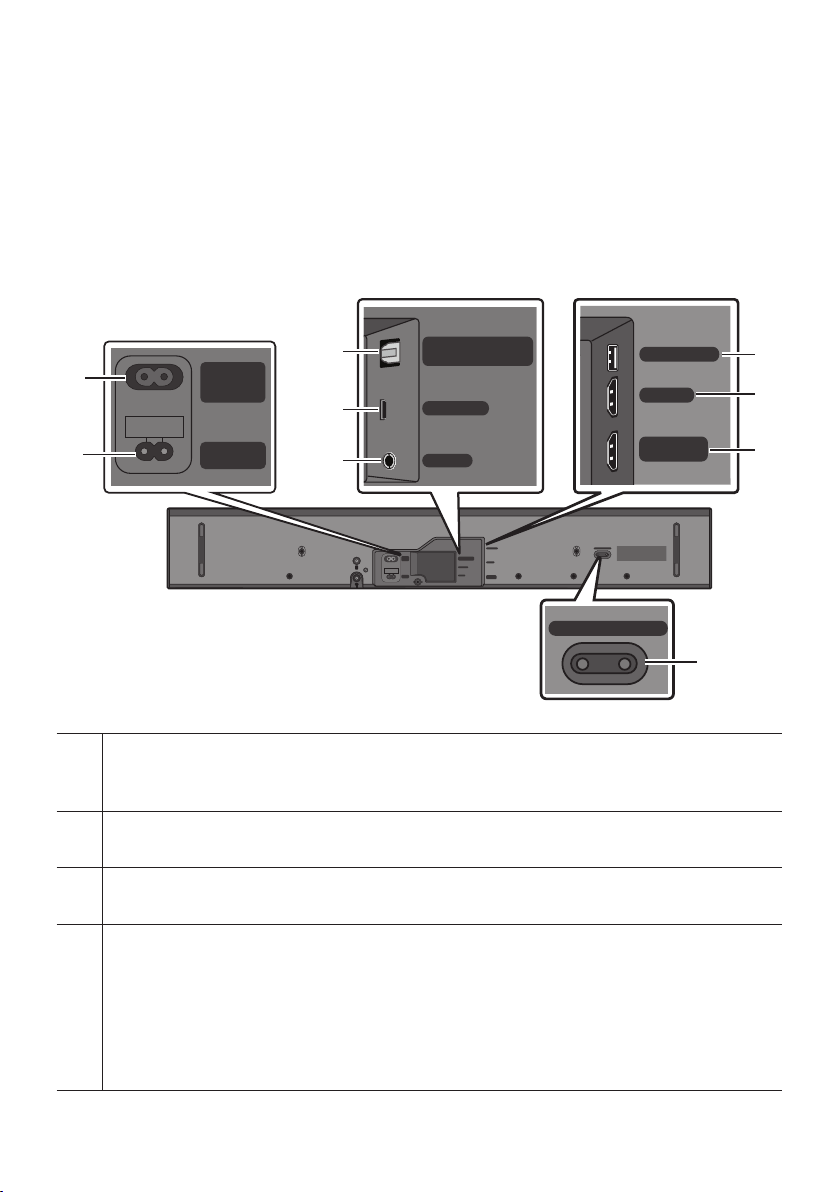
Bottom Panel of the Soundbar
Wi-Fi SETUP SPK ADD
HDMI IN
USB (5V 0.5A)
HDMI OUT
(TV-ARC)
WIRELESS
AUX IN
DIGITAL AUDIO IN
(OPTICAL)
POWER
IN
POWER
OUT
(For TV)
WIRELESS
AUX IN
DIGITAL AUDIO IN
(OPTICAL)
Wi-Fi SETUP SPK ADD
HDMI IN
USB (5V 0.5A)
HDMI OUT
(TV-ARC)
POWER
IN
POWER
OUT
(For TV)
POWER OUT (For TV)
Connect the power cord of a Samsung TV connected to the Soundbar and mounted on the wall using a
Wall Mount Kit (WMN300SB - not supplied).
POWER IN
Connect the Soundbar's AC power cable.
DIGITAL AUDIO IN (OPTICAL)
Connect to the digital (optical) output of an external device.
WIRELESS
Attach the wireless dongle that connects the Soundbar to surround speakers and a subwoofer wirelessly.
(The subwoofer is sold separately.)
• The WIRELESS jack is not USB-compatible.
• The availability of subwoofers differs by area. Check the availability at
http://www.samsung.com/support.
ENG - 5
AUX IN
Connect to the Analog output of an external device.
USB (5V 0.5A)
Connect a USB device here to play music les on the USB device through the Soundbar.
HDMI IN
Inputs digital video and audio signals simultaneously using an HDMI cable.
Connect to the HDMI output of an external device.
HDMI OUT (TV-ARC)
Connect to the HDMI (ARC) jack on a TV.
Wi-Fi SETUP / SPK ADD
Connect to a wireless network (Wi-Fi) via the Samsung Multiroom app.
• When disconnecting the power cable from a wall outlet, pull the plug. Do not pull the cable.
• Do not connect this unit or other components to an AC outlet until all connections between
components are complete.
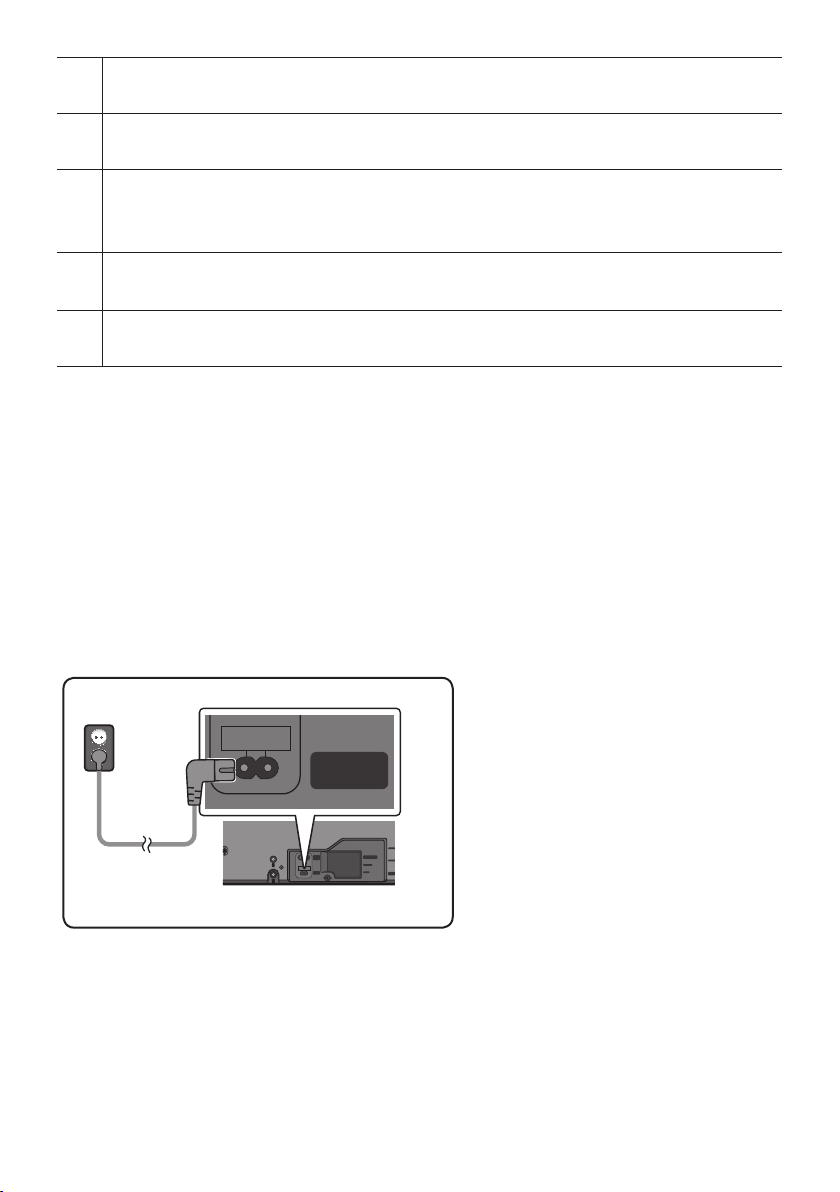
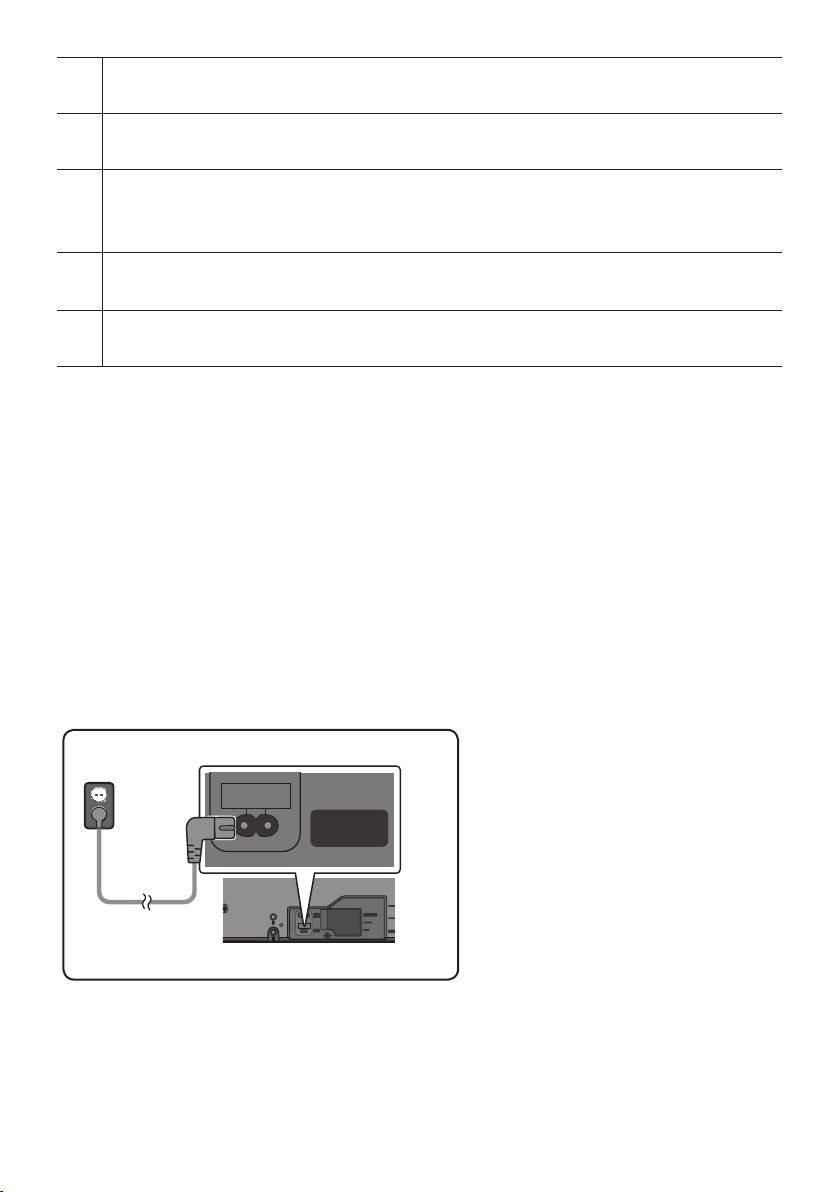
03 CONNECTING THE SOUNDBAR
Connecting Electrical Power
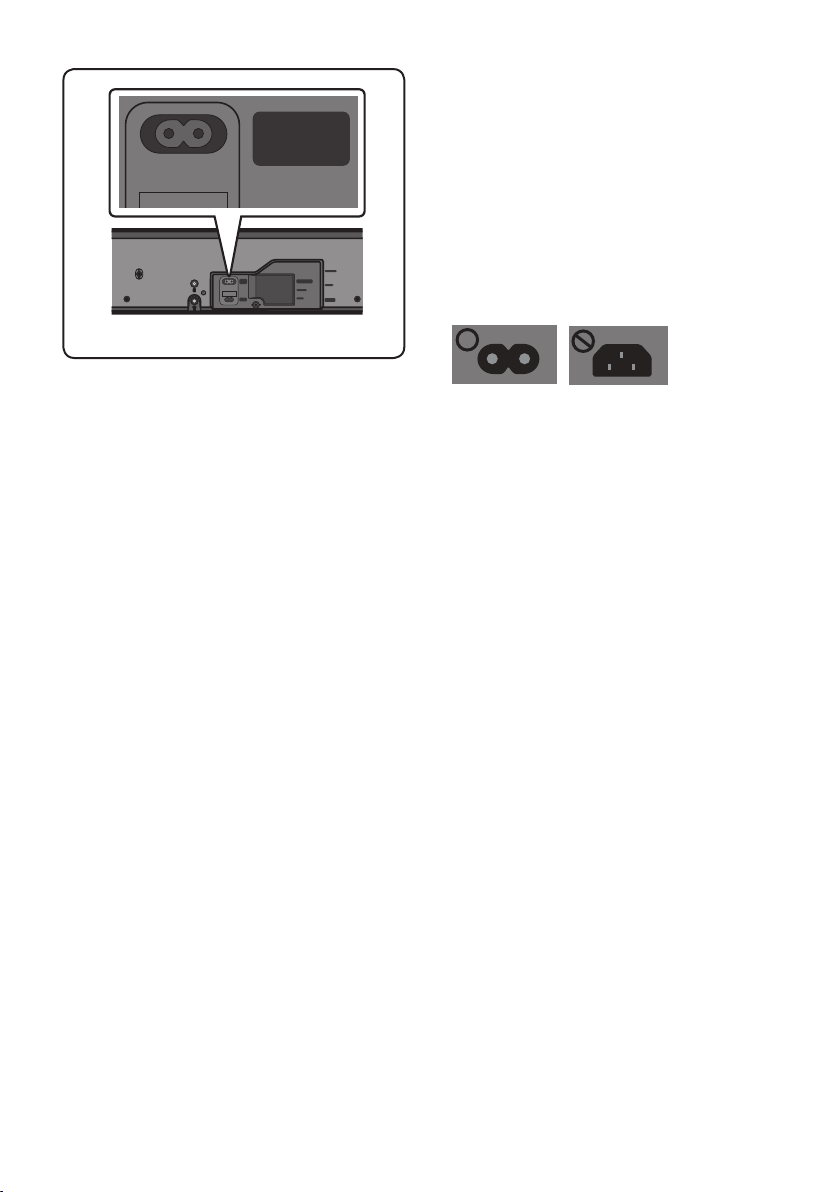
• For more information about the required electrical power and power consumption, refer to the
label attached to the product. (Label : Bottom of the Soundbar Main Unit)
HDMI IN
USB (5V 0.5A)
HDMI OUT
(TV-ARC)
WIRELESS
AUX IN
DIGITAL AUDIO IN
(OPTICAL)
POWER
IN
POWER
OUT
(For TV)
POWER
IN
Bottom of the Soundbar Main Unit
Power Cord
Connecting
Electrical Power
• Connect the supplied power cable to the
POWER IN jack.
ENG - 6
HDMI IN
USB (5V 0.5A)
HDMI OUT
(TV-ARC)
WIRELESS
AUX IN
DIGITAL AUDIO IN
(OPTICAL)
POWER
IN
POWER
OUT
(For TV)
POWER IN
POWER
OUT
(For TV)
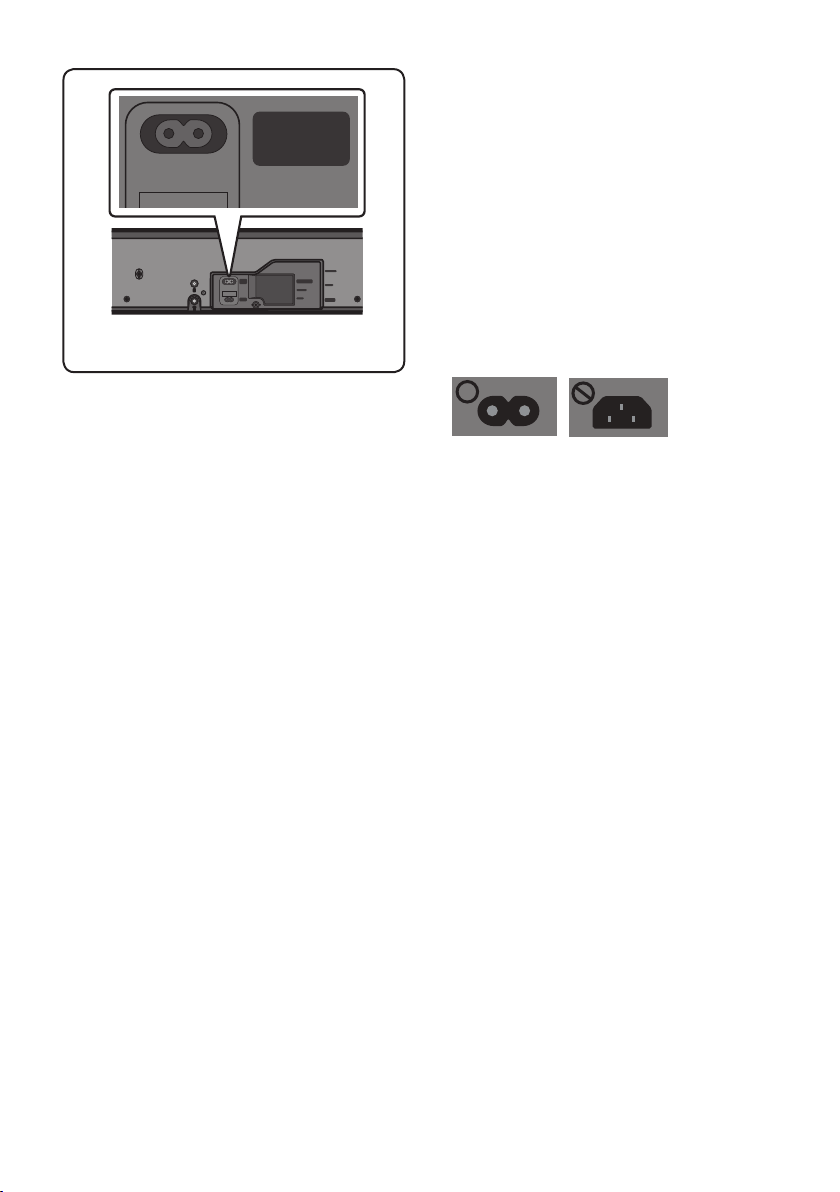
Bottom of the Soundbar Main Unit
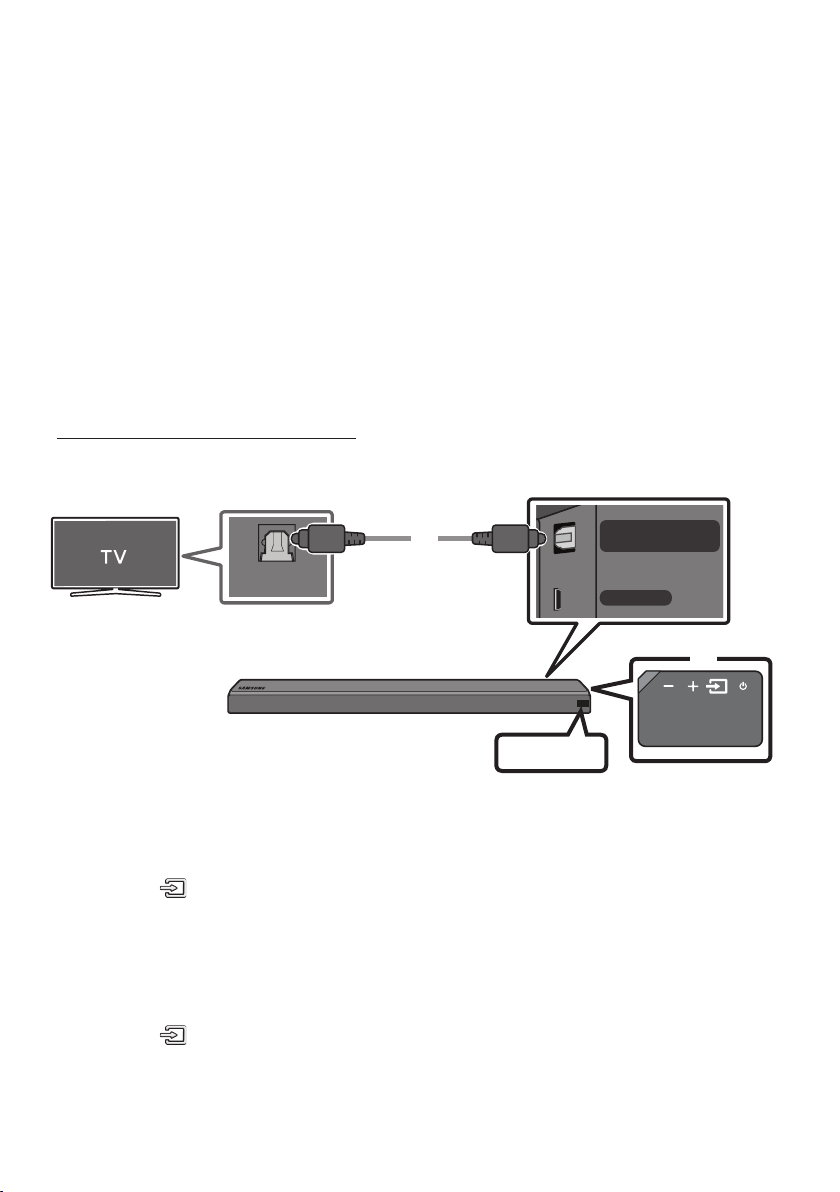
• The POWER OUT jack is used to provide
power to a Samsung TV mounted on the wall
using a Wall Mount Kit (WMN300SB - not
supplied).
• The POWER OUT jack can connect only to
Samsung TVs that use a 2-pin power cord and
consume 400 W or less. (Connecting the jack
to a device that consumes more than 400 W
may damage the Soundbar or cause a
malfunction.)
For a list of Samsung TVs that are compatible
with the WMN300SB Wall Mount Kit and the
POWER OUT jack, see the WMN300SB
Wall Mount Kit user manual.
You can view the manual on line at
http://www.samsung.com/support.
ENG - 7
04 CONNECTING TO YOUR TV
Hear TV sound from your Soundbar through wired or wireless connections.
• When the Soundbar is connected to a selected Samsung TVs, the Soundbar can be controlled using
the TV’s remote control.
– When using optical cable, this feature can be supported by 2017 Samsung Smart TVs that
support Bluetooth.
– This function also allows you to use the TV menu to adjust the sound eld and various settings
as well as the volume and mute.
Method 1. Connecting with a Cable
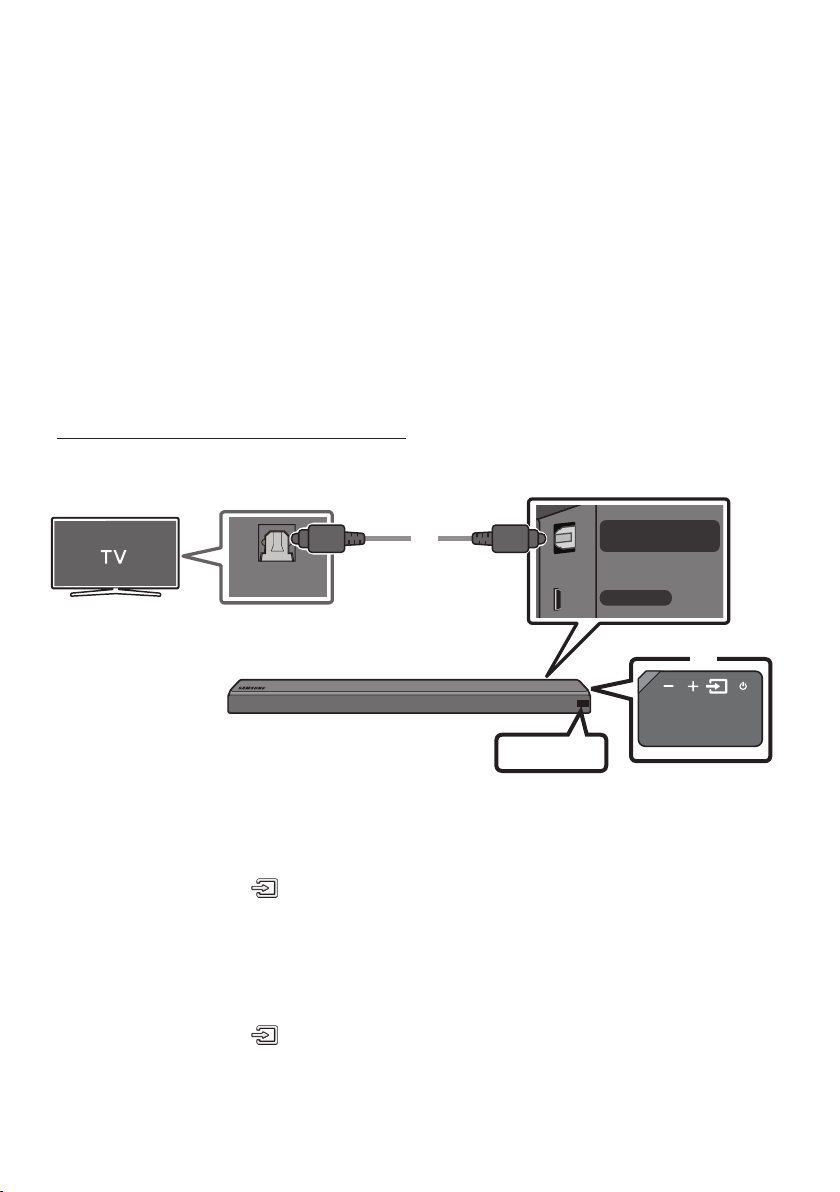
Connecting using an Optical Cable
WIRELESS
AUX IN
DIGITAL AUDIO IN
(OPTICAL)
OPTICAL OUT
Optical Cable
Bottom of the Soundbar
D.IN
Right Side of the Soundbar
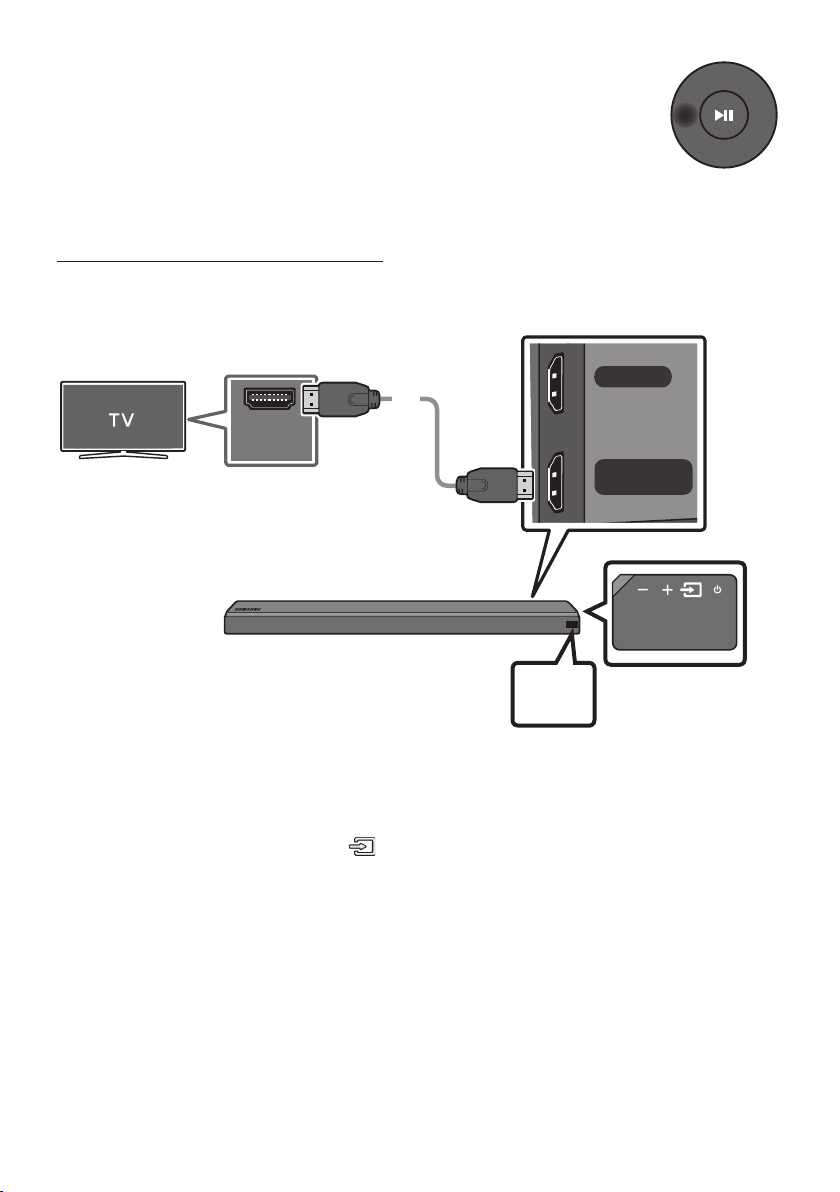
1. Connect the DIGITAL AUDIO IN (OPTICAL) jack on the Soundbar to the OPTICAL OUT jack of the TV
with a digital optical cable.
2. Press the (Source) button on the right side panel or remote control, and then select the “D.IN”
mode.
Auto Power Link
Auto Power Link automatically turns on the Soundbar when the TV is turned on.
1. Connect the Soundbar and a TV with a digital optical cable.
2. Press the (Source) button on the right side panel or on the remote control, and then select
“D.IN”.
ENG - 8
3. Press the Left button on the remote control for 5 seconds to turn Auto Power
Link on or off.
• Auto Power Link is set to ON by default.
(To turn off this function, turn off Auto Power using the Soundbar.)
• Depending on the connected device, Auto Power Link may not function.
• This function is only available in the “D.IN” mode.
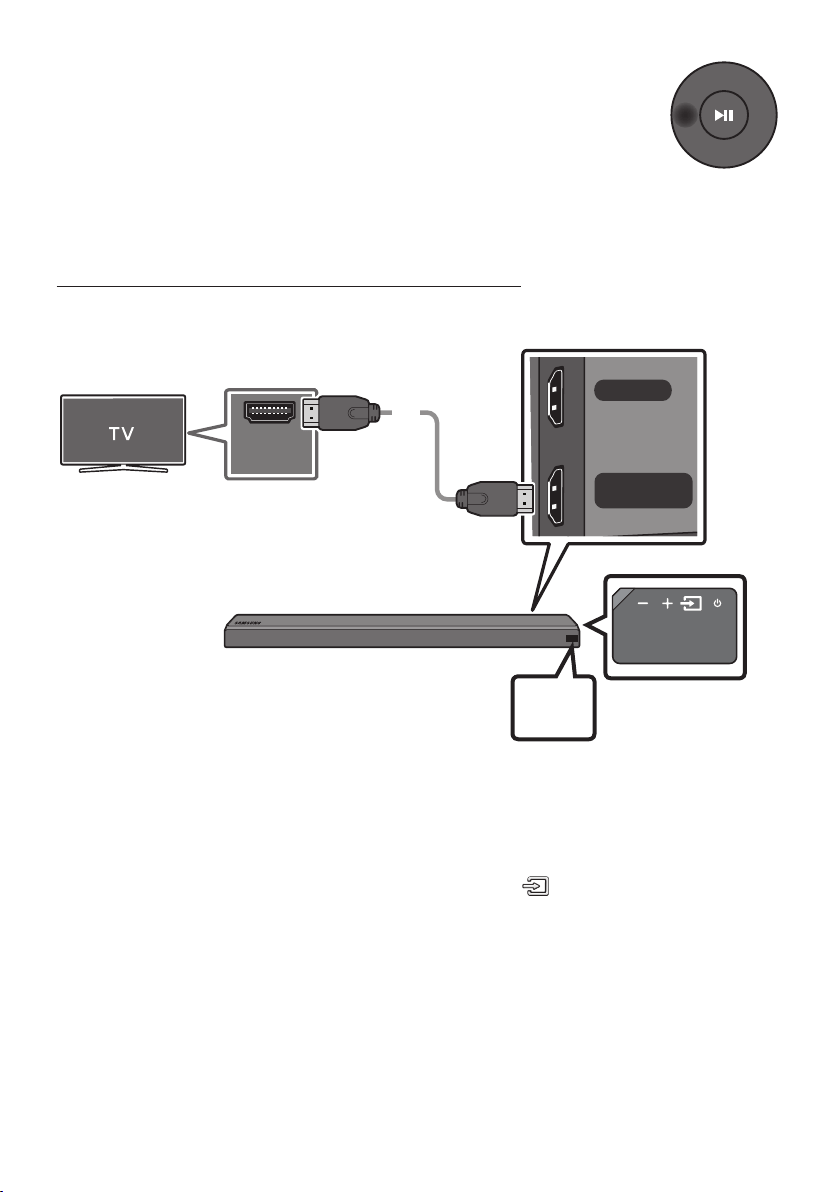
Connecting a TV using an HDMI Cable
HDMI IN
HDMI OUT
(TV-ARC)
HDMI IN
(ARC)
HDMI Cable
(not supplied)
Bottom of the Soundbar
Connect to the HDMI IN
(ARC) port of your TV.
Connect to the HDMI OUT (TV-ARC)
port of the Soundbar main unit.
Right Side of the
Soundbar
TV
ARC
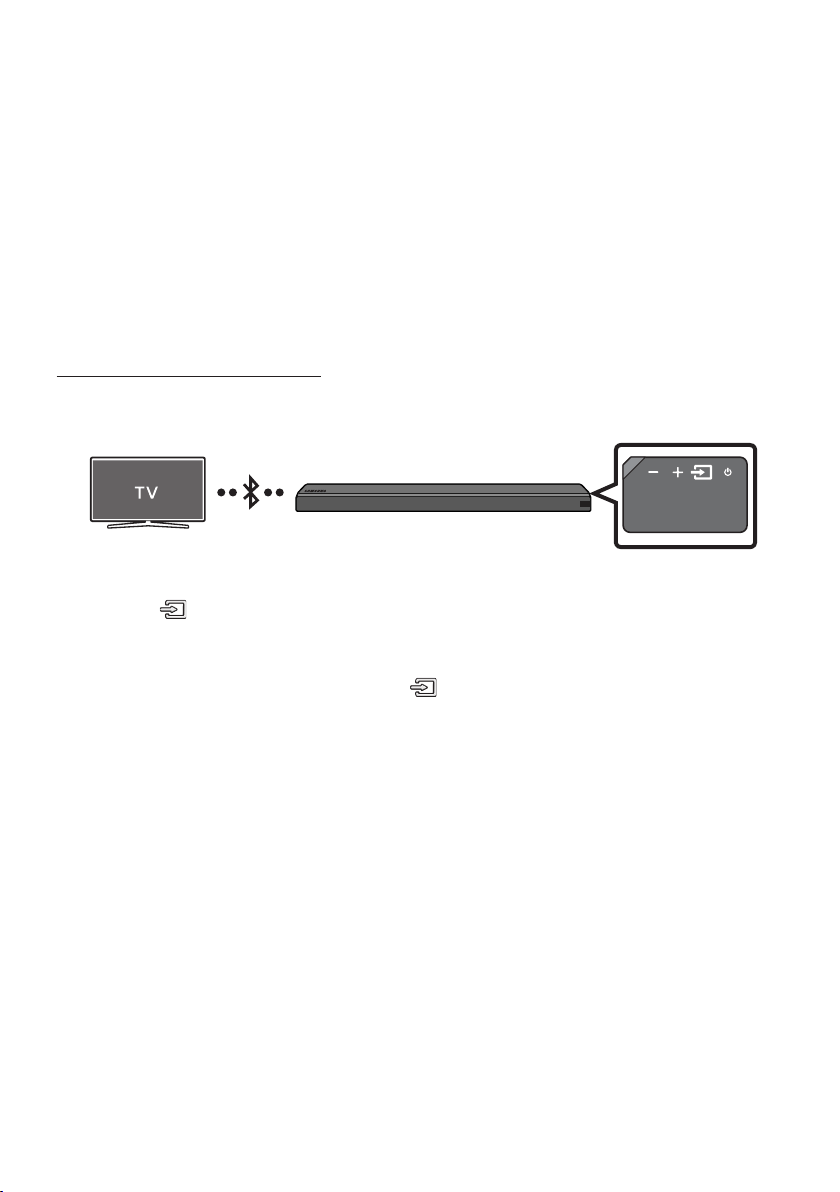
1. With the Soundbar and TV turned on, connect the HDMI cable (not supplied) as shown in the gure.
2. “TV ARC” appears in the display window of the Soundbar main unit and the Soundbar plays TV
sound.
• If TV sound is inaudible, press the (Source) button on the remote control or on the right side
of the Soundbar to switch to “D.IN” mode. The screen displays “D.IN” and “TV ARC” in sequence,
and TV sound is played.
• If “TV ARC” does not appear in the display window of the Soundbar main unit, conrm that the
cable is connected to the correct port.
• Use the volume buttons on the TV’s remote control to change the volume of the Soundbar.
ENG - 9
NOTES
• HDMI is an interface that enables the digital transmission of video and audio data with just a single
connector.
• If the TV provides an ARC port, connect the HDMI cable to the HDMI IN (ARC) port.
• We recommend you use a coreless HDMI cable if possible. If you use a cored HDMI cable, use one
whose diameter is less than 0.55 inches.
• Anynet+ must be turned on.
• This function is not available if the HDMI cable does not support ARC.
Method 2. Connecting Wirelessly
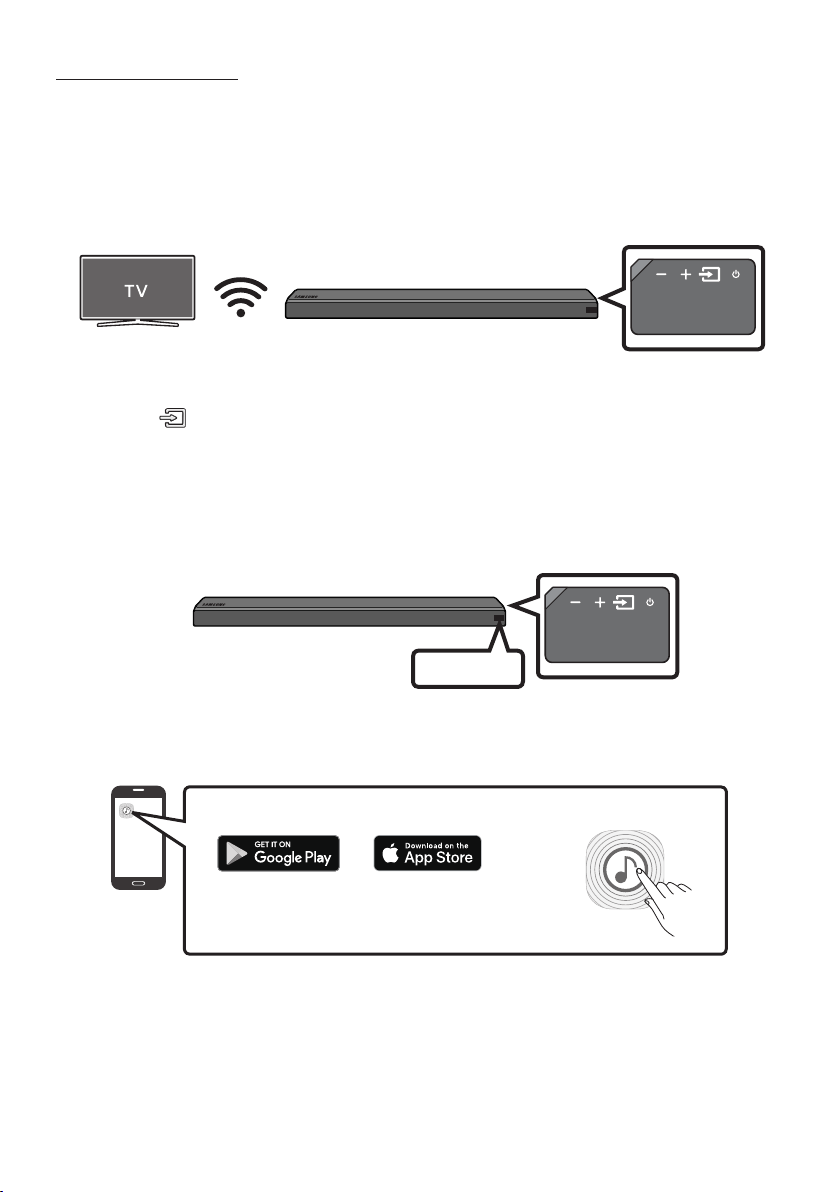
Connecting a TV via Bluetooth
When a TV is connected using Bluetooth, you can hear stereo sound without the hassle of cabling.
• Only one TV can be connected at a time.
The initial connection
1. Press the (Source) button on the right side panel or on the remote control, and then select
“BT”.
2. Change “BT” to “BT PAIRING”.
• If “BT READY” appears, press and hold the (Source) button on the right side panel of the
Soundbar or on the remote control for more than 5 seconds to display “BT PAIRING”.
3. Select Bluetooth mode on the TV. (For more information, see the TV’s manual.)
4. Select “[AV] Samsung Soundbar MSxxx” from the list on TV’s screen.
An available Soundbar is indicated with “Need Pairing” or “Paired” on the TV Bluetooth device list.
To connect to the Soundbar, select the message and establish a connection.
• When the TV is connected, [TV Name] → “BT” appears on the Soundbar’s front display.
5. You can now hear TV sound from the Soundbar.

ENG - 10
If the device fails to connect
• If the previously connected Soundbar listing (e.g. “[AV] Samsung Soundbar MSxxx”) appears in the
list, delete it.
• In “BT” mode, press and hold the (Source) button for more than 5 seconds on the right side
panel of the Soundbar or on the remote control to switch to “BT PAIRING” mode.
Then, select “[AV] Samsung Soundbar MSxxx” from the TV’s search list.
What are the BT READY and BT PAIRING statuses?
• BT READY : In this mode, you can search for previously connected TVs or connect to the Soundbar
from a previously connected mobile device.
• BT PAIRING : In this mode, you can connect to a new device. (While in “BT” mode, press and hold the
(Source) button for more than 5 seconds on the right side of the Soundbar or on the remote
control.)
NOTES
• If asked for a PIN code when connecting a Bluetooth device, enter <0000>.
• In Bluetooth connection mode, the Bluetooth connection will be lost if the distance between the
Soundbar and the Bluetooth device exceeds 32.8 ft.
• The Soundbar automatically turns off after 5 minutes in the Ready state.
• The Soundbar may not perform Bluetooth search or connection correctly under the following
circumstances:
– If there is a strong electrical eld around the Soundbar.
– If several Bluetooth devices are simultaneously paired with the Soundbar.
– If the Bluetooth device is turned off, not in place, or malfunctions.
• Electronic devices may cause radio interference. Devices that generate electromagnetic waves
must be kept away from the Soundbar main unit - e.g., microwaves, wireless LAN devices, etc.
Disconnecting the Soundbar from the TV
Press the (Source) button on the right side panel or on the remote control and switch to any mode
but “BT”.
• Disconnecting takes time because the TV must receive a response from the Soundbar.
(The time required may differ, depending on the TV model.)
• To cancel automatic Bluetooth connection between the Soundbar and TV, press the
p (Play/Pause) button on the remote control for 5 seconds in “BT READY” status. (Toggle On → Off)
ENG - 11
Connecting via Wi-Fi
Pre-connection Checklist
1. Conrm that your Samsung smart TV was released after 2014. This function is compatible only
with Samsung smart TVs released after 2014.
2. Make sure your Wireless router (Wi-Fi) is ready and working.
3. Make sure that the TV is connected to the Wireless router (your Wi-Fi network).
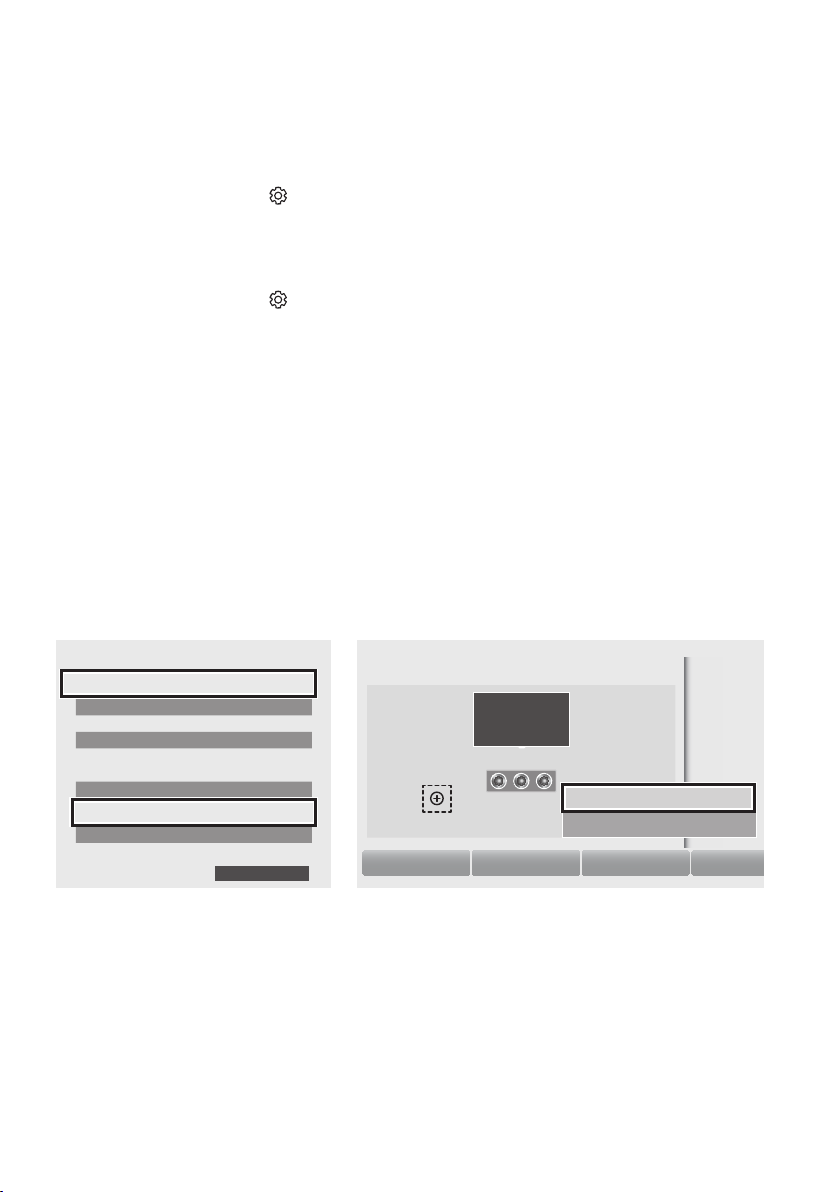
Step 1 : Connecting the Soundbar to Wi-Fi
1. Press the (Source) button on the right side of the Soundbar or on the remote control to select
“WIFI” mode.
• When using selected Samsung TV (2016 or 2017 Samsung smart TVs that support Bluetooth.)
– If you select “WIFI” mode when the TV is turned on, the TV screen displays a pop-up
window providing instructions on how to automatically connect the Soundbar to a wireless
router (Wi-Fi). Refer to instructions in the pop-up window of TV.
WIFI
2. Connect your mobile device (smartphone, tablet etc.) to the Wi-Fi network the TV is connected to.
3. Install and launch the Samsung Multiroom app on your mobile device (smartphone, tablet etc.).
iOS
Android
Samsung Multiroom app
4. Follow the instructions in the app screen on the mobile device to connect the Soundbar to your
Wi-Fi network.
ENG - 12
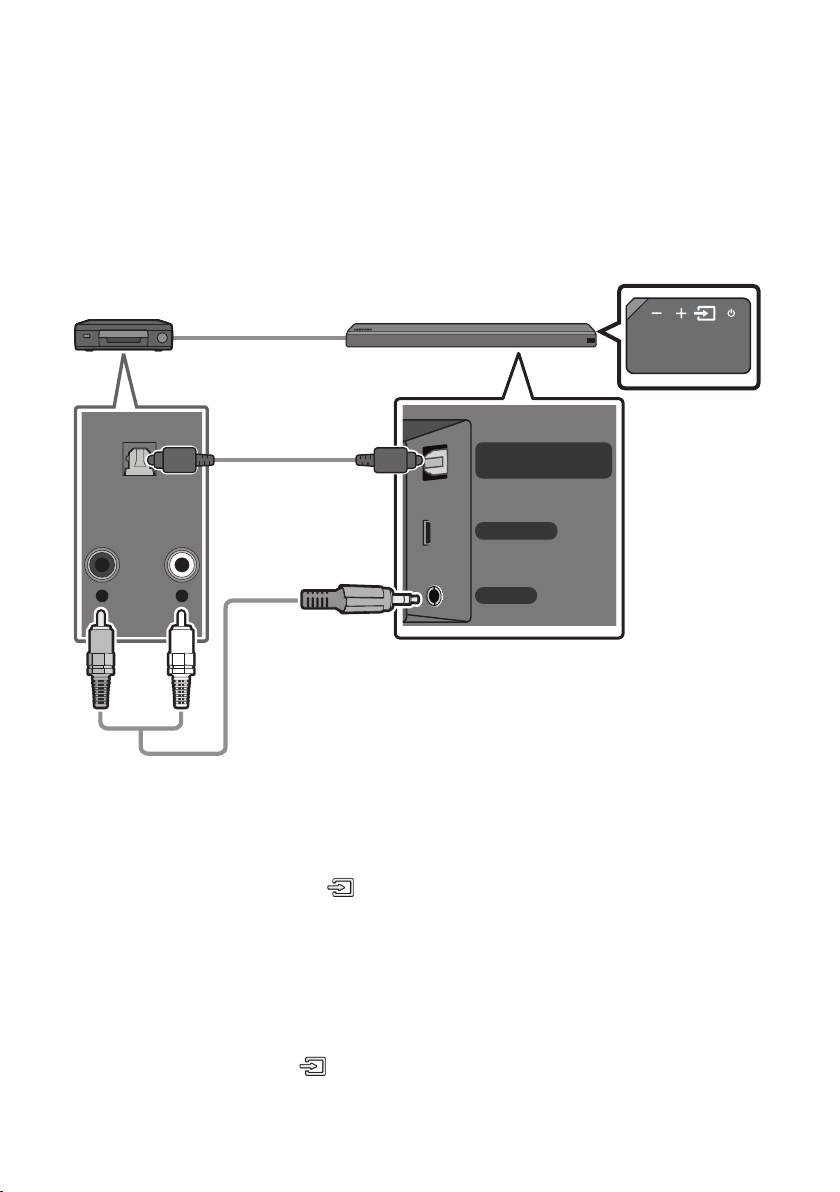
Step2:ConguringSettingsontheTV
• If the TV disconnects from your wireless network after you change the input source to the
Soundbar, use the TV menu to connect the TV to the network again.
For TVs released in 2017
1. Home menu Settings ( ) Sound Sound Output Select [AV] Soundbar MSxxx (Wi-Fi)
2. The Soundbar outputs TV sound.
For TVs released in 2016
1. Home menu Settings ( ) Sound Sound Output Select [AV] Samsung Soundbar MSxxx
(Wi-Fi)
2. The Soundbar outputs TV sound.
For TVs released in 2015
1. Home menu Sound Speaker List Select [AV] Samsung Soundbar MSxxx (Wi-Fi)
2. The Soundbar outputs TV sound.
For TVs released in 2014
1. Home menu Sound Speaker Settings Select Multiroom Link - Settings
Soundbar+Surround
2. From the Soundbar menu item, select “[AV] Samsung Soundbar MSxxx” and then select “OK”.
3. Home menu Sound Speaker Settings Select TV Sound Output Multiroom Link
TV Speaker
• TV Installation Type Stand
TV SoundConnect
• Samsung Audio Device List
• Add New Device On
Multiroom Link
• Settings Soundbar+Surround
Bluetooth Headphone
• Bluetooth Headphone List
Speaker Settings
TV Sound Output Multiroom Link
OK
Multiroom Link
OK Volume Level Speaker Test
Soundbar
[AV] Samsung Soundbar MSxxx
Soundbar+Surround
c
[AV] Samsung Soundbar MSxxx
Don’t Use
Edit Na
1
3
2
4. The Soundbar outputs TV sound.
NOTES
• The TV and Soundbar must be connected to the same wireless network (Wi-Fi).
• If your wireless router (Wi-Fi) uses a DFS channel, you will not be able to establish a Wi-Fi
connection between the TV and Soundbar. Contact your Internet service provider for details.
• If the 5GHz Wi-Fi connection is not smooth, use the 2.4GHz bandwidth.
ENG - 13
05 CONNECTING AN EXTERNAL DEVICE
Connect to an external device via a wired or wireless network to play the external device’s sound
through the Soundbar.
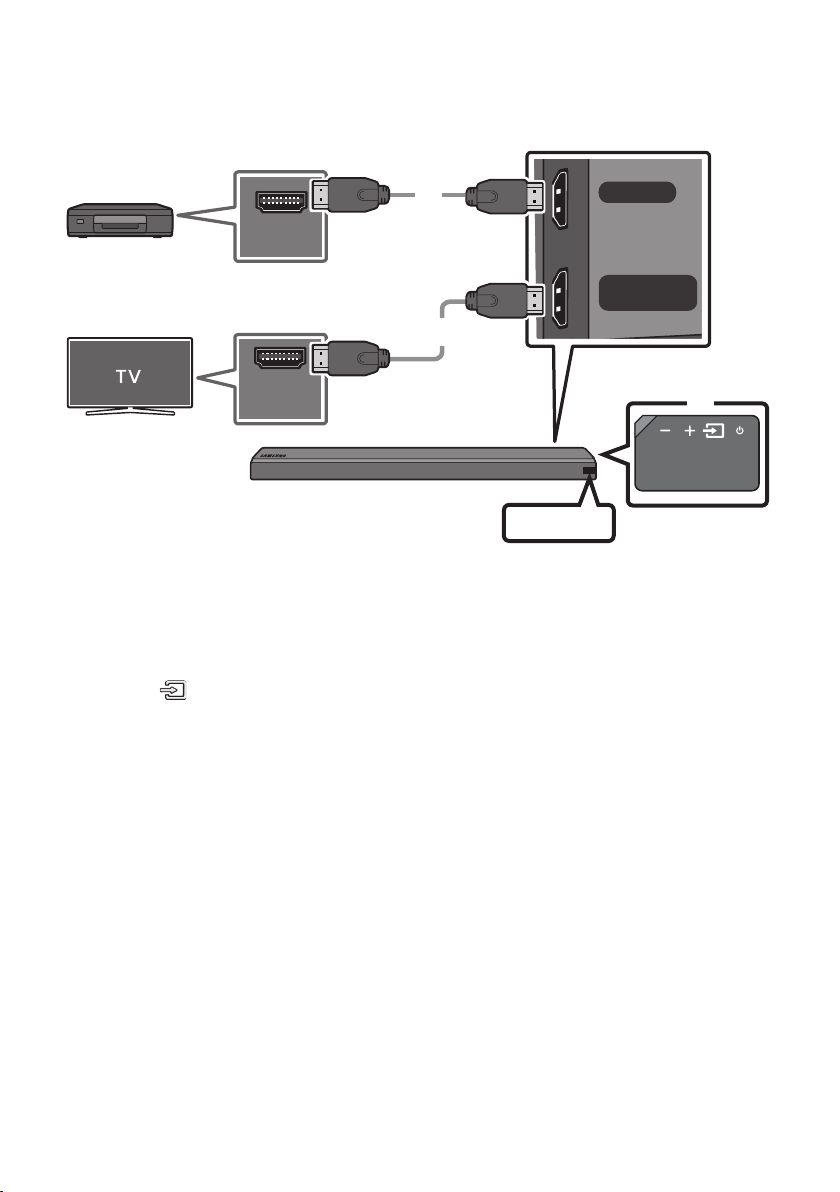
Connecting using an Optical or Analog Audio (AUX) Cable
WIRELESS
AUX IN
DIGITAL AUDIO IN
(OPTICAL)
R L
OPTICAL OUT
- AUDIO -
Optical Cable
OR
Audio (AUX) Cable
(not supplied)
Bottom of the Soundbar
BD / DVD player / Set-top box /
Game console
Right Side of the Soundbar
Optical Cable
X Connect DIGITAL AUDIO IN (OPTICAL) on the main unit to the OPTICAL OUT jack of the Source
Device using a digital optical cable.
Y Select “D.IN” mode by pressing the (Source) button on the right side panel or on the remote
control.
OR
Audio (AUX) Cable
X Connect AUX IN (Audio) on the main unit to the AUDIO OUT jack of the Source Device using an audio
cable.
Y Select “AUX” mode by pressing (Source) button on the right side panel or on the remote control.
ENG - 14
Connecting using an HDMI Cable
HDMI IN
HDMI OUT
(TV-ARC)
HDMI OUT
HDMI IN
(ARC)
HDMI Cable
(not supplied)
HDMI Cable
(not supplied)
Bottom of the Soundbar
External Device
HDMI
Right Side of the
Soundbar
1. Connect an HDMI cable (not supplied) from the HDMI IN jack on the back of the product to the
HDMI OUT jack on your digital device.
2. Connect an HDMI cable (not supplied) from the HDMI OUT (TV-ARC) jack on the back of the
product to the HDMI IN jack on your TV.
3. Press the (Source) button on the right side panel or on the remote control, and then select
“HDMI”.
4. “HDMI” mode is displayed on the Soundbar display panel and sound plays.
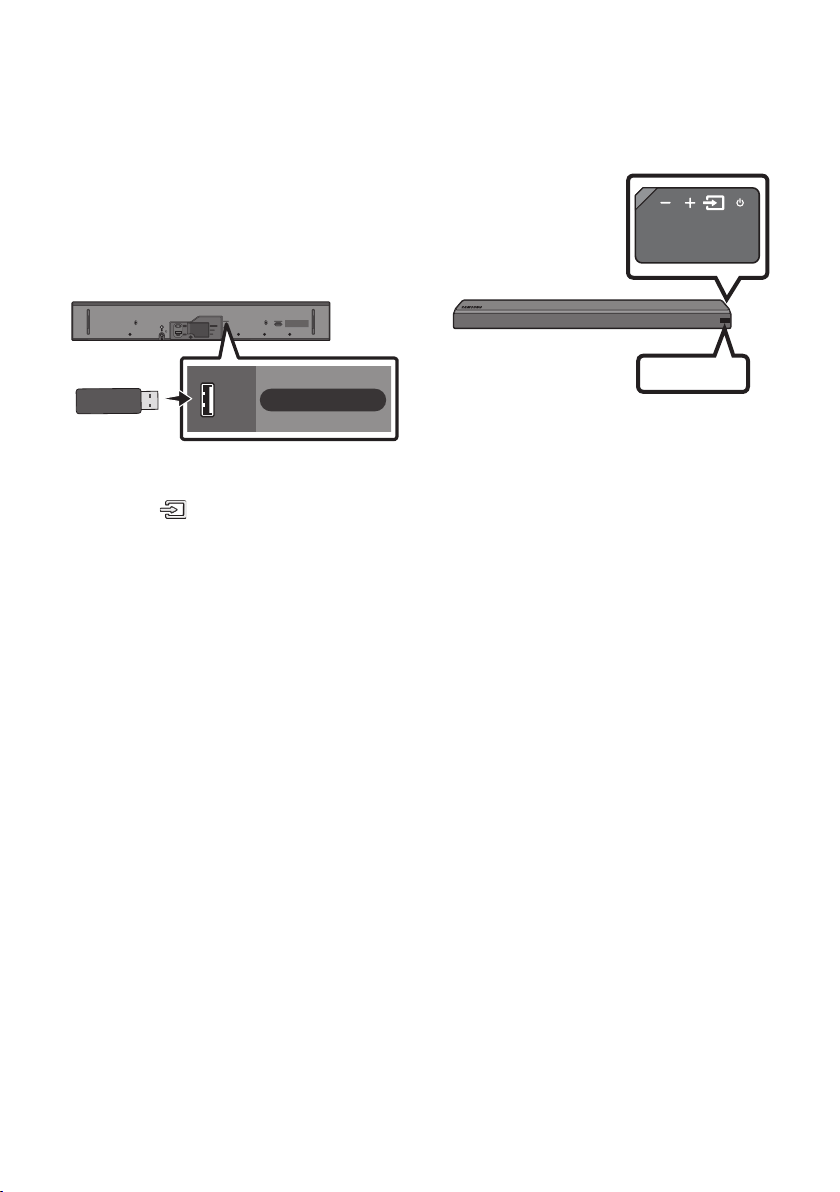
ENG - 15
06 CONNECTING A USB
You can play music les located on USB storage devices through the Soundbar.
USB
Display
USB port
Wi-Fi SETUP SPK ADD
HDMI IN
USB (5V 0.5A)
HDMI OUT
(TV-ARC)
WIRELESS
AUX IN
DIGITAL AUDIO IN
(OPTICAL)
POWER
IN
POWER
OUT
(For TV)
USB (5V 0.5A)
1. Connect the USB device to the USB port on the back of the product.
2. Press the (Source) button on the right side panel or on the remote control, and then select
“USB”.
3. “USB” appears in the display screen.
4. Play music les from the USB storage device through the Soundbar.
• The Soundbar automatically turns off (Auto Power Off) if no USB device has been connected for
more than 5 minutes.

ENG - 16
File Format Type Compatibility list
Extension Codec Sampling Rate Bitrate
*.mp3 MPEG 1 Layer2 16KHz ~ 48KHz 80kbps~320kbps
MPEG 1 Layer3 16KHz ~ 48KHz 80kbps~320kbps
MPEG 2 Layer3 16KHz ~ 48KHz 80kbps~320kbps
MPEG 2.5 Layer3 16KHz ~ 48KHz 80kbps~320kbps
*.wma Wave_Format_MSAudio1 16KHz ~ 48KHz 56kbps~128kbps
Wave_Format_MSAudio2 16KHz ~ 48KHz 56kbps~128kbps
*.aac AAC 16KHz ~ 96KHz 48kbps~320kbps
A AC- LC 16KHz ~ 96KHz
128kbps~192kbps
5.1ch 320kbps
HE-AAC 24KHz ~ 96KHz
48kbps~64kbps
5.1ch 160kbps
*.wav - 16KHz ~ 48KHz up to 3000kbps
*.ogg OGG 1.1.0 16KHz ~ 48KHz 50kbps~500kbps
*.ac FLAC 1.1.0, FLAC 1.2.1 16KHz ~ 96KHz up to 3000kbps
• If there are too many folders and les stored on the USB device, it may take the Soundbar some
time to access and play les.
ENG - 17
07 CONNECTING A MOBILE DEVICE
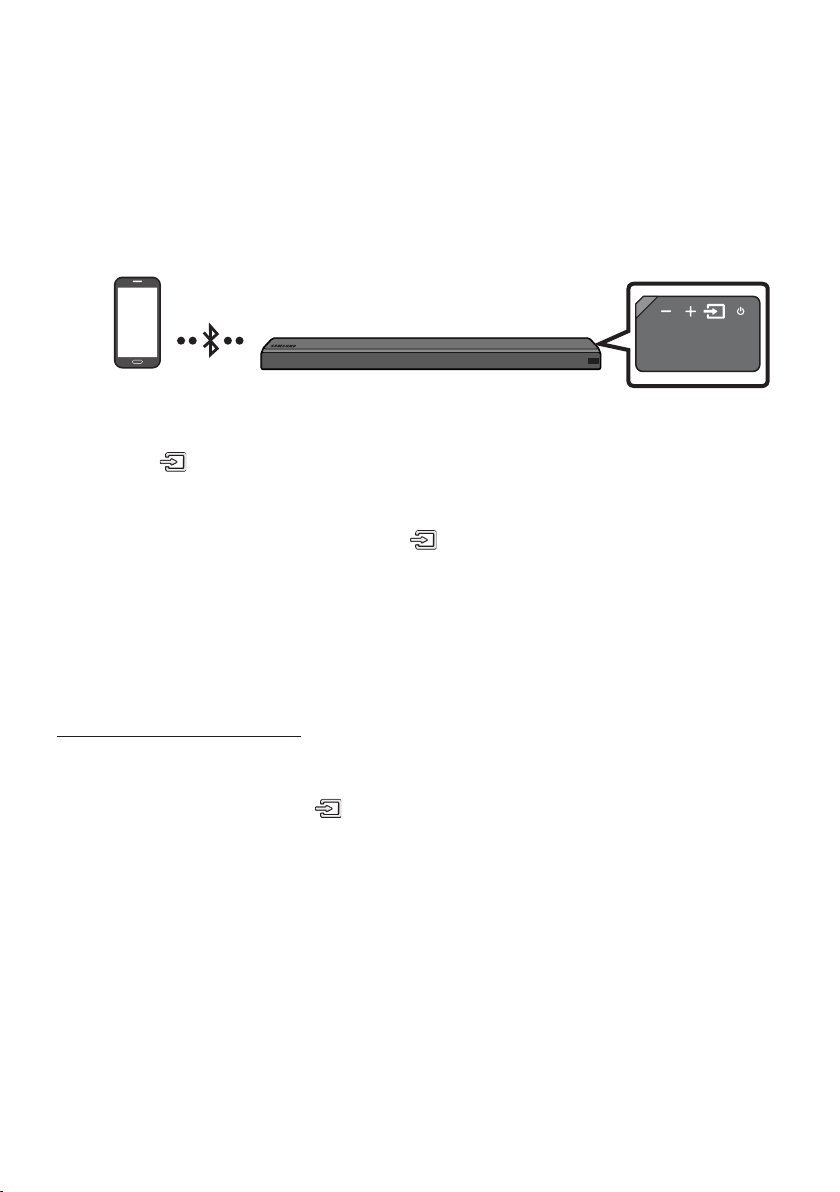
Method 1. Connecting via Bluetooth
When a mobile device is connected using Bluetooth, you can hear stereo sound without the hassle of
cabling.
• You cannot connect more than one Bluetooth device at a time.
Bluetooth device
The initial connection
1. Press the (Source) button on the right side panel or on the remote control, and then select
“BT”.
2. Change “BT” to “BT PAIRING”.
• If “BT READY” appears, press and hold the (Source) button on the right side panel of the
Soundbar or on the remote control for more than 5 seconds to display “BT PAIRING”.
3. Select “[AV] Samsung Soundbar MSxxx” from the list.
• When a Soundbar is connected to the Bluetooth device, [Bluetooth Device Name] → “BT”
appears in the front display.
4. Play music les from the device, connected via Bluetooth, through the Soundbar.
If the device fails to connect
• If the previously connected Soundbar listing (e.g. “[AV] Samsung Soundbar MSxxx”) appears in the
list, delete it.
• In “BT” mode, press and hold the (Source) button for more than 5 seconds on the right side
panel of the Soundbar or on the remote control to switch to “BT PAIRING” mode.
Then, select “[AV] Samsung Soundbar MSxxx” from the Bluetooth device search list.

ENG - 18
What are the BT READY and BT PAIRING statuses?
• BT READY : In this mode, you can search for previously connected TVs or connect to the Soundbar
from a previously connected mobile device.
• BT PAIRING : In this mode, you can connect to a new device. (While in “BT” mode, press and hold the
(Source) button for more than 5 seconds on the right side of the Soundbar or on the remote
control.)
NOTES
• If asked for a PIN code when connecting a Bluetooth device, enter <0000>.
• In Bluetooth connection mode, the Bluetooth connection will be lost if the distance between the
Soundbar and the Bluetooth device exceeds 32.8 ft.
• The Soundbar automatically turns off after 5 minutes in the Ready state.
• The Soundbar may not perform Bluetooth search or connection correctly under the following
circumstances:
– If there is a strong electrical eld around the Soundbar.
– If several Bluetooth devices are simultaneously paired with the Soundbar.
– If the Bluetooth device is turned off, not in place, or malfunctions.
• Electronic devices may cause radio interference. Devices that generate electromagnetic waves
must be kept away from the Soundbar main unit - e.g., microwaves, wireless LAN devices, etc.
• The Soundbar supports SBC data (44.1kHz, 48kHz).
• Connect only to a Bluetooth device that supports the A2DP (AV) function.
• You cannot connect the Soundbar to a Bluetooth device that supports only the HF (Hands Free)
function.
• Once you have paired the Soundbar to a Bluetooth device, selecting “[AV] Samsung Soundbar
MSxxx” from the device’s scanned devices list will automatically change the Soundbar to “BT”
mode.
– Available only if the Soundbar is listed among the Bluetooth device’s paired devices.
(The Bluetooth device and the Soundbar must have been previously paired at least once.)
• The Soundbar will appear in the Bluetooth device’s searched devices list only when the Soundbar is
displaying “BT READY”.
• Soundbar cannot be paired to another Bluetooth device, while using the Bluetooth function.

ENG - 19
Disconnecting the Bluetooth device from a Soundbar
You can disconnect a Bluetooth device from the Soundbar. For instructions, see the Bluetooth device’s
user manual.
• The Soundbar will be disconnected.
• When the Soundbar is disconnected from the Bluetooth device, the Soundbar will display
“BT DISCONNECTED” on the front display.
Disconnecting the Soundbar from the Bluetooth device
Press the (Source) button on the right side panel or on the remote control, and then change to any
mode except “BT”.
• Disconnecting takes time because the Bluetooth device must receive a response from the
Soundbar. (Disconnection time may differ, depending on the Bluetooth device)
• When the Soundbar is disconnected from the Bluetooth device, the Soundbar will display
“BT DISCONNECTED” on the front display.
NOTES
• In Bluetooth connection mode, the Bluetooth connection will be lost if the distance between the
Soundbar and the Bluetooth device exceeds 32.8 ft.
• The Soundbar automatically turns off after 5 minutes in the Ready state.
More About Bluetooth
Bluetooth is a technology that enables Bluetooth-compliant devices to interconnect easily with each
other using a short wireless connection.
• A Bluetooth device may cause noise or malfunction, depending on usage, if:
– A part of your body is in contact with the receiving/transmitting system of the Bluetooth
device or the Soundbar.
– It is subject to electrical variation from obstructions caused by a wall, corner, or ofce partition.
– It is exposed to electrical interference from same frequency-band devices including medical
equipment, microwave ovens, and wireless LANs.
• Pair the Soundbar with the Bluetooth device while they are close together.
• The further the distance between the Soundbar and Bluetooth device, the worse the quality is.
If the distance exceeds the Bluetooth operational range, the connection is lost.
• In poor reception areas, the Bluetooth connection may not work properly.
• The Bluetooth connection only works when it is close to the unit. The connection will be
automatically cut off if the Bluetooth device is out of range. Even within range, the sound quality
may be degraded by obstacles such as walls or doors.
• This wireless device may cause electric interference during its operation.
ENG - 20
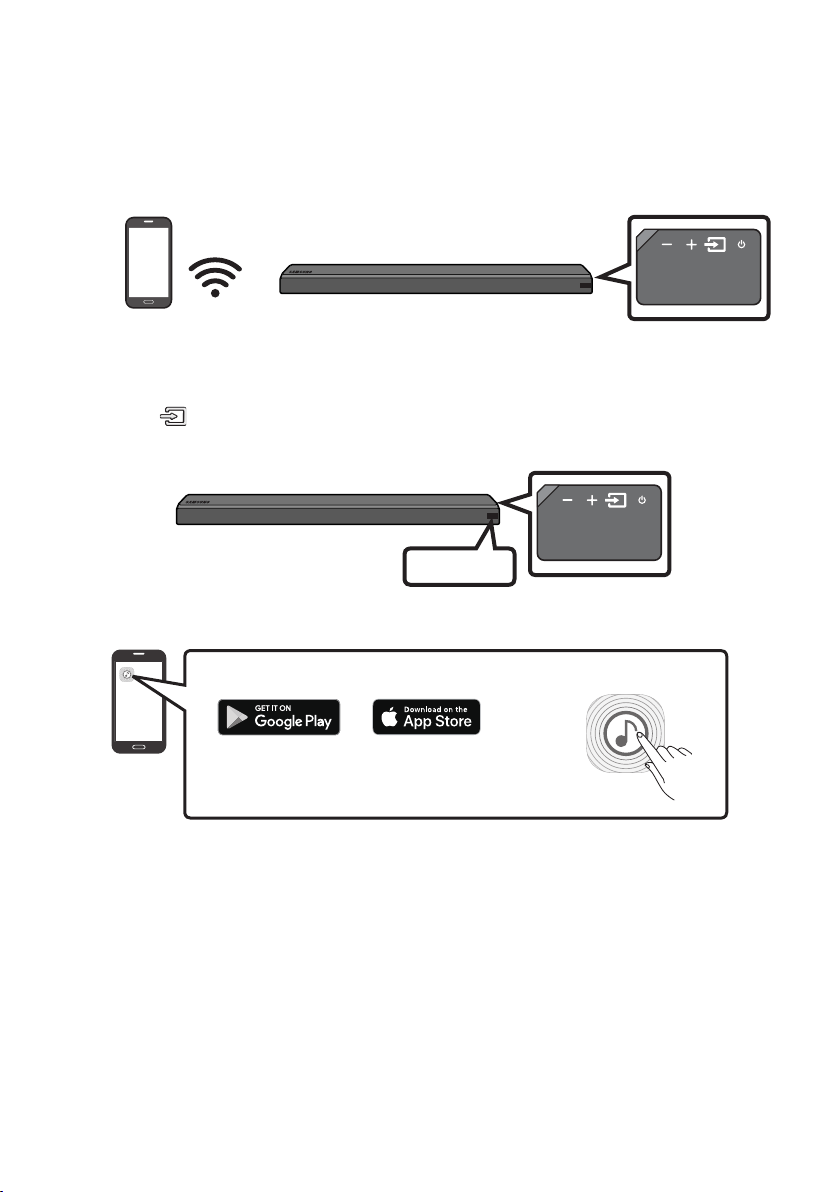
Method 2. Connecting via Wi-Fi (Wireless Network)
• Connect a single Soundbar to Wi-Fi to access a variety of music streaming services and Internet
radio. Connect multiple Soundbars to Wi-Fi to use grouped playback or stereo sound mode.
• To connect a Soundbar to a mobile device via a wireless network (Wi-Fi), the Samsung Multiroom
app is required.
Mobile device
The initial connection
1. Press the (Source) button on the right side of the Soundbar or on the remote control to select
“WIFI” mode.
WIFI
2. Install and launch the Samsung Multiroom app on your mobile device (e.g. smartphone or tablet).
iOS
Android
Samsung Multiroom app
3. Follow the instructions in the app screen on the mobile device to connect the Soundbar to Wi-Fi.
ENG - 21
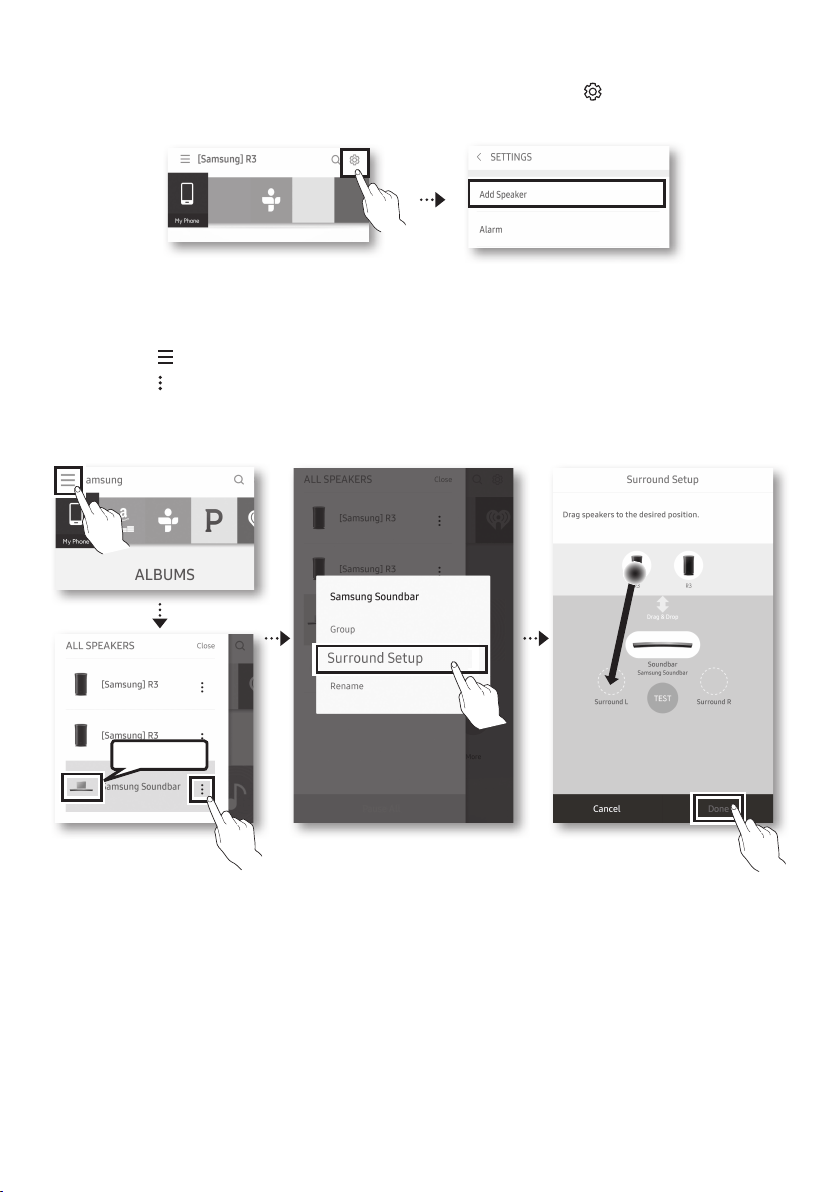
Installing an additional Soundbar when Samsung wireless speakers are already in use
1. On the Home screen of the Samsung Multiroom app, select Settings ( ) at the top, and then
select “Add Speaker”.
2. To connect the Soundbar to 2 Samsung wireless speakers and congure a surround sound system,
follow the steps shown below. (You cannot set up a surround sound system using one audio device
and one Soundbar.)
X Touch to go to the list of all speakers.
Y Touch on the right of the Soundbar model name.
Z Touch Surround Setup. Select Done after dragging the speaker to the desired location.
[ The Surround connection is complete.
Soundbar
NOTE
• To connect an additional SWA-9000S (not supplied), disconnect the Samsung wireless speakers
from the Soundbar to disable the surround sound system. (If connecting the surround speakers
without disconnecting SWA-9000S, sound is played via both the Samsung wireless speaker and the
Surround speaker.)
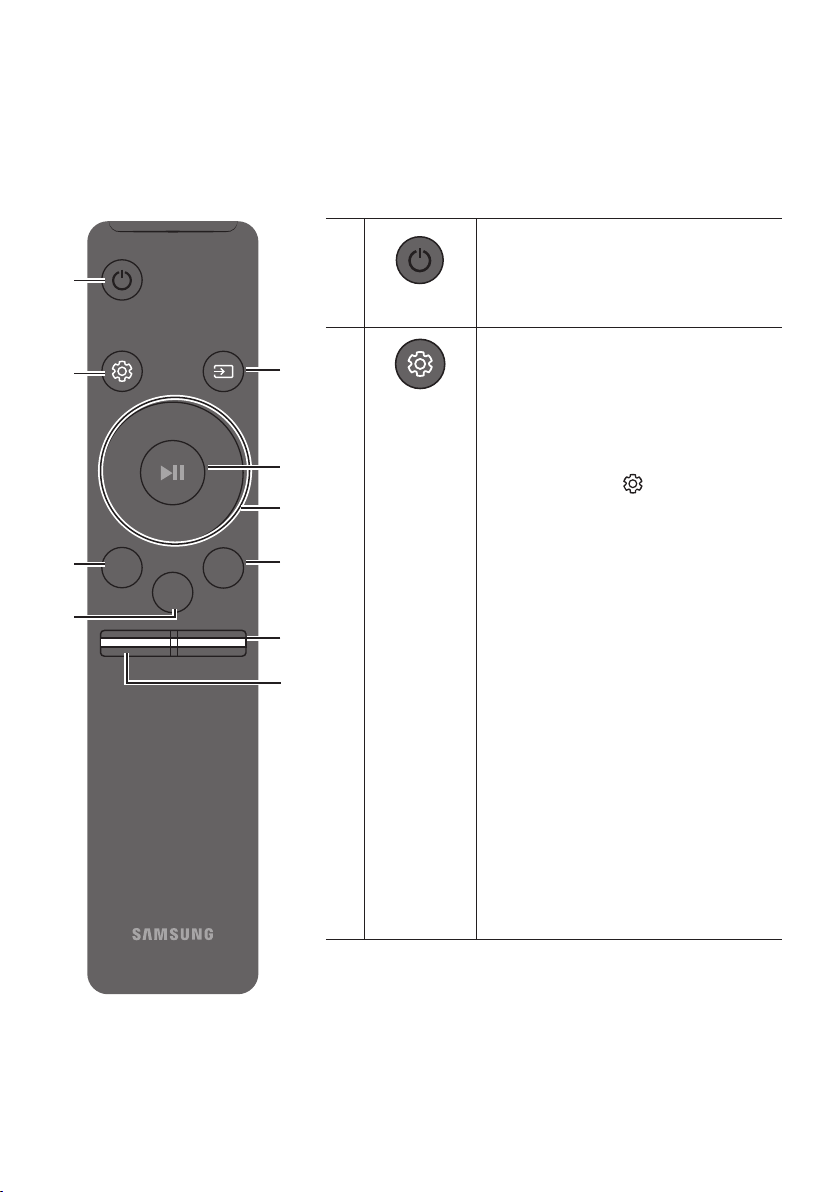
ENG - 22
08 USING THE REMOTE CONTROL
How to Use the Remote Control
Surround
VOL BASS
SOUNDBAR
SOUND
MODE
SMART
MODE
Power
Surround
VOL BASS
SOUND
MODE
SMART
MODE
Turns the Soundbar on and off.
Sound Control
Surround
VOL BASS
SOUND
MODE
SMART
MODE
You can select from TREBLE, SYNC,
REAR LEVEL, or REAR SPEAKER ON/OFF.
• To adjust the TREBLE volume, select Sound
Control TREBLE, and then use the
Up/Down buttons to adjust the volume
within the -6 to +6 range.
• Press and hold the (Sound Control)
button for about 5 seconds to adjust the
sound for each frequency band. 150Hz,
300Hz, 600Hz, 1.2KHz, 2.5KHz, 5KHz, and
10KHz are selectable (Left/Right) and each
can be adjusted to a setting between
-6 to +6 (Up/Down).
• If the video and audio between the TV and
your Soundbar are not synchronized, select
SYNC in Sound Control, and then set audio
delay between 0~300 milliseconds by
using the Up/Down buttons. (Except “USB”
mode)
• If surround speakers (not supplied) are
connected, select REAR LEVEL and use the
Up/Down buttons to adjust the volume
within the -6 to +6 range.
The REAR SPEAKER function can be turned
ON/OFF by using the Up/Down buttons.
• Audio Sync is only supported in some
functions.
ENG - 23
Surround
Surround
VOL BASS
SOUND
MODE
SMART
MODE
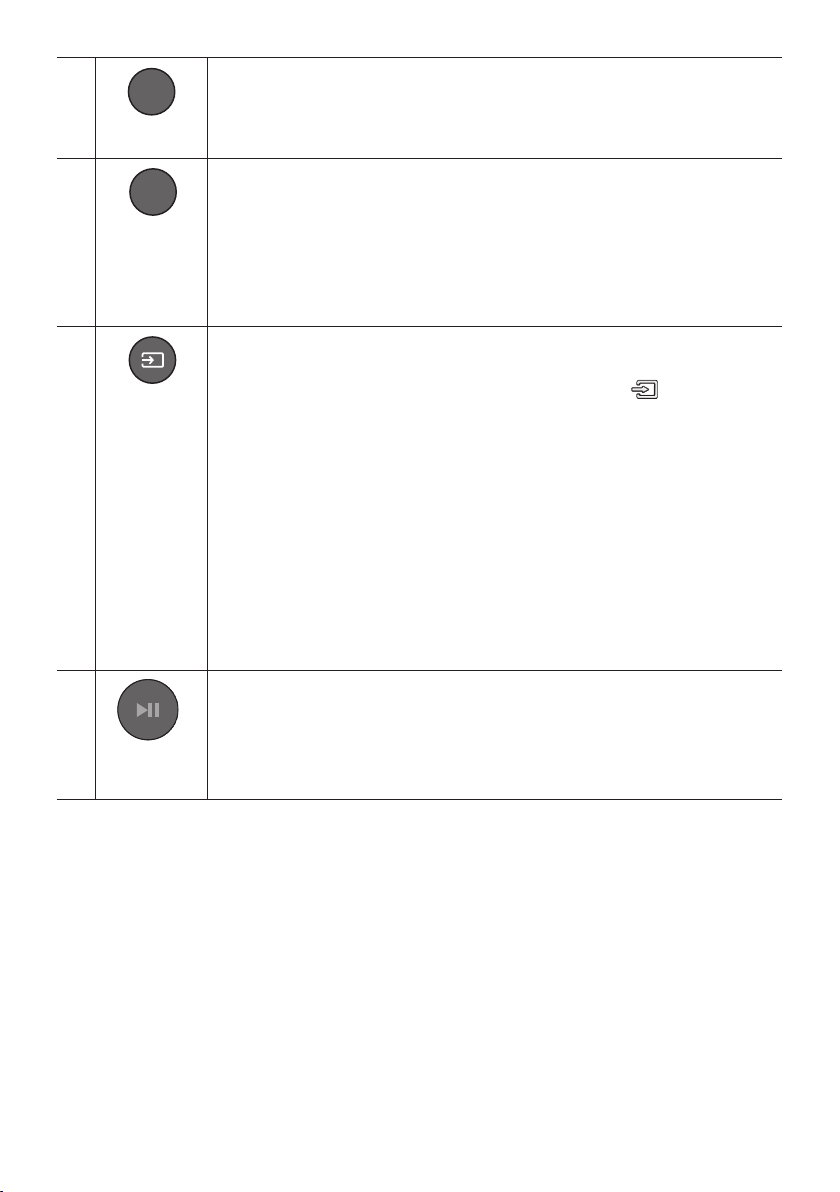
The Surround Sound function adds depth and a sense of space to sound.
Each time you press this button, ON and OFF alternate.
• ON : Play sound over all the speakers.
• OFF : You can hear the sound of the original source channel from several speakers.
SOUND MODE
Surround
VOL BASS
SOUND
MODE
SMART
MODE
You can select the desired sound effect by choosing STANDARD, MUSIC, CLEAR VOICE,
SPORTS, or MOVIE.
Select the “STANDARD” mode if you want to enjoy the original sound.
• DRC (Dynamic Range Control)
Lets you apply dynamic range control to Dolby Digital tracks. If you press and hold the
SOUND MODE button while in standby mode, DRC (Dynamic Range Control) turns on
or off. With the DRC turned on, loud sound is reduced. (The sound may be distorted.)
Surround
VOL BASS
SOUND
MODE
SMART
MODE
Source
Press to select a source connected to the Soundbar.
• BT PAIRING mode
To turn on “BT PAIRING” mode in “BT” mode, press and hold the (Source) button
for more than 5 seconds. See page 17 for details.
• Auto Power Down Function
The unit turns off automatically in the following situations.
– D.IN / WIFI / BT / USB Mode : If there is no audio signal for 5 minutes.
– HDMI Mode : If there is no audio signal for 15 minutes.
– AUX Mode :
– If the Audio (AUX) Cable is disconnected for 5 minutes.
– If there is no KEY input for 8 hours when the Audio (AUX) Cable is connected.
(Auto Power Down function can be turned off only in that case.)
– To turn off Auto Power Down function, while in “AUX” mode, press and hold the
p button for 5 seconds. “ON-AUTO POWER DOWN” / “OFF-AUTO POWER
DOWN” appears on the display.
Play / Pause
(BT/Wi-Fi)
Surround
VOL BASS
SOUND
MODE
SMART
MODE
Press the p button to pause a music le temporarily.
If you press the button again, the music le plays.
ENG - 24
Surround
VOL BASS
SOUND
MODE
SMART
MODE
Up/Down/
Left/Right
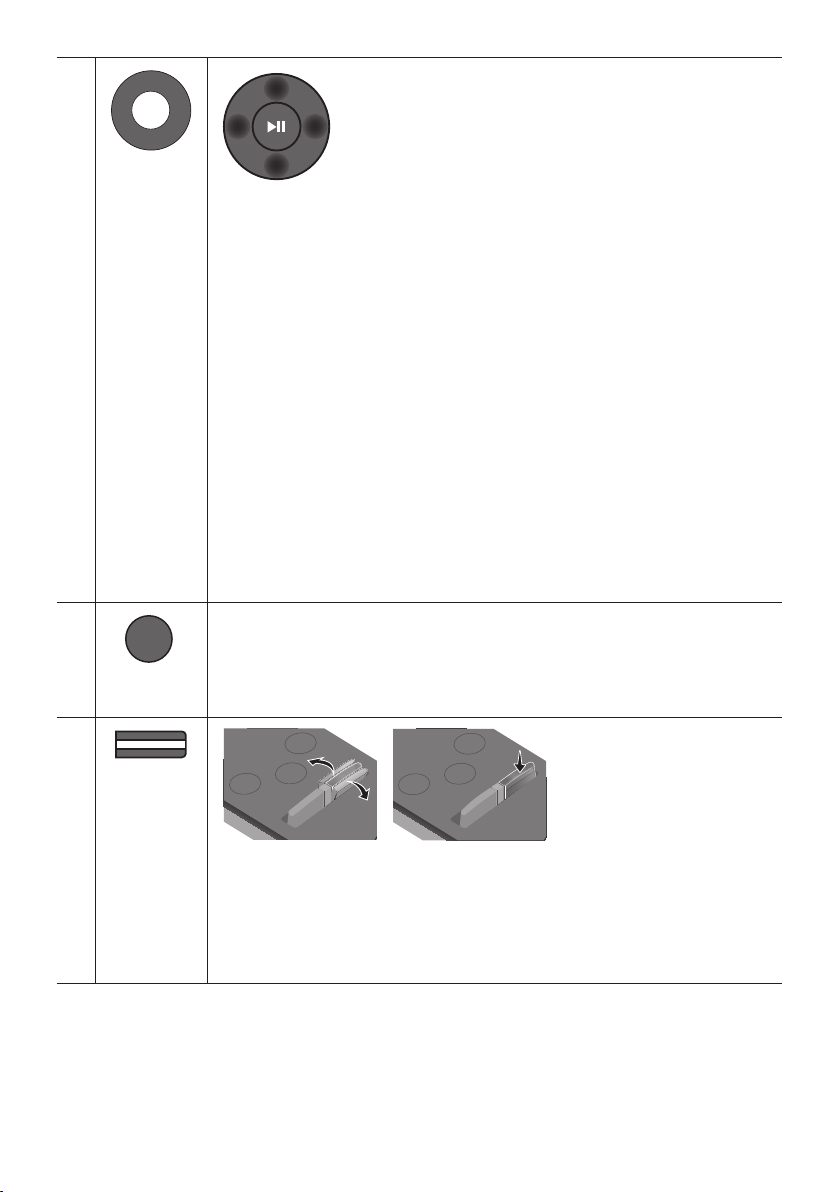
Press the indicated areas to select Up/Down/Left/Right.
Press Up/Down/Left/Right on the button to select or set functions.
• Repeat
To use the repeat function, press the Up button.
• Music Skip
Press the Right button to select the next music le. Press the Left button to select
the previous music le.
• Anynet+ / Auto Power Link
You can turn Anynet+ and Auto Power Link on or off.
Anynet+ and Auto Power Link are controlled by the Right and Left buttons
respectively.
– Anynet+ : If the Soundbar is connected to a Samsung TV through an HDMI cable,
you can control your Soundbar with the Samsung TV’s remote control.
Press and hold the Right button for 5 seconds to toggle Anynet+ ON and OFF.
– Auto Power Link : If the Soundbar is connected to your TV through a digital
optical cable, the Soundbar can automatically turn on when you turn on your TV.
Press and hold the Left button for 5 seconds to toggle Auto Power Link ON and
OFF.
– Anynet+ / Auto Power Link are set to ON by default.
Surround
VOL BASS
SOUND
MODE
SMART
MODE
SMART MODE
Automatically optimizes sound effects to suit the scene currently playing.
The mode turns on or off each time the button is pressed.
Surround
VOL BASS
SOUND
MODE
SMART
MODE
BASS
Surround
SOUND
MODE
SMART
MODE
VOL
BASS
SOUNDBAR
Surround
SOUND
MODE
SMART
MODE
VOL
BASS
SOUNDBAR
Surround
SOUND
MODE
SMART
MODE
VOL
BASS
SOUNDBAR
Surround
SOUND
MODE
SMART
MODE
VOL
BASS
SOUNDBAR
Push the button up or down to adjust the BASS volume within the -6 to +6 range.
To set the BASS volume level to 0, press the button.
• When a Subwoofer (not supplied) is connected, the BASS button switches to the
Subwoofer Key. Push the button up or down to adjust the subwoofer volume either to
-12 or within the -6 to +6 range. To set the subwoofer volume level to 0, press the
button.

ENG - 25
Surround
VOL BASS
SOUND
MODE
SMART
MODE
VOL
Surround
SOUND
MODE
SMART
MODE
VOL
BASS
SOUNDBAR
Surround
SOUND
MODE
SMART
MODE
VOL
BASS
SOUNDBAR
Surround
SOUND
MODE
SMART
MODE
VOL
BASS
SOUNDBAR
Surround
SOUND
MODE
SMART
MODE
VOL
BASS
SOUNDBAR
Push the button up or down to adjust the volume.
• Mute
Press the VOL button to mute the sound. Press it again to unmute the sound.
Adjusting the Soundbar volume with a TV remote control
Use the TV menu to set the TV speaker on a Samsung TV to external speakers.
(For more information, see the TV’s user manual.)
• After installing the Soundbar, you can adjust the Soundbar’s volume using the IR remote control
that came with a Samsung TV. (If you do not want to use this function, when the Soundbar is on,
press and hold the Surround button for 5 seconds. “OFF-TV REMOTE” appears in the Soundbar’s
display and the function turns off.) To adjust the volume using only the Samsung TV remote control,
press and hold the Surround button for more than 5 seconds until “SAMSUNG-TV REMOTE”
appears in the Soundbar display.
– Each time the Surround button is held for 5 seconds, the mode switches in the following order:
“SAMSUNG-TV REMOTE” (Default mode) → “OFF-TV REMOTE” → “ALL-TV REMOTE”.
• To adjust the Soundbar volume with the remote control that came with a TV made by a third party
manufacturer, turn the Soundbar on, press and hold the Surround button for 5 seconds
(“OFF-TV REMOTE” appears on the Soundbar’s display), release the Surround button, and then
press and hold the Surround button again for more than 5 seconds. (“ALL-TV REMOTE” appears on
the Soundbar’s display.)
– This function may not be available, depending on the remote control.
– Manufacturers supporting this function:
VIZIO, LG, Sony, Sharp, PHILIPS, PANASONIC, TOSHIBA, GRUNDIG, Hisense, RCA
ENG - 26
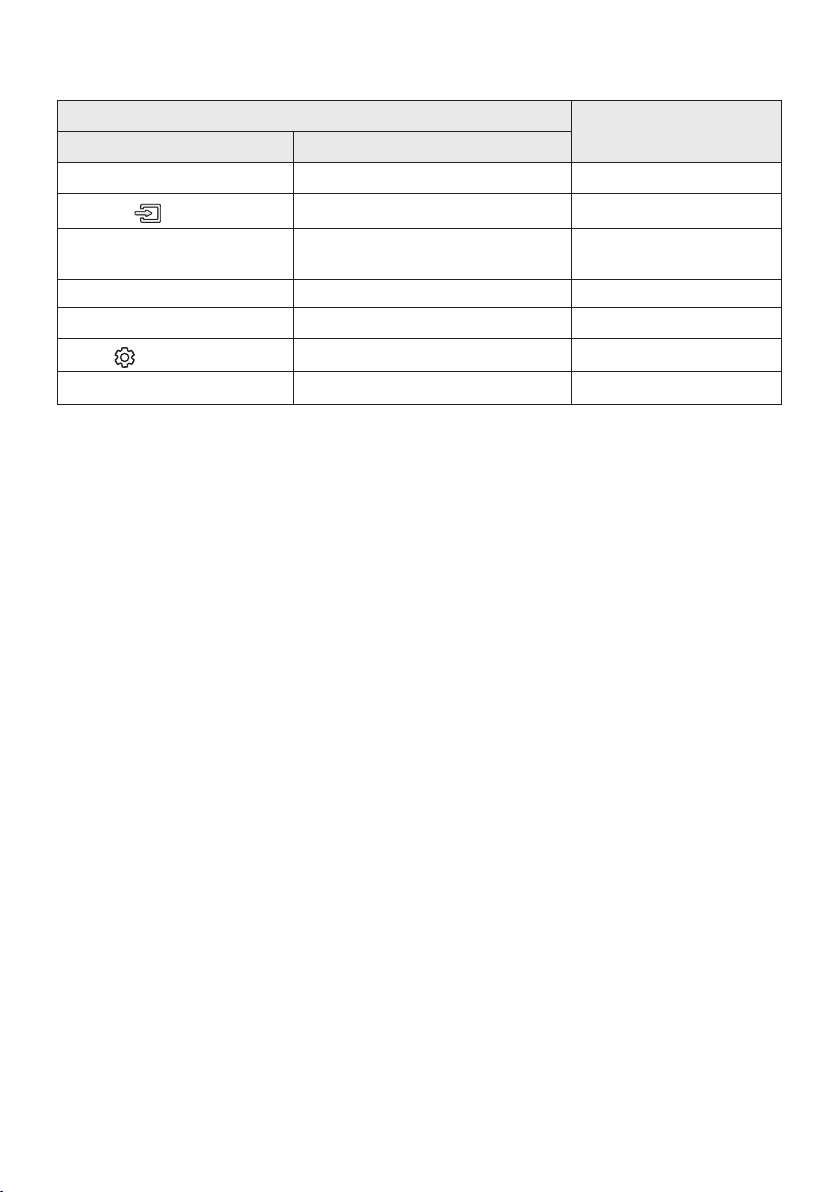
Using the Hidden Buttons
Hidden Button
Reference page
Remote Control Button Function
Surround TV remote control On/Off page 25
(Source)
BT Paring page 17
p (Play / Pause)
Auto Power Down On/Off
(AUX mode)
page 23
Left Auto Power Link ON/OFF page 7
Right Anynet+ ON/OFF page 24
(Sound Control)
7 Band EQ page 22
SOUND MODE DRC ON/OFF (Standby) page 23
09 SOFTWARE UPDATE
When the Soundbar is connected to the Internet, software updates automatically occur even when the
Soundbar is turned off.
• To use the Auto Update function, the Soundbar must be connected to the Internet.
The Wi-Fi connection to the Soundbar will be terminated if its power cord is disconnected or the
power is cut off. If the power is cut off, turn on the Soundbar and reconnect it.
ENG - 27
10 INSTALLING THE
WALL MOUNT
Installation Precautions
• Install on a vertical wall only.
• Do not install in a place with high
temperature or humidity.
• Verify whether the wall is strong enough to
support the product’s weight. If not, reinforce
the wall or choose another installation point.
• Purchase and use the xing screws or
anchors appropriate for the kind of wall you
have (plaster board, iron board, wood, etc.).
If possible, x the support screws into wall
studs.
• Purchase wall mounting screws according to
the type and thickness of the wall you want to
mount the Soundbar on.
– Diameter: M5
– Length: 1 3/8 inches or longer
recommended.
• Connect cables from the unit to external
devices before you install the Soundbar on
the wall.
• Make sure the unit is turned off and
unplugged before you install it. Otherwise, it
may cause an electric shock.
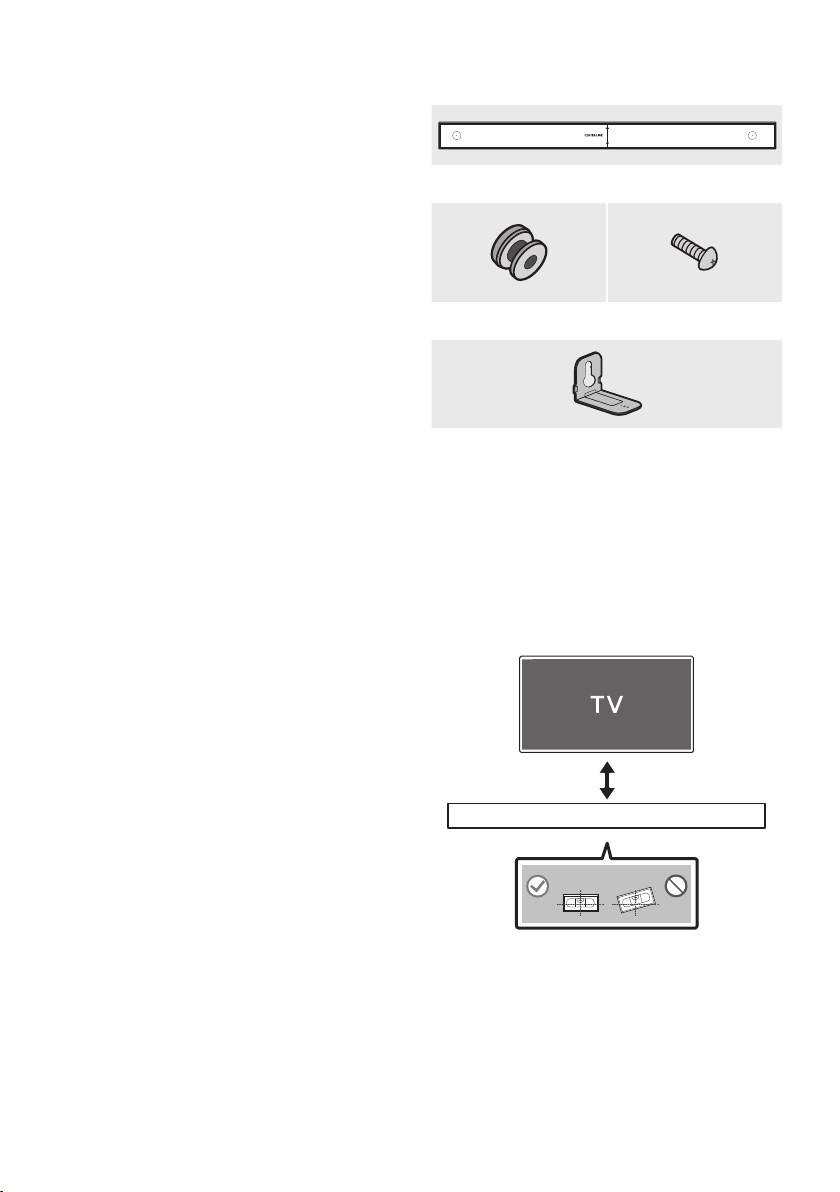
Wallmount Components
450mm
Wall Mount Guide
Holder-Screw (2 EA) Screw (2 EA)
Bracket-Wall Mount
(2 EA)
1. Place the Wall Mount Guide against the wall
surface.
• The Wall Mount Guide must be level.
• If your TV is mounted on the wall, install
the Soundbar at least 2 inches (5 cm)
below the TV.
2 inches or more
ENG - 28
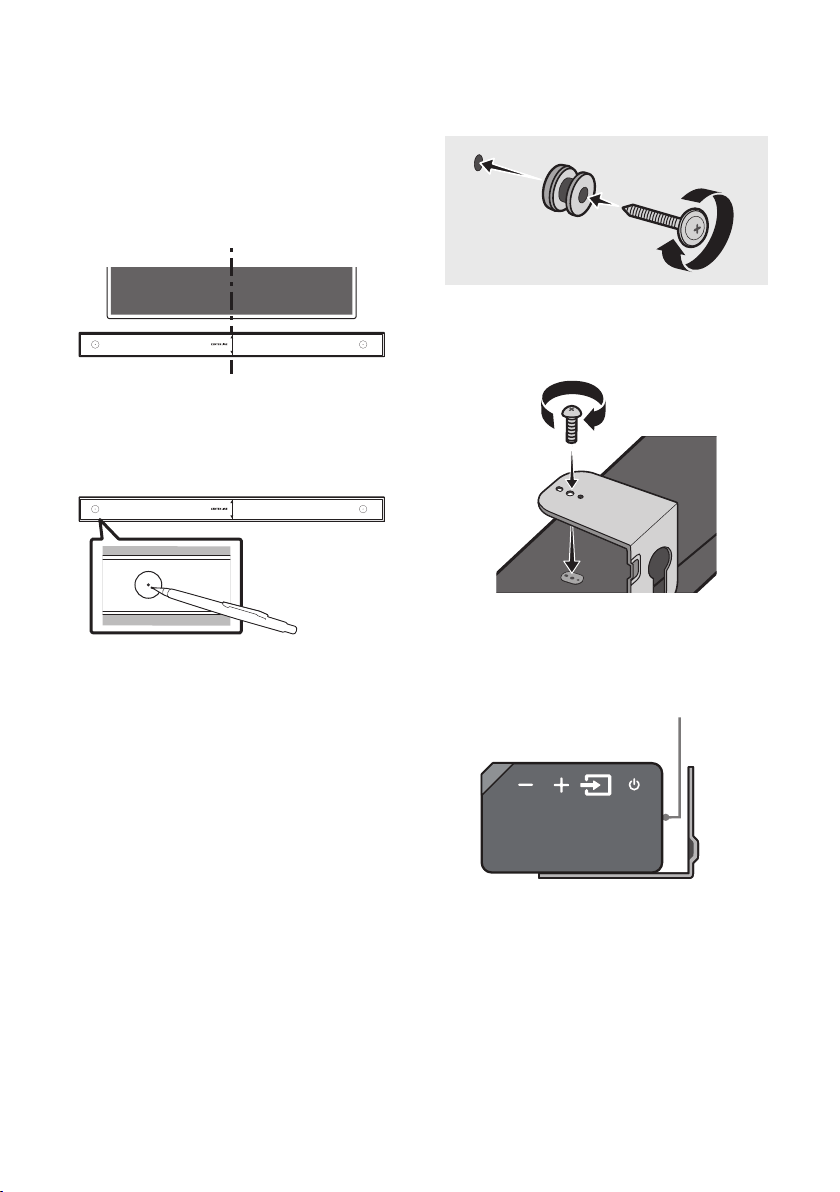
2. Align the Paper Template’s Center Line with
the center of your TV (if you are mounting
the Soundbar below your TV), and then x
the Wall Mount Guide to the wall using tape.
• If you are not mounting below a TV, place
the Center Line in the center of the
installation area.
Center Line
450mm
3. Use a sharp object, such as a pen or pencil, to
mark the holes’ positions, and then remove
the Wall mount Guide.
450mm
CENTER LINE
4. Using an appropriately sized drill bit, drill a
hole in the wall at each marking.
• If the markings do not correspond to the
positions of studs, make sure you insert
appropriate anchors or mollies into the
holes before you insert the support
screws. If you use anchors or mollies,
make sure the holes you drill are large
enough for the anchors or mollies you
use.
5. Push a screw (not supplied) through each
Holder-Screw, and then screw each screw
rmly into a support screw hole.
6. Install the 2 Bracket-Wall Mounts in the
correct orientation on the bottom of the
Soundbar, using 2 Screws.
• When assembling, make sure the hanger
part of the Bracket-Wall Mounts are
located behind the rear of the Soundbar.
Rear of Soundbar
Right end of Soundbar
ENG - 29
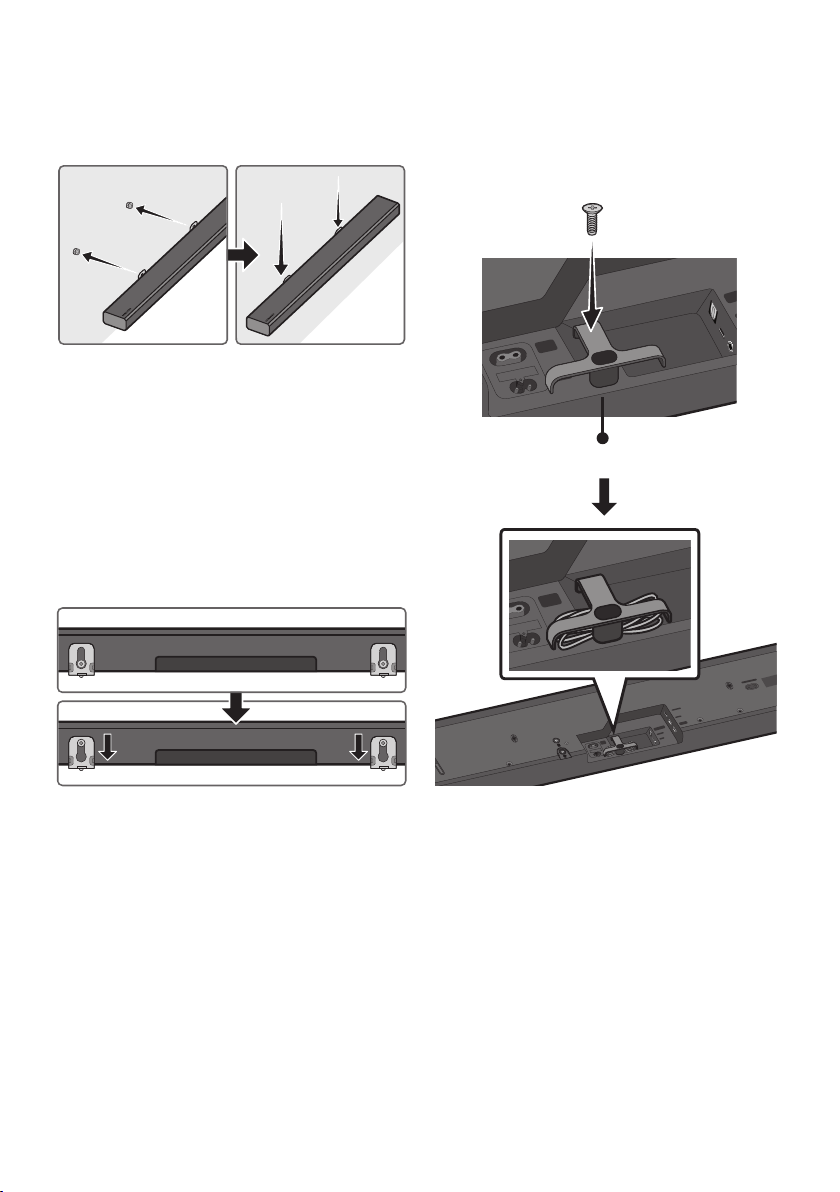
7. Install the Soundbar with the attached
Bracket-Wall Mounts by hanging the
Bracket-Wall Mounts on the Holder-Screws
on the wall.
8. Slide the Soundbar down as shown below so
that the Bracket-Wall Mounts rest securely
on the Holder-Screws.
• Insert the Holder-Screws into the wide
(bottom) part of the Bracket-Wall
Mounts, and then slide the Bracket-Wall
Mounts down so that Bracket-Wall
Mounts rest securely on the
Holder-Screws.
Assembling the Holder-Cable
As shown in the image, use the supplied Screw to
x the Holder-Cable to the Soundbar, and then
use the Holder-Cable to organize any cables.
WIRELESS
DIGITAL AUDIO IN
(OPTICAL)
POWER
IN
POWER
OUT
(For TV)
Holder-Cable
Wi-Fi SETUP SPK ADD
WIRELESS
AUX IN
DIGITAL AUDIO IN
(OPTICAL)
POWER
IN
POWER
OUT
(For TV)
HDMI IN
USB (5V 0.5A)
HDMI OUT
(TV-ARC)
WIRELESS
AUX IN
DIGITAL AUDIO IN
(OPTICAL)
POWER
IN
POWER
OUT
(For TV)
HDMI IN
USB (5V 0.5A)
HDMI OUT
(TV-ARC)

ENG - 30
11 TROUBLESHOOTING
Before seeking assistance, check the following.
The unit will not turn on.
Is the power cord plugged into the outlet?
; Connect the power plug to the outlet.
A function does not work when the button
is pressed.
Is there static electricity in the air?
; Disconnect the power plug and connect it
again.
Sound dropouts occur in BT mode.
; See the Bluetooth connection sections on
pages 9 and 17.
Sound is not produced.
Is the Mute function on?
; Press the VOL button to cancel the
function.
Is the volume set to minimum?
; Adjust the Volume.
The remote control does not work.
Are the batteries drained?
; Replace with new batteries.
Is the distance between the remote control and
Soundbar main unit too far?
; Move the remote control closer to the
Soundbar main unit.
Cannot connect to the TV.
If connected via a wired network
; Check if the cable is connected correctly.
(Check the port name to make sure that
the cable is connected to the correct port.)
(See the corresponding page regarding
each connection method.)
; Press the (Source) button on the right
side of the Soundbar or on the remote
control to check if the mode is correct.
If connected via a wireless network
; Connected via Bluetooth
1. Switch the Soundbar to “BT PAIRING”
mode, and then use the TV to search
again. (See page 9 for details.)
; Connected via Wi-Fi
1. Check if the TV is a compatible model.
• Only Samsung smart TVs released
after 2014 are supported.
2. Check if the TV is connected to Wi-Fi.
• If the TV is not connected to Wi-Fi, use
the network menu on the TV to
establish a connection. (See the TV
user manual.)
ENG - 31
3. Check if the Soundbar is connected to
Wi-Fi.
• When connected, the Soundbar is
found in the list of speakers when
Samsung Multiroom app is run on the
mobile device (e.g. smartphone or
tablet). (See page 20 for details.)
4. Check for a DFS channel.
• If your wireless router (Wi-Fi) is using a
DFS channel, you cannot establish a
Wi-Fi connection between the TV and
Soundbar. Contact your Internet
service provider for details.
12 LICENSE
Manufactured under license from Dolby
Laboratories. Dolby, Dolby Audio, Pro Logic,
and the double-D symbol are trademarks of
Dolby Laboratories.
For DTS patents, see http://patents.dts.com.
Manufactured under license from DTS
Licensing Limited. DTS, the Symbol, DTS in
combination with the Symbol, and DTS 2.0
Channel are registered trademarks or
trademarks of DTS, Inc. in the United States
and/or other countries. © DTS, Inc. All Rights
Reserved.
The terms HDMI and HDMI High-Denition
Multimedia Interface, and the HDMI Logo are
trademarks or registered trademarks of HDMI
Licensing LLC in the United States and other
countries.
• The Spotify Software is subject to third
party licenses found here :
www.spotify.com/connect/third-party-
licenses.
• For more information about Spotify
Connect, please visit
www.spotify.com/connect
13 OPEN SOURCE
LICENSE NOTICE
For further information on Open Sources used in
this product, please visit the website:
http://opensource.samsung.com

ENG - 32
14 IMPORTANT NOTES ABOUT SERVICE
Figures and illustrations in this User Manual are provided for reference only and may differ from actual
product appearance.
15 SPECIFICATIONS AND GUIDE
Specications
GENERAL
USB
5V/0.5A
Weight
11.0 lbs (5.0 kg)
Dimensions (W x H x D)
35.0 x 2.8 x 5.1 inches (890.0 x 71.0 x 130.5 mm)
Operating Temperature Range
+41°F to +95°F (+5°C to +35°C)
Operating Humidity Range
10 % ~ 75 %
Speaker
Woofer x 4, Tweeter x 2, 4ohm
Supported play formats
(DTS 2.0 sound is played in DTS format.)
LPCM 2ch, Dolby Audio™ (supporting Dolby®
Digital), DTS
NOTES
• Samsung Electronics Co., Ltd reserves the right to change the specications without notice.
• Weight and dimensions are approximate.
• For more information about the power supply and power consumption, refer to the label attached
to the product. (Label : Bottom of the Soundbar Main Unit)
Precaution : The product will restart automatically if you turn on/off Wi-Fi/Ethernet.
Wi-Fi/Ethernet Port deactivation method
Press Wi-Fi SETUP button on the product for
30 seconds to turn Wi-Fi/Ethernet On / Off.
Bluetooth Port deactivation method
Press SPK ADD button on the product for
30 seconds to turn Bluetooth On / Off.
LIMITED WARRANTY TO ORIGINAL PURCHASER
Samsung Electronics Canada Inc.(SECA), warrants that this product is free from
defective material and workmanship.
SECA further warrants that if this product falls to operate properly within the specied
warranty period and the failure is due to improper workmanship or defective
materials, SECA will repair or replace the product at its option.
All warranty repairs must be performed by a SECA Authorized Service Center. (The name and
address of the location nearest you can be obtained by calling toll free: 1- 800- SAMSUNG)
LABOR
One year (Carry- in)
PARTS
One year
On carry-in models, transportation to and from the service center is the customer’s
responsibility.
The original dated sales receipt must be retained by the customer and is the only
acceptable proof of purchase. It must be presented to the authorized service center at
the time service is requested.
EXCLUSIONS (WHAT IS NOT COVERED)
This warranty does not cover damage due to accident, re, ood and/ or other acts of
God; misuse, incorrect line voltage, improper installation, improper or unauthorized
repairs, commercial use or damage that occurs in shipping. Exterior and interior nish,
lamps, glass are not covered under this warranty. Customer adjustments which are
explained in the instruction manual are not covered under the terms of this warranty.
This warranty will automatically be voided for any unit found with a missing or altered
serial number. This warranty is valid only on products purchased and used in Canada.
Samsung Electronics Canada Inc
2050 Derry Rd West
Mississauga, On. L5N 0B9
Tel: 1-800-SAMSUNG (726-7864)
Fax: (905) 542- 1199
Website: www.samsung.com/ca

HEADQUARTERS
Samsung Electronics Canada Inc. 2050 Derry Road West, Mississauga, Ontario L5N 0B9 Canada
TEL: 1-800-SAMSUNG (1-800-726-7864)
www.samsung.com/ca/support
© 2017 Samsung Electronics Co., Ltd. All rights reserved.
Contact SAMSUNG WORLD WIDE
If you have any questions or comments relating to Samsung products, please contact the SAMSUNG customer
care Center.
Country Contact Center
Web Site
`
North America
CANADA 1-800-SAMSUNG (726-7864)
www.samsung.com/ca/support (English)
www.samsung.com/ca_fr/support (French)
U.S.A 1-800-SAMSUNG (726-7864) www.samsung.com/us/support

HW-MS550
MANUEL COMPLET
Imaginez les possibilités
Merci d’avoir choisi un appareil Samsung.
Pour recevoir une assistance plus complète,
veuillez enregistrer votre produit sur
www.samsung.com/register
FRA - ii
INFORMATIONS RELATIVES À LA SÉCURITÉ
AVERTISSEMENTS
POUR ÉVITER LES RISQUES DE CHOC
ÉLECTRIQUE, NE DÉMONTEZ PAS LE CAPOT.
L’APPAREIL NE CONTIENT PAS DE PIÈCES
RÉPARABLES PAR L’UTILISATEUR. S’ADRESSER À
UN SERVICE APRÈS-VENTE QUALIFIÉ.
MISE EN GARDE
RISQUE DE CHOC
ÉLECTRIQUE NE PAS
OUVRIR
Ce symbole indique la présence d'une
haute tension à l'intérieur. Tout contact
avec une pièce interne de l'appareil
présente un danger.
Ce symbole vous informe qu'une
documentation importante relative au
fonctionnement et à l'entretien est
fournie avec le produit.
Produit de catégorie II: Ce symbole
indique qu'il ne nécessite pas une
connextion de sécurité à la terre
(masse).
Tension CA: Ce symbole indique que la
tension nominale est la tension CA.
Tension CC : Ce symbole indique que la
tension nominale est la tension CC.
Attention, consultez les instructions aux
ns d'utilisation : Ce symbole indique à
l'utilisateur qu'il doit consulter le guide
d'utilisation pour avoir de l'information
au sujet de la sécurité.
AVERTISSEMENT
• An de diminuer les risques d’incendie ou de
choc électrique, n’exposez pas cet appareil à
la pluie ou à l’humidité.
• Pour éviter des blessures, cet appareil doit
être solidement xé au plancher/au mur
conformément aux directives d’installation.
MISE EN GARDE
• Veillez à éviter toute projection sur l’appareil.
Ne placez jamais de récipients contenant un
liquide (ex. : vase) dessus.
• La prise d’alimentation fait ofce de système
de déconnexion. Elle doit donc rester
disponible en permanence.
ATTENTION (Pour le Canada)
Le présent appareil est conforme aux CNR
d’Industrie Canada applicables aux appareils radio
exempts de licence. L’exploitation est autorisée aux
deux conditions suivantes : (1) l’appareil ne doit pas
produire de brouillage, et (2) l’utilisateur de
l’appareil doit accepter tout brouillage
radioélectrique subi, même si le brouillage est
susceptible d’en compromettre le fonctionnement.
Cet appareil et son ou ses antennes ne doivent
pas etre installés a proximité ou etre utilisés
conjointement avec une autre antenne ou un
autre émetteur.
Le dispositif pourrait automatiquement cesser
d’émettre en cas d’absence d’informations à
transmettre, ou une défaillance opérationnelle.
Notez que ce n’est pas l’intention d’interdire la
transmission des informations de contrôle ou de
signalisation ou l’utilisation de codes répétitifs
lorsque requis par la technologie.
Cet appareil numerique de la classe B est
conforme a la norme NMB-003 du Canada.

FRA - iii
Declaration d’exposition aux radiations:
Cet equipement est conforme aux limites
d’exposition aux rayonnements IC RSS-102
etablies pour un environnement non controle.
Cet equipement doit etre installe et utilise avec
un minimum de 20 cm de distance entre la source
de rayonnement et votre corps.
Consignes de sécurité importantes
Lisez attentivement ces consignes avant d’utiliser
l’appareil. Veillez à respecter toutes les consignes
répertoriées ci-après. Conservez ces instructions à
portée de main pour vous y référer ultérieurement.
1. Lisez attentivement ces consignes.
2. Conservez-les précieusement.
3. Tenez compte de tous les avertissements
mentionnés.
4. Respectez toutes les instructions sans
exception.
5. N’utilisez pas cet appareil à proximité de
l’eau.
6. Nettoyez-le à l’aide d’un tissu sec.
7. Ne bloquez pas les ouvertures de ventilation.
Installez l’appareil conformément aux
instructions du fabricant.
8. N’installez pas le lecteur à proximité d’une
source de chaleur de type radiateur, registre
de chaleur, cuisinière ou tout autre appareil
(y compris les récepteurs AV) générateur de
chaleur.
9. Ne désactivez pas le dispositif de sécurité de
la che de mise à la terre ou de la che
polarisée. Une che polarisée comporte
deux lames dont l’une est plus large que
l’autre. Une che de mise à la terre comporte
deux lames et une troisième broche de mise
à la terre. La lame la plus large et la
troisième broche sont destinées à assurer
votre sécurité. Si la che fournie ne s’insère
pas dans la prise utilisée, faites appel à un
électricien pour faire remplacer celle-ci.
10. Placez le cordon d’alimentation de sorte qu’il
ne puisse être ni piétiné ni pincé,
particulièrement au niveau de la che, de la
prise de courant et du point de sortie de
l’appareil.
11. Utilisez exclusivement les xations/
accessoires spéciés par le fabricant.
12. Utilisez exclusivement le
meuble à roulettes, le socle, le
trépied, le support ou la table
recommandés par le fabricant
ou vendus avec l’appareil.
Si l’appareil est posé sur un meuble à
roulettes, déplacez l’ensemble avec
précaution pour éviter de faire tomber le
lecteur et de vous blesser.
13. Débranchez l’appareil en cas d’orage ou
lorsqu’il est inutilisé pendant une période
prolongée.
14. Conez toutes les réparations à un technicien
qualié. Votre appareil doit impérativement
être réparé lorsqu’il a été endommagé de
quelque manière que ce soit :
détérioration
du cordon ou de la che d’alimentation,
projection de liquide sur l’appareil, chute
d’objets à l’intérieur de l’appareil, exposition
à la pluie ou à l’humidité, dysfonctionnement,
chute.

FRA - iv
PRÉCAUTIONS
1. Assurez-vous que l’alimentation c.a. de votre
domicile satisfait aux normes inscrites sur
l’étiquette d’identication située à l’arrière
du produit. Installez votre produit
horizontalement, sur un socle approprié
(meuble), en laissant un espace sufsant
pour la ventilation sur le pourtour 3~4 po.
Faites attention à ne pas obstruer les orices
de ventilation. Ne posez pas l’ensemble sur
un amplicateur ou un autre appareil
susceptible de chauffer. Cet ensemble est
conçu pour une utilisation en continu.
Pour éteindre totalement l’appareil,
débranchez la che c.a. de la prise murale.
Débranchez l’appareil si vous prévoyez une
longue période d’inactivité.
2. En cas d’orage, débranchez la che de
l’appareil de la prise murale. Les surtensions
occasionnées par l’orage pourraient
endommager votre appareil.
3. N’exposez pas l’ensemble aux rayons directs
du soleil ou à toute autre source de chaleur.
Cela pourrait causer une surchauffe du l et
causer un dysfonctionnement de l’unité.
4.
Protégez le produit de l’humidité (comme les
vases) et d’une chaleur excessive (comme une
cheminée) ou de tout équipement capable de
créer des champs magnétiques ou électriques.
Débranchez le câble d’alimentation en cas de
dysfonctionnement. Votre produit n’est pas
prévu pour un usage industriel. Ce produit ne
peut être utilisé qu’à des ns personnelles.
Une condensation peut se former si le produit
ou un disque a été stocké à basse
température. Si vous devez transporter
l’ensemble pendant l’hiver, attendez environ
2 heures que l’appareil ait atteint la
température de la pièce avant de l’utiliser.
5. Les piles utilisées dans ce produit peuvent
contenir des produits chimiques dangereux
pour l’environnement. Ne jetez pas les piles
dans votre poubelle habituelle. Ne vous
débarrassez pas des piles en les faisant
brûler. Les piles ne doivent pas être court-
circuitées, démontées ou subir de surchauffe.
Le remplacement incorrect des piles peut
entraîner un danger d’explosion.
Remplacez-les uniquement par des produits
similaires ou équivalents.
FRA - v
À PROPOS DE CE MANUEL
Le manuel utilisateur se compose de deux éléments : la version papier simpliée du MANUEL
UTILISATEUR et un MANUEL COMPLET détaillé que vous pouvez télécharger.
MANUEL UTILISATEUR
Consultez ce manuel pour obtenir des instructions relatives à la
sécurité, ainsi que des informations sur l’installation du produit,
les composants, les connexions et les caractéristiques du
produit.
MANUEL COMPLET
Vous pouvez accéder au manuel complet sur le centre
d’assistance client en ligne de Samsung en balayant le code QR.
Pour afcher le manuel sur votre PC ou votre appareil mobile,
téléchargez-le sous forme de document à partir du site Web.
(http://www.samsung.com/support)
La conception, les spécications techniques et l’écran Application sont susceptibles d'être modiés sans préavis.

FRA - vi
SOMMAIRE
01 VéricationdesComposants 2
Insertion des piles avant d’utiliser la télécommande (2 piles AA) ------------------------- 2
02 Présentation du Produit 3
Face avant/Face latérale droite du Soundbar ------------------------- 3
Face arrière du Soundbar ------------------------- 4
03 Branchement du Soundbar 5
Branchement de l’alimentation
-------------------------
5
04 Branchement à votre Téléviseur 7
Méthode 1. Branchement avec un câble
-------------------------
7
– Branchement à l’aide d’un câble optique
-------------------------
7
– Branchement d’un téléviseur à l’aide d’un câble HDMI
-------------------------
8
Méthode 2. Connexion sans l
-------------------------
9
– Connexion d’un téléviseur par Bluetooth
-------------------------
9
– Connexion via Wi-Fi
-------------------------
11
05 Branchement d’un Périphérique Externe 13
Connexion à l’aide d’un câble optique ou audio analogue (AUX)
-------------------------
13
Branchement à l’aide d’un câble HDMI
-------------------------
14
06 Branchement d’un Périphérique USB 15

FRA - vii
07 Branchement d’un Appareil Mobile 17
Méthode 1. Connexion par Bluetooth
-------------------------
17
Méthode 2. Connexion via Wi-Fi (réseau sans l)
-------------------------
20
08 Utlisation de la Télécommande 22
Procédure d’utilisation de la télécommande
-------------------------
22
Réglage du volume du Soundbar à l’aide d’une télécommande de téléviseur --------------------------- 25
Utilisation des boutons masqués
-------------------------
26
09 Mise à jour Logicielle 26
10 Installation du Support Mural 27
Précautions d’installation
-------------------------
27
Composantes murales
-------------------------
27
Montage du support à câble
-------------------------
29
11 Dépannage 30
12 Licence 31
13 Avis de Licences Libres 31
14 Remarque Importante Concernant le Service 32
15 Caractéristiques et Guide 32
Spécications
-------------------------
32
FRA - 2
01 VÉRIFICATION DES COMPOSANTS
Surround
VOL BASS
SOUNDBAR
SOUND
MODE
SMART
MODE
Unité principale du Soundbar Télécommande/Piles Câble optique
Cordon d’alimentation Support à câble Vis
• Pour plus d’informations sur les composants du montage mural du Soundbar, reportez-vous à la
page 27.
• Voir la page 29 pour obtenir des instructions sur l’utilisation du Support à câble.
• Pour acheter des composants supplémentaires ou des câbles en option, contactez un Centre de
service Samsung ou le service clientèle Samsung.
• Les accessoires pourraient légèrement différer de ceux gurant sur la photo ci-dessus.
Insertion des piles avant d’utiliser la télécommande (2 piles AA)
Faites glisser le couvercle des piles dans la direction de la èche jusqu’à son retrait complet.
Insérez 2 piles AA (1,5V) dans le bon sens (polarité correcte). Remettez le couvercle en place.
FRA - 3
02
PRÉSENTATION DU PRODUIT
Face avant/Face latérale droite du Soundbar
Face droite du Soundbar
Placez le produit de sorte que le logo
SAMSUNG soit situé sur le dessus.
Afchage
Afche le statut et le mode actuel du produit.
Bouton -/+ (volume)
Permet de régler le volume.
• Une fois réglé, le volume apparaît sur l’afchage avant du Soundbar.
Bouton (Source)
Permet de sélectionner le mode d'entrée source.
Mode d’entrée Afchage
Entrée numérique optique D.IN
Entrée ARC (HDMI OUT) D.IN TV ARC (Conversion automatique)
Entrée AUX AUX
Entrée HDMI HDMI
Mode Wi-Fi WIFI
Mode BLUETOOTH BT
Mode USB USB
• Pour activer le mode «BT PAIRING» , dénissez la source sur le mode «BT», puis appuyez sur le
bouton (Source) et maintenez-le appuyé pendant plus de 5 secondes.
Bouton (Alimentation)
Permet d'allumer et d'éteindre l'appareil.
FRA - 4
• Lorsque vous branchez le cordon c.a., la touche de mise en fonction s’activera dans un délai de 4 à
6 secondes.
• Lorsque vous mettez cet appareil sous tension, un délai de 4 à 5 secondes précède l’émission du son.
• Si vous souhaitez restituer le son uniquement du Soundbar, vous devez mettre les haut-parleurs du
téléviseur hors fonction dans le menu de réglage du son de votre téléviseur. Reportez-vous au
manuel fourni avec votre téléviseur.
Face arrière du Soundbar
Wi-Fi SETUP SPK ADD
HDMI IN
USB (5V 0.5A)
HDMI OUT
(TV-ARC)
WIRELESS
AUX IN
DIGITAL AUDIO IN
(OPTICAL)
POWER
IN
POWER
OUT
(For TV)
WIRELESS
AUX IN
DIGITAL AUDIO IN
(OPTICAL)
Wi-Fi SETUP SPK ADD
HDMI IN
USB (5V 0.5A)
HDMI OUT
(TV-ARC)
POWER
IN
POWER
OUT
(For TV)
POWER OUT (For TV)
Branchez le cordon d'alimentation d'un téléviseur Samsung connecté à la Soundbar et xé au mur à l'aide
d'un kit de montage mural (WMN300SB - non fourni).
POWER IN
Branchez le câble d'alimentation CA de la Soundbar.
DIGITAL AUDIO IN (OPTICAL)
Se branche à la sortie numérique (optique) d'un périphérique externe.
WIRELESS
Installez la clé électroniquesans l qui connecte la Soundbar aux enceintes d'ambiance et au caisson de
basse sans l. (Les enceintes d'ambiance, le caisson de basse et la clé électronique sans l sont vendus
séparément.)
• La prise WIRELESS n’est pas compatible USB.
• La disponibilité des caissons de basse varie selon la région. Vériez la disponibilité à l’adresse
http://www.samsung.com/support.
FRA - 5
AUX IN
Se branche à la sortie analogue d'un périphérique externe.
USB (5V 0.5A)
Se branche à un périphérique USB pour lire des morceaux de ce périphérique via le Soundbar.
HDMI IN
Permet d'entrer simultanément des signaux vidéo et audio numériques à l'aide d'un câble HDMI.
Se branche à la sortie HDMI d'un périphérique externe.
HDMI OUT (TV-ARC)
Se branche au raccord HDMI (ARC) d'un téléviseur.
Wi-Fi SETUP / SPK ADD
Connectez-vous à un réseau sans l (Wi-Fi) via l'application Samsung Multiroom.
• Lorsque vous débranchez le câble d’alimentation d’une prise murale, tirez sur la che. Ne tirez pas
sur le câble.
• Ne raccordez pas cette unité ou d’autres composants à une prise secteur CA tant que tous les
composants ne sont pas connectés.
03 BRANCHEMENT DU SOUNDBAR
Branchement de l’alimentation
• Pour obtenir de l’information sur la source d’alimentation et la consommation électrique, veuillez
vous reporter à l’étiquette apposée sur le produit. (Étiquette : Arrière de l’Unité Principale du
Soundbar)
HDMI IN
USB (5V 0.5A)
HDMI OUT
(TV-ARC)
WIRELESS
AUX IN
DIGITAL AUDIO IN
(OPTICAL)
POWER
IN
POWER
OUT
(For TV)
POWER
IN
Arrière de l’unité principale du Soundbar
Cordon
d’alimentation
Branchement de
l’alimentation
• Branchez le câble d’alimentation
fourni sur la prise POWER IN.
FRA - 6
HDMI IN
USB (5V 0.5A)
HDMI OUT
(TV-ARC)
WIRELESS
AUX IN
DIGITAL AUDIO IN
(OPTICAL)
POWER
IN
POWER
OUT
(For TV)
POWER IN
POWER
OUT
(For TV)
Arrière de l’unité principale du Soundbar
• La prise POWER OUT est utilisée pour
alimenter un téléviseur Samsung xé au mur
à l’aide d’un kit de montage mural
(WMN300SB - non fourni).
• La prise POWER OUT peut servir uniquement
au raccordement de téléviseurs Samsung qui
utilisent un cordon d’alimentation à 2 broches
et consomment 400 W ou moins. (Toute
connexion entre la prise et un appareil qui
consomme plus de 400 W peut endommager
la Soundbar ou provoquer un
dysfonctionnement.)
Pour obtenir la liste des téléviseurs Samsung
compatibles avec le kit de montage mural
WMN300SB et la prise POWER OUT, voir le
manuel de l’utilisateur du kit de montage
mural WMN300SB.
Vous pouvez consulter le manuel en ligne à
l’adresse http://www.samsung.com/support.
FRA - 7
04 BRANCHEMENT À VOTRE TÉLÉVISEUR
Diffusez le son de votre téléviseur par le Soundbar à l’aide de connexion laires ou sans l.
• Lorsque le Soundbar est connecté à un téléviseur Samsung sélectionné, il peut être contrôlé à l’aide
de la télécommande du téléviseur.
– Lorsque vous utilisez un câble optique, cette fonction peut être prise en charge par les
téléviseurs intelligents Samsung de 2017 qui prennent en charge le Bluetooth.
– Cette fonction vous permet également d’utiliser le menu du téléviseur pour régler le son et
d’autres paramètres, ainsi que le volume et la mise en sourdine.
Méthode 1. Branchement avec un câble
Branchement à l’aide d’un câble optique
WIRELESS
AUX IN
DIGITAL AUDIO IN
(OPTICAL)
OPTICAL OUT
Câble optique
Arrière du Soundbar
D.IN
Face droite du Soundbar
1. Branchez le connecteur DIGITAL AUDIO IN (OPTICAL) du Soundbar sur le connecteur OPTICAL
OUT du téléviseur avec un câble optique numérique.
2. Appuyez sur le bouton (Source) situé sur la face latérale droite ou sur la télécommande, puis
sélectionnez le mode «D.IN».
Auto Power Link
La fonction Auto Power Link active le Soundbar lorsque le téléviseur est allumé.
1. Connectez le Soundbar et un téléviseur à l’aide d’un câble optique numérique.
2. Appuyez sur le bouton (Source) situé sur la face latérale droite ou sur la télécommande, puis
sélectionnez le mode «D.IN».
FRA - 8
3. Appuyez sur le bouton de Gauche de la télécommande pendant 5 secondes
pour activer ou désactiver la fonction Auto Power Link.
• La fonction Auto Power Link est réglée sur ON par défaut.
(Pour la désactiver, désactivez la fonction Auto Power à l’aide du Soundbar.)
• En fonction du périphérique branché, il se peut que la fonction Auto Power
Link ne fonctionne pas.
• Cette fonction est uniquement disponible en mode «D.IN».
Branchement d’un téléviseur à l’aide d’un câble HDMI
HDMI IN
HDMI OUT
(TV-ARC)
HDMI IN
(ARC)
Câble HDMI
(non fourni)
Arrière du Soundbar
Connexion au port HDMI IN
(ARC) de votre téléviseur
Connexion au port HDMI OUT (TV-ARC) de
l'unité principale de la Soundbar.
Face droite du
Soundbar
TV
ARC
1. Allumez le Soundbar et le téléviseur, puis branchez le câble HDMI (non fourni) comme indiqué sur
l’image.
2. «TV ARC» s’afche sur l’écran d’afchage de l’unité principale du Soundbar et le son du téléviseur
est diffusé.
• Si le son du téléviseur est inaudible, appuyez sur le bouton (Source) situé sur la
télécommande ou sur la face droite du Soundbar pour passer en mode «D.IN».
L’écran afche à la suite «D.IN» et «TV ARC», et le son du téléviseur est diffusé.
• Si l’option «TV ARC» ne s’afche pas sur l’écran d’afchage du Soundbar, vériez que le câble
est branché sur le bon port.
• Utilisez les boutons de volume de la télécommande du téléviseur pour régler le volume du
Soundbar.
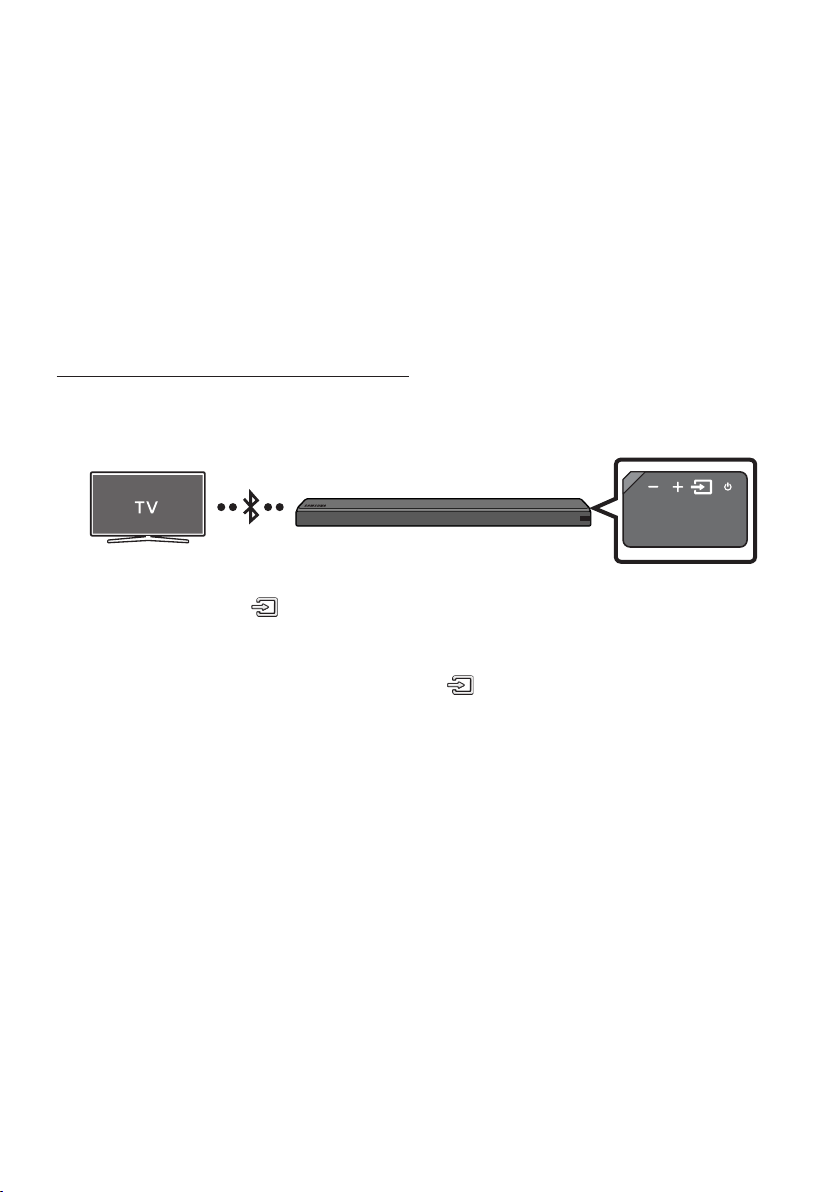
FRA - 9
REMARQUES
• HDMI est une interface qui permet la transmission numérique de données vidéo et audio avec un
seul connecteur.
• Si le téléviseur dispose d’un port ARC, connectez le câble HDMI au port HDMI IN (ARC).
• Nous vous recommandons d’utiliser un câble HDMI sans noyau si possible. Si vous utilisez un câble
HDMI avec noyau, utilisez-en un dont le diamètre est inférieur à 0,55 po.
• La fonction Anynet+ doit être activée.
• Cette fonction n’est pas disponible si le câble HDMI ne prend pas en charge l’ARC.
Méthode2.Connexionsansl
Connexion d’un téléviseur par Bluetooth
Lorsqu’un téléviseur est connecté par Bluetooth, vous pouvez proter du son stéréo sans vous
encombrer avec des câbles.
• Un seul téléviseur peut être connecté à la fois.
Connexion initiale
1. Appuyez sur le bouton (Source) situé sur la face latérale droite ou sur la télécommande, puis
sélectionnez le mode «BT».
2. Choisissez «BT PAIRING» à la place de «BT».
• Si «BT READY» apparaît, appuyez sur le bouton (Source) situé sur la face latérale droite du
Soundbar ou sur la télécommande et maintenez-le enfoncé pendant plus de 5 secondes pour
afcher «BT PAIRING».
3. Sélectionnez le mode Bluetooth sur le téléviseur. (Pour plus d’informations, reportez-vous au
manuel du téléviseur.)
4. Sélectionnez «[AV] Samsung Soundbar MSxxx» dans la liste afchée sur l’écran du téléviseur.
Lorsqu’un Soundbar est disponible, il a le statut «Need Pairing» ou «Paired» dans la liste des
périphériques Bluetooth du téléviseur. Pour se connecter au Soundbar, sélectionnez le message et
établissez une connexion.
• Lorsque le téléviseur est connecté, [Nom du téléviseur] → «BT» s’afche sur l’écran situé à
l’avant du Soundbar.
5. Le son du téléviseur est désormais diffusé sur le Soundbar.

FRA - 10
En cas d’échec de la connexion du périphérique
• Si l’entrée correspondant au Soundbar précédemment connecté (par ex., «[AV] Samsung Soundbar
MSxxx» gure dans la liste, supprimez-la.
• En mode «BT», appuyez sur le bouton (Source) situé sur la face latérale droite du Soundbar ou
sur la télécommande et maintenez-le enfoncé pendant plus de 5 secondes pour passer en mode
«BT PAIRING». Ensuite, sélectionnez «[AV] Samsung Soundbar MSxxx» dans la liste de recherche
du téléviseur.
QuesignientlesstatutsBTREADYetBTPAIRING?
• BT READY : Dans ce mode, vous pouvez rechercher les téléviseurs précédemment connectés ou
vous connecter au Soundbar à partir d’un appareil mobile précédemment connecté.
• BT PAIRING : Dans ce mode, vous pouvez vous connecter à un nouveau périphérique. (Lorsque vous
êtes en mode «BT», appuyez sur le bouton
(Source)
situé sur le côté droit du Soundbar ou sur la
télécommande et maintenez-le enfoncé pendant plus de 5 secondes.)
REMARQUES
• Si vous êtes invité à saisir un code PIN lors de la connexion à un périphérique Bluetooth, entrez
<0000>.
• En mode de connexion Bluetooth, la connexion Bluetooth est perdue si la distance entre le
Soundbar et le périphérique Bluetooth est supérieure à 32,8 pi.
• Le Soundbar se désactive automatiquement après avoir passé 5 minutes à l’état Prêt.
• Il se peut que le Soundbar n’effectue pas correctement la recherche ou la connexion Bluetooth
dans les cas suivants :
– En présence d’un champ électrique puissant dans l’environnement du Soundbar.
– En cas d’appariement simultané de plusieurs périphériques Bluetooth avec le Soundbar.
– En cas de désactivation, de mauvais positionnement ou de dysfonctionnement du périphérique
Bluetooth.
• Les appareils électroniques peuvent créer des interférences radio. Les appareils produisant des
ondes électromagnétiques doivent être gardés à distance de l’unité principale du Soundbar, par
exemple les micro-ondes, les appareils de réseau sans l, etc.
Déconnexion du Soundbar du téléviseur
Appuyez sur le bouton (Source) situé sur la face latérale droite ou sur la télécommande, puis
sélectionnez un autre mode que «BT».
• La déconnexion prend du temps car le téléviseur doit recevoir une réponse du Soundbar.
(Le temps requis peut différer en fonction du modèle du téléviseur.)
• Pour annuler la connexion Bluetooth automatique entre le Soundbar et le téléviseur, appuyez sur le
bouton
p
(Lecture/Pause) de la télécommande pendant 5 secondes en mode «BT READY».
(La fonction passe de Activé à Désactivé)
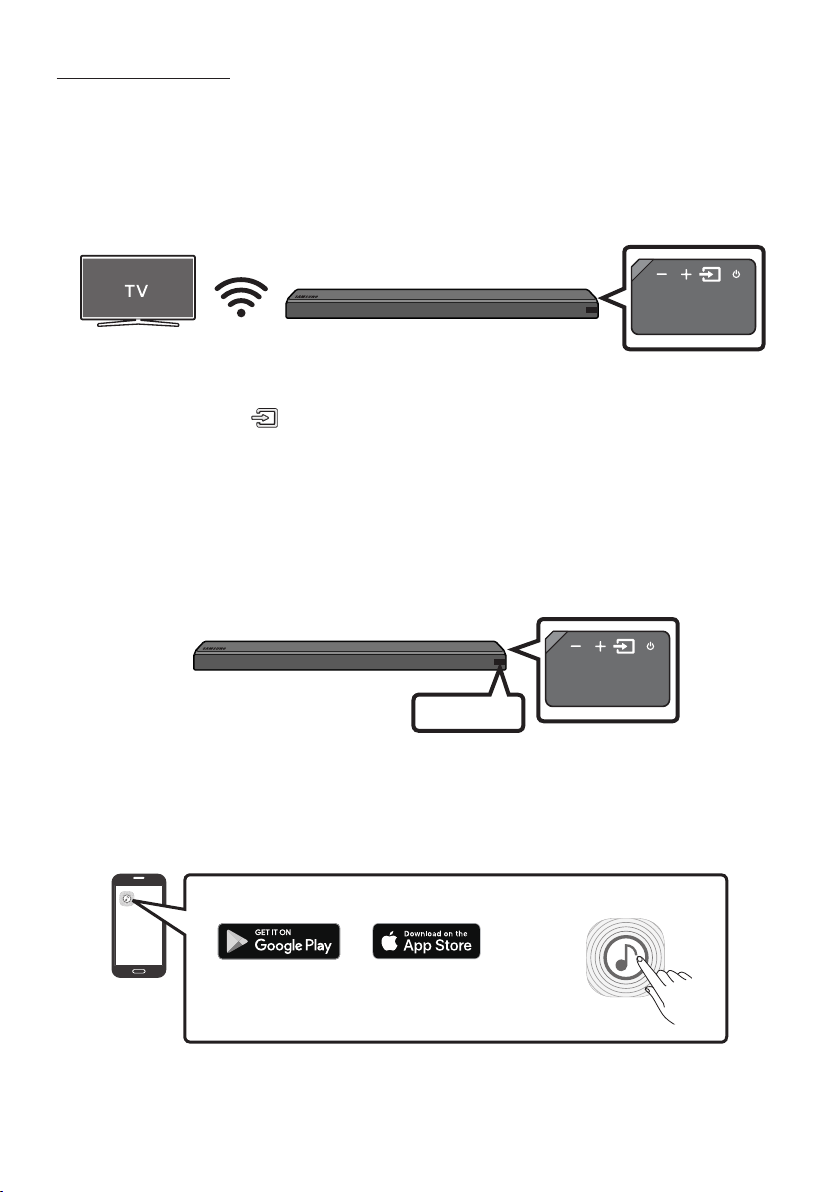
FRA - 11
Connexion via Wi-Fi
Liste de contrôle avant la connexion
1. Vériez que votre téléviseur Samsung Smart TV a été mis en marché après 2014. Cette fonction
est compatible uniquement avec les téléviseurs Samsung Smart TV mis en marché après 2014.
2. Assurez-vous que votre routeursansl(Wi-Fi) est prêt et qu’il fonctionne.
3. Assurez-vous que le téléviseurestconnectéaurouteursansl(votreréseauWi-Fi).
Étape1:ConnexiondelaSoundbarauWi-Fi
1. Appuyez sur le bouton (Source) sur le côté droit de la Soundbar ou sur la télécommande pour
sélectionner le mode «WIFI».
• Lors de l’utilisation du téléviseur Samsung sélectionné (téléviseurs intelligents Samsung de
2016 ou 2017 prenant en charge le Bluetooth)
– Si vous sélectionnez le mode «WIFI» lorsque le téléviseur est allumé, l’écran du téléviseur
afche une fenêtre surgissante fournissant des instructions sur la connexion automatique
de la Soundbar à un routeur sans l (Wi-Fi). Suivez les instructions de la fenêtre surgissante
sur le téléviseur.
WIFI
2. Connectez votre appareil mobile (téléphone intelligent, tablette, etc) au réseau Wi-Fi auquel le
téléviseur est connecté.
3. Installez et lancez l’application Samsung Multiroom sur votre appareil mobile (téléphone
intelligent, tablette, etc).
iOS
Android
Application Samsung Multiroom
4. Suivez les instructions de l’application à l’écran sur l’appareil mobile pour connecter la Soundbar à
votre réseau Wi-Fi.
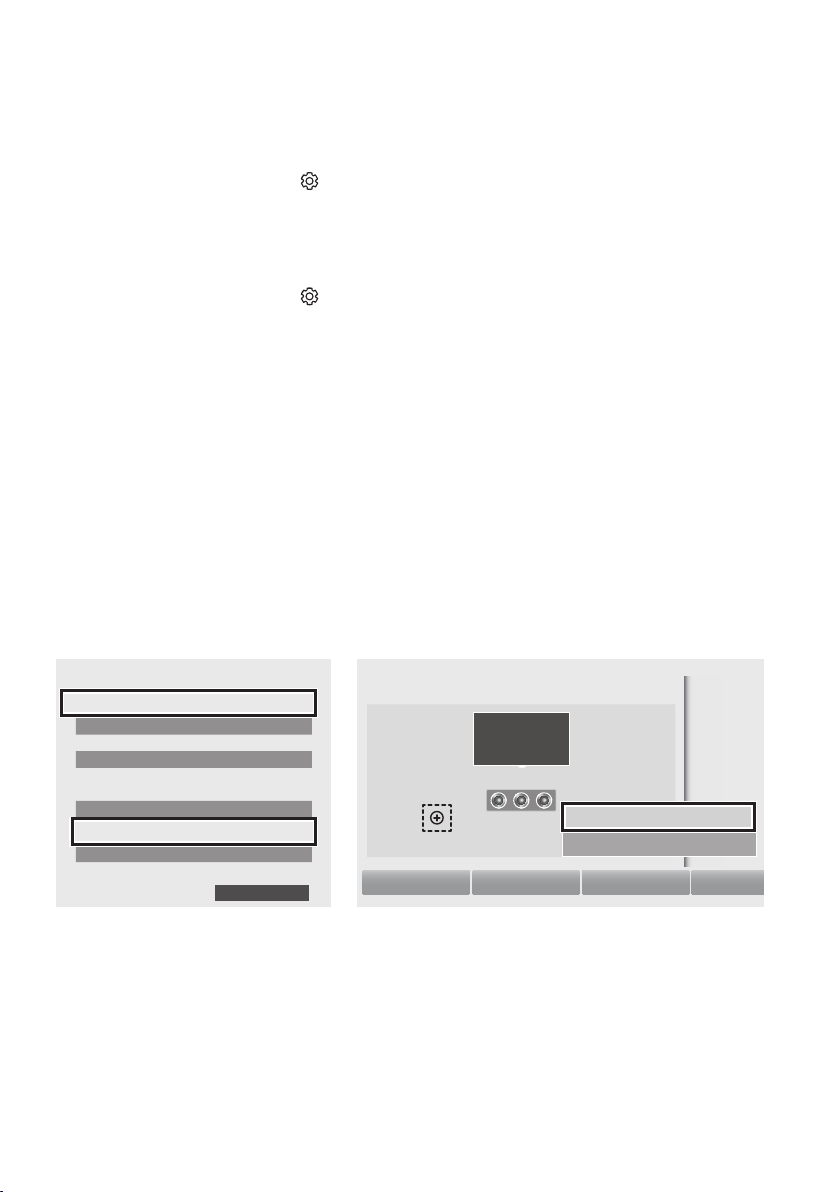
FRA - 12
Étape2:Congurationdesréglagessurletéléviseur
• Si le téléviseur se déconnecte de votre réseau sans l après que vous avez basculé la source
d’entrée sur la Soundbar, utilisez le menu du téléviseur pour reconnecter celui-ci au réseau.
Pour les téléviseurs sortis en 2017
1. Menu Accueil Paramètres ( ) Son Sortie audio Sélectionnez [AV] Soundbar MSxxx
(Wi-Fi)
2. La Soundbar restitue le son du téléviseur.
Pour les téléviseurs sortis en 2016
1. Menu Accueil Paramètres ( ) Son Sortie audio Sélectionnez [AV] Samsung Soundbar
MSxxx (Wi-Fi)
2. La Soundbar restitue le son du téléviseur.
Pour les téléviseurs sortis en 2015
1. Menu Accueil Son Liste des haut-parleurs Sélectionnez [AV] Samsung Soundbar MSxxx
(Wi-Fi)
2. La Soundbar restitue le son du téléviseur.
Pour les téléviseurs sortis en 2014
1. Menu Accueil Son Paramètres haut-parleur Sélectionnez Multiroom Link - Paramètres
Soundbar+Surround.
2. Depuis la position du Soundbar, sélectionnez « [AV] Samsung Soundbar MSxxx », puis « OK ».
3. Menu Accueil Son Paramètres haut-parleur Sélectionnez Sortie audio du téléviseur
Multiroom Link
Haut-parleur TV
• Type d’installation télé Socle
TV SoundConnect
• Liste d’appareils audio Samsung
• Ajouter un appareil Activer
Multiroom Link
• Paramètres
Soundbar+Surround
Écouteurs Bluetooth
• Liste écouteurs Bluetooth
Paramètres haut-parleur
Sortie audio du téléviseur Multiroom Link
OK
Multiroom Link
OK Niveau du volume
Test des haut-parleurs
Soundbar
[AV] Samsung Soundbar MSxxx
Soundbar+Surround
c
[AV] Samsung Soundbar MSxxx
Ne pas utiliser
Entrer le
1
3
2
4. La Soundbar restitue le son du téléviseur.
REMARQUES
• Le téléviseur et la Soundbar doivent être connectés au même réseau sans l (Wi-Fi).
• Si votre routeur sans l (Wi-Fi) utilise un canal DFS, vous ne serez pas en mesure d’établir une
connexion Wi-Fi entre le téléviseur et la Soundbar. Contactez votre fournisseur de services Internet
pour plus de détails.
• Si la connexion Wi-Fi 5 GHz n’est pas uide, utilisez la bande passante de 2,4 GHz.
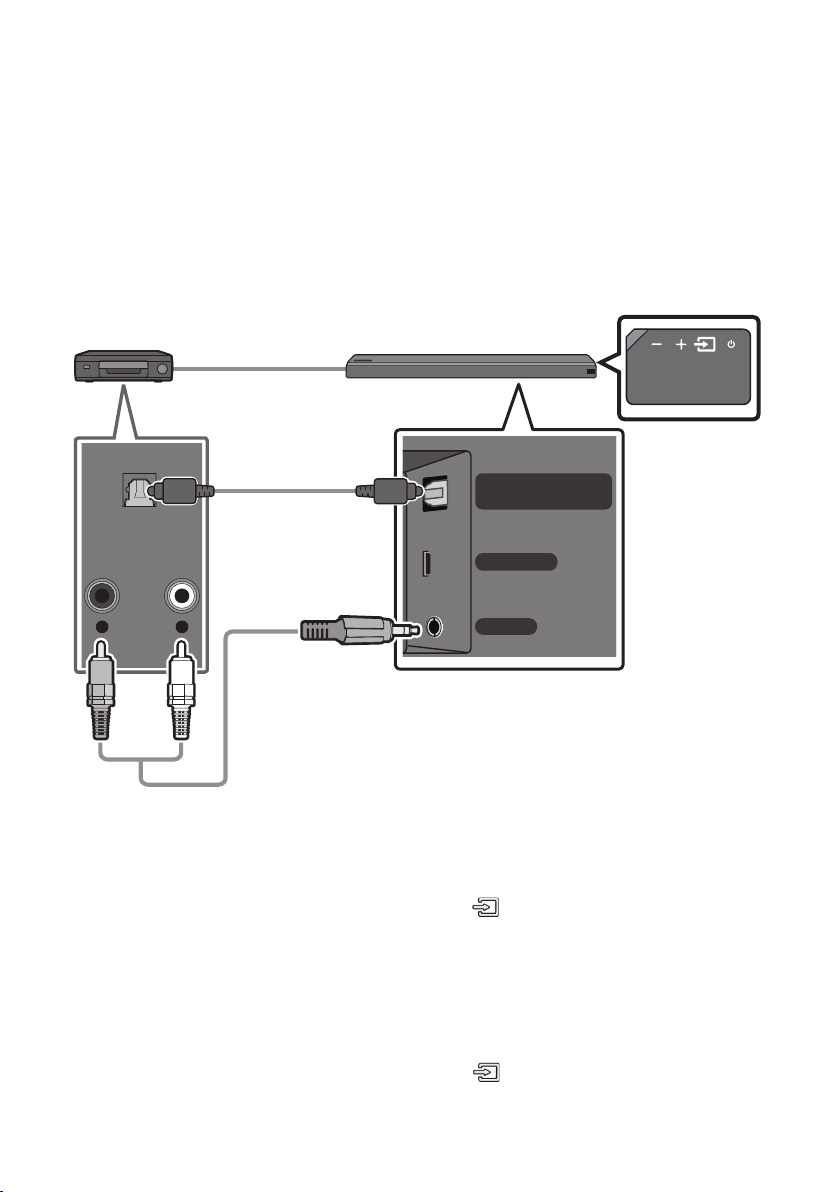
FRA - 13
05 BRANCHEMENT D’UN PÉRIPHÉRIQUE
EXTERNE
Établissez une connexion à un périphérique externe à l’aide d’un réseau laire ou sans l an de diffuser
le son de celui-ci sur le Soundbar.
Connexion à l’aide d’un câble optique ou audio analogue (AUX)
WIRELESS
AUX IN
DIGITAL AUDIO IN
(OPTICAL)
R L
OPTICAL OUT
- AUDIO -
Câble optique
OU
Câble audio (AUX)
(non fourni)
Arrière du Soundbar
Lecteur BD/DVD / Décodeur /
Console de jeu
Face droite du Soundbar
Câble optique
X Branchez le connecteur DIGITAL AUDIO IN (OPTICAL) de l’unité principale sur le connecteur
OPTICAL OUT du périphérique source à l’aide d’un câble optique numérique.
Y Sélectionnez le mode «D.IN» en appuyant sur le bouton (Source) sur la face latérale droite ou
sur la télécommande.
OU
Câble audio (AUX)
X Branchez le connecteur AUX IN (Audio) de l’unité principale sur le connecteur AUDIO OUT du
périphérique source à l’aide d’un câble audio.
Y Sélectionnez le mode «AUX» en appuyant sur le bouton (Source) sur la face latérale droite ou
sur la télécommande.
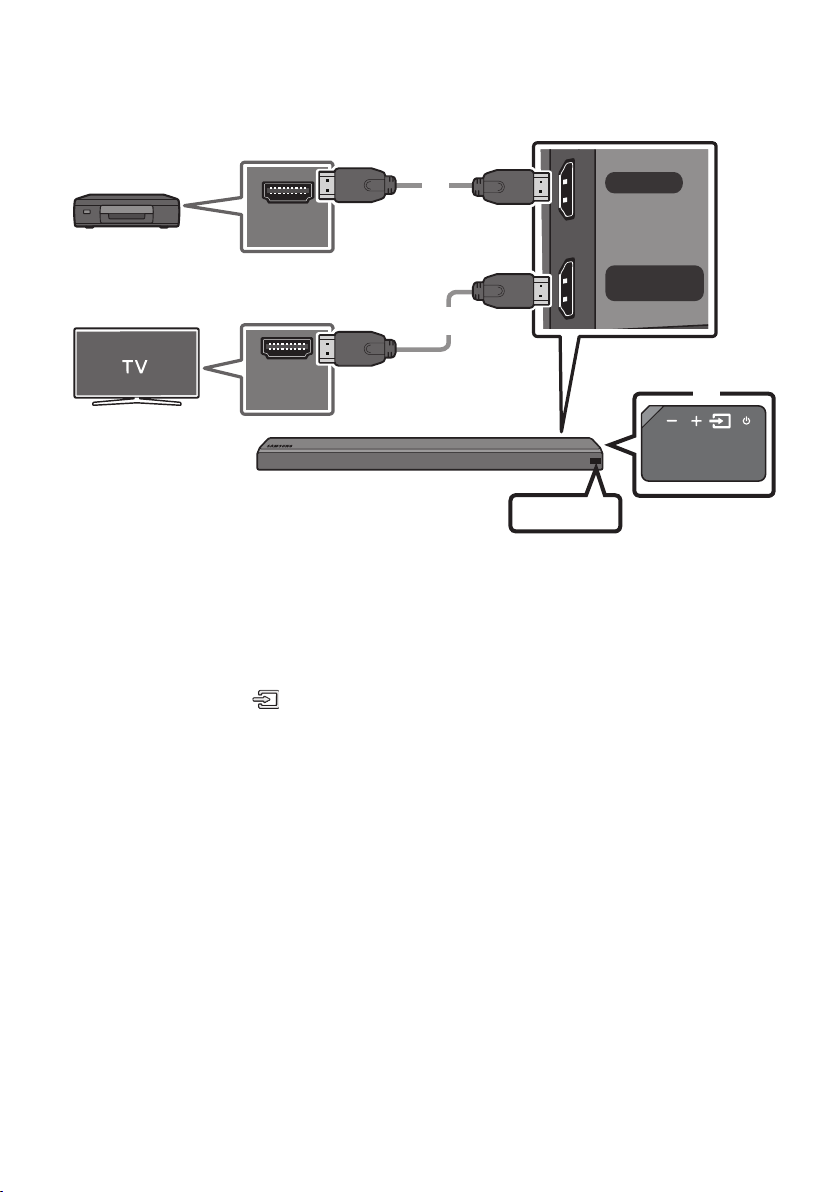
FRA - 14
Branchement à l’aide d’un câble HDMI
HDMI IN
HDMI OUT
(TV-ARC)
HDMI OUT
HDMI IN
(ARC)
Câble HDMI
(non fourni)
Câble HDMI
(non fourni)
Arrière du Soundbar
Périphérique externe
HDMI
Face droite du
Soundbar
1. Branchez un câble HDMI (non fourni) entre le connecteur HDMI IN situé à l’arrière du produit et le
connecteur HDMI OUT de votre périphérique numérique.
2. Branchez un câble HDMI (non fourni) entre le connecteur HDMI OUT (TV-ARC) situé à l’arrière du
produit et le connecteur HDMI IN de votre téléviseur.
3. Appuyez sur le bouton (Source) situé sur la face latérale droite ou sur la télécommande, puis
sélectionnez le mode «HDMI».
4. Le mode «HDMI» est afché sur l’écran d’afchage du Soundbar et le son est diffusé.
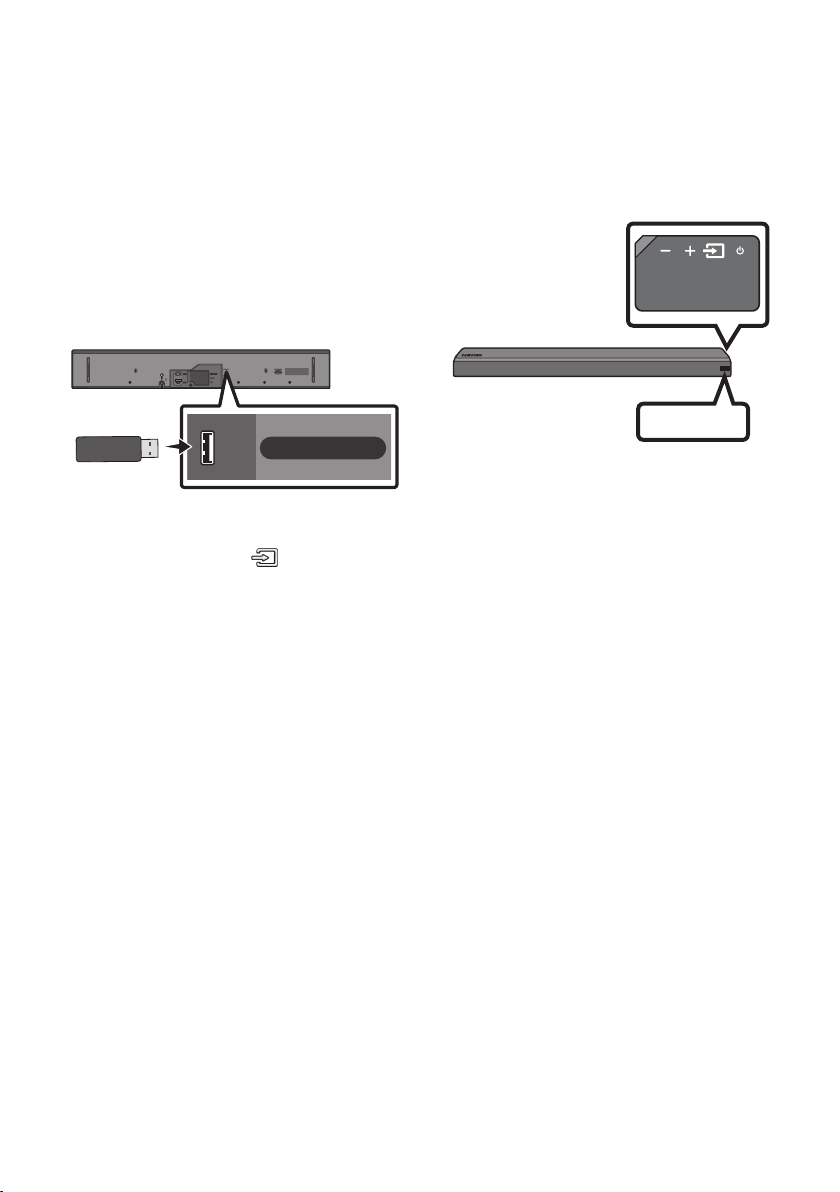
FRA - 15
06 BRANCHEMENT D’UN PÉRIPHÉRIQUE
USB
Vous pouvez diffuser des morceaux se trouvant sur des périphériques de stockage à l’aide du Soundbar.
USB
Afchage
Port USB
Wi-Fi SETUP SPK ADD
HDMI IN
USB (5V 0.5A)
HDMI OUT
(TV-ARC)
WIRELESS
AUX IN
DIGITAL AUDIO IN
(OPTICAL)
POWER
IN
POWER
OUT
(For TV)
USB (5V 0.5A)
1. Connectez le périphérique USB au port USB situé sur le produit.
2. Appuyez sur le bouton (Source) situé sur la face latérale droite ou sur la télécommande, puis
sélectionnez le mode «USB».
3. «USB» apparaît sur l’écran d’afchage.
4. Diffusez des morceaux à partir du périphérique de stockage via le Soundbar.
• Le Soundbar se désactive automatiquement (Extinction automatique) si aucun périphérique
USB n’est connecté depuis plus de 5 minutes.

FRA - 16
Liste de compatibilité
Rallonge Codec Taux d’échantillonnage Débit binaire
*.mp3 MPEG 1 Layer2 16 KHz à 48 KHz 80 à 320 kbps
MPEG 1 Layer3 16 KHz à 48 KHz 80 à 320 kbps
MPEG 2 Layer3 16 KHz à 48 KHz 80 à 320 kbps
MPEG 2.5 Layer3 16 KHz à 48 KHz 80 à 320 kbps
*.wma Wave_Format_MSAudio1 16 KHz à 48 KHz 56 à 128 kbps
Wave_Format_MSAudio2 16 KHz à 48 KHz 56 à 128 kbps
*.aac AAC 16 KHz à 96 KHz 48 à 320 kbps
A AC- LC 16 KHz à 96 KHz
128 à 192 kbps
5,1 canaux 320 kbps
HE-AAC 24 KHz à 96 KHz
48 à 64 kbps
5,1 canaux 160 kbps
*.wav - 16 KHz à 48 KHz jusqu’à 3000 kbps
*.ogg OGG 1.1.0 16 KHz à 48 KHz 50 à 500 kbps
*.ac FLAC 1.1.0, FLAC 1.2.1 16 KHz à 96 KHz jusqu’à 3000 kbps
• Si un trop grand nombre de dossiers et de chiers sont stockés sur le périphérique USB, le
Soundbar peut mettre un certain temps pour accéder aux chiers et les lire.
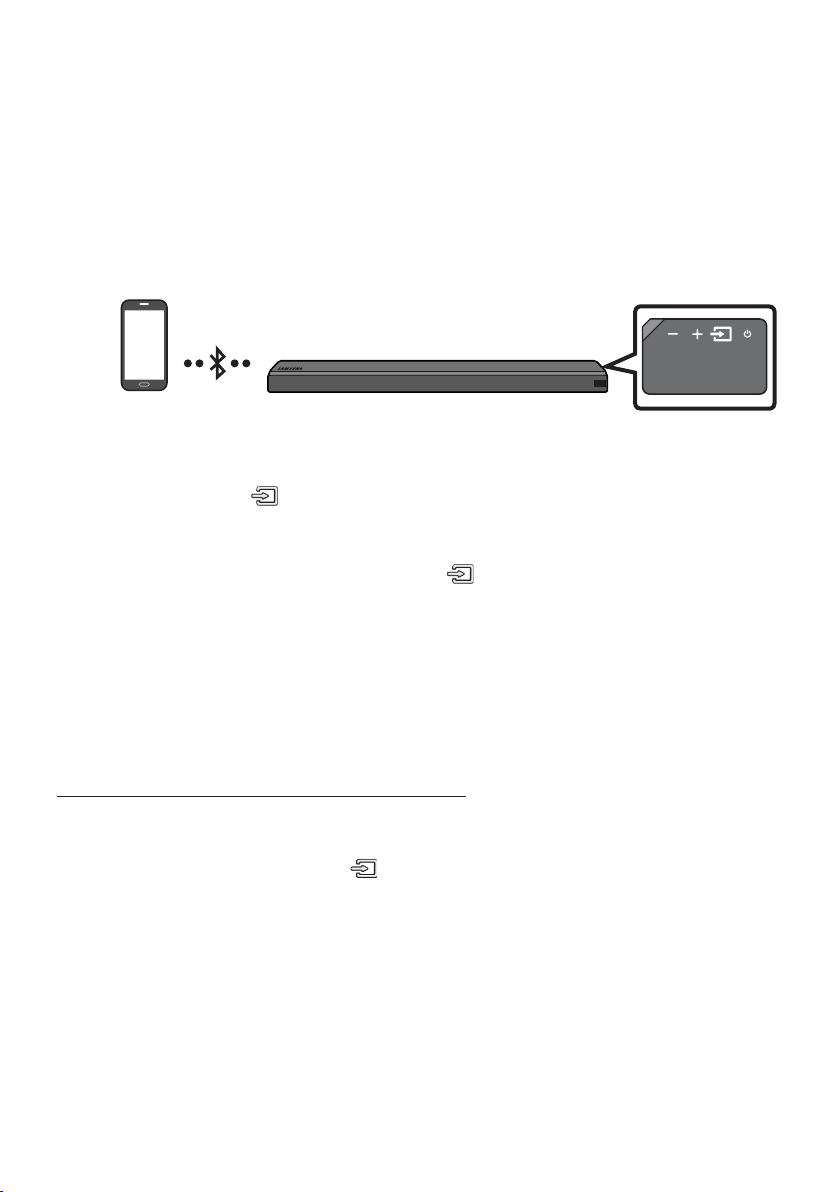
FRA - 17
07 BRANCHEMENT D’UN APPAREIL MOBILE
Méthode 1. Connexion par Bluetooth
Lorsqu’un appareil mobile est connecté par Bluetooth, vous pouvez proter du son stéréo sans vous
encombrer avec des câbles.
• Vous ne pouvez pas connecter plusieurs périphériques Bluetooth simultanément.
Périphérique Bluetooth
Connexion initiale
1. Appuyez sur le bouton (Source) situé sur la face latérale droite ou sur la télécommande, puis
sélectionnez le mode «BT».
2. Choisissez «BT PAIRING» à la place de «BT».
• Si «BT READY» apparaît, appuyez sur le bouton (Source) situé sur la face latérale droite du
Soundbar ou sur la télécommande et maintenez-le enfoncé pendant plus de 5 secondes pour
afcher «BT PAIRING».
3. Sélectionnez «[AV] Samsung Soundbar MSxxx» dans la liste.
• Lorsqu’un Soundbar est connecté au périphérique Bluetooth, [Nom du périphérique Bluetooth]
→ «BT» apparaît sur l’écran situé à l’avant.
4. Lisez des morceaux depuis le périphérique, connecté par Bluetooth, via le Soundbar.
En cas d’échec de la connexion du périphérique
• Si l’entrée correspondant au Soundbar précédemment connecté (par ex., «[AV] Samsung Soundbar
MSxxx» gure dans la liste, supprimez-la.
• En mode «BT», appuyez sur le bouton (Source) situé sur la face latérale droite du Soundbar ou
sur la télécommande et maintenez-le enfoncé pendant plus de 5 secondes pour passer en mode
«BT PAIRING».
Ensuite, sélectionnez «[AV] Samsung Soundbar MSxxx» dans la liste de recherche de
périphériques Bluetooth.

FRA - 18
QuesignientlesstatutsBTREADYetBTPAIRING?
• BT READY : Dans ce mode, vous pouvez rechercher les téléviseurs précédemment connectés ou
vous connecter au Soundbar à partir d’un appareil mobile précédemment connecté.
• BT PAIRING : Dans ce mode, vous pouvez vous connecter à un nouveau périphérique. (Lorsque vous
êtes en mode «BT», appuyez sur le bouton
(Source)
situé sur le côté droit du Soundbar ou sur la
télécommande et maintenez-le enfoncé pendant plus de 5 secondes.)
REMARQUES
• Si vous êtes invité à saisir un code PIN lors de la connexion à un périphérique Bluetooth, entrez
<0000>.
• En mode de connexion Bluetooth, la connexion Bluetooth est perdue si la distance entre le
Soundbar et le périphérique Bluetooth est supérieure à 32,8 pi.
• Le Soundbar se désactive automatiquement après avoir passé 5 minutes à l’état Prêt.
• Il se peut que le Soundbar n’effectue pas correctement la recherche ou la connexion Bluetooth
dans les cas suivants :
– En présence d’un champ électrique puissant dans l’environnement du Soundbar.
– En cas d’appariement simultané de plusieurs périphériques Bluetooth avec le Soundbar.
– En cas de désactivation, de mauvais positionnement ou de dysfonctionnement du périphérique
Bluetooth.
• Les appareils électroniques peuvent créer des interférences radio. Les appareils produisant des
ondes électromagnétiques doivent être gardés à distance de l’unité principale du Soundbar, par
exemple les micro-ondes, les appareils de réseau sans l, etc.
• Le Soundbar prend en charge les données SBC (44,1kHz, 48kHz).
• La connexion est possible uniquement sur un périphérique Bluetooth compatible avec la fonction
A2DP (AV).
• Vous ne pouvez pas brancher le Soundbar à un dispositif Bluetooth qui prend seulement en charge
la fonction HF (Hands Free).
• Une fois l’appariement du Soundbar avec un périphérique Bluetooth réalisé, la sélection de
“[AV] Samsung Soundbar MSxxx” dans la liste des périphériques numérisés de l’appareil fera
automatiquement passer le Soundbar en mode BT.
– Accessible seulement si le Soundbar est énuméré dans la liste des dispositifs Bluetooth
appariés. (Le dispositif Bluetooth et le Soundbar doivent avoir été appariés précédemment au
moins une fois.)
• Soundbar apparaîtra dans la liste des appareils recherchés du dispositif Bluetooth seulement si le
Soundbar afche la mention BT READY.
• Le Soundbar ne peut pas être jumelé à un autre appareil Bluetooth lorsque la fonction Bluetooth
est en cours d’utilisation.

FRA - 19
Déconnexion d’un périphérique Bluetooth d’un Soundbar
Vous pouvez déconnecter le périphérique Bluetooth à partir du système Soundbar. Pour des directives,
consultez le manuel d’utilisation du périphérique Bluetooth.
• Le système Soundbar sera déconnecté.
• Lorsque le système Soundbar est déconnecté du périphérique Bluetooth, Soundbar afche le
message BT DISCONNECTED sur le panneau avant.
Déconnexion du Soundbar du périphérique Bluetooth
Appuyez sur le bouton (Source) situé sur la face latérale droite ou sur la télécommande, puis
sélectionnez un autre mode que «BT».
• La déconnexion prend du temps car le périphérique Bluetooth doit recevoir une réponse du
Soundbar. (Le temps de déconnexion requis peut différer en fonction du périphérique Bluetooth.)
• Lorsque le Soundbar est déconnecté du périphérique Bluetooth, le message
«BT DISCONNECTED» s’afche sur l’écran à l’avant du Soundbar.
REMARQUES
• En mode de connexion Bluetooth, la connexion Bluetooth sera perdue si la distance entre Soundbar
et l’appareil dépasse 32,8 pi.
• Le périphérique s’éteint automatiquement au bout de 5 minutes dans l’état Prêt.
Davantage d’information sur la technologie Bluetooth
Bluetooth est une technologie facilitant l’interconnexion d’appareils compatibles Bluetooth via une
connexion sans l à faible distance.
• Un appareil Bluetooth peut engendrer des bruits ou un dysfonctionnement selon les conditions
d’utilisation:
– Si une partie du corps est en contact avec le système de réception/transmission du
périphérique Bluetooth ou du système Soundbar.
– Variations électriques dues à un brouillage du signal par un mur, un coin ou une cloison de
bureau.
– Interférences électriques causées par des appareils fonctionnant sur la même bande de
fréquence, notamment équipements médicaux, fours à micro-ondes et réseaux locaux sans l.
• Maintenez la distance la plus courte possible lorsque vous jumelez le système Soundbar avec le
périphérique Bluetooth.
• La qualité diminue parallèlement à la distance entre le système Soundbar et le périphérique
Bluetooth. Si la distance excède la portée opérationnelle du périphérique Bluetooth, la connexion
est perdue.
• La connexion Bluetooth peut s’avérer déciente dans les zones à faible réception.
• La connexion Bluetooth ne fonctionne que lorsque l’appareil concerné est à proximité de l’unité. La
connexion sera automatiquement interrompue si la distance excède la portée. Même dans les limites
de cette portée, des obstacles tels que des murs ou des portes peuvent dégrader la qualité sonore.
• Le fonctionnement de ce périphérique sans l peut engendrer un brouillage électrique.
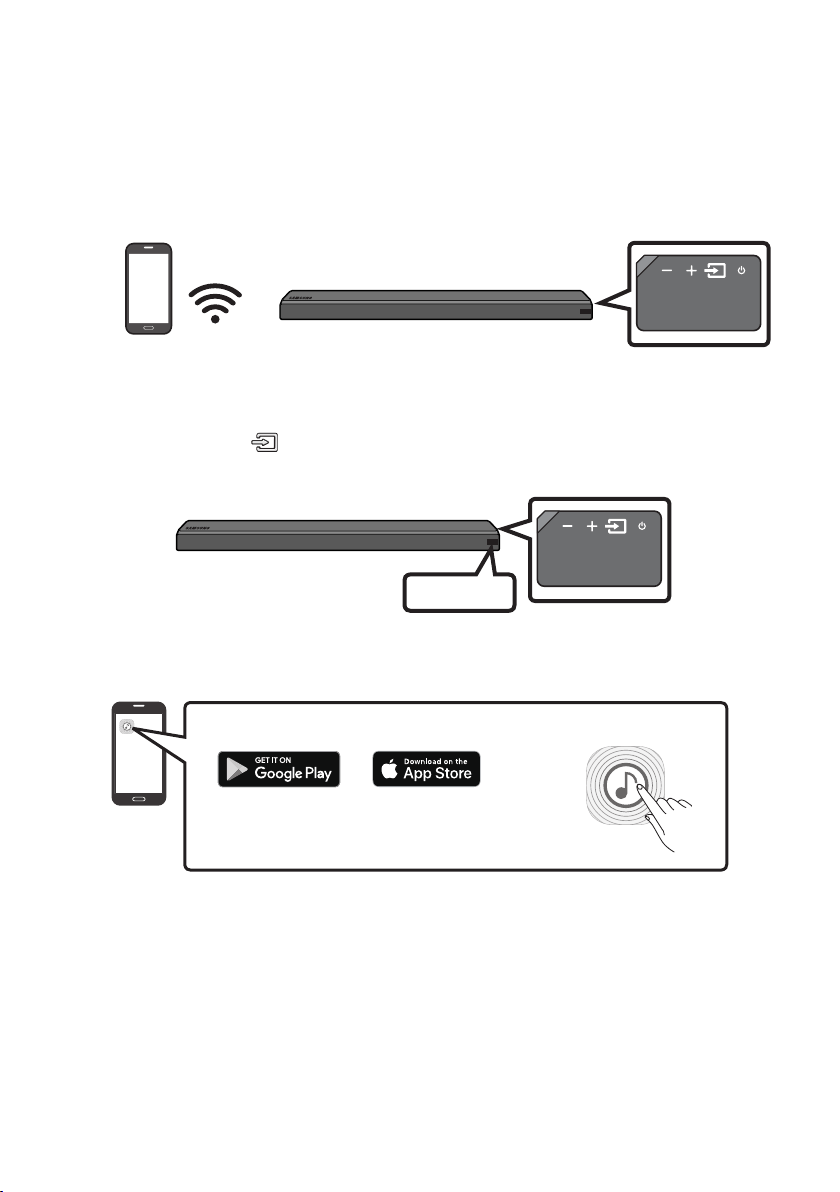
FRA - 20
Méthode2.ConnexionviaWi-Fi(réseausansl)
• Connectez une seule Soundbar au Wi-Fi pour accéder à toute une gamme de services de diffusion
de musique en continu et à la radio sur Internet. Connectez plusieurs Soundbars au Wi-Fi pour
utiliser la lecture groupée ou le mode de son stéréo.
• Pour connecter une Soundbar à un appareil mobile via un réseau sans l (Wi-Fi), l’application
Samsung Multiroom est nécessaire.
Appareil mobile
Connexion initiale
1. Appuyez sur le bouton (Source) sur le côté droit de la Soundbar ou sur la télécommande pour
sélectionner le mode «WIFI».
WIFI
2. Installez et lancez l’application Samsung Multiroom sur votre appareil mobile (par exemple,
téléphone intelligent ou tablette).
iOS
Android
Application Samsung Multiroom
3. Suivez les instructions de l’application à l’écran sur l’appareil mobile pour connecter la Soundbar au
Wi-Fi.
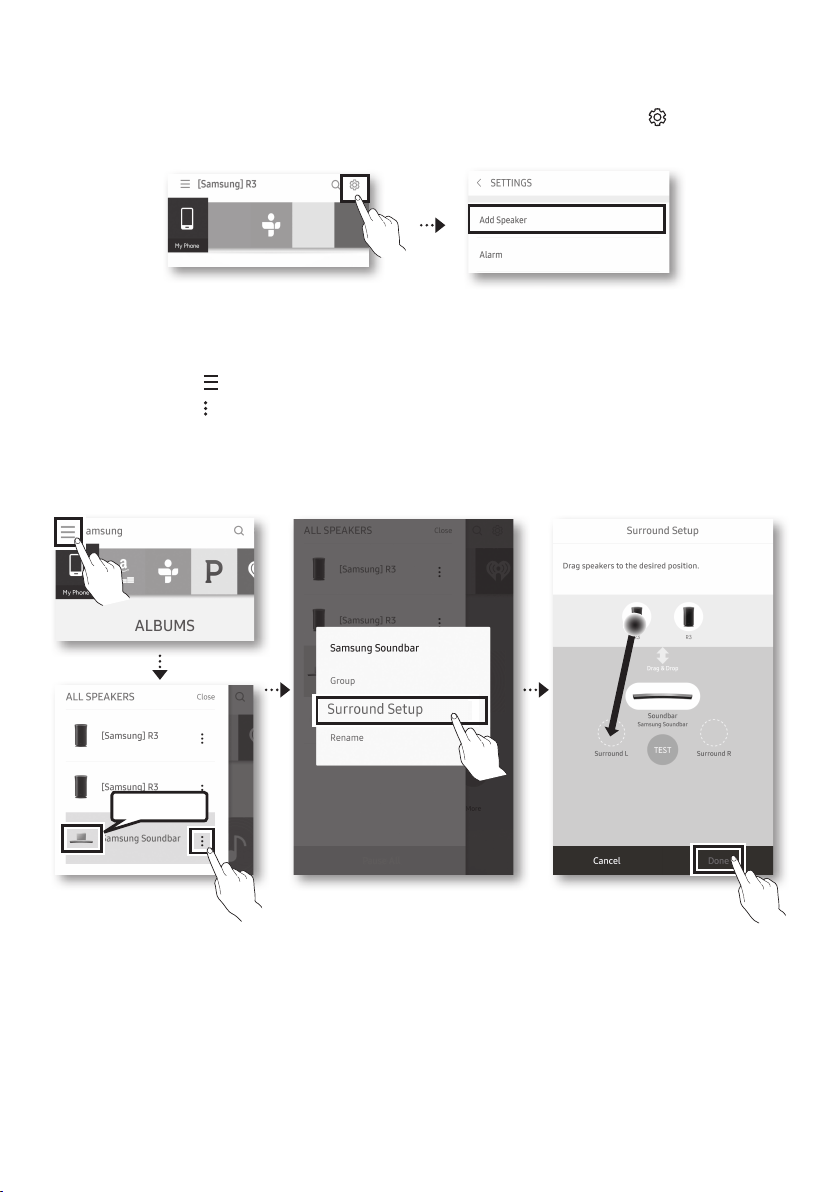
FRA - 21
Installationd’uneSoundbarsupplémentairelorsquedesenceintessanslSamsungsont
déjà en cours d’utilisation
1. Sur l’écran Accueil de application Samsung Multiroom, sélectionnez Réglages ( ) en haut, puis
«Add Speaker».
2. Pour connecter la Soundbar à 2enceintesSamsungsansl et congurer un système de son
d’ambiance, suivez les étapes ci-dessous. (Vous ne pouvez pas congurer un système de son
d’ambiance en utilisant un appareil audio et une Soundbar.)
X Appuyez sur pour accéder à la liste complète des enceintes.
Y Appuyez sur à droite du nom de modèle de la Soundbar.
Z Appuyez sur Surround Setup. Après avoir déplacé l’enceinte à l’endroit souhaité, sélectionnez
Done.
[ La connexion à l’enceinte d’ambiance est effectuée.
Soundbar
REMARQUE
• Pour connecter un appareil SWA-9000S supplémentaire (non fourni), déconnectez les enceintes
sans l Samsung de la Soundbar pour désactiver le système de son d’ambiance. (Si vous connectez
les enceintes d’ambiance sans déconnecter l’appareil SWA-9000S, le son sort à la fois via l’enceinte
sans l Samsung et l’enceinte d’ambiance.)
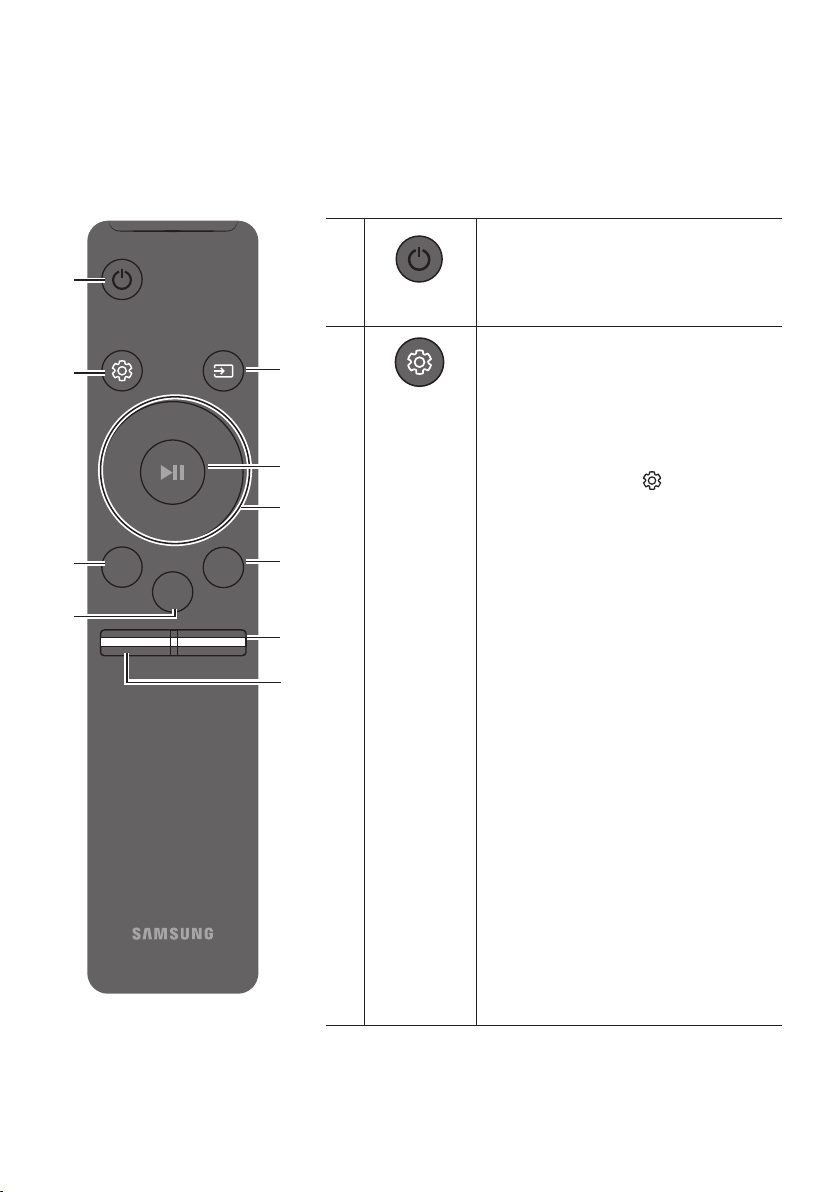
FRA - 22
08 UTLISATION DE LA TÉLÉCOMMANDE
Procédure d’utilisation de la télécommande
Surround
VOL BASS
SOUNDBAR
SOUND
MODE
SMART
MODE
Alimentation
Surround
VOL WOOFER
SOUND
MODE
Bluetooth
POWER
Permet d'allumer et d'éteindre le Soundbar.
Contrôle du son
Surround
VOL WOOFER
SOUND
MODE
Bluetooth
POWER
Vous pouvez sélectionner TREBLE, SYNC,
REAR LEVEL ou REAR SPEAKER ON/OFF.
• Pour régler le volume TREBLE,
sélectionnez le contrôle sonore TREBLE,
puis utilisez les boutons Haut/Bas pour
régler le volume sur la plage de -6 à +6.
• Appuyez sur la touche (Contrôle du son)
et maintenez-la enfoncée pendant environ
5 secondes pour régler le son de chaque
bande de fréquence.
Fréquences disponibles : 150 Hz, 300 Hz,
600 Hz, 1,2 KHz, 2,5 KHz, 5 KHz et 10 KHz
(Gauche/Droite), avec un réglage de -6 à +6
(Haut/Bas).
• Si la vidéo et l’audio ne sont pas
synchronisés entre le téléviseur et votre
Soundbar, sélectionnez SYNC dans le
contrôle sonore, puis réglez le délai audio
(entre 0 et 300 millisecondes) en utilisant
les boutons Haut/Bas.
(Sauf le mode
«USB»)
• Si les enceintes d’ambiance (non fournies)
sont connectées, sélectionnez REAR LEVEL
et utilisez les boutons Haut/Bas pour
régler le volume sur la plage de -6 à +6.
La fonction REAR SPEAKER peut être
dénie sur ON/OFF à l’aide des boutons
Haut/Bas.
• La fonction Synchronisation audio est
uniquement prise en charge dans certaines
fonctions.
FRA - 23
Surround
Surround
VOL WOOFER
SOUND
MODE
Bluetooth
POWER
La fonction Son ambiophonique permet d'ajouter de la profondeur et un sentiment
d'espace au son. Ce bouton vous permet d'activer ou de désactiver la fonction.
• ON : permet de diffuser le son par tous les haut-parleurs.
• OFF : le son du canal source d’origine est diffusé par plusieurs haut-parleurs.
SOUND MODE
Surround
VOL WOOFER
SOUND
MODE
Bluetooth
POWER
Vous pouvez sélectionner l'effet sonore de votre choix parmi STANDARD, MUSIC, CLEAR
VOICE, SPORTS, ou MOVIE.
Sélectionnez le mode «STANDARD» si vous voulez proter du son d'origine.
• DRC (Dynamic Range Control)
Vous permet d’appliquer la commande de portée dynamique aux pistes Dolby Digital.
Si vous appuyez sur le bouton SOUND MODE et que vous le maintenez enfoncé en
mode Veille, la fonction DRC (Dynamic Range Control) s’active ou se désactive.
Lorsque la fonction DRC est activée, le son fort est réduit. (Le son peut être déformé.)
Surround
VOL WOOFER
SOUND
MODE
Bluetooth
POWER
Source
Appuyez sur ce bouton pour sélectionner une source connectée au Soundbar.
• Mode BT PAIRING
Pour activer le mode «BT PAIRING» en mode «BT», appuyez sur le
bouton (Source) et maintenez-le enfoncé pendant plus de 5 secondes.
Pour plus de détails, reportez-vous à la page 17.
• Fonction Auto Power Down
L’unité se met automatiquement hors tension dans les situations suivantes.
– Mode D.IN / WIFI / BT / USB: si, pendant 5 minutes, aucun signal audio n’est émis.
– Mode HDMI: si, pendant 15 minutes, aucun signal audio n’est émis.
– Mode AUX :
– Si le câble audio (AUX) est débranché pendant 5 minutes.
– Si aucune saisie n’est effectuée pendant 8 heures alors que le câble audio
(AUX) est branché. (Vous pouvez désactiver la fonction Auto Power Down
uniquement dans ce cas.)
– Pour désactiver la fonction Auto Power Down, vériez que vous êtes en mode
«AUX», puis appuyez sur le bouton p et maintenez-le enfoncé pendant
5 secondes. «ON-AUTO POWER DOWN» / «OFF-AUTO POWER DOWN»
s’afche à l’écran.
Lecture/Pause
(BT/Wi-Fi)
Surround
VOL WOOFER
SOUND
MODE
Bluetooth
POWER
Appuyez sur le bouton p pour mettre temporairement un morceau en pause.
Si vous appuyez à nouveau sur le bouton, le morceau est lu.
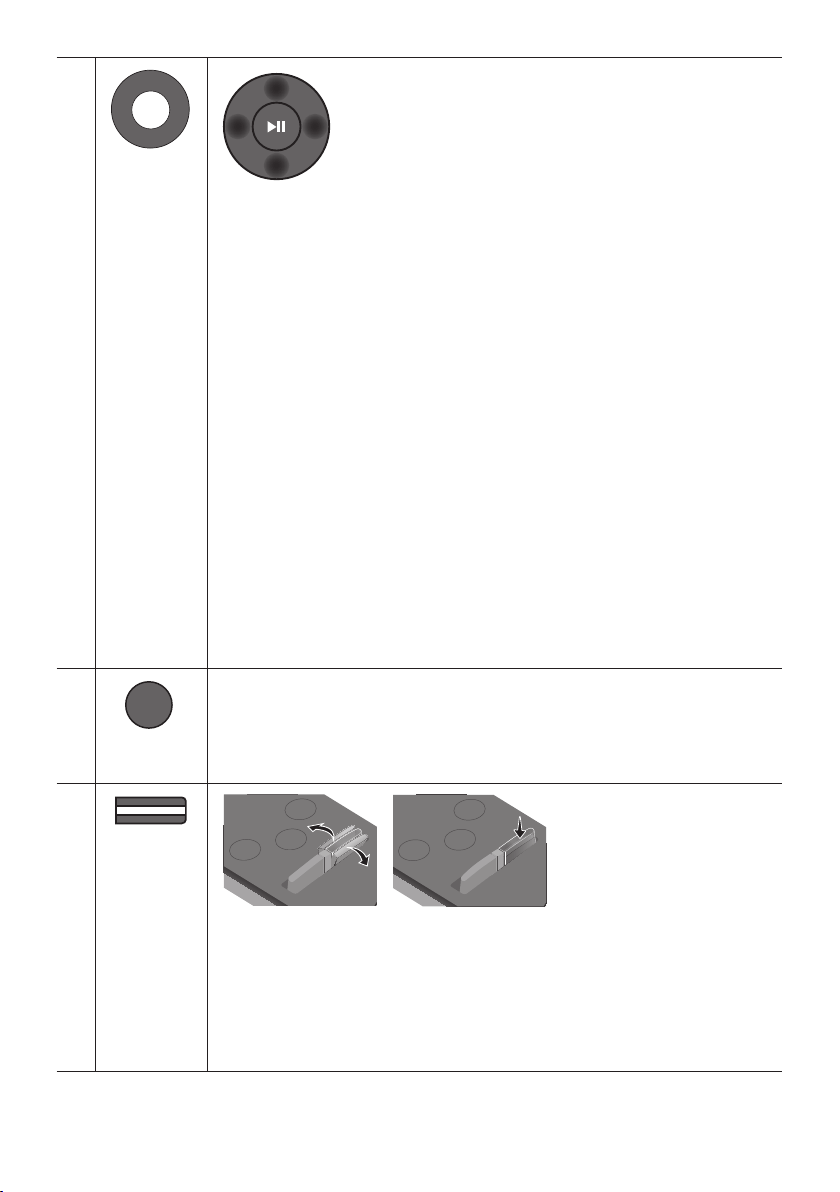
FRA - 24
Surround
VOL WOOFER
SOUND
MODE
Bluetooth
POWER
Haut/Bas/
Gauche/
Droite
Appuyez sur les zones indiquées pour sélectionner le bouton
du Haut/Bas/Gauche/Droite.
Appuyez sur le bouton du Haut/Bas/Gauche/Droite pour sélectionner ou dénir des
fonctions.
• Répéter
Pour utiliser la fonction de répétition, appuyez sur le bouton Haut.
• Passer un morceau
Appuyez sur le bouton de Droite pour sélectionner le prochain morceau. Appuyez sur
le bouton de Gauche pour sélectionner le morceau précédent.
• Anynet+ / Auto Power Link
Vous pouvez activer ou désactiver la fonction Anynet+ ou Auto Power Link.
Les fonctions Anynet+ et Auto Power Link sont contrôlées à l’aide des boutons de
Droite et de Gauche respectivement.
– Anynet+ : si le Soundbar est relié à un téléviseur Samsung par un câble HDMI,
vous pouvez le commander à l’aide de la télécommande du téléviseur.
Appuyez sur le bouton de Droite et maintenez-le enfoncé pendant 5 secondes
pour régler la fonction Anynet+ sur ON ou OFF.
– Auto Power Link : si le Soundbar est connecté à votre téléviseur par le biais d’un
câble optique numérique, le Soundbar peut s’activer automatiquement lorsque
vous allumez votre téléviseur. Appuyez sur le bouton de Gauche et maintenez-le
enfoncé pendant 5 secondes pour régler la fonction Auto Power Link sur ON ou
OFF.
– Les fonctions Anynet+/Auto Power Link sont réglées sur ON par défaut.
Surround
VOL BASS
SOUND
MODE
SMART
MODE
SMART MODE
Optimise automatiquement les effets sonores en fonction de la scène en cours.
Le mode est activé ou désactivé à chaque pression sur le bouton.
Surround
VOL BASS
SOUND
MODE
SMART
MODE
BASS
Surround
SOUND
MODE
SMART
MODE
VOL
BASS
SOUNDBAR
Surround
SOUND
MODE
SMART
MODE
VOL
BASS
SOUNDBAR
Surround
SOUND
MODE
SMART
MODE
VOL
BASS
SOUNDBAR
Surround
SOUND
MODE
SMART
MODE
VOL
BASS
SOUNDBAR
Appuyez sur le bouton vers le haut ou vers le bas pour régler le volume BASS sur la
plage allant de -6 à +6. Pour régler le niveau de volume BASS sur 0, appuyez sur le
bouton.
• Lorsqu’un caisson de basse (non fourni) est connecté, le bouton BASS devient la
touche associée. Appuyez sur le bouton vers le haut ou vers le bas pour régler le
volume du caisson de basse sur -12 ou sur la plage allant de -6 à +6. Pour dénir le
niveau de volume du caisson de basse sur 0, appuyez sur le bouton.

FRA - 25
Surround
VOL WOOFER
SOUND
MODE
Bluetooth
POWER
VOL
Surround
SOUND
MODE
SMART
MODE
VOL
BASS
SOUNDBAR
Surround
SOUND
MODE
SMART
MODE
VOL
BASS
SOUNDBAR
Surround
SOUND
MODE
SMART
MODE
VOL
BASS
SOUNDBAR
Surround
SOUND
MODE
SMART
MODE
VOL
BASS
SOUNDBAR
Appuyez sur le bouton vers le haut ou vers le bas pour régler le volume.
• Mise en sourdine
Appuyez sur le bouton VOL pour couper le son. Appuyez à nouveau sur le bouton
pour rétablir le son.
Réglage du volume du Soundbar à l’aide d’une télécommande de
téléviseur
Utilisez le menu du téléviseur pour choisir des haut-parleurs externes comme haut-parleur
d’un téléviseur Samsung. (Pour plus d’informations, reportez-vous au manuel utilisateur
du téléviseur.)
• Après avoir installé le Soundbar, vous pouvez régler son volume à l’aide de la télécommande
infrarouge fournie avec le téléviseur Samsung. (Si vous ne voulez pas utiliser cette fonction, allumez
le Soundbar, appuyez sur le bouton Surround et maintenez-le enfoncé pendant 5 secondes.
Le message «OFF-TV REMOTE» apparaît sur l’écran du Soundbar et la fonction est désactivée.)
Pour régler le volume seulement à l’aide de la télécommande du téléviseur Samsung, appuyez sur
le bouton Surround et maintenez-le enfoncé pendant plus de 5 secondes, jusqu’à ce que le message
«SAMSUNG-TV REMOTE» s’afche sur l’écran du Soundbar.
– Chaque fois que vous appuyez sur le bouton Surround et que vous le maintenez pendant
5 secondes, le mode change dans l’ordre suivant: «SAMSUNG-TV REMOTE» (Mode par défaut)
→ «OFF-TV REMOTE» → «ALL-TV REMOTE».
• Pour régler le volume du Soundbar à l’aide de la télécommande fournie avec un téléviseur d’un
fabricant tiers, allumez le Soundbar, appuyez sur le bouton Surround et maintenez-le pendant
5 secondes (le message «OFF-TV REMOTE» s’afche sur l’écran de Soundbar), relâchez le bouton
Surround, puis appuyez à nouveau sur le bouton et maintenez-le pendant plus de 5 secondes.
(«ALL-TV REMOTE» apparaît sur l’écran du Soundbar.)
– Cette fonction peut ne pas être disponible en fonction de la télécommande.
– Fabricants qui utilisent cette fonction:
VIZIO, LG, Sony, Sharp, PHILIPS, PANASONIC, TOSHIBA, GRUNDIG, Hisense, RCA
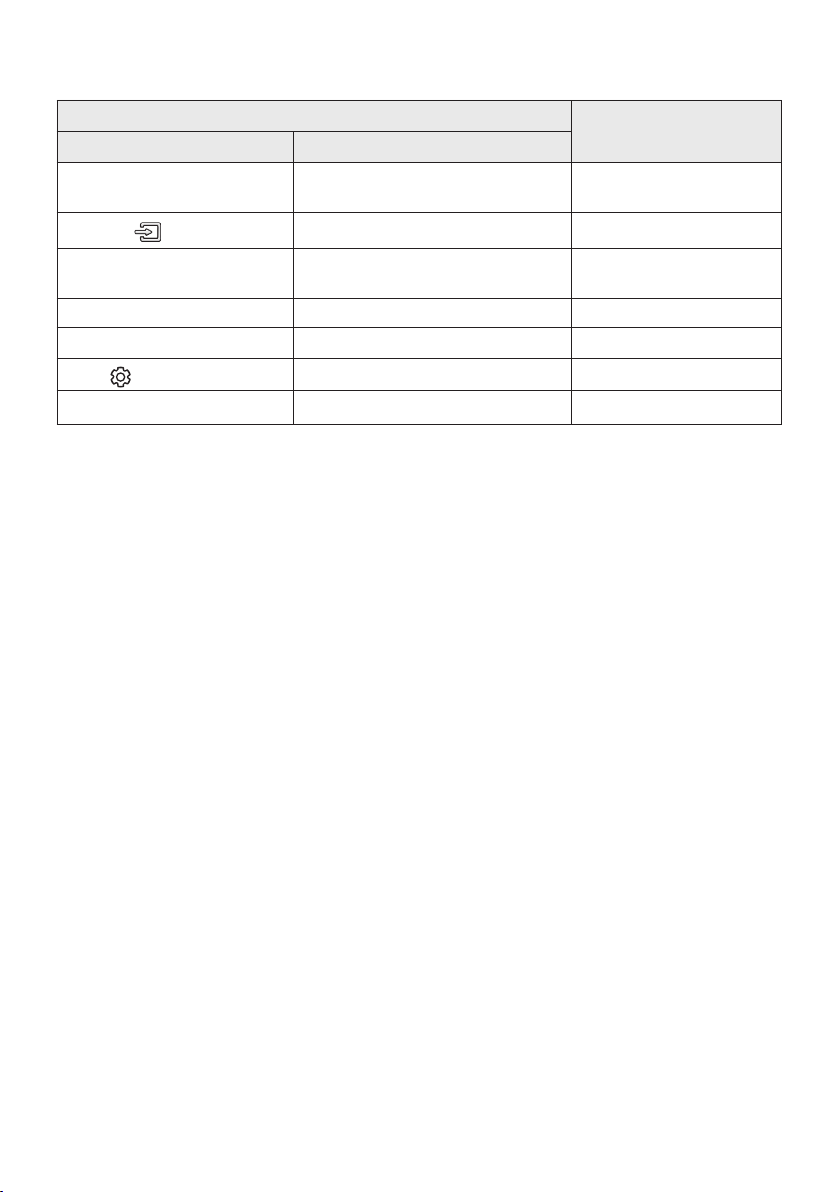
FRA - 26
Utilisation des boutons masqués
Bouton masqué
Page de référence
Bouton de la télécommande Fonction
Surround
Activer/Désactiver la fonction
Télécommande de votre téléviseur
Page 25
(Source)
Appariement BT Page 17
p (Lecture/Pause)
Activer/Désactiver la fonction
Auto Power Down (mode AUX)
Page 23
Gauche Auto Power Link ON/OFF Page 7
Droite Anynet+ ON/OFF Page 24
(Contrôle du son)
EQ 7 bandes Page 22
SOUND MODE DRC ON/OFF (mode veille) Page 23
09 MISE À JOUR LOGICIELLE
Lorsque la Soundbar est connectée à Internet, des mises à jour logicielles se font automatiquement,
même lorsque la Soundbar est éteinte.
• Pour utiliser la fonction de mise à jour automatique, la Soundbar doit être connectée à Internet. La
connexion Wi-Fi à la Soundbar sera interrompue si son cordon d’alimentation est débranché ou si
l’alimentation est coupée. Si l’alimentation est coupée, allumez la Soundbar et reconnectez-la.
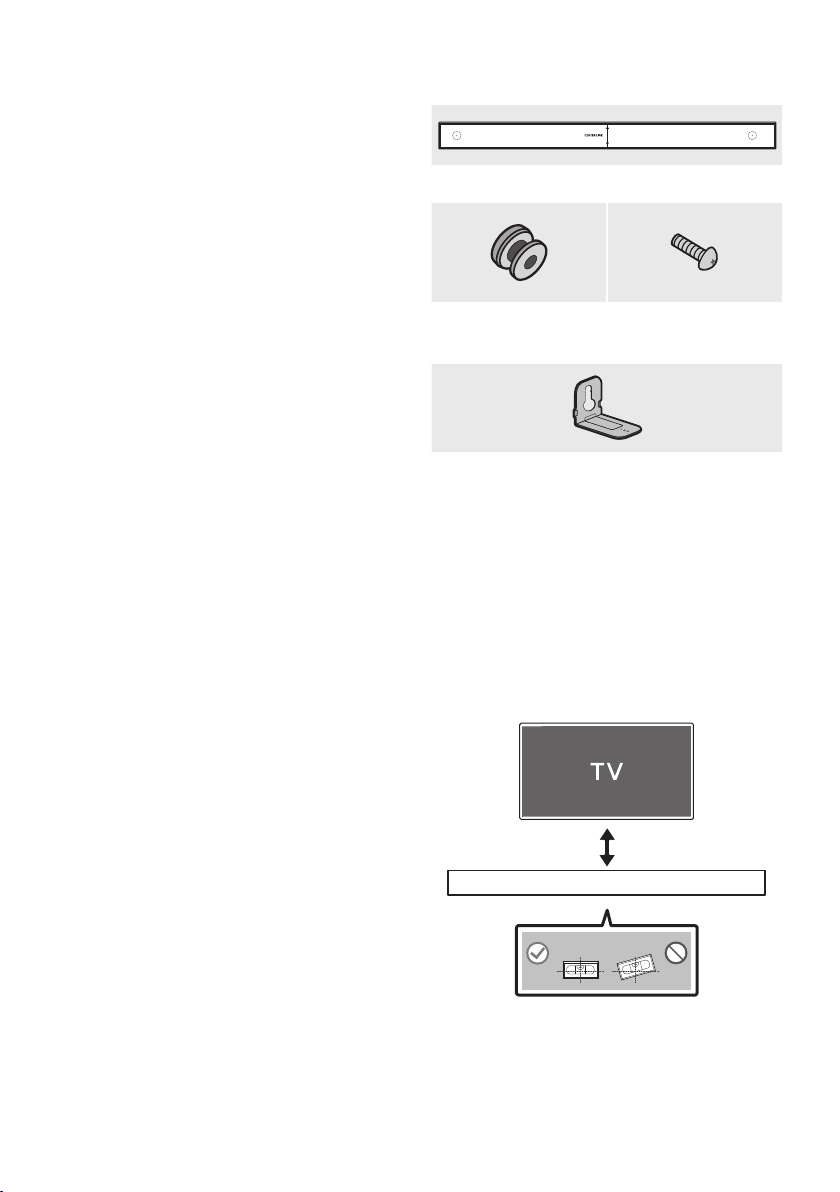
FRA - 27
10 INSTALLATION
DU SUPPORT
MURAL
Précautions d’installation
• Effectuez l’installation sur un mur vertical
uniquement.
• N’installez pas le produit dans un endroit où
la température ou l’humidité sont élevées.
• Vériez si le mur est sufsamment solide
pour supporter le poids du produit. Sinon,
renforcez le mur ou choisissez un autre
endroit pour l’installation.
• Achetez et utilisez les chevilles ou les vis de
xation adaptées au type de mur (plâtre,
métal, bois, etc.). Si possible, xez les vis de
support sur les montants des murs.
• Achetez des vis de montage mural en
fonction du type et de l’épaisseur du mur sur
lequel vous souhaitez installer le Soundbar.
– Diamètre: M5
– Longueur : 1 3/8 pouces ou plus long.
• Raccordez les câbles de l’unité à des
périphériques externes avant de xer le
Soundbar au mur.
• Assurez-vous que l’unité est éteinte et
débranchée avant de procéder à l’installation.
Dans le cas contraire, des chocs électriques
pourraient survenir.
Composantes murales
450mm
Guide de montage mural
Vis de support
(2 de chaque)
Vis (2 de chaque)
Support mural (2 de chaque)
1. Le Guide de montage mural doit être à
niveau.
• Le Guide de montage mural doit être à
niveau.
• Si votre téléviseur est xé au mur,
installez le Soundbar au moins 2 pouces
(5 cm) en dessous du téléviseur.
2 pouces ou plus
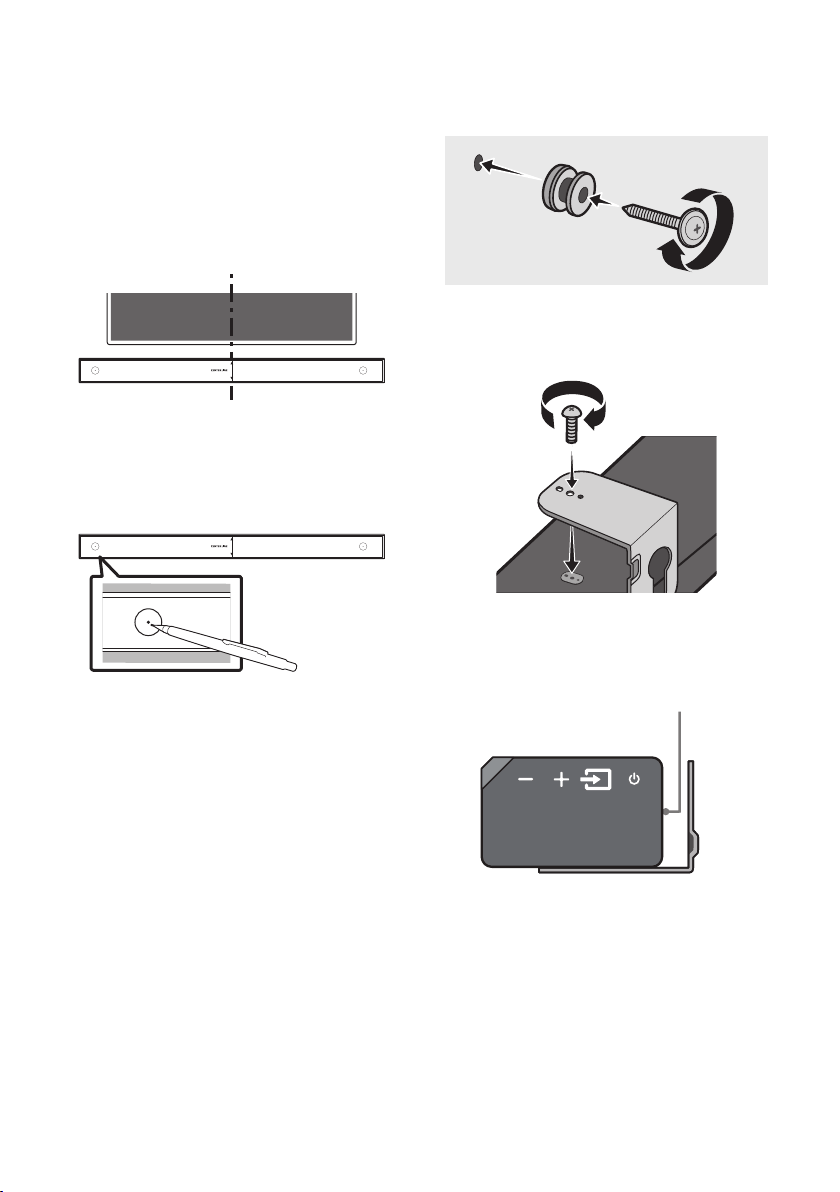
FRA - 28
2. Alignez la Ligne Centrale du gabarit papier
sur le centre de votre téléviseur (si vous
montez le Soundbar sous ce dernier), puis
xez le Guide de montage mural au mur
avec du ruban adhésif.
• Si vous ne l’installez pas sous un
téléviseur, placez la Ligne Centrale au
centre de la zone d’installation.
Ligne Centrale
450mm
3. Utilisez un objet pointu, tel qu’un stylo ou un
crayon, pour marquer les positions des trous,
puis retirez le Guide de montage mural.
450mm
CENTER LINE
4. À l’aide d’un foret de taille appropriée, percez
un trou dans le mur à chaque marque.
• Si les marques ne correspondent pas aux
positions des montants de la cloison,
veillez à insérer les chevilles ou les
chevilles Molly appropriées dans les trous
avant d’insérer les vis de support. Si vous
utilisez des chevilles ou des chevilles
Molly, assurez-vous que les trous que
vous percez sont assez grands pour
recevoir celles-ci.
5. Poussez une vis (non fournie) dans chaque
Vis de support, puis vissez fermement
chaque vis dans un trou de vis de support.
6. Installez les 2 Supportdexationmurale
selon l’orientation correcte en bas de la
Soundbar, à l’aide de 2 Vis.
• Lors du montage, assurez-vous que
l’étrier des Supportdexationmurale
est situé à l’arrière du Soundbar.
Arrière du Soundbar
Extrémité droite du Soundbar
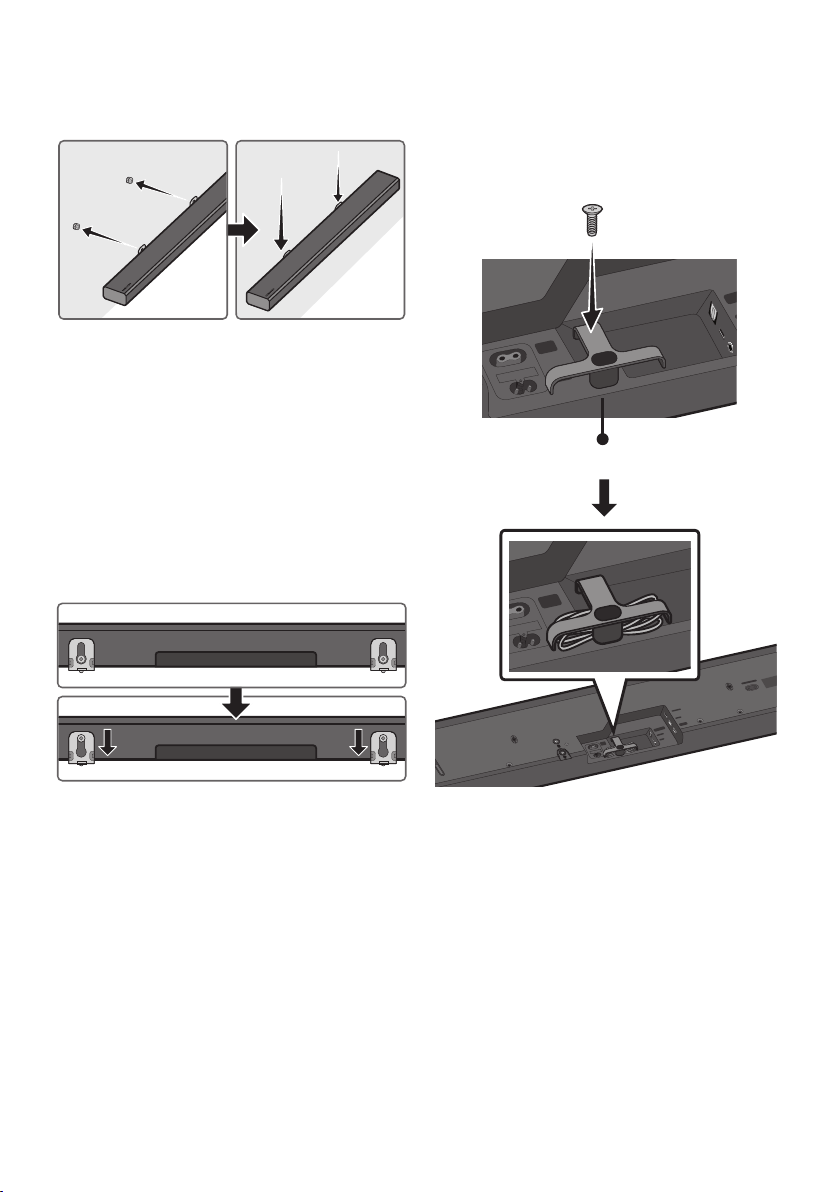
FRA - 29
7. Installez le Soundbar à l’aide des Support de
xationmurale en accrochant ces derniers
sur les Vis de support xées au mur.
8. Faites glisser la Soundbar vers le bas, comme
illustré ci-dessous, an que les Équerres de
support mural reposent fermement sur les
Vis de support.
• Insérez les Vis de support dans la partie
large (inférieure) des Supportdexation
murale, puis faites glisser les Support de
xationmurale vers le bas an que les
Supportdexationmurale reposent
fermement sur les Vis de support.
Montage du support à câble
Comme le montre l’image, utilisez la Vis fournie
pour xer le Support à câble à la Soundbar, puis
utilisez le Support à câble pour ranger les câbles.
WIRELESS
DIGITAL AUDIO IN
(OPTICAL)
POWER
IN
POWER
OUT
(For TV)
Support à câble
Wi-Fi SETUP SPK ADD
WIRELESS
AUX IN
DIGITAL AUDIO IN
(OPTICAL)
POWER
IN
POWER
OUT
(For TV)
HDMI IN
USB (5V 0.5A)
HDMI OUT
(TV-ARC)
WIRELESS
AUX IN
DIGITAL AUDIO IN
(OPTICAL)
POWER
IN
POWER
OUT
(For TV)
HDMI IN
USB (5V 0.5A)
HDMI OUT
(TV-ARC)

FRA - 30
11 DÉPANNAGE
Avant de contacter l’assistance, effectuez les vérications suivantes.
L’unité ne s’allume pas.
Le cordon d’alimentation est-il branché sur la
prise?
; Branchez le cordon d’alimentation sur la
prise.
Lorsque j’appuie sur un bouton, la fonction
ne s’active pas.
Y’a-t-ildel’électricitéstatiquedansl’air?
; Débranchez le cordon d’alimentation et
rebranchez-le.
Le son est interrompu en mode BT.
; Reportez-vous aux sections relatives à la
connexion Bluetooth aux pages 9 et 17.
Il n’y a pas de son.
LafonctionMiseensourdineest-elleactivée?
; Appuyez sur le bouton VOL pour désactiver
la fonction.
Levolumeest-ilrégléauminimum?
; Réglez le volume.
La télécommande ne fonctionne pas.
Lespilessont-ellesdéchargées?
; Remplacez-les par de nouvelles piles.
La distance entre la télécommande et l’unité
principaleduSoundbarest-elletropgrande?
; Approchez la télécommande de l’unité
principale du Soundbar.
Impossible de se connecter au téléviseur.
En cas de connexion via un réseau câblé
; Vériez si le câble est connecté
correctement. (Vériez le nom du port pour
vous assurer que le câble est connecté au
bon port.) (Voir la page correspondante
concernant chaque méthode de
connexion.)
; Appuyez sur le bouton (Source) sur le
côté droit de la Soundbar ou sur la
télécommande pour vérier si le mode est
correct.
Encasdeconnexionviaunréseausansl
; Connexion via Bluetooth
1. Passez la Soundbar en mode “BT
PAIRING”, puis utilisez le téléviseur pour
relancer la recherche. (Voir la page 9
pour plus de détails.)
; Connexion via Wi-Fi
1. Vériez si le téléviseur est un modèle
compatible.
• Seuls les téléviseurs Samsung Smart
TVs mis en marché après 2014 sont
pris en charge.
2. Vériez si le téléviseur est connecté au
Wi-Fi.
• Si le téléviseur n’est pas connecté au
Wi-Fi, utilisez le menu de réseau du
téléviseur pour établir une connexion.
(Voir le manuel utilisateur du
téléviseur.)
FRA - 31
3. Vériez si la Soundbar est connectée au
Wi-Fi.
• Si elle est connectée, la Soundbar se
trouve dans la liste des enceintes
lorsque Application Samsung
Multiroom est exécutée sur l’appareil
mobile (par exemple, téléphone
intelligent ou tablette). (Voir la page
20 pour plus de détails.)
4. Recherchez un canal DFS.
• Si votre routeur sans l (Wi-Fi) utilise
un canal DFS, vous ne pouvez pas
établir une connexion Wi-Fi entre le
téléviseur et la Soundbar. Contactez
votre fournisseur de services Internet
pour plus de détails.
12 LICENCE
Manufactured under license from Dolby
Laboratories. Dolby, Dolby Audio, Pro Logic,
and the double-D symbol are trademarks of
Dolby Laboratories.
For DTS patents, see http://patents.dts.com.
Manufactured under license from DTS
Licensing Limited. DTS, the Symbol, DTS in
combination with the Symbol, and DTS 2.0
Channel are registered trademarks or
trademarks of DTS, Inc. in the United States
and/or other countries. © DTS, Inc. All Rights
Reserved.
The terms HDMI and HDMI High-Denition
Multimedia Interface, and the HDMI Logo are
trademarks or registered trademarks of HDMI
Licensing LLC in the United States and other
countries.
• Le logiciel Spotify est assujetti à des
licences de tiers que vous trouverez ici :
www.spotify.com/connect/third-party-
licenses.
• Pour en savoir plus sur Spotify Connect,
veuillez visiter www.spotify.com/connect
13 AVIS DE
LICENCES LIBRES
Pour de plus amples renseignements sur les
licences libres utilisées pour ce produit, veuillez
visiter le site Web :
http://opensource.samsung.com

FRA - 32
14 REMARQUE IMPORTANTE CONCERNANT
LE SERVICE
Les chiffres et les illustrations contenus dans ce Guide d’utilisation sont fournis à titre de référence
uniquement et pourraient ne pas représenter exactement le produit.
15 CARACTÉRISTIQUES ET GUIDE
Spécications
GÉNÉRAL
USB
5V/0,5A
Poids
11,0 lbs (5,0 kg)
Dimensions (L x H x P)
35,0 x 2,8 x 5,1 po (890,0 x 71,0 x 130,5 mm)
Plage de températures en
fonctionnement
+41°F à +95°F (+5°C à +35°C)
Plage d’humidité en
fonctionnement
10 % à 75 %
Enceinte
Enceinte de graves (4), enceinte d’aigus (2), 4 ohm
Formats de lecture pris en charge
(Le son DTS 2.0 est lu au format DTS.)
LPCM 2ch, Dolby Audio™ (prise en charge de
Dolby® Digital), DTS
REMARQUES
• Samsung Electronics Co., Ltd se réserve le droit de modier les caractéristiques sans préavis.
• Le poids et les dimensions sont approximatifs.
• Pour obtenir de l’information sur la source d’alimentation et la consommation électrique, veuillez vous
reporter à l’étiquette apposée sur le produit. (Étiquette : Arrière de l’Unité Principale du Soundbar)
Précautions: le produit redémarre automatiquement si vous activez/désactivez le Wi-Fi/
Ethernet.
Wi-Fi/Ethernet
Méthode de désactivation
du port
Appuyez sur le bouton Wi-Fi SETUP du
produit pendant 30 secondes pour activer/
désactiver le Wi-Fi/Ethernet.
Bluetooth
Méthode de désactivation
du port
Appuyez sur le bouton SPK ADD du produit
pendant 30 secondes pour activer/désactiver
le Bluetooth.
GARANTIE LIMITÉE À L’ACHETEUR INITIAL
Samsung Electronics Canada Inc. (SECA) garantit ce produit contre tout défaut de fabrication.
SECA garantit aussi que si cet appareil ne fonctionne pas convenablement durant la
période de garantie SECA se réservera le droit de réparer ou de remplacer l’appareil
défectueux.
Toutes les réparations sous garantie doivent être effectuées par un Centre de service
autorisé SECA. Le nom et l’adresse du Centre de service le plus près de chez vous peut
être obtenu en composant sans frais le 1-800-268-1620 ou en visitant notre site web au
www.samsung.ca
MAIN-D’OEUVRE
UN (1) AN (AU COMPTOIR)
PIÈCES
UN (1) AN
Pour tous les modèles portatifs, le transport de l’appareil sera la responsabilité du client.
Le reçu de vente original doit être conservé par le client car cela constitue la seule preuve
d’achat acceptée. Le client doit le présenter au Centre de service agréé au moment où il
fait la demande d’une réparation sous garantie.
EXCLUSIONS (CE QUI N’EST PAS COUVERT)
Cette garantie ne couvre pas les dommages causés par un accident, un incendie, une
inondation, un cas de force majeure, un mauvais usage ou une tension incorrecte.
La garantie ne couvre pas une mauvaise installation, une mauvaise réparation, une
réparation non autorisée et tout usage commercial ou dommages survenus durant le
transport. Le ni extérieur et intérieur de même que les lampes ne sont pas couverts par
cette garantie. Les ajustements par le client qui sont expliqués dans le guide de l’utilisateur
ne sont pas couverts en vertu de cette garantie. Cette garantie sera automatiquement
annulée pour tout appareil qui aurait un numéro de série manquant ou modié. Cette
garantie est valable seulement sur les appareils achetés et utilisés au Canada.
Samsung Electronics Canada Inc
2050 Derry Rd West
Mississauga, On. L5N 0B9
Tel: 1-800-SAMSUNG (726-7864)
Fax: (905) 542- 1199
Website: http://www.samsung.com/ca_fr

SIÈGE SOCIAL
Samsung Electronics Canada Inc. 2050 Derry Road West, Mississauga, Ontario L5N 0B9 Canada
TEL: 1-800-SAMSUNG (1-800-726-7864)
www.samsung.com/ca_fr/support
© 2017 Samsung Electronics Co., Ltd. Tous droits réservés.
Comment contacter Samsung dans le monde
Si vous avez des suggestions ou des questions concernant les produits Samsung, veuillez contacter le Service
Consommateurs Samsung.
Country Contact Center
Web Site
`
North America
CANADA 1-800-SAMSUNG (726-7864)
www.samsung.com/ca/support (English)
www.samsung.com/ca_fr/support (French)
U.S.A 1-800-SAMSUNG (726-7864) www.samsung.com/us/support