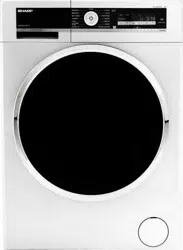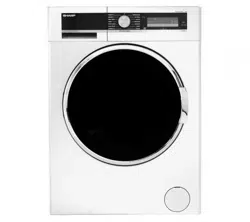
User Manual
WASHING
MACHINE
Model Number: ES-GFC8144I3-EN
Customer Support Helpline
0333 577 7230
ES-GFC8144W3-EN

T: 0333 577 7230 www.sharphomeappliances.com

Contents
01 Welcome
02 Safety Instructions
05 Your Washing Machine
08 Technical Specifi cation
09 Installation
17 Usage
37 Maintenance
43 Clothing Care
47 Troubleshooting
51 Guarantee
53 Index
T: 0333 577 7230www.sharphomeappliances.com

01
www.sharphomeappliances.comT: 0333 577 7230
WELCOME
WELCOME
Thank you for choosing this Sharp Washing Machine, which has been designed and
manufactured to give you many years of trouble-free service.
You may already be familiar with using a similar product but please take time to read these
instructions, which have been written to ensure you get the very best from your purchase.
Your Washing Machine uses Twinjet Technology. Detergent water is circulated by two water
injection mechanisms and injected over your laundry, giving a better washing performance.
Twinjet Technology allows you to wash more laundry in less time, using less energy and water.
Sharp provides you with a guarantee which will protect you should your Washing Machine
develop an electrical or mechanical fault during the guarantee period. To ensure that you get a
prompt and efficient service, please register your Washing Machine immediately.
Visit us at www.sharphomeappliances.com
Call us on 0333 577 7230
WARRANTY
TWINJET TECHNOLOGY
02
www.sharphomeappliances.com T: 0333 577 7230
SAFETY INSTRUCTIONS
To ensure your safety and the safety of others, please read the following safety
precautions before you operate your Washing Machine.
Your Washing Machine conforms to current safety requirements. Inappropriate use can,
however, lead to personal injury and damage to property. To avoid the risk of accidents and
damage to your Washing Machine, read this user guide carefully before using it for the first
time. It contains important information on the installation, safety, use and maintenance
of your Washing Machine. Retain this user guide for future use and pass it on to any new
owners.
Read this user guide before using or installing your Washing Machine.
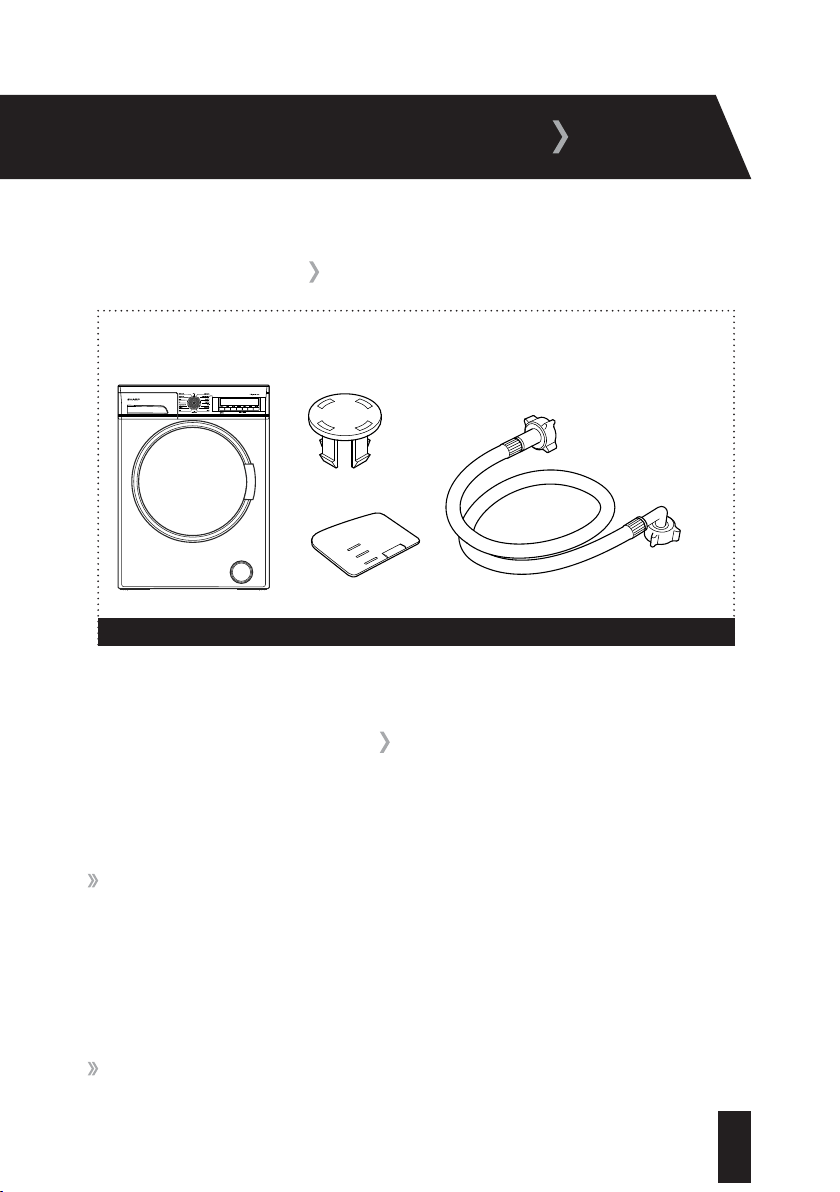
ITEMS INCLUDED
Fill hose
Blanking caps x 4
Fluid detergent level plate
Washing Machine
Figure 1
SAFETY INSTRUCTIONS
03
T: 0333 577 7230 www.sharphomeappliances.com
SAFETY INSTRUCTIONS
Your Washing Machine is for domestic use only and is only intended to wash items which
are specified by the manufacturer to be machine washable on the label, and textiles
composed of hand washable wool or wool blend fabrics as well as satin, lace, silk and other
hand-washable garments. Do not use your Washing Machine for any purpose not expressly
specified in this user guide.
This appliance can be used by children aged from 8 years and above and persons with
reduced physical, sensory or mental capabilities or lack of experience and knowledge if they
have been given supervision or instruction concerning use of the appliance in a safe way and
understand the hazards involved. Children shall not play with the appliance. Cleaning and user
maintenance shall not be made by children without supervision.
Before setting up your Washing Machine, check for any external visible damage. Do not
install or use your Washing Machine if it is damaged.
Before setting up your Washing Machine, remove the four transit bolts and the rubber
washers from the back of the machine (refer to page 9).
Before connecting your Washing Machine, ensure that the information on the data plate
(voltage and connected load) matches that of the mains electricity supply. If in doubt, consult a
qualified electrician.
Do not connect your Washing Machine to the mains electricity supply using an extension
lead.
A damaged power cord/plug can cause fire or give you an electric shock. When damaged it
must be replaced, this should only be done by qualified personnel.
Never remove the plug from the socket by pulling the cord. Always hold the plug.
04
T: 0333 577 7230www.sharphomeappliances.com
Never touch the power cord/plug with wet hands as this could cause a short circuit or
electric shock.
Do not touch your Washing Machine if your hands or feet are wet.
Never open the detergent drawer while the machine is running.
Faulty components must only be replaced by a suitably qualified Service Agent using
genuine spare parts.
Unauthorised repairs could result in unforeseen dangers for the user. Repairs should only be
undertaken by an approved service agent.
In the event of a fault or for cleaning purposes, your Washing Machine is only completely
isolated from the electricity supply when it is unplugged from the mains.
Your Washing Machine must only be connected to your water supply using the supplied new
fill hose. Old hoses must not be reused.
Do not make any alterations to your Washing Machine, unless authorised to do so by Sharp.
The packaging of the machine could be hazardous to children. Please refer to the disposal
instructions on the rear cover.
Please ensure that you have removed all of the packaging materials and protective tape
from the outside of your Washing Machine, inside the drum and inside the detergent drawer
before using.
05
T: 0333 577 7230 www.sharphomeappliances.com
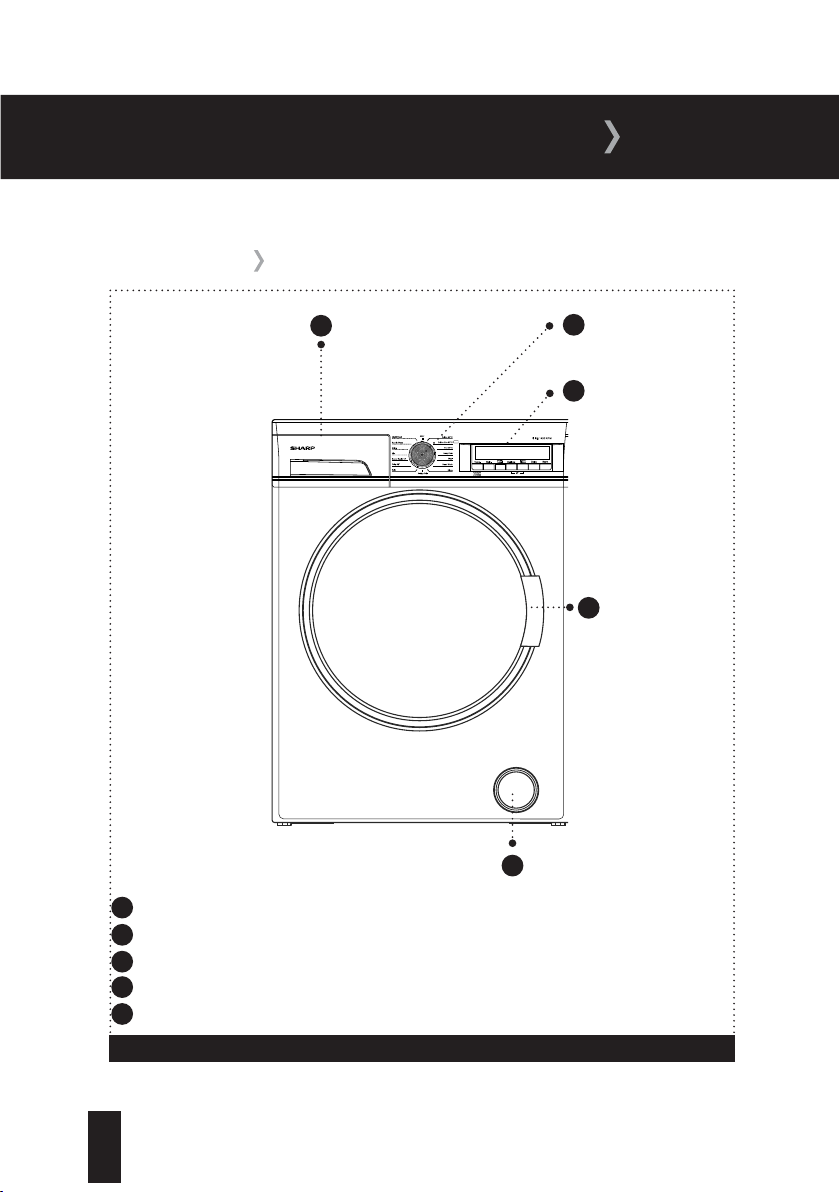
YOUR WASHING MACHINE
1
4
FRONT VIEW
Detergent drawer
2
Control panel
Door handle
5
Pump filter cover
Figure 2
1
Detergent drawer; Allows you to insert detergent, fabric conditioner and starch.
2
Programme dial; Allows you to select the programme for your wash.
3
Control panel; Allows you to configure the required settings for your wash.
4
Door handle; Provides you with access to the drum.
5
Pump filter cover; Provides access to the pump filter for maintenance purposes.
3
Programme dial
06
T: 0333 577 7230www.sharphomeappliances.com
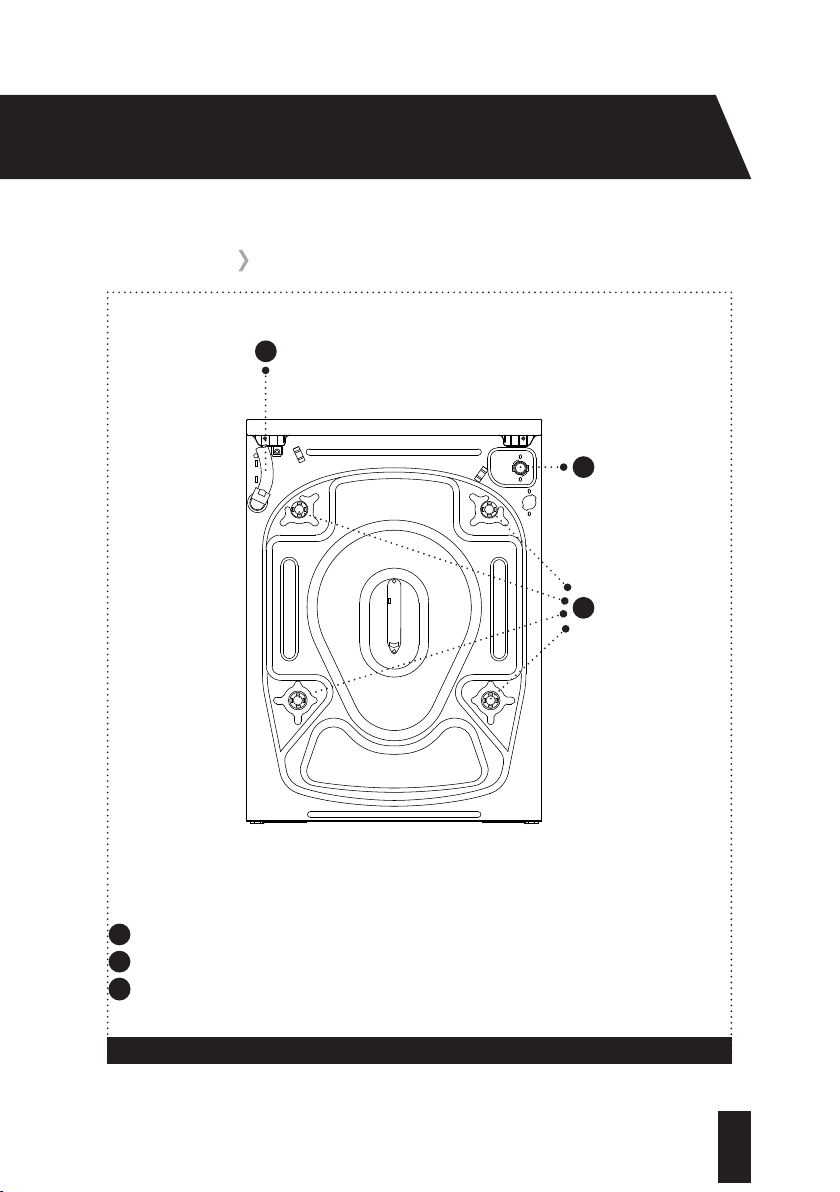
REAR VIEW
Drain hose
1
2
Cold water
inlet
Figure 3
1
Drain hose; Provides an outlet for the dirty water from your Washing Machine.
2
Cold water inlet; Connects your Washing Machine to your cold water supply.
2
Transit bolts; Remove before first use of your Washing Machine (refer to page 9).
3
Transit bolts
3
07
T: 0333 577 7230 www.sharphomeappliances.com
YOUR WASHING MACHINE
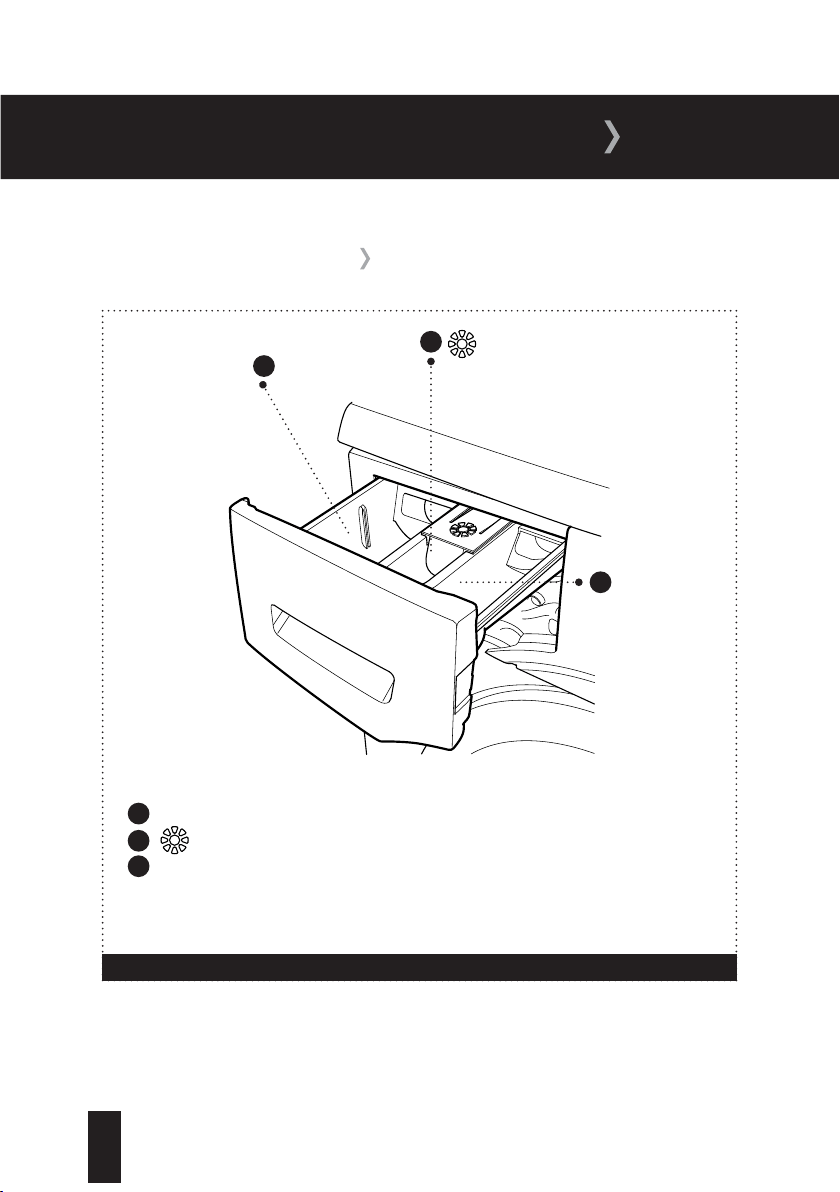
DETERGENT DRAWER
Figure 4
1
2
3
Main Wash
Compar
tment
Compartment
Pre-Wash
Compartment
1
Main Wash Compartment; Add detergent for the main wash.
2
Compartment; For fabric conditioner and liquid starch.
3
Pre-Wash Compartment; Add detergent for the pre-wash.
08
T: 0333 577 7230www.sharphomeappliances.com
TECHNICAL SPECIFICATION
TECHNICAL SPECIFICATION
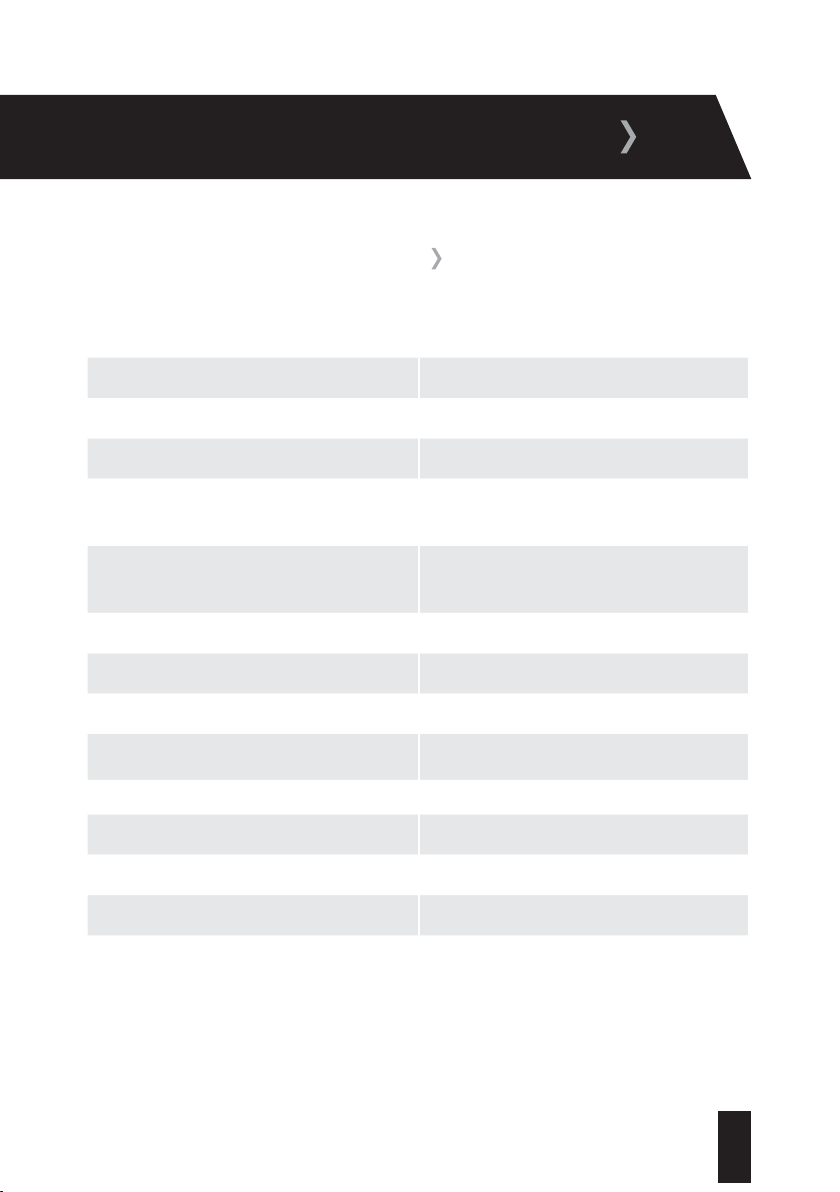
Voltage V/Frequency (Hz) 220-240V/50Hz
Electrical Current (A) 10
Power Rating (W) 2200
Water Consumption (Cotton 60
0
Full load)
(L/Cycle)
48
Energy Consumption (Cotton 60
0
Full load)
(kWh/Cycle)
0.91
Unpacked Dimensions (H x W x D) (cm) 84.5 x 59.7 x 55.7
Gross Weight (kg) 78
Spin Speed (rpm) 1400
Drum Volume (lt) 55
Max Dry Load Capacity (kg) 8
Energy Rating A+++
Wash Noise (dB) 58
Spin Noise (dB) 78
09
T: 0333 577 7230 www.sharphomeappliances.com
INSTALLATION
INSTALLATION REQUIREMENTS
To avoid risk of injury, please take care when moving your Washing Machine. It is heavy and we
recommend that a minimum of two people move your Washing Machine.
To unpack your Washing Machine and manoeuvre it to the installation area, one person should
hold it by the front feet and the other person at the edge of the lid at the rear.
Your Washing Machine measures 84.5 x 59.7 x 55.7 cm and will require an installation area with
the space to allow the door to fully open and provide easy access to the plumbing and electrical
connections.
The most suitable installation surface for your Washing Machine is a concrete floor as it is less
prone to vibration during the spin cycle. Soft floor surfaces such as carpets and rugs are not
suitable.
If you have to install your Washing Machine on a wooden floor, we recommend that a water-
resistant wooden base at least 30mm thick is installed. The base should span several joists and
be bolted down. Check for the presence of pipes and cables before installing.
If possible, install your Washing Machine in the corner of the room as it is often the most stable
part of the floor.
Do not install your Washing Machine in rooms where temperatures below freezing may occur as
frozen hoses may burst or split.
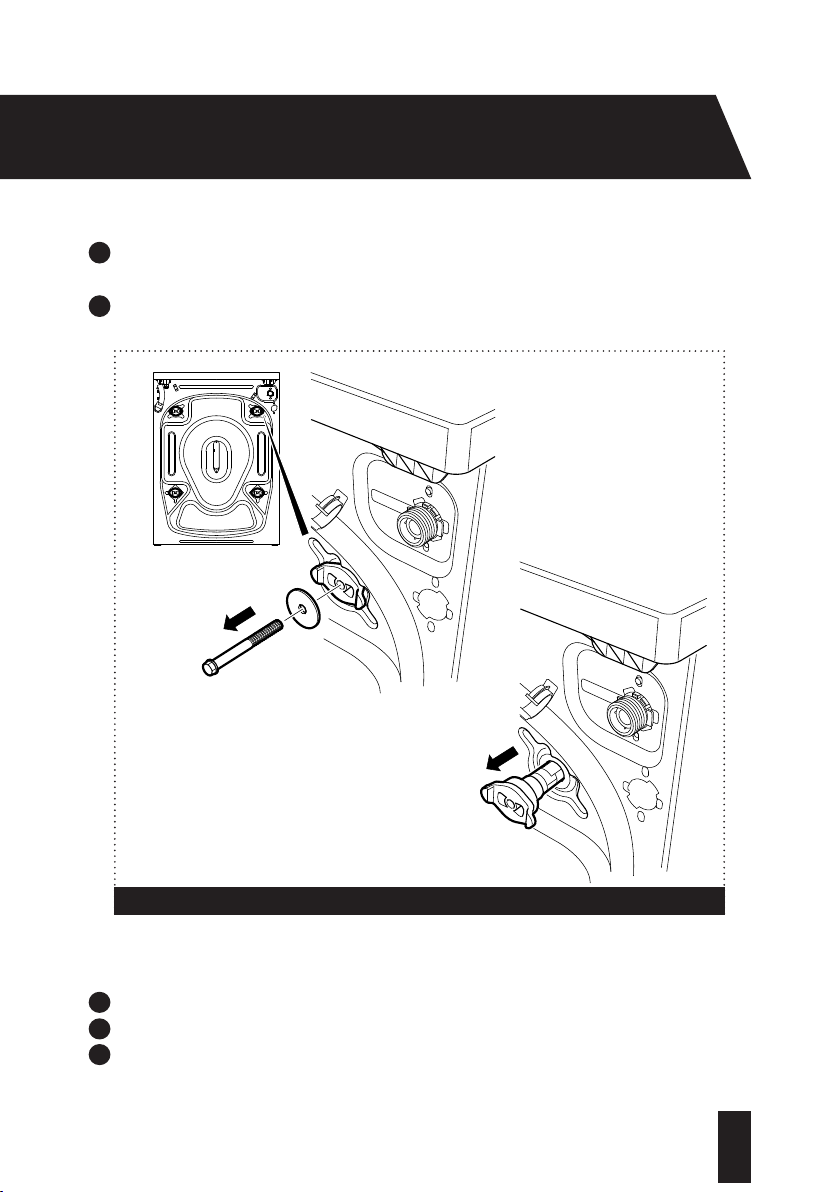
REMOVAL OF TRANSIT BOLTS
The transit bolts are used to protect your Washing Machine from damage during transportation
and must be removed before using your Washing Machine for the first time. Keep the transit
bolts safe and re-fit them if you need to transport your Washing Machine in the future.
The four transit bolts are located on the back of your Washing Machine (fig 5a).
To remove the transit bolts (4 off):
1
Remove each bolt by turning anti-clockwise with a suitable spanner (fig 5b).
10
T: 0333 577 7230www.sharphomeappliances.com
2
Pull out the remaining plastic section of each transit bolt by hand. This will require a
reaso
nable amount of force (fig 5c).
3
Insert the blanking caps (4 off): Push the cap into the hole until the four connectors click into
place. Check that the cap is flush with the machine.
To re-fit the transit bolts (4 off) for future transportation:
1
Pull and remove the four plastic blanking caps.
2
Insert the plastic sections of the transit bolts into the exposed holes.
3
Insert the bolts into the plastic sections of the transit bolts and tighten with a suitable
spanne
r until secure.
Figure 5
a:
b:
c:
11
T: 0333 577 7230 www.sharphomeappliances.com
INSTALLATION
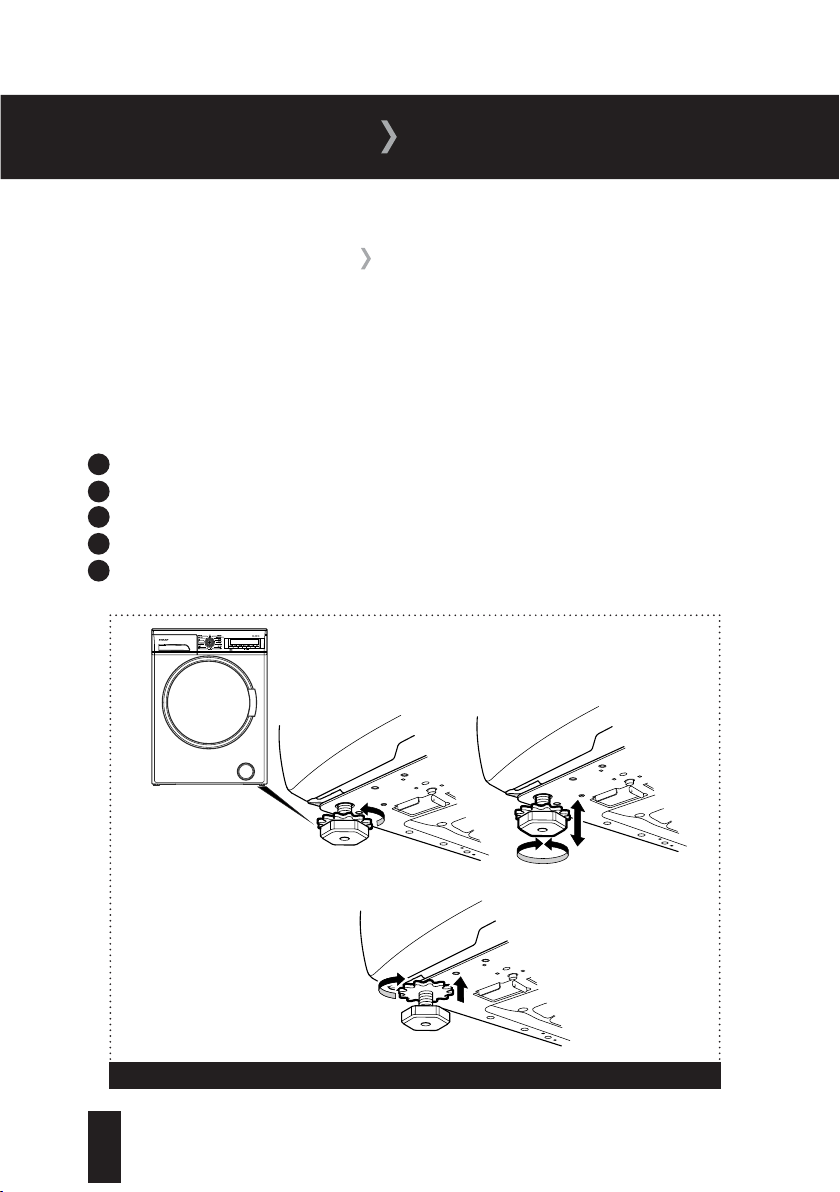
ADJUSTING THE FEET
For safe operation, it is important that your Washing Machine is level and securely positioned on
all four feet. Incorrect installation may cause the Washing Machine to vibrate and increase your
water and electricity consumption.
The four adjustable feet are used to level the Washing Machine. To adjust the feet:
1
Loosen the plastic locking nut by turning anti-clockwise (fig 6a).
2
To increase the height of the machine, turn the feet clockwise (fig 6b).
3
To decrease the height of the machine, turn the feet anti-clockwise (fig 6b).
4
After making adjustments, use a spirit level to check that the machine is level.
5
Once the machine is level, tighten the locking nuts by turning clockwise (fig 6c).
Figure 6
a:
b:
c:
12
T: 0333 577 7230www.sharphomeappliances.com
WATER SUPPLY CONNECTION
Your Washing Machine uses an energy efficient cold fill system, which means that only the
water required to wash the laundry is heated. As a result, no heat is lost in the pipeline from the
hot water supply.
Connect your Washing Machine to your cold water supply only. If your previous machine had a
hot and cold fill, check that the hot tap on your water supply is closed to avoid leakage. Only use
the fill hose supplied and not one from your old Washing Machine. Only one hose is required
to install your Washing Machine to the cold water supply. The inlet hose provided with your
Washing Machine connects the rear of your machine and the cold water supply.
To connect your Washing Machine to the cold water supply:
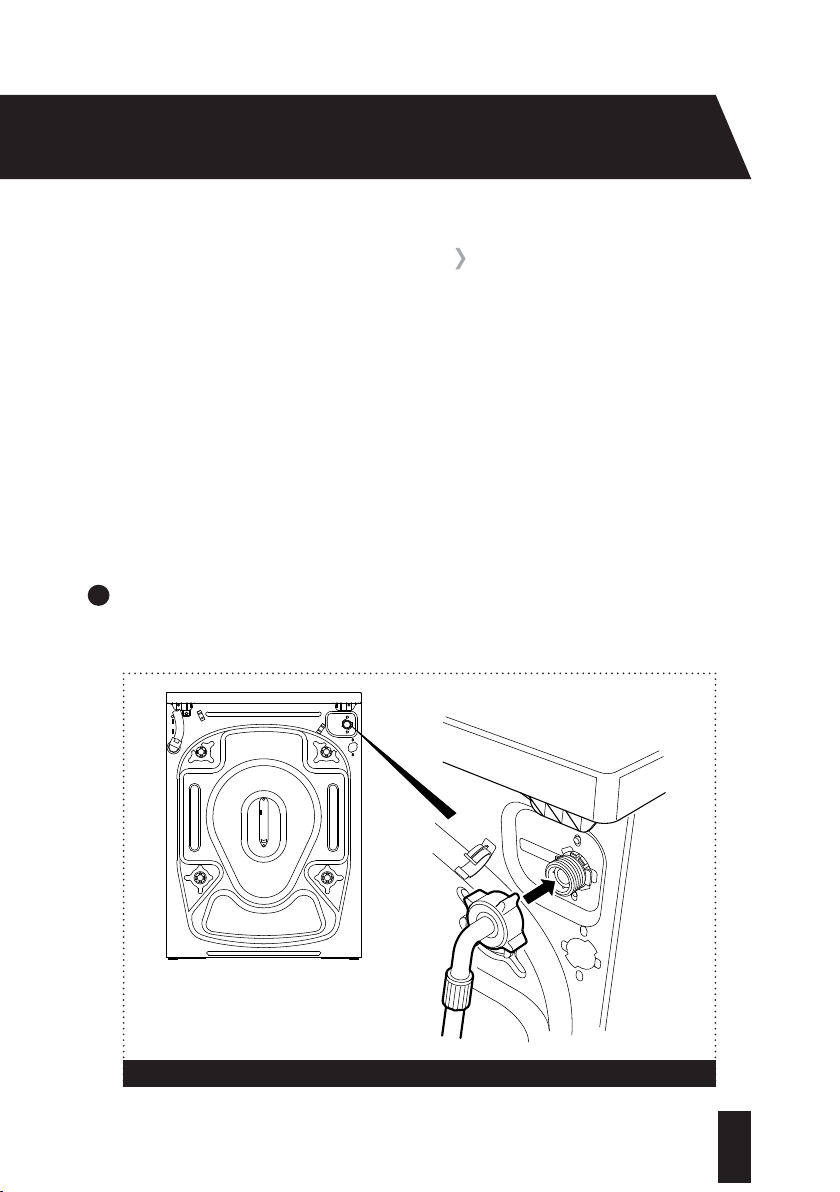
1
Connect the angled end of the fill hose to the cold water inlet on the rear of your Washing
M
a
c
h
ine by screwing the threaded connector clockwise (fig 7). Take care not to overtighten
the connection. Hand tight is sufficient.
Figure 7
13
T: 0333 577 7230 www.sharphomeappliances.com
INSTALLATION
WATER SUPPLY CONNECTION
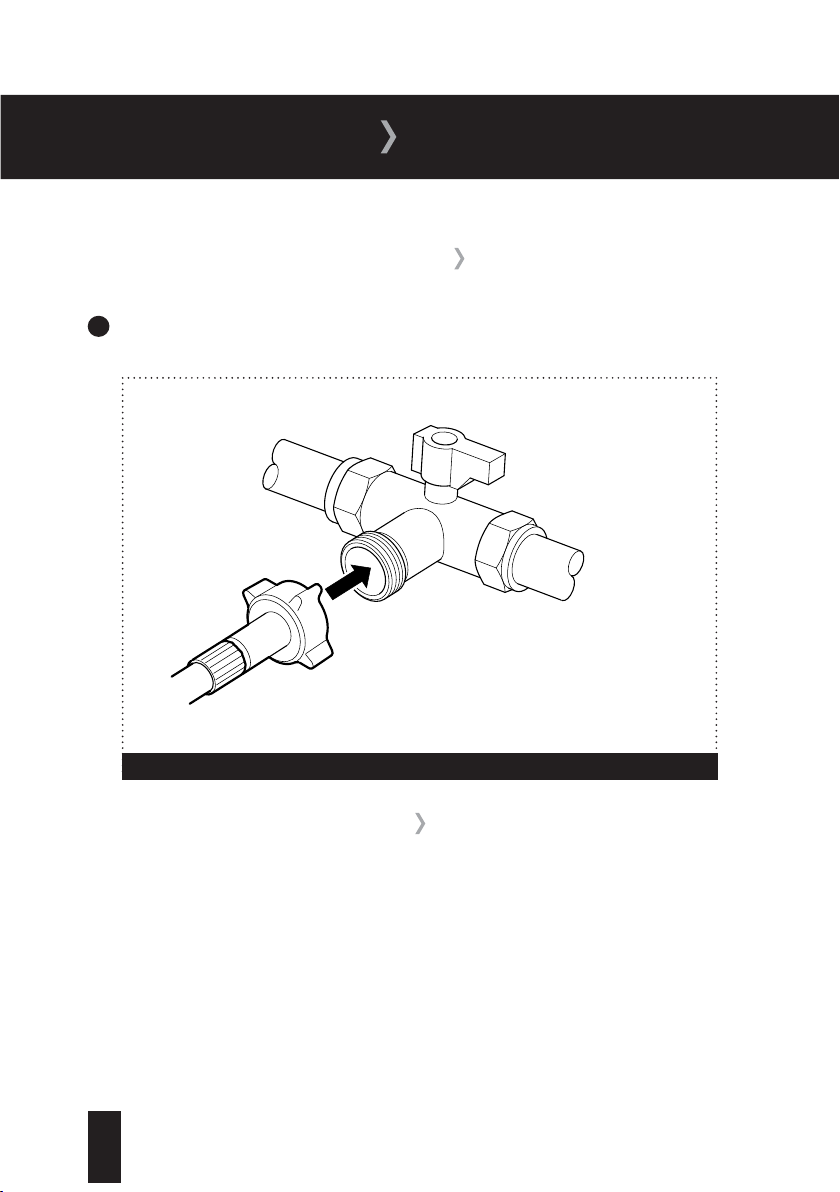
2
Screw the straight end of the hose clockwise to a 19mm (3/4’’) cold water tap until hand
tight (f
ig 8). Take care not to trap or kink the hose.
DRAIN HOSE CONNECTION
Do not connect your Washing Machine to a surface water drain.
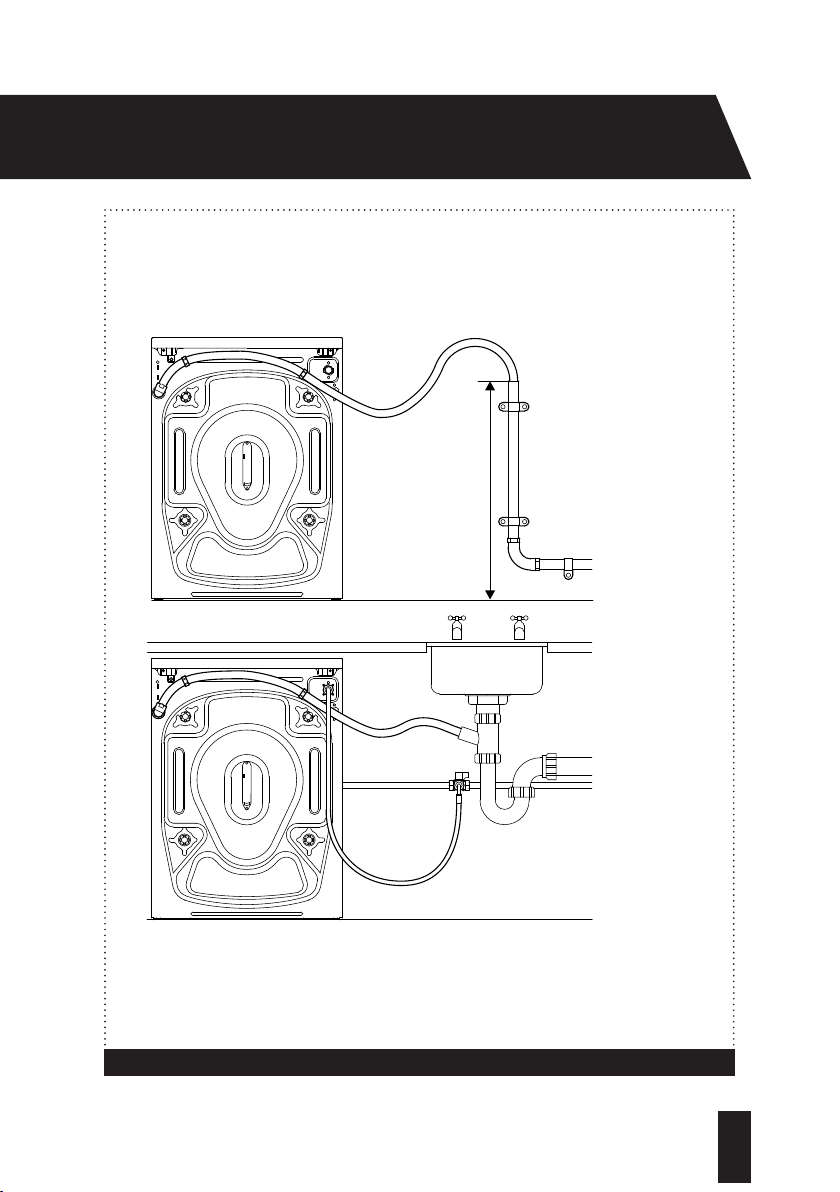
Connect your Washing Machine to your household drainage system (fig 9).
For your Washing Machine to function properly the outlet end of the drain hose must be at a
minimum of 0cm and a maximum of 100cm from the ground.
CAUTION: Check to ensure that the hose is not trapped, kinked, twisted, folded or crushed.
Do not attempt to extend the drain hose by adding extra sections.
Figure 8
14
T: 0333 577 7230www.sharphomeappliances.com
Figure 9
a:
b:
Max height 100cm
a: The drain hose
can be connected
to a standpipe, as
shown. The hose
must be between
0cm to 100cm
from the ground.
b: The drain hose
can be connected
to a household
sink, as shown.
The hose must be
between 0cm and
100cm from the
ground.
Min height 0cm

15
T: 0333 577 7230 www.sharphomeappliances.com
INSTALLATION
The cold water pressure for a normal household system ranges from between 0.1 to 1 Mpa. Your
Washing Machine will run at optimum efficiency in this range.
Once you have made all of the connections, carefully turn your cold water supply on and check
for leaks.
16
T: 0333 577 7230www.sharphomeappliances.com
ELECTRICAL CONNECTION
Your Washing Machine requires a 220-240V, 50Hz mains supply. Do not use any other
supply.
Your Washing Machine may be fitted with a moulded plug, which cannot be rewired.
If the fuse cover becomes damaged, you must not use the plug.
If your plug requires changing because it is not suitable for your socket, or it is damaged,
you should consult a qualified electrician.
Fuse:
Replacement fuses should be ASTA-approved to BS1362 and have the correct 10 Amp
rating.
Replacement fuses can be purchased from an electrical supplier.
17
T: 0333 577 7230 www.sharphomeappliances.com
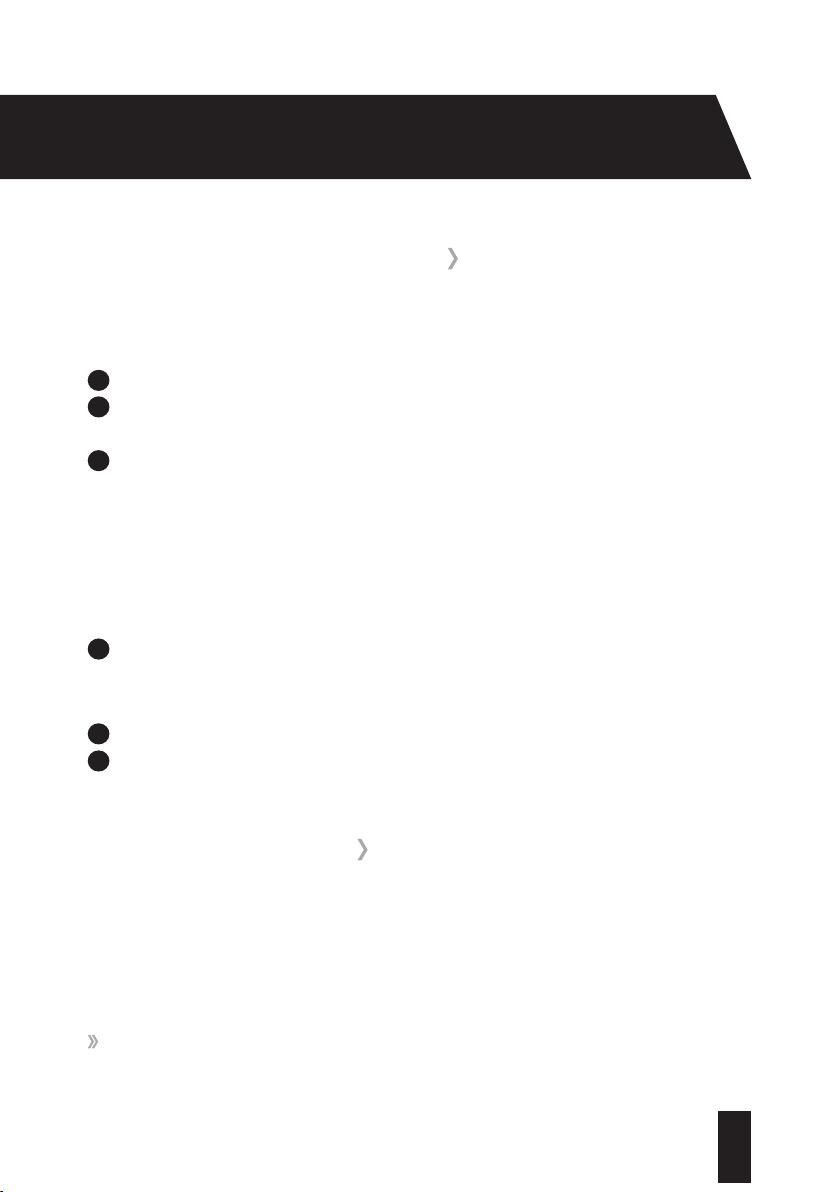
1
Programme Dial; Allows you to select a wash programme
2
Electronic Display; Displays water temperature, spin speed and programme status (also
used to
report faults)
3
Water Temperature Adjustment Button: Change the temperature of the wash
4
Spin Speed Adjustment Button; Change the spin speed or switch the spin option off
5
Stain Level Button
6
Options Button*
7
Extra Rinse Button*
8
Delay Start Selection Button; Select a time delay before the programme runs
9
Start/Pause Button; Start or Pause the selected programme
* Hold down
buttons
6
and
7
for 5 seconds to activate child lock
Figure 10
USAGE
CONTROL PANEL OVERVIEW
1 2
4 5
6
7 8
9
3
18
T: 0333 577 7230www.sharphomeappliances.com
RUNNING YOUR FIRST WASH
Before using your Washing Machine for the first time; check that:
1
The transit bolts have been removed.
2
Your Washing Machine has been correctly connected to your water supply and your water
drainage
system.
3
Your Washing Machine has been connected to an appropriate mains power supply and is
swit
ched on at the socket.
Tests were carried out on your Washing Machine at the factory; as a result, water may be left in
the machine. To remove any water we recommend that the first wash is carried out without any
laundry:
1
Open the detergent drawer, pour in half a measuring cup of all-purpose detergent, close
t
h
e dr
a
wer and select programme 1 (Cotton on the programme selection dial). If using a
liquid detergent, refer to page 20 for details on how to insert the fluid level detergent plate.
2
Close the door until it clicks shut.
3
Press the Start/Pause button.
Plea
se follow the steps suggested below to get the best results from your washing.
Preparing Your Laundry:
CAUTION:
Please be aware that any foreign objects such as coins or paper clips can cause
damage to your garments and components in your Washing Machine.
Empty all pockets on items of clothing, brush out any sand and dirt from pockets and cuffs.
WASHING SEQUENCE
19
T: 0333 577 7230 www.sharphomeappliances.com
USAGE
Close zips and fasten any hooks and eyes.
Items such as trousers, t-shirts, sweat shirts and knitted garments should be turned inside
out.
Remove any weights from curtains, or place in a laundry bag.
Any loose wiring in bras and shirt collar stiffeners should be removed or sewn in.
Sorting Your Laundry:
Sort your laundry by colour. Always wash whites and coloureds separately.
Dark textiles may contain excess dye and should be washed separately several times
before being included in a mixed load.
Follow the instructions given in the care labels on the clothing.
Do not wash any items in the machine that the manufacturer has specified as non-
washable on the care label.
Badly soiled or stained areas can be pre-treated with liquid detergent or stain removers by
following the manufacturer’s instructions.
If you use a solvent-based cleaning agent to pre-treat a stain, protect any plastic parts such
as buttons. Rinse the cleaning agent off before loading the washing into the machine.
Do not use a solvent-based cleaning agent in your Washing Machine.
Loading the Drum:
1
Pull the door open using the handle.
2
Load your items of clothing into the drum, ensuring they are loosely packed. You will
achi
eve better wash results if you mix up large and small items. Items of varying size will
help distribute the load more evenly during spinning.
3
Take care not to exceed the maximum load of the drum as this will give poor wash results
and caus
e creasing. Refer to the table on pages 25 to 30 for information on load capacities.
20
T: 0333 577 7230www.sharphomeappliances.com
4
Gently push the door until it clicks shut. Check that no items of clothing are trapped
betw
een the rubber seal and the door.
Half-Load Detection System:
Your Washing Machine features a half-load detection system. If you put less than half the
maximum load of laundry into your Washing Machine it will automatically set the half-load
function, regardless of the programme you selected. This means that the selected programme
will take less time to complete and will use less water and energy.
Adding Detergent:
Please take care to add the correct amount of detergent to your Washing Machine.
If too little detergent is added:
Your laundry may not be washed properly and may become grey and stiff over time.
Spots of fat may appear on your laundry.
Limescale may form on the heater elements.
If too much detergent is added:
Excessive foam will be formed resulting in poor wash results.
Water consumption will increase.
You can use any detergent produced for automatic washing machines. The use of dispensing
aids such as balls is recommended, if they are supplied with the detergent.
Tablets are suitable for full loads; however, it may be impractical to reduce them for smaller
loads. Some tablets do not dissolve as quickly as others and may not be suitable for wash cycles
of short duration.
21
T: 0333 577 7230 www.sharphomeappliances.com
USAGE
If your clothes are only slightly soiled, do not prewash and put a small amount of detergent,
as specified by the manufacturer, into compartment II of the detergent drawer.
If your clothes are excessively soiled, select a programme with pre-wash and put ¼ of
the detergent to be used into compartment I of the detergent drawer and the rest in
compartment II.
Water Softener:
A water softener can be used to reduce the amount of detergent required in hard water areas.
Follow the guidance on the packaging and dispense as instructed. First add the detergent, then
the water softener.
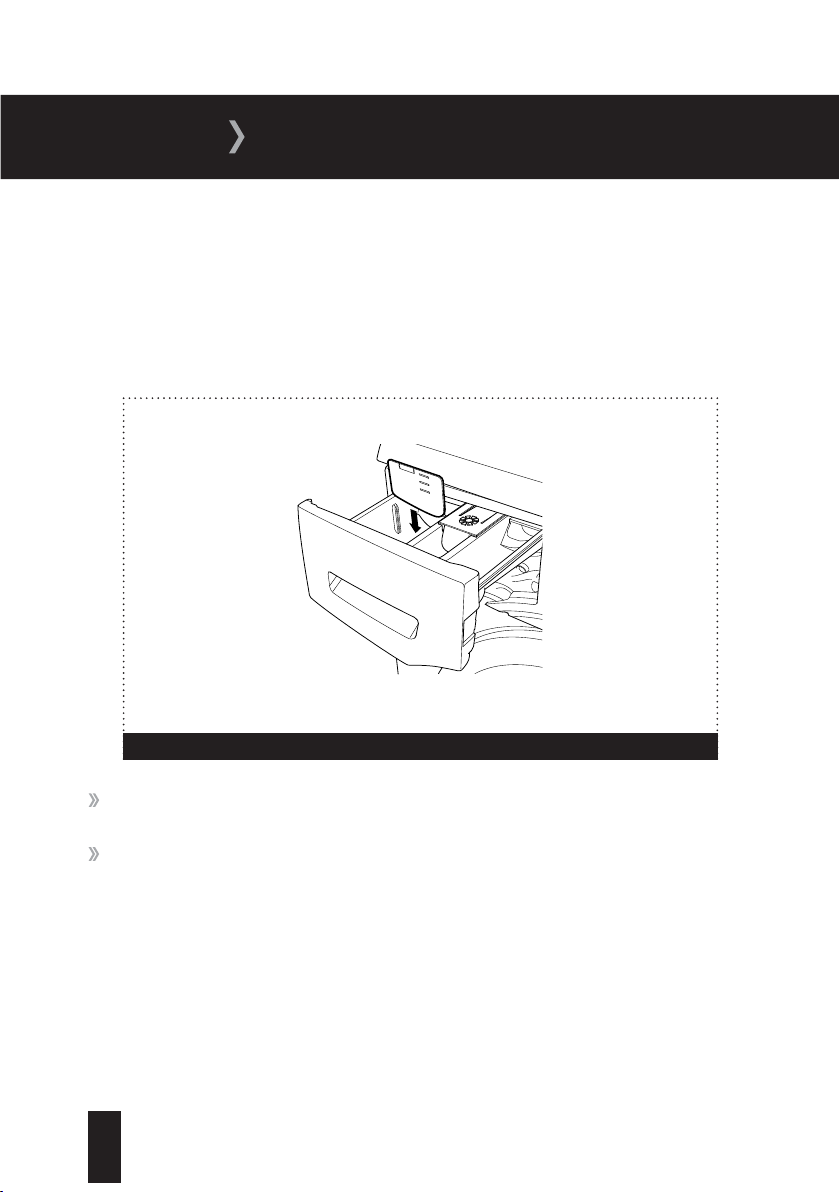
Figure 11
It is possible to use fluid detergents in all programmes without a pre-wash. To do this, slide the
fluid detergent level plate into the guides in compartment II of the detergent drawer (fig 11). Use
the lines on the plate as a guide to fill the drawer to the required level.
The amount of detergent to use will depend on the dirtiness of your clothes and the hardness of
your water supply; guidelines will be on the packaging of your detergent.
22
T: 0333 577 7230www.sharphomeappliances.com
Fabric Conditioners and Liquid Starch:
Fabric conditioners make garments soft to handle.
Starch stiffens and gives body to items such as bed linen.
To add fabric conditioner or liquid starch, pour the amount as instructed on the packaging into
the
compartment of the detergent drawer, taking care not to exceed the MAX level.
Selecting a Programme:
To select the desired programme, turn the programme dial either clockwise or anti-clockwise
until the marker on the dial points to the chosen programme. To cancel a programme, refer to the
information on page 35.
Spin Speed Selector:
When you select a programme, the maximum spin speed is automatically selected. To adjust the
spin speed, press the Spin Speed Adjustment button until the desired speed is displayed. The
spin speed of your Washing Machine ranges up to 1400 rpm. Refer to the table on page 32.
Temperature Selector:
When you select a programme, the maximum temperature is automatically selected. To adjust
the temperature, press the water temperature adjustment button until the desired temperature
is displayed on the digital display. Refer to the table on page 31.
Delay Programme Start:
Instead of starting the programme immediately you can set the programme to start
automatically after a set period of time (from 30 minutes to 23 hours). To do so, press the Delay
button once,
will appear on the electronic display and the symbol will flash. Press
the Delay button until the desired delay time is displayed, then press any button on the control
panel other than the Start/Pause.
23
T: 0333 577 7230 www.sharphomeappliances.com
USAGE
Please Note: After selecting the delay function, you can select other additional functions
before pressing the Start/Pause button to activate the delay function.
Cancelling the Delay Function:
If you wish to cancel the delay function after you have pressed the Start/Pause button, press
the Delay button once.
will no longer be shown on the electronic display.
Starting a Programme:
To start the selected programme, press the Programme Start/Pause button.
Electronic Display:
The electronic display on the control panel shows the following:
Water temperature
Spin speed
Remaining programme time
Whether or not the door is locked
Any auxiliary functions that have been selected
The progress bar at the top of the control panel shows the current stage of the selected
programme.
Programme Summary:
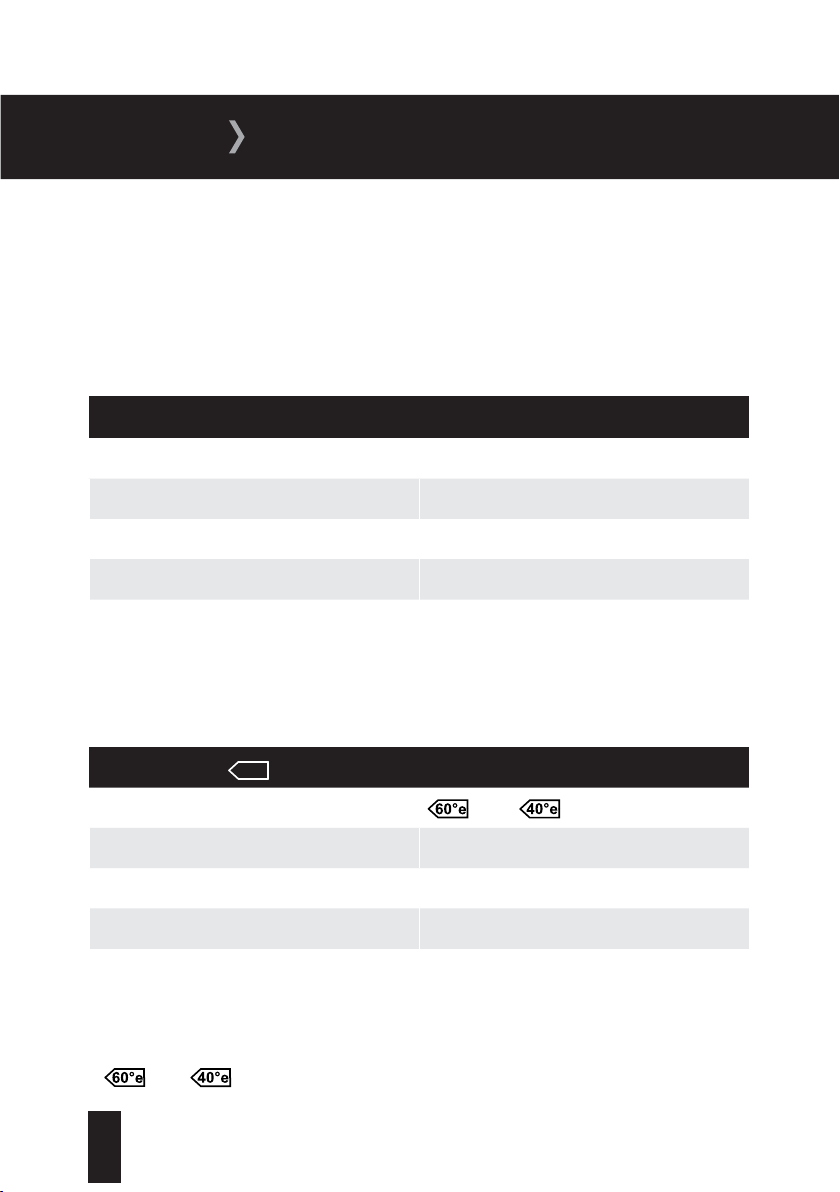
Your Washing Machine is equipped with 15 pre-set programmes. We have summarised some of
the important information, making it as easy as possible for you to select the most appropriate
programme for your laundry.

24
T: 0333 577 7230www.sharphomeappliances.com
Day to day washing: Recommended Programmes: 2, 10, 11, 12 and 13
These programmes are ideal for washing lightly soiled cottons and synthetics as separated
or mixed washes. They often run at lower temperatures and can be used with the majority of
detergents.
Programme 11 (Super Rapid 12 Min):
The fast wash speed of this programme is made possible by pumping water and detergent into
the drum through two nozzles instead of one. The 12-minute wash is only intended for small
loads and quick refreshes of laundry that is only very slightly dirty; ideal for the freshening up of
a school uniform for example.
Heavily Soiled Washing: Recommended Programmes: 1 and 15
These programmes are ideal for washing heavily soiled cottons and synthetics and are capable
of removing stubborn dirt and stains.
Delicate Washing: Recommended programmes 4, 5 and 6
These programmes are ideal for washing items such as delicate synthetics, wool and silk. Lower
temperatures are used.
You can find detailed information on all washing programmes in the table on pages 25 to 30.
In addition to the programmes listed in the table, the following options are also available. Turn
the programme dial to the selected option once a previously selected programme has finished:
Rinse (Programme 7):
This option is suitable for all types of laundry and provides an extra rinse to your laundry after
the washing process has taken place.
Spin (Programme 9):
This is a useful programme to select when extra spinning is required. We do not recommend this
programme for your delicate or woollen laundry.
25
T: 0333 577 7230 www.sharphomeappliances.com
USAGE
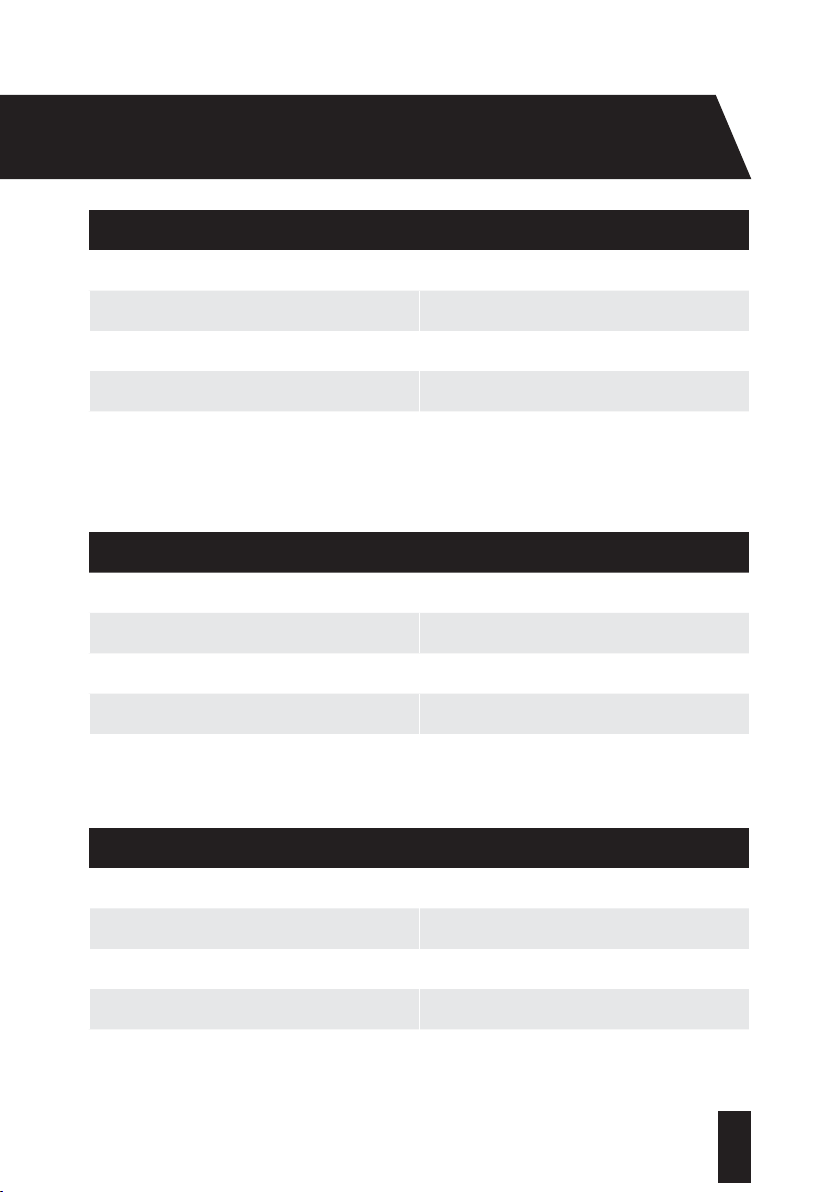
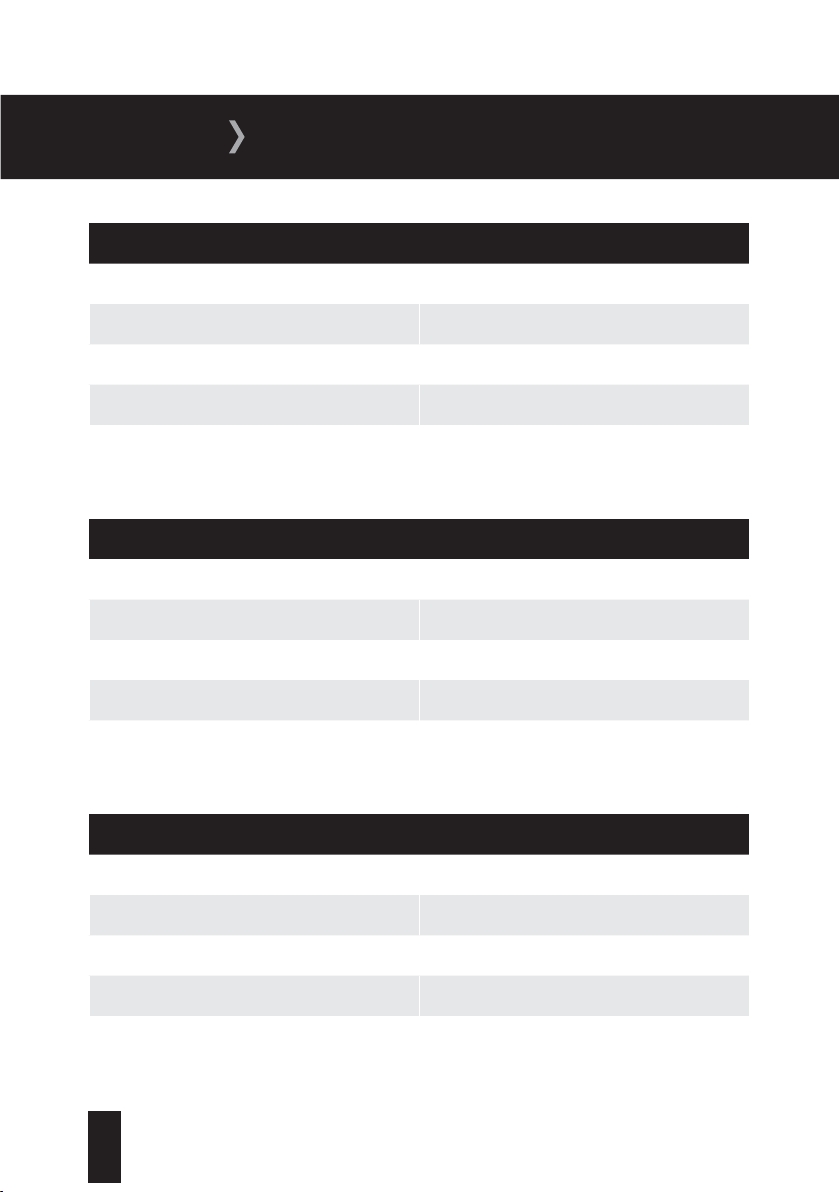
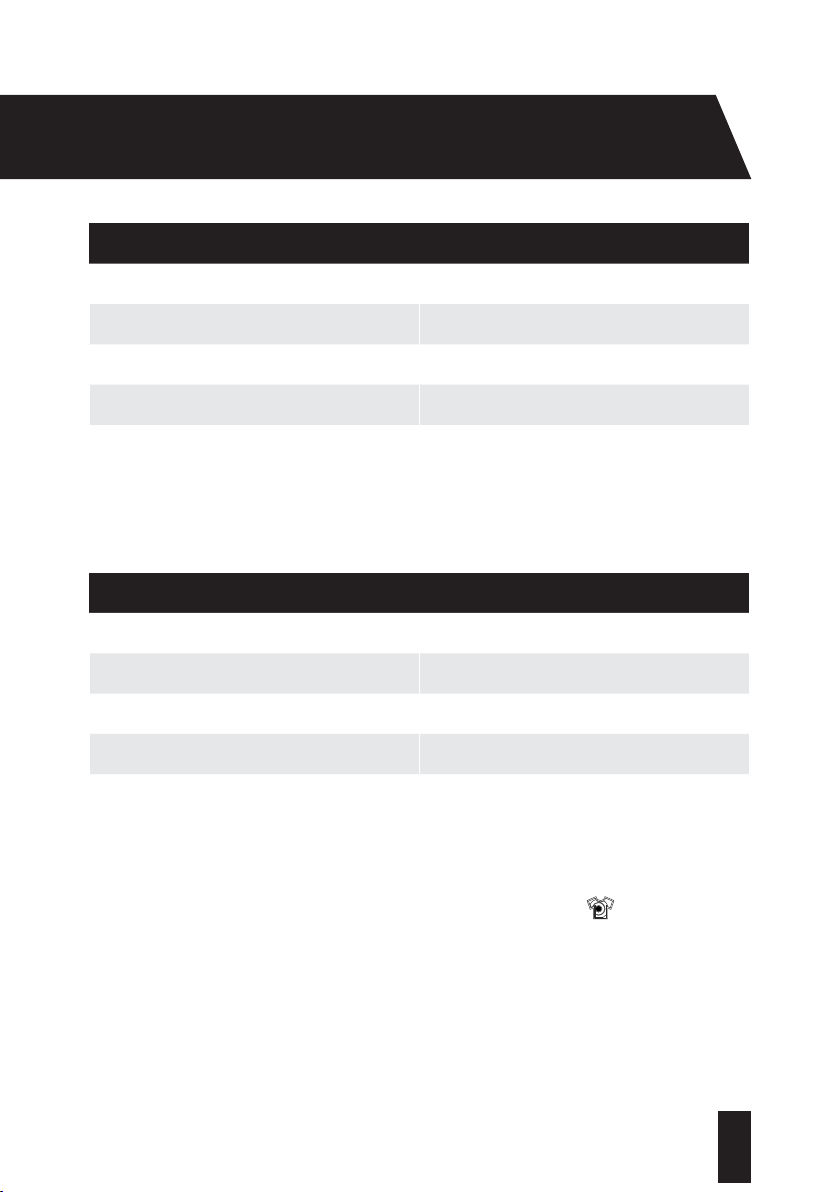
Programme Modes:
Please Note: Programme duration might change according to the load, ambient temperature
and selected additional functions.
Settings in bold are factory presets.
1. Cotton 90
0
C
Washing Temperature (
o
C) 90
0
, 80
0
, 70
0
, 60
0
, 50
0
, 40
0
, 30
0
, --
Maximum Dry Load (kg) 8
Detergent Compartment II
Programme Duration (minutes) 190
Laundry Type Very dirty cotton and textiles including
underwear, linen, tablecloths,
towels (max 4kg) and bedclothes.
2. Cotton Eco 60
0
C
Washing Temperature (
o
C)
, 60
0
, , 40
0
,
30
0
, --
Maximum Dry Load (kg) 8
Detergent Compartment II
Programme Duration (minutes) 230
Laundry Type Dirty cotton and textiles including underwear,
linen, tablecloths, towels (max 4kg) and
bedclothes.
and represent energy label declaration programme.
26
T: 0333 577 7230www.sharphomeappliances.com
3. ECO 20
0
C
Washing Temperature (
o
C) 20
0
, --
Maximum Dry Load (kg) 4
Detergent Compartment II
Programme Duration (minutes) 100
Laundry Type Less dirty cotton and linen textiles including
underwear bedsheets, tablecloths and towels
(max 2kg).
4. Easy Care
Washing Temperature (
o
C) 40
0
, 30
0
, --
Maximum Dry Load (kg) 3.5
Detergent Compartment II
Programme Duration (minutes) 92
Laundry Type Very dirty or synthetic-mixed textiles such as
nylon socks, shirts and blouses.
5. Wool
Washing Temperature (
o
C) 30
0
, --
Maximum Dry Load (kg) 2.5
Detergent Compartment II
Programme Duration (minutes) 40
Laundry Type Woollen laundry with a machine wash label.
27
T: 0333 577 7230 www.sharphomeappliances.com
USAGE
6. Hand Wash
Washing Temperature (
o
C) 30
0
, --
Maximum Dry Load (kg) 2.5
Detergent Compartment II
Programme Duration (minutes) 86
Laundry Type Sensitive laundry or laundry recommended
for handwash.
7. Rinse
Washing Temperature (
o
C) --
Maximum Dry Load (kg) 8
Detergent Compartment -
Programme Duration (minutes) 30
Laundry Type Provides an additional rinse to any type of
laundry after the washing cycle.
8. Allergy Safe
Washing Temperature (
o
C) 60
0
, 50
0
, 40
0
, 30
0
, --
Maximum Dry Load (kg) 4
Detergent Compartment II
Programme Duration (minutes) 204
Laundry Type Sensitive laundry or laundry recommended
for handwash.
28
T: 0333 577 7230www.sharphomeappliances.com
9. Spin
Washing Temperature (
o
C) --
Maximum Dry Load (kg) 8
Detergent Compartment -
Programme Duration (minutes) 17
Laundry Type Provides an additional spin cycle to any type
of laundry after the washing cycle.
10. Daily 60’
Washing Temperature (
o
C) 60
0
, 50
0
, 40
0
, 30
0
, --
Maximum Dry Load (kg) 4
Detergent Compartment II
Programme Duration (minutes) 60
Laundry Type Washes dirty cotton, coloureds and textiles
at 60
0
in 60 mins.
Programme 10: Laundry can be washed in 30 minutes by selecting the
setting.
29
T: 0333 577 7230 www.sharphomeappliances.com
USAGE
11. Super Rapid 12’
Washing Temperature (
o
C) 30
0
, --
Maximum Dry Load (kg) 2
Detergent Compartment II
Programme Duration (minutes) 12
Laundry Type Dirty cotton, coloureds and textiles.
12. Mix
Washing Temperature (
o
C) 30
0
, --
Maximum Dry Load (kg) 3.5
Detergent Compartment II
Programme Duration (minutes) 94
Laundry Type Dirty cotton, synthetics, coloureds and
textiles.
13. Shirts
Washing Temperature (
o
C) 60
0
, 50
0
, 40
0
, 30
0
, --
Maximum Dry Load (kg) 4
Detergent Compartment II
Programme Duration (minutes) 113
Laundry Type Dirty cotton, synthetic and synthetic mixed
shirts and blouses can be washed together.

30
T: 0333 577 7230www.sharphomeappliances.com
14. Sports Wear
Washing Temperature (
o
C) 30
0
, --
Maximum Dry Load (kg) 3.5
Detergent Compartment II
Programme Duration (minutes) 79
Laundry Type Sportswear.
15. Night Wash
Washing Temperature (
o
C) 90
0
, 80
0
, 70
0
, 60
0
, 50
0
, 40
0
, 30
0
Maximum Dry Load (kg) 8
Detergent Compartment II
Programme Duration (minutes) 175
Laundry Type Very dirty cotton and textiles including
underwear, linen, tablecloths, towels (max
4kg) and bedclothes.
Programme 11: Due to the short washing time of this programme, we recommend that less
detergent is used than with other programmes. The programme may last longer than 12 minutes
if your Washing Machine detects an uneven load.
Programme 15: Washes laundry silently and can hold water in the drum for up to 10 hours.
After 10 hours your Washing Machine will automatically discharge water and perform any
wringing operations.

31
T: 0333 577 7230 www.sharphomeappliances.com
USAGE
It can often be difficult to know which temperature setting is best. To help with this, we have
provided a table with common temperatures and their typical uses.
Temperature Typical Use
30
0
C This is the lowest wash temperature that
we recommend. By using a detergent that
can work at this temperature, you’ll save on
water and electricity bills.
40
0
C This is the most common wash temperature,
suitable for most everyday items.
50
0
C This is suitable for most polyester/cotton
mixtures and nylon.
60
0
C This higher temperature is recommended for
heavily soiled garments such as baby clothes
or bed linen and towels.
90
0
C
This is the hottest temperature available on
your Washing Machine and is suitable for
white cottons and linen that show dirt.
Please be aware that the programme setting provides the default temperature for the selected
programme. You can override this setting by decreasing the temperature should you wish.

32
T: 0333 577 7230www.sharphomeappliances.com
Spin Selection:
You can select a Spin Speed to meet the needs of your wash. The table below suggests some
typical selection speeds for common types of clothing. Your Washing Machine will automatically
override a Spin Speed if it is not suitable for the selected programme.
Laundry
rpm
Cottons 1400
Delicate 600
Woollens 600
Shirts 600
Denim 800
Dark Garments 1400
You will be pleased to learn that your Sharp Washing Machine has an in-built sensor that
prevents your Washing Machine operating with an out-of-balance load; it will make several
attempts to balance the load prior to the spin cycle. If it is not possible for your Washing
Machine to balance the load, your Washing Machine will abort the spin cycle. To reduce the
likelihood of this happening, we recommend that you avoid small wash loads containing items
that could become heavy through water absorption.

33
T: 0333 577 7230 www.sharphomeappliances.com
USAGE
Additional Functions:
To allow you to get the best washing results possible, your Washing Machine offers the
following additional functions to complement the selected programme.
You can select an additional function before starting a programme:
Press the button on the Control Panel below the symbol of the additional function you wish
to select.
If the symbol of the additional function flashes continuously, the function has been
activated.
If the symbol of the additional function blinks, the additional function has not been
selected. This may be because the function is not compatible with the selected programme,
or the Washing Machine has progressed too far into the programme for selection to be
possible.
Easy Ironing - Select this function by pressing the Options button when
the
symbol is displayed. This enables your laundry to be less wrinkled when
the wash is completed.
Stain Level - This allows you to alter the factory settings on some programmes to suit the
dirtiness of your laundry. Press the Stain Level button to select one of the following options:
Less dirty (no pre-washing)
Dirty (apply pre-washing)
Very dirty (apply pre-washing)

34
T: 0333 577 7230www.sharphomeappliances.com
The table below provides information on the selectable stain level functions for each
programme:
Programmes Stain Level:
Selectable or
Non-Selectable
Factory
Preset
Selectable Levels
Cotton 90
0
C Selectable Dirty Very Dirty Less Dirty
Cotton Eco 60
0
C Selectable Dirty Very Dirty Less Dirty
Eco 20
0
C Non-Selectable Less Dirty Non-Selectable Non-Selectable
Easy Care Selectable Dirty Very Dirty Less Dirty
Wool Selectable Less Dirty Dirty Very Dirty
Hand Wash Selectable Less Dirty Dirty Very Dirty
Rinse Non-Selectable Less Dirty Non-Selectable Non-Selectable
Allergy Safe Non-Selectable Dirty Non-Selectable Non-Selectable
Spin Non-Selectable Less Dirty Non-Selectable Non-Selectable
Daily 60’ Selectable Dirty Less Dirty Non-Selectable
Super Rapid 12’ Non-Selectable Less Dirty Non-Selectable Non-Selectable
Mix Selectable Less Dirty Dirty Very Dirty
Shirts Selectable Dirty Very Dirty Less Dirty
Sports Wear Selectable Less Dirty Dirty Very Dirty
Night Wash Selectable Dirty Very Dirty Less Dirty
35
T: 0333 577 7230 www.sharphomeappliances.com
USAGE
Extra Rinse - This allows you to add up to 3 additional rinses to your laundry. Press the
button until the required number is shown. For example the symbol indicates that
1 additional rinse has been selected.
Anti-allergic - You can add this additional rinse operation to your laundry by using this
function. Your Washing Machine will carry out all rinsing steps with hot water. We
recommend this setting for laundry worn on delicate skin, babyclothes and underwear.
Press the
button until the symbol is shown on the electronic display.
Please Note: if the
symbol is not displayed when you try to select the anti-allergic
function, the programme selected does not use this feature.
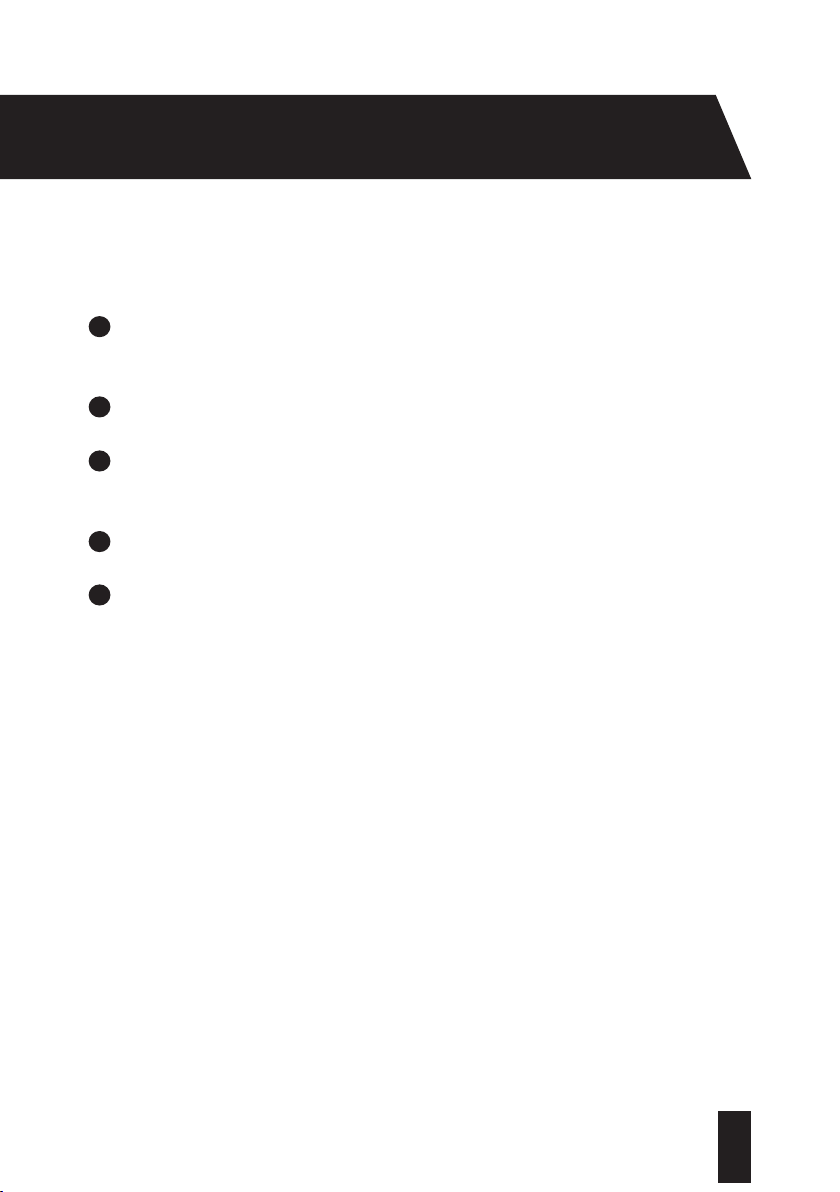
Child Lock - Press and hold both the Options and Extra Rinse buttons simultaneously
for at least 5 seconds to activate the child lock,
will be displayed on the control
panel.
To release the child lock , simultaneously press both buttons for a minimum of 5
seconds.
will no longer be shown on the display.
Cancelling a Programme:
To cancel a programme while it is running:
1
Turn the programme dial to the top position. The programme will stop.
2
Turn the programme dial to any programme. Your Washing Machine will discharge any
w
a
t
e
r left from the cancelled programme.
Programme End:
Your Washing Machine will automatically stop once the selected programme has finished. The
digital display will show
for 2 minutes and will be shown on the electronic display.
36
T: 0333 577 7230www.sharphomeappliances.com
Removing Your Laundry:
1
Turn the programme selection dial to the Stop position. Your Washing Machine door lock
w
i
l
l au
tomatically be released approximately 2 minutes after the programme has finished.
2
Pull the door handle forwards and open the door fully.
3
Remove your laundry; check that all items have been removed from the drum. Any items
le
f
t
in t
he drum could discolour items in the next wash or become discoloured themselves.
4
Check the drum and door seal for any small articles that may have become dislodged.
5
Leave the door open for a short time to allow the interior of your Washing Machine to dry.
Chec
k the drum is dry and empty before closing the door.
Power Supply Failure:
If a power cut should occur while a programme is running, the programme will continue from the
same point once power is restored. This will not cause any harm to your Washing Machine or
laundry.
During a power cut, the door lock mechanism will release after 2 minutes. Do not open the door
if there is water in your machine. If you wish to collect your laundry, drain your Washing Machine
first. Page 40 contains instructions on how to drain your machine.
37
T: 0333 577 7230 www.sharphomeappliances.com
MAINTENANCE
From time to time it may be necessary to carry out some routine maintenance of your Washing
Machine to ensure that it operates as intended. Before cleaning your Washing Machine:
1
Turn your mains power supply off and remove the plug from the socket.
2
Turn off the cold water supply.
CAUTION:
Do not use solvents, abrasive cleaners, glass cleaners or all-purpose cleaning
agents to clean your Washing Machine. They may damage the plastic surfaces and other
components with the chemicals they contain.
External Casing:
Use a mild, non-abrasive cleaning agent, or soap and water, to clean the external casing.
Wipe dry with a soft cloth.
The Drum:
Use a suitable stainless steel cleaning agent to clean the drum. Follow the manufacturer’s
advice on the cleaning agent’s packaging.
Extra Cleaning:
Deposits may build up in your machine when washing is mainly carried out at low
temperatures. To prevent these deposits from building up, carry out a hot wash (70
o
C
or above) once every 6 weeks. If you have no reason to wash occasionally at this high
temperature, run a high temperature cottons programme with detergent but no laundry at
regular intervals.
GENERAL MAINTENANCE

38
T: 0333 577 7230www.sharphomeappliances.com
Filters:
Water Inlet Filters:
Water inlet filters prevent dirt and foreign materials from entering your machine. It is
recommended that these filters are cleaned when your machine is unable to receive sufficient
water, although your water supply is on and the tap is open.
To clean the water inlet filters:
1
Unscrew the water inlet hose from the Washing Machine by turning the hose anti-
clo
c
k
w
ise and gently pulling.
2
To remove the water inlet filter from the water inlet valve, use a pair of long-nosed pliers to
gent
ly pull on the plastic bar in the filter (fig 12).
Figure 12
39
T: 0333 577 7230 www.sharphomeappliances.com
MAINTENANCE
3
Clean the filter thoroughly with a soft brush, wash with soapy water and rinse thoroughly.
4
Re-insert the filter by gently pushing it back into place.
A seco
nd water inlet filter is located in the tap end of the water inlet hose.
To remove the second water inlet filter:
1
Use a pair of long-nosed pliers to gently pull on the plastic bar in the filter.
2
Clean the filter thoroughly with a soft brush and wash with soapy water and rinse
thoro
ughly.
3
Re-insert the filter by gently pushing it back into place.
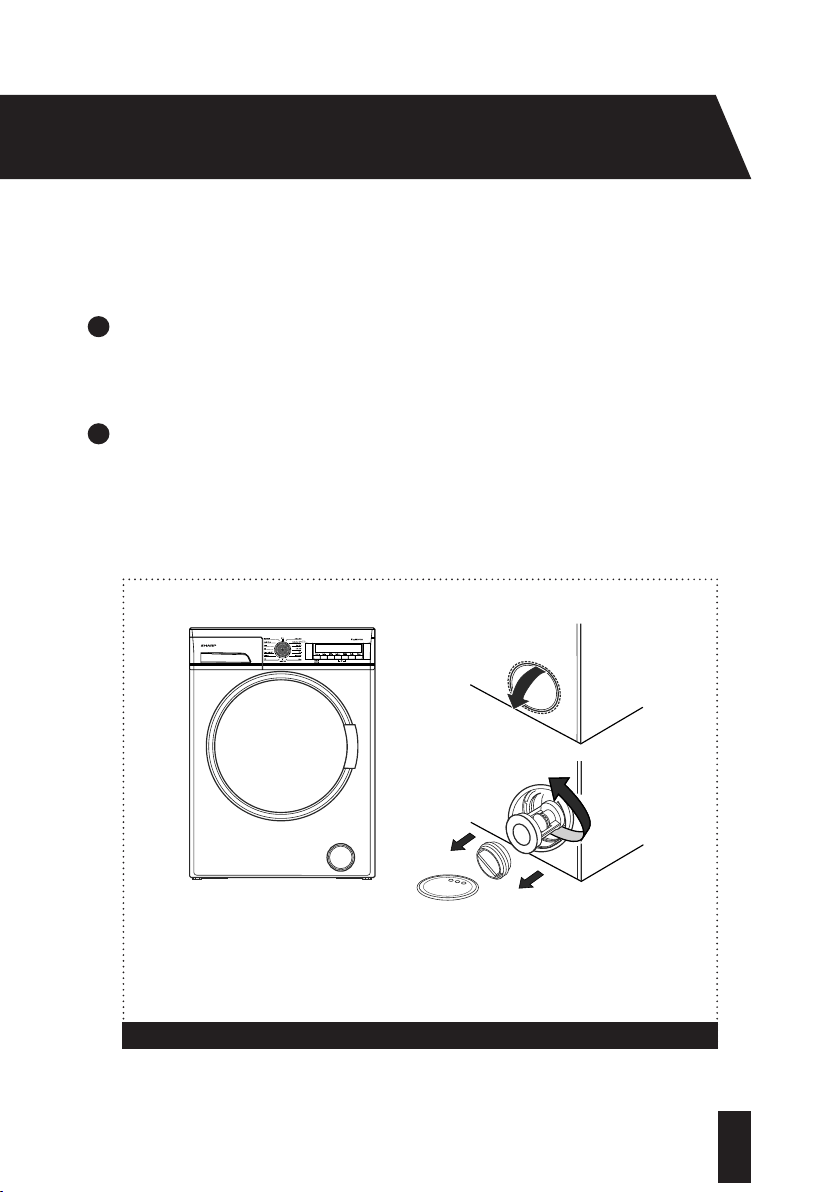
Pump Filter:
The pump filter system in your Washing Machine prolongs the life of the pump by preventing lint
from entering your machine. We recommend that you clean the pump filter every 2-3 months.
The pump filter is located behind the cover on the front-lower right corner.
CAUTION:
The water in the pump may be hot, wait for it cool before carrying out any
cleaning or maintenance.
GENERAL MAINTENANCE
40
T: 0333 577 7230www.sharphomeappliances.com
Cleaning the Pump Filter:
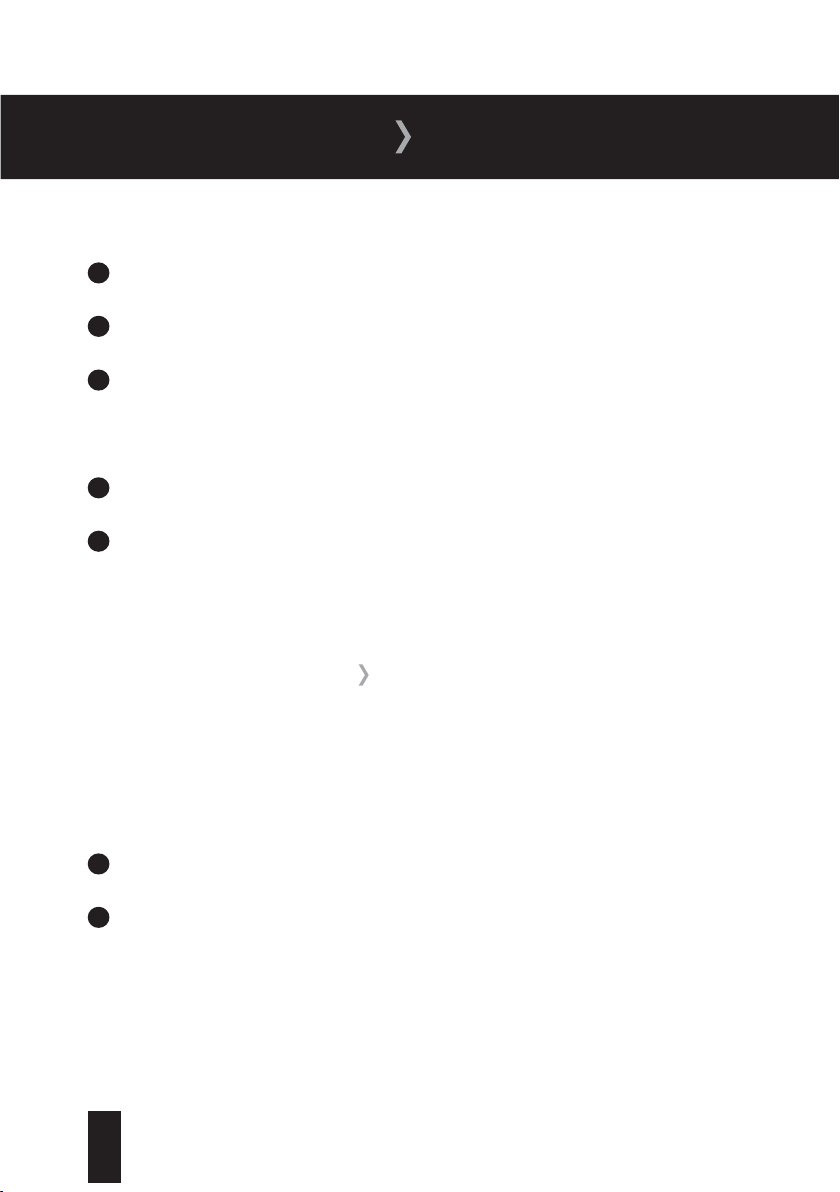
1
Before opening the filter cover, place a container under the filter cover to collect any water
le
f
t in t
h
e machine. Pull the top of the cover forwards using the finger groove, until the
pump filter is fully exposed (fig 13a).
2
Loosen the filter by turning anti-clockwise and remove by pulling (fig 13b). Wait for the
wate
r to drain.
Figure 13
a:
b:
41
T: 0333 577 7230 www.sharphomeappliances.com
MAINTENANCE
3
Remove any foreign materials from the filter with a soft brush.
4
Move the pump by hand to check that it rotates freely.
5
Clean the pump with a soft brush.
After
Cleaning:
1
Re-fit the filter by inserting it and turning clockwise.
2
Close the filter cover.
The use o
f detergent may cause residual build up in the detergent drawer over time. Remove the
drawer at regular intervals to clean the accumulated residue.
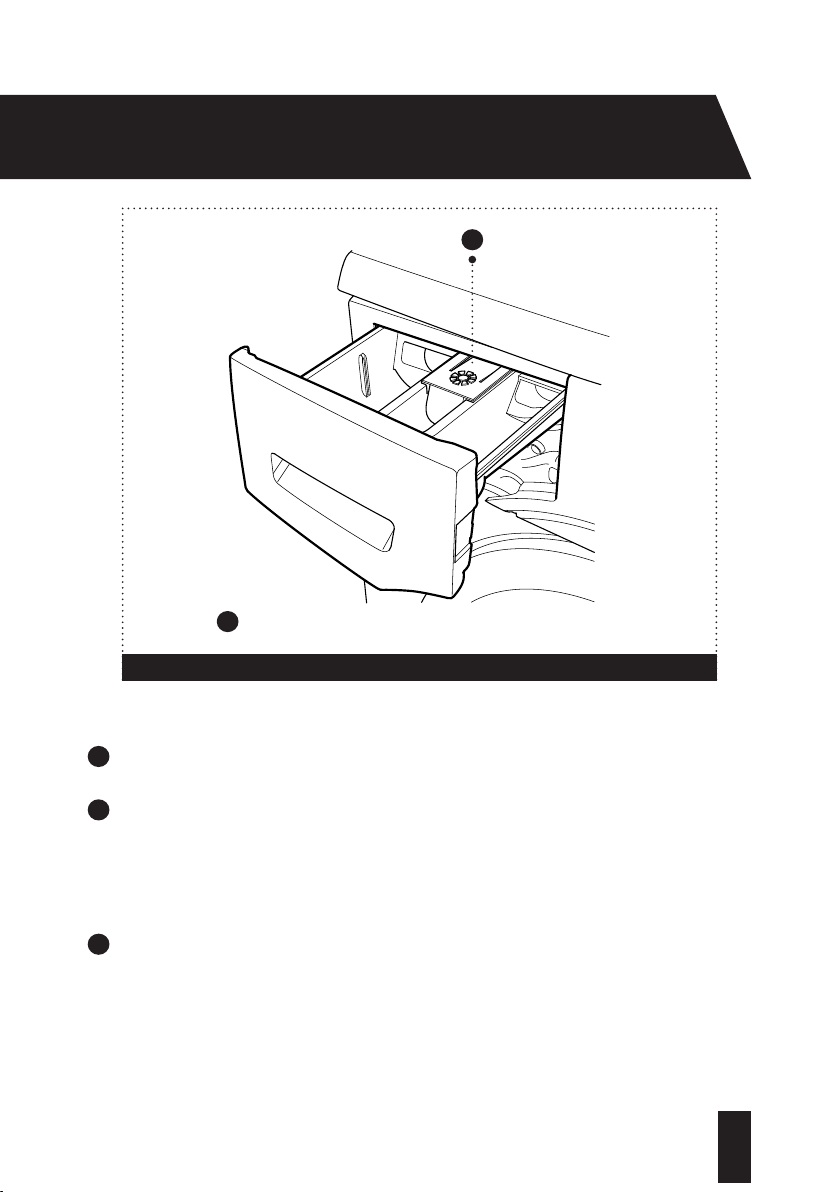
To remove the detergent drawer:
1
Pull the drawer forwards until it is fully extended.
2
Press down on the siphon lid (fig 14) and pull the drawer from its housing.
DETERGENT DRAWER
42
T: 0333 577 7230www.sharphomeappliances.com
3
Clean the drawer with water and a soft brush.
4
If there is any residue in the drawer housing, remove with a soft brush. Take care to prevent
any residu
e from dropping into the machine.
To replace the drawer:
5
Dry it thoroughly and slide it back into the housing.
Figure 14
1
1
Siphon plug
43
T: 0333 577 7230 www.sharphomeappliances.com
The siphon plug is located in the compartment of the detergent drawer. Remove the
detergent drawer fully and pull the plug upwards.
Clean the plug with a soft brush and replace, checking that it is firmly in position.
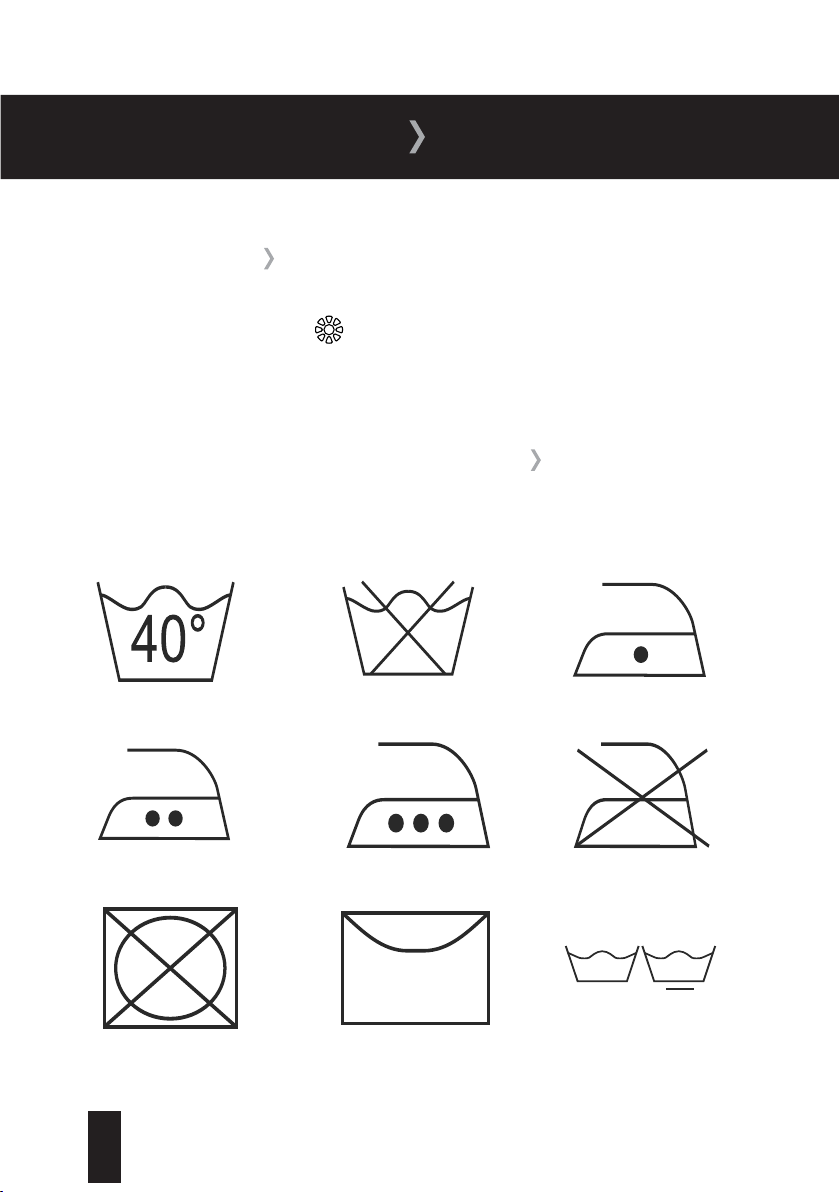
When selecting your washing programme take care to note any instructions displayed on the
international washing signs in your garments and textiles.
Washing Temperature Do Not Wash Lukewarm Iron
Medium Hot Iron Hot Iron Do Not Iron
Do Not Tumble Dry Hang To Dry Normal Washing
CLOTHING CARE
SIPHON PLUG
GENERAL WASHING INSTRUCTIONS
44
T: 0333 577 7230www.sharphomeappliances.com
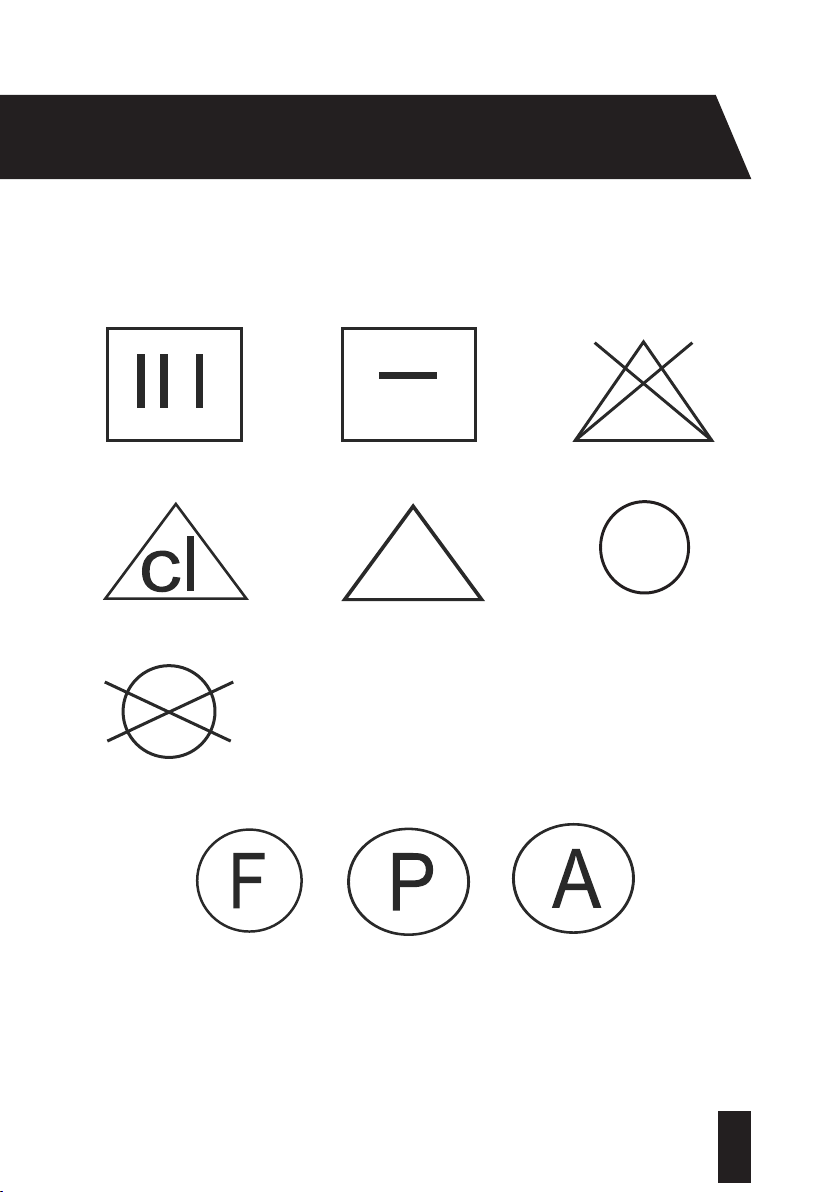
Drip Dry Dry Flat Do Not Bleach
Can be Bleached in Cold Water Any Bleach Allowed Can Be Dry Cleaned
No Dry Cleaning
These letters are used to instruct professional cleaners as
to which type of solvent to use. Do not wash garments with
these symbols in your Washing Machine unless the label says
otherwise.

45
T: 0333 577 7230 www.sharphomeappliances.com
CLOTHING CARE
If can often be hard to know the best way to treat a stubborn stain. To help with this we’ve
provided you with a few tips on dealing with the most common types before running your wash
cycle.
Alcohol:
Wash the stain in cold water, wipe with glycerine and water and rinse with water mixed with
vinegar.
Shoe Polish:
Scratch out the stain taking care not to damage the material, rub with detergent and rinse.
Tea and Coffee:
Stretch the area containing the stain and pour on hot water.
Chocolate and Cocoa:
Leave your clothes in cold water and rub with soap or detergent, then wash at a high
temperature.
Tomato Paste:
Scrape away the dried pieces, leave in cold water for around 30 minutes and hand wash by
rubbing with detergent.
Egg:
Scrape away the dried pieces, clean the stained area with a cold wet cloth or sponge and rub
with detergent to wash.
Grease and Oil:
Rub the stain with detergent and then wash in lukewarm soapy water.
STAIN REMOVAL INFORMATION

46
T: 0333 577 7230www.sharphomeappliances.com
Mustard:
Apply glycerine to the stained area, rub with detergent and hand wash.
Blood:
Soak your clothes in cold water for around 30 minutes and then hand wash.
Cream, Ice Cream and Milk
Soak your clothes in cold water and rub the stained area with detergent.
Mould:
Clean the stained area as soon as possible and hand wash with detergent.
Ink:
Hold the stained area under cold water and wait until the inky water completely runs off. Rub
the stain with water and diluted lemon juice, wait 5 minutes before beginning the wash cycle.
Fruit:
Stretch the stained area and pour on cold water, apply glycerine and wipe. Wait for 1-2 hours
and rinse after wiping with a few drops of white vinegar.
Grass:
Rub the stained area with detergent before washing.
Oil-Based Paint:
Apply paint thinner to the stained area before it dries, then rub the area with detergent and
wash.
47
T: 0333 577 7230 www.sharphomeappliances.com
TROUBLESHOOTING
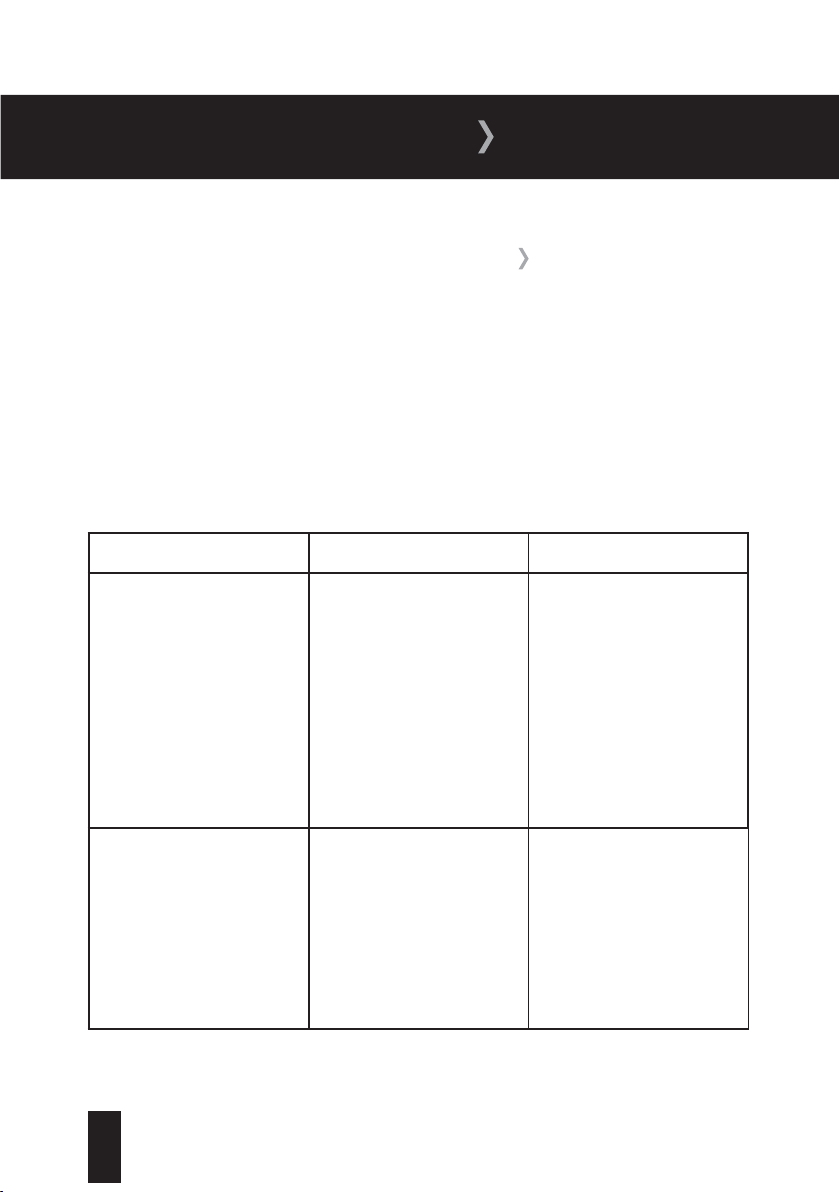
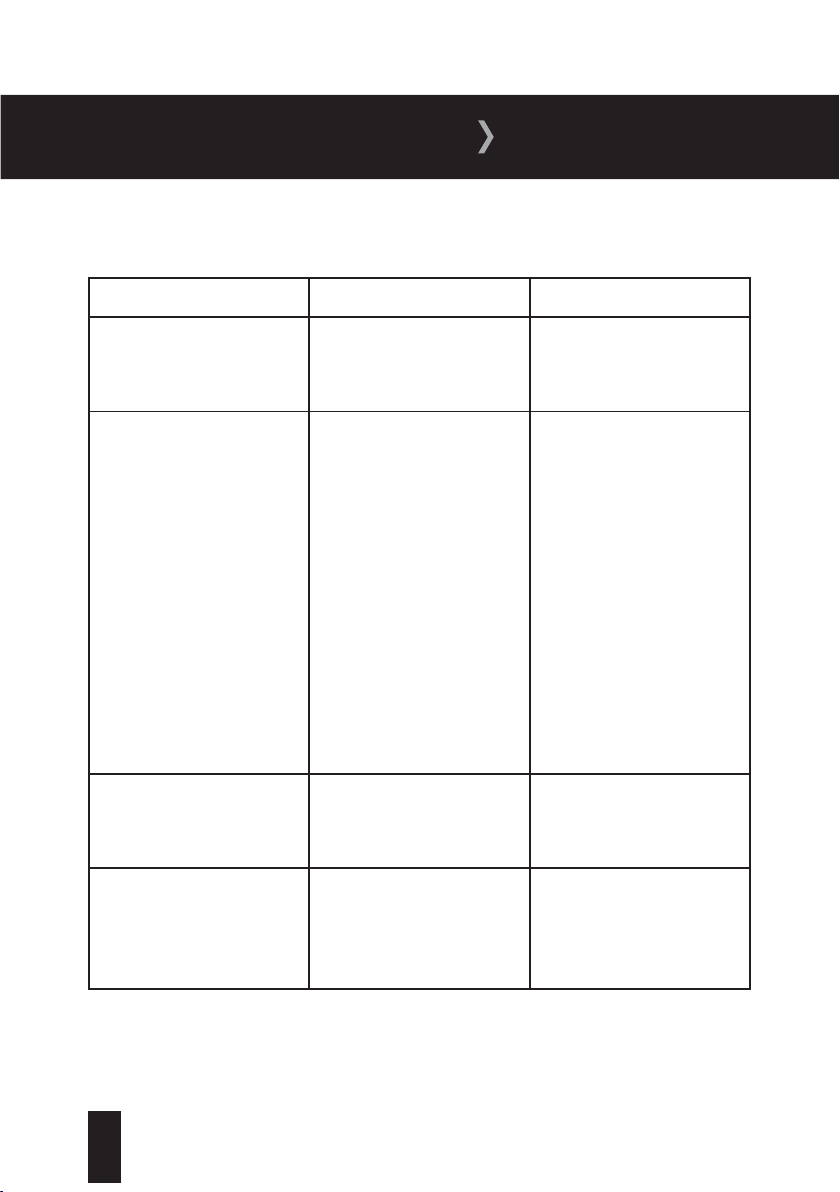
If your Washing Machine is not operating as expected, you may find a simple solution listed in
the table below.
If your Washing Machine is not working and one or more of the indicator lights are flashing, this
means that the automatic error detection system has diagnosed a fault. The table on page 44
will provide you will more information.
If your machine has developed a fault not covered in this manual, please contact the Sharp
helpdesk.
Fault Possible Cause Solution
Your Washing Machine does
not operate
It is switched off at the mains
The programme dial is in the
off position
The door is not shut properly
Check that your Washing
Machine is plugged in and
turned on at the mains
Use the programme dial to
select the desired programme
Check that the door ‘clicks’
shut
Your Washing Machine does
not receive water
The cold water supply tap
is off
The water fill hose is bent,
twisted, kinked or trapped
Check that the cold water
supply tap is fully turned on
Check that there are no
bends, twists or kinks and
that the fill hose is not
trapped
TROUBLESHOOTING INFORMATION
48
T: 0333 577 7230www.sharphomeappliances.com
Fault Possible Cause Solution
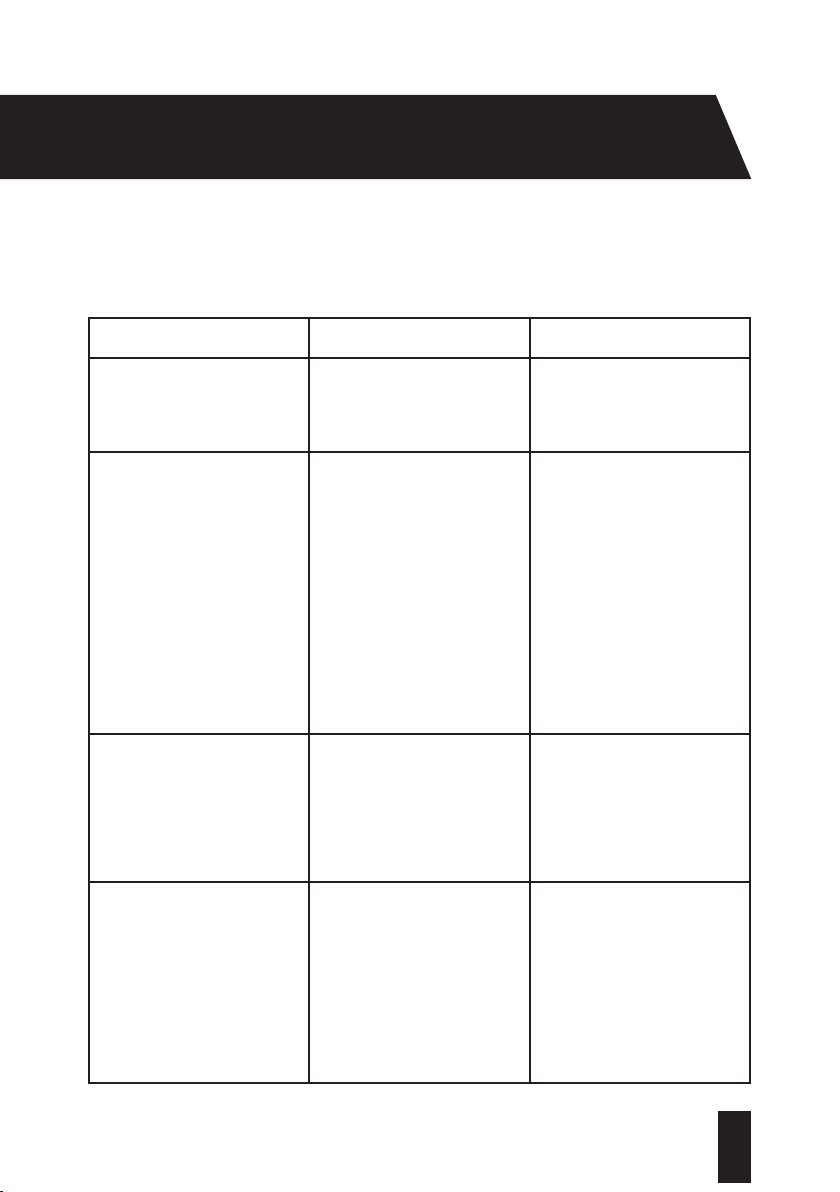
Your Washing Machine does
not receive water
The water inlet filters are
blocked
Clean the water inlet filters.
See page 38 for detailed
instructions
Your Washing Machine is not
draining water
The drain hose is bent,
twisted, kinked or trapped
The pump filter is obstructed
Your laundry is too tightly
packed together in the drum
Check the drain hose and
straighten out any kinks,
twists or bends
Clean the pump filter.
See page 40 for detailed
instructions
Check that your laundry is
spread out
Your Washing Machine is
vibrating
The feet of your machine are
not correctly adjusted
The transit bolts are not
removed
Adjust the feet. See page 11
for further information
Remove the transit bolts. See
page 9 for further information
There is excessive foam in
the detergent drawer
Too much detergent has been
used
Press the Start/Pause button.
To stop the foam, dilute one
tablespoon of softener into
1/2 litre of water and pour
into the detergent drawer.
Press the Start/Pause button
after 5-10 mins
49
T: 0333 577 7230 www.sharphomeappliances.com
TROUBLESHOOTING
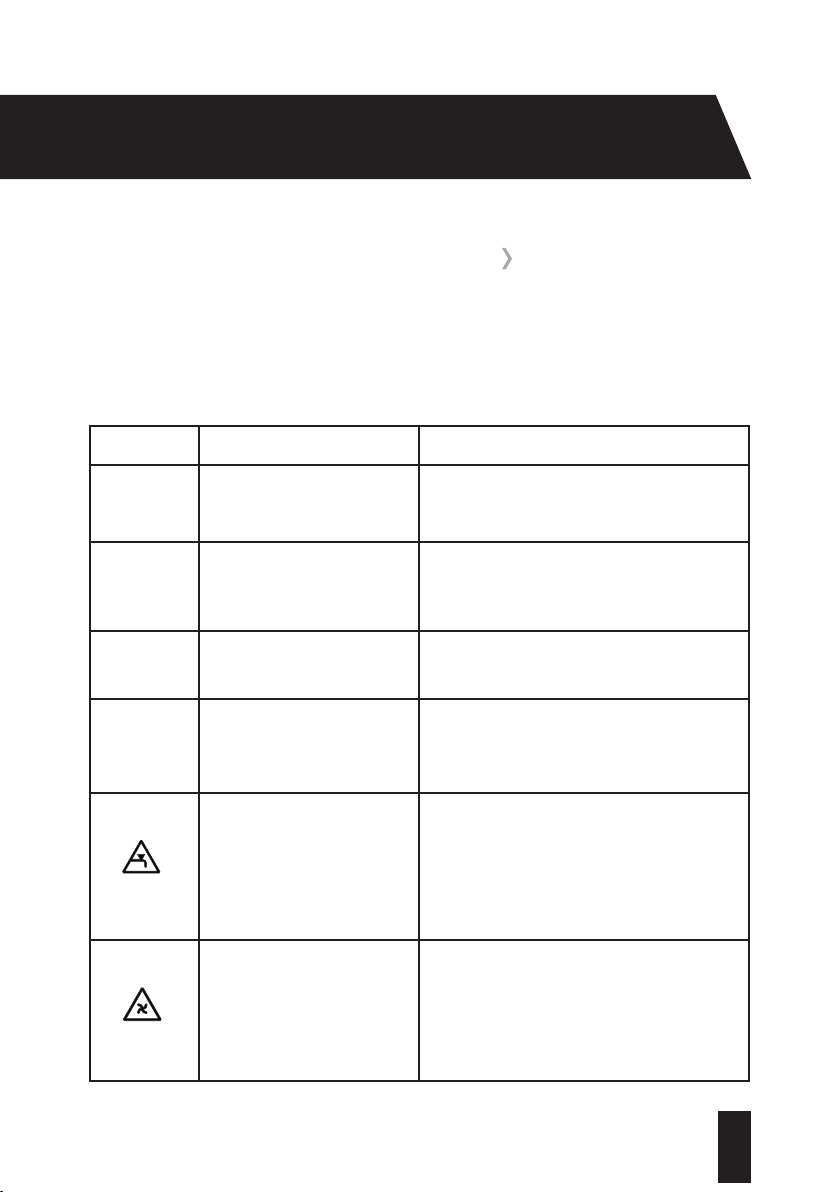
Fault Possible Cause Solution
There is excessive foam in
the detergent drawer
The wrong detergent has
been used
Only use detergents produced
for automatic Washing
Machines
The washing result is not as
expected
Your laundry is too dirty
for the programme you’ve
selected
Not enough detergent used
There is too much laundry in
your Washing Machine
Use the information on pages
25 to 30 to select the most
appropriate programme
Use the amount of detergent
as instructed on the
packaging
Check that the maximum
capacity of your Washing
Machine is not exceeded.
See pages 25 to 30 for more
information
The water from the machine
is drained as soon as it is
filled
The end of the water drain
hose may be too low
Check that the drain hose is
at a suitable height. See page
14 for more information
The spin cycle does not take
place
The in-built sensor has
prevented your Washing
Machine from operating with
an out-of-balance load
Avoid small wash loads
containing items that could
become heavy through water
absorption
50
T: 0333 577 7230www.sharphomeappliances.com
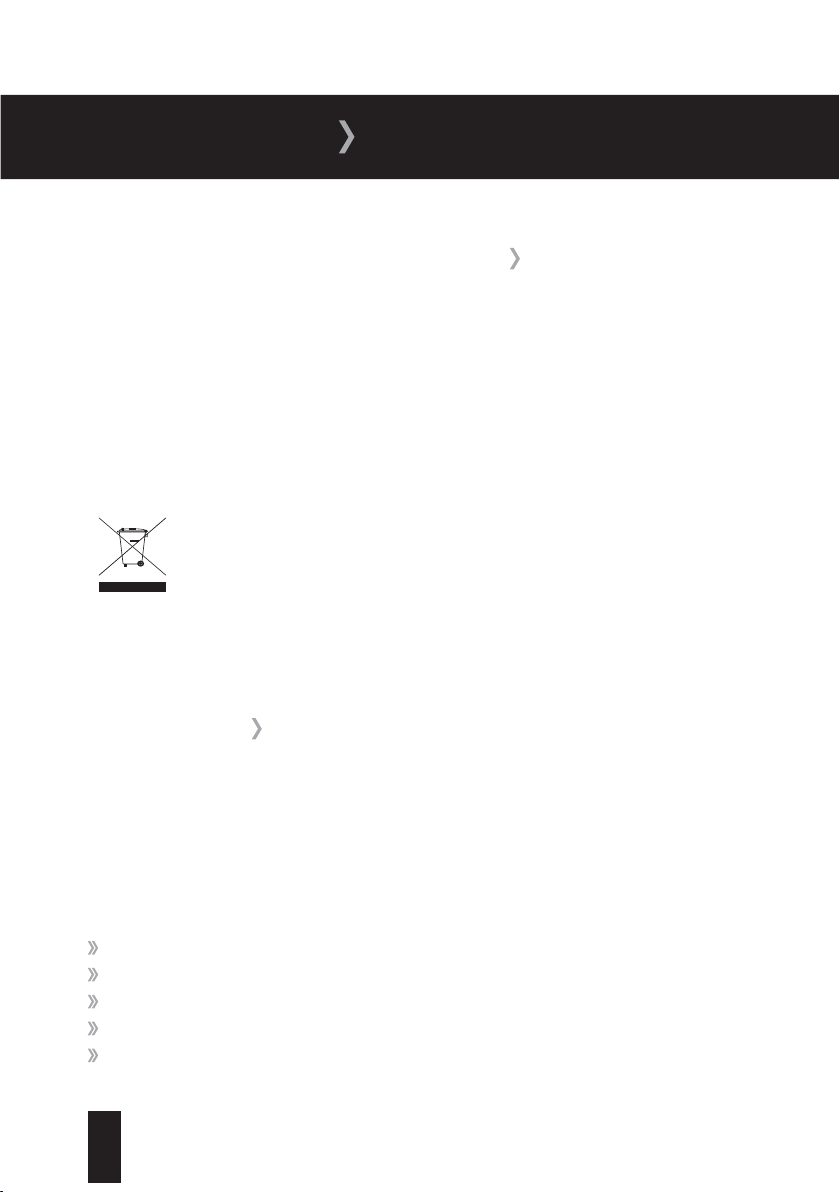
Your Washing Machine is equipped with a built-in fault detection system which shows any
fault details on the electronic display. The most common failure codes are shown below. If your
machine displays a code not shown, or if the problem persists after you have taken corrective
action, consult the Sharp helpdesk.
Error Code Possible Failure Solution
E01
The door is not shut properly Shut the door properly so that you hear the
click
E02
The water level in your
machine may be low, or the
water pressure may be low
Check that the cold water tap is fully turned
on
E03
The pump has failed, or the
pump filter is obstructed
Check that the cold water tap is fully turned
on
E04
There is an excessive amount
of water in your Washing
Machine
Your Washing Machine will automatically
drain the water. Turn your Washing Machine
off, unplug it and contact the Sharp helpdesk
There is no water supply or
the mains water pressure is
low
Check mains water supply is on and has
sufficient pressure. If the mains supply has
been cut off, switch the control dial to Stop
and re-select the programme once the supply
has been restored.
Faulty pump or clogged pump
filter
The pump filter may be clogged. Check and
clean if necessary
AUTOMATIC DETECTION SYSTEM
51
T: 0333 577 7230 www.sharphomeappliances.com
GUARANTEE
All packaging and materials used are environmentally friendly and recyclable. Please dispose
of any packaging in an environmentally friendly manner. Consult your local council for further
details.
To ensure safety when disposing of an old machine, cut off the main power supply cable and
break the door hinges or lock.
Please refer to the rear cover for disposal instructions.
The Sharp guarantee covers the cost of parts/labour/call out charges to repair an appliance
should any covered component fail in its normal functions necessitating a repair or replacement
to resume those functions.
The Sharp guarantee
does not
cover:
Accidental damage
Use in a commercial environment
Incorrect or faulty installation
Deliberate damage or neglect
Repairs to cosmetic parts
DISPOSAL OF YOUR OLD MACHINE
GUARANTEE
52
T: 0333 577 7230www.sharphomeappliances.com
Damage caused by foreign objects or substances
Claims in respect to routine inspection or maintenance
The Sharp guarantee is not transferable.
For your Sharp guarantee to be valid, you will need to retain your original purchase
receipt and be able to provide it when you make a claim.
The above summary does not include all of the terms and conditions and exclusions which can
be found on our website www.sharphomeappliances.com.
Household contents insurance
Your household insurance may cover you for accidental damage, fire or theft of your product.
Data Protection Act (1988)
Please note that any information provided will be processed by us or our agents in compliance
with the provisions of the Data Protection Act 1988, for the purpose or providing cover and
handling claims, if any, which may necessitate providing such information to third parties.
KNOW YOUR RIGHTS
53
T: 0333 577 7230 www.sharphomeappliances.com
INDEX
F
Fabric conditioner ...................................... ...22
Feet
, adjustment ...........................................11
Filters .............................................................38
First wash ......................................................18
Front view ......................................................05
Fus e ................................................................ 16
G
Garm
ent care labels ..................................... 43
Guaran
tee ...................................................... 51
H
Half load detection system ..........................20
I
Installation requirements..............................09
Item
s included ...............................................02
Liquid starch ..................................................22
Loadi
ng the drum ..........................................19
L
A
Adding detergent ..........................................20
Addi
tional functions ......................................33
A djusting the feet...........................................11
C
Cancelling a programme ...............................35
Chil
d lock........................................................35
Cleaning .........................................................37
Connection, drain hose .................................13
Connection, electrical ...................................16
Connection, water supply .............................12
Control panel .................................................17
D
Det ergent .......................................................20
Dete
rgent drawer ..........................................07
Disposal .........................................................51
Drain hose connection ..................................13
E
Easy ironing .................................................. 33
Elec
trical connection.....................................16
Error codes.................................................... 50

54
T: 0333 577 7230www.sharphomeappliances.com
P
Power supply failure .....................................36
Prepar
ing your laundry ..................................18
Programme end .............................................35
Programme modes ........................................25
Pump filter .....................................................39
R
Rear view ...................................................... 06
Re-f
itting of transit bolts ..............................10
Removal of transit bolts................................09
Removing your laundry .................................36
Rinse ............................................................. 33
S
Safety instructions ........................................02
Selec
ting a programme ................................22
Sorting your laundry ......................................19
Spin selection ................................................32
Spin speed selector ......................................22
Stain removal information ........................... 45
Starting a programme ...................................23
T
Technical specification .................................08
Temper
ature selection ..................................22
Transit bolt, re-fitting ....................................10
Transit bolt, removal .....................................09
Trouble shoot ing .............................................47
Twinjet Technology .......................................01
W
Warranty ........................................................01
Water i
nlet filter ............................................38
Water softener ..............................................21
Water supply connection ..............................13
T: 0333 577 7230
www.sharphomeappliances.com
0000000000
The symbol on the product or on its packaging indicates that this product may not be treated as household waste. Instead it shall be handed over to the applicable collection
point for the recycling of electrical and electronic equipment. By ensuring this product is disposed of correctly, you will help prevent potential negative consequences for
the environment and human health, which could otherwise be caused by inappropriate waste handling of this product. For more detailed information about recycling of this
product, please contact your local city offi ce, your household waste disposal service or the shop where you purchased the product.
52202230