Home Appliances
For Life
User Manual
EN
Laundry
Washing Machine
ES-GFD814QW3-FR
ES-GFD814QI3-FR

EN -2-
CONTENTS
CHAPTER-1: BEFORE USING THE APPLIANCE
• Correct Usage 6
• Generalwarnings 8
• Safetywarnings 12
• PackagingandEnvironment 18
• SavingsInformation 19
CHAPTER-2: OVERVIEW OF YOUR DEVICE
• GeneralAppearance 20
• TechincalSpecications 22
CHAPTER-3: INSTALLATION
• Removingtransportationsafetyscrews 23
• AdjustingAdjustableStays 26
• Electricalconnection 28
• Waterinlethoseconnection 29
• Waterdischargeconnection 31
CHAPTER-4: INTRODUCTION OF CONTROL PANEL 32
• Detergentdrawer 33
• Programmeknob 35
CHAPTER-5: MACHINE SETTINGS
• Daytime 36
• Selectlanguage 38
• Seteconomictimezone 40
• Volumesetting 43
• Screenbrightness/contrast 44
• Reverttofactorysettings 45
CHAPTER-6: PRELIMINARY PREPARATION FOR LAUNDERING
Separatingyourlaundry 47
Puttinglaundriesinthemachine 48
Detergentselectionandaddingdetergenttothemachine 50
Operatingyourmachine 51
Programselection 52
Stainselection 53
Stainlevelselection 55
Auxiliaryfunctions 56
Memory66
Start/stand-bybutton 73
Stoppingprogram/Addinglaundry/Cancellingprogram 75
Programend 76
Keylock 77
Halfloadsensingsystem 79
DoubleJet 80

EN-3-
CONTENTS
CHAPTER -7: PROGRAM TABLE 81
CHAPTER -8: SELECTING SUB-PROGRAMS
Synthetics 92
Wool94
Extras 96
CHAPTER -9: MAINTENANCE AND CLEANING OF YOUR MACHINE
Warning 98
Waterinletlters 99
Pumplter 100
Detergentdrawer 102
CHAPTER -10: FLUSH STOPPER / BODY / DRUM 103
CHAPTER -11: TROUBLESHOOTING 104
CHAPTER -12: AUTOMATIC MALFUNCTION WARNINGS AND
WHAT SHOULD BE DONE 109
THE ENERGY LABEL AND SAVING ENERGY 114
DISPOSAL OF YOUR OLD MACHINE 116

EN-4-
CHAPTER -1: BEFORE USING THE APPLIANCE
(SAFETY WARNINGS)
Operatingvoltage/frequency:
(V/Hz)(220-240)V~/50Hz;
Totalcurrent(A):10
Waterpressure(Mpa)
Maximum:1Mpa/Minimum:0.1Mpa
Totalpower(W):2200
Maximumdrylaundrycapacity(kg):8
Donotinstallyourmachineonacarpet
or such grounds that would prevent the
ventilationofitsbase.
Theapplianceisnotintendedforuseby
people(includingchildren)withreduced
physical,sensoryormentalcapabilities,or
lackofexperienceandknowledgeunlessthey
have been given supervision or instruction
concerning use of the appliance by a person
responsiblefortheirsafety.
Children should be supervised to ensure that
theydonotplaywiththeappliance.
Callthenearestauthorizedservicecentrefor
areplacementifthepowercordmalfunctions.

EN-5-
Useonlythenewwaterinlethosecoming
withyourmachinewhenmakingwaterinlet
connectionstoyourmachine.Neveruseold,
usedordamagedwaterinlethoses.
Thisappliancecanbeusedbychildren
agedfrom8yearsandaboveand
persons with reduced physical, sensory or
mentalcapabilitiesorlackofexperience
andknowledgeiftheyhavebeengiven
supervision or instruction concerning use of
the appliance in a safe way and understand
thehazardsinvolved.
Childrenshouldnotplaywiththeappliance.
Cleaningandusermaintenanceshouldnotbe
madebychildrenwithoutsupervision.
Note:Forasoftcopyofthisuser
manual,pleasevisitourWEBpage:
sharphomeappliances.com.Inyoure-mail,
pleaseprovidethemodelnameandserial
number(20digits)whichyoucanndonthe
appliancedoor.
CHAPTER -1: BEFORE USING THE APPLIANCE
(SAFETY WARNINGS)

EN -6-
CHAPTER -1: BEFORE USING THE APPLIANCE
(CORRECT USAGE)
• Denitely read the user’s manual.
• Your machine is designed to be used
domestically. Commercial use will cause
your warranty to be cancelled.
•
Keepyourpetsawayfromyourmachine
•Pleasecheckthepackagingofyourmachine
before installation, and the outer surface
afterthepackageisopened.Donotoperate
damagedmachinesormachineswithopened
packaging.

EN-7-
CHAPTER -1: BEFORE USING THE APPLIANCE
(CORRECT USAGE)
•Useyourmachineonlyforlaundriesthathave
beenspeciedassuitableforwashingbythe
manufacturer.
• Before operating the washing machine,
remove the 4 transportation screws and rub-
ber spacers from the back of the machine.
If the screws are not removed, it may cause
heavy vibration, noise and product malfunc-
tion, (voiding the guarantee).
•
Yourmachineisnotcoveredunderwarranty
forfaultscausedbyanykindofexternalfactors
(pesticides,re,etc.).
•Pleasedonotthrowawaythisusermanual;
keepitforfuturereference.Youorsomebody
elsemightneeditinthefuture.
Note:Machineryspecicationsmayvaryde-
pendingontheproductpurchased.
Replacementofdrivebelt,onlybyauthorized
service.Onlyoriginalsparebelt:42006396
Optibelt6EPJ1236

EN -8-
CHAPTER -1: BEFORE USING THE APPLIANCE
(GENERAL WARNINGS)
•Thenecessaryambienttemperatureforyour
machine’sidealoperationis15-25°.
•Frozenhosescantearandexplode.Inregions
wheretemperatureisbelowzero,ambienttem-
peraturemightendangerthesafeoperationof
electroniccard.
•Pleaseensurethattheclothesyouplacein
yourmachinedonotcontainanyforeignsub-
stances(nail,needle,coins,lighter,matches,clip
etc.)intheirpockets.Theseforeignsubstances
candamageyourmachine.
• It is recommended to perform the rst
washing operation with a 90˚ Cotton
programme and without laundry by inserting
½ scale of detergent in 2nd compartment of
the detergent drawer.

EN-9-
CHAPTER -1: BEFORE USING THE APPLIANCE
(GENERAL WARNINGS)
•Asdetergentorsoftenerexposedtoairfora
longtimemaycauseresidues,putyourdeter-
gent or softener in the detergent drawer at the
beginningofeverywash.
•Itisadvisedthatyouunplugyourmachine
and close the water inlet tap if you will not use
yourmachineforalongtime.
Also,leavingthedoorofyourmachinewill
preventtheformationofbadodoursdueto
humidity.
•
Somewatermightbeleftinyourmachine
after the trials and tests conducted due to
QualityControlprocedures.
Thiswillnotdamageyourmachine.
•Rememberthatpackagingmaterialsofyour
machinemaybedangerousforchildren.Keep
thepackagingmaterialsinaplacewherechil-
drencannotreachordisposeofthemappro-
priately.
•Keepthesmallpartsfoundinthedocument
partawayfromthereachofchildrenandba-
bies.
•
Usepre-washprogramsonlyforverydirty
laundry.
EN-10-
CHAPTER -1: BEFORE USING THE APPLIANCE
(GENERAL WARNINGS)
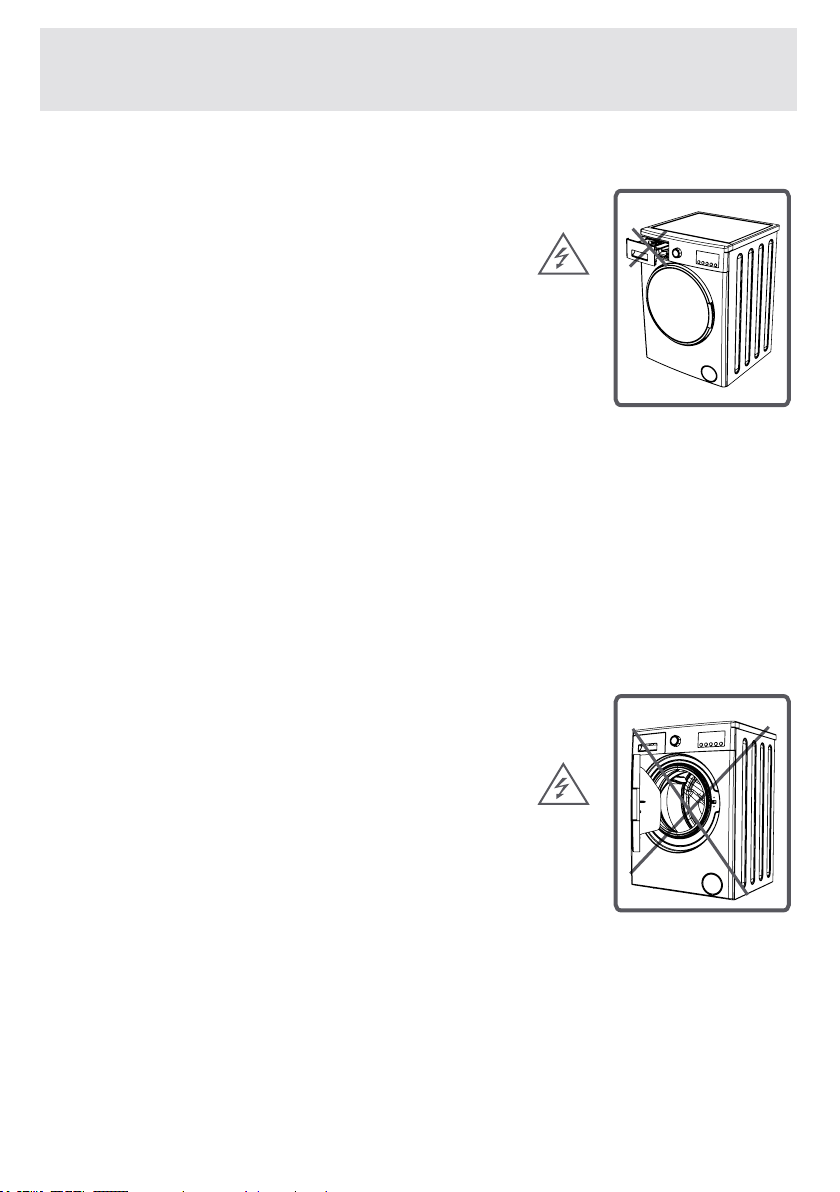
•Neveropenthedetergentcom-
partmentwhentheapplianceis
running.
•Incaseofanybreakdown,unplug
theappliancerstandthenturn
thetapoff.Donotattempttorepair
by yourself, always contact an au-
thorisedservicecentreforadvice.
•Theamountoflaundryyouputin
yourwashingmachineshouldnot
exceedthemaximumamountindi-
cated.
• Never force the door to open
whenthemachineisrunning.

EN-11-
CHAPTER -1: BEFORE USING THE APPLIANCE
(GENERAL WARNINGS)
•Pleaseadheretodetergent/fabriccondition-
ermanufacturers’adviceregardingtheuseof
fabricconditionerorsimilarproductsinyour
machine.
•
Setupyourmachineinaplacewhereits
doorcanbecompletelyopened.

EN-12-
CHAPTER -1: BEFORE USING THE APPLIANCE
(SAFETY WARNINGS)
You must read these warnings, to pro-
tect yourself and others from harm.
DANGER OF GETTING BURNT!
Donottouchthedischarginghoseand
water during discharging as the appliance
mayreachhightemperatureswhenrun-
ning.

EN-13-
CHAPTER -1: BEFORE USING THE APPLIANCE
(SAFETY WARNINGS)
DEATH RISK DUE TO
ELECTRICAL CURRENT!
•
Donotusemultiplereceptacles
orextensioncord.
•Donotplugindamagedortorn
plugs.
• Never pull the cable when un-
plugging – always grip the plug
itself.
•
Donotplug-inorouttheplug
fromthereceptaclewithwethands
to prevent electrocution!
•
Nevertouchthemachinewithwet
handsorfeet.
•Callthenearestauthorizedser-
viceforareplacementifthepower
cordcentremalfunctions.
EN-14-
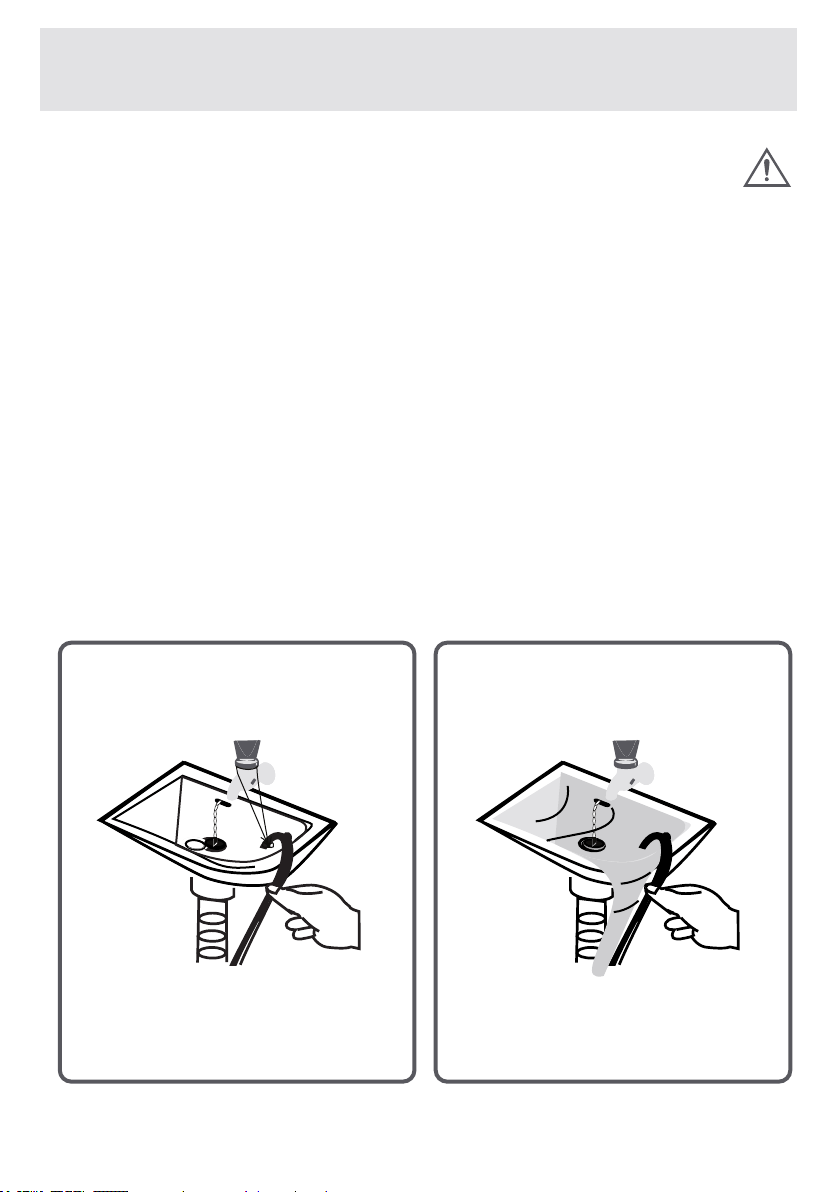
Flooding risk!
•
Checkwhetherthewaterrunsfastornotbe-
foreplacingthedischargehoseonthesink.
•Takenecessarymeasurestopreventthe
slippingofyourhose.
•Thebackringforceofahosethatisnot
placedappropriatelycandisplacethehose.
Preventthestopperinsideyoursinkfrom
blockingthesinkhole.
CHAPTER -1: BEFORE USING THE APPLIANCE
(SAFETY WARNINGS)
EN-15-
Danger of Fire!
•
Donotkeepinammableliquidsnearyour
machine..
•
Thesulphurecontentofpaintremovers
mightcausecorrosion.Forthisreason,
neverusepaint-removingmaterialsinyour
machine.
• Never use products that contain solvent
material(likewashinggas)inyourma-
chine.
•
Removeallobjectsinthepocketsofyour
clothes(needles,paperclips,lighter,match-
esetc.)whenplacingitinyourmachine.
Fire and Explosion risk may occur.
CHAPTER -1: BEFORE USING THE APPLIANCE
(SAFETY WARNINGS)

EN-16-
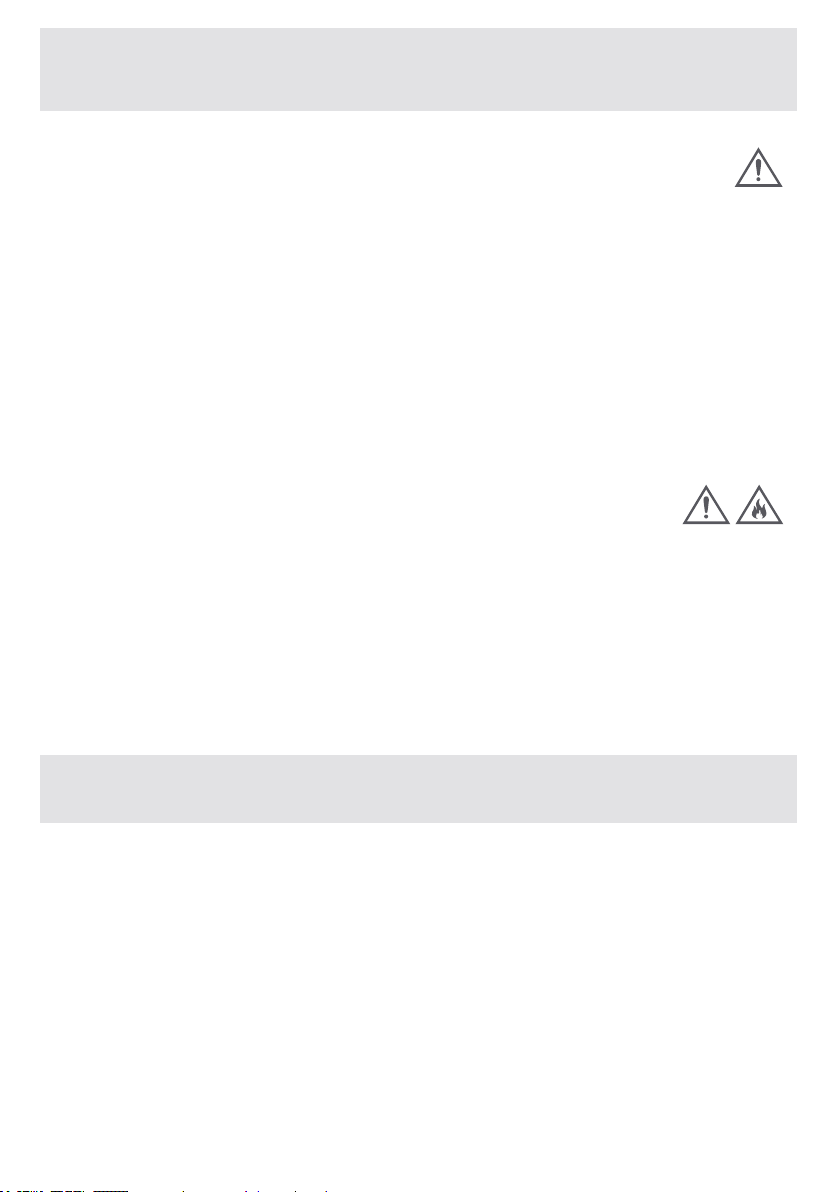
Fall and injury hazard!
•
Donotclimbonyourmachine.Theupperta-
bleofyourmachinemaybreakandyoumight
getinjured.
•Tidythehose,cableandpackagingofyour
machineduringinstallation.Youmighttrip
overandfall.
•Donotturnyourmachineupsidedown,or
onitsside.
•Donotliftyourmachinebyholdingitfrom
extrudingparts(detergentdrawer,door).
Thesepartsmightbreakandcauseyoutoget
injured.
•
There’stheriskoftrippingandinjuryifthe
materialslikehoseandcablesarenotprop-
erlystoredafteryourmachineisinstalled.
The Machine must be carried by
2 people or more.
CHAPTER -1: BEFORE USING THE APPLIANCE
(SAFETY WARNINGS)
EN-17-
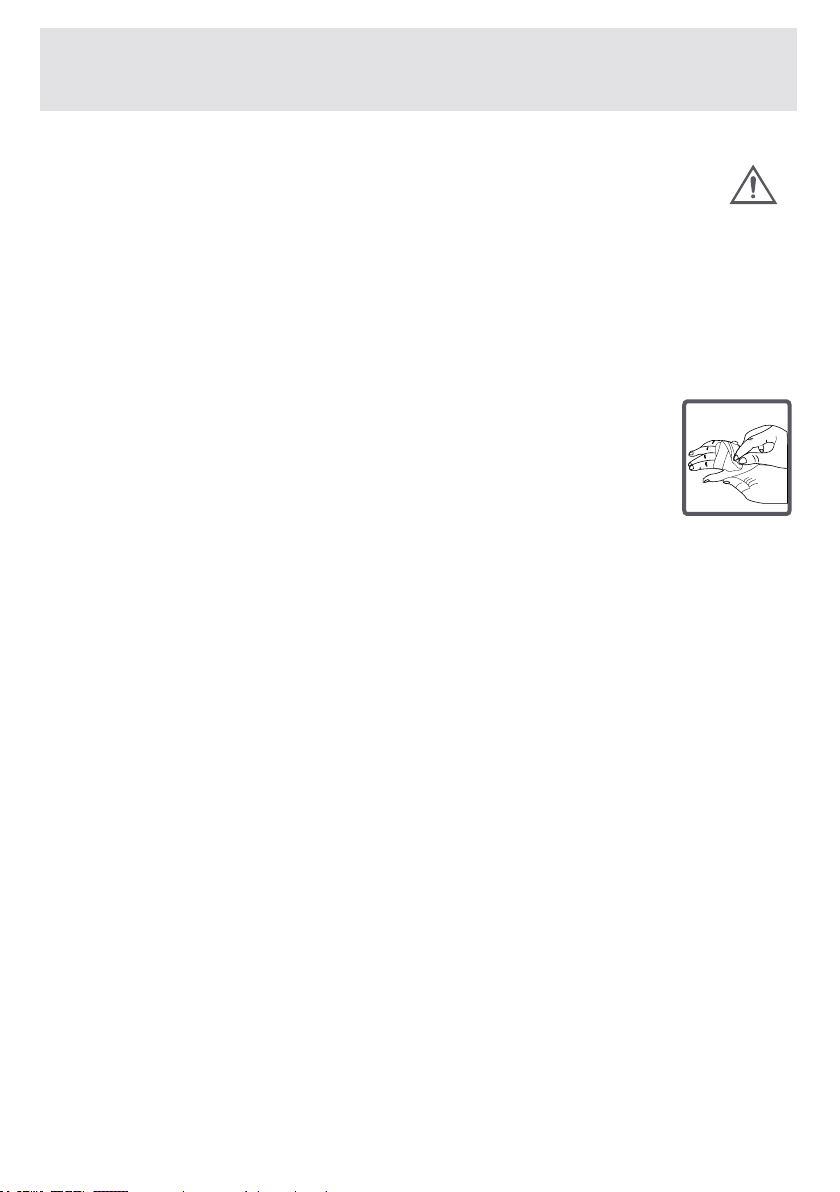
Child safety!
•Donotleavechildrenunattendednearthe
machine.Childrenmightlockthemselvesup
intothemachineanddeathriskmightoccur.
•Doorglassandsurfacemightbe
extremelyhotwhileyourmachine
operates.Thus,especiallytouchingthe
machinemightgivedamagetothe
skinsofchildren.
•Keeppackagingmaterialawayfromchildren.
•Poisoningmightoccurifthedetergentand
maintenancematerialsareconsumed,and
eyesortheskinmightbeirritatediftheycome
intocontactwiththeskin.Keepcleaningmate-
rialsawayfromthereachofchildren.
CHAPTER -1: BEFORE USING THE APPLIANCE
(SAFETY WARNINGS)

EN-18-
Removal of packaging materials
Packagingmaterialsprotectyourmachine
fromanydamagethatmightoccurduring
transportation.Packagingmaterialsareen-
vironmentfriendlyastheyarerecyclable.
Recyclingmaterialprovidesbothrawmate-
rial savings and decreases waste produc-
tion.
Disposal of old machine
Electrical or electronical old devices
mightstillcontainsalvagableparts.
So,neverthrowawayyourolddevices
thatyoudonotuseintothewaste.
Ensure that the parts of your old electronic
orelectricaldevicesarereusedbytaking
themtoyourlocalrecyclingfacility.
Please ensure your old appliances are
kept in an appropriate place for the safe-
ty of children until they are taken outside
the house.
CHAPTER -1: BEFORE USING THE APPLIANCE
PACKAGING AND ENVIRONMENT

EN-19-
CHAPTER -1: BEFORE USING THE APPLIANCE
SAVINGS INFORMATION
Someimportantinformationtogetmoreef-
ciencyoutofyourmachine:
•Theamountoflaundryyouputinyourwash-
ingmachineshouldnotexceedthemaximum
amountindicated.
Bythisway,yourmachineshallruninsaving
mode.
• Not using the pre-wash feature for lightly and
normal-dirtylaundrywillsaveelectricityand
water.
EN-20-
CHAPTER -2: OVERVIEW OF YOUR DEVICE
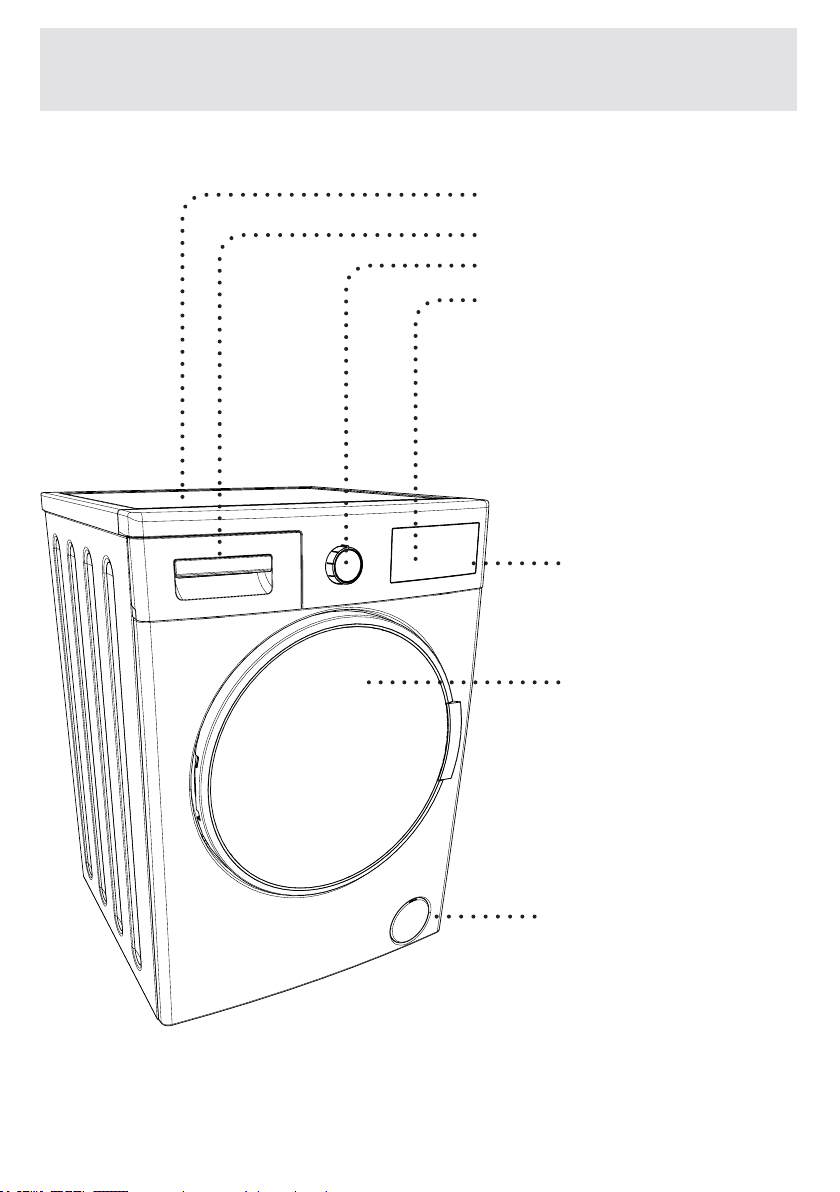
GENERAL APPEARANCE
2-Detergent drawer
3-Programme button
4-High-resolution
LCD display
1-Upper tray
7-Pump filter
cover
6-Door
5-Touch buttons
EN-21-
CHAPTER -2: OVERVIEW OF YOUR DEVICE
GENERAL APPEARANCE
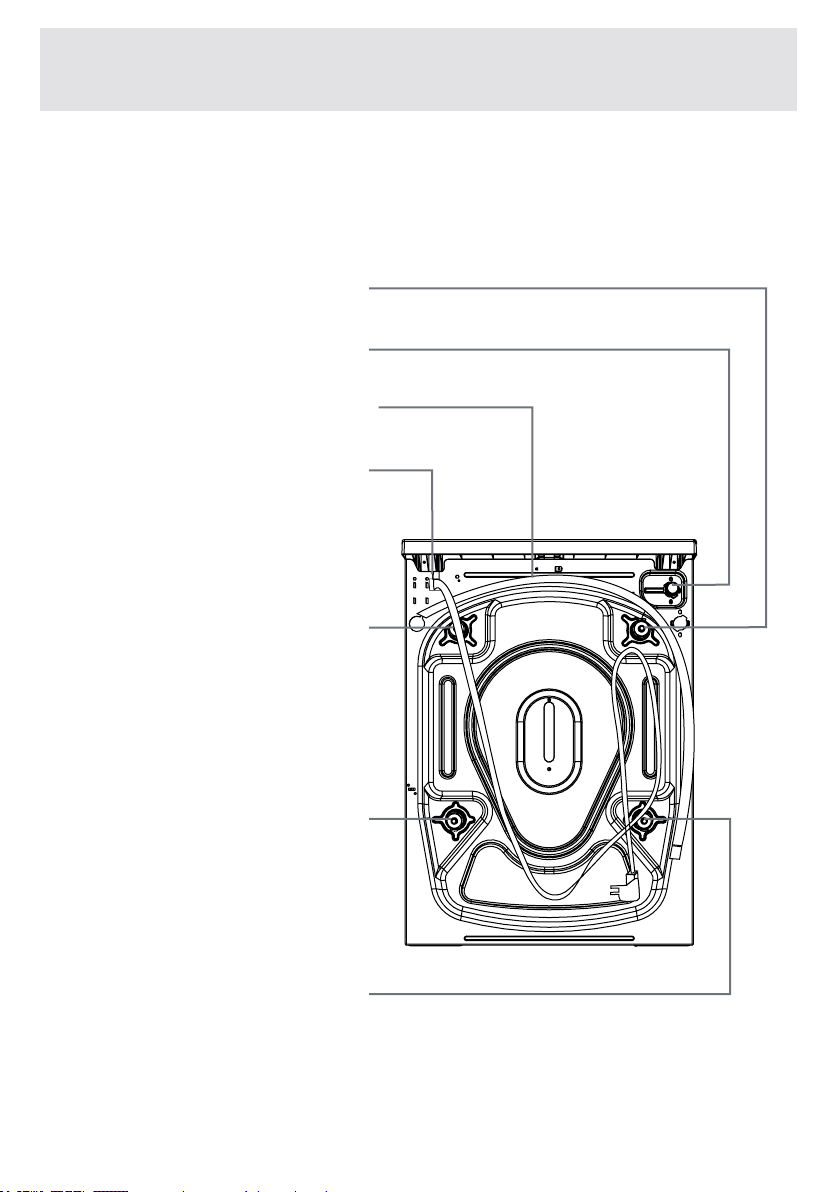
TransportationSafety
Screw
TransportationSafety
Screw
TransportationSafety
Screw
TransportationSafety
Screw
WaterInletValve
DischargingHose
PowerCable

EN -22-
CHAPTER -2: OVERVIEW OF YOUR DEVICE
TECHNICAL SPECIFICATIONS
Operatingvoltage/
frequency(V/Hz)
Totalcurrent(A)
Water pressure
(Mpa)
Totalpower(W)
Maximumdry
laundrycapacity(kg)
Spinning
revolution
(rev/min)
Programme
number
D i m e n s i o n s
(HeightxWidthx
Depth)(mm)
Maximum:1Mpa
Minimum:0.1Mpa
2200
1400
845x597x582
15
8
10
(220-240)V~/50Hz
EN-23-
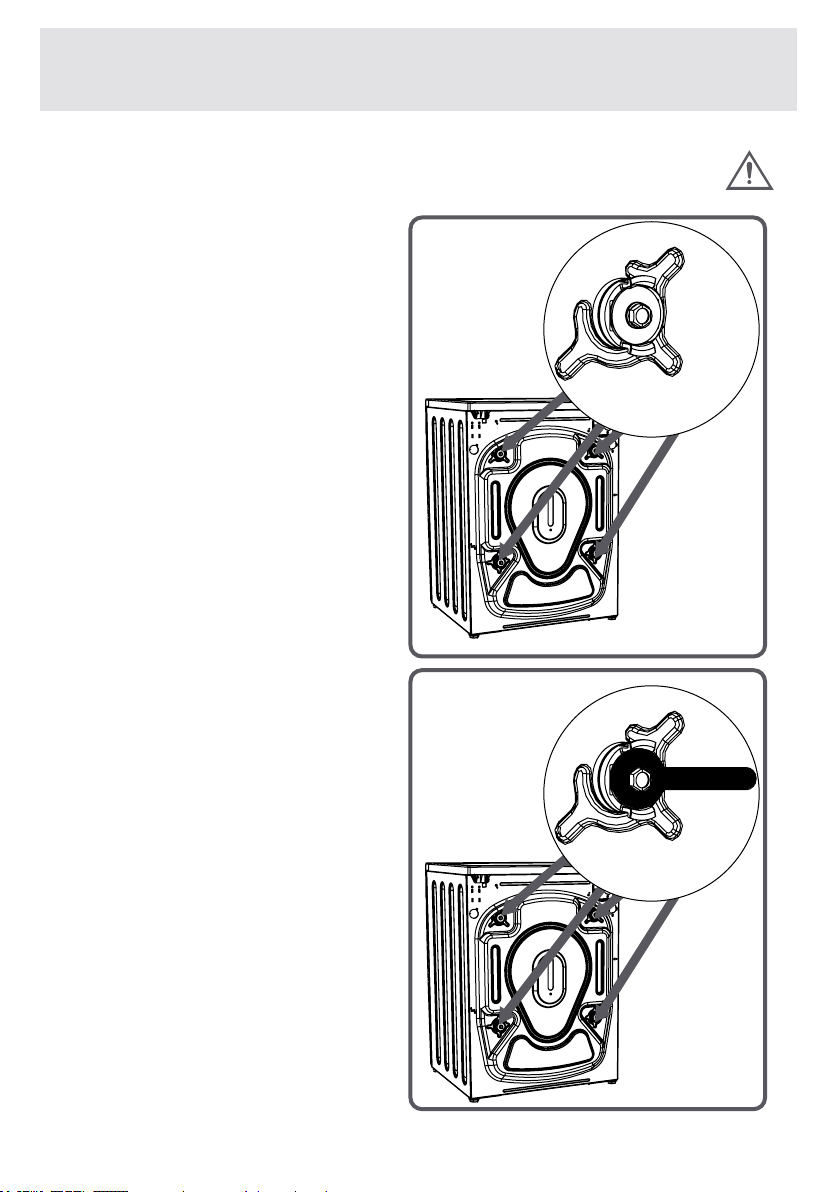
Beforeoperatingthewash-
ingmachine,removethe4
transportation screws and
rubberspacersfromthe
backofthemachine.Ifthe
screwsarenotremoved,it
maycauseheavyvibration,
noiseandproductmalfunc-
tion,(voidingtheguarantee).
Forthisreason,transporta-
tion safety screws should be
loosened by being rotated in
counter-clockwiseusingan
appropriatewrench.
CHAPTER -3: INSTALLATION
REMOVING TRANSPORTATION SAFETY SCREWS
X
X
4
4
EN-24-
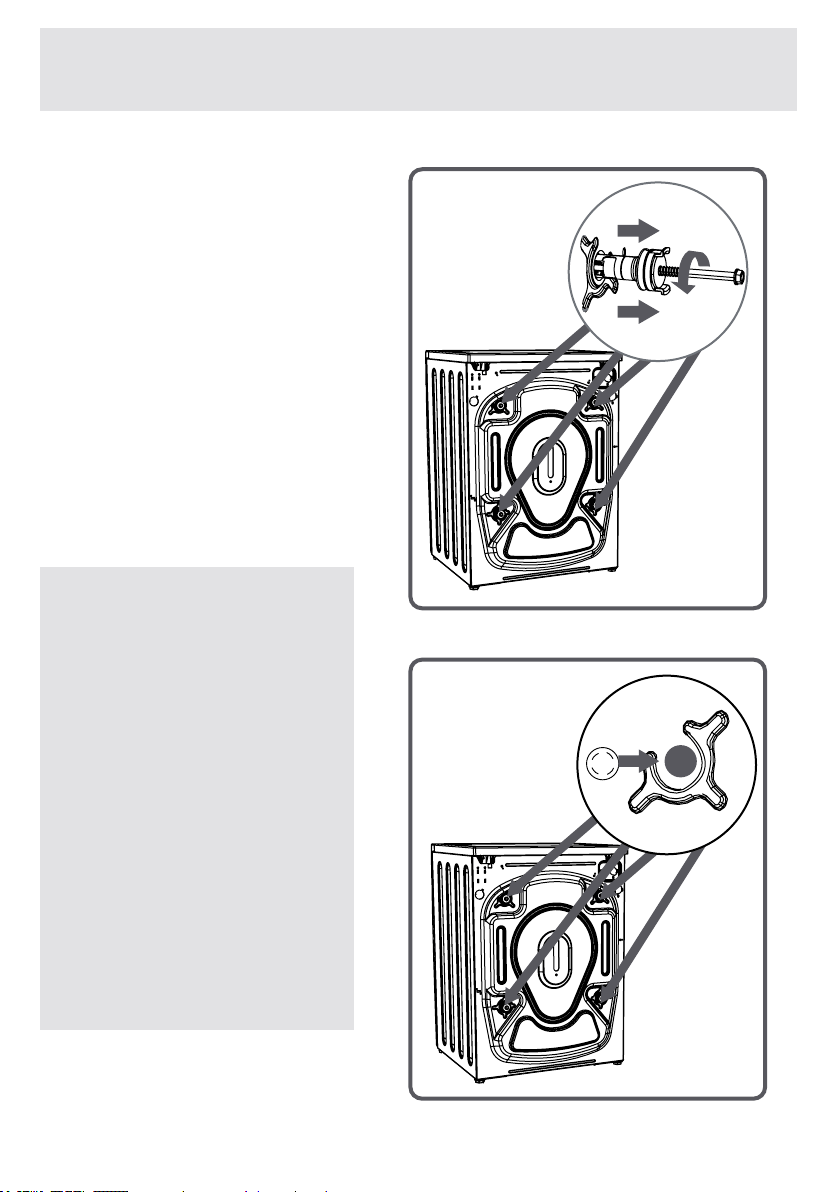
Transportationscrews
shouldberemovedby
pullingout.
Fittheplastictransporta-
tion screw taps delivered
in accessories bag to the
places where transporta-
tion screws have been
removed.
Thetransportationsafety
screws should be stored
to be used in case of
transportation.
NOTE: You must
remove the trans-
portation screws
of your machine
before the rst us-
age.
Faults occurring
in the machines
operated with
transportation
screw tted shall
be out of scope of
warranty.
CHAPTER -3: INSTALLATION
(REMOVING TRANSPORTATION SAFETY SCREWS)
X
4
EN-25-
Adjusting Adjustable Feet
•
Donotinstallyourmachineonacarpetorsuchgrounds
thatwouldpreventtheventilationofitsbase.
•Toensuresilentandvibration-freeoperationofyourma-
chine,itshouldbedeployedonanon-slidingandrmground.
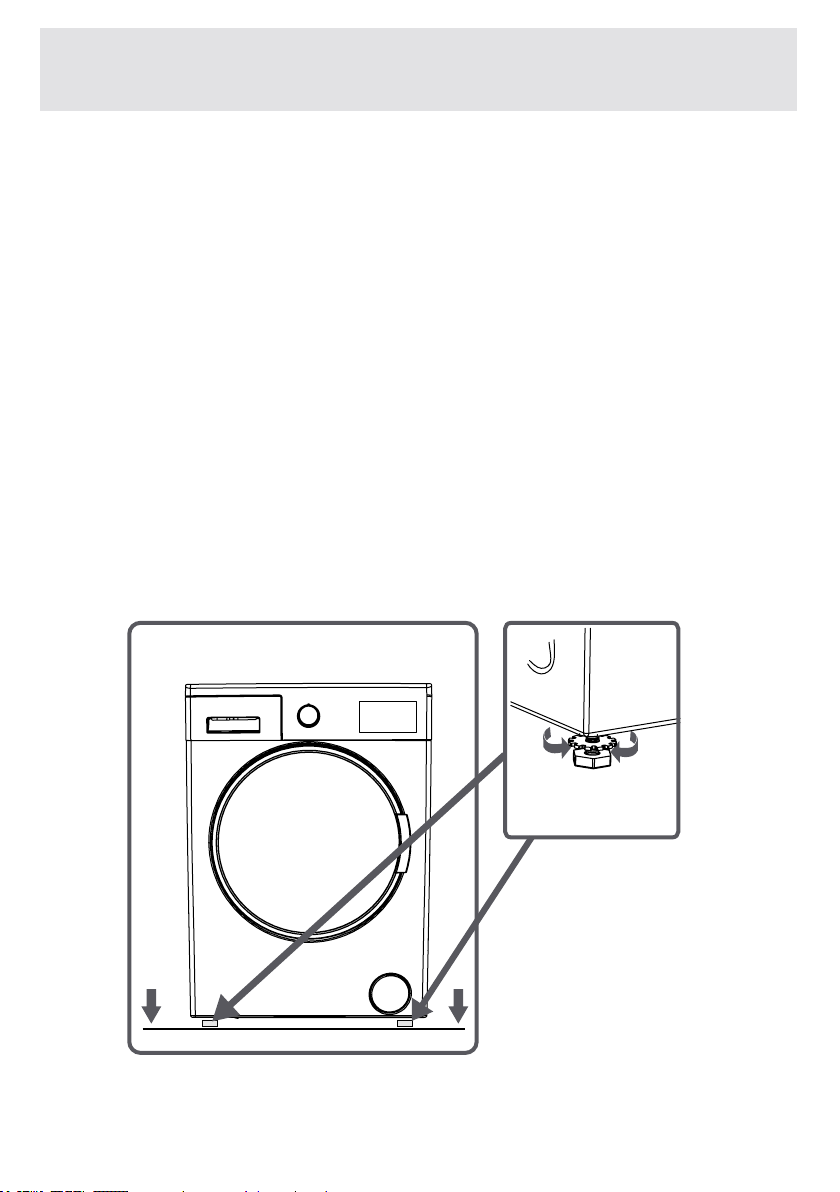
•Youcanadjustthebalanceofyourmachinethroughthe
feet.
•
Loosentheplasticadjustmentnut.
CHAPTER -3: INSTALLATION
(ADJUSTING ADJUSTABLE FEET)
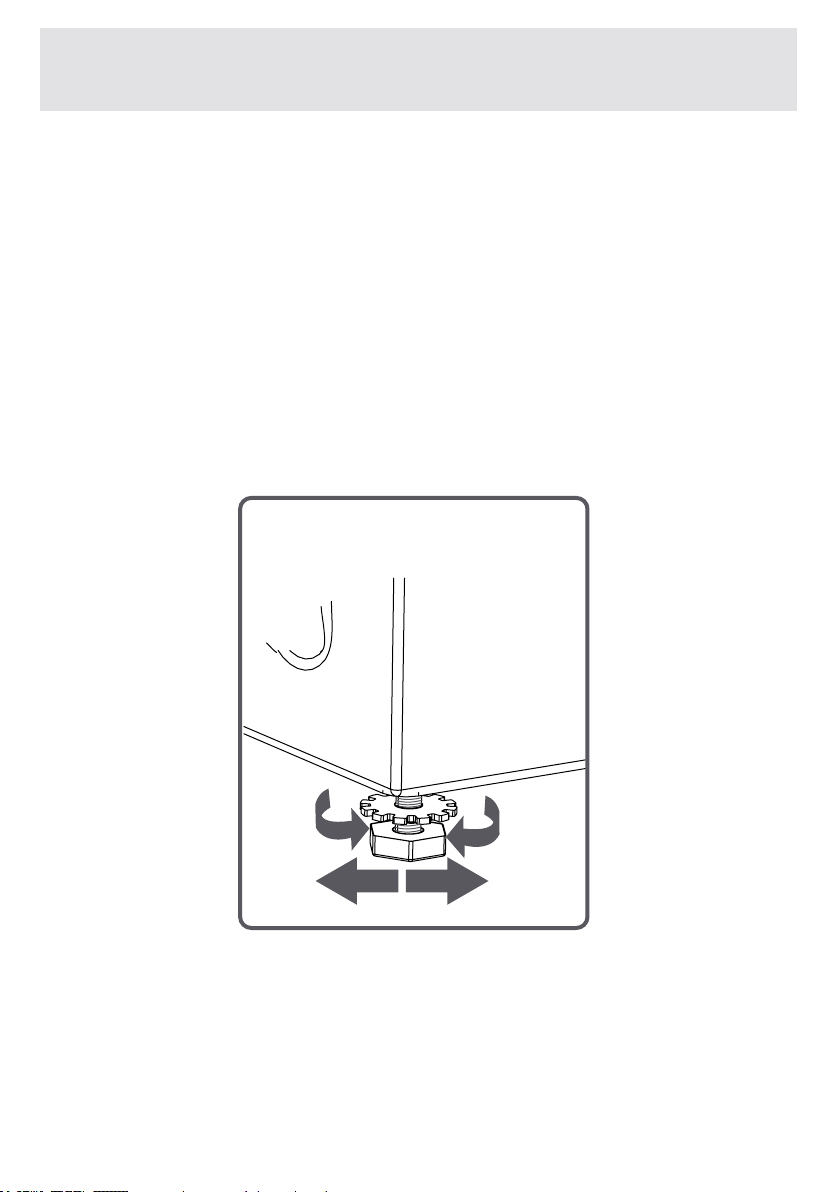
EN -26-
•Adjustthefeetupwardanddownwardbyrotatingthem.
•Aftermaintainingthebalance,compresstheplasticadjust-
mentnutupwardagain.
CHAPTER -3: INSTALLATION
(ADJUSTING ADJUSTABLE FEET)
X
4
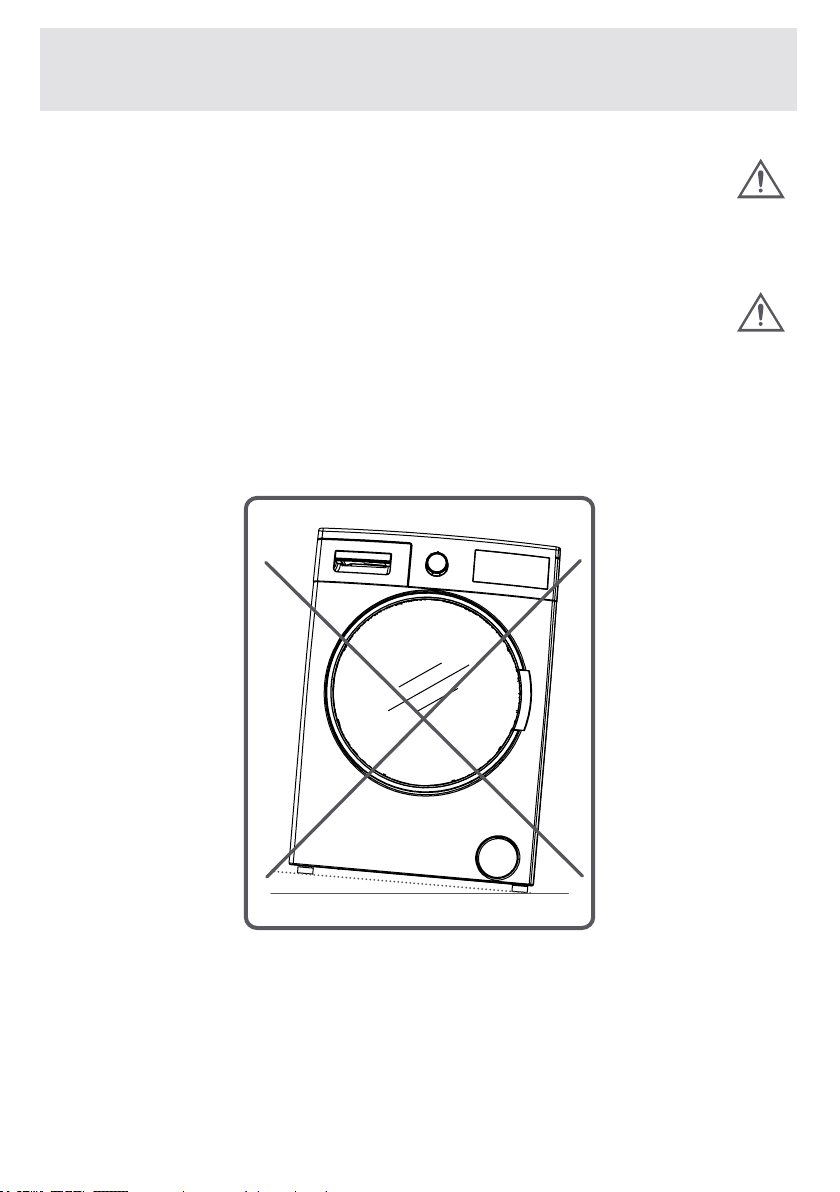
EN-27-
•Neverputcardboard,woodorsuchlikematerialsunder
yourmachineifyouareintendingtostabilizethedistor-
tionsontheground.
•Whencleaningtheground,onwhichyourmachinerests,
becarefulnottoalterthefeetheight.
CHAPTER -3: INSTALLATION
(ADJUSTING ADJUSTABLE FEET)

EN -28-
CHAPTER -3: INSTALLATION
(ELECTRICAL CONNECTION)
•Yourwashingmachineissetto220-240Vand
50Hz.
•
Themainscordofyourwashingmachineis
equippedwithaspecicearthedplug.Thisplug
shouldalwaysbeinsertedtoaearthedsocketof
10amps.Thecurrentvalueofthefuseshouldbe10amps.
Thefusecurrentvalueofthepowerlineconnectedtothis
plugshouldalsobe10amperes.Ifyoudon’thavesucha
receptacleandfuseconrmingthis,pleasehaveitdoneby
aqualiedelectrician.
•Wedonottaketheresponsibilityofthedamagesthatoc-
curduetoungroundedusage.
NOTE: Operating your machine under low
voltage will cause the life cycle of your
machine to be reduced and its perfor-
mance to be restricted.
EN-29-
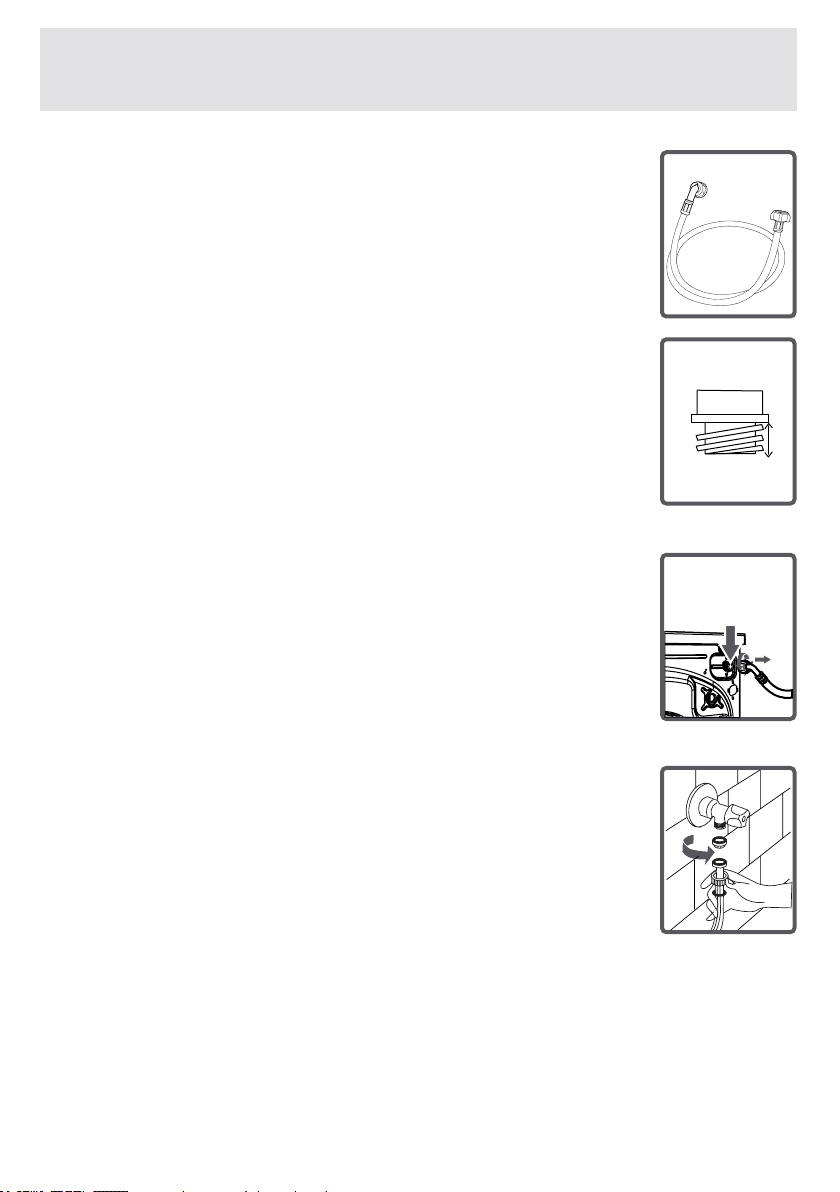
•Yourmachinemayhaveeitherasingleinlet
(cold)ordoublewaterinlets(cold/hot)basedonits
specications.
White-capped hose should be connected to the
cold water inlet and red-capped hose to hot water
inlet(applicableformachineswithdoublewater
inlets).
•
Toeliminatewaterleakagesinpointsofcontact,
1or2nutsareprovidedinthehosepackage(ap-
plicableformachineswithdoublewaterinlets).
Fitthesenutstotheendsofnewwaterinlethoses
onthesideoffaucet.
•Mountthenewwaterinlethosestoa¾˝,thread-
edfaucet.
• Connect the white-elbow end of the water inlet
hosestothewhite-lteredwaterinletvalveonthe
rearsideofthemachineandthered-elbowendto
red-lteredone(applicableformachineswithdou-
blewaterinlets).
Tightenplasticpartsofthejunctionsusingyour
hand.
Ifunsure,havetheconnectionworksbedonebya
qualiedplumber.
•Flowofwaterwithpressureof0,1-1Mpawill
allowyourmachinetooperatemoreefciently.)
(0,1Mpapressuremeansthatmorethan8litres
ofwaterwillowthroughafully-tappedfaucetper
oneminute.)
•Ensurethatpointsofcontactdonotleakbytap-
pingthefaucetcompletelyaftercarryingmaking
CHAPTER -3: INSTALLATION
(WATER INLET HOSE CONNECTION)
3/4”
10mm

EN-30-
• Ensure that the new water inlet hoses are not bent, bro-
ken,crushedorresized.
•Ifyourmachinehasdoublehotwaterinlets,thetempera-
tureofhotwaterinletshouldbemaximum70°C.
Note: Use only the new water inlet hose
coming with your machine while making
Water inlet hose connections of your ma-
chine. Never use old, used or damaged
water inlet hoses.
CHAPTER -3: INSTALLATION
(WATER INLET HOSE CONNECTION)
EN-31-
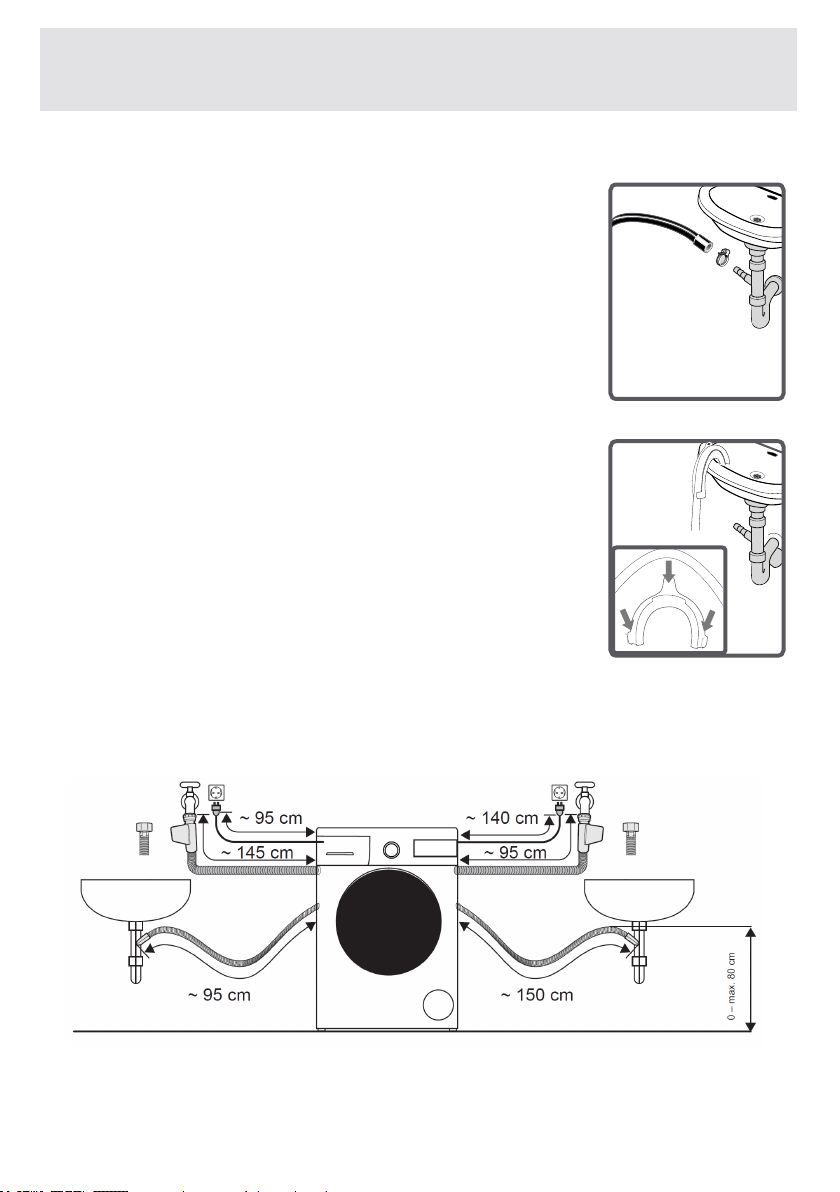
•Theendofthewaterdischargehosecan
bettedtoaspecicapparatusdirectly
attached to dirty water discharge hole or
outletjointofthebasinelbow.
•Neverattempttoextendthewaterdis-
chargehosebyjointing.
•Donotputthedischarginghoseofyour
machineinavessel,bucketorsink.
•Makesurethatthewaterdischargehose
doesnotbend,buckle,becrushedorex-
tended.Pleasenote:
•Thewaterdrainhoseshouldbemounted
ataheightofminimum60cm,maximum
100cmfromtheground.
CHAPTER -3: INSTALLATION
(WATER DISCHARGE CONNECTION)
EN-32-
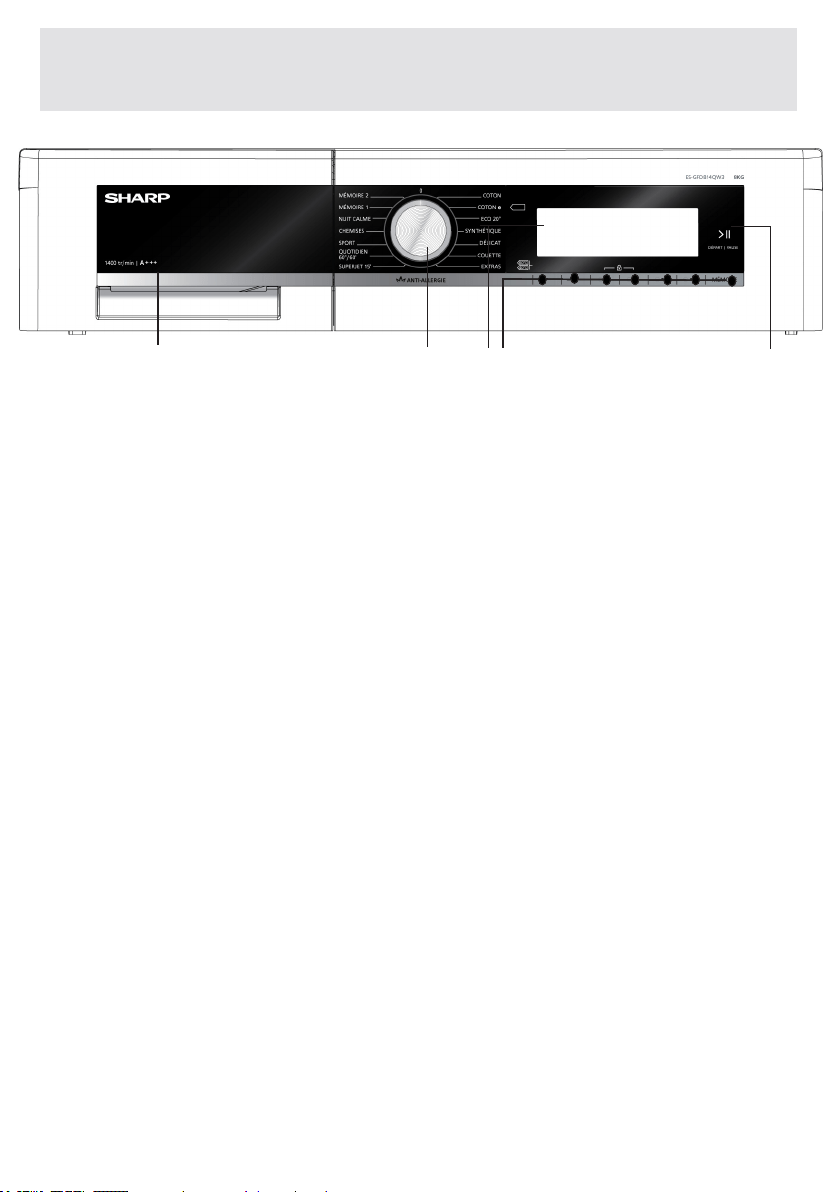
CHAPTER -4: INTRODUCTION OF CONTROL PANEL
2-ProgrammeKnob:Usingthe
programmeknob,youcanselectthewashing
programmeforyourlaundry.Youcanselecta
programmebyturningtheprogrammeknob
toeitherdirection.Pleaseensurethatthe
programmeknobissetexactlytotheprogramme
youwant.
3-InfoScreen:Inthisscreen,youcanseethe
featuresofthewashingprogramsyouselected
andalsohaveinformationaboutmachine’s
4-Adjustmentandadditionalcontrolbuttons:The
buttonsonyourmachinearetouch-sensitive.You
mayjusttouchthemtomakeaselection.
5-Start/Stand-bybutton:Youcanstart
yourmachineortakeittostand-bywith
1-Detergentdrawer
2
1
4 53
2
1
4 53
2
1
4 53
2
1
4 53
EN-33-
CHAPTER -4: INTRODUCTION OF CONTROL PANEL
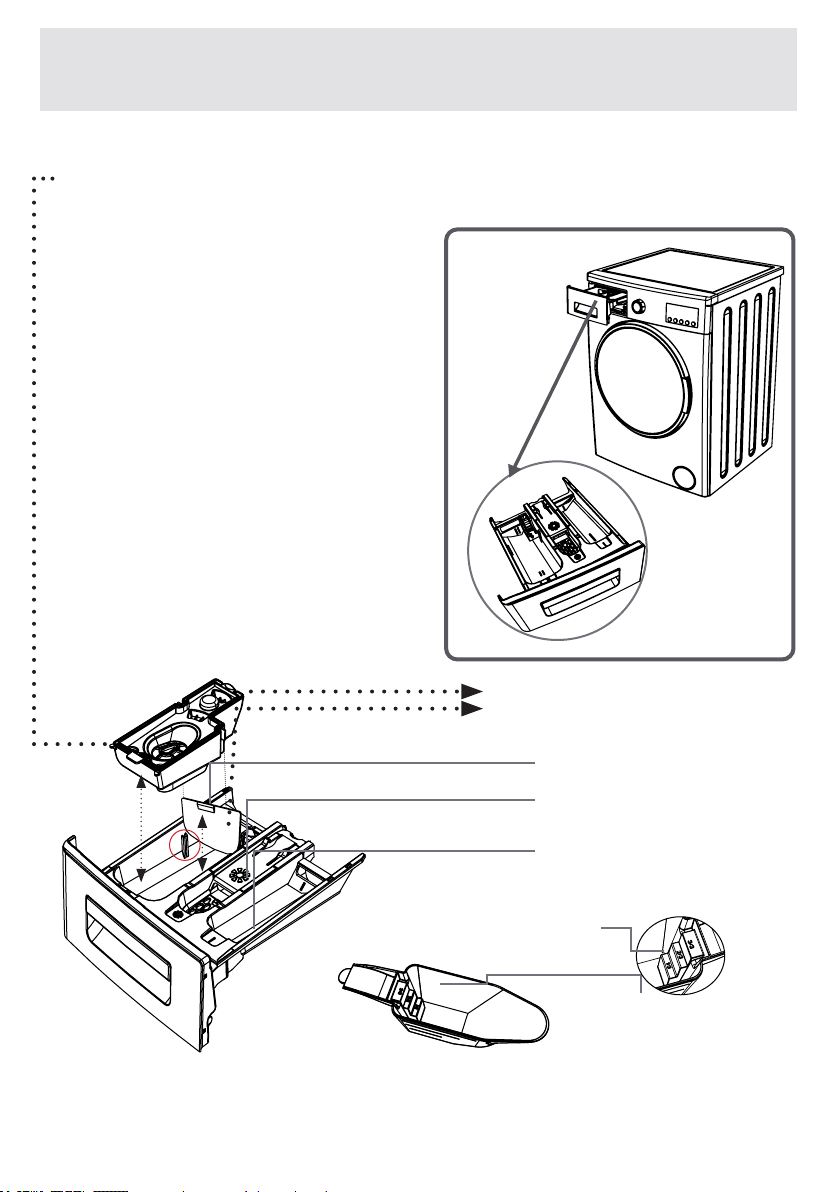
(DETERGENT DRAWER)
Youcanusetheliquidlevel
determinationplatewhenyou
want to wash your laundry with
liquiddetergent.Youcanuse
yourliquiddetergentsinall
programswithoutprewashing.
Placetheliquiddetergent
aparatus in the second
compartment(whichisavailable
insidethemachine)ofthe
detergentdrawer(*)andset
thedetergentamount.(Usethe
recommendedamountofliquid
detergent by detergent
producers).
DonotexceedtheMAXlevel,
useonlyforliquiddetergent,
do not use this aparatus for
powderdetergentandtakeitout.)
(*)Machineryspecicationsmayvarydependingonthe
productpurchased.
Main wash detergent
compartment
LiquidDetergentApparatus
Powder
detergent
spade(*)
Powderdetergent
level stages
Softener
Compartment
Pre-washdetergent
compartment
EN-34-
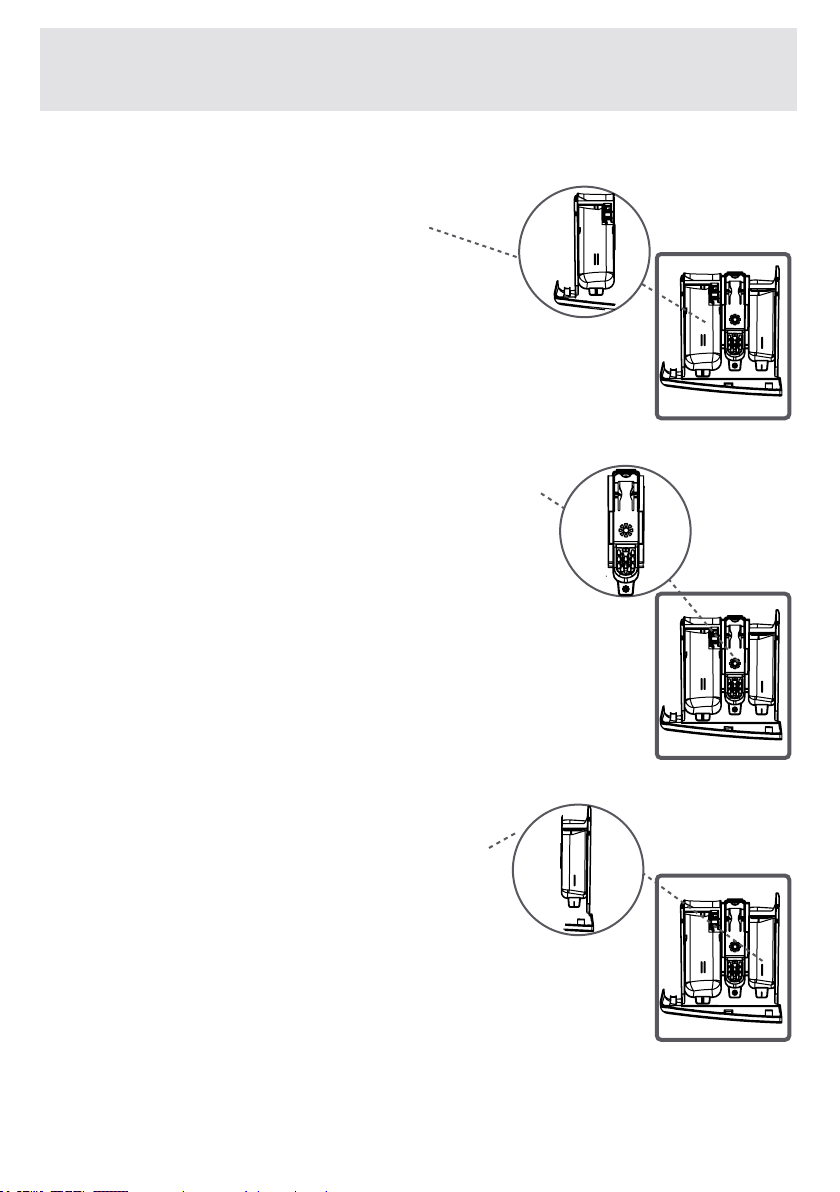
SECTIONS
Main wash detergent
compartment:
Inthiscompartment,onlyusematerials
likedetergent(liquidorpowder),lime
preventercanbeused.
Youcanndtheliquiddetergentaparatusinside
yourmachineatrstinstallation.(*)
Fabric conditioner, starch, detergent
compartment:
You can use softener for your laundry
(recommendedamountandtypebythe
producerisrecommended).Sometimesthefabric
conditionersyouuseforyourwashlaundrymay
remaininthiscompartment.Thereasonforthis
isthattheconditionerisnotviscous.Toprevent
thissituation,moreviscousliquidsoftenersare
recommendedtobeusedorthesoftenercouldbe
thinnedandthenused.
Pre-wash detergent compartment:
Thiscompartmentmustonlybeused
whenthepre-washfeatureisselected.
Pre-washfeatureisrecommendedfor
verydirtylaundry.
(*)Machineryspecicationsmayvarydependingonthe
productpurchased.
CHAPTER -4: INTRODUCTION OF CONTROL PANEL
(DETERGENT DRAWER)
EN-35-
CHAPTER -4: INTRODUCTION OF CONTROL PANEL
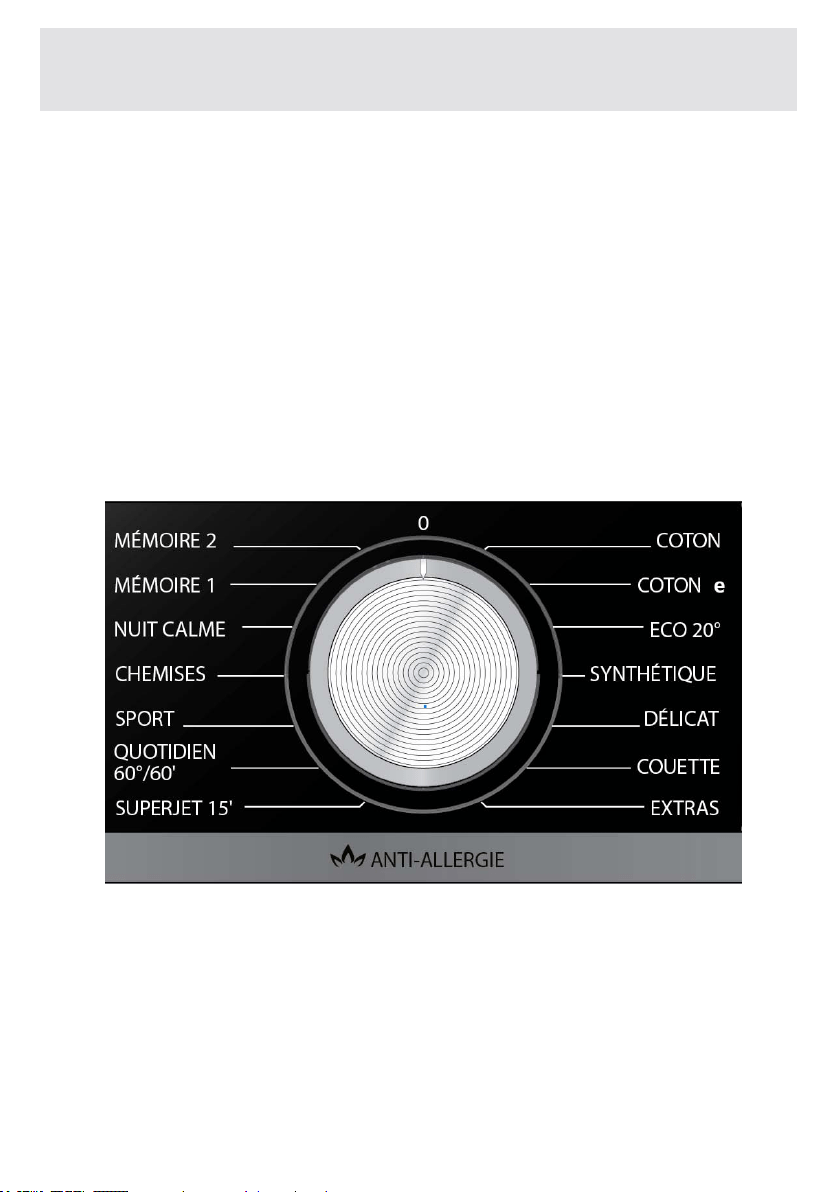
(PROGRAM KNOB)
•Youcanselecttheprogrammeyouwanttowashyour
laundrywithbytheprogrammeknob.
•Youmaysettheprogrammeselectionoperationbyrotat-
ingtheprogrammeknobinbothdirections.
•Ensurethattheprogrammeknobisexactlyonthepro-
grammeyouwanttoselect.
EN-36-
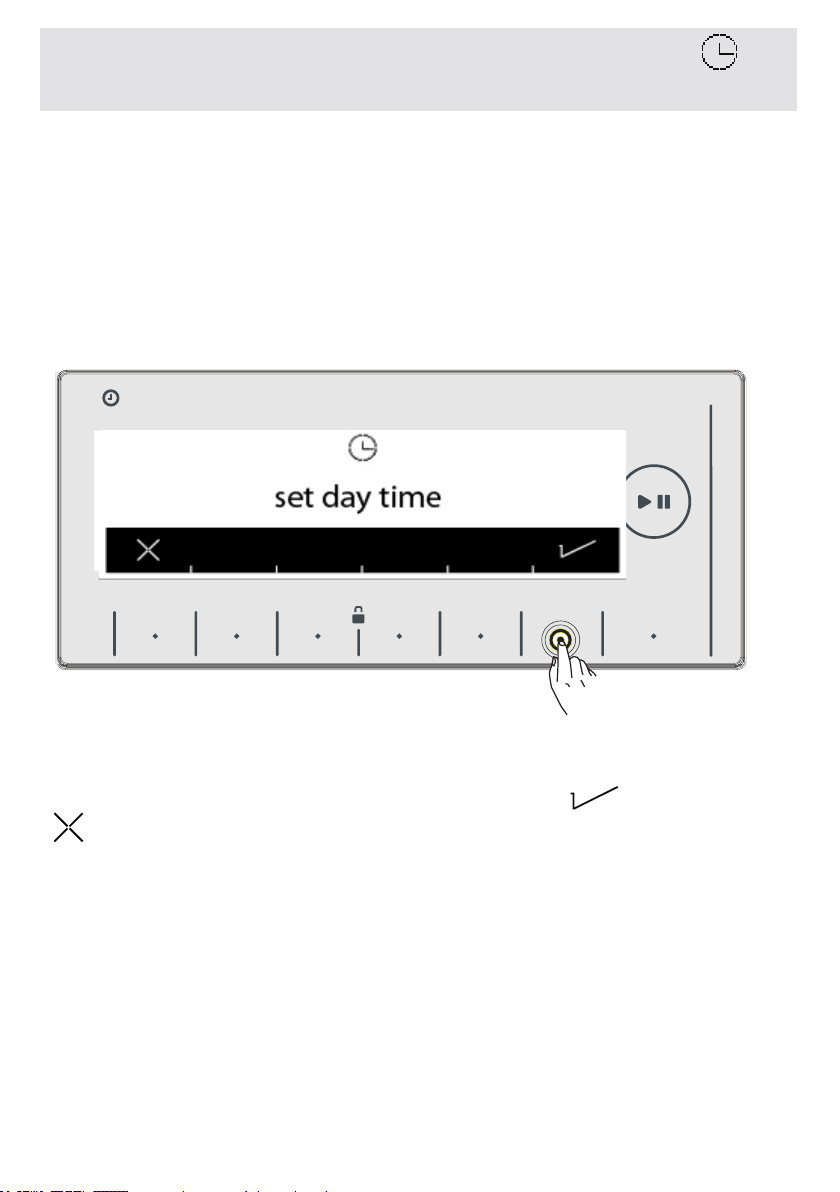
To make the first settings of your machine:
• Plug your machine in.
• Open the water faucet.
• After the logo introduction, your machine will automatically be
directed to the time selection setting menu for time selection.
• Your machine will ask your approval for setting the current time.
Go to the setting menu by touching the button of symbol.
symbol button allows you to exit without setting.
Note: You must set the current time correctly. If not, it will affect
the operation of other functions related to time.
Note: Recorded time information will be reset if you keep your
machine unplugged for longer than 15 days. In that case your
machine will ask you again for time setting when you turn it back
on.
CHAPTER-5: MACHINE SETTINGS
(DAY TIME)
HAFIZA
8 kg .6 kg.
HAFIZA
8 kg.6 kg.
TIME
EC
8 kg. 6 kg.
EN-37-
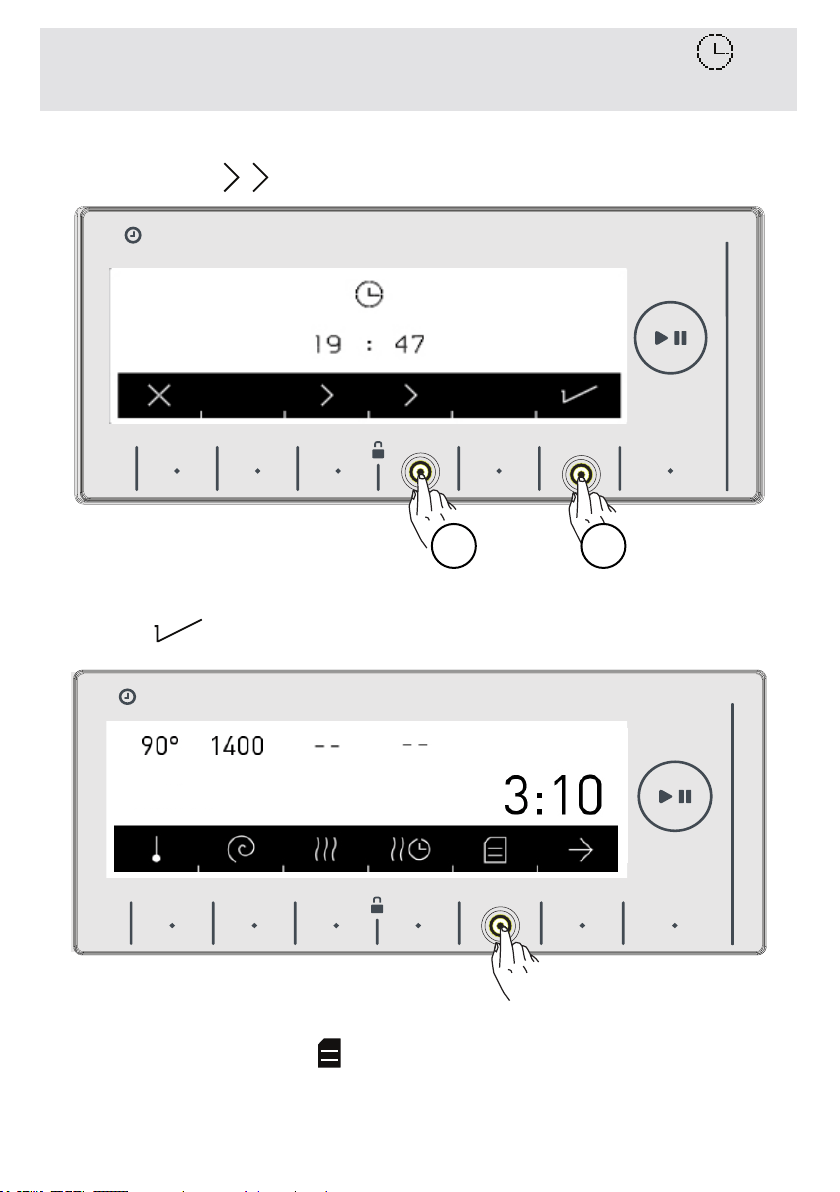
• Please make the current hour and minute settings by touching
the buttons of symbols
• After setting the current time, approve by touching the button of
symbol .
• Your machine will automatically go to the main screen of the
program you have selected. Go to the machine settings menu by
touching the button of symbol on this screen.
CHAPTER-5: MACHINE SETTINGS
(DAY TIME)
HAFIZA
8 kg .6 kg.
1
HAFIZA
8 kg.6 kg.
TIME
EC
8 kg. 6 kg.
HAFIZA
8 kg.6 kg.
TIME
EC
8 kg. 6 kg.
2
Bomuld

EN-38-
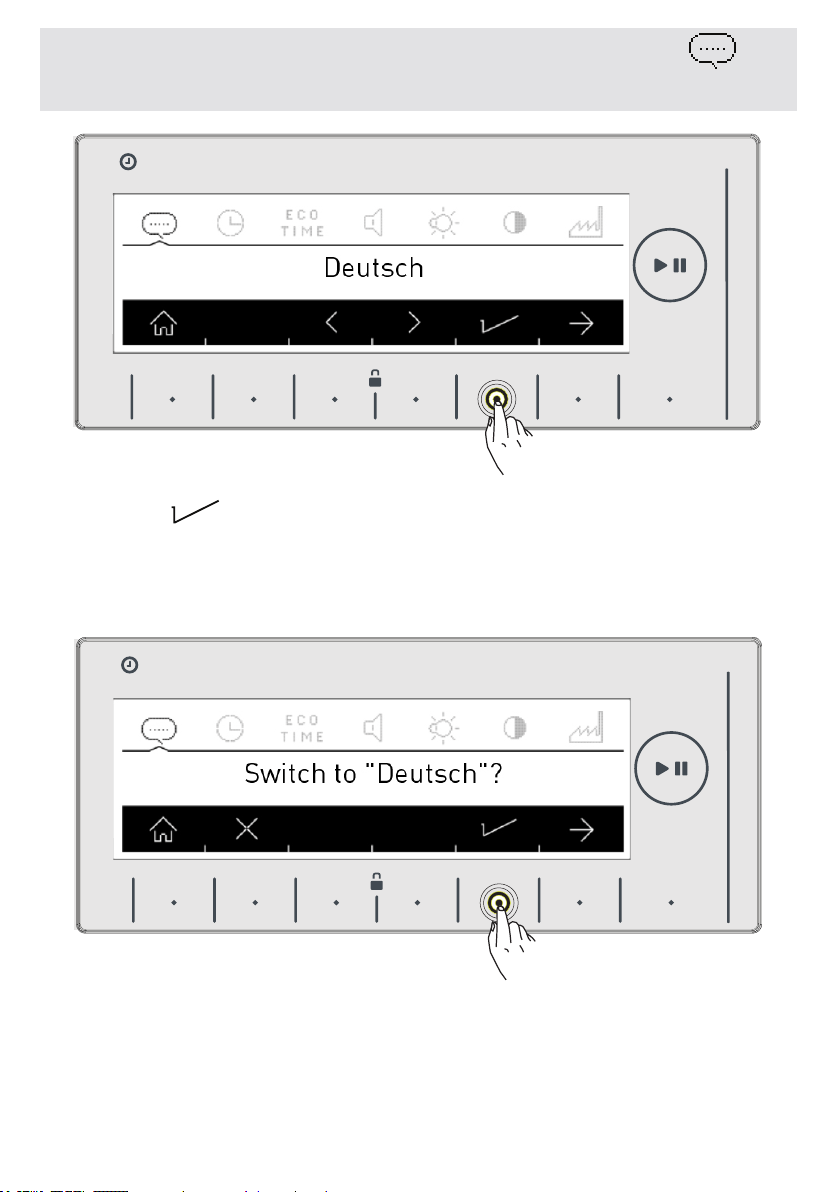
• You can select the language you wish by using the direction
buttons .
CHAPTER-5: MACHINE SETTINGS
(SELECT LANGUAGE)
HAFIZA
8 kg .6 kg.
HAFIZA
8 kg.6 kg.
TIME
EC
8 kg. 6 kg.
HAFIZA
8 kg.6 kg.
TIME
EC
8 kg. 6 kg.
EN-39-
• Touch button to save the language you selected.
• A question will be asked on the screen for whether you approve
the selection.
CHAPTER-5: MACHINE SETTINGS
(SELECT LANGUAGE)
HAFIZA
8 kg.6 kg.
TIME
EC
8 kg. 6 kg.
HAFIZA
8 kg.6 kg.
TIME
EC
8 kg. 6 kg.
Change to
EN-40-
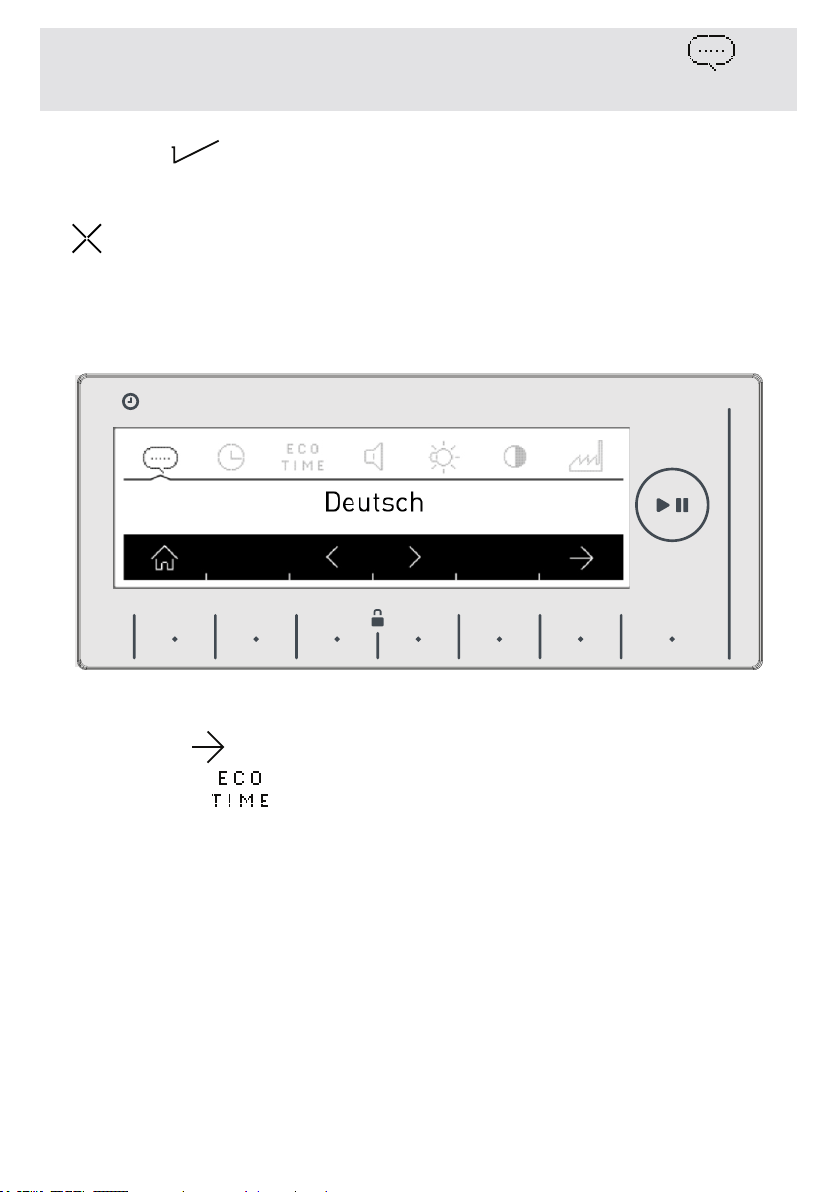
• Touch button to approve the language change.
• If you think you have selected the wrong language, touch the
button and make the language selection again.
• When you approve the language change, the language you
have selected will be active.
• Go to the time setting menu of your machine by pressing
the button of symbol twice.
CHAPTER-5: MACHINE SETTINGS
(SELECT LANGUAGE)
HAFIZA
8 kg.6 kg.
TIME
EC
8 kg. 6 kg.
EN-41-
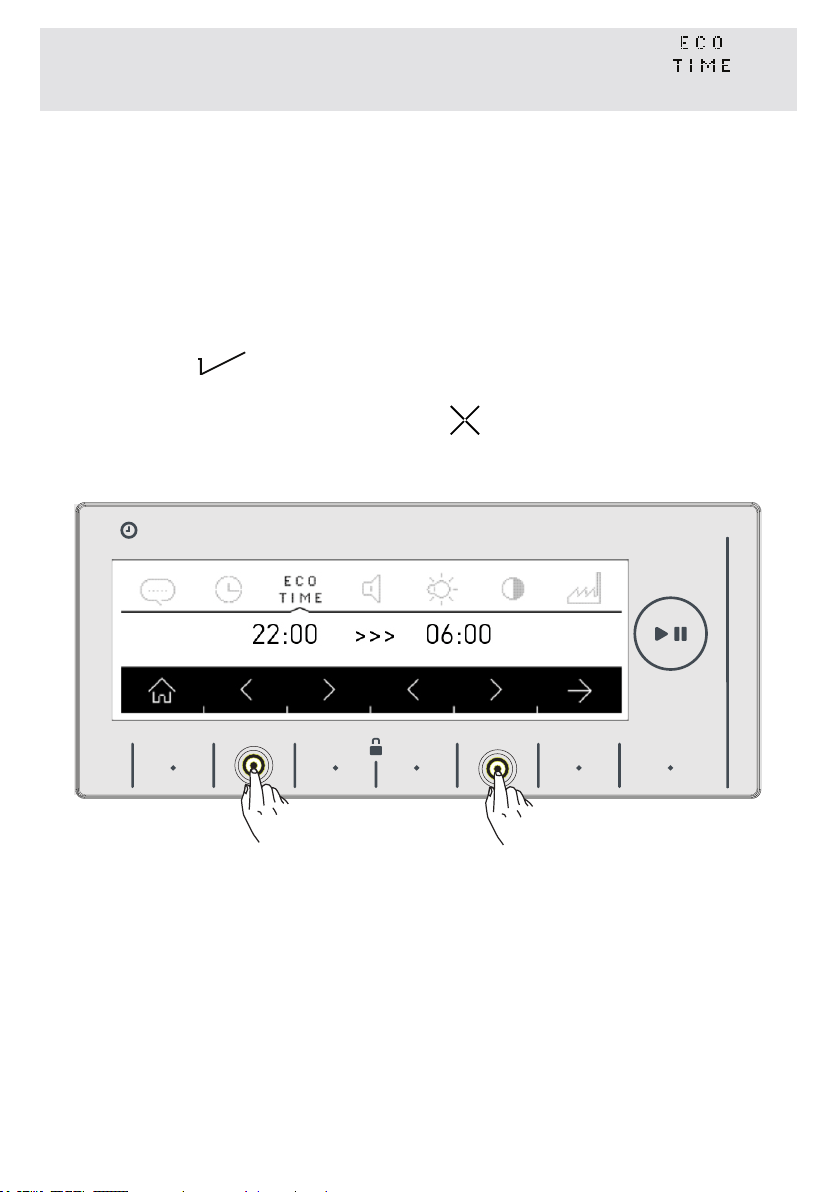
• The electrical energy consumption can change during the day
according to the electricity provider. You can see these intervals
from your electricity provider and set your eco time running hours,
and have your machine run hours you have specified.
Note: Your mains electricity must be connected to a counter with
a smart-counter feature to be able to provide this energy saving.
• Touch the symbol button to make this adjustment.
• If you want to do it later, touch the symbol button.
CHAPTER-5: MACHINE SETTINGS
(SET ECONOMIC TIME ZONE)
HAFIZA
8 kg.6 kg.
TIME
EC
8 kg. 6 kg.
EN-42-
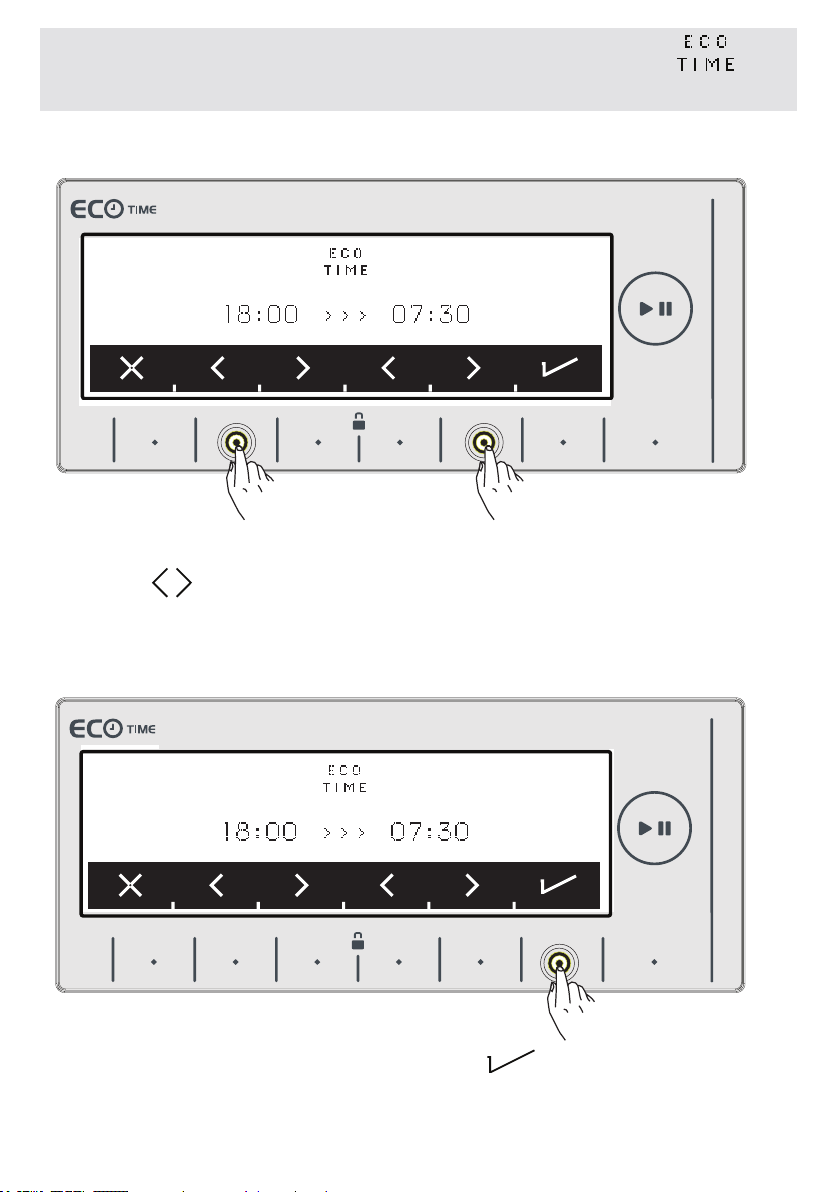
• You can adjust the Eco Time interval by touching the buttons of
symbols See page 61 to activate the Eco Time interval additi-
onal function.
• Approve your selection by touching the symbol button.
CHAPTER-5: MACHINE SETTINGS
(SET ECONOMIC TIME ZONE)
9 kg. 6kg.
9 kg. 6kg.
EN-43-
CHAPTER-5: MACHINE SETTINGS
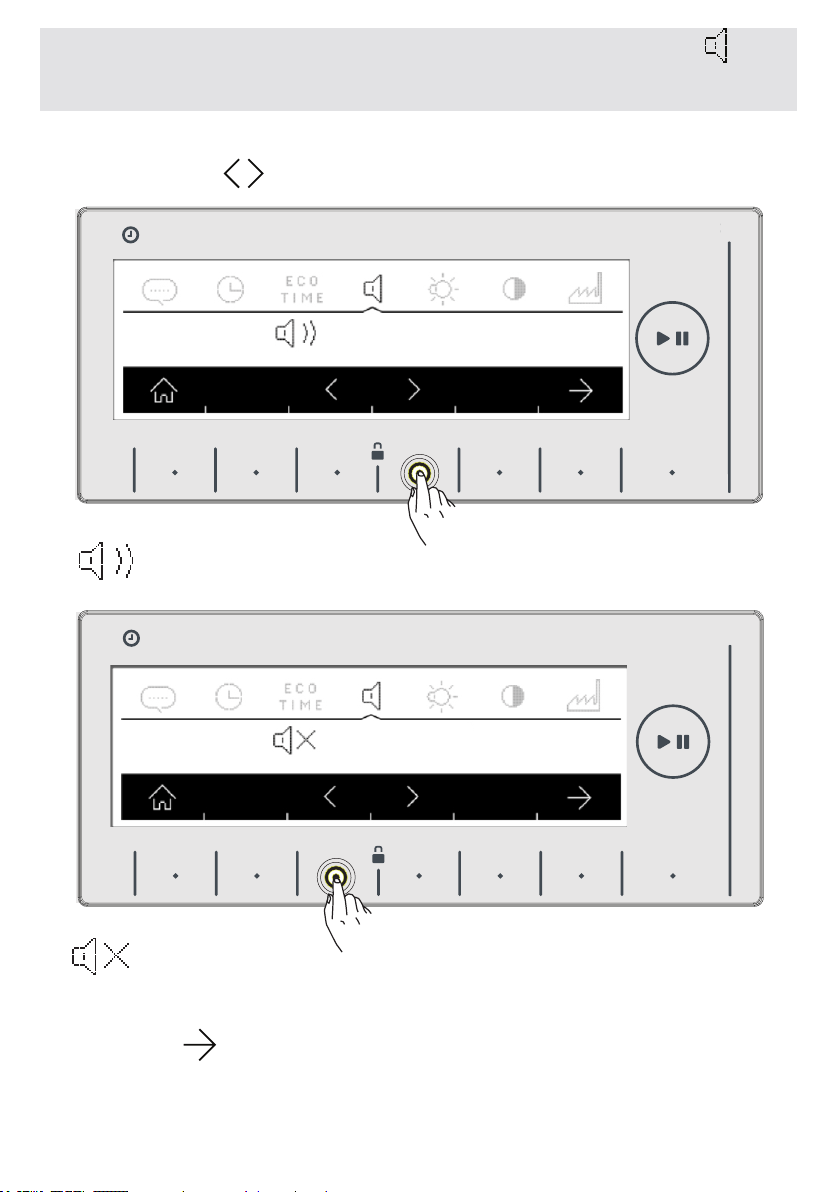
VOLUME SETTING
• You can adjust the volume of your machines’ sounds by touching
the buttons of
symbols.
symbol denotes that the warning sound of your machine is on.
symbol denotes that the warning sound of your machine is off.
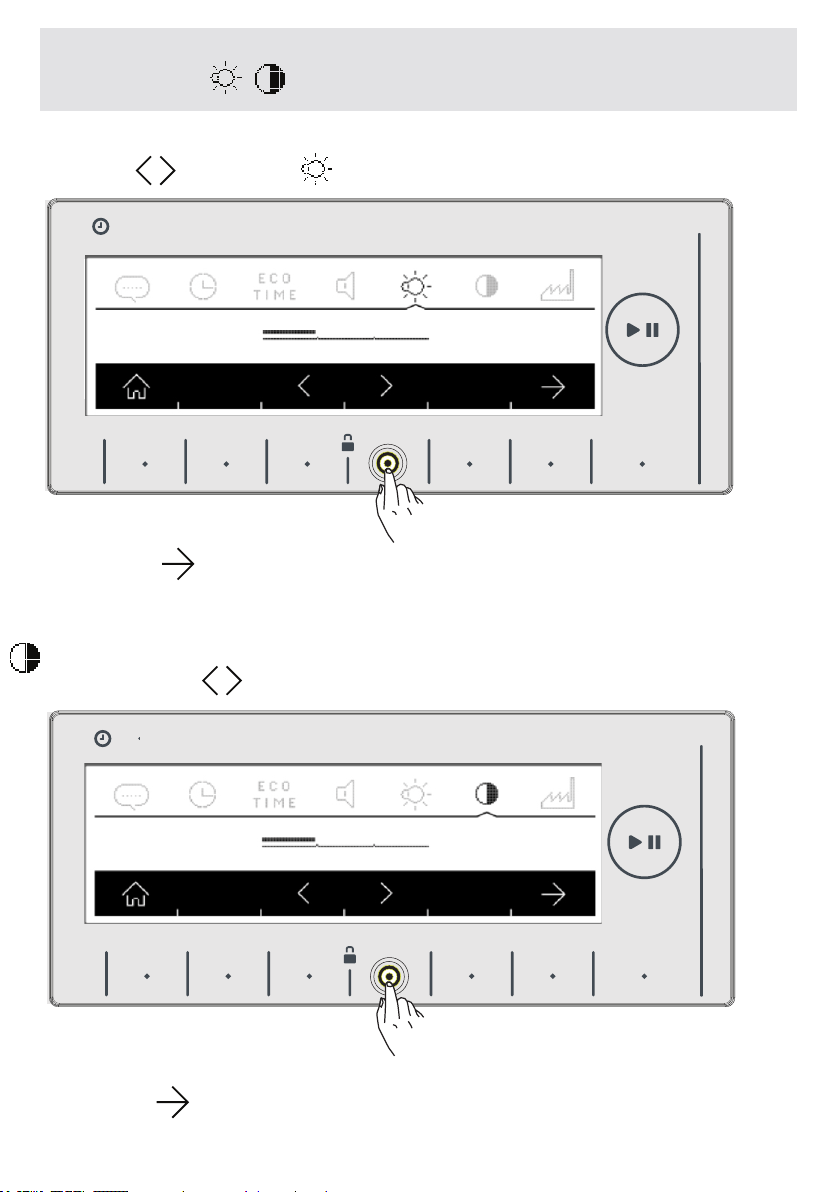
• Adjust the screen brightness of your machine by touching the
buttons of symbol.
HAFIZA
8 kg.6 kg.
TIME
EC
8 kg. 6 kg.
HAFIZA
8 kg.6 kg.
TIME
EC
8 kg. 6 kg.
EN-44-
• You can adjust the screen brightness of your machine by touc-
hing the buttons of symbols.
• Adjust the screen contract of your machine by touching the
buttons of symbol.
• You can adjust the screen contrast of your machine by touching
the buttons of symbols.
• You can go to revert to factory settings screen by touching the
button of symbol.
CHAPTER-5: MACHINE SETTINGS (SCREEN BRIGHTNESS
ADJUSTMENT
/ SCREEN CONTRAST ADJUSTMENT
HAFIZA
8 kg.6 kg.
TIME
EC
8 kg. 6 kg.
HAFIZA
8 kg.6 kg.
TIME
EC
8 kg. 6 kg.

EN-45-
If you want to revert your machine to the factory settings:
• Touch the button of symbol.
• A question will be asked on the screen for whether you appro-
ve the selection.
• A question will be asked on the screen for whether you approve
the selection.
•If you want to cancel the selection, touch the button of
symbol.
• You can return to the main screen by touching the
button.
CHAPTER-5: MACHINE SETTINGS
(REVERT TO FACTORY SETTINGS)
HAFIZA
8 kg.6 kg.
TIME
EC
8 kg. 6 kg.
HAFIZA
8 kg.6 kg.
TIME
EC
8 kg. 6 kg.
EN-46-
CHAPTER-6: PRELIMINARY PREPARATION FOR
LAUNDERING (SEPARATING YOUR LAUNDRY)
D
G
V
D
S
H
S
F
H
S
D
G
V
D
S
H
S
F
H
S
D
G
V
D
S
H
S
F
H
S
D
G
V
D
S
H
S
F
H
S
D
G
V
D
S
H
S
F
H
S
D
G
V
D
S
H
S
F
H
S
D
G
V
D
S
H
S
F
H
S
D
G
V
D
S
H
S
F
H
S
D
G
V
D
S
H
S
F
H
S
D
G
V
D
S
H
S
F
H
S
D
G
V
D
S
H
S
F
H
S
D
G
V
D
S
H
S
F
H
S
D
G
V
D
S
H
S
F
H
S
D
G
V
D
S
H
S
F
H
S
D
G
V
D
S
H
S
F
H
S
D
G
V
D
S
H
S
F
H
S
D
G
V
D
S
H
S
F
H
S
D
G
V
D
S
H
S
F
H
S
D
G
V
D
S
H
S
F
H
S
D
G
V
D
S
H
S
F
H
S
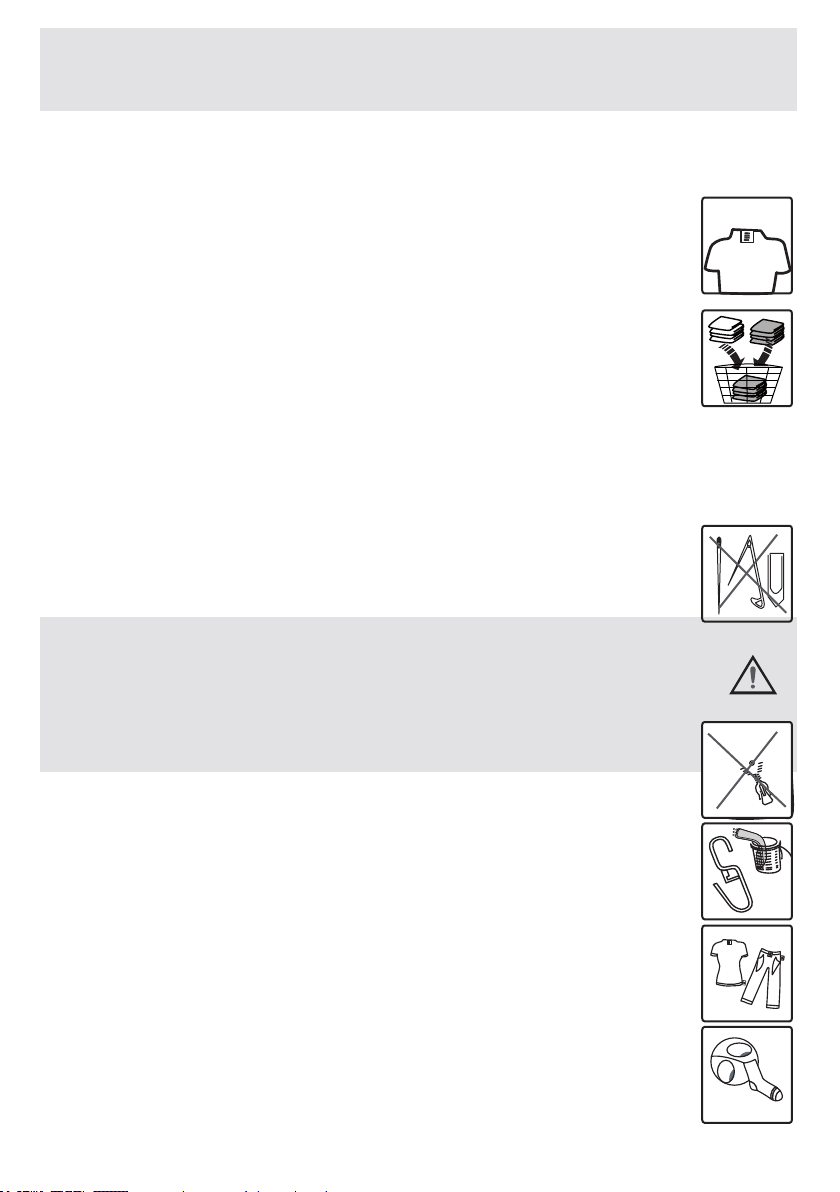
•Yourlaundryhasproductlabelsonitthatspecies
howtheyshouldbewashed.Washordryyourlaundry
accordingtotheinstructionsontheproductlabel.
•Separateyourlaundriesaccordingtotheirtypes(cot-
ton,synthetic,sensitive,wooletc.),theirtemperatures
(cold,30°,40°,60°,90°)anddegreeofcontamination
(slightlystained,stained,highlystained).
• Never wash your coloured and white laundry togeth-
er.
Washyourcolouredlaundriesseparatelyintherstwashingas
theymaybleed.
•Ensurethattherearenometallicmaterialsonyour
laundriesorinthepockets;ifso,removethem.
WARNING: Malfunctions that will oc-
cur due to penetration of foreign objects
into your machine are not included
within the scope of warranty.
•Zipupandbuttonupyourlaundries.
•Removethemetallicorplastichooksoftullecurtains
orcurtainsorplacetheminawashingnetorbag.
•Turntextilessuchaspants,knitwear,t-shirtand
sweatsuitsinside-out.
•Washsocks,handkerchiefandsuchlikesmalllaun-
driesinawashingnet.
EN-47-
CHAPTER-6: PRELIMINARY PREPARATION FOR
LAUNDERING (SEPARATING YOUR LAUNDRY)
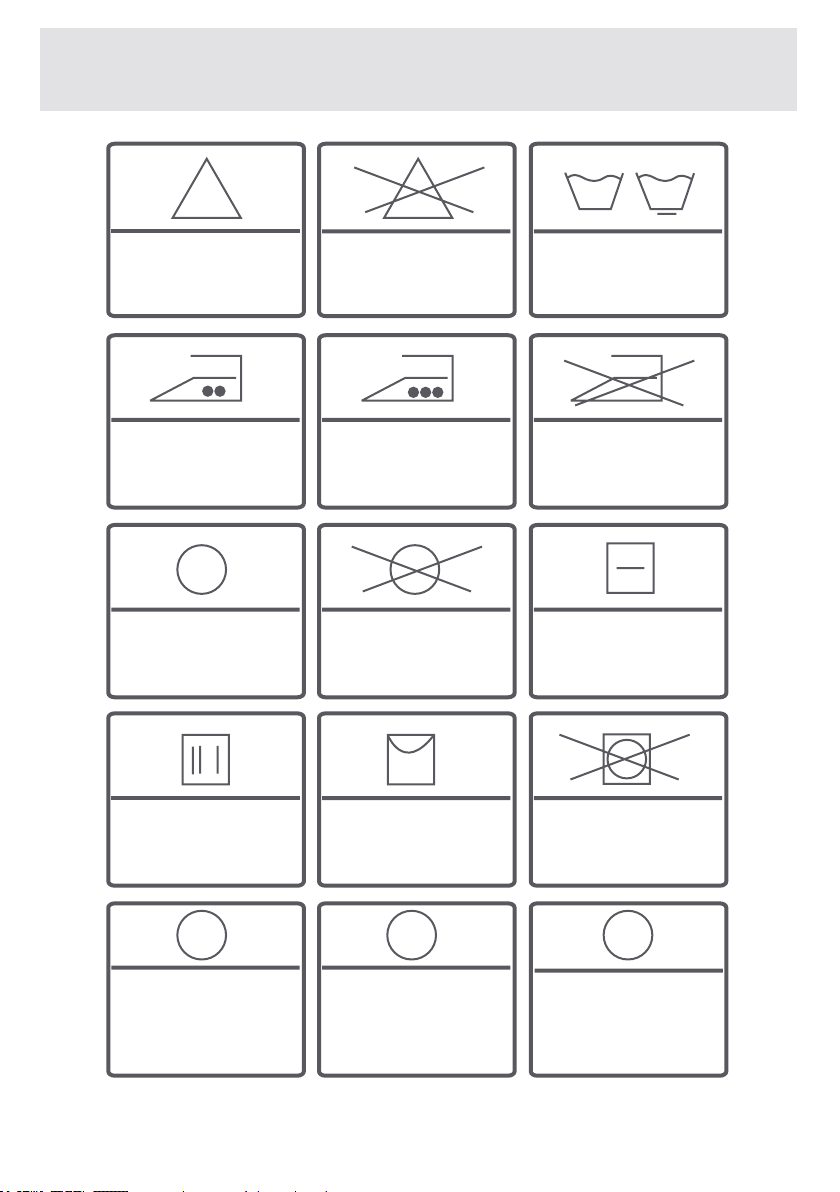
Whitening
available
No whitening Normal
washing
No ironing
Ironingtempera-
tureismaximum
200°C
Ironingtempera-
tureismaximum
150°C
Drycleaning
available
No dry cleaning Leaveonaat
place
Dryingby
twirling is not
allowed
Drybyhanging
Hang when wet
Drycleaningin
gas oil, pure al-
coholandR113
is allowed
Perchloroethyl-
eneR11,R113,
Petroleum
Perchlorinetyhlene
R11,R113,Gasoil
F P
A
EN-48-
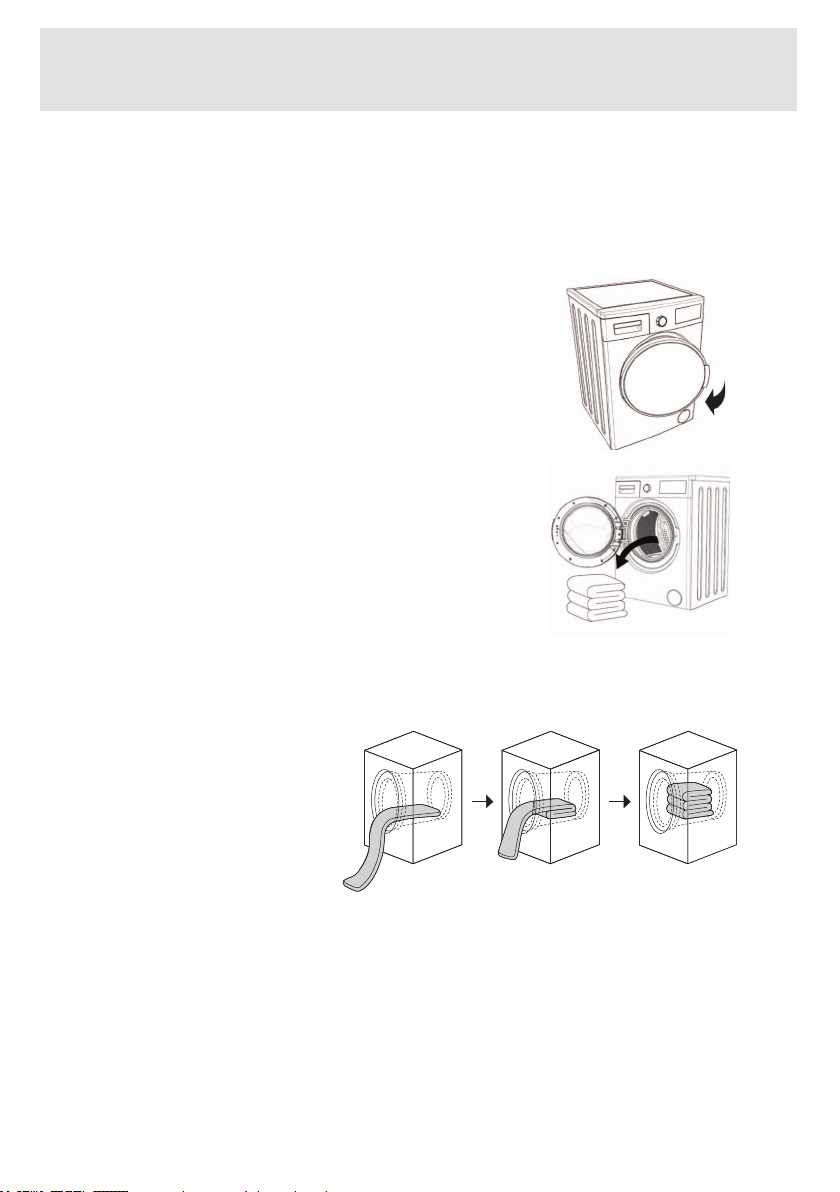
• Open the loading door of your
machine.
• Spread your laundries in your machine. Fold the objects like
quilt, blanket that you will load into the machine as shown below.
• Check inside the vessel of your ma-
chine. There might be laundry left inside
from previous washes. If there is, empty
your machine before selecting program.
The maximum load capacity of your machine may change according to
the program you select. Do not exceed maximum dry loading capacity
indicated in the program table for washing programs
CHAPTER-6: LAUNDRY PREPARATION PLACING
LAUNDRY IN THE MACHINE
EN-49-
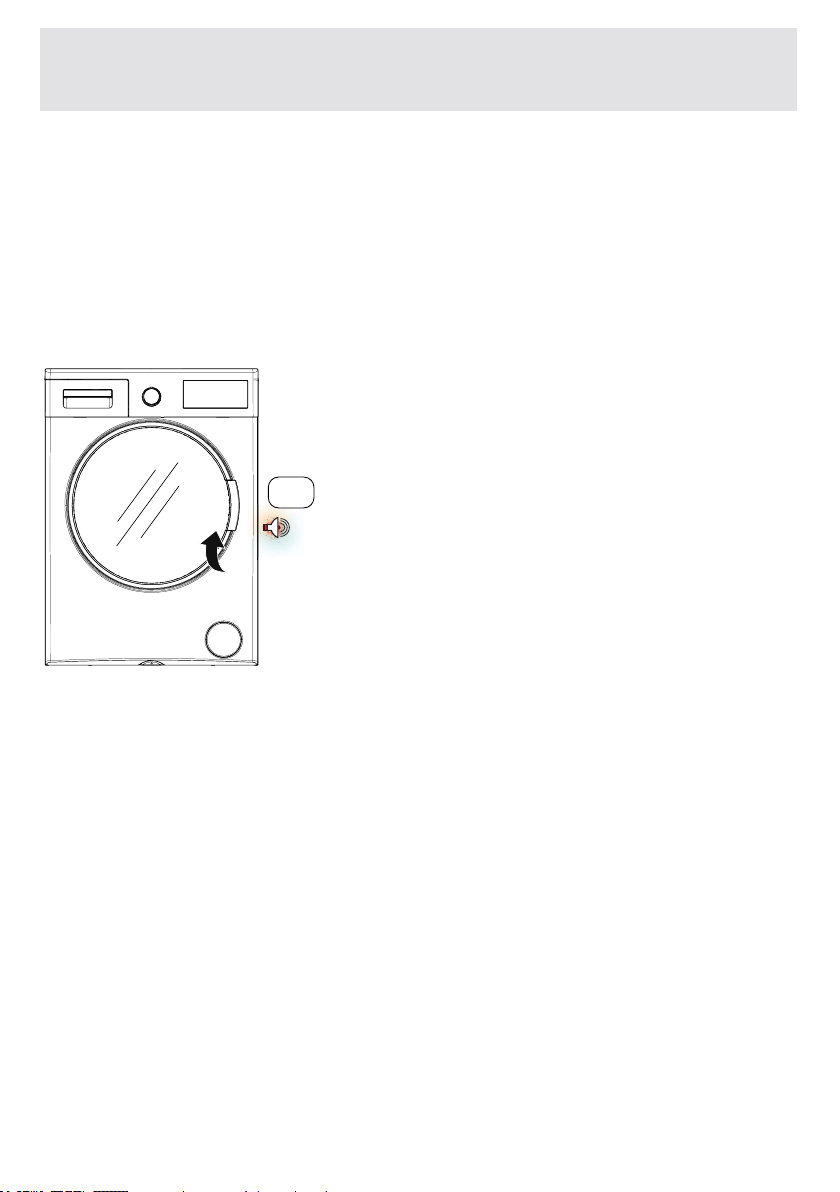
• Put the laundry in separately.
• Ensure that no laundry is stuck between the cover and bellow
seal when closing the door of your machine.
• Make sure the door of the machine is closed completely.
• If the door is not completely closed, your machine won’t start
the washing Operation.
click
CHAPTER-6: LAUNDRY PREPARATION; PLACING
LAUNDRY IN THE MACHINE

EN-50-
CHAPTER-6: LAUNDRY PREPARATION (DETERGENT SELECTION
AND ADDING DETERGENT TO THE MACHINE)
The amount of detergent you will put in your machine will depend
on the following criteria:
• Your detergent use will be based on the degree of contamina-
tion of your laundry. Do not prewash your lightly stained laundry
and put a small amount of detergent in the 2nd compartment of
the detergent drawer.
• The pre-wash feature should be used for your very dirt laundry.
If a pre-wash is made, place 1/4 of the detergent you will put in
the detergent compartment into the compartment numbered 1
using the detergent spade, and put the remaining 3/4 to the com-
partment numbered 2.
• Use detergents produced for automatic washing machines in
your machine. Adhere to the advice of detergent manufacturers
while determining the amount of detergent you will use with your
laundry.
• The higher the degree of hardness of the water the more deter-
gent you will use.
• The amount of the detergent you need will increase as the amo-
unt of your laundry increases.
• Put the softener in the softener compartment in the detergent
drawer. Do not exceed the MAX level. Otherwise, softener will
flow into washing water through flushing.
• Softeners with high density are required to be thinned to a deg-
ree before being put in the drawer. Because high-density softener
will clog the flush and avoid the flow of the softener.
You can use your liquid detergents in all programs without pre-
washing. To do this, place the liquid detergent apparatus inside
your machine to the second compartment of the detergent dra-
wer, and fill the liquid detergent not exceeding the max level and
in amounts the detergent manufacturer recommends.
(Please see page 33 regarding the location of the liquid detergent
apparatus inside the detergent drawer).

EN-51-
CHAPTER-6: LAUNDRY PREPARATION (OPERATING YOUR
MACHINE)
•Plugyourmachinein.
•Openthewaterfaucet.
•Openthemachine
door.
•
Spreadyourlaundryinyourmachine.
•Pushthedoorofyourmachinetocloseituntil
youhearthelockingsound.
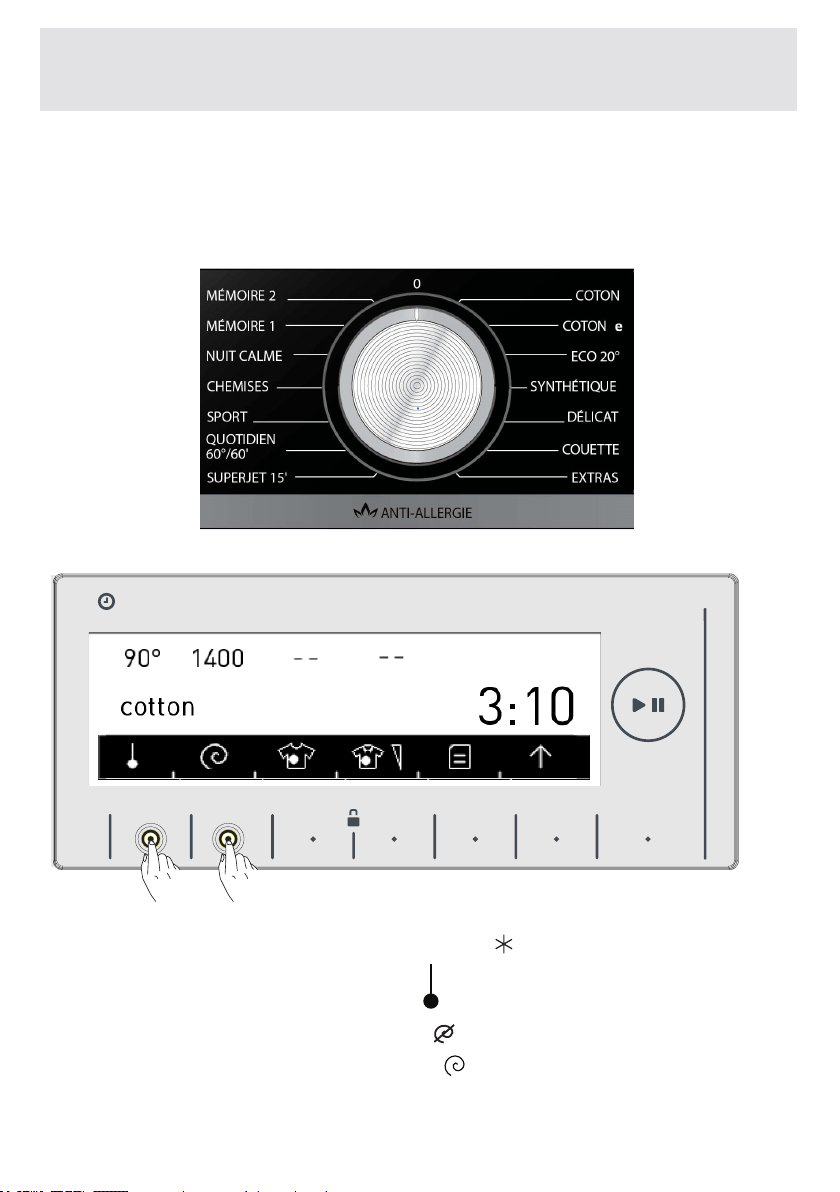
EN-52-
CHAPTER-6: LAUNDRY PREPARATION (PROGRAM
SELECTION)
• Select the washing program you desire by the program button.
• Program name and features will be shown on the screen.
• You can make temperature adjustments (
, 20°, 30°, 40°,
60°, 90°) by pressing the button of symbol.
• You can change the speed setting ( , 400, 600, 800, 1000,
1200, 1400) by touching the button of symbol.
HAFIZA
8 kg.6 kg.
TIME
EC
8 kg. 6 kg.
EN-53-
CHAPTER-6: LAUNDRY PREPARATION
STAIN SELECTION
Yourmachinehasadditionalfunctionsforremoving22differenttypesof
stains.
Youcanmakeuseoftheseauxiliaryfunctionsaccordingtothestain
typesonyourlaundry.
Warning:Forthestainselectionauxiliaryfunctiontoperformproperly,
youshouldnotletthestainsonyourlaundrytodryandstick.Remove
solidmaterialsbeforehand.
Warning:Beforeyoustartwashingthenewstainsonyourlaundry,press
onthestainoncewithacloth.Donotrub!
Yourwashingmachineautomaticallyadjuststhetemperature,rotation
movementanddurationaccordingtothestaintypeselected.
Forexample,thestainremovingmethodsofyourmachineareassuch;
Bloodstain:Thebloodstainauxiliaryfunctioncombinedwiththe
selectedwashingprogramwilldissolvethelaundrywithbloodstains
incoldwaterpriortothemainprogramandworktocleanthestained
surfaces,andthenyourselectedwashingprogramwillstart.
Eggstain:Eggstainswillbesoftenedinwarmwaterforacertaintimeto
clearthestain,andthenthecombinedwashingprogramwillcontinueto
completethewashingcycle.
Thestaintypeselectionfeaturesinyourmachinearelistedbelow.
Forotherstainselections,similarstainremovalsolutionsareavailable.
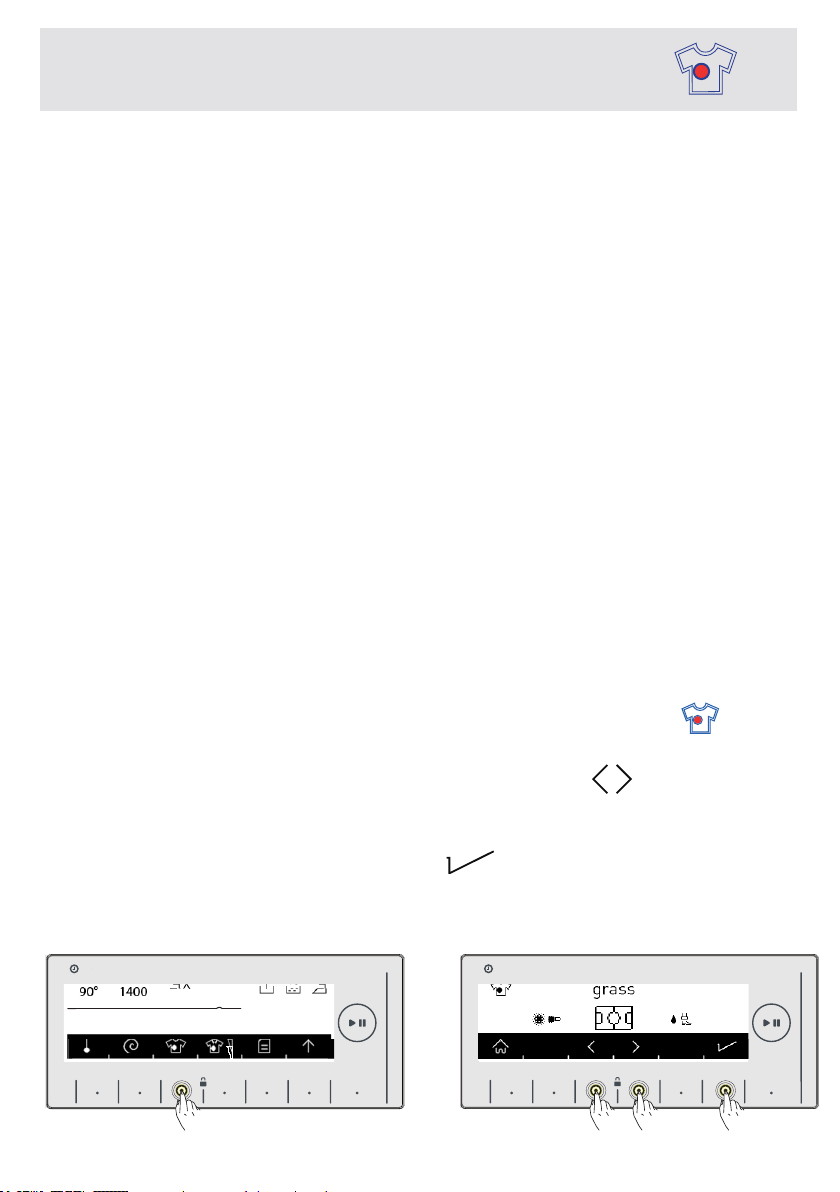
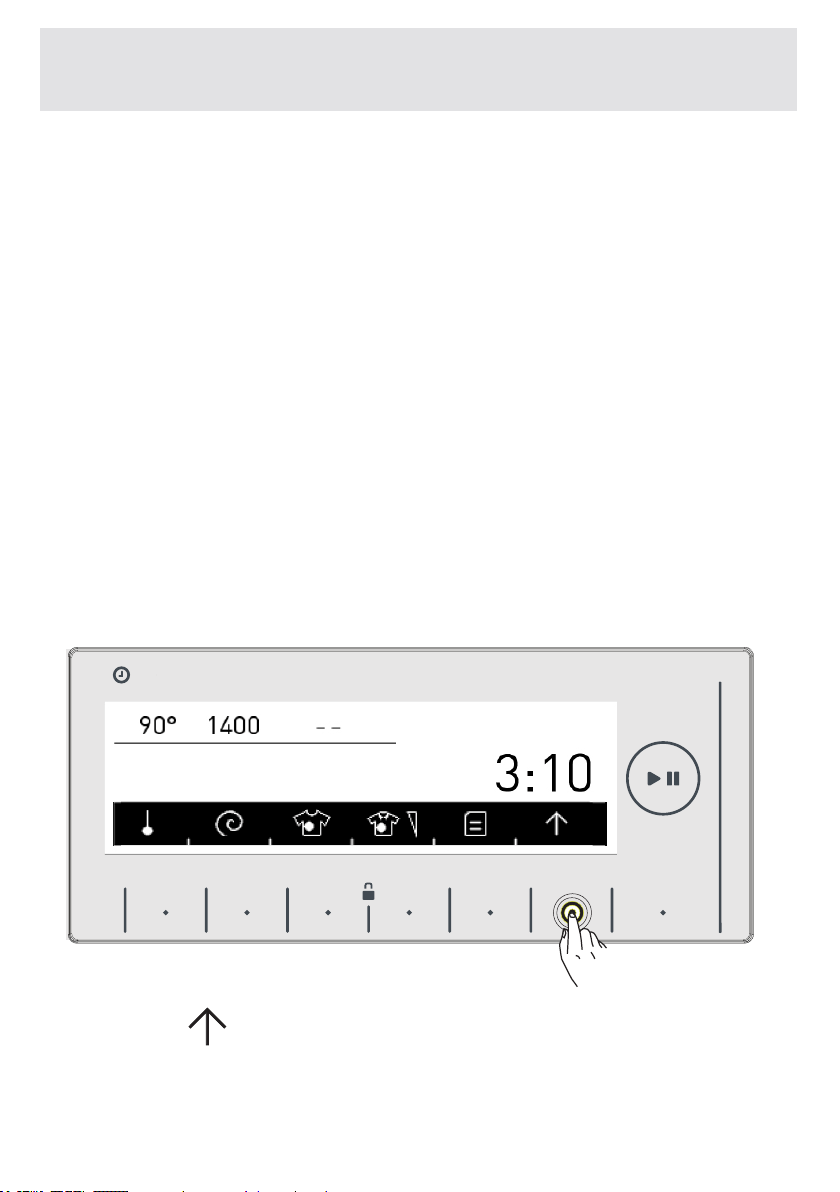
Forthestainselectiontobeactive,touchthestainselection symbol
buttononthescreenofyourmachine.(Picture1)
Determinethestainselectionbytouchingthearrow symbolbuttons.
(Picture2)
Toapprovetheselection,activatethestainremovalauxiliarywashing
programyouselectedbytouchingthe symbolbuttononthescreen.
(Picture2)
HAFIZA
8 kg.6 kg.
TIME
EC
8 kg. 6 kg.
HAFIZA
8 kg.6 kg.
TIME
EC
8 kg. 6 kg.
9 kg. 6 kg.
9 kg. 6 kg.
3
2
Picture1 Picture2
cotton
EN-54-
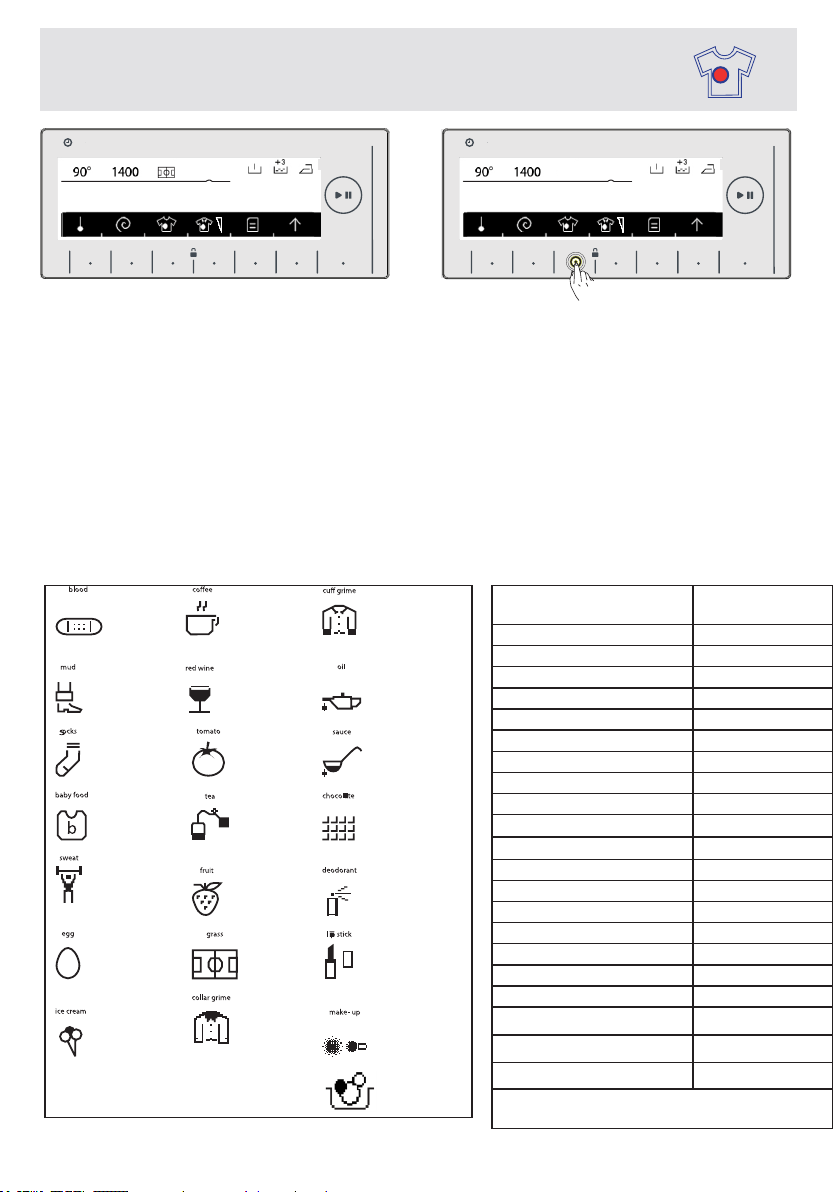
Onthescreenyouwillseethesymbolforthestainselectionyouselected.
(Picture3)
If you want to cancel the stain selection, you can touch the stain selection
symbolbutton.Thewarningmessagethattheselectioniscancelledwillbe
displayedonthescreenforashortduration.“Stainselection”
Ifyouwanttore-selectthestainremovalfunctionre-applytheoperationsseen
inpicture1andpicture2.
Note:Ifthedesiredresultisnotachievedwiththeselectedstainselectionat
theendofthewash,youmighthaveselectedthewrongstain;pleasere-apply
thewashingoperationwiththecorrectstainselectiontoremovethestain.
Stainselectionsymbolexplanations.
CHAPTER-6: LAUNDRY PREPARATION
STAIN SELECTION
Stain selection symbol explanation table
PROGRAMS STAIN
SELECTION
Cotton S
Cotton eco S
*Cotton60e S
*Cotton40e S
Eco20° SY
Synthetic S
*Curtain S
Wool SY
*Silk SY
Duvet S
Exstra SY
*Rinse SY
*Spin SY
*Drain SY
*Drumclean SY
Allergysafe S
Rapid15' SY
Daily60°60’ S
SportsWear S
Blouses/Shirts S
Night Wash S
S:SelectableSY:Noselection
*:Sub-programs
1- blod 8- kaffe 15- manchet
2- mudder 9- rødvin 16- olie
3-
sokker 10- tomat 17- sauce
4-
babymad 11- te 18- chokolade
5- sved 12- frugt 19- deodorant
6- æg 13- græs 20- læbestift
7-
is 14- krave 21- Make-up
22- Mixed
HAFIZA
8 kg.6 kg.
TIME
EC
8 kg. 6 kg.
HAFIZA
8 kg.6 kg.
TIME
EC
8 kg. 6 kg.
9 kg. 6 kg. 9 kg. 6 kg.
2 2
Picture3
Picture4
StainSelection
cotton
EN-55-
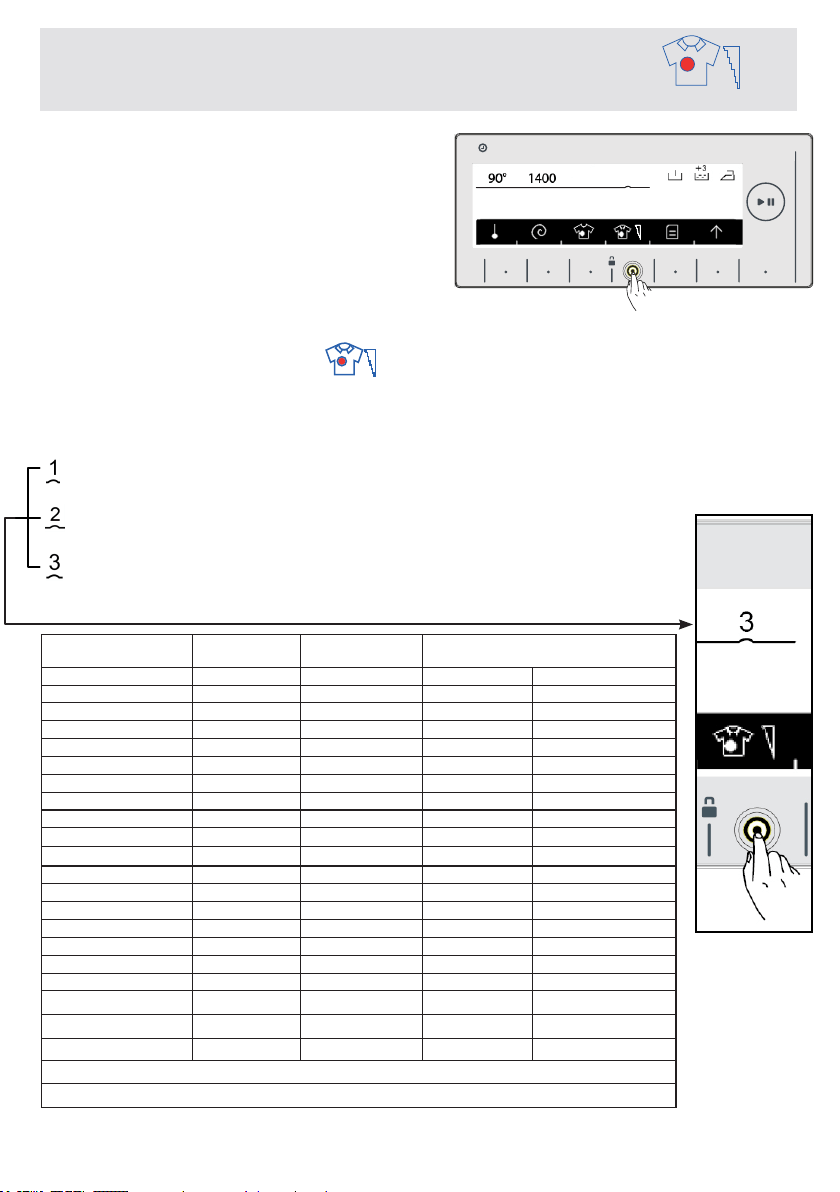
CHAPTER-6: LAUNDRY PREPARATION STAIN LEVEL
SELECTION
PROGRAMS DIRTINESS FACTORY
PRESET
SELECTABLELEVELS
Cotton S Dirty Verydirty Little dirt
Cotton eco S Dirty
Verydirty Little dirt
*Cotton60e S Dirty Verydirty Little dirt
*Cotton40e S Dirty Verydirty Little dirt
Eco20° SY Little dirt NS NS
Synthetic S Dirty
Verydirty Little dirt
*Curtain S Dirty
Verydirty Little dirt
Wool S Dirty
Verydirty Little dirt
*Silk S Dirty
Verydirty Little dirt
Duvet S Dirty
Verydirty Little dirt
Exstra SY NS NS NS
*Rinse SY NS NS NS
*Spin SY NS NS NS
*Drain SY NS NS NS
*Drumclean SY NS NS NS
Allergysafe S Dirty NS NS
Rapid15' SY Little dirt NS NS
Daily60°60’ S Dirty Little dirt NS
SportsWear S Dirty Verydirty Little dirt
Blouses/Shirts S Dirty
Verydirty Little dirt
Night Wash S Dirty
Verydirty Little dirt
S:SelectableSY:Noselection*:Sub-programs
You can change your wash settings
according to how dirty your laundry
and have your laundry is washed in
lessormoretime,lowerorhigher
temperature.Thedirtinesslevelsare
automaticallysetincertainprograms.
Youcanmakechangesasyoulike.
Note: If no change occurs when you
touch the stain level button
, this
meansthereisnostainlevelselectionintheprogramyouhaveselected.
Little dirt (no pre-washing)
Dirty (apply pre-washing if necessary.)
Very dirty (apply pre-washing if necessary.)
HAFIZA
8 kg.6 kg.
TIME
EC
8 kg. 6 kg.
9 kg. 6 kg.
3
cotton
EN-56-
CHAPTER-6: LAUNDRY PREPARATION
(AUXILIARY FUNCTIONS)
Before starting the program, you can optionally select an auxiliary
function.
• Press on the button of auxiliary function you would like to select.
Additional functions may not be active according to the program
you selected, the amount of load you put in your machine.
The reasons for not activating:
-It is not compatible with an additional function you have selected
previously.
- If an additional function does not become active when you want
to select it while the machine is running; the washing interval that
the additional function your want to use would not be completed.
• You can see the program table in pages between 81-91 for the
additional functions used in programs.
• Touch the symbol button to go into the auxiliary function
indicator.
HAFIZA
8 kg.6 kg.
TIME
EC
8 kg. 6 kg.
max. 120 dk
30
dk.
EN-57-
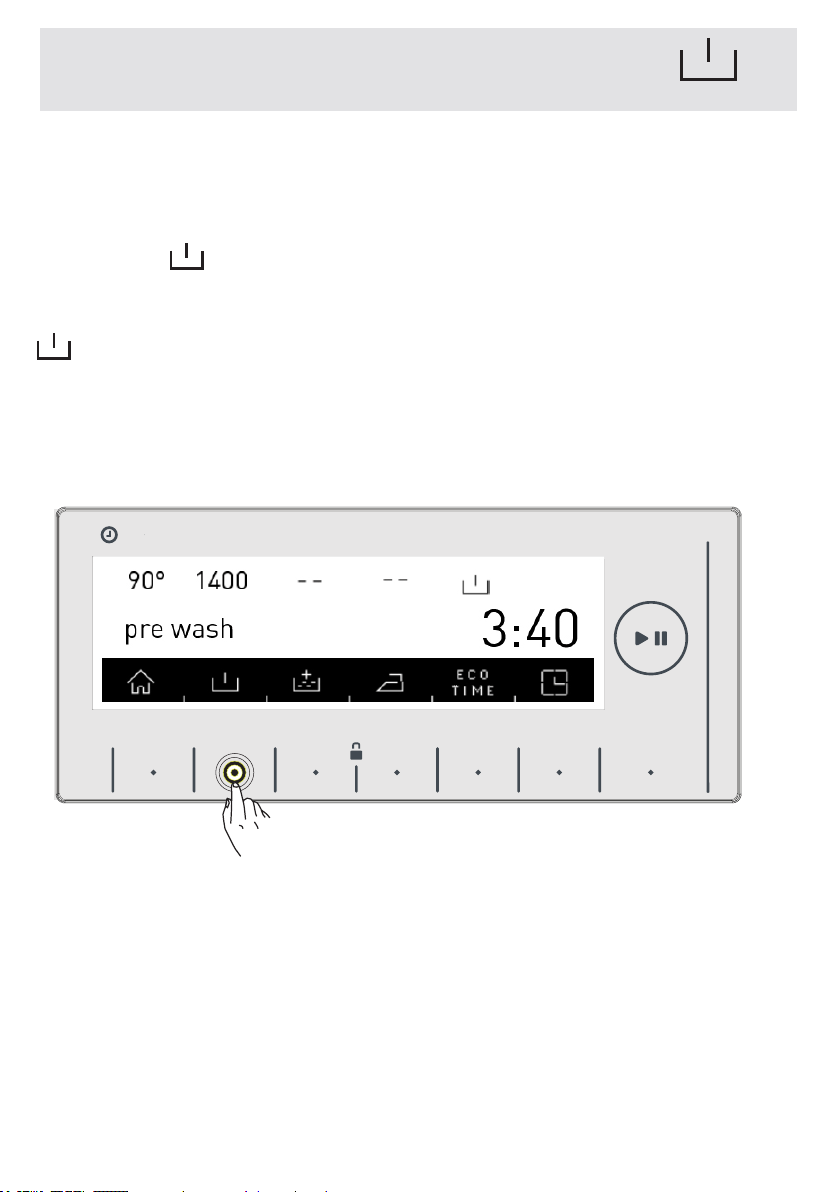
You can provide your very dirty laundry to prewashing operation
prior to main washing by using this additional function. When
using this function, you should put detergent in front washing
compartment of the detergent drawer.
• Touch the symbol button to activate the pre-wash additional
function
Note: When you want to use the pre-wash auxiliary function if
symbol is not displayed on the screen, the washing program
you selected does not use this feature.
CHAPTER-6: LAUNDRY PREPARATION: PRE-WASH
AUXILIARY FUNCTION
HAFIZA
8 kg.6 kg.
TIME
EC
8 kg. 6 kg.
EN-58-
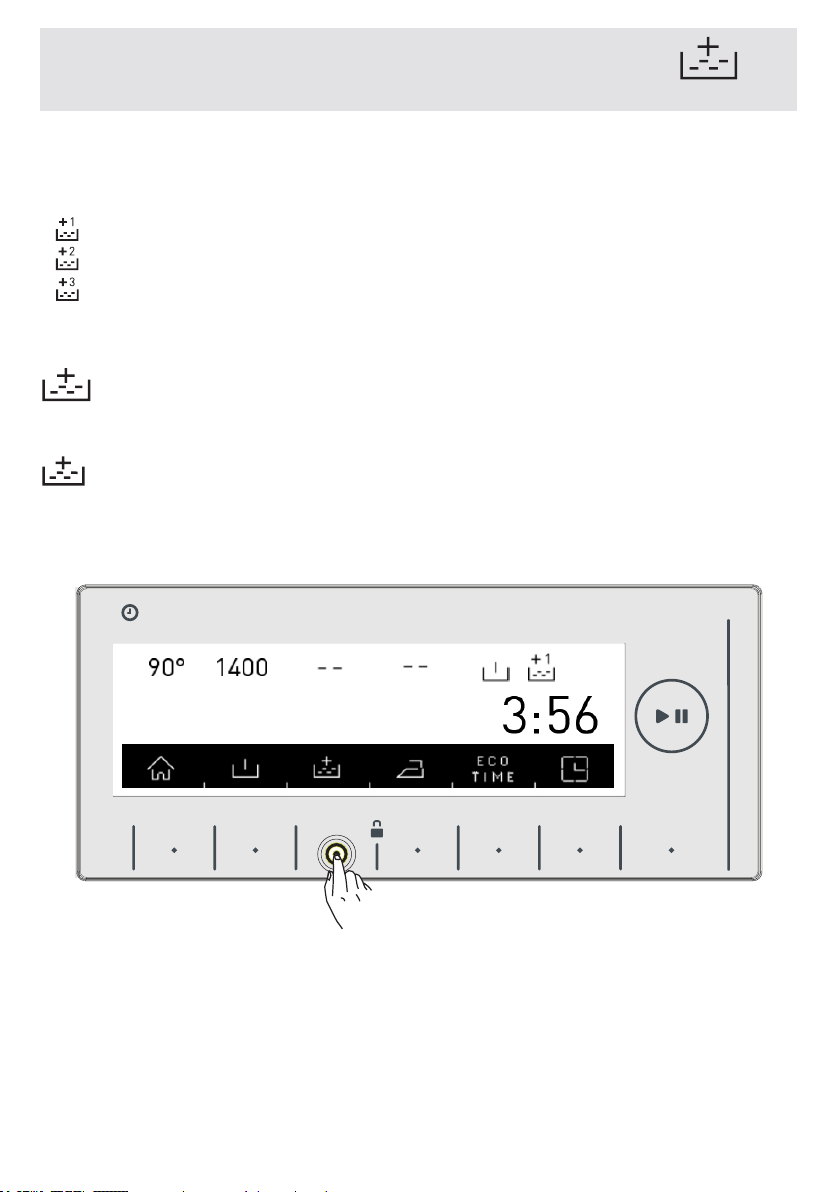
You can make additional rinse or rinses to your laundry by using
this additional function. Your machine offers you 3 different rin-
sing options fort his auxiliary function
: One additional rinse is made at the end of washing.
: Two additional rinses are made at the end of washing.
: Three additional rinses are made at the end of washing.
* If you want to make more than one rinsing, touch the button of
symbol until you see the number of rinses you wish
Note: When you want to use the extra rinsing auxiliary function if
symbol is not displayed on the screen, the washing program
you selected does not use this feature.
CHAPTER-6: LAUNDRY PREPARATION:
EXTRA RINSE FUNCTION
HAFIZA
8 kg.6 kg.
TIME
EC
8 kg. 6 kg.
Extrarinsing
Ekstraskyl
EN-59-
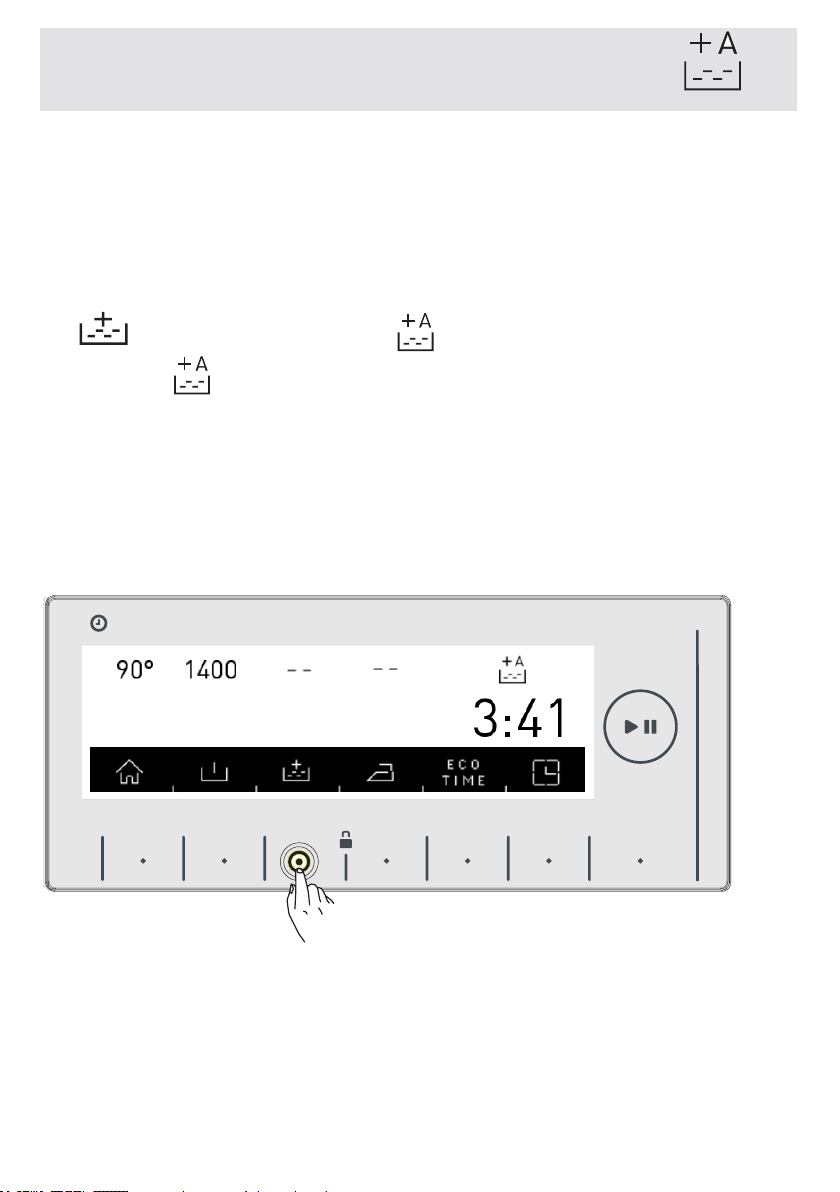
You can make an additional rinse operation for your laundry by
using this additional function. Your machine will make all rinsing
steps with hot water (it is recommended fort he laundry worn on
sensitive skin, baby clothes, underwear)
* To activate the anti-allergic auxiliary function, touch the button
of symbol until you see the symbol on the screen.
Note: If the symbol is not displayed on the screen when you
want to select the anti-allergic additional function,
it means that the washing program you selected does not use this
feature.
CHAPTER-6: LAUNDRY PREPARATION: ANTI-ALLERGIC
AUXILIARY FUNCTION
HAFIZA
8 kg.6 kg.
TIME
EC
8 kg. 6 kg.
Anti-allergic
Allergivenlig
EN-60-
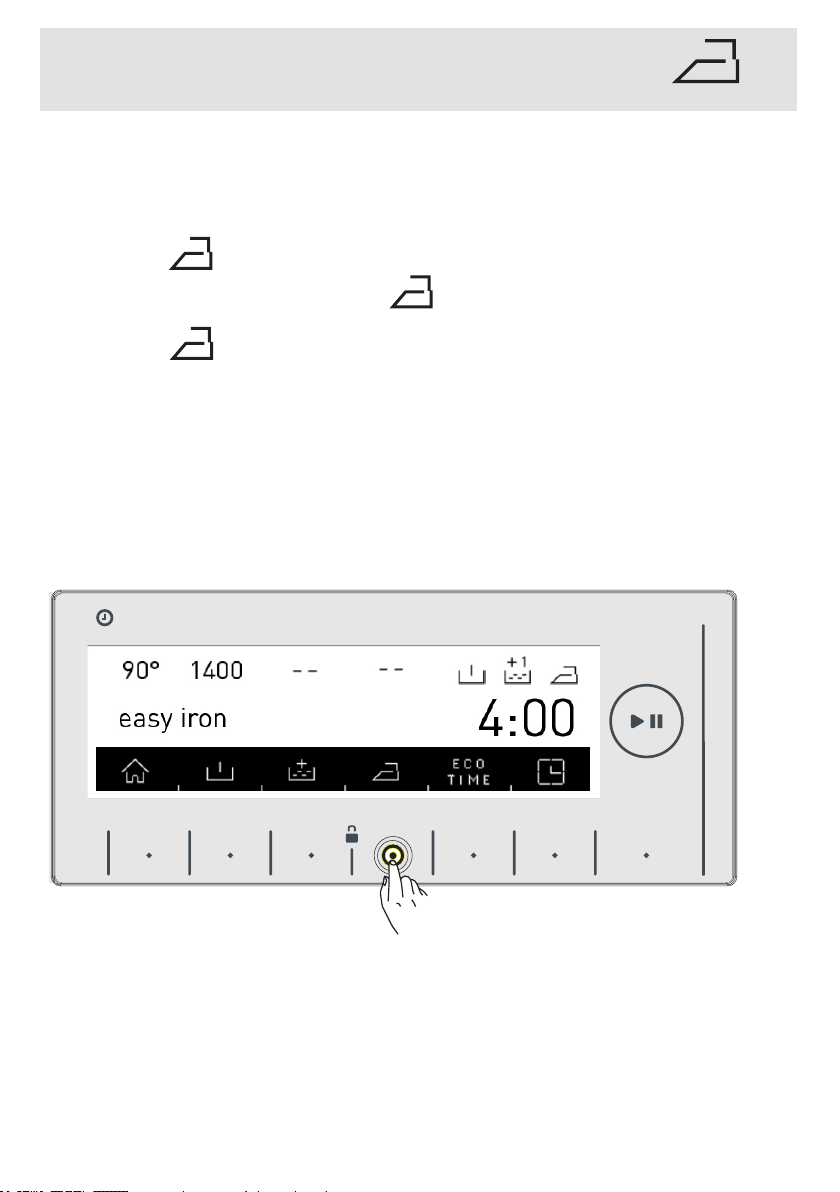
CHAPTER-6: LAUNDRY PREPARATION: EASY IRONING
AUXILIARY FUNCTION
You can help your laundry to be taken out less wrinkled as the
washing operation is completed by employing this auxiliary func-
tion.
* Touch the symbol button to activate the easy ironing additi-
onal function touch the button of symbol.
Note: If the symbol is not displayed on the screen when you
want to select the easy ironing additional function,
it means that the washing program you selected does not use this
feature.
HAFIZA
8 kg.6 kg.
TIME
EC
8 kg. 6 kg.
EN-61-
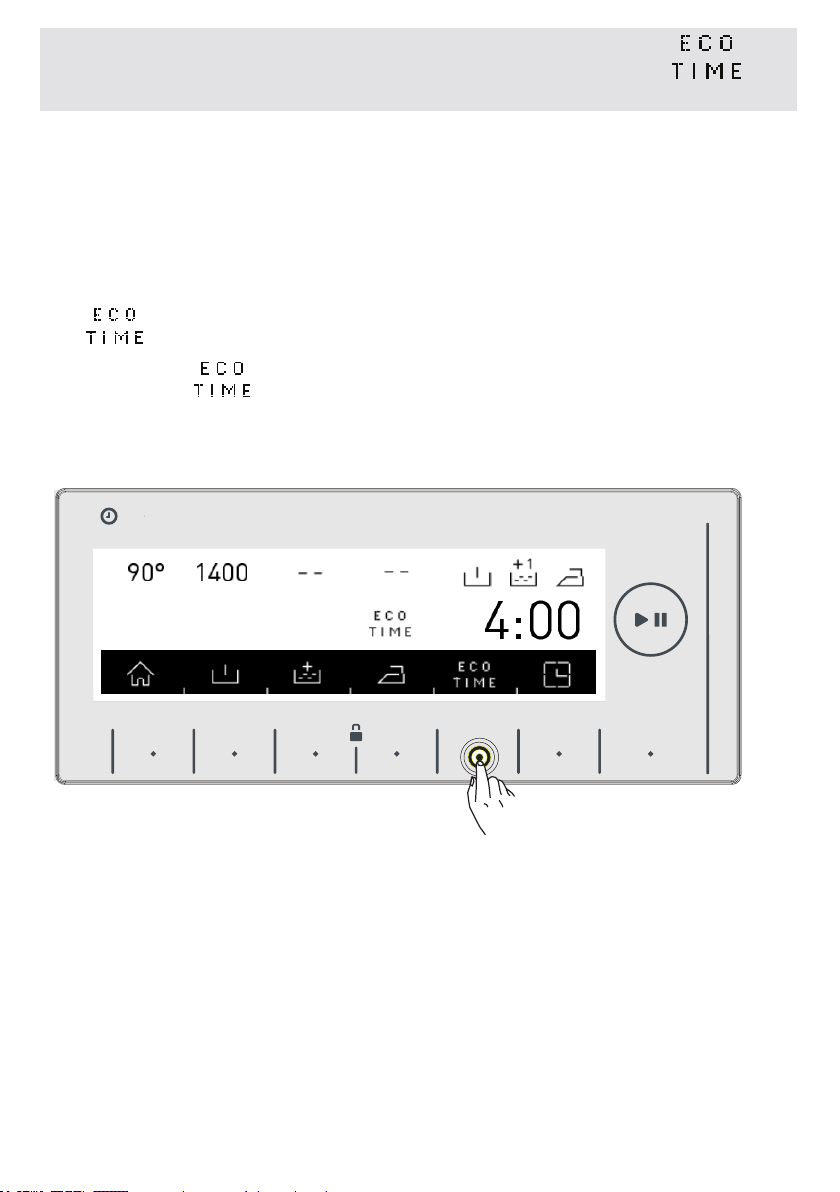
• You must make the Eco Time setting from the settings section
for this function to work efficiently. (see page 41)
• If you want to activate the Eco Time function, touch the button
of symbol.
• You will see symbol is activated on the screen.
CHAPTER-6: LAUNDRY PREPARATION:
ECONOMIC TIME INTERVAL AUXILIARY FUNCTION
HAFIZA
8 kg.6 kg.
TIME
EC
8 kg. 6 kg.
Cotton
EN -62-
CHAPTER-6: LAUNDRY PREPARATION:
ECONOMIC TIME INTERVAL AUXILIARY FUNCTION
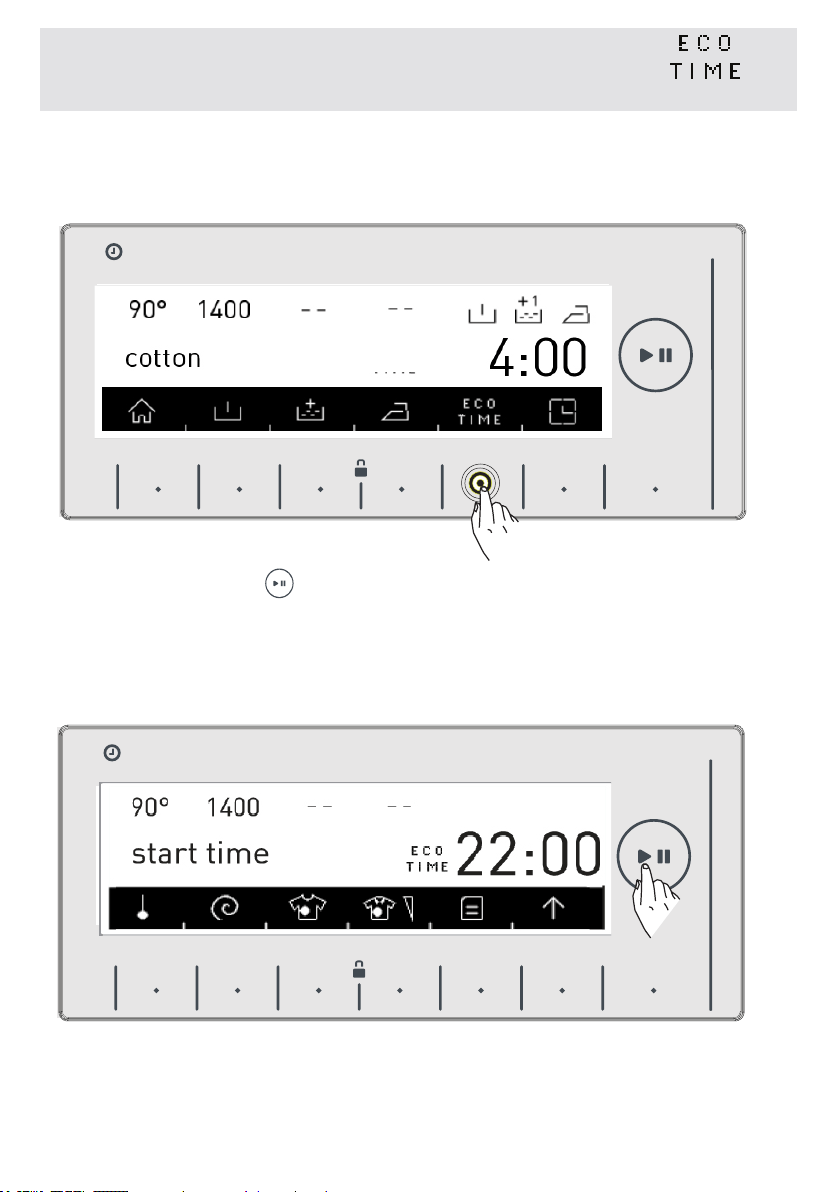
• Eco Time feature will be constantly displayed on the screen until
it is shut off. To shut off, Eco time additional function button must
be pressed.
• If you want to run a program while Eco Time feature is active,
touch the button of symbol. The starting time of the program
will be automatically delayed for it to run on the economic time
interval. The program “starting time” and the program duration
will be shown on the display with certain intervals.
HAFIZA
8 kg.6 kg.
TIME
EC
8 kg. 6 kg.
HAFIZA
8 kg.6 kg.
TIME
EC
8 kg. 6 kg.

EN-63-
• If you don’t want to run the program you have selected between
the Eco Time hours, touch the button again. “Eco Time can-
celled” text will be displayed on the screen.
• Your machine will return to the main screen of the program you
have selected in 3 seconds. To start the program, run the prog-
ram you selected by touching the start/stand-by button.
CHAPTER-6: LAUNDRY PREPARATION ECONOMIC TIME
INTERVAL AUXILIARY FUNCTION
HAFIZA
8 kg.6 kg.
TIME
EC
8 kg. 6 kg.
HAFIZA
8 kg.6 kg.
TIME
EC
8 kg. 6 kg.
EN-64-
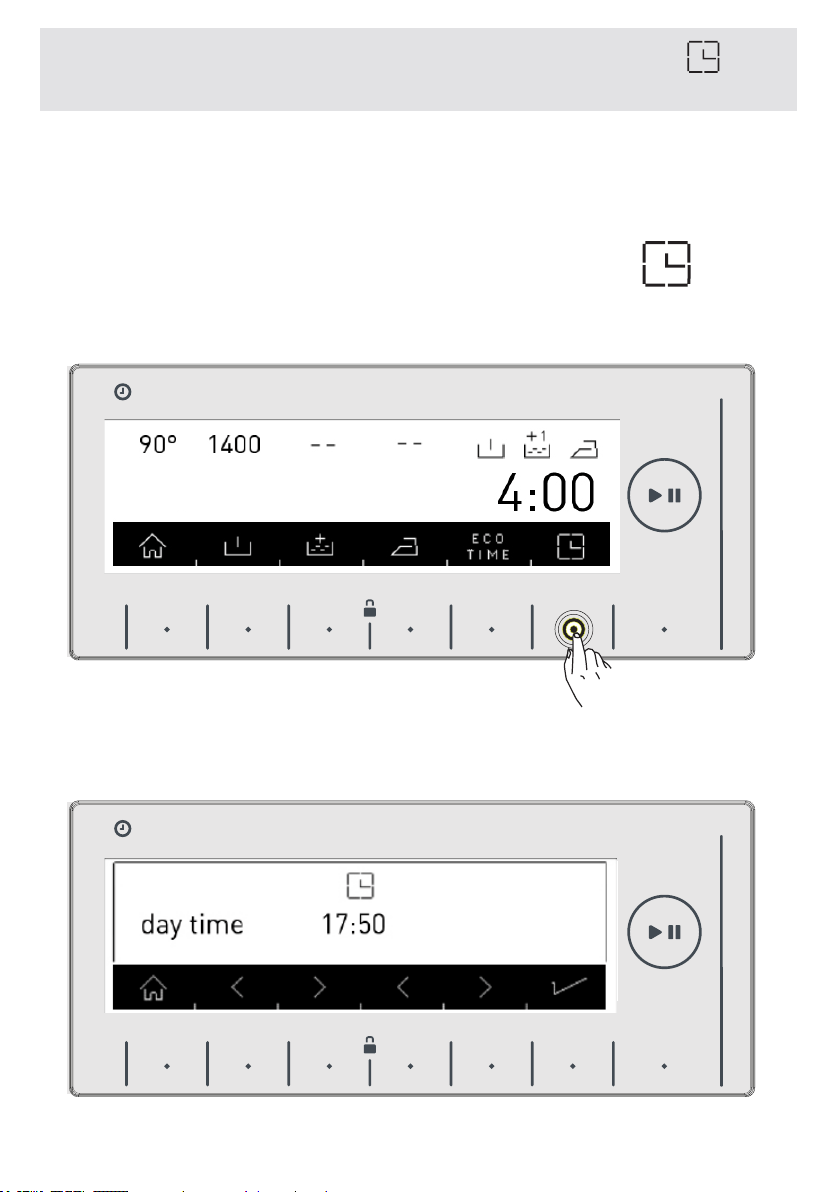
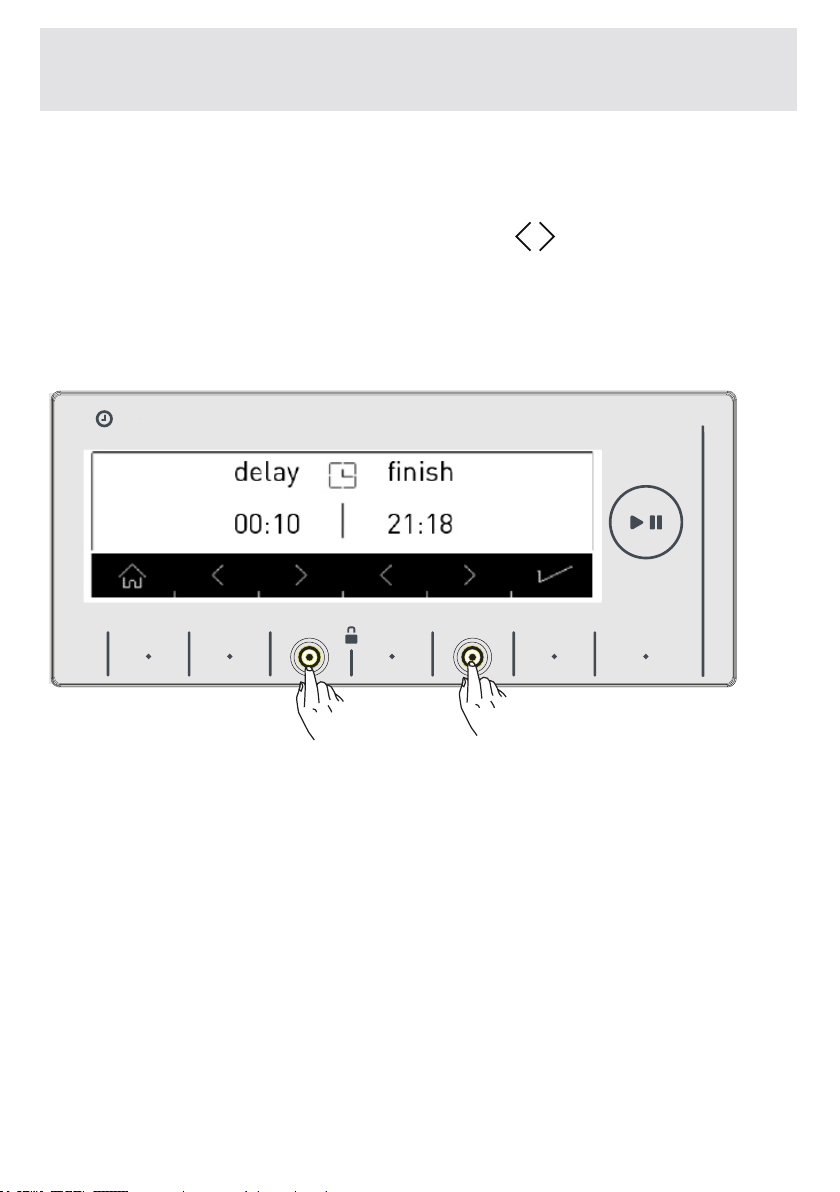
• By using this function, you can delay the start of the washing opera-
tion from 10 minutes to 23 hours 50 minutes or you can set according
to the hour you want it to end.
• To activate this additional function, touch the button of symbol.
• Current time will be displayed on the screen for a short duration.
CHAPTER-6: LAUNDRY PREPARATION: DELAYED
START/PROGRAM FINISH TIME SETTING
HAFIZA
8 kg.6 kg.
TIME
EC
8 kg. 6 kg.
kolay ütüleme
HAFIZA
8 kg.6 kg.
TIME
EC
8 kg. 6 kg.
Easy ironing
EN-65-
• The screen that shows current time will automatically turn into
the screen that displays time delay / program end time.
• On this screen you can use the buttons of symbols to delay
the washing time, or make the washing operation end at a certain
hour.
Note: The current adjustment of your machine must be made to
be able to use this function correctly. See page 36 if you haven’t
made current time setting.
CHAPTER-6: LAUNDRY PREPARATION DELAYED START/
PROGRAM FINISH TIME SETTING
HAFIZA
8 kg.6 kg.
TIME
EC
8 kg. 6 kg.
EN -66-
CHAPTER-6: LAUNDRY PREPARATION MEMORY RECORD
FUNCTION BUTTON (MEMORY)
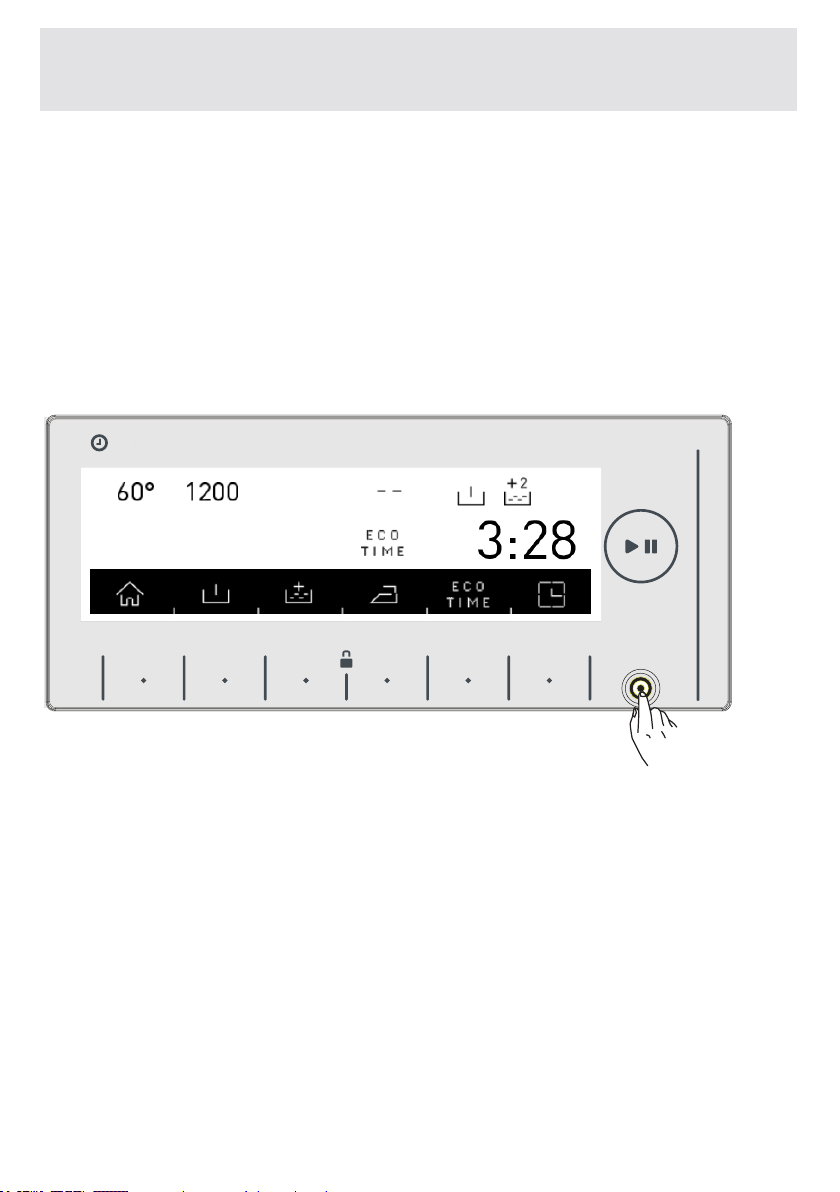
With this feature in your machine, you can record the washing
program settings you have used before by touching a single
button, saving you time, into 2 different memory locations. So
you can wash your laundry without having to make these settings
again. Select the settings you want stored in the memory prog-
rams and touch the memory record button.
HAFIZA
8 kg.6 kg.
TIME
EC
8 kg. 6 kg.
9 kg. 6 kg.
Cotton
EN-67-
CHAPTER-6: LAUNDRY PREPARATION:
MEMORY RECORD FUNCTION BUTTON (MEMORY)
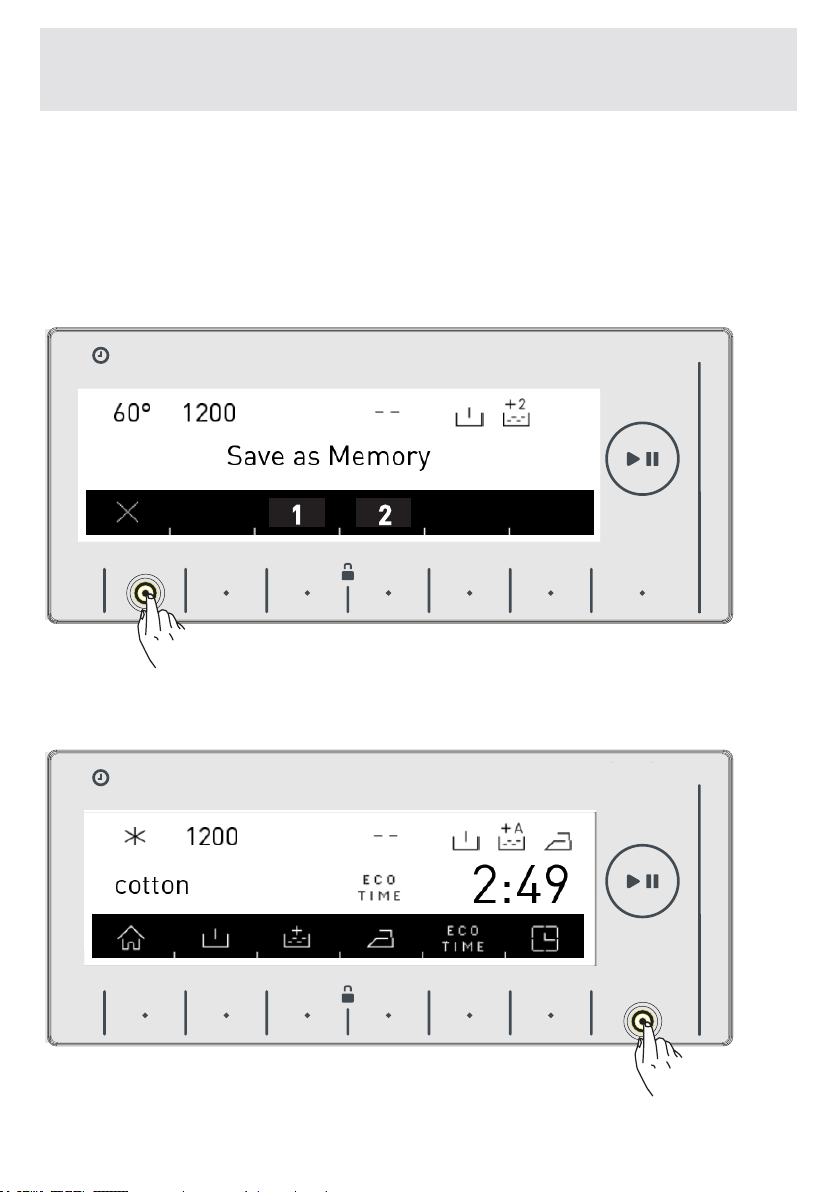
• When you touch the memory button, “Save as memory”
question will be displayed on the screen.
• If you want to make changes on the washing programs again
before recording, you can go into the program menu by touching
the X symbol button.
• When you make the changes you want, you can touch the
memory button again.
HAFIZA
8 kg.6 kg.
TIME
EC
8 kg. 6 kg.
1
2
HAFIZA
8 kg.6 kg.
TIME
EC
8 kg. 6 kg.
9 kg. 6 kg.
9 kg. 6 kg.
EN -68-
CHAPTER-6: LAUNDRY PREPARATION MEMORY RECORD
FUNCTION BUTTON (MEMORY)
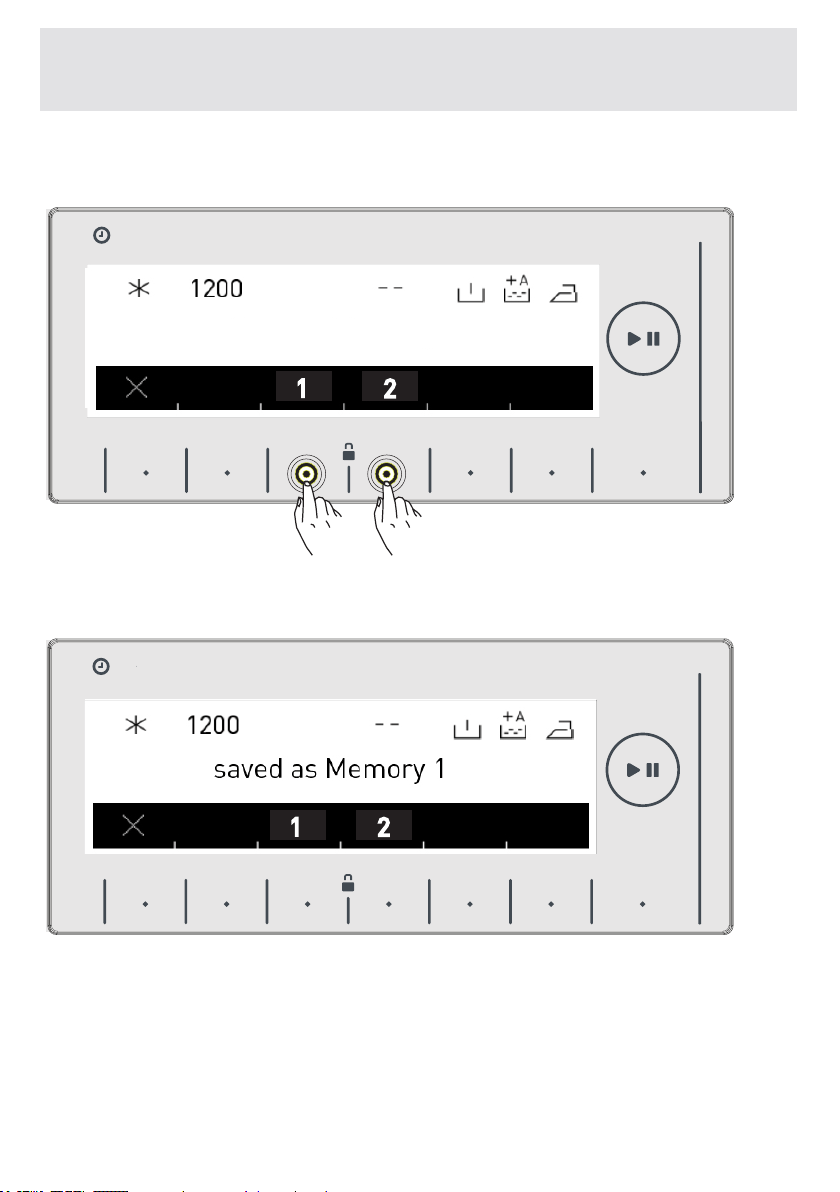
• The question of “Save as memory?” question will be displayed
on the screen.
• You can record by touching 1(Memory 1) or 2 (Memory 2)
Memory option buttons
• A screen display like the one above will be displayed when the
record is completed and your machine will automatically return
too the main screen of the washing program you have made the
settings for.
HAFIZA
8 kg.6 kg.
TIME
EC
8 kg. 6 kg.
1
2
HAFIZA
8 kg.6 kg.
TIME
EC
8 kg. 6 kg.
1
2
9 kg. 6 kg.
9 kg. 6 kg.
Save as memory?
EN-69-
CHAPTER-6: LAUNDRY PREPARATION: MEMORY RECORD
FUNCTION BUTTON (MEMORY)
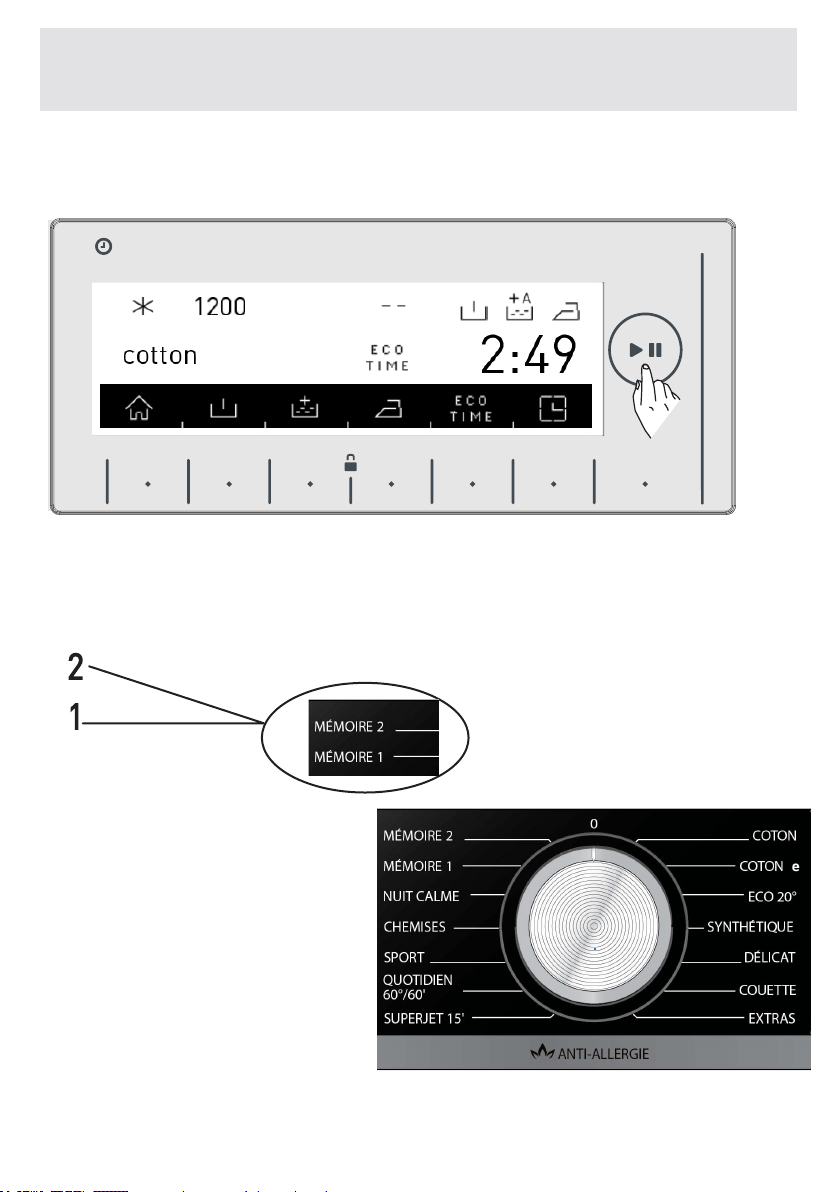
•To wash, you can have your laundry washed by pressing start/
stand-by button or select other programs.
• If you want to use these programs you have recorded, you can
turn the program knob as shown in the Picture below and make
your selection by moving on the memory steps.
HAFIZA
8 kg.6 kg.
TIME
EC
8 kg. 6 kg.
9 kg. 6 kg.

EN-70-
CHAPTER-6: LAUNDRY PREPARATION: MEMORY RECORD
FUNCTION BUTTON (MEMORY)
• When you want to change the settings you recorded in memory
programs; navigate over the 1 (Memory 1) or 2 (Memory 2) prog-
ram or while over any program, set the program combination you
will select and press the (MEMORY) button.
• You will be asked to record by touching 1(Memory 1), 2
(Memory 2) memory option buttons.
HAFIZA
8 kg.6 kg.
TIME
EC
8 kg. 6 kg.
HAFIZA
8 kg.6 kg.
TIME
EC
8 kg. 6 kg.
1
2
9 kg. 6 kg.
9 kg. 6 kg.
EN-71-
CHAPTER-6: LAUNDRY PREPARATION: MEMORY RECORD
FUNCTION BUTTON (MEMORY)
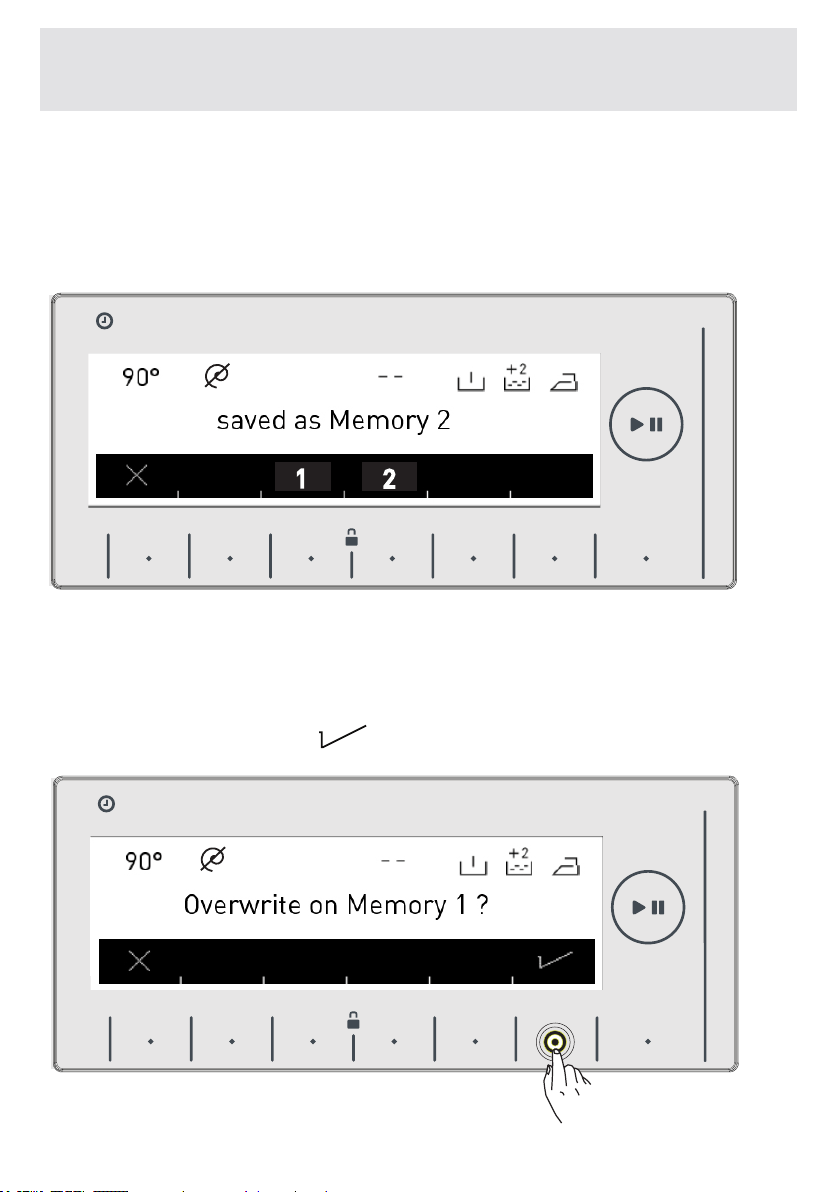
• If you are recording 1(Memory 1), 2(Memory 2) on a program
you haven’t taken into memory before, a screen like the one be-
low will be displayed.
• Complete the selection by using the memory button you want.
• If you are going to memory on the program you have memory
before; you will be asked whether you want to change your previ-
ous record or not.
• If you accept, touch the
symbol button.
HAFIZA
8 kg.6 kg.
TIME
EC
8 kg. 6 kg.
1
2
HAFIZA
8 kg.6 kg.
TIME
EC
8 kg. 6 kg.
9 kg. 6 kg.
9 kg. 6 kg.
EN-72-
CHAPTER-6: LAUNDRY PREPARATION: MEMORY RECORD
FUNCTION BUTTON (MEMORY)
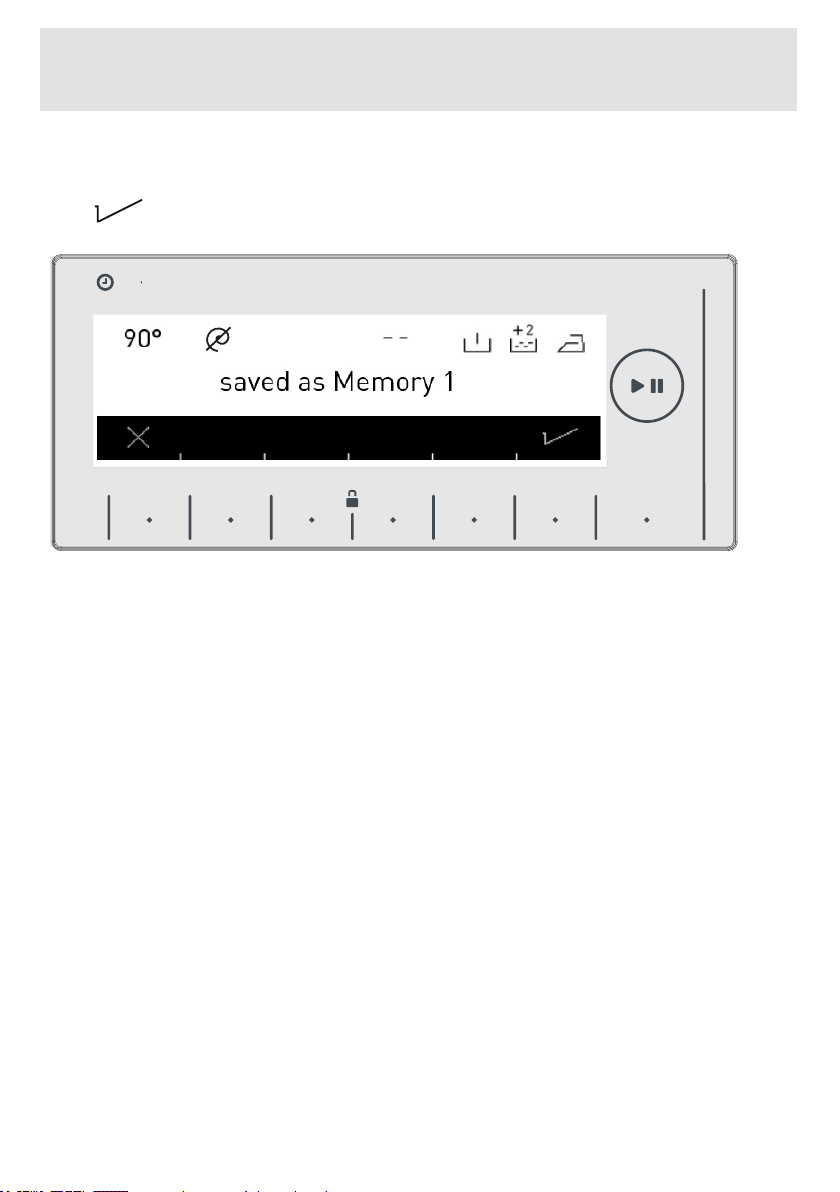
• Another image will be displayed on the screen for you to app-
rove your selection. You can approve your selection by pressing
the
button.
HAFIZA
8 kg.6 kg.
TIME
EC
8 kg. 6 kg.
9 kg. 6 kg.

EN-73-
• You can start the program you have selected by touching the
Start/Stand-by button .
• When you turn your machine on, the program you have se-
lected will be activated. Throughout the washing operations the
washing step screens as the examples below will be displayed.
• Washing prog-
ram ready
washing
• Washing prog-
ram active.
CHAPTER-6: LAUNDRY PREPARATION:
START/STAND-BY BUTTON
starting
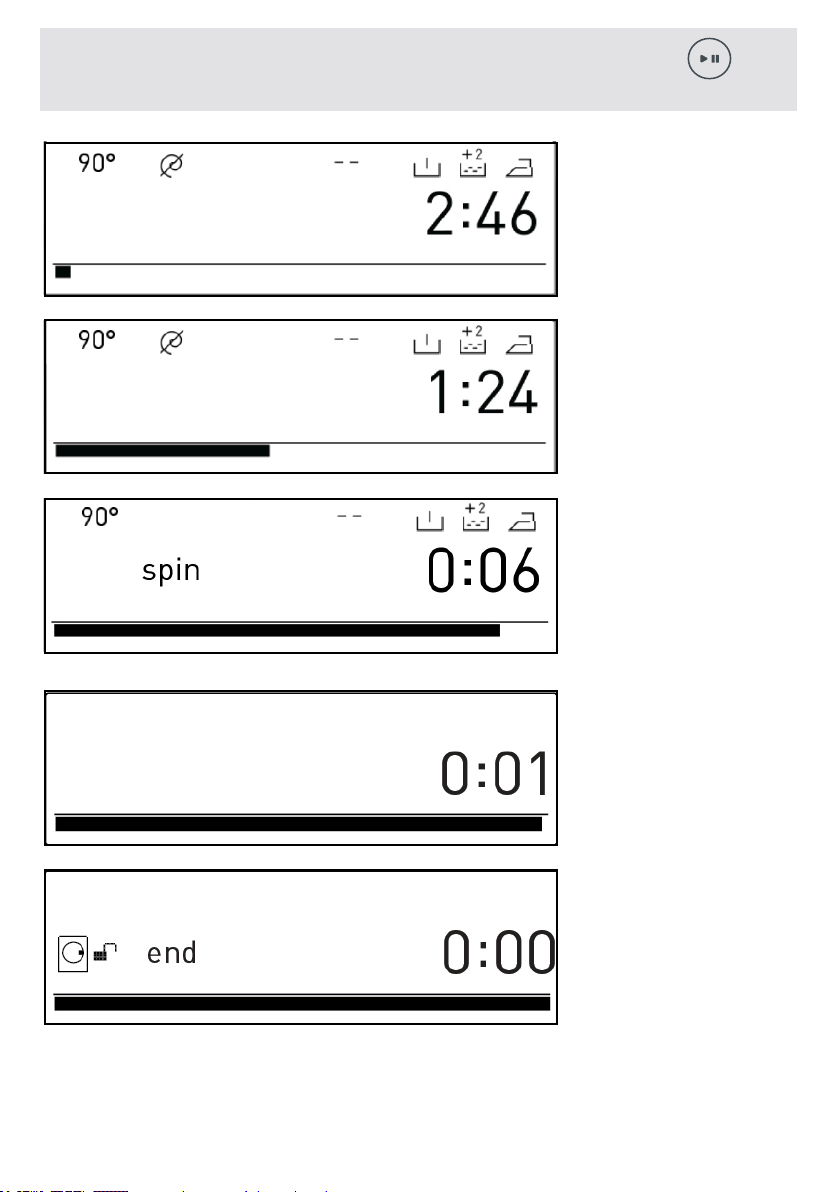
EN-74-
CHAPTER-6: LAUNDRY PREPARATION:
START/STAND-BY BUTTON
• Washing
step.
• Rinsing
step.
• Spinning
step.
durulama
• Program
finished.
• Program
finished door
unlocked.
Washing
Rinsing
Finished
EN-75-
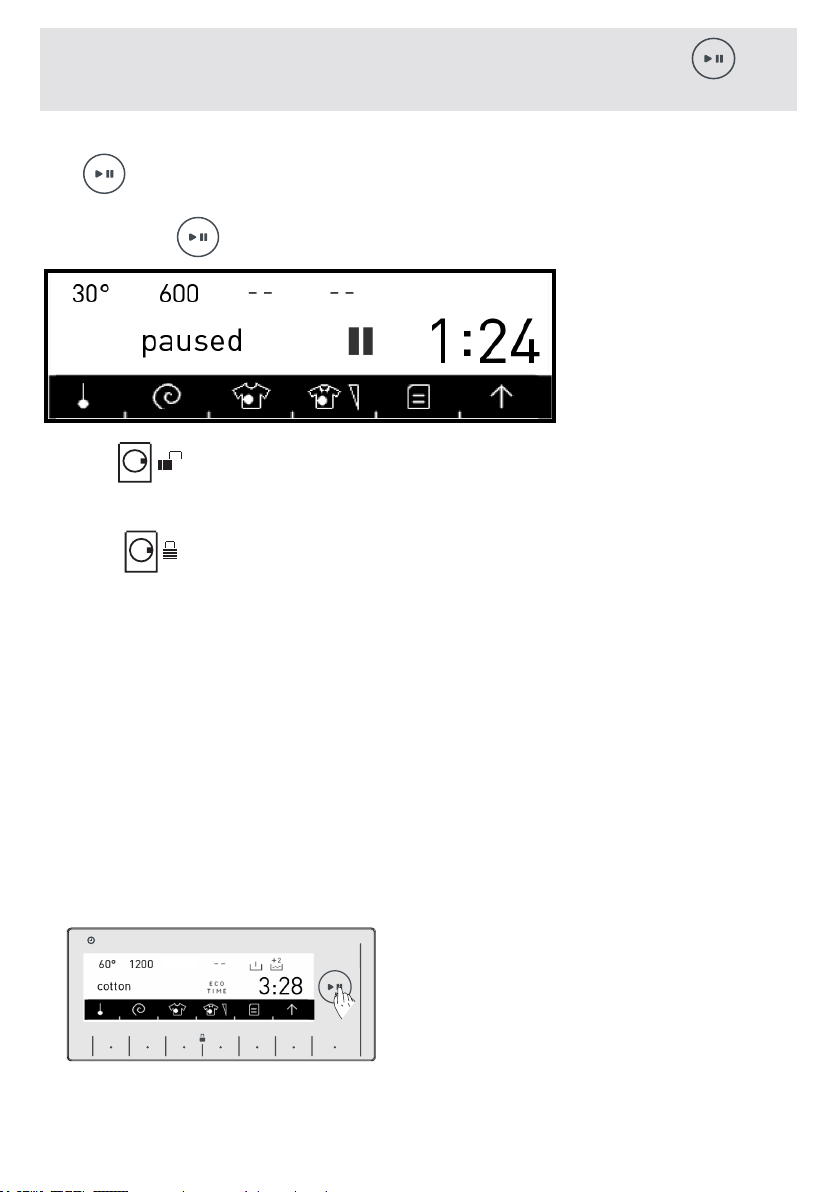
• You can pause or restart the program you have selected with
the button. You can use this function when you want to add
laundry to your machine.
* Touch the symbol button fort his.
• If the symbol is displayed on the screen,
you can open the door of your machine to add more laundry.
• If the symbol is displayed on the screen you machine has
passed the laundry adding step.
If you want to cancel any program running:
- Switch the program button to the STOP position.
- Your machine will stop the washing operation and the program
will be cancelled.
- To discharge the water accumulated in the machine switch the
program knob to any program.
- Your machine will perform the necessary discharge operation
and cancel the program.
- You can run your machine by selecting a new program.
• You can see page (81) program table for program features.
• Washing stopped.
CHAPTER-6: LAUNDRY PREPARATION: Stopping program
/ Adding laundry / Cancelling program
HAFIZA
8 kg.6 kg.
TIME
EC
8 kg. 6 kg.
EN-76-
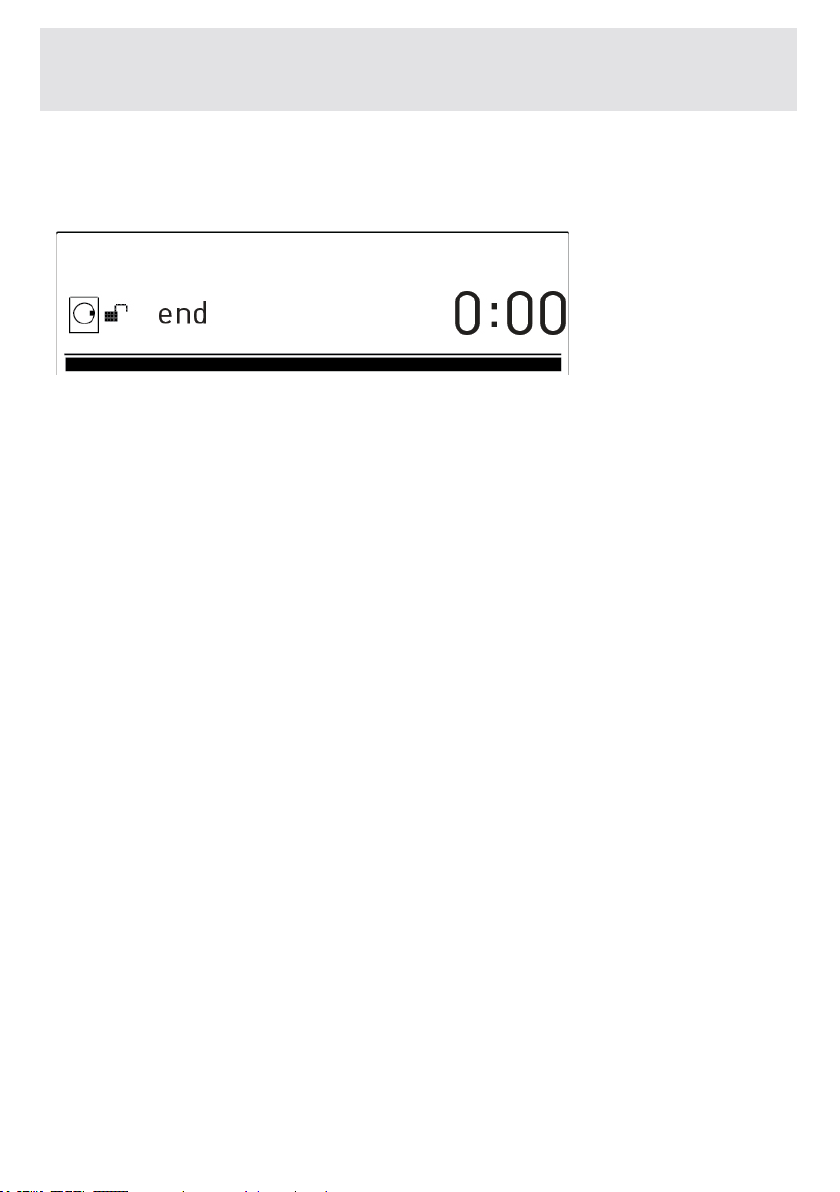
Your machine will stop by itself as soon as the program you have selec-
ted finishes.
You can open the machine’s door and remove the laundry.
- Leave the door of your machine open to allow the inner part of your
machine to dry after removing your laundry.
- Switch the program knob to the STOP position.
- Unplug your machine.
- Turn the water faucet off.
-“END“ is
displayed on
the screen.
CHAPTER-6: LAUNDRY PREPARATION: PROGRAM END
EN-77-
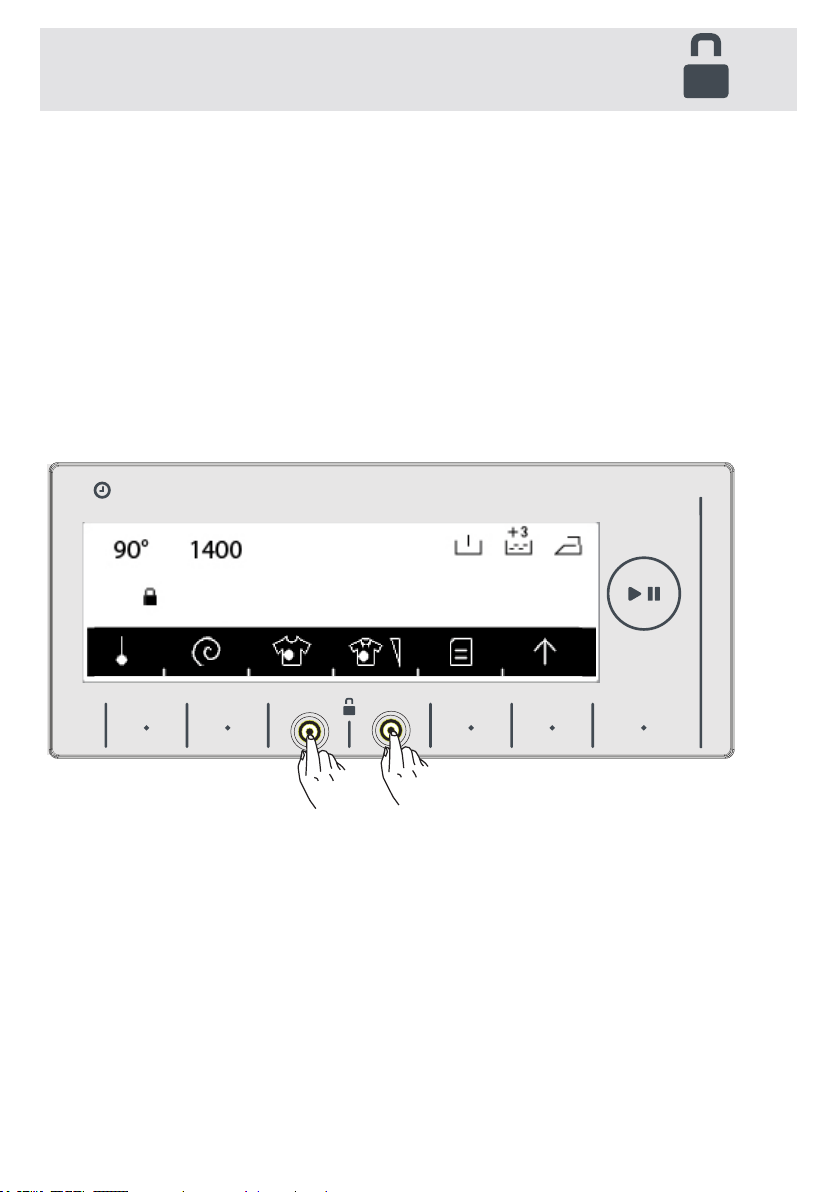
To avoid program flow from being affected if function buttons
are pressed or the program knob is turned when performing a
washing operation in your machine, a child lock is available.
The child lock engages after both of the buttons next to the
symbol are pressed for more than 3 seconds.
The following warning text will be displayed after the key lock
activated.
CHAPTER-6: LAUNDRY PREPARATION: KEY LOCK
HAFIZA
8 kg.6 kg.
TIME
EC
8 kg. 6 kg.
9 kg. 6 kg.
Keylockactivated
EN-78-
The following text will be displayed if any buttons are pressed
while the child lock is engaged.
If the child lock is engaged while any program is running and the
program knob is switched to the STOP position and another prog-
ram is selected, the program previously selected continues from
where it was left.
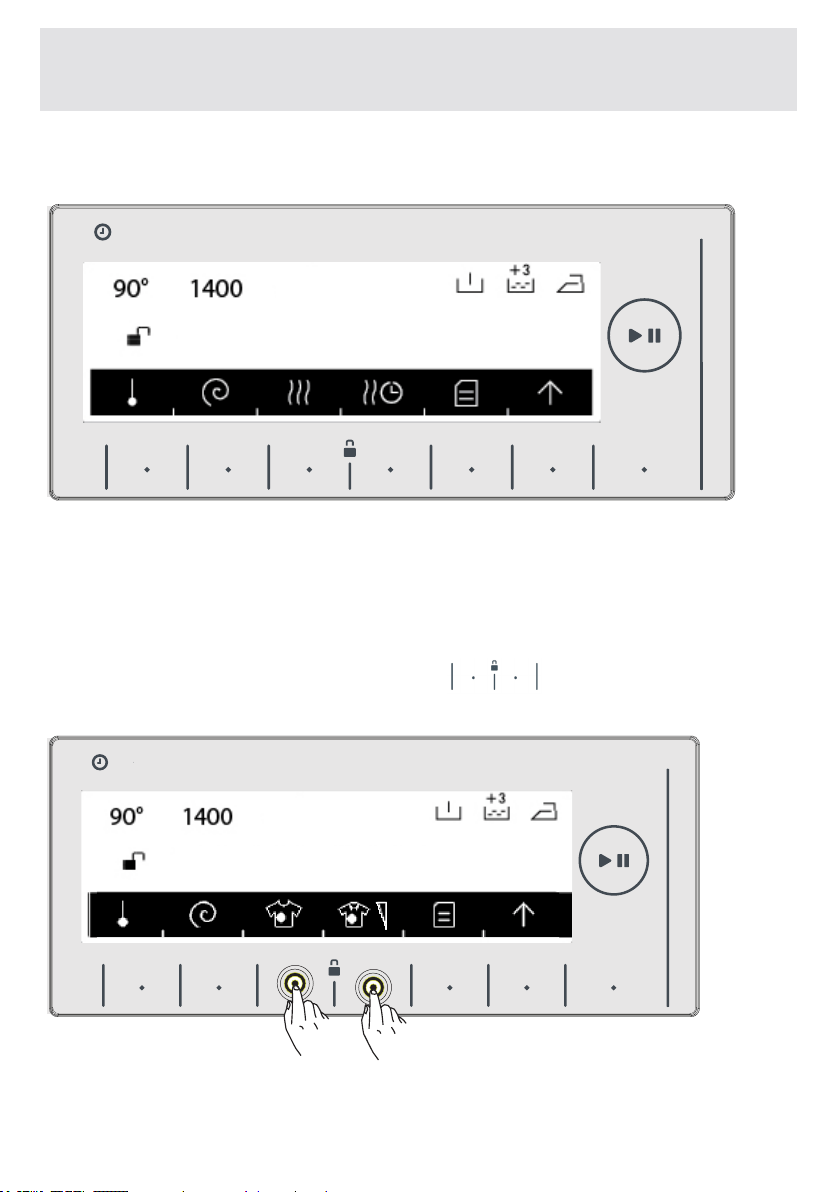
To disengage the child lock, it will be necessary to press on the
buttons for more than 3 seconds. The following warning text will
be displayed after the child lock disengages.
Note: Child lock cannot lock the pump cover and detergent dra-
wer of your machine.
CHAPTER-6: LAUNDRY PREPARATION KEY LOCK
HAFIZA
8 kg.6 kg.
TIME
EC
8 kg. 6 kg.
HAFIZA
8 kg.6 kg.
TIME
EC
8 kg. 6 kg.
9 kg. 6 kg.
9 kg. 6 kg.
Tounlockpressfor3s
Keylockdeactivated

EN-79-
CHAPTER-6: LAUNDRY PREPARATION: HALF LOAD
SENSING
Yourmachinefeaturesahalf-loaddetectionsystem.
Ifputapproximatelyhalforlessamountoflaundriesof
maximumlaundrycapacityinyourmachine,yourmachine
willrunsoastosavewashingtime,waterconsumptionand
energyinsomeprograms.Whenthehalf-loadfunctionisac-
tive,themachinecancompletetheprogramyouhavesetin
ashortertime.
EN-80-
CHAPTER-7: PROGRAM TABLE
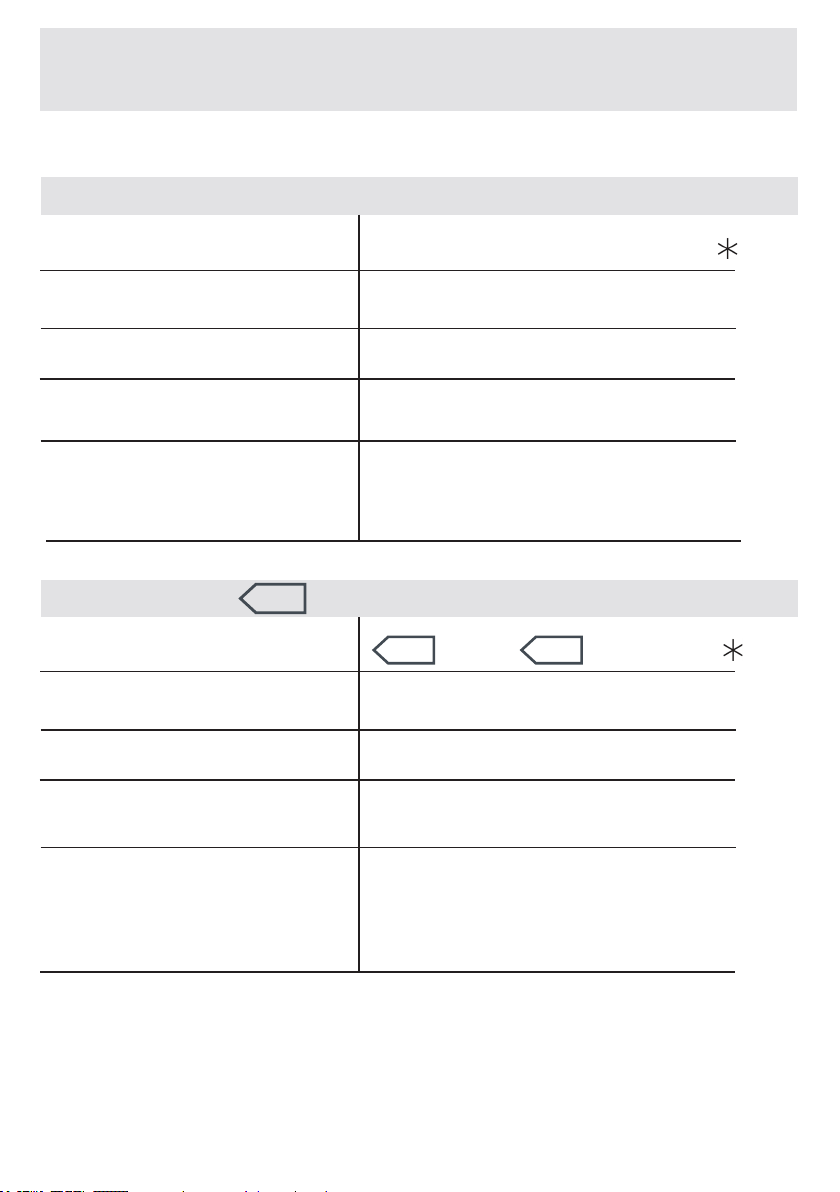
COTTON
Washingtemperature(°C)
WashingTemperature(°C)
Maximumdrylaundry
amount
Maximumdrylaundry
amount(kg)
8,0
8,0
2
Laundrytype/
Explanations
Laundrytype/
Explanations
Programduration(Min.)
Programduration(Min.)
DetergentCompartment
Detergentcompartment
Verydirty,cottonandaxtextiles.
(Underwear, bedsheet, tablecloth,
(towelmaximum4,0kg),quilt
cover.)
190
380
*90°-80°-70°-60°-50°-40°-30°-” ”
* 60°e - 60°-40°e -40°-30°-” ”
COTTONe
NOTE: PROGRAM DURATION MIGHT CHANGE ACCORDING TO THE AMOUNT OF
LAUNDRY, TAP WATER, AMBIENT TEMPERATURE AND SELECTED ADDITIONAL
FUNCTIONS.
* 60°e - 40°e Energy label declaration programs.
(*Black parts are factory preset)
Dirty,cottonandaxtextiles.
(Underwear, bedsheet, tablecloth,
(towelmaximum4,0kg),quiltcov-
er.)
2
EN-81-
CHAPTER-7: PROGRAM TABLE
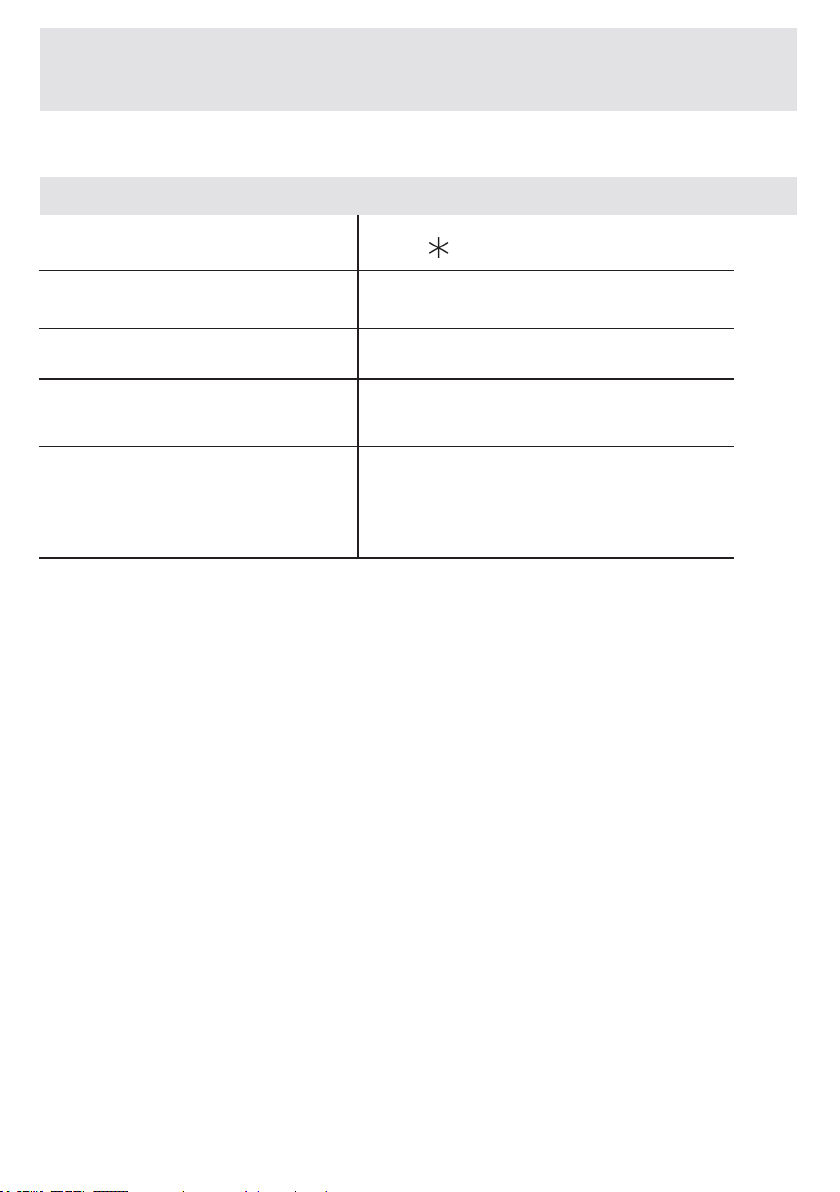
NOTE: PROGRAM DURATION MIGHT CHANGE ACCORDING TO THE AMOUNT OF
LAUNDRY, TAP WATER, AMBIENT TEMPERATURE AND SELECTED ADDITIONAL
FUNCTIONS.
ECO20°
Washingtemperature(°C)
Maximumdrylaundry
amount(kg)
4,0
2
Laundrytype/
Explanations
Programduration(Min.)
Detergentcompartment
100
*20°-” ”
Lessdirty,sweaty,cottonandax
textiles.(Underwear,bedsheet,
tablecloth,(towelmaximum2kg.)
bedcloth,etc.)
(*Black partsarefactorypreset)
EN -82-
CHAPTER-7: PROGRAM TABLE
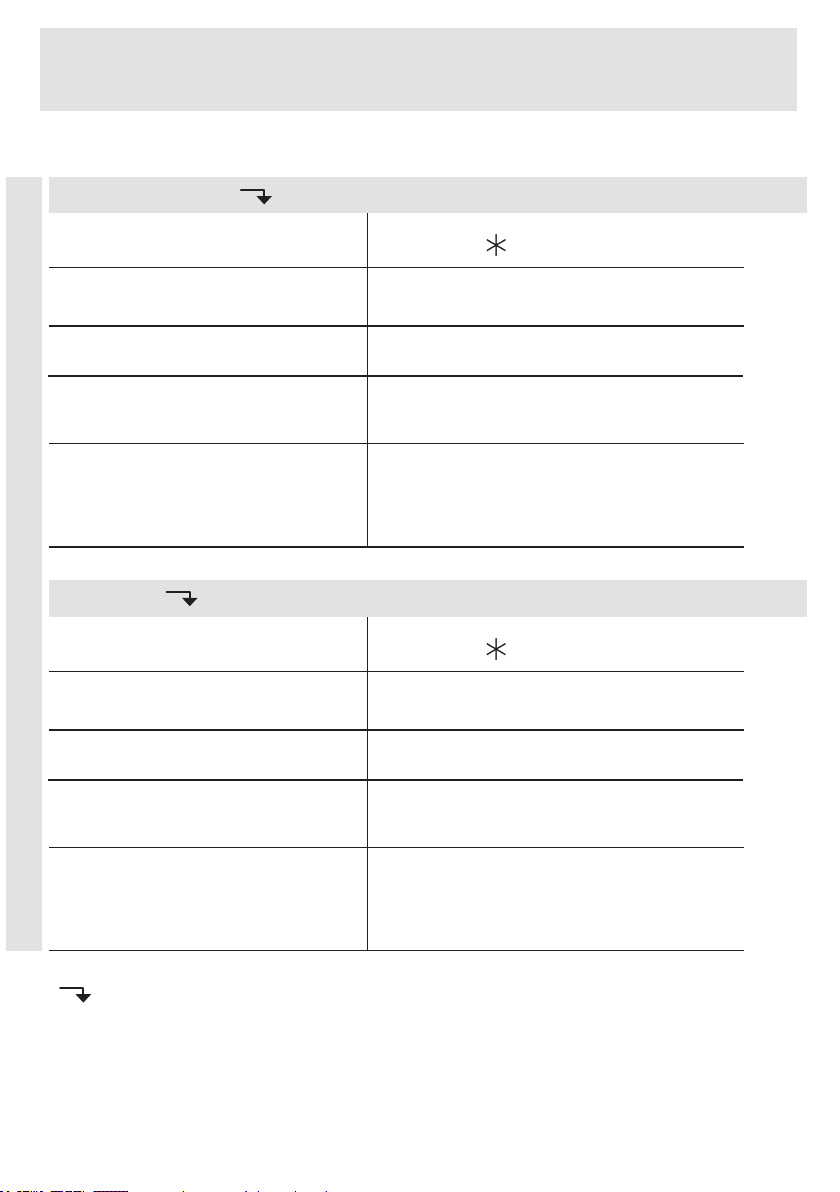
NOTE: PROGRAM DURATION MIGHT CHANGE ACCORDING TO THE AMOUNT OF
LAUNDRY, TAP WATER, AMBIENT TEMPERATURE AND SELECTED ADDITIONAL
FUNCTIONS.
Washingtemperature(°C)
Washingtemperature(°C)
Maximumdrylaundry
amount(kg)
Maximumdrylaundry
amount(kg)
2,5
3,5
1&2
2
Laundrytype/
Descriptions
Laundrytype/
Descriptions
Programduration(Min.)
Programduration(Min.)
Detergentcompartment
Detergentcompartment
131
90
*40°-30°-” ”
*40°-30°-” ”
CURTAIN
SYNTHETICS
SYNTHETICS
Pleasewashonlycurtainsinthis
program.
Verydirtyorsynthetic-mixedtextiles.
(Nylonstockings,shirts,blouses,
trouserswithsyntheticcontentetc.)
(*Black partsarefactorypreset)
( )
Syntheticandcurtainprogramsareprogramswithsub-options,youcanseethe
sub-programschaptertomakeaselection.
EN-83-
CHAPTER-7: PROGRAM TABLE
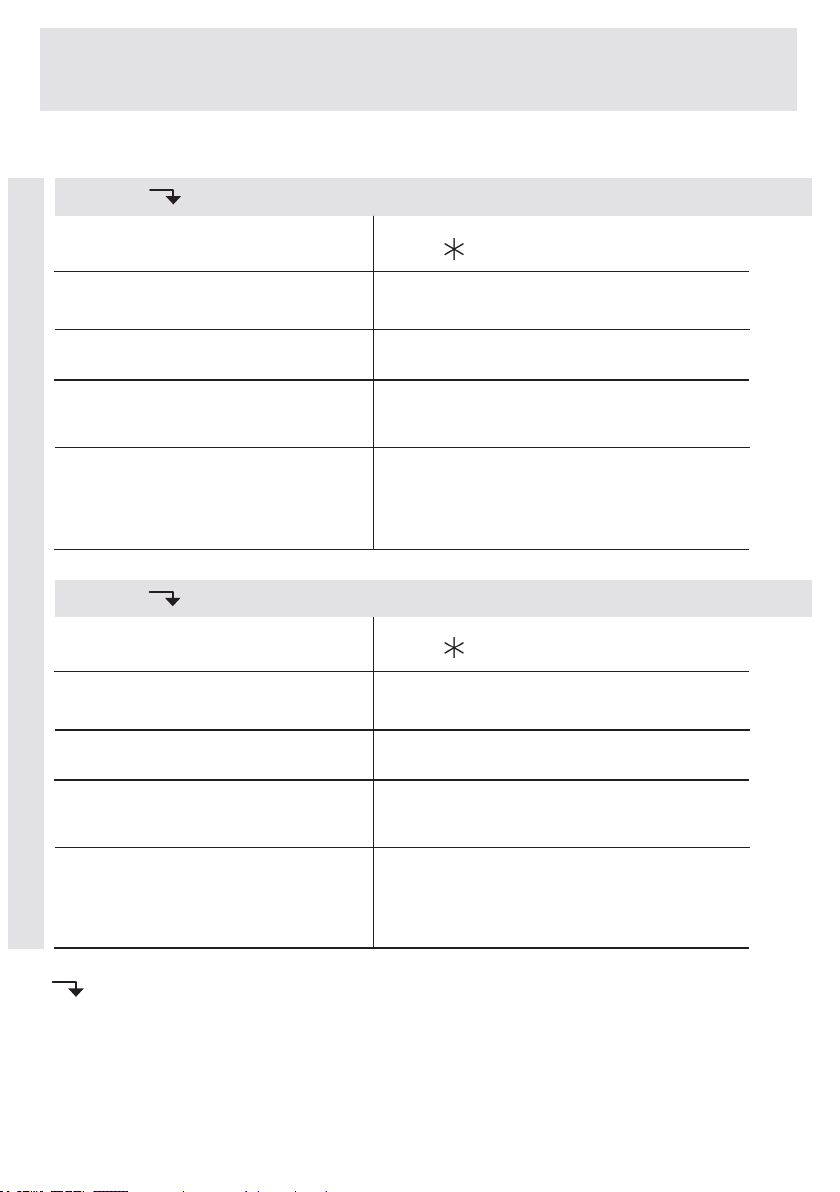
NOTE: PROGRAM DURATION MIGHT CHANGE ACCORDING TO THE AMOUNT OF
LAUNDRY, TAP WATER, AMBIENT TEMPERATURE AND SELECTED ADDITIONAL
FUNCTIONS.
WOOL
Washingtemperature(°C)
Washingtemperature(°C)
Maximumdrylaundry
amount(kg)
Maximumdrylaundry
amount(kg)
2,5
2,5
2
2
Laundrytype/
Descriptions
Laundrytype/
Descriptions
Programduration(Min.)
Programduration(Min.)
Detergentcompartment
Detergentcompartment
46
100
*30°-” ”
SILK
Laundryrecommendedforhand
washorsensitivelaundry.
*30°-” ”
(*Blackpartsarefactorypreset)
( )
WoolandSilkprogramsareprogramswithsub-options,youcanseethesub-
programschaptertomakeaselection.
WOOL
Woolenlaundrywithmachinewash
labels.
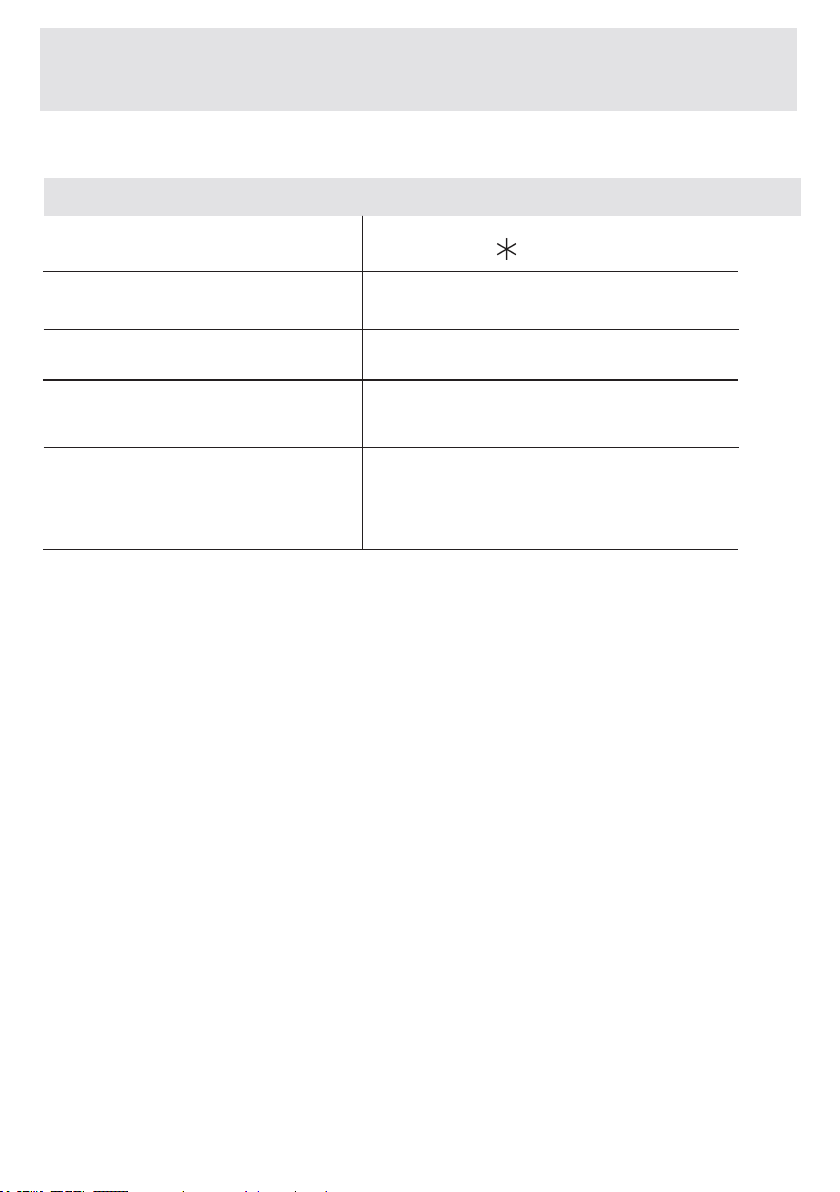
EN-84-
NOTE: PROGRAM DURATION MIGHT CHANGE ACCORDING TO THE AMOUNT OF
LAUNDRY, TAP WATER, AMBIENT TEMPERATURE AND SELECTED ADDITIONAL
FUNCTIONS.
(*Black
partsarefactorypreset)
CHAPTER-7: PROGRAM TABLE
DUVET
Washingtemperature(°C)
Maximumdrylaundry
amount(kg)
Laundrytype/
Descriptions
Programduration(Min.)
Detergentcompartment
2,5
2
100
*40°- 30°” ”
Youcanwashbrequiltsthathave
machinewashablelabelwiththis
program.(max.2.5kg)
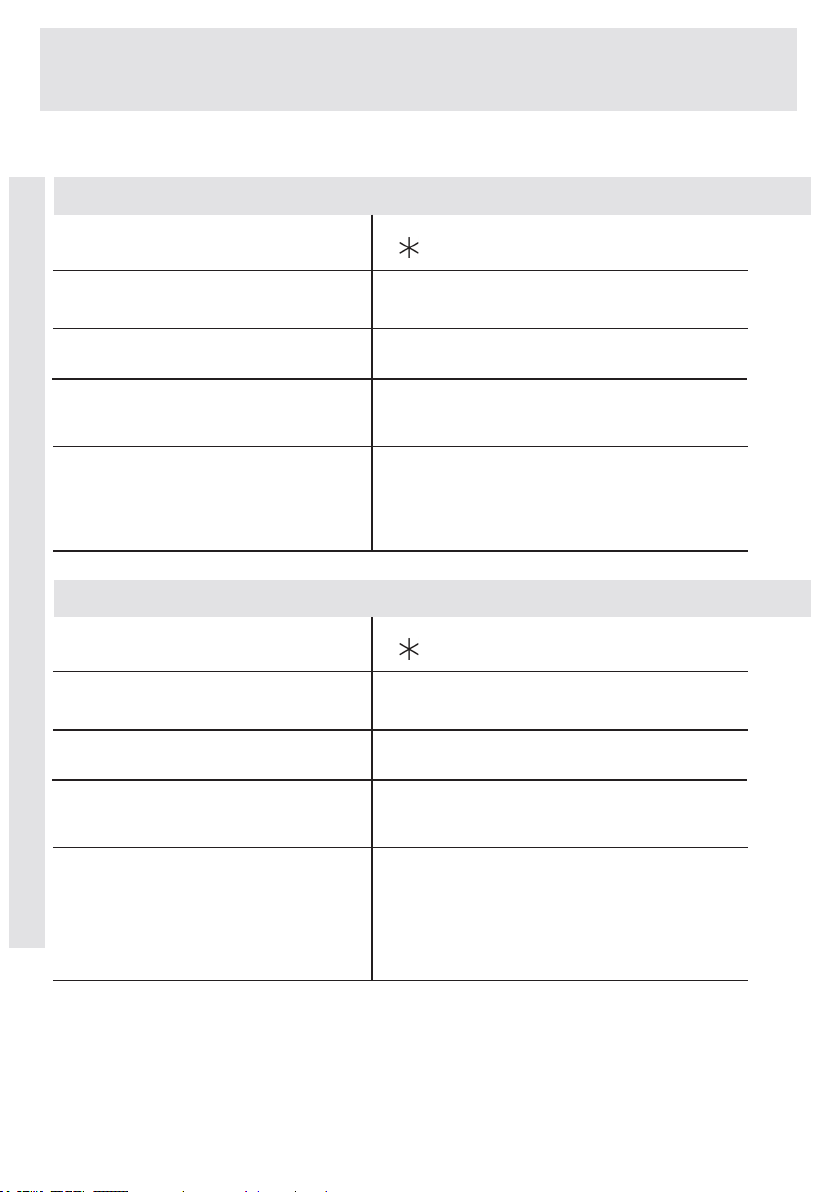
EN-85-
CHAPTER-7: PROGRAM TABLE
NOTE: PROGRAM DURATION MIGHT CHANGE ACCORDING TO THE AMOUNT OF
LAUNDRY, TAP WATER, AMBIENT TEMPERATURE AND SELECTED ADDITIONAL
FUNCTIONS.
RINSE
Washingtemperature(°C)
Washingtemperature(°C)
Maximumdrylaundry
amount(kg)
Maximumdrylaundry
amount(kg)
8,0
8,0
2
-
Laundrytype/
Descriptions
Laundrytype/
Descriptions
Programduration(Min.)
Programduration(Min.)
Detergentcompartment
Detergentcompartment
39
17
*“ ”
*“ ”
SPIN
If you want to additionally rinse your
laundryuponcompletionofwashing
operation,youmayusethispro-
gramforanykindoflaundries.
Whenyouwanttomakean
additional spin to your laundry after
the washing step, you can use this
programmeforallkindsoflaundry.
(*Black partsarefactorypreset)
EXTRAS
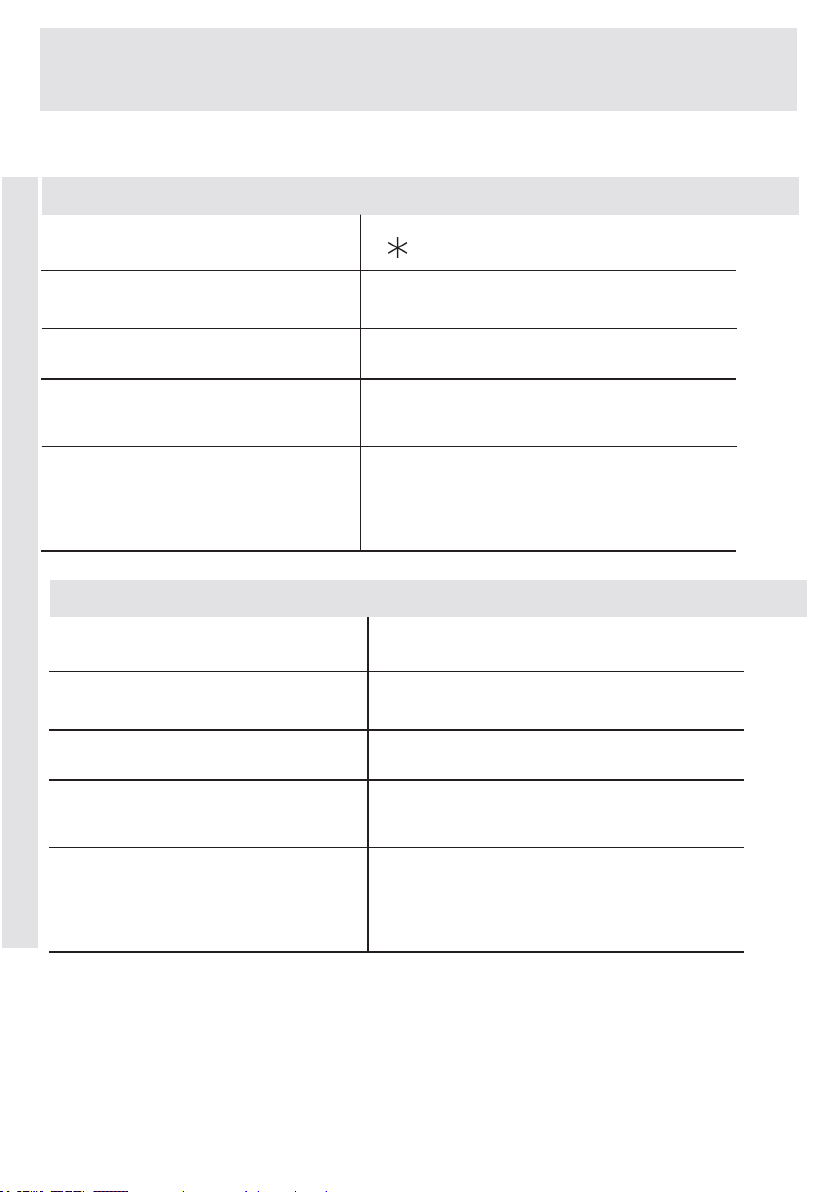
EN -86-
NOTE: PROGRAM DURATION MIGHT CHANGE ACCORDING TO THE AMOUNT OF
LAUNDRY, TAP WATER, AMBIENT TEMPERATURE AND SELECTED ADDITIONAL
FUNCTIONS.
(*Black
partsarefactorypreset)
CHAPTER-7: PROGRAM TABLE
DRAIN
8,0
-
-
-
3
90
*” ”
*”80°”
DRUMCLEAN
Itdischargesthewaterinthema-
chine.
Adrumcleaningprogramme.Itmust
beusedwithoutlaundry.
EXTRAS
Washingtemperature(°C)
Washingtemperature(°C)
Maximumdrylaundry
amount(kg)
Maximumdrylaundry
amount(kg)
Laundrytype/
Descriptions
Laundrytype/
Descriptions
Programduration(Min.)
Programduration(Min.)
Detergentcompartment
Detergentcompartment
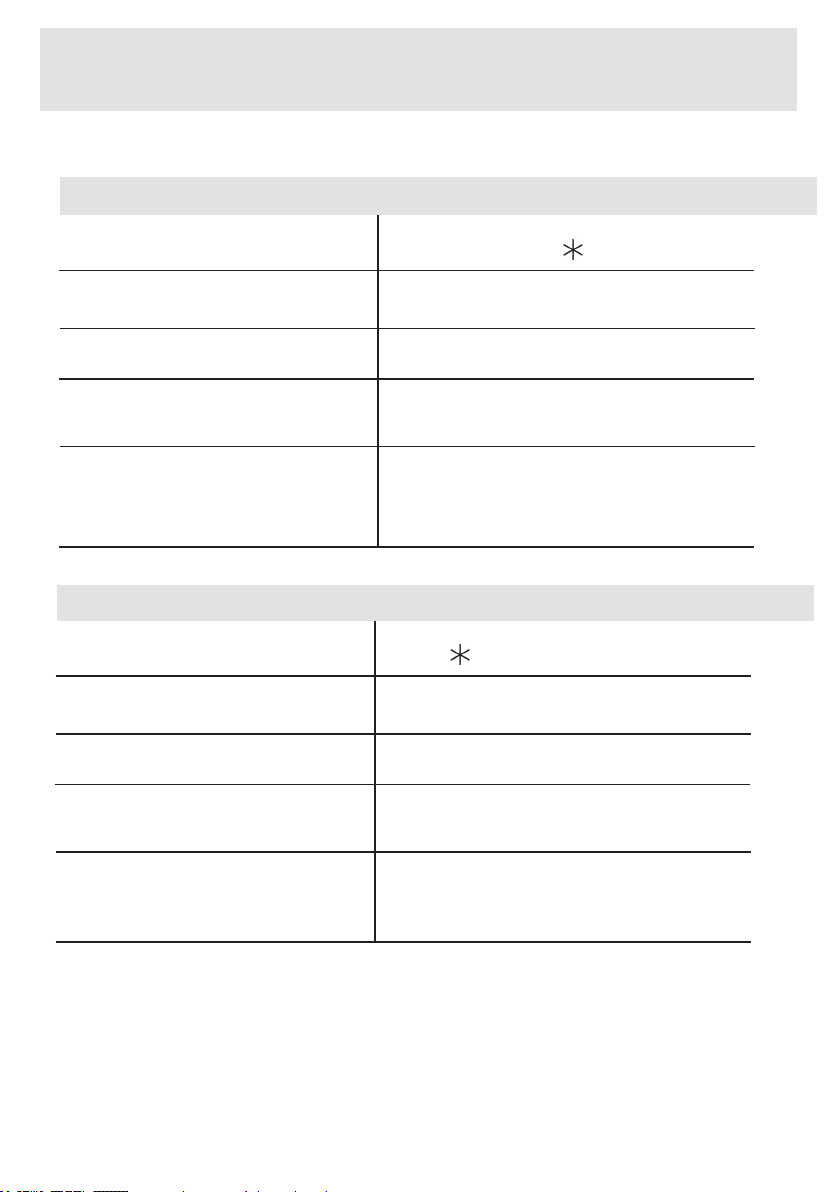
EN-87-
NOTE: PROGRAM DURATION MIGHT CHANGE ACCORDING TO THE AMOUNT OF
LAUNDRY, TAP WATER, AMBIENT TEMPERATURE AND SELECTED ADDITIONAL
FUNCTIONS.
CHAPTER-7: PROGRAM TABLE
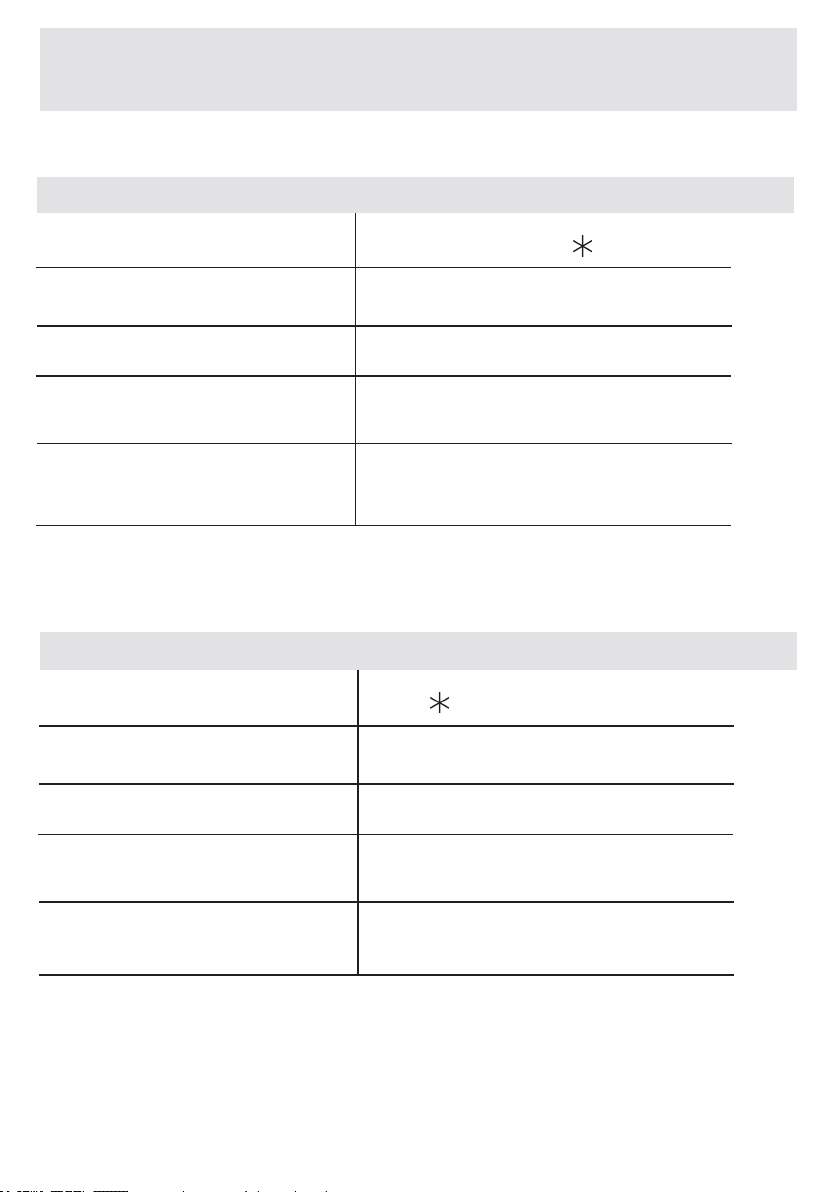
ALLERGYSAFE
RAPID15MIN.
2,0
4,0
2
2
You can wash your lightly stained,
cotton,colouredandaxtextile
withinonly15minutes.
Babyclothes
15
210
*30°-” ”
*60-50-40-30°-” ”
(*Black partsarefactorypreset)
Asthewashingperiodisshortinthisprogram,lessamountofdetergentisrequiredtobeusedcomparedto
otherprograms.Theprogramperiodwillincreaseifyourmachinedetectsinstableloading.
Youcanopenthedoorofyourwashingmachinejustafterthewashingoperationiscomplete.
Washingtemperature(°C)
Washingtemperature(°C)
Maximumdrylaundry
amount(kg)
Maximumdrylaundry
amount(kg)
Laundrytype/
Descriptions
Laundrytype/
Descriptions
Programduration(Min.)
Programduration(Min.)
Detergentcompartment
Detergentcompartment
EN -88-
NOTE: PROGRAM DURATION MIGHT CHANGE ACCORDING TO THE AMOUNT OF
LAUNDRY, TAP WATER, AMBIENT TEMPERATURE AND SELECTED ADDITIONAL
FUNCTIONS.
(*Black
partsarefactorypreset)
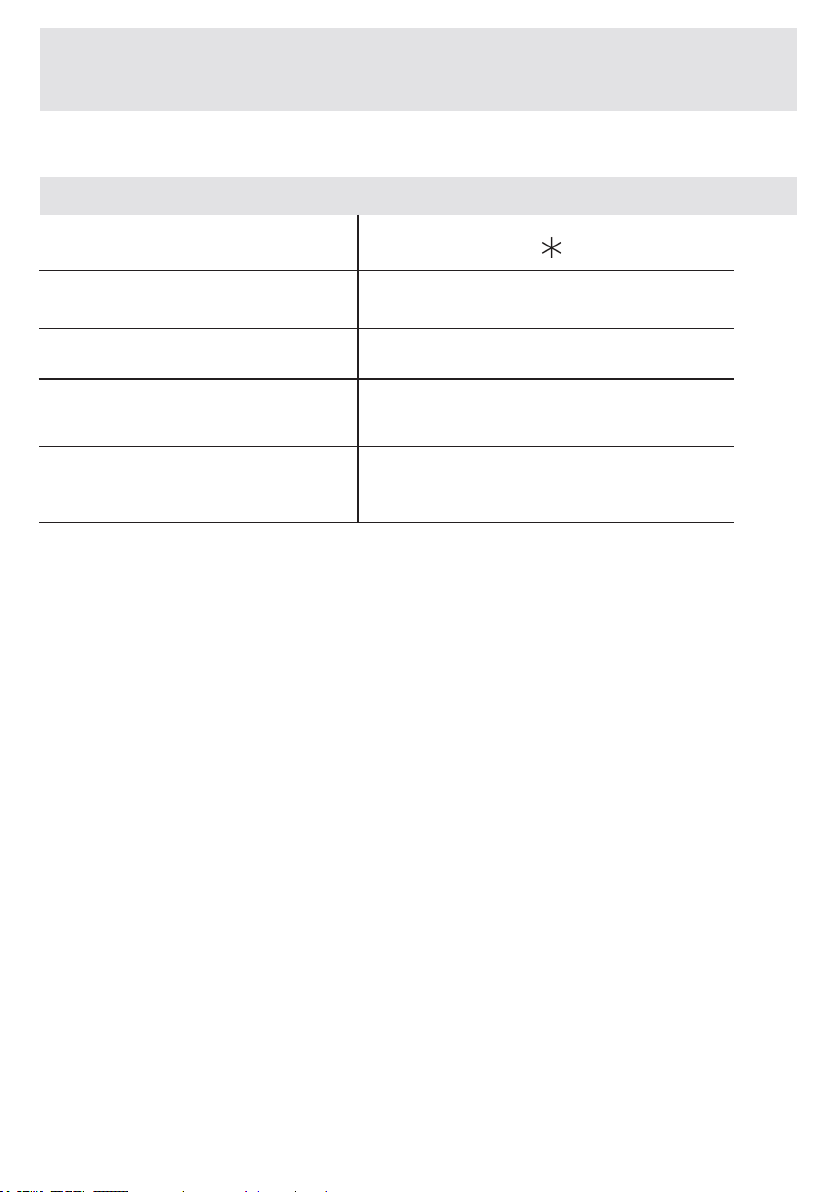
4,0
2
60
You can wash your dirty cotton,
colourandaxtextilesat60°Cin60
minutes.
*60°-50°-40°-30°-” ”
*30°-” ”
CHAPTER-7: PROGRAM TABLE
DAILY60°60’
SPORTSWEAR
3,5
Sportswear.
81
2
Washingtemperature(°C)
Washingtemperature(°C)
Maximumdrylaundry
amount(kg)
Maximumdrylaundry
amount(kg)
Laundrytype/
Descriptions
Laundrytype/
Descriptions
Programduration(Min.)
Programduration(Min.)
Detergentcompartment
Detergentcompartment
EN-89-
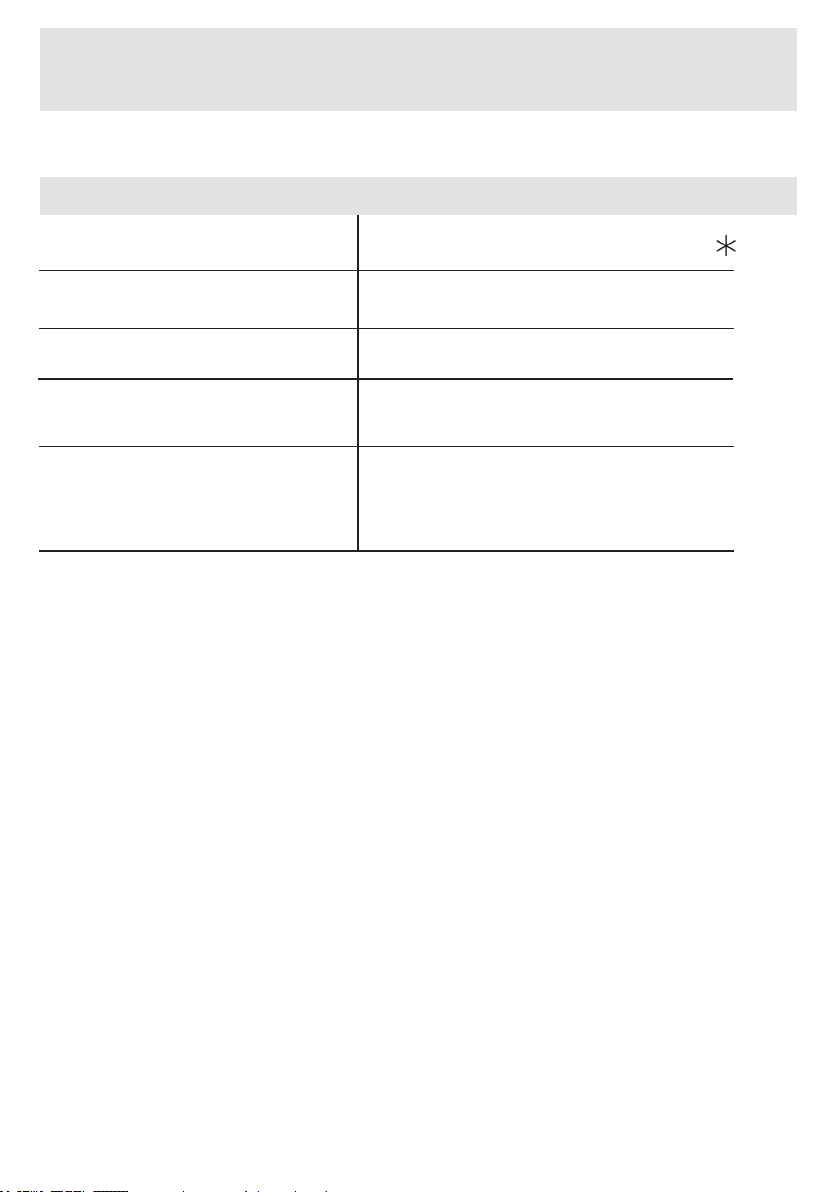
BLOUSES/SHIRTS
4,0
2
Dirt,cotton,syntheticsandsynthetic
mixshirtsandblousescanbe
washedtogether.
114
*60-50-40-30°-” ”
CHAPTER-7: PROGRAM TABLE
NOTE: PROGRAM DURATION MIGHT CHANGE ACCORDING TO THE AMOUNT OF
LAUNDRY, TAP WATER, AMBIENT TEMPERATURE AND SELECTED ADDITIONAL
FUNCTIONS.
(*Black
partsarefactorypreset)
Washingtemperature(°C)
Maximumdrylaundry
amount(kg)
Laundrytype/
Descriptions
Programduration(Min.)
Detergentcompartment
EN-90-
CHAPTER-7: PROGRAM TABLE
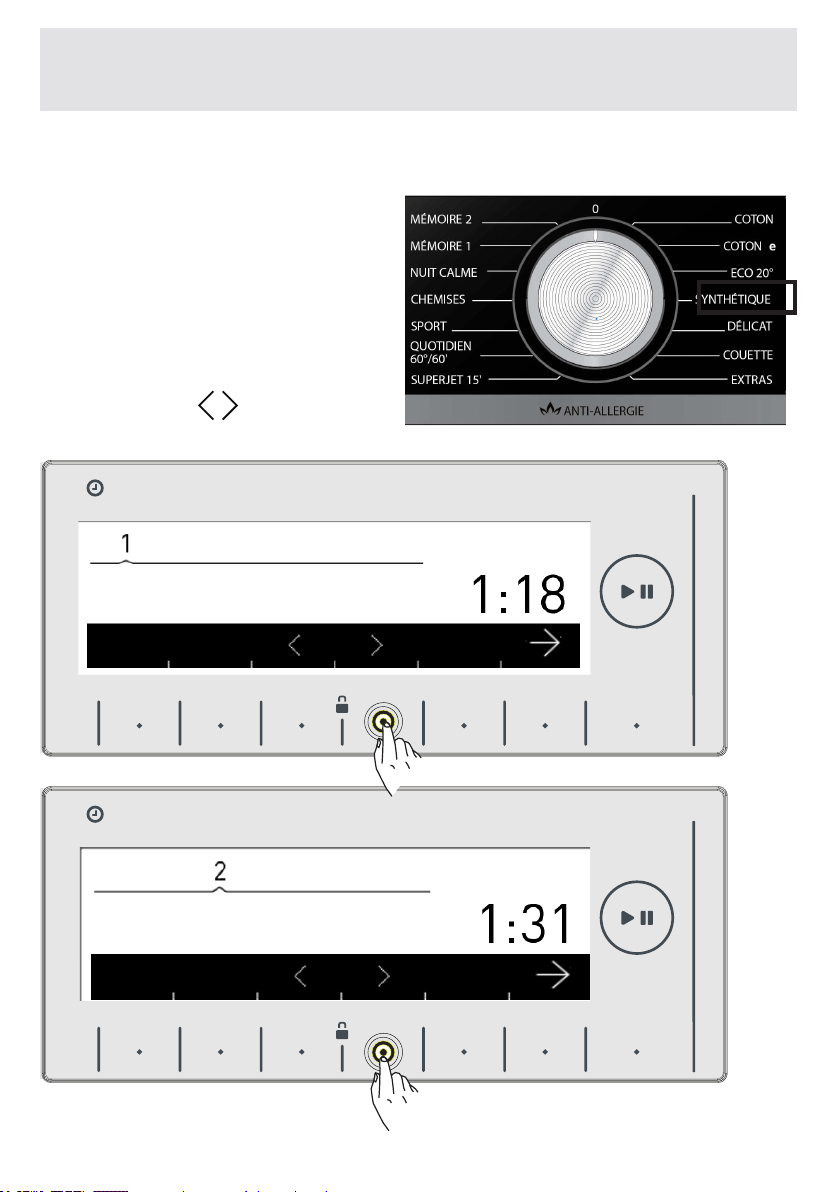
NOTE: Nightwashingprogramisaprogramthatwillwashyour
laundrysilentlywithoutanyspinningstageduringthewashing.When
yourmachinenearstheendofthewashingoperation,itgoesinto
sleepmodeandcankeepyourlaundryforamaximumof10hours
withoutdischargingthewaterinside.Iftheprogramwaitingduration
exceeds10hours,yourmachinewillautomaticallyperformwater
dischargeandwringingoperations.Startingfromthetimeyour
machinegoesintothiswaitingoperation,youcancancelthisoperation
andresumethewashingprogramfromwhereitisleft.Whatyouhave
todoisonlytotouchtheStart/Standbybuttonagain.(Insleepmode,
theremainingtimeisnotcalculatedonthedisplay,theremainingtime
on the display is the duration valid only for discharge and wringing
operation.
NIGHTWASH
8,0
2
180
*90°-80°-70°-60°-50°-40°-30°-” ”
NOTE: PROGRAM DURATION MIGHT CHANGE ACCORDING TO THE AMOUNT OF
LAUNDRY, TAP WATER, AMBIENT TEMPERATURE AND SELECTED ADDITIONAL
FUNCTIONS.
Verydirty,cottonandaxtextiles.
(Underwear, linen, tablecloth, (towel
maximum4.0kg),bedclothes,etc.)
(*Black partsarefactorypreset)
Washingtemperature(°C)
Maximumdrylaundry
amount(kg)
Laundrytype/
Descriptions
Programduration
(Min.)
Detergentcompartment
EN-91-
When you select the synthetics program from the program knob,
you will see two sub-program
options.
1-Synthetics
2-Curtain
• You can make the sub-
program selections by pressing
the buttons of symbols.
CHAPTER-8: SELECTING SUB-PROGRAMS (SYNTHETICS)
HAFIZA
8 kg.6 kg.
TIME
EC
8 kg. 6 kg.
HAFIZA
8 kg.6 kg.
TIME
EC
8 kg. 6 kg.
ipekli
9 kg. 6 kg.
9 kg. 6 kg.
Synthetics
Curtain
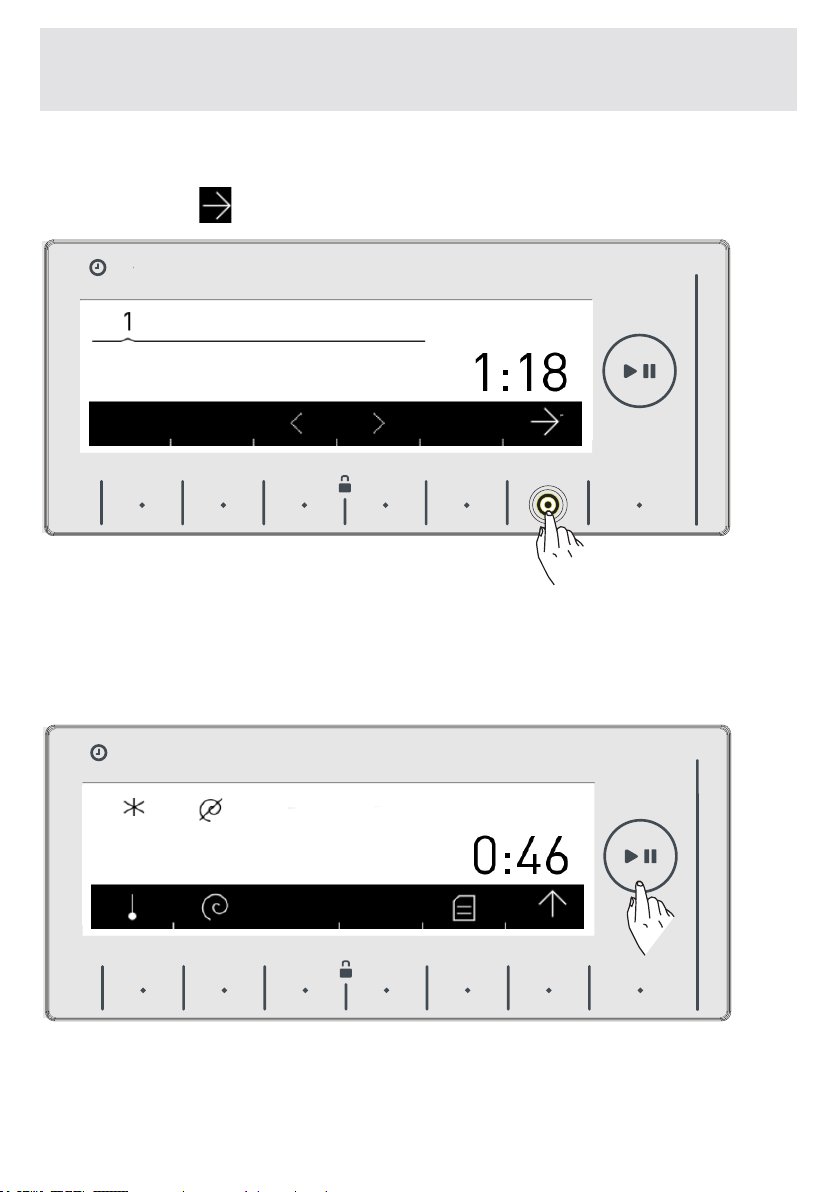
EN-92-
• You can activate the program you want to select by touching the
button of the symbol.
• After the activation is completed the electronic display will return
to the main screen of the program you have selected automa-
tically. You can select the other features you want to select on
this screen and run the machine by pressing the Start/Stand-by
button.
CHAPTER-8: SELECTING SUB-PROGRAMS (SYNTHETICS)
HAFIZA
8 kg.6 kg.
TIME
EC
8 kg. 6 kg.
HAFIZA
8 kg.6 kg.
TIME
EC
8 kg. 6 kg.
9 kg. 6 kg.
9 kg. 6 kg.
Synthetics
Curtain
EN-93-
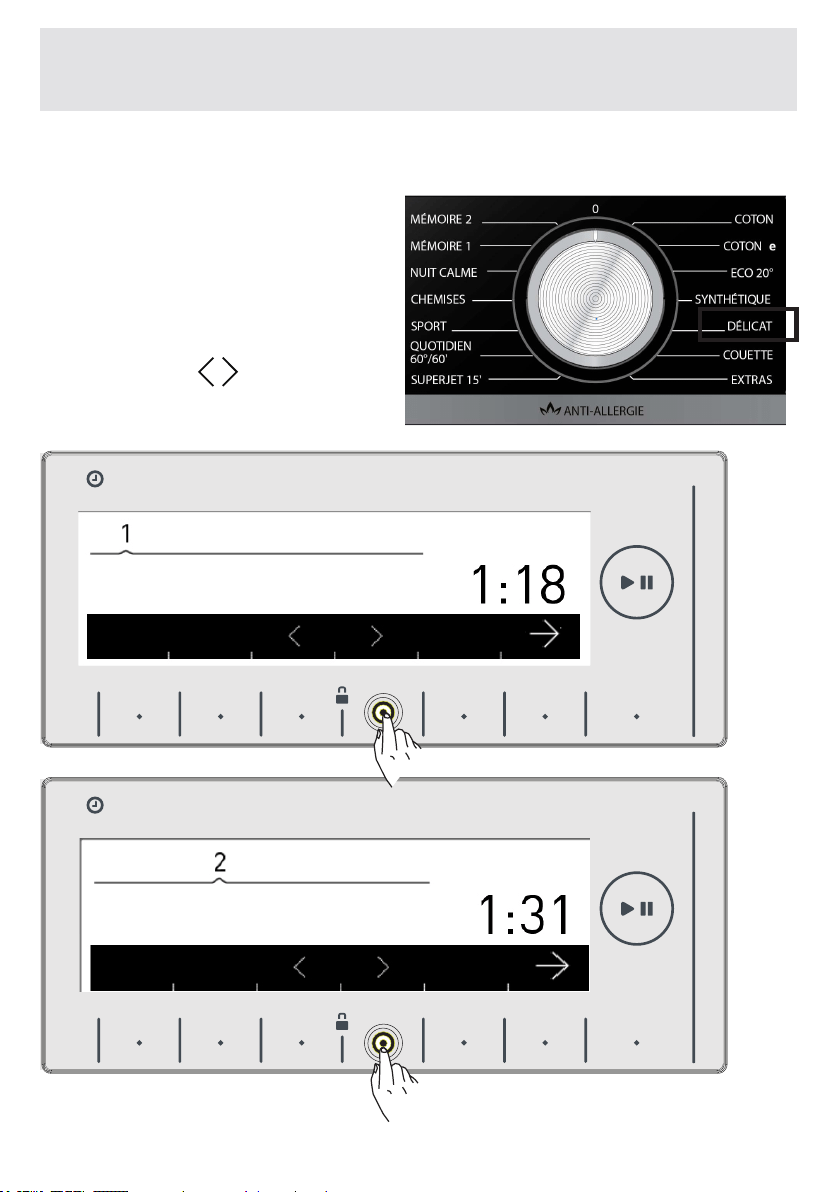
When you select the wool program from the program knob,
you will see two sub-program
options.
1-Wool
2-Silk
• You can make the sub-
program selections by pressing
the buttons of symbols.
CHAPTER-8: SELECTING SUB-PROGRAMS (WOOL)
HAFIZA
8 kg.6 kg.
TIME
EC
8 kg. 6 kg.
HAFIZA
8 kg.6 kg.
TIME
EC
8 kg. 6 kg.
y er
ipekli
9 kg. 6 kg.
9 kg. 6 kg.
Wool
Silk
EN-94-
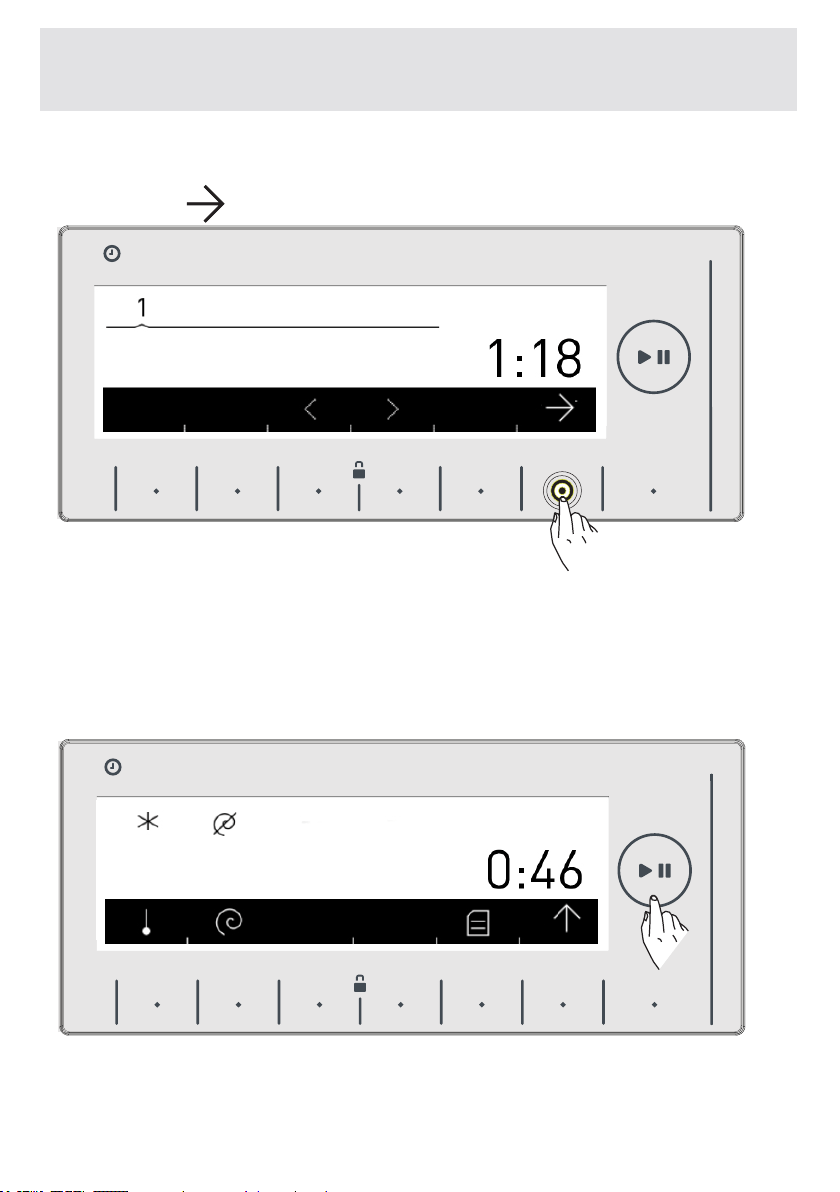
• You can activate the program you want to select by touching the
button of the symbol.
• After the activation is completed the electronic display will
return to the main screen of the program you have selected
automatically. You can select the other features you want to
select on this screen and run the machine by pressing the Start/
Stand-by button.
CHAPTER-8: SELECTING SUB-PROGRAMS (WOOL)
HAFIZA
8 kg.6 kg.
TIME
EC
8 kg. 6 kg.
yünlüler
HAFIZA
8 kg.6 kg.
TIME
EC
8 kg. 6 kg.
yünlüler
9 kg. 6 kg.
9 kg. 6 kg.
Wool
Wool
EN-95-
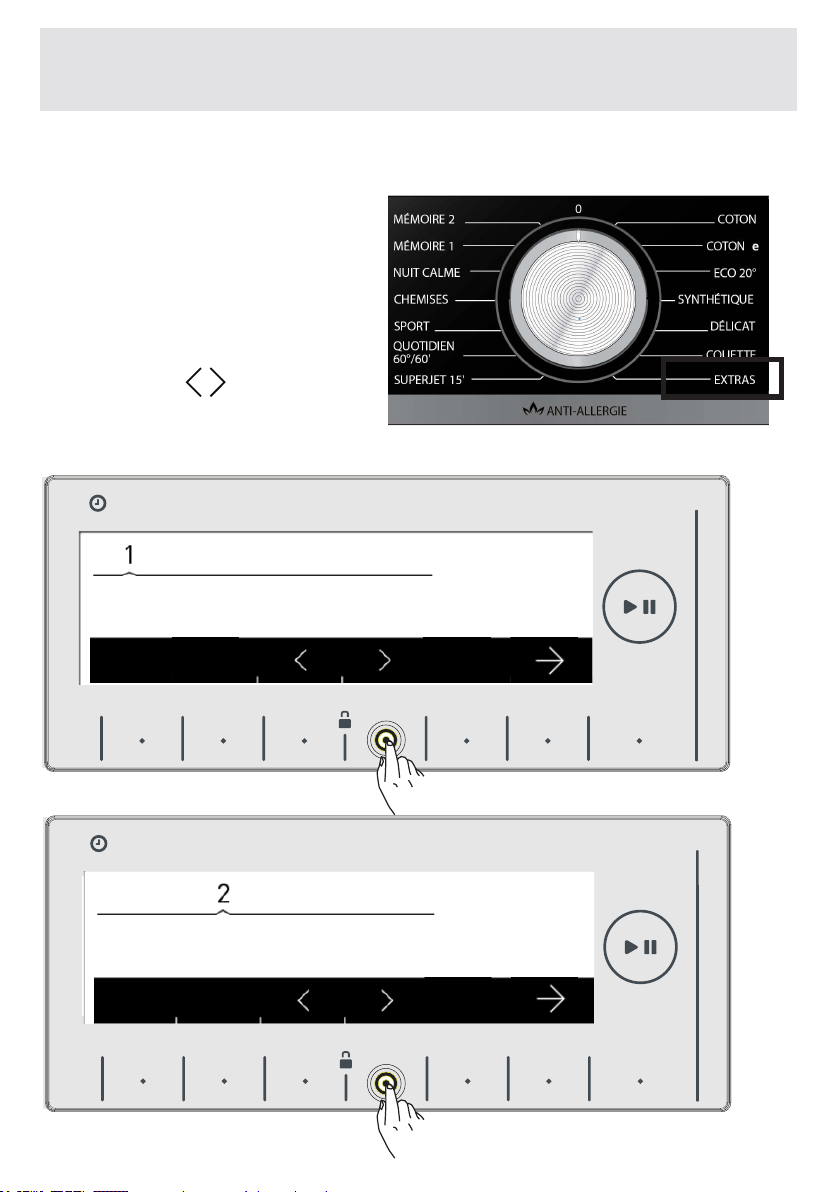
When you select the extras program from the program knob, you
will see 4 sub-program options.
1-Rinse
2-Spin
3-Drain
4-Drum clean
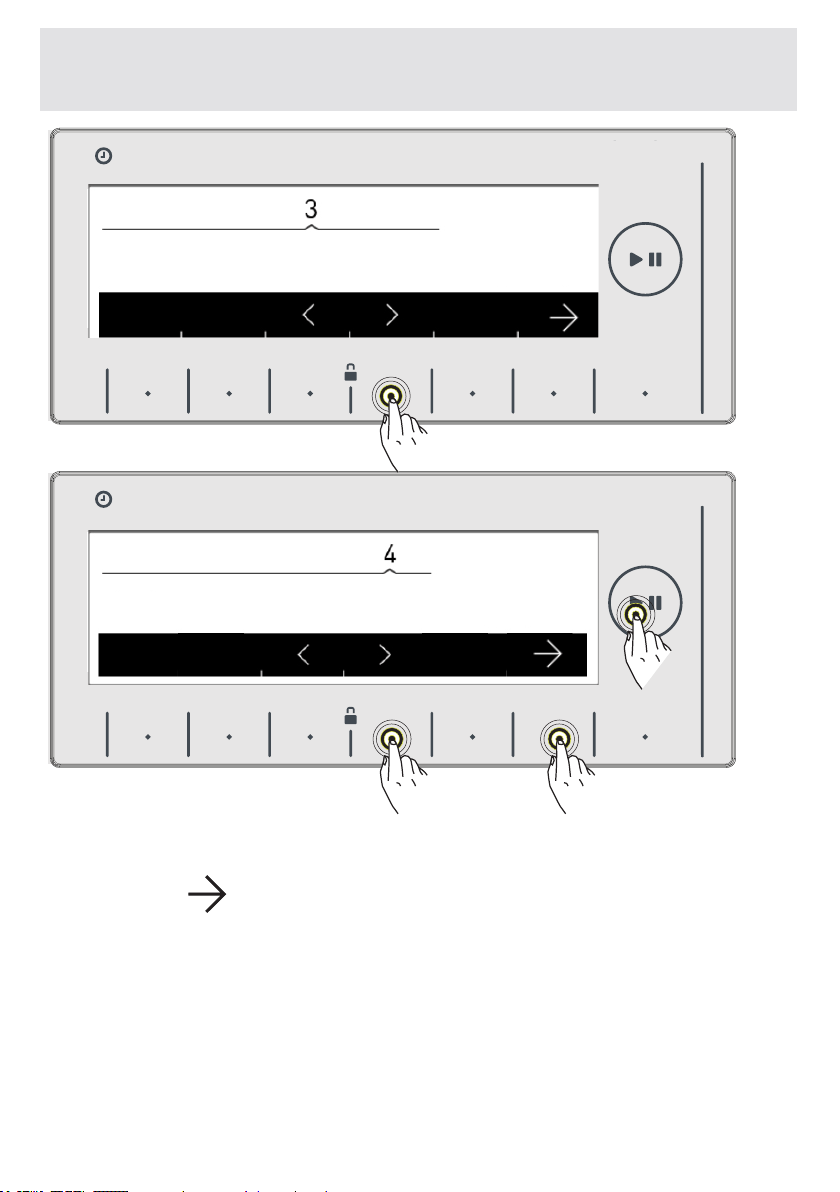
• You can make the sub-
program selections by pressing
the buttons of symbols.
CHAPTER-8: SELECTING SUB-PROGRAMS (EXTRAS)
HAFIZA
8 kg.6 kg.
TIME
EC
8 kg. 6 kg.
HAFIZA
8 kg.6 kg.
TIME
EC
8 kg. 6 kg.
9 kg. 6 kg.
9 kg. 6 kg.
Rinse
Spin
0:47
0:17
EN-96-
CHAPTER-8: SELECTING SUB-PROGRAMS (EXTRAS)
• You can activate the program you want to select by touching the
button of the
symbol.
• After the activation is completed the electronic display will
return to the main screen of the program you have selected
automatically. You can select the other features you want to
select on this screen and run the machine by pressing the Start/
Stand-by button.
HAFIZA
8 kg.6 kg.
TIME
EC
8 kg. 6 kg.
durulama 1400
HAFIZA
8 kg.6 kg.
TIME
EC
8 kg. 6 kg.
9 kg. 6 kg.
9 kg. 6 kg.
Drain
0:03
1:30
Drum Clean
EN-97-
CHAPTER -9: MAINTENANCE AND CLEANING OF YOUR
MACHINE (WARNING)
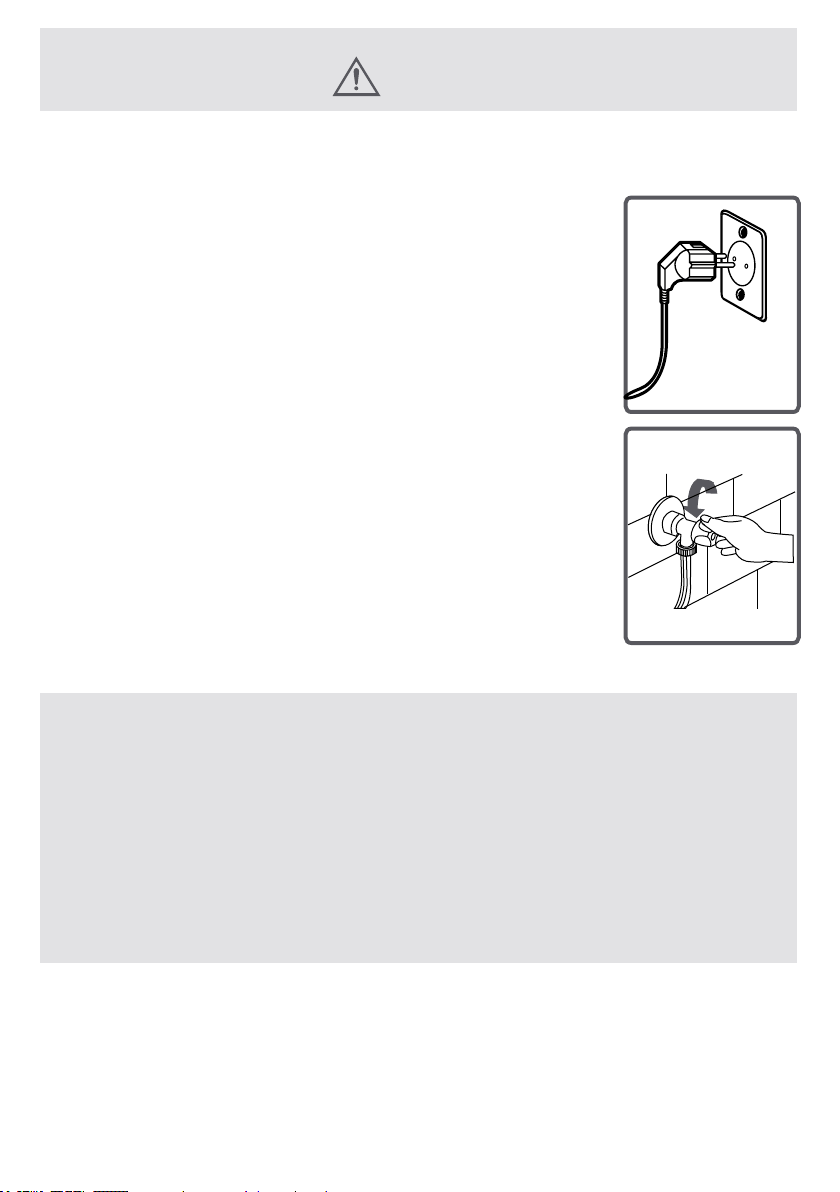
Unplugyourmachinebefore
startingthemaintenanceand
cleaningofyourmachine.
Turnthetapwateroffbefore
startingthemaintenanceand
cleaningofyourmachine.
CAUTION: Your machine’s parts might be
damaged if cleaned with solvent agents
are used.
Do not use cleaning materials with solvent
agents.
EN-98-
CHAPTER -9: MAINTENANCE AND CLEANING OF YOUR
MACHINE (WATER INLET FILTERS)
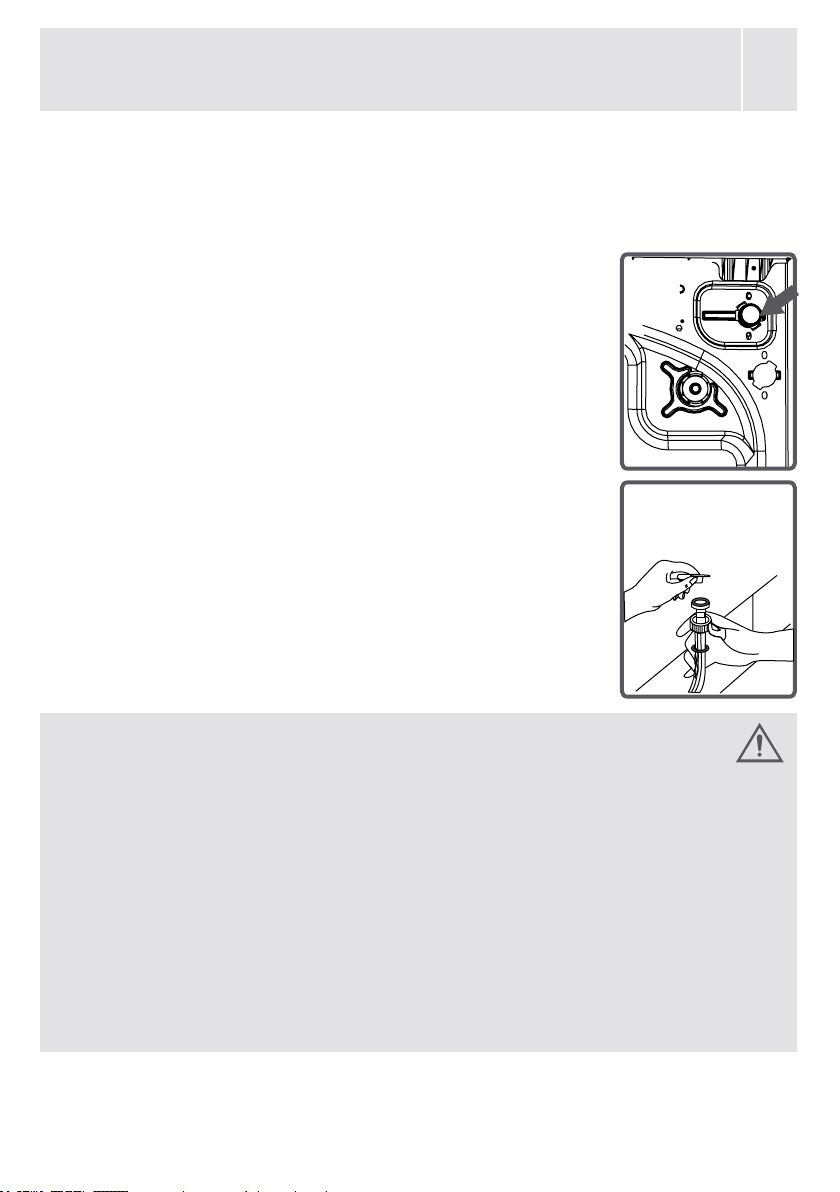
Filterstoavoiddirtandforeignsubstancesinthewaterfrom
penetratingintothemachineareavailablebothonthesideof
faucet and on the ends of water valves along the water inlet
hoseofyourmachine.
Ifyourmachinecannotintakesufcientamount
of water despite water faucet being open, these
ltersshouldbecleaned.
(Itisrecommendedthatyoucleanyourpump
lteroncein2months.)
•Detachthewaterinlethoses.
•Removetheltersonwaterinletvalvesusing
pliersandthencleanitwithabrushinwater.
•Disassembletheltersonthesideoffaucet
sideofwaterinlethosesmanuallyandcleanit.
•Havingcleanedthelters,youcanre-tthem
inthesamewayinreverse.
CAUTION:
Filters of water inlet valves may be
clogged due to contaminated water faucet
or lack of necessary maintenance or valves
may be broken down, causing water leaking
into your machine continuously.
The breakdowns that may arise due to
these reasons are out of the scope of
warranty.
EN-99-
CHAPTER -9: MAINTENANCE AND CLEANING OF YOUR
MACHINE (PUMP FILTER)
Theltersystemavoidsthreadsremainingfromyourlaundry
andtinymaterialsfromenteringintothepumpduringthe
waterdischargingoperationcarriedoutbyyourmachineafter
completingwashing,prolongingthelifecycleofyourpumpis.Itis
recommendedthatyoucleanyourpumplteroncein2months.
Tocleanthepumplter:
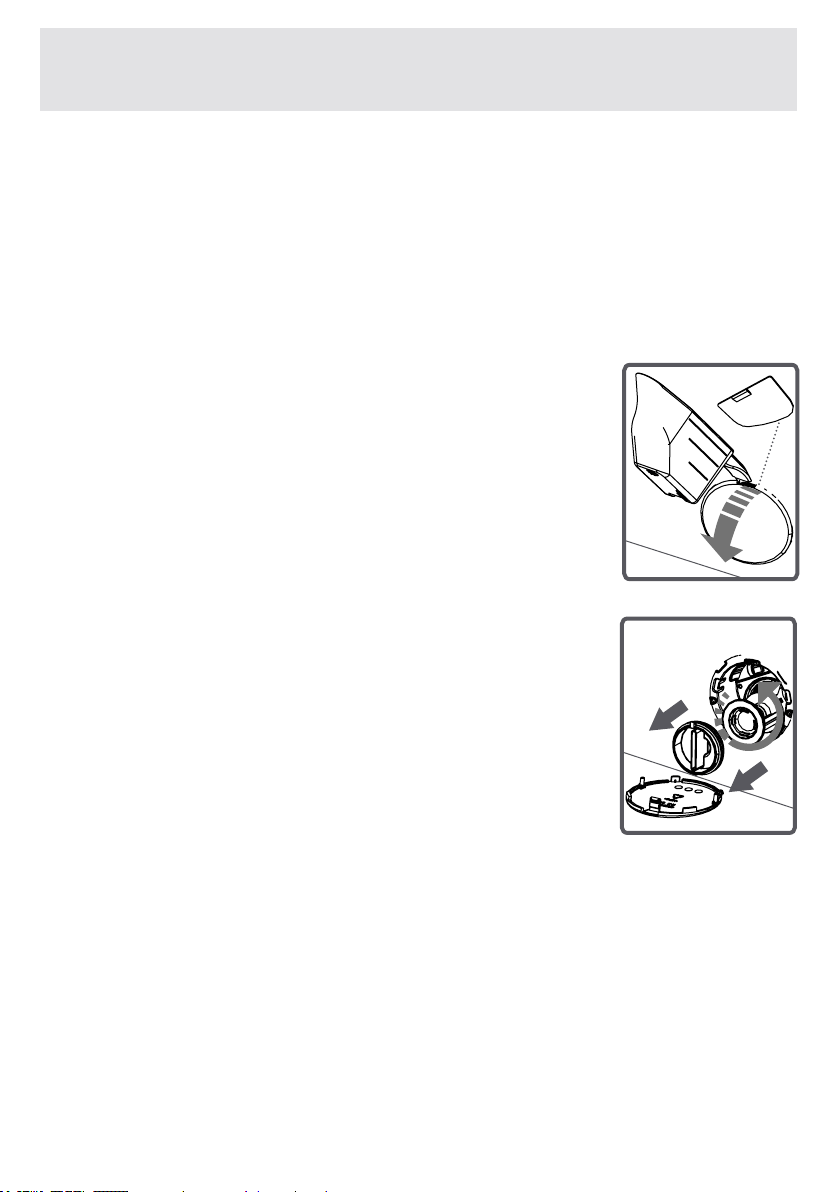
•Toopenthepumpcover,youcanusethe
powderdetergentspade(*)orliquiddetergent
levelplatecomingoutofyourmachine.
•Fittheendpointoftheplasticparttothegap
ofthepumpcoverandpushitback.Thiswill
openthecover.
•Beforeopeningtheltercover,placeavessel
infrontoftheltercovertopreventthewater
remainedinthemachinefromowingonthe
ground.
•
Loosentheltercoverbyrotatingcounter-
clockwiseandthenemptythewater.
Note:Youmayhavetoemptythewater
collectionvesselseveraltimesaccordingtothe
amountofwaterinthemachine.
(*)Machineryspecicationsmayvarydependingontheproduct
purchased.
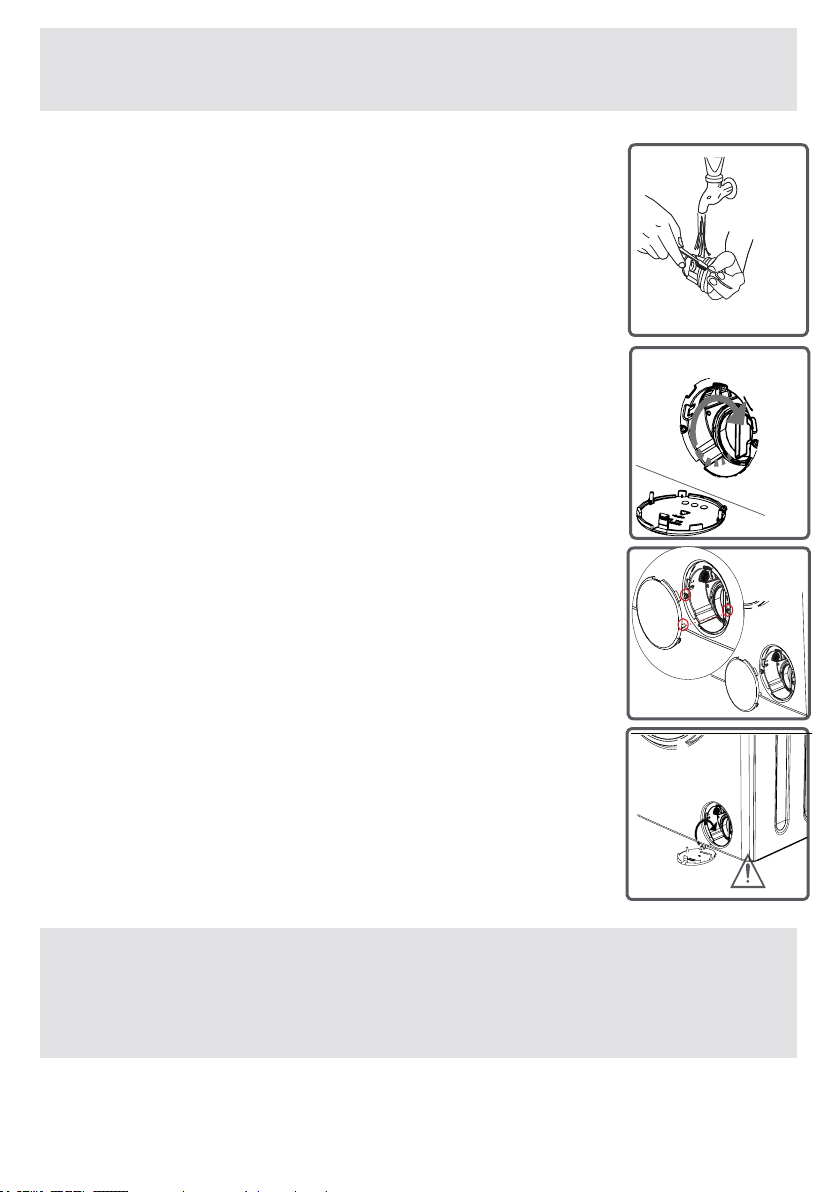
EN-100-
CHAPTER -9: MAINTENANCE AND CLEANING OF YOUR
MACHINE (PUMP FILTER)
•Cleanoffforeignmaterialsinthelterwitha
brush.
•Aftercleaningthelter,ttheltercoverand
tightenitbyrotatingitinclockwisedirection.
•Whileclosingthepumpcover,ensurethatthe
partsontheinnersideofthecovertomatchthe
holesonthefrontpanelside.
•Youcanreattachthepumpcoverinthereverse
orderthatyouremovedit.
WARNING!
As water in the pump may be hot, wait un-
til it cools down.
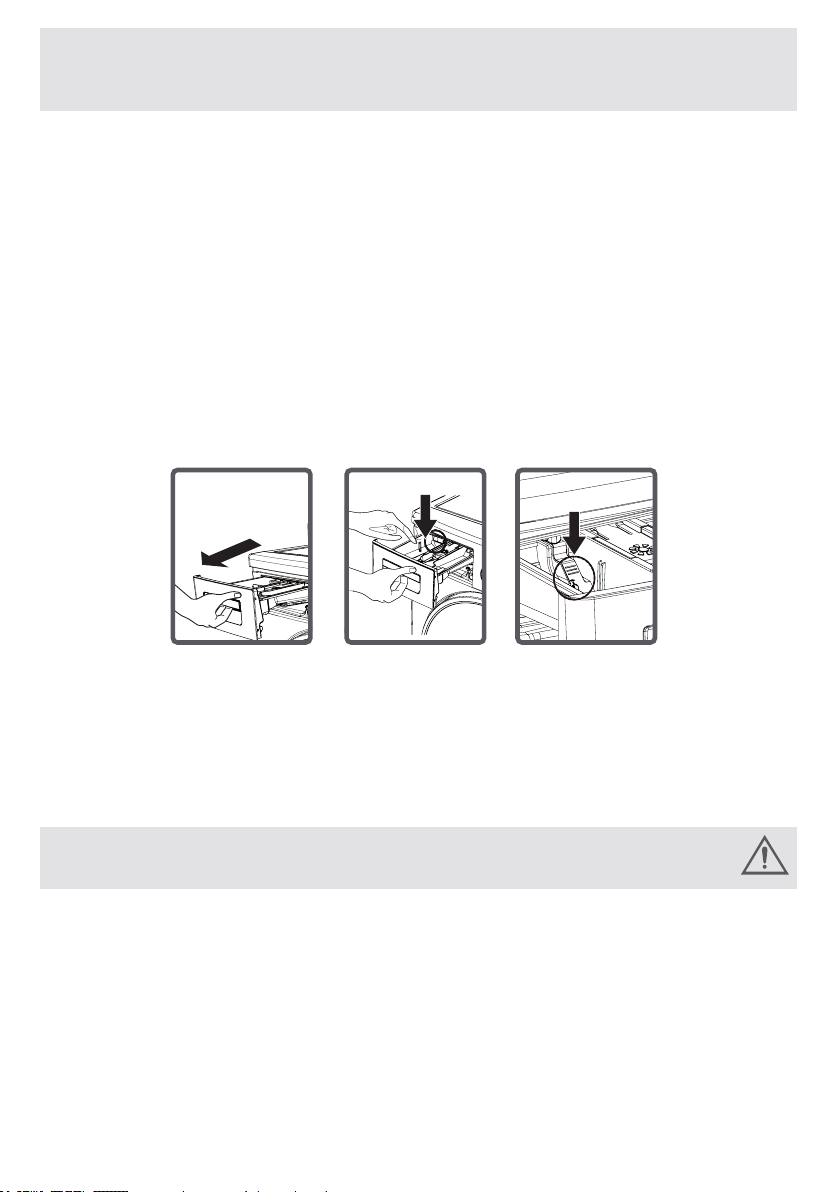
EN-101-
CHAPTER -9: MAINTENANCE AND CLEANING OF YOUR
MACHINE (DETERGENT DRAWER)
Yourdetergentsmaydepositresidueinthedetergentdraw-
erandhousingofthedetergentdrawerovertime.
Tocleantheresidueformed,disassemblethedetergent
drawerinparticularperiods.Itisrecommendedthatyou
cleanyourpumplterevery2months.
Toejectthedetergentdrawer:
•Pullthedetergentdraweruptotheend
• Keep on pulling by depressing on the section shown below
inthedetergentdrawerandkeeppullingandthenunsettle
thedetergentdrawer.
•Flushitusingabrush.
• Collect residues in the housing of the detergent drawer
withoutdroppingtheminsidethemachine.
•Assemblethedetergentdrawerafterdryingitusingatowel
ordrycloth.
•Donotwashyourdetergentdrawerindishwasher.
Liquid Detergent Apparatus (*)
Takeouttheliquiddetergentlevelapparatusforcleaning
andmaintenancepurposesasshowninthepictureand
cleanwelldetergentresidues.Puttheapparatusbackinto
itsplace.Makesurenoresiduesareleftinside.
(*)Machineryspecicationsmayvarydependingonthe
productpurchased.
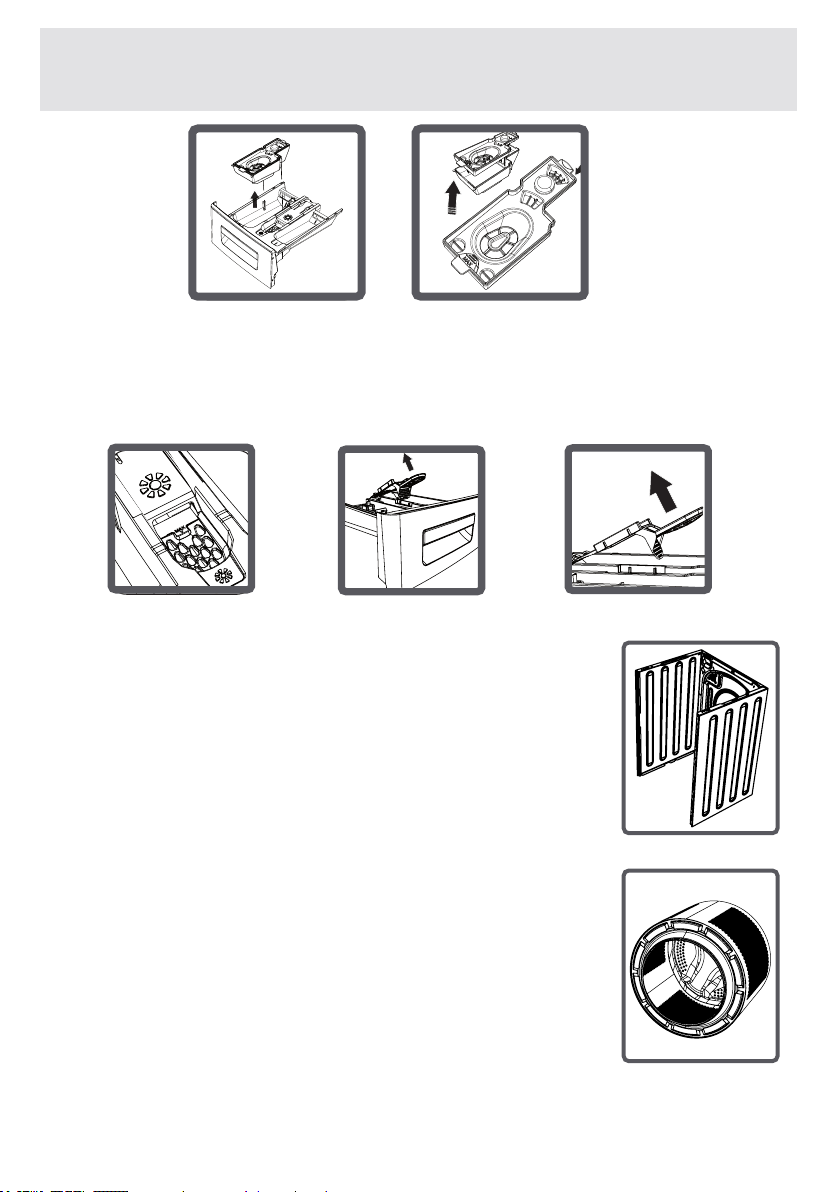
EN-102-
CHAPTER -10: FLUSH STOPPER / BODY / DRUM
Flush stopper
Disassemblethedetergentdrawer.Disassembletheush
stopperandcleanthesoftenerresiduescompletely.Retthe
ushstopperaftercleaningit.Checkwhetherithassettled
properly.
Body
Cleantheouterbodyofyourmachinewith
warmwaterandanon-inammableand
non-abrasive cleaning agent
Afterrinsingwithsomewater,dryit
usingasoftanddrycloth.
Drum
Donotleavemetallicobjectssuchasneedles,
paperclips,coinsetc.inyourmachine.These
objectsleadtotheformationofruststainsinthe
drum.Tocleansuchruststains,useanon-
chlorine cleaning agent and follow the
instructionsofmanufacturersofthecleaning
agent.Neverusewirewoolorsimilarhard
objectsforcleaningruststains.

EN-103-
Allrepairingoperationsrequiredforyourmachineshouldbe
carriedoutbyourauthorisedservicecentre.Ifyourmachine
requiresarepairorifyoucannotremovethefaultbythe
helpoftheinformationprovidedasfollows:
• Unplugyourmachine.
• Turnthewaterfaucetoff.
(*)Seethechapterregardingmaintenanceandcleaningof
yourmachine.
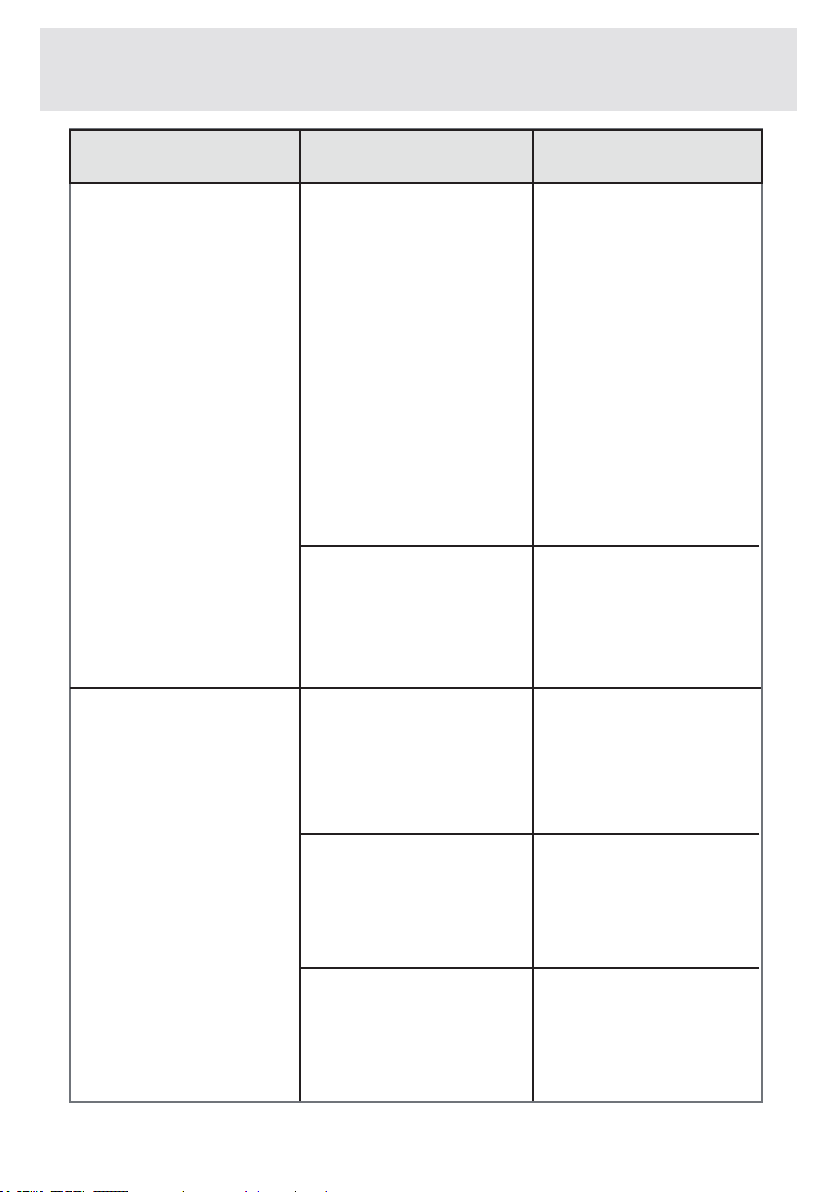
CHAPTER -11: TROUBLESHOOTING
FAULT
Yourmachinedoes
notstart.
Yourmachinedoes
notintakewater.
Itisnotpluggedin. Plugitin.
Replacethefuses.
Checkmainspower.
PressonStart/
Pausebutton
Presstheon/offbutton.
Closethemachine
door.
Turnyourfauceton.
Checkwaterinlet
hoseanduntwist.
Clean water inlet hose
lters.(*)
Clean the valve
inletlters.(*)
Closethemachine
door.
Fuseblown.
Electricitycut-off.
Start/pausebutton
notpressed.
TheOn/Offbutton
hasnotbeenpressed.
Themachinedooris
notcompletelyclosed.
Watertapisturnedoff.
Water inlet hose
maybetwisted.
Water inlet hose
clogged.
Valveinletlter
clogged.
Themachinedoor
notcompletely
closed.
POSSIBLE
CAUSE
TROUBLE-
SHOOTING
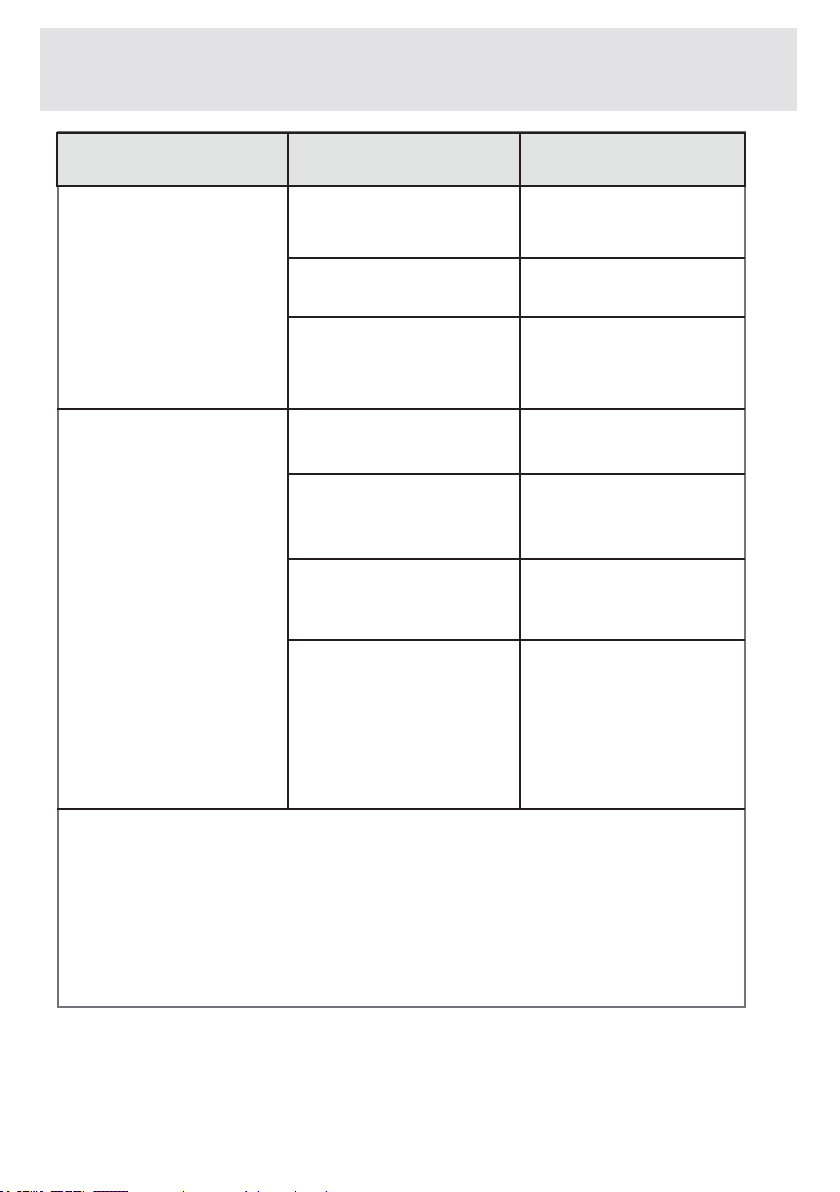
EN-104-
CHAPTER -11: TROUBLESHOOTING
(*)Seethechapterregardingmaintenanceandcleaningof
yourmachine.
(**)Seethechapterregardinginstallationofyourmachine.
Yourmachine
does not dis-
chargewater.
Yourmachine
vibrates.
Discharging
hose clogged or
twisted.
Checkthedischarg-
ing hose, then either
cleanoruntwist.
Pumplter
clogged.
Laundry settled
inthemachine
unevenly.
Spreadyourlaun-
dryinthemachine
evenly.
Thefeetofyourma-
chine have not been
adjusted.
Adjustthefeeton
yourmachine.(**)
Safetystaystted
for transportation
notdisassembled.
Disassemblethe
safety stays of your
machine.(**)
Lessamountof
laundry in the ap-
pliance.
Thiswillnotblock
operation of your
machine.
Yourmachineis
overloaded with
laundry or laundry
settledunevenly.
Donotputin
laundrymorethan
theamountrecom-
mendedandsettle
the laundry in the
machineevenly.
Clean the
pumplter.(*)
FAULT
POSSIBLE
CAUSE
TROUBLE-
SHOOTING
EN-105-
CHAPTER -11: TROUBLESHOOTING
Excessivefoamis
formedinthedetergent
drawer.
Excessiveamount
ofdetergentused.
PressonStart/Pause
buttonToeliminatefoam
formation,mixaspoon
of softener with half
litres of water, and pour
themixtureinthedeter-
gentdrawer.After5-10
minutes,pressonStart/
Pausebuttonagain.In
yournextwashingopera-
tion,Adjustthedetergent
doseaccordingly.
Use detergents
produced only for
automaticwashing
machinesinyour
machine.
Wrong deter-
gentused.
Thecontaminationde-
gree of your laundries
doesnotmatchthe
programmeyouhave
chosen.
Selecttheprogramme
appropriate for the
contaminationdegree
ofyourlaundries.(See
programmetable)
Adjusttheamountof
detergent based on the
amountandcontami-
nation degree of your
laundries.
Amountofdetergent
usedinsufcient.
Laundriesinex-
cessofmaximum
capacity put in your
machine.
Loadyourmachinewith
laundries,amountof
whichwillnotexceed
maximumlaundryca-
pacity.
Unsatisfactory
washingresult.
FAULT
POSSIBLE
CAUSE
TROUBLE-
SHOOTING
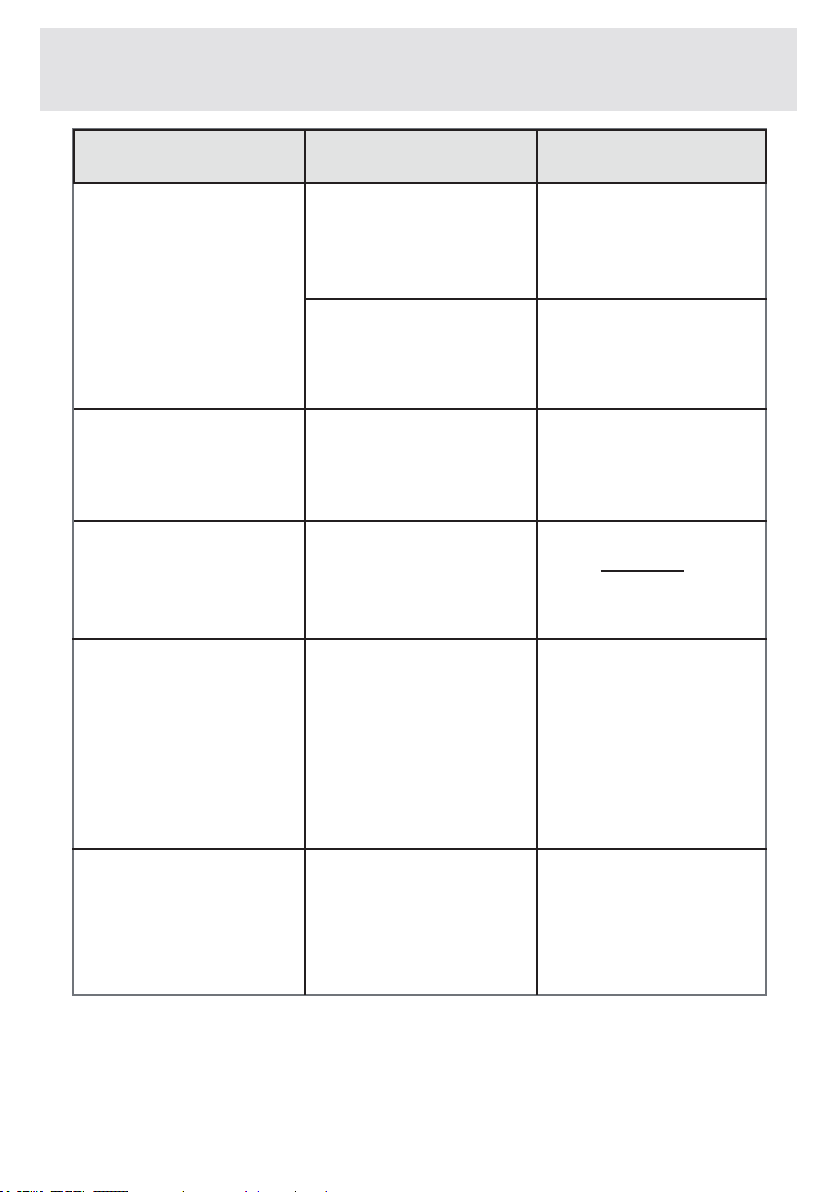
EN-106-
(**)Seethechapterregardinginstallationofyourmachine.
Unsatisfactory
washingresult.
Assoonasthema-
chine is loaded with
water, water dis-
charges.
No water appears
inthedrumduring
washing.
Laundries have
detergent residues
onthem.
Greyspotsappear
onthelaundries.
Waterbeinghard.
(Contaminated,lime
wateretc.)
Laundries distributed
inyourmachinenon-
evenly.
Theendofwater
discharging hose
is too low for the
machine.
Nofault.Wateris
in the unseen part
ofthedrum.
Non-dissolving
particlesofsome
detergentsmay
sticktoyour
laundries as white
spots.
Thereasonforsuch
spotsmaybeoil,
creamorointment.
Adjusttheamountof
detergent based on the
instruction of detergent
manufacturer.
Spreadyourlaun-
driesinthema-
chine properly and
evenly.
Setthewaterdis-
charging hose on ap-
propriateheight.(**)
Performanextra
rinsing by setting your
machineto“Rinsing”
programme,orclean
the spots using a
brush after your laun-
driesdry.
Applythemaximum
amountofdetergent
instructed by the deter-
gentmanufacturerinthe
nextwashingoperation.
CHAPTER -11: TROUBLESHOOTING
FAULT
POSSIBLE
CAUSE
TROUBLE-
SHOOTING
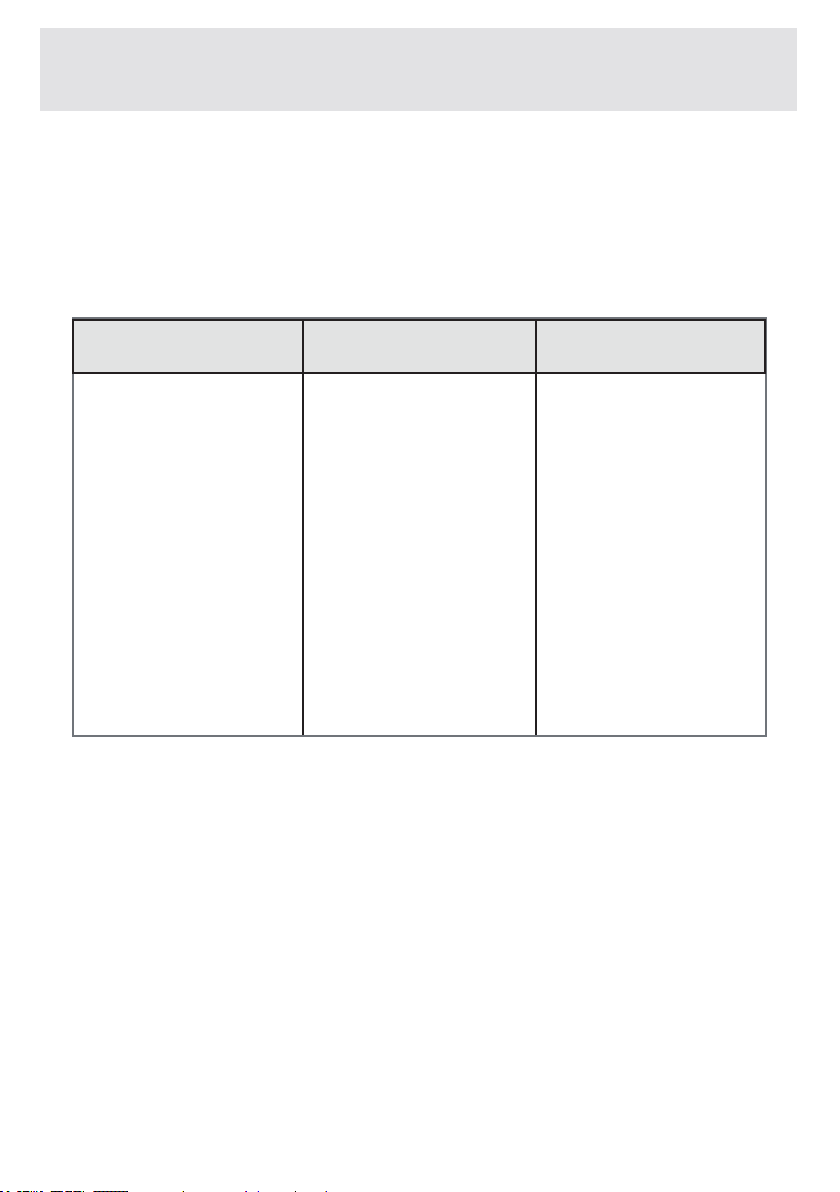
EN-107-
CHAPTER -11: TROUBLESHOOTING
Spinningoperationis
notperformedorruns
late.
Nofault.The
Unbalanced load
controlsystemhas
Unbalanced load control
systemwilltrytospread
yourlaundriesevenly.
Spinningoperationwill
begin after your laundry
isspread.Placethe
laundryinthemachinein
a balanced fashion the
nexttime.
FAULT
POSSIBLE
CAUSE
TROUBLE-
SHOOTING
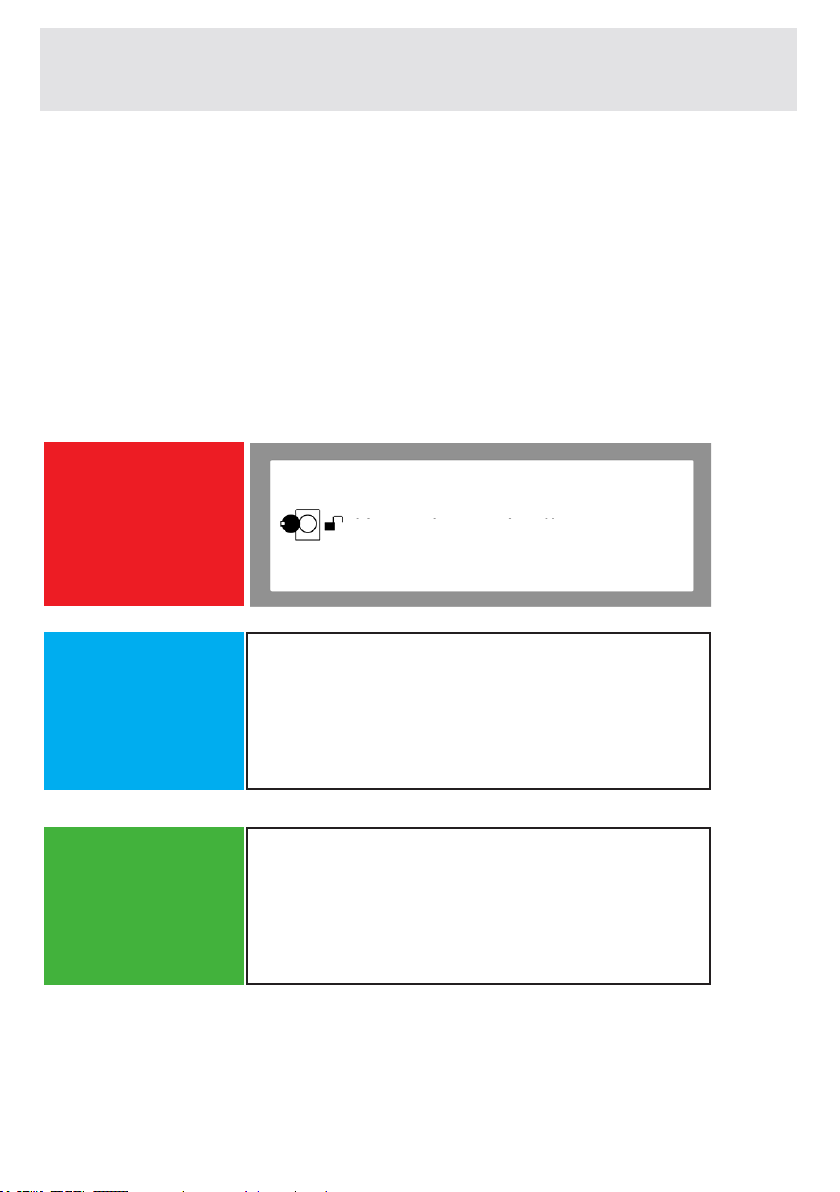
EN-108-
Your machine is equipped with the systems which are capable
of both taking necessary precautions and warning you in case
of any breakdown by means of continuous self-checking during
washing operations.
ERROR CODE
POSSIBLE
FAU LT
WHAT TO DO
The door of your machine is left open.
Close the machine door.
If your machine persists to indicate fault,
turn off your machine, unplug it and contact
the nearest authorised service company
immediately.
CHAPTER-12: AUTOMATIC MALFUNCTION WARNINGS AND
WHAT SHOULD BE DONE
Check the door
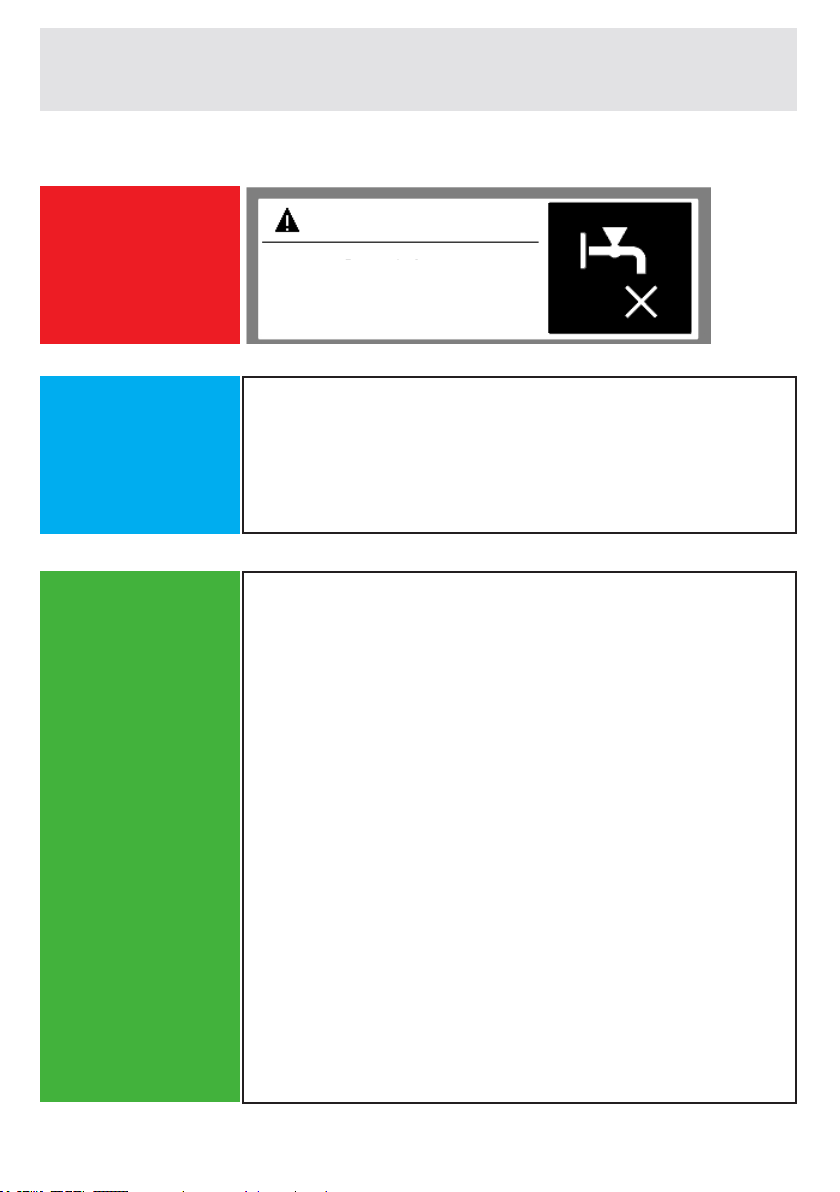
EN-109-
CHAPTER-12: AUTOMATIC MALFUNCTION WARNINGS AND
WHAT SHOULD BE DONE
(*) See page 99.
ERROR CODE
POSSIBLE
FAU LT
WHAT TO DO
Water cut-off or low mains water pressure.
- Water tap may be closed. Check.
- Mains water may be cut-off. Check.
- If there is no water, turn off the appliance
pressing the on / off button found above the
programme knob. - If there is water again, you can
turn on the appliance pressing the on / off button
and operate your appliance selecting a programme
using the programme knob.
- Mains water pressure may be low.
Check.
- Water inlet hose may be twisted.
Check.
- Water inlet hose may be clogged.
- Clean water inlet hose and valve inlet filters.(*)
If the problem persists, unplug your machine, turn
off your tap and contact the nearest authorised
service company.
WATER CUT OFF
Check water inlet.
EN-110-
(**) See page 100
ERROR CODE
ERROR CODE
POSSIBLE
FAU LT
POSSIBLE
FAU LT
WHAT TO DO
WHAT TO DO
The pump is faulty or pump filter is clogged
or electrical connection of the pump is
faulty.
The pump is faulty or pump filter is clogged
or electrical connection of the pump is
faulty.
Clean the pump(**)filter.
If the problem persists, contact the nearest
authorised service company.
- Pump filter may be clogged.
- Clean the pump filter. (**)
- Drain hose may be clogged or twisted.
- Check the Drain hose.
- If the problem persists, contact the
nearest authorised service company.
CHAPTER-12: AUTOMATIC MALFUNCTION WARNINGS
AND WHAT SHOULD BE DONE
PUMP
FILTER
Unplug the
machine
Check the filter.
EN-111-
CHAPTER-12: AUTOMATIC MALFUNCTION WARNINGS AND
WHAT SHOULD BE DONE
ERROR CODE
POSSIBLE
FAU LT
WHAT TO DO
Your machine has excessive amount of
water.
Your machine will drain water by itself.
Pursuant to draining operation, turn off
your machine and unplug it. Turn off your
faucet and contact the nearest authorised
service company.
WATER LEVEL HIGH
Turn off the
tap.
EN-112-
ERROR CODE
ERROR CODE
POSSIBLE
FAU LT
WHAT TO DO
Mains voltage is high or low.
There might be a fluctuation on the energy
fed to your machine,
check if the socket you have your
machine plugged into is grounded. Have
an electrician measure the amount of
voltage coming to your house. If there is
no problem in the electricity, unplug your
machine and inform the nearest service
company.
CHAPTER-12: AUTOMATIC MALFUNCTION WARNINGS
AND WHAT SHOULD BE DONE
VOLTAGE
VOLTAGE
Voltage is high
Voltage low
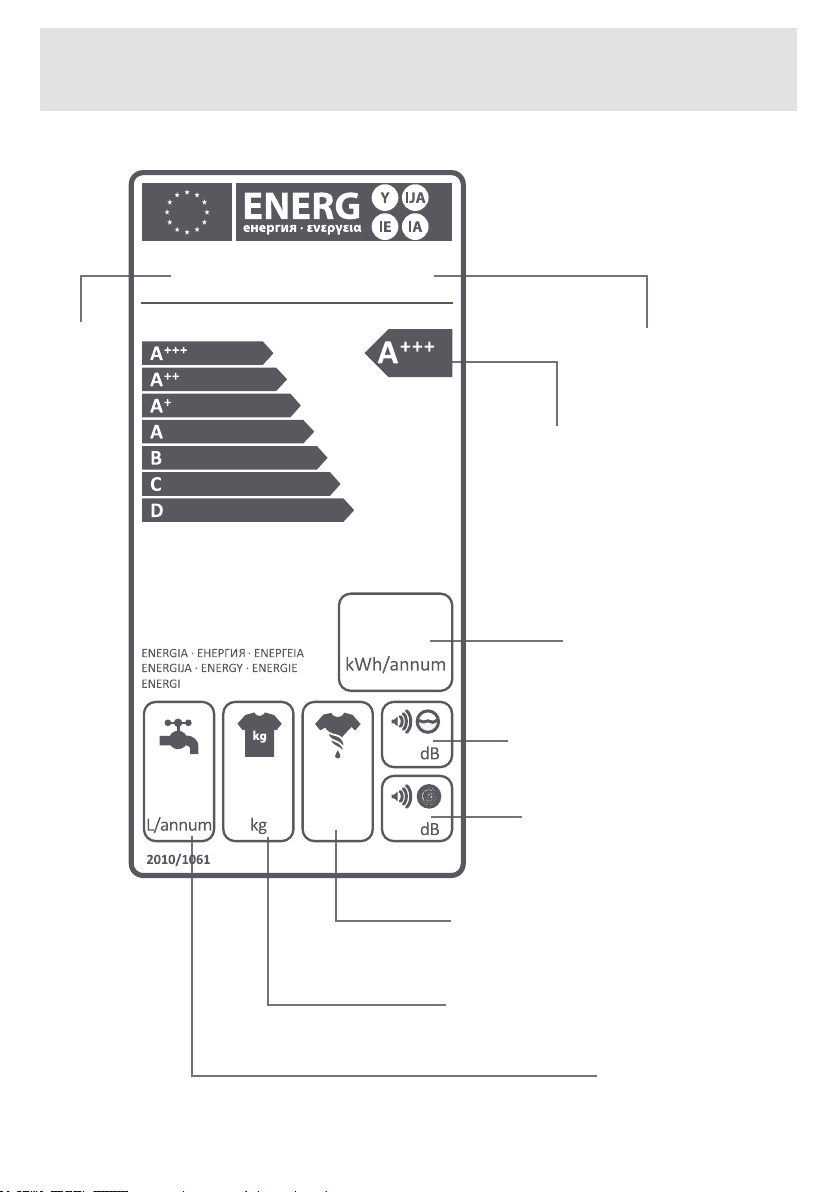
EN-113-
DESCRIBING ENERGY LABEL AND SAVING ENERGY
Brand
Energy Class
EnergyConsumption
NoiseValueWhile
Washing
NoiseValueWhile
Spinning
SpinningPerformanceClass
DryLaundryCapacity
AnnualWater
Consumption
Model

EN-114-
DESCRIBING ENERGY LABEL AND SAVING ENERGY
Energyandwaterconsumptionmayvarybasedonwater
pressure,waterhardness,watertemperature,ambienttem-
perature,laundryamount,additionalfunctionselection,volt-
ageuctuations.Itwillreduceenergyandwaterconsump-
tiontouseyourmachinewiththelaundrycapacityproposed
fortheselectedprogramme,washyourlaundrieslessdirty
ordailylaundriesinshortprogrammes,carryoutcleaning
andmaintenanceperiodically,useyourmachineinconveni-
enttimeintervalsspeciedbyelectricityvendor.

EN-115-
DISPOSAL OF YOUR OLD MACHINE
This symbol on the product or package implies that the
product should not be treated as domestic waste. In-
stead, it should be delivered to waste collection places
recycling electrical and electronic equipment.
You will help to to avoid potential harm to the environ-
ment and human health, which will arise due to wrong
waste procedure for the product by ensuring that this
product is properly.
Recycling materials will help natural resources be pre-
served.
For more detailed information regarding recycling of
this product, please contact local authority, domestic
waste recycling service or the shop from where you
have purchased the product.

Service
& Support
Visit our website:
www.sharphomeappliances.com
Or contact us:
52207959