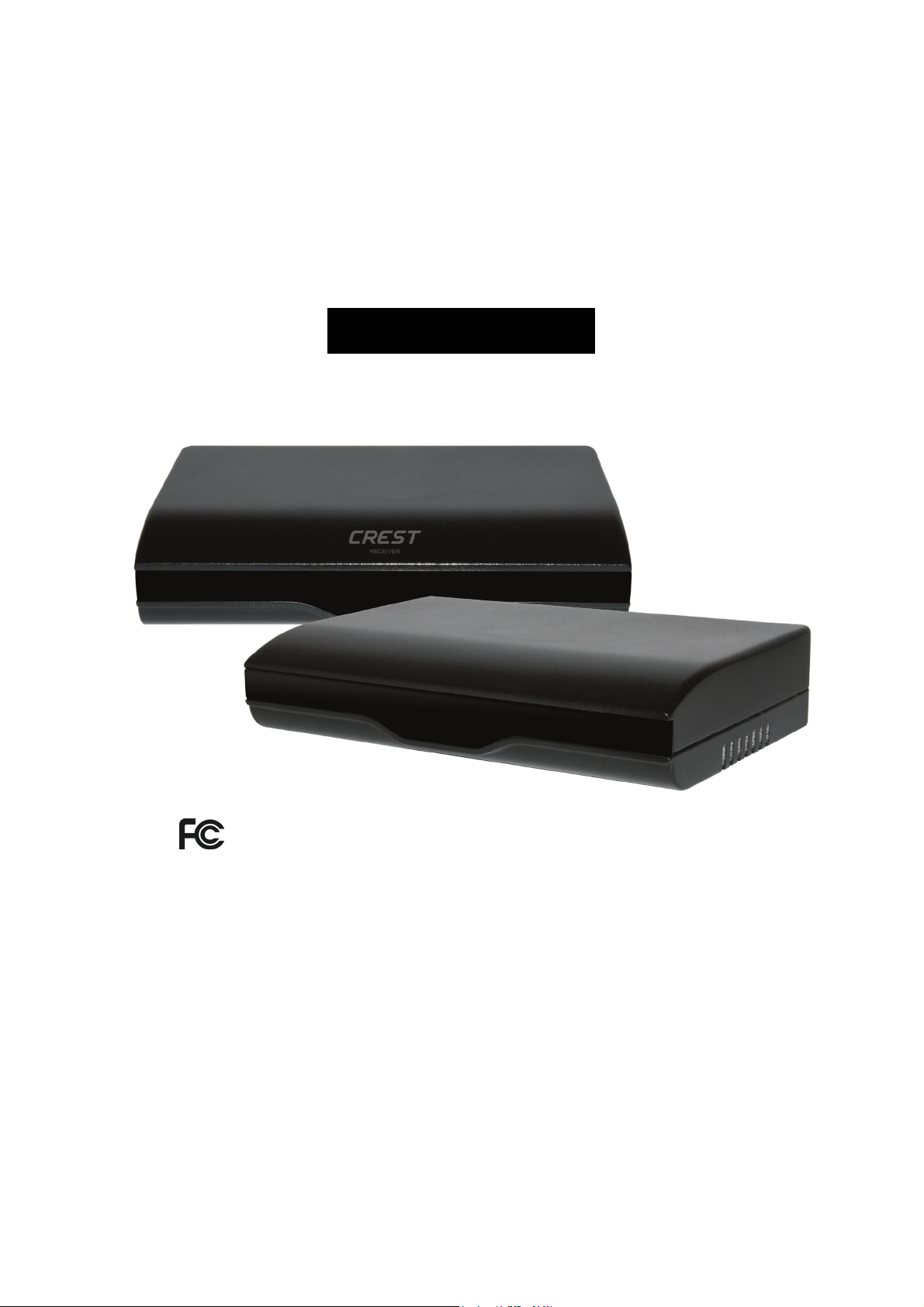
900MHz Wireless,
Audio/Video Sender
With Built-in Remote Control Extender
MODEL: I900SR
OWNERS MANUAL
Made in China

TABLE OF CONTENTS
● About the I900SR ...…....…...................……....…….......………......1
● Location of controls and accessories .……..…….……..………........2
● User Guide ...…............................……...….…………...........3
● Installation …........................….……….………..…...……..4-5
● Trouble Shooting ...…....................….……….……….…….……6-7
● Referring Pictures ..................…………….......……….….....…....8-11
● Caution ....................….……………...…………………...12
● Specification ....................….………………..………..…………13
ABOUT THE I900SR
The I900SR is a powerful wireless A/V/S-Video signal sender and receiver system which
can be operated with satellite and cable receivers, camcorders, stereo systems, televisions,
laser disc players and VCRs, and provide superior reception at distances up to 60 Metres
(clear line of sight) from the transmitter.
This system can be used in many different ways:
● Enables you to watch a movie on any television within your home without moving your
VCR or Laser Disc Player, and without the hassle of running wires.
● Enables you to watch your favourite cable or satellite programs on any television in
your home.
● Extends the listening enjoyment of your stereo receiver to any powered speakers
in your home, even if they are not wired into your stereo system.
● Enables you to use your camcorder with a remote television as a closed circuit
monitoring system; ideal for baby's room, or for security.
1
LOCATION OF CONTROLS
The I900SR has been carefully engineered and manufactured to give you dependable
operation. Read this manual before operating this unit to become familiar with its features
and obtain the performance that will bring you enjoyment for many years.
Please retain this manual for future reference.
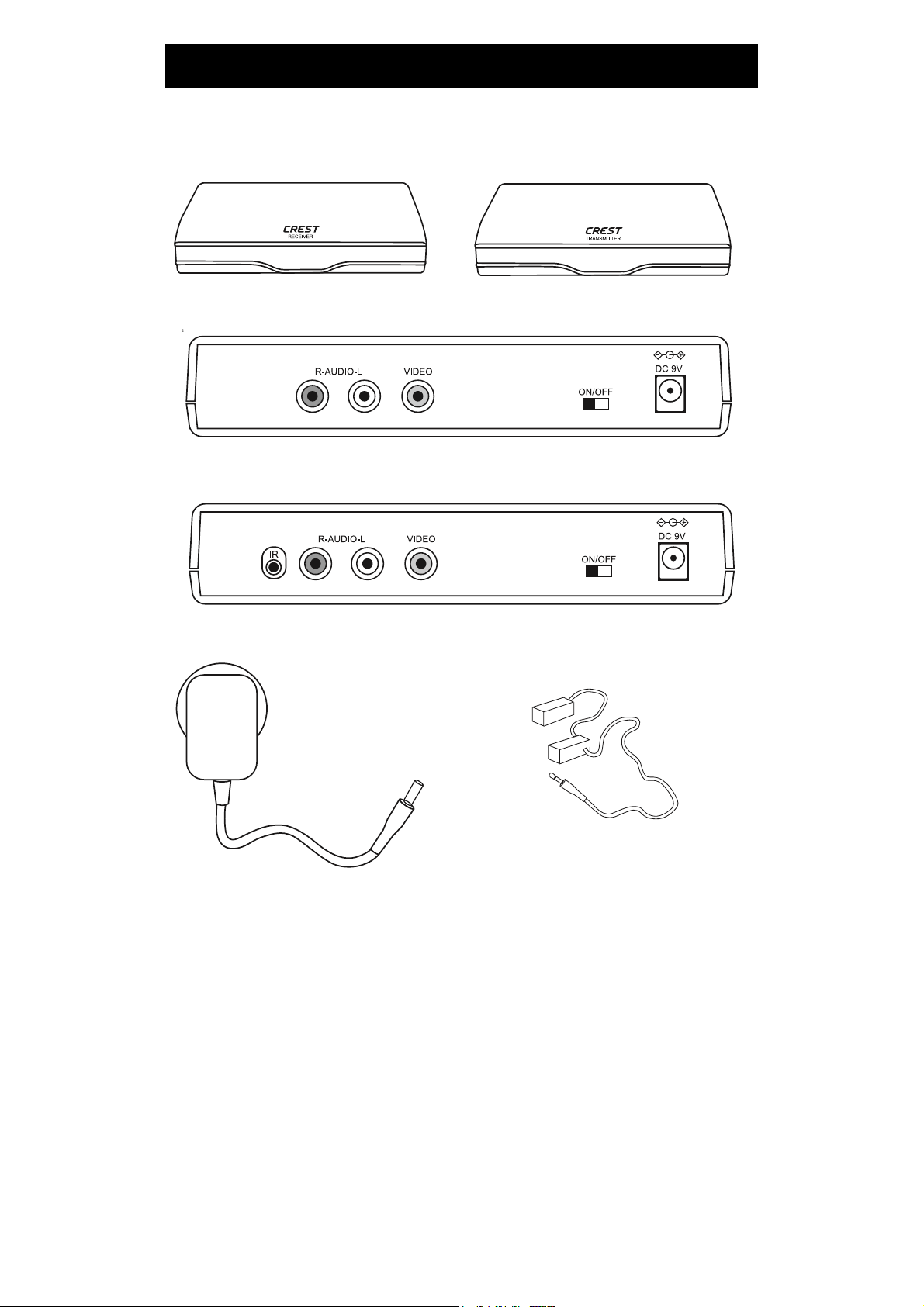
Receiver front Transmitter front
Receiver back
Transmitter back
2
DC 9 V@300mA
AC 120V or 230V
Adaptor
Infrared
Extender

● Transmitter and Receiver
1. ON / OFF Switch
● Receiver
2. Video
3. Audio R
4. Audio L
5. DC Adaptor
USER GUIDE
1. Make sure your input AC voltage conforms to the adaptor specifications.
( Tolerance never more than 5%, such as 230 VAC +/- 10 VAC )
( With 230 VAC adaptor the input voltage can not be less than 220 VAC)
2. Only use the power adapter provided with the I900SR.
3. With direct line-of-sight, the maximum range of A/V signal transmission can reach up
to about 60 metres, and this distance would be shortened by obstacles or walls
placed between transmitter and receiver. (The optimum indoor range is under 25 metres
-penetration may vary depending on composition of walls, doors and floors)
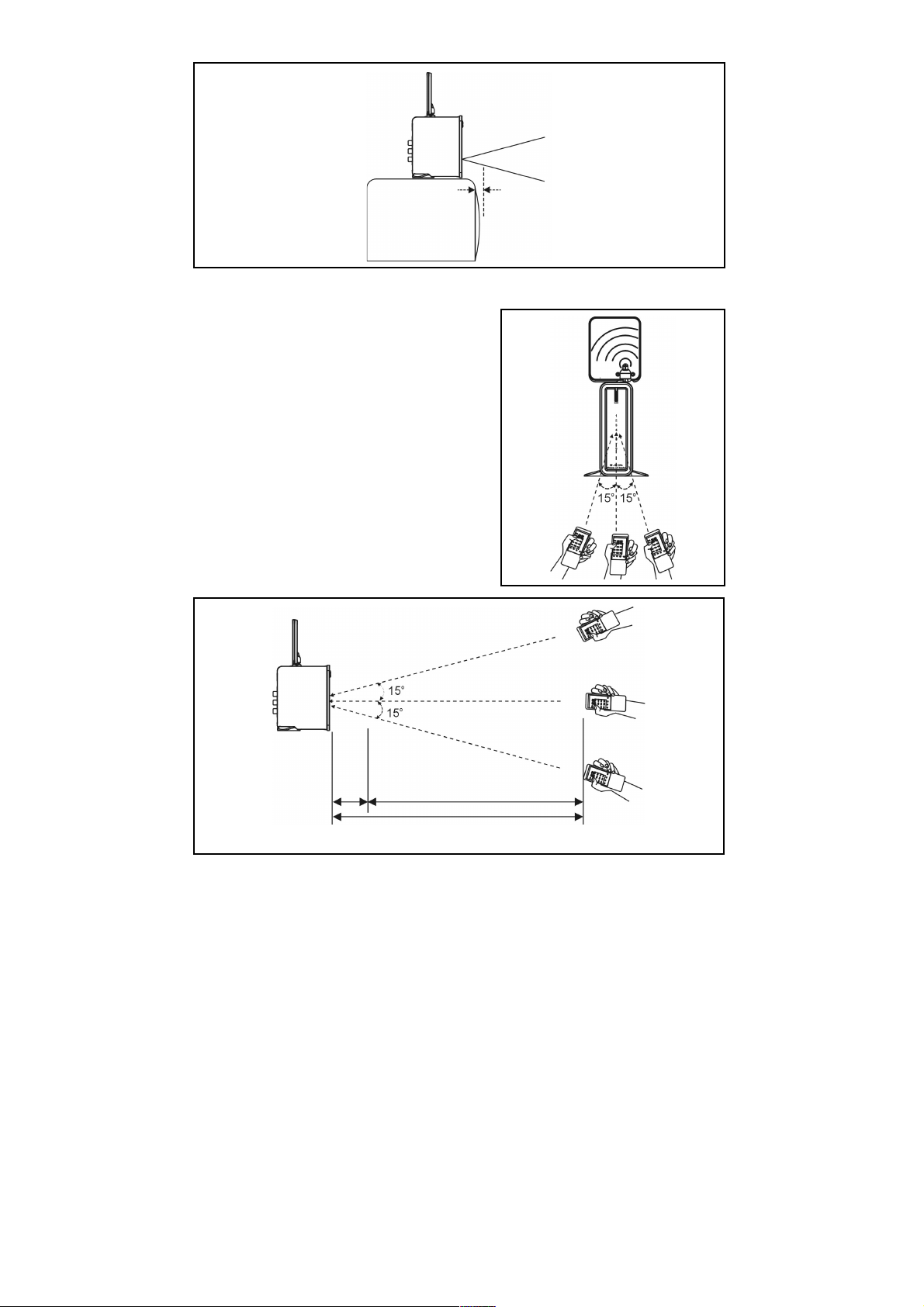
4. To ensure good infrared remote control operation aim your remote control at the I/R
Sensor Window on the I900SR and press the buttons firmly. ( With some remote
controls it may be necessary to press and hold each button for about a second). The
working angle of the I/R Sensor Window is +/- 15 degrees. (see Pictures 7,8,)
5. The remote controller has to be used within the distance of ( from remote control
to receiver )not less than 0.3M and no more than 5M (working angle +/- 15 degrees).
(see Pictures 9)
6. Be sure the ON / OFF switch on both the transmitter and receiver is in the OFF
position before making any connections.
3
INSTALLATION
● Transmitter
6. Infrared Remote Output
7. Video
8. Audio R
9. Audio L
10. DC Adaptor
● Accessory
1. DC 9V 300mA, AC 120V or 230V Adaptor x 1
(For Transmitter)
2. DC 9V 300mA, AC 120V or 230V Adaptor x 1
(For Receiver)
3. Infrared Extender Mouse x 1
4. RCA to RCA Cable x2

Please follow the instruction carefully
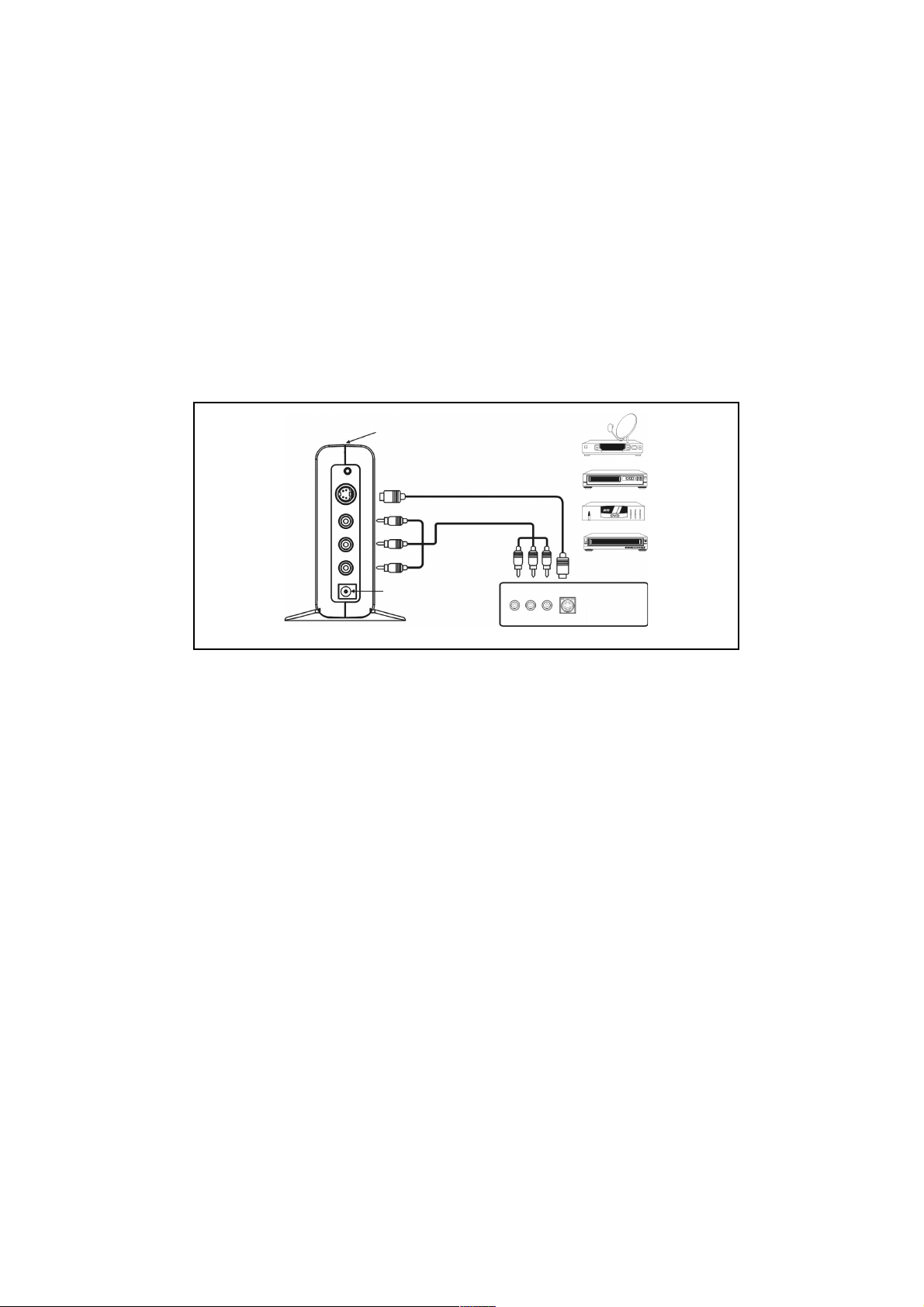
TRANSMITTER
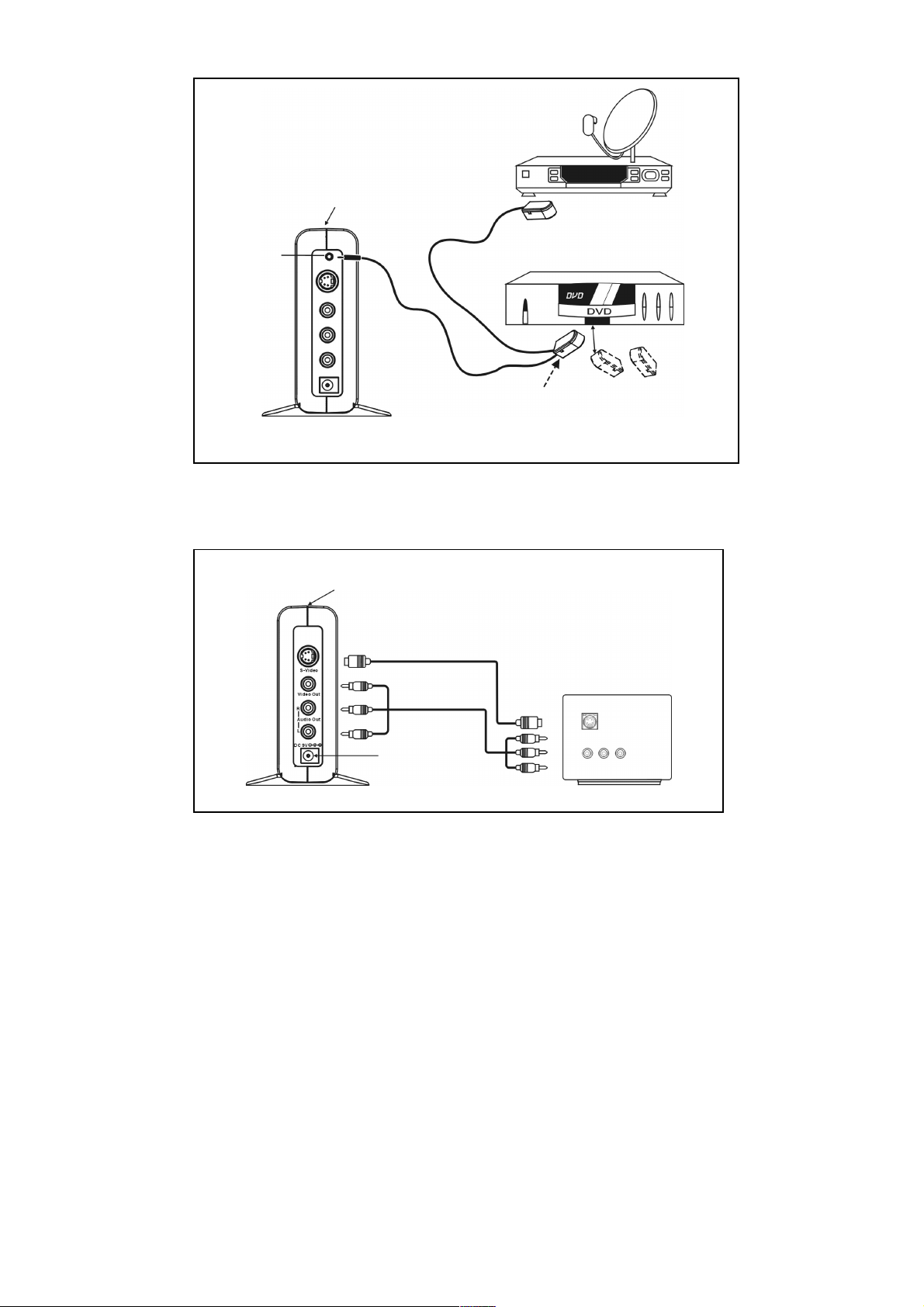
Connect main signal source
a. By Composite Video(RCA)
1. Take a RCA to RCA cable (included),take one end connected to the AV In socket of
transmitter, matching up the colours from unit to cable…e.g. Red to Red, White to
White etc…(see Pictures 1-1 )
2. Connect the other end to the Audio / Video Out port of VCR, DVD, VCD,
Satellite receiver or CATV STB matching up the colours from unit to cable…e.g. Red to
Red, White to White etc…(see Pictures 1-1 )
RECEIVER
a. by Composite Video (RCA)
1. Take a suitable RCA to RCA (included) cable and connect one end to A/V socket of
Receiver, matching up the colours from unit to cable…e.g. Red to Red, White to
White etc…(see Pictures 3 )
2. 2. Connect the other end to the Audio / Video In port of TV, matching up the
colours from unit to cable…e.g. Red to Red, White to White etc (see Pictures 3 )
TROUBLE SHOOTING
No picture or sound
a) Check the power on/off switches on the Transmitter, Receiver and TV
b) Make sure the power plug and signal cables are pushed all the way in.
c) Make sure that all cables are connected as per the user guide
d) Check if there is any discontinuity inside the cable.
Interference & noise
a) Adjust receiver unit direction for optimal performance. (see Pictures 5, 6)
b) Adjust transmitter unit direction for optimal performance. (see Pictures 5, 6 )
c) Check if the supplied voltage matches the adapter specification
( With 230 VAC adapter the input voltage can not be less than 220 VAC)
(The power output has to be 9 VDC, 300mA centre positive)
d) If using a microwave oven, turn it off.
h) Remove microwave oven or clear unnecessary obstructions from the path
between transmitter and receiver.
6
Remote control extender does not work
1) To ensure good infrared remote control operation aim your remote control at the I/R
Sensor Window on the I900SR and press the buttons firmly. ( With some remote
controls it may be necessary to press and hold each button for about a second). The
working angle of the I/R Sensor Window is +/- 15 degrees. (see Pictures 7,8,9)
2) Check the path between the transmitter & receiver and clear unnecessary
obstructions.
4) Make sure the IR extender mouse is pointing toward the sensor precisely, or just
above the remote sensor window of the unit you are trying to control.
5) Check if the batteries on remote control are full of energy. Replace with new
batteries if necessary .
6) The optimum indoor operating range is about within 15 M.
7
Transmitter
Pictures 1-1
Back View
Power Adaptor
Pay TV
VCR
DVD
VCD
Back View of Video device
A/V IN
S-VIDEO CABLE
RCA CABLE
ON/OFF Switch
Pictures 2
Receiver
Pictures 3
A/V IN
Back View
TV
Power Adaptor
S-Video IN
S-VIDEO CABLE
RCA CABLE
Make sure you stick the mouse in front of the Infrared
Receiving Sensor(Approx. within 50 cm, +/-15 degrees)
IR OUT
Main
ON/OFF Switch
Back View
ON/OFF Switch
Back View
Second
Pictures 7
OPERATING REMOTE CONTROL Pictures 8
Receiver
Pictures 9
11
Remote
Control
Distance : Not less than 0.3M and no more than 5M
In order to obtain the best
performance of IR receiving.
Please be sure this unit is
a little forward to the TV
IR Receiver
TV
Side View
IR sensor
window
4.7M
5M
0.3M
Receiver
Receiver

CAUTION
This equipment has been tested and found to comply with CE and FCC regulation.
These regulations are designed to provide reasonable protection against
interference in a residential installation. This equipment generates, uses and can radiate
radio frequency energy and, if not installed and used in accordance with this manual,
may cause interference to radio communications. However, there is no guarantee
that interference will not occur in a particular situation. If this equipment does cause
interference to radio or television reception, which can be determined by turning the
equipment off and on, the user is encouraged to try to correct the interference by
one or more of the following measures:
● Reorient or relocate the receiving antenna
● Increase the distance between the interfering equipment and the receiver
● Connect the interfering equipment into an outlet on a circuit different from that
to which the receiver is connected.
● Consult the dealer or an experienced radio/TV technician for help.
The changes or modifications not expressly approved by the party responsible for
compliance could void the user’s authority to operate the equipment.
To comply with the FCC RF exposure compliance requirements, this device must
not be co-located or operating to conjunction with any other antenna or
transmitter.
IMPORTANT SAFETY PRECAUTIONS
● To prevent fire or shock hazard, do not submerge or expose these products to water
● To avoid electric shock, do not open these units. The I900SR contains
no user serviceable parts. Doing so will void the warranty
● Use only the power adaptors provided with the I900SR
● Do not overload wall outlets or extension cords.
● If you are experiencing difficulty with this products, do not attempt to service
it yourself. Please call your reseller for assistance.
12
SPECIFICATION
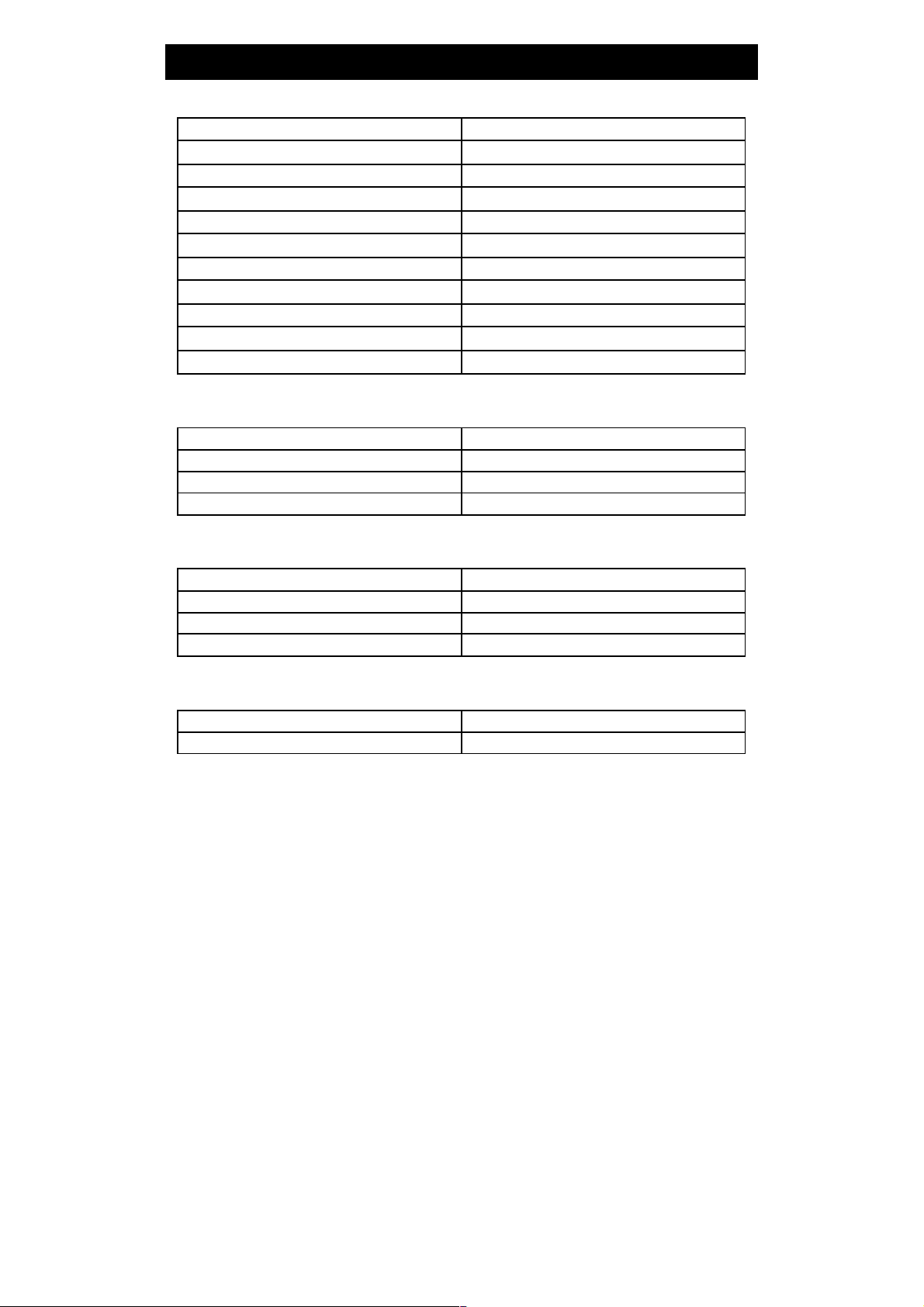
TRANSMITTER
Output level
3mW
Operating frequency
921.5MHz
Modulation
FM/FM
Video input level
1Vp-p
Audio input level
3Vp-p
Video input impedance
75ohm
Audio input impedance
10Kohm
Power Consumption
9V/100mA
Unit dimensions
14.8*9.9*3.1cm
Unit weight
170g
Effective operating range
Approxupto100m(openarea)
RECEIVER
Input level
-85~-10dBm
Power Consumption
9V/230mA
Unit dimensions
14.8*9.9*3.1cm
Unit weight
170g
IR TRANSMITTER
Output level
10mW
Operating Frequency
433.92MHz
Modulation Type
ASK
Effective operating range
Approxupto100m(openarea)
IR RECEIVER
Operating Frequency
433.92MHz
Sensitivity
-95dBm
13
