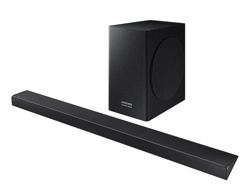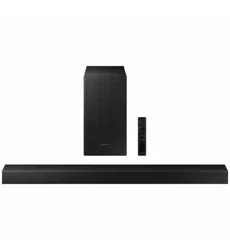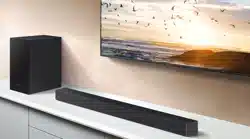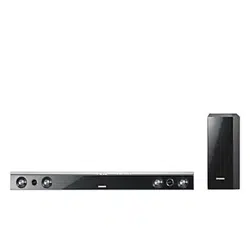

Crystal Surround Air Track
(Active Speaker System)
user manual
imagine the possibilities
Thank you for purchasing this Samsung product.
To receive more complete service,
please register your product at
www.samsung.com/register
HW-C450
HW-C451

2
features
Active Speaker System
This unit features an Active Speaker System that provides high sound quality in a single slim unit.
This unit does not require any satellite loudspeakers or speaker cabling, which are normally associated with
conventional surround sound systems.
Multi-function Remote Control
The supplied remote control can be used to control the TV connected to this unit.
The remote control has a TV hotkey that enables you to perform various operations with the simple press of a button.
You can adjust the volume, change the channel or customize the navigation menu of the TV using this Multi-function Remote
Control.
Special Sound Field mode
You can select from 7 different sound field modes (NEWS, DRAMA, SPORTS, GAME, CINEMA, MUSIC and PASS
(Original Sound)) depending on the type of content you want to enjoy.
Compatibility with various audio Technologies
This unit employs decoders compatible with Dolby Digital, DTS (Digital Theater Systems) and SFE (Sound Field Effect).
− Dolby Digital
This is the standard audio signal format used on DVDs and other purely digital media.
This surround technology delivers high-quality digital audio of up to 5.1 discrete channels to produce a
directional and more realistic effect.
− DTS (Digital Theater Systems)
DTS provides a discrete 5.1 CH digital audio signal for both music and movie contents and uses less
compression than Dolby Digital for richer sound.
− SFE (Sound Field Effect) Using 32bit Audio Digital Signal Processing
Provides more realistic surround sound with normal stereo audio sources.
Wireless Subwoofer
Samsung’s wireless module does away with cables running between the main unit and the subwoofer.
Instead, the subwoofer connects to a compact wireless module that communicates with the main unit.
3
ENG
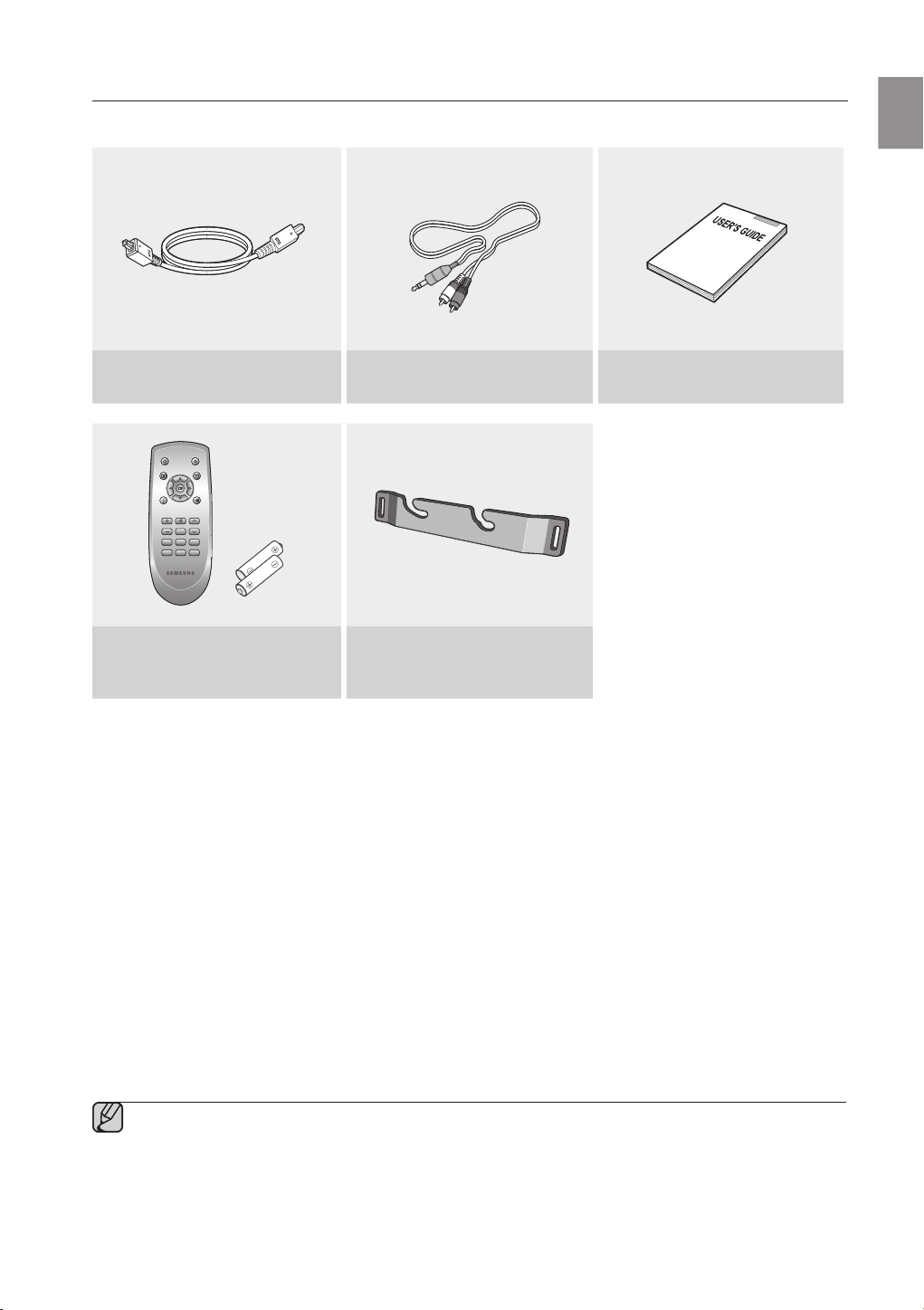
WHAT’S INCLUDED
Check for the supplied accessories below.
Optical Cable
(AH39-00779A)
Audio Cable
(AH39-01077A)
User's Manual
(AH68-02273R)
POWER TV POWER
VOL/CONTROL TV CH
AV SYNC
DRC
MUTE
S.VOL
O/A
INPUT
S/W
LEVEL
AUTO
POWER
MENU
EXIT
TOOLS
INFO
SOUND
MODE
DIMMER
Remote Control
/ Batteries (AAA size)
(AH59-02196G/ 4301-000116)
Bracket-Wall Mount
(AH61-02952A)
The accessories may look slightly different than those pictured above.▪
4
SAFETY WARNINGS
TO REDUCE THE RISK OF ELECTRIC SHOCK, DO NOT REMOVE THE COVER(OR BACK). NO USER-SERVICEABLE PARTS ARE INSIDE. REFER SERVICING TO QUALIFIED SERVICE
PERSONNEL.
CAUTION
RISK OF ELECTRIC SHOCK
DO NOT OPEN
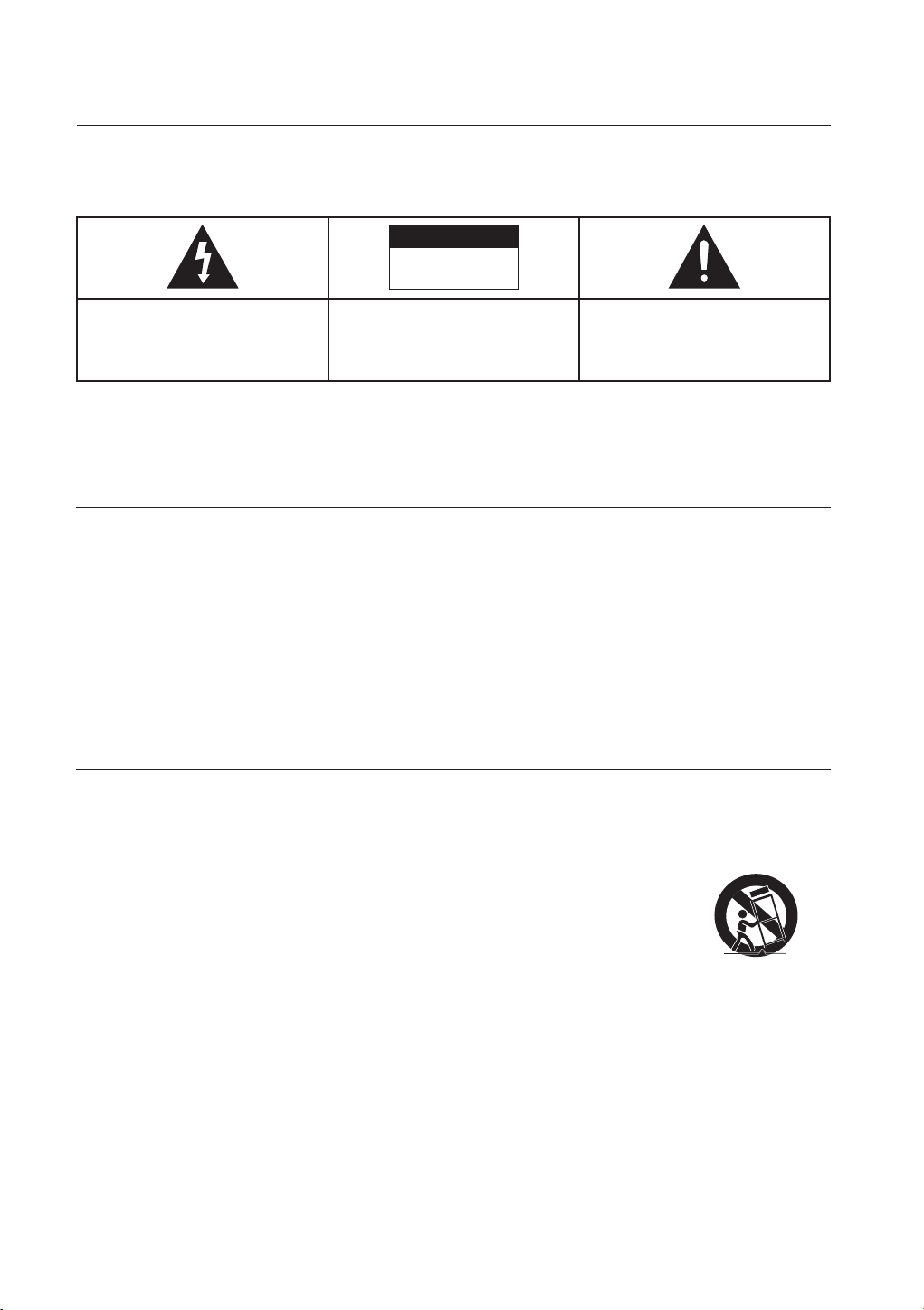
The lighting flash and Arrowhead within
Triangle Is a warning sign alerting you of
dangerous voltage Inside the product
CAUTION: TO REDUCE THE RISK OF
ELECTRIC SHOCK, DO NOT REMOVE
COVER (OR BACK) NO USER SERVICEABLE
PARTS INSIDE. REFER SERVICING TO
QUALIFIED SERVICE PERSONNEL.
The explanation point within the triangle is a
warning sign alerting you of important
instructions accompanying the product.
WARNING
To reduce the risk of re or electric shock, do not expose this appliance to rain or moisture.
To prevent injury, this apparatus must be securely attached to the oor/wall in accordance with the installation instructions.
CAUTION
Apparatus shall not be exposed to dripping or splashing and no objects lled with liquids, such as vases, shall be placed on the apparatus.
The Mains plug is used as a disconnect device and shall stay readily operable at any time.
This product satises FCC regulations when shielded cables and connectors are used to connect the unit to other equipment. To prevent
electromagnetic interference with electric appliances, such as radios and televisions, use shielded cables and connectors for connections.
FCC NOTE (for U.S.A):
This equipment has been tested and found to comply with the limits for a Class B digital device, pursuant to Part 15 of the FCC Rules. These
limits are designed to provide reasonable protection against harmful interference in a residential installation.
This equipment generates, uses and can radiate radio frequency energy and, if not installed and used in accordance with the instructions, may
cause harmful interference to radio communications. However, there is no guarantee that interference will not occur in a particular installation.
If this equipment does cause harmful interference to radio or television reception, which can be determined by turning the equipment off and on,
the user is encouraged to try to correct the interference by one or more of the following measures:
Reorient or relocate the receiving antenna.
Increase the separation between the equipment and receiver.
Connect the equipment into an outlet on a circuit different from that to which the receiver is connected.
Consult the dealer or an experienced radio/TV technician for help.
Caution : FCC regulations state that any unauthorized changes or modications to this equipment may void the user's authority to operate it.
Important Safety Instructions
Read these operating instructions carefully before using the unit. Follow all the safety instructions listed below. Keep these operating instructions
handy for future reference.
•
•
•
•
•
•
•
•
1) Read these instructions.
2) Keep these Instructions.
3) Heed all warnings.
4) Follow all instructions.
5) Do not use this apparatus near water.
6) Clean only with dry cloth.
7) Do not block any ventilation openings. Install in
zaccordance with the manufacturer? instructions.
8) Do not install near any heat sources such as
radiators, heat registers, stoves, or other apparatus (including
amplifiers) that produce heat.
9) Do not defeat the safety purpose of the polarized or grounding-type
plug. A polarized plug has two blades with one wider than the other.
A grounding type plug has two blades and a third grounding prong.
The wide blade or the third prong are provided for your safety. If the
provided plug does not fit into your outlet, consult an electrician for
replacement of the obsolete outlet.
10) Protect the power cord from being walked on or pinched
particularly at plugs, convenience receptacles, and the point where
they exit from the apparatus.
11) Only use attachment/accessories
specified by the manufacturer.
12) Use only with the cart, stand, tripod,
bracket, or table specified by the
manufacturer, or sold with the apparatus.
When a cart is used, use caution when
moving the cart/apparatus combination
to avoid injury from tip-over.
13) Unplug this apparatus during lightning storms or when unused for
long periods of time.
14) Refer all servicing to qualified service personnel. Servicing is
required when the apparatus has been damaged in any way, such
as power-supply cord or plug is damaged, liquid has been spilled
or objects have fallen into the apparatus, the apparatus has been
exposed to rain or moisture, does not operate normally, or has
been dropped.
safety information
5
ENG
PRECAUTIONS
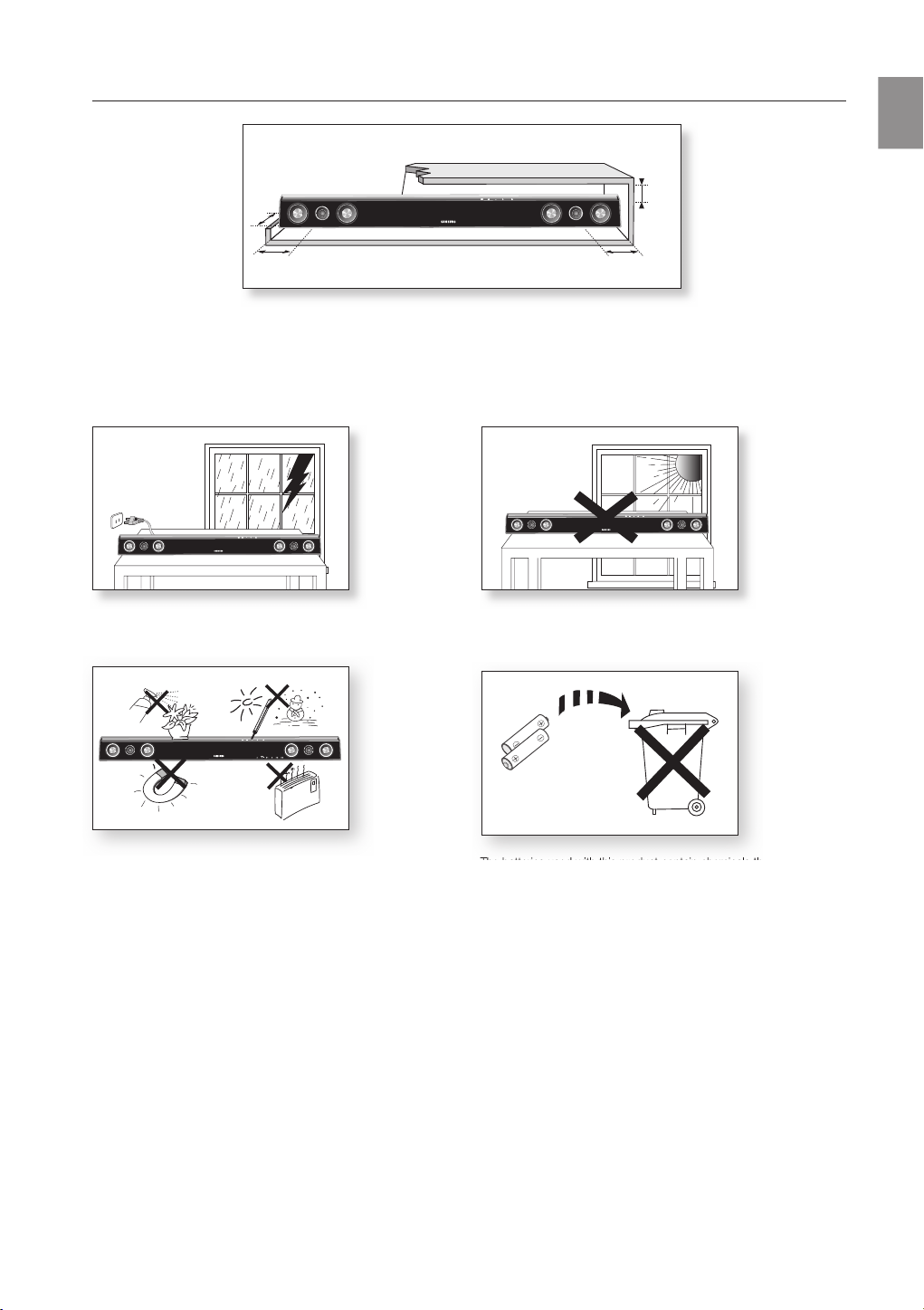
Ensure that the AC power supply in your house complies with the identification sticker located on the back of your product. Install your
product horizontally, on a suitable base (furniture), with enough space around it for ventilation (3~4 inches). Make sure the ventilation slots
are not covered. Do not place the
unit
on amplifiers or other equipment which may become hot. This
unit
is designed for continuous use.
In order to disconnect the unit completely from the power supply, remove the main plug from the wall outlet, especially when left unused
for a long period of time.
During thunderstorms, disconnect the AC main plug from the
wall outlet. Voltage peaks due to lightning could damage the unit.
Protect the
product
from moisture (i.e. vases) , and excess heat
(e.g.fireplace) or equipment creating strong magnetic or electric fields
Disconnect the power cable from the AC supply if the unit malfunctions.
Your
product
is not intended for industrial use. Use of this product is for
personal use only.
Condensation may occur if your
product
or disc has been stored in
cold temperatures. If transporting the
unit
during the winter,
wait approxi
mately 2 hours until the unit has reached room temperature
before using.
Do not expose the unit to direct sunlight or other heat sources.
This could lead to overheating and malfunction of the unit.
The batteries used with this product contain chemicals that are harmful to
the environment.
Do not dispose of batteries in the general household trash.
The batteries used with this product contain chemicals that are harmful to
Phones
3.9 inch 3.9 inch
2.7 inch
3.9 inch

6
contents
FEATURES
2
2 Features
3 What’s included
SAFETY INFORMATION
4
4 Safety warnings
5 Precautions
GETTING STARTED
7
7 Before reading the user’s manual
DESCRIPTIONS
8
8 Front panel
9 Rear panel
REMOTE CONTROL
10
10 Tour of the remote control
CONNECTIONS
11
11 Installing the wall mount
12 Connecting the wireless subwoofer
13 Connecting the Crystal Surround Air Track
TROUBLESHOOTING
17
17 Troubleshooting
APPENDIX
18
18 Specifications
FUNCTIONS
14
14 Basic functions
14 Advanced functions
16 Software upgrade
7
ENG
● GETTING STARTED
BEFORE READING THE USER’S MANUAL
Make sure to check the following terms before reading the user manual.
Icons that will be used in manual
Icon Term Definition
Caution
This involves a case where a function does not operate or settings may be
canceled.
Note
This involves tips or instructions on the page that help each function operate.
About the use of this user’s manual
Be sure to be familiar with Safety Instructions before using this product. ( See page 4 )
If a problem occurs, check the Troubleshooting. ( See page 17 )
Copyright
©2009 Samsung Electronics Co.,Ltd.
All rights reserved; no part or whole of this user’s manual may be reproduced or copied without the prior
written permission of Samsung Electronics Co.,Ltd.
1)
2)
getting started
8
descriptions
FRONT PANEL
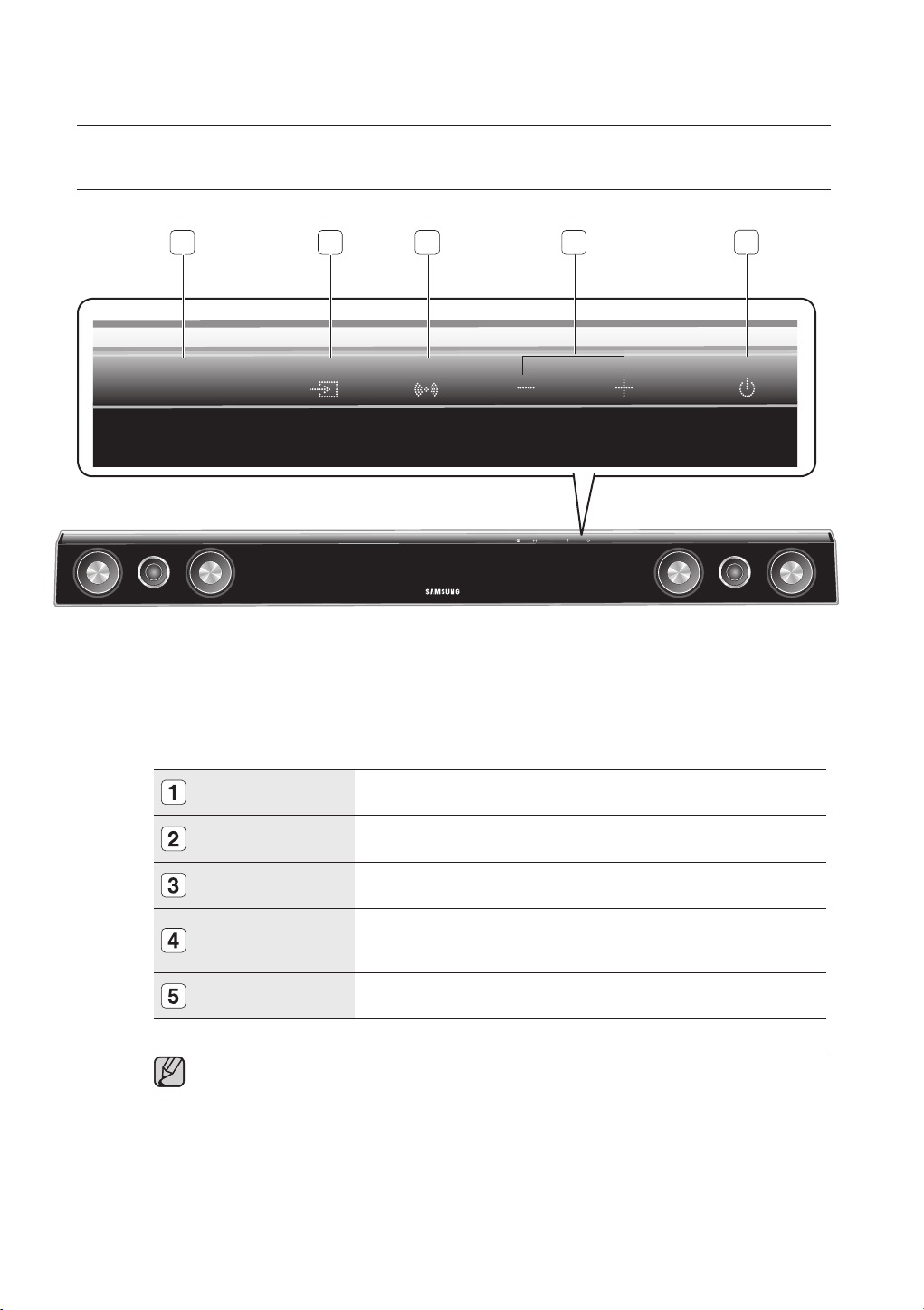
DISPLAY
Displays the current mode.
POWER BUTTON
Turns the Crystal Surround Air Track on and off.
VOLUME +/-
Controls the volume level.
SOUND FIELD
MODE
Selects the sound field mode.
(NEWS, DRAMA, SPORTS, GAME, CINEMA, MUSIC and
PASS(Original Sound))
INPUT MODE
Selects the Optical or Audio input.
When you turn on the power of this unit, there will be a 4 to 5 second delay before it can
reproduce sound.
▪
2
3451
9
ENG
● DESCRIPTION
REAR PANEL
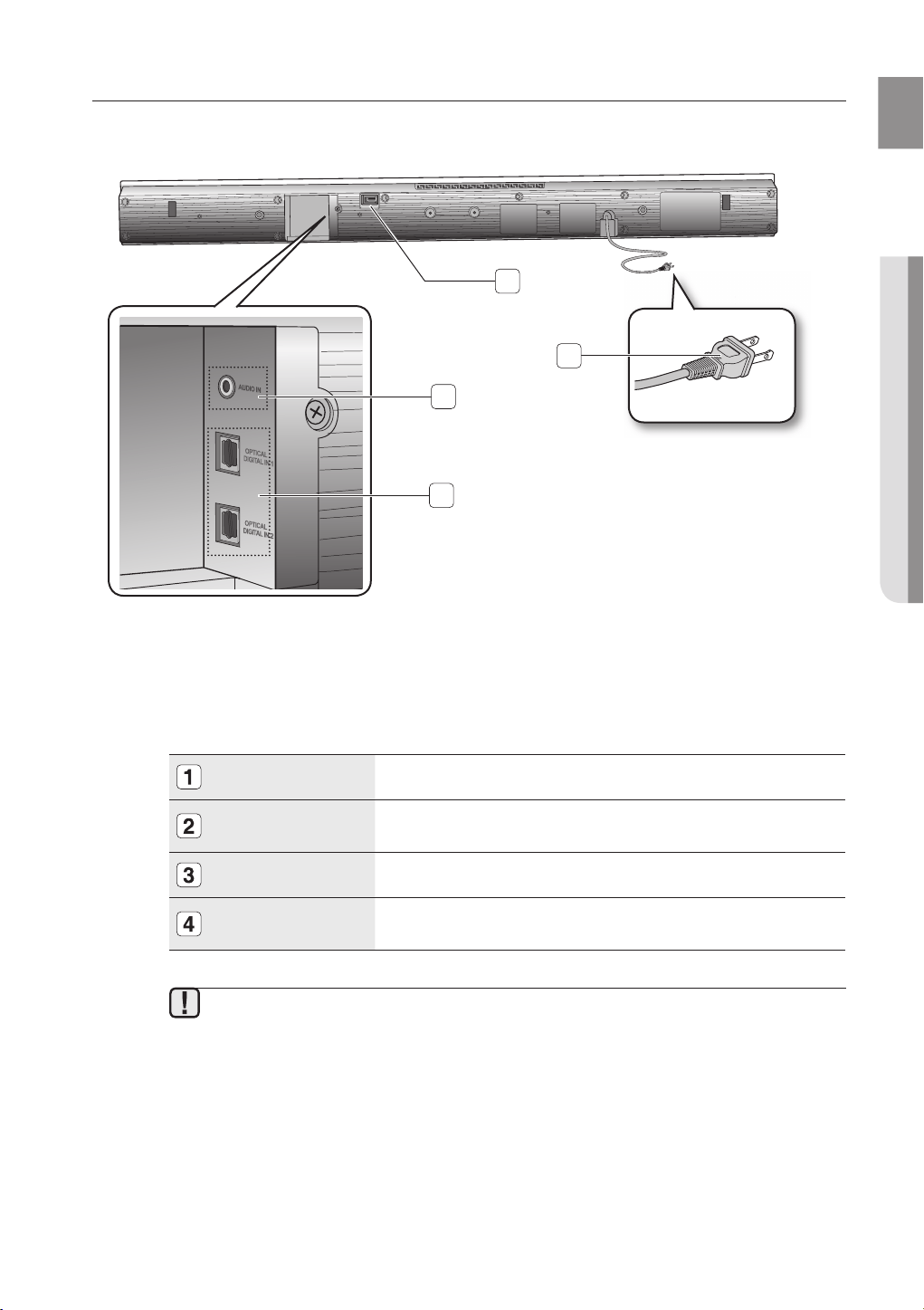
USB PORT
You can update this unit through the USB port.
POWER SUPPLY
CABLE
Plug the power supply cable into the AC wall outlet.
AUDIO IN JACK
Connect to the analog output of an external device.
OPTICAL DIGITAL IN
1,2
Connect to the digital (optical) output of an external device.
When disconnecting the power cable from the wall outlet, hold the plug.
Do not pull the cable.
Do not connect this unit or other components to the main power until all connections
between components are complete.
▪
▪
ON
LY
FOR UPDA
TE
2
1
3
4
10
remote control
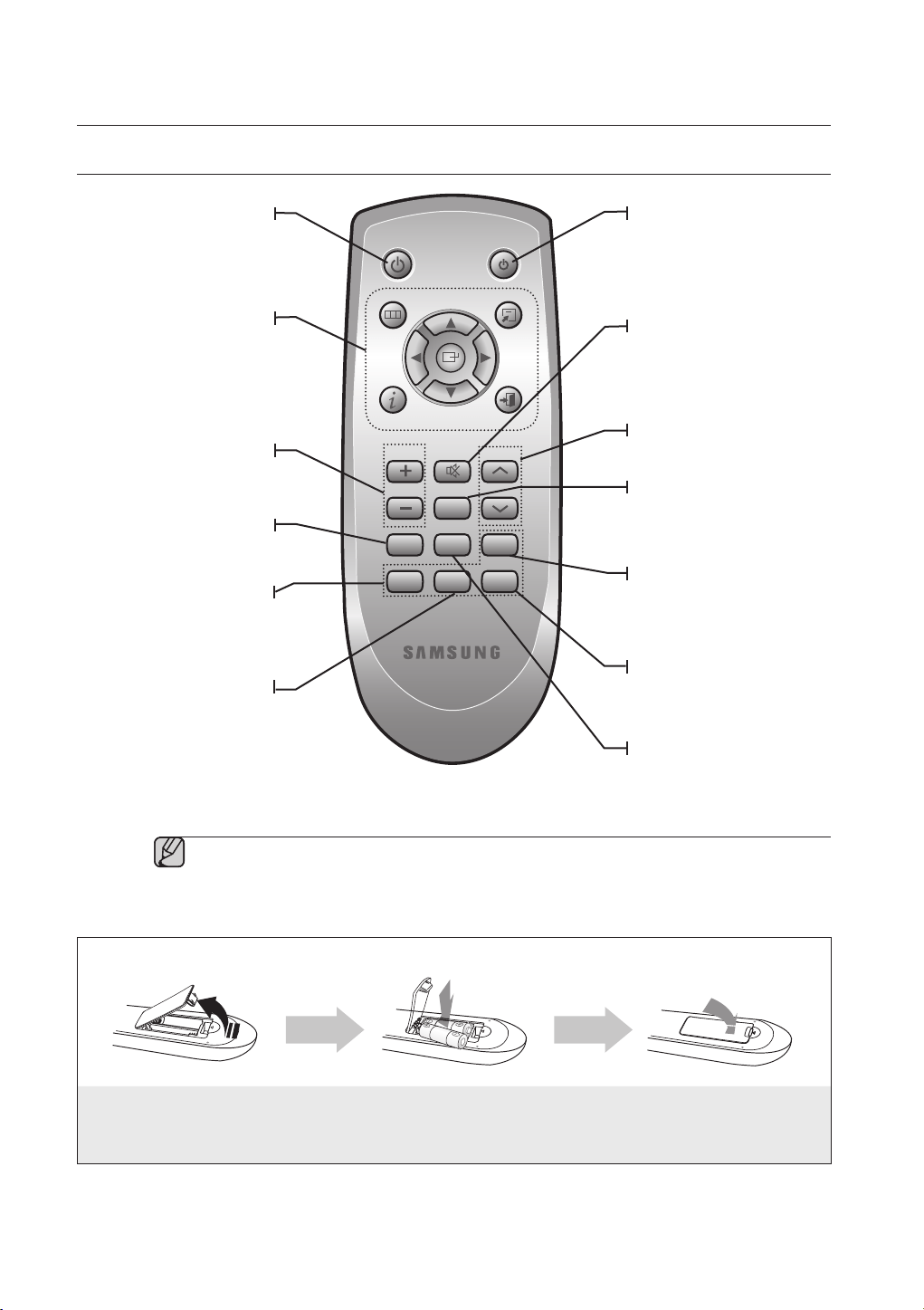
TOUR OF THE REMOTE CONTROL
The remote control can operate TVs made by SAMSUNG only.
Depending on the TV you are using, you may not be able to operate your TV with this
remote control. In this case, operate the TV using the TV's remote control.
▪
▪
Installing batteries in the Remote Control
1.
Lift the cover at the back of
the remote control upward as
shown.
2.
Install two AAA size batteries.
Make sure to match the “+” and “–” ends
of the batteries with the diagram inside the
compartment.
3.
Replace the cover.
Assuming typical TV usage,
the batteries last for about
one year.
Operation Range of the Remote Control
The remote control can be used up to approximately 23 feet (7 meters) in a straight line. It can also be operated at a
horizontal angle of up to 30° from the remote control sensor.
POWER BUTTON
Turns the Crystal Surround
Air Track on and off.
ADJUST THE TV
NAVIGATION MENU
Adjusts and selects an item
of the navigation menu on
your Samsung TV.
VOL/CONTROL
Adjusts the volume level of
the unit.
O/A INPUT
Selects the
Digital (
Optical)
or the Audio input.
SMART VOLUME
Regulate and stabilize the
volume level against a
drastic volume change.
TV POWER BUTTON
Turns your Samsung TV on
and off.
SOUND MODE
Selects the sound field mode.
(NEWS, DRAMA, SPORTS,
GAME, CINEMA, MUSIC and
PASS(Original Sound))
TV CHANNEL
Switches between the
available TV channels.
MUTE
Mutes the sound from the unit.
Press again to restore the
sound to the previous volume
level.
AUTO POWER LINK
Synchronizes to turn the
unit on with the optical
signal from the TV.
POWER TV POWER
VOL/CONTROL TV CH
AV SYNC
DRC
MUTE
S.VOL
O/A
INPUT
S/W
LEVEL
AUTO
POWER
MENU
EXIT
TOOLS
INFO
SOUND
MODE
DIMMER
S/W LEVEL
Adjusts the Subwoofer
level.
DRC/DIMMER
You can use this function to
enjoy Dolby Digital sound
when watching movies at
low volume at night
(Standard, MAX, MIN).
You can control the
brightness of the Display.
AV SYNC
Used to help sync video to
audio when connected to a
digital TV.
11
ENG
● CONNECTIONS
INSTALLING THE WALL MOUNT
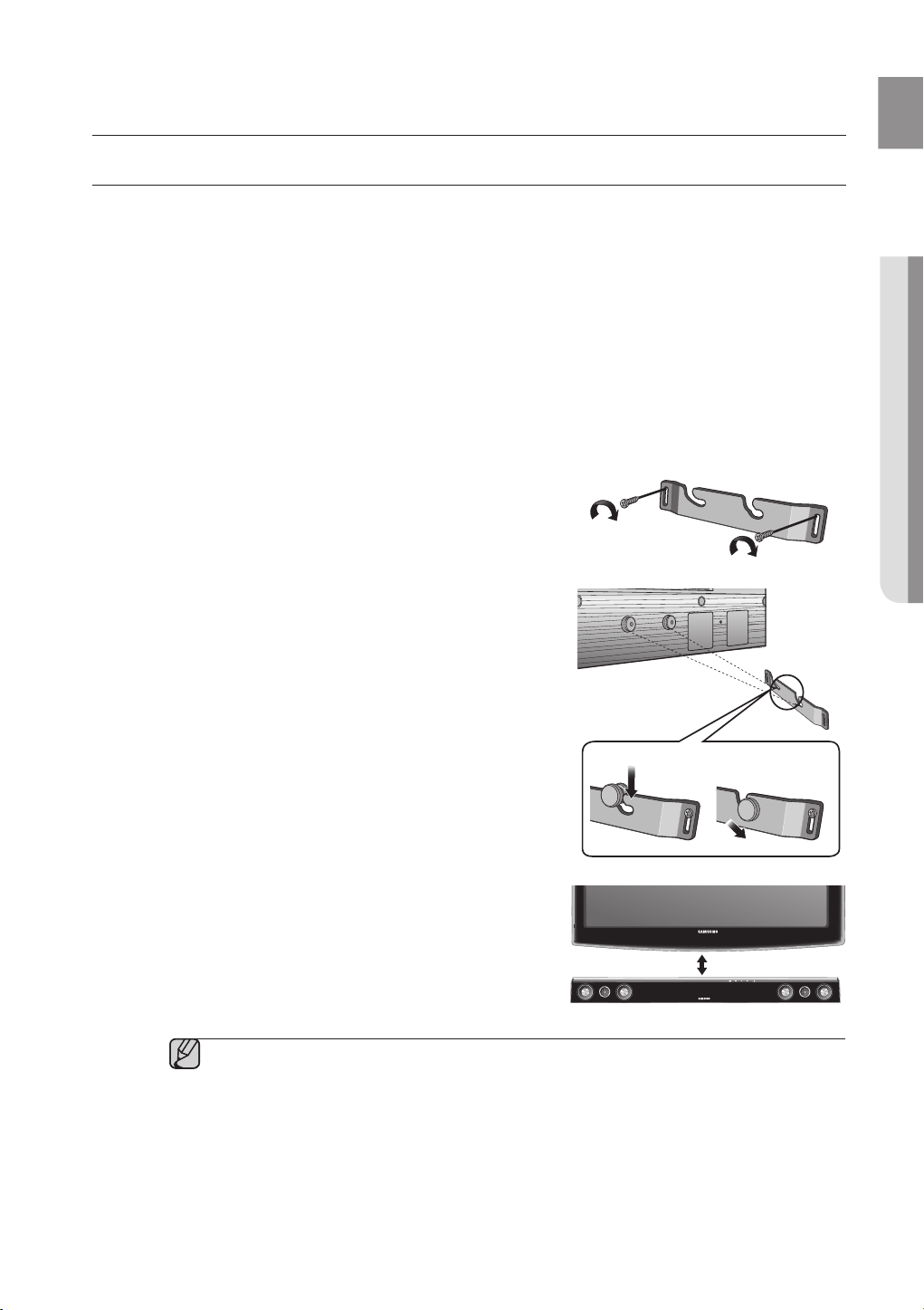
You can use the wall mount bracket to mount this unit on a wall.
Do not hang onto the installed unit and avoid any impact to the unit.
Secure the unit firmly to the wall so that it does not fall off. If the unit falls off, it may result in
an injury or damage to the product.
When the unit is installed on a wall, please make sure that a child does not pull any of
connecting cables, as it may cause it to fall.
For the optimal performance in a wall mount installation, keep the speaker system at least
2 inches (5 cm) distant from the TV.
▪
▪
▪
▪
2. Then, fit the unit into the corresponding slots of the wall
mount bracket. For secure installation, make sure the
mounting studs slide firmly down into the bottom of the
slots.
1. Place the wall mount bracket on a wall surface
and then
secure it with two screws (not supplied).
3. This is the completion of the suggested wall mount
installation.
connections
Installation Precautions
Do not install on a place other than vertical wall.
For the installation, avoid high temperature or humidity, or wall that cannot sustain the weight of the set.
Check the strength of the wall. If the strength of the wall is insufficient for the product installation, make
sure to reinforce the wall before the installation.
Check the material of the wall. If the wall is made of plaster board, marble, or iron board, purchase and
use the appropriate fixing screws.
Cables connecting to external devices are to be connected to the set before installing.
Be sure to turn off and unplug the unit before installation. Otherwise, it may cause electric shock.
•
•
•
•
•
•
1 2
2 inches (5 cm) or more
12
POWER TV POWER
VOL/CONTROL TV CH
AV SYNC
DRC
MUTE
S.VOL
O/A
INPUT
S/W
LEVEL
AUTO
POWER
MENU
EXIT
TOOLS
INFO
SOUND
MODE
DIMMER
POWER TV POWER
VOL/CONTROL TV CH
AV SYNC
DRC
MUTE
S.VOL
O/A
INPUT
S/W
LEVEL
AUTO
POWER
MENU
EXIT
TOOLS
INFO
SOUND
MODE
DIMMER
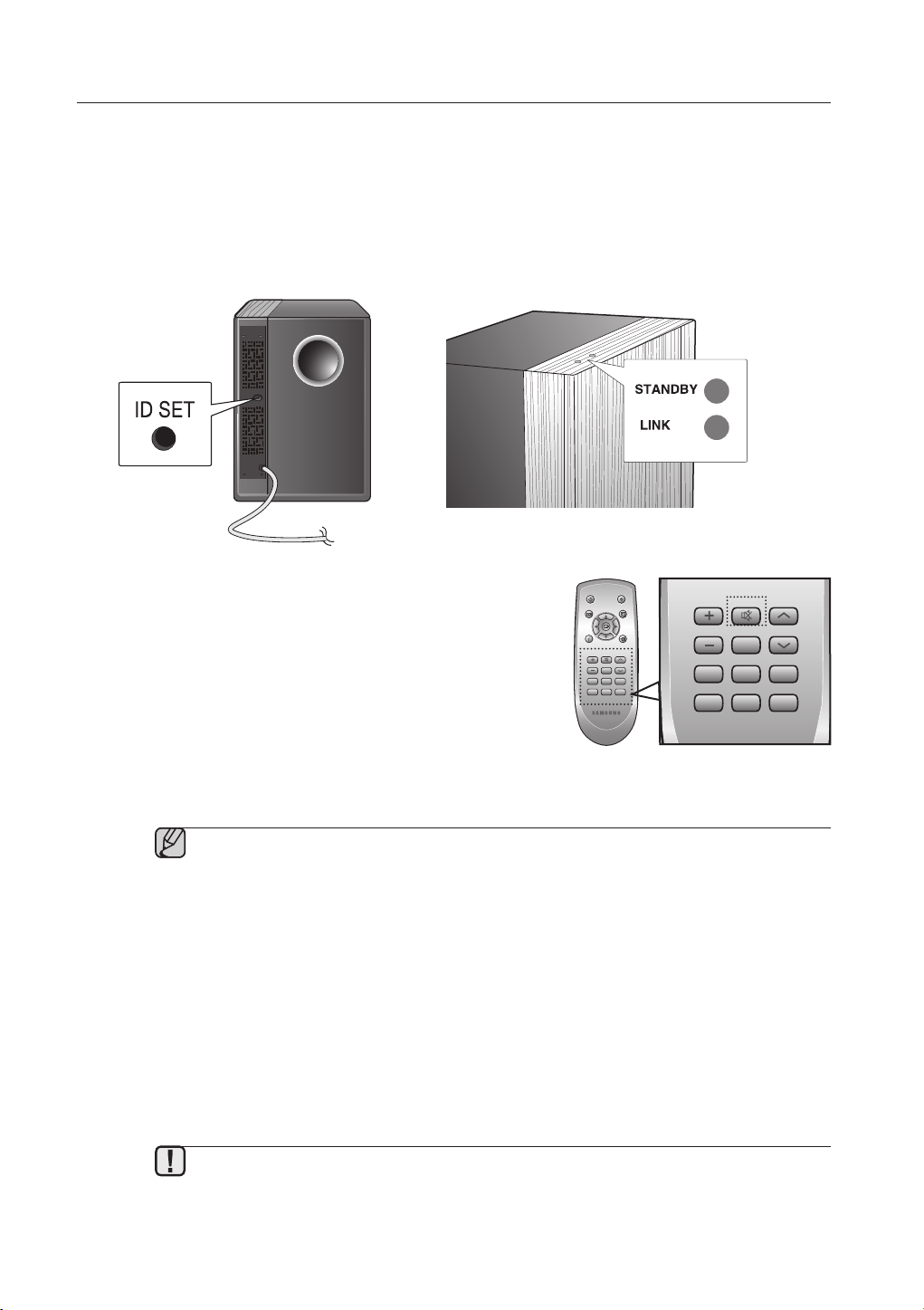
cOnnEcTinG THE WiRElESS SUBWOOFER
The Subwoofer's linking ID is preset at the factory and the main unit and sub should link (connect wirelessly)
automatically when main unit is turned on. If the link indicator does not light when main unit and subwoofer are
turned on, please set the ID by following the process below.
Before moving or installing the product, be sure to turn off the power and disconnect the power
cord.
If the main unit is powered off, the wireless subwoofer will be in the standby mode and the
STANDBY LED on the upper side will come on after 30 seconds Link indicator(Blue LED)
blinking.
If you use a device such as a microwave oven, wireless LAN Card, Bluetooth equipment, or
any other device that uses the same frequency (2.4GHz or 5.8GHz) near the system, some
sound interruption may be heard due to interference.
The transmission distance of the wireless signal between the main unit and sub is about 33 ft.,
but may vary depending on your operating environment. If a steel-concrete or metallic wall is
between the main unit and the wireless subwoofer, the system may not operate at all, because
the wireless signal cannot penetrate metal.
If the main unit doesn't make wireless connection, follow steps 1-4 above to retry the
connection between the main unit and wireless subwoofer.
The wireless receiving antenna is built into the wireless subwoofer. Keep the unit away from
water and moisture.
For optimal listening performance, make sure that the area around the wireless subwoofer
location is clear of any obstructions.
▪
▪
▪
▪
▪
▪
▪
1. Plug the power cords of the main unit and subwoofer into an AC power supply.
2. Press the I
d SeT button on the back of the subwoofer with a small, pointed object for 5 seconds.
The STANDBY indicator is turned off and the LINK indicator (Blue LED) blinks quickly.
•
3. While the main unit is powered off (
STANDBY
mode), press
MUTe on the remote control for 5 seconds.
4
. The Power Indicator on the main unit lights off and on, then
returns to STAN
dby mode.
The main unit and the subwoofer are now linked (connected).
The Link indicator (blue LED) on the subwoofer is turned on.
You can enjoy better sound from the wireless subwoofer by
selecting the sound field mode. ( See page 15 )
•
•
•
13
ENG
● CONNECTIONS
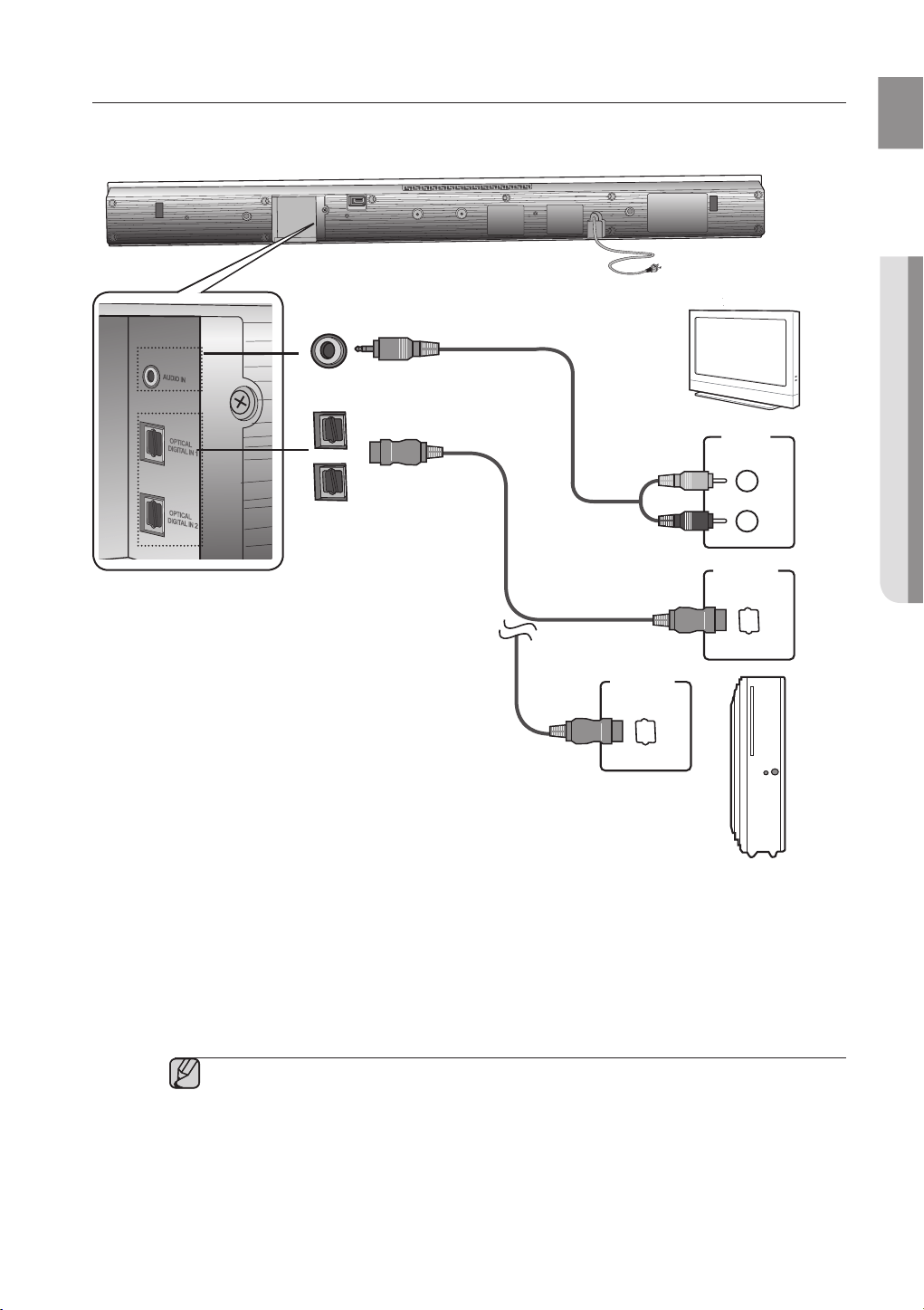
CONNECTING THE CRYSTAL SURROUND AIR TRACK
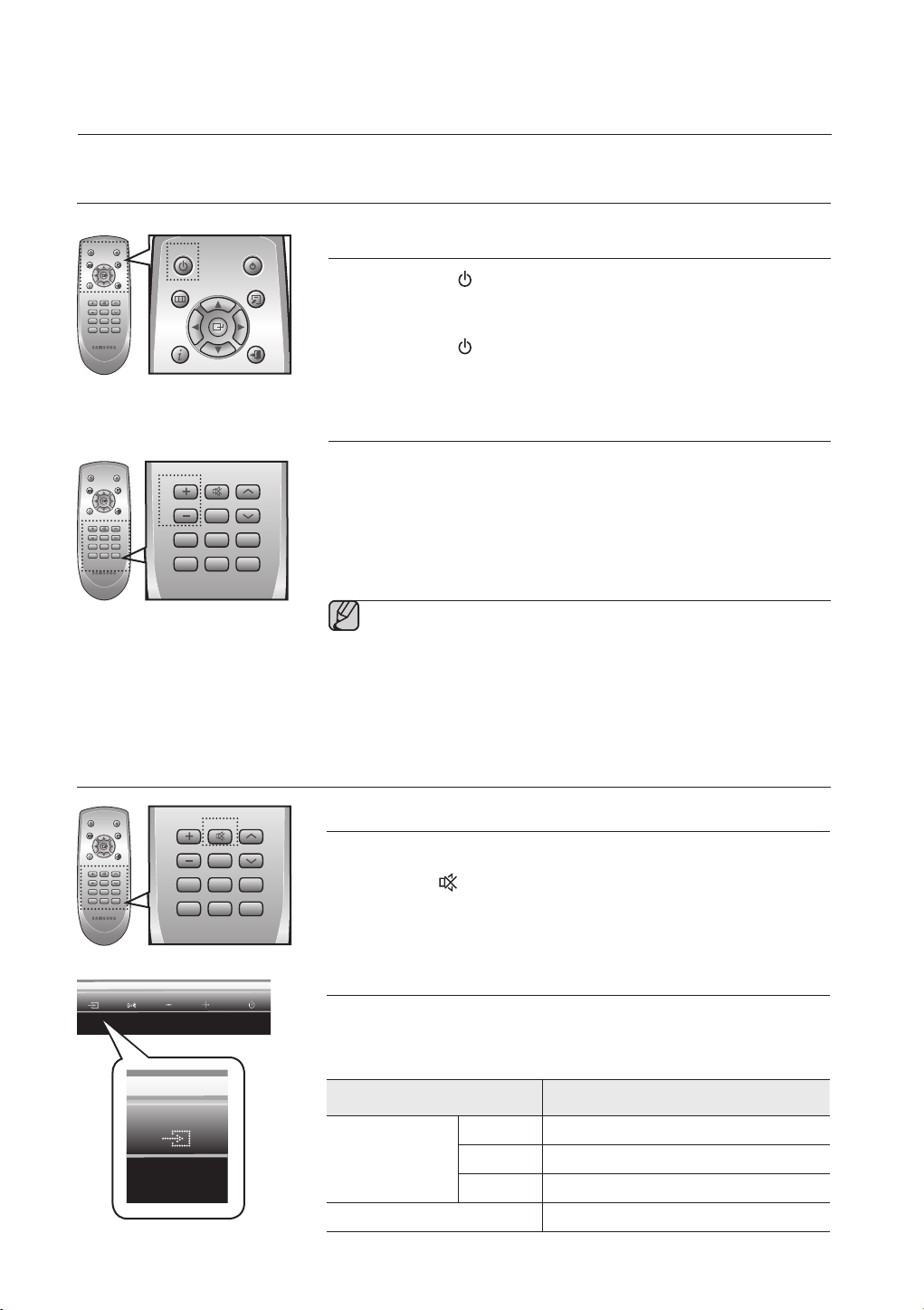
This section explains two ways (digital and analog) of connecting the unit to the TV.
This unit is equipped with two optical digital jacks and one audio analog jack for connecting a TV.
AUDIO IN
Connect AUDIO IN on the main unit to the AUDIO OUT of
the TV
.
Be sure to match connector colors.
OR,
OPTICAL DIGITAL IN 1,2
Connect the Digital Input on the main unit to the OPTICAL OUT of
the TV or Source Device
.
Do not connect the power cord of this product or your TV to the wall outlet until all
connections between components are
complete.
Before moving or installing this product, be sure to turn off the power and disconnect the
power cord.
You can connect this unit to other external components.
(such as DVD player, Set-Top Box etc.)
Only one optical cable is supplied.
If you select 'ANALOG' without connecting the Audio Cable, the set is turned off automatically
after 20 minutes.
▪
▪
▪
▪
▪
ON
LY
FOR UPDA
TE
AUDIO IN
AUDIO
OUT
L
R
OPTICAL
OUT
Red
White
OPTICAL DIGITAL IN 1,2
OPTICAL
OUT
Audio Cable (supplied)
Optical Cable (supplied)
or
Optical Cable (supplied)
or
BD/DVD player/
Set-top box/Game console
14
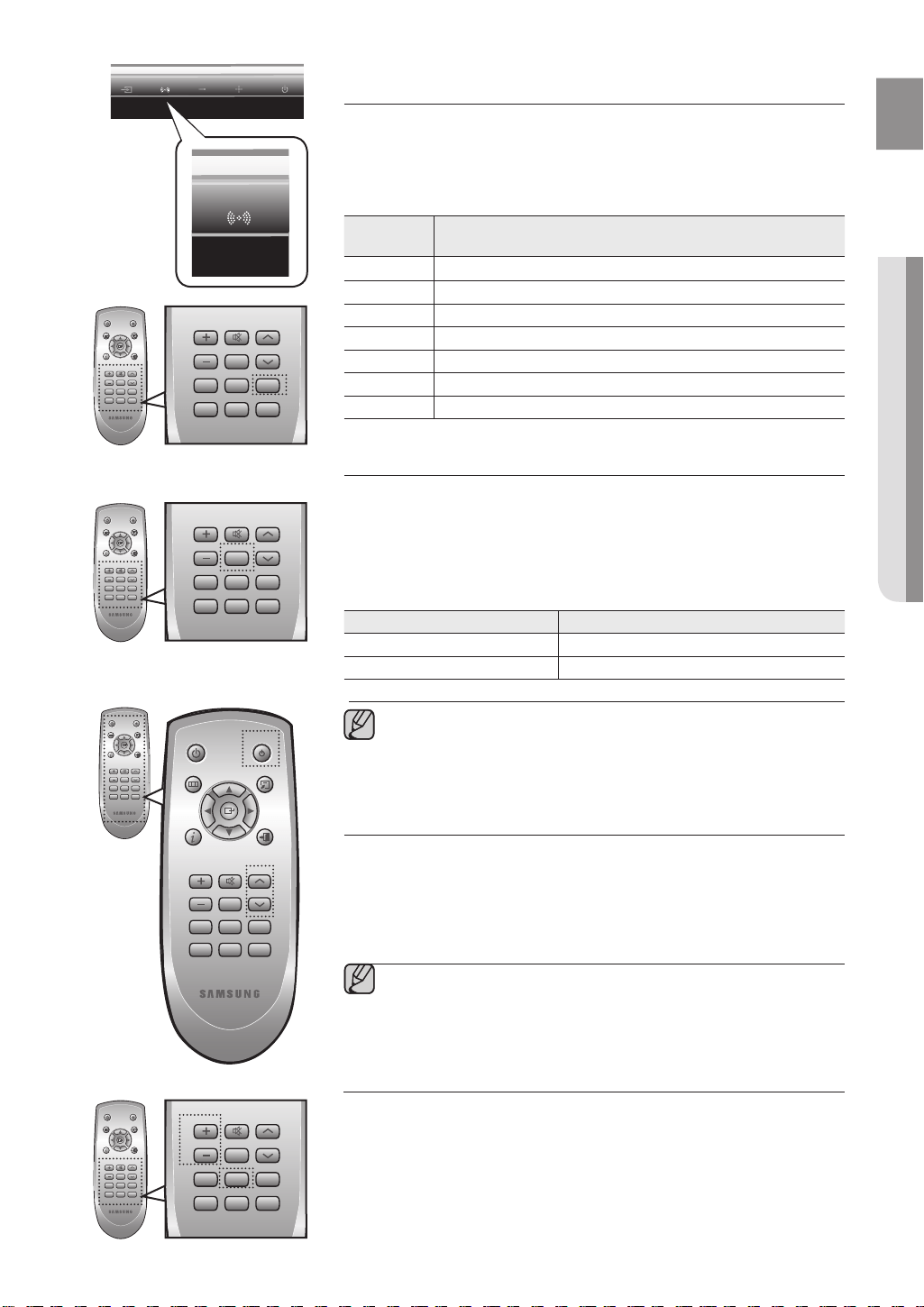
Turning the power on/off
1.
Touch POWER ( ) on the front panel.
OR,
Press POWER on the remote control to turn on the power.
2.
Touch POWER ( ) on the front panel.
OR,
Press POWER on the remote control again to turn off the power.
Adjusting the volume
Touch VOLUME +/– on the front panel.
OR,
Press VOLUME +/– on the remote control to increase or decrease the
volume level.
The numeric value of the volume level appears in the front panel display.
The volume level increases or decreases when you press VOLUME +/–.
If you want to enjoy the sound only from the Crystal Surround Air Track,
you must turn off the TV's speakers in the Audio Setup menu of your
TV. Refer to the owner's manual supplied with your TV.
•
▪
▪
functions
Muting the sound
This is useful when answering a doorbell or telephone call.
1.
Press MUTE ( ) on the remote control to mute the sound.
2.
Press MUTE on the remote control again (or press VOLUME +/–) to
restore the sound.
Selecting the input mode
You can select either Optical Digital in or Audio input.
Press O/A INPUT on the remote control or touch INPUT MODE on the
front panel repeatedly to select the Optical Digital in or Audio input.
Input mode Display
Optical Digital in
PCM
PCM
DOLBY
D.D
DTS
DTS
Audio input
ANALOG
ADVANCED FUNCTIONS
BASIC FUNCTIONS
POWER TV POWER
VOL/CONTROL TV CH
AV SYNC
DRC
MUTE
S.VOL
O/A
INPUT
S/W
LEVEL
AUTO
POWER
MENU
EXIT
TOOLS
INFO
SOUND
MODE
DIMMER
POWER TV POWER
VOL/CONTROL TV CH
AV SYNC
DRC
MUTE
S.VOL
O/A
INPUT
S/W
LEVEL
AUTO
POWER
MENU
EXIT
TOOLS
INFO
SOUND
MODE
DIMMER
POWER TV POWER
VOL/CONTROL TV CH
AV SYNC
DRC
MUTE
S.VOL
O/A
INPUT
S/W
LEVEL
AUTO
POWER
MENU
EXIT
TOOLS
INFO
SOUND
MODE
DIMMER
POWER TV POWER
VOL/CONTROL TV CH
AV SYNC
DRC
MUTE
S.VOL
O/A
INPUT
S/W
LEVEL
AUTO
POWER
MENU
EXIT
TOOLS
INFO
SOUND
MODE
DIMMER
POWER TV POWER
VOL/CONTROL TV CH
AV SYNC
DRC
MUTE
S.VOL
O/A
INPUT
S/W
LEVEL
AUTO
POWER
MENU
EXIT
TOOLS
INFO
SOUND
MODE
DIMMER
POWER TV POWER
VOL/CONTROL TV CH
AV SYNC
DRC
MUTE
S.VOL
O/A
INPUT
S/W
LEVEL
AUTO
POWER
MENU
EXIT
TOOLS
INFO
SOUND
MODE
DIMMER
15
ENG
● FUNCTIONS
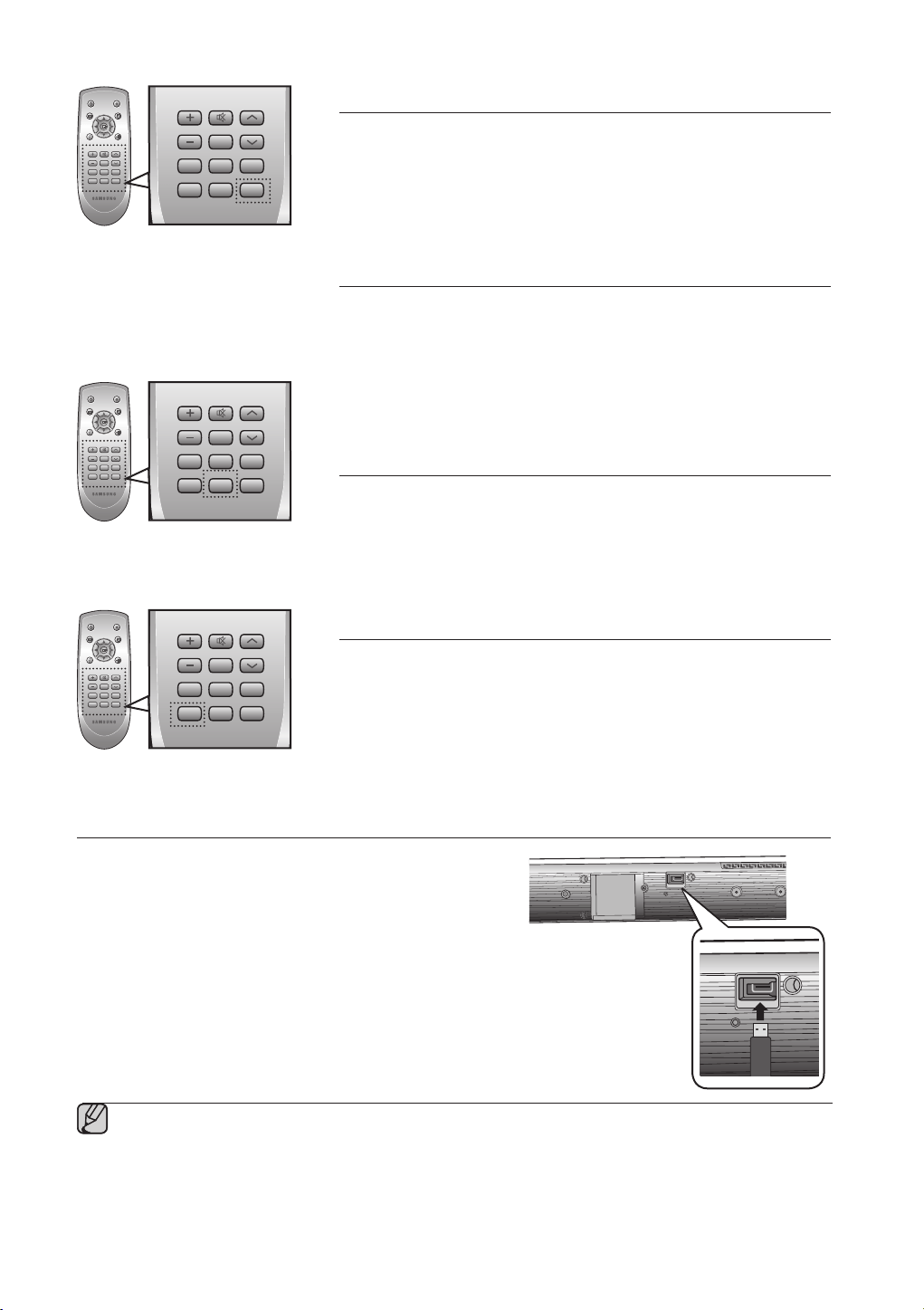
Using the sound field mode
You can select from 7 different sound field modes (NEWS, DRAMA,
SPORTS, GAME, CINEMA, MUSIC and PASS (Original Sound)) depending
on the type of sources you want to enjoy.
Press SOUND MODE on the remote control or touch SOUND FIELD
MODE on the front panel repeatedly to select the sound field mode you want.
Sound field
mode
Function
PASS
Select PASS mode if you want to enjoy the original sound.
M
USIC
Select MUSIC mode when you play music sources.
NE
WS
Select NEWS mode when you play news sources.
DRAMA
Select DRAMA mode when you play drama sources.
C
INEMA
Select CINEMA mode when you play movie sources.
SPORTS
Select SPORTS mode when you play sports sources.
GAME
Select GAME mode when you play game sources.
Using the AUTO POWER LINK function
The Crystal Surround Air Track is automatically turned on when you turn the
power on of a TV or any device connected to the Air Track with the optical cable.
Press AUTO POWER on the remote control of this unit.
Auto power link function turns on and off each time you press AUTO
PO
WER.
AUTO POWER LINK Display
ON
POWER LINK ON
OF
F
POWER LINK OFF
If a TV or any device connected to Air Track with the optical
cable is off and there is no digital input, the Air Track is turned
off after 20 minutes.
Using the TV functions
1.
Press TV POWER on the remote control of this unit.
2.
Press TV CH on the remote control to select the TV channel.
3.
Select one of the sound field mode buttons on the remote control to select
the desired sound field mode.
The remote control can operate TVs made by SAMSUNG only.
•
▪
▪
Using the S/W LEVEL function
You can control the base volume with S/W Level key in the Remote control.
1.
Press the S/W Level button on the Remote control.
2.
“SW 00” is appeared on the Display.
3.
Press “+” on the VOL/CONTROL key if you want to increase the
subwoofer volume. You can set it from SW+01 to SW+06.
4.
Press “-” on the VOL/CONTROL key if you want to decrease the
subwoofer volume. You can set it from SW-01 to SW-06.
POWER TV POWER
VOL/CONTROL TV CH
AV SYNC
DRC
MUTE
S.VOL
O/A
INPUT
S/W
LEVEL
AUTO
POWER
MENU
EXIT
TOOLS
INFO
SOUND
MODE
DIMMER
POWER TV POWER
VOL/CONTROL TV CH
AV SYNC
DRC
MUTE
S.VOL
O/A
INPUT
S/W
LEVEL
AUTO
POWER
MENU
EXIT
TOOLS
INFO
SOUND
MODE
DIMMER
POWER TV POWER
VOL/CONTROL TV CH
AV SYNC
DRC
MUTE
S.VOL
O/A
INPUT
S/W
LEVEL
AUTO
POWER
MENU
EXIT
TOOLS
INFO
SOUND
MODE
DIMMER
POWER TV POWER
VOL/CONTROL TV CH
AV SYNC
DRC
MUTE
S.VOL
O/A
INPUT
S/W
LEVEL
AUTO
POWER
MENU
EXIT
TOOLS
INFO
SOUND
MODE
DIMMER
POWER TV POWER
VOL/CONTROL TV CH
AV SYNC
DRC
MUTE
S.VOL
O/A
INPUT
S/W
LEVEL
AUTO
POWER
MENU
EXIT
TOOLS
INFO
SOUND
MODE
DIMMER
POWER TV POWER
VOL/CONTROL TV CH
AV SYNC
DRC
MUTE
S.VOL
O/A
INPUT
S/W
LEVEL
AUTO
POWER
MENU
EXIT
TOOLS
INFO
SOUND
MODE
DIMMER
POWER TV POWER
VOL/CONTROL TV CH
AV SYNC
DRC
MUTE
S.VOL
O/A
INPUT
S/W
LEVEL
AUTO
POWER
MENU
EXIT
TOOLS
INFO
SOUND
MODE
DIMMER
POWER TV POWER
VOL/CONTROL TV CH
AV SYNC
DRC
MUTE
S.VOL
O/A
INPUT
S/W
LEVEL
AUTO
POWER
MENU
EXIT
TOOLS
INFO
SOUND
MODE
DIMMER
16
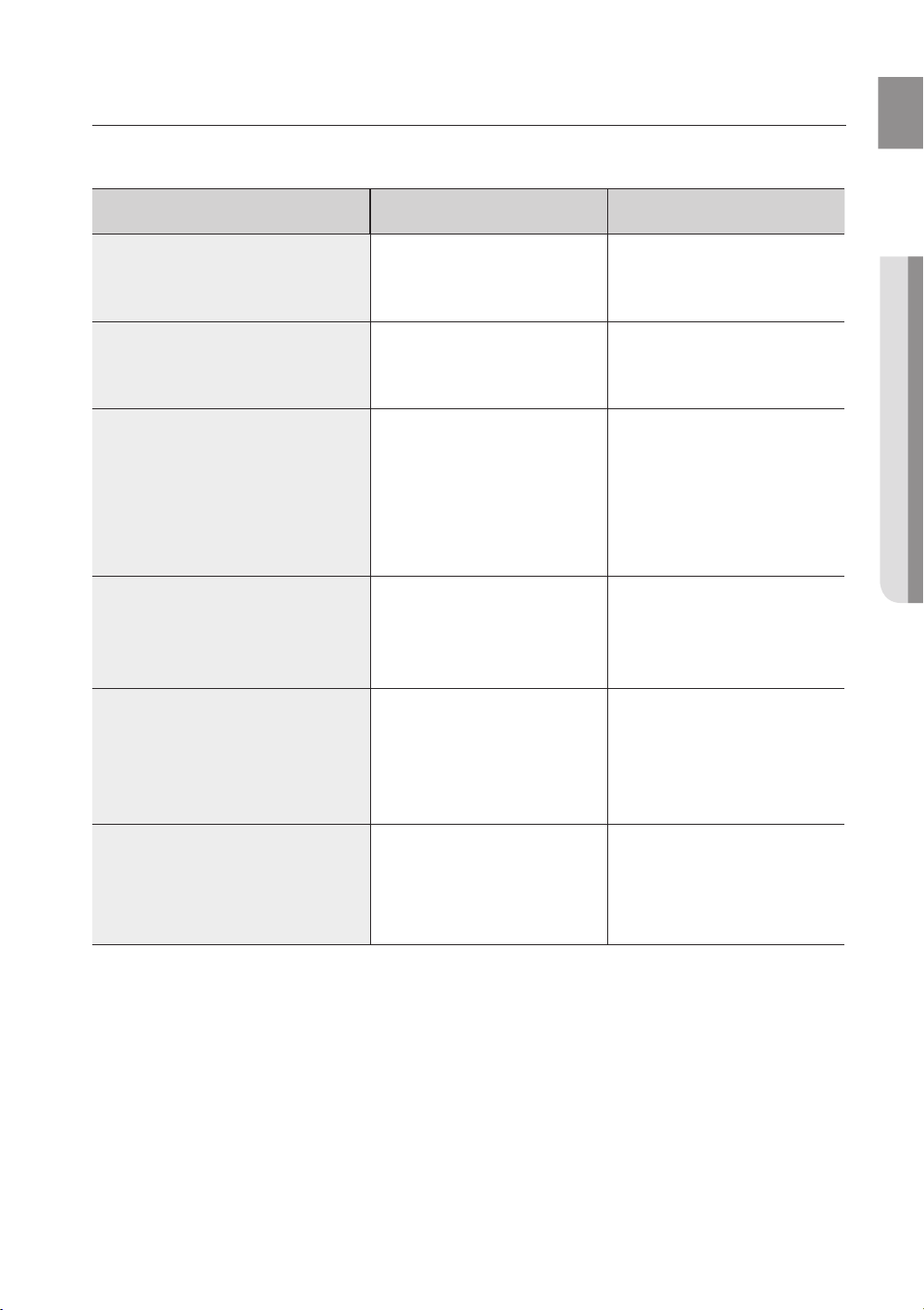
Using the AV SYNC function
Video may look slower than the audio if it is connected with digital TV.
If this occurs, adjust the audio delay time to match the video.
Press AV SYNC on the remote control of this unit repeatedly .
You can use + , - button to set the audio delay time between 0 ms and
300 ms.
Using the DRC function
This feature balances the range between the loudest and quietest sounds.
You can use this function to enjoy Dolby Digital sound when watching
movies at low volume at night.
Press DRC on the remote control of this unit.
Each time the button is pressed, the selection changes as follows :
DRC MIN ➡ DRC STANDARD ➡ DRC MAX
Using the DIMMER function
Press Dimmer to control the brightness of the Display.
If you press and hold the DRC(DIMMER) button for over 4seconds, the
Display is dimmed and the message "DIMMER LEVEL 1" is appears on
the Display. If the button is pressed and held again, the Display is
brightened and the message "DIMMER LEVEL 2" appears on the Display.
Using the S.VOL function
This will regulate and stabilize the volume level against a drastic volume
change in case of a channel change or scene transition.
Press S.VOL on the remote control of this unit.
Each time the button is pressed, the selection changes as follows :
S.VOL ON ➡ S.VOL OFF
•
•
•
POWER TV POWER
VOL/CONTROL TV CH
AV SYNC
DRC
MUTE
S.VOL
O/A
INPUT
S/W
LEVEL
AUTO
POWER
MENU
EXIT
TOOLS
INFO
SOUND
MODE
DIMMER
POWER TV POWER
VOL/CONTROL TV CH
AV SYNC
DRC
MUTE
S.VOL
O/A
INPUT
S/W
LEVEL
AUTO
POWER
MENU
EXIT
TOOLS
INFO
SOUND
MODE
DIMMER
POWER TV POWER
VOL/CONTROL TV CH
AV SYNC
DRC
MUTE
S.VOL
O/A
INPUT
S/W
LEVEL
AUTO
POWER
MENU
EXIT
TOOLS
INFO
SOUND
MODE
DIMMER
POWER TV POWER
VOL/CONTROL TV CH
AV SYNC
DRC
MUTE
S.VOL
O/A
INPUT
S/W
LEVEL
AUTO
POWER
MENU
EXIT
TOOLS
INFO
SOUND
MODE
DIMMER
POWER TV POWER
VOL/CONTROL TV CH
AV SYNC
DRC
MUTE
S.VOL
O/A
INPUT
S/W
LEVEL
AUTO
POWER
MENU
EXIT
TOOLS
INFO
SOUND
MODE
DIMMER
POWER TV POWER
VOL/CONTROL TV CH
AV SYNC
DRC
MUTE
S.VOL
O/A
INPUT
S/W
LEVEL
AUTO
POWER
MENU
EXIT
TOOLS
INFO
SOUND
MODE
DIMMER
SOFTWARE UPGRADE
Samsung may offer upgrades for the Crystal Surround
Air Track's system's firmware in the future.
Please visit Samsung.com or contact the Samsung call center at
1-800-SAMSUNG (726-7864) to receive information about
downloading upgrades and using a USB drive.
Upgrades will be possible by connecting a USB drive to the
USB port located on your Air Track.
Insert a USB drive containing the firmware upgrade into the USB port on the back of the main unit.
Please be careful to not disconnect the power or remove the USB drive while upgrades are being applied. The
main unit will turn off automatically after completing the fi rmware upgrade.
When software is upgraded, settings you have made will return to their default (factory) settings. We recommend
you write down your settings so that you can easily reset them after the upgrade.
If you fail to upgrade the firnware, we recommend formatting the USB data in FAT16 and trying again.
For upgrading purposes, do not format USB data in NTFS because it is not a supported file system.
Depending on the manufacturer, the USB may not be supported.
▪
▪
▪
▪
▪
ON
LY
FOR UPDA
TE
ONLY
FOR UPDA
TE
17
ENG
● TROUBLESHOOTING
Before requesting service, please check the following.
Symptom Check Remedy
The unit will not turn on.
• Is the power cord plugged
into the outlet?
• Connect the power plug to
the outlet.
A function does not work when
the button is pressed.
• Is there static electricity in
the air?
• Disconnect the power plug
and connect it again.
Sound is not produced.
• Is the unit properly
connected to your TV?
• Is the Mute function on?
• Is the volume set to
minimum?
• Connect it correctly.
• Press the Mute button to
cancel the function.
• Adjust the volume.
Picture does not appear on a TV
when the function is selected.
• Is the TV connected
properly?
• Connect it correctly.
Remote control does not work.
• Are the batteries drained?
• Is the distance between
remote control and main unit
too far?
• Replace with new batteries.
• Operate at a close distance.
The sound from the left/right
channels is reversed.
• Are the left/right audio
output cables from the TV
connected properly?
• Check the left/right channel
and connect it/them
correctly.
troubleshooting
18
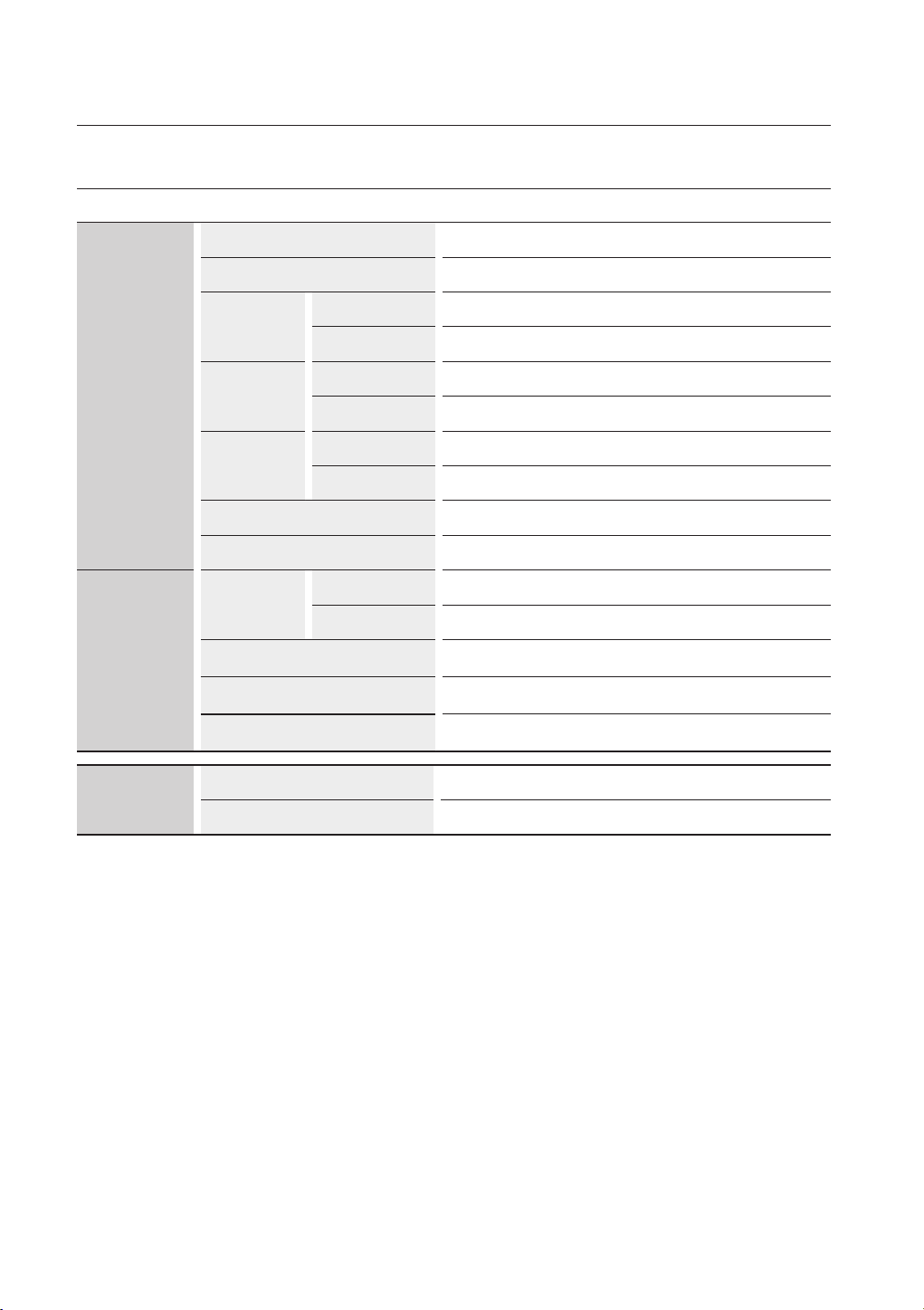
SPECIFICATIONS
GENERAL
Power supply
AC 120V, 60Hz
Standby power consumption
0.75W
Power
consumption
Main unit
45W
Subwoofer 20W
Weight
Main unit
5.01 Ibs
Subwoofer 12.01Ibs
Dimensions
(W x H x D)
Main unit
37.66 x 3.62 x 1.77 inches
Subwoofer 6.89 x 13.78 x 11.61 inches
Operating temperature range
+41°F to +95°F
Operating humidity range
10 % to 75 %
AMPLIFIER
Rated output
power
Main unit
80W/CH, 4
Ω,
THD = 10%, 1kHz
Subwoofer 120W, 4
Ω,
THD = 10%, 100Hz
Input sensitivity/
Impedance 450mV/20K
Ω
S/N ratio (analog
input)
70dB
Separation(1kHz) 70dB
FREQUENCY
RESPONSE
Analog input
20Hz~20kHz(±3dB)
Digital input/48kHz PCM 20Hz~20kHz(±3dB)
* S/N ratio, distortion, separation and usable sensitivity are based on measurement using AES (Audio Engineering
Society) guidelines.
*: Nominal specification
- Samsung Electronics Co., Ltd reserves the right to change the specifications without notice.
- Weight and dimensions are approximate.
appendix

WARRANTY
LIMITED WARRANTY TO ORIGINAL PURCHASER
This SAMSUNG brand product, as supplied and distributed by Samsung Electronics America, Inc. (SAMSUNG) and delivered new,
in the original carton to the original consumer purchaser, is warranted by SAMSUNG against manufacturing defects in materials and
workmanship for a limited warranty period of:
One (1) Year Parts and Labor*
(*90 Days Parts and Labor for Commercial Use)
This limited warranty begins on the original date of purchase, and is valid only on products purchased and used in the United States. To
receive warranty service, the purchaser must contact SAMSUNG for problem determination and service procedures. Warranty service
can only be performed by a SAMSUNG authorized service center. The original dated bill of sale must be presented upon request as
proof of purchase to SAMSUNG or SAMSUNG's authorized service center. Transportation of the product to and from
the service center is the responsibility of the purchaser.
SAMSUNG will repair or replace this product, at our option and at no charge as stipulated herein, with new or reconditioned parts
or products if found to be defective during the limited warranty period specified above. All replaced parts and products become the
property of SAMSUNG and must be returned to SAMSUNG. Replacement parts and products assume the remaining original warranty,
or ninety (90) days, whichever is longer.
SAMSUNG’s obligations with respect to software products distributed by SAMSUNG under the SAMSUNG brand name are set forth in the
applicable end user license agreement. Non-SAMSUNG hardware and software products, if provided, are on an “AS IS” basis.
Non-SAMSUNG manufacturers, suppliers, publishers, and service providers may provide their own warranties.
This limited warranty covers manufacturing defects in materials and workmanship encountered in normal, and except to the extent
otherwise expressly provided for in this statement, noncommercial use of this product, and shall not apply to the following, including,
but not limited to: damage which occurs in shipment; delivery and installation; applications and uses for which this product was not
intended; altered product or serial numbers; cosmetic damage or exterior finish; accidents, abuse, neglect, fire, water, lightning or other
acts of nature; use of products, equipment, systems, utilities, services, parts, supplies, accessories, applications, installations, repairs,
external wiring or connectors not supplied and authorized by SAMSUNG, or which damage this product or result in service problems;
incorrect electrical line voltage, fluctuations and surges; customer adjustments and failure to follow operating instructions, cleaning,
maintenance and environmental instructions that are covered and prescribed in the instruction book; product removal or reinstallation;
reception problems and distortion related to noise, echo, interference or other signal transmission and delivery problems. SAMSUNG
does not warrant uninterrupted or error-free operation of the product.
THERE ARE NO EXPRESS WARRANTIES OTHER THAN THOSE LISTED AND DESCRIBED ABOVE, AND NO WARRANTIES
WHETHER EXPRESS OR IMPLIED, INCLUDING, BUT NOT LIMITED TO, ANY IMPLIED WARRANTIES OF MERCHANTABILITY
OR FITNESS FOR A PARTICULAR PURPOSE, SHALL APPLY AFTER THE EXPRESS WARRANTY PERIODS STATED ABOVE, AND
NO OTHER EXPRESS WARRANTY OR GUARANTY GIVEN BY ANY PERSON, FIRM OR CORPORATION WITH RESPECT TO THIS
PRODUCT SHALL BE BINDING ON SAMSUNG. SAMSUNG SHALL NOT BE LIABLE FOR LOSS OF REVENUE OR PROFITS, FAILURE
TO REALIZE SAVINGS OR OTHER BENEFITS, OR ANY OTHER SPECIAL, INCIDENTAL OR CONSEQUENTIAL DAMAGES CAUSED
BY THE USE, MISUSE OR INABILITY TO USE THIS PRODUCT, REGARDLESS OF THE LEGAL THEORY ON WHICH THE CLAIM IS
BASED, AND EVEN IF SAMSUNG HAS BEEN ADVISED OF THE POSSIBILITY OF SUCH DAMAGES. NOR SHALL RECOVERY OF
ANY KIND AGAINST SAMSUNG BE GREATER IN AMOUNT THAN THE PURCHASE PRICE OF THE PRODUCT SOLD BY SAMSUNG
AND CAUSING THE ALLEGED DAMAGE. WITHOUT LIMITING THE FOREGOING, PURCHASER ASSUMES ALL RISK AND LIABILITY
FOR LOSS, DAMAGE OR INJURY TO PURCHASER AND PURCHASER’S PROPERTY AND TO OTHERS AND THEIR PROPERTY
ARISING OUT OF THE USE, MISUSE OR INABILITY TO USE THIS PRODUCT SOLD BY SAMSUNG NOT CAUSED DIRECTLY BY
THE NEGLIGENCE OF SAMSUNG. THIS LIMITED WARRANTY SHALL NOT EXTEND TO ANYONE OTHER THAN THE ORIGINAL
PURCHASER OF THIS PRODUCT, IS NONTRANSFERABLE AND STATES YOUR EXCLUSIVE REMEDY.
Some states do not allow limitations on how long an implied warranty lasts, or the exclusion or limitation of incidental or consequential
damages, so the above limitations or exclusions may not apply to you. This warranty gives you specific legal rights, and you may also
have other rights which vary from state to state.
To obtain warranty hardware service, please contact SAMSUNG at:
Samsung Electronics America, Inc.
105 Challenger Road Ridgefield Park, NJ 07660-0511
1-800-SAMSUNG (726-7864) and www.samsung.com/us
Contact SAMSUNG WORLD WIDE
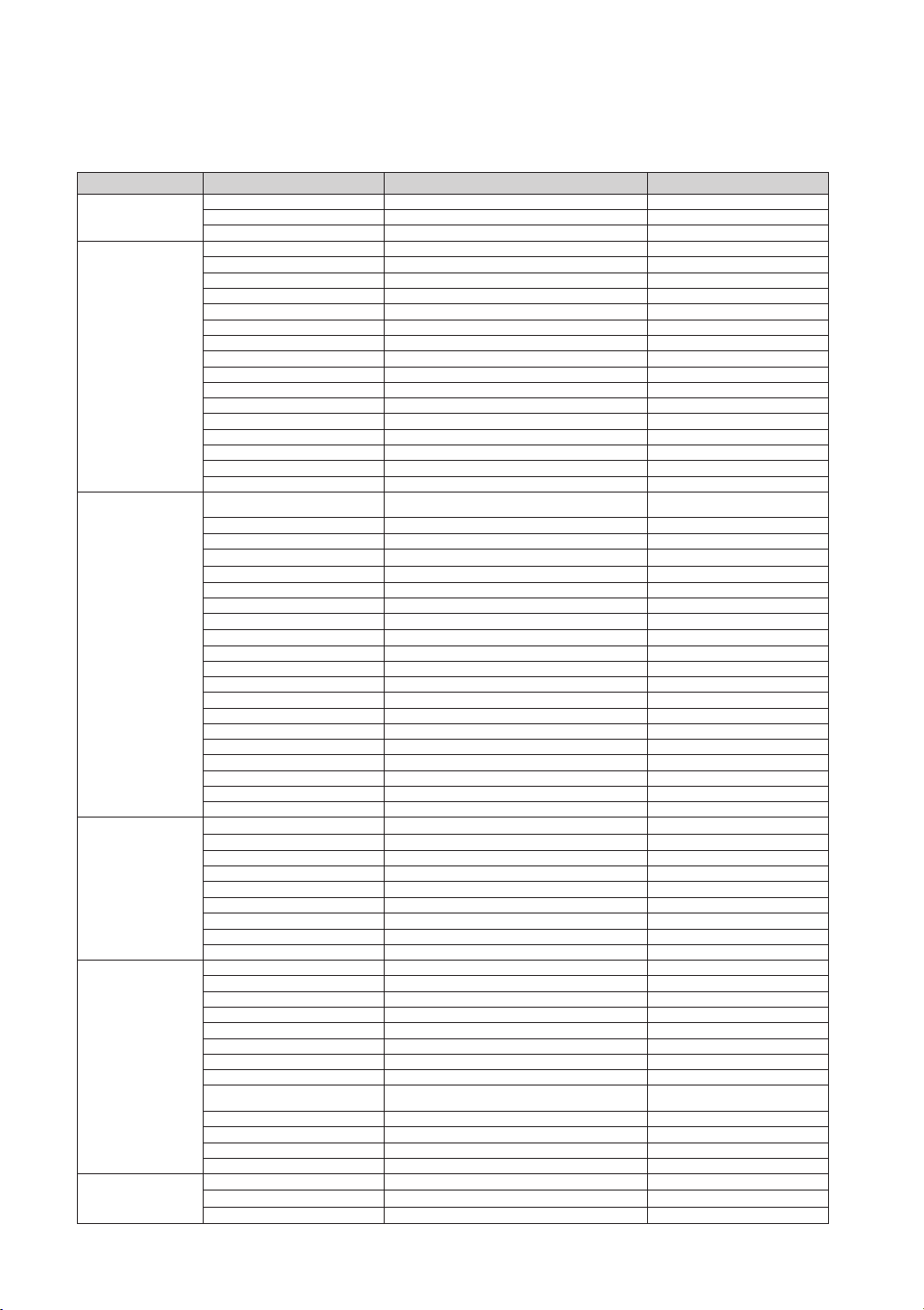
If you have any questions or comments relating to Samsung products, please contact the SAMSUNG
customer care center.
Region Country Customer Care Center Web Site
North America
CANADA
1-800-SAMSUNG(726-7864) www.samsung.com/ca
MEXICO
01-800-SAMSUNG(726-7864) www.samsung.com/mx
U.S.A
1-800-SAMSUNG(726-7864) www.samsung.com/us
Latin America
ARGENTINE
0800-333-3733 www.samsung.com/ar
BRAZIL
0800-124-421, 4004-0000 www.samsung.com/br
CHILE
800-SAMSUNG(726-7864) www.samsung.com/cl
NICARAGUA
00-1800-5077267 www.samsung.com/latin
HONDURAS
800-7919267 www.samsung.com/latin
COSTA RICA
0-800-507-7267 www.samsung.com/latin
ECUADOR
1-800-10-7267 www.samsung.com/latin
EL SALVADOR
800-6225 www.samsung.com/latin
GUATEMALA
1-800-299-0013 www.samsung.com/latin
JAMAICA
1-800-234-7267 www.samsung.com/latin
PANAMA
800-7267 www.samsung.com/latin
PUERTO RICO
1-800-682-3180 www.samsung.com/latin
REP. DOMINICA
1-800-751-2676 www.samsung.com/latin
TRINIDAD & TOBAGO
1-800-SAMSUNG(726-7864) www.samsung.com/latin
VENEZUELA
0-800-100-5303 www.samsung.com/latin
COLOMBIA
01-8000112112 www.samsung.com.co
Europe
BELGIUM
02 201 2418
www.samsung.com/be (Dutch)
www.samsung.com/be_fr (French)
CZECH REPUBLIC
800-SAMSUNG(800-726786) www.samsung.com/cz
DENMARK
8-SAMSUNG(7267864) www.samsung.com/dk
FINLAND
30-6227 515 www.samsung.com/
FRANCE
01 4863 0000 www.samsung.com/fr
GERMANY
01805 - SAMSUNG(726-7864 € 0,14/Min) www.samsung.de
HUNGARY
06-80-SAMSUNG(726-7864) www.samsung.com/hu
ITALIA
800-SAMSUNG(726-7864) www.samsung.com/it
LUXEMBURG
02 261 03 710 www.samsung.com/lu
NETHERLANDS
0900-SAMSUNG (0900-7267864) (€ 0,10/Min)
www.samsung.com/nl
NORWAY
3-SAMSUNG(7267864) www.samsung.com/no
POLAND
0 801 1SAMSUNG(172678), 022-607-93-33
www.samsung.com/pl
PORTUGAL
80820-SAMSUNG(726-7864) www.samsung.com/pt
SLOVAKIA
0800-SAMSUNG(726-7864) www.samsung.com/sk
SPAIN
902-1-SAMSUNG (902 172 678) www.samsung.com/es
SWEDEN
075-SAMSUNG(726 78 64) www.samsung.com/se
U.K
0845 SAMSUNG (7267864) www.samsung.com/uk
EIRE
0818 717 100 www.samsung.com/ie
AUSTRIA
0810-SAMSUNG(7267864, € 0.07/min) www.samsung.com/at
SWITZERLAND
0848-SAMSUNG(7267864, CHF 0.08/min) www.samsung.com/ch
CIS
RUSSIA
8-800-555-55-55 www.samsung.ru
KAZAHSTAN
8-10-800-500-55-500 www.samsung.com/kz_ru
UZBEKISTAN
8-10-800-500-55-500 www.samsung.com/kz_ru
KYRGYZSTAN
00-800-500-55-500
TADJIKISTAN
8-10-800-500-55-500
UKRAINE
8-800-502-0000 www.samsung.ua
LITHUANIA
8-800-77777 www.samsung.com/lt
LATVIA
8000-7267 www.samsung.com/lv
ESTONIA
800-7267 www.samsung.com/ee
Asia Pacic
AUSTRALIA
1300 362 603 www.samsung.com/au
NEW ZEALAND
0800 SAMSUNG (0800 726 786) www.samsung.com/nz
CHINA
800-810-5858, 400-810-5858, 010-6475 1880 www.samsung.com/cn
HONG KONG
3698-4698 www.samsung.com/hk
INDIA
3030 8282, 1800 110011, 1-800-3000-8282 www.samsung.com/in
INDONESIA
0800-112-8888 www.samsung.com/id
JAPAN 0120-327-527 www.samsung.com/jp
MALAYSIA
1800-88-9999 www.samsung.com/my
PHILIPPINES
1-800-10-SAMSUNG(726-7864)
1-800-3-SAMSUNG(726-7864), 02-5805777
www.samsung.com/ph
SINGAPORE
1800-SAMSUNG(726-7864) www.samsung.com/sg
THAILAND
1800-29-3232, 02-689-3232 www.samsung.com/th
TAIWAN
0800-329-999 www.samsung.com/tw
VIETNAM
1 800 588 889 www.samsung.com/vn
Middle East &
Africa
TURKEY
444 77 11 www.samsung.com/tr
SOUTH AFRICA
0860-SAMSUNG(726-7864 ) www.samsung.com/za
U.A.E
800-SAMSUNG (726-7864), 8000-4726 www.samsung.com/ae
QUESTIONS OR COMMENTS?
COUNTRY CALL OR VISIT US ONLINE AT WRITE
IN THE US
1-800-SAMSUNG
(7267864)
www.samsung.com/us
Samsung Electronics America, Inc.
105 Challenger Road Ridgefield Park,
NJ 07660-0511
AH68-02273R