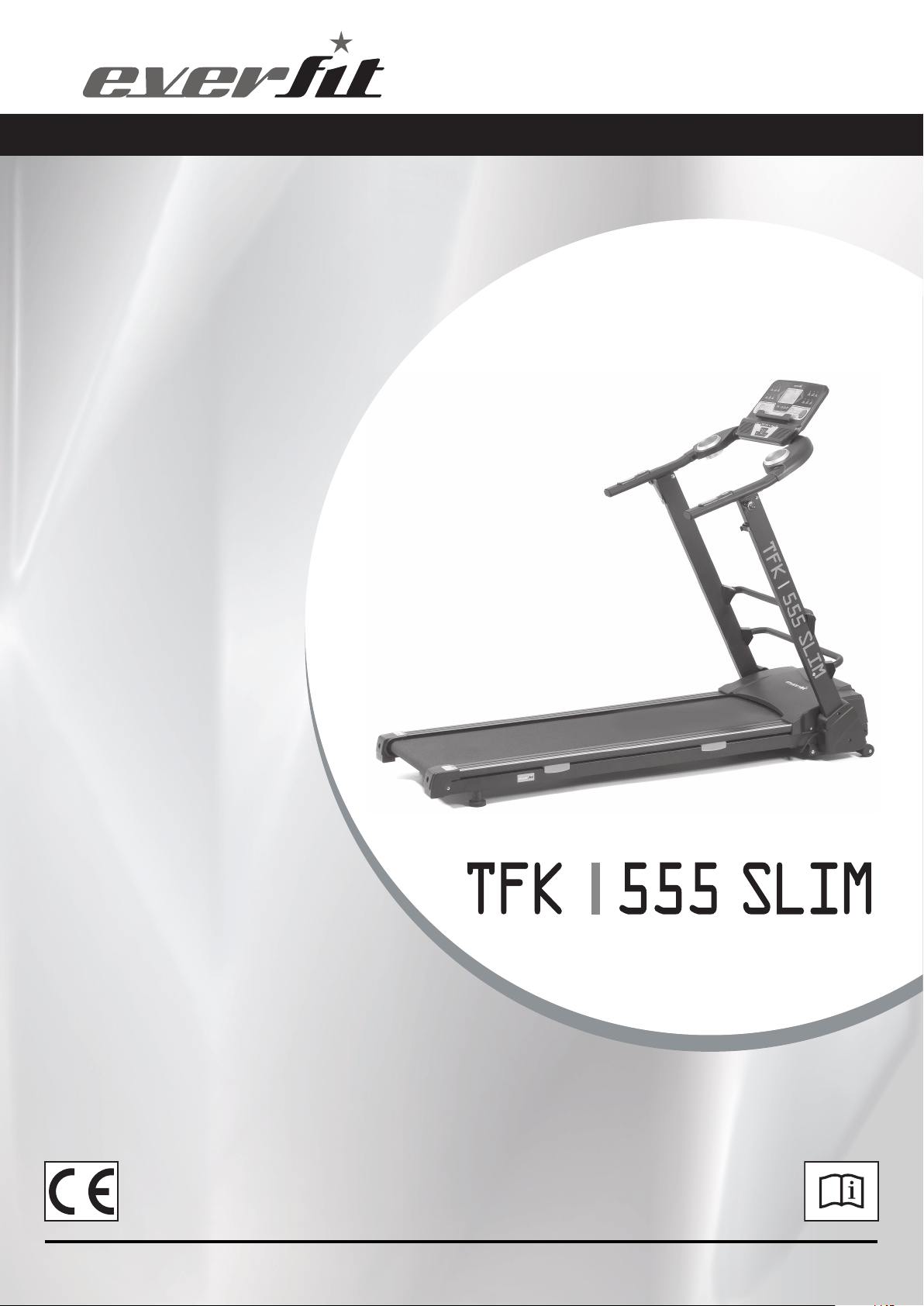
INSTRUCTION
Ed : 03/17 Rev : 00

1
CONTENT
CONTENT
--------------------------------------------------------------------------------------------------------------------------------
1
IMPORTANT SAFETY PRECAUTIONS
----------------------------------------------------------------------------------2-3
TECHINICAL PARAMETERS--------------
-------------------------------------------------------------------------------------3
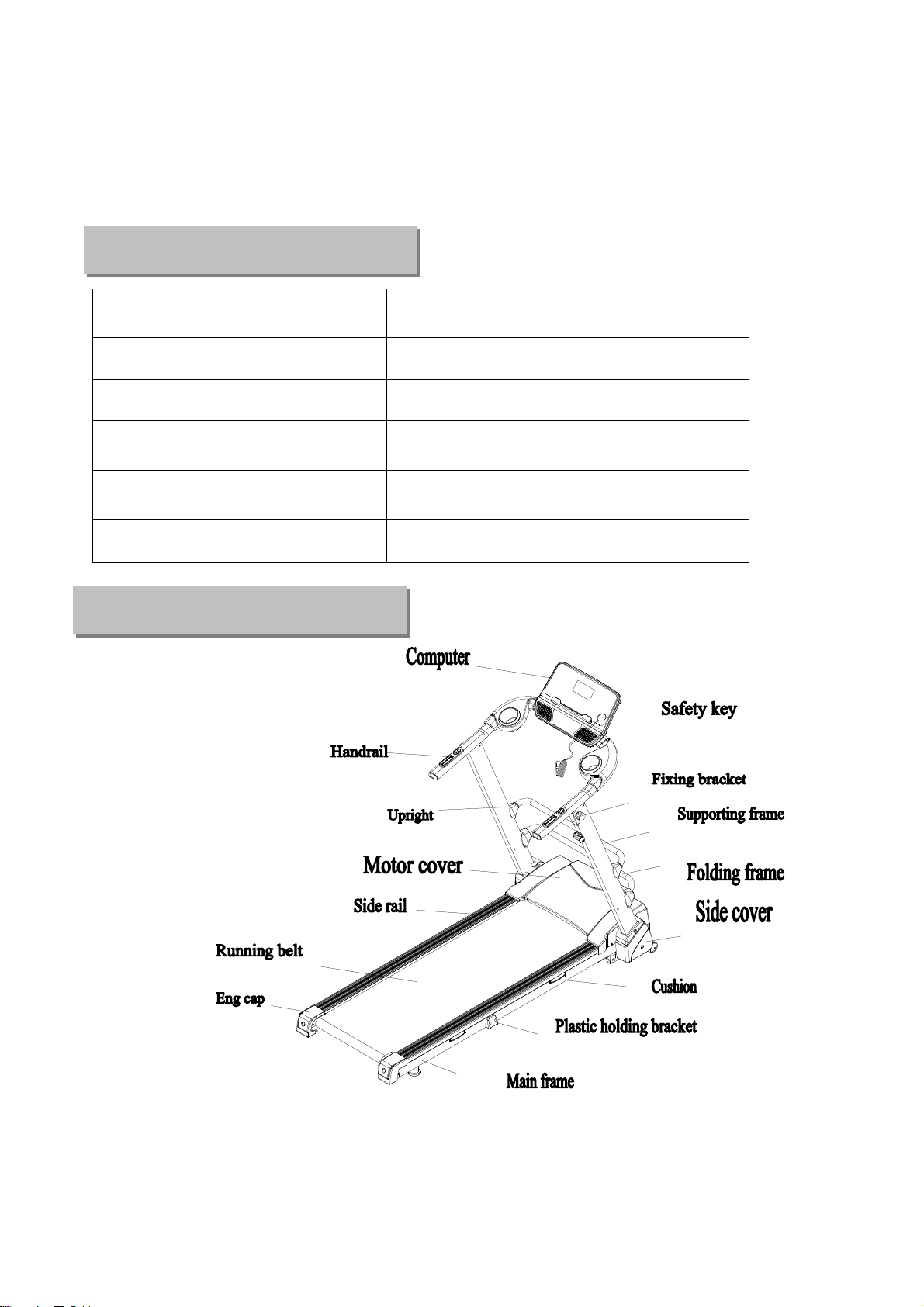
PRODUCT OVERVIEW --------------
---------------------------------------------------------------------------------------------3
ASSEMBLY INSTRUCTIONS
--------------------------------------------------------------------------------------------------4-5
FOLDING & UNFOLDING INSTRUCTIONS
-------------------------------------------------------------------------------6
GROUNDING METHODS
----------------------------------------------------------------------------------------------------------7
OPERATION GUIDE
--------------------------------------------------------------------------------------------------------------8-12
GETTING STARTED GUIDE
-----------------------------------------------------------------------------------------------------13
SAFETY EXERCISES
---------------------------------------------------------------------------------------------------------------14
WARM-UP EXERCISES
------------------------------------------------------------------------------------------------------------15
MAINTENANCE INSTRUCTIONS
---------------------------------------------------------------------------------------------16
BELT ADJUSTMENT
-----------------------------------------------------------------------------------------------------------------17
EXPLODED DRAWING
-------------------------------------------------------------------------------------------------------------18
PARTS LIST
--------------------------------------------------------------------------------------------------------------------------19-20
ERROR CODE AND SIGNIFICANCE
----------------------------------------------------------------------------------------- 21
3
Input supply voltage:220V
Working temperature: 0-40 ℃
Speed range: 0.8-18KM/H Incline range: 12 levels of Motor incline
Max. user weight: 120kg Distance display range: 0.00-99.9km
Calories display range: 000-999
Time display range: 00:00-99:59 (min :
sec)
Heart rate range: 50-200 (time /
min)
Running surface: 450x1350mm
Product size: 1720*740*1455mm Folding size: 1720*740*250mm
Techn
ical Parameters
Product Overview
4
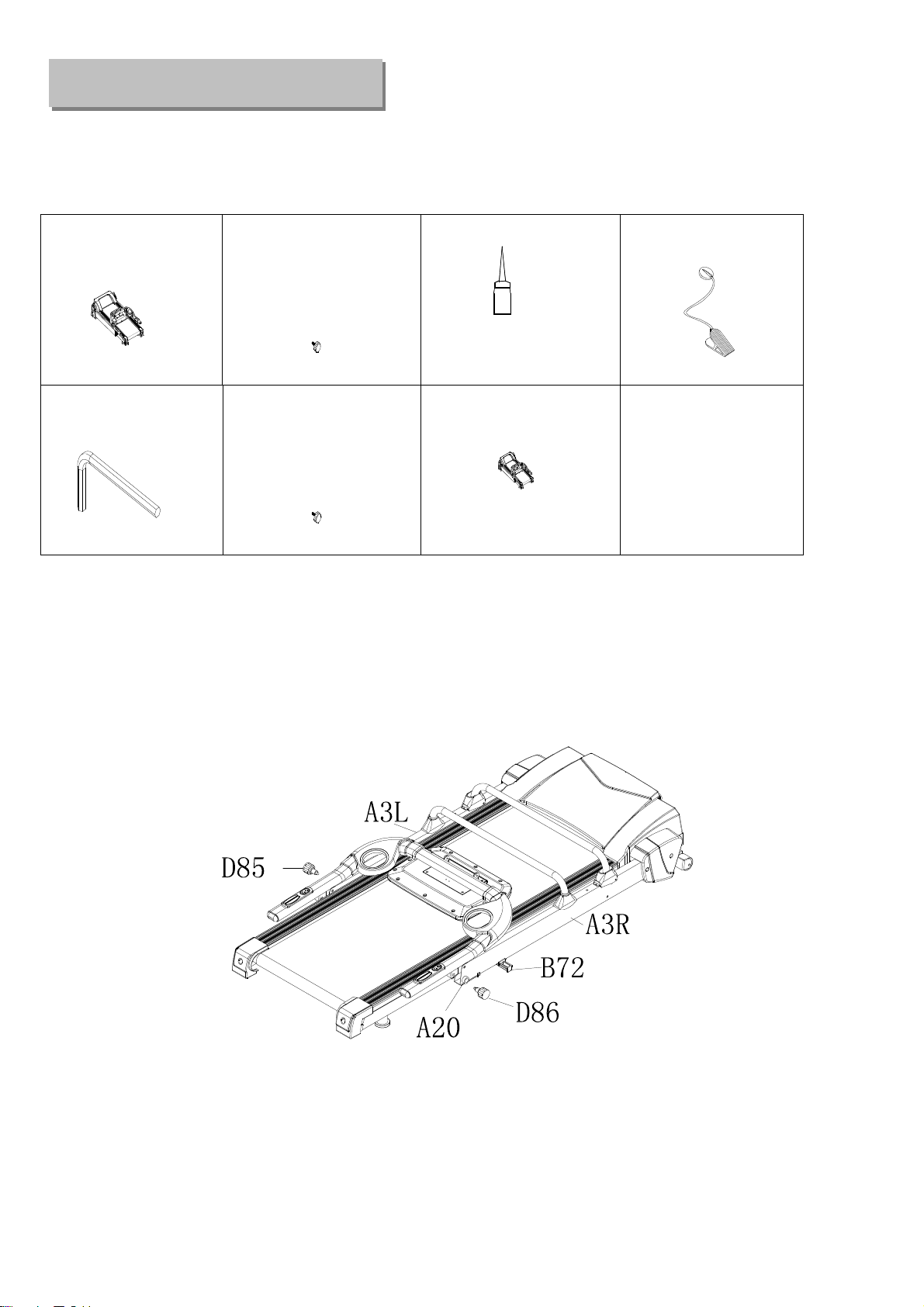
WHEN YOU OPEN THE CARTON, YOU WILL FIND THE BELOW SPARE PARTS:
STEP 1: Take out and prepare the below parts
:
Main frame 1 set
D85 Left knob
M16
(small shape in plastic)
1PC
B18 Silicon oil 1 PCS
C13 Safety key 1 PC
D3 Allen wrench
5MM, 1 PCS
D86 Right knob
M16
(large shape in steel)
1PC
B49 Water bottle 2PCS
Note: Don't tighten bolts at once while assembling in the beginning. Please tighten all the
bolts after placing required parts to the correct position.
STEP 2:
Plug in the left/right knobs M16 (D85/86) onto left/right uprights (A3L/A3R). Then tighten the
left knob M16 (D85), and rotate the right knob M16 (D86) for over a whole round and confirm it’s
tightened
。
Make sure fixing bracket (A20) parallels with right upright (A3R). Pull out the plug (B72)
Assembly
instruction
5
STEP 3: L
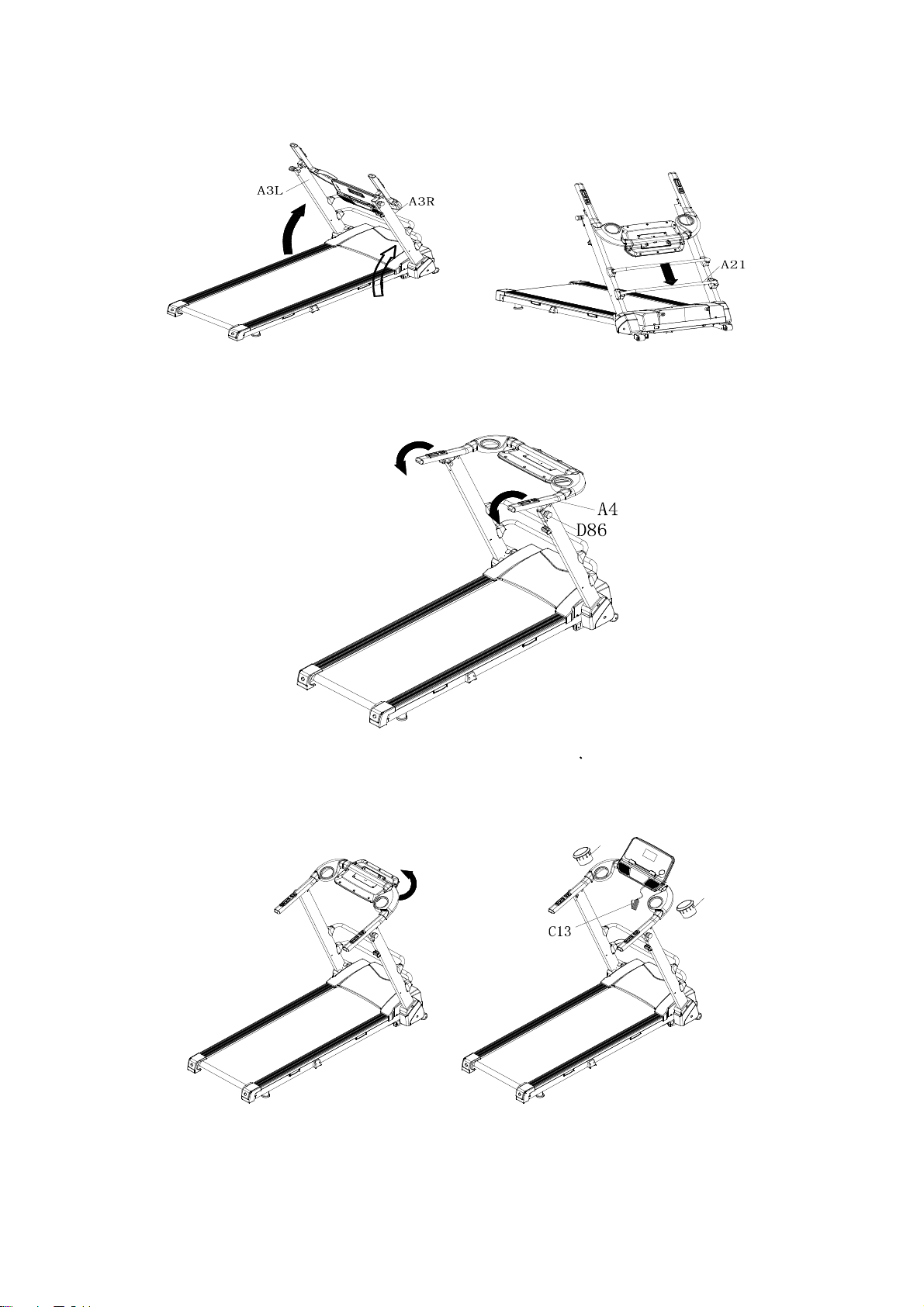
ift up the left/right uprights (A3L/A3R) and Push down the folding frame (A21) to confirm
treadmill is in locking position
。
Step 4: Lift up the console/handrail bracket (A4) and tighten the right knob M16 (D86) again onto
upright and console/handrail bracket (A4)
Step 5: Turn the console to the front and push both handrails down till you hear the “click” sound.
Then place on safety key (C13) and water bottle (B49).
B49
B49
Step 6: To check if the running belt runs correctly, placing treadmill in folding position and tightening
all the bolts. Then set speed under 3km/h and see if running belt runs without problem
6
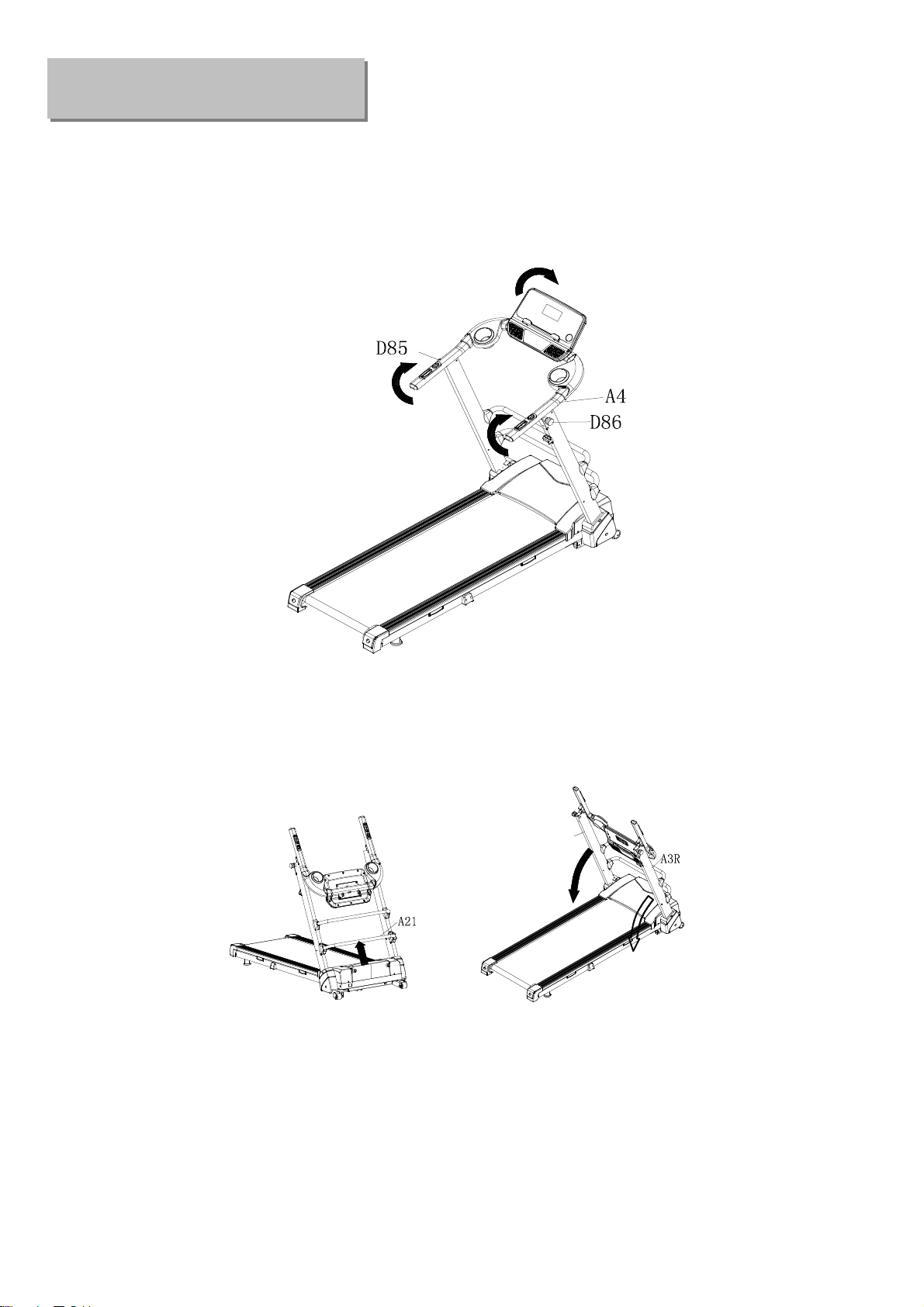
Step 1: Flick back the console, rotate and loose the knob M12 (D86), and pull out the knob M12
(D85) so that the knob M12 (D85) is not in locking position. Then flick back the whole handrail
bracket, and tighten two knobs M12 (D85/86) back in place
。
Step 2: Pull up the folding frame (A21), and push both uprights (A3L/A3R) downward.
A3L
Folding Instruction
7
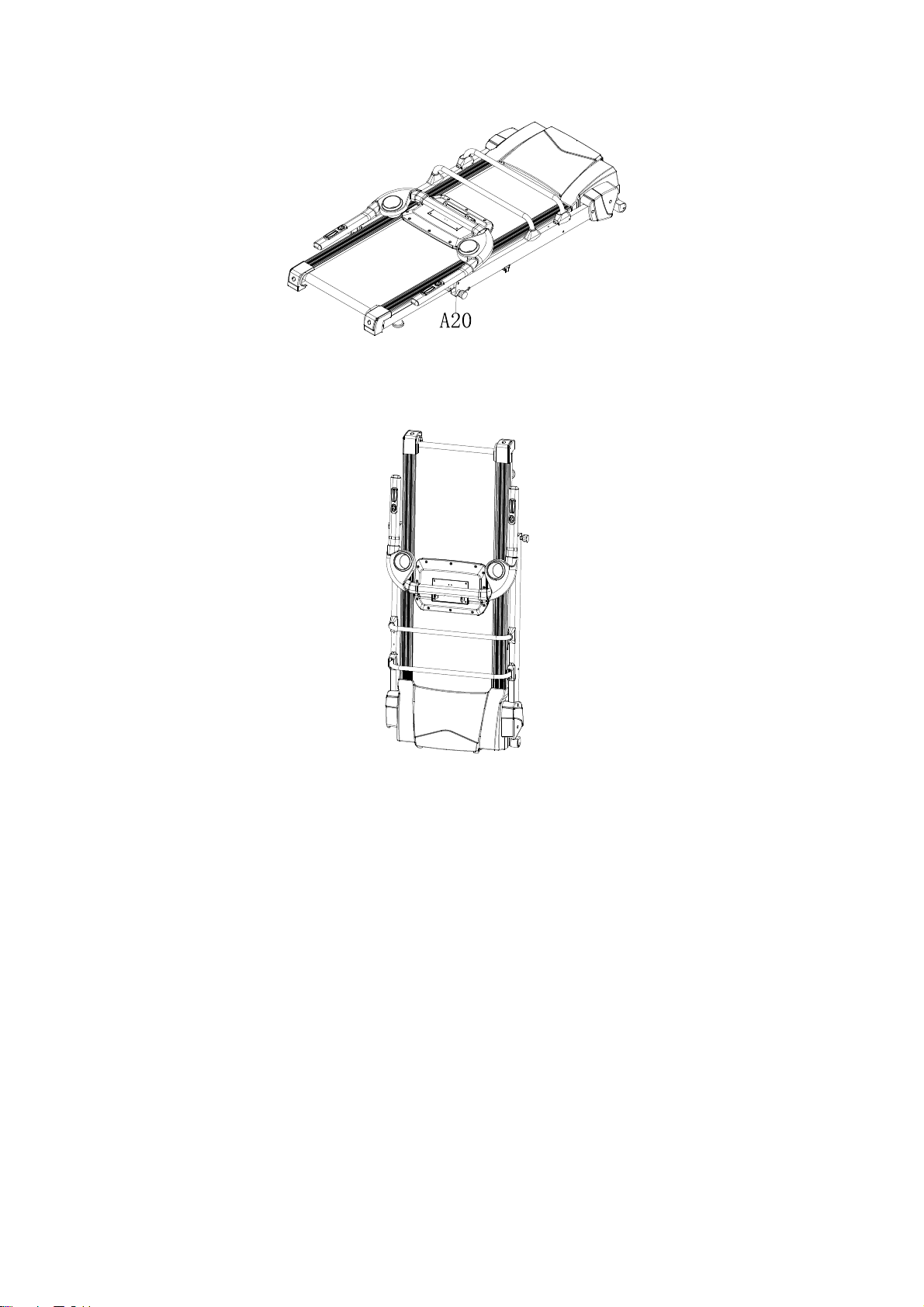
Step 3: Make sure the plug (A20) is tightened to the treadmill before lift up the whole item
。
Step 4: Lift the folding treadmill at flat place.
This product must be grounded. If it should malfunction or breakdown, grounding
provides ath of least resistance for electric current to reduce the risk of electric
shock. This product is equipped with a cord having an equipment-grounding
conductor and a grounding plug. The plug must be plugged into an appropriate
outlet that is properly installed and grounded in accordance with all local codes and
ordinances.
8
DANGER – Improper connection of the equipment-grounding conductor can result in a risk
of electric shock. Check with a qualified electrician or serviceman if you are in doubt as to
whether the product is properly grounded. Do not modify the plug provided with the product
– if it will not fit the outlet, Please find a proper outlet installed by a qualified electrician.
This product is for use on a nominal 240V circuit and has a grounding plug. Make that the product is
connected to an outlet having the same configuration as the plug. No adapter should be used with
this product.
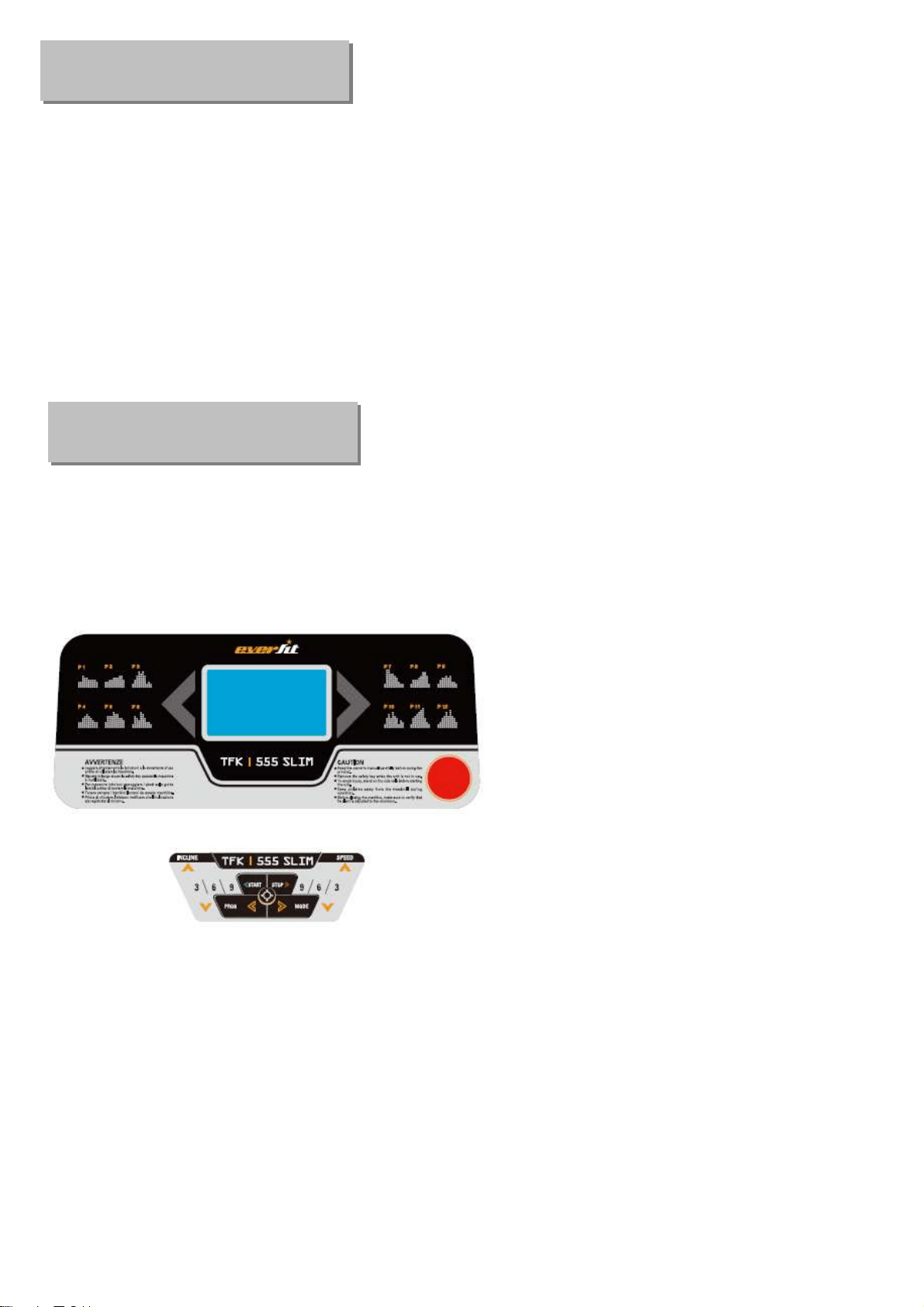
1.1.
WINDOW DISPLAY
1.1. Console
1.2. START
Normal start after 5 seconds countdown.
1.3 PROGRAM
12 pre-set programs, 3 countdown function, 1 body fat program, HRC program with Polar wireless
receiver
。
1.4. SAFETY LOCK FUNCTION
Grounding Methods
Operation Guide

9
The window shows"---" when take away the safety lock and the treadmill will stop quickly with "didi" alarm
noise. And put the safety lock on, the computer will display for 2 seconds and the date countdown to “0”
1.5.BUTTON FUNCTION
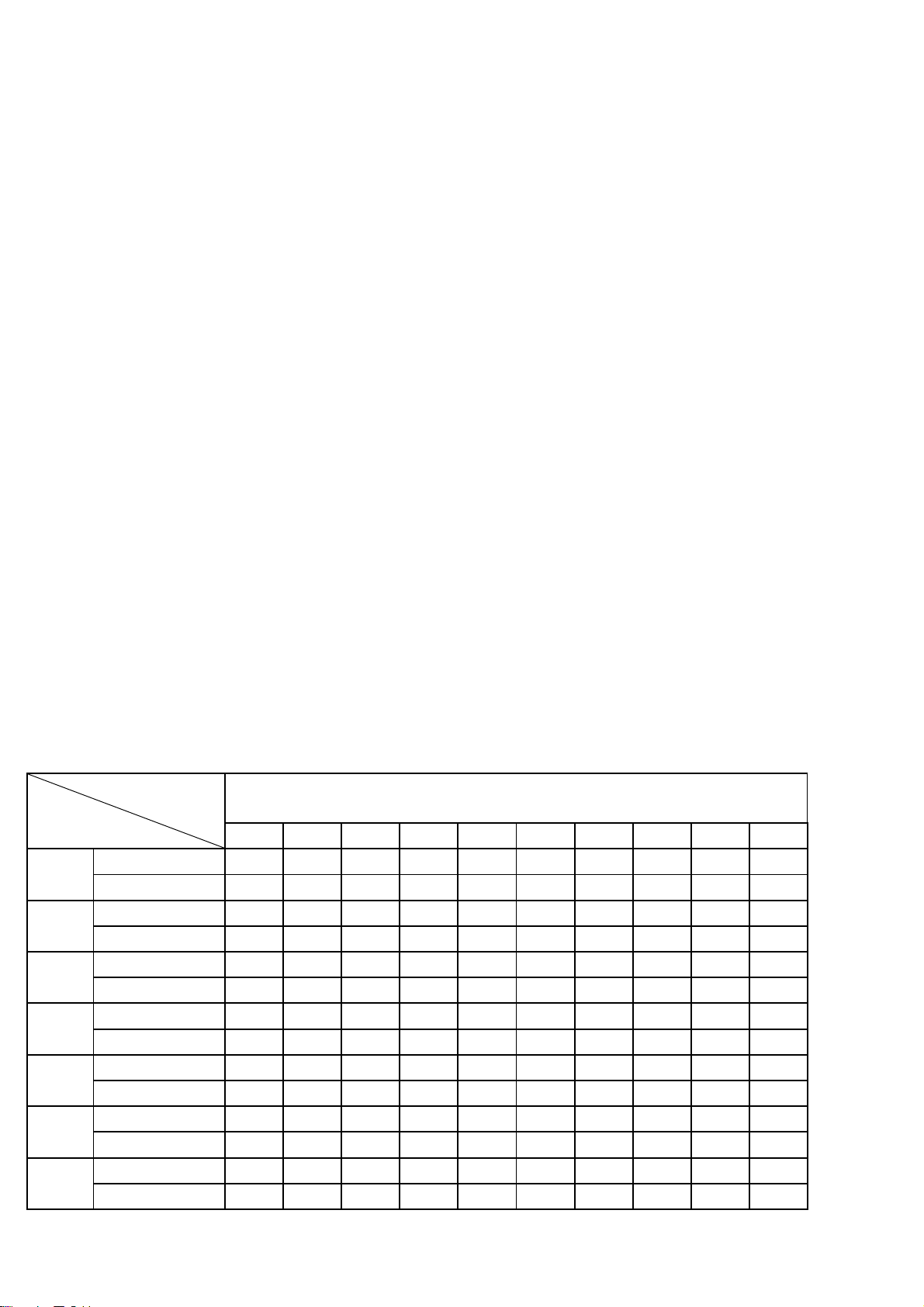
1.5.1. START/STOP
“START”--When the treadmill is not running, press this button to start, speed is “0.8”
“STOP”--When the treadmill is running, press this button to stop, then set program default and then
return to manual mode after stopped.
1.5.2 “PROGRAM” BUTTON
When the treadmill is not running, press this button can choose from program circle mode to manual mode
(P1-P12). The lowest speed for manual mode is “0.8”, and the highest speed is “
16
”
.
1.5.3 “MODE” BUTTON
When the treadmill is not running, press this button to choose countdown modes:”H-1”,”H-2”,”H-3”. H-1” is
the time countdown mode, and “H-2” is the distance countdown mode, “H-3” is the calories countdown mode,
Press the “SPEED+/-” button to adjust the data. After that, press the “START” button to start this treadmill
.
1.5.4 “SPEED +/- “BUTTON
SPEED +/– --Adjust speed when treadmill start, the increment is 0.1km/time in kilometer. Press the button
more than 2 seconds, and it will be up or down automatically.
1.5.5 SPEED QUICK BUTTON
Press the speed quick button 3kn/h, 6km/h, 9km/h to adjust the speed directly when the treadmill is running.
1.5.6 “INCLINE+/-” BUTTON
INCLINE +/ – --Adjust incline when treadmill start; the increment is 1 level/time. Press the button more than 2
seconds, and it will be up or down automatically.
1.5.7 INCLINE QUICK BUTTON
Press the incline quick button 3, 6, 9 to adjust the incline directly when the treadmill is running
.
1.6 DISPLAY FUNCTION
1.6.1 TIME
Display the running time or countdown time.
1.6.2 SPEED
Display running speed.
1.6.3 INCLINE
Display the incline.
10
1.6.4 PULSE
Display pulse data or display “p”.
1.6.5 DISTANCE
Display the running total distance or distance countdown.
1.6.6 CALORIES
Display the calorie or calorie countdown
1.6.7 ALL WINDOW DISPLAY DATA RAGNE
TIME:0:00 – 99.59(MIN)
DISTANCE: 0.00 – 99.9(KM)
CALORIES: 0.0 – 999 (C)
SPEED: 0.8 -22 (km/h)
PULSE: 50 – 200 (BPM)
INCLINE: 0 – 15 sections
1.7 PULSE FUNCTION
When the treadmill is running, hold the hand pulse about 5 seconds, it will display pulse data. The
pulse data range is 50-200 times/ minute. It has heart-shaped graphics when testing pulse. This data
is only for reference, cannot be as medical data.
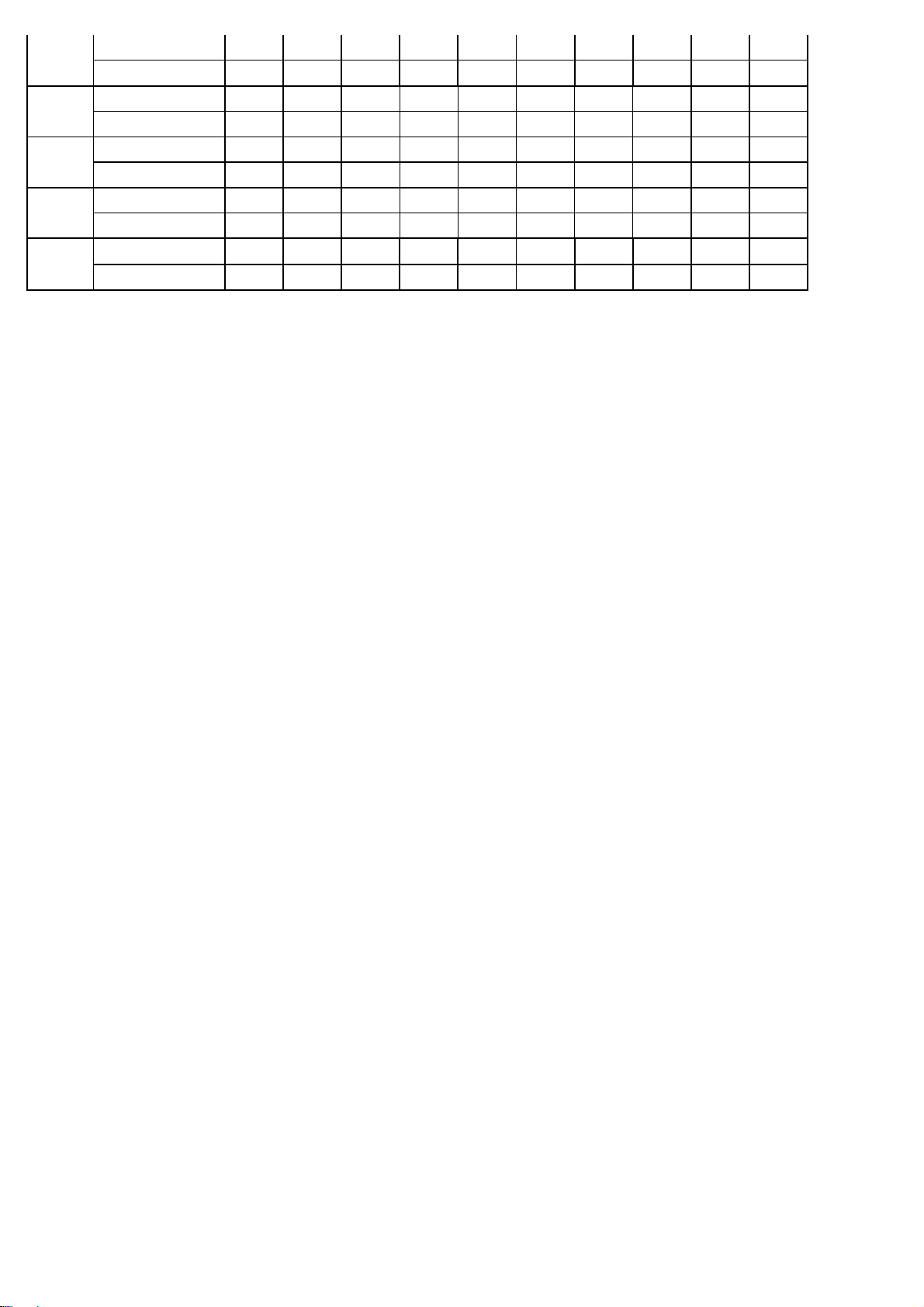
1.8 ROGRAM EXERCISE CHART
There are 12 sections in each program
TIME
PROG
SET TIME / 12 = TOTAL TIME IN EACH OPERATION
1 2 3 4 5 6 7 8 9 10
P1
SPEED
3 3 6 5 5 4 4 4 4 3
INCLINE
0 3 3 3 4 4 4 1 1 0
P2
SPEED
3 3 4 4 5 5 5 6 6 4
INCLINE
2 2 2 3 3 3 3 4 4 2
P3
SPEED
2 4 6 8 7 8 6 2 3 2
INCLINE
3 5 4 4 3 4 4 3 4 2
P4
SPEED
3 3 5 6 7 6 5 4 3 3
INCLINE
0 3 3 2 2 5 5 3 3 2
P5
SPEED
3 6 6 6 8 7 7 5 5 4
INCLINE
3 5 3 4 2 3 4 2 3 2
P6
SPEED
2 6 5 4 8 7 5 3 3 2
INCLINE
3 4 5 6 3 5 5 6 4 3
P7
SPEED
2 9 9 7 7 6 5 3 2 2
INCLINE
0 3 3 3 4 4 4 1 1 0
11
P8
SPEED
2 4 4 4 5 6 8 8 6 2
INCLINE
1 1 4 4 4 5 5 4 3 2
P9
SPEED
2 4 5 5 6 5 6 3 3 2
INCLINE
3 5 3 4 2 3 4 2 3 2
P10
SPEED
2 5 7 5 8 6 5 2 4 3
INCLINE
1 5 6 8 12 9 10 9 5 3
P11
SPEED
2 5 6 7 8 9 10 5 3 2
INCLINE
3 5 6 8 6 5 8 7 5 2
P12
SPEED
2 3 5 6 8 6 9 6 5 3
INCLINE
5 7 5 8 6 5 9 10 6 2
1.9 User Program
Besides the 12 pre-set programs, there are 3 user-defined programs: U1,U2 and U3. Each user
program has 10 segments. The user can set the desired speed and incline .Press "PROGRAM" button
to choose U1, U2 or U3, press "MODE" button to enter setting condition, then set the time of the first
segment. Press "SPEED+" and "SPEED-" to set speed. Press “INCLINE+”and “INCLINE-“ to set incline.
Press "MODE" button and your choice will be set. The next workout segment will flash, go through the
same setup as you complete segment one. You must complete all 15 segments and then your user
program is ready to use. Press ―STOP key to return to last segment setting any time.
1.10 THREE COUNTDOWN FUNCTION
Countdown time initial setting 30:00 minutes,setting range 5:00---99:00 minutes , each step 1:00.
Countdown calorie initial setting 50therm, setting range 10---990 term,each step 10. Countdown distance
initial setting 1.0km,setting range 0.5---99.9 km,each step 0.1 Cycle switch order is: manual, time,
distance, calories.
1.11 BODY TESTER
(
FAT
)
At the beginning state, press “ PROGRAM” continually to enter “FAT“ body fat test,window display “FAT”.
Press “MODE” to enter (F1 SEX, F2 AGE, F3 HEIGHT, F4 WEIGHT). Press “SPEED+”, “SPEED-” to set.
After setting, the computer will display F5 and grasp the hand pulse, the window will display your body
quality index. The body quality index is to test the relation between height and weight not the body scale.
The body FAT suits for any male and female to adjust the weight according together with other body quality
index. The ideal FAT should be between 20-25, if under 19, it means too thin. If between 25 and 29, it means
overweight, if over 30, it means obesity. (The data is just for reference and can not be as medicinal data)
01 Sex 01 Male 02 Female
02 Age 10------99
03 Height 100----200
04 Weight 20-----150
05 FAT ≤19 Under weight
FAT = (20---25) Normal weight

12
FAT = (25---29) Over weight
FAT ≥30 Obesity
1.12 HRC Program
There are 3 HRC programs (HRC1-HRC3) in total. The parameter data setting order is “AGE” -> “THR(HRC)
data” -> “TIME”. HRC: Detect user’s actual heart rate through wireless receiver and set different the heart
rate data as goal to adjust speed and incline during running. It’s recommended that user uses the wireless
chest belt while running HRC function.
1.12.1 After turning on the power, press “PROG” key to choose HRC function. HRC function is turned on
when “HRC” characters shown on the screen. User can use “SPEED +/-“ to adjust age (data from 13 to 80)
after seeing the “30” shown on the screen.
1.12.2 Press “MODE” key to enter the setting of heart rate. The standard heart rate is fixed at different data
from HRC1 to HRC3. Heart rate data can be adjusted from 50 to 200. User can use “SPEED +/-“ to adjust the
data. (It’s recommended that standard heart rate data doesn’t need to be changed for physical health
condition.) Formula is calculated as below:
HRC1 is T.H.R =(220-age)x60%,
HRC2 is T.H.R =(220-age)x70%,
HRC3 is T.H.R =(220-age)x80%.
After finishing the setting of HRC data, user can press “MODE” key to modify the time. When “TIME” window
flashes, it displays the default time as 30:00 minutes, and user can press “SPEED+/-“ to set up time.
1.12.3 Enter “START” key to begin the workout (Remember only can press “START” key after all setting is
completed. It’s suggested that user use wireless chest belt to detect the heart rate. If chest belt and hand
pulse are used at the same time, data from chest belt will show up only on the screen.
1.12.4 During the operating of HRC, speed and incline will adjust as below:
(1). If Target heart rate <THR-15,then the speed and incline will adjust automatically every 15 second, the
SPEED will increase 0.8KM/h and incline add 1 section until they reach the max. data
(2). If THR-5>Target heart rate >=THR-15,then the speed and incline will adjust automatically every 15
second, the SPEED will increase 0.4KM/h and incline add 1 section until they reach the max. data
(3). If THR+5>=Target heart rate >=THR-5,then the speed and incline will not change
(4). If THR+15>=Target heart rate >=THR+5,then the speed will adjust automatically every 15 second, the
SPEED will decrease 0.4KM/h and incline less1 section until they reach the min. data

13
(5). If Target heart rate >=THR+15,then the speed and incline will adjust automatically every 15 second,
the SPEED will decrease 0.8KM/h and incline less2 section until they reach the min. data。
1.13 OTHERS
1.13.1 When the countdown mode is finished and “END” appears on screen, warning sound occurs. Then it will be
back to manual mode.
1.13.2 You can set statistics at circled mode. Ex: When time is set at 5:00 – 99:00 and it hits 99:00, press
“+” button, it will start from 5:00 again.
18
D29
C9
D45
C3
C1
A11
D31
D25
D23
B14
B3
B4
B4
B15
C4
C18
C17
C7
C13
C5
C2
D36
D47
C10
A4
C11
D52
D52
A17
A16
D19
D81
D22
D71
D71
D23
D25
D87
D10
D9
C12
D18
D21
D21
D18
A26
D96
B72
B73
D98
D99
D100
A3L
A3R
B13
D47
C35
C28
B74
B74
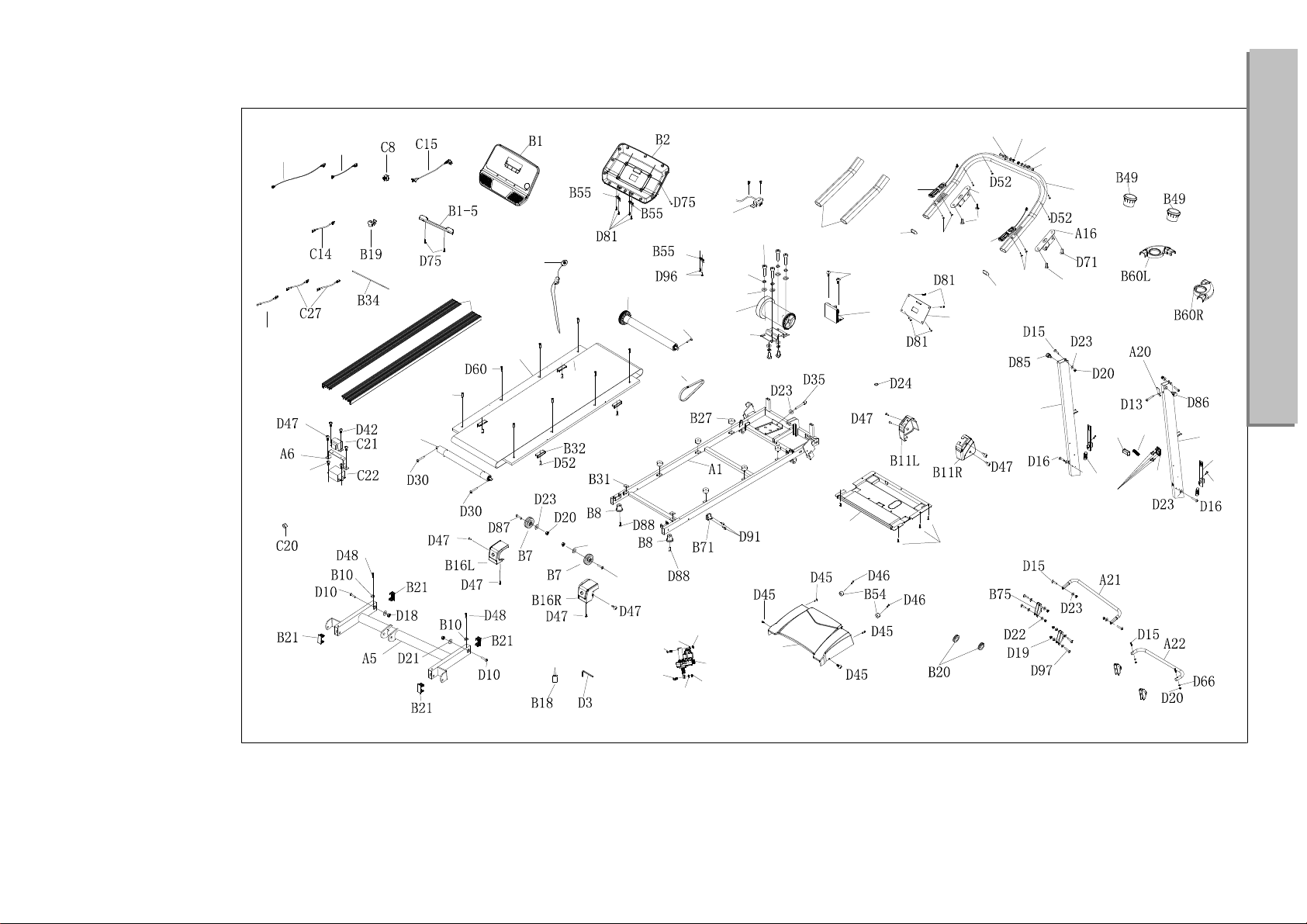
Exploded Drawing
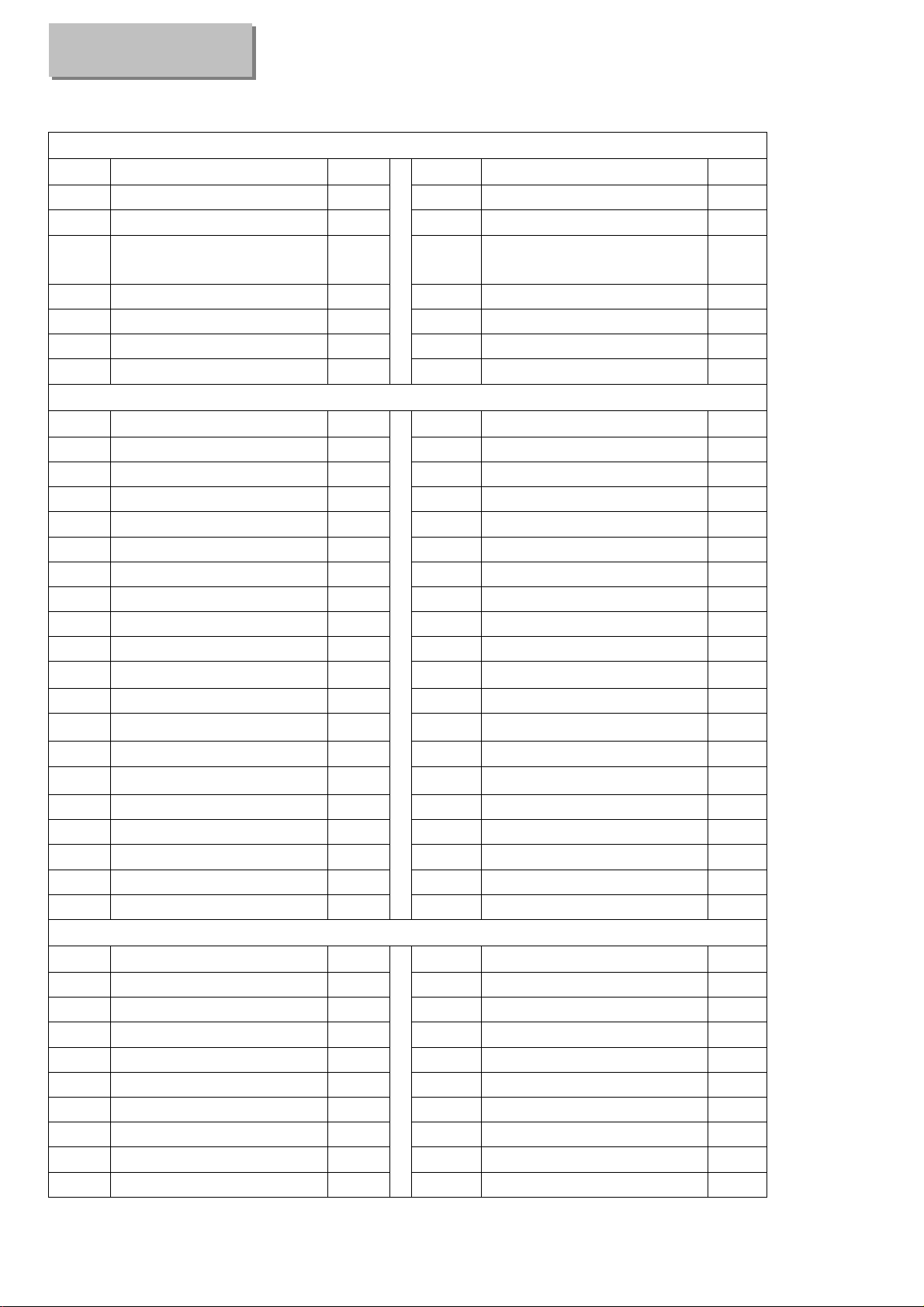
19
A-Welding parts
No. Description Qty
No. Description Qty
A1
Main frame 1
A16
Handrail connection frame 2
A3L
Left upright 1 A17 Console supporting frame 1
A3R
Right upright 1
A20
Fixing bracket at folding
position
1
A4
Handrail bracket 1
A21
Folding handrail 1
A5
Incline bracket 1
A22
Supporting frame 1
A6 Filter bracket 1
A26
Hanging frame 2
A11
Motor bracket 1
B—Plastic parts
No. Description Qty
No. Description Qty
B1
Console set 1 B19 Cable organizer 1
B1-1
Overlay
1
B20 Round plug 2
B1-2
Membrane key
1
B21 Squared shape plug 4
B1-3 Console
1
B27 New cushion 6
B1-5 Tablet holder 1 B31 Rubber pad 2
B2 Console back cover 1 B32 Ova shape cushion 4
B3 Protecting foam 2 B34 EVA pad (for table holder) 1
B4 Handrail plug 2 B49 Water bottle 2
B7 Adjusting wheel 2 B54 Round cushion 2
B8 Flat foot pad 2 B55 Fixing plastic for console 3
B10 Limited cushion 2 B60L Left water bottle holder 1
B11L Left side cover 1 B60R Right water bottle holder 1
B11R
Right side cover 1 B71 Plastic holding bracket 1
B13 Motor upper cover 1 B72 Fixing plug 1 1
B14 Motor lower cover 1 B73 Fixing plug 2 1
B15 Side rail 2 B74 Plastic cover A 2
B16L Left end cap 1 B75 Plastic cover B 2
B16R
Right end cap 1
B18 Silicon oil 1
C—Electronic parts
No. Description Qty
No. Description Qty
C1
DC motor 1 C13 Safety key 1
C2
Running belt 1 C14 Single cord 1
C3
Rear roller 1 C15 Power cable 1
C4
Front roller 1
C17
Lower cable 1
C5
Running deck 1
C18
Connecting cable 1
C7 Drive belt 1
C20
Magnetic ring 1
C8 Power switch 1
C21
Inductor 1
C9
Controller 1
C22
Filter 1
C10
Wire for left handrail 1
C27
Single cord 2
Parts list
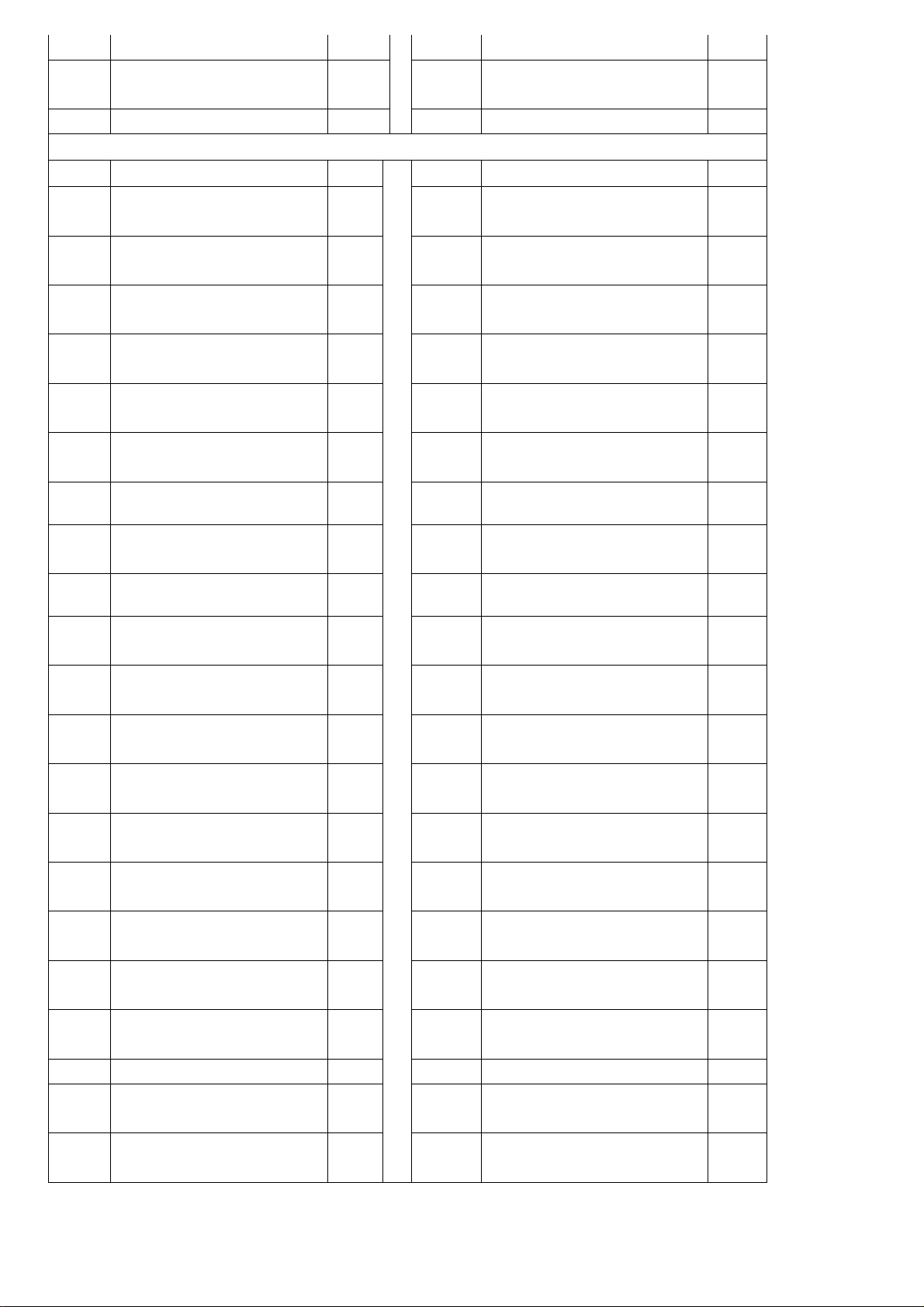
20
button
C11
Wire for right handrail
button
1
C28
Speed sensor 1
C12 Incline motor 1
C35
Single ground cable 1
D—Hardware parts
No. Description Qty No. Description Qty
D3
Allen
wrench80X80XT5mm
1 D46
Cross head bolt M5X20,
washer
2
D9
Round hex head bolt
M10X30
1 D47
Cross self-tapping bolt
ST4.2X16, washer
21
D10
Round hex head bolt
M10X45
3 D48
Cross self-tapping bolt
ST4.2X19, washer
2
D13
Round hex head bolt
M8X15
1 D52
Cross self-tapping bolt
ST4.2X16
12
D15
Round hex head bolt
M8X40
6 D60
Cross head bolt M6X20
6
D16
Round hex head bolt
M8X45
2 D66 Washer 2
D18 Nylon nut 10 4 D71
Hex head bolt M8X15
4
D19 Nylon nut M6 6 D75
Cross self-tapping bolt
ST4.2X8
14
D20 Nylon nut M8 8 D81
Cross head bolt M6X16
10
D21 Flat washer M10 4 D85
Left knob M16 (small
shape in plastic)
1
D22 Flat washer M 6 6? D86
Right knob M16 (large
shape in steel)
1
D23 Flat washer M8 13
D87
Round hex head bolt
M8X80
2
D24 Spring washer M5 1
D88
Round hex head bolt
M8X60
2
D25 Spring washer M8 6 D91
Cross self-tapping bolt
ST4.2X20
2
D29
Hex round head bolt
M6X45
1 D96
Cross head bolt M6X12
4
D30
Hex round head bolt
M6X60
2
D97
Cross head bolt
M6X45
4
D31
Hex round head bolt
M8X20
4
D98
Spring
2
D35
Hex round head bolt
M8X80
1
D99
Spring
1
D36
Cross head bolt M6X25
2 D100
Cross head bolt M5X16
4
D42
Cross self-tapping bolt
M4X10
2
D45
Cross head bolt M5X15,
washer
7

GARLANDO SPA
Via Regione Piemonte, 32 - Zona Industriale D1
15068 - Pozzolo Formigaro (AL) - Italy
www.evert.it - info@evert.it