Air Purifier User Manual
MODEL NO.: AP-1210
Email:Support@trustechproducts.com

Dear user:
Thank you for purchasing this product. Please
read this manual carefully before using this air
purifier because it will be easy for you to use
and save your valuable time.I hope this manual
will bring you convenience. Please keep this
manual carefully for future reference.
Technical Parameters:
Voltage: AC 120V
Rated power: 30W
Coverage area: 8-15㎡
Noise: 50dB(A)
Weight: 2.6KG
Dimension: 210*210*321MM

This appliance is not intended for use by persons
(including children) with reduced physical, sensory
or mental capabilities, or lack of experience and
knowledge, unless they have been given supervision
or instruction concerning use of the appliance by a
person responsible for their safety. Children should
be supervised to ensure that they do not play with
the appliance.
If the supply cord is damaged, it must be replaced
by the manufacturer, its service agent or similarly
qualified persons in order to avoid a hazard.
Before cleaning or other maintenance, the appliance
must be disconnected from the supply mains.
Warning
1
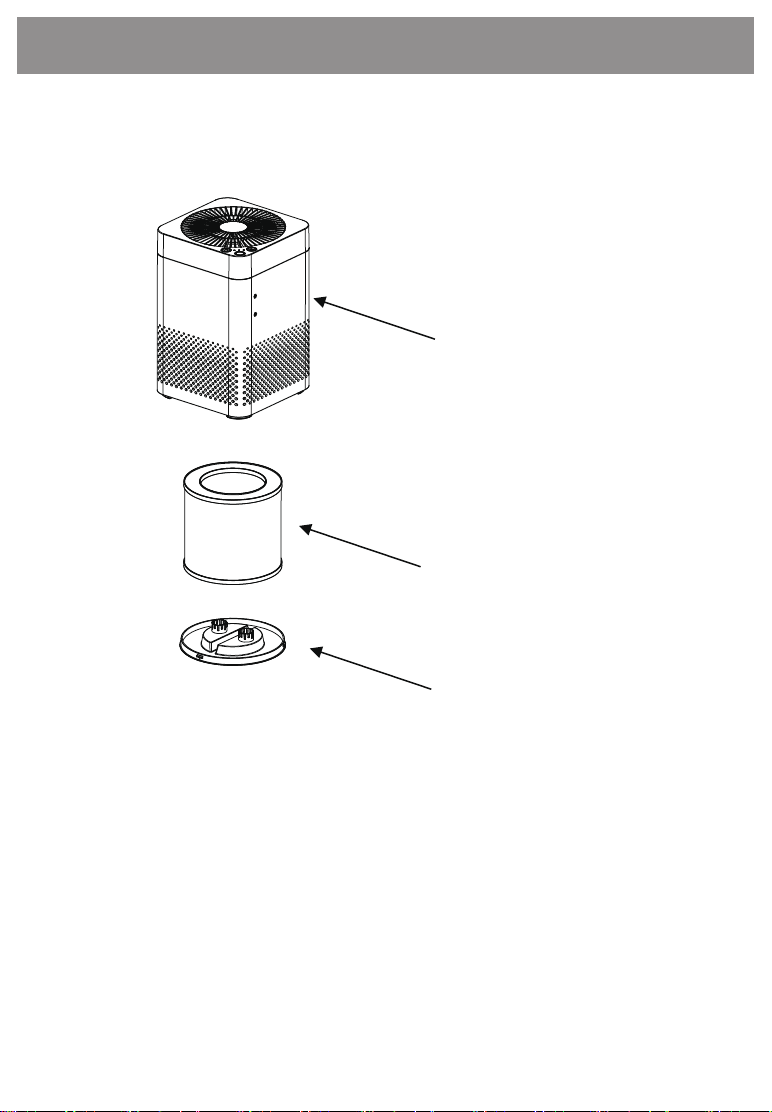
Structure of product
Product main body
Filter
Filter bottom cover
1、Product main body
2、Filter
3、Filter bottom cover
2
Using method
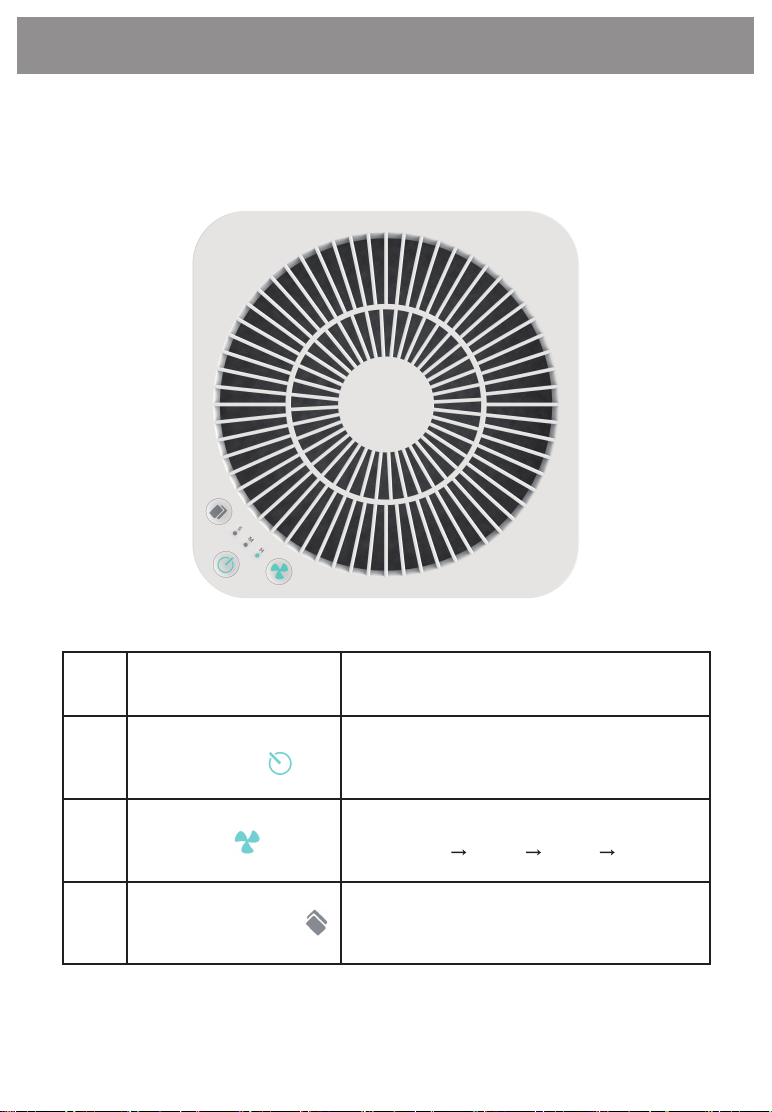
Control panel description
3
NO. Button
Power Button
Fan speed
Function Description
Turn on and off function
Press the wind speed button to adjust
“medium”“high”“auto”“sleep”
1
2
3
Filter replacement
& Light button
press the button to turn on and turn off
the light, Keep pressing for 5 seconds to
reset the filter.

Product features and functions
4
1.Preparation work
When the air purifier is connected to the power supply, the
buzzer will beep and all the indicators will light up. After three
seconds, the air purifier will enter the ready mode and the
power button indicator will turn red.
2. Switch function
Press the top power button , and all buttons light turn white.
3. Wind speed
Please press the wind speed button to adjust "medium" →
"high" → "auto" → "sleep" Loop in turn.
The first button light on means sleep mode.
The second button light on means Medium fan speed mode.
The three button light on means high fan speed mode.
All three button lights on mean Auto mode.
4. Filter replacement button and light button (one button)
Light button:
Press the button lightly to turn on and turn off the light.
Filter replacement button:
When the air purifier is powered on, it will count down, turn
off the air purifier and restart, it will continue to countdown.

5
Product features and functions
The filter replacement will accumulate to 2000 hours, it will
flash. After replacing the new filter, Keep Pressing and hold for
5 seconds , filter replacement reminder reset, you will hear
the music. The will Constantly bright at the same time.
Precautions before use
1. Before using this product, you need to remove the bottom
cover and remove the plastic bag on the filter.
2. Do not use this product in a humid environment, such as the
bathroom and the laundry, because it will increase the damage
of the fitter and damage the parts of the machine.
3. If the product is used under a smoking or multi-fume
environment, the filter of the product will be covered by the tar
or soot of the cigarette. Please clean the filter with a vacuum
cleaner often to avoid affecting the filter effect.
Filter replacement instructions
When the filter is used for more than 2000 hours, it will flash to
remind you to replace the filter. In order to protect the product
from impact during transportation, the filter is installed at the
bottom, which may require a little more effort than usual.
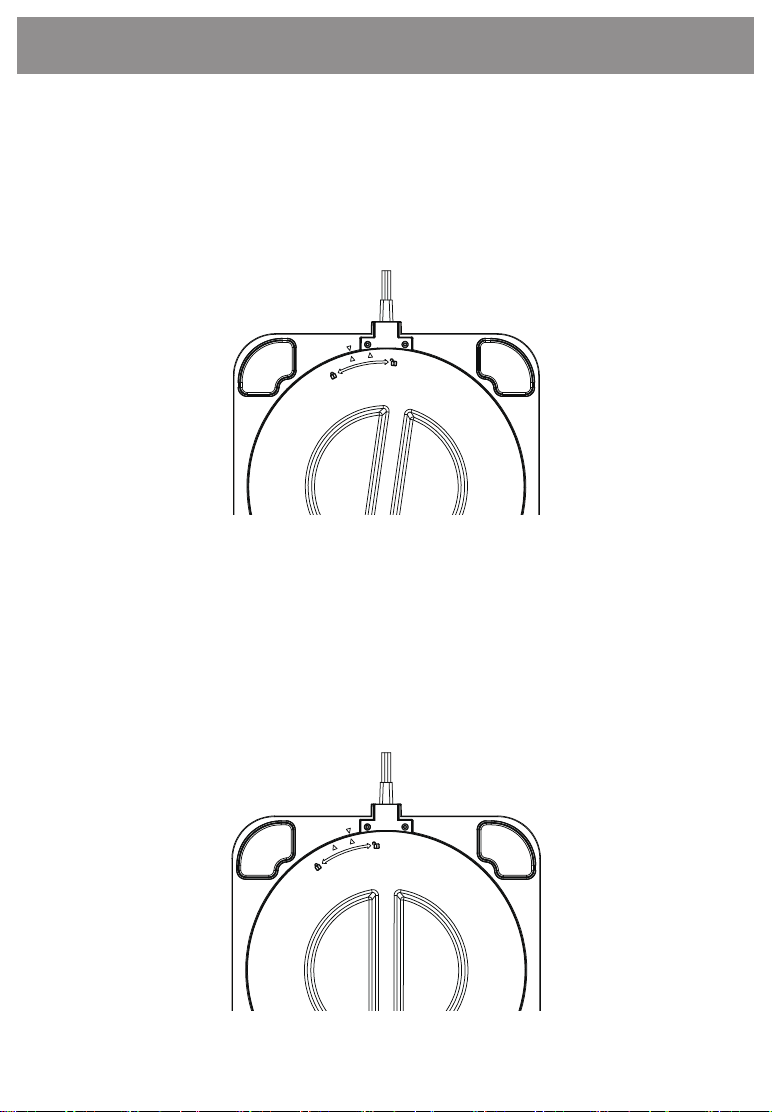
1.Hold the knob cover from the bottom of the product, rotate
clockwise in the direction(as shown below), open the bottom
cover, remove the filter, and remove the plastic bag of the filter.
2.After the filter plastic bag is removed, put the filter back into
the product, and align the triangle of the bottom cover with
the triangle on the machine counterclockwise and turn it in the
direction of the arrow, as shown below:
6
Product features and functions
Safety precautions
Precautions when place
1. Place the product on a flat, firm and safety place to avoid short circuit,
electric leakage, fire, etc. due to dumping during use.
2. Use in places where water is not easily accessible, avoiding the cause of
short circuit and fire.
3. Do not place containers such as vases of water on the body of the machine
to avoid insulation cracking after seepage into the machine, causing leakage,
short circuit, fire and damage to this product.
4. It is not used in places where oil or flammable gas may leak, so as to avoid
leakage and concentrated around the machine, which may cause fire or fire.
5. It is used indoors and is not used in places where there is direct sunlight and
is exposed to rain.
Note
Precautions when using
1.Please do not block the air inlet and outlet of the product to avoid
overheating inside the machine and damage the product.
2. Not placed next to the heating appliance, there is a possibility that
the melting body will cause a fire.
3. Do not dismantle the product for renovation, to avoid fire, electric
leakage, injury.
4. If you do not use the product for long periods, please remove the
plug from the socket for safety.
5. Do not move the product while the machine is working, to avoid leakage.
6. Unplug the power cord when cleaning the product, replacing or
cleaning the filter.
7. After the machine has stopped running for 3 minutes, the front panel
can be opened to prevent the wind wheel from being damaged by inertia.
8. Do not sit on the body of the machine to avoid injury from tilting or
tipping over.
9. Do not damage the power cord, clamping, and lifting. It will cause
the short circuit, poor contact, fire, etc.
Warning
7

FAQ
Press the power button does not turn on
Is the power plug plugged in?
Is the fuse in your home broken?
Is it a power outage?
Is the front cover installed correctly or stuck in wrong
place?
Please contact customer service center for other
abnormalities or malfunctions.
The sound is very noisy
Whether the machine is placed has deflection
Uneven floor
Whether the filter is blocked or needs to be replaced
The air inlet is blocked
Please contact customer service center for other
abnormalities or malfunctions.
Please make sure to check the air purifier after using for long period.
There is burnt smell,power cord, plug
abnormal heat
High operating noise
Frequent start of leakage insurance
Other abnormalities or malfunctions
Are
there
any
such
pheno
mena?
Please cut off the power,
unplug and contact the
dealer.
8

CONTACT US
Thank you for choosing TRUSTECH product. If you have
any question please contact us directly:
Email: Suppor[email protected]
WARRANTY
TRUSTECH warrants this product against defects in
materials and/or workmanship under normal use for a
period of ONE (1) YEAR from the date of purchase by
the original purchaser (“Warranty Period”). If a defect
arises and a valid claim is received within the Warranty
Period, at its option, TRUSTECH will either 1) repair the
defect at no charge, using new or refurbished replace-
ment parts, or 2) replace the product with a new
product that is at least functionally equivalent to the
original product, or provide a store credit in the amount
of the purchase price of the original product. A replace-
ment product or part, including a user-installable part
installed in accordance with instructions provided by
TRUSTECH, assumes the remaining warranty of the
original product. When a product or part is exchanged,
any replacement item becomes your property and the
replaced item becomes TRUSTECH’s property. When a
store credit is given,
CONTACT US
9

the original product must be returned to TRUSTECH and
becomes TRUSTECH’s property. To obtain warranty
service, e-mail TRUSTECH Limited Warranty Service at
Suppor[email protected]. Please be prepared
to describe the product that needs service and the
nature of the problem.
This warranty does not apply to: a) damage caused by
failure to follow instructions relating to product’s use
or the installation of components; b) damage caused by
accident, abuse, misuse, fire, floods, earthquake or other
external causes; c) damage caused by service performed
by anyone who is not a representative of TRUSTECH; d)
accessories used in conjunction with a covered product;
e) a product or part that has been modified to alter
functionality or capability; f) items intended to be
periodically replaced by the purchaser during the
normal life of the product including, without limitation,
batteries or light bulbs; g) any product sold “as is”
including, without limitation, floor demonstration
models and refurbished items; or h) a product that is
used commercially or for a commercial purpose.
CONTACT US
10
