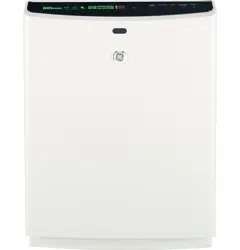
User Manual GE Air Purifier
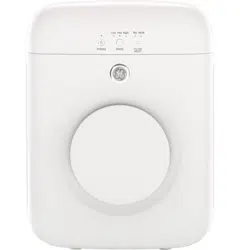
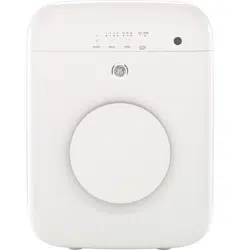
About the controls on the air purifier.
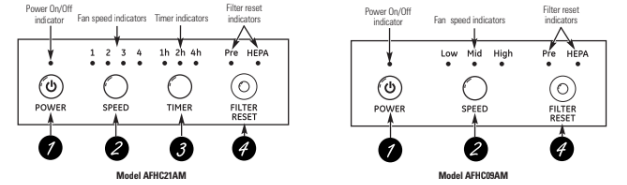
Manual Controls
1. Power On/Off Button
Press to turn the air purifier on and off.
2. Fan Speed Adjustment Button
Press to adjust the fan motor speed setting.
Model AFHC21AM – Press to select from levels 1 (low) to 4 (high).
Model AFHC09AM – Press to select Low, Medium or High.
3. Timer Adjustment Button (Model AFHC21AM Only)
Press to select from timer hour settings 1 hr., hr. or 4 hr. The air purifier will run for the selected number of hours and then turn off.
4. Filter Reset Button
The filter reset indicator light will come on when the filter needs to be replaced.
To reset the filter indicator after replacing the filter, if no filter lights are on:
For the Pre-Filter, press the FILTER RESET button once and the Pre light will flash; then press and hold for 2 seconds. The indicator light for the filter will go off.
For the 99.97% True HEPA Filter, press the FILTER RESET button twice and the HEPA light will flash; then press and hold for 2 seconds. The indicator light for the filter will go off.
To reset the filter indicator after replacing the filter, if one or both lights are on: press and hold the FILTER RESET button for 2 seconds. One or both indicator lights will go off.
About the air purifier.
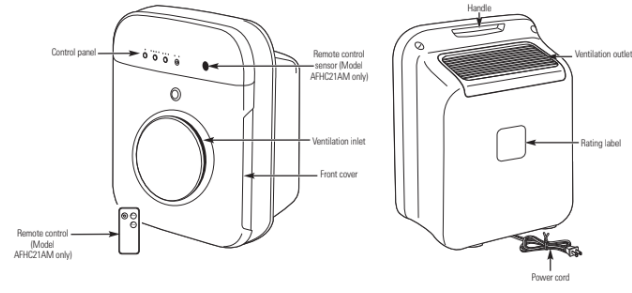
Product Identification
[
Product Features
Compact Size and Powerful Air Cleaning
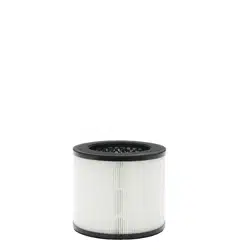
This air purifier uses a True HEPA Filter to maximize the efficiency of air cleaning. It removes 99.97% of airborne particles 0.3 microns or larger that pass through the filter.
Optional Activated Charcoal Filter
The Charcoal Filter helps eliminate food odors and unpleasant smells from the room. This filter is optional.
Washable Pre-Filter
The permanent Pre-Filter prolongs the life of your 99.97% True HEPA Filter by trapping large particles in the air initially.
Filter Replacement Timer
This air purifier will let you know when it is time to replace your filters for maximum air cleaning.
High Airflow Rate and Low-Noise Fan
This air purifier has a high airflow rate with a low-noise fan to reduce pollutants in the air with minimal noise.
Design
This air purifier has a switch that is installed to turn off the unit if the front cover is opened.
Remote Control
Model AFHC21AM has a remote control to allow you to control the air purifier from across the room.
Air Filtration System
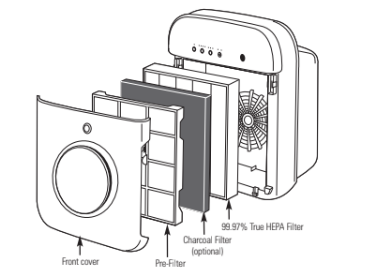
Installation
Location
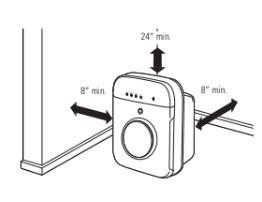
- Your air purifier has a minimum clearance requirement of 8′′ from the sides and back and a minimum clearance of 24′′ from the top.
- This appliance is not to be mounted on a wall or in a window.
- Do not block the front cover and/or ventilation outlet or inlet. This could cause a fire hazard and will reduce the effectiveness of the unit.
WARNING: Do not run the cord under carpeting. Do not cover the cord with throw rugs, runners or similar coverings. Do not route the cord under furniture or appliances. Arrange the cord away from traffic areas and where it will not be tripped over.
Using the air purifier.
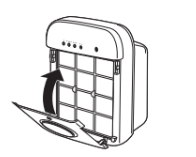
1. Pull the top of the front cover toward you and lift up slightly to remove.
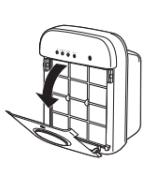
2. Pull forward on the black Pre-Filter, using the pull tabs in the middle, and remove it from the unit.
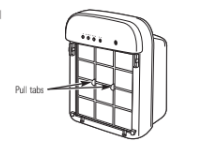
3. Gently pull forward on the 99.97% True HEPA Filter to remove it from the unit. Remove the plastic shipping cover from the filter and discard.
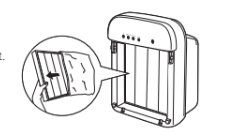
4. Replace the 99.97% True HEPA Filter in the unit.
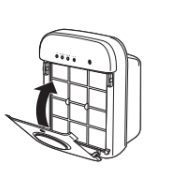
5. If you are choosing to use the Charcoal Filter, install it in the back of the Pre-Filter now. Slide the Charcoal Filter under the tabs on the back side of the Pre-Filter. Install with the Charcoal Filter facing the 99.97% True HEPA Filter.
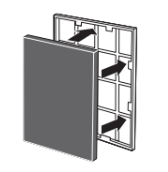
6. Insert the side tabs of the Pre-Filter into the slots of the unit; pull tabs should be to the outside. Push the Pre-Filter to snap into place.
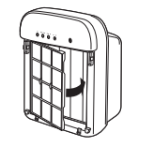
7. Insert the tabs at the bottom of the front cover into the recesses of the unit body. Push forward on the top of the front cover to snap it into place.
Operating Instructions
- Locate the air purifier for maximum effectiveness (see Location on page 5).
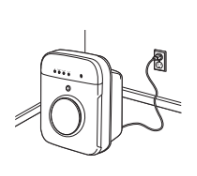
- Plug the power cord into a receptacle that meets the requirements on the rating plate.
- Push the POWER button and set for the desired airflow.
Care and cleaning of the air purifier.
Front Cover and Body
To clean:
Use a soft cloth to clean the front cover and body. For stubborn dirt, use water with a very mild detergent. DO NOT use bleach or abrasives.
Pre-Filter and Charcoal Filter
Clean the Pre-Filter every 3 months. Cleaning may be needed more often, depending upon usage and the environment.
To access:
WARNING: Disconnect the power supply before servicing.
- Pull the top of the front cover toward you and lift up slightly to remove.
- Pull forward on the black Pre-Filter, using the pull tabs in the middle, and remove it from the unit.
To clean:
Remove the Charcoal Filter if installed. Use a clean cloth and water to remove dust accumulated on the Pre-Filter.
The Charcoal Filter, if installed, needs to be changed every 3 months. The Charcoal Filter CANNOT be cleaned. It must be replaced.
Charcoal Filters can be purchased in 4-packs at the retail store where you purchased your air purifier or by calling GE Parts and Accessories at 1.800.626.2002. Filter pack part numbers are RAPCF1 for model AFHC09AM and RAPCF2 for model AFHC21AM.
After drying the Pre-Filter thoroughly, replace the Charcoal Filter, if used. Replace the Pre-Filter and front cover.
The Pre-Filter and front cover are not dishwasher-safe.
HEPA Filter
The 99.97% True HEPA Filter needs to be replaced every 12 months. The filter may need to be replaced more often, depending upon usage and the environment.
99.97% True HEPA Filters can be purchased at the retail store where you purchased your air purifier or by calling GE Parts and Accessories at Filter part numbers are RAPHF1 for model AFHC09AM and RAPHF2 for model AFHC21AM.
To access:
1. Pull the top of the front cover toward you and lift up slightly to remove.
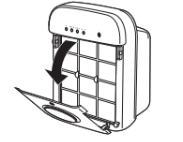
2. Pull forward on the black Pre-Filter, using the pull tabs in the middle, and remove it from the unit.
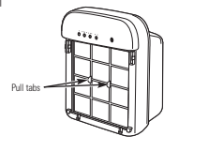
3. Pull the 99.97% True HEPA Filter forward to remove it from the unit.
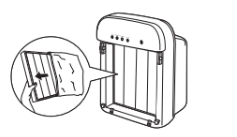
4. Slide a new 99.97% True HEPA Filter into the unit.
5. Replace the Pre-Filter and front cover. These filters and cover are not dishwasher-safe.
Troubleshooting tips...
Air purifier does not start
1. The air purifier is not plugged in.
- Make sure the air purifier’s plug is pushed completely into the outlet.
2. The fuse is blown/circuit breaker is tripped.
- Check the house fuse/circuit breaker box and replace the fuse or reset the breaker.
3. Power has not been turned on.
- Push the POWER On/Off button once to turn on the power.
4. The front cover is open.
- Close the front cover. Make sure it snaps into place.
5. Power failure.
- Turn the unit back on after power has been restored.
Airflow is less than normal and the Pre-Filter light is on
1. The Pre-Filter needs to be cleaned.
- Remove and clean the Pre-Filter (see Care and Cleaning section).
2. The Charcoal Filter needs to be replaced.
- Replace the Charcoal Filter (see Care and Cleaning section).
Airflow is less than normal and the HEPA light is on
1. The 99.97% True HEPA Filter needs to be replaced.
- Replace the 99.97% True HEPA Filter (see Care and Cleaning section).
The appliance vibrates severely
1. The unit is on an unstable or uneven surface.
- Move the air purifier to a stable, even surface.
GE Air Purifier—One-Year Limited Warranty.
In Order to Make a Warranty Claim:
- Properly pack your unit. We recommend using the original carton and packing materials.
- Return the product to the retail location where it was purchased.
- Include in the package a copy of the sales receipt or other evidence of date of original purchase. Also print your name and address and a description of the defect.
What Is Not Covered:
- Customer instruction. This owner’s manual provides information regarding operating instructions and user controls.
- Improper installation, delivery or maintenance. If you have an installation problem, contact your dealer or installer. You are responsible for providing adequate electrical, plumbing and other connecting facilities.
- Failure of the product resulting from modifications to the product or due to unreasonable use, including failure to provide reasonable and necessary maintenance.
- Replacement of house fuses or resetting of circuit breakers.
- Failure due to corrosion on models not corrosion- protected.
- Damage to the product caused by improper power supply voltage, accident, fire, floods or acts of God.
- Incidental or consequential damage caused by possible defects with this product.
- Damage caused after delivery.
EXCLUSION OF IMPLIED WARRANTIES—Your sole and exclusive remedy is product replacement as provided in this Limited Warranty. Any implied warranties, including the implied warranties of merchantability or fitness for a particular purpose, are limited to one year or the shortest period allowed by law.
This warranty is extended to the original purchaser and any succeeding owner for products purchased for home use within the USA.
Some states do not allow the exclusion or limitation of incidental or consequential damages. This warranty gives you specific legal rights, and you may also have other rights which vary from state to state. To know what your legal rights are, consult your local or state consumer affairs office or your state’s Attorney General.
Exclusion of implied warranties: Except where prohibited or restricted by law, there are no warranties, whether express, oral or statutory which extend beyond the description on the face hereof, including specifically the implied warranties of merchantability or fitness for a particular purpose.