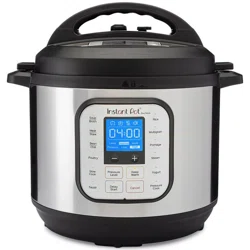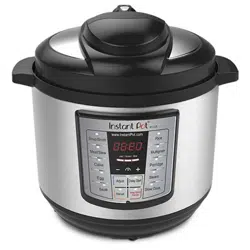
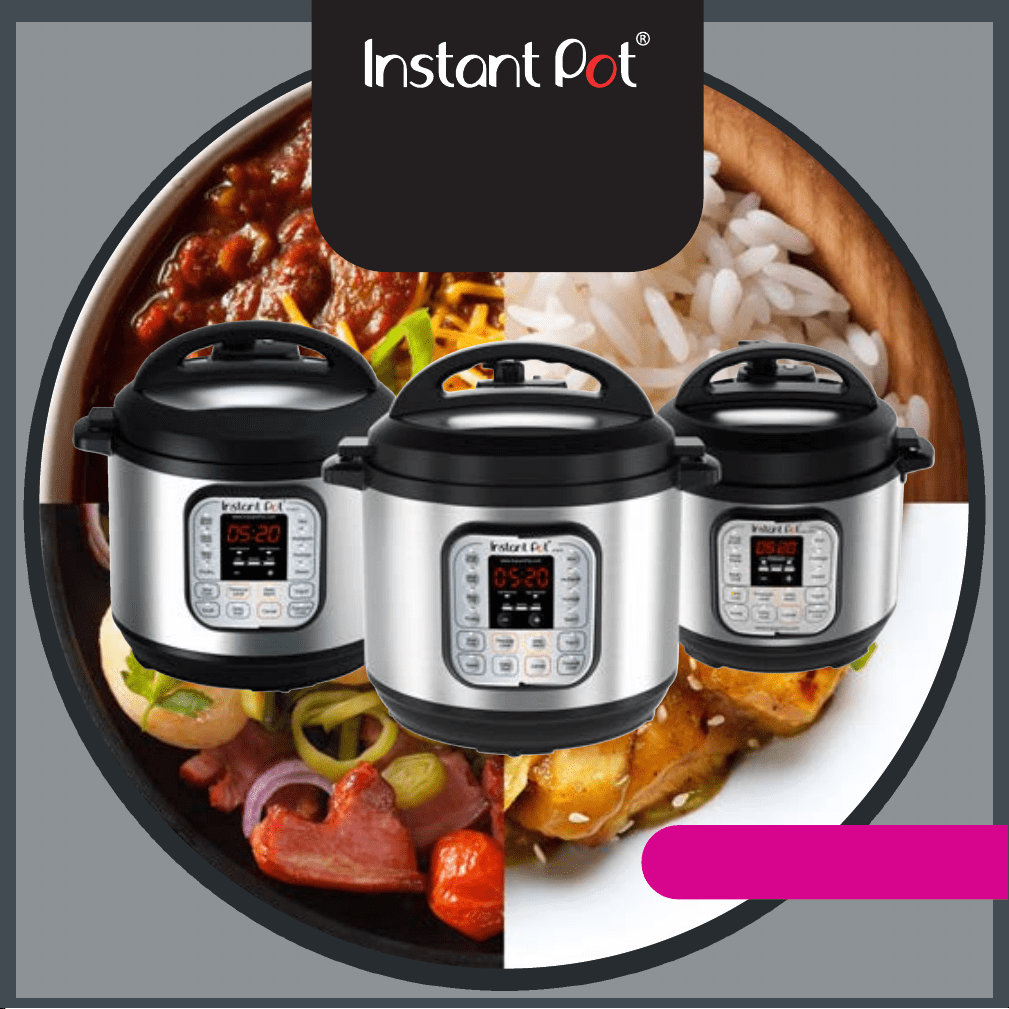
Programmable Electric Pressure Cooker
User Manual
Models: IP-DUO60/80
September 2016
(Pictures in the text are for reference only. Please refer to the actual product.)
Thank you for purchasing the mul-funconal Instant Pot®. Please read the User Manual
carefully before use and keep it in a convenient place for future reference.

2
Table of Contents
IMPORTANT SAFEGUARDS ........................................................................................ 3
Special Cord Set Instrucons ................................................................................ 4
Product Introducon ................................................................................................. 4
Product Features .................................................................................................. 5
Specicaons ....................................................................................................... 5
Product Accessories Included............................................................................... 6
Product Accessories for Purchase ........................................................................ 7
Before the First Use .................................................................................................. 8
Installing the Condensaon Collector .................................................................. 8
Removing and Installing the An-Block Shield ..................................................... 8
Removing and Installing the Sealing Ring ............................................................. 8
Safe Lid Opening................................................................................................... 9
Cooking Preparaon ............................................................................................. 9
Controls and States of the Cooker .......................................................................... 11
Control Panel ...................................................................................................... 11
States of the Cooker ........................................................................................... 12
Operaon Keys ................................................................................................... 12
Funcon Keys ..................................................................................................... 12
Cooking with Your Instant Pot® ............................................................................... 14
Inial Test Run .................................................................................................... 14
Pressure Cooking ................................................................................................ 14
Slow Cooking ...................................................................................................... 16
Delayed Cooking with Timer .............................................................................. 16
Sautéing ............................................................................................................. 17
Warming ............................................................................................................. 17
Making Yogurt .................................................................................................... 17
Making Jiu Niang ................................................................................................ 18
Advanced Operaons ......................................................................................... 19
Care and Maintenance ............................................................................................ 19
Cleaning ............................................................................................................. 19
Troubleshoong ...................................................................................................... 20
Limited Warranty ..................................................................................................... 23

3
IMPORTANT SAFEGUARDS
Your Instant Pot® cooks with pressure. When using pressure cookers, basic safety precauons
should always be followed.
PLEASE READ ALL INSTRUCTIONS.
1. Do not touch hot surfaces of pressure cooker. Use handles only.
2. This appliance should not be used near children or by individuals with disabilies or
limited knowledge in using pressure cookers.
3. Do not place the pressure cooker in a heated oven or any hot surfaces.
4. Extreme cauon must be used when moving a pressure cooker containing hot liquids.
5. Do not use pressure cooker for other than intended use.
6. Intended for countertop use. For Household use only. Not for outdoor use if unaended.
7. This appliance cooks under pressure. Always ensure there is a minimum of 1 measuring
cup of liquid for the cooker to pressurize. Improper use may result in scalding injuries. Make
certain the unit is properly closed before operang. Please see “Cooking Preparaon”.
8. For all pressure cooking programs, do not ll the unit over 2/3 full. When cooking foods
that expand during cooking such as grains, beans, and dried vegetables, do not ll the unit
over 1/2 full. Overlling may cause a risk of clogging the pressure release valve and
developing excess pressure. Please see “Cooking Preparaon”.
9. Be aware that certain foods, such as applesauce, cranberries, pearl barley, oatmeal and
other cereals, split peas, noodles, macaroni, rhubarb, and spaghe can foam, froth, spuer,
and clog the pressure release. These food items should not be cooked in a pressure cooker.
10. Always check the pressure release valve, oat valve and an-block shield for clogging
before use.
11.Make sure the pressure release handle is in the sealing posion for all pressure cooking
programs.
12. Do not open the pressure cooker unl the unit has cooled and all internal pressure has
been released. If the handles are dicult to push apart, this indicates that the cooker is sll
pressurized – do not force it open. Any pressure in the cooker can be hazardous. Please see
“Cooking Preparaon”.
13. Never deep fry or pressure fry in the unit with oil.
14. To protect against electrical shock, do not immerse the cord, power plug, or appliance in
any liquid.
15. Unplug from power outlet when not in use and before cleaning. Allow the unit to cool
before pung on or taking o parts, and before cleaning. To disconnect, turn any control to
"o", then remove plug from the wall outlet.
16. Do not operate any appliance with damaged cord or plug, or aer the appliance
malfuncons or has been damaged in any manner.
17. Use of accessories and parts that are not recommended by Instant Pot® may cause
damages. Cook only in the stainless steel inner cooking pot provided.
18.Do not let cord hang over edge of table or counter, or touch hot surfaces.
19.Do not use this product in any electrical systems other than the North American electrical
systems with voltage: 110-120V~/60Hz.

4
Special Cord Set Instructions
Model IP-DUO60/80 has a 3-prong grounding plug. To reduce the risk of electric shock, plug the
power cord into a grounded (earthed) electrical outlet that is easily accessible. Model IP-DUO80
has a polarized plug (one blade is wider than the other). To reduce the risk of electric shock, this
plug is intended to t into a polarized outlet in only one way. If the plug does not t into the
outlet, ip the plug. Do not aempt to modify the plug in any way.
For safety reasons, the power supply cord is designed to be short to minimize the possibility of
entanglement or tripping.
WARNING: Spilled food can cause serious burns. Keep appliance and cord away from children.
Never drape cord over edge of counter, never use outlet below counter, and never use with an
extension cord.
Product Introduction
Instant Pot® is a convenient, kitchen-friendly me and space saver. It is a 7-in-1 mul-funcon
cooker combining the benets of a Pressure Cooker, Sauté Pan, Slow Cooker, Rice Cooker, Steamer,
Yogurt Maker, and Food Warmer. Its 14 micro-processor controlled intelligent programs make your
everyday cooking as easy as pressing a buon. It helps you conserve energy by saving up to 70% of
energy comparing with convenonal cooking. In most cases, your Instant Pot® reduces the
cooking me by 70%, and preserves more vitamins and minerals in the food ingredients.
Instant Pot® has earned the entrusted UL cercaon by going through the rigorous UL lab
tesng. The product has been designed to avoid the common user errors and safety hazards of
convenonal stove-top pressure cookers through the use of 10 proven safety mechanisms and
patented technologies. These include: 1) safety lid lock, 2) pressure regulator, 3) leaky lid smart
detecon, 4) an-blockage vent, 5) magnec sensor for lid posion detecon, 6) auto pressure
control, 7) excess pressure protecon, 8) auto temperature control, 9) high temperature
monitoring, and 10) power fuse cut o.

5
Product Features
High safety standard: 10 safety mechanisms and UL safety cercaon. Please visit
www.InstantPot.com for detailed informaon.
Mul-funconal: Braising, pressure cooking, stewing, steaming, simmering, slow
cooking, sauté/browning, fermenng, making yogurt and keeping warm.
14 convenient cooking programs controlled by a microprocessor: Simply press one of the
funcon keys to start cooking. The microprocessor inside the cooker does your job to
control the me, cooking pressure and temperature.
Clean and pleasant: Instant Pot® produces very lile heat, noise and leaks almost no
steam. This keeps the aromas and avors of ingredients in the food and not in your
kitchen.
Dual pressure sengs for fast and exible cooking: Cooking with high pressure reduces
cooking me by up to 70% and low pressure avoids overcooking delicate food.
Up to 24-hour of delayed cooking: Up to 24 hours of delayed start. Perfect for meal
planning.
Up to 240 minutes of manual cooking me selecon.
Auto keep warm: Aer cooking, the keep-warm funcon starts automacally for 10
hours.
Dishwasher safe stainless steel inner pot, lid and steam rack.
Specifications
Working pressure: High 10.2 ~ 11.6psi (70 ~ 80kPa); Low 5.8 ~7.2 psi (40 ~ 50kPa)
Pressure release limit: 16.68psi (115kPa)
Working temperature: 115°C ~ 118°C (239°F ~ 244°F) at high pressure seng; 110°C ~
112°C (229 ~ 233°F) at low pressure seng.
“Keep warm” funcon: up to 99 hours 50 minutes, 63 ~ 78°C (145 ~ 172°F);
“Slow Cook” funcon: 0.5 ~ 20 hours, at 88 ~ 99°C (190 ~ 210°F)
“Sauté” funcon: “Normal” mode: 160 ~ 176°C (320 ~ 349°F); “More” mode: 175 ~ 210°C
(347 ~ 410°F); “Less” mode: 135 ~ 150°C (275 ~ 302°F).
“Yogurt” funcon: up to 99 hours 30 minutes. “Normal” mode for making yogurt: 36 ~ 43°
C (96.8 ~ 109.4°F); “Less” mode for making Jiu Niang (fermented glunous rice): 30 ~ 34°C
(86 ~ 93.2°F); “More” for pasteurizing milk: 71~83°C (160~180°F).
Please note that beeping is always ON in all error condions.
Model Power
Supply
Power Volume Inner Pot Size Weight Dimension
IP-DUO60
120V~
60Hz
1000W 6 Qt 16x22 cm
6.3x8.66 in
6.61 kg
14.57 lb
33x31x32 cm
13x12.2x12.6 in
IP-DUO80 120V~
60Hz
1200W 8 Qt 18x24 cm
7.09x9.45 in
6.9 kg
15.21 lb
37.7x33.8x36 cm
14.8x13.3x14.2 in
Accessories Rice Paddle, Soup Spoon, Measuring Cup, Steam Rack, Condensaon Collector,
User Manual and Recipe Booklet.
6
Product Accessories Included
Accessories Included Images Descripons
Stainless Steel Inner Pot
3-ply boom for even heang
Food grade 304 (18/8) stainless
steel
Mirror-polished surface for
easy cleaning
Dishwasher safe
Sealing Ring
Durable food safe silicone
passing FDA standards
Dishwasher safe
Replace every 18-24 months or
when deformaon is noced
Stainless Steel Trivet
Stainless steel trivet to elevate
food from water for steaming
program
Rice Paddle
Rice paddle for scooping out
rice or food content
Stands up straight and lays at
Soup Spoon
Soup spoon for transferring
soup/broth
Handle hooks onto inner pot
rim
Measuring Cup
Measuring cup for measuring
quanty of food ingredients
such as rice, mul-grains, etc.
Please note that these accessories may disconnue and new accessories may become
available. For addional purchases, replacements or the latest accessories collecon, please
visit the Instant Pot website at: www.instantpot.com/store
7
Product Accessories for Purchase
Accessories for
Purchase
Images Descripons
Tempered Glass
Lid
9-inch diameter ts most electric pressure
cooker inserts
Professional grade tempered glass with steam
release vent and stainless steel rim
Colorless glass for clear viewing
Dishwasher safe
Silicone Mini Mi
Food grade silicone passing FDA standards
Dishwasher safe
Ridged gripping surface, non-sck
Comfortable and easy to put on
Silicone Cover
Creates air-ght and water-ght seal on the
Instant Pot® stainless steel inner pot
Dishwasher safe
Food safe silicone passing FDA standards
Stainless Steel
Steam Rack with
Handle
Stainless steel steam rack to elevate food
content from water for steaming program
Handle designed for easy transferring of
steam rack into and out of inner pot
Please note that these accessories may disconnue and new accessories may become
available. For addional purchases, replacements or the latest accessories collecon, please
visit the Instant Pot website at: www.instantpot.com/store
8
Before the First Use
Before the rst use, please take out all accessories from the package and read this manual
carefully. Please pay parcular aenon to operaonal instrucons and cauons to avoid any
injury or property damage. Please wash the inside of the lid and the inner pot with warm soapy
water, rinse and dry thoroughly. Clean the outside of the cooker base with a clean damp cloth.
Never immerse the cooker base in water or any other liquid. Never clean the cooker base in the
dishwasher. The lid and sealing ring can be washed in the dishwasher. Make sure water is fully
drained aer washing. Inspect the lid to ensure that there is no food debris blocking the valves.
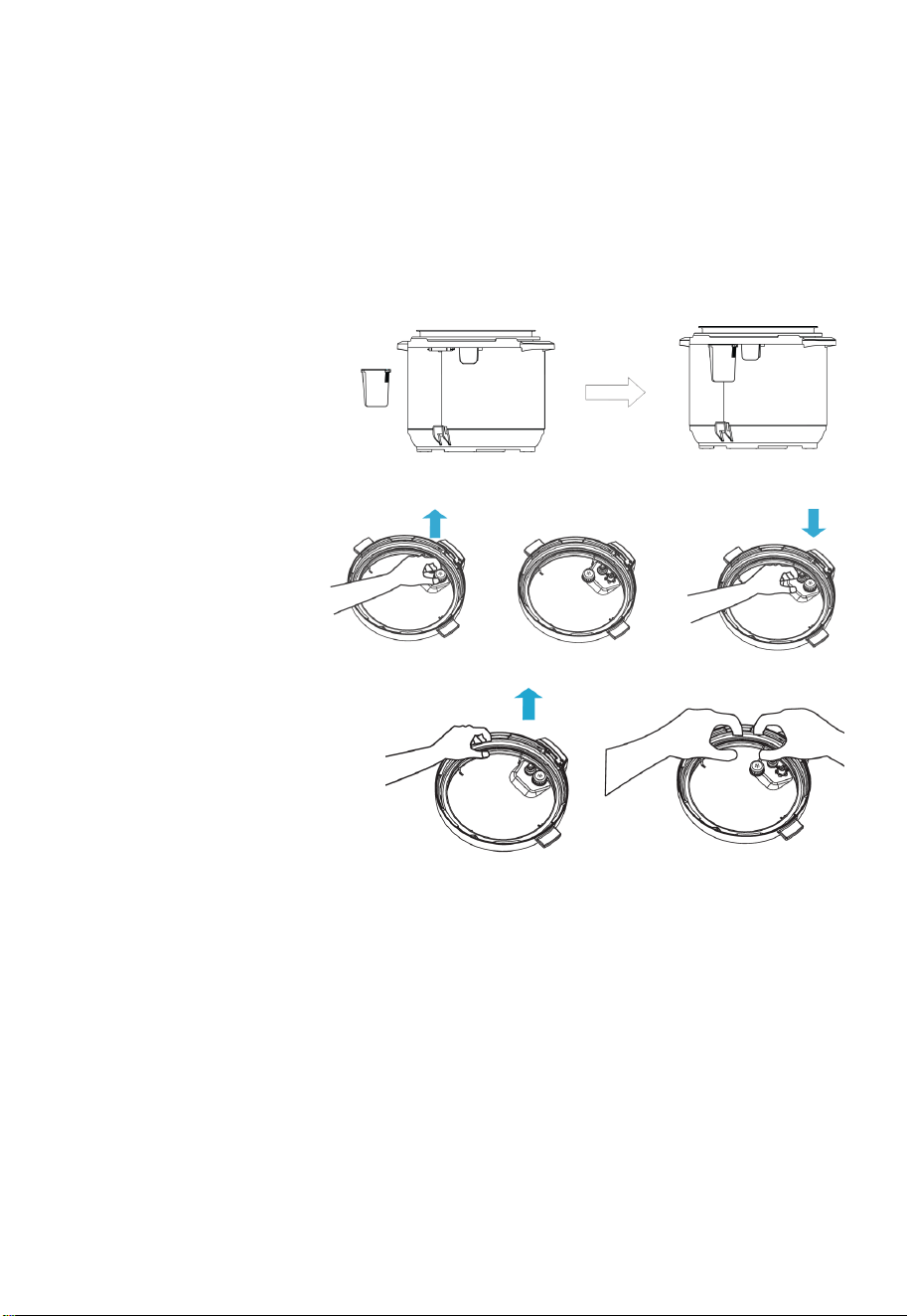
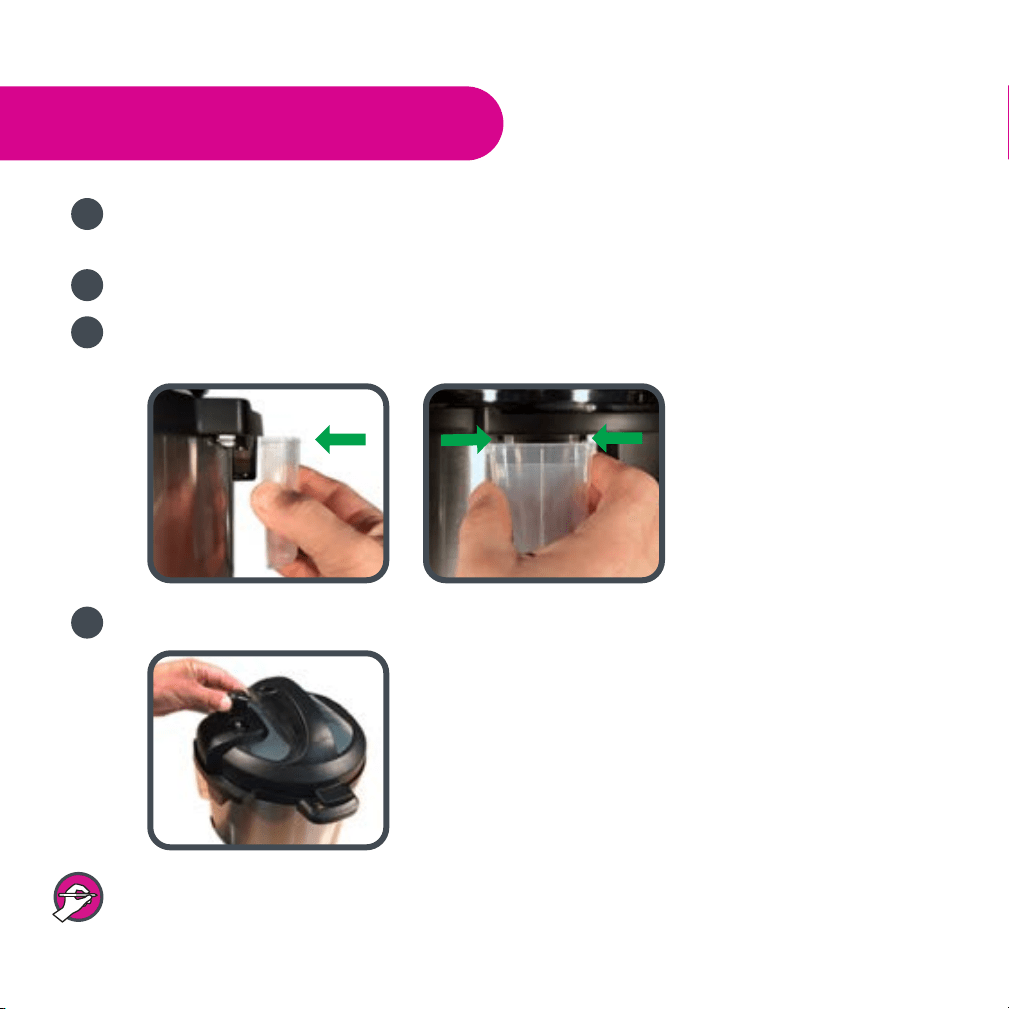
Installing the Condensaon Collector
To install the condensaon collector,
slide it into the slot on the cooker
base. Follow the reverse order to
remove it for cleaning.
Removing and Reinstalling the An-Block Shield
The an-block shield can be
removed by pushing it on the
side and outward. To install the
an-block shield, posion it in
place and press it down.
Removing and Installing
the Sealing Ring
The sealing ring can be removed by
pulling it outward, secon by secon,
from the sealing ring rack. To reinstall
the sealing ring, press it down into the
rack secon by secon. The sealing ring
can be installed with either side facing
up.
Please note the following:
Prior to each use, inspect to make sure the sealing ring is well seated in the sealing ring
rack and the an-block shield is mounted properly on the pressure release valve. A
properly seated sealing ring can be shied, with a bit of eort, clockwise or an-clockwise
inside the sealing ring rack.
Aer use, remove any food debris from the sealing ring and an-block shield.
Keep the sealing ring clean to avoid odor. Washing the sealing ring in warm soapy water or
dishwasher can remove odor. However, it is normal for the sealing ring to absorb the smell
of certain acidic foods. It is recommended to have more than one sealing ring at home.
You can purchase addional sealing rings from www.InstantPot.com.
Never pull the sealing ring by force, as the force may deform the sealing ring and ring rack
and aect the pressure sealing funcon.
A sealing ring with cracks, cuts, or other damages should be replaced immediately.
9
Safe Lid Opening
1. Make sure the pressure cooking program is complete or press “Keep-Warm/Cancel” to
terminate the program.
2. Release pressure by one of the following approaches.
Quick Release:
Turn the pressure release handle to the "Venng" posion to let out steam unl the oat
valve drops down.
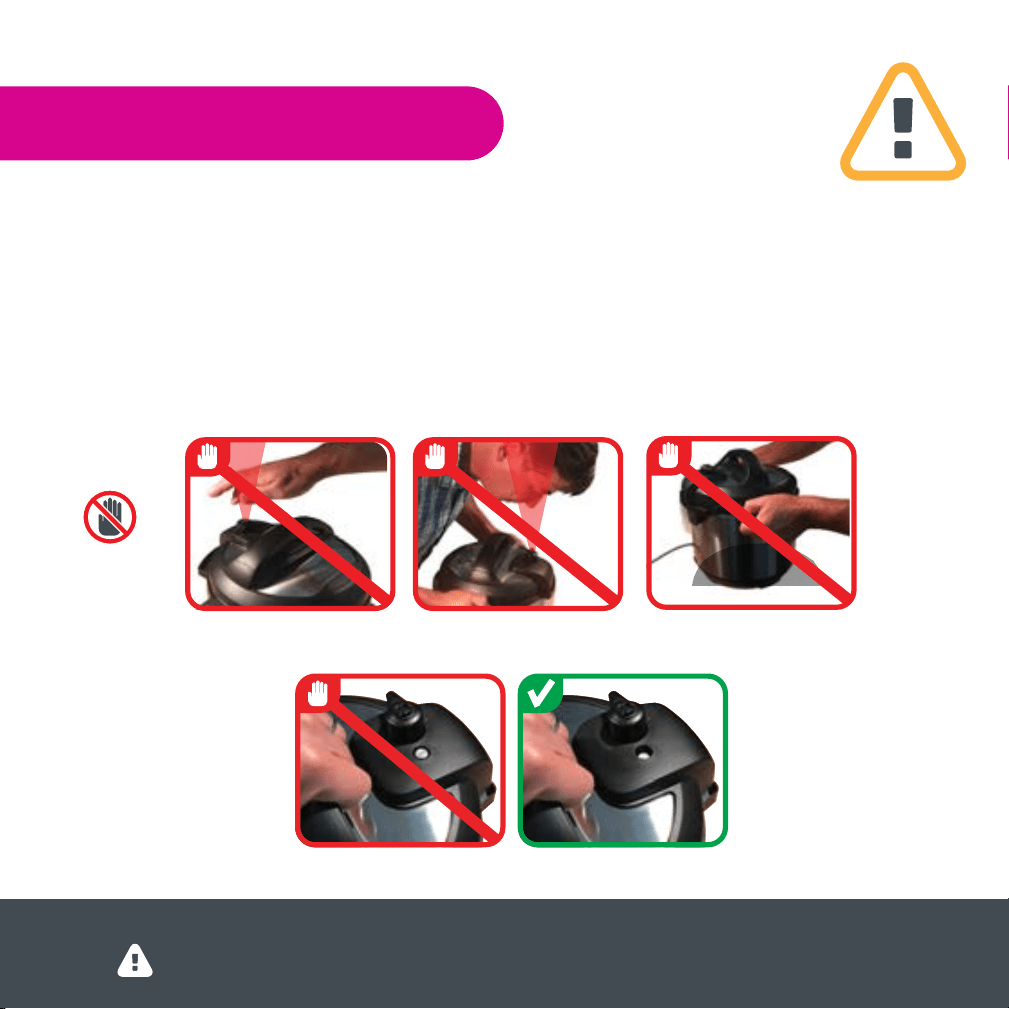
Cauon:
Please keep hands and face away from the opening on the top of the pressure release
handle when using Quick Release. The escaping steam is hot and can cause scalds.
Never pull out the pressure release handle when it is leng out steam.
Please be aware that Quick Release is not suitable for food with large liquid volume or
high starch content (e.g. porridge, congee, scky liquids, soup, etc.). Food content may
splaer out from the pressure release. Use Natural Release instead.
Natural Release:
Allow the cooker to cool down naturally unl the oat valve drops down. This may take 10
to 15 minutes or even longer, depending on the amount of food inside. Aer cooking is
nished, the cooker will be in Keep Warm mode.
Place a wet towel on the lid to speed up cooling.
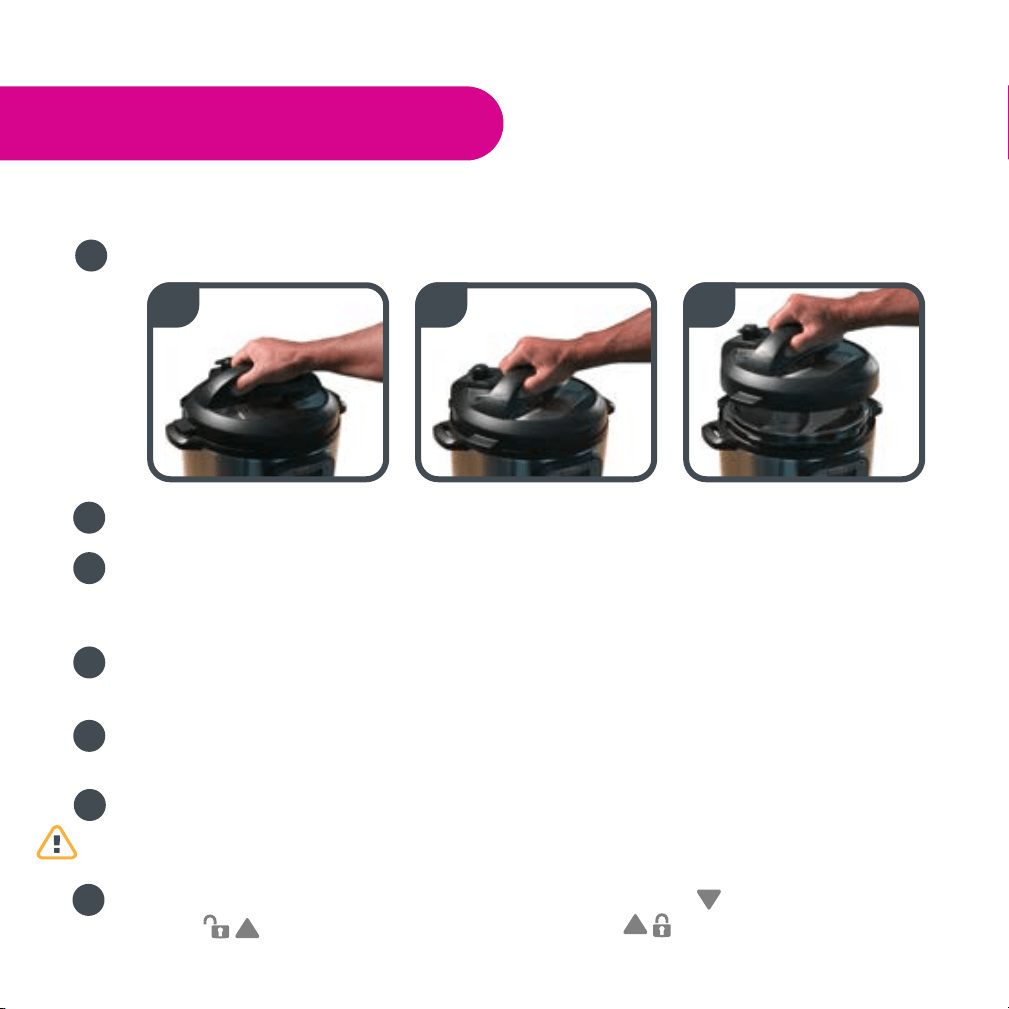
3. Open the lid: Hold the lid handle, turn the lid counterclockwise to the open posion, and li
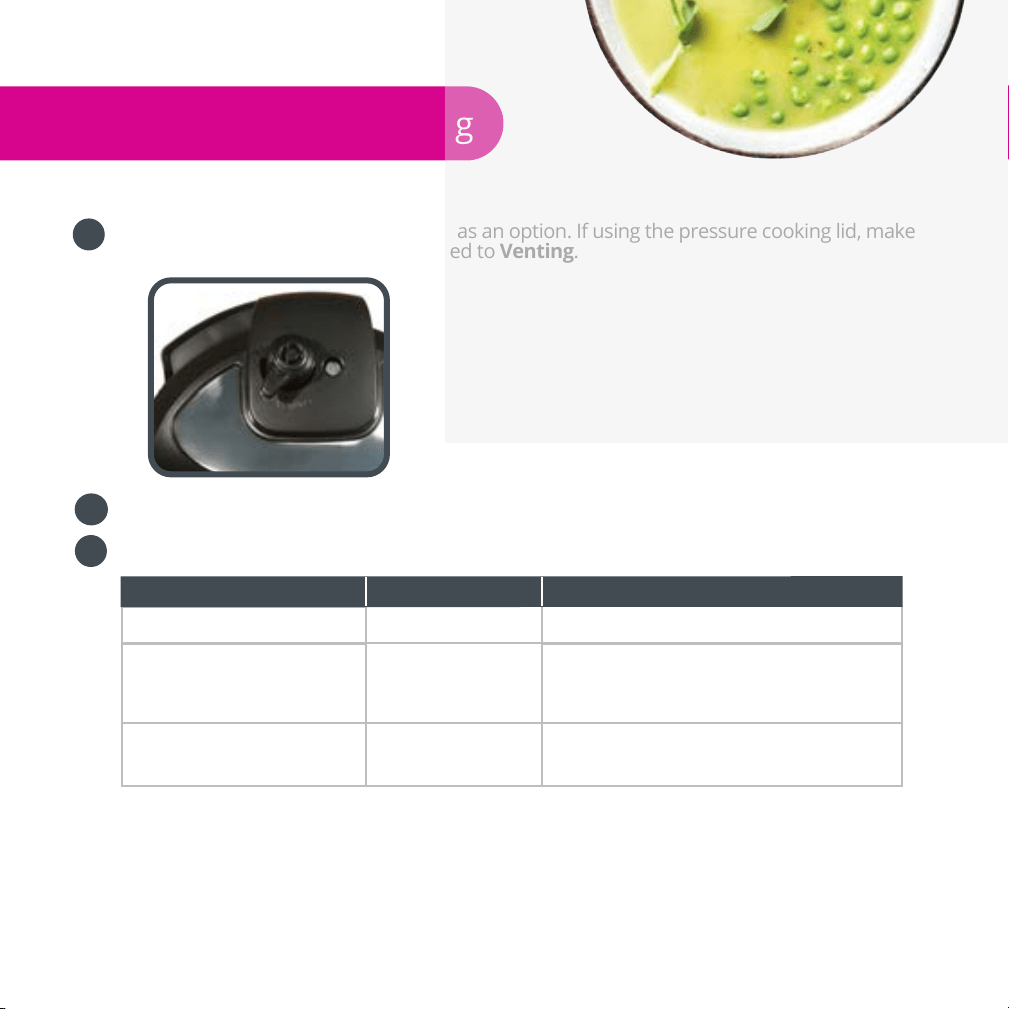
the lid up to open. To avoid vacuum sucon on the lid, turn the pressure release to “Venng”
posion to let in air when liing the lid.
Cauon: Do not open the lid unl pressure inside the pot is completely released. As a
safety feature, the lid is locked and won’t open unl the oat valve drops down.
If the oat valve is stuck due to food debris or scky liquid, you can push it down with a
pen or chopsck aer you are certain that the pressure has been released completely by
moving the pressure release handle to the venng posion.
To avoid personal injuries, never aempt to force down the oat valve to open the lid. DO
NOT open the lid unl aer the pressure is completely released naturally or manually by
opening the pressure release valve.
Cooking Preparation
1. Open the lid
Pick up the lid handle, rotate approximately 30 degrees counterclockwise unl the mark
on the lid is aligned with the “Open” mark on the cooker base.
10
2. Check whether all parts on the lid are assembled properly
Check the oat valve and pressure release valve for obstrucons. Make sure that the sealing
ring is well seated inside its holding rack. The an-block shield is installed properly and the
oat valve can move up and down easily.
3. Take out the inner pot, and add food and liquid
For all pressure cooking programs, the total amount of pre-
cooked food and liquid should NEVER pass 2/3 of the inner pot
capacity. When cooking food that expands during cooking such
as rice, beans, or dried vegetables, do not ll pass 1/2 of the
inner pot capacity. Over lling may risk clogging the pressure
release valve and developing excess pressure. This may also
cause leakage, personal injuries, or damage to the unit.
For non-pressure cooking programs, do no ll pass the MAX line.
4. Place the inner pot inside the cooker base
Be sure to remove any food debris. Wipe dry the outside of the inner pot and the heang
plate inside the cooker base.
Aer pung the inner pot inside the cooker base, rotate the inner pot slightly to ensure
good contact between the inner pot and the heang element.
5. Close the lid completely
Pick up the lid and put the lid on the cooker with the mark on the lid and the “Open”
mark on the cooker base aligned. Rotate the lid clockwise approximately 30 degrees unl the
mark on the lid is aligned with the “Close” mark on the cooker base rim.
Instant Pot® has a safety feature to disable the cooker and the display ashes "Lid" if the lid
is not posioned correctly. When using "Soup", "Poultry", "Meat/Stew", "Bean/Chili",
"Mulgrain", "Rice", "Steam", "Porridge" and "Yogurt", the lid should be fully closed. When
using "Sauté", the lid should be open. "Keep Warm" and “Slow Cook” work with the lid
either open or closed.
11
6. Posion the pressure release handle properly
Please note that it is perfectly normal and necessary
for the pressure release handle to be loose. It works by
weight and simply rests on top of the pressure release
outlet. It can also be removed for washing if necessary
by pulling it straight out.
When running any of the programs except "Keep-
Warm", "Sauté" or "Slow Cook", align the pointed end
of the pressure release handle to "Sealing" posion,
indicang that the pressure cooker is in the sealed
posion.
The "Sauté" funcon must be used without the lid. The
"Slow Cook" and “Keep-Warm” funcons can operate
with or without the lid, or use an oponal glass lid available at www.InstantPot.com.
Cauon: When the lid is closed while iniang the “Keep Warm” or “Slow Cook” program,
the pressure release valve must be in the ‘Venng’ posion.
Controls and States of the Cooker
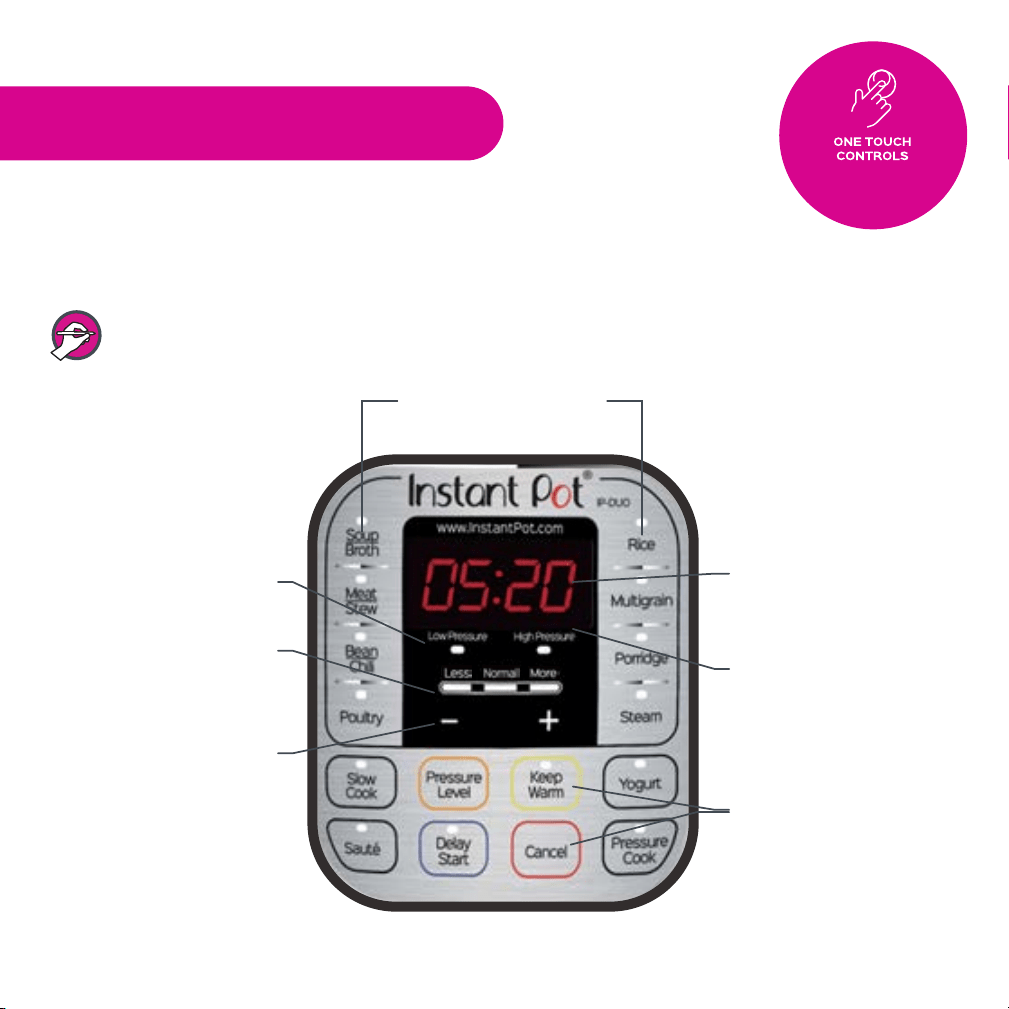
Control Panel
The control panel of your Instant Pot® consists of an LED display, 2 pressure indicators, 3 mode
indicators, 4 operaon keys and 14 funcon keys. Each funcon key has a funcon indicator light.
Operaon keys do not have indicator lights.
12
States of the Cooker
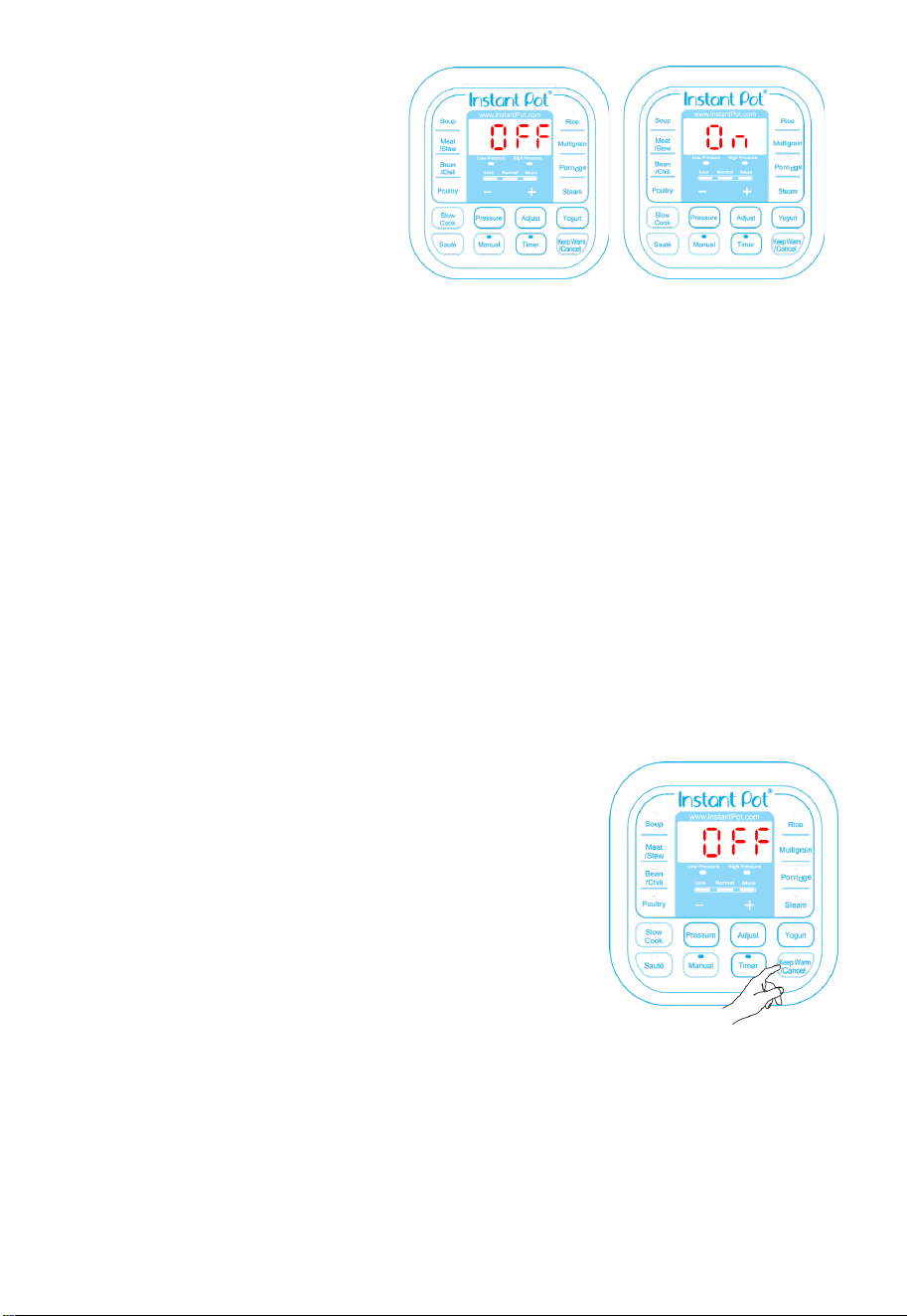
Your Instant Pot® has 3 states which are
shown on the LED display and funcon
indicators.
Standby state: the LED display
shows “OFF”.
Pre-heang state: the LED display
shows “On” and the acvated
funcon indicator lights up.
Program operang state: the acvated funcon indicator lights up and the LED display
shows me. For all pressure cooking, “Slow Cook” and “Delay Start” funcons, the me
counts down. For “Keep Warm” and “Yogurt” funcons, the me counts up.
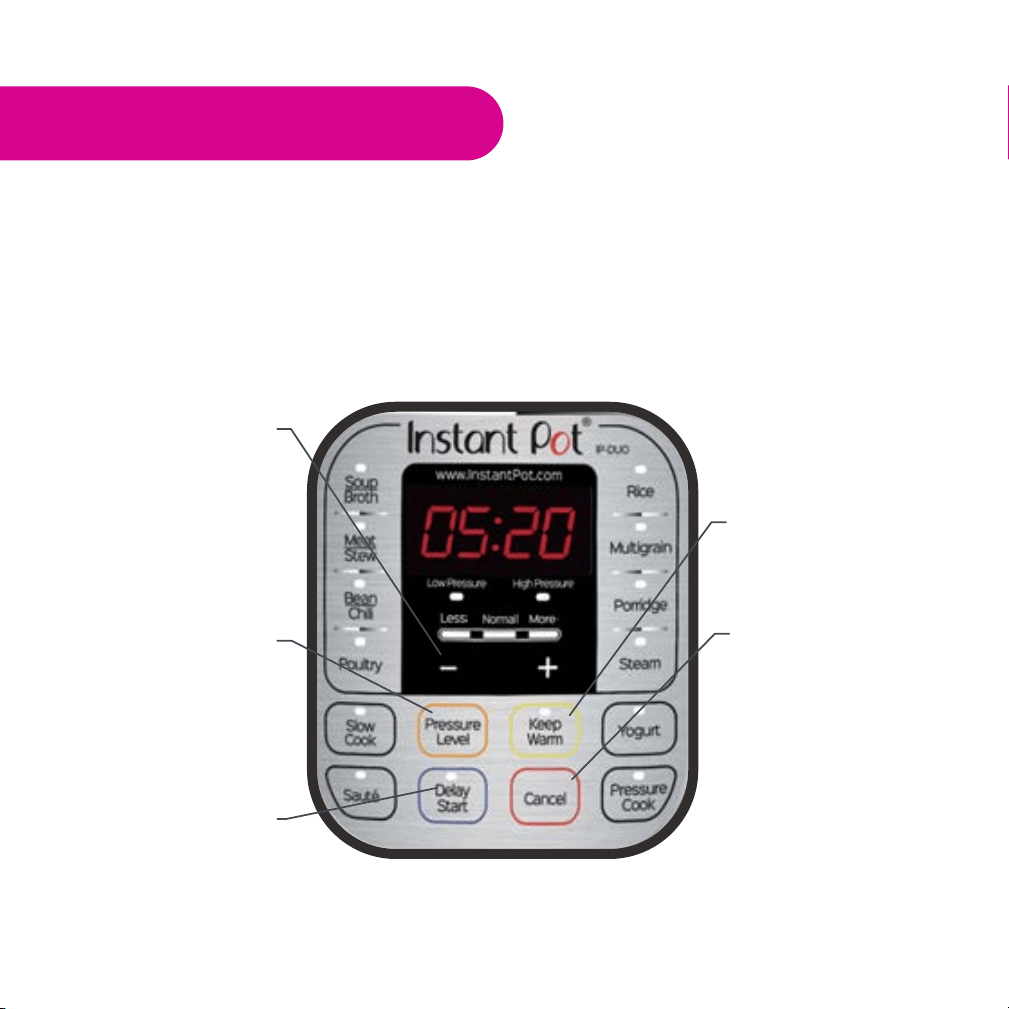
Operation Keys
The 4 operaons keys include “+”, “-“, “Pressure” and “Adjust” keys. The “+” and “-“ are used to
change the me value.
The "Pressure" key toggles the pressure seng between “High Pressure” and “Low Pressure” for
the pressure cooking funcons which include "Soup", "Bean/Chili", "Poultry", "Meat/Stew",
"Mulgrain", "Porridge", "Steam", “Rice" and “Manual” funcons. The “Pressure” key has no
eect on non-pressure cooking funcons: “Slow Cook”, “Sauté” and “Yogurt”.
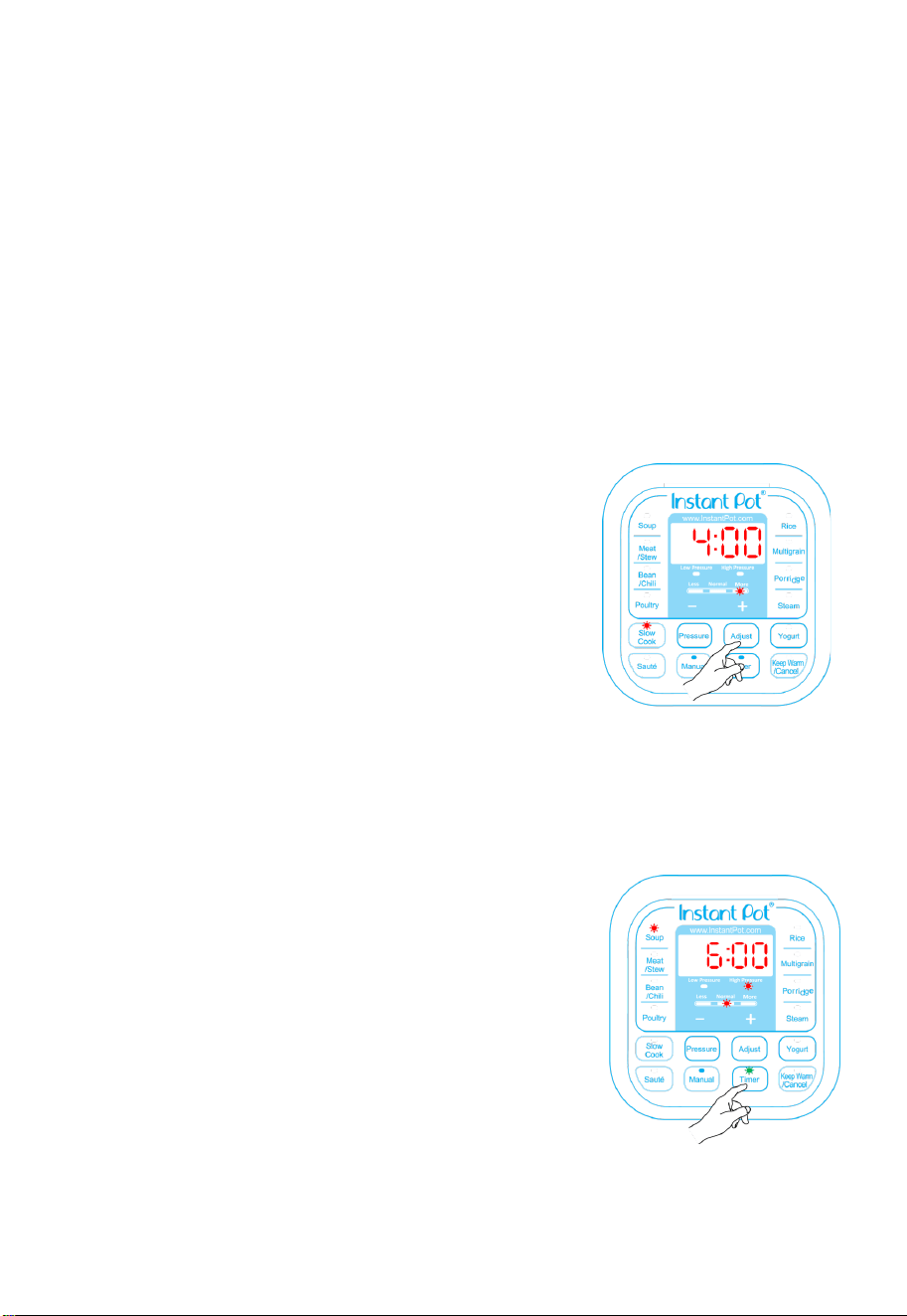
The "Adjust" key can make 3 types of adjustments:
1. Changing the pressure keeping me for pressure cooking funcons, except "Manual"
and "Rice" funcons. "Rice" is fully automac.
2. Switching the temperature of "Slow Cook" and "Sauté".
3. Selecng programs in “Yogurt”.
Function Keys
The most important key is “Keep Warm/Cancel”. When Instant
Pot® is being programmed or in operaon, pressing this key will
cancel the program and return the cooker to standby state.
When the cooker is in standby state, pressing this key acvates
the keep-warm program.
The “Soup” key is for making various soups and broth. You can use
the “Adjust” key to select a shorter or longer cooking me,
depending on the desired cooking result. Instant Pot® controls
the pressure and temperature to a level that the liquid never
goes into a heavy boiling state. For example, when making
chicken broth with the "Soup/Broth" funcon, the broth is clear
and the chicken remains intact aer cooking. If you need the
food content to be fully broken down, please sr and mix the
soup before serving.
The “Meat/Stew” key is for cooking meat and stew. The “Adjust” key can be used to change the
cooking me to achieve the desired meat texture. In general, the "More" seng is for fall-of-
the-bone cooking results.
The “Bean/Chili” key is designed for cooking beans and making Chili. If you want the beans well
cooked, please use the “Adjust” key to select "More" duraon.

13
The “Poultry” key is programmed to make poultry dishes. You may use the "Adjust" key to change
the poultry cooking me from "Normal" to "More" or "Less" depending on your preference of
texture and the amount of poultry you put into the pot. Poultry meat is generally easier to
cook than pork, lamb and beef and hence a shorter cooking me.
The “Porridge” key is to make porridge of various grains. You can use the “Adjust” key to select a
cooking duraon. The “Normal” duraon is for rice porridge. For a mixture various grains and
beans, please choose the "More" duraon. Sr the Porridge before serving. Please note, aer
the “Porridge” program is nished, do NOT put steam release handle in venng posion;
otherwise the porridge will splaer through the steam release. Please use Natural Release.
The “Bean/Chili” key is specically for cooking beans and making Chili. If you want the beans well
cooked, please use the “Adjust” key to select "More" duraon.
The “Rice” key is a fully automated smart program for cooking regular rice or parboiled rice. The
cooking me is adjusted automacally depending on the amount of rice. To cook 2 cups of rice
(using measuring cup provided), it takes about 10 minute pressure keeping me; for 3~5 cups
of rice, it takes about 12 minute pressure keeping me; more cups will take longer me
accordingly. Total cooking me is not displayed, whereas the pressure keeping me will be
shown when working pressure is reached. The “Adjust” key has no eect on this program.
Please note: You can cook as lile as one cup of rice with the correct rao of water.
The "Mulgrain" key is a program for cooking mixed grains of wild rice, hard brown rice, mung
beans, etc. There are three “Adjust” opons for mulgrain rice cooking. The "Normal" seng
has 40 minutes of pressure cooking me. The "Less" seng has 20 minutes of pressure
cooking me. The "More" seng has 45 minutes of warm water soaking me and 60 minutes
of pressure cooking me. The "More" seng is suitable for harder grains such as dry split
corn.
The “Porridge” key is for making porridge of various grains. You can use the “Adjust” key to select
a cooking me. The “Normal” seng is for rice porridge. For a mixture of various grains and
beans, please choose the "More" seng. Sr the Porridge before serving. Please note, aer
the “Porridge” program is nished, do NOT put pressure release handle in the venng
posion, otherwise the porridge will splaer out the pressure release. Please use Natural
Release.
The “Steam” key is designed for steaming purposes. You can steam vegetables, seafood or reheat
food with the steam rack provided. When steaming vegetables and seafood, please note that
using the “Natural Release” method for releasing steam will likely overcook the food. You will
need to use the ‘Quick Release’ method to release the pressure as soon as the cooking me
has reached.
Using 1~2 cups (160ml) of water is sucient for steaming fresh and frozen vegetables, with
1~2 minute of pressure keeping me. Please use the “+” or “-“ key to change the steaming
me. Please note that unlike other pressure cooking funcons, the “Steam” funcon heats at
full power connuously. This may burn food that is in direct contact with the boom of the
inner pot. Please use the trivet provided to elevate food above the water. Use a metal basket
or (oven safe) glass/ceramic container that ts into the inner pot to contain the food.
The “Slow Cook" key allows you to use your Instant Pot® as a convenonal slow cooker. The user
can change the cooking me by pressing the "+" or "-" key to set the cooking me from 0.5 to
20 hours. The "Adjust" key allows the user to adjust the level of heang as in tradional slow
cookers. Please see the “Slow Cooking” secon for its usage.
The “Manual” key allows manual seng of cooking me. The me set in this mode is the pressure
cooking me, which will begin to count down when working pressure is reached. The
maximum pressure cooking me is 240 minutes.
14
The "Sauté" key is used for open lid sautéing, browning or simmering inside the inner pot.
"Adjust" can be used to change the operang temperatures. Please see the “Sautéing” secon
for details.
The “Yogurt” key has 3 programs: making yogurt, pasteurizing milk and making Jiu Niang (aka
fermented glunous rice). Please see the “Making Yogurt” and “Making Jiu Niang ” secons.
The “Timer” key is for delayed cooking. To start delayed cooking, rst select the desired cooking
funcon (all program funcons except “Sauté” and “Yogurt”), and then press the “Timer” key.
Use “+” and “-“ to set the delayed hours. Press the "Timer" key again to change the minutes.
The me you are seng is the delayed me before the program starts. Please allow
sucient cooking me and cooling down me before serving. The me delay can be adjusted
with “+” or “-“ keys for up to 24 hours . Please see the “Delayed Cooking with Timer” secon
for details.
Cooking with Your Instant Pot
®
Initial Test Run
In order to familiarize yourself with the Instant Pot® and start
cooking with your favourite recipe, it is highly recommended for
rst me users to do a test run. This test run will help you become
familiar with Instant Pot®, make sure the unit is free of residues
from the manufacturing process, and indicate whether your unit is
working properly. This oponal, but recommended, test run will
complete in about 15 minutes.
1. Make sure the pressure release handle and oat valve are
unobstructed and clean, and that the sealing ring is properly
inserted.
2. Place the inner pot in the cooker base and add 3 measuring
cups of water into the inner pot.
3. Close the lid. Make sure that the pressure release handle is poinng to the "Sealing" mark on
the lid.
4. Press the "Steam" buon, and press the “-“ buon to change the me to 2 minutes.
5. In 10 seconds, your Instant Pot® will go into the preheang cycle (display showing “On”).
Within a few minutes, steam will release for a minute or two unl the Float Valve pops up to
seal the cooker. Once working pressure is reached, which may take a few minutes or up to 10
-13 minutes, the countdown mer will begin. When the countdown is nished, the Instant
Pot® will beep and automacally switch into the “Keep Warm” mode.
The test is now complete. Press the “Keep-Warm/Cancel” buon and/or unplug the unit. Once the
pot cools down, you can open it and are ready to try your
favorite recipes.
Pressure Cooking
The following procedure is for “Rice”, "Soup", "Poultry",
"Meat/Stew", "Bean/Chili", "Mulgrain", "Porridge", "Steam"
and “Manual” funcons.
1. Follow steps in the "Cooking Preparaon" secon of this
manual.
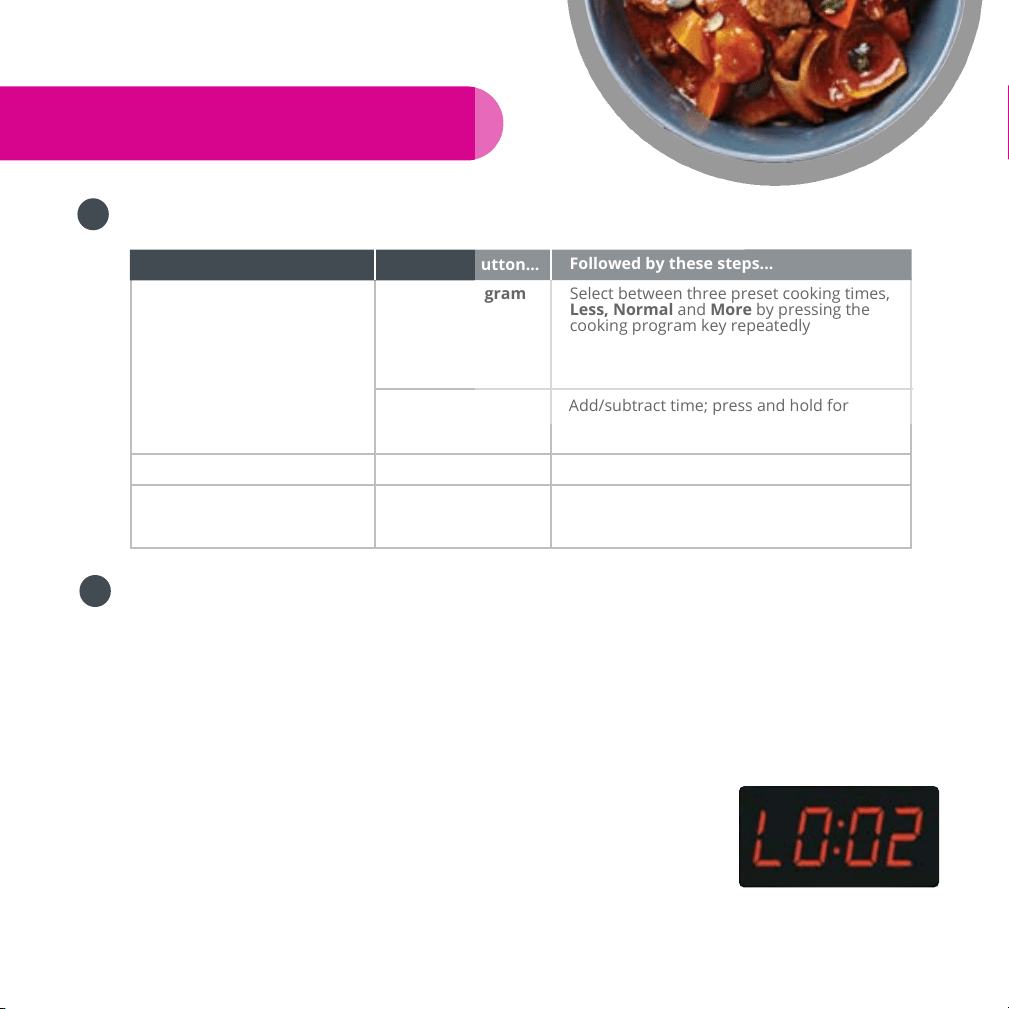
2. Connect power cord. The LED display shows “OFF”
indicang that it’s in standby state.
15
3. Select a cooking funcon, e.g. “Soup”. Once a funcon key is pressed, its indicator lights up.
Within 10 seconds aer pressing a funcon key, you can sll select other funcon keys
and adjust cooking me.
4. Select cooking me.
You may use the "Adjust" key (except for “Manual” and “Rice” funcons) to adjust
cooking me. Press the "Adjust" key repeatedly to change between “Normal”, “Less"
and “More" modes which will light up on the display.
If necessary, change the cooking me with “+” and “-“. Press and hold the “+” or “-“ key
for faster changes.
The built-in cooking me is suitable for most types of food. Please use the cooking me
table in the recipe book to determine the appropriate cooking me based on the food
type, quanty of food and your texture preference.
5. Select cooking pressure.
All funcons except “Rice” defaults to High Pressure. For “Rice” funcon, the default is
Low Pressure. Low Pressure operates at half of the regular working pressure (around
5.8psi or 40kpa). It is used to avoid overcooking tender food materials such as
vegetables and for certain recipes that may require using low pressure seng.
6. Cooking starts automacally in 10 seconds aer the last key press.
Three audible beeps will sound to indicate the cooking process has begun. The LED
display shows "On" indicang that the pre-heang state is in progress. Please note:
Depending on the food content, the quanty and its temperature (frozen or not), the
preheat cycle can range between 10 to 40 minutes.
As the pressure increases inside the cooker, it is perfectly normal for traces of steam to
escape from the oat valve unl the oat valve pops up.
Once the cooker reaches working pressure, the LED
display changes from “On" to the programmed cooking
me. The cooking me counts down to indicate the
remaining me in minutes. During this pressurized state,
you should not see any steam leaking out anywhere
from the lid. However, from me to me, you may see a
small amount of steam coming out from the pressure
release handle. This is perfectly normal.
During the cooking operaon, the cooker may make so
clicking sounds. This comes from the normal operaon of
the heang element switching on and o.
16
At any me, you can cancel the cooking program in progress and return to standby
mode by pressing the “Keep-Warm/Cancel” key.
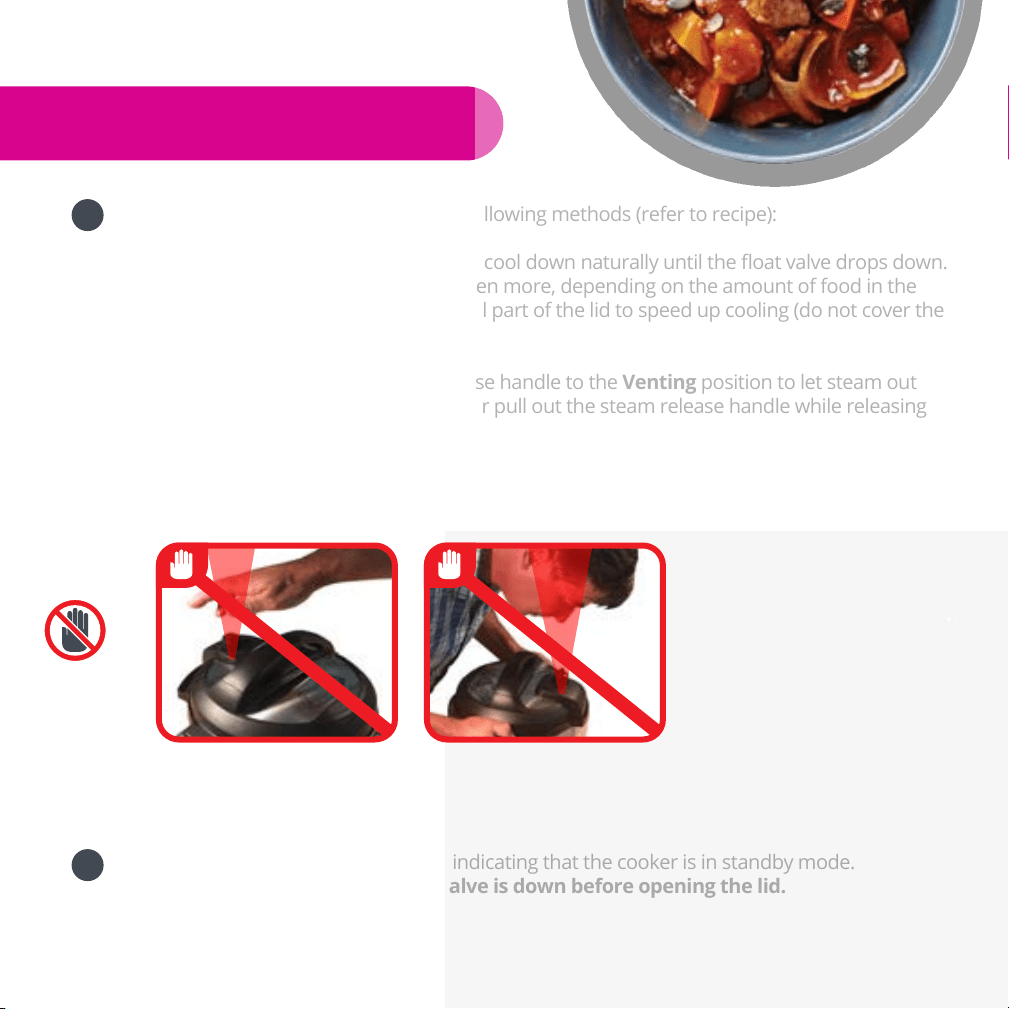
7. When the pressure cooking cycle nishes, the cooker beeps and automacally goes into the
"Keep Warm" cycle, called Auto “Keep Warm” Cycle. The LED display shows an “L” on the
rst digit, such as "L0:02", to indicate the “Keep Warm” cycle and me duraon. The clock
counts up for 10 hours. If the 10 hour Auto “Keep Warm” cycle nishes, the cooker goes
into standby state.
It is not recommended to leave cooked rice in “Keep-Warm” state for too long as it may
aect the texture of the rice.
8. To serve food, press “Keep-Warm/Cancel” to stop the keep-warm cycle and open the lid
according to the “Safe Lid Opening” secon of this manual.
When opening the lid, the inner pot may appear to be stuck on the lid due to vacuum
eect caused by contracon of cooling air. Please turn the pressure release handle to
“Venng” to let in air to release the vacuum.
Slow Cooking
1. Follow steps in the "Cooking Preparaon" secon of this
manual. The pressure release handle should be at the
"Venng" posions. An oponal glass lid can also be used.
2. Connect the cooker to the power outlet. The LED display
shows “OFF” indicang that it’s in standby state.
3. Press the “Slow Cook” key.
4. Change cooking me between 0.5 and 20 hours by pressing
the "+" or "-" key.
5. Select the desired cooking mode with the “Adjust” key. By
pushing the "Adjust" key repeatedly, you can adjust the
cooking mode to “Normal”, “More” or “Less”, which
correspond to medium, high and low in a convenonal slow cooker.
6. Cooking starts automacally in 10 seconds aer the last key is pressed.
7. When the cooking nishes, the cooker beeps and goes into the Auto "Keep Warm" cycle for
10 hours.
Delayed Cooking with Timer
Your Instant Pot® has a mer funcon to delay the start of cooking
for up to 24 hours. Timer funcon does not apply to the “Keep
Warm”, “Yogurt” and "Sauté" funcons. The following shows how
to program for delayed cooking.
1. Follow steps in the previous “Pressure Cooking” and “Slow
Cooking” secons to set a cooking program.
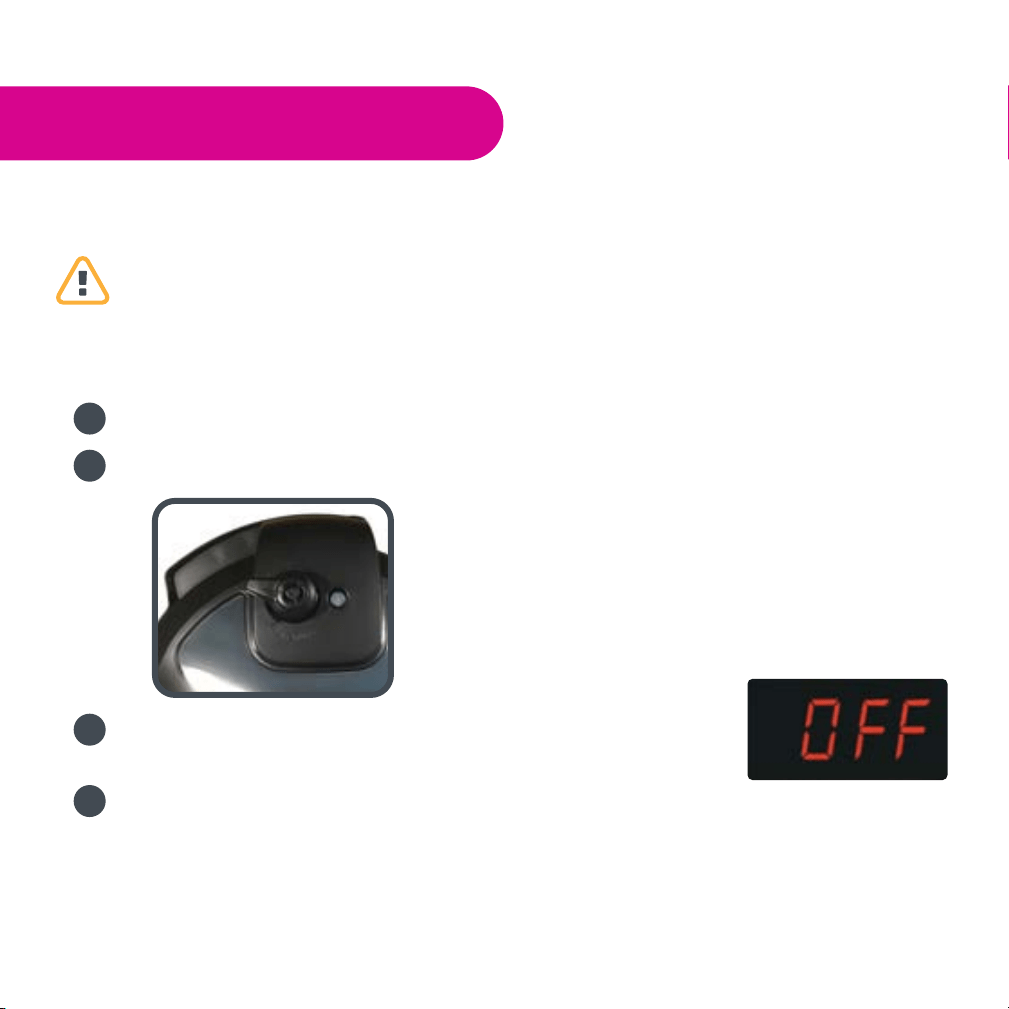
2. Within 10 seconds aer program selecon, press the “Timer”
key to set the hours and minutes to be delayed. Use “+” and “-
“ to set the delayed hours. Press the "Timer" key again to
change the minutes. The me is the delayed me before the
program starts. Please allow sucient cooking me and
cooling down me before serving.
3. 10 seconds aer the last key press, the “Timer” funcon starts. The me on the LED display
counts down, and the ashing green indicator on the “Timer” key changes to solid green.
17
4. To cancel the Timer operaon, press the “Keep-Warm/Cancel” key at any me.
5. Your Instant Pot® starts cooking when the delay mer counts down to 0. Aer cooking, the
cooker will then enter the Auto “Keep Warm” cycle for 10 hours. Please Note:
We highly discourage using the Timer funcon for perishable foods, such as meat and sh,
which may spoil when le at room temperature for hours. Cooked rice may yield overly
so texture due to long soaking me. It may also cause a layer of burned rice at the
boom of the pot if it is le in Keep-Warm mode for too long.
The “Timer” funcon is not recommended for porridge, oatmeal or other frothy, scky
foods due to the possibility of the oat valves geng blocked and causing overow of
food content. The Instant Pot® should not be le unaended during the preheat cycle.
Since the ‘Timer’ funcon implies leaving the unit unaended, it is strongly recommended
to not use the “Timer” program for the types of food menoned above.
Sautéing
1. Follow steps in the "Cooking Preparaon" secon of this manual. Keep the lid open to avoid
pressure from building up inside the cooker. An oponal glass lid can also be used.
2. Connect the cooker to the power outlet. The LED display
shows “OFF” indicang that it’s in standby state.
3. Press the “Sauté” key. For safety reasons, the maximum
operaon me of one “Sauté” cycle is 30 minutes.
4. Change the cooking temperature among “Normal”, “More”
and “Less” modes with the “Adjust” key. The "Normal" mode
is suited for regular sauté or pan searing. The "More" mode is
for sr-frying or browning meat at higher temperature. The
"Less" mode is suitable for simmering, reducing juices or
thickening sauces. To avoid pressure building up, the lid
cannot be closed. If you accidentally close the lid, ashing
"Lid" is displayed to warn about the wrong lid posion.
Cauon: parally closing the lid during sautéing could cause
pressure to build up in the cooker. This can be hazardous.
5. Heang starts automacally in 10 seconds aer the last key is
pressed. The “Sauté” program can be cancelled at any me by
pressing “Keep Warm/Cancel” key.
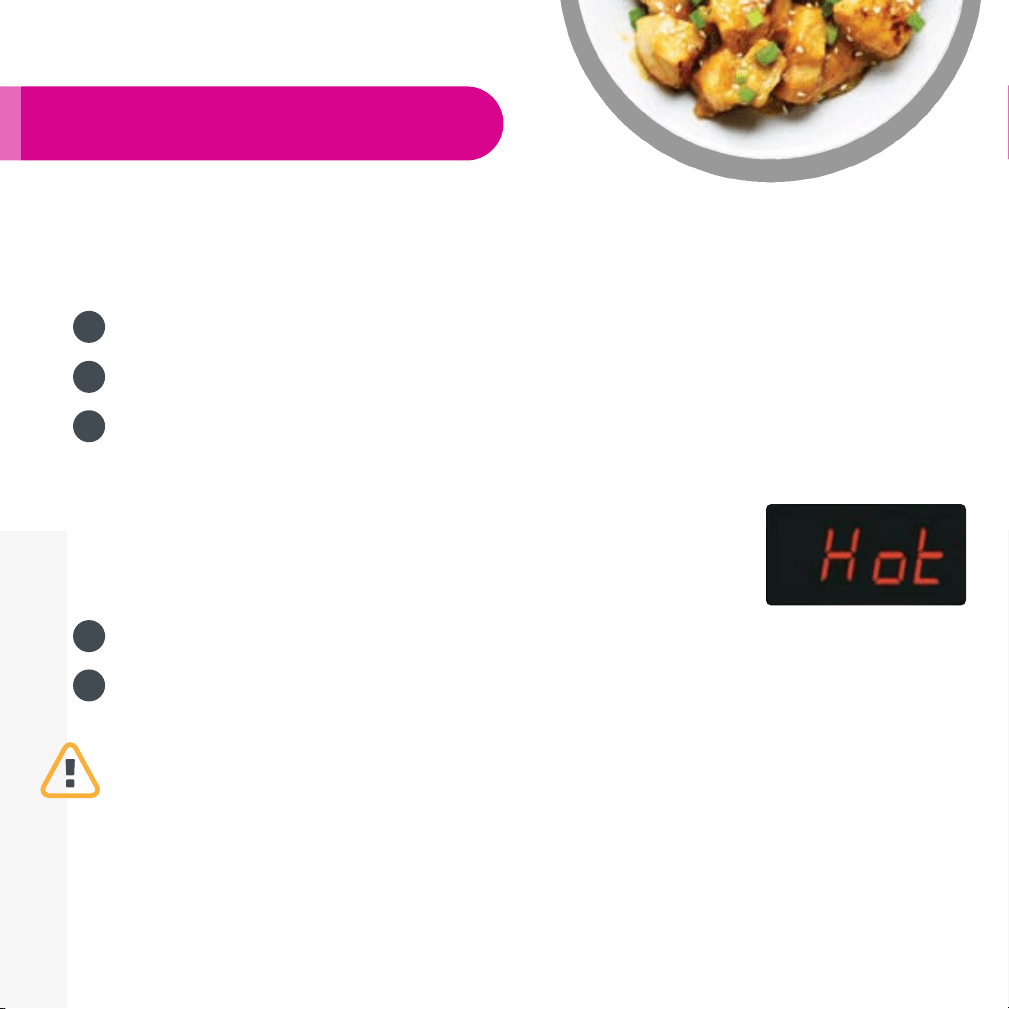
6. When the designated temperature is reached, the LED display
shows “Hot”. “Hot” will not appear if there is water inside pot.
7. When cooking nishes, the cooker beeps and goes to standby
state. If you need more me, simply press the “Sauté” key
again.
Warming
Pressing the “Keep-Warm/Cancel” key in the standby state acvates the “Keep Warm” funcon.
You can use “+” and “-“ to change the me from 10 minutes to 99 hours and 50 minutes. When
“Keep Warm” funcon starts, the me counts up by minutes. The "Keep Warm" funcon can be
used with or without the lid closed. You can also use an oponal glass lid for this funcon. When it
nishes, the cooker beeps and goes to standby state.
Making Yogurt
You can make yogurt either with the inner pot or use glass boles. The process to make yogurt
18
involves two steps. The rst step is to pasteurize the milk by heang it to 180° F/83° C. This serves
two purposes: (1) killing pathogens and harmful bacteria which can
grow during the fermentaon period, and (2) denaturing milk
proteins, which prevents curding of milk and makes the proteins
easier to absorb.
Instant Pot® provides two convenient ways to heat your milk. If you
use the inner pot to make yogurt, press “Yogurt” then “Adjust” to
“More” mode with the word “boil” on the display. Instant Pot® will
then boil the milk to 180° F/83° C. When it’s done, it beeps and
displays “yogt”.
If you use containers or boles to make yogurt, you can steam the
milk by: adding 1 cup of water in the inner pot, pung in the
steam rack and placing your containers or boles on top of the
rack. Select the “Steam” funcon and set the me for 1 minute.
Once the process is over, use the “Natural Release” method to
release the steam.
The second step aer heang the milk is to let it cool to below
115°F/46°C, then add an adequate amount of yogurt starter or
fresh yogurt. If you use containers or boles, you can place them
in the inner pot without adding any addional water. Press the
“Yogurt” funcon key, press “Adjust” to “Normal” mode and then
adjust the me using the “+” and “-“ keys based on the
instrucons of the yogurt starter. The program automacally
starts in 10 seconds. When the program completes, Instant Pot®
beeps, displays “yogt” and goes to standby state.
The yogurt can be served plain together with other dishes (e.g.
curry), or mixed with honey or jam to make a fruit yogurt.
Making Jiu Niang
Jiu Niang, also known as fermented glunous rice, is a sweet and
mildly alcoholic delicacy of Asia. It is highly nutrious and easy to
digest, commonly used to make desserts in China, Japan, Korean
and other Asian countries. Glunous rice, also known as scky rice,
is used to make Jiu Niang. Glunous rice contains high
concentraon of starch which is converted to sugars during
fermentaon.
1. Soak two cups of glunous rice in cold water for at least 5
hours unl the rice grains become easily broken with ngers.
2. Drain the water and wrap the soaked rice with cheese cloth and put it into a steaming
basket. Place the basket on top of the steam rack (trivet) and add 2 cups of water into the
inner pot. Run the “Steam” funcon for 30 minutes. Use Natural Release method.
3. Prepare 1 cup of cold boiled water, (normally at a water-to-dry-rice rao of 1:2), starter yeast
powder, and a glass or ceramic container with lid. Make sure that all tools are clean and free
from bacteria, oil and salt.
4. Aer the steamed rice cooled down to below 35°C/95°F, mix the cold water and yeast
powder with the rice thoroughly in the container. Make sure that each rice grain is
separated, rather than stuck together. Gently press the rice mixture together and leave a
hole in the middle of the mixture.
5. Add water to the 3 cup mark in the inner pot. Place the containers into the inner pot with
the steam rack. Water should submerge about 1cm/0.5in of the boom of the containers for
even heat conducon. Make sure to close the lid of the containers to avoid excess
19
evaporaon from the rice.
6. Press the “Yogurt” funcon key and then press the “Adjust” key twice to “Less” mode for Jiu
Niang funcon. The default fermentaon me is 24 hours. You may need to change this
based on the type of yeast used.
7. Jiu Niang will be ready when the program nishes. A well-made fermented glunous rice has
transparent liquid and some small gas bubbles with an aroma of liquor and is very sweet. If
there are some white fungi on the surface, this is normal. If it has black fungi, the rice was
contaminated during the process and it should not be consumed. Avoid running the
fermentaon for too long, which causes the rice to turn sour.
8. When the program completes, Instant Pot® beeps, displays “yogt” and goes to standby state.
Advanced Operations
1. Auto keep warm ON/OFF: In factory seng, ‘Auto Keep Warm’ is ON when a cooking
program buon is pressed. ‘Auto Keep Warm’ can be turned ON and OFF by a second press
on the same cooking program buon before the cooking program starts. During this period,
the Keep Warm buon indicator displays ON or OFF accordingly.
2. Audible beeping ON/OFF: In factory seng, beeping is ON. To turn beeping OFF, press and
hold the “-” buon for 3 seconds. The display will show “ S OFF” to indicate “Sound OFF”.
3. Memorizing the last used program sengs per cooking program buon: The previously used
cooking sengs, including me, pressure and temperature are stored once the custom
sengs are dened, even aer the Instant Pot® cooker is unplugged from power source. To
reset to factory default sengs, press and hold the “Adjust” buon for 3 seconds when the
Instant Pot® cooker is in the OFF mode.
Care and Maintenance
Regular care or maintenance is essenal to ensuring that this product is safe for use. If any of the
following circumstances takes place, please stop using the appliance immediately and contact the
Instant Pot® support team.
Power cord and plug appear worn out, deformed, discoloured or damaged.
A poron of the power cord or plug gets hoer than usual.
The cooker heats abnormally or emits a burnt smell.
When powered on, there are unusual sounds or vibraons.
If there is dust or dirt on the plug or socket, please remove the dust or dirt with a dry cloth.
Cleaning
Cauon: please make sure the appliance has cooled down and is unplugged before cleaning.
1. Clean the product aer each use. Wipe the black inner housing rim and slot dry with cloth to
prevent rusng on the exterior pot rim.
2. Remove the lid and take out the inner pot, wash them with detergent, rinse with water and
then wipe dry with a so cloth. The stainless steel inner pot is also dishwasher safe.
3. Use water to clean the lid, including the sealing ring (which can be removed), pressure
release, an-block shield, and wipe them clean with a so dry cloth. Do not take apart the
pressure release handle assembly.
4. Clean the cooker base with a clean damp cloth. Do not immerse the cooker into water. Do not
use a wet cloth to clean the pot while the power cord is plugged into the power outlet.
20
Troubleshooting
If you experience any problem with the appliance, please DO NOT return the product to the
retail store or online merchant. For technical assistance and product return informaon, please:
Create a support cket at www.InstantPot.com/support/
Email to support@instantpot.com
Or call 1800 828-7280 for Instant Pot customer care team
The cases in the following tables do not always indicate a faulty cooker. Please examine the cooker
carefully before contacng the support team for repair. You can also nd help videos and FAQs on
www.InstantPot.com/faq/
21
Problem Possible Reason Soluon
1
Dicult to close the lid
Sealing ring not installed
properly
Posion the sealing ring
well
Float valve in the popped-up
posion
Press the oat valve lightly
downward
2
Dicult to open the lid
Pressure exists inside the
cooker
Posion the pressure re-
lease valve to the venng
posion to reduce the in-
ternal pressure. Open the
lid aer the pressure is
Float valve stuck at the
popped-up posion
Press the oat valve lightly
with a pen or chopsck.
3
Steam leaks from the
side of the lid
No sealing ring Install the sealing ring
Sealing ring damaged Replace the sealing ring
Food debris aached to the
sealing ring
Clean the sealing ring
Lid not closed properly
Open then Close the lid
again
4
Steam leaks from oat
valve for over 2 minutes
Food debris on the oat valve
silicone seal
Clean the oat valve sili-
cone seal
Float valve silicone ring worn-
out
Replace the oat valve sili-
cone ring
5
Float valve unable to
rise
Too lile food or water in
inner pot
Add water according to the
recipe
Float valve obstructed by the
lid locking pin
Close the lid completely,
see “Cooking Preparaon”
secon
6
Steam comes out from
exhaust valve non-stop
Pressure release handle not
in sealing posion
Turn the release handle to
the sealing posion
Pressure control fails Contact support online
7
Display ashes “Lid”
Lid is not in the correct posi-
on for the selected program
Close lid for pressure cook-
ing or open the lid for sau-
téing
8
Display shows “noPr”
Working pressure is not
reached during pre-heang
cycle.
If the lid leaks steam,
please see Problems 3, 4, 5
and 6. If there is no steam
leaking and you have frozen
food in the cooker, please
run the current program
again.
9
Display shows “Ovht”
Overheang is detected on
the inner pot
Please stop the program
and check if the food at the
boom of the inner pot is
burnt.
Troubleshoong Table

22
10
Display remains blank
aer connecng the
power cord
Bad power connecon or no
power.
Inspect the power cord to
ensure a good connecon,
check that the power outlet
is sll acve.
Cooker’s electrical fuse has
blown
Contact support online
11
All LEDs
ash with
a code
appearing
on screen
C1 code
Faulty temperature sensor
(cannot be detected)
Contact support online
C2 code
Faulty temperature sensor
(short circuited)
Contact support online
C5 code
Temperature is too high be-
cause inner pot is not placed
Put in the inner pot properly
Temperature is too high be-
cause there is no water in
inner pot
Put food and water in the
inner pot
C6 code Faulty pressure sensor Contact support online
12
Rice half cooked or too
hard
Too lile water
Adjust dry-rice and water
rao according to recipe
Cover opened prematurely
Aer cooking cycle com-
pletes, leave the cover on
for 5 more minutes
13
Rice too so Too much water
Adjust dry-rice and water
rao according to recipe
14
Intermient beeping
aer the cooker starts
for a while
Indicaon of overheang.
The cooker has reduced the
heang temperature, and
may not reach cooking pres-
sure
Possibly starch deposits at
the boom of the inner pot,
which have clogged heat
dissipaon. Stop the cooker
and inspect the boom of
the inner pot
Occasional cking or
light cracking sound
The normal sound of power
switching and expanding
pressure board in changing
temperature
Nothing to be worried about
15
Boom of inner pot is wet.
Wipe inner pot boom dry
before cooking
Troubleshoong Table (Cont… )
Problem Possible Reason Soluon

23
Limited Warranty
Instant Pot® Company (the “IPC”) warrants this appliance to be free from defects in workmanship
and material, under normal residenal use, for a period of one (1) year from the date of purchase.
This warranty extends only to the original purchaser and use in USA and Canada. A purchase
receipt, purchase order number or other proof of date of original purchase is required before
warranty service is performed. IPC’s obligaon under this warranty is limited to replacing or
repairing, or assisng in the repair at IPC’s opon. All repairs for which warranty claims are made
must be pre-authorized by IPC.
This appliance comes equipped with many safety features. Any aempt to interfere with their
operaon may result in serious injury/damages and void this warranty. No warranty service will be
provided to any appliance that has been tampered with, unless directed by an IPC representave.
This warranty does not cover normal wear of parts or damage resulng from negligent use or
misuse of the appliance, use contrary to the operang instrucons, failure to provide reasonable
and necessary maintenance, or disassembly, repair or alteraon by anyone unless directed by an
Instant Pot® Representave. This warranty does not cover units that are used outside of US and
Canada. Further, the warranty does not cover damage resulng from Acts of God, such as re,
ood, hurricanes and tornadoes. IPC is not responsible for shipping cost for warranty service.
Limitaon and Exclusions
To the extent permied by applicable law, the liability of IPC, if any, for any allegedly defecve
appliance or part shall be limited to repair or replacement of the appliance or part and shall not
exceed the purchase price of a comparable replacement appliance or part. THE PROVISIONS OF
THIS WARRANTY ARE YOUR SOLE AND EXCLUSIVE REMEDY WITH RESPECT TO THE PRODUCT(S)
COVERED BY THIS WARRANTY. ALL IMPLIED WARRANTIES WITH RESPECT TO THE APPLIANCES(S)
INCLUDING, BUT NOT LIMITED TO, IMPLIED WARRANTIES OF MERCHANTABILITY AND FITNESS FOR
A PARTICULAR PURPOSE, ARE HEREBY EXPRESSLY EXCLUDED.
IPC is not responsible or liable for indirect, special or consequenal damages arising out of or in
connecon with the use or performance of the appliance or damages with respect to any
economic loss, loss of property, loss of revenues or prots, loss of enjoyment or use, costs of
removal, installaon or other consequenal damages of whatsoever nature. Some provinces/
states do not allow the exclusion or limitaon of incidental or consequenal damages.
Accordingly, the above limitaon may not apply to you.
You the buyer may have other rights and remedies under your state's or province’s applicable
laws, which are in addion to any right or remedy which may be available under this limited
warranty.
Warranty Service
If the appliance should become defecve within the warranty period, please contact Instant Pot®
Customer Service team by
Create a support cket at www.InstantPot.com/support/
Email to support@instantpot.com
Or call 1800 828-7280 for Instant Pot® customer service representave
To facilitate speedy service, please provide:
Your name, email address or phone number
A copy of the original purchase receipt with order number, the model and serial number
Descripon of the product defect, pictures or video if possible

Standards: UL 1026, Fih Edion
CAN/CSA-C22.2 No. 1335.1-93
CAN/CSA-C22.2 No.1335.2.15-93
Revision: August 2016
Instant Pot® Company
11 – 300 Earl Grey Dr., Suite 383
Oawa, Ontario
Canada K2T 1C1
Telephone: +1 800 828-7280
Fax: +1 (613) 800-0726
Web: hp://www.InstantPot.com
E-mail: support@instantpot.com
© 2011-2016 Instant Pot® Company, All Rights Reserved.
All contents in this document have been checked carefully. Instant Pot Com-
pany reserves the right to interpret any prinng mistake or misunderstanding
of content.
For any technical improvement or change in appearance or name plate,
changes shall be placed in the revised manual without further noce. In case
of changes in appearance and color, please refer to the actual product for
detailed informaon.