User Manual
Max
Series
Instant Pot
®
Free Recipe App
• 500+ Free Recipes
• New User Tips
• Getting Started Videos
Thank you for selecting an Instant Pot
®
smartcooker! Our vision for
Instant Pot
®
is to provide you with the right tools to enhance your
food preparation experience. Our smartcookers are designed to save
you time, replace a number of appliances, and prepare healthy and
tasty meals in a convenient and dependable way.
We partner with chefs, authors, and bloggers to compile a collection
of recipes that we hope you enjoy! As well, for over 500+ additional
recipes, videos and more, download the Instant Pot
®
Recipe App.
Happy Instant Pot
®
Cooking!
Cooking!
Welcome to the World of
Robert J. Wang
Founder, CEO
Robert J. Wang

Read the manual carefully and retain for future use.
1
Important Safeguards 1 - 3
Product Specifications 3
What’s Included 4
Lid Structure 5
Cooker Base Structure 6
Getting Started 7 - 10
Control Panel 11 - 12
Venting Methods 13
Initial Test Run (15 psi Water Test) 14 - 15
System Settings & Time 16
Operation Field
Delay 17
Keep Warm 18
Usage Tips 19
Cooking Tips 20
Smart Programs & Advanced Features
Pressure Cook 21
NutriBoost™ 22
Canning 23 - 26
Sauté 27
Slow Cook 28
Sous Vide 29 - 30
Cooking Guidelines 31
Yogurt 32
Care & Cleaning 33
Troubleshooting 34 - 36
Warranty 37 - 38
Index 39
Table of Contents

2
Read and save these safety guidelines.
Failure to adhere to these safety guidelines may result
in serious injury.
WARNING
1
IMPORTANT SAFEGUARDS
When using electrical appliances, basic safety precautions should
always be followed:
1. READ ALL INSTRUCTIONS.
2. Do not touch hot surfaces. Only use side handles for carrying or moving.
3. Do not place the appliance on or in close proximity to a hot
gas or electric burner, or a heated oven; heat from an external source
will damage the appliance.
4. Do not use near water or flame. Please keep out of direct
sunlight.
5. Extreme caution must be used when moving the appliance
containing hot liquids. Do not move the appliance when it is under
pressure.
6. Do not use appliance for anything other than intended use.
7. For household use only. Do not use outdoors. Not for commercial use.
8. This appliance cooks under pressure. Improper use may result in
scalding injury. Make certain the appliance is properly closed before
operating. Refer to the “Getting Started” section.
9. Do not fill the appliance over ⅔ full. When cooking foods that expand
during cooking such as rice or dried vegetables, do not fill the appliance
over ½ full. Over filling may cause a risk of clogging the vent pipe and
developing excess pressure. Refer to the “Pressure Cooking” section.
10. Before each use, check the steam release valve/handle, steam release
pipe, anti-block shield and float valve for clogging. Refer to the “Getting
Started” section.
11. Do not open the appliance until the appliance has depressurized and all
internal pressure has been released. If the float valve is still up and/or
the lid is difficult to open, this indicates that the appliance is still
pressurized – do not force it open. Any pressure in the appliance can be
hazardous. Refer to the “Getting Started” section for instructions to
safely remove lid.
12. Do not use this appliance for deep frying or pressure frying with oil.
13. Do not lean over or place your hands or face over the steam release
valve/handle or float valve when the appliance is in operation or has
residual pressure. Do not touch the metal portion of the lid when the
appliance is in operation; this could result in injury.
CAUTION
CAUTION
CAUTION
1

3
Read and save these safety guidelines.
Failure to adhere to these safety guidelines may
result in serious injury.
WARNING
14. Do not cover or obstruct the steam release valve/handle and float valve
with cloth or other objects. Obstructing the steam release valve/handle
and float valve can create a safety issue and may cause injury.
15. Turn the appliance off if steam escapes from the steam release
valve/handle or float valve in a steady stream for longer than 3 minutes.
There may be residual pressure in the appliance. Allow the appliance to
depressurize naturally or release all excess pressure before opening.
Refer to the “Troubleshooting” section.
16. Turn the appliance off if steam escapes from the sides of the lid and
ensure sealing ring is properly installed. Refer to the “Getting Started”
section.
17. To protect against electrical shock, do not immerse the
power cord, plugs, or appliance in water or other liquid.
18. A short power supply cord (35 in / 0.9 m) is provided to reduce the
hazards resulting from it being grabbed by children, becoming entangled
in, or tripping over a longer cord.
19. Always attach plug to appliance first, then plug cord into power source.
To disconnect, turn appliance OFF, then remove plug from power source.
20. Unplug from outlet when not in use and before cleaning. Allow to cool
before putting on or taking off parts, and before cleaning or storage.
21. Do not operate any appliance with a damaged cord or plug. Do not
operate if the appliance malfunctions or has sustained damage of any
kind, including damage to the rim or bottom of the inner pot. Contact the
Customer Care Team.
22. Do not let power cord hang over edge of table or counter, or
touch hot surfaces.
23. Intended for countertop use only. Keep the appliance on a stable,
heat-resistant platform. Do not place on anything that may block the
vents on the bottom of the appliance. Do not place on hot stove.
24. Spilled food can cause serious burns. Keep appliance and
cord away from children. Never drape cord over edge of counter, never
use outlet below counter, and never use with an extension cord.
25. When cooking meat with skin (e.g. sausage with casing), the skin can
swell when heated. Do not pierce the skin as long as it is swollen; this
could result in scalding injury.
CAUTION
CAUTION
2
IMPORTANT SAFEGUARDS

4
Read and save these safety guidelines.
Failure to adhere to these safety guidelines may result
in serious injury.
WARNING
26. When pressure cooking food with a doughy or thick texture, or a high
fat/oil content, contents may splatter when opening the lid. Please follow
recipe instructions for pressure release method. Once steam is fully
released, gently shake the appliance with extreme caution and then if
necessary, release the steam again before removing the lid. Refer to the
“Venting Methods” section.
27. Before inserting the inner pot into the appliance, wipe the
outer surface of the inner pot and cooking element to confirm they are
dry and free of food debris. Refer to the “Care & Cleaning” section.
28. Do not attempt to repair, replace, or modify components of the
appliance, as this may cause electric shock, fire or injury, and will void
the warranty.
29. Do not tamper with any of the safety mechanisms.
30. Do not use appliance in electrical systems other than 120V/60Hz for
North America. Do not use with power converters or adapters.
31. Close supervision is necessary when the appliance is used near children.
32. This appliance should not be used by children; by individuals whose
physical, sensory or mental abilities may prevent safe use of the
appliance; or by individuals with limited knowledge of how to use the
appliance. Close supervision is needed when using this appliance near
these individuals.
33. To reduce the risk of electric shock and pressure leakage, cook only in a
removable container authorized by the manufacturer.
34. The use of accessory attachments not recommended by the appliance
manufacturer may cause injuries.
SAVE THESE INSTRUCTIONS.
13.25 lb
6.01 kg
120V ~ 60Hz1100 W 6 Quart
5.7 Litres
Model: Max in: 13.8L x 13.8W x 13H
cm: 35L x 35W x 33H
Product Specifications
CAUTION
3
IMPORTANT SAFEGUARDS
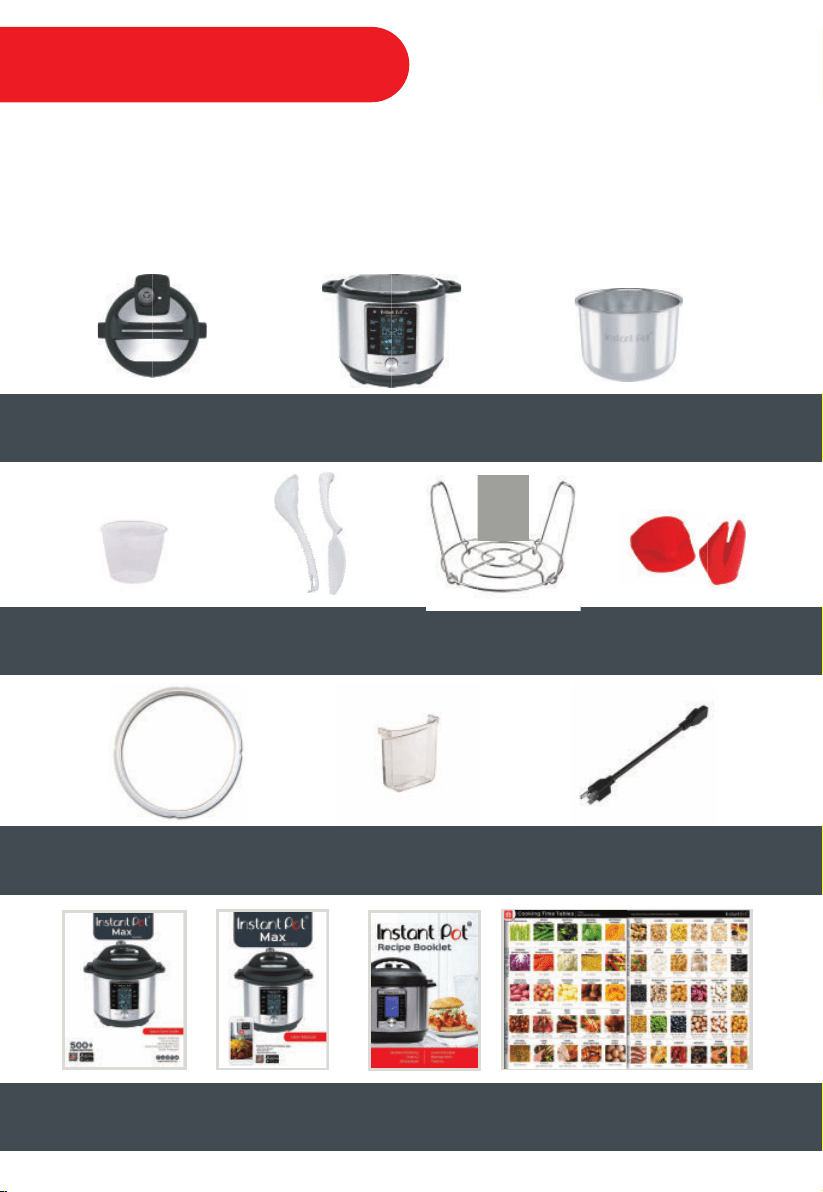
Before using the Instant Pot
®
Max, remove all packaging materials and accessories from in and
around the pressure cooker, and verify that all parts are accounted for. Pay attention to
Important Safeguards and operation instructions. Remove all warning cards and hanging tags
after reading. Do not remove safety warning stickers placed on top of lid and back of
cooker base.
Watch the “Unboxing” video: www.InstantPot.com/faq/instant-pot-help-video
Cooker BaseLid Inner Pot
Silicone
Mini Mitts
Rice
Measuring
Cup
Steam Rack
with Handles
Soup Spoon
& Rice Paddle
4
User
Manual
Quick
Start Guide
Recipe Booklet Cooking Time Tables
Silicone Sealing Ring
(currently installed within lid)
Condensation Collector
Detachable
Power Cord
What’s Included
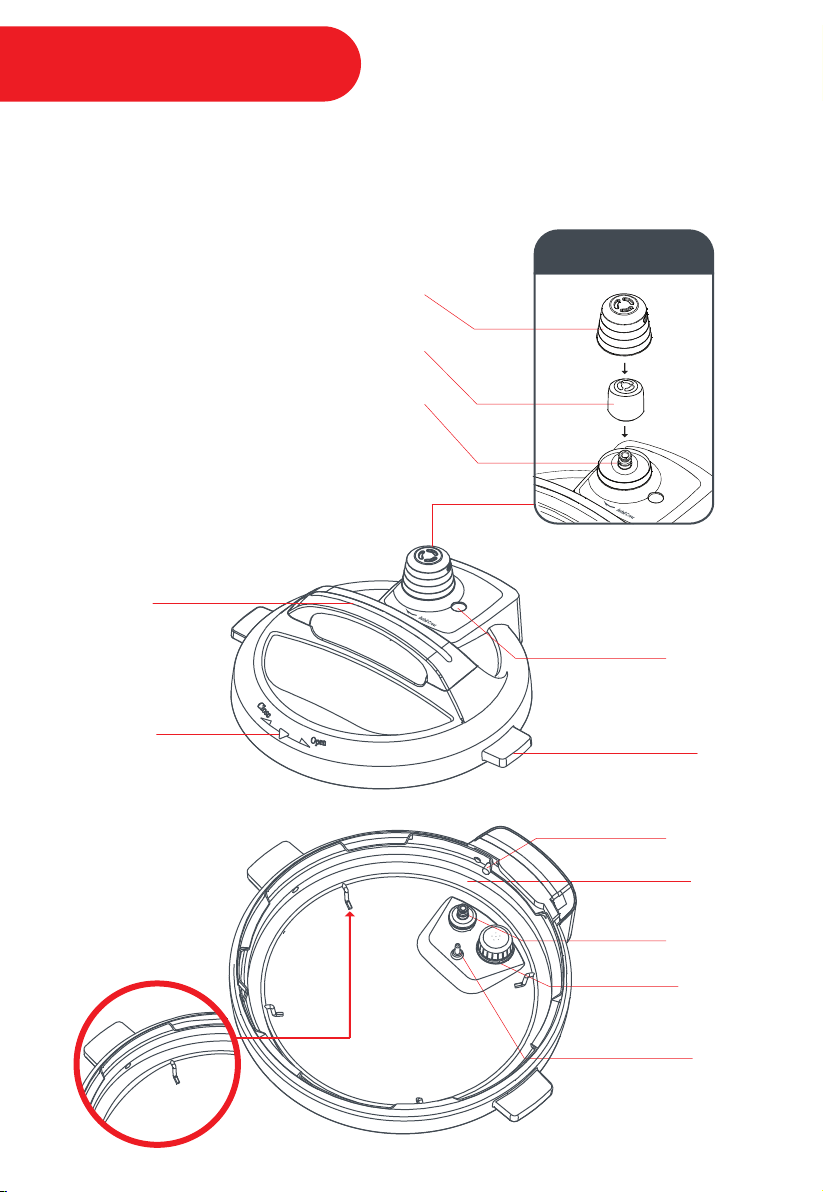
When attached to the base, the lid becomes powered, enabling an automated venting
process to occur during and after cooking. This technology also enables the thermal sensor to
transmit temperature readings to the cooker base for precision cooking.
Lid Position
Marker
Lid Handle
Lid Fin
Steam Release Cover
Steam Release Valve
Steam Release Pipe
Float Valve
Locking Pin
Thermal
Sensor
Float Valve
Silicone Cap
Anti-Block
Shield
Silicone
Sealing Ring
Steam Release
Assembly
Sealing Ring
Rack
5
Lid Structure
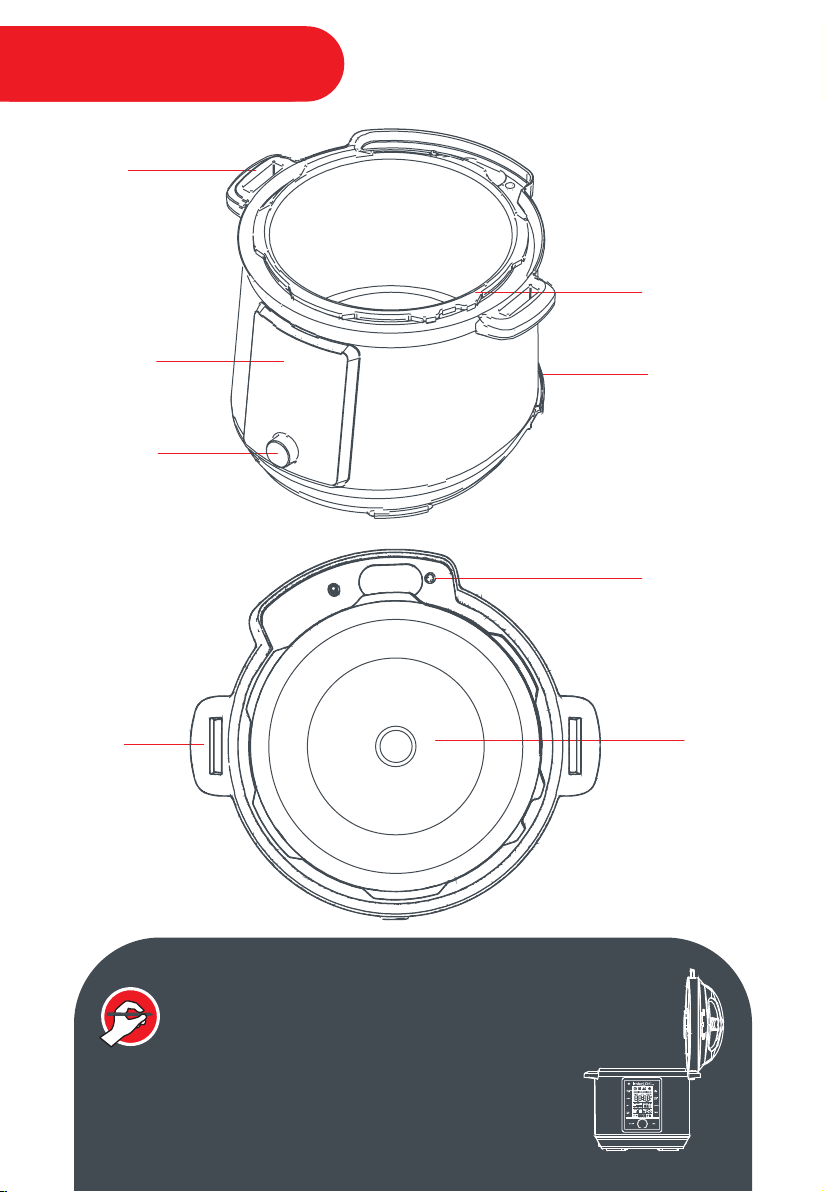
Cooker
Handle
LCD Touch
Screen
Central Dial
Heating
Element
Stainless Steel
Outer Pot
Base
Power Socket
Cooker
Handle
Condensation
Drain Hole
6
INSTANT TIP: The Cooker Handles are also a Lid Holder
The lid has been designed with lid fins that fit perfectly
inside the cooker handles on the left and right sides of
the cooker base.
Cooker Base
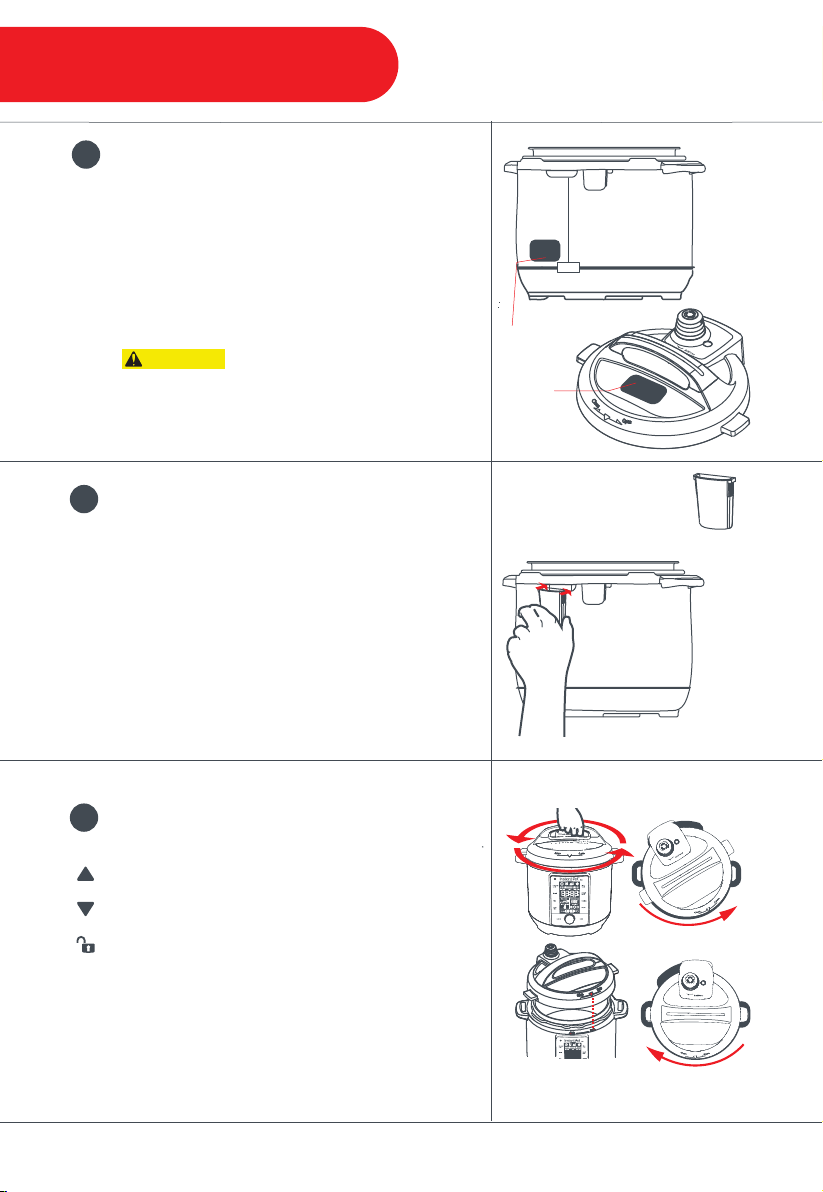
To Open:
To Close:
To Open: Remove the lid by gripping the handle
and turning the lid counter-clockwise until the
symbol on the lid is aligned to the arrow
symbols on the cooker base. Lift the lid up from
the cooker base.
To Close: Align the arrow symbol on the lid to the
unlock symbol on the rim of the cooker base, then
turn the lid clockwise until the lid fins line up over
the cooker base handles.
3
Open & Close the Lid
Read all Important Safeguards and instructions.
Do not remove Safety Warning Sticker placed on
the lid and Rating Label placed on back of
cooker base.
Place the cooker on a stable surface.
Do not place the appliance on or
in close proximity to a hot gas or electric burner,
or a heated oven; heat from an external source
will damage the appliance.
Condensation
Collector
The condensation collector has grooves on
either side that fit over the condensation
collector tabs on the cooker base. Align the
condensation collector grooves over the tabs
and push the condensation collector into place.
The condensation collector captures any
moisture that develops during cooking and
should be cleaned after each use.
2
Install the Condensation Collector
1
Read all Important Safeguards
7
Getting Started
CAUTION
Safety Warning
Sticker
Rating Label
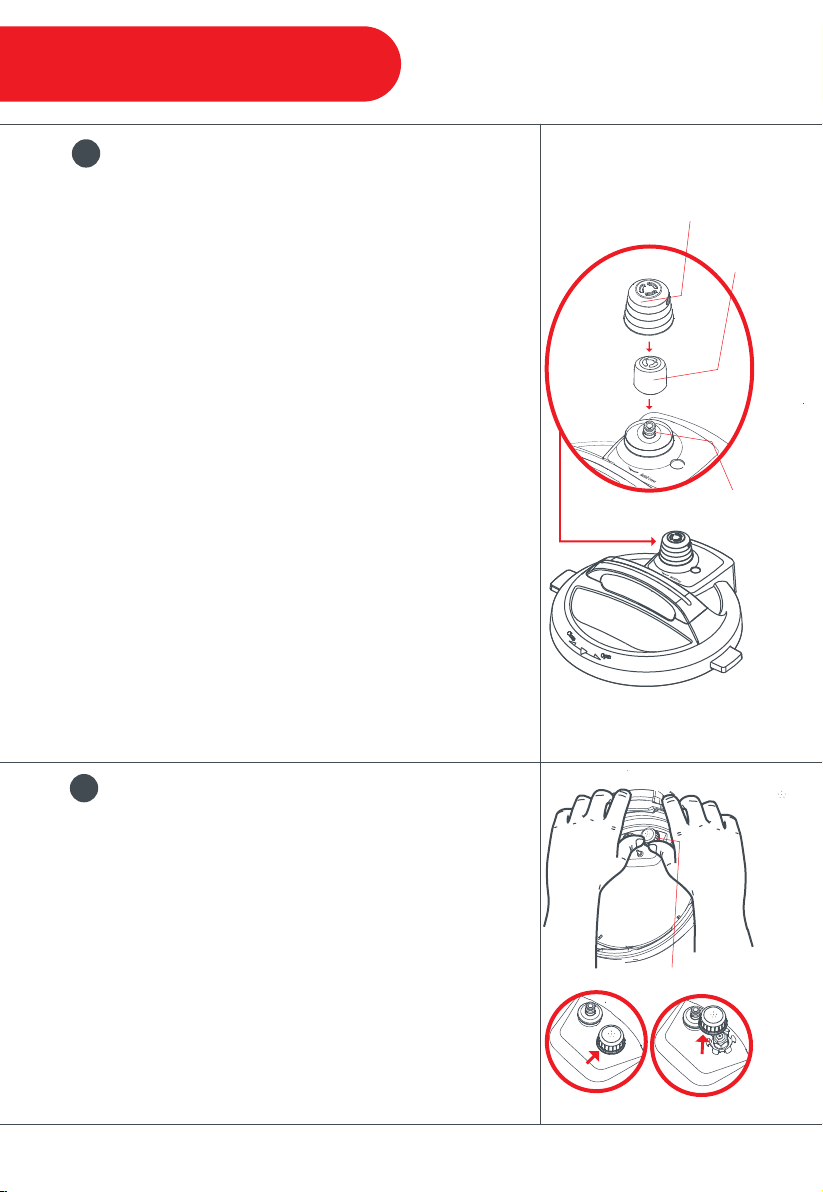
The steam release valve and cover must be installed
during use.
Remove the Steam Release Cover: Turn the steam
release cover counter-clockwise until it can be pulled off
from the lid.
Remove the Steam Release Valve: Pull the steam
release valve up and off the steam release pipe.
Install the Steam Release Valve: Place the steam
release valve onto the steam release pipe and press
down.
Install the Steam Release Cover: Place the steam
release cover over the steam release valve and turn the
steam release cover clockwise until it locks securely in
place.
Note: The steam release valve will pop into place, but will fit
loosely when it is seated properly in place—this is required for
proper function. You should feel some resistance as you remove
or install the steam release valve. This part should be inspected
and cleaned frequently, especially after cooking the
foamy foods.
4
Remove & Install the
Steam Release Assembly
To remove: Grip the lid like a steering wheel. Using your
thumbs for leverage, press firmly against the side of the
anti-block shield (pressing towards the side of the lid and
up) until it pops off. The anti-block shield will snap off of
the prongs underneath.
To install: Press the anti-block shield over the prongs
and press down until it snaps into place.
Note: The anti-block shield prevents food particles from clogging
the steam release pipe. These fine particles can become
trapped underneath the shield and prevent pressure regulation.
The anti-block shield should be removed for regular cleaning.
5
Remove & Install the Anti-Block Shield
The anti-block shield must be installed during use.
8
Anti-Block
Shield
Steam
Release
Cover
Steam
Release
Valve
Steam
Release
Pipe
Getting Started
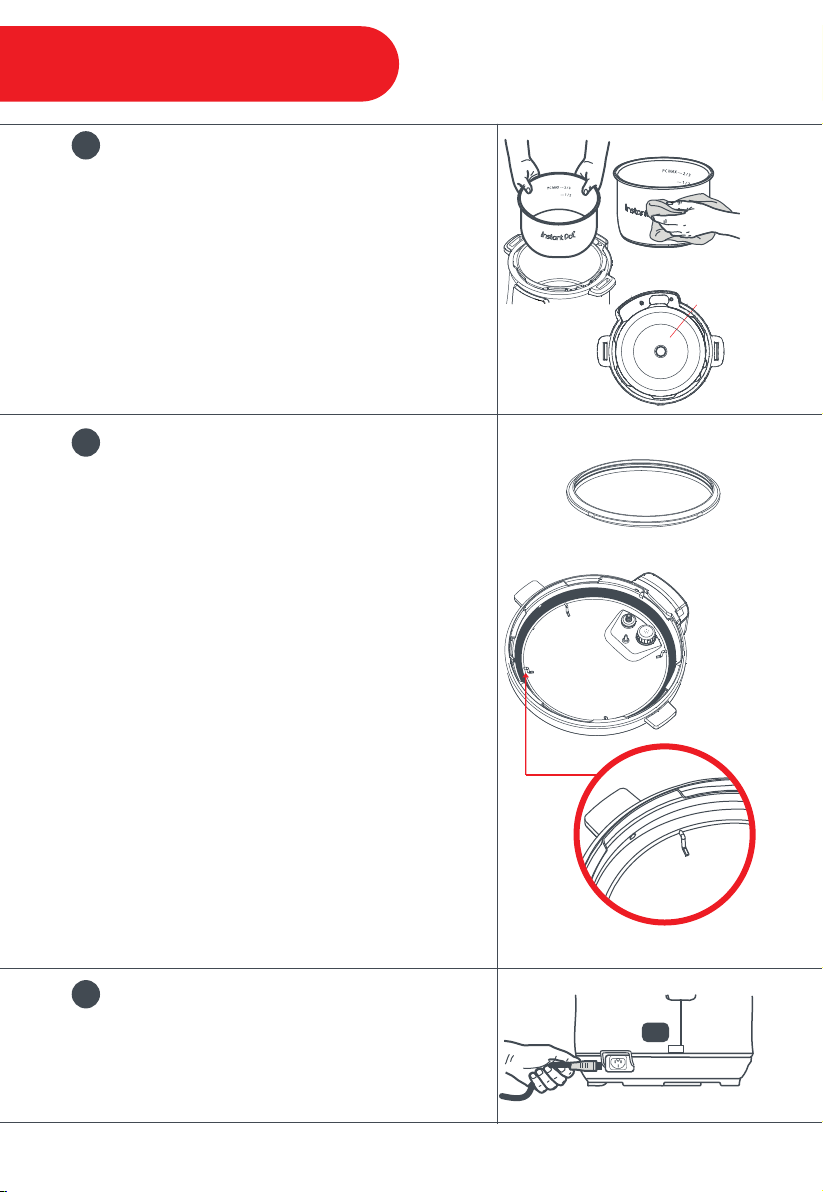
Remove the inner pot from the cooker base.
Before inserting the inner pot into the appliance,
wipe the outer surface of the inner pot and
heating element to confirm they are dry and free
of food debris. Failure to do so may damage the
cooker.
The curvature of the inner pot matches the
heating element. Always use an Instant Pot
®
authorized inner pot when cooking.
6
Remove & Clean the Inner Pot
Ensure the sealing ring is sitting snuggly behind
the sealing ring rack. The sealing ring creates an
airtight seal between the lid and the cooker base.
The sealing ring must always be installed during
use.
Remove: Pull the sealing ring out from behind the
sealing ring rack, set it aside. Inspect the sealing
ring rack. It is centered in the lid and the same
height all the way around. Do not attempt to repair
a deformed ring rack.
Install: Place the sealing ring over the sealing ring
rack, and use your thumbs to press it into place.
Note: Always check for cracks, wear, or deformation in
your sealing ring prior to cooking.
Only use genuine Instant Pot
®
sealing rings.
Failure to do so will void the warranty.
7
Check the Sealing Ring &
Sealing Ring Rack
Secure the power cord into the base power socket
before connecting to a 120V power source. The
pressure cooker will remain in Standby mode
when plugged in but not in operation.
8
Secure the Power Cord
Heating
Element
Sealing Ring
Sealing
Ring Rack
9
Getting Started
7
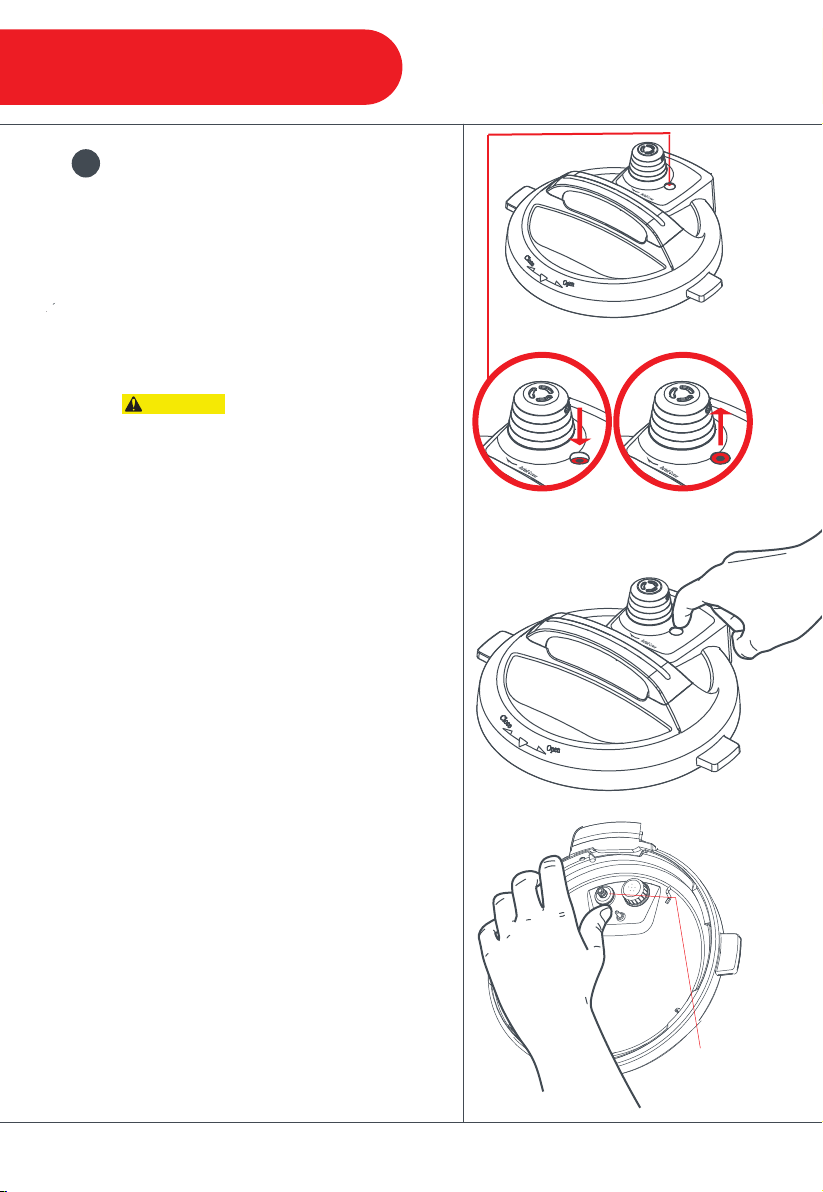
Depressurized
The float valve and silicone cap are essential
to pressure cooking, as they seal in the
pressurized steam.
The float valve has 2 positions:
Down: cooker is depressurized
Up: cooker is pressurized
While the float valve is up, the
contents of the cooker are pressurized. Do
not attempt to remove the lid. Refer to
“Venting Methods” section in this manual for
information on releasing pressure.
To test: Hold the lid by the handle and reach
underneath to test the float valve’s
movement.
It will have a ¼ inch (½ cm) range of
up-and-down motion.
To remove: Place one finger on the flat top
of the float valve, turn over the lid and
detach the silicone cap from the bottom side
of the float valve. Do not discard the silicone
cap!
Once disconnected, the float valve can be
removed from the top of the lid.
To install: Drop the float valve into the float
valve hole on top of the lid. Then, place one
finger on the flat top of the float valve, turn
the lid over, and press the silicone cap back
into place on the bottom of the float valve.
Note: Regular removal and cleaning of the float
valve and surrounding area is essential to ensure
proper function of your Instant Pot
®
.
9
Remove & Re-Install the
Float Valve
10
CAUTION
Float
Valve
Pressurized
Getting Started
11
Pressure
Cook
Sear
Rice
Sous
Vide
Slow
Cook
Soup /
Broth
Canning
Yogurt
Cancel
Start
Max
ft
Hour Minute
ft
m
Pressure
Temperature
Keep Warm Venting
Delay
Pre-Heat Cook
Keep Warm
Control Panel
1
2
3
4
8
7
6
5

12
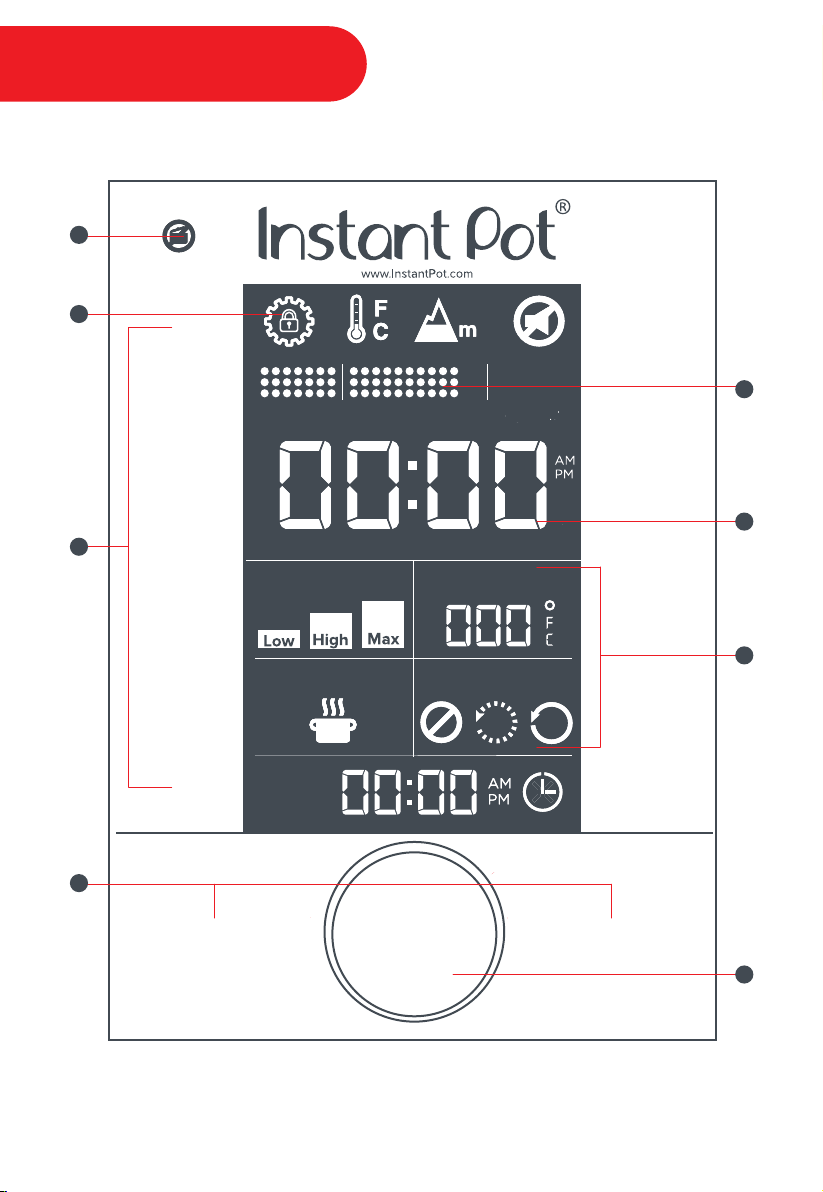
1
Pressure Indicator
The icon will be lit when the pressure cooker is still pressurized,
indicating that the lid is locked and cannot be removed
2
System Settings
• Lock / Unlock
• Temperature Display: Fahrenheit (°F) or Celsius (°C)
• Altitude Display: feet (ft) or meters (m)
• Sound (ON / OFF)
3
Smart Programs
• Pressure Cook
• Sauté
• Rice
• Sous Vide
• Slow Cook
• Soup / Broth
• Canning
• Yogurt
• Manual Keep Warm
4
Control Keys
• Cancel
• Start
5
Cooking Progress Indicator
Real-time cooking temperature display & cooking progress:
• Pre-Heat Status
• Cook Status
• Keep Warm Status
6
Local Time & Cooking Display
• Standby Mode: 12-hour AM / PM clock
• In-Program Time: hour & minute
7
Smart Program Settings
• Pressure (Low / High / Max)
• Temperature (Low / High / Custom)
• Keep Warm (Automatic / Manual)
• Venting Options (Natural Release, Pulse Release & Quick Release)
8
Central Dial
Turn the central dial to adjust the time, temperature & altitude
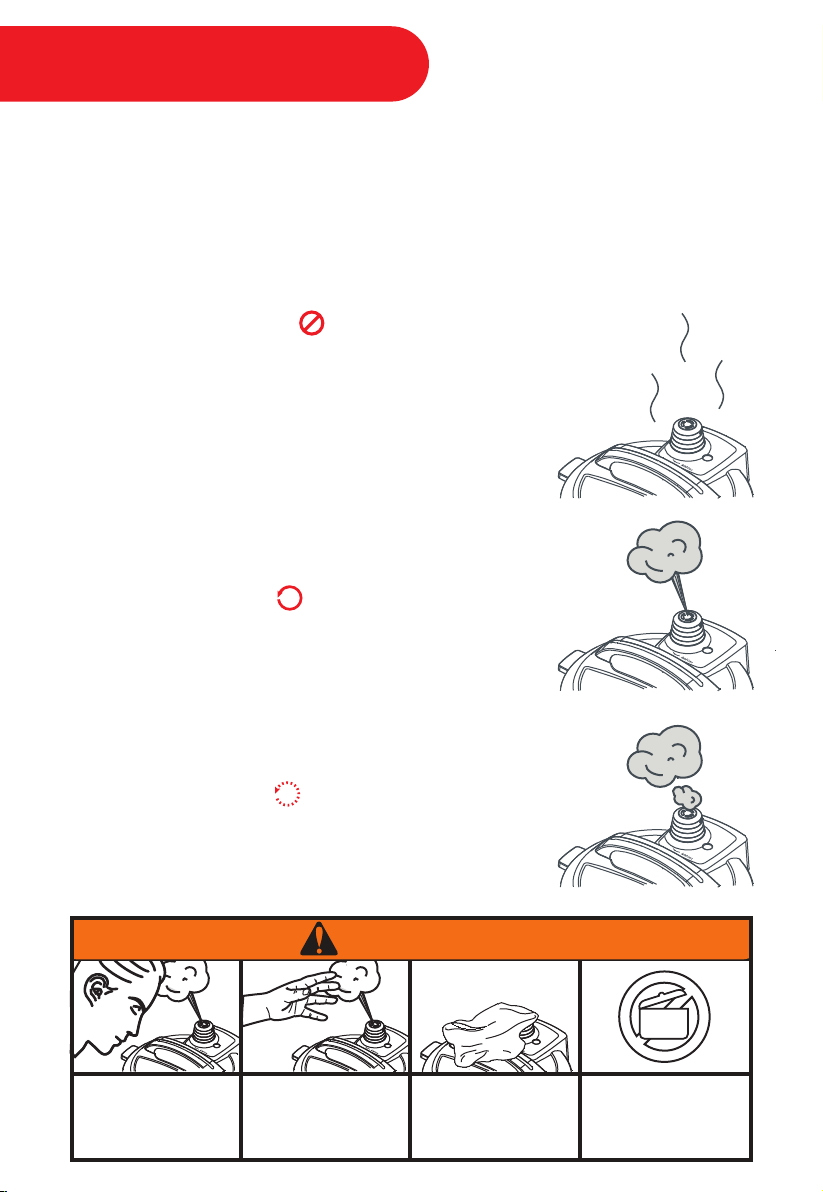
Natural Release (NR)
This setting allows the pressure cooker to dissipate heat and
pressure release naturally over time. This method must be used
when cooking food that is thick or starchy, such as soups, stews
or chilies, as well as food that expands, such as beans and grains.
It is also commonly used when cooking clear broths, as it allows
for the liquid to cool while undisturbed, resulting in crystal clarity.
Note: Depressurization time will vary, based upon the volume of food /
liquid and a variety of other factors.
Pulse Release (PR)
This method of venting releases incremental bursts of steam
at precisely programmed intervals.
Quick Release (QR)
A short warning burst will be released, followed by a continuous
stream of steam. This method is most commonly used when
cooking vegetables, fish, eggs or other foods that may overcook
during NR or PR.
Your pressure cooker has an automated venting system for post-cooking pressure release,
which can be activated on pressure cooking Smart Programs when desired. The default
venting method is Natural Release (NR). To stop or pause once a venting method has
begun, touch the Venting field and the pressure cooker will automatically return to NR.
There are 3 methods to release pressure:
13
Do not lean over the
steam release cover.
Do not place
unprotected skin
over the steam
release cover.
Do not cover the
steam release cover.
When the Pressure
Indicator is lit, do not
open the lid.
0
WARNING
Venting Methods
14
Cancel
Start
Max
ft
Hour Minute
ft
m
Pressure
Temperature
Keep Warm Venting
Delay
Pre-Heat Cook
Keep Warm
5
Touch Minute to adjust
the cook time.
Cancel
Start
Max
ft
Hour Minute
ft
m
Pressure
Temperature
Keep Warm Venting
Delay
Pre-Heat Cook
Keep Warm
4
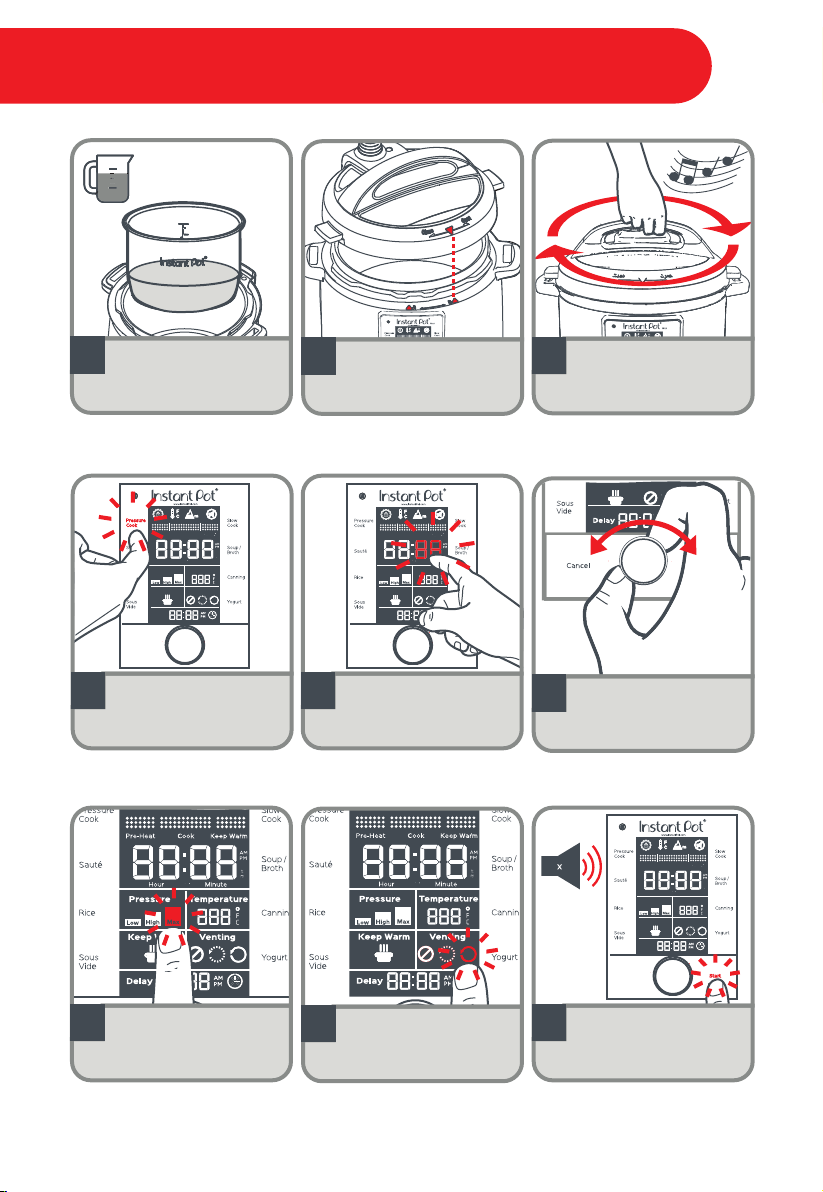
Touch Pressure Cook.
6
Turn the central dial to
adjust the cook time to
15 minutes 00:15.
3
Turn the lid clockwise
to close until a
jingle sounds.
2
Line up the unlock
arrow on the cooker
base with the arrow on
the lid.
x3
PC MAX 2/3
1/2
1
Add 3 cups (750 mL) of
water to the inner pot.
8
Touch Venting to toggle
between auto-venting
options NR, PR, and QR.
Select QR.
7
Touch Pressure to
toggle between Low,
High, and Max.
Select Max.
Cancel
Start
Max
ft
Hour Minute
ft
m
Pressure
Temperature
Keep Warm Venting
Delay
Pre-Heat Cook
Keep Warm
9
Touch Start to begin
cooking. 3 beeps will
sound.
3
Initial Test Run (15 psi Water Test)
15
ft
Hour Minute
ft
m
Pressure
Temperature
Keep Warm Venting
Pre-Heat Cook
Keep Warm
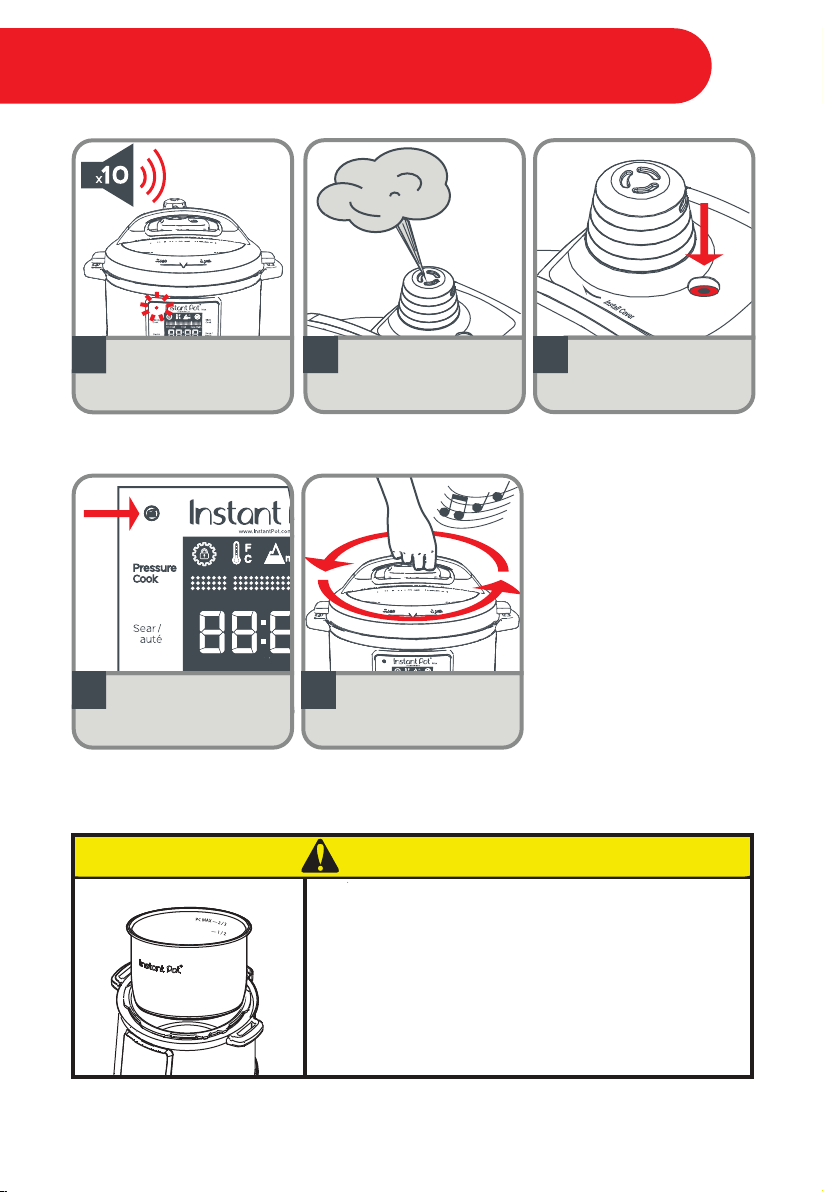
14
Turn the lid counter
clockwise to open until a
jingle sounds.
Once the Pressure
Indicator has turned
OFF you may open
the lid.
13
The float valve will drop
to indicate the pressure
has been fully released.
11 12
A short warning burst
will be released, followed
by a continuous stream
of steam.
10
When the Smart Program
has completed, 10 beeps
will sound.
Initial Test Run (15 psi Water Test)
Do not pour food or liquid into cooker base. To
avoid risk of personal injury and/or property
damage, always cook with the inner pot in place.
0
CAUTION

Adjust the System Settings:
The system settings will remain on your display so you always know which ones are in
effect. To change your system settings:
1. Touch Cancel to ensure the cooker is in standby mode.
2. Touch the System Settings icon (when in standby mode). Note that the padlock
symbol disappears. This means that your system settings are “unlocked”, and you can
now alter them as you wish.
Adjust Temperature Display:
Touch the Temperature Display icon to toggle between Celsius (°C) or Fahrenheit (°F). The
symbol that is flashing indicates your current selection.
Adjust Altitude Display:
Set your present altitude on the smartcooker before setting the cook time. The
smartcooker will adjust the cook time automatically based on your altitude settings.
1. Touch the icon to toggle between feet (ft) or meters (m). The symbol that is
flashing indicates your current selection.
2. Once the unit has been selected, turn the central dial to adjust the altitude.
Turn Sound ON & OFF:
Touch the Sound icon to toggle the Sound ON or OFF. Error code alerts cannot be
silenced.
Set Local Time:
1. Touch the ‘Hour’ field, then turn the central dial to adjust.
2. Next, touch the ‘Minute’ field and turn the central dial to adjust.
If you scroll past 12:00, the AM / PM will switch automatically.
Lock the System Settings:
Touch the System Settings icon to lock in your selections. Note that the padlock symbol
will reappear to indicate that your selections are "locked in". If you do not lock your
settings, no changes will be saved. If you do not wish to save your settings, touch the
Cancel key (or wait 10 seconds and the settings will return to the previous selection).
Default Reset (Specific Smart Program):
When the pressure cooker is in standby mode, touch the Smart Program to be reset.
When the Smart Program starts flashing, touch and hold the Cancel key for 2-3 seconds
until a beep sounds.
Default Reset (All Settings):
When the pressure cooker is in standby mode, touch and hold the Cancel key for 2-3
seconds until a beep sounds.
ft
16
System Settings & Time
Cancel
Start
Max
ft
Hour Minute
ft
m
Pressure
Temperature
Keep Warm Venting
Delay
Pre-Heat Cook
Keep Warm
Cancel
Start
Max
ft
Hour Minute
ft
m
Pressure
Temperature
Keep Warm Venting
Delay
Pre-Heat Cook
Keep Warm
Cancel
Start
Max
ft
Hour Minute
ft
m
Pressure
Temperature
Keep Warm Venting
Delay
Pre-Heat Cook
Keep Warm
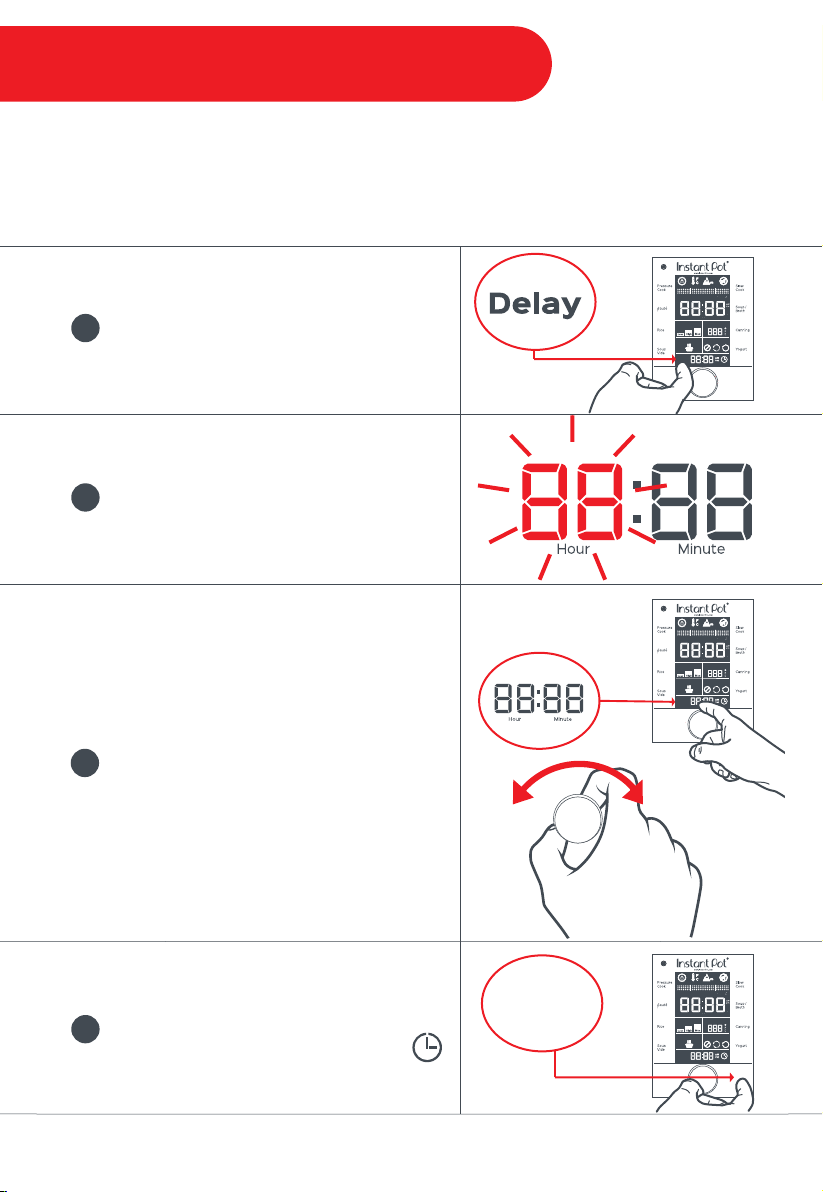
To set a Delay cook timer, touch the
Delay field.
Once the ‘Hour’ field or ‘Minute’ field is
flashing, the pressure cooker is ready to be
customized.
Note: The delay start time will be based upon the
clock.
Touch the ‘Hour’ field and turn the central
dial to select the desired hour value.
Touch the ‘Minute’ field and turn the central
dial to select the desired minute value.
To adjust AM/PM, turn the central dial until
the display rolls past 12:00.
1
2
3
Touch Start to begin the Delay cooking
process.
When the Delay function is active, a
second hand will tick around the clock icon.
4
Start
17
The Delay setting can be applied to all Smart Programs with the exception of Sauté, Manual
Keep Warm, and Yogurt. The Delay setting is not recommended to be used in conjunction
with the auto-venting features when cooking thick or foamy foods. The liquid may cause
spattering during the cooking process.
Operational Field - Delay
Cancel
Start
Max
ft
Hour Minute
ft
m
Pressure
Temperature
Keep Warm Venting
Delay
Pre-Heat Cook
Keep Warm
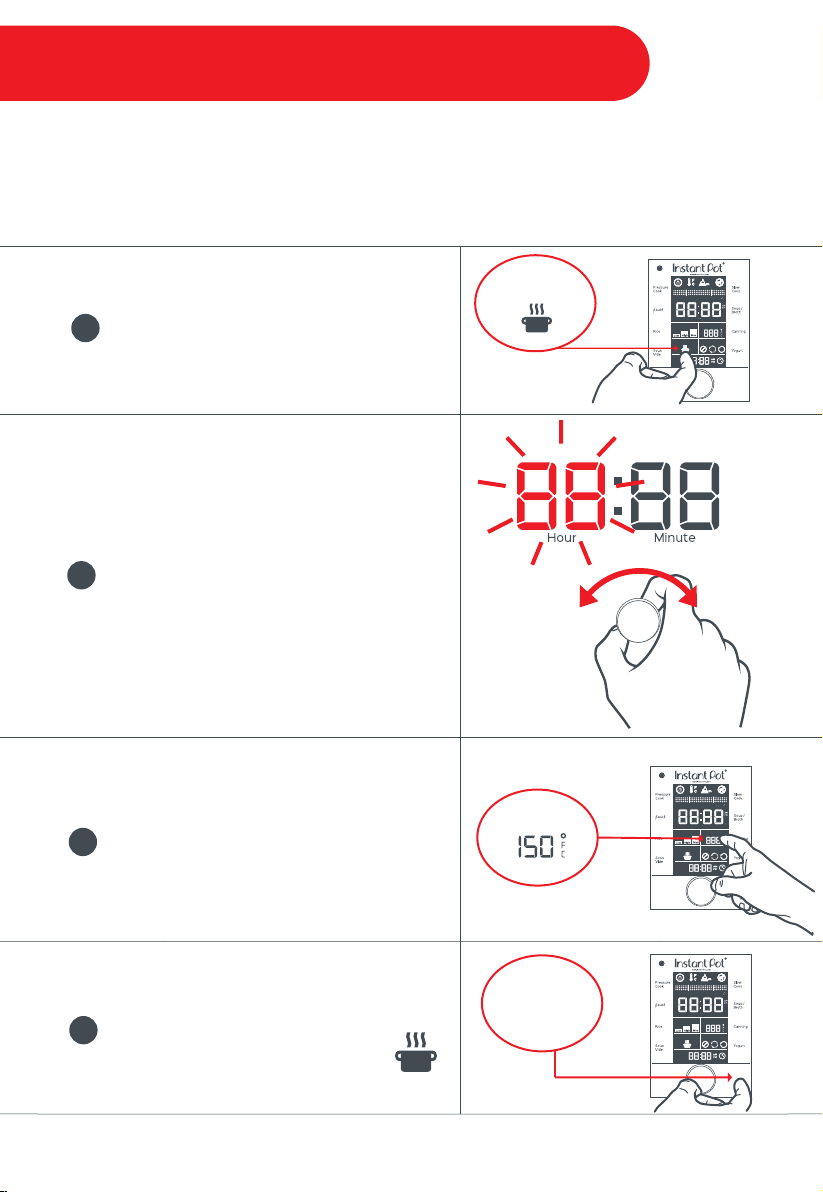
To turn on Manual Keep Warm from Standby
mode, touch the Keep Warm field.
Once the ‘Hour’ field is flashing, turn the
central dial to select the desired hour value.
Touch the ‘Minute’ field and turn the central
dial to select the desired minute value.
Touch the ‘Temperature’ field to toggle
between “Low / High / Custom”.
Custom Temperature: When “Cus” is
flashing, turn the central dial to adjust the
temperature up or down as desired.
1
2
3
Start
18
Automatic Keep Warm can be applied to all Smart Programs with the exception of Sauté,
Sous Vide, and Yogurt. When enabled, the setting will turn ON by itself after the Cook cycle
has completed, and remain on for up to 10 hours. When selecting an applicable Smart Program,
the Keep Warm setting will be ON by default. To turn it OFF, touch the Keep Warm icon.
Cancel
Start
Max
ft
Hour Minute
ft
m
Pressure
Temperature
Keep Warm Venting
Delay
Pre-Heat Cook
Keep Warm
Touch Start to begin warming.
When Keep Warm is active, the steam
symbols above the icon will blink one
at a time.
4
Keep Warm
Cancel
Start
Max
ft
Hour Minute
ft
m
Pressure
Temperature
Temperature
Keep Warm Venting
Delay
Pre-Heat Cook
Keep Warm
Operational Field - Keep Warm

• For all pressure cooking programs Pressure Cook, Rice,
Soup/Broth, and Canning, the total amount of pre-cooked food and
liquid in the inner pot should not exceed the PC MAX—2/3.
• For food that expands during cooking, the inner pot should not be filled higher than
the —1/2 line.
• Always ensure that the steam release valve, steam release cover, steam release pipe,
anti-block shield, and float valve are clean and free of food particles and residue
before cooking.
• The time it takes the pressure cooker to pressurize and depressurize will depend on a
variety of factors. For this reason, the pre-heat cycle may take up to 40 minutes.
• Frozen food will take a longer amount of time to pressurize.
• Recipes may indicate to use the Manual or the Pressure Cook function. These terms
are interchangeable.
• After sautéing, remove ingredients and add ½ cups (125mL / 4oz) of liquid to the inner
pot. Gently scrape up the bits and pieces on the bottom and use this liquid to pressure
cook with. Ensure to have 1½ cups (375mL / 12oz) of liquid in the inner pot before
pressure cooking, unless otherwise directed by an authorized Instant Pot
®
recipe.
19
INSTANT TIP: Sweet & Savory Sealing Rings
Try using separate sealing rings for sweet and savory dishes!
Instant Pot
®
sealing rings are an integral part of product safety. Replace
your sealing ring every 12-18 months, as it may become less effective over
time.
Only use Instant Pot
®
genuine sealing rings, designed specifically for use
in Instant Pot
®
smartcookers.
Visit www.store.instantpot.com to purchase.
Usage Tips

• Certain food (such as applesauce, cranberries, pearl barley, oatmeal, split peas, noodles,
etc.) can foam, froth, or spatter, and can clog the steam release pipe and/or steam
release valve. Extreme caution must be used when cooking and venting these
foods—the inner pot should not be filled higher than the — 1/2 line.
• When pressure cooking food with a doughy or thick texture, or a high fat/oil content,
contents may spatter when opening the lid. Please follow recipe instructions for pressure
release method. Once pressure is fully released, gently rock the cooker back and forth on
its feet, then if necessary, release the steam again before removing the lid.
• There needs to be at least 1½ cups (375mL / 12oz) of liquid in the inner pot (unless
otherwise specified in your recipe), so enough steam can be generated to pressurize the
unit.
• Acceptable liquids include water, broth, stock, wine, beer, fruit juice, vegetable juice,
and thin cooking sauces. Cooking liquids must be water-based.
• Oils and oil-based sauces do not have enough water content to bring the pressure
cooker to pressure— avoid recipes that call for the use of more than ¼ cup of oil or
fat content.
• Thick sauces should be diluted, keeping in mind that some of the added liquid will
be turned into steam for pressurization; sauces should be fairly thin in consistency
before cooking begins.
• When cooking meat with skin (e.g. sausage with casing), the skin can swell when heated.
Do not pierce the skin as long as it is swollen; this could result in scalding injury.
• When cooking Sous Vide, season lightly —a little goes a long way! Use less salt than you
might normally, especially with meats, poultry, and fish. If your dish requires additional
seasoning, salt to taste after cooking. Use garlic powder instead of fresh garlic
or garlic salt.
20
Cooking Tips
INSTANT TIP: Making Changes Mid-Cooking
You can make changes during the Cook cycle of any Smart Program.
Touch the field you want to change: Pressure, Temperature, Keep Warm, or Venting and
then make the adjustment by toggling to the correct setting.
Touch Start or wait 5 seconds for a beep to sound. The Cook cycle will resume.
Within the Sauté, Yogurt, and Manual Keep Warm Smart Programs, on-the-fly temperature
changes are limited to Low and High options. To select and adjust a Custom setting, touch
Cancel, then re-key in your desired cooking commands. In the Temperature field, you may
toggle between Low and High freely, but you will not have the option to adjust to a Custom
temperature setting. To select a Custom setting, touch Cancel, then re-key in your desired
cooking commands.
1
2
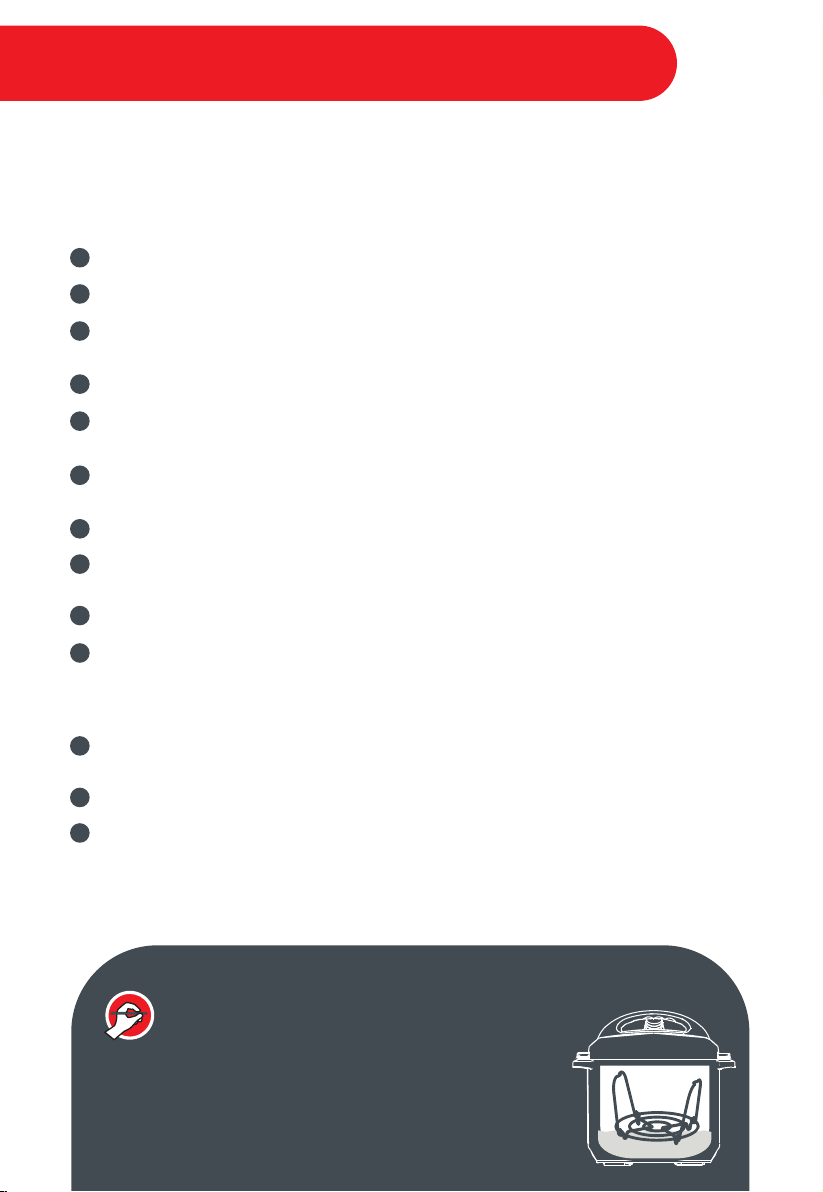
Steps to Pressure Cook
Add ingredients to the inner pot and insert the inner pot into the cooker base.
Place the lid on the cooker base and turn it clockwise to close it.
Connect the power cord. The LCD will display OFF, indicating that the pressure cooker is in
standby mode.
Select the desired Smart Program: Soup/Broth, Rice, Canning, or Pressure Cook.
Touch the ‘Hour’ field to select it, then turn the central dial to adjust the time to the desired
hour. Repeat the process to adjust the ‘Minute’ field. Does not apply to Rice.
Touch the Pressure field to toggle between Low, High, and Max pressure and select the
desired pressure.
Touch the Keep Warm field to turn the setting ON or OFF.
Touch the Venting field to toggle between the venting options: NR, PR, QR, and select
the desired venting method.
Touch Start to begin. The pressure cooker will beep 3 times.
Depending on the amount of food and its temperature, the Pre-Heat cycle may take up to
40 minutes. As the cooker heats up and pressure builds, the float valve will rise on its own.
When working pressure is reached, the cooker will enter the Cook cycle and the LCD will
display the remaining cooking time.
When cooking is finished, the pressure cooker will either remain in Keep Warm mode or
standby mode displaying OFF.
The pressure will be released as selected in the Venting step: NR, PR, QR.
Ensure the float valve is down and the Pressure Indicator is OFF before opening the lid.
The following pressure cooking programs are available: Soup/Broth, Rice, Canning,
or Pressure Cook.
1
2
3
4
5
6
7
8
9
10
11
12
13
21
INSTANT TIP: Pressure Cook with the Steam Rack
When pressure cooking, use the steam rack to lift your
food out of the cooking liquid. This will help distribute
heat evenly and prevent the leeching of nutrients.
Smart Program - Pressure Cook
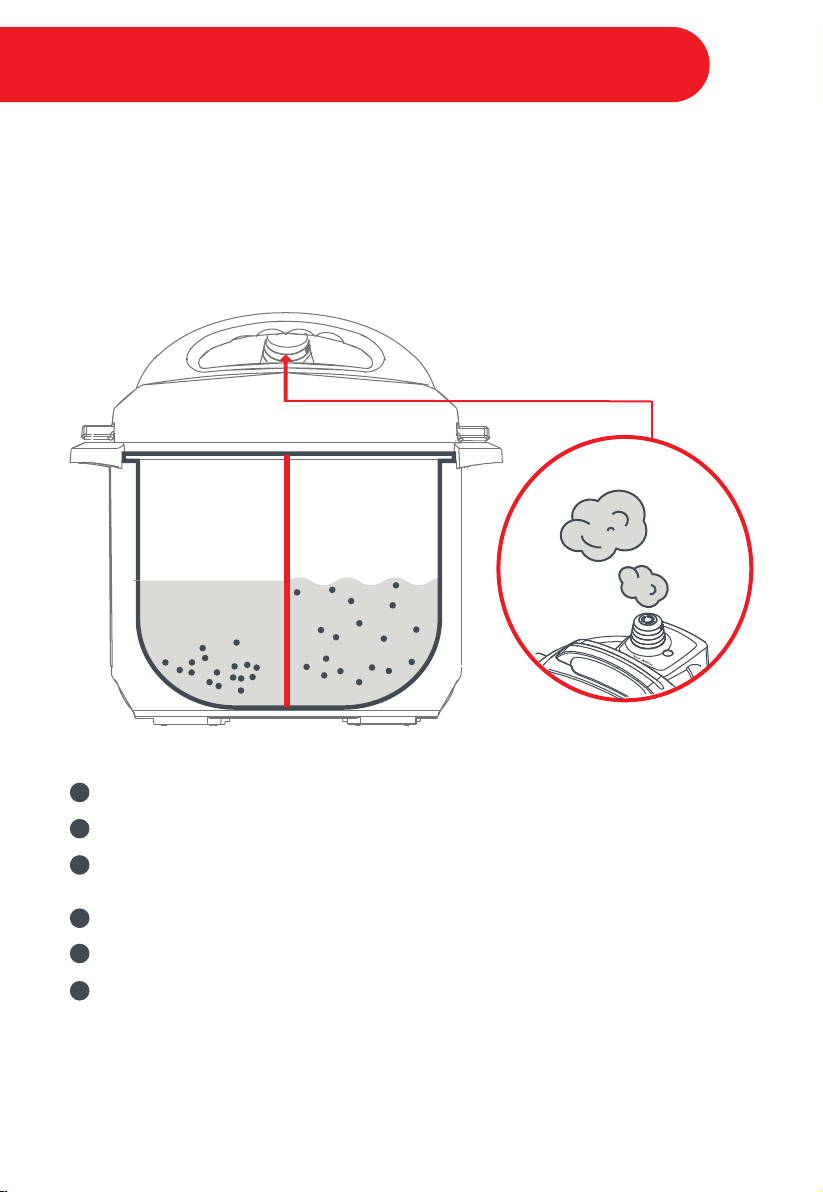
NutriBoost™ is a mid-cooking Pulse Release setting that may be activated on the Rice and
Soup/Broth Smart Programs.
Rice: NutriBoost™ occurs during the first 3 minutes of the "Cook" cycle.
Soup/Broth: NutriBoost™ occurs during the last 15 minutes of the "Cook" cycle.
The boiling motion effect created by NutriBoost™ helps to break down food— adding
nutrients, enhancing flavors, and improving textures. This setting is ideal for bone
broth or risotto.
22
Steps to activating the NutriBoost™ feature:
Follow “Steps to Pressure Cook” 1-3 outlined on the previous page.
Touch Soup/Broth or Rice.
Touch the 'Minute' field to select it, then turn the central dial to adjust the time as desired.
Repeat the process to adjust the ‘Hour’ field.
Touch the Pressure field to toggle between Low, High, and Max. Select the desired setting.
Touch the Venting field and select PR to activate NutriBoost™.
Touch Start to begin. NutriBoost™ is an automated setting and will activate automatically
throughout the Cook cycle.
Note: Do not activate NutriBoost™ when cooking starchy and foamy food such as porridge, oatmeal,
etc., to avoid spattering. This advanced venting feature should be closely monitored when cooking.
Deactivate NutriBoost™ by touching the Venting field if you see food content coming out of the steam
release cover.
1
2
3
4
5
6
During
Pressure
Cooking
When
NutriBoost™
is Enabled
Advanced Feature - Nutriboost™
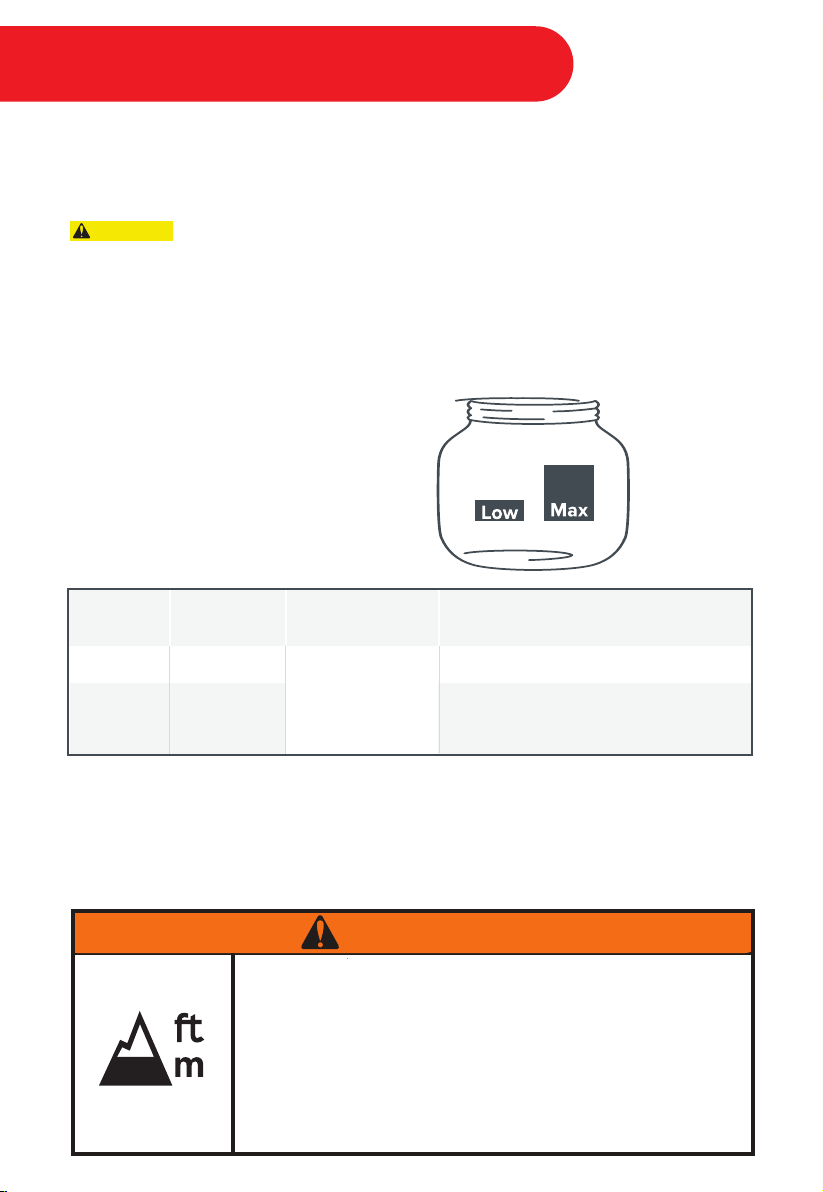
Canning is a pressure cooking function based on traditional canning principles. When proper
canning processes are followed and sufficient temperatures are reached for a sustained
period of time, canning is considered an economical way to preserve quality food at home.
Recipes must be closely followed when canning. Modifying cooking times,
ingredients or temperatures can be dangerous. Use the exact time, temperature/pressure and
method specified in the recipe to protect the food from harmful bacteria, molds, and enzymes.
Read and carefully follow the instructions provided in the USDA’s Complete Guide to
Home Canning. http://nchfp.uga.edu/publications/publications_usda.html
The Canning Smart Program includes 2 settings:
Altitude: Water boils at lower temperatures as altitude increases. Lower temperatures are less
effective for killing bacteria. Ensure the proper altitude level is set on the pressure cooker
before starting to pressure can. Depending upon the altitude level setting, the pressure
cooker will adjust the temperature and pressure accordingly.
23
Setting
Low
Max
Pressure Time Range
00:01 - 08:00
6.5 psi
15 psi
Examples of Ingredients
High-acid fruit, fruit sauces, jams, chutney
Vegetarian sauces, high-acid vegetables
Low-acid foods and meats; sauces and
soups containing meat
CAUTION
Improper canning may cause preserves to spoil, which may result
in illness. Do not pressure can at altitudes above 2000m (6600ft).
Refer to the USDA’s Complete Guide to Home Canning for
procedures and limitations:
http://nchfp.uga.edu/publications/publications_usda.html
0
WARNING
Canning - Getting Started
All food used for canning should be poured into sterile, empty jars. Always check your jars, lids,
and seals for chips and other imperfections. Sterilization of jars should occur just before filling.
Excess contact with the air should be avoided for safe canning.
Steps to Sterilization Before Canning
Wash the jars and rinse thoroughly.
Ensure there are no cracks or imperfections in the jars or lids.
Place the inner pot into the cooker base, then place the steam rack on the bottom of the
inner pot.
Place the jars on the steam rack. The pressure cooker will hold up to 4 x 16 oz. (500 mL) jars.
Fill the inner pot with 3 cups (750mL / 24oz) of warm water.
Place the lid on the cooker base and turn it clockwise to close it.
Connect the power cord to a 120V outlet. The cooker will enter standby mode.
Select Canning.
Touch the ‘Minute’ field to select it, then turn the central dial to adjust the time to 10
minutes. Ensure that the ‘Hour’ field displays ‘00’, otherwise touch the ‘Hour’ field and turn
the central dial until the display shows ‘00’. The display will read 00:10.
Touch the Pressure field to toggle between Low and Max pressure. Select Low Pressure.
The display will read “Low”.
Touch the Venting field to toggle between the venting options, and select QR.
Touch Start to begin. The pressure cooker will beep 3 times.
Note: Before selecting Start, the LCD will display the target temperature. Once Start has been
selected, the LCD will display the real-time cooking temperature.
1
2
3
4
5
6
7
8
9
10
11
12
24
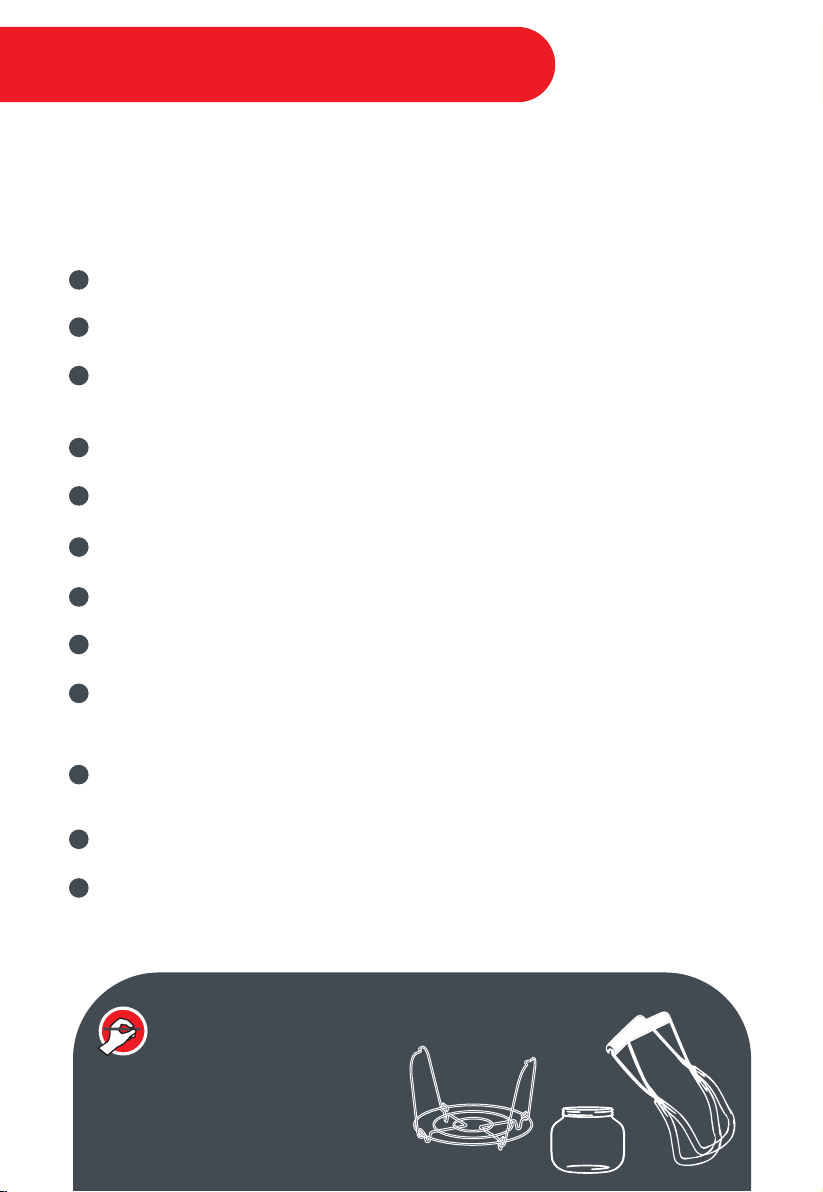
INSTANT TIP: What You’ll Need for Canning
• Steam Rack
• Jars
• Lids, Seals & Bands
• Canning Tongs
Canning - Sterilizing Jars
Steps to Pressure Canning
To begin, select a recipe that has been pre-tested and approved for pressure canning.
Though ingredients may vary, the process will be the same.
Refer to the USDA’s Complete Guide to Home Canning for tested recipes:
http://nchfp.uga.edu/publications/publications_usda.html
Fill warm, sterilized canning jars with food, following the directions in the recipe for
required headspace.
Using a sterilized, flexible, nonporous spatula, gently press inward between the food and
the jar to remove any trapped air bubbles.
Place a sterilized lid on top of the jar and then add a screw band. Turn clockwise and hand
tighten in place. Do not over-tighten.
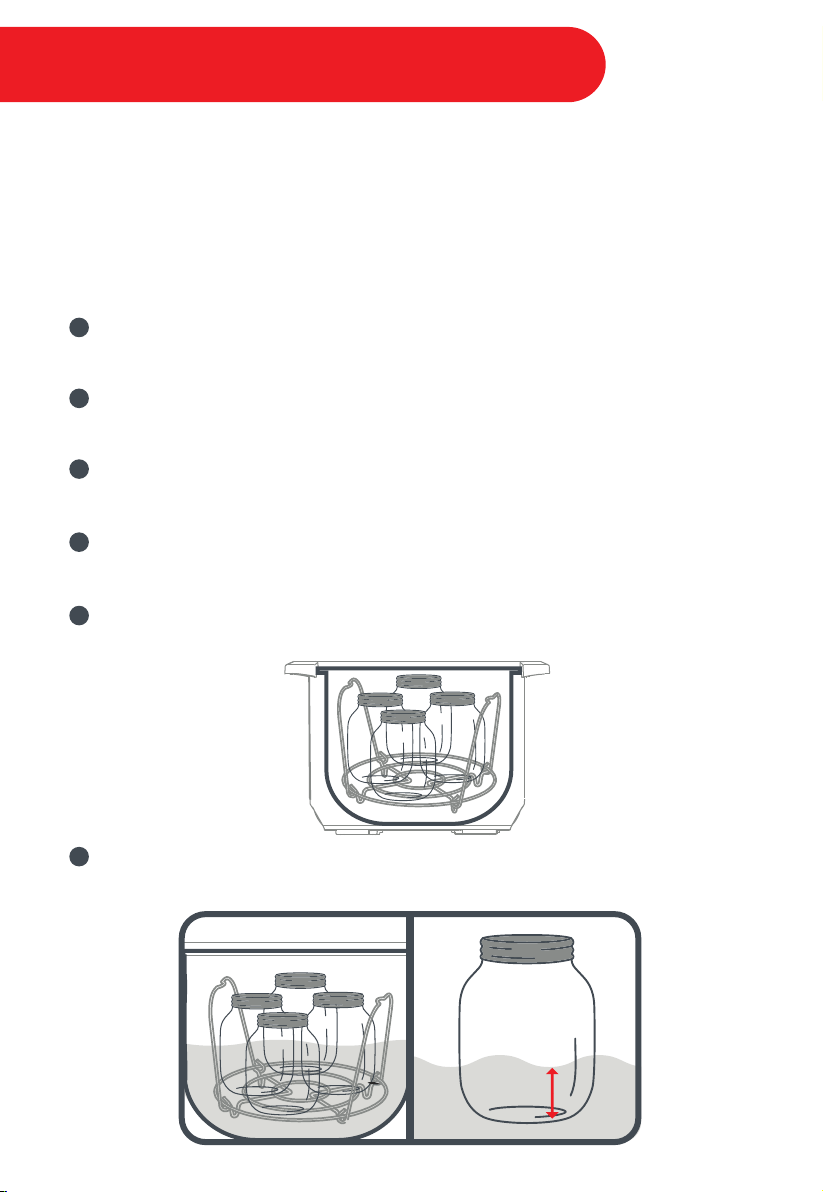
Place the inner pot into the cooker base, then put the steam rack at the bottom of the
inner pot.
Place the filled and sealed jars on the steam rack. The pressure cooker will hold up to
4 x 16 oz. jars.
Pour hot water into the inner pot until the water level reaches ¼ of the way up the sides of
the jars, approximately 6 cups (1½ L / 48 oz) of water.
1
2
3
4
5
6
25
MIN. WATER LEVEL
1/4 Height of Jar
Canning - Pressure Canning

Place the lid on the cooker base and turn it clockwise to close it.
Connect the power cord to a 120V outlet. The cooker will enter standby mode.
Select Canning.
Touch the ‘Minute’ field to select it, then turn the central dial to adjust the time as
determined by the recipe. Touch the ‘Hour’ field to select it, then turn the central dial to
adjust the time as determined by the recipe.
Touch the Pressure field to toggle between Low and Max pressure, select desired
pressure needed for your canning recipe. The display will read Low or Max depending
upon the level selected.
Touch the Venting field to toggle between the venting options, and select the venting
method required for your canning recipe.
Touch Start to begin. The pressure cooker will beep 3 times.
When the Cook time has counted down, the pressure cooker will beep 10 times to signal
that the Smart Program has completed.
The pressure cooker will release pressure automatically using the method that was
previously selected.
Open the lid by turning counter-clockwise and lifting. Ensure the float valve is down and
the Pressure Indicator is OFF before opening the lid.
Using canning tongs and oven mitts, remove the hot jars and place them on a heat
resistant surface and allow to cool to room temperature for 12 to 24 hours.
Note: Refer to the USDA’s Complete Guide to Home Canning for information on testing the seals,
storage, etc.
7
8
9
10
11
12
13
14
15
16
17
26
Canning - Pressure Canning
Steps to Sauté
Connect the power cord to a 120V outlet; the cooker will enter standby mode.
Select Sauté.
Touch the ‘Minute’ field to select it, then turn the central dial to adjust the time as
determined by the recipe.
Touch the Temperature field to toggle between Low, High and Custom. If you would like
to set a precise temperature, select Custom. The display will read “Cus”; turn the central
dial to adjust the temperature.
The display will read “Hot” when the inner pot has reached the target temperature.
Add the ingredients to the inner pot and begin sautéing.
If the ingredients have been sautéed to the desired doneness before the time expires,
simply touch Cancel to end Sauté.
Note: If you add food ingredients before the inner pot has reached the desired temperature, your
display may never read ‘Hot’, but this doesn’t mean you can’t start cooking. To test if the inner pot has
reached sizzling temperature, sprinkle a few drops of water into the inner pot. If it sizzles right away,
you’re ready to start! If not, give it another few minutes to heat up.
Sauté is a non-pressure cooking program and works like a frying pan or flat-top grill — as a
fantastic way to caramelize onions or sear meat before cooking.
Note: This Smart Program has a maximum set time of 30 minutes to prevent overheating. You may see the
display switch between ‘On’ and ‘Hot’ — this is normal, and means that your element is working to maintain
the temperature.
1
2
3
4
5
6
7
27
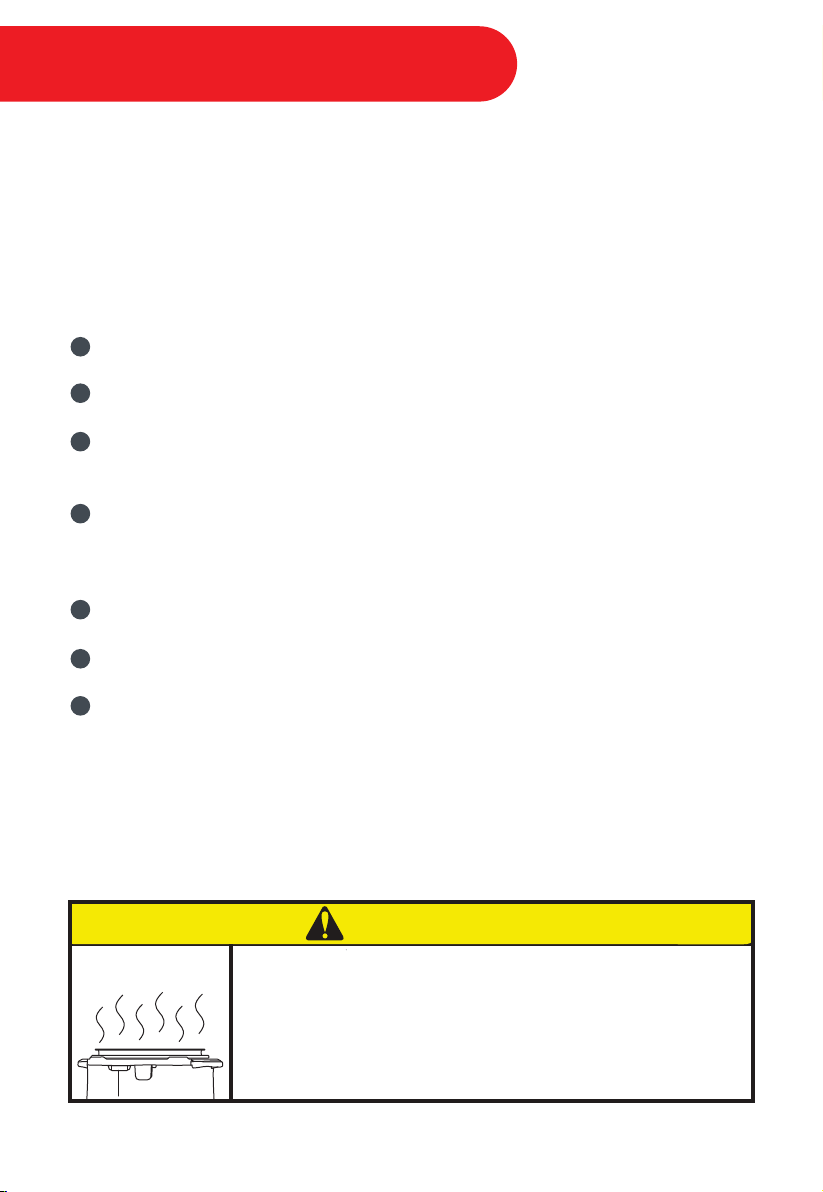
The Sauté Smart Program reaches high temperatures. If
unmonitored, food may burn on this setting. To avoid burning,
do not use the lid and do not leave your cooker unattended
while using Sauté.
0
CAUTION
Smart Program - Sauté

Slow Cook is comparable to the cooking process of traditional slow cookers, heating to just
below boiling over a long period of time. Dependent upon the desired cook time, you may
select the appropriate temperature setting for your dish.
Low – For all-day cooking. It will maintain temperatures just below boiling until the Cook cycle
has completed.
High – Provides faster cooking. It will maintain temperatures just below boiling until the Cook
cycle has completed.
Steps to Slow Cook
Add ingredients to the inner pot and place the inner pot into the cooker base.
Place the lid on the cooker base. Do not lock the lid (Optional: use a glass lid for the best
slow cooking results).
Connect the power cord to a 120V outlet. The cooker will enter standby mode.
Select Slow Cook.
Touch the ‘Hour’ field to select it, then turn the central dial to adjust the time as desired.
Repeat the process to adjust the ‘Minute’ field if necessary.
Touch the Temperature field to toggle between Low and High.
Touch the Keep Warm field to turn the setting ON or OFF.
Touch Start to begin. The pressure cooker will beep 3 times.
1
2
3
4
5
6
7
8
INSTANT TIP: Instant Pot
®
Tempered Glass Lid
The glass lid is ideal for monitoring the cooking process while
using the Slow Cook Smart Program.
Visit our online store for a full list of accessories:
www.store.instantpot.com
28
Smart Program - Slow Cook

The term “Sous Vide” is French for ‘Under Vacuum’ and refers to the process of vacuum
sealing food, bringing it to a very accurate temperature, and maintaining that temperature for
a period of time to achieve high quality, consistently delicious results.
Sous Vide offers a customizable setting which allows you to choose a cooking
temperature from a range of 25°C ~ 90°C / 77°F ~ 194°F, ideal for Sous Vide cooking.
Steps to Sous Vide
Fill the inner pot ⅔ full of water for optimal temperature control.
Insert the inner pot into the cooker base, then place the lid on the cooker base and turn it
clockwise to close it.
Connect the power cord to a 120V outlet. The cooker will enter standby mode.
Select Sous Vide.
Touch the ‘Hour’ field to select it, then turn the central dial to adjust the time to desired
hour value. Repeat the process to adjust the ‘Minute’ field.
Touch the Temperature field and use the central dial to increase or decrease
the temperature.
Touch Start to begin. The pressure cooker will beep 3 times.
While the pressure cooker heats, season your food as desired, then place the ingredients
into airtight pouches. Separate single servings of food within individual pouches. Remove
air from the pouches and seal tightly.
Once the set water temperature has been reached the pressure cooker will beep. Open
the lid and immerse the sealed pouches into the inner pot. The contents of the pouches
should be submerged below the water level.
1
2
3
4
5
6
7
8
9
29
Smart Program - Sous Vide

Place the lid on the cooker base and turn clockwise to close.
For long cooking times, check periodically to make sure the water level remains above the
sealed pouches. If you need to add water, heat it to approximately the same temperature
as the water in the container to avoid cooling the water.
Once the Cook cycle has completed, use the Sauté Smart Program, a pan, browning torch,
or barbecue to sear meat to your preference.
10
11
12
30
Smart Program - Sous Vide
INSTANT TIP: What You’ll Need for Sous Vide
• Airtight or Vacuum-Sealed Food Pouches
• Tongs
• Optional: Vacuum sealer

31
Food
Cooking
Temperature
Cooking
Time
(Minimum)
Cooking
Time
(Maximum)
Thickness
Tender Cuts:
Tenderloin, cutlets,
sirloin, rib eye, rump,
T-bone
Tougher Cuts:
Blade, chuck, shoulder,
shanks, game meats
50 °C / 122 °F
54 °C / 129 °F
56 °C / 133 °F
60 °C / 140 °F
50 °C / 122 °F
1 hour
1 hour
1 hour
1 hour
8 hours
4 hours
4 hours
4 hours
4 hours
18 hours
2-5 cm/ ½”- 2”
4-6 cm/ 1½“- 2½”
Rare
Medium rare
Medium
Well done
Cooking
Outcome
Beef
Belly
Ribs
Chops
82 °C / 180 °F
59 °C / 138 °F
56 °C / 133 °F
10 hours
10 hours
2 hours
22 hours
22 hours
10 hours
3-6 cm / 1”- 2½”
2-3 cm / ½”- 1½”
2-4 cm / ½”- 2”
Pork
2 hours
1 hour
2 hours
1 hour
2 hours
2 hours
Chops 52 °C / 126 °F
55 °C / 131 °F
60 °C / 140 °F
1 hour
2 hours
1 hour
3 hours
5 hours
4 hours
2-4 cm / ½”- 2” Rare
Medium rare
Medium
Lamb
Chicken:
- breast with bone
- breast without bone
- thigh with bone
- thigh without bone
- legs
Duck Breast
82 °C / 180 °F
64 °C / 146 °F
82 °C / 180 °F
64 °C / 146 °F
82 °C / 180 °F
64 °C / 146 °F
7 hours
5 hours
7 hours
4 hours
7 hours
4 hours
3-5 cm / 1”- 2”
3-5 cm / 1“- 2”
3-5 cm / 1“- 2”
3-5 cm / 1“- 2”
5-7 cm / 2 - 3”
3-5 cm / 1“- 2”
2-3 cm / ½”- 1”
60 °C / 140 °F
63 °C / 145 °F
68 °C / 155 °F
74 °C / 165 °F
45 mins
45 mins
45 mins
45 mins
Runny
Soft boiled
Medium boiled
Hard boiled
Eggs
85 °C / 185 °F
85 °C / 185 °F
1 hour
45 mins
Fruit & Vegetables
Vegetables
Fruits
3 hours
2 hours
43 °C / 110 °F
46 °C / 115 °F
49 °C / 120 °F
54 °C / 130 °F
60 °C / 140 °F
60 °C / 140 °F
60 °C / 140 °F
20 mins
20 mins
20 mins
20 mins
15 mins
20 mins
30 mins
45 mins
45 mins
45 mins
45 mins
1 hour
1 hour
30 mins
Fish & Seafood
Fish
Shrimp
Lobster Tail
Scallops
Very rare, firm
Rare, moist
Medium, dry
Well Done, crumbly
Poultry
Sous Vide - Cooking Guidelines

Yogurt is a non-pressure cooking function with 3 settings: Boil, Yogurt, and Custom. The
Custom setting will allow users to make different types of customized fermented dairy and
non-dairy recipes.
Steps to Making Yogurt - fresh, dairy-based yogurt
Pasteurization
a. Add milk to the inner pot. Place the lid on the cooker base and
turn it clockwise to close it.
b. Connect the power cord to a 120V outlet. The cooker will enter standby mode.
c. Select Yogurt.
d. Touch the Temperature field to toggle between Boil, Yogurt, and Custom.
Select Boil.
e. Touch Start to begin.
f. Milk must reach a minimum of 161°F (71°C) for pasteurization to occur.
Adding Culture
a. Remove the lid and allow it to cool to just below 110°F (43°C). To speed up the cool
down process, remove the inner pot and place it on a wire rack.
b. Add the starter culture as indicated by the starter culture instructions.
Fermentation
a. Place the lid on the cooker base and turn it clockwise to close it.
b. Select Yogurt.
c. Touch the Temperature field to toggle between Boil, Yogurt, and Custom. Select
Yogurt.
d. The Yogurt temperature setting will default to 8 hours. Touch the 'Hours' field and
turn the central dial to adjust. The longer the fermentation, the tangier the yogurt
will taste. If you wish to customize both the fermentation time and temperature,
select Custom.
e. Touch Start to begin.
1
2
3
INSTANT TIP: What You’ll Need to Make Yogurt
• Thermometer
• Milk
• Active yogurt culture
Visit our online store for single serve yogurt cups that
hold up under pressure.
www.store.instantpot.com
32
Smart Program - Yogurt
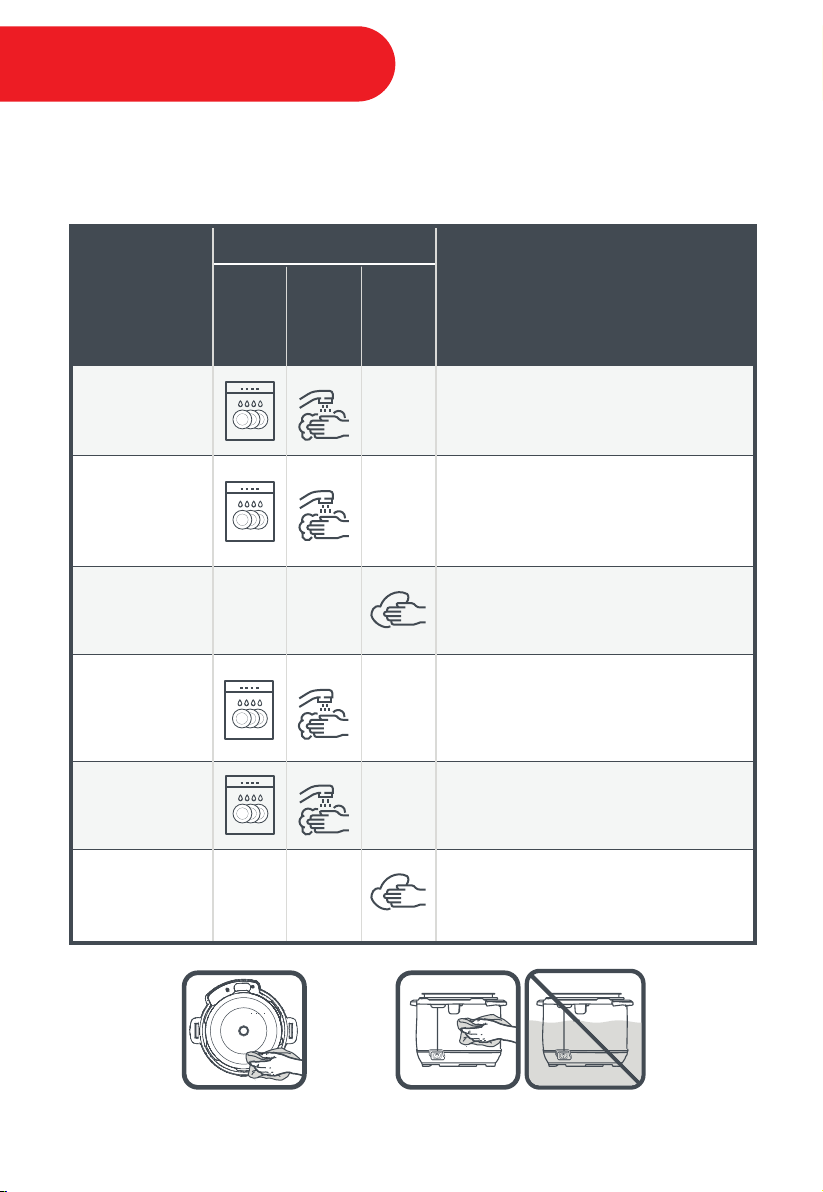
Part
Dishwasher
Safe
Cleaning Method
Hand Wash
(submerged)
Wipe Clean
(damp cloth)
Cleaning Tip
Accessories
• steam rack
• soup spoon
• rice paddle
• rice measuring cup
• silicone mini mitts
Small Parts
• anti-block shield
• sealing ring
• steam release valve cover
• steam release valve
• float valve
• float valve silicone cap
• condensation collector
Detachable
Cord
Inner Pot
Lid
Cooker Base
• More acute hard water staining may require a vinegar
dampened sponge and some scrubbing to remove
• If there is tough or burned food residue at the bottom, soak in
hot water for a few hours for easy cleaning
• Do not clean the prongs of the detachable cord
• Do not submerge the detachable cord in water
• For dishwasher place in top rack
• Remove all small parts before dishwashing
• Wash with hot water and mild dish soap and allow to air dry
• To drain water from the lid after dishwashing, grasp the lid
handle and hold the lid vertically over a sink, then turn it 360°—
such as turning a steering wheel
• Wipe the condensation collecting rim and empty the
condensation collector after each use
• All small parts should be removed once every few cooking
cycles for routine cleaning, and any time there is visible
food debris
• Store sealing rings in a well ventilated area to decrease the
residual odor of flavorful meals. To eliminate odors from the
sealing ring, add 1 cup (250 mL) water and 1 cup (250 mL) white
vinegar to the inner pot, and run Pressure Cook for 5-10
minutes, then QR pressure
• Wash all parts and accessories after use
• Never use harsh chemical detergents, scouring pads, or powders on any of the unit’s
parts or components
DO NOT immerse the cooker base in
water or attempt to cycle through dishwasher.
Ensure the heating element
remains dry at all times.
33
Care & Cleaning

Replace the sealing ring
Remove the sealing ring and check for this.
Contact the Customer Care Team
Clean the sealing ring
Open then close the lid again
Install the sealing ring
Problem Possible Reason Solution
Difficulty closing
the lid
Sealing ring not seated properly
Adjust sealing ring, ensure it is fully seated
behind ring rack
Gently press the float valve downFloat valve stuck in popped-up
position
Lower lid onto cooker base slowly, allowing
heat to dissipate
Contents in cooker are still heated
Cooker is still under pressure
Ensure the pressure has released fullyFloat valve stuck in
popped-up position
To release the vacuum, touch the Venting
field to toggle to QR
Cooling of inner pot may create
suction, causing inner pot to
adhere to the lid
Difficulty opening
the lid
Lid is stuck to
inner pot
34
Touch Venting field, select NR. If pressure
has not fully released after 60 minutes;
contact the Customer Care Team
The topics covered in the following table do not always indicate a faulty cooker. Please
examine the cooker carefully. If you require support, contact the Customer Care Team:
• Create a Ticket: www.support.instantpot.com
• Live Chat: www.instantpot.com/#Chat
• Email: [email protected]
• Call: 1-800-828-7280
• Tips, videos, and FAQs: www.InstantPot.com
Instant Pot
®
parts and accessories are available on our online store:
www.store.instantpot.com
Register your Instant Brands™ appliance here: www.instantpot.com/support/register
Sealing ring damaged
No sealing ring in lid
Ring rack is warped or off-centre
Food particles attached to ring
Lid not closed properly
Check for deformation and contact the
Customer Care Team
Inner pot rim may be misshapen
Steam leaks from
side of lid
Troubleshooting

Occasional
clicking or light
cracking sound
Problem Possible Reason Solution
Float valve
does not rise
Food debris on float valve or
surrounding area
Remove float valve from lid, clean float valve,
silicone cap, and surrounding area on lid
Replace the float valve
Float valve silicone cap worn out
Too little liquid in inner pot
Add requisite minimum 1½ cups
(375mL / 12oz) of a thin liquid to inner pot
Open and close the lid completely
Ensure detachable power cord is plugged
tightly into base power socket. Try the
cooker on other outlets
Contact the Customer Care Team
This is normal. The clicking sound is the result
of the power relay working
Wipe bottom side of inner pot before placing
on element
Float valve obstructed by
lid-locking mechanism
Ensure inner pot is flush with heating
element; perform “Initial Test Run” to check
for function; contact the Customer Care
Team
No heat in the inner pot / Inner pot
base may be damaged
Bad power connection or
no power
Cooker’s electrical fuse has blown
Expanding pressure board under
changing temperatures
Bottom of inner pot is wet
No power to unit
Minor steam
leaking/hissing
from steam
release valve
during Cook cycle
This is normal
Regulating excess pressure Cook
cycle
On-Screen
Self-Diagnostic
Make sure the lid is closed properly. Do not
use the lid during the Sauté Smart Program
The word “Lid” is displayed
because lid is not used properly
The word “PrSE” is displayed
because of excess pressure
The words “Food burn” is
displayed because food is burnt
The word “noPr” is displayed
because there is not enough
pressure
Stir food to avoid burning and add water
as necessary
Add a minimum 1½ cups (375 mL / 12oz) of a
thin liquid to the inner pot
35
Press the Cancel key and allow the cooker to
cool for 60 minutes. Contact the Customer
Care Team if pressure is not fully released
The word "Alt" is displayed
because the target temperature
on Canning was not reached, or
the altitude setting is incorrect.
Press the Cancel key. Confirm your current
altitude and input the correct values on the
cooker. Restart cooking
Troubleshooting

Lights flash and
error code
appears
on screen
Contact the Customer Care Team
C1, C2, C6, C6H, C6L, E1, E2, E5,
E6, E11, E12, E13, E14, E15, E16, E17,
E18, and E19
Lights flash and
error code
appears
on screen
Remove and reposition inner pot in
cooker base
Add a higher volume of food and water to
the inner pot
C5: Inner pot is not seated
properly
Problem Possible Reason Solution
36
Troubleshooting
Add requisite minimum 1½ cups (375mL / 12oz)
of a thin liquid to inner pot
Too little liquid in inner pot
Steam gushes
from steam
release valve
when venting is
not activated
Contact the Customer Care Team
Remove steam release cover and steam
release valve, check for internal food debris;
re-seat parts
Steam release valve not
seated properly
Pressure sensor control failure

37
Limited Warranty
This Limited Warranty is effective for one year from the date of original consumer purchase. Proof of original
purchase date and, if requested by an authorized representative of Instant Brands Inc. (“Instant Brands”),
return of your appliance, is required to obtain service under this Limited Warranty. Provided that this appliance
is operated and maintained in accordance with written instructions attached to or furnished with the
appliance, Instant Brands will, in its sole and exclusive discretion, either: (i) repair defects in materials or
workmanship; or (ii) replace the appliance. In the event that your appliance is replaced, the Limited Warranty on
the replacement appliance will expire 12 months from the date of original consumer purchase.
This Limited Warranty extends only to the original purchaser and use of the appliance in the United States of
America and Canada. This warranty does not cover units that are used outside of the United States of
America and Canada.
Any modification or attempted modification to your appliance may interfere with the safe operation of the
appliance and will void this Limited Warranty. This Limited Warranty does not apply in respect of any appliance
or any part thereof that has been altered or modified unless such alterations or modifications were expressly
authorized by an Instant Brands representative.
Limitation and Exclusions
The liability of Instant Brands, if any, for any allegedly defective appliance or part shall in no circumstances
exceed the purchase price of a comparable replacement appliance.
This Limited Warranty does not cover:
1. Damage resulting from accident, alteration, misuse, abuse, neglect, unreasonable use, use contrary to the
operating instructions, normal wear and tear, commercial use, improper assembly, disassembly, failure to
provide reasonable and necessary maintenance, fire, flood, acts of God or repair by anyone unless directed by
an Instant Brands Representative;
2. Repairs where your appliance is used for other than normal, personal use or when it is used in a manner that
is contrary to published user or operator instructions; or
3. Use of unauthorized parts and accessories, or repairs to parts and systems resulting from unauthorized
repairs or modifications made to this appliance.
The cost of repair or replacement under these excluded circumstances shall be borne by you.
Warranty

38
Disclaimer of Implied Warranties
EXCEPT AS EXPRESSLY PROVIDED HEREIN AND TO THE EXTENT PERMITTED BY LAW, INSTANT BRANDS MAKES NO
WARRANTIES, CONDITIONS OR REPRESENTATIONS, EXPRESS OR IMPLIED, BY STATUTE, USAGE, CUSTOM OF TRADE
OR OTHERWISE WITH RESPECT TO THE APPLIANCES OR PARTS COVERED BY THIS WARRANTY, INCLUDING BUT NOT
LIMITED TO, WARRANTIES, CONDITIONS, OR REPRESENTATIONS OF WORKMANSHIP, MERCHANTABILITY,
MERCHANTABLE QUALITY, FITNESS FOR A PARTICULAR PURPOSE OR DURABILITY.
Some states or provinces do not allow for the exclusion of implied warranties of merchantability or fitness, so this
limitation may not apply to you. In these states and provinces, you have only the implied warranties that are expressly
required to be provided in accordance with applicable law.
Limitation of Remedies; Exclusion of Incidental and Consequential Damage
YOUR SOLE AND EXCLUSIVE REMEDY UNDER THIS LIMITED WARRANTY SHALL BE APPLIANCE REPAIR OR
REPLACEMENT AS PROVIDED HEREIN. INSTANT BRANDS SHALL NOT BE LIABLE FOR INDIRECT, INCIDENTAL OR
CONSEQUENTIAL DAMAGES ARISING OUT OF OR IN CONNECTION WITH THE USE OR PERFORMANCE OF THE
APPLIANCE OR DAMAGES WITH RESPECT TO ANY ECONOMIC LOSS, PERSONAL INJURY, LOSS OF PROPERTY, LOSS OF
REVENUES OR PROFITS, LOSS OF ENJOYMENT OR USE, COSTS OF REMOVAL, INSTALLATION OR OTHER INDIRECT,
INCIDENTAL OR CONSEQUENTIAL DAMAGES OF ANY NATURE OR KIND.
Warranty Registration
Please visit https://instantpot.com/support/register/ to register your new Instant Brands™ appliance and validate your
warranty within thirty (30) days of purchase. You will be asked to provide the store name, date of purchase, model number
(found on the back of your appliance) and serial number (found on the bottom of your appliance) along with your name and
email address. The registration will enable us to keep you up to date with product developments, recipes and contact you
in the unlikely event of a product safety notification. By registering, you acknowledge that you have read and understand
the instructions for use, and warnings set forth in the accompanying instructions.
Warranty Service
To obtain service under this warranty, please contact our Customer Service Department by phone at 1-800-828-7280 or
by email to [email protected]. You can also create a support ticket online at www.Support.InstantPot.com. If we
are unable to resolve the problem, you may be asked to send your appliance to the Service Department for quality
inspection. Instant Brands is not responsible for shipping costs related to warranty service, save and except for shipping
costs associated with the return of your appliance from Canada or within the 48 contiguous states and the District of
Columbia of the United States of America, as provided herein. When returning your appliance, please include your name,
mailing address, email address, phone number, and proof of the original purchase date as well as a description of the
problem you are encountering with the appliance.
Warranty

39
Acceptable Liquids 18
Adding Culture 28
Adjust Altitude 12, 16, 24
Anti-Block Shield 2, 7, 10, 29
Base Power Socket 8, 31
Canning – Sterilizing Jars 2, 22
Celsius to Fahrenheit 16
Central Dial 8, 12
Clock / Set Local Time 12, 16
Condensation Collector 6, 9
Condensation Collector Tabs 9
Condensation Drain Hole 8
Control Panel 12
Cooker Base 6, 8, 9, 10, 11, 29
Cooker Handles 2, 8
Cooking and Local Time Display 16
Cooking Progress Indicator 12
Customer Care Team 30
Deglaze 24, 31
Delay Start 12, 17
Detachable Power Cord 3, 5, 6, 11, 31
Dimensions 5
Error Code 31
Factory Reset (All Settings) 16
Factory Reset (Specific Smart Programs) 16
Fermentation 28
Fill Level Indicators 18
Float Valve 2, 3, 7, 15, 29, 30, 31
Food Pouches 26
Glass Lid 25
Headspace 21
Heating Element 3, 8, 11
Important Safeguards 2-4
Initial Test Run 14, 15
Inner Pot 3, 6, 11, 18
Keep Warm Program 12, 16
LCD Touch Screen 8, 12
Lid 6, 7
Lid Fins 7, 8
Lid Handle 7
Lid Locking Pin 7
Lid Position Markers 7, 9
Limited Warranty 32, 33
Low Pressure Canning 22
Manual 6
Max Pressure Canning 21, 22, 23
Model 5
Natural Release 13
NutriBoost™ 20
Pasteurization 28
Pressure Indicator 12, 15
Pressure Level Field 12
Pulse Release 13
Quick Release 13
Quick Start Guide 6
Rating Label 9
Recipe Book 6
Rice Measuring Cup 6
Rice Paddle 6
Sealing Ring Rack 7, 11
Silicone Mini Mitts 6, 29
Silicone Sealing Ring 4, 6, 7, 11, 18, 29, 30
Smart Program Keys 12
Sound On / Off 12
Soup Spoon 6
Sous Vide 26, 27
Stainless Steel Outer Pot 8
Start Program Key 12
Steam Rack with Handles 6
Steam Release Pipe 7, 10
Steam Release Valve 7, 10
System Settings 12
Temperature Field 12
Temperature Sensor 7
Troubleshooting 30, 31
Venting Methods 13
Venting Fields 12
Venting System 10
Voltage 5
Warranty 32, 33
Water Test 14-15
Wattage 5
Weight 5
Yogurt 28
L
M
N
P
Q
R
S
T
V
W
Y
A
B
C
D
E
F
G
H
I
K
Index
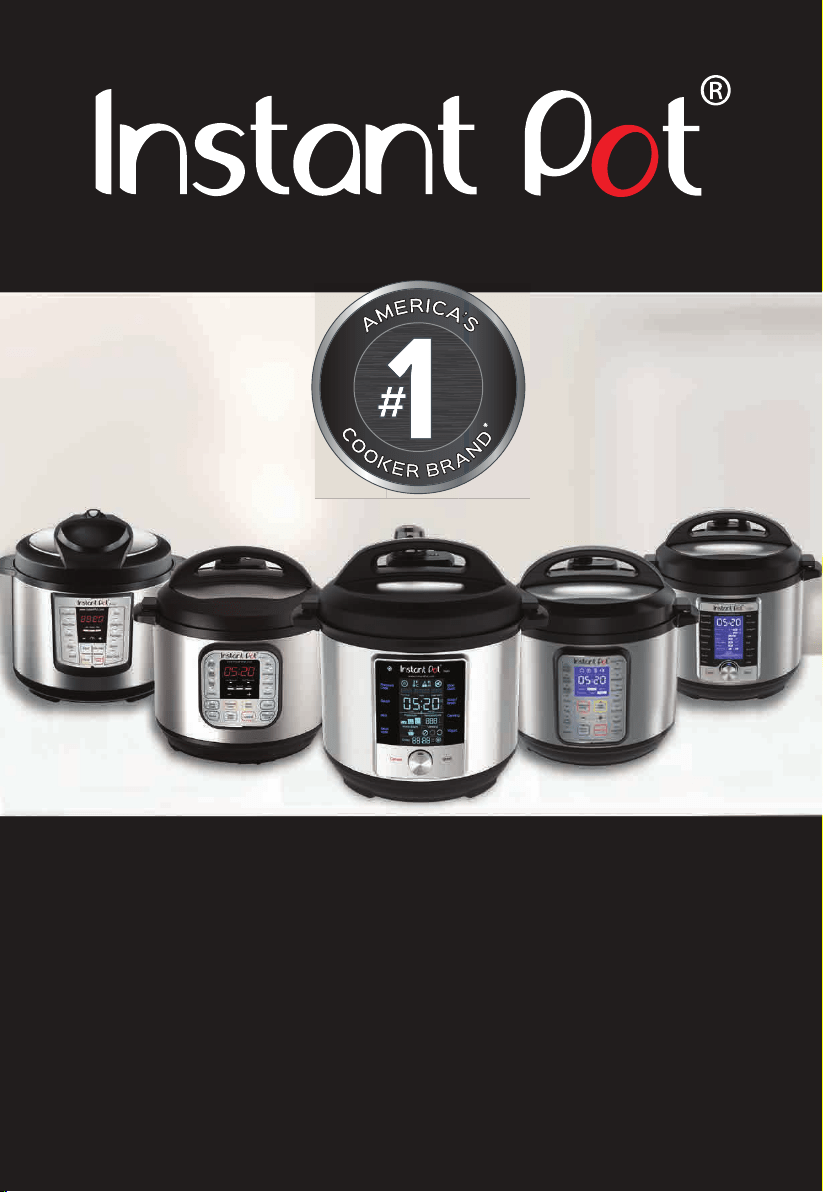
The Instant Pot
®
Products
Tools for a New Lifestyle
*Instant Pot
®
Brand: The NPD Group Inc., Retail Tracking Service, Cookers Category, Dollar
Sales, USA & Canada, Latest 52 Wks ending Dec, 2017.
Duo Plus
3, 6, 8 Quart
Lux
3, 6, 8 Quart
Duo
3, 6, 8 Quart
Ultra
3, 6, 8 Quart
Max
6 Quart

606-0101-02
Instant Brands Inc.
11 - 300 Earl Grey Drive Suite 383
Ottawa, Ontario
K2T 1C1
Canada
Telephone: 1-800-828-7280
Web: www.instantpot.com
Store: www.Store.InstantPot.com
US & Canada Email: [email protected]
Download Free Recipe App below:
Join the Official Instant Pot Community:
facebook.com/groups/instantpotcommunity
Copyright © 2018 Instant Brands™ Inc.