DUO
User Manual
Series


Table of Contents
Important Safeguards
Overview
Control and Features
Getting Started
Pressure Cooking
Non-Pressure Cooking
Cooking and Safety Tips
Care and Cleaning
Troubleshooting
Warranty
2 - 5
6
7 - 11
12 - 14
15 - 17
18 - 21
22
23
24 - 26
27 - 28
Pictures in manual are for reference only. Please refer to actual product.

Important Safeguards
Please read this manual carefully and retain for future reference.
SAVE THESE INSTRUCTIONS
When using pressure cookers, basic safety precautions should always be followed.
1) Do not touch hot surfaces of pressure cooker. Use side handles for carrying.
2) Do not place the cooker on or near a hot gas or electric burner, or in a heated oven.
3) Intended for countertop use only.
4) Do not use pressure cooker for anything other than intended use.
5) Never deep fry or pressure fry in the cooker with oil.
6) Do not let cord hang over edge of table or counter, or touch hot surfaces.
7) Do not use cooker in electrical systems other than 110-120V~/60Hz for North America.
8) Do not operate cooker with damaged cord or plug, or after the cooker malfunctions
or has been damaged in any manner.
9) Do not open the unit until the cooker has cooled and all internal pressure
has been released. If the float valve is still up or the lid is difficult to turn, it is an
indication that the cooker is still pressurized - do not force it open.
Please see “Getting Started” pages 12-14.
10) For all pressure cooking programs, the total amount of pre-cooked food and liquid in
the inner pot should not pass the 2/3 line. When cooking food that expands during
cooking such as rice, beans or vegetables, food should not pass the 1/2 line.
Overfilling may risk clogging the steam release resulting in excess pressure. This may also
cause leakage, personal injuries, or damage to the cooker. These fill level warnings do not
apply to non-pressure cooking programs.
2

Important Safeguards
Please read this manual carefully and retain for future reference.
11) Make sure the steam release handle is in the Sealing position during all pressure
cooking programs.
12) This appliance should not be used by or near children or by individuals with disabilities or
limited knowledge in using pressure cookers.
13) Do not immerse the cooker base in water. To protect against electrical shock, do not
immerse the cord, power plug, or cooker in any liquid.
14) Always attach plug to the cooker first, then plug cord into the wall outlet. To disconnect,
press Cancel, then remove plug from the wall outlet. Unplug from power outlet
when not in use and before cleaning. Allow the cooker to cool before putting on or
taking off parts, and before cleaning.
15) For household use only. Not intended for outdoor use.
16) Do not attempt to move the pressure cooker when it is operating under pressure or
containing hot liquids.
17) This appliance cooks under pressure. Improper use may result in scalding injuries.
Make certain the lid is properly closed before operating. Caution: To reduce the risk of
electric shock, cook only in removable containers. See “Getting Started” pages 12-14.
18) Use of accessories and parts that are not branded Instant Pot
®
nor recommended by the
Instant Pot
®
Company may cause the cooker to malfunction. Cook only in Instant Pot
®
stainless steel or ceramic non-stick inner pots for best results. Other brands may not
have the correct curvature to match the heating element.
19) Be aware that certain foods, such as applesauce, cranberries, pearl barley, oatmeal or
other cereals, split peas, noodles, macaroni, rhubarb, or spaghetti can foam, froth,
sputter, and clog the steam release. These foods should not be cooked under
pressure cooking settings unless as directed in Instant Pot
®
cooker recipes.
3
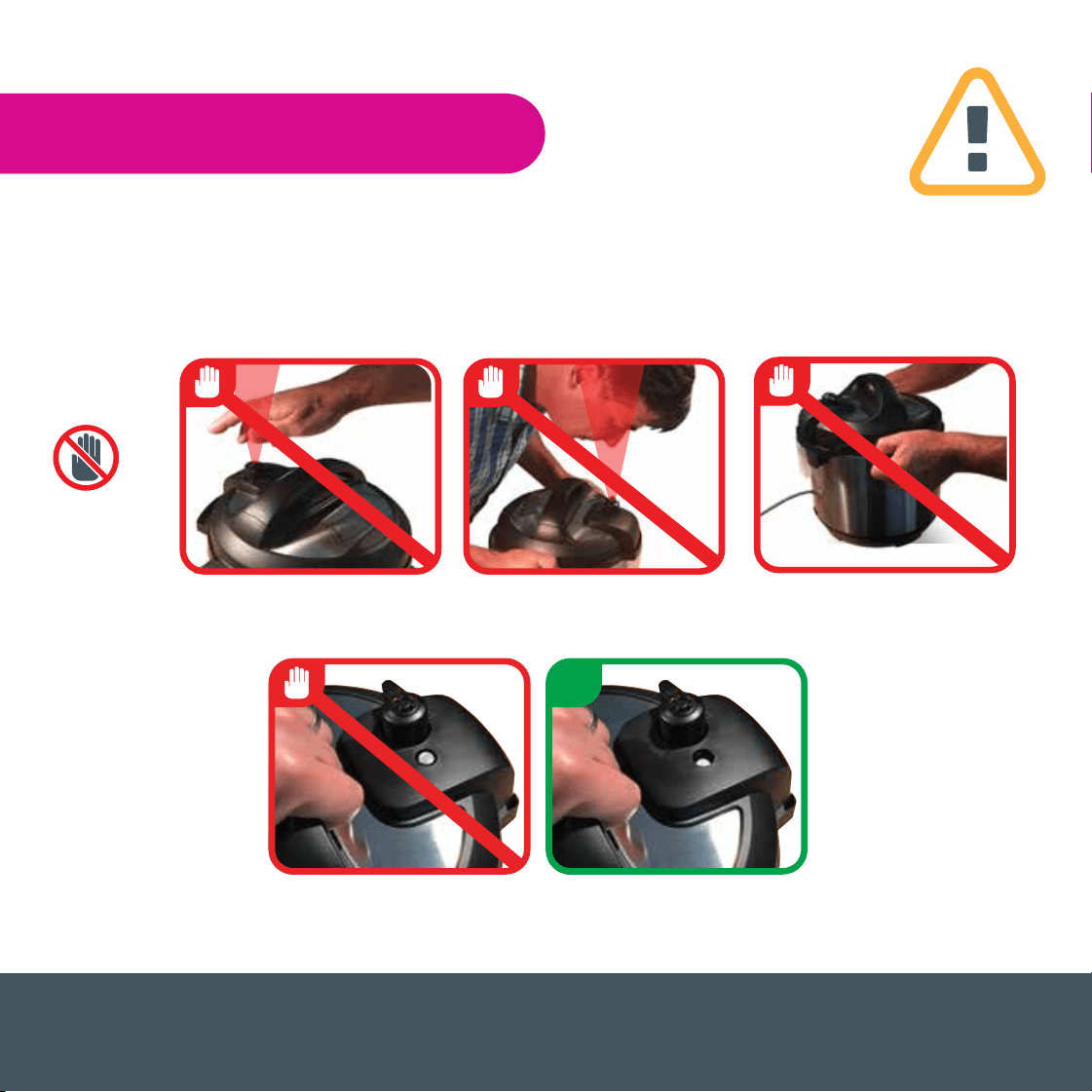
20) Always check the steam release valve, float valve and anti-block shield for clogging
before use.
21) Always make sure the sealing ring rack is completely set in the groove on the inside of
the sealing ring.
Important Safeguards
Please read this manual carefully and retain for future reference.
When in operation or releasing pressure DO NOT place
unprotected skin over the steam release valve.
Do not move cooker when
it is in operation
4
Do not force lid open when the float valve is UP.
Make sure the float valve is DOWN when you open the lid.

WARNING: Spilled food can cause serious burns. Keep appliance and cord away from
children. Never drape cord over edge of counter, never use power outlet below counter,
and never use with an extension cord.
Special Cord Set Instructions
As per UL safety requirements, a short power supply cord (0.6 m to 0.9 m) is provided to
reduce the hazards resulting from entanglement and tripping.
This appliance has a 3-prong grounding plug. To reduce the risk of electric shock, plug the
power cord into a grounded (earthed) electrical outlet that is easily accessible.
Specifications
Important Safeguards
Please read this manual carefully and retain for future reference.
5
Volume Weight
Product Dimensions
Model Volume Product Dimensions
Rated
Power
Inner Pot
Dimensions
120V~
60Hz
19.8x12.7cm
7.8x5 in.
15.7x 23.9cm
6.2 x 9.4 in.
17.5 x 26.4 cm
6.9 x 10.4 in
29x25.5x28.5 cm
11.4x10x11.2 in.
33 x 31 x 32 cm
13 x 12.2 x 12.6 in.
37.6 x 33.8 x 36.1 cm
14.8 x 13.3 x 14.2 in
DUO Mini
IP-DUO60 V3
IP-DUO80 V2
Model
Volume
Product
Dimensions
Weight
3.9 kg
8.6 lbs
6.75 kg
14.8 lbs
8.21 kg
18 lbs
Power
Supply
700 W
1000 W
1200 W
3 quart
6 quart
8 quart
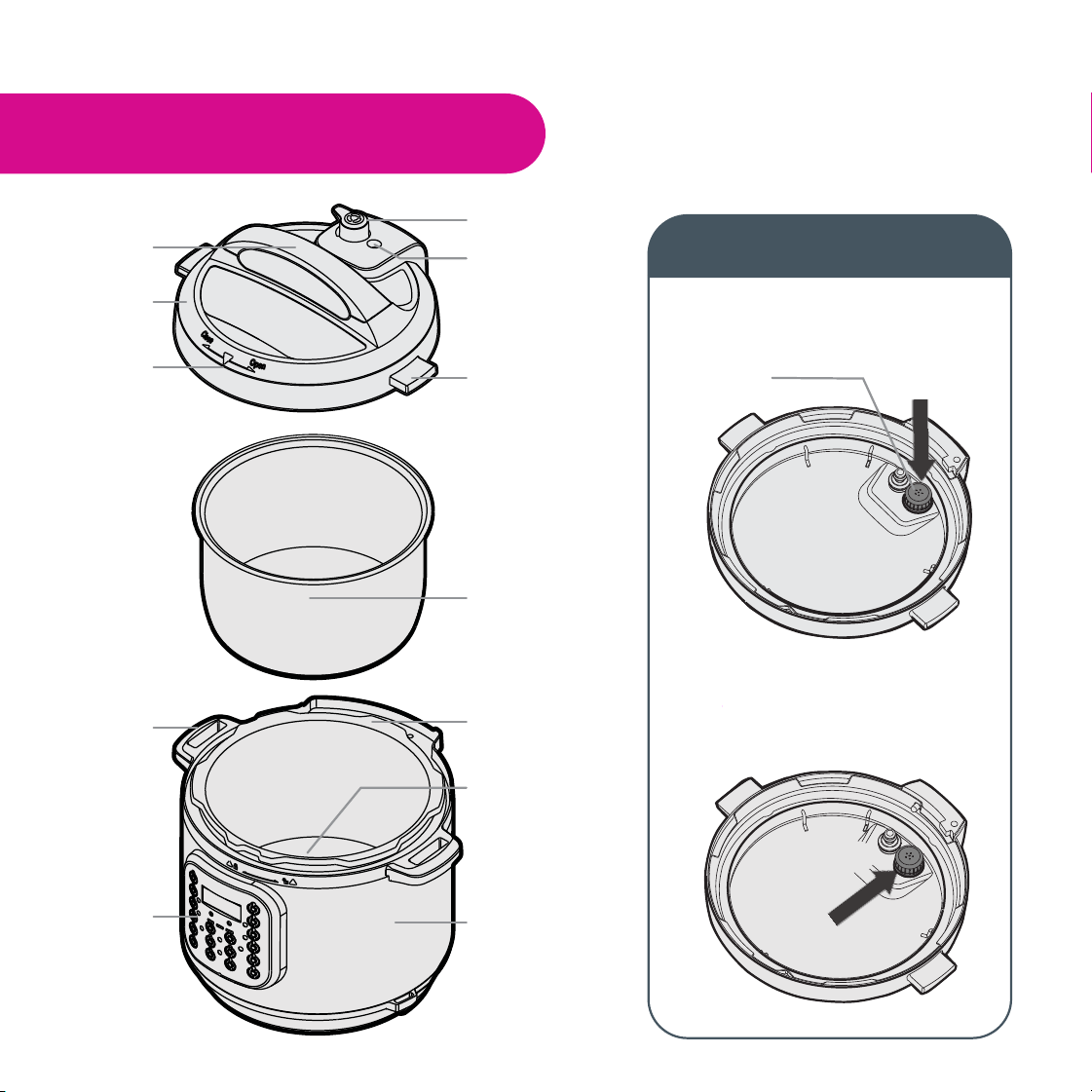
Overview
Anti-block shield
Steam release
handle
Float valve
Lid position
marker
Lid fin
Lid handle
Lid
Stainless steel
inner pot
To install:
Position the anti-block
shield in place and
push down
Cooker
handle
Control panel
Heating element
Exterior pot
Cooker base
To remove:
Using your thumb, push the side of the
anti-block shield towards the lid rim and
lift up with some effort. The anti-block
shield should pop out
6
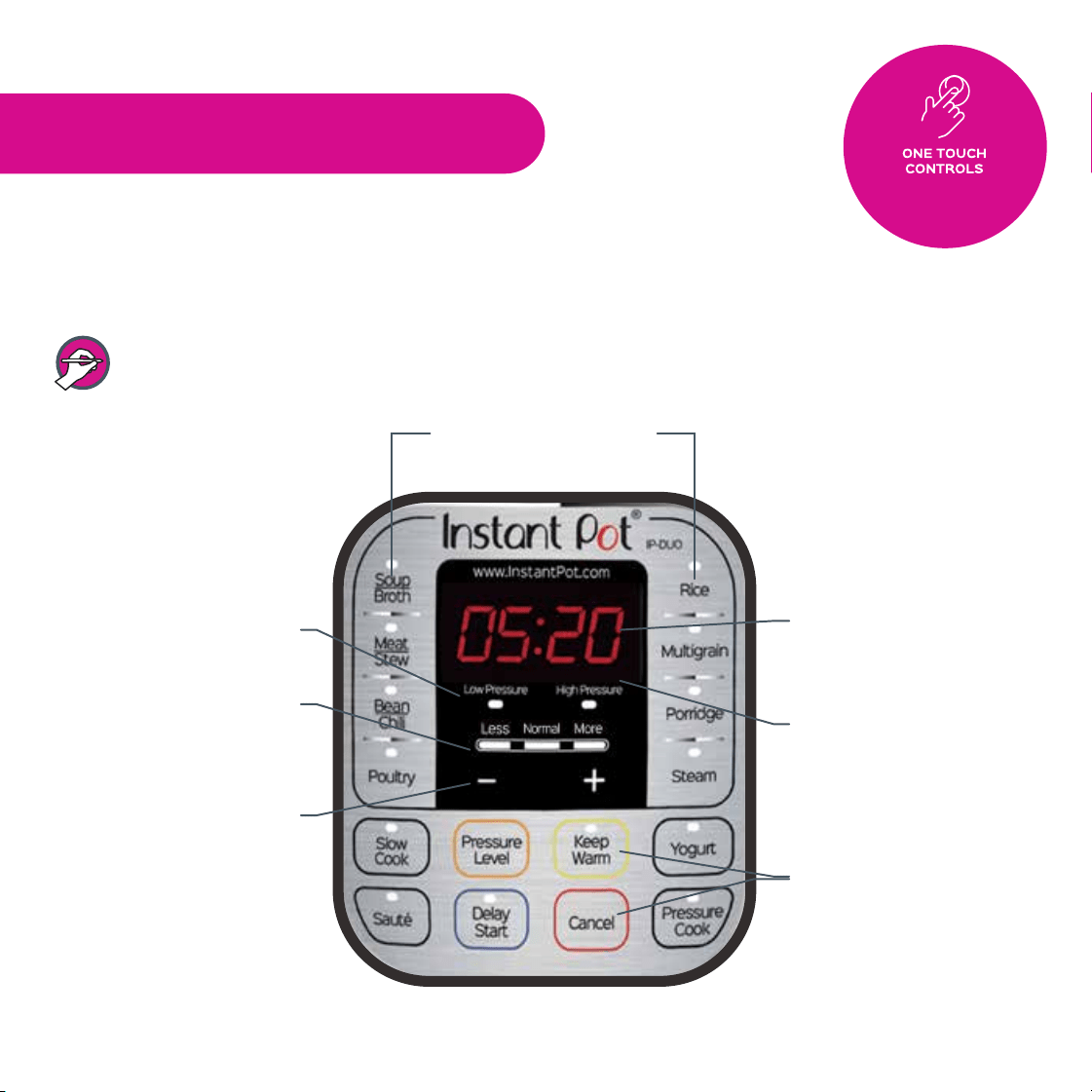
Control Panel for the DUO Series
The control panel of your Instant Pot
®
DUO Mini/60/80 consists of a LED
display,cooking program keys, operation keys, +/- keys to adjust time, and a
Keep Warm and Cancel key.
Note that the Duo Mini does not have the Poultry and Multigrain programs.
Control and Features
7
Pressure indicators
Mode indicators
+/- keys to adjust
time
Operation Keys.
(See next page for details)
LED Display
Time Display
Cooking program keys
Perfect cooking results
with built-in automatic
programs
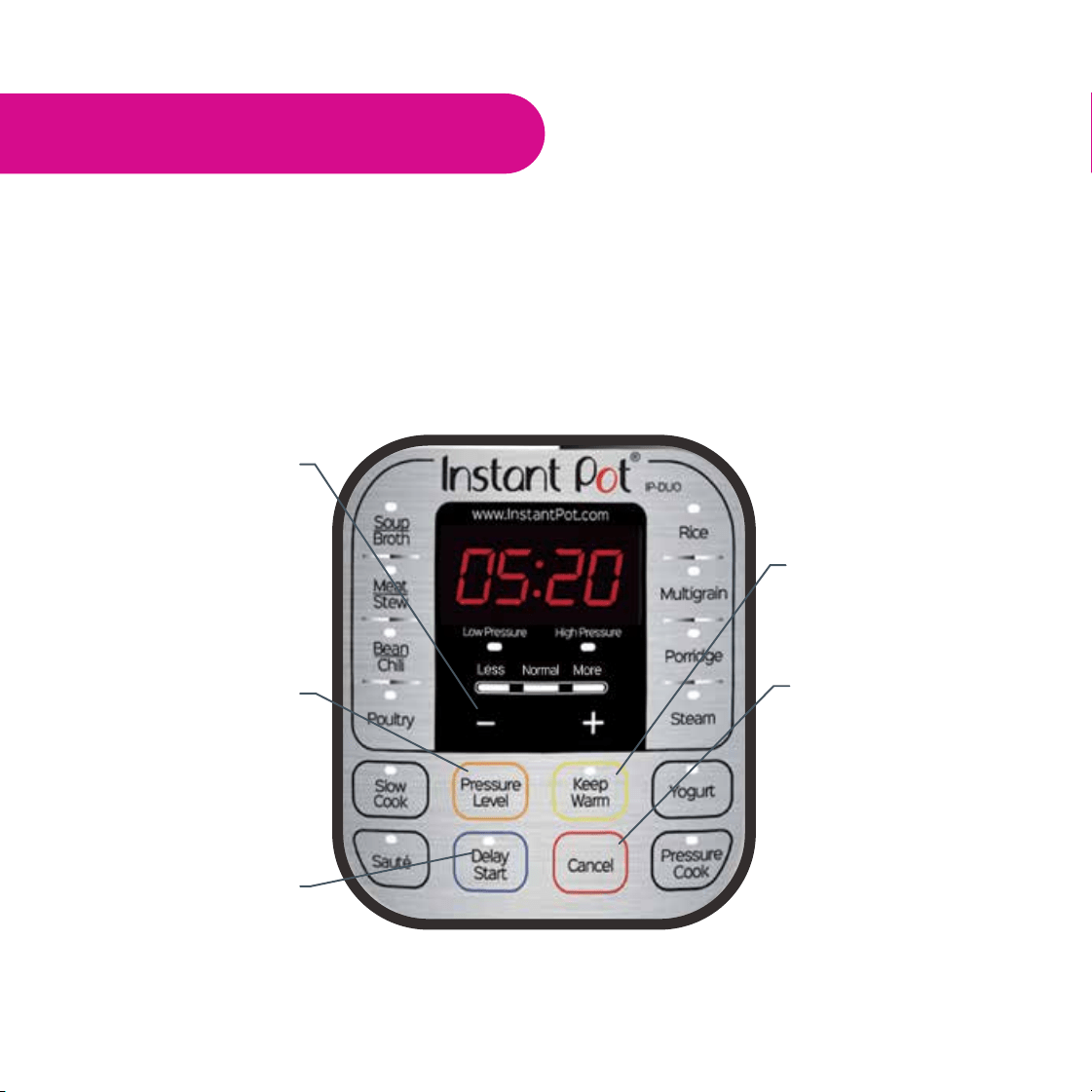
Control and Features
The Pressure Level key has no effect on non-pressure cooking programs: Slow Cook, Sauté and Yogurt.
Sound ON/OFF
Press and hold the - Key
for 3 seconds to turn
sound OFF.
Press and hold the + key
for 3 seconds to turn
sound ON
The Keep Warm key turns
the Auto Keep Warm
function ON and OFF
The Delay Start key sets
the delay time before a
cooking program starts.
The Pressure Level key
toggles between High
and Low pressure
settings for pressure
cooking programs
8
Control Panel for the DUO Series
Instant Pot
®
is a programmed smart cooker that has preset cooking times for different food
ingredients and cooking methods. It also remembers your most recent settings per cooking
program for a more personalized cooking experience. To return to the factory default
settings, press Cancel to return the cooker to standby mode displaying OFF, 1) for individual
cooking programs reset, press and hold the cooking program key until the cooker beeps, or
2) for global reset, press and hold the Cancel key until the cooker beeps.
The Cancel key ends
a cooking program at any
time, or resets the
cooker to factory default
settings by pressing and
holding this key until the
cooker beeps
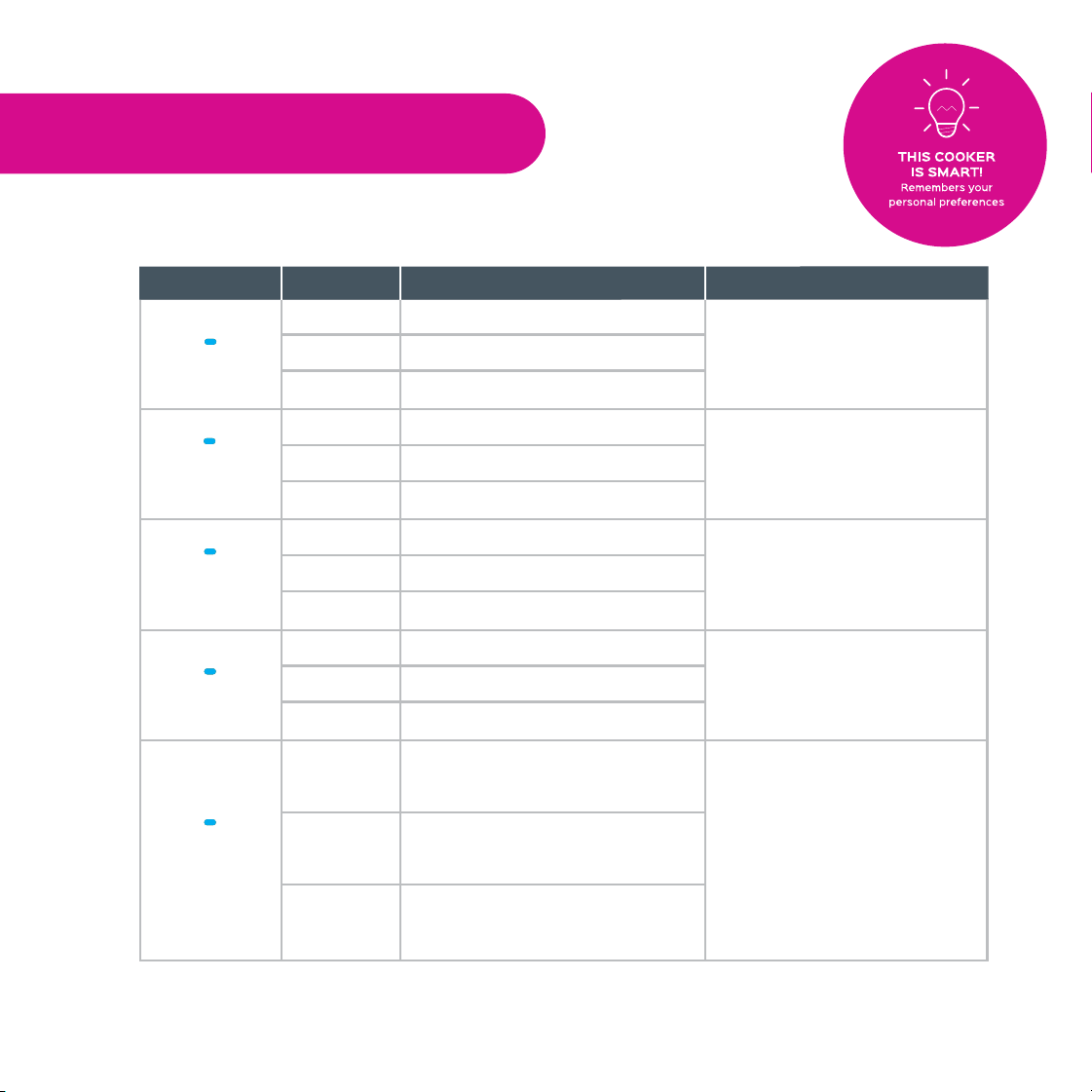
Cooking Program Options
Control and Features
9
Soup without meat.
The soup/broth remains
clear due to lack of boiling
motion under pressure
cooking.
Soup with meat.
Rich bone broth.
Less
Normal
More
Programs
Suggested Uses
Notes for Users
Modes
Soft texture.
Choose different modes
based on the meat texture
desired.
Very soft texture.
Fall-off-the bone meat texture.
Less
Normal
More
Less soft texture.
Choose different modes
based on the bean texture
desired.
Soft texture.
Very soft texture.
Less
Normal
More
Soft texture.
Choose different modes
based on the meat texture
desired.
Very soft texture.
Fall-off-the-bone texture.
Less
Normal
More
Corresponds to Low setting
in some temperature
controlled slow cookers.
Corresponds to Medium
setting in some temperature
controlled slow cookers.
Corresponds to High setting
in some temperature
controlled slow cookers.
Non-pressure cooking
program. You may also use
the Instant Pot
®
glass lid as
an option.
Less
Normal
More
Meat
Stew
Bean
Chili
Poultry
1
Slow
Cook
Soup
Broth

Al dente white rice.
Automated cooking
program. LED displays
‘Auto’. The +/- keys will not
work in this program.
Wild rice, brown rice, mung
beans, etc.
Choose different modes
based on the type of grains
and the desired texture.
Wild rice, brown rice, mung
beans, etc.
Tough grains or a mixture of
grains and beans.
Less
Normal
More
Oatmeal.
DO NOT use Quick Release
as thick liquid will spatter
out and block the steam
release valve. See page 17.
White rice porridge/congee.
Rice porridge/congee with
various rices and beans.
Less
Normal
More
Program includes 45
minutes of warm water
soaking time prior to 60
minutes of pressure
cooking.
Less
Normal
More
Normal texture white rice.
Softer texture white rice.
Rice
Multigrain
1
Porridge
Control and Features
Programs
Suggested Uses
Notes for Users
Modes
Cooking Program Options
10
Use the steam rack
provided to elevate food
above the water. Use Quick
Release method to prevent
food from overcooking.
Vegetables.
Fish and Seafood.
Meat.
Less
Normal
More
Steam
Sauté
(Brown)
Simmering, thickening and
reducing liquids.
NEVER have the lid on when
sautéing. Maximum time is
30 minutes as a safety
precaution.
Pan searing.
Stir-frying or browning meat.
Less
Normal
More

11
Control and Features
Programs
Suggested Uses
Notes for Users
Modes
Manual programming of
pressure level and cooking
time according to your
favourite recipes or cooking
habits.
Press the Pressure Level
key to adjust pressure
levels and the + / - keys to
change cooking time.
Less
Cooking Program Options
Jiu Niang, a sweet fermented
glutinous rice dessert.
Default fermentation time is
24:00 hours. You can adjust
time based on your recipe.
Fermenting milk when
making yogurt.
Pasteurizing milk when
making yogurt.
Less
Normal
More
‘Yogt’ will be displayed on
the screen when
completed.
‘boiL’ will be displayed on
the screen.
Normal
More
Yogurt
Pressure
Cook
1
Poultry and Multigrain cooking programs are not available on Duo Mini.
Pressure Cooking Programs:
Working Pressure:
Low Pressure: 5.8 - 7.2 psi (40 - 50 kPa); High Pressure: 10.2 - 11.6 psi (70 - 80 kPa)
Pressure Release Pressure Limit: 15.22psi (105kPa)
Working Temperature: 115°C - 118°C (239°F ~ 244°F)
Non-Pressure Cooking Programs:
Keep Warm function: 63 - 78°C (145 ~ 172°F);
Slow Cook function: Less mode: 82-87.8°C / 180-190°F; Normal mode: 87.8-93°C / 190-200°F;
More mode: 93-99°C / 200-210°F;
Sauté function: Less mode: 135 -150°C (275 -302°F); Normal mode: 160 -176°C (320 -349°F);
More mode: 175 - 210°C (347 - 410°F)
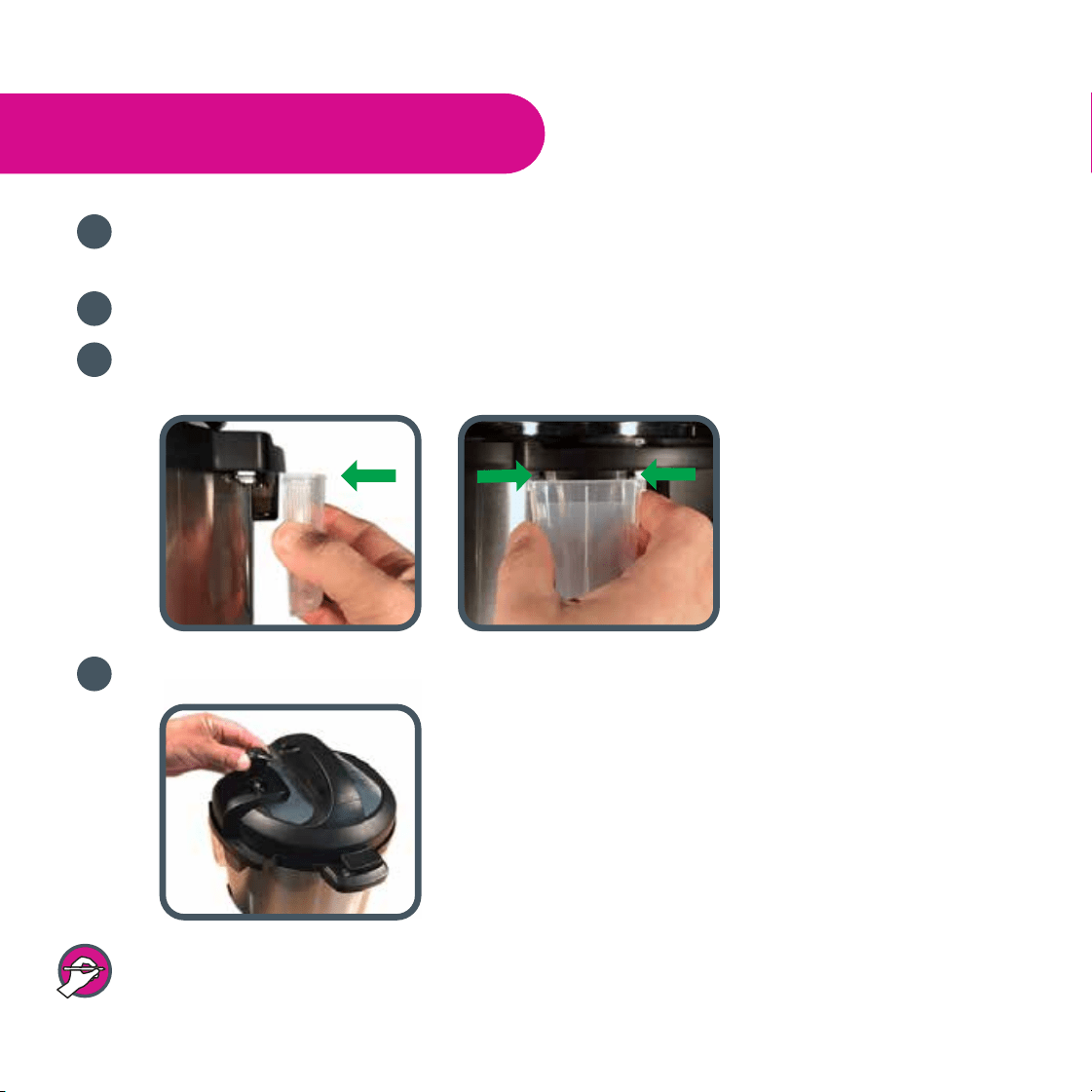
Read warning cards and warning labels. Remove all packaging materials and removable
warning cards from the cooker and accessories.
Clean the inner pot, lid and accessories with water and detergent before the first use.
Install the condensation collector at the rear of the cooker by aligning the top of the collector
with the guides on the cooker and press in.
Place the steam release handle on the lid.
The steam release handle does not lock tight into the lid but will fit loosely.
Getting Started
1
2
3
4
12
Getting Started
1
2
3
4
5
a b c
Before using your Instant Pot
®
:
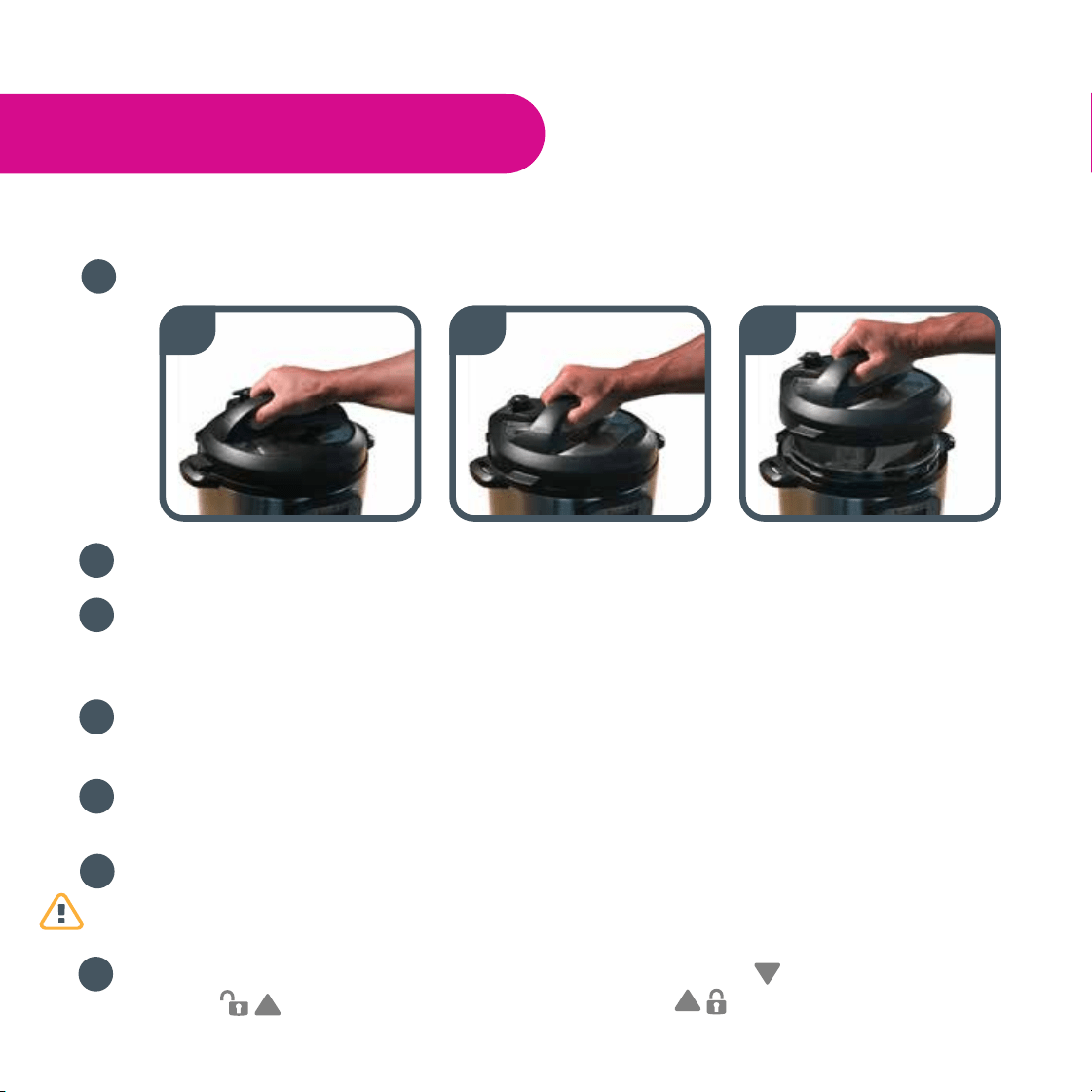
To remove the lid, hold the handle, turn the lid counterclockwise and lift.
Remove the inner pot from the cooker.
Add food and liquids to the inner pot as the recipe directs. If required, place the
steam rack on the bottom of the inner pot first. Always add at least 18 fl oz / 500 mL
of liquid for minimum liquid requirement. See “Cooking and Safety Tips” on page 22.
Wipe the outside of the inner pot dry. Make sure there is no food debris on the
bottom side of the inner pot nor on the cooking element.
Put the inner pot back into the cooker. Rotate slightly to ensure that it is seated
correctly.
Make sure the sealing ring rack is completely set in the groove on the inside of the
sealing ring. Ensure there is no deformation on the sealing ring rack. Do not attempt
to repair a deformed ring rack. Please contact the customer care team.
To place lid, reverse Step 1. Place the lid on the cooker, align the mark on the lid
with the (unlock) mark and turn clockwise to the (lock) mark.
7
13
6
Getting Started
• Make sure the steam release valve, float valve and anti-block shield are clean
and free of debris.
• After putting the lid on, make sure the float valve on lid top drops down.
• Do not put the lid on for the Sauté program.
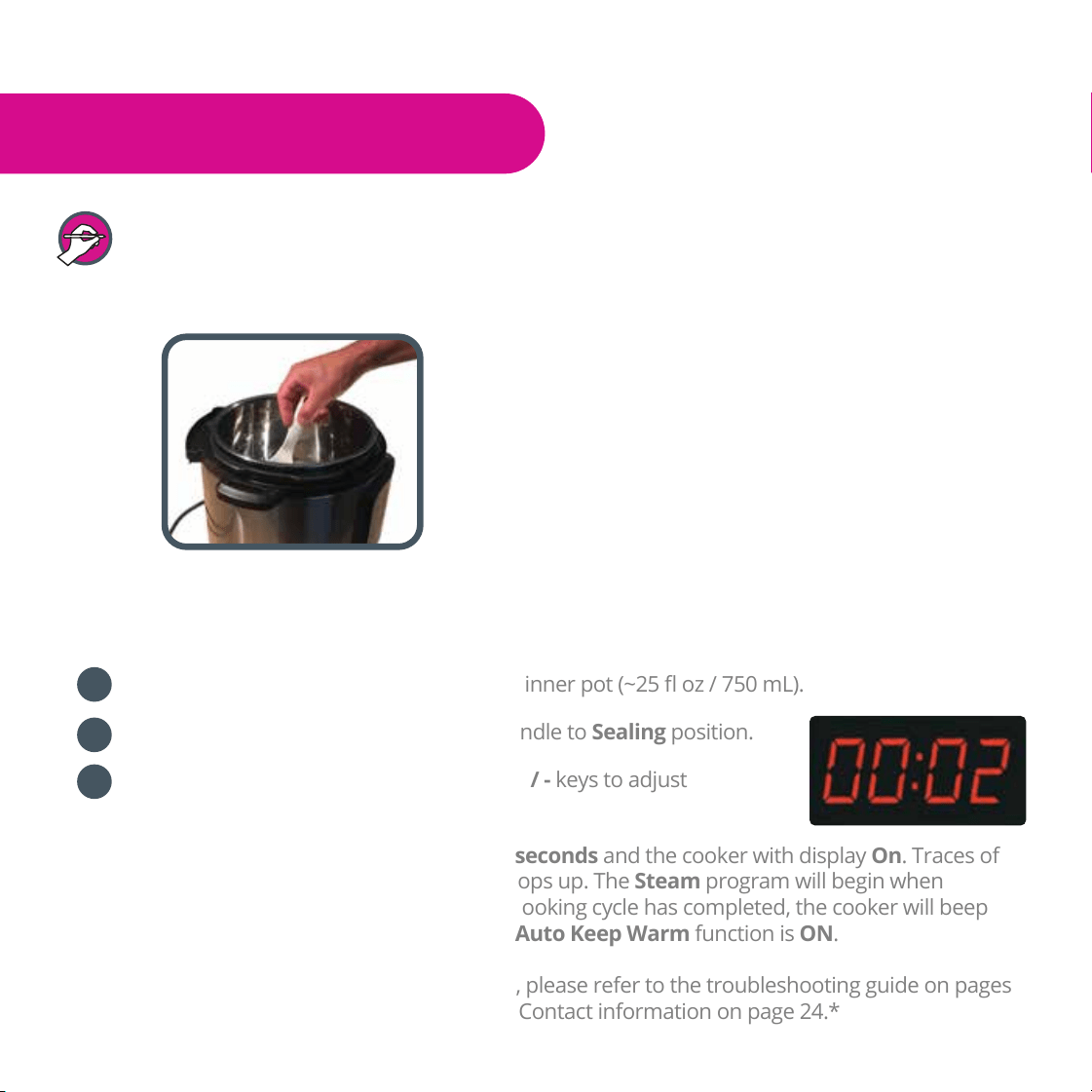
To familiarize yourself with the Instant Pot
®
and check if the cooker is working properly:
Add 3 measuring cups of water into the inner pot (~25 fl oz / 750 mL).
Close the lid. Turn the steam release handle to Sealing position.
Press the Steam button and press the + / - keys to adjust
time to 2 minutes.
The preheating cycle will start after 10 seconds and the cooker with display On. Traces of
steam will release until the float valve pops up. The Steam program will begin when
working pressure is reached. After the cooking cycle has completed, the cooker will beep
and switch to Keep Warm mode if the Auto Keep Warm function is ON.
*If you have any questions or concerns, please refer to the troubleshooting guide on pages
24 - 26, or call the customer care team. Contact information on page 24.*
1
2
3
14
Initial Test Run
Pressure Cooking
1
2
3
4
15
The following are all pressure cooking programs: Soup/Broth, Meat/Stew, Bean/Chili,
Poultry
1
, Rice, Multigrain
1
, Porridge, Steam, and Pressure Cook.
• Do not fill the inner pot more than 2/3 full. For food that expands during cooking such
as rice or dried vegetables, do not fill the inner pot more than 1/2 full.
• After the cooking process has started, you can press Cancel at any time to end the program.
The cooker then goes to standby mode.
Follow the steps in “Getting Started” pages 12 - 14.
Position the steam release handle to Sealing.
Connect the power cord. The LED displays OFF, indicating that the
cooker is in standby mode.
Select a pressure cooking program: Soup/Broth, Meat/Stew, Bean/Chili, Poultry
1
, Rice,
Multigrain
1
, Porridge, Steam, or Pressure Cook.
1
Poultry and Multigrain cooking programs are not available on DUO Mini.
Pressure Cooking
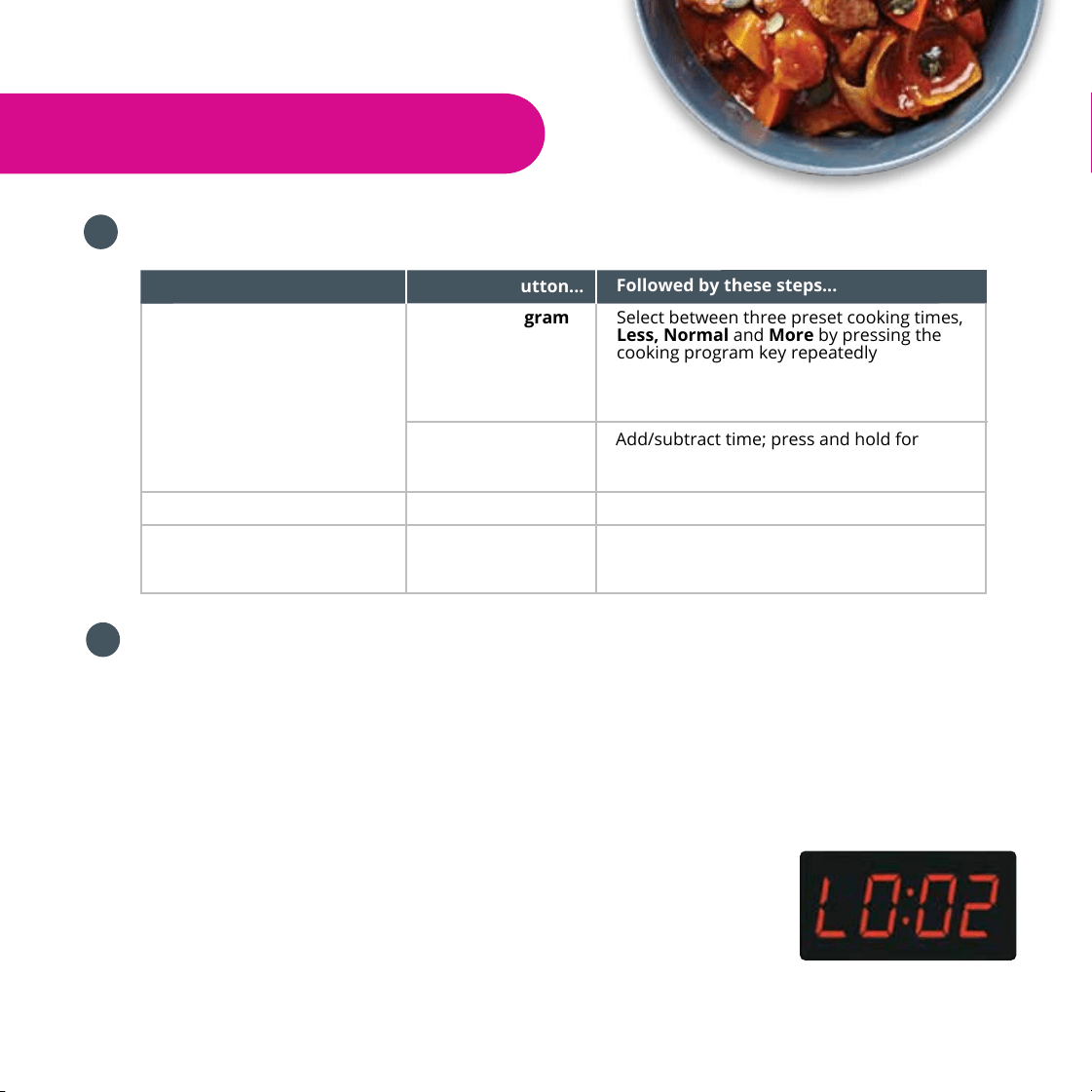
Change the cooking time
To do this .... Press this button...
Cooking Program
Key
Select between three preset cooking times,
Less, Normal and More by pressing the
cooking program key repeatedly
Followed by these steps...
+ / - Add/subtract time; press and hold for
faster changes
Change the cooking pressure Pressure Level Select either High or Low
Set the delayed cooking time Delay Start 1. Use the + / - buttons to set the hours
2. Press Delay Start again
3. Use the + / - buttons to set the minutes
16
6
5
Optionally, personalize pressure cooking programs as follows:
10 seconds after choosing the settings, the cooker beeps 3 times and displays On to
indicate that the cooker has entered preheating cycle. If using Delay Start, the Delay
Start light indicator will light up and 10 seconds later, the delay timer will start to count
down. When count down is finished, cooking will start and LED will display On for the
preheating cycle. Depending on the amount of food and its temperature, the preheating
cycle can last from a few minutes to 40 minutes or more . As the cooker heats up and
pressure builds, the float valve rises. When working pressure is reached, the cooker enters
the pressure cooking cycle and displays the remaining cooking time.
When the cooking cycle has finished, the cooker beeps and
enters the Keep Warm mode if the Auto Keep Warm function
is turned ON. The LED displays the elapsed time (such as L0:02).
If Cancel is not pressed, the cooker will turn OFF after 10 hours.
**Users can switch Auto Keep Warm ON/OFF, adjust pressure level and cooking time at
any time during the cooking process.
Pressure Cooking
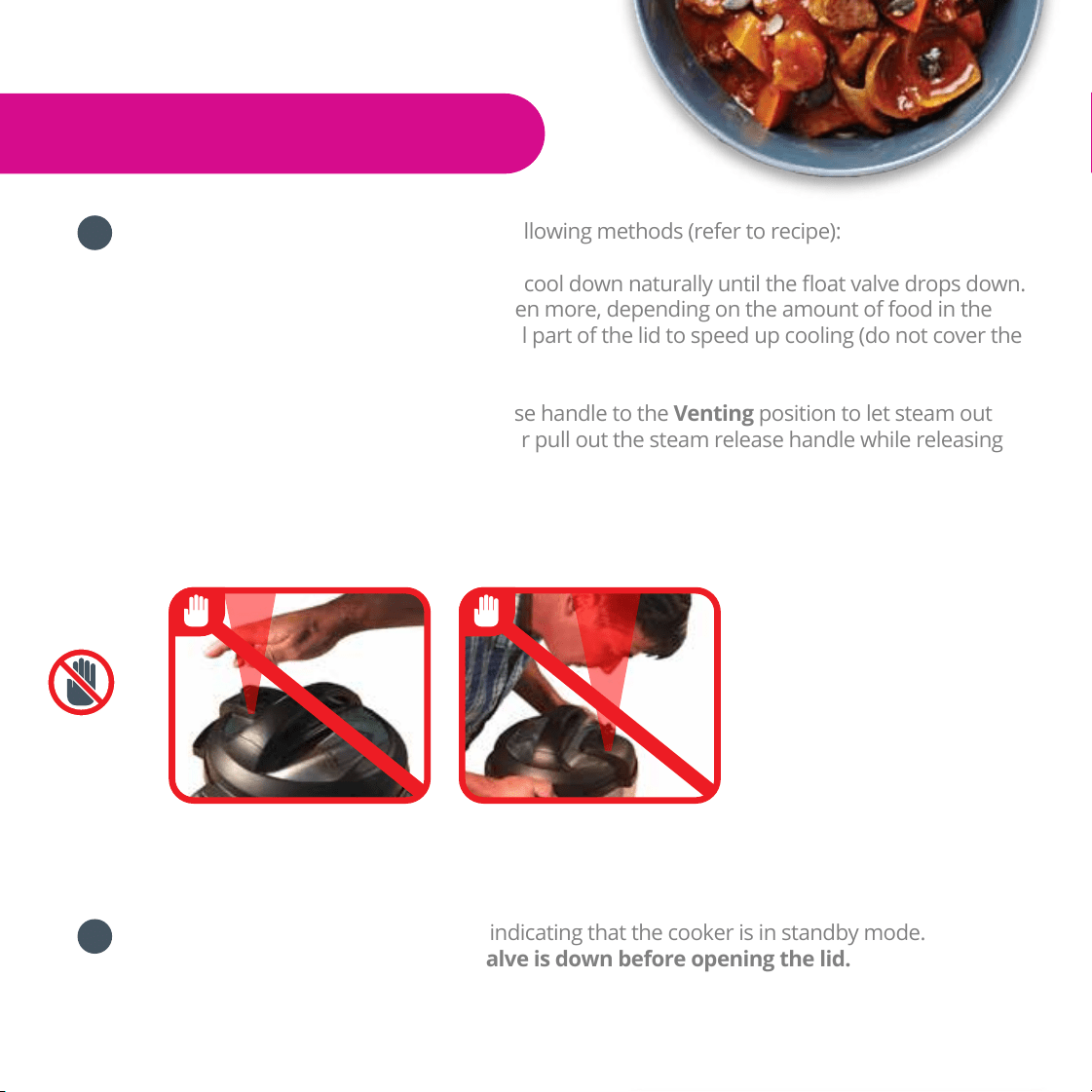
Release the pressure using one of the following methods (refer to recipe):
Natural Release: Allow the cooker to cool down naturally until the float valve drops down.
This may take 10 to 40 minutes, or even more, depending on the amount of food in the
cooker. Place a wet towel on the metal part of the lid to speed up cooling (do not cover the
steam release).
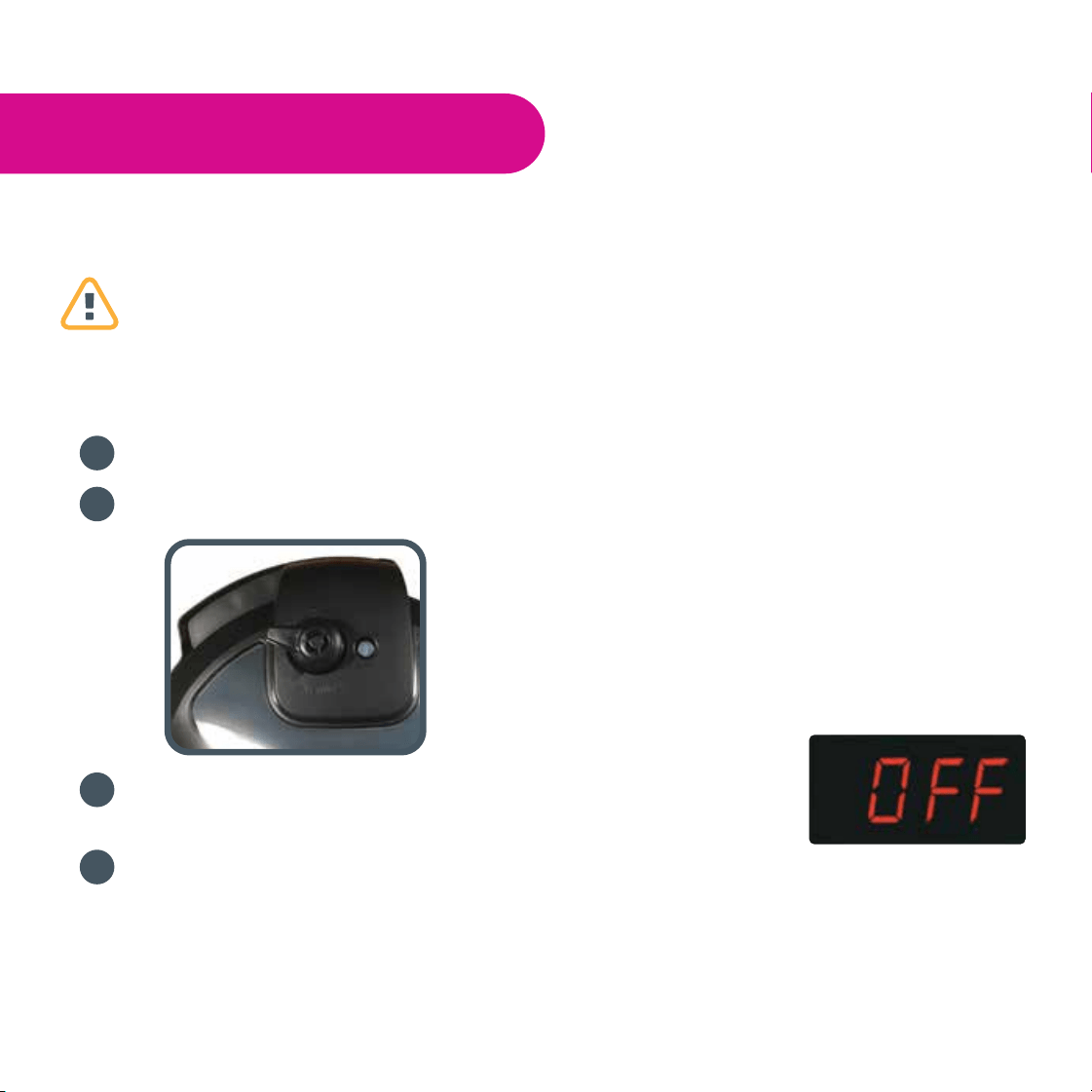
Quick Release: Turn the steam release handle to the Venting position to let steam out
until the float valve drops down. Never pull out the steam release handle while releasing
steam, as escaping steam is extremely hot and can cause scalding. When cooking food with
large liquid volume or starch content, immediately turn the steam release handle back to
the Sealing position at the first sign of spattering. Quick Release should ALWAYS be closely
attended.
Press Cancel. The LED displays OFF, indicating that the cooker is in standby mode.
Open the lid. Make sure the float valve is down before opening the lid.
7
8
Do not place hand over
steam release valve
Do not lean face over
cooker when it is in operation or
releasing steam/pressure
17
Non-Pressure Cooking
The following are all non-pressure cooking programs: Sauté, Slow Cook, Yogurt and
Keep Warm.
Sauté
Connect the power cord. The LED displays OFF, indicating that the cooker is on standby.
Select the Sauté program.
To change the cooking temperature, press Sauté key repeatedly to toggle
between Less (for simmering or thickening sauce), Normal (for regular browning), and
More (for stir-frying or blackening meat).
10 seconds after choosing the settings, the cooking process will start.
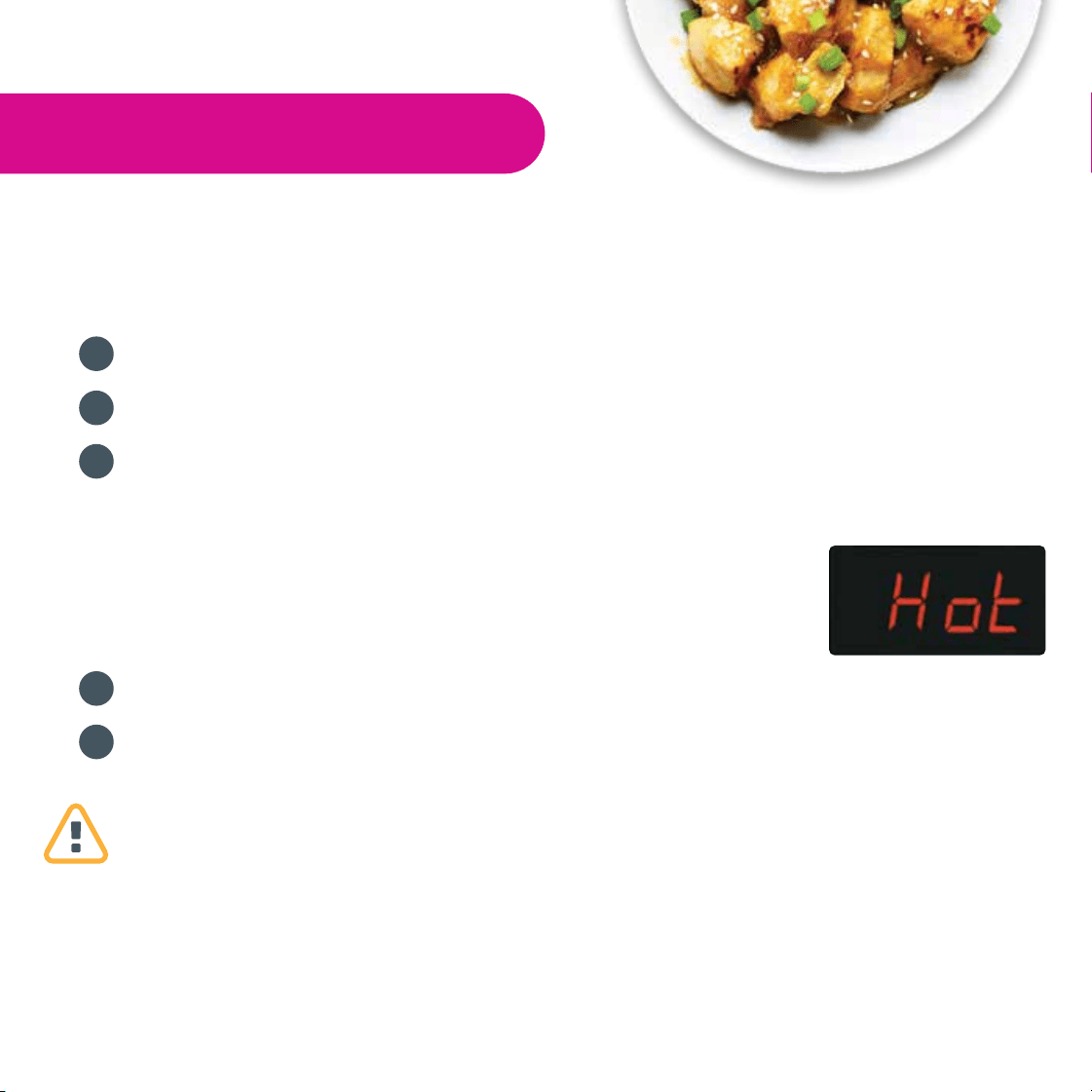
The cooker will beep 3 times and the LED displays On to indicate that
the cooker has entered the preheating cycle. When the working
temperature is reached, the LED displays Hot.
Add food to the inner pot and sauté.
When you have finished sautéing the food, press Cancel. The LED displays OFF, indicating
that the cooker is in standby mode.
• Do not use the pressure cooker lid during Sauté program. There will be warning alerts
and the display will flash. A glass lid with a venting hole may be used.
• As a safety precaution, the cooker automatically enters standby mode after 30 minutes if
you have not pressed Cancel.
1
2
3
4
5
18
Cool Milk
a) Remove the inner pot and place it on a wire rack.
b) Allow the milk to cool to 115°F/46°C. Test the milk temperature with a thermometer.
Add Starter Culture
a) Add starter culture to the warm milk in the inner pot.
b) Replace the inner pot and close the lid.
The steam release handle can be left in Venting or Sealing position.
Ferment Yogurt
a) Select the Yogurt program and adjust to Normal mode.
b) Press + / - to set fermentation time.
c) When finished, the cooker will beep and the LED will display Yogt.
Non-Pressure Cooking
Slow Cook
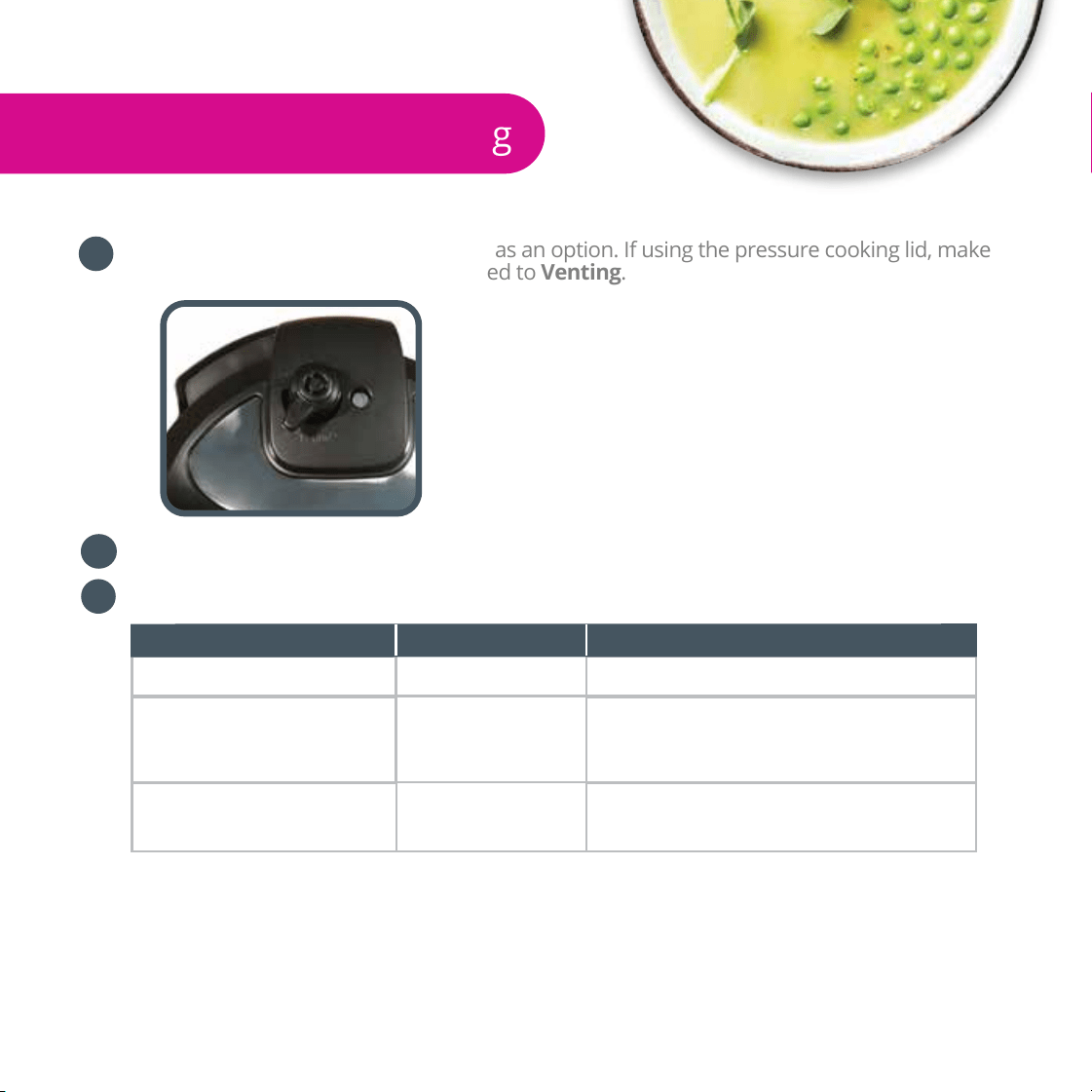
You may use the Instant Pot
®
glass lid as an option. If using the pressure cooking lid, make
sure the steam release handle is turned to Venting.
Connect the power cord. The LED displays OFF, indicating that the cooker is on standby.
Select the Slow Cook program. Optionally, modify the slow cooking program as follows:
1
2
3
Change the cooking time
To do this .... Press this button...
+ / -
Add / subtract time
Followed by these steps...
Change the cooking
temperature
Cooking Program
Key
Select between three preset cooking
temperatures, Less, Normal and More by
pressing the cooking program key
repeatedly
Set the delayed cooking
time
Delay Start
1. Use the + / - buttons to set the hours
2. Press Delay Start again
3. Use the + / - buttons to set the minutes
10 seconds after choosing the settings, the cooking program will start. The cooker will
beep 3 times and the cooker will enter the cooking cycle. The LED will display the
remaining cooking time.
If using Delay Start, the light indicator will light up and 10 seconds
later, the delay timer will start to count down. Cooking begins when count down is finished.
When the cooking cycle has finished, the cooker will beep and enter the Keep Warm
mode if the Keep Warm program is turned ON. The LED will display the elapsed time
(such as L0:02). If Cancel is not pressed, the cooker will turn OFF after 10 hours.
If the lid is on, remove it by turning counterclockwise and lifting.
Press Cancel. The LED displays OFF, indicating that the cooker is in standby mode.
Yogurt
Pasteurize Milk
a) Add milk to the inner pot.
b) Select the Yogurt program.
c) Press the Yogurt key repeatedly to select the More mode. 10 seconds
after choosing the settings, the heating process will begin. The cooker will beep
3 times and the LED will display boiL.
d) When finished, the cooker will beep and the LED will display Yogt.
If making yogurt in smaller containers: add 1 cup/250 ml of water to the inner pot, place
the steam rack in the inner pot and put the containers on top of the steam rack, close the
lid, select the Steam program and use the + / - buttons to set time to 2 minutes. Make
sure the steam release handle is in Sealing position when running the Steam program as
this is a pressure cooking program. When complete, use the natural release method (page
17) and continue with steps 2 to 4.
*The advantages of pasteurizing milk are to 1) kill pathogens and harmful bacteria, and 2)
denature milk proteins for easier absorption by the body.
19

Cool Milk
a) Remove the inner pot and place it on a wire rack.
b) Allow the milk to cool to 115°F/46°C. Test the milk temperature with a thermometer.
Add Starter Culture
a) Add starter culture to the warm milk in the inner pot.
b) Replace the inner pot and close the lid.
The steam release handle can be left in Venting or Sealing position.
Ferment Yogurt
a) Select the Yogurt program and adjust to Normal mode.
b) Press + / - to set fermentation time.
c) When finished, the cooker will beep and the LED will display Yogt.
5
Non-Pressure Cooking
When the cooking cycle has finished, the cooker will beep and enter the Keep Warm
mode if the Keep Warm program is turned ON. The LED will display the elapsed time
(such as L0:02). If Cancel is not pressed, the cooker will turn OFF after 10 hours.
If the lid is on, remove it by turning counterclockwise and lifting.
Press Cancel. The LED displays OFF, indicating that the cooker is in standby mode.
Yogurt
Pasteurize Milk
a) Add milk to the inner pot.
b) Select the Yogurt program.
c) Press the Yogurt key repeatedly to select the More mode. 10 seconds
after choosing the settings, the heating process will begin. The cooker will beep
3 times and the LED will display boiL.
d) When finished, the cooker will beep and the LED will display Yogt.
If making yogurt in smaller containers: add 1 cup/250 ml of water to the inner pot, place
the steam rack in the inner pot and put the containers on top of the steam rack, close the
lid, select the Steam program and use the + / - buttons to set time to 2 minutes. Make
sure the steam release handle is in Sealing position when running the Steam program as
this is a pressure cooking program. When complete, use the natural release method (page
17) and continue with steps 2 to 4.
*The advantages of pasteurizing milk are to 1) kill pathogens and harmful bacteria, and 2)
denature milk proteins for easier absorption by the body.
6
7
1
20

Non-Pressure Cooking
Cool Milk
a) Remove the inner pot and place it on a wire rack.
b) Allow the milk to cool to 115°F/46°C. Test the milk temperature with a thermometer.
Add Starter Culture
a) Add starter culture to the warm milk in the inner pot.
b) Replace the inner pot and close the lid.
The steam release handle can be left in Venting or Sealing position.
Ferment Yogurt
a) Select the Yogurt program and adjust to Normal mode.
b) Press + / - to set fermentation time.
c) When finished, the cooker will beep and the LED will display Yogt.
When the cooking cycle has finished, the cooker will beep and enter the Keep Warm
mode if the Keep Warm program is turned ON. The LED will display the elapsed time
(such as L0:02). If Cancel is not pressed, the cooker will turn OFF after 10 hours.
If the lid is on, remove it by turning counterclockwise and lifting.
Press Cancel. The LED displays OFF, indicating that the cooker is in standby mode.
Yogurt
Pasteurize Milk
a) Add milk to the inner pot.
b) Select the Yogurt program.
c) Press the Yogurt key repeatedly to select the More mode. 10 seconds
after choosing the settings, the heating process will begin. The cooker will beep
3 times and the LED will display boiL.
d) When finished, the cooker will beep and the LED will display Yogt.
If making yogurt in smaller containers: add 1 cup/250 ml of water to the inner pot, place
the steam rack in the inner pot and put the containers on top of the steam rack, close the
lid, select the Steam program and use the + / - buttons to set time to 2 minutes. Make
sure the steam release handle is in Sealing position when running the Steam program as
this is a pressure cooking program. When complete, use the natural release method (page
17) and continue with steps 2 to 4.
*The advantages of pasteurizing milk are to 1) kill pathogens and harmful bacteria, and 2)
denature milk proteins for easier absorption by the body.
2
4
3
21

• Extreme caution should be taken when moving the steam release handle to the
Venting position. Keep hands and face away from the steam release openings. Failure
to comply may result in scalding or serious injury.
• Do not attempt to open the lid until pressure inside the cooker is completely released.
As a safety feature, until the float valve drops down the lid is locked and cannot be
opened. Do not force lid open.
• When opening the lid, the inner pot may adhere to the lid. This is caused by vacuum
due to cooling. Make sure the steam release handle is in the Venting position and all
the steam is released.
• If the float valve is stuck, move the steam release handle to the Venting position. Once
all the steam is released, push the float valve down with a pen or long utensil.
• Always add at least 18 fl oz. / 500 ml of water or other liquids so enough steam can be
generated to cook under pressure. These include cooking sauces, wine, beer, stocks,
juices of fruits and vegetables. Oils, oil-based sauces and thick cooking sauces do not
have enough water content and will not account for the required liquid volume.
• Time to pressure and cooking time will vary according to the temperature and
quantity of the ingredients. Food that is cold or frozen will take longer to cook than food
that is at room temperature.
• When using the Delay Start program, allow sufficient cooling down time before serving.
• The Delay Start program is not recommended for porridge, oatmeal or other foamy
and thick liquids. Cooking progresses should be monitored when cooking these foods.
Cooking and Safety Tips
Cool Milk
a) Remove the inner pot and place it on a wire rack.
b) Allow the milk to cool to 115°F/46°C. Test the milk temperature with a thermometer.
Add Starter Culture
a) Add starter culture to the warm milk in the inner pot.
b) Replace the inner pot and close the lid.
The steam release handle can be left in Venting or Sealing position.
Ferment Yogurt
a) Select the Yogurt program and adjust to Normal mode.
b) Press + / - to set fermentation time.
c) When finished, the cooker will beep and the LED will display Yogt.
When the cooking cycle has finished, the cooker will beep and enter the Keep Warm
mode if the Keep Warm program is turned ON. The LED will display the elapsed time
(such as L0:02). If Cancel is not pressed, the cooker will turn OFF after 10 hours.
If the lid is on, remove it by turning counterclockwise and lifting.
Press Cancel. The LED displays OFF, indicating that the cooker is in standby mode.
Yogurt
Pasteurize Milk
a) Add milk to the inner pot.
b) Select the Yogurt program.
c) Press the Yogurt key repeatedly to select the More mode. 10 seconds
after choosing the settings, the heating process will begin. The cooker will beep
3 times and the LED will display boiL.
d) When finished, the cooker will beep and the LED will display Yogt.
If making yogurt in smaller containers: add 1 cup/250 ml of water to the inner pot, place
the steam rack in the inner pot and put the containers on top of the steam rack, close the
lid, select the Steam program and use the + / - buttons to set time to 2 minutes. Make
sure the steam release handle is in Sealing position when running the Steam program as
this is a pressure cooking program. When complete, use the natural release method (page
17) and continue with steps 2 to 4.
*The advantages of pasteurizing milk are to 1) kill pathogens and harmful bacteria, and 2)
denature milk proteins for easier absorption by the body.
22

Care and Cleaning
Unplug your Instant Pot
®
and let it cool to room temperature before cleaning.
• All Instant Pot
®
inner pots, pressure cooker lids, glass lids, and accessories are
dishwasher safe.
• Remove the inner pot and lid, and wash with detergent. Rinse with clear water and
wipe dry with a soft cloth.
• Wipe the inner cooker base rim and slot with dry cloth to prevent rusting of the
exterior cooker rim.
• Remove the sealing ring and anti-block shield from the underside of the
lid. Wash with warm, soapy water, rinse with clear water and wipe dry with a soft
cloth.
• The sealing ring must always be properly positioned on the underside of the lid.
• Clean the outer body with a damp soft cloth or sponge.
• Never use harsh chemical detergents, scouring pads or powders on any of the parts
or components.
• Periodically check that the steam release valve and float valve are in good working
order and free of debris.
23

Troubleshooting
If you experience any problems with the cooker, need technical assistance or product
return information, please contact the Instant Pot support team using the methods
below:
• Create a support ticket: www.InstantPot.com/support/
• Email: [email protected]
• Call 1-800-828-7280 ext 2 for the customer care team.
You can also find tips, videos and FAQs on www.InstantPot.com/faq/
The issues in the following tables do not always indicate a faulty cooker. Please examine
the cooker carefully before contacting the support team.
Difficulty with closing the lid
Problem Possible reason
Sealing ring not installed
properly
Position the sealing ring
Solution
Float valve in the popped-up
position
Slightly press the float valve
downward
1
2
Difficulty with opening the lid
Pressure inside the cooker
Position the steam release
handle to the venting
position to release the
internal pressure. Open the
lid after the pressure is
completely released
24
Float valve stuck at the
popped-up position due to
debris or stickiness from
food
Ensure steam is completely
released by turning steam
release handle to Venting
position, Press the float valve
lightly with a long utensil.
Open the lid cautiously and
clean the float valve and lid
before the next use.

Troubleshooting
Steam leaks from float
valve for over 2 minutes
Food debris on the float
valve silicone seal
Clean the float valve silicone
seal
Float valve silicone ring
worn- out or missing
Replace the float valve
silicone ring
4
5
6
Float valve unable to rise
Too little food or water in
inner pot
Add water according to the
recipe
Float valve obstructed by
the lid locking pin
Close the lid completely, see
“Getting Started” section
Steam comes out from
the steam release
valve non-stop
Steam release valve not in
sealing position
Turn the steam release
handle to the sealing
position
Pressure control fails
Contact support
7
Display flashes “Lid”
Lid is not in the correct
position for the selected
program
Close the lid for pressure
cooking or open the lid for
sautéing
8
Display remains blank after
connecting the power cord
Bad power connection or no
power
Inspect the power cord to
ensure a good connection,
check if the power outlet is
active
Cooker’s electrical fuse has
blown
Contact support
3
Steam leaks from the side
of the lid
No sealing ring
Install the sealing ring
Sealing ring damaged
Replace the sealing ring
Food debris attached to the
sealing ring
Clean the sealing ring
Lid not closed properly
Open then close the lid
again
Problem Possible reason
Solution
25

Troubleshooting
Rice is half cooked or too
hard
Too little water
Adjust dry rice and water
ratio according to recipe
Lid opened too early
After cooking cycle
completes, leave the lid on
for 5 more minutes
10
11
12
Rice is too soft
Too much water
Adjust dry rice and water
ratio according to recipe
13
The cooker beeps 5 times
and displays ‘burn’ message
after the cooking program
started.
Indication of overheating.
The cooker has reduced the
heating temperature, and
may not reach cooking
pressure
Starch deposits at the
bottom of the inner pot
might have clogged heat
dissipation. Stop the cooker
and inspect the bottom of
the inner pot
Occasional ticking or light
cracking sound
The sound of power switch-
ing and expanding pressure
board when changing
temperature
This is normal
Bottom of the inner pot is
wet
Wipe bottom of the inner
pot dry before cooking
9
All LEDs flash with a
code appearing on
screen and the
warning beep is ON
Faulty temperature sensor
Contact support
Faulty temperature sensor
Contact support
Temperature is too high
because inner pot is not
placed into the cooker base
Insert the inner pot
properly
Temperature is too high
because there is no water in
inner pot
Put food and water in the
inner pot
Faulty pressure sensor
Contact support
C1
C2
C5
C6
Problem
Possible reason
Solution
26
C6H
C6L
Faulty HIGH pressure sensor
Faulty LOW pressure sensor

Limited Warranty
This Limited Warranty is effective for one year from the date of original consumer purchase. Proof of original
purchase date and, if requested by an authorized Instant Pot Company (“IPC”) representative, return of your
appliance as IPC may direct at IPC’s expense, is required to obtain service under this Limited Warranty.
When this appliance is operated and maintained in accordance with written instructions attached to or
furnished with the product, Instant Pot Company will pay for either (i) repair labor to correct defects in
materials or workmanship that existed when this appliance was purchased or (ii), at its sole and exclusive
discretion, replace the appliance for a period of one (1) year from the date of purchase. In the event that your
appliance is replaced, the Limited Warranty on the replacement appliance will expire at the original date (i.e.
12 months from the original purchase date).
This Limited Warranty extends only to the original purchaser and use of the appliance in the United States of
America and Canada. This warranty does not cover units that are used outside of the United States of
America and Canada.
Any modification or attempted modification to your appliance may interfere with the safe operation of the
appliance and will void this Limited Warranty. This Limited Warranty does not apply in respect of any
appliance or any part thereof that has been altered or modified from its factory settings unless such
alterations or modifications were expressly authorized by an IPC representative.
IPC is not responsible for shipping costs related to warranty service, save and except for shipping costs
associated with the return of your appliance as provided herein.
Limitation and Exclusions
The liability of IPC, if any, for any allegedly defective appliance or part shall in no circumstances exceed the
purchase price of a comparable replacement appliance.
This Limited Warranty does not cover:
1. Damage resulting from accident, alteration, misuse, abuse, neglect, unreasonable use, use contrary to the
operating instructions, normal wear and tear, commercial use, improper assembly, disassembly, failure to
provide reasonable and necessary maintenance, fire, flood, acts of God or repair by anyone unless directed
by an Instant Pot Representative.
2. Repairs where your appliance is used for other than normal, single-family household use or when it is used
in a manner that is contrary to published user or operator instructions.
3. Use of unauthorized parts and accessories, or repairs to parts and systems resulting from unauthorized
repairs or modifications made to this appliance.
The cost of repair or replacement under these excluded circumstances shall be borne by you.
Warranty
27

Disclaimer of Implied Warranties
IMPLIED WARRANTIES, INCLUDING ANY WARRANTIES OF MERCHANTABILITY OR IMPLIED WARRANTY OF
FITNESS FOR A PARTICULAR PURPOSE, ARE HEREBY LIMITED TO ONE YEAR OR THE SHORTEST PERIOD
ALLOWED BY LAW. Some states or provinces do not allow limitations to the duration of implied warranties of
merchantability or fitness, so this limitation may not apply to you.
Disclaimer of Representations Outside of Warranty
IPC makes no representation about the quality, durability, or need for service or repair of this appliance other
than the representations contained in this warranty.
Limitation of Remedies; Exclusion of Incidental and Consequential Damage
YOUR SOLE AND EXCLUSIVE REMEDY UNDER THIS LIMITED WARRANTY SHALL BE PRODUCT REPAIR OR
REPLACEMENT AS PROVIDED HEREIN. IPC SHALL NOT BE LIABLE FOR INCIDENTAL OR CONSEQUENTIAL
DAMAGES ARISING OUT OF OR IN CONNECTION WITH THE USE OR PERFORMANCE OF THE APPLIANCE OR
DAMAGES WITH RESPECT TO ANY ECONOMIC LOSS, PERSONAL INJURY, LOSS OF PROPERTY, LOSS OF
REVENUES OR PROFITS, LOSS OF ENJOYMENT OR USE, COSTS OF REMOVAL, INSTALLATION OR OTHER
CONSEQUENTIAL DAMAGES OF WHATSOEVER NATURE.
You the buyer may have other rights and remedies under your state’s or province’s applicable laws, which
are in addition to any right or remedy which may be available under this limited warranty.
Warranty Registration and Service
Please visit http://instantpot.com/support/register/ to register your new Instant Pot and validate your
warranty within thirty (30) days of purchase. You will be asked to provide the store name, date of purchase
and model number (found on the base of your cooker) along with your name and address. The registration
will enable us to keep you up to date with product developments, recipes and contact you in the unlikely
event of a product safety notification. By registering, you acknowledge to have read and understood the
instructions for use, and warnings set forth in the accompanying instructions.
To obtain service under this warranty, please call the Customer Care Team at 1-800-828-7280. If IPC is unable
to resolve the problem, you may be asked to send your appliance to the Appliance Service Department for
quality inspection. IPC is not responsible for shipping costs related to warranty service, save and except for
shipping costs associated with the return of your appliance from Canada or within the 48 contiguous states
and the District of Columbia of the United States of America, as provided herein. When returning your
appliance, please include your name, address, phone number, proof of the original purchase date as well as
a description of the problem you are encountering with the appliance.
Warranty
28

Instant Pot
®
Company
11 - 300 Earl Grey Dr. Suite 383
Ottawa, Ontario
K2T 1C1
Canada
Telephone: +1-800-828-7280 ext 2
Fax: +1-613-800-0726
Web: www.InstantPot.com
US and Canada E-mail: [email protected]
To enhance your experience with Instant Pot, join the official Instant Pot Community
Facebook.com/groups/instantpotcommunity
twitter.com/instantpot
Instant Pot
®
Free Recipe App & More
Copyright
©
Instant Pot
®
Company