UNIVERSAL BIKE MOUNT
CLAMP HOLDER
FOR PHONE AND TABLET
No. 082
USER MANUAL
Package Contents:
• Universal Phone & Tablet Holder
• Quick Release Strap Mount
Please read instructions completely before
using the device.
For Customer Service, please contact
support@sunnyhealthfitness.com
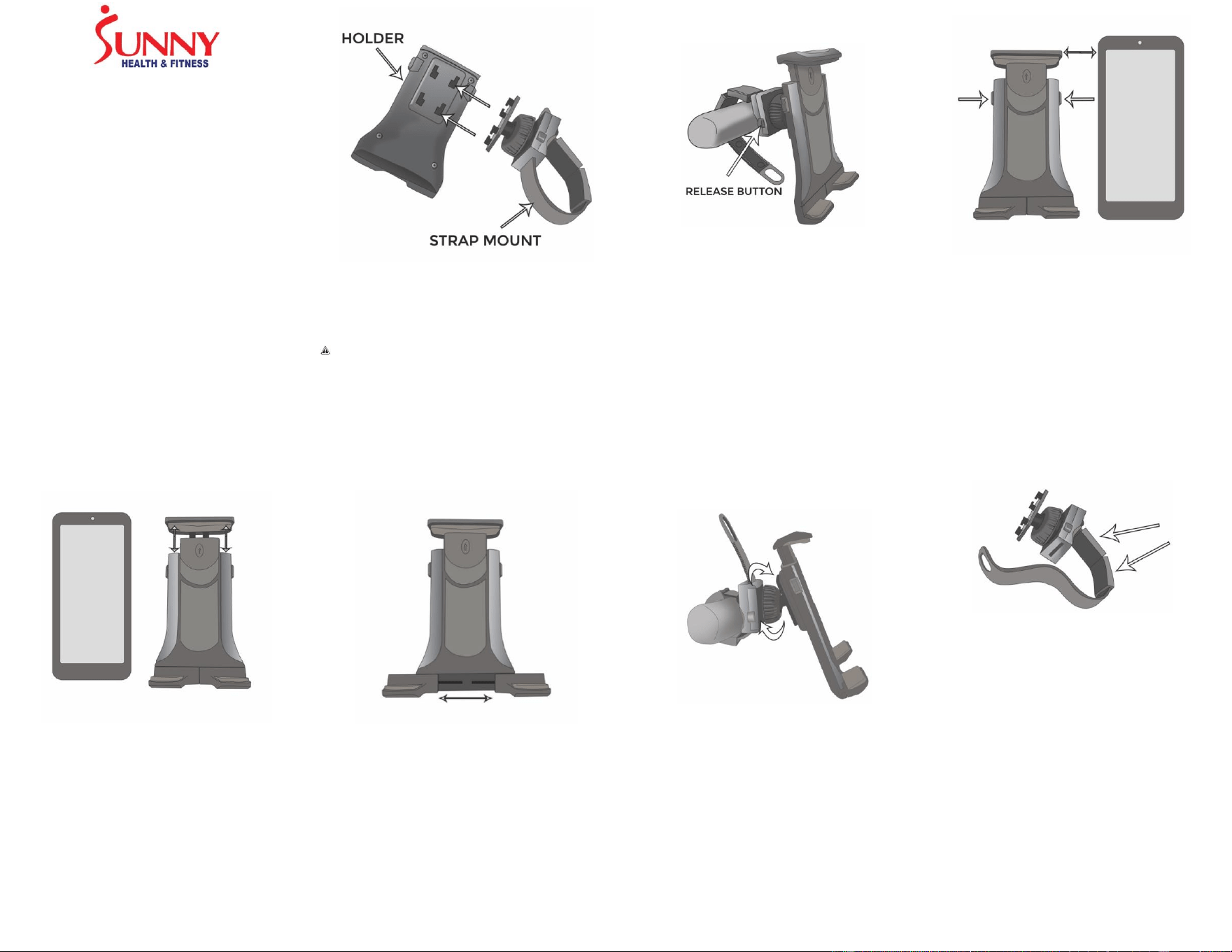
1. Attach the Strap Mount’s t-notch adapter into
the holder’s 4 slots and push up firmly to
lock in position until secure. You should hear
a click.
CAUTION: It is important to make sure that
the holder is secure with the strap mount.
The whole unit is in danger of falling if it is
not.
2. Wrap the strap around the handlebar and
insert through slot on the mount. Pull strap
tightly to secure. Press and hold the two
release buttons to release the strap.
3. Press and hold the two buttons and pull
the extendable arm up to create room for
the device to fit (make sure the height of
the open clamps is shorter than the
device).
The Strap Mount comes with 2 strap spacers
that can be removed when mounting on a
smaller handlebar for better grip and stability.
IMPORTANT: The Sunny Health & Fitness
Universal Bike Mount Clamp for Phone &
Tablet is not designed for outdoor use on
intensively moving bikes such as, mountain
bikes.
Sunny Health & Fitness is not responsible for
any damages caused to your exercise
equipment, to your device, or to yourself due
to the installation or use of this mount.
www.sunnyhealthfitness.com
4. For a secure and snug fit, pull the retractable
top clamp upward while placing your device
in the open clamps. Release the retractable
top clamp with device inside. Make sure
device is secure.
5. Pull the holder’s 2 lower legs outward for
stable holding of the larger device.
6. Loosen by turning the swivel ball head
counter-clockwise. Adjust the holder for
vertical or horizontal viewing, then turn
swivel ball head clockwise to tighten and
secure position.