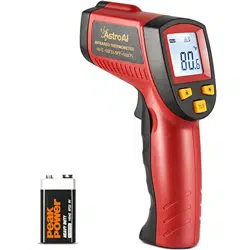
AstroAI Infrared Thermometer Manual
Thank you for purchasing the Infrared Thermometer from AstroAI. This infrared thermometer is
used for measuring the temperature of an object’s surface. Use in hot or hazardous situations
safely with a non-contact thermometer. For optimal performance and safety, please read and
follow all of the instructions below before operating the device. Please keep this manual for
future reference. We hope you enjoy your new Infrared Thermometer!
WARNING
● BEFORE USE: Check the plastic housing carefully for any damage. Do not use if plastic
housing is damaged.
● DO NOT point laser directly in eyes or indirectly off of reflective surfaces.
● DO NOT use in environments with explosive gas, steam, or dust.
● DO NOT use this product for applications outside of its intended use.
● AVOID situations with EMF (Electro-Magnetic Fields) such as arc welders and induction
heaters.
● AVOID thermal shock caused by large or abrupt ambient temperature changes. Allow at
least 30 minutes for unit to stabilize temperature before use.
● DO NOT leave unit on or near high-temperature objects.
● Read and follow all instructions before use
FUNCTIONS/FEATURES
1. Switch between Fahrenheit/Celsius
2. Laser-equipped for aim
3. Temperature result hold
4. LCD backlight
5. 7 second auto-off
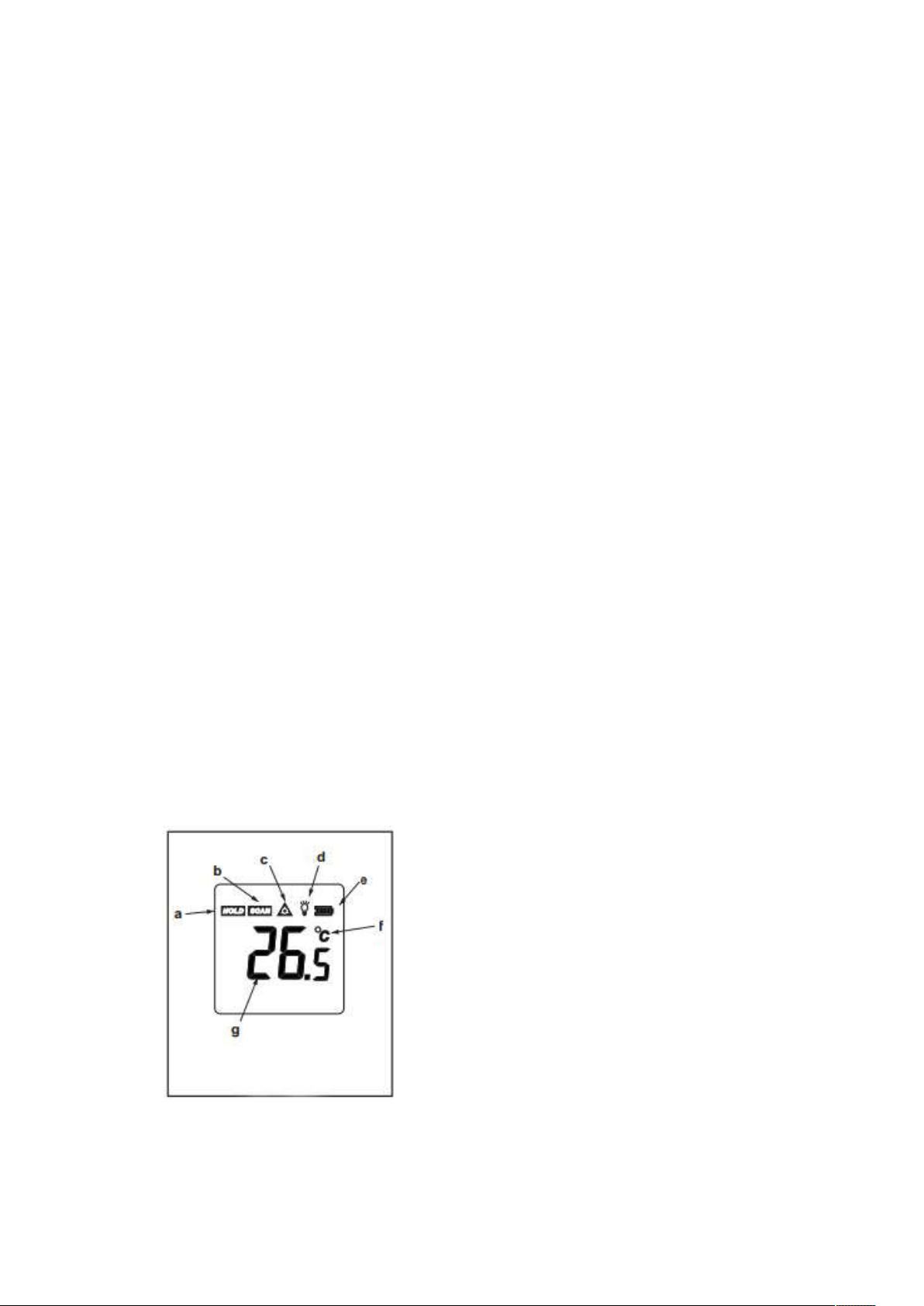
LCD DIAGRAM & Buttons
1. LCD Diagram
a. Data Hold icon
b. Scanning icon
c. Laser On icon
d. Backlight On icon
e. Battery Power icon
f. Temperature Unit indicator
g. Temperature reading
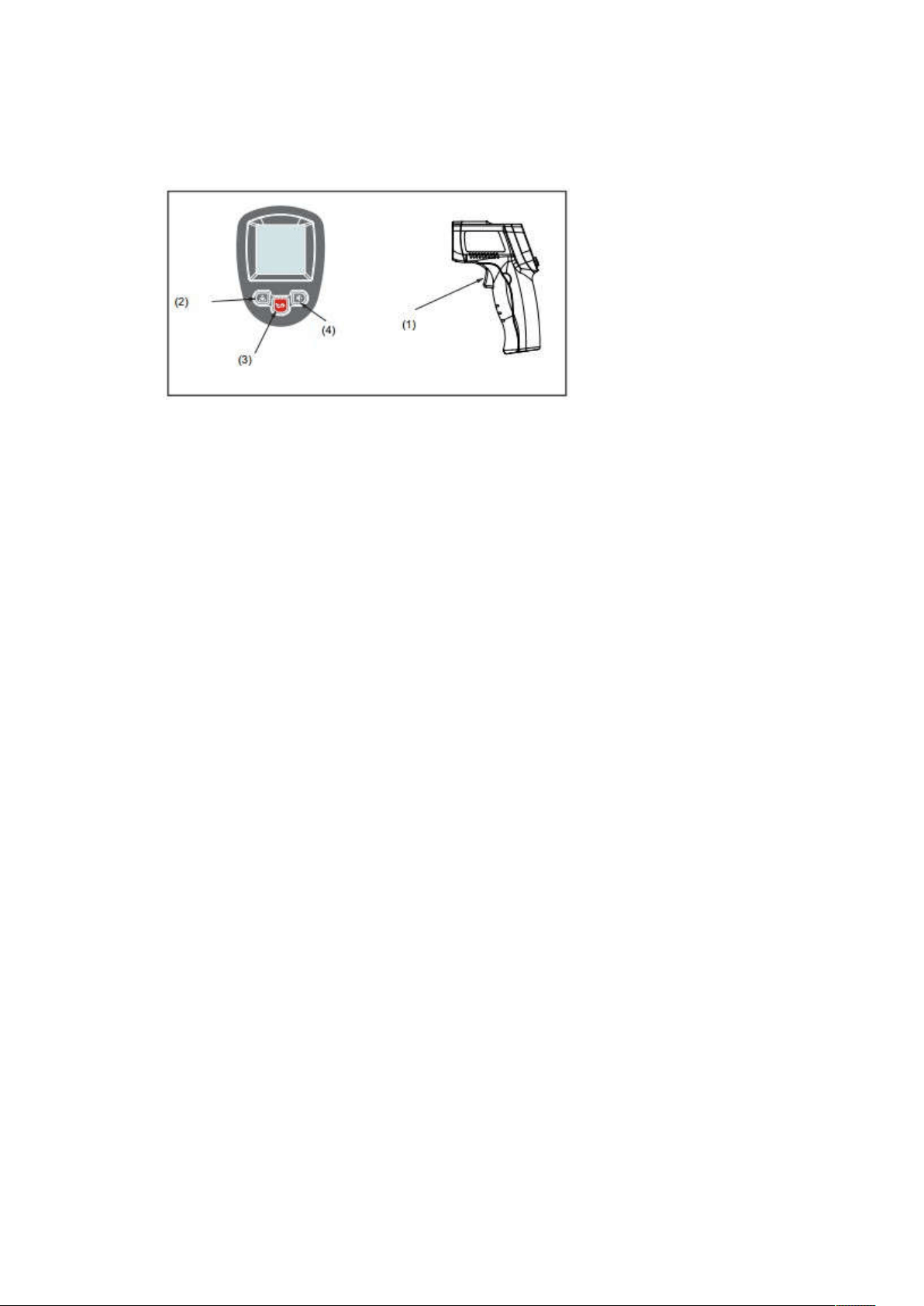
2. Buttons Diagram
(1)Trigger
(2)Laser On/Off button
(3)Fahrenheit/Celsius button
(4)Backlight On/Off button
INSTRUCTIONS
Operating:
1. Open the battery door and insert a 9V battery.
2. Press the trigger to turn the unit on.
3. Aim the laser at the target surface and pull trigger.
4. Temperature reading will be displayed on LCD.
Locating a Hot Spot:
1. Press trigger to turn unit on.
2. Aim thermometer outside of the hot spot.
3. Scan across with up an up and down motion until hot spot is located.
Distance to Spot Ratio
1. Pay close attention to the Distance to Spot Ratio.
2. As the Distance (D) from the target surface increases, the Spot Size (S) of the are being
measured becomes larger.
3. The Distance to Spot Ratio of this unit is 12:1. This unit is equipped with a laser, which is
used to assist with aiming.
Field of View:
To increase accuracy, make sure the target surface is larger than the Spot Size. When accuracy
is critical, make sure the target surface is at least twice as large as the spot size.
Emissivity
Most organic materials and painted or oxidized surfaces have an emissivity of 0.95 (pre-set) in
the unit). Measuring shiny or polished metal will result in inaccurate readings. To compensate
for these inaccuracies:
1. Cover the target surface with masking tape or flat black paint.
2. Allow the tape or paint to reach the same temperature as the target surface.
3. Measure the tape or painted surface.

MAINTENANCE
Lens Cleaning:
1. Blow off loose particles using clean compressed air.
2. Gently brush remaining debris away with a moist cotton swab moistened with water.
Case Cleaning:
1. Clean with a damp sponge/cloth and mild soap.
NOTE:
1. DO NOT use solvents or strong cleaning agents when cleaning plastic lens.
2. DO NOT submerge the unit in water.
SPECIFICATIONS
Temperature Range
-58°F ~ 716°F / -50°C ~ 380°C(For METER380)
-58°F ~ 1022°F/ -50°C ~ 550°C (For METER550)
Accuracy: Whichever is greater
-50 ºC(-58 ºF) ~0 ºC(32ºF): ±3ºC(±5ºF)
0ºC(-32ºF) ~380ºC(1022ºF): ±1.5ºC(±2.7ºF) or ±1.5%(For
METER380)
0ºC(-32ºF) ~550ºC(1022ºF): ±1.5ºC(±2.7ºF) or ±1.5%(For
METER550)
Resolution
0.1ºC or 0.1ºF
Repeatability 1% of reading or 1ºC
Response Time 500mS, 95% response
Spectral Response 8-14um
Emissivity 0.95 Preset
Distance to Spot Ratio 12:1
Operating Temperature 0~40ºC (32~104ºF)
Operating Humidity 10~95%RH non-condensing,
Up to 30ºC(86ºF)
Storage Temperature
-20~60ºC (-4~140ºF)
Power
9V Alkaline or NiCd battery
Battery Life Non-laser mode: 22hrs;
Laser mode: 12hrs
Weight 176g
Dimensions
163x110x49mm

3 Year Warranty Limited Warranty From AstroAI
Each AstroAI Infrared Thermometer will be free from defects in material and workmanship. This
warranty does not cover fuses, disposable batteries and damage from neglect, misuse,
contamination, alteration, accident, or abnormal conditions of operation or handling, including
overvoltage failures caused by use outside the Thermometer’s specified rating, or normal wear
and tear of mechanical components. This warranty covers the original purchaser only and is not
transferable.
Questions or Concerns? We’re happy to help!
support@astroAI.com