Cleaning and maintenance
• The sensor
1
is the most delicate part of the device. Protect it from dirt and damage. Clean the sensor with a cotton bud
dipped in warm water or 70% isopropyl alcohol.
• Do not immerse the thermometer in water or any other liquid. It is not watertight.
• To clean the thermometer, use a soft cloth slightly dampened with mild soapy water or 70% isopropyl alcohol. Do not let water
get into the unit. Only use the unit again when completely dry.
• Never use aggressive cleaning agents, thinners, benzine or tough brushes.
• Take care not to scratch the lens of the sensor, the display or the housing.
• Do not use or store the unit in an environment where the ambient temperature or humidity is too high or too low (see
operating conditions in the “Technical specications” section), in direct sunshine, in the vicinity of static electricity or in a dusty
environment.
• Remove the batteries if you do not wish to use the unit for an extended period of time. Otherwise there is a danger that the
batteries may leak.
• If the thermometer is used as described in these instructions, no regular maintenance or calibration is required.
Disposal
This product must not be disposed of together with domestic waste. All users are obliged to hand in all electrical or
electronic devices, regardless of whether or not they contain toxic substances, at a municipal or commercial collection
point so that they can be disposed of in an environmentally acceptable manner.
Please remove the battery before disposing of the device/unit. Do not dispose of old batteries with your household
waste, but at a battery collection station at a recycling site or in a shop. Consult your municipal authority or your supplier for
information about disposal.
Technical specications
Name and model:
Display system:
Power supply:
Expected service life:
Measuring range:
Accuracy of measurement (laboratory readings):
Resolution:
Memory capacity:
Operating temperature:
Storage/transport temperature:
Dimensions:
Weight:
Article No.:
EAN Code:
The CE-mark of this device refers to the EC-directive 93/42/EEC MDD. The unit is designed for home use only. For commercial
use, a metrological inspection must be carried out once every year. This calibration will be charged for and can be carried out
by an appropriate authority or an authorised service centre - in accordance with the regulations for users of medical equipment.
Electromagnetic compatibility: The device complies with the EN 60601-1-2 standard for electromagnetic compatibility.
Details on this measurement data can be found at the end of this manual.
Before use
Acclimatise the thermometer to the temperature of the room: For an accurate reading of a patient’s temperature, their body
must rst acclimatise to the temperature of the room where the measurement will be made. The same applies to the Clinical
Infrared Thermometer. When taken somewhere else, it automatically adjusts itself to the new environment. The thermometer
takes a certain amount of time to equalise its own temperature to that of the room. This depends on the difference between
the two temperatures and can take more than 30 minutes. Precise readings can only be taken once this process is
completed.
Measuring forehead temperature
The thermometer’s safety and accuracy has been inspected and conrmed, provided it is used in accordance
with these instructions.
1. Press the
Power button
4
to switch on the thermometer. Then a self-test is executed in which all elements of the display
2
are shown for approx. 2 second.
2. After approx. 2 seconds, the device will enter into Forehead mode
q
and it is ready for measurement - this will be indicated
by a short beep.
3. To begin the measurement, point the sensor
1
at the middle of the patient’s forehead at a distance of approx. less than 50
mm. If the patient’s forehead has hair, sweat or dirt on it, remove this rst so that the reading is as accurate as possible.
4. Press the START button
3
and release. After approx. 1 seconds, a short beep can be heard to indicate that the
measurement is nished and the measured temperature will be shown. If the temple area has not been reached until the
beep can be heard, repeat the measurement.
If the result is below 37.3°C, normal temperature indicator
e
will be shown and the display will be lighted in Green for 3
seconds.
If the result is equal to or higher than 37.3°C and below 37.8°C., normal temperature indicator
e
will be shown and the
display will be lighted in Yellow for 3 seconds.
If the result is equal to or higher than 37.8°C, fever indicator indicator
r
will be shown and the display will be lighted in Red
for 3 seconds.
The device will automatically switch off if there is no input for approx. 60 seconds. You may also switch the device off
manually by pressing the
Power button
4
Measuring an object temperature
1. Hold the Mode button
5
to switch between Forehead mode
q
and Object mode
w
.
2. Aim the thermometer at the centre of the object and keep a distance of less than 50 mm. Press START button
3
for
approx. 1 second. The unit measures the temperature, emits an acoustic signal and displays the measured value.
3. Without further input, the unit switches off after approx. 60 seconds. You may also switch off the device manually by
pressing the Power button
4
.
Change the measurement unit
You can measure the temperature in °C or in °F. Please proceed as follows to select the unit of measurement:
1. The device has to be switched off.
2. Long press the START button
3
until you see the symbol «°C» or «°F» displayed on with a short beep.
3. Press the START button
3
to change the unit of measurement.
4. When the preferred unit shown on the display, press the Power button
4
to save the selected unit and exit the unit
changing mode.
Recalling stored data
The thermometer can store up to 30 results. When the device has been turned on and ready for measurement, you
can call up your stored data by pressing the Power button
4
for approx. 3 seconds. The display will show «M» memory
display symbol
0
. If measurement values are stored in memory, rst the memory slot number «1» appears with the stored
temperature. By further pressing the
Power button
4
, you can call up more stored values (memory slot «2» etc.). Totally
there are 30 memory slots available, which may be recalled by pressing the
Power button
4
repeatedly.
Error messages
This instruction manual belongs to this device. It contains important information about
starting up and operation. Read the instruction manual thoroughly. Non-observance of these
instructions can result in serious injury or damage to the device.
WARNING
These warning notes must be observed to prevent any injury to the user.
CAUTION
These notes must be observed to prevent any damage to the device.
NOTE
These notes give you useful additional information on the installation or operation.
Classication: Type BF applied part
Temperature range
Keep dry
Protection classication against solid objects and water
LOT number
Manufacturer
Date of manufacture
Explanation of symbols
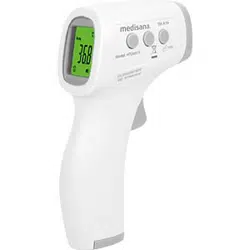
Clinical Infrared Thermometer
IP22
GB Infrared Multi Functional Thermometer
Manual - Please read carefully!
Safety Information
IMPORTANT INFORMATION! RETAIN FOR FUTURE USE!
Read the instruction manual carefully before using this device, especially the safety instructions,
and keep the instruction manual for future use. Should you give this device to another person, it is
vital that you also pass on these instructions for use.
INTENDED USE:
Thank you for purchasing our Infrared Thermometer. This Infrared Thermometer is a non-sterile, reusable, handheld
device. It can be used by consumers in home care environment and doctors in clinic as reference. It is intended for
measuring human body temperature of three months and above of people by detecting infrared heat from the center
of the forehead.
• Only use the unit for the specic purpose described in the instruction manual. Any misuse will void the warranty.
• The unit is not designed for commercial use.
• Using this thermometer is no substitute for consulting a doctor.
• The thermometer and the patient must remain in a stable environment for at least 30 minutes before measuring the
temperature.
• This device is not designed to be used by persons (including children) with limited physical, sensory or mental abilities,
or by persons with insufcient experience and/or knowledge, unless under observation by a person responsible for their
safety, or unless they have been instructed in the use of the device.
• Children must be supervised to ensure that they do not play with the device.
• The temperature in the forehead and temple area differs from the internal temperature, which is taken orally or rectally.
If the measurement therefore does not match the patient’s own perception or is unusually low, repeat the measurement
every 15 minutes. As a reference, you can also measure the internal body temperature using a conventional oral or rectal
thermometer.
• A control measurement using a conventional thermometer is recommended in the following cases:
1. If the reading is surprisingly low
2. For new-born infants up to 100 days old
3. For children under three years of age who have a weakened immune system or who react unusually in the presence
or absence of fever
4. If you are using the thermometer for the rst time or want to familiarise yourself with it
• If a fault occurs or the unit is damaged, do not attempt to repair the unit yourself, as this will void the warranty. Contact
your dealer and only have repairs carried out by authorized service partners.
• Do not modify and / or open the device. It contains small parts which might be swallowed by children.
• Do not use the thermometer if it is damaged.
• Do not use the thermometer in damp environments. Do not immerse the thermometer in water or other liquids. It is not
watertight.
• This device comprises sensitive components and must be treated with caution. Observe the storage and operating
conditions described in the «Technical Specications» section.
• Do not use this device close to strong electromagnetic elds such as mobile telephones or radio installations.
• Keep a minimum distance of 3.3 m from such devices when using this device.
• Do not shake or tap the thermometer. Do not drop it.
• Protect the device from direct sunlight, extremely high or low temperatures, dirt and dust.
• If the thermomter is not going to be used for a long period, remove the battery.
Items supplied and packaging
Please check rst of all that the device is complete and is not damaged in any way. In case of doubt, do not use it and contact
your dealer or your service centre. The following parts are included:
• 1 medisana Clinical Infrared Thermometer
• 2 Batteries (AAA type, LR03) 1.5V
• 1 Instruction manual
The packaging can be reused or recycled. Please dispose properly of any packaging material no longer required. If you
notice any transport damage during unpacking, please contact your dealer without delay.
Taking a temperature reading - quickly and accurately!
The medisana Clinical Infrared Thermometer allows precise, contact-free measurement of body temperature (at a distance
of approximately 15-50 mm). The temperature is taken above the eyebrow between the forehead and the temple.
The value of the energy radiated there is measured and converted to a temperature value. The reading is displayed after 1
second. This enables you, for example, to take babies’ temperature without disturbing their sleep.
Operation - Getting started
When the battery symbol
9
appears in the display after a longer time of usage, the batteries should be replaced soonest.
When the battery symbol
9
appears or nothing at all appears in the display
2
, the batteries need to be replaced immediately.
Removal
Remove the lid of the battery compartment
6
and take out the batteries.
Insertion
Put in two new 1.5V batteries of type LR03/AAA. Make sure the batteries are the right way
around (see the diagram in the battery compartment
6
). Put the battery compartment
6
back.
Time and Date settings
1. When using the thermometer for the rst time, please set the parameters of the thermometer. When the thermometer is
off, press and hold the Power button
4
to enter into setting model. The device can display time in either 12-hour / 24-hour
format. Press the START button
3
to select the format. Press Power button
4
to conrm and enter into time settings.
2. Press START button
3
to adjust the hour and press Power button
4
to conrm. Use the same method to adjust the
minutes and enter to date settings.
3. Please use the same method to adjust the year, month and date settings respectively. After the date is set, press Power
button
4
to exit the setting mode.
BATTERY SAFETY INFORMATION
• Do not disassemble batteries!
• Clean the battery and device contacts if necessary before putting in the batteries!
• Remove discharged batteries from the device immediately!
• Increased risk of leakage, avoid contact with skin, eyes and mucous membranes! If battery acid comes in contact with
any of these parts, rinse the affected area with copious amounts of fresh water and seek medical attention immediately!
• If a battery has been swallowed seek medical attention immediately!
• Insert the battery correctly, observing the polarity!
• Keep the battery compartment well sealed!
• Remove the battery from the device if it is not going to be used for an extended period!
• Keep batteries out of childrens reach!
• Do not attempt to recharge batteries! There is a danger of explosion!
• Do not short circuit! There is a danger of explosion!
• Do not throw into a re! There is a danger of explosion!
• Keep unused batteries in their packaging away from metal objects in order to prevent short circuiting!
• Do not throw used batteries into the household refuse; put them in a hazardous waste container or take them to a
battery
WARNING - Please ensure that polythene packing is kept away from the reach of children!
Risk of suffocation!
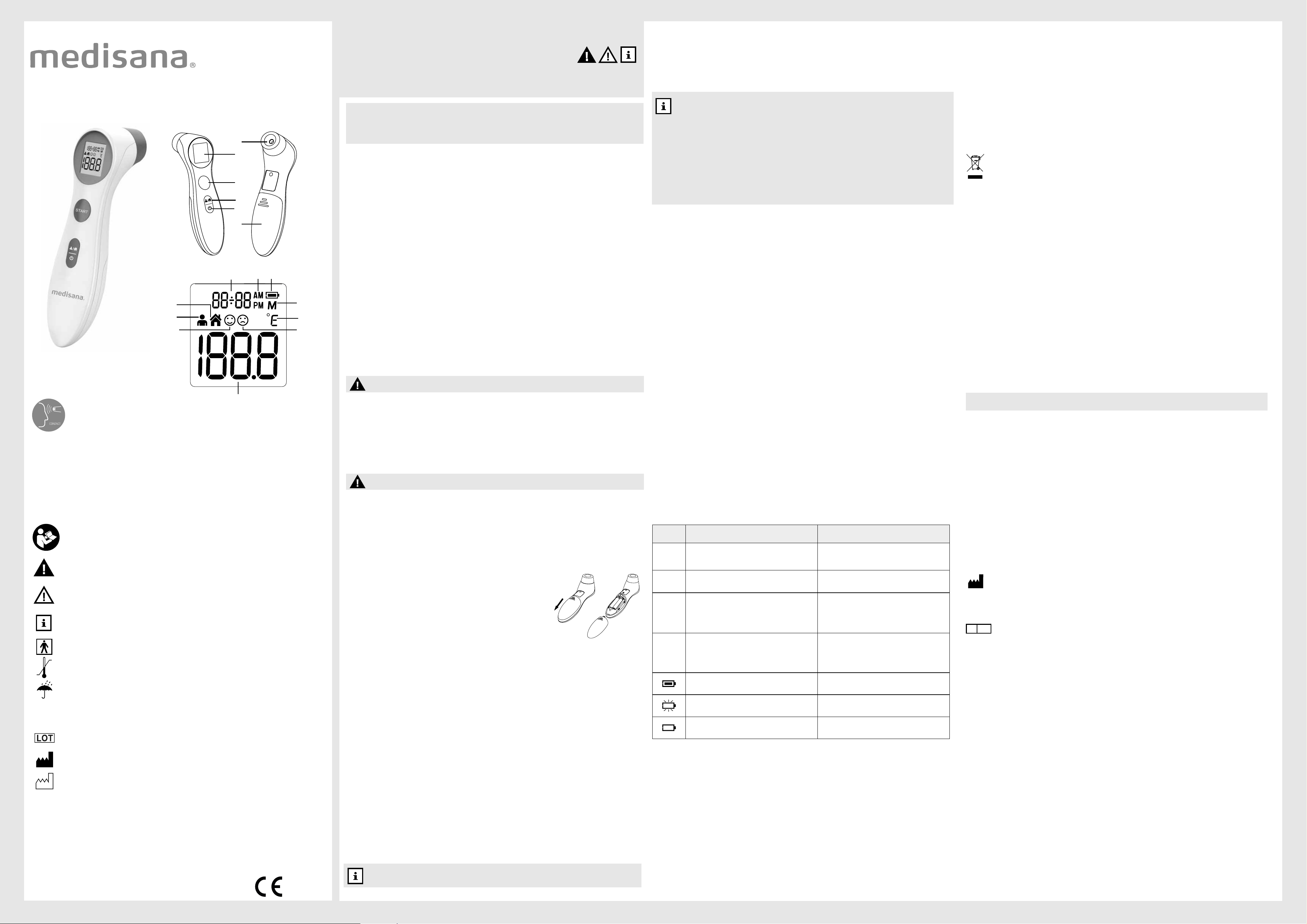
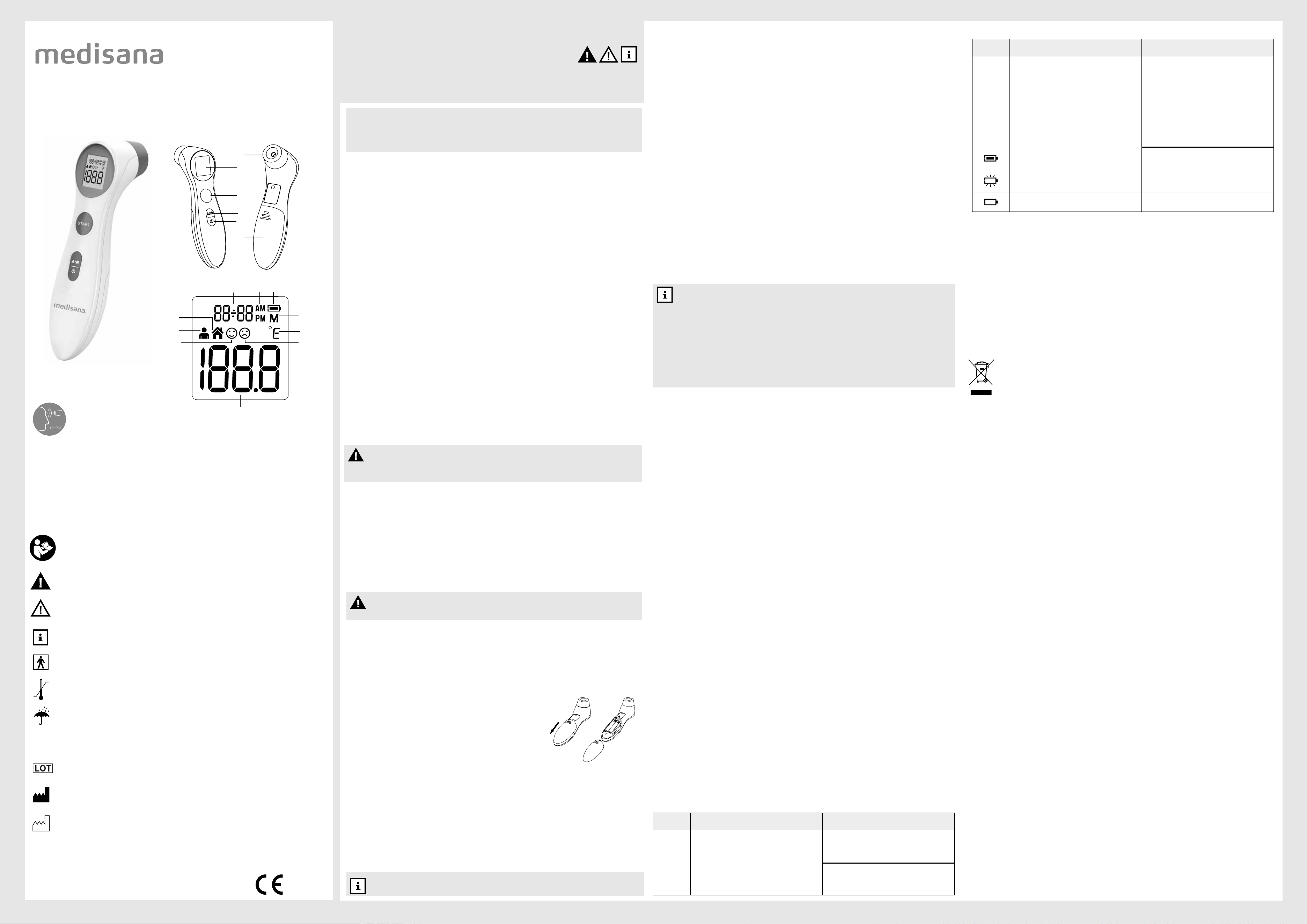
GB Unit and controls
1
Sensor
2
Display
3
START button
4
Power button
5
Mode button
6
Battery compartment
7
Time and date display
8
AM/PM (12-hour clock)
9
Battery symbol
0
Memory display
q
Forehead mode
w
Object mode
e
Normal temperature indicator
r
Fever indicator
t
Measurement unit (C or F)
z
Measurement result
Non-contact measurement
WARNING - The measurement results obtained by this thermometer do not represent a diagnosis
and do not replace the consultation of a doctor, who should always be consulted in case of doubt.
48892_TM 315_manual_GB_TW_202401_L1
NOTES
• The device will automatically switch off if there is no input for approx. 60 seconds.
NOTES For the most accurate readings:
• Do not take a baby’s temperature during or directly after breastfeeding.
• Patients should not drink or eat directly before or during a measurement, and they should avoid any
physical exertion.
• Clean the area where you are taking the temperature and remove any dirt, hairs or sweat before moving
the sensor
1
to the measuring position.
• Do not remove the thermometer from the measuring position until it has beeped to signal the end of the
reading.
• If the sensor becomes dirty during or after a reading, clean it with a cotton bud dipped in cleaning
alcohol before putting the thermometer away. After cleaning, allow at least 10 minutes drying time before
taking temperatures.
• Always take the temperature in the same place, because the readings will vary in different environments.
Warranty and repair terms
Please contact your dealer or the service centre in case of a claim under the warranty. If you have to return the unit, please
enclose a copy of your receipt and state what the defect is. The following warranty terms apply:
1. The warranty period for medisana products is three years from date of purchase. In case of a warranty claim, the date of
purchase has to be proven by means of the sales receipt or invoice.
2. Defects in material or workmanship will be removed free of charge within the warranty period.
3. Repairs under warranty do not extend the warranty period either for the unit or for the replacement parts.
4. The following is excluded under the warranty:
a. All damage which has arisen due to improper treatment, e.g. nonobservance of the user instructions.
b. All damage which is due to repairs or tampering by the customer or unauthorised third parties.
c. Damage which has arisen during transport from the manufacturer to the consumer or during transport to the service centre.
d. Accessories which are subject to normal wear and tear.
5. Liability for direct or indirect consequential losses caused by the unit are excluded even if the damage to the unit is
accepted as a warranty claim.
JOYTECH HEALTHCARE CO., LTD.
No.365, Wuzhou Road, 311100 Hangzhou, Zhejiang Province, PEOPLE’S REPUBLIC OF CHINA
Authorised EU Representative
Shanghai International Holding Corp. GmbH (Europe)
Address: Eiffestrasse 80, 20537 Hamburg, German
medisana Clinical Infrared Thermometer DET-306
digital display (LCD)
2 x batteries (AAA type, LR03) 1.5V
3 years or 6,000 measurements
Forehead 34-43°C (93.2-109.4°F)
±0.2°C, 35.5°C-42.0°C (±0.4°F, 95.9°F-107.6°F) , other range ±0.3°C (±0.5°F)
0.1°C (0.1°F)
up to 30 readings
5-40°C (59-104°F); rel. humidity 15-85%
-25°C to +55°C (-13°F to +131°F), rel. humidity 15-95%
approx. 153 x 41 x 44 mm
approx. 84 g
48892
40155 88 48892 4
Screen
display
Reasons Solutions
Er 1
The thermometer is not functioning properly.
Take out the battery. Wait for 1 minutes and insert
it again. If the message reappears, please contact
your dealer or service centre.
Er 2
The ambient temperature is not within the range of
between 5°C and 40°C (41 F - 104 F).
Place the thermometer in a room for at least 30
minutes at room temperature between 5
°C
and 40
°C
(41
°F
- 104
°F
).
Hi
Forehead mode:
Measurement result is higher than 43°C (109.4°F).
Object mode:
Measurement result is higher than 100°C (212°F).
Read the measuring instructions thoroughly, then take a
new temperature measurement.
Lo
Forehead mode:
Measurement result is lower than 34°C (109.4°F).
Object mode:
Measurement result is higher than 0°C (32°F).
Read the measuring instructions thoroughly, make
sure the sensor is clean and take a new temperature
measurement.
The thermometer works properly.
Use the thermometer normally.
When the battery symbol ash, it indicates that the
power is low but you can still measure.
The thermometer will work properly but batteries must be
replaced soon.
The thermometer could not work due to low power.
Replace with two new AAA alkaline batteries.
0123
In accordance with our policy of continual product improvement,
we reserve the right to make technical and optical changes without notice.
EC REP
NON
S
T
A
R
T
1
2
3
4
5
6
7
w
q
8 9
0
t
e r
z
保養與清潔
•偵測器 1 是本額溫槍的最精密零件。請保護它遠離灰塵並避免損壞。用棉花棒沾溫水或
70% 異丙醇清洗偵測器。
•請勿將額溫槍浸入水中或任何其他液體中。額溫槍不防水。
•清潔額溫槍時,請使用軟布沾上溫和的肥皂水或 70% 異丙醇進行清潔。請勿讓水進入額
溫槍中。待額溫槍完全乾燥後再繼續使用。
•切勿使用強力清潔劑、稀釋劑、汽油或硬毛刷進行清潔。
•注意不要刮傷偵測器鏡頭、顯示螢幕和商品表面。
•切勿在環境溫度或濕度過高或過低(請參閱「技術規範」部分中的使用條件)、陽光直
射、靜電附近或灰塵環境中使用或存放本額溫槍。
•如果長時間不用,請從額溫槍中取出電池。否則存在電池酸液外漏的風險。
•如果按以上說明使用本額溫槍,則無需定期維護或校正。
廢棄處理
本產品不得隨一般垃圾一起處理。所有使用者都有義務將所有電氣或電子設備(無
論它們是否包含有害物質)按照環保的方式處理。
處理本額溫槍之前,請取下電池。舊電池不得隨家庭垃圾一起處理,而應送至回收
點或商店的電池收集站。有關處理的資訊,請諮詢當地主管機關或供應商。
技術規格
名稱和型號:
顯示系統:
電源:
預期使用壽命:
測量範圍:
準確度 (實驗室最大誤差):
顯示精確位數:
記憶體容量:
操作環境溫度:
存放溫度:
尺寸:
重量:
目錄編號︰
貨號:
EAN 編號:
本額溫槍的 CE 標誌參照歐盟指令 93/42/EEC MDD。本額溫槍僅供家庭使用。如需商
用,必須每年進行一次計量檢查。此校正將收取費用,校正可由適當的機構或授權服務中
心按照針對醫療器材使用者的法規來執行。
保固和維修條款
如果在保固範圍內提出維修需求,請聯繫您的經銷商或服務中心。如果您必須退回本額溫
槍,請附上您的收據副本並說明具體缺陷。以下保修條款將適用:
1.本產品的保固期為從購買之日起的三年。如果有保固維修,則必須通過銷售收據或發票
證明購買日期。
2.如有材料或工藝缺陷,保固期內將予以免費排除。
3.保固期內的維修不會延長額溫槍或更換零件的保固期。
4.以下情況不在保修範圍之內:
a.由於使用不當(例如不遵守使用者說明)而導致的所有損壞。
b.由於客戶未經授權的第三方維修或篡改而導致的所有損壞。
c.在從製造業者向消費者運輸或到服務中心的運輸期間出現的損壞。
d.正常磨損的零件。
使用前
讓額溫槍適應房間的溫度:為了準確地測量使用者的體溫,使用者必須先適應測量房間
的溫度。免接觸紅外線額溫槍亦是如此。當額溫槍進入新環境時,它們會自動調整以適
應該環境。額溫槍需要一定的時間來使自身的溫度與房間的溫度相同。需要多長時間取
決於兩種溫度之間的差異,甚至可能需要 30 多分鐘。只有在這個過程完成後才能獲得精
確的測量結果。
測量前額溫度
本額溫槍其安全性和精準度已經過檢查確認,只要按照說明使用本額溫槍即可。
1. 按下電源按鈕
4
打開額溫槍,然後額溫槍會執行自檢,期間顯示螢幕 2 的所有符號
顯示約 2 秒。
2. 完成自檢後進入額溫測量模式
q
,此時會發出兩聲短促的蜂鳴音, 代表產品已經準備
就緒可以進行測量。
3. 開始測量時,讓偵測器 1 以少於 50 mm 的距離指向病人前額的中央。如果病人前額
上有毛髮、汗液或污垢,請先將其清除,讓測量結果盡可能準確。
4. 按下測量按鈕 3,然後鬆開。大約 1 秒後,會聽到一聲短促的蜂鳴音,表示測量已完
成,並且顯示測得的溫度。在聽到蜂鳴音前請不要把額溫槍離開前額。如果測量結果
低於37.3°C,顯示螢幕
2
將顯示正常體溫符號
e
, 同時螢幕背光為綠色。如果測量
結果等於或高於37.3°C且低於37.8°C,顯示螢幕
2
將顯示正常體溫符號
e
,同時螢幕
背光為黃色。如果測量結果高於或等於37.8°C,顯示螢幕
2
將顯示發燒警示符號
r
,
同時螢幕背光為紅色。
5. 如果在大約 60 秒內沒有操作,額溫槍將自動關閉。您也可以通過按電源按鈕
4
手
動關閉額溫槍。
測量物體溫度
1. 長按模式按鈕5可在額溫測量模式和物體測量模式之間切換
2. 螢幕顯示物體測量模式
w
符號時, 即可進行物體溫度測量
3. 開始測量時, 讓偵測器
1
與物件保持少於50mm距離.
4. 按下測量按鈕
3
, 然後鬆開, 大約1秒後會聽到一聲短促的蜂鳴音, 表示測量完成並且顯
示測得溫度.
5. 如果在大約 60 秒內沒有操作, 額溫槍將自動關閉。您也可以通過按電源按鈕
4
手動
關閉額溫槍。
更改測量單位
您可以以 °C 或 °F 為單位測量溫度。請按以下步驟選擇測量單位:
1. 必須關閉本額溫槍。
2. 長按測量按鈕 3,直到符號「 °C 」或「 °F 」顯示在螢幕並發出一聲短促的蜂鳴音。
3. 按下測量按鈕 3 更改測量單位。
4. 當合適的測量單位顯示在螢幕上, 按下電源按鈕4設定所選測量單位
調出存儲數據
本額溫槍最多可記憶 30 個測量結果。當額溫槍已啟動且準備測量的狀態下,長按電源
按鈕3秒即可調出儲存數據,螢幕會顯示<M>記憶模式符號
0
。如果測量值儲存在記憶
體中,則首先顯示記憶位置編號 «1» 和所存儲的溫度。通過進一步按電源按鈕
4
,您
可以調出更多儲存的值(記憶編號 «2» 等)。總共有 30 個可用的記憶編號,每組記憶
體均記錄了當時測量時的時間和日期,可通過反覆按電源按鈕
4
來將其調出。記憶編
號«1»代表最近的測量結果, 編號 «30» 代表最舊的測量結果。
此說明書屬於本設備。其中包含有關啟動和操作的重要資訊。請仔細閱讀說
明書。不遵守這些說明可能導致嚴重損害或損壞耳額溫槍。
警告
必須遵守這些警告說明以防止對使用者造成任何傷害。
小心
必須遵守這些說明以防止對耳額溫槍造成任何損壞。
注意
這些說明提供關於安裝或操作的有用附加資訊。
分類:BF 型應用零件
溫度範圍
保持乾燥
防止固體和水進入的防護等級
批號
製造業者
製造日期
標誌說明
“馬德保康”免接觸紅外線額溫槍
IP22
TW 免接觸紅外線額溫槍
說明書 -
請仔細閱讀!
安全資訊
重要資訊!請妥善保存以備未來使用!
請在使用本額溫槍之前仔細閱讀本說明書,尤其是安全說明,並保留說明書以備未來
使用。如果您要將本額溫槍轉交給其他人,務必同時轉交本說明書。 使用前請務必詳
閱原廠之使用說明書並遵照指示使用。
預期用途:
感謝您購買"馬德保康"免接觸紅外線額溫槍。本額溫槍是一種非無菌、可重複使用
的便攜產品,供消費者作居家檢測和臨床醫師參考。 本額溫槍透過紅外線熱量測量
額頭中央的體溫。
•
本額溫槍僅用於此說明書中描述的特定用途。任何不當使用將使保固失效。
•
本額溫槍並非為商用而設計。
•
使用本額溫槍不能代替諮詢醫師。
•
本額溫槍和病人必須處於穩定的環境中至少30分鐘,才能測量體溫。
•
本額溫槍不適合身體、感官和精神能力受限的人(包括兒童)使用,也不適合經驗或
知識不足的人使用,除非是在負責他們安全的人的監視下,或者已向他們說明了如何
使用本額溫槍。
•
必須對兒童進行監督,以確保他們不會拿本額溫槍來玩耍。
•
前額和太陽穴位置的溫度與體內溫度不同,體內溫度通過口或直腸測出。因此,如
果測量結果不符或遠低於病人自己的預期溫度,則每15分鐘重複測量一次。作為參
考,您還可以使用常規口腔或直腸溫度計測量體內溫度。
•
在下列情況下,建議使用傳統溫度計進行測量:
1.測量溫度異常低
2.在測量100天以內的新生兒的體溫時
3.在測量三歲以下免疫系統較弱的兒童,或在發燒或不發燒時反應異常的人的體溫時
4.您是第一次使用或想熟悉本額溫槍時搭配確認
•
如果本額溫槍發生故障或損壞,不要試圖自己維修額溫槍,因為這將使保固無效。
聯繫您的經銷商,由授權的服務合作夥伴進行維修。
•
請勿自行拆卸與打開本額溫槍。它含有微小零件,可能被兒童誤食。
•
若額溫槍損壞,請勿使用。
•
不要在潮濕的環境中使用額溫槍。勿將額溫槍浸入水或其他液體中。本額溫槍不防水。
•
本額溫槍包含敏感零件,必須小心處理。請遵守《技術規格》部分中所述的存放和操
作方式。
•
請勿在行動電話或無線電設備等強電磁場附近使用本額溫槍。
•
使用本額溫槍時,請與此類設備保持至少3.3m的距離。
•
請勿搖晃或敲擊本額溫槍。請勿摔落。
•
保護額溫槍並遠離陽光直射、避免極高或極低溫度、污垢和灰塵。
•
如果長時間未使用本額溫槍,請取出電池。
產品內容及包裝
請先檢查額溫槍是否完整以及是否存在任何形式的損壞。如果存在疑問,請勿使用它並
聯繫您的經銷商或服務中心。
產品內容包含:
•1 個"馬德保康"免接觸紅外線額溫槍
•2 節電池(AAA 型,LR03),1.5 V
•1 本說明書
包裝可以重複使用或回收。請妥善處理任何不需要的商品包裝。如果您在打開包裝的過
程中注意到任何運輸損壞,請立即聯繫您的經銷商。
測量體溫
馬德保康免接觸紅外線額溫槍可進行準確且免接觸的體溫測量(距離約為 15-50
mm)。 將本額溫槍放置在眉毛上方的前額和太陽穴之間測量體溫。
本額溫槍所測量到的能量經過測量後轉化為體溫值。 溫度結果在 1 秒後顯示。因此,
您可以使用本額溫槍,在不影響嬰兒睡眠的條件下測量嬰兒的體溫。
操作-開始使用
如果在使用一段時間後,液晶顯示螢幕 2上出現更換電
池標示 9,應盡早更換電池。如果液晶顯示螢幕 2上
出現更換電池標示 9 或沒有任何顯示,需立即更換電
池。
取出電池
按下電池蓋
6
,將其取下並取出電池。
安裝電池
放入新的 1.5V 電池(AAA 型,LR03)。注意擺放方向正確(請參閱電池蓋
6
中的說
明)。重新裝上電池蓋
6
。
時間日期設置
1. 首次使用本額溫槍時, 請設置時間日期。 請在額溫槍關機時長按電源按鈕
4
3秒,
顯示螢幕 2的所有元素將顯示約1秒。 之後, 額溫槍進入設置模式(螢幕顯示時間制式12
H / 24H)。 按測量按鈕 3調整時間制式, 然後按電源按鈕
4
確認並進入時間設置
2. 按測量按鈕 3調整小時, 然後按電源按鈕
4
確認。 以相同方法調整分鐘, 然後按
電源按鈕
4
確認並進入日期設置。
3. 請以相同的方式分別設置年份、月份和日期。 所有設置完成後額溫槍會自動關機。
TW產品說明
1
偵測器
2
顯示螢幕
3
測量按鈕
4
電源按鈕
5
模式按鈕
6
電池蓋
7
時間/日期顯示
8
12小時制AM/PM
9
電量標示
0
記憶模式
q
額溫測量模式
w
物體測量模式
e
正常體溫
r
發燒警示
t
測量單位 (°C或°F)
z
測量結果
48892_TM 315_manual_GB_TW_202408_L1
"馬德保康"免接觸紅外線額溫槍
產品貨號: 48892
型號: DET-306
目錄編號︰TM 315
中國製造
製造業者名稱: JOYTECH Healthcare Co., Ltd.
製造業者地址: No.365, Wuzhou Road, Yuhang Economic Development Zone,
Hangzhou City, 311100 Zhejiang, China
醫療器材商名稱: 恆隆行貿易股份有限公司
醫療器材商地址: 114679臺北市内湖區洲子街88號7樓之1
客服專線: 0800-251209
螢幕顯示 原因 解決方案
Hi
額溫測量模式 :
測量溫度高於 43°C (109.4°F).
物體測量模式 :
測量溫度高於 100°C(212°F)
請仔細閱讀操作說明並確保偵測器
1
鏡頭清
潔 , 然後重新測量
Lo
額溫測量模式 :
測量溫度低於 34° C (93.2°F).
物體測量模式 :
測量溫度低於 0° C (32F)
請仔細閱讀操作說明並確保偵測器
1
鏡頭清潔 , 然後重新測量
電池電量充足 請正常使用額溫槍
當電量標示外圍閃爍 , 表示低電量但
可以繼續使用
額溫槍可以正常測量 , 但需要盡快更
換電池
電量過低 , 額溫槍不能正常運作 請更換電池
備註
如果在大約 60 秒內沒有操作,額溫槍將自動關閉。
免接觸測量
電池安全資訊
•
請勿拆解電池!
•
如果需要,請在放入電池前清潔電池、額溫槍與安裝電池接觸點!
•
立即從額溫槍中取出廢電池!
•
若電池酸液外漏,應避免接觸皮膚、眼睛和黏膜!如果電池酸液接觸其中任何部位,
請使用大量的清水沖洗受影響區域並立即就醫!
•
如果誤吞電池,應立即就醫!
•
正確安裝電池,正負極不要裝反!
•
保持電池蓋完整密封!
•
若長期不使用額溫槍,請從額溫槍中取出電池!
•
將電池保管在兒童不能接觸的地方!
•
請勿嘗試給電池充電!存在爆炸風險!
•
請勿將電池短路!存在爆炸風險!
•
請勿投入火中!存在爆炸風險!
•
將未使用的電池保留在包裝中並遠離金屬物體以防短路!
•
請勿將使用過的電池扔進一般垃圾中;應將電池放入廢棄電池回收筒或帶到其購買商
店的電池回收區!
警告
請確保將聚乙烯包裝放在兒童不能接觸的地方!有窒息風險!
警告
使用耳額溫槍得出的測量結果不代表診斷,也不能代替醫師的診症,如有疑
問,請立即諮詢醫師。
衛部醫器陸輸字第xxxxx號
0123
備註,為獲得最準確的測量結果:
•請勿在哺餵母乳時或哺餵母乳後直接測量嬰兒的體溫。
•在測量體溫前或測量時,病人不應飲水或進食,而且應避免任何體能消耗。
•清洗需要測量體溫的部位並除去任何污垢、毛髮或汗液,然後再將偵測器
1
移到測量位置。
•在額溫槍響起蜂鳴音指示測量結束前,請勿移走額溫槍。
•如果偵測器在測量期間或之後變髒,請用棉花棒沾酒精清潔偵測器,清潔後
請靜置至少10分鐘待其乾燥後方可開始測量。
•請務必在同一個地方測量體溫,因為在不同的環境下測量結果會發生變化。
錯誤訊息
螢幕顯示 原因 解決方案
Er 1
額溫槍沒有正常運作
請取出電池並重新安裝 , 等待一分鐘
再啟動額溫槍。如錯誤訊號重複出現 ,
請聯繫您的經銷商。
Er 2
額溫槍所處的環境溫度未在
5° C-40° C (41° F-104° F) 範圍內
將額溫槍放置在 5-40° C
(41° F-104° F) 環境溫度下靜置 30 分
鐘後再進行測量
錯誤訊息
S
T
A
R
T
1
2
3
4
5
6
7
w
q
8 9
0
t
e r
z
"馬德保康"免接觸紅外線額溫槍 DET-306
數位顯示螢幕 (LCD)
2 節電池(AAA 型,LR03),1.5 V
3年或6,000 次測量
額溫 34-43°C (93.2-109.4°F)
±0.2°C,35.5°C-42.0°C(±0.4°F,95.9°F-107.6°F),
其他範圍 ±0.3°C (±0.5°F)
0.1°C (0.1°F)
多達 30 個測量結果
5-40°C (41-104°F);相對濕度 15-85% RH
-25°C 至 +55°C(-13°F 至 +131°F),相對濕度 15-95%
約 153 x 41 x 44 mm
約 84 g
TM 315
48892
40155 88 48892 4
NON