Error messages
Display «Er.H» : The ambient temperature is too high. The ambient temperature is above 40°C [104°F].
Display «Er.L» : The ambient temperature is too low. The ambient temperature is below: 15°C [59°F] (body mode ) resp.
5°C [41°F] (object mode ).
Display «Er.0» : The self-test failed. Try to switch on the device again. If the problem persists, contact the customer service.
Display «L°C» : The measured temperature is too low. L appears in the display if the reading is below 34°C [93.2°F] (body
mode ) resp. 0.0°C [32°F] (object mode ).
Display «H°C» : The measured temperature is too high. H appears in the display if the reading is above 43°C [109.7°F] (body
mode ) resp. 100°C [212°F] (object mode ).
Blank display Check the position of the battery.
/ Flat battery indication. Insert a new battery.
Cleaning and maintenance
• The sensor
2
is the most delicate part of the device. Protect it from dirt and damage. Clean the sensor with a cotton bud
dipped in warm water or 70% isopropyl alcohol.
• Do not immerse the thermometer in water or any other liquid. It is not watertight.
• To clean the thermometer, use a soft cloth slightly dampened with mild soapy water or 70% isopropyl alcohol. Do not let water
get into the unit. Only use the unit again when completely dry.
• Never use aggressive cleaning agents, thinners, benzine or tough brushes.
• Take care not to scratch the lens of the sensor, the display or the housing.
• Do not use or store the unit in an environment where the ambient temperature or humidity is too high or too low (see
operating conditions in the “Technical specications” section), in direct sunshine, in the vicinity of static electricity or in a
dusty environment.
• Remove the batteries if you do not wish to use the unit for an extended period of time. Otherwise there is a danger that the
batteries may leak.
• If the thermometer is used as described in these instructions, no regular maintenance or calibration is required.
Disposal
This product must not be disposed of together with domestic waste. All users are obliged to hand in all electrical or
electronic devices, regardless of whether or not they contain toxic substances, at a municipal or commercial collection
point so that they can be disposed of in an environmentally acceptable manner.
Please remove the battery before disposing of the device/unit. Do not dispose of old batteries with your household
waste, but at a battery collection station at a recycling site or in a shop. Consult your municipal authority or your supplier
for information about disposal.
Technical specications
Name and model:
Display system:
Power supply:
Expected service life:
Measuring range:
Accuracy of measurement:
(laboratory readings):
Resolution:
Memory capacity:
Operating temperature:
Storage/transport temperature:
Dimensions:
Weight:
Article No.:
EAN Code:
The CE-mark of this device refers to the EC-directive 93/42/EEC MDD. The unit is designed for home use only. For commercial
use, a metrological inspection must be carried out once every year. This calibration will be charged for and can be carried out
by an appropriate authority or an authorised service centre - in accordance with the regulations for users of medical equipment.
Electromagnetic compatibility: The device complies with the EN 60601-1-2 standard for electromagnetic compatibility.
Settings
After inserting a battery, the device will automatically execute a self-test. All elements of the LC-display
4
are shown for
approx. 1 second. Afterwards the device switches to the setting mode (the display shows «SET» and the ashing year gure
and date symbol). Use the START-button
5
to adjust the year and press the on-/o-button
6
to conrm the setting.
Now adjust month, day, hour and minute in the same way. After the date has been set, you can choose the unit of measure
(degree Celsius „°C“ or degree Fahrenheit „°F“). Again press the on-/o-button
6
to conrm. The device will switch o
automatically.
Before use
Acclimatise the thermometer to the temperature of the room: For an accurate reading of a patient’s temperature, their
body must rst acclimatise to the temperature of the room where the measurement will be made. The same applies to the
Infrared multifunctional thermometer TM 760 / TM 762. When taken somewhere else, it automatically adjusts itself to the
new environment. The thermometer takes a certain amount of time to equalise its own temperature to that of the room. This
depends on the dierence between the two temperatures and can take more than 30 minutes. Precise readings can only be
taken once this process is completed.
Measuring body temperature
The thermometer has been clinically tested, and its safety and accuracy inspected and conrmed, provided it is
used in accordance with these instructions.
1. Press the on-/o-button
6
to switch on the thermometer. „On“ appears on the display shortly, then a selftest is
executed in which all elements of the display
4
are shown for approx. 1 second.
2. Now the last measured temperature value appears along with the corresponding symbol ( for body temperature and
for object temperature) and time and date of the measurement. After approx. 3 seconds the device is ready for
measurement - this will be indicated by a short beep.
3. To begin the measurement, point the sensor
2
at the middle of the patient’s forehead at a distance of no more than 2.5
cm. If the patient’s forehead has hair, sweat or dirt on it, remove this rst so that the reading is as accurate as possible.
4. Press the START-button
5
. The blue light switches on to illuminate the area where you are taking the measurement.
5. Now move the thermometer smoothly over the patient’s eyebrow (with approx. 1 cm distance) from the forehead to the
temple to measure the maximum temperature. After approx. 3 seconds a long beep can be heard to indicate that the
measurement is nished. If the temple area has not been reached until the beep can be heard, repeat the measurement
and try to move a little bit faster. During the measurement the display will show 3 strokes at rst, then 2 strokes and nally
1 stroke.
6. After approx. 3 seconds the measured temperature will be shown. Remove the sensor from the measuring position. If the
result is between 32°C (89.6°F) and 37.5°C (99.5°F), a long beep is emitted and the green backlight is active for about 3
seconds. Is the result at or above 37.5°C (99.5°F) [up to max. 43°C/109.4°F], 10 short beeps will be emitted and the red
backlight will be active for about 3 seconds. At measured temperatures above 43°C (109.4°F) or below 32°C (89.6°F) the
measuring range is exceeded. 3 short beeps and an error message will be emitted and the red backlight will be activated
for around 3 seconds.
After approximate 5 seconds the device is ready for another measurement. The device will automatically switch o if there is
no input for approx. 20 seconds. You may also switch the device o manually by pressing the on-/o-button
6
.
Measuring the temperature of an object
1. Press and hold the on-/o-button
6
for approx. 3 seconds, until „On“ appears along with the symbol for object
temperature measurement ( ). Release the button. A self-test is executed, in which all elements of the display are
shown in the display
4
for approx. 1 second.
2. Now the last measured temperature value appears along with the corresponding symbol ( for body temperature and
for object temperature) and time and date of the measurement. After approx. 3 seconds the device is ready for
measurement - this will be indicated by a short beep.
3. To begin the measurement, point the sensor
2
at the middle of the object at a distance of no more than 2.5 cm. If it has
water, dust or dirt on it, remove this rst so that the reading is as accurate as possible.
4. Press the START-button
5
. The blue light switches on to illuminate the area where you are taking the measurement.
5. During the measurement the display will show 3 strokes at rst, then 2 strokes and nally 1 stroke.
6. After approx. 3 seconds the measured temperature will be shown. Remove the sensor from the measuring position. If
the result is between 0.1°C (32.2°F) and 99.9°C (211.8°F), a long beep will be emitted and the green backlight is active
for about 3 seconds. At measured temperatures above 99.9°C (211.8°F) or below 0.1°C (32.2°F) the measuring range is
exceeded. 3 short beeps and an error message will be emitted and the red backlight will be activated for around 3 seconds.
After approximate 5 seconds the device is ready for another measurement. The device will automatically switch o if there is
no input for approx. 20 seconds and will automatically switched to body measurement mode. You may also switch the device
o manually by pressing the on-/o-button
6
.
Recalling stored data
The thermometer can store up to 30 results. You can call up your stored data with a short press of the START button
5
,
without having previously switched on the thermometer with the on-/o-button
6
. The symbol appears in the display,
together with „On“.
If measurement values are stored in memory (if no data are stored „0“ appears), rst the memory slot number „1“ appears
and afterwards the stored temperature with the corresponding symbol ( for body temperature and
for object temperature) and time and date of the measurement. By further pressing the START button
5
you can call
up more stored values (memory slot „2“ etc.). Totally there are 30 memory slots available, which may be recalled by pressing
the START button
5
repeatedly.
Delete memory
You can delete all saved values in memory. To do so, rst press the START button
5
while the device is switched o. This
will take you to the memory recall mode. Now press and hold the START button
5
for at least 3 seconds, until „Clr“ appears
and ashes on the display. Now you may delete all saved data by pressing the START button
5
again. You may also press
the on-/o-button
6
to cancel the deletion process. The device will automatically switch o if there is no input for approx.
20 seconds. You may also switch the device o manually by pressing the on-/o-button
6
.
Audio settings
You may activate or deactivate the acoustic signals of the device. To adjust, press and hold the START button
5
while the
device is switched o for approx. 3 seconds, until one of the two symbols or appear together with „SET“.
Now you may adjust the signal settings by pressing the START button
5
, until the signals are activated (symbol: )or
deactivated (symbol: ). Afterwards, press the on-/o-button
6
to save the setting and switch o the device.
Selftest mode
Press and hold the START button
5
while the device is switched o for approx. 8 seconds to enter the selftest mode of the
device. „On“ and „En“ appear on the display. You do not need this mode for the normal operation of this device.
Press the on-/o-button
6
to switch o the device.
0297
This instruction manual belongs to this device. It contains important information about
starting up and operation. Read the instruction manual thoroughly. Non-observance of these
instructions can result in serious injury or damage to the device.
WARNING
These warning notes must be observed to prevent any injury to the user.
CAUTION
These notes must be observed to prevent any damage to the device.
NOTE
These notes give you useful additional information on the installation or operation.
Classication: Type BF applied part
Temperature range
Keep dry
Protection classication against solid objects and water
LOT number
Manufacturer
Date of manufacture
Explanation of symbols
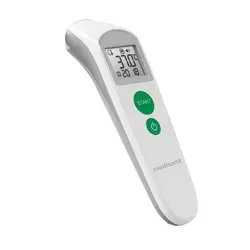
Infrared Multifunctional Thermometer
TM 760 / TM 762
IP22
GB Infrared Multi Functional Thermometer
Manual - Please read carefully!
Safety Information
IMPORTANT INFORMATION! RETAIN FOR FUTURE USE!
Read the instruction manual carefully before using this device, especially the safety instructions,
and keep the instruction manual for future use. Should you give this device to another person, it is
vital that you also pass on these instructions for use.
• Only use the unit for the specic purpose described in the instruction manual. Any misuse will void the warranty.
• The unit is not designed for commercial use.
• Using this thermometer is no substitute for consulting a doctor.
• The thermometer and the patient must remain in a stable environment for at least 30 minutes before measuring the
temperature.
• This device is not designed to be used by persons (including children) with limited physical, sensory or mental abilities,
or by persons with insucient experience and/or knowledge, unless under observation by a person responsible for their
safety, or unless they have been instructed in the use of the device.
• Children must be supervised to ensure that they do not play with the device.
• The temperature in the forehead and temple area diers from the internal temperature, which is taken orally or rectally.
Vasoconstriction, an eect which constricts the blood vessels and cools the skin, can occur during the early stages
of a fever. In this case, the temperature measured by this thermometer may be unusually low. If the measurement
therefore does not match the patient’s own perception or is unusually low, repeat the measurement every 15 minutes.
As a reference, you can also measure the internal body temperature using a conventional oral or rectal thermometer.
• A control measurement using a conventional thermometer is recommended in the following cases:
1. If the reading is surprisingly low
2. For new-born infants up to 100 days old
3. For children under three years of age who have a weakened immune system or who react unusually in the presence
or absence of fever
4. If you are using the thermometer for the rst time or want to familiarise yourself with it
• Babies’ skin reacts very quickly to the ambient temperature. Therefore, do not take their temperature with this thermometer
during or after breastfeeding, because the skin temperature may then be lower than the internal body temperature.
• If a fault occurs or the unit is damaged, do not attempt to repair the unit yourself, as this will void the warranty. Contact
your dealer and only have repairs carried out by authorized service partners.
• Do not modify and / or open the device. It contains small parts which might be swallowed by children.
• Do not use the thermometer if it is damaged.
• Do not use the thermometer in damp environments. Do not immerse the thermometer in water or other liquids. It is not
watertight.
• This device comprises sensitive components and must be treated with caution. Observe the storage and operating
conditions described in the «Technical Specications» section.
• Do not use this device close to strong electromagnetic elds such as mobile telephones or radio installations.
• Keep a minimum distance of 3.3 m from such devices when using this device.
• Do not shake or tap the thermometer. Do not drop it.
• Protect the device from direct sunlight, extremely high or low temperatures, dirt and dust.
• If the thermomter is not going to be used for a long period, remove the battery.
Items supplied and packaging
Please check rst of all that the device is complete and is not damaged in any way. In case of doubt, do not use it and
contact your dealer or your service centre. The following parts are included:
• 1 medisana Infrared multifunctional thermometer TM 760 / TM 762
• 1 Storage bag
• 1 Battery 3V (Type CR2032)
• 1 Instruction manual
The packaging can be reused or recycled. Please dispose properly of any packaging material no longer required. If you
notice any transport damage during unpacking, please contact your dealer without delay.
Taking a temperature reading - quickly and accurately!
The medisana infrared multifunctional thermometer allows precise, contact-free measurement of body temperature (at a
distance of approximately 2.5 cm). The temperature is taken above the eyebrow between the forehead and the temple.
The value of the energy radiated there is measured and converted to a temperature value. The reading is displayed within
3 seconds. This enables you, for example, to take babies’ temperature without disturbing their sleep.
Additional function: Apart from measuring body temperature, the Infrared multifunctional thermometer can also be used
to measure the temperature of objects (e.g. uids, surfaces, ambient temperature). The temperature range for this function
is between 0° and 100° Celsius (32°F - 212°F).
Operation - Getting started
Removing / inserting battery: If the battery symbol ( or ) appears in the LC display after a certain period of use,
you must replace the battery by a new 3V battery (CR2032). Removal: Take the cover of the battery compartment
3
o
by turning it until the arrow points to . Take out the cover and the battery. Insertion: Put in a new battery. Pay attention
to correct polarity (“+“ side upwards). Put the battery compartment cover back on and turn it until the arrow points to .
BATTERY SAFETY INFORMATION
• Do not disassemble batteries!
• Clean the battery and device contacts if necessary before putting in the batteries!
• Remove discharged batteries from the device immediately!
• Increased risk of leakage, avoid contact with skin, eyes and mucous membranes! If battery acid comes in contact with
any of these parts, rinse the aected area with copious amounts of fresh water and seek medical attention immediately!
• If a battery has been swallowed seek medical attention immediately!
• Insert the battery correctly, observing the polarity!
• Keep the battery compartment well sealed!
• Remove the battery from the device if it is not going to be used for an extended period!
• Keep batteries out of childrens reach!
• Do not attempt to recharge batteries! There is a danger of explosion!
• Do not short circuit! There is a danger of explosion!
• Do not throw into a re! There is a danger of explosion!
• Keep unused batteries in their packaging away from metal objects in order to prevent short circuiting!
• Do not throw used batteries into the household refuse; put them in a hazardous waste container or take them to a battery
collection point, at the shop where they were purchased!
WARNING - Please ensure that polythene packing is kept away from the reach of children!
Risk of suocation!
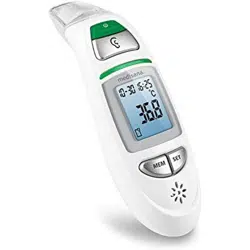
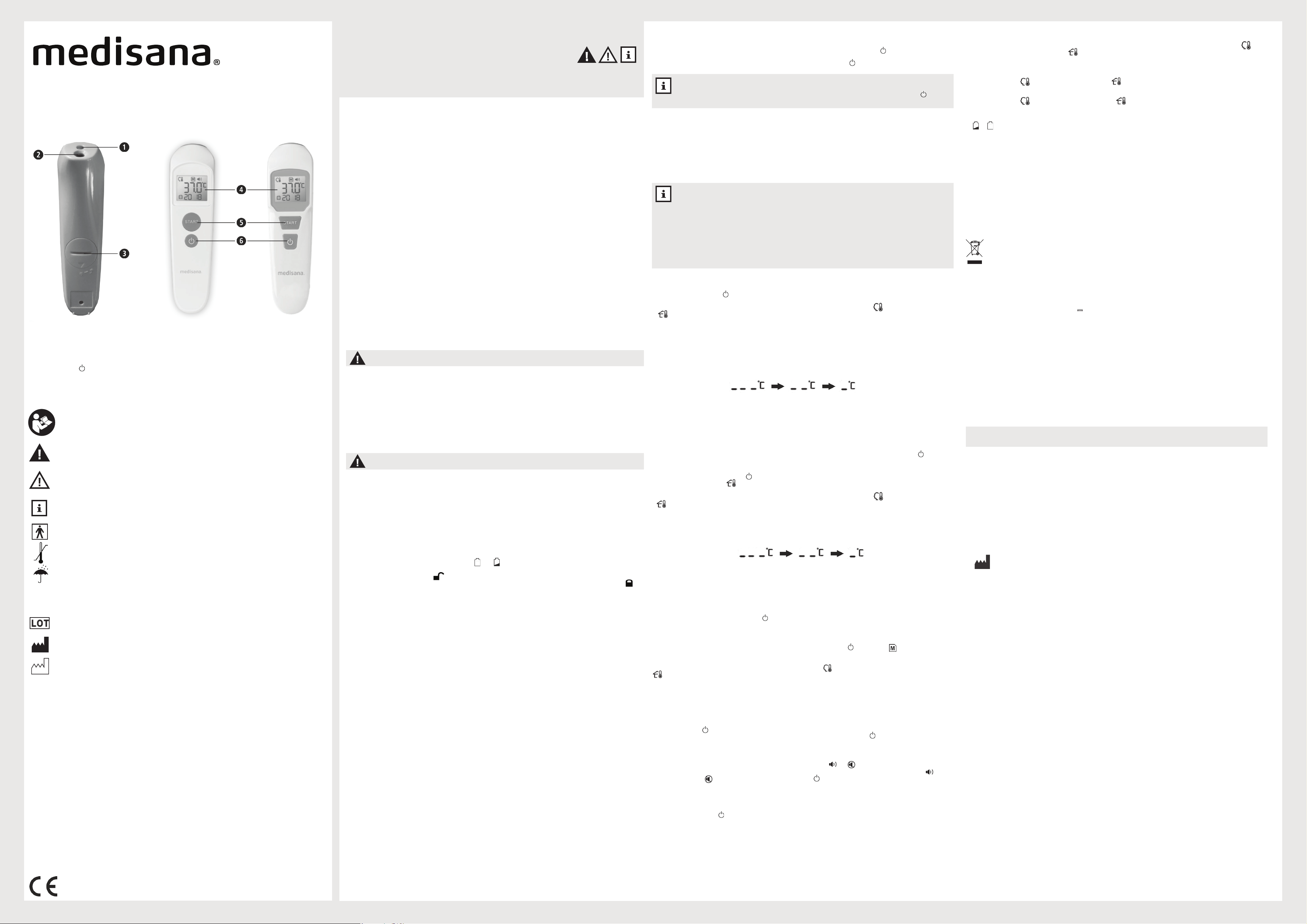
GB Unit and controls
1
Light
2
Sensor
3
Battery compartment
4
Backlight LC-display
5
START-button
6
On/O-button
WARNING - The measurement results obtained by this thermometer do not represent a diagnosis
and do not replace the consultation of a doctor, who should always be consulted in case of doubt.
48621-48608_TM 760-TM 762_manual_GB_202202_L3
NOTES
• The device will automatically switch o if there is no input for approx. 20 seconds.
• You can also enter the setting mode manually by pressing and holding the on-/o-button
6
for at
• least 8 seconds while the device is switched o, until the ashing year gure appears on the display.
NOTES For the most accurate readings:
• Do not take a baby’s temperature during or directly after breastfeeding.
• Patients should not drink or eat directly before or during a measurement, and they should avoid any
physical exertion.
• Clean the area where you are taking the temperature and remove any dirt, hairs or sweat before moving
the sensor
2
to the measuring position.
• Do not remove the thermometer from the measuring position until it has beeped to signal the end of the
reading.
• If the sensor becomes dirty during or after a reading, clean it with a cotton bud dipped in cleaning
alcohol before putting the thermometer away.
• Always take the temperature in the same place, because the readings will vary in dierent environments.
Warranty and repair terms
Please contact your dealer or the service centre in case of a claim under the warranty. If you have to return the unit, please
enclose a copy of your receipt and state what the defect is. The following warranty terms apply:
1. The warranty period for medisana products is three years from date of purchase. In case of a warranty claim, the date of
purchase has to be proven by means of the sales receipt or invoice.
2. Defects in material or workmanship will be removed free of charge within the warranty period.
3. Repairs under warranty do not extend the warranty period either for the unit or for the replacement parts.
4. The following is excluded under the warranty:
a. All damage which has arisen due to improper treatment, e.g. nonobservance of the user instructions.
b. All damage which is due to repairs or tampering by the customer or unauthorised third parties.
c. Damage which has arisen during transport from the manufacturer to the consumer or during transport to the service
centre.
d. Accessories which are subject to normal wear and tear.
5. Liability for direct or indirect consequential losses caused by the unit are excluded even if the damage to the unit is
accepted as a warranty claim.
medisana GmbH
Carl-Schurz-Str. 2, 41460 NEUSS, GERMANY
medisana Infrared multifunctional thermometer TM 760 / TM 762
digital display (LCD)
1 x battery 3V (CR2032)
5 years or 12,000 measurements
Body mode 34-43°C (93.2- 109.4°F); Object mode 0-100°C (32-212°F)
Body mode: ±0.2°C, 35.0-42.0°C (±0.4°F, 95.0-107.6°F) / ±0.3°C, 34.0-34.9°C & 42.1-43.0°C
(±0.5 °F, 93.2-94.8°F & 107.8-109.4°F), Object mode: ±1.0°C, 0-100.0°C (±2°F, 32.0-212°F)
0,1°C (0.1°F)
up to 30 readings
15 - 40°C (59 -104°F); rel. humidity 15 to 95%, non-condensing
-25°C to +55°C (-13°F - 131°F), rel. humidity 15 to 95%, noncondensing
approx. 158 x 42 x 43 mm
approx. 67 g
48621 (TM 760) / 48608 (TM 762)
40155 88 48621 0 (TM 760) / 40155 88 48608 1 (TM 762)
In accordance with our policy of continual product improvement, we reserve the right to make technical and optical
changes without notice.