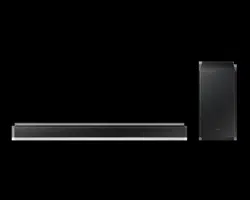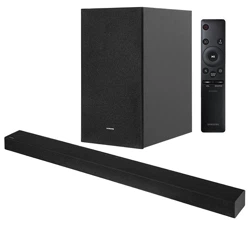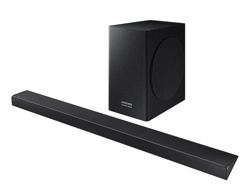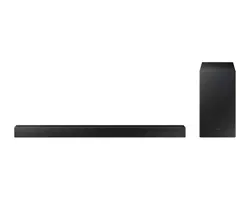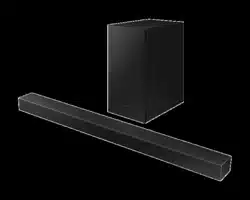

HW-A450
FULL MANUAL
Imagine the possibilities
Thank you for purchasing this Samsung product.
To receive more complete service, please register
your product at www.samsung.com/register
ENG - ii
SAFETY INFORMATION
SAFETY WARNINGS
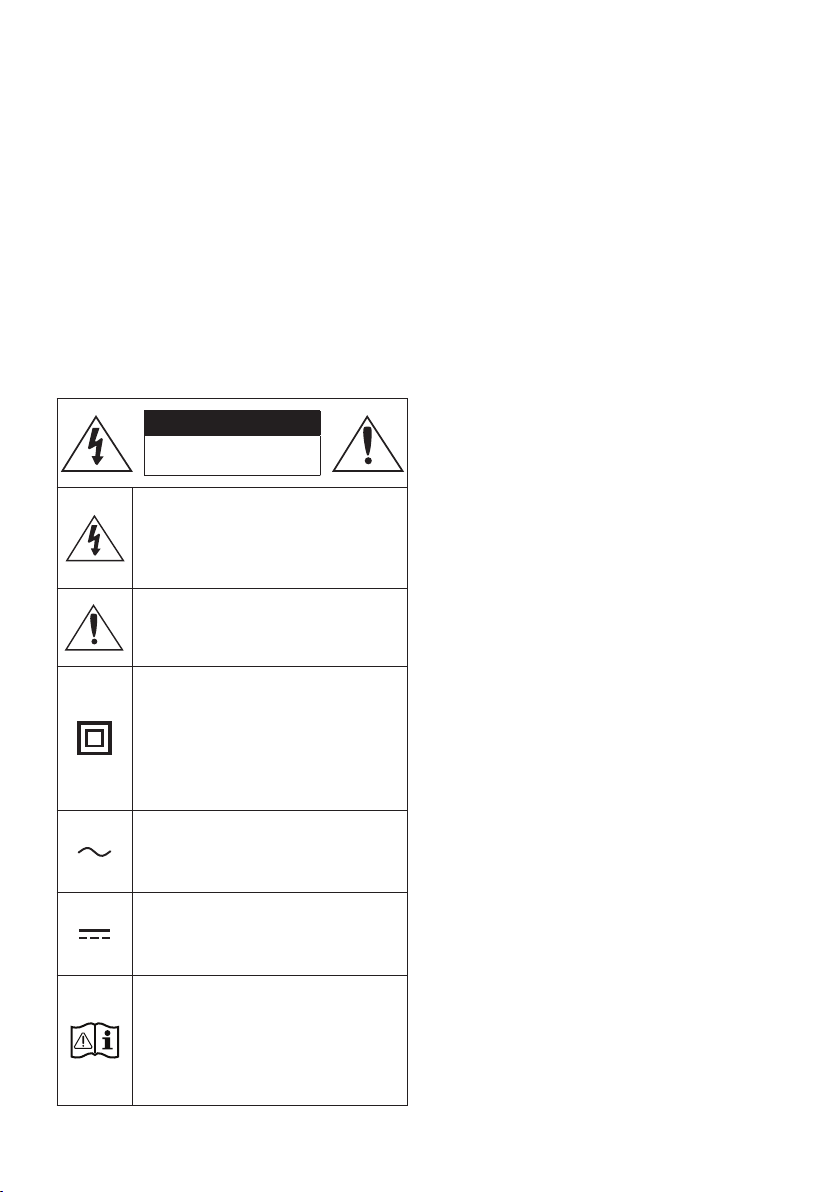
TO REDUCE THE RISK OF ELECTRIC SHOCK, DO
NOT REMOVE THE COVER (OR BACK).
NO USER-SERVICEABLE PARTS ARE INSIDE.
REFER SERVICING TO QUALIFIED SERVICE
PERSONNEL.
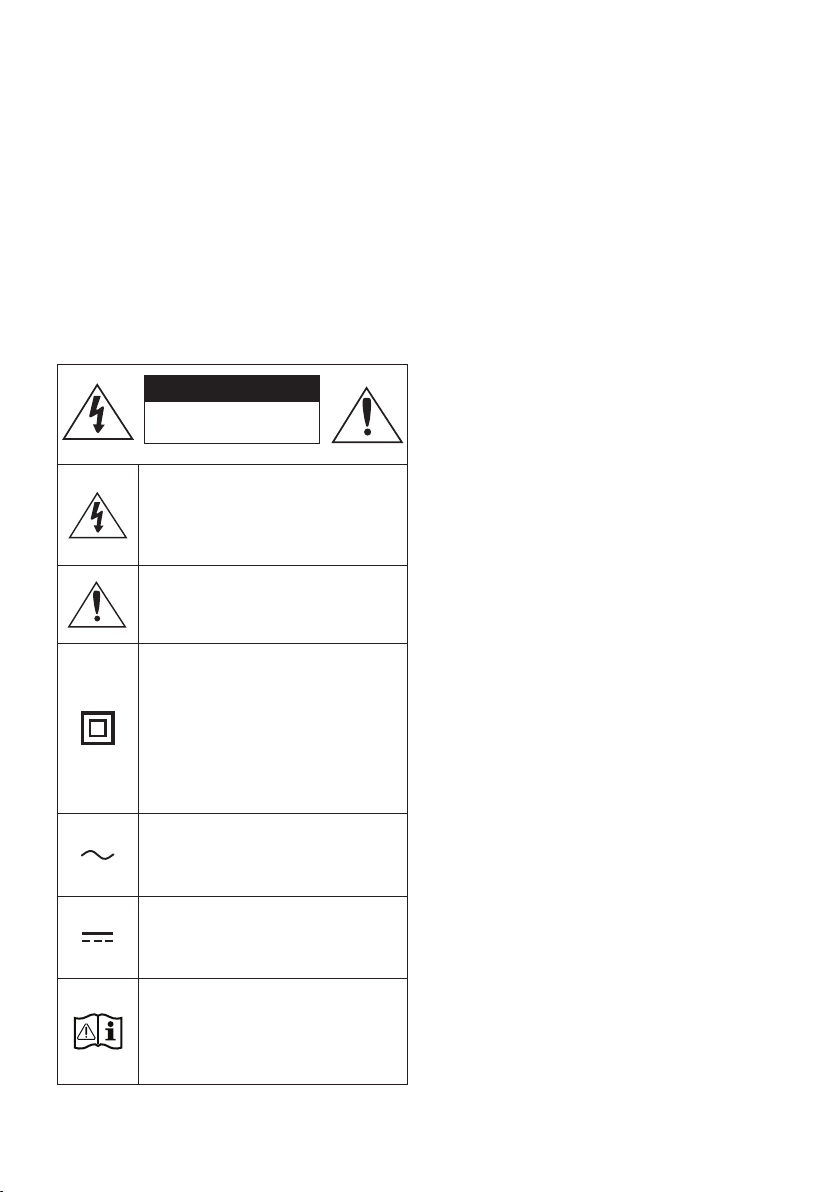
Refer to the table below for an explanation of
symbols which may be on your Samsung product.
CAUTION
RISK OF ELECTRIC SHOCK.
DO NOT OPEN.
This symbol indicates that high voltage
is present inside. It is dangerous to
make any kind of contact with any
internal part of this product.
This symbol indicates that this product
has included important literature
concerning operation and maintenance.
Class II product : This symbol indicates
that it does not require a safety
connection to electrical earth (ground).
If this symbol is not present on a
product with a power cord, the product
MUST have a reliable connection to
protective earth (ground).
AC voltage : This symbol indicates that
the rated voltage marked with the
symbol is AC voltage.
DC voltage : This symbol indicates that
the rated voltage marked with the
symbol is DC voltage.
Caution, Consult instructions for use :
This symbol instructs the user to
consult the user manual for further
safety related information.
WARNING
• To reduce the risk of re or electric shock, do
not expose this appliance to rain or moisture.
CAUTION
• TO PREVENT ELECTRIC SHOCK, MATCH WIDE
BLADE OF PLUG TO WIDE SLOT, FULLY INSERT.
• This apparatus shall always be connected to a
AC outlet with a protective grounding
connection.
• To disconnect the apparatus from the mains,
the plug must be pulled out from the mains
socket, therefore the mains plug shall be
readily operable.
• Do not expose this apparatus to dripping or
splashing. Do not put objects lled with
liquids, such as vases on the apparatus.
• To turn this apparatus off completely, you
must pull the power plug out of the wall
socket. Consequently, the power plug must
be easily and readily accessible at all times.
ENG - iii
PRECAUTIONS
1. Ensure that the AC power supply in your
house complies with the power
requirements listed on the identication
sticker located on the bottom of your
product. Install your product horizontally, on
a suitable base (furniture), with enough
space around it for ventilation (7~10 cm).
Make sure the ventilation slots are not
covered. Do not place the unit on ampliers
or other equipment which may become hot.
This unit is designed for continuous use. To
fully turn off the unit, disconnect the AC plug
from the wall outlet. Unplug the unit if you
intend to leave it unused for a long period of
time.
2. During thunderstorms, disconnect the AC
plug from the wall outlet. Voltage peaks due
to lightning could damage the unit.
3. Do not expose the unit to direct sunlight or
other heat sources. This could lead to
overheating and cause the unit to
malfunction.
4. Protect the product from moisture (i.e.
vases), and excess heat (e.g. a replace) or
equipment creating strong magnetic or
electric elds. Unplug the power cable from
the AC wall socket if the unit malfunctions.
Your product is not intended for industrial
use. It is for personal use only. Condensation
may occur if your product has been stored in
cold temperatures. If transporting the unit
during the winter, wait approximately
2 hours until the unit has reached room
temperature before using.
5. The battery used with this product contains
chemicals that are harmful to the
environment. Do not dispose of the battery
in the general household trash. Do not
expose the battery to excess heat, direct
sunlight, or re. Do not short circuit,
disassemble, or overheat the battery.
CAUTION : Danger of explosion if the battery
is replaced incorrectly. Replace only with the
same or equivalent type.
ABOUT THIS MANUAL
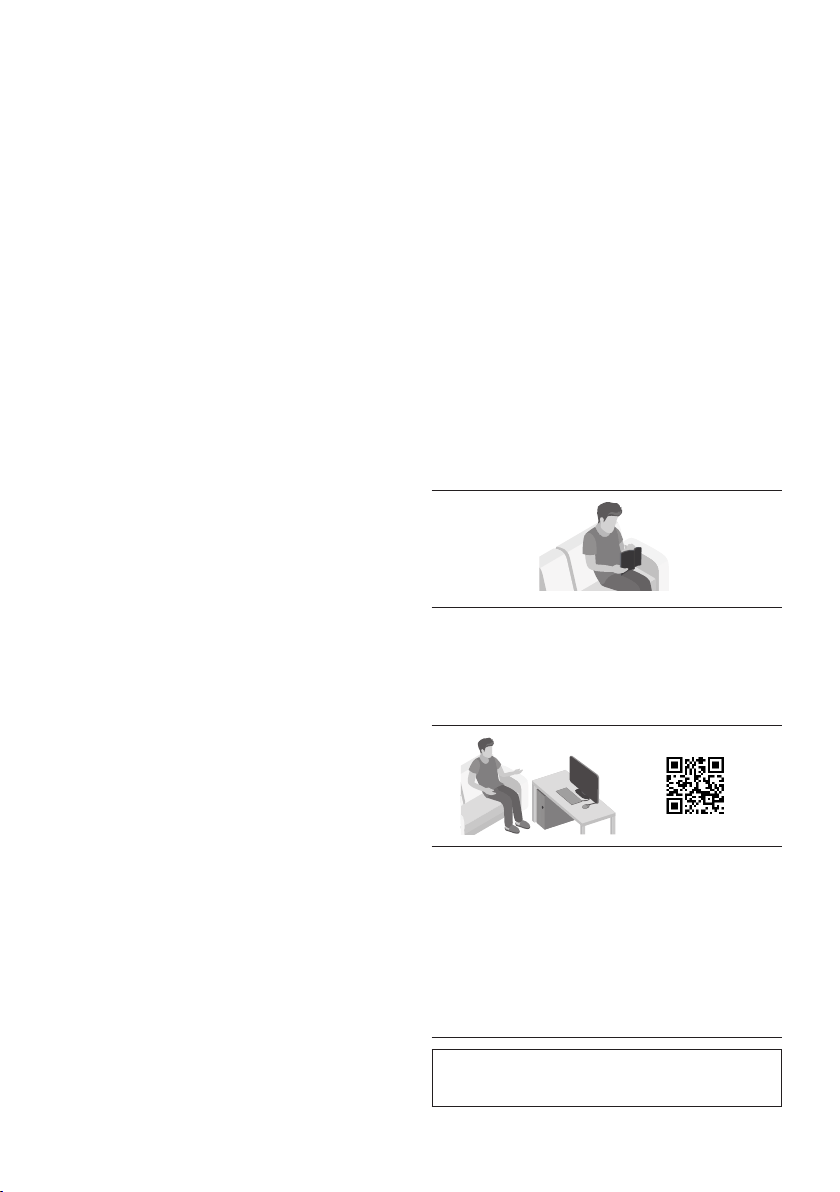
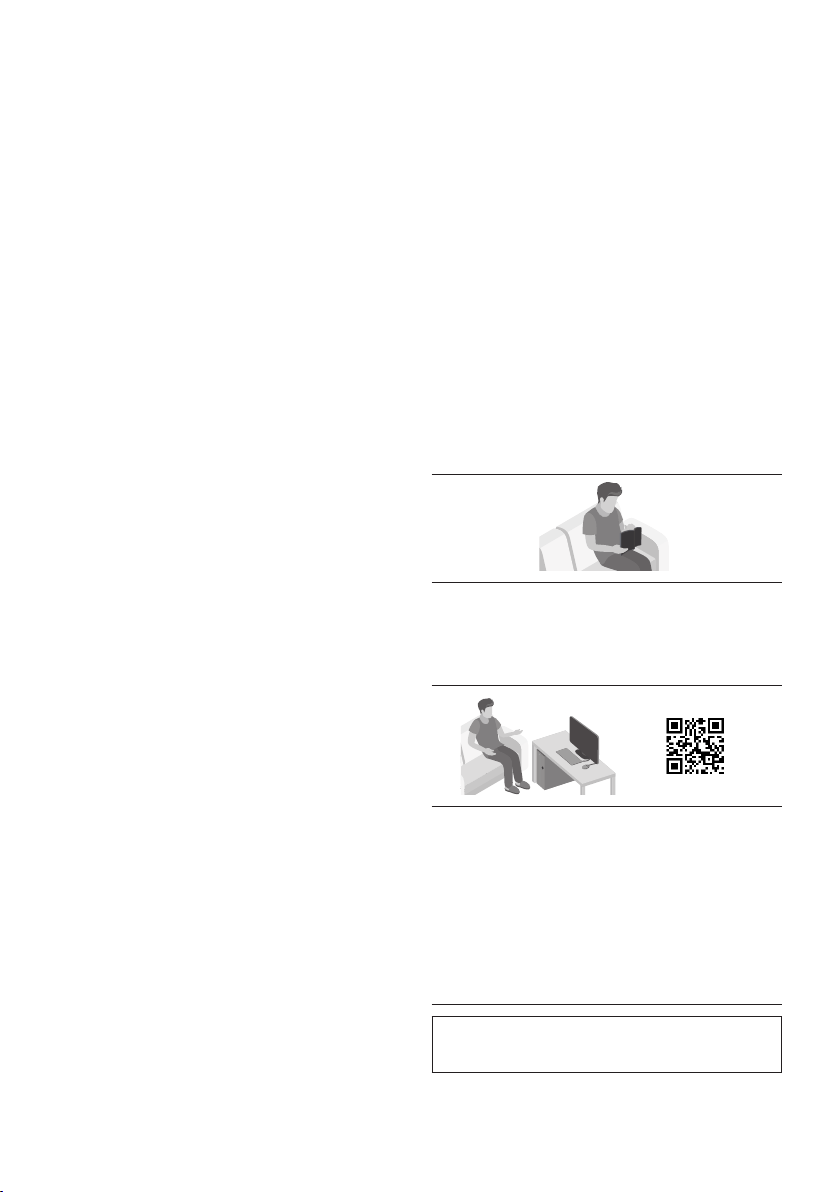
The user manual has two parts: simple paper
USER MANUAL and a detailed FULL MANUAL you
can download.
USER MANUAL
See this manual for safety instructions,
product installation, components,
connections, and product specications.
FULL MANUAL
You can access the FULL MANUAL on
Samsung’s on-line customer support centre by
scanning the QR code. To see the manual on
your PC or mobile device, download the
manual in document format from Samsung’s
website. (http://www.samsung.com/support)
Design and specications are subject to change
without prior notice.

ENG - iv
CONTENTS
01 Checking the Components 2
Inserting Batteries before using the Remote Control (AA batteries X 2) ------------------------- 2
02 Product Overview 3
Front Panel / Top Panel of the Soundbar ------------------------- 3
Bottom Panel of the Soundbar ------------------------- 4
03 Connecting the Soundbar 5
Connecting Electrical Power
-------------------------
5
Connecting the Soundbar to the Subwoofer
-------------------------
6
– Automatic connection between the Subwoofer and the Soundbar
-------------------------
6
– Manually connecting the Subwoofer if automatic connection fails
-------------------------
7
Connecting an SWA-9100S (Sold Separately) to your Soundbar
-------------------------
9
04 Connecting to your TV 11
Method 1. Connecting with a Cable
-------------------------
11
– Connecting using an Optical Cable
-------------------------
11
Method 2. Connecting Wirelessly
-------------------------
12
– Connecting a TV via Bluetooth
-------------------------
12
05 Connecting an External Device 14
Connecting using an Optical Cable
-------------------------
14
06 Connecting a USB Storage Device 15

ENG - v
07 Connecting a Mobile Device 17
Connecting via Bluetooth
-------------------------
17
08 Using the Remote Control 20
How to Use the Remote Control
-------------------------
20
Adjusting the Soundbar volume with a TV remote control ------------------------- 23
Using the Hidden Buttons (Buttons with more than one function)
-------------------------
24
Output specications for the different sound effect modes
-------------------------
24
09 Installing the Wall Mount 25
Installation Precautions
-------------------------
25
Wallmount Components
-------------------------
25
10 Placing the Soundbar on a TV stand 27
11 Software Update 28
Update Procedure
-------------------------
28
If UPDATE is not displayed
-------------------------
29
12 Troubleshooting 30
13 Licence 31
14 Open Source Licence Notice 32
15 Important Notes About Service 32
16 SpecicationsandGuide 33
Specications
-------------------------
33
ENG - 2
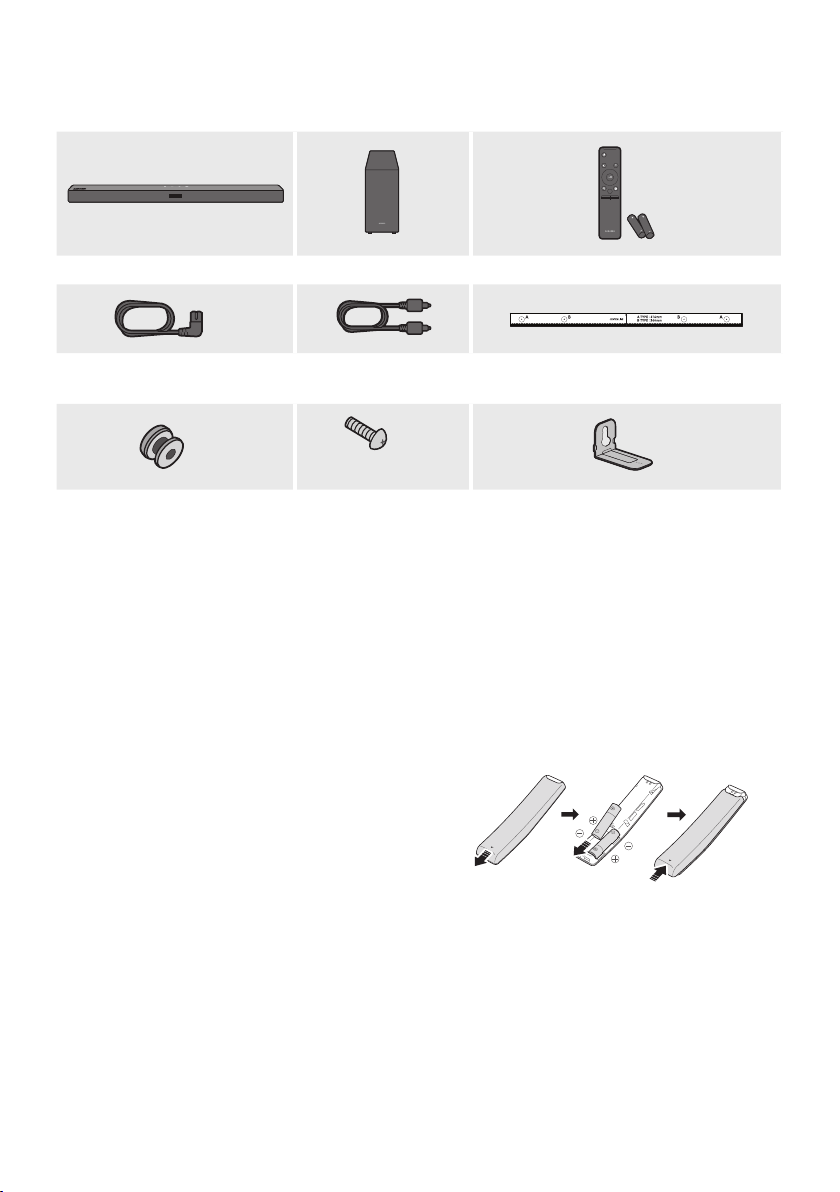
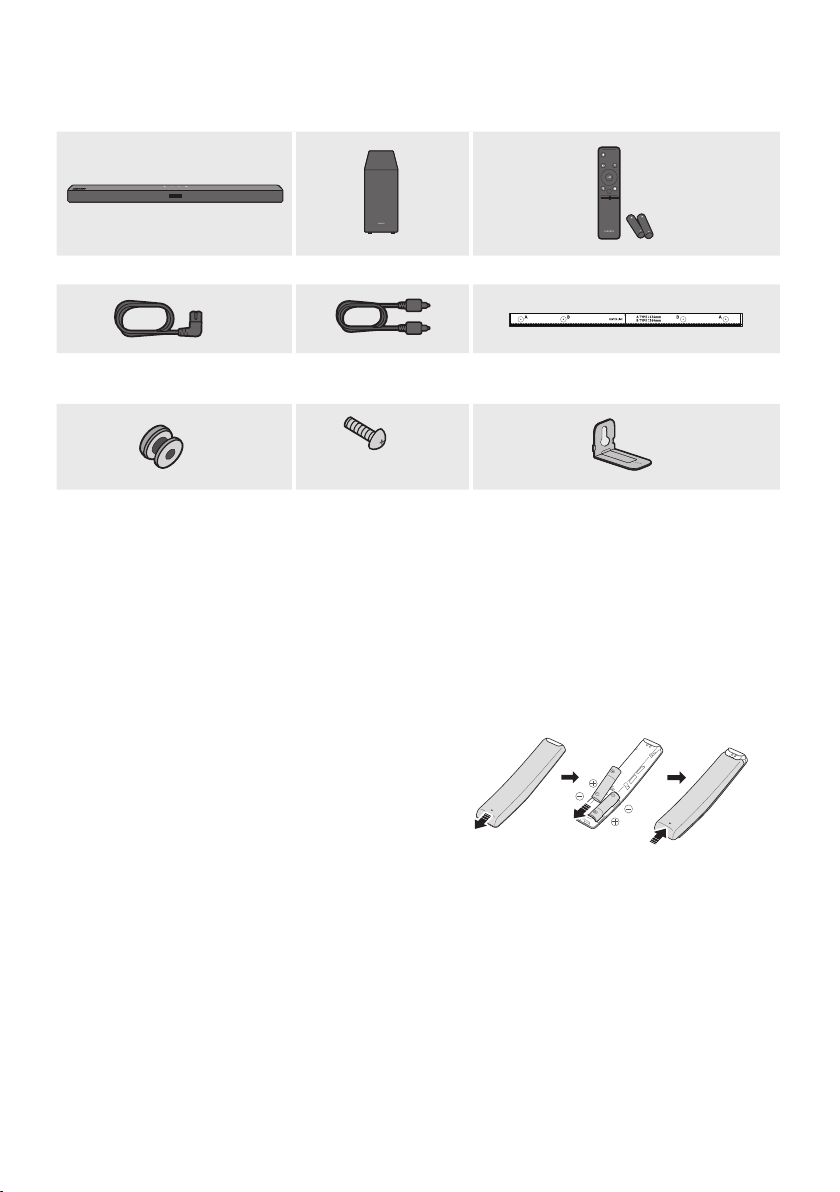
01 CHECKING THE COMPONENTS
VOL WOOFER
SOUNDBAR
SOUND
MODE
PAIR
Soundbar Main Unit Subwoofer Remote Control / Batteries
x 2
Power Cord
(Subwoofer, Soundbar)
Optical Cable Wall Mount Guide
x 2
(M4 x L10)
x 2
x 2
Holder-Screw Screw
Bracket-Wall Mount
• For more information about the power supply and power consumption, refer to the label attached
to the product. (Label: Bottom of the Soundbar Main Unit)
• To purchase additional components or optional cables, contact a Samsung Service Centre or
Samsung Customer Care.
• The appearance of the accessories may differ slightly from the illustrations above.
Inserting Batteries before using the Remote Control (AA batteries X 2)
Slide the back cover in the direction of the arrow
until it is completely removed. Insert 2 AA batteries
(1.5V) oriented so that their polarity is correct. Slide
the back cover back into position.
ENG - 3
02 PRODUCT OVERVIEW
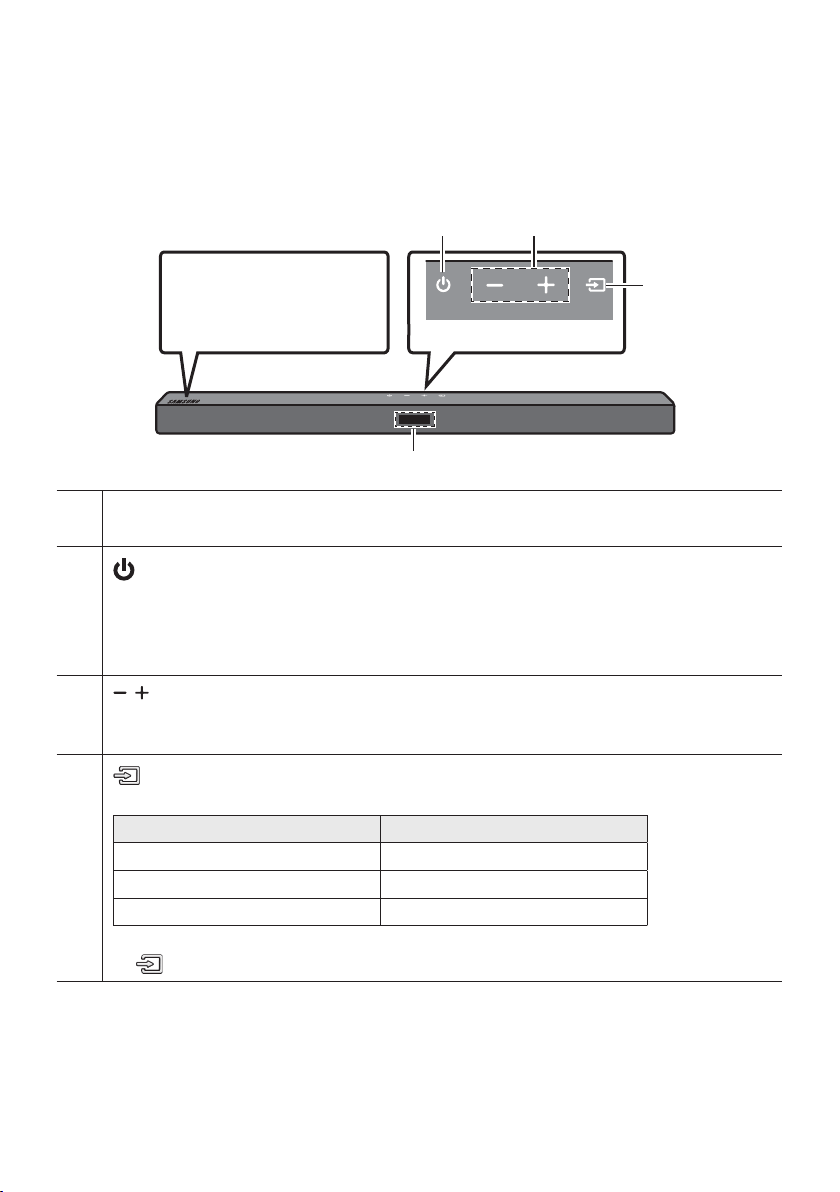
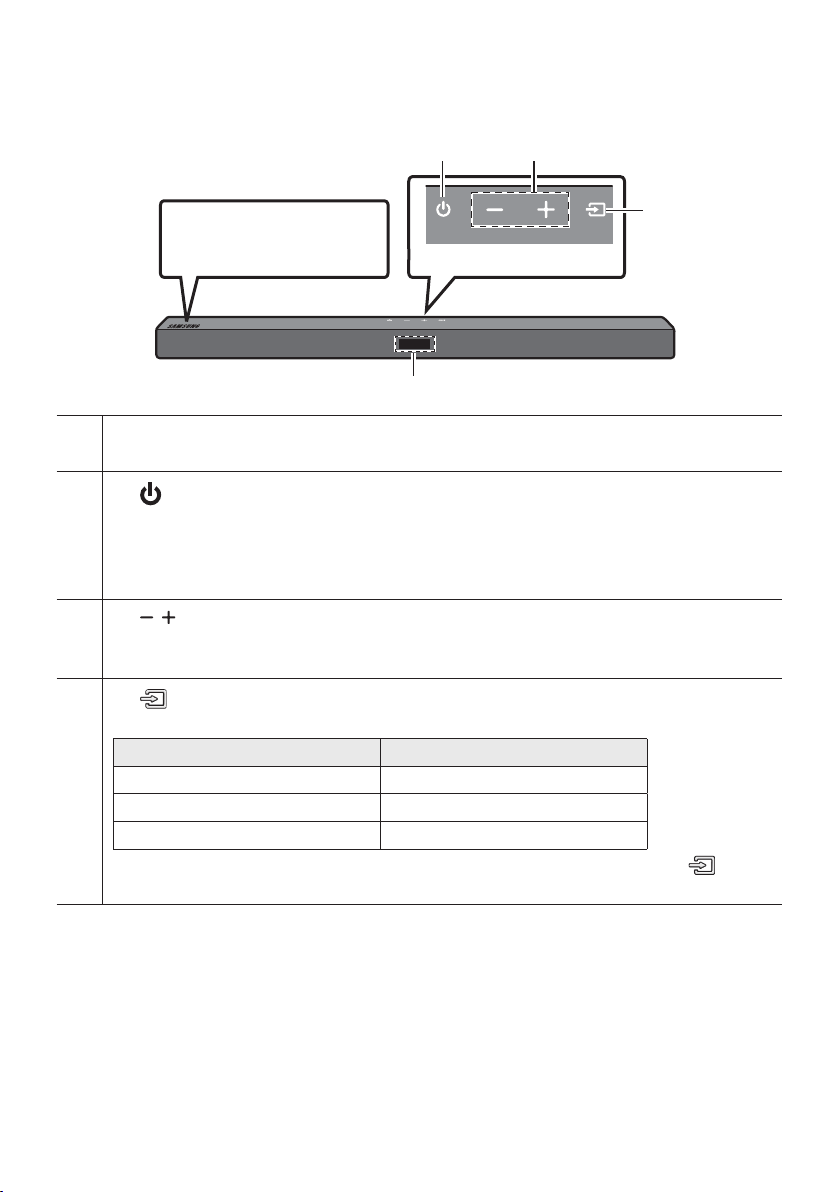
Front Panel / Top Panel of the Soundbar
Position the product so that
the SAMSUNG logo is
located on the top.
Top Panel
Display
Displays the product’s status and current mode.
(Power) Button
Turns the power on and off.
• Auto Power Down Function
The unit turns off automatically in the following situations:
– In D.IN / BT / USB Mode : If there is no audio signal for 18 minutes.
(Volume) Button
Adjusts the volume.
• When adjusted, the volume level appears on the Soundbar’s front display.
(Source) Button
Selects the source input mode.
Input mode Display
Optical Digital input D.IN
BLUETOOTH mode BT
USB mode USB
• To turn on “BT PAIRING” mode, change the source to “BT” mode, and then press and hold the
(Source) button for more than 5 seconds.
• When you plug in the AC cord, the power button will begin working in 4 to 6 seconds.
• When you turn on this unit, there will be a 4 to 5 second delay before it produces sound.
• If you want to enjoy sound only from the Soundbar, you must turn off the TV’s speakers in the Audio
Setup menu of your TV. Refer to the owner’s manual supplied with your TV.
ENG - 4
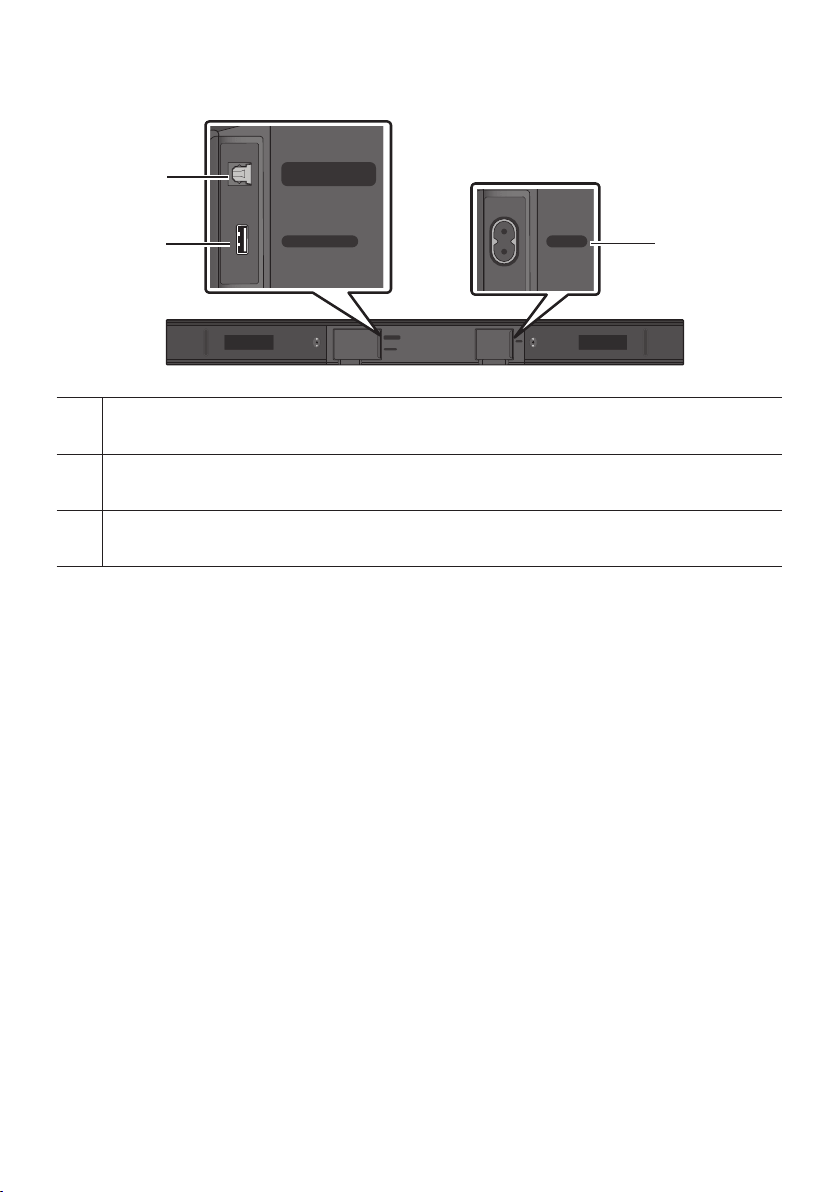
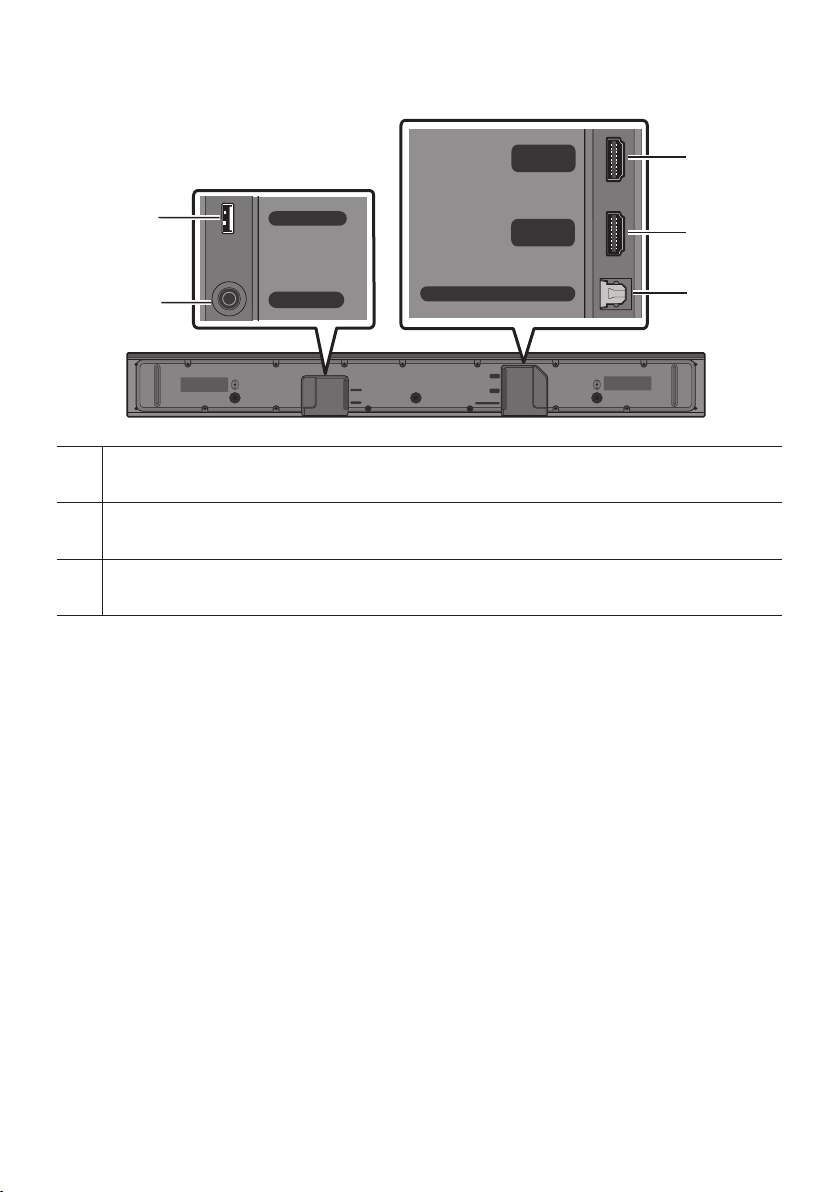
Bottom Panel of the Soundbar
USB (5V 0.5A)
DIGITAL AUDIO IN
(OPTICAL)
POWER
USB (5V 0.5A)
DIGITAL AUDIO IN
(OPTICAL)
POWER
DIGITAL AUDIO IN (OPTICAL)
Connect to the digital (optical) output of an external device.
USB (5V 0.5A)
Connect a USB device here to play music les stored on the USB device through the Soundbar.
POWER
Connect the Soundbar's AC power cable.
• When disconnecting the power cord from a wall outlet, pull the plug. Do not pull the cable.
• Do not connect this unit or other components to an AC outlet until all connections between
components are complete.
ENG - 5
03 CONNECTING THE SOUNDBAR
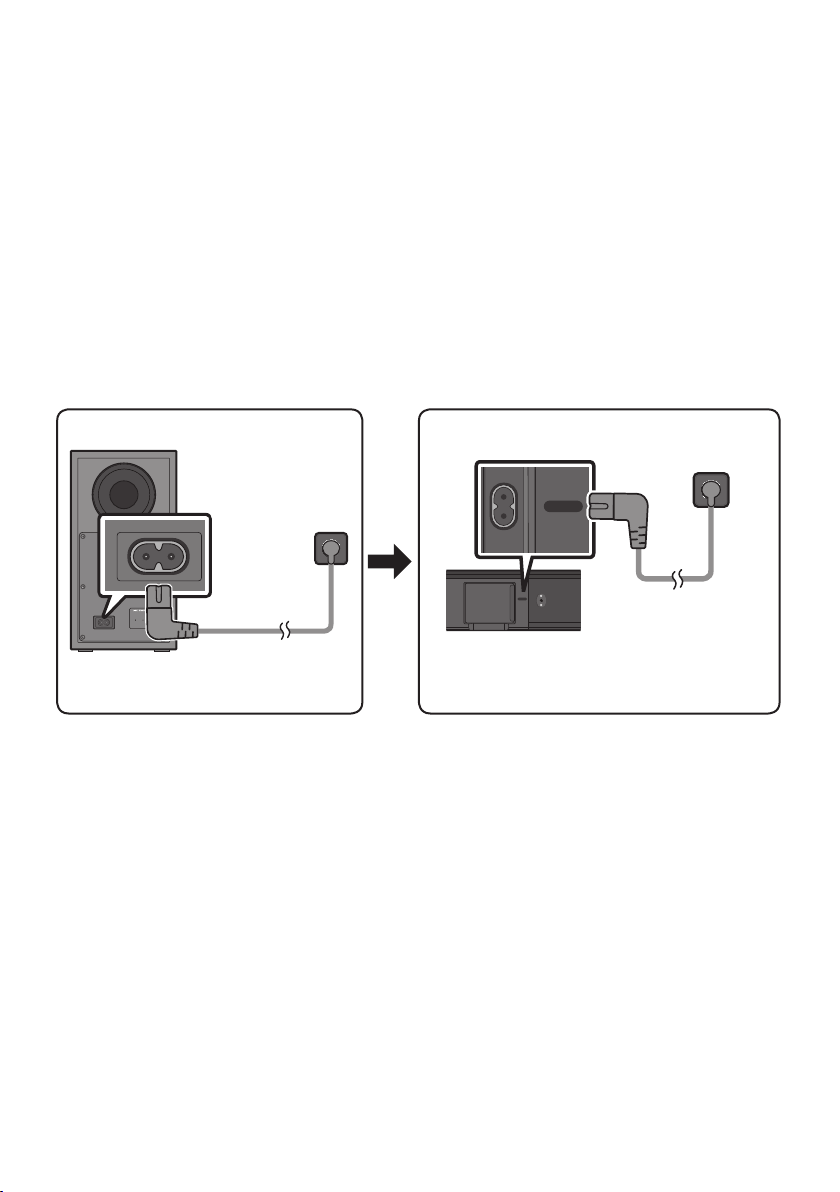
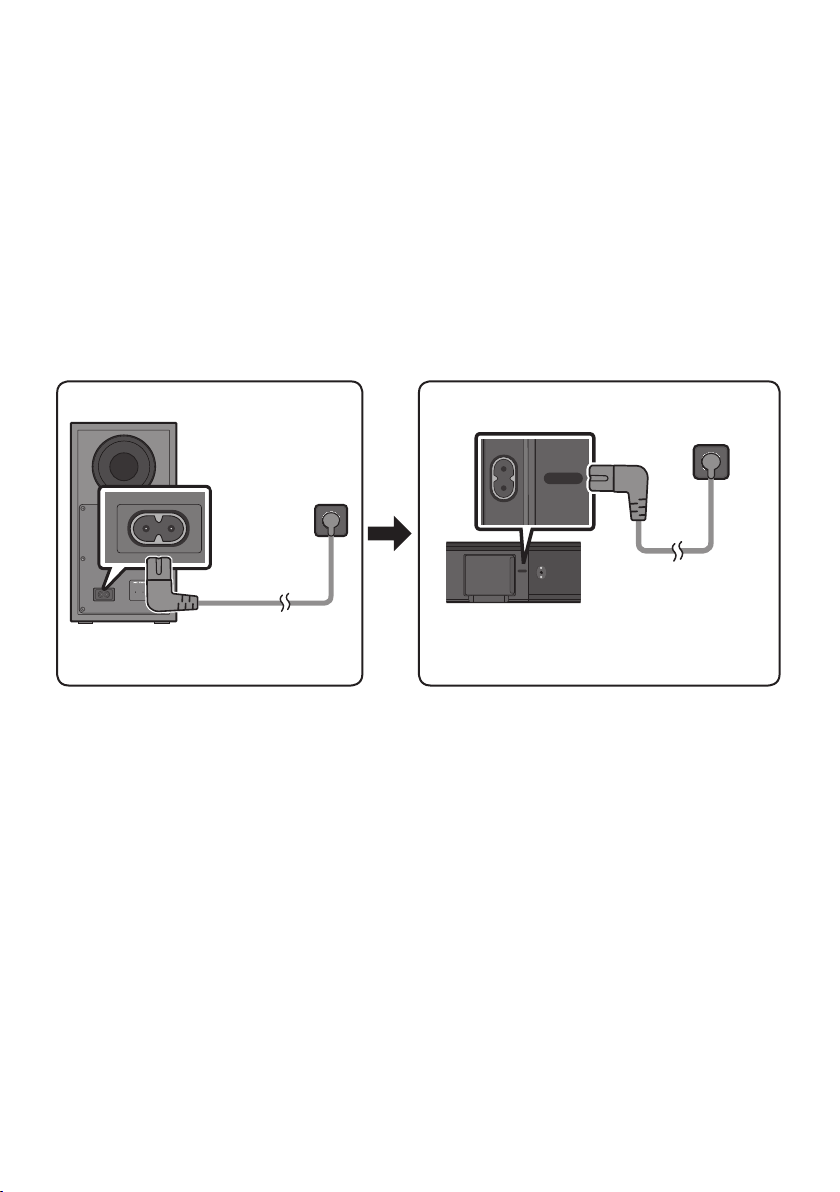
Connecting Electrical Power
Use the power components to connect the Subwoofer and Soundbar to an electrical outlet in the following
order:
1. Connect the power cord to the Subwoofer.
2. Connect the power cord to the Soundbar.
See the illustrations below.
• For more information about the required electrical power and power consumption, refer to the
label attached to the product. (Label: Bottom of the Soundbar Main Unit)
Rear of Subwoofer
Power Cord
Connecting
Electrical Power
Bottom of the
Soundbar Main Unit
Connecting
Electrical Power
Power Cord
USB (5V 0.5A)
DIGITAL AUDIO IN
(OPTICAL)
POWER
USB (5V 0.5A)
DIGITAL AUDIO IN
(OPTICAL)
POWER
USB (5V 0.5A)
DIGITAL AUDIO IN
(OPTICAL)
POWER
USB (5V 0.5A)
DIGITAL AUDIO IN
(OPTICAL)
POWER

ENG - 6
Connecting the Soundbar to the Subwoofer
When the subwoofer is connected, you can enjoy rich bass sound.
Automatic connection between the Subwoofer and the Soundbar
When you turn the power on after connecting the power cables to the Soundbar and subwoofer, the
subwoofer is automatically connected to the Soundbar.
• When auto pairing is complete, the blue indicators at the rear of the subwoofer turn on.
LED Indicator Lights on the Rear of Subwoofer
LED Status Description Resolution
Blue
On
Successfully connected
(normal operation)
-
Blinking Recovering the connection
Check if the power cable attached to the
main Soundbar unit is connected properly
or wait about 5 minutes. If blinking persists,
try manually connecting the subwoofer.
See page 7.
Red On
Standby (with the Soundbar
main unit turned off)
Check if the power cable attached to the
main Soundbar unit is connected properly.
Connection failed
Connect again. See the instructions for
manual connection on page 7.
Red and
blue
Blinking Malfunction
See the contact information for the
Samsung Service Centre in this manual.
ENG - 7
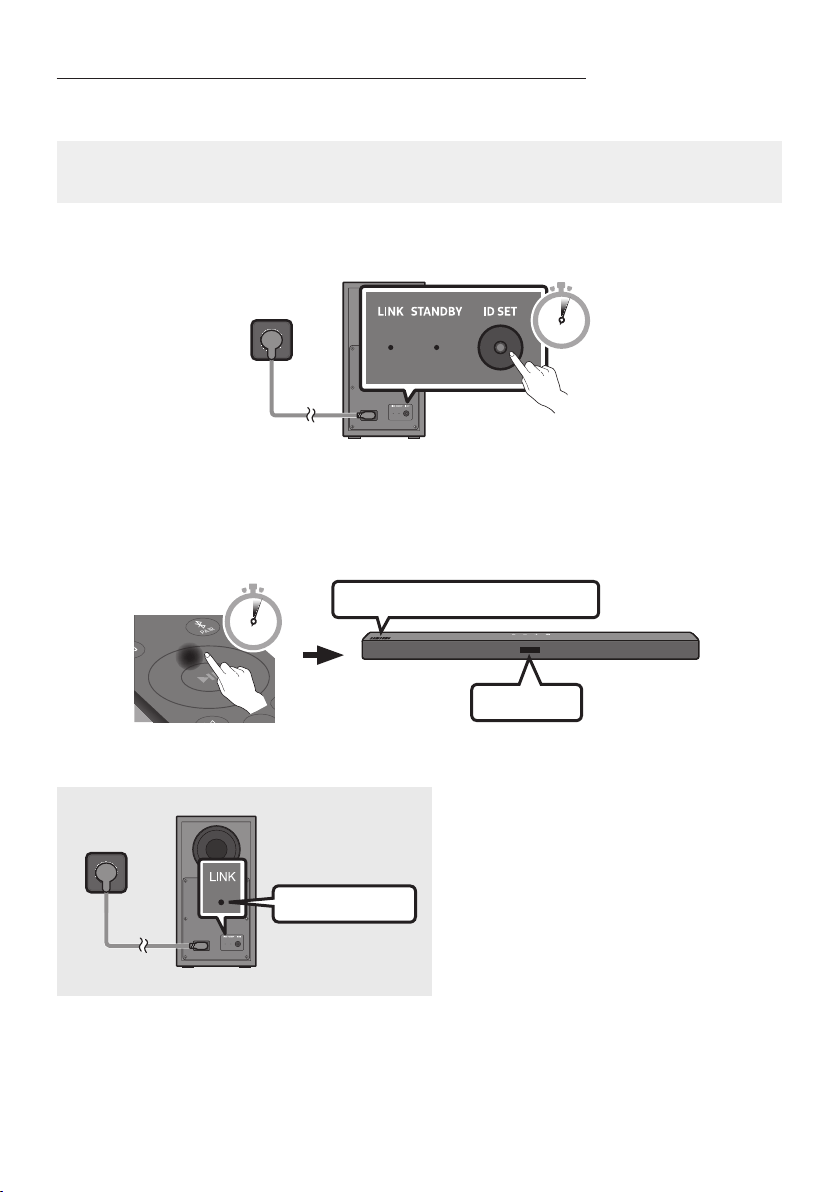
Manually connecting the Subwoofer if automatic connection fails
Before performing the manual connection procedure below:
• Check whether the power cables for the Soundbar and subwoofer are connected properly.
• Make sure that the Soundbar is turned on.
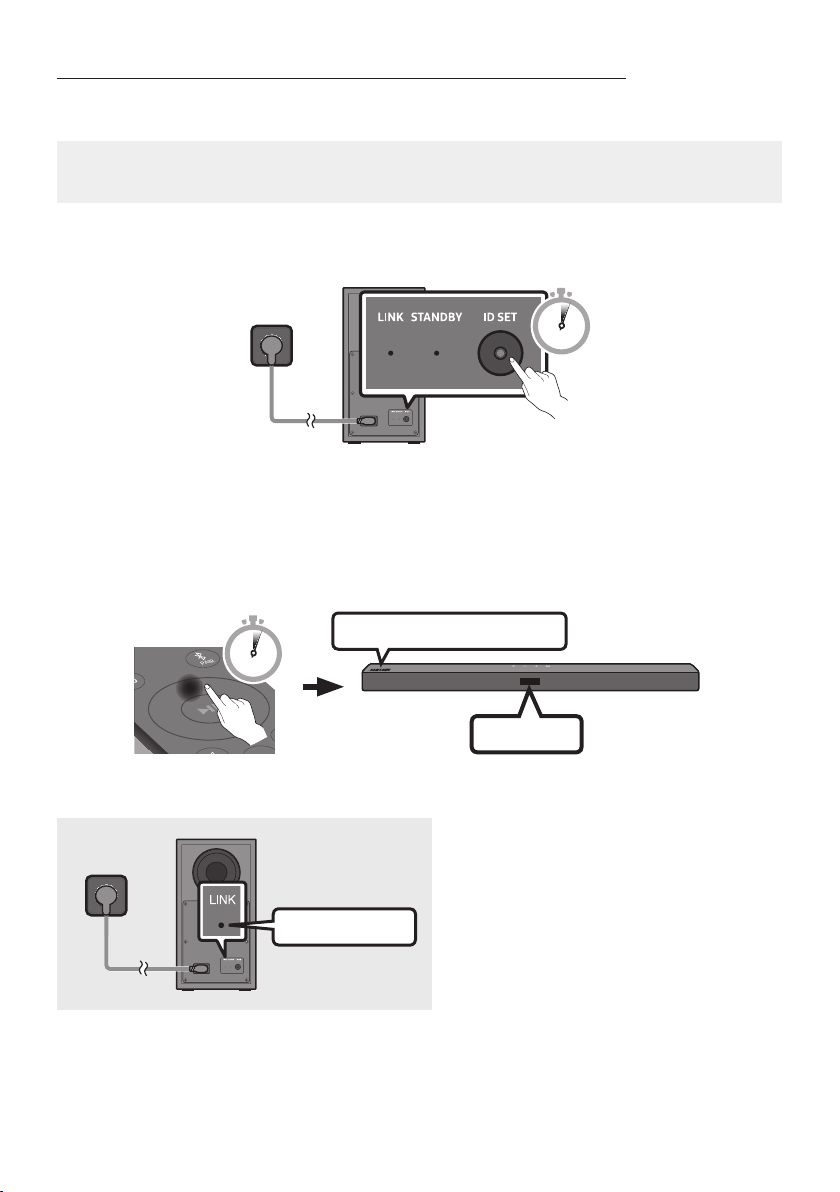
1. Press and hold ID SET on the rear of the subwoofer for at least 5 seconds.
• The red indicator on the rear of the subwoofer turns off and the blue indicator blinks.
5 Sec
Rear of Subwoofer
2. Press and hold the Up button on the remote control for at least 5 seconds.
• The ID SET message appears on the display of the Soundbar for a moment, and then it
disappears.
• The Soundbar will automatically power on when ID SET is complete.
SOUND
MODE
PAIR
5 Sec
ID SET
SAMSUNG logo is on the top
3. Check if the LINK LED is solid blue (connection complete).
Blue is On
The LINK LED indicator stops blinking and
glows a solid blue when a connection is
established between the Soundbar and the
Wireless Subwoofer.

ENG - 8
NOTES
• Do not connect the power cord of this product or your TV to a wall outlet until all connections
between components are complete.
• Before moving or installing this product, be sure to turn off the power and disconnect the power cord.
• If the main unit is powered off, the wireless subwoofer will go into stand-by mode and the
STANDBY LED on the rear of the sub-woofer will turn red after blinking blue several times.
• If you use a device that uses the same frequency (5.8GHz) as the Soundbar near the Soundbar,
interference may cause some sound interruption.
• The maximum transmission distance of the main unit’s wireless signal is about 10 m, but may vary
depending on your operating environment. If a steel-concrete or metallic wall is between the main
unit and the wireless subwoofer, the system may not operate at all because the wireless signal
cannot penetrate metal.
PRECAUTIONS
• Wireless receiving antennas are built into the wireless subwoofer. Keep the unit away from water
and moisture.
• For optimal listening performance, make sure that the area around the wireless subwoofer and the
Wireless Receiver Module (sold separately) is clear of any obstructions.
ENG - 9
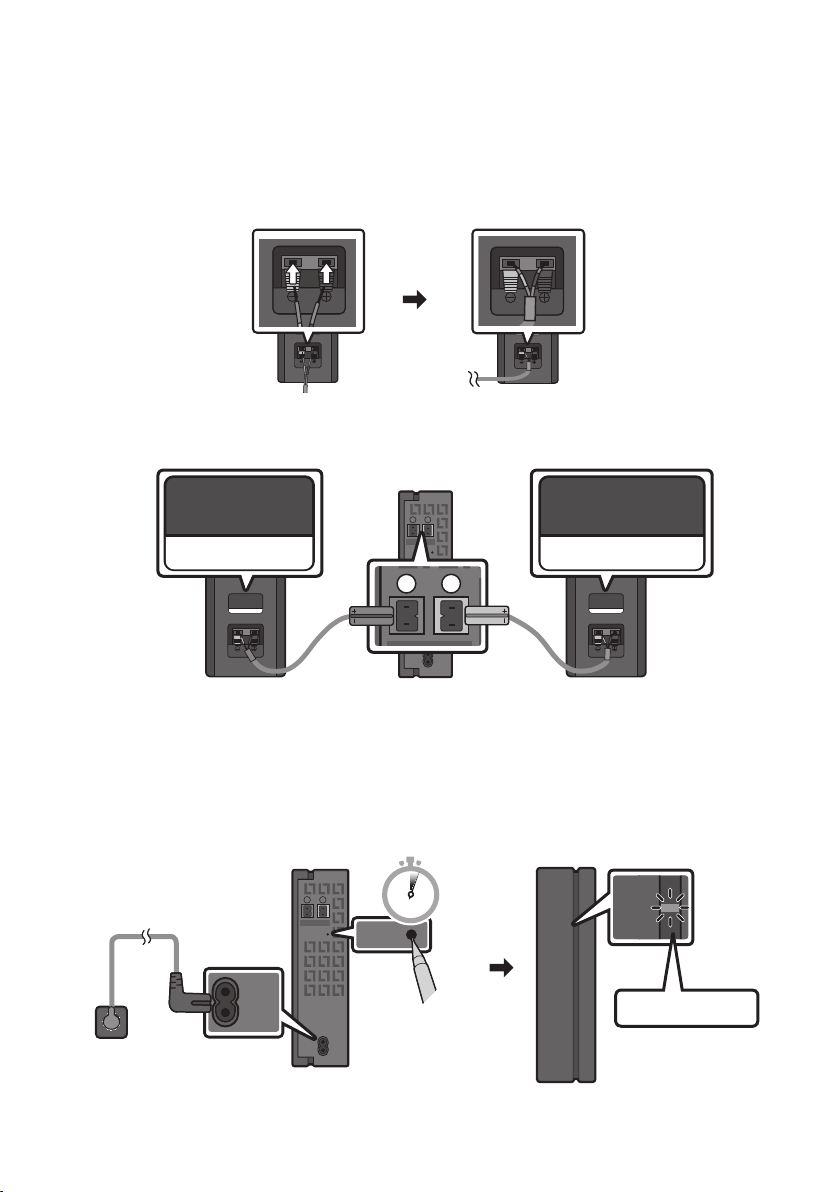
Connecting an SWA-9100S (Sold Separately) to your Soundbar
Expand to true wireless surround sound by connecting the Samsung Wireless Rear Speaker Kit
(SWA-9100S, sold separately) to your Soundbar.
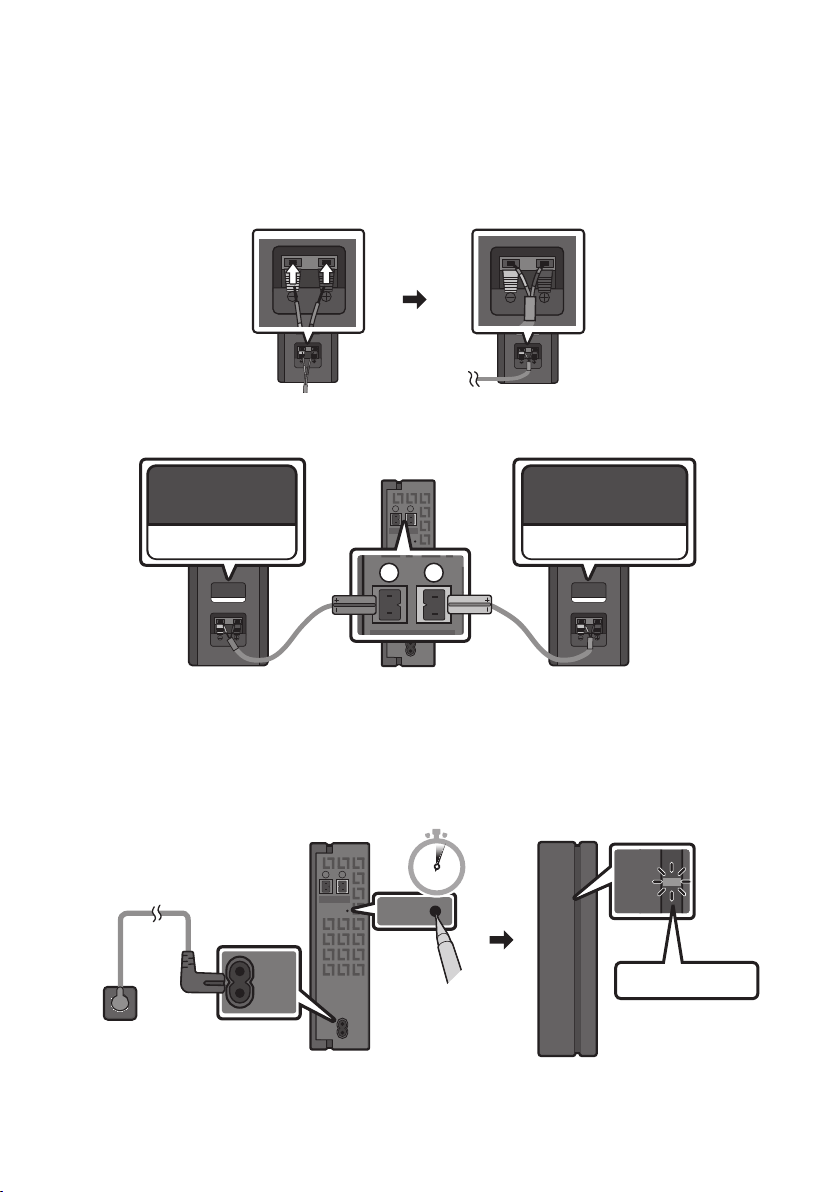
1. Connect the Wireless Receiver Module to 2 Surround Speakers.
– When connecting the speaker cable, connect the core wire to the speaker.
SURROUND-RIGHT
SURROUND-RIGHT
– The speaker cables are colour coded.
SURROUND-LEFT
ID SET
L
R
SURROUND SPEAKERS OUT
SPEAKER IMPEDANCE : 3Ω
POWER
ID SET
L
R
SURROUND SPEAKERS OUT
SPEAKER IMPEDANCE : 3Ω
SURROUND-RIGHT
SURROUND-LEFT SURROUND-RIGHT
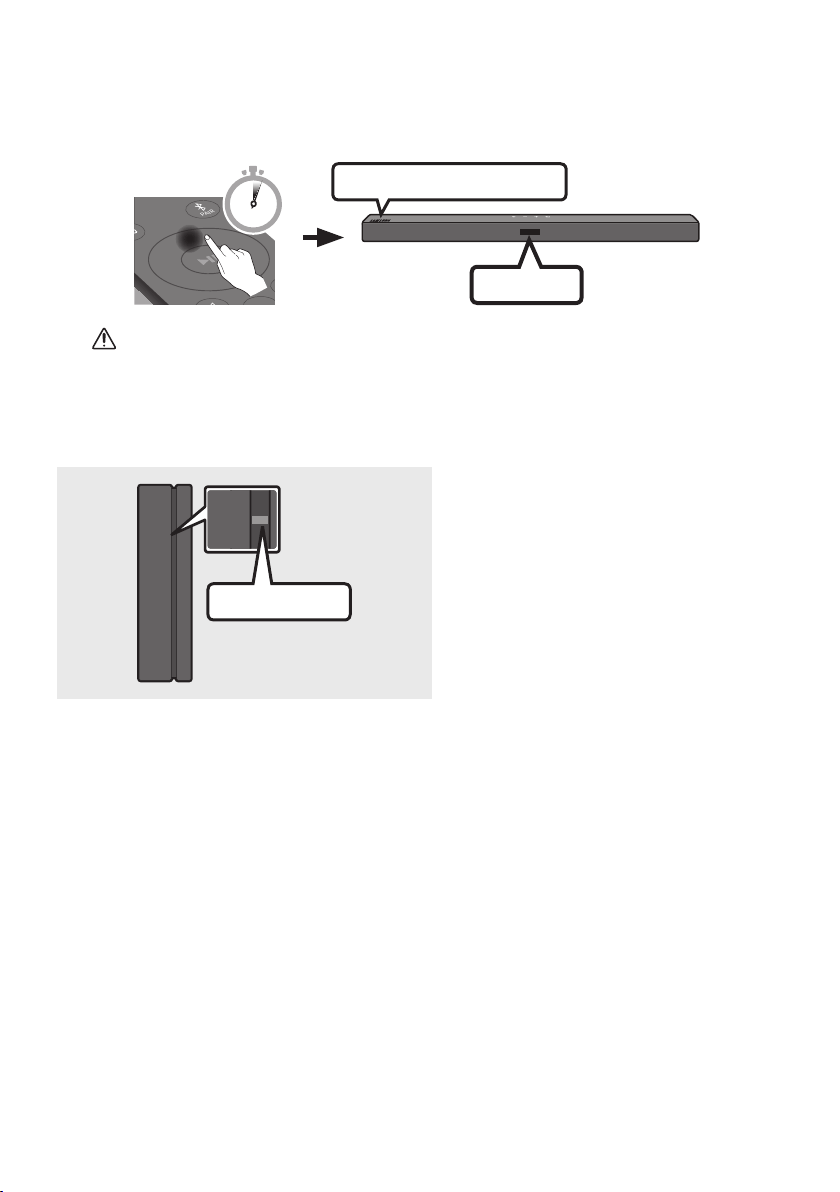
2. Check the standby status of the Wireless Receiver Module after plugging it into an electrical outlet.
• The LINK LED indicator (blue LED) on the Wireless Receiver Module blinks. If the LED does not
blink, press the ID SET button on the back of the Wireless Receiver Module with a pen tip for
5~6 seconds until the LINK LED indicator blinks (in Blue). For more about the LED, please refer
to the SWA-9100S user manual.
ID SET
L
R
SURROUND SPEAKERS OUT
SPEAKER IMPEDANCE : 3Ω
POWER
POWER
ID SET
SURROUND SPEAKERS OUT
SPEAKER IMPEDANCE : 3Ω
STANDBY
LINK
STANDBY
LINK
Blue blinking
5 Sec
ENG - 10
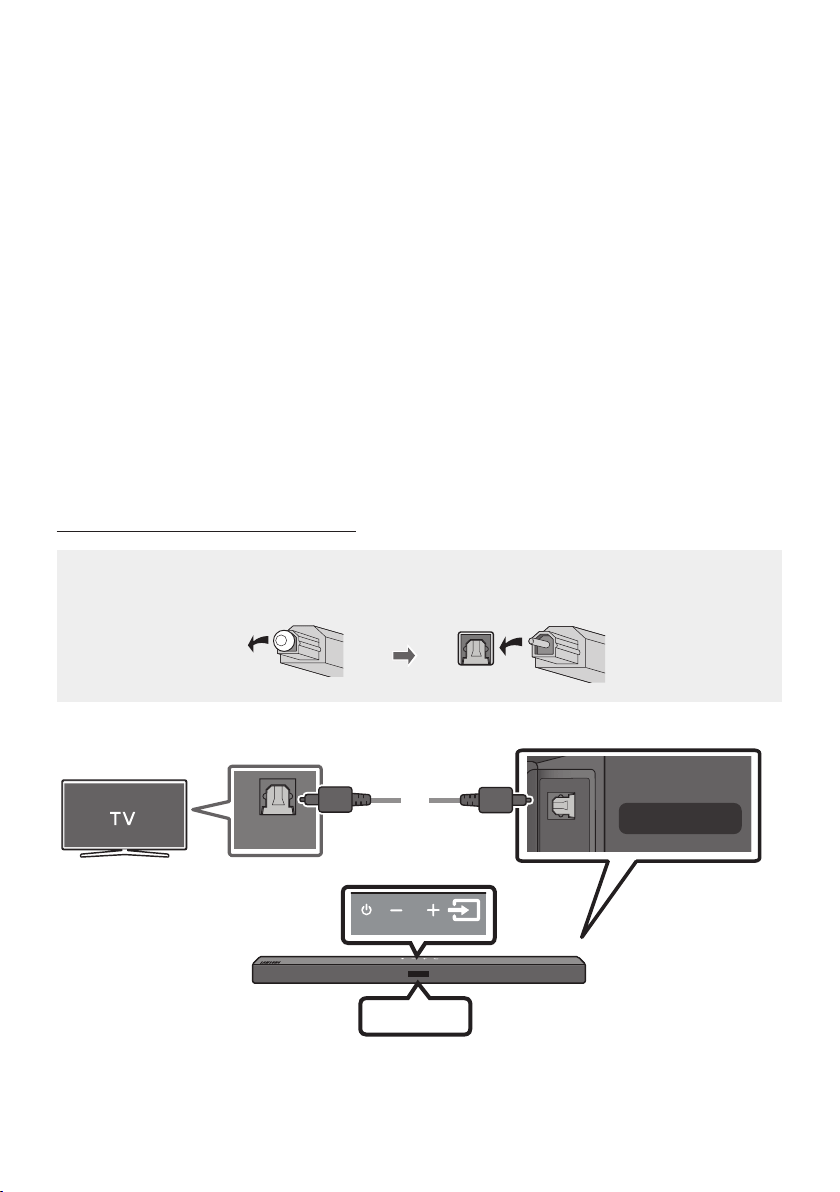
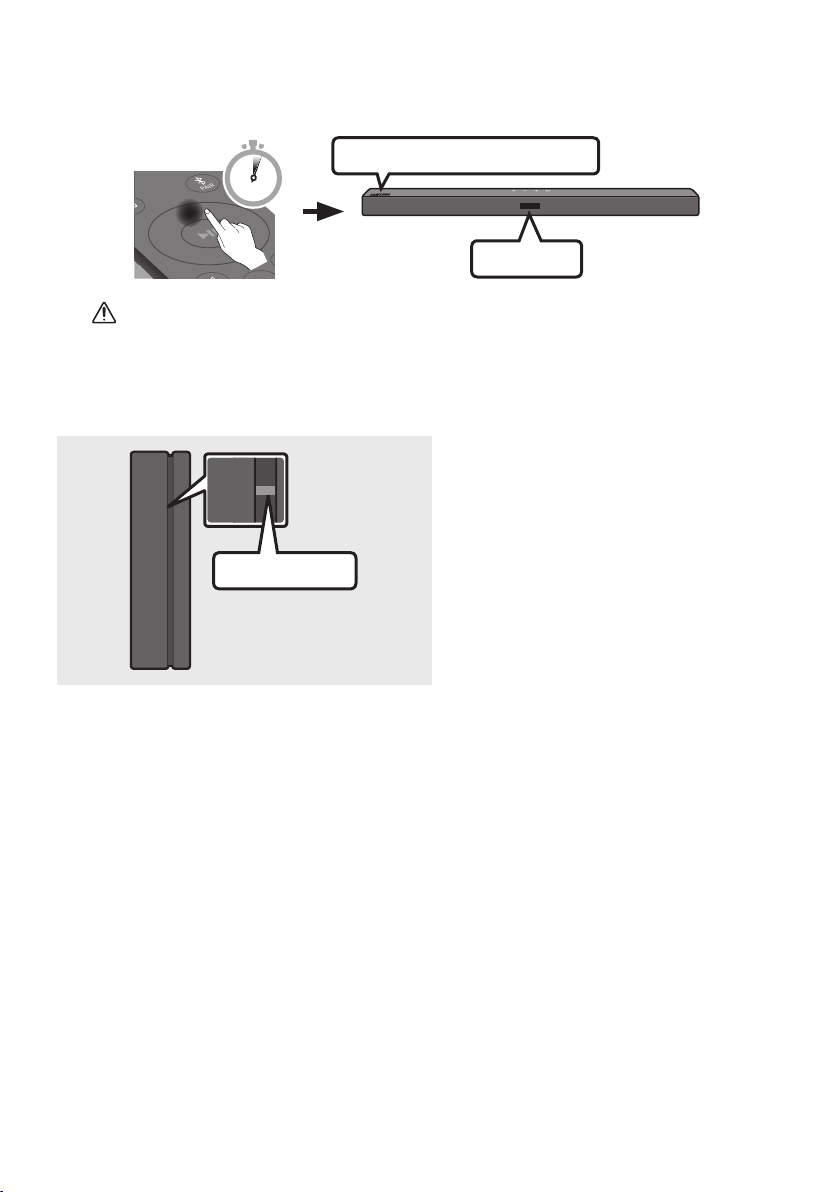
3. Press and hold the Up button on the remote control for at least 5 seconds.
• The ID SET message appears on the display of the Soundbar for a moment, and then it
disappears.
• The Soundbar will automatically power on when ID SET is complete.
SOUND
MODE
PAIR
5 Sec
ID SET
SAMSUNG logo is on the top
CAUTION
• If your Soundbar was playing music when it connects to the SWA-9100S, you may hear some
stuttering from the woofer as the connection nalises.
4. Check if the LINK LED is solid blue (connection complete).
STANDBY
LINK
STANDBY
LINK
Blue is On
The LINK LED indicator stops blinking and
glows a solid blue when a connection is
established between the Soundbar and the
Wireless Receiver Module.
5. If the SWA-9100S is not connected, repeat the procedure from Step 2.
ENG - 11
04 CONNECTING TO YOUR TV
Hear TV sound from your Soundbar through wired or wireless connections.
• When the Soundbar is connected to selected Samsung TVs, the Soundbar can be controlled using
the TV’s remote control.
– This feature is supported by 2017 and later Samsung Smart TVs that support Bluetooth when
you connect the Soundbar to the TV using an optical cable.
– This function also allows you to use the TV menu to adjust the sound eld and various settings
as well as the volume and mute.
Method 1. Connecting with a Cable
When the audio in a broadcast is encoded in Dolby Digital and the “Digital Output Audio Format” on
your TV is set to PCM, we recommend that you change the setting to Dolby Digital. When the setting on
the TV is changed, you will experience better sound quality. (The TV menu may use different words for
Dolby Digital and PCM depending on the TV manufacturer.)
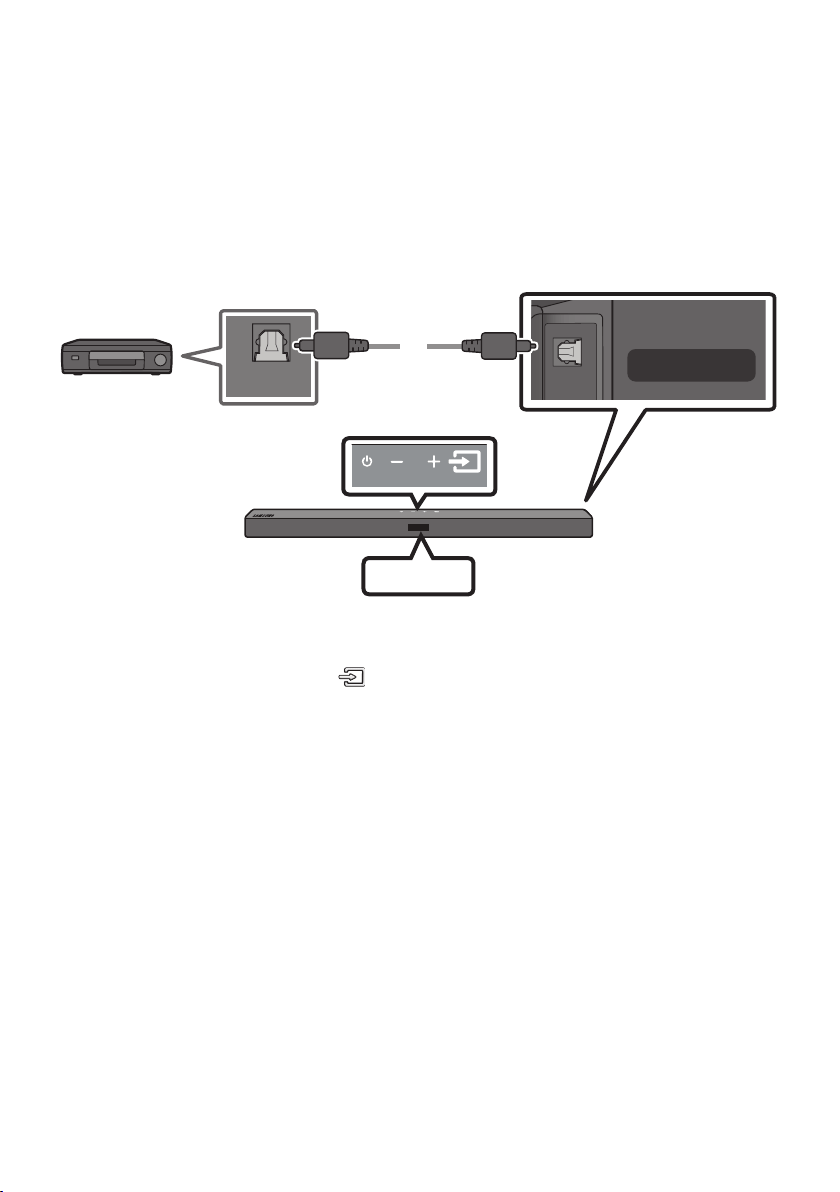
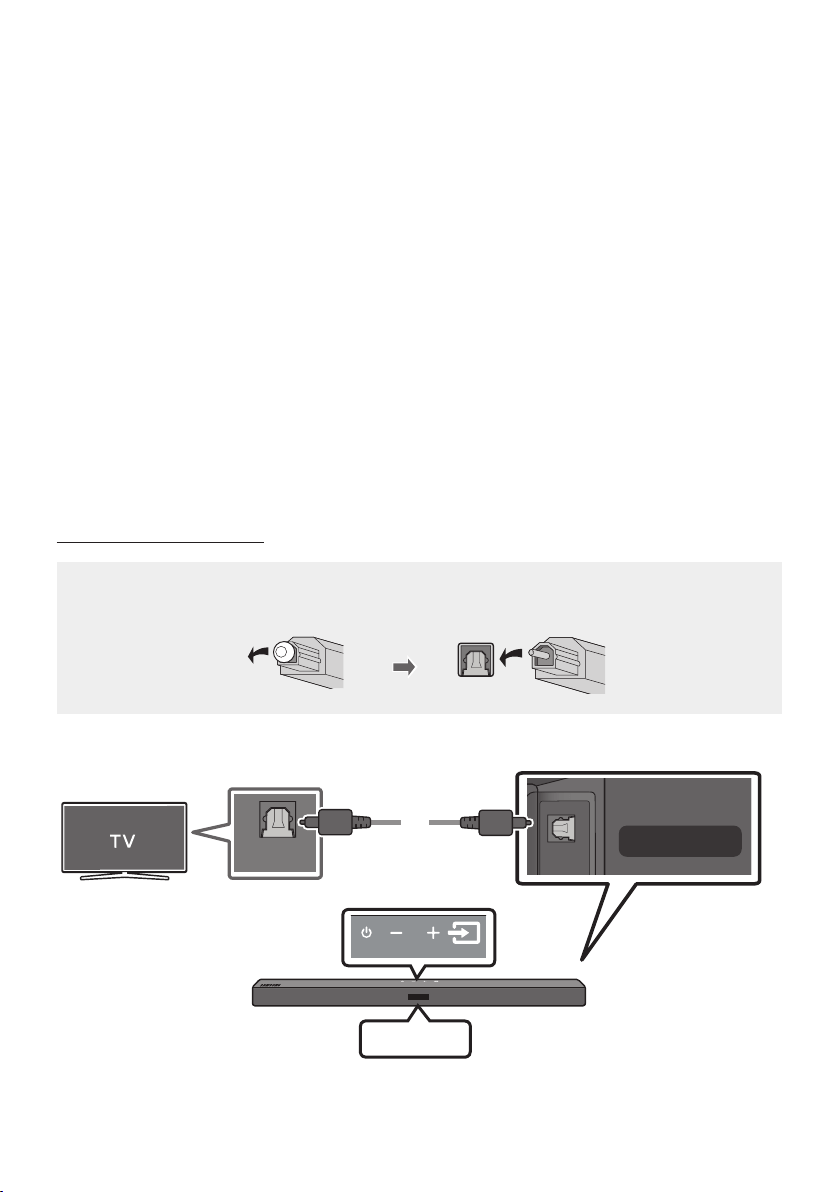
Connecting using an Optical Cable
Pre-connection Checklist
• When you use an optical cable and the terminals have covers, be sure to remove the covers.
OPTICAL OUT
USB (5V 0.5A)
DIGITAL AUDIO IN
(OPTICAL)
Top of the Soundbar
D.IN
Optical Cable
Bottom of the Soundbar
ENG - 12
1. Connect the DIGITAL AUDIO IN (OPTICAL) port on the Soundbar to the OPTICAL OUT port of the
TV with a digital optical cable.
2. Press the (Source) button on the top panel or remote control, and then select the “D.IN” mode.
Method 2. Connecting Wirelessly
Connecting a TV via Bluetooth
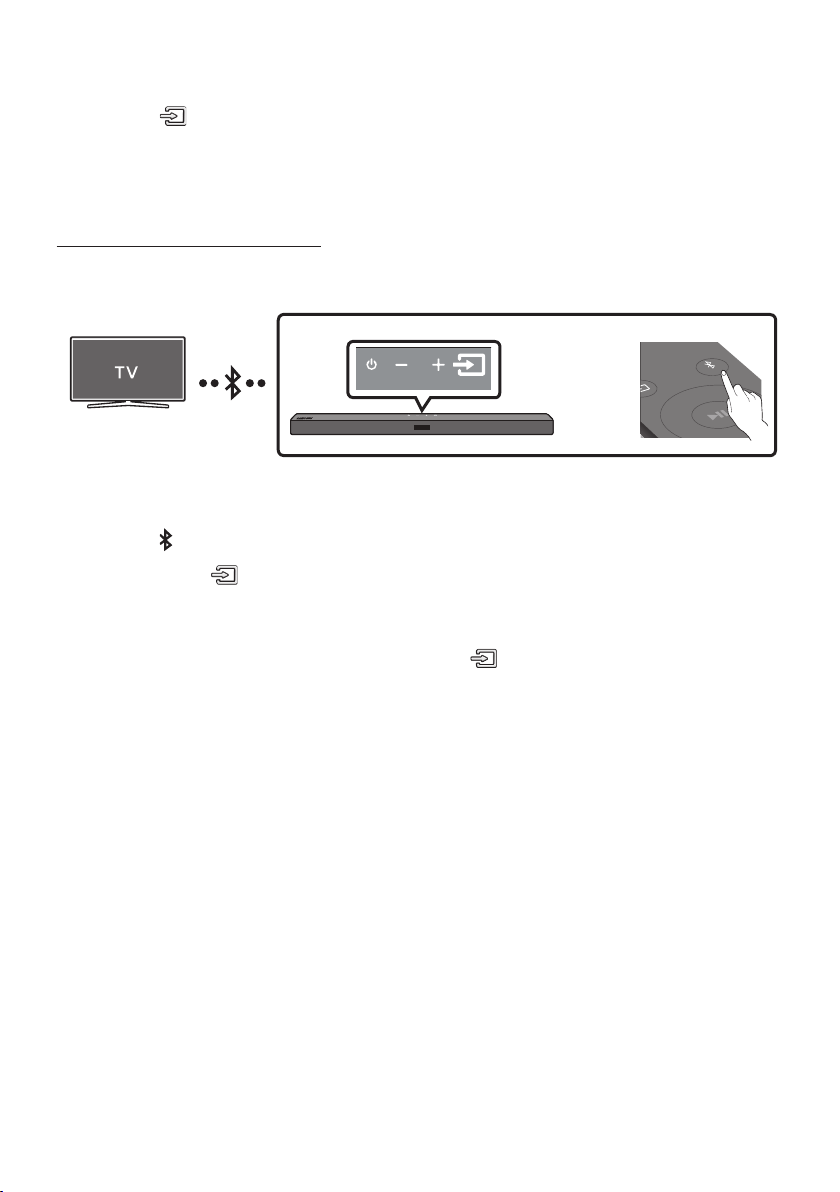
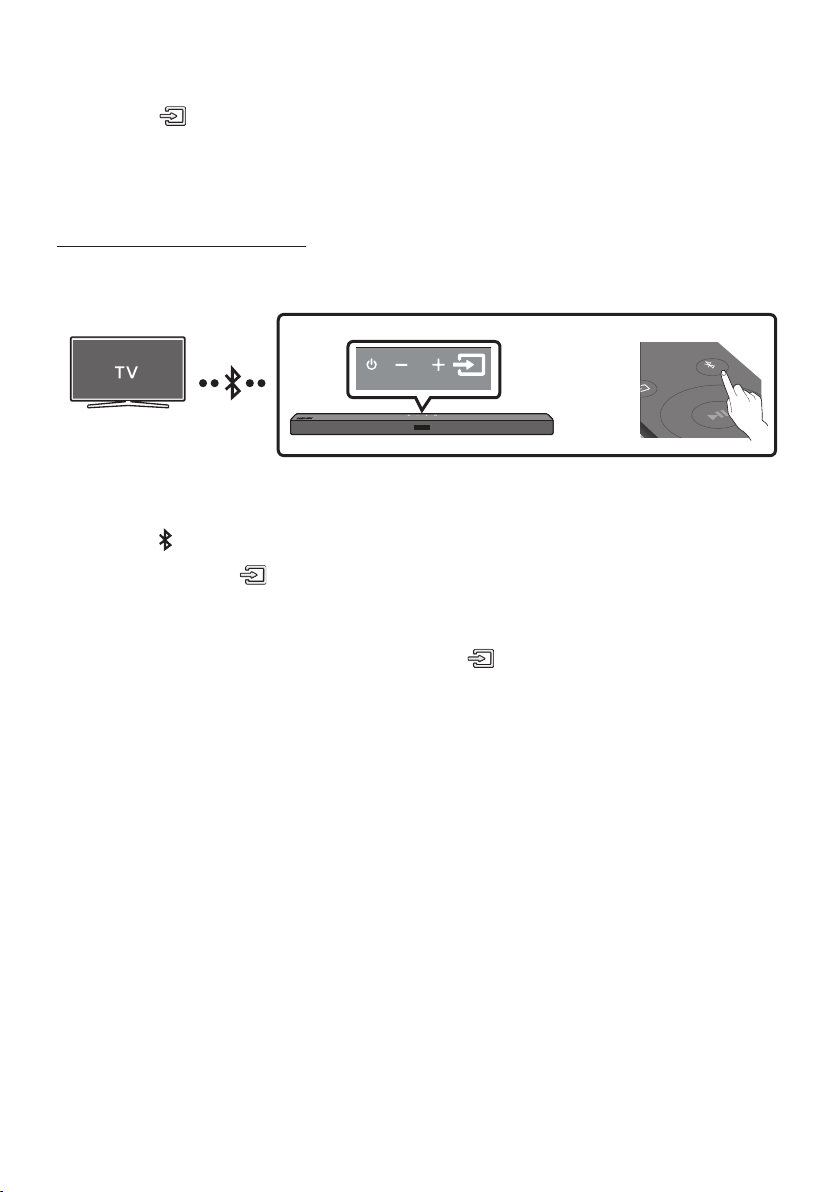
When a TV is connected using Bluetooth, you can hear stereo sound without the hassle of cabling.
• Only one TV can be connected at a time.
SOUND
MODE
PAIR
OR
The initial connection
1. Press the PAIR button on the remote control to enter the “BT PAIRING” mode.
(OR)
a. Press the (Source) button on the top panel and then select “BT”.
“BT” changes to “BT PAIRING” in a few seconds automatically or changes to “BT READY” if
there is a connect record.
b. When “BT READY” appears, press and hold the (Source) button on the top panel of the
Soundbar for more than 5 seconds to display “BT PAIRING”.
2. Select Bluetooth mode on the TV. (For more information, see the TV’s manual.)
3. Select “[AV] Samsung Soundbar A4-Series” from the list on TV’s screen.
An available Soundbar is indicated with “Need Pairing” or “Paired” on the TV’s Bluetooth device
list. To connect the TV to the Soundbar, select the message, and then establish a connection.
• When the TV is connected, [TV Name] → “BT” appears on the Soundbar’s front display.
4. You can now hear TV sound from the Soundbar.
If the device fails to connect
• If a previously connected Soundbar listing (e.g. “[AV] Samsung Soundbar A4-Series”) appears in
the list, delete it.
• Then repeat steps 1 through 3.
NOTE
• After you have connected the Soundbar to your TV the rst time, use the “BT READY” mode to
reconnect.

ENG - 13
Disconnecting the Soundbar from the TV
Press the (Source) button on the top panel or on the remote control and switch to any mode but “BT”.
• Disconnecting takes time because the TV must receive a response from the Soundbar.
(The time required may differ, depending on the TV model.)
• To cancel the automatic Bluetooth connection between the Soundbar and TV, press the
Left button
on the remote control for 5 seconds with the Soundbar in “BT READY” status. (Toggle On → Off)
What is the difference between BT READY and BT PAIRING?
• BT READY : In this mode, you can search for previously connected TVs or connect a previously
connected mobile device to the Soundbar.
• BT PAIRING : In this mode, you can connect a new device to the Soundbar. (Press the PAIR button
on the remote control or press and hold the (Source) button on the top of the Soundbar for
more than 5 seconds while the Soundbar is in “BT” mode.)
NOTES
• If asked for a PIN code when connecting a Bluetooth device, enter <0000>.
• In Bluetooth connection mode, the Bluetooth connection will be lost if the distance between the
Soundbar and the Bluetooth device exceeds 10 m.
• The Soundbar automatically turns off after 18 minutes in the Ready state.
• The Soundbar may not perform Bluetooth search or connection correctly under the following
circumstances:
– If there is a strong electrical eld around the Soundbar.
– If several Bluetooth devices are simultaneously paired with the Soundbar.
– If the Bluetooth device is turned off, not in place, or malfunctions.
• Electronic devices may cause radio interference. Devices that generate electromagnetic waves
must be kept away from the Soundbar main unit - e.g., microwaves, wireless LAN devices, etc.
ENG - 14
05 CONNECTING AN EXTERNAL DEVICE
Connect to an external device via a wired connection or Bluetooth connection to play the external
device’s sound through the Soundbar.
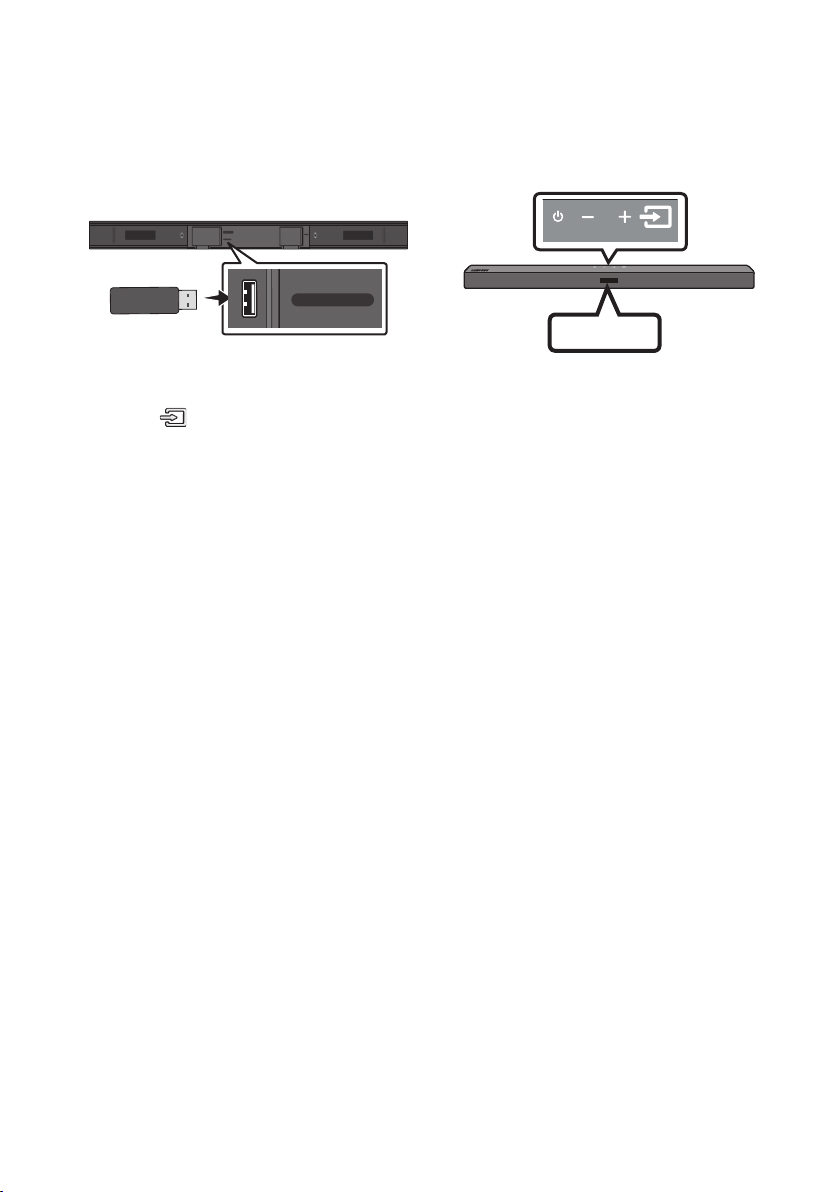
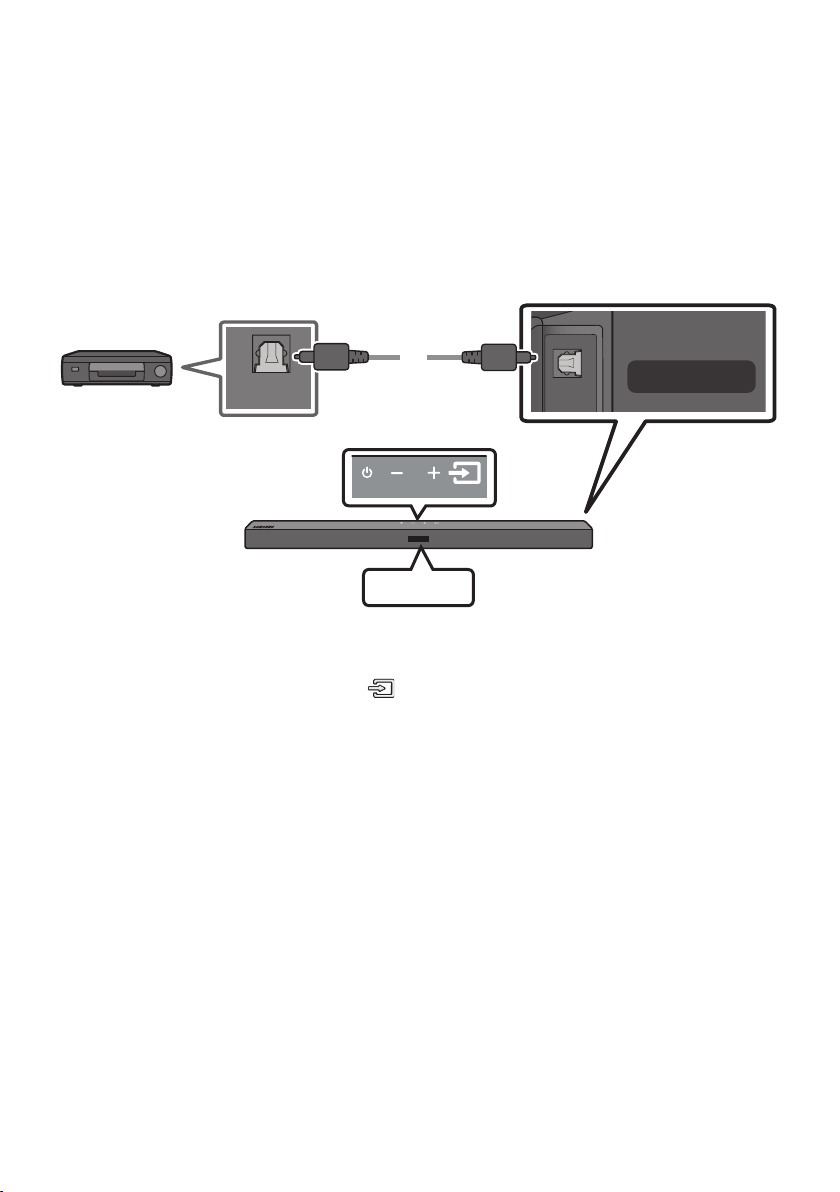
Connecting using an Optical Cable
OPTICAL OUT
USB (5V 0.5A)
DIGITAL AUDIO IN
(OPTICAL)
Top of the Soundbar
D.IN
Optical Cable
Bottom of the Soundbar
BD / DVD player /
Set-top box /
Game console
1. Connect DIGITAL AUDIO IN (OPTICAL) on the main unit to the OPTICAL OUT port of the Source
Device using a digital optical cable.
2. Select “D.IN” mode by pressing the (Source) button on the top panel or on the remote control.
ENG - 15
06 CONNECTING A USB STORAGE DEVICE
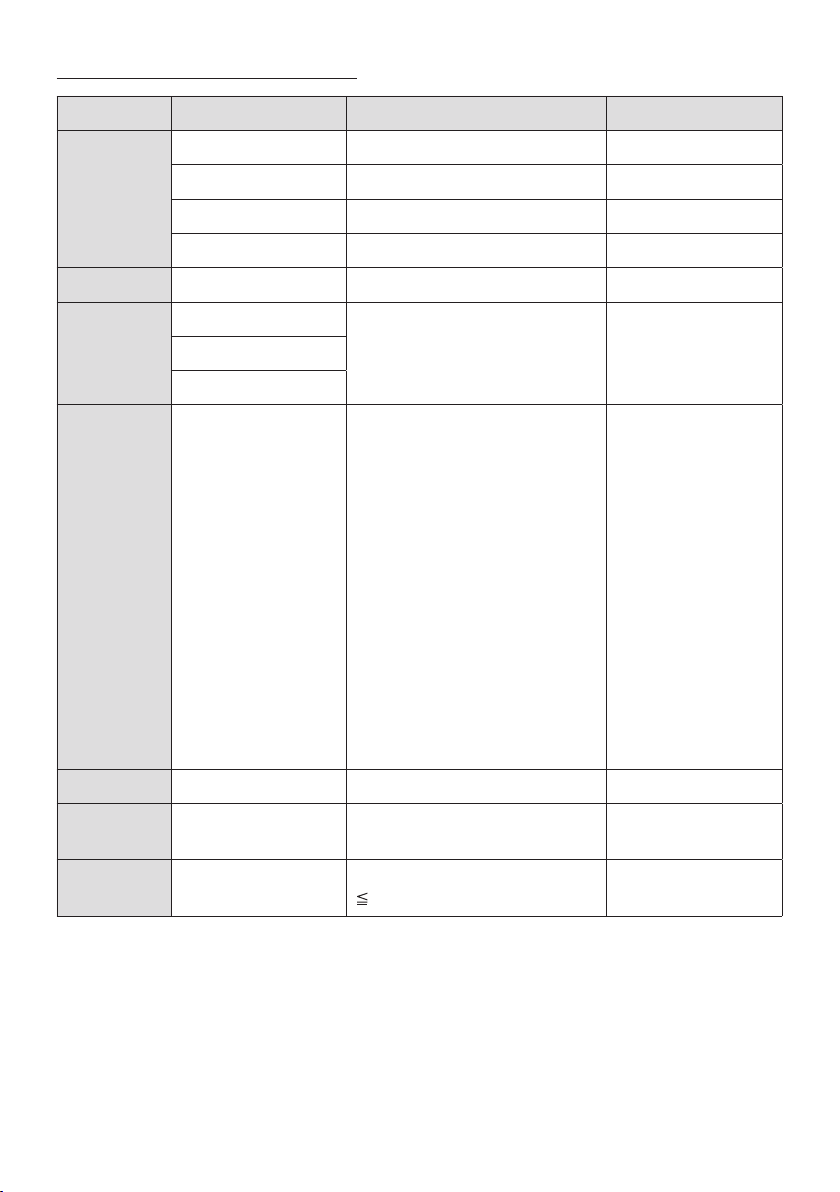
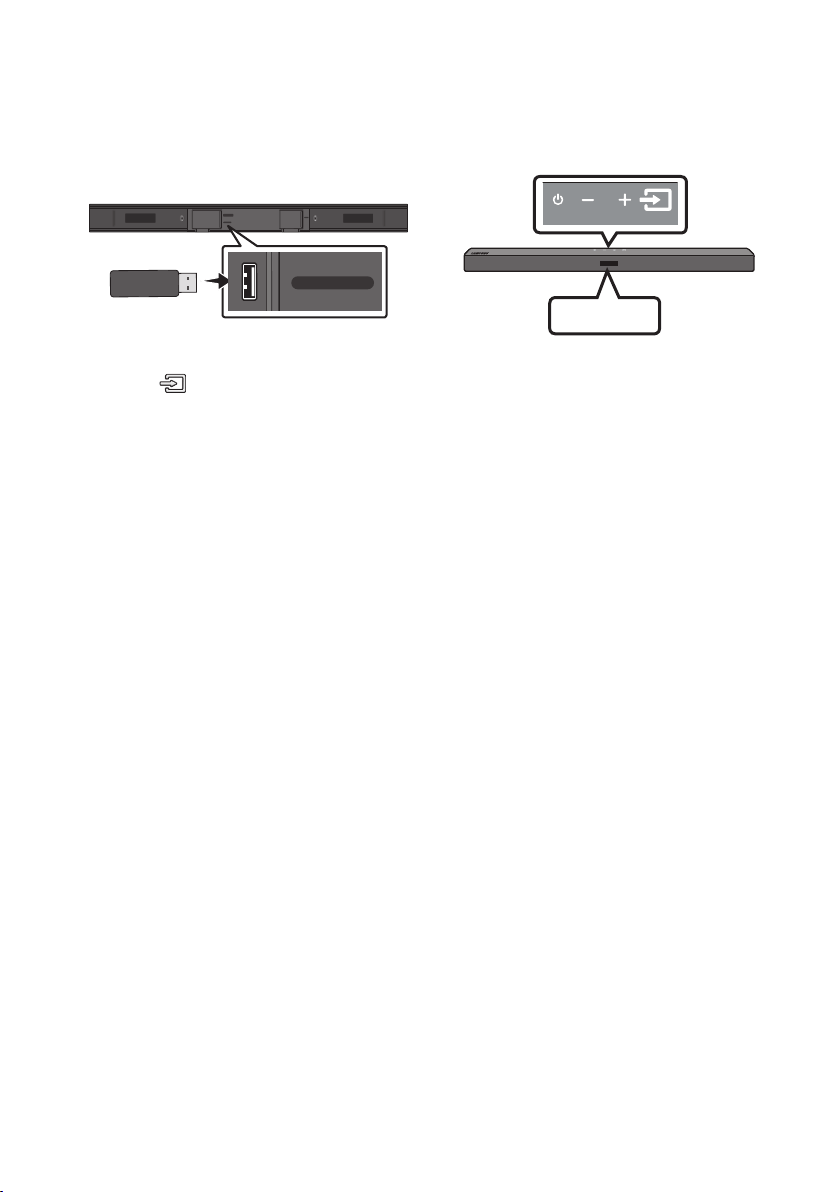
You can play music les located on USB storage devices through the Soundbar.
USB
USB (5V 0.5A)
DIGITAL AUDIO IN
(OPTICAL)
POWER
USB (5V 0.5A)
DIGITAL AUDIO IN
(OPTICAL)
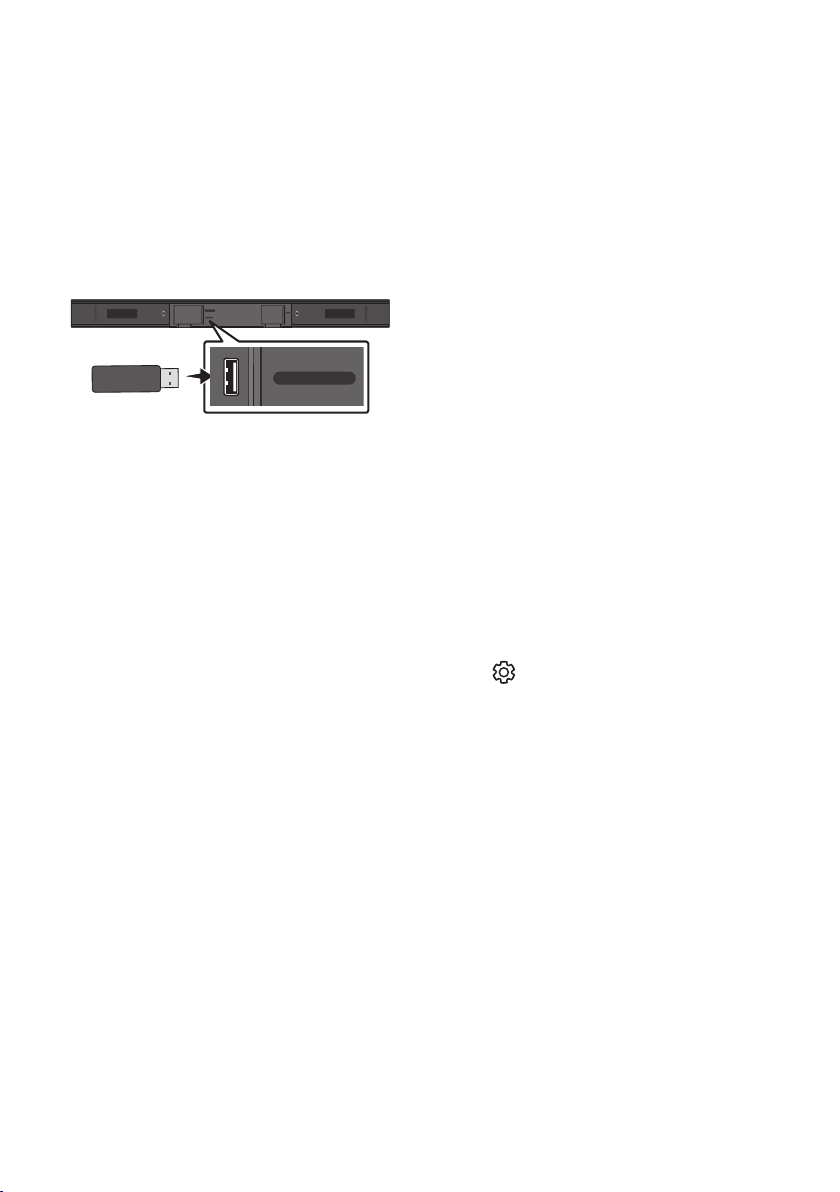
USB port
1. Connect the USB device to the USB port on the bottom of the product.
2. Press the (Source) button on the top panel or on the remote control, and then select “USB”.
3. “USB” appears in the display screen.
4. Play music les from the USB storage device through the Soundbar.
• The Soundbar automatically turns off (Auto Power Down) if no USB device has been connected
for more than 18 minutes.
ENG - 16
File Format Type Compatibility list
Extension Codec Sampling Rate Bit Rate
*.mp3 MPEG 1 Layer2 32kHz ~ 48kHz 32kbps~320kbps
MPEG 1 Layer3 32kHz ~ 48kHz 32kbps~320kbps
MPEG 2 Layer3 16kHz ~ 24kHz 8kbps~160kbps
MPEG 2.5 Layer3 8kHz ~ 12kHz 8kbps~160kbps
*.wma WMA7/8/9/STD 8kHz ~ 48kHz 32kbps~320kbps
*.aac AAC
8kHz ~ 96kHz < 1728kbps
A AC-LC
HE-AAC
*.ogg Vorbis codec (8, 16, 22.05, 32, 44.1, 48)kHz
unsupport ogg:
1. block size 0 < 256,
block size 0 > 1024
2. block size 1 < 512,
block size 1 > 4096
3. codebook counter >
64
4. codebook entry > 640
5. oor counter > 2
6. oor type 0
7. residua counter > 2
8. dimension != 2
9. mapping counter > 2
10. mode counter > 2
11. residue type !=
channel number
*.ac - 8kHz ~ 192kHz < 5Mbps
*.wav
PCM/LPCM/IMA_
ADPCM/MPEG/MULAW
8kHz ~ 192kHz < 5Mbps
*.AIFF
Compression type:
alwa, ulaw, sowt
(8, 16, 22.05, 32, 44.1, 48, 96, 192)kHz
2 channels
< 5Mbps
• If there are too many folders (about 256) and les (about 999) stored on the USB device, it may take
the Soundbar some time to access and play les.
• Only USB Format Type FAT 32 is supported for USB storage device connection.
ENG - 17
07 CONNECTING A MOBILE DEVICE
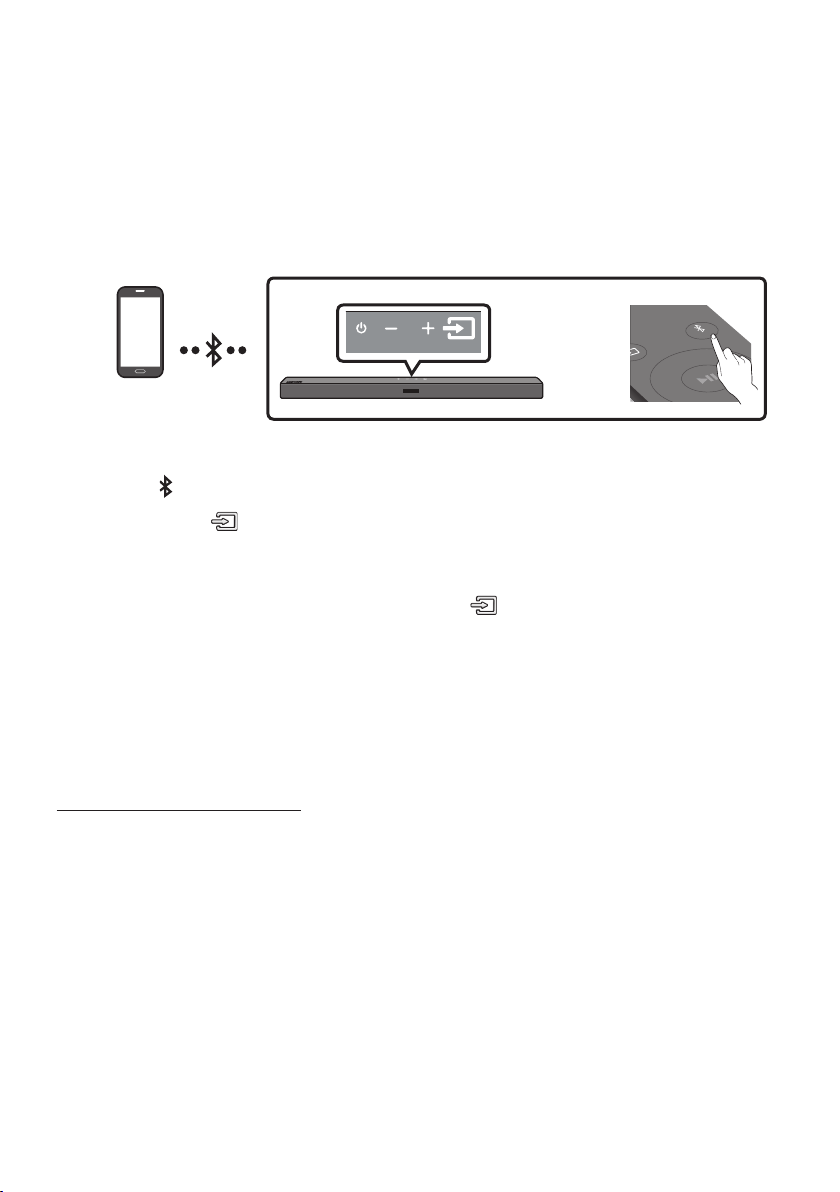
Connecting via Bluetooth
When a mobile device is connected using Bluetooth, you can hear stereo sound without the hassle of
cabling.
• You cannot connect more than one Bluetooth device at a time.
SOUND
MODE
PAIR
OR
Bluetooth device
The initial connection
1. Press the PAIR button on the remote control to enter the “BT PAIRING” mode.
(OR)
a. Press the (Source) button on the top panel and then select “BT”.
“BT” changes to “BT PAIRING” in a few seconds automatically or changes to “BT READY” if
there is a connect record.
b. When “BT READY” appears, press and hold the (Source) button on the top panel of the
Soundbar for more than 5 seconds to display “BT PAIRING”.
2. On your device, select “[AV] Samsung Soundbar A4-Series” from the list that appears.
• When the Soundbar is connected to the Bluetooth device, [Bluetooth Device Name] → “BT”
appears in the front display.
3. Play music les from the device connected via Bluetooth through the Soundbar.
If the device fails to connect
• If a previously connected Soundbar listing (e.g. “[AV] Samsung Soundbar A4-Series”) appears in
the list, delete it.
• Then repeat steps 1 and 2.
NOTE
• After you have connected the Soundbar to your mobile device the rst time, use the “BT READY”
mode to reconnect.

ENG - 18
What is the difference between BT READY and BT PAIRING?
• BT READY : In this mode, you can search for previously connected TVs or connect a previously
connected mobile device to the Soundbar.
• BT PAIRING : In this mode, you can connect a new device to the Soundbar. (Press the PAIR button
on the remote control or press and hold the (Source) button on the top of the Soundbar for
more than 5 seconds while the Soundbar is in “BT” mode.)
NOTES
• If asked for a PIN code when connecting a Bluetooth device, enter <0000>.
• In Bluetooth connection mode, the Bluetooth connection will be lost if the distance between the
Soundbar and the Bluetooth device exceeds 10 m.
• The Soundbar automatically turns off after 18 minutes in the Ready state.
• The Soundbar may not perform Bluetooth search or connection correctly under the following
circumstances:
– If there is a strong electrical eld around the Soundbar.
– If several Bluetooth devices are simultaneously paired with the Soundbar.
– If the Bluetooth device is turned off, not in place, or malfunctions.
• Electronic devices may cause radio interference. Devices that generate electromagnetic waves
must be kept away from the Soundbar main unit - e.g., microwaves, wireless LAN devices, etc.
• The Soundbar supports SBC data (44.1kHz, 48kHz).
• Connect only to a Bluetooth device that supports the A2DP (AV) function.
• You cannot connect the Soundbar to a Bluetooth device that supports only the HF (Hands Free)
function.
• Once you have paired the Soundbar to a Bluetooth device, selecting “[AV] Samsung Soundbar
A4-Series” from the device’s scanned devices list will automatically change the Soundbar to “BT”
mode.
– Available only if the Soundbar is listed among the Bluetooth device’s paired devices.
(The Bluetooth device and the Soundbar must have been previously paired at least once.)
• The Soundbar will appear in the Bluetooth device’s searched devices list only when the Soundbar is
displaying “BT READY”.
• The Soundbar cannot be paired to another Bluetooth device if already in Bluetooth mode and
paired to a Bluetooth device.
Bluetooth Power On (SOUND MODE)
If a previously paired Bluetooth device tries to pair with the Soundbar when the Bluetooth Power On
function is on and the Soundbar is turned off, the Soundbar turns on automatically.
1. Press and hold the SOUND MODE button for more than 5 seconds on the remote while the
Soundbar is turned on.
2. “ON-BLUETOOTH POWER” appears on the Soundbar’s display.

ENG - 19
Disconnecting the Bluetooth device from a Soundbar
You can disconnect a Bluetooth device from the Soundbar. For instructions, see the Bluetooth device’s
user manual.
• The Soundbar will be disconnected.
• When the Soundbar is disconnected from the Bluetooth device, the Soundbar will display
“BT DISCONNECTED” on the front display.
Disconnecting the Soundbar from the Bluetooth device
Press the (Source) button on the top panel or on the remote control, and then change to any mode
except “BT”.
• Disconnecting takes time because the Bluetooth device must receive a response from the
Soundbar. (Disconnection time may differ, depending on the Bluetooth device)
• When the Soundbar is disconnected from the Bluetooth device, the Soundbar will display
“BT DISCONNECTED” on the front display.
NOTES
• In Bluetooth connection mode, the Bluetooth connection will be lost if the distance between the
Soundbar and the Bluetooth device exceeds 10 m.
• The Soundbar automatically turns off after 18 minutes in the Ready state.
More About Bluetooth
Bluetooth is a technology that enables Bluetooth-compliant devices to interconnect easily with each
other using a short wireless connection.
• A Bluetooth device may cause noise or malfunction, depending on usage, if:
– A part of your body is in contact with the receiving/transmitting system of the Bluetooth
device or the Soundbar.
– It is subject to electrical variation from obstructions caused by a wall, corner, or ofce partition.
– It is exposed to electrical interference from same frequency-band devices including medical
equipment, microwave ovens, and wireless LANs.
• Pair the Soundbar with the Bluetooth device while they are close together.
• The further the distance between the Soundbar and Bluetooth device, the worse the quality is.
If the distance exceeds the Bluetooth operational range, the connection is lost.
• In poor reception areas, the Bluetooth connection may not work properly.
• The Bluetooth connection only works when it is close to the unit. The connection will be
automatically cut off if the Bluetooth device is out of range. Even within range, the sound quality
may be degraded by obstacles such as walls or doors.
• This wireless device may cause electric interference during its operation.
ENG - 20
08 USING THE REMOTE CONTROL
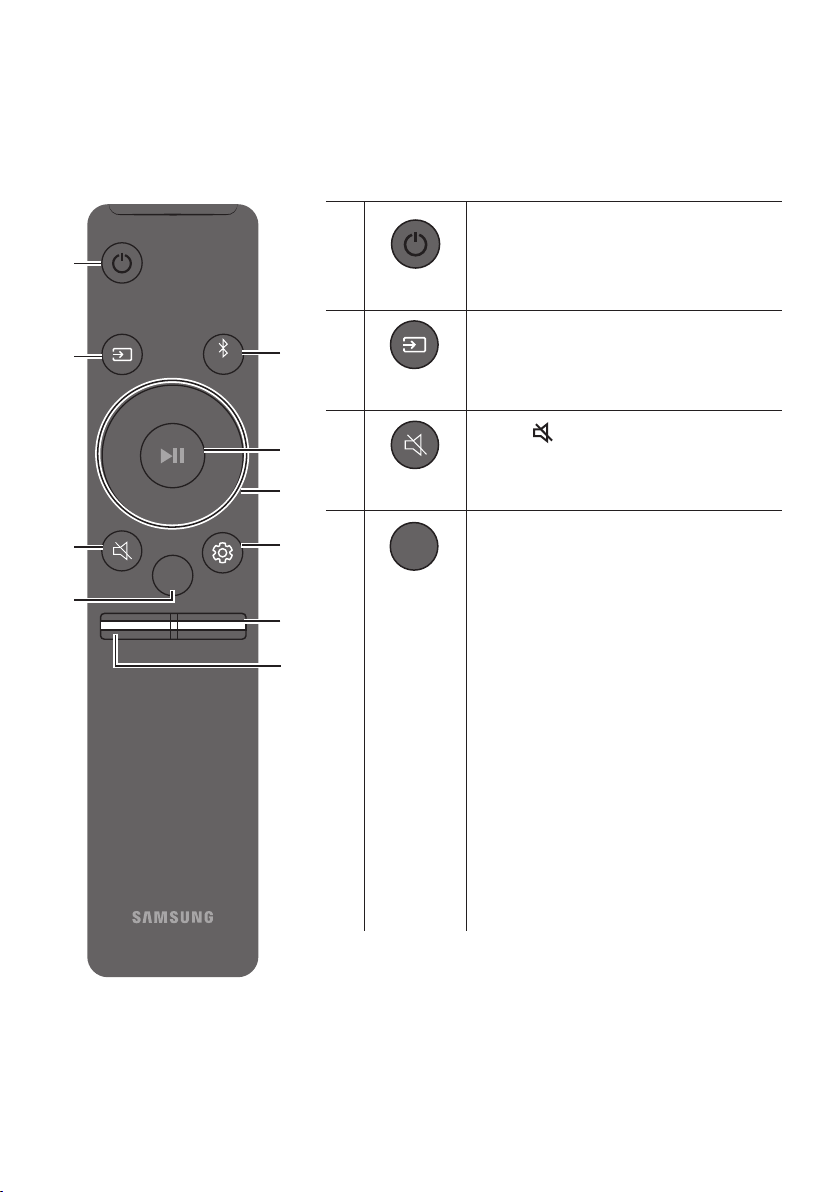
How to Use the Remote Control
VOL WOOFER
SOUNDBAR
SOUND
MODE
PAIR
Power
VOL WOOFER
SOUND
MODE
PAIR
Turns the Soundbar on and off.
VOL WOOFER
SOUND
MODE
PAIR
Source
Press to select a source connected to the
Soundbar.
Mute
VOL WOOFER
SOUND
MODE
PAIR
Press the (Mute) button to mute the sound.
Press it again to unmute the sound.
SOUND MODE
VOL WOOFER
SOUND
MODE
PAIR
Press to cycle through the available sound modes:
STANDARD, SURROUND SOUND, BASS BOOST,
GAME, or ADAPTIVE
.
– STANDARD
Outputs the original sound.
– SURROUND SOUND
Provides a wider sound eld than standard.
– BASS BOOST
Sound eld mode with emphasis on bass
sound.
– GAME
Provides stereoscopic sound to immerse
you in the action while gaming.
– ADAPTIVE
Analyzes the content in real time and
automatically provides an optimal sound
eld based on the characteristics of the
content.
ENG - 21
• DRC (Dynamic Range Control)
Lets you apply dynamic range control to Dolby Digital tracks. Press and hold the
SOUND MODE button for more than 5seconds while the Soundbar is powered off to
turn DRC (Dynamic Range Control) on or off. With the DRC turned on, loud sound is
reduced. (The sound may be distorted.)
• Bluetooth Power
This feature automatically turns the Soundbar on when it receives a connection
request from a previously connected TV or Bluetooth device. The setting is On by
default.
– Press and hold the SOUND MODE button for more than 5 seconds to turn off the
Bluetooth Power function.
VOL WOOFER
SOUND
MODE
PAIR
Bluetooth
PAIR
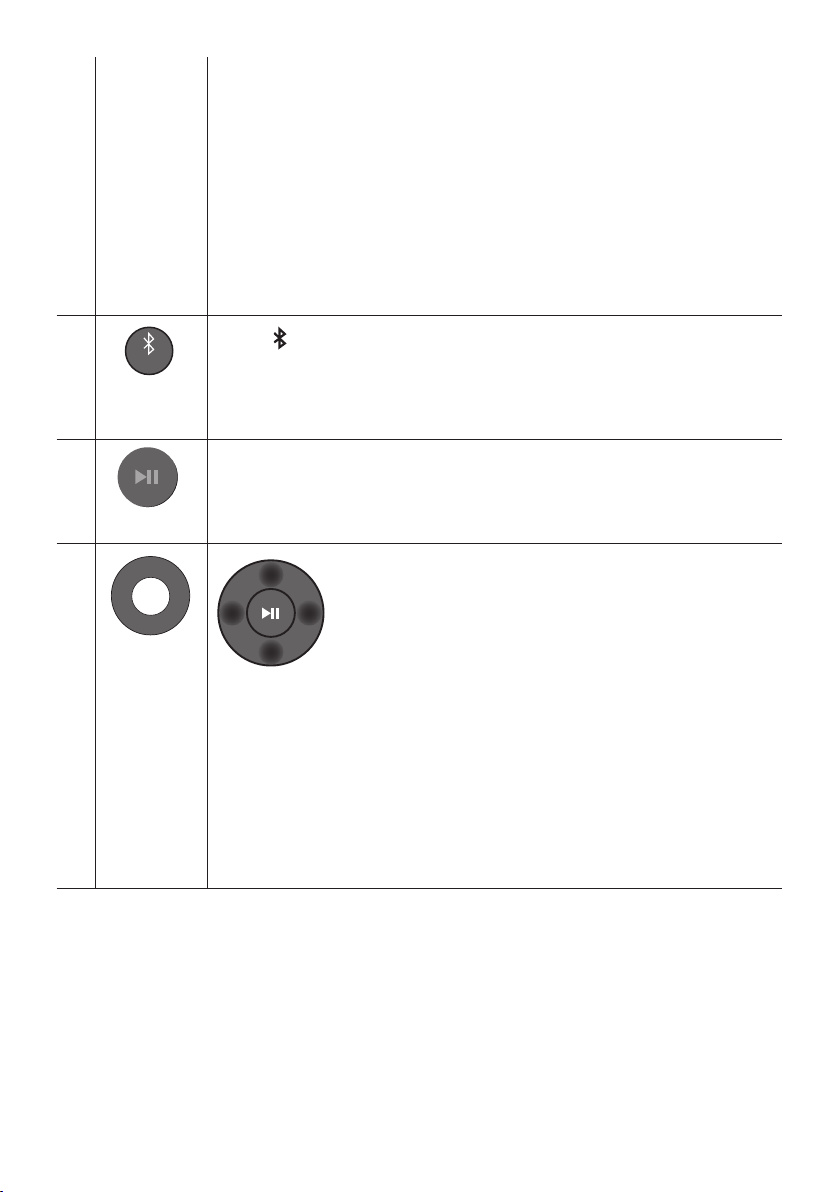
Press the PAIR button. “BT PAIRING” appears in the Soundbar’s display.
You can connect the Soundbar to a new Bluetooth device in this mode by selecting the
Soundbar from the Bluetooth device's search list.
Play / Pause
VOL WOOFER
SOUND
MODE
PAIR
Press the p button to pause a music le temporarily.
When you press the button again, the music le plays.
VOL WOOFER
SOUND
MODE
PAIR
Up/Down/
Left/Right
Press the indicated areas to select Up/Down/Left/Right.
Press Up/Down/Left/Right on the button to select or set functions.
• Repeat
To use the Repeat function in “USB” mode, press the Up button.
• Music Skip
Press the Right button to select the next music le. Press the Left button to select the
previous music le.
• ID SET
Press and hold the Up button for 5 seconds to complete ID SET (when connecting to a
wireless subwoofer or wireless rear speakers).

ENG - 22
Sound Control
VOL WOOFER
SOUND
MODE
PAIR
When pressed, the settings TREBLE, BASS, and AUDIO SYNC are displayed in sequence.
The desired settings can be adjusted using the Up/Down buttons.
• To control the volume of the treble or bass sound, press the (Sound Control) button
to select TREBLE or BASS and then adjust the volume between -6~+6 by using the Up/
Down buttons.
• Press and hold the (Sound Control) button for about 5 seconds to adjust the sound
for each frequency band. 150Hz, 300Hz, 600Hz, 1.2kHz, 2.5kHz, 5kHz, and 10kHz are
selectable using the Left/Right buttons and each can be adjusted to a setting between
-6 to +6 using the Up/Down buttons. (Make sure the Sound mode is set to
“STANDARD”.)
• If the video on the TV and audio from the Soundbar are not synchronised, press the
Sound Control button to select AUDIO SYNC and then
set the audio delay between
0~300 milliseconds
by using the Up/Down buttons. (Not available in “BT” and “USB”
mode.)
• AUDIO SYNC is only supported for some functions.
VOL WOOFER
SOUND
MODE
PAIR
WOOFER
(BASS) LEVEL
SOUND
MODE
VOL
WOOFER
SOUNDBAR
SOUND
MODE
VOL
WOOFER
SOUNDBAR
SOUND
MODE
VOL
WOOFER
SOUNDBAR
SOUND
MODE
VOL
WOOFER
SOUNDBAR
Push the button up or down to adjust the level of the woofer (bass) to -12 or between -6 to
+6. To set the woofer (bass) volume level to 0 (Default), press the button.
VOL WOOFER
SOUND
MODE
PAIR
VOL
(Volume)
SOUND
MODE
VOL
WOOFER
SOUNDBAR
SOUND
MODE
VOL
WOOFER
SOUNDBAR
SOUND
MODE
VOL
WOOFER
SOUNDBAR
SOUND
MODE
VOL
WOOFER
SOUNDBAR
Push the button up or down to adjust the volume.
• Mute
Press the VOL button in to mute the sound. Press it in again to unmute the sound.
ENG - 23
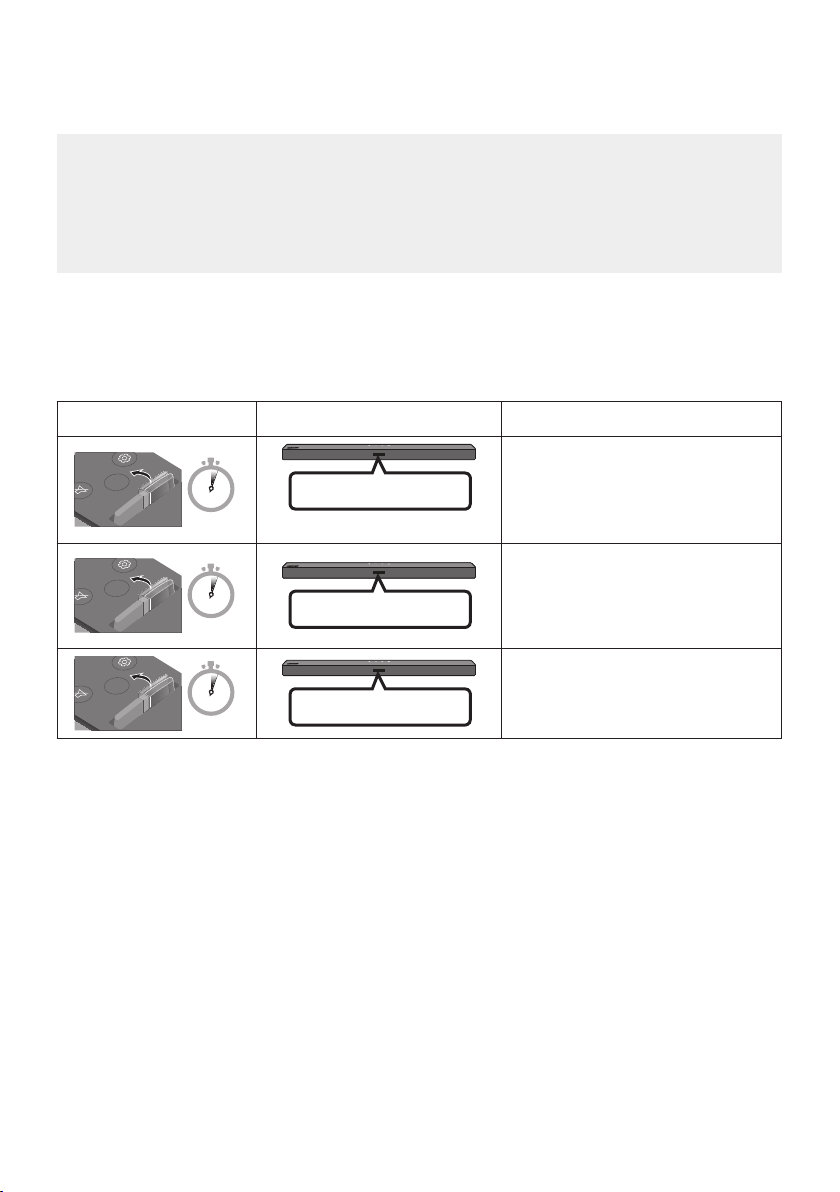
Adjusting the Soundbar volume with a TV remote control
Adjust the Soundbar volume using the TV’s remote control.
• This function can be used with IR remote controls only. Bluetooth remote controls (remote
controls that require pairing) are not supported.
• Set the TV speaker to External Speaker to use this function.
• Manufacturers supporting this function:
VIZIO, LG, Sony, Sharp, PHILIPS, PANASONIC, TOSHIBA, Hisense, RCA
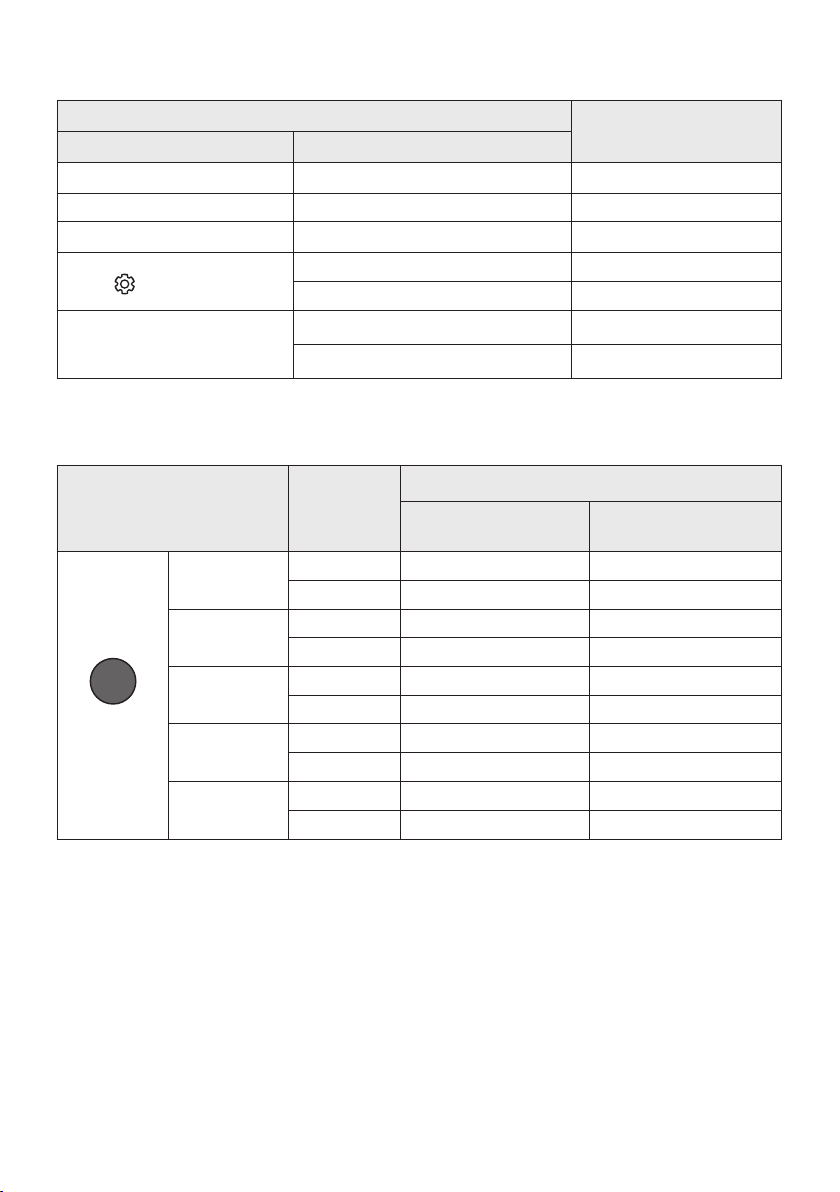
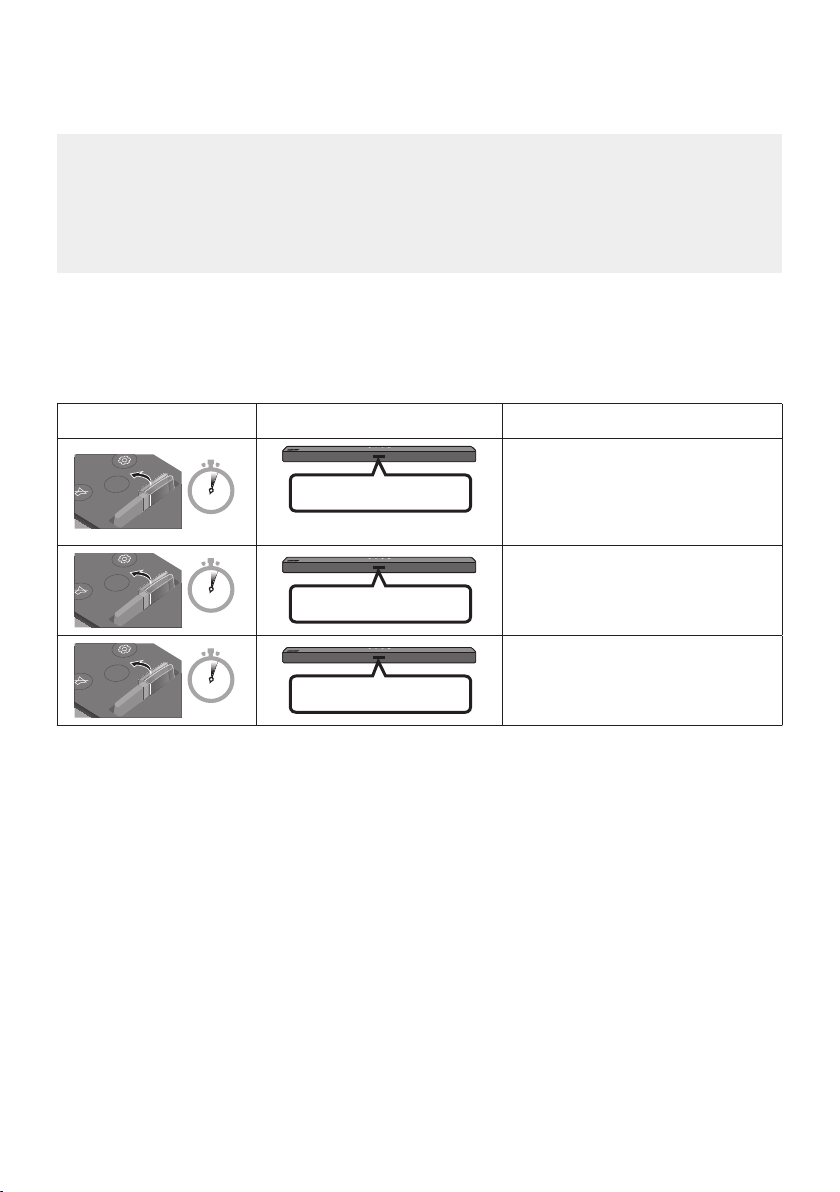
1. Turn Off the Soundbar.
2. Push up and hold the WOOFER button for 5 seconds.
Each time you push the WOOFER button up and hold it for 5 seconds, the mode switches in the
following order: “OFF-TV REMOTE” (Default mode), “SAMSUNG-TV REMOTE”, “ALL-TV REMOTE”.
Remote Control Button Display Status
SOUND
MODE
VOL
WOOFER
SOUNDBAR
5 Sec
(Default mode)
OFF-TV REMOTE
Disable the TV remote control.
SOUND
MODE
VOL
WOOFER
SOUNDBAR
5 Sec
SAMSUNG-TV REMOTE
Enable a Samsung TV’s IR remote
control.
SOUND
MODE
VOL
WOOFER
SOUNDBAR
5 Sec
ALL-TV REMOTE
Enable a third-party TV’s IR remote
control.
ENG - 24
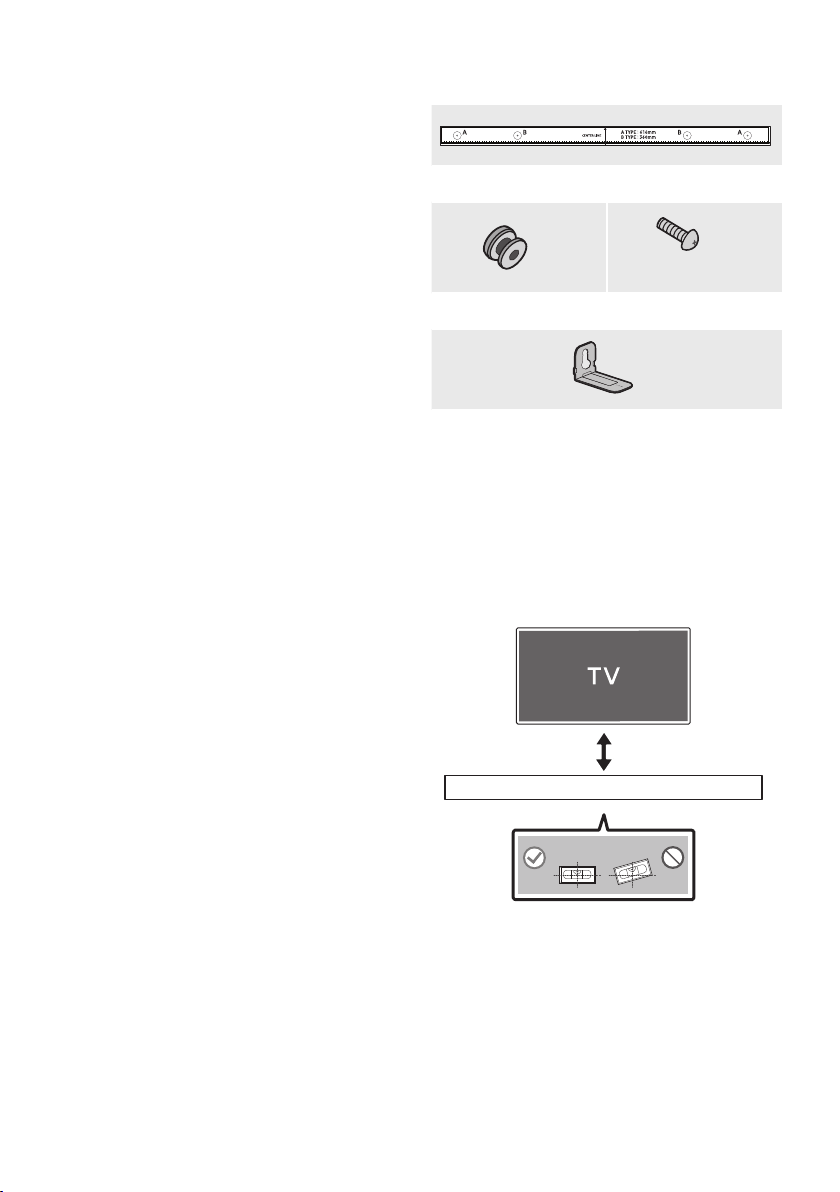
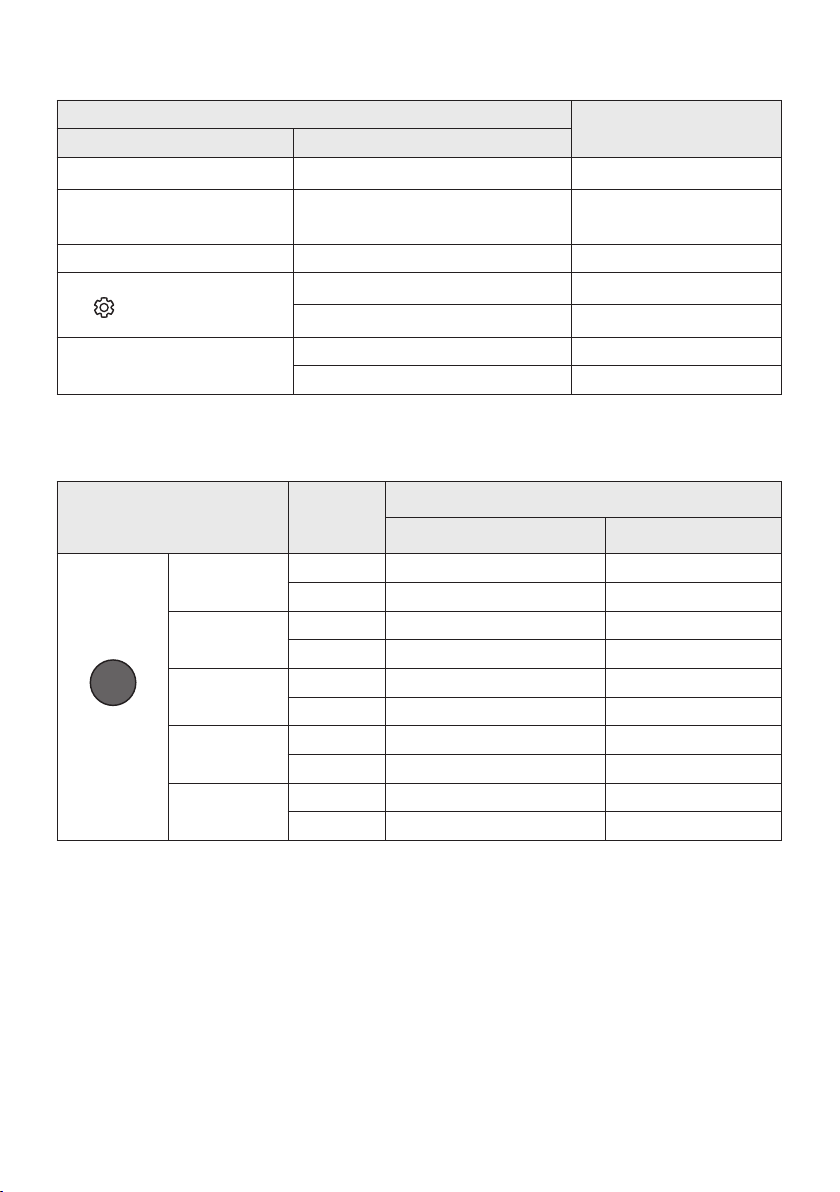
Using the Hidden Buttons (Buttons with more than one function)
Hidden Button
Reference page
Remote Control Button Function
WOOFER (Up) TV remote control On/Off (Standby) page 23
Left TV Auto connect On/Off (BT Ready) page 13
Up ID SET page 21
(Sound Control)
7 Band EQ (Press and hold 5 seconds) page 22
Reset (Press and hold 10 seconds) page 28
SOUND MODE
DRC ON/OFF (Standby) page 21
Bluetooth Power page 21
Outputspecicationsforthedifferentsoundeffectmodes
Effect Input
Output
Without Wireless Rear
Speaker Kit
With Wireless Rear
Speaker Kit
SOUND MODE
Surround
VOL WOOFER
SOUND
MODE
Bluetooth
POWER
STANDARD
2.0 ch
2.1 ch 4.1 ch
5.1 ch 2.1 ch 4.1 ch
SURROUND
SOUND
2.0 ch
2.1 ch 4.1 ch
5.1 ch 2.1 ch 4.1 ch
BASS BOOST
2.0 ch
2.1 ch 4.1 ch
5.1 ch 2.1 ch 4.1 ch
GAME
2.0 ch
2.1 ch 4.1 ch
5.1 ch 2.1 ch 4.1 ch
ADAPTIVE
2.0 ch
2.1 ch 4.1 ch
5.1 ch 2.1 ch 4.1 ch
• The Samsung Wireless Rear Speaker Kit can be purchased separately. To purchase a Kit, contact the
vendor you purchased the Soundbar from.
ENG - 25
09 INSTALLING THE
WALL MOUNT
Installation Precautions
• Install on a vertical wall only.
• Do not install in a place with high
temperature or humidity.
• Verify whether the wall is strong enough to
support the product’s weight. If not, reinforce
the wall or choose another installation point.
• Purchase and use the xing screws or
anchors appropriate for the kind of wall you
have (plaster board, iron board, wood, etc.). If
possible, x the support screws into wall
studs.
• Purchase wall mounting screws according to
the type and thickness of the wall you want to
mount the Soundbar on.
– Diameter: M5
– Length: 35 mm or longer recommended.
• Connect cables from the unit to external
devices before you install the Soundbar on
the wall.
• Make sure the unit is turned off and
unplugged from the power source before you
install it. Otherwise, it may cause an electric
shock.
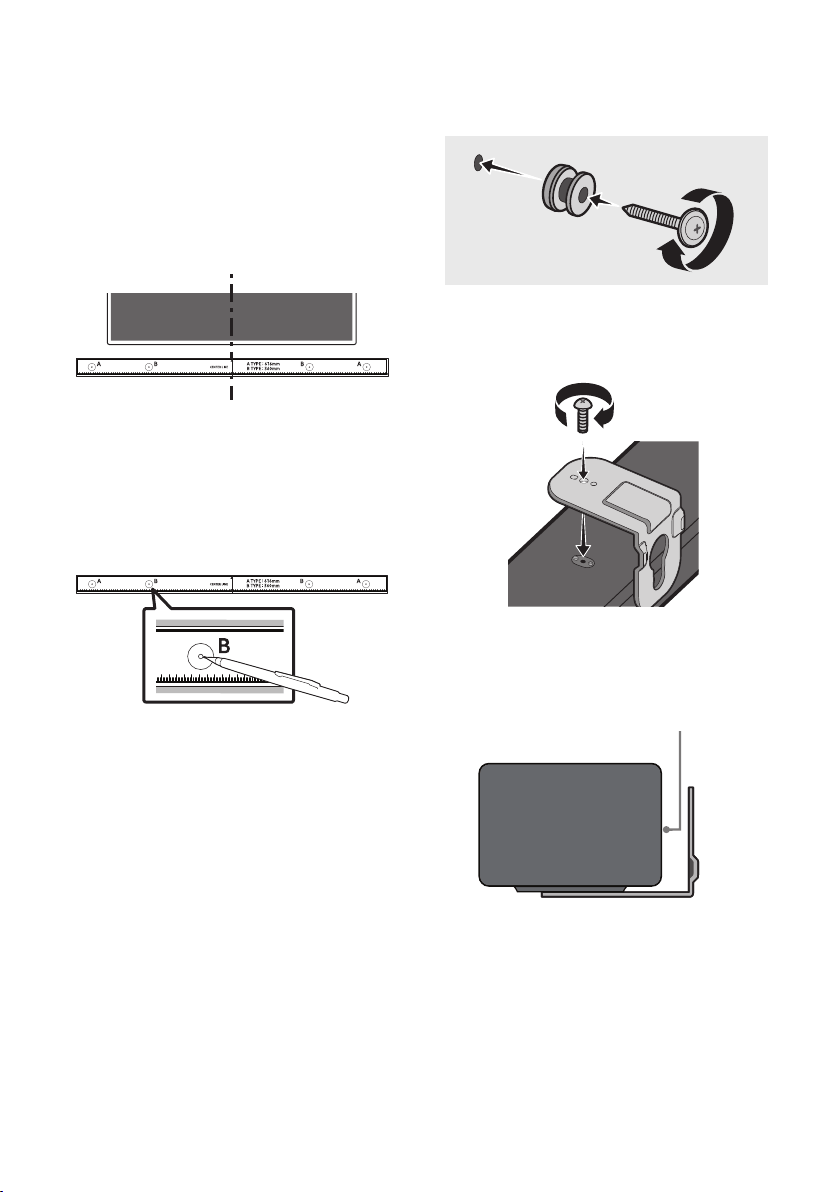
Wallmount Components
Wall Mount Guide
x 2
(M4 x L10)
x 2
Holder-Screw Screw
x 2
Bracket-Wall Mount
1. Place the Wall Mount Guide against the wall
surface.
• The Wall Mount Guide must be level.
• If your TV is mounted on the wall, install
the Soundbar at least 5 cm below the TV.
5 cm or more
ENG - 26
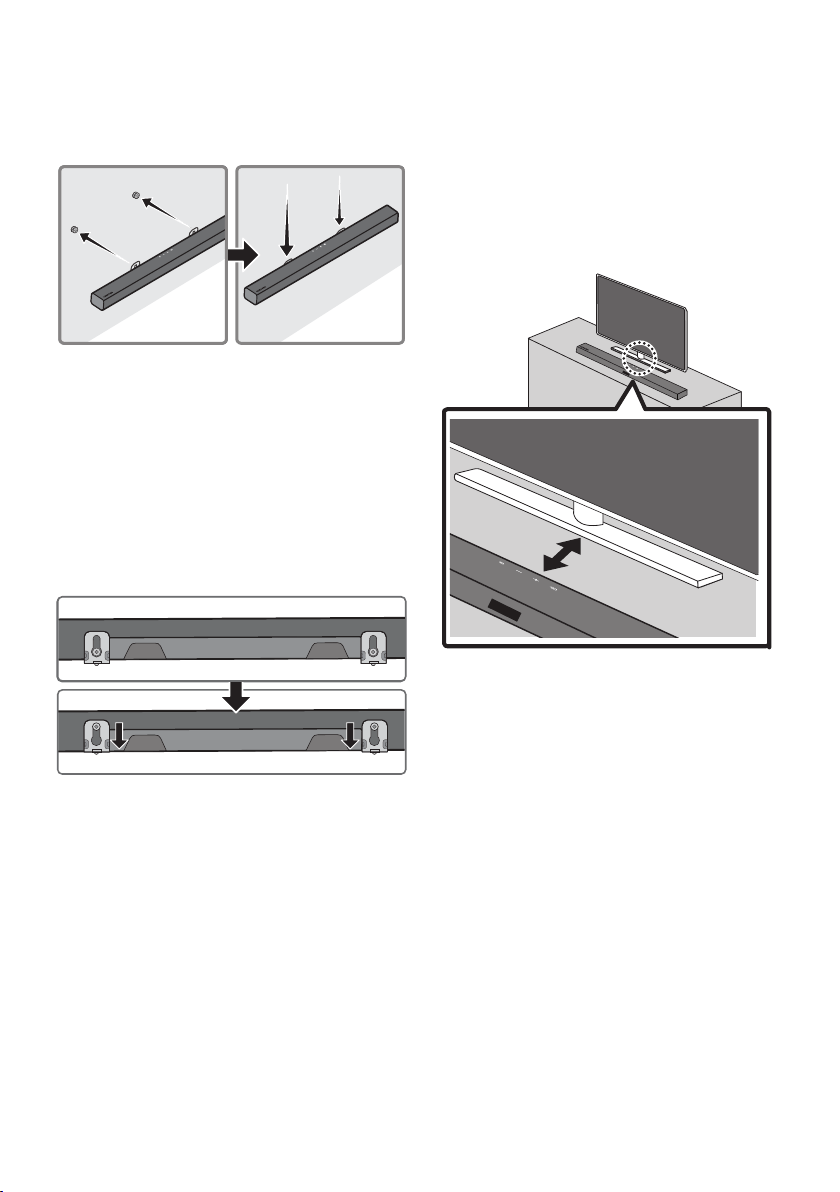
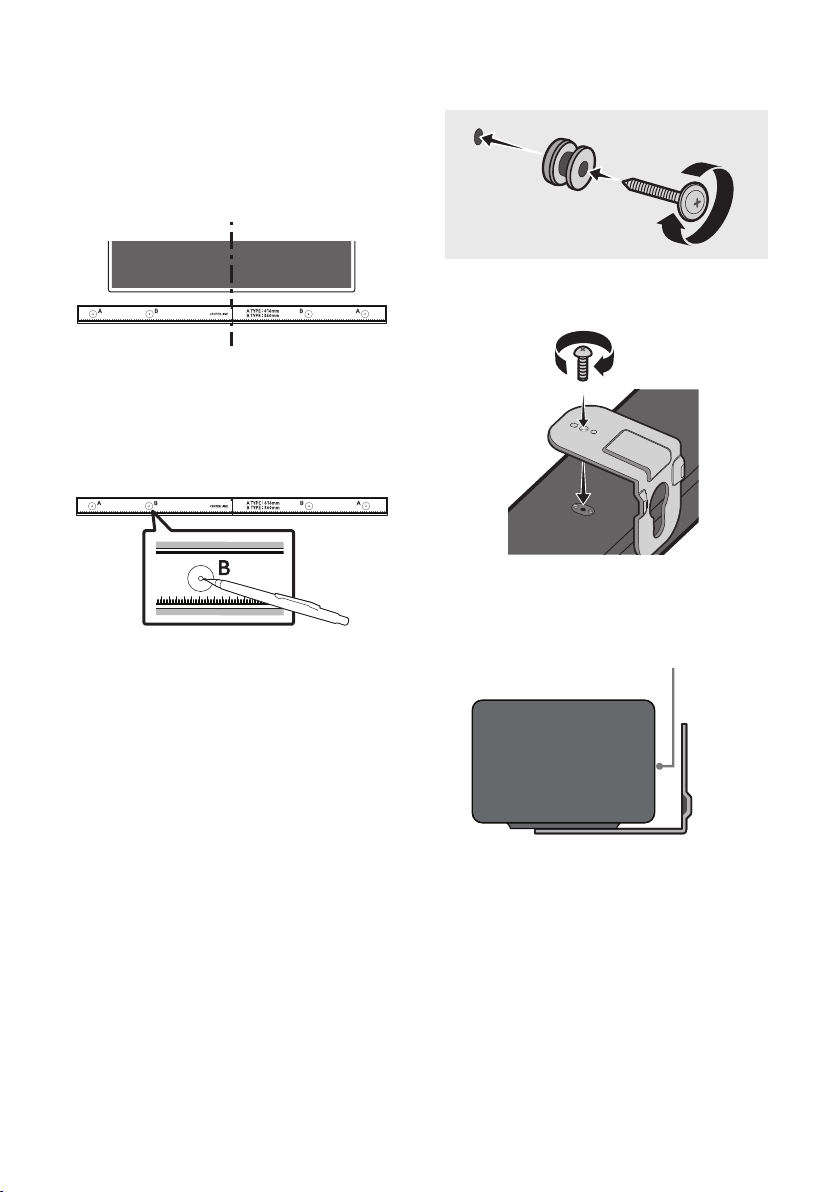
2. Align the Wall Mount Guide’s Centre Line
with the centre of your TV (if you are
mounting the Soundbar below your TV), and
then x the Wall Mount Guide to the wall
using tape.
• If you are not mounting below a TV, place
the Centre Line in the centre of the
installation area.
Centre Line
3. Push a pen tip or sharpened pencil tip
through the centre of the B-TYPE images on
each end of the Guide to mark the holes for
the supporting screws, and then remove the
Wall Mount Guide.
4. Using an appropriately sized drill bit, drill a
hole in the wall at each marking.
• If the markings do not correspond to the
positions of studs, make sure you insert
appropriate anchors into the holes before
you insert the support screws. If you use
anchors, make sure the holes you drill are
large enough for the anchors you use.
5. Push a screw (not supplied) through each
Holder-Screw, and then screw each screw
rmly into a support screw hole.
6. Install the 2 Bracket-Wall Mounts in the
correct orientation on the bottom of the
Soundbar using 2 Screws.
• When assembling, make sure the hanger
part of the Bracket-Wall Mounts are
located behind the rear of the Soundbar.
Rear of Soundbar
Right end of Soundbar
ENG - 27
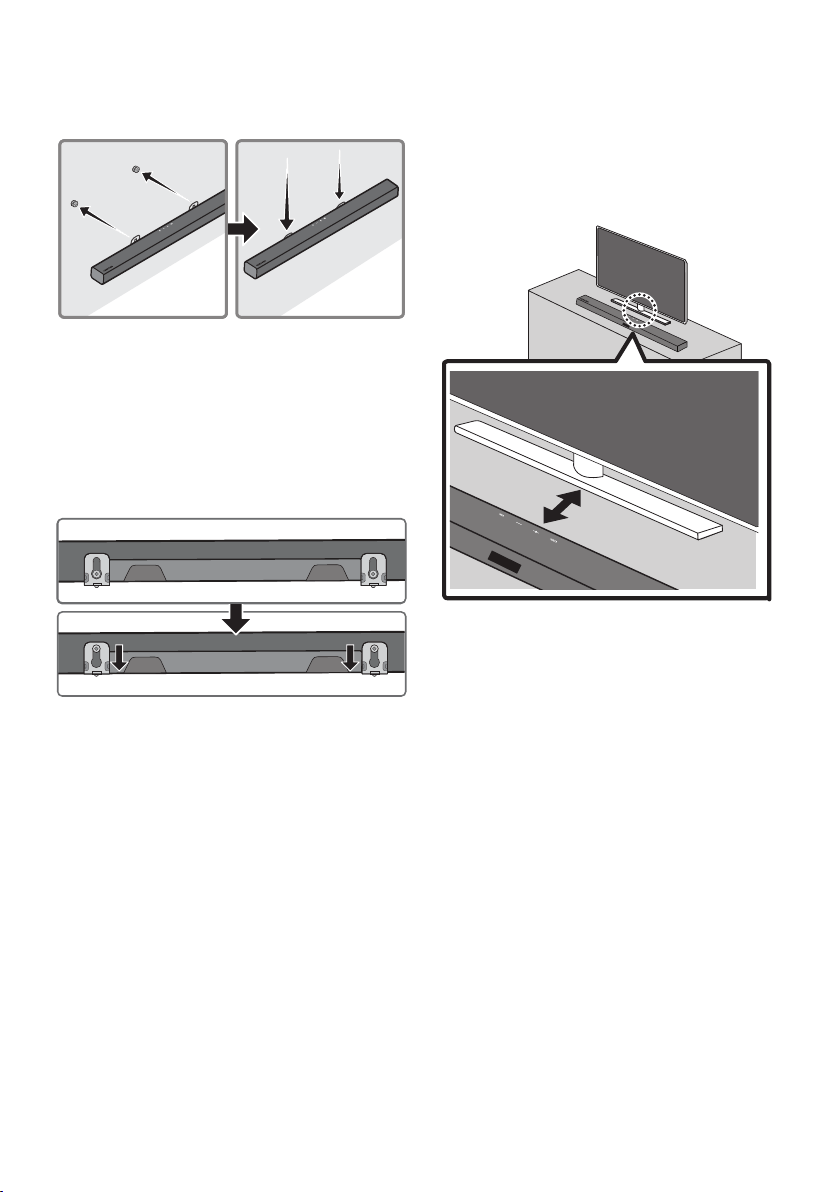
7. Install the Soundbar with the attached
Bracket-Wall Mounts by hanging the
Bracket-Wall Mounts on the Holder-Screws
on the wall.
8. Slide the Soundbar down as shown below so
that the Bracket-Wall Mounts rest securely
on the Holder-Screws.
• Insert the Holder-Screws into the wide
(bottom) part of the Bracket-Wall
Mounts, and then slide the Bracket-Wall
Mounts down so that the Bracket-Wall
Mounts rest securely on the
Holder-Screws.
10 PLACING THE
SOUNDBAR ON A
TV STAND
Place the Soundbar on a TV stand.
3cm or more
As illustrated in the image, align the centre of the
Soundbar with the centre of the TV, carefully
place the Soundbar onto the TV stand.
For optimal sound quality, position the Soundbar
at least 3 cm away from the TV front.
NOTE
• Make sure the Soundbar is placed on a at
and solid surface.
ENG - 28
11 SOFTWARE
UPDATE
Samsung may offer updates for the Soundbar’s
systemrmwareinthefuture.
USB (5V 0.5A)
DIGITAL AUDIO IN
(OPTICAL)
POWER
USB (5V 0.5A)
DIGITAL AUDIO IN
(OPTICAL)
USB port
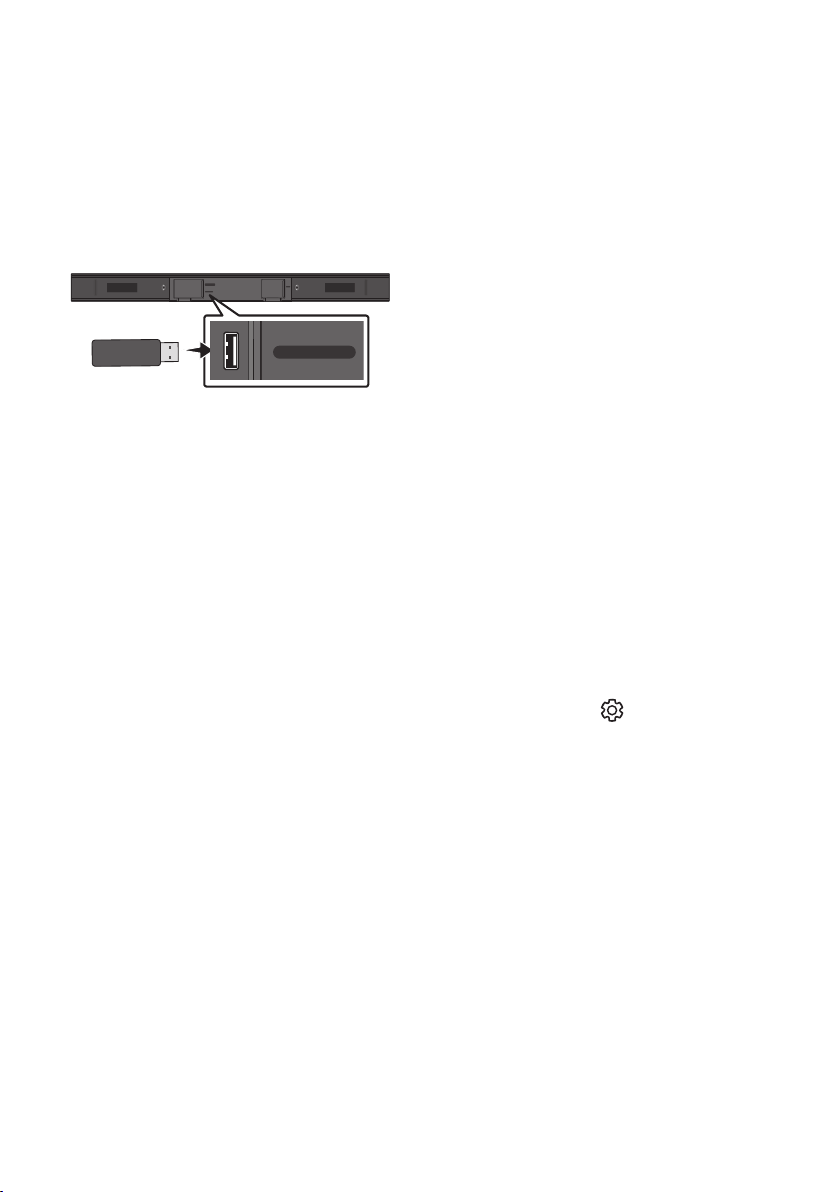
If an update is offered, you can update the
rmware by connecting a USB device with the
rmware update stored on it to the USB port on
your Soundbar. For more information about how
to download update les, go to the Samsung
Electronics website at
www.samsung.com
Support.
Then, select the product type or enter the model
number of your Soundbar, select the Software &
Apps option, and then Downloads. Note that the
option names can vary.
Update Procedure
Important: The update function erases all user
settings. We recommend you write down your
settings so that you can easily reset them after
the update. Note that updating the rmware
resets the subwoofer connection too.
1. Connect a USB thumb drive to the USB port
on your computer.
Important: Make sure there are no music
les on the USB thumb drive. This may cause
the rmware update to fail.
2. Go to (samsung.com)
select Enter Model
Number and enter the model of your
Soundbar. Select manuals and downloads
and download the latest software le.
3. Save the downloaded software to a USB
stick and select “Extract Here” to unzip the
folder.
4. Turn off the Soundbar and connect the USB
stick containing the software update to the
USB port.
5. Turn on the Soundbar and change the source
to “USB” mode. Within 3 minutes, “UPDATE”
is displayed and the update begins.
6. When the update complete, the Soundbar
turns off.
Press the (Sound Control)
button on the remote control for 10 seconds
when Soundbar is power on state. “INIT”
“OK” will appear on the display and then the
Soundbar restarts. The update is complete.
• This product has a DUAL BOOT function.
If the rmware fails to update, you can
update the rmware again. Soundbar AC
code on when USB in with update le.
Then update again but VFD no show
anything, It will update nish after 2min.
7. Restore your settings on the Soundbar.

ENG - 29
If UPDATE is not displayed
1. Turn off the Soundbar, disconnect and then
reconnect the USB storage device that
contains the update les to the Soundbar’s
USB port.
2. Disconnect the Soundbar’s power cord,
reconnect it, and then turn on the Soundbar.
NOTES
• The rmware update may not work properly
if audio les supported by the Soundbar are
stored in the USB storage device.
• Do not disconnect the power or remove the
USB device while updates are being applied.
• After the update is completed, the user setup
in the Soundbar is initialised so you can reset
your settings. We recommend you write
down your settings so that you can easily
reset them after the update. Note that
updating rmware resets the subwoofer
connection too.
If the connection to the subwoofer is not
re-established automatically after the
update, refer to page 6.
If the software update fails, check if the USB
stick is defective.
• Mac OS users should use MS-DOS (FAT) as the
USB format.
• Updating via USB may not be available,
depending on the USB storage device
manufacturer.
ENG - 30
12 TROUBLESHOOTING
Before seeking assistance, check the following.
Soundbar does not turn on.
; Check whether the power cord of the
Soundbar is correctly inserted into the
outlet.
Soundbar works erratically.
; After removing the power cord, insert it
again.
; Remote the power cord from the external
device and try again.
; If there is no signal, the Soundbar
automatically turns off after a certain
period of time. Turn on the power.
(See page 3.)
In case the remote control does not work.
; Point the remote directly at the Soundbar.
; Replace the batteries with new ones.
Soundbar does not output any sound.
; The volume of the Soundbar is too low or
muted. Adjust the volume.
; When any external device (STB, Bluetooth
device, mobile device, etc.) is connected,
adjust the volume of the external device.
; For sound output of the TV, select
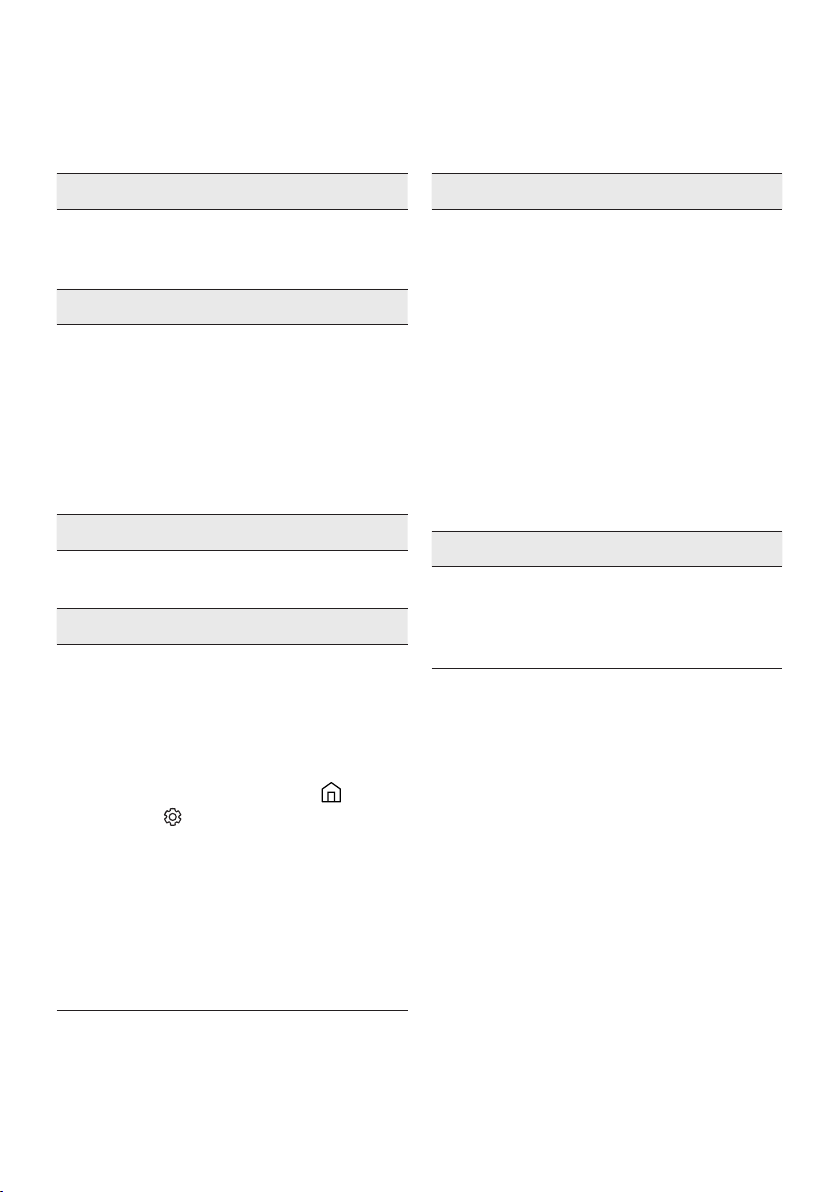
Soundbar. (Samsung TV: Home ( ) →
Settings ( ) → Sound → Sound Output →
Select Soundbar)
; The cable connection to the Soundbar may
not be loose. Remove the cable and
connect again.
; Remove the power cord completely,
reconnect, and turn the power on.
; Reset the product and try again.
(See page 28.)
Subwoofer does not output any sound.
; Check whether the LED indicator on the
rear of the Subwoofer is on in blue.
Reconnect the Soundbar and Subwoofer if
the indicator is blinking slowly in blue or
turned red. (See page 7.)
; You may experience an issue if there is an
obstacle between the Soundbar and
Subwoofer. Move devices to an area away
from obstacles.
; Other devices sending radio frequency
signals in proximity may interrupt the
connection. Keep your speaker away from
such devices.
; Remove and reconnect the power plug.
The Subwoofer volume is too low.
; The original volume of the content you are
playing may be low. Try adjusting the
Subwoofer level. (See page 22.)
; Bring the Subwoofer speaker closer to you.
ENG - 31
Soundbar does not connect via Bluetooth.
; When connecting a new device, switch to
“BT PAIRING” for connection. (Press the
PAIR button on the remote control or
press the (Source) button on the body
for at least 5 seconds.)
; If the Soundbar is connected to another
device, disconnect that device rst to
switch the device.
; Reconnect it after removing the Bluetooth
speaker list on the device to connect.
(Samsung TV: Home ( ) → Settings ( )
→ Sound → Sound Output → Bluetooth
Speaker List)
; Remove and reconnect the power plug,
then try again.
; Reset the product and try again.
(See page 28.)
Sound drops out when connected via
Bluetooth.
; Some devices can cause radio interference
if they are located too close to the
Soundbar. e. g. microwaves, wireless
routers, etc.
; If your device that is connected via
Bluetooth moves too far away from the
Soundbar, it may cause the sound to drop
out. Move the device closer to the
Soundbar.
; If a part of your body is in contact with the
Bluetooth transceiver or the product is
installed on metal furniture, sound may
drop out. Check the installation
environment and conditions for use.
Soundbar does not turn on automatically with
the TV.
; When you turn off the Soundbar while
watching TV, power synchronization with
the TV is disabled. First turn off the TV.
13 LICENCE
Manufactured under license from Dolby
Laboratories. Dolby, Dolby Audio and the
double-D symbol are trademarks of Dolby
Laboratories Licensing Corporation.
For DTS patents, see http://patents.dts.com.
Manufactured under license from DTS
Licensing Limited. DTS, the Symbol, DTS in
combination with the Symbol, and DTS 2.0
Channel are registered trademarks or
trademarks of DTS, Inc. in the United States
and/or other countries. © DTS, Inc. All Rights
Reserved.
The Bluetooth® word mark and logos are
registered trademarks owned by the Bluetooth
SIG, Inc. and any use of such marks by Samsung
Electronics Co., Ltd. is under license. Other
trademarks and trade names are those of their
respective owners.

ENG - 32
[ENERGY STAR]
ENERGYSTARqualiedmodelonly
– Your Samsung product is ENERGY STAR
qualied in its factory default setting.
Change to certain features, settings and
functionality in this product can change the
power consumption, possibly beyond the
limits required for ENERGY STAR
qualication.
– Environmental Protection Agency and
Department of Energy. ENERGY STAR is a
joint program of the Government agencies,
designed to promote energy efcient
products and practices.
Refer to www.energystar.gov for more
information of the ENERGY STAR Program.
ENERGYSTARqualiedmodelonly
(Applicable to Thin Client models only)
As an ENERGY STAR® Partner, SAMSUNG has
determined that this product meets the
ENERGY STAR® guidelines for energy
efciency.
– The ENERGY STAR Program has been to
reduced greenhouse gas emissions and
save energy through voluntary labeling.
– Power management setting of this product
have been enabled by default, and have
various timing setting from 1 minutes to 5
hours.
– The product can wake with a button press
on the chassis from sleep mode.
ENERGYSTARqualiedmodelonly(Theother
models)
– As an ENERGY STAR Partner, Samsung has
determined that this product or product
models meets the ENERGY STAR guideline
for energy efciency.
14 OPEN SOURCE
LICENCE NOTICE
To send inquiries and requests for questions
regarding open sources, contact Samsung Open
Source (http://opensource.samsung.com)
15 IMPORTANT
NOTES ABOUT
SERVICE
Figures and illustrations in this User Manual are
provided for reference only and may differ from
actual product appearance.

ENG - 33
16 SPECIFICATIONS AND GUIDE
Specications
Model Name HW-A450
USB 5V/0.5A
Weight 1.5 kg
Dimensions (W x H x D) 860.0 x 54.0 x 74.0 mm
Operating Temperature Range +5°C to +35°C
Operating Humidity Range 10 % ~ 75 %
AMPLIFIER
Rated Output power 40W x 2, 6 ohm
Supported play formats
(DTS 2.0 sound is played in DTS format.)
LPCM 2ch, Dolby Audio™
(supporting Dolby® Digital), DTS
Subwoofer Name PS-WA45T
Weight 4.3 kg
Dimensions (W x H x D) 181.5 x 343.0 x 272.0 mm
AMPLIFIER
Rated Output power 220W
NOTES
• Samsung Electronics Co., Ltd reserves the right to change the specications without notice.
• Weight and dimensions are approximate.
• For India Only
“This product is RoHS compliant”
• For Taiwan Only
HW-A450 : AC110-240V ~ 50/60Hz, 25W
PS-WA45T : AC110-240V ~ 50/60Hz, 40W
VIE - ii
THÔNG TIN AN TOÀN
CNH BO AN TON
CHÚ Ý
NGUY CƠ BỊ ĐIỆN GIẬT
KHÔNG MỞ
CNH BO
CHÚ Ý
VIE - iii
PHÒNG NGA
1.
2.
3.
4.
5.
CHÚ Ý :
GIỚI THIỆU VỀ TI LIỆU
HƯỚNG DẪN NY
HƯỚNG DẪN SỬ DỤNG
HƯỚNG DẪN ĐẦY ĐỦ

NI DUNG
01 Kiểm Tra Linh Kiện 2
-------------------------
02 Tổng quan về Sản phẩm 3
------------------------- 4
03 Kết nối Soundbar 5
-------------------------
5
-------------------------
6
–
-------------------------
6
–
-------------------------
-------------------------
04 Kết nối với TV 11
-------------------------
–
-------------------------
-------------------------
–
-------------------------
05 Kết nối với Thiết bị Bên ngoài 14
-------------------------
06 Kết nối với Thiết bị lưu trữ USB 15

07 Kết nối với Thiết bị di động 17
-------------------------
08 Sử dụng Điều khiển từ xa 20
-------------------------
-------------------------
-------------------------
-------------------------
09 Lắp Giá Treo Tường 25
-------------------------
-------------------------
10 Đặt Soundbar trên kệ TV 27
11 Cập Nhật Phần Mềm 28
-------------------------
-------------------------
12 Xử l s cố 30
13 Giy Php 31
14 Thông báo Giy php Ngun m 32
15 Lưu Quan Trọng về Dịch vụ 32
16 Thông số kỹ thuật và Hướng dẫn 33
-------------------------
01 KIỂM TRA LINH KIỆN
VOL WOOFER
SOUNDBAR
SOUND
MODE
PAIR
Thiết bị Chính Soundbar Loa trầm Điều khiển từ xa / Pin
Dây Ngun
(Loa trầm, Soundbar)
Cáp Quang Chi tiết Treo Tường
Chi tiết giữ - Vít Vít
Giá Treo Tường
Lắp pin trước khi sử dụng Điều khiển từ xa (2 pin AA)
02 TỔNG QUAN VỀ SN PHẨM
Pa-nen mặt trên cùng
Màn hình
Nút (Ngun điện)
Chức năng Auto Power Down
– D.INBT USB
Nút (Âm lượng)
Nút (Ngun tín hiệu)
Chế độ ngun vào Màn hình
BT PAIRINGBT (Ngun
tín hiệu)
VIE - 4
Mặt Đáy của Soundbar
HDMI
HDMI TO TV
(ARC)
USB (5V 0.5A)
DC 24V
DIGITAL AUDIO IN (OPTICAL)
HDMI
HDMI TO TV
(ARC)
DIGITAL AUDIO IN (OPTICAL)
USB (5V 0.5A)
DC 24V
HDMI
HDMI TO TV
(ARC)
USB (5V 0.5A)
DC 24V
DIGITAL AUDIO IN (OPTICAL)
HDMI
HDMI TO TV
(ARC)
DIGITAL AUDIO IN (OPTICAL)
USB (5V 0.5A)
DC 24V
HDMI
HDMI TO TV
(ARC)
USB (5V 0.5A)
DC 24V
DIGITAL AUDIO IN (OPTICAL)
HDMI
HDMI TO TV
(ARC)
DIGITAL AUDIO IN (OPTICAL)
USB (5V 0.5A)
DC 24V
DIGITAL AUDIO IN (OPTICAL)
USB (5V 0.5A)
POWER
VIE - 5
03 KẾT NỐI SOUNDBAR
Kết nối với Ngun Điện
1.
2.
Mặt sau của Loa
trầm
Dây Ngun
Kết nối với Ngun
Điện
Đáy của Thiết bị Chính
Soundbar
Kết nối với Ngun
Điện
Dây Ngun
USB (5V 0.5A)
DIGITAL AUDIO IN
(OPTICAL)
POWER
USB (5V 0.5A)
DIGITAL AUDIO IN
(OPTICAL)
POWER
USB (5V 0.5A)
DIGITAL AUDIO IN
(OPTICAL)
POWER
USB (5V 0.5A)
DIGITAL AUDIO IN
(OPTICAL)
POWER

VIE - 6
Kết nối Soundbar với Loa trầm
Kết nối t động giữa loa trầm và Soundbar
Đèn báo LED mặt sau của Loa trầm
LED Trạng thái Mô tả Giải pháp
-
Kết nối thủ công với loa trầm nếu không kết nối t động được
Kiểm tra trước khi kết nối thủ công
1. ID SET
5 Sec
Mặt sau của Loa trầm
2. Lên
ID SET
ID SET
SOUND
MODE
PAIR
5 Sec
ID SET
Biểu trưng SAMSUNG mặt trên cùng
3.
Màu lam Sáng lên

GHI CHÚ
THẬN TRỌNG
Kết nối SWA-9100S (Bán Riêng) với Soundbar
1.
–
SURROUND-RIGHT
SURROUND-RIGHT
–
SURROUND-LEFT
ID SET
L
R
SURROUND SPEAKERS OUT
SPEAKER IMPEDANCE : 3Ω
POWER
ID SET
L
R
SURROUND SPEAKERS OUT
SPEAKER IMPEDANCE : 3Ω
SURROUND-RIGHT
SURROUND-LEFT SURROUND-RIGHT
2.
ID SET
ID SET
L
R
SURROUND SPEAKERS OUT
SPEAKER IMPEDANCE : 3Ω
POWER
POWER
ID SET
SURROUND SPEAKERS OUT
SPEAKER IMPEDANCE : 3Ω
STANDBY
LINK
STANDBY
LINK
Nhp nháy màu lam
5 Sec
3. Lên
ID SET
ID SET
SOUND
MODE
PAIR
5 Sec
ID SET
Biểu trưng SAMSUNG mặt trên cùng
CHÚ Ý
4.
STANDBY
LINK
STANDBY
LINK
Màu lam Sáng lên
5.
04 KẾT NỐI VỚI TV
–
–
Phương thức 1. Kết nối bằng Cáp
Kết nối bằng Cáp quang
Danh sách kiểm tra trước khi kết nối
OPTICAL OUT
USB (5V 0.5A)
DIGITAL AUDIO IN
(OPTICAL)
Mặt trên cùng của
Soundbar
D.IN
Cáp Quang
Đáy Soundbar
1. DIGITAL AUDIO IN (OPTICAL)
2. (Ngun tín hiệu)D.IN
Phương thức 2. Kết nối không dây
Kết nối với TV qua Bluetooth
SOUND
MODE
PAIR
HOẶC
Kết nối ban đầu
1. PAIRBT PAIRING
(HOẶC)
a. (Ngun tín hiệu)BT
BTBT PAIRINGBT READY
b. BT READY (Ngun tín hiệu)
BT PAIRING
2.
3. [AV] Samsung Soundbar A4-Series
Cần ghp nốiĐã ghp nối
Tên TVBT
4.
Nếu thiết bị không kết nối được
[AV] Samsung Soundbar A4-Series
LƯU Ý
BT READY

Ngắt kết nối giữa Soundbar và TV
(Ngun tín hiệu)
BT
Trái
BT READY
S khác nhau giữa BT READY và BT PAIRING?
BT READY
BT PAIRING PAIR
(Ngun tín hiệu)
BT
GHI CHÚ
–
–
–
05 KẾT NỐI VỚI THIẾT BỊ BÊN NGOI
Kết nối bằng Cáp quang
OPTICAL OUT
USB (5V 0.5A)
DIGITAL AUDIO IN
(OPTICAL)
Mặt trên cùng của Soundbar
D.IN
Cáp Quang
Đáy Soundbar
Đầu phát BD/DVD/
Bộ giải mã tín hiệu/
Máy chơi trò chơi
1. DIGITAL AUDIO IN (OPTICAL)
2. D.IN (Ngun tín hiệu)
06 KẾT NỐI VỚI THIẾT BỊ LƯU TRỮ USB
USB
USB (5V 0.5A)
DIGITAL AUDIO IN
(OPTICAL)
POWER
USB (5V 0.5A)
DIGITAL AUDIO IN
(OPTICAL)
Cổng USB
1.
2. (Ngun tín hiệu)USB
3. USB
4.
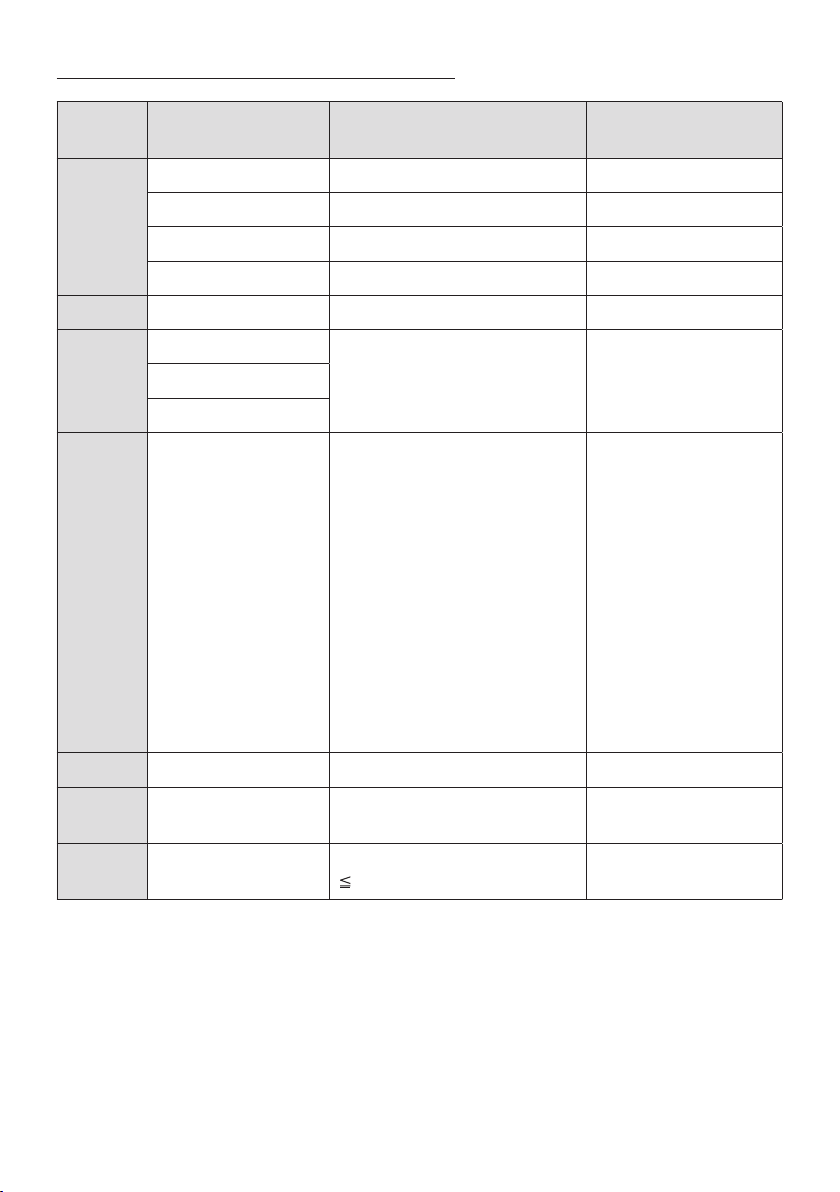
Danh sách Kiểu Định dạng Tập tin Tương thích
Phần m
rộng
Codec Tốc độ ly mẫu Tốc độ bit
*.mp3
*.wma
*.aac
*.ogg
*.ac -
*.wav
*.AIFF
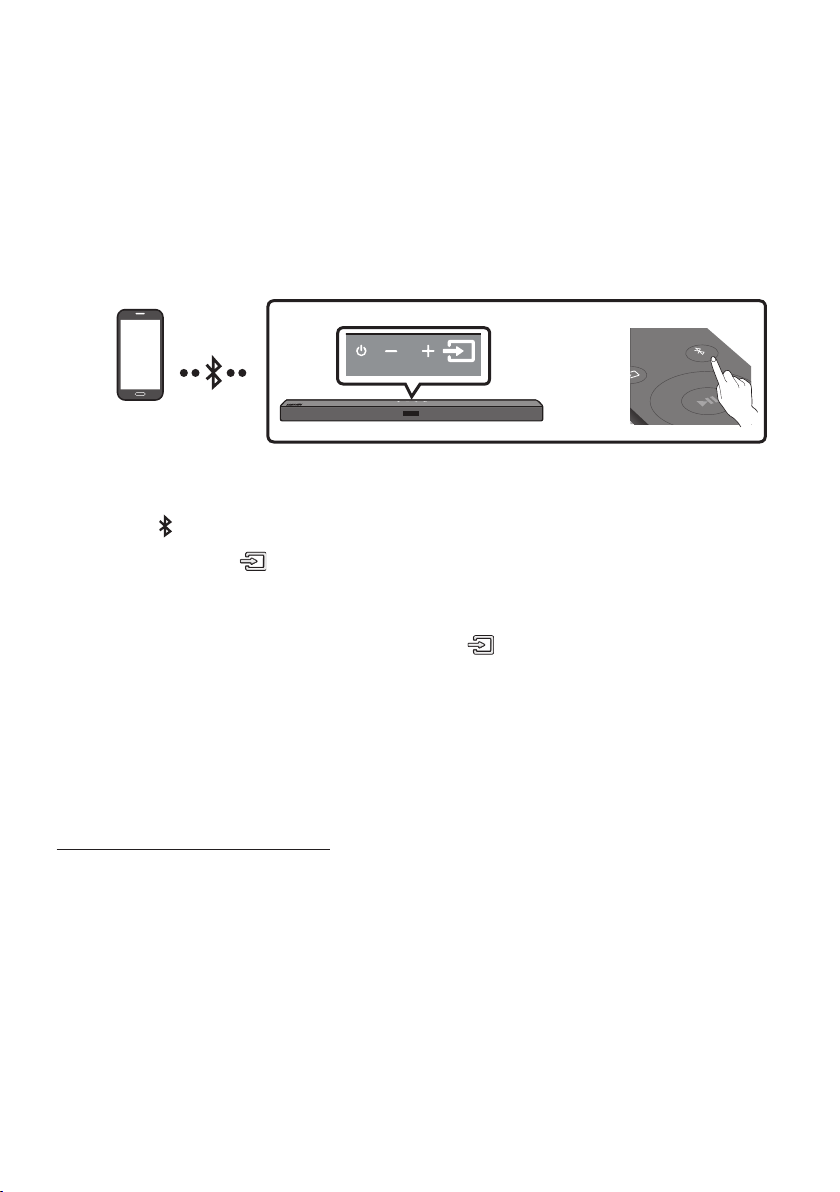
07 KẾT NỐI VỚI THIẾT BỊ DI ĐNG
Kết nối qua Bluetooth
SOUND
MODE
PAIR
HOẶC
Thiết bị Bluetooth
Kết nối ban đầu
1. PAIRBT PAIRING
(HOẶC)
a. (Ngun tín hiệu)BT
BTBT PAIRINGBT READY
b. BT READY (Ngun tín hiệu)
BT PAIRING
2. [AV] Samsung Soundbar A4-Series
Tên Thiết bị BluetoothBT
3.
Nếu thiết bị không kết nối được
[AV] Samsung Soundbar A4-Series
LƯU Ý
BT
READY

S khác nhau giữa BT READY và BT PAIRING?
BT READY
BT PAIRING PAIR
(Ngun tín hiệu)
BT
GHI CHÚ
–
–
–
[AV] Samsung Soundbar A4-Series
BT
–
BT READY
Bật Bluetooth Power (SOUND MODE)
1. SOUND MODE
2. ON-BLUETOOTH POWER

Ngắt kết nối giữa thiết bị Bluetooth và Soundbar
BT DISCONNECTED”
Ngắt kết nối giữa Soundbar và thiết bị Bluetooth
(Ngun tín hiệu)
BT
BT DISCONNECTED”
GHI CHÚ
Giới thiệu thêm về Bluetooth
–
–
–
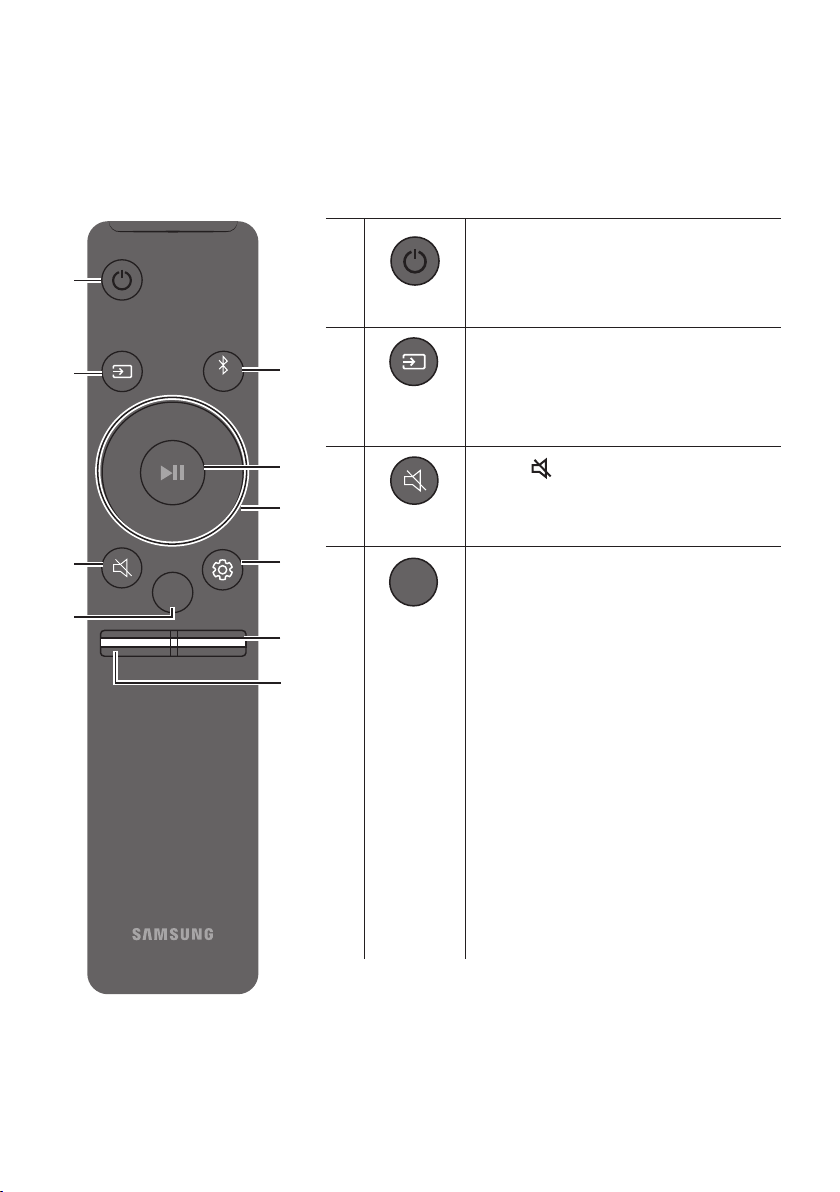
08 SỬ DỤNG ĐIỀU KHIỂN T XA
Cách Sử dụng Điều khiển từ xa
VOL WOOFER
SOUNDBAR
SOUND
MODE
PAIR
Ngun điện
VOL WOOFER
SOUND
MODE
PAIR
VOL WOOFER
SOUND
MODE
PAIR
Ngun tín
hiệu
Tắt tiếng
VOL WOOFER
SOUND
MODE
PAIR
(Tắt tiếng)
SOUND MODE
VOL WOOFER
SOUND
MODE
PAIR
STANDARD SURROUND SOUNDBASS
BOOSTGAMEADAPTIVE
– STANDARD
– SURROUND SOUND
– BASS BOOST
– GAME
– ADAPTIVE

DRC (Dynamic Range Control)
SOUND MODE
Bluetooth Power
– SOUND MODE
VOL WOOFER
SOUND
MODE
PAIR
Bluetooth
PAIR
PAIRBT PAIRING
Phát/
Tạm dừng
VOL WOOFER
SOUND
MODE
PAIR
p
VOL WOOFER
SOUND
MODE
PAIR
Lên/Xuống/
Trái/Phải
Nhn vào các vùng được chỉ định để chọn Lên/Xuống/Trái/Phải.
Lặp lại
USBLên
Bỏ qua Nhạc
PhảiTrái
ID SET
LênID SET
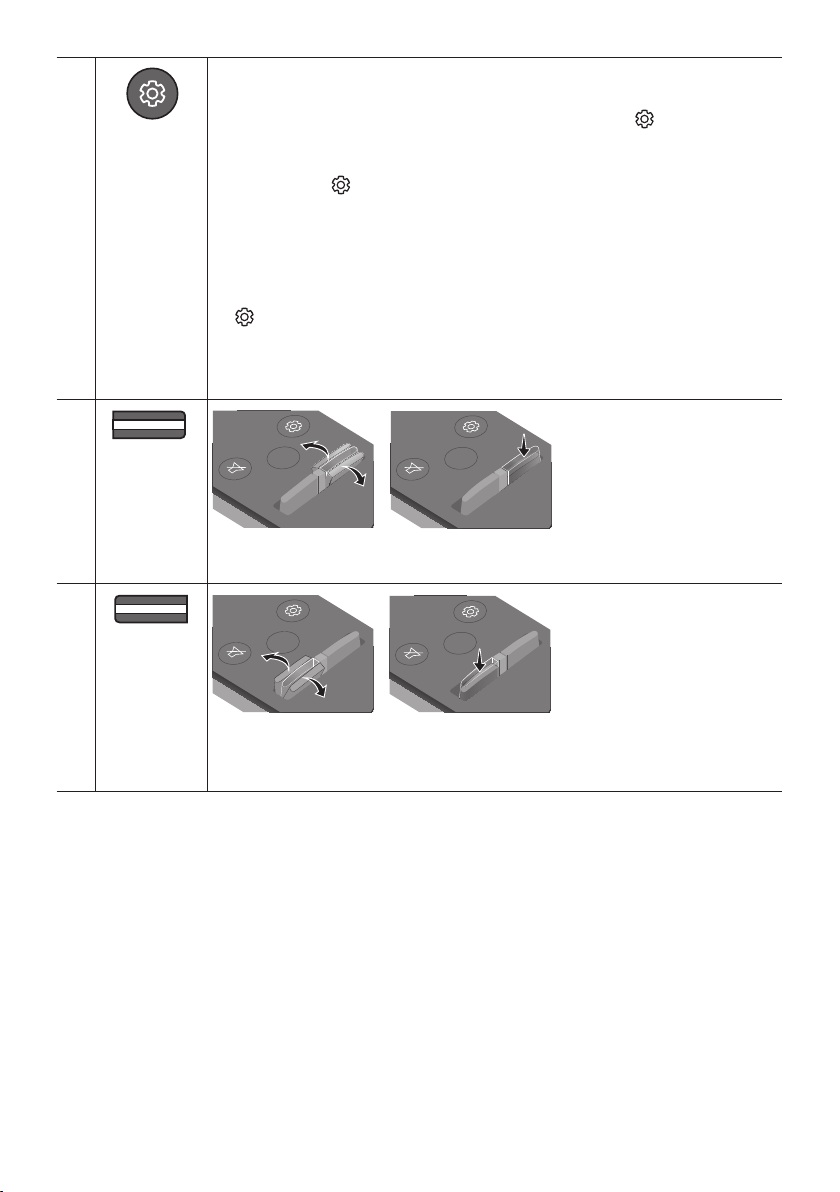
Điều khiển
Âm thanh
VOL WOOFER
SOUND
MODE
PAIR
TREBLE BASS AUDIO SYNC
Lên/Xuống
(Điều khiển âm
thanh)TREBLEBASS
Lên/Xuống
(Điều khiển âm thanh)
Trái/Phải
Lên/Xuống
STANDARD
(Điều khiển âm thanh)AUDIO SYNC
Lên/XuốngUSB
BT
AUDIO SYNC
VOL WOOFER
SOUND
MODE
PAIR
MỨC WOOFER
(ÂM TRẦM)
SOUND
MODE
VOL
WOOFER
SOUNDBAR
SOUND
MODE
VOL
WOOFER
SOUNDBAR
SOUND
MODE
VOL
WOOFER
SOUNDBAR
SOUND
MODE
VOL
WOOFER
SOUNDBAR
VOL WOOFER
SOUND
MODE
PAIR
VOL
(Âm lượng)
SOUND
MODE
VOL
WOOFER
SOUNDBAR
SOUND
MODE
VOL
WOOFER
SOUNDBAR
SOUND
MODE
VOL
WOOFER
SOUNDBAR
SOUND
MODE
VOL
WOOFER
SOUNDBAR
Tắt tiếng
VOL
Điều chỉnh âm lượng Soundbar bằng điều khiển từ xa TV
Loa ngoài
1.
2. WOOFER
WOOFEROFF-TV
REMOTESAMSUNG-TV REMOTEALL-TV REMOTE
Nút trên Điều khiển Từ xa Màn hình Trạng thái
SOUND
MODE
VOL
WOOFER
SOUNDBAR
5 Sec
OFF-TV REMOTE
SOUND
MODE
VOL
WOOFER
SOUNDBAR
5 Sec
SAMSUNG-TV REMOTE
SOUND
MODE
VOL
WOOFER
SOUNDBAR
5 Sec
ALL-TV REMOTE
Sử dụng các Nút Ẩn (Các nút có nhiều chức năng)
Nút Ẩn
Trang tham khảo
Nút trên Điều khiển Từ xa Chức năng
Thông số kỹ thuật đầu ra cho các chế độ hiệu ứng âm thanh khác nhau
Hiệu ứng Đầu vào
Đầu ra
Không có Bộ Loa Sau Không dây Có Bộ Loa Sau Không dây
SOUND MODE
Surround
VOL WOOFER
SOUND
MODE
Bluetooth
POWER

09 LẮP GI TREO
TƯỜNG
Điềm cần chú khi Lắp đặt
–
–
Phụ kiện Treo tường
Chi tiết Treo Tường
Chi tiết giữ - Vít Vít
Giá Treo Tường
1. Chi tiết Treo Tường
Chi tiết Treo Tường
5 cm tr lên
2. Trục TâmChi tiết Treo Tường
Chi tiết
Treo Tường
Trục Tâm
Trục Tâm
3.
B-TYPE
Chi tiết Treo Tường
4.
5. Chi tiết giữ
- Vít
6. Giá Treo Tường
Vít
Giá Treo Tường
Mặt sau của Soundbar
Đầu bên phải của Soundbar
7. Giá Treo Tường
Giá Treo TườngChi tiết giữ - Vít
8.
Giá Treo Tường
Chi tiết giữ - Vít
Chi tiết giữ - Vít
Giá Treo TườngGiá Treo
TườngGiá Treo Tường
Chi tiết giữ - Vít
10 ĐẶT SOUNDBAR
TRÊN KỆ TV
3 cm tr lên
LƯU Ý
11 CẬP NHẬT PHẦN
MỀM
Samsung có thể cung cp các bản cập nhật cho
chương trình cơ s của hệ thống Soundbar trong
tương lai.
USB (5V 0.5A)
DIGITAL AUDIO IN
(OPTICAL)
POWER
USB (5V 0.5A)
DIGITAL AUDIO IN
(OPTICAL)
Cổng USB
Quy trình cập nhật
Quan trọng
1.
Quan trọng:
2.
3.
4.
5.
USBUPDATE”
6.
(Điều khiển Âm thanh)
INIT”
OK
7.

Nếu UPDATE không xut hiện
1.
2.
GHI CHÚ
6
12 XỬ LÝ S CỐ
Soundbar không bật.
;
Soundbar hoạt động chập chờn.
;
;
;
Trong trường hợp điều khiển từ xa không hoạt
động.
;
;
Soundbar không phát ra bt kỳ âm thanh nào.
;
;
;
;
;
;
Loa siêu trầm không phát ra bt kỳ âm thanh
nào.
;
;
;
;
Âm lượng Loa siêu trầm quá thp.
;
;
Soundbar không kết nối qua Bluetooth.
;
BT PAIRING PAIR
(Ngun tín hiệu)
;
;
;
;
Rớt âm thanh khi được kết nối qua Bluetooth.
;
;
;
Soundbar không t động bật với TV.
;
13 GIY PHP

[ENERGY STAR]
ENERGY STAR qualied model only
–
–
ENERGY STAR qualied model only
(Applicable to Thin Client models only)
–
–
–
ENERGY STAR qualied model only (The other
models)
–
14 THÔNG BO GIY
PHP NGUN MỞ
15 LƯU Ý QUAN
TRỌNG VỀ DỊCH
VỤ

16 THÔNG SỐ KỸ THUẬT V HƯỚNG DẪN
Thông số kỹ thuật
GHI CHÚ

TRUNG TÂM BO HNH SAMSUNG
A. ĐIỀU KIỆN BO HNH:
1. Sản phẩm còn trong thời hạn Bảo hành da vào tin nhắn
từ tổng đài 6060
2. Nếu không có tin nhắn từ tổng đài 6060, sẽ áp dụng thời hạn
Bảo hành cho sản phẩm như sau:
-
-
-
-
-
-
-
3. Sản phẩm phải còn đầy đủ nhãn máy để kiểm tra hoặc các
chứng từ liên quan.
4. Sản phẩm không nằm trong trường hợp bị từ chối bảo
hành.
5. Các sản phẩm do SAMSUNG sản xut và phân phối chính
thức tại thị trường Việt Nam sẽ được bảo hành tại các
Trung Tâm Bảo Hành trên toàn quốc do SAMSUNG VINA
ủy quyền.
B. ĐIỀU KIỆN T CHỐI BO HNH:
Trung Tâm Bảo Hành sẽ từ chối bảo hành hoặc sẽ sửa
chữa có tính phí trong những trường hợp máy hỏng
không phải lỗi của nhà sản xut như sau:
1.
2.
-
-
-
3.
4.
5.
6.
7.
QUÝ KHCH VUI LÒNG LIÊN HỆ VỚI CHÚNG TÔI THEO SỐ
ĐIỆN THOẠI (Miễn phí cuộc gọi).
1800 588 889
Cảm ơn Qu khách đã la chọn và sử dụng sản phẩm của
Công ty TNHH Điện Tử SAMSUNG VINA.
1.
-
-
-
QUÝ KHCH HÃY LIÊN HỆ CHÚNG TÔI THEO SỐ ĐIỆN
THOẠI (Miễn phí cuộc gọi)
1800 588 889
2.
- [
14 số Sê Ri máy]
-
3.
-
-
-
THÔNG TIN BO HNH
TPE - ii
安全資訊
安全警告
為減少觸電的危險,請勿取下機蓋(或後蓋)。
本裝置內部沒有使用者可自行維修的零件。請
讓合格的維修人員進行維修。
請參閱以下表格,查看可能出現在 Samsung
產品上的符號說明。
注意
存 在 觸 電 的 危 險,
請勿打開
此 符 號 表 示 內 部 有 高 壓 電。
以任何方式碰觸本產品的任何內部
零 件 均 有 危 險。
此符號表示本產品隨附關於操作與
維 護 的 重 要 說 明 文 件。
II 類產品:此符號表示不需要連接
接 地。
若此符號沒有出現在含電源線的產
品上,則該產品必須牢固連接至保
護性接地 (地線)。
AC 電壓:此符號表示額定電壓的
標記為 AC 電壓。
DC 電壓:此符號表示額定電壓的
標記為 DC 電壓。
注 意,使 用 時 須 參 照 說 明 指 示:此
符號指示用戶查閱使用者手冊以取
得 進 一 步 的 安 全相 關 資 訊。
警告
• 為降低發生火災或觸電的風險,請勿使
本裝置淋雨或將其放置在潮濕的環境
中。
注意
• 為 避 免 觸 電,請 將 插 頭 的 寬 插 腳 對 準 寬
插 槽 並 將 它 完 全 插 入。
• 本裝置一律要連接至帶有保護接地連接
的 交 流 電 源 插 座。
• 要斷開本裝置的電源,必須從電源插座
上拔下插頭,因此電源插頭應該易於操
作。
• 請勿使本裝置滴到水或濺到水。請勿在
本裝置上放置裝有液體的物件,如花
瓶。
• 若要完全關閉本裝置,必須從牆上插座
拔下電源插頭。因此,電源插頭必須隨
時 都 可 輕 鬆 快 速 拔 插。
TPE - iii
注意事項
1. 請確保家中的交流電符合本產品底部的
識別貼紙上所列的電源要求。產品水平
安 裝 在 平 台( 傢 俱 )上,並 在 周 圍 留 出 足
夠的空間用於通風 7~10 公分。請確保
通風槽沒有被遮擋。不要將裝置放置在
放大器或可能會變熱的裝置上。本裝置
設 計 為 可 以 連 續 使 用。
若要完全關閉裝置,請從牆上插座拔下
交流電源插頭。如果您打算長時間不使
用裝置,請拔下裝置的電源插頭。
2. 在雷暴期間,請從牆上插座拔下交流電
源轉接器。閃電造成的電壓尖峰可能會
損 壞 裝 置。
3. 不要將裝置放置在陽光直射到的位置
或靠近熱源的位置。這可能導致產品過
熱,從 而 使 得 裝 置 發 生 故 障。
4. 避免產品受潮(例如遠離 花瓶)、遠離
高熱位置(例如壁爐)或會形成強磁場
或電場的裝置。如果裝置發生故障,請
從交流電源插座中拔下電源插頭。本產
品並非設計為供工業使用。僅限個人使
用。如 果 您 的 產 品 貯 藏 在 寒 冷 的 溫 度
中,則 可 能 會 發 生 冷 凝。如 果 在 冬 天 運
輸裝置,請靜候約 2 小時,直到裝置達
到 室 溫 後 再 使 用。
5. 與產品配合使用的電池含有對環境有
害 的 化 學 物 品。 請 勿 將 電 池 放 入一 般
家 庭 垃 圾 筒 中。請 勿 將 電 池 置 於 火
中。不要使電池短路、分解或過熱。
注意 : 若沒有正確更換電池,將會有爆
炸的危險。 請使用相同類型的電池來
更 換。
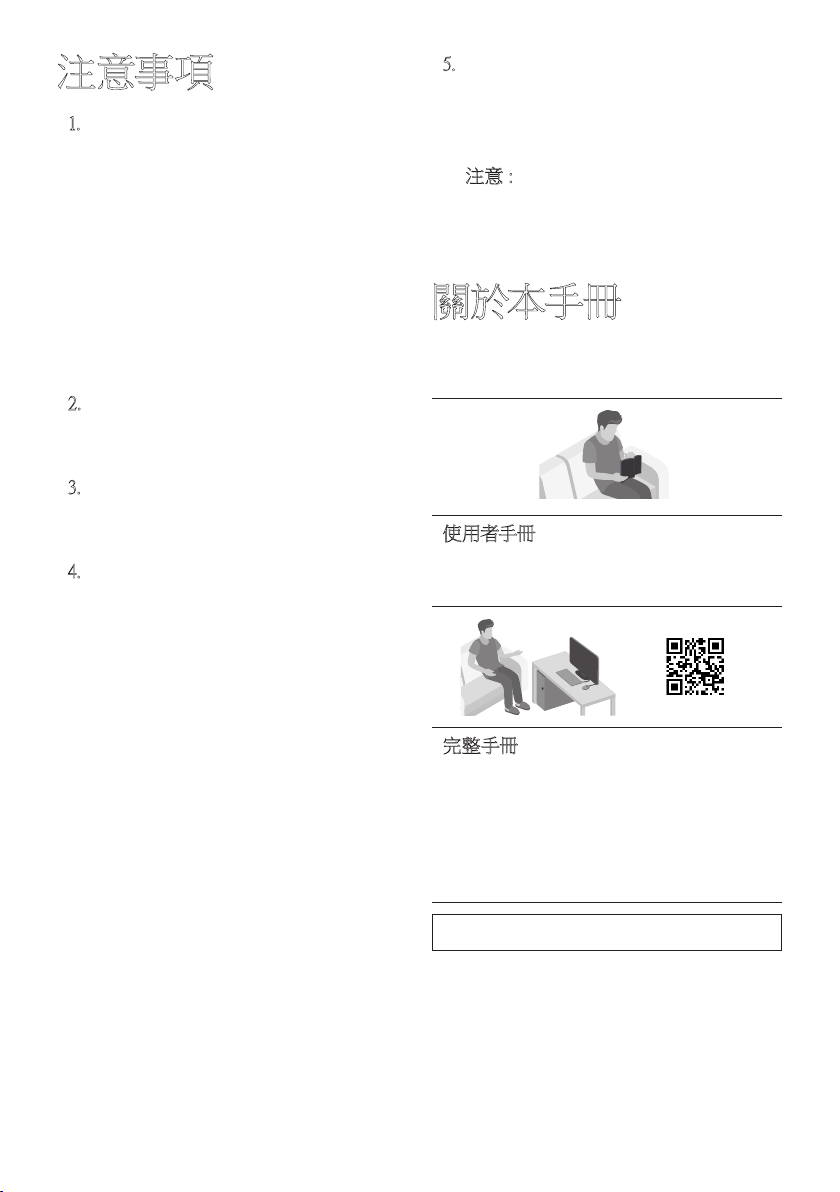
關於本手冊
使用者手冊分為兩個部分:簡化的使用者手
冊和詳細的完整手冊可供您下載。
使用者手冊
查看本手冊可瞭解安全說明、產品安裝、
元 件、連 線 和 產 品 規 格。
完整手冊
您可以在 Samsung 的線上客戶支援中心
掃描 QR 代碼,以取得完整手冊。若要在
電腦或行動裝置上查看手冊,請從
Samsung 網站以文件格式下載手冊。
(http://www.samsung.com/support)
設計和規格若有變更,恕不另行通知。
TPE - iv
目錄
01 檢查元件 2
在使用遙控器前插入電池 (AA 電池 X 2) --------------------------------- 2
02 產品概覽 3
有源音箱前方面板/上方面板
---------------------------------
3
有源音箱底部面板
---------------------------------
4
03 連接有源音箱 5
連接電力
---------------------------------
5
將有源音箱連接至有源重低音音箱
---------------------------------
6
– 有源重低音音箱和有源音箱之間的自動連線
---------------------------------
6
– 若自動連線失敗,請手動連線有源重低音音箱
---------------------------------
7
將 SWA-9100S (分售) 連接至有源音箱
---------------------------------
9
04 連接至您的電視 11
方法 1。以纜線連接
---------------------------------
11
– 使用光纖纜線連接
---------------------------------
11
方法 2。無線連線
---------------------------------
12
– 透過藍牙連線電視
---------------------------------
12
05 連線外部裝置 14
使用光纖纜線連接
---------------------------------
14
06 連接 USB 儲存裝置 15
TPE - v
07 連線行動裝置 17
透過藍牙連線
---------------------------------
17
08 使用遙控器 20
如何使用遙控器
---------------------------------
20
使用電視遙控器調整有源音箱音量 --------------------------------- 23
使用隱藏按鈕 (多功能按鈕)
---------------------------------
24
不同音效模式的輸出規格
---------------------------------
24
09 安裝掛牆托架 25
安裝注意事項
---------------------------------
25
牆面安裝元件
---------------------------------
25
10 將有源音箱放置在電視架上 27
11 軟體更新 28
更新程序
---------------------------------
28
若沒有顯示 UPDATE
---------------------------------
29
疑難排解
---------------------------------
30
12 授權 31
13 開放式原始碼授權聲明 32
14 關於維修的重要說明 32
15 規格和指南 33
規格
---------------------------------
33

TPE - 2
01 檢查元件
VOL WOOFER
SOUNDBAR
SOUND
MODE
PAIR
有源音箱主裝置 有源重低音音箱 遙控器/電池
x 2
電線
(有源重低音音箱、有源音箱)
光纖纜線 牆面安裝導桿
x 2
(M4 x L10)
x 2
x 2
支撐螺絲 螺絲 掛牆托架
• 電源和消耗功率,請參考本產品上的標籤。(標籤 : 有源音箱主裝置底部)
• 若要購買其他元件或選用纜線,請洽詢 Samsung 服務中心或是 Samsung 客戶服務。
• 配件的外觀可能與上面的圖例略有差異。
在使用遙控器前插入電池 (AA 電池 X 2)
以 箭 頭 方 向 滑 動 後 蓋,直 到 完 全 卸 下 為 止。
按照正確的電極方向插入 2 個 AA 電池 (1.5V)。將後蓋滑回原位。
TPE - 3
02
產品概覽
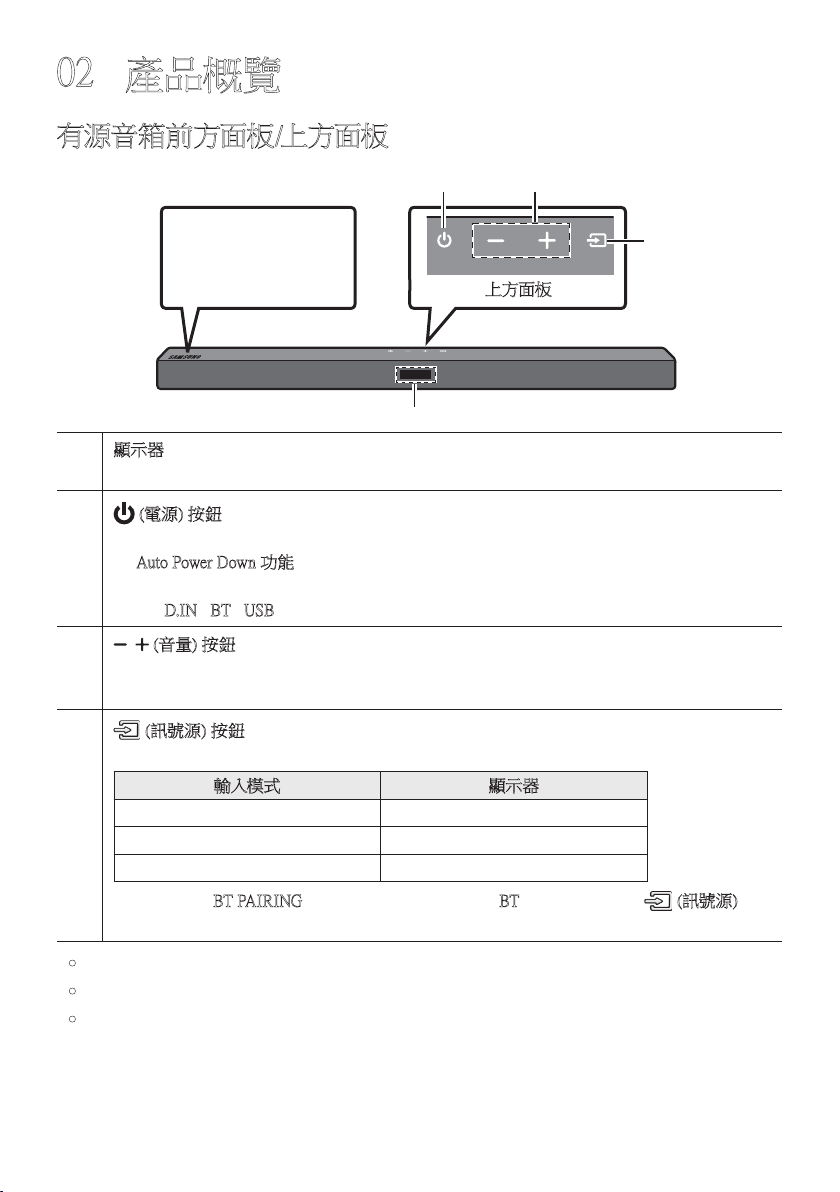
有源音箱前方面板/上方面板
以 正 確 方 式 放 置 產 品,
讓 SAMSUNG 標誌位
於 上 方。
上方面板
顯示器
顯示產品狀態和目前模式。
(電源) 按鈕
開 啟 及 關 閉 電 源。
• Auto Power Down 功能
裝 置 會 在 下 列 情 況 自 動 關 閉。
– D.IN / BT / USB 模式:若連續 18 分鐘都沒有音訊訊號。
(音量) 按鈕
調 整 音 量。
• 調整時,音量等級會顯示在有源音箱前方顯示器上。
(訊號源) 按鈕
選擇訊號源輸入模式。
輸入模式 顯示器
光纖數位數入 D.IN
BLUETOOTH 模式 BT
USB 模式 USB
• 若要開啟「BT PAIRING」模式,請將訊號源變更為「BT」模 式,然 後 按 住 (訊號源) 按
鈕超過 5 秒。
• 您插入交流電源線後,電源鍵會 4 到 6 秒鐘內生效。
• 當您開啟本裝置時,可能會延遲 4 到 5 秒後,裝置才會發出聲音。
• 如果您只想從有源音箱欣賞聲音,則必須從電視的 音訊設定 選單中關閉電視的揚聲
器。請 參 閱 電 視 隨 附 的 使 用 者 手 冊。
TPE - 4
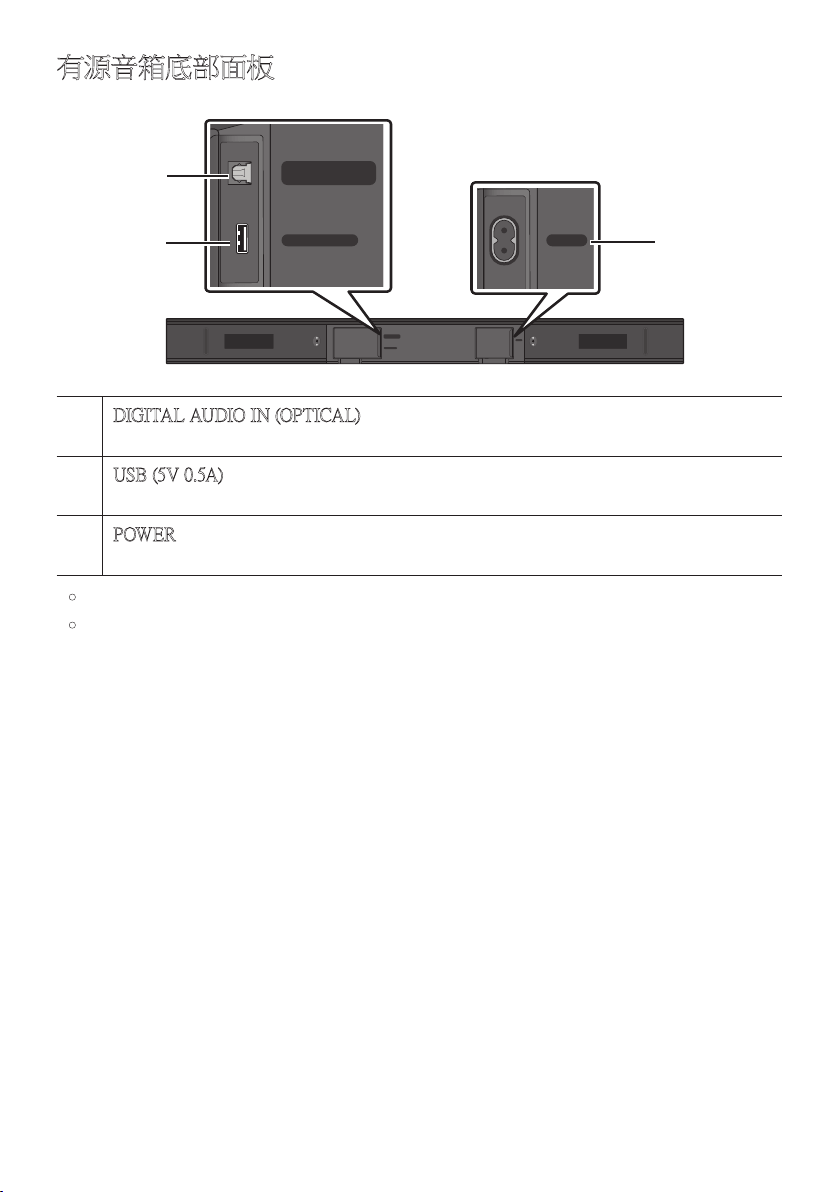
有源音箱底部面板
USB (5V 0.5A)
DIGITAL AUDIO IN
(OPTICAL)
POWER
USB (5V 0.5A)
DIGITAL AUDIO IN
(OPTICAL)
POWER
DIGITAL AUDIO IN (OPTICAL)
連接至外部裝置的數位 (光纖) 輸出。
USB (5V 0.5A)
在此處連接 USB 裝置,即可透過有源音箱播放 USB 裝置上的音樂檔案。
POWER
連接有源音箱的交流電源線。
• 從牆壁插座拔除電源線時,請拉動插頭。請勿拉動纜線。
• 在完成元件之間的所有連接之前,請勿將此裝置或其他元件連接至交流電插座。
TPE - 5
03 連接有源音箱
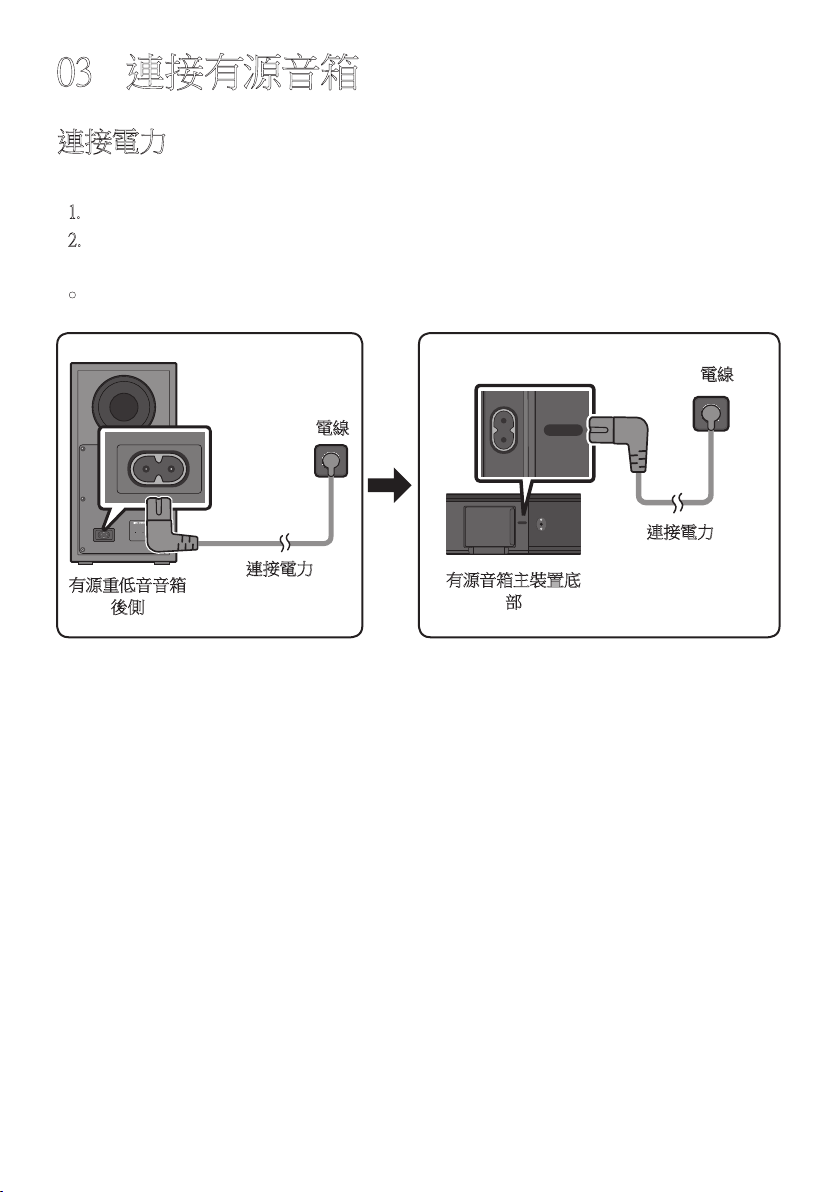
連接電力
使用電源元件以下列順序將有源重低音音箱和有源音箱連接至電源插座:
1. 將電源線連接至有源重低音音箱。
2. 將電源線連接至有源音箱。
請參見下圖。
• 電源和消耗功率,請參考本產品上的標籤。(標籤 : 有源音箱主裝置底部)
有源重低音音箱
後側
電線
連接電力
有源音箱主裝置底
部
連接電力
電線
USB (5V 0.5A)
DIGITAL AUDIO IN
(OPTICAL)
POWER
USB (5V 0.5A)
DIGITAL AUDIO IN
(OPTICAL)
POWER
USB (5V 0.5A)
DIGITAL AUDIO IN
(OPTICAL)
POWER
USB (5V 0.5A)
DIGITAL AUDIO IN
(OPTICAL)
POWER
TPE - 6
將有源音箱連接至有源重低音音箱
連接有源重低音音箱後,即可享受豐富的低音音效。
有源重低音音箱和有源音箱之間的自動連線
將電纜連接至有源音箱和有源重低音音箱之後,再開啟電源時,有源重低音音箱會自動連
線 至 有 源 音 箱。
• 自動配對完成後,有源重低音音箱後側的藍色指示燈會亮起。
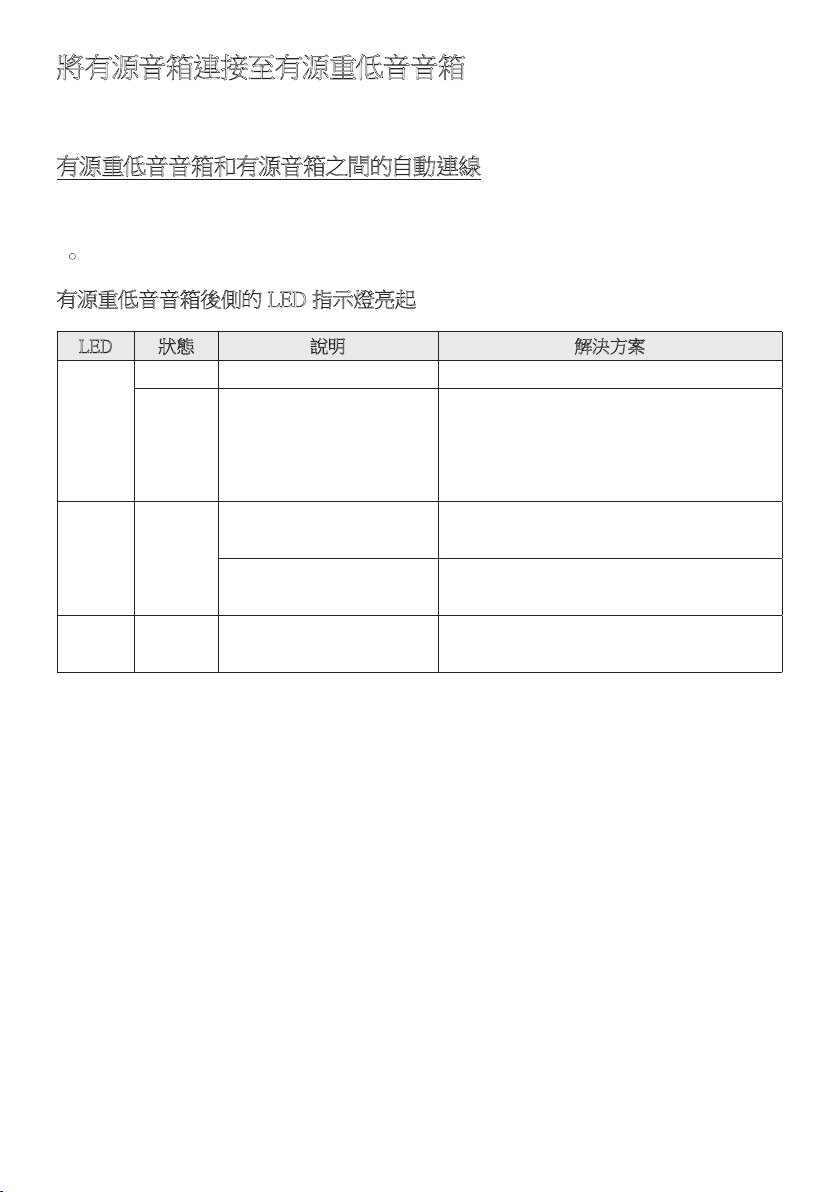
有源重低音音箱後側的 LED 指示燈亮起
LED 狀態 說明 解決方案
藍色
亮
成功連線 (正常運作) -
閃爍
正在恢復連線
檢查連接至有源音箱主裝置的電源線是否
正確連接,或等待大約 5 分鐘。若持續閃
爍,請 嘗 試 手 動 連 線 有 源 重 低 音 音 箱。
請參閱第 7 頁。
紅色 亮
待命 (有源音箱主裝置關
閉)
檢查連接至有源音箱主裝置的電纜是否
正 確 連 接。
連線失敗
重 新 連 線。請 參 見 第 7 頁的手動連線
說 明。
紅色和
藍色
閃爍
故障
請查看手冊中 Samsung 服務中心的聯絡資
訊。
TPE - 7
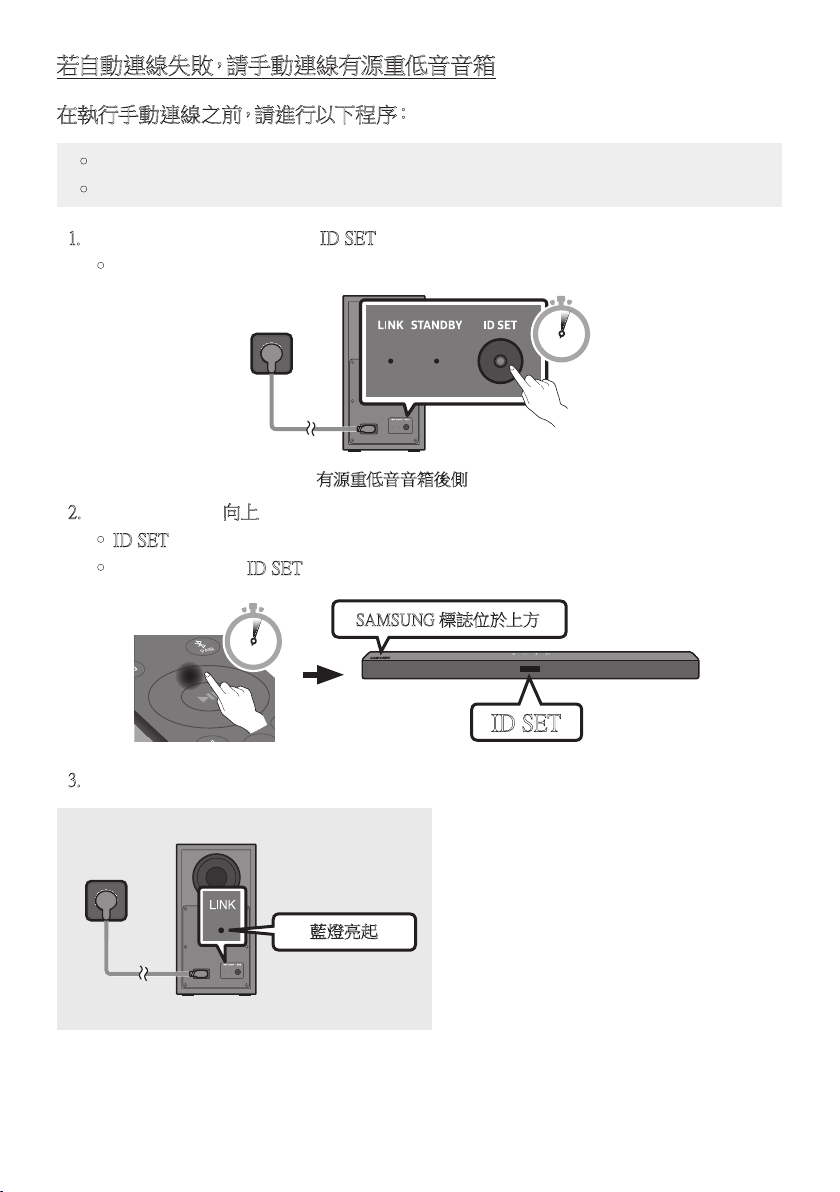
若自動連線失敗,請手動連線有源重低音音箱
在執行手動連線之前,請進行以下程序:
• 檢查有源音箱和有源重低音音箱之間的電纜是否正確連接。
• 確 認 有 源 音 箱 為 開 啟。
1. 按住有源重低音音箱後側的 ID SET 至少 5 秒。
• 有源重低音音箱後側的紅色指示燈會關閉,而且藍色指示燈會閃爍。
5 Sec
有源重低音音箱後側
2. 按住遙控器上的向上按鈕至少 5 秒。
• ID SET 訊息會短暫地出現在有源音箱的顯示器上,然後消失。
• 有源音箱將會在 ID SET 完成後自動開啟電源。
SOUND
MODE
PAIR
5 Sec
ID SET
SAMSUNG 標誌位於上方
3. 檢查 LINK LED 燈是否持續亮著藍燈 (連線完成)。
藍燈亮起
有源音箱和無線有源重低音音箱之間
建立連線後,LINK LED 指示燈就會停
止 閃 爍,並 持 續 亮 著 藍 燈。

TPE - 8
附註
• 在完成元件之間的所有連接之前,請勿將本產品電線或電視連接至牆面插座。
• 在移動或安裝本產品之前,務必關閉電源並拔除電線。
• 如果主裝置已關閉電源,無線有源重低音音箱將會進入待機模式,而且後面的
STANDBY LED 燈將會在閃爍藍燈數次後呈現紅色。
• 若您在有源音箱附近使用頻率 (5.8GHz) 與有源音箱相同的裝置,干擾可能會造成聲音
中 斷。
• 主裝置無線訊號的最大發射距離約為 10 公尺,但可能因不同的操作環境而異。若鋼筋
水 泥 或 金 屬 牆 位 於主 裝 置 和 無 線 有 源 重 低 音 音 箱 之 間,則 系 統 可 能 完 全 無 法 操 作,因 為
無線訊號無法穿透金屬。
注意事項
• 無線接收天線內建於無線有源重低音音箱。讓裝置遠離水和濕氣。
• 為達到最佳的聆聽效能,請確認無線有源重低音音箱和無線接收器模組(分售)位置的
週圍區域沒有任何障礙物。
TPE - 9
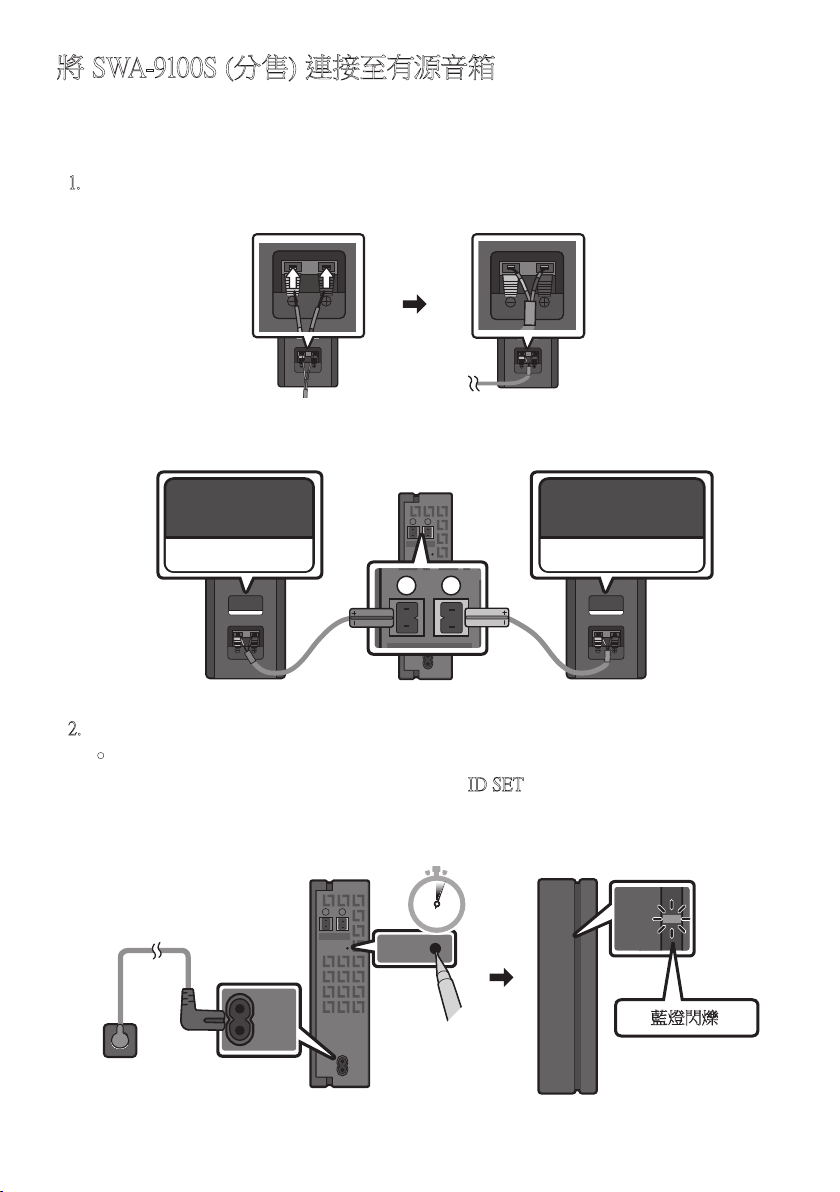
將 SWA-9100S (分售) 連接至有源音箱
透過將 Samsung 無線後置揚聲器套件 (SWA-9100S, 分售) 連接至有源音箱,可擴大至逼真
的無線環場音效。
1. 將無線接收器模組連接至 2 後環繞喇叭。
– 連接揚聲器纜線時,請將心線連接至揚聲器。
SURROUND-RIGHT
SURROUND-RIGHT
– 揚聲器纜線以顏色編碼。
SURROUND-LEFT
ID SET
L
R
SURROUND SPEAKERS OUT
SPEAKER IMPEDANCE : 3Ω
POWER
ID SET
L
R
SURROUND SPEAKERS OUT
SPEAKER IMPEDANCE : 3Ω
SURROUND-RIGHT
SURROUND-LEFT SURROUND-RIGHT
2. 在插入電源插座後,檢查無線接收器模組是否處於待命狀態。
• 無線接收器模組上的 LINK LED 指示燈 (藍色 LED 燈) 會閃爍。若 LED 燈沒有閃
爍,請使用筆尖按住無線接收器模組背面的 ID SET 按鈕 5~6 秒,直到 LINK LED
指示燈閃爍 (藍色) 為止。如需更多關於 LED 燈的資訊,請參閱 SWA-9100S 使用者
手 冊。
ID SET
L
R
SURROUND SPEAKERS OUT
SPEAKER IMPEDANCE : 3Ω
POWER
POWER
ID SET
SURROUND SPEAKERS OUT
SPEAKER IMPEDANCE : 3Ω
STANDBY
LINK
STANDBY
LINK
藍燈閃爍
5 Sec
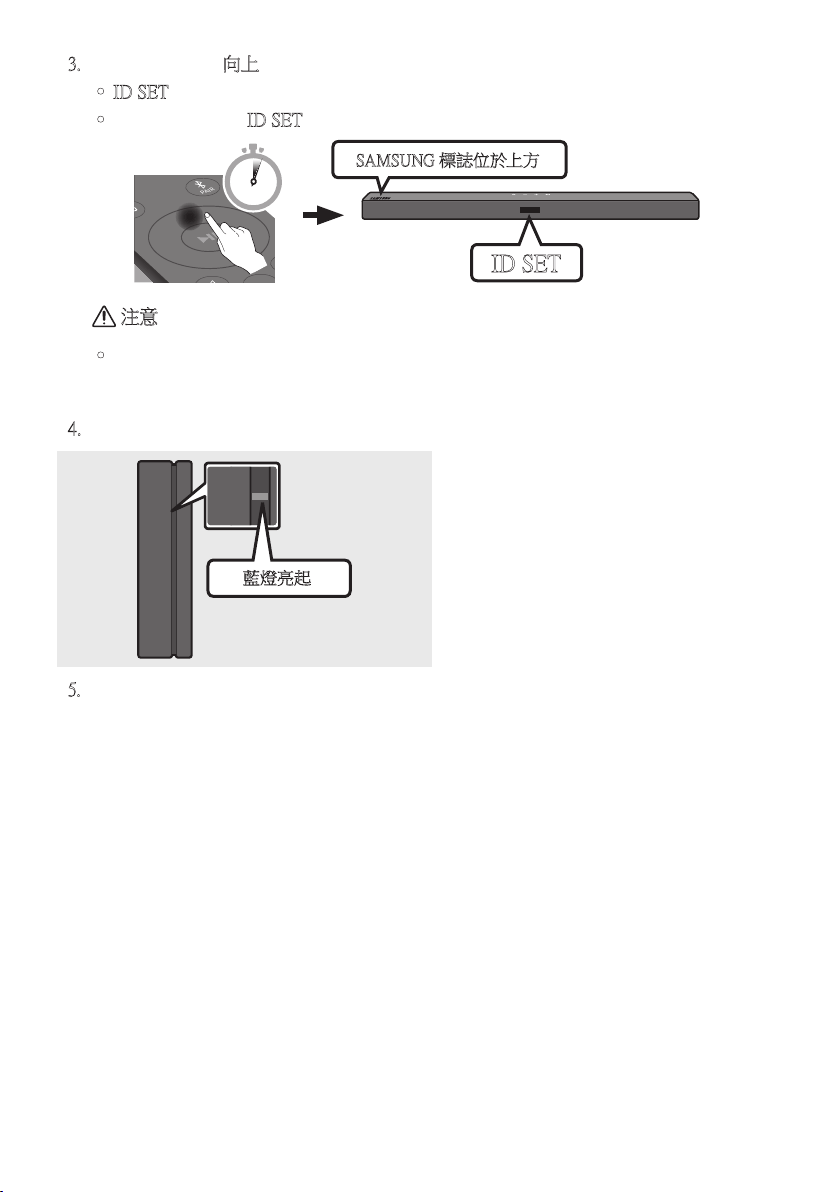
TPE - 10
3. 按住遙控器上的向上按鈕至少 5 秒。
• ID SET 訊息會短暫地出現在有源音箱的顯示器上,然後消失。
• 有源音箱將會在 ID SET 完成後自動開啟電源。
SOUND
MODE
PAIR
5 Sec
ID SET
SAMSUNG 標誌位於上方
注意
• 若您的有源音箱在連線至 SWA-9100S 時播放音樂,可以在連線完成時聽見有源重低
音音箱有一些斷斷續續的聲音。
4. 檢查 LINK LED 燈是否持續亮著藍燈 (連線完成)。
STANDBY
LINK
STANDBY
LINK
藍燈亮起
有源音箱和無線接收器模組之間建立
連線後,LINK LED 指示燈就會停止閃
爍,並 持 續 亮 著 藍 燈。
5. 若 SWA-9100S 未連接,請重複步驟 2 的程序。
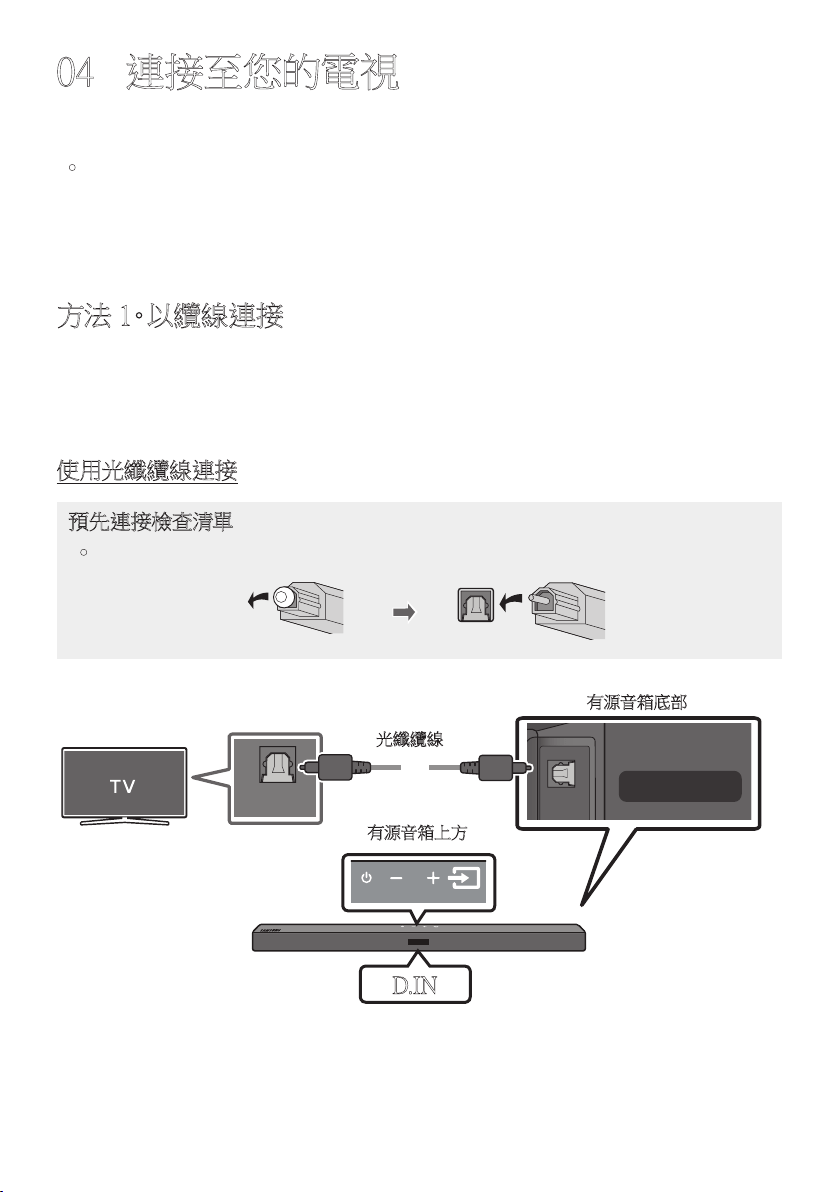
TPE - 11
04 連接至您的電視
從有源音箱透過有線或無線連接聆聽電視聲音。
• 若有源音箱連接至所選的 Samsung TV,則可使用電視遙控器控制有源音箱。
– 在您使用光纖纜線將有源音箱連接至電視後,2017 年及之後支援藍牙功能的
Samsung Smart TV 可支援此功能。
– 此功能也可以使用電視功能表調整音場和各種設定,以及音量和靜音。
方法 1。以纜線連接
若廣播中的音訊以杜比數位編碼,而電視上的「數位輸出音訊格式」設定為 PCM,則建議
您將設定變更為杜比數位。變更電視上的設定後,將能體驗更好的聲音品質。(不同的電視
製造商可能會在電視功能表使用不同的字詞來表示 Dolby Digital 和 PCM)
使用光纖纜線連接
預先連接檢查清單
• 若使用光纖纜線且終端有蓋子,務必取下蓋子。
OPTICAL OUT
USB (5V 0.5A)
DIGITAL AUDIO IN
(OPTICAL)
有源音箱上方
D.IN
光纖纜線
有源音箱底部
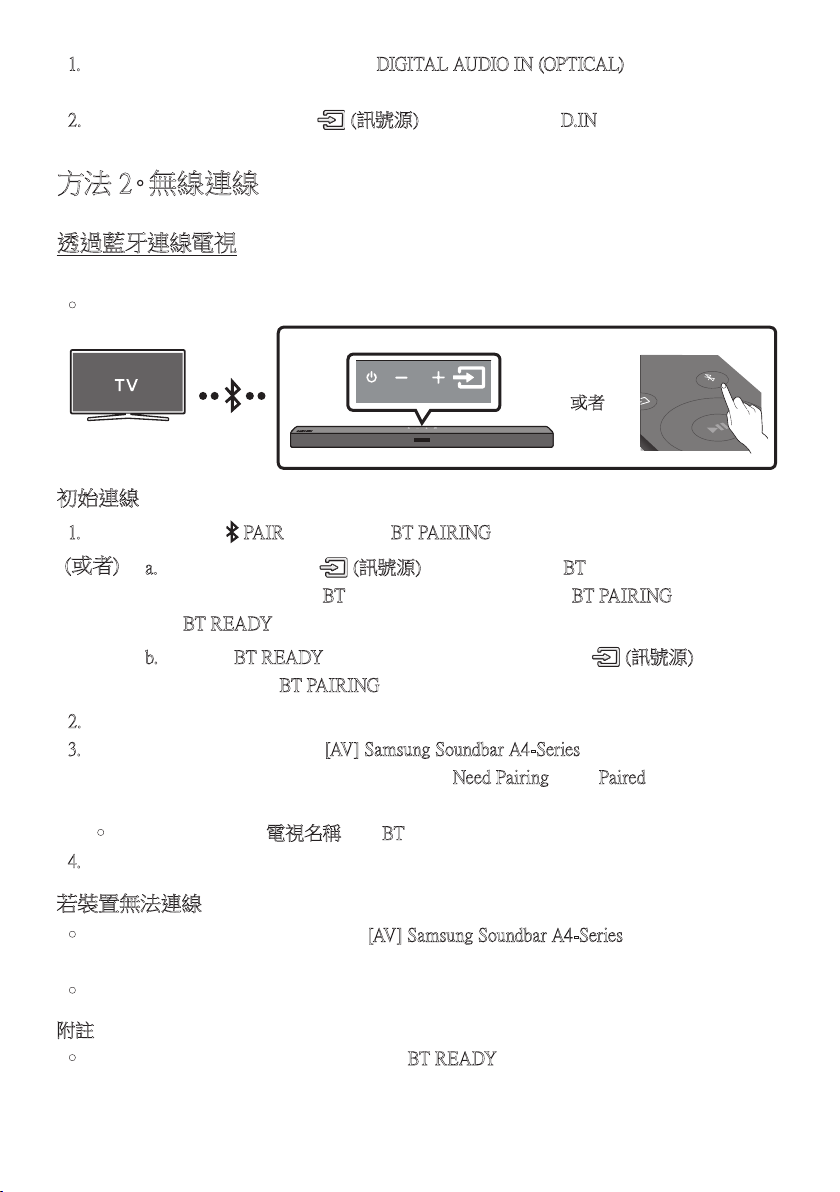
TPE - 12
1. 使用數位光纖纜線將有源音箱上的 DIGITAL AUDIO IN (OPTICAL) 插孔連接至電視上
的 OPTICAL OUT 插孔。
2. 按 下上 方 面 板 或 遙 控 器 上 的 (訊號源) 按 鈕,然 後 選 擇「D.IN」模 式。
方法 2。無線連線
透過藍牙連線電視
若電視使用藍牙連線,您可以聆聽立體聲音效,且省去連接纜線的麻煩。
• 一 次 只 能 連 線 一 台 電 視。
SOUND
MODE
PAIR
或者
初始連線
1. 按下遙控器上的 PAIR 按 鈕 以 進 入「 BT PAIRING」模 式。
(或者)
a. 按 下上 方 面 板 上 的 (訊號源) 按 鈕,然 後 選 擇「BT」。
如 果 有 連 線 記 錄 ,「 BT」會在幾秒鐘後自動變更為「BT PAIRING」或 變 更 為
「BT READY」。
b. 若 出 現「BT READY」,請在有源音箱的上方面板按住 (訊號源) 超過
5 秒,以顯示「BT PAIRING」。
2. 選擇電視上的藍牙模式。 (如需更多資訊,請參見電視手冊。)
3. 從電視畫面上的清單中選擇「[AV] Samsung Soundbar A4-Series」。
可 用 的 有 源 音 箱 會 在 電 視 藍 牙 裝 置 清 單 中 以「Need Pairing 」或「Paired」顯 示。
若要連線至有源音箱,請選擇訊息並建立連線。
• 若電視已連線,則 [電視名稱] →「BT」會出現在有源音箱前方顯示器上。
4. 您現在可以從有源音箱聆聽電視聲音。
若裝置無法連線
• 若先前連線的有源音箱清單 (例如「[AV] Samsung Soundbar A4-Series」) 出現在清單中,
請 刪 除。
• 然後重複步驟 1 到 3。
附註
• 首次將有源音箱連線至電視後,請使用「BT READY」模 式 重 新 連 線。
TPE - 13
從電視中斷有源音箱連線
按 下上 方 面 板 或 遙 控 器 上 的
(訊號源)
按 鈕,然 後 切 換 為 除 了「BT」以 外 的 任 何 模 式。
• 中斷連線需要時間,因為電視必須收到來自有源音箱的回應。(所需時間依電視型號而
不 同。)
• 若要取消有源音箱和電視之間的自動藍牙連線,請在有源音箱處於「BT READY」狀 態
時,按 下 遙 控 器 上 的 向左按鈕 5 秒。(切換開啟 → 關閉)
BT READY 和 BT PAIRING 之間有什麼差異?
• BT READY:在此模式中,您可以搜尋先前連線的電視或將先前連線的行動裝置連線至
有 源 音 箱。
• BT PAIRING : 在此模式中,您可以將新的裝置連線至有源音箱。
(按下遙控器上的 PAIR 按鈕,或按住有源音箱上方的 (訊號源) 按鈕超過 5 秒,同
時 有 源 音 箱 處 於「BT」模 式。)
附註
• 連線藍牙裝置時,若要求 PIN 碼,請輸入 <0000>。
• 在藍牙連線模式中,若有源音箱和藍牙裝置之間的距離超過 10 公尺,會遺失藍牙連
線。
• 有源音箱會在就緒狀態持續 18 分鐘後自動關閉。
• 在 下 列 狀 況 下,有 源 音 箱 無 法 正 確 執 行 藍 牙 搜 尋 或 連 線:
– 若 有 源 音 箱 附 近有 強 烈 電 場。
– 若有兩個或更多藍牙裝置同時與有源音箱配對。
– 若藍牙裝置關閉、位置不正確或故障。
• 電子裝置可能會造成無線電波干擾。產生電磁波的裝置必須遠離有源音箱主裝置 - 例
如微波爐、無線 LAN 裝置等。
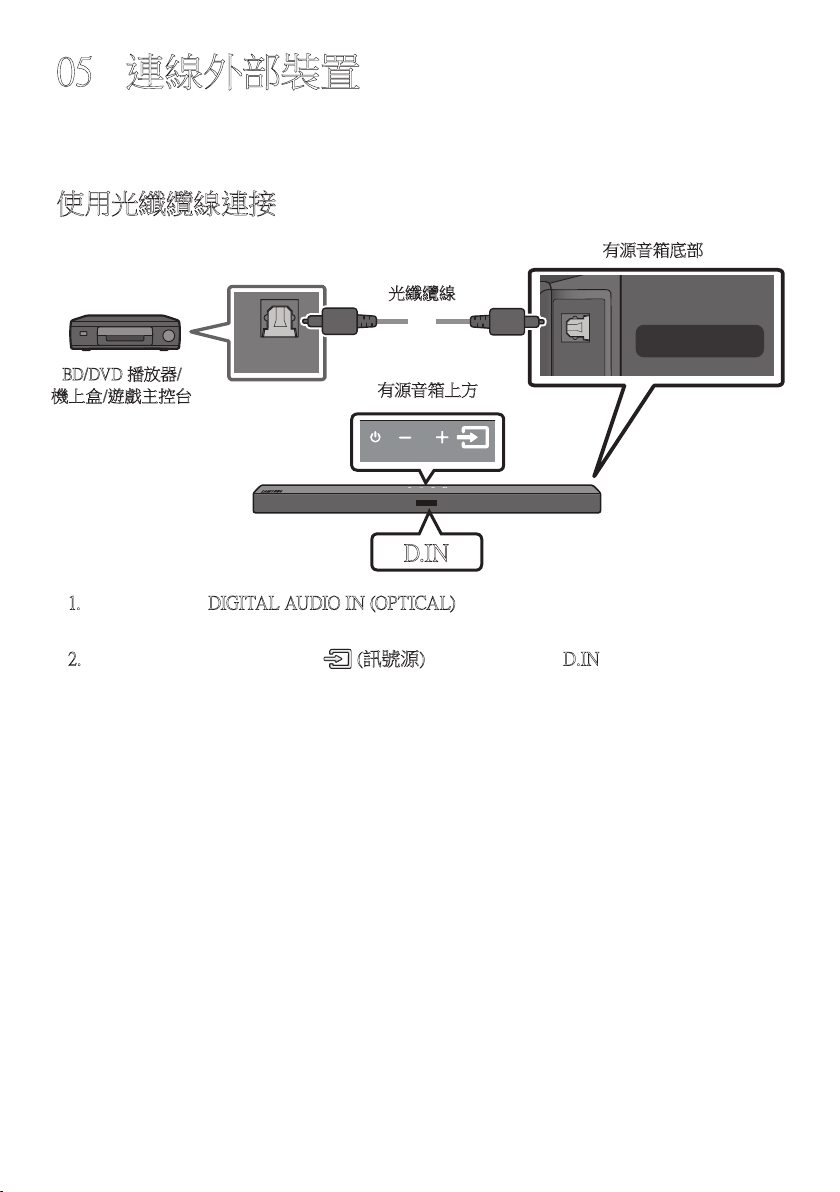
TPE - 14
05 連線外部裝置
透過有線連接或藍牙連接連接至外部裝置,以透過有源音箱播放外部裝置的聲音。
使用光纖纜線連接
OPTICAL OUT
USB (5V 0.5A)
DIGITAL AUDIO IN
(OPTICAL)
有源音箱上方
D.IN
光纖纜線
有源音箱底部
BD/DVD 播放器/
機上盒/遊戲主控台
1. 將主裝置上的 DIGITAL AUDIO IN (OPTICAL) 連接至訊號源上的 OPTICAL OUT 插孔
裝 置 使 用 數 位 光 纖 纜 線。
2. 按下上方面板或遙控器上的 (訊號源) 按鈕,以選擇「D.IN」。
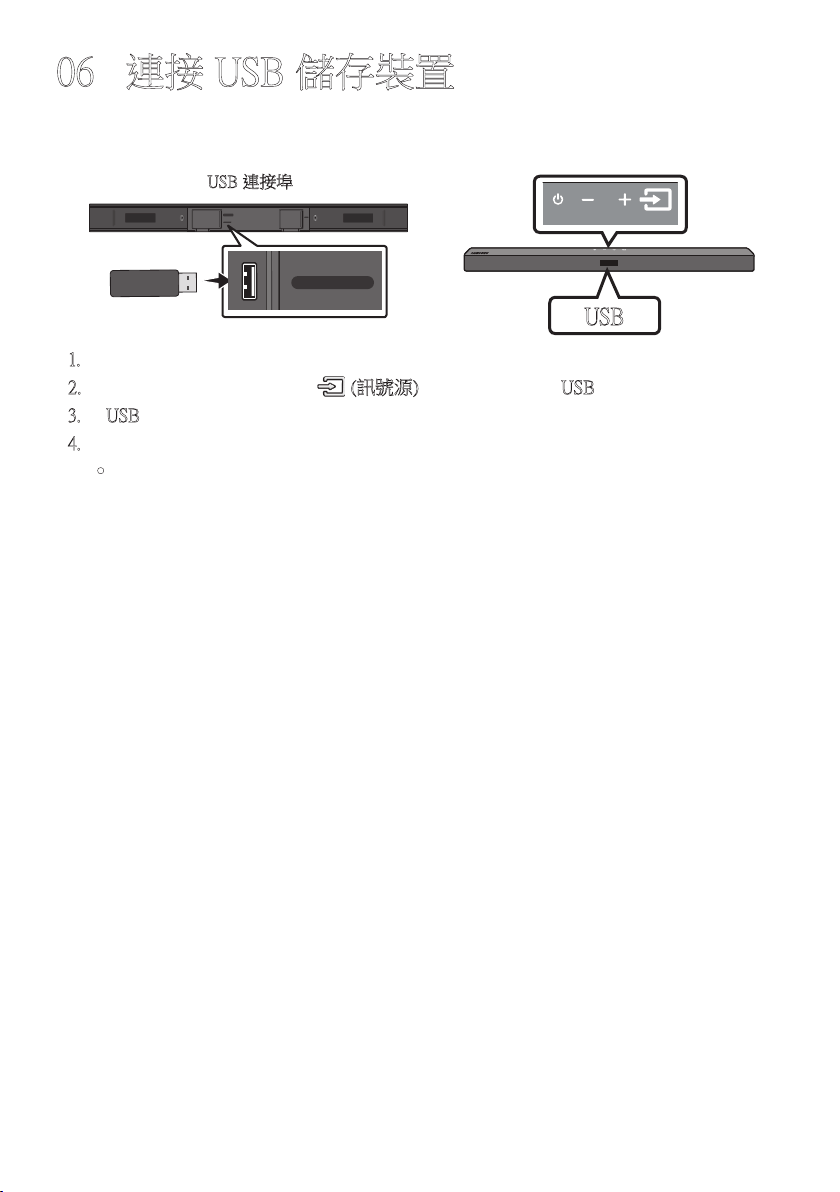
TPE - 15
06 連接 USB 儲存裝置
您可以透過有源音箱播放位於 USB 儲存裝置的音樂檔案。
USB
USB (5V 0.5A)
DIGITAL AUDIO IN
(OPTICAL)
POWER
USB (5V 0.5A)
DIGITAL AUDIO IN
(OPTICAL)
USB 連接埠
1. 將 USB 裝置連接至產品底部的 USB 連接埠。
2. 按 下上 方 面 板 或 遙 控 器 上 的 (訊號源) 按 鈕,然 後 選 擇「USB」。
3. 「USB」會 出 現 在 顯 示 畫 面 中。
4. 透過有源音箱從 USB 儲存裝置播放音樂檔案。
• 若持續超過 18 分鐘沒有連接 USB 裝置,有源音箱就會自動關閉 (自動電源關閉)。
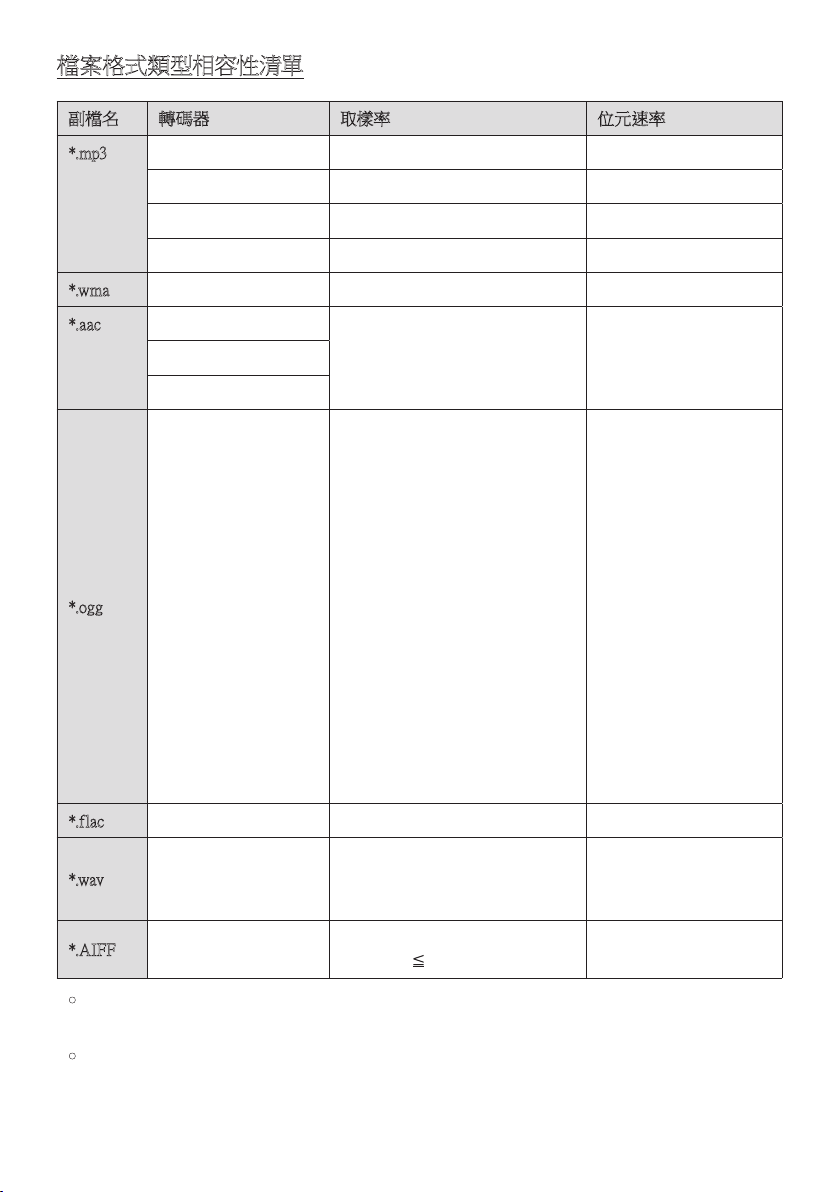
TPE - 16
檔案格式類型相容性清單
副檔名 轉碼器 取樣率 位元速率
*.mp3 MPEG 1 Layer2 32kHz ~ 48kHz 32kbps ~ 320kbps
MPEG 1 Layer3 32kHz ~ 48kHz 32kbps ~ 320kbps
MPEG 2 Layer3 16kHz ~ 24kHz 8kbps ~ 160kbps
MPEG 2.5 Layer3 8kHz ~ 12kHz 8kbps ~ 160kbps
*.wma WMA7/8/9/STD 8kHz ~ 48kHz 32kbps ~ 320kbps
*.aac AAC
8kHz ~ 96kHz < 1728kbps
AAC-LC
HE-AAC
*.ogg Vorbis 轉碼器 (8、16、22.05、32、44.1、48)kHz
不支援 ogg:
1. 區塊大小 0 < 256,區
塊大小 0 > 1024
2. 區塊大小 1 < 512,
區塊大小 1 > 4096
3. 編碼簿計數器 > 64
4. 編碼簿輸入項目 >
640
5. 樓面計數器 > 2
6. 樓面類型 0
7. 剩餘計數器 > 2
8. 維度 != 2
9. 對應計數器 > 2
10. 模式計數器 > 2
11. 剩餘類型 != 頻道號
碼
*.flac - 8kHz ~ 192kHz < 5Mbps
*.wav
PCM/LPCM/IMA_
ADPCM/MPEG/
MUL AW
8kHz ~ 192kHz < 5Mbps
*.AIF F
壓 縮 類 型:
a l w a、u l a w、s o w t
(8、16、22.05、32、44.1、48、96
、1 9 2 ) k H z 2 頻道
< 5Mbps
• 如果在 USB 裝置上儲存太多資料夾 (約 256 個) 與檔案 (約 999 個),有源音箱可能需要
一些時間來存取和播放檔案。
• USB 儲存裝置連接僅支援 USB 格式類型 FAT 32。
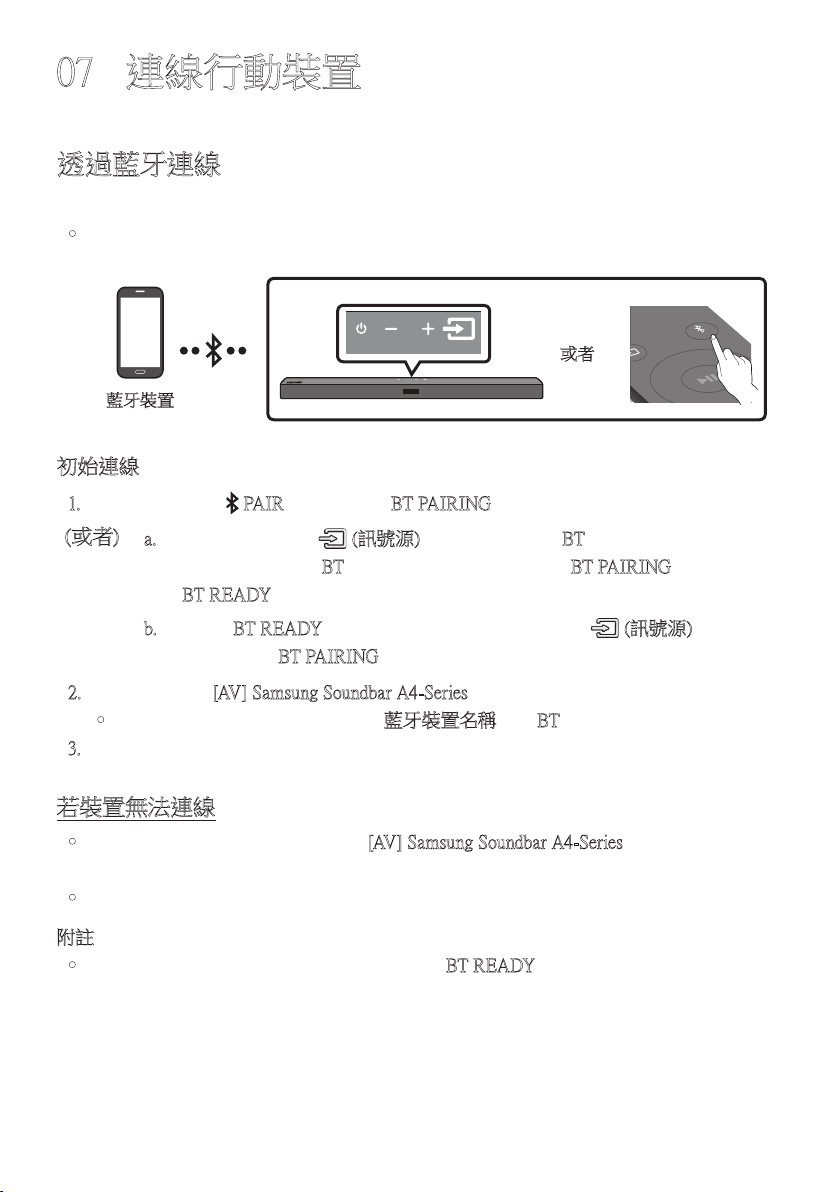
TPE - 17
07 連線行動裝置
透過藍牙連線
若行動裝置使用藍牙連線,您可以聆聽立體聲音效,且省去連接纜線的麻煩。
• 您無法一次連線多個藍牙裝置。
SOUND
MODE
PAIR
或者
藍牙裝置
初始連線
1. 按下遙控器上的 PAIR 按 鈕 以 進 入「 BT PAIRING」模 式。
(或者)
a. 按 下上 方 面 板 上 的 (訊號源) 按 鈕,然 後 選 擇「BT」。
如 果 有 連 線 記 錄 ,「 BT」會在幾秒鐘後自動變更為「BT PAIRING」或 變 更 為
「BT READY」。
b. 若 出 現「BT READY」,請在有源音箱的上方面板按住 (訊號源) 超過
5 秒,以顯示「BT PAIRING」。
2. 從 清 單 中 選 擇「[AV] Samsung Soundbar A4-Series」。
• 當有源音箱連線至藍牙裝置時, [藍牙裝置名稱] →「BT」就 會 出 現 在 前 方 顯 示 器。
3. 透過有源音箱從藍牙連線裝置播放音樂檔案。
若裝置無法連線
• 若先前連線的有源音箱清單 (例如「[AV] Samsung Soundbar A4-Series」)
出 現 在 清 單 中,請 刪 除。
• 然後重複步驟 1 到 2。
附註
• 首次將有源音箱連線至行動裝置後,請使用「BT READY」模 式 重 新 連 線。
TPE - 18
BT READY 和 BT PAIRING 之間有什麼差異?
• BT READY:在此模式中,您可以搜尋先前連線的電視或將先前連線的行動裝置連線至
有 源 音 箱。
• BT PAIRING : 在此模式中,您可以將新的裝置連線至有源音箱。
(按下遙控器上的 PAIR 按鈕,或按住有源音箱上方的 (訊號源) 按鈕超過 5 秒,同
時 有 源 音 箱 處 於「BT」模 式。)
附註
• 連線藍牙裝置時,若要求 PIN 碼,請輸入 <0000>。
• 在藍牙連線模式中,若有源音箱和藍牙裝置之間的距離超過 10 公尺,會遺失藍牙連
線。
• 有源音箱會在就緒狀態持續 18 分鐘後自動關閉。
• 在 下 列 狀 況 下,有 源 音 箱 無 法 正 確 執 行 藍 牙 搜 尋 或 連 線:
– 若 有 源 音 箱 附 近有 強 烈 電 場。
– 若有數個藍牙裝置同時與有源音箱配對。
– 若藍牙裝置關閉、位置不正確或故障。
• 電子裝置可能會造成無線電波干擾。產生電磁波的裝置必須遠離有源音箱主裝置 - 例
如微波爐、無線 LAN 裝置等。
• 有源音箱僅支援中等品質 SBC 資料(44.1kHz, 48kHz)
• 只能連接至支援 A2DP(AV)功能的藍牙裝置。
• 不能將有源音箱連接至僅支援 HF(Hands Free)功能的藍牙裝置。
• 配對有源音箱與藍牙裝置後,如果從裝置的已掃描裝置清單中選取
「[AV] Samsung Soundbar A4-Series」,則會自動將有源音箱切換至 「BT」模 式。
– 僅當有源音箱列出在藍牙裝置的搜尋到的裝置清單中時才可用。(藍牙裝置和有源
音箱先前必須至少已配對 一次。)
• 僅 當 有 源 音 箱 顯 示「BT READY」 時,有源音箱才會出現在藍牙裝置的搜尋到的裝置清
單中。
• 若有源音箱已處於藍牙模式且已配對至藍牙裝置,就無法配對至另一個藍牙裝置。
Bluetooth Power 開啟 (SOUND MODE)
如果之前已配對的藍芽裝置嘗試在 Bluetooth Power 開啟 功能開啟且有源音箱關閉時與有
源音箱配對,有源音箱會自動開啟。
1. 在有源音箱開啟時,按住遙控器上的 SOUND MODE 按鈕超過 5 秒。
2. 「ON-BLUETOOTH POWER」 會出現在有源音箱的顯示器上。
TPE - 19
從有源音箱中斷藍牙裝置的連線
您可以從有源音箱斷開藍牙裝置的連線。如需說明,請參閱藍牙裝置的使用者手冊。
• 有 源 音 箱 將 斷 開 連 線。
• 當有源音箱從藍牙裝置中斷連線時,有源音箱就會在前方顯示器上顯示
「BT DISCONNECTED」。
從藍牙裝置中斷有源音箱連線
按 下上 方 面 板 或 遙 控 器 上 的 (訊號源) 按 鈕,然 後 變 更 為「BT」以 外 的 任 何 模 式。
• 中斷連線需要時間,因為藍牙裝置必須收到來自有源音箱的回應。(不同的藍牙裝置需
要不同的中斷連線時間)
• 當有源音箱從藍牙裝置中斷連線時,有源音箱就會在前方顯示器上顯示
「BT DISCONNECTED」。
附註
• 在藍牙連線模式中,如果有源音箱與藍牙裝置之間的距離超過 10 公尺,藍牙連線將會
中 斷。
• 保持「備妥」狀態 18 分鐘後,有源音箱將會自動關閉。
藍牙相關詳細資訊
藍牙技術可讓符合藍牙的裝置使用無線連線輕鬆互連。
• 在下列情況下,藍牙裝置可能導致噪音或發生故障,具體視使用情況而定:
– 您身體的某個部位接觸藍牙裝置或有源音箱的接收/傳送系統。
– 受來自牆壁、角落或辦公室分隔物形成之障礙的電子變體影響。
– 受相同頻段裝置(包括醫裝置、微波爐和無線 LAN)的電子干擾。
• 當有源音箱與藍牙裝置靠得很近時使兩者配對。
• 有 源 音 箱 與 藍 牙 裝 置 之 間 的 距 離 越 遠,品 質 就 越 差。
如果距離超出藍牙工作範圍,連線將會中斷。
• 在接收敏感度較差的區域中,藍牙連線可能無法正常工作。
• 藍牙連線只能在靠近裝置時才能正常工作。如果藍牙裝置超出範圍,則會自動切斷連
線。即使在範圍內,牆壁或門等障礙物也可能導致聲音品質下降。
• 這個 無 線 裝 置 可能 會 在 其 操 作 期 間 造 成 電子 干 擾。

TPE - 20
08 使用遙控器
如何使用遙控器
VOL WOOFER
SOUNDBAR
SOUND
MODE
PAIR
電源
VOL WOOFER
SOUND
MODE
PAIR
開 啟 及 關 閉 有 源 音 箱。
VOL WOOFER
SOUND
MODE
PAIR
訊號源
按下可選擇連接至有源音箱的訊號源。
靜音
VOL WOOFER
SOUND
MODE
PAIR
按下 (靜音) 按鈕以靜音聲音。
再次按下以取消靜音聲音。
SOUND
MODE
VOL WOOFER
SOUND
MODE
PAIR
按下按鈕即可切換可用的聲音模式:
STANDARD、SURROUND SOUND、BASS
BOOST、GAME 或 ADAPTIVE。
– STANDARD
輸 出 原 始 聲 音。
– SURROUND SOUND
提 供 比 標 準 更 廣 的 音 場。
– BASS BOOST
強調低音的聲場模式。
– GAME
提供立體聲以讓您在遊戲時沉浸在動
作 中。
– ADAPTIVE SOUND
即時分析內容並根據內容特徵自動提
供最 佳 音 場。
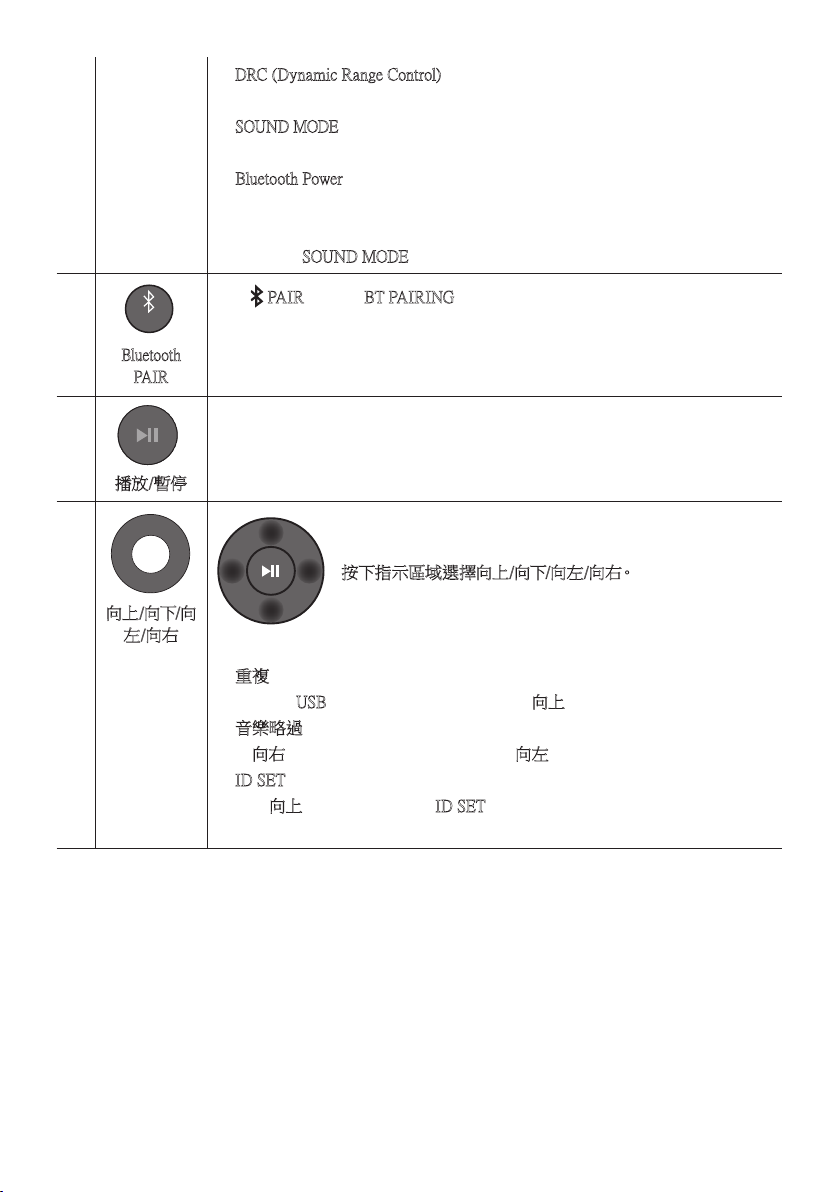
TPE - 21
• DRC (Dynamic Range Control)
讓您將動態範圍控制套用至 Dolby Digital 音軌。當有源音箱關閉時按住
SOUND MODE 按鈕 5 秒鐘以上,即可開啟或關閉 DRC (動態範圍控制)。DRC
開啟時,會降低過大的音量。(聲音可能會扭曲。)
• Bluetooth Power
此功能可讓有源音箱在接收來自先前連線的電視或藍牙裝置的連線請求
時,自動開啟有源音箱。預設設定為開啟。
– 按住 SOUND MODE 按鈕超過 5 秒,可關閉 Bluetooth Power 功能。
VOL WOOFER
SOUND
MODE
PAIR
Bluetooth
PAIR
按下 PAIR 按 鈕 。「 BT PAIRING」會顯示在有源音箱的顯示器中。
在此模式中,您可以從藍牙裝置的搜尋清單中選擇有源音箱,以將有源音箱連
線 至 新 的 藍 牙 裝 置。
播放/暫停
Surround
VOL WOOFER
SOUND
MODE
Bluetooth
POWER
按下 p 按鈕可暫停音樂檔案。
若您再次按下此按鈕,就會播放音樂檔案。
VOL WOOFER
SOUND
MODE
PAIR
向上/向下/向
左/向右
按下指示區域選擇向上/向下/向左/向右。
按下按鈕上的向上/向下/向左/向右選擇或設定功能。
• 重複
若 要 在「USB」模 式 中 使 用 重 複 功 能,請 按 向上按 鈕。
• 音樂略過
按向右按鈕可選擇下一個音樂檔案。按向左按鈕可選擇上一個音樂檔案。
• ID SET
按住向上按鈕 5 秒,以完成 ID SET (連接至無線有源重低音音箱或無線後
置 揚 聲 器 時 )。
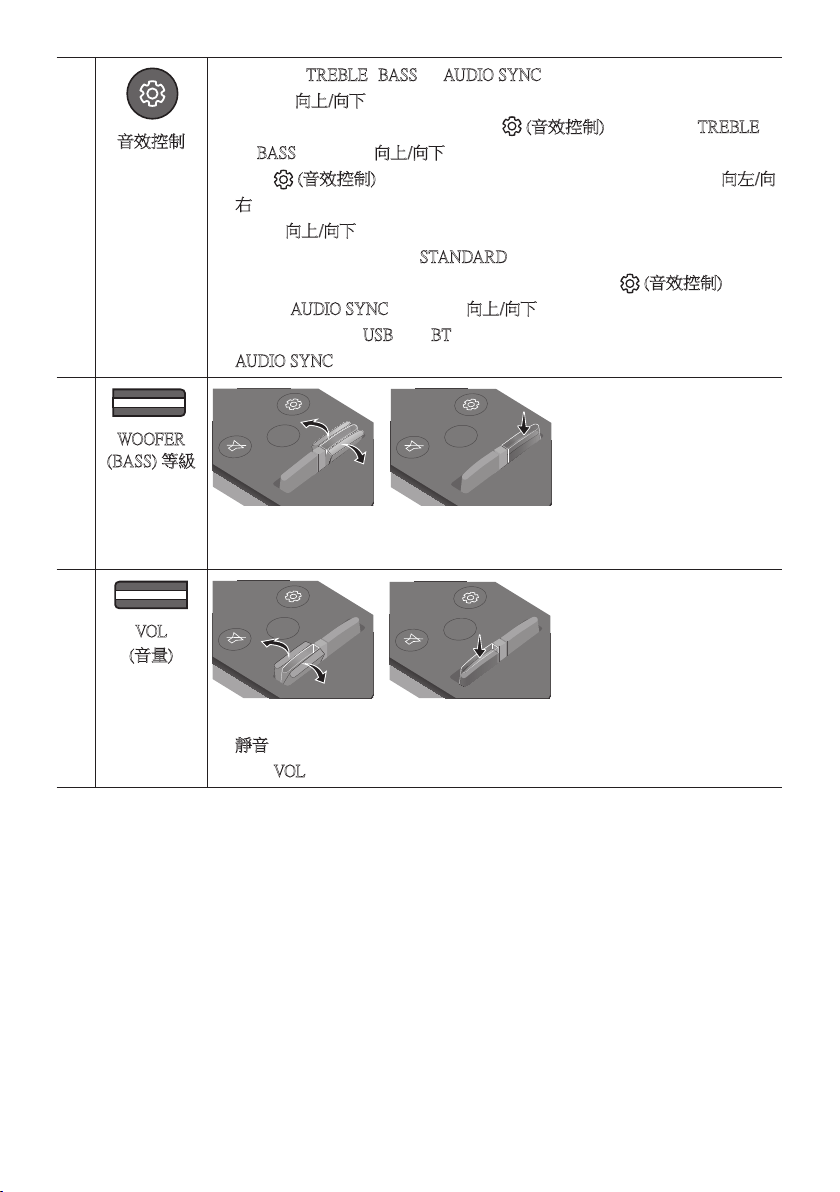
TPE - 22
音效控制
VOL WOOFER
SOUND
MODE
PAIR
按 下 按 鈕 時,TREBLE、BASS 和 AUDIO SYNC 設 定 會 依 序 顯 示。
您可以使用向上/向下按鈕調整所需設定。
• 若要控制高音或低音的音量,請按下 (音效控制) 按鈕以選擇 TREBLE
或 BASS,然 後 使 用 向上/向下按鈕介於 -6~+6 之間調整音量。
• 按住 (音效控制) 按鈕大約 5 秒,以調整每個頻帶的聲音。可使用向左/向
右按鈕選擇 150Hz、300Hz、600Hz、1.2kHz、2.5kHz、5kHz 和 10kHz,每項都
能使用向上/向下按鈕調整為介於 -6 到 +6 之間的設定。
( 請 確 認 聲 音 模 式 設 定 為「STANDARD」。 )
• 如果電視上的視訊與有源音箱的音訊不同步,請按下 (音效控制) 按鈕
以選擇 AUDIO SYNC,然 後 使 用 向上/向下按鈕在 0~300 毫秒之間設定音訊
延 遲。( 不 可 用 於「USB」或「BT」模 式。)
• AUDIO SYNC 僅 在 某 些 功 能 受 到 支 援。
VOL WOOFER
SOUND
MODE
PAIR
WOOFER
(BASS) 等級
SOUND
MODE
VOL
WOOFER
SOUNDBAR
SOUND
MODE
VOL
WOOFER
SOUNDBAR
SOUND
MODE
VOL
WOOFER
SOUNDBAR
SOUND
MODE
VOL
WOOFER
SOUNDBAR
向上或向下推動按鈕以將有源重低音音箱 (低音) 的音量調整為 -12 或介於 -6
到 +6 之間。若要將有源重低音音箱 (低音)音量設定為 0 (預設),請按下按鈕。
VOL WOOFER
SOUND
MODE
PAIR
VOL
(音量)
SOUND
MODE
VOL
WOOFER
SOUNDBAR
SOUND
MODE
VOL
WOOFER
SOUNDBAR
SOUND
MODE
VOL
WOOFER
SOUNDBAR
SOUND
MODE
VOL
WOOFER
SOUNDBAR
向上或向下推動按鈕可調整音量。
• 靜音
按下 VOL 按鈕以靜音。再次按下可取消靜音。
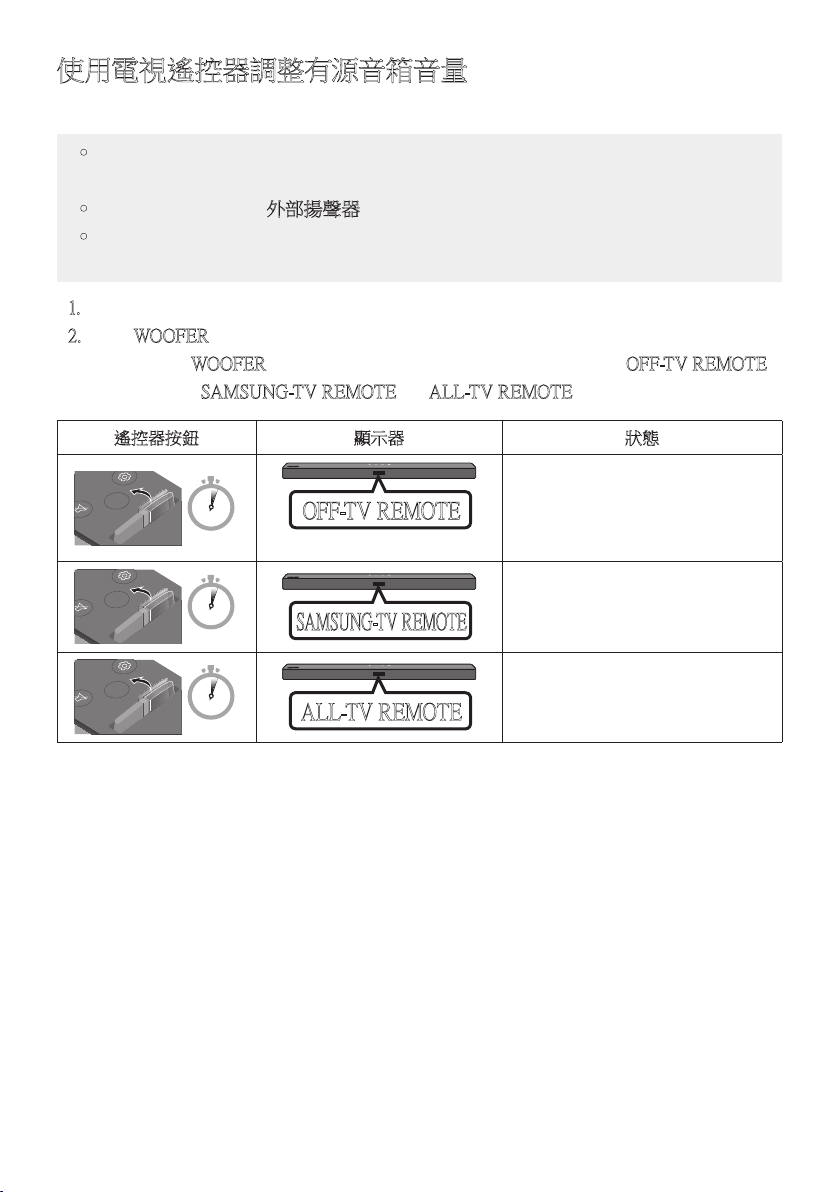
TPE - 23
使用電視遙控器調整有源音箱音量
使用電視遙控器調整有源音箱音量。
• 只有在使用紅外線遙控器時才能使用此功能。 不支援藍牙遙控器 (需要配對的遙控
器 )。
• 將電視揚聲器設定為外部揚聲器以 使 用 此 功 能。
• 支 援 此 功 能 的 製 造 商:
VIZIO、LG、Sony、Sharp、PHILIPS、PANASONIC、TOSHIBA、Hisense、RCA
1. 關 閉 有 源 音 箱。
2. 按住 WOOFER 按鈕 5 秒。
每次您按住 WOOFER 按鈕 5 秒時,就會按照下列順序切換模式:「OFF-T V R EMOTE」
(預設模式)、「SAMSUNG-TV REMOTE」、「 ALL-TV REMOTE」。
遙控器按鈕 顯示器 狀態
SOUND
MODE
VOL
WOOFER
SOUNDBAR
5 Sec
(預設模式)
OFF-TV REMOTE
停用電視遙控器。
SOUND
MODE
VOL
WOOFER
SOUNDBAR
5 Sec
SAMSUNG-TV REMOTE
啟用 Samsung TV 的紅外線遙控器。
SOUND
MODE
VOL
WOOFER
SOUNDBAR
5 Sec
ALL-TV REMOTE
啟用第三方電視的紅外線遙控器。
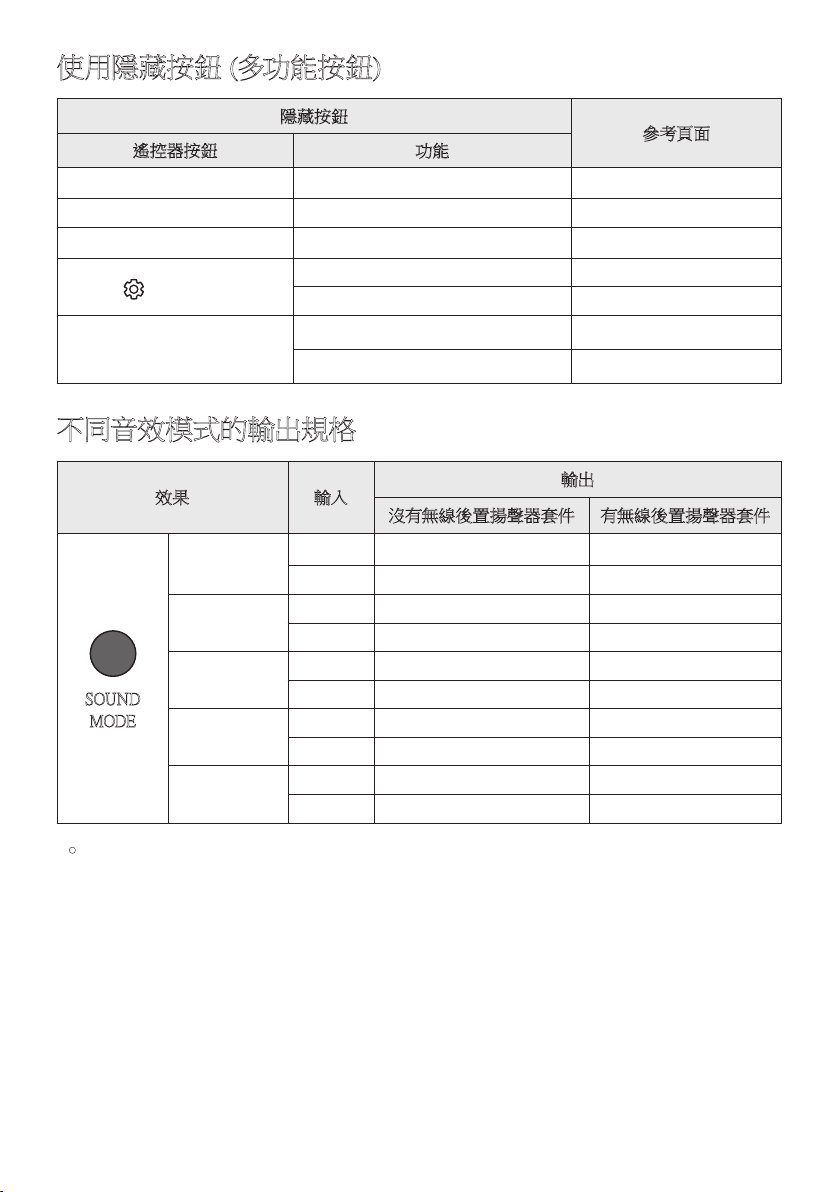
TPE - 24
使用隱藏按鈕 (多功能按鈕)
隱藏按鈕
參考頁面
遙控器按鈕 功能
WOOFER (向上) 電視遙控器 開啟/關閉 (待命) 第 23 頁
向左 電視自動連線開啟/關閉 (藍牙就緒) 第 13 頁
向上 ID SET 第 21 頁
(音效控制)
7 環帶 EQ (按住 5 秒鐘) 第 22 頁
重設 (按住 10 秒鐘) 第 28 頁
SOUND MODE
DRC ON/OFF (待命) 第 21 頁
Bluetooth Power 第 21 頁
不同音效模式的輸出規格
效果 輸入
輸出
沒有無線後置揚聲器套件 有無線後置揚聲器套件
SOUND
MODE
Surround
VOL WOOFER
SOUND
MODE
Bluetooth
POWER
STANDARD
2.0 頻道
2.1 頻道 4.1 頻道
5.1 頻道 2.1 頻道 4.1 頻道
SURROUND
SOUND
2.0 頻道
2.1 頻道 4.1 頻道
5.1 頻道 2.1 頻道 4.1 頻道
BASS BOOST
2.0 頻道
2.1 頻道 4.1 頻道
5.1 頻道 2.1 頻道 4.1 頻道
GAME
2.0 頻道
2.1 頻道 4.1 頻道
5.1 頻道 2.1 頻道 4.1 頻道
ADAPTIVE
2.0 頻道
2.1 頻道 4.1 頻道
5.1 頻道 2.1 頻道 4.1 頻道
• Samsung 無線後置揚聲器套件可另外購買。若要購買套件,請聯絡您購買有源音箱時的
廠 商。
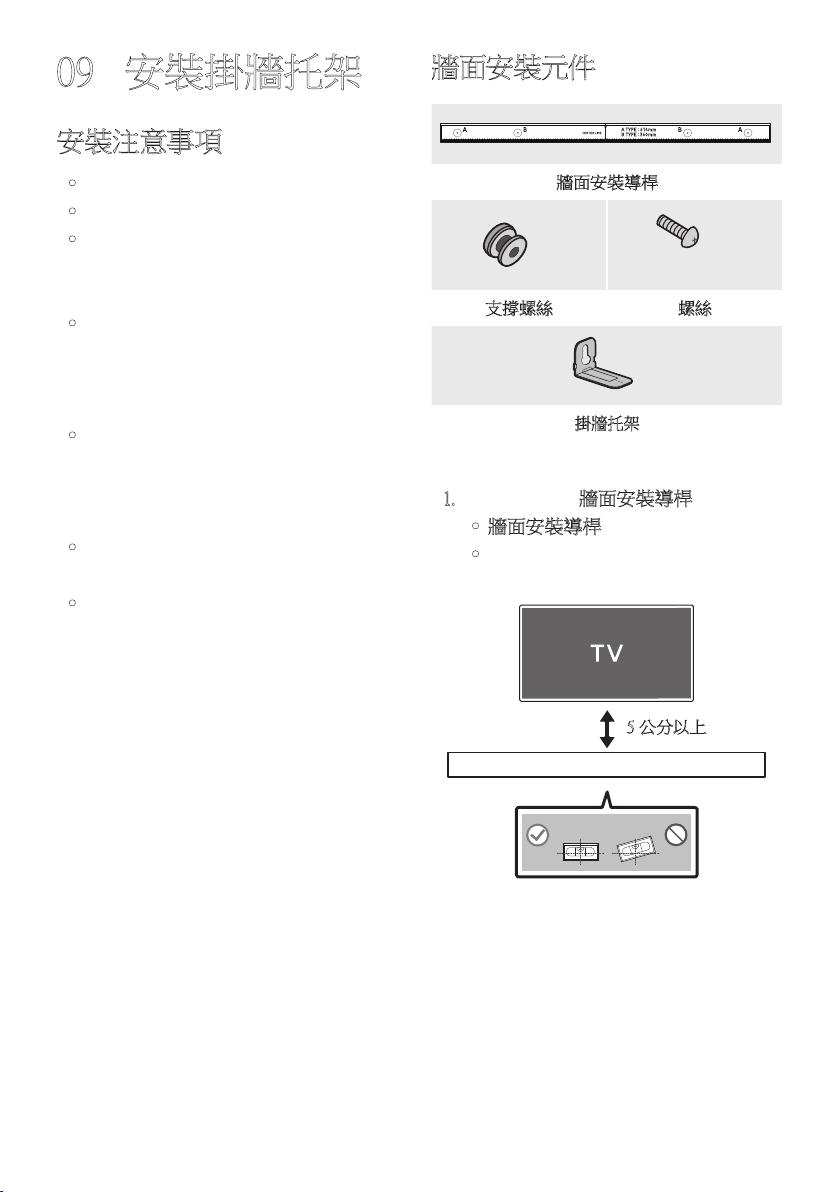
TPE - 25
09 安裝掛牆托架
安裝注意事項
• 僅安裝於垂直牆面。
• 請勿安裝於高溫或高濕度的地方。
• 檢查牆壁是否夠堅固,能夠支撐產品重
量。若無法支撐,請強化牆壁或選擇其
他 安 裝 點。
• 購買並使用適合用於該牆壁種類 (灰漿
板、鐵 板、木 材 等 ) 的 銼 屑 螺 絲 或 固 定
器。若 可 能,請 支 撐 螺 絲 固 定 在 牆 壁 螺
栓 中。
• 根據您要安裝有源音箱的牆壁類型和厚
度,購 買 牆 面 安 裝 螺 絲。
– 直 徑:M 5
– 長度:建議使用 35 毫米以上。
• 請先將纜線從裝置連接至外部裝置,再
將 有 源 音 箱 安 裝 到 牆 上。
• 在安裝前,請確認裝置已關閉並拔下電
源插頭。否則,可能會造成觸電。
牆面安裝元件
牆面安裝導桿
x 2
(M4 x L10)
x 2
支撐螺絲 螺絲
x 2
掛牆托架
1. 對著牆面放置牆面安裝導桿。
• 牆面安裝導桿必 須 水平。
• 若電視安裝於牆面,請將有源音箱安
裝在距離電視下方至少 5 公分處。
5 公分以上
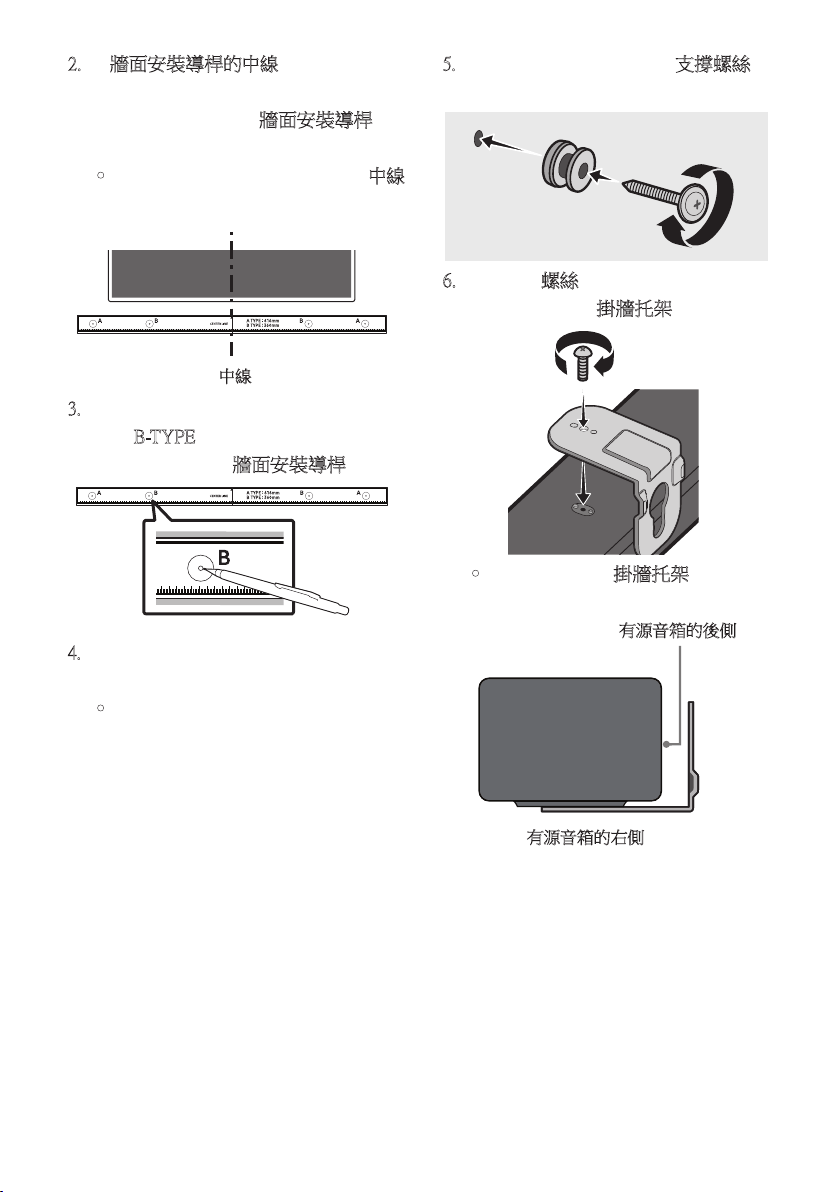
TPE - 26
2. 將牆面安裝導桿的中線與電視的中央
對齊 (如果您將有源音箱安裝在電視下
方 ),然 後 使 用 膠 帶 將 牆面安裝導桿固
定 在 牆 上。
• 如 果 您 未 在 電 視 下 方 安 裝,請 將 中線
放在安裝區域的中央。
中線
3. 將筆尖或銳利的鉛筆筆尖穿過導桿每
端的 B-T YPE 影 像 中 央,以 標 示 支 撐 螺
絲的孔,然後移除牆面安裝導桿。
4. 使用適當大小的鑽頭,在牆上的每個標
記 鑽 孔。
• 如 果 標 記 與 掛 釘 的 位 置 不 一 致,請 務
必將適當的膨脹管先插入孔中,再插
入支撐螺絲。如果您使用膨脹管,請
確定您鑽的孔足以容納要使用的膨脹
管。
5. 將螺釘 (未提供) 推入每個支撐螺絲,然
後將每個螺釘緊緊地鎖入支撐螺孔中。
6. 使用 2 個螺絲,以 正 確 的 方 向 在 有 源 音
箱底部安裝 2 個掛牆托架。
• 組 裝 時,請 確 認 掛牆托架的吊掛部位
位於有源音箱後側的後方。
有源音箱的後側
有源音箱的右側
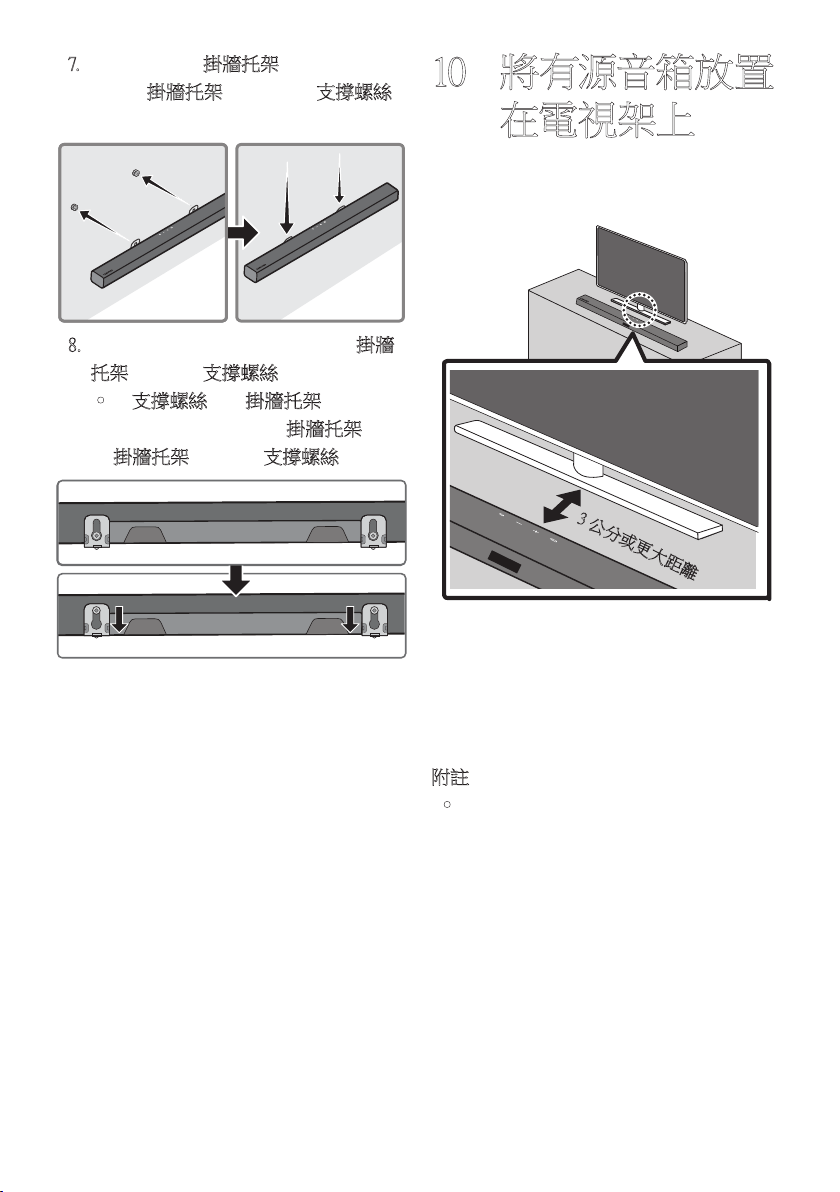
TPE - 27
7. 使用已固定的掛牆托架安 裝 有 源 音 箱,
只要將掛牆托架掛在牆上的支撐螺絲
即 可。
8. 如下所示,向下滑動有源音箱,讓掛牆
托架牢固置於支撐螺絲。
• 將支撐螺絲插入掛牆托架寬的部分
(底部),然後向下滑動掛牆托架,讓
掛牆托架牢固置於支撐螺絲。
10 將有源音箱放置
在電視架上
將 有 源 音 箱 放 置 在 電 視 架 上。
3 公分或更大距離
如圖中所示,對齊有源音箱中央與電視中
央,小心地將有源音箱置於電視架上。
為了 獲 得 最 佳 的 聲 音 品 質,請 將 有 源 音 箱 置
於距離電視前方至少 3 公分的位置。
附註
• 務必將有源音箱置於平坦且堅固的表
面。
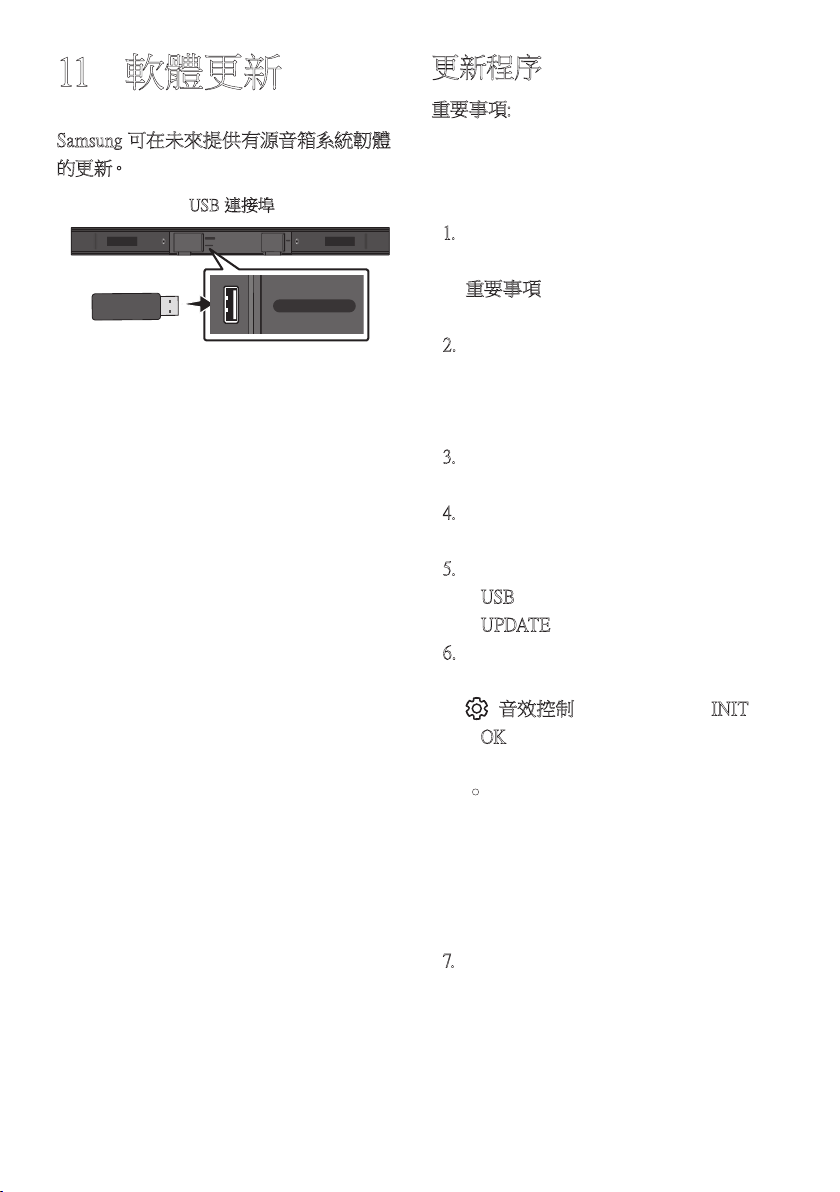
TPE - 28
11 軟體更新
Samsung 可在未來提供有源音箱系統韌體
的 更 新。
USB (5V 0.5A)
DIGITAL AUDIO IN
(OPTICAL)
POWER
USB (5V 0.5A)
DIGITAL AUDIO IN
(OPTICAL)
USB 連接埠
若提供更新,您可以將儲存韌體更新的
USB 裝置,連接至有源音箱上的 USB 連接
埠,以 便 更 新 韌 體。
如需更多關於如何下載更新檔案的資訊,請
至 Samsung Electronics 網站
(www.samsung.com
Support)。
然後選擇產品類型或輸入有源音箱的型號,
選擇軟體與應用程式選項,然後選擇下載。
請 注 意,選 項 名 稱 可 能 會 不 同。
更新程序
重要事項: 更新功能會清除所有使用者設
定。我 們 建 議 您 寫 下 設 定,以 便 在 更 新 後 輕
鬆重設。請注意,更新韌體也會重設低音揚
聲 器 連 接。
1. 將 USB 隨身碟連接至電腦上的 USB 連
接 埠。
重要事項:確認 USB 隨身碟上沒有音
樂 檔 案。這 可 能 會 造 成 韌 體 更 新 失 敗。
2. 前往 (samsung.com)
並選取 [Enter
Model Number] (輸入型號),接著輸入您
的有源音箱型號。選取手冊與下載,接
著 下 載 最 新 的 軟 體 檔 案。
3. 將下載的軟體儲存至 USB 碟並選擇
「在此解壓縮」以解壓縮資料夾。
4. 關閉有源音箱並將包含軟體更新的
USB 隨身碟連接至 USB 連接埠。
5. 開啟有源音箱並將訊號源變更為
「USB」模式。在 3 分鐘內,會顯示
「UPDATE」並 開 始 更 新。
6. 更新完成時,有源音箱會關閉。當有源
音 箱 為 開 啟 狀 態 時,按 住 遙 控 器 上 的
(音效控制) 按鈕 10 秒鐘。「INIT」
「OK」會 出 現 在 顯 示 器 上,然 後 重 設 有
源 音 箱。更 新 完 成。
• 本產品具有 DUAL BOOT 功能。若韌
體無法更新,您可以再次更新韌體。
插入具有更新檔案的 USB 時,有源
音箱的交流電源線必須連接。VFD
沒有任何顯示時,更新會再次開始,
並會在 2 分鐘後完成。
7. 還 原 有 源 音 箱 上 的 設 定。

TPE - 29
若沒有顯示 UPDATE
1. 關閉有源音箱,拔除含有更新檔案的
USB 儲存裝置,然後重新連接至有源音
箱的 USB 連接埠。
2. 中斷連接有源音箱的電線、重新連接
它,然 後 開 啟 有 源 音 箱。
附註
• 若有源音箱支援的音訊檔案儲存在 USB
儲存裝置中,韌體更新可能無法正常運
作。
• 請勿在套用更新時中斷電源或移除 USB
裝 置。
• 更 新 完 成 後,會 初 始 化 有 源 音 箱 中 的 使
用者設定,讓您可以重設設定。我們建
議您寫下設定,以便在更新後輕鬆重
設。 請注意,更新韌體也會重設有源重
低音音箱連接。
若在更新後,沒有自動重新建立有源重
低音音箱連接,請參閱第 6 頁。
若軟體更新失敗,請檢查 USB 碟是否有
缺 陷。
• Mac OS 使用者應使用 MS-DOS (FAT) 作
為 USB 格式。
• 某些製造商的 USB 儲存裝置可能無法
讓人透過 USB 更新。
TPE - 30
疑難排解
尋求協助之前,請先檢查下列項目。
有 源 音 箱 未 開 啟。
; 檢查有源音箱的電源線是否正確插入
插 座 中。
有 源 音 箱 不 正 常 運 作。
; 在 拔 下 電 源 線 後,重 新 插 入。
; 從外部裝置拔除電源線並重試。
; 若沒有訊號,有源音箱會在一段特定
時間後自動關閉。開啟電源。
(請參閱第 3 頁 )。
若 遙 控 器 無 法 運 作。
; 操將遙控器直接對準有源音箱。
; 更換新的電池。
有源音箱沒有輸出任何聲音。
; 有 源 音 箱 音 量 太 低 或 靜 音。調 整 音
量。
; 連接任何外部裝置 (STB 藍牙裝置、行
動裝置等) 時,請調整外部裝置的音
量。
; 如需電視的聲音輸出,請選擇有源音
箱。(Samsung TV:首頁 ( ) → 設定
( ) → 音效 → 音效輸出 → 選擇有
源音箱)
; 連接至有源音箱的纜線不可鬆脫。拔
除纜線並重新連接。
; 完全拔除電源線,重新連接,然後開啟
電 源。
; 初始化產品並重試。(請參閱第 28
頁 )。
有源重低音音箱沒有輸出任何聲音。
; 檢查有源重低音音箱後方的 LED 指
示燈是否亮藍燈。若指示燈緩慢閃爍
藍燈或變成紅燈,請重新連接有源音
箱和有源重低音音箱。
(請參閱第 7 頁 )。
; 若有源音箱和有源重低音音箱之間有
障 礙 物,您 可 能 會 遇 到 問 題。將 裝 置 移
到 遠 離 障 礙 物 的 區 域。
; 若附近有其他傳送無線電射頻訊號的
裝 置,可 能 會 中 斷 連 接。讓 揚 聲 器 遠 離
這 類 裝 置。
; 拔 除 並 重 新 連 接 電 源 插 頭。
有源重低音音箱音量過低。
; 正在播放的內容原始音量可能很低。
嘗試調整有源重低音音箱音量。
(請參閱第 22 頁 )。
; 讓 有 源 重低 音 音 箱 更 靠 近 您。
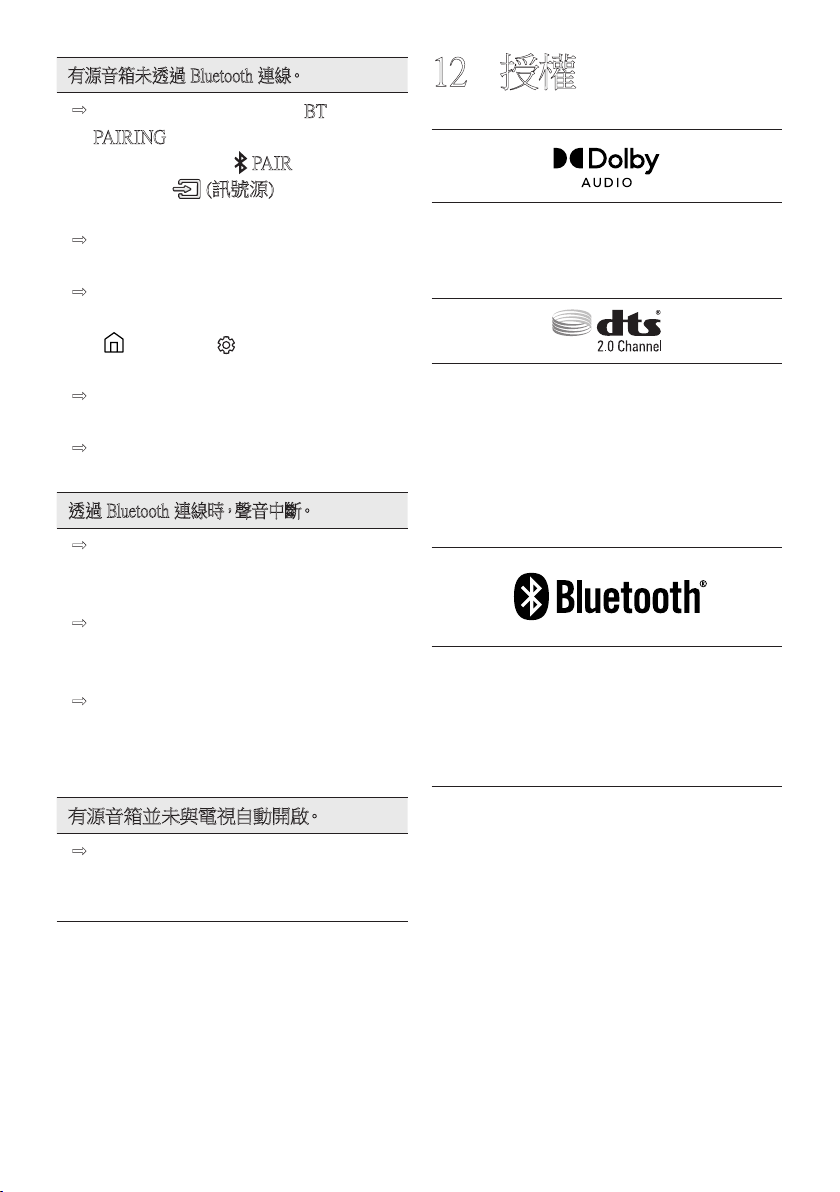
TPE - 31
有源音箱未透過 Bluetooth 連線。
; 連 線 新 的 裝 置 時,切 換 至「BT
PAI RING」以進行連線。
(按下遙控器上的 PAIR 按鈕或按下
機身上的 (訊號源) 按鈕至少
5 秒。)
; 若 有 源 音 箱 已 連 接 至 另 一 個 裝 置,請
先中斷連接該裝置,再切換裝置。
; 在要連線的裝置上移除藍牙揚聲器清
單後重新連線。(Samsung TV:首頁
( ) → 設定 ( ) → 音效 → 音效輸
出 → 藍牙揚聲器清單)
; 拔 除 並 重 新 連 接 電 源 插 頭,然 後 重
試。
; 初 始 化 產 品 並 重 試。
(請參閱第 28 頁 )。
透過 Bluetooth 連線時,聲音中斷。
; 有些產品在太靠近有源音箱時會造成
無線電干擾。例如:微波爐、無線路由
器 等。
; 若透過 Bluetooth 連線的裝置離有源音
箱 過 遠,可 能 會 造 成 聲 音 中 斷。請 將 裝
置移到更靠近有源音箱的位置。
; 若您身體的一部分接觸到 Bluetooth 收
發器或本產品安裝於金屬家具上,則
聲 音 可 能 會 中 斷。
請 檢 查 安 裝 環 境 和 使 用 情 況。
有 源 音 箱 並 未 與 電 視 自 動 開 啟。
; 若您在觀看電視時關閉有源音箱,會
停 用 與 電 視 之 間 的 電 源 同 步。請 先 關
閉 電 視。
12 授權
Manufactured under license from Dolby
Laboratories. Dolby, Dolby Audio and the
double-D symbol are trademarks of Dolby
Laboratories Licensing Corporation.
For DTS patents, see http://patents.dts.com.
Manufactured under license from DTS
Licensing Limited. DTS, the Symbol, DTS in
combination with the Symbol, and DTS 2.0
Channel are registered trademarks or
trademarks of DTS, Inc. in the United States
and/or other countries. © DTS, Inc. All Rights
Reserved.
The Bluetooth® word mark and logos are
registered trademarks owned by the Bluetooth
SIG, Inc. and any use of such marks by
Samsung Electronics Co., Ltd. is under
license. Other trademarks and trade names
are those of their respective owners.

TPE - 32
[ENERGY STAR]
ENERGY STAR qualified model only
– Your Samsung product is ENERGY STAR
qualified in its factory default setting.
Change to certain features, settings and
functionality in this product can change the
power consumption, possibly beyond the
limits required for ENERGY STAR
qualification.
– Environmental Protection Agency and
Department of Energy. ENERGY STAR
is a joint program of the Government
agencies, designed to promote energy
efficient products and practices.
Refer to www.energystar.gov for more information
of the ENERGY STAR Program.
ENERGY STAR qualified model only
(Applicable to Thin Client models only)
As an ENERGY STAR® Partner,
SAMSUNG has determined that this product
meets the ENERGY STAR® guidelines for
energy efficiency.
– The ENERGY STAR Program has been
to reduced greenhouse gas emissions and
save energy through voluntary labeling.
– Power management setting of this product
have been enabled by default, and have
various timing setting from 1 minutes to
5 hours.
– The product can wake with a button press
on the chassis from sleep mode.
ENERGY STAR qualified model only (The
other models)
– As an ENERGY STAR Partner, Samsung
has determined that this product or
product models meets the ENERGY
STAR guideline for energy efficiency.
13 開放式原始碼授
權聲明
若要針對開放原始碼相關問題傳送詢問和
要求,請聯絡 Samsung Open Source
(http://opensource.samsung.com)
14 關於維修的重要
說明
本使用說明書中的圖片和圖解僅供參考,可
能與實際的產品外觀有所不同。
TPE - 33
15 規格和指南
規格
型號名稱 HW-A450
USB 5V/0.5A
重量 1.5 千克
尺寸 (寬 x 高 x 厚) 860.0 x 54.0 x 74.0 毫米
工作溫度範圍 +5°C 到 +35°C
工作濕度範圍 10 % 到 75 %
放大器
額定輸出功率 40W x 2, 6 歐姆
支援的播放格式
(DTS 2.0 音效以 DTS 格式播放。)
LPCM 2ch, Dolby Audio™ (支援 Dolby®
Digital), DTS
有源重低音音箱名稱 PS-WA45T
重量 4.3 千克
尺寸 (寬 x 高 x 厚) 181.5 x 343.0 x 272.0 毫米
放大器
額定輸出功率 220W
附註
• Samsung Electronics Co., Ltd 保留隨時變更規格的權利,恕不另行通知。
• 重 量 和 尺 寸 為 估 計 值。
• 取得審驗證明之低功率射頻器材,非經核准,公司、商號或使用者均不得擅自變更頻
率、加 大 功 率 或 變 更 原 設 計 之 特 性 及 功 能。
低功率射頻器材之使用不得影響飛航安全及干擾合法通信;經發現有干擾現象時,應
立即停用,並改善至無干擾時方得繼續使用。
前述合法通信,指依電信管理法規定作業之無線電通信。低功率射頻器材須忍受合法通
信或工業、科學及醫療用電波輻射性電機設備之干擾。
應避免影響附近雷達系統之操作。
• HW-A450 : AC110-240V ~ 50/60Hz、25W
• PS-WA45T : AC110-240V ~ 50/60Hz、40W
RoHS
設 備 名 稱:有 源 音 箱 型 號 ( 型 式 ): H W - A 4 5 0
Equipment name Type designation (Type)
單元
Unit
限用物質及其化學符號
Restricted substances and its chemical symbols
鉛
Lead
(Pb)
汞
Mercury
(Hg)
鎘
Cadmium
(Cd)
六價鉻
Hexavalent
chromium
(C r
+6
)
多溴聯苯
Polybrominated
biphenyls
(PBB)
多溴二苯醚
Polybrominated
diphenyl ethers
(PBDE)
電路板 - ○ ○ ○ ○ ○
外殼 ○ ○ ○ ○ ○ ○
金屬零件 - ○ ○ ○ ○ ○
揚聲器 ○ ○ ○ ○ ○ ○
配件 (例:線材,
遙控器)
- ○ ○ ○ ○ ○
備考1.〝○〞係指該項限用物質之百分比含量未超出百分比含量基準值。
Note 1:“○” indicates that the percentage content of the restricted substance does not exceed the
percentage of reference value of presence.
備考2.〝-〞係指該項限用物質為排除項目。
Note 2:The “-” indicates that the restricted substance corresponds to the exemption.
設 備 名 稱:有 源 重 低 音 音 箱 型 號 ( 型 式 ): P S - W A 4 5 T
Equipment name Type designation (Type)
單元
Unit
限用物質及其化學符號
Restricted substances and its chemical symbols
鉛
Lead
(Pb)
汞
Mercury
(Hg)
鎘
Cadmium
(Cd)
六價鉻
Hexavalent
chromium
(C r
+6
)
多溴聯苯
Polybrominated
biphenyls
(PBB)
多溴二苯醚
Polybrominated
diphenyl ethers
(PBDE)
電路板 - ○ ○ ○ ○ ○
外殼 ○ ○ ○ ○ ○ ○
金屬零件 - ○ ○ ○ ○ ○
揚聲器 ○ ○ ○ ○ ○ ○
配件 (例:線材,
遙控器)
- ○ ○ ○ ○ ○
備考1.〝○〞係指該項限用物質之百分比含量未超出百分比含量基準值。
Note 1:“○” indicates that the percentage content of the restricted substance does not exceed the
percentage of reference value of presence.
備考2.〝-〞係指該項限用物質為排除項目。
Note 2:The “-” indicates that the restricted substance corresponds to the exemption.
© 2021 Samsung Electronics Co., Ltd. All rights reserved.
Contact SAMSUNG WORLD WIDE
If you have any questions or comments relating to Samsung products, please contact the SAMSUNG customer
care Centre.
Country /Area Samsung Service Centre
Web Site
`
Asia Pacifi c
CHINA 400-810-5858 www.samsung.com/cn/support
TAIWAN
0800-329-999
0809-00-5237 ( B2B / Dealer)
www.samsung.com/tw/support
HONG KONG 3698 4698
www.samsung.com/hk/support (Chinese)
www.samsung.com/hk_en/support (English)
MACAU 0800 333
SINGAPORE 1800 7267864 | 1800-SAMSUNG www.samsung.com/sg/support
AUSTRALIA 1300 362 603 www.samsung.com/au/support
NEW ZEALAND 0800 726 786 www.samsung.com/nz/support
VIETNAM 1800 588 889 www.samsung.com/vn/support
THAILAND 1800-29-3232 (Toll free for all product) www.samsung.com/th/support
MYANMAR +95-1-2399-888 www.samsung.com/mm/support
CAMBODIA 1800-20-3232 (Toll free)
www.samsung.com/th/support
LAOS +856-214-17333
MALAYSIA
1800-88-9999
+603-7713 7420 (Overseas contact)
www.samsung.com/my/support
INDONESIA
021-5699-7777
0800-112-8888 (All Product, Toll Free)
www.samsung.com/id/support
PHILIPPINES
1-800-10-726-7864 [ PLDT Toll Free ]
1-800-8-726-7864 [ Globe Landline and Mobile ]
02-8-422-2111 [ Standard Landline ]
www.samsung.com/ph/support
INDIA
1800 40 SAMSUNG (1800 40 7267864) (Toll-Free)
1800 5 SAMSUNG (1800 5 7267864) (Toll-Free)
www.samsung.com/in/support
NEPAL
16600172667 (Toll Free for NTC Only)
9801572667 (Toll Free for Ncell users)
BANGLADESH
08000-300-300 (Toll free)
09612-300-300
SRI LANKA 011 SAMSUNG (011 7267864)